En 1999, el cine vivió un milagro que aún no se ha podido repetir. The Matrix apareció sin universo extendido, sin CGI masivo, sin precedentes… y aun así cambió la industria para siempre. Se volvió un fenómeno cultural, una película de ciencia ficción que mezclaba filosofía, kung-fu, efectos prácticos, hackers, cuero negro y preguntas sobre la realidad. No se parecía a nada… y desde entonces, todos intentan copiarla. Pero hay algo que casi nadie dice: con toda la tecnología que tenemos hoy, sería imposible filmar Matrix tal como la conocimos...
etiquetas: the matrix, cine, me atrapaste, wachowski, keanu reeves, bullet time
En este episodio de El Director me siento con Nacho Carretero, el periodista que mejor conoce el crimen organizado en España, autor del bestseller 'Fariña' y co-creador de la serie 'Marbella' de Movistar. Carretero revela cómo nuestro país se ha convertido en la “ONU del crimen organizado” y paraíso de las mafias, desde la Costa del Sol a Galicia. Con la policía desbordada, ¿estamos a tiempo de evitar que el narc* gané la batalla al Estado en España?
*Entra en https://nordvpn.com/director para conseguir dos años de NordVPN + cuatro meses adicionales, todo con 30 días de garantía de devolución.
La vivienda en España se ha disparado tanto que muchos jóvenes ya olvidan la idea de comprarse un piso y ven otras alternativas como las casas prefabricadas. Pero hay otros que van más allá y deciden vivir de otra forma. Este es el caso de José Antonio, un joven funcionario gaditano, decidió que no iba a esperar más y con su sueldo de 1.300 euros y sin la posibilidad de pagar un piso a decidido optar por la solución de vivir en una furgoneta.
“Es imposible alquilar algo en Cádiz con mi sueldo”, explica en un vídeo publicado en su perfil de TikTok, donde muestra su día a día y que recoge la cadena Telecinco. Su solución ha causado sorpresa y debate, pero él lo resume con una frase contundente: “Dime en qué piso me meto pagando 700 euros al mes”. @huffingtonpost
Tras once años haciendo periodismo de servicio público y un año persiguiendo en los tribunales a la industria del bulo y el odio, CTXT y ACO sellan su alianza en forma de fundación. Acompáñanos, por favor
60% off Code - CW25BUNAP - Valid on: PowerBundle CKA + CKAD, PowerBundle CKS + CKA, PowerBundle KCNA + CKA
50% off Code - CW25K8BUNAP - Valid on: Golden Kubestronaut Bundle, Kubestronaut to Golden Kube upgrade Bundle, Kubestronaut Bundle, CKA to Kubestronaut Bundle, CKAD to Kubestronaut Bundle
60% off Bundles (Including ITPP's) using code CW25BUNAP
50% off courses, certifications, skill creds and ILT's using code CW25AP
and 30% off both Thrive-One annual and Thrive-One monthly subscriptions with CW25TOA, and CW25TOM
back to the classics…why this giant is so important? Which advantages?
Disney
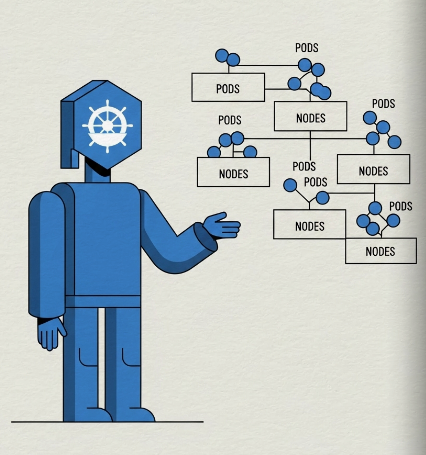
The true power of Kubernetes lies in its ability to completely transform infrastructure management. Instead of thinking about individual virtual machines, networks, and load balancers, you get to manage a single, unified compute fabric with maintenance. This changes the game, making everything faster, more efficient, and ultimately less expensive (if your team has skills).
Consider the task of deploying a new application.
Before Kubernetes: You would need to provision VMs, manually install dependencies, configure networking and firewalls, set up a load balancer, and create monitoring alerts. Every new application required a full-stack infrastructure setup, a time-consuming and error-prone process.
With Kubernetes: You simply create a YAML file that declares your desired state: “I want to deploy my application with 3 replicas and expose it with a service.” You submit this file, and Kubernetes handles all of the low-level details instantly. It finds the best nodes, sets up the network rules, and manages the lifecycle of your application automatically.
While the initial setup of the cluster requires careful planning, the benefits can be grat. Deploying a new application or scaling an existing one is now a lightning-fast process. Replicating a pod is nearly instantaneous because the container images are often cached on the worker nodes.
This resource sharing means you no longer have to reserve dedicated, underutilized VMs for every single application, leading to significant cost savings and a more efficient use of your cloud resources.
Declarative vs. Imperative Configuration
Declarative Configuration is the preferred method for managing Kubernetes objects. You define the desired state of your system (e.g., “I want 5 replicas of this container”) in a manifest file (.yaml). Kubernetes’ control plane then works to achieve and maintain that state. This is highly advantageous for automation and version control.
Imperative Configuration involves direct commands to the cluster (e.g., kubectl create deployment). While useful for quick, ad-hoc tasks, it is not reproducible and should be avoided in production environments.
Key takeaway: Always use declarative configuration for production workloads to ensure consistency, auditability, and easy rollback.
gemini
Control Plane
Kubernetes automates the deployment, scaling, and management of containerized applications. This includes tasks like service discovery, load balancing, and self-healing.
So, its primary goal is to maintain the Desired State. It is the ultimate decision-maker. If you ask for 3 replicas of an app, the Control Plane ensures 3 exist. If one dies, the Control Plane detects it and orders a replacement. So, K8s will take the burden of maintaining application availability.
Its management Team:
kube-apiserver (The Hub)
The component that talks to the outside world.
It validates and configures data for objects (Pods, Services, etc.).
It is the only component that writes to the database. All other components (Scheduler, Kubelet, generic users) must talk to the API Server. It is stateless and scales horizontally.
etcd (The Memory)
The backing store for all cluster data.
Stores the entire state of the cluster (what Pods exist, what nodes are healthy).
It is a consistent and highly-available key-value store. It is the single “Source of Truth.” If you lose etcd data, you lose the cluster.
How we avoid losing it?:
Clustering (Raft Algorithm): In a production environment, the Control Plane is distributed. It is not just one server; it is a fleet of them working together….etcd is rarely run as a single instance in production. It runs as a cluster of odd-numbered nodes (usually 3 or 5).
Quorum: It relies on a majority vote. If you have 3 nodes, you can lose 1 and still write data. If you have 5, you can lose 2. This ensures high availability.
Strict Consistency: Unlike some databases that allow “eventual consistency,” etcd ensures that if a read happens immediately after a write, it gets the new data.
Backups: Administrators (or cloud providers like EKS) perform periodic snapshots of the etcd database to cold storage to recover from total catastrophic failure
kube-scheduler (The Planner)
It constantly watches the API Server for unscheduled Pods (Pods with an empty nodeName field). Its task is to assign Pods to Nodes, but NOT running the Pod (the Kubelet does that); it is strictly about the decision of where to place it.
Decision: When a new Pod is created, the scheduler initiates a rigorous three-step cycle to find the best home for it.
1. Filtering “Which nodes are capable of running this Pod?”
The scheduler looks at the entire cluster and filters out nodes that do not meet the hard requirements. If a node fails a filter, it is discarded from the list of candidates.
Resource Availability: Does the node have enough free CPU and RAM to satisfy the Pod’s requests?
Node Selectors: Does the node have the labels specified in the Pod’s nodeSelector?
Taints: Does the node have a taint that the Pod does not tolerate?
Result: A list of feasible nodes (0, 1, or many). If 0, the Pod goes into Pending state.
Scoring: “Which of the capable nodes is the best fit?”
The scheduler assigns a score (0–100) to the remaining feasible nodes based on active scoring functions.
Image Locality: Nodes that already have the container image cached get a higher score (saves bandwidth and startup time).
Least Requested: Nodes with fewer existing workloads might be prioritized to spread the load (load balancing).
Bin Packing: If you want to fill up nodes (so to optimize resources), you might score nodes higher if they are almost full, to free up other nodes for scaling down (cost optimization).
Once the winner is selected, the scheduler sends a request to the API Server to update the Pod object. It writes the node’s name into the Pod’s nodeName field. The Kubelet on that specific node sees this assignment and starts the container runtime.
kube-controller-manager (The Enforcer)
A daemon that embeds the core control loops. The central mind that watches and act.
The Controller’s Control Loop
Kubernetes is built on the “control loop” concept. A controller continuously watches the state of resources in the cluster, compares it to the desired state defined in your manifest files, and takes action to reconcile any differences. It constantly checks: “Is the reality matching what the user requested?”
Self-Healing (Rescheduling): If a Node crashes, the scheduler does not “move” the Pod (Pods are immutable). Instead, the Controller notices the Pod is missing (Current State < Desired State) and creates a new replacement Pod. The Scheduler then immediately assigns this new Pod to a healthy node.
Performance & Preemption: If a high-priority “Critical” Pod needs to run but the cluster is full, the Scheduler can Preempt (evict) lower-priority workloads to free up resources. This ensures your most important applications always have the performance they need.
Rebalancing: While standard Kubernetes is conservative about moving running Pods, the concept of Desired State ensures that if you add new nodes to a cluster, new workloads will automatically start filling them to balance performance.
Data Plane Components
The data plane consists of the Worker Nodes where your applications run. Each node has two main components:
Kubelet: The primary agent on a node that ensures containers are running in a pod. It is the only that can communicate with the control plane to receive instructions.
Kube-proxy: A network proxy that maintains network rules on the nodes, allowing communication to and from your pods and services. When a request is made to a Kubernetes Service, the kube-proxy on each node takes that Service’s stable IP address and creates a set of local network rules (typically using iptables or IPVS). This is what makes Services work. When you send traffic to a Service IP, kube-proxy is the component that ensures the packet is forwarded to one of the backend Pods, even if that Pod is on a different node. A Service gives you a single, constant IP address and DNS name that never changes, automatically forwarding traffic to whichever Pods are currently healthy and running behind it..
Container Runtime (The Engine)
The software responsible for actually running the containerized process. In the past, this was almost always Docker. Modern Kubernetes (and EKS) uses containerd or CRI-O.
CRI (Container Runtime Interface): interface that acts as a “universal translator” between the Kubelet and the container runtime. The Kubelet sends generic commands (like “Start Container”) that are translated into the specific low-level actions needed to run the container.
Kubernetes Pod Specifications (PodSpecs)
A PodSpec is a YAML-based definition of a pod, describing its containers, volumes, networking, and other configuration. It is the core unit of deployment in Kubernetes. Understanding the PodSpec is crucial as it dictates the behavior and configuration of your application.
Resource Requests and Limits
This is the most critical configuration for cluster stability.
Requests: The Minimum guaranteed. The Scheduler uses this number to decide if a node has enough room.
Limits: The Maximum allowed. The Linux kernel uses this to throttle (CPU) or kill (Memory) the process if it goes too high.
For critical apps, set requests equal to limits. This gives you "Guaranteed QoS" (Quality of Service).
apiVersion: v1
kind: Pod
metadata:
  name: critical-web-app
spec:
  containers:
  - name: web
    image: nginx
    resources:
      requests:
        memory: "1Gi"   # Scheduler guarantees 1Gi is free on the node
        cpu: "500m"     # 0.5 CPU cores
      limits:
        memory: "2Gi"   # If it hits 2Gi, OOMKill happens
        cpu: "1000m"    # If it tries to use >1 core, it is throttled (slowed down)
Taints and Tolerations
Taints allow a Node to repel Pods. This is used for “Dedicated Nodes” (e.g., GPU nodes, Admin-only nodes). Unless a Pod has a special “Toleration” (a VIP pass), the Scheduler will not place it there.
Step 1: Taint the Node (The Bouncer)
# Apply a taint to a node
kubectl taint nodes gpu-node-01 dedicated=gpu:NoSchedule
Step 2: Add Toleration to Pod (The VIP Pass)
apiVersion: v1
kind: Pod
metadata:
  name: ml-training-job
spec:
  containers:
  - name: tensor-app
    image: tensorflow/tensorflow:latest
  tolerations:
  - key: "dedicated"
    operator: "Equal"
    value: "gpu"
    effect: "NoSchedule"
  # Note: A toleration allows entry, but doesn't guarantee it.
  # Usually combined with Node Affinity to ensure it *must* go there.
Node Affinity (The Magnet)
Affinity allows a Node to attract Pods. This is used for “Zone Awareness” or “Hardware Selection.”
Hard Affinity (required): "You MUST run here. If no node matches, stay Pending."
Soft Affinity (preferred): "Please run here. If you can't, run anywhere else."
IgnoredDuringExecution means that Kubernetes ignores the change for existing workloads. It does not evict them.
Persistent Storage
In Kubernetes, Pods are ephemeral : if a Pod writes data to its local disk and then crashes, that data is gone forever. To save data, we use Persistent Storage.
StorageClass : what is available (e.g., “Fast SSD”, “Cheap HDD”, “Network File System”).
PersistentVolumeClaim / PVC: what the apps want (e.g., “I want 10GB of the Fast SSD”).
PersistentVolume / PV : This is the real slice of storage .
Dynamic Provisioning
In the old days (“Static Provisioning”), an Admin had to manually create 100 PVs and hope they were enough. Today, we use Dynamic Provisioning. When you create a PVC (The Order), the Cluster automatically talks to the Cloud Provider (AWS/GCP) to create the PV instantly.
1. The StorageClass
This tells Kubernetes: “When someone asks for gp3-storage, ask AWS to create an EBS gp3 volume."
apiVersion: storage.k8s.io/v1
kind: StorageClass
metadata:
  name: gp3-storage
provisioner: ebs.csi.aws.com   # <--- The AWS EBS CSI Driver
parameters:
  type: gp3
  fsType: ext4
reclaimPolicy: Delete          # If PVC is deleted, delete the EBS volume too
volumeBindingMode: WaitForFirstConsumer # Important: Don't create volume until Pod is scheduled!
2. The PersistentVolumeClaim / PVC
The developer applies this. Notice they don’t mention AWS or EBS or GCP.
apiVersion: v1
kind: PersistentVolumeClaim
metadata:
  name: my-database-pvc
spec:
  accessModes:
    - ReadWriteOnce            # EBS can only attach to ONE node at a time
  storageClassName: gp3-storage # Matches the SC above
  resources:
    requests:
      storage: 10Gi
3. The Pod
The Pod “mounts” the PVC.
apiVersion: v1
kind: Pod
metadata:
  name: database-pod
spec:
  containers:
  - name: mysql
    image: mysql:8.0
    volumeMounts:
    - mountPath: "/var/lib/mysql" # Where the app expects the data
      name: my-storage
  volumes:
  - name: my-storage
    persistentVolumeClaim:
      claimName: my-database-pvc # Matches the PVC above
The “ReadWriteOnce” Trap
Most cloud block storage (AWS EBS, Google Persistent Disk, Azure Disk) is ReadWriteOnce (RWO).
Limitation: The volume can only be attached to ONE Node at a time.
Consequence: You cannot run 3 replicas of a web app sharing the same EBS volume.
Solution: For shared storage (ReadWriteMany), you must use a File System like AWS EFS (NFS), or FileStore.
Resilience & Scaling (ReplicaSets)
To ensure resilience, there are ReplicaSets.
A ReplicaSet is a simple loop with one job: Ensure X copies of a Pod exist. It does not care where they run, only that they run.
A ReplicaSet does not “own” Pods by name. It owns them by Label. If you manually create a loose Pod with the label app: my-web-app, the ReplicaSet will see it, count it, and adopt it.
Danger Zone: If you already have 3 replicas running, and you manually create a 4th Pod with the same label, the ReplicaSet will notice “Current (4) > Desired (3)” and terminate one of them immediately to return to the desired state.
You rarely write a ReplicaSet YAML directly. You use a Deployment.
When you create a Deployment, it automatically creates the ReplicaSet for you.
apiVersion: apps/v1
kind: Deployment
metadata:
  name: frontend-deployment
spec:
  replicas: 3               # <--- Passes this to the ReplicaSet
  selector:
    matchLabels:
      app: frontend
  template:                 # <--- The Pod Template
    metadata:
      labels:
        app: frontend
    spec:
      containers:
      - name: nginx
        image: nginx:1.14.2
Configuring kubectl and the kubeconfig file
kubectl is the command-line tool for interacting with the Kubernetes API server. The kubeconfig file is where kubectl stores configuration for accessing your clusters. It contains cluster addresses, user credentials, and context information for different environments. Managing this file is key to securely and efficiently managing multiple clusters.
Kubernetes Namespaces
Namespaces are a way to logically partition a single cluster into multiple virtual clusters. They provide a scope for names and a mechanism for resource isolation, which is critical for managing multi-tenant environments and development teams.
Example: A common use case for namespaces is to separate environments. You could have a production namespace for your live applications and a development namespace for your testing and staging environments. This ensures that the two environments cannot interfere with each other, and you can apply different policies (e.g., security or resource quotas) to each.
ConfigMap and Secrets
The Golden Rule of containers is: Never bake configuration into your container image. If you have to rebuild your Docker image just to change a database URL or a log level, you are doing it wrong.
We solve this with ConfigMaps (for plain text) and Secrets (for sensitive data).
Think of a ConfigMap as a “Virtual Disk” that contains text files.
You create a ConfigMap with key-value pairs (Filename -> Content).
You tell the Pod to “mount” this map as a volume.
Kubernetes creates the files inside the container at runtime.
Example: Fluent Bit Configuration
Fluent Bit is a log processor. It needs a complex config file (fluent-bit.conf) to know which logs to read and where to send them.
The ConfigMap (The Content)
This object holds the actual text of the configuration file.
apiVersion: v1
kind: ConfigMap
metadata:
  name: fluent-bit-config
  labels:
    app.kubernetes.io/name: fluentbit
data:
  # The "Key" becomes the filename
  fluent-bit.conf: |
    [SERVICE]
       Parsers_File  parsers.conf
    [INPUT]
       Name    tail
       Tag     kube.*
       Path    /var/log/containers/*.log
       Parser  docker
       DB      /var/log/flb_kube.db
The Pod (The Consumer)
The Pod definition connects the ConfigMap to a specific path inside the container.
apiVersion: v1
kind: Pod
metadata:
  name: fluent-bit-pod
spec:
  containers:
  - name: fluent-bit
    image: fluent/fluent-bit
    volumeMounts:
    # 2. Mount the volume at a specific path
    - name: fb-config-vol       # Matches the volume name below
      mountPath: "/fluent-bit/etc/" # Where the file will appear
      readOnly: true
  volumes:
  # 1. Define a volume backed by the ConfigMap
  - name: fb-config-vol
    configMap:
      name: fluent-bit-config   # Matches the ConfigMap name above
The Result: When the container starts, it will find a file at /fluent-bit/etc/fluent-bit.conf containing the text you defined in the ConfigMap.
Why this is powerful
Decoupling: You can use the exact same Docker image (fluent/fluent-bit) in Dev, Staging, and Prod. You just mount a different ConfigMap in each environment.
Live Updates: If you edit the ConfigMap, Kubernetes updates the file inside the container automatically (though the application might need a restart to reload it).
Secrets are used for sensitive data like passwords or API keys. While Secrets are a secure way to store sensitive information, it’s important to note that they are not encrypted by default within Kubernetes; they are simply stored as base64-encoded strings. However, they are more secure than storing plain text configuration because they decouple sensitive data from your application code, provide fine-grained access control through RBAC, and can be integrated with external key management systems for true encryption at rest. Using these objects decouples configuration from your application code, making your container images more portable and your configuration easier to manage and update without rebuilding.
Kubernetes Workloads
Workloads are the objects that manage and schedule pods. Common examples include:
Deployment: Manages a replica set and ensures a specific number of pods are running, handling rolling updates and rollbacks.
StatefulSet: Manages pods that require stable, persistent storage and network identities, ideal for databases.
DaemonSet: Ensures that a copy of a pod runs on every node in the cluster, useful for cluster-wide logging or monitoring agents.
Job: Manages a pod that runs a single, defined task to completion. Unlike the other workloads, a Job is “suicidal” — it is designed to terminate successfully after its task is finished. This makes Jobs perfect for one-off tasks like batch processing or database migrations.
CustomResourceDefinitions (CRDs) and Custom Controllers
Kubernetes is a Platform for Building Platforms.
If you want to add new features, you can do it using CustomResourceDefinitions (CRDs) and Custom Controllers. Together, these form the Operator Pattern.
Out of the box, Kubernetes knows about Pods, Services, and Deployments. But what if you want it to understand a Database?
CRD : You tell the API Server, “I am defining a new word called Database."
Custom Resource: A developer writes YAML saying, “I want a Database named my-sql-db."
Controller: A piece of software (Operator) watches for that sentence and actually spins up the StatefulSets, PVCs, and Services needed to make it happen.
Applying the YAML above does nothing by itself. It just saves a record in Etcd. To make it real, you need a Controller (Operator). This is code running in a Pod that loops forever:
Watch: “Hey API Server, did anyone create a Database object?"
Reconcile: “I see my-app-db requests 20Gi. I will now create a Kubernetes StatefulSet with MySQL 8.0 and a PVC for 20Gi."
Update Status: “I have created the underlying resources. The Database status is now Provisioning."
The result is that your developers can manage a complex, multi-component database with a single, simple command. The custom controller handles all the underlying complexity, providing a powerful, automated, and declarative experience tailored to your organization’s needs.
But you need to code for creating a new Controller. Difficult? It used to be (writing raw REST API clients). Today, we use Frameworks like Kubebuilder or Operator SDK. These are code generators. They write 90% of the boilerplate for you.
In short, the pillars of Kubernetes. It you grasp all this, you can design really complex and powerful systems, like K8S’s dad.
Today, we announced a significant collaboration with Amazon Web Services (AWS)to offer a managed, private and secure, on-demand, solution for cross-cloud connectivity. This solution is designed to enable customers to easily build enterprise-grade applications that span both Google Cloud and AWS environments. This collaboration is particularly timely, as the adoption of multicloud applications is rapidly accelerating, driven in part by the rise of AI. A Forbes survey highlighted that 82% of respondents anticipate that the arrival of AI services will increase the demand for multicloud networking due to the scarcity of specialized accelerator resources and the availability of diverse AI agents across different vendors. The surge in multicloud adoption is a strategic imperative for organizations looking to build agentic AI applications, optimize workloads, access best-of-breed services, meet data residency requirements, and ensure the necessary resiliency for modern hybrid and multicloud applications.
To address the inherent network infrastructure challenges introduced by multicloud deployments, we designed the Cross-Cloud Network to simplify and optimize networking between Google Cloud and other providers.This commitment to multicloud integration has led to over 50% of the Fortune 500 currently using the Cross-Cloud Network, and this collaboration provides a significant boost. Importantly, this new jointly engineered solution with AWS is being published under an open specification, creating an opportunity to expand the reach, allowing other providers to contribute and implement this solution in their own environments, further benefiting mutual customers.
Introducing the Cross-Cloud Interconnect for AWS
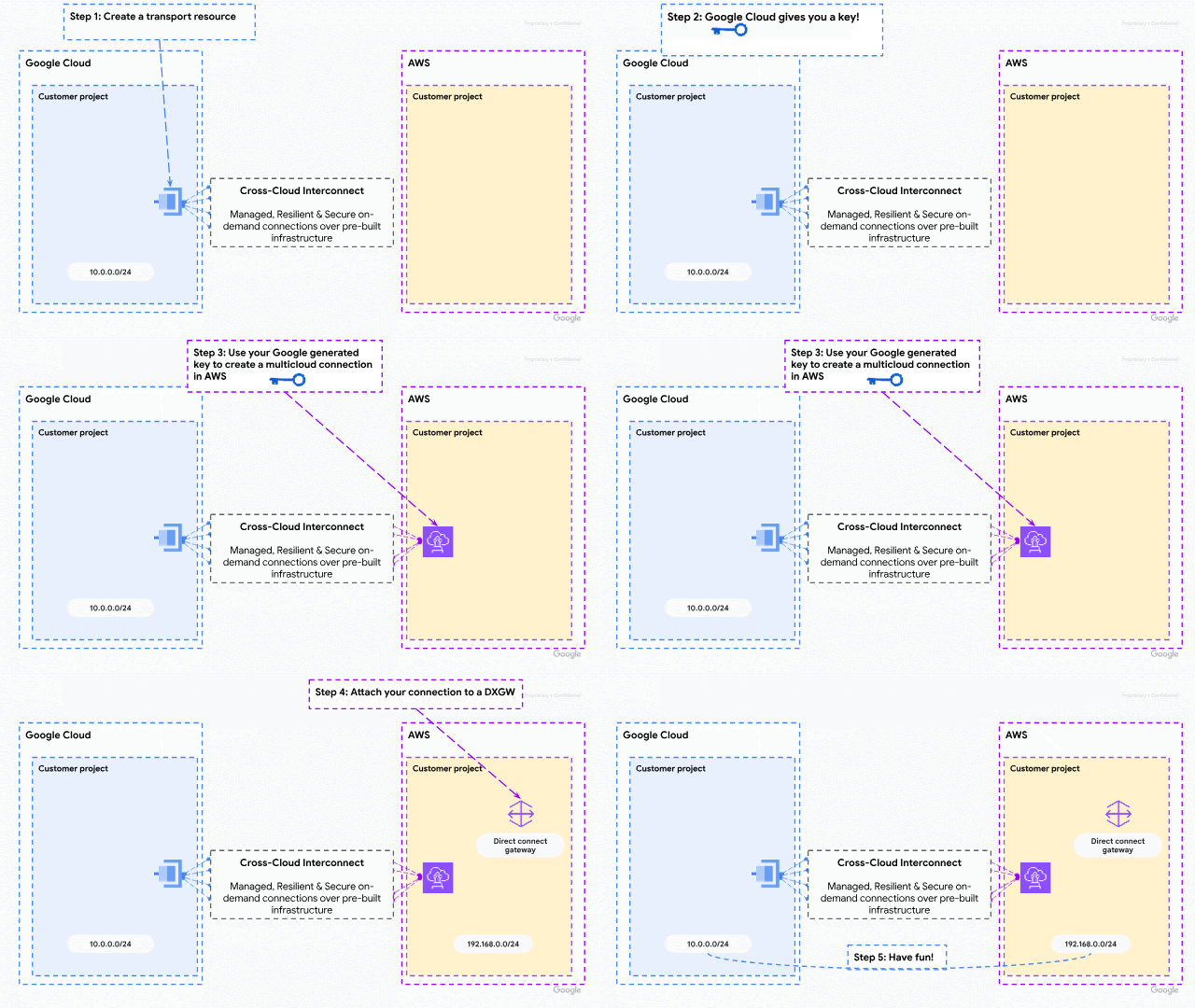
Today marks a major step in simplifying and securing the multicloud journey. We are thrilled to announce a first of its kindopen specification that fundamentally streamlines private network connections between customers' environments across different cloud providers. This groundbreaking joint specification has culminated in the preview of partnerCross-Cloud Interconnect for AWS, a powerful expansion of our Cloud Interconnect portfolio. This innovation allows you to build on-demand connections in minutes between your Google Cloud and AWS VPCs, transforming multicloud networking from a complex build into a simple, managed service.
This is more than just a connection — it's a complete shift in how you adopt multicloud solutions. We are delivering substantial value to our mutual customers:
Simplicity and speed: Say goodbye to complex networking builds. This is a fully managed, cloud-native experience where a cross-cloud connection is as easy as peering two VPCs. We're cutting end-to-end setup time from days to mere minutes, with flexible, on-demand bandwidth starting at 1 Gbps during preview and scaling up to 100 Gbps at general availability.
Secure by default: Your data's security is paramount. All connections between the two clouds' edge routers are MACsec-encrypted— providing line-rate performance with always-on encryption — for a more secure foundation.
Inherently resilient: Benefit from an inherently resilient architecture that provides layers of protection against facility, network, and software failures, ensuring your critical applications remain online.
Open and optimized: The foundation is an open specification for seamless adoption across the industry. You can also benefit from an optimized total cost of ownership through vendor consolidation and an on-demand service model that lets you provision exactly what you need, when you need it.
This service is launching with availability in key locations like N. Virginia, Oregon, London, and Frankfurt, with rapid expansion planned to more locations globally.
Simplifying cross-cloud connectivity
Before today's jointly engineered solution, building applications that spanned multiple cloud environments was a significant undertaking, often becoming a barrier to multicloud adoption. Customers faced a complex, multi-layered process that involved cross-functional teams and substantial lead times.
A typical deployment required several intricate steps:
Procurement: Acquiring physical connections, whether dedicated or through a shared partner offering, and then building and managing the necessary infrastructure to ensure network availability and separation of fate.
Logical configuration: Establishing basic connectivity by meticulously assigning and negotiating non-overlapping link-local IP addresses and setting up VLANs.
Routing setup: Configuring BGP sessions, assigning Autonomous System (AS) numbers, and creating complex routing policies to meet specific performance and reliability requirements.
Security implementation: Conducting thorough security reviews and implementing custom solutions to encrypt traffic between the distinct cloud environments.
The integrated partner Cross-Cloud Interconnect offering completely abstracts away this complexity. Customers can now bypass all the manual steps and instantly leverage pre-built physical connections with built-in security and resiliency, achieving streamlined, on-demand connectivity between their Google Cloud VPCs and AWS.
Building this powerful cross-cloud connection is now remarkably simple. Customers configure a single "transport" resource in Google Cloud and accept it in AWS. This transport is an innovative, managed construct that completely abstracts and provisions the underlying physical interconnects, VLAN attachments, and Cloud Router instances. This profound simplification enables end-to-end connectivity in minutes, transforming multicloud deployment from a days-long engineering project into a simple, rapid configuration task.
Under the hood: a secure and resilient foundation
We co-designed our solution to deliver a secure and resilient foundation for cross-cloud applications, with a simple new service that doesn’t compromise on core enterprise availability tenets.
Privacy and security: All peering relationships are built between link local addresses, facilitating connectivity between IPv4 and IPv6 private address spaces across both environments. All underlying physical connections between Google Cloud and AWS edge routers are MACsec-encrypted, and both providers manage key rotation to meet enterprise security requirements.
Quad-redundancy: To enable connectivity between a Google Cloud and an AWS cloud region, quad-redundant connections are leveraged, ensuring facility redundancy, as well as edge-router redundancy. This design helps protect from multiple simultaneous failure scenarios and provides high resiliency levels for joint customers.
Managed operations are key to enabling integrated solutions. The newly introduced solution not only streamlines the physical and logical builds on behalf of joint customers, it also leverages a robust underlying proactive monitoring system that detects and reacts to failures before customers suffer from their consequences. The system relies on coordinated maintenance to avoid overlaps that may impact end-to-end service availability, and streamlines support operations to address potential issues on behalf of customers.
A variety of multicloud workloads
These new streamlined network connections between Google Cloud and AWS enable application teams to automate network builds for a variety of interesting applications. Consider the following scenarios:
Infrastructure and AI deployments supporting active-active or active-standby disaster recovery strategies. With basic connectivity between two peer services — e.g., agentic AI applications or database replicas — applications can synchronize state across the cloud boundary as if they are co-located, supporting maximum application resilience and operational consistency.
AWS customers issuing inbound requests into Google Cloud to allow a service running in AWS to securely and privately access a Google Cloud API. Examples include custom applications running on Compute Engine or a critical data warehouse hosted in BigQuery that bypasses the public internet for enhanced security and performance.
Google Cloud customers issuing outbound requests towards AWS, where a data pipeline orchestrating in Google Cloud can privately pull large datasets from an AWS datastore like S3 or an RDS instance.
Build applications across Google Cloud and AWS today
Regardless of your use case, if your organization would benefit from simple, secure, and robust on-demand connectivity between your Google Cloud and AWS environments, we invite you to start building your applications across clouds and let us manage your network connectivity infrastructure for you.
This collaboration is not restricted to Google Cloud and AWS. We invite other cloud and service providers to offer their customers this streamlined private peering capability with Google Cloud. To learn more, check out the open specification, and contact us at cross-cloud@google.com. We are truly excited to grow this ecosystem for the benefit of our joint customers.
As organizations increasingly adopt multicloud architectures, the need for interoperability between cloud service providers has never been greater. Historically, however, connecting these environments has been a challenge, forcing customers to take a complex "do-it-yourself" approach to managing global multi-layered networks at scale.
To address these challenges and advance a more open cloud environment, Amazon Web Services (AWS) and Google Cloud collaborated to transform how cloud service providers could connect with one another in a simplified manner.
Today, AWS and Google Cloud are excited to announce a jointly engineered multicloud networking solution that uses both AWS Interconnect - multicloud and Google Cloud’s Cross-Cloud Interconnect. This collaboration also introduces a new open specification for network interoperability, enabling customers to establish private, high-speed connectivity between Google Cloud and AWS with high levels of automation and speed.
“Integrating Salesforce Data 360 with the broader IT landscape requires robust, private connectivity. AWS Interconnect - multicloud allows us to establish these critical bridges to Google Cloud with the same ease as deploying internal AWS resources, utilizing pre-built capacity pools and the tools our teams already know and love. This native, streamlined experience — from provisioning through ongoing support — accelerates our customers' ability to ground their AI and analytics in trusted data, regardless of where it resides.” - Jim Ostrognai, SVP Software Engineering, Salesforce
Previously, to connect cloud service providers, customers had to manually set up complex networking components including physical connections and equipment; this approach required lengthy lead times and coordinating with multiple internal and external teams. This could take weeks or even months. AWS had a vision for developing this capability as a unified specification that could be adopted by any cloud service provider, and collaborated with Google Cloud to bring it to market.
Now, this new solution reimagines multicloud connectivity by moving away from physical infrastructure management toward a managed, cloud-native experience. By integrating AWS with Google Cloud’s Cross-Cloud Network architecture, we are abstracting the complexity of physical connectivity, network addressing, and routing policies. Customers no longer need to wait weeks for circuit provisioning: they can now provision dedicated bandwidth on demand and establish connectivity in minutes through their preferred cloud console or API.
Reliability and security are the cornerstone of this collaboration. We have collaborated on this solution to deliver high resiliency by leveraging quad-redundancy across physically redundant interconnect facilities and routers. Both providers engage in continuous monitoring to proactively detect and resolve issues. And this solution is built on a foundation of trust, utilizing MACsec encryption between the Google Cloud and AWS edge routers.
“This collaboration between AWS and Google Cloud represents a fundamental shift in multicloud connectivity. By defining and publishing a standard that removes the complexity of any physical components for customers, with high availability and security fused into that standard, customers no longer need to worry about any heavy lifting to create their desired connectivity. When they need multicloud connectivity, it's ready to activate in minutes with a simple point and click.” - Robert Kennedy, VP of Network Services, AWS
“We are excited about this collaboration which enables our customers to move their data and applications between clouds with simplified global connectivity and enhanced operational effectiveness. Today's announcement further delivers on Google Cloud’s Cross-Cloud Network solution focused on delivering an open and unified multicloud experience for customers.” - Rob Enns, VP/GM of Cloud Networking, Google Cloud
This collaboration between AWS and Google Cloud is more than a multicloud solution: it’s a step toward a more open cloud environment. The API specifications developed for this product are open for other providers and partners to adopt, as we aim to simplify global connectivity for everyone. We invite you to explore this new capability today. To learn more about how to streamline your multicloud operations please visit the in-depth Google Cloud Cross-Cloud Interconnect blog and the AWS Interconnect - multicloud website to get started.
AWS announces preview of AWS Interconnect - multicloud, providing simple, resilient, high-speed private connections to other cloud service providers (CSPs), starting in preview with Google Cloud as the first launch partner and then with Microsoft Azure later in 2026.
Customers have been adopting multicloud strategies while migrating more applications to the cloud. They do so for many reasons including interoperability requirements, the freedom to choose technology that best suits their needs, and the ability to build and deploy applications on any environment with greater ease and speed. Previously, when interconnecting workloads across multiple cloud providers, customers had to go the route of a ‘do-it-yourself’ multicloud approach, leading to complexities of managing global multi-layered networks at scale. AWS Interconnect - multicloud is the first purpose-built product of its kind and a new way of how clouds connect and talk to each other. It enables customers to quickly establish private, secure, high-speed network connections with dedicated bandwidth and built-in resiliency between their Amazon VPCs and other cloud environments. Interconnect - multicloud makes it easy to connect AWS networking services such as AWS Transit Gateway, AWS Cloud WAN, and Amazon VPC to other Cloud Service Providers (CSPs) quickly, instead of weeks or months.
Interconnect - multicloud is available in preview in five AWS Regions. You can enable this capability using the AWS Management Console. CSPs can also easily adopt via a published open API package on GitHub. For more information, see the AWS Interconnect - multicloud documentation pages.
Amazon Elastic Kubernetes Service (EKS) announces the general availability of EKS Capabilities, a fully-managed extensible set of Kubernetes-native platform features for workload deployment, AWS cloud resource management, and Kubernetes resource composition and orchestration. EKS Capabilities provides out-of-the-box platform features and offloads operations to AWS, improving the performance and security of your platform components.
EKS Capabilities streamlines building and scaling with Kubernetes, allowing you to focus on deploying applications rather than maintaining platform infrastructure. These capabilities run in AWS-owned infrastructure separate from your clusters, with AWS handling auto scaling, patching, and upgrading. Application developers get ready-to-use platform capabilities that enable faster workload deployment and scaling across the organization, while platform teams can offload operational tasks to AWS. Three capabilities are available at launch including continuous deployment with Argo CD, AWS resource management through AWS Controllers for Kubernetes (ACK), and dynamic resource orchestration using Kube Resource Orchestrator (KRO).
EKS Capabilities is available today in all AWS Regions, except AWS GovCloud (US) and China Regions. To get started with EKS Capabilities, use the EKS API, CLI, eksctl, AWS Console, or your favorite infrastructure as code tooling to enable it in a new or existing EKS cluster. To learn more, visit the EKS Capabilities feature webpage, user guide, pricing webpage, and AWS News Launch blog.
Al contrario que la mayoría de países, el Gobierno apenas la ha compensado, generando un aumento de la presión fiscal que afecta más a rentas bajas. @Jongonzlz
El entrenador de fitness tenía que consumir primero ingentes cantidades de comida para engordar rápidamente 25 kilos de peso; posteriormente, los perdería siguiendo un método de adelgazamiento que había diseñado previamente antes de que acabase el año. @20minutos
Uno de los argumentos principales que alegaba Donald Trump cuando empezó la guerra comercial con la Unión Europea era la regulación del sector digital, sobre todo la que afecta a las grandes tecnológicas de Estados Unidos, como Google, Meta, Microsoft, Apple o, entre otras, X.
El evento organizado por la embajada portuguesa atrae a multitudes, ante el aumento de la demanda de pasaportes de la UE entre los israelíes. [En inglés]
Surrealismo en las carreteras del Campo de Gibraltar. A los continuos accidentes, atascos y colapsos en las principales vías de la comarca, este sábado se ha sumado un episodio que riza el rizo: una furgoneta ha sido grabada conduciendo por la A-7 a la altura del término de Algeciras con un repartidor de Glovo en el capó del vehículo. Según ha informado el 112, el repartidor era un motorista que fue atropellado por este coche en la incorporación a la autovía junto al Centro Comercial Puerta Europa.
etiquetas: furgoneta, repartidor, globo, campo de gibraltar, cádiz, algeciras
Exploremos y desofusquemos la pila de entrada en Linux. Nuestro objetivo es comprender sus componentes y lo que hace cada uno. El manejo de entradas se puede dividir en dos partes, separadas por una capa común: gestión a nivel de kernel, la capa media (exposición) y la gestión en espacio de usuario. Intentaremos darle sentido a todo esto, una cosa a la vez, con un enfoque lógico y coherente.
Un derrumbe ha obligado este domingo al corte total de la Ruta del Cares, en el corazón del Parque Nacional de Picos de Europa. El desprendimiento se ha producido en el paraje de 'La Viña', en la vertiente asturiana de Picos de Europa, a unos cinco kilómetros de la localidad de Poncebos, según ha informado el parque nacional. El derrumbe ha afectado al canal de la central de Camarmeña y ha provocado su desbordamiento, lo que ha afectado al trayecto de la ruta. Como consecuencia del desprendimiento, se ha procedido al corte total de la ruta.
"El cambio climático es solo un síntoma, no es el problema principal", le dice Mathis Wackernagel a BBC Mundo. "El problema principal es que estamos utilizando demasiados recursos comparado con el tamaño del planeta", señala el director de Global Footprint Network o Red de Huellas Globales, un grupo internacional de expertos que crean y promueven herramientas de sustentabilidad. La actividad humana está comprometiendo cada vez más la capacidad regenerativa del planeta. Pero es posible elegir un camino más sustentable. Y Uruguay, afirma Wackerna
El sueño de Mezger, jurista prominente en la Alemania nacional-socialista, se hizo realidad en España en diciembre de 2004, seis décadas después de la caída del régimen nazi
etiquetas: derechos fundamentales, doble derecho penal, violencia de género, totalitarismo
El primer ministro israelí, Benjamin Netanyahu, presentó al Presidente israelí una solicitud formal de indulto en sus largos casos de corrupción. Herzog dice que "considerará sinceramente la petición"
Disclaimer: Unauthorized copying, reproduction, or distribution of this video content, in whole or in part, is strictly prohibited. Any attempt to upload, share, or use this content for commercial or non-commercial purposes without explicit permission from the owner will be subject to legal action. All rights reserved.
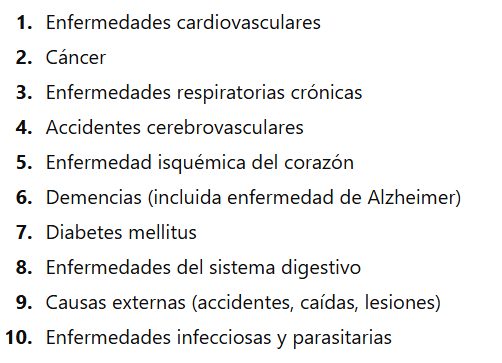
Según la OMS y la ONU, las principales causas de muerte para mujeres y niñas a nivel global son enfermedades como cardiopatías, cáncer, infecciones respiratorias y complicaciones maternas.
Y para los que consideran que el aborto es matar a un individuo…