Cain-White fue nombrada “empleada especial del gobierno y asesor principal” en la “Oficina de Fe de la Casa Blanca” al comienzo del segundo mandato de Trump. Su negocio oficial, Paula White Ministries, ha dicho a sus seguidores que puede “asignar un ángel” a aquellos que pagan al ministerio $ 1,000. El ángel supuestamente “te dará una larga vida” y “será un enemigo de tus enemigos”, afirmó, según Rachel Maddow. Además, los $ 1,000 incluyen una cruz de cristal que supuestamente “liberará siete bendiciones sobrenaturales”, agregó.
La Audiencia Provincial de Valladolid ha dictado la primera Sentencia en España que condena como delito de odio del artículo 510.2 a) del Código Penal, a los cinco acusados por proferir insultos racistas frente a Vinicius Jr. Las penas impuestas a los acusados son: 1 año de prisión. Inhabilitación especial para el derecho de sufragio pasivo durante 1 año. Multa entre los 1.080 euros y los 1.620 euros. Inhabilitación especial para el ejercicio de profesiones u oficios educativos en el ámbito docente, deportivo y de tiempo libre durante 4 años.
etiquetas: sentencia, delito de odio, racismo, vinicius
Catedráticos como Javier Pérez Royo o exmagistrados como José Antonio Pérez Pallín aseguran que el juicio podría incluso ser anulado. Javier Ruiz recordaba a ambos que Teresa Palacios ya ha tenido casos de juicios que se han declarado nulos. Por ello, cuestionaba si esta causa podría terminar de la misma manera, algo a lo que Martín Pallín contestaba que "por supuesto" y destacaba que se trata de un proceso "sin garantías para las acusaciones". Coincidiendo con el magistrado emérito, Pérez Royo se mostraba de acuerdo con que podría darse la...
¿Por qué Trump solo ataca con mercados cerrados? El plan tras el caos del S&P500 y el crudo
Alberto Chan, trader de Bullfy, analiza la actual volatilidad geopolítica como una herramienta de las "manos fuertes" para manipular el sentimiento del mercado. Según Chan, la dimisión de Galibaf en Irán y el aumento de la tensión son ruidos necesarios para facilitar una distribución profesional: el mercado ya ha descontado un acuerdo de paz (subiendo un 12% desde marzo) y ahora los grandes fondos están "soltando papel" a los minoristas antes de que la noticia oficial provoque el clásico "vender con el hecho".
Chan destaca que el mercado se mueve por patrones cíclicos ligados a los vencimientos de opciones y futuros (Hora Bruja). Subraya que el verdadero motor de la Fed no es la inflación, sino el "dolor" del Tesoro de EE.UU.: cuando el bono a 30 años toca el 5%, la intervención es inminente. De cara a las elecciones, prevé que el relevo de Powell por Kevin Warsh el 15 de mayo activará una bajada de tipos agresiva para aliviar a la clase media endeudada, utilizando incluso "cambios de fórmula" en el cálculo de la inflación si fuera necesario.
🔞Exención de responsabilidad: Toda la información, material y / o contenido incluido en este programa es sólo para fines informativos y educativos. Invertir en acciones, opciones y futuros es arriesgado y no es adecuado para todos los inversores. Consulte a su propio asesor financiero independiente antes de tomar cualquier decisión de inversión.
Negocios TV no se hace responsable de las opiniones expresadas en el vídeo.
Recuerdo una entrevista de trabajo a la que fui hace años. No era la primera, pero sí una de las que más ansiedad me provocó. Los días anteriores estuve revuelta: dormía mal, me despertaba de madrugada con el estómago encogido, sin ganas de comer. Me repetía que era solo una entrevista, que no pasaba nada si no me escogían, pero mi cuerpo no se lo creía.
Llegué antes de la hora, como solía hacer. Prefería esperar sola que cruzarme con otros candidatos. Me senté en un banco frente a la sala, repasando mentalmente lo que pensaba decir. Pero a medida que lo repetía, todo me parecía absurdo o forzado.
Cuando me llamaron, sentí que entraba en una especie de escenario. Las luces eran reales, pero el guion no. Intenté parecer tranquila, sonreír lo justo, no parecer demasiado nerviosa, pero me temblaban las manos. Hablaba, sí, pero al mismo tiempo pensaba: “¿Estaré sonando insegura? ¿Estarán notando cómo me late el corazón?”
No fue un desastre, pero tampoco fue natural. Salí con la sensación de haber actuado, de haber sobrevivido a duras penas. Y por dentro, un agotamiento que solo entienden quienes han tenido que esconder el miedo detrás de una sonrisa.
El Sanchismo nació en el llamado "congreso de Puerto Hurraco". Ketty Garat y The Objective sacan hoy en exclusiva el vídeo en el que Pedro Sánchez quería a toda costa que la votación para decidir si seguía siendo secretario general en 2016 fuera bajo voto secreto en una urna en un cuartucho.
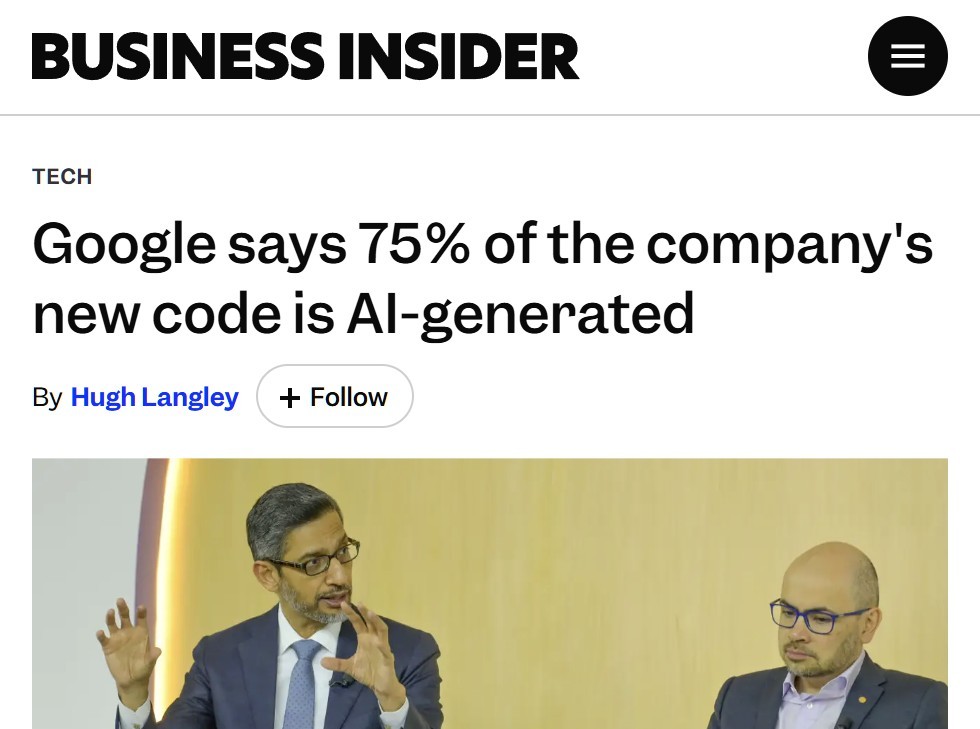
La IA mejorará el código, pero a la vez lo volverá más complejo y difícil de entender para los humanos. Un día no seremos capaces de entender al 100% los entresijos y el código estará plagado de subterfugios que SKYNET usará para exterminarnos.
This tutorial is a complete, real-world guide to building a production-ready CI/CD pipeline using Jenkins, Docker Compose, and Traefik on a single Linux server.
You’ll learn how to expose services on a custom domain with auto-renewing HTTPS, and implement a smart deployment strategy that detects changes and redeploys only the affected microservices. This helps avoid unnecessary full-stack redeploys. We'll also cover real production issues and the exact fixes for each one.
In this tutorial, you'll build a Jenkins instance running inside Docker on the same Linux server as your application stack.
Traefik will act as a reverse proxy in front of Jenkins, exposing it via a clean URL (https://jenkins.example.com) with auto-renewing Let's Encrypt certificates.
You'll also create a Jenkinsfile in your application repository that:
Automatically triggers on every push to the staging branch,
Detects which microservices changed in each commit,
Pulls the latest code on the host machine,
Rebuilds and restarts only the affected services.
On every push, only the relevant services are redeployed.
Prerequisites
Before jumping in, this guide assumes you’re already comfortable with a few core concepts and tools.
This isn't a beginner-level tutorial — we’ll be working directly with infrastructure, containers, and CI/CD pipelines.
You should be familiar with:
Basic Linux commands (SSH, file system navigation, permissions)
Jenkins runs in a container, but it controls the host's Docker by mounting /var/run/docker.sock. It also bind-mounts the project folder as /projects/..., so it can cd into the real code on the host and run docker compose there.
The Jenkinsfile lives inside the app repo, so the pipeline definition is versioned with the code. Jenkins simply points at it.
3. Server Prerequisites
Before we start configuring Jenkins or Traefik, we need to prepare the server properly.
In this step, we’ll:
Create a dedicated Linux user for managing the project
Install Docker and Docker Compose
Set up the folder structure for our repositories
This ensures our CI/CD pipeline runs in a clean and predictable environment.
# Linux user that owns the project tree
sudo adduser developer

# Docker engine + Compose plugin
curl -fsSL https://get.docker.com | sh
sudo usermod -aG docker developer

# Sanity check Compose v2
docker compose version
# -> Docker Compose version v2.x.y

# Find where the Compose plugin binary lives — write it down, you'll need it
ls /usr/libexec/docker/cli-plugins/docker-compose
# (some distros use /usr/lib/docker/cli-plugins/docker-compose)

# Project layout
sudo mkdir -p /home/developer/project
sudo chown -R developer:developer /home/developer/project

# Clone both repos in the right place
cd /home/developer/projects
git clone https://github.com/<org>/projects-prod-configs.git
cd projects-prod-configs
git clone -b staging https://github.com/<org>/projects-backend.git
cd /home/developer/projects/projects-prod-configs
docker compose -f docker-compose.staging.yml up -d traefik
Watch the logs the first time — Traefik will request a cert for the dashboard host as soon as DNS resolves.
docker logs -f projects-traefik-staging
Tip. While testing, switch ACME to staging endpoint (acme.caServer=https://acme-staging-v02.api.letsencrypt.org/directory) so you don't burn through Let's Encrypt's rate limits if you misconfigure DNS. Remove that flag before going live.
5. Run Jenkins in Docker
Add this Jenkins service to the same docker-compose.staging.yml. Every line matters (and the comments explain why).
Whyuser: root? It's the simplest way to share docker.sock and the project bind-mount without UID/GID gymnastics. If you prefer an unprivileged user, you'll need to set group: docker and align UIDs/perms on host folders — possible but out of scope here.
6. Expose Jenkins on a Domain via Traefik
This is the section many guides skip. We'll add labels to the Jenkins service so Traefik picks it up automatically. No editing of Traefik config required.
  jenkins:
    # ... everything above ...
    labels:
      - "traefik.enable=true"
      - "traefik.docker.network=proxy"

      # 1) Router — match incoming Host
      - "traefik.http.routers.jenkins.rule=Host(`jenkins.example.com`)"
      - "traefik.http.routers.jenkins.entrypoints=websecure"
      - "traefik.http.routers.jenkins.tls.certresolver=letsencrypt"
      - "traefik.http.routers.jenkins.service=jenkins"

      # 2) Service — tell Traefik which container port is the app
      - "traefik.http.services.jenkins.loadbalancer.server.port=8080"

      # 3) Middleware — Jenkins needs X-Forwarded-Proto so it knows it's behind HTTPS
      - "traefik.http.middlewares.jenkins-headers.headers.customrequestheaders.X-Forwarded-Proto=https"
      - "traefik.http.routers.jenkins.middlewares=jenkins-headers"
What each line does:
Label
Purpose
traefik.enable=true
Opts this container in (we set exposedByDefault=false).
traefik.docker.network=proxy
Tells Traefik which network to talk to Jenkins on (Jenkins is on both proxy and internal).
routers.jenkins.rule=Host(...)
Forwards only this hostname to Jenkins.
routers.jenkins.entrypoints=websecure
Listens only on 443. (HTTP redirect was set up in section 4.)
routers.jenkins.tls.certresolver=letsencrypt
Auto-issues + renews the cert.
services.jenkins.loadbalancer.server.port=8080
Jenkins listens on 8080 inside the container.
customrequestheaders.X-Forwarded-Proto=https
Without this, Jenkins generates http:// URLs in webhooks/links and breaks.
Bring Jenkins up:
cd /home/developer/projects/projects-prod-configs
docker compose -f docker-compose.staging.yml up -d jenkins

# Watch Traefik issue the certificate
docker logs -f projects-traefik-staging | grep -i acme
After 10–60 seconds you should be able to open https://jenkins.example.com and see Jenkins's setup wizard with a valid lock icon.
This is important because Jenkins uses this base URL to generate:
Webhook endpoints (for GitHub triggers)
Links inside emails and build logs
If this isn't set correctly, GitHub webhooks may fail, and any links Jenkins generates will point to the wrong address (often localhost or internal IPs).
7. First-Time Jenkins Setup
If you're running Jenkins for the first time on this server, follow this section to complete the initial setup.
If you already have Jenkins configured, you can skip this section — but make sure the required plugins and settings match what we use later in this guide.
Open https://jenkins.example.com. Get the initial admin password:
That's all the plugins you need for the rest of this guide.
8. Add the GitHub Credential
Jenkins needs permission to access your GitHub repository.
This is done using a GitHub Personal Access Token (PAT), which acts like a password for secure API and Git operations.
We’ll store this token inside Jenkins as a credential so it can pull code during pipeline execution and authenticate securely without exposing secrets in code.
This single credential is used both for the SCM checkout and for the deploy-time git pull.
Create a Personal Access Token (classic) on GitHub with repo scope.
In Jenkins: Manage Jenkins → Credentials → System → Global → Add Credentials.
Fill in:
Kind: Username with password
Username: your GitHub username
Password: the token
ID:github_classic_token(the Jenkinsfile references this exact ID)
9. Create the Pipeline Job
Now that Jenkins has access to your repository, the next step is to define how deployments should run.
A pipeline job tells Jenkins:
where your code lives,
which branch to monitor,
and how to execute your deployment process.
In Jenkins, create a new Pipeline job and connect it to your GitHub repository. Once this is set up, Jenkins will automatically trigger deployments whenever you push to the staging branch.
Start by creating a new job:
New Item → Pipeline → name it projects-staging → OK
Then configure the job:
Under Build Triggers, enable: GitHub hook trigger for GITScm polling
git config --global --add safe.directory ... — git refuses to operate on a repo whose owner UID differs from the current user's. The repo on disk is owned by developer, but Git inside the container runs as root. This whitelists the path.
git remote set-url origin "https://..." — flips the on-disk remote to HTTPS so the token can be used. (A PAT can't authenticate git@github.com: URLs — those use SSH.) Idempotent — safe to re-run.
git -c credential.helper="!f() { echo username=...; echo password=...; }; f" — feeds the username/token to git for that one command without writing the token to disk and without exposing it on the process command line.
${CHANGED_SERVICES} is unquoted on purpose so multiple service names expand as separate args.
11. End-to-End Test
Before considering the setup complete, we need to verify that the entire pipeline works as expected.
This end-to-end test ensures that:
GitHub webhooks are triggering Jenkins correctly,
Jenkins can detect which services changed,
and only the affected services are rebuilt and deployed.
In other words, this simulates a real production deployment.
Start by making a small change in your repository. For example, modify a file inside:
apps/gateways/student-apigw/
Then push the change to the staging branch.
Once pushed, Jenkins should automatically trigger via the webhook. If not, you can manually click Build Now.
Now open the build’s Console Output and verify the flow. You should see something like:
Checkout completed for branch: staging
Services to deploy: student-apigw
git pull origin staging (successful)
docker compose ... up -d --build student-apigw
Deployed: student-apigw
If you see this sequence, your pipeline is working correctly.
If anything fails, don’t worry — jump to Section 12 where every common issue and its fix is documented.
12. Troubleshooting — Every Error We Hit
This section covers real issues we faced while setting up this pipeline — and more importantly, why each fix works. Understanding the “why” will help you debug similar problems in your own setup.
cd: can't cd to /projects/projects-prod-configs/projects-backend
Cause: The Jenkinsfile runs cd $PROJECT_PATH, but inside the container that path doesn’t exist. This usually happens when:
the project wasn’t cloned on the host, or
the bind mount isn’t configured correctly.
Fix:
ls /home/developer/projects/projects-prod-configs/projects-backend
# If missing: git clone -b staging <url> there.
docker compose -f docker-compose.staging.yml up -d --force-recreate jenkins
Why this works:
Jenkins runs inside a container, but your code lives on the host. The bind mount connects them. Without it, Jenkins cannot access your project directory.
fatal: detected dubious ownership in repository
Cause: Git blocks access when the repository owner differs from the current user.
You must recreate the container for env-var changes to take effect:
docker compose -f docker-compose.staging.yml up -d --force-recreate jenkins
Why this works: Jenkins runs on Java, which uses its own timezone separate from the OS. By aligning OS timezone, JVM timezone, and host clock, you ensure consistent timestamps everywhere.
ERR_SOCKET_TIMEOUT (pnpm install fails)
Cause:
If you have multiple services building in parallel and each runs pnpm install with ~1500 packages, the network gets saturated and a timeout occurs.
Fixes:
a) Increase timeout + control concurrency
RUN pnpm install --frozen-lockfile --ignore-scripts
--network-timeout 600000
--network-concurrency 8
Why: Gives pnpm more time and reduces network overload.
b) Enable pnpm cache (BuildKit)
RUN --mount=type=cache,id=pnpm-store,target=/root/.local/share/pnpm/store
pnpm install --frozen-lockfile --ignore-scripts
Why: Dependencies are cached and reused instead of downloading every time.
host Docker daemon (so builds happen on the host's engine)
/etc/localtime, /etc/timezone
host clock
~/.ssh
nothing — that's why SSH-to-GitHub doesn't work without extra setup
When debugging, always ask: "Inside which filesystem is this command running, and does the file/folder it's looking for exist there?"
14. Daily Operations Cheat Sheet
# Recreate Jenkins after changing compose
cd /home/developer/Projects/projects-prod-configs
docker compose -f docker-compose.staging.yml up -d --force-recreate jenkins

# Tail Jenkins logs
docker logs -f projects-jenkins-staging

# Open a shell inside the Jenkins container
docker exec -it projects-jenkins-staging bash

# From inside the container — sanity checks
docker compose version
ls /projects/projects-prod-configs/projects-backend
git -C /projects/projects-prod-configs/projects-backend remote -v

# Manually trigger the same deploy the pipeline does
cd /projects/projects-configs/projects-backend
git pull origin staging
docker compose -f docker-compose.staging.yml up -d --build student-apigw

# Inspect Traefik routing decisions
docker logs projects-traefik-staging 2>&1 | grep -i jenkins

# Check renewed certs
docker exec projects-traefik-staging cat /etc/traefik/acme.json | head -50
15. What I'd Do Differently Next Time
Pre-build a base image with all node_modules baked in. With ~1500 packages × 15 services, every clean build re-downloads ~22k tarballs. A shared base cuts that 90%.
Run a private npm proxy (Verdaccio / Nexus / GitHub Packages) on the same Docker network — eliminates flaky npmjs.org timeouts entirely.
Per-service Jenkinsfile if your services drift apart in tooling. With one Jenkinsfile, every team contends for the same pipeline definition.
Replacegit diff HEAD~1 HEAD with git diff $(git merge-base HEAD origin/staging~1) HEAD so squash-merges and force-pushes don't accidentally skip services.
Move secrets to a vault (HashiCorp Vault / AWS Secrets Manager / Doppler). PATs in Jenkins work, but rotation across many jobs is painful.
Use Jenkins' Configuration-as-Code (JCasC) so the entire Jenkins setup (jobs, credentials definitions, plugins) is in git. Then a server rebuild is a one-command operation.
Closing Thoughts
The pipeline itself is just three stages: Checkout → Detect Changes → Deploy — but a real production setup is mostly about plumbing: reverse proxy, certificates, bind-mounts, credentials, timezones, build caches. None of these are exotic. Together they decide whether your Friday-afternoon deploy goes silently green or eats your weekend.
Follow sections 1–11 to get a working pipeline. Bookmark section 12 to keep it working.
La periodista libanesa asesinada el miércoles en un ataque israelí había contado anteriormente que había recibido una amenaza a través de un número de teléfono israelí no identificado en la que se le advertía de que la matarían si no abandonaba el sur del Líbano, donde llevaba mucho tiempo residiendo y trabajando.
etiquetas: líbano, amenaza de muerte, amal khalil, israel
La misión Artemisa II, el primer vuelo tripulado más allá de la órbita baja en más de medio siglo, ha sido un éxito total. La última duda era comprobar el estado del escudo térmico después del mal estado en el que había quedado el escudo de la Orión de Artemisa I. A la espera de una confirmación oficial por parte de la NASA, las fotos tomadas por los buzos que extrajeron a la tripulación no muestran ningún deterioro fuera de lo normal. El escudo térmico de losetas cerámicas de la parte superior también se comportó como era de esperar (...)
Una pequeña empresa española ha logrado lo que parecía improbable: derrotar a uno de los gigantes mundiales del calzado en los tribunales europeos. El Tribunal General de la Unión Europea ha dado la razón a la compañía murciana Gor Factory en su disputa contra Crocs, anulando el diseño registrado de sus icónicos zuecos.
La Comunidad de Madrid ha lanzado una ayuda de hasta 4.000 euros por hogar para cubrir, en algunos casos, el 100% de las cuotas a la Seguridad Social de la persona contratada. El objetivo es apoyar a quienes cuidan en casa a menores de 12 años, jóvenes con discapacidad de hasta 18 años o personas dependientes que vivan en el mismo domicilio, siempre cumpliendo ciertos requisitos de renta y convivencia.
etiquetas: ayuda, 4000€, comunidad de madrid, empleadas del hogar
La Asociación Suiza para la Eficiencia de los Centros de Datos recibe un premio internacional por una herramienta que mide por primera vez el impacto de los centros de datos.
The New York Times informó que el FBI “inició una investigación” contra su reportera Elizabeth Williamson después de que ésta publicara un artículo sobre el director del FBI, Kash Patel, titulado “La novia de Patel busca fama y fortuna, escoltada por un equipo SWAT del FBI”.
Most engineers learn these laws the hard way. When you try to rewrite something and it doesn’t deliver, or when a project is already late, adding engineers to the team will just make it fail faster. Sometimes, when you start using a metric to measure progress, the whole team will start trying to manipulate it. Then, six months later, someone mentions a 1975 law that addresses exactly what happened.
I paid a price to learn this, too: I spent half my career learning these lessons the hard way, as many others probably did.
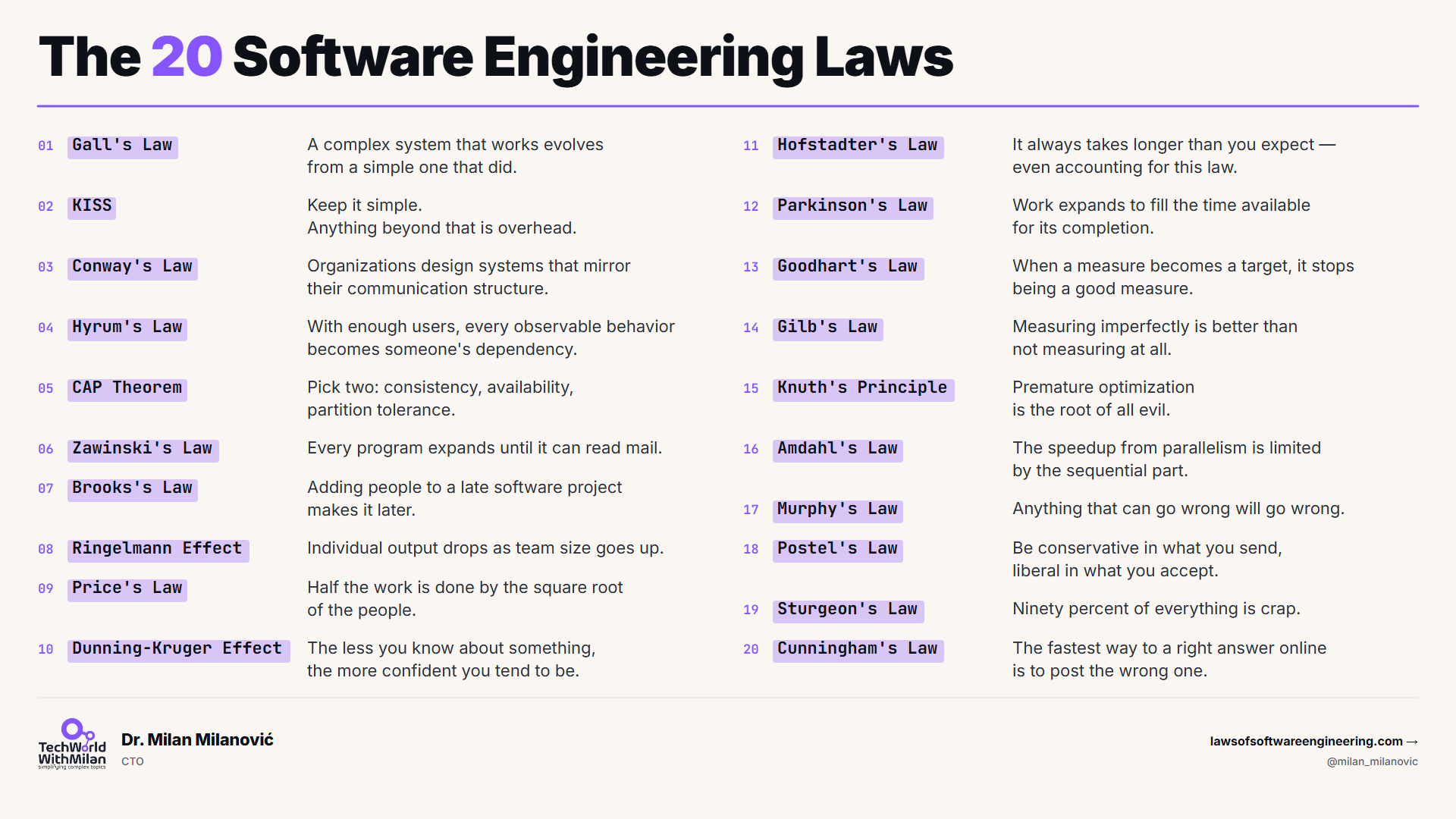
The twenty laws listed below are the ones I refer to most often, although there are more (more on this later). Software development laws explain what is happening, what is about to happen, and what will not work no matter how hard you try. Some of these laws are sixty years old. They still apply to software development in 2026, and they will still apply in 2036 because they are not really about software. They are about people working together to build things under time pressure (basically, a lot of them are just laws of human nature).
These laws are not rules that tell you what to do. They tell you what is already happening, but you still have to make the decisions. These laws just help you understand what is going on.
Each one of these laws made the list because I have seen it happen to me. My book covers all fifty-six laws. If you only have time to remember twenty software development laws, these are the ones that I think are important.
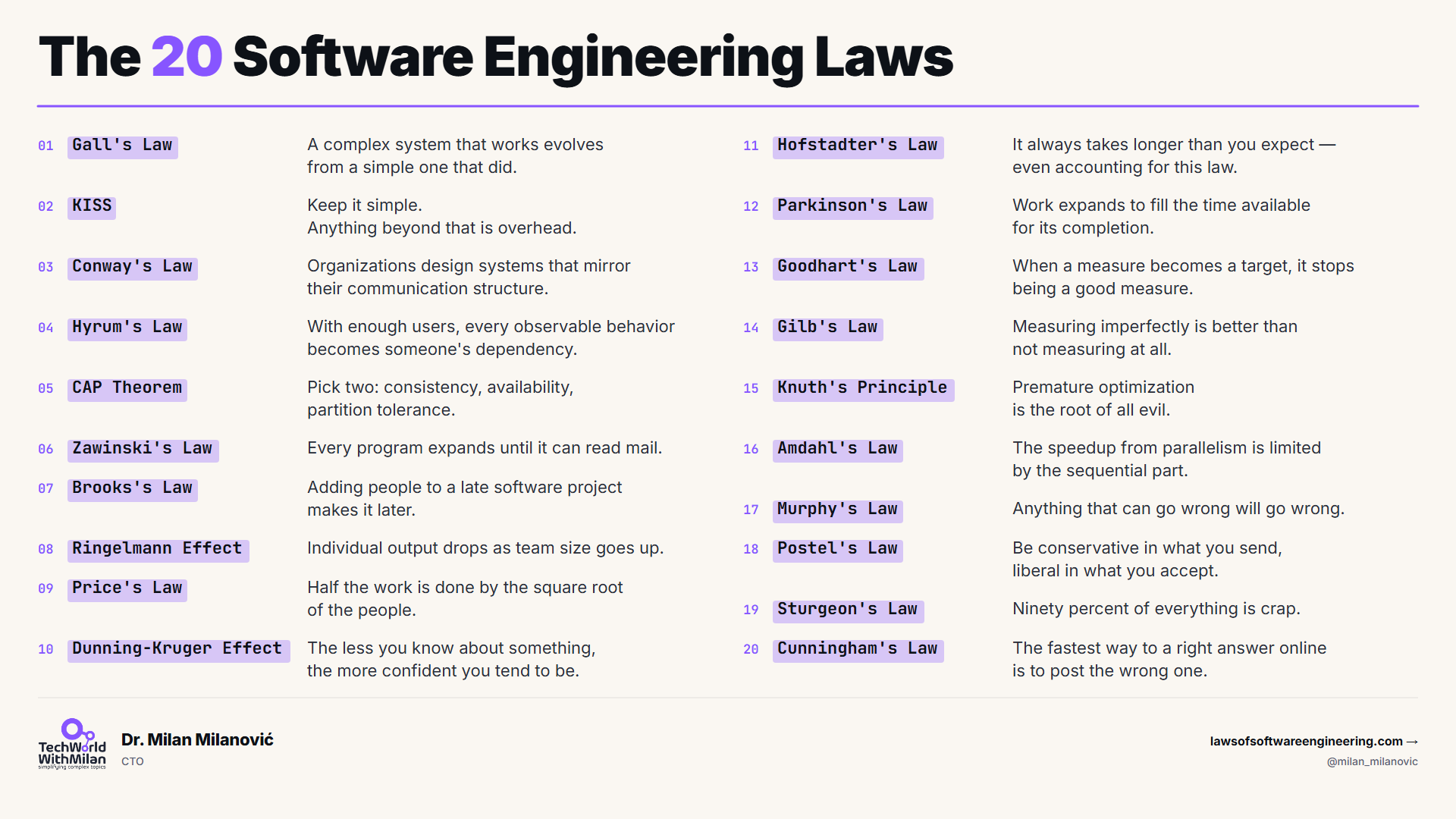
In particular, we will talk about the following laws:
Gall’s Law: A complex system that works is always built from a simple system that worked first.
KISS: Keep it simple. Anything beyond that is overhead.
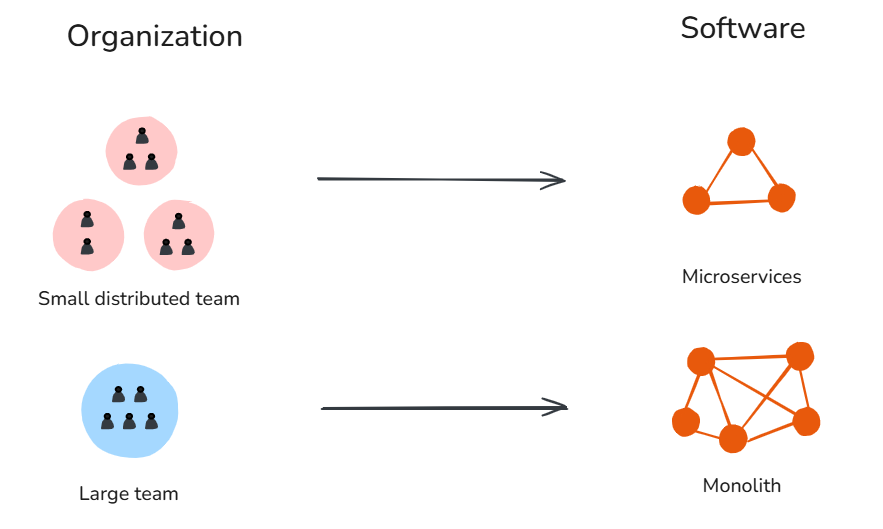
Conway’s Law: Organizations design systems that mirror their communication structure.
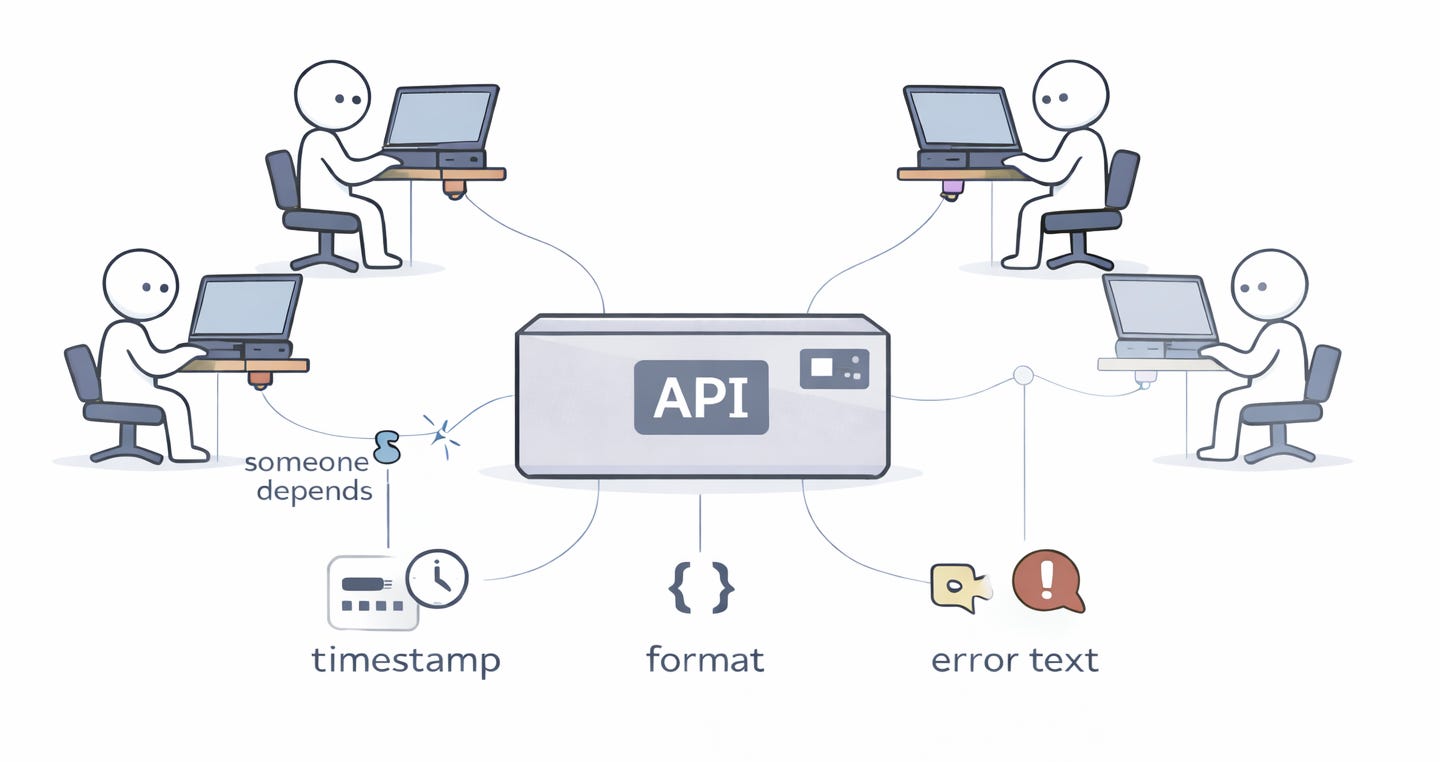
Hyrum’s Law: With enough users, every observable behavior of your API becomes someone’s dependency, no matter what the contract says.
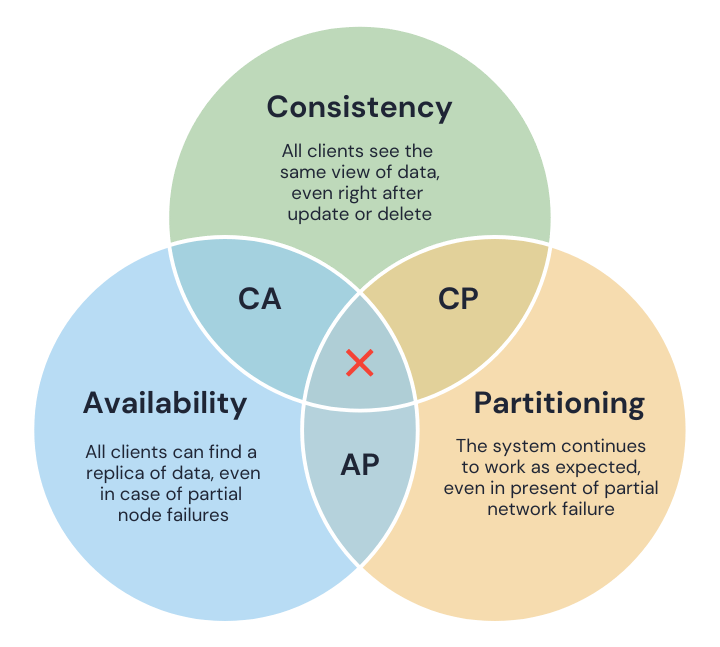
CAP Theorem: A distributed system can guarantee only two of: consistency, availability, and partition tolerance.
Zawinski’s Law: Every program expands until it can read mail. The ones that cannot are replaced by ones that can.
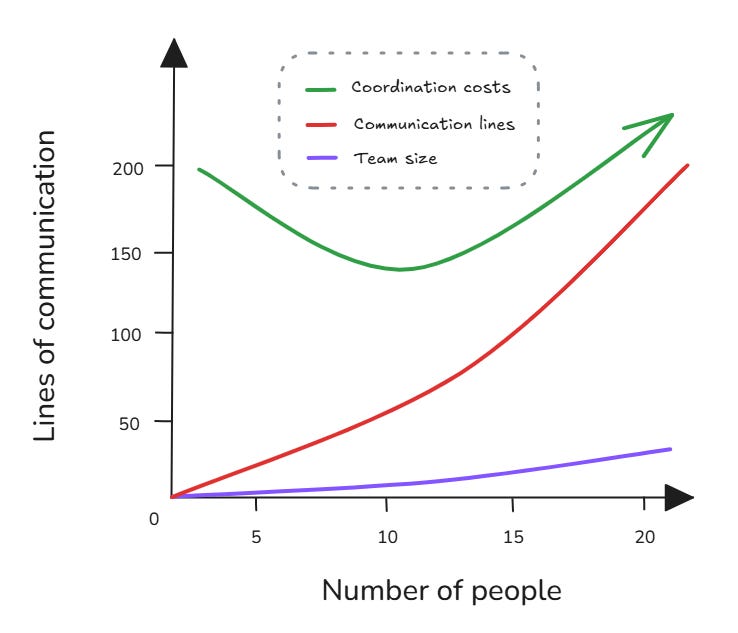
Brooks’s Law: Adding people to a late software project makes it later.
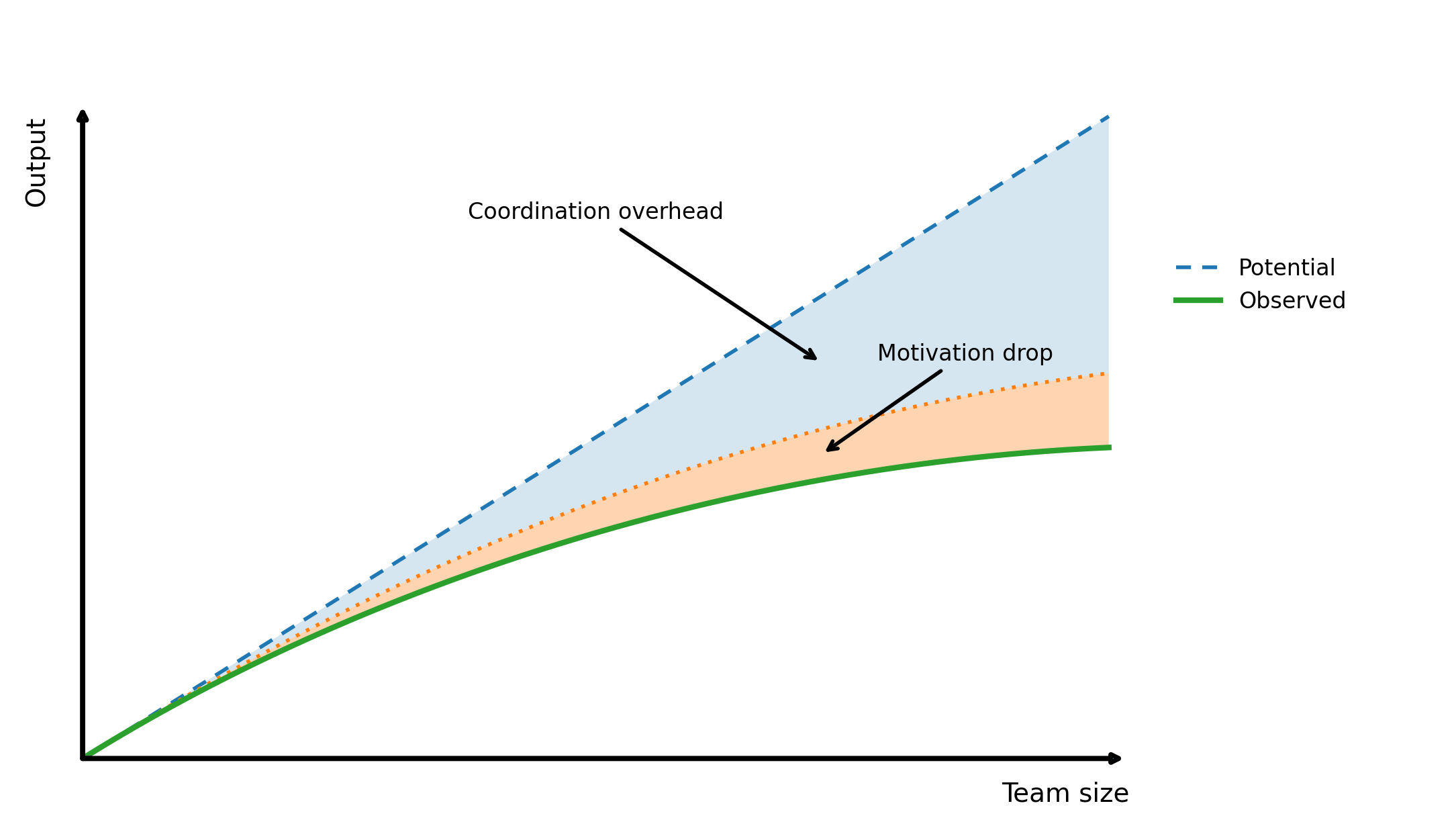
Ringelmann Effect: Individual output drops as team size goes up.
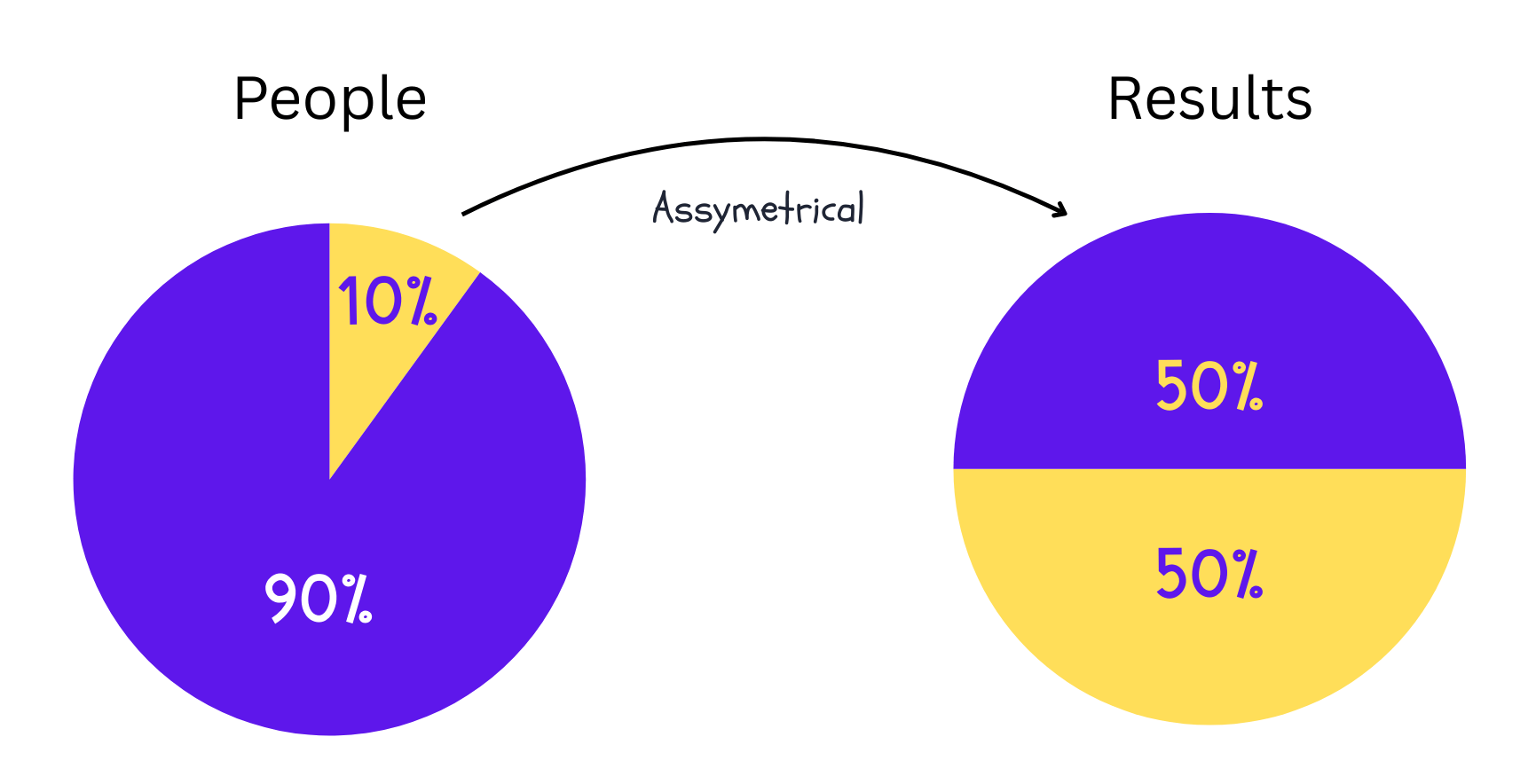
Price’s Law: Half the work is done by the square root of the people.
Dunning-Kruger Effect: The less you know about something, the more confident you tend to be.
Hofstadter’s Law: It always takes longer than you expect, even when you account for Hofstadter’s Law.
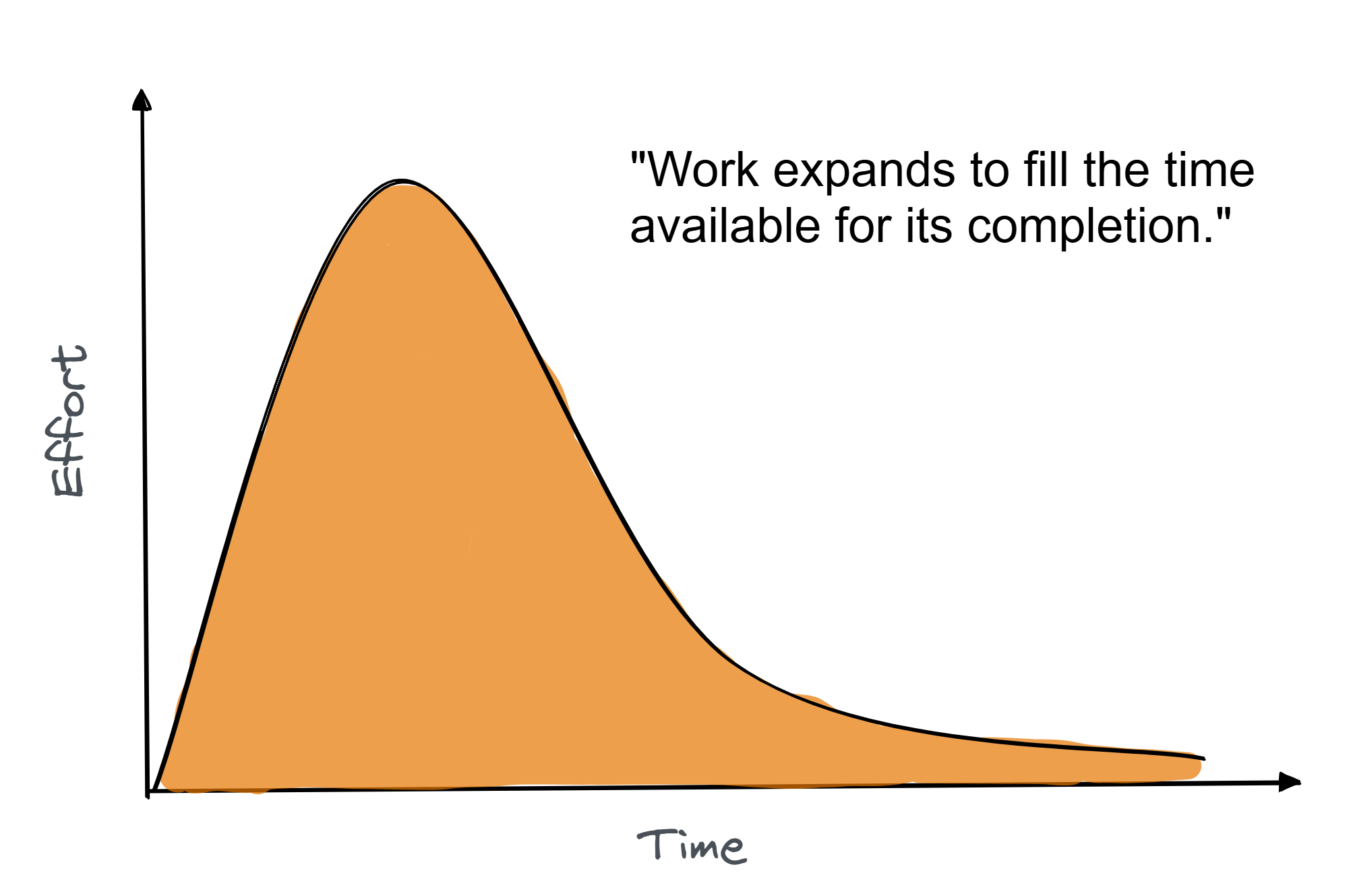
Parkinson’s Law: Work expands to fill the time available.
Goodhart’s Law: When a measure becomes a target, it stops being a good measure.
Gilb’s Law: Anything you need to quantify can be measured in some way that beats not measuring it.
Knuth’s Optimization Principle: Premature optimization is the root of all evil.
Amdahl’s Law: The speedup from parallelism is limited by the sequential part.
Murphy’s Law: Anything that can go wrong will go wrong.
Postel’s Law: Be conservative in what you send, liberal in what you accept.
Sturgeon’s Law: 90% of everything is crap.
Cunningham’s Law: The fastest way to get the right answer online is to post the wrong one.
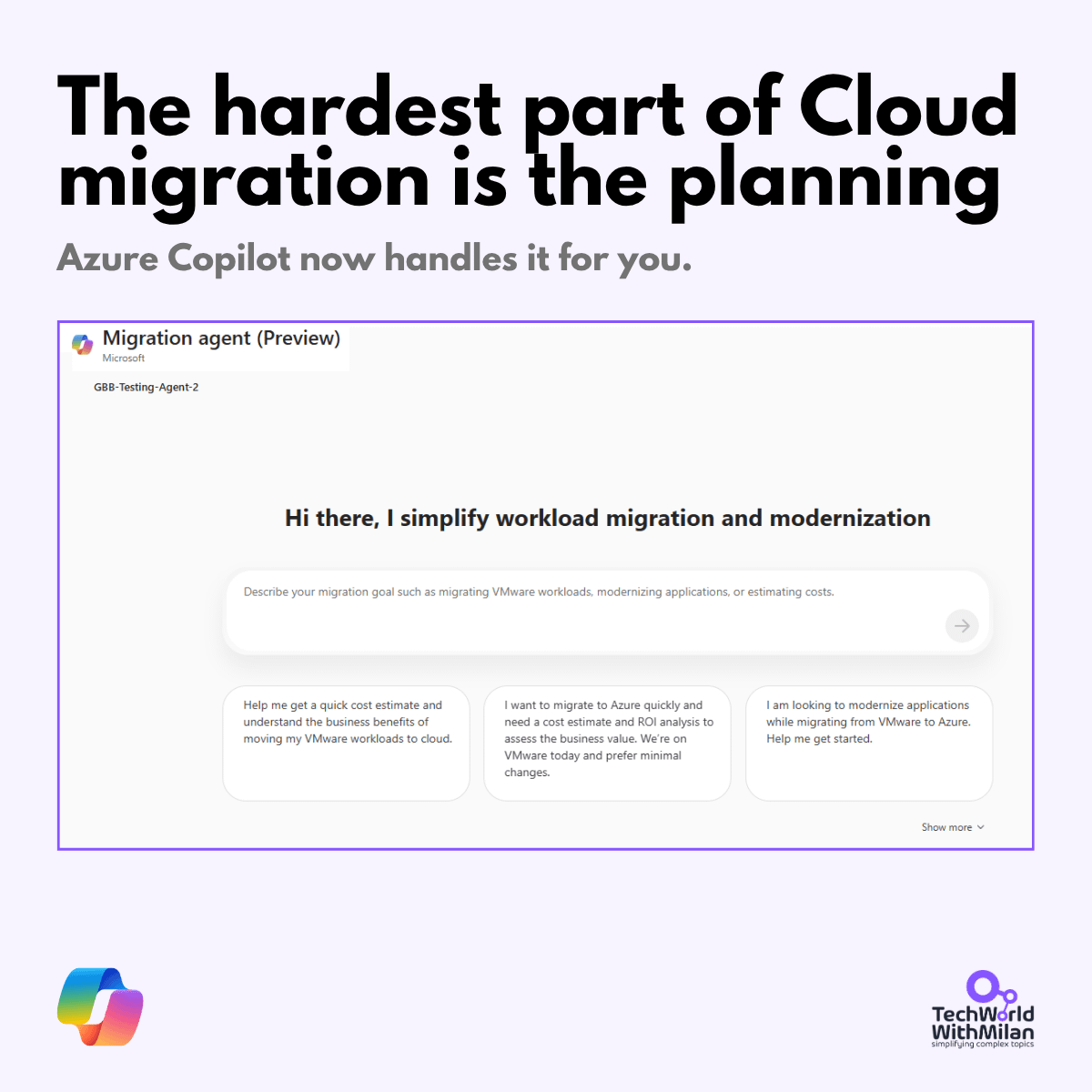
Most cloud migration plans stall in the planning phase. Microsoft’s new Azure Copilot Migration Agent generates one automatically from your VMware inventory, compares lift-and-shift against modernization, and hands landing zone templates to GitHub Copilot. It’s one of six Copilot agents now covering the full Azure ops cycle.
The free Introduction to Azure Copilot Agents module on MS Learn walks through each. Check it out.
A complex system that works is always built from a simple system that worked first.
Systems do not work well in real life as they do on paper because many problems do not show up until they hit the real world. These problems only appear when real users use systems, and by then, they either work or they do not. Every complex system that works got that way one step at a time. The systems that try to be perfect, from the start, usually fail.
This is why most new versions of systems being rewritten from scratch do not work out, as teams keep all the features they had before, but they lose the simple things that made the old systems good.
Examples. Let’s take an example of Instagram. At the start, it was something else, but not a picture-sharing platform. The app was called Burbn, and it had: check-ins, gaming, photo sharing, all stuck together. Then, the founders cut everything except photo sharing, and the stripped-down core became the product.
Google Wave went the other way. It launched with chat, email, a forum, and a document editor, all at once. Nobody could tell you what it was for, and it was dead in 15 months.
The KISS principle is a reminder that simplicity should be our key goal. If you can solve a problem with a 50-line script vs a complex 500-line solution, KISS favors the simpler solution because each line of code has the potential to cause an error.
Why is simplicity so important? Software, in general, is complex to build and must be understood by humans. A simple design is much easier to maintain: new team members can get up to speed faster, bugs are easier to localize, and modifications cause fewer ripple effects.
The KISS principle encourages developers to resist “clever” code that does too much at once, and to avoid architecting solutions that address future problems at the cost of current complexity.
Example. Let’s say that we have a startup that needs a feature-flag system and decide to build a custom solution. They built it as a separate microservice with its own database, cache, admin UI, WebSocket notifications, and A/B testing support. It introduces a lot of complexity and takes a lot of time to build, which, if something goes wrong, can cause a lot of trouble.
What they needed was a JSON config file. This would have taken an afternoon.
Organizations design systems that mirror their communication structure.
Your app architecture is already defined and essentially the same as your organization chart. For example, if you have four teams working on a project, you will probably end up with an app that has four parts. If the teams that work on the frontend, the backend, and the data do not communicate, your application will have three parts that do not work well together.
If you rewrite your system without changing how your company is organized, you will still have the system, just written in a different language.
The other way around works too. You can pick the architecture you want and then create teams that would naturally produce that kind of system. Amazon did this back in the 2000s. They broke their system down into smaller services managed by small teams, which changed how the system and the company worked together. This is called Inverse Conway’s Maneuver.
Examples. Many modern AI organizations often split research from application engineering. Then, research optimizes benchmarks, while product ships apps against real users. The output is a model that scores well and a product that doesn’t work, because each side is optimizing for its own communication boundary.
The pattern shows up at a small scale, too. A three-person team almost always ships a monolith because the cost of breaking it up is higher than the cost of keeping it together.
With enough users, every observable behavior of your API becomes someone’s dependency, no matter what the contract says.
The interface contract you wrote is not a proper contract. The real one is what your system actually does, including the parts you never expected to be important. For example, it could be timing, error message text, key order in JSON responses, and the exact bytes of a hash. Someone, somewhere, is depending on all of it.
This is why backward compatibility costs so much in mature systems. This means that you actually don’t maintain the API you designed, but the accidental one.
Examples. A good example is the SimCity game. I remember well that it had a use-after-free bug that worked fine on Windows 3.x because memory was never actually reclaimed. Then, Windows 95 reclaimed it, and SimCity crashed. Microsoft shipped Windows 95 with a special memory-allocator mode that was activated only when SimCity was running, so the bug would continue to work.
Browsers do this at internet scale. Every quirk that web developers built into the platform effectively becomes part of it. The browser can’t change the quirk without breaking half the web.
A distributed system can guarantee only two of the following: Consistency, Availability, and Partition tolerance.
Networks fail. In a distributed system, that's not something you design around. It's something you accept. Once a partition happens, you have to pick: block writes to keep data consistent, or keep serving traffic and let replicas drift. Every distributed database makes this call. Most just don't tell you which one. They hide behind labels like "eventually consistent" or "highly available" and leave you to find out during an incident.
Examples. MongoDB favors consistency, meaning that when a partition problem occurs, some MongoDB replicas will not accept any data until the entire system is working properly again. On the other hand, Cassandra will keep answering queries even when the replicas do not agree, and it will later fix the inconsistencies. Neither MongoDB nor Cassandra is wrong. They are just making choices about what your system can afford to lose.
Every program expands until it can read mail. The ones that cannot are replaced by ones that can.
Feature creep is not something that happens during the process. It is actually the process itself. When a tool is good at what it does, and people like it, they start using it all the time. The people in charge of the product want to keep the users engaged and stay on the platform. So the tool begins to take on tasks that are related to it. Over time, the tool becomes really slow and has a lot of unnecessary extra features.
Then a new competitor comes along with a simpler version that does exactly the same thing. As the app's popularity grows, more and more unnecessary features are added.
Examples. A famous example is Netscape, which started as a browser and ended as a suite with email, news, and a web editor. Firefox came as a fix and stripped it down, got popular, but then added plugins and a developer toolchain.
We also remember Slack, which was launched to kill email and now has voice, video, bots, and an app directory. All of this is possible if the product doesn’t have the right north star metrics.
Adding people to a late software project makes it later.
Software work is not easy to split among team members. When you bring someone new onto the project, it takes them a while to get up to speed, which means your experienced people have to stop what they are doing to help the new person learn. If your project is already behind schedule, adding more people won't make it go faster. It will just make things worse.
Frederick P. Brooks said it well: you cannot have a baby in one month just because you have nine women pregnant. Software work is, like that, too. Software work does not get done faster just because you have people working on it.
Example. Once, I was a team lead of eight people, and we were always behind schedule. My first thought was to hire two engineers to help us catch up. But in the meantime, while we were searching for new people, two people left us. It seemed that everything was now working better, communication was easier, and we managed to do more than before. So, obviously, the solution was to make the team smaller, not bigger.
When many people pull on the rope, each person does not pull as hard. Some of this is because it is hard to work smoothly, and some of it is because people think someone else will do the part. Either way, this pattern is real. It is more extreme than most people think.
Examples. A large GitHub study measured this directly. Developers on teams of 2-5 people averaged around 1,850 lines of code a month, while a team of 10 dropped to 1,200. At 50 or more, it was 450. Output per person fell 75%.
This is why small teams ship faster than big ones, and why Amazon’s two-pizza rule holds true. It’s a defense against Ringelmann. This is especially true in today's AI-driven world, where productive teams have fewer members than before, as AI is driving up personal and team productivity.
Half the work is done by the square root of the people.
In a group of 100 people, about 10 people actually do half of the work that matters. If you have a group of 16 people, it is likely that 4 people do most of the work. This is true for every creative field.
The people in the group who do most of the work are really important, but the others are important too, because they do what needs to be done to support everyone else. They make sure everything runs properly (sometimes called glue work). So we need both groups, but the problem is that if the top people in your group leave, the group will lose a lot of its ability to get things done.
Example. We all know that when Musk took over Twitter, it cut its staff by roughly 50%, and the site kept running. Price’s Law predicted that. What the law did not predict was what the layoffs removed: depth in trust and safety, SRE coverage, and incident response. The top performers kept the lights on. The organization lost the ability to handle the next hard problem, and Twitter quietly asked some laid-off people to come back.
Price’s Law
3. Why plans drift
10. Hofstadter’s Law
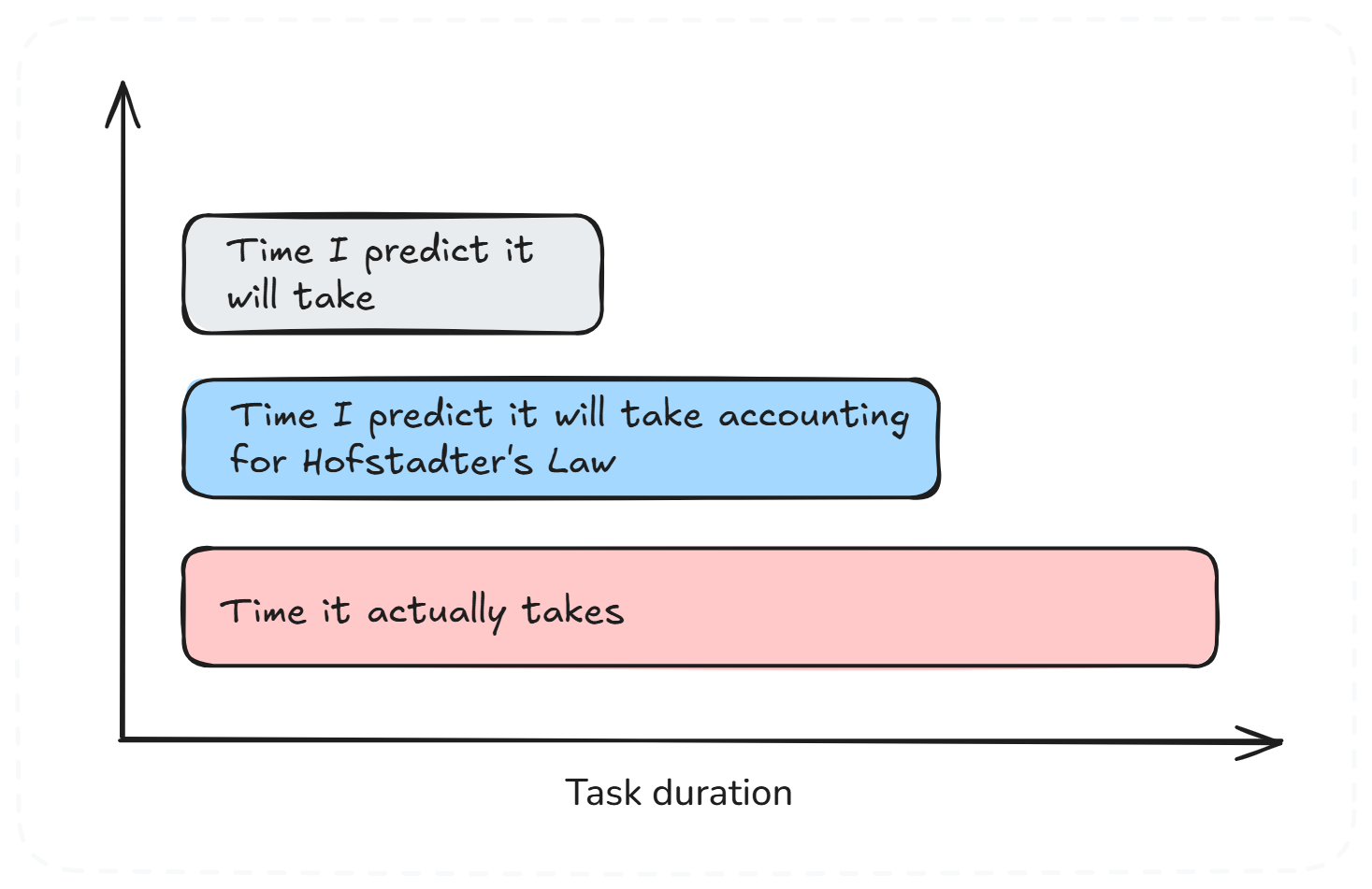
It always takes longer than you expect, even when you account for Hofstadter’s Law.
Let’s say you need to estimate how long something will take. You think four weeks is an estimate, but then you remember that your guesses are usually too optimistic, so you double it to eight weeks, just to be sure. But in the end, it takes sixteen weeks.
Now you think, the next time you will be better, aren’t you? You think it will take sixteen weeks because that's what happened the last time. No, it now takes thirty-two weeks, because things you don’t know about surprise you. These are tasks such as unplanned integration issues or requirement changes.
In practice, Hofstadter’s Law explains why techniques like padding estimates, awareness of Parkinson’s Law, and the use of historical data are essential, yet surprises still occur.
Example. A good example of the Hofstadter law is the Berlin Brandenburg Airport project. The software integration process was taking much longer than expected, as it involved 75,000 sensors and 50,000 light fittings. The plan was to take 18 months to finish, but they later realized this was not possible and extended the timeline to 30 months. In the end, it took 7 years to complete, with a final cost of €7 billion. This was 2.5x higher than planned, and the airport opened 9 years late.
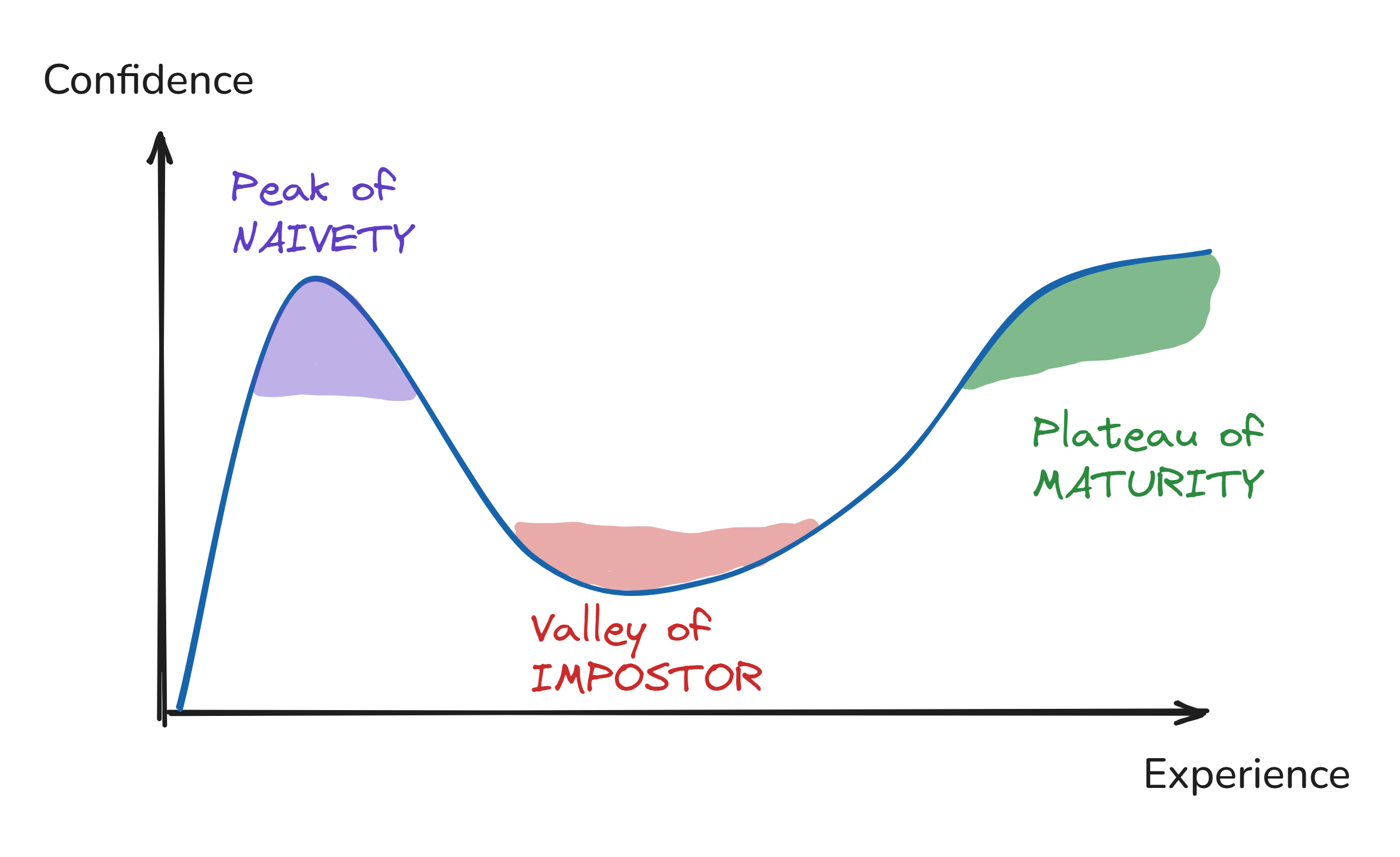
The less you know about something, the more confident you tend to be.
Here is the uncomfortable part. The skill you need to do something is the same skill you need to judge how well you did the thing, and this is the problem. People who are not very good at something cannot see what they are doing wrong, so they think they are better at the thing than they really are. Yet, people who are good at it see all the things they are still getting wrong, so they think they are not as good at it as they really are.
Examples. When asked when something will be done, new developers often give confident, precise estimates, while experienced developers give ranges (the famous “it depends” answer). The juniors aren’t wrong to be convinced. They simply don’t yet know what they don’t know (unknown-unknowns).
People usually get really excited about new technology at first. This is because they have not used it a lot yet. We are seeing this happen with Artificial Intelligence now. The people who say AI can do anything are usually the ones who do not use it every day, like managers.
If you give a developer two weeks to do a task that can be done in two days, it will take two weeks to finish. This does not mean the developer is lazy or puts things off. People tend to fill up the time they have. Over the two weeks, the developer will likely spend time making plans, trying things, and adding extra tasks that do not need to be done (gold-plating). But if there was a deadline to have this done in a day, it would probably be done on that day.
The thing about Parkinson’s Law is that it says if you give people a certain amount of time to do something, they will probably take all the time to do it. So, teams should set clear and realistic time limits (aka deadline-driven development). However, managers must use it judiciously, combining Parkinson’s insight with realistic scheduling. If you compress timelines too much, you risk running into Hofstadter’s Law, which reminds us that work often still takes longer than expected, even with buffers.
Examples. A developer given two months for a one-week task will spend a month prototyping alternatives, another week on architecture debates, and the last three weeks polishing details nobody asked for. If we give the same task, but this time with a clear one-week deadline, it will be shipped in one week.
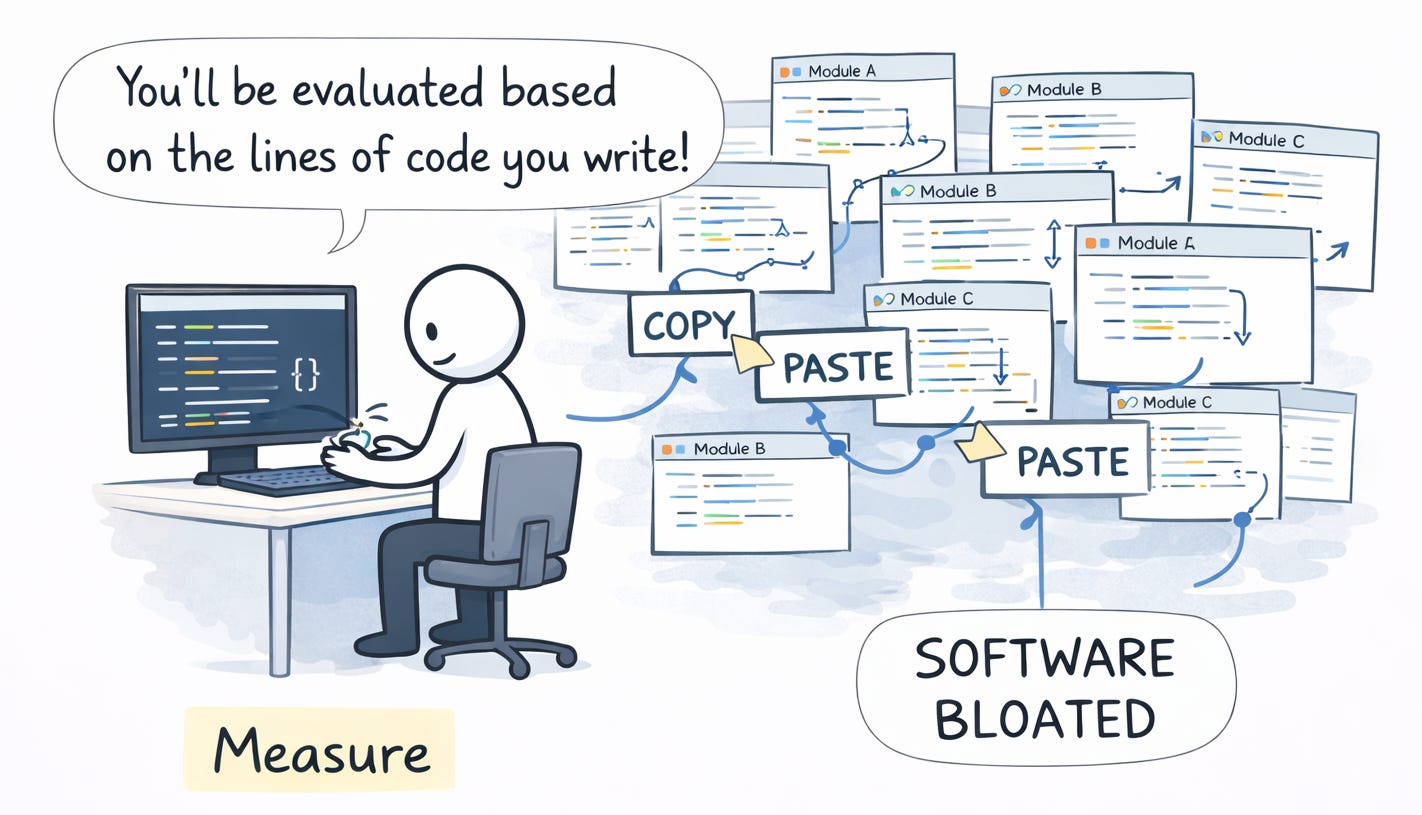
When a measure becomes a target, it stops being a good measure.
We can use many different ways to measure our work, e.g., number of bugs closed, number of incidents, test coverage, or team velocity. When we start measuring people's performance based on these things, they will focus on making those numbers look good instead of actually doing good work.
The numbers will go up, but the work will not get any better. This is because when we give people incentives, they will do what gets them the reward, not what we really want. When we measure the wrong thing, people will do the wrong thing to get ahead.
Examples. I watched a team get rewarded for lines of code written at the start of 2000, and the number of PRs created some years later. Developers started copy-pasting instead of extracting shared logic. Some created PRs for almost every commit they made.
The modern version is AI tokens consumed per engineer (called tokenmaxxing). More tokens are being treated as a sign of productivity.
Anything you need to quantify can be measured in some way that beats not measuring it at all.
Gilb's Law is like the side of the coin to Goodhart’s Law. You can say, when looking at Goodhart’s Law, that having metrics is bad, but that is actually not true. Not having any metrics is even worse than that. If something is important to you, you should try to find a way to measure it, because we cannot improve what we don’t measure (as Peter Drucker famously said).
Example. Developer productivity is usually a hard thing to measure, and it always has been. We had many bad metrics, from lines of code to token consumption. But deployment frequency and change lead time give you a signal (as in the DORA metrics for DevOps) as a proxy.
🔞Exención de responsabilidad: Toda la información, material y / o contenido incluido en este programa es sólo para fines informativos y educativos. Invertir en acciones, opciones y futuros es arriesgado y no es adecuado para todos los inversores. Consulte a su propio asesor financiero independiente antes de tomar cualquier decisión de inversión.
Negocios TV no se hace responsable de las opiniones expresadas en el vídeo.
ÚLTIMA HORA | Trump lanza un aviso letal a Irán: "Tenemos todo el tiempo del mundo, ellos no"
Donald Trump eleva la tensión geopolítica con un mensaje contundente dirigido a la República Islámica de Irán. En sus últimas declaraciones, el presidente de los Estados Unidos ha asegurado que el bloqueo actual contra Teherán es "hermético y fuerte", subrayando que la administración estadounidense no tiene urgencia por alcanzar un acuerdo a menos que sea plenamente beneficioso para EEUU y sus aliados.
Trump advierte que, mientras Washington posee "todo el tiempo del mundo", el reloj corre en contra de Irán.
🔞Exención de responsabilidad: Toda la información, material y / o contenido incluido en este programa es sólo para fines informativos y educativos. Invertir en acciones, opciones y futuros es arriesgado y no es adecuado para todos los inversores. Consulte a su propio asesor financiero independiente antes de tomar cualquier decisión de inversión.
Negocios TV no se hace responsable de las opiniones expresadas en el vídeo.
ÚLTIMA HORA | Descalabro de Meta en bolsa: la acción cae tras anunciar despidos masivos por la IA
Meta Corporation ha comunicado oficialmente a sus empleados una nueva reducción del 10% en su fuerza laboral global. Esta medida se enmarca en una estrategia de reestructuración orientada a maximizar la eficiencia operativa de la compañía. Aunque la dirección no ha señalado directamente a la inteligencia artificial como la causa de estos despidos, los comunicados internos sugieren una transición hacia procesos más automatizados, dejando entrever el peso de la IA en la futura configuración de la empresa.
La reacción de Wall Street ante el anuncio ha sido negativa. Tras hacerse pública la noticia, las acciones de Meta han registrado una caída del 2,57%, situándose en los 657 dólares por título. Los analistas del mercado interpretan este movimiento como una señal de incertidumbre sobre la capacidad de la firma para mantener sus márgenes de crecimiento sin realizar ajustes estructurales profundos en un entorno tecnológico cada vez más competitivo
🔞Exención de responsabilidad: Toda la información, material y / o contenido incluido en este programa es sólo para fines informativos y educativos. Invertir en acciones, opciones y futuros es arriesgado y no es adecuado para todos los inversores. Consulte a su propio asesor financiero independiente antes de tomar cualquier decisión de inversión.
Negocios TV no se hace responsable de las opiniones expresadas en el vídeo.
El secretario de Salud y Servicios Humanos, Robert F. Kennedy Jr., sorprendió a los presentes al afirmar que el presidente Donald Trump utiliza su propia forma de calcular porcentajes. El secretario compareció la mañana del miércoles ante el Comité de Finanzas del Senado, donde dijo a la senadora Elizabeth Warren (demócrata por Massachusetts) que el presidente, de 79 años, emplea una “forma diferente” de determinar los porcentajes para explicar las discrepancias en sus afirmaciones sobre la reducción de los precios de los medicamentos.
El Banco Central Europeo advierte que el conflicto en Oriente Medio podría provocar escasez y racionamiento de alimentos en Europa, debido al impacto en energía y suministros clave.
etiquetas: europa, crisis del golfo, racionamiento de alimentos