Shared posts

30 Sep 22:56

SQL Server - SQL Server has detected an unreported OS/hardware level read or write problem on page (1:74098) of database 10

by Kanchan Bhattacharyya

Dear Friends,


Sometime back while auditing error logs in one of the SQL Server instances I came across following message;

SQL Server has detected an unreported OS/hardware level read or write problem on page (1:74098) of database 10

LSN returned (59991:12571:175), LSN expected (59991:12571:600)

Contact the hardware vendor and consider disabling caching mechanisms to correct the problem

As can be seen on error message itself there is an indication that the LSN value stored in memory isn’t matching with the LSN returned by OS i.e. either data read is not as per what is expected or somehow data written to disk is lost or not written at all. On this note, let’s have a quick look at what Stale Read and Lost Writes are?

A Stale read occurs when SQL Server writes a modified page to storage but storage system returns a different value may be a different version of the page from hardware cache. A Lost write is something when SQL Server modifies a page and writes to disk but this value never stored in storage system so you get to see previous version while read operation. At times you may observe that issue is resolved when system is rebooted as this clears the cache. For us it worked and we involved HW vendor for appropriate checks but should not be considered to be generic solution across all environments.

This may not be detected by CHECKSUM as page is valid based on checksum value but hardware is retuning a different version. To enable additional diagnostics for this type of problems, SQL Server has added TRACE FLAG 818. You can specify TRACE FLAG 818 either as a startup parameter -T818 for the computer that is running SQL Server or by running the following statement:

DBCC TRACEON (818, -1)

TRACE FLAG 818 enables an in-memory ring buffer that is used for tracking the last 2,048 successful write operations that are performed by the computer on which you are running SQL Server not including sort and workfile I/Os. When errors such as Error 605, 823 or 3448 occur the incoming buffer's LSN value is compared to the recent write list. If the LSN that is retrieved during the read operation is older than the one specified during the write operation a new error message is logged in the SQL Server error log. You can refer http://support.microsoft.com/kb/826433 to know more details on this.

From SQL Server 2000 SP4, SQL Server 2005 this logic enhanced the behavior of this trace flag to perform LSN check on every read of a page and to store the LSN in hash table design. This is not default and you need to enable TRACE FLAG 818 explicitly when SQL starts up.

Leave a comment if you faced similar issue in your environments.


If you liked the post, do like us on Facebook at http://www.FaceBook.com/SQLServerGeeks

Have a SQL Server question? Join the fastest growing SQL Server Facebook group at: http://www.facebook.com/groups/458103987564477/


Regards,

Kanchan

30 Sep 18:58

ZFS & MySQL – Using Open Source

by Chris Evans
EMC logo

I’ve been a fan of the ZFS (zed-eff-ess to us in the UK)  filesystem ever since I evaluated the Sun Storage 7000 server in 2009.  The platform and technology has since been acquired by Oracle.   Although Sun Microsystems did have some odd product strategies, releasing OpenSolaris was one of their better ones, a concept that Oracle decided wasn’t part of their commercial strategy as they effectively killed off the platform in 2010.

Fortunately OpenSolaris lives on as the Illumos project, a fork of the operating system that was launched even as Oracle were putting the boot in.  Now we’re seeing the launch of Open ZFS, a project to harmonise all of the ZFS releases, fix some of the issues and for those companies dependent on ZFS, give them a firm footing for moving forward.  Vendors who were using the platforms developed on ZFS, including Nexenta and Coraid haven’t had an easy time; NetApp and Sun ended up in court over alleged patent infringement in ZFS, with Oracle and NetApp eventually settling their differences a few years later.  So who’s in?  Not surprisingly, Nexenta, who have a major vested interest and were instrumental in setting up Illumos,  There’s also Joyent, SpectraLogic and a number of other companies including healthcare and academic.

What does all this mean?  There’s an interesting divide between commercialism and open source that sometimes is hard to reconcile.  Open Source is positive for the community and without it it, there would have been no Linux, Android, PHP, Perl, FireFox or WordPress, all of the platforms this blog runs on.  In fact, that statement extends to MySQL, now also owned by Oracle.  Within the last 18 months we have seen a number of high profile organisations moving way from MySQL to the community developed fork MariaDB including Google.

The Architect’s View

I predict we will see the evolution of software development where parts of the IT infrastructure that are fundamental and benefit everyone move to the Open Source model.  I like that idea as it makes technology accessible to all, while allowing commercial organisations to develop additional products and services around a platform without dominating it or taking it in the wrong direction.  Where many organisations have a vested interest in the underlying technology, it makes sense all round.  Unfortunately for the likes of Oracle, who would like to own everything outright and either kill off their competitors or charge outrageous fees for the software will increasingly have a difficult time as these platforms mature.  My only reservation is that the Open Source projects have strong leadership to keep them on track.  Whatever happens, I’m sure many people will be happy that there is a viable alternative to remaining in the clutches of Uncle Larry.


Related Links


Comments are always welcome; please indicate if you work for a vendor as it’s only fair.  If you have any related links of interest, please feel free to add them as a comment for consideration.

Subscribe to the newsletter! – simply follow this link and enter your basic details (email addresses not shared with any other site).

Copyright (c) 2013 – Brookend Ltd, first published on http://architecting.it, do not reproduce without permission.

30 Sep 18:58

Violin Maestro – The Flash On-Ramp?

by Chris Evans
EMC logo

Imagine the following scenario, played out in IT departments around the world.  As business grows, so does data volume and application traffic.  Performance suffers as the application starts creaking around the edges.  The inevitable upgrade is required.  If the application is relatively new, it may be possible to scale out the architecture, however this isn’t the case for many traditional or legacy apps.  Alternatively, the application could be scaled up, with a bigger, faster server using more memory and the latest processors – all at a cost.  But in many cases the issue isn’t processor speed, it’s I/O latency.

Sticky Plaster

OK this problem isn’t new and EMC’s introduction of flash drives into the VMAX platform was the start of a process to improve I/O density, that is the number of IOPS available per GB of storage.  Introducing flash devices into the mix increases that ratio dramatically.  Depending on the application itself, we can now introduce acceleration via software into the hypervisor or server, use PCIe SSD with software, use SSD with software or place flash into a traditional array.  As the ultimate solution we can move the application entirely to flash.  But in doing this there are issues.

  • Cost – Is it cost effective to move my application entirely to flash?  As part of a project I’m involved in, we can demonstrate that deploying a capacity increase of only 5% flash into a disk pool can be enough to raise the performance of storage up a whole tier.  Implementing flash in most scenarios is about targeting the I/O at the hot data and maintaing that focus over time.  Early flash implementations in traditional arrays suffered with the lack of granularity as they were unable to target data at the block level.  All flash arrays are difficult to justify, if the improvement case isn’t proven.
  • Practicality – Deploying PCIe cards or SSD and caching software into a host may not be practical to achieve.  The hardware might not be able to take it; the application may have dependencies on remote and local replication that could be compromised by caching write I/O locally within the server; the solution may be clustered.  For many reasons, existing solutions may not work.

So in many ways the best place to add flash with as little disruption as possible is the external storage array.  But there are problems there too.  Implementations like FAST on EMC’s platform require data to be collected over time and for human interaction to manage the flash and HDD pool ratios.  This manual intervention costs time, money and doesn’t scale.   Looking back at an article I wrote four years ago, I suggested automated tiering didn’t need to move the data around, but could simply target writes at the flash storage and cascade it down afterwards, based on usage algorithms.  This is the way Dell’s Compellent system works.  It’s also how Violin’s new Maestro platform accelerates traditional arrays.

GridIron

Maestro is the re-packaging of the hardware and software in GridIron Systems’ OneAppliance TurboCharger platform.  The solution is deployed as a hardware memory appliance with supporting software to non-disruptively integrate flash into an existing Fibre Channel I/O path.  The appliance can then either monitor or actively cache data in write back or write through modes (i.e as a read cache only or as a write cache too).  In a recent conversation with Violin’s VP of Product Management, Narayan Venkat, he explained how the Maestro solution is integrated into the existing data path and seen as additional paths to the LUN, requiring only extra Fibre Channel zoning.  Exactly how this works in practice I’m not clear on, but it means the appliance acts as a target for I/O from the host, inspecting SCSI packets and making decisions on what data to cache from the array in order to speed up I/O not just by caching data that’s active, but by learning what other clusters of data in a similar locality may also become active and bringing it into the appliance.  This more real-time approach contrasts to systems like FAST which do data tiering over time in terms of hours or days.

The memory appliance uses custom FPGAs for speed and can manage up to 1 billion “pages” of data across a single HA pair of devices with 10 microsecond latency.  I/O granularity is 4KB, but can scale as low as 512 bytes.  How does this translate into performance improvement?  Violin are claiming between 10-15 times performance improvement using Maestro, but of course that will depend on the data profile.

While this solution seems comprehensive and simple to implement, there are a few caveats.  Firstly in write-back mode, where the appliance actively caches write I/O, data is now stored in multiple locations for a single LUN/host, leading to possible data integrity issues in hardware failure scenarios.  The solution becomes as reliable as the least reliable component, which may be an issue for high availability.  In addition as detailed earlier, if a host is using advanced features like replication, this too could complicate a Maestro solution or make it impractical to implement.

The Flash On-Ramp

What Maestro does do, however is offer customers a non-disruptive opportunity to show what the benefits of flash could deliver in application performance acceleration.  It can be operated in a “what if” mode simply observing and providing feedback on how latency could be reduced with flash.  For many organisations even getting to this point can be tough if they can’t ascertain what the cause of an application bottleneck actually is.

But the ultimate goal for Violin is to get everyone onto flash storage.  Maestro provides the on-ramp for making that move as seamless as possible and for building both the case for and confidence in flash solutions.

The Architect’s View

There are many ways to skin a cat, as the expression goes, and at first glance Maestro could be seen as just another flash acceleration option.  However, non-invasive implementation targeting traditional applications is a neat sweet spot for Violin to justify getting a conversation with the CIO or IT head.  As the company moves towards IPO (expect something to be announced around the 26th September), these kinds of solutions are needed to build their portfolio and improve penetration of key accounts, making the GridIron acquisition earlier this year a smart one indeed.


Related Links


Comments are always welcome; please indicate if you work for a vendor as it’s only fair.  If you have any related links of interest, please feel free to add them as a comment for consideration.

Subscribe to the newsletter! – simply follow this link and enter your basic details (email addresses not shared with any other site).

Copyright (c) 2013 – Brookend Ltd, first published on http://architecting.it, do not reproduce without permission.

30 Sep 18:55

The new EMC VNX introducing MCx

by Jon Klaus
EMC logo

Earlier this month EMC announced the new VNX series which promises more performance and capacity at a lower cost per GB and a smaller footprint. The hashtag for the event was #Speed2Lead which was trending on Twitter during the official event and the weeks leading up to the Mega Launch in Milan, Italy. With performance being key in the new systems, the announcement was built around the Monza race track which had the Formula 1 circus in town. Guess what the logo for the launch was?

ML3-logo

I myself was on summer holidays during the big event (ending up only a hundred miles away from Milan, albeit a week late ;) ), so I couldn’t do much more than refresh twitter and get my timeline blasted to bits. So consider this a catch-up post!

Performance -> MCx!

When I started implementing EMC CLARiiON CX3 and CX4 systems, most (small) customers ended up with a system that had the following performance metrics: storage processor utilization <20%, disks at 70%+ utilization. The rotating disks (10k/15k rpm) were the bottleneck in the system, with the storage processors picking their electronic noses out of boredom.

With the introduction and wide-spread adoption of flash in the current arrays, a peculiar thing happened: disks started outperforming the controllers. If you’ve ever introduced FAST VP and FAST Cache on a heavily loaded CX4 system you will know what I’m talking about. I can still remember the first time a DBA started a restore of a large database and got super excited about the 300MB/s sustained restore speed he was getting. I got slightly less excited: while the FAST VP Pool was still at <50% utilization, the storage processor servicing the LUN topped out at 100% load. The DBA was getting super fast restore speeds but the response time on that SP was completely absurd (100ms+) due to the fact the processor was completely overloaded with the rest of the IT environment going up in flames as a result.

The VNX systems improved on this with faster processors, more cores, etc. And indeed, the problem was alleviated! But even then, if you have a flash heavy system you’d end up with a storage processor utilization that’s higher than you might like.

The reason behind this is the fact that the VNX and previous systems were not designed for the multi-core processors that are now common. Tasks performed by the storage processors were assigned a processor core, with no means to load balance across more cores when desired. This could result in a feature maxing out a core, with other cores still relatively idle. In short: a waste of resources.

Slide showing the advantages of MCx for multi-core utilization.

Enter MCx! A dynamic multicore optimized architecture, fully utilizing all available cores. Use a lot of RAID6 and thus need a lot of capacity for parity calculations? No problem! Heavy on the FAST Cache hits? No problem! All available resources will be used. And: if Intel introduces a new, bigger/better/faster processor, MCx can utilize the additional cores.

So what does this translate to for the people using the new arrays? Simple!

MCx slide showing sub-ms latency up to 1M IOps.

The new VNX with MCx scales linearly all the way up to ONE MILLION IOps, with the response time on those IOps being <1ms! From a business perspective, the end result is plain: you can run MORE virtual machines on a single VNX system: up to 8000 virtual machines on the biggest model (thin provisioning turned off). With more and more customers approaching a “100% virtual” approach, this is very welcome!

More firepower -> More/better features!

If you have more CPU cycles to spare you’d better use them intelligently. The MCx VNX does this with features like:

  • More efficient FAST VP. The increased CPU power allows for smaller FAST VP slices. This results in a more efficient use of the high performance tiers and thus a better ROI and also a better performance: data that needs to be on a high performance tier now has a better chance of actually being on there.
  • Block level dedupe. It will not require a license and will run twice a day to save you some space in the high performance flash tier.
  • Active/Active storage processors. Wait, what?! That’s Symmetrix territory! Well, no longer: the MCx VNX will offer an Active/Active configuration for RAID Group LUNs (for now!). Pool LUNs will still be A/P, but no doubt that will change in the future…
  • And to reduce the system footprint: 2,5″ 15k drives (previously only 10k drives were available in the 2,5″ form factor).

Want to know more?

My colleague and fellow EMC Elect member Rob Koper attended the launch in Milan and has written a not-so-short blog post over here. Dave Henry also had a front row seat in Milan and has written an extensive blog post. And finally you can watch the recorded launch over here.

The post The new EMC VNX introducing MCx appeared first on FastStorage.

30 Sep 18:55

EMC at Oracle Open World: chronicling EMC Elect’s part in its success. Part 1 of 3

by Mark Browne
EMC logo

So I’m back. Back blogging. Back in the US, San Francisco in fact  at Oracle Open World 2013.  I have been really busy with EMC Ask the Expert following the recent EMC #emcspeedtolead campaign introducing VNX2 and announcing the GA of VIPR, the software defined data solution.

In any event, here I am in the City by the the bay with my com-padre in all #EMCElect Mr. Matt Brender. The sheer size and dynamic of Oracle Open World, henceforth (at least this time round) know as #oow13. Matt and I are talking our time in hitting our stride with EMC Elect today. We’re socializing, brainstorming and doing EMC TV stuff as well as amplifying the message via #EMCElect and on the ECN in the EMC Elect space.

The EMC booth was busy today, really busy.  This was just the booth prep.  and here we have a shot of Mr Brender briefing the extensive EMC team on EMC Elect and social engagement.

EMCboothOOW13


It was good to get an opportunity to give the briefing, as with so much going on and the sheer size of the conference with well over 50,000 attendees, amplifying #EMC Elect is going to be a challenge. But it is one we accept all too willingly.

And so Matt and I have been dividing the work between us of conquering Oracle Open World, not to be a conqueror but to amplify the Community we have been entrusted to represent.

While only 4 EMC Elect members are present this year, we are still  including those online. I created a thread in the EMC Elect Private area inviting members of the Elect to pose questions to the Technical hosts from EMC who would be appearing on EMC TV.

As well as that we are encouraging future EMC Elect members to declare themselves to us in person to get a ticket to our customer appreciation event tomorrow.

Hey #oow13, find @DathBrun or me, say "I am a future #EMCElect." First 5 to do so win a coveted pass to Cloudfest! http://t.co/cFdtVvjS0A
Matthew Brender (@mjbrender) September 23, 2013


And the booth just continued to be busy. I shot through at 4pm in order to do some backlog work on Ask the Expert and catch up with the work I left behind. I have been in the US for over a week already. You know the trouble with success, is that success brings more work and pressure. And it’s exacerbated being away from home and family. But it’s fulfilling too, bringing attention to the vibrant and magnificent community of the EMC Elect.

Tomorrow starts early.  Joe Tucci and Jerremy Burton will be giving an early keynote, which will prove to be awesome. And the #EMCElect shall be stirring up some interest indeed. And our customer appreciation event will certainly be the envy of all others. More to come. And yes I will be keeping my promise this time. It’s a series of blogs on #oow13.

Oh yes here are some awesome shots of our booth.

EMC at #oow13

EMC at #oow13image

Meet the expertsEMC Booth Prep #oow13


24 Sep 20:19

Georgia Cop Issues 800 Tickets To Drivers Texting At Red Lights

by timothy
McGruber writes "WSB-Television, Atlanta, tells us that Gwinnett County police officer Jessie Myers has issued more tickets for texting and driving than any other officer in the state. Officer Myers said he sees most people typing away on their phones while waiting at red lights. 'Most people think they're safe there,' Myers said. However, he said it's still illegal. 'At a red light, you're still driving, according to the law. You're on a roadway, behind (the wheel of) a car, in charge of it, with a vehicle in drive,' Myers said. Myers also tickets drivers using navigation apps. One driver said she was just using her phone's GPS. The law forbids that and Myers issued her a ticket. "That's right. You can't use your navigation while driving. Unless it is a GPS-only device, such as Garmin or Tom Tom, something that is not used as a communication device,' Myers said."

Share on Google+

Read more of this story at Slashdot.


24 Sep 20:18

California Elementary Schools To Test Anti-Piracy Curriculum

by timothy
New submitter newbie_fantod writes "Ignoring the fact that the surest way to get a child to do something is to tell them not to, the RIAA and MPAA have developed an anti-piracy curriculum for kindergarten through grade 6. The pilot project is scheduled for testing in California schools later this year." Mitch Stoltz, an EFF attorney, isn't impressed: “It suggests, falsely, that ideas are property and that building on others’ ideas always requires permission,” Stoltz says. “The overriding message of this curriculum is that students’ time should be consumed not in creating but in worrying about their impact on corporate profits.”

Share on Google+

Read more of this story at Slashdot.


24 Sep 20:14

Create a complete System Image Backup with Windows 8.1 and File History

by Scott Hanselman

I feel better when things are backed up. I use the File History feature of Windows 8 to backup files every hour or so. I really encourage folks to use the Computer Backup Rule of Three.

One of the features of Windows 7 that I love is System Image Backup. I used to use 3rd party products to image my system. In Windows 8 (8.0, that is) it's kind of hard to find System Image Backup. While I use File History locally as well as regular cloud backup (using CrashPlan on my Synology) I also like to do a full System Image every month or so.

I've seen a number of tutorials on the web on "how to create a system image backup on windows 8.1" that have folks going to a PowerShell prompt to start a backup. While that's possible, it's certainly not the primary way you want to start typical backup at home.

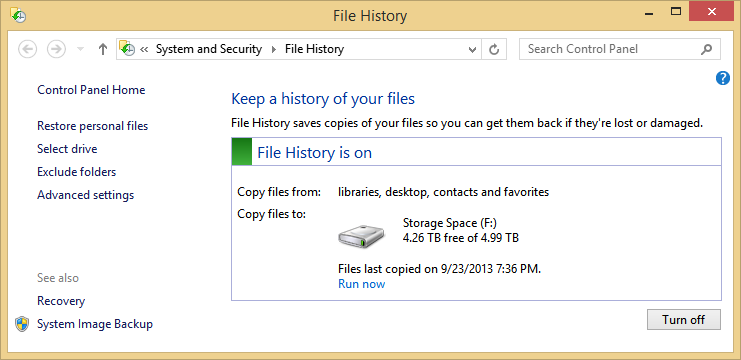
In Windows 8.1, go to the Start Menu, type "File History" and run it.

image

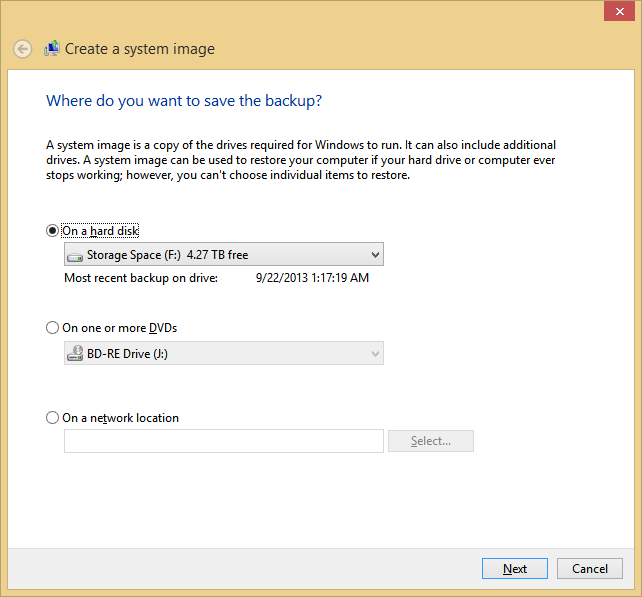
Now, hit System Image Backup in the lower corner there.

image

You can put an image on DVDs or an external hard drive.

Now, to be clear, should this be your primary backup strategy? No. I've got most things in the cloud or automatically backed up to external drives. If I needed to totally reinstall Windows from scratch, I can get back up and working in about an hour without using a complete System Image. However, I'm comforted by having at least one or two System Image backups. It's nice to have options.

Recommended Reading

Here's some other blog posts on the topic of backup. Now, take action.


Sponsor: Thank you to RedGate for sponsoring the feed this week! Easy release management: Deploy your .NET apps, services and SQL Server databases in a single, repeatable process with Red Gate’s Deployment Manager. There’s a free Starter edition, so get started now!


© 2013 Scott Hanselman. All rights reserved.
     
24 Sep 05:50

String length and SARGability

by Rob Farley

CONVERT_IMPLICIT isn’t the only problem with getting data types wrong. You might have the right type, but what if the length is wrong? This post will look at both getting the type wrong and getting the length wrong too.

Let’s do some testing. We’ll need a table with indexes. I’d normally use one of the AdventureWorks versions for this, but as they have a tendency to use user-defined types (which I’m not actually a fan of), I’m going to create my own. Also, my example needs to leverage a composite index. I’m only putting a single row in the table, because the amount of data isn’t relevant to what I’m going to show. I’m using a Windows collation, which is the default on my machine. I’ll put a note in later to mention why.

create table dbo.StringLength
(
    pk int primary key,
    id int,
    v50 varchar(50) collate Latin1_General_CI_AS,
    vmax varchar(max) collate Latin1_General_CI_AS,
    n50 nvarchar(50) collate Latin1_General_CI_AS,
    nmax nvarchar(max) collate Latin1_General_CI_AS
);
go
create index ix_v50 on dbo.StringLength (v50, id);
create index ix_n50 on dbo.StringLength (n50, id);
go
insert dbo.StringLength (pk, id, v50, vmax, n50, nmax)
values (1, 1, 'abcdefghij', 'abcdefghij', N'abcdefghij', N'abcdefghij');
go

I haven’t indexed the vmax and nmax fields, because you can’t use them as index keys. Of course, there’s plenty of argument to having those fields in your actual tables, but if you’re wanting to be able to search on that data, you might want to consider a full-text index. If the searching is always on the start of the string, you could consider another option, but we’ll come to that later.

Let’s look at what happens when we do it right, defining variables using the right type.

declare
    @s varchar(1000) = 'abcdefghij',
    @i int = 0;
select id
from dbo.StringLength
where v50 = @s
and id > @i;

image

Notice that there is no Predicate property of the Index Seek, only a Seek Predicate, which has both a Prefix and Start. The range of rows returned by the Seek Predicate has a start-point based on a combination of the Prefix and Start, and an end-point which is the end of the Prefix.

If the wrong types are used, we see that a conversion is needed.

Let’s start by using a varchar(50) parameter, and comparing it to the nvarchar(50) column.

image

We still see no Predicate here, but look at the Prefix. A CONVERT_IMPLICIT is needed because the types don’t match. In case you haven’t heard, this is bad.

But how bad is it? Actually, not very bad at all, because @s is converted into the correct type, and then used in the Seek. You should still avoid it by passing in the correct type, but the cost of converting a parameter to the correct type is not that bad, because it only needs to happen once.

What happens if we do it the other way around, passing in an nvarchar(50) parameter and comparing it to the varchar(50) column.

image

Oh!

Straight away, you’ll notice that there’s a different shape to the execution plan, we’ve lost the Prefix in the Seek Predicate, and we have a Predicate (the residual one) property as well. But we do still have an Index Seek. It hasn’t resorted to using an Index Scan as would’ve been the case if we had used a number.

(Just for completeness, let’s truncate the table – to avoid a conversion error – and use a number for the comparison)

image

Here we get an Index Scan. No Seek Predicate. The index on v50 is as good as useless because we’re comparing the column to a number. Look what’s going on in the Predicate – we’re converting the v50 field into an integer, and seeing if it’s equal to @i. That’s doing it for every row in the index.

Luckily, we now get a warning about this. See the yellow triangle with an exclamation mark in it on the SELECT operator? If I click on that, I see a warning that says:

Type conversion in expression (CONVERT_IMPLICIT(int,[tempdb].[dbo].[StringLength].[v50],0)) may affect "CardinalityEstimate" in query plan choice, Type conversion in expression (CONVERT_IMPLICIT(int,[tempdb].[dbo].[StringLength].[v50],0)=[@i]) may affect "SeekPlan" in query plan choice

It’s actually two warnings. One is a SeekPlan warning, and one is a CardinalityEstimate warning. It’s the SeekPlan one that has caused the Scan, while the CardinalityEstimate problem means the Query Optimizer has little idea about how many rows to expect out of the Scan operator. (And no, there’s no full stop / period at the end of those warnings. Go figure...)

Anyway, that was just an aside, because I figure there are plenty of posts already out there about this CONVERT_IMPLICIT issue leading to a Scan instead of a Seek. Let’s go back to our situation, where we were dealing with nvarchar and varchar strings, and still had a Seek. This one:

image

Clearly this is a different situation to a regular CONVERT_IMPLICIT. It’s less harmful, although there is still a big impact, and it’s potentially much more commonplace, as people don’t tend to care quite as much if they see an Index Seek already in play.

Oh, and this behaviour doesn’t happen with SQL collations. If you have a SQL collation, the sort order between varchar and nvarchar is different, and it has to do a Scan, just like when I used a number.

The thing that’s happening here is the same as when you have a datetime column that you’re casting to a date, or when you’re using a LIKE comparison with fixed start. The Query Optimizer uses a function called GetRangeThroughConvert (in the Compute Scalar – you can see it in the XML), which is then used to create a Dynamic Seek. I’ve presented on this before, such as in the SARGability and Residualiciousness talks at SQLBits in 2010 and the PASS Summit in 2011. Paul White (@sql_kiwi) expanded on the GetRangeThroughConvert function in a post from 2012. The seek can’t guarantee to catch everything though, so it uses a Predicate (the residual one) to make sure the value matches exactly.

So why is this so bad? In my presentations I’ve talked about the GetRangeThroughConvert behaviour as being a good thing. More on that first down in the post.

What if we pass in the correct type, but make it too long or too short?

image

When it’s too long (though we haven’t considered ‘max’ yet), we get the same behaviour as if it were the right length. Interestingly, if you search the XML version of this plan for either 1000 or 50 (except for in the column name), you don’t find it anywhere. It’s as if we passed in the correct value. The same happens if you pass in a string that is too short, but here you need to consider whether you might be wrecking the parameter.

In this situation, my query didn’t return the same results, because @s is only ‘abcde’. But it does this without any kind of warning – you can populate varchar(5) variable with a longer string and it won’t complain at all.

image

But max is done differently.

Let’s see what happens when we pass in a varchar(max) or nvarchar(max) parameter, and compare it to the limited-length string.

image

We’re comparing the varchar column to a varchar parameter, but the parameter is defined as a max field, and we have the GetRangeThroughConvert functionality, like what happened with the nvarchar / varchar scenario. But it’s more complicated again – despite the fact that we have a Range, our Residual Predicate doesn’t include the equality check. That check has actually been pulled further left in the plan, in that new Filter operator you see there.

You see, checking a max type is expensive, and involves memory allocation (that parameter is potentially up to 2GB in size), so the Filter is moved to the left as far as possible (SQL won’t ever do a max comparison in a Seek/Scan operator because of the memory allocation). By calling all the other filters (however the filters are done, Joins, Seeks, Residuals) before applying the max filter, the data that gets pulled into the max filter is now as few rows as possible. The Seek will be close to the correct amount, thanks to the GetRangeThroughConvert part, but that final check does still need to take place. It’s a good thing that the check is pulled left, but you should avoid passing in a max parameter so that this check can be done in the Seek Predicate.

So what about the other way around? What if we have a max column, and a limited-length parameter?

In some ways, this is more trivial because you can’t index a max column. This is one of the things that carried over from the days of text and ntext, although you couldn’t define a variable as text or ntext either, so you were less likely to try.

If you can’t index the column, but still want to be able to perform searches that would be index-like, what can you do (apart from using an Full-Text Index)?

Well, you could use a computed column that matches the length of your parameter. The non-clustered index persists the value, although it’s not persisted in the underlying heap / clustered index.

alter table dbo.StringLength
add vmax50 as cast(vmax as varchar(50));
go
create index ix_vmax50 on dbo.StringLength(vmax50, id) include (vmax);

This is similar to what can be done to tune many queries to get around SARGability problems. But it won’t help here unless we change our query, because our query still uses the max column, and implied conversion makes the shorter one longer, not the other way around. However, if we add an extra predicate to our query, we can achieve what we want:

image

The Filter here is still the max check, but now we at least have a more effective seek on the rest of it, thanks to making a column which contains the first part of the potentially-long string.

So you can see that GetRangeThroughConvert functionality is useful, and way better than the alternative of using a Scan.

But GetRangeThroughConvert is actually bad for your query. Honestly.

The reason why it’s bad is because of what has happened to the second predicate that we’re using, the “id > @i” bit. When the type matched properly, it was part of the Seek Predicate. When GetRangeThroughConvert is used, either through the wrong type or by passing in the right type but with the max length, this second predicate gets relegated to the Residual (see the image below). That means that every row that satisfies the string comparison much be checked against this second predicate. It’s like using the phone book and not appreciating that all the “Farley”s are sorted by first name. Even without a second predicate, there may be problems in the plan because of unnecessary sorts, or the avoidance of a Merge Join, simply because the data cannot leverage the second column in an index (or the CIX key if there are no more columns in the key). If you’re looking for Barry Smith in the phone book, but are passing in ‘Smith’ via a varchar(max) parameter, you’ll be scanning all the Smiths looking for Barry. If you’d passed it in using varchar(100), then you could’ve found all the Barry Smiths with your Seek.

image

It won’t give you a warning, but you’ll find your indexes aren’t being used as effectively as you might like.

@rob_farley

24 Sep 05:48

On the Demise of the MCM Certification

by andyleonard
Recently, Microsoft decided to retire some expert-level certifications. Among them, the highest SQL Server certification: the Microsoft Certified Master (MCM). There are several good posts on the topic, most notably: Death of the MCM Program (Paul Randal) We can handle the truth (Joe Sack) Microsoft Certified Masters: What Problem Were They Trying to Solve? (Thomas LaRock) Most indications point to economic drivers for the decision. The number of people who had achieved this level of certification...(read more)
24 Sep 05:48

10 Things I Hate About Interviewing with You–Follow Up

by Karen Lopez

image

If you think about it, interviewing, on both sides of the desk, is a lot like online dating.  You have a profile (your resume and LinkedIn profile) and the company has a profile (annual reports, online databases) and both of you are matched up via those profiles. Sometimes it’s done via a computer algorithm (online sites), sometimes you have a matchmaker (agency).

This past weekend my friend Thomas LaRock ( blog | @sqlrockstar ) and I presented on 10 Things I Hate About Interviewing with You at SQLSaturday San Diego.  We drew upon that analogy to talk about the myths and missteps that people make while being the interviewer and interviewee.  You can download the slides in my document library, but I wanted to share the 10 Tips and the additional resources we gave.

10 Tips for Better Interviewing

1. Do your homework

Your job in an interview is to come across as smart and confident.  There are things you need to do to get ready.  Having read the resume and the company profiles is just one important step.

2. Study the resume & job posting

You don’t want to be reviewing the resume or the job posting as you are interviewing.  You won’t be able to think of great questions or to listen while answers are being given.

3. Have a plan, but be prepared to detour

All that prep is good, but you need to be able to come up with questions and answers if the interview starts heading in a different direction.  I once interviewed for a project, only to have the interviewer realize that I was a better fit for a much higher role and project.  That meant more money and a better gig.

4. Ask real questions

We give a list of some of the interviewer questions we think have proven to be trite, tired and nearly useless.  Let’s just say they involve mirrors and kryptonite.

5. Listen, then ask follow up questions

It kills me to see an interviewer asking questions but not really processing them; they might as well be a webform recording my responses.  And I’ve seen interviewees give responses to questions, even crazy questions, and not ask any follow ups or ask context-seeking questions. That says to me they aren’t really “there” in the interview.

6. Be engaging and sincere, even if you have to fake it

It really hurts to see an interviewee be flat and less than passionate about what they do.  It know interviewing is stressful and nerves get in the way.  But to fail at being engaging comes across as flat.

7. Your job is to sell, without being salesy

Never rate yourself as 11 out of 10 or to say you know everything.  Interviewers don’t actually like overconfidence.  There needs to be a few “it depends” discussions and a few “I don’t knows” if the interview questions are good.  On the other side of the desk, an interviewer that spends more time selling the company or the project might be desperate for a resource for reasons you don’t want them to be.

8. Show humility, but don’t downplay your strengths

Be yourself.  Admit to when you don’t know something.  But don’t downplay your knowledge or skills.  And ladies, we are really bad about doing this.  Some guys, too, I know.  But ladies, seriously.  Take credit for what you know and the successes you’ve had. Other candidates are telling the interviewers that they the only person on the planet that can be successful in this job.  You need to rate strong.

9. Follow up if you promised to do something

If you promised to send references or more details about your background, or even to share a book title you really liked, do it.  Even if you don’t make it for this job, you’ll want a great reason to keep your name in front of that interviewer.  Interviewers, if you promised to seen updates about the status of the process, do it or don’t make the promise.

10. Be willing help each other, even if there isn’t a good fit

If you find out during the interview that the job isn’t for you, that’s not a fail.  If you know someone who might fit, forward along the information to them.  That’s a win for everyone.  Don’t hoard job opportunities. 

I’ve included some background on each of these, but to get the good discussion stories behind these, you’ll need to attend one of our future presentations of this.    We have one story about the importance of your interviewers not needing to know the status of your underwear, too.  It’s not all do’s and don’ts

Interviewing Resources

Just a few of the resources I recommend for interviewing and being interviewed.

Fun

http://theoatmeal.com/comics/interview_questions

http://theoatmeal.com/comics/interviewees


Tom’s Blog

http://thomaslarock.com/2012/09/10-things-i-hate-about-interviewing-you/

http://thomaslarock.com/2012/09/10-things-i-hate-about-interviewing-with-you/

•…plus many more….


Karen’s Blog

http://blog.infoadvisors.com/index.php/2012/01/30/another-zombie-job-posting-data-architect-designer-implementer-operational-support/

http://blog.infoadvisors.com/index.php/2010/07/16/looking-for-a-job-some-free-advice-thats-paid-for-1/

24 Sep 05:48

Interpreting the counter values from sys.dm_os_performance_counters

by psssql

The performance counters exposed by SQL Server are invaluable tools for monitoring various aspects of the instance health. The counter data is exposed as a shared memory object for the windows performance monitoring tools to query. It is also available as a Dynamic Management View (DMV) within SQL Server, namely, sys.dm_os_performance_counters. The VIEW SERVER STATE permission is required to be able to query this view.

The counter data exposed in the view are in a raw form. This needs to be interpreted appropriately before it can be used. The cntr_type column value indicates how the values have to be interpreted. There were some questions around the values reported by this column which prompted this blog post. In this article, we will look at how to interpret the counter values.

The columns exposed by the view are described in the MSDN documentation but is reproduced here for reference.

Column name

Data type

Description

object_name

nchar(128)

Category to which this counter belongs.

counter_name

nchar(128)

Name of the  counter.

instance_name

nchar(128)

Name of the  specific instance of the counter. Often contains the database name.

cntr_value

bigint

Current value  of the counter.


    Note   


For per-second counters, this value is cumulative. The
    rate value must be calculated by sampling the value at discrete time
    intervals. The difference between any two successive sample values is equal
    to the rate for the time interval used.


cntr_type

int

Type of counter as defined by the Windows performance architecture. See WMI
  Performance Counter Types
on MSDN or your Windows Server documentation for more information on performance counter types.


The type of each counter is indicated in the cntr_type column as a decimal value. The distinct values used by all versions between SQL Server 2005 and SQL Server 2012 are the following


Decimal    

Hexadecimal    

Counter type define

1073939712

 0x40030500

PERF_LARGE_RAW_BASE

537003264 
 

 0x20020500

PERF_LARGE_RAW_FRACTION

1073874176

 0x40020500

PERF_AVERAGE_BULK

272696576 
 

 0x10410500

PERF_COUNTER_BULK_COUNT

65792          

 0x00010100

PERF_COUNTER_LARGE_RAWCOUNT


Let us look at them individually.

1)     PERF_LARGE_RAW_BASE

                Decimal Value                   : 1073939712
                Hexadecimal value            : 0x40030500

This counter value is raw data that is used as the denominator of a counter that presents a instantaneous arithmetic fraction. See PERF_LARGE_RAW_FRACTION for more information.

   Eg :

object_name

counter_name

instance_name

cntr_value

cntr_type

MSSQL$SQLSVR:Buffer Manager

Buffer cache hit ratio base


3170

1073939712

  This value is the base for the MSSQL$SQLSVR:Buffer Manager\Buffer cache hit ratio calculation.  


2)     PERF_LARGE_RAW_FRACTION

                Decimal Value                   : 537003264
                Hexadecimal value          : 0x20020500

   This counter value represents a fractional value as a ratio to its corresponding PERF_LARGE_RAW_BASE counter value.

   Eg :

object_name

counter_name

instance_name

cntr_value

cntr_type

MSSQL$SQLSVR:Buffer Manager

Buffer cache hit ratio


2911

537003264


                Using the value here and the base value from the previous example, we can now calculate the MSSQL$SQLSVR:Buffer Manager\Buffer cache hit ratio as follows

Hit ratio %  = 100 * MSSQL$SQLSVR:Buffer Manager\Buffer cache hit ratio / MSSQL$SQLSVR:Buffer Manager\Buffer cache hit ratio base
                   = 100 * 2911 / 3170
                   = 91.83%


3)     PERF_AVERAGE_BULK

                Decimal Value                   : 1073874176
                Hexadecimal value            : 0x40020500

This counter value represents an average metric. The cntr_value is cumulative. The base value of type PERF_LARGE_RAW_BASE is used which is also cumulative. The value is obtained by first taking two samples of both the PERF_AVERAGE_BULK value A1 and A2 as well as the  PERF_LARGE_RAW_BASE value B1 and B2. The difference between A1 and A2 and B1 and B2 are calculated. The final value is then calculated as the ratio of the differences. The example below will help make this clearer.

    Eg :

Sample 1

object_name

counter_name

instance_name

cntr_value

cntr_type


MSSQL$SQLSVR:Latches

Average Latch Wait Time (ms)


14257

1073874176

<== A1

MSSQL$SQLSVR:Latches

Average Latch Wait Time Base


359

1073939712

<== B1


Sample 2

object_name

counter_name

instance_name

cntr_value

cntr_type


MSSQL$SQLSVR:Latches

Average Latch Wait Time (ms)


14272

1073874176

<== A2

MSSQL$SQLSVR:Latches


Average Latch Wait Time Base


360


1073939712


<== B2


Average Latch Wait Time (ms) for the interval = (A2 - A1) / (B2 - B1)
                                                                          = (14272 - 14257) / (360 - 359)
                                                                          = 15.00 ms


4)     PERF_COUNTER_BULK_COUNT

                Decimal Value                   : 272696576
                Hexadecimal value            : 0x10410500

This counter value represents a rate metric. The cntr_value is cumulative. The value is obtained by taking two samples of the PERF_COUNTER_BULK_COUNT value. The difference between the sample values is divided by the time gap between the samples in seconds. This provides the per second rate.

   Eg : For this example, I obtain the ms_ticks column from sys.dm_os_sys_info for calculation. You may use any method of choice to determine the difference in time between the counter value snapshots including getdate()

Sample 1

ms_ticks

object_name

counter_name

instance_name

cntr_value

cntr_type

488754390

MSSQL$SQLSVR:Databases

Transactions/sec

AdvWrks

1566

272696576

Sample 2                                

ms_ticks

object_name

counter_name

instance_name

cntr_value

cntr_type

488755468

MSSQL$SQLSVR:Databases

Transactions/sec

AdvWrks

2055

272696576


The value for Transactions/sec for the interval = (Value2 - Value1) / (seconds between samples)
                                                                          = (Value2 - Value1) / ((ms_value2 - ms_value1) / 1000)
                                                                          = (2055 - 1566) / ((488755468-488754390) / 1000)
                                                                          = 489 transactions/sec


5)     PERF_COUNTER_LARGE_RAWCOUNT

                Decimal Value                   : 65792
                Hexadecimal value            : 0x00010100

   This counter value shows the last observed value directly. Primarily used to track counts of objects.

  Eg :

object_name

counter_name

instance_name

cntr_value

cntr_type

MSSQL$SQLSVR:Buffer Manager

Total pages


5504

65792

               The value of the counter MSSQL$SQLSVR:Buffer Manager\Total pages = 5504.


Related links :

The sys.dm_os_performance_counters DMV documentation

                sys.dm_os_performance_counters (Transact-SQL)         
                http://msdn.microsoft.com/en-us/library/ms187743%28v=sql.110%29.aspx

More information about the various SQL Server counters and what information they convey.

                Use SQL Server Objects
                http://technet.microsoft.com/en-us/library/ms190382.aspx


Information about the performance counter defined values from Microsoft Performance Counter Query Protocol documentation

                2.2.4.2  _PERF_COUNTER_REG_INFO
                http://msdn.microsoft.com/en-us/library/cc238313.aspx


Ajith Krishnan | Escalation Engineer | Microsoft SQL Server Support


24 Sep 05:39

Visionary Leak

by Ellis Morning

Tom worked for a Belgian insurance company, which meant he knew how to say “We’re not covering that” in three languages. He was a Java developer who’d spent many years building and supporting web services. His only real complaint was Maxime, a “visionary” who’d shown up months earlier. Maxime had been hired as a project lead, and wowed business users and management alike with authoritative, buzzwordy pap. Such a snake-charmer was Maxime that he wasn’t just leading projects anymore- he did all of his own designing, coding, and testing. No one else in the entire company had such one-man-wrecking-crew privileges. Tom had never been impressed with Maxime’s drivel, but his attempts to inject reason were repeatedly shot down. Tom resolved to ignore Maxime, but that became more difficult as Maxime’s “improvements” encroached upon Tom’s domain.

One painfully bright and painfully early Monday morning, the boss didn’t even wait for everyone to grab coffee before commandeering a conference room. “The GTS01 server slowed down considerably over the weekend,” he told them. “The network team assures us the problem’s not on their end. There are only six applications running on that box.” He called up a PowerPoint slide with a bulleted list. “Maxime, any thoughts as to what’s wrong?”

Of course he defaulted to Maxime, the cool and imperious leader. His answer leapt from his tongue almost before the boss had asked. “Tom promoted changes to TTM last week. He must have introduced a memory issue. That’s just what happens with junior developers.”

“‘Junior?’” Tom repeated. “I’m younger than you, but I have eight years-”

“It’s clear that you introduced this issue, and you should get to work,” Maxime cut him off.

“You just put TelPoint and ComPoint into production last Friday,” Tom countered. He tilted his head at the list on the wall.

“Now Tom, I don’t think we should point fingers,” the boss said.

Tom shook his head. “Why don’t we install a profiler to the server and-”

“And use up even more memory?” Maxime cut him off again, rolling his eyes to the others present. “He wants to jeopardize our server even further with one of those open source tinker-toys. Open source! What a joke.”

The boss sighed. “Tom, please start troubleshooting TTM first. If you really can’t find anything there, we’ll… consider other options.”

Tom engaged the standard CYA protocol. First, he made triple-sure his changes didn’t introduce a memory issue on his own machine, in dev, or in test. He tried rolling back his changes in production- no dice. None of his other applications had changed in weeks. He fired up visualvm, part of the JDK, and found services from TelPoint and ComPoint siphoning up memory like Mega Maid on “suck.”

Armed with this evidence, Tom went into source control to grab Maxime’s code. He found the compiled jars easily enough, but the source code that created them didn’t exist.

He emailed Maxime. “Check in your source code, or send it to me.”

No response. Not in his office. Subsequent calls fell into the voicemail black hole. The resident virtuoso simply didn’t have time for Tom, what with all the new and innovative work he was doing.

Time leaked past. The server limped along, and had to be rebooted once a week. Services crashed the heap and killed major applications. Tom went to the boss, who somehow wasn’t mad about Maxime’s source control policy violations, and even seemed afraid to approach Maxime about it. After all, “Maxime knows what he’s doing.”

It was only when the users’ tempers flared, and their shouting reached a fevered pitch, that Maxime was forced to surrender his opuses to Tom. They were nightmares. Instead of using Hibernate and Spring Security as the rest of the business did, Maxime had written entirely custom database access and security libraries built from little more than arrogance and anti-patterns. He’d never told anyone, just dumped the jars into source control. His variable names and comments were in French, a language spoken by only 40% of Belgians. He had copied and pasted over 100 classes from TelPoint to ComPoint, without changes, to “aid interoperability.” But the kicker was when Tom found this class, copied and pasted everywhere:

public static class Cache {

 public static HashMap<Object,Object> cache = new HashMap<Object,Object>;

 public static void Add(Object requestId, Object requestData) {

     cache.put(requestId, requestData);

 }

 public static Object Get(Object requestId) {

     return cache.get(requestId);

 } 
}

Every request ever made was cached. The Get method was called exactly zero times. With no expiration or way to delete objects from the “cache”, Maxime had successfully built a memory leak into Java.

Within a day, Tom called a new meeting to demonstrate a proof of concept. With TelPoint and ComPoint installed to a clean server and a program simulating heavy levels of traffic, it only took 15 minutes to crash the server. Quelle surprise.

Tom basked in his triumph. Maxime glowered. The boss cleared his throat. “All right Tom, thanks for your effort.”

A few days later, the boss met with Tom privately in his office. “Great work with that memory issue. We won’t soon forget your efforts.” He grinned at his own silly joke. “In fact, I have great news for you.”

Tom blinked. “Really? What?”

“Maxime is getting promoted. You’ll be supporting the applications he’s leaving behind. It’s like your own promotion, in a way- an opportunity to work with some of the best projects that have ever come to fruition here. Congratulations!”

[Advertisement] Make your team a DevOps team with BuildMaster. Pairing an easy-to-use web UI with a free base platform, BuildMaster gets you started in minutes. See how Allrecipes.com and others use BuildMaster to automate their software delivery.

18 Sep 01:51

I Didn't Do Anything

by Erik Gern

Like a ninja in the night, Hanz M., AKA Hanzo, stalks across Hesse University’s Dresden campus. The go-to man in the IT department, he fixes the messes that others leave behind. These are his stories.
"Is your connection working?" Gertrude, Hanzo’s boss, asked one night. Hanzo had been hired by Dresden’s IT department just a few weeks ago.

"I can’t ping Google," Hanzo responded. "Even the university intranet is down."

"I’ll bet it’s that shady gateway of ours," Gertrude said. "Why don’t you go have a look?"

"Sure." Hanzo blushed. "Uh, Do you know where our rackspace is?" He hadn’t yet been given a tour of the Dresden campus.

". . . Actually, I don’t," Gertrude admitted. "After we renovated the Business Science building last year, our equipment’s been pushed all over the place. You’ll have to ask maintenance."

Hanzo sighed. Maintenance treated IT’s equipment like embarrassing relatives: hidden out of sight and mind.

"I’ll be gone a while," Hanzo said. Even with the annoyance of talking to maintenance, he was looking forward to a nice adventure through campus.

Why Should We Know?

A janitor dozed at the front desk in the maintenance department. They were centrally located, convenient for everyone except IT, which was pushed to the far edge of the campus. Hanzo kicked the janitor’s desk, awakening him.

"Kinda late to be asking for us to mop up your office?" the janitor said, eyes half-open.

"I’m Hans M., with IT," Hanzo said. "I need to know where your people moved our rackspace a few months ago."

"Why do you think we’d know?" The janitor almost nodded off again, then seemed to remember something. "Are you here about our toolset?" The janitor looked at Hanzo like he were six years old again and had just gotten into the cookie jar without mother’s permission. "Boy, you’d better get the toolset back up and running, or my boss will be whipping your back!"

Hanzo sighed. "I can if you show me where the rackspace is."

An Unfortunate View

The rackspace was house in a converted classroom at the edge of campus, a building left over from the communist era of East Germany. "Looks like one of my boys is still at work," the janitor said, pointing to a utility wagon outside the door. "Try not to interrupt him."

"If he isn’t tearing it apart," Hanzo muttered as he went inside. The air was stifling hot even for the summer. Is the air conditioning working in here? Hanzo wondered. I wouldn’t be surprised if the CPUs have all separated from the heatsinks.

Hanzo looked over rack after rack for a tower case propped on top somewhere (the gateway had been a simple fileserver in a former life). His footsteps quiet, Hanzo thought he saw a tower unit perched atop the racks when his eyes met a more unpleasant site: bare buttcheeks.

"I didn’t do anything!" the buttcheeks yelled. The man they belonged to turned around, adjusted his utility belt, and stared at Hanzo in fear.

Hanzo paced to the other side of the rack. He found the gateway, the tower case pushed aside. The man was holding some AC duct segments and a drill, which explained why the AC wasn’t working. A single Ethernet cord dangled down the front of the metal rack.

The gateway’s Ethernet port was empty.

"Did you move this?" Hanzo asked the man, his normally even voice cracking just a bit.

"I just pushed it over a little, so I could get to the air vent!"

"You took down the internet connection for the entire campus," Hanzo explained, as he moved the tower back and plugged the Ethernet cord back in.

"I was just trying to fix the AC," the man whispered, defeatedly.

The Five Rings of IT

Hanzo returned to the IT office and checked that the connection was back. Google pinged back, with no more than the usual dropped packets. "‘Pay attention even to trifles,’" Hanzo said, quoting The Book of Five Rings. "It’s full of useful advice for IT, you know."

"You know those people in maintenance won’t learn their lesson," Gertrude said to Hanzo. "Eventually they’ll need that classroom for something else, and we’ll be doing this all over again."

"I know," Hanzo replied. "It’s the eternal, unending struggle between the incompetent and the exacerbated."

"I guess I’d better go buy a katana," Gertrude said.


Photo credit: MelvinPrice / Foter / CC BY

[Advertisement] Make your team a DevOps team with BuildMaster. Pairing an easy-to-use web UI with a free base platform, BuildMaster gets you started in minutes. See how Allrecipes.com and others use BuildMaster to automate their software delivery.
18 Sep 01:47

Best of Email: Fun in Alaiowaska, HP Cannot Comment, Mumps Tech Support, and more

by Mark Bowytz

Don't forget, The Daily WTF loves terrible emails. If you have some to share, mail in your mail!


Verizon Maintenance in Alaiowaska (from Bob)

Just a heads up - Verizon is performing some maintenance in Coralville, Alaiowaska (it's apparently the new state produced by the merger of Alaska and Iowa). Network service might be interrupted.

________________________________________________________
From: ClearQuest@initech.com
To: CR_Notify_All
Cc: CR_Notify_CCM
Subject: ChangeRequestForm 3-Routine Scheduled

Title: FYI: Verizon Scheduled Maintenance Notification - R-1234567 / E-12345678 Location: CORALVILLE, ALAIOWASKA, UNITED STATES
Environment: Prod.
Req_Implement_dt: 2011-01-08 12:00:00
Planned_implement_dt: 2011-01-08 12:00:00
Planned_Completion: 2011-01-08 12:00:00
SystemsAffectedHostText:


Maybe we should use this anyway? (from Jason Braucht)

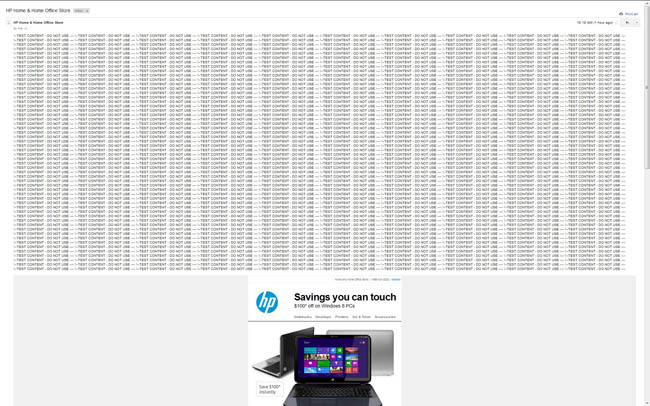
I just received the following promotional email from HP. Looks like someone in their marketing department is having a bad day.

The email is HTML formatted and the body contains 540 lines of

!--TEST CONTENT - DO NOT USE ----
followed by what looks like the intended content. Thankfully they didn't add a
tag so the monster block of !--TEST CONTENT - DO NOT USE ---- rendered across a mere 100 or so lines...


Mumps Tech Support (from hoss)

The following arrived into our very own Inbox. I'd love to help the guy, but we're not exactly the best source of technical help on these sorts of things.

________________________________________________________
From: hoss_something@hotmail.co.uk
To: The Daily WTF
Subject: mumps call across the internet

Hi, I need to write calls to the internet from within mumps and to then read any data that is returned. Any ideas/help/sample code would be much appreciated.


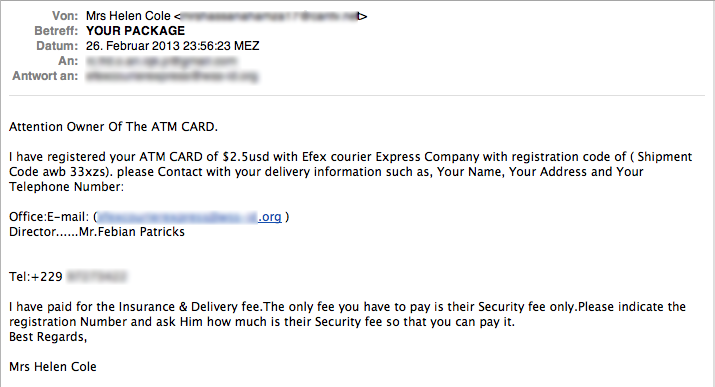
Even 419ers are short on money these days (from Fred B.)

Looks like the debt crisis has finally affcted these 419-scammers, too. But I still think that two dollars and fifty cents is a bit on the cheap side...


Stop reading that documentation! (from Gillian)

Our network administrator has put a firewall block on docs.oracle.com (the source of documentation for the myriad of Oracle products) for what I'm assuming that he felt to be valid reasons.

________________________________________________________
From: Joe.Theadmin@initrode.com
To: *All-Developers
Subject: Firewall Block - docs.oracle.com

All,

It has become apparent that many of the Application Development staff are regularly accessing docs.oracle.com during work hours, consuming large amounts of internet bandwidth. 

Since this is negatively impacting externally facing business processes, this site has been blocked, effective immediately.

Regards,
Joe Theadmin
Senior Network Administrator
Initrode Inc.


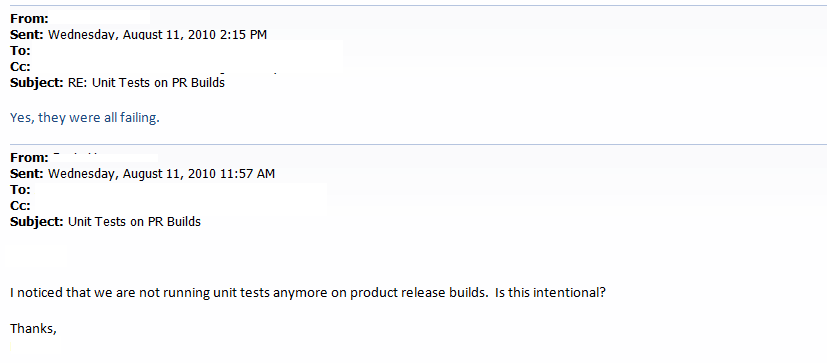
Why no more Unit Tests? (from Antonio Yon)

Not much to say here - the email pretty much says it all.


Solar Flares FTL (from Anon)

Let's not be to quick to judge the IT person who sent this message to Anon. When there's no explanation, maybe solar flares are to blame.


[Advertisement] Make your team a DevOps team with BuildMaster. Pairing an easy-to-use web UI with a free base platform, BuildMaster gets you started in minutes. See how Allrecipes.com and others use BuildMaster to automate their software delivery.
18 Sep 01:43

Waste Not, Want Not

by Erik Gern

Like a ninja in the night, Hanz M., AKA Hanzo, stalks across Hesse University’s Dresden campus. The go-to man in the IT department, he fixes the messes that others leave behind. This is one of his stories.

The techs from central IT in Berlin were an hour late, to Hanzo’s’s chagrin. He and his boss Gertrude were waiting in the campus server room. The Dean of Dresden campus, after numerous complaints from staff about the internet connection, demanded that IT give them a new gateway. The old tower unit, a file server in a past life, was dropping more packets than it successfully received.

The Dean also demanded that downtime be limited to five minutes. Central IT had given their assurances, but Hanzo remained skeptical.

"It’s not that complicated," Hanzo said. "Why won’t they just let us install the new gateway ourselves?"

"The guys in Berlin never trust us to get things done right," Gertrude replied. She gestured to the mess of AC ducts above them. "Things here tend to be held together with string and red tape."

Hanzo heard them before they entered the classroom: three skinny tech guys, led by a blonde, body builder type. "Get the old server out of the way," the body builder ordered Hanzo, who grudgingly obliged.

Another tech retrieved the new server, a typical rack-mounted blade. Only it wasn’t new: Hanzo noticed a thin layer of dust on the faceplate.

"Where did you get that from?" Gertrude asked, pointing to their "new" gateway.

"It’s a retired webserver," the body builder replied. "It should do fine."

"That’s at least four years old," Hanzo said. "It’s likely been running continuously until now. Those things don’t power back on if they’ve been running hot too long."

The body builder, after taking down the old gateway from the shelves, towered over Hanzo’s slight frame. He ripped the network card out of the tower case. "This," he said, "is the problem, not your new gateway." He snapped the network card in half. "Now stay out of our way."

Permanent Meltdown

Hanzo and Gertrude stayed out of the way.

"Okay, it’s on," the body builder announced, as one of his techs turned on a nearby monitor and switched to the new rack-mounted gateway. Hanzo and Gertrude peeked over their shoulders to watch.

It froze in the BIOS boot sequence.

"Try resetting it," the body builder said. Another tech did so. The monitor flickered off and on, but the gateway never went past the initial boot sequence.

"What did you do?" The body builder asked Hanzo, as if he has used an ancient Japanese curse on the machine.

Before Hanzo could respond, the body builder’s cellphone rang. His face grew pale as he spoke. He hung up and turned to the other techs.

"That was the Dean. We’ve got an hour to get the internet back or we’re all fired."

Plan B is Broken

Half an hour passed, and the rack-mounted gateway still failed to boot. The body builder was sweating profusely under his muscle shirt and windbreaker. "I need some ideas," he finally said to Hanzo and Gertrude.

"Plug the old gateway back in," Gertrude suggested. "Then get a real piece of hardware to replace it."

"Well, let’s do it!" the body builder shouted. He rushed to the old tower and picked up the case when his face turned pale again.

"Missing something?" Hanzo said, holding up the two pieces of the old network card the body builder had broken half an hour before.

"We got any spares?" the body builder asked the other techs. They shook their heads.

"‘Do nothing which is of no use,’" Hanzo said. "Book of Five Rings. Now, where can we get a spare network card in twenty-five minutes?"

Everything Old Is New Again

Hanzo’s car tires skidded on the pavement outside the building as he parked. He rushed inside the building, brandishing the newly-bought network card. He checked his watch: two minutes to spare.

The body builder grabbed for the new network card, but Hanzo pushed him aside and handed it to Gertrude, who had better hands for installing parts. She installed it in thirty seconds flat. Then Hanzo plugged in the Ethernet cord, booted the computer, switched the monitor to its video feed, and crossed his fingers.

The old gateway booted to Windows without a hitch.

Hanzo said nothing as the body builder and the other techs slinked out of the building back to Berlin.

"I hope they’re not coming back to install the new hardware," Hanzo said.

"There won’t be any new hardware," Gertrude replied. "No budget for it."

"Well, waste not," Hanzo said.


Photo credit: Iwan Gabovitch / Foter / CC BY

[Advertisement] Make your team a DevOps team with BuildMaster. Pairing an easy-to-use web UI with a free base platform, BuildMaster gets you started in minutes. See how Allrecipes.com and others use BuildMaster to automate their software delivery.
17 Sep 18:08

Five years ago, Stack Overflow launched. Then, a miracle occurred.

by Jay Hanlon


Stack Overflow officially launched on September 15, 2008. In five short years, you’ve answered over 5 million questions on more than 100 sites, and helped hundreds of millions of people find the answers they needed. Today, we want to celebrate how, together, we changed one small corner of the Internet for the better.

We want to hear your stories about how someone on Stack Exchange helped you.

“Then, a Miracle Occurs”

Before it went into beta, stackoverflow.com had a comic on the landing page that came to symbolize what we were setting out to do:

We knew what our goal was, and we had some idea how to start, but the entire thing working was predicated on that middle step: “then a miracle occurs”. The original vision statement was ambitious:

It is by programmers, for programmers, with the ultimate intent of collectively increasing the sum total of good programming knowledge in the world. No matter what programming language you use, or what operating system you call home. Better programming is our goal. (from Introducing Stack Overflow, emphasis added)

It was a gamble: would people really take time out of their busy lives to answer other people’s questions, for nothing more than fake internet points and bragging rights?

It turns out that people will do anything for fake internet points.

Just kidding. At best, the points, and the gamification, and the focused structure of the site did little more than encourage people to keep doing what they were already doing. People came because they wanted to help other people, because they needed to learn something new, or because they wanted to show off the clever way they’d solved a problem.

Which was lucky for us.  Because here’s the crazy secret about gamification:  In the history of the world, gamification has never gotten a single person do anything they didn’t already basically like to do.

In the midst of everyone’s individual reason for coming, somewhere among the hundreds, and then thousands of people who showed up to answer each other’s questions and hammer out how the site should actually work, the miracle actually occurred.

An incredible number of people jumped at the chance to help a stranger

So far, you’ve provided helpful answers to over five million questions. Those answers are seen by forty-four million people looking for help each month.

To put those numbers in perspective:

  • That’s more people helped each month than visit the New York Times, Bank of America, or Apple.com.
  • If the people helped each month were a US state, it’d be bigger than California and almost twice as big as Texas.
  • If they were a country, it’d be in the top 15% of nations in the world, with more people than Canada, Argentina, or Poland. It’d be practically two Yemens.
  • If you put one frog in a football stadium for each of the 44MM people who get help here each month, that would be forty-four MILLION frogs. Think about that. But don’t say it out loud. People are quick to judge.

Making the Internet a Better Place

The next chapter of Stack Exchange is still being written. A few years ago, we widened our vision beyond programmers. Our new goal was simple, if a bit daunting:

Make the Internet a better place to get expert answers to your questions.

fredrogers shadow

We asked people what other sites they wanted, and carefully started launching them, one at a time. Each time, we were counting on a group of experts to come together and start asking and answering each other’s questions. There have been a few failures along the way, but overall, the successes have been amazing.

We’re now up to 106 sites, including some outstanding ones on System Administration, Computers, MathematicsUbuntu, Video Games, and Cooking, and some young upstarts like our site for English Language Learners. If there’s a site you want to see that doesn’t exist yet, you can still propose it on Area 51.

At the same time, Stack Overflow is continuing to grow, and we are doing our best to keep it healthy. The short history of the internet is littered with communities that started out great, but slowly petered out under the weight of flame wars, mass-n00bocide, funny cat pictures, or just boredom waiting for the next big thing. We still need your help to keep Stack Overflow focused on its core mission: collectively increasing the sum total of good programming knowledge in the world.

Tell Us Your Story

We want to hear your stories. Looking at numbers is one thing, but hearing from real, live people about how someone’s effort here helped them is entirely different. So, if someone’s post here ever saved your day at work, or convinced you to buy your daughter an SLR and learn photography together, take a minute to recognize the person who wrote the answer that mattered to you.

If you’re somebody who mostly answers questions, share how you got involved and what keeps you coming back.  Or tell us about someone who taught you something before we even existed. They deserve to be recognized for the way their investment in you is getting passed on to others here today. If Stack Exchange got you interested in a new topic or taught you a new trick for an old one, we want to hear about it.

Stack Exchange has always been about a community of people helping each other out. It was a long shot when it launched, but you made it work. Now, let’s take a few minutes to recognize everything that we’ve achieved together.


17 Sep 18:05

Windows 8.1 and the “New” Interface

by Chris Evans
EMC logo

I’ve just installed Windows 8.1 in a test VM to give it a whirl.  This is supposed to be the version with the return of the start button, but I think in fact Microsoft have just made things even more confusing.

The first image in the gallery below is my desktop as it stands when I first log in.  The tiles scroll left and right as with Windows 8, although the default screen size doesn’t show all of the available desktop as it comes preconfigured.  If I click into Internet Explorer as an example, I lose all my toolbars and navigation and get by default a full screen browser.  To return back to an application I need to activate the bottom left hot corner which returns the start button and I can get back to where I was.

Depending on where the cursor is (and I wasn’t able to capture it), under the yellow desktop tile a downward pointing arrow appears, taking me to another sub-level of menus.  Here I can find all my programs, given little square icons and names.  The whole metro style interface still feels a little forced for the desktop.  Navigation isn’t intuitive, and depending on what options are chosen, the desktop readily appears, reverting back to the old layered windows approach.

I’ve also found one other extremely annoying issue; RDP for Mac OS no longer works.  This thread seems to highlight what other users have already found.

The Architect’s View

Windows desktop continues to disappoint as Microsoft insist that non-touch screen users should be using a touch interface.  The implementation is half-arsed and definitely not completed.  I wonder if Microsoft wanted to change the O/S image, but the windowing functions were far to ingrained in the operating system architecture to make this possible, so the only solution was a poor veneer over the top.  I can only be thankful that I have very little dependence on Windows; I’m dropping use of the Microsoft desktop at every opportunity.

Related Links

Comments are always welcome; please indicate if you work for a vendor as it’s only fair.  If you have any related links of interest, please feel free to add them as a comment for consideration.

Subscribe to the newsletter! – simply follow this link and enter your basic details (email addresses not shared with any other site).

Copyright (c) 2013 – Brookend Ltd, first published on http://architecting.it, do not reproduce without permission.

W8SS3 W8SS2 W8SS1
17 Sep 18:05

Where Does Tape Go From Here?

by Chris Evans
EMC logo

I read with interest Chris Mellor’s recent article on Oracle’s latest tape drive and it got me thinking.  In the mid 1990′s I was doing some work for StorageTek (which is where this tape technology comes from) and was lucky to be asked to speak at the StorageTek Forum, that year held in Albuquerque, New Mexico.  At the time, STK was about to release the 9840 drive, codenamed “eagle” and we had a number of press conferences and discussions about the new technology.  StorageTek were always ahead with their tape technology and their own proprietary format, but the tradeoff was cost – STK was more expensive.  Looking at Chris’ article, it made me wonder two things; first how are people calculating the ROI on such monsters and two, whether these kinds of tape drives have a future in the Enterprise data centre.

Return on Investment

Firstly, there’s cost.  Imagine purchasing a drive that gets amortised over three years.  Irrespective of the absolute cost of the drive, the benefit is in the volume of data that can be read and written from it.  Large capacity media certainly helps as it reduces the number of media swaps and the down time that involves.  Fast transfer is also essential and the Oracle T10000D is apparently 57.5% faster than the competition.  However how many of us have actually seen tape drive being driven at full throughput?  What does it take to keep a drive, capable of 756MB/s fed with data?

The reality is that the drive will never run at that speed and to even try to achieve it would require masses of disk cache to keep the media continuously fed and not continually in stop/start mode.  That makes it difficult for anything other than the large enterprise customers to use and even then, they may well find it hard to justify over LTO-6.

Archive & Cloud

Now, the world of cloud and in particular archive represents a perfect opportunity for these types of tape drive.  I can see these devices being incredibly popular as the back-end storage medium for large cloud ISPs who need to read, write and copy  large volumes of data.  Effectively these are environments where economy of scale allows them to be fully utilised, reading data from large numbers of clustered server nodes.  Perhaps there will be a few other use cases where organisations with large media catalogues can use them too.

LTFS

What about indexing?  How will the data be stored, accessed and retrieved?  The industry would have us believe the answer is LTFS.  I’m not sure that this is the solution and what we really need is for the cloud providers to develop their own techniques and formats for using sequential media.  This could require a significant rethink and perhaps some mainframe smarts from many years ago.  In a few weeks’ time I’ll be attending an IT Question Time event in London, then the SpectraLogic analyst event in Colorado, where I’m hoping to have some good discussions and find some answers.  I’ll post some more details on both events once I have them.


Related Links


Comments are always welcome; please indicate if you work for a vendor as it’s only fair.  If you have any related links of interest, please feel free to add them as a comment for consideration.

Subscribe to the newsletter! – simply follow this link and enter your basic details (email addresses not shared with any other site).

Copyright (c) 2013 – Brookend Ltd, first published on http://architecting.it, do not reproduce without permission.

17 Sep 18:04

New EMC VNX Series features

by Menno de Liège
EMC logo

The new EMC VNX series storage arrays are available for distribution. EMC likes to present them as the new generation VNX storage arrays and I think there are some cool new features available making this VNX series really “new generation”. Inside this post, I will show some new features that I think are really cool. The new VNXe and Gateway systems are out of scope regarding this post. Besides this, I will not discuss the detailed differences between the new VNX models.

  • The new VNX models are: 5400, 5600, 5800, 7600, 8000. All available in block, file and unified configurations
  • Hardware:
    • PCI-E Gen 3 I/O modules
    • 4 lanes backend connections, all 6Gb (8 lanes for connecting to the 60 slot DAE with new I/O module)
    • Latest Intel Xeon E5 multicore processors
    • support for up to 1000 disks
  • Standby Power Supplies:
    • The VNX8000 gets 2U Li-Ion standby power supplies. All the smaller models will not use an SPS anymore, but will use BBU’s (Battery Backup Units) that are part of the base SP’s
    • The possibility to monitor BBU / SPS temperature and power consumption
  • The VNX8000 will use an SPE (Storage Processor Enclosure), where all the other models will use a DPE (Disk Processor Enclosure)
  • DAE’s and Disks:
    • 2,5″ disks available in 15k speed
    • The use of 2,5″ disks with 3,5″ carriers
    • 60 disk DAE, which can also house 2,5″ disks using 3,5″ carriers
    • SPE consists of a 25 slot DAE
  • Software:
    • The Block OE code is replaced by MCx, really using the Multicore Architecture. This MCx is used for Multicore Cache, Multicore RAID and Multicore FASTCache
    • In the “earlier days” every thread uses a single core, where MCx will use “thread distribution” meaning all software is optimized for multicore architectures
    • Initially MCx uses “preferred core”, meaning every front end and back end port has a preferred CPU core. This will prevents the unnecessary swapping of cache content between the available cores. On the back end, every core can access any disk, meaning no swapping is needed between cores.
    • VNX internal operations (disk rebuilds, proactive hot sparing) are processed by the less busy cores
  • Multicore cache:
    • Adaptive cache: No more splitting between read and write cache where the total cache is now shared between reads and writes
    • No more flushing of “dirty pages” to disk. Cache entries are now copied to disk meaning writes can also remain in DRAM cache
    • Cache entry aging: When a cache entry is used, the age decreases meaning more popular cache entries will stay inside the cache much longer. You can compare this to the FAST VP algorithm
    • Improved cache flushing: No more predefined watermarks where the algorithm now also monitors the referenced pools and even private RAID Groups to better react to workload changes
    • Pre-cleaning age for better use of the cache. On a RAID Group basis, the MC Cache creates a dynamic pre-cleaning age for all entries avoiding write flushing that makes no sense
    • Write throttling: Gives RAID Groups the time to process flushing load by delaying host I/O acknowledgements. This is to protect the system resources against intense and sudden workloads
    • Write cache can be disabled, where read cache is always enabled
    • Read cache prefetching: MC Cache looks at historical cache misses for better predicting reads
  • Multicore RAID:
    • Permanent sparing: Unassigned disks can be used as a hot spare without the need for rebuilding to a new disk later on. This is possible because of a virtual ID of the disks inside the array rather than a traditional physical “location” ID
    • No more assigned hot spares but MCx uses available unassigned disks for hot sparing when needed
    • Drive mobility: Disks in a RAID Group can be moved to another position inside the array. Nice feature when freeing DAE’s for example
    • RAID6 parallel rebuild: In a RAID6 configuration, two drives can be rebuilt at the same time for shorter less unprotected situations
    • Possibility of DAE re-cabling with preserving all configurations (down time required with use of array power down function)
    • All newly added disks are automatically zeroed out (background operation)
  • Symmetric Active/Active: For traditional LUN’s only, real active/active access to a LUN, without specific LUN ownership by an SP. This means all paths will become active paths without non-optimal paths (supported by Powerpath 5.7 or higher). This is possible by using a locking mechanism using Stripe Locking Service
  • FAST:
    • FAST VP and FASTCache optimized SSD drives
    • FAST VP now uses 256K slices instead of 1GB slices
  • Multicore FASTCache
    • Faster initial warm up
    • Recognizing sequential I/O
    • Writes are immediately acknowledged after reaching MCx instead of waiting for the FASTCache memory map and the landing into DRAM Cache for better performance
    • Larger amounts of FASTCache supported
  • Block level deduplication with an 8K granularity where every freed up 256MB is returned for use to the pool
  • SMB3.0 support for file / unified icm Windows 8 / Server 2012

17 Sep 18:01

VMworld 2013 in pictures

by Sean Thulin
EMC logo

VMworld 2013 - Day 3 331San Francisco is an amazing city (and also an expensive city).  I finally was approved for travel to this city after trying the past two years, so I wanted to make it count.  I had heard so many great things about VMworld from years past and I was looking forward to all it had to offer before, during, and after the show.  With only a few days in the city and a lot to accomplish, my adventure began on saturday.


Saturday night kicked off the first VMworld activity (if you don’t count booth assembly or hanging in the alumni lounge).  Simon Seagrave hosted a spectacular vBeers event to kick things off and it was packed the the point it was spilling out on to the sidewalk.  I met a lot of really cool people (including several people I follow on twitter) and I even got to try out google glass (I need to find one that fits people with glasses).


VMworld 2013 - Day 1 189_HDRThe next day started off with some sight seeing and a bit of a walking tour of SF.  Google maps really need to start telling me about elevation changes because some of those streets were straight up (or down depending on the direction you were going)!


Sunday afternoon was home to the 4th (or 5th depending on who you ask) vOdgeball tournament and this year did not disapoint.  My understanding was that this was the biggest it has been and major props to the teams competing, the refs for making quick calls, and the fans for surviving stray balls.

VMworld 2013 - Day 1 568

While team EMC was victorious in winning, the real winners was the wounded warriors program who received around $14,000 in donations.


VMworld 2013 - Day 2 367That evening we witnessed the opening of the show floor.  I have to say, the EMC booth was amazing and was one of 2 double decker booths on the show floor.  It seemed like every time I was at the booth it was packed full of people and this is always a great sign.  After 3 hours of booths, beer, and food, it was time for the biggest social media meet up of the week.  I’m referring to the VMunderground party.  This year it was held at an art gallery (that was surprisingly vacant of art) and had plenty of room to talk, eat, and mingle.


VMworld 2013 - Day 2 066All this has happened and the show doesn’t even start really until Monday morning.  The opening keynote delivered by former EMCer Pat Gelsinger did not disappoint.  Major announcements about the release of vSphere 5.5 which included two new features: VSAN and NSX.  VSAN is VMwares take on software defined storage and NSX is the result of the Nicira acquisition last year and completes their software defined networking portfolio.  There are plenty of great blogs out there discussing these technologies and I can’t wait to see what is done with this technology down the road.


VMworld 2013 - Day 2 392VMworld 2013 - Day 2 518At the EMC booth, Chad Sakac didn’t disappoint either.  He has a way with words and seems to be able to fire up the crowd no matter where he is.  Of course it helps when you have goodies to wow people like a VMAX that has a fridge built into it.


VMworld 2013 - Day 3 127Tuesday provided even more information about the new technologies announced the day before.  It was also a great day to do hands on labs.  VMware provided a huge hands on lab area, but for people wanting to try out EMC specific labs, we also brought our own booth setup to handle several labs at a time across the entire EMC portfolio.


VMworld 2013 - Day 3 565Tuesday night was the vendor parties and EMC, Cisco, and Intel banded together to bring you Cloudfest!.  We took over Ghirardelli square to bring the ultimate combination of music, food, and chocolate.  As evidence by the photo to the right, this place was packed!  The bands were great and delivered some amazing covers of popular songs by Queen, The Police, and others.  I was told this was one of the best parties of the night and people were still talking about it up through the end of VMworld.


VMworld 2013 - Day 4 080VMworld 2013 - Day 4 220On Wednesday, the EMC booth had a t-shirt meet up.  Everywhere you looked was a sea of EMC datacenter hero shirts (I think there were more than at EMC World).  This was the final day the show floor was open and even after 3 days of presentations, booth attendance was still very high (including some special guests like Pat dropping by).

VMworld 2013 - Day 4 249


VMworld 2013 - Day 4 279That night was the VMworld Party.  They took over AT&T park and turned it into a cVMworld 2013 - Day 4 301ounty fair!  The midway games were great however I still maintain that they were rigged since the same people kept winning (and I won nothing).  Both Train and Imagine Dragons did a great job.  This has to be one of the best customer appreciation parties I have been to and I can’t wait to see what happens in the coming years as other events step up!


All in all VMworld was a great event.  I met more people than I can remember (including about half of the people I follow on twitter).  I learned a lot about upcoming technology and the solutions they play.  To see the full collection of my photos (all 154 of them) I have posted them to google+.

VMworld 2013 - Day 3 342

17 Sep 17:59

VMware vSphere 5.5 Physical Host Maximums

by Simon Seagrave
EMC logo

vSphere 5.5 MaximumsThe release of VMware vSphere 5.5 has seen a number of enhancements to the underlying hypervisor (ESXi), and as with every major release of vSphere there is an increase in it’s capabilities around CPU, Disk and/or memory.

Probably the most significant in the VMware vSphere 5.5 release is the increase in VMDK file size that can be created and used, from 2TB (vSphere 5.1) to a massive 62TB!  That is quite a jump, and will definitely come as good news to businesses dealing with large amounts of data that have a requirement to have it mounted on a single volume.  Though you’d want to make sure you have an effective working backup and recovery strategy in place. ;)

The following is a quick-glance table that outlines some of the new VMware vSphere 5.5 per physical host (ie: not per virtual machine (VM)) maximum configurations.

Per Physical ESXi Host VMware vSphere 5.1 VMware vSphere 5.5
Logical CPU 160 320
Virtual CPU 2048 4096
NUMA Nodes 8 16
RAM (Memory) 2TB 4TB* (16TB experimental only support)
VMDK Size 2TB 62TB
vSphere Hypervisor RAM (Memory) – Free Version 32GB Unlimited

For SMBs and vSphere home lab users who run the free vSphere Hypervisor, the release of 5.5 removes the 32GB physical memory limit which means (budget permitting) you could start looking at using a single ESXi/Hypervisor solution using a server crammed full of memory, and of course an appropriately sized CPU and disk subsystem to match. Though I personally think that if you are spending that sort of money on memory you’d likely be wanting to nest your ESXi/Hypervisor hosts and use the highly useful functionality found with having a vCenter Server install, eg: DRS, HA, vMotion, etc.

The post VMware vSphere 5.5 Physical Host Maximums appeared first on TechHead and was written by Simon Seagrave.

17 Sep 17:58

Key things to note about vFRC

by Anil Sedha
EMC logo

VMware announced the beta availability of vSphere 5.5 that has a really cool feature for many organizations – vFRC (vSphere Flash Read Cache). It is important to understand some key aspects about vFRC, what is has to offer, and best practices around configuring it.

vFRC Hit

When a request is sent by the guest VM to vFRC enabled VMDK, the vFRC metadata is checked to find if entire data is available in cache. If data is available the cahce is read, data is fetched from the flash device and request is serviced.


vFRC Miss

When the request sent by guest VM could not be serviced in entirety by the vFRC cache because some data may have accessed for first time or expired from cache, the entire requested data is fetched from cache and simultaneously written to the flash cache.


vFRC Cache volatility

vFRC is a volatile cache and will be destroyed at the restart of a virtual machine. It will be recreated on boot. Other scenarios include suspend-resume, vMotion of VM without migrating the cache, snapshot consolidation, snapshot revert and so on.


Default Cache Value

The cache block sizes range from 4kb to 1mb. If a cache block size is 64Kb and a 4kb read I/O request is issued by guest VM and data is not available in cache, a 4kb read is issud to VMDK.  when populating cache the algorithm looks for 64kb region to place the new 4kb data. If no free space is available, a 64kb region is evicted and space is used to hold the new 4kb data. The remaining 60Kb is marked as invalid. Thus not selecting the correct cache value has great effect on performance.


Cache friendly workloads

vFRC works best for workload that frequently reads data since it fetches data and returns that when queried. Write I/Os are always serviced by the underlying storage. If the workload only accesses unique data witout repeated access of any blocks vFRC merely stores data in flash only to evict it after some time. There is a slight overhead due to adding an extra layer in the I/O path for zero benefit.  Thus vFRC is best for workloads with high amount of data re-access.


vFRC Cache block size

Cache block size is the minimum granularity of cache fills and evictions. For good performance vFRC places its metadata in memory and therefore the cache block size has a direct co-relation with memory usage. The higher the cache block size the lower the footprint of metadata for indexing the blocks and therefore resulting in smaller memory footprint. Consequently a smaller cache block size consumes a bigger memory footprint. However, higher block sizes are not better in terms of performance and efficient management of cache space. As cache evicts and cache fills happen, if the cache block size is much higher than typical I/O size there might be a situation where additional amount of cached data needs to be evicted to store a small amount of new data. In plotting the average per request latency of I/O trace under different conditions the 4kb cache block size appears most beneficial.


11 Sep 21:26

What a Waste..

by Martin Glassborow
EMC logo

Despite the rapid changes in the storage industry at the moment, it is amazing how much everything stays the same. Despite compression, dedupe and other ways people try to reduce and manage the amount of data that they store; it still seems that storage infrastructure tends to waste many £1000s just by using it according to the vendor’s best practise.

I spend a lot of my time with clustered file-systems of one type or another; from Stornext to GPFS to OneFS to various open-source systems and the constant refrain comes back; you don’t want your utilisation running too high..certainly no-more than 80% or if you feeling really brave, 90%. But the thing about clustered file-systems is that they tend to be really large and wasting 10-20% of your capacity rapidly adds up to 10s of £1000s. This is already on-top of the normal data-protection overheads…

Of course, I could look utilising thin-provisioning but the way that we tend to use these large file-systems does not it lend itself to it; dedupe and compression rarely help either.

So I sit there with storage which the vendor will advise me not to use but I’ll tell you something, if I was to suggest that they didn’t charge me for that capacity? Dropped the licensing costs for the capacity that they recommend that I don’t use; I don’t see that happening anytime soon.

So I guess I’ll just have factor in that I am wasting 10-20% of my storage budget on capacity that I shouldn’t use and if I do; the first thing that the vendor will do if I raise a performance related support call is to suggest that I either reduce the amount of data that I store or spend even more money with them.

I guess it would be nice to be actually able to use what I buy without worrying about degrading performance if I actually use it all. 10% of that nice bit of steak you’ve just bought…don’t eat it, it’ll make you ill!

11 Sep 21:24

Isilon and Data Centers and Forklifts, Oh My!

by Dave Henry
EMC logo

Most of my blog posts are long and text-heavy. This one is short on text and mostly photos…

Over the course of my career, I’ve been in a lot of different data centers. Some have been in interesting places, strange places, and some under frighteningly high levels of security. I’ve installed, fixed, and administered compute, network, and storage gear in a lot of places.

ClusterHowever, this week, I got to experience something new. I went to a new customer site to help get a new EMC Isilon cluster (that’s it, in its original packaging, on a pallet in the picture on the right) up and running on a 10GbE network. The customer (who gave permission for me to use the pictures, but prefers to remain anonymous) wanted the cluster installed in their new manufacturing facility.

Most of the building is a giant open floor, complete with an overhead crane rated for 25 tons. There’s only a tiny portion of the building that has a second floor, so there’s no elevator. Oh, and the data center is upstairs…

So, our challenge was to get all that storage equipment upstairs.

Up there, through the door on the other side of the railing, in fact.

Up there, through the door on the other side of the railing, in fact.

At first, I thought we’d be carrying things up the stairs one box at a time, but it turns out we had another solution. First we had to prepare the upstairs…

Where "prepare" means "remove the railing"...

Where “prepare” means “remove the railing”…

Good. That pesky safety railing is out of the way now.

Good. That pesky safety railing is out of the way now.

OK, the railing was no longer in the way, but how were we going to get the Isilon 15 feet up? With a forklift, what else?

Our friendly neighborhood forklift operator.

Our friendly neighborhood forklift operator.

The next three pictures tell the story better than I could write it.

On its way up.

On its way up.

Ooh - so close.

Ooh – so close.

Ah, there we go - all the way up.

Ah, there we go – all the way up.

Why post this? Two reasons:

  1. It amused me.
  2. It was a valuable lesson. Every now and again I catch myself thinking that I’ve been in IT long enough that I’ve seen everything. Well, this was a first for me.
11 Sep 21:23

Allowing snapshotted VMFS datastores

by Menno de Liège
EMC logo

When performing a Disaster Recovery test for example on a VMware vSphere environment in combination with a synchronous mirror setup on a EMC Clariion / VNX, you want to use the snapshot functionality to minimize the impact on your active mirror relationships.

On an ESX or ESXi 3 environment, using the advanced settings via the vSphere Client, you were able to allow snapshotted VMFS datastores automatically being added to the environment combined with optionally resignaturing the VMFS datastores. On ESX or ESXi 5, these advanced settings are not configurable from the vSphere Client and by default you have to add the LUN’s with an existing VMFS volume label manually to the environment.

What if I want to automatically present snapshotted VMFS datastores to the environment without the need for manually adding them one by one? We know that the GUI configurable advanced settings are not present anymore, but this does not mean they do not exist anymore. Simply make use of the following command options:

esxcfg-advcfg -s 0 /LVM/EnableResignature (default is 0)

esxcfg-advcfg -s 0 /LVM/DisallowSnapshotLUN (default is 1)

When you connect via an SSH session to the ESX or ESXi hosts and you change the DisallowSnapshotLUN setting to zero, you can now add many snapshotted VMFS datastores to the environment and the VMFS datastores will be present right away after a rescan without the need for manually adding the datastores to the inventory. Inside this post I will ignore the EnableResignature setting, because my DR environment has never seen this signature before resulting in presented snapshotted VMFS datastores without problems regarding signatures.


11 Sep 21:23

Storage is Sexy (Again): Thank you VSAN

by mjb

Despite the apparent misnomer, VSAN has brought SAN back to the forefront of the conversation.

Here’s a combination of why I care and what I’m reading about this massive announcement from VMware.

Virtualize me

While you might read my blog for social media how-to’s and EMC insight, my love for storage came before I knew either of these well. I joined EMC in 2009 supporting CLARiiON storage area networks. From there I grew into the NAS space of Celerra and went on to be a Systems Engineer of the VNX and VNXe. I support these all indirectly through the EMC Community Network now, but big releases still get me excited.

The VSAN announcement  re-awoke a sleeping storage nerdiness I don’t let out too much these days. To be able to add to the discussion, I want to first run through some key design points. All sources are below.

I’m focusing on theory of operation and some quick facts, so if you want to feel how it works, I recommend reviewing all that Cormac Hogan put together here.

Tier 1 Storage… ? (with thanks to professionalvmware.com)

Here’s a summary list of what I’ve found:

  • As Cormac put it, “VSAN has got nothing to do with SAN,” and will remind you more of a Centera or Atmos with its RAIN object storage architecture
  • Follow up: For those not as comfortable with object data, you could think of VSAN like the scale-out magic inside Isilon’s OneFS, as long as you keep it as a metaphor only. It looks to work quite differently
  • per-VM QOS (i.e. performance guarantee) granularity on your data access (without the wait for vVols)
  • minimum connectivity requirement of a(nother) 1Gb pipe between systems
  • The VSAN software is designed into vSphere 5.5 without the usual seams - no additional VIBs or appliances necessary
  • VSAN is a distributed transactional software stack, which is similar – at first – to ScaleIO

Questions I have:

  • Given that VSAN isn’t going the ZFS route, what dependable technology is this “home-grown” design based on? It’s not parity, so is it erasure code?
  •  Why exactly are SSDs required on all nodes?
  • Follow up: …And the answer is much deeper than “for performance.” Dependencies on higher IOPS flash storage could either result in an explanation of clairvoyant proportion or end up revealing a brittle architecture that throws the spray-and-pray power of flash out there as a meat shield for poor design
  • Importantly  minor, is this product officially being shortened as vSAN or VSAN?

Posts referred to:

It’s great to see this vibrant conversation on storage in the new light of hypervisor integration. I’m curious to see how it plays in the VMware portfolio: what plays well, what doesn’t and how it may fit inside the software-defined data center our customers are building.

09 Sep 23:44

We can handle the truth

Today I attended the MCM call with Microsoft Learning (MSL).

I won’t get personal here, because in spite of everything, I do imagine that the folks in MSL are under quite a bit of stress right now (yes – so is the community, but more on that later).  I myself remember getting chewed out back in November of 2010 when we announced that SQL MCM was removing the training requirement.  While I received some support, I received a good share of hate-email and comments – and I cannot recall a more stressful period of time in my career.  Communicating change is tough – and there is definitely a right way to do it and a wrong way to do it.  I think the first mistake is to think your audience can’t handle the truth.

With that said, here, in my dream world, is what I wished MSL would have said on today’s call.  They might have expressed some variations on a few of these items – and I’ll save it for MSL to communicate – but otherwise this is just an imaginary list of talking points:

<imaginary MSL talking points>

  • I’m sorry about how and when we communicated the program cancellation.  It was incredibly ungracious and we really regret it.
  • For anyone who has invested in the program in the last X number of months, we’ll be providing full refunds and will work through each scenario on a case-by-case basis.
  • We will extend the ability to take exams for X number of months.  We agree it was unreasonable and unfair to give a 1 month notice.
  • We ended the MCM program because we never really knew how to make it work.  Our organization isn’t structured to support programs like this – programs that are strategic but don’t generate direct-revenue.
  • We wanted to model the programs after what Cisco does, but we didn’t actually do much of what we should have to make it more like Cisco.
  • We wanted MCM to have industry-wide recognition, but we didn’t invest in long-term marketing.
  • We don’t really plan on making an MCM\MCA replacement, hence the cancellation.
  • When we say “pause” – we mean cancel and retire.  There will be a new “top” tier certification, but a much broader audience and it will not resemble MCM.
  • Even if we ask the product team to protect these programs, they have other priorities right now and aren’t in the certification business.
  • We will move all distribution lists and NDA-access related benefits to someone on the MVP community team to manage.  They have budget and know how to handle very large technical communities. They will manage this moving forward and you will be a member of the community and will be grandfathered in as appreciation of your time investment.
  • Business is business, but we’ll throw in what perks we can to soften the blow (MSDN subscriptions, PASS tickets, we’ll use our imagination).

</imaginary MSL talking points>

Now back to my own, non-imaginary voice for a bit.  A few thoughts and opinions:

  • I do really hope that anyone in the pipeline gets a chance to complete what they started if they choose to do so.
  • I do also hope that people are reimbursed according to each situation.
  • I hold out a very, very small hope that the various product teams will re-adopt each MCM/MCA program.
  • I hope that everyone will be civil and not resort to bullying the people in MSL.  Be tough.  Be honest.  Be vocal.  But don’t be vicious or get personal please.  Keep perspective.
  • I know we don’t need an acronym to be masters with the product.  The biggest benefit of being an MCM was the community and also the process of achieving it.
  • We’ll all be okay.

Lastly, I of course remain fiercely loyal to SQL Server.  It is the horse I bet on 16 years ago and I have no regrets.   But as for the SQL Server certification program, quite a bit will need to happen before I would feel comfortable advocating for them again.

The post We can handle the truth appeared first on Joe Sack.

09 Sep 23:44

Keeping Data Secret, Even From Apps That Use It

by samzenpus
Nerval's Lobster writes "Datacenters wanting to emulate Google by encrypting their data beyond the ability of the NSA to crack it may get some help from a new encryption technique that allows data to be stored, transported and even used by applications without giving away any secrets. In a paper to be presented at a major European security conference this week, researchers from Denmark and the U.K. collaborated on a practical way to implement a long-discussed encryption concept called Multi-Party Computation (MPC). The idea behind MPC is to allow two parties who have to collaborate on an analysis or computation to do so without revealing their own data to the other party. Though the concept was introduced in 1982, ways to accomplish it with more than two parties, or with standardized protocols and procedures, has not become practical in commercial environments. The Danish/British team revamped an MPC protocol nicknamed SPDZ (pronounced 'speeds'), which uses secret, securely generated keys to distribute a second set of keys that can be used for MPC encryptions. The big breakthrough, according to Smart, was to streamline SPDZ by reducing the number of times global MAC keys had to be calculated in order to create pairs of public and private keys for other uses. By cutting down on repetitive tasks, the whole process becomes much faster; because the new technique keeps global MAC keys secret, it should also make the faster process more secure."

Share on Google+

Read more of this story at Slashdot.


09 Sep 19:19

CodeSOD: Daylight Failing Time

by snoofle

A. Dev had just inherited a C# project to finish and maintain. The application was so infested with WTFs that the stench overpowered any working code. The story behind the application was very simple: the customer originally let the CTO's nephew develop the application as a consultant. The nephew then disappeared and upper management got worried. The CTO told management that his plan was to outsource the rest of the development of the application in order to ensure good-quality code.

Once A. Dev discovered blocks like the following, he realized that they had been not assigned with "completing the development of the application" but rather a full rewrite:

public static bool isDaylightSavingTime() {
  DateTime dd = DateTime.Now;
  if (dd <= new DateTime(2012, 10, 27, 23, 59, 59) || dd >= new DateTime(2013, 03, 30, 23, 59, 59)) {
     return true;
  } else {
     return false;
  }
}

Forgetting that:

dd >= new DateTime(2013, 03, 30, 23, 59, 59)

... should probably have been:

dd >= new DateTime(2013, 03, 31, 00, 00, 00)

... one might also consider that DST in other time ranges beyond Winter-2012-2013, as well as other time zones might also need to be handled.

[Advertisement] Make your team a DevOps team with BuildMaster. Pairing an easy-to-use web UI with a free base platform, BuildMaster gets you started in minutes. See how Allrecipes.com and others use BuildMaster to automate their software delivery.