Shared posts

25 Apr 17:05

Meet SQL Server’s biggest fan, KillaDBA

by SQL Server Team

This post was authored by Jennifer Moser, Data Platform Community Lead, Microsoft

DSC_2067

Atlanta-based Homer McEwen has been a database administrator for more than 20 years. But it’s what he does in his spare time that makes McEwen, aka KillaDBA, a little different. The husband and father of three writes and records songs about SQL Server, the platform that helps power the travel company he works for. We sat down with KillaDBA and learned about everything from his top musical influences to his reaction when he found out he’d be performing at SQL Saturday in Redmond on April 15. After talking with him and hearing his music, even we’re seeing SQL Server in a whole new light.

Q: Why did you decide to write songs about technology?

A: I’ve always loved music. I was in the choir as a kid, played drums in high school, and before becoming a developer and database administrator, I worked for an independent record label. The company I work for now, BCD Travel, uses SQL Server as its main database platform, and as a DBA, I’m responsible for understanding all of its features and benefits. I found that putting a musical framework around the things I needed to learn helped me remember them better. And if these songs helped me, I figured they could help others using the SQL Server platform. It’s also a way for me to give back to the SQL community.

Q: When did you write your first technology song?

A: I didn’t get serious until last year. I’ve written songs in the past and had talked about writing and recording technology-focused songs for years. I even teased one of my fellow DBAs that we needed to start a band at work. But it wasn’t until my birthday last summer that I made the decision to blend my passion for music and technology.

Q: What kind of feedback have you received so far?

A: I’ve gotten lots of positive feedback from people, both in technical fields and non-technical fields. It’s really overwhelming to hear people who aren’t even in IT say good things about my music. Peers, friends and even complete strangers have expressed how much they enjoy my songs. It made me realize that I might really be onto something here.

Q: Which performers are you influenced by?

A: I have a pretty wide range of influences. I love Stevie Wonder, Outkast, Adam Levine and Maroon 5, Billy Joel, Peter Gabriel and Genesis, and Earth, Wind & Fire. And Dolly Parton and Lionel Richie because of their great songwriting ability. I’m a huge fan of songwriters. It’s just so cool to create something from nothing.

Q: Are you working on any new songs right now?

A: I just posted a new song two weeks ago called “Backup and Recovery.” I’m also writing a song called “I’m in Love With an IT Girl” about a developer and DBA working on a project together and falling in love. You can check out my other songs, “Microsoft SQL Server 2016,” “Types of Indexes” and “Data Protection Song,” if you want a little sneak preview before SQL Saturday.

Q: Any long-term goals for KillaDBA?

A: I’d love to be able to do something really big with my music. Ultimately, I’d like to reach mainstream audiences and teach them about technology through my songs. Creating tutorials through song, and performing in front of IT people, would also be at the top of my list. I’ve even considered writing a musical about technology — and who knows how far that could go.

Q: What has been the most amazing thing about this experience?

A: Having the opportunity to perform for the SQL community in Seattle and sharing my passion for technology and music are the greatest things so far. Music is a powerful tool that speaks to people, and I look forward to finding new ways to use it.

Don’t miss your chance to meet KillaDBA performing live on campus April 15 at 4 p.m. We look forward to seeing you at this exciting event featuring free training for Microsoft data platform professionals, plus engaging speakers, raffles and prizes.

Do you have a SQL story? Share it below in the comments.

25 Apr 17:04

Murder Data

by SQLAndy

The Murder Accountability Project is worth a look. It’s a reminder that gathering good data is hard, but once you have the data you can do interesting things – like identify serial killings. The site says 220,000 unsolved homicides in the US since 1980. A big number, but not big data – doesn’t always take a ton of data to reveal interesting stuff.


25 Apr 17:02

Five reasons to run SQL Server 2016 on Windows Server 2016 – No. 3: database uptime and reliability

by SQL Server Team

This is the third post in a five-part blog series. Keep an eye out for upcoming posts and catch up on the first and second in the series.

In addition, join us for Microsoft Data Amp on April 19 at 8 a.m. PT. The online event will showcase how data is the nexus between application innovation and artificial intelligence. You’ll learn how data and analytics powered by the most trusted and intelligent cloud can help companies differentiate and out-innovate their competition. Microsoft Data Amp—where data gets to work.

When does 2 + 2 = 5? When two teams work hard to deliver great products individually, but also work together to make the combination more than the sum of their parts. Windows Server 2016 and SQL Server 2016 are prime examples. The development teams have collaborated closely to ensure that the very best experience for data professionals emerges when you take advantage of the synergies built into the Windows Server OS and the SQL Server data platform. In this post, we’ll share how the teams have worked together to deliver advanced functionality to improve database uptime and reliability, including effective disaster recovery across sites and domains.

Always On Availability Groups: Enhanced capabilities supporting new scenarios

Always On Availability Groups have been at the center of SQL Server availability since the 2012 release. Availability Groups establish a relationship between a set or group of databases and replicas of that group of databases on one or more replicas. This means all the databases in the group can move as a unit, eliminating the need for complex scripting solutions to do this task.

Up to now, with Windows Server Failover Cluster solutions, all nodes in the Availability Group had to reside in the same Active Directory domain. However, many organizations have multiple domains that can’t be merged, and they want to span an Availability Group across such domains. In other situations, organizations may have no Active Directory domains at all, yet still want to host disaster recovery replicas.

To give these organizations a solution, the SQL Server and Windows Server teams delivered Windows Server 2016 Failover Clusters (WSFC). Now, all nodes in a cluster no longer need to reside in the same domain—and indeed the nodes are no longer required to be in any domain at all. Instead, you can form a WSFC cluster with machines that are in workgroups.

SQL Server 2016 is able to deploy flexible Always On Availability Groups in environments with:

  • All nodes in a single domain
  • Nodes in multiple domains with full trust
  • Nodes in multiple domains with no trust
  • Nodes in no domain at all

With SQL Server 2016 and Windows Server 2016, Always On availability groups can include up to eight readable secondaries and can span multi-domain clusters. In addition, Active Directory authentication is no longer required. All this innovation opens up new scenarios and removes previous blocks that prevented migration from deprecated Database Mirroring technology to Always On Availability Groups. (For details, see “Enhanced Always On Availability Groups in SQL Server 2016.” Click here for a video demo.)

Hybrid Backup and Stretch Database provide online cold data availability in Azure

SQL Server 2016 and Windows Server 2016 are architected to work smoothly with the Microsoft Azure cloud in a hybrid environment. Microsoft hybrid cloud technology provides a consistent set of tools and processes between on-premises and cloud-based environments. This means that SQL Server 2016 is designed to work in a hybrid cloud environment in which data and services reside in various locations. You get faster hybrid backups and disaster recover that lets you back up and restore on-premises databases to Azure and place SQL Server Always On secondaries in Azure. The figures below show how Stretch Database works.

stretch-database stretch-database2

With this flexibility come new ways to save money and address business needs. For example, storing data is a critical business requirement that can be very expensive. To reduce this cost, SQL Server 2016 introduced Stretch Database. It allows production databases to offload older (cold) data to the Microsoft Azure cloud without losing access to the data. Many enterprises need reasonably quick access to their cold data for compliance reasons, and they can now push that data to the cloud to save money on storage costs while still having ready access for compliance audits. (Blog 5 in this series will discuss SQL Server running in a Windows Server infrastructure-as-a-service virtual machine on Azure.)

This means you no longer need to rely on extremely expensive dedicated solutions from storage vendors. In SQL Server 2016, Stretch Database lets you keep as much data as you need for as long as you need, without risking business service level agreements or the high cost of traditional storage. Database administrators need only to enable the database for stretch, and the endless storage and compute capacity of Azure ensures that your data is always online.

In addition, with SQL Server Backup to URL, you can easily back up directly to Microsoft Azure Blob Storage. You no longer need to manage hardware for backups, and you get the benefit of storing your backups in flexible, reliable, and virtually limitless cloud storage. (For details, see “SQL Server 2016 cloud backup and restore enhancements.”)

Storage Replica delivers inexpensive high availability and disaster recovery

Storage Replica is a new feature in Windows Server 2016 that offers new disaster recovery and preparedness capabilities. For the first time, Windows Server delivers the ability to synchronously protect data on different racks, floors, buildings, campuses, counties, and cities. If a disaster strikes, all data will be at a safe location. Before a disaster strikes, Storage Replica lets you switch workloads to safe locations if you have a few moments warning—again, with no data loss. (Read about how customer Danske Fragtmaend takes advantage of Storage Replica for its zero-data-loss SQL Server failover strategy.)

Storage Replica enables synchronous and asynchronous replication of volumes between servers or clusters. It helps you take more efficient advantage of multiple datacenters. When you stretch or replicate clusters, you can run workloads in multiple datacenters so that nearby users and applications can get quicker data access. In addition, you can better distribute load and compute resources. Most important, you can implement this built-in functionality on commodity hardware and use it with emerging technologies such as Flash and SSD (as Danske Fragtmaend did) to build cost-effective, high-performance storage solutions that can work with existing SAN/NAS implementations—or even replace dedicated SAN/NAS solutions at a fraction of the cost.

Visit the website for more details and demos on Storage Replica.

Rolling, in-place upgrades and less downtime

Customers often tell us they want to use the latest releases of SQL Server and Windows Server, but they need the upgrade process to be less time-consuming and complex. Now they can take advantage of rolling, in-place upgrades from previous versions to SQL Server 2016 and Windows Server 2016—while dramatically minimizing downtime.

Windows Server 2016 Cluster OS Rolling Upgrade lets you upgrade the operating system of the cluster nodes from Windows Server 2012 R2 to Windows Server 2016 without stopping the Hyper-V or the Scale-Out File Server workloads. Not only can you upgrade the OS in place, but Cluster OS Rolling Upgrade works for any cluster workload, including SQL Server 2016.

For SQL Server customers, this is important because you want to move the base OS without having to reinstall and reconfigure SQL Server. Now, in a rolling approach, you can move a cluster node, perform an in-place upgrade and do a clean install while other databases are being serviced by other nodes. The in-place upgrade preserves SQL Server backup and restore history, preserves permissions and group settings, and saves about 20‒30 minutes of upgrade time per node in the cluster. You can achieve this with minimal or no interruptions to the workload that’s running on the cluster, so you can upgrade the cluster in place. With a Hyper-V or Scale-Out File Server Workload, there’s zero downtime, which means you don’t need to buy new hardware. (For details, see Cluster operating system rolling upgrade. To see a video demonstration, watch Introducing Cluster OS Rolling Upgrades in Windows Server 2016.

Better together adds up to the best database reliability at a great price

For mission-critical workloads, you can’t settle for anything less than the best—and most cost-effective—data platform running on the OS that has built-in synergy to ensure database uptime and reliability with advanced disaster recover across domains and sites. Without spending vast amounts of your budget on third-party storage solutions, you can get the functionality you need built into SQL Server 2016 and Windows Server 2016.

Ready to give it a try?

For more info, check out this summary of five reasons to run SQL Server 2016 with Windows Server 2016. Did you miss the first two blogs in the series? Here are quick links:

25 Apr 17:01

Converting T-SQL strings to Proper Case, Camel Case, Snake Case, or Kebab Case

by Greg Low

Often when I’m moving data around (usually with SSIS but also with just T-SQL), I need to take text that is all capitalized or simply has messed-up capitalization, and convert it to something that looks better (and more human readable) in the target system.

The most common option for me is conversion to Proper Case. Here’s an example. Let’s start with the following text:


image


On a webpage or report, that’s going to look downright ugly. In the March 2017 update to SDU_Tools, we added functions to do all of the above. SDU Tools is a free library for SQL Server developers and DBAs. You can easily just add it to your database, then call the functions as needed. The functions get added in a separate schema and are easy to remove later if you ever wish to. (We hope you won’t want to). They’re also easy to upgrade. You’ll find info here: http://www.sqldownunder.com/resources/sdutools

Let’s look at the output from the function:

image

The function has been built to allow for common capitalization rules in names and addresses. Here’s another example:

image


While Proper Case is useful, it’s not always what’s needed. Let’s look at the difference with a book title:

image

The key difference with Title Case is that minor words like “for”, “and”, “to”, etc. aren’t capitalized.

While we were adding these functions, we also decided to add a few other common ones. Snake case and Kebab Case look like this:

image


Note that in Snake Case, the words are all lower-cased and any whitespace between the words is replaced by a single underscore.

In Kebab Case, every word is capitalized and dashes (hyphens) are inserted between the words.

We hope you’ll find these functions useful. More details are here:

http://www.sqldownunder.com/resources/sdutools

25 Apr 17:00

Try and try again: not always a good idea (at least not for SSMS!)

by Arvind Shyamsundar

Contributions from, and reviewed by: Ken Van Hyning, David Shiflet, Charles Gagnon and Alan Ren (SSMS dev team), Dimitri Furman, Mike Weiner and Rajesh Setlem (SQLCAT)

Background

SQL Server Management Studio (SSMS) is the most popular client used to administer and work with SQL Server and Azure SQL DB. Internally, the SSMS code uses the SqlClient class (implemented in the .NET Framework) to connect to SQL Server. Recent versions of SSMS have been compiled with .NET Framework 4.6.1. What this means is that SSMS gets to leverage many of the newer capabilities in the .NET Framework (for example, the changes for Always Encrypted). It also implies that SSMS ‘gets for free’ some underlying changes in .NET. Many of these new, ‘for free’ behaviors in SqlClient were aimed at ‘cloud applications’ connecting to Azure SQL Database.

One such change SSMS got for free is the connection resiliency logic within the SqlConnection.Open() method. To improve the default experience for clients which connect to Azure SQL Database, the above method will (in the case of initial connection errors / timeouts) now retry 1 time after sleeping for 10 seconds. These numbers are configurable by properties called ConnectRetryCount (default value 1) and ConnectRetryInterval (default value 10 seconds.) The previous versions of the SqlConnection class would not automatically retry in cases of connection failure.

In general, because of these changes, transient errors (across slow networks or when working with Azure SQL Database) are less frequent. However, when you consider that a lot of SSMS users still use it with ‘regular’ SQL Server – either in a VM in the cloud or on-premises, there is a subtle but distinct impact of these changes which may affect administrators of ‘regular’ SQL Server databases.

Impact of these changes

Take for example, a case when the very first user database in your server is inaccessible (for example, when the database is either offline or in a recovering status when it is the non-readable secondary in an Availability Group.) Now, it so happens that when you expand the SSMS Databases section for a server, it enumerates all the databases and tries to read some information from the very first database in the list. When that first database is non-readable, that constitutes a ‘connection error’ for SqlClient. In turn, the connection resiliency logic kicks in and sleeps for 10 seconds and retries the connection. Obviously the second connection will also fail, and then SSMS returns to a ‘responsive state’. Unfortunately, in that 10 seconds the user perceives a hang in the SSMS application.

Reverting to original behavior

There is a simple workaround for this situation. It is to add the following parameter string into the ‘Additional Connection Parameters’ tab within the SSMS connection window. The good news is that you only need to do this once, as the property is saved for future sessions for that SQL Server (until of course it is removed by you later.)

ConnectRetryCount=0

Here’s a screenshot to help as well:

Adding the ConnectRetryInterval parameter in the SSMS 'Additional Connection Parameters' dialog

Do note that ConnectRetryCount is a single term (no spaces in between!). Ideally, we would want to expose this through a setting in the Connection Properties screen in SSMS. For now, you can use the above method to revert to original behavior, or if you’d like to see this setting exposed as a GUI option in SSMS, do let us know by leaving your comments below! We are eager to hear from you!

25 Apr 16:59

Installing SQL Server 2014 yields Unauthorized Operation

by Bill Graziano

We were experiencing trouble installing SQL Server 2014 onto a Windows 2012 R2 VM.  These are new production boxes so I was being very careful.  The problem manifest itself in two ways:

  • A clean installation using our service account got almost all the way through and then failed with the Unauthorized Operation message.  It was painful to get out of the installer.  I would just hang on a cancel and then eventually exit.
  • Installing using Local System worked but then we couldn’t switch to use our service account.  We received the same error.  This error included an 0x80070005 error code.

I have a number of other SQL Server 2014 installations on Windows 2012 R2 so this surprised me.  The detailed error log included this:

Slp: Sco: Attempting to open service handle for service MSSQLSERVER
Slp: Prompting user if they want to retry this action due to the following failure:
Slp: ----------------------------------------
Slp: The following is an exception stack listing the exceptions in outermost to innermost order
Slp: Inner exceptions are being indented
Slp: 
Slp: Exception type: Microsoft.SqlServer.Configuration.Sco.ScoException
Slp:     Message: 
Slp:         Attempted to perform an unauthorized operation.
Slp:     HResult : 0x84bb0001
Slp:         FacilityCode : 1211 (4bb)
Slp:         ErrorCode : 1 (0001)
Slp:     Data: 
Slp:       DisableRetry = true
Slp:     Inner exception type: System.UnauthorizedAccessException
Slp:         Message: 
Slp:                 Attempted to perform an unauthorized operation.
Slp:         HResult : 0x80070005
Slp:         Stack: 
Slp:                 at Microsoft.SqlServer.Configuration.Sco.Service.StartService(String[] startParams)
Slp: ----------------------------------------
Slp: User has chosen to retry this action


A search through the Internet revealed a number of possibilities.  I tried to run the installation as Administrator.  I wasn’t very hopeful on that since the first thing the installer does is pop up the UAC prompt.  Someone also suggested disabling the UAC functionality.  I didn’t try that.  We also copied the installation media of the mounted DVD into a regular directory.  That didn’t help either.

We finally discovered that the team that preps the VMs was now removing both “ABC\Domain Users” and “Authenticated Users” from the local “Users” group.  And that was the issue.  Putting the service account back in that group fixed the issue. 

25 Apr 16:58

IsItSql - 1.0.18

by Bill Graziano

This release includes a few minor bug fixes and smaller enhancements.  Thanks to everyone that tried it out and reported back.  At the bottom of the README.html I include my email address if you’d like to provide feedback.  I’d love to hear what you like or what needs work.

One of my goals for this application was to know if a server was unreachable or it returned an error running any of the polling queries.  These servers show up in red in the list on the main page.  They are also displayed at the top of every page in a nice red box.  Previously some pages didn’t display the servers with errors at the top.  One page even displayed them twice.  I guess it really, really wanted you to fix whatever the issue was.

I also excluded sessions running a WAITFOR command from the active sessions that are displayed when you look at the detail for a server.  A number of system SPIDs seem to use it.  And it seems a bit of my code does too.  I’m finding I don’t want to see it more than I want to see it.  I’m not sure this is the right answer and I’ll revisit it one of these days. 

The database size was a simple sum of sys.master_files which included snapshots.  Which ballooned the size reported if you had a lot of snapshots.  For now I’ve excluded snapshots from the size total.  I’m hoping in the next release to add back the actual size on the disk from the snapshot.  That’s what I want to see anyway.

You might not have noticed but the columns in the main page are sortable.  Just click on a header and they’ll sort.  They also remember their sort order across refreshes.  I changed a few of the columns to sort in descending order by default.  So CPU percentage and database size will show the largest values first.  I also need some type of icon indicating that these columns sort and what the order is but that’s going to be a future enhancement.

That’s it for this release.  The install should be as simple as stopping the service, copying over the executable and restarting the service.  If you have any issues, email me at the address at the bottom of the README.  You can download the latest build at www.scalesql.com/downloads/isitsql.1.0.18.zip

25 Apr 16:58

Database Mirroring in Is It SQL

by Bill Graziano

Release 1.0.22 is out and available at the Is It SQL home page.  The biggest feature here is database mirroring. 

There are two ways to see database mirroring.  The first is on a server page it will show the databases that are mirrored.  There is also a global database mirroring page that shows all mirrored databases.  There’s an added column named “priority” that highlights databases that aren’t connected and synchronized.  It also shows shows databases that have send or receive queues.  Since the column is sortable it should always show databases with “stuff” going on at the top.

Please note that you’ll need to sign up for the newsletter for instructions on how to enable the beta features.  You can find the link on Is It SQL page.

Data that is pulled from servers when the page is refreshed is now identified with a little lightning bolt.  Most data is cached every minute but some data refreshes with each page load.  This helps identify which is which.  The basic rule of thumb is that everything is cached except what has the lightning bolt.

25 Apr 16:58

Is It SQL now shows Availability Groups

by Bill Graziano

The latest release of Is It SQL is out and includes a variety of features.  I’d like to start with some screen shots of previous features.  First up is database mirroring.  You can see the mirroring status of a database when looking at the databases for a particular server.

image

For each database it will show the role, whether it’s synchronized or not, and whether the safety is on or off (synchronous vs. asynchronous).  It will also show the send and redo queue for the database. 

If you sign up for the newsletter (on the Is It SQL page) it will send instructions on enabling the Enterprise features.  That includes a page showing all mirrored databases across all servers you’re monitoring.  That page includes a “Priority” column that brings any database with issues to the top.  If it’s disconnected or has a send or redo backlog it will bring it to the top of the list.  If you have instances under multiple names, for example static DNS entries pointing to mirroring partners, it only shows each database once.  That gives you a quick way to see all mirrored databases across your enterprise.

All tables are sortable by clicking on their heading.  So you can sort these pages by the send queue or redo queue or the priority value I calculate or the database size or server or any other column.  The size of the log also moved to its own column so it’s sortable now.

image

All the data is polled every minute from the servers and then displayed back on the web page.  The pages auto-refresh every minute.  Some data is polled in real-time when you refresh the page.  This is indicated with a cool little lightning bolt by the section.

image

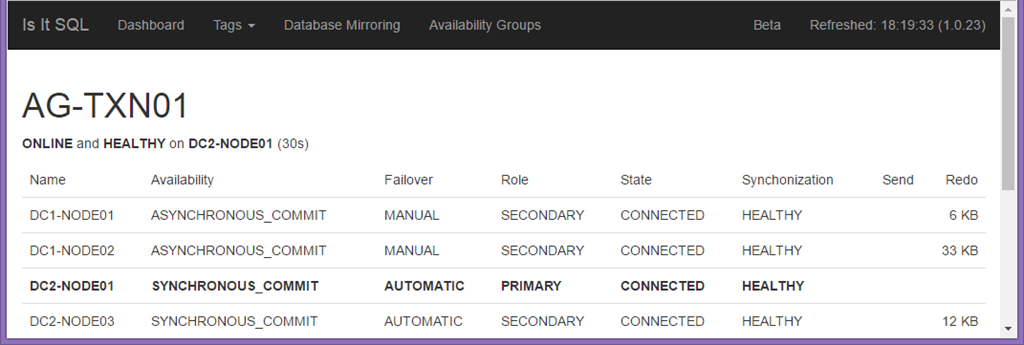
The availability group monitoring is still pretty basic at this point.  After you add the nodes to be monitored it discovers any availability groups and displays them all together on a page.  The data comes from the AG DMV’s.  It is nice to have them all in one place and as easy to access as a web page.

image

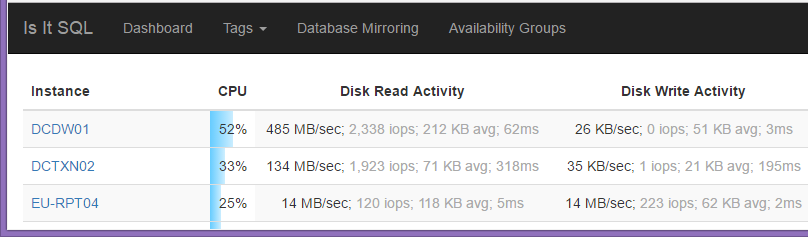
The list of servers was just showing the bytes per second read and written for disk I/O.  I’ve expanded this to include the IOPS, average I/O size, and the average latency.  It includes that for both reads and writes.  318ms reads.  Yuck.  I hope yours are better!

image

At the bottom of each list of servers there’s a summary.  It shows the total disk I/O, batches per second, RAM used, data file size and log files size.  If instances are included multiple times it only includes it once.  This also works for various tags.  For example, I’ve tagged servers based on their data center so it’s easy to see how much traffic each data center is taking.

And that’s where we are so far.  It’s a handy little utility all in a single 12MB executable.  It’s easy to run as a service so it’s always available.  I encourage you to sign up for the newsletter.  It includes information on enabling the Enterprise features, tips and tricks, and new releases.  You can download it from the Is It SQL page. 

25 Apr 16:57

Configuring MSDTC Across Domains

by Bill Graziano

One of my clients has applications that use MSDTC.  We’re spinning up a SQL Server 2016 Availability Group to take advantage of the MSDTC support it introduced.  Most of these distributed transactions take place across linked servers.  And of course the new servers are in a new domain with a very limited trust with the old domain. 

I found lots of articles and checklists for configuring MSDTC but none had everything I needed.  This is the checklist I came up with to configure cross-domain MSDTC with a limited trust in place.  (I don’t know what kind of trust it is.  I just know I have to put accounts into Domain Local groups in order to use them across the trust.  And it’s one way.)

Resources

I found LOTS of articles on configuring MSDTC.  These are the ones I found to be the most comprehensive.

  1. Troubleshooting MSDTC Communication Checklist – This is one of the better checklists I found.  Has a good list of required ports.
  2. Troubleshooting Problems with MSDTC – Another good resource
  3. DTCPing – A VERY useful utility to confirm basic connectivity.
  4. Troubleshooting MSDTC issues with the DTCPing tool - Great list of errors that DTCPing can return
  5. DTCTester – Utility to perform a distributed transaction.

Configuration

There are the steps that future Bill will need to get this configured next time.

Name Resolution

We were crossing a domain boundary and weren’t getting good NetBIOS name resolution.  I had to put a host file entry on both servers pointing to each other with just the machine name.  I eventually had to put a second name in for the Availability Group Listener.  You need to be able to have a ping –a resolve the names on both sides using only the name and not a FQDN.  And if you’re editing the hosts file don’t forget to run NOTEPAD as an Administrator.

Fix the Matching CIDs

I’m not sure exactly how this came to happen but both these machines had the same CID values for MSDTC.  (Note: I still don’t really know what a CID is but I know they can’t have the same one – see the second document above.)  The only way to change the CID value is reinstall MSDTC.  If you’re building machines from images you’ll probably have this problem.  You reinstall by running:

msdtc –uninstall

msdtc –install

I suggest a reboot after each step.  Until I rebooted I didn’t see the service installed.

Open the Ports

I had the following ports open in the firewall:

  1. Port 135 both ways (for RPC)
  2. The dynamic ports 49152-65535

MSDTC starts talking on 135 and then jumps to a dynamic port.  I think the firewall people may have done something fancier but that’s what I told them.

I also had to:

  1. Enable the three inbound Windows Firewall rules for Distributed Transaction Coordinator
  2. Enable the one outbound Windows Firewall rule for Distributed Transaction Coordinator

Those rules exist but they were disabled by default in my environment.

Configure MSDTC Permissions

Using DCOMCNFG.EXE I had to enable the following permissions in MSDTC.

  1. Network DTC Access
  2. Allow Inbound
  3. Allow Outbound
  4. No Authentication Required – This one was a little frustrating.  I’d prefer to have them authenticate but I haven’t worked on that enough yet.

There are screenshots of this all over the web that you’ve probably already found.

DTCPing

At this point you should be able to get DTCPing to work.  You run it on both sides and they talk to each other simulating a transaction.  It give good error messages in the application.  It also writes a text file with more detail diagnostic logging.  It’s a very handy utility.  If you get any errors you’ll need to work through those.

DTCTester

This little command-line utility actually runs a distributed transaction.  It creates a temporary table and and inserts a row into it.  You’ll need to configure a 32-bit ODBC entry.  Look for C:\Windows\SysWOW64\odbcad32.exe to make that entry.   The 64-bit utility is in C:\Windows\System32 and has the same name.  That’s some confusing naming right there.  You’ll also need a SQL Server login and password.  If you’re going to test against multiple machines your ODBC source should point to a hosts file entry.  It makes testing much easier.

25 Apr 16:57

Big Data vs. Sampling

by andyleonard
Merriam-Webster defines sampling as: the act, process, or technique of selecting a suitable sample ; specifically : the act, process, or technique of selecting a representative part of a population for the purpose of determining parameters or characteristics of the whole population a small part selected as a sample for inspection or analysis ask a sampling of people which candidate they favor In statistics, sampling is the practice of viewing or polling a representative subset of a population. Sampling...(read more)
25 Apr 16:57

Right-aligning numbers in T-SQL

by Greg Low

This blog has moved! You can find this content at the following new location:

http://blog.greglow.com/index.php/2017/04/10/right-aligning-numbers-in-t-sql/

25 Apr 16:57

Automation, Prescriptive Analytics Highlight Quantzig’s List of Top Data Technology Trends

by A.R. Guess

by Angela Guess According to a recent press release, “As companies and individuals continue to embrace big data and data analytics, and as advanced analytics services become more commonplace, new tools and trends are emerging. Many of these new innovations involve machine learning, which also has the potential to improve existing data technologies and analytics […]

The post Automation, Prescriptive Analytics Highlight Quantzig’s List of Top Data Technology Trends appeared first on DATAVERSITY.

25 Apr 16:57

Blue Prism Accelerates Access to AI and Cognitive Technologies

by A.R. Guess

by Angela Guess A recent press release states, “Blue Prism, provider of the world’s most successful digital workforce, today announced a new Technology Alliance Program backed by industry heavyweights including Appian, Captricity, Celaton, Expert System, IBM and Minit. These partners will leverage Blue Prism’s Robotic Process Automation (RPA) platform to help enterprises build out best-of-breed […]

The post Blue Prism Accelerates Access to AI and Cognitive Technologies appeared first on DATAVERSITY.

25 Apr 16:49

Reviewing the 2016 PASS Audited Financials

by SQLAndy

Notes on items I found interesting in the financial statement, recommend you download and read the entire document.

  • Global Alliance Partner (GAP) dues decreased from $103k to $65k. This doesn’t seem like a lot of money either way, is this program successful?
  • It looks like we lost $40k in foreign currency in 2015. Not sure why we have money there (Im guessing Euro?).
  • It notes that PASS maintains cash balances that exceed the FDIC limit. Not sure if there is an easy answer to that.
  • The total charges for the management company was $3m in 2015, and $3.9m in 2016.  That’s a big increase.
  • Total MS participation for 2016 was $753k, up $230k from previous year

25 Apr 16:48

Using indexed views on ANY core SQL server edition

by Arthur Olcot

I was having a discussion the other day and was quite surprised to hear that there still appears to be a slight misconception regarding being able to use indexed views on web or standard editions of SQL server. As it stands the documentation clearly states that you can create and use indexed views on web, standard, BI and enterprise editions of SQL server (I'm ignoring developer + evaluation as they are the same as enterprise). You can create a view, materialise that view in the form of a unique clustered index and then write queries that utilises that index in web editions and above. However there is a feature in enterprise edition that adds value to indexed views by having the optimiser automatically consider them during plan compilation without any changes to the t-sql. For non-enterprise editions of SQL, to force the optimiser to use the indexed view then you must specify the NOEXPAND table hint to stop the view from 'expanding' to access the tables referenced by the view. MSDN states 'The query optimizer treats the view like a table with clustered index'

But, you can create and use indexed views on all editions from express upwards....

So first of all, I'm going to show how indexed views work on enterprise edition and show that the optimiser will automatically consider an indexed view if it deems to be the best choice without any changes in the logic:

A simple example script that creates two tables, adds some data to both and then creates a view referencing both tables:

CREATE TABLE MyOrders
(
   OrderId INT,
   CustomerId INT,
   OrderDate DATE,
   CONSTRAINT PK_MyOrders PRIMARY KEY CLUSTERED (OrderId)
)
GO
CREATE TABLE
MyOrderDetails
(
   OrderId INT,
   LineId INT,
   ProductId INT,
   SalePrice DECIMAL(10,2),
   CONSTRAINT PK_MyOrderDetails PRIMARY KEY CLUSTERED (OrderId, LineId)
)
GO
ALTER TABLE
dbo.MyOrderDetails
ADD CONSTRAINT FK_OrderId_Orders FOREIGN KEY (OrderId) REFERENCES dbo.MyOrders (OrderId)
GO
INSERT INTO dbo.MyOrders (OrderId, CustomerId, OrderDate) VALUES (1, 1, GETDATE())
INSERT INTO dbo.MyOrders (OrderId, CustomerId, OrderDate) VALUES (2, 2, GETDATE()-1)
INSERT INTO dbo.MyOrders (OrderId, CustomerId, OrderDate) VALUES (3, 3, GETDATE()-2)
INSERT INTO dbo.MyOrderDetails (OrderId, LineId, ProductId, SalePrice) VALUES (1, 1, 1, 10.00)
INSERT INTO dbo.MyOrderDetails (OrderId, LineId, ProductId, SalePrice) VALUES (1, 2, 2, 500.00)
INSERT INTO dbo.MyOrderDetails (OrderId, LineId, ProductId, SalePrice) VALUES (1, 3, 3, 7500.00)
INSERT INTO dbo.MyOrderDetails (OrderId, LineId, ProductId, SalePrice) VALUES (2, 1, 1, 20.00)
INSERT INTO dbo.MyOrderDetails (OrderId, LineId, ProductId, SalePrice) VALUES (2, 2, 2, 600.00)
INSERT INTO dbo.MyOrderDetails (OrderId, LineId, ProductId, SalePrice) VALUES (2, 3, 3, 8500.00)
INSERT INTO dbo.MyOrderDetails (OrderId, LineId, ProductId, SalePrice) VALUES (3, 1, 1, 30.00)
INSERT INTO dbo.MyOrderDetails (OrderId, LineId, ProductId, SalePrice) VALUES (3, 2, 2, 700.00)
INSERT INTO dbo.MyOrderDetails (OrderId, LineId, ProductId, SalePrice) VALUES (3, 3, 3, 9500.00)
GO

CREATE VIEW MyOrdersAndDetails_View
WITH SCHEMABINDING
AS
SELECT
O.OrderId, CustomerId, OrderDate, LineId, ProductId, SalePrice
FROM dbo.MyOrders O
INNER JOIN dbo.MyOrderDetails D ON D.OrderId = O.OrderId
GO

Now if we were to simply select all records from the view, we would end up with a no surprise execution plan like:

So next lets materialise the view by creating a unique clustered index against it:

CREATE UNIQUE CLUSTERED INDEX UCIX_OrderId_LineId ON MyOrdersAndDetails_View (OrderId, LineId)

and run the exact same identical select * query against the view, we now get this execution plan:

You can see that the optimiser has chosen not to 'expand' the view to the base tables, but to use the data from the unique clustered index on the view and you can see that the query is identical in both plans.

To compare, lets do exactly the same steps on a 2012 Express edition:

After creating the tables, data and view as per the same script above (not the index yet though) and selecting all records from the view we are given the expected following plan which is identical to the enterprise version before the index was created:

Now create the same unique clustered index as before against the view, and run the same select * query:

CREATE UNIQUE CLUSTERED INDEX UCIX_OrderId_LineId ON MyOrdersAndDetails_View (OrderId, LineId)

Still the same plan as the one without the index, so the optimiser has not considered the use of the index. But this is as per the documentation i.e. considering indexes on views being an enterprise only feature.

But we can force the optimiser to use the index by using the NOEXPAND hint:

SELECT * FROM dbo.MyOrdersAndDetails_View WITH (NOEXPAND)

So running the revised query on my 2012 express instance produces this new plan:

The optimiser has used the index to satisfy the query.

It is hardly surprising that this misconception exists as the official documentation is a bit misleading even suggesting that the feature doesn't exist in Express edition when it clearly is. There is also a lot of wrong advice out there and persistent misinformation.

Hopefully you can see that you can create and use indexed views on express, web, standard, BI and enterprise editions. The difference is that for non-enterprise editions, you have to 'force' the optimiser with a hint to use the index whereas enterprise editions will automatically consider the index and use it.

Indexed views do come with a lot of restrictions and in many situations you won't be able to use them and because you are materialising the data, any DML to the base tables of the views will take that bit longer due to the additional work that it has to perform keeping the index up to date. I've used them with quite a bit of success in the past even developing specially so I could use an indexed view. But on other occasions I have also ripped them out in favour of refactoring elsewhere to get performance improvements. You need to bear in mind that you are creating a clustered index so you are materialising the entire view and not just the key columns. For complicated views with large columns this can amount to quite a substantial overhead. So just because you can use them in all editions it seems, it doesn't necessarily mean you should be looking to put an index on all your views! :)

Enjoy!

Follow me on twitter @sqlserverrocks

Subscribe to my blog RSS feed

Comment on this or any of my posts or contact me directly from http://www.olcot.co.uk

25 Apr 16:48

SQL Server Contracting - The first 14 months (or so)

by Arthur Olcot

Crikey, where did that time go! I have been so busy adjusting to my new work life style I have completely neglected my blog.. Well now that I seem to be adjusted to the world of contracting (or rather adjusted to working more than a mile away from where I live!), I will spend more time again giving my blog some TLC. in fact is was an email from Webucator that gave me the poke again to get back to doing something that I enjoyed a couple of times a month - blogging!

So what have I learnt during the first 14 months of being a contractor. The first thing that I can say is I have no idea why on earth it took me so long to make the jump from going perm to contract basis. Sure it is a little bit scary at first to not have that security blanket that being a permanent employee brings you such as a notice period, redundancy, sick pay and employee benefits (for some!) but for me I don't mind that.. I have much more flexibility in what i choose to do, where to go and what I do with the finances received by my business. I know that if a contract isn't as great as I'd hoped then it won't be long before the contract comes to an end and I can move on. I'm not involved with any company processes such as 1-2-1's, reviews etc, nor get involved with the usual company politics. I can just turn up, do a good days work, enjoy any company social life and go home that little bit wiser, hopefully.

I was quite fortunate to secure a 6 month contract from my previous perm employer before moving into finance for my second and current contract. This definitely made the transition that bit easier and less daunting. I initially worked through an umbrella company before setting up a limited company at the start of this year and looking back, i should have setup the limited company from the off. Apart from the ease of contracting through an umbrella, I really didn't see many other benefits over a limited company. Even with the UK government hitting contractors quite hard in the summer budget, I still believe I have made the right decision and it is a good time to be a contractor. I still feel there are more benefits and flexibility being a contractor rather than being a perm in exactly the same job position.

Would I recommend contracting to others... for sure I would, and I have.. the main thing i say to them (after saying research is critical) is to ensure that you have at least 3 months or more of savings to live off whilst you make the transition to contracting. If the worse happens and you can't get a contract, you'll need to make a decision at some point to get back into a perm role to pay those bills. Even if you get a contract quite quickly, you may have to dip into your savings until things sort themselves out. More than likely you'll have to hand in your notice before even being offered a contract especially if you are on a long notice period like I was. So it gets a bit nerve racking approaching your leaving date with nothing to move onto next. Network as well, as some opportunities will come through from recommendations and as much as we hate them, agencies are going to be calling you, a lot, so you will have to have the same conversation over and over again. You'll soon build a list of good ones and ones to not bother with. When I was actively looking for a contract I was getting dozens of calls a day and had to take the majority of them and call back the ones I missed. That wore me down quite quickly so something to be prepared for. Always remember though that agencies need you as much as you need them. Finally, unless you have a keen desire to use an umbrella, don't bother and go limited. Even more so if you are able to employ your partner to use their tax benefits or have them as a director and/or shareholder as well. The money you spend on accountancy is offset by other benefits and so far the overhead time wise of managing the limited company is minimal I find. I keep on top of things weekly rather than doing things monthly and I never spend more than a an hour each week raising invoices, managing income/expenses etc.

So what's my plan for the next 12 months? Well I'll need to start thinking about renewing my MCSE Data Platform accreditation so now that summer is well and truly over, I shall be heading back to the books again and will probably look to secure the MCSE Business Intelligence for the first time as well after Christmas. Plus I'm rather hoping there will be another SQL bits as well early next year, which is another benefit of your own company. You get to decide your own training and no more having to justify it to the bosses! I'm 99% ready to sign up for my first ever SQLSkills Immersion Event in London 2016 which is something I've long, long wanted to attend but would have always struggled convincing an employer to pay for me.

Oh, and I get to decide where my company Christmas party is to be now!! What's there not to like!

Enjoy!

Follow me on twitter @sqlserverrocks

Subscribe to my blog RSS feed

Comment on this or any of my posts or contact me directly from http://www.olcot.co.uk

25 Apr 16:48

Indexed views on any core SQL server edition-The video

by Arthur Olcot

A few months back I created a blog post showing that you can indeed create and use indexed views on any core SQL server edition. It has proved to be one of my most read blog posts. Since then Webucator, provider of SQL Server training, got in contact asking if they could convert the post into a video. I've seen some of their other work previously which was pretty good so had no hesitations giving them the thumbs up.

So here is their finished result to complement the original blog post

Enjoy!

25 Apr 16:46

Time waits for no one

by Rob Farley

And technology changes as quickly as the numbers on a clock. A digital clock, of course – the numbers never change on an analogue one.

I think it’s nice to have this month’s T-SQL Tuesday (hosted by Koen Verbeeck (@ko_ver)) on this topic, as I delivered a keynote at the Difinity conference a couple of months ago on same thing.

In the keynote, I talked about the fear people have of becoming obsolete as technology changes. Technology is introduced that trivialises their particular piece of skill – the database that removes the need for a filing cabinet, the expert system that diagnoses sick people, and the platform as a service that is managed by someone other than the company DBA. As someone who lives in Adelaide, where a major car factory has closed down, costing thousands of jobs, this topic is very much at the forefront of a lot of people’s thoughts. The car industry has been full of robots for a very long time – jobs have been disappearing to technology for ages. But now we are seeing the same happen in other industries, such as IT.

Does Automatic Tuning in Azure mean the end of query tuners? Does Self-Service BI in Excel and Power BI mean the end of BI practitioners? Does PaaS mean the end of DBAs?

I think yes. And no.

Yes, because there are tasks that will disappear. For people that only do one very narrow thing, they probably have reason to fear. But they’ve had reason to fear for a lot longer than Azure has been around. If all you do is check that backups have worked, you should have expected to be replaced by a script a very long time ago. The same has applied in many industries, from production lines in factories to ploughing lines in fields. If your contribution is narrow, you are at risk.

But no, because the opportunity here is to use the tools to become a different kind of expert. The person who drove animals to plough fields learned to drive tractors, but could use their skills in ploughing to offer a better service. The person who painted cars in a factory makes an excellent candidate for retouching dent repair, or custom paint jobs. Their expertise sets them apart from those whose careers didn’t have the same background.

As a BI practitioner today, self-service BI doesn’t present a risk. It’s an opportunity. The opportunity is to lead businesses in their BI strategies. In training and mentoring people to apply BI to their businesses. To help create visualisations that convey the desired meaning in a more effective way than the business people realise. This then turns the BI practitioner into a consultant with industry knowledge. Or a data scientist who can transform data to bring out messages that the business users couldn’t see.

As the leader of a company of database experts, these are questions I’ve had to consider. I don’t want my employees or me to become obsolete. We don’t simply offer health checks, BI projects, Azure migrations, troubleshooting, et cetera. We lead business through those things. We mentor and train. We consult. Of course, we deliver, but we are not simply technicians. We are consultants.

@rob_farley

TSQL2sDay150x150

25 Apr 16:46

There Is No Delete

by Jeremiah Peschka

I don’t have any Apple devices. I used to own a bunch of them, but over time I’ve switched from an iPhone to a Nexus phone; I have an Android tablet; my laptop and desktop both run Linux. Somewhere along the way, I decided that I should either delete my old Apple ID or remove my credit card from that account.

An empty stadium

The people who have successfully deleted an Apple account are all in this section.

Deleting an Account?

If you have one, open up the Apple ID portal, sign in, and see if you can figure out how to delete your account. You’ll quickly discover that there’s no way to delete an Apple ID through this portal.

The next step is to search the internet. Google didn’t turn up any information about how to delete an Apple ID. I did see a lot of links about how to remove an Apple ID from a phone in preparation for selling it, but that’s it. A comment in a Stack Overflow answer let me to justdelete.me where I learned that I can try to convince a customer service rep to delete my account. These are the same people, by the way, who were part of that whole “nude celeb account hack” scandal.

After speaking with a customer service rep, I learned that if I want to delete the account, that email address can never be used again.

There is no delete, only Zuul

That’s right – if you decide you don’t want to run the risk of someone getting a hold of your credit cards, you’ll never be able to use that email address again. From the sound of it, the account is marked closed and we can never associate anything with it again.

Of course, I don’t know why this is happening. It could be the Apple is using a system that doesn’t provide certain guarantees. After all, in many distributed systems if you remove a user, there’s nothing to say that purchases associated with that account will also be removed. These things can be very hard to accomplish.

Whatever the rationale, it’s really disappointing to know that I can’t just delete my Apple ID and live happily ever after.

Just delete the card, they said

The customer service rep, after reminding me that Apple makes shiny things and that I might want a shiny thing in the future, suggested I could just delete the credit card. This seems like a great compromise. There’s only one problem: it’s not possible through the web.

If I want to delete a credit card from my Apple ID, for the reason that I own no Apple devices, I need to install iTunes and use iTunes to remove the credit card. Which, by the way, will then require that I go back into the web UI and remove the computer with iTunes from the list of trusted devices.

What are you getting at, Jeremiah?

I’m not really getting at anything.

Deletes may not be deletes in a system. If you’re truly keeping the users in mind as you build out an application, make sure that you take into account all user behavior – don’t force the users to conform to your application. Figure out how the application can work with the users’ requirements.


Photo by Marvin Ronsdorf licensed under CC0

The post There Is No Delete first appeared on facility9.com.

25 Apr 16:46

Using Azure for free

by James Serra

There are a number of options for using Azure for free.  This is very useful for those of you who are not familiar with Azure and want to “play” with it:

25 Apr 16:46

PASS Application Development Virtual Group

by Davide Mauri

I've been involved with PASS, once named Professional Association of SQL Server users, now just...PASS, since 2006 when I stepped up as president of SQL Server Italian User Group. Now that I moved to Redmond, WA, I'm still involved with it, but of course, I'm not leading the Italian User Group anymore.

Since I do really think that community activity is vital for an healthy and successful career, as soon as I noticed that the Application Development Virtual Group was not very active anymore I decided to offer my help and so here I am, I've just stepped up as new leader of that group, AppDev for friends:

http://appdev.pass.org/

The focus will be on the entire Microsoft Data Platform, so not only SQL Server, and the languages we'll try to cover are, of course C# and .NET in general and also, more broadly, any language that can interact with the Microsoft Data Platform. So Python (my passion!), Java, Ruby, F#, Rust, R....anything you can think of. Of course everything approached from a developer perspective. No administration here, no sir. Security? Yes. Performances? Sure, give me more! Best Practices? Absolutely! Everything that can be of interests to developers and architects will be in our scope (given that is somehow related to the Microsoft Data Platform, of course).

I've just started to contact some great speakers to start with the right foot, and the first just confirmed his support. Jovan Popovic, SQL Server / SQL Azure PM will present a session on JSON, one of the most requested and powerful feature in SQL Server 2016 and next:

Building REST API with SQL Server using JSON functions

Registration is free both to the seminar and also the the Virtual User group. You can find link to registration and additional info on UG homepage:

http://appdev.pass.org/

I recommend to register to both, so you won't miss a very interesting webcast (that will be recorded and made available on YouTube for future reference) and you'll also stay informed on the future activities that will be, I can assure you, just amazing!

And, last but not least, if you have a topic you want to present, just let me know.

25 Apr 16:45

Top 5 reasons Why Enterprises Should Embrace Big Data

by Shahid Mansuri

Click to learn more about author Shahid Mansuri In 2011, McKinsey published a report sharing the potential of Big Data and Analytics by tagging them as the next frontier for innovation, competition, and productivity. Five years later they published another report, which proved that the results are indeed close enough to the benchmarks created by […]

The post Top 5 reasons Why Enterprises Should Embrace Big Data appeared first on DATAVERSITY.

25 Apr 16:45

Cardinality Estimation for a Predicate on a COUNT Expression

by Paul White

This article looks into selectivity and cardinality estimation for predicates on COUNT(*) expressions, as may be seen in HAVING clauses. The details are hopefully interesting in themselves. They also provide an insight into some of the general approaches and algorithms used by the cardinality estimator.

A simple example using the AdventureWorks sample database:

SELECT A.City
  FROM Person.[Address] AS A
  GROUP BY A.City
  HAVING COUNT_BIG(*) = 1;

We are interested in seeing how SQL Server derives an estimate for the predicate on the count expression in the HAVING clause.

Of course the HAVING clause is just syntax sugar. We could equally have written the query using a derived table, or common table-expression:

-- Derived table
SELECT SQ1.City
FROM
(
    SELECT A.City, Expr1001 = COUNT_BIG(*)
    FROM Person.[Address] AS A
    GROUP BY A.City
) AS SQ1
WHERE SQ1.Expr1001 = 1;
 
-- CTE
WITH Grouped AS
(
    SELECT A.City, Expr1001 = COUNT_BIG(*)
    FROM Person.[Address] AS A
    GROUP BY A.City
)
SELECT G.City
FROM Grouped AS G
WHERE G.Expr1001 = 1;

All three query forms produce the same execution plan, with identical query plan hash values.

The post-execution (actual) plan shows a perfect estimation for the aggregate; however, the estimate for the HAVING clause filter (or equivalent, in the other query forms) is poor:
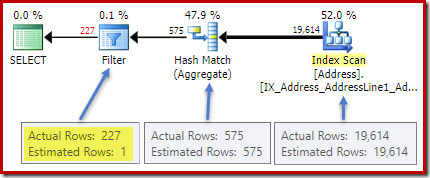
Actual execution plan with poor HAVING clause estimate

Statistics on the City column provide accurate information about the number of distinct city values:

DBCC SHOW_STATISTICS ([Person.Address], City) WITH DENSITY_VECTOR;
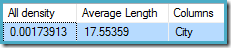
DBCC SHOW_STATISTICS output

The all density figure is the reciprocal of the number of unique values. Simply calculating (1 / 0.00173913) = 575 gives the cardinality estimate for the aggregate. Grouping by city obviously produces one row for each distinct value.

Note that all density comes from the density vector. Be careful not to accidentally use the density value from the statistics header output of DBCC SHOW_STATISTICS. The header density is maintained only for backward compatibility; it is not used by the optimizer during cardinality estimation these days.

The Problem

The aggregate introduces a new computed column to the workflow, labelled Expr1001 in the execution plan. It contains the value of COUNT(*) in each grouped output row:
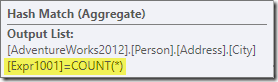
Aggregate output column list

There is obviously no statistical information in the database about this new computed column. While the optimizer knows there will be 575 rows, it knows nothing about the distribution of count values within those rows.

Well not quite nothing: The optimizer is aware that the count values will be positive integers (1, 2, 3…). Still, it is the distribution of these integer count values among the 575 rows that would be needed to accurately estimate the selectivity of the COUNT(*) = 1 predicate.

One might think that some sort of distribution information could be derived from the histogram, but the histogram only provides specific count information (in EQ_ROWS) for histogram step values. Between histogram steps, all we have is a summary: RANGE_ROWS rows have DISTINCT_RANGE_ROWS distinct values. For tables that are large enough that we care about the quality of the selectivity estimate, it is very likely that most of the table is represented by these intra-step summaries.

For example, the first two rows of the City column histogram are:

DBCC SHOW_STATISTICS ([Person.Address], City) WITH HISTOGRAM;

First two rows of the City column histogram

This tells us that there is exactly one row for "Abingdon", and 29 other rows after "Abingdon" but before "Ballard", with 19 distinct values in that 29-row range. The following query shows the actual distribution of rows among unique values in that 29-row intra-step range:

SELECT A.City, NumRows = COUNT_BIG(*)
FROM Person.[Address] AS A 
WHERE A.City > N'Abingdon' 
AND A.City < N'Ballard'
GROUP BY ROLLUP (A.City);
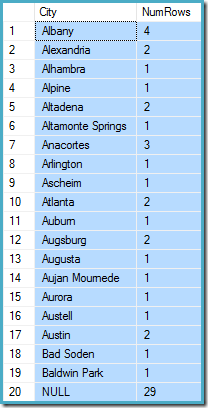
Actual distribution of rows

There are 29 rows with 19 distinct values, just as the histogram said. Still, it is clear we have no basis to evaluate the selectivity of a predicate on the count column in that query. For example, HAVING COUNT_BIG(*) = 2 would return 5 rows (for Alexandria, Altadena, Atlanta, Augsburg, and Austin) but we have no way to determine that from the histogram.

An Educated Guess

The approach SQL Server takes is to assume that each group is most likely to contain the overall mean (average) number of rows. This is simply the cardinality divided by the number of unique values. For example, for 1000 rows with 20 unique values, SQL Server would assume that (1000 / 20) = 50 rows per group is the most likely value.

Turning back to our original example, this means that the computed count column is "most likely" to contain a value around (19614 / 575) ~= 34.1113. Since density is the reciprocal of the number of unique values, we can also express that as cardinality * density = (19614 * 0.00173913), giving a very similar result.

Distribution

Saying that the mean value is most likely only takes us so far. We also need to establish exactly how likely that is; and how the likelihood changes as we move away from the mean value. Assuming that all groups have exactly 34.113 rows in our example would not be a very "educated" guess!

SQL Server handles this by assuming a normal distribution. This has the characteristic bell shape you may already be familiar with (image from the linked Wikipedia entry):

Normal distribution

The exact shape of the normal distribution depends on two parameters: the mean (µ) and the standard deviation (σ). The mean determines the location of the peak. The standard deviation specifies how "flattened" the bell curve is. The flatter the curve, the lower the peak is, and the more the probability density is distributed over other values.

SQL Server can derive the mean from statistical information as already noted. The standard deviation of the computed count column values is unknown. SQL Server estimates it as the square root of the mean (with a slight adjustment detailed later on). In our example, this means the two parameters of the normal distribution are roughly 34.1113 and 5.84 (the square root).

The standard normal distribution (the red curve in the diagram above) is a noteworthy special case. This occurs when the mean is zero, and the standard deviation is 1. Any normal distribution can be transformed to the standard normal distribution by subtracting the mean and dividing by the standard deviation.

Areas and Intervals

We are interested in estimating selectivity, so we are looking for the probability that the count computed column has a certain value (x). This probability is given not by the y-axis value above, but by the area under the curve to the left of x.

For the normal distribution with mean 34.1113 and standard deviation 5.84, the area under the curve to the left of x = 30 is about 0.2406:

Normal distribution area below x = 30

This corresponds to the probability that the computed count column is less than or equal to 30 for our example query.

This leads nicely on to the idea that in general, we are not looking for the probability of a specific value, but for an interval. To find the probably that the count equals an integer value, we need to account for the fact that integers span an interval of size 1. How we convert an integer to an interval is somewhat arbitrary. SQL Server handles this by adding and subtracting 0.5 to give the lower and upper bounds of the interval.

For example, to find the probability that the computed count value equals 30, we need to subtract the area under the normal distribution curve for (x = 29.5) from the area for (x = 30.5). The result corresponds to the slice for (29.5 < x <= 30.5) in the diagram below:

Normal distribution x = 30 interval

The area of the red slice is about 0.0533. To a good first approximation, this is the selectivity of a count = 30 predicate in our test query.

The Cumulative Distribution Function

Calculating the area under a normal distribution to the left of a given value is not straightforward. The general formula is given by the cumulative distribution function (CDF). The problem is that the CDF cannot be expressed in terms of elementary mathematical functions, so numerical approximation methods have to be used instead.

Since all normal distributions can be easily transformed to the standard normal distribution (mean = 0, standard deviation = 1), the approximations all work to estimate the standard normal. This means we need to transform our interval boundaries from the particular normal distribution appropriate to the query, to the standard normal distribution. This is done, as mentioned earlier, by subtracting the mean and dividing by the standard deviation.

If you are familiar with Excel, you might be aware of the functions NORM.DIST and NORM.S.DIST which can compute CDFs (using numerical approximation methods) for a particular normal distribution or the standard normal distribution.

There is no CDF calculator built in to SQL Server, but we can easily make one. Given that the CDF for the standard normal distribution is:

standard normal CDF

…where erf is the error function:

error function

A T-SQL implementation to obtain the CDF for the standard normal distribution is shown below. It uses a numerical approximation for the error function that is very close to the one SQL Server uses internally:

CREATE PROCEDURE dbo.GetStandardNormalCDF
(
    @x float,
    @cdf float OUTPUT
)
AS
BEGIN
    SET NOCOUNT, XACT_ABORT ON;
    DECLARE
        @sign float,
        @erf float;
 
    SET @sign = SIGN(@x);
    SET @x = ABS(@x) / SQRT(2);
    SET @erf = 1;
    SET @erf = @erf + (0.0705230784 * @x);
    SET @erf = @erf + (0.0422820123 * POWER(@x, 2));
    SET @erf = @erf + (0.0092705272 * POWER(@x, 3));
    SET @erf = @erf + (0.0001520143 * POWER(@x, 4));
    SET @erf = @erf + (0.0002765672 * POWER(@x, 5)); 
    SET @erf = @erf + (0.0000430638 * POWER(@x, 6));
    SET @erf = POWER(@erf, -16);
    SET @erf = 1 - @erf;
    SET @erf = @erf * @sign;
    SET @cdf = 0.5 * (1 + @erf);
END;

An example, to compute the CDF for x = 30 using the normal distribution for our test query:

DECLARE @cdf float;
DECLARE @x float;
-- HAVING COUNT_BIG(*) = x
SET @x = 30;
-- Normalize 30 by subtracting the mean
-- and dividing by the standard deviation
SET @x = (@x - 34.1113) / 5.84;
EXECUTE dbo.GetStandardNormalCDF
    @x = @x,
    @cdf = @cdf OUTPUT;
SELECT CDF = @cdf;

Note the normalization step to convert to the standard normal distribution. The procedure returns the value 0.2407196…, which matches the corresponding Excel result to seven decimal places.

Final Details and Examples

The following code modifies our example query to produce a larger estimate for the Filter (the comparison is now with the value 32, which is much closer to the mean than before):

SELECT A.City
FROM Person.[Address] AS A
GROUP BY A.City
HAVING COUNT_BIG(*) = 32;
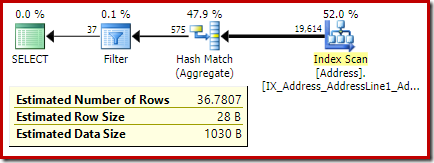
Execution plan for count = 32

The estimate from the optimizer is now 36.7807.

To compute the estimate manually, we first need to address a few final details:

  • The mean used to derive the standard deviation (via square root) is scaled by a factor of ((distinct values – 1) / (distinct values). In the example, the number of distinct values is 575, so the scaling factor is (574 / 575) ~= 0.99826.
  • If the lower bound of the (integer) interval is 1, SQL Server treats the interval as unbounded on the lower side. Selectivity is equal to the CDF of the upper bound of the interval (1.5) alone. The lower bound (which would be 0.5) is not used.
  • The legacy cardinality estimator (CE) has complex logic for COUNT(*) = 1, which is not detailed here.
  • Aside from the COUNT(*) = 1 case, the legacy CE uses the same logic as the new CE (available in SQL Server 2014 onward).

The following procedure incorporates all the details in this article. It requires the CDF procedure given earlier:

CREATE PROCEDURE dbo.GetCountPredicateEstimate
(
    @From           integer,
    @To             integer,
    @Cardinality    float,
    @Density        float,
    @Selectivity    float OUTPUT,
    @Estimate       float OUTPUT
)
AS
BEGIN
    SET NOCOUNT, XACT_ABORT ON;
    BEGIN TRY
    DECLARE
        @Start          float,
        @End            float,
        @Distinct       float,
        @Mean           float,
        @MeanAdj        float,
        @Stdev          float,
        @NormStart      float,
        @NormEnd        float,
        @CDFStart       float,
        @CDFEnd         float;
    -- Validate input and apply defaults
    IF ISNULL(@From, 0) = 0 SET @From = 1;
    IF @From < 1 RAISERROR ('@From must be >= 1', 16, 1);
    IF ISNULL(@Cardinality, -1) <= 0 RAISERROR('@Cardinality must be positive', 16, 1);
    IF ISNULL(@Density, -1) <= 0 RAISERROR('@Density must be positive', 16, 1);
    IF ISNULL(@To, 0) = 0 SET @To = CEILING(1 / @Density);
    IF @To < @From RAISERROR('@To must be >= @From', 16, 1);
    -- Convert integer range to interval
    SET @Start = @From - 0.5;
    SET @End = @To + 0.5;
    -- Get number of distinct values
    SET @Distinct = 1 / @Density;
    -- Calculate mean
    SET @Mean = @Cardinality * @Density;
    -- Adjust mean;
    SET @MeanAdj = @Mean * ((@Distinct - 1) / @Distinct);
    -- Get standard deviation (guess)
    SET @Stdev = SQRT(@MeanAdj);
    -- Normalize interval
    SET @NormStart = (@Start - @Mean) / @Stdev;
    SET @NormEnd = (@End - @Mean) / @Stdev;
    -- Calculate CDFs
    EXECUTE dbo.GetStandardNormalCDF
        @x = @NormStart,
        @cdf = @CDFStart OUTPUT;
 
    EXECUTE dbo.GetStandardNormalCDF
        @x = @NormEnd,
        @cdf = @CDFEnd OUTPUT;
    -- Selectivity
    SET @Selectivity =
        CASE
            -- Unbounded start
            WHEN @From = 1 THEN @CDFEnd
            -- Unbounded end
            WHEN @To >= @Distinct THEN 1 - @CDFStart
            -- Normal interval
            ELSE @CDFEnd - @CDFStart
        END;
    -- Return row estimate
    SET @Estimate = @Selectivity * @Distinct;
    END TRY
    BEGIN CATCH
        DECLARE @EM nvarchar(4000) = ERROR_MESSAGE();
        IF @@TRANCOUNT > 0 ROLLBACK TRANSACTION;
        RAISERROR (@EM, 16, 1);
        RETURN;
    END CATCH;
END;

We can now use this procedure to generate an estimate for our new test query:

DECLARE 
    @Selectivity float,
    @Estimate float;
EXECUTE dbo.GetCountPredicateEstimate
    @From = 32,
    @To = 32,
    @Cardinality = 19614,
    @Density = 0.00173913,
    @Selectivity = @Selectivity OUTPUT,
    @Estimate = @Estimate OUTPUT;
SELECT
    Selectivity = @Selectivity,
    Estimate = @Estimate,
    Rounded = ROUND(@Estimate, 4);

The output is:

This compares very well with the optimizer's cardinality estimate of 36.7807.

Inequality interval examples

The procedure can be used for other count intervals aside from equality tests. All that is required is to set the @From and @To parameters to the integer interval boundaries. To specify unbounded, pass zero or NULL as you prefer.

SELECT A.City
FROM Person.[Address] AS A
GROUP BY A.City
HAVING COUNT_BIG(*) < 50;
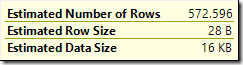
Estimate 572.596 for count < 50

To use this with our procedure, we set @From = NULL and @To = 49 (because 50 is excluded by less than):

DECLARE 
    @Selectivity float,
    @Estimate float;
EXECUTE dbo.GetCountPredicateEstimate
    @From = NULL,
    @To = 49,
    @Cardinality = 19614,
    @Density = 0.00173913,
    @Selectivity = @Selectivity OUTPUT,
    @Estimate = @Estimate OUTPUT;
SELECT
    Selectivity = @Selectivity,
    Estimate = @Estimate,
    Rounded = ROUND(@Estimate, 4);

The result is 572.5964:

Procedure result for count < 50

One last example using BETWEEN:

SELECT A.City
FROM Person.[Address] AS A
GROUP BY A.City
HAVING COUNT_BIG(*) BETWEEN 25 AND 30;

The optimizer estimate is
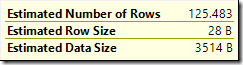
Estimate 125.483 for count between 25 and 30

Since BETWEEN is inclusive, we pass the procedure @From = 25 and @To = 30. The result is:

Procedure result for count between 25 and 30

Again, this agrees with the optimizer estimate.

The post Cardinality Estimation for a Predicate on a COUNT Expression appeared first on SQLPerformance.com.

25 Apr 16:44

Five reasons to run SQL Server 2016 on Windows Server 2016 – No. 4: Reach insights faster by running analytics at the point of creation

by SQL Server Team

This is the fourth post in a five-part blog series. Keep an eye out for upcoming posts and catch up on the first, second, and third in the series.

In addition, join us for Microsoft Data Amp on April 19 at 8 AM PT. The online event will showcase how data is the nexus between application innovation and artificial intelligence. You’ll learn how data and analytics powered by the most trusted and intelligent cloud can help companies differentiate and out-innovate their competition. Microsoft Data Amp—where data gets to work.

Data! Data! Data! … I can’t make bricks without clay!” – Sherlock Holmes (Sir Arthur Conan Doyle)

If he lived today, Sherlock Holmes might be a data scientist, working to solve cases faster by using advanced analytics to augment his legendary deductive powers. And Sherlock would insist on the fastest means possible for reaching insights. So what’s the best way to process massive amounts of data quickly to get faster time to insight?

It’s elementary: Sherlock would deduce that SQL Server 2016 and Windows Server 2016 are an exceptional platform for delivering built-in fast analytics by running queries at the point of creation.

At the OS level, Windows Server 2016 delivers new levels of performance with capabilities such as Persistent Memory (or Storage Class Memory), which improves latency by 3x, and Storage Spaces Direct, which gives you highly available, scalable storage area network functionality on inexpensive industry-standard servers and produces read speeds that can exceed 25 GB per second.

These features are built into the OS, so no additional licenses are required. For full details on Windows Server 2016 price/performance benefits, read the blog post “Five reasons to run SQL Server 2016 on Windows Server 2016 – No. 2: Performance and cost.”

In addition, at the data platform level, SQL Server 2016 delivers innovative analytics tools such as SQL Server R Services, real-time operational analytics, and new R-models.

Combined, SQL Server 2016 and Windows Server 2016 provide multithreading and massively parallel processing for high-performance data analysis.

SQL Server R Services built into T-SQL

R is a respected data-mining tool for uncovering insights and making predictions. SQL Server R Services is built into T-SQL and brings advanced predictive analytics to the data.

As a SQL Server 2016 data professional, you probably use T-SQL daily. Now, you can take advantage of R through the T-SQL interface. With R Services support for in-database analytics, you can work with data in SQL Server 2016, and applications can use T-SQL system stored procedures to call R scripts. If you’re an application developer, you don’t need to deep dive into R. You can rely on the T-SQL API for such tasks as creating SQL Server Reporting Services reports or Power BI dashboards with scores, predictions, and visuals from R.

You also get SQL Server built-in functions and mechanisms to accelerate performance and integration. For example, you can use columnstore indexes with R for faster queries. Built-in resource governance can control the resources allocated to the R runtime. The stored procedure interface gives you smooth integration with SQL Server Integration Services for integration with common extract, transform, and load and job scheduling. Learn more about SQL Server 2016 R Services and read about a real-world implementation.

Real-time operational analytics

With SQL Server 2016, you can do real-time operational analytics in two ways: on disk-based and memory-optimized tables. This means you don’t have to make changes to your applications when you perform real-time analytics.

SQL Server 2016 Real-Time Operational Analytics lets you use columnstore indexes to run analytics queries directly on your operational workload. Figure 1 shows a possible configuration, which uses Analysis Server in Direct Query mode, but if you have other analytics tools or a custom solution, you can use those, too. When you use both memory-optimized and columnstore, you get the best of online transaction processing performance and analytics query performance. Learn more about real-time operational analytics using in-memory technology.

Figure 1: A real-time operational analytics example

clip_image002

Multithreading and massive parallel processing

The cloud is built into SQL Server 2016, making it possible for you to take advantage of multithreading and massive parallel processing (MPP) to achieve high-performance data analysis. Azure SQL Data Warehouse uses an elastic MPP architecture built on the SQL Server 2016 database engine. This means you can continue using the SQL Server-based tools and BI applications that you use today when you want to interactively query and analyze data. Azure SQL Data Warehouse has built-in performance analytics and storage compression, the aggregation capabilities of SQL Server, and cutting-edge query optimization capabilities. In addition, with Polybase built in, you can query Hadoop systems directly, so that you have a single SQL-based query surface for all your data.

New R-models

SQL Server and Windows Server come with built-in functionality to make your job easier. In addition, Azure data services provides access to the work data scientists have already done by creating R-models that you can use. You can find a model you need in the Azure marketplace.

The Cortana Intelligence Solutions Gallery is the Microsoft Data Science VM that comes loaded with all the tools a data scientist needs. You can also find the code on GitHub, so you can run it locally on your own machine.

To learn more, see “Cortana Intelligence and Machine Learning Blog: Using SQL Server 2016 with R Services for Campaign Optimization” and the Microsoft R Server video.

SQL Server 2016 and Windows Server 2016: It’s all built in

The role of data in business decision-making is taking on ever greater importance, and the difference between success and failure can hinge on how fast you’re able to analyze data. As a result, business intelligence and advanced analytics are changing the very nature of business. By examining all the built-in capabilities, surely Sherlock Holmes would deduce that with the combination of SQL Server 2016, Windows Server 2016, and Azure, you can make sure your business is equipped for success. For an overview of SQL Server 2016 advanced analytics and business intelligence, see “Decisions @ the speed of thought with SQL Server 2016.” For details on price/performance, see “Five reasons to run SQL Server 2016 on Windows Server 2016 – No. 2: Performance and cost.”

25 Apr 16:44

Quick Regions in SQL Server Management Studio (SSMS)

by andyleonard
There are a few tools and add-ins that support the creation of “regions” in T-SQL code. SQL Server Management Studio (SSMS) supports one way to separate sections of long-ish T-SQL scripts natively, by using begin / end : To demonstrate, start with a snippet of T-SQL that includes begin / end : If you click on the “-“ highlighted above, the code will collapse and appear as show here: If you add a comment… Collapsing displays your comment, creating a quick “region” in your T-SQL: :{>...(read more)
25 Apr 16:43

PASS Business Analytics Marathon (March 2017) - Recordings Available!

by Sergio Govoni

The sessions of the event PASS Business Analytics Marathon, held last March 2017 on 29th, were recorded and now they are available for online streaming!

If you have missed one session in particular or the entire event, you can view or review your preferred topics.

Each video is available on detail page of the related session, you can find the full schedule here.

Enjoy!

25 Apr 16:42

Four Ways to Kill a Data Warehouse

by Sakthi Rangarajan

Click here to learn more about author Sakthi Rangarajan. In the recent months, I saw a few Data Warehouse efforts getting disrupted, stalled or stopped altogether. In one scenario, the effort was stopped in a few months and in another case, the project was paused after the Data Warehouse has been live for more than a […]

The post Four Ways to Kill a Data Warehouse appeared first on DATAVERSITY.

25 Apr 16:40

Changing the SQLSaturday Logo?

by SQLAndy

I read with interest the post from Bob Pusateri that discusses what seems to be the next iteration of the SQLSaturday logo. Informative, calm, and I thought had quite a few valid points. I don’t know that I can be as logical or as calm!

Logically, I’d add to the list of concerns the signage that so many events have purchased. The lack of  signs directing attendees to the event were for years the number one complaint and events (in some cases with help from PASS) obtained signs to reuse year over year. I hate to see those thrown out and money spent again. Perhaps they can be grandfathered in.

I struggle with the value of changing a logo with far deeper recognition than anything else in the PASS space. I get that sometimes you want to “freshen” a brand or tweak it some (I went along with the change from the original yellow’ish key (borrowed from the pkey button in SSMS and brought to life by my friend Chris Rock) to the current greenish one that includes PASS in it. The latter is nicely done and if not my particular pick of colors I thought it was (and is) serviceable. The new one breaks entirely with the key metaphor and while the franchise won’t crash because of the change, help me understand why this change has to be done?

It’s tough to not react emotionally to the change. Part of that is the lack of community engagement which would have surfaced so many of these concerns. I’m not sure that PASS understands that asking for input doesn’t require you to act on all of it, but it does mean you make decisions with a better understanding of the impact of your decision. Part of it is for me, and many others, is that we’re vested in it – the very thing you dream about when you create a brand. Part is for me a sense that PASS continues to become “more corporate” each year.

I think PASS has always struggled to communicate its impact to all of those outlying members – how many group/chapter/SQLSaturday attendees see beyond the local organizers regardless of how much we talk about PASS? Does a new logo fix that? I don’t know, maybe it does? Is that even the reason? Pure guess on my part.

So, I’ll wait and see. Maybe its not really changing. Maybe there are good reasons. Maybe I’ll admire those reasons when I hear them. We’ll see.


25 Apr 16:40

DrivenBI First to Integrate AutoCAD into Cloud-Native Self-Service BI Platform

by A.R. Guess

by Angela Guess According to a recent press release, “DrivenBI, provider of SRK – the only cloud-native self-service BI platform that empowers business professionals without IT’s constant support, today announced the introduction of AutoCAD connectivity to its data preparation utility tool. Adding AutoCAD integration as part of SRK allows CAD designs to connect directly to […]

The post DrivenBI First to Integrate AutoCAD into Cloud-Native Self-Service BI Platform appeared first on DATAVERSITY.