Shared posts

14 Dec 05:18

The Cloud Is Scary – #TSQL2sDay #49

by Tracy McKibben

the_cloud_is_scary

It’s T-SQL Tuesday time! I haven’t contributed in a while, so I really wanted to participate this time. The topic isn’t one that I have much experience with from a SQL Server perspective, but I I’m definitely a user of the technology.

This month’s topic is all about the cloud. What’s your take on it? Have you used it? If so, let’s hear your experiences. Haven’t used it? Let’s hear why or why not? Do you like/dislike recent changes made to cloud services? It’s clear skies for writing! So let’s hear it folks, where do you stand with the cloud?

tsql_tuesdayAs I said, this isn’t something I have much experience with as a SQL Server professional. The systems that I support for my employer are bound by various government rules and regulations, both U.S. and abroad, not to mention PCI compliance and all of the other compliances that we have to comply with. Plus, some of our customers simply don’t want their data in the cloud. All of these things will change eventually I’m sure, but for the time being, no cloud for me. Our corporate email, calendar and things of that nature are all “in the cloud”, but not our databases.

Having said that, I personally am a huge fan of cloud-based applications, and rely on them heavily.

  • My personal email has been cloud-based for almost a decade, thanks to Gmail.
  • Documents – all in the cloud, courtesy of Google Docs. It’s been years since I’ve had an office suite installed locally on a personal computer.
  • Off-site backups are all in the cloud. I’m a paying Dropbox customer with nearly 150GB of storage space available to me. All of my personal files are synced to Dropbox, automatically. I get to them from any computer, tablet, phone, anywhere with an Internet connection, and I can retrieve any old version of any file that I want. There’s no excuse for me losing a file ever again.
  • Photos – all 16,000 of my personal photos are protected by the cloud, twice. All of them sync to Dropbox, and also to Flickr, where I have a full terabyte of storage space available. Sorry, most of them are private and not accessible to the public. No embarrassing photos of me posing in front of the bathroom mirror are visible to you.
  • Music – as a teenager I had piles and piles of cassette tapes. Remember those big, suitcase-sized cassette “organizers”? Had one, it was always in the backseat of the car or in my bedroom. The more music you had, the cooler you were. Then came the compact disc and a different type of carrying case, then the multi-disc CD player. More junk to carry around. Today it’s all in the cloud, and I can carry it around in my pocket thanks to my phone and Google Play.
  • Movies and television – much like the 80′s music, I have piles and piles of DVD’s. Want to watch Star Wars Episode II, I have it! Oh crap, the case is empty – where’s the disc? Thanks to Amazon Prime (love it!), Netflix, and Roku‘s amazing little media player, “missing disc” syndrome has become a rarity. I also never watch “normal” TV anymore. As I type this, I have Conan The Destroyer streaming through my Roku as I walk on my redneck treadmill desk.

I probably forgot something, some other way that I’m using the cloud but overlooked because I take it for granted now. That’s what happens, at first people are afraid of radical new technology, reluctant to use it. Over time, sometimes without realizing it, they gradually start to adopt that scary new technology and before long, they’re taking it for granted. How did we live without this?

Handerpants_1118-l

The post The Cloud Is Scary – #TSQL2sDay #49 appeared first on RealSQLGuy.

14 Dec 05:17

SQL Server 2014 In-Memory OLTP: Nonclustered Indexes for Memory-Optimized Tables

by SQL Server Team

SQL Server 2014 CTP1 introduced hash indexes for memory-optimized tables. Hash indexes are very efficient for point lookups, when you know exactly the value you are looking for. However, they do not perform well if you need a range of value, for example a date range, or if you need to retrieve the rows in a particular order.

Memory-optimized nonclustered indexes are a new index type for memory-optimized tables in CTP2. Nonclustered indexes support retrieving ranges of values, and also support retrieving the table rows in the order that was specified when the index was created. They can be used to optimize the performance of queries on memory-optimized tables that use inequality predicates like ‘’, and queries using an ORDER BY clause.

Nonclustered indexes also support point lookups, but hash indexes still offer far better performance. You should continue to use hash indexes to optimize the performance of queries with equality predicates.

Hash Index Limitations

Consider, for example, the following (simplified) CREATE TABLE statement. The table SalesOrderHeader_inmem has a hash index on the primary key column ‘SalesOrderID’, as well as a hash index on the column ‘OrderDate’. The index definitions are bold-faced. Note that the BUCKET_COUNT should typically be set between one and two times the number of unique index key values.

CREATE TABLE [Sales].[SalesOrderHeader_inmem](
[SalesOrderID] uniqueidentifier NOT NULL
PRIMARY KEY
NONCLUSTERED HASH WITH (BUCKET_COUNT=1000000)
DEFAULT (NEWID()),
[RevisionNumber] [tinyint] NOT NULL CONSTRAINT 
[IMDF_SalesOrderHeader_RevisionNumber] DEFAULT ((0)),
[OrderDate] [datetime2] NOT NULL
INDEX ix_OrderDate HASH WITH (BUCKET_COUNT=1000000)
) WITH (MEMORY_OPTIMIZED=ON)

If you run a query of the form:

SELECT * FROM Sales.SalesOrderHeader_inmem WHERE SalesOrderID = @ID

SQL Server will use the hash index on the column SalesOrderID to quickly identify the row corresponding to the parameter @ID. Witness the Index Seek operation in the query plan:


Hash indexes are very efficient for point lookup operations, because they require only a simple lookup in a hash table rather than traversing an index tree structure, as is required for traditional (non)clustered indexes. If you are looking for the rows corresponding to a particular index key value, using a hash index is the way to go.

Now, hash indexes do have some limitations. Because of the nature of hash tables, rows appear in the index in random order. This means it is not possible to retrieve ranges of values, or to scan rows in any particular order. Therefore, hash indexes do not support Index Seek operations on inequality predicates, and do not support ordered scans. The former results in a full index scan, and the latter results in a scan followed by a(n expensive) sort operator. All this results in a potential performance degradation when using such queries with hash indexes.

Consider the following two example queries:

Query with an inequality predicate

SELECT * FROM Sales.SalesOrderHeader_inmem 
WHERE OrderDate > @Date

The plan for this query does not use the index on OrderDate; it simply includes full index scan for the primary index. This means that SQL Server will process all the rows in the table, and only later filter out the ones with OrderDate > @Date.


Query with an ORDER BY

SELECT * FROM Sales.SalesOrderHeader_inmem 
ORDER BY OrderDate

The plan for this query includes a sort operator, which is very costly: after scanning the rows, all rows will need to be ordered to obtain the desired sort-order.


Nonclustered indexes

The new memory-optimized nonclustered indexes support both Index Seek operations using inequality predicates, and ordered scans. Consider the following amended CREATE TABLE statement, which now includes a nonclustered index on the column OrderDate.

‘SalesOrderID’, as well as a hash index on the column ‘OrderDate’. The index definitions are bold-faced.

CREATE TABLE [Sales].[SalesOrderHeader_inmem](
[SalesOrderID] uniqueidentifier NOT NULL
PRIMARY KEY
NONCLUSTERED HASH WITH (BUCKET_COUNT=1000000)
DEFAULT (NEWID()),
[RevisionNumber] [tinyint] NOT NULL CONSTRAINT 
[IMDF_SalesOrderHeader_RevisionNumber] DEFAULT ((0)),
[OrderDate] [datetime2] NOT NULL
INDEX ix_OrderDate NONCLUSTERED
) WITH (MEMORY_OPTIMIZED=ON)

Note that the keyword NONCLUSTERED is optional in this example. Also note that the syntax for memory-optimized nonclustered indexes is similar to the traditional disk-based nonclustered indexes. The only difference is that with memory-optimized indexes you need to specify the index with the CREATE TABLE statement, while with traditional indexes, you can create the index after creating the table.

Consider now the following two queries:

Query with an inequality predicate

SELECT * FROM Sales.SalesOrderHeader_inmem 
WHERE OrderDate > @Date

The plan for this query now uses the index on OrderDate. And when inspecting the properties of the Index Seek operator, you will see the inequality predicate OrderDate > @Date. This means that SQL Server will only need to process the rows with OrderDate > @Date.

Query with an ORDER BY

SELECT * FROM Sales.SalesOrderHeader_inmem 
ORDER BY OrderDate

The plan for this query does not include a sort operator. SQL Server will scan the rows in the index in order; in this case the sort-order of the index is the same as the sort-order required by the query, thus no additional sort operator is needed.


Note that, in contrast to disk-based nonclustered indexes, memory-optimized nonclustered indexes are uni-directional. This means that they support index scans only in the order that was specified when the index was created. If the ORDER BY clause in the above example would require OrderDate in DESC order, the index ix_OrderDate could not be used.

Limitations on memory-optimized indexes

Memory-optimized indexes do have a few limitations in SQL Server 2014 that we hope to address in future versions. You do need to consider these limitations when deciding on an indexing strategy for your memory-optimized tables.

  • At most 8 indexes – you cannot specify more than 8 indexes on a single memory-optimized table.
  • BIN2 collations – when using n(var)char columns in an index key, the columns must have a _BIN2 collation. Using BIN2 allows very fast lookup, as this can be based simply on binary comparison. However, you need to consider the implications of using a BIN2 collation, such as case and accent sensitivity. For more details see the Books Online topic on Collations and Code Pages.
  • NOT NULL columns in the index key – memory-optimized indexes do not support nullable columns; all columns in the index key must be declared as NOT NULL.

Guidelines for choosing indexes

A few simple guidelines to help choose the type of index you need for your application:

  • If you need to perform only point lookups, meaning you need to retrieve only the rows corresponding to a single index key value, use a hash index.
  • If you need to retrieve ranges of rows, or need to retrieve the rows in a particular sort-order, use a nonclustered index.
  • If you need to do both, particularly if point lookups are frequent, you can consider creating two indexes: it is possible to create both a hash and a nonclustered index with the same index key.

Hash indexes require an estimate of the number of unique index key values, to determine an appropriate value for the BUCKET_COUNT – typically between 1X and 2X. Because nonclustered indexes do not require setting the BUCKET_COUNT, it can be tempting to simply use a nonclustered index instead of a hash index. However, this could lead to sub-optimal performance for point lookup operations. In many scenarios where point lookup performance is critical and there is no good estimate for the number of unique index key values, it is better to over-provision the BUCKET_COUNT: i.e., pick a very high bucket count that you know is going to be larger than the number of index keys. Note that over-provisioning does not affect the performance of point lookups, but under-provisioning does. However, over-provisioning does increase memory-consumption and it slows down full index scans.

For more details on usage of memory-optimized indexes see the Books Online article on Guidelines for Using Indexes on Memory-Optimized Tables.

14 Dec 05:15

Technet Live: What's new in SQL Server 2014

by Greg Low

Hi Folks,

If you want to get your head around the core improvements coming in the SQL Server 2014 wave, I'm presenting a Technet Live session on November 29th (Australian time).

Registration is here: https://msevents.microsoft.com/CUI/EventDetail.aspx?EventID=1032570709&Culture=en-AU&community=0

I'd love to see you online. 

14 Dec 05:15

SDU Podcast #61: Dr David DeWitt

by Greg Low

I had the distinct honour (honor) this week of recording a new SQL Down Under podcast with Dr David DeWitt from the Jim Gray Systems Lab at Microsoft. Anyone that has been to a PASS summit over the last few years would know that David seems to have single-handedly converted morning keynotes into must-attend events.

In this podcast, David explains his role, gives a philosophical view on where we're at in the database industry and discusses core enhancements in SQL Server 2014.

You'll find it here: http://www.sqldownunder.com/Podcasts

Enjoy! 

14 Dec 05:14

Hyper-V Equivalent to VMware CPU Ready Time

I’ve blogged about CPU Ready Time in VMware in the past, and one of the questions I am often asked is whether there is an equivalent counter in Hyper-V? The definition of CPU Ready time by VMware is:

“Percentage of time that the virtual machine was ready, but could not get scheduled to run on the physical CPU.”

Looking through the Hyper-V performance counters and their description on Windows Server 2012/2012 R2, the Hyper-V Hypervisor Virtual Processor\CPU Wait Time Per Dispatch counter provides the following description:

“The average time (in nanoseconds) spent waiting for a virtual processor to be dispatched onto a logical processor.”

Hyper V Equivalent to VMware CPU Ready Time   image thumb

Unfortunately this counter is new in Windows Server 2012 Hyper-V and doesn’t exist in Windows Server 2008 or 2008 R2.  However, moving forward this counter should provide similar information about VMs waiting to execute on physical processor resources similar to what we’ve had with VMware CPU Ready.

The post Hyper-V Equivalent to VMware CPU Ready Time appeared first on Jonathan Kehayias.

10 Dec 02:16

SQL Server 2014 In-Memory OLTP: Memory Management for Memory-Optimized Tables

by SQL Server Team

Memory-optimized tables must fully reside in memory and can’t be paged out. Unlike disk-based tables where insufficient memory can slowdown an application, the impact to  memory-optimized tables upon encountering out-of-memory can be severe, causing  DML (i.e. delete, insert or update) operations to fail. While this adds a new dimension to managing memory, the application failure due to resource errors is not something new. For example, applications using disk-based tables can fail with resource errors such as running out of transaction log or TempDB or out of storage. It is the responsibility of DBAs/Administrators to make sure resources are provisioned and managed appropriately to avoid such failures. SQL Server provides a rich set of monitoring tools, including DMVs, PerfMon and XEvents to help administrators identify problems earlier so that a corrective action can be taken. Similarly, for memory-optimized tables, SQL Server provides a rich set of monitoring capabilities and configuration options so that you can manage your database/instance well and keep your application running smoothly.  The remainder of this blog walks thru each of the challenges and details how it can be addressed.

How do I estimate the memory needed?

This is the first question that you need consider when migrating an existing table(s) to memory-optimized table(s) or when you are considering a new application using memory-optimized tables. When migrating a disk-based table, you know, for example using sp_spaceused as described in http://technet.microsoft.com/en-us/library/ms188776.aspx ,  its current size so it is just a simple mathematical calculation to find the corresponding size for memory-optimized tables.  The key differences to be aware of are that memory-optimized tables cannot compressed like disk-based tables with ROW and PAGE compression, so, the memory-optimized table will likely be bigger. However, unlike indexes for disk-based tables, the indexes on memory tables are much smaller. For example, the index key is not stored with hash indexes and all indexes are, by definition, covered indexes. Please refer to http://msdn.microsoft.com/en-us/library/dn247639(v=sql.120).aspx for details. A more challenging task is to estimate the data growth.  While you can make a reasonable guess, the best way is the continuous to monitor the table size and the memory consumed by memory-optimized table (s) in your database and instance.  The same monitoring approach holds for new applications that are created with in-memory OLTP in mind.

How does SQL Server Manage Memory for Memory-Optimized Tables?

The in-memory OLTP engine is integrated with SQL Server. Memory allocations to memory-optimized tables are managed by SQL Server Memory Manager and the allocated memory is tracked using familiar constructs and tools such as memory clerks and DMVs. The following DMV shows XTP memory clerks. The first row shows the memory allocated by system threads. The second row with name DB_ID_5 represents the consumers in the database objects and the third row with memory node-id 64 represents memory allocated to DAC (Dedicated Admin Connection).

-- Show the memory allocated to in-mempory OLTP objects

select type, name, memory_node_id, pages_kb/1024 as pages_MB

from sys.dm_os_memory_clerks where type like '%xtp%'

type                 name       memory_node_id pages_MB

-------------------- ---------- -------------- --------------------

MEMORYCLERK_XTP      Default    0              18

MEMORYCLERK_XTP      DB_ID_5    0              1358

MEMORYCLERK_XTP      Default    64             0

Also, there are new DMVs that can be used to monitor the memory consumed by the in-memory OLTP engine and memory-optimized tables. Please refer to http://msdn.microsoft.com/en-us/library/dn133203(v=sql.120).aspx for details.

Like any other memory consumer, the in-memory OLTP engine responds to memory-pressure, but to a limited degree. For example, the memory consumed by data and indexes can’t be released even under memory pressure. This is different than disk-based tables where an external memory pressure may cause the buffer pool to shrink which simply means there will be fewer data/index pages in memory. For this reason, it is all the more important to provision the memory for memory-optimized tables appropriately, otherwise in-memory OLTP engine  can starve other memory consumers including the memory needed by SQL Server for its operations which can ultimately leads to slow or unresponsive application. To address this, SQL provides a configuration option to limit the memory consumed by memory-optimized tables.

How can I limit memory consumed by memory-optimized tables?

Starting with SQL Server 2014, you can bind a database to a Resource Pool. This binding is only relevant when the database has one or more memory-optimized table. The memory available in the resource pool controls the total memory available to memory-optimized tables in the database.

For example, create a resource pool, mem_optpool as follows

CREATE RESOURCE POOL mem_optpool WITH (MAX_MEMORY_PERCENT = 40);

Now map the database, mydatabase, to this resource pool by executing the following command. With this command, you are specifying that the total memory taken by memory-optimized tables and indexes cannot exceed the limit in the resource pool. So for this case, the other 60% memory is available to other consumers.

EXEC sp_xtp_bind_db_resource_pool 'mydatabase', 'mem_optpool'

When configuring memory for memory-optimized tables, the capacity planning should be done based on MIN_MEMORY_PERCENT, not on MAX_MEMORY_PERCENT. This provides more predictable memory availability for memory-optimized tables as pools that have the min_memory_percent option set can cause memory pressure notifications against other pools to ensure the minimum percentage is honored.. To ensure that memory is available for the In-Memory OLTP database and help avoid OOM (Out of Memory) conditions, the values for MAX_MEMORY_PERCENT and MIN_MEMORY_PERCENT should be the same. SQL Server target memory is dynamic relative to the OS and setting a minimum memory would be recommended only if the server is not dedicated. For details, please refer to http://msdn.microsoft.com/en-us/library/dn465873(v=sql.120).aspx.

How does SQL Server reclaim memory taken by deleted/updated rows

The rows for memory-optimized tables are stored in-memory and are linked through Hash and non-clustered indexes as described http://msdn.microsoft.com/en-us/library/dn133190(v=sql.120).aspx. Concurrent access to memory-optimized table uses optimistic concurrency control  based on row versions.   Over time, the existing rows may get updated and deleted but these rows can’t immediately be removed as there may be concurrent transactions that need these rows versions. These older row versions are garbage collected (GC’d) asynchronously when it is determined, based on the active transactions, that they are no longer needed. There is a GC system thread that shares the row version cleanup (i.e. GC) with user transaction activity to ensure that SQL Server is able to keep up with the GC.   When you configure the memory for your workload, you must account for additional memory needed for stale row versions. You can roughly estimate the memory needed for stale row versions using 2*(longest running transaction in secs)*(number of row versions generated/sec).  You can use DMVs and Perfmon counters to monitor the progress of Garbage collection. Please refer to http://msdn.microsoft.com/en-us/library/dn133203(v=sql.120).aspx.

10 Dec 02:15

A first look at the query_optimizer_estimate_cardinality XE event

This weekend I set up a Windows Azure virtual machine running SQL Server 2014 CTP2 (12.0.1524).  I had a local copy of SQL Server 2014 CTP2 in VMware as well, but thought it would be more fun to explore it on Windows Azure (kill two explorations with one stone).  On a side note, I’m really digging having the azure credits to play with each month.  If you have an MSDN subscription, be sure to take advantage of this benefit.

In this post I’m just sharing my initial exploration steps regarding the query_optimizer_estimate_cardinality XE event.  I’m not entirely sure how well this event will be documented, but I’m definitely interested in learning more about it.

For my test scenario, I attached a version of AdventureWorksLT2012, set it to compatibility level 120 and then created the following session:

CREATE EVENT SESSION [XE_Card_Calculator] ON SERVER
ADD EVENT sqlserver.query_optimizer_estimate_cardinality
WITH (MAX_MEMORY=4096 KB,EVENT_RETENTION_MODE=ALLOW_SINGLE_EVENT_LOSS,MAX_DISPATCH_LATENCY=30 SECONDS,
MAX_EVENT_SIZE=0 KB,MEMORY_PARTITION_MODE=NONE,TRACK_CAUSALITY=OFF,STARTUP_STATE=OFF)
GO

If you’re looking for the query_optimizer_estimate_cardinality in the GUI, keep in mind that it is in the Debug channel (so you’ll need to select this in order to see it).  This also implies that there is likely nontrivial overhead to enabling this event, so while there isn’t an explicit warning for this event like other more invasive ones, I would still use it with caution.

As for the description of this event in the GUI, it is as follows:

“Occurs when the query optimizer estimates cardinality on a relational expression.”

Okay – no big deal, right?  Why care?

So in keeping things simple, I executed the following query against a single table (using the RECOMPILE so I can get the event each time I tested it out):

SELECT AddressLine1
FROM [SalesLT].[Address]
WHERE AddressID = 9
OPTION (RECOMPILE);

The actual query execution plan had a Clustered Index Seek with an estimate of 1 row.  And gathering the query_optimizer_estimate_cardinality event I saw two events surfaced.

The first event had the following information:

calculator

<CalculatorList>
  <FilterCalculator CalculatorName=”CSelCalcUniqueKeyFilter” />
</CalculatorList>

creation_time 2013-11-16 16:56:35.6666666
input_relation

<Operator Name=”LogOp_Select” ClassNo=”32″>
  <StatsCollection Name=”CStCollBaseTable” Id=”1″ Card=”450.00″ TableName=”SalesLT.Address” />
  <Operator Name=”ScaOp_Comp ” ClassNo=”100″>
    <CompInfo CompareOp=”EQ” />
    <Operator Name=”ScaOp_Identifier ” ClassNo=”99″>
      <IdentifierInfo TableName=”[AdventureWorksLT2012].[SalesLT].[Address]” ColumnName=”AddressID” />
    </Operator>
    <Operator Name=”ScaOp_Const ” ClassNo=”98″>
      <ConstInfo Type=”int” Value=”(9)” />
    </Operator>
  </Operator>
</Operator>

query_hash 13158512245962950952
stats_collection <StatsCollection Name=”CStCollFilter” Id=”2″ Card=”1.00″ />
stats_collection_id 2

The second event had the following information:

calculator

<CalculatorList />

creation_time 2013-11-16 16:56:35.6666666
input_relation

<Operator Name=”LogOp_SelectIdx” ClassNo=”43″>
  <StatsCollection Name=”CStCollBaseTable” Id=”1″ Card=”450.00″ TableName=”SalesLT.Address” />
  <Operator Name=”ScaOp_Comp ” ClassNo=”100″>
    <CompInfo CompareOp=”EQ” />
    <Operator Name=”ScaOp_Identifier ” ClassNo=”99″>
      <IdentifierInfo TableName=”[AdventureWorksLT2012].[SalesLT].[Address]” ColumnName=”AddressID” />
    </Operator>
    <Operator Name=”ScaOp_Const ” ClassNo=”98″>
      <ConstInfo Type=”int” Value=”(9)” />
    </Operator>
  </Operator>
</Operator>

query_hash 13158512245962950952
stats_collection <StatsCollection Name=”CStCollFilter” Id=”2″ Card=”1.00″ />
stats_collection_id 2

So there is a lot here to dig through, but I highlighted a couple of values that stood out. And I know that AddressID happens to be my clustered, unique, primary key column for this table.

What happens if I reference a non-unique key value that is covered by an index (such as StateProvince)?

SELECT AddressID
FROM [SalesLT].[Address]
WHERE StateProvince = ‘Arizona’
OPTION (RECOMPILE);

This query uses in Index Seek as I expected, and this time for query_optimizer_estimate_cardinality I saw a new calculator value:

<CalculatorList>
  <FilterCalculator CalculatorName=”CSelCalcColumnInInterval” Selectivity=”0.029″ TableName=”[AdventureWorksLT2012].[SalesLT].[Address]” ColumnName=”StateProvince” StatId=”5″ />
</CalculatorList>

The stats_collection value was as follows:

<StatsCollection Name=”CStCollFilter” Id=”2″ Card=”13.00″>
  <LoadedStats>
    <StatsInfo DbId=”5″ ObjectId=”69575286″ StatsId=”5″ />
  </LoadedStats>
</StatsCollection>

Also – for a scenario where I didn’t have stats – and disabled them from being auto-created (to simulate a wild guess scenario), I saw the following calculator list:

<CalculatorList>
  <FilterCalculator CalculatorName=”CSelCalcPointPredsFreqBased“>
    <SubCalculator Role=”DistinctCountPlan”>
      <DistinctCountCalculator CalculatorName=”CDVCPlanLeaf Guesses=”1″ CoveringStatId=”4″ CoveringStatDensity=”450.000″ />
    </SubCalculator>
  </FilterCalculator>

</CalculatorList>

The “Guesses” part looks promising (thinking magic numbers/selectivity guesses/heuristics, whatever you like to call it).

When executing a query that kicked off auto-stats operations, I saw the following operator information:

<Operator Name=”LogOp_GbAgg” ClassNo=”31″>
  <StatsCollection Name=”CStCollBaseTable” Id=”1″ Card=”847.00″ TableName=”SalesLT.Customer” />
  <Operator Name=”AncOp_PrjList ” ClassNo=”137″>
    <Operator Name=”AncOp_PrjEl ” ClassNo=”138″>
      <Operator Name=”ScaOp_AggFunc ” ClassNo=”90″>
        <AggFuncInfo AggType=”STATMAN” />
        <Operator Name=”ScaOp_Identifier ” ClassNo=”99″>
          <IdentifierInfo TableName=”[AdventureWorksLT2012].[SalesLT].[Customer]” ColumnName=”LastName” />
        </Operator>
      </Operator>
    </Operator>
  </Operator>
</Operator>

And I saw the following calculator information (for the auto-stats operations):

<CalculatorList>
  <DistinctCountCalculator CalculatorName=”CDVCPlanTrivial” />
</CalculatorList>

And lastly, I tried a query with a bad-practice (fiddling with the column reference via concatenation) to see what steps would be taken:

SELECT [CustomerID]
FROM [SalesLT].[Customer]
WHERE LastName + ‘ ‘ = ‘Gates’
OPTION (RECOMPILE);


This query plan just had a Clustered Index Scan, but spawned five query_optimizer_estimate_cardinality events associated with it (and I tested this a few times to see if the 5-event output was consistent):

calculator input_relation
<CalculatorList>
  <FilterCalculator CalculatorName=”CSelCalcHistogramComparison” Selectivity=”0.002″ ComparisonType=”Interval” />
</CalculatorList>

<Operator Name=”LogOp_Select” ClassNo=”32″>
  <StatsCollection Name=”CStCollBaseTable” Id=”1″ Card=”847.00″ TableName=”SalesLT.Customer” />
  <Operator Name=”ScaOp_Comp ” ClassNo=”100″>
    <CompInfo CompareOp=”EQ” />
    <Operator Name=”ScaOp_Arithmetic ” ClassNo=”87″>
      <ArithmeticInfo Operation=”ADD” />
      <Operator Name=”ScaOp_Identifier ” ClassNo=”99″>
        <IdentifierInfo TableName=”[AdventureWorksLT2012].[SalesLT].[Customer]” ColumnName=”LastName” />
      </Operator>
      <Operator Name=”ScaOp_Const ” ClassNo=”98″>
        <ConstInfo Type=”nvarchar(1)” Value=”N’ ‘” />
      </Operator>
    </Operator>
    <Operator Name=”ScaOp_Const ” ClassNo=”98″>
      <ConstInfo Type=”nvarchar(5)” Value=”N’Gates’” />
    </Operator>
  </Operator>
</Operator>

<CalculatorList />

<Operator Name=”LogOp_Project” ClassNo=”29″>
  <OpProjectInfo />
  <StatsCollection Name=”CStCollBaseTable” Id=”1″ Card=”847.00″ TableName=”SalesLT.Customer” />
  <Operator Name=”AncOp_PrjList ” ClassNo=”137″>
    <Operator Name=”AncOp_PrjEl ” ClassNo=”138″>
      <Operator Name=”ScaOp_Arithmetic ” ClassNo=”87″>
        <ArithmeticInfo Operation=”ADD” />
        <Operator Name=”ScaOp_Identifier ” ClassNo=”99″>
          <IdentifierInfo TableName=”[AdventureWorksLT2012].[SalesLT].[Customer]” ColumnName=”LastName” />
        </Operator>
        <Operator Name=”ScaOp_Const ” ClassNo=”98″>
          <ConstInfo Type=”nvarchar(1)” Value=”N’ ‘” />
        </Operator>
      </Operator>
    </Operator>
  </Operator>
</Operator>

<CalculatorList>
  <FilterCalculator CalculatorName=”CSelCalcHistogramComparison” Selectivity=”0.002″ ComparisonType=”Interval” />
</CalculatorList>

<Operator Name=”LogOp_Select” ClassNo=”32″>
  <StatsCollection Name=”CStCollProject” Id=”3″ Card=”847.00″ />
  <Operator Name=”ScaOp_Comp ” ClassNo=”100″>
    <CompInfo CompareOp=”EQ” />
    <Operator Name=”ScaOp_Identifier ” ClassNo=”99″>
      <IdentifierInfo ColumnName=”Expr1002″ />
    </Operator>
    <Operator Name=”ScaOp_Const ” ClassNo=”98″>
      <ConstInfo Type=”nvarchar(5)” Value=”N’Gates’” />
    </Operator>
  </Operator>
</Operator>

<CalculatorList />

<Operator Name=”LogOp_Project” ClassNo=”29″>
  <OpProjectInfo />
  <StatsCollection Name=”CStCollBaseTable” Id=”1″ Card=”847.00″ TableName=”SalesLT.Customer” />
  <Operator Name=”AncOp_PrjList ” ClassNo=”137″>
    <Operator Name=”AncOp_PrjEl ” ClassNo=”138″>
      <Operator Name=”ScaOp_Arithmetic ” ClassNo=”87″>
        <ArithmeticInfo Operation=”ADD” />
        <Operator Name=”ScaOp_Identifier ” ClassNo=”99″>
          <IdentifierInfo TableName=”[AdventureWorksLT2012].[SalesLT].[Customer]” ColumnName=”LastName” />
        </Operator>
        <Operator Name=”ScaOp_Const ” ClassNo=”98″>
          <ConstInfo Type=”nvarchar(1)” Value=”N’ ‘” />
        </Operator>
      </Operator>
    </Operator>
  </Operator>
</Operator>

<CalculatorList>
  <FilterCalculator CalculatorName=”CSelCalcHistogramComparison” Selectivity=”0.002″ ComparisonType=”Interval” />
</CalculatorList>

<Operator Name=”LogOp_Select” ClassNo=”32″>
  <StatsCollection Name=”CStCollProject” Id=”5″ Card=”847.00″ />
  <Operator Name=”ScaOp_Comp ” ClassNo=”100″>
    <CompInfo CompareOp=”EQ” />
    <Operator Name=”ScaOp_Identifier ” ClassNo=”99″>
      <IdentifierInfo ColumnName=”Expr1002″ />
    </Operator>
    <Operator Name=”ScaOp_Const ” ClassNo=”98″>
      <ConstInfo Type=”nvarchar(5)” Value=”N’Gates’” />
    </Operator>
  </Operator>
</Operator>

Lots of scenarios to mull over and dig through as time permits.

Why care? 

Many query performance issues (and associated query plan quality issues) are due to cardinality estimate skews.    It would be great to have a way to more efficiently point to how the various estimates are being calculated and why the estimates are off.

I’m not sure how in-depth this event and associated calculators will be documented by Microsoft, and my assumption is that we’ll need to figure it out via collective reverse-engineering.  But in the meantime this new XE event might prove to be quite useful for troubleshooting the more mysterious cardinality estimates. 

The post A first look at the query_optimizer_estimate_cardinality XE event appeared first on Joe Sack.

10 Dec 02:15

“CSelCalcCombineFilters_ExponentialBackoff” Calculator

One more post for the day, just while I have the blogging bug…

Per my last post, we saw that the query_optimizer_estimate_cardinality event can provide some interesting information in SQL Server 2014 around how cardinality estimates get calculated.

I have a setup I’ve used in the past to demonstrate column correlation challenges (see my post, Exploring Column Correlation and Cardinality Estimates, for the full example).  I’ll use that setup for this post as well, using the Credit database on SQL Server 2014 with the database compatibility level set to 120:

USE [Credit];
GO

– Modifying the Credit data to set up the DBA’s scenario
UPDATE  [dbo].[member]
SET     [city] = ‘Minneapolis’,
        [state_prov] = ‘MN’
WHERE   [member_no] % 10 = 0;

UPDATE  [dbo].[member]
SET     [city] = ‘New York’,
        [state_prov] = ‘NY’
WHERE   [member_no] % 10 = 1;

UPDATE  [dbo].[member]
SET     [city] = ‘Chicago’,
        [state_prov] = ‘IL’
WHERE   [member_no] % 10 = 2;

UPDATE  [dbo].[member]
SET     [city] = ‘Houston’,
        [state_prov] = ‘TX’
WHERE   [member_no] % 10 = 3;

UPDATE  [dbo].[member]
SET     [city] = ‘Philadelphia’,
        [state_prov] = ‘PA’
WHERE   [member_no] % 10 = 4;

UPDATE  [dbo].[member]
SET     [city] = ‘Phoenix’,
        [state_prov] = ‘AZ’
WHERE   [member_no] % 10 = 5;

UPDATE  [dbo].[member]
SET     [city] = ‘San Antonio’,
        [state_prov] = ‘TX’
WHERE   [member_no] % 10 = 6;

UPDATE  [dbo].[member]
SET     [city] = ‘San Diego’,
        [state_prov] = ‘CA’
WHERE   [member_no] % 10 = 7;

UPDATE  [dbo].[member]
SET     [city] = ‘Dallas’,
        [state_prov] = ‘TX’
WHERE   [member_no] % 10 = 8;
GO

So let’s look at the cardinality estimate for a specific operator in the following query (using RECOMPILE to get fresh query_optimizer_estimate_cardinality events on each execution):

SELECT  m.[lastname],
        m.[firstname],
        SUM(c.[charge_amt]) AS [Total_Charge_amt]
FROM    [dbo].[member] AS [m]
INNER JOIN [dbo].[charge] AS ON
    m.[member_no] = c.[member_no]
WHERE   [city] = ‘Minneapolis’ AND
        [state_prov] = ‘MN’
GROUP BY m.[lastname],
        m.[firstname]
OPTION (RECOMPILE);
GO

Below is the abridged plan and the operator and estimates I’m interested in:

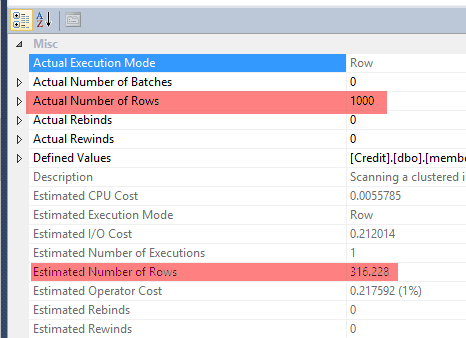
image thumb “CSelCalcCombineFilters ExponentialBackoff” Calculator

image thumb1 “CSelCalcCombineFilters ExponentialBackoff” Calculator

In SQL Server 2014 CTP2 – we estimate 316.228 rows for the Clustered Index Scan against the member table – and the actual number of rows is 1,000.

Now if I flip my database compatibility mode to pre-120, I’ll see the following actual vs. estimated instead:

image thumb2 “CSelCalcCombineFilters ExponentialBackoff” Calculator

Before SQL Server 2014, the estimate for  “[city] = ‘Minneapolis’ AND  [state_prov] = ‘MN’” is 100 rows – and if we added the supporting statistics or index on city and state_prov, we’ll get a better estimate (but there are limitations to how useful this can be – another topic altogether, so see this post).  We know that, in this example, the two columns are correlated.  But we would need to help SQL Server if we didn’t want it to assume each predicate was independent.

Anyhow – the original issue pre SQL Server 2014 was that our city and state_prov columns were seen as independent, and so we saw our estimates reflect this (10% of row estimate for city multiplied by 10% of row estimate for state_prov).  So we wind up with an underestimate.

Now in SQL Server 2014 CTP2, with the Credit database compatibility mode put back to 120, we see the skew still exists, but the gap isn’t as extreme – showing 316.228 instead of 100 as an estimate.  Still incorrect, but less so.

Now putting this in Excel, we can see the following:

image thumb3 “CSelCalcCombineFilters ExponentialBackoff” Calculator

Earlier we updated 10% of the 10,000 rows for various city/state combinations, so what’s up with the 32% for the state predicate selectivity? 

That 32% is, using Excel formula style, =POWER((10%),1/2).

And if we look at the query_optimizer_estimate_cardinality for the 2014 CTP2 version, we’ll see the following calculator reference (abridged output):

image thumb4 “CSelCalcCombineFilters ExponentialBackoff” Calculator

And here is the full calculator blurb for the CSelCalcCombineFilters_ExponentialBackoff:

<CalculatorList>
  <FilterCalculator CalculatorName=”CSelCalcCombineFilters_ExponentialBackoff” Conjunction=”true”>
    <SubCalculator>
      <FilterCalculator CalculatorName=”CSelCalcColumnInInterval” Selectivity=”0.100″ TableName=”[m]” ColumnName=”state_prov” StatId=”5″ />
      <FilterCalculator CalculatorName=”CSelCalcColumnInInterval” Selectivity=”0.100″ TableName=”[m]” ColumnName=”city” StatId=”4″ />
    </SubCalculator>
  </FilterCalculator>
</CalculatorList>

We see the selectivity of state_prov and city are both 0.100.  And yet unlike the pre-2014 version that multiples the two selectivity percentages, we’re not doing that in 2014 CTP2. The calculator name references “ExponentialBackoff” – which according to Wikipedia (yeah I know), is defined as “an algorithm that uses feedback to multiplicatively decrease the rate of some process, in order to gradually find an acceptable rate”.

What does this mean in this specific case? 

In absence of multi-column statistics for city and state_prov, our estimated rows is not underestimated nearly as much as it used to be pre-2014.

Homework assignment – add another member column to the mix that has a 0.100 selectivity (for example – county) and compare the estimates using a pre-2014 and 2014 CTP2 compatibility mode.

The post “CSelCalcCombineFilters_ExponentialBackoff” Calculator appeared first on Joe Sack.

10 Dec 02:14

Spatial Indexing: From 4 Days to 4 Hours

by psssql

Over the past month I have been involved in the optimization of a Spatial Index creation/rebuild.  Microsoft has several fixes included in the SQL Server 2012 SP1 CU7 Release

I have been asked by several people to tell the story of how I was able to determine the problem code lines that allowed the Spatial Index build/rebuild to go from taking 4+ days to only 4 hours on the same machine.

Environment

  • 1.6 billion rows of data containing Spatial, geography polygon regions
  • Data stored on SSD drives, ~100GB
  • Memory on machine 256GB
  • 64 schedulers across 4 NUMA nodes

Customer was on an 8 scheduler system that took 22 hours to build the index and expected to move to an 80 scheduler system and get at least 50% improvement (11 hours.)  Instead it took 4.5 days!

Use of various settings (max dop, max memory percentage) only showed limited improvement.   For example 16 schedulers took 28 hours, 8 scheduler took 22 hours, 80 too 4.5 days.  

Just from the summary of the problem I was skeptical of a hot spot that required the threads to convoy and that is exactly what I found.

Started with DMVs and XEvents  (CMemThread)

I started with the common DMVs (dm_exec_requests, dm_os_tasks, dm_os_wait_stats and dm_os_spinlock_stats.)

CMEMThread quickly jumped to the top of the list, taking an average of 3.8 days of wait time, per CPU over the life of the run.   If I could address this I get back most of my wall clock time.

Using XEvent I setup a capture, bucketed by the waits on the CMemThread and looked at the stacks closely.  This can be some with public symbols.

-- Create a session to capture the call stack when these waits occur.  Send events to the async bucketizer target "grouping" on the callstack.

-- To clarify what we're doing/why this works I will also dump the same data in a ring buffer target

CREATE EVENT SESSION wait_stacks

ON SERVER

ADD EVENT sqlos.wait_info

(

      action(package0.callstack)

      where opcode = 1              -- wait completed

            and wait_type = 190     -- CMEMTHREAD on SQL 2012

)

add target package0.asynchronous_bucketizer (SET source_type = 1, source = 'package0.callstack'),

add target package0.ring_buffer (SET max_memory = 4096)

With (MAX_DISPATCH_LATENCY = 1 SECONDS)

go

-- Start the XEvent session so we can capture some data

alter event session wait_stacks on server state = start

go

Run the repro script to create a couple of tables and cause some brief blocking so that the XEvent fires.

select event_session_address, target_name, execution_count, cast (target_data as XML)

from sys.dm_xe_session_targets xst

      inner join sys.dm_xe_sessions xs on (xst.event_session_address = xs.address)

where xs.name = 'wait_stacks'

What I uncovered was the memory object used by spatial is created as a thread safe, global memory object (PMO) but it was not partitioned.   I PMO is like a private HEAP and the spatial, object is marked thread safe for multi-threaded access.  Reference: http://blogs.msdn.com/b/psssql/archive/2012/12/20/how-it-works-cmemthread-and-debugging-them.aspx

A parameter to the creation of the memory object is the partitioning schema (by NUMA node, CPU or none.)   Under the debugger I forced the scheme to be, partitioned by NUMA Node and the runtime came down to ~25 hours on 80 schedulers.   I then forced the partitioning by scheduler (CPU) and achieved an 18 hour completion.

Issue #1 was identified and filed with the SQL Server development team.  When creating the memory object used for ANY spatial activity partition it by NUMA Node.  Partitioning adds a bit more memory overhead so we don’t target per CPU unless we know it is really required.   We also provide startup, trace flag –T8048 that upgrades any NUMA partitioned memory object to CPU partitioned.  

Why is –T8048 important?   Heavily used synchronization objects tend to get very hot at around 8 CPUs.  You may have read about the MAX DOP targets for SQL that recommend 8 as an example.   If the NUMA node, CPU density if 8 or less node partitioning may suffice but if the density (like on this system with 16 CPUs per node) increases the trace flag can be used to further partition the memory object.

In general we avoid use of –T8048 because in many instances partitioning by CPU starts to approach a design of scheduler local memory.  Once we get into this state we always consider the design to see if a private memory object is a better long term, design solution.

Memory Descriptor

Now that I had the CMemThread out of the way I went back to the DMVs and XEvents and looked for the next target. This time I found a spinlock object encountering millions of back-offs and trillions of spins in just a 5 minutes.    Using a similar technique as shown above I bucketed the spinlock back-off stacks.

The spinlock was the SOS_ACTIVEDESCRIPTOR.  The descriptor, spinlock is used to protect aspects of the memory manager and how it is able to track and hand out memory.    Each scheduler can have an active descriptor, pointing to hot, free memory to be used.  Your question at this juncture might be, why, if you have a CPU partitioned memory object would this be a factor.

Issue #2 is uncovered but to understand it you have to understand the spatial index build flow first.  The SQL Server spatial data type is exposed in the Microsoft.SqlServer.Types.dll (managed assembly) but much of the logic is implemented in the SqlServerSpatial110.dll (native).

Sqlserver Process (native) –> sqlaccess.dll (managed) –> Microsoft.SqlServer.Types.dll(managed) –> SqlServerSpatial110.dll (native) –> sqlos.dll (native)

Shown here is part of the index build plan.  The nested loops in native SQL engine, doing a native clustered index scan and then calling the 'GetGergraphyTessellation_VarBinary' managed implementation for each row.

clip_image001

CREATE SPATIAL INDEX [idxTeset] ON [dbo].[tblTest]
(      [GEOG] )USING  GEOGRAPHY_GRID
WITH (GRIDS =(LEVEL_1 = MEDIUM,LEVEL_2 = MEDIUM,LEVEL_3 = MEDIUM,LEVEL_4 = MEDIUM),
CELLS_PER_OBJECT = 16, PAD_INDEX = OFF, STATISTICS_NORECOMPUTE = OFF, SORT_IN_TEMPDB = OFF, DROP_EXISTING = OFF, ONLINE = OFF, ALLOW_ROW_LOCKS = ON, ALLOW_PAGE_LOCKS = ON)

The implementation of the tessellation is in the SqlServerSpatial110.dll (native) code that understands it is hosted in the SQL Server process when used from SQL Server.    When in the SQL Server process space the SQL Server (SOS) memory objects are used.  When used in a process outside the SQL Server the MSVCRT memory allocators are used.

What is the bug?  Without going into a specifics, when looping back to the SQLOS, memory allocators, didn’t properly honor the scheduler id hint and the active partition ended up always being partition 0 making the spinlock hot.

To prove I could gain some speed by fixing this issue I used the debugger to make SqlServerSpatial110.dll think it was running outside of the SQL Server process and use the MSVCRT memory allocators.  The MSVC allocators allowed me to dip near the 17 hour mark.

A fix for the SOS_ACTIVEDESCRIPTIOR issue dropped the index creation/rebuild to 16 hours on the 80 scheduler system.

First set of (2) fixes released: http://support.microsoft.com/kb/2887888 

Geometry vs Geography

Before I continued on I wanted to understand the plan execution a bit better.   Found out that the Table Valued Function (TVF) is called for each row to help build the spatial, index grid accepting 3 parameters and a return value.  You can read about these at:  http://technet.microsoft.com/en-us/library/bb964712(v=SQL.105).aspx

Changing the design of TVF execution is not something I would be able to achieve in a hot fix so I set off to learn more about the execution and if I could streamline it.  In my learning I found out that the logic to build the grid is highly tied to the data stored in the spatial data type, and the type used.    For example, LineString requires less mathematical computations than a Polygon.

Geometry is a flat map and Geography is a map of the round earth.   My customer could not move to a flat map as they are tracking polygons down to 120th of a degree of latitude and longitude.   The distance of Longitude 0 degrees and 30 degrees as the equator is different than the distance 2000 miles north of the equator, for example.

The geography calculations are often more CPU intense because of the additional logic to use cos, radius, diameter, and so forth.  I am unlikely able to make the MSVC runtime, cos function faster and the customer requires Polygons.

Index Options

I was able to adjust the ALTER/CREATE index grid levels and shave some time off the index creation/rebuild.  The problem with that is going to a LOW grid or limiting the number of grid entries for a row can force me to do additional filtering for runtime queries (residual where clause activities.)  In this case going to LOW was trading index build speed for increased query durations.   This was a non-goal for the customer and the savings in time was not significant in my testing.

P/Invokes

Those familiar with managed and native code development may have asked the same question I did.  How many P/Invokes are occurring to execute the TVF as the function is being called and we are going in and out of native?

This was something I could not change in a hot fix but I broken the reproduction down to 500,000 rows and filed a work item with the SQL Server development team, who is investigating, to see if we can go directly to the native, SqlServerSpatial110.dll and skip the managed logic to avoid the P/Invokes.

SOS_CACHESTORE, SOS_SELIST_SIZED_SLOCK, and SOS_RW

Still trying to reach the 11 hour mark I went back to looking at the DMVs and XEvent information for hot spots.  I noticed a few more spinlocks that were hot (SOS_CACHESTORE, SOS_SELIST_SIZED_SLOCK, and SOS_RW.) 

Found the cache and selist was related to the CLR Procedure Cache.   The CLR procedure, execution plans are stored in a cache.   Each parallel thread (80 in this test) uncached, used, cached the TVF.   As you can imagine the same hash bucket is used for all 80 copies of the execution plan (same object id) and the CLR Procedure Cache is not partitioned as much as the SQL Server, TSQL, procedure cache.

Issue #3 - The bucket and list was getting hot as each execution uncached and cached the CLR, TVF plan.  The SQL Server dev team was able to update this behavior to the additional overhead.   Reduced the execution by ~45 minutes.

The SOS_RW was found to protect the application domain for the database.   Each time the CLR procedure was executed the application domain (AppDomain) had a basic validation step and the spinlock for the reader, writer lock in the SOS_RW object was hot.

Issue #4 – SQL Server development was able to hold a better reference to the application domain across the entire query execution.   Reducing the execution by ~25 minutes.

Array Of Pages

The Polygon can contain 1000s of points and is supported in the SqlServerSpatial110.dll with an array of page allocations.   Think of it a bit like laying down pairs of doubles in a memory location.   This is supported by –>AllocPage logic inside a template class that allows ordinal access to the array but hide the physical allocation layout from the template user.   As the polygon requires more pages they are added to an internal list as needed.

Using the Windows Performance Analyzer and queries against the data (<<Column>>.ToString(), datalength, …) we determined a full SQL Server page was generally not needed.   A better target than 8K is something like 1024 bytes.  

Issue #5 - By reducing the target size used by each TVF invocation SQL Server can better utilize the partitioned memory object.   This reduces the number of times pages need to be allocated and freed all the way to the memory manager.  The per scheduler or NUMA node memory objects hold a bit a memory in a cache.   This allows better utilization of the memory manager, less memory usage overall and gained us another ~35 minutes of runtime reduction.

What Next Is Big - CLR_CRST?

As you can see I am quickly running out of big targets to get me under the 11 hour mark.  I am slowly getting to 13 hours but running out of hot spots to attack. 

I am running all CPUs at 100% on the system, taking captures of DMVs, XEvents and Windows Performance Analyzer.  Hot spots like scheduler switch, cos and most of the function captures are less than 1% of the overall runtime.    At this rate I am looking at trying to optimize 20+ more functions to get approach the 11 hours.

That is, except for one wait type I was able to catch, CLR_CRST.  Using XEvent I was able to see that CLR_CRST is associated with GC activities as SQL Server hosts the CLR process.

Oh great, how am I going to reduce GC activity?  This is way outside of the SQL Server code path.   Yet, I knew most, if not all the core memory allocations were occurring in SqlServerSpatial110.dll using the SQLOS hosting interfaces.  Why so much GC activity.

What I found was the majority of the GC was being triggered from interop calls.  When you traverse from managed to native the parameters have to be pinned to prevent GC from moving the object while referenced in native code.

The Microsoft.SqlServer.Types.dll used a pinner class that performed a GCHandle::Alloc to pin the object and when the function was complete GCHandle::Free.   Turns out this had to be used for 12 parameters to the tessellation calls.  When I calculated the number of calls, 16. billion per row, add in the number of grid calculations per row, etc.. the math lands me at 7,200 GCHandle::Alloc/GCHandle::Free calls, per millisecond, per CPU for the a run on 80 schedulers over a 16 hour window.

Working with the .NET development team they pointed out the fixed/__pin keywords that are used to create, stack local references (pin) objects in the .NET heap without requiring the overhead of GCHandle::Alloc and ::Free.   http://msdn.microsoft.com/en-us/library/f58wzh21.aspx 

Issue #6 – Change the Geographic, grid method in the Microsoft.SqlServer.Types.dll to use the stack, local object pin references.  BIG WIN – The entire index build now takes 3 hours 50 minutes on the 80 scheduler system.

The following is the new CPU usage with all the bug fixes.  The valley is the actual .NET Garbage collection activity.  The performance analysis now shows the CPUs are pegged doing mathematical calculations and the index build will scale, reasonably as more schedulers are available.

clip_image001

In order to maximize the schedulers for the CPU bound index activity I utilized a resource pool/group – MAX DOP setting.  http://blogs.msdn.com/b/psssql/archive/2013/09/27/how-it-works-maximizing-max-degree-of-parallelism-maxdop.aspx

create workload group IndexBuilder
with
(
       MAX_DOP = 80,
       REQUEST_MAX_MEMORY_GRANT_PERCENT = 66
)

Why was this important to customer?

Like any endeavor, getting the best result for your money is always a goal.   However, some of the current Spatial limiations fueled the endeavor.

  • Spatial indexes must be built offline.  They are not online aware a lock down the core table access during the index creation/rebuild.
  • Spatial data is not allowed as part of a partitioning function.  This means a divide and scale out type of approach using partitioned tables is not a clear option.  (Note you can use separate tables and a partitioned view, using a constraint on a different column to achieve a scale out like design where smaller indexes can be maintained on each base table.)
  • We looked at a Performance Data Warehouse (PDW) approach but PDW does not currently support Spatial data types.
  • HDInsight has Spatial libraries but the nature of the interactive work the customers application was doing required a more interactive approach.   However, for batch and analysis activities HDInsight may be a great, scale out, compute intensive solution.
  • SQL Server handles and provides a full featured, Spatial library for Polygon storage, manipulation and query activities.   Other products may only support points or are not as feature rich.

Fix References

The following Microsoft Knowledge Base articles contain the appropriate links to these fixes.

Fixes are included in SQL Server 2012 SP1 CU7 - http://support.microsoft.com/kb/2894115/en-us

Note: Don’t forget you have to enabled the proper trace flags to enable the fixes. 

2887888
(http://support.microsoft.com/kb/2887888/ )
FIX: Slow performance in SQL Server when you build an index on a spatial data type of a large table in a SQL Server 2012 instance
2887899
(http://support.microsoft.com/kb/2887899/ )
FIX: Slow performance in SQL Server 2012 when you build an index on a spatial data type of a large table
2896720
(http://support.microsoft.com/kb/2896720/ )
FIX: Slow performance in SQL Server 2012 when you build an index on a spatial data type of a large table

Recap

I realize this was a bit of a crash course in Spatial and internals.   It was a bit like this for me as well.   This was my first, in depth experience with tuning Spatial activities in SQL Server.   As you have read SQL Server, with the fixes, is very effective with Spatial data and can scale to large numbers.

The DMVs and XEvents are perfect tools to help narrow down the hot spot and possible problems.   Understanding the hot spot and then building a plan to avoid it could provide you with significant performance gains.

If you are using spatial you should consider applying the newer build(s), enabling trace flags and creating a specific workload group to assign maintenance activities to.

Additional Tuning

The following is an excellent document discussing the ins and outs of spatial query tuning.

http://social.technet.microsoft.com/wiki/contents/articles/9694.tuning-spatial-point-data-queries-in-sql-server-2012.aspx

Bob Dorr - Principal SQL Server Escalation Engineer

05 Dec 18:18

Peeling back the layers of XtremIO: What is an X-Brick?

by Sean Thulin
EMC logo

XtremIO_iconMany moons ago, on a stage not too far from where I work, EMC announced the future of flash and the creation of the Xtrem brand / business unit.  Today, EMC announces the latest product in the brand: XtremIO.  This all flash storage monster changes the way we think about storage and for the better.  Gone is the need for tiering and different types of RAID configurations. Rebuilds are measured in minutes, not hours. I present to you, the X-Brick!


What’s in the X-Brick?

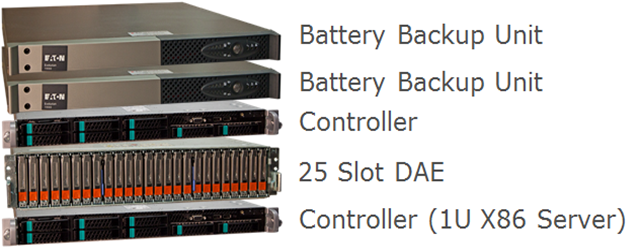
imageSo the picture above shows the major breakdown of an X-Brick.  Behind the covers you have 2 controllers, 2 battery backup units, and a 25 drive DAE that accepts 2.5” drives (does that look familiar?).


image

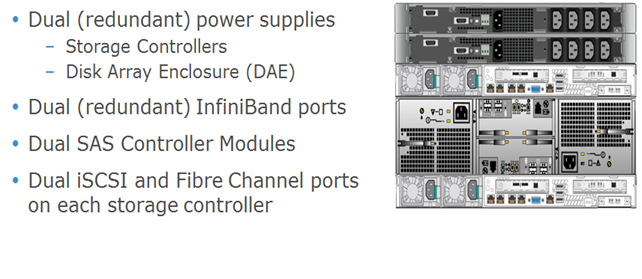
In  the back you can see there is 2 of everything.  There are 2 power supplies, 2 SAS controllers, 2 iSCSI and Fiber Channel ports, and 2 InfiniBand ports for clustering.  Just like with all other EMC products, there is no single point of failure in this design (and I do like how everything gets a UPS instead of just the DAE).


image


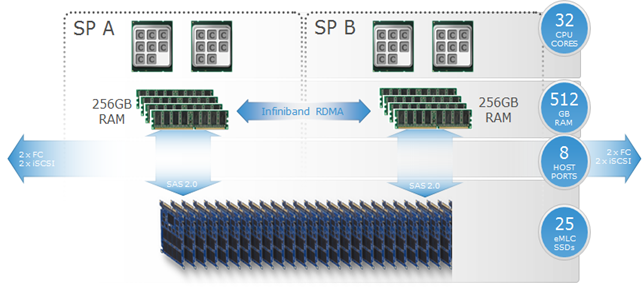
Inside the hardware of each X-Brick are dual SPs (these are external 1U blades, unlike what you see in a VNX SP), each with dual 8 core CPUs and 256GB of RAM.  They each have a SAS 2.0 connection directly to 25 eMLC SSD drives as well as InfiniBand connectivity to other nodes in the cluster (more on this soon).  On the front end, you have 10gig iSCSI as well as 8gig FiberChannel.   This impressive platform sets the stage for even more impressive software.


Lets talk about clusters

At launch, the XtremIO platform can support up to 4 X-Bricks (in theory, I don’t see why more can’t be added, and maybe they will be in the future).  Each X-Brick is of a fixed size of around 10TB of storage with around 7.5TB of useable space (though I expect that total size will be increased in the near future).  In a 50/50 read/write performance test, each X-Brick topped out at about 150,000 IOPS (that number increased to around 250,000 if you are doing 100% reads).  And when you max out your cluster with 4 X-Bricks, both your storage and IOPS scale out giving you 40TB of capacity and around 600,000 real world IOPS (topping out at around 1,000,000 if your doing just reads!!!!!!).


image

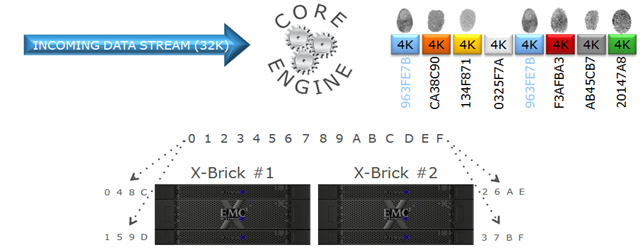
The key to achieving all of this is in the software layer.  When data comes in, it is broken down in to 4K chunks.  Each chunk is then hashed using an SHA-1 algorithm and assigned a unique metadata fingerprint.  The chunks are then spread out across all the storage processors in the cluster to distribute the data around for faster throughput and the logical block address, fingerprint, and SSD offset are recorded in the metadata.  When new data comes in, the fingerprints are checked against the existing database to see if there is a match.  If there is, the metadata is recorded, but the write is not necessary, thus extending the life of the SSDs as well as performing an inline deduplication.  Now 256GB is not a lot of RAM to store metadata, and when full it will destage this to the SSDs.  This is where the cluster really starts to shine.

image

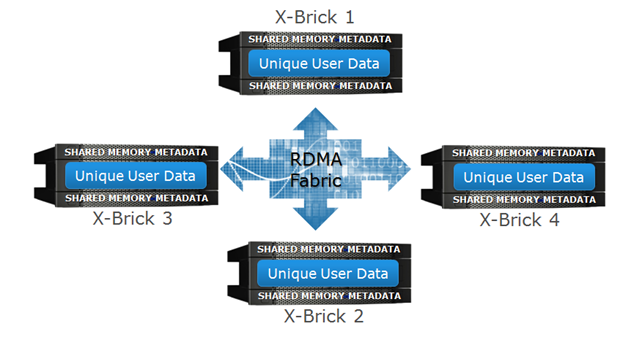
By utilizing the RDMA fabric between the X-Bricks.  The metadata calculation can be distributed across the entire cluster for an even load balancing.  This allows the decoupling of the user data and the meta data so that they don’t have to be on the same X-Brick and also allows you to recall any of the data in a similar fashion.  The in memory metadata of a controller is also mirrored to another controller in the cluster just in case there is a controller failure.  By being able to utilize multiple X-Bricks at the same time, you can scale out all the processing in an active/active environment and increase the total throughput of the cluster as a whole.


So what does it look like?

Well first off, it’s not Unisphere, but it’s own interface (the XMS management system) that is launched from the web server running on a controller as well as a robust CLI.  This video demonstration gives you a great overview.

XtremIO v2.2 GUI Demonstration

Final Thoughts

All in all, for a first round product, I think this is a great offering.  I’d like to see it scaled up higher with more storage and more X-Bricks in a cluster as I don’t think they have hit the limits of the architecture.  Be sure to watch the Launch event.  Here is a sneak peek at the cool X-Brick Coffee table (which will one day end up in my living room if I can help it)!

EMC XtremIO Launch 173

05 Dec 18:13

CLARiiON Data Erasure – DIY edition

by Jon Klaus
EMC logo

Open Hard Drive with pencil eraser on platterOver the last couple of months I’ve been busy phasing out an old EMC CLARiiON CX3 system and migrating all the data to either newer VNX and/or Isilon systems. The hard work paid off: the CX3 is now empty and we can start to decommission it. But before we ship it back to EMC we need to employ a type of CLARiiON data erasure to make sure data doesn’t fall into wrong hands.

Do you need a certificate?

If you need to show proof to auditors that the array was completely wiped of data, there’s only one real option. EMC offers CLARiiON Data Erasure as a professional service. At the end of the engagement they’ll present you a certificate and a list of disks that didn’t erase properly and you’re covered.

A quick check determined that we do not have such a strict policy and do not need a certificate. We DO need to make sure data cannot be easily retrieved, which is pretty much common sense in my opinion. If someone gets their hands on a drive, they shouldn’t be able to read the data.

Why?

Let’s assume I leave the LUNs bound on the CLARiiON and pull out a drive. In a worst case scenario, assume I’ve gotten my hands on a RAID1 drive: I now have a fully functioning copy of the data that I can play around with. Which is bad news…

On the other side you have the full (DoD 5220.22-M approved) 7-pass overwrite mechanism, the one the CLARiiON Data Erasure service also utilizes. This is done to eliminate data remanence, or residual data on the platters. The theory behind this is simple: let’s say you’ve got a platter filled with binary data. You erase all data (write a zero in all possible locations). Should you then remove the platter and place it under specialized laboratory equipment, you’d see a difference in magnetism between “true zeroes” and “zeroes that were formerly a one”. There’s a slight amount of residual magnetism left.

Digging a bit further it seems that this is slightly exaggerated. NIST publication 800-88 Rev 1 states the following:

For storage devices containing Legacy Magnetic media, a single overwrite pass with a fixed pattern such as 0s typically prevents recovery of data even if state of the art laboratory techniques are applied to attempt to retrieve the data.

That sounds good enough for our purposes.

DIY data erasure

In previous engagements (which also didn’t require a certificate) I’ve always used a combination of removing all LUNs and RAID groups, swapping drive positions, creating new random RAID groups and LUNs (wait for the bind process to complete), attach LUNs to a server and use software to overwrite the data. A CLARiiON LUN bind is followed by an automatic zeroing of the space which erases all previous traces of data, but it’s hard to report this to management. “Yeah if you look in the event logs and see this and that event code…”

All in all a very time consuming operation with no fixed procedure and/or very limited reporting whether the data is actually gone. I didn’t want to go through that entire nightmare again this time. I know from a previous erasure that EMC has a tool to connect to the array and wipe all the drives in parallel. But even though I’m working for an EMC partner and the fact that I don’t need a certificate, I’m not allowed to use that tool myself. So Google it is!

I ran into a blog post called “How to scrub/zero out data on a decommissioned Clariion” which talks about the zerodisk CLI command. Included in that command is a switch that checks whether or not a drive has been zeroed. That’s exactly what we need!

 Zerodisk procedure

First of all, you might want to retrieve the zero mark for all the disks in your array. The command syntax is as follows:

CLARiiON Data Erasure Zerodisk GetZeroMark

naviseccli -h <IP_of_SP> zerodisk -messner <drive_ID> getzeromark

As long as this Zero Mark is NOT either 69704 or 69760, your drive is NOT zeroed. Since this array contains 210 drives, I wasn’t really planning on entering all the drive IDs manually. So I had exported the full list of drives from unisphere and Excelled it with some concatenate formulas to generate the drive IDs (0_0_0 etc). Only then did I try substituting the drive ID in the command for “all”…. sigh! So yeah, do that, it saves time.

I don’t want to wipe my vault drives just yet. There’s conflicting information on the internet whether the zerodisk command removes your FLARE code, so better safe than sorry: create a RAID group and LUN on your VAULT drives. The zerodisk command will not run against disks that have LUNs bound so you’ve now certain your vault is protected against accidental zeroing.

CLARiiON Data Erasure starting the zerodisk process

naviseccli -h <IP_of_SP> zerodisk -messner <drive_ID> start
naviseccli -h <IP_of_SP> zerodisk -messner <drive_ID> status

For a single disk, enter the above commands and zeroing will start. It looks like a single 1TB disk wipe took about 5 minutes per 2%, so the process should complete in a little over 4 hours.

If you’re feeling confident, substitute the drive ID for “all” and watch the magic happen. You will see in the output below that the vault drives are skipped because of the bound LUN; the other error is the drive that is already zeroing.

CLARiiON Data Erasure - zerodisk starting for all disks

Now just wait till all disks are finish, run the getzeromark command, export it to file to prove all drives are empty and you’re set! Fun fact: this CX3 is so old, the sudden I/O of all drives zeroing instantly faulted two drives.

CLARiiON Data Erasure complete!

Comments, suggestions, questions? Plenty of room in the comments section! Happy erasing!

The post CLARiiON Data Erasure – DIY edition appeared first on FastStorage.

05 Dec 18:10

Benchmarks: Time for Some Vendor Honesty

by Chris Evans
EMC logo

Over the last couple of weeks I’ve been doing some perusing of vendor products and benchmarks for both storage arrays and PCIe SSD cards.  For the PCIe data, you can see the fruits of this labour at PCIe SSD Vendors and Products.  This morning I was looking at the figures for the latest NetApp [...]

28 Nov 21:37

How to reset the SA password in SQL Server

by Tim Radney

Getting locked out of a SQL Server can happen in a number of ways.  You could inherit a server that was managed by someone that left the company and only that person had System Admin rights for example. A recent encounter I had was were a database server was built and provisioned in one active directory domain and then moved and joined to another non trusted domain. All the accounts provisioned within the server include those for the DBA admins were basically useless since they couldn’t be authenticated.  The built in SA account is locked down per policy so no one knows the password.

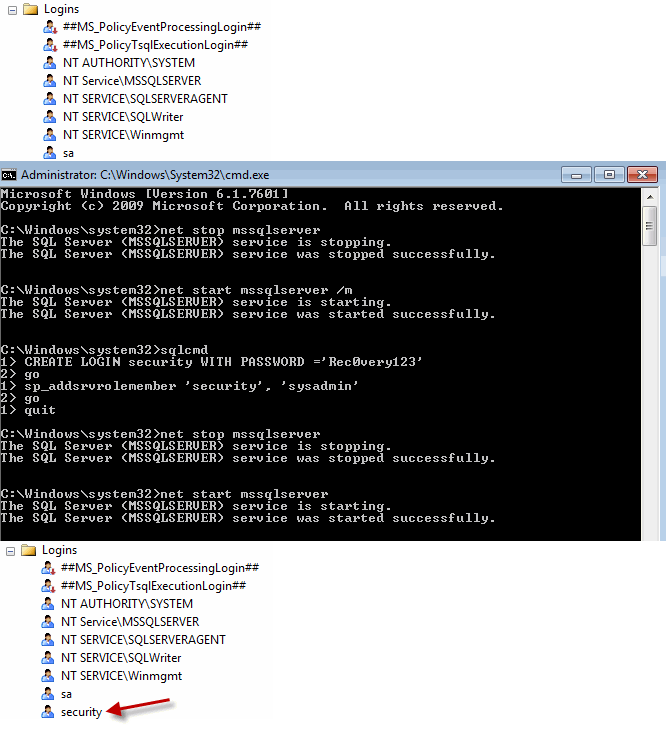
What do you do if you find that you are locked out of a SQL Server instance? The way I handle it is to start SQL Server in single user mode, launch SQLCMD and create a new user. I then still using SQLCMD grant the new user the system admin role.  Once I have the new user created I restart SQL Server Service and log in using the new credentials. I can then clean up the instance by granting proper access.

If this was a newly inherited server I then take the time to do a health check of the instance to make sure that everything is to our standards. (Usually this means more work)

To start SQL Server in single user mode I open a command prompt as an administrator

I type the following minus the quotes (“ “)

“net stop mssqlserver” and press enter

“net start mssqlserver /m” and press enter

“sqlcmd” and press enter

“CREATE LOGIN security WITH PASSWORD = ‘Rec0very123’ “ and press enter

“GO” and press enter

“sp_addsrvrolemember ‘security’, ‘sysadmin’ “ and press enter

“GO” and press enter

“quit” and press enter

“net stop mssqlserver” and press enter

“net start mssqlserver” and press enter

You have now stop and restarted mssql in single user mode, created a new login called ‘security’ and given the user ‘security’ system admin rights. You then stopped and started mssql to put it back in multi user mode. I have included a screen shot of me completing the task on a development workstation so you can see the syntax and steps.

At this point you can connect to the server with SQL Server Management Studio with the new user and reset the SA password and or provision the proper people access.

lockedout

Share

28 Nov 21:36

The Modern Data Warehouse

by SQL Server Team

In recent surveys by TDWI Research, roughly half of respondents report that they will replace their primary data warehouse (DW) platform and/or analytic tools within three years. Ripping out and replacing a DW or analytics platform is expensive for IT budgets and intrusive for business users. This raises the question: What circumstances would lead so many people down such a dramatic path?

It’s because many organizations need a more modern DW platform to address a number of new and future business and technology requirements. Most of the new requirements relate to big data and advanced analytics, so the data warehouse of the future must support these in multiple ways. Hence, a leading goal of the modern data warehouse is to enable more and bigger data management solutions and analytic applications, which in turn helps the organization automate more business processes, operate closer to real time, and through analytics learn valuable new facts about business operations, customers, products, and so on.

For organizations that need a modern data warehouse that satisfies new and future requirements, TDWI offers a checklist of our top six recommendations. These can guide your selection of vendor products and your solution design.

Users facing new and future requirements for big data, analytics, and real-time operation need to start planning today for the data warehouse of the future. To help them prepare, this TDWI Checklist Report drills into each of the six recommendations, listing and discussing many of the new vendor product types, functionality, and user best practices that will be common in the near future, plus the business case and technology strengths of each.

This checklist was sponsored by Microsoft.

To read the full report, sign up and download the report here

*This post excerpted from the TDWI Checklist Report, November 2013
28 Nov 21:36

Mapping wait types in dm_os_wait_stats to Extended Events

A few months back I received an email from a member of the community that was trying to filter the sqlos.wait_info event for some of the wait types that are filtered out by Glenn’s diagnostic queries, and to their dismay wasn’t able to find the specific wait types in the wait_types map in sys.dm_xe_map_values.  This scenario is something that I have long known about but never actually blogged about, though this blog post has been sitting in draft form since early 2012.  Now that things have started to slow down at the end of this year I took a little time and built a spreadsheet of the wait_type names in sys.dm_os_wait_stats that don’t match exactly to the map_value in sys.dm_xe_map_values.

I’d like to thank Bob Ward at Microsoft for taking the time to double check the spreadsheet I originally built for this blog post for accuracy and for the corrections on a few of the wait types he provided.  The list of wait types below was generated from SQL Server 2012 Service Pack 1 + Cumulative Update 6.

wait_type in sys.dm_os_wait_stats

map_value in sys.dm_xe_map_values

ASYNC_NETWORK_IO NETWORK_IO
BROKER_TASK_STOP SSB_TASK_STOP
CLR_JOIN CLR_TASK_JOIN
CLR_MEMORY_SPY CLR_MEMORY_SPY_ACCESS
CREATE_DATINISERVICE GET_DATINISERVICE
DBCC_SCALE_OUT_EXPR_CACHE CHECK_EXPRESSION_CACHE
DBSTATE DB_STATE
DLL_LOADING_MUTEX DLL_LOAD
ERROR_REPORTING_MANAGER ERROR_REPORTING_MGR
EXECUTION_PIPE_EVENT_INTERNAL TWO_THREAD_PIPE_EVENT
FS_FC_RWLOCK FS_GC_RWLOCK
FT_IFTS_RWLOCK FT_RWLOCK
FT_IFTS_SCHEDULER_IDLE_WAIT FT_SCHEDULER_IDLE_WAIT
FULLTEXT GATHERER FULLTEXT_GATHERER
HADR_ARCONTROLLER_NOTIFICATIONS_SUBSCRIBER_LIST HADR_ARPROXY_NOTIFICATION_SUBSCRIBER_LIST
HADR_DATABASE_FLOW_CONTROL HADR_PARTNER_FLOW
HADR_DATABASE_VERSIONING_STATE HADR_VERSIONING_STATE
HADR_DATABASE_WAIT_FOR_RESTART __indexMUTEX_HADR_DATABASE_WAIT_FOR_RESTART
HADR_DATABASE_WAIT_FOR_TRANSITION_TO_VERSIONING HADR_WAIT_FOR_TRANSITION_TO_VERSIONING
HADR_FILESTREAM_BLOCK_FLUSH HADRFS_BLOCK_FLUSH
HADR_FILESTREAM_FILE_CLOSE HADRFS_FILE_CLOSE
HADR_FILESTREAM_FILE_REQUEST HADRFS_FILE_REQUEST
HADR_FILESTREAM_IOMGR HADRFS_IOMGR
HADR_FILESTREAM_IOMGR_IOCOMPLETION HADRFS_IOMGR_IOCOMPLETION
HADR_FILESTREAM_MANAGER HADRFS_MANAGER
HADR_RECOVERY_WAIT_FOR_CONNECTION __indexMUTEX_HADR_RECOVERY_WAIT_FOR_CONNECTION
HADR_RECOVERY_WAIT_FOR_UNDO __indexMUTEX_HADR_RECOVERY_WAIT_FOR_UNDO
HADR_TRANSPORT_FLOW_CONTROL HADR_TRANSPORT_FLOW
HTBUILD HASH_TABLE_BUILD
HTREPARTITION HASH_TABLE_REPARTITION
INTERNAL_TESTING  
LAZYWRITER_SLEEP LZW_SLEEP
MD_AGENT_YIELD METADATA_AGENT_YIELD
MD_LAZYCACHE_RWLOCK METADATA_LAZYCACHE_RWLOCK
MISCELLANEOUS UNKNOWN
MSSEARCH MSSEARCH_COM
PREEMPTIVE_FSRECOVER_UNCONDITIONALUNDO PREEMPTIVE_FSRECOVER_CONDITIONALUNDO
PREEMPTIVE_OS_SQMLAUNCH PREEMPTIVE_SQMLAUNCH
PWAIT_ALL_COMPONENTS_INITIALIZED ALL_COMPONENTS_INITIALIZED
PWAIT_COOP_SCAN COOP_SCAN
PWAIT_EVENT_SESSION_INIT_MUTEX EVENT_SESSION_INIT_MUTEX
PWAIT_HADR_ACTION_COMPLETED HADR_ACTION_COMPLETED
PWAIT_HADR_CHANGE_NOTIFIER_TERMINATION_SYNC HADR_ARPROXY_NOTIFICATION_SUBSCRIBER_LIST
PWAIT_HADR_CLUSTER_INTEGRATION HADR_CHANGE_NOTIFIER_TERMINATION_SYNC
PWAIT_HADR_FAILOVER_COMPLETED HADR_CLUSTER_INTEGRATION
PWAIT_HADR_OFFLINE_COMPLETED HADR_FAILOVER_COMPLETED
PWAIT_HADR_ONLINE_COMPLETED HADR_OFFLINE_COMPLETED
PWAIT_HADR_POST_ONLINE_COMPLETED HADR_ONLINE_COMPLETED
PWAIT_HADR_SERVER_READY_CONNECTIONS HADR_SERVER_READY_CONNECTIONS
PWAIT_HADR_WORKITEM_COMPLETED HADR_WORKITEM_COMPLETED
PWAIT_MD_LOGIN_STATS MD_LOGIN_STATS
PWAIT_MD_RELATION_CACHE MD_RELATION_CACHE
PWAIT_MD_SERVER_CACHE MD_SERVER_CACHE
PWAIT_MD_UPGRADE_CONFIG MD_UPGRADE_CONFIG
PWAIT_PREEMPTIVE_AUDIT_ACCESS_WINDOWSLOG PREEMPTIVE_AUDIT_ACCESS_WINDOWSLOG
PWAIT_QRY_BPMEMORY QRY_BPMEMORY
PWAIT_REPLICA_ONLINE_INIT_MUTEX REPLICA_ONLINE_INIT_MUTEX
PWAIT_RESOURCE_SEMAPHORE_FT_PARALLEL_QUERY_SYNC RESOURCE_SEMAPHORE_FT_PARALLEL_QUERY_SYNC
PWAIT_SECURITY_CACHE_INVALIDATION SECURITY_CACHE_INVALIDATION
QUERY_EXECUTION_INDEX_SORT_EVENT_OPEN QUERY_EXEC_INDEXSORT_OPEN
REDO_THREAD_PENDING_WORK REDO_SIGNAL
REDO_THREAD_SYNC REDO_SYNC
RESOURCE_GOVERNOR_IDLE  
SCAN_CHAR_HASH_ARRAY_INITIALIZATION SCAN_CHAR_HASH_ARRAY_INIT
SERVER_IDLE_CHECK SERVER_IDLE_LOCK
SNI_LISTENER_ACCESS LISTENER_UPDATE
SNI_TASK_COMPLETION SNI_WAIT_TASK_FINISH
SP_PREEMPTIVE_SERVER_DIAGNOSTICS_SLEEP PREEMPTIVE_SP_SERVER_DIAGNOSTICS_SLEEP
THREADPOOL SOS_WORKER
TRAN_MARKLATCH_DT TRANMARKLATCH_DT
TRAN_MARKLATCH_EX TRANMARKLATCH_EX
TRAN_MARKLATCH_KP TRANMARKLATCH_KP
TRAN_MARKLATCH_NL TRANMARKLATCH_NL
TRAN_MARKLATCH_SH TRANMARKLATCH_SH
TRAN_MARKLATCH_UP TRANMARKLATCH_UP
VIA_ACCEPT VIA_ACCEPT_DONE
WAIT_XTP_GUEST XTP_GUEST
WAIT_XTP_TASK_SHUTDOWN XTP_TASK_SHUTDOWN
WAIT_XTP_TRAN_COMMIT XTP_TRAN_COMMIT
WAITFOR_TASKSHUTDOWN TASKSHUTDOWN
XE_CALLBACK_LIST XE_CALLBACK
XTPPROC_PARTITIONED_STACK_CREATE __indexXTPPROC_PARTITIONED_STACK_CREATE

The post Mapping wait types in dm_os_wait_stats to Extended Events appeared first on Jonathan Kehayias.

28 Nov 21:35

Kerberos Configuration Manager updated for Reporting Services

by Adam W. Saxton

Back in may, we released the Kerberos Configuration Manager tool to help with diagnosing and correcting Kerberos related issues for SQL Server.  Today, I’m happy to announce that version 2 of this tool has been released and has been updated for Reporting Services.  A lot of work went into this tool to get us to this point and the team that worked on it was awesome! You can download it from the following link:

Microsoft® Kerberos Configuration Manager for SQL Server®
http://www.microsoft.com/en-us/download/details.aspx?id=39046

Here is a look at what versions of Reporting Services are supported with this release of the

SQL RS Version Native Mode SharePoint Integrated Mode
2005 No support in v.2 No support in v.2
2008 Supported Supported
2008 R2 Supported Supported
2012 Supported No support in v.2

The tool does not add a shortcut to the Start Menu, so you will need to go to the directory of which it is installed to.  By default, this is C:\Program Files\Microsoft\Kerberos Configuration Manager for SQL Server.  There are a couple of things here that are pretty neat.  First is that you can decide whether to include SQL Server and Reporting Services instances in the list.  This comes in handy if you have several of both on the same server and you just care about one or the other.  Great for Dev and Test environments!

image

We will also show you the Mode of the Report Server that we discovered.  Native or SharePoint.

image

Common Problems

Unauthorized

If you see the “Unauthorized” message under status, this just means that you didn’t start the tool with Admin rights.  Be sure to launch the tool with Admin rights.  The tool will not prompt automatically.

image

Kerberos not enabled

If you see the “Kerberos not enabled” message under status, this means that the rsreportserver.config doesn’t not have either RSWindowsNegotiate or RSWindowsKerberos in the Authentication Types. 

image

If you do want to use Kerberos with Reporting Services, which I’m assuming you do if you got this far, you will need to modify the rsreportserver.config to get past this.

image

For more information on this, check out one of my previous blogs on setting up Kerberos with Reporting Services.  It covers this.

Logging

If you happen to encounter something that I didn’t highlight above, you may be able to find additional information.  Each time you run the tool, we will create a log file.  The default location for this is the following:  C:\Users\<user>\AppData\Roaming\Microsoft\KerberosConfigMgr.

The details of the log file will be flushed when you close the program.  So, if it is blank, just close the tool and the log should populate.  You may also find some details in the Event Log under the Source “Kerberos Configuration Manager”.  If we encounter an error, it should be logged in the Application Event Log as well as the tool’s log file.


Limitations

There are a few limitations that you will run into.  I wanted to walk through those so you are aware.

SharePoint Integrated Mode with RS 2012

Unfortunately this does not cover SharePoint Integrated mode with RS 2012.  This is true regardless of whether it is SharePoint 2010 or SharePoint 2012.  The reason for this was that it was a completely different approach with regards to discovery.  We still want to get this in as it is important, but for now it is not. 

Reporting Services 2005

For 2005, we had to make the same call as with SharePoint Integrated with RS 2012.  RS 2005 is a different architecture and would have caused us extra work to get the discovery in.  As such, we opted to not include RS 2005 with this tool.  Unfortunately, I don’t believe this will make it into the tool.

Multiple Domains

Right now, the tool will only work in a single domain scenario.  So, if you have the service installed in Domain A, but want to use a Service Account from Domain B, we won’t be able to discover and correct the issue appropriately.  As long as the machine the instance is in and the Service Account are in the same domain, you should be good to go.  This is true for Reporting Services and the SQL Server discovery.

Delegation

We will discover the Delegation settings for the service account itself, but that is the extent of the Delegation checks that this tool will make for Reporting Services.  To determine if delegation is indeed configured correctly, we would need to crack all of the Data Sources.  This means not just the shared data sources, but any embedded data source within the RDL files.  That part did not make the cut for v2, but it is something we would like to include down the road.

image


I hope that you find this tool useful!  I’ll also point you back to an older blog post I created regarding my Kerberos Checklist to help you understand the different areas to consider when tracking down Kerberos issues.  As you can probably gather from this point, there is more that we want to do with this tool, so we aren’t done yet!  Stay tuned for future updates!

Adam W. Saxton | Microsoft SQL Server Escalation Services
http://twitter.com/awsaxton

28 Nov 21:33

Hekaton with a twist: In-memory TVPs – Part 1

by Aaron Bertrand
SQL Sentry's Aaron Bertrand (@AaronBertrand) investigates a new possibility in SQL Server 2014: creating and using memory-optimized table-valued parameters.
28 Nov 21:33

What Are Your Servers Doing While You’re Sleeping?

by Tracy McKibben

toyscomealive

Well, do you know? You’re the DBA, the guy in charge, the guy who gets pounced on first thing in the morning with complaints of “my report took FOREVER to run last night, why?”, or “customers are saying the web site was really slow at 3:00am this morning, why?”. You’re expected to be able to answer questions like that. Can you? Do you know what your servers are doing when you’re not looking?

As SQL Server DBA’s, we’re fortunate to have several different available methods of answering these questions. There are commercial third-party products that will show your server activity as pretty pictures that managers can understand. There are commercial products that can analyze your transaction logs to show you what happened during a specific period of time.

wrong_potatoThe masochists in the crowd might enjoy running server-side traces around the clock to capture every SQL statement – free and built-in to SQL Server, but cumbersome to work with and store, especially on a busy system. Plus, they’re being phased out in favor of Extended Events – more powerful and flexible, but yet another complicated thing to learn. Personally, I’ve found capturing trace logs around the clock to be extreme overkill for most needs. My busy OLTP system generates hundreds of gigabytes of trace log files every day. Mining through them to find “that problem” is impossible.

There are tons of free tools out there, T-SQL scripts, applications, you name it. It’s easy to cobble together a complicated monitoring “system” that tries to deliver the world. The result is usually a giant collection of “data” that is useless for anything, let alone answering the “what happened at 3:00am this morning?” questions. For most of us, we just need a simple, lightweight tool to tell us when the system is (or was) unhappy, and what was happening during that time to make it unhappy. It’s crazy simple to build such a tool – I’m going to show you how.

My system hinges on knowing what SQL Server is waiting on. If the server is waiting on something, it’s unhappy. Many people focus on knowing what the “top” queries are, but that, in my opinion, is the wrong approach. There will ALWAYS be a top query – so what? If the server is able to execute all of the queries submitted to it (even the “top” one) without waiting on anything, do we really care? No – we only care if the server has to wait on something, anything, while trying to run our queries. Having said that, the server will always be waiting on something. The key is to understand what resources it’s waiting on, understand why it’s waiting on those resources, and accepting or eliminating those waits.

toystorystuck

SQL Server will tell us exactly what it’s waiting on, all we have to do is ask it. The dynamic management view (DMV) sys.dm_os_wait_stats tells us all of the wait types, including the number and duration of those waits, that have accumulated since the SQL instance was last started, OR since the wait stats were last reset using DBCC SQLPERF(‘waitstats’, clear). By itself, this DMV is useful for assessing the overall health of the instance. If the instance is generally I/O bound, or suffering from CPU contention, you should be able to see that here. This doesn’t help answer the “3:00am” question though. For this, we need to do something a little differently with this DMV.

Rather than knowing what the instance has waited on since it was last started, we need to know what it was waiting on during specific periods of time. We can get this by capturing the contents of the DMV, saving them someplace, resetting the DMV, and then collecting its contents again after a period of time. In order to do this, you need:

This T-SQL script, when run from a SQL Agent job, provides all of these things:
WaitStatsCollector.sql

I run this on a 15-minute recurring schedule. This gives me enough granularity to see which points in time I’ve had a problem, with a narrow enough window in which to look for the source of the problem. You might adjust this based on your needs, but I wouldn’t recommend anything less frequently than 15 minutes.

With this collection in place, the next time somebody says to you “the system was slow at 3:00am, why?”, you’ll respond with “let me see what it was waiting on at that time”, and you’ll check your collection table by running a query like this:

SELECT *
FROM WaitStats_Log
WHERE CollectionTime >= '2013-11-24 02:45am'
  AND CollectionTime <= '2013-11-24 03:16am';

From the output of that query, you can see exactly what SQL Server spent the most time waiting on. Some of the common wait types that you’ll see, and what they mean:

  • CPU/memory – on a healthy system, this will be the most common wait type reported. Disks are fast enough, there is minimal contention in the database, everything that is requested is quickly retrieved – and goes where? Into memory, where it is processed via CPU.
  • CXPACKET – this is a parallelism wait. When a big, ugly, inefficient query comes in, and SQL Server is allowed to use multiple processors to “do work”, it will break that big, ugly, inefficient query up into chunks and process those chunks in parallel. As each chunk finishes, it has to wait on the other chunks to catch up – this is recorded as CXPACKET wait time. How do you eliminate CXPACKET waits? By finding out what the slow chunks are waiting on (another high wait type) and eliminating that, usually by tuning code.
  • WRITELOG – this CAN indicate the need to put your transaction logs on faster disks, but on an otherwise healthy system, this will be one of your higher wait types.
  • ASYNC_NETWORK_IO – if you see a query waiting on this, it’s an application problem. This wait type means that SQL is trying to push results out to the app that requested them, but the app isn’t consuming them fast enough.
  • PAGELATCH_xxx – anything that starts with “PAGE” is an I/O wait. SQL is trying to read a page of data, and has to wait for the page to be loaded. This could indicate a disk problem, but more likely it indicates that the server is being slammed by queries that are doing full scans or retrieving too much data. This is a good indicator of a missing index, or a bad WHERE clause in your query.
  • LCK_XXX – anything that starts with “LCK” is a lock wait, which means blocking. A query that is waiting on a lock is being blocked by another query. Before trying to fix the waiting query, find the one that is blocking and fix it first. This can also indicate missing or inadequate indexes.

Put this in place, and after a few hours you’ll have a pretty good idea of where your resource bottlenecks are.

Toy-Story-3

But wait, there’s more! You now have the ability to see what your server was waiting on at 3:00am, but can you see what it was actually doing? No, not yet, but I have one more toy in the toybox to show you. This one comes to us courtesy of Adam Machanic (b|t) in the form of his sp_whoisactive script. If you’re not already using this on your servers, turn in your DBA card now, you’re doing it wrong.

Adam’s done all the work, all I’ve done is to plug his script into the same rotating collection, recurring job framework outlined above. This script uses Adam’s sp_whoisactive to collect current processes for later analysis:
CurrentProcessesCollector.sql

I’m not interested in capturing every query that runs, I only want to know about the long-running ones. Your definition of “long-running” will vary depending on your needs. For my OLTP system, anything that runs for longer than 1 minute is a potential problem. For that reason, I run this script in 1-minute intervals.

This collection tells me everything about the processes that were running. I can see the query text, the query plan, the I/O and CPU statistics, everything. If my wait types collection tells me that 3:00am the top wait was one of the LCK waits, and my sp_WhoIsActive collection shows that at 3:00am a long-running query was doing a large table scan, it’s a pretty safe bet that this query was the cause of the slowdown. The next step is to tune the query. Rewrite the code, add or tweak an index, whatever is necessary.

This is not intended to be a full-blown monitoring solution. It’s intended to be a lightweight, better-than-nothing solution. If you’re a DBA of the “accidental” variety, one who just inherited SQL Server duty because you can spell “SQL”, chances are this solution is better than what you’re doing now. Give it a try – you might be surprised to see what your server is doing when you’re not looking.

toystorysurprised

The post What Are Your Servers Doing While You’re Sleeping? appeared first on RealSQLGuy.

28 Nov 21:33

Boosting Transaction Performance in Windows Azure Virtual Machines with In-Memory OLTP

by SQL Server Team

With the release of SQL Server 2014 CTP2, you can now significantly boost the performance of your OLTP workloads in Windows Azure Virtual Machines. By creating a new VM with our preloaded image of SQL Server 2014 CTP2 on Windows Server 2012 R2, or installing SQL Server 2014 CTP2 on your VM, In-Memory OLTP functionalities are immediately available to you. This blog post provides a good guide on how to create a Windows Azure VM.

However, since the transition to In-Memory OLTP is not as simple as flipping a switch, you must carefully evaluate your application scenario and see if it is the right solution for you.

Recommended Scenarios

For SQL Server 2014 CTP 2, we recommend the following scenarios for SQL Server In-Memory OLTP on a Windows Azure Virtual Machine:

  • Development and Test scenarios, e.g. familiarizing with In-Memory OLTP’s capabilities. The on-demand provisioning of Windows Azure VMs and its low cost make it easy to gain full access to In-Memory OLTP functionalities without a large capital investment. Once you are comfortable with its capabilities and understand its limitations, you can move to deploy In-Memory OLTP on your local server or keep using the VM if it suits your business needs.
  • Scenarios with relaxed data persistence requirements, e.g. web browser session state. SQL Server In-Memory OLTP provides non-durable tables that are perfect for transient data regardless of the transaction read/write mix. By completely eliminating I/O operations, non-durable tables could provide amazing boosts to performance for your non-persistent workload. If some persistence is still required but strict durability is not, you can leverage the new Delayed Durability features we have added to CTP2. Delayed Durability commits transactions but do not immediately write the log records to disk, lightening log I/O pressure by allowing larger and less frequent log writes to disk. For more details see the Books Online topic here.
  • Read-mostly and read-only scenarios, e.g. an online product catalogue. In-Memory OLTP provides extreme performance and parallelism in read-mostly and read-only scenarios due to new algorithms and data structures optimized for memory-resident data. Furthermore, native compilation for stored procedures can dramatically increase CPU efficiency and throughput.
  • Durable read-write scenarios not under log I/O pressure, e.g. workloads with heavy contention. In-Memory OLTP can also provide benefits for workloads with full durability requirements that is not under pressure from log I/O latency or throughput. Because In-Memory OLTP eliminates page contention by using an optimistic concurrency system, it could provide significant boosts to parallelism for your workload if it is suffering from contention problems. In addition, native compilation can improve the speed of a stored procedure with heavy business logic processing.

However, if your workload is suffering from long log I/O latency or if it is under pressure from log I/O throughput, and at the same time you require strict durability of your data, In-Memory OLTP on Windows Azure VM will not alleviate these problems.

SQL Server 2014 CTP2 on Windows Azure VM is not suitable for testing the performance of applications deployed in machines with similar configuration on premise.

Selecting the Right Windows Azure VM Size

The selection of VM sizes is important for any workload running in the IaaS space, whether you are provisioning a new VM using our preloaded CTP2 image or adding CTP2 onto an existing instance. Windows Azure provides a selection of virtual machine sizes for a variety of purposes, as listed in this article.

Since In-Memory OLTP is designed to serve extreme high session concurrency and the nature of memory-resident data requires sufficient memory space, we recommend the following Windows Azure VM sizes for adopting In-Memory OLTP:

Compute Instance Name

Virtual Cores

RAM

Extra Large (A4)

8

14 GB

A6

4

28 GB

A7

8

56 GB

The exact instance size that you will choose will depend on the scenario you wish to run and the size of data you wish to make memory-resident in SQL Server In-Memory OLTP. We recommend provisioning 100% more memory than the estimated size of data in memory and leave sufficient space for the buffer pool used by disk-based workloads on the same machine. This article on SQL Server Books Online has more information on how to estimate the size of a table in memory, and we have published a blog post on hardware considerations for In-Memory OLTP, some of which apply to provisioning VMs as well.

Virtual Machine Configuration

To configure a Windows Azure Virtual Machine for best performance in In-Memory OLTP, we suggest that you should follow the best practices outlined in this whitepaper. A summary of key considerations, plus some unique attributes for In-Memory OLTP, are listed below:

  • Use a single storage account for all disks attached to the same VM.
  • Do not turn on disk host caching for the data and log drives.
    When creating new drives for a Windows Azure VM, the disk host caching option is turned off by default. We do not recommend you change this option.
  • Do not use the Temporary Disk (D: Drive) for log storage.
    This will sacrifice durability for your database, as the content on the Temporary Disk is transient and may be lost on a VM failure or reboot. Please use a persistent Windows Azure Storage disk for your log storage needs.
  • Do not use native operating system striping for storing the log of an In-Memory OLTP-enabled database.
    Logging memory-optimized tables is latency-sensitive, and striping of drives increase the latency of I/O operations. If you wish to use any form of striping for your log drive, you should test your configuration to ensure that the I/O latency is sufficiently low.
  • Compression is not supported for In-Memory OLTP tables. Compression will still work with regular tables in an In-Memory OLTP-enabled database.
28 Nov 21:32

Cardinality Estimation Model Version

This post is a continuation of the SQL Server 2014 Cardinality Estimator enhancements exploration series:

In this post I just wanted to step back and discuss how to enable and identify the Cardinality Estimator version, at least as it stands in SQL Server 2014 CTP2.

As you saw for earlier posts, I see the new CE behavior by changing a database’s compatibility level as follows:

USE [master]
GO
ALTER DATABASE [Credit] SET COMPATIBILITY_LEVEL = 120;
GO

Then when I execute a query within the database, looking at the execution plan I see the following attribute in the StmtSimple element:

<StmtSimple StatementCompId=”1″ StatementEstRows=”1600000″ StatementId=”1″ StatementOptmLevel=”FULL” CardinalityEstimationModelVersion=”120″ StatementSubTreeCost=”21.0963″ StatementText=”SELECT    c.[charge_no],&#xD;&#xA;        m.[lastname],&#xD;&#xA;        m.[firstname]&#xD;&#xA;FROM [dbo].[charge] AS c&#xD;&#xA;INNER JOIN [dbo].[member] AS m ON&#xD;&#xA;    c.[member_no] + ‘ ‘  =  m.[member_no] &#xD;&#xA;OPTION (RECOMPILE)” StatementType=”SELECT” QueryHash=”0xF698FF11488A3A3D” QueryPlanHash=”0x41F421A8F51D61CE” RetrievedFromCache=”false”>

Note that if my database compatibility level was for an earlier level, I see the following:

<StmtSimple StatementCompId=”1″ StatementEstRows=”1597640″ StatementId=”1″ StatementOptmLevel=”FULL” CardinalityEstimationModelVersion=”70″ StatementSubTreeCost=”21.0895″ StatementText=”SELECT    c.[charge_no],&#xD;&#xA;        m.[lastname],&#xD;&#xA;        m.[firstname]&#xD;&#xA;FROM [dbo].[charge] AS c&#xD;&#xA;INNER JOIN [dbo].[member] AS m ON&#xD;&#xA;    c.[member_no] + ‘ ‘  =  m.[member_no] &#xD;&#xA;OPTION (RECOMPILE)” StatementType=”SELECT” QueryHash=”0xF698FF11488A3A3D” QueryPlanHash=”0x41F421A8F51D61CE” RetrievedFromCache=”false”>

And I saw that value of 70 for compatibility levels 110 (SQL Server 2012), 100 (SQL Server 2008), and 90 (SQL Server 2005).  Perhaps this indicates that the cardinality estimation model being used pre-SQL Server 2014 CTP2 had its last major change back in the (70) SQL Server 7.0 days. Just a guess though.

More to come…   

The post Cardinality Estimation Model Version appeared first on Joe Sack.

28 Nov 21:32

BCP.exe, Flashback

by Chris Shaw

In 1995 or 1996 I had to make a decision on what direction I wanted to take with my career. I could not have been more than 24 or 25 at the time, but I was working as an Operations Director for a small anti-freeze recycling company in Southern California. Anyhow I was left with a decision, do I learn Oracle or Microsoft SQL Server. The discussion was with a new employer and that is a whole complete different story for another time, however I was making the decision not only for me, but for a company as well because they were looking for my advice and I was going to be the DBA. The decision was made and I started to read books and head to a few training classes. My first task was to create a database, and then import a whole ton of data into it. None of those classes prepared me for one of my first tasks as a DBA outside the basics of installing and creating a database and the table I would need. Don’t get me wrong, I needed those classes and without them I would have had a much more difficult time that I did. If I remember correctly I had 7 books on my shelf that had in it what we know now as books on-line. With these instruction manuals there was a good amount of information that told me how to complete a specific task, but no reference for what was the best way to approach a task. There was only one book I had on my shelf, that had a chapter about moving data around, and it had about a page on an application called BCP (this is all from memory, so don’t hold me to the specifics), or Bulk Copy Program (BCP). I had found my answer.

Here it is some 19 years later and I found myself using BCP again just the other day. I can tell you that I know many DBA’s that are not aware of this tool; it doesn’t come with an awesome looking UI or any UI at all, and doesn’t have the strength of DTS or SSIS as far as manipulating data. But the tool works, and it is fast. Taking some time to think outside the basic parameters, there are some really great uses for BCP, things like archiving data or generating an export for a customer. I want to make sure that inform you that to get the most out of BCP, just like the other features in SQL Server, you need to take into consideration all the downstream effects. Think about indexes, and how those can slow down and insert, or an identity column. If you prepare correctly I can assure you that you will not be disappointed.

A few tips along the way that I learned with BCP, include:

  • Use a format file, if you are having problems creating one, because well they are not very forgiving of mistakes just BCP out the table that you are trying to BCP data into and you can use the BCP out statement to create a format file for you. I can’t tell you how frustrating it use to make me to try to create a format file from scratch and have my package fail because I had a simple mistake.
  • Use batch files to call your BCP IN or BCP OUT statement. This makes it a whole lot easier to ensure that you have all the flags set just the way you want them, in addition you can also add tasks like copy the file or import the file elsewhere to even automate what you doing even more.
  • Native mode is great if you are going from a SQL Server to a SQL Server.
  • If you have mail configured you can even set up a call to send mail in your batch file to notify you when the data copy had completed.
  • Write the errors out to a file, the errors returned with BCP are not always the friendliest.

In the last 19 years that I have been working with BCP it has had some changes, but it is still around and still works like a champ. The changes have been pretty minor and most of them are to keep up with new features that have been added to SQL Server. So if you reach a point where you need to do something in SQL Server, think about all the tools that you have at hand.


28 Nov 20:44

Ask Slashdot: How Reproducible Is Arithmetic In the Cloud?

by timothy
goodminton writes "I'm research the long-term consistency and reproducibility of math results in the cloud and have questions about floating point calculations. For example, say I create a virtual OS instance on a cloud provider (doesn't matter which one) and install Mathematica to run a precise calculation. Mathematica generates the result based on the combination of software version, operating system, hypervisor, firmware and hardware that are running at that time. In the cloud, hardware, firmware and hypervisors are invisible to the users but could still impact the implementation/operation of floating point math. Say I archive the virutal instance and in 5 or 10 years I fire it up on another cloud provider and run the same calculation. What's the likelihood that the results would be the same? What can be done to adjust for this? Currently, I know people who 'archive' hardware just for the purpose of ensuring reproducibility and I'm wondering how this tranlates to the world of cloud and virtualization across multiple hardware types."

Share on Google+

Read more of this story at Slashdot.


28 Nov 20:29

IRS Left Taxpayer Data Vulnerable and Lied About It

by Unknown Lamer
Bruce66423 writes with news that the IRS hasn't made much progress improving its poor IT security. From the article: "The Treasury Inspector General for Tax Administration found that the IRS had only partially implemented 42 percent of the corrective plans it checked off as completed in recent years. ... The review (PDF) showed that the IRS failed to properly track its progress toward completing many of the fixes auditors had recommended in recent years. The agency closed most of the cases without adequate documentation and did not always upload the necessary information into a database that helps ensure compliance.

Share on Google+

Read more of this story at Slashdot.


28 Nov 20:15

Singapore & South Korea Help NSA Tap Undersea Cables

by timothy
An anonymous reader writes "Singapore and South Korea are playing key roles helping the United States and Australia tap undersea telecommunications links across Asia, according to top secret documents leaked by Edward Snowden. Indonesia and Malaysia have been key targets for Australian and Singaporean intelligence collaboration since much of Indonesia's telecommunications and Internet traffic is routed through Singapore. The NSA has a stranglehold on trans-Pacific communications channels with interception facilities on the West coast of the United States and at Hawaii and Guam, tapping all cable traffic across the Pacific Ocean as well as links between Australia and Japan. Japan had refused to take part."

Share on Google+

Read more of this story at Slashdot.


28 Nov 20:15

San Quentin Inmates Learn Technology From Silicon Valley Pros

by timothy
Hugh Pickens DOT Com writes "The Washington Post reports that a rigorous, six-month training program launched by successful tech entrepreneurs for inmates in the decaying San Quentin State Prison is teaching carefully selected inmates the ins and outs of designing and launching technology firms, using local experts as volunteer instructors and the graduates, now trickling out of the penal system, are landing real jobs at real dot-coms. 'We believe that when incarcerated people are released into the world, they need the tools to function in today's high-tech, wired world,' says co-founder Beverly Parenti, who with her husband, Chris Redlitz, has launched thriving companies, including AdAuction, the first online media exchange. During twice-a-week evening lessons, students — many locked up before smartphones or Google— practice tweeting, brainstorm new companies and discuss business books assigned as homework. Banned from the Internet to prevent networking with other criminals, they take notes on keyboard-like word processors or with pencil on paper. The program is still 'bootstrapping,' as its organizers say, with just 12 graduates in its first two years and now a few dozen in classes in San Quentin and Twin Towers. But the five graduates released so far are working in the tech sector. 'This program will go a long way to not only providing these guys with jobs, but it is my hope that they hire people like them who have changed their lives and are now ready to contribute to society, pay taxes, follow the law, support their families,' says former California Department of Corrections and Rehabilitation director Matthew Cate who adds he made the right decision to approve the training course. 'All those things contribute to the economy.'"

Share on Google+

Read more of this story at Slashdot.


28 Nov 20:05

Sex Offender Gets New Hearing After Hearing Officer Rants Against Arial Font

by Soulskill
ericgoldman writes "People often feel passionately about fonts, but government decisions shouldn't depend on what font people choose for their written submissions. In Massachusetts, a sex offender overturned the decision of a hearing officer after it was determined that (among other possible biases) the hearing officer posted to Facebook that he 'can't trust someone who drafts a letter in arial font!' and 'I might be biased. I think arial is inappropriate for most things.' This is just the latest example of how social media rants by government workers are causing problems for the workers — and the people they deal with."

Share on Google+

Read more of this story at Slashdot.


27 Nov 07:53

Printer Futility

by Erik Gern

Like a ninja in the night, Hanz M., AKA Hanzo, stalks across Hesse University’s Dresden campus. The go-to man in the IT department, he fixes the messes that others leave behind. This is one of his stories.

"This is why we can’t have nice things," Gertrude said. She and her subordinate, Hanzo, sat near the IT office phone, on speaker and on hold. "The administration picked the one manufacturer without on-site tech support."

Hanzo’s patience had been sorely tested lately. The administration had budgeted a new, coin-operated printer for a busy computer lab. However, they bought the printer and the coin-op assembly separately, from different manufacturers, to save cash. Since the coin-op company didn’t have tech support, they had to rely on the printer manufacturer, RadGaBa, for assistance.

RadGaBa’s tech support was infamously awful.

The hold music ended. "This is Celine with RadGaBa, how may I help you?"

Gertrude rattled off their client ID. "Our printer has failed to boot ever since your last tech installed the coin-op unit. We think they forgot to reset the printer ROM after installation."

"We’ll send a tech out right away," Celine replied.

Coin-Operated Trade Secrets

"Right away," Hanzo discovered, meant a week later. During that week, the IT office got hundreds of complaints, from students who needed term papers, professors who needed syllabi, and other departments who needed TPS reports.

Late one afternoon, the tech finally arrived. "No, I can’t show you how to reset the ROM," he said. "It’s forbidden under contract."

Hanzo sighed. "What if this happens again? We don’t want you to come back out here."

"No can do," the tech reiterated. He finished in a few minutes, said that RadGaBa would invoice them promptly, and left.

"Well, at least it works now," Gertrude said. "And we won’t have to worry about it breaking again for a couple years."

The next day, Hanzo took a call: the coin-op unit had jammed. They’d need to call out another tech to fix it.

Tech Reset

"Why does it take a week to get one of you out here?" Hanzo asked the second tech, who seemed a bit more amiable than the last, as he finished repairing the coin-op.

"Our sole German office is in Hamburg," the tech replied. "We service the entire country from there." The tech finished and collected his things.

Hanzo made it halfway back to the IT office when Gertrude called. "Did the tech reset the ROM?"

"I wasn’t paying attention. Why?"

"I just got off the phone with another student. The printer won’t boot again."

Hanzo felt his temper flare.

Acting the Part

"RadGaBa Electronics, this is Martin speaking, how may I help you?"

"Shut up and listen." Hanzo gave Martin their client ID and began his tirade. He had practiced his "irate customer" voice before he called the hotline, to Gertrude’s amusement, but Hanzo didn’t need to dig deep to find the anger he needed. "Every time you send someone out here, they always forget to reset the ROM on our printer. Now, I need you to send one out this afternoon, and they’re going to show us how to reset the ROM. We can’t wait a week for a tech when a whole campus depends on getting this printer working!" It wasn’t the only printer on campus, Hanzo knew, but Martin didn’t.

He thought he heard Martin cry. "I'll...send someone out right now."

ROM-Ridden Conscience

The third tech arrived in an hour. After a speech about voiding their warranty if they should ever attempt this, the tech showed the entire IT department, twenty people in all, how to do it.

"Was it really necessary to make poor Martin cry on the phone?" Gertrude asked later, over a beer. "You didn’t have to be so angry about it."

"No, I didn’t have to," Hanzo said. "The Book of Five Rings says this: ‘Many things can cause a loss of balance. One cause is danger, another is hardship, and another is surprise.’ I gave Martin a little of the last two, but I was feeling a lot of the first. If I hadn’t pushed RadGaBa to show us how to reset that ROM, when the printer breaks again it takes another week, we would lose our jobs."

"I know you like that book," Gertrude said, "but not everything’s a life-or-death situation. It’s just IT."

"Exactly," Hanzo said. "We’re in IT. Like the ninjas in feudal Japan, we fight our share of monsters. They just live in our servers, cables, and routers."


Photo credit: Zach Welty / Foter / CC BY-SA

[Advertisement] Make your team a DevOps team with BuildMaster. Pairing an easy-to-use web UI with a free base platform, BuildMaster gets you started in minutes. See how Allrecipes.com and others use BuildMaster to automate their software delivery.

27 Nov 07:50

Control

by Remy Porter

“It’s about control,” said Mr. Martinet. “We are a large organization- a Fortune 500 company- and large organizations cannot operate without strong controls.”

Luigi nodded. “I understand the need for checkpoints in such a large team.”

“Yes, well, you’re very smart- you wouldn’t be here if you weren’t. We hire only the smartest people we can, Luigi, but it doesn’t matter how smart people are if you don’t have control.”

“I understand,” Luigi repeated.

“Excellent. Then you understand why we can’t allow this database change to go through.” Mr. Martinet handed Luigi a change request form with “REJECTED” stamped on it in large, red letters.

For weeks, Luigi had been struggling with Mr. Martinet and his organization. In theory, the contract sounded like a good deal. They paid well, they extended benefits to contractors, and they claimed to focus on getting the best possible talent. Of course, they also had to wear suits, and a suspicious number of framed certificates hung from every office and cube wall.

On his first day, Luigi was handed a simple looking request. The sales team wanted to collect data from customers about those customers’ hobbies. There was a predefined list, but the sales beasts wanted to be able to manage the list of hobbies themselves.

Luigi spent the first few days getting an understanding of the company processes, the application, and the database. Once he understood the setup, and saw the database schema- well, he cringed. For all the “smart people”, it was an extremely dumb design. Luigi assumed it was a legacy mistake, so he planned to fix it as part of this change. He wrote and tested some scripts, made some changes in code, and built the RFC document. He submitted it through channels, and then waited for the requisite two week turnaround at the steering committee before the change was approved for testing.

Given the amount of time and effort that went into the change, the rejection shocked Luigi. “Why was this rejected?” Luigi asked.

“Our DBA doesn’t approve of your schema change. Control , Luigi. Control! He controls the database, and he’s an extremely smart person. He wouldn’t-”

“-be here if he wasn’t.”

Luigi had designed the new customer/hobby relationship to be a many-to-many relationship, mediated by a cross-reference table, the obvious solution to the problem. He simply wasn’t smart enough to understand the power of the DBA’s original solution.

The current database had a tbl_customer table, and the tbl_customer table had a field called int_hobbyId. This was a foreign key over to tbl_hobbylist, which looked like this:

int_id str_hobbyies
1 fishing
2 photography
3 dancing + photography
4 climbing
5 climbing + fishing + photography

With this divinely inspired database schema as his guide, Luigi went to sit with the DBAs. Working together, they built the best possible solution. The list of hobbies for the customer form was moved to its own table, “tbl_hobbyListForDropDown”. When a sales beast or customer selected a new hobby for the customer, the web code would do a look-up in tbl_hobbylist and append the newly chosen value to str_hobbyies field.

“See?” the DBA said. “Now you don’t even need to add a foreign key!”

Image from The Network (1976)

[Advertisement] Make your team a DevOps team with BuildMaster. Pairing an easy-to-use web UI with a free base platform, BuildMaster gets you started in minutes. See how Allrecipes.com and others use BuildMaster to automate their software delivery.
27 Nov 07:47

Tales from the Interview: Jumping the Resigna-gun

by Dan Adams-Jacobson

A large bank is one of those places where bureaucracy tends to rule supreme. While that makes it easy to goof off while waiting for other people to make decisions, it can also leave you exposed in the middle of a storm of bad decision-making. That's just what happened to Paul when his team had to hire a new Windows sysadmin. One of the recruitment firms they partnered with - Human Solutioneering - put them in touch with Bob. Bob was very strong in administration and Active Directory, and he already lived in Iowa, where the bank was headquartered.

Paul and his H.S. contact had been through several hires that quarter, and they both knew the drill: since the team had given Bob the green light, they just had to wait for management sign-off. Paul said they would most likely extend a formal offer by the end of the week. When Friday came around, though, Paul received a no-go email from his boss:

"We have to put all hiring on hold for about a month: one of the VPs was spooked by an auditor in the parking lot yesterday and they've dropped an emergency budget freeze."

Paul called Human Solutioneering to let them know. He always hated to be the bearer of bad news, but he wasn't expecting their response.

"This is a big problem, Paul," the H.S. recruiter said. "You should have told us sooner."

"I didn't have a response until today," Paul said. "So this is the soonest I could have told you. What exactly is the problem? We've turned down candidates before."

"Well, this time the candidate already gave his two weeks' notice."

"He WHAT?!" Paul spluttered, struggling not to choke on his coffee. "We didn't even give him a formal offer!"

"Bob's an excitable fellow, Paul. When we told him he would probably get an offer by Friday, he said he had to go draft his resignation letter, and hung up. Why aren't you guys giving him the job?"

Paul fought not to be put on the defensive; it wasn't his fault this guy had played his hand too early. "I can't really comment on that. Look, you're Bob's representative, right? Didn't you call him back and suggest that quitting before signing a job offer was a bad idea?"

"Well, we..." The recruiter paused, and coughed. "Well, you guys always came back with the offer, so we figured-"

Paul's second line lit up, and he took the opportunity to put the Human Solutioneer on hold. Looking at the call display, his heart sank. HR was calling, and he could only think of one reason that would be.

"...Hello?"

"Paul, we have a 'Bob' on the phone, and he's wondering about his start date and when his benefits kick in. We don't have any record of his hiring, but he said he interviewed with your team. So..."

"Uh, yeah. Our budget was frozen so we never made a formal offer."

"Oh." For the second time that morning, Paul had left someone at a loss for words. "...Well, seems Bob was dismissed from his current job and was wondering when to expect his next paycheck. What am I supposed to tell him?"

When did I become the bad-news expert? Isn't that HR's job? Paul wondered, but he said, "You'll have to apologize and tell him to look elsewhere, or get back in touch with his former employer. I've got to go."

Paul took a deep breath before he took the recruiter off of hold. He had one last bit of bad news to deliver.

"That was our HR department. Apparently Bob called, and he did not part ways with his employer amicably. I expect you'll be hearing from him."

The recruiter swore, then cleared his throat. "Um, any chance you guys have another opening we could slot Bob into? We can always just say you've already interviewed him, and... you know?"

"Sorry," Paul said. "We're not looking for anyone else right now. Good luck."

He hung up.

That would have been that, but Human Solutioneering decided to make Paul the scapegoat. For the next few weeks, his mobile rang at all hours with calls from an unrecognized number in the Iowa area. The caller never left a voicemail, and Paul didn't bother to answer. He couldn't bring himself to deliver any more bad news; if he kept playing the messenger, it was only a matter of time before he got shot.

[Advertisement] Make your team a DevOps team with BuildMaster. Pairing an easy-to-use web UI with a free base platform, BuildMaster gets you started in minutes. See how Allrecipes.com and others use BuildMaster to automate their software delivery.

27 Nov 06:32

Working Remotely Considered Dystopian

by Scott Hanselman

At the time of this writing, I work remotely from Portland, Oregon for Microsoft and have for over 5 years. While I haven't written any books on Remote Work, I think it's fair to say that I am well-versed in successfully working remotely and I am certainly a remote work enthusiast. I have written about the experience extensively on this blog.

Recently DHH, the creator of Ruby on Rails, co-wrote a book about remote work called Remote. Here's the digital "inside cover" from Amazon.

Today, the new paradigm is "move work to the workers, rather than workers to the workplace."

In Remote, inconoclastic (sic) authors Fried and Hansson will convince readers that letting all or part of work teams function remotely is a great idea--and they're going to show precisely how a remote work setup can be accomplished.

And from the Remote book site:

REMOTE, the new book by 37signals, shows both employers and employees how they can work together, remotely, from any desk, in any space, in any place, anytime, anywhere.

MicrosoftiPhoneAppsAwesome. Now we have tools that will move work to the workers like Google Apps, Office 365, and Base Camp. But it seems that workers are taking this too seriously and passing out in bed with their tablets on their faces.

DHH's most recent blog post is called Microsoft's dystopian pitch for remote work and it declares "For shame on Microsoft for cheerleading its [Remote Work's] most dystopian corruption." So, work anywhere, except where you apparently end up needing to work.

Two words that are guaranteed to get folks frothing: "Microsoft" and to a lesser extent, "Dystopian."

As a disclaimer, while I do work at Microsoft, I don't work on Office or know anyone over there. I don't work on any tools or apps that enable you to work remotely unless you count "The Internet." I am a remote worker. If my company disallows remote worker in the future, I will quit.

NOTE: As an related aside, if you want a another REALLY great book about working remotely, I highly recommend "The Year Without Pants" by Scott Berkun, a friendly acquaintance. It's a brilliant account of his time at WordPress.com, a company with only remote workers.

David's primary issue in his post is with this infographic, which is, at best, questionable. But David implies this is a celebration of bad behavior.

Microsoft is launching a new marketing campaign for Office 365 that celebrates working during your kid’s recitals, on vacation, and while enjoying the appetizer at a restaurant.

20% of parents said they have worked at a child's event or activity

Personally, don't really like this campaign either because it strikes at the behaviors that I sometimes do but I know are unhealthy in my heart. We need to ask, is this a behavior we want to enable? That's what's at issue here.

Have we uncovered a secret Microsoft plan to destroy work-life balance? No, but edgy ads like this make us uncomfortable because they catering to the fact that people do work remotely like this. Every time I go out to dinner I see couples sitting together in silence while they type away on their pocket supercomputers. No, it's not healthy nor should it be how remote work gets done.

But don't forget how the Microsoft ad opens.

Survey finds that more than half of U.S. office workers would be willing to work more hours — and one in five would even take a pay cut — to have more flexibility to get work done.

Again, you like that you can work remotely, but you don't like where people end up working remotely? Thing is, nearly every app and suite that enables to you work remotely has used the soccer game thing to the point that it's approaching trope status. Here's Google, with the same pitch.

Access your work from any device with a web browser – your computer, phone or tablet – and stay productive even when you’re away from the office. Need to attend a meeting from your kid’s soccer game? Edit a spreadsheet while at the airport waiting for a flight? Respond to an email from a hotel business center computer?

Need to attend a meeting from your kid’s soccer game?

Yes, it's bad (sub-optimal, whatever you want to call it) to work at your kids' soccer game. But it's sometimes necessary. Sometimes work-life balance means that work leaks into life and vice versa.

I think it's great if you can literally turn off all access to work at 5pm on Friday and turn it back on at 9am on Monday. Bravo and good for you. For me, it doesn't always work that neatly. I am happy that when needed I can chat someone at work, send a file, share a screen, or forward an email quickly without going into the office.

It's a odd ad campaign, I agree. It's inverted in its priorities. But, I like having the ability to put out a fire while I'm at a soccer game. It's clearly better than missing the soccer game completely. Having tools to get stuff done remotely means I am empowered. If I choose to use that power for evil, that's hardly Microsoft's fault (or iCloud or Google or Dropbox, etc) or the Internet for existing.

It's good that tools like this exist. But I agree with David that it's probably not a good idea to advertise or endorse admittedly unhealthy behavior.

DHH clearly doesn't like Microsoft, and that's fine. But rather than railing against the company that makes tools (and admittedly poor ads) about enabling remote work, why not direct that frustration at the companies with cultures that have workers up at 2am? Or even better, at the managers who demand this level of access?

For the record, when I'm not travelling I drop of my kids at school every day, pick them up at 3, go on fields trips (where I'm usually the only non-homemaker), and tuck them in every night after reading books.

Full Disclosure: I use Office 365 at work, Google Apps for Business at Home, access them all from my iPhone 5S and Surface 2 and store stuff in DropBox. I'm non-denominational.

I'll end with my unwavering agreement on what David said here:

It’s about spending the hours of work more productively, and then having more time free from its tentacles.

Sound off in the comments. How bright is the line between things work and things personal? Do you shut off and shut down, or are you working a little everywhere? How does this affect how you, and those around you feel about you and your work?


Sponsor: Thanks to Red Gate for sponsoring the feed this week! Easy release management: Deploy your .NET apps, services and SQL Server databases in a single, repeatable process with Red Gate’s Deployment Manager. There’s a free Starter edition, so get started now!


© 2013 Scott Hanselman. All rights reserved.