Shared posts

31 Dec 19:00

Big Changes for Visual Studio and .NET–Where is the Ecosystem for SQL Server?

by Greg Low

Lots of big changes for Visual Studio and .NET were announced today.

The biggest items are:

  • .NET becoming open source
  • Microsoft work to help move .NET onto Linux and Mac
  • Visual Studio 2013 Community Edition
  • Visual Studio 2015 Preview available
  • Lots of integration for Xamarin developers including Xamarin install from within Visual Studio

The one that I like most here is the Visual Studio 2013 Community Edition. We’ve had Visual Studio Express for some time but it was very limited. In particular, it blocked any attempt to extend it with plug-ins. Plug-ins are where the real creativity with the product can appear. The new community edition is full-featured and free for all except enterprise application development.

Full details from Soma are here: http://blogs.msdn.com/b/somasegar/archive/2014/11/12/opening-up-visual-studio-and-net-to-every-developer-any-application-net-server-core-open-source-and-cross-platform-visual-studio-community-2013-and-preview-of-visual-studio-2015-and-net-2015.aspx

I do hope the SQL Server team are watching this. I like Jamie’s suggestion here about doing the same with SQL Server Developer Edition. As Jamie points out, it barely adds to revenue. Making it free would seem a good idea.

Cost is one thing but extensibility is another. Whenever there are MVP meetings on campus, I always feel like I’m the one in the room endlessly asking about extensibility when each new feature is shown. And the answer from the SQL Server team is invariably “we haven’t allowed for extensibility in this version but might in the future”. But that almost never happens.

So many new features fall short of the mark when they are first released but if there were extensibility points, others could contribute to make them more useful. Without those extensibility points, new incomplete features can just flounder. There have been many examples of this over the years. (As an example, ask where the UI for Service Broker is. Klaus had some wonderful work done on building one that he showed us back in 2006 but there’s no supported way to make add-ins for SQL Server Management Studio either. You can hack it but then you need to worry about it being broken by every new update or release that comes out).

I think this is the difference between shipping a product, and building an ecosystem around a product. I’d love to see SQL Server morph into something that has an ecosystem.

31 Dec 18:50

AlwaysOn Availability Groups Now Support Internal Listeners on Azure Virtual Machines

by SQL Server Team

We’re excited to announce that AlwaysOn Availability Groups now support Internal Listeners on Azure Virtual Machines. Today we updated our official documentation accordingly.

Availability Groups and Listeners on Azure Virtual Machines

Availability Groups, released in SQL Server 2012 and enhanced in SQL Server 2014, detect conditions impacting SQL Server availability (e.g. SQL service being down or losing connectivity).  When detecting these conditions, the Availability Group fails over a group of databases to a secondary replica. In the context of Azure Infrastructure Services, this significantly increases the availability of these databases during Microsoft Azure’s VM Service Healing (e.g. due to physical hardware failures), platform upgrades, or your own patching of the guest OS or SQL Server.

Client applications connect to the primary replica of an availability group using an Availability Group Listener. The Listener specifies a DNS name that remains the same, irrespective of the number of replicas or where these are located.  

For example: Server=tcp:ListenerName,1433;Database=DatabaseName;

To support this in Azure Virtual Machines, the Listener must be assigned the IP address of an Azure Load Balancer. The Load Balancer routes connections to endpoint of the primary replica of the Availability Group.

Internal Availability Group Listeners

Until now, the IP address of the Azure Load Balancer had to be a public IP reachable over the Internet. To restrict access to the listener only to trusted entities, you could configure an access control list for the Load Balancer IP. However, maintaining this list could be cumbersome over time.

To simplify this, you can now configure an Internal Azure Load Balancer. This has an internal IP address reachable only within a Virtual Network. This makes the Listener accessible only to client applications located

This is depicted in the picture below. An availability group has three replicas, two in Virtual Network 1 and one in Virtual Network 2. The Virtual Networks are connected via a VPN tunnel. The Availability Group has a Listener configured using an Internal Load Balancer. This disallows access outside of the connected Virtual Networks.

To create an Internal Azure Load Balancer execute the Powershell cmdlet Add-AzureInternalLoadBalancer. As depicted below, this cmdlet receives the name of the Load Balancer, the Cloud Service where it’ll be created, and a static IP address in the Virtual Network. This is the internal IP address that should be used for the listener.

Add-AzureInternalLoadBalancer -InternalLoadBalancerName $ILBName -ServiceName $ServiceName -StaticVNetIPAddress $ILBStaticIP

Check our official documentation and start using Internal Availability Groups today!

To learn more about SQL Server in Azure Virtual Machines check our start page.

31 Dec 18:49

Where do 100-Level Sessions belong at PASS?

by RickHeiges
Now that the PASS Summit 2014 is over, I remember having a hard time deciding which sessions to attend and can't wait for the USB to arrive. This year, I was on the Program Committee for the first time ever. I would recommend the experience to all speakers...(read more)
31 Dec 18:49

In-Memory Technology in SQL Server 2014 Provides Samsung ElectroMechanics with Huge Performance Gains

by SQL Server Team

We’ve been talking a lot lately about our in-memory technology in SQL Server. If you attended the PASS Summit last week you likely heard a fair share. So, why all the fuss? Simply put, SQL Server 2014’s in-memory delivers serious business impact. According to CMS Wire “Microsoft SQL 2014 just may be the most complete in-memory solution on the market.”

Last week we told you the story of Dell and how they have boosted website performance and enabled faster online shopping experiences with SQL Server’s in-memory online transaction processing technology. Dell is not alone. Nasdaq, Bwin and EdgeNet all have seen significant performance gains. Let’s take a look at another customer, Samsung Electro-Mechanics.

Samsung Electro-Mechanics, an electrical and mechanical devices manufacturer, uses its Statistical Process Control system to manage quality control for its large-scale manufacturing facilities.  As the system evolved and became more complex, database performance suffered, impacting manufacturing quality.  To stabilize and increase performance, Samsung Electro-Mechanics implemented SQL Server 2014 in-memory OLTP and CCI (Clustered Columnstore Indexes).

By doing so, Samsung Electro-Mechanics was able to increase transactional performance by 24x using in-memory OLTP, and improve query and reporting by 22x using the in-memory Columnstore.  These performance gains far exceeded their initial goal of improving overall performance by 2x.

So consider what impact SQL Server in-memory could have on your business.

Learn more about SQL Server 2014 in-memory, or try SQL Server 2014 now.

31 Dec 18:49

PASS Summit 2014 Speaker Idol—Judging You, Part I

by Karen Lopez

PASS Summit Judges/Judgey Table Sign

This year we had a new item at the 2014 PASS Summit: Speaker Idol. Run by Denny Cherry ( blogs | @mrdenny ), this is a contest where people who have never been selected to speak at Summit get the opportunity to win a golden ticket (an automatic speaking slot) at Summit 2015. To win, speakers must put together a 5 minute lightning talk, then impress the judges more than any other speaker in the competition.

I competed in a similar contest at TechEd two years ago. The difficult part about this is there are no criteria for which you can prepare. You don’t know what the judges think are good habits or what topics they might enjoy. They might even give conflicting advice. It takes a lot of courage to stand up in front of a crowd, give your presentation, then be critiqued by others in front of a crowd.

A few of us judges are blogging today about the things we commented on to the presenters:

Denny Cherry discusses the overall process used to put it all together

Joey D’Antoni focused mostly on physical presence while speaking

If others blog, I’ll update this post with links.

Today I’m going to continue on with Joey’s theme of physical presence.

Move, But Don’t Wander

It’s really difficult when you are stressed or nervous to get the timing and location of moving around right. Some people hug the lectern as if they are on flight experiencing extreme turbulence. Others pace back and forth like a caged animal hungry for fresh meat. At some conferences at Summit, this is compounded by a speaker set up where there’s a table, a lectern and several chairs. The AV equipment is often taped or strapped down so that your laptop must be located on the lectern. I find this annoying because presenting isn’t the same as giving a speech. Presenting and training involve more discussions with the audience and need more engagement than just speaking at a group of people.

The raised podium effect also means that moving around can lead to falling off the stage. Not a good thing.

Joey gave advice to stand with your feet together. I usually give other advice: stand with your feet shoulder’s width apart, then move your feet about 3 inches further apart. This sort of forces you to stay put for a while because it feels slightly off, but not enough to make it feel awkward. It’s harder to move out of that stance and it tends to be a more powerful, competent looking to the audience. Move around to ensure you aren’t blocking the same audience members for your whole presentation. Move to show that you and the audience are working together to learn.

Remember: pacing back and forth is bad, but taking a few steps in a variety of directions can help you engage different members of the audience. Have a purpose when you move.

A Mic Changes Everything

Most speakers would prefer not to use a microphone. A hand mic plus a remote means both our hands are tied up. A lavaliere mic (one that clips on your shirt and has a pack that has to be stuck in a pocket or worn in the back) means everything you do or say is being amplified. But when sessions are recorded, broadcast or in large rooms, audio equipment is mandatory.

One of the more common mistakes the speakers made was leaning forward then turning their heads to read the slides on the screen. This meant that as they were talking, they were talking away from the mic. We judges were in the front row and I had a hard time hearing what was said.

The trick is to turn your whole body when you are mic-ed up. Do this even when you are turning to speak to an audience member and to highlight something on the screen.

Remember: The audio portion of your presentation is just as important as the visuals. Probably even more important.

Don’t Read Your Slides to the Audience

This is a tough habit to break, especially if you are running short on time. It’s the most common feedback I hear from people who are attending sessions and are frustrated by the speaker. This is especially common with lightning talks because time is so limited. If you read your slides to the audience, you are basically showing them that you don’t really need to be there speaking. You could just email blast out your slides and be sitting in the bar enjoying a conference-themed beverage.

One of the ways to break this habit is to have fewer words on your slides. More on this later.

Another way is to have speaker notes that you can see when you are presenting. These should have different words/bullet points and that will force you to explain things in different words. PowerPoint shows these notes when you are in presentation mode.

The best way to break this habit, though, is to not look at your slides when you speak. Look at the audience. Engage with them. Offer insights into what is on the slides, but do that while having a conversation with the audience.

Remember: You are there to give insights and to engage with the audience. Your slides are there to support that, not the other way around.

More…

One of the more interesting things about being a judge is that we all talked about how we are also guilty of many of these speaker vices.  We recognized that while we were giving all this advice, we all needed to take care when we presented, too.  I’m sure it was difficult for the contestants to be judged in public.  It was difficult for us doing that as well.

I’ve blogged about what to do when something goes wrong during your presentation, but I’ll be blogging about those things and more as part of this series.  I’ll be talking about equipment, preparation and delivery. Plus being judge-y Smile.

30 Dec 23:42

What Are the Most Common Failures in Windows, SharePoint and SQL Server Alerting Systems?

by kevin

EmergencyAlerts_5

Since the introduction of IT alerting systems a couple decades ago, everyone followed a very simple template. You’d first define the metric or condition that the alerting system observes, followed by the response or action that the system should perform when the specified value of the metric is exceeded (sometimes called a threshold or trigger). When triggered, alert responses might include the execution of a program or the notification to a user via e-mail, Short Message Service (SMS), or some other method.

The promise of alerting is that it makes it possible for people to keep up with the information that matters most to them. Simple, right? But that template is, in fact, just too simplistic to the point of failing on the promise.

I’ve just written a new white paper, called SQL SERVER, SHAREPOINT & WINDOWS ALERTS: A New Take on Alerting. I’ve spent decades of my career implementing alerting systems within the IT enterprise and almost as many years helping to develop some of the most popular alerting systems in the marketplace. It is my hope that this white paper will help inform you to the limitations and risks found in most alerting systems and provide strategies for combating those limitations. In this white paper, we use the basic alerting system included with SQL Server Management Studio (SSMS) to illustrate and compare how the majority of commercial alerting systems behave and how SQL Sentry’s new alerting system, introduced in v8, is far superior. Let me be clear – this is about how the products which I have a hand in creating handle many of the most common issues found in other alerting systems. It is not an unbiased report.

On the other hand, if you’re using and committed to some other alerting system, this white paper can still be useful to you. How? Well, as the old adage goes, “The first step to improvement is admitting there’s a problem”. So this white paper can definitely draw your attention to problems you might be unaware of but are experiencing and, in turn, may provide ideas for preventative measures.

alert - 04

What ARE the Most Common Failures and Shortcomings in Windows, SharePoint and SQL Server Alerting Systems?

When a team puts an alerting system in place, the IT organizations is able to provide better quality of customer support by forewarning staff of problems, ensure higher uptime, and often enabling staff to fix an issue even before the end-users are aware of a problem in their application. Powerful stuff! Unfortunately, most alerting systems have a lot of problems and issues. The most common issues, which I discussed in detail in the white paper, include:

  • Inability to choose the appropriate response for a given alert, whether for a SQL Server alert, a SharePoint alert, or a Windows alert.
  • Limited conditions and thresholds for alerts.
  • Noisy alerts, because they do not support customized conditions or because they do not have a context for “normal” discerned from an analysis of baseline conditions.
  • Limited or no ability to analyze the cause and effect of an alert, at the SQL Server Agent job level, at the overall SQL Server process level, or at the Windows Server process level.
  • Limited or no ability to see overall system performance at the time of an alert, including other components of the Microsoft stack where SQL Server is running or across many servers in the production environment.
  • No ability to respond conditionally to alerts.
  • Inability to analyze alert trends, either individually for each alert event or in aggregate across all occurrences of the event over time.

So whether you’re currently using a Windows, SharePoint, or SQL Server alerting system that you’re very happy with or you’re considering acquiring one, it’s important to be aware of the potential limitations of that alerting system and then develop strategies to shore up those weaknesses.

The white paper is available on-line and as a downloadable PDF.

I look forward to hearing your feedback! Best regards,

-Kevin

-Follow me on Twitter!
-Google Author

The post What Are the Most Common Failures in Windows, SharePoint and SQL Server Alerting Systems? appeared first on Kevin Kline.

30 Dec 23:20

PASS Summit 2014 Recap

by Craig

I recently returned from my annual trip to the PASS Summit. This week long adventure is always exhilarating and exhausting at the same time. Some thoughts on the Summit this year (in no particular order):

  • Dining Hall / Community Zone / Exhibit Hall layout really worked this year. Abandoning the South Lobby was a great idea and eliminated the traffic jams of yesteryear. I think it was this way in 2012 but everyone finally realized that it just makes sense for traffic flow.
  • Chapter Lunch on Wednesday. I am sad to see that this was killed off this year. This was the time each year that I could meet people from my hometown who did not attend the local user group. Historically, this has always been a good example of the disconnect between PASS and the local user groups. I’m sad to see the Board took the easy way out and chose to hide the defect instead of addressing it.
  • Speaker Idol was a great idea by Denny Cherry and well executed.  I sat in on part of one session and the judges were serious and offered constructive criticism and praise where it was due. I would have hoped that there be an official member of the Program Committee involved as a judge because there was a 2015 Summit speaker slot was up for grabs.
  • Bring back Don Gabor. I heard that the First Timers Networking sessions were done by Board Members. Nothing wrong with that but Don Gabor is a professional networking speaker and conversationalist. He does a great job of inspiring people on the value of networking. Let the expert work his magic.
  • Sheer Volume. It’s getting harder to see everyone as the attendance hit an all time high of 5,900. There were several people I wanted to talk to but didn’t run into for logistical reasons.
  • Security more in evidence that ever before. There were a lot of rent-a-cops everywhere. I guess it’s a sign of the dangerous and paranoid world we now live in.
  • Sessions per day. I only attended one or two sessions per day (including my own). The value I get from the Summit, at this point my career; is the face time, networking, and lasting relationships with other professionals. You don’t get that sitting in sessions.  Buy the recordings and watch them during the Winter. That’s what I do.
  • Board Q&A. Due to a last minute schedule change I was unable to attend the Board Q&A. I was looking forward to asking some of my friend Andy Warren’s questions plus some of my own.
  • Networking Sessions should be expanded to anyone who wants to attend; not just First Timers. Have a session late Tuesday, say 4PM-5PM for people looking to expand their networking skills. Plenty of Alumni need help too.
  • Idea: Networking Prep Session one month before PASS Summit 2015. I see value here, across the board.
  • Come in early and relax a day before the carnage begins. This year I flew in Sunday and attended the Red-Gate SQL in the City on Monday. It went well as Red-Gate always puts on a good event.  Tuesday I relaxed and worked on my presentations.
  • Umbrella. It was rainier than usual this year and I was lucky to have my SQL Saturday Columbus umbrella handy this year. It fit perfectly in my pocket.
  • Room usage. Room allocation seemed better this year. I don’t know if this was a result of Dev Nambi’s predictive analytics work or blind luck but it was better than last year in Charlotte.
  • Business Cards. I continue to see 40-50% of people I meet who do not have business cards. This surprises me, especially many senior level people I ran across who did not have them.  I have been banging on this drum for a while now. I guess I need to bang harder and louder. Business Cards are an awesome networking tool.
  • Program Committee Lunch. I was invited to a quiet lunch with Program Committee Managers and Team Leads. This worked very well, as we were able to talk strategy for next year. Face Time counts for a lot here, even if for only an hour or so because most of the time we communicate via email.
  • My Sessions. I had a lightning talk on Wednesday on Upgrading SQL Server. It went well. My session on Thursday was “Your Professional Networking Toolbox”. I had about 15-20 attendees, not bad for being up against Bob Ward with his 500 level session. The attendees I had wanted to be there and I could tell by the reactions and enthusiasm for the topic.

It was the best Summit ever and I can’t wait for next year!


30 Dec 23:20

Bug: Error: 3449 and server restart during DBCC CHECKDB

This is a quick post to let you know about a bug that a few people are hitting when running DBCC CHECKDB. The symptoms are a series of errors in the error log plus SQL Server forcibly shuts itself down and restarts. I’ve heard of people hitting the bug on SQL Server 2014 and SQL Server 2012 SP1. Microsoft has confirmed to me that it’s a bug and they’re “investigating a fix for the issue.”

The error log symptoms look something like I show below:

2014-11-18 09:04:15.69 spid64      The operating system returned error 665(The requested operation could not be completed due to a file system limitation) to SQL Server during a write at offset 0x00001EE6FD8000 in file 'C:\SQLskills\\Company_file2.ndf:MSSQL_DBCC23'. Additional messages in the SQL Server error log and system event log may provide more detail. This is a severe system-level error condition that threatens database integrity and must be corrected immediately. Complete a full database consistency check (DBCC CHECKDB). This error can be caused by many factors; for more information, see SQL Server Books Online.
2014-11-18 09:04:15.72 spid64      Error: 3314, Severity: 17, State: 3.
2014-11-18 09:04:15.72 spid64      During undoing of a logged operation in database 'Company', an error occurred at log record ID (887654:3321:14). Typically, the specific failure is logged previously as an error in the Windows Event Log service. Restore the database or file from a backup, or repair the database.
2014-11-18 09:04:34.38 spid64      Error: 831, Severity: 20, State: 1.
2014-11-18 09:04:34.38 spid64      Unable to deallocate a kept page.
2014-11-18 09:04:34.40 spid64      Error: 3449, Severity: 21, State: 1.
2014-11-18 09:04:34.40 spid64      SQL Server must shut down in order to recover a database (database ID 23). The database is either a user database that could not be shut down or a system database. Restart SQL Server. If the database fails to recover after another startup, repair or restore the database.

My speculation: the 665 error is from the snapshot file that DBCC CHECKDB creates hitting an NTFS limitation on the number of file fragments in a sparse file. This causes the snapshot creation to fail. The failure causes the undo of a log record in the snapshot to fail (remember that a database snapshot undergoes crash recovery to make it transactionally consistent). This failure then leads to SQL Server thinking it has to forcibly restart to recover the snapshot database, which is should never do for a snapshot – that seems to be the bug IMHO.

I’ll update this post as soon as I hear about a fix and the builds that the fix is in.

I think this is a rare bug to hit, it seems IMHO to be a regression (from builds people are reporting), and you can help yourself to avoid it by:

  • Creating your own database snapshot, on a volume without file-system free space fragmentation, and running DBCC CHECKDB against the snapshot
  • OR, trying to run DBCC CHECKDB when there isn’t a significant amount of change occurring in the database, so the database snapshot doesn’t have to become very large
  • OR, using the backup-copy-restore-check method of running DBCC CHECKDB on a restored backup of the database on another server

If this bug has happened to you, please leave a comment with the build number you’re using and I’ll pass on the information to Microsoft.

Thanks

The post Bug: Error: 3449 and server restart during DBCC CHECKDB appeared first on Paul S. Randal.

30 Dec 23:18

Allowing specific non-sysadmin users to query group membership for a login

by Greg Low

I had a lot of good feedback about my post the other day about how to query group membership for a given login.

One tricky question was about how you could let a specfic user be able to find the group membership for another login, without the user being a sysadmin to run the code. Doing that is a bit trickier but can be done by creating a certificate, a login from the certificate, then assigning permissions to that login, and finally applying a digital signature to the procedure using the certificate.

Here’s a walkthrough:

Let’s start by creating a certificate that we’ll use for this purpose:

image

Next, we create a login from that certificate. Note that this isn’t a login that can actually log in, but is used as a container for the required permissions:

image

We need to then add that special new login to the sysadmin role so they can IMPERSONATE any login:


image


Next we create the stored procedure using the same techniques as I mentioned last time. It would be much simpler if we could just use WITH EXECUTE AS in the procedure to temporarily become an administrator but that doesn’t work.

image

We then digitally sign the stored procedure using the certificate. This will give anyone that runs the stored procedure sysadmin permission but only while they are running the procedure, and only if the procedure has not been modified in any way. Any change to the procedure will cause the digital signature to be dropped:

image

Just to check that the procedure works ok, I’ll run it as myself first:


image

That’s all good so let’s now work out if another user can run it:

image


Looks good to me so let’s clean up:


image

Hope that helps someone!

30 Dec 23:15

Nonclustered indexes require the “lookup” key in the b-tree when?

I received a great question in email and it’s something I cover in our IEPTO1 (Immersion Event on Performance Tuning, Part 1) so I thought I’d write a post about it…

Question: 

When you have a non-unique key value in a nonclustered index, SQL Server adds the RID / Row Identifier (if the NC is on a heap table) or the clustered key (if the table has a clustered index) to the navigational structure (the b-tree) of the nonclustered index to make non-unique index rows unique. What is the reason behind that implementation?

Answer: 

SQL Server requires the lookup value (the RID or the clustering key) to go up the tree when a nonclustered key is non-unique in order to efficiently locate rows in the leaf level.

Scenario: Take a non-unique, nonclustered index on gender (on an employee table that’s clustered by EmployeeID). To show this, I’ll create a simple tree structure with only 24 rows (12 female and 12 male employees).

Note: this is NOT exactly what the index looks like but for simplicity, I’ll use this. Also, this data set is small for simplicity (you can understand this problem with a small data set); the problem is even more exaggerated for larger and larger data sets. Finally, if you’re new to index internals, consider checking out my online course here.

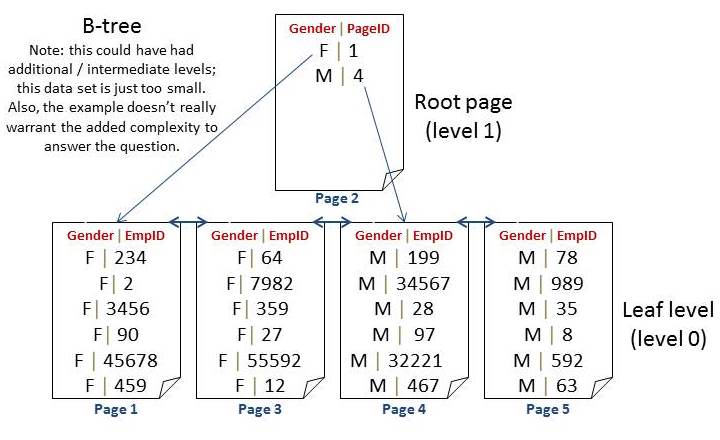
Possible Option 1: Only push the non-unique nonclustered key up the tree

If the leaf level is sorted only by the nonclustered key of gender then there’s no order to the EmployeeID values within each gender grouping:

Slide4 Nonclustered indexes require the lookup key in the b tree when?

Imagine a nonclustered index on gender with a clustered index on EmployeeID. If the leaf level were not sorted then every request (DELETE / UPDATE) would have to scan ALL of the Fs to find the female row they were searching for… This is a “What If” picture; this is NOT how nonclustered indexes are stored.

In this case, the index has very few uses. We can get a count of Female or Male employees easily but not much else is efficient. A SELECT will have to scan (from the start – every time); it can stop once the record is found (EmployeeID is unique) but the cost of always starting at page 1 (for female) or page 4 (for male) would be too expensive with many rows / pages.

Having said that though, you might even start by wondering what an index on gender would benefit anyway? The most useful requests are exactly that (counts by gender, list by gender). So, for most queries this structure could work and it really wouldn’t matter for queries. Inserts could just go to the end of each section. But, what about deletes? What if an employee were to leave? If you were to execute the following:

DELETE [Employee] WHERE [EmployeeID] = 27;
GO

How would SQL Server find that row? They would know that the employee is female when they went to the data row itself. But, finding this row within the female grouping of this nonclustered index would ALWAYS require a scan through all female rows. The same would be true for an update.

So, while this could work for inserts as well as some queries, it’s horribly inefficient for updates and deletes.

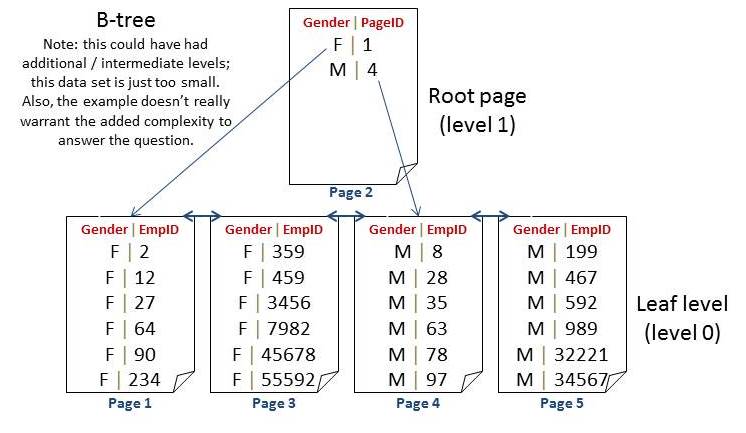
Possible Option 2: Sort the leaf level but still ONLY push the non-unique nonclustered key up the tree

NonclusteredIndexTreeStructure Update2 Nonclustered indexes require the lookup key in the b tree when?

Even if they were sorted – if you don’t “push” the clustered key value (EmployeeID) up the tree, the index cannot be efficiently searched / modified, we still have to start at the lowest value and scan until we find the row to DELETE / UPDATE. This is a “What If” picture; this is NOT how nonclustered indexes are stored.

Here we don’t save much; we can still stop a scan once a value was found. But, we can do that in the structure for Option 1 (as long as EmployeeID was defined as unique).  About the only added benefit of this structure is for an ORDER BY query.

SELECT [EmployeeID], [Gender]
FROM [Employee]
ORDER BY [Gender], [EmployeeID];
GO

For Option 1 this query would have to add an additional sort. For Option 2, we’d save this. But, we’d still have the same problem for a DELETE / UPDATE; we’d have to scan to find the specific row to modify.

So, we’re really back to the same issues as Option 1: this could work for inserts as well as even a few more queries, it’s horribly inefficient for updates and deletes.

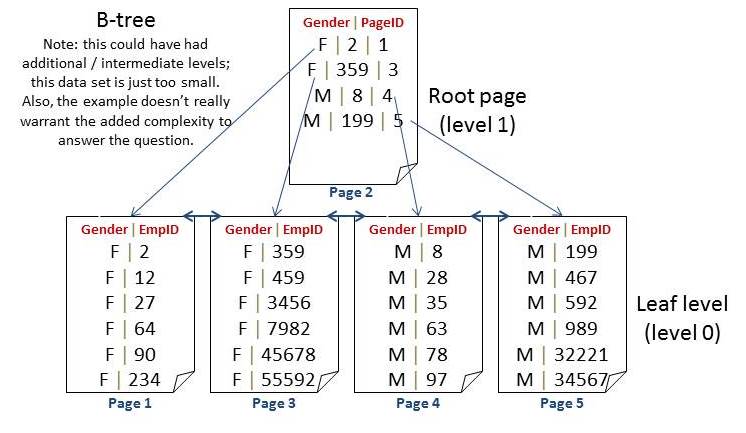
SQL Server pushes the “lookup value” up the tree

This makes each row in a nonclustered tree unique. This makes every query directly seekable to the specific page on which that row resides. We can support queries with additional predicates (such as WHERE EmployeeID >). Again, this index doesn’t provide a lot of uses BUT it’s still MORE useful when it’s sorted AND seekable by the composite key and where that key is unique up the tree.

A delete can go directly to the leaf page.

DELETE [Employee] WHERE [EmployeeID] = 27;
GO

After going to the row, we’d find that EmployeeID 27 is female. Using the root page we can see that the first pointer is for EmployeeID 2 or higher. The second pointer is for EmployeeID 59 or higher. Since we’re looking for 27 – we’d use the first pointer which points to page 1 for data.

In the same way, an update can go directly to the leaf page. An insert has a specific place to insert (yes, these can cause splits).

NonclusteredIndexTreeStructure Update31 Nonclustered indexes require the lookup key in the b tree when?

With both the non-unique nonclustered key as well as the clustered key, you have a tree structure that can be efficiently searched / modified / updated.

So, while I could have used a larger and more realistic example for this – this definitely shows the need for the clustering key in the b-tree portion of an index.

Have fun and keep those questions coming!

Cheers,
k


The post Nonclustered indexes require the “lookup” key in the b-tree when? appeared first on Kimberly L. Tripp.

30 Dec 23:15

Delayed Durability in SQL Server 2014

by Paul Randal

One of the cool new features in SQL Server 2014 is delayed durability (available in all Editions), which is described in detail in Books Online here.

I think I’m going to see a lot of people turn this on, as you can get a profound increase in transaction throughput with the right workload. However, I also think a lot of people are going to turn this on without realizing the potential for data loss and making the appropriate trade off.

Why can it give a throughput boost?

I put together a contrived workload with a small table where 50 concurrent clients are updating the same rows, and the database log is on a slow I/O subsystem. Here’s a graph showing my test:

delayed Delayed Durability in SQL Server 2014

At the obvious change point, that’s where I enabled delayed durability, with all transactions being forced to use it. Before the change, the number of Transactions/sec is equal to the number of Log Flushes/sec, as each transaction is holding locks that block all other transactions (I told you it’s a contrived workload). So why the profound jump in Transactions/sec when I forced delayed durability?

Under normal circumstances, when a transaction commits, the commit doesn’t complete until the log block (see this blog post for more details) containing the LOP_COMMIT_TRAN log record for the transaction has been flushed to disk and the write is acknowledged back to SQL Server as having completed, providing the durability of the transaction (the D in the ACID properties of the transaction). The transaction’s locks cannot be dropped until the log flush completes.

In my workload, all the other transactions are waiting for the one that is committing, as they all need the same locks, so Transactions/sec is tied to Log Flushes/sec in this case.

With delayed durability, the transaction commit proceeds without the log block flush occurring – hence the act of making the transaction durable is delayed. Under delayed durability, log blocks are only flushed to disk when they reach their maximum size of 60KB. This means that transactions commit a lot faster, hold their locks for less time, and so Transactions/sec increases greatly (for this workload). You can also see that the Log Flushes/sec decreased greatly as well, as previously it was flushing lots of tiny log blocks and then changed to only flush maximum-sized log blocks.

Note:

  • I was forcing all transactions to be delayed durable, but the facility exists to make the delayed durability choice per transaction too (see Books Online for more details).
  • There’s a bit more to the log block flushing too: under delayed durability, a log block will flush when it fills up, or if a non-delayed durable transaction commits, or if the new sp_flush_log proc is executed.

My good friend Aaron Bertrand over at SQL Sentry has a long post about delayed durability that looks into its performance implications in a little bit more depth so I recommend you check out his post as well.

So this looks great, for the right type of workload. But I bet you’re thinking:

What’s the catch?

Your transactions aren’t durable when they commit. Simple.

Now you may be thinking that if the system crashes, the most you’re going to lose is up to 60KB of transaction log. Wrong. If that last log block contains the LOP_COMMIT_TRAN log record for a long-running transaction, when the system crashes, and that log block isn’t on disk, that whole transaction will roll back during crash recovery. So the potential for work/data loss is greater than just 60KB.

And there’s more:

  • Log backups will not back up that unflushed log block, as it’s not on disk, so non-durable committed transactions may not be contained within a log backup.
  • Non-durable transactions that have committed are not protected by synchronous database mirroring or a synchronous availability group either, as these rely on log block flushes (and transmission to the mirror/replica).

For critical transactions, an sp_flush_log can be used, or per-transaction delayed durability used instead.

So the million-dollar question is:

Should I enable delayed durability?

It depends. Is your business comfortable making the throughput vs. durability trade off? Does enabling it give a throughput boost? If yes to both, go ahead. If no to either, don’t enable it. That’s a very simplistic way of thinking about it, but that’s what it boils down to really.

There are lots of other things you can do to increase the throughput and performance of the transaction log, and I explained them in a blog post series:

As I stated above though, I think a lot of people are going to be wowed by the throughput boost (if their workload benefits) from delayed durability and see this as a no-brainer, without considering the potential for data loss.

Tempting, isn’t it?

The post Delayed Durability in SQL Server 2014 appeared first on Paul S. Randal.

30 Dec 23:14

Some Thoughts on Event Speaker Selection

by andyleonard
I write this from the perspective of experience. I’ve helped organize dozens of events over the past ten years. Feel free to take the parts of this advice that help and discard the parts that don’t. Enjoy! Planning an event is hard work. If you’ve never volunteered to help your local User Group or SQL Saturday, I encourage you to get involved. You will work hard and put a lot into it. But I promise you will get more out of it than you put in. Every organizer is free to organize their event in whatever...(read more)
30 Dec 08:10

Citizen Blaine (Pt 2)

by Remy Porter

Citizen Blaine is the story of one genius developer’s career. Last time, we saw the start of his arc of success. He started by accomplishing the seemingly impossible, and moved on to design the impossible system.
We last left Rich, the desparate developer on a deadline, trying to trace the mystery of Blaine’s last word- “Rosebud”. His search brought him to Dave, the salty and rude developer who maintains SLED, part of Blaine’s legacy.

“So, Blaine leaves the SLED team to go start his supply-chain crapfest, right?” Dave said. “And allllll of the problems with SLED are somebody else’s fault.” Dave’s eyes picked up an evil gleam as he turned to Rich. “He was home free… until Franz came in.”

SLEDding Uphill

Halfway through the SLED project- the actual halfway point, and not the budgeted and projected halfway point which had come and gone ages ago- the VP of IT was replaced by Franz. SLED wasn’t the only project that was floundering, and someone upstairs was sick of watching money fall down a hole in IT. Franz’s job was to fix that.

Franz was a smart boss, and knew that problems like this often started at the bottom and worked their way up to the top, so he started by talking to the guys in the trenches. His round of interviews eventually brought him to Dave, and when he asked Dave: “Why do you think SLED is so far off target?” Dave took that as license to tell Franz exactly who he thought was responsible.

A short time later, a conference room was repurposed to be used as a team room. Dave and a few of the other developers were sequestered in there, and Dave suspected that it might be as punishment for his inappropriate honesty. Then Blaine entered the room, laptop in tow.

Blaine flopped into a chair, then glared around the table. “Don’t think I don’t know you are working against me,” he said.

“Working against you?” Dave asked, sweetly.

“Yes, against me!” Blaine snapped his laptop open and spent a moment glaring at the screen before looking up to make eye-contact with Dave across the table. “Someone was telling lies to Franz about this project, slandering me to my new boss. And if you think for one second, that I’m going to let you get away with that- I will burn this project to the ground before I let you ruin what I’ve created!”

Franz entered on the heels of that screed, to explain exactly what was going on. “Blaine shall be assisting you on this project until it’s complete. All of the supply-chain activities are on hold until we get this project out to the users. This will happen in six weeks. It does not matter how it looks. It does not matter what sort of quality problems the code has. The users will receive a working product in six weeks, and if you cannot deliver, someone else will. Am I understood?”

When Franz left, Blaine stood up. “You heard him. I’ve already given you the design, and it was elegant in its simplicity. The fact that you failed to implement my vision reflects poorly on your skills as developers, but I refuse to let it reflect poorly on me. Let’s get our heads down and get this done. NOW!”


“We didn’t need Blaine’s help,” Dave said. “Not at that point. Still, it was hilarious to me. Blaine wanted us to track every task in an Excel file he set up, so he could ‘crack the whip’ as needed, but we all got in the habit of lying. Until the last day of the project, we had him in a constant panic that things were still six months behind.”

“That’s cruel!”

Dave shrugged. “The asshead deserved it. Besides, he got to go play boss-man and be a manager upstairs.”


Which is where Rich had started with Blaine. The Supply-Chain team was on the sixth floor, and Blaine’s right-hand was Lisa. At this point, it was almost 6PM, but Lisa gave no indication that she was close to ending her day. “I’ll be with you in one moment,” she said.

One moment turned into 20 minutes, as she scrambled to juggle config files across a dozen servers, manually moved executable files into production environments, blasted out emails warning about the changes, noticing a minor bug and making an emergency patch that she rolled straight out into production.

“Sorry, about that. It’s always busy up here.”

“I can see that… is this normal?”

“Well, it’s been pretty quiet today. This department is always in total chaos.”

The Chains of Supply

One one side of the table sat Lisa and Blaine. On the other side were Mike and Steve, two guys from operations. Blaine slapped the table and said, “Look, we can’t operate on Initech time, here! Our team needs to move at the speed of business.”

“I totally understand that,” Mike said, “we totally understand that. But you can’t just email .exe or .asp files to my team and tell them to drop them in a folder. We have sign-offs and change management processes for a reason.”

“From what I can tell,” Blaine said, “that reason is to slow us down.” Lisa watched him take a deep breath and force himself to be calm. “I’m sorry, but for our team, success is the only option. When we need to change software, it’s usually on a short notice, and if we don’t do it correctly right then, chemicals don’t ship. We need a little more responsiveness from your team.”

“I get that, Blaine, but we work with every team in Initrode. We’re more than happy to help you move to automated deployments-”

“We haven’t got time for that! We don’t even have time for this meeting- in fact, I have to call this here.” Blaine glanced at his watch then back at Mike and Steve. “I’m sorry, but I’m going to send a request to the VP of IT that all of our servers are moved under our team’s control. This works out better for everyone- we get to control our cycle time, and you don’t have to worry about any more meetings like this.”


“So, that’s why I do a lot of server admin work,” Lisa said.

“How often are you changing code in production ?”

“Oh, pretty much every day. I’d love to find a better way, but who has time?”


Rich’s history lesson hadn’t netted him anything, so he swung back to Blaine’s office. It had already been tossed by his peers, but no one had found anything useful, documentation-wise. It was strange being in the office without Blaine or the stamp of his personality that he had left on the space. It felt almost dead- just old binders and tech manuals from a decade past.

That, and Blaine’s USB hub, which he had forgotten. It was a cheap plastic snow-globe, with the water half evaporated out, likely a relic from some department “Secret Santa” exchange. Rich picked it up and gave it a shake anyway, which did little to motivate the white powder within the globe. That’s when he noticed “64MB” embossed on the side. It was a storage device?

Rich ran down the stairs to his cube, snow-globe clutched in his hand. He slammed the cable into his computer, and watched as Windows detected a mass storage device, and then opened an explorer window. The drive’s label was “Rosebud”. Inside was a single folder, crammed with Word documents, Power Point slide decks, and archived emails. It was everything Blaine had even known about about anything in the company.

With a trembling hand, Rich double clicked on the document called “LabellingSystemDocumentation.doc”. Word cranked, opened the document, which had three lines in it:

Used by plants to print labels.
I’ve built this one to be super hard to maintain, it’s so high priority that every time I touch it, I look like a goddamn hero.

30 Dec 08:05

Citizen Blaine

by Remy Porter

Rich had a five-alarm project. Six months ago, the legal department became aware that government regulations on labeling would change. That information slowly ground its way through the intestines of the company, until a pile of poorly documented, barely specified changes landed on Rich’s desk. If he didn’t implement those changes in the next 48 hours, a half-million units of commodity chemicals were about to pour out of a processing plant and be illegal to ship.

The problem was confounded by the nature of the labeling system. It was tied into a home-grown, supply-chain management system. Theoretically, it was a one-stop shop for everything- formulations, MSDSes. In reality, it was a complicated thicket of unrelated applications which dragged data around between various silos, and usually crashed in the process. Rich had no idea what this change was going to involve. Only one person, the head of the Supply-Chain IT team, could point him in the right direction: Blaine.
Rosebud, the sled
Blaine’s office was normally crammed with the awards, trophies, and various “atta-boy” certificates which honored him for a job well done around the company. Today, the walls were bare, and all of those meaningless honors were piled up in a box on his desk. Blaine ignored Rich, and finished packing his box.

“Uh, Blaine… I have a few questions?”

Blaine said nothing, took one final glance around the office, picked up his box, and walked towards the elevators. Rich trailed after him.

“I just need a minute…”

Blaine pushed the button on the elevator, and the doors pulled back. He strode in. Rich put a hand on the door, to hold it open, but Blaine’s cold glare caused him to flinch back. The door slid closed, and in the last instant before Blaine vanished forever, he whispered one final word: “Rosebud”.

The department descended into panic as news of Blaine’s sudden exit spread. The Supply-Chain suite of applications was his baby. He was the rockstar, the genius, and the only person that could hold that ball of mud together. Half a dozen projects screeched to a halt in his abscence. Managers piled onto the problem, as if adding more cooks would fix anything. Eventually, Rich’s boss took charge: “The last thing he said to Rich was ‘Rosebud’. That’s our only clue. It might be a server name, it might be a password. We need to find out what!”

The clock was ticking. Some team members started rifling Blaine’s office, while others dove deep into the corporate SharePoint. Rich decided to take a trip up to the executive floor. Blaine’s first project manager, Sarah, now had an office up there. She might have some insight into where Rich should be looking.

The executive conference room did its best too look expensive: crystal wall sconces, gold leaf, and a wooden table large enough to keep the Titanic afloat. The only thing neither expensive nor luxurious was the projector, which was at least a decade old and only supported VGA in.

Sarah grabbed a corner of the table and pointed Rich to a seat beside her. “You have to understand, that back in those days we were just getting over doing everything on a mainframe. Suddenly, everbody and their sister wants a Windows program to get at data still in the mainframe.”

“Everything still lives in the mainframe,” Rich said, “but it’s going away soon.”

Sarah laughed. “It’s been ‘going away soon’ for twenty years. Anyway, we needed to desktop apps that could get data out of the mainframe, and the only thing we could find for our particular variety was a proprietary package with a $1000/seat license. Blaine was just a junior programmer back then, but he said…”

SCARF

“I can do this without needing to buy a license for anything.”

Sarah weighed her options. The business need- desktop apps- versus the costs, versus how much of Blaine’s time she could spare. In the short time he’d been here, she could tell that he was smart, possibly too smart to be churning out line-of-business applications for the rest of his career. “You have two days to get me a proof of concept,” she said. “And you still have to keep up with your other project work. There’s no billing number for this, but I don’t want to see it showing up on admin, either.”

“I’ll get you a complete product in two days.”

“I’d be happy with a PoC,” Sarah said. “Don’t over-promise and under-deliver.”

“I never will,” Blaine said.

Two days later, Blaine handed her a floppy loaded with SCARF: System Connection Application for Realtime Federation. “This is connecting to production,” he warned her as he pulled up data. The application was a Visual Basic MDI, crammed with buttons, toolbars, and a variety of screens. It was a requirements-complete implementation, in only two days.

They released the application to the users, and they were overjoyed. Gone were the cryptic keyboard shortcuts and issues with terminal emulation. Instead they had loads of on-screen buttons, and most important, the ability to load data into Excel.


“That was a huge success, at least while Blaine was on our team.”

“What happened after he left?”

“Well, it was really just a terminal emulator. It screen scraped the mainframe, so any time a mainframe screen changes, the GUI breaks. Fields vanish, or get chopped off, that sort of thing. I’ve been fighting for a budget to replace it, but the business unit doesn’t want to spend anything on it.”

Based on his wild success with SCARF, Blaine leapfrogged to a lead developer position on an effort called SLED: Superior Leads for Enterprise Distribution. It was a huge effort, and was still spoken of in hushed, almost fearful tones. Dave, the lead developer, was Rich’s next stop.

“Good friggin’ riddance,” Dave said. “I’m glad he’s gone, but damn if I wish Blaine could have taken this piece of sh-urely fine software with him.”

“I thought SLED was a big deal?”

“Oh, it is. Millions of dollars of inventory, customer invoices, end to end process management. It’s a big frickin’ deal. It was also never finished, so I spend most of my time manually doing things that should be automated. If I don’t, or if I screw up, I get called on the carpet and reminded that our biggest customers depend on this being accurate. And before you ask, no, I’m not allowed to fix the damn thing- the VP doesn’t trust developers after Blaine’s playtime.”

“Playtime?”

SLED

Behind Blaine glowed a PowerPoint slide displaying the Agile Manifesto. Dave, along with six other developers, were crammed into a tiny conference room. “These,” Blaine said, “are our principles. We are going to stick to this, to ensure that we deliver what the business actually needs, quickly and efficiently.”

This was 2002, so no one really grasped the Agile concepts, least of all Blaine. For all that he laid out his statement of principles, he wasted no time in subverting them. The very next slide dictated out his architectural vision for the application, and it was a doozy. There were 4-ish tiers- presentation, business, data, and “legacy connector”. To allow developers to work with perfect separation, he had already designed a set of XML schemas- each tier would communicate with the others only through this XML design.

Much of the XML design was focused on screen definition, for Blaine didn’t want to simply solve the problem the users had. He wanted to solve the general problem of building data driven screens using classic ASP. “SLED isn’t just an inventory tracker,” he said, “it’s the model for all of our future applications. It’s infinitely extensible, with screens defined by data- it’s our first internal CMS.”


“So, six months in, we hit the first milestone, right?” Dave said. "But we haven’t been building anything that’s an actual feature- we’ve been building this generic framework for defining data driven screens in XML, and storing those templates in a database. Management is pissed, but Blaine has been so successful this far, that everybody lets the project keep running. A year in, and we’ve built a great internationalization layer- for an application that is only going be used in the US. Another six months, and finally, we start delivering basic inventory tracking.

"We’re over schedule, over budget, and now, management’s really pissed. So what happens? They pile more managers and developers on the frickin’ project. Blaine’s design is deemed too complicated, but we’ve already implemented about half of it, so guess what? We keep the work we’ve done, but new features have to be implemented in a more streamlined way. It becomes this massive Franken-project, with VB GUI’s slapped in to build some features, while everything that was going to be part of the legacy processor get dropped as PL/SQL stored procedures that FTP files around.

“But here’s the real kicker, and the reason Blaine should rot in hell. Vince, the manager who tried to yank his leash, retired before the project finished. So Blaine turns around and says, ‘Look at how successful I could have been without micromanagement. I saved this project from Vince.’ He built himself up as the hero of SLED, and bailed before the project was finished so he could be a department head.”

“I can't believe they let him get away with that,’ Rich said.

"Oh, they didn't…"

To be continued…

30 Dec 07:58

CodeSOD: Committed to Committing Commissions

by snoofle

Simon worked in a small shop that supported a sales system. One of the features of the system was that sales commissions were stored in the database. For the sake of simplicity, the sales commissions were stored as the multiplier factor needed to compute the total sale. For example, a 5% commission on $100 would be $5, so the factor would be 1.05 so you could just multiply: 100 * 1.05 -> 105.

Of course, when they needed a report that showed the percent commission for a given sale, they had to work backward from the multiplier to get the actual value.

One of the Finance Team bean counters complained that this report is getting the wrong commission rate from the database for one sale. Simon went to have a look. It's an unusual commission rate we don't often use, 7.5%. It displays correctly in the application, but is showing up as just over 1% in the report.

That didn't make much sense. All the other sales commission rates showed up just fine, and a number is just a number - it can't possibly matter how often a particular commission rate is used, surely? The report had been set up by the Finance person's predecessor's predecessor. The source for the commission column was:

If {commission_rate} = 1.2 
   Then 20 
   Else If {commission_rate} = 1.15 
           Then 15 
           Else If {commission_rate} = 1.0 
                   Then 0 
                   Else If {commission_rate} = 1.16 
                           Then 16 
                           Else If {commission_rate} = 1.125 
                                   Then 12.5 
                                   Else If {commission_rate} = 1.1 
                                           Then 10
                                           Else {commission_rate} 
End

While commission rates were stored in the database as the factor to multiply the base price by to get the price with commission included, this report wanted the commission rate displaying as a percentage, so they needed converting. Its author had known the conversion for the two commission rates used most of the time, and apparently added others over time.

Of course this meant that the fix was simple: Finance simply needed to add this 'new' commission rate to the end of the list, and all would be well. They were happy that the cause of the problem had been identified, and they knew how to fix it.

However, Simon couldn't leave it at that. For one, he could see a future of intermittent requests to help 'fix' the report every time Sales agreed to use a commission percentage that hadn't been used before. Can't the reporting software do arithmetic? Finance didn't know, so he boldly gave it a go, removing all of the Ifs and replacing the expression with just:

({commission_rate} - 1) * 100

It worked fine. As Simon moved on to the next project, he wondered whether the report's author hadn't spotted the pattern between the raw rates from the database and the desired percentages, or whether simple arithmetic was beyond the capabilities of a member of the Finance team.


Photo credit: Dave Dugdale / Foter / CC BY-SA

30 Dec 07:49

What a SAP

by Remy Porter

On day one of the project, Kenneth was given a single rule that was to be followed under all circumstances. “You do not talk to the SAP contractors. They’re too busy, and their time is too valuable. They do not have time for front-end developers.”

As a front-end dev, Kenneth was used to being told to take his crayons and get back to work. A front-end dev forbidden from talking to the developers behind the back-end? What could go wrong.
Gift box icon
What’s in the box? And why does it smell so bad?
The product was a “redeem points for cool products” system. A customer could purchase a gift-box. The outside of the box was labeled with a public code, and the inside was labeled with a private code. A user could enter both codes into the system to redeem points. Those points could then be used to buy tchotchkes from their web store.

There were all sorts of ironies in the project. While Kenneth was forbidden from talking to half the team, the project managers kept chanting “agile”. They used the word, not because it meant anything, but because it was a mantra to ward of project slippage. Of course, slippage looked almost inevitable, since every project milestone date was chosen through the “toss a dart at the calendar” method. It also didn’t help that Kenneth and the SAP guys were working from entirely different specifications.

Kenneth went to his boss’s office to attempt to explain the latest problem. “The spec says that we need to validate a customer’s code before we let them create an account,” Kenneth said to Jack.

“Yes.”

“But this is just an HTML/JavaScript front end. So that validation should happen on the back end.”

“Yes…,” Jack said, with less confidence.

“But there’s no back-end method for us to do that.”

“Yes…? So what’s the problem?”

“That is the problem. We need a method on SAP to let us check if the code is valid.”

Jack nodded. “So… this means changing the SAP specification. I don’t know that we can do that…” Jack called his boss, who called her boss, who called the SAP team’s boss. A meeting was scheduled between the management levels, which meant Jack and Kenneth needed to have a pre-meeting with Jack’s boss, which meant Jack and Kenneth needed to have a pre-pre-meeting. After roughly 85-person-hours of meetings, an agreement was reached: the SAP team would expose their validation logic as a web service, so that the web team could validate gift codes.

Since everyone was collaborating so well, the management team pushed the deadline up four more weeks, “because Agile means thinking on your feet.” After pulling a month of 60–70 hour weeks, Kenneth had a sense that Agile actually meant being dead on your feet.

After too many late nights, the project launched, on time and over budget. It was loaded with bugs, mostly minor, and too few test plans to actually identify or help triage the bugs. Over the next six months, Kenneth and his front-end team handled their bugs, and it looked like the project was on the downhill slope.

At least, it was until TrudyHeart1971 created an account. Within minutes of joining the site, TrudyHeart1971 was redeeming a suspicious number of points. The management chant of “agile” was replaced by screams of “hackers!!!111!!!”. All-hands meetings started. For the first time, Kenneth and his team sat down in a conference room with the SAP guys: Sven and Lars.

Kenneth’s screen was mirrored on the projector as he scraped the logs. “This doesn’t look like a hacking attempt. These requests all look valid.”

“You would think that,” Lars said. He pointed at one of the entries. “These public and private codes don’t match.”

“In fact,” Sven said, “these private codes look completely fabricated . ‘12345678’? Not a code.”

“Okay, so that probably has something to do with the validation on your side, right?” Kenneth said.

Lars and Sven glanced at each other before turning to Kenneth and laughing at him. “We don’t validate the codes. There is a CheckCodes method we gave you. You are to do the validation.”

“You don’t validate the codes.” Kenneth said.

“No, of course not. We gave you a method.”

“You’re relying on the client-side JavaScript code to do all of the validation before requests hit your public-facing web service?” Kenneth clarified, hoping someone else in the room would see how insane this sounded.

“Alright, then.” The Big Boss rapped his knuckles on the table to get everyone’s attention. “It sounds like we know what the problem is- the front-end is insecure. And Kenneth, it sounds like you know how to fix it.”

In the end, technical ignorance and the contractors’ hourly rate guaranteed that Kenneth was forced to “fix” the front-end. Their cobbled together solution was to implement a web-service proxy that performed validation on the server-side, while making the existing public-facing (and utterly insecure) SAP services private.

Their “hacker”, TrudyHeart1971 had discovered the bug when she accidentally entered her code incorrectly and saw she received points anyway. She did this a few more times, before the guilt set in. The company briefly considered pressing charges, but someone realized that publicizing this sort of security mistake wasn’t in their best interests. They settled for removing Trudy’s points and a letter of apology.

30 Dec 03:40

Bringing Your Core Business Applications to SharePoint

by Jonathan Rozenblit

Guest post from MVP Vincent Biret


Introduction

It has been a long time question: should we or not bring our core business applications to SharePoint? What are the benefits? What are the risks? Is it hard? ...

Well, we’ll try to answer this question taking into consideration all the new capabilities coming out lately.

For the rest of this post, when I’m referring to SharePoint, understand it as SharePoint on-premises or online or even Office 365 globally. Of course some features are available only online or on-premises but I’ll try to focus on the general idea.

What is a core business application?

First we have to back off a little bit and take a better look at the big picture. What is it that the company you are working at (or your division) is doing for living? To what are they adding value? Why customers are willing to pay and what are they expecting?

Once you start analyzing that and answering to these questions you are beginning to have a first idea of the picture: people at your company have one or many roles and in their everyday work they are a part of one or many processes.

Some of these processes are more critical than other for example if a car constructor company suddenly cannot produce cars anymore, there is a big chance they run out of business pretty soon. But if their expenses reports to not reach the accounting department anymore, they will be able to survive.

Some of these processes might already be covered by existing products, others by custom applications, some delegated to contractors and other ones might still exist only on paper/people’s mind/some hidden excel spreadsheet/…

For example if we take a law consulting firm, it is very likely they already purchased a software for all HR and payroll related processes but maybe they don’t have anything more than paper files for customers’ requests tracking.

To recap a core business application is something that your company does to earn (or save) money, that can be represented and treated digitally. Some applications/processes will be more or less critical to your company. Some of these processes will rely on existing products/services and others won’t exist as such or your needs will be too custom to be met by the existing products.

Why bringing your core business apps to SharePoint?

First of all you’ll notice I wrote “to” SharePoint and not “in” SharePoint and I’ll detail why at a later time.

Microsoft has demonstrated us over the years that SharePoint is a great product (and even a greater service). It’s already a place in a lot of companies where people collaborate, store their documents, publish sites/data and do even a lot of other things.

But from a developer perspective what are the perks of developing with SharePoint:

  • It handles security (authentication, roles, groups, permissions…) for you and it is easily customizable by power users/IT Pros.
  • It allow users to store a lot of content
  • It has a search engine
  • It relies on an extensible data model
  • It provides a lot of services (machine translation, word automation, workflows, connectivity to external data sources, business intelligence capabilities,..)
  • It provides lot of social features (well this one is probably going to evolve a lot in the next years with the integration of Yammer)

Of course all these features are easily integrated within your applications using SharePoint’s API.

But most of all, SharePoint is becoming the central place of the company. I’m pretty sure you’ve all seen a typical SharePoint intranet with corporate news, a few applications links, and a few other things, where nobody goes. They just directly jump to their collaboration, social or search subsite and start working. Why is that? Because people have been given less time to do more things so they want to be productive.

Providing the link to your corporate applications on the corporate intranet site is a great first step of integration but why not directly providing the application itself when possible? Your users would then access their core business data integrated with the built-in features of SharePoint. They would have a central place to look for things they need.

I’m sure you can already imagine all the productivity (understand money) gained by having:

  • Less time spent on searching things
  • Less time spent authenticating/try to remember passwords/…
  • Less time spent managing rights
  • Better presentation (and understanding) of data
  • Better follow up and reporting of even smallest tasks
  • Business processes formalized and centralized

What’s changed in SharePoint (Office 365) development?

For those of you who are not SharePoint developers you might not be aware that Microsoft developed a whole new development model about two years ago. We used to have to develop with SharePoint’s context which meant:

  • We could only use compatible technologies (reduced set of all the .NET technologies)
  • Our application could slow down SharePoint (or in other words SharePoint could slow down our application)
  • Learning curve was huge
  • Testing was complicated
  • - …

And I’m pretty sure developers having experienced SharePoint could come with a lot of other reasons avoiding SharePoint development.

It’s over now! With the new app model you have two main choices:

  • JavaScript only applications (for small apps not very adapted to business applications)
  • Provider hosted applications

Using the second one you can use nearly any technology (Microsoft or not) and you communicate with SharePoint via a set of RESTFul API’s. Your application is hosted outside of SharePoint but works with SharePoint, setting you free of previous limitations.

Then your application is “presented” in SharePoint via:

  • Links/tiles in the site
  • Custom actions on SharePoint data
  • Actions in the ribbon
  • Full pages
  • App parts (new version of web parts)
  • Remote event receivers

So just consider SharePoint like something taking care of most part of the security for you, exposing you a set of useful services and data, and presenting/notifying your application. Other than that you are free to use anything you need inside your application. That includes all the services offered by the Microsoft Azure platform, obviously they are designed to work great with office 365 and office 365 partially relies on some of its services.

Another great thing about this new app model is that it has been extended to the whole Office 365 service/suite which means your app could be available for: Office programs, SharePoint, Office online (soon)…

Not convinced yet? Need an example? Here you go!

One of the sessions I give during SharePoint/Office 365 events has an example, so I thought I just might reuse it.

Snow Pro Corporation (fake, don’t Bing it ;-) ) is a ski equipment company. They design, produce and ship skis, snowboards, coats, etc. They have 3 factories in Canada, some warehouses across USA, and a few partners/sales offices spread around the world. One of their core business applications is the one tracking production and shipment of items. Right now each factory/warehouse has its own instance of the application running on-premises. Every time someone needs stock info, to ship something to customers, to move stock from factories to warehouses they need to give a call to the person in charge at the location.

The first effort has been to move and merge SQL databases to the Azure SQL Database service so now we have a global representation of stocks, production etc. (we can either directly connect the existing software to Azure or use SQL Data Sync, but SQL Data Sync is still in preview)

People in factories and in warehouses are not using Office 365 because they spend most of their days in front of machines and not in front of computers, however they have kiosks display the factory/warehouse application. We only had to do minor modifications to this app and they already know how to use it, so they’ll stick to that for now.

On the other hand people from Marketing have always been complaining that’s it’s complicated to know what our available stock is when they need to put together some events/demonstrations. So we’ll build them a shipment application with these main features: know in real time stock status, order a shipment, follow the shipment status. And this app will be on Office 365.

You can download my sample (and see how it is simple) from GitHub here. You’ll need to create a Azure SQL Database, create an Azure Website, publish the compiled version, and register the app to your Office 365 tenant.

You can also check out this video that I created:

Again once, I’m using Office 365 + Azure capabilities. Here is what I could add to this application:

  • Task tracking via work management service
  • Search capabilities via azure search
  • Translation
  • Worklow (actions, conditions, validations, notifications… basically everything related to processes)
  • Business intelligence with power BI (we actually do that in the session)

Conclusion and Next Steps

I hope going through the above you now understand that SharePoint (and in general Office 365 + Azure) is now a great platform to support and expose your business applications providing you a lot of features out of the box. It is now way simpler to integrate your business application with SharePoint using your favorite technologies and Visual Studio.

If you want to start learning how to create amazing enterprise applications, check out the following resources:

12 Nov 19:58

SQL Server 2014 In-Memory Gives Dell the Boost it Needed to Turn Time into Money

by SQL Server Team
Mrdenny

now

There’s an old adage: time is money. Technology and the internet have changed the value of time and created a very speed-oriented culture. The pace at which you as a business deliver information, react to customers, enable online purchases, etc. directly correlates with your revenue. For example, reaction times and processing speeds can mean the difference between making a sale and a consumer losing interest. This is where the right data platform comes into play.

If you attended PASS Summit or watched the keynotes online, you saw us speak about Dell and the success they’ve had in using technology performance to drive their business. For Dell, providing its customers with the best possible online experience is paramount. That meant boosting its website performance so that each day its 10,000 concurrent shoppers (this number jumps to nearly 1 million concurrent shoppers during the holiday season) could enjoy faster, frustration-free shopping experiences. For Dell, time literally means money.

With a very specific need and goal in mind Dell evaluated numerous other in-memory tools and databases, but ultimately selected SQL Server 2014.

Dell turned to Microsoft’s in-memory OLTP (online transaction processing) technology because of its unique lock and latch free table architecture the removed database contention while still guaranteeing 100 percent durability. By removing database contention Dell could utilize far more parallel processors to not only improve transactional speed but also significantly increase the number of concurrent users. And choosing SQL Server 2014 with in-memory built-in meant Dell did not have to learn new APIs or tools their developers could use familiar SQL Server tools and T-SQL to easily implement the new in-memory technologies.

All of this meant Dell was able to double its application speeds and process transactions 9x faster. Like Dell, you also can take advantage of the workload optimized in-memory technologies built into the SQL Server 2014 data platform for faster transactions, faster queries and faster analytics. And you can do it all without expensive add-ons utilizing your existing hardware, and existing development skills. 

Learn more about SQL Server 2014 in-memory technology

12 Nov 17:38

Announcing .NET 2015 - .NET as Open Source, .NET on Mac and Linux, and Visual Studio Community

by Scott Hanselman
Mrdenny

now

It's happening. It's the reason that a lot of us came to work for Microsoft, and I think it's both the end of an era but also the beginning of amazing things to come.

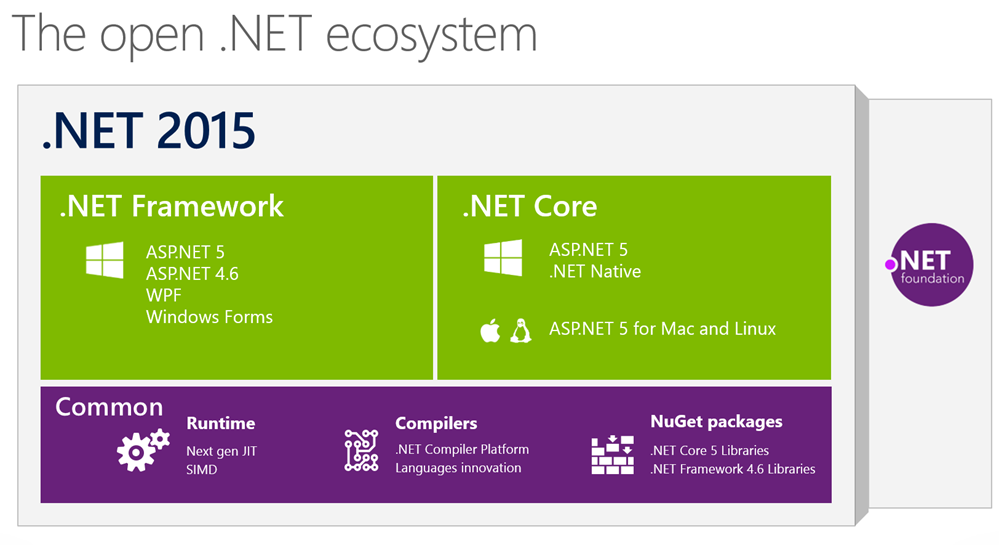
The .NET 2015 wave of releases is upon us. Here's what's happening and we announced it today in New York. There's a lot here, so drink it all in slowly.

Be sure to check out all the blog posts I'm linking to at the end, but here's my personal rollup and take on the situation.

  • We are serious about open source and cross platform.
    • .NET Core 5 is the modern, componentized framework that ships via NuGet. That means you can ship a private version of the .NET Core Framework with your app. Other apps' versions can't change your app's behavior.
    • We are building a .NET Core CLR for Windows, Mac and Linux and it will be both open source and it will be supported by Microsoft. It'll all happen at https://github.com/dotnet.
    • We are open sourcing the RyuJit and the .NET GC and making them both cross-platform.
  • ASP.NET 5 will work everywhere.
    • ASP.NET 5 will be available for Windows, Mac, and Linux. Mac and Linux support will come soon and it's all going to happen in the open on GitHub at https://github.com/aspnet.
    • ASP.NET 5 will include a web server for Mac and Linux called kestrel built on libuv. It's similar to the one that comes with node, and you could front it with Nginx for production, for example.
  • Developers should have a great experience.
    • There is a new FREE SKU for Visual Studio for open source developers and students called Visual Studio Community. It supports extensions and lots more all in one download. This is not Express. This is basically Pro.
    • Visual Studio 2015 and ASP.NET 5 will support gulp, grunt, bower and npm for front end developers.
    • A community team (including myself and Sayed from the ASP.NET and web tools team) have created the OmniSharp organization along with the Kulture build system as a way to bring real Intellisense to Sublime, Atom, Brackets, Vim, and Emacs on Windows, Linux, and Mac. Check out http://www.omnisharp.net as well as blog posts by team members Jonathan Channon
  • Even more open source.
    • Much of the .NET Core Framework 4.6 and its Reference Source source is going on GitHub. It's being relicensed under the MIT license, so Mono (and you!) can use that source code in their .NET implementations.
    • There's a new hub for Microsoft open source that is hosted GitHub at http://microsoft.github.io.

Open sourcing .NET makes good sense. It makes good business sense, good community sense, and today everyone at Microsoft see this like we do.

Open .NET

Related Links


Sponsor: Big thanks to Aspose for sponsoring the feed this week! Working with Files? Aspose.Total for .NET has all the APIs you need to create, manipulate and convert Microsoft Office documents and many other formats in your applications. Start a free trial today.


© 2014 Scott Hanselman. All rights reserved.
     
12 Nov 17:27

PASS Summit 2014 Day 2 Keynote

by AllenMWhite
Adam Jorgensen, PASS Executive Vice President of Finance, came out to talk about the financial health of the PASS organization. PASS gets $5.9M revenue from the annual Summit, and $1.3M from the BA Conference. Other than that it receives $82K from Chapters...(read more)
12 Nov 17:25

MVP/SQLPASS Summit Wrapup From a Non-Attendee

by drsql
(Or “How I Sort of Attended PASS This Year After All and It Wasn’t as Horrible as it Might Have Been”) Wow, my experience at this year’s MVP Summit and PASS Summit was not at all what I had expected it to be for me just weeks ago when I was planning my...(read more)
12 Nov 17:25

SQL Server Diagnostic Information Queries for November 2014

I revised a number of the queries this month in all five versions of the script.  It was very nice to have so many people thank me for these queries during the PASS 2014 Conference!

Here are the current query counts for each version:

SQL Server 2014         72 Queries

SQL Server 2012         69 Queries

SQL Server 2008 R2    65 Queries

SQL Server 2008         59 Queries

SQL Server 2005         51 Queries

Rather than having a separate blog post for each version, I have just put the links for all five major versions in this single post. There are two separate links for each version. The first one on the top left is the actual query script, and the one below on the right is the matching blank results spreadsheet.  

SQL Server 2005 Diagnostic Information Queries

SQL Server 2005 Blank Results

SQL Server 2008 Diagnostic Information Queries

SQL Server 2008 Blank Results

SQL Server 2008 R2 Diagnostic Information Queries

SQL Server 2008 R2 Blank Results

SQL Server 2012 Diagnostic Information Queries

SQL Server 2012 Blank Results

SQL Server 2014 Diagnostic Information Queries

SQL Server 2014 Blank Results

The basic idea is that you should run each query in the set, one at a time (after reading the directions). It is not really a good idea to simply run the entire batch in one shot, especially the first time you run these queries on a particular server, since some of these queries can take some time to run, depending on your workload and hardware. I also think it is very helpful to run each query, look at the results and think about the emerging picture of what is happening on your server as you go through the complete set.

You need to click on the top left square of the results grid in SSMS to select all of the results, and then right-click and select “Copy with Headers” to copy all of the results, including the column headers to the Windows clipboard. Then you paste the results into the matching tab in the blank results spreadsheet. There are also some comments on how to interpret the results after each query.

About half of the queries are instance specific and about half are database specific, so you will want to make sure you are connected to a database that you are concerned about instead of the master system database. Running the database-specific queries while being connected to the master database is a very common mistake that I see people making when they run these queries.

Note: These queries are stored on Dropbox. I occasionally get reports that the links to the queries and blank results spreadsheets do not work, which is most likely because Dropbox is blocked wherever people are trying to connect.

I also occasionally get reports that some of the queries simply don’t work. This usually turns out to be an issue where people have some of their user databases in 80 compatibility mode, which breaks many DMV queries.

It is also very important that you are running the correct version of the script that matches the major version of SQL Server that you are running. There is an initial query in each script that tries to confirm that you are using the correct version of the script for your version of SQL Server.

If you want to understand how to better run and interpret these queries, you should consider listening to my latest Pluralsight course, which is SQL Server 2014 DMV Diagnostic Queries – Part 1. This course is short and to the point (only 67 minutes), and I think you will enjoy it!  Part 2 of this series is recorded, and will be showing up on Pluralsight relatively soon!

Please let me know what you think of these queries, and whether you have any suggestions for improvements. Thanks!

The post SQL Server Diagnostic Information Queries for November 2014 appeared first on Glenn Berry.

12 Nov 17:25

Building High Performance Stored Procedures

by Kimberly Tripp

[NOTE: Update 12 Nov 2014. The most recent bug (KB article KB2965069) is THANKFULLY very unlikely for most environments (mentioned below). As a result, I’m glad to say that we can use OPTION (RECOMPILE) as a much easier (and safer) solution. So, while I’ll still leave solution 3 as an option if you run into troubles with OPTION (RECOMPILE), I can luckily say that if you’re on the latest SP/CU – the problems are incredibly unlikely. The BEST hybrid solution is shown below as solution 2.]

In my SQL PASS Summit 2014 session last week, I spoke about building high performance stored procedures and properly dealing with parameter sniffing problems… if you’re interested, the session was recorded for PASStv and you can watch it here.

It all ties to something incredibly common in development – I call it the multipurpose procedure. Simply put, it’s one application dialog with many possible options and then sitting behind it – ONE stored procedure. This one stored procedure is supposed to handle every possible case of execution with multiple parameters. For example, imagine a dialog to search for a customer.
CustomerSearch

The user can enter in any combination of these elements and the procedure’s header looks like this:

CREATE PROC [dbo].[GetCustomerInformation]
(
    @CustomerID      INT = NULL
    , @LastName	     VARCHAR (30) = NULL
    , @FirstName     VARCHAR (30) = NULL
    , @MiddleInitial CHAR(1) = NULL
    , @EmailAddress  VARCHAR(128) = NULL
    , @Region_no     TINYINT = NULL
    , @Cust_code     TINYINT = NULL
)
...

And then the procedure’s main WHERE clause looks like this:

WHERE ([C].[CustomerID] = @CustomerID OR @CustomerID IS NULL)
    AND ([C].[lastname] LIKE @LastName OR @LastName IS NULL)
    AND ([C].[firstname] LIKE @FirstName OR @FirstName IS NULL)
    AND ([C].[middleinitial] = @MiddleInitial OR @MiddleInitial IS NULL)
    AND ([C].[EmailAddress] LIKE @EmailAddress OR @EmailAddress IS NULL)
    AND ([C].[region_no] = @Region_no OR @Region_no IS NULL)
    AND ([C].[cust_code] = @Cust_code OR @Cust_code IS NULL)GO

Or, possibly like this:

WHERE [C].[CustomerID] = COALESCE(@CustomerID, [C].[CustomerID])
    AND [C].[lastname] LIKE COALESCE(@lastname, [C].[lastname])
    AND [C].[firstname] LIKE COALESCE(@firstname, [C].[firstname])
    AND [C].[middleinitial] = COALESCE(@MiddleInitial, [C].[middleinitial])
    AND [C].[Email] LIKE COALESCE(@EmailAddress, [C].[Email])
    AND [C].[region_no] = COALESCE(@Region_no, [C].[region_no])
    AND [C].[cust_code] = COALESCE(@Cust_code, [C].[Cust_code]);

Or, maybe even like this:

WHERE [C].[CustomerID] = CASE WHEN @CustomerID IS NULL THEN [C].[CustomerID] ELSE @CustomerID END
    AND [C].[lastname] LIKE CASE WHEN @lastname IS NULL THEN [C].[lastname] ELSE @lastname END
    AND [C].[firstname] LIKE CASE WHEN @firstname IS NULL THEN [C].[firstname] ELSE @firstname END
    AND [C].[middleinitial] = CASE WHEN @MiddleInitial IS NULL THEN [C].[middleinitial] ELSE @MiddleInitial END
    AND [C].[Email] LIKE CASE WHEN @EmailAddress IS NULL THEN [C].[Email] ELSE @EmailAddress END
    AND [C].[region_no] = CASE WHEN @Region_no IS NULL THEN [C].[region_no] ELSE @Region_no END
    AND [C].[cust_code] = CASE WHEN @Cust_code IS NULL THEN [C].[cust_code] ELSE @Cust_code END

But, no matter which of these it looks like – they’re all going to perform horribly. An OSFA procedure does not optimize well and the end result is that you’ll get one plan in cache. If that was generated from a different combination of parameters than the ones you’re executing, you might get an absolutely abysmal plan. The concept is fairly simple – when a procedure executes and there isn’t already a plan in cache (for that procedure), then SQL Server has to generate one. To do so it “sniffs” the input parameters and optimizes based on the parameters sniffed. This is the plan that gets stored with the procedure and saved for subsequent executions. Depending on your workload characteristics, you might end up with a very common plan in cache and other users also executing the common parameters might see reasonable performance (especially if the WHERE does NOT use LIKE and has nothing but equality-based criteria [those aren’t quite as bad as this one]). But, there will still be cases where an atypical execution performs horribly.

And, unfortunately, sometimes the worst combination happens – a very atypical execution is the one that gets sniffed and then everyone suffers.

So, the admin might update statistics or force a recompile (or, even restart SQL Server) to try and get around this problem. These things “fix” the immediate problem by kicking the plan out of cache but they are NOT A SOLUTION.

Solution 1: The Simple Solution – OPTION (RECOMPILE)

Since SQL Server 2005, we’ve had an option to add OPTION (RECOMPILE) to the offending statement. When OPTION (RECOMPILE) works – it works incredibly well. However, there have been bugs and you’ll want to make sure that you’re on the latest SP or CU. It’s definitely had a bit of a checkered past. Here’s a list of issues and links to KB articles / bugs around this problem:

  • KB2965069 FIX: Incorrect result when you execute a query that uses WITH RECOMPILE option in SQL Server 2012 or SQL Server 2014. Fixed in:
    • Cumulative Update 4 for SQL Server 2014
    • Cumulative Update 2 for SQL Server 2012 SP2
    • Cumulative Update 11 for SQL Server 2012 SP1
  • KB968693 FIX: A query that uses parameters and the RECOMPILE option returns incorrect results when you run the query in multiple connections concurrently in SQL Server 2008. Fixed in:
    • SQL Server 2008 CU4
    • SQL Server 2008 R2 CU1
  • I don’t have a KB article link for this one but in both SQL Server 2008 and SQL Server 2008 R2 there are versions where some performance related features were unable. For example, filtered indexes could not be used inside of stored procedures even if you used OPTION (RECOMPILE) because of changes with the behavior or bugs. So, I’d fall back on using DSE (shown by solution 3).

Anyway, despite these issues (the first one listed above – is INCREDIBLY unlikely), I LOVE the simplicity of OPTION(RECOMPILE) because all you have to do is change the offending statement like this:

SELECT ...
FROM ...
WHERE ...
OPTION (RECOMPILE);

The reason I love this is for the simplicity of the statement. The reason that I have an issue with just doing this as a standard is two-fold:

  • First, if you do this too often (or, for extremely frequently executed procedures), you might end up using too much CPU.
  • Second, I’ve seen some environments where this is used to fix ONE problem and then it becomes a standard for ALL problems. This DEFINITELY should NOT become a standard coding practice. You only want to use this if your testing shows parameter sniffing problems and plan unstability. Stored procedures that have stable plans should be compiled, saved, and reused.

A better solution is one where you recompile for unstable plans but for stable plans – you place those in cache for reuse.

A Hybrid Solution – recompile when unstable, cache when stable

My main problem with adding OPTION (RECOMPILE) to many statements is that it can be costly to do when you’re executing thousands of procedures over and over again. And, if you really think about it, not all combinations really need to be recompiled.

For example, take an easier combination of just 3 parameters: CustomerID, Lastname, and Firstname. The possible combinations for execution will be:

  1. CustomerID alone
  2. Lastname alone
  3. Firstname alone
  4. CustomerID and Lastname together
  5. CustomerID and Firstname together
  6. Firstname and Lastname together
  7. Or, all three – CustomerID, Lastname, and Firstname

My questions for you to consider are:

  • Are all of those going to want the same execution plan?
  • And, what if they supply wildcards?

The most important consideration is that ANY query that submits CustomerID should NOT be recompiled, right? Think about it – if someone says I want to search for all of the people that have an ‘e’ in their last name (Lastname LIKE ‘%e%’) AND that have an ‘a’ in their first name (Firstname LIKE ‘%a%’) AND that have a CustomerID of 123456789 then all of a sudden this becomes an incredibly simple query. We’re going to go an lookup CustomerID 123456789 and then check to see if they have an ‘a’ in their first name and an ‘e’ in their last name. But, the lookup is incredibly simple. So, ANY execution where CustomerID is supplied should NOT be recompiled; the plan for those executions is STABLE. However, Lastname and Firstname searches might be highly unstable – especially if there’s a leading wildcard. So, if wildcard is present then let’s recompile if they don’t supply at least 3 characters for BOTH the first name and last name – preceding the wildcard character. And, it’s also OK if they don’t supply a wildcard at all. Then, the overall number of recompilations will be much lower – we’ll save CPU and we’ll get better performance by using a lot of STABLE, precompiled plans.

To do this, there are TWO versions. Solution 2 uses OPTION (RECOMPILE) strategically. Solution 3 using dynamic string execution instead.

Solution 2 – recompile when unstable [by adding OPTION (RECOMPILE)], cache when stable (using sp_executesql)

There are absolutely some criteria when plan stability can be predicted. For these, we will build the statement to concatenate only the non-NULL parameters and then execute normally using sp_executesql. For where it’s unknown or unstable, we’ll recompile by OPTION (RECOMPILE) to the statement. For all executions, use sp_executesql. And, of course, this is ONLY substitution for parameters. And, this should only be done for the most frequently executed procedures. You don’t have to do this for every procedure but it’s extremely beneficial for things that are heavily executed.

----------------------------------------------
-- Solution 2
----------------------------------------------

CREATE PROC [dbo].[GetCustomerInformation]
(
    @CustomerID	BIGINT = NULL
    , @LastName	VARCHAR (30) = NULL
    , @FirstName VARCHAR (30) = NULL
    , @MiddleInitial CHAR(1) = NULL
    , @EmailAddress VARCHAR(128) = NULL
    , @Region_no TINYINT = NULL
    , @Member_code TINYINT = NULL
)
AS
IF (@CustomerID IS NULL
    AND @LastName IS NULL
    AND @FirstName IS NULL
    AND @MiddleInitial IS NULL
    AND @EmailAddress IS NULL
    AND @Region_no IS NULL
    AND @Member_code IS NULL)
BEGIN
    RAISERROR ('You must supply at least one parameter.', 16, -1);
    RETURN;
END;

DECLARE @ExecStr NVARCHAR (4000),
        @Recompile  BIT = 1;

SELECT @ExecStr =
	N'SELECT COUNT(*) FROM [dbo].[Customers] AS [C] WHERE 1=1';

IF @CustomerID IS NOT NULL
	SELECT @ExecStr = @ExecStr
		+ N' AND [C].[CustomerID] = @CustID';

IF @LastName IS NOT NULL
	SELECT @ExecStr = @ExecStr
		+ N' AND [C].[LastName] LIKE @LName'; 

IF @FirstName IS NOT NULL
	SELECT @ExecStr = @ExecStr
		+ N' AND [C].[Firstname] LIKE @FName';

IF @MiddleInitial IS NOT NULL
	SELECT @ExecStr = @ExecStr
		+ N' AND [C].[MiddleInitial] = @MI';

IF @EmailAddress IS NOT NULL
	SELECT @ExecStr = @ExecStr
		+ N' AND [C].[EmailAddress] LIKE @Email';

IF @Region_no IS NOT NULL
	SELECT @ExecStr = @ExecStr
		+ N' AND [C].[Region_no] = @RegionNo';

IF @Member_code IS NOT NULL
	SELECT @ExecStr = @ExecStr
		+ N' AND [C].[Member_code] = @MemberCode';

-- These are highly limited sets
IF (@CustomerID IS NOT NULL)
    SET @Recompile = 0

IF (PATINDEX('%[%_?]%', @LastName) >= 4
        OR PATINDEX('%[%_?]%', @LastName) = 0)
    AND (PATINDEX('%[%_?]%', @FirstName) >= 4
        OR PATINDEX('%[%_?]%', @FirstName) = 0)
    SET @Recompile = 0

IF (PATINDEX('%[%_?]%', @EmailAddress) >= 4
        OR PATINDEX('%[%_?]%', @EmailAddress) = 0)
    SET @Recompile = 0

IF @Recompile = 1
BEGIN
    --SELECT @ExecStr, @Lastname, @Firstname, @CustomerID;
    SELECT @ExecStr = @ExecStr + N' OPTION(RECOMPILE)';
END;

EXEC [sp_executesql] @ExecStr
    , N'@CustID bigint, @LName varchar(30), @FName varchar(30)
    , @MI char(1), @Email varchar(128), @RegionNo tinyint
    , @MemberCode tinyint'
    , @CustID = @CustomerID
    , @LName = @LastName
    , @FName = @FirstName
    , @MI = @MiddleInitial
    , @Email = @EmailAddress
    , @RegionNo = @Region_no
    , @MemberCode = @Member_code;
GO

Solution 2 is the preferred and best method to create a balance where you don’t just recompile every time. This will give you better long-term scalability. 

Solution 3 – recompile when unstable [by using DSE], cache when stable (using sp_executesql)

In the past, if I’ve ever run into problems with OPTION (RECOMPILE), I always consider (albeit, not lightly) rewriting the statement using a dynamic string instead; this always works! But, yes, it’s a pain to write. It’s a pain to troubleshoot. And, above all, yes, you have to be careful of SQL injection. There are ways to reduce and even eliminate the potential for problems (and, not all DSE can). Above all, you do need to make sure you have clean input (limiting only to valid input for the type of column such as characters for names and emails, etc.). Check out this blog post if you want more information Little Bobby Tables, SQL Injection and EXECUTE AS.

Based on that blog post, the solution to this problem is the following code.

-- To reduce the potential for SQL injection, use loginless
-- users. Check out the "Little Bobby Tables" blog post for
-- more information on what I'm doing in this code / execution
-- to reduce the potential surface area of the DSE here.

CREATE USER [User_GetCustomerInformation]
WITHOUT LOGIN;
GO

GRANT SELECT ON [dbo].[Customers]
TO [User_GetCustomerInformation];
GO

-- You'll need this if you want to review the showplan
-- for these executions.
GRANT SHOWPLAN TO [User_GetCustomerInformation];
GO

----------------------------------------------
-- Solution 3
----------------------------------------------

CREATE PROC [dbo].[GetCustomerInformation]
(
 @CustomerID BIGINT = NULL
 , @LastName VARCHAR (30) = NULL
 , @FirstName VARCHAR (30) = NULL
 , @MiddleInitial CHAR(1) = NULL
 , @EmailAddress VARCHAR(128) = NULL
 , @Region_no TINYINT = NULL
 , @Cust_code TINYINT = NULL
)
WITH EXECUTE AS N'User_GetCustomerInformation'
AS
IF (@CustomerID IS NULL
 AND @LastName IS NULL
 AND @FirstName IS NULL
 AND @MiddleInitial IS NULL
 AND @EmailAddress IS NULL
 AND @Region_no IS NULL
 AND @Cust_code IS NULL)
BEGIN
 RAISERROR ('You must supply at least one parameter.', 16, -1);
 RETURN;
END;

DECLARE @spexecutesqlStr NVARCHAR (4000),
 @ExecStr NVARCHAR (4000),
 @Recompile BIT = 1;

SELECT @spexecutesqlStr =
 N'SELECT * FROM [dbo].[Customers] AS [C] WHERE 1=1';

SELECT @ExecStr =
 N'SELECT * FROM [dbo].[Customers] AS [C] WHERE 1=1';

IF @CustomerID IS NOT NULL
BEGIN
 SELECT @spexecutesqlStr = @spexecutesqlStr
 + N' AND [C].[CustomerID] = @CustID';
 SELECT @ExecStr = @ExecStr
 + N' AND [C].[CustomerID] = CONVERT(BIGINT, ' + CONVERT(NVARCHAR(30),@CustomerID) + N')';
END

IF @LastName IS NOT NULL
BEGIN
 SELECT @spexecutesqlStr = @spexecutesqlStr
 + N' AND [C].[LastName] LIKE @LName';
 SELECT @ExecStr = @ExecStr
 + N' AND [C].[LastName] LIKE CONVERT(VARCHAR(30),' + QUOTENAME(@LastName, '''''') + N')';
END

IF @FirstName IS NOT NULL
BEGIN
 SELECT @spexecutesqlStr = @spexecutesqlStr
 + N' AND [C].[Firstname] LIKE @FName';
 SELECT @ExecStr = @ExecStr
 + N' AND [C].[FirstName] LIKE CONVERT(VARCHAR(30),' + QUOTENAME(@FirstName, '''''') + N')';
END

IF @MiddleInitial IS NOT NULL
BEGIN
 SELECT @spexecutesqlStr = @spexecutesqlStr
 + N' AND [C].[MiddleInitial] = @MI';
 SELECT @ExecStr = @ExecStr
 + N' AND [C].[MiddleInitial] = CONVERT(CHAR(1), ' + QUOTENAME(@MiddleInitial, '''''') + N')';
END

IF @EmailAddress IS NOT NULL
BEGIN
 SELECT @spexecutesqlStr = @spexecutesqlStr
 + N' AND [C].[EmailAddress] LIKE @Email';
 SELECT @ExecStr = @ExecStr
 + N' AND [C].[EmailAddress] LIKE CONVERT(VARCHAR(128), ' + QUOTENAME(@EmailAddress, '''''') + N')';
END

IF @Region_no IS NOT NULL
BEGIN
 SELECT @spexecutesqlStr = @spexecutesqlStr
 + N' AND [C].[Region_no] = @RegionNo';
 SELECT @ExecStr = @ExecStr
 + N' AND [C].[Region_no] = CONVERT(TINYINT, ' + CONVERT(NVARCHAR(5),@Region_no) + N')';
END

IF @Cust_code IS NOT NULL
BEGIN
 SELECT @spexecutesqlStr = @spexecutesqlStr
 + N' AND [C].[Cust_code] = @MemberCode';
 SELECT @ExecStr = @ExecStr
 + N' AND [C].[Cust_code] = CONVERT(TINYINT, ' + CONVERT(NVARCHAR(5), @Cust_code) + N')';
END

-- These are highly limited sets
IF (@CustomerID IS NOT NULL)
 SET @Recompile = 0

IF (PATINDEX('%[%_?]%', @LastName) >= 4
 OR PATINDEX('%[%_?]%', @LastName) = 0)
 AND (PATINDEX('%[%_?]%', @FirstName) >= 4
 OR PATINDEX('%[%_?]%', @FirstName) = 0)
 SET @Recompile = 0

IF (PATINDEX('%[%_?]%', @EmailAddress) >= 4
 OR PATINDEX('%[%_?]%', @EmailAddress) = 0)
 SET @Recompile = 0

IF @Recompile = 1
BEGIN
 -- Use this next line for testing
 -- SELECT @ExecStr -- For testing
 EXEC (@ExecStr);
END
ELSE
BEGIN
 -- Use this next line for testing
 -- SELECT @spexecutesqlStr, @Lastname, @Firstname, @CustomerID;
 EXEC [sp_executesql] @spexecutesqlStr
 , N'@CustID bigint, @LName varchar(30), @FName varchar(30)
 , @MI char(1), @Email varchar(128), @RegionNo tinyint
 , @CustomerCode tinyint'
 , @CustID = @CustomerID
 , @LName = @LastName
 , @FName = @FirstName
 , @MI = @MiddleInitial
 , @Email = @EmailAddress
 , @RegionNo = @Region_no
 , @CustomerCode = @Cust_code;
END;
GO

This solution should NOT be used as a standard. But, it is an option for handling some cases where OPTION (RECOMPILE) isn’t giving you the plans / performance that you need. This solution is more complicated for developers to code. But, I’m not saying you have to do this for absolutely everything. Just work through the most critical procedures that are causing you the most grief.

The RIGHT way to handle multipurpose procedures

The hybrid solution (solution 2) is more complicated for developers to code. Remember, I’m not saying you have to do this for absolutely everything. Just work through the most critical procedures that are causing you the most grief (because they’re the most heavily executed procedures). The hybrid solution really gives you the best of all worlds here:

  • It reduces CPU by only recompiling for unstable combinations
  • It allows every combination executed with sp_executesql to get its own plan (rather than one per procedure)
  • It allows stable plans to be put in cache and reused for subsequent executions (which reduces your impact to CPU and gives you long-term scalability)

Above all, you need to test that this works as expected but not only will you get better plans but you’ll also scale better!

Cheers,
kt

For more information

  • Check out my PASS presentation DBA-313 here.
  • Check out my Pluralsight course: SQL Server: Optimizing Ad Hoc Statement Performance here.
  • Check out my Pluralsight course: SQL Server: Optimizing Stored Procedure Performance here.
  • Check out our Immersion Event: IEPTO2: Immersion Event on Performance Tuning and Optimization – Part 2 here.

The post Building High Performance Stored Procedures appeared first on Kimberly L. Tripp.

12 Nov 17:25

A faster CHECKDB – Part III

by psssql

Bob Ward introduced Part 1 and Part 2 of ‘A faster CHECKDB’ as highlighted in the following links.

Part 1: http://blogs.msdn.com/b/psssql/archive/2011/12/20/a-faster-checkdb-part-i.aspx 
Part 2:
http://blogs.msdn.com/b/psssql/archive/2012/02/23/a-faster-checkdb-part-ii.aspx 

Recently,  Jonathan pointed out a memory grant issue in the following post.

https://www.sqlskills.com/blogs/jonathan/dbcc-checkdb-execution-memory-grants-not-quite-what-you-expect/

I always enjoy my interactions with Jonathan and this is yet another positive experience for us all.  After digging into this I found there is a bug and it was corrected in the SQL Server 2014 release.

The heart of the matter is a cardinality problem for the estimated number of fact rows.  The cardinality estimation drives a large portion of the memory grant size calculation for the DBCC check commands.  As Jonathan outlines in his post the overestimate is often unnecessary and reduces the overall performance of the DBCC check operation.

The checkdb/checktable component responsible for returning the number of fact rows (cardinality) for each object mistakenly returned the size of the object as the number of rows.

The following example shows 10,000 rows, requiring 182,000 bytes on disk.

image

Prior to SQL Server 2014 the SQL Server code would return a cardinality estimate based on 182,000 instead of 10,000.  As you can easily see this is an significant, row estimate variance.

If you capture the query_post_execution_showplan (or pre) you can see the checkindex plan used by the DBCC check operation.

clip_image002


Shown in the table are plan excerpts from SQL Server 2012 and SQL Server 2014, using an EMPTY, table.  Notice the estimate is near 2 pages in size (8192 * 2) and for an empty table SQL Server only produces 3 total facts related to allocation state.

SQL 2012

<StmtSimple StatementEstRows="129.507" StatementOptmLevel="FULL"

          <QueryPlan DegreeOfParallelism="0" MemoryGrant="33512" NonParallelPlanReason="MaxDOPSetToOne" CachedPlanSize="24" CompileTime="0" CompileCPU="0" CompileMemory="128">

  <RelOp NodeId="1" PhysicalOp="Sort" LogicalOp="Sort" EstimateRows="16772             

       <RunTimeInformation>

                       < RunTimeCountersPerThread Thread="0" ActualRows="3" ActualEndOfScans="1" ActualExecutions="1" />

SQL 2014

<StmtSimple StatementEstRows="10" StatementOptmLevel="FULL"

          <QueryPlan DegreeOfParallelism="0" MemoryGrant="1024" NonParallelPlanReason="MaxDOPSetToOne" CachedPlanSize="24" CompileTime="0" CompileCPU="0" CompileMemory="128">

  <RelOp NodeId="1" PhysicalOp="Sort" LogicalOp="Sort" EstimateRows="9"             

       <RunTimeInformation>

                       < RunTimeCountersPerThread Thread="0" ActualRows="3" ActualEndOfScans="1" ActualExecutions="1" />


A more dramatic difference is shown from a test I ran against a 1.3 trillion row table, without the fix.  The estimated rows are 900 trillion with a memory grant size of 90GB.


Prior to SQL Server 2014 you can leverage Jonathan’s advice and limit the DBCC check using Resource Governor or move to SQL Server 2014 to execute your DBCC check operations faster.

Bob Dorr - Principal SQL Server Escalation Engineer

12 Nov 17:24

Learning through others

by Rob Farley

This PASS Summit was a different experience for me – I wasn’t speaking. I’ve presented at three of the five PASS Summits I’ve been to, where the previous one I’d not spoken at was 2012, while I was a PASS Director (and had been told I shouldn’t submit talks – advice that I’d ignored in 2013). I have to admit that I really missed presenting, both in 2012 and this year, and I will need to improve my session abstracts to make sure I get selected in future years.

I’m not a very good ‘session attendee’ on the whole – it’s not my preferred style of learning – but I still wanted to go, because of the learning involved. Sometimes I will learn a lot from the various things that are mentioned in the few sessions I go to, but more significantly, I learn a lot from discussions with other people. I hear what they are doing with technology, and that encourages me to explore those technologies further. It’s not quite at the point of learning by osmosis simply by being in the presence of people who know stuff, but by developing relationships with people, and hearing them speak about the things they’re doing, I definitely learn a lot.

Of course, I don’t get to know people for the sake of learning. I get to know people because I like getting to know people. But of course, one of the things I have in common with these people is SQL, and conversations often come around to that. And I know that I learn a lot from those conversations. I don’t have the luxury of living near many (any?) of my friends in the data community, and spending time with them in person definitely helps me.TSQL2sDay150x150

And it’s not just SQL stuff that I learn. This month’s T-SQL Tuesday (for which this is a post) is hosted by Chris Yates (@YatesSQL), who I got to run alongside on one of the mornings. Even that was a learning experience for me, as we chatted about all kinds of things, and I listened to my feet hitting the ground – another technique I learned from a community – and made sure I stuck to my running form to minimise the pain I’d be feeling later in the day. Talking to Chris while I ran helped immensely, and I was far less sore than I thought I might be.

On the SQL side, I got to learn about how excited people are about scale-out, with technologies like Stretched Tables coming very soon. As someone involved in the Parallel Data Warehouse space (and seriously – how thrilled was I to be able to chat with Dr Rimma Nehme, who was involved in the PDW Query Optimizer), scale-out is very much in my thoughts, and seeing what Microsoft is doing in this space is great – but learning what other people in the community are thinking about it is even more significant for me.

@rob_farley 

PS: This is the 60th T-SQL Tuesday. Huge thanks to Adam Machanic (@adammachanic) for starting this, and giving me something to write about each month these last five years.

12 Nov 17:23

Five Things to Know About SQL Server’s In-Memory Technology

by SQL Server Team
Mrdenny

now

Last week was an exciting week for the SQL Server team, as one of our favorite events happened – PASS Summit. If you attended PASS, you probably heard a ton about the latest version of SQL Server 2014.

One of the key drivers of SQL 2014’s design was the in-memory technology that is built into the product. These capabilities and the way they were designed are a key differentiator for SQL Server 2014. Recently we discussed how using SQL Server 2014’s in-memory technology can have a dramatic impact on your business – speeding transactions, queries, and insights. Today let’s  delve a little deeper into our in-memory solution and our unique approach to its design.

We built in-memory technology into SQL Server from the ground up, making it the first in-memory database that works across all workloads. These in-memory capabilities are available not only on-premises, but also in the cloud when you use SQL Server in an Azure VM or use the upcoming in-memory columnstore capabilities within Azure SQL Database. So just what makes our approach so unique? This video describes it well.

We have five core design points for SQL Server in-memory. These are: 

  1. It’s built-in. If you know SQL Server, you’re ready to go. You don’t need new development tools, to rewrite the entire app, or learn new APIs.
  2. It increases speed and throughput. SQL Server’s in-memory OLTP design removes database contention with lock and latch-free table architecture while maintaining 100 percent data durability. This means you can take advantage of all your compute resources in parallel, for more concurrent users.
  3. It’s flexible. Your entire database doesn’t need to be in-memory. You can choose to store hot data in-memory and cold data on disk, while still being able to access both with a single query. This give you the ability to optimize new or existing hardware.
  4. It’s easy to implement. The new migration advisory built right into SQL Server Management Studio lets you easily decide what to migrate to memory.
  5. It’s workload-optimized. In-memory OLTP is optimized for faster transactions, enhanced in-memory ColumnStore gives you faster queries and reports, and in-memory built into Excel and Analysis Services speeds analytics.  

All of this combined leads to up to 30x faster transactions, over 100x faster queries and reporting, and easy management of millions of rows of data in Excel. Think about what this can do for your business.

Learn more about SQL Server 2014 in-memory, or try SQL Server 2014 now. 

12 Nov 17:23

Naming CHECK and UNIQUE Constraints

by Greg Low

I’m not a fan of letting the system automatically name constraints, so that always leads me to thinking about what names I really want to use. System-generated names aren’t very helpful.

Primary keys are easy. There is a pretty much unwritten rule that SQL Server people mostly name them after the table name. For example, if we say:

image


A violation of the constraint will return a message like:

image


The name isn’t helpful and it shows us the key value but not which column was involved.

So, we might say:

image

Even in this case, there are a few questions:

  • Should the name include the schema? (ie: PK_dbo_Clients) If not, this scheme has an issue if there are two or more tables in different schemas with the same table name.
  • Should the name include the columns that make up the key? (ie: PK_dbo_Clients_ClientID) This might be useful when an error message is returned. A message that says that you violated the primary key, doesn’t tell you which column (or columns) were involved.

So perhaps we’re better off with:

image


I do like to name DEFAULT constraints in a similar consistent way. In theory it doesn’t matter what you call the constraint however, if I want to drop a column, I first have to drop the constraint. That’s much easier if I have consistently named them. I don’t then have to write a query to find the constraint name before I drop it. I include the schema, table, and column names in the DEFAULT constraint as it must be unique within the database anyway:

image


CHECK constraints (and UNIQUE constraints) are more interesting. Consider the following constraint:

image


The error returned is:

image


Note how (relatively) useless this is for the user. We could have named the constraint like so:

image

Note how much more useful the error becomes:

image

And if we are very keen, we might remove the underscores and delimit the name to make it more readable:

image

This would return:

image


I’d like to hear your thoughts on this. How do you name your constraints?

12 Nov 17:23

How come sys.dm_exec_requests.cpu_time never moves?

by JackLi

Today, I want to point out another SQL Server 2012 SP2 fix that may affect your performance troubleshooting. When you are troubleshooting a long running query, chances are you will use sys.dm_exec_requests to look for progresses of the query. But one of the column – cpu_time is not accurate prior to SQL Server 2012 SP2.
When a query runs in parallel, main thread just coordinates things and it's the child threads that do meaningful work. Prior to SP2, the sys.dm_exec_requests.cpu_time doesn't roll up child threads' cpu while the query is in progress. At end of the query, the CPU times spent will be all rolled up though.

To Illustrate the problem, I came up with a query that can generate parallel plan and do testing on a SQL 2012 SP1 and SP2 instances.

First, I ran the query on SP1 instances. In order to see if the query is run in parallel, I used query the following DMVs sys.dm_exec_requests and sys.dm_os_tasks. I could see that the spid 51 had 55 tasks.
select t.session_id, count (*) 'number of tasks'
from sys.dm_exec_requests r join sys.dm_os_tasks t on r.session_id =t.session_id
group by t.session_id
having count (*) > 1


But after 1 minutes into running, the cpu_time still showed 0.


When I forced a serial plan, I see the cpu_time increased correctly as time went by.


Now let's test the same query in SP2 which fixed the problem. Again, I verified that the query has 54 tasks associated with it using the same DMV query above.


Query "select cpu_time, * from sys.dm_exec_requests where session_id = 52" shows that cpu_time kept increasing as time went by.


Jack Li |Senior Escalation Engineer | Microsoft SQL Server Support

12 Nov 17:22

Should you move your data to the cloud?

by James Serra

Should you move your data to the cloud?  That is the question.  The answer is not simple.  While moving data to the cloud is all the rage, the fact is a large majority of the Fortune 500 companies are not keeping any data in the cloud at all.  At least not yet.  Why is that?  Well, some of those reasons include:

  • Security concerns (potential for compromised information, issues of privacy when data is stored on a public facility, might be more prone to outside security threats because its high-profile, some providers might not implement the same layers of protection you can achieve in-house)
  • Lack of operational control: Lack of access to servers (i.e. say you are hacked and want to get to security and system log files; if something goes wrong you have no way of controlling how and when a response is carried out; the provider can update software, change configuration settings, and allocate resources without your input or your blessing; you must conform to the environment and standards implemented by the provider)
  • Lack of ownership (an outside agency can get to data easier in the cloud data center that you don’t own vs getting to data in your onsite location that you own.  Or a concern that you share a cloud data center with other companies and someone from another company can be onsite near your servers)
  • Compliance restrictions
  • Regulations (health, financial)
  • Legal restrictions (i.e. data can’t leave your country)
  • Company policies
  • You may be sharing resources on your server, as well as competing for system and network resources
  • Data getting stolen in-flight (i.e. from the cloud data center to the on-prem user)

If you can get past most or all of those reasons, the cloud offers many benefits:

  • Fire up a server quickly (abbreviated infrastructure implementation build-out times)
  • Grow as demand is needed (unlimited elastic scale).  Change hardware instantly
  • Reduce as demand lessons (pay for what you need)
  • Don’t need co-location space, so cost savings (space, power, etc)
  • No hardware costs
  • No commitment or long-term vendor lock
  • Allows companies to benefit from changes in the technology impacting the latest storage solutions
  • High availability and disaster recovery done for you
  • More frequent updates to OS, sql server, etc
  • Automatic updates
  • Automatic geography redundancy
  • Really helpful for proof-of-concept (POC) or development projects with a known lifespan

Also, there are some constraints of on-premise data:

  • Scale constrained to on-premise procurement
  • Capex up-front costs, although some companies may prefer this over a yearly operating expense (OpEx)
  • A staff of employees or consultants must be retained to administer and support the hardware and software in place
  • Expertise needed for tuning and deployment

These are just some quick bullet points to get you thinking about the pros and cons of moving to the cloud.  And the answer can be further muddied by adding into the discussion public cloud (Azure) versus private cloud (Cloud Platform System) – a discussion for later!

More info:

The Hybrid Cloud: Having your Cake

To Cloud or Not to Cloud, That is the Question

Microsoft adopts first international cloud privacy standard

12 Nov 17:20

The MVP Global Summit: A Virtuous Cycle

by MVP Award Program
Mrdenny

now

The following post was written by MVP Program Event Manager Paulette Suddarth


Widely recognized as one of the most important community events in the world, next week’s MVP Global Summit will be, as it always is, a reflection of the community itself. MVPs are instrumental in every facet of the event, helping us plan and make continual improvements as well as infusing every jam-packed moment with their passion, curiosity and expert insights.

Core to the mission of the MVP Global Summit is the free exchange of ideas between MVPs and Microsoft teams about Microsoft technologies—how they work now and what’s in the works for the future. It provides all of us at Microsoft the opportunity to receive direct feedback from hands-on experts.


And that’s true of the event itself. Last year, after we significantly improved the Summit feedback tool—based on MVP feedback—we gained a record 75% response rate from attendees. This year, we’re hoping to hear from 80% of Summit participants. From the feedback they provide us at the end of each Summit, to their questions and suggestions this year on a private Summit Yammer group, hearing from this community makes all the difference.

This year, we’re fortunate to have the opportunity to hear from a lot of MVPs. In what will be the largest MVP Global Summit in at least a decade, we’re expecting well over 1,800 MVPs and other influencers to fly in from nearly 80 countries to meet with more than 300 Microsoft product team members.


In addition to sharing their valuable feedback, a number of MVPs present their innovations in using Microsoft technologies at the MVP Showcase. This year, sixty-seven MVPs from around the world will demonstrate and answer questions on topics ranging from how the Surface can support students with reading and writing disabilities to developing Universal Windows Applications across multiple form factor devices.

And then the deep dive sessions will begin. MVPs will be invited to participate­­ in nearly 50,000 hours of learning and countless conversations with members of Microsoft’s community and, as part of One Microsoft, sessions will be more broadly available to participants. There also are a number of Microsoft conferences happening in the next week or so, and they will be conveniently located next to the MVP Global Summit so MVPs can make the most of their time here at Microsoft world headquarters.


Throughout the Summit, MVPs can manage their schedule with a cross-platform phone app created by MVPs. This year’s app has been downloaded twice as much as the previous year’s.

Finally, to highlight Microsoft’s vision for the cloud and the amazing contributions MVPs have made in helping people make the move to the cloud, the community will be welcomed at
the closing night attendee party by Captain Cloud and the Community Crew! You can find out more about Captain Cloud and the crew on our Facebook page.