Shared posts

31 May 19:09

First Report on Artificial Intelligence in Healthcare Released

by A.R. Guess

by Angela Guess According to a recent press release, “TechEmergence is the only market research and media firm that is 100% focused on artificial intelligence (AI). The firm has recently completed a four-month long research study of over 50 executives running AI-in-healthcare companies. These ranged from pre-revenue companies to companies making multiple millions per year […]

The post First Report on Artificial Intelligence in Healthcare Released appeared first on DATAVERSITY.

31 May 19:09

In The Cloud: The Importance of Being Organized

by John Paul Cook
People often ask me about learning how to use Azure SQL Database as well as many other Azure products. If you want to learn, you’ve got to have an Azure account. Get one for free or use your personal or corporate MSDN account. Where I see people struggling with Azure is in not being organized. Naming conventions are essential. Think about it. Once you go into production, you need good naming conventions and discipline enforcing them. You need to have good governance of your cloud resources starting...(read more)
31 May 19:09

SQL Server Command Line Tools for macOS released

by SQL Server Team

This post was authored by Meet Bhagdev, Program Manager, Microsoft

We are delighted to share the production-ready release of the SQL Server Command Line Tools (sqlcmd and bcp) on macOS El Capitan and Sierra.

The sqlcmd utility is a command-line tool that lets you submit T-SQL statements or batches to local and remote instances of SQL Server. The utility is extremely useful for repetitive database tasks such as batch processing or unit testing.

The bulk copy program utility (bcp) bulk copies data between an instance of Microsoft SQL Server and a data file in a user-specified format. The bcp utility can be used to import large numbers of new rows into SQL Server tables or to export data out of tables into data files.

Install the tools for macOS El Capitan and Sierra

/usr/bin/ruby -e “$(curl – fsSL https://raw.githubusercontent.com/Homebrew/install/master/install)”
brew tap microsoft/mssql-release https://github.com/Microsoft/homebrew-mssql-release
brew update
brew install mssql-tools
#for silent install ACCEPT_EULA=y brew install mssql-tools

Get started

SQLCMD
sqlcmd -S localhost -U sa -P <your_password> -Q “<your_query>”

BCP
bcp <your table>in ~/test_data.txt -S localhost -U sa -P <your password>-d<your database> -c -t ‘,’
bcp <your table>out ~/test_export.txt -S localhost -U sa -P<your password> -d<your database> -c -t ‘,’

For more information, check out some examples for sqlcmd and bcp.

Please file bugs, questions or issues on our Issues page. We welcome contributions, questions and issues of any kind.

brew-install-mssql-tools

31 May 19:09

Database Health versus Performance: Understanding the Difference

by Rob Mandeville

Click to learn more about author Rob Mandeville. Databases are at the heart of every organization’s data center: they’re arguably one of the most important components of a business’s success and surely one of the most complex and critical when it comes to resource consumption and performance management. However, when troubleshooting or attempting to resolve […]

The post Database Health versus Performance: Understanding the Difference appeared first on DATAVERSITY.

31 May 19:08

SQL Data Warehouse reference architectures

by James Serra

With so many product options to choose from for building a big data solution in the cloud, such as SQL Data Warehouse (SQL DW), Azure Analysis Services (AAS), SQL Database (SQL DB), and Azure Data Lake (ADL), there are various combinations of using the products, each with pros/cons along with differences in cost.  With many customers looking at using SQL DW, I wanted to mention various reference architectures that I have seen, ordered by most cost to lowest cost:

  1. Do staging, data refinement and reporting all from SQL DW.  You can scale compute power up when needed (i.e. during staging, data refinement, or large number of users doing reporting) or down to save costs (i.e. nights and weekends when user reporting is low).  The pros of this option are by reducing the number of technologies you are building a simpler solution and reducing the number of copies of the data.  The cons are since everything is done on SQL DW you can have performance issues (i.e. doing data refinement while users are reporting), can hit the SQL DW concurrent query limit, and can have a higher cost since SQL DW is the highest-cost product, especially if you are not able to pause it.  Pausing it reduces your cost to zero for compute, only having to pay for storage (see Azure SQL Data Warehouse pricing), but no one can use SQL DW when paused
  2. Do staging and data refinement in a Hadoop data lake, and then copy all or part of the data to SQL DW to do reporting.  This saves costs in SQL DW by offloading data refinement, and gives you the benefit of using a data lake (see What is a data lake? and Why use a data lake?).  You save costs by not having to scale up SQL DW to do the data refinement (scaling up would minimize affecting reporting performance and refine data quicker) and by not having to store as much data in SQL DW.  You also save costs by archiving data in the data lake and using PolyBase to access it (be aware these queries could be slow as PolyBase does not support query pushdown in SQL DW).  A con of this architecture is having an extra copy of the data along with the extra ETL needed
  3. Do staging and data refinement in SQL DW, and copy some or all data to one or more data marts (in SQL DB or SQL Server in a VM) and/or one or more cubes (in AAS or SSAS in a VM) for reporting, which is considered a “Hub-and-Spoke” model.  Scale down SQL DW after data refinement and use it for a limited amount of big queries.  This overcomes the SQL DW concurrent query limit by having users query the data mart/cube and saves costs by querying less expensive options.  You also get the benefits that come with a cube such as creating a semantic layer and row-level security that is not available in SQL DW (see Why use a SSAS cube?).  This architecture can also be combined with the previous architecture to add in a data lake.  A con of this architecture is having extra copies of the data along with the extra ETL needed
  4. Do staging and data refinement in SQL DW, and copy all data to a data mart (SQL DB or SQL Server in a VM) and/or a cube (AAS or SSAS in a VM) for reporting.  Pause SQL DW after the staging and data refinement is done.  This is used when giving users access to SQL DW will impact ELT and/or user queries wouldn’t be as responsive as needed, or when cost is a top priority (you only pay for storage costs when SQL DW is paused).  A con of this architecture is having extra copies of the data along with the extra ETL needed, and not having SQL DW available for big queries

More info:

Using SQL Server to Build a Hub-and-Spoke Enterprise Data Warehouse Architecture

Hub-And-Spoke: Building an EDW with SQL Server and Strategies of Implementation

Common ISV application patterns using Azure SQL Data Warehouse

Azure SQL Data Warehouse Workload Patterns and Anti-Patterns

31 May 19:08

Weaning yourself off of SQL Profiler (Part 2)

by Wayne Sheffield

NoProfilerIn a prior post, I shared a script that will take a running trace and show you the XE events that it relates to, and what columns are available within those XE events. Specifically, this was for converting a deadlock trace into an XE session; however the process is the same for converting any trace into an XE session. In today’s post, we’ll compare the deadlock trace and the new XE by running both, creating a deadlock, and comparing the captured data. We’ll look at the data captured in the XE from both script and GUI, and look at a few other differences between running a trace and an XE session.

The first step is to grab the trace and XE scripts from the prior post. Modify both scripts to put the output files in an appropriate place on your system. Run both of the scripts to start the trace and to create the XE session. Next, start the XE session with the following script:

ALTER EVENT SESSION Deadlocks
ON SERVER
STATE = START;

The next step is to create a deadlock. Open up a new query window, and run the following. Leave this query window open.

USE tempdb;
GO
IF OBJECT_ID('dbo.Test1') IS NOT NULL DROP TABLE dbo.Test1;
IF OBJECT_ID('dbo.Test2') IS NOT NULL DROP TABLE dbo.Test2;
CREATE TABLE dbo.Test1 (col1 INT);
CREATE TABLE dbo.Test2 (col2 INT);
INSERT INTO dbo.Test1 VALUES (1),(2),(3),(4),(5);
INSERT INTO dbo.Test2 VALUES (1),(2),(3),(4),(5);
GO
BEGIN TRANSACTION
UPDATE dbo.Test1 SET col1 = col1*10 WHERE col1=3;

Next, open up a second query window, and run the following code in that window:

USE tempdb;
BEGIN TRANSACTION;
UPDATE dbo.Test2 SET col2 = col2*20 WHERE col2 = 4;
UPDATE dbo.Test1 SET col1 = col1*20 WHERE col1 = 3;
COMMIT TRANSACTION;

Finally, return to the first query window and run the following code, at which point one of the statements in one of the query windows will be deadlocked:

UPDATE dbo.Test2 SET col2 = col2*10 WHERE col2 = 4;
COMMIT TRANSACTION;

Msg 1205, Level 13, State 45, Line 4
Transaction (Process ID 57) was deadlocked on lock resources with another process and has been chosen as the deadlock victim. Rerun the transaction.

Now that we’ve created a deadlock, let’s compare the trace output data to the XE output data. First, let’s grab the data from the trace file with this script, which selects all of the non-null columns from the table valued function (remember to change the filename/path as appropriate):

SELECT t2.TextData, t2.BinaryData, t2.NTUserName, t2.ClientProcessID, t2.ApplicationName,
       t2.LoginName, t2.SPID, t2.Duration, t2.StartTime, t2.EndTime, t2.ObjectID,
       t2.ServerName, t2.EventClass, t2.Mode, t2.DatabaseName, t2.Type
FROM   sys.traces t1
CROSS APPLY sys.fn_trace_gettable (path, NULL) t2
WHERE t1.path LIKE 'C:\SQL\Traces\%'


SSMS2014XE09-XE-Collected-Trace-Data

SSMS2014XE10-XE-Collected-Trace-Data

SSMS2014XE11-XE-Collected-Trace-Data

We now want to compare this to the data that was collected by the Extended Event session. In SSMS, expand the Management Tree, then the Extended Events tree, Session tree, and the Deadlocks tree:
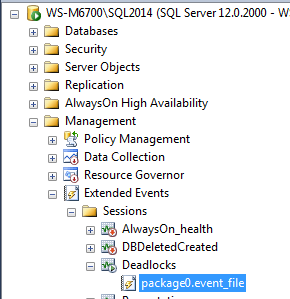
SSMS2014XE07-XE-Session-target

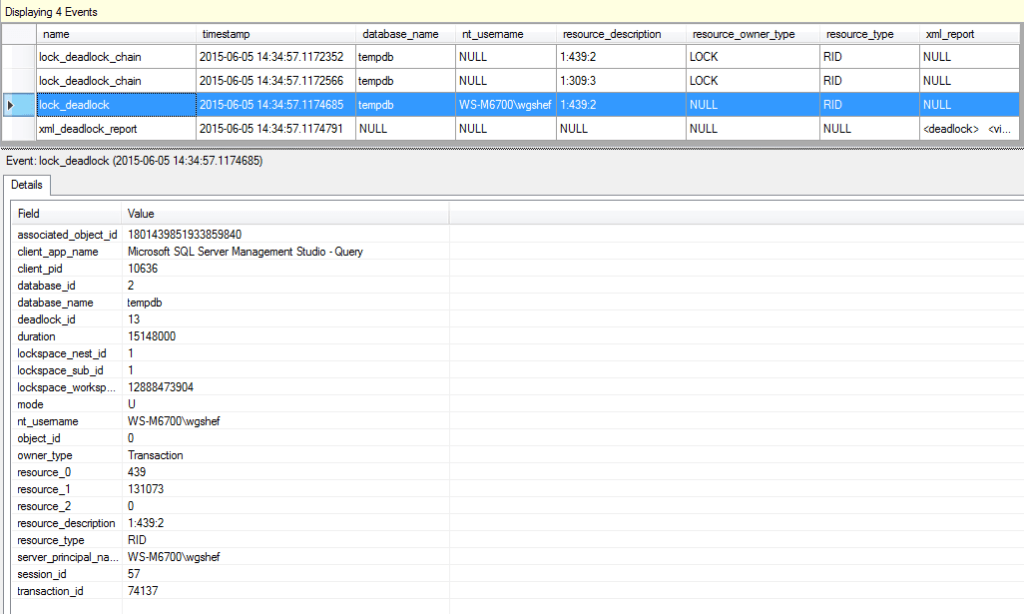
The event file target can now be seen. Double-click the file target to view the data, and you can see the events that fired for the deadlock. Note that you can right-click on the grid header, and choose additional columns to put into the grid – for this XE session, I like to add the database_name, resource_description, resource_owner, resource_type and xml_report columns.
SSMS2014XE08-XE-Collected-Data

By selecting one of the rows, all of the data will be available in the lower grid in a Name/Value format.

Let’s compare the XE output to the trace output, and ensure that the data captured by the trace is present in the XE output. The first trace column is TextData. In that, we see multiple bits of data: SPID, lock resource, and the deadlock graph in XML format. In the XE, the resource_description column has the lock resource, the xml_report column has the deadlock graph in XML format, and the session_id column has the SPID. Skipping the BinaryData column, the next column is the NTUserName. Here we can see that this is collected in the XE nt_username column. A minor difference is that the XE includes the domain name, and the trace doesn’t.

The ClientProcessID column maps to the client_pid column. Likewise, the ApplicationName maps to client_app_name, LoginName maps to server_principal_name, SPID maps to session_id, Duration maps to duration, StartTime maps to timestamp, ObjectID maps to object_id. The EventClass, Mode and Type columns maps via friendly names to the name, mode and resource_type columns. The only columns that aren’t explicitly in the XE results are the BinaryData, EndDate and ServerName columns. The EndDate can be calculated from the timestamp and duration columns, and we could have selected the server_instance_name in “Global Fields (Actions)” tab when configuring the XE session. So here, we can see that everything needed from the trace is available in the XE session.

For the next step, one might want to load the data into a table, and viewing it in the viewer doesn’t allow for this. Or maybe you are working on a server prior to SQL Server 2012, and the GUI isn’t available for you to use. The following script can be used to query the data from the file target (again, remember to change the file name/path as necessary):

SELECT object_name,
       CONVERT(XML, event_data) AS event_data
FROM   sys.fn_xe_file_target_read_file('C:\SQL\XE_Out\Deadlocks*.xel', NULL, NULL, NULL);
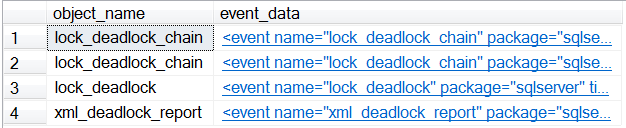
SSMS2014XE12-XE-target-file-query-results

As can be seen from the output, the data that we most want to see is stored as XML (when working with Extended Events, all of the data is stored as XML) in the event_data column, so I have converted this column to XML. At this point, you can click the XML output, and it will be opened up in text, allowing you to see all of the data as it is stored in the XML output.
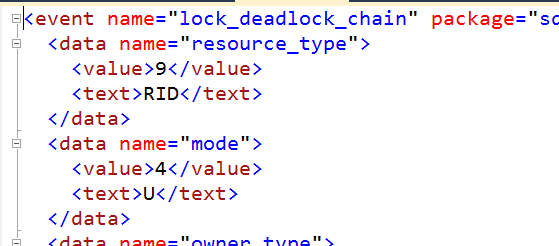
SSMS2014XE13-XE-target-file-event_data-results

From this point, it’s just a matter of modifying the query to return the columns that you are interested in.

WITH cte AS
(
SELECT  t2.event_data.value('(event/@name)[1]','varchar(50)') AS event_name,
        t2.event_data.value('(event/@timestamp)[1]', 'datetime2') AS StartTime,
        t2.event_data.value('(event/data[@name="duration"]/value)[1]', 'bigint') AS duration,
        t2.event_data.value('(event/data[@name="database_name"]/value)[1]', 'sysname') AS DBName,
        t2.event_data.value('(event/action[@name="nt_username"]/value)[1]', 'varchar(500)') AS nt_username,
        t2.event_data.value('(event/data[@name="mode"]/value)[1]', 'varchar(15)')  + ' (' + 
        t2.event_data.value('(event/data[@name="mode"]/text)[1]', 'varchar(50)') + ')' AS mode,
        t2.event_data.value('(event/data[@name="object_id"]/value)[1]', 'integer') AS object_id,
        t2.event_data.value('(event/data[@name="resource_description"]/value)[1]', 'varchar(max)') AS resource_description,
        t2.event_data.value('(event/data[@name="resource_owner_type"]/text)[1]', 'varchar(max)')  AS resource_owner_type,
        t2.event_data.value('(event/data[@name="resource_type"]/text)[1]', 'varchar(max)') + ' (' +
        t2.event_data.value('(event/data[@name="resource_type"]/value)[1]', 'varchar(max)') + ')' AS resource_type,
        t2.event_data.value('(event/action[@name="server_principal_name"]/value)[1]', 'varchar(max)') AS server_principal_name,
        t2.event_data.value('(event/action[@name="session_id"]/value)[1]', 'varchar(max)') AS session_id,
        t2.event_data.value('(event/action[@name="client_pid"]/value)[1]', 'integer') AS client_pid,
        t2.event_data.value('(event/action[@name="client_app_name"]/value)[1]', 'varchar(max)') AS client_app_name,
        t2.event_data
FROM    sys.fn_xe_file_target_read_file('C:\SQL\XE_Out\Deadlocks*.xel', NULL, NULL, NULL) t1
CROSS APPLY (SELECT CONVERT(XML, t1.event_data)) t2(event_data)
)
SELECT  cte.event_name,
        cte.StartTime,
        DATEADD(MICROSECOND, duration, CONVERT(DATETIME2, [cte].StartTime)) AS EndDate,
        cte.duration,
        cte.DBName,
        cte.nt_username,
        cte.server_principal_name,
        cte.mode,
        cte.object_id,
        cte.resource_description,
        cte.resource_owner_type,
        cte.resource_type,
        cte.session_id,
        cte.client_pid,
        cte.client_app_name,
        cte.event_data 
FROM    cte;

This query extracts the data from XE file target. It also calculates the end date, and displays both the internal and user-friendly names for the resource_type and mode columns – the internal values are what the trace was returning.

For a quick recap: in Part 1, you learned how to convert an existing trace into an XE session, identifying the columns and stepping through the GUI for creating the XE session. In part 2 you learned how to query both the trace and XE file target outputs, and then compared the two outputs and learned that all of the data in the trace output is available in the XE output.

This post is re-published from my original post on SQL Solutions Group.

The post Weaning yourself off of SQL Profiler (Part 2) appeared first on Wayne Sheffield.

31 May 19:07

SQL Server 2017 CTP 2.1 now available

by SQL Server Team

Microsoft is excited to announce a new preview for the next version of SQL Server (SQL Server 2017). Community Technology Preview (CTP) 2.1 is available on both Windows and Linux. In this preview, we added manageability features to make it easier to configure SQL Server in Docker containers. We’re also introducing some new command line tools for managing SQL Server in our GitHub repo. And, there’s a preview of SQL Server Integration Services on Linux to try! You can try the SQL Server 2017 preview in your choice of development and test environments now: www.microsoft.com/sqlserver2017.

Key CTP 2.1 enhancements

The primary enhancement to SQL Server 2017 in this release is the ability to configure SQL Server configuration settings through environment variables passed in as parameters to docker run. This enables many of the SQL Server configuration scenarios in Docker containers such as setting the collation.

For additional detail on CTP 2.1, please visit What’s New in SQL Server 2017, Release Notes and Linux documentation.

SQL Server Integration Services on Linux

SQL Server Integration Services now supports Linux for the first time! Today we are also releasing a preview of SQL Server Integration Services for Ubuntu. The preview enables you to run SSIS packages on the Linux OS, extract data from and load it to most common sources and targets, and perform common transformations. It has a simple command line installation. For more information, see our SSIS blog.

Updated SQL Server Tooling

The latest release of SQL Server Management Studio is out! It features improvements to how it works with SQL Server on Linux so make sure you have the latest. In addition, we are excited to announce the public preview availability of two new command line tools for SQL Server:

  • The mssql-scripter tool enables developers, DBAs, and sysadmins to generate CREATE and INSERT T-SQL scripts for database objects in SQL Server, Azure SQL DB, and Azure SQL DW from the command line.
  • The DBFS tool enables DBAs and sysadmins to monitor SQL Server more easily by exposing live data from SQL Server Dynamic Management Views (DMVs) as virtual files in a virtual directory on Linux operating systems.

New lightweight installer for SQL Server Reporting Services (SSRS)

In CTP 2.1, we moved Reporting Services installation from the SQL Server installer to a separate installer. This is a packaging change, not a product change; access to SQL Server Reporting Services is still included with your SQL Server license. The new installation process keeps our packages lean and enables customers to deploy and update Reporting Services with zero impact on your SQL Server deployments and databases.

To learn more about what’s new in SQL Server 2017 Reporting Services preview, read our Reporting Services Release Notes. To download the latest preview in the new lightweight installer, go to https://aka.ms/ssrs2017download

To learn more about the recent announcement of a Power BI Report Server preview, which includes the capabilities of SQL Server 2017 Reporting Services and support for Power BI reports, you can read this blog article.

Get SQL Server 2017 CTP 2.1 today!

Try the preview of the SQL Server 2017 today! Get started with the preview of SQL Server with our updated developer tutorials that show you how to install and use SQL Server 2017 on macOS, Docker, Windows, and Linux and quickly build an app in a programming language of your choice.

Have questions? Join the discussion of SQL Server 2017 at MSDN. If you run into an issue or would like to make a suggestion, you can let us know through Connect. We look forward to hearing from you!

31 May 19:07

Try new SQL Server command line tools to generate T-SQL scripts and monitor Dynamic Management Views

by SQL Server Team

This post was authored by Tara Raj and Vinson Yu, Program Managers – SQL Server Team

We are excited to announce the public preview availability of two new command line tools for SQL Server:

  • The mssql-scripter tool enables developers, DBAs, and sysadmins to generate CREATE and INSERT T-SQL scripts for database objects in SQL Server, Azure SQL DB, and Azure SQL DW from the command line.
  • The DBFS tool enables DBAs and sysadmins to monitor SQL Server more easily by exposing live data from SQL Server Dynamic Management Views (DMVs) as virtual files in a virtual directory on Linux operating systems.

Read on for detailed usage examples, try out these new command line tools, and give us your feedback.

mssql-scripter

Mssql-scripter is the multiplatform command line equivalent of the widely used Generate Scripts Wizard experience in SSMS.

You can use mssql-scripter on Linux, macOS, and Windows to generate data definition language (DDL) and data manipulation language (DML) T-SQL scripts for database objects in SQL Server running anywhere, Azure SQL Database, and Azure SQL Data Warehouse. You can save the generated T-SQL script to a .sql file or pipe it to standard *nix utilities (for example, sed, awk, grep) for further transformations. You can edit the generated script or check it into source control and subsequently execute the script in your existing SQL database deployment processes and DevOps pipelines with standard multiplatform SQL command line tools such as sqlcmd.

Mssql-scripter is built using Python and incorporates the usability principles of the new Azure CLI 2.0 tools. The source code can be found on Github at https://github.com/Microsoft/sql-xplat-cli, and we welcome your contributions and pull requests!

Get started with mssql-scripter

Install
$pip install mssql-scripter
For additional installation tips, visit https://github.com/Microsoft/sql-xplat-cli/blob/dev/doc/installation_guide.md.

Script Your First Database Objects
For usage and help content, pass in the -h parameter, which will also show all options:
mssql-scripter -h

Here are some example commands
# Generate DDL scripts for all database objects (default) in the Adventureworks database and output to stdout
$ mssql-scripter -S localhost -d AdventureWorks -U sa

# Generate DDL scripts for all database objects and DML scripts (INSERT statements) for all tables in the Adventureworks database and save the script to a file
$ mssql-scripter -S localhost -d AdventureWorks -U sa ––schema-and-data > ./adventureworks.sql

# generate DDL scripts for objects that contain “Employee” in their name to stdout
$ mssql-scripter -S localhost -d AdventureWorks -U sa ––include-objects Employee

Get our GitHub usage guide.

DBFS

A big part of operationalizing SQL Server is to monitor to ensure that SQL Server is performant, highly available, and secure for your applications. With SQL Server 2017, Dynamic Management Views (DMVs) on Windows are also accessible on Linux, allowing your existing scripts and tools that rely on DMVs to continue to work. Traditionally, to get this information, you would use GUI admin tools such as SSMS or command line tools such as SQLCMD to run queries.

Today, we are also introducing a new experimental Linux tool, DBFS, which enables you to access live DMVS mounted to a virtual filesystem using FUSE. All you need to do is view the contents of the virtual files in the mounted virtual directory to see the same data you would see as if you ran a SQL query to view the DMV data. There is no need to log in to the SQL Server using a GUI or command line tool or run SQL queries. DBFS can also be used in scenarios where you want to access DMV data from the context of a script with CLI tools such as grep, awk, and sed.

DBFS uses the FUSE file system module to create two zero byte files for each DMV—one for showing the data in CSV format and one for showing the data in JSON format. When a file is “read,” the relevant information from the corresponding DMV is queried from SQL Server and displayed just like the contents of any CSV or JSON text file.

Features

  • Access data in .json format if you are connected to SQL Server 2016 or later
  • Compatible with Bash tools such as grep, sed, and awk
  • Live DMV data at time of access
  • Works with both SQL Server on Windows and SQL Server on Linux

Notes

  • This tool is currently only available for Ubuntu, Red Hat, and CentOS (SUSE coming soon!).

Next Steps:
See more usage examples and read more about mssql-scripter at https://github.com/Microsoft/sql-xplat-cli and get started with the DBFS today at https://github.com/Microsoft/dbfs.

We are open to suggestions, feedback, questions, and of course contributions to the project itself.

31 May 19:07

Troubleshooting CPU Performance on VMware

by Jonathan Kehayias

When troubleshooting CPU performance issues on virtualized SQL Servers running on VMware, one of the first things I do is verify that the virtual machine configuration isn’t a contributing factor to the performance problem. Where a physical server has 100% of the available resources dedicated to the OS, a virtual machine doesn’t, so looking at a few basic items up front eliminates troubleshooting the wrong issue and wasting time. In the past I’ve blogged about the importance of DBAs having read-only access to Virtual Center for VMware for basic troubleshooting of performance problems. However, even without access to Virtual Center, it’s still possible to find out some basic information inside of Windows that could lead to potential host level issues that are affecting performance.

Every VMware virtual machine has two performance counter groups in Windows that are added when the VMware tools are installed in the guest; VM Processor and VM Memory. These performance counters are one of the first things I look at whenever I am working with a virtual machine on VMware, because they give you a look at what resources the VM is receiving from the hypervisor. The VM Processor group has the following counters:

  • % Processor Time
  • Effective VM Speed in MHz
  • Host processor speed in MHz
  • Limit in MHz
  • Reservation in MHz
  • Shares

On a VM guest that is showing a high Processor\% Processor Time in Task Manager or perfmon, checking the VM Processor counters will give an accurate account of actual resource allocations the VM guest is receiving. If the Host processor speed in MHz is 3000 and the guest has 8 virtual CPUs allocated to it, then the maximum effective speed for the VM is 24000 MHz and the Effective VM Speed in MHz counter will reflect whether the VM is actually getting the resources from the host. Usually when this is the case, you will need to start looking at the host level information to diagnose the root cause of the issue further. But in a recent client engagement, this didn’t turn out to be the case.

The client VM in this case matched the configuration described above and had a maximum effective speed of 24000 MHz but the Effective VM Speed in MHz counter was only averaging around 6900 MHz with the VM Windows Percent Processor time pegged at nearly 100%. Looking just below the Effective VM Speed in MHz counter revealed the cause of the issue: the Limit in MHz was 7000, meaning that the VM had a configured cap of CPU usage at 7000MHz in ESX, so it was consistently being throttled by the hypervisor under load.

The explanation for this was that this particular VM had been used for testing purposes in a proof of concept and was originally co-located on a busy VM host; the VM administrators didn’t want an unknown workload causing performance issues on that host. So, to ensure that it wouldn’t negatively impact the real production workloads on the host during the POC, it was limited to allow only 7000 MHz of CPU or the equivalent of 2 1/3 physical cores on the host. Ultimately, removing the VM CPU Limit in ESX eliminated the high CPU issues within Windows, and the performance problems that the client was experiencing went away.

The VM Memory counter group is just as important as the VM Processor group for identifying potential performance problems for SQL Server. The VM Memory counter group contains the following counters:

  • Memory Active in MB
  • Memory Ballooned in MB
  • Memory Limit in MB
  • Memory Mapped in MB
  • Memory Overhead in MB
  • Memory Reservation in MB
  • Memory Shared in MB
  • Memory Shared Saved in MB
  • Memory Shares
  • Memory Swapped in MB
  • Memory Used in MB

Of these counters, the ones that I specifically look at are the Memory Ballooned in MB and the Memory Swapped in MB, both of which should be zero for SQL Server workloads. The Memory Ballooned in MB counter tells how much memory has been reclaimed from the guest VM by the balloon driver due to memory overcommit on the host, which will cause SQL Server to reduce memory usage to respond to memory pressure in Windows caused by the balloon driver inflating to take memory away from the VM. The Memory Swapped in MB counter is tracking how much memory was paged to disk by the host hypervisor due to memory overcommit on the host that couldn’t be resolved by ballooning VM guests with the balloon driver. VMware’s best practice guide for SQL Server recommends using reservations to guarantee that SQL Server doesn’t get ballooned or paged out for performance reasons but many VM administrators are hesitant to set static reservations because it reduces environmental flexibility.

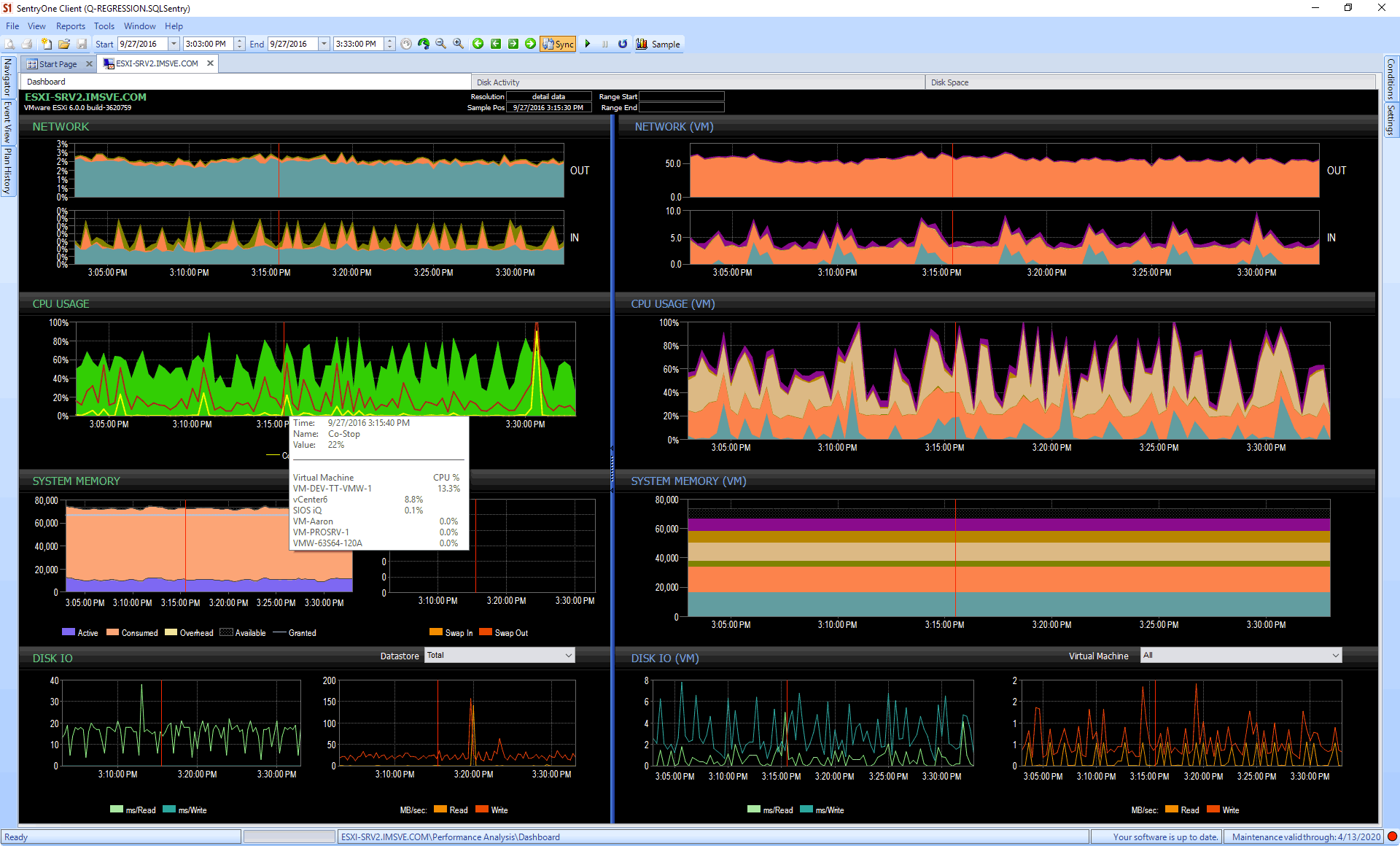
Monitoring tools, like SentryOne V Sentry, can also help. Consider the case where you might not have direct access to vCenter, but someone can set up monitoring against it on your behalf. Now you can get great visualization and insight into CPU, memory, and even disk issues – at both the guest and host level – and all the history that comes with that, too. On the dashboard below, you can see host metrics on the left (including CPU breakdowns for co-stop and ready time), and guest metrics on the right:

SentryOne V Sentry : Taking the mystery out of VMware performance

To try out this and other functionality from SentryOne, you can download a free trial.

Conclusion

When troubleshooting performance issues on virtualized SQL Servers on VMware, it is important to look at the problem from a holistic standpoint instead of doing “knee-jerk” troubleshooting using only limited information. The VMware-specific counters in Performance Monitor can be a great way to quickly verify that the VM is getting the basic resource allocations from the host, before taking further steps at troubleshooting the issue.

The post Troubleshooting CPU Performance on VMware appeared first on SQLPerformance.com.

31 May 19:06

SolarWinds Acquires Scout’s SaaS-based Server Monitoring Technology

by A.R. Guess

by Angela Guess According to a recent press release, “SolarWinds, a leading provider of powerful and affordable IT management software, today announced it has completed the acquisition of Scout Server Monitoring. The transaction closed Friday, May 5, 2017. As part of the acquisition, Scout Co-Founder and Chief Technology Officer Andre Lewis has joined SolarWinds. With […]

The post SolarWinds Acquires Scout’s SaaS-based Server Monitoring Technology appeared first on DATAVERSITY.

31 May 19:06

[OT] Never Bet Against Cloud Computing

by John Paul Cook
Today at the Preakness horse racing event, Classic Empire dominated and led the race appearing to be the certain winner with Always Dreaming staying a close second and appearing to be a possible contender. At the end, Cloud Computing charged ahead leaving...(read more)
31 May 19:05

How Data Centers Have Evolved to Support the Internet of Things

by Chris Schwarz

Click to learn more about author Chris Schwarz. The times, they’re a-changin’. We’re on the verge of a world where everything from our fridges to our coffee makers are connected. And for data centers, that means an evolution. In 2014, Gartner predicted that the Internet of Things (IoT) – which is slated to reach approximately 8.4 […]

The post How Data Centers Have Evolved to Support the Internet of Things appeared first on DATAVERSITY.

31 May 19:04

Azure database_id inconsistencies

by jchang
I am working on improvements to my SQL ExecStats tool, including Azure support. Previously, I had put try catch blocks around everything that bombs in Azure. Now I am putting IF EXISTS tests around SQL referencing system views and procedures not in Azure...(read more)
31 May 19:04

Let’s Talk Encryption

by David Schlesinger

Click to learn more about author David Schlesinger. Wait! I promise – no math! Really! How encryption happens is not your job, and you may be excused from knowing the algorithms, remembering who discovered what, and why there is a secret key. Encryption systems scramble data into gibberish for protection, and then the gibberish can be […]

The post Let’s Talk Encryption appeared first on DATAVERSITY.

31 May 19:04

Utility to script a FOREIGN KEY Constraint

by drsql
Note: Amended to cascading and NOT FOR REPLICATION. As noted in my previous post , I am in the middle of building a utility (for work, and for my next SQLBLOG post), that will help when you need to drop the foreign key constraints on a table, but then replace them without having to save off the script manually. In that post, I showed how to manually create a foreign key constraint in three possible states. Next, in order to create the utility to script the FOREIGN KEY constraints before dropping...(read more)
31 May 19:04

SSAS high availability

by James Serra

If you are looking at providing high availability (HA) for SSAS, here are 3 options:

  1. Install SSAS on a Windows Server Failover Cluster (WSFC)
    Here’s a good article. The main issue with this option is that SSAS isn’t cluster-aware, so if windows is “OK” but SSAS (the service) is hung, it won’t failover.  Also check out How to Cluster SQL Server Analysis Services
  2. Network Load Balancing (NLB) across a SSAS Scale-Out Query Cluster
    Basically just load balancing queries across 1+N servers that are all hosting a separate copy of the tabular or multidimensional model.  If a query-server goes down, there’s still several others available to resolve the query.  This provides scalability and availability.  Unfortunately, it is not completely transparent as you have to manage:
    – Configuration of the load balancer
    – Deployment of updates (for the analysis services databases you can do detach->file copy to other servers->reattach, analysis services database backup/restore, or process data on a “process” server and use database synchronization to update the read-only instances you put behind the load balancer).  If you have to have 24×7 availability, you have to put a node offline when a node is already synchronized, otherwise you accept having different versions of the same database available at the same moment
  3. Azure Analysis Services
    This new service in the cloud has options for high availability.  It makes it super easy to (programmatically) spin up another server and restore a backup.  Just keep in mind the new server does not have the same address, so you have to manage the client connection and this is not transparent.  Also note this service has a 99.9% SLA

On a side note, SSAS can use a SQL Server database in an Always On availability group as a data source: Analysis Services with Always On Availability Groups.

13 May 20:02

The new data modeling book for Power BI and Power Pivot users

by Marco Russo (SQLBI)

In the last few years, I and Alberto Ferrari assisted many users of Power Pivot and Power BI who wanted to create their reports using these tools and were struggling with getting the desired numbers from their data. The first approach of an Excel user is to look for a function, or a more complex DAX expression, that can implement the calculation required. In a similar way, this is also the approach of Power BI users that don’t have a database design background.

Several times, before looking for a correct DAX expression, the problem is defining the correct data model, putting data in the right tables, and creating the proper relationships. The tools to create queries in M (Power Query in Excel, now called Get Data, and the Query Editor in Power BI) are wonderful to help the users in doing the proper massage to the data. However, these tools cannot help users that don’t know how to properly define the right data model. For this reason, when we thought to a new version of the book about Power Pivot (we previously wrote one for Excel 2013/2016 and one for Excel 2010) we considered that the DAX chapters were no longer necessary (because we have The Definitive Guide to DAX for that), so we decided to dedicate an entire book to the data modeling, targeted to business users that usually do not have such a skill, or that learned that by trial and errors and without a more structured approach.

Because the concepts are identical for Power Pivot and Power BI, we wrote a single book that target both products: Analyzing Data with Power BI and Power Pivot for Excel. Several examples are created in Power BI Desktop (because it is free and available to anyone), but certain reports are created using pivot tables in Excel. The goal is to teach the concepts, rather than providing formulas to copy and paste. In fact, the reader should try to apply the same ideas to its own data, recognizing the data modeling patterns described in the chapters of the book.

We tried to minimize the use of theoretical terms, trying to introduce with very practical examples and design patterns the terminology that is commonly used in data modeling (such as fact, dimensions, normalization, denormalization, star schema, snowflake schema, and so on). Thus, is this book for you?

  • If you are an advanced Excel user that adopted Power Pivot or Power BI, definitely yes.
  • If you are a BI developer, you should already know the theory, and this book could be useful to see practical examples using a model in these tools. Thus, it could be useful (well, several models are really easy to implement as design patterns), but you should not learn new concepts.
  • If you are a data analyst that moved to Power BI from other tools, then it depends on your background. You might be in the middle of the two cases described above, but in any case the book should be useful for you, too.

At this point, you might wonder why we did not include the words “data modeling” in the book title. The simple answer could be “marketing”, but the real answer is more complex. A business user hardly recognizes the need of data modeling skills. He/she just want to obtain a result, analyzing its own data. He/she might think that data modeling is something for DBAs, and is not related to reporting. However, when you create a report in Power Pivot and Power BI, usually you are creating a data model (unless you create a live connection to an existing Analysis Services database). For this reason, the title should help these users to find this book and to take look at its description. Yes, it is a book for data modeling targeted to readers that do not know that they need such a skill. Thus, the reason for this title is “communication”: We hope that the book description is clear enough to avoid any misunderstanding!

This is the table of contents of the book:

  • CHAPTER 1 – Introduction to data modeling
  • CHAPTER 2 – Using header/detail tables
  • CHAPTER 3 – Using multiple fact tables
  • CHAPTER 4 – Working with date and time
  • CHAPTER 5 – Tracking historical attributes
  • CHAPTER 6 – Using snapshots
  • CHAPTER 7 – Analyzing date and time intervals
  • CHAPTER 8 – Many-to-many relationships
  • CHAPTER 9 – Working with different granularity
  • CHAPTER 10 – Segmentation data models
  • CHAPTER 11 – Working with multiple currencies
  • APPENDIX A – Data modeling 101

Remember, when the data model is correct, the DAX code you need is simpler, shorter, and more efficient. The first rule is always “keep it simple”, and a good data model is always the first step in the right direction!

13 May 20:02

Creating FOREIGN KEY constraints as enabled, trusted, non-trusted, and/or disabled

by drsql
I am in the middle of building a utility (for work, and for my next SQLBLOG post), that will help when you need to drop the foreign key constraints on a table, but then replace them without having to save off the script manually. Part of the process is...(read more)
13 May 20:01

The Cost of Procrastination in the Data Center: How Cloud Automation Can Help You Fix It

by Tim Mullahy

Click to learn more about author Tim Mullahy. Are you on top of your data center’s maintenance schedule? You need to be – and Cloud Automation can help you get there. In January, the Australian Taxations Office announced plans for extended downtime. The reason? To fix ongoing hardware problems that emerged over a month ago. This […]

The post The Cost of Procrastination in the Data Center: How Cloud Automation Can Help You Fix It appeared first on DATAVERSITY.

13 May 20:01

The Importance of Database Indexes

by Artemakis Artemiou [MVP]
This article is from my book: Tuning SQL Server (Second Edition) Table of Contents | Sample Chapter | Learn More | Buy Imagine that you have a large book and you are looking for a specific piece of information. If the book has 500 pages and has no index, you will have to go through page by page until to find the information you are looking for. The worst-case scenario would be to check
13 May 20:01

“Stored procedures don’t need source control…”

by Rob Farley

Hearing this is one of those things that really bugs me.

And it’s not actually about stored procedures, it’s about the mindset that sits there.

I hear this sentiment in environments where there are multiple developers. Where they’re using source control for all their application code. Because, you know, they want to make sure they have a history of changes, and they want to make sure two developers don’t change the same piece of code, maybe they even want to automate builds, all those good things.

But checking out code and needing it to pass all those tests is a pain. So if there’s some logic that can be put in a stored procedure, then that logic can be maintained outside the annoying rigmarole of source control. I guess this is appealing because developers are supposed to be creative types, and should fight against the repression, fight against ‘the man’, fight against [source] control.

When I come across this mindset, I worry a lot.

I worry that code within stored procedures could be lost if multiple people decide to work on something at the same time.

I worry that code within stored procedures won’t be part of a test regime, and could potentially be failing to consider edge cases.

I worry that the history of changes won’t exist and people won’t be able to roll back to a good version.

I worry that people are considering that this is a way around source control, as if source control is a bad thing that should be circumvented.

I just worry.

And this is just talking about code in stored procedures. Let alone database design, constraints, indexes, rows of static data (such as lookup codes), and so on. All of which contribute to a properly working application, but which many developers don’t consider worthy of source control.

Luckily, there are good options available to change this behaviour. Red Gate’s Source Control is tremendously useful, of course, and the inclusion of many Red Gate’s DevOps tools within VS2017 would suggest that Microsoft wants developers to take this more seriously than ever.

For more on this kind of stuff, go read the other posts about this month’s T-SQL Tuesday!

TSQL2sDay150x150

@rob_farley

13 May 20:01

Complete Master Data Management: Improving Data Quality and Compliance

by Jennifer Zaino

Data solutions provider Innovative Systems has been pursuing an aggressive plan to grow and expand the role its technology offerings can play in the enterprise. Synchronos® Master Data Management (MDM), for one thing, is moving along on its journey to become the base of all the vendor’s product lines. “Think of it as the platform […]

The post Complete Master Data Management: Improving Data Quality and Compliance appeared first on DATAVERSITY.

13 May 20:01

Case Study: CauseSquare and NuoDB’s Elastic SQL Database Partner for Non-Profit Generosity

by Amber Lee Dennis

CauseSquare started in 2015, when co-founder and CTO, Walid Darwish and four of his friends, all developers, were volunteering their time with non-profit organizations and discovered that, “This sector, in terms of technology, still has a long way to go.” They also suspected that these organizations were heading for trouble in the long term. Their […]

The post Case Study: CauseSquare and NuoDB’s Elastic SQL Database Partner for Non-Profit Generosity appeared first on DATAVERSITY.

13 May 20:01

UNION ALL Optimization

by Paul White

The concatenation of two or more data sets is most commonly expressed in T-SQL using the UNION ALL clause. Given that the SQL Server optimizer can often reorder things like joins and aggregates to improve performance, it is quite reasonable to expect that SQL Server would also consider reordering concatenation inputs, where this would provide an advantage. For example, the optimizer could consider the benefits of rewriting A UNION ALL B as B UNION ALL A.

In fact, the SQL Server optimizer does not do this. More precisely, there was some limited support for concatenation input reordering in SQL Server releases up to 2008 R2, but this was removed in SQL Server 2012, and has not resurfaced since.

SQL Server 2008 R2

Intuitively, the order of concatenation inputs only matters if there is a row goal. By default, SQL Server optimizes execution plans on the basis that all qualifying rows will be returned to the client. When a row goal is in effect, the optimizer tries to find an execution plan that will produce the first few rows quickly.

Row goals can be set in a number of ways, for example using TOP, a FAST n query hint, or by using EXISTS (which by its nature needs to find at most one row). Where there is no row goal (i.e. the client requires all rows), it does not generally matter in which order the concatenation inputs are read: Each input will be fully processed eventually in any case.

The limited support in versions up to SQL Server 2008 R2 applies where there is a goal of exactly one row. In this specific circumstance, SQL Server will reorder concatenation inputs on the basis of expected cost.

This is not done during cost-based optimization (as one might expect), but rather as a last-minute post-optimization rewrite of the normal optimizer output. This arrangement has the advantage of not increasing the cost-based plan search space (potentially one alternative for each possible reordering), while still producing a plan that is optimized to return the first row quickly.

Examples

The following examples use two tables with identical contents: A million rows of integers from one to a million. One table is a heap with no nonclustered indexes; the other has a unique clustered index:

CREATE TABLE dbo.Expensive
(
    Val bigint NOT NULL
);
 
CREATE TABLE dbo.Cheap
(
    Val bigint NOT NULL, 
 
    CONSTRAINT [PK dbo.Cheap Val]
        UNIQUE CLUSTERED (Val)
);
GO
INSERT dbo.Cheap WITH (TABLOCKX)
    (Val)
SELECT TOP (1000000)
    Val = ROW_NUMBER() OVER (ORDER BY SV1.number)
FROM master.dbo.spt_values AS SV1
CROSS JOIN master.dbo.spt_values AS SV2
ORDER BY
    Val
OPTION (MAXDOP 1);
GO
INSERT dbo.Expensive WITH (TABLOCKX)
    (Val)
SELECT
    C.Val
FROM dbo.Cheap AS C
OPTION (MAXDOP 1);

No Row Goal

The following query looks for the same rows in each table, and returns the concatenation of the two sets:

SELECT E.Val 
FROM dbo.Expensive AS E 
WHERE 
    E.Val BETWEEN 751000 AND 751005
 
UNION ALL
 
SELECT C.Val
FROM dbo.Cheap AS C 
WHERE 
    C.Val BETWEEN 751000 AND 751005;

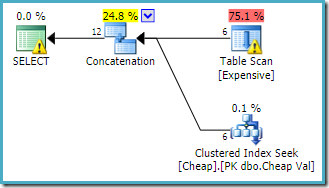
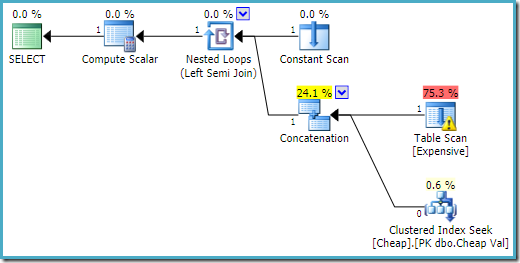
The execution plan produced by the query optimizer is:

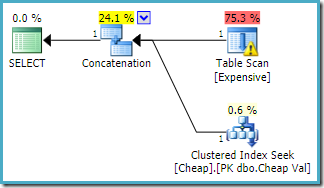
UNION ALL without a row goal

The warning on the root SELECT operator is alerting us to the obvious missing index on the heap table. The warning on the Table Scan operator is added by Sentry One Plan Explorer. It is drawing our attention to the I/O cost of the residual predicate hidden within the scan.

The order of the inputs to the Concatenation does not matter here, because we have not set a row goal. Both inputs will be fully read to return all result rows. Of interest (though this is not guaranteed) notice that the order of the inputs follows the textual order of the original query. Observe also that the order of the final result rows is not specified either, since we did not use a top-level ORDER BY clause. We will assume that is deliberate and final ordering is inconsequential to the task at hand.

If we reverse the written order of the tables in the query like so:

SELECT C.Val
FROM dbo.Cheap AS C 
WHERE 
    C.Val BETWEEN 751000 AND 751005
 
UNION ALL
 
SELECT E.Val 
FROM dbo.Expensive AS E 
WHERE 
    E.Val BETWEEN 751000 AND 751005;

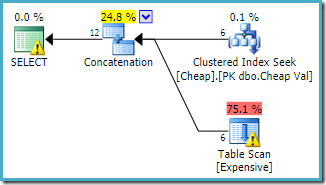
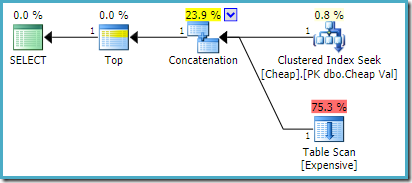
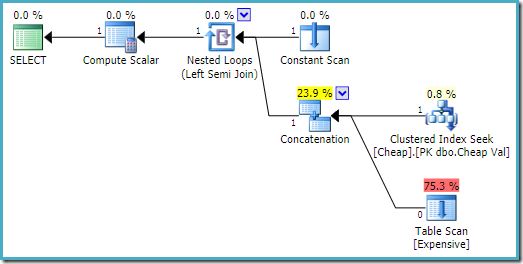
The execution plan follows the change, accessing the clustered table first (again, this is not guaranteed):

UNION ALL with reversed inputs

Both queries may be expected to have the same performance characteristics, as they perform the same operations, just in a different order.

With a Row Goal

Clearly, the lack of indexing on the heap table will normally make finding specific rows more expensive, compared with the same operation on the clustered table. If we ask the optimizer for a plan that returns the first row quickly, we would expect SQL Server to reorder the concatenation inputs so the cheap clustered table is consulted first.

Using the query that mentions the heap table first, and using a FAST 1 query hint to specify the row goal:

SELECT E.Val 
FROM dbo.Expensive AS E 
WHERE 
    E.Val BETWEEN 751000 AND 751005
 
UNION ALL
 
SELECT C.Val
FROM dbo.Cheap AS C 
WHERE 
    C.Val BETWEEN 751000 AND 751005
OPTION (FAST 1);

The estimated execution plan produced on an instance of SQL Server 2008 R2 is:

UNION ALL with a row goal on 2008 R2

Notice that the concatenation inputs have been reordered to reduce the estimated cost of returning the first row. Note also that the missing index and residual I/O warnings have disappeared. Neither issue is of consequence with this plan shape when the goal is to return a single row as quickly as possible.

The same query executed on SQL Server 2016 (using either cardinality estimation model) is:

UNION ALL with a row goal on 2016

SQL Server 2016 has not reordered the concatenation inputs. The Plan Explorer I/O warning has returned, but sadly the optimizer has not produced a missing index warning this time (though it is relevant).

General reordering

As mentioned, the post-optimization rewrite that reorders concatenation inputs is only effective for:

  • SQL Server 2008 R2 and earlier
  • A row goal of exactly one

If we genuinely only want one row returned, rather than a plan optimized to return the first row quickly (but which will ultimately still return all rows), we can use a TOP clause with a derived table or common table expression (CTE):

SELECT TOP (1)
    UA.Val
FROM
(
    SELECT E.Val 
    FROM dbo.Expensive AS E 
    WHERE 
        E.Val BETWEEN 751000 AND 751005
 
    UNION ALL
 
    SELECT C.Val
    FROM dbo.Cheap AS C 
    WHERE 
        C.Val BETWEEN 751000 AND 751005
) AS UA;

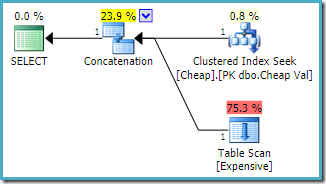
On SQL Server 2008 R2 or earlier, this produces the optimal reordered-input plan:

UNION ALL with TOP on 2008 R2

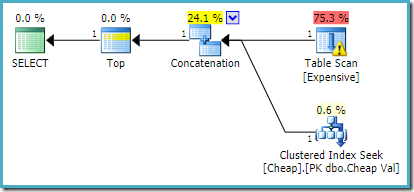
On SQL Server 2012, 2014, and 2016 no post-optimization reordering occurs:

UNION ALL with TOP on 2012-2016

If we want more than one row returned, for example using TOP (2), the desired rewrite will not be applied on SQL Server 2008 R2 even if a FAST 1 hint is also used. In that situation, we need to resort to tricks like using TOP with a variable and an OPTIMIZE FOR hint:

DECLARE @TopRows bigint = 2; -- Number of rows actually needed
 
SELECT TOP (@TopRows)
    UA.Val
FROM
(
    SELECT E.Val 
    FROM dbo.Expensive AS E 
    WHERE 
        E.Val BETWEEN 751000 AND 751005
 
    UNION ALL
 
    SELECT C.Val
    FROM dbo.Cheap AS C 
    WHERE 
        C.Val BETWEEN 751000 AND 751005
) AS UA
OPTION (OPTIMIZE FOR (@TopRows = 1)); -- Just a hint

The query hint is sufficient to set a row goal of one, while the runtime value of the variable ensures the desired number of rows (2) is returned.

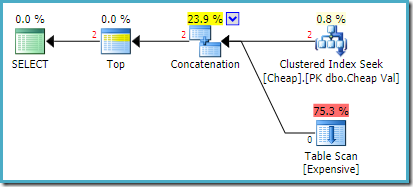
The actual execution plan on SQL Server 2008 R2 is:

UNION ALL with variable and OPTIMIZE FOR on 2008 R2

Both rows returned come from the reordered seek input, and the Table Scan is not executed at all. Plan Explorer shows the row counts in red because the estimate was for one row (due to the hint) whereas two rows were encountered at run time.

Without UNION ALL

This issue is also not limited to queries written explicitly with UNION ALL. Other constructions such as EXISTS and OR can also result in the optimizer introducing a concatenation operator, which may suffer from the lack of input reordering. There was a recent question on Database Administrators Stack Exchange with exactly this issue. Transforming the query from that question to use our example tables:

SELECT
    CASE
        WHEN 
            EXISTS 
            (
                SELECT 1
                FROM dbo.Expensive AS E
                WHERE E.Val BETWEEN 751000 AND 751005
            ) 
            OR EXISTS 
            (
                SELECT 1
                FROM dbo.Cheap AS C 
                WHERE C.Val BETWEEN 751000 AND 751005
            ) 
            THEN 1
        ELSE 0
    END;

The execution plan on SQL Server 2016 has the heap table on the first input:

CASE subquery on 2016

On SQL Server 2008 R2 the order of the inputs is optimized to reflect the single row goal of the semi join:

CASE subquery on 2008 R2

In the more optimal plan, the heap scan is never executed.

Workarounds

In some cases, it will be apparent to the query writer that one of the concatenation inputs will always be cheaper to run than the others. If that is true, it is quite valid to rewrite the query so that the cheaper concatenation inputs appear first in written order. Of course this means the query writer needs to be aware of this optimizer limitation, and prepared to rely on undocumented behaviour.

A more difficult issue arises when the cost of the concatenation inputs varies with the circumstances, perhaps depending on parameter values. Using OPTION (RECOMPILE) will not help on SQL Server 2012 or later. That option may assist on SQL Server 2008 R2 or earlier, but only if the single row goal requirement is also met.

If there are concerns about relying on observed behaviour (query plan concatenation inputs matching the query textual order) a plan guide can be used to force the plan shape. Where different input orders are optimal for different circumstances, multiple plan guides may be used, where the conditions can be accurately coded in advance. This is hardly ideal though.

Final Thoughts

The SQL Server query optimizer does in fact contain a cost-based exploration rule, UNIAReorderInputs, which is capable of generating concatenation input order variations and exploring alternatives during cost-based optimization (not as a single-shot post-optimization rewrite).

This rule is not currently enabled for general use. As far as I can tell, it is only activated when a plan guide or USE PLAN hint is present. This allows the engine to successfully force a plan that was generated for a query that qualified for the input-reordering rewrite, even when the current query does not qualify.

My sense is that this exploration rule is deliberately limited to this use, because queries that would benefit from concatenation input reordering as part of cost-based optimization are considered not sufficiently common, or perhaps because there is a concern that the extra effort would not pay off. My own view is that Concatenation operator input reordering should always be explored when a row goal is in effect.

It is also a shame that the (more limited) post-optimization rewrite is not effective in SQL Server 2012 or later. This might have been due to a subtle bug, but I could not find anything about this in the documentation, knowledge base, or on Connect. I have added a new Connect item here.

Update 9 August 2017: This is now fixed under trace flag 4199 for SQL Server 2014 and 2016, see KB 4023419:

FIX: Query with UNION ALL and a row goal may run slower in SQL Server 2014 or later versions when it's compared to SQL Server 2008 R2

The post UNION ALL Optimization appeared first on SQLPerformance.com.

13 May 20:01

The TempDB System Database in SQL Server

by Artemakis Artemiou [MVP]
This article is from my book: Tuning SQL Server (Second Edition) Table of Contents | Sample Chapter | Learn More The tempdb system database in SQL Server is one of the databases that are shipped with every SQL Server installation and it is used for specific tasks as a temporary storage. Examples of when tempdb is used are: Use of local/global temporary tables, stored procedures and
13 May 20:01

Serving AI with data: A summary of Build 2017 data innovations

by SQL Server Team

This post was authored by Joseph Sirosh, Corporate Vice President, Microsoft Data Group

This week at the annual Microsoft Build conference, we are discussing how, more than ever, organizations are relying on developers to create breakthrough experiences. With big data, cloud and AI converging, innovation & disruption is accelerating to a pace never seen before. Data is the key strategic asset at the heart of this convergence. When combined with the limitless computing power of the cloud and new capabilities like Machine Learning and AI, it enables developers to build the next generation of intelligent applications. As a developer, you are looking for faster, easier ways to embrace these converging technologies and transform your app experiences.

Today at Build, we made several product announcements, adding to the recent momentum announced last month at Microsoft Data Amp, that will help empower every organization on the planet with data-driven intelligence. Across these innovations, we are pursuing three key themes:

  1. Infusing AI within our data platform
  2. Turnkey global distribution to push intelligence wherever your users are
  3. Choice of database platforms and tools for developers

Infusing AI within our data platform

Joseph_AI1A thread of innovation you will see in our products is the deep integration of AI with data. In the past, a common application pattern was to create machine learning models outside the database in the application layer or in specialty statistical tools, and deploy these models in custom built production systems. This results in a lot of developer heavy lifting, and the development and deployment lifecycle can take months. Our approach dramatically simplifies the deployment of AI by bringing intelligence into existing well-engineered data platforms through a new extensibility model for databases.

SQL Server 2017

We started this journey by introducing R support within the SQL Server 2016 release and we are deepening this commitment with the upcoming release of SQL Server 2017. In this release, we have introduced support for a rich library of machine learning functions and introduced Python support to give you more choices across popular languages. SQL Server can also leverage GPU accelerated computing through the Python/R interface to power even the most intensive deep learning jobs on images, text and other unstructured data. Developers can implement GPU accelerated analytics and very sophisticated AI directly in the database server as stored procedures and gain orders of magnitude higher throughput.

Additionally, as data becomes more complex and the relationships across data are many-to-many, developers are looking for easier ways to ingest and manage this data. With SQL Server 2017, we have introduced Graph support to deliver the best of both relational and graph databases in a single product, including the ability to query across all data using a single platform.

We have made it easy for you to try SQL Server with R, Python, and Graph support today whether you are working with C#, Java, Node, PHP, or Ruby.

Azure SQL Database

We’re continuing to simultaneously ship SQL Server 2017 enhancements to Azure SQL Database, so you get consistent programming surface area across on-premises and cloud. Today, I am excited to announce the support for Graph is also coming to Azure SQL Database so you can also get the best of both relational and graph in a single proven service on Azure.

SQL Database is built for developer productivity with most database management tasks built-in. We have also built AI directly into the service itself, making it an intelligent database service. The service runs millions of customer databases, learns, and then adapts to offer customized experiences for each database. With Database Advisor, you can choose to let the service learn your unique patterns and make performance and tuning recommendations or automatically take action on your behalf. Today, I am also excited to announce general availability of Threat Detection, which uses machine learning around the clock to learn, profile and detect anomalous activity over your unique database and sends alerts in minutes so you can take immediate action versus what historically can take an organization days, months, or years to discover.

Also, we are making it even easier for you to move more of your existing SQL Server apps as-is to Azure SQL Database. Today we announced the private preview for a new deployment option within the service, Managed Instance—you get all the managed benefits of SQL Database and now at the instance level which offers support for SQL Agent, three-part names, DBMail, CDC and other instance-level capabilities.

To streamline this migration effort, we also introduced a preview for Azure Database Migration Service that will dramatically accelerate the migration of on-premises third-party and SQL Server databases into Azure SQL Database.

Eric Fleischman, Vice President & Chief Architect from DocuSign notes, “Our transaction volume doubles every year. We wanted the best of what we do in our datacenter…with the best of what Azure could bring to it. For us, we found that Azure SQL Database was the best way to do it. We deploy our SQL Server schema elements into a Managed Instance, and we point the application via connection string change directly over to the Managed Instance. We basically picked up our existing build infrastructure and we’re able to deploy to Azure within a few seconds. It allows us to scale the business very quickly with minimal effort.”

Learn more about our investments in Azure SQL Database in this deeper blog and sign up for an invitation to these previews today.

Turnkey global distribution to push intelligence wherever your users are

With the intersection of mobile apps, internet of things, cloud and AI, users and data can come from anywhere around the globe. To deliver transformative intelligent apps that support the global nature of modern applications, and the volume, velocity, variety of data, you need more than a relational database, and more than a simple NoSQL database. You need a flexible database that can ingest massive volumes of data and data types, and navigate the challenges of space and time to ensure millisecond performance to any user anywhere on earth. And you want this with simplicity and support for the languages and technologies you know.

Joseph_AI2I’m also excited to share that today, Microsoft announced Azure Cosmos DB, the industry’s first globally-distributed, multi-model database service. Azure Cosmos DB was built from the ground up with global distribution and horizontal scale at its core – it offers turn-key global distribution across any number of Azure regions by transparently scaling and distributing your data wherever your users are, worldwide. Azure Cosmos DB leverages the work of Turing award winner Dr. Leslie Lamport, PAXOS algorithm for distributed systems and TLA+ a high-level modeling language. Check out a new interview with Dr. Lamport on Azure Cosmos DB.

Azure Cosmos DB started as “Project Florence” in 2010 to address developer the pain-points faced by large scale applications inside Microsoft. Observing that the challenges of building globally distributed apps are not a problem unique to Microsoft, in 2015 we made the first generation of this technology available to Azure developers in the form of Azure DocumentDB. Since that time, we’ve added new features and introduced significant new capabilities.  Azure Cosmos DB is the result.  It is the next big leap in globally distributed, at scale, cloud databases.

Now, with more innovation and value, Azure Cosmos DB delivers a schema-agnostic database service with turnkey global distribution, support for multiple models across popular NoSQL technologies, elastic scale of throughput and storage, five well-defined consistency models, and financially-backed SLAs across uptime, throughput, consistency, and millisecond latency.

“Domino’s Pizza chose Azure to rebuild their ordering system and a key component in this design is Azure Cosmos DB—delivering the capability to regionally distribute data, to scale easily, and support peak periods which are critical to the business. Their online solution is deployed across multiple regions around the world—even with the global scaling they can also rely on Azure Cosmos DB millisecond load latency and fail over to a completely different country if required.”

Learn more about Azure Cosmos DB in this deeper blog.

Choice of database platforms and tools for developers

We understand that SQL Server isn’t the only database technology developers want to build with. Therefore, I’m excited to share that today we also announced two new relational database services; Azure Database for MySQL and Azure Database for PostgreSQL to join our database services offerings.

Joseph_AI3These new services are built on the proven database services platform, which has been powering Azure SQL Database, and offers high availability, data protection and recovery, and scale with minimal downtime—all built-in at no extra cost or configurations. Starting today, you can now develop on MySQL and PostgreSQL database services on Azure. Microsoft is managing the MySQL and PostgreSQL technology you know, love and expect but backed by an enterprise-grade, highly available and fault tolerant cloud services platform that allows you to focus on developing great apps versus management and maintenance.

“Each month, up to 2 million people turn to the GeekWire website for the latest news on tech innovation. Now, GeekWire is making news itself by migrating its popular WordPress site to the Microsoft Azure platform. Kevin Lisota, Web Developer at GeekWire notes, “The biggest benefit of Azure Database for MySQL will be to have Microsoft manage and back up that resource for us so that we can focus on other aspects of the site. Plus, we will be able to scale up temporarily as traffic surges and then bring it back down when it is not needed. That’s a big deal for us.”

Learn more about these new services and try them today.

Azure Data Lake Tools for Visual Studio Code (VSCode)

Azure Data Lake includes all the capabilities required to make it easy for developers, data scientists, and analysts to store data of any size, shape, and speed, and do all types of processing and analytics across platforms and languages. Additionally, Azure Data Lake includes a set of cognitive capabilities built-in, making it seamless to execute AI over petabytes of data. On our journey to make it easier for every developer to become an AI and data science developer, we are investing in bringing more great tooling for data into the tools you know and love.

Today, I’m excited to announce General Availability of Azure Data Lake Tools for Visual Studio Code (VSCode) which gives developers a light but powerful code editor for big data analytics. The new Azure Data Lake Tools for VSCode supports U-SQL language authoring, scripting, and extensibility with C# to process different types of data and efficiently scale any size of data. The new tooling integrates with Azure Data Lake Analytics for U-SQL job submissions with job output to Azure Data Lake Analytics or Azure Blob Storage. In addition, U-SQL local run service has been added to allow developers to locally validate scripts and test data. Learn more and download these tools today.

Getting started

It has never been easier to get started with the latest advances in the intelligent data platform. We invite you to watch our Microsoft Build 2017 online event for streaming and recorded coverage of these innovations, including SQL Server 2017 on Windows, Linux and Docker; scalable data transformation and intelligence from Azure Cosmos DB, Azure Data Lake Store and Azure Data Lake Analytics; the Azure SQL Database approach to proactive Threat Detection and intelligent database tuning; new Azure Database for MySQL and Azure Database for PostgreSQL. I look forward to a great week at Build and your participation in this exciting journey of infusing AI into every software application.

13 May 20:00

Is It SQL has an Admin GUI

by Bill Graziano

It's finally time to push Is It SQL 1.0.25 out the door. I sent it to the newsletter subscribers last week and we haven't discovered any problems yet.

Before upgrading, please read the README in the zip file! Especially if you have custom connection strings and this is running as a service. I rewrote it just for this release. And there are some security and encryption implications in this release that you need to understand.

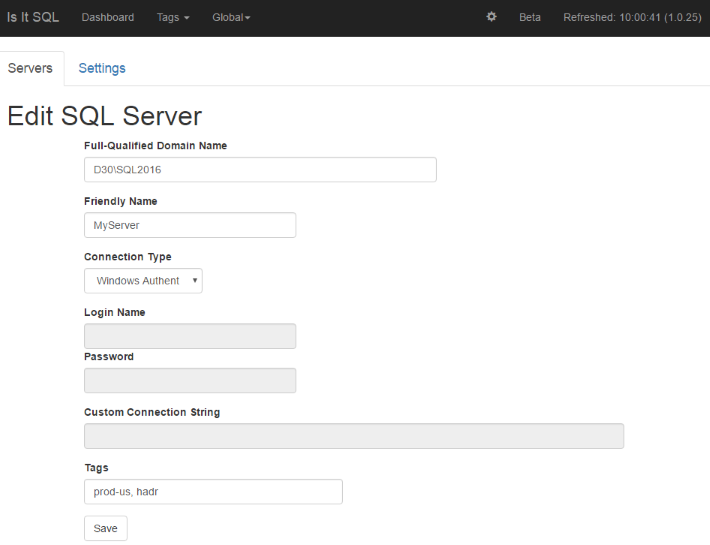
The first big change is that we now have a simple GUI for servers and settings. You can access this via the little gears icon in the header menu.

This replaces the servers.txt file. You can add, edit and delete servers through this.

If you're upgrading, it will import your servers.txt and rename it as servers_imported_YYYYMMDD.txt or something like that. I'd also encourage you to delete this file -- especially if it has custom connection strings with passwords.

All the server connections are stored in connections.json in the config directory. Any password or custom connection string is encrypted in the file. It's encrypted using the Windows DPAPI based on the account that is running the application. This makes changing the service account or machine hosting this tricky so I encourage you to get that right.

New Server URLs

Previously every server was assigned a URL in the format http://localhost:8143/server/S1. And the number part was assigned based on the order of the server in servers.txt. Putting the servers in a JSON configuration file and controlling the edit process means I can finally have consistent URLs. And of course they're GUIDs!

So the URL for a server is now something like this:

http://localhost:8143/server/f8e451b9-d2a2-472a-be8a-7ec90df23347

And that GUID won't change. That should make it easier to bookmark servers.

Settings

There are a few basic settings you can control. These include:

  • The port the service uses to serve the web site. I'd love to use port 80 but IIS usually takes that. This lets you run on any port you want.

  • The number of servers that will be polled concurrently. This defaults to 4 times the number of cores but will always be at least 8. That's been a reasonable default up to a hundred servers or so.

  • Backup alert thresholds. Signing up for the newsletter gets you access to some of the advanced features. One of those is alerts on missing backups. You can now set the site-wide threshold for missing backups. It defaults to 36 hours for full or differential backups and 90 minutes for transaction log backups.

  • Admin page security. There's a setting that controls security on these settings and on editing servers. Right now the two options are anyone who can reach the web site can change this or limiting it to people that are running on the console of the server itself. These were simple to implement and seemed like a reasonable compromise. I've been testing Activity Directory authentication but that's a pretty big leap.

Every setting except the port takes effect immediately.

Other Changes

There are lots of smaller changes in this release.

  • If you've subscribed to the newsletter, you can monitor Availability Groups. This release shows failures for both the server and the AG if there are issues. Previously it would show the server as failed and would not update the AG.

  • We now have a favicon. And of course it's a bright orange question mark.

  • The application handles backups for servers in time zones east of you. SQL Server reports backup times in the local time zone so it was seeing future backups and not reporting missing transaction log backups properly. This now handles those correctly.

  • The menu is simplified. Anything that reports across servers now falls under a "Global" menu. This includes Availability Groups, Backup Issues, Database Mirroring Status, and the Summary Page.

Give it a try and let me know what you think. My email is in the README or you can use the scaleSQL contact page to reach me. I also added an Is It SQL support forum to the SQLTeam Forums if you'd like to chat there.

13 May 19:59

Introducing Neo4j 3.2: The Graph Foundation for Internet Scale Applications

by A.R. Guess

by Angela Guess A new press release reports, “Neo Technology, creator of Neo4j, the world’s leading graph database, today announced the release of Neo4j 3.2, a major product release that introduces new enterprise scaling, governance and security capabilities and improves native graph performance, which make it easier to deploy Neo4j at a global scale. Neo4j […]

The post Introducing Neo4j 3.2: The Graph Foundation for Internet Scale Applications appeared first on DATAVERSITY.

13 May 19:59

Microsoft Build event announcements

by James Serra

Another Microsoft event and another bunch of exciting announcements.  At the Microsoft Build event this week, the major announcements in the data platform space were:

Azure Cosmos DB

Azure Cosmos DB is the next big leap in the evolution of DocumentDB.  Cosmos DB is Microsoft’s globally-distributed, horizontally scalable, multi-model database service.  It’s mission is to enable you to write highly scalable, globally distributed apps, easily.  With its turnkey support for global distribution, Azure Cosmos DB seamlessly makes your data available close to where your users are, anywhere around the world; it offers guaranteed low latency, well-defined consistency and high availability around the globe.  It allows you to elastically scale throughput and storage anywhere in the world, based on your needs, and offers a multitude of well-defined consistency models, data models and APIs – so you can select the right ones for your app.

To clear things up, it’s not a “new” product, but rather a renaming of DocumentDB with some additional new features.  Microsoft has transitioned all existing DocumentDB customers and their data to Azure Cosmos DB for no additional charge.  It now natively supports four multiple data models: key-value (new), documents, graphs (new), and columnar.  It also supports many APIs for accessing data including MongoDB and DocumentDB SQL for document model support, Gremlin (preview) for graph model support, and Azure Tables (preview) for key-value model support.  Since it now supports more than just the document model, it would not of made sense to keep the name as DocumentDB, hence the new name.

Microsoft also announced a new consistency level, Consistent Prefix, so that replicas can only move forward in time, as opposed to converging forward in time.  This brings it to a total of five consistency levels developers can use to help unblock programming challenges and binary tradeoffs to better navigate the CAP theorem.  Also introduced are some major improvements to the query engine, which manifests itself as a 50-400% Request Units (RU) reduction per query.

All Azure Table storage accounts will be automatically upgraded to Azure Cosmos DB accounts too, and gain these great new capabilities – including global distribution, automatic indexing, dedicated throughput, and low latency.

For more info, see Azure Cosmos DB: The industry’s first globally-distributed, multi-model database service, A technical overview of Azure Cosmos DBWelcome to Azure Cosmos DB.

Azure Database Migration Service (DMS)

Microsoft announced (See Azure Database Migration Service announcement at //build) a limited preview of the Azure Database Migration Service which will streamline the process for migrating on-premises databases to Azure.

Using this new database migration service simplifies the migration of existing on-premises SQL Server, Oracle, and MySQL databases to Azure, whether your target database is Azure SQL Database, Azure SQL Database Managed Instance or Microsoft SQL Server in an Azure virtual machine.

The automated workflow with assessment reporting, guides you through the necessary changes prior to performing the migration.  When you are ready, the service will migrate the source database to Azure.  For an opportunity to participate in the limited preview of this service, sign up.

Think of this as similar to the SQL Server Migration Assistant (SSMA), except this is an Azure PaaS so there is no VMs to create or software to install.

Azure Database for MySQL and PostgreSQL

Microsoft announced (See Microsoft extends Azure managed database services with introduction of MySQL and PostgreSQL) the preview of managed database services with Azure Database for MySQL and Azure Database for PostgreSQL.

These services are built on the intelligent, trusted and flexible Azure relational database platform. This platform extends similar managed services benefits, global Azure region reach, and innovations that currently power Azure SQL Database and Azure SQL Data Warehouse services to the MySQL and PostgreSQL database engines. Starting at preview, customers can use the service to build and deploy their applications using MySQL version 5.6/5.7 and PostgreSQL version 9.5/9.6 in 11 regions across US, Europe, Asia and Japan.

To get started at Azure Database for MySQL and Azure Database for PostgreSQL.

More info:

Microsoft’s New Azure Database Offerings Challenge (and Maybe Surpass) AWS Cloud

Inside Microsoft’s Cosmos DB

13 May 19:59

24 Hours of PASS (May 2017): Recordings now available!

by Sergio Govoni

The sessions of the event 24 Hours of PASS Data Security and Data Quality edition (held the last May 2017 on 3rd and 4th) were recorded and now they are available for online streaming!

If you have missed one session in particular or the entire event, you can view or review your preferred sessions.

Each video is available on detail page of the related session. Thanks to the Sponsors, the 24 Hours of PASS has been presented at no cost for you!

Enjoy the videos!