


Read more of this story at Slashdot.

Read more of this story at Slashdot.
Read more of this story at Slashdot.

Read more of this story at Slashdot.

Read more of this story at Slashdot.

Mrdennynow
Read more of this story at Slashdot.

Mrdennynow
Read more of this story at Slashdot.

Read more of this story at Slashdot.

Mrdennynow
Read more of this story at Slashdot.

Today I faced a really nasty problem. I’m really getting in love with Azure and especially with SQL Server hosted in Azure VM. It opens up a huge amount of opportunities, for small, medium and big companies, since they can have everything they ask for but without the burden of having to maintain a server factory.
That’s very cool, but the inability to physically log into server can give you some headaches if RDP doesn’t work as expected. For example when you’re not in a domain and your password expires. It seems that no-one in Microsoft cared to fix the problem, since is still there even if people reported it back in 2013
http://www.flexecom.com/unable-to-change-password-logging-into-an-azure-hosted-virtual-server/
Today I had exactly the same problem. At some point the RDP client started to return me the error
“The Local Security Authority Cannot be Contacted”
After having spent some time trying to find out what could be the cause of the error (even following some wrong roads, given the fact that the error is just too generic), I thought that could be due to the fact that the password was expired. And that was exactly the problem. This post (even older than 2013, so the problem is even older….) http://blog.mnewton.com/articles/Solution-RDP-The-Local-Security-Authority-cannot-be-contacted/ confirmed me that my idea could be correct.
Unfortunately the aforementioned posts states the problem, but doesn’t really describe how to solve it in my specific case. The main problem is that if the server requires the Network Level Authentication, the RDP client won’t show you the “Password Expired” screen, so you won’t be able to change the password. This means that you cannot access your VM anymore, which is not fair. By default NLA is enabled on Windows Server 2012 R2 and since I couldn’t log in, I couldn’t even disable it, so I was stuck with my problem.
Anyway, at least now I know where to look for. Still, I had to solve another problem: how do I change a password for an Azure VM to which I cannot connect using RDP? Luckily it seems that there are a lot of people that forgot their passwords, and so they need to reset it, so the problem is well known. Here there are two post that explain how to do it using PowerShell and the related Azure PowerShell Module.
http://serverfault.com/questions/446699/how-to-reset-the-admin-password-on-vm-on-windows-azure
The PowerShell script works if and only if the VM Agent is installed. Luckily this is the default option when you provision a new Azure VM, so you haven’t anything special do to in order to have it installed.
http://azure.microsoft.com/blog/2014/04/11/vm-agent-and-extensions-part-1/
Well, now you know it, keep it in mind in case you find yourself in the same situation.
To help ring in the new year, here - enjoy this "Best of WTF" classic that ran in 2014!
Tom works as a pentester and, as such, gets paid big bucks for finding flaws in his clients' websites usually because he has to find less than obvious 'gotcha'-level flaws.
While testing a critical web application for a very large corporate client, he noticed some odd behavior surrounding a page that validates user logins.
Apparently, the original developer decided that it would be a good idea to send the database credentials to the client in a snippet of JavaScript and then use them to formulate a GET request to the server, presumably where the user is validated.
I'm not sure what other surprises Tom found while working for this particular client, but I hope the developer's reach was mercifully limited.
 [Advertisement] Release!
is a light card game about software and the people who make it. Order the massive, 338-card Kickstarter Edition (which includes The Daily Wtf Anti-patterns expansion) for only $27, shipped!
[Advertisement] Release!
is a light card game about software and the people who make it. Order the massive, 338-card Kickstarter Edition (which includes The Daily Wtf Anti-patterns expansion) for only $27, shipped!
Read more of this story at Slashdot.

Read more of this story at Slashdot.

Mrdennynow
Read more of this story at Slashdot.

Read more of this story at Slashdot.

Read more of this story at Slashdot.

Read more of this story at Slashdot.

Read more of this story at Slashdot.

Read more of this story at Slashdot.


In my presentations on how to make data models (and data modelers) more valuable, I talk about spending 15 minutes during your day, every day, doing something to improve the quality of the models. Refining definitions (or adding missing ones), laying out a diagram so that it’s more clear, enhancing a diagram so that it’s better at communicating, etc.
The small things add up to big things when they are done every day. If you put them off until you “have time”, they re never going to happen.
This 15-minutes a day works wonders for you, personally, too. Imagine that if you had done something every day, for the last year, what you’d have now, 365 days later. Learning a new word, doing some yoga, walking, watching a how-to video, writing to someone to thank them for something they did for you or for someone else…the possibilities are endless.
New Year’s resolutions are a great way for setting goals. But life happens right now. Deliver on your resolutions one day at a time. Your data model will love it. And so will you.
Mrdennynow

(with apologies to Meghan Trainor)
Because you know
I’m all about the data
‘Bout the data, no trouble
I’m all about the data
‘Bout the data, no trouble
I’m all about the data
‘Bout the data, no trouble
I’m all about the data
‘Bout the data
Yeah, it’s pretty clear, I ain’t NoSQL
But I can love it, love it
Like I’m supposed to do
‘Cause I still got zoom zoom that in the database
With all the right facts in all the right places
I see the newbies are workin’ that drawing slop
We know that shit ain’t real
C’mon now, make it stop
If you got data models, just raise ‘em up
‘Cause a Zachman Framework is perfect
From the bottom to the top
Yeah, my mama she told me don’t worry about your joins
She says, “Data likes a little quality to keep it right.”
You know I won’t be no schemafree denormal Barbie doll
So if that’s what you’re into then go ahead and move along
Because you know I’m
All about the data
‘Bout the data, no trouble
I’m all about the data
‘Bout the data, no trouble
I’m all about the data
‘Bout the data, no trouble
I’m all about the data
‘Bout the data
Hey!

I’m bringing quality facts
Go ahead and tell polyschematics that
Normalized data, I know you think it’s slow
But I’m here to tell ya
Transactional data’s perfect from the bottom to the top
Yeah my mama she told me don’t worry about your joins
She says, “Data likes a little quality to keep it right.”
You know I won’t be no schemafree denormal Barbie doll
If eventual consistency’s your thing then move along
Because you know I’m
All about the data
‘Bout the data, no trouble
I’m all about the data
‘Bout the data, no trouble
I’m all about the data
‘Bout the data, no trouble
I’m all about the data
‘Bout the data
Because you know I’m
All about the data
‘Bout the data, no trouble
I’m all about the data
‘Bout the data, no trouble
I’m all about the data
‘Bout the data, no trouble
I’m all about the data
‘Bout the data
Because you know I’m
All about the data
‘Bout the data, no trouble
I’m all about the data
‘Bout the data, no trouble
I’m all about the data
‘Bout the data, no trouble
I’m all about the data
‘Bout the data
‘Bout the data, ’bout the data
Hey, hey, ooh
You know you love the data

Mrdennynow

No matter how many conflicts we have in what the world should be, how our projects should be run, or what tools we should use, we should be there for each other.
When you put big data to work, results can be beautiful. Especially when those results are as impactful as saving lives. Here are four best practice examples of how big data is being used in healthcare to improve, and often save, lives.
Aerocrine improves asthma care with near-real-time data
Millions of asthma sufferers worldwide depend on Aerocrine monitoring devices to diagnose and treat their disease effectively. But those devices are sensitive to small changes in ambient environment. That’s why Aerocrine is using a cloud analytics solution to boost reliability. Read more.
Virginia Tech advances DNA sequencing with cloud big data solution
DNA sequencing analysis is a form of life sciences research that has the potential to lead to a wide range of medical and pharmaceutical breakthroughs. However, this type of analysis requires supercomputing resources and Big Data storage that many researchers lack. Working through a grant provided by the National Science Foundation in partnership with Microsoft, a team of computer scientists at Virginia Tech addressed this challenge by developing an on-demand, cloud-computing model using the Windows Azure HDInsight Service. By moving to an on-demand cloud computing model, researchers will now have easier, more cost-effective access to DNA sequencing tools and resources, which could lead to even faster, more exciting advancements in medical research. Read more.
The Grameen Foundation expands global humanitarian efforts with cloud BI
Global nonprofit Grameen Foundation is dedicated to helping as many impoverished people as possible, which means continually improving the way Grameen works. To do so, it needed an ongoing sense of its programs’ performance. Grameen and Microsoft brought people and technology together to create a BI solution that helps program managers and financial staff: glean insights in minutes, not hours; expand services to more people; and make the best use of the foundation’s funding. Read more.
Ascribe transforms healthcare with faster access to information
Ascribe, a leading provider of IT solutions for the healthcare industry, wanted to help clinicians identify trends and improve services by supplying faster access to information. However, exploding volumes of structured and unstructured data hindered insight. To solve the problem, Ascribe designed a hybrid-cloud solution with built-in business intelligence (BI) tools based on Microsoft SQL Server 2012 and Windows Azure. Now, clinicians can respond faster with self-service BI tools. Read more.
Learn more about Microsoft’s big data solutions.
A question came up from a developer yesterday. He could see how to set a transaction isolation level but didn’t know how to determine the current transaction isolation level. That detail is available in the sys.dm_exec_sessions DMV.
Here’s an example:

And if you are running SQL Server 2012, you could always use CHOOSE instead:

What is a Data Lake?
Pentaho CTO James Dixon is credited with coining the term "Data Lake". As he describes it in his blog entry, "If you think of a Data Mart as a store of bottled water – cleansed and packaged and structured for easy consumption – the Data Lake is a large body of water in a more natural state. The contents of the Data Lake stream in from a source to fill the lake, and various users of the lake can come to examine, dive in, or take samples."
These days, demands for BI data stores are changing. BI data consumers not only require cleansed and nicely modeled data, updated on a daily basis, but also raw, uncleansed and unmodeled data which is available near real-time. With new and much more powerful tooling like Power BI, users can shape and cleanse data in a way that fits their personal needs without the help of the IT department. This calls for a different approach when it comes to offering data to these users.
BI data consumers also demand a very short time-to-market of new data, they don’t want to wait for a few months until data is made available by a BI team, they want it today. The raw uncleansed form of data in a Data Lake can be loaded very quickly because it’s suitable for generated data loading technologies and replication, which makes this short time-to-market possible. Once users have discovered the data and have acquired enough insights that they want to share with the entire organization in a conformed way, the data can be brought to traditional Data Warehouses and cubes in a predictable manner.
Furthermore there is rise in the presence of unstructured and or semi-structured data and the need to have “big data” available for adhoc analyses. To store and analyze these forms of data new technologies and data structures are required.
When the Data Lake comes in place a lot of data streams from sources into the “lake” without knowing up front if it is eligible for answering business questions. The data can’t be modeled yet, because it’s not clear how it will be used later on. Data consumers will get the possibility to discover data and find answers before they are even defined. This differs fundamentally from the concept of a Data Warehouse in which the data is delivered through predefined data structures, based on relevant business cases and questions.
Technology
From a technology view, a Data Lake is a repository which offers storage for large quantities and varieties of both unstructured, semi-structured and structured data derived from all possible sources. It can be formed by multiple underlying databases which store these different structured forms of data in both SQL and NoSQL technologies. 
For the semi-structured/unstructured side of data which is used for big data analytics, Data Lakes based on Hadoop and other NoSQL technologies are common. For the semi-structured/structured data, SQL technologies are the way to go.
In this blog post I will describe the semi-structured/structured, relational appearance of the Data Lake in the form of a SQL Server database: The Relational Data Lake. 
Extract Load (Transform)
Data in a Data Lake is in raw form. Transformations will not be performed during loading and relationships and constraints between tables will not be created which is the default for transactional replication and keeps the loading process as lean and fast as possible. Because of the lack of transformations, movement of the data follows the Extract-Load-(Transform) (EL(T)) pattern instead of the traditional E-T-L. This pattern makes loading of data to the Data Lake easier, faster and much more suitable to perform using replication technologies or generated SSIS processes, for example with BIML. This creates a very attractive time-to-market for data which is added to the Data Lake. Latency of data is as low as possible, preferable data is loaded in near real-time: data should stream into the lake continuously.
Transformations take place after the data is loaded into the Data Lake, where applicable. Cosmetic transformations like translations from technical object and column names to meaningful descriptions which end users understand or other lightweight transformations can be performed in new structures (like SQL views) that are created inside the Data Lake.
Unlike Data Marts and Data Warehouses, which are optimized for data analysis by storing only the required attributes and sometimes dropping data below the required level of aggregation, a Data Lake always retains all attributes and (if possible) all records. This way it will be future proof for solutions that will require this data in a later moment in time or for users that will discover the data.
Accessing data
Data is made accessible through structures which can either be accessed directly, or indirectly through the exposure as OData Feeds. These structures are secured and are the only objects end users or other processes have access to. The feeds can be accessed with any tool or technology that is best suited to the task at any moment in time, for example using Power BI tooling like Excel PowerPivot/PowerQuery.
We normally create SQL Views in which security rules and required transformation are applied.
The Data Lake also acts as a hub for other repositories and solutions like Data Warehouses and Operational Cubes.
Master Data
Success of the Data Lake depends on good master data. When end users discover new raw data from the Data Lake they need to be able to combine it with high quality master data to get proper insights. Therefore a master data hub is a must have when a Data Lake is created. This hub should just be a database with master data structures in it, master data management on this data is preferable but not required. The master data hub should be a standalone solution, independent from the other BI solutions, as master data isn’t part of these solutions but is only used as data source. It should be sourced independently too, preferable using master data tooling or using tools like SSIS. Just like with data from the Data Lake, master data should also only be accessed through structures which can also be exposed as OData Feeds.
Next to the purpose of combining master data with data from the Data Lake, the master data can be used as source for other BI solutions like Data Warehouses. In there, the master data structures are often used as Data Warehouse Dimensions. To prevent the unnecessary duplicate loading of master data in the Data Warehouse that already exists in the master data hub, it can be a good choice to leave the master data out of the Data Warehouse Dimensions. Only the business keys are stored which can be used to retrieve the data from the master data hub when required. This way the Data Warehouse remains slim and fast to load and master data is stored in a single centralized data store.
Architecture
The entire Data Lake architecture with all the described components are fit in the model below. From bottom to top the highlights are:

Data Lake Challenges
Setting up a Data Lake comes with many challenges, especially on the aspect of data governance. For example it’s easy to create any view in the Data Lake and lose control on who gets access to what data. From a business perspective it can be very difficult to deliver the master data structures that are so important for the success of the Data Lake. And from a user perspective wrong conclusions can be made by users who get insights from the raw data, therefore the Data Warehouse should still be offered as a clean trusted data structure for decision makers and a data source for conformed reports and dashboards.
Summary
The Data Lake can be a very valuable data store that complements the traditional Data Warehouses and Cubes that will stay as important as they are now for many years to come. But considering the increased amount and variety of data, the more powerful self-service ETL and data modeling tooling which appear and the shortened required time-to-market of near real-time data from source up and to the user, the Data Lake offers a future proof data store and hub that enables the answering of yet undefined questions and gives users personal data discovery and shaping possibilities.
Thanks go to my Macaw colleague Martijn Muilwijk for brainstorming on this subject and reviewing this blog post.

A common refrain we hear when presenting at technical conferences and training events is “How can I get promoted into IT management?” We hear this so often that we’ve worked out a sort of mental flowchart for the subsequent dialog. (We are IT people after all). And our exploratory question is, “Why would you want a promotion into management?”
The variety of answers is as unique as the people who ask the question, but they are pretty easy to aggregate into several broad categories:
Read the rest of this article at ForITPros.com
The post First Ask “Why”, then Ask “How” appeared first on Kevin Kline.
At a client site today and they asked me about a warning that they got every time they manually failed over their SQL Server availability group.
It said: “The current WSFC cluster quorum vote configuration is not recommended for the availability group.” They were puzzled by this as they had a valid quorum configuration. In their case, they had a two node cluster using MNS (majority node set) and a fileshare witness.
The problem with that message is that it is returned when the node voting weight is not visible.
Windows Server 2008 failover clustering introduced node-based voting but later an option was provided to adjust the voting weight for each node. If the cluster is based on Windows Server 2008 or Windows Server 2008 R2, and KB2494036 has not been applied, even though each node has a vote, the utilities that check voting weight are not supplied a weight value. You can see this by querying:
SELECT * FROM sys.dm_hadr_cluster_members;
This will return a row for each cluster member but will have a missing vote weight.
Applying the KB hotfix will make this DMV return the correct values, and will make this invalid warning disappear.
Sometimes a forum response should just be a blog post… so here’s something I wrote over at http://dba.stackexchange.com/a/86765/4103.
The question was somewhat staged I think, being from Paul White (@sql_kiwi), who definitely knows this stuff already.
His question:
I often need to select a number of rows from each group in a result set.
For example, I might want to list the 'n' highest or lowest recent order values per customer.
In more complex cases, the number of rows to list might vary per group (defined by an attribute of the grouping/parent record). This part is definitely optional/for extra credit and not intended to dissuade people from answering.
What are the main options for solving these types of problems in SQL Server 2005 and later? What are the main advantages and disadvantages of each method?
AdventureWorks examples (for clarity, optional)
TransactionHistory table, for each product that starts with a letter from M to R inclusive. n history lines per product, where n is five times the DaysToManufactureProduct attribute. TransactionDate, tie-break on TransactionID. And my answer:
Let's start with the basic scenario.
If I want to get some number of rows out of a table, I have two main options: ranking functions; or TOP.
First, let's consider the whole set from Production.TransactionHistory for a particular ProductID:
SELECT h.TransactionID, h.ProductID, h.TransactionDate
FROM Production.TransactionHistory h
WHERE h.ProductID = 800;
This returns 418 rows, and the plan shows that it checks every row in the table looking for this - an unrestricted Clustered Index Scan, with a Predicate to provide the filter. 797 reads here, which is ugly.
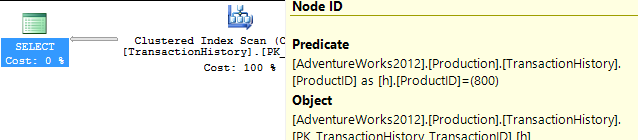
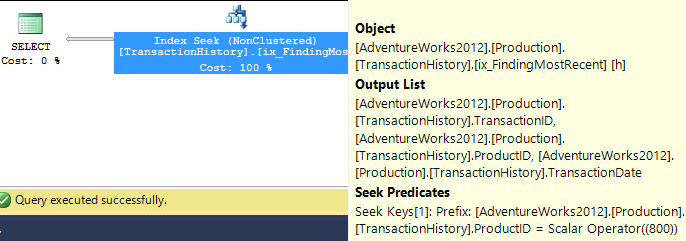
So let's be fair to it, and create an index that would be more useful. Our conditions call for an equality match on ProductID, followed by a search for the most recent by TransactionDate. We need the TransactionID returned too, so let's go with: CREATE INDEX ix_FindingMostRecent ON Production.TransactionHistory (ProductID, TransactionDate) INCLUDE (TransactionID);.
Having done this, our plan changes significantly, and drops the reads down to just 3. So we're already improving things by over 250x or so...
Now that we've levelled the playing field, let's look at the top options - ranking functions and TOP.
WITH Numbered AS
(
SELECT h.TransactionID, h.ProductID, h.TransactionDate, ROW_NUMBER() OVER (ORDER BY TransactionDate DESC) AS RowNum
FROM Production.TransactionHistory h
WHERE h.ProductID = 800
)
SELECT TransactionID, ProductID, TransactionDate
FROM Numbered
WHERE RowNum <= 5;

SELECT TOP (5) h.TransactionID, h.ProductID, h.TransactionDate
FROM Production.TransactionHistory h
WHERE h.ProductID = 800
ORDER BY TransactionDate DESC;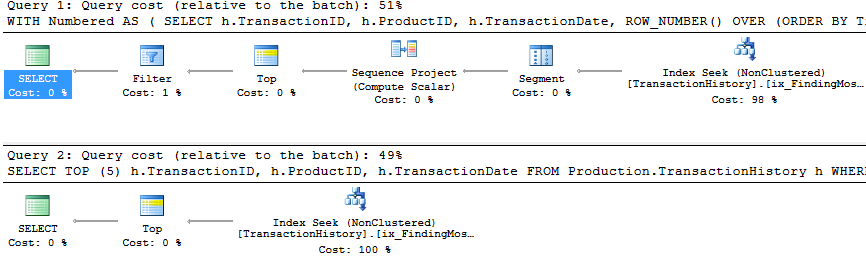
You will notice that the second (TOP) query is much simpler than the first, both in query and in plan. But very significantly, they both use TOP to limit the number of rows actually being pulled out of the index. The costs are only estimates and worth ignoring, but you can see a lot of similarity in the two plans, with the ROW_NUMBER() version doing a tiny amount of extra work to assign numbers and filter accordingly, and both queries end up doing just 2 reads to do their work. The Query Optimizer certainly recognises the idea of filtering on a ROW_NUMBER() field, realising that it can use a Top operator to ignore rows that aren't going to be needed. Both these queries are good enough - TOP isn't so much better that it's worth changing code, but it is simpler and probably clearer for beginners.
So this work across a single product. But we need to consider what happens if we need to do this across multiple products.
The iterative programmer is going to consider the idea of looping through the products of interest, and calling this query multiple times, and we can actually get away with writing a query in this form - not using cursors, but using APPLY. I'm using OUTER APPLY, figuring that we might want to return the Product with NULL, if there are no Transactions for it.
SELECT p.Name, p.ProductID, t.TransactionID, t.TransactionDate
FROM
Production.Product p
OUTER APPLY (
    SELECT TOP (5) h.TransactionID, h.ProductID, h.TransactionDate
    FROM Production.TransactionHistory h
    WHERE h.ProductID = p.ProductID
    ORDER BY TransactionDate DESC
) t
WHERE p.Name >= 'M' AND p.Name < 'S';
The plan for this is the iterative programmers' method - Nested Loop, doing a Top operation and Seek (those 2 reads we had before) for each Product. This gives 4 reads against Product, and 360 against TransactionHistory.
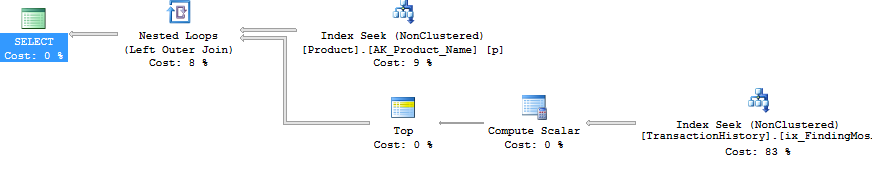
Using ROW_NUMBER(), the method is to use PARTITION BY in the OVER clause, so that we restart the numbering for each Product. This can then be filtered like before. The plan ends up being quite different. The logical reads are about 15% lower on TransactionHistory, with a full Index Scan going on to get the rows out.

Significantly, though, this plan has an expensive Sort operator. The Merge Join doesn't seem to maintain the order of rows in TransactionHistory, the data must be resorted to be able to find the rownumbers. It's fewer reads, but this blocking Sort could feel painful. Using APPLY, the Nested Loop will return the first rows very quickly, after just a few reads, but with a Sort, ROW_NUMBER() will only return rows after a most of the work has been finished.
Interestingly, if the ROW_NUMBER() query uses INNER JOIN instead of LEFT JOIN, then a different plan comes up.

This plan uses a Nested Loop, just like with APPLY. But there's no Top operator, so it pulls all the transactions for each product, and uses a lot more reads than before - 492 reads against TransactionHistory. There isn't a good reason for it not to choose the Merge Join option here, so I guess the plan was considered 'Good Enough'. Still - it doesn't block, which is nice - just not as nice as APPLY.
The PARTITION BY column that I used for ROW_NUMBER() was h.ProductID in both cases, because I had wanted to give the QO the option of producing the RowNum value before joining to the Product table. If I use p.ProductID, we see the same shape plan as with the INNER JOIN variation.
WITH Numbered AS
(
SELECT p.Name, p.ProductID, h.TransactionID, h.TransactionDate, ROW_NUMBER() OVER (PARTITION BY p.ProductID ORDER BY h.TransactionDate DESC) AS RowNum
FROM Production.Product p
LEFT JOIN Production.TransactionHistory h ON h.ProductID = p.ProductID
WHERE p.Name >= 'M' AND p.Name < 'S'
)
SELECT Name, ProductID, TransactionID, TransactionDate
FROM Numbered n
WHERE RowNum <= 5;
But the Join operator says 'Left Outer Join' instead of 'Inner Join'. The number of reads is still just under 500 reads against the TransactionHistory table.

Anyway - back to the question at hand...
We've answered question 1, with two options that you could pick and choose from. Personally, I like the APPLY option.
To extend this to use a variable number (question 2), the 5 just needs to be changed accordingly. Oh, and I added another index, so that there was an index on Production.Product.Name that included the DaysToManufacture column.
WITH Numbered AS
(
SELECT p.Name, p.ProductID, p.DaysToManufacture, h.TransactionID, h.TransactionDate, ROW_NUMBER() OVER (PARTITION BY h.ProductID ORDER BY h.TransactionDate DESC) AS RowNum
FROM Production.Product p
LEFT JOIN Production.TransactionHistory h ON h.ProductID = p.ProductID
WHERE p.Name >= 'M' AND p.Name < 'S'
)
SELECT Name, ProductID, TransactionID, TransactionDate
FROM Numbered n
WHERE RowNum <= 5 * DaysToManufacture;

SELECT p.Name, p.ProductID, t.TransactionID, t.TransactionDate
FROM
Production.Product p
OUTER APPLY (
    SELECT TOP (5 * p.DaysToManufacture) h.TransactionID, h.ProductID, h.TransactionDate
    FROM Production.TransactionHistory h
    WHERE h.ProductID = p.ProductID
    ORDER BY TransactionDate DESC
) t
WHERE p.Name >= 'M' AND p.Name < 'S';
And both plans are almost identical to what they were before!
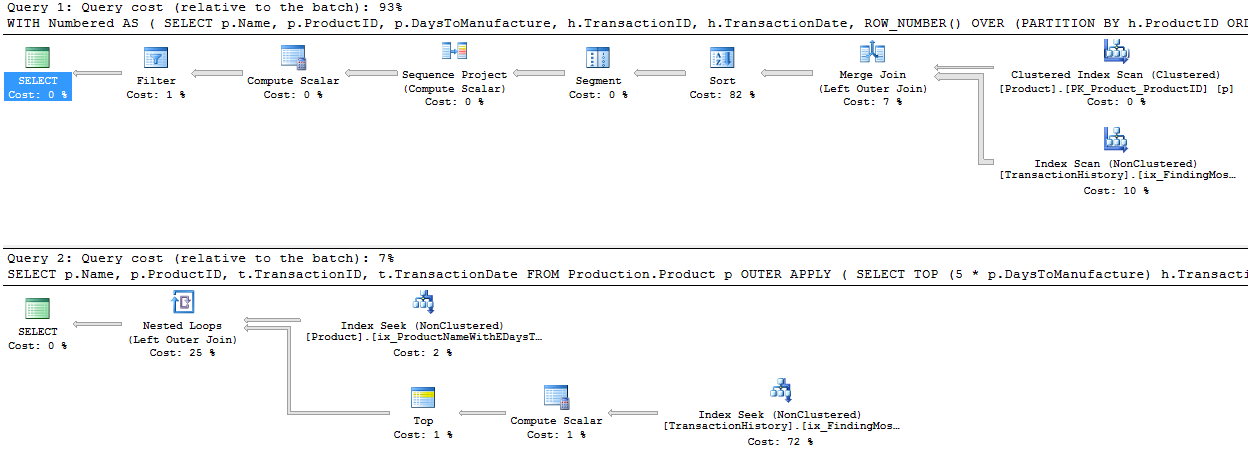
Again, ignore the estimated costs - but I still like the TOP scenario, as it is so much more simple, and the plan has no blocking operator. The reads are less on TransactionHistory because of the high number of zeroes in DaysToManufacture, but in real life, I doubt we'd be picking that column. ;)
One way to avoid the block is to come up with a plan that handles the ROW_NUMBER() bit to the right (in the plan) of the join. We can persuade this to happen by doing the join outside the CTE. (Edited because of a silly typo that meant that I turned my Outer Join into an Inner Join.)
WITH Numbered AS
(
SELECT h.TransactionID, h.ProductID, h.TransactionDate, ROW_NUMBER() OVER (PARTITION BY ProductID ORDER BY TransactionDate DESC) AS RowNum
FROM Production.TransactionHistory h
)
SELECT p.Name, p.ProductID, t.TransactionID, t.TransactionDate
FROM Production.Product p
LEFT JOIN Numbered t ON t.ProductID = p.ProductID
  AND t.RowNum <= 5 * p.DaysToManufacture
WHERE p.Name >= 'M' AND p.Name < 'S';
The plan here looks simpler - it's not blocking, but there's a hidden danger.
Notice the Compute Scalar that's pulling data from the Product table. This is working out the 5 * p.DaysToManufacture value. This value isn't being passed into the branch that's pulling data from the TransactionHistory table, it's being used in the Merge Join. As a Residual.

So the Merge Join is consuming ALL the rows, not just the first however-many-are-needed, but all of them and then doing a residual check. This is dangerous as the number of transactions increases. I'm not a fan of this scenario - residual predicates in Merge Joins can quickly escalate. Another reason why I prefer the APPLY/TOP scenario.
In the special case where it's exactly one row, for question 3, we can obviously use the same queries, but with 1 instead of 5. But then we have an extra option, which is to use regular aggregates.
SELECT ProductID, MAX(TransactionDate)
FROM Production.TransactionHistory
GROUP BY ProductID;
A query like this would be a useful start, and we could easily modify it to pull out the TransactionID as well for tie-break purposes (using a concatenation which would then be broken down), but we either look at the whole index, or we dive in product by product, and we don't really get a big improvement on what we had before in this scenario.
But I should point out that we're looking at a particular scenario here. With real data, and with an indexing strategy that may not be ideal, mileage may vary considerably. Despite the fact that we've seen that APPLY is strong here, it can be slower in some situations. It rarely blocks though, as it has a tendency to use Nested Loops, which many people (myself included) find very appealing.
I haven't tried to explore parallelism here, or dived very hard into question 3, which I see as a special case that people rarely want based on the complication of concatenating and splitting. The main thing to consider here is that these two options are both very strong.
I prefer APPLY. It's clear, it uses the Top operator well, and it rarely causes blocking.

A while back, I told you about some of the coolest new features in the recent RTM for SQL Server. The RTM was announced during the “Accelerate your insights” webcast by a boatload of Microsoft’s top executives, including CEO Satya Nadella, COO Kevin Turner, and CVP Quentin Clark. They had lots of useful information to share and demos to show, but a few other items of note about Azure SQL Databases may have dropped under your radar because they came to light a few days after the big dog-and-pony show/webcast.
Read the rest of the article at http://www.dbta.com/Columns/SQL-Server-Drill-Down/Other-News-in-SQL-Server-2014-RTM-97568.aspx
The post DBTA – Other News in SQL Server 2014 RTM appeared first on Kevin Kline.
On the way to the data vault, Dave and his coworkers tried to list every rain-related song they knew. Here Comes The Rain Again was an easy one. Ryan, raised in the nineties, offered I'm Only Happy When It Rains. Justine tried to get out in front of the competition by rapid-firing November, Purple, and No. Thad, veteran of a hundred karaoke battles, offered Blame It On The Rain.
But none of them had heard It's Raining On The Robot before.
That's all the caller had said: the Red Phone, the one which never rings, had jangled to life and the whole support team had just stared at it, trying to remember what it meant. The voice on the other line yelped only those five ominous words before hanging up, so the entire team scampered to Building Three and down to the sub-basement to investigate. Turned out the caller hadn't been speaking in riddles: there was a steady fountain of water pouring through a vent hole in the ceiling, puddling on the roof of the venerable STK Powderhorn silo, and starting to drip into the tape libraries within. Whoever had stopped by the silo and noticed the downpour was long gone, hopefully to find their STK consultant, so the support crew got to work on cleanup. Justine found a couple mops and buckets, and she and Ryan began to wrangle the growing pool on the data vault floor, arguing over the lyrics to Raining In My Heart as they went. Dave and Thad rolled their eyes and headed upstairs to find the cause of the leak, though Dave couldn't help himself from humming a few bars of Who'll Stop The Rain as they sought the right room.
Dave found the culprit when he happened to glance into the decommissioned server room off the hallway above the data vault. Building Three was the oldest building on the company campus, and it had central heating; an odd choice for a datacenter, but so it goes. Word had recently come down from on high that the radiators were to be replaced, and this old server room was first on the list. The hot-water pipe servicing the radiator had been cut, a simple job of freezing the pipe with dry ice, making the cut, then sealing the ends before it thawed. The plumber was some kind of maverick, apparently, because he'd elected to insert a bold new "taking an extended lunch break" step into the process. When the ice melted, the radiator had spilled its guts, washing twenty years of accumulated dust and grime from under the false floor into the data vault below.
Dave and Thad returned downstairs to find Carter, the STK consultant, on the scene. The Powderhorn was a tricky beast, so he was kept on retainer and it hadn't taken long for him to show up with a heavy-duty blue briefcase marked "Emergency Use Only". Justine and Ryan were soaked to the knees, leaning on their mops as they watched Carter carefully scan the rows and rows of tapes in the silo, removing and setting aside any that showed evidence of wetness. When he was done, he set the briefcase on a table and reverently unlatched it to reveal... a hair dryer and an extension cord. So armed, he proceeded to return his moistened charge to its former, working state. With disaster averted and only a few dozen tapes destroyed, the support team dispersed to let Carter finish his work. When Dave and Justine popped by Building Three days later to confirm that the robot was humming dryly along, they saw that Carter had implemented a new emergency protocol: leaning in the corner of the vault was a big roll of sheet plastic, marked "Emergency Use Only".
 [Advertisement] Manage IT infrastructure as code across all environments with Puppet. Puppet Enterprise now offers more control and insight, with role-based access control, activity logging and all-new Puppet Apps. Start your free trial today!
SQL Server 2014 DML Triggers are often a point of contention between Developers and DBAs, between those who customize a database application and those who provides it. They are often the first database objects investigated when the performance degrades. They seem easy to write, but writing efficient Trigger, though complex have a very important characteristic: they allow solving problems that cannot be managed in any other application layer. Therefore, if you cannot work without them, in this article you will learn tricks and best practices for writing and managing them efficiently.
All examples in this article are based on AdventureWorks2014 database that you can download from codeplex website at this link.
Introduction
A Trigger is a special type of stored procedure: it is not called directly, but it is activated on a certain event with special rights that allow you to access in-coming and out-coming data that are stored in special virtual tables called Inserted and Deleted. Triggers exist in SQL Server since the version 1.0, even before CHECK constraint. They always work in the same unit-of-work of the T-SQL statement that has called them. There are different types of Triggers: Logon Trigger, DDL Trigger and DML Trigger; the most known and used type is Data Manipulation Language Trigger, also known as DML Trigger. This article treats only aspects related to DML Triggers.
There are many options that modify run time Triggers’ behavior, they are:
Each of these options has, of course, a default value in respect to the best practices of Triggers development. The first three options are server level options and you can change their default value using sp_configure system stored procedure, whereas the value of the last one can be set at the database level.
Are Triggers useful or damaging?
What do you think about Triggers? In your opinion, based on your experience, are they useful or damaging?
You will meet people who say: “Triggers are absolutely useful” and other people who say the opposite. Who is right? Reading the two bulleted lists you will find the main reasons of the two different theory about Triggers.
People say that Triggers are useful because with them:
People say that Triggers are damaging because:
As usual the truth is in the middle. I think that Triggers are a very useful tool that you could use when there are no other ways to implement a database solution as efficiently as a Trigger can do, but the user has to test them very well before the deployment in a production environment.
Triggers activation order
SQL Server has no limitation about the number of Triggers that you can define on a table, but you cannot create more than 2.147.483.647 objects per database; so that the total of Table, View, Stored Procedure, User-Defined Function, Trigger, Rule, Default and Constraint must be lower than, or equal to this number (that is the maximum number that will be represented by the integer data type).
Now, supposing that we have a table with multiple Triggers, all of them ready to fire on the same statement type, for example on the INSERT statement: “Have you ever asked yourself which is the exact activation order for those Triggers?” In other worlds, is it possible to guarantee a particular activation order?
The Production.Product table in the AdventureWorks2014 database has no Triggers by design. Let’s create, now, three DML Triggers on this table, all of them active for the same statement type: the INSERT statement. The goal of these Triggers is printing an output message that allows us to observe the exact activation order. The following piece of T-SQL code creates three sample DML AFTER INSERT Triggers on Production.Product table.
USE [AdventureWorks2014];
GO
-- Create Triggers on Production.Product
CREATE TRIGGER Production.TR_Product_INS_1 ON Production.Product AFTER INSERT
AS
PRINT 'Message from TR_Product_INS_1';
GO
CREATE TRIGGER Production.TR_Product_INS_2 ON Production.Product AFTER INSERT
AS
PRINT 'Message from TR_Product_INS_2';
GO
CREATE TRIGGER Production.TR_Product_INS_3 ON Production.Product AFTER INSERT
AS
PRINT 'Message from TR_Product_INS_3';
GO
Let’s see all Triggers defined on Production.Product table, to achieve this task we will use the sp_helptrigger system stored procedure as shown in the following piece of T-SQL code.
USE [AdventureWorks2014];
GO
EXEC sp_helptrigger 'Production.Product';
GO
The output is shown in the following picture.

Picture 1 – All Triggers defined on Production.Product table
Now the question is: Which will be the activation order for these three Triggers? We can answer to this question executing the following INSERT statement on Production.Product table, when we execute it, all the DML INSERT Triggers fire.
USE [AdventureWorks2014];
GO
INSERT INTO Production.Product
(
Name, ProductNumber, MakeFlag, FinishedGoodsFlag, SafetyStockLevel,
ReorderPoint, StandardCost, ListPrice, DaysToManufacture, SellStartDate,
RowGUID, ModifiedDate
)
VALUES
(
N'CityBike', N'CB-5381', 0, 0, 1000, 750, 0.0000, 0.0000, 0, GETDATE(),
NEWID(), GETDATE()
);
GO
The output returned shows the default Triggers activation order.
Message from TR_Product_INS_1
Message from TR_Product_INS_2
Message from TR_Product_INS_3
As you can see in this example, Triggers activation order coincides with the creation order, but by design, Triggers activation order is undefined.
If you want to guarantee a particular activation order you have to use the sp_settriggerorder system stored procedure that allows you to set the activation of the first and of the last Trigger. This configuration can be applied to the Triggers of each statement (INSERT/UPDATE/DELETE). The following piece of code uses sp_settriggerorder system stored procedure to set the Production.TR_Product_INS_3 Trigger as the first one to fire when an INSERT statement is executed on Production.Product table.
USE [AdventureWorks2014];
GO
EXEC sp_settriggerorder
@triggername = 'Production.TR_Product_INS_3'
,@order = 'First'
,@stmttype = 'INSERT';
GO
At the same way, you can set the last Trigger fire.
USE [AdventureWorks2014];
GO
EXEC sp_settriggerorder
@triggername = 'Production.TR_Product_INS_2'
,@order = 'Last'
,@stmttype = 'INSERT';
GO
Let’s see the new Triggers activation order by executing another INSERT statement on Production.Product table.
USE [AdventureWorks2014];
GO
INSERT INTO Production.Product
(
Name, ProductNumber, MakeFlag, FinishedGoodsFlag, SafetyStockLevel,
ReorderPoint, StandardCost, ListPrice, DaysToManufacture, SellStartDate,
RowGUID, ModifiedDate
)
VALUES
(
N'CityBike Pro', N'CB-5382', 0, 0, 1000, 750, 0.0000, 0.0000, 0, GETDATE(),
NEWID(), GETDATE()
);
GO
The returned output shows our customized Triggers activation order.
Message from TR_Product_INS_3
Message from TR_Product_INS_1
Message from TR_Product_INS_2
In this session you have learnt how to set the activation of the first and of the last Trigger in a multiple DML AFTER INSERT Triggers scenario. Probably, one question has come to your mind: “May I set only the first and the last Trigger?” The answer is: “Yes, currently you have the possibility to set only the first Trigger and only the last Trigger for each statement on a single table”; as a friend of mine says (he is a DBA): “You can set the activation only of the first and of the last Trigger because you should have three Triggers maximum for each statement on a single table! The sp_settriggerorder system stored procedure allows you to set the first and the last Trigger fires, so that the third one will be in the middle, between the first and the last”.
Triggers must be thought to work on multiple rows
One of the most frequent mistakes I have seen during my experience in Triggers debugging and tuning is: the author of the Trigger doesn’t consider that his Trigger will work on multiple rows, sooner or later! I have seen many Triggers, especially those ones that implement domain integrity constraints, which were not thought to work on multiple rows. This mistake, in certain cases, produces the storing of incorrect data (an example will follow).
Suppose that you have to develop a DML AFTER INSERT Trigger to avoid to store values lower than 10 in the SafetyStockLevel column of the Production.Product table in the AdventureWorks2014 database. This customized business logic may be required to guarantee no production downtime in your company when a supplier is late in delivering.
The following piece of T-SQL code shows the CREATE statement for the Production.TR_Product_StockLevel Trigger.
USE [AdventureWorks2014];
GO
CREATE TRIGGER Production.TR_Product_StockLevel ON Production.Product
AFTER INSERT AS
BEGIN
/*
Avoid to insert products with value of safety stock level lower than 10
*/
BEGIN TRY
DECLARE
@SafetyStockLevel SMALLINT;
SELECT
@SafetyStockLevel = SafetyStockLevel
FROM
inserted;
IF (@SafetyStockLevel < 10)
THROW 50000, N'Safety Stock Level cannot be lower than 10!', 1;
END TRY
BEGIN CATCH
IF (@@TRANCOUNT > 0)
ROLLBACK;
THROW; -- Re-Throw
END CATCH;
END;
GO
A very good habit, before applying Triggers and changes (in general) in the production environment, is to spend time to test the Trigger code, especially for the borderline cases and values. So, in this example you have to test if this Trigger is able to reject each INSERT statement that tries to store values lower than 10 into SafetyStockLevel column of the Production.Product table. The first test you can do, for example, is trying to insert one wrong value to observe the error caught by the Trigger. The following statement tries to insert a product with SafetyStockLevel lower than 10.
USE [AdventureWorks2014];
GO
-- Test one: Try to insert one wrong product
INSERT INTO Production.Product
(Name, ProductNumber, MakeFlag, FinishedGoodsFlag, SafetyStockLevel,
ReorderPoint, StandardCost, ListPrice, DaysToManufacture,
SellStartDate, rowguid, ModifiedDate)
VALUES
(N'Carbon Bar 1', N'CB-0001', 0, 0, 3 /* SafetyStockLevel */,
750, 0.0000, 78.0000, 0, GETDATE(), NEWID(), GETDATE());
As you expect, SQL Server has rejected the INSERT statement because the value assigned to SafetyStockLevel is lower than 10 and the Trigger Production.TR_Product_StockLevel has blocked the statement. The output shows that Trigger worked well.
Msg 50000, Level 16, State 1, Procedure TR_Product_StockLevel, Line 17
Safety Stock Level cannot be lower than 10!
Now you have to test the Trigger for statements that try to insert multiple rows. The following statement tries to insert two products: the first product has a wrong value for SafetyStockLevel column, whereas the value in second one is right. Let’s see what happens.
USE [AdventureWorks2014];
GO
-- Test two: Try to insert two products
INSERT INTO Production.Product
(Name, ProductNumber, MakeFlag, FinishedGoodsFlag, SafetyStockLevel,
ReorderPoint, StandardCost, ListPrice, DaysToManufacture,
SellStartDate, rowguid, ModifiedDate)
VALUES
(N'Carbon Bar 2', N'CB-0002', 0, 0, 4 /* SafetyStockLevel */,
750, 0.0000, 78.0000, 0, GETDATE(), NEWID(), GETDATE()),
(N'Carbon Bar 3', N'CB-0003', 0, 0, 15 /* SafetyStockLevel */,
750, 0.0000, 78.0000, 0, GETDATE(), NEWID(), GETDATE());
GO
The output shows that the Trigger has worked well again, SQL Server has rejected the INSERT statement because in the first row the value 4 for the SafetyStockLevel column is lower than 10 and it can’t be accepted.
Msg 50000, Level 16, State 1, Procedure TR_Product_StockLevel, Line 17
Safety Stock Level cannot be lower than 10!
If you have to deploy your Trigger as soon as possible, you could convince yourself that this Trigger works properly, after all you have already done two tests and all wrong rows were rejected. You decide to apply the Trigger in the production environment; but what happens if someone or an application tries to insert two products, in which there is one wrong value put in an order that differs from the one you used in the previous test? Let’s see the following INSERT statement in which the first row is right and the second one is wrong.
USE [AdventureWorks2014];
GO
-- Test three: Try to insert two rows
-- The first row one is right, but the second one is wrong
INSERT INTO Production.Product
(Name, ProductNumber, MakeFlag, FinishedGoodsFlag, SafetyStockLevel,
ReorderPoint, StandardCost, ListPrice, DaysToManufacture,
SellStartDate, rowguid, ModifiedDate)
VALUES
(N'Carbon Bar 4', N'CB-0004', 0, 0, 18 /* SafetyStockLevel */,
750, 0.0000, 78.0000, 0, GETDATE(), NEWID(), GETDATE()),
(N'Carbon Bar 5', N'CB-0005', 0, 0, 6 /* SafetyStockLevel */,
750, 0.0000, 78.0000, 0, GETDATE(), NEWID(), GETDATE());
GO
The last INSERT statement has been completed successfully, but inserted data do not respect the domain constraint implemented by the Trigger, as you can see in the following picture.

Picture 2 – Safety stock level domain integrity violated for product named “Carbon Bar 5”
The safety stock level value for the product named “Carbon Bar 5” doesn’t respect the business constraint implemented by the Trigger Production.TR_Product_StockLevel; this Trigger hasn’t been thought to work on multiple rows. The mistake is in the following assignment line:
SELECT
@SafetyStockLevel = SafetyStockLevel
FROM
Inserted;
The local variable named @SafetyStockLevel can contain only one value from the SELECT on the Inserted virtual table and this value will be the SafetyStockLevel value corresponding to the first row that is returned from the statement. If the first row (that one returned from the query) has a suitable value in the SafetyStockLevel column, the Trigger will consider right the others as well. In this case, not allowed values (lower than 10) from the second row on, will be stored anyway!
How can the Trigger’s author fix this issue? He can fix it by checking SafetyStockLevel value on all rows in the Inserted virtual table, and if the Trigger finds just one value which is not allowed it will return an error. Below here, there is the version 2.0 of the Trigger Production.TR_Product_StockLevel, it fixes the issue changing the previous SELECT statement in an IF EXISTS SELECT statement.
USE [AdventureWorks2014];
GO
ALTER TRIGGER Production.TR_Product_StockLevel ON Production.Product
AFTER INSERT AS
BEGIN
/*
Avoid to insert products with value of safety stock level lower than 10
*/
BEGIN TRY
-- Testing all rows in the Inserted virtual table
IF EXISTS (
SELECT ProductID
FROM inserted
WHERE (SafetyStockLevel < 10)
)
THROW 50000, N'Safety Stock Level cannot be lower than 10!', 1;
END TRY
BEGIN CATCH
IF (@@TRANCOUNT > 0)
ROLLBACK;
THROW; -- Re-Throw
END CATCH;
END;
GO
This new version is thought to work on multiple rows and it always works properly. However the best implementation for this business logic is by using CHECK constraint that is the best way to implement customize domain integrity. The main reason to prefer CHECK constraints instead of the Triggers, when you have to implement customize domain integrity, is that all constraints (such as CHECK, UNIQUE and so on) will be checked before the execution of the statement that fires it. On the contrary, AFTER DML Triggers will fire after the statement has been executed. As you can imagine, for performance reasons, in this scenario, the CHECK constraint solution is better than the Trigger solution.
Trigger debug
The most important Programming Languages have debugging tools integrated into the development tool. Debugger usually has a graphic interface that allows you to inspect the variables values at run-time to analyze source code and program flow row-by-row and finally to manage breakpoints.
Each developer loves debugging tools because they are very useful when a program fails in a calculation or when it returns into an error. Now, think about a Trigger that performs a very complex operation silently. Suppose that this Trigger works into a problem; probably, this question comes to your mind: “Can I debug a Trigger” and if it is possible, “How can I do it?”
Debugging a Trigger is possible with Microsoft Visual Studio development tool (except Express edition).
Consider the first version of the Trigger Production.TR_Product_StockLevel created in the section “Triggers must be thought to work on multiple rows” at the beginning of this article. As you have already seen, the first version of that Trigger doesn’t work well with multiple rows because it hadn’t been thought to work with multiple rows. The customer in which you deployed that Trigger complains that some products have the safety threshold saved in the SafetyStockLevel column lower than 10. You have to debug that DML AFTER INSERT Trigger, below here you will learn how to do it.
The first step to debug a Trigger is to create a stored procedure that encapsulates the statement that is able to fire the Trigger that you want to debug. Right, we have to create a stored procedure that performs an INSERT statement to the Production.Product table of the AdventureWorks2014 database. The following piece of T-SQL code creates the Production.USP_INS_PRODUCTS stored procedure in the AdventureWorks2014 database.
USE [AdventureWorks2014];
GO
CREATE PROCEDURE Production.USP_INS_PRODUCTS
AS BEGIN
/*
INSERT statement to fire Trigger TR_Product_StockLevel
*/
INSERT INTO Production.Product
(Name, ProductNumber, MakeFlag, FinishedGoodsFlag, SafetyStockLevel,
ReorderPoint, StandardCost, ListPrice, DaysToManufacture,
SellStartDate, rowguid, ModifiedDate)
VALUES
(N'BigBike8', N'BB-5388', 0, 0, 10 /* SafetyStockLevel */,
750, 0.0000, 78.0000, 0, GETDATE(), NEWID(), GETDATE()),
(N'BigBike9', N'BB-5389', 0, 0, 1 /* SafetyStockLevel */,
750, 0.0000, 62.0000, 0, GETDATE(), NEWID(), GETDATE());
END;
The second step consists in the execution of the stored procedure, created in the previous step, through Microsoft Visual Studio.
Open Microsoft Visual Studio and surf into SQL Server Object Explorer, open the AdventureWorks2014 database tree, expand Programmability folder and try to find out the Production.USP_INS_PRODUCTS stored procedure into Stored Procedures folder. Next, press right click on Production.USP_INS_PRODUCTS stored procedure, a context pop-up menu will appear and when you select the item “Debug Procedure…”, a new SQL Query page will be open and it will be ready to debug the stored procedure as you can see in the following picture.

Picture 3 – Debugging USP_INS_PRODUCTS stored procedure through Microsoft Visual Studio
The execution pointer is set to the first executable instruction of the T-SQL script automatically generated by the Visual Studio Debugger Tool. Using step into debugger function (F11) you can execute the Production.USP_INS_PRODUCTS stored procedure step-by-step up to the INSERT statement that will fire the Trigger you want to debug. If you press step into button (F11) when the execution pointer is on the INSERT statement, the execution pointer will jump into the Trigger, on the first executable statement, as shown in the following picture.

Picture 4 – Breakpoint within a Trigger
Debugger execution pointer is now on the first executable statement of the Trigger, now you can execute the Trigger’s code and observe variables content step-by-step. In addition, you can see the exact execution flow and the number of rows affected by each statement. If multiple Triggers fire on the same statement, the Call Stack panel will show the execution chain and you will be able to discover how the Trigger’s code works.
Statements that each Trigger should have
A Trigger is optimized when its duration is brief, it always works within a transaction and its locks will remain active till the transaction will is committed or rolled back. As you can imagine, the more time the Trigger needs to execute, the higher the possibility that the Trigger will lock another process in the system will be.
The first thing you have to do to ensure that the Trigger execution will be short is to establish if the Trigger has to do something or not. If there are no rows affected in the statement that has called the Trigger, this means that there are no things for the Trigger to do. So, the first thing that a Trigger should do is to check the number of rows affected by the previous statement. The system variable @@ROWCOUNT allows you to know how many rows have been changed by the previous DML statement. If the previous DML statement hasn’t changed the rows, the value of the system variable @@ROWCOUNT will be zero, so that there are no things that the Trigger has to do except giving back the control flow to the caller by the RETURN (T-SQL) command.
The following piece of code should be placed at the beginning of all Triggers.
IF (@@ROWCOUNT = 0)
RETURN;
Checking the @@ROWCOUNT system variable allows you to verify if the number of rows affected is the number you expect, if not, the Trigger can give back the control flow to the caller. In a Trigger active on multiple statement, you can query the virtual table Inserted and Deleted to know the exact number of inserted and updated (or deleted) rows.
After that, you should consider that for each statement executed, SQL Server sends back to the client the number of rows affected, so if you aren’t interested about the number of rows affected by each statement within a Trigger, you can set to ON the NOCOUNT option at the beginning of the Trigger and at the end you can flip back the value to OFF. In this way, you will reduce network traffic dramatically.
In addition, you could check if interested columns are updated or not. The UPDATE (T-SQL) function allows you to know if the column passed by is updated or not (within an update Trigger) and if the column is involved into an INSERT statement (within an insert Trigger). If the column is not updated, the Trigger has another chance to give back the control flow to the caller or it goes on. In general, an update Trigger has to do something when a column is updated and its values are changed; if there are no changed values, probably the Trigger has another chance to give back the control flow to the caller. You can check if the values are changed by querying the virtual tables Inserted and Deleted.
Summary
Triggers seem easy to write, but writing efficient Triggers as demonstrated is not simple task. A best practice is to test them thoroughly before the deployment in your production environment. A good habit is putting inside them lots of comments, especially before complex statements that may confuse even the trigger writer.
About the author

Since 1999 Sergio Govoni has been a software developer; in the 2000 he received degrees in Computer Science from The Italy State University. He has worked for over 11 years in a software house that produces multi-company ERP on Win32 platform. Today, at the same company, he is a program manager and software architect and he is constantly involved on several team projects, where he takes care of the architecture and the mission-critical technical details.
Since 7.0 version he has been working with SQL Server and he has a deep knowledge of Implementation and Maintenance Relational Databases, Performance Tuning and Problem Solving skills. He also works training people on SQL Server and its related technologies, writing articles and participating actively, as speaker, at conference and workshops UGISS (www.ugiss.org), the first and most important Italian SQL Server User Group. He has the following certifications: MCP, MCTS SQL Server.
Sergio lives in Italy and loves to travel around the world. When he is not at work to deploy new software and increase his knowledge of Technologies and SQL Server, Sergio enjoys spending time with his friends and with his family. You can meet him at conferences or Microsoft events. Follow him on Twitter or read his blogs in Italian and English
About MVP Mondays

The MVP Monday Series is created by Melissa Travers. In this series we work to provide readers with a guest post from an MVP every Monday. Melissa is a Community Program Manager, formerly known as MVP Lead, for Messaging and Collaboration (Exchange, Lync, Office 365 and SharePoint) and Microsoft Dynamics in the US. She began her career at Microsoft as an Exchange Support Engineer and has been working with the technical community in some capacity for almost a decade. In her spare time she enjoys going to the gym, shopping for handbags, watching period and fantasy dramas, and spending time with her children and miniature Dachshund. Melissa lives in North Carolina and works out of the Microsoft Charlotte office.