Shared posts

15 Nov 04:26

Graph data processing with SQL Server 2017 and Azure SQL DB

by Davide Mauri

As soon I saw that SQL Server 2017 supports graph database concepts (queries and modeling) I started to play with it and wanted to know more. And so I took the chance to ask to the program managers working on that feature to come and speak at the PASS Application Development Virtual Group, and they kindly accepted Smile.

So, if you’re also interested in the topic (and you should!), point your browser here and register, meeting is set for 8th June, online:

Graph data processing with SQL Server 2017 and Azure SQL DB

Shreya Verma & Arvind Shyamsundar

Microsoft has introduced Graph Database Processing to SQL Server 2017, which will facilitate users track many-to-many relationships between entities, to gather powerful insights from different pieces of connected data. This is well suited for applications where users need to extract information from different pieces of connected data, for example, IoT, fraud detection, recommendation engine, predictive analysis etc. In this session, we will learn the new features and demonstrate them by going over some use cases.

15 Nov 04:25

Azure Automation Methods

by Tim Radney

Over the past year, I have presented many sessions on Azure SQL Database as well as authoring numerous articles and blogs. I’m often asked if database maintenance is still an important factor when using Azure SQL Database. Yes – tasks such as index maintenance, statistics updates, and consistency checking are still important, and it’s up to the DBA to schedule these tasks. The confusion stems from Azure SQL Database being a Platform as a Service and Microsoft being responsible for the infrastructure as well as handling the backups. While some aspects of physical corruption might be accounted for, logical corruption within the database is not. For that reason, I still recommend clients run DBCC CHECKDB to ensure they are fully protected.

The issue that arises with any new DBA working with Azure SQL Database is that there isn’t a built in SQL Server Agent like we’re used to with SQL Server Standard and Enterprise Editions.

To schedule maintenance jobs against an Azure SQL Database, you have a number of options:

  • Linked servers
  • Database Maintenance Plans
  • Powershell
  • Azure Services
  • Elastic Jobs

The following demos assume you’ve already configured login accounts, firewall rules, and other security settings to remotely access your Azure SQL Databases.

Linked Servers

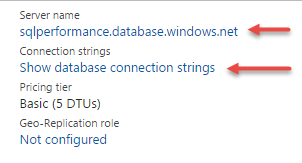
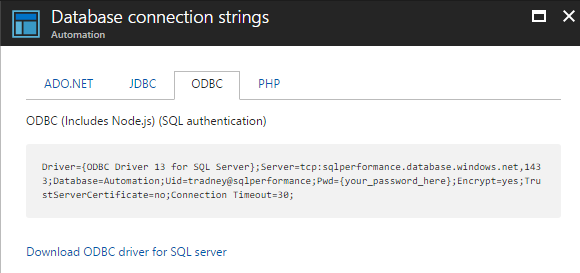
Connecting to an Azure SQL Database using a linked server is a very common approach since most DBAs are already familiar with creating and managing linked servers. The two most common ways that I’ve seen clients using linked servers is with either the SQL Server Native Client or Microsoft OLE DB Provider for ODBC Drivers as the provider. If you use the native client, you’ll have to provide the server name as the data source; however if using the ODBC driver, then you’ll need to get the connection string and use that as the provider string. Both of these values can be found in the Azure Portal for your database. Once you click on your database, you will see the server name and an option to show the database connection strings. This server name, sqlperformance.database.windows.net is what I would use for the SQL Server Native Client data source.

When you click on “Show database connection strings”, you currently have options for ADO.NET, JDBC, ODBC, and PHP. To see the connection string for ODBC, click on the ODBC tab.

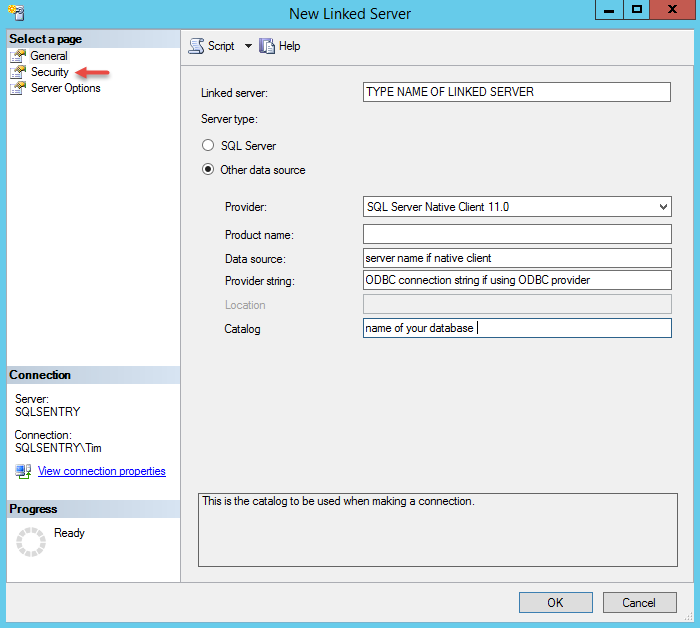
Next you’ll need to create the linked server in SSMS. Under “Server Objects”, right click on “Linked Servers”, select “New Linked Server”, and type in the required information depending on your data source provider choice.

Next click on “Security” and define your preferences. Typically I see the option “Be made using this security context” with a remote login and password provided.

Once you have all this defined, click OK. You can now right click on your new linked server and test the connection.

You can now reference the linked server to call any stored procedures, such as Ola Hallengren’s Index Optimize and DatabaseIntegrityCheck directly against the Azure SQL Database in a SQL Agent job step.

Database Maintenance Plans

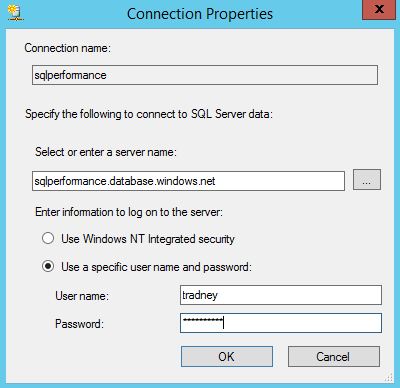
If you plan to use a database maintenance plan for your maintenance, the process is a bit easier. To get started, simply create your maintenance plan manually or using the wizard. If you are using the wizard, once you create the maintenance plan, you can edit the plan, and then add the Azure connection. You then change each task to use the new connection. Your connection screen should look similar to the following:

You can now schedule your database maintenance plans to run during your maintenance window.

PowerShell

PowerShell is an excellent option for working with repeatable task and using PowerShell with Azure SQL Database is straight forward. You can use the Invoke-SqlCmd function to query or execute statements against your databases.

A common approach is to use a script similar to:

  $params = @{
   'Database' = 'YourDatabase'
   'ServerInstance' = 'instance.database.windows.net'
   'Username' = 'UserName'
   'Password' = 'ComplexP@$$word'
   'Query' = 'Your Query Here'
  }
  Invoke-Sqlcmd @params

For your query, you can use Ola Hallengren’s index optimize and consistency checks, or any custom script that you have been using. You’ll then need to schedule your PowerShell scripts using whatever scheduler you use for your organization.

Azure Services

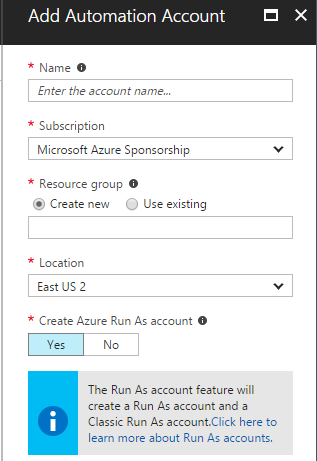
Built into the Azure platform is Azure Automation and to get started, you have to create an automation account. You’ll need to provide a name for the account, select your subscription, resource group, location, and determine if you want to create an Azure Run As account.

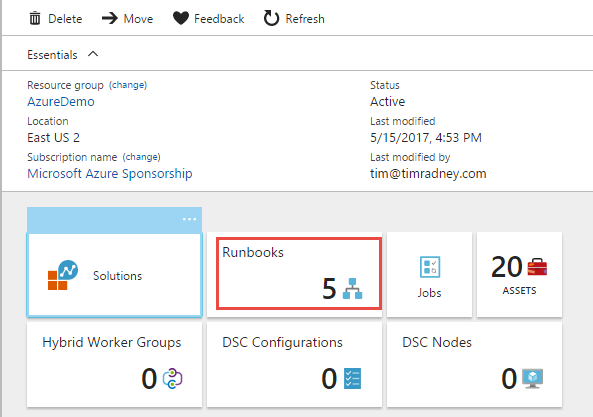
Once you create your account, you can then start creating runbooks. You can do just about anything with the runbooks. There are numerous existing run books that you can browse through and modify for your own use, including provisioning, monitoring, life cycle management, and more.

You can create the runbooks offline, or using the Azure Portal, and they’re built using PowerShell. In this example, we will reuse the code from the PowerShell demo and also demonstrate how we can use the built in Azure Service scheduler to run our existing PowerShell code and not have to rely on an on-premises scheduler, task scheduler, or Azure VM to schedule a job.

Start by clicking on Runbooks

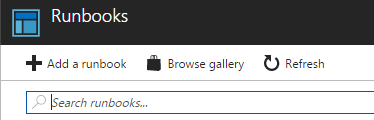
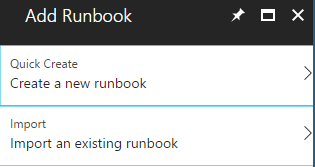
Next click on “Add a runbook”

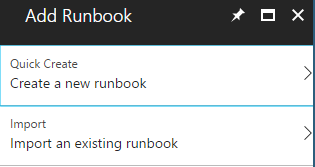
Click “Create a new runbook”

Provide a name and runbook type, I selected PowerShell for my demo.

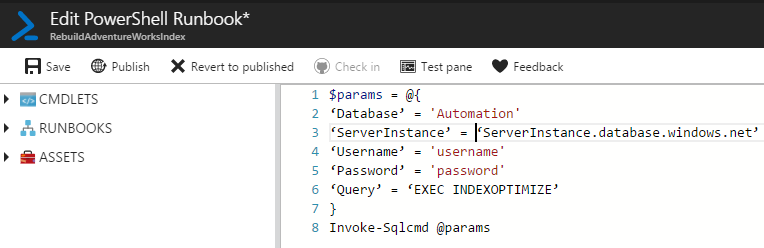
You are then in an edit screen for your new runbook. Here is where you can configure the details and build your runbook. For this demo, I am just running a PowerShell script to call a stored procedure against a database. Once you have all your code worked out, you can publish and save your runbook.

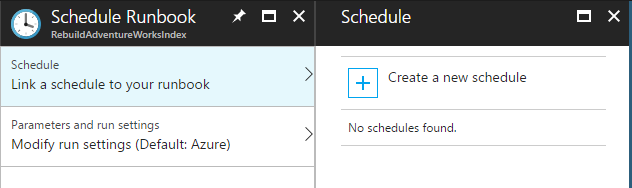
From here, you can start the runbook and validate everything works accordingly, as well as schedule the runbook to run at specific times. Let’s step through this process by clicking on “Schedule”

We’ll need to click on “Link a schedule to your runbook” and since we haven’t created any schedules before, we’ll need to define a new one by clicking on “Create a new schedule”.

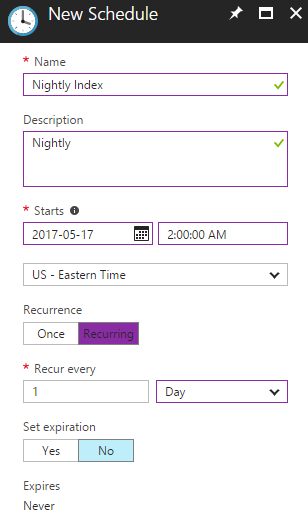
Much like we do in SQL Server Agent, provide a schedule name, a description if you would like, when to start, and how often it should run. I set this one occur every day at 2AM.

I now have a published runbook, scheduled to run each night at 2AM to perform index maintenance on one of my databases.

Elastic Jobs

Elastic Jobs is still currently in preview, so I won’t go into great detail due to the high probability that screens and functionality will change.

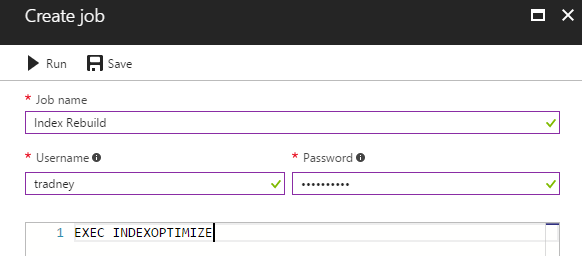
Using Elastic Jobs requires that you’ve defined an elastic database pool and assign at least one database to the pool to run jobs against. Once you’ve created the elastic pool and added a database, you can then click create job.

Give your job a descriptive name and provide the username and password to connect to the databases with, as well as the script you would like to run. Click save and you now have an elastic job.

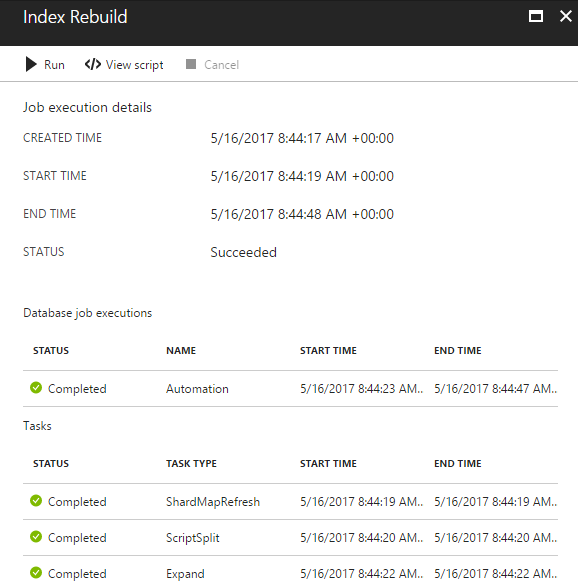
You can then chose to run the job, view script, or cancel the job if it is running.

While there are certain things you can do through the Azure Portal with the elastic jobs, the real power and configuration options are available through the PowerShell API. To schedule a job, you have to use the cmdlet New-AzureSQLJobSchedule. More details about the additional features and how to schedule jobs can be found here:

Overall I like the elastic jobs feature and hope that when it is made generally available, that more functionality will be built into the Azure Portal without having to manage it with PowerShell. I like that you can run T-SQL directly, without having to run it within PowerShell and how it can run against all databases in the pool.

Summary

When it comes to Azure SQL Databases, yes, you still are responsible for certain maintenance on your databases. You have numerous methods of scheduling jobs, and depending on your need and the size of your environment, certain options make better solutions. Linked servers and database maintenance plans are quick and easy methods if you have on-premises or Azure VMs with SQL server already configured, and a small Azure deployment. PowerShell is always a good option, you just have to find a solution for scheduling the scripts to run. Azure automation is a very robust solution allowing you to create runbooks to accomplish just about anything and easily schedule the runbooks and elastic jobs is another great Azure based solution if you have tasks that you need to run against a group of databases in an elastic pool.

The post Azure Automation Methods appeared first on SQLPerformance.com.

15 Nov 04:23

Locking and Blocking in SQL Server

by Artemakis Artemiou [MVP]
This article is from my book: Tuning SQL Server (Second Edition) Table of Contents | Sample Chapter | Learn More The majority of modern relational database management systems (RDBMSs) make use of lock-based concurrency. Lock-based concurrency is the approach based on which the Database Engine of a RDBMS ensures that no actions of committed transactions are lost. This is actually what
15 Nov 04:23

Increased SOS_SCHEDULER_YIELD waits on virtual machines

by Paul Randal

A few months ago while I was teaching wait statistics, I was asked whether there’s any expected differences with waits stats when SQL Server is running in a virtual machine.

My answer was yes – there’s a possibility of seeing longer wait times if something prevents the VM from running, as the wait times are based on the __rdtsc counter difference (essentially the processor clock tick count) between the wait starting and ending.

In VMware or Hyper-V, if a thread inside of SQLOS is waiting for a resource, and the VM has to wait to be scheduled to execute by the hypervisor due to the host being oversubscribed with vCPUs based on the hardware pCPUs, then the actual resource wait time noted in SQL Server will include that time that the VM was unable to run, and so the wait time will appear to be longer than it would have been had the VM not been delayed.

It’s an interesting discussion on whether this is problematic or not, but my view is that it could lead to someone chasing a SQL Server performance problem that’s actually a VM performance problem. Note: this isn’t a problem with the hypervisor, this is because of a misconfiguration of the virtual environment.

Anyway, after the class I got to thinking about thread scheduling in general on a VM that is periodically delayed from running and whether it could cause any other interesting effects around wait statistics.

Specifically, I was concerned about SOS_SCHEDULER_YIELD waits. This is a special wait type that occurs when a thread is able to run for 4ms of CPU time (called the thread quantum) without needing to get suspended waiting for an unavailable resource. In a nutshell, a thread must call into the SQLOS layer every so often to see whether it has exhausted its thread quantum, and if so it must voluntarily yield the processor. When that happens, a context switch occurs, and so a wait type must be registered: SOS_SCHEDULER_YIELD. A deeper explanation of this wait type is in my waits library here.

My theory was this: if a VM is prevented from running for a few milliseconds or more, that could mean that a thread that’s executing might exhaust its thread quantum without actually getting 4ms of CPU time, and so yield the processor causing an SOS_SCHEDULER_YIELD wait to be registered. If this happened a lot, it could produce a set of wait statistics for a virtualized workload that appears to have lots of SOS_SCHEDULER_YIELDs, when in fact it’s actually a VM performance problem and the SOS_SCHEDULER_YIELD waits are really ‘fake’.

I discussed this with my good friend Bob Ward from the SQL Product Group and after some internal discussions, they concurred that it’s a possibility because the thread quantum exhaustion time is calculated using the __rdtsc intrinsic when the thread starts executing, so any delay in the VM running could produce the effect I proposed.

Given that I’m a virtual machine neophyte, I asked Jonathan to run some tests inside of our VMware lab environment to see if he could show the issue happening. He ran a known workload that we use in our Immersion Events to demonstrate the performance impact of host oversubscription, causing a VM to be delayed, and lo and behold, he saw a substantially elevated level of SOS_SCHEDULER_YIELD waits (around 20x more) for the workload, compared to running the same workload on the same VM without any delays.

These same tests were repeated in our Hyper-V lab environment that is identical in hardware and VM configuration to the VMware environment and similar levels of elevated SOS_SCHEDULER_YIELD waits were also seen, so the issue is definitely not specific to any given hypervisor or virtual platform, it’s purely related to the host being oversubscribed for the workloads being run and the SQL Server VM having to wait for CPU resources to continue execution.

I’m deliberately not presenting Jonathan’s test results here because I’m not qualified to explain VMware esxtop output or Hyper-V performance counter values and how they correlate to the SOS_SCHEDULER_YIELD numbers to show the problem occurring. Jonathan will do a follow-up post in the next week or two that explains the results from a virtualization perspective.

However, with a simple set of tests we were able to show that with a VM that gets delayed from running, a SQL Server workload can show a much higher level of SOS_SCHEDULER_YIELD waits because of the use of the __rdtsc intrinsic to calculate thread quantum exhaustion times.

This is really interesting because this is a VM performance issue *causing* a wait type to appear, not just causing waits to be longer.

You should definitely consider this phenomenon if you’re investigating a high number of SOS_SCHEDULER_YIELD waits, a workload performance problem, and your workload is running in a VM. In the next post on this, which I’ll link to here when it’s published, Jonathan will explain how to correlate these waits with signs of a VM performance problem.

Hope this helps!

The post Increased SOS_SCHEDULER_YIELD waits on virtual machines appeared first on Paul S. Randal.

15 Nov 04:20

Scaling out SSIS in SQL Server 2017

by Prologika - Teo Lachev

SQL Server 2017 introduces the ability to scale out SSIS. The primary scenario is to enable customers to scale out their SSIS execution at the package level. Imagine a retail business that has about 300 packages to run at the end of the day to push transactional data/finance data from multiple stores to the centralized data warehouse for reporting. All the 300 packages need to run at night but they also need to finish by 6 AM in the morning before new business day starts. As business grows, data size grows, and it takes longer time to run the 300 packages and it is becoming more difficult for the ETL processing window to finish before 6 AM. With SSIS scale out feature, you can now set up the scale out cluster with 1 master and N workers, so that the master can automatically distribute the packages to the workers based on the worker availability, therefore, it helps parallelize the execution at package level and achieve faster completion time. You don’t have to worry about which packages will be executed by which worker, as it’s handled by the master. All you need is to deploy the 300 packages into the catalog and then trigger the ETL run.

Sounds like an easy fix to your long ETL processing times? As with any technology, my advice is to focus on improving the performance of your ETL first, then scale up, then scale out. Here are the top 5 performance issues that I see over and over in my consulting practice:

  1. No parallelism – Packages run sequentially, e.g. dimensions are populated one by one and then fact tables one by one. Meanwhile, despite all the CPU power and cores you fought hard to secure, the server isn’t doing much. Instead, you should run things in parallel as much you can with the goal to saturate that server CPU bandwidth. Ideally, you should invest into a framework that can automatically distribute work across packages with on a configurable degree of parallelism, as the one that we use and is mentioned in my newsletter ” Is ETL (E)ating (T)hou (L)ive?”.
  2. No incremental extraction – The less data you process, the faster your ETL will be. You should strive to extract only the rows that have changed if possible, using techniques such as LastUpdated timestamp, Temporal tables, or CDC.
  3. ETL instead of ELT pattern – Influenced by Microsoft and expert advice, you’ve decided to use the data flow transforms. For example, in a recent ETL review, I found that a Lookup task caches all the 50 million rows from a fact table in memory to determine a row should be inserted or updated! What happens when (not if) one day the fact table swells to 500 million rows? Instead, almost always the ELT pattern that relies on stored procedures and T-SQL MERGE would be a better choice from a performance standpoint. 30 years went into improving and evolving Microsoft SQL Server. It would be naïve not to take advantage of this evaluation and its set-based processing. And as a bonus, one day if you decide to migrate your DW to the cloud, such as by using Azure SQL Data Warehouse, you’ll find that ELT is recommended (unfortunately, Azure SQL DW still doesn’t support MERGE but one day I hope it will).
  4. Query optimization – Needless to say, your queries should be optimized. In the same recent review, I found that one query that extract data from ODS takes four hours to execute!
  5. Excessive data movement – This goes back to incremental extraction but I often see ETL that does full load or partial load (e.g. the last six months) and copies millions of rows from source to staging table 1, staging table 2, …, and finally data warehouse.

If, after you follow the above best practices, you still find that you’re exceeding your ETL processing windows, you should consider scaling out SSIS. Before doing so, consider the following limitations in the SSIS scale-out feature in SQL Server 2017:

  • A best practice is to partition your ETL process in child packages that are orchestrated by a master package using the Execute Package Task (EPT). SSIS scale-out can run packages with EPT but it does not scale out the EPT packages execution on another machine. If you have a main package, which as various sub package execution with EPT, the package and all EPT sub package execution will run on the same worker machine, while other workers in your scale out cluster can handle other packages that are independent. If some order/dependency is needed, there will be extra work needed from you to design a master package on purpose (i.e. one master package to control the overall flow and trigger execution in Scale-out and wait for the result accordingly).
  • If you opt for the ELT pattern as I suggested, scaling out might not help all that much. Your gain will depend on where the performance bottleneck is. If the bottleneck is already in the database, scaling out ETL across multiple nodes will be a futile effort. But if the bottleneck is not the database, then the scale-out can still help to take advantage of multiple machines.
  • When a package is scheduled in scale-out, by default it is possible for it to be assigned to any worker node to be executed. But if needed, you can also specify which worker node(s) you want the package execution to be assigned to when triggering the execution. The master node doesn’t monitor the worker utilization. Instead the worker node does its own CPU or Memory’s monitoring and tells the master if it can take more packages.

15 Nov 04:14

Performance Myths : Oversizing string columns

by Aaron Bertrand

Performance Myths : Oversizing varchar/nvarchar columns is okay

Back in March, I started a series on pervasive performance myths in SQL Server. One belief I encounter from time to time is that you can oversize varchar or nvarchar columns without any penalty.

Let's assume you are storing e-mail addresses. In a previous life, I dealt with this quite a bit – at the time, RFC 3696 stated that an e-mail address could be 320 characters (64chars@255chars). A newer RFC, #5321, now acknowledges that 254 characters is the longest an e-mail address could be. And if any of you have an address that long, well, maybe we should chat. :-)

Now, whether you go by the old standard or the new one, you do have to support the possibility that someone will use all the characters allowed. Which means you have to use 254 or 320 characters. But what I've seen people do is not bother researching the standard at all, and just assume that they need to support 1,000 characters, 4,000 characters, or even beyond.

So let's take a look at what happens when we have tables with an e-mail address column of varying size, but storing the exact same data:

CREATE TABLE dbo.Email_V320
(
  id int IDENTITY PRIMARY KEY, email varchar(320)
);
 
CREATE TABLE dbo.Email_V1000
( 
  id int IDENTITY PRIMARY KEY, email varchar(1000)
);
 
CREATE TABLE dbo.Email_V4000
(
  id int IDENTITY PRIMARY KEY, email varchar(4000)
);
 
CREATE TABLE dbo.Email_Vmax
(
  id int IDENTITY PRIMARY KEY, email varchar(max)
);

Now, let's generate 10,000 fictitious e-mail address from system metadata, and populate all four tables with the same data:

INSERT dbo.Email_V320(email) SELECT TOP (10000) 
  REPLACE(LEFT(LEFT(c.name, 64) + '@' + LEFT(o.name, 128) + '.com', 254), ' ', '')
  FROM sys.all_columns AS c
  INNER JOIN sys.all_objects AS o
  ON c.[object_id] = o.[object_id]
  INNER JOIN sys.all_columns AS c2
  ON c.[object_id] = c2.[object_id]
  ORDER BY NEWID();
 
INSERT dbo.Email_V1000(email) SELECT email FROM dbo.Email_V320;
INSERT dbo.Email_V4000(email) SELECT email FROM dbo.Email_V320;
INSERT dbo.Email_Vmax (email) SELECT email FROM dbo.Email_V320;
 
-- let's rebuild
ALTER INDEX ALL ON dbo.Email_V320  REBUILD;
ALTER INDEX ALL ON dbo.Email_V1000 REBUILD;
ALTER INDEX ALL ON dbo.Email_V4000 REBUILD;
ALTER INDEX ALL ON dbo.Email_Vmax  REBUILD;

To validate that each table contains exactly the same data:

SELECT AVG(LEN(email)), MAX(LEN(email)) FROM dbo.Email_<size>;

All four of those yield 35 and 77 for me; your mileage may vary. Let's also make sure that all four tables occupy the same number of pages on disk:

SELECT o.name, COUNT(p.[object_id])
  FROM sys.objects AS o
  CROSS APPLY sys.dm_db_database_page_allocations
    (DB_ID(), o.object_id, 1, NULL, 'LIMITED') AS p
  WHERE o.name LIKE N'Email[_]V[^2]%'
  GROUP BY o.name;

All four of those queries yield 89 pages (again, your mileage may vary).

Now, let's take a typical query that results in a clustered index scan:

SELECT id, email FROM dbo.Email_<size>;

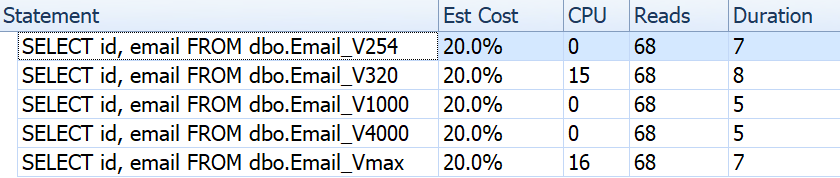
If we look at things like duration, reads, and estimated costs, they all seem the same:

This may lull people into a false assumption that there is no performance impact at all. But if we look just a little bit closer, on the tooltip for the clustered index scan in each plan, we see a difference that may come into play in other, more elaborate queries:

From here we see that, the bigger the column definition, the higher the estimated row and data size. In this simple query, the I/O cost (0.0512731) is the same across all of the queries, regardless of definition, because the clustered index scan has to read all of the data anyway.

But there are other scenarios where this estimated row and total data size will have an impact: operations that require additional resources, such as sorts. Let's take this ridiculous query that doesn't serve any real purpose, other than to require multiple sort operations:

SELECT /* V<size>  */ ROW_NUMBER() OVER (PARTITION BY email ORDER BY email DESC), 
    email, REVERSE(email), SUBSTRING(email, 1, CHARINDEX('@', email)) 
  FROM dbo.Email_V<size>  
  GROUP BY REVERSE(email), email, SUBSTRING(email, 1, CHARINDEX('@', email))  
  ORDER BY REVERSE(email), email;

We run these four queries and we see the plans all look like this:

However that warning icon on the SELECT operator only appears on the 4000/max tables. What is the warning? It's an excessive memory grant warning, introduced in SQL Server 2016. Here is the warning for varchar(4000):

And for varchar(max):

Let's look a little closer and see what is going on, at least according to sys.dm_exec_query_stats:

SELECT 
  [table] = SUBSTRING(t.[text], 1, CHARINDEX(N'*/', t.[text])),
  s.last_elapsed_time, 
  s.last_grant_kb, 
  s.max_ideal_grant_kb
FROM sys.dm_exec_query_stats AS s 
CROSS APPLY sys.dm_exec_sql_text(s.sql_handle) AS t
WHERE t.[text] LIKE N'%/*%dbo.'+N'Email_V%' 
ORDER BY s.last_grant_kb;

Results:

In my scenario, the duration was not impacted by the memory grant differences (except for the max case), but you can clearly see the linear progression that coincides with the declared size of the column. Which you can use to extrapolate what would happen on a system with insufficient memory. Or a more elaborate query against a much larger data set. Or significant concurrency. Any of those scenarios could require spills in order to process the sort operations, and duration would almost certainly be affected as a result.

But where do these larger memory grants come from? Remember, it's the same query, against the exact same data. The problem is that, for certain operations, SQL Server has to take into account how much data *might* be in a column. It doesn't do this based on actually profiling the data, and it can't make any assumptions based on the <= 201 histogram step values. Instead, it has to estimate that every row holds a value half of the declared column size. So for a varchar(4000), it assumes every e-mail address is 2,000 characters long.

When it's not possible to have an e-mail address longer than 254 or 320 characters, there is nothing to gain by over-sizing, and there is plenty to potentially lose. Increasing the size of a variable-width column later is much easier than dealing with all the downside now.

Of course, oversizing char or nchar columns can have much more obvious penalties.

The post Performance Myths : Oversizing string columns appeared first on SQLPerformance.com.

15 Nov 04:09

Azure DevTest Labs

by James Serra

I have been working at Microsoft now for 3 years and 4 months (side note: it’s by far the best company I have ever worked for).  You would think by now I know about every Azure product, but we release new products and services at such a tremendously fast pace that almost weekly I discover something I did not know about.  Today was one of those days as I discovered Azure DevTest Labs, which was made generally available in May 2016 (it public previewed in November 2015).

Here is the overview:

Developers and testers are looking to solve the delays in creating and managing their environments by going to the cloud.  Azure solves the problem of environment delays and allows self-service within a new cost efficient structure.  However, developers and testers still need to spend considerable time configuring their self-served environments.  Also, decision makers are uncertain about how to leverage the cloud to maximize their cost savings without adding too much process overhead.

Azure DevTest Labs is a service that helps developers and testers quickly create environments in Azure while minimizing waste and controlling cost.  You can test the latest version of your application by quickly provisioning Windows and Linux environments using reusable templates and artifacts.  Easily integrate your deployment pipeline with DevTest Labs to provision on-demand environments.  Scale up your load testing by provisioning multiple test agents, and create pre-provisioned environments for training and demos.

Azure DevTest Labs addresses the problems in Dev/Test environments today majorly through four aspects:

  • Quickly be “ready to test” – DevTest Labs enables you to create pre-provisioned environments with everything your team needs to start developing and testing applications.  Simply claim the environments where the last good build of your application is installed and get working right away.  Or, use containers for even faster and leaner environment creation
  • Worry-free self-service – DevTest Labs makes it easier to control costs by allowing you to set policies on your lab – such as number of virtual machines (VM) per user and number of VMs per lab.  DevTest Labs also enables you to create policies to automatically shut down and start VMs
  • Create once, use everywhere – Capture and share environment templates and artifacts within your team or organization – all in source control – to create developer and test environments easily
  • Integrates with your existing toolchain – Leverage pre-made plug-ins or our API to provision Dev/Test environments directly from your preferred continuous integration (CI) tool, integrated development environment (IDE), or automated release pipeline. You can also use our comprehensive command-line tool

Jeff Gilbert’s TechNet blog has some great blogs on Azure DevTest Labs as well as Praveen Kumar Sreeram, and there are some excellent short videos by Microsoft to help you get started.

You’ll need a subscription that provides you monthly Azure credits to use DevTest labs.  Besides the pay-as-you-go option, there are free options and subscription options:

* MSDN Platforms is available exclusively through Microsoft Volume Licensing. For pricing and purchase details, contact your Microsoft account representative, Microsoft Partner, or an authorized volume licensing reseller.

More info:

Getting to know Azure DevTest Labs

How to Use Azure DevTest Labs for Test Environments and Dev Machines

Azure DevTest Labs.

More about Azure DevTest Labs

15 Nov 04:09

Combating SQL Injection

by Wayne Sheffield

secret_iTarget. Home Depot. NASA. U.S. Army. Anthem. Wall Street Journal. MarketWired. Ashley Madison. What do they all have in common? They are all recent victims of cyber-attacks – several of these are confirmed to involve SQL Injection. Even though the exact method used to penetrate the other systems has not been released, experts believe that SQL Injection was involved in all of these cases. Take a look at http://codecurmudgeon.com/wp/sql-injection-hall-of-shame/ for places that are known victims of SQL Injection.

The part that is really astonishing is that we have known how to stop SQL Injection for more than a decade. Completely. Dead. In. Its. Tracks. Which means that the problems happening today are because of careless coding techniques, and as such, they can be prevented.

The “Funky query”

A few years ago, I was working for a company that developed and sold software. One day, my supervisor sends me an email titled “Funky query”. Hmm, that sounds interesting… I’ll open this up right away, instead of ignoring it until I finish what I’m currently working on (like I would usually do).

Wayne… one of our customer support engineers sent us this from the application error log of a customer. They were running a report. Any ideas on how this funky query came to be?

Query from error log (genericized… because I can’t use the real query):

SELECT * FROM sys.objects WHERE name = ‘O’Malley’

Details from the error log:

Incorrect syntax near 'Malley'.
Unclosed quotation mark after the character string ''.

Me: Umm, boss… Does this report allow users to enter in search criteria?

Boss: But of course!

Me: Well, I really hate to tell you this, but we have a SQL Injection problem.

And after a bit of back and forth where the developers were insisting that no way was there a SQL Injection problem, I sat down with the dev team lead and the boss and proved it to them. We created a dummy table in the database, went to the report criteria form, and I dropped the table.

Wayne: +1000

Development Team: -1000

Defining SQL Injection

Before we go into how SQL Injection occurs, let’s first examine what it is. SQL Injection is simply a code injection technique that allows SQL code that the user enters in the front-end to be run against the back-end database.

Please note a few things about this definition:

  1. SQL Server was not mentioned. Any and all database platforms are susceptible to SQL Injection. SQL Server. Oracle. PostgreSQL. DB2. It doesn’t matter – all database platforms are susceptible to SQL Injection.
  2. A generic front-end is mentioned. This is anything that connects to a back-end database, be it a web form or your favorite application. Anything that connects to a database can allow SQL Injection.
  3. Improperly written code within the database (such as a stored procedure) can allow SQL Injection. It’s all about how the query is created and run against the database.
  4. There are other forms of Injection attacks that can occur; SQL Injection is just one. Other forms include Cross-site scripting, Web Parameter Tampering, LDAP Injection and XPath Injection (as I write this, WordPress 4.3.1 is being released to fix two Cross-site scripting issues).

SQL Injection can happen in three different ways:

  1. Classic – this is when a user enters SQL code, and can immediately view the results on screen.
  2. Blind – this is essentially a classic attack, but the user does not see the results. Things may still happen, and the user may be able to send results to files that can be downloaded, but the results are not shown on screen.
  3. Second Order – the user supplied SQL code is actually stored in the database, and at a later point in time it is run.

Creating SQL Injection

SQL Injection happens when a SQL statement is created from the data supplied by the user, and it is run by the application or other process. Obviously the intention of the application is to only run the queries that it supplies. Consider a login form with user name and password data entry fields. Assume that the user enters “Mickey” as the user, and “1234” as the password. In this case, the application essentially performs:

DECLARE @UserName varchar(50) = 'Mike';
DECLARE @Password varchar(50) = '1234'
DECLARE @SQLCMD varchar(max);
SET @SQLCMD = 'SELECT UserName, Password
FROM dbo.Users
WHERE UserName = ''' + @UserName + ''' AND Password = ''' + @Password + '''';

EXECUTE (@SQLCMD);

This will create the SQL statement:

SELECT        UserName, Password
FROM          dbo.Users
WHERE         UserName = 'Mike'
AND           Password = '1234'

And when we run this, we get the expected results. But now, a hacker becomes the user. Being wise to SQL Injection, the hacker enters for the password the string

1234' OR 1=1;--

This results in the following SQL Statement being generated:

SELECT        UserName, Password
FROM          dbo.Users
WHERE         UserName = 'Mike'
AND           Password = '1234' OR 1=1; --

Since every row matches the “OR 1=1” predicate, every username and password will be returned.

Hacker: +1

Developer: -1

Notice that I showed this attack with T-SQL code – this means that you can have SQL Injection vulnerabilities within your T-SQL code (such as stored procedures), as well as any SQL commands that the application might construct and send to the database. The application might be properly handling for SQL Injection, but if it is calling SQL code that is improperly coded, you can still be vulnerable to SQL Injection. Everything has to be done properly – all it takes is one point where SQL Injection is possible to become the latest victim.

What can a hacker do with a SQL Injection vulnerability?

At this point, the hacker knows that the application is susceptible to SQL Injection, and can now issue any SQL statement desired. Depending on the access level that the application has to connect to the database, the hacker can:

  1. Get a list of all of the databases in the instance.
  2. Get a list of all of the tables in the current database, or any other database.
  3. Query the data in any of the other tables that can be seen.
  4. Modify (insert / update / delete) data in any of the tables that can be seen.
  5. Create / modify / drop any object in any database on the instance.
  6. Create elevated permissions at the SQL Server instance level. This will allow the hacker to do anything they desire on this instance. Drop tables? Yes. Query any and all data? Yes.
  7. Create elevated permissions at the Operating System level.
  8. Install programs on the server.
  9. Access any server on the network, and perform all of the above on those servers.

Scary? Absolutely. However, as I mentioned before, we know how to prevent SQL Injection. And it turns out that it’s just not that hard. Instead of making SQL Statements that include data (either as directly supplied from the user, or from the database), pass that data to the SQL statement through parameters.

If we take the previous example, and modify it to use parameters, we would have:

DECLARE @UserName varchar(50) = 'Mike';
DECLARE @Password varchar(50) = '1234'' OR 1=1;--'
SELECT  UserName, Password
FROM    dbo.Users
WHERE   UserName = @UserName 
AND     Password = @Password;

What’s the chances that you have a password of “1234′ OR 1=1; –” in your system? Assuming that you don’t, this query will return zero rows. SQL Injection has been prevented.

So now you want an example of the difference between classic and blind SQL Injection? Well, I’m not going to show you an example… because this will normally come down to how the application handles the data being returned. In the “OR 1=1” example, if the application only shows the first record, then the hacker won’t see the results of the SQL Injection (unless they notice that it’s showing the wrong data). Or the application may have been coded to expect only 1 row, and if more are returned then it won’t display any.

Second Order SQL Injection

But how about a second order SQL Injection? Let me explain that with an example. Imagine a form for entering new users. The development team has learned about the SQL Injection on the forms, and they are now using parameters. When the hacker enters for the password:

1234′ OR 1=1;–

The generated SQL statement is:

DECLARE @UserName varchar(100) = 'Sam';
DECLARE @Password varchar(100) = '1234'' OR 1=1;--';
INSERT INTO dbo.Users (UserName, Password)
VALUES (@UserName, @Password);

When the data is queried:

SELECT  UserName, Password
FROM    dbo.Users
WHERE   UserName = 'Sam';

We get the following results:

UserName Password
-------- ----------------
Sam      1234' OR 1=1;--'

The data has been stored in the database, and we are now primed for a second order SQL Injection attack. Some other process comes along (for example, a month-end report), and it creates dynamic SQL by building the SQL statement from the data. And the second order SQL Injection has just been released…

What have we learned so far?

  1. SQL Injection can happen to any database system.
  2. SQL Injection can be within SQL code (stored procedures), or it can be in the statements passed to the database from the application.
  3. Parameters will prevent the SQL code from being executed immediately, thereby preventing Classic and Blind SQL Injection attacks.
  4. The SQL Injection attempt can still be stored in the database, priming yourself for a Second Order SQL Injection attack.

Preventing SQL Injection

Whenever you are creating a SQL statement, it must never create the statement with data (either from the database, or from what the user may pass). Instead, all SQL statements must use parameters. Even the month-end report.

Within SQL Server, have your queries reference the parameters (ColumnName = @VariableName). If you must use dynamic SQL to build your statement, use sp_executesql – it allows for the building of SQL statements with parameters, and then defining and passing those parameters in as the procedure is called.

In your application, there are several component choices. Some directly execute SQL, and others can use parameters. You want to always use the components that use parameters, and you must use those parameters.

Learning more

The Open Web Application Security Project is a community-driven, non-profit organization where experts analyze web application security issues and then compile a list of what the biggest issues are. For the last several years, the category “Injection” has been the biggest issue, and this includes SQL Injection.

This isn’t all that they do. They also have educational resources to not only instruct you on how these issues manifest themselves, but what to do about them. I strongly encourage everyone to take this resource back to your company, and to start identifying and addressing security issues in your code.

Another issue is that developers don’t really know about SQL Injection. In the workshops that I have given where this topic is presented, very few attendees have seen SQL Injection in a test environment. Most can barely give an adequate description of what it is. Those that have seen it are usually those who have been a victim of it. So I also recommend getting your company to arrange for SQL Injection training for the developers and DBAs. It would be good to send your QA team to this also.

This post is re-published from my original post on SQL Solutions Group.

The post Combating SQL Injection appeared first on Wayne Sheffield.

15 Nov 04:06

SSMS Presenter Mode

by John Paul Cook
Recent builds of SQL Server Management Studio (SSMS) have a feature called PresentOn that can be accessed from Quick Launch . Figure 1. Quick Launch location in SSMS. Enter Present in to Quick Launch and select it. Figure 2. Select PresentOn . Using PresentOn...(read more)
15 Nov 04:03

Cosmos DB References

by John Paul Cook
oHere is a list of links to get you started in understanding Cosmos DB, Microsoft’s new cloud based globally distributed multi-model database. Cosmos DB development started in 2010 as project Florence. When it was initially released to the public as part...(read more)
15 Nov 03:59

Data lake details

by James Serra

I have blogged before about data lakes (see What is a data lake? and Why use a data lake?), and wanted to provide more details on this popular technology, some of which I cover in my presentation “Big data architectures and the data lake“.  In short, the data lake is a storage repository, usually Hadoop, that holds a vast amount of raw data in its native format until it is needed.

The data lake should be the center of just about any big data solution for these major reasons:

  • Inexpensively store unlimited data
  • Collect all data “just in case”
  • Easy integration of differently-structured data
  • Store data with no modeling – “Schema on read”
  • Complements enterprise data warehouse (EDW)
  • Frees up expensive EDW resources, especially for refining data
  • Hadoop cluster offers faster ETL processing over SMP solutions
  • Quick user access to data
  • Data exploration to see if data valuable before writing ETL and schema for relational database
  • Allows use of Hadoop tools such as ETL and extreme analytics
  • Place to land IoT streaming data
  • On-line archive or backup for data warehouse data
  • Easily scalable
  • With Hadoop, high availability built in
  • Allows for data to be used many times for different analytic needs and use cases
  • Low-cost storage for raw data saving space on the EDW

The data lake introduces a new data analysis paradigm shift:

OLD WAY: Structure -> Ingest -> Analyze

NEW WAY: Ingest -> Analyze -> Structure

This allows you to avoid a lot of up-front work before you are able to analyze data.  With the old way, you have to know the questions to ask.  The new way supports situations when you don’t know the questions to ask.

This solves the two biggest reasons why many EDW projects fail:

  • Too much time spent modeling when you don’t know all of the questions your data needs to answer
  • Wasted time spent on ETL where the net effect is a star schema that doesn’t actually show value

Data Lake layers:

  • Raw data layer– Raw events are stored for historical reference. Also called staging layer or landing area
  • Cleansed data layer – Raw events are transformed (cleaned and mastered) into directly consumable data sets. Aim is to uniform the way files are stored in terms of encoding, format, data types and content (i.e. strings). Also called conformed layer
  • Application data layer – Business logic is applied to the cleansed data to produce data ready to be consumed by applications (i.e. DW application, advanced analysis process, etc). This is also called by a lot of other names: workspace, trusted, gold, secure, production ready, governed
  • Sandbox data layer – Optional layer to be used to “play” in.  Also called exploration layer or data science workspace

Be aware that you still need data governance so your data lake does not turn into a data swamp!  Having a data lake does not lessen the data governance that you would normally apply when building a relational data warehouse.  In fact, it usually requires more data governance.  So look at tools such as the Azure Data Catalog to keep track of all your data.

Data typically lands in products such as Hadoop Distributed File System (HDFS) or the Azure Data Lake Store (ADLS).   Since these technologies are just storage, you need other technologies for the compute part.  For example, here are ways to clean data in ADLS:

Since you will typically have both a Data Lake and a relational data warehouse when building a big data solution, it’s important to understand the roles of each:

Data Lake/Hadoop (staging and processing environment)

  • Batch reporting
  • Data refinement/cleaning
  • ETL workloads
  • Store historical data
  • Sandbox for data exploration
  • One-time reports
  • Data scientist workloads
  • Quick results

Data Warehouse/RDBMS (serving and compliance environment)

  • Low latency
  • High number of users
  • Additional security
  • Large support for tools
  • Easily create reports (Self-service BI): A data lake is just a glorified file folder with data files in it – how many end-users can accurately create reports from it?  Very little, hence a major reason to use a RDBMS

A question I get frequently is if all relational data should be copied to the data lake, especially if some of the relational data is not needed for reporting or analytics in the data lake (just in the data warehouse).  There still could be reasons to copy the data to the data lake, such as for backup purposes, to use low-cost storage for raw data saving space on the data warehouse, to use Hadoop tools, or to offload the refining of the data from the data warehouse (especially if ETL jobs on the data warehouse are taking too long).  But in some cases you may want to skip the data lake, especially if you have many existing SSIS packages as you can minimize the changes to them (i.e. just changing the destination source).  Also keep in mind the extra time needed to export data out from a relational database into a flat file before copying it to the data lake.

One issue to be aware of is when you have to move a lot of data each day from a relational database to a data lake.  You may want to look at 3rd-party products for Change Data Capture (CDC) for high volumes of data to get updates of your source system into a data lake such as HVR and Attunity.  Performing updates to rows of data in files sitting in a Hadoop/HDFS data lake can be very slow compared to appends.

More info:

Data Lake Use Cases and Planning Considerations

Zones in a Data Lake

15 Nov 03:59

Finding When Someone Last Ran a DBCC

by Andrew Kelly
  The other day someone on Twitter asked how to find out when or who last ran a DBCC FREEPROCCACHE command on their SQL Server instance. Since this is not an unusual request I figured I would post a few examples of how to find DBCC commands or even...(read more)
15 Nov 03:58

Machine Learning Comes to Tour De France

by A.R. Guess

by Angela Guess A new press release reports, “Amaury Sport Organisation (A.S.O.), organisers of the Tour de France, and Dimension Data, the Official Technology Partner of the Tour de France, today announced the introduction of machine learning technologies at this year’s Tour de France to give cycling fans across the globe an unprecedented experience of […]

The post Machine Learning Comes to Tour De France appeared first on DATAVERSITY.

15 Nov 03:58

Testing DML Statements for In-Memory OLTP

by Erin Stellato

SQL Server introduced In-Memory OLTP objects in SQL Server 2014. There were many limitations in the initial release; some have been addressed in SQL Server 2016, and it’s expected that more will be addressed in the next release as the feature continues to evolve. Thus far, adoption of In-Memory OLTP does not seem very widespread, but as the feature matures, I expect more clients will start to ask about implementation. As with any major schema or code change, I recommend thorough testing to determine if In-Memory OLTP will provide the benefits expected. With that in mind, I was interested in seeing how performance changed for very simple INSERT, UPDATE, and DELETE statements with In-Memory OLTP. I was hopeful that if I could demonstrate latching or locking as a problem with disk-based tables, then the in-memory tables would provide a solution, as they are lock- and latch-free.
I developed the following test cases:

  1. A disk-based table with traditional stored procedures for DML.
  2. An In-Memory table with traditional stored procedures for DML.
  3. An In-Memory table with natively compiled procedures for DML.

I was interested in comparing performance of traditional stored procedures and natively compiled procedures, because one restriction of a natively compiled procedure is that any tables referenced must be In-Memory. While single-row, solitary modifications may be common in some systems, I often see modifications occurring within a larger stored procedure with multiple statements (SELECT and DML) accessing one or more tables. The In-Memory OLTP documentation strongly recommends using natively compiled procedures to get the most benefit in terms of performance. I wanted to understand how much it improved performance.

The Set Up

I created a database with a memory-optimized filegroup and then created three different tables in the database (one disk-based, two in-memory):

  • DiskTable
  • InMemory_Temp1
  • InMemory_Temp2

The DDL was nearly the same for all objects, accounting for on-disk versus in-memory where appropriate. DiskTable DDL vs. In-Memory DDL:

CREATE TABLE [dbo].[DiskTable] (
	[ID] INT IDENTITY(1,1) NOT NULL PRIMARY KEY CLUSTERED, 
	[Name] VARCHAR (100) NOT NULL, [Type] INT NOT NULL,
	[c4] INT NULL, [c5] INT NULL, [c6] INT NULL, [c7] INT NULL, 
	[c8] VARCHAR(255) NULL, [c9] VARCHAR(255) NULL,	[c10] VARCHAR(255) NULL, [c11] VARCHAR(255) NULL)
ON [DiskTables];
GO
 
CREATE TABLE [dbo].[InMemTable_Temp1]
(
	[ID] INT IDENTITY(1,1) NOT NULL PRIMARY KEY NONCLUSTERED HASH WITH (BUCKET_COUNT=1000000), 
	[Name] VARCHAR (100) NOT NULL, [Type] INT NOT NULL,
	[c4] INT NULL, [c5] INT NULL, [c6] INT NULL, [c7] INT NULL, 
	[c8] VARCHAR(255) NULL, [c9] VARCHAR(255) NULL,	[c10] VARCHAR(255) NULL, [c11] VARCHAR(255) NULL)
WITH (MEMORY_OPTIMIZED=ON, DURABILITY = SCHEMA_AND_DATA);
GO

I also created nine stored procedures – one for each table/modification combination.

  • DiskTable_Insert
  • DiskTable_Update
  • DiskTable_Delete
  • InMemRegularSP_Insert
  • InMemRegularSP _Update
  • InMemRegularSP _Delete
  • InMemCompiledSP_Insert
  • InMemCompiledSP_Update
  • InMemCompiledSP_Delete

Each stored procedure accepted an integer input to loop for that number of modifications. The stored procedures followed the same format, variations were just the table accessed and whether the object was natively compiled or not. The complete code to create the database and objects can be found here , with example INSERT and UPDATE statements below:

CREATE PROCEDURE dbo.[DiskTable_Inserts]
	@NumRows INT
AS
BEGIN 
  SET NOCOUNT ON;
 
  DECLARE @Name INT;
  DECLARE @Type INT;
  DECLARE @ColInt INT;
  DECLARE @ColVarchar VARCHAR(255)
  DECLARE @RowLoop INT = 1;
 
  WHILE (@RowLoop <= @NumRows)
	BEGIN
 
		SET @Name = CONVERT (INT, RAND () * 1000) + 1;
		SET @Type = CONVERT (INT, RAND () * 100) + 1;
		SET @ColInt = CONVERT (INT, RAND () * 850) + 1
		SET @ColVarchar = CONVERT (INT, RAND () * 1300) + 1
 
 
		INSERT INTO [dbo].[DiskTable] (
			[Name], [Type], [c4], [c5], [c6], [c7], [c8], [c9],	[c10], [c11]
			)
		VALUES (@Name, @Type, @ColInt, @ColInt + (CONVERT (INT, RAND () * 20) + 1), 
		@ColInt + (CONVERT (INT, RAND () * 30) + 1), @ColInt + (CONVERT (INT, RAND () * 40) + 1),
		@ColVarchar, @ColVarchar + (CONVERT (INT, RAND () * 20) + 1), @ColVarchar + (CONVERT (INT, RAND () * 30) + 1),
		@ColVarchar + (CONVERT (INT, RAND () * 40) + 1))
 
		SELECT @RowLoop = @RowLoop + 1
	END
END
GO
 
CREATE PROCEDURE [InMemUpdates_CompiledSP]
	@NumRows INT
	WITH
		NATIVE_COMPILATION,
		SCHEMABINDING
AS
BEGIN ATOMIC
	WITH
		(TRANSACTION ISOLATION LEVEL = SNAPSHOT, LANGUAGE = N'us_english')
 
	DECLARE @RowLoop INT = 1;
	DECLARE @ID INT
	DECLARE @RowNum INT = @@SPID * (CONVERT (INT, RAND () * 1000) + 1)
 
	WHILE (@RowLoop <= @NumRows)
	BEGIN
 
		SELECT @ID = ID 
		FROM [dbo].[IDs_InMemTable2]
		WHERE RowNum = @RowNum
 
		UPDATE [dbo].[InMemTable_Temp2]
		SET [c4] = [c5] * 2
		WHERE [ID] = @ID
 
		SET @RowLoop = @RowLoop + 1
		SET @RowNum = @RowNum + (CONVERT (INT, RAND () * 10) + 1)
 
	END
END
GO

Note: The IDs_* tables were repopulated after each set of INSERTs completed, and were specific to the three different scenarios.

Testing Methodology

Testing was done using .cmd scripts which used sqlcmd to call a script which executed the stored procedure, for example:

sqlcmd -S CAP\ROGERS -i"C:\Temp\SentryOne\InMemTable_RegularDeleteSP_100.sql"
exit

I used this approach to create one or more connections to the database that would run concurrently. In addition to understanding basic changes to performance, I also wanted to examine the effect of different workloads. These scripts were initiated from a separate machine to eliminate the overhead of instantiating connections. Each stored procedure was executed 1000 times by a connection, and I tested 1 connection, 10 connections, and 100 connections (1000, 10000, and 100000 modifications, respectively). I captured performance metrics using Query Store, and also captured Wait Statistics. With Query Store I could capture average duration and CPU for each stored procedure. Wait statistics data was captured for each connection using dm_exec_session_wait_stats, then aggregated for the entire test.

I ran each test four times and then calculated the overall averages for the data used in this post. Scripts used for workload testing can be downloaded from here.

Results

As one would predict, performance with In-Memory objects was better than with disk-based objects. However, an In-Memory table with a regular stored procedure sometimes had comparable or only slightly better performance compared to a disk-based table with a regular stored procedure. Remember: I was interested in understanding whether I really needed a compiled stored procedure to get a large benefit with an in-memory table. For this scenario, I did. In all cases, the in-memory table with the natively compiled procedure had significantly better performance. The two graphs below show the same data, but with different scales for the x-axis, to demonstrate that performance for regular stored procedures that modify data degraded with more concurrent connections.

    DML Performance by Test and Workload
    DML Performance by Test and Workload

    DML Performance by Test and Workload [Modified scale]
    DML Performance by Test and Workload [Modified scale]

The exception is INSERTs into the In-Memory table with the regular stored procedure. With 100 connections the average duration is over 8ms for a disk-based table, but less than 100 microseconds for the In-Memory table. The likely reason is the absence of locking and latching with the In-Memory table, and this is supported with wait statistics data:

Test INSERT UPDATE DELETE
Disk Table – 1000 WRITELOG WRITELOG WRITELOG
InMemTable_RegularSP – 1000 WRITELOG WRITELOG WRITELOG
InMemTable_CompiledSP – 1000 WRITELOG MEMORY_ALLOCATION_EXT MEMORY_ALLOCATION_EXT
Disk Table – 10,000 WRITELOG WRITELOG WRITELOG
InMemTable_RegularSP – 10,000 WRITELOG WRITELOG WRITELOG
InMemTable_CompiledSP – 10,000 WRITELOG WRITELOG MEMORY_ALLOCATION_EXT
Disk Table – 100,000 PAGELATCH_EX WRITELOG WRITELOG
InMemTable_RegularSP – 100,000 WRITELOG WRITELOG WRITELOG
InMemTable_CompiledSP – 100,000 WRITELOG WRITELOG WRITELOG

Wait Statistics By Test

Wait statistics data is listed here based on Total Resource Wait Time (which generally also translated to highest average resource time, but there were exceptions). The WRITELOG wait type is the limiting factor in this system the majority of the time. However, the PAGELATCH_EX waits for 100 concurrent connections running INSERT statements suggests that with additional load the locking and latching behavior that exists with disk-based tables could be limiting factor. In the UPDATE and DELETE scenarios with 10 and 100 connections for the disk-based table tests, the Average Resource Wait Time was highest for locks (LCK_M_X).

Conclusion

In-Memory OLTP can absolutely provide a performance boost for the right workload. The examples tested here, though, are extremely simple, and should not be judged as reason alone to migrate to an In-Memory solution. There are multiple limitations that still exist which must be considered, and thorough testing must be done before a migration occurs (particularly because migrating to an In-Memory table is an offline process). But for the right scenario, this new feature can provide a performance boost. As long as you understand that some underlying limitations will still exist, such as transaction log speed for durable tables, though most likely in a reduced manner – regardless of whether the table exists on disk or in-memory.

The post Testing DML Statements for In-Memory OLTP appeared first on SQLPerformance.com.

15 Nov 03:56

How the SQLCAT Customer Lab is Monitoring SQL on Linux

by Steven.Schneider

Reviewed By: Denzil Ribeiro, Dimitri Furman, Mike Weiner, Rajesh Setlem, Murshed Zaman

Background

SQLCAT often works with early adopter customers, bring them into our lab, and run their workloads. With SQL Server now available on Linux, we needed a way to visualize performance and PerfMon, being a Windows only tool, was no longer an option. After a lot of research on ways to monitor performance in Linux, we didn’t find a de facto standard. However, we did learn that in the open source community there are many ways of accomplishing a goal and that there is no one “right way”, rather choose the way that works best for you.

The following solutions were tested:

  • Graphing with Grafana and Graphite
  • Collection with collectd and Telegraf
  • Storage with Graphite/Whisper and InfluxDB

We landed on a solution which uses InfluxDB, collectd and Grafana. InfluxDB gave us the performance and flexibility we needed, collectd is a light weight tool to collect system performance information, and Grafana is a rich and interactive tool for visualizing the data.
In the sections below, we will provide you with all the steps necessary to setup this same solution in your environment quickly and easily. Details include step-by-step setup and configuration instructions, along with a pointer to the complete GitHub project.

Solution Diagram

Here is the high-level architecture of how this solution works. Collectd continuously runs in a container on your SQL Server on Linux environment and pushes metrics to InfluxDB. The data is then visualized via the Grafana dashboard, which reads data from InfluxDB when Grafana requests it.

Setup

When we found a set of tools that let us easily visualize the performance for troubleshooting purposes , we wanted to provide an easy, repeatable method for deployment using Docker. The directions below will walk you through setting this up using our Docker images. The complete mssql-monitoring GitHub project can be found here. Give it a try, we welcome feedback on your experience.

Prerequisites

  1. Access to docker.io and GitHub for pulling Docker images and accessing the GitHub repository.
  2. 1 – 2 Linux machines for running InfluxDB and Grafana, depending on how large your deployment is.
  • If using 2 machines, 1 machine will be used for hosting the InfluxDB container and the second machine will be used for hosting the Grafana container
  • If using 1 machine, it will be used for hosting both the InfluxDB and Grafana containers.
  • InfluxDB opened ports: 25826 (default inbound data to InfluxDB), 8086 (default outbound queries from Grafana)
  • Grafana opened port: 3000 (default web port for inbound connections)
  • A SQL Server on Linux machine or VM that you would like to monitor.
  • Setting up InfluxDB

    For sizing InfluxDB, you can refer to the InfluxDB documentation. Also, note that it is recommended to provision SSD volumes for the InfluxDB data and wal directories. In our experience this has not been necessary when monitoring just a few machines.

    1. Install Docker Engine (if not already installed)
      • For RHEL:
        yum install docker -y
      • For Ubuntu:
        wget -qO- https://get.docker.com/ | sudo sh
    2. Install Git for your distro (if not already installed)
      • For RHEL:
        yum install git -y
      • For Ubuntu:
        apt-get install git -y
    3. Clone the mssql-monitoring GitHub repository
    4. git clone https://github.com/Microsoft/mssql-monitoring.git
    5. Browse to mssql-monitoring/influxdb
    6. cd mssql-monitoring/influxdb
    7. Edit run.sh and change the variables to match your environment
    8. # By default, this will run without modification, but if you want to change where the data directory gets mapped, you can do that here
      # Make sure this folder exists on the host.
      # This directory from the host gets passed through to the docker container.
      INFLUXDB_HOST_DIRECTORY="/mnt/influxdb"
      
      # This is where the mapped host directory get mapped to in the docker container.
      INFLUXDB_GUEST_DIRECTORY="/host/influxdb"
      
    9. Execute run.sh. This will pull down the mssql-monitoring-InfluxDB image and create and run the container

    Setting up collectd on the Linux SQL Server you want to monitor

    Note: These commands have to be run on the SQL Server on Linux VM/box that you want to monitor

    1. Using SSMS or SQLCMD, create a SQL account to be used with collectd.
      USE master; 
      GO
      CREATE LOGIN [collectd] WITH PASSWORD = N'mystrongpassword';
      GO
      GRANT VIEW SERVER STATE TO [collectd]; 
      GO
      GRANT VIEW ANY DEFINITION TO [collectd]; 
      GO
      
    2. Install Docker Engine (if not already installed)
      • For RHEL:
        yum install docker -y
      • For Ubuntu:
        wget -qO- https://get.docker.com/ | sudo sh
    3. Install Git for your distro (if not already installed)
      • For RHEL:
        yum install git -y
      • For Ubuntu:
        apt-get install git -y
    4. Clone the mssql-monitoring GitHub repository
    5. git clone https://github.com/Microsoft/mssql-monitoring.git
    6. Browse to mssql-monitoring/collectd
    7. cd mssql-monitoring/collectd
    8. Edit run.sh and change the variables to match your environment
    9. #The ip address of the InfluxDB server collecting collectd metrics
      INFLUX_DB_SERVER="localhost"
      
      #The port that your InfluxDB is listening for collectd traffic
      INFLUX_DB_PORT="25826"
      
      #The host name of the server you are monitoring. This is the value that shows up under hosts on the Grafana dashboard
      SQL_HOSTNAME="MyHostName"
      
      #The username you created from step 1
      SQL_USERNAME="sqluser"
      
      #The password you created from step 1
      SQL_PASSWORD="strongsqlpassword"
      
    10. Execute run.sh. This will pull down the mssql-monitoring-collectd image, set it to start on reboot and create and run the container

    Setting up Grafana

    If you are doing a small scale setup (monitoring a few machines), you should be fine running this on the same host as your InfluxDB container. We use the image created by Grafana Labs with an addition of a run.sh file that you can use to create and run the container.

    1. Install Docker Engine (if not already installed)
      • For RHEL:
        yum install docker -y
      • For Ubuntu:
        wget -qO- https://get.docker.com/ | sudo sh
    2. Install Git for your distro (if not already installed)
      • For RHEL:
        yum install git -y
      • For Ubuntu:
        apt-get install git -y
    3. Clone the mssql-monitoring GitHub repository
    4. git clone https://github.com/Microsoft/mssql-monitoring.git
    5. Browse to mssql-monitoring/grafana
    6. cd mssql-monitoring/grafana
    7. Edit run.sh and change the variables to match your environment
    8. # We use the grafana image that Grafana Labs provides http://docs.grafana.org/installation/docker/
      # If you wish to modify the port that Grafana runs on, you can do that here.
      sudo docker run -d -p 3000:3000 --name grafana grafana/grafana
      
    9. Run run.sh. This will pull down the mssql-monitoring-grafana image and create and run the container

    Configuring the InfluxDB data source in Grafana

    In order for Grafana to pull data from InfluxDB, we will need to setup the data source in Grafana.

    1. Browse to your Grafana instance
    • http://[GRAFANA_IP_ADDRESS]:3000
    • Login with default user admin and password admin
  • Click “Add data source”
    • Name: influxdb
    • Type: InfluxDB
    • Url: http://[INFLUXDB_IP_ADDRESS]:8086
    • Database: collectd_db
  • Click “Save & Test”
  • Importing Grafana dashboards

    We have a set of dashboards that we use and have made available to the community. These dashboards are included in the GitHub repository: mssql-monitoring. Just download them and import them in Grafana. Once the dashboards are imported, you will see metrics that collectd, running on your SQL Server, is pushing to InfluxDB.

    How the data gets loaded

    In this solution, we leverage collectd and several plugins to get data from the system(s) we are monitoring. Specifically, on the SQL Server side, we leverage the collectd DBI plugin with the FreeTDS driver, and execute the following queries every 5 seconds, using sys.dm_os_performance_counters and sys.dm_wait_stats DMVs. You can view the complete collectd.conf file here. These specific counters and waits provided a good starting point for us, but you can experiment and change as you see fit.

    sys.dm_os_performance_counters query

    For this query, we needed to replace spaces with underscores in counter and instance names to make them friendly for InfluxDB. We also do not need to reference the counter type field (cntr_type) since the logic to do the delta calculation is done in Grafana with the non-negative derivative function. To find out more about counter types and implementation, please see: Querying Performance Counters in SQL Server by Jason Strate and Collecting performance counter values from a SQL Azure database by Dimitri Furman

    SELECT Replace(Rtrim(counter_name), ' ', '_')  AS counter_name, 
           Replace(Rtrim(instance_name), ' ', '_') AS instance_name, 
           cntr_value 
    FROM   sys.dm_os_performance_counters 
    WHERE  ( counter_name IN ( 'SQL Compilations/sec',
    							'SQL Re-Compilations/sec', 
    							'User Connections',
    							'Batch Requests/sec',
    							'Logouts/sec', 
    							'Logins/sec', 
    							'Processes blocked', 
    							'Latch Waits/sec',
    							'Full Scans/sec', 
    							'Index Searches/sec',
    							'Page Splits/sec', 
    							'Page Lookups/sec', 
    							'Page Reads/sec', 
    							'Page Writes/sec', 
    							'Readahead Pages/sec', 
    							'Lazy Writes/sec', 
    							'Checkpoint Pages/sec', 
    							'Database Cache Memory (KB)', 
    							'Log Pool Memory (KB)', 
    							'Optimizer Memory (KB)', 
    							'SQL Cache Memory (KB)', 
    							'Connection Memory (KB)', 
    							'Lock Memory (KB)', 
    							'Memory broker clerk size', 
    							'Page life expectancy' ) ) 
    OR ( instance_name IN ( '_Total', 
    						'Column store object pool' ) 
    AND counter_name IN ( 'Transactions/sec', 
    						'Write Transactions/sec', 
    						'Log Flushes/sec', 
    						'Log Flush Wait Time', 
    						'Lock Timeouts/sec', 
    						'Number of Deadlocks/sec', 
    						'Lock Waits/sec', 
    						'Latch Waits/sec', 
    						'Memory broker clerk size', 
    						'Log Bytes Flushed/sec', 
    						'Bytes Sent to Replica/sec', 
    						'Log Send Queue', 
    						'Bytes Sent to Transport/sec', 
    						'Sends to Replica/sec', 
    						'Bytes Sent to Transport/sec', 
    						'Sends to Transport/sec', 
    						'Bytes Received from Replica/sec', 
    						'Receives from Replica/sec', 
    						'Flow Control Time (ms/sec)', 
    						'Flow Control/sec', 
    						'Resent Messages/sec', 
    						'Redone Bytes/sec') 
    OR ( object_name = 'SQLServer:Database Replica' 
    AND counter_name IN ( 'Log Bytes Received/sec', 
    						'Log Apply Pending Queue', 
    						'Redone Bytes/sec', 
    						'Recovery Queue', 
    						'Log Apply Ready Queue') 
    AND instance_name = '_Total' ) )
    OR ( object_name = 'SQLServer:Database Replica' 
    AND counter_name IN ( 'Transaction Delay' ) )
    

    sys.dm_os_wait_stats query

    WITH waitcategorystats ( wait_category, 
    						wait_type, 
    						wait_time_ms, 
    						waiting_tasks_count, 
    						max_wait_time_ms) 
        AS (SELECT CASE 
    				WHEN wait_type LIKE 'LCK%' THEN 'LOCKS' 
                    WHEN wait_type LIKE 'PAGEIO%' THEN 'PAGE I/O LATCH' 
                    WHEN wait_type LIKE 'PAGELATCH%' THEN 'PAGE LATCH (non-I/O)' 
                    WHEN wait_type LIKE 'LATCH%' THEN 'LATCH (non-buffer)' 
                    ELSE wait_type 
                    END AS wait_category, 
                    wait_type, 
                    wait_time_ms, 
                    waiting_tasks_count, 
                    max_wait_time_ms 
    	FROM   sys.dm_os_wait_stats 
    	WHERE  wait_type NOT IN ( 'LAZYWRITER_SLEEP', 
    			'CLR_AUTO_EVENT', 
    			'CLR_MANUAL_EVENT',
    			'REQUEST_FOR_DEADLOCK_SEARCH', 
    			'BACKUPTHREAD', 
    			'CHECKPOINT_QUEUE', 
    			'EXECSYNC', 
    			'FFT_RECOVERY', 
    			'SNI_CRITICAL_SECTION', 
    			'SOS_PHYS_PAGE_CACHE', 
    			'CXROWSET_SYNC',
    			'DAC_INIT', 
    			'DIRTY_PAGE_POLL', 
    			'PWAIT_ALL_COMPONENTS_INITIALIZED',
    			'MSQL_XP', 
    			'WAIT_FOR_RESULTS', 
    			'DBMIRRORING_CMD', 
    			'DBMIRROR_DBM_EVENT', 
    			'DBMIRROR_EVENTS_QUEUE', 
    			'DBMIRROR_WORKER_QUEUE', 
    			'XE_TIMER_EVENT', 
    			'XE_DISPATCHER_WAIT', 
    			'WAITFOR_TASKSHUTDOWN', 
    			'WAIT_FOR_RESULTS', 
    			'SQLTRACE_INCREMENTAL_FLUSH_SLEEP', 
    			'WAITFOR', 
    			'QDS_CLEANUP_STALE_QUERIES_TASK_MAIN_LOOP_SLEEP', 
    			'QDS_PERSIST_TASK_MAIN_LOOP_SLEEP', 
    			'HADR_FILESTREAM_IOMGR_IOCOMPLETION', 
    			'LOGMGR_QUEUE', 
    			'FSAGENT' ) 
    	AND wait_type NOT LIKE 'PREEMPTIVE%' 
    	AND wait_type NOT LIKE 'SQLTRACE%' 
    	AND wait_type NOT LIKE 'SLEEP%' 
    	AND wait_type NOT LIKE 'FT_%' 
    	AND wait_type NOT LIKE 'XE%' 
    	AND wait_type NOT LIKE 'BROKER%' 
    	AND wait_type NOT LIKE 'DISPATCHER%' 
    	AND wait_type NOT LIKE 'PWAIT%' 
    	AND wait_type NOT LIKE 'SP_SERVER%') 
    SELECT wait_category, 
           Sum(wait_time_ms)        AS wait_time_ms, 
           Sum(waiting_tasks_count) AS waiting_tasks_count, 
           Max(max_wait_time_ms)    AS max_wait_time_ms 
    FROM   waitcategorystats 
    WHERE  wait_time_ms > 100 
    GROUP  BY wait_category
    

    Dashboard Overview

    With the metrics that we collect from the collectd system plugins and the DBI plugin, we are able to chart the following metrics over time and in near real time, with up to 5 second data latency. The following are a snapshot of metrics that we graph in Grafana (Clicking the images will enlarge them).

    Core Server Metrics

    Core SQL Metrics

    15 Nov 03:54

    Managing Databases in the Cloud: What You Need to Know

    by Thomas LaRock

    Click to learn more about author Thomas LaRock. The latest IT Trends Report revealed that 95 percent of North American organizations have migrated mission-critical applications and infrastructure to the Cloud over the past 12 months, with database workloads ranking in the top three. While the report found that many organizations are realizing the benefits of Cloud […]

    The post Managing Databases in the Cloud: What You Need to Know appeared first on DATAVERSITY.

    15 Nov 03:54

    4TB disk sizes for Azure IaaS VMs available

    by James Serra

    Microsoft has introduced two new disk sizes for Azure IaaS VMs in P40 (2TB) and P50 (4TB) for both managed and unmanaged Premium Disks and S40 (2TB) and S50 (4TB) for both managed and unmanaged Standard Disks.  This enables customers to add 4x more disk storage capacity per VM.  Customers can now provision up to a total of 256TB disk storage on a GS5 VM using 64 disks with 4TB capacity.  This means the max SQL Server database size on a Azure VM goes from 64TB to 256TB!

    Premium Disks Standard Disks
    Managed Disks P40, P50 S40, S50
    Unmanaged Disks P40, P50 Max up to 4,095GB

    Larger Premium Disks P40 and P50 will support your IO intensive workload and therefore offer higher provisioned disk performance. The maximum Premium Disk IOPS and bandwidth is increased to 7,500 IOPS and 250 MBps respectively.  Standard Disks, of all sizes, will offer up to 500 IOPS and 60 MBps.

    P40 P50 S40 S50
    Disk Size 2048GB 4095GB 2048GB 4095GB
    Disk IOPS 7,500 IOPS 7,500 IOPS Up to 500 IOPS Up to 500 IOPS
    Disk Bandwidth 250 MBps 250 MBps Up to 60 MBps Up to 60 MBps

    You can create a larger disk or resize existing disks to larger disk sizes with your existing Azure tools through Azure Resource Manager (ARM) or the Azure Portal.  Azure Backup and Azure Site Recovery support for larger disks is coming soon (current timeline is before end of July).

    You can visit the Managed Disk Pricing and unmanaged Disk Pricing pages for more details about pricing.

    More info:

    Azure increases the maximum size and performance of Azure Disks

    15 Nov 03:54

    Find Database Connection Leaks in Your Application

    by Guest Posts

    Guest Author : Michael J Swart (@MJSwart)


    We recently were surprised by a number of exceptions our application threw. Our application was failing when trying to Open a SqlConnection. The exceptions looked like this:

    Error System.InvalidOperationException:

    Timeout expired. The timeout period elapsed prior to obtaining a connection from the pool. This may have occurred because all pooled connections were in use and max pool size was reached.

    Connection Pools

    Remember that .Net uses connection pools to help avoid the overhead of establishing a connection on every query. Connection pools are maintained for every connection string and by default the number of connections in the pool is capped at a hundred. One hundred connections are usually sufficient. We've never had a problem with this exception before and our servers weren’t any busier than usual so we were hesitant to increase the value of MaxPoolSize. We began to suspect database connection leaks.
     

    Database Connection Leaks

    Just like memory leaks, database connection leaks can occur if you don't dispose of your database connections in a timely manner. SqlConnections are IDisposable so it’s a best practice to use the using statement:

    using (SqlConnection conn = new SqlConnection(connectionString)) 
    {
      conn.Open();
      // etc...
    }

    As soon as you're done with the SqlConnection, it’s disposed and the actual connection immediately returns to the connection pool so it can be used by someone else. Otherwise the connection remains in use until the process ends or garbage collection cleans it up.

    Finding Your Connection Leaks

    So, if your application experiences connection timeouts because of a database connection leak, the stack traces may not help you. Just like an out-of-memory exception due to a memory leak the stack trace has information about the victim, but not the root cause. So where can you go to find the leak?
     
    Even though database connection leaks are a client problem, you can find help from the database server. On the database server, look at connections per process per database to get a rough estimate of the size of each pool:

    select count(*) as sessions,
             s.host_name,
             s.host_process_id,
             s.program_name,
             db_name(s.database_id) as database_name
       from sys.dm_exec_sessions s
       where is_user_process = 1
       group by host_name, host_process_id, program_name, database_id
       order by count(*) desc;

    Session list

    Program name, host name, process id and database name are usually good enough to identify connections coming from the same connection pool.

    This leads me to ask a few more questions about pools with many connections. Given a pool, are there sessions that have been sleeping for a while and, if so, how long have they been sleeping and what was the last SQL statement they executed?

    declare @host_process_id int = 1508;
      declare @host_name sysname = N'SERV4102';
      declare @database_name sysname = N'My_Database';
     
      select datediff(minute, s.last_request_end_time, getdate()) as minutes_asleep,
             s.session_id,
             db_name(s.database_id) as database_name,
             s.host_name,
             s.host_process_id,
             t.text as last_sql,
             s.program_name
        from sys.dm_exec_connections c
        join sys.dm_exec_sessions s
             on c.session_id = s.session_id
       cross apply sys.dm_exec_sql_text(c.most_recent_sql_handle) t
       where s.is_user_process = 1
             and s.status = 'sleeping'
             and db_name(s.database_id) = @database_name
             and s.host_process_id = @host_process_id
             and s.host_name = @host_name
             and datediff(second, s.last_request_end_time, getdate()) > 60
       order by s.last_request_end_time;

    Query results

    The text can now be used to search your application's code base to find where you may have a database connection leak.

    These queries are useful for troubleshooting a database connection leak and they can also be used to create a monitor or health check.

    Dispose your disposables, use those usings, seal those leaks!

    About the Author

    Guest Author : Michael J. SwartMichael J Swart is a passionate database professional and blogger. Working in Kitchener, Ontario, he has focused on database development and software architecture for the past 10 years. He enjoys speaking about anything data related, contributing to community projects, and has been awarded Microsoft's MVP since 2011. Michael blogs as "Database Whisperer" at michaeljswart.com.

    The post Find Database Connection Leaks in Your Application appeared first on SQLPerformance.com.

    15 Nov 03:53

    What’s in a name? How should SQL Server 2017 Graph Edge tables be named?

    by Greg Low

    Dennes Torres recently wrote a really excellent article introducing Graph Objects in SQL Server 2017. You’ll find it here: https://www.simple-talk.com/sql/t-sql-programming/sql-graph-objects-sql-server-2017-good-bad/

    I’ve also recently published a SQL Down Under podcast with Shreya Verma from the SQL Server team, where we discussed Graph extensions to SQL Server. (It’s part of a joint interview. We also discussed Adaptive Query Plans with Joe Sack). You’ll find that here: http://sqldownunder.com/Podcasts

    I loved Dennes’ article but one aspect that I want to talk a little more about is the naming of Edge tables. As I read the article, I was a little troubled about the edge naming. (Let me stress that it’s a very, very minor item in a very good article and just my opinion).

    And then I got thinking about other aspects of the naming. I think it’s an interesting area because we haven’t had these tables as formal parts of SQL Server before. I’m probably a bit anal about naming but I really think it matters. Here’s the issue:

    Dennes had Node tables for ForumMembers, and ForumPosts. All agreed there. And I like them both being plural. I think that’s appropriate here. Generally I like tables to be plural as sets of data, apart from when the table can only ever contain a single row. I don’t see the Node tables as any exception to this.

    Depending upon the other tables, I might have renamed them as Forum.Members and Forum.Posts (rather than dbo.ForumMembers and dbo.ForumPosts) but that would require knowledge of what other tables there are.

    But then the edges are defined like this:

    Written_By:

    $from_id will be the post

    $to_id will be the member

    Likes:

    $from_id will be who likes

    $to_id will be who/what is liked

    Reply_To:

    $from_id will be the main post

    $to_id will be the reply to the main post

    Implied Direction

    The first aspect to consider is the implied direction of each of these. Based on these definitions, I think it’s useful to write them as sentences to see that the flow works like this:

    ($from_id) the post Written_By the member ($to_id) -- > agreed

    ($from_id) who Likes who/what ($to_id) -- > agreed

    ($from_id) the main post Reply_To the reply to the main post ($to_id) -- > doesn’t work for me

    Note that Reply_To doesn’t work in the direction from $from_id to $to_id. I think that should have been the other way around.

    Positive (Forward) Direction

    I’d also like to see the tables use a forward direction naming rather than reverse (like “Written By”). So perhaps:

    ($from_id) the member Wrote the post ($to_id)

    ($from_id) who Likes who/what ($to_id)

    ($from_id) the reply to the main post RepliesTo the main post ($to_id)

    Tense

    At this point, notice that the tense is now different. Wrote is past tense, Likes is present tense, as is RepliesTo. I started wondering about whether this is ok because the article was written in the past, but I started wondering about Likes. Does the like still apply? We actually don’t know. We know that he/she did like it at the time but we have no current knowledge. They may have changed their mind. So, aligning the tense with our knowledge, perhaps we should have:

    ($from_id) the member Wrote the post ($to_id)

    ($from_id) who likes Liked who/what is liked ($to_id)

    ($from_id) the reply to the main post RepliedTo the main post ($to_id)

    Composite Names

    Finally, I’m ok with composite names like RepliedTo when needed but I was left wondering if there was a simpler, more direct way to say the same thing ie: a single word as a verb. The only one that I can think of that might work is this:

    ($from_id) the member Wrote the post ($to_id)

    ($from_id) who likes Liked who/what is liked ($to_id)

    ($from_id) the reply to the main post Answered the main post ($to_id)

    But I’m not sure about this one, as Answered tends to imply a solution, where RepliedTo doesn’t.

    I’d love to hear your thoughts.

    15 Nov 03:53

    T-SQL Window Functions

    by Davide Mauri

    I’ll soon post something on this, but let me tell you right here. If you don’t want AI to take you DEV/DBA/BI job you *need* to be smarter than AI (which is not AI at all right now, but let’s keep on playing the marketing game): one way to become smarter is to - guess! - use your brain and train it to think out of the box, practice lateral thinking and more in general do all the things that brute force and Machine Learning cannot do.

    Of course when you do that, you have to be supported by a language that allows you to exploit all such potential. SQL is one of those nice languages. So don’t miss Itzik Ben-Gan session on T-SQL Window Functions on July 13th for the Application Development Virtual Group:

    T-SQL Window Functions

    Itzik Ben-Gan

    T-SQL window functions allow you to perform data analysis calculations like aggregates, ranking, offset and more. When compared with alternative tools to achieve similar tasks like grouping, joining, using subqueries, window functions have several interesting advantages that allow you to solve your tasks often more elegantly and more efficiently. Furthermore, as it turns out, window functions can be used to solve a wide variety of T-SQL querying tasks well beyond their original intended use case, which is data analysis. This session introduces window functions and their evolution from SQL Server 2005 to SQL Server 2017, explains how they get optimized, and shows practical use cases.

    Registration via the usual link:

    http://appdev.pass.org/

    Don’t miss it, no matter if you’re into SQL Server or not. This will be useful to everyone who works with databases that supports the standard ANSI-SQL 2003 and after. This means, SQL Server, Azure SQL, of course, but also Hive, SparkQL, Postgres and MySQL (nope,sorry), MariaDB

    15 Nov 03:52

    Azure Data Lake Store encryption using Azure Key Vault for key management

    by jorg

    Case
    You want to create an encrypted Azure Data Lake Store (ADLS)
    with a master encryption key that is stored and managed in your own existing Azure Key Vault.

    Using this setup, which is showed in the diagram below, all data in your Data Lake Store will be encrypted before it gets stored on disk. To decrypt the data, a master encryption key is required.
    In this scenario a “customer managed” key will be used, this means the key is created and managed in your own Azure Key Vault. This as an alternative to a key that is managed and owned by the Data Lake Store service, which is the default. Managing keys in the Key Vault gives additional possibilities like revoking access to the key for the ADLS service identity or even permanently deleting the key from the Key Vault.

    clip_image001


    Solution
    In this blog post I’ll guide you through to the 3 steps below, all in an automated way using PowerShell scripting and an Azure Resource Manager (ARM) template to create your encrypted ADLS. I plan to blog later about the possibilities that Visual Studio Team Services offers to perform these deployment tasks.

    1.       Create new “customer managed” key in existing Azure Key Vault

    2.       Create a new ADLS with data encryption enabled

    3.       Grant ADLS service principal access to Azure Key Vault and enable Key Vault managed encryption using your “customer managed” key


    Prerequisites

    ·       Create Azure Resource Group. I have created one named “adls-keyvault-demo” (akd)

    ·       Create Azure Key Vault if you do not already have one. I have created one named “akd-keyvault”

    ·      AzureRM 4.1.0. Module from the PowerShell Gallery. Required since we will use the new Enable-AzureRmDataLakeStoreKeyVault PowerShell function


    PowerShell script

    Executing the PowerShell script below creates the new key in your existing Azure Key Vault, it then creates a new ADLS using an ARM template (see below) and finally it will enable Key Vault managed encryption for your new ADLS. The comments in the script give further explanation and messages during execution will be written to the Windows PowerShell console to inform you on what’s happening. Make sure you have at least AzureRM 4.1.0 installed and the account you will use have sufficient permissions.

    The following variables are used:

    ·       subscriptionId - Azure Subscription ID

    ·       rg - Azure Resource Group name

    ·       keyVaultUri - Key Vault DNS Name. Check your Key Vault Properties in Azure Portal.

    ·       keyName - Name of Key Vault key that will be used for the ADLS

    ·       armTemplateFileAdls - Path of your ADLS ARM template JSON file. You can find the definition below the PowerShell script, copy/paste it into a JSON file and store it on disk

    ·       adlsName – Name of your ADLS


    # Variables; modify 
    $subscriptionId = "00000000-0000-0000-0000-000000000000"

    $rg = "adls-keyvault-demo"

    $keyVaultUri = "https://akd-keyvault.vault.azure.net/"

    $keyName = "akd-adls-key"

    $armTemplateFileAdls = "C:\CreateEncryptedADLS.JSON"

    $adlsName = "akdadls"


    #Authenticate to Azure and set the subscription context

    Login-AzureRmAccount

    Set-AzureRMContext -SubscriptionId $subscriptionId


    Write-Host "Get Key Vault Name from URI $keyVaultUri"

    $keyVaultHost = ([System.Uri]$keyVaultUri).Host

    $keyVaultName = $keyVaultHost.Substring(0, $keyVaultHost.IndexOf('.'))


    Write-Host "Creating software-protected key $keyName in Key Vault $keyVaultName"

    $adlsKey = Add-AzureKeyVaultKey -Destination Software -Name $keyName -VaultName $keyVaultName


    #Get current Version identifier of key which will be used for the creation the ADLS using the encryptionKeyVersion parameter

    $adlsKeyId = $adlsKey.Version.ToString()


    Write-Host "Create new encrypted ADLS by deploying ARM script $armTemplateFileAdls in resource group $rg"

    New-AzureRmResourceGroupDeployment -ResourceGroupName $rg -TemplateFile $armTemplateFileAdls `

    -DataLakeStoreName $adlsName -KeyVaultName $keyVaultName -DataLakeStoreKeyVaultKeyName $keyName -DataLakeStoreKeyVaultKeyVersion $adlsKeyId


    #Get the ADLS account and it's Service Principal Id

    $adlsAccount = Get-AzureRmDataLakeStoreAccount -Name $adlsName

    $adlsAccountSPId = $adlsAccount.Identity.PrincipalId


    Write-Host "Grant ADLS account Service Principal $adlsAccountSPName required permissions on the Key Vault"

    #Grant ADLS account access to perform encrypt, decrypt and get operations with the key vault

    Set-AzureRmKeyVaultAccessPolicy -VaultName $keyVaultName -ObjectId $adlsAccountSPId -PermissionsToKeys encrypt,decrypt,get -BypassObjectIdValidation


    Write-Host "Enable ADLS Key Vault managed encryption"

    Enable-AdlStoreKeyVault -Account $adlsAccount.Name


    Write-Host "ADLS $adlsName is now encrypted using key $keyName in Key Vault $keyVaultName"


    ARM Template ADLS


    {

      "$schema": "https://schema.management.azure.com/schemas/2015-01-01/deploymentTemplate.json#",

      "contentVersion": "1.0.0.0",

      "parameters": {

        "DataLakeStoreName": {

          "type": "string",

          "minLength": 1

        },

        "KeyVaultName": {

          "type": "string",

          "minLength": 1

        },

        "DataLakeStoreKeyVaultKeyName": {

          "type": "string",

          "minLength": 1

        },

        "DataLakeStoreKeyVaultKeyVersion": {

          "type": "string",

          "minLength": 1

        }


      },

      "resources": [

        {

          "type": "Microsoft.DataLakeStore/accounts",

          "name": "[parameters('DataLakeStoreName')]",

          "apiVersion": "2016-11-01",

          "location": "North Europe",

          "tags": {

            "displayName": "Datalake Store"

          },

          "identity": {

            "type": "SystemAssigned"

          },

          "properties": {

            "encryptionState": "Enabled",

            "encryptionConfig": {

              "type": "UserManaged",

              "keyVaultMetaInfo": {

                "keyVaultResourceId": "[resourceId('Microsoft.KeyVault/vaults', parameters('KeyVaultName'))]",

                "encryptionKeyName": "[parameters('DataLakeStoreKeyVaultKeyName')]",

                "encryptionKeyVersion": "[parameters('DataLakeStoreKeyVaultKeyVersion')]"

              }

            }

          }

        }

      ]

    }


    After you successfully execute the PowerShell script, navigate to the Azure portal to check if everything is OK.

    Data Lake Store à Settings à Encryption

    image

    The account is successfully encrypted using the Key Vault key. The ADLS account has a generated Service Principal named “RN_akdadls” which we granted permissions to the Key Vault in the PowerShell script.


    Key Vault à Settings à Keys

    clip_image005

    The key has been created and is enabled.


    Key Vault à Settings à Access policies

    clip_image007

    The ADLS Service Principal has an access policy that we set with the PowerShell script.

    Opening it shows the key permissions:

    clip_image009


    Special thanks to my Macaw colleague Simon Zeinstra for working together on this solution!

    15 Nov 03:51

    Free E-Books From Microsoft Again

    by Andrew Kelly
    The Director of Sales Excellence at Microsoft is once again giving away free E-Book downloads. Apparently millions of them in fact on all sorts of topics and products. Well not millions of different E-Books but millions of them were downloaded last year and I suspect this year will be even more. In any case it is a great opportunity and there there is no catch so what are you waiting for? The link below will get you to the blog with the details on how to download them. Free Microsoft EBook Giveaway...(read more)
    15 Nov 03:51

    SQL Server Dump Analyzer

    by John Paul Cook
    Recently Microsoft released a preview version of the SQL Server Diagnostics extension to SSMS. You can read more about it here . I downloaded it from here and you can see the results below. If you install the extension while SSMS is up and running, you’ll have to stop and restart SSMS in order to see the new menu option. Figure 1. SQL Server Diagnostics extension to SSMS. If you want to see how the tool works, you’ll need to either wait for a dump or forcibly create one. The instructions on creating...(read more)
    25 Jul 07:44

    Eric Ligman’s FREE Microsoft eBook Giveaway–Revising the download script

    by arcanecode

    Every year, Eric Ligman, director of Sales Excellence for Microsoft, creates a blogpost in which he gives away tons of FREE Microsoft eBooks. This year has 361 in the list.

    You name it, it’s in the list. SQL Server, Azure, PowerShell, .NET, BizTalk, SharePoint, Windows Server, and more. You can find Eric’s post at:

    https://blogs.msdn.microsoft.com/mssmallbiz/2017/07/11/largest-free-microsoft-ebook-giveaway-im-giving-away-millions-of-free-microsoft-ebooks-again-including-windows-10-office-365-office-2016-power-bi-azure-windows-8-1-office-2013-sharepo/#comments

    While there are individual links to each file, what if you want every one of them? He explains on the post why he doesn’t provide a big zip file. He does, however, provide a PowerShell script (attributed to David Crosby) that will do the job.

    However, I found some issues with the script. Not that it didn’t work, it did, but there were several things I felt could be done to improve it.

    First, there was no progress message issued during the download. As a user, I had no idea which file I was on, so had no concept of how much longer it would take. Thus, I’ve added a little progress message.

    I then thought “Hmm, what if my downloads were interrupted, I don’t want to have to start all over”. So, I added some code that sees if the file we’re downloading already exists. This way it won’t re-download a file it already has.

    But then another problem arose. What if it had partially downloaded a file? Just checking the file names wouldn’t catch that. So I added further code to compare the file size at the source with the file size on disk. If different, then it will re-download.

    So far so good, now it will skip the file only if the file name is already on the local disk, and the file sizes match.

    I now encountered my next concern. Crappy internet. I live out in the country, and while I love my privacy and rural living, my internet sucks. It is prone to go down or drop packets. If it had issues during a  download I didn’t want it to crash, but instead go onto the next file.

    Thus I added a try/catch error handler, which displays an error message and continues on.

    At this point I thought I was done. Just I was about to call it finished though, a typical afternoon Alabama thunderstorm came up. Kaboom! House rattled and power blinked.

    This presented my final concern, what if the power went out? I’d want to know where it got to with the downloads. So I added some further code such that when the downloading starts it creates a new log file and appends each message to it.

    I realize some of you have superfast gigabit internet and will be able to download these almost instantly. (I hate you by the way. #jealous). Therefore I made logging optional, so it wouldn’t create an extra file if you didn’t want it. Just set the $log variable to $false, and it will skip logging.

    So there you go, a revised download script that will handle stopping and restarting the script gracefully, will look for errors, and adds logging so you can track progress.

    You’ll find the revised script on my GitHub site, in the PowerShell folder:

    https://github.com/arcanecode/PowerShell

    Just look for the file “Eric Ligmans Microsoft eBook Giveaway Revised Download Script.ps1

    There’s also a readme style file by the same name, which echoes this blog post.

    25 Jul 07:43

    First release candidate of SQL Server 2017 now available

    by SQL Server Team

    We are pleased to announce availability of the first public release candidate for SQL Server 2017, Release Candidate 1 (RC1), which is now available for download. This means that development work for the new version of SQL Server is complete along most dimensions needed to bring the industry-leading performance and security of SQL Server to Windows, Linux, and Docker containers.

    In our seven community technology previews (CTPs) to date, SQL Server 2017 has delivered:

    • Linux support for tier-1, mission-critical workloads SQL Server 2017 support for Linux includes the same high availability solutions on Linux as Windows Server, including Always On availability groups integrated with Linux native clustering solutions like Pacemaker.
    • Graph data processing in SQL Server With the graph data features available in SQL Server 2017 and Azure SQL Database, customers can create nodes and edges, and discover complex and many-to-many relationships.
    • Adaptive query processing Adaptive query processing is a family of features in SQL Server 2017 that automatically keeps database queries running as efficiently as possible without requiring additional tuning from database administrators. In addition to the capability to adjust batch mode memory grants, the feature set includes batch mode adaptive joins and interleaved execution capabilities.
    • Python integration for advanced analytics Microsoft Machine Learning Services now brings you the ability to run in-database analytics using Python or R in a parallelized and scalable way. The ability to run advanced analytics in your operational store without ETL means faster time to insights for customers while easy deployment and rich extensibility make it fast to get up and running on the right model.

    Key enhancements in Release Candidate 1

    In SQL Server 2017 RC1, there were several feature enhancements of note:

    • SQL Server on Linux Active Directory integration – With RC1, SQL Server on Linux supports Active Directory Authentication, which enables domain-joined clients on either Windows or Linux to authenticate to SQL Server using their domain credentials and the Kerberos protocol. Check out the getting started instructions.
    • Transport Layer Security (TLS) to encrypt data – SQL Server on Linux can use TLS to encrypt data that is transmitted across a network between a client application and an instance of SQL Server. SQL Server on Linux supports the following TLS protocols: TLS 1.2, 1.1, and 1.0. Check out the getting started instructions.
    • Machine Learning Services enhancements – In RC1, we add more model management capabilities for R Services on Windows Server, including External Library Management. The new release also supports Native Scoring.
    • SQL Server Analysis Services (SSAS) In addition to the enhancements to SSAS from previous CTPs of SQL Server 2017, RC1 adds additional Dynamic Management Views, enabling dependency analysis and reporting. See the Analysis Services blog for more information.
    • SQL Server Integration Services (SSIS) on Linux The preview of SQL Server Integration Services on Linux now adds support for any Unicode ODBC driver, if it follows ODBC specifications. (ANSI ODBC driver is not supported.)
    • SQL Server Integration Services (SSIS) on Windows Server RC1 adds support for SSIS scale out in highly available environments. Customers can now enable Always On for SSIS, setting up Windows Server failover clustering for the scale out master.

    SQL Server 2017 for faster performance

    SQL Server 2017 has several new benchmarks demonstrating faster performance than competitive databases, and against older versions of SQL Server:

    Streamline your DevOps using SQL Server 2017

    In SQL Server 2017, we have introduced support for SQL Server on Linux-based containers, a benefit for customers using containers in development or production. We’re also working to help developers get started developing an app for SQL Server as fast as possible with installation instructions, code snippets, and other handy information.

    On our new microsite DevOps using SQL Server, which launched today, developers and development managers can learn how to integrate SQL Server in their DevOps tasks. Find demos, documentation, and blogs, as well as videos and conference presentations. Or, join the DevOps conversation at our Gitter channels.

    Customers are already benefitting from SQL Server 2017

    In fact, with our Early Adoption Program, customers can develop new applications for SQL Server 2017 or add Linux support to existing applications, and get the support and end-user license agreement that they need to go into production on SQL Server right now. Here are some customers already benefitting from SQL Server 2017 on Linux:

    • Convergent Computing A system integrator and longtime Microsoft partner, Convergent Computing was able to achieve a much faster return on server and storage hardware investments than usual by moving some tier-2 applications to inexpensive, white box servers running SQL Server 2017 on Linux.
    • dv01 – Financial technology startup dv01 started out with an open source database on a competitor cloud. But when it ran into performance and scale problems, SQL Server was able to give it 15X faster performance, plus in-database advanced analytics. And by moving to SQL Server 2017, dv01 could standardize its operating systems on Linux—all with an easy migration.

    Get started with SQL Server 2017 RC1 today!

    Try the release candidate of the SQL Server 2017 today! Get started with our updated developer tutorials that show you how to install and use SQL Server 2017 on macOS, Docker, Windows, and Linux and quickly build an app in a programming language of your choice. For more ways to get started, try the following:

    Have questions? Join the discussion of SQL Server 2017 at MSDN. If you run into an issue or would like to make a suggestion, you can let us know through Connect. We look forward to hearing from you!

    25 Jul 07:43

    SQL Server 2017 containers for DevOps scenarios

    by SQL Server Team

    This post was authored by Tony Petrossian, Partner Group Program Manager, Database Systems Group

    SQL Server 2017 will bring with it support for the Linux OS and containers running on Windows, Linux, and macOS. Our goal is to enable SQL Server to run in modern IT infrastructure in any public or private cloud.

    With support for containers, SQL Server can now be used in many popular DevOps scenarios.  Developers working with Continuous Integration/Continuous Deployment (CI/CD) pipelines can now include SQL Server 2017 containers as a component of their applications for an integrated build, test, and deploy experience.

    CI/CD automation with containers – Using containers greatly simplifies the development, testing, and deployment of applications. This is achieved by the packaging of all dependencies, including SQL Server, into a portable, executable environment that reduces variability and increases the speed of every iteration in the CI/CD pipeline. This also enforces a consistent experience for all participants since they can share the same state of an application in their containers. Developers can improve applications in their local environments during the first part of the Continuous Integration process.

    The development process starts by taking a container that represents the current state of a production application, including a subset of the sanitized data. Developers can then add their features and fixes to it, while having the ability to verify the functionality of the application at any moment. Then, the container can be sent to a testing/quality assurance environment where it can be tested with a larger, more representative dataset.

    Continuous Deployment is a critical part of DevOps pipelines. With a successful CD pipeline, a validated and self-contained version of the application is available. Developers can publish and share fully configured containers with all application dependencies, including SQL Server, with their peers. This can significantly improve developers’ ability to collaborate as they can all work on the same exact configurations simultaneously without having to build the complicated environment necessary for developing and testing applications with many components.

    Parallel testing made fast and easy – Developers can automate the large-scale testing of containerized applications that include SQL Server. Thousands of tests can execute in parallel using high-density container deployments with managed container services. Kubernetes, Docker Swarm, or other orchestration systems can be used to easily manage a large number of test executions. Long-running test cycles can be optimized by load balancing the executions across multiple pods that spin up on demand and spin down when finished.

    The Microsoft SQL Server development team is now taking advantage of these capabilities in building, testing, and publishing the new versions of SQL Server 2017. The team uses Azure Container Services to deploy hundreds of containers managed by a large Kubernetes cluster to execute all daily tests of SQL Server. Hundreds of thousands of tests are executed within hours of the availability of a new build! This methodology has enabled the team to run more tests in less time with fewer resources.

    Multi-OS development, test, and production environments – With the containerization of the app, developers no longer need to be concerned about aligning stages of the development and production pipeline with the same exact distribution and version of Linux. Developers can containerize their application environment, including SQL Server, to abstract it from the operating system of the underlying host. Whether part of the pipeline is operated on Ubuntu and other parts in Red Hat Enterprise Linux (RHEL), the ability to containerize the entire application environment eliminates the need to overcome challenges of a cross-platform environment. Developers are also free to choose their preferred development environment without worrying about compatibility issues in later parts of the pipeline. With SQL Server 2017, developers can run SQL Server Linux Docker images on macOS, Windows, and Linux.

    Deploying SQL Server into production – As new versions of the application are tested and verified, builds of the containers are published for use in staging and production. The exact version of the SQL Server that was used throughout the development and testing pipeline is now in the production image, and the team can be confident that the entire stack, including SQL Server, has been tested as one unit and is ready for use.

    Learn more about how to better integrate your SQL Server data/database on the DevOps cycle.

    25 Jul 07:42

    Microsoft Drivers v4.3.0 for PHP for SQL Server released!

    by SQL Server Team

    This post was authored by Meet Bhagdev, Program Manager, Microsoft

    Hi all,

    We are excited to announce the Production Ready release for the Microsoft Drivers v4.3.0 for PHP for SQL Server. The drivers now support Debian Jessie and macOS. The driver enables access to SQL Server, Azure SQL Database, and Azure SQL DW from any PHP application on Linux, Windows, and macOS.

    Notable items for the release:

    Added

    Fixed

    • Fixed the assertion error (Linux) when fetching data from a binary column using the binary encoding (issue #226)
    • Fixed PECL installation errors when PHP was installed from source (issue #213)
    • Fixed issue output parameters bound to empty string (issue #182)
    • Fixed a memory leak in closing connection resources
    • Fixed load ordering issue in MacOS (issue #417)
    • Fixed the issue with driver loading order in macOS
    • Fixed null returned when an empty string is set to an output parameter (issue #308)
    • SQLSRV only
      • Fixed sqlsrv client buffer size to only allow positive integers (issue #228)
      • Fixed sqlsrv_num_rows() when the client buffered result is null (issue #330)
      • Fixed issues with sqlsrv_has_rows() to prevent it from moving statement cursor (issue #37)
      • Fixed conversion warnings because of some const chars (issue #332)
      • Fixed debug abort error when building the driver in debug mode with PHP 7.1
      • Fixed string truncation when binding varchar(max), nvarchar(max), varbinary(max), and xml types (issue #231)
      • Fixed fatal error when fetching empty nvarchar (issue #69)
      • Fixed fatal error when calling sqlsrv_fetch() with an out of bound offset for SQLSRV_SCROLL_ABSOLUTE (issue #223)
    • PDO_SQLSRV only
      • Fixed issue with SQLSRV_ATTR_FETCHES_NUMERIC_TYPE when column return type is set on statement (issue #173)
      • Improved performance by implementing a cache to store column SQL types and display sizes (issue #189)
      • Fixed segmentation fault with PDOStatement::getColumnMeta() when the supplied column index is out of range (issue #224)
      • Fixed issue with the unsupported attribute PDO::ATTR_PERSISTENT in connection (issue #65)
      • Fixed the issue with executing DELETE operation on a nonexistent value (issue #336)
      • Fixed incorrectly binding of unicode parameter when emulate prepare is on and the encoding is set at the statement level (issue #92)
      • Fixed binary column binding when emulate prepare is on (issue #140)
      • Fixed wrong value returned when fetching varbinary value on Linux (issue #270)
      • Fixed binary data not returned when the column is bound by name (issue #35)
      • Fixed exception thrown on closeCursor() when the statement has not been executed (issue #267)

    Limitations

    • No support for input/output parameters when using sql_variant type

    Known issue

    • When pooling is enabled in Linux or macOS
      • unixODBC <= 2.3.4 (Linux and macOS) might not return proper diagnostics information, such as error messages, warnings, and informative messages
      • Because of this unixODBC bug, fetch large data (such as xml, binary) as streams as a workaround. See the examples here.

    Survey

    Let us know how we are doing and how you use our driver by taking our pulse survey: https://www.surveymonkey.com/r/CZNSBYW.

    Get started

    Getting Drivers for PHP5 and older runtimes

    You can download the Microsoft PHP Drivers for SQL Server for PHP 5.4, 5.5, and 5.6 from the download center: https://www.microsoft.com/en-us/download/details.aspx?id=20098. Version 3.0 supports PHP 5.4, version 3.1 supports PHP 5.4 and PHP 5.5, and version 3.2 supports PHP 5.4, 5.5, and 5.6.

    PHP Driver Version Supported
    v3.2 PHP 5.6, 5.5, 5.4
    v3.1 PHP 5.5, 5.4
    v3.1 PHP 5.4

    Meet Bhagdev (meetb@microsoft.com)

    msftlovesphp

    31 May 19:04

    USACM Announces Nine Principles to Secure Computing and Network Security

    by A.R. Guess

    by Angela Guess According to a recent press release out of the organization, “The Association for Computing Machinery’s US Public Policy Council (USACM) today issued a set of guidelines for organizations to protect the security of their computing and network systems. In its Statement on Computing and Network Security, USACM identified nine principles that entities […]

    The post USACM Announces Nine Principles to Secure Computing and Network Security appeared first on DATAVERSITY.

    31 May 19:03

    Optimizing SQL Server Database Performance and Overcoming Unpredictable Challenges

    by arcanecode

    This is a guest post from Tony Branson at ScaleArc.

    With the explosion of digital data, achieving optimum database performance has become the primary concern of every database professional. For improving efficiency when managing a complex IT environment, DBAs must stay one step ahead consistently and learn about the best practices, proven strategies, and innovative approaches being applied to different DBA processes. Here are 5 key areas to consider for driving database efficiency even with an exponential increase in data:

    1. Knowing What Needs Your Focus

    It is important to have a good fundamental understanding of your IT infrastructure as a DBA. It’s critical to understand what’s working well and what’s not performing within the database infrastructure itself – e.g., if you’re having memory issues vs. I/O issues. It’s also critical that you understand how the database is reached – what network issues, application issues, VM issues could be impacting database availability or performance. Ensure your perspective is broad enough to understand the parts of the technology stack that need your attention.

    2. Performing Periodic Health Checks

    Database corruption hits without warning and has a devastating impact on your data if you are unprepared. Backups are essential but if you are backing up corrupt data, all your efforts are going down the drain. To prevent such a scenario it is important to perform health checks periodically using a standardized process. As a rule of thumb, DBAs should check and validate the consistency and integrity of a database frequently to make sure there is an accurate, valid backup always available in case the need arises.

    3. Fine-tuning SQL Server Performance

    The biggest challenge facing any DBA is how to improvise, optimize and maintain SQL Server database performance. When tuning a busy system, considering the full range of KPIs can get downright overwhelming. Use online guides to identify the metrics that actually matter and make improvements accordingly. For example, if you see a sudden fall in page life expectancy, it reflects an increase in your I/O requirements, which means you should be checking the processes running at that time.

    4. Staying Compliant

    Compliance can take a toll on compute resources, giving rise to on-going stress. While it may seem tempting to monitor every single transaction, it can kill your performance because it would need a large amount of storage space.

    It is important to have an audit strategy in place with well-defined data and events before you can start. This approach will help you make any necessary adjustments over the time and track all the results for quarterly and annual audits.

    5. Leveraging a Modern Database

    The emergence of new generation applications that require both scale and speed to function at peak efficiency has exposed the flaws and gaps in existing database technologies. Scale up has reached full capacity, but scale out has historically been really tough. Modern databases support key features that can boost app performance and improve uptime, but taking advantage of these capabilities has required substantial application recoding.

    Database load balancing software makes SQL Server management easy, avoiding the need for code changes to support features at the application tier. It enables geo-aware load balancing, supports app-transparent failover, transparently delivers read/write split, enables query routing, and performs multiplexing and connection pooling, enabling DBAs to tackle the challenges of an ever-growing pool of database servers. Deploying database load balancing lets you harness all the capabilities of SQL Server databases. By deploying database load balancing software, DBAs can efficiently address all the issues and problems that impact their ability to manage and optimize SQL Server databases effectively.

    young man portrait, isolated on whiteAbout the author: A self-proclaimed tech geek, with a passion for ScaleArc’s disruptive technology innovation in database load balancing. Tony has a passion for dissecting tech topics such as transparent failover, centralized control, ACID compliance, database scalability and downtime effects. On his days off, he can be found watching sci-fi movies, rock climbing or volunteering.

    Disclaimer: This post is not an advertisement. The owner of this blog has received no compensation for the placement of this guest post.

    31 May 19:03

    New Data Driven Podcast: Jen Underwood on Data Visualization and Automating Data Science

    by andyleonard
    Frank La Vigne and I are launching Data Driven this week. We are honored Jen Underwood ( blog | Impact Analytix ) agreed to be our very first guest! Jen was an awesome guest! We talked about unicorns, the relationship between data science, machine learning, and artificial intelligence, blogging, and unicorns. Check out the show ! :{> Learn More About Data Driven Data Driven website Episodes Blog Data Driver mailing list About the Show Follow Data Driven iTunes DataDriven (YouTube) @DataDrivenTv...(read more)