Shared posts

20 Jun 07:16

CodeSOD: The Busy Little Boolean

by snoofle

Booleans! What can you say? They're deceivingly complex features of any language, and only the most proficient among us is capable of using them properly.

Miss M. discovered that one of her cow-orkers found a new way to get the most mileage out of a single boolean variable named count in a single method to see if:

  • we're at the end of an enumerator
  • send-mail succeeded
  • the current job id the length of an exception e-mail is the current job id the current enum enumerator has reached the end of the enum
public override SendMailLog SendEmail(MailInformation mailInfo, 
                                      JobWorkItems    recepients, 
                                      bool            testMode) {
  var sendMailLog = new SendMailLog();
 
  sendMailLog.SendStart = DateTime.Now;
 
  bool count = recepients.Items.Count != 0;

  if (!count) {
     throw new ArgumentNullException("
                 recepients", 
                 "Recipient collection is empty, there is no recipients to send to.");
  }

  count = !string.IsNullOrEmpty(mailInfo.From);

  if (!count) {
     throw new ArgumentNullException(
                "mailInfo", 
		"Missing from address. SMTP servers do not allow sending without a sender.");
  }

  IEnumerator<JobWorkItem> enumerator = recepients.GetEnumerator();

  try {
      while (true) {
        count = enumerator.MoveNext();
        if (!count) {
           break;
        }
        JobWorkItem current = enumerator.Current;

        var mailMessage = new MailMessage(mailInfo.From, current.EmailAddress);
        mailMessage.Subject = mailInfo.Subject;
        mailMessage.Body = PersonalizeEmail(mailInfo, current.EmailAddress);
        mailMessage.IsBodyHtml = true;

        try {
            count = !this.SendMail(mailMessage, testMode);
            if (!count) {
               sendMailLog.SuccessMessages.Add(current.EmailAddress);
               current.Status = JobWorkStatus.Complete;
               count = current.JobId <= 0;

               if (!count) {
                  current.Save();
               }
            }
        } catch (Exception exception) {
          string str = string.Format("Email: {0}\r\nException: {1}\r\n\r\n", 
                                     current.EmailAddress, 
                                     exception.Message);
          sendMailLog.ErrorMessages.Add(str);
          current.Status = JobWorkStatus.Failed;

          count = str.Length < 2000;
          if (!count) {
             str = str.Substring(0, 1999);
          }
          current.Info = str;
          count = current.JobId <= 0;
          if (!count) {
             current.Save();
          }
        }
      }
  } finally {
    count = enumerator == null;
    if (!count) {
       enumerator.Dispose();
    }
  }

  sendMailLog.SendStop = DateTime.Now;
  return sendMailLog;
}
The Count from Sesame Street counts to six.
Six! Six reuses of the same variable! AH HA HA HA HA!
[Advertisement] BuildMaster is more than just an automation tool: it brings together the people, process, and practices that allow teams to deliver software rapidly, reliably, and responsibly. And it's incredibly easy to get started; download now and use the built-in tutorials and wizards to get your builds and/or deploys automated!
20 Jun 06:55

vRealize Application Services Home Lab Upgrade

by Jonathan Frappier
EMC logo

Jonathan Frappier Virtxpert

As I did in the previous post with vRealize Automation, it is now time to upgrade vRealize Application services, again based on KB2109760 this would be the second item to upgrade before upgrading vCenter with embedded SSO. Not that it is horribly difficult, but there is no management interface as we had with the vRealize Automation appliance so we will have to download the files, copy them to the appliance and start the upgrade.

Before you being, ensure you can log into the console of the application services virtual appliance as root and SSH as darwin_user. If you are unable to SSH as darwin_user follow the directions here to enable the darwin_user account. Now, download the VMware vRealize Automation Application Services 6.2.0 upgrade installer from downloads.vmware.com. Once the file has been download, copy the .tgz file to the appliance, for example if you are using Windows you might use WinSCP to copy the file. Once the file is on the system, SSH to the appliance and navigate to the directory you placed the file in. For example here you can see the tgz file in the 62-upg folder I created.

apps-upg-step1

Next, untar the file by running tar xvfz ApplicationServices-6.2.0.0-2299597_Upgrade_Installer.tgz (or the appropriate build number based on your download). Once all the files have been extracted, you should have an install.sh file ready to run (no need to chmod to be executable). Run the install as root by running sudo ./install.sh (or sudo -su, then ./install.sh as the VMware docs state)

apps-upg-step2

Type Y to start the upgrade and the rest is scripted for you. Once the installer finishes, restart the vRealize Automation appliance and Application Services appliance, when the appliance reboots, you should be able to log in at https://{appsservicesURL}:8443/darwin/org/{vratenant} – for example https://vxprt-apps01.vxprt.local:8443/darwin/org/vsphere.local

apps-upgrade-ui

You are now on Application Services 6.2 (as seen in the lower right corner in the above screenshot).

vRealize Application Services Home Lab Upgrade

20 Jun 06:55

Doing 30.000 IOPS on Azure A3 Machine Using ScaleIO

by Karsten Bott
EMC logo

Tonight we released ScaleIO 1.32, free to download from https://www.emc.com/products-solutions/trial-software-download/scaleio.htm

Time for me do drive my Friday Madness thing.


I went to my Azure Portal and configured 3 New Azure A3 VM´s from the Gallery using Server2016 TP2.


sio.cloudapp.net.png

I configured my 3 VM´s to use static intrenal IP Addresses on my virtual net.:

I used Powershell to assign the static IP'S:

azure_static.png

Get-AzureVM -Name scaleionode3 -ServiceName scaleionode3|stop-azurevm
Get-AzureVM -Name scaleionode3 -ServiceName scaleionode3 | Set-AzureStaticVNetIP -IPAddress 10.0.1.6 | Update-AzureVM...
Get-AzureVM -Name scaleionode3 -ServiceName scaleionode3 | Start-AzureVM


Next i configured my VMs for the Installer Process.

I Dowloaded the ScaleIO Windows Package ( Slim in size, 160MB total including UI ad Python Package ) from https://www.emc.com/products-solutions/trial-software-download/scaleio.htm

In order to let the Automated deployment run, i Installed the Python Package on the two MDM Candidates ( ScaleIONode1 and ScaleIONode2 )

On all 3 Nodes, i created a Dynamic VHDX on Drive C with 100GB as a Raw Device E:

e_raw.png

before launching the Installer on ScaleIONode1, i configured all 3 VM´s to:

  • have an Administrator Account
  • allow remote-wmi / enable-psremoting
  • disabled uac to avoid two-pass authentication on wmi

( this is reqired ony when using the insallation wizard )

Then i Installed the ScaleIO Gateway on ScaleIONode1 and launched the New Installation Wizard :

install_wizard.png

From there the Process is more like a Setup-next-finish

You have to Specify a Password for the LIA (Light Installation Agent ) and MDM ( MetaDataManager ) as well s the Current Admin Passwords for your 3 Nodes with the (internal) IP´s. In the Next Step, the SW Packages get Deployed and configured to the host. The Whole Process takes now longer then 2 Minutes.


install_sio.png

While the Install and Configure Phase were running, i exposed the MDM Port of my First 2 Nodes (6611) to manage my SIO Cluster remotely

endpoints.png

Once the Installer was finished with the Configuration, I Connected from my local ScaleIO UI to ScaleioNode1.cloudapp.net


login_sio.png


Using the ScaleIO UI, i added the "E" drives ( the vhdx´s i created earlier on each node ) to create a default poo

e_add.png

The last step was to create and map a Volume to one of the Hosts.


Since i was keen to Test my SIOToolkit against the 1.32 Final release and Azure, i used the Toolkit o connect to the MDM:


siotk.png

from there i created a new Volume and Mapped it to ScaleIONode3:


new_vol.png

For easier Memorizing, i renamed my SDC´s furing the next step for easier Mapping via SDCNames:


map Volume.png


Once this was done, i Formatted the new Volume on ScaleIONode3 an started Microsoft´s DiskSpd against my SIOVolume et Voila:


30k.png

Obverall it took me less then 20 Minutes from Provisioning the VM´s ( which was the longest Part ) to download, install and setup SCALEIO.


Even that i could automate the whole process, i was keen to see ho long it would take to do all of that MANUALY.

With the ease of use of the ScaleIO installer with the new wizard, it was as easy opening a Beer.


Some Notes:


Since the VHDX are not available during reboot, i start my ScaleIO Data Server Manually after reboot.

ScaleIO is not Testde against TP2, so do it on your own risk

20 Jun 06:54

Pure Storage Announces New Program, New Hardware, New Software Services

by Dave Henry
EMC logo

Pure Storage logoToday, Pure Storage, an all-Flash array vendor I’ve written about before, made three major announcements covering a new program for customers, new hardware, and new management software. Specifically, they announced:

  1. Evergreen Storage
  2. The FlashArray//m family (also called FA//m)
  3. Pure1 Management Platform

I’ll cover all three in detail below.

Evergreen Storage

If you follow the highly-competitive area of all-Flash arrays, you’re probably aware of Pure’s Forever Flash program. The short version of it is that if your Pure Storage array is under maintenance, you’re entitled to a controller upgrade every three years at no extra cost.

Evergreen Storage is an expansion of the Forever Flash concept. Pure will help customers upgrade controllers, storage, and software — non-disruptively and without needing to migrate data off the array — for as long as the array is under maintenance. This includes the no-additional-cost controller upgrade, but also includes the ability to upgrade to newer, faster, denser Flash drives when they become available. In the rare case where it might be needed to make the upgrade work, Pure will provide a loan of “swing space” storage to assist with the upgrade process.

The FlashArray//m or FA//m Family

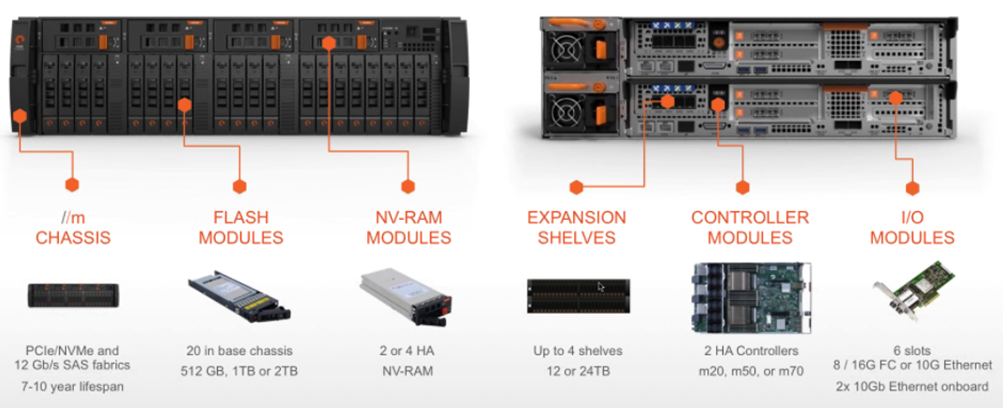
Pure Storage FA//m ArrayThe FA//m family of all-Flash arrays is Pure’s new next-generation array. It features a new custom-built chassis that holds both the controllers and some storage. The “m” in the name stand for both “modular” and “mini”.

“Modular” is obvious when you take a closer look at the hardware (shown below). It’s designed to support the principles of the Evergreen Storage program. Each part — storage, controllers, NVRAM, I/O modules, etc. — is redundant and designed to be easily swapped/replaced when the Next Big Technology Advancement™ comes along.

Pure Storage FA//m Array Chassis Details

“Mini” is because this array takes up less rack space than previous generations of Pure Storage. For the first time for Pure, two controllers and up to 40TB of raw SSD storage fit into a single chassis that takes up 3U of rack space.

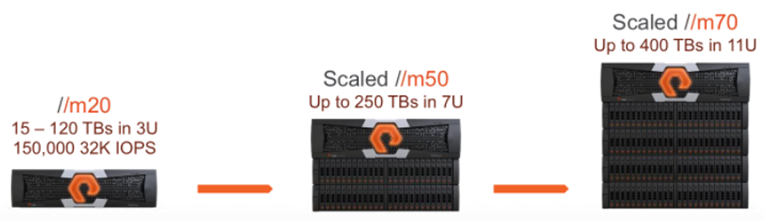
The FA//m family consists of three models, the FA//m20, FA//m50, and FA//m70. The FA//m20 is just the base chassis. The FA//m50 is the base chassis with more advanced controllers, and the ability to expand capacity by adding up to two additional 2U disk shelves containing either 12 or 24TB of raw SSD capacity. The FA//m70 is the base chassis with even beefier controllers and the ability to add up to four of the additional disk shelves. The picture below offers a good visual for differentiating the models.

Pure Storage FA//m Array Family

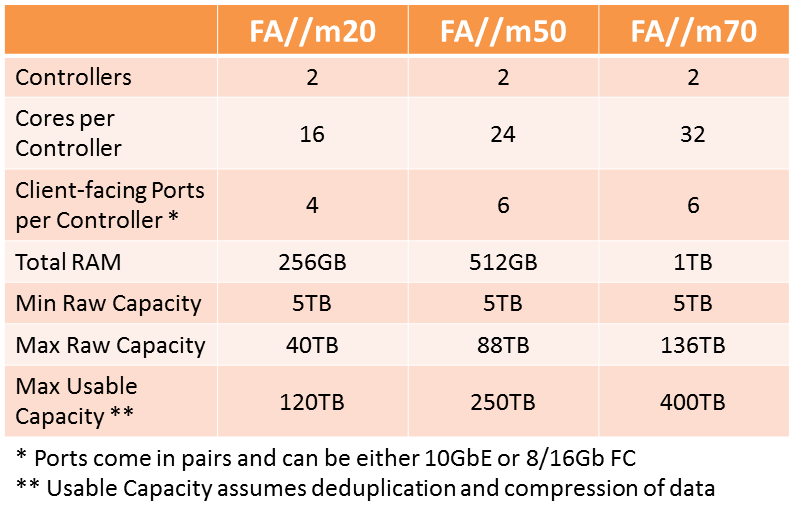
If you’re like me, you’re wishing you had an FA//m Family spec sheet. I can’t give you that, but I can offer you the specification details I was able to piece together below:

Pure Storage FA//m Array Family Specs

Pure1 Management Platform

Pure1 logoI’ll admit that I’ve never heard anyone complain that Pure Storage’s arrays are difficult to administer and manage. From own my brief hands-on experience, the management interface is pretty simple and straightforward.

Apparently that wasn’t good enough for Pure Storage, so they’ve introduced Pure1 to make it even easier to monitor and manage your FA arrays.

Pure1 is Pure Storage’s SaaS (Software as a Service) offering that provides access to Pure Storage’s Support organization, and allows customers to manage and monitor multiple Pure Storage arrays from a single pane of glass.

Pure1 takes advantage of the huge amount of data that Pure gathers about the state of each array. If a customer turns on Pure’s “phone-home” feature, the array reports its state back to Pure every 30 seconds. This allows Pure’s Support organization to be very proactive about potential problems on the array, and to often be aware of any hardware or performance issues even before the customer is.

By accessing this data, Pure1 is able to provide customers with detailed reports and analysis on not only the current state of the array, but also any historical trending. Because it’s browser-based, customers can monitor their arrays from anywhere, on any device. Pure has set up security rules in Pure1 so that management tasks can only be performed by administrators accessing Pure1 from inside the customer’s firewall.

Lastly, because Pure1 uses Pure’s databases and is a SaaS offering, it requires no installation of any software — on the array, on your laptop, on your tablet, or on your phone. All it requires is access to a browser and your login credentials.

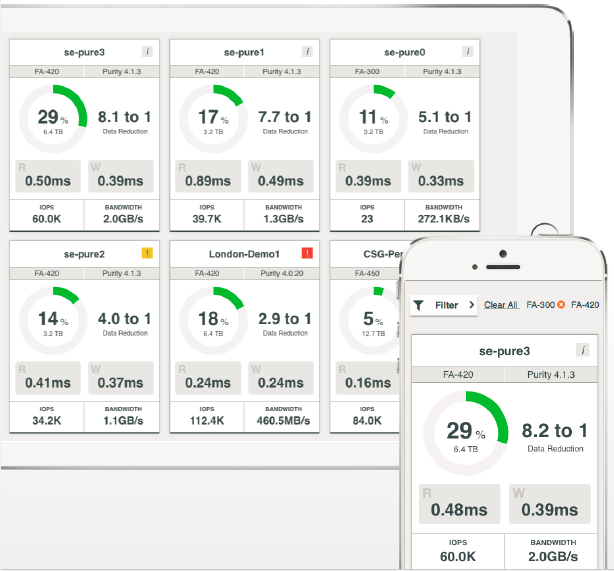
Here are two mobile device views of the Pure1 dashboard:

Pure1 Tablet and Phone Screenshots

Availability

The Evergreen Storage program begins today, 1 June 2015.

The FA//m arrays have been in beta test since early Q1. Today Pure is starting Directed Availability for these array. The FA//m arrays will be GA in Q3 of this year.

The Pure1 SaaS offering is available today.

20 Jun 06:54

Thinking Like A Data Scientist Part III: The Role of Scores

by Bill Schmarzo
EMC logo

Bill Schmarzo

In New Zealand, they are taking a “Moneyball” approach to optimizing social worker spending and focus attention can be most effective. A recent article in BusinessWeek “A Moneyball Approach To Helping Troubled Kids” (May 11, 2015) highlights the role that “scores” can play in identifying and prioritizing problem areas, and deciding what corrective actions to take.

Using data from welfare, education, employment, and the housing agencies and the courts, the government identified the most expensive welfare beneficiaries – kids who have at least one close adult relative who’s previously been reported to child safety authorities, been to prison, and spent substantial time on welfare. “There are million-dollar [cost] kids in those families,” Minister of Finance Bill English says. “By the time they are 10, their likelihood of incarceration is 70 percent. You’ve got to do something about that.”

…one idea is to rate families, giving them a number [score] that could be used to identify who’s most at risk in the same way that lenders rely on credit scores to determine creditworthiness. “The way we may use it, it’s going to be like it’s a FICO score,” says Jennie Feria, Head of Los Angeles’ Department of Children and Family Service. The information, she says, could be used both to prioritize cases and to figure out who needs extra services.

In continuing my “Thinking Like a Data Scientist” blog series, we’re going to focus on how “scores” can play a critical role in supporting an organization’s key business decisions. The power of a score is that it is relatively easy to understand from a business user perspective, and it focuses the data science efforts on identifying and exploring new variables, metrics and relationships that might be better predictors of performance.

Definition of a Score

Let’s start by understanding what a score is:

  • A score is a dynamic rating or grade standardized to aid in comparisons, performance tracking and decision-making; scores can help to predict likelihood of certain actions or outcomes
  • Scores are actionable, analytic-based measures that support the decisions your organization is trying to make, and guide the outcomes the organization is trying to predict

A common example of a score is the intelligence quotient or IQ score. An IQ score is derived from several standardized tests in order to create a single number that assesses an individual’s “intelligence.” The IQ score is standardized at 100 with a standard deviation of 15, which means that 68% of the population is within one standard deviation of the 100 standard (between 85 to 115). This standardization makes the IQ score easier to compare different candidates or applicants, and support key business decisions.

The true beauty of a “score” is its ability to convert a wide range of variables and metrics, all weighted, valued and correlated differently depending upon what’s being measured, into a single number that can be used to guide decision-making. And the true power of the “score” is the ability to start small with some simple analytics, and then constantly fine-tune and expand the score with new metrics, variables and the relationships that might yield better predictors of performance.

FICO Score Example

FICO may be the best example of a business score that is used to predict certain behaviors, in this case, the likelihood of a borrower to repay a loan. Fair, Isaac, and Company first introduced the FICO score in 1989. The FICO model uses a wide range of consumer data to create and update these scores.

A person’s FICO score can range between 300 and 850. A FICO score above 650 indicates that the individual has a very good credit history while people with scores below 620 will often find it substantially more difficult to obtain financing at a favorable rate (see Figure 1).

image1

Figure 1: http://tightwadtravelers.com/check-fico-credit-score-free/

The FICO score considers a wide range of consumer data to generate the single score for every individual. The data elements that are used in the calculation of an individual’s FICO score include[1]:

Payment History: 35 percent of the FICO credit score is based on a borrower’s payment history, making the repayment of past debt the most important factor in calculating credit scores. According to FICO, past long-term behavior is used to forecast future long-term behavior. This is a measure of how do you handle

  • credit; think credit “behavioral analytics.” This particular category encompasses the following metrics and variables:
  • Payment information on various types of accounts, including credit cards, retail accounts, installment loans and mortgages
  • The appearance of any adverse public records, such as bankruptcies, judgments, suits and liens, as well as collection items and delinquencies
  • Length of time for any delinquent payments
  • Amount of money still owed on delinquent accounts or collection items
  • Length of time since any delinquencies, adverse public records or collection items
  • Number of past-due items listed on a credit report
  • Number of accounts being paid as agreed

Credit Utilization: 30 percent of the FICO credit score is based on a borrower’s credit utilization; that is, the percentage of available credit that has been borrowed by that individual. The Credit Utilization calculation is comprised of six variables:

  • The amount of debt still owed to lenders
  • The number of accounts with debt outstanding
  • The amount of debt owed on individual accounts
  • The types of loan
  • The percentage of credit lines in use on revolving accounts, like credit cards
  • The percentage of debt still owed on installment loans, like mortgages

Length of credit history: 15 percent of the FICO credit score is based on the length of time each account has been open and the length of time since the account’s most recent activity. FICO breaks down “length of credit history” into three variables:

  • Length of time the accounts have been open
  • Length of time specific account types have been open
  • Length of time since those accounts were used

New credit applications: 10 percent of the FICO credit score is based upon borrowers’ new credit applications. Within the new credit application category, FICO considers the following variables:

  • Number of accounts have been opened in the past six to 12 months, as well as the proportion of accounts that are new, by account type
  • Number of recent credit inquiries
  • Length of time since the opening of any new accounts, by account type
  • Length of time since any credit inquiries
  • The re-appearance on a credit report of positive credit information for an account that had earlier payment problems

Credit Mix: 10 percent of the FICO credit score is based upon repaying the variety of debt, which is a measure of the borrower’s ability to handle a wide range of credit including:

  • Installment loans, including auto loans, student loans and furniture purchases
  • Mortgage loans
  • Bank credit cards
  • Retail credit cards
  • Gas station credit cards
  • Unpaid loans taken on by collection agencies or debt buyers
  • Rental data

The point of showing all of this FICO calculation detail is to reinforce the basic concept (and power) of a score – that a score can take into consideration a wide range of variables, metrics and relationships to create a single, standardized number that be used to support an organization’s key decisions, or in the case of the FICO score, used by lenders to predict a particular loan applicant’s ability to repay a loan. That’s a very powerful concept. Scores are a critical concept in getting your business stakeholders to contemplate how they might want to integrate different variables and measures to create scores for the key business decisions that they need to make.

Other Industry Score Examples

Scores can be created to support business stakeholder decision-making across a number of different industries. Let’s brainstorm just a few, and as my MBA students are going to find out this fall, there are many, many more waiting to be discovered!!

Financial Services

  • Retirement Readiness Score. This would be a score that measures how ready each client or investor is for retirement. This score could include variables such as age, current annual income, current annual expenses, net worth, value of primary home, value of secondary homes, desired retirement age, desired retirement location (Iowa is a lot cheaper than Palo Alto!!), number of dependent children, number of dependent parents, desired retirement lifestyle, etc.
  • Job Security Score. This score would measure the security of each individual’s job. This score could include variables such as industry, job type, employer(s), job level/title, job experience, age, education level, skill sets, industry publications and presentations, Klout scores, etc.
  • Home Value Stability Score. This score would measure the stability of the value of a particular house. This score could consider variables such as current value, turnover and house sales history, value of house compared to comparable houses, whether it’s a primary residence or rental residence, local price-to-rent ratio, local housing trends (maybe pulled from Zillow), etc.

[1] FICO’s 5 factors: The components of a FICO credit score (http://www.creditcards.com/credit-card-news/help/5-parts-components-fico-credit-score-6000.php)

Very Important Note: Combining the Job Security Score and Home Value Stability Score with the FICO score would have provided a more holistic assessment of banks’ risk and housing market exposure prior to the 2007 financial market meltdown. For example, the Home Value Stability Score could have provided invaluable insights as banks tried to determine to whom to make home mortgage loans and which markets might be “over-valued”.The key point here is that it is important to have multiple scores that provide different perspectives on the decision that is trying to be made; that these scores provide different perspectives in order to provide a more holistic assessment of the true conditions around which to make these key business decisions.

Additional Scores for different industries can be seen in Table 3 below.

image2

Table 3: Potential Scores by Industry

Summary

Scores are a very important and actionable concept for business stakeholders who are trying to envision where and how data science can improve their decision-making in support of their key business initiatives. As we saw from the FICO example, scores aid in performance tracking and decision-making by predicting likelihood of certain actions or outcomes (e.g., likelihood to repay a loan, in the case of the FICO score).

The beauty of a “score” is its ability to integrate a wide range of variables and metrics into a single number, and the power of the “score” is the ability to start small and then constantly looking for new metrics and variables that might yield better predictors of performance.

Simple but powerful, exactly what big data and data science should strive to be.

Thinking Like A Data Scientist Part III: The Role of Scores
Bill Schmarzo

20 Jun 06:54

Pure Storage Announces FlashArray//m, Evergreen Storage and Pure1

by Dan Frith
EMC logo

That’s one of the wordier titles I’ve used for a blog post in recent times, but I think it captures the essence of Pure Storage‘s recent announcements. Firstly, I’m notoriously poor at covering product announcements, so if you want a really good insight into what is going on, check out Dave Henry’s post here. There were three key announcements made today:

  • FlashArray//m;
  • Evergreen Storage; and
  • Pure1 Cloud-Based Management and Support.


FlashArray//m

Besides having some slightly weird spelling, the FlashArray//m (mini because it fits in 3RU and modular because, well, you can swap modules in it) is Pure’s next-generation storage appliance. Here’s a picture.

Pure_hardware1

There are three models, the //m20, //m50, and //m70. Each of these has various capabilities. I’ve included an overview from the datasheet, but note that this is subject to change before GA of the tin.

Pure_hardware2

The key takeaway for me is that, after some time using other people’s designs, this is Pure’s crack at using their own hardware design, and it will be interesting to see how this plays out over the expected life of the gear.


Evergreen Storage

Pure_evergreen

In the olden days, when I was a storage customer, I would have been pretty excited about a program like Evergreen Storage. Far too often I found myself purchasing storage only to have the latest version released a month later, sometimes before the previous generation had hit the loading dock. I was rarely given a heads up from the vendor that something new was coming, and often had the feeling I was just using up their old stock. Pure don’t want you to have that feeling with them. Instead, for as long as the array is under maintenance, Pure will help customers upgrade the controllers, storage, and software in a non-disruptive fashion. The impression I got was that these arrays would keep on keeping on for around 7 – 10 years, with the modular design enabling easy upgrades of key technologies as well as capacity.


Pure1 Cloud-Based Management and Support

I’ve never been a Pure Storage customer, so I can’t comment as to how easy or difficult it currently is to get support. Nonetheless, I imagine the Pure1 announcement might be a bit exciting for the average punter slogging through storage ops. Basically, Pure1 gets you in touch with improved analytics and management of your storage infrastructure, all of which can be performed via a web browser. And, if you’re so inclined, you can turn on a call home feature and have Pure collect info from your arrays every 30 seconds. This provides both the customer and Pure with a wealth of information to make decisions about performance, resilience and upgrades. You can get the datasheet here.


Final Thoughts

I like Pure Storage. I was lucky enough to visit them during Storage Field Day 6 and was impressed by their clarity of vision and different approach to flash storage architecture. I like the look of the new hardware, although the proof will be in field performance. The Evergreen Storage announcement is fantastic from the customer’s perspective, although I’ll be interested to see just how long they can keep something like that going.


20 Jun 06:53

HP MicroServer G8 – Now Under £100 !

by Simon Seagrave
EMC logo

HP MicroServerIt’s been a while since you’ve been able to pick up an HP entry level server for under £100, though the good-times have arrived again, at least here in the UK!  Note:  There is a free delivery offer for TechHead readers on HP MicroServer G8 bundles – check out the bottom of this post for details.

HP have just increased their cash-back offer on their MicroServer from £60 to £80, meaning that after cash-back you can now get your hands on a entry level MicroServer for just under £100. 

As many of you know HP switched from running AMD to Intel based processors in their MicroServers between the Generation 7 (G7) and Generation (G8) server models.  There are different Intel CPU configurations available within the MicroServer G8 portfolio, though in this particular instance this model comes with an Intel Celeron 1610T processor which, although not the most high-powered CPU by any stretch, it is well suited for a number of home or lab scenarios.  For example; a home virtualization lab server, media centre, NAS, etc.

As mentioned, the Celeron C1610T isn’t the fastest CPU by today’s standards, though it isn’t too slow either, as can be seen form the CPU bench marks below.  Keep in mind some of the i7 CPU’s listed are pretty quick.  Would you use it in a production environment?  Probably not, though for a home or lab environment it is potentially a good fit.

HP Proliant MicroServer Deal - CPU Benchmark

I have always used my HP ML110, ML115’s and MicroServers for lab servers as they offer great value for money, when linked with a cash-back deal.  The small mini-ITX form-factor of the MicroServer is also attractive, along with the low power consumption, both of which are a consideration when looking at running your own machine at home for extended periods of time.

Another consideration is the memory, as it is based on a Micro-ITX form factor type motherboard, it only has 2 DIMM sockets, with an ‘official’ maximum memory capacity of 16GB.  Since individual 16GB UDIMMs are hard to come across at the moment to test,  I haven’t seen anyone claim to have 32GB working in the G8 MicroServer, also there has been a lot of debate over whether their are possible BIOS imposed limits on being able to run 16GB on these Intel based boxes.

So, in light of that if you are after a low power, low cost basic small footprint machine to run at home or in the your lab at work, then this is a good deal to be had.

HP-MicroServer-G8-Deal

The Deal

The team at ServersPlus currently have stock of the MicroServer G8 at £149.95 ex VAT (£180 approx with VAT), after the cash-back deal this then drops to just under £100.

Click HERE to visit the Servers Plus HP MicroServer G8 page

As this basic configuration only comes with 2GB of memory, which in most cases, won’t be of much use, so you’ll probably be looking at buying additional memory.  Just to make you aware that ServersPlus also have some G8 bundle deals which include 16GB of memory, and if ordering one of these then use the code ‘TECHHEAD1’ upon checking-out on the ServersPlus site or give them a call and mention TechHead, and they’ll then give you free delivery on the bundle!  Note:  I don’t get any  financial remuneration from this, I just like being able to pass deals on to my readers. Smile

Click HERE to see the HP MicroServer G8 bundle deals from Servers Plus

Here are the basic specifications for the  MicroServer G8 on offer:

CPU Intel Celeron 2.3GHz Dual Core
Memory Type DDR3-SDRAM  UDIMM ECC
Memory 1 x 2GB DIMM (16GB Max.)
Hard Disk Controller Dynamic Smart Array B120i/ZM
Hard Disk Interface SATA
No. of Hard Disks Supported 4 (non hot-plug)
Network Card 1Gb 332i Ethernet Adapter 2 Ports per controller
Graphics Adapter Matrox G200
Power Supply 150W (non hot-plug)


Do you already own a MicroServer?  If so, let us know what you are using it for as they’re such versatile and affordable little machines.

The post HP MicroServer G8 – Now Under £100 ! appeared first on TechHead and was written by Simon Seagrave.

20 Jun 06:53

My musings on HP Storage

by Keith Townsend
EMC logo
  I struggle to find storage related stuff to write. I find virtualization and networking topics much easier because of my network administrator roots. However, most of the real innovation that directly impact application service levels have been in storage. I’ve
19 Jun 21:16

Data Mining Algorithms – Principal Component Analysis

by Dejan Sarka

Principal component analysis (PCA) is a technique used to emphasize the majority of the variation and bring out strong patterns in a dataset. It is often used to make data easy to explore and visualize. It is closely connected to eigenvectors and eigenvalues.

A short definition of the algorithm: PCA uses an orthogonal transformation to convert a set of observations of possibly correlated variables into a set of values of linearly uncorrelated variables called principal components. The number of principal components is less than or equal to the number of original variables. This transformation is defined in such a way that the first principal component has the largest possible variance, and each succeeding component in turn has the highest variance possible under the constraint that it is orthogonal to (i.e., uncorrelated with) the preceding components. The principal components are orthogonal because they are the eigenvectors of the covariance matrix, which is symmetric.

Initially, variables used in the analysis form a multidimensional space, or matrix, of dimensionality m, if you use m variables. The following picture shows a two-dimensional space. Values of the variables v1 and v2 define cases in this 2-D space. Variability of the cases is spread across both source variables approximately equally.

image

Finding principal components means finding new m axes, where m is exactly equal to the number of the source variables. However, these new axes are selected in such way that the most of the variability of the cases is spread over a single new variable, or over a principal component, like shown in the following picture.

image

We can deconstruct the data points matrix into eigenvectors and eigenvalues. Every eigenvector has a corresponding eigenvalue. A eigenvector is a direction of the line and a eigenvalue is a number, telling how much variance there is in the data in that direction, or how spread out the data is on the line. he eigenvector with the highest eigenvalue is therefore the principal component. Here is an example of calculation of eigenvectors and eigenvalues for a simple two-dimensional matrix.

image

The interpretation of the principal components is up to you and might be pretty complex. This fact might limit PCA usability for business-oriented problems. PCA is used more in machine learning and statistics than in data mining, which is more end user oriented, and the results thus should be easy understandable. You use the PCA to:

  • Explore the data to explain the variability;
  • Reduce the dimensionality – replace the m variables with n principal components, where n < m, in such a way that preserves the most of the variability;
  • Use the residual variability not explained by the PCs for anomaly detection.
19 Jun 21:16

Optimize Heap Memory Settings for Analysis Services Tabular 2012/2014 #ssas #tabular

by Marco Russo (SQLBI)

In the last months I assisted many companies implementing solutions based on Analysis Services Tabular. There is not so much difference between the versions 2012 and 2014, because SQL Server 2014 didn’t introduce new features to the BI services. Thus, my considerations are valid for both.

One issue observed in different cases was a general performance degradation after a few days of work. Restarting the msmdsrv.exe service was enough to restore normal performance. The problem might affect both query and process operations. Microsoft released a hotfix (KB2976861) that mitigates the problem for slowness of full process, but it is not something that completely solve the problem.

The real reason of the issue is the fragmentation of the memory heap. Analysis Services can use its own heap algorithm, or the standard Windows one. It seems that the workload generated by Tabular creating objects of a dynamic size is an issue for the Windows Low-Fragmentation Heap, which is the default setting in Analysis Services (because of a better scalability).

In the Heap Memory Settings for Analysis Services Tabular 2012 / 2014 article on SQLBI you can find a complete description of the settings to control heap memory used by Analysis Services. If default values produces the symptoms described above, then consider changing them with the suggestions included in the article.

19 Jun 21:16

Over 1000 XEvents in SQL Server 2016 CTP2. Here are the new ones.

by Bob Beauchemin

Extended events has firmly established itself as the premier diagnostic feature in SQL Server and SQL Server 2016 brings along more events to correspond to new features and fill in some diagnostic gaps. I always like to investigate a new release by seeing what’s new to trace. So here’s a “diff” of SQL Server 2016 CTP2 vs SQL Server 2014 (RTM) with respect to extended events. In SQL Server 2016 CTP2, the team has provided OVER 1000 different events, 1034 to be precise. 165 of them are new.

First, a couple of caveats:

The SQL Server team occasionally introduces events before the feature is available. An example of this is the query store, where a number of events were included in the metadata for SQL Server 2014, before the feature was available.

Because SQL Server and Azure SQL Database (ASD) share a common codebase, some events may be more useful (or only useful) in an ASD environment. An example of this may be the sqlserver.fulltextlog_written event. Full-text search was just introduced in ASD V1.2 and in ASD, you can’t read the full-text logs, a common diagnostic. Maybe this event will fill the gap.

Some of the events may have actually been introduced in SQL Server 2014 SP1. I remember a blog post that mentioned columnstore events in 2014 SP1, or for ASD V1.2. Figured that the 2016CTP2 vs 2014 comparison was more useful.

If you’re looking for these events in the XEvent GUI, don’t forget to turn on the debug channel events, which are off by default in the GUI. There appears to be some refactoring going on the the GUI categories, too, so use the GUI’s “event name completion” instead.

And of course, my observations:

The columnstore feature, including batch mode in queries, which had little to no coverage in 2014 extended events, now has rich coverage.

The new stretch tables and query store features are covered. Even JSON production has some diagnostics.

There are new series of events for availability groups (HADR) and in-memory tables (XTP), as well as Azure IO.

I’m especially happy with the new SQLCLR events. These will be helpful for folks who use built-in SQLCLR features (like spatial data) and those who work on the edges of user SQLCLR (i.e. unsafe assemblies).

Only 3 events were “discontinued” in SQL Server 2016 CTP2 vs. 2014, two refactored query store events, and one likely internal one, for columnstore code coverage.

Here’s the list…enjoy.

@bobbeauch

Full Name    description
qds.query_store_background_task_persist_finished    Fired if the background task for Query Store data persistence is completed successfully
qds.query_store_background_task_persist_started    Fired if the background task for Query Store data persistence started execution
qds.query_store_capture_policy_abort_capture    Fired when an UNDECIDED query failed to transition to CAPTURED.
qds.query_store_capture_policy_evaluate    Fired when the capture policy is evaluated for a query.
qds.query_store_capture_policy_start_capture    Fired when an UNDECIDED query is transitioning to CAPTURED.
qds.query_store_db_data_structs_not_released    Fired if Query Store data structures are not released when feature is turned OFF.
qds.query_store_db_diagnostics    Periodically fired with Query Store diagnostics on database level.
qds.query_store_db_settings_changed    Fired when Query Store settings are changed.
qds.query_store_db_whitelisting_changed    Fired when Query Store database whitelisting state is changed.
qds.query_store_generate_showplan_failure    Fired when Query Store failed to store a query plan because the showplan generation failed.
qds.query_store_global_mem_obj_size_kb    Periodically fired with Query Store global memory object size.
qds.query_store_load_started    Fired when query store load is started
qds.query_store_schema_consistency_check_failure    Fired when the QDS schema consistency check failed.
qds.query_store_size_retention_cleanup_finished    Fired when size retention policy clean-up task is finished.
qds.query_store_size_retention_cleanup_skipped    Fired when starting of size retention policy clean-up task is skipped because its minimum repeating period did not pass yet.
qds.query_store_size_retention_cleanup_started    Fired when size retention policy clean-up task is started.
qds.query_store_size_retention_plan_cost    Fired when eviction cost is calculated for the plan.
qds.query_store_size_retention_query_cost    Fired when query eviction cost is calculated for the query.
qds.query_store_size_retention_query_deleted    Fired when size based retention policy deletes a query from Query Store.
sqlclr.clr_context_dump    ClrContextDump triggered.
sqlclr.notify_on_clr_disabled    Event_ClrDisabled has been triggered in ClrHost.
sqlclr.on_app_domain_failure    AppDomain hit a failure.
sqlclr.on_app_domain_unloading    AppDomain is unloading.
sqlclr.on_host_policy_callback    IHostPolicyManager received an event.
sqlclr.on_host_policy_failure    IHostPolicyManager received an event.
sqlos.ex_raise2    Raised exception
sqlos.premature_systemthread_wakeup    system thread is woken up prematurely
sqlos.recalculate_mem_target    New Memory Targets which are set after RecalculateTarget is executed
sqlserver.availability_replica_database_fault_reporting    Occurs when a database reports a fault to the availability replica manager which will trigger a replica restart if the database is critical
sqlserver.backup_restore_progress_trace    Prints backup/restore progress trace messages with details
sqlserver.batchmode_sort_spill_file    Record the spill file read/write information for batch mode sort
sqlserver.batchmode_sort_status    Record batch mode sort status
sqlserver.column_store_expression_filter_apply    An expression bitmap filter was applied on a rowgroup column batch.
sqlserver.column_store_expression_filter_bitmap_set    An expression bitmap filter was set on a rowgroup column at rowgroup compile time.
sqlserver.columnstore_delete_buffer_closed_rowgroup_with_generationid_found    Delete buffer can not be flushed due to existence of one or more closed rowgroups with generation ID.
sqlserver.columnstore_delete_buffer_flush_failed    Columnstore delete buffer flush failed.
sqlserver.columnstore_delete_buffer_state_transition    Occurs when closed delete buffer state changes.
sqlserver.columnstore_delta_rowgroup_closed    A delta rowgroup was closed.
sqlserver.columnstore_no_rowgroup_qualified_for_merge    A user invoked a REORG command but based on the policy, no rowgroup qualified.
sqlserver.columnstore_rowgroup_compressed    A compressed rowgroup was created.
sqlserver.columnstore_rowgroup_merge_complete    A MERGE operation completed merging columnstore rowgroups together.
sqlserver.columnstore_rowgroup_merge_start    A MERGE operation started merging columnstore rowgroups together.
sqlserver.columnstore_tuple_mover_begin_delete_buffer_flush    Columnstore tuple mover started flushing a delete buffer.
sqlserver.columnstore_tuple_mover_compression_stats    Statistics about the movement of a deltastore to a compressed rowgroup, including duration, size, etc.
sqlserver.columnstore_tuple_mover_delete_buffer_flush_requirements_not_met    Occurs when column store tuple mover was not able to acquire required locks for flushing a delete buffer.
sqlserver.columnstore_tuple_mover_delete_buffer_truncate_requirements_not_met    Occurs when column store tuple mover was not able to acquire required locks for truncating a delete buffer.
sqlserver.columnstore_tuple_mover_delete_buffer_truncated    Columnstore tuple mover truncated delete buffer.
sqlserver.columnstore_tuple_mover_delete_buffers_swapped    Columnstore tuple mover swapped delete buffers.
sqlserver.columnstore_tuple_mover_end_delete_buffer_flush    Columnstore tuple mover completed flushing a delete buffer.
sqlserver.columnstore_tuple_mover_met_requirements_for_delete_buffer_flush    Occurs when column store tuple mover has acquired required locks and is ready to start flushing a delete buffer.
sqlserver.columnstore_tuple_mover_met_requirements_for_delete_buffer_truncate    Occurs when column store tuple mover has acquired required locks and is ready to start truncating a delete buffer.
sqlserver.columnstore_x_dbfl_acquired    Occurs when X Delete Buffer Flush Lock is acquired.
sqlserver.compressed_alter_column_is_md_only    Occurs during an alter column operation. Indicates whether the alter column is metadata only or not.
sqlserver.connection_accept    Occurs when a new connection is accepted by (or duplicated into) the server. This event serves to log all connection attempts.
sqlserver.connection_duplication_failure    Occurs when connection duplication fails
sqlserver.data_purity_checks_for_dbcompat_130    Occurs when an operation that may require a data purity check for dbcompat level 130 occurs.
sqlserver.database_recovery_times    Database recovery times
sqlserver.database_tde_encryption_scan_duration    Database TDE Encryption Scan
sqlserver.database_transaction_yield    Occurs when a database transaction yields execution due to TDS buffer being full.
sqlserver.fulltextlog_written    Errorlog written
sqlserver.global_transaction    Occurs when global transaction is started.
sqlserver.hadr_db_log_throttle    Occurs when DB log generation throttle changes.
sqlserver.hadr_db_log_throttle_configuration_parameters    Occurs when DB log generation throttle configuration parameters are read.
sqlserver.hadr_db_log_throttle_input    Occurs when HADR Fabric log management component updates log throttle.
sqlserver.hadr_db_marked_for_reseed    Occurs when a HADR secondary DB falls too far behind primary and is marked for reseed.
sqlserver.hadr_db_remote_harden_failure    A harden request as part of a commit or prepare failed due to remote failure.
sqlserver.hadr_log_block_send_complete    Occurs after a log block message has been sent. This event is only used for failpoints.
sqlserver.hadr_partner_log_send_transition    Log send transition between log writer and log capture.
sqlserver.hadr_partner_restart_scan    Restart partner scans for this partner.
sqlserver.hadr_physical_seeding_backup_state_change    Physical Seeding Backup Side State Change.
sqlserver.hadr_physical_seeding_failure    Physical Seeding Failure Event.
sqlserver.hadr_physical_seeding_forwarder_state_change    Physical Seeding Forwarder Side State Change.
sqlserver.hadr_physical_seeding_forwarder_target_state_change    Physical Seeding Forwarder Target Side State Change.
sqlserver.hadr_physical_seeding_progress    Physical Seeding Progress Event.
sqlserver.hadr_physical_seeding_restore_state_change    Physical Seeding Restore Side State Change.
sqlserver.hadr_physical_seeding_submit_callback    Physical Seeding Submit Callback Event.
sqlserver.hadr_send_harden_lsn_message    Occurs when we’re crafting a message to send containing a new hardened LSN on a secondary. Test only.
sqlserver.hadr_transport_configuration_state    Indicates session state changes
sqlserver.hadr_transport_dump_dropped_message    Use this event to trace dropped HADR transport messages throughout the system.
sqlserver.hadr_transport_dump_failure_message    Use this event to help trace HADR failure messages.
sqlserver.hadr_transport_dump_preconfig_message    Use this event to help trace HADR preconfig messages.
sqlserver.hadr_transport_sync_send_failure    Synchronous send failure in hadr transport.
sqlserver.hadr_transport_ucs_registration    Reports UCS registration state changes
sqlserver.json_depth_error    Occurs when depth of json text being parsed is bigger than 128.
sqlserver.json_parsing_error    Indicates json parser error. Occurs when json format is not valid.
sqlserver.json_stackoverflow_error    Json parser stack overflow.
sqlserver.json_unescaped_character    Jsonparser hitted unescaped character in json string.
sqlserver.log_pool_cache_miss    Occurs when a log consumer attempts to lookup a block from the log pool but fails to find it.
sqlserver.log_pool_push_no_free_buffer    Occurs when log pool push fails to get a free buffer and bails out.
sqlserver.login_event    This is an abbreviated version of process_login_finish, containing only the columns required by external monitoring telemetry pipeline.
sqlserver.page_cache_trace    Modification of the page cache.
sqlserver.private_login_accept    TDS connection accept event that is logged to private MDS table.
sqlserver.private_login_finish    TDS login finish event that is logged to private MDS table.
sqlserver.process_login_finish    This event is generated when server is done processing a login (success or failure).
sqlserver.query_execution_batch_filter    Occurs when batch processing filters one batch using expression services.
sqlserver.query_execution_batch_spill_started    Occurs when batch operator runs out of granted memory and initiates spilling to disk of another partition of in-memory data.
sqlserver.query_execution_column_store_rowgroup_scan_finished    Occurs when row bucket processor finishes column store row group scan.
sqlserver.query_execution_column_store_segment_scan_finished    Occurs when row bucket processor finishes column store segment scan.
sqlserver.query_execution_column_store_segment_scan_started    Occurs when column segment scan starts.
sqlserver.query_memory_grant_blocking    Occurs when a query is blocking other queries while waiting for memory grant
sqlserver.query_memory_grant_usage    Occurs at the end of query processing for queries with memory grant over 5MB to let users know about memory grant inaccuracies
sqlserver.query_trace_column_values    Trace output column values of each row on each query plan operator
sqlserver.remote_data_archive_db_ddl    Occurs when the database T-SQL ddl for stretching data is processed.
sqlserver.remote_data_archive_provision_operation    Occurs when a provisioning operation starts or ends.
sqlserver.remote_data_archive_query_rewrite    Occurs when RelOp_Get is replaced during query rewrite for Stretch.
sqlserver.remote_data_archive_table_ddl    Occurs when the table T-SQL ddl for stretching data is processed.
sqlserver.remote_data_archive_telemetry    Occurs whenever an on premise system transmits a telemetry event to Azure DB.
sqlserver.remote_data_archive_telemetry_rejected    Occurs whenever an AzureDB Stretch telemetry event is rejected
sqlserver.report_login_failure    This event is generated for a TDS login failure.
sqlserver.rpc_starting_aggregate    Occurs periodically, aggregating all occasions an rpc call is started.
sqlserver.rpc_starting_aggregate_xdb    Occurs periodically, aggregating all occasions an rpc call is started.
sqlserver.sql_batch_starting_aggregate    Occurs periodically, aggregating all occasions a sql batch is started.
sqlserver.sql_batch_starting_aggregate_xdb    Occurs periodically, aggregating all occasions a sql batch is started.
sqlserver.startup_dependency_completed    Occurs on the completion of a startup dependency in the SQL Server startup sequence
sqlserver.stretch_codegen_errorlog    Reports the output from the code generator
sqlserver.stretch_codegen_start    Reports the start of stretch code generation
sqlserver.stretch_create_migration_proc_start    Reports the start of migration procedure creation
sqlserver.stretch_create_remote_table_start    Reports the start of remote table creation
sqlserver.stretch_create_update_trigger_start    Reports the start of create update trigger for remote data archive table
sqlserver.stretch_database_disable_completed    Reports the completion of a ALTER DATABASE SET REMOTE_DATA_ARCHIVE OFF command
sqlserver.stretch_database_enable_completed    Reports the completion of a ALTER DATABASE SET REMOTE_DATA_ARCHIVE ON command
sqlserver.stretch_database_events_submitted    Reports the completion telemetry transfer
sqlserver.stretch_migration_debug_trace    Debug trace of stretch migration actions.
sqlserver.stretch_migration_queue_migration    Queue a packet for starting migration of the database and object.
sqlserver.stretch_migration_sp_stretch_get_batch_id    Call sp_stretch_get_batch_id
sqlserver.stretch_migration_start_migration    Start migration of the database and object.
sqlserver.stretch_sync_metadata_start    Reports the start of metadata checks during the migration task.
sqlserver.stretch_table_codegen_completed    Reports the completion of code generation for a stretched table
sqlserver.stretch_table_provisioning_step_duration    Reports the duration of a stretched table provisioning operation
sqlserver.stretch_table_remote_creation_completed    Reports the completion of remote execution for the generated code for a stretched table
sqlserver.stretch_table_row_migration_event    Reports the completion of the migration of a batch of rows
sqlserver.stretch_table_row_migration_results_event    Reports an error or completion of a successful migration of a number of batches of rows
sqlserver.stretch_table_unprovision_completed    Reports the completion removal of local resources for a table that was unstretched
sqlserver.stretch_table_validation_error    Reports the completion of validation for a table when the user enables stretch
sqlserver.stretch_unprovision_table_start    Reports the start of stretch table un-provisioning
sqlserver.trust_verification_failed    Occurs when a SQL Server binary fails Authenticode signature verification.
sqlserver.unable_to_verify_trust    Occurs when SQL Server is unable to perform Authenticode signature verification on binaries.
sqlserver.xio_blob_properties_obtained    Windows Azure Storage blob property is obtained from response header.
sqlserver.xio_failed_request    Failed to complete a request to Windows Azure Storage.
sqlserver.xio_header_obtained    Response header is obtained from request to Windows Azure Storage.
sqlserver.xio_read_complete    Read complete from Windows Azure Storage response.
sqlserver.xio_request_opened    A request is opened to Windows Azure Storage.
sqlserver.xio_send_complete    Request send to Windows Azure Storage is complete.
sqlserver.xio_write_complete    Request send to Windows Azure Storage is complete.
sqlserver.xstore_acquire_lease    The properties of the lease acquire reques.
sqlserver.xstore_create_file    Creating an XStore file has been attempted with the options below.
sqlserver.xstore_debug_trace    Telemetry tracing event has occurred.
sqlserver.xstore_lease_renewal_request    Attempt to renew blob lease
sqlserver.xtp_alter_table    Occurs at start of XTP table altering.
sqlserver.xtp_drop_table    Occurs after an XTP table has been dropped.
ucs.ucs_negotiation_completion    UCS transport connection negotiation completed
XtpCompile.cl_duration    Reports the duration of the C compilation.
XtpEngine.trace_dump_deleted_object_table_row    Dump deleted object table row
XtpEngine.xtp_ckptctrl_abort_checkpoint    Indicates that the checkpoint close thread aborted a checkpoint.
XtpEngine.xtp_ckptctrl_close_checkpoint    Indicates that the checkpoint close thread hardened a checkpoint.
XtpEngine.xtp_ckptctrl_close_install_merge    Indicates that the checkpoint close thread installed a merge.
XtpEngine.xtp_ckptctrl_new_segment_definition    Indicates that the checkpoint controller processed a new segment definition.
XtpEngine.xtp_ckptctrl_storage_array_grow    Indicates the XTP storage array has grown in size.
XtpEngine.xtp_merge_request_start    Indicates that an XTP storage merge was requested.
XtpEngine.xtp_merge_request_stop    Indicates that an XTP storage merge request ended.
XtpEngine.xtp_merge_start    Indicates that an XTP storage merge range is starting.
XtpEngine.xtp_merge_stop    Indicates that an XTP storage merge range completed.
XtpEngine.xtp_redo_log_corruption    Indicates that the redo process failed due to log corruption.
XtpEngine.xtp_root_file_deserialized    Indicates that the load of a checkpoint root file is complete.
XtpEngine.xtp_root_file_serialized    Indicates that the write of the checkpoint root file is complete.

The post Over 1000 XEvents in SQL Server 2016 CTP2. Here are the new ones. appeared first on Bob Beauchemin.

19 Jun 21:15

Plan Cache Pollution: Avoiding it and Fixing it

by Greg Low

While SQL Server’s plan cache generally is self-maintaining, poor application coding practices can cause the plan cache to become full of query plans that have only ever been used a single time and that are unlikely to ever be reused. We call this “plan cache pollution”.

Causes

The most common cause of these issues are programming libraries that send multiple variations of a single query. For example, imagine I have a query like:

SELECT c.CustomerID, c.TradingName, c.ContactName, c.PhoneNumber FROM dbo.Customers AS c WHERE c.CustomerID = @CustomerID AND c.BusinessCategory = @BusinessCategory AND c.ContactName LIKE @ContactNameSearch ORDER BY c.CustomerID;

The query has three parameters: @CustomerID, @BusinessCategory, and @ContactNameSearch. If the parameters are always defined with the same data types ie: @BusinessCategory is always nvarchar(35) and so on, then we will normally end up with a single query plan. However, if on one execution the parameter is defined as nvarchar(35), and on the next execution it is defined as nvarchar(20), and on yet another execution it is defined as nvarchar(15), each of these queries will end up with different query plans. A similar problem would also occur if any of the plan-affecting SET options are different on each execution ie: if DATEFORMAT was dmy for one execution, and mdy for the next, you’ll also end up with a different plan.

For more details on the internal causes of this or for a list of plan-affecting SET options, you might want to read the whitepaper that I prepared for the MSDN site. The latest version was for SQL Server 2012 and can be found here: https://msdn.microsoft.com/en-us/library/dn148262.aspx (Plan Caching and Recompilation in SQL Server 2012).

So what on earth would cause someone to send parameters defined differently each time? The worst offenders are not queries that are written intentionally, they are queries written by frameworks.

As an example, while using the SqlCommand object in ADO.NET, it is convenient to use the AddWithValue(parametername, parametervalue) method of the Parameters collection. But notice that when you do this, you do not specify the data type of the parameter. ADO.NET has to derive an appropriate data type based on the data that you have provided. For string parameters, this can be particularly troubling. If the parameter value is initially “hello”, a query plan with an nvarchar parameter length of 5 will be cached after the command is executed. When the query is re-executed with a parameter value of “trouble”, the command will appear to be different as it has an nvarchar parameter with a length of 7.

The more the command is executed, the more the plan cache will become full of plans for different length string parameters. This is particularly troubling for commands with multiple string parameters as plans will end up being stored for all combinations of all lengths of all the parameters. Some later variants of these libraries are improved by always deriving strings as nvarchar(4000). That’s not ideal but it’s much better than the previous mechanism.

While someone coding with ADO.NET can use another method to add a parameter ie: one that allows specifying the data type as well, developers using higher level libraries do not have that option. For example, Lync to SQL uses AddWithValue() within the framework. The user has no control over that. Ad-hoc queries generated by end-user query tools can also cause a similar problem where many combinations of similar queries can end up becoming cached.

Avoiding Plan Cache Pollution

As mentioned, to work around such a problem, the application should use a method to add the parameter that allows specifying the data type precisely.

As an example, nvarchar(100) might be used as the data type for each execution in the above example, if we know that all possible parameter lengths are less than 100.

Treating Plan Cache Pollution

There are several additional options that can help in dealing with plan cache pollution issues:

FORCED PARAMETERIZATION

FORCED PARAMETERIZATION can be set at the database level. SQL Server will often auto-parameterize queries by determining that a value looks like a parameter, even though you didn’t specify it as a parameter. Using the FORCED PARAMETERIZATION setting makes SQL Server become much more aggressive in deciding which queries to auto-parameterize. The down-side of this option is that it could potentially introduce parameter-sensitivity problems. (This option was added in SQL Server 2005).

OPTIMIZE FOR ADHOC WORKLOADS

OPTIMIZE FOR ADHOC WORKLOADS is an sp_configure server level option. When set, SQL Server only caches a plan stub on the first execution of an ad-hoc query. The next time the same query is executed, the full plan is stored. Plan stubs are much smaller than query plans and this option ensures that the plan cache is not filled by query plans that have never been reused. (This option was added in SQL Server 2008). We tend to enable this option on most servers.

DBCC FREESYSTEMCACHE

Sometimes you can get into a situation where you simply cannot avoid the queries from creating this situation and you need to deal with it. DBCC FREESYSTEMCACHE can be used to clear the query cache. One little understood option on it however, is that you can then specify a particular Resource Governor resource pool. It then only clears the plans associated with that resource pool. (This command was first available in SQL Server 2005 but the option to clear a specific resource pool was added in SQL Server 2008).

We often use this method to work around plan cache pollution issues. We try to isolate the badly-behaved applications or ad-hoc queries into one or more separate resource pools using Resource Governor. Then periodically, (perhaps every 5 or 10 minutes), we clear the plan cache for members of this “tough luck” pool.

Best advice is to try to avoid the situation in the first place by appropriate coding techniques but that option isn’t available to everyone.

19 Jun 20:57

What is Microsoft Azure Stream Analytics?

by James Serra

Microsoft Azure Stream Analytics (ASA) is a fully managed cloud service for real-time processing of streaming data.  ASA makes it easy to set up real-time analytic computations on data flowing in from devices, sensors, web sites, applications and infrastructure systems.  It supports a powerful high-level SQL-like language that dramatically simplifies the logic to visualize, alert, or act in near real-time.  ASA makes it simpler to build a wide range of Internet-of-Things (IoT) applications such as real-time remote device management, and to monitor and gain analytic insights from connected devices of all types including mobile phones and connected cars.

It was made generally available on April 16, 2015 (read).

ASA-blog

ASA supports two different types of inputs, either stream data or reference data, and two different input data sources, either Azure Event Hubs or files from Azure Blob Storage.

The ingestor, or data source, for stream analytics is usually an Azure Event Hub.  Event Hubs is a highly scalable publish-subscribe data integrator capable of consuming large volumes of events per second, enabling Azure to process vast amounts of data from connected applications or devices.  It provides a unified collection point for a broad array of platforms and devices, and as such, abstracts the complexity of ingesting multiple different input streams directly into the streaming analytics engine.  ASA has an Event Hubs adapter built into the offering.

ASA supports five different types of outputs: Blob storage, Event Hub, Power BI, SQL Database or Table Storage.  ASA also enhances SQL by supporting groupings by time (see Windowing).  ASA provides a native connector for SQL Database for consuming events that are output from the stream.

One of the common presentation use cases for ASA is to analyze high volume streaming data in real-time and get the insight in a live dashboard (a dashboard that updates in real-time without user having to refresh the browser).  You can build a live dashboard using Power BI as an output for your ASA job (see Azure Stream Analytics & Power BI: Live dashboard for real-time analytics of streaming data).

It is real easy to build an ASA solution as it is all done thru the Azure web portal.  There is no need to create a VM and remote into it.  It is also possible to easily integrate with Azure ML.

There are also a couple of tutorials you can check out if you want to build a end-to-end solution.

Microsoft has two other stream processing platforms: StreamInsight and Azure HDInsight Storm.

More info:

Stream Analytics documentation

Reference Architecture: Real-time event processing with Microsoft Azure Stream Analytics

Video An Introduction to Azure Stream Analytics

Video Gaining Real-Time IoT Insights using Azure Stream Analytics, AzureML and PowerBI

Azure Stream Analytics Team Blog

Video Azure Stream Analytics Demo

Building an IoT solution with Azure Event Hubs and Stream Analytics – Part 3

How to Process Google Data in Real Time with Azure Stream Analytics

Microsoft Azure Stream Analytics

19 Jun 20:57

Error in XML document. Hexadecimal value 0x1F, is an invalid character

by psssql

I worked on an issue recently where we were noticing that a large majority of the out of the box System Center Configuration manager (SCCM) reports were throwing the same error. Very odd! I would expect to see an error from a custom report but not an out of the box report! Here is the error the reports were throwing

From SQL Server Reporting Services (SSRS):

The attempt to connect to the report server failed. Check your connection information and that the report server is a compatible version.
There is an error in XML document (1, 21726).
'¬', hexadecimal value 0x1F, is an invalid character.
Line 1, position 1869.

From SCCM:

System.InvalidOperationException
There is an error in XML document (1, 21726).
 
Stack Trace:
   at System.Xml.Serialization.XmlSerializer.Deserialize(XmlReader xmlReader, String encodingStyle, XmlDeserializationEvents events)
   at System.Xml.Serialization.XmlSerializer.Deserialize(XmlReader xmlReader, String encodingStyle)
   at System.Web.Services.Protocols.SoapHttpClientProtocol.ReadResponse(SoapClientMessage message, WebResponse response, Stream responseStream, Boolean asyncCall)
   at System.Web.Services.Protocols.SoapHttpClientProtocol.Invoke(String methodName, Object[] parameters)
   at Microsoft.ConfigurationManagement.Reporting.Internal.Proxy.ReportingService2005.GetReportParameters(String Report, String HistoryID, Boolean ForRendering, ParameterValue[] Values, DataSourceCredentials[] Credentials)
   at Microsoft.ConfigurationManagement.Reporting.Internal.SrsReportServer.GetReportParameters(String path, Dictionary`2 parameterValues, Boolean getValues)
 
-------------------------------
 
System.Xml.XmlException
'­', hexadecimal value 0x1F, is an invalid character. Line 1, position 21726.
 
Stack Trace:
   at System.Xml.Serialization.XmlSerializer.Deserialize(XmlReader xmlReader, String encodingStyle, XmlDeserializationEvents events)
   at System.Xml.Serialization.XmlSerializer.Deserialize(XmlReader xmlReader, String encodingStyle)
   at System.Web.Services.Protocols.SoapHttpClientProtocol.ReadResponse(SoapClientMessage message, WebResponse response, Stream responseStream, Boolean asyncCall)
   at System.Web.Services.Protocols.SoapHttpClientProtocol.Invoke(String methodName, Object[] parameters)
   at Microsoft.ConfigurationManagement.Reporting.Internal.Proxy.ReportingService2005.GetReportParameters(String Report, String HistoryID, Boolean ForRendering, ParameterValue[] Values, DataSourceCredentials[] Credentials)
   at Microsoft.ConfigurationManagement.Reporting.Internal.SrsReportServer.GetReportParameters(String path, Dictionary`2 parameterValues, Boolean getValues)

Taking a look at the stack I can see that it appears to be failing to read one of the parameters (GetReportParameters)

I opened up a few of the reports in Report Builder and saw that each had a few parameters that are in every SCCM report but each had one parameter which was common to just the failing reports. The parameter was CollID. When taking a look at the query for the dataset (Parameter_DataSet_CollectionID)

select CollectionID, CollectionName=Name, NameSort=CollectionID+' - '+Name
from fn_rbac_Collection(@UserSIDs) 
order by 2

I then opened up the Function fn_rbac_Collection in the SCCM database to see what table it was pulling from. It is getting its parameters from v_Collection

I used the following SQL query to search through the parameters to find which one(s) contain the 1F hex value

SELECT Name
FROM v_Collection
WHERE CONVERT(varchar(max),convert(varbinary(max),convert(nvarchar(max),Name)),2) LIKE '%1F%'

Here is what we got:

Name
Uni-InternetExplorer_11.0¬_R01

Nothing seemed off about that name so I pasted it into notepad and started keying through the letters. I noticed that going from left to right, when I key past the zero in 11.0, I had to click the arrow key twice on my keyboard! Opening the string in a hex editor I could see that right between that zero and the underscore is that 1F hex.

Knowing now that it was the culprit, we went into SCCM, found that collection, and then retyped it so that it would no longer have that hidden character.

Kicked off the report and we had a successful render!

In other cases, I also came across reports that had the same issue, but were pulling from Assignments. This is the query I used to pull the corrupt assignment parameters

SELECT AssignmentName
FROM CI_CIAssignments
WHERE CONVERT(varchar(max),convert(varbinary(max),convert(nvarchar(max),AssignmentName)),2) LIKE '%1F%'

Mark Hughes
Microsoft Business Intelligence Support – Escalation

19 Jun 20:57

Finding a transaction in the log for a particular user

by Paul Randal

In the last IEHADR class we just had in Chicago, I was doing a demo of looking in the transaction log to find the point at which a table was dropped so a restore could be performed (as described in this blog post). One of the students asked how to find a transaction for a particular user, so I demo’d that and thought it would make a good little post.

This can be done using fn_dblog, or if the relevant log isn’t available on the system any more, using fn_dump_dblog, albeit more slowly.

The two pieces of information needed are the user and the rough time that the transaction occurred.

The user can’t be used to search in the log directly, but every LOP_BEGIN_XACT log record contains the SID of who ran the transaction. The SID can be obtained from the username using the SUSER_SID function (remember that it’s more complicated if someone’s used EXECUTE AS, as that can mask who they really are – details in this post).

For instance, on my laptop:

SELECT SUSER_SID ('APPLECROSS\PAUL') AS [SID];
GO
SID
-----------------------------------------------------------------
0x0105000000000005150000008E888D4129BB677CAA278B76E8030000

Then you can use that SID as a filter for fn_dblog (or fn_dump_dblog), like so:

SELECT
	[Current LSN],
	[Operation],
	[Transaction ID],
	[Begin Time],
	LEFT ([Description], 40) AS [Description]
FROM
	fn_dblog (NULL, NULL)
WHERE
	[Transaction SID] = SUSER_SID ('APPLECROSS\PAUL');
GO
Current LSN             Operation                       Transaction ID Begin Time               Description
----------------------- ------------------------------- -------------- ------------------------ ----------------------------------------
00000021:0000049d:0001  LOP_BEGIN_XACT                  0000:000006c8  2015/06/03 11:18:13:790  Backup:CommitDifferentialBase;0x01050000
00000021:000004a5:0001  LOP_BEGIN_XACT                  0000:000006c9  2015/06/03 11:18:13:810  Backup:CommitLogArchivePoint;0x010500000
00000021:000004a5:0002  LOP_BEGIN_XACT                  0000:000006ca  2015/06/03 11:18:13:810  Backup:CommitLogArchivePoint;0x010500000
00000021:000004a7:0003  LOP_BEGIN_XACT                  0000:000006cb  2015/06/03 11:18:13:820  INSERT;0x0105000000000005150000008e888d4
00000021:000004a7:0004  LOP_BEGIN_XACT                  0000:000006cc  2015/06/03 11:18:13:820  AllocHeapPageSimpleXactDML;0x01050000000
00000021:000004a7:0007  LOP_BEGIN_XACT                  0000:000006cd  2015/06/03 11:18:13:820  AllocFirstPage;0x01050000000000051500000
00000021:000004ad:0002  LOP_BEGIN_XACT                  0000:000006ce  2015/06/03 11:18:13:820  INSERT;0x0105000000000005150000008e888d4
00000021:000004ae:0001  LOP_BEGIN_XACT                  0000:000006cf  2015/06/03 11:18:16:112  INSERT;0x0105000000000005150000008e888d4
00000021:000004af:0001  LOP_BEGIN_XACT                  0000:000006d0  2015/06/03 11:19:17:306  INSERT;0x0105000000000005150000008e888d4
00000021:000004b0:0001  LOP_BEGIN_XACT                  0000:000006d1  2015/06/03 11:22:35:451  DELETE;0x0105000000000005150000008e888d4
00000021:000004b1:0001  LOP_BEGIN_XACT                  0000:000006d2  2015/06/03 11:27:42:998  INSERT;0x0105000000000005150000008e888d4
00000021:000004b2:0001  LOP_BEGIN_XACT                  0000:000006d3  2015/06/03 11:29:56:044  DELETE;0x0105000000000005150000008e888d4

.
.
.

Obviously the transactions above are a contrived example. You can imagine the case of lots of transactions spread out over a few hours (or even over a day, being investigated through log backups with fn_dump_dblog) and to narrow it down to the transaction you want you could look through the list manually for the rough time or specify a time range on the SELECT using predicates on the Begin Time column in the fn_dblog output.

For example:

SELECT
	[Current LSN],
	[Operation],
	[Transaction ID],
	[Begin Time],
	LEFT ([Description], 40) AS [Description]
FROM
	fn_dblog (NULL, NULL)
WHERE
	[Transaction SID] = SUSER_SID ('APPLECROSS\PAUL')
AND ([Begin Time] > '2015/06/03 11:18:15' AND [Begin Time] < '2015/06/03 11:18:25');
GO
Current LSN             Operation                       Transaction ID Begin Time               Description
----------------------- ------------------------------- -------------- ------------------------ ----------------------------------------
00000021:000004ae:0001  LOP_BEGIN_XACT                  0000:000006cf  2015/06/03 11:18:16:112  INSERT;0x0105000000000005150000008e888d4
00000021:000004af:0001  LOP_BEGIN_XACT                  0000:000006d0  2015/06/03 11:19:17:306  INSERT;0x0105000000000005150000008e888d4
00000021:000004b0:0001  LOP_BEGIN_XACT                  0000:000006d1  2015/06/03 11:22:35:451  DELETE;0x0105000000000005150000008e888d4

And if you knew what the operation was, you could narrow it down by the Description too.

Then it’s a simple case of taking the Current LSN of the LOP_BEGIN_XACT log record of the transaction you’re interested in, and restoring a copy of the database using the STOPBEFOREMARK trick (that I showed in my previous post on using this stuff) to restore to a point just before that transaction.

Enjoy!

The post Finding a transaction in the log for a particular user appeared first on Paul S. Randal.

19 Jun 20:57

HP and Microsoft announce a new Superdome X Reference Configuration Guide for SQL Server 2014

by SQL Server Team

HP recently announced (see HP Announcement) the certification of the powerful scale-up Superdome X server. It is purposefully designed to support the most demanding, critical workloads for Windows Server and support for SQL Server as it is certified to run on Windows Server and provide support for SQL Server.

HP, in collaboration with Microsoft, is now releasing a new Reference Configuration for running Microsoft SQL Server in Superdome X.  A Reference Configuration is a specific solution designation that includes a solution Bill of Material (BOM), deployment steps and sizing testing to help users efficiently deploy SQL Server on Superdome X.  (Download the Reference Configuration guide: Here)


This solution will let customers scale-up their SQL Server environment to new heights.  The just released Reference Configuration guide provides specific configuration details for scaling up SQL Server 2014 supporting large scale online transaction processing (OLTP) workloads on the HP Integrity Superdome X.  Example configurations show scalability as 1, 2 and then 4 blades are used to size the SQL Server 2014 database workloads and provide comparison with previous server technology to highlight advancements made.

Microsoft SQL Server 2014 includes built-in in-memory capabilities optimized for each workload including OLTP, data warehousing, and business intelligence. The new in-memory OLTP engine can improve transaction throughput by up to 30x ,and significantly improve concurrency in parallel by running memory optimized tables and store procedures directly in-memory.  In addition, SQL Server 2014 offers an enhanced in-memory ColumnStore that offers up 100x faster queries with much higher data compression.  Whether you have a large number of concurrent, short-lived queries, or large and complex – Superdome X powerful architecture with up to 240 cores and 12 TB of RAM - will deliver the high performance and low latency required for decision support and business processing workloads.  Mission critical SQL Server 2014 solutions not only include large system scale-up, but also SQL Server consolidation projects (for multi-instance consolidation) and multi-partition consolidation solutions. The HP Integrity Superdome X solution has the flexibility to power all of these mission critical environments.


Mission Critical HP Integrity Superdome X with SQL Server

The Reference Configuration Guide covers the specific case for running SQL Server 2014 on the HP Superdome X platform for a large, scale-up, tier 1 OLTP workload.  The guide includes a detailed BOM necessary to best run these workloads with HP hardware and Microsoft software.  Here is an example of the scalability for SQL Server you can find detailed in the guide.

You can now download the Reference Configuration Guide at: Reference Configuration Superdome X-SQL Server

To gain more familiarity on running Windows Server and SQL Server on this new server platform, there is a new refreshed white paper to help: Running Microsoft Windows Server-SQL Server on Superdome X

Stay tuned as we are continuing our work with HP to develop and test the next level of solutions with more Reference Configuration and Reference Architecture becoming live in the next few months.

19 Jun 06:26

Pure Storage Announces FlashArray//m, Evergreen Storage and Pure1

by dan

That’s one of the wordier titles I’ve used for a blog post in recent times, but I think it captures the essence of Pure Storage‘s recent announcements. Firstly, I’m notoriously poor at covering product announcements, so if you want a really good insight into what is going on, check out Dave Henry’s post here. There were three key announcements made today:

  • FlashArray//m;
  • Evergreen Storage; and
  • Pure1 Cloud-Based Management and Support.


FlashArray//m

Besides having some slightly weird spelling, the FlashArray//m (mini because it fits in 3RU and modular because, well, you can swap modules in it) is Pure’s next-generation storage appliance. Here’s a picture.

Pure_hardware1

There are three models, the //m20, //m50, and //m70. Each of these has various capabilities. I’ve included an overview from the datasheet, but note that this is subject to change before GA of the tin.

Pure_hardware2

The key takeaway for me is that, after some time using other people’s designs, this is Pure’s crack at using their own hardware design, and it will be interesting to see how this plays out over the expected life of the gear.


Evergreen Storage

Pure_evergreen

In the olden days, when I was a storage customer, I would have been pretty excited about a program like Evergreen Storage. Far too often I found myself purchasing storage only to have the latest version released a month later, sometimes before the previous generation had hit the loading dock. I was rarely given a heads up from the vendor that something new was coming, and often had the feeling I was just using up their old stock. Pure don’t want you to have that feeling with them. Instead, for as long as the array is under maintenance, Pure will help customers upgrade the controllers, storage, and software in a non-disruptive fashion. The impression I got was that these arrays would keep on keeping on for around 7 – 10 years, with the modular design enabling easy upgrades of key technologies as well as capacity.


Pure1 Cloud-Based Management and Support

I’ve never been a Pure Storage customer, so I can’t comment as to how easy or difficult it currently is to get support. Nonetheless, I imagine the Pure1 announcement might be a bit exciting for the average punter slogging through storage ops. Basically, Pure1 gets you in touch with improved analytics and management of your storage infrastructure, all of which can be performed via a web browser. And, if you’re so inclined, you can turn on a call home feature and have Pure collect info from your arrays every 30 seconds. This provides both the customer and Pure with a wealth of information to make decisions about performance, resilience and upgrades. You can get the datasheet here.


Final Thoughts

I like Pure Storage. I was lucky enough to visit them during Storage Field Day 6 and was impressed by their clarity of vision and different approach to flash storage architecture. I like the look of the new hardware, although the proof will be in field performance. The Evergreen Storage announcement is fantastic from the customer’s perspective, although I’ll be interested to see just how long they can keep something like that going.


31 May 20:42

Silk Road Founder Ross Ulbricht Sentenced To Life In Prison

by Soulskill
Mrdenny

now

An anonymous reader sends an update on the trial of Ross Ulbricht, the man behind the Silk Road online black market. Sentencing is now complete, and Ulbricht has been given life in prison. He had been facing a 20-year minimum because of the charge of being a "drug kingpin," and prosecutors were asking for a sentence substantially higher than the minimum. Prior to the sentence being handed down today, Ulbricht spoke before the court for 20 minutes, asking for leniency and for the judge to leave him a "light at the end of the tunnel." The judge was unswayed, giving Ulbricht the most severe sentence possible. She said, "The stated purpose [of the silk road] was to be beyond the law. ... Silk Road's birth and presence asserted that its creator was better than the laws of this country. This is deeply troubling, terribly misguided, and very dangerous." Ulbricht's family plans to appeal.

Share on Google+

Read more of this story at Slashdot.

31 May 20:16

Take A Bold

by Ellis Morning

RTFM coffee mug

“Hello!” A perky voice chirped over Evan’s shoulder. “May I come in?”

It was unbearably early in the morning. Evan had yet to get into any sort of programming groove, and so swiveled away from his computer without difficulty. At the threshold of his cube waited a sunny young morning person he’d never seen before. Beside her rested a re-purposed overhead projector cart. Instead of AV equipment, it bore dozens of shiny new coffee mugs.

“Hi! My name’s Kelly.” Beaming, she stepped forward and offered the mug in her hands. “A little treat from the Marketing team! We’re celebrating the creation of a new recruitment bonus program!”

Bleary-eyed and far less enthusiastic, Evan took the proffered mug. Harsh florescent lighting glared off its glossy surface, which read:

Take A <b/>

“Cute, huh?” Kelly asked.

Evan managed a limpid half-smile, and nearly dropped the mug alongside the other glorified dust-magnets in his cubicle, before something made him do a double-take. “That’s the wrong tag.”

Kelly frowned in confusion. “What?”

“There’s a typo,” Evan said. “You wanted ‘Take A Break,’ right? That should be B-R-slash, not B-slash.” He pointed to the mug for emphasis. “Right now, it says ‘Take A Bold.’”

“Are you serious?” The smile vanished from Kelly’s face. Her eyes went wide.

“Yeah,” Evan said.

“Really?”

“Serious.”

“Really?” Kelly bit her lip, but her eyes betrayed her mirth. “Oh my goodness. You have no idea how many meetings we had. This slogan got batted around everywhere, up down and sideways, and no one ever said anything about that!”

How many developers were at those meetings?” Evan asked. The company offered hundreds to choose from.

“None. This was all within Marketing.” Kelly giggled freely. “This is everywhere! We’ve got posters, t-shirts, pens…!”

Evan joined in her laughter. “Of course. Printing promotional materials is our core business!”

“Don’t tell anyone else about this, OK? I’m kinda curious to see how long it goes before someone else brings it up.” Kelly returned to her cart and pushed it away, still red-faced and giggling. “Have a good one!”

Heh, typical. How often did Marketing ever vet anything with IT, or even think to? Evan couldn’t even think of any marketers or computer folk who had regular social contact with one another.

Well, maybe that’s about to change, he thought with another smirking look at his new mug. The two teams could bond over some nice coffee bolds.

[Advertisement] Manage IT infrastructure as code across all environments with Puppet. Puppet Enterprise now offers more control and insight, with role-based access control, activity logging and all-new Puppet Apps. Start your free trial today!
31 May 20:14

CodeSOD: Reversing the String, Belaboring the Point

by Jane Bailey

Laser module

The position had sat open for months now; the department was straining under the load of too many projects and too few developers, but the pool of candidates was rapidly shrinking. So when Cindy found a resume that looked halfway decent, she immediately recommended tossing them a programming test and scheduling an interview.

The phone screen is a bit superfluous given fifteen years experience, she thought. We'll just use a quick test and get to the good part.

The test was simple enough: reverse a string, in your language of choice. They were hiring iOS developers, so the candidate was wise enough to choose Objective-C- usually a great choice to demonstrate that you won't need much training on the job.

However, generally, you ought to actually be good at the language in question...


-(NSString*)reverseString:(NSString*)originalString
{
	const char *cVersionOfOriginalString = [originalString cStringUsingEncoding:NSUTF8StringEncoding];
	char *cVersionOfReversedString = malloc((originalString.length + 1) * sizeof(char));
 
	cVersionOfReversedString = &cVersionOfReversedString[originalString.length];
	*cVersionOfReversedString = '\0';
	cVersionOfReversedString--;
 
	char *simpleChar = (char *)&cVersionOfOriginalString[0];
	while (*simpleChar != '\0')
	{
		*cVersionOfReversedString = *simpleChar;
		simpleChar++;
		cVersionOfReversedString--;
	}
	NSString *reversedString = [NSString stringWithCString:(cVersionOfReversedString + 1) encoding:NSUTF8StringEncoding];

	return reversedString;
}

Creating a pointer to the last byte of a c-string and walking backwards, depositing characters from the original string as you go, may win some points for creativity, but it's definitely not code you want to see in your iPad app. With a heavy heart, Cindy emailed HR to reject the application. Maybe the guy who barely spoke English deserves another chance...

[Advertisement] Release! is a light card game about software and the people who make it. Play with 2-5 people, or up to 10 with two copies - only $9.95 shipped!
31 May 20:08

SQL Server 2016 : Availability Group Enhancements

by Aaron Bertrand
Mrdenny

now

At MS Ignite this week, several details were revealed about the changes in Availability Groups that will ship in SQL Server 2016. I wanted to provide a very quick list of bullets on the major highlights at a high level, to get you excited about these AG enhancements:

  • Optional setting to fail over based on database failure – in 2012 and 2014, failover is determined almost entirely at the instance level. If a database goes offline, suspect, or corrupt, the AG keeps humming along. In SQL Server 2016, you will be able to have certain database metrics to initiate failover for the entire group.
  • Distributed Transaction Coordinator support – in current versions, MSDTC is not supported for AG databases, but it will be fully supported in SQL Server 2016 (it will require an operating system update as well – it is possible that you will need the most recent version of Windows Server for full support across all scenarios).
  • Group Managed Service Accounts are fully supported – these "worked" in SQL Server 2012/2014, but were not fully supported, and had some issues (see background information here, here, here, and here).
  • Load Balancing for Readable Secondaries – you will be able to use a round-robin mechanism for routing read-only requests through the listener to take balanced advantage of all secondaries, versus the current approach of requests always going to the "first" available secondary.
  • Additional automatic failover targets – you'll be able to specify up to three total secondaries for automatic failover; this matches the number of synchronous replicas allowed.
  • Improved log transport performance – this entire pipeline was overhauled and refactored for lower CPU usage and higher throughput.
  • Basic Availability Group – this has finally been confirmed as of CTP 3.2 to be an official option for Standard Edition customers in SQL Server 2016. For feature details and limitations, see Overview of AlwaysOn Basic Availability Groups .

The post SQL Server 2016 : Availability Group Enhancements appeared first on SQLPerformance.com.

31 May 19:58

How an MPP appliance solution can improve your future

by James Serra

Massive parallel processing (MPP) is the future for data warehousing.

So what is MPP?  SQL Server is a Symmetric Multiprocessing (SMP) solution, which essentially means it uses one server.  MPP provides scalability and query performance by running independent servers in parallel.  That is the quick definition.  For more details, read What MPP means to SQL Server Parallel Data Warehouse.

Microsoft has an MPP appliance called the Analytics Platform System (APS).  If you are building a new data warehouse that will be of any decent size in the next few years (i.e. 1TB or greater), it is really a “no brainer” to purchase a MPP solution over a SMP solution,

Looking at the value over time for a MPP appliance vs a SMP solution:

500px-MPPvsDW_Figure1
Comparison of Cumulative Cash Flows of Customer Experience Project using a Big Data Solution (MPP) vs. a Traditional Data Warehouse Appliance
Source: Wikibon 2011

The financial metrics of the two approaches were overwhelmingly in favor of the Big Data Solution (MPP) approach:

  • Big Data Approach:
    • Cumulative 3-year Cash Flow – $152M,
    • Net Present Value – $138M,
    • Internal Rate of Return (IRR) – 524%,
    • Breakeven – 4 months.
  • Traditional DW Appliance Approach:
    • Cumulative 3-year Cash Flow – $53M,
    • Net Present Value – $46M,
    • Internal Rate of Return (IRR) – 74%,
    • Breakeven – 26 months.

The bottom line is that for big data projects, the traditional data warehouse approach is more expensive in IT resources, takes much longer to do, and provides a less attractive return-on-investment.

Getting into the specific reasons to choose MPP (i.e. APS) over SMP when building a data warehouse:

  • Be proactive instead of reactive (solve future performance problems now and not when they rear their ugly head)
  • The hardware cost to upgrade to powerful servers that are clustered (for high availability) can be more than a quarter rack of APS (which has high availability built-in)
  • You can use the same SQL Server EE licenses for APS
  • You can use your current premium support – just add hours for APS
  • So you may need to just need to purchase hardware and there are three vendors to choose from: HP, Dell, and Quanta.  Each solution uses commodity hardware than can be de-racked and repurposed if for whatever reason the MPP solution did not work out
  • It makes data warehouse design easier as you don’t need the typical “band aids” and work-arounds with a SMP solution to get the required performance: star schema’s, aggregate tables, cubes, data marts, multiple data warehouse servers, etc.  This also reduces the complexity of ETL and therefore makes it easier to maintain
  • Data warehouse development is quicker because of APS speed: http://www.jamesserra.com/archive/2014/10/non-obvious-apspdw-benefits/
  • Knocks down any potential hardware barriers down the road as it is long-term solution where you can easily scale your hardware by sliding in a new rack instead of fork-lifting to a new server (i.e. purchase and build and tune, backup and restore to the new hardware, move over security, repoint users to the new server)
  • You get 30x-100x performance improvement over SMP and when scaling your hardware you get linear performance benefits (i.e. double your hardware you double your performance) as opposed to the 20-30% performance improvement when fork-lifting to a new server
  • Use can use your existing SQL Server skillset as APS is very much like SQL Server so little new training is needed
  • You don’t have to say “no” anymore to end-users when they ask for more data because of the reasons: we don’t have room on the SAN, we can’t give you the query performance, we are bumping up into our maintenance window
  • You need non-relational data down the road.  Use can use Hadoop which is a platform designed and optimized for new forms of data, and then use PolyBase for easy access.  You can create a data lake in Hadoop for the end-user to mine data and let you know what is useful
  • If your data warehouse has been around a while this may be a good time to re-engineer and development will be so much quicker with MPP
  • Even if you don’t have performance problems now but see the value in big data and analytics and want to be ready for it, especially IoT
  • Tons of additional benefits that you don’t get with SMP: See Parallel Data Warehouse (PDW) benefits made simple

If you are currently housing a data warehouse on SMP, it will almost always be worth the migration effort to switch to a MPP solution.  Remember that old saying: “pay me now or pay me later”!

But there are some reasons where MPP may not be a good fit or should be supplemented with a SMP solution and/or a SSAS cube:

  • High volume transactional workloads (OLTP).  MPP is for data warehousing (heavy reads and batch writes)
  • Small company with small budget
  • Thousands of concurrent users
  • Super-fast dashboard query performance
  • Chatty workload
  • 24/7 SLA
  • Need replication (true real-time updates)

Another benefit is APS is an appliance solution, meaning it is prebuilt with software, hardware, and networking components already installed.  Think of it as “Big data in a box”.  Some of the appliance benefits:

  • Deploy in hours, not weeks
  • Save time by implementing a turnkey solution complete with hardware and software
  • Gain confidence and piece-of-mind by deploying a pre-tested and tuned data warehouse optimized for your specific workload
  • Reduce operational costs and simplify management
  • Reduce energy costs and environmental impact through balanced infrastructure and performance engineering
  • Maximize reliability through the use of industry standard infrastructure and software components
  • React quickly with unprecedented database agility
  • No individualized patching of servers
  • Much lower overall TCO

More info:

Financial Comparison of Big Data MPP Solution and Data Warehouse Appliance

31 May 19:58

Mixing UNION and UNION ALL and other oddities seen in consulting

by Greg Low

I always say that one of the things that I love about consulting or mentoring work is that I see things (mostly code) that I would have never have thought of, both good and bad. You could spend all day dreaming up bizarre ideas and never come close to the ones that I just happen to come across.

A good example of this was a site I was at a while back where every table had a GUID name. Yes, I'm talking about tables named dbo.[3B38AB7E-FB80-4E56-9E5A-6ECED7A8FA17] and so on. They had tens of thousands of tables named this way. Query plans were close to unreadable.

Another was a site where the databases were named by their location on the disk. Yes, they had a database named X:\Database Files\Data Files\CoreDB.mdf. And yes that does mean that you end up using it like:

image

Not all odd things that I see are so blatant though. Today I saw a more subtle coding issue. With SQL Server the UNION operation combines to rowsets into a single rowset. If UNION ALL is used then all rows are returned. With just UNION without the ALL, only distinct rows are returned. All good so far.

But until today, I'd never stopped to think about what happens when you mix the two operations. For example, without running the code (or reading further ahead yet), what would you expect the output of the following command to be? (The real code read from a table but I've mocked it up with a VALUES clause to make it easier to see the outcome).

image

I was left wondering if there was some type of operation precedence between UNION and UNION ALL. The output rows are:

clip_image001

It isn't a case of precedence. The operations are just being applied in order. You can see this as follows:

Executing the first part:


image

returns the following with no surprises:

clip_image002

Executing the first two parts:

image

returns all rows from both queries:

clip_image003

Executing the first three parts:

image

returns the following rows. This is formed by taking the previous result, executing the third query then performing a distinct operation on the whole combined rowset.

clip_image004

Executing the entire query then takes this previous result set and appends (based on the UNION ALL), the results from the fourth part of the query.

clip_image005

Regardless of how it actually works, I think it's important to avoid writing code where the outcome is less than obvious. In this case, it was just a bug but if the code as written was the intended code, adding some parentheses to this query might have made the intent clearer.

And of course in this case, a sprinkle of extra DISTINCT and GROUP BY operations made it a thing of beauty:

image

which actually returned:

clip_image006

So what they really should have written in the first place was:

image

<sigh>

31 May 19:57

Interesting Upcoming Intel Processors

There has been quite a bit of leaked news and rumors about several future Intel processor families over the past couple of weeks, from what I consider to be pretty reliable sources. I’ll start out with the desktop and mobile processors and then move to the server processors.

Right now, it is a little unclear when the 14nm Intel Broadwell desktop processors will be released. These are a Tick release, built on the current Haswell microarchitecture, that was originally supposed to come out in late 2014. There were stories of early yield problems with the 14nm manufacturing process that caused Intel to delay the release in the desktop space. Low-power, mobile Broadwell processors have been available for several months now. The Core i7 Broadwell-U was released in Q1 of 2015, and these are typically used in high-end Ultrabooks, even through they only have two physical cores (plus hyperthreading).

My guess is that we might see higher power, mobile Broadwell-H and desktop Broadwell-S processors in the June-July 2015 timeframe. These will be compatible with the existing desktop LGA1150 socket and Z97 chipset motherboards that Haswell and Haswell Refresh processors used. The rumored models include the Core i7-5775C and Core i5-5675C. Personally, I plan on skipping Broadwell on the desktop, and waiting for Skylake.

Also in the mobile and desktop space (which is a useful preview of upcoming server processor families), there is news of the upcoming 14nm Skylake family being released in the August-September 2015 timeframe. Skylake is a Tock release (meaning a new microarchitecture) that will require a new LGA-1151 socket and a new Z170 chipset for enthusiast desktop machines. Supposedly, the unlocked enthusiast Skylake-S desktop processors (Core i7-6700K and Core i5-6600K) will be released sometime in August 2015. These are supposed to have at least 10% better performance than the current Haswell Refresh “Devil’s Canyon” processors in that same segment (Core i7-4790K and Core i5-4690K), even though the new processors will have lower power consumption and slightly lower clock speeds.

The mainstream Skylake-H for laptops is due for release in September of 2015, so if you are thinking about a new laptop, you might want to wait a few months. I definitely plan on building at least one Skylake-S desktop, pretty much as soon as they are available.

In the server processor space, there is a lot of recent new information. Back on May 5, 2015, Intel announced the Xeon E7 v3 family (Haswell-EX) that I talked about here. Next out of the gate will be the Xeon E5-4600 v3 family (Haswell-EP for four-socket servers), probably in Q4 2015, which I don’t think will be a good choice for SQL Server usage. This is because of the relatively poor scaling that I have seen in benchmark results for the earlier E5-4600 family processors. If you need to have a four-socket database server, a modern Xeon E7 v3 is a much better choice.

A more interesting introduction will be the 14nm Xeon E5-2600 v4 family (Broadwell-EP for two-socket servers), which will probably show up in Q1 or Q2 of 2016. This will be a Tick release, building on the Haswell microarchitecture that will have up to 22 physical cores and DDR4 2400 support. This processor should work in existing model servers such as the Dell PowerEdge R730.

Later in 2016, we should see the 14nm Xeon E7-4800/8800 v4 family (Broadwell-EX for four and eight-socket servers) that will have up to 24 physical cores.

Finally, in 2017, we should see a new 14nm Skylake server CPU that may merge the E5 and E7 lines into a single family, with up to 28 physical cores that will be part of the Purley platform which is detailed here and in Figure 1 below.

As these new processor families are released, with ever higher physical core counts, I really hope that Intel continues to have lower core count, “frequency-optimized” SKUs, with higher clock speeds and much lower SQL Server license costs.


Figure 1: Intel Server Platform Roadmap

31 May 19:57

What's New for BI in SQL Server 2016 CTP2?

by tlachev

The first public preview of SQL Server 2016 (CTP2) got announced yesterday. The natural question for BI pros is what's new for BI. The "What's New in …" topics in the SQL Server 2016 Books Online provides the detailed description of the BI features that made the CTP2 cut. To summarize the major features:

SSAS

  1. Process partitions within a Tabular table in parallel. Previously, partitions within a table were processed sequentially.
  2. New DAX functions. The join-related ones, such as NATURALINNERJOIN, NATURALLEFTOUTERJOIN, UNION, will be useful.

SSRS

  1. Subscription enhancements, such as Enable/disable subscriptions (New user interface options to quickly disable and enable subscriptions), change subscription owner, shared credential for file share subscriptions.
  2. Report Builder for SQL Server 2016 supports High DPI

SSIS

  1. Incremental Package Deployment – ability to deploy individual packages to the SSIS catalog.
  2. AlwaysOn support – ability to host the SSIS catalog on a database configured for AlwaysOn for high-availability

MDS

  1. Improved Manageability – reuse entities across models!
  2. Improved performance – overall performance enhancements for larger models, as well as performance improvement for the Excel MDS add-in.
  3. Improved security
  4. Improved troubleshooting

More exciting features to come later on so stay tuned.


31 May 19:57

Tip # 7 – Disaster Recovery Plans – Top 10 Tips for SQL Server Performance and Resiliency

by Chris Shaw

This article is part 7 in a series on the top 10 most common mistakes that I have seen impacting SQL Server Performance and Resiliency. This post is not all inclusive.

Most common mistake #7: Disaster Recovery Plans

Often people hear disaster recovery plan and the first reaction is to start worrying about the costs. Disaster recovery plans don’t have to be expensive, expensive disaster recovery plans come from strict requirements.

About 10 years ago when I started as an independent consultant one of my first clients was contacting me to help build out a disaster recovery plan for them. After our initial discussion I learned some consulting firms had forecasted one hundred thousand dollar solutions. Many large companies would look at that number and determine it was a bargain, however this clients company made less than 50k a year. The data changed about once a year, and if the database was down a week or two it was questioned if anyone would even notice. It was easy to see that the hundred thousand dollar solution was extremely over engineered.

Don’t ignore the basics

Disaster Recovery Solutions should start with two basic questions, what is the recovery point object and what is the recovery time objective.

  • RPO – Recovery Point Objectives – To what point must the database be restored after a disaster. Another way to ask this question would be, how much data can be lost.
  • RTO – Recovery Time Objectives – How much time can elapse after the disaster has occurred? Or, how long can your system can be down?

Depending on these answers additional questions will arise, however these two questions can help determine what potential solutions will work. SQL Server offers a number of solutions from Transaction Log shipping to AlwaysOn Availability Groups.

Pay Attention to the Details

Whenever I visit a datacenter for a client I make sure that I take some time to review how the cages are wired. On more than one occasion I have seen servers with redundant power supplies have both of the power cords plugged into one circuit. This configuration will protect you if one of the power supplies goes bad, however if the circuit goes down the redundant power supply isn’t any help.

When executing a disaster recovery plan ensure all the small details are checked. If there is a single point of failure in the system Murphy is going to find it.

Test

I can tell you the most common mistake I see on a regular basis with Disaster Recovery solutions is the lack of testing. Some testing is better than no testing, but the best testing is testing that mimic’s actual disasters. If there is a power outage for your servers and you have 5 min. to get everything moved do you know the steps to complete before the unlimited power supply loses its charge? What steps must you take if you don’t have the 5 minutes? I was working with the chief technology officer for a major education facility and he had a vendor that was telling him he we safe, and he didn’t have to worry about it. His contract was for a 15 minute recovery point. When we reached out to the vendor and asked them to prove it.

The lesson here is perform regular realistic tests, if they don’t work, find out why and fix it.

Top 10 Tips for SQL Server Performance and Resiliency

  1. Improper Backups
  2. Improper Security
  3. Improper Maintenance
  4. Not having a Baseline
  5. SQL Server Max Memory
  6. Change History
31 May 19:55

Let's Take This Open Floor Plan To the Next Level

by timothy
Mrdenny

now

theodp writes: In response to those of you who are unhappy with your Open Office, McSweeney's has some ideas for taking the open floor plan to the next level. "Our open floor plan was decided upon after rigorous research that primarily involved looking at what cool internet companies were doing and reflexively copying them," writes Kelsey Rexroat. "We're dismayed and confused as to why their model isn't succeeding for our own business, and have concluded that we just haven't embraced the open floor plan ideals as fully as we possibly can. So team, let's take this open floor plan to the next level!" Among the changes being implemented in the spirit of transparency and collaboration: 1. "All tables, chairs, and filing cabinets will be replaced by see-through plastic furnishings." 2. "All desks will be mounted on wheels and arranged into four-desk clusters. At random intervals throughout the day, a whistle will blow, at which point you should quickly roll your desk into a new cluster." 3. "Employees' desktops will be randomly projected onto a movie screen in the center of the office." 4. "You can now dial into a designated phone line to listen in on any calls taking place within the office and add your opinion." Some workplaces might make you question just how tongue-in-cheek this description is.

Share on Google+

Read more of this story at Slashdot.

31 May 19:50

Mystery Woman Recycles $200,000 Apple I Computer

by timothy
Mrdenny

now

Dave Knott writes: A recycling centre in the Silicon Valley is looking for a woman who dropped off an old computer for recycling. The computer was apparently inside boxes of electronics that she had cleaned out from her garage after her husband died. This would be nothing unusual, except that the recycled computer was an Apple I,. The recycling firm eventually sold the Apple I for $200,000 to a private collection, and because the company gives 50 per cent of the proceeds from sold items back to the original owner, they wish to split the proceeds with the mystery donor.

Share on Google+

Read more of this story at Slashdot.

31 May 19:49

Azure Power Shell: Azure Virtual Network for the Command Line Junkie – Part 4.1

by Adarsha Datta

Web UI looks good and pretty but if you really want to get work done at scale, manage, automate and administer: command line is your way. As a command line junkie from the UNIX world I thought of exploring what Azure PowerShell had to offer. And boy, I was quite blown by the ease of use, functionality and flexibility it comes with. Through this tutorial series, I will take you through various scenarios and functionality on Azure that is made easy using Azure Power Shell

image 

Till now, I have covered the following services in Azure and how we use Power Shell to manage those:

Azure Powerhell: Azure Websites for the command line junkies! – Part 1
Azure Power Shell: Azure Virtual Machines for the command line junkie! - Part 2
Azure Power Shell: Azure Cloud Services for the Command Line Junkie -Part 3

In this post, I will cover some of the basic concepts in Azure Virtual Network and how it can be managed using PowerShell. Virtual Network is an important design element for your environment. Right from setting up your network, to implementing subnets, virtual machines and cloud services within your network, this post will get you started to have your network setup.

Creating the VNET

The way to create a VNET in Azure can be accomplished through the management portal or the preview portal or using PowerShell. When using Powershell, we need to have a xml .netcfg file that can be used to add the requisite configuration for the virtual network. One way to get a format of the xml template is to import it from your Azure Subscription if you already have a vnet created.

   1: #Add the Azure account to your powershell session
   2: Add-azureaccount
   3:  
   4: #Select Subscription
   5: Select-AzureSubscription -SubscriptionName "Visual Studio Ultimate with MSDN"
   6:  
   7: #Import the .netcfg from the subscription account
   8: Get-AzureVNetConfig -ExportToFile C:\Users\addatta\Desktop\myazurenetcfg.netcfg

The XML .netcfg file may look something like this. (Note: I have created a very basic network in my subscription and hence most of the network elements are missing)

   1: <?xml version="1.0" encoding="utf-8"?>
   2: <NetworkConfiguration xmlns:xsd="http://www.w3.org/2001/XMLSchema" xmlns:xsi="http://www.w3.org/2001/XMLSchema-instance" xmlns="http://schemas.microsoft.com/ServiceHosting/2011/07/NetworkConfiguration">
   3:   <VirtualNetworkConfiguration>
   4:     <Dns />
   5:     <VirtualNetworkSites>
   6:       <VirtualNetworkSite name="Mars_VNET" Location="East US">
   7:         <AddressSpace>
   8:           <AddressPrefix>10.0.0.0/8</AddressPrefix>
   9:         </AddressSpace>
  10:         <Subnets>
  11:           <Subnet name="Subnet-1">
  12:             <AddressPrefix>10.0.0.0/11</AddressPrefix>
  13:           </Subnet>
  14:         </Subnets>
  15:       </VirtualNetworkSite>
  16:     </VirtualNetworkSites>
  17:   </VirtualNetworkConfiguration>
  18: </NetworkConfiguration>

Now this file can be modified as per your configuration. However, a more holistic detail of the VNET configuration schema can be found here. Configure a virtual network using the network configuration file details this process further.

Once we have this network configuration file, we can use the Set-AzureVNetConfig to create our virtual network:

   1: Set-AzureVNetConfig -ConfigurationPath C:\MyAzureNetworks.netcfg

On the same lines we can also modify the configuration of the network.

Adding a Virtual Machine to your network

There are a couple of ways that a virtual machine can be added to a network. During creation time, the VNET may be specified for the virtual machine. Once a VNET is fixed for a cloud service, all the VMs in the cloud service are assigned the same VNET. The 2 ways to create VNETS using PowerShell are by using the NewAzureQuickVM and New-AzureVM cmdlet as shown below:

   1: #using NewAzureQuickVM
   2:  
   3: $vnet = "mars_vnet"
   4: $subnet = "subnet-1"
   5: $ServiceName = "MyCloudService"
   6: VMName = "MyWinVM1"
   7: ImageName = "<some windows image name>"
   8:  
   9: NewAzureQuickVM -Windows -ServiceName $ServiceName -Name $VMName $ImageName -AdminUserName "adarsha" -Password "<password>" -Location "East US" `
  10: -InstanceSize $size -SubnetName $subnet -VNETName $vnet
   1: $VNetName = "Mars_VNET"
   2: $Subnet = "Subnet-1"
   3: $StaticIP = "10.0.0.1"
   4:  
   5: New-AzureVMConfig -Name $VMName -InstanceSize $size -ImageName $image |
   6: Add-AzureProvisioningConfig -Windows -AdminUserName "adarsha" -Password "<password>" |
   7: Set-AzureStaticVNetIP -IPAddress $staticIP |
   8: Set-AzureSubnet -SubnetNames $subnet |
   9: New-AzureVM -ServiceName $ServiceName -Location "East US" -VNetName $vnet

In case of cloud services, once the cloud service is created, you will have to add the VirtualNetworkSite element in the NetworkConfiguration element of the .csfg file of the cloud service before deploying it.

Configure Internal Load Balancer

When creating virtual machines in a virtual network, it is sometimes important to have a load balanced set of the virtual machines. Using powershell it can be done during the creation process of the virtual machines. The process is as shown below:

   1: #Create the Load ballanced object
   2: $vip = "10.0.0.5"
   3: $lbname = "my_load_ballancer"
   4: $subnet = "subnet_1"
   5: $vnet = "my_vnet"
   6:  
   7: #Create the load ballancer configuration object
   8: $ilb = New-AzureInternalLoadBalancerConfig -InternalLoadBalancerName $lbname -StaticVnetIPAddress $vip -SubnetName $subnet
   9:  
  10: #Create the Virtual machine objects 
  11: $vm1 = New-AzureVMConfig -ImageName $ImageName -Name "VmLB1" -InstanceSize "Small" |
  12: Add-AzureProvisioningConfig -Windows -AdminUserName "adarsha" -Password "<password>" |
  13: Set_azureSubnet -SubnetName $subnet |
  14: Add-AzureEndpoint -Name "web" -Protocol tcp -LocalPort 80 -PublicPort 80 -LBSetName "weblbset" -InternalLoadBalancerName $lbName -DefaultProbe
  15:  
  16: $vm2 = New-AzureVMConfig -ImageName $ImageName -Name "VmLB2" -InstanceSize "Small" |
  17: Add-AzureProvisioningConfig -Windows -AdminUserName "adarsha" -Password "<password>" |
  18: Set_azureSubnet -SubnetName $subnet |
  19: Add-AzureEndpoint -Name "web" -Protocol tcp -LocalPort 80 -PublicPort 80 -LBSetName "weblbset" -InternalLoadBalancerName $lbName -DefaultProbe
  20:  
  21: #Now create the virtual machines with the New-AzureVM cmdlet which is already assigned the load balanced set
  22: New-AzureVM -ServiceName $cloudservice -Location $location -VNetName $vnetName -VMs $vm1, $vm2 -InternalLoadBalancerConfig $ilb
  23:  
  24:  
  25:  

Summary

In this section, I basically covered how do we get started with creating a Virtual network using PowerShell. I have not covered some of the more key and important concepts of Hybrid and Multi site network such as Site-Site and Point-Site and virtual network to virtual network. I will cover these key topics and such important concepts in the following post. Stay tuned!

31 May 19:47

Finding gaps or missing dates in a date range using TSQL

by Marlon Ribunal

Here’s a quick how-to on returning temporal data set that includes missing dates. Suppose you are tasked to query an employee’s “time sheet”. You’d want to return not only the days he’s reported to work but also all the days that he missed.

The expected result would look something like this:

finding missing dates in sql server

Actually, this was asked in the Facebook page of a SQL Server user group.

These are the answers that I gave. There is more than one way to skin a cat (no cats were harmed in the writing of this post).

These are only two of the many options. Feel free to add yours in the comment section.

Test Data

Let’s create our sample primary table (TimeSheet)


CREATE TABLE TimeSheet
(
logdate DATETIME NULL
,empno CHAR(3) NULL
,timein SMALLDATETIME NULL
,timeout SMALLDATETIME NULL
);

Let’s insert some sample data


INSERT INTO dbo.TimeSheet
( logdate, empno, timein, timeout )
VALUES ( '5/18/2015', '001', '08:30AM', '04:30PM' )
,( '5/20/2015', '001', '09:00AM', '03:30PM' )
,( '5/22/2015', '001', '08:30AM', '05:30PM' );

Now that we have our sample data let’s run a couple of scripts.

Using Calendar Table

One of the most convenient ways of finding missing dates in a date range is by using a Calendar table. There’s a ton of materials on this topic. Here’s one that tells you why you need a Calendar table.

For our demo purpose, lets create a simple calendar table that will contain our date range.


CREATE TABLE calendar ( date SMALLDATETIME );

Then, let’s populate that with a small sample of date range:


INSERT INTO dbo.calendar
( date )
VALUES ( '05/18/2015' )
,( '05/19/2015' )
,( '05/20/2015' )
,( '05/21/2015' )
,( '05/22/2015' );

Let’s use the calendar table to come up with the expected result:


SELECT CONVERT(VARCHAR(10), c.date, 101) AS logdate
,t.empno
,CONVERT(CHAR(5), t.timein, 108) AS timein
,CONVERT(CHAR(5), t.timeout, 108) AS timeout
FROM dbo.TimeSheet t
RIGHT OUTER JOIN dbo.calendar c
ON t.logdate = c.date;

And here is what we got using that calendar table:


logdate empno timein timeout
---------- ----- ------ -------
05/18/2015 001 08:30 16:30
05/19/2015 NULL NULL NULL
05/20/2015 001 09:00 15:30
05/21/2015 NULL NULL NULL
05/22/2015 001 08:30 17:30

(5 row(s) affected)

Using Common Table Expression (CTE)

Introduced in SQL Server 2005, Common Table Expression (CTE) has been a convenient “tool” for many SQL Developers. Basically, a CTE is a temporary result set. It is not stored as an object in SQL Server. One of the advantages of CTE’s is it can reference itself. How is that useful? Well, we can see that in our example.


DECLARE @startdate DATETIME
,@enddate DATETIME;

SET @startdate = '05/18/2015';
SET @enddate = '05/22/2015';
WITH calendardates
AS ( SELECT date = @startdate
UNION ALL
SELECT DATEADD(DAY, 1, date)
FROM calendardates
WHERE DATEADD(DAY, 1, date) <= @enddate
)
SELECT CONVERT(VARCHAR(10), c.date, 101) AS logdate
,t.empno
,CONVERT(CHAR(5), t.timein, 108) AS timein
,CONVERT(CHAR(5), t.timeout, 108) AS timeout
FROM dbo.TimeSheet t
RIGHT JOIN calendardates c
ON t.logdate = c.date;

You probably noticed that our CTE named “calendardates” is referenced in the FROM clause within the CTE statement.

Here’s the result.


logdate empno timein timeout
---------- ----- ------ -------
05/18/2015 001 08:30 16:30
05/19/2015 NULL NULL NULL
05/20/2015 001 09:00 15:30
05/21/2015 NULL NULL NULL
05/22/2015 001 08:30 17:30

(5 row(s) affected)

Update: Jeff Moden called my attention to this beautiful article he wrote about the negative impact of Recursive CTE’s, which is a must-read for anyone interested in Recursive CTE’s or rCTE’s as he called them. He’s that good at making up terms like that. Well, if you heard about “RBAR” (ree-bar) and “Tally Table”, he coined those terms.

Please read Jeff’s “Hidden RBAR: Counting with Recursive CTE’s” before considering using rCTE’s in your TSQL codes.

The post Finding gaps or missing dates in a date range using TSQL appeared first on SQL, Code, Coffee, etc..