Shared posts

04 Dec 19:11

Splunk Updates to Help Platform Scale Better for DevOps and the Internet of Things

by A.R. Guess

by Angela Guess Thor Olavsrud reports for CIO.com, “At its .conf2015 users conference in Las Vegas yesterday, operational intelligence specialist Splunk took the wraps off a new version of its Splunk Enterprise platform and a new premium offering, Splunk IT Service Intelligence. Splunk Enterprise 6.3 — designed for on-premises, cloud or hybrid deployment — is…

The post Splunk Updates to Help Platform Scale Better for DevOps and the Internet of Things appeared first on DATAVERSITY.

04 Dec 19:11

Big Data, Governance, and Hadoop Adoption Rates

by A.R. Guess

by Angela Guess Brian Taylor recently wrote for TechRepublic, “The enterprise adoption rate for Hadoop is 26%, according to a Gartner survey released in May 2015. But is that high or low? Is it good or bad? It's a ‘big adoption number’ according to ZDNet big data columnist and Datameer evangelist Andrew Brust. He wrote on…

The post Big Data, Governance, and Hadoop Adoption Rates appeared first on DATAVERSITY.

04 Dec 19:11

NIST Releases Draft Framework for Cyber-Physical Systems

by A.R. Guess

by Angela Guess Hallie Golden reports for NextGov, “From fitness bracelets to driverless cars, the National Institute of Standards and Technology wants manufacturers contributing to the increasingly complex world of the Internet of Things to use a common language. On Sept. 18, the agency announced the release of its Draft Framework for Cyber-Physical Systems, which…

The post NIST Releases Draft Framework for Cyber-Physical Systems appeared first on DATAVERSITY.

04 Dec 19:09

Synoptic Panel for Power BI Best Visual Contest #powerbi #contest

by Marco Russo (SQLBI)

Today (September 30, 2015) is the last day to submit an entry in the Power BI Best Visual contest. I and Daniele Perilli (who has the skills to design and implement UI) spent hours thinking about something that would have been challenging and useful at the same time. Daniele published a couple of components (Bullet Chart and Card with States) that have been useful understanding the interfaces required to implement a Power BI visual component. But the “big thing” that required a huge amount of time was another.

We wanted a component to color areas of a diagram, of a planimetry, of a flow chart, and of course of a map. From this idea, Daniele developed (and published today – what a rush!) the Synoptic Panel component for Power BI.

The easiest way to see it is watching the video. However, an additional description can help. Let’s consider a couple of scenario. For a brick and mortar shop, you can color the areas corresponding to categories (and subcategories) of products, using either saturation of colors or three-state logic (red-yellow-green, but you can customize these colors, too).

image image

But what if you are in the airline industry? No problem, it’s just another bitmap.

image

Wait a minute, how do you map your data to the graphics? How can you start from a bitmap, and define the areas that you want to relate to airplane seats or product categories and subcategories? We don’t have coordinates like latitude and longitude, right?

Well, you can simply go in http://synoptic.design, import a bitmap and design your area, straight in the browser, no download, no setup, no fees required. Each area has a name, that you will use to connect data to your data model. Yes you read it right. You will not change your data model to use the Synoptic Panel. For example, here you draw seats area in an airplane:

image

And with some patience you locate all the areas of a shop, too:

image

In the right panel you have the coordinates you can modify manually, and the editor also has grid to help you in alignment (snap to grid feature is also available).

Once you finished, you export the area definition in a JSON file that you have to save in a public accessible URL so that it will be read by the component (we will add the capability to store this information in the database, too – yes, dynamic areas will be available, too).

At this point, in Power BI you insert the component, specify the URL of the bitmap, the URL of the JSON file with the areas, the category, the measure to display, the measure to use for the color (as saturation or color state), you customize the colors, and your data are now live in a beautiful custom visualization.

Thanks Daniele for you wonderful job!

04 Dec 19:08

Proactive SQL Server Health Checks, Part 5 : Wait Statistics

by Erin Stellato

The SQLskills team loves wait statistics. If you look through posts on this blog (see Paul’s posts on Knee-Jerk Wait Statistics) and on the SQLskills site, you’ll see posts from all of us discussing the value of wait stats, what we look for, and why a particular wait is an issue. Paul writes about this the most, but all of us typically start with wait statistics when troubleshooting a performance issue. What does that mean in terms of being proactive?

In order to get a complete picture of what wait statistics mean during a performance issue, you must know what your normal waits are. That means proactively capturing this information and using that baseline as a reference. If you do not have this data, then when a performance issue occurs, you won’t know if PAGELATCH waits are typical in your environment (quite possible) or if you suddenly have an issue related to tempdb due to some new code that was added.

The Wait Statistics Data

I’ve previously published a script I use to capture wait statistics, and it’s a script I’ve been using for a long time for clients. However, I’ve recently made changes to my script and slightly tweaked my method. Let me explain why…

The fundamental premise behind wait statistics is that SQL Server is tracking every time a thread has to wait for “something.” Waiting to read a page from disk? PAGEIOLATCH_XX wait. Waiting to be granted a lock so you make a modification to data? LCX_M_XXX wait. Waiting for a memory grant so a query can execute? RESOURCE_SEMAPHORE wait. All these waits are tracked in the sys.dm_os_wait_stats DMV, and the data just accrues over time… it’s a cumulative representative of the waits.

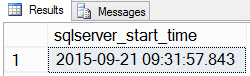
For example, I have a SQL Server 2014 instance in one of my VMs that’s been up and since about 9:30 this morning:

SELECT [sqlserver_start_time] FROM [sys].[dm_os_sys_info];

SQL Server start timeSQL Server start time

Now if I look to see what my wait statistics look like (remember, cumulative until now) using Paul’s script, I see that TRACEWRITE is my current “standard” wait:

Current aggregate waitsCurrent aggregate waits

Ok, now let’s introduce five minutes of tempdb contention, and see how that affects my overall wait statistics.  I have a script that Jonathan has used previously to create tempdb contention, and I’ve set it up so that it will run for 5 minutes:

USE AdventureWorks2012;
GO
 
SET NOCOUNT ON;
GO
 
DECLARE @CurrentTime SMALLDATETIME = SYSDATETIME(), @EndTime SMALLDATETIME = DATEADD(MINUTE, 5, SYSDATETIME());
WHILE @CurrentTime < @EndTime
BEGIN
  IF OBJECT_ID('tempdb..#temp') IS NOT NULL
  BEGIN
    DROP TABLE #temp;
  END
 
  CREATE TABLE #temp
  (
    ProductID INT PRIMARY KEY,
    OrderQty INT,
    TotalDiscount MONEY,
    LineTotal MONEY,
    Filler NCHAR(500) DEFAULT(N'') NOT NULL
  );
 
  INSERT INTO #temp(ProductID, OrderQty, TotalDiscount, LineTotal)
  SELECT
    sod.ProductID,
    SUM(sod.OrderQty),
    SUM(sod.LineTotal),
    SUM(sod.OrderQty + sod.UnitPriceDiscount)
  FROM Sales.SalesOrderDetail AS sod
  GROUP BY ProductID;
 
  DECLARE
    @ProductNumber NVARCHAR(25),
    @Name NVARCHAR(50),
    @TotalQty INT,
    @SalesTotal MONEY,
    @TotalDiscount MONEY;
 
  SELECT
    @ProductNumber = p.ProductNumber,
    @Name = p.Name,
    @TotalQty = t1.OrderQty,
    @SalesTotal = t1.LineTotal,
    @TotalDiscount = t1.TotalDiscount
  FROM Production.Product AS p
  JOIN #temp AS t1 ON p.ProductID = t1.ProductID;
 
  SET @CurrentTime = SYSDATETIME()
END

I used a command prompt to start up 10 sessions that ran this script, and concurrently ran a script that captured my overall wait statistics, a snapshot of the waits over a 5 minute time period, and then the overall wait statistics again. First, a little secret, since we ignore benign waits all the time, it can be useful to stuff them in a table so that you can reference an object instead of constantly having to hard-code a list of exclusion strings in a query. So:

USE SQLskills_WaitStats;
GO
 
CREATE TABLE dbo.WaitsToIgnore(WaitType SYSNAME PRIMARY KEY);
 
INSERT dbo.WaitsToIgnore(WaitType) VALUES(N'BROKER_EVENTHANDLER'),
  (N'BROKER_RECEIVE_WAITFOR'), (N'BROKER_TASK_STOP'), (N'BROKER_TO_FLUSH'),
  (N'BROKER_TRANSMITTER'),     (N'CHECKPOINT_QUEUE'), (N'CHKPT'),
  (N'CLR_AUTO_EVENT'),         (N'CLR_MANUAL_EVENT'), (N'CLR_SEMAPHORE'),
  (N'DBMIRROR_DBM_EVENT'),     (N'DBMIRROR_EVENTS_QUEUE'),
  (N'DBMIRROR_WORKER_QUEUE'),  (N'DBMIRRORING_CMD'),  (N'DIRTY_PAGE_POLL'),
  (N'DISPATCHER_QUEUE_SEMAPHORE'),  (N'EXECSYNC'),    (N'FSAGENT'),
  (N'FT_IFTS_SCHEDULER_IDLE_WAIT'), (N'FT_IFTSHC_MUTEX'), (N'HADR_CLUSAPI_CALL'),
  (N'HADR_FILESTREAM_IOMGR_IOCOMPLETIO(N'), (N'HADR_LOGCAPTURE_WAIT'),
  (N'HADR_NOTIFICATION_DEQUEUE'), (N'HADR_TIMER_TASK'), (N'HADR_WORK_QUEUE'),
  (N'KSOURCE_WAKEUP'),         (N'LAZYWRITER_SLEEP'),   (N'LOGMGR_QUEUE'),
  (N'ONDEMAND_TASK_QUEUE'),    (N'PWAIT_ALL_COMPONENTS_INITIALIZED'),
  (N'QDS_PERSIST_TASK_MAIN_LOOP_SLEEP'), 
  (N'QDS_CLEANUP_STALE_QUERIES_TASK_MAIN_LOOP_SLEEP'), 
  (N'REQUEST_FOR_DEADLOCK_SEARCH'), (N'RESOURCE_QUEUE'), (N'SERVER_IDLE_CHECK'),
  (N'SLEEP_BPOOL_FLUSH'),   (N'SLEEP_DBSTARTUP'), (N'SLEEP_DCOMSTARTUP'),
  (N'SLEEP_MASTERDBREADY'), (N'SLEEP_MASTERMDREADY'), (N'SLEEP_MASTERUPGRADED'),
  (N'SLEEP_MSDBSTARTUP'),   (N'SLEEP_SYSTEMTASK'),    (N'SLEEP_TASK'),
  (N'SLEEP_TEMPDBSTARTUP'), (N'SNI_HTTP_ACCEPT'), (N'SP_SERVER_DIAGNOSTICS_SLEEP'),
  (N'SQLTRACE_BUFFER_FLUSH'), (N'SQLTRACE_INCREMENTAL_FLUSH_SLEEP'),
  (N'SQLTRACE_WAIT_ENTRIES'), (N'WAIT_FOR_RESULTS'), (N'WAITFOR'),
  (N'WAITFOR_TASKSHUTDOW(N'), (N'WAIT_XTP_HOST_WAIT'), 
  (N'WAIT_XTP_OFFLINE_CKPT_NEW_LOG'), (N'WAIT_XTP_CKPT_CLOSE'), 
  (N'XE_DISPATCHER_JOI(N'), (N'XE_DISPATCHER_WAIT'), (N'XE_TIMER_EVENT');

Now we're ready to capture our waits:

/* Capture the instance start time
 
(in this case, time since waits have been accumulating) */
 
SELECT [sqlserver_start_time] FROM [sys].[dm_os_sys_info];
GO
 
/* Get the current time */
 
SELECT SYSDATETIME() AS [Before Test 1];
 
/* Get aggregate waits until now */
 
WITH [Waits] AS
(
  SELECT
    [wait_type],
    [wait_time_ms] / 1000.0 AS [WaitS],
    ([wait_time_ms] - [signal_wait_time_ms]) / 1000.0 AS [ResourceS],
    [signal_wait_time_ms] / 1000.0 AS [SignalS],
    [waiting_tasks_count] AS [WaitCount],
    100.0 * [wait_time_ms] / SUM ([wait_time_ms]) OVER() AS [Percentage],
    ROW_NUMBER() OVER(ORDER BY [wait_time_ms] DESC) AS [RowNum]
  FROM sys.dm_os_wait_stats
  WHERE [wait_type] NOT IN (SELECT WaitType FROM SQLskills_Waits.WaitsToIgnore)
  AND [waiting_tasks_count] > 0
)
SELECT
  MAX ([W1].[wait_type]) AS [WaitType],
  CAST (MAX ([W1].[WaitS]) AS DECIMAL (16,2)) AS [Wait_S],
  CAST (MAX ([W1].[ResourceS]) AS DECIMAL (16,2)) AS [Resource_S],
  CAST (MAX ([W1].[SignalS]) AS DECIMAL (16,2)) AS [Signal_S],
  MAX ([W1].[WaitCount]) AS [WaitCount],
  CAST (MAX ([W1].[Percentage]) AS DECIMAL (5,2)) AS [Percentage],
  CAST ((MAX ([W1].[WaitS]) / MAX ([W1].[WaitCount])) AS DECIMAL (16,4)) AS [AvgWait_S],
  CAST ((MAX ([W1].[ResourceS]) / MAX ([W1].[WaitCount])) AS DECIMAL (16,4)) AS [AvgRes_S],
  CAST ((MAX ([W1].[SignalS]) / MAX ([W1].[WaitCount])) AS DECIMAL (16,4)) AS [AvgSig_S]
FROM [Waits] AS [W1]
INNER JOIN [Waits] AS [W2]
ON [W2].[RowNum] <= [W1].[RowNum]
GROUP BY [W1].[RowNum]
HAVING SUM ([W2].[Percentage]) - MAX ([W1].[Percentage]) < 95; -- percentage threshold
GO
 
/* Get the current time */
 
SELECT SYSDATETIME() AS [Before Test 2];
 
/* Capture a snapshot of waits over a 5 minute period */
 
IF EXISTS (SELECT * FROM [tempdb].[sys].[objects] WHERE [name] = N'##SQLskillsStats1')
  DROP TABLE [##SQLskillsStats1];
 
IF EXISTS (SELECT * FROM [tempdb].[sys].[objects] WHERE [name] = N'##SQLskillsStats2')
  DROP TABLE [##SQLskillsStats2];
GO
 
SELECT [wait_type], [waiting_tasks_count], [wait_time_ms], 
  [max_wait_time_ms], [signal_wait_time_ms]
INTO ##SQLskillsStats1
FROM sys.dm_os_wait_stats;
GO
 
WAITFOR DELAY '00:05:00';
GO
 
SELECT [wait_type], [waiting_tasks_count], [wait_time_ms],
  [max_wait_time_ms], [signal_wait_time_ms]
INTO ##SQLskillsStats2
FROM sys.dm_os_wait_stats;
GO
 
WITH [DiffWaits] AS
(
  SELECT    -- Waits that weren't in the first snapshot
      [ts2].[wait_type],
      [ts2].[wait_time_ms],
      [ts2].[signal_wait_time_ms],
      [ts2].[waiting_tasks_count]
    FROM [##SQLskillsStats2] AS [ts2]
    LEFT OUTER JOIN [##SQLskillsStats1] AS [ts1]
    ON [ts2].[wait_type] = [ts1].[wait_type]
    WHERE [ts1].[wait_type] IS NULL
    AND [ts2].[wait_time_ms] > 0
  UNION
  SELECT    -- Diff of waits in both snapshots
      [ts2].[wait_type],
      [ts2].[wait_time_ms] - [ts1].[wait_time_ms] AS [wait_time_ms],
      [ts2].[signal_wait_time_ms] - [ts1].[signal_wait_time_ms] AS [signal_wait_time_ms],
      [ts2].[waiting_tasks_count] - [ts1].[waiting_tasks_count] AS [waiting_tasks_count]
    FROM [##SQLskillsStats2] AS [ts2]
    LEFT OUTER JOIN [##SQLskillsStats1] AS [ts1]
    ON [ts2].[wait_type] = [ts1].[wait_type]
    WHERE [ts1].[wait_type] IS NOT NULL
    AND [ts2].[waiting_tasks_count] - [ts1].[waiting_tasks_count] > 0
    AND [ts2].[wait_time_ms] - [ts1].[wait_time_ms] > 0
),
[Waits] AS
(
  SELECT
    [wait_type],
    [wait_time_ms] / 1000.0 AS [WaitS],
    ([wait_time_ms] - [signal_wait_time_ms]) / 1000.0 AS [ResourceS],
    [signal_wait_time_ms] / 1000.0 AS [SignalS],
    [waiting_tasks_count] AS [WaitCount],
    100.0 * [wait_time_ms] / SUM ([wait_time_ms]) OVER() AS [Percentage],
    ROW_NUMBER() OVER(ORDER BY [wait_time_ms] DESC) AS [RowNum]
  FROM [DiffWaits]
  WHERE [wait_type] NOT IN (SELECT WaitType FROM SQLskills_WaitStats.dbo.WaitsToIgnore)
)
SELECT
  [W1].[wait_type] AS [WaitType],
  CAST ([W1].[WaitS] AS DECIMAL (16, 2)) AS [Wait_S],
  CAST ([W1].[ResourceS] AS DECIMAL (16, 2)) AS [Resource_S],
  CAST ([W1].[SignalS] AS DECIMAL (16, 2)) AS [Signal_S],
  [W1].[WaitCount] AS [WaitCount],
  CAST ([W1].[Percentage] AS DECIMAL (5, 2)) AS [Percentage],
  CAST (([W1].[WaitS] / [W1].[WaitCount]) AS DECIMAL (16, 4)) AS [AvgWait_S],
  CAST (([W1].[ResourceS] / [W1].[WaitCount]) AS DECIMAL (16, 4)) AS [AvgRes_S],
  CAST (([W1].[SignalS] / [W1].[WaitCount]) AS DECIMAL (16, 4)) AS [AvgSig_S]
FROM [Waits] AS [W1]
INNER JOIN [Waits] AS [W2]
ON [W2].[RowNum] <= [W1].[RowNum]
GROUP BY [W1].[RowNum], [W1].[wait_type], [W1].[WaitS], 
  [W1].[ResourceS], [W1].[SignalS], [W1].[WaitCount], [W1].[Percentage]
HAVING SUM ([W2].[Percentage]) - [W1].[Percentage] < 95; -- percentage threshold
GO
 
-- Cleanup
 
IF EXISTS (SELECT * FROM [tempdb].[sys].[objects] WHERE [name] = N'##SQLskillsStats1')
  DROP TABLE [##SQLskillsStats1];
 
IF EXISTS (SELECT * FROM [tempdb].[sys].[objects] WHERE [name] = N'##SQLskillsStats2')
  DROP TABLE [##SQLskillsStats2];
GO
 
/* Get the current time */
 
SELECT SYSDATETIME() AS [After Test 1];
 
/* Get aggregate waits again */
 
WITH [Waits] AS
(
  SELECT
    [wait_type],
    [wait_time_ms] / 1000.0 AS [WaitS],
    ([wait_time_ms] - [signal_wait_time_ms]) / 1000.0 AS [ResourceS],
    [signal_wait_time_ms] / 1000.0 AS [SignalS],
    [waiting_tasks_count] AS [WaitCount],
    100.0 * [wait_time_ms] / SUM ([wait_time_ms]) OVER() AS [Percentage],
    ROW_NUMBER() OVER(ORDER BY [wait_time_ms] DESC) AS [RowNum]
  FROM sys.dm_os_wait_stats
  WHERE [wait_type] NOT IN (SELECT WaitType FROM SQLskills_WaitStats.dbo.WaitsToIgnore)
  AND [waiting_tasks_count] > 0
)
SELECT
  MAX ([W1].[wait_type]) AS [WaitType],
  CAST (MAX ([W1].[WaitS]) AS DECIMAL (16,2)) AS [Wait_S],
  CAST (MAX ([W1].[ResourceS]) AS DECIMAL (16,2)) AS [Resource_S],
  CAST (MAX ([W1].[SignalS]) AS DECIMAL (16,2)) AS [Signal_S],
  MAX ([W1].[WaitCount]) AS [WaitCount],
  CAST (MAX ([W1].[Percentage]) AS DECIMAL (5,2)) AS [Percentage],
  CAST ((MAX ([W1].[WaitS]) / MAX ([W1].[WaitCount])) AS DECIMAL (16,4)) AS [AvgWait_S],
  CAST ((MAX ([W1].[ResourceS]) / MAX ([W1].[WaitCount])) AS DECIMAL (16,4)) AS [AvgRes_S],
  CAST ((MAX ([W1].[SignalS]) / MAX ([W1].[WaitCount])) AS DECIMAL (16,4)) AS [AvgSig_S]
FROM [Waits] AS [W1]
INNER JOIN [Waits] AS [W2]
ON [W2].[RowNum] <= [W1].[RowNum]
GROUP BY [W1].[RowNum]
HAVING SUM ([W2].[Percentage]) - MAX ([W1].[Percentage]) < 95; -- percentage threshold
GO
 
/* Get the current time */
 
SELECT SYSDATETIME() AS [After Test 2];

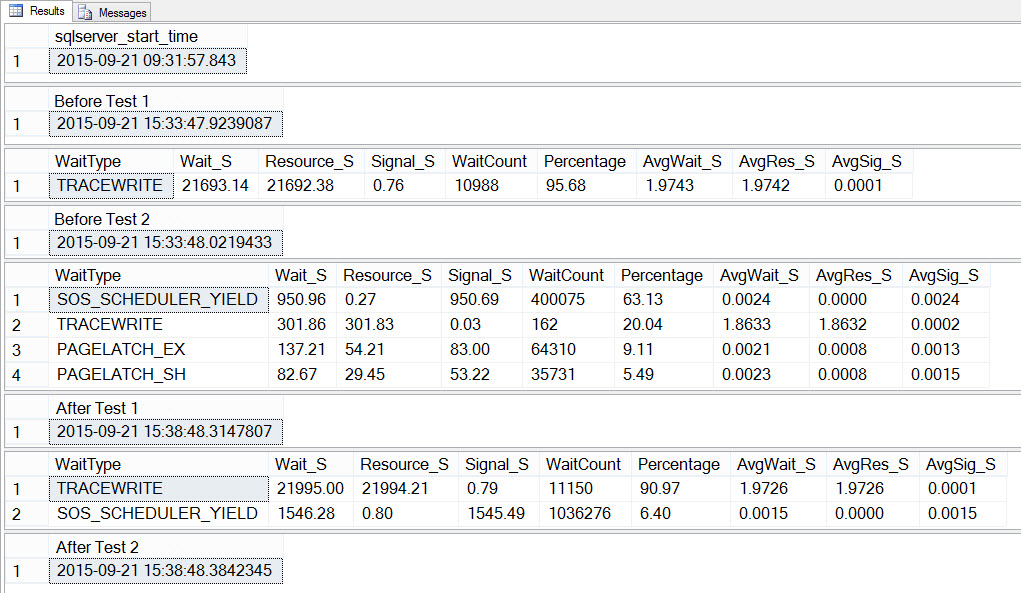
If we look at the output, we can see that while the 10 instances of the script to create tempdb contention were running, SOS_SCHEDULER_YIELD was our most prevalent wait type, and we also had PAGELATCH_XX waits, as expected:

Waits Summary Before, During, and After TestingWaits Summary Before, During, and After Testing

If we look at the average waits AFTER the test completed, we again see TRACEWRITE as the highest wait, and we do see SOS_SCHEDULER_YIELD as a wait. Depending on what else is running in the environment, this wait may or may not persist in our top waits for long, and it may or may not bubble up as a wait type to investigate.

Proactively Capturing Wait Statistics

By default, wait statistics are cumulative. Yes, you can clear them at any time using DBCC SQLPERF, but I find that most people do not do that on a regular basis, they just let them accumulate. And this is fine, but understand how that affects your data. If you only restart your instance when you patch it, or when there’s an issue (which hopefully happens infrequently), then that data could be accumulating for months. The more data you have, the harder it is to see small variations… things that could be performance problems. Even when you have a “big issue” that’s affecting your entire server for several minutes, as we did here with tempdb, it may not create enough of a change in your data to get detected in the cumulated data. Rather, you need to snapshot the data (capture it, wait a few minutes, capture it again, and then diff the data) to see what’s really going on right now.

As such, if you just snapshot wait statistics every few hours, then the data you’ve collected just shows the continued aggregation over time. You can diff those snapshots to get an understanding of performance between the snapshots, but I can tell you from having to write this code against a large data set, it’s a pain (but I’m not a dev, so maybe it’s easy-peasy for you).

My traditional method of capturing wait statistics was to just snapshot sys.dm_os_wait_stats every few hours using Paul’s original script:

USE [BaselineData];
GO
 
IF NOT EXISTS (SELECT * FROM [sys].[tables] WHERE [name] = N'SQLskills_WaitStats_OldMethod')
BEGIN
  CREATE TABLE [dbo].[SQLskills_WaitStats_OldMethod]
  (
    [RowNum] [bigint] IDENTITY(1,1) NOT NULL,
    [CaptureDate] [datetime] NULL,
    [WaitType] [nvarchar](120) NULL,
    [Wait_S] [decimal](14, 2) NULL,
    [Resource_S] [decimal](14, 2) NULL,
    [Signal_S] [decimal](14, 2) NULL,
    [WaitCount] [bigint] NULL,
    [Percentage] [decimal](4, 2) NULL,
    [AvgWait_S] [decimal](14, 4) NULL,
    [AvgRes_S] [decimal](14, 4) NULL,
    [AvgSig_S] [decimal](14, 4) NULL
  );
 
  CREATE CLUSTERED INDEX [CI_SQLskills_WaitStats_OldMethod] 
    ON [dbo].[SQLskills_WaitStats_OldMethod] ([CaptureDate],[RowNum]);
END
GO
 
/* Query to use in scheduled job */
 
USE [BaselineData];
GO
 
INSERT INTO [dbo].[SQLskills_WaitStats_OldMethod]
(
  [CaptureDate] ,
  [WaitType] ,
  [Wait_S] ,
  [Resource_S] ,
  [Signal_S] ,
  [WaitCount] ,
  [Percentage] ,
  [AvgWait_S] ,
  [AvgRes_S] ,
  [AvgSig_S]
)
EXEC ('WITH [Waits] AS (SELECT
      [wait_type],
      [wait_time_ms] / 1000.0 AS [WaitS],
      ([wait_time_ms] - [signal_wait_time_ms]) / 1000.0 AS [ResourceS],
      [signal_wait_time_ms] / 1000.0 AS [SignalS],
      [waiting_tasks_count] AS [WaitCount],
      100.0 * [wait_time_ms] / SUM ([wait_time_ms]) OVER() AS [Percentage],
      ROW_NUMBER() OVER(ORDER BY [wait_time_ms] DESC) AS [RowNum]
    FROM sys.dm_os_wait_stats
    WHERE [wait_type] NOT IN (SELECT WaitType FROM SQLskills_WaitStats.dbo.WaitsToIgnore)
  )
  SELECT
    GETDATE(),
    [W1].[wait_type] AS [WaitType],
    CAST ([W1].[WaitS] AS DECIMAL(14, 2)) AS [Wait_S],
    CAST ([W1].[ResourceS] AS DECIMAL(14, 2)) AS [Resource_S],
    CAST ([W1].[SignalS] AS DECIMAL(14, 2)) AS [Signal_S],
    [W1].[WaitCount] AS [WaitCount],
    CAST ([W1].[Percentage] AS DECIMAL(4, 2)) AS [Percentage],
    CAST (([W1].[WaitS] / [W1].[WaitCount]) AS DECIMAL (14, 4)) AS [AvgWait_S],
    CAST (([W1].[ResourceS] / [W1].[WaitCount]) AS DECIMAL (14, 4)) AS [AvgRes_S],
    CAST (([W1].[SignalS] / [W1].[WaitCount]) AS DECIMAL (14, 4)) AS [AvgSig_S]
  FROM [Waits] AS [W1]
  INNER JOIN [Waits] AS [W2]
  ON [W2].[RowNum] <= [W1].[RowNum]
  GROUP BY [W1].[RowNum], [W1].[wait_type], [W1].[WaitS], [W1].[ResourceS], 
    [W1].[SignalS], [W1].[WaitCount], [W1].[Percentage]
  HAVING SUM ([W2].[Percentage]) - [W1].[Percentage] < 95;'
);

I would then go through and look at the top wait for each snapshot, for example:

SELECT [w].[CaptureDate] ,
  [w].[WaitType] ,
  [w].[Percentage] ,
  [w].[Wait_S] ,
  [w].[WaitCount] ,
  [w].[AvgWait_S]
FROM   [dbo].[SQLskills_WaitStats_OldMethod] w
JOIN 
(
  SELECT   MIN([RowNum]) AS [RowNumber] , [CaptureDate]
  FROM     [dbo].[SQLskills_WaitStats_OldMethod]
  WHERE   [CaptureDate] IS NOT NULL
  AND [CaptureDate] > GETDATE() - 60
  GROUP BY [CaptureDate]
) m ON [w].[RowNum] = [m].[RowNumber]
ORDER BY [w].[CaptureDate];

My new, alternate method is to diff a couple snapshots of wait statistics (with a two to three minutes between snapshots) every hour or so. This information then tells me exactly what the system was waiting on at that time:

USE [BaselineData];
GO
 
IF NOT EXISTS ( SELECT * FROM   [sys].[tables] WHERE   [name] = N'SQLskills_WaitStats')
BEGIN
  CREATE TABLE [dbo].[SQLskills_WaitStats]
  (
    [RowNum] [bigint] IDENTITY(1,1) NOT NULL,
    [CaptureDate] [datetime] NOT NULL DEFAULT (sysdatetime()),
    [WaitType] [nvarchar](60) NOT NULL,
    [Wait_S] [decimal](16, 2) NULL,
    [Resource_S] [decimal](16, 2) NULL,
    [Signal_S] [decimal](16, 2) NULL,
    [WaitCount] [bigint] NULL,
    [Percentage] [decimal](5, 2) NULL,
    [AvgWait_S] [decimal](16, 4) NULL,
    [AvgRes_S] [decimal](16, 4) NULL,
    [AvgSig_S] [decimal](16, 4) NULL
  ) ON [PRIMARY];
 
  CREATE CLUSTERED INDEX [CI_SQLskills_WaitStats] 
    ON [dbo].[SQLskills_WaitStats] ([CaptureDate],[RowNum]);
END
 
/* Query to use in scheduled job */
 
USE [BaselineData];
GO
 
IF EXISTS (SELECT * FROM [tempdb].[sys].[objects] WHERE [name] = N'##SQLskillsStats1')
  DROP TABLE [##SQLskillsStats1];
 
IF EXISTS (SELECT
04 Dec 19:08

Bye bye 32-bit (X86) SQL Server components!

by SQLMaster

The time has come to say goodbye to 32-bit components and program files for SQL Server.

SQL Server 2016 CTP 2.4 reveals that x86 server components will be deprecated, although the X86 (32-bit) client components are still available. As majority of computers (even our own mobile phones) are on 64-bit computing and Microsoft consumer research reveals that x86 server instance components has no adoption in new deployments as X64 evolved as primary server installations.

So from SQL Server 2016 CTP 2.4 release onwards we will only be able to install client components related to x86 environments, not the server components.

Unless there is a huge outcry from the community there is a highest chance of discontinuing X86 server components within SQL Server 2016 RTM release.

Source: Technet blogs.


(153)

04 Dec 19:08

Optimizing applications for Microsoft Azure

by SQLMaster

Microsoft IT is migrating the majority of global line of business applications from private datacenters to Azure to reduce operational workloads. Using a DevOps collaboration approach, teams successfully transitioned and optimized applications for the Microsoft Azure platform.
Source: Microsoft Cloud Computing

04 Dec 19:08

Driving cloud adoption in an enterprise IT organization

by SQLMaster

Microsoft IT is driving the company’s vision of “Microsoft runs in the cloud.” To advance that vision, Microsoft IT created processes and teams to migrate over 2100 internal applications from on-premises servers to the cloud. The biggest challenge was not technology but a cultural change within the organization. Using a cohesive strategy and process, Microsoft IT has changed its culture and integrated cloud adoption into the business.
Source: Microsoft Cloud Computing

04 Dec 19:07

PASS SQL Saturday #460 Slovenia – Speakers and Sessions Submitted

by Dejan Sarka

With start of October, we closed the call for speakers for SQL Saturday Slovenia. We are really excited by the number of speakers and the number of sessions they submitted. We got 51 different speakers from 20 different countries submitting 125 session proposals! You can see the breakdown of number of speakers and sessions per country in the following Excel Pivot Table with data bars.

SpeakersSessions_XLS

Now we have a really heavy duty: the selection. With so many excellent proposals, this is an incredibly complex task. If you are not selected, please understand that this is not due to a bad proposal or session description; although we would like to, we simply cannot accommodate every speaker that submitted. Anyway, I wanted to express my deep thankfulness for your proposals. No matter of selection, we are definitely making the most advanced and the most international conference in Slovenia. You can see another representation of speaker and session counts in a Power Map report.

SpeakersSessions_PM

This will be English language only event. Therefore, also attendees from any country around the world are more than welcome. You should consider visiting Ljubljana for couple of days, not just for SQL Saturday. Why? Here are some possible reasons.

http://lifeintransience.com/why-ljubljana-has-the-perfect-vibe/

http://www.lonelyplanet.com/slovenia/travel-tips-and-articles/ljubljana-tough-to-spell-but-spellbinding-all-the-same-2

http://www.neverendingvoyage.com/ljubljana-a-photo-essay/

http://whatsdavedoing.com/ljubljana-best-little-city-europe/

http://news.nationalpost.com/life/travel/a-very-ljubljana-christmas-holiday-spirit-in-the-slovenian-capital-is-enough-to-bring-warm-fuzzies-to-the-die-hardest-of-scrooges

http://blog.hostelbookers.com/destinations/christmas-markets-eastern-europe/

04 Dec 19:07

Top 10 reasons to upgrade from SQL Server 2005

by SQL Server Team

April 12, 2016, is an important date for organizations still running SQL Server 2005. That’s the day Microsoft extended support ends. And although next year may seem like a long way off, this year is the time to implement a plan to upgrade your aging technology to Microsoft SQL Server 2014. Not convinced an upgrade is the right move? Consider these top 10 reasons that modernizing your 10-year-old database technology is a smart business decision.    

1. Options. Modernizing your data platform is not an all-or-nothing venture. Microsoft offers a unique level of flexibility — you can update your existing servers, run SQL Server 2014 on virtual machines in the cloud, or implement a combination of both. SQL Server 2014 is designed to work the same on-premises or in the cloud, creating consistent hybrid environments. New tools in SQL Server make it even easier to build backup and disaster recovery solutions with Microsoft Azure. These tools also provide an easy on ramp to the cloud for on-premises SQL Server databases, enabling customers to use their existing skills to take advantage of Microsoft’s global datacenters. For more about the pros and cons of different migration options, download Migrating from SQL Server 2005.

2. ROI. You may think the least expensive option is sticking with what you’ve got. Not so. Modernizing your data platform is a wise business investment. According to a July 2014 Microsoft commissioned study from Forrester on the Total Economic Impact of SQL Server, businesses achieved a 9.5-month payback when migrating to SQL Server 2014 and a 113 percent ROI, in part from a 20 percent improvement in IT resource productivity.

3. Performance. SQL Server 2014 has been benchmarked to be 13 times faster than SQL Server 20051 and 5.5 times faster than SQL Server 2008.2 And that’s before the incredible performance gains available with in-memory technology. In-memory OLTP delivers, on average, 10 times faster transaction processing — and in some cases up to 30 times faster. For data warehousing, the new updatable in-memory columnstore can query 100 times faster than legacy solutions. And, SQL Server 2014 is better together with Windows Server 2012 R2, which allows scale up across computing, networking and storage — up to 640 logical processors.

4. High availability. In SQL Server 2014, AlwaysOn availability groups are better than ever with up to 8 readable secondaries and synchronous or asynchronous commit modes. When it comes to high availability, SQL Server 2014 delivers the high 9s you need for your mission-critical applications.

5. Security and compliance. When it comes to data security, there have been significant changes since 2005. SQL Server 2014 was engineered for security from the ground up. Features such as security roles for separation of duties, full-featured auditing and transparent data encryption make it possible for any organization to meet its regulatory compliance standards, such as PCI-DSS for credit card transactions, HIPAA for medical patient privacy, and GLBA for financial institutions. SQL Server has had the least vulnerabilities of any major database the past six years running, as tracked by the National Institute of Standards and Technology.3

6. Productivity. SQL Server 2014 can help every user in your organization make better, faster decisions through its complete BI platform that speeds how they access, analyze and shape both internal and external data. And with insights achieved using familiar tools like Microsoft Excel and leveraging the power of the cloud through Power BI, the learning process is faster and cheaper. The right information at the right time in the hands of the right people can drive increased productivity and better results that spell success for your employees and your business.

7. Customer satisfaction. Today’s customers want to do business with companies that provide a secure, easy and seamless experience. Slow performance, service disruptions or a data breach will quickly send customers to your competition. SQL Server 2014 provides the speed, AlwaysOn availability, and security that drives customer satisfaction. In addition, SQL Server 2014 offers business intelligence tools and enterprise data management software that can provide valuable insights about customer behavior and pain points, allowing you to respond proactively and avoid customer churn and the related costs.

8. Support. None of the great features in Microsoft SQL Server 2014 matter unless you have the support you need in case of issues or failures. Unlike the situation you’ll face next April for applications running on SQL Server 2005, with SQL Server 2014 you’ll receive the mission-critical support you expect for your mission-critical workloads, along with all timely security updates and hotfixes to help your organization meet security and compliance requirements and audits.

9. EoS. That stands for End of Support — for your SQL Server 2005. And that means no more security updates and hotfixes from Microsoft, opening the door to potential business interruptions. Without security updates you may fail to comply with standards and regulations that can seriously hamper your ability to do business. End of support also means higher maintenance costs because your IT team may need to take over managing aging hardware, keeping intrusion detection systems and firewalls up to date, handling network segmentation, and so on.

And last, but definitely not least …

10. Help. Figuring out which technology upgrades are best for your organization can be daunting. But you don’t have to go it alone. Microsoft and its partners are standing by to help. Tapping the expertise of a partner can make the upgrade process more efficient and ensure that nothing gets overlooked, especially since so many applications use SQL Servers. Whether you engage outside help or go it alone, you’ll want to take a look at the Microsoft SQL Server upgrade website. You’ll find insights and practical resources for planning and implementing your upgrade, including a technical upgrade guide, upgrade advisor and database migration wizard. You can even download the trial version of SQL Server 2014 or start a free Microsoft Azure trial to experience Microsoft Azure SQL Database.

To learn more about SQL Server 2005 end of support and have your questions answered, join us for a webinar on October 14, 2015 at 9am PST – SQL Server 2005 Upgrade: The Path to Better Database Performance and Security, hosted by Debbi Lyons, Sr. Product Marketing Manager for SQL Server. Register here.

1  13x gain based on TPC-E benchmark results published for SQL Server 2014 (www.tpc.org/4069), SQL Server 2005 (www.tpc.org/4001) as of Oct. 8, 2014.
2   5.5x gain based on TPC-E benchmark results published for SQL Server 2014 (www.tpc.org/4069), SQL Server 2008 (www.tpc.org/4023) as of Oct. 8, 2014.
3  National Institute of Standards and Technology Comprehensive Vulnerability Database, Jan. 21, 2015.

04 Dec 19:06

BimlScript.com Relaunch!

by andyleonard
The BimlScript.com website has been redesigned and relaunched by the good people at Varigence ! The new site includes learning paths and tests. It’s almost as awesome as Biml . Go check it out today ! :{> Bonus – check out the new BimlScript commercial !...(read more)
04 Dec 19:06

Index selectivity and index scans

by Gail

There was a question raised some time back ‘If an index is not selective, will the query operators that use it always be index scans’?

It’s an interesting question and requires a look at what’s going on behind the scenes in order to answer properly..

Short answer: No, not always.

Long answer…

Selectivity

Selectivity is a measure of what portion of the table satisfies a particular query predicate. The Microsoft whitepaper on statistics as used by the query optimiser defines selectivity as follows.

The fraction of rows from the input set of the predicate that satisfy the predicate. More sophisticated selectivity measures are also used to estimate the number of rows produced by joins, DISTINCT, and other operators.

Bart Duncan wrote a nice detailed blog post a while back explaining the difference between density, selectivity and cardinality. In summary, indexes have density, a measure of how unique the left-based column subsets within them are; predicates have selectivity, a measure of what portion of the table they affect; operators have cardinality, a measure of how many rows the operator processes.

Indexes cannot be said to be selective or not, they can only be said to have a high or low density. It is possible for a predicate on a very low density column (unique) to have a very poor selectivity (large percentage of the table affected) Imagine ID > 0 where ID is an int identity column. The column is unique, but the predicate affects the entire table. Low density (which is good), but poor selectivity.

So let’s alter the original question. “If an index has a high density (not very unique, lots of duplicate values), will query operators against it always be index scans rather than index seeks?”

Seek and Scan

Before we go on, I want to quickly look at the main difference between a seek operation and a scan operation.

A seek is an operation which navigates down the index’s b-tree looking for a row or for the start/end of a range of rows. A seek requires a predicate and that predicate must be of the form that can be used as a search argument (SARGable)

A scan is a read of part or all of the leaf level of an index.

High-density indexes

So what exactly is the problem with a high density index? In short, it returns a lot of rows for any predicate filters against it (unless there’s a TOP involved, but let’s ignore those cases here). If the index has a high density (and lets assume for simplicity there’s no data skew here), any predicate using that index automatically has a poor selectivity, it returns a large portion of the table.

If we take as an example a 100 000 row table, with an column called status that has 4 values only, then, assuming that the distribution of those values is equal, a query with a predicate searching for one of those values will read 25000 rows. If we have a nonclustered index on that integer column, it works out that the nonclustered index has 223 pages at the leaf level and is 2 levels deep in total. Given that the four values have equal distribution, an index seek to retrieve the rows for one of those status values will require approximately 57 pages to be read.

Is the index scan better?

The scan will read all the leaf pages, that’s what a scan does (ignoring cases like min, max and top where it can scan and read only part of the index). So if SQL decided to use an index scan because of the high density of the index it will have to read all 100 000 rows on all 223 pages (plus the index root page)

57 pages for the index seek vs 224 pages for the index scan. Looks pretty obvious which is better. To prove that I’m not making things up, let me test this and get actual numbers.

First the setup:

CREATE TABLE TestingIndexSeeks (
   Status INT,
   Filler CHAR(795) DEFAULT ''
);

INSERT INTO TestingIndexSeeks (Status)
SELECT NTILE(4) OVER (ORDER BY (SELECT 1)) AS Status FROM (
    SELECT TOP (100000) 1 AS Number FROM sys.columns a CROSS JOIN sys.columns b
) sub

CREATE NONCLUSTERED INDEX idx_Testing_Status ON dbo.TestingIndexSeeks (Status)

GO

Then the  test:

SELECT status FROM dbo.TestingIndexSeeks WITH (FORCESEEK) WHERE Status = 3

SELECT status FROM dbo.TestingIndexSeeks WITH (FORCESCAN) WHERE Status = 3

Statistics IO for the two queries:

Seek
Table ‘TestingIndexSeeks’. Scan count 1, logical reads 59, physical reads 0.

Scan
Table ‘TestingIndexSeeks’. Scan count 1, logical reads 225, physical reads 0.

Yup, index seek is better and the one that the optimiser choses if it is allowed to chose.

IndexSeek

High density indexes and the clustered index

So why the confusion around index scans on high density indexes? I suspect it’s because of the way the optimiser handles noncovering indexes where the predicates are not selective. This has nothing to do with the efficiency of the seek or scan operators on the nonclustered index though, it’s got to do with the mechanism used for the key lookup.

If a nonclustered index that SQL could use for a query is not covering, then for each row in that resultset it has to do a lookup back to the cluster/heap for the rest of the columns. Those key (or RID) lookups are expensive operations. If there are too many needed then the optimiser switches to a scan, not of the nonclustered index (it would be pointless, it’s still not covering), but of the clustered index because that at least has all the columns needed for the query (it could also switch to a scan of a different nonclustered index if there is one that’s covering but with columns in the wrong order to be seekable)

Summary

In summary, does having a high density nonclustered index result in index scans of that index? No (unless the predicate is not SARGable), however it can result in scans of a different index (probably the cluster) if the index is not covering for a query and that high density index being unused.

04 Dec 19:06

SQL Server Contracting – The first 14 months (or so)

Crikey, where did that time go! I have been so busy adjusting to my new work life style I have completely neglected my blog.. Well now that I seem to be adjusted to the world of contracting (or rather adjusted to working more than a mile away from where I live!), I will spend more time again giving my blog some TLC. in fact is was an email from Webucator that gave me the poke again to get back to doing something that I enjoyed a couple of times a month – blogging!

So what have I learnt during the first 14 months of being a contractor. The first thing that I can say is I have no idea why on earth it took me so long to make the jump from going perm to contract basis. Sure it is a little bit scary at first to not have that security blanket that being a permanent employee brings you such as a notice period, redundancy, sick pay and employee benefits (for some!) but for me I don’t mind that.. I have much more flexibility in what i choose to do, where to go and what I do with the finances received by my business. I know that if a contract isn’t as great as I’d hoped then it won’t be long before the contract comes to an end and I can move on. I’m not involved with any company processes such as 1-2-1’s, reviews etc, nor get involved with the usual company politics. I can just turn up, do a good days work, enjoy any company social life and go home that little bit wiser, hopefully.

I was quite fortunate to secure a 6 month contract from my previous perm employer before moving into finance for  my second and current contract. This definitely made the transition that bit easier and less daunting. I initially worked through an umbrella company before setting up a limited company at the start of this year and looking back, i should have setup the limited company from the off. Apart from the ease of contracting through an umbrella, I really didn’t see many other benefits over a limited company. Even with the UK government hitting contractors quite hard in the summer budget, I still believe I have made the right decision and it is a good time to be a contractor. I still feel there are more benefits and flexibility being a contractor rather than being a perm in exactly the same job position.

Would I recommend contracting to others… for sure I would, and I have.. the main thing i say to them (after saying research is critical) is to ensure that you have at least 3 months or more of savings to live off whilst you make the transition to contracting. If the worse happens and you can’t get a contract, you’ll need to make a decision at some point to get back into a perm role to pay those bills. Even if you get a contract quite quickly, you may have to dip into your savings until things sort themselves out. More than likely you’ll have to hand in your notice before even being offered a contract especially if you are on a long notice period like I was. So it gets a bit nerve racking approaching your leaving date with nothing to move onto next. Network as well, as some opportunities will come through from recommendations and as much as we hate them, agencies are going to be calling you, a lot, so you will have to have the same conversation over and over again. You’ll soon build a list of good ones and ones to not bother with. When I was actively looking for a contract I was getting dozens of calls a day and had to take the majority of them and call back the ones I missed. That wore me down quite quickly so something to be prepared for. Always remember though that agencies need you as much as you need them. Finally, unless you have a keen desire to use an umbrella, don’t bother and go limited. Even more so if you are able to employ your partner to use their tax benefits or have them as a director and/or shareholder as well. The money you spend on accountancy is offset by other benefits and so far the overhead time wise of managing the limited company is minimal I find. I keep on top of things weekly rather than doing things monthly and I never spend more than a an hour each week raising invoices, managing income/expenses etc.

So what’s my plan for the next 12 months? Well I’ll need to start thinking about renewing my MCSE Data Platform accreditation so now that summer is well and truly over, I shall be heading back to the books again and will probably look to secure the MCSE Business Intelligence for the first time as well after Christmas. Plus I’m rather hoping there will be another SQL bits as well early next year, which is another benefit of your own company. You get to decide your own training and no more having to justify it to the bosses! I’m 99% ready to sign up for my first ever SQLSkills Immersion Event in London 2016 which is something I’ve long, long wanted to attend but would have always struggled convincing an employer to pay for me.

Oh, and I get to decide where my company Christmas party is to be now!! What's there not to like!

Enjoy!

Follow me on twitter @sqlserverrocks

Subscribe to my blog RSS feed

Comment on this or any of my posts or contact me directly from http://www.olcot.co.uk

04 Dec 19:05

A new hope. Tale from SQL Saturday 454 #sqlsat454

by Marco Russo (SQLBI)

This is one of the few non-technical posts of this blog. Just skip it if you want to quickly come back to 100% BI related topics.

Last Saturday we run the SQL Saturday 454 in Turin. I was part of the organization, and actually I was one of the promoters for this event, running on the same city just a few months after SQL Saturday 400. The reason for that was an idea we had a few months ago. Running a SQL Saturday very close to Milan, the city hosting Expo 2015 until October 31, 2015. In our plans, we should have been able to attract a large number of foreign attendees interesting in combining a week-end in Italy, one day in Turin for SQL Saturday, and one day in Milan for Expo 2015. The initial target was more than double the attendees of a “regular” SQL Saturday in Italy, reaching 250 people and maybe also 300. After all, everyone was looking forward to visit Expo 2015, right?

Unfortunately, I was wrong.

Part of my job is reading through the numbers. It took me just a few hours after opening a survey through our SQLBI newsletter and other social media to realize that Expo 2015 was not the worldwide attraction we assumed initially. Our ambitious goal was completely unreachable, and this was clear to me before anyone else accepted that. So we downsized the venue, but we wanted to run the best event we can. After all, it was still the SQL Saturday close to the Expo 2015. And we kept the event in English. We requested all the speakers to delivery their speeches in English, regardless of the fact 90% of attendees would have been Italian.

Now, if you never visited Italy, you might be not aware of the lack of English skills of the majority of the population. You might think that people working in IT should have English skills in their CV by default. While this is true for reading technical documents, it is not entirely true for listening and speaking. From this point of view, the situation in Europe is very different between different countries. Smallest countries have better English skills. My guess is that movies are not dubbed, many have just subtitles, whereas largest countries (Germany, France, Spain, and Italy) tend to distribute only the dubbed version of the movies, keeping the original version only for limited number of cinemas in large cities. This fact alone makes a big difference in listening and speaking capabilities. I don’t have any study to demonstrate this correlation, it’s just my experience as a frequent traveler.

I wanted to write this disclaimer to describe another challenge we had for SQL Saturday 454. We were at risk of not having enough foreign attendees (a certainty for me) and not having a good number of Italian attendees, frightened by the fact that all the sessions would have been in English. In the past, we had only a few sessions in English, but a complete conference in a foreign language without simultaneous translation was an unprecedented experiment. However, I was confident this would have stopped someone, but not many of the interested attendees.

At this point, you might be curious to know whether the event was a success or a failure. Well, in terms of numbers, we reached our predicted (downsized) target. It was an event slightly larger than the average in Italy and, ignoring our initial unreachable dreams of glory, it has been a success. But what impressed me was something unexpected.
There is a number of IT professionals in Italy that can attend an event, following all the sessions, engaging the speakers, making questions and keeping the conversation without the language barrier I was used to see a few years ago. I was wrong again, but this time in a pleasant way.

The economic turmoil of the recent years has been very though in this country. I have a privileged position and a particular point of view, clearly seeing the issues that limit the competitiveness of companies and professionals in the global market, especially in IT. Language barrier is one of the many issues I see. Lack of self-investment in education is another one. And the list does not end here. I am an optimist by nature, but I am also realistic in any forecast. People around me know I don’t predict anything good for Italy in the short and medium term. However, even if I still don’t have data supporting that, I feel something has been changing.

I have a new hope.

There is a number of people spending a sunny Saturday in Italy to attend a conference in English, and they are able to not only listen, but to interact in a foreign language. I am sure nobody (myself included) would have bet anything on that ten years ago. For one day, I felt at home in my city doing my job. If you attended SQL Saturday 454 in Turin, I would like to thank you. You made my day.

Grazie!

04 Dec 19:04

SQL Server Auditing - for Business Intelligence when your business is the database

by Rob Farley

Over the past decade or so, Business Intelligence has become a big deal. As a data consultant, most of my work would be categorised as being in the BI space. People want to have insight into how their business is operating, and be able to use this to do things better. Data has become one of the biggest influencers in the world today – now that data is available, intuition is generally seen as ‘not good enough’, and people want empirical evidence for making decisions ...at least in my experience.

And that’s all well and good for people who run businesses. You’re just a DBA. Business Intelligence is something that you support, something that you provide, something which you do – for other people to consume.

My challenge to you is to become someone who consumes BI as well.

In fact, just about everyone within your organisation could do better by the stuff that you provide. And that ‘everyone’ includes YOU.

As a BI developer, you create reports. Do you track how frequently those reports are run? Do you track how long the reports take to produce? How often are they redefined? What KPIs do you put around that?

As a production DBA, you ensure that backups have been taken, and run tests to make sure every backup can be restored. Are you tracking how long those backups are taking? Are things taking longer? What are the metrics that suggest things are getting worse? Are you using predictive analytics to warn you a system might go down soon?

As a helpdesk operator, how are you being measured? I’m guessing that your manager is analysing something about the satisfaction level of the people you help, or the number of tasks you get through in the week, and what kinds of tasks use your skills better... are you consuming that information too?

As a team leader... well, you get the picture.

Data is all around us. Not just in the Internet of Things, but in the metadata of the systems that we use.

If you are a data professional, you might be able to spend a bit of time exploring what’s possible using data that is important to you, like SQL Server Audit data, or Windows Event Logs, or report execution logs. If you can get something working in your development environment, get clearance to put it on an Azure instance or production SQL box – something which is looked after and which is properly licensed. But then, start having conversations about how this kind of approach could help just about everyone in the organisation. Big picture stuff is useful, but everyone has a big picture which is useful for them. Stepping back from the minutiae of the day and making intelligent decisions about tomorrow is not just for senior management, but should apply to self-management as well.

DBAs – get familiar with SQL Server’s auditing. Explore the posts that are coming out today in the T-SQL Tuesday event hosted this month by Sebastian Meine (@sqlity), and use this as a source for your own Business Intelligence system.

TSQL2sDay150x150

@rob_farley

04 Dec 19:04

In-Memory OLTP: Comparison of Features/Limitations between SQL Server 2014 and SQL Server 2016

by Artemakis Artemiou [MVP]
In earlier articles I talked about the In-Memory OLTP Engine in SQL Server 2014. Even though it is very powerful, it had some limitations (note the past tense of "have" here as I have some good news! :) For example you couldn't use subqueries in the clauses of a SELECT statement inside a natively-compiled stored procedure, or nested stored procedure calls, etc. Here's the good news: SQL Server
04 Dec 19:04

Moneyball to the Next Level: How MLB Teams are Using Big Data

by Jonathan Buckley

by Jonathan Buckley Simply mention the possibility of introducing a technological element into baseball, and most purists will shiver in trepidation. Baseball, after all, is America’s pastime, a sport that harkens back to a golden era where an afternoon at the ballpark was something everyone did. Major League Baseball has famously been reluctant to embrace…

The post Moneyball to the Next Level: How MLB Teams are Using Big Data appeared first on DATAVERSITY.

04 Dec 19:03

Get the latest on SQL Server at Microsoft Ignite 2016. Pre-register now for the lowest price.

by Cloud Platform Team

In September 2016, Microsoft Ignite is headed to Atlanta, Georgia. Pre-register now and get ready for —

  • 1,000+ hours of content, 700+ sessions, and a multitude of networking opportunities 
  • Insights and roadmaps from industry leaders
  • Deep dives and live demos on the products you use every day
  • Direct access to product experts
  • Interactive digital labs
  • Knowledge and answers direct from the source
  • Smart people talking tech everywhere you look

Pre-register now for the lowest price, and claim your spot in Atlanta, September 26–30, 2016.

If you want to learn more about Microsoft's event line up in 2016, check out Chris Capossela's blog post

04 Dec 19:03

Copying data from Azure Blob Storage

by James Serra

In a previous blog I talked about copying on-prem data to Azure Blob Storage (Getting data into Azure Blob Storage).  Let’s say you have copied the data and it is sitting in Azure Blob Storage (or an Azure Data Lake) and you now want to copy it from Azure Blob Storage into either SQL Server on an Azure Virtual Machine (SQL Server IaaS), SQL DW, or SQL DB.  Below I cover the various ways to do this by listing the technology and the supported destinations:

Here is an important point to keep in mind when reviewing your options if you are building a Big Data platform: all these options are copying data, but you can use PolyBase to query the data as it sits in Azure Blob Storage and avoid the ETL time and storage of copying the data.

Note all the above technologies that work against Azure Blob Storage will also work against Azure Data Lake except for PolyBase, which is not supported yet.

More info:

Load data into SQL Data Warehouse

Migrate Your Data

Azure SQL Data Warehouse loading patterns and strategies

04 Dec 19:03

Gartner positions Microsoft as a leader in the Magic Quadrant for Operational Database Management Systems

by T.K. Ranga Rengarajan

Microsoft is placed furthest in vision and highest for ability to execute within the Leaders Quadrant.

By T.K. “Ranga” Rengarajan

With the release of SQL Server 2014, the cornerstone of Microsoft’s data platform, we have continued to add more value to what customers are already buying.  Innovations like workload optimized in-memory technology, advanced security, high availability for mission critical workloads are built-in instead of requiring expensive add-ons. We have long maintained that customers need choice and flexibility to navigate this mobile-first, cloud-first world and that Microsoft is uniquely equipped to deliver on that vision in both trusted environments on-premises and in the cloud.

Industry analysts have taken note of our efforts and we are excited to share Gartner has positioned Microsoft as a Leader, for the third year in a row, in the Magic Quadrant for Operational Database Management Systems. Microsoft is placed furthest in vision and highest for ability to execute within the Leaders Quadrant.

Given customers are trying to do more with data than ever before across a variety of data types, at large volumes, the complexity of managing and gaining meaningful insights from the data continues to grow.  One of the key design points in Microsoft data strategy is ensuring ease of use in addition to solving complex customer problems. For example, you can now manage both structured and unstructured data through the simplicity of T-SQL rather than requiring a mastery in Hadoop and MapReduce technologies. This is just one of many examples of how Microsoft values ease of use as a design point. 

Gartner also recognizes Microsoft as a leader in the Magic Quadrant for Business Intelligence and Analytics Platforms and placed Microsoft as a leader in the Magic Quadrant for Data Warehouse Database Management Systems – recognizing Microsoft’s completeness of vision and ability to execute in the data warehouse market.

Offering only one piece of the data puzzle isn’t enough to satisfy all the different scenarios in today’s environments and workloads. Our commitment is to make it easy for customers to capture and manage data and to transform and analyze that data for new insights.

Being named a leader in Operational DBMS, BI & Analytics Platforms, and DW DBMS Magic Quadrants is incredibly important to us: We believe it validates Microsoft is delivering a comprehensive platform that ensures every organization, every team and every individual is empowered to do more and achieve more because of the data at their fingertips.

You can download a trial of SQL Server 2014 or SQL Server 2014 today on premises, or get up and running in minutes in the cloud. For more details on Microsoft Azure’s data and analytics services, as well as a free trial, visit http://azure.microsoft.com/en-us/

*The above graphic was published by Gartner, Inc. as part of a larger research document and should be evaluated in the context of the entire document. The Gartner document is available upon request. Gartner does not endorse any vendor, product or service depicted in its research publications, and does not advise technology users to select only those vendors with the highest ratings. Gartner research publications consist of the opinions of Gartner’s research organization and should not be construed as statements of fact. Gartner disclaims all warranties, expressed or implied, with respect to this research, including any warranties of merchantability or fitness for a particular purpose.

04 Dec 19:03

5 Questions to Ask When Choosing a NoSQL Database

by A.R. Guess

by Angela Guess Barry Perkins of MarkLogic recently wrote for Enterprise Tech, “Here are five questions enterprises should ask when selecting a NoSQL database: (1) What is ACID? ACID (Atomicity, Consistency, Isolation, Durability) is a set of properties that guarantees database transactions are reliably processed. Any application that supports simultaneous clients requires transactions with ACID…

The post 5 Questions to Ask When Choosing a NoSQL Database appeared first on DATAVERSITY.

04 Dec 19:03

Low priority locking wait types

by Paul Randal

SQL Server 2014 (and Azure SQL Database V12) added some cool new functionality for online index operations to allow you to prevent long-term blocking because of the two blocking locks that online index operations require.

At the start of any online index operation, it acquires a S (share) table lock. This lock will be blocked until all transactions that are changing the table have committed, and while the lock is pending, it will block any transactions wanting to change the table in any way. The S lock is only held for a short amount of time, then dropped to an IS (Intent-Share) lock for the long duration of the operation. At the end of any online index operation, it acquires a SCH-M (schema modification) table lock, which you can think of as a super-exclusive lock. This lock will be blocked by any transaction accessing or changing the table, and while the lock is pending, it will block any transactions wanting to read or change the table in any way.

The new syntax allow you to specify how long the online index operation will wait for each of these locks, and what to do when the timeout expires (nothing: NONE, kill the online index operation: SELF, or kill the blockers of the online index operation: BLOCKERS – see Books Online for more info). While the online index operation is blocked, it shows a different lock wait type than we’re used to seeing, and any lock requests are allowed to essentially jump over the online index operation in the lock pending queues – i.e. the online index operation waits with lower priority than everything else on the system.

To demonstrate this, I’ve got a table called NonSparseDocRepository, with a clustered index called NonSparse_CL, and 100,000 rows in the table.

First, I’ll kick off an online index rebuild of the clustered index, specifying a 1 minute wait, and to kill itself of the wait times out:

ALTER INDEX [NonSparse_CL] ON [nonsparsedocrepository] REBUILD
WITH (FILLFACTOR = 70, ONLINE = ON (
	WAIT_AT_LOW_PRIORITY (
		MAX_DURATION = 1 MINUTES, ABORT_AFTER_WAIT = SELF)
	)
);
GO

I let it run for ten seconds or so, so make sure it got past the initial table S lock required. Now, in another connection, I’ll start a transaction that takes an IX table lock, which will block the final SCH-M lock the online index operation requires:

BEGIN TRAN;
GO

UPDATE [NonSparseDocRepository]
SET [c4] = '1'
WHERE [DocID] = 1;
GO

And then I’ll wait until the drive light on my laptop goes off, which lets me know that the online index rebuild is stalled. If I look in sys.dm_os_waiting_tasks (using the script in this post), I’ll see the rebuild is blocked (script output heavily edited for clarity and brevity):

session_id exec_context_id scheduler_id wait_duration_ms wait_type                blocking_session_id resource_description
57         0               4            7786             LCK_M_SCH_M_LOW_PRIORITY 58                  objectlock

Look at the wait type: LCK_M_SCH_M_LOW_PRIORITY. The _LOW_PRIORITY suffix indicates that this is a special lock wait attributable to the online index operation being blocked.

This also neatly proves that the wait-at-low-priority feature applies to both the blocking locks that online index operations require, even if the first one isn’t blocked.

And eventually the online index operation fails, as follows:

Msg 1222, Level 16, State 56, Line 1
Lock request time out period exceeded.

If I leave that open transaction in the other connection (holding its IX table lock), and try the index rebuild again, with the exact same syntax, it’s immediately blocked and the sys.dm_os_waiting_tasks script shows:

session_id exec_context_id scheduler_id wait_duration_ms wait_type                blocking_session_id resource_description
57         0               4            8026             LCK_M_S_LOW_PRIORITY     58                  objectlock

This shows that the initial blocking lock is blocked, and is waiting at low priority.

So if either of these wait types show up during your regular wait statistics analysis, now you know what’s causing them.

The post Low priority locking wait types appeared first on Paul S. Randal.

04 Dec 19:03

Knee-Jerk Wait Statistics : PAGELATCH

by Paul Randal

Over the last 18 months I’ve been focusing on knee-jerk reactions to wait statistics analysis and other performance-tuning related topics, and in this post I’m going to continue that and discuss the PAGELATCH_XX waits. The XX at the end of the wait means that there are multiple types of PAGELATCH wait, and the most common examples are:

  • PAGELATCH_SH – (SHare) waiting for access to a data file page in memory so that the page contents can be read
  • PAGELATCH_EX or PAGELATCH_UP – (EXclusive or UPdate) waiting for access to a data file page in memory so that the page contents can be modified

When one of these wait types is the most prevalent on a server, the knee-jerk reaction is that the problem is something to do with I/O (i.e. confusion with the PAGEIOLATCH_XX wait type, which I covered in a post back in 2014) and someone tries adding more memory or tweaking the I/O subsystem. Neither of these reactions will have any effect at all, as the data file pages under contention are already in memory in the buffer pool!

In all cases, you can see whether you have a problem with PAGELATCH_XX contention using the sys.dm_os_waiting_tasks script on my blog or using a tool like Performance Advisor, as demonstrated (for a different wait type) in this post.

So what’s the source of the contention? First I’ll explain the background behind these wait types, and then I’ll discuss the two most common causes of PAGELATCH_XX contention.

Background: Latches

Before I go into some of the causes of PAGELATCH_XX waits, I want to explain why they even exist.

In any multi-threaded system, data structures that can be accessed and manipulated by multiple threads need to be protected to prevent scenarios such as:

  • Two threads updating a data structure concurrently, and some of the updates are lost
  • A thread updating a data structure concurrently with another thread reading the data structure, so the reading thread sees a mixture of old and new data

This is basic computer science, and SQL Server is no different, so all data structures inside SQL Server need to have multi-threaded access control.

One of the mechanisms that SQL Server uses to do this is called a latch, where holding the latch in exclusive mode prevents other threads from accessing the data structure, and holding the latch in share mode prevents other threads from changing the data structure. SQL Server also uses spinlocks for some data structures and I discussed these in this post back in 2014.

But why is a data file page in memory protected by a latch, you might wonder? Well, a data file page is just a data structure, albeit a special purpose one, and so needs the same access controls as any other data structure. So when one thread needs to modify a data file page it needs to acquire an exclusive or update latch on the page, and if it can’t and needs to wait, the wait type PAGELATCH_EX or PAGELATCH_UP results.

Classic tempdb Contention

PAGELATCH contention in tempdb is typically on allocation bitmaps and occurs with workloads with many concurrent connections creating and dropping small temporary tables (which are stored in tempdb).

When the first row is inserted into a temporary table, two pages must be allocated (a data page and an IAM page, which tracks the data page). These pages need to be marked as allocated in a special allocation page called a PFS page, and by default are allocated from special data extents that are tracked by another allocation page called an SGAM page (details of these can be found in my old blog post here). When the temporary table is dropped, these pages need to be deallocated again, necessitating more changes to the PFS and SGAM pages.

If the temporary tables are small, and the cumulative size of all concurrently created temporary tables is less than 64MB, then all these allocation bitmap changes are centered on the very first PFS and SGAM pages in the tempdb data file (with page ID (1:1) and (1:3) respectively). Updating one of these allocation pages requires latching the page, and only one thread at a time can be changing the page, so all other threads have to wait – with wait type PAGELATCH_UP.

From SQL Server 2005 onwards, temporary tables can be cached when dropped, as long as they’re less than 8MB in size (and in SQL Server 2014 aren’t created in a stored procedure that also has DDL statements on the temporary table). This means that the next thread that executes the same query plan can take the temporary table out of the cache and not have to deal with the initial allocations. This cuts down on contention on the allocation bitmaps, but the temporary table cache isn’t very big, so workloads with hundreds of concurrent temporary table creates/drops will still see lots of contention.

It’s trivial to prevent the contention on the SGAM pages in tempdb by enabling documented trace flag 1118 on the server, which I say should be enabled on all servers across the world, and is actually the unchangeable default behavior in SQL Server 2016.

Preventing contention on the PFS pages in tempdb is a bit more difficult. Assuming that the temporary tables are needed for performance, the trick is to have multiple data files for tempdb so that the allocations are done round-robin among the files, the contention is split over multiple PFS pages, and so the overall contention goes down. There is no right answer for how many data files you should have unfortunately. You can read more about the generally accepted guidance on this in KB article 2154845 and in this blog post.

Insert Hotspot

In user databases, a common cause of high number of PAGELATCH_EX waits is an insert hotspot.

This can occur when a table has a clustered index with an int or bigint cluster key, and a row size that’s small enough so that many tens or more table rows can fit on a data page at the leaf level of the clustered index.

For such a table, if the workload involves many tens or hundreds of concurrent threads inserting into the table, many of the threads will generate rows with identity values (and hence cluster keys) that need to be inserted onto the same leaf-level data page.

Now remember that making any change to a data file page in memory requires an exclusive latch, so each of the threads trying to insert onto the same page must acquire the page’s latch exclusively. While each thread is holding the exclusive latch, the other threads will be waiting for PAGELATCH_EX for that page, essentially making the concurrent inserts into a hugely-bottlenecked synchronous process.

There are a few possible fixes for this problem:

  • Use a more random key, and recognize that this will lead to index fragmentation so also make use of an index fill factor to help prevent page splits
  • Spread the inserts out in the table using some kind of artificial partitioning mechanism
  • Use a longer table row size (this is obviously the least palatable option)

I’ve seen an insert hotspot like this crop up when someone’s tried to remove index fragmentation problems by changing a random GUID cluster key to an int or bigint identity cluster key, but fail to test the new table schema under production loads.

Summary

Just as with other wait types, understanding exactly what PAGELATCH_XX waits mean is key to understanding how to troubleshoot them.

As far as general wait statistics are concerned, you can find more information about using them for performance troubleshooting in:

Until next time, happy troubleshooting!

The post Knee-Jerk Wait Statistics : PAGELATCH appeared first on SQLPerformance.com.

13 Nov 23:22

Foray into Jenkins, Puppet, Docker, and Photon: Part 2

by Edward Haletky

In my Foray into Jenkins, Puppet, Docker, and Photon article, I discussed how to set up Photon, Jenkins, and Docker and how I was able to use Jenkins to deploy a Photon template. However, this template was a simple template with just Docker set up within it: a template that could become anything required, run any Docker container. The next step was to deploy a container within Photon. For this, I chose NGINX.

Deploying a Docker container remotely required the IP address of the container. “Simple,” you say, “you can just expose the guest info from within the vSphere plugin within Jenkins.” Well, not really, as that exposes the Docker0 Ethernet address used internally by Docker to communicate with the container, and not the external address of the VM. “Then, could I use PowerShell?” Definitely possible, but then how do you access vCenter using a stored password? “Could I use Linux with Perl?” Once more, how do you access vCenter using a stored password?

Not only do I need to gain access to the IP of the newly cloned VM, but I have to do it securely. Before I could run any script, I had to store a credential for use by PowerCLI. That credential I stored within the C:\Jenkins directory using the following:

PS > Add-PSSnapin VMware.VimAutomation.Core
PS > . "C:\Program Files (x86)\VMware\Infrastructure\vSphere PowerCLI\Scripts\Initialize-PowerCLIEnvironment.ps1"
PowerCLI > New-VICredentialStoreItem -Host VIServer -User JenkinsUser -Password Password -File C:\Jenkins\credstore.xml

My first attempt was a simple PowerShell script that produced way too much output, as I really only want the 10.0.0.xxx address, not the 172. address that was reported with the guest info integration.

PS > Add-PSSnapin VMware.VimAutomation.Core
PS > . "C:\Program Files (x86)\VMware\Infrastructure\vSphere PowerCLI\Scripts\Initialize-PowerCLIEnvironment.ps1"
PowerCLI > Get-VICredentialStoreItem -User JenkinsUser -Host VIServer -File C:\Jenkins\credstore.xml
PowerCLI > Connect-VIServer VIServer
PowerCLI > $vm=Get-VM VMName; $addr=foreach ($ip in $vm.guest.IPAddress) { if($ip.Contains("10")) { $ip } }; echo $addr
10.0.0.xxx

Without the .Contains check, the results contained five MAC addresses and two IP addresses, not what I needed to get the external IP address of the VM. However, when I attempted to run this via Jenkins on my Windows Jenkins slave, I ran into permission problems accessing the credential store. It worked fine from the PowerShell command line, but not from Jenkins.

So instead, I went ahead and installed the Perl version of vCLI onto my Jenkins server using the following script. Note that these steps are required for CentOS/RHEL 7 versions of Linux. If you used the prebuilt versions provided with vCLI, you would end up with a broken Perl.

sudo yum -y install openssl-devel perl-CPAN perl-HTML-Parser perl-Compress-Raw-Zlib perl-SOAP-Lite perl-Data-Dump perl-Archive-Zip perl-Class-Data-Inheritable perl-Class-MethodMaker perl-Convert-ASN1 perl-Crypt-OpenSSL-RSA perl-Crypt-SSLeay perl-Crypt-X509 perl-Data-Dump perl-Devel-StackTrace perl-IO-Socket-INET6 perl-JSON-PP perl-Socket6 perl-URI perl-UUID perl-UUID-Random perl-LibXML perl-LibXML-Common perl-XML-NamespaceSupport perl-XML-SAX gcc make perl-devel perl-XML-LibXML uuid-perl libuuid uuid libuuid-devel
sudo perl -MCPAN -e shell << EOF
install CFABER/UUID-0.03.tar.gz
install MIME::Base64
install Socket6
install IO::Socket::INET6
EOF
tar -xzf VMware-vSphere-CLI-6.0.0-2503617.x86_64.tar.gz
cd vmware-vsphere-cli-distrib
sudo ./vmware-install.pl << EOF

q
yes
no
yes

EOF

Once I did this, I was able to write a very simple script to extract the information I needed so I could then use remote Docker calls to load up NGINX. However, since I now wrote a script to get the IP via Perl using the Perl version of the credential store, I needed a way to store that script within Git so that I can extract it using Jenkins, execute it, and deploy my Docker container. That was achieved by adding SCM-Manager to my private Git server. I added SCM-Manager to give me the ability to use a web interface to control Git as well as add in Jenkins and other plugins and integration. I installed the following SCM-Manager plugins:

  • scm-groupmanager-plugin
  • scm-jenkins-plugin
  • scm-graph-plugin
  • scm-script-plugin
  • scm-mail-plugin
  • scm-pushlog-plugin

I found that adding in the scm-activity-plugin and scm-userrepo-plugin caused SCM-Manager to behave improperly. Furthermore, I disabled any non-Git repository.

After creating a new repository for my library of tools for Jenkins, I added in my script as well as the credential store used by the script. Yes, I ensured the credentials were properly encrypted before doing so. Furthermore, I would never do this for a public Git repository. However, since I own the server my Git is running and can control access and security, I have no real qualms. My get the IP script follows:

#!/usr/bin/perl -w
#
# Copyright (c) 2015 AstroArch Consulting, Inc. All rights reserved
#
# requires credstore

use strict;
use VMware::VIRuntime;
use VMware::VILib;
use VMware::VICredStore;
use File::Basename;

my $vmname=$ARGV[0];

VMware::VICredStore::init(filename => "./vicredentials.xml");
my @server_list = VMware::VICredStore::get_hosts();
my @user_list = VMware::VICredStore::get_usernames(server => $server_list[0]);
my $password = VMware::VICredStore::get_password(server => $server_list[0], username => $user_list[0]);
my $url = "https://".$server_list[0]."/sdk/vimService";
VMware::VICredStore::close();

eval {
  Vim::login(service_url => $url, user_name => $user_list[0],
    password => $password);
};
if ($@) {
  print "$@"; exit 3;
}

my $vdata = Vim::find_entity_views(view_type => 'VirtualMachine', filter => {"config.name" => $vmname});
foreach (@$vdata) {
  my $vm_view = $_;
  if (defined $vm_view->guest->net) {
    if (defined $vm_view->guest->net) {
      my $net_len = @{$vm_view->guest->net};
      my $cnt = 0;
      while ($cnt < $net_len) {
        if (defined $vm_view->guest->net->[$cnt]->ipAddress) {
          my $ip_len = @{$vm_view->guest->net->[$cnt]->ipAddress};
          my $cnt_ip = 0;
          while ($cnt_ip < $ip_len) {
            print $vm_view->guest->net->[$cnt]->ipAddress->[$cnt_ip]."\n";
            $cnt_ip++;
          }
        }
        $cnt++;
      }
    }
  }
}
Vim::logout();

The last line of the script is very important: without it, the SDK gets confused and does not always run appropriately.

Now, for the Jenkins integration, I created a subproject to my previous Jenkins build project. This way I have one project to clone the VM and another project to deploy the Docker container. In this new project, I used the following configurations:

  • Source Code Management, Enable Git to pull from my library of Jenkins Build Commands with the proper username, etc.
  • Build Triggers, Build after other projects are built and specify the original Photon Clone build.

Then all I had to do was add in the proper Build steps, of which there is really only one, an Execute Shell step with the following code:

ip=`nohup ./get_ip.pl VMName | grep 10.0`
export DOCKER_HOST=${ip}:2375
docker ps |grep vmwarecna/nginx
if [ $? -eq 1 ]
then
   docker run -d -p 80:80 vmwarecna/nginx
fi
curl http://${ip}/

The above Build step does several things:

  1. Gets the IP for the network we desire from the VM we are working on.
  2. Sets the DOCKER_HOST environment variable so that the Docker commands know to contact my VM and run there instead of locally.
  3. If the Docker container is not already running, starts it, and if the bits are not there, pulls it down from a registry.
  4. Tests to see if NGINX is running.

Now, one thing I did not mention is that I had to install the Docker bits onto my Jenkins server in order to use the Docker command in my build. So now, my Jenkins server contains the following:

  • Jenkins
  • Java (needed to run Jenkins)
  • Docker (needed to run remote Docker commands)
  • Puppet
  • Git
  • vCLI (needed to get the IP of the VM)
  • TCL (needed for the next build)
  • GCC (needed to build CPAN bits for vCLI)
  • Make (needed to build CPAN bits for vCLI)

My next build within Jenkins will be to do some load testing of my newly deployed Photon image with an NGINX container. The very cool aspect of this is that to prepare the Photon image, all I had to do was enable Docker to take remote commands. That was the sole change to my Photon installation and the basis for my Photon template and this foray into Jenkins, Puppet, Docker, and Photon.

I have now deployed Docker containers from Jenkins onto Photon without having first created an NGINX container template for Photon. All I have is a Docker-enabled Photon template.

My next build for Jenkins will be to load test my NGINX container.

The post Foray into Jenkins, Puppet, Docker, and Photon: Part 2 appeared first on AstroArch Consulting, Inc.

10 Oct 15:16

Dual Helix

by Erik Gern

Bruce B., a recent high school graduate in need of a job, thought it was a good opportunity. A friend had set him up with a job at a one-man development shop. His new boss, Louis, would provide on-the-job training, and it paid well for an entry-level position.

Louis met Bruce at the former’s house and led him to a basement office. “Your friend told me a lot about you, Bruce,” Louis said. He had a smile like Jack Torrance from The Shining. “Is it true you can already program?”

DNA helix-structures

“Oh, sure,” Bruce said. “I’ve been coding C# for a while now. I’ve learned how to use classes and interfaces–”

“C#? What a useless language.” Louis waved his hand. “I’ve got the real deal.”

Louis led Bruce an Apple LC. On the screen were displayed rounded rectangles, with labels such as “Unique” and “If/Then/Else”, linked together by arrows. It was as if someone had created a flowchart using children’s wooden letter blocks.

“Helix,” Louis announced. “The pinnacle in computer programming languages.”

A Normalized Genome

Double Helix, Louis explained, was the most advanced version of a series of database management systems, using a fully-graphical programming language for its procedural code. Introduced early in the 1980s, Helix became a niche product by the end of the decade, overtaken by dbase and other, less GUI-reliant relational databases.

“I’ll give you an ebook that will teach you the language,” Louis said. He stared longingly at the screen. “It’s truly a magnificent piece of software.”

Bruce shook off the cultish feeling that afternoon before reading Louis’s email. He had attached a PDF of Riding the Helix Express. Bruce stayed up all night, reading it in morbid fascination.

The next day he mentioned a passage on normalization to Louis. “The book doesn’t go into much detail. What do you use for normalization?”

“What? Forget that.” Louis waved his arms around. “In fact, delete that book. It’s no good. Helix doesn’t need old-fashioned normalization. It has its own way of normalizing data.”

Bruce didn’t remember that part from Riding the Helix Express, but Louis had already moved on. He put Bruce to work correcting some records in a car dealership’s database.

Flowchart DNA

None of the data, Bruce discovered, had been normalized. Salespeople would routinely mistype IDs and other fields, filling the database with mismatched data. In fact, there was no validation on any fields. As Bruce worked on other databases Louis had created, he found similar data integrity issues.

Louis’s Helix code, which Bruce routinely had to troubleshoot, was worse. Those block-like flowcharts were much harder to follow than a regular, typed programming language, exacerbated by Louis’s spaghetti coding patterns. Fixing it was like untangling Christmas lights.

But the money was good, so Bruce kept coming into work.

Meanwhile, Louis showed growing disappointment in his new hire. “Bruce, I don’t know why I put up with you. You’re always critizing my work, you don’t follow my advice, and I’ve seen you reading that ebook I told you to delete. I really need you to shape up, or I’ll have to let you go.”

Unwound Helix

One day, Bruce arrived in the basement to find Louis in a huff.

“I’ve put up with your shenanigans all summer, Bruce. ‘Normalization,’ ‘indexing,’ it’s just one excuse after another with you!” He pointed at his screen. “Now, this procedure isn’t working. Show me you’re still capable of doing this job.”

Bruce sighed, sat at his computer, and tried to make sense of Louis’s code. It was the worst tangle that he had seen since he started working for Louis. Worse, Bruce had skipped his coffee that morning, leaving him unable to concentrate.

“I don’t think I–”

“Gaaah!” Louis pushed Bruce aside and sat himself in front of the computer. He started playing with the blocks, teasing apart the code. Bruce, sitting nearby, watched in silence, listening to the clock ticking on the wall, the click-click of the mouse, Louis’s little groans of frustration. The Helix code swam in front of his eyes, filling the room, enveloping him–

Bruce woke just before he hit the floor. He had fallen asleep and slipped out of his chair.

Louis, caught up in his work, hadn’t even noticed.

As his boss continued to untangle his own Helix code, Bruce quietly wrote a resignation note and left it on his desk. In his opinion, Double Helix should never have left the 1980s.

[Advertisement] Use NuGet or npm? Check out ProGet, the easy-to-use package repository that lets you host and manage your own personal or enterprise-wide NuGet feeds and npm repositories. It's got an impressively-featured free edition, too!
10 Oct 09:07

White Paper Review - Oracle Database Backup and Recovery with VMAX3

by Sam Lucido
EMC logo

facebook_button-30.pngtwitter_button-25.pngemail_button-30.pnglinkedin_button-30.png

vmax.png


With the introduction of the third generation VMAX disk arrays, Oracle database administrators have a new way to protect their databases effectively and efficiently with unprecedented ease of use.  Reduce the complexity and excessive time demands associated with host-based replications and reduce RTOs  for your fastest growing databases.  VMAX3 local and remote replication technology allows DBAs the ability to gain control of data protection and database re-purposing quickly and easily.


VMAX3 SnapVX Local Replication

TimeFinder SnapVX combines the best aspects of previous TimeFinder offerings and adds new functionality, scalability, and ease-of-use. VMAX3 TimeFinder SnapVX allows up to 256 snapshots per source device with minimal cache and capacity impact. SnapVX minimizes the impact of production host writes by using intelligent Redirect-on-Write and Asynchronous-Copy-on-First-Write. Both methods allow production host I/O writes to complete without delay due to background data copy while maintaining  Point-in-Time consistency for the snapshot copy. RMAN backups can be offloaded to an alternate host by using a linked SnapVX target mounted to Oracle database instance accessing the copy.


VMAX3 SRDF Remote Replication

The EMC Symmetrix Remote Data Facility (SRDF) family of software is the gold standard for remote replications in mission critical environments. The SRDF family is trusted for disaster recovery and business continuity. SRDF offers a variety of replication modes that can be combined in different topologies, including two, three, and even four sites. SRDF and TimeFinder are closely integrated to offer a combined solution for local and remote replication. Consistency can be enabled for either Synchronous or Asynchronous replication mode.  An SRDF consistency group always maintains write-order fidelity (also called: dependent-write consistency) to make sure that the target devices always provide a restartable replica of the source application.


White Paper Highlights

In this paper the authors provide guidance on the latest features of VMAX3 for local and remote data protection long with various commonly deployed use cases including backup, D/R and re-purposing for Test/Dev environemnts. It also covers self-service database replication that can be leveraged by database administrators to deploy additional copies under their control.


The configuration and execution of the following nine (9) uses cases are documented and discussed:

  1. Creating a local restartable database replica for database clones
  2. Creating a local recoverable database replica for backup and recovery
  3. Performing full or incremental RMAN backups from a SnapVX replica (including Block Change Tracking)
  4. Performing database recovery of Production using a recoverable snapshot
  5. Using SRDF/S and SRDF/A for database Disaster Recovery
  6. Creating remote restartable copies
  7. Creating remote recoverable database replicas
  8. Parallel recovery from remote backup image
  9. Leveraging self-service replications for DBAs


This white paper is intended for database and system administrators, storage administrators, and system architects responsible for implementing, managing, and maintaining Oracle databases backup and replication on VMAX3 storage arrays.

Acrobat.png


Download the paper - Oracle Database Backup and Recovery with VMAX3


Follow us on Twitter:

EMCOracle.png

Tweet this document:


Oracle Database Backup and Recovery with VMAX3

Click here to learn more:

   store_open.png


24 Sep 06:11

I am Data Science, and You can Too!

by BuckWoody
Mrdenny

now

My Progression and My Passion

I’ve been working in Information Technology for about 30 years. I started here at Microsoft a few years ago working on SQL Server in the Product Team, then went into the field as a technical professional on SQL Server, and when Microsoft Azure - at the time called “Red Dog” - came out, I jumped to that very early. After that, I worked in the Microsoft Azure Worldwide Team for one of the CTO’s. About a year ago, I left corporate headquarters and started working with all of our products in an architect role for the Department of Defense here in the U.S. in Microsoft Consulting Services. It’s been amazing – getting my hands quite dirty in the deployment and operation of lots of different technologies. But that meant I went dark on being so…open. And now I’m back. Back in the data profession, back on social media, and back on conferences where I can talk about what I do. I’m in an area dealing with “Data Science”. And I was a little nervous about the title of “Data Scientist” – I still don’t apply that to myself. However…

Of Telescopes and Famous (and not so famous) People

blog2Years ago, science was done by average folks. Well, perhaps not average folks, but certainly by people without a formal degree in the topic they were enthused about, and people who had jobs doing something else. These people were called “Backyard Scientists” because they were sometimes involved in astronomy, done in their backyard, at night. Later, this term changed to “Amateur Scientists”. While not formally educated and employed in their subjects, they made significant contributions here and there (documenting for the first time the process of photosynthesis, using satellites for telecommunication, the laws of electrical induction to name but a few) and you may recognize a few of them: Arthur C. Clarke, Michael Faraday, Thomas Jefferson and a few others.

Titles

There’s been quite a bit of chatter lately about “Data Scientists” – what that means, who can claim the title, and so on. I’ve debated this topic already, so I won’t belabor that here. However, I believe that each of us inhabits a world of data, and many of us are employed in that domain of Information Technology. We carry titles such as Database Administrator, Database Developer, and Business Intelligence Professional, among others. blog3As time and technology has progressed, the original data domains of mathematics and statistics are now colliding with the areas of Data Mining and Business Intelligence, creating a new professional – the Data Scientist. I describe this new professional as a statistician that knows too much about programming and business or a data professional that knows too much about statistics. In any case, there is still some confusion about the title. So I’ll sidestep the issue. Let’s all be comfortable with doing the work without a formal title. I don’t have a four-year math or stats degree – mine is in other areas. Math doesn’t come easy for me – I have to fight it to understand it well. But like you, I have a passion for the application of data to solve problems. I’ve got a lot to learn (thank goodness) and as I do, I’ll share that here, in a sort of “Field Notebook” about the topics I study. I’ll be an Amateur Data Scientist. And you can too!

He’s baaaaack….

blog4I’ve now returned to the Data area at Microsoft – or at least I will be, in a couple of weeks. I’ve started in a role on the team that deals with Advanced Analytics, which includes everything from Relational Databases to Machine Learning, the R programming language, and more. I’m excited to be back in a data-focused role again. As I learn these new ways of working with data, I invite you to join me here from time to time as I share what I learn. I’m not a statistician, machine learning expert, or even very exceptional at maths – but I plan to learn. As I do I’ll share what I find out, and how I learned it. I’d love to hear back from you as well – I think we can all learn from each other. I look forward to seeing you on LinkedIn, Twitter and Facebook. I’ll see you at conferences, web broadcasts and more.

I can’t wait to see what we learn together. Let’s get started.

Contact Info

24 Sep 06:03

Internet of Things LTE Standard Gets the Green Light

by A.R. Guess

by Angela Guess Stephen Lawson of PC World reports, “The international body in charge of LTE will standardize a version of that technology specifically for the Internet of Things, taking on rival systems for connecting low-power equipment like parking meters and industrial sensors. At a workshop last week in Phoenix, members of the 3GPP agreed…

The post Internet of Things LTE Standard Gets the Green Light appeared first on DATAVERSITY.

24 Sep 06:03

Is a heap larger than a clustered table?

by Wayne Sheffield

A common question asked during an interview is “What is the difference between a heap and a table with a clustered index?”. The most commonly given answer is that the data is sorted in the key order of the index. Sometimes this will be elaborated upon, and other things will be mentioned, such as:

  1. All of the data in the table is moved into the leaf level of the index.
  2. A heap has a record identifier (RID) – an eight-byte value that identifies the file / page / slot that the record is in.
  3. This RID is then used in non-clustered indexes to identify the particular record.
  4. On rare occasions, you might even hear about forwarded record pointers.

On an index (including a clustered index), there is at least a root level and a leaf level to the index – the leaf level contains the data, and the root level has the starting value that is on each of the data pages. Assuming that a heap has no forwarded records, then the clustered index leaf level should be the same size as the heap. Depending on the number of pages required for the data in the index, there may also be intermediate leaf levels to support this index tree – in this case, the root level will point to the intermediate leaf levels, which will in turn continue pointing down the tree until they are pointing to the leaf level. All of these index intermediate leaf level pages and the root page would be additional pages that aren’t in the heap, and the clustered index would have more pages that the corresponding heap.

On a table with only insert activity, a clustered index would frequently have more pages than a heap. Furthermore, if the clustered index key is not in an ascending order, then page splits can occur when a record has to go onto a specific page due to the value in that record – if the page does not have enough free space to hold that row, then some of the records in that page are split off into a new page, and then the record is inserted into the appropriate page. This creates even more pages in the clustered index.

Heaps, on the other hand, insert new records into the last page until that page is full, then a new page is created for additional records (again, this is for tables with only insert activity).

Or do they?

I recently came across another difference that I hadn’t previously known. Depending upon the way that records are being inserted into a heap, pages may not be filled to capacity before new pages are allocated. This can result in a heap being larger than a corresponding table with a clustered index.

Demo time.

Let’s start off by creating a table. We’ll create this table in the tempdb database, so that it won’t affect any other databases, and when the instance is restarted, it will be automagically cleaned up.

USE tempdb; -- safe database to do this in, and it will clean up when restarted
GO
IF OBJECT_ID('dbo.HeapTest') IS NOT NULL DROP TABLE dbo.HeapTest;
GO
-- look ma! No clustered indexes!
CREATE TABLE dbo.HeapTest (TextData VARCHAR(1000));
GO

First off, let’s verify that it works as expected, and then compare this to a clustered index. Let’s add 700 rows to this table, and put 960 characters into this column. Since a page has a row size limit of 8060 bytes, and each row is just under 1000 bytes, we expect to see 8 rows per page. This should make the table with 87 full pages, and one page with 4 rows. I’ll add the 700 rows by using an inline tally / numbers table, and just get the first 700 rows:

WITH Tens   (N) AS (SELECT 1 UNION ALL SELECT 1 UNION ALL SELECT 1 UNION ALL
                     SELECT 1 UNION ALL SELECT 1 UNION ALL SELECT 1 UNION ALL
                     SELECT 1 UNION ALL SELECT 1 UNION ALL SELECT 1 UNION ALL SELECT 1),
     Hundreds(N) AS (SELECT 1 FROM Tens t1, Tens t2),
     Millions(N) AS (SELECT 1 FROM Hundreds t1, Hundreds t2, Hundreds t3),
     Tally   (N) AS (SELECT ROW_NUMBER() OVER (ORDER BY (SELECT NULL)) FROM Millions)
INSERT INTO dbo.HeapTest (TextData)
SELECT TOP (700) REPLICATE('Wayne''s World Rocks!', 48)
FROM   Tally;

Now that the table has been populated, I’ll query a system DMV and return how many pages / rows are in this table:

SELECT CASE WHEN OBJECTPROPERTY(OBJECT_ID('dbo.HeapTest'), 'TableHasClustIndex') = 1
           THEN 'CLUSTERED'
           ELSE 'HEAP'
       END AS TableType,
       used_page_count, row_count, in_row_data_page_count
FROM   sys.dm_db_partition_stats st
WHERE   object_id = OBJECT_ID('dbo.HeapTest');

This returns:

TableType used_page_count row_count in_row_data_page_count
--------- --------------- --------- ----------------------
HEAP      89              700       88

Let’s next look at how many rows are in each page. To accomplish this, this next query uses two undocumented functions. The first, %%physloc%%, returns the file/page/slot that a row is in, and the second, sys.fn_PhysLocFormatter, puts this into a File:Page:Slot format. The query will get this value for each row, then break this apart and get the page that it is on, and finally get a count for each page by grouping on the page:

SELECT ca4.Page#, COUNT(*) AS PageCounter
FROM   dbo.HeapTest
       CROSS APPLY (SELECT sys.fn_PhysLocFormatter(%%physloc%%)) ca([File:Page:Slot])
       CROSS APPLY (SELECT CHARINDEX(':', ca.[File:Page:Slot])) ca2(PageStart)
       CROSS APPLY (SELECT CHARINDEX(':', ca.[File:Page:Slot], ca2.PageStart + 1)) ca3(SlotStart)
       CROSS APPLY (SELECT CONVERT(INTEGER, SUBSTRING(ca.[File:Page:Slot], ca2.PageStart+1, ca3.SlotStart - ca2.pageStart - 1))) ca4([Page#])
GROUP BY ca4.Page#;
Page#       PageCounter
----------- -----------
535         8
537         8
552         8
553         8
554         8
604         8
606         8
607         8
864         8
...
942         8
943         4

And when I check the results, there are 87 pages with 8 rows on each page, and one page with 4 rows, for 88 total data pages. This agrees with the system DMV previously queried, and with what was calculated.

We now have our starting point – both the heap and the clustered index should have 88 data pages. Let’s add an identity column to this table, and build a clustered index on this table against that column. Since doing this will replace the RID in the heap, which is 8 bytes, let’s use a BIGINT (which is also 8 bytes) in order to make the row size stay the same.

ALTER TABLE dbo.HeapTest ADD RowID BIGINT IDENTITY(1,1);
CREATE CLUSTERED INDEX IX_RowID ON dbo.HeapTest (RowID);

When we rerun the DMV query, we get these results:

TableType used_page_count row_count in_row_data_page_count
--------- --------------- --------- ----------------------
CLUSTERED 90              700       88

As we can see, the total number of data pages remained the same, and the total number of pages increased by one. This is expected since the index adds a root level index node, and there isn’t so much data that intermediate leaf levels are required.

Now, let’s try a different insert pattern. Let’s add these rows one by one, by replacing the above insert statement with this one:

WITH Tens   (N) AS (SELECT 1 UNION ALL SELECT 1 UNION ALL SELECT 1 UNION ALL
                     SELECT 1 UNION ALL SELECT 1 UNION ALL SELECT 1 UNION ALL
                     SELECT 1 UNION ALL SELECT 1 UNION ALL SELECT 1 UNION ALL SELECT 1),
     Hundreds(N) AS (SELECT 1 FROM Tens t1, Tens t2),
     Millions(N) AS (SELECT 1 FROM Hundreds t1, Hundreds t2, Hundreds t3),
     Tally   (N) AS (SELECT ROW_NUMBER() OVER (ORDER BY (SELECT NULL)) FROM Millions)
INSERT INTO dbo.HeapTest (TextData)
SELECT TOP (1) REPLICATE('Wayne''s World Rocks!', 48)
FROM   Tally;
GO 700

Rerun all of the statements, and when we run the DMV query, we get these results:

TableType used_page_count row_count in_row_data_page_count
--------- --------------- --------- ----------------------
HEAP      108             700       107

Here we can see that the table now has an additional 19 data pages being used. So, let’s run the query to see how many rows are on each of the pages. The partial results are:

Page#       PageCounter
----------- -----------
535         7
537         7
552         7
553         7
554         7
604         7
606         7
607         7
752         1
753         1
754         1
755         1
756         1
757         1
758         1
759         1
760         7
761         7
...

None of these pages are filled to capacity (8 rows), and some have as few as 1 row on the page. If I add the identity column and clustered index, it goes back to 88 data pages / 90 total pages. If the table is initially created with this column and clustered index, the results are the same as adding them afterwards.

Does this happen all the time?

So far, we’ve seen a difference between a single row insert repeated 700 times, and a single 700 row insert. Are there other data insert patterns that we could investigate? How about for every combination where (rows being inserted) * (loops) = 700? The following script gets those combinations, and then runs all of the above code in a loop (cursor) for each combination, finally returning the results for each:

DECLARE @RowsToInsert INTEGER;
SET @RowsToInsert = 700;
IF OBJECT_ID('tempdb.dbo.#Temp') IS NOT NULL DROP TABLE #Temp;
WITH Tens   (N) AS (SELECT 1 UNION ALL SELECT 1 UNION ALL SELECT 1 UNION ALL
                     SELECT 1 UNION ALL SELECT 1 UNION ALL SELECT 1 UNION ALL
                     SELECT 1 UNION ALL SELECT 1 UNION ALL SELECT 1 UNION ALL SELECT 1),
     Hundreds(N) AS (SELECT 1 FROM Tens t1, Tens t2),
     Millions(N) AS (SELECT 1 FROM Hundreds t1, Hundreds t2, Hundreds t3),
     Tally   (N) AS (SELECT ROW_NUMBER() OVER (ORDER BY (SELECT NULL)) FROM Millions)
SELECT TOP (@RowsToInsert) N AS Loops, RowsPerLoop
INTO   #Temp
FROM   Tally
CROSS APPLY (SELECT (@RowsToInsert/N)) ca(RowsPerLoop)
WHERE   @RowsToInsert % N = 0;
 
/* declare variables */
DECLARE @Loops INTEGER,
       @RowsPerLoop INTEGER,
       @CurrentLoop INTEGER;
 
IF OBJECT_ID('tempdb.dbo.#Temp2') IS NOT NULL DROP TABLE #Temp2;
SELECT IDENTITY(INT,1,1) AS RowID, 'CLUSTERED' AS TableType, @Loops AS Loops, @RowsPerLoop AS RowsPerLoop, used_page_count, row_count, st.in_row_data_page_count
INTO   #Temp2
FROM   sys.dm_db_partition_stats st
WHERE   1=2; -- Creates data structure, but no rows.
 
DECLARE cLoops CURSOR FAST_FORWARD READ_ONLY FOR
SELECT *
FROM   #Temp
ORDER BY Loops;
 
OPEN cLoops;
FETCH NEXT FROM cLoops INTO @Loops, @RowsPerLoop;
 
WHILE @@FETCH_STATUS = 0
BEGIN
   IF OBJECT_ID('dbo.HeapTest') IS NOT NULL DROP TABLE dbo.HeapTest;
   -- look ma! No clustered indexes!
   CREATE TABLE dbo.HeapTest (
       TextData VARCHAR(1000)
       -- remove comment to check inserts against a clustered table
       --,RowID INTEGER IDENTITY PRIMARY KEY CLUSTERED
       );
   SET @CurrentLoop = 0;
 
   WHILE @CurrentLoop < @Loops
   BEGIN
       SET @CurrentLoop = @CurrentLoop + 1;
       WITH Tens   (N) AS (SELECT 1 UNION ALL SELECT 1 UNION ALL SELECT 1 UNION ALL
                             SELECT 1 UNION ALL SELECT 1 UNION ALL SELECT 1 UNION ALL
                             SELECT 1 UNION ALL SELECT 1 UNION ALL SELECT 1 UNION ALL SELECT 1),
             Hundreds(N) AS (SELECT 1 FROM Tens t1, Tens t2),
             Millions(N) AS (SELECT 1 FROM Hundreds t1, Hundreds t2, Hundreds t3),
             Tally   (N) AS (SELECT ROW_NUMBER() OVER (ORDER BY (SELECT NULL)) FROM Millions)
       INSERT INTO dbo.HeapTest (TextData)
       SELECT TOP (@RowsPerLoop) REPLICATE('Wayne''s World Rocks!', 48)
       FROM   Tally;
   END;
 
   INSERT INTO #Temp2 (TableType, Loops, RowsPerLoop, used_page_count,row_count, in_row_data_page_count)
   SELECT CASE WHEN OBJECTPROPERTY(OBJECT_ID('dbo.HeapTest'), 'TableHasClustIndex') = 1 THEN 'CLUSTERED' ELSE 'HEAP' END,
           @Loops AS Loops, @RowsPerLoop AS RowsPerLoop, used_page_count, row_count, st.in_row_data_page_count
   FROM   sys.dm_db_partition_stats st
   WHERE   object_id = OBJECT_ID('dbo.HeapTest');
 
   -- comment out the following line (starting with "\") to add a clustered index and test that.
   /*
   ALTER TABLE dbo.HeapTest ADD RowID INTEGER IDENTITY(1,1);
   CREATE CLUSTERED INDEX IX_RowID ON dbo.HeapTest (RowID);
 
   INSERT INTO #Temp2 (TableType, Loops, RowsPerLoop, used_page_count,row_count, in_row_data_page_count)
   SELECT 'CLUSTERED', @Loops AS Loops, @RowsPerLoop AS RowsPerLoop, used_page_count, row_count, st.in_row_data_page_count
   FROM   sys.dm_db_partition_stats st
   WHERE   object_id = OBJECT_ID('dbo.HeapTest');
   --*/
 
   FETCH NEXT FROM cLoops INTO @Loops, @RowsPerLoop;
END
 
CLOSE cLoops;
DEALLOCATE cLoops;
 
IF OBJECT_ID('dbo.HeapTest') IS NOT NULL DROP TABLE dbo.HeapTest;
SELECT TableType,
       Loops,
       RowsPerLoop,
       used_page_count,
       row_count,
       in_row_data_page_count
FROM   #Temp2;

Results:

TableType Loops RowsPerLoop used_page_count row_count in_row_data_page_count
--------- ----- ----------- --------------- --------- ----------------------
HEAP      1     700         89              700       88
HEAP      2     350         89              700       88
HEAP      4     175         89              700       88
HEAP      5     140         89              700       88
HEAP      7     100         89              700       88
HEAP      10    70          89              700       88
HEAP      14    50          89              700       88
HEAP      20    35          89              700       88
HEAP      25    28          89              700       88
HEAP      28    25          89              700       88
HEAP      35    20          89              700       88
HEAP      50    14          89              700       88
HEAP      70    10          89              700       88
HEAP      100   7           101             700       100HEAP      140   5           97              700       96HEAP      175   4           89              700       88
HEAP      350   2           89              700       88
HEAP      700   1           108             700       107

In this last script, a variable sets the number of rows to insert at a time. You can test this against whatever values that you desire. The script also allows for creating the clustered index, to verify that it is working correctly (it did so in all of the values that I tested).

Summary

We can see that based upon the number of rows being inserted into the heap, we can have a greater number of pages than would be expected. Over time, this could lead to a heap being considerably larger than a corresponding clustered table, which translates into more space that is needed on disk, in memory, and for backups. This is particularly true when you consider activity that can cause a heap to create forwarded records.

What concerns me the most about this finding is that what is expected to be the most frequent insert pattern in an OLTP system (single record inserts) has the biggest potential for creating the most number of new pages prematurely. This is, in my opinion, just another reason to have a clustered index on your table.

This was tested on SQL Server versions 2005, 2008, 2008R2, 2012, 2014 and 2016 (CTP 2.2).

24 Sep 06:01

FreeCon, October 27, 2015 Seattle

by Wayne Sheffield

The company that I work with, SQL Solutions Group, is conducting a free community event. The week of the PASS Summit, on Tuesday, we will be hosting a day of free training. This is an event for all data professionals who happen to be in the Seattle area the days leading up to Summit but may not be able to attend one of the Summit Precons.  This day of free training will be conducted by four of our MCMs. If you’re not going to be at one of the PASS Summit Precons, then we’d love to have you come out to see us!

The workshops that we will be presenting are:

Code Smells for the Consultant (which I’ll be presenting)

Throughout my career, I’ve seen developers do some pretty crazy things to databases ( I know because I come from a developer background). Come to this session to learn both what I (and SSG) look for and why it’s bad for the database (or your career), and alternatives that can be used. Some of the topics that I will discuss include; how coding mistakes open up the database for SQL Injection attacks, how coding choices can slow down the server, and how design choices keep SQL Server dumb ( if SQL Server was allowed to be smart, it would be faster!). Trust me, your DBA will love you for identifying and fixing these code smells.

A Masters Passport to Extended Events (presented by Jason Brimhall)

As is commonly the case, all good things come to an end.  And now is as good a time as any for the use of SQL Trace and Profiler to come to an end.  Let’s face it, Trace was a good tool and had some wonderful uses.  Profiler for that matter was a good tool and was useful at times.

It is time to let those old tools retire gracefully and move into the world of XE.  This workshop will provide you the means to let Profiler and Trace be retired from your toolset as you discover all that XE has to offer.

This focused session on Extended Events will help prepare you to put this tool to immediate use as you walk back to your daily duties.  This workshop will teach you about Extended Events starting with the basics and moving through to some specific XE sessions that I would use to troubleshoot in a client environment – while doing so with minimal impact.

You will be exposed to advanced troubleshooting techniques as we work through complex issues that are made easier through the use of XE.  Take advantage of this opportunity to dive into the world of Extended Events and learn how you can make best use of this tool in your SQL 2008+ environment.

Practical Powershell for the DBA (presented by Ben Miller)

Think of all the tools you use in managing your SQL Servers. All those SQL Servers being managed by tools and man that is a lot of clicks. We will show practical scripts and techniques to help you get a handle on all those clicks. Whether you are gathering data or statistics from your SQL Servers or deploying an object to all of them. Configuration items are not excluded from the need for good tools. PowerShell is that tool that will let you get away from all those clicks. Reusable scripts that let you manage all those instances with ease. This session will give you a great start on how to think about admin tasks using PowerShell scripts or modules. Many items are already out there to help you and we will take a good look.

Transaction Isolation Levels, Locking and Deadlocking (presented by Randy Knight)

Managing concurrency is one of the most challenging aspects of working with any enterprise DBMS. There is much confusion out there about locking, blocking, and deadlocks.

In this demo heavy session we will clear up the confusion by defining what each of these items are and what their causes are. We will then dig into each of SQL Server’s built in isolation levels and explore how they affect concurrency. Understanding concurrency and how isolation levels impact it is one of the most important things you need to know as a SQL Server developer. But understanding when to use each one can be daunting. Whether you are a developer who needs to understand how isolation works and why NOLOCK is not an appropriate hint in most cases, or a seasoned DBA who needs to understand the less commonly used isolation methods, this session is for you. We will look at each level, how it impacts the engine, and examine appropriate (and inappropriate) use cases for each.

Each of these presentations will be 90 minutes long. Note that this is not necessarily the order that the presentations will be given. There will be a lunch break during the day – which brings up the fine print: While the training is free, we have a small $10 cover charge per person for the lunch. All ticket sales are final and non-refundable.

This FreeCon is being held at the Hyatt (located at 110 6th Avenue, Seattle, WA), which is about 3/4 of a mile from the Washington State Convention Center, where the PASS Summit is at. Full details (including our bios and pictures) are available at EventBrite, which is where you need to register at.

Looking forward to seeing you there!


The post FreeCon, October 27, 2015 Seattle appeared first on Wayne Sheffield.