Disclaimer: I was recently a guest at Nimble Storage‘s Predictive Flash Platform announcement. My flights, accommodation and other expenses were paid for by Nimble Storage. There is no requirement for me to blog about any of the content presented and I am not compensated in any way for my time at the event. Some materials presented were discussed under NDA and don’t form part of my blog posts, but could influence future discussions.
Here are my notes on gifts, etc, that I received as an attendee at Nimble Storage’s recent launch (2016.02.23) of their Predictive Flash Platform. You can read the article I posted on the launch here. I’m just trying to make it clear what I received during this event to ensure that we’re all on the same page as far as what I’m being influenced by. I’m going to do this in chronological order, as that was the easiest way for me to take notes during the week. I’d also like to clarify that I took 5 days of unpaid leave from my regular employer to be at this event.
Saturday
I left my house Saturday morning at 8am and travelled BNE -> LAX -> SFO. My wife paid for airport parking on Saturday. I ate some plane food on the flight over, included as part of the fare. I also had a Bloody Mary, of sorts. A friend picked me up and I stayed the night outside the City.
Sunday
On Sunday I took a Caltrain to SF. Nimble Storage covered my accommodation (as well as my flights) in the Marriott Marquis. In my room was a Nimble Storage-branded backpack, a fleece jacket and a Beats Pill+ portable speaker. Nice. On Sunday night Jon Klaus and I had dinner in a nice Italian restaurant at our own expense.
Monday
Jon, Enrico and I had breakfast at Mel’s Diner on Monday morning at our own expense. We then all met up in the lobby of the Marriott to kick off the Nimble Storage event and headed off on a food tour of the Mission District run by Edible Excursions. So much good food, including half an egg and ham muffin at Craftsman and Wolves, chocolate at Dandelion Chocolate, half a chicken banh mi at Duc Loi Kitchen, a taco and Margherita at Tacolicious on Valencia, half a ham and cheese croissant at Tartine, and a salted caramel scoop at Bi-Rite Creamery. We followed this up with a meal at Epic Steak. I had the Hamachi Sashimi, Grilled Ribeye Steak and Chocolate Salted Caramel Mousse. This was washed down with a Kith and Kin 2013 vintage cabernet sauvignon. Good stuff.
Tuesday
I skipped breakfast on Tuesday. At the press event held at One Kearny Club I received a 4GB USB stick with some Nimble Storage collateral on it. After the press-only event I had lunch consisting of a California turkey sandwich, apple, Kettle potato chips and a choc-chip biscuit. I had two bottles of sparkling mineral water as well. At the customer event, we all received a Nimble Storage-branded “Chrystal Ball” (made of fairly solid acrylic), and a Nimble Storage-branded “Cobra VR Viewer”. Once the customer presentation was finished, I helped myself to a few Lagunitas Pils beers and tried an Anchor Steam Beer for good measure. I also partook of some pretty fine devilled eggs and a “Sidewalk” cocktail. This was all covered by Nimble Storage. For dinner I went out with some nice people to the Mikkeller Bar and had two Pivo Pils (by Firestone Walker Brewing Company) and some sausages wrapped in bacon. Stu Miniman kindly picked up the tab.
Wednesday
Wednesday morning Stephen Foskett kindly bought Jon and I breakfast as the Nimble event had concluded. I spent time with a local friend before making my way to SFO.
Conclusion
I’d like to extend my thanks to the team at Nimble Storage for organising such an enjoyable event and doing everything they could to make sure my stay was comfortable and informative. It was great to meet for the first time or catch up again with the team and I also appreciated the opportunity to rub shoulders with some really interesting folk from the press, blogger and vendor side of things.
You basically attribute benchmarks similar to tests, for example:
[Benchmark]

public byte[] Sha256()

{

    return sha256.ComputeHash(data);

}


[Benchmark]

public byte[] Md5()

{

    return md5.ComputeHash(data);

}
The result is lovely output like this in a table you can even paste into a GitHub issue if you like.
Basically it's doing the boring bits of benchmarking that you (and I) will likely do wrong anyway. There are a ton of samples for Frameworks and CLR internals that you can explore.
Finally it includes a ton of features that make writing benchmarks easier, including csv/markdown/text output, parametrized benchmarks and diagnostics. Plus it can now tell you how much memory each benchmark allocates, see Matt's recent blog post for more info on this (implemented using ETW events, like PerfView).
There's some amazing benchmarking going on in the community. ASP.NET Core recently hit 1.15 MILLION requests per second.
That's pushing over 12.6 Gbps a second. Folks are seeing nice performance improvements with ASP.NET Core (formerly ASP.NET RC1) even just with upgrades.
It's going to be a great year! Be sure to explore the ASP.NET Benchmarks on GitHub https://github.com/aspnet/benchmarks as we move our way up the TechEmpower Benchmarks!
What are YOU using to benchmark your code?
Sponsor: Thanks to my friends at Redgate for sponsoring the blog this week! Have you got SQL fingers?Try SQL Prompt and you’ll be able to write, refactor, and reformat SQL effortlessly in SSMS and Visual Studio. Find out more with a free trial!
Row-Level Security (RLS) is one of the top features in SQL Server 2016. With RLS you can control access to rows in a table based on the characteristics of the user executing a query.
The access restriction logic is located in the database tier and access restrictions are always applied, thus they cannot be skipped.
Below I will showcase RLS with the use of a simple scenario. This example
If you've ever used Management Studio, this output message will probably familiar:
(1 row(s) affected)
This comes from SQL Server's DONE_IN_PROC message, which is sent at the successful completion of any SQL statement that has returned a result (including the retrieval of an execution plan, which is why you see two of these messages when you've actually only executed a single query).
You can suppress these messages with the following command:
SET NOCOUNT ON;
Why would you do that? Because these messages are chatty and often useless. In my Bad Habits and Best Practices presentations, I always talk about adding SET NOCOUNT ON; to all stored procedures, and turning it on in application code that submits ad hoc queries. (During debugging, though, you might want a flag to turn the messages back on, as the output can be useful in those cases.)
I always added the disclaimer that the advice to turn this option on everywhere isn't universal; it depends. Old-school ADO recordsets actually interpreted these as resultsets, so adding them to the queries after the fact could actually break application(s) that are already manually skipping them. And some ORMs (cough NHibernate cough) actually parse the results to determine the success of DML commands (ugh!). Please test your changes.
I know that at one point I had proven to myself that these chatty messages could impact performance, especially over a slow network. But it's been a long time, and last week Erin Stellato asked me if I had ever formally documented it. I haven't, so here goes. We'll take a very simple loop, where we'll update a table variable a million times:
SET NOCOUNT OFF;

DECLARE @i INT = 1;
DECLARE @x TABLE(a INT);
INSERT @x(a) VALUES(1);

SELECT SYSDATETIME();

WHILE @i < 1000000
BEGIN
  UPDATE @x SET a = 1;
  SET @i += 1;
END

SELECT SYSDATETIME();
A couple of things you might notice:
The messages pane is flooded with instances of the (1 row(s) affected) message:
The initial SELECT SYSDATETIME(); does not present itself in the results pane until after the entire batch has completed. This is because of the flooding.
This batch took about 21 seconds to run.
Now, let's repeat this without the DONE_IN_PROC messages, by changing SET NOCOUNT OFF; to SET NOCOUNT ON; and run it again.
While the messages pane was no longer flooded with the row(s) affected messages, the batch still took ~21 seconds to run.
Then I thought, wait a second, I know what's going on. I'm on a local machine, with no network involved, using Shared Memory, I have only SSD and gobs and gobs of RAM…
So I repeated the tests using my local copy of SSMS against a remote Azure SQL Database – a Standard, S0, V12. This time, the queries took a lot longer, even after reducing the iterations from 1,000,000 to 100,000. But again there was no tangible difference in the performance whether DONE_IN_PROC messages were being sent or not. Both batches took about 104 seconds, and this was repeatable over many iterations.
Conclusion
For years, I had been operating under the impression that SET NOCOUNT ON; was a critical part of any performance strategy. This was based on observations I had made in, arguably, a different era, and that are less likely to manifest today.
That said, I will continue to use SET NOCOUNT ON, even if on today's hardware there is no noticeable difference in performance. I still feel pretty strongly about minimizing network traffic where possible. I should consider implementing a test where I have much more constrained bandwidth (maybe someone has an AOL CD they can lend me?), or have a machine where the amount of memory is lower than Management Studio's output buffer limits, to be sure that there isn't a potential impact in worst-case scenarios. In the meantime, while it might not change the perceived performance about your application, it might still help your wallet to always turn this set option on, especially in situations like Azure – where you may be charged for egress traffic.
The COPY_ONLY option for the backup command never ceases to cause confusion. What does it really do? And in what way does it affect your restore sequence? Or not? There are two sides to this. Restoreability and how the GUI behaves: Restoreability If you specify COPY_ONLY for a full backup, it will not affect the following differential backups . I.e., the following differential backups will be based on the last full backup which was not performed with COPY_ONLY. Another way of looking at this is that...(read more)
I love it when I get queries that are actually easy to answer.
Today, one of my developer friends asked me if it was better to use BETWEEN or to use >= and <= when filtering for a range of dates.
From a logic perspective, I like the idea that a single predicate expresses your intent rather than needing two predicates to do the same. For example, consider the following two queries:
I’d argue that the first one expresses the intent slightly more clearly than the second query. The intent is to find orders in a particular range of dates. Having that as a single predicate expresses that intent slightly more clearly than having to assemble the intent from multiple predicates. At least I think so.
But the bigger question is about performance. It’s easy to see that they are identical. If you enter the following query against the AdventureWorks database:
Then request an estimated execution plan (Ctrl-L), you’ll see this:
The missing index warning isn’t relevant to this discussion and if you hover over the Clustered Index Scan, you’ll see this:
Note under the Predicate heading that SQL Server has converted the original BETWEEN predicate into a pair of >= and <= predicates anyway. You’ll find it does the same for LIKE predicates as well. LIKE ’A%’ becomes >= ’A’ AND < ’B’.
So performance is identical. It’s more of a style issue, and I think that BETWEEN is (only very) slightly more expressive so I’d prefer it.
UPDATE: Aaron Bertrand posted a pertinent comment on this. I would only lean to using BETWEEN if I’m strictly working with dates or other types of discrete values (ints, etc.), not with datetime values that actually contain times. If that was the case, I’d definitely lean towards the separate predicates.
We just announced that we added images for SQL Server Express with Tools 2014, 2012, and 2008R2 in the Azure Gallery. SQL Server Express is a free version of SQL Server that you can use for dev/test and for web and mobile apps with lightweight relational database needs.
If there’s one phrase that characterizes the SQL Server technical community, it’s passion for learning and sharing data platform knowledge. Here’s your invitation to do just that by attending Data Driven, a live virtual event introducing SQL Server 2016. You’ll hear directly from Microsoft executives and engineering stars about SQL Server 2016 – the biggest leap forward in Microsoft’s data platform history with real-time operational analytics, rich visualizations on mobile devices, built-in advanced analytics, new advanced security technology, and new hybrid cloud scenarios.
The event will feature keynotes by Microsoft Chief Executive Officer Satya Nadella, Corporate Vice Presidents Scott Guthrie and Joseph Sirosh, and President of Microsoft North America Judson Althoff. These executives will set the business context, discussing how data insights are driving business transformation, how customers are embracing data to drive innovation and how companies that transform data into intelligent action are outperforming their competitors and will be the businesses of the future.
There’s more! Exclusive engineering videos before the virtual event
On March 10, we will be posting more than 30 videos, that will help you learn about all the new technical capabilities in SQL Server 2016 that you can try out today.
Not only are you invited to the live event, but if you’re excited to learn about the SQL Server 2016, here’s your opportunity to sign up for early access to exclusive video content from engineering experts before the live, virtual event.
The videos that you will have early access to, include:
Speeding up transactions with In-Memory OLTP in SQL Server 2016 with Jos de Bruijn
Stretch Database: Securely and transparently leverage infinite storage and compute capacity in Azure with SQL Server 2016 with Joe Yong
R Services in SQL Server 2016 with Dotan Elharrar and Umachandar Jayachandran
Hybrid BI with Dimah Zaidalkilani
Upgrade and Migration to SQL Server 2016 with Lonny Bastien
Take advantage of this great, exclusive content. Sign up and share this opportunity with your community today. You’ll get a deep dive experience unlike any other, directly from the engineers responsible for the technology.
Only a few weeks remain before extended support for SQL Server 2005 ends. Although we’ve been talking about this for months, there’s a chance the April 12 end of support date will sneak up on you — if you’re one of thousands who are running SQL Server 2005 Express.
SQL Server 2005 Express is a free download that can function both as the client database and a basic server database. This edition was ideal for independent software vendors, server users, application developers, web developers and website hosts building client applications. Because it’s so easy to install Express with an application, or to build a custom application, IT may not be aware it is running. The best way to be sure is to complete an assessment.
You should care, and you should act, because end of support spells the end of important security updates and hotfixes that you’ve relied on for years. Continuing to operate SQL Server 2005 Express without these updates from Microsoft may put your organization at risk for business disruptions, security and compliance issues, and increased maintenance costs. It’s time to upgrade to SQL Server 2014 Express now.
There are many benefits of moving to a modern version of SQL Server Express. Running a fully supported, newer version of SQL Server Express offers major enhancements in scale, manageability, programmability and security for your application:
Scale increase. The size limit for databases has increased from 4 GB in SQL Server 2005 to 10 GB in SQL Server 2014 Express.
Manageability. SQL Server 2014 Express supports scripting with Windows PowerShell 3.0. It also provides policy-based management from SQL Server Management Studio.
Programmability. New versions of SQL Server drivers support a variety of programming languages and platforms, including .NET, C and C++, Java, Linux and PHP. The latest version of SQL Server supports SQL Server Data Tools.
Security. Modern SQL Server versions give additional security features, including user-defined server roles, enhanced separation of duty, and backup encryption support to fully safeguard important data.
Software running on SQL Server 2005 Express can be upgraded using simple techniques like in-place upgrade or database detach and attach. Read the SQL Server 2014 Express Technical Upgrade Guide or watch a short video to find out how and why to upgrade.
This post, like last week’s, is based off the presentation I did to the DBA Fundamentals virtual chapter.
The request was for more details on the method I use to capture wait and file stats on servers, The methods are pretty similar, so I’ll show waits.
This is by no means the only way of doing it, it’s the way I do it.
Part the First: Capture job
This is the easy part. Into a job step goes the following:
INSERT  INTO Performance.dbo.WaitStats
SELECT  wait_type as WaitType,
        waiting_tasks_count AS NumberOfWaits,
        signal_wait_time_ms AS SignalWaitTime,
        wait_time_ms - signal_wait_time_ms AS ResourceWaitTime,
        GETDATE() AS SampleTime
FROM    sys.dm_os_wait_stats
WHERE   wait_time_ms > 0
    AND wait_type NOT IN (<list of waits to ignore>);
Schedule the job to run on an interval for a couple of days. I like to run it every 15 min, maybe every half an hour. I’m trying to get overall behaviour, not identify queries. If I need later to see what queries incur a particular wait, I can use an extended event session.
I run this no less than a day, preferably a week if I can. 2-3 days is normally what I get.
Part the Second: Analysis script
The analysis script does two things:
Get the wait times within an interval
Pivot them so that I can easily graph in excel
To see which waits I want to include in the pivot, I look at the 20 waits with the highest increase in the interval monitored (this requires that the server wasn’t restarted during it).
I’m not necessarily going to graph and analyse all of them, but it does help ensure I don’t miss something interesting (like, for example, high LCK_M_Sch_S locks every day between 08:00 and 08:45)
For the purposes of this post, let’s say the ones I’m interested in for a particular analysis are LCK_M_IX, PAGELATCH_EX, LATCH_EX and IO_COMPLETION.
To be clear, those are for this example only. Do Not copy the below code and run without specifying the waits you’re interested in looking at, or the results are going to be less than useless.
The first thing I want to do is add a Row_Number based on the times the wait stats were recorded, so that I can join and take the difference between one interval and the next. In theory it should be possible to do this with times, but the insert doesn’t occur at exactly the same time, to the millisecond, each interval, hence this would require fancy date manipulation. Easier to use a ROW_NUMBER
SELECT  WaitType,
        NumberOfWaits,
        SignalWaitTime,
        ResourceWaitTime,
        SampleTime,
        ROW_NUMBER() OVER (PARTITION BY WaitType ORDER BY SampleTime) AS Interval
FROM    dbo.WaitStats
WHERE   WaitType IN ('LCK_M_IX', ‘PAGELATCH_EX’, 'LATCH_EX', 'IO_COMPLETION');
Next step, turn that into a CTE, join the CTE to itself with an offset and take the difference of the waiting tasks, the signal wait time and the resource wait time.
WITH    RawWaits
          AS (SELECT    WaitType,
                        NumberOfWaits,
                        SignalWaitTime,
                        ResourceWaitTime,
                        SampleTime,
                        ROW_NUMBER() OVER (PARTITION BY WaitType ORDER BY SampleTime) AS Interval
              FROM      dbo.WaitStats
              WHERE     WaitType IN ('LCK_M_IX', ‘PAGELATCH_EX’, 'LATCH_EX', 'IO_COMPLETION')
             )
    SELECT  w1.SampleTime,
            w1.WaitType AS WaitType,
            w2.NumberOfWaits - w1.NumberOfWaits AS NumerOfWaitsInInterval,
            w2.ResourceWaitTime - w1.ResourceWaitTime AS WaitTimeInInterval,
            w2.SignalWaitTime - w1.SignalWaitTime AS SignalWaitTimeInInterval
    FROM    RawWaits w1
            LEFT OUTER JOIN RawWaits w2 ON w2.WaitType = w1.WaitType
                                           AND w2.Interval= w1.Interval + 1;
Last step, pivot the results. This will pivot and show the resource wait. Change the column that’s in the select and the pivot to show the others. It doesn’t matter what aggregation function is used because there’s only one value in each interval, so sum, avg, min and max will all give the same result (just, don’t use count)
WITH    RawWaits
          AS (SELECT    WaitType,
                        NumberOfWaits,
                        SignalWaitTime,
                        ResourceWaitTime,
                        SampleTime,
                        ROW_NUMBER() OVER (PARTITION BY WaitType ORDER BY SampleTime) AS Interval
              FROM      dbo.WaitStats
              WHERE     WaitType IN ('LCK_M_IX', 'PAGELATCH_EX', 'LATCH_EX', 'IO_COMPLETION')
             ),
        WaitIntervals
          AS (SELECT    w1.SampleTime,
                        w1.WaitType AS WaitType,
                        w2.NumberOfWaits - w1.NumberOfWaits AS NumerOfWaitsInInterval,
                        w2.ResourceWaitTime - w1.ResourceWaitTime AS WaitTimeInInterval,
                        w2.SignalWaitTime - w1.SignalWaitTime AS SignalWaitTimeInInterval
              FROM      RawWaits w1
                        LEFT OUTER JOIN RawWaits w2 ON w2.WaitType = w1.WaitType
                                                       AND w2.Interval = w1.Interval + 1
             )
    SELECT  *
    FROM    (SELECT SampleTime, WaitType, WaitTimeInInterval FROM WaitIntervals
            ) p PIVOT ( AVG(WaitTimeInInterval) FOR WaitType IN ([LCK_M_IX], [PAGELATCH_EX], [LATCH_EX], [IO_COMPLETION]) ) AS pvt
    ORDER BY SampleTime;
And there we have a result that can easily be imported into excel (or R) and graphed or analysed further.
This article provides an overview of the Microsoft Azure SQL Data Warehouse architecture. This platform-as-a service (PaaS) offering provides independent compute and storage scaling on demand. This document provides data loading guidelines for SQL Data Warehouse. Several common loading options are described, such as SSIS, BCP, Azure Data Factory (ADF), and SQLBulkCopy, but the main focus is the PolyBase technology, the preferred and fastest loading method for ingesting data into SQL Data Warehouse. See also What is Azure SQL Data Warehouse?
Introduction
Whether you are building a data mart or a data warehouse, the three fundamentals you must implement are an extraction process, a transformation process, and a loading process—also known as extract, transform, and load (ETL). When working with smaller workloads, the general rule from the perspective of performance and scalability is to perform transformations before loading the data. In the era of big data, however, as data sizes and volumes continue to increase, processes may encounter bottlenecks from difficult-to-scale integration and transformation layers.
As workloads grow, the design paradigm is shifting. Transformations are moving to the compute resource, and workloads are distributed across multiple compute resources. In the distributed world, we call this massively parallel processing (MPP), and the order of these processes differs. You may hear it described as ELT—you extract, load, and then transform as opposed to the traditional ETL order. The reason for this change is today’s highly scalable parallel computing powers, which put multiple compute resources at your disposal such as CPU (cores), RAM, networking, and storage, and you can distribute a workload across them.
With SQL Data Warehouse, you can scale out your compute resources as you need them on demand to maximize power and performance of your heavier workload processes.
However, we still need to load the data before we can transform. In this article, we’ll explore several loading techniques that help you reach maximum data-loading throughput and identify the scenarios that best suit each of these techniques.
Architecture
SQL Data Warehouse uses the same logical component architecture for the MPP system as the Microsoft Analytics Platform System (APS). APS is the on-premises MPP appliance previously known as the Parallel Data Warehouse (PDW).
As you can see in the diagram below, SQL Data Warehouse has two types of components, a Control node and a Compute node:
Figure 1. Control node and Compute nodes in the SQL Data Warehouse logical architecture
The Control node is the brain and orchestrator of the MPP engine. We connect to this area when using SQL Data Warehouse to manage and query data. When you send a SQL query to SQL Data Warehouse, the Control node processes that query and converts the code to what we call a DSQL plan, or Distributed SQL plan, based on the cost-based optimization engine. After the DSQL plan has been generated, for each subsequent step, the Control node sends the command to run in each of the compute resources.
The Compute nodes are the worker nodes. They run the commands given to them from the Control node. Compute usage is measured using SQL Data Warehouse Units (DWUs). A DWU, similar to the Azure SQL Database DTU, represents the power of the database engine as a blended measure of CPU, memory, and read and write rates. The smallest compute resource (DWU 100) consists of the Control node and one Compute node. As you scale out your compute resources (by adding DWUs), you increase the number of Compute nodes.
Within the Control node and in each of the Compute resources, the Data Movement Service (DMS) component handles the movement of data between nodes—whether between the Compute nodes themselves or from Compute nodes to the Control node.
DMS also includes the PolyBase technology. An HDFS bridge is implemented within the DMS to communicate with the HDFS file system. PolyBase for SQL Data Warehouse currently supports Microsoft Azure Storage Blob and Microsoft Azure Data Lake Store.
Network and data locality
The first considerations for loading data are source-data locality and network bandwidth, utilization, and predictability of the path to the SQL Data Warehouse destination. Depending on where the data originates, network bandwidth will play a major part in your loading performance. For source data residing on your premises, network throughput performance and predictability can be enhanced with a service such as Azure Express Route. Otherwise, you must consider the current average bandwidth, utilization, predictability, and maximum capabilities of your current public Internet-facing, source-to-destination route.
Note Express Route routes your data through a dedicated connection to Azure without passing through the public Internet. ExpressRoute connections offer more reliability, faster speeds, lower latencies, and higher security than typical Internet connections. For more information, see Express Route.
Using PolyBase for SQL Data Warehouse loads
SQL Data Warehouse supports many loading methods, including SSIS, BCP, the SQLBulkCopy API, and Azure Data Factory (ADF). These methods all share a common pattern for data ingestion. By comparison, the PolyBase technology uses a different approach that provides better performance.
PolyBase is by far the fastest and most scalable SQL Data Warehouse loading method to date, so we recommend it as your default loading mechanism. PolyBase is a scalable, query processing framework compatible with Transact-SQL that can be used to combine and bridge data across relational database management systems, Azure Blob Storage, Azure Data Lake Store and Hadoop database platform ecosystems (APS only).
Note As a general rule, we recommend making PolyBase your first choice for loading data into SQL Data Warehouse unless you can’t accommodate PolyBase-supported file formats. Currently PolyBase can load data from UTF-8 and UTF-16 encoded delimited text files as well as the popular Hadoop file formats RC File, ORC, and Parquet. PolyBase can load data from gzip, zlib and Snappy compressed files. PolyBase currently does not support extended ASCII, fixed-file format, and compression formats such as WinZip, JSON, and XML.
As the following architecture diagrams show, each HDFS bridge of the DMS service from every Compute node can connect to an external resource such as Azure Blob Storage, and then bidirectionally transfer data between SQL Data Warehouse and the external resource.
Note As of this writing, SQL Data Warehouse supports Azure Blob Storage and Azure Data Lake Store as the external data sources.
Figure 2. Data transfers between SQL Data Warehouse and an external resource
PolyBase data loading is not limited by the Control node, and so as you scale out your DWU, your data transfer throughput also increases. By mapping the external files as external tables in SQL Data Warehouse, the data files can be accessed using standard Transact-SQL commands—that is, the external tables can be referenced as standard tables in your Transact-SQL queries.
Copying data into storage
The general load process begins with migrating your data into Azure Blob Storage. Depending on your network’s capabilities, reliability, and utilization, you can use AZCOPY to upload your source data files to Azure Storage Blobs with an upload rate from 80 MB/second to 120 MB/second.
Then, in SQL Data Warehouse, you configure your credentials that will be used to access Azure Blob Storage:
Then you can use a CTAS (CREATE TABLE AS SELECT) operation within SQL Data Warehouse to load the data from Azure Blob Storage to SQL Data Warehouse:
CREATE TABLE orders_load
WITH (CLUSTERED COLUMNSTORE INDEX, DISTRIBUTION = HASH(o_orderkey),
PARTITION (o_orderdate RANGE RIGHT FOR VALUES (‘1992-01-01′,’1993-01-01′,’1994-01-01′,’1995-01-01’)))
as select * from orders_ext;
CTAS creates a new table. We recommend using CTAS for the initial data load. This is an all-or-nothing operation with minimal logging.
Using INSERT INTO to load incremental data
For an incremental load, use INSERT INTO operation. This is a full logging operation but has minimal effect on the load performance. However, roll-back operation on a large transaction can be expensive. Consider breaking your transaction into smaller batches.
INSERT INTO TABLE orders_load
select * from orders_current_ext;
Note The source is using different external table, orders_current_ext. This is the external table defining the path for the incremental data on ASB.
Data Reader, Writers consideration
SQL Data Warehouse adjusts the number of external move readers and writers as you scale. As illustrated in Table 1 below, each DWU has a specific number of readers. As you scale out, each node gets additional number of readers and writers. The number of readers is an important factor in determining your load performance.
Table 1. Number of readers and writers per DWU 100
DWU
100
200
300
400
500
600
1000
1200
1500
2000
3000
6000
Readers
8
16
24
32
40
48
80
96
120
160
240
480
Writers
60
60
60
60
60
60
60
60
120
120
240
480
Best practices and considerations when using PolyBase
Here are a few more things to consider when using PolyBase for SQL Data Warehouse loads:
A single PolyBase load operation provides best performance.
The load performance scales as you increase DWUs.
PolyBase automatically parallelizes the data load process, so you don’t need to explicitly break the input data into multiple sources and issue concurrent loads, unlike some traditional loading practices.
Multiple readers will not work against compressed text files (e.g. gzip). Only a single reader is used per compressed file since uncompressing the file in the buffer is single threaded. Alternatively, generate multiple compressed files. The number of files should be greater than or equal to the total number of readers.
Multiple readers will work against compressed columnar/block format files (e.g. ORC, RC) since individual blocks are compressed independently.
Known issues when working with different file formats
In addition to the UTF-8/UTF-16 encoding considerations, other known file format issues can arise when using PolyBase.
Mixed intra-file date formats
In a CREATE EXTERNAL FILE FORMAT command, the DATE_FORMAT argument specifies a single format to use for all date and time data in a delimited text file. If the DATE_FORMAT argument isn’t designated, the following default formats are used:
DateTime: ‘yyyy-MM-dd HH:mm:ss’
SmallDateTime: ‘yyyy-MM-dd HH:mm’
Date: ‘yyyy-MM-dd’
DateTime2: ‘yyyy-MM-dd HH:mm:ss’
DateTimeOffset: ‘yyyy-MM-dd HH:mm:ss’
Time: ‘HH:mm:ss’
For source formats that don’t reflect the defaults, you must explicitly specify a custom date format. However, if multiple non-default formats are used within one file, there is currently no method for specifying multiple custom date formats within the PolyBase command.
Fixed-length file format not supported
Fixed-length character file formats—for example, where each column has a fixed width of 10 characters—are not supported today.
If you encounter the restrictions from using PolyBase, considers changing the data extract process to address those limitations. This could be formatting the dates to PolyBase supported format, transforming JSON files to text files, etc. If the option is not possible, then your option is to use any one of the methods in the next section.
Using Control-node and single-client gated load methods
In the Architecture section we mentioned that all incoming connections go through the Control node. Although you can increase and decrease the number of compute resources, there is only a single Control node. And as mentioned earlier, one reason why PolyBase provides a superior load rate is that PolyBase data transfer is not limited by the Control node. But if using PolyBase is not currently an option, the following technologies and methods can be used for loading into SQL Data Warehouse:
BCP
Bulk Insert
SSIS
SQLBulkCopy
Azure Data Factory (ADF)
Note By default, ADF uses the same engine as SQLBulkCopy. However, there is an option to use PolyBase so you can leverage the performance improvement. See Copy activity and performance tuning guide for performance reference and detailed information.
For these load methods, the bottleneck is on the client machine and the single Control node. Each load uses a single core on the client machine and only accesses the single Control node. Therefore, the load does not scale if you increase DWUs for an SQL Data Warehouse instance.
Note You can, however, increase load throughput if you add parallel loads into either the same table or different tables.
When connecting via a Control-node load method such as SSIS, the single point of entry constrains the maximum throughput you can achieve with a single connection.
Figure 3. Using SSIS, a Control-node load method, for SQL Data Warehouse loading
To further maximize throughput, you can run multiple loads in parallel as the following diagram shows:
Figure 4. Using SSIS (parallel loading) for SQL Data Warehouse loading
Using multiple client concurrent executions should improve your load throughput – to a point. The number of parallel loads no longer improves your throughput when the maximum capacity of the Control node is reached.
Best practices and considerations for single-client gated load methods
Consider the following when using SSIS, BCP, or other Control-node and client-gated loading methods:
Issue multiple threads into different tables to improve throughput. SQL DW does not support loading multiple threads into the same table since it requires exclusive lock. (This only applies to non-PolyBase load method).
Include retry logic—very important for slower methods such as BCP, SSIS, and SQLBulkCopy.
For SSIS, consider increasing the client/connection timeout from the default 30 seconds to 300 seconds. For more information about moving data to Azure, see SSIS for Azure and Hybrid Data Movement.
Don’t specify the batch size with Control-node gated methods. The goal is to load all or nothing so that the retry logic will restart the load. If you designate a batch size and the load encounters failure (for example, network or database not available), you may need to add more logic to restart from the last successful commit.
Comparing load method performance characteristics
The following table details the results of four separate Azure SQL Data Warehouse load tests using PolyBase, BCP, SQLBulkCopy/ADF, and SSIS:
Table 2. SQL Data Warehouse performance testing results
PolyBase
BCP
SQLBulkCopy/ADF
SSIS
Load Rate
FASTEST=================>>>>>>>>>>>>>>>>>>SLOWEST
Rate increase as you increase DWU
Yes
No
No
No
Rate increase as you add concurrent load
No
Yes
Yes
Yes
As you can see, the PolyBase method shows a significantly higher throughput rate compared to BCP, SQLBulkCopy, and SSIS Control-node client gated load methods. If PolyBase is not an option, however, BCP provides the next best load rate.
Regarding loads that improved based on concurrent load (the third row in the chart), keep in mind that SQL Data Warehouse supports up to 32 concurrent queries (loads). For more information about concurrency, see Concurrency and workload management in SQL Data Warehouse.
Conclusion
SQL DW provides many options to load data as we discussed in this article. Each method has its own advantages and disadvantages. It’s easy to “lift and shift” your existing SSIS packages, BCP scripts and other Control-node client gated methods to mitigate migration effort. However, if you require higher speeds for data ingestion, consider rewriting your processes to take advantage of PolyBase with its high throughput, highly scalable loading methodology.
Reviewed by: James Rowland-Jones, John Hoang, Denzil Ribeiro, Sankar Subramanian
This article explains how to assign monotonically increasing surrogate/synthetic keys to dimension tables in SQL DW (or APS) using T-SQL. We are going to highlight two possible methods of doing this:
Assign Surrogate keys to the dimension tables where the dimensions are generated in a source system and loaded into SQL DW (or APS).
Extract dimension values from the fact table and assign surrogate keys when the loaded data is such that a single record set has both fact and dimension values.
Background
At the time of the writing of this blog, SQL DW (or APS) does not have the ability to generate IDENTITY values for tables like SQL Server. Customers however, need a way to generate surrogate values to preserve uniqueness of data entities. Surrogate keys tend to be compact (int, bigint) data types that also to be known to facilitate faster joins and non-redundant distribution in b-tree structure.
NOTE: In SQL DW or (APS), the row_number function generally invokes broadcast data movement operations for dimension tables. This data movement cost is very high in SQL DW. For smaller increment of data, assigning surrogate key this way may work fine but for historical and large data loads this process may take a very long time. In some cases, it may not work due to tempdb size limitations. Our advice is to run the row_number function in smaller chunks of data.
Solution
Method 1:
Following is the structure of customer table in SQL DW. Let’s assume for this table we have already generated surrogate keys for the data in SQL DW. In table c_customer_sk is the surrogate key column.
We have some new data that needs to be loaded into customer table with surrogate key assigned. Load the new customer data into a transient table called customer_staging that does not contain the c_customer_sk column.
Now issue the following insert command that will insert the rows from customer_staging to customer table while assigning unique increasing value to the column c_customer_sk column.
INSERTINTO dbo.customer SELECT maxid.maxid + ROW_NUMBER() OVER (ORDERBY maxid) AS [c_customer_sk]
,c_customer_id
,c_current_cdemo_sk
,c_current_hdemo_sk
,c_current_addr_sk
,c_first_shipto_date_sk
,c_first_sales_date_sk
,c_salutation
,c_first_name
,c_last_name
,c_preferred_cust_flag
,c_birth_day,c_birth_month
,c_birth_year,c_birth_country
,c_login,c_email_address
,c_last_review_date FROM dbo.customer_staging CROSSJOIN (SELECT ISNULL(MAX(c_customer_sk),0) AS maxid FROM dbo.customer)maxid
If source customer table is small enough such that the ETL logic uploads the whole customer table every time into customer_staging inclusive of new data, a left outer join technique could also be used to exclude the duplicates before inserting the data into customer table.
Note: It is our recommendation to avoid loading the full table for very large dimensions every time.
INSERTINTO dbo.customer SELECT maxid.maxid + ROW_NUMBER() OVER (ORDERBY maxid) AS [c_customer_sk]
, CStaging.* FROM ( select cs.* from dbo.customer_staging cs leftouterjoin dbo.customer c on cs.c_customer_id = c.c_customer_id where c.c_customer_id isnull ) CStaging CROSSJOIN (SELECT ISNULL(MAX(c_customer_sk),0) AS maxid FROM dbo.customer)maxid;
Method 2:
In some cases, the values of a dimension table need to be extracted from the fact table. The example below is similar to the last one with few simple changes.
Let’s assume dim_customer is our existing dimension table that is populated with attributes from the fact table stage_store_sales.
The following view contains the logic to find and exclude the duplicates from the fact and the dimension table. Only new values will be inserted into the dimension table.
CREATEVIEW [dbo].[V_stage_dim_customer] AS SELECT DISTINCT [ss_customer_sk] = maxid.maxid + ROW_NUMBER() OVER (ORDER BY maxid),[ss_customer_id], ss_customer_name FROM
( SELECTDISTINCT ss.[ss_customer_id]
, ss.ss_customer_name FROM [dbo].[stage_store_sales] [ss] –staging fact table LEFTOUTERJOIN [dbo].[dim_customer] [dc] –dimension table ON [ss].[ss_customer_id] = [dc].[ss_customer_id] WHERE [dc].[ss_customer_id] ISNULL AND [ss].[ss_customer_id] IS NOT NULL
) Cstaging CROSSJOIN (SELECT ISNULL(MAX([ss_customer_sk]),0) AS maxid FROM [dbo].[dim_customer]) maxid;
Run the following insert-select statement to insert new values into the dimension table from the view.
INSERTINTO dim_customer SELECT * FROM V_stage_dim_customer;
Note: In some cases, a row number is present in the data file or can easily be added. In that case this row number added with the max value from the existing dimension can be used to create the surrogate key.
No, Superdome X is not the name of the stadium where they played in the last Super Bowl. Rather, Superdome X is HP’s top of the line server running Windows Server 2012 R2 and SQL Server 2014. It can handle up to 288-cores and 24TB of memory! It use the HPE 3PAR StoreServ 7440c storage array which consists of 224 SSD drives (480GB/drive) for a total of 107TB of disk space.
It set the highest TPC-H metric for 10TB SQL Server 2014 workloads (see HPE Integrity Superdome X achieves two world records on TPC-H benchmark). It is perfect for high-end OLTP and medium-sized mixed workloads. It is a mixed workload system, which is a system that will support running two independent workloads (OLTP and data warehouse) concurrently on the same platform on two physical partitions.
The Superdome X platform is ideally suited for solving the scalability and performance needs of these mixed workload environments, allowing a single hardware platform to be logically partitioned to support multiple environments and workloads with dynamic adjustments to the processor, memory, and storage needs of each environment over time.
It’s efficiently bladed form factor allows you to start small and grow as your business demands increase. As your databases grow or you need to support new applications, or when your application usage increases, you can efficiently scale up your environment by adding blades. You can start as small as a 2-socket configuration and scale up all the way to 16 sockets.
A bold statement that any SQL Server professional can stand behind with confidence. My development collogues and I are starting a regular blog series, outlining the vast range of scalability improvements, allowing SQL Server 2016 to run across a wide array of hardware configurations, faster and better than previous releases of SQL Server.
In the Sep 2014 the SQL Server CSS and Development teams performed a deep dive focused on scalability and performance when running on current and new hardware configurations. The SQL Server Development team tasked several individuals with scalability improvements and real world testing patterns. You can take advantage of this effort packaged in SQL Server 2016. – https://www.microsoft.com/en-us/server-cloud/products/sql-server-2016/
“With our focused investment in performance and scale, simply upgrading to SQL 2016 could bring 25% performance improvement. SQL 2016 supports 3X more physical memory than previous versions. The new column store engine and query processing technology could increase query performance up to 100X and the new In-memory OLTP engine can process 1.25million batches/sec on a single 4 socket server, which is more than 3X of SQL 2014. “ – Rohan Kumar, Director of SQL Software Engineering
“SQL Server 2016 running on the same hardware as SQL Server 2014, 2012, 2008, 2008 R2 or 2005 uses fewer resources and executes a wide range of workloads faster. I have studied code check-ins and tested the improvements seeing the scalability improvement first hand and running SQL Server 2016 for internal SQL Support needs since Mar 2015 because of the improved features and scalability.” – Bob Dorr, Principle Engineer SQL Server Support
For example, by default SQL Server 2016 provides automatic, soft NUMA configuration. The following table is taken from an ASP.NET, session state cache, stress test.
Auto-soft NUMA
Batch Requests / Sec
Enabled
1.20 Million
Disabled
0.74 Million
DBCC scales 7x better
Various spatial patterns execute 100s of times faster with specific paths up to 2000x faster
Multiple log writers
…
are just a few of the blogs we have slated.
Note: Builds prior to the SQL Server 2016 release may require trace flags or configuration modifications to enable enhancements.
Bob Dorr – Principal SQL Server Escalation Engineer
Ryan Stonecipher – Principle SQL Server Software Engineer
SQL Server Extended Events (xevent) are great to troubleshoot many issues including performance issues or other targeted scenarios. But we keep seeing users misusing them to negatively impact their systems.
Here is a latest example. We had a customer who called our support for an issue where the same query ran fast in test but ran slow in production. In fact, the query ‘never’ finished in production in a sense that they waited for 30 minutes or more but couldn’t get it to finish. But the same query finished in seconds in test.
The query was actually a large batch that contains over 90k lines of code with many statements with size of about 800k. Our initial effort focused on comparing the differences between the two servers. But there weren’t many differences. We even eliminated database as a factor. They restored database from production to test and issue went away in test.
Through some troubleshooting, we discovered even parsing the query took a long time in production. But we simply couldn’t figure out what was going on because the statements in the batch were very simple inserts. So we took some user dumps and analyzed the call stacks. Finally we realized that the XEvent was involved. Every dump we got showed the server was producing XEvent. It turned out their developers enabled the some xevents which can cause high overhead by accident inproduction.
So we got their Xevents being captured (screen shot below). Among those, there were scan_started, scan_stopped, wait_info etc. It was generate a million events every minute without anyone else running the system. In addition to that, this customer captured sql_text for all the events. Basically the same 800k batch text would be captured for every event including wait_info etc
None of the events mentioned (scan_started, scan_stopped, wait_info ) are suited for long term capture. For this specific scenario, it was wait_info that hurt them most (combined with sql_text being included). Wait_info is produced whenever there is a scheduler yield or wait is finished. Because customer’s batch is very large, SQL needs to play nice and yields frequently. so the event gets triggered very frequently. That’s why so many events were generated and overhead led to slowdown.
Demo (tested on SQL Server 2012, 2016)
create and enable Xevents
CREATE EVENT SESSION [test_xevent] ON SERVER
ADD EVENT sqlos.wait_info(
ACTION(package0.collect_system_time,sqlserver.client_app_name,sqlserver.client_hostname,sqlserver.context_info,sqlserver.database_name,sqlserver.nt_username,sqlserver.plan_handle,sqlserver.query_hash,sqlserver.query_plan_hash,sqlserver.session_id,sqlserver.session_nt_username,sqlserver.sql_text) ),
ADD EVENT sqlos.wait_info_external(
ACTION(package0.collect_system_time,sqlserver.client_app_name,sqlserver.client_hostname,sqlserver.context_info,sqlserver.database_name,sqlserver.nt_username,sqlserver.plan_handle,sqlserver.query_hash,sqlserver.query_plan_hash,sqlserver.session_id,sqlserver.session_nt_username,sqlserver.sql_text) )
ADD TARGET package0.event_counter,
ADD TARGET package0.event_file(SET filename=N’c:\temp\test_xevent.xel’)
WITH (MAX_MEMORY=4096 KB,EVENT_RETENTION_MODE=ALLOW_SINGLE_EVENT_LOSS,MAX_DISPATCH_LATENCY=30 SECONDS,MAX_EVENT_SIZE=0 KB,MEMORY_PARTITION_MODE=NONE,TRACK_CAUSALITY=ON,STARTUP_STATE=ON)
GO
alter event session [test_xevent] on server state = start
in SSMS, duplicate “INSERT INTO t VALUES (null,null,null)” 50,000 times and try parsing the query. it will take several minutes. but if you disable the Xevent session, the entire batch will parse in seconds.
If you have to capture wait_info for large batch like this one, consider taking out sql_text. It will be hard to look at the trace afterwards without it. But hopefully, it is a controlled environment and you know which session you are troubleshooting and filter on that.
Jack Li |Senior Escalation Engineer | Microsoft SQL Server
Many of you have experienced (MULTI_OBJECT_SCANNER* based) waits while running DBCC CHECKS*(checkdb, checktable, …)
Internally DBCC CHECK* uses a page scanning coordinator design (MultiObjectScanner.) SQL Server 2016 changes the internal design to (CheckScanner), applying no lock semantics and a design similar to those used with In-Memory Optimized (Hekaton) objects, allowing DBCC operations to scale far better than previous releases.
The following chart shows the same 1TB database testing.
MultiObjectScanner = Older design
CheckScanner = New design
The visual is powerful, showing the older design does not scale and with more than 8 DOP CPUs, significant negative scaling occurs while the new design provides far better results.
Note: In addition to the no lock semantics the CheckScanner leverages advanced read-ahead capabilities. The same read-ahead advancements are included in parallel scans of a heap.
‘It Just Runs Faster’ – Out of the box SQL Server 2016 DBCC provides you better performance, scale while shrinking your maintenance window(s.)
Ryan Stonecipher – Principle SQL Server Software Engineer
Bob Dorr – Principal SQL Server Escalation Engineer
DEMO – It Just Runs: DBCC CheckDB
Overview
The DBCC CheckDB demonstration loads a table and demonstrates the performance improvement.
Steps
Use SQL Server Management Studio (SSMS) or your favorite query editor to connect to a SQL Server 2012 or 2014 instance.
Paste the script below in a new query window
Execute (ATL+X) the script and take note of the elapsed execution time.
On the same hardware/machine repeat steps 1 thru 3 using an instance of SQL Server 2016 CTP 3.0 or newer release.
Note: You may need to execute the dbcc a second time so buffer cache is hot, eliminating I/O sub-system variants.
Actual Scenarios
SQL Server 2016 has been vetted by a wide range of customers. The positive impact of these changes has been realized by:
Every customer can reduce their maintenance window because of the DBCC performance improvements
A World Wide Shipping company using was able to reduce their maintenance window from 20 hours to 5 using SQL Server 2016.
Significant reduction in the maintenance window for the world’s largest ERP provider.
When you deal with SQL Server VMs on Azure, there are many operations that you didn’t have to do for on-premises systems. One of the tasks I get asked as side questions when dealing with SQL issues is how to move SQL VMs to a different resource group. It’s one of those things that you didn’t bother to plan and later found out that your VMs are in “group-1”, “group-2” etc.
Move resources to new resource group or subscription has basic steps on how to do the move. But usually SQL Server is move involved. I”m sharing lessons learned. For example, I have the following configuration for my AlwaysOn.
When you look at this configuration, there are a few challenges.
First of all, the AG group contains multiple resources. you can’t just move one but not the other. You can’t just move VMs but not domain names. if you try to move just VM, you will get errors like
Move-AzureRmResource : {“Error”:{“Code”:”ResourceMoveFailed”,”Target”:null,”Message”:”Resources ‘/subscriptions/9a4d91e7-d53a-4b70-a7c2-549a18579a9e/resourceGroups/testmove8898/providers/Microsoft.ClassicCompute/virtualMachines/testmove’ could not be
moved. The tracking Id is ‘fea3187d-7e67-4f69-8354-9ca5184ae9ef'”,”Details”:[{“Code”:null,”Target”:”Microsoft.ClassicCompute/virtualMachines”,”Message”:”{\”error\”:{\”code\”:\”NoDomainNamesToMove\”,\”message\”:\”Move request contains virtual machines but
Secondly, I got lots of duplicate names. How do you deal with that?
Here are lessons learned from helping customers.
You should always verify your subscription first. You may have multiple subscriptions in same login and then you can’t find your resource to move. This has led down some goose chase.
Specify resource type when using Get-AzureRmResource if you have duplicate names
Move all resources (if they support the move) and their dependencies together in one move. For example, VMs depend on domain names (or cloud service names). You must move them together.
You can move Azure classic deployment as well
Not every resource supports moving resource groups. As an example, classic VNET doesn’t support moving resources.
You can’t move them together if resources don’t belong to the same provider. This is because one move request can only contain resources of only 1 provider. For example, you can’t move storage together with VMs
Below is an example of moving above configuration from ag2000 to DataTier
#get Azure Subscription associated with this account
Get-AzureRmSubscription
# To select a default subscription for your current session
Get-AzureRmSubscription –SubscriptionName “<subscription nanme>” | Select-AzureRmSubscription
# verify your default subscription
Get-AzureRmContext
#new resource group
New-AzureRmResourceGroup -Name “DataTier” -Location “South Central US”
#find all resources associated with group -1
Find-AzureRmResource -ResourceGroupNameContains ag2000 |select ResourceGroupName,Name, ResourceType, Location
#moving multiple resource together if there are dependencies (such as domain name that a VM depends on)
$sourcegroup=”ag2000″
$destgroup=”DataTier”
#$vnet=Get-AzureRmResource -ResourceName ag2000 -ResourceGroupName $sourcegroup -ResourceType Microsoft.ClassicNetwork/virtualNetworks
$domainname=Get-AzureRmResource -ResourceName agdc -ResourceGroupName $sourcegroup -ResourceType Microsoft.ClassicCompute/domainNames
#$storage =Get-AzureRmResource -ResourceName ag2000 -ResourceGroupName $sourcegroup -ResourceType Microsoft.ClassicStorage/storageAccounts
$dc=Get-AzureRmResource -ResourceName agdc -ResourceGroupName $sourcegroup -ResourceType Microsoft.ClassicCompute/virtualMachines
$vm1 = Get-AzureRmResource -ResourceName agsql1 -ResourceGroupName $sourcegroup -ResourceType Microsoft.ClassicCompute/virtualMachines
$vm2 = Get-AzureRmResource -ResourceName agsql2 -ResourceGroupName $sourcegroup -ResourceType Microsoft.ClassicCompute/virtualMachines
$vm3 = Get-AzureRmResource -ResourceName “ag-sql3″ -ResourceGroupName $sourcegroup -ResourceType Microsoft.ClassicCompute/virtualMachines
#verify that resources are in the new group
Find-AzureRmResource -ResourceGroupNameContains DataTier |select ResourceGroupName,Name, ResourceType, Location
Jack Li |Senior Escalation Engineer | Microsoft SQL Server
Last week’s post (SQL 2016 – It Just Runs Faster: DBCC Scales 7x Better) talked about several improvements to DBCC CHECKDB to make it run faster. In today’s post, we will talk about additional improvements to extended logical checks.
When checking database consistency using DBCC CHECKDB, in addition to the amount of data or number of tables and indexes, the duration can be exponentially longer, (for example: some customer workloads have reported 10x slower performance for CHECKDB if the database has filtered indexes), if the database tables being checked contain one of the following data types or indexes:
Filtered indexes
Persisted Computed columns
UDT columns
UDT columns based on CLR assemblies (such as clearing has_unchecked_assembly_data value)
Running consistency checks (DBCC CHECKDB) on a database containing these can take significantly longer. For instance, when a non-clustered index uses a persisted computed column, the value of the computed column is recomputed for every row based on the column definition during the consistency check.
Workarounds used by customers:
Perform full consistency check less often
Skip logical consistency check altogether by using PHYSICAL_ONLY option with CHECKDB
Disable indexes before consistency check
New SQL 2016 Behavior Starting with SQL Server 2016, additional checks on filtered indexes, persisted computed columns, and UDT columns will not be run by default to avoid the expensive expression evaluation(s.) This change greatly reduces the duration of CHECKDB against databases containing these objects. However, the physical consistency checks of these objects is always completed. Only when EXTENDED_LOGICAL_CHECKS option is specified will the expression evaluations be performed in addition to already present, logical checks (indexed view, XML indexes, and spatial indexes) as part of the EXTENDED_LOGICAL_CHECKS option.
For filtered indexes, CHECKDB has also been improved to skip records that do not qualify as being indexed by target NC index.
‘It Just Runs Faster’ – Out of the box SQL Server 2016 DBCC provides you better performance, scaling while shrinking your maintenance window(s.)
Ajay Jagannathan – Principal Program Manager
Bob Dorr – Principal SQL Server Escalation Engineer
When it comes to Big Data, Hadoop comes into picture – having an unique position within data platform in processing/managing multi-structured data for analytics and visualisations. Business Intelligence and Data Warehousing are key strategies to manage data platform, so as Big Data is important in day-to-day life. On the lighter side this is what and how Big Data is understood (source: Dilbert.com):
Apache Hadoop is the key turner in data world by making Hadoop as an open source software project (refer to Apache Software Foundation (ASF) for more information). Hadoop is a collection of technologies and software, the family is Hadoop Distributed File System (HDFS), MapReduce, Hive and HBase. Being they are open source, the vendors like Cloudera, Hortonworks & MapR have integrated their enhancement products that elevates Hadoop’s role in Big Data world. So next time when anyone says they are working in Hadoop, make sure you understand which part of Hadoop they are working in specific to vendors. Based on my understanding and collection (from web) here is what I would like to share about myths and facts about Hadoop family:
Hadoop is a technology: an open source technology from ASF and consists a collection of software libraries such as – HDFS, MapReduce,HBase, HCatalog, Ambari, Flume, Pig, Mahout and Impala. There many other projects are coming up with ASF within BI/DW space.
Hadoop is an open-source: this means any vendor can enhance Hadoop’s capability by adding their own enterprise-ready features and administrative/management tools. They major players are Hortonworks, Cloudera and MapR. Not just them Google, Facebook, LinkedIn and Amazon do have their own best-of features added surrounding Hadoop family. So we can call these products as Hadoop distributions or a platform of choice.
Which is best distribution: these 3 major players have their own best and worst comparisons between them. I suggest to look at this Cloudera vs Hortonworks vs MapR: Comparing Hadoop Distributions, though its an old link but still valid. This is what an ecosystem necessary for any data platform solution, not a simple database management system.
Is it an ecosystem or database management: as we have few references above Hadoop ecosystem has enormous list of features that can go beyond traditional Data warehousing and Business Intelligence managements systems. So we can add HDFS to existing DBMS taking an advantage of distributed file system to obtain scalability & performance on huge volumes of data. So you choose your favorite SQL to query data across this distribution.
Where is SQL in Hadoop: when we talk about DBMS, the query language plays important role to query/access data across the distribution. Few players among this are are:Hive and SQL. MapR, SparkSQL, Impala and HAWQ for Pivotal. Then what about analytics in this distribution, to crunch and visualise the data.
What tools are available to crunch the big data: there are many tools available to crunch the data, MapReduce is one of the best control to manage analytics to handle fault tolerance and complex processing with logic, which is used in vendor products. You can search about Analytics with Hadoop within your favourite search engines that will draw list of links for your own amusement. So will Hadoop replace tradition BI/DW tools?
Hadoop is here to provide range of different features: when Hadoop is mentioned everyone believe it is to use with huge data volumes, it is true to some extent being in this social networking and data explosive times. Think about your personal use of social networking, data foot print that you leave and how best organisations can use it best for their business growth. Having said that relation data methods will not die that simple, but managing multi-structured data is essential to complement how best the architecture can help use to adopt huge workloads without sweating.
Along with above text I would like to refer few good links as well:
I know you love your Pontiac Aztek, but it’s time to move on from SQL Server 2005’s limited set of data types. Unless, of course, you’re stuck on SQL Server 2005. If that’s the case, then you should get working on your migration.
For the rest of you, let’s talk about why you should stop creating new DATETIME columns.
Microsoft Says So
What a great reason to do it! The people who made your database don’t even want you using DATETIME for new applications. Don’t believe me? Check it out!
No, seriously, don’t use DATETIME.
Using DATETIME to store temporal data is, for the most part, ineffective. There are better options out there. Let’s look at the alternatives to help you understand the best data type for your needs.
DATE
Many applications only need the date portion of DATETIME. Using DATE makes life much easier – you don’t have to worry about always stripping off the time component, just in case some jerk accidentally saved that data, too. Plus, a DATE only takes up 3 bytes instead of 8. Over time, those 5 bytes add up. Save a million rows and that’s like… 5 megabytes. Or 3.5 3.5″ floppy disks.
TIME
What if you just want to save the time? SQL Server has you covered there, too. TIME is also where things start to get interesting.
You see, with TIME we can define the fractional seconds precision that we need. I know I sound crazy, but bear with me.
If I’m only recording the time as humans need to view it (for a calendar), I don’t care if the time of our meeting is at 11:00:00.000 or 11:00:00.100 – that 100 milliseconds isn’t perceptible to me. With TIME we can specific TIME(0) to tell SQL Server not to store the fractional seconds. The upside is that TIME(0) only requires 3 bytes whereas TIME(7) (the max precision) requires 5 bytes.
By default, though, SQL Server is a bit crazy and a TIME is actually created as TIME(7) – that’s the time with a 100 nanosecond precision. Because reasons.
DATETIME2 – The Re-Datetime-ening
This is basically an upgrade to DATETIME – it features the precision of TIME without the accuracy problems of the originalDATETIME.
We can vary the precision of DATETIME2, which makes sense since it’s basically just DATE and TIME going on a date.
To be honest, I can’t see a lot of reason to use DATETIME2 either because…
DATETIMEOFFSET
I heard, once, that there were people in the world who don’t live in my city. These people might live so far away from me that when the sun is directly overhead where I live, the sun is setting where they live. CRAZY!
DATETIMEOFFSET has all the precision of TIME or DATETIME2 but adds one additional feature: time zone support.DATETIMEOFFSET stores data with the timezone offset from UTC. By doing so, we can very easily save data from multiple clients, in multiple locations, store it in a universal format, and then easily display data to end users in a format they’ll understand.
What’s It All Mean?
First off, if you’re building new applications, just don’t use DATETIME. Consider using one of the new alternatives like DATE,TIME, or DATETIMEOFFSET… Or DATETIME2 if you’re some kind of degenerate.
Actually, that’s all it means. When you’re building an application, think about the type of data you need to store and the domain of that data. Pick the data type that best matches that data domain. And don’t be afraid of newer data types, I promise that they’re not going to eat you.
A couple weeks ago I presented to the DBA Fundamentals virtual chapter. The presentation was recorded and is available from their site.
While I answered some questions during the presentation, I couldn’t answer all of them. Hence this blog post with the rest of the questions and some answers.
Q1: Is monitoring any different in Azure SQL DB?
A1: Completely different. What I was talking about when the question was asked was perfmon counters and wait stats. Since you don’t have access to the server with the SQL DB, you can’t run perfmon. Even if you could, there’s unknown other workloads on the server which would make any such monitoring useless. Instead you can use the DMV sys.dm_db_resource_stats, which gives you the resource consumption relative to the maximum allowed for the tier that you’re paying for. For more details, see https://azure.microsoft.com/en-us/blog/azure-sql-database-introduces-new-near-real-time-performance-metrics/
Q2: What interval should we use for perfmon and how long should it be run?
A2: Personally I’m happy using the 15 second default in most cases. Perfmon has minimal overhead and the files aren’t large. If I’m trying to pin down an intermittent issue I’ll reduce the time, but I’ll very rarely increase it.
When analysing a server, I want minimum a day and that’s bare minimum. A week is good, that way I can see trends over several days and not be caught out by any non-standard workloads on one day.
Q3: Use performance monitor or sys.dm_os_performance_counters
Perfmon. Running a job every 15 seconds is hard and only the SQL counters are available through the DMV, so I’ll just use a performance monitor counter trace and save out as a binary file.
Q4: Is high CXPacket a problem?
By itself, all CXPacket waits mean is that queries are running in parallel. To determine whether that’s a problem or not requires looking at the queries that are running in parallel and seeing whether they should be, or whether they should be serial.
Most cases I’ve seen recently with very high CXPacket waits and very high Access_Methods_Dataset_Parent latch waits have been a result of inefficient queries and poor indexing, not a problem with parallelism itself.
The higher the better. It measures how long, on average, a page stays in cache. Lower numbers mean more churn of the buffer pool. There’s no one number where above is good and below is bad.
You know who you are. You have a presentation idea that has been percolating since last October. You have asked friends and coworkers if it is a good idea. You may have presented it at 10 SQL Saturdays to thunderous appreciation. You may have even tried...(read more)
Replication in SQL Server can be defined as the technique of copying and distributing data from one database to another database and then synchronizing between databases to maintain consistency. It helps in improving performance, easy maintenance reducing conflicts when multiple users at different locations are involved and in improving availability. However, SQL Server replication has some weak points. In the article, we will be discussing about the causes of replication failure and its possible solutions that will help in troubleshooting SQL Server Replication.
SQL Server Replication
Replication is the process of copying data from one database to another database. Mirroring process involves two copies of a database at different locations while Replication maintains some part of database like table or views at user’s location and the modifications are synchronized to main server later. There are a number of advantages and disadvantages of replication in SQL Server. Replication involves some important entities for replication process that are
Publisher: Source database which needs to replicate the data
Distributor: Database for temporarily storing the replicated data
Subscriber: Destination database that consumes the replicated data
Article: Database objects involved in replication like table, views
Types of SQL Server Replication
Snapshot Replication: It copies data exactly as it appears at a current moment of time and does not monitor for data updates. The entire snapshot is generated when synchronization occurs and sent to subscribers. Used for less data changes, replication small data etc.
Transactional Replication: It is an incremental flow of data from Publisher to Subscriber. Any data changes at Publisher will be delivered to subscriber as they occur and are processed in the order they were made on Publisher. Used for server-server environments, incremental changes etc.
Merge Replication: It is the only bidirectional replication and subsequent data changes & schema modifications made at publisher & subscriber are tracked with triggers. Subscriber synchronizes Publisher when connected to network & exchanges all rows that have been modified since last synchronization took place.
SQL Server Replication Subscriptions
In SQL Server Replication, Subscriptions can be of two types- push and pull subscriptions.
In push subscriptions, the log reader agent on publisher scans the transaction log of database containing articles for replication to check which transactions are to be replicated and distribution agent send the transaction to distributor, which in turn will forward transactions to subscription database where they are applied.
In pull subscriptions, the subscriber through distribution agent will periodically check for any unapplied transactions and apply it to subscription database after gathering transactions. Distribution database will be updated to show transactions have been applied.
Troubleshooting SQL Server Replication issues
Most of the SQL Server Replication problems occur when the data in subscriber is not synchronized with data in publication base tables, data is not delivered to subscribers, and data in subscriber & publisher does not match etc. Some common causes of replication failure are latency, stalled agents, and failed jobs. Since the transactional replication is the most common model of replication, we will focus more on transactional replication, replication issues, and possible solutions to troubleshooting SQL Server replication problems.
The most common problem in replication is latency that means delay between publisher and subscriber to update the changes. Most of the time, it has been reported that there is high latency in replication. Latency is caused by resource conflicts, geographical distance, network traffic, and transactional load on publisher. It is necessary to monitor the latency and keep it within a certain threshold or alert if it exceeds the defined threshold. One replication tool to monitor the latency is ‘Replication Monitor’. Although it is useful as a guideline, it is not considered much effective as it affect the replication state due to its way of detecting resource conflicts. The Replication Monitor has drilldown dialogs that enable the DBA to check the number of unapplied transactions, gives the view of latency across all publications. The Replication monitor can be accessed by right-click on ‘Replication’ and select ‘Launch Replication Monitor’.
Alternatively, latency can be measured using T-SQL and by using tracer tokens. The DBA can find the delay between one part of replication process and another by inserting tokens into replication process. Using delay, DBA can create procedures that will monitor latency and auto-generate alert when problems are detected. In this method, tracer tokens are inserted & measured at publisher and it uses four stored procedures:
sp_posttracertoken: it posts a tracer token into replication flow.
sp_helptracertokens: it gives the list of active tracer tokens that are posted.
sp_helptracertokenhistory: it gives information about latency after token ID is given and publications as parameters.
sp_deletetracertokenhistory: it deletes tracer token after giving token ID and publications as parameters.
Conclusion
In the article, we have discussed the SQL Server Replication in depth with some of the common issues related to Replication. We came to know that Latency is one important cause for replication failure. It is important to keep the latency within a threshold and alert needs to be generated automatically when it exceeds the threshold. Some Replication tools for troubleshooting SQL Server Replication has been described like Replication Monitor, Log reader agent, tracer tokens that are used for calculating latency.
Click to learn more about author James Kobielus. Data doesn’t exist outside your engagement with it. Or, rather, it may physically exist, but it’s little more than a shapeless mass of potential insights until you attempt to extract something useful from it. Drilling for actionable intelligence can take either of two approaches: query for it or […]
Life we be so much easier if we could just trust everyone, but since we can’t we need solid security for our databases. Azure SQL Database has many security features to make you sleep well at night:
Transparent data encryption (TDE). This encrypts your databases, associated backups, and transaction log files at rest without requiring changes to your applications. See Transparent Data Encryption with Azure SQL Database
Always Encrypted. In preview. Protects sensitive data without having to relinquish the encryption keys to Azure SQL Database. Data remains encrypted at all times – in transit, in memory, on disk and even during query processing. It is field-level encryption. See Always Encrypted for Azure SQL Database
Server-level and database-level roles. Role-based security allows you to assign permissions to a role, or group of users, instead of to individual users. See Server and Database Roles in SQL Server
One of the most clichéd blogging tricks is to declare something popular as dead. These click bait, desperate posts are popular among click-focused bloggers, but not for me. Yet here I am, writing an “is dead” post. Today, this is about sharing my responses on-going social media posts. They go something like this:
OP: No one loves my data models any more.
Responses: Data modeling is dead. Or…data models aren’t agile. Or…data models died with the waterfalls. Or…only I know how to do data models and all of you are doing it wrong, which is why they just look dead.
I bet I’ve read that sort of conversation at least a hundred times, first on mailing lists, then on forums, now on social media. It has been an ongoing battle for modelers since data models and dirt were discovered…invented…developed.
I think our issues around the love for data modeling, and logical data models specifically, is that we try to make these different types of models be different tasks. They aren’t. In fact, there are many types, many goals, and many points of view about data modeling. So as good modelers, we should first seek to understand what everyone in the discussion means by that term. And what do you know, even this fact is contentious. More on that in another post.
I do logical data modeling when I’m physical modeling. I don’t draw a whole lot of attention to it – it’s just how modeling is done on my projects.
Data Modeling is Dead Discussion
One current example of this discussion is taking place right now over on LinkedIn. Abhilash Gandhi posted:
During one of my project, when I raised some red flags for not having Logical Data Model, I was bombarded with comments – “Why do we need LDM”? “Are you kidding”? “What a waste of time!". The project was Data Warehouse with number of subject areas; possibility of number of data marts.
and
I have put myself into trouble by trying to enforce best practices for Data Modeling, Data Definitions, Naming Standards, etc. My question, am I asking or trying to do what may be obsolete or not necessary? Appreciate your comments.
There are responses that primarily back up the original poster’s feelings of being unneeded on modern development projects. Then I added another view point:
I’ll play Devil’s advocate here and say that we Data Architects have also lost touch with the primary way the products of our data modeling efforts will be used. There are indeed all kinds of uses, but producing physical models is the next step in most. And we have lost the physical skills to work on the physical side. Because we let this happen, we also have failed to make physical models useful for teams who need them.
We just keep telling the builders how much they should love our logical models, but have failed to make the results of logical modeling useful to them.
I’ve talked about this in many of my presentations, webinars (sorry about the autoplay, it’s a sin, I know) and data modeling blog posts. It’s difficult to keep up with what’s happening in the modern data platform world. So most of us just haven’t. It’s not that we need to be DBAs or developers. We should, though, have a literacy level of the features and approaches to implementing our data models for production use. Why? I addressed that as well. Below is an edited version of my response:
We Don’t All Have to Love Logical Data Modeling
First of all, the majority of IT professionals do not need to love an LDM. They don’t even need to need them. The focus of the LDM is the business steward/owner (and if i had my way, the customer, too). But we’ve screwed up how we think of data models as artefacts that are "something done on an IT project". Sure, that’s how almost all funding gets done for modeling, and it’s broken. But it’s also the fact of life for the relatively immature world of data modeling.
We literally beat developers and project managers with our logical data modeling, then ask them “why don’t you want us to produce data models?” We use extortion to get our beautiful logical data models done, then sit back an wonder why everyone sits at another lunch table.
I don’t waste time or resources trying to get devs, DBAs or network admins to love the LDMs. When was the last time you loved the enterprise-wide AD architecture? The network topology? The data centre blueprints and HVAC diagrams?
Data Models form the infrastructure of the data architecture, as do conceptual models and all the models made that would fill the upper rows of the Zachman Framework. We don’t force the HVAC guys to wait to plan out their systems until a single IT application project comes along to fund that work. We do it when we need a full plan for a data centre. Or a network. Or a security framework.
But here we are, trying to whip together an application with no models. So we tell everyone to stop everything while we build an LDM. That’s what’s killing us. Yes, we need to do it. But we don’t have to do it in a complete waterfall method. I tell people I’m doing a data model. then I work on both an LDM and the PDM at the same time. The LDM I use to drive data requirements from business owners, the PDM to start to make it actually work in the target infrastructure. Yes, I LDM more at first, but I’m still doing both at the same time. Yes, the PDM looks an awful lot like the LDM at first.
Stop Yelling at the Clouds
The real risks we take is sounding like old men yelling at the clouds when we insist on working and talking like it is 1980 all over again. I do iterative data modeling. I’m agile. I know it’s more work for me. I’d love to have the luxury of spending six months embedded with the end users coming up with a perfect and lovely logical data model. But that’s not the project I’ve been assigned to. It’s not the team I’m on. To work against the team is a demand that no data modeling be done and that database and data integration be done by non-data professionals. You can stand on your side of the cubicle wall, screaming about how LDMs are more important, or you can work with the data-driving modeling skills you have to make it work.
When I’m modeling, I’m working with the business team drawing out more clarity of their business rules and requirements. I am on #TeamData and #TeamBusiness. When the business sees you representing their interests, often to a hostile third party implementer, they will move mountains for you. This is the secret to getting CDMs, LDMs, and PDMs done on modern development projects. Just do them as part of your toolkit. I would prefer to data model completely separately from everyone else. I don’t see that happening on most projects.
The #TeamData Sweet Spot
My sweet spot is to get to the point where the DBAs, Devs, QA analysts and Project Managers are saying "hey, do you have those database printouts ready to go with DDL we just delivered? And do you have the user ones, as well?" I don’t care what they call them. I just want them to call them. At that point, I know I’m also on #TeamIT.
The key to getting people to at least appreciate logical data models is to just do them as part of whatever modeling effort you are working on. Don’t say “stop”. Just model on. Demonstrate, don’t tell your teams where the business requirements are written down, where they live. Then demonstrate how that leads to beautiful physical models as well.
Logical Data Modeling isn’t dead. But we modelers need to stop treating it like it’s a weapon. Long Live Logical!
Thanks to Jeff Smith (@thatjeffsmith | blog ) for pointing out the original post.
At the beginning of February I started an exploratory project to check if Apache Zeppelin could be easily extended in order to interact with SQL Server and SQL Azure. In the last week I’ve been able to have everything up an running. Given that I’ve never used Java, JDBC and Linux since the nineties when I was at university, I’m quite pleased of what I achieved (in just a dozen of hours of no sleep). Here’s Zeppelin running a notebook connected to SQL Azure.
If you want to test it too, you just have to get it source code from the fork I’ve created here on GitHub, and follow the documentation in order to build it. I’ve just run through the tutorial I’ve put up, and in 15 minutes (max) from when you have logged in in your Ubuntu 15.10 installation, you should be able to have a running instance of Zeppelin with the SQL Server interpreter.
Here’s the document that describes everything you need to do:
Now, you may be wondering, why you should be interested in Zeppelin at all? Well, if you’re into Data Science you already know how important is the ability to interactively explore data. And with SQL Server 2016 able to run R code natively, the ability to do some interactive exploratory task is even more important. For yourself and for the business user you will work with. With Zeppelin (just like with Jupyter) creating an interactive query is as simple as that:
But even if you aren’t into Data Science, Apache Zeppelin is really useful because I really think that the lack of a nice online environment to query SQL Azure is quite annoying. I love SQL Server Management Studio, but sometimes I just need to write a quick-and-dirty query to see if everything in going in the right way or, even better, I’d like to create a (maybe not so) simple dashboard with data stored in SQL Azure or SQL Data Warehouse. And maybe I don’t have my laptop with me, and all I have is a browser.
Well, Apache Zeppelin is just perfect for all these needs and it is actually much more than that. It’s future looks very promising, so having it also on the Microsoft Data Platform is will make our beloved SQL Server / SQL Azure / SQL Data Warehouse / Azure Data Lake even more enjoyable.
Right now this version is a sort of on Alpha version and it works only on SQL Server and SQL Azure (I haven’t tested yet on Azure Data Warehouse but should work). It “just works” since, as said at the beginning, this was more and experiment than anything else. Now that I know it is feasible, I’ll rewrite the SQL Server support for Zeppelin (called “interpreter”) from scratch, since for this attempt I’ve started from the postgresql interpreter and as a result the code is not so good (it’s more a patchwork of “let’s try if this works” things)…even if it does the job. So if you download the source and take a look a the code…just keep this in mind, please :-).
Enjoy it and, as usual, feedbacks are more than welcome. (And help, of course!)
PS:
Support to Azure Data Lake is not yet there. It will come ASAP, but don’t know when yet. :-)
If you are using Power BI Desktop or Power Pivot in Excel 2016, you should learn when and how you can use GROUPBY instead of SUMMARIZE. The SUMMARIZE function is very powerful and internally very complex, so it’s easy to find scenarios where you get unexpected results or you have performance issues. The new GROUPBY function (also available in SSAS Tabular 2016) can be a better choice in a number of cases, even if it’s not the same and, for example, it does not “enforce” a join as you can do using SUMMARIZE (see here for more details).
I recently wrote an article about one situation where GROUPBY is absolutely the best choice: when you have nested grouping. An example is pretty simple: you want to SUMMARIZE the result of another SUMMARIZE… well, it’s not possible, but you can do that using GROUPBY.
Once you get used with GROUPBY, I also suggest you to check your skills with the DAX Puzzle about GROUPBY we published a few weeks ago. And if you alread solved it, try the new puzzle published less than two weeks ago about “last date” – not related with groupby behavior, but still good food for mind!




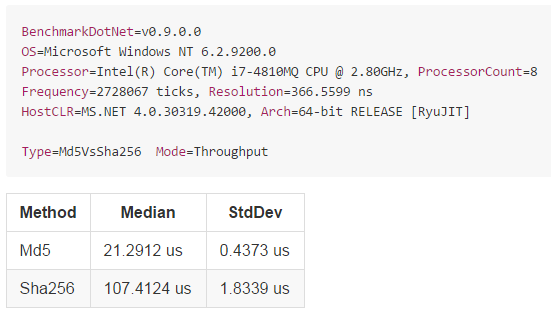
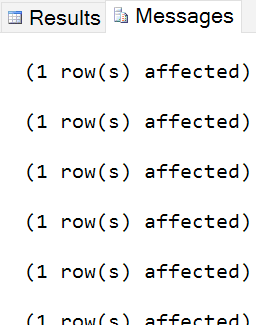


![image[13]](https://msdnshared.blob.core.windows.net/media/2016/02/image131.png "image[13]")


 One of the most clichéd blogging tricks is to declare something popular as dead. These click bait, desperate posts are popular among click-focused bloggers, but not for me. Yet here I am, writing an “is dead” post. Today, this is about sharing my responses on-going social media posts. They go something like this: