I’m really quite pleased to have been listed as a vExpert for 2016. This is the fourth year in a row that they’ve forgotten to delete my name of the list (still not tired of that joke). The announcement and list is here, and more news about this year’s programme is coming shortly. Thanks again to Corey Romero and the rest of the VMware Community people for making this kind of thing happen. And thanks also to the vExpert community for being, well, such a great community to be part of.
Shared posts
18 Feb 09:18
Cloud Platform Release Announcements for December 16, 2015
by Cloud Platform Team
This is a blog post of a new ongoing series of consolidated updates from the Cloud Platform team.
In today’s mobile first, cloud first world, Microsoft provides the technologies and tools to enable enterprises to embrace a cloud culture. Our differentiated innovations, comprehensive mobile solutions and developer tools help all of our customers realize the true potential of the cloud first era.
You expect cloud-speed innovation from us, and we’re delivering across the breadth of our Cloud Platform product portfolio. Below is a consolidated list of our latest releases to help you stay current, with links to additional details if you’d like more information. In this update:
- StorSimple 8000 Series
- StorSimple Local Volumes General Availability
- StorSimple Cloud Appliance 8020 using Azure Premium Storage General Availability
- On-premises StorSimple Virtual Array Public Preview
- Power BI Desktop December Update
- Power BI Content Packs: Bing Social, Office365Mon and VMob General Availability
- System Center Configuration Manager General Availability
- General Availability of Excel Add-in for Azure Machine Learning
- Azure Machine Learning with Azure Stream Analytics Public Preview
- ExpressRoute + CRM Online General Availability
- Reservations for Instance Level Public IP General Availability
StorSimple 8000 Series
Microsoft Azure StorSimple 8000 Series Update 2 is a software-only update that will be available via Microsoft Update and on shipping units. The Update will be rolled out across geographies in stages. It includes multiple new features for the StorSimple Hybrid Cloud Storage solution, as well as incremental software improvements. Update 2 includes two key enhancements that expand the use cases and workloads that can be addressed by StorSimple: Local volumes and the StorSimple Cloud Appliance 8020 (using Azure Premium Storage).
StorSimple Local Volumes General Availability
Local volumes ensure that primary data stays local to the device, in the customer environment, and does not tier to the cloud. This allows customers to run workloads that are sensitive to cloud latency, such as SQL and Virtual Machines, on local volumes, while continuing to reap the benefits of the cloud for backup and disaster recovery. Customers can host multiple workloads on StorSimple that require either the performance of locally available data or scale of the cloud or a combination of the two thereof. This capability broadens the range of enterprise environments, that customers can transition to a hybrid cloud storage strategy, meeting the requirements of their on-premises applications with all the benefits of the cloud.
StorSimple Cloud Appliance 8020 using Azure Premium Storage General Availability
The StorSimple Cloud Appliance 8020 is a new version of the StorSimple Cloud Appliance product offering. The Cloud Appliance is a software-only version of the StorSimple solution that runs on a Virtual Machine in Azure. This new model offers an increased maximum provisioned capacity of 64TB, and increased performance by using Azure Premium Storage as the local tier. Premium Storage will allow customers to increase their use of the StorSimple Cloud Appliance, by enabling scenarios that required larger volume sizes and higher throughputs in Azure. The 8020 will have the same pricing policy as the previous version, where you are only charged for the VM and storage components of the underlying VM and disks. Azure Compute pricing is based on DS3 Virtual Machine pricing and disk pricing will be based on Premium Storage disk pricing.
In addition, customers can now protect entire workloads hosted on StorSimple devices with Azure Site Recovery. By integrating StorSimple specific scripts released with this update (in the Azure Automation Gallery) into recovery plans of Azure Site Recovery, disaster recovery is vastly simplified. Planned, unplanned and the testing of disaster recovery workflows can be orchestrated with a single click.
On-premises StorSimple Virtual Array Public Preview
Microsoft Azure StorSimple is announcing the Public Preview of the on-premises StorSimple Virtual Array. This is a version of the StorSimple solution in a virtual machine form installed in a customer’s remote or branch office. This provides a cost-effective, light-weight solution for remote and branch office environments while still delivering the fundamental value of the StorSimple Hybrid Cloud Storage solution:
- Seamless cloud integration with automated tiering to manage data growth
- Simplified data protection with cloud-based snapshots
- Location independent recovery of data from the cloud
The StorSimple Virtual Array can be downloaded from the StorSimple Manager, on the Azure Portal, and installed on a Virtual Machine configured on a Hyper-V or VMware hypervisor. The StorSimple Virtual Array can be configurable as a NAS (using SMB) or a SAN (using iSCSI) device. It will initially be targeted for File Sharing, for information worker and collaboration scenarios, and small database workloads using a combination of local and tiered volumes. The StorSimple Virtual Array will be managed from the StorSimple Manager Service, in the Azure Portal.
The on-premises StorSimple Virtual Array is billed against the same meters as the StorSimple 8000 Series, the StorSimple meter and the Azure Blob Storage meter.
For more information, check out the StorSimple Hybrid Cloud Storage site.
Power BI Desktop December Update
We are excited to announce the Power BI Desktop December Update is now available, delivering additional features and enhancements to help the business analysts get more insights quickly. This December Update includes a number of new features including:
- Enabling R visuals in Power BI Dashboard through R scripts (Preview in Power BI Desktop)
- Visuals enhancements like stacked area chart, reference line/region in Cartesian visual, and the ability to accurately size/position/align visuals
- New Stripe connector, improved ODBC connector, and Direct Query improvements
Visit the Power BI blog for more information and to download the latest Power BI Desktop.
Power BI Content Packs: Bing Social, Office365Mon and VMob General Availability
Power BI continues to make it easier for users to connect to their data, providing pre-built solutions for popular services as part of the experience. This month we added content packs for Bing, Office365Mon and VMob.
Bing helps you turn information into action, making it faster and easier to go from searching to doing. The Power BI content pack for Bing allows you to view analytics around Internet search activity for a term of your choice.
Office365Mon allows you to track the availability of your Office 365 environment. Analyzing your Office 365 outage and health performance data is easy with Power BI. With the Office365Mon content pack, your data is retrieved, including outages and health probes, and provided in out-of-box dashboards and reports based on that data.
VMob uses real-time contextual analytics to give retailers the ability to create highly personalized marketing campaigns which reach customers at the right time and place. Power BI’s VMob content pack retrieves your data, including User Statistics, Retail KPI and Campaign Performance, and then builds an out-of-box dashboard and reports based on that data. Tracking and exploring your VMob data is easy with Power BI.
Subscribers to these supported services can now quickly connect to their account from Power BI and see their data through live dashboards and interactive reports that have been pre-built for them. Getting started with data visualization and analysis has never been easier, for additional information visit the Power BI blog.
System Center Configuration Manager General Availability
System Center Configuration Manager is now generally available. There are a number of key elements included in this release:
- Comprehensive support for Windows 10: Windows 10 is the best Windows ever and has been designed with the enterprise in mind. System Center Configuration Manager was designed to work with Windows 10 and gives you multiple options to deploy, update, and manage Windows 10 in the way that makes sense for your business.
- Deploy/upgrade/provision Windows 10: ConfigMgr supports a variety of fast, efficient ways to deploy or upgrade devices to Windows 10. ConfigMgr enables “in-place upgrade” to move systems from Windows 7, 8, or 8.1 directly to Windows 10 much faster than before. New Windows 10 devices can be quickly made enterprise-ready with provisioning packages and profiles.
- Keep Windows 10 up-to-date: Once devices are running Windows 10, enterprises must keep them up-to-date to ensure they are properly secured. ConfigMgr enables IT to keep Windows 10 devices up-to-date and get a better insight into the Windows 10 deployments with new configurable deployment rings and the servicing dashboard as well as identify devices that are managed via Windows Update for Business.
- More frequent and easier to install updates: ConfigMgr is now designed to make it easier to update without going through complex individual upgrades. Moving forward you will see updates several times a year – to support new Windows, Configuration Manager, and mobile device management capabilities, at a much faster pace. In fact, we are already working on the next update and can’t wait to share some of the functionality with you in upcoming technical previews.
- Manage Windows 10: ConfigMgr enables more choice for managing Windows devices. You can manage devices using the traditional ConfigMgr agent and, when integrated with Microsoft Intune, also via cloud or on-premises MDM. Now, you can use ConfigMgr to manage Windows 10 devices via MDM directly, without needing to store data in the cloud.
- Improved unified device management: ConfigMgr provides an improved unified device management platform for customers using System Center Configuration Manager integrated with Microsoft Intune to manage PCs, servers, and mobile devices. This release enables faster updates to bring new Intune features to your hybrid deployments. Some of the new hybrid features that you can expect to see in this release are support for Mac OS X MDM, Windows 10 Edition Upgrade, customized terms of use, and more.
General Availability of Excel Add-in for Azure Machine Learning
Today, we are excited to announce the General Availability of the Azure ML Excel add-in: this free add-in can be used with web services published from Azure Machine Learning. Thanks to the Excel Add-in for Azure ML, you can add your own web-service for request/response predictions, batch predictions, work in Windows or the browser, share workbooks with your co-workers, and call multiple web services all within a single spreadsheet.
Since the announcement of the Public Preview version, we’ve also added new features as a direct result of feedback from our customers, such as getting real sample data, interacting by using auto-predict functionality, jumping among multiple web services, masking parameters and supporting multiple web service inputs with header options.
Customers and partners such as Neal Analytics are already using these capabilities in their analytics activities. David McClellan, principal consultant at Neal Analytics had this to say:
One of the critical drivers of the success we’ve had working with customers in bringing Azure Machine Learning to businesses at all levels is making Machine Learning real and tangible. The Excel add-in for Azure ML allows an intuitive and simple way to bring Machine Learning into Excel, where the C suite is comfortable digesting information. As a Microsoft partner, we have found this capability to be invaluable in proving the return on investment for Data Science projects.
For more information about the add-in, check out the recent post on the Machine Learning blog.
Azure Machine Learning with Azure Stream Analytics Public Preview
Several Azure customers have asked to combine the real time analytics capabilities in Azure Stream Analytics with the power of Azure ML in quickly building and operationalizing any machine learning model as a web service.
We are very excited to announce this feature is now in public preview and you can apply Azure ML models as a function on top of streaming data to get real time insights.
This release allows you to score individual events of streaming data, leveraging an ML model hosted in Azure. This lets you easily build applications for scenarios such as real-time Twitter sentiment analytics.
Here are a couple examples:
- Providing real time product recommendations on your website in order to drive more revenue. Recommendations get served in real time based on website click data, user profile and other contextual information that is being scored against an Azure ML product recommendation model.
- Extracting, in real time, the topics and sentiment associated with conversations happening between customers and support staff. Support managers can use this information to become aware of any critical customer issues in a timely manner, which helps with customer satisfaction and retention.
For more information please read the recent Machine Learning blog post. Follow this tutorial to get started by analyzing sentiment on streaming text data.
ExpressRoute + CRM Online General Availability
To help some of our customers who need increased control, predictable performance and security over their network connections, we’re pleased to announce that starting today, Dynamics CRM Online customers will be able to use Azure ExpressRoute to establish a private, managed connection to CRM Online. Currently, ExpressRoute provides customers with dedicated network connectivity through a private connection from their network to Microsoft Azure, and we’re excited to extend the same option for connectivity to CRM Online.
With network performance as predictable as your own on-premises environments, ExpressRoute for CRM Online is like having the full CRM Online productivity solution in your own datacenter. ExpressRoute will offer CRM Online customers more predictable network performance, the ability to better manage network availability and the reliability that comes with dedicated connectivity. In addition, with ExpressRoute most CRM Online network traffic can avoid the public Internet, providing additional data privacy.
Reservations for Instance Level Public IP General Availability
Today we are announcing general availability of the “Reserved IP” feature, enabling customers to assign static public IP’s to VMs. This will aid customer scenarios with IP dependencies, like frontend/backend, user specific LOB apps and services which require predictable endpoints, along with offerings depending on static ACLs and similar.
18 Feb 09:18
Cloud Platform Release Announcements for January 13, 2016
by Cloud Platform Team
This is a blog post of a new ongoing series of consolidated updates from the Cloud Platform team.
In today’s mobile first, cloud first world, Microsoft provides the technologies and tools to enable enterprises to embrace a cloud culture. Our differentiated innovations, comprehensive mobile solutions and developer tools help all of our customers realize the true potential of the cloud first era.
You expect cloud-speed innovation from us, and we’re delivering across the breadth of our Cloud Platform product portfolio. Below is a consolidated list of our latest releases to help you stay current, with links to additional details if you’d like more information. In this update:
- Azure Automation DSC GA
- Azure MFA per user SKU GA
- Azure Premium Storage GA – New Geo-Availability in US South Cen – SN
- Azure Site Recovery: VMware to Azure MT/CS update GA
- ChakraCore Open Source GA
- Microsoft Intune January Update GA
- Operations Management Suite Alerting and Remediation
- Power BI app for Windows 10 Mobile GA
- Power BI Content Pack – AT Internet GA, Smartsheet GA and Lithium GA
- Power BI Desktop – January Update
- Power BI Publisher for Excel Public
- RBAC and Customer Roles GA
- Visual Studio Dev Essentials: Universal Windows Platform VM | GA
- Visual Studio Dev Essentials: Windows R Server
- Z-Ray for Azure App Service GA
Azure Automation DSC GA
Microsoft Operations Management Suite enables continuous IT services delivery with Azure Automation DSC General Availability
Deploying and maintaining the desired state of your servers and application resources has been tedious and error-prone. With Azure Automation Desired State Configuration (DSC), you can consistently deploy, reliably monitor and automatically update the desired state of all your IT resources, at scale from the cloud.
Built on PowerShell DSC, Azure Automation DSC can align machine configuration with specific state across physical and virtual machines, Windows or Linux, in the cloud or on-premises. This enables continuous IT services to deliver consistent control and manage rapid change across heterogeneous hybrid IT environments with ease. Azure Automation DSC is generally available in free and basic tiers; visit the pricing page for details. It is also included as part of the System Center add-on for Microsoft Operations Management Suite, the simplified hybrid cloud IT management solution for any enterprise.
Azure MFA per user SKU GA
More ways to purchase Azure Multi-Factor Authentication
Azure Multi-Factor Authentication (MFA) can now be purchased through Volume Licensing, the Cloud Solution Provider program, and Direct as an annual user based model the same way as Azure Active Directory Premium, Intune and Azure RMS. This new Azure MFA Volume License offering will be additional to the existing per-user and per-authentication consumption-based model that was billed monthly against Azure monetary commitment.
This new offer will include the same feature set with the existing offerings. It is just a different way to purchase Azure MFA, which better aligns with how Office 365 and Azure AD Basic and Premium are purchased. Azure MFA will still be included as part of Azure Active Directory Premium, Enterprise Mobility Suite and Enterprise Cloud Suite.
For pricing and licensing information please visit the Azure MFA page.
Azure Premium Storage GA – New Geo-Availability in US South Cen – SN
Azure Premium Storage now generally available in additional regions
Azure Premium Storage is a solid-state drive (SSD)–based storage solution designed to support I/O-intensive workloads. With Premium Storage, you can add up to 64 TB of persistent storage per virtual machine (VM), with more than 80,000 IOPS per VM and extremely low latencies for read operations.
Offering a service-level agreement (SLA) for 99.9 percent availability, Premium Storage is now available in US South Central in addition to the previously announced regions.
Learn more on the Azure Premium Storage page.
Azure Site Recovery: VMware to Azure MT/CS update GA
Simplified protection of workloads in Azure
We are pleased to announce that the protection of VMware and physical servers to Azure have been made even easier and more affordable with the latest update to Azure Site Recovery (ASR).
Previously, protecting these workloads required the deployment of two virtual machines to run in Azure: Master Target (MT) and Configuration Server (CS). By implementing the MT within Azure and co-locating the CS with the Process Server on premises, we have removed the requirement and associated costs for deploying these additional virtual machines. Learn more in this recent Azure blog post.
Find technical details for setting up VMware and physical servers on Azure here.
Azure Site Recovery is generally available today in Microsoft Operations Management Suite.
ChakraCore Open Source GA
The ChakraCore repository provides a fully supported and open-sourced standalone JavaScript engine to embed in projects. Developers can build ChakraCore on Windows 7 SP1 or above with either Visual Studio 2013 or 2015 with C++ support installed. Today, we’re excited to announce ChakraCore is now accepting contributions from the community. The community is at the heart of any open source project and we look forward to the community cloning the repository, inspecting the code, building it, and contributing everything from new functionality to tests or bug fixes.
To learn more, read the recent Chakra blog post.
Microsoft Intune January Update GA
We will be releasing the next service update for Microsoft Intune between January 6 and January 14. New features and enhancements will be made available as part of this service update including support for new Windows 10 features, Apple VPP for Business, and more. Learn more on the Microsoft Intune blog.
Operations Management Suite Alerting and Remediation
Microsoft Operations Management Suite enables seamless IT operations with Log Analytics alerting and remediation
Today, you can easily set up custom alerts, be informed and automatically remediate operational issues. The alert notification and remediation feature of Microsoft Operations Management Suite leverages the log analytics and automation capabilities across physical and virtual machines, Windows or Linux, in the cloud or on-premises, enabling seamless IT operations. This feature is included in the Microsoft Operations Management Suite in public preview.
Learn more about Alerting here.
Power BI app for Windows 10 Mobile GA
Stay connected to your data from anywhere, anytime with the Power BI app for Windows 10 Mobile and get a 360° view of your business data on the go – at the touch of your fingertips. Interact with your data easily in a touch-optimized experience with the Power BI native Windows 10 Mobile app and share live reports and dashboards to keep your team on the same page. Tell stories with your data to engage your customers and colleagues.
Learn more about the Power BI for Windows 10 Mobile on the Power BI blog.
Power BI Content Pack – AT Internet GA, Smartsheet GA and Lithium GA
Power BI continues to make it easier for users to connect to their data, providing pre-built solutions for popular services as part of the experience. This month we added content packs for Smartsheet, AT Internet, and Lithium.
Smartsheet is a collaborative work management platform that enables users to manage their work their way, thereby freeing them up to do what matters most. The Smartsheet connector in the Power BI desktop allows you to access your data, so you can build interactive reports to make your work more efficient. The Power BI content pack for Smartsheet gives you a comprehensive view into your environment, including how many artifacts you have and who your top users are and more, to help you understand how your organization is collaborating on work.
AT Internet for Power BI helps you to extract immediate value from your data using its unified digital analytics platform, the Analytics Suite. The AT Internet Bridge content pack for Power BI includes data around visits, sources, localization and devices for your site for the last three months. This initial version of the content pack allows you to visualize all your AT Internet analytics data in a standard dashboard and customize your reporting to get meaningful information at a glance.
Lithium builds trusted relationships between the world’s best brands and their customers, helping people get answers and share their experiences. The Lithium content pack for Power BI allows you to gain insight into key measures of community performance, such as messages posted, questions solved and your most active users.
Subscribers to these supported services can now quickly connect to their account from Power BI and see their data through live dashboards and interactive reports that have been pre-built for them. Getting started with data visualization and analysis has never been easier, for additional information, check out the Power BI blog.
Power BI Desktop – January Update
We are excited to announce the Power BI Desktop January Update is now available, delivering additional features and enhancements to help the business analysts get more insights quickly. This January Update includes a number of new features:
- Support for hierarchies with multi-dimensional models
- Ability to see the data behind a visual
- Visuals enhancements, e.g., Format Painter, ability to add reference lines, tooltips on Line and Area charts, sort indicator on tables, and better control of layout and alignment of visuals
Learn more and download the latest Power BI Desktop from the Power BI blog.
Power BI Publisher for Excel Public
The Power BI Publisher for Excel add-in allows users to clip any Excel grid element on a spreadsheet and publish it to a selected Power BI dashboard.
Users can select a table, a Pivot Table, a chart or any other Excel element on an already opened spreadsheet. Then click the Pin button on the Power BI ribbon tab. On the Pin to dashboard dialog, users are able select an existing dashboard out of the list of dashboards with write permission, or create a new dashboard to pin the new content on. Any pinned element can then be manually refreshed right from Excel using the same selection Pin or Pin Manager.
The add-in supports all versions of Excel starting at Excel 2010 and all versions of windows starting at Windows 7. Find the downloads at powerbi.com.
RBAC and Customer Roles GA
Azure Role-Based Access Control with custom roles generally available
Azure Role-Based Access Control (RBAC) provides fine-grained access management for Azure resources, so you can grant users only the rights they need to perform their jobs using built-in or custom roles. RBAC is provided at no additional cost to Azure subscribers. To learn more, visit the Active Directory Team Blog or watch this Channel 9 video.
Visual Studio Dev Essentials: Universal Windows Platform VM | GA
Visual Studio Dev Essentials program now offers the Universal Windows Platform VM as part of its many benefits. With these new VMs, developers can get try out quickly the Windows 10 development environment without spending the time it would normally take to set up and configure a device for development or test use. We have provided a Windows 10 development environment in a number of different virtual machine implementations- matched to the latest release and ready to go, including VMWare, Hyper-V, VirtualBox and Parallels.
Learn more in the Universal Windows Platform announcement.
Visual Studio Dev Essentials: Windows R Server
Microsoft R Server is now available to all Dev Essentials members. It was also made available through VLSC and MSDN Downloads earlier this month. Microsoft R Server is a fast and cost-effective enterprise-class big data advanced analytics platform supporting a variety of big data statistics, predictive modeling and machine learning capabilities.
Microsoft R Server includes Open Source R and is fully compatible with R scripts, functions and CRAN packages, and offers a variety of analytics capabilities including exploratory data analysis, model building and model deployment. This new advanced analytics platform based on the R programming language, comes to market less than a year after Microsoft acquired Revolution Analytics, the company that was previously the leading commercial provider of software and services for R. To learn more, see the announcement for Microsoft R Server.
Z-Ray for Azure App Service GA
PHP developers can benefit from real-time insight into running PHP applications with Z-Ray – now on Azure.
Zend Z-Ray for Azure App Service, now generally available, gives developers awareness into entire PHP applications, including execution time, exceptions and errors, and SQL queries used. With Zend’s gallery of plugins, developers can also use Zend Z-Ray to see how every line of code is performing as it’s executing, whether it’s a Magento event, a Drupal module, a WordPress plugin, or a PHP framework function.
Building on our strategic partnership with Zend Technologies, a Rogue Wave company, Zend Z-Ray is integrated with the app management experience and easy to enable through the Settings blade of the Azure portal. Watch this quick video to see Z-Ray for Azure in action.
18 Feb 09:17
Cloud Platform Release Announcements for February 3, 2016
by Cloud Platform Team
This is a blog post of a new ongoing series of consolidated updates from the Cloud Platform team.
In today’s mobile first, cloud first world, Microsoft provides the technologies and tools to enable enterprises to embrace a cloud culture. Our differentiated innovations, comprehensive mobile solutions and developer tools help all of our customers realize the true potential of the cloud first era.
You expect cloud-speed innovation from us, and we’re delivering across the breadth of our Cloud Platform product portfolio. Below is a consolidated list of our latest releases to help you stay current, with links to additional details if you’d like more information. In this update:
- Availability of OMS Extension for Linux VMs | Public – Extension Only
- Azure IoT Hub | Price increase due to GA
- Azure Premium Storage GA – new geo-availability | East Asia & AU SE- MEL
- Azure Site Recovery – US Gov | GA
- DV2 Price Drops | GA
- Key Vault | GA
- Power BI Content Pack – February | Troux GA & Azure Search GA
- Power BI publish to web
- Power BI gateway – enterprise | GA
- Power BI mobile apps for iOS and Android update | GA
- Power BI Windows 10 Universal app | GA
- SQL Server 2016 | CTP 3.3
- Virtual Machines and Cloud Services – D-Series – US Gov | GA
- Visual Studio Code Extension for Apache Cordova | Public Preview
- Visual Studio Dev Essentials: Azure Credit | GA
- Visual Studio Dev Essentials: Xamarin University | GA
Availability of OMS Extension for Linux VMs | Public – Extension Only
Ease of onboarding is critical to for massive deployments especially when they are living in Cloud. Azure today, will provide an Operations Management Suite’s extension for Linux machines. This capability will enable Azure users to simply onboard to the Log Analytics service from the Azure management portal. Microsoft Operations Management Suite leverages the log analytics and automation capabilities across physical and virtual machines, using Windows or Linux, in the cloud or on-premises, for seamless IT operations. Now in public preview, this feature is included in Microsoft Operations Management Suite.
Azure IoT Hub | Price increase due to GA
Microsoft Azure IoT Hub Generally Available as of February 3, 2016.
Microsoft Azure IoT Hub provides a secured way to connect, provision, monitor, update, and send commands to devices. Azure IoT Hub enables companies to control millions of Internet of Things (IoT) assets running on a broad set of operating systems and protocols to jumpstart their IoT projects.
Azure IoT Hub helps enable companies to:
- Establish reliable bi-directional communication with IoT assets, even if they’re intermittently connected, so companies can analyze incoming telemetry data and send commands and notifications as needed
- Enhance security of IoT solutions by leveraging per-device authentication to communicate with devices with the appropriate credentials
- Revoke access rights to specific devices, if needed, to maintain the integrity of the system
- Monitor device connectivity to identify security threats and operational issues as soon as possible
- Work with common protocols such as HTTP, AMQP, AMPQ over web sockets and MQTT
Azure IoT Hub is available as a standalone service or as one of the services used in Microsoft Azure IoT Suite.
General availability pricing will go into effect on April 1, 2016. For details and pricing for Azure IoT Hub please visit the pricing page.
Azure Premium Storage GA – new geo-availability | East Asia & AU SE- MEL
Azure Premium Storage generally available in additional regions.
Azure Premium Storage is a solid-state drive (SSD)–based storage solution designed to support I/O-intensive workloads. With Premium Storage, you can add up to 64 TB of persistent storage per virtual machine (VM), with more than 80,000 IOPS per VM and extremely low latencies for read operations.
Offering a service-level agreement (SLA) for 99.9 percent availability, Premium Storage is now available in the East Asia and Australia Southeast region, as well as these previously announced regions.
Learn more about Premium Storage.
Azure Site Recovery – US Gov | GA
Azure Site Recovery is generally available.
Azure Site Recovery provides you with full-featured disaster recovery that is simple, and provides automated protection and replication of your physical and virtual environment. Some must-have advantages Site Recovery furnishes for you are:
- Ability to help quickly protect critical applications running on physical and virtual infrastructures—including Hyper-V and VMware.
- Replicate and failover your on-premises applications to Azure, negating the need to build and manage a second datacenter for recovery. Reduce expenses and only pay for compute when you need it.
- Detect and stage multi-tier applications and restore them as a group, with specified startup ordering and the ability to insert scripts to bypass the need for manual configurations.
- Perform periodic DR drills and testing without any impact to the production or recovery virtual machine.
- Have a secured, orderly recovery of services in the event of a site outage
- Continuous visibility with remote health monitoring and extensibility
The addition of Site Recovery as part of our Azure Backup and disaster recovery features help meet a Government agency’s security rigor and requirements, as well as help meet your hybrid cloud objectives. More updates will become available in the near future as we enable physical Linux and VMWare Linux VM replication scenarios to Azure Storage and/or a secondary datacenter.
For more information on how this service helps extend and protect your datacenter, and enables your hybrid cloud, please visit the Site Recovery documentation page.
For more information on deployment scenarios, workload guidance, and features/requirements, please visit the What is Site Recovery? documentation page.
For more information on best practices, please visit the Prepare for Azure Site Recovery deployment documentation webpage.
DV2 Price Drops | GA
Effective early February 2016, prices for the Dv2-Series for Azure Virtual Machines and Azure Cloud Services will be reduced by 10 to 17 percent, depending on the instance and operating system. These are the latest version of the popular D-Series VMs, and they have CPUs that are 35 percent faster, on average, and are based on the Intel Xeon (Haswell) E5 processors. The price reductions are in the following Azure regions: Australia East, Australia Southeast, Central US, East Asia, East US, East US 2, Japan East, North Central US, North Europe, South Central US, Southeast Asia, West Europe, and West US.
For more details, please read the blog post to learn more.
Key Vault | GA
Azure Key Vault is generally available.
Government agencies using Azure Key Vault will be able to safeguard cryptographic keys and secrets used by cloud applications and services, enhance data protection and compliance:
- Secure key management is essential to helping protect government data in the cloud.
- Store keys and small secrets like passwords protected by hardware security modules (HSMs).
- For added assurance, keys can be stored in HSMs that are validated to FIPS 140-2 Level 2 standard (hardware and firmware).
- Key Vault is designed so Microsoft doesn’t see or extract your keys.
- Reduce latency with cloud scale and global redundancy.
- Protect your cloud application secrets (passwords, connection string, storage account key, SSL certificates etc.) and reduce the risk of them leaking out via source code or configuration files proliferation.
With Key Vault, there’s no need to provision, configure, patch, and maintain HSMs and key management software—you maintain all of the control, but we do the work.
- You can provision new vaults and keys (or import keys from your own HSMs) in minutes and centrally manage keys, secrets, and policies.
- You maintain control over your keys—simply grant permission for your own and third-party applications to use them as needed.
- Applications do not have direct access to keys.
- Developers easily manage keys used for Dev/Test and migrate seamlessly to production keys managed by secured operations.
Key Vault becomes the single place to manage keys and secrets for your important Microsoft first-party services, for third-party services seeking to offer higher assurances, and for your own custom line of business (LOB) Azure-hosted applications. For example, you can:
- Use Key Vault to store master key(s) for SQL Server with Transparent Database Encryption (TDE).
- Use client-side Storage SDK to encrypt data using encryption keys stored in Key Vault.
Note there are two tiers: Standard and Premium. Only the Premium tier supports creating HSM-protected keys.
For more examples of what you can do with Key Vault, please visit the What is Azure Key Vault? documentation page.
For more information on how to get started and links to refresh your PowerShell with new Key Vault cmdlets, please visit the Get started with Azure Key Vault documentation page.
Power BI Content Pack – February | Troux GA & Azure Search GA
Power BI continues to make it easier for users to connect to their data, providing pre-built solutions for popular services as part of the experience. This month we added content packs for Azure Search and Troux.
Azure Search for Power BI allows you to monitor and understand the traffic to your Azure Search service. The Azure Search content pack for Power BI provides detailed insights on your Search data, including Search, Indexing, Service Stats and Latency. Connecting Power BI to your Azure Search analytics storage is easy and the analytics will include metrics from the last 30 days for you to explore.
Troux enables businesses to manage technology investments and ensure the greatest impact while minimizing risk. The Power BI content pack allows you to visualize your applications, technologies and capabilities of your current system as well as analysis over time.
Subscribers to these supported services can now quickly connect to their account from Power BI and see their data through live dashboards and interactive reports that have been pre-built for them. Getting started with data visualization and analysis has never been easier, for additional information visit the Power BI blog.
Power BI publish to web
We are announcing the public preview of the exciting new Microsoft Power BI publish to web capability. Microsoft Power BI publish to web allows you to tell compelling stories with interactive data visualizations in minutes.
- Easily embed interactive Power BI visualizations in your blog and websites or share the stunning visuals through your emails or social media communications.
- Reach millions of users on any device, anywhere.
- Edit, update, refresh or un-share visuals with ease.
Real-life industry usage and reference examples, videos, demos, and supporting blog posts and details are now publicly available.
Power BI gateway – enterprise | GA
Microsoft Power BI gateway for enterprise deployments are generally available.
With Power BI gateways, you can keep your data fresh by connecting to on-premises data sources. The gateways provide the flexibility you need to meet individual needs, and the needs of your organization. The Power BI gateway for personal use is designed for use with personal data sets and allows you to refresh your on-premises data quickly without waiting for an IT Admin. In addition to the Power BI gateway for personal use, we are now releasing the Power BI gateway for enterprise deployments. This gateway is used by organizations to serve a large number of users.
Please visit the Power BI blog to learn more about this release or download and learn more about the Power BI gateways here.
Power BI mobile apps for iOS and Android update | GA
This massive mobile update contains major improvements that will help enhance the Power BI mobile experience making it slicker, faster and more fun.
Among the features added we have Real Time Data, R-Tiles, Bing Dashboards and several data consumption improvements.
All these new capabilities and improvements are already available on the Power BI app for Windows 10 Mobile announced just before the end of 2015 and are now introduced also to iOS and Android.
Learn more about the update on the Power BI blog.
Power BI Windows 10 Universal app | GA
The Power BI app for Windows 10 becomes available as a Windows 10 Universal app that can be installed and run on PCs, tablets and phones.
The Power BI universal app for Windows 10 offers a touch-optimized consumption experience for Power BI. With this app you can easily take your data on the go. The great advantage of being a Windows 10 universal app makes Power BI look great on different form factors, starting from a small screen device like your phone or your tablet all the way up to the Microsoft Surface Hub, including Continuum support for Windows Phone.
- Learn more about the release
- Watch the app video
- Download the app from the Windows Store
SQL Server 2016 | CTP 3.3
SQL Server 2016 Community Technology Preview (CTP) 3.3 was released earlier this week. In SQL Server 2016 CTP 3.3, part of our new rapid preview model, we have made enhancements to several features customers can try in their SQL Server 2016 development and test environments. In SQL Server 2016 CTP 3.3, customers will see advancements in several areas, including enhancements to Stretch Database, In-Memory OLTP, Analysis Services DirectQuery models, and Reporting Services web portal.
Set up a SQL Server 2016 CTP preview test environment today! To experience the new, exciting features in SQL Server 2016 and the new rapid release model, download the preview or try the preview by using a virtual machine in Microsoft Azure and start evaluating the impact these new innovations can have for your business.
Virtual Machines and Cloud Services – D-Series – US Gov | GA
D-Series for Azure Virtual Machines, Azure Cloud Services and web/worker roles.
There is now expanded support for United States Government agencies with a new series of virtual machine (VM) sizes for Azure Virtual Machines and web/worker roles. The D-Series sizes offer up to 112 GB in memory with compute processors that are approximately 60 percent faster than our A-Series VM sizes (relative to the A1-A7 VM sizes). Even better, these sizes have up to 800 GB of local solid-state drives (SSDs) for blazingly fast disk read/write.
The new sizes offer an optimal configuration for running workloads that require increased processing power and fast local disk input/output (I/O). These sizes are available for both Virtual Machines and Azure Cloud Services.
In meeting US government requirements, this expanded support houses all customer data, applications, and hardware in the continental United States.
Visual Studio Code Extension for Apache Cordova | Public Preview
We are pleased to announce new ways to build, debug and preview Cordova apps using your favorite light-weight text editor (it’s your favorite, right?).
With this extension, you can debug hybrid apps, find Cordova-specific commands in the Command Palette, and use IntelliSense to browse objects, functions, and parameters. You can use it with both “stock” versions of the Apache Cordova framework and downstream frameworks like Ionic, Onsen, PhoneGap and SAP Fiori Mobile Client. Because they all use the same Cordova build systems and core runtime, the TACO extension is adaptable to the JavaScript framework of your choice.
In fact, you can even use Visual Studio Code on a project created with the full Visual Studio IDE. For example, imagine creating a Cordova project using Ionic templates with Visual Studio on a Windows machine, then opening it on an OS X or Linux machine using Visual Studio Code—making some edits—then continuing your work in the Visual Studio IDE. No matter which editor you choose, you get the full benefit of debugging, IntelliSense, and language support. How cool is that?
Visual Studio Code + Cordova Tools currently support debugging apps on emulators, simulators, and tethered devices for Android and iOS. If you ask for it (find us on Twitter), Windows support will follow not too far behind. You can also attach the debugger to an app that is already running on a device; the debugger simply uses the application ID to locate the running instance.
Visual Studio Dev Essentials: Azure Credit | GA
As a Visual Studio Dev Essentials member, you’ve got the power of the cloud at your command. Azure’s integrated tools, pre-built templates, and managed services make it easier to build and manage enterprise, mobile, web, and Internet of Things (IoT) apps faster, using skills you already have and technologies you already know.
Use your credit on popular Azure services, including Virtual Machines, Web Apps, Cloud Services, Mobile Services, Storage, SQL Database, Content Delivery Network, HDInsight, and Media Services. All pricing for services uses the standard pay-as-you-go rates shown on the Pricing Calculator.
Here are some ways you can use your $25 every month:
- Provision and use one S0 Standard Azure SQL Database
- Use one D2 Windows virtual machine for 95 hours
- Analyze big data for 24 hours with an A3 Hadoop Insight Cluster
- Run five Linux D11 virtual machines for 24 hours
Activate your $25 monthly credit today!
Visual Studio Dev Essentials: Xamarin University | GA
Now, members of Visual Studio Dev Essentials have access to Xamarin University Mobile Training. This benefit equips Dev Essentials members with Xamarin University class recordings and materials from Xamarin Mobile Fundamentals Course.
The initial course line-up includes the following lectures, and all the associated materials including interactive lab projects:
- Intro to iOS 101 and 102
- Intro to Android 101 and 102
- Intro to Xamarin.Forms
- Two guest lectures from industry luminaries (Azure Mobile Services and Intro to Prism)
Activate your Xamarin University Mobile Training through Visual Studio Dev Essentials now!
Learn more here.
18 Feb 09:17
Authentication server returned unexpected error: ns0:RequestFailed
by Gabrie van Zanten
Was fighting a strange logon issue with vSphere 5.5 SSO. After configuring SSO against Active Directory and testing logins with the temporary user account handed to me by the customer, all was fine. But when I had the customer test with their own account, he couldn’t login and received the following message through the vSphere Web Client:
“The authentication server returned an unexpected error: ns0:RequestFailed: Referral. The error may be caused by a malfunctioning identity source.”
A login using the good old vSphere Client presented this error: “Cannot complete login due to an incorrect user name or password”.
After doing more troubleshooting, I learned that only user accounts which are part of a group from a different domain gave an issue. For example:
- user01@domain.com is member of group@domain.com can login fine
- user02@domain.com is member of group@domain.com and group@subdomain.domain.com cannot login.
It seems that this only happens when talking to a Windows 2008R2 domain controller, but I haven’t been able to thoroughly test that.
The solution is quite simple:
In your SSO server go to configuration -> identity sources -> edit the domain. Make sure you use “Active Directory as LDAP Server” and enter the Primary and Secondary URLs with port number 3268, like this: ldap://server01.domain.com:3268
That should do the trick and your ns0:RequestFailed error should be gone.
See full post at: Authentication server returned unexpected error: ns0:RequestFailed
15 Feb 10:18


My tryst with IoT (Internet of Things) –Part 1
by Adarsha Datta
I finally decided to delve in this wave that everyone seems to be talking about – Internet of Things! Through this series, I will describe my experience with each of the components that I get to play with. After speaking to a lot of startups, attending several IOT architecture sessions, reading about the various associated technologies – I have developed an understanding and more importantly an interest to dive into IoT. I ll start with a reference architectures and will dive into details in subsequent posts.

The above diagram gives a pretty holistic description of what an IOT project may look like. I will describe each component separately as it needs some explanation but will divide it into 3 basic components: (1) Event Producers –‘The Things’ (2) Business Analytics – Collection to Long Term Storage, I will call this ’The Magic Component’ (3) Business Connectivity – ‘Present and action’
1. Event Producers:
On the left most diagram are the ‘THINGS’ or Event Producers. This is the key element of our architecture – think sensors: devices that are generating data referred to as events based on the stimuli and associated sensor to capture that data. In the various examples I have come across it can be a weather sensor, light detection sensor, motion sensor and many more examples. This is also where you will hear about Raspberry Pi, Arduino and Galileo-s of the IoT world which act as devices to connect your sensors to the cloud or other devices to transmit and process data.
Ideally, the devices should be IP capable – low powered. These can have several different kinds of processing capabilities such as metadata processor, notification processor, rules processor, stream transformation processor, raw telemetry processor, etc. An App backend to process and transmit this data also helps. Infact the examples that I ll play with would be a simple app backend that I ll program to write to and read from these devices connected sensors.
2. The Magic:
The middle section (Collection to Long Term Storage) is where the magic happens. These ‘things’ need to connect to a Cloud gateway to relay the stream of messages (the events) that they produce. Often this is done either through a Raspbery Pi or an Arduino or a Galileo device or the sensor itself may have a cloud gateway/wifi/internet capability to do so.
This stream of messages are relayed to an Event Hub which is like a specialized component of a Service Hub – which can be thought of as an enhanced queuing service. The event hub does not store data –however just consumes it passes it on to the next step – either (1) Store it in a SQL Store or (2) Stream Analytics to derive insights from the stream of data.
(1) This is for Long Term Storage – which can be later used for training a machine learning algorithm to generate patterns for prediction or anomaly detection (just to name few of the possibilities).
(2) Using Stream Analytics, you derive insights and select only the information that is relevant to you. Think of a stream of data flowing through and the Stream Analytics component acting as a filter (or a sieve) picking out only the information that is required.
3. Presentation and Action:
There are quite a few options here – the output of Stream Analytics can be directed to a PowerBI interface to get a comprehensive, visually appealing dashboard to represent the insights. These insights further drive business impact and action.
That’s it – that is how an reference architecture or flow looks like in an IoT scenario. In subsequent posts I ll dive deeper with a real life example using
-
a Detection Sensor (Event Producer)
-
hooked up to a Raspberry Pi 2 (The Gateway)
-
Streaming Data to an Event Hub (The service bus – enhanced messaging service to consume the stream of messages – data)
-
Stream Analytics querying data from the Event Hub
-
Output of the query result being visually displayed on a PowerBI dashboard
Stay Tuned! We are living in exciting times and I am really looking forward to share my experiences experimenting with IoT. Please reach out to me @AdarshaDatta and share your IoT stories with me.
15 Feb 10:14


Scaling Azure SQL Database
by James Serra
One of the advantages Azure SQL Database has over on-prem SQL Server is the ease in which it can scale. I’ll discuss the various options for horizontal scaling, vertical scaling, and other similar features.
Horizontal scaling refers to adding or removing databases in order to adjust capacity or overall performance. This is also called “scaling out”. Sharding, in which data is partitioned across a collection of identically structured databases, is a common way to implement horizontal scaling.
Vertical scaling refers to increasing or decreasing the performance level of an individual database—this is also known as “scaling up.”
Elastic Database features enables you to use the virtually unlimited database resources of Azure SQL Database to create solutions for transactional workloads, and especially Software as a Service (SaaS) applications. Elastic Database features are composed of the following:
- Elastic Database Tools (formally called Elastic Scale): These are .NET client libraries to help scale queries across multiple Azure SQL databases (sharding). This is horizontal scaling. See Get started with Elastic Database tools and video Elastic Scale with Azure SQL Database – Getting Started
- Elastic Database Pool: A pool is a collection of databases to which you can add or remove databases at any time. The databases in the pool share a fixed amount of resources (known as database throughput units, or DTUs). You pay a fixed price for the resources, which enables you to easily calculate costs while managing performance. This is vertical scaling. See Tame explosive growth in SQL databases by using elastic database pools to share resources
- Elastic Database Query. The elastic database query feature (in preview) enables you to run a Transact-SQL query that spans multiple databases in Azure SQL Database. See Azure SQL Database elastic database query overview (preview) and Getting started with elastic queries for sharding (horizontal partitioning)
- Elastic Database Jobs. Enables you to reliably execute a Transact-SQL (T-SQL) script or apply a DACPAC (data-tier application) across a group of databases. See Elastic Database jobs overview
You can change the service tier and performance level of your SQL database with the Azure portal, PowerShell (using the Set-AzureSqlDatabase cmdlet), the Service Management REST API (using the Update Database command), or Transact-SQL (via the ALTER DATABASE statement). You can use DMVs to monitor the progress of the upgrade operation for a database. This allows you to easily scale up or down a database, and it will remain online and available during the entire operation with no downtime. This is vertical scaling. See Change the service tier and performance level (pricing tier) of a SQL database.
Another feature is called Stretch Databases, to let your on-prem SQL Server database hold just the core data, with old/cold data that continues to grow sidelined transparently in Azure SQL Database. This is a feature only available in SQL Server 2016. See Stretch Database.
More info:
Elastic Database features overview
Video Azure SQL Database Elastic Scale
Video Elastic for SQL – shards, pools, stretch
SQL Azure Performance Benchmarking
Azure SQL Database DTU Calculator
15 Feb 10:13


Introducing Microsoft SQL Server 2016 (Preview 2)
by Sergio Govoni
Microsoft Press (@MicrosoftPress) has recently announced the publication of the Second Preview of the eBook Introducing Microsoft SQL Server 2016!
In this second preview, the authors: Stacia Varga (@_StaciaV_), Denny Cherry (@mrdenny), and Joseph D'Antoni (@jdanton) introduce three new security features: Always Encrypted, Row-Level Security, and Dynamic Data Masking; they discuss the enhancements that enable you to better manage performance and storage: TempDB configuration, Query Store, and Stretch Database. Finally, they discuss about the improvements to Reporting Services, AlwaysOn Availability Groups, Tabular enhancements and R integration.
The PDF versions of the eBook are available here:
Enjoy the book and SQL Server 2016!
Scott Weigand likes this
15 Feb 10:13
Video: To the future of analytics with SQL Server, BI and Cortana Analytics Suite
How cool is data analytics? Super cool!
If you think that description sounds like hype, you should watch the video of Jason Wilcox’s Foundational session at PASS as he presents fascinating examples that demonstrate how Microsoft’s data platform and Azure Machine Learning is making “The Future of Analytics” real today.

Wilcox discusses how advanced analytics has progressed to the point of discovering insights that you may not think to look for. These insights can lead in unexpected directions. Take the example of the elevator manufacturing company System Corp. Advanced analytics uncovered the surprising fact that patterns of elevator movement are an incredible predictor of whether a tenant will renew a lease because elevator usage spikes before they move out. In another case, Twitter discovered that the sentiments of tweets predict heart attack rates in various regions better than medical predictors. Says, Wilcox, “Insights are shockingly possible when you merge massive amounts of data.”
In the category of super cool, Wilcox discloses the amazing details behind Microsoft Research’s How Old Do I Look app. Find out how a single developer built this viral app in a few days using Azure as a service. Within three days, the app attracted 1.2 million visitors per hour, and so far 82 million unique visitors have uploaded 565 million images. The Azure cloud infrastructure for this popular app stretched automatically, scaling to 1,600 cores at the peak, without the need to pre-allocate anything.
Watch the video to find out the details of these and other fascinating examples. You’ll see live demonstrations of the power of SQL Server, Microsoft BI, Azure, and Cortana Analytics Suite.
15 Feb 10:13
Limiting access to data using Row-Level Security
by Tommy Mullaney
To satisfy compliance standards, internal regulations or basic security principles, applications often need to limit a user's access to only certain rows of data in a database. For example:
- An oil and gas exploration application might restrict an analyst's access to well production data based on the analyst’s region and role.
- A healthcare application might restrict a doctor's access to patient data based on the doctor’s staffing assignments.
- A multitenant application with a "shared database, shared schema" tenancy model needs to prevent tenants from accessing data that does not belong to them.
Traditionally, customers have implemented their row-level access logic using SQL views or customized application code. But these workarounds can introduce problems: Views are decentralized, susceptible to runtime errors and difficult to maintain during application upgrades. And customized application code is not only difficult to maintain as your codebase grows, but also impossible in scenarios where you don't own the application code (e.g., commercial off-the-shelf software).
Row-Level Security (RLS), a new programmability feature available in Azure SQL Database and SQL Server 2016, solves these problems by centralizing your row-level access logic within the database. As your application grows, RLS helps you maintain a consistent data access policy and reduce the risk of accidental data leakage.

How it works
RLS is a form of "predicate-based access control" — it works by automatically applying a security predicate to all queries on a table. The predicate determines which users can access which rows. For example, a simple predicate might be, "WHERE SalesRep = CURRENT_USER", while a complicated predicate might include JOINs to look up information in other tables.
There are two types of security predicates:
- Filter predicates silently filter SELECT, UPDATE and DELETE operations to exclude rows that do not satisfy the predicate.
- Block predicates explicitly block INSERT, UPDATE and DELETE operations that do not satisfy the predicate.
To add a security predicate on a table, you first need an inline table-valued function that defines your access criteria. Then, you create a security policy that adds filter and block predicates on any tables you like, using this function. Here's a simple example that prevents sales representatives from accessing rows in a customer's table that are not assigned to them:
CREATE FUNCTION dbo.customerPredicate(@SalesRepName AS sysname)
RETURNS TABLE
WITH SCHEMABINDING
AS
RETURN SELECT 1 AS accessResult
WHERE @SalesRepName = USER_NAME() OR USER_NAME() = 'Manager'
go
CREATE SECURITY POLICY dbo.customerAccessPolicy
ADD FILTER PREDICATE dbo.customerPredicate(SalesRepName) ON dbo.Customers,
ADD BLOCK PREDICATE dbo.customerPredicate(SalesRepName) ON dbo.Customers
go
– Now test the policy by impersonating SalesRep01
EXECUTE AS USER = 'SalesRep01'
go
– Only rows where SalesRepName = 'SalesRep01' are returned (filter predicate)
SELECT * FROM dbo.Customers
go
– Error because the new SalesRepName <> 'SalesRep01' (block predicate)
INSERT INTO dbo.Customers
(CustomerId, CustomerName, SalesRepName)
VALUES
(1, 'New Customer', 'SalesRep99')
go
REVERT
go
Frequently asked questions
What is the performance impact of using RLS?
In general, RLS will have the same performance as a view. Because RLS relies on the query optimizer to inline the predicate function efficiently, the performance depends on the complexity of your queries and predicates, as well as any indexes you have created. For more information, see Row-Level Security: Performance and common patterns.
Can I limit access based on AD group memberships?
Yes, you can use the IS_MEMBER() function in your predicate to check SQL role or AD group memberships. For an example, see the RLS Hospital Demo script.
What if my application uses connection pooling with a single login for all users?
No problem, your application can use the new SESSION_CONTEXT feature to get and set session-scoped key-value pairs to identify users for RLS, while still enabling efficient connection pooling. For examples, see the RLS Mid-Tier Demo script or the Web app with a multitenant database using Entity Framework and Row-Level Security tutorial.
If I've enabled RLS, does this mean that my DBAs cannot access data using SSMS?
No. Like other row-level security solutions, RLS is intended for scenarios where the queries that a user can execute are controlled by a middle-tier application. DBAs and users with ad-hoc query access to the database may be able to infer the existence of filtered data, using side-channels. For more information, see the RLS official documentation.
Getting started
If your application needs to limit users' access to specific rows of data, we encourage you to use RLS. The easiest way to try it with SQL Server 2016 is to download the AdventureWorks Database for SQL Server 2016 CTP3 and walk through the RLS sample script.
You can also learn more with the following resources:
- RLS official documentation
- Channel9 overview video
- SQL Security team blog
- RLS Samples CodePlex project
See the other posts in the SQL Server 2016 blogging series.

15 Feb 10:13
Use Dynamic Data Masking to obfuscate your sensitive data
by ronit48@hotmail.com
Data privacy is a major concern today for any organization that manages sensitive data or personally identifiable information (PII). Examples of such data include sensitive customer information such as phone numbers, email addresses and bank information, HR data on employees and financial business data.
This sensitive information is often stored in the database, and it should only be available to specific people on a need-to-know basis. Beyond that need, the sensitive data should not be exposed via the application, or to developers or IT personnel who access the production database directly.
Traditionally, the logic of obfuscating sensitive data has been developed in the application layer, requiring it to be duplicated across all modules and applications accessing the data. Alternatively, special views have been created to avoid exposure of these sensitive data pieces on the database itself, although these can impact database operations and are susceptible to errors. In other cases, third-party tools have been introduced to manage the concealment of the restricted data.
SQL Server 2016 and Azure SQL DB now offer a built-in feature that helps limit access to those particular sensitive data fields: Dynamic Data Masking (DDM).

DDM can be used to hide or obfuscate sensitive data, by controlling how the data appears in the output of database queries. It is implemented within the database itself, so the logic is centralized and always applies when the sensitive data is queried. Best of all, it is incredibly simple to configure DDM rules on sensitive fields, which can be done on an existing database without affecting database operations or requiring changes in application code.
How DDM works
Dynamic Data Masking rules can be defined on particular columns, indicating how the data in those columns will appear when queried. There are no physical changes to the data in the database itself; the data remains intact and is fully available to authorized users or applications. Database operations remain unaffected, and the masked data has the same data type as the original data, so DDM can often be applied without making any changes to database procedures or application code.
To add a data mask on a certain column in your database, all you need to do is alter that column by adding a mask and specifying the required masking type. Here, you can choose default masking, which fully masks out the original value, partial masking where you can specify part of the data to expose, or random masking, which replaces the numeric value with a random value within a specified range. There is also an email masking function, which exposes the first character and keeps the email format.
Full masking:
Configure masking function:

Results:

Partial masking:
Configure masking function:

Results:

You can also configure masking functions on columns at the time of table creation:
Creating a table with Dynamic Data Masking:

Enabling access to privileged users
When configuring Dynamic Data Masking rules, the underlying data is unaffected — so privileged users can still access the real data. Administrators of the database are always exempt from masking, so they will always get the real data when performing queries. You can also specify certain users that will have access to the actual data by assigning them the UNMASK permission:
Assigning the UNMASK permission:

Common questions about DDM
Does DDM apply for all database clients, like Java or Node.js?
Yes, query results always contain masked data for nonprivileged users, regardless of the client used to connect to the database.
What happens if a user copies data from a masked column out of the table and into a TEMP table?
In this case, the data is masked when it is retrieved from the original table — so it is written to the target table in masked format (unless a privileged user is retrieving it). This means that the original data cannot be restored from the TEMP table. This ensures that users who do not have access to unmasked data cannot expose the real data by copying it elsewhere. Note: To avoid data corruption, be sure to assign database read/write permissions appropriately.
What is the performance impact of using DDM?
Since the data masking is performed only at the end of the database query operation, right before the data is returned, the performance impact is minimal and often negligible. You should still validate the exact performance impact for your workload.
Part of a comprehensive security solution
Note that Dynamic Data Masking is not a replacement for access control mechanisms, and is not a method for physical data encryption. DDM is intended to simplify the obfuscation of sensitive data by centralizing the logic in your database, but it does not provide complete protection against malicious administrators running exhaustive ad-hoc queries. Dynamic Data Masking is complementary to other SQL Server security features (auditing, encryption, Row-Level Security, etc.) and it is highly recommended to use it in conjunction with them to better protect your sensitive data in the database.
Getting started
You can get started immediately with Dynamic Data Masking to restrict users from seeing sensitive information in your database. All you need to do is identify the sensitive columns in your database and configure data masking for those columns, specifying how much of the data to reveal.
You can learn more about Dynamic Data Masking for SQL Server and for Azure SQL database with the following resources:
- DDM official documentation
- Getting Started with DDM for Azure SQL Database
- DDM GA blog post for Azure SQL Database
- SQL Security team blog
See the other posts in the SQL Server 2016 blogging series.

15 Feb 10:13
TLS 1.2 support availability for SQL Server
by SQL Server Team
Microsoft is ensuring that customers can remain compliant with the current changes in guidance for using strong cryptography for implementing security control. A number of known vulnerabilities has been reported against SSL and earlier versions of TLS which has changed the security guidance to move to TLS 1.2 for support secure communication.
There has been no known vulnerability that has been reported for Microsoft’s TDS implementation which is the communication protocol used between SQL Server clients and the SQL Server database engine.
As of January 29, Microsoft SQL Server supports TLS 1.2 for SQL Server 2008, SQL Server 2008 R2, SQL Server 2012 and SQL Server 2014 and major client drivers like Server Native Client, Microsoft ODBC Driver for SQL Server, Microsoft JDBC Driver for SQL Server and ADO.NET (SqlClient).
You can read more about the release here. The list of builds that support TLS 1.2 along with the client and server component download locations is available in KB3135244.
15 Feb 10:12
Keeping up with the data needs of the business with SQL Server 2016
by David Hobbs-Mallyon
Leaders are embracing the need to partner with IT to help them gain actionable insights from data. Attesting to this, The Economist recently published a study, “Big data evolution: Forging new corporate capabilities for the long term,” which found that companies “that have a well-defined data strategy are much more likely to say that they financially outperform their competitors — in fact, strategic data managers are four times as [likely] to report that they are substantially ahead of peers.” As a result, “a new kind of partnership has emerged between IT and the business … Not only is this resulting in less dead-weight friction about the goals and approach to data initiatives, but it is also allowing IT to up their game.”
Data’s contribution to business success is ever-expanding. However, unless IT can help transform more data into actionable insights, they are not providing the business with the trusted information they need to uncover new business opportunities and fuel innovation.
Modern BI platform
For IT to remain responsive and agile to the demands they face, a modern Business Intelligence (BI) and analytics platform that provides trusted datasets and metrics that can be easily accessed, consumed and shared by the right people is needed.
SQL Server continues to evolve to let you benefit from data without incurring extra cost from expensive add-ons or facing additional expenses for training IT staff. Because the enhancements to SQL Server 2016 are based on technology that IT is already familiar with, IT can build on existing skill sets to perform modern BI and analytics responsibilities that support a modern data strategy. For example, SQL Server 2016 lets IT transform data into easily understood, trusted data models with user access control to make sure only appropriate users see sensitive data. This means IT can transform complex data from multiple sources into powerful, scalable models that business analysts can easily understand and access by using familiar data analytics and discovery tools such as Excel or Power BI.
But these enhancements are just the beginning. The release of SQL Server 2016 starts the cloud-paced cadence of new capabilities in Microsoft’s comprehensive enterprise-ready BI platform. This approach enables organizations to continuously build on existing investments to create, manage, and consume business insights on-premises and in the cloud. With all this, SQL Server 2016 provides what you need to transform data into actionable insights to help advance your business, including mobile and hybrid BI. To learn more about the modern advances built into SQL Server 2016, read about what you can expect and see the Microsoft BI reporting roadmap here. Upcoming blog posts in this series will dive into the technology that makes all this functionality possible.
Mobile BI
 Accommodating mobile users has become a key requirement of Business Intelligence and analytics efforts. Businesses recognize that the number of other mobile workers will continue to increase as the number of smartphones and mobile devices increases. And with this growth, users expect IT to support their mobile devices as the means to access the information they need to do their jobs whenever and wherever they need to. From business executives meeting with clients, to managers visiting warehouses and individual employees traveling to the airport, all workers are looking to stay connected to their data and business insights through their own devices.
SQL Server 2016 delivers built-in mobile BI capabilities for both IT and business users. IT professionals have the tools they need to administer user access and shared data sets in one place. Business users can then access insights in an intuitive, engaging way from their desktop and mobile devices and expect the insights to be optimized for different form factors and major mobile platforms.
When you think about optimizing your data infrastructure and maximizing your IT personnel, mobile BI is an important consideration. Providing BI access to more employees can help you transform the decision-making process and make your organization agile.
Hybrid BI

As your organization transitions to the cloud to benefit from flexibility and scale, you might still have many data sources that reside on-premises. Microsoft BI tools support this trend so that you can transition to the cloud at your pace and take advantage of a hybrid BI solution that will let you continue to benefit from existing on-premises investments. For example, you can pin a Reporting Services paginated report item to a Power BI dashboard so you can view all your information in one place. Or you can access on-premises data from the Power BI service without the need to move the data to the cloud.
Trusted BI platform: Building on your foundation
SQL Server has gained a reputation as a trusted and scalable platform, and has been recognized as a leader in Gartner’s Magic Quadrant for Business Intelligence and Analytics. (Download the Gartner Magic Quadrant for Business Intelligence and Analytics Platforms). With that knowledge and the Microsoft data platform infrastructure that organizations depend on today, business and IT can strengthen their data partnership by building on the existing skills and technology and the advances built into SQL Server 2016. Grow your business bottom line by confidently relying on the Microsoft data platform, knowing that it will work with what you have—whether your data and tools reside on-premises or in the cloud—and it will scale with your business as your data and reporting needs grow over time.
Stay tuned to this blog series for in-depth details on SQL Server 2016 analysis, reporting and BI innovations, and click below for further reading and to try SQL Server 2016 CTP3 for yourself.
See the other posts in the SQL Server 2016 blogging series.

15 Feb 10:12
Congratulations to BimlHero Cathrine Wilhelmsen!
by andyleonard
I’m happy to pass along the news that my friend Cathrine Wilhelmsen ( blog | @cathrinew ) has been recognized as a BimlHero ! Congratulations, Cathrine! You can learn more about Biml from Cathrine and Scott Currie at SQLBits in May 2016. On 4 May, Scott and Cathrine deliver a full day of Biml training titled Learn Biml Today: Start Using It Tomorrow . Note, at the time of this writing I am also listed as a co-presenter but I will, unfortunately, be unable to attend SQLBits this year. :( But go anyway!...(read more)
15 Feb 10:12
SQL Server R Service – enterprise-scale data science
by SQLMaster
Data Science is the new workforce that has geared up in most of business domains now,data is a centric force for every organisation irrespective of size-of-business. In this space when Microsoft acquired Revolution Analytics that marks development tools and enhanced R services/packages, where few improvements have been made to integrate R with SQL Server family that enables users to run R code directly from TSQL. To know more about R see Installing SQL Server R Services that contains client-server components and Enterprise/Open R services to configure.
R is popular programming language with open source community for advanced analytics to build required business models for better visibility, SQL Server 2016 CTP3 release is comprised of the following components:
- Advanced Analytics Extensions: A framework for enabling R code to run in SQL Server, to support in-database analytics and much faster processing of R code.
- Revolution R Enterprise 7.5.0. A collection of R libraries to support greater performance and scalability for R, including libraries for developing parallel algorithms, plus an optional R development environment with integrated tracing, Intellisense, and more.
- Revolution R Open 3.2.2 for Revolution R Enterprise 7.5.0. A distribution of the open source R runtime and connectivity libraries that allow it to work with Revolution R Enterprise.
Also Checkout latest CTP3.3 release announcement as well.
To run R code with SQL Server just do the following (source: BOL):
-
Open Management Studio and connect to the instance where you enabled Advanced Analytics Extensions.
-
Open a new Query window and type sp_configure. If the extensions are enabled, the value of 'external scripts enabled' should be 1.
It is good to check few walkthroughs of these scenarios, see SQL Server R Services Tutorials
Not just with Enterprise or Standard editions, R integration support will be enabled for SQL Server Express with Advanced Services as well.
There are few scenarios and examples where you can use R & SQL Server, see below:
15 Feb 10:12
IBM Launches Cloud Data and Analytics Marketplace for Developers
by A.R. Guess
by Angela Guess A new article out of the company reports, “IBM today announced a broad expansion of its Cloud Data Services portfolio with more than 25 services now available on the IBM Cloud. They are designed to help developers build, deploy and manage web and mobile applications and enable data scientists to discover hidden […]
The post IBM Launches Cloud Data and Analytics Marketplace for Developers appeared first on DATAVERSITY.
15 Feb 10:12
Sparse Columns in SQL Server : Impact on Time & Space
by Erin Stellato
SQL Server 2008 introduced sparse columns as a method to reduce storage for null values and provide more extensible schemas. The trade-off is that there is additional overhead when you store and retrieve non-NULL values. I was interested in understanding the cost for storing non-NULL values, after talking to a customer who was using this data type in a staging environment. They’re looking to optimize write performance, and I wondered whether the use of sparse columns had any effect, as their method required inserting a row into the table, then updating it. I created a contrived example for this demo, explained below, to determine if this was a good methodology for them to use.
Internals Review
As a quick review, remember that when you create a column for a table which allows NULL values, if it is a fixed-length column (e.g. an INT), it will always consume the whole column width on the page even when the column is NULL. If it is a variable-length column (e.g. VARCHAR), it will consume at least two bytes in the column offset array when NULL, unless the columns are after the last populated column (see Kimberly’s blog post Column order doesn't matter…generally, but – IT DEPENDS). A sparse column does not require any space on the page for NULL values, whether it’s a fixed-length or variable-length column, and regardless of what other columns are populated in the table. The trade off is that when a sparse column is populated, it takes four (4) more bytes of storage than a non-sparse column. For example:
| Column type | Storage requirement |
|---|---|
| BIGINT column, non-sparse, with no value | 8 bytes |
| BIGINT column, non-sparse, with a value | 8 bytes |
| BIGINT column, sparse, with no value | 0 bytes |
| BIGINT column, sparse, with a value | 12 bytes |
Therefore, it’s essential to confirm that the storage benefit outweighs the potential performance hit of retrieval – which may be negligible based on the balance of reads and writes against the data. The estimated space savings for different data types is documented in the Books Online link provided above.
Test Scenarios
I set up four different scenarios for testing, described below, and every table had an ID column (INT), a Name column (VARCHAR(100)), and a Type column (INT), and then 997 NULLABLE columns.
| Test ID | Table Description | DML Operations |
|---|---|---|
| 1 | 997 columns of INT data type, NULLABLE, non-sparse | Insert one row at a time, populating ID, Name, Type, and ten (10) random NULLABLE columns |
| 2 | 997 columns of INT data type, NULLABLE, sparse | Insert one row at a time, populating ID, Name, Type, and ten (10) random NULLABLE columns |
| 3 | 997 columns of INT data type, NULLABLE, non-sparse | Insert one row at a time, populating ID, Name, Type only, then update the row, adding values for ten (10) random NULLABLE columns |
| 4 | 997 columns of INT data type, NULLABLE, sparse | Insert one row at a time, populating ID, Name, Type only, then update the row, adding values for ten (10) random NULLABLE columns |
| 5 | 997 columns of VARCHAR data type, NULLABLE, non-sparse | Insert one row at a time, populating ID, Name, Type, and ten (10) random NULLABLE columns |
| 6 | 997 columns of VARCHAR data type, NULLABLE, sparse | Insert one row at a time, populating ID, Name, Type, and ten (10) random NULLABLE columns |
| 7 | 997 columns of VARCHAR data type, NULLABLE, non-sparse | Insert one row at a time, populating ID, Name, Type only, then update the row, adding values for ten (10) random NULLABLE columns |
| 8 | 997 columns of VARCHAR data type, NULLABLE, sparse | Insert one row at a time, populating ID, Name, Type only, then update the row, adding values for ten (10) random NULLABLE columns |
Each test was run twice with a data set of 10 million rows. The attached scripts can be used to replicate testing, and the steps were as follows for each test:
- Create a new database with pre-sized data and log files
- Create the appropriate table
- Snapshot wait statistics and file statistics
- Note the start time
- Execute the DML (one insert, or one insert and one update) for 10 million rows
- Note the stop time
- Snapshot wait statistics and file statistics and write to a logging table in a separate database on separate storage
- Snapshot dm_db_index_physical_stats
- Drop the database
Testing was done on a Dell PowerEdge R720 with 64GB of memory and 12GB allocated to the SQL Server 2014 SP1 CU4 instance. Fusion-IO SSDs were used for data storage for the database files.
Results
Test results are presented below for each test scenario.
Duration
In all cases, it took less time (average 11.6 minutes) to populate the table when sparse columns were used, even when the row was first inserted, then updated. When the row was first inserted, then updated, the test took almost twice as long to run compared to when the row was inserted, as twice as many data modifications were executed.
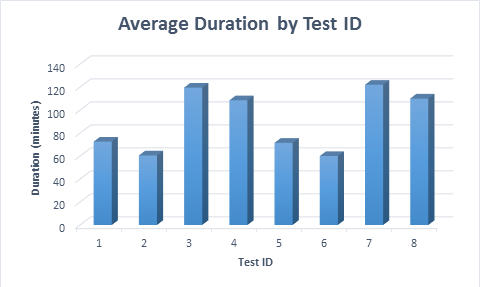 Average duration for each test scenario
Wait Statistics
| Test ID | Average Percentage | Average Wait (seconds) |
|---|---|---|
| 1 | 16.47 | 0.0001 |
| 2 | 14.00 | 0.0001 |
| 3 | 16.65 | 0.0001 |
| 4 | 15.07 | 0.0001 |
| 5 | 12.80 | 0.0001 |
| 6 | 13.99 | 0.0001 |
| 7 | 14.85 | 0.0001 |
| 8 | 15.02 | 0.0001 |
The wait statistics were consistent for all tests and no conclusions can be made based on this data. The hardware sufficiently met the resource demands in all test cases.
File Statistics
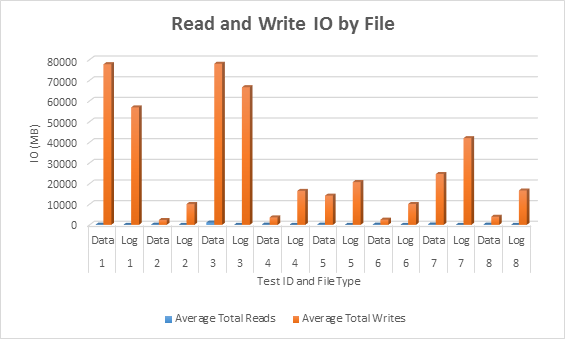 Average IO (read and write) per database file
In all cases, the tests with sparse columns generated less IO (notably writes) compared to non-sparse columns.
Index Physical Stats
| Test case | Row count | Total page count (clustered index) | Total space (GB) | Average Space Used for leaf pages in CI (%) | Average Record Size (bytes) |
|---|---|---|---|---|---|
| 1 | 10,000,000 | 10,037,312 | 76 | 51.70 | 4,184.49 |
| 2 | 10,000,000 | 301,429 | 2 | 98.51 | 237.50 |
| 3 | 10,000,000 | 10,037,312 | 76 | 51.70 | 4,184.50 |
| 4 | 10,000,000 | 460,960 | 3 | 64.41 | 237.50 |
| 5 | 10,000,000 | 1,823,083 | 13 | 90.31 | 1,326.08 |
| 6 | 10,000,000 | 324,162 | 2 | 98.40 | 255.28 |
| 7 | 10,000,000 | 3,161,224 | 24 | 52.09 | 1,326.39 |
| 8 | 10,000,000 | 503,592 | 3 | 63.33 | 255.28 |
Significant differences exist in space use between the non-sparse and sparse tables. This is most notable when looking at test cases 1 and 3, where a fixed-length data type was used (INT), compared to test cases 5 and 7, where a variable length data type was used (VARCHAR(255)). The integer columns consumes disk space even when NULL. The variable length columns consume less disk space, as only two bytes are used in the offset array for NULL columns, and no bytes for those NULL columns that are after the last populated column in the row.
Further, the process of inserting a row and then updating it causes fragmentation for the variable-length column test (case 7), compared to simply inserting the row (case 5). The table size almost doubles when the insert is followed by the update, due to page splits which occur when updating the rows, which leaves the pages half full (versus 90% full).
Summary
In conclusion, we see a significant reduction in disk space and IO when sparse columns are used, and they perform slightly better than non-sparse columns in our simple data modification tests (note that retrieval performance should also be considered; perhaps the subject of another post).
Sparse columns have a very specific usage scenario and it’s important to examine the amount of disk space saved, based on the data type for the column and the number of columns that will typically be populated in the table. In our example, we had 997 sparse columns, and we only populated 10 of them. At most, in the case where the data type used was integer, a row at the leaf level of the clustered index would consume 188 bytes (4 bytes for the ID, 100 bytes max for the Name, 4 bytes for the type, and then 80 bytes for 10 columns). When 997 columns were non-sparse, then 4 bytes were allocated for every column, even when NULL, so each row was at least 4,000 bytes at the leaf level. In our scenario, sparse columns are absolutely acceptable. But if we populated 500 or more sparse columns with values for an INT column, then the space savings is lost, and modification performance may no longer be better.
Depending on the data type for your columns, and the expected number of columns to be populated of the total, you may want to perform similar testing to ensure that, when using sparse columns, insert performance and storage are comparable or better than when using non-sparse columns. For cases when not all columns are populated, sparse columns are definitely worth considering.
The post Sparse Columns in SQL Server : Impact on Time & Space appeared first on SQLPerformance.com.
15 Feb 10:11
Microsoft is Listening
by andyleonard
There’s a back-story to my post titled SSIS 2016 CTP 3 and Data Flow Column LineageID . I’ll get to the story in a minute, but first I’d like to say that every company has excellent customer service. You don’t believe me? Ask them, “Company, do you have...(read more)
15 Feb 10:11
IT Audits and Data Governance: What You Need to Know
by A.R. Guess
by Angela Guess George Grachis recently wrote in CSO Online, “We need a separation of duties between the IT department and an Audit or compliance department. Otherwise it’s the fox guarding the chickens. IT has a mission to push out new technology and fix it when it fails, so how can the IT department also […]
The post IT Audits and Data Governance: What You Need to Know appeared first on DATAVERSITY.
15 Feb 10:11
Big Data and the Super Bowl
by A.R. Guess
by Angela Guess Bernard Marr reports in Forbes, “This year marks the 50th year of the Super Bowl, and plenty has changed since the first time teams duked it out for the national title. Players are bigger and faster, replays more instant and from more angles, commercials cost the equivalent of a small nation’s GDP… […]
The post Big Data and the Super Bowl appeared first on DATAVERSITY.
15 Feb 10:11


Checking for over-committed SQL Saturday speakers
by Wayne Sheffield
source: http://thistimeimeanit.com/wp-content/uploads/2011/06/officejuggler.jpg
One of the nightmare scenarios that a SQL Saturday organizer faces is selecting a speaker that is already going to another event on the same day. The speaker can only be at one event… and the site doesn’t really help us out with letting us know about these over-committed speakers.
So, I wrote this little PowerShell script to compare your selected speakers with the speakers selected at other SQL Saturday events that are on the same day. Now, by “selected speaker”, I mean those speakers that have been approved in the “Manage Sessions” section of the admin area of your event (those sessions don’t need to be on the schedule yet). Those sessions are then visible in the XML feed that is generated. This script will load the speakers for your event into an array, and then get the sessions for all of the other SQL Saturdays. If the other event is the same day as yours, it then compares the speakers. Finally, it will output those speakers that are selected in your event that are also selected in another event (aka the over-committed speakers) and the event that they are speaking at.
This script is based upon the script that Steve Jones’ wrote, however this script loads the information directly from the SQLSaturday.com web site each time that it runs. It could have used saved files (like Steve did), but this will be a bit easier to get changed speakers when either event changes the speakers that are presenting.
This script does not handle duplicate names (from a speaker presenting more than one session) at any of the events, so you may end up with duplicate output lines for a speaker.
Update: script updated on 2/9/2016 to handle > 1 duplicate speaker.
<#
Author: Wayne Sheffield

Purpose:
Powershell script to see if there are any speakers that you have selected to speak
at your SQL Saturday event that are speaking at any other event on the same day.

To Use:
1. Set the "$MyEventNumber" variable below to your SQL Saturday event number.
2. Run script (when this script was run, there were 527 SQL Saturdays to evaluate. This took 3 minutes, 15 seconds)

Optional:
Set the $EventNumber variable to the lowest SQL Saturday event number that is the same day as your event.

Initial idea for how to load this data from Steve Jones' blog post at https://voiceofthedba.wordpress.com/2015/01/26/downloading-sql-saturday-data/.

Debug options: If the @debug option is set to a non-zero value, then these actions will occur:
1: the list of speakers at your event will be output to the screen.
2: the "guide" node of your event will be output to the screen.
3: the event name of the events being loaded will be output to the screen.

*******************************************************************************
                               MODIFICATION LOG
*******************************************************************************
2016-02-08 WGS Initial Creation.
2016-02-09 WGS Handle > 1 duplicate speaker.
*******************************************************************************
#>

cls;
$MyEventNumber = 486;
$debug = 1;
$EventNumber = 500;

$baseUrl = "http://www.sqlsaturday.com/eventxml.aspx?sat=";
$Failed = 0;
$DupeSpeakers = @();
$MyEventSpeakers = New-Object System.Collections.ArrayList
$doc = New-Object System.Xml.XmlDocument;

#load in "My" event information and speakers
$sourceURL = $BaseURL + $MyEventNumber;
$doc.Load($sourceURL);
$guide = $doc.SelectNodes("GuidebookXML/guide");
if ($debug -eq 2) {Write-Host $guide};
$MyEventName = $guide.name;
$MyEventDate = $guide.startDate;
foreach ($speaker in $doc.SelectNodes("GuidebookXML/speakers/speaker")) {
    $MyEventSpeakers.Add($speaker.name) | Out-Null;
}
Write-Host "My Event/Date: " $MyEventName $MyEventDate;
if ($debug -eq 1) {
    # print out the list of speakers at my event
    $MyEventSpeakers | Sort-Object
}
Write-Host "";

while ($EventNumber -lt 9999) {
    if ($MyEventNumber -ne $EventNumber) {
        $sourceURL = $BaseURL + $EventNumber;
        if ($debug -eq 2) {
            Write-Host "Source URL: $sourceURL";
        } # debug messages

        Try {
            $doc.Load($sourceURL);
            $event = $doc.SelectNodes("GuidebookXML/guide");
            $EventName = $event.name;
            $EventDate = $event.startDate;
            if ($debug -eq 3) {
                Write-Host $EventName $EventDate;
            }

            if ($MyEventDate -eq $EventDate) {
                Write-Host "Checking speakers at: " $EventName;
                $speakers = $doc.SelectNodes("GuidebookXML/speakers/speaker");
                foreach ($speaker in $speakers) {
                    if ($MyEventSpeakers -contains $speaker.name) {
                        #OMG - this speaker is speaking somewhere else!!!
                        $EventSpeaker = New-Object System.Object;
                        $EventSpeaker | Add-Member -type NoteProperty -name Event -Value $event.name;
                        $EventSpeaker | Add-Member -type NoteProperty -name Speaker -Value $speaker.name;
                        $DupeSpeakers += $EventSpeaker;
                    } #check for speaker speaking somewhere else
                } # check each speaker
            } # same event date as my event
        } #try

        Catch
        {
            # At some point, the EventNumber will reach a point past any current SQL Saturdays.
            # Keep track of the number of times that this script could not load a file in,
            # and when it gets to 10 times, abort the script by setting the current EventNumber to 9999.
            $Failed = $Failed + 1;
            if ($Failed -eq 10) {
                $EventNumber = 9999
            } #failed 10 times
        } #catch
    } # not my event
    $EventNumber = $EventNumber + 1;
} #while loop

#show results if any
if ($DupeSpeakers.Count -gt 0) {
    $DupeSpeakers | Sort-Object Event, Speaker | Format-Table;
}
If anyone knows how to get a feed of the submitted sessions, I’ll create another script for comparing the sites for speakers that have submitted to multiple locations on the same day. I’d rather not even get to the selected phase if it can be avoided. If you know how to do this, just leave me a comment below please (or contact me directly).
The post Checking for over-committed SQL Saturday speakers appeared first on Wayne Sheffield.
15 Feb 10:10
PaaS – get to know SQL data warehouse loading patterns and strategies
by SQLMaster
PaaS (Platform-as-a-Service) is best chosen when majority of your business needs relies upon web, not having necessity of storing data on-premise. A popular choice within cloud computing services.Combing with Infrastructure as a Services that provides virtual machines and/or storage from a provider on demand, the kind of PaaS is handy to use service when it is needed.
There are certain best practices to be followed on DWH and BI perspective, being data is primary objective for business growth. When it comes to Big Data Apache Hadoop comes first on the list and most commonly used associated with MapReduce, Hive, HBase and Pig (list goes on…). There are specific use case scenario associated with these technologies within BI, DW and DA (Data Analytics), but traditional RDBMS are better placed within Core-Relational (OLTP), BI & DW arena. So the tools are very specific to usage such as reporting tools, analytics tools and consumption tools. So in my opinion Hadoop will only complement existing BI.DW data platform in your organisation, as it is harder to implement an on-premise Hadoop environment that will impact TCO and understand how best you can make use of these new technology & tools, maxium business value with less cost is primer.
In any case Microsoft’s Azure platform has put up strong foot hold within data platform and specific to cloud computing arena. In the recent times few new developments extended the new capabilities with Hadoop and Hortonworks data platform combining Microsoft technology capabilities.In order to understand what is offered within Azure, you need to understand loading patterns & strategies that can help to design affordable solution with preferable methos on fast load methods (data ingest methods), by using SQL Server capabilities as well (suggestion to refer What is Azure SQL Data Warehouse?). To understand much deeper into architecture, how Polybase is useful with SQL Data warehouse loads and other best practices refer to this Azure SQL Data Warehouse loading patterns and strategies guide from SQLCAT team.
15 Feb 10:10
AllegroGraph Certification on Cloudera Enterprise Creates a Semantic Graph Data Platform
by A.R. Guess
by Angela Guess According to a new article out of the company, “Franz Inc., an early innovator in Artificial Intelligence (AI) and leading supplier of Semantic Graph Database technology, today announced the availability of AllegroGraph 6, the leading Semantic Graph Database with certification on the latest release of Cloudera Enterprise through the Cloudera Certified Technology […]
The post AllegroGraph Certification on Cloudera Enterprise Creates a Semantic Graph Data Platform appeared first on DATAVERSITY.
15 Feb 10:10
6 Mobile BI Apps to Consider for Your Business
by A.R. Guess
by Angela Guess Ryan Kidman recently wrote in Smart Data Collective, “Mobile business intelligence is no longer recognized as a nice-to-have feature since it has become paramount to a company’s productivity. With this system, there is no need to restrict your business to four walls. These applications enable employees to make informed business decisions on-the-go […]
The post 6 Mobile BI Apps to Consider for Your Business appeared first on DATAVERSITY.
15 Feb 10:10
Looker Expands Business Analytics to Big Data Tech with Presto & Spark SQL Support
by A.R. Guess
by Angela Guess A recent article out of the company reports, “Looker, the business intelligence platform that is powering data-driven companies, today announced support for Presto and Spark SQL as well as updates to its support for Impala and Hive. Looker allows enterprises to describe, define and analyze the data where it lives, significantly eliminating […]
The post Looker Expands Business Analytics to Big Data Tech with Presto & Spark SQL Support appeared first on DATAVERSITY.
15 Feb 10:10


Azure SQL Database monitoring
by James Serra
Even though an Azure SQL Database stores all data on the Azure cloud, it does not mean that your options for managing and monitoring the databases are limited compared to on-prem databases. In fact, the options available are very similar to on-prem, including 3rd-party products that support Azure SQL databases. Here are the various options:
- Overall Azure service health: See Track service health
- Azure Portal: See Managing Azure SQL Databases using the Azure portal
- Alerts: See Receive alert notifications
- Data Management Views (DMVs): See Monitoring Azure SQL Database using dynamic management views
- SQL Database Auditing: See Get started with SQL database auditing and Monitor your Azure SQL Database Auditing activity with Power BI
- SQL Database Threat Detection: See Get started with SQL Database Threat Detection
- Extended Events: See Public preview: Extended Events for Azure SQL Database
- System Center: See Windows Azure SQL Database Management Pack for System Center 2012
- Cotega: See Azure SQL Database Monitoring
- Cloudmonix: See Microsoft SQL Azure Database Management
- Dell Foglight for SQL Server: See Foglight for SQL Server (note the free Foglight for SQL Azure® add-on cartridge)
- Dell Spotlight for SQL Server: See Spotlight on SQL Server Enterprise
- Redgate does not yet support Azure SQL Database with SQL Monitor, but some other products do: SQL Compare, Data Compare, Data Generator, SQL Test, SQL Prompt, and SQL Source Control (minus migrations)
- Idera has SQL Diagnostic Manager, which works with Azure SQL Database but is not officially supported (it will be early this year). They also have Azure SQL Database Backup (free tool)
- SQL Sentry’s Performance Advisor works with Azure SQL Database
15 Feb 10:10
But *Why* Do You Trust Your Data?
by BuckWoody
At the beginning of every data project is the data. While we spend a great deal of time figuring out … Continue reading →...(read more)
15 Feb 10:09

The biggest table in your database
by Sergio Govoni
You may need to know which is the biggest table (in terms of disk space usage) in the database that you are currently connected. Sometimes, this information is very useful to check the indexing strategy of these tables.
There are several methods to know which is the biggest table of a database, one of these methods is to use the standard report "Disk Usage by Top Table" exposed by SQL Server Management Studio. Another method is through T-SQL language, you can perform the sp_spaceused system stored procedure for each table contained in your database, you could store all the partial results in a temporary table and ordering these results by the "data" column, so you can find the biggest table of the database.
Using the sp_spaceused system stored procedure we have to accept a row-by-row solution, in fact, we will perform a call to sp_spaceused for each table contained into the database. Increasing the number of tables, the number of calls to the stored procedure will grow up.
An alternative solution is represented by the following Common Table Expression based on the internal code of the sp_spaceused system stored procedure, it allows us to obtain the result with a single execution, in a set-based way.
WITH spaceused AS
(
  SELECT
    sys.dm_db_partition_stats.object_id
    ,reservedpages = SUM(reserved_page_count)
    ,it_reservedpages = SUM(ISNULL(its.it_reserved_page_count, 0))
    ,usedpages = SUM(used_page_count)
    ,it_usedpages = SUM(ISNULL(its.it_used_page_count, 0))
    ,pages = SUM(CASE
                   WHEN (index_id < 2) THEN (in_row_data_page_count + lob_used_page_count + row_overflow_used_page_count)
                   ELSE lob_used_page_count + row_overflow_used_page_count
                 END
                )
    ,row_Count = SUM(CASE WHEN (index_id < 2) THEN row_count ELSE 0 END)
  FROM
    sys.dm_db_partition_stats
  JOIN
    sys.objects ON sys.objects.object_id=sys.dm_db_partition_stats.object_id
  OUTER APPLY
    (SELECT
       reserved_page_count AS it_reserved_page_count
       ,used_page_count AS it_used_page_count
     FROM
       sys.internal_tables AS it
     WHERE
     it.parent_id = object_id
     AND it.internal_type IN (202,204,211,212,213,214,215,216)
     AND object_id = it.object_id
  ) AS its
  WHERE
    sys.objects.type IN ('U', 'V')
  GROUP BY
    sys.dm_db_partition_stats.object_id
)
SELECT
  name = OBJECT_NAME (object_id)
  ,rows = convert (char(11), row_Count)
  ,reserved = LTRIM (STR (reservedpages * 8, 15, 0) + ' KB')
  ,it_reserved = LTRIM (STR (it_reservedpages * 8, 15, 0) + ' KB')
  ,tot_reserved = LTRIM (STR ( (reservedpages + it_reservedpages) * 8, 15, 0) + ' KB')
  ,data = LTRIM (STR (pages * 8, 15, 0) + ' KB')
  ,data_MB = LTRIM (STR ((pages * 8) / 1000.0, 15, 0) + ' MB')
  ,index_size = LTRIM (STR ((CASE WHEN usedpages > pages THEN (usedpages - pages) ELSE 0 END) * 8, 15, 0) + ' KB')
  ,it_index_size = LTRIM (STR ((CASE WHEN it_usedpages > pages THEN (it_usedpages - pages) ELSE 0 END) * 8, 15, 0) + ' KB')
  ,tot_index_size = LTRIM (STR ((CASE WHEN (usedpages + it_usedpages) > pages THEN ((usedpages + it_usedpages) - pages) ELSE 0 END) * 8, 15, 0) + ' KB')
  ,unused = LTRIM (STR ((CASE WHEN reservedpages > usedpages THEN (reservedpages - usedpages) ELSE 0 END) * 8, 15, 0) + ' KB')
FROM
  spaceused
ORDER BY
  pages DESC;
Are you thinking how can we access to the internal code of the sp_spaceused? It is simple, we can do that using the sp_helptext system stored procedure!
Have fun!
15 Feb 10:09
Where Data Science Meets Operations
by A.R. Guess
by Angela Guess John Weathington recently wrote in TechRepublic, “When most people imagine a data science team, they envision a think tank centrally located in corporate headquarters that is assiduously working to propel the company’s next big strategy. Some even think of data scientists in more of a research and development function, doing deep data […]
The post Where Data Science Meets Operations appeared first on DATAVERSITY.
15 Feb 10:09
PASS Summit 2016 Program Committee
by Jack Corbett
As I usually do, I applied to be a member of the Program Committee for the 2016 PASS Summit. I have been on the program Committee the last 4 years and 5 of the last 6. I was shocked when I got an email saying I wasn't selected, but I'm not disappointed. The reason I'm not disappointed is because, unlike when I first became involved, there were so many applicants they had to reject people. I think it is a great thing that there are so many people who want to keep the PASS Summit the best conference it can be by being involved in creating the program and I look forward to seeing what they come up with for a schedule. I just hope I'm on it since I will be submitting sessions.
I hope that this increased community involvement continues and leads to even more people being interested in serving on the Nominating Committee and the PASS Board itself. I know I'd love to have at least 2 board candidates for each seat available every year.
For those who may be new to the Program Committee, please feel free to reach out to me if you want to know anything about my experience. I had experience both with abstract review and speaker review.
I hope that this increased community involvement continues and leads to even more people being interested in serving on the Nominating Committee and the PASS Board itself. I know I'd love to have at least 2 board candidates for each seat available every year.
For those who may be new to the Program Committee, please feel free to reach out to me if you want to know anything about my experience. I had experience both with abstract review and speaker review.