Shared posts
15 Nov 02:29
Using AT TIME ZONE to manipulate and convert time zones
by drsql
I have a series of blogs about temporal tables in SQL Server 2016, which you can see here . However, one thing I never had mentioned was that the Temporal Row Start and End Times are always stored in UTC times (which is generally inconvenient to work with unless you are from the Great Britain area). However, when you are looking at your data and want to see what the data looked like at 'Yesterday at 12:00 at the computer you are working from, this can be a bit more work. In 2016 SQL Server,...(read more)
15 Nov 02:28
Azure SQL Data Warehouse Workload Patterns and Anti-Patterns
by Murshed Zaman_AzureCAT
Reviewed by: John Hoang, Dimitri Furman, Mike Weiner, Sanjay Mishra
We often get questions from customers related to Azure SQL DW being a good fit for moving a particular database to the cloud. Some of the typical questions are:
- I have a database on-premises. I would like to move it into the cloud because that seems to be the future direction. Can I use Azure SQL DW for it?
- I am running out of storage space on my on-premises system. I would like to move my database to the cloud. Is Azure SQL DW an option?
- My database size is bigger than what Azure SQL DB supports today, scaling out seems like a good idea. Can I use Azure SQL DW?
In this blog, we would like to clarify some of the concepts around RDBMS usage related to OLTP and OLAP workload, Symmetric Multiprocessing (SMP) and Massively Parallel Processing (MPP), workload patterns and anti-patterns, focusing on Azure SQL DW.
What a Data Warehouse Is Not
Data Warehouse (or OLAP) workload is very different than online transaction processing (OLTP) workload with very different indexing strategy and data access pattern.
Transaction processing systems, aka operational systems, or OLTP systems, can be categorized by real time transactions that perform atomic writes and reads . Think about an order processing systems where the backend is a database for a web ordering tool. A customer logs in, buys one or many items and checks out – the interaction between the application and the database during a user session is a series of transactions. Another example of transaction processing is the workload generated by the ATM machines of a bank. Airline ticketing system is another example of an OLTP system, or order processing system.
Usually used by hundreds if not thousands of users concurrently, OLTP systems are created for high volume inserts/updates/deletes and point lookup reads. An outage in your ordering system may be the cause of losing money, thus high availability of your application and backend database is a must.
What a Data Warehouse Is
On the other hand, traditionally data warehouse workloads are write once and read many times. The writes usually happen in a batch fashion, instead of many small inserts (like in OLTP systems). And the reads usually produce some sort of aggregated result, instead of producing individual records.
Called by many acronyms data warehouse (DW or DWH), or enterprise data warehouse (EDW), or Online Analytical Processing (OLAP) systems, such systems usually integrate data from many transactional systems for reporting, analysis, and decision support purposes. Data is extracted, transformed and loaded (this is known as an ETL process) from many disparate systems to create a data warehouse.
Data warehouses sometimes may have many stages, before data can be easily analyzed. Three commonly used stages that I have observed at customer site are described below:
- Staging database store – Here data is copied from transactional systems, usually for the last day/hour. This is a temporary store for transactional data.
- Operation data store (ODS) – transactional data from the staging store is validated and added to historical data unchanged or slightly modified from transactional systems.
- Star Schema conformed databases – ODS data is transformed into “facts” and “dimensions”. On an entity-relationship diagram (ERD), a fact table appear in the middle, and the dimension tables are on the periphery, making it look like a star.
Other variations of this pattern of stages also exists, for example, ODS only or star schema only.
Workload patterns on a data warehouse can be characterized as:
- Batch loading of data
- Transformed into fact and dimension tables
- Complex queries involving multiple table joins
- Aggregates over a certain dimension key (example: date or customer)
Following are some examples of complex questions a data warehouse could answer:
- How many customers ordered a certain item within a month to see if inventory levels are sufficient?
- What day of week people withdraw the most amount of money from an ATM?
- What was the cost of a promotional pricing (marketing) vs. how many tickets were sold to a certain destination (how much money was made) for the airline?
Azure SQL DW, MPP and SMP
Azure SQL DW is a Massively Parallel Processing (MPP) data warehousing service. It is a service because Microsoft maintains the infrastructure and software patching to make sure it’s always on up to date hardware and software on Azure. The service makes it easy for a customer to start loading their tables on day one and start running queries quickly and allows scaling of compute nodes when needed.
In an MPP database, table data is distributed among many servers (known as compute or slave nodes), and in many MPP systems shared-nothing storage subsystems are attached to those servers. Queries come through a head (or master) node where the location metadata for all the tables/data blocks resides. This head node knows how to deconstruct the query into smaller queries, introduce various data movement operations as needed, and pass smaller queries on to the compute nodes for parallel execution. Data movement is needed to align the data by the join keys from the original query. The topic of data movement in an MPP system is a whole another blog topic by itself, that we will tackle in a different blog. Besides Azure SQL DW, some other examples of a MPP data warehouses are Hadoop (Hive and Spark), Teradata, Amazon RedShift, Vertica, etc.
The opposite of MPP is SMP (Symmetric Multiprocessing) which basically means the traditional one server systems. Until the invention of MPP we had SMP systems. In database world the examples are traditional SQL Server, Oracle, MySQL etc. These SMP databases can also be used for both OLTP and OLAP purposes.
One quick way to remember the difference is that you can scale-up an SMP system by adding processors with more CPU cores or faster CPU cores, add more memory, and use a faster I/O subsystem. For an MPP system you can scale-out by adding more compute nodes (which have their own CPU, memory and I/O subsystems). There are physical limitations to scaling up a server at which point scaling out is more desirable depending on the workload.
Azure SQL DW Anti-Patterns
Before we discuss what workload is good for Azure SQL DW, let’s discuss what Azure SQL DW is not good for. Azure SQL DW is not a good match for the following scenarios:
- OLTP workload
- High volume of small reads and writes
- Multi-Tenancy Database
- Frequent changing of schema
- Row by row processing
- JSON, XML data and Spatial, Struct, Array and Map data types
- Power BI direct query requiring dashboard performance
- High concurrency of queries (eg. hundreds of thousands of concurrent queries)
- Small datasets (less than 250GB)
- Disaster recovery with stringent RPO and RTO
We have already covered the first three points at the beginning of our blog. Let’s cover some more not so obvious points listed above.
Multi-Tenant Data Warehouse
Azure SQL DW is not a good fit for solutions that share the same data warehouse for multiple customers. Though Azure SQL DW allows separate schemas, development cost and complexity for a single database with separate schemas for multiple customers is quite high, can be a security nightmare if compromised. It is impossible to restore a single schema if something goes wrong for a particular customer. Also, SQL Server security features such as Always Encrypted, Row Level Security, Column Level Encryption are not present in Azure SQL DW as of this writing.
As PaaS service, Azure SQL DW makes it easy for customers to create and load their data in the data warehouse. Thus, currently it has a simple implementation of workload management that is not customizable. To be successful, a multi-tenant database would need a customizable workload management per tenant workload.
Frequent changing of schema
Azure SQL DW is a strongly typed RDBMS (Relational Database Management System). Like other traditional databases, it is a schema-on-write system where you create the schema first and then write the data. Reading this data back can be done using common SQL language. On the other extreme, schema-on-read allows loading the data first and then shifts the retrieval of data on to the developer who has to write code to retrieve the data.
Frequent changing of schema falls somewhere in between. There is operational complexity related to implementing frequent schema changes in Azure SQLDW and in other traditional RDBMS (SQL Server, Oracle, etc.). If the nature of your data warehouse is such that your schema changes frequently or your upstream systems are not standardized into a certain schema, you will have to conform to a common schema while doing transformation (ETL).
Row by row processing
Azure SQL DW is not good for row by row processing of data. As an example, if your join criteria in your query is such that you need a scalar UDF to match the column equality (or inequality) you will do row by row processing. In this case, you are not getting the benefit out of your MPP system which is tuned to favor set based operations.
JSON, XML data and Spatial, Struct, Array and Map data types
At the time of the writing of this blog, Azure SQL DW doesn’t support JSON or XML data types or functions. You will have to create a tabular structure (with schema) out of your JSON or XML data before you can load it into Azure SQL DW. Azure SQL DW also currently doesn’t support Spatial, Struct, Array and Map data types. If the prevalence of data for your data warehouse is JSON, XML or if you need the complex data types listed above, you are better off choosing some other database products.
High Concurrency and Dashboard queries
Azure SQL DW is not suitable for queries that come from a BI Dashboards (Power BI or Tableau) reports. This is mainly because dashboard queries require very low response time (often milliseconds to 1 or 2 seconds) and there are many queries that get executed to refresh a single BI dashboard.
Currently Azure SQL DW doesn’t have plan caching mechanism in place. Each query, whether it was run previously or not, has to go through plan search space to find an execution plan, before it starts executing. Coupled with that, if data movement is needed to satisfy a query, query time often diminishes the expectation of a dashboard query behavior. Also, not unlike other MPP systems, SQL DW has a limit to how many queries can run at the same time, which can also contribute to slower query return to dashboard reports.
If you need dashboard query response time, the recommendation is to create an SSAS or Azure AS or Tableau cube from the SQL DW data, to satisfy these dashboard query requirements.
Power BI direct query mode
Using Power BI direct query with Azure SQL DW is not recommended. The reasons are almost the same as in the previous section. Power BI direct query mode will perform poorly with large data size of Azure SQL DW.
The recommendation is again the same as the previous section. If the Power BI dashboard is going against summarized tables (small data) that is properly indexed and distributed, you may be able to run with direct query mode against Azure SQL DW. You may want to create these summarized table so that you do not utilize joins when returning data to Power BI dashboard. Always test with the highest volume of data to make sure if it will work with your reporting need.
Small Dataset
Azure SQL DW is an MPP system which does a great job with lots of data and complex queries. You will not get the advantage of an MPP system if the size of your data in your data warehouse is too small (less than 250GB).
For data size of less than 250GB use SQL Server or Azure SQL DB.
Disaster Recovery with stringent RPO or RTO
Azure SQL DW does not have the capabilities to automatically replicate data to another hot/standby Azure SQL DW system for disaster recovery purposes. It however provides an automatic geo-redundant backup of the data for every 24 hours. In case of a data center outage, you will be able to restore this backup to a paired data center. You may incur some data loss if you have updated your SQL DW tables after the last geo back up was created. Also, since this geo-redundant backup is copied to a Standard storage, depending on how much data you have, restore can take a long time. So if your data warehouse has stringent Recovery Point Objective (RPO) and Recovery Time Objective (RTO), Azure SQL DW may not be able to provide it to you.
Azure SQL DW Patterns
SQL DW is an MPP data warehouse service. It was created for data warehouse workload. In Azure SQL DW, complex jobs (queries or load) are broken down into pieces and executed in parallel. Thus, using Azure SQL DW, your large data loads and complex queries will finish faster. To gain performance from your data warehouse on Azure SQL DW, please follow the guidance around table design patterns, data loading patterns and best practices.
Scale out compute
If you have a data warehouse that has reached the limit of your SMP hardware (single server), you may be thinking of moving the warehouse to a more expensive and beefier hardware. Sometimes this hardware can be very costly with a support expiring after a number of years. You also have to plan for future capacity when procuring this hardware. Hardware procurement can take many months.
If that is the case and you want to save yourself time and headache, consider migrating to Azure SQL DW. Azure SQL DW allows independent scaling of compute. Compute nodes can be scaled up or down based on your need. As an example, if you are doing nightly ETL, you may want to consider scaling up your Azure SQL DW to finish ETL faster in a specified window, even if your data volume increases in the future.
If you need more processing power for a couple of days right after month-end, you can scale up your Azure SQL DW higher to finish work faster and then scale it back down for the rest of the month.
Pause compute
Similarly, Azure SQL DW can also be paused when not in use. If this fits your criteria, you will save money by pausing your Azure SQL DW when the users are not using it. To be clear here, the money that you save is for the compute engines which is the biggest cost on your bill, you still pay for the data that is on the storage. If you have Azure SQL DW dev/test systems, they often can be paused/resumed to save cost too.
Storage capacity
If you have reached your on-premises or cloud storage capacity for your data warehouse workload, you may want to consider moving to Azure SQL DW. Azure SQL DW today is a petabyte scale data warehouse and with continuous improvement the size limitation will only go higher. Usually the larger the data size, the better experience you will have with Azure SQL DW when comparing to your SMP system.
Database consolidation
Often, we have seen customers using their Azure SQL DW for consolidating their data warehouses or data marts in one database. This can simplify a DBAs job. It can also allow querying data that crosses the departmental data mart boundaries, if the need arises. Database consolidation can save you money.
For consolidation, you need to use schemas in a single database, rather than multiple databases, as containers for tables because Azure SQL DW doesn’t support cross database queries. Also, database consolidation brings the concern of query concurrency limit, and potential access control issues. Consider these issues and limits before you go too far down the path of consolidating your data warehouses (or marts) into one database.
ETL vs ELT
Azure SQL DW is fast at loading data when PolyBase is used because it loads data in parallel on all the nodes. It is often advised to load the data as is and then do the transform using set based TSQL language inside the data warehouse, where the data processing takes advantage of the MPP nodes. It often leads to performance gain when compared to loading using a SSIS or other similar ETL tools. This is because ETL solutions using SSIS and tools like it are often single threaded when transforming data. In this case, with PolyBase, extract-load-transform (ELT) is preferred over extract-transform-load (ETL).
If the source of the data is Hadoop or Data Lake which has gained popularity in the recent years, it is often the case that Hive or Spark is used as the transformation engine, loading processed data into SQL DW for fast access. The processing of long running transformation (often referred to as ETL) jobs in Hive or Spark is very useful, as the job processors have built-in resiliency and restartability.
19 Oct 06:41
Common ISV application patterns using Azure SQL Data Warehouse
by John P Hoang - AzureCAT
Author: John Hoang
Technical Reviewers: Dimitri Furman, Murshed Zaman, Sanjay Mishra
Overview
This article is one of the several new blogs from the AzureCAT team discussing common customer implementations and proven architecture patterns using SQL DW. In this blog, I will discuss the patterns use by Independent Software Vendor (ISV) on SQL DW. Although the focus is on the ISV workloads, the majority of these characteristics should be applicable for common workloads using Azure SQL DW.
Since its inception, SQL DW has been very popular with ISV. In addition to all the cloud managed service advantages such as quick startup, no infrastructure maintenance, deploying in multiple data centers worldwide, automatic data protection, the service allows the ISV to scale compute resources on-demand, storing petabyte of data, and pause and resume compute resources to save cost. As with any technology, to get the best performance and experience from the product, you need to read the user manual first to understand the core principles. You can start with our SQL Data Warehouse Documentation and highly recommended article Best practices for Azure SQL Data Warehouse.
For the article, I will start with the main characteristics of successful common ISV patterns, discussing some common considerations/workarounds and finally, walk you through three common patterns from our production customers.
Common Pattern Characteristics
Please refer to article Azure SQL Data Warehouse Workload Patterns and Anti-Patterns for a great overview of common SQL DW workload patterns. Again, the ISV workloads will have many characteristics that are similar to the common SQL DW workloads described in the article.
Below are common characteristics of successful SaaS implementations on SQL DW.
Allows for the massive scale of processing power, useful for “burst” scenario.
ISV leverages the on-demand scaling feature for loading, transforming data from multiple data sources of their end users and external data services for “spike” workload such as custom processing for broad, large range of data, month-end processing, “Black Friday”, holiday spike.
Automatically scale up to a petabyte of storage.
With the separation of computing and storage architecture, the storage layer is no longer restricted by computing hardware. Storage capacity is automatically scaled transparently so new users/workload can be added without the restriction tied to your SLO.
Can be paused to reduce compute costs when the instance is idle.
When ISV is done with their data loading, transformation processing, the idled instance can be paused to save cost.
Consolidation of multiple databases into a single instance.
By combining multiple data warehouse instances into a single environment, this simplifies management of the environment, provides a centralized data warehouse with a single source of the truth, and capability to query across all the data.
For multi-tenancy application, create a separate datamart for each tenant.
The benefits of single database tenancy include mitigate resource contention, secure data access, individually control performance level of each tenant database, mitigate service disruption due to scaling/pause from shared tenants and easily track user utilization for charge back billing.
The source data can come from multiple sources.
This can be on-premises databases, Hadoop, flat files sent from end users, cloud data sources from other cloud providers, purchased data sets from the market place, etc.
Data loading frequency
The data loading frequency could range from every few minutes, every few hours to daily. Even if data source pipeline is real time, schedule data ingestion into SQL DW no more frequently than at 5-minute intervals. Allowing extra time between each load will help mitigate the SQL DW backup process from causing load timeout. For the backup process, SQL DW takes a snapshot of your database every 4 hours. Before a snapshot is taken, SQL DW pauses your active DML operations until the snapshot is completed. A typical snapshot could take anywhere from 30 seconds to a couple of minutes.
Query patterns
The queries on SQL DW follow typical data warehouse patterns: star join with aggregation, sequential scan, complex fact to fact join. Common usage is batch reporting, ad-hoc and data mining query patterns. For singleton lookup queries, it is recommended to add a b-tree index for optimal performance.
Dashboard queries
Power BI users with dashboard query performance requirements should use SSAS tabular model that sources data from SQL DW.
Concurrency limits
Understand the concurrency limits, and offload large numbers of users to data marts such as SSAS, SQLDB, SQL Server on VM. The data mart choices will depend on your performance, capacity, and architecture requirements.
Common considerations and workarounds
While it is important to understand the “common patterns” for SQL DW, it is just as important, if not, more important to understand some limitations of the service at the current state. In this section, I will discuss several important considerations and workarounds.
Multi-tenant database
With the capability to scale compute resources, the capacity to store up to a petabyte and leveraging the MPP architecture, it is very tempting for ISVs to use SQL DW as a multi-tenancy database. Please note that I am referring to multi-tenancy database, and not multi-tenancy application. SQL DW implements a simplified workload management model. It has four pre-defined Dynamic Resource Classes and recently added eight Static Resource Classes. Each resource class allocates the number of concurrency slots, the size of memory grants, and query priority. The values for these parameters cannot be changed by users, and depend on the DWU used. All the resources are shared within the database, and you do not have any option for granular control to allocate or limit resource use for a given tenant. To illustrate, if a user from company A is running a “monster” query consuming all the CPU, then the second user from company B could notice that their typically ten-second query is still running after minutes due to resource contention. Resources such as CPU, memory, IO, transaction logs and TEMPDB are shared among all users in the same database. For optimal performance, we strongly recommend ISVs to create one database per tenant. This will not only mitigate resource contention, but allow the tenants the flexibility to choose their own performance level via DWU scaling, PAUSE/RESUME on their own schedule, and easily identify per user utilization for charge back.
Hundreds of thousands of concurrent queries
Azure SQL DW allows up to 1,024 concurrent connections. To provide predictable query performance, Azure SQL DW currently supports from 4 to a maximum of 32 concurrent queries, depending on the DWU. Please see Concurrency limits for detailed information. Any queries submitted after reaching the concurrency limit will be queued until a concurrency slot is available. The number of queued operations can be up to 992 (1,024 – 32). Any connections attempted after the 1,024 concurrent connection limit is reached will return with a failure error message. We recommend our ISVs to create separate data marts for each of their customers. The data mart can be in the form of SQL Data Warehouse, SQL Database, SQL Server on VM (IaaS), SSAS cube, exported data stored in Azure Data Lake Store or Azure Blob Storage.
Scaling/Pausing impact
Currently, the scaling operation is an offline operation. Any pending queries and DML operations will be canceled. For any logged operation, a transaction rollback will occur. The scaling operation does not initiate until the transaction rollback is completed. In a multi-tenant design, or in a single tenant design where multiple users have the permission to scale/pause, unexpected scaling operations can cause a huge impact on currently running workloads, causing unexpected downtime. The recommendation is still to provide a separate database for each tenant. Even for single tenant scenarios, design your security to allow only a minimal number of users who can execute scale/pause. In addition, check and drain active transactions, and coordinate and schedule any scale/pause operation before execution.
Transaction limit impact
In order to guard against long rollback, transaction size limit is implemented in SQL DW. Note that SQL DW has a total limit of 160 GB of transaction log per distribution. The transaction size limit applies to a single DML operation size, and the limit varies depending on the DWU use. To illustrate, at DWU1000, the total transaction log size is 9600 GB (160 GB * 60 distributions). However, the transaction size limit is only 7.5 GB per distribution, or 450 GB total transaction size (7.5 GB * 60 distributions). This safety limit was put in place to prevent a long database outage in the case where a user tries to pause or scale during a long running transaction. Please refer to article “Optimizing transactions for SQL Data Warehouse” for further information and best practices for minimizing the risk of hitting the transaction limit and avoiding long rollbacks.
Restricting data access limitation
Azure SQL DW supports permission grants at the schema and object level within the database. If your application requires a more granular level of data access management, SQL DW does not support Row Level Security (RLS), Dynamic Data Masking, Always Encrypted, and Column Level Encryption. As a workaround for the lack of RLS, you can create multiple views, and assign the appropriate users to the appropriate views. Other than that, there is no practical workaround for lack of Data Masking, Always Encrypted and Column Level Encryption. We recommend you to create data marts in SQL Database, SQL Server on VM (IaaS), SSAS to take advantage of the specific security features to meet your data access requirements.
Cross database join limitation
Azure SQL DW currently does not support cross database joins. As a workaround, use schema instead of a database to separate different database objects.
The Three Top Common Workload Pattern
In this section, I will discuss the three top common patterns implemented by our ISV.
The Hybrid Pattern
One of the most popular and common patterns with SQL DW is the “Hybrid” scenario. This is where the data source(s) are the on-prem RDBMS database(s). The data is incrementally and periodically loaded into SQL DW. This can be daily, several times a day, and sometimes on-demand. (ADF) with PolyBase enabled can be used to orchestrate data loading. Data is extracted from the source database(s), copied to Azure Blob Storage, and finally loaded into SQL DW. For detailed information on data loading, please refer to article Azure SQL Data Warehouse loading patterns and strategies. Any transformation is done within SQL DW. This is the ELT approach we recommend to our customers to leverage the MPP power and on-demand scaling capability for the transformation step.
For the end user of the application, each user gets their own data mart. This can either be in the form of another SQL Data Warehouse, Azure SQL Database, Azure Analysis Services or SQL Server on VM (IaaS), with the performance level of their choice. The end user can choose whatever tool they want to consume the data. Some common tools are Power BI against SSAS tabular in-memory mode, Microsoft Excel, Microsoft Access, and Tableau. Security access is managed by Azure Active Directory with the benefits of self-service password reset, multi-factor authentication, and federation to customer current Active Directory. For an ISV, additional revenue can be generated with additional services such as canned reports, customized data generation, and data processing. ISVs can use tags to organize Azure resources when needed to for billing or management.
Figure 1. The Hybrid pattern architecture

The Database Consolidation Pattern
The second most popular and common pattern for ISVs is using Azure SQL DW for database consolidation. In this example, the ISV has various disparate data in SQL Server databases on-prem, in Azure Table Storage, Azure SQLDB, Oracle on-prem, SQL Server in AWS, and Azure Redis Cache. They wanted to consolidate data from multiple systems into one data repository in the cloud, to have a consolidated view of the end to end data lifecycle. This allows them to perform advanced analysis against a single source database with consistent taxonomy, and to generate reports leveraging on-demand scaling feature. Using ADF as the orchestration tool, data is copied onto Azure Blob storage, then loaded into Azure SQL DW. The ISV opted to uses PolyBase to export data to Azure blob storage as another layer of data protection. This feature allows them to export the data at the object level to various file formats that PolyBase currently supports. For batch reporting, SSRS reports are either scheduled or run on-demand against Azure SQL DW. For ad-hoc interactive dashboard query, Power BI is used against an Azure Analysis Service data mart. With this consolidation cloud solution, the ISV not only saved money over the on-prem alternatives, they also save processing time, allowing their customers to spend more time analyzing the data to make better business decisions.
Figure 2. The Database consolidation pattern architecture

The IoT Pattern
We have a handful of customers with IoT workload that has had unpleasant experience using SQL DW. The data ingestion into SQL DW was so slow that taking extended lunch and many coffee breaks were not enough. Remember that for an MPP system, there is an overhead with query parsing, orchestration, communication with other nodes and processing against distributed databases. Therefore, treating an MPP system like an OLTP system will result in sub-optimal performance. The top pattern to avoid is any type of real time ingestion into SQL DW. Techniques such as singleton insert, using Azure Stream Analytics, which in the background, is nothing more than singleton insert, should be avoided. For this workload, the ISV has a SaaS application that generates logs from over 16,000 Azure SQL DB Elastic Pool databases. The log data is flushed into Azure Event Hub. Real time analytic for application query statistics and fatal logs is being done using Azure Stream Analytics. To serve data warehouse query and BI users, data is written to Azure Blob storage and loaded into SQL DW using PolyBase. An important performance consideration with IoT workload is the number of files generated. The ISV originally had 621,000 files with total data size of 80 GB for 1 day worth of data. Although the total data size is very small, due to the overhead of traversing through a large number of files, it was taking an hour just to create the external table. Obviously, the same overhead also affected the data loading performance. Unable to leverage Event Hub Archive due to this overhead, the ISV built a custom application to reduce the number of files down to 8,700 files per day. Data is loaded every 5 minutes to meet the end user consumption SLA. The ISV is also not able to leverage ADF for the data loading orchestration. ADF is designed for Batch processing so the minimum data loading processing frequency is currently 15 minutes. Finally, another important factor to consider is the extra time needed for post load processing within SQL DW for optimal query performance. Take into consideration the time needed to check for row group compression quality. You may need to either perform an INDEX REORG or INDEX REBUILD depending on the status and quality of your row group. Furthermore, you will also need to create/update statistics to provide the necessary histogram and cardinality for the cost-based optimizer to build an efficient DSQL plan. For customers who require detailed level information or batch reporting, they use SSMS with familiar T-SQL to query against SQL DW. For interactive, dashboard query, end users use Power BI and Excel against SSAS tabular model. This will provide a greater user experience for dashboard query performance, greater concurrency capacity and leveraging the dimensional model with drag and drop capability without having to understand complex join relationship.
Figure 3. The IoT pattern architecture

19 Oct 06:40
Trend Micro Research Reveals C-level Executives Are Not Prepared for GDPR Implementation
by A.R. Guess
by Angela Guess A new press release states, “With the General Data Protection Regulation (GDPR) taking effect May 25, 2018, businesses around the globe should be preparing accordingly. However, through a recent survey, Trend Micro Incorporated, a global leader in cybersecurity solutions, found that C-suite executives are not approaching the regulation with the seriousness required, […]
The post Trend Micro Research Reveals C-level Executives Are Not Prepared for GDPR Implementation appeared first on DATAVERSITY.
19 Oct 06:38


PASS Travel Plans, Halloween, Networking Dinner, SQL Dinner & Game Night
by SQLAndy
Normally I fly out Monday to spend the week at PASS. It’s good to get there early to adjust to the time change, I like to attend the meetings on Tuesday, and of course Monday night is the networking party that Steve Jones & I have organized the last few years. This year I’m flying out Wed morning. Halloween is on Tuesday and I want to be at home for it. My daughters are 13 & 10 now, so I’m conscious that I have only a few more years (at most!) before Halloween with Dad is no longer cool. It took a while to decide between flying out Wed or just skipping the event entirely, it’s less than ideal for me either way.
With that decided, it also means Steve & I won’t be organizing the networking dinner this year. We’d love to see someone else organize it and continue the tradition. It’s great to have a place for people to go on Monday night. I’ll sure missing going this year.
PASS is taking on some of the work of organizing Game Night this year. Steve wrote about it here. I’m planning to attend, already bought my ticket! I hope it goes well this year and PASS looks for other events to add on Thursday night. When you think about 4k-5k attendees, I bet there are plenty of topics that would draw 20-100 people together for a couple hours. It could be games, music, photography, whatever . Or some informal tech – why not some open space discussions that aren’t officially selected and vetted?
Last year we tried organizing a SQL Dinner on Thursday night. It was fun, lots of interesting feedback, and only somewhat effective. With tweaking it might do better, but with a compressed schedule and already planning on going to Game Night we decided not to try it again this year. That doesn’t mean that you can’t organize it, either small scale for a group of four, or as big or bigger than what we did last year.
It’s worth noting that while I value the technical learning opportunities, the reason I’m going on Wed instead of staying home is because I want to spend time with friends that I see all too rarely. I doubt that’s unusual for someone who has attended multiple times. It does make me think that the pitch we suggest for people to use on their managers is if not the wrong one, a terribly incomplete one. There is value in building a professional network. Dinners, game night, and all those other un-session activities are where those relationships are built.
19 Oct 06:38
Big Data and Security: Are You Scared to Death?
by Prince Kapoor
Click to learn more about author Prince Kapoor. Being paranoid about Big Data Security no longer looks funny. The growing cyber security threats are making brands scared to the death. The article explains major challenges and best practices for Big Data Security. Let me ask you a simple question, are you paranoid about Big Data Security? […]
The post Big Data and Security: Are You Scared to Death? appeared first on DATAVERSITY.
19 Oct 06:37
.NET and MultiStage Dockerfiles
by Steve Lasker
A while back I talked about building optimized docker images. (Building Optimized Docker Images with ASP.NET Core) With compiled runtimes like Go, Java and .NET, you'll want to first compile your code before having a binary that can be run. The components required to compile your code are not required to run your code. And the SDKs can be quite big, not to mention any potential attack surface area. The best practice has been to build docker images in steps. This could have been done on your local machine, taking the output and placing it in a container. Or, create solutions like we did with Visual Studio, creating a docker-compose.ci-builld.yml file to first compile the code.
The challenge with building on the host, including hosted build agents is we must first have a build agent with everything we need, including the specific versions. If your dev shop has any history of .NET Apps, you'll likely have multiple versions to maintain. Which means you have complex agents to deal with the complexities. We could refer to these as "Pets".
One of the big benefits of Docker is treating our build environments as "cattle". The build agents only need to know how to run docker. They have no need for .NET, Node, bower, gulp or any other build tools. The build environment can be specified with our source. This completely empowers the dev team of each project to determine and provide a build environment specific to their needs. The maintainers of your build environment need not know anything about the current versions or runtimes. They simply maintain generic cattle farms that know how to run docker, aggregate the build output logs and report on the build status.
Lets take a look at a multi-stage dockerfile:
FROM microsoft/aspnetcore:2.0 AS base

WORKDIR /app

EXPOSE 80
FROM microsoft/aspnetcore-build:2.0 AS builder

WORKDIR /src

COPY *.sln ./

COPY Web/Web.csproj Web/

RUN dotnet restore

COPY . .

WORKDIR /src/Web

RUN dotnet build -c Release -o /app
FROM builder AS publish

RUN dotnet publish -c Release -o /app
FROM base AS production

WORKDIR /app

COPY --from=publish /app .

ENTRYPOINT ["dotnet", "Web.dll"]
At first, it simply looks like several dockerfiles stitched together. Multi-stage Dockerfiles can be layered or inherited. When you look closer, there are a couple of key things to realize.
Notice the 3rd stage
FROM builder AS publish
builder isn't an image pulled from a registry. It's the image we defined in stage 2, where we named the result of our our -build (sdk) image "builder". Docker build will create a named image we can later reference.
We can also copy the output from one image to another. This is the real power to compile our code with one base sdk image (microsoft/aspnetcore-build) , while creating a production image, based on an optimized runtime image. (microsoft/aspnetcore). Notice the line
COPY --from=publish /app .
This takes the /app directory from the publish image, and copies it to the working directory of the production image.
Breakdown Of Stages
The first stage provides the base of our optimized runtime image. Notice it derives from microsoft/aspnetcore. This is where we'd specify additional production configurations, such as registry configurations, MSIexec of additional components,... Any of those environment configurations you would hand off to your ops folks to prepare the VM.
The second stage is our build environment. microsoft/aspnetcore-build This includes everything we need to compile our code. From here, we have compiled binaries we can publish, or test. More on testing in a moment.
The 3rd stage derives from our builder. It takes the compiled output and "publishes" them, in .NET terms. Publishing simply means take all the output required to deploy your "app/service/component" and place it in a single directory. This would include your compiled binaries, graphics (images), javascript, etc.
The 4th stage is taking the published output, and placing it in the optimized image we defined in the first stage.
Why Is Publish Separate From Build?
You'll likely want to run unit tests to verify your compiled code, or the aggregate of the compiled code from multiple developers being merged together, continues to function as expected. To run unit tests, you could place the following stage between builder and publish.
FROM builder AS test

WORKDIR /src/Web.test

RUN dotnet test
If your tests fail, the build will cease to continue.
Why Is Base First?
You could argue this is simply the logical flow. We first define the base runtime image. Get the compiled output ready, and place it in the base image. However, it's more practical. While debugging your applications under Visual Studio Container Tools, VS will debug your code directly in the base image. When you hit F5, Visual Studio will compile the code on your dev machine. It will then volume mount the output to the built runtime image; the first stage. This way you can test any configurations you've made to your production image, such as registry configurations or otherwise.
When docker build --target base is executed, docker starts processing the dockerfile from the beginning, through the stage (target) defined. Since base is the first stage, we take the shortest path, making the F5 experience as fast as possible. If base was after compilation (builder), you'd have to wait for all the subsequent steps to complete. One of the perf optimizations we make with VS Container Tools is to take advantage of the Visual Studio compilations on your dev machine.
A Closer Look at Multiple Projects and Solutions
The multi-stage dockerfile above is based on a Visual Studio solution. The full example can be found in this github repo representing a Visual Studio solution with a Web and API project. The additional unit tests are under the AddingUnitTests branch.
The challenge with solutions is they represent a collection of projects. We often think of dockerfiles specific to a single image. While true, that single image may be the result of multiple "projects".
Consider the common pattern to develop shared dlls that may represent your data access layer, your logging component, your business logic, an authentication library, or a shipping calculation. The Web or API project may each reference these project(s). They each need to take the compiled output from those project and place them in the optimized image. This isn't to say we're building yet another monolithic application. There will certainly be additional services, such as checkout, authentication, profile management, communicating with the telco switch. But there's a balance. Microservices doesn't mean every shared piece of code is it's own service.
If we look at the solution, we'll notice a few key aspects:
- Each project, which will represent a final docker image, has it's own multi-stage dockerfile
- Shared component projects that are referenced by other resulting docker images do not have dockerfiles
- Each dockerfile assumes it's context is the solution directory. This gives us the ability to copy in other projects
- There's a docker-compose.yml in the root of the solution. This gives us a single file to build multiple images, as well as specify build parameters, such as the image name:tag
Multi.sln

docker-compose.yml

[Api]

  Dockerfile

[Web]

  Dockerfile
We can now build the solution with a single docker command. We'll use docker-compose as our compose file has our image names as well as the individual build defintions
version: '3'
services:

  web:

    image: stevelas.azurecr.io/samples/multiproject/web

    build:

      context: .

      dockerfile: Web/Dockerfile
api:

  image: stevelas.azurecr.io/samples/multiproject/api

  build:

    context: .

    dockerfile: Api/Dockerfile
Opening a command or powershell window, open the root directory of the solution:
PS> cd C:\Users\stevelas\Documents\GitHub\SteveLasker\AspNetCoreMultiProject

PS> docker-compose build
Elements of the output contain the following:
Building web

Step 1/17 : FROM microsoft/aspnetcore:2.0 AS base

Step 4/17 : FROM microsoft/aspnetcore-build:2.0 AS builder

Step 12/17 : FROM builder AS publish

Step 14/17 : FROM base AS production

Successfully tagged stevelas.azurecr.io/samples/multiproject/web:latest

Building api

Step 1/17 : FROM microsoft/aspnetcore:2.0 AS base

Step 4/17 : FROM microsoft/aspnetcore-build:2.0 AS builder

Step 6/17 : COPY *.sln ./

Step 7/17 : COPY Api/Api.csproj Api/

Step 8/17 : RUN dotnet restore

Step 11/17 : RUN dotnet build -c Release -o /app

Step 12/17 : FROM builder AS publish

Step 13/17 : RUN dotnet publish -c Release -o /app

Step 14/17 : FROM base AS production

Step 16/17 : COPY --from=publish /app .

Successfully tagged stevelas.azurecr.io/samples/multiproject/api:latest
Coming Into Port
With multi-stage dockerfiles, we can now encapsulate our entire build process. By setting the context to our solution root, we can build multiple images, or build and aggregate shared components into images. By including our build environment in our multi-stage dockerfile, the development team owns the requirements to build their code, helping the CI/CD team to maintain a cattle farm without having to maintain individual build environments.
The multi-stage dockerfiles provided will scaffolded by Visual Studio. As of this post, we're finalizing the release date, but hope to have it out soon. I'll present our Visual Studio tooling, including multi-stage dockefile support at an Ignite Pre-Con, so for those attending, I hope to see you there.
If you've got questions, thoughts, please let us know so we can incorporate the feedback into our Visual Studio tooling.
Thanks,
Steve
19 Oct 06:37
Because you need to know PowerShell
by Rob Farley
Hey – hope you’re doing okay.
I want to take a few minutes to get you started with PowerShell, in a way that I think is less overwhelming than how I found most PowerShell material back in the day. Because you’ve told me you keep hearing about PowerShell, and that you can’t tell how to get into it.
The first thing to know is that it feels like Command Prompt on steroids, but a lot more useful than Command Prompt. You’ll see what I mean as soon as you open it. Let’s do that, but let’s open it using ‘Run as Administrator’, because that just helps for some of the demos. In real life, you’ll only open it with Admin rights if you really need to.
So click on the start button and start typing PowerShell. I don’t want you to open the ISE (yet), just find the “Windows PowerShell” shortcut, and right-click on it to choose ‘Run as Administrator’.
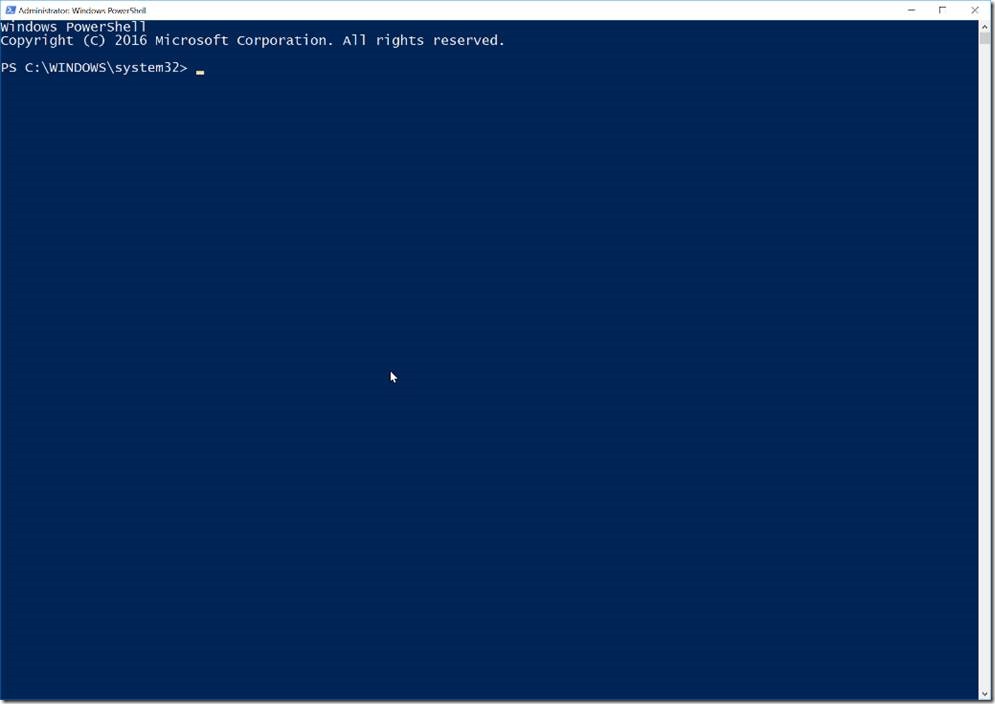
Now that it’s running, pin it to your Taskbar, so that you can access it more quickly next time. If you’re going to try to embrace PowerShell, you should make it easy to open.
Anyway, that window… straight away it feels like you need to have a clue what to write. Yes, that’s right. Things might’ve been a little easier in the ISE, and Aaron Nelson (@sqlvariant) has told me off for not using the ISE every time I do anything in PowerShell, but we’ll be okay here.
Let’s start by doing some basic things that we know from DOS. The commands cd and dir. Try this:
cd ..
dir
You’ll see that you move up to C:\WINDOWS, and then list the contents. No surprises here, it’s just like Command Prompt. Or DOS if you’re old enough.
The difference with PowerShell is that this is not just text output. These things are objects. And we can do stuff with that. PowerShell is a ‘typed’ environment. You already deal with objects all the time, like in Object Explorer in SSMS. PowerShell objects can include all those things, as well as .Net objects. This is where PowerShell gets its power from.
A few quick things…
- PowerShell commands come in verb-noun pairs, such as
Set-LocationorGet-ContentorGet-ChildItem. These are known as cmdlets, so when you see the word ‘cmdlet’, it just means a PowerShell command. - PowerShell command parameters use a hyphen. Like:
Get-ChildItem -Recursebut you can also abbreviate them so long as there’s no ambiguity. So I could use-recinstead of-recurse. - Variables start with a dollar sign (
$). We’ll get to this later. - We don’t use
>in filters and tests, we use-gt.-eqfor=,-nefor!=/<>,-lefor<=, and so on. This is frustrating, but you’ll get used to it. - There are a bunch of abbreviations and aliases. One alias for
Set-Locationiscd.Get-ChildItemis also known asdir, andlstoo.Where-Objectis?andForEach-Objectis%. We’ll see these as we go along too. - You get tab-completion on almost everything, so if you’ve typed
Get-Chi, you can hit Tab and cycle through the options until you find what you want. - You can use help (which is an alias for
Get-Help) by simply using:help dir, and at the bottom of that help, you’ll get a nice reminder that you could’ve usedhelp dir -examples, and that adding-onlinewould have opened a web page with the relevant help page on it (that’s really handy). - You can pass the results of one thing into another using the pipe symbol (
|). Perhaps the most useful one isgm(an alias forGet-Member), which will list the Properties and Methods (the members) for whatever object you’ve passed in. -
#will comment the line, or go between<#and#>
Let’s see some of this in action.
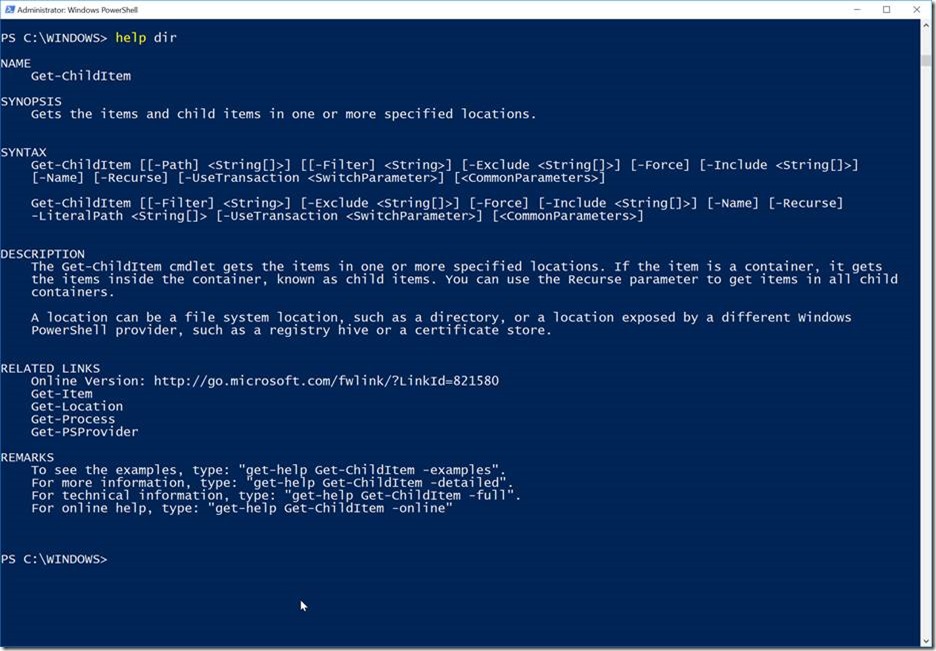
Here we can see some interesting things. Good to notice that we could use -Exclude and -Include. We’ll do that soon. We could get more information using -detailed, or -examples, or -full.
Let’s explore our SQL folder. Start by typing cd \p and then hit Tab until it shows you Program Files.

Now hit M and start hitting Tab again to find ‘Microsoft SQL Server’. If you go too far, press Shift-Tab to go backwards. (Oh, and if you should’ve been looking on D:, then start again with cd D:\p – but the principles are the same.)

Great. Let’s hit Enter and see that we’ve changed directory.
But now let’s type: dir -rec -inc ConfigurationFile.ini

You could’ve hit Tab after each parameter and seen them expand into the more correct versions. You could’ve used Get-ChildItem to be slightly stricter. I don’t really care though. When you run this, you’ll see some files listed. I don’t know how many you’ll get. Each one indicates that you ran an installation of SQL Server. But as a SQL expert, you know this. You just might not have known how easily PowerShell could list them for you.
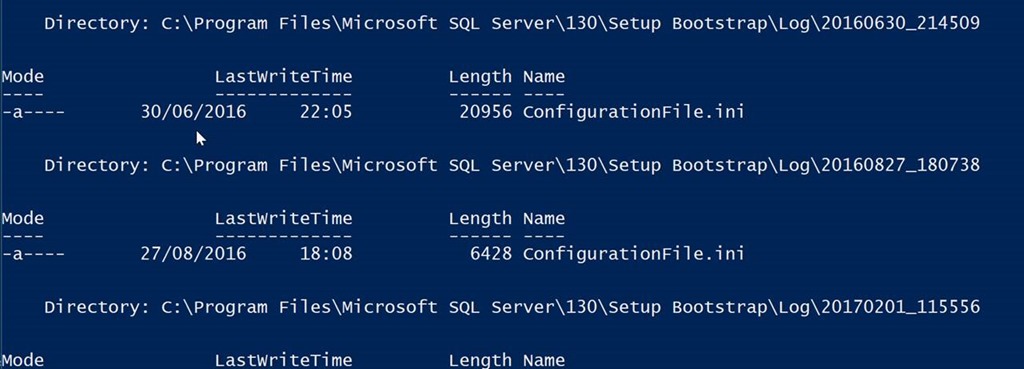
Ok. Hopefully we’re seeing some use for this.
Now let’s do something with this output. I want to say ‘with these files’, but let’s do the data thing and think of this as a dataset of files.
Suppose we want to count them. I could loop through the results using ForEach-Object (but I’ll use the shortcut %), and increment a variable that I set up. This is a common pattern for looping – people put whole programs inside those curly brackets, across lots of lines.

This does the trick, but I’m sure there’s something built-in to let me count things.
Well, I can never remember what that command, so let’s do ask one of those fancy internet-search providers.

I don’t even want to open these pages. I just want to notice that there’s a command called Measure-Object. Let’s pipe our output into that. Hit the ‘up arrow’ key to go back to a previous command.

This takes a moment, and then happily tells us there are three.
It takes a moment because it’s having to search through the files again. How about we store those results somewhere?
Now, I call these things brackets, but Americans call them parentheses. And what you call brackets, I call square brackets. There are curly brackets too, which you call braces I think. I’ll try to call parentheses ‘round brackets’ to avoid confusion, but if I refer to a ‘bracket’, I mean a parenthesis.
I’m going to wrap my dir command in round brackets, and assign that to a variable.
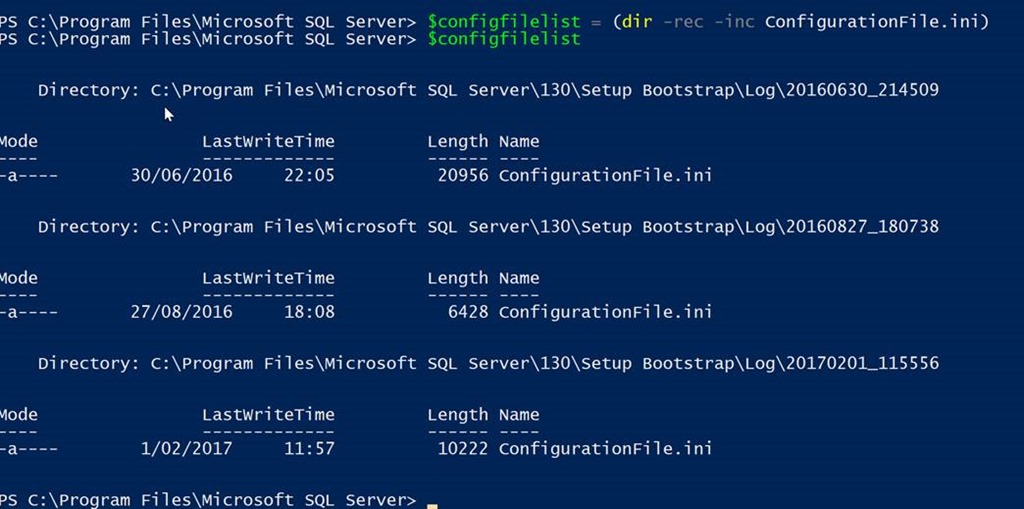
Now I can pipe $configfilelist into Measure-Object and it will be more responsive, because I’ve stored my results.
But because $configfilelist is an array of files, I can also look at its length to see that there are three items. That’s way easier. And I can access each individual one by using square brackets from 0 to 2.
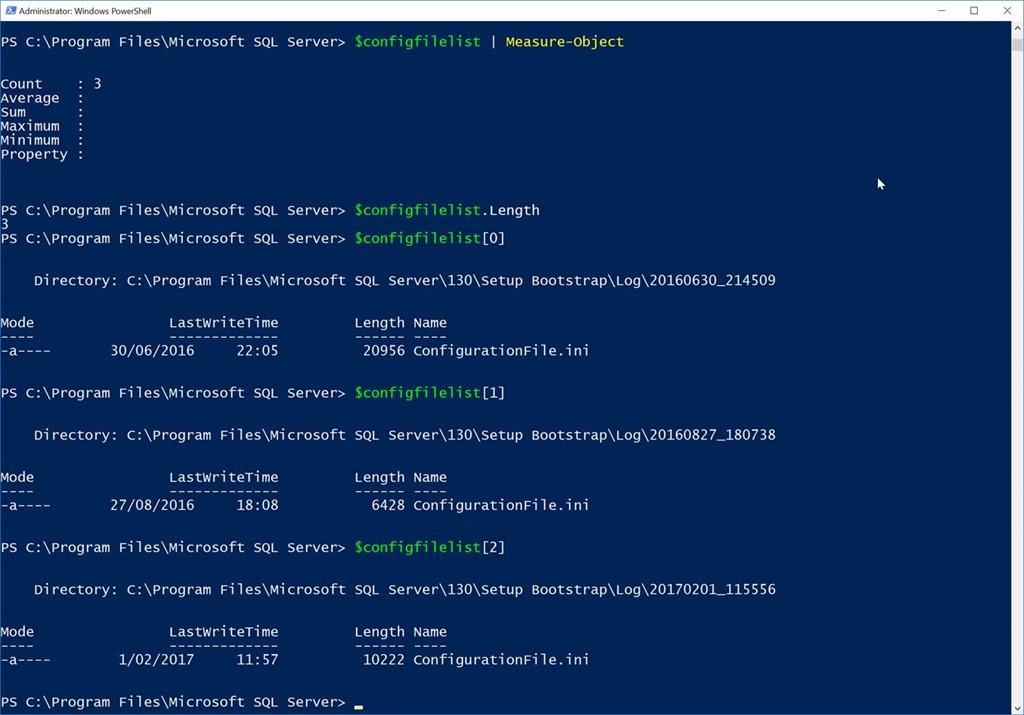
This isn’t exactly ground-breaking stuff yet. But those files do tell us some useful things. Let’s do a Get-Member command on our array.
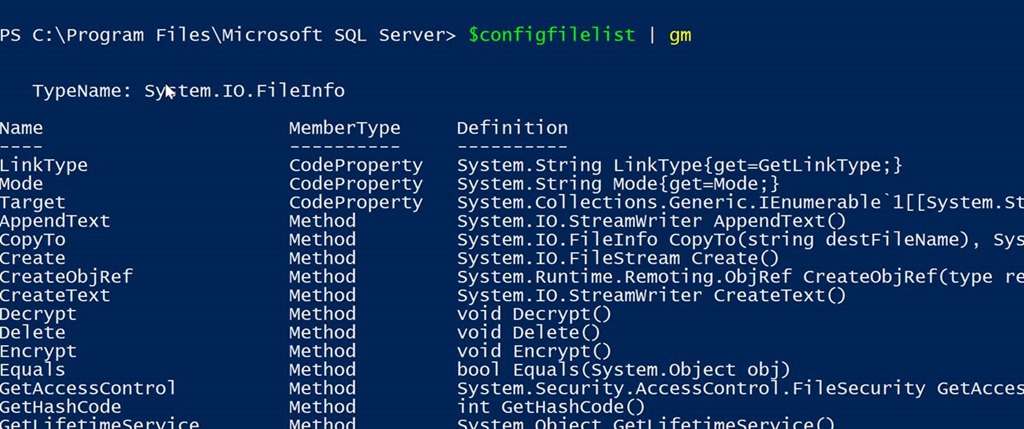
Don’t get put off by this. At the top we can see that we’re dealing with objects that are of type System.IO.FileInfo. This is a .Net thing and is where the power comes from. We can see that we could call the Delete methods of these files, or CopyTo, or Decrypt (if they were encrypted, but they’re not), and more. Down the bottom we see Properties.
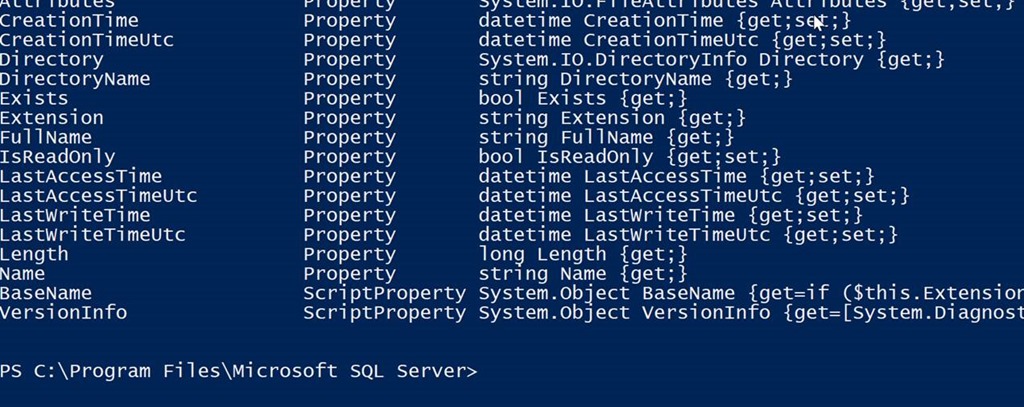
This is more interesting. Let’s look at LastWriteTime. Because we might be interested in when that is.
We can use Select-Object to show only certain properties.

As expected, nothing’s written to those files since the installs were actually done. But what if I wanted to filter this, only to ones since a particular point in time?
I’m going to use Get-Date to get the current date and time. I’m going to wrap that in round brackets and use its AddYears method to find a year ago. In the real world I’d be more inclined to use AddDays, but I do want to get some results.

And I’m going to filter $configfilelist by passing into Where-Object (except that I’m going to use a convenient shortcut which is the question-mark). My filter lives inside curly brackets (‘braces’, right?), and inside those curly brackets I refer to the things in $configfilelist using $_.
So my filter goes like this, saying that I want to list the ones that have a LastWriteTime greater than (-gt) a year before now:
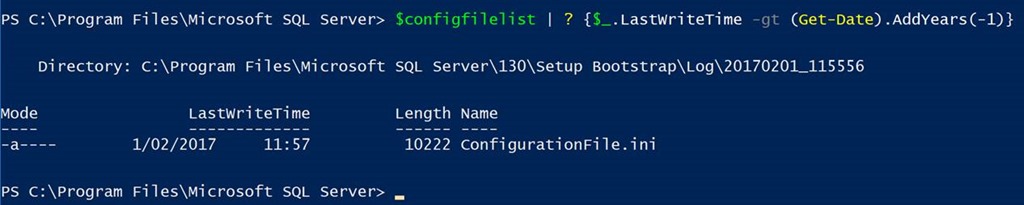
And I only get one file. Terrific.
That’s all well and good, but now I want to know what that installation was about. For that we need to look inside the file. Get-Content is our friend here. Let’s start by using Get-Content against a file directly. It’ll be easy to hook it into our proper command later.
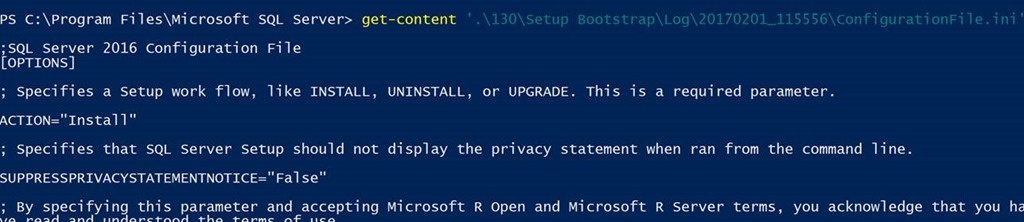
Get-Content actually returns an array of lines, and has really useful parameters like -TotalCount which stops after a certain number of lines, or -Tail which gets lines at the end of the file. I love this when I’m dealing with large files – it’s not like I can open them in Notepad.
Let me tell you about Select-String too. It’s like grep from Unix – you use it to get the lines you want in a file.

That output seems like a pain, but remember this is just the string representation of an object. If I pipe my command into gm (Get-Member), you’ll see what I mean.
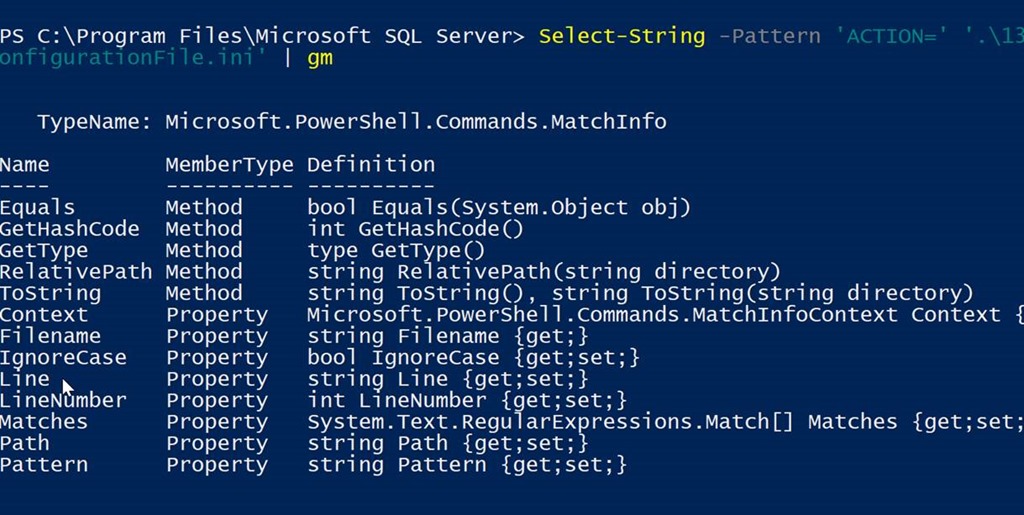
So now I can tell that I can access the Path of the file, the Line, the LineNumber, etc., separately.

To look for multiple things, I want to pass an array of parameters to -Pattern. I do that by simply using a comma, to discover that it was an install of Analysis Services.

Hopefully you’re starting to see the power of this.
I can drop it all into the one line by using:
dir -rec -inc ConfigurationFile.ini | ? {$_.LastWriteTime -gt (Get-Date).AddYears(-1)} | select-string -Pattern 'FEATURES=','ACTION=' | select-object Path, Line(Sorry, you'll likely have to scroll sideways to see all that – getting everything on a single line isn't exactly a virtue in HTML.)

When you’re working things out that you like, you’ll want to store the commands somewhere for later (such as in a .ps1 file that you run). For that, you want to be aware of Get-History. It lists everything you’ve run in that session.
And a neat little trick is that you can use negative numbers to hook into arrays from the other end. So you can do this:

But instead of just displaying it, pipe it into clip:

…which gets it onto the clipboard.
I’m not going to go much further with this, but you could keep push this further and further yourself, exploring the types of things that might be interesting in your job. You can dump results into files using > and append to files using >>.
Now consider commands like:
Get-EventLog -LogName Application -After (Get-Date).AddHours(-1) -EntryType Error
…and imagine what you could do with that.
Try doing: Import-Module SQLServer
Which then lets you go:
cd SQLSERVER:
And browse the SQL environment as if it’s a file system.
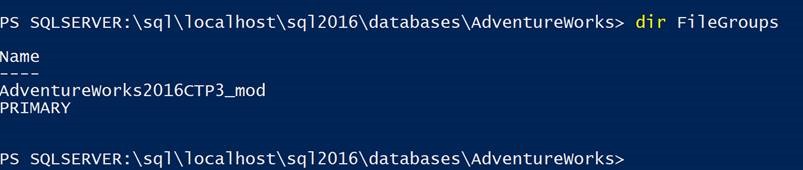
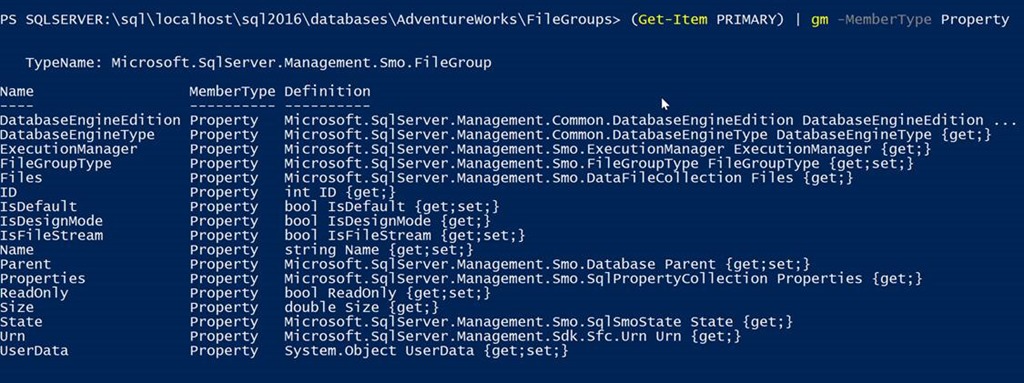
I don’t tend to use PowerShell to explore SQL like this very often, I must admit. But the fact that I can certainly gives me a bunch of options. The fact that I could use PowerShell to create a Word document like they do over at https://learn-powershell.net/2014/12/31/beginning-with-powershell-and-word/, or send emails as described at https://docs.microsoft.com/en-us/powershell/module/microsoft.powershell.utility/send-mailmessage, or call web services (include Azure Machine Learning ones) as described over at https://docs.microsoft.com/en-gb/powershell/module/Microsoft.PowerShell.Utility/Invoke-WebRequest means that with a bit of imagination, you could use PowerShell to do just about whatever you want. I love using Invoke-SqlCommand to get data out of SQL, push it into Invoke-WebRequest to get scores from Azure ML, and then respond accordingly. PowerShell makes it really straightforward.
Oh, and to run PowerShell commands on other machines (which can be quite useful, of course), a quick ‘internet search’ showed me this useful-looking page: https://www.howtogeek.com/117192/how-to-run-powershell-commands-on-remote-computers/
You could have a list of computers inside a file, and loop through it like this:
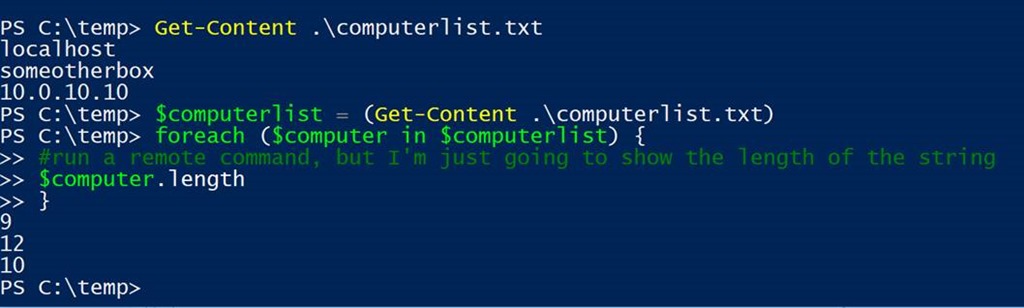
Try some stuff. Knock yourself out. And explore what everyone is writing for T-SQL Tuesday this month, hosted by Rob Sewell (@sqldbawithbeard)
The post Because you need to know PowerShell appeared first on SQLPerformance.com.
19 Oct 06:37
PagerDuty Releases New Machine Learning and Response Automation Capabilities
by A.R. Guess
by Angela Guess A recent press release reports, “PagerDuty, the global leader in Digital Operations Management, today introduced new capabilities in machine learning and advanced response automation that enable businesses to orchestrate the right business-wide response to any situation. By eliminating inefficiencies across the entire digital operations lifecycle, and applying best practices to any operational […]
The post PagerDuty Releases New Machine Learning and Response Automation Capabilities appeared first on DATAVERSITY.
19 Oct 06:36
Instant Log Initialization for SQL Server in Azure
by Dimitri Furman
Reviewed by: John Hoang, Denzil Ribeiro, Rajesh Setlem, Mike Weiner
Introduction
Instant File Initialization (IFI) is a well-known feature of SQL Server, providing significant performance improvement for operations that require an increase in the size of data files, such as database creation, restore, and file growth. Without IFI enabled, zeroes have to be written into the newly allocated file space, which is a time-consuming size-of-data operation. With IFI enabled, space is allocated to the file, but zeroes are not written. SQL Server documentation provides details on how this feature works, and what is required to enable it.
The documentation says quite explicitly that “Log files cannot be initialized instantaneously.” Paul Randal explains the reason for this behavior in this blog. To summarize, log files need to be fully initialized, i.e. filled with zeroes (or other byte patterns), to support database crash recovery.
And yet, the title of this blog is not a mistake. There is a case where log can be initialized instantaneously and yet maintain crash recovery semantics. Specifically, this happens when database files are created directly in Azure Blob Storage.
SQL Server database files in Azure Blob Storage
As you may know, starting with SQL Server 2016, database files can be created directly in Azure Blob Storage as page blobs, rather than as files on local or UNC paths. The SQL Server Data Files in Microsoft Azure documentation topic describes this feature in detail.
Here is an example of creating a database with files directly in Azure Blob Storage, once the credential holding the Shared Access Signature for the storage container is created:
CREATE DATABASE GrowthTest
ON PRIMARY
(
NAME = N'GrowthTest',
FILENAME = N'https://example.blob.core.windows.net/mssql01/GrowthTest.mdf',
SIZE = 8192KB,
FILEGROWTH = 65536KB
)
LOG ON
(
NAME = N'GrowthTest_log',
FILENAME = N'https://example.blob.core.windows.net/mssql01/GrowthTest_log.ldf',
SIZE = 8192KB,
FILEGROWTH = 65536KB
);
Instant Initialization of SQL Server Transaction Log in Azure Blob Storage
Recently, we were working on a performance testing exercise using a SQL Server database with files in Azure Blob Storage. After creating the database using the default 8 MB size for data and log file (as in the example above), we wanted to increase the size of all files to be sufficient for the expected workload. IFI was not yet enabled for the SQL Server instance we were working with, and growing the data file from 8 MB to 1 TB took about one minute (using Premium Storage). This was expected, since the data file had to be fully initialized. We expected that the log growth to 1 TB would take about as much time, for the same reason. It was very surprising then that the same operation on the log file completed in less than one second. Here are the commands we used to grow the files:
ALTER DATABASE GrowthTest MODIFY FILE (NAME = N'GrowthTest', SIZE = 1024GB);
ALTER DATABASE GrowthTest MODIFY FILE (NAME = N'GrowthTest_log', SIZE = 1024GB);
Before anyone starts worrying, the SQL Server storage engine is not broken, and database recovery still works just like it always did. To understand what is happening, we should keep in mind that Azure Blob Storage is very different from the traditional storage systems. When database files are created as blobs in Azure Blob Storage, SQL Server can take advantage of some features that aren’t available in traditional storage systems.
The specific Azure Blob Storage feature that SQL Server is using here is the ability to clear a range of bytes in a page blob, provided by the Put Page API. The byte range specified in the Range or x-ms-range header is cleared when the value of the x-ms-page-write header is set to Clear. This operation has two important properties. One is that clearing the range is a metadata operation, so it happens nearly instantaneously. The other property is a guarantee that reading from a cleared range will always return zeroes, thus allowing SQL Server crash recovery to work in the usual way.
This means that if the log file is created directly in Azure Blob Storage (as opposed to on a disk attached to an Azure VM), SQL Server does not have to initialize the log by writing zeroes to the log blob. It can instead make a call to the storage API to clear a byte range within the blob. This call completes very fast, effectively resulting in instant log file initialization.
The log initialization operation, among other operations on database files in Azure Blob Storage, can be monitored using the xio_send_complete extended event. For log initialization, the file_path field will be set to the URL of the log blob, and the request_type field will be set to XIOTypeZeroFile. Here is an example. The first event fires when the blob is resized to 1 TB, and the second event fires when the 8 MB – 4 GB range is zeroed.

Conclusion
There are two outcomes worth highlighting here:
1. Some of the well-established truths about SQL Server may no longer hold as the underlying technology advances. In this case, SQL Server is taking advantage of a special capability in the storage subsystem, making instant log initialization a reality.
2. This shows how SQL Server can take advantage of functionality that is only available in Azure today. Customers using SQL Server in Azure VMs can benefit from instant log initialization if they create databases with files directly in Azure Blob Storage. This removes delays related to long log initialization from the list of operational concerns.
19 Oct 06:35
Do Citizen Data Scientists Mark the Death of Data Scientists?
by Kartik Patel
Click to learn more about author Kartik Patel. To be successful in business, every organization must find a way to accurately forecast and predict the future of its market, and its internal operations, and better understand the buying behavior of its customers and prospects. With the democratization of Business Intelligence and the advent of Self-Serve Business […]
The post Do Citizen Data Scientists Mark the Death of Data Scientists? appeared first on DATAVERSITY.
19 Oct 06:35

Azure SQL Database scheduled autoscaling
by jorg
You can read this blog post on jorgklein.com: https://jorgklein.com/2017/09/19/azure-sql-database-scheduled-autoscaling
19 Oct 06:35
New Releases for the Microsoft Data Platform
by kevin
NEW RELEASES FOR THE MICROSOFT DATA PLATFORM
The Microsoft data platform team is on fire! It is delivering more updates and features faster and more thoroughly than ever before. If you’re a data professional and you’re using the Microsoft stack, this is a really exciting time to be involved. Here’s a look at the top new capabilities in SQL Server 2016 Public Preview, SSIS Feature Packs For Azure, and Azure SQL Data Warehouse.
Originally Posted July 08, 2015
The post New Releases for the Microsoft Data Platform appeared first on Kevin Kline.
19 Oct 06:34
Machine Learning Makes SAP S/4HANA Even More Intelligent
by A.R. Guess
by Angela Guess According to a recent press release, “SAP SE today announced SAP S/4HANA® 1709, a new release of SAP’s next-generation ERP suite that incorporates SAP® Leonardo Machine Learning capabilities and predictive analytics into core business processes to help organizations stay competitive in a rapidly changing business environment. SAP S/4HANA 1709 also is available […]
The post Machine Learning Makes SAP S/4HANA Even More Intelligent appeared first on DATAVERSITY.
19 Oct 06:33
Microsoft for the Modern Data Estate
by SQL Server Team
This post was authored by Rohan Kumar, General Manager, Data Systems Group.
Welcome to Microsoft Ignite 2017! I hope you are able to join us in person, or virtually through the Ignite Live Stream, to hear our exciting product announcements for your Data Estate.
- As Scott Guthrie wrote, today we announced general availability of SQL Server 2017, coming October 2! This is an incredible milestone representing the first version of SQL Server to run on Windows Server, Linux and Docker—and it already has been pulled on Docker X 2 million times since November.
- We also announced the upcoming public preview of SQL Database Managed Instance and Azure Database Migration Service previews, along with the addition of SQL Server to Azure Hybrid Benefit. The new Azure Hybrid Benefit for SQL Server enables customers to use on-premises SQL Server licenses for the easiest lift and shift of SQL Server workloads to fully-managed cloud.
- For developers looking to drive highly customized experiences based on events in a serverless architecture, we also announced support for Azure Functions with Azure Cosmos DB.
- To simplify analytics in the cloud, we’re releasing a public preview of new hybrid data integration capabilities in Azure Data Factory including the ability to run SSIS packages within the service.
- Finally, dramatic scale investments are coming to Azure SQL Data Warehouse for double the performance and 5x the scale.
This afternoon, I’ll be speaking in the Data General Session about the investments Microsoft has made across our Data and Analytics portfolio. From key announcements about the availability of SQL Server 2017 on Linux and Docker, to innovative programs that let you use on-premises SQL Server licenses to easily lift and shift to the cloud, to great price and performance for analytics workloads in Azure, we have lots of ways to help you unleash the power of your data, across the entire Data Estate. You’ll also get to hear from customers who have come with us on this journey, and whose investments in data and analytics have led to out-innovating and out-performing their competition.

Let’s take a look at some of the products and features you’ll hear more about.
SQL Server 2017 on Linux and Docker
With SQL Server 2017, we’ve made huge strides of choice for the data platform, and one of the heroes of our new choice paradigm is SQL Server 2017. Starting next Monday, October 2, customers will be able to bring the industry-leading performance and security of SQL Server to Linux and Docker Enterprise Edition containers for production workloads. SQL Server 2017 delivers a mission-critical database with everything built-in, on the platform of your choice. And, it can unlock seamless DevOps with Docker Enterprise Edition containers, bringing efficiency and simplicity to your innovation. As one customer reported:
“The Linux switchover was very easy. We didn’t have to do anything custom for Azure. It was literally plug and play,” said Dean Chen, VP of Engineering for dv01.
Today we are also announcing a SQL Server on Red Hat Enterprise Linux offer to help with upgrades and migrations. This offer provides up to 30% off SQL Server 2017 through an annual subscription. When customers purchase new Red Hat Enterprise Linux (RHEL) to support their SQL Server, they will be eligible for another 30% off their operating system. In addition to discounts on SQL Server and Red Hat Enterprise Linux, all of this is backed by integrated support from Microsoft and Red Hat.
Upgrading now to SQL Server 2017 will get you access to these cool features:
- AI built-in, with R and Python analytics plus native scoring in T-SQL – SQL Server was the first commercial database to have AI built-in. SQL Server 2017 enables you to build intelligent apps using scalable, parallelized and highly performant analytics using both R and now Python. New native scoring in T-SQL lets you score in near real-time.
- SQL Server 2017 will enable customers to use graph data management and analysis in order to discover new kinds of relationships. You can track and analyze highly interconnected data, for uses like detecting financial fraud or understanding pharmaceutical drug interactions.
- Adaptive Query Processing is a new family of features in SQL Server that bring intelligence to database performance. Adaptive Memory Grants in SQL Server track and learn from how much memory is used by a given query over time to avoid over- or under-provisioning memory and spilling to disk, a situation that can negatively affect performance. The more you run your application, the smarter this feature gets. Automatic Plan Correction ensures continuous performance by finding and fixing performance regressions.
- The newly renamed Machine Learning Server for Hadoop, formerly R Server, brings R and Python based scalable analytics to Hadoop and Spark environments, and it is now available to all SQL Server Enterprise Edition customers as a Software Assurance benefit.
- SQL Server Enterprise edition software assurance benefits also enable you to run Power BI Report Server. Power BI Report Server enables a truly hybrid reporting and dashboard experience by allowing you to manage your SQL Server Reporting Services (SSRS) reports alongside your Power BI reports
Easy lift and shift to the cloud with Azure SQL Database Managed Instance and Azure Hybrid Benefit
With Microsoft’s cloud-first development principle, you’ll find many of these same advances in our database-as-a-service: Azure SQL Database brings your workloads industry-leading performance and security, all on the same core engine as SQL Server.
With intelligent features like Threat Detection and auto-tuning built-in, Azure SQL Database offers the most productive database service, ideal for managing and modernizing data estate with thousands of databases — delivering a 406% ROI¹ to organizations. Today, we are announcing the upcoming public preview for SQL Database Managed Instance, an expansion to the service which offers close to full compatibility with SQL Server — ideal for migrating database estate to Azure for hassle-free operations. We are also announcing an upcoming public preview for Azure Database Migration Service which will streamline the movement of databases to Azure including SQL Server to Azure SQL Database. But we aren’t stopping there. We will make Azure the most economical and logical choice for existing SQL Server customers with the addition of Azure Hybrid Benefit for SQL Server, a way to re-use on-premises SQL Server licenses to run database-as-a-service in Azure. Azure Hybrid Benefit offers customers big savings compared to moving to other public clouds.
“We wanted the best of what we do in our data center, which is reliable SQL Servers on flash storage. With the best of what Azure could bring to it…For us we found Azure SQL Database was the best way to do it. We deploy our SQL Server’s schema element into a Managed Instance and we point the application via connection string change directly over the managed instance. We basically picked up our existing infrastructure and were able to deploy to Azure within a few seconds. It allows us to scale the business very quickly, with very minimal effort. The holy grail in a move like this is being able to lift your existing platform, move it into Azure without significant amounts of work, without having to re-engineer things,” said Eric Fleischman, Vice President & Chief Architect of DocuSign.
In addition to making it easier than ever to move to Azure SQL Database, we’re building in new capabilities that make it more compelling than ever to move. SQL Database has new Machine Learning Services for R language advanced analytics, a service that provides a platform for building and deploying intelligent applications in the cloud. And we’re adding other capabilities that leverage SQL Database’s cloud architecture: Intelligent Insights provide automated monitoring at scale and detection of any database performance degradations, faster than possible with traditional means. Not only that the issue is detected, but a root cause analysis is provided to the user, to easily decide on the best way to mitigate problems. With the new Vulnerability Assessment, customers can proactively improve the security state of their database. They get visibility into their security settings and vulnerabilities, and concrete steps to resolve issues and lock down security settings – an important issue if you’re subject to EU General Data Protection Regulation (GDPR) regulations.
Data Analytics at scale in the cloud with Azure Data Factory and Azure SQL Data Warehouse
We are helping customers transform with analytics and AI through faster performance, reduced time to value, and intelligence that can redefine customer interactions. With cloud-first innovation, you get a superset of business intelligence and analytics features that work across your entire Data Estate – on-premises and in the cloud.
Azure Data Factory is a data integration service that now lets you create, schedule, and orchestrate data integration pipelines at scale wherever your data lives, in the cloud or on premises. You can meet security and compliance needs for your data while taking advantage of Azure Data Factory’s extensive orchestration and data movement capabilities while paying only for what you use.
Now in public preview, SQL Server Integration Services (SSIS) customers can easily lift SSIS packages into the cloud using new managed SSIS hosting capabilities in Data Factory. Coming soon, customers who have active SQL Server license on SQL Server will be able to take advantage of the Azure Hybrid Benefit for SQL Server to receive discounted rates on SSIS execution in Data Factory.
Customers are already using these new features to speed data integration. Said David B. McAuley, CTO for Lumedx, “Azure Data Factory has simplified the integration of data from multiple hybrid sources at scale and enabled us to leverage big data and analytics offerings in Azure to drive better health outcomes for our customers.”
Azure SQL Data Warehouse is a fully-managed, petabyte-scale cloud data warehouse based on SQL Server. Soon we’ll preview a new performance tier that offers 2x the performance and 5x the scale of the current performance tier. This new compute-optimized performance tier leverages the latest Azure hardware with data caching through low-latency Non-Volatile Memory Express (NVMe)-based solid-state disks for the most demanding data warehouse workloads. You are also able to store an unlimited amount of columnar data with each data warehouse. These benefits of increased performance and scale are offered while retaining the ability to pause, resume and dynamically scale your data warehouse to achieve the lowest possible cost.
Finally, you’re probably familiar with how Power BI has been revolutionizing self-service business intelligence, revealing the information stored within your analytics using powerful visualizations. Power BI works across locations and devices to put BI in the hands of all your users. With Power BI Report Server, announced this past May, you can now run Power BI reports on-premises! This unlocks the deployment and distribution of interactive Power BI reports – and traditional paginated reports – completely within the boundaries of the organization’s firewall. Power BI Report Server extends the hybrid BI experience by allowing you to build on your on-premises reporting infrastructure while maintaining compatibility with Power BI to ensure a natural transition when you are ready to move to the cloud. And because Power BI Report Server is built on the proven SQL Server Reporting Services technology, it is fully compatible with SSRS. So, you can take advantage of SSRS capabilities when you deploy Power BI Report Server. Power BI Report Server is included with the purchase of Power BI Premium and available as a Software Assurance benefit for SQL Server Enterprise customers.

Build serverless apps with near infinite global-scale with new support for Azure Functions in Azure Cosmos DB
Finally, only Microsoft offers a complete development, application, and data platform that enables developers to build the next-generation of applications that will enrich the world around us. At Ignite, we continue this journey with new support for Azure Functions in Azure Cosmos DB which will dramatically streamline a developer’s ability to build globally distributed apps in a serverless architecture. These capabilities enable developers to build rich, real-time customer experiences based on data and events, with minimal infrastructure overhead. Azure Cosmos DB offers turnkey global distribution across Azure regions and guarantees performance, with single-digit-millisecond latencies at the 99th percentile anywhere in the world. Its multiple consistency models help fine-tune performance for your application, and guaranteed high availability is backed by industry-leading, comprehensive service level agreements (SLAs). And now, you can try it for free!
Join us
Ready to hear more? Please join me at this afternoon’s Data General Session and for the other exciting sessions in the Ignite Data track. We’ll have lots of advice and ideas help you unleash the power of your data.
- Watch Microsoft Ignite keynotes online at the Live Stream
- Search Microsoft Ignite Data sessions
- Learn more about data in Microsoft Azure
- Get started with SQL Server 2017 on Windows, Linux and Docker
¹ “The Business Value of Microsoft Azure SQL Database Services” IDC, March 2015.
19 Oct 06:32
SQL Server 2017 and Red Hat Enterprise Linux offer
by SQL Server Team
This post was authored by John ‘JG’ Chirapurath, General Manager, Data Platform Marketing.
Microsoft has heard from you, our customers, that your data estate gets bigger, more complicated, and more diverse every year. You need solutions that work across platforms, whether on-premises or in the cloud, and that meet your data workloads where they are. Embracing this choice, earlier today we announced the general availability of SQL Server 2017 on Linux, Windows, and Docker on October 2, 2017.
Today, Microsoft and Red Hat are delivering on choice by announcing the availability of Microsoft SQL Server 2017 on Red Hat Enterprise Linux, the world’s leading enterprise Linux platform. As Microsoft’s reference Linux platform for SQL Server, Red Hat Enterprise Linux extends the enterprise database and analytics capabilities of SQL Server by delivering it on the industry-leading platform for performance, security features, stability, reliability, and manageability.
Customers will be able to bring the performance and security features of SQL Server to Linux workloads. SQL Server 2017 on Red Hat Enterprise Linux delivers mission-critical OLTP database capabilities and enterprise data warehousing with in-memory technology across workloads. SQL Server 2017 embraces developers by delivering choice in language and platform, with container support that seamlessly facilitates DevOps scenarios. The new release of SQL Server delivers all of this, built-in. And, it runs wherever you want, whether in your datacenter, in Azure virtual machines, or in containers running on Red Hat OpenShift Container Platform!
Also starting October 2nd until June 30th, 2018, we are launching a SQL Server on Red Hat Enterprise Linux offer to help with upgrades and migrations. This offer provides up to 30% off SQL Server 2017 through an annual subscription. When customers purchase a new Red Hat Enterprise Linux subscription to support their SQL Server, they will be eligible for another 30% off their Red Hat Enterprise Linux subscription price.
In addition to discounts on SQL Server and Red Hat Enterprise Linux, all of this is backed by integrated support from Microsoft and Red Hat. Learn more about this offer, plus how SQL Server and Red Hat work together for performance and reliability at low TCO by talking to your local Red Hat or Microsoft seller today!
For more information on Microsoft SQL Server 2017 on Red Hat Enterprise Linux, stop by the Red Hat booth #527 at Microsoft Ignite.
19 Oct 06:32
New managed SQL server Integration Service hosting capability in Data Factory
by SQL Server Team
This week at Ignite, we announced new capabilities in Azure Data Factory (ADF) service available in public preview for customers. Azure user preview terms of use can be found here. SQL Server Integration Services (SSIS) customers can easily lift their SSIS packages into the cloud using new managed SSIS hosting capabilities in Data Factory. This can be achieved by utilizing a new feature called “Integration Runtimes” (IR). By spinning-up an SSIS IR in Azure Data Factory, you will have the ability to execute, manage, monitor and deploy SSIS packages in the cloud. Get started now by visiting this step-by-step instructional tutorial on how to leverage Azure Data Factory to provision an SSIS service where you can deploy, manage and monitor your SSIS packages in the cloud.
19 Oct 06:32

Azure Data Factory and SSIS better together with ADF V2 Preview
by jorg
You can read this blog post on jorgklein.com: https://jorgklein.com/2017/09/26/azure-data-factory-and-ssis-better-together-with-adf-v2-preview/
19 Oct 06:32
In-database Machine Learning in SQL Server 2017
by SQL Server Team
This post is authored by Sumit Kumar, Senior Program Manager, Microsoft and Nellie Gustafsson, Program Manager, Microsoft
We are excited to announce the general availability of SQL Server 2017 and Machine Learning Services. You can start using Python-based in-database Machine Learning Services for production usage now. With support for both R and Python, we have rebranded ‘R Services’ to ‘Machine Learning Services’. SQL Server now supports the three most popular data science languages and enables you to use the latest AI and ML packages from the open source world in-database, across ALL editions on Windows – making SQL Server 2017 the commercial database with built-in AI.
As we have covered in previous posts, there are many advantages of using this technology, such as the elimination of data movement, ease of deployment, improved security and better scale and performance. These abilities make SQL Server a powerful enterprise platform for machine learning. Examples of what some customers have built using Machine Learning Services:
- Pricing optimization models
- Predictive analytics solutions to gain real-estate property insights
- Better and more accurate models for more precisely targeted marketing
- Financial models for banking
In-database Python integration
With the full support of in-database Python in SQL Server Machine Learning Services in SQL Server 2017, the vast population of Python developers and ML practitioners can now leverage the power of SQL Server alongside their Python code. And the SQL Server developers now have access to the extensive Python ML and AI libraries from the open source ecosystem along with the latest innovations from Microsoft (revoscalepy and microsoftml libraries) for developing intelligent applications with in-database analytics.
Python operationalization with T-SQL
Full Python integration with the sp_execute_external_script infrastructure in SQL Server enables the enterprise-grade operationalization of Python models and scripts as simple stored procedures.

Streaming data from SQL to Python processes and MPI ring parallelization support provides much-improved performance to the Python scripts.
Python remote compute in SQL Server
With the SQL Server remote compute context, data scientists and developers can push the compute of Python code to the server from their development environments, to explore data and develop models without the need to move data.

In-database Python integration is not limited to just machine learning and AI solutions – it is equally useful for general purpose data analysis work by combining Python and SQL in powerful ways; leveraging strengths of respective languages.
Orders of magnitude faster scoring
After demonstrating industry leading 1 million+ rows/sec batch scoring performance, we are now introducing Native Scoring for even faster prediction! Some concurrent prediction scenarios require close to real-time response times. Models trained using the RevoScaleR and revoscalepy packages are supported by this new PREDICT verb (a system table value function) which makes it easy to embed this performant scoring functionality in regular T-SQL SELECT statements without invoking the R or Python runtime. Native scoring is also available on SQL Server on Linux.
Real-time scoring is also available to SQL Server 2016 customers on upgrading in-database R to the latest release of Microsoft Machine Learning Server.
Improving R package management in SQL Server
One of the key values of R is its vibrant community with thousands of open source packages. We have further improved the R package management in SQL Server. We have a rich set of R functions to do package management in SQL Server that gives users the ability to install, uninstall and manage packages in various roles and scopes. In addition, it is now possible to install R packages on SQL Server using TSQL commands (CREATE EXTERNAL LIBRARY). This approach ensures availability of the previously installed packages when a server fails over.
Machine Learning Server
Along with the general availability of SQL Server 2017, we have also announced the general availability of the new Microsoft Machine Learning Server! This is the underlying software that is integrated into SQL Server as Machine Learning Services. Machine Learning Server is the transformation of Microsoft R Server into an even more flexible platform that offers a choice of R and Python languages and brings the best of algorithmic innovations from the open source world and Microsoft. Its multi-platform support enables customers to build portable models wherever their data is and operationalize the models on platforms like SQL Server, making the intelligence easily consumable by business applications.
Key new algorithmic innovations of Machine Learning Server benefitting the SQL Server scenarios are:
Revoscalepy
This package has the Pythonic version of Microsoft’s proprietary Parallel External Memory Algorithms (APIs for linear and logistic regressions, decision tree, boosted tree and random forest) and a rich set of APIs for ETL, remote compute contexts and data sources. These are the same scalable and parallelized algorithms (with ‘rx’ prefix) that have been the differentiating value proposition of Microsoft R Server and allow scaling analytics to arbitrarily large datasets, way beyond the available memory.
microsoftml
This package is a set of state of the art, battle-tested ML algorithms and transforms with Python bindings including deep neural net, one class SVM, fast tree, forest, linear and logistic regressions etc. In addition, this package contains pre-trained models for extracting features from images using ResNet models, and doing sentiment analysis from English language text, which dramatically simplifies the creation and deployment of complex AI scenarios on image and text data.
We have also simplified the pricing model to make it easier to acquire and use Machine learning Server on Hadoop. Each SQL Server EE core under Software Assurance gives you rights to use Machine Learning Server on 5 nodes of Hadoop.
Call to action
SQL Server Machine Learning Services is available in all editions of SQL Server 2017 on Windows and we encourage you to download and explore the above-mentioned enhancements in the free express or developer editions. Our R and Python getting started tutorials will walk you through building your first machine learning solutions with SQL Server. You can find additional tutorials on Microsoft docs.
19 Oct 06:32
Ways to Optimize your SQL Database
by Chirag Thumar
Click to learn more about author Chirag Thumar. Structured Query Language or SQL is considered the standard language for database management systems used to correspond with a database, either to update on or retrieve data from a database. The SQL is very simple to run and user-efficient, as the commands have a simple syntax. But then, the efficiency of the SQL […]
The post Ways to Optimize your SQL Database appeared first on DATAVERSITY.
19 Oct 06:31
Enterprise Data Pipelines using Azure PaaS Services – An Introduction
by Rangarajan Srirangam (AzureCAT)
Authors: Rangarajan Srirangam, Mandar Inamdar, John Hoang
Reviewers: Murshed Zaman, Sanjay Mishra, Dimitri Furman, Mike Weiner, Kun Cheng
Overview
You might have worked with enterprise data pipelines using the SQL Server suite of products on-premises, or using virtual machines in the cloud. Now, you can build a similar enterprise data pipeline on Azure, comprised purely of Platform as a Service (PaaS) services. This article discusses data pipelines composed using Azure PaaS services, the main benefits, hybrid pipelines and some best practices.
Traditional Enterprise Data Pipeline
Enterprise data pipelines based on the SQL Server suite of products have been traditionally used on-premises to meet organizational needs of transaction processing, data analytics and reporting. SQL Server Database Engine is a favorite choice to host online transactional databases serving high volume transactions. With data marts hosted in SQL Server Analysis Services, Online Analytical Processing (OLAP), cubes can be built for analytical needs. With the addition of capabilities such as ColumnStore, using SQL Server Database Engine to host Data marts is another viable alternative. With SQL Server APS (formerly PDW), the scale and performance benefits inherent in a massively parallel processing (MPP) architecture can be realized. Reports with rich and powerful visualizations can be built using SQL Server Reporting Services. SQL Server Integration Services can be used to implement data transformation and/or data movement pipelines across the SQL Server product suite and can connect to external data sources and sinks. SQL Server Agent is a popular choice to schedule automated jobs for data maintenance and movement. Windows Server Active Directory provides a uniform identity management and single sign on solution. The SQL Server product suite (except for SQL Server APS which is an appliance) can be hosted on physical or virtual machines in an on-premises datacenter, or on virtual machines in the public cloud. This style of enterprise data warehouse (EDW) construction is depicted in figure 1 below
Figure 1:

While the above continues to be a perfectly valid style of deployment on-premises or in the Azure Cloud, there is now an alternate, modern way to construct the same architectural pipeline using Azure PaaS Services.
Enterprise Data Pipeline on Azure PaaS
Azure SQL Database which supports most of the Transact-SQL features available in SQL Server is your first choice OLTP RDBMS in Azure. Azure SQL Data Warehouse provides a cloud-based MPP data platform similar to SQL Server APS. Azure Analysis services, which is compatible with SQL Server Analysis Services, enables enterprise-grade data modeling in the cloud. Power BI is a suite of business analytics tools to deliver insights by connecting to a variety of data sources, enabling ad hoc analysis, creating rich visualizations, and publishing reports for web/mobile consumption. Azure Automation provides a way for users to automate and schedule tasks on the cloud. Using Azure Scheduler, you can run your jobs on simple or complex recurring schedules. Azure Data Factory is a cloud-based data integration service that orchestrates and automates the movement and transformation of data. Azure Active Directory is a multi-tenant cloud based directory and identity management service integrated with Azure PaaS Services. The services mentioned above are made available in Azure regions as autonomous Microsoft managed PaaS services and are accessed through named service end points. This style of enterprise EDW construction on Cloud using PaaS services is depicted in figure 2 below. Note that this is not the only one way of composing PaaS services and is intended to illustrate a like-for-like replacement for equivalents in a traditional pipeline. With a large number of varied cloud services in Azure, many other possibilities open up – for example, your cloud Analytics pipeline could leverage Azure Data Lake Storage or Azure HD Insight depending on the requirement
Figure 2:

Benefits
Let us look at a few benefits you can get by constructing an enterprise data pipeline on Azure PaaS.
Rapid provisioning: Instances of PaaS services can be created quickly – typically seconds or minutes. For example, an Azure Analysis Services instance can be created and deployed usually within seconds.
Ease of Scale up/down: The services can be scaled up or scaled down easily. For example, databases in an Azure SQL Database Elastic Pool can automatically scale up from a few to thousands to meet demand. Azure SQL Database can scale up and down through changes to service tier and performance level or scale-out via elastic scale and elastic pool.
Global Availability: Each service is made available in multiple Azure regional datacenters across the world, so you can choose a region close to your user base. Check the Azure Regions page to find out more.
Cost Management: PaaS Services are costed on a pay-as-you go model, rather than a fixed cost model. You can terminate (or in some cases also pause) services once they are no-longer needed. For example, Azure SQL Data Warehouse is costed based on the provisioned Data Warehouse Units, which can be scaled up or down depending on your demand.
Hardware/Software update and patch management: The updating and patching of the hardware and software constituents of PaaS services is done by Microsoft, removing this concern from you.
Integration: The PaaS services provide mechanisms to integrate with each other, as applicable, and with other non-Azure services. Power BI, for example, can connect directly to Azure Analysis Services, Azure SQL Database, and Azure Data Warehouse. Azure Data Factory supports a variety of data sources including Amazon Redshift, DB2, MySQL, Oracle, PostgreSQL, SAP HANA, Sybase and Teradata.
Security and Compliance: Security features and compliance certifications continue to be added to each PaaS service. Azure SQL Database, for example, supports multiple security features such as authentication, authorization, row-level security, data masking, and auditing. The SQL Threat Detection feature in Azure SQL Database and in Azure SQL Data Warehouse helps detect potential security threats. Data movement with Azure Data Factory has been certified for HIPAA/HITECH, ISO/IEC 27001, ISO/IEC 27018 and CSA STAR.
Common Tools: There are common tools that can be used with most services. For example, the Azure Portal can be used for creating, deleting, modifying and monitoring resources. Most services also support deployment and management through Azure Resource Manager. Familiar tools like SQL Server Management Studio, DMVs etc., continue work with Azure SQL Database, Azure SQL Data Warehouse and Azure Analysis Services. Azure Data Factory is a common mechanism to move data between services. There is a common place to view the health of these and other Azure services.
High Availability & Disaster Recovery: Specific services offer built-in High Availability and Disaster Recovery options. For example, Azure SQL Database Active geo-replication enables you to configure readable secondary databases in the same or different data center locations (regions). Azure SQL Data Warehouse offers backups that can be locally and geographically redundant, while blob snapshots provide a way to restore a SQL Server database to a point in time.
SLAs: Each service provides an SLA. This SLA is specific to each service. For example, Azure Automation provides an SLA for the maximum time for a runbook job to start, and for the availability of the Azure Automation DSC agent.
Which style wins – Physical Server/VM based or PaaS service based?
Your requirements and goals determine what style is most applicable to you. Box products as well as Azure PaaS services continue to improve and interoperate, expanding your possibilities rather than narrowing them down. For example, in SQL Server the Managed Backup to Microsoft Azure manages and automates SQL Server backups to Microsoft Azure Blob storage. As another example, Azure Analysis Services provides data connections to both cloud data sources and on-premises data sources. These and many more mechanisms allow you to think of one style as complementing or supplementing another, letting you build hybrid architectures if needed.
Hybrid data pipeline Architectures
You can have hybrid architectures with a combination of PaaS and IaaS services in the same solution. Customers are already implementing such architectures today. For example, SQL Server can be deployed in Azure Virtual Machines working seamlessly with Azure SQL Data Warehouse or Azure Analysis Services. Data may reside in multiple SQL Servers on virtual machines representing application databases. Data from these databases relevant to DW could be consolidated into a data warehouse on Azure SQL Data Warehouse. Conversely Azure SQL Data Warehouse could act a Hub for warehouse data and feed multiple SQL Servers/SQL Server Analysis Services/Azure Analysis Services systems as spokes for analysis / ad hoc / reporting needs. Again, for ETL and data movement orchestration you can use SQL Server Integration Services as an alternative to ADF, or for better performance you can use PolyBase to load the data. Hybrid architectures allow a staged migration of on-premises solutions to Azure, and enable a part of the deployment to be on-premises during the transition. For example, customers who have traditional warehouses on premises and are in the process of migrating to cloud can choose to keep some of the data sources on premises. ETL processes can move data over a Site to Site VPN (S2S VPN) or Express Route connection between Azure and the on-premises data center.
Customer implementations in the real world
Let’s explore two different real-world Enterprise data pipelines built by customers
Cloud PaaS Centered Architecture

The first example, depicted above, caters to the back-end analytical needs of an Azure customer who decided to adopt a PaaS based solution architecture after considering the ease of provisioning and elastic scale abilities. There is an on-premise Data warehouse implemented in Hive that holds current and historical data. Data relevant to analytics is copied from the on-premise data warehouse to Azure blob storage using Azure Blob Storage REST APIs over HTTPS.
This data (consisting of sale transactions, financial data, web user clickstreams, master data and prior historical data) is loaded into Azure SQL Data Warehouse using Polybase every night. In-memory tabular data models are then built in Azure Analysis Services over aggregates extracted from Azure SQL Data Warehouse (every night post data loading) with incremental processing of Tabular data model. These compute and memory intensive aggregates are executed on Azure SQL Data Warehouse for efficiency while Azure Analysis Services stores these aggregates and supports a much larger user/connection concurrency than allowed by Azure SQL Data Warehouse. The data models could be hosted in Azure Analysis Services or on Power BI. The customer chose to host on Azure Analysis Services considering the size of data to be stored in memory.
Power BI is used to build visually appealing dashboards for Sales Performance, Click Stream Analysis, Web-site Traffic Patterns etc. A few hundred organization users access the Power BI dashboards. Power BI users and the Service Accounts to administer Azure Services are provisioned in Azure Active Directory.
Automated scheduled jobs needed for Azure SQL Data Warehouse and Azure Analysis Services (data loading, index maintenance, statistics update, scheduled cube processing, etc.) are executed using runbooks hosted in Azure Automation. A Disaster Recovery (DR) setup in a secondary Azure region can be easily implemented by periodically copying backups of Azure Analysis Services data and by enabling geo-redundant backups in Azure SQL Data Warehouse.
Hybrid IaaS – PaaS Architecture

The second example depicted above caters to the backend analytical needs of a customer in the financial sector. The solution is a hybrid in using IaaS and PaaS services on Azure. The on-premise deployment continues to host the multiple data sources including SQL Server 2016, Oracle, flat files etc., for legacy application compatibility reasons though there is thinking on migrating these sources eventually to cloud. These data sources store customer, financial, CRM, user clickstream and credit bureau data.
A few GBs of data need to be transferred every night and around 50 GB data over the weekend from on-premise to Azure. The customer has connected the on-premise data center to Azure via Azure Express Route given the data volumes involved and a need for SLAs on network availability. Data is moved from on-premise data sources into flat files using Windows Scheduled Jobs. This data is copied onto a local file server and compressed using algorithms like gzip on-premise. Compressed files are copied onto Azure Storage over HTTPS using the AzCopy tool.
The data loading workflow from Azure Blob Storage to Azure SQL Data Warehouse is orchestrated by SQL Server Integration services (SSIS) hosted in an Azure Virtual Machine. This allows the customer to reuse existing SSIS packages developed for SQL Server and available skill sets in the technical team on SSIS. The customer is also considering migrating these jobs to Azure Data Factory in the future. The data load jobs are scheduled using SQL Server Agent on the same SQL Server Virtual Machine.
SSIS then loads the data into Azure SQL Data Warehouse using the PolyBase engine. Some dimension tables are loaded without PolyBase engine (using direct Inserts) as the number of records are very small. For larger dimension tables with a considerable number of rows and columns, the customer chose to vertically divide the tables to overcome certain limitations of the PolyBase engine. Azure Automation is used to schedule on-cloud maintenance activities such as re-indexing, and statistics updating for Azure SQL Data Warehouse.
This customer implemented a “Hub and Spoke” pattern with heavy analytical queries served from the “hub” and smaller queries (fetching few rows with FILTER conditions) served from the “spoke”. Azure SQL Data Warehouse functions as the Hub and SQL Server 2016 running on Azure Virtual Machines functions as the Spoke. This SQL Server 2016 instance has a subset of the data from Azure SQL Data Warehouse. For Ad hoc reporting /dashboards another spoke using Azure Analysis Services with the In-Memory tabular data model option is being evaluated. More spokes can be added in future if needed.
Azure Active Directory Authentication is used for connecting to Azure SQL Data Warehouse. The user accounts are assigned specific resource classes in Azure SQL Data Warehouse depending on the quantum of the workload. Based on factors such as the nature of operations (data loading, maintenance activities, ad hoc queries, application queries, etc.) and priority, a relevant user account with the appropriate resource class connects to Azure SQL Data Warehouse.
Azure SQL Data Warehouse firewall rules are used to restrict IP ranges that connect to Azure SQL Data Warehouse. Encryption at rest is used with Azure Storage and Azure SQL Data Warehouse. All IaaS VMs and PaaS services are chosen from same Azure region. A Disaster Recovery (DR) setup in a secondary Azure region can be easily implemented by using Always on for SQL Server 2016, periodically copying backups of Azure Analysis Services data and by enabling geo-redundant backups in Azure SQL Data Warehouse.
Best Practices
To realize the benefits from a PaaS based solution architecture, it is important to follow a few best practices.
Co-locate Services: When you allocate a set of PaaS services that need to communicate with each other, consider co-locating the services in the same Azure region to reduce inter-service latencies and any cross-datacenter network traffic charges. Certain services may not be available in all regions, so you may need to plan your deployment accordingly.
Understand Service Limits: Each PaaS service works within certain limits, and these limits keep getting regularly raised. For example, there are resource limits on Azure SQL Database. You should design your application to work within the limits. There can be some difference between the capability in the SQL Server product suite and equivalent cloud service capabilities. For e.g. Azure Analysis Services currently supports only tabular models at the 1200 and 1400 Preview compatibility levels, whereas SQL Server Analysis Services also supports Multi-dimensional models
Design to Scale Out: As a general best practice on any public cloud, you can realize greater benefits by designing for scale out. Using multiple smaller data stores instead of a single large one, doing horizontal/vertical partitioning etc., are common strategies to consider when you need to work within service limits. Azure SQL Database even provides elastic database tools to scale out Azure SQL Databases.
Pausing and Scaling: Some services offer a pause and resume feature – you should consider using it to reduce costs. When you have a period of inactivity (say night times or weekends as applicable), you can pause Azure SQL Data Warehouse further reducing your bill. Not all services offer a pause feature though. But there are other options to control costs based on demand, such as changing performance levels within a tier, and moving from a higher performance tier to a lower tier. The reverse (scaling up or moving to a higher tier) applies for periods of high activity. If you know that the pausing/scaling needs to be done periodically, you can consider automating the pause/scale using Azure Automation.
Semantic layer with Azure Analysis Services: Creating an abstraction, or a semantic layer, between the data warehouse and the end user, as supported by Azure Analysis Services, makes it easier for users to query data. In addition, Azure Analysis Services in Cache mode supports more concurrent users than Azure SQL Data Warehouse. If the number of report users is large, and/or a lot of ad hoc reporting queries are used, then instead of connecting Power BI directly to your Azure SQL Data Warehouse, it is good to buffer such access though Azure Analysis Services.
Follow the best practices specific to each individual service: It is important to follow the documented best practices for each individual service, if mentioned in the documentation. For example, with Azure SQL Data Warehouse it is important to drain transactions before pausing or scaling an Azure SQL Data Warehouse, else the pause or scale can take a long time to complete. There is a number of other individual best practices for Azure SQL Data Warehouse as documented here and patterns and anti-patterns that are important to understand.
Refer to the product documentation of other services and AzureCAT and SQLCAT blogs for more information.
19 Oct 06:29


Microsoft Ignite Announcements
by James Serra
Many product announcements were made this week at Microsoft Ignite, and I wanted to give a quick overview of all the data platform related announcements:
- SQL Server 2017 on Linux, Windows, and Docker, generally available on October 2nd. SQL Server 2017 is being released simultaneously for Windows and various flavors of Linux: Red Hat Enterprise Linux 7.3, SUSE Linux Enterprise Server 12, Ubuntu and Docker. The official Docker image is based on Ubuntu 16.04. The performance of SQL Server on Linux vs Windows is “basically the same”. However, not everything has been ported. There are no Reporting Services or Analysis Services, nor Machine Learning Services, transactional replication, Stretch DB, or File Table (see Unsupported features and services). Management tools remain for the most part Windows only, though command-line tools work. The major new features are graph query support, Python in Machine Learning Services, SSIS scale-out, and Adaptive Query Processing and Automatic Tuning for better query optimization. Learn more and see What’s new in SQL Server 2017
- Azure Database Migration Service (DMS) and Azure SQL Database Managed Instance, public preview. New Managed Instance offering within SQL Database offers near-complete SQL Server compatibility and network isolation for easiest lift and shift to Azure. DMS offers a fully managed, first party Azure service that enables customers to easily migrate their on-premises SQL server databases to Azure SQL Database Managed Instance and SQL Server in Azure Virtual Machines with minimal to no downtime. Customers can maximize existing license investments with discounted rates on Managed Instance using a new Azure Hybrid Benefit for SQL Server. Sign up for news on availability
- Azure Machine Learning, new capabilities in public preview. Updates connect every element of the data science process with enhanced productivity and collaboration for AI developers and data scientists at any scale. Enables them to start building right away with their choice of tools and frameworks. The updated platform includes a enhanced data cleansing and prepping tool called ML Workbench to start the modeling process sooner. It is a client application that runs on Windows and Mac and is targeted at data scientists who are not users of Visual Studio and integrates with popular open source data science toolkits such as Python Scikit Learn, Jupyter Notebooks and Matplotlib. It integrates with the cloud by seamlessly moving the heavy lifting to the GPU-powered VMs in Azure. Other new capabilities include The Azure Machine Learning Experimentation service allows developers and data scientists to increase their rate of experimentation; The Model Management service provides deployment, hosting, versioning, management, and monitoring for models in Azure, on-premises, and to IOT Edge devices. These new features will help data scientists develop, deploy, and manage machine learning and AI models at any scale wherever data lives: in the cloud, on-premises, and edge. Learn more on the Azure Machine Learning page and Diving deep into what’s new with Azure Machine Learning
- Microsoft Cognitive Services updates. Includes general availability of Text Analytics API, a cloud-based service for language processing such as sentiment analysis, key phrase extraction and language detection. In October, we will also make generally available Bing Custom Search to create customized search experience for a section of the web, and Bing Search APIs v7 for searching the entire web for more relevant results using Bing Web, News, Video & Image search. Read the announcement blog post
- Announcing the preview of Machine Learning Services with R support in Azure SQL Database. You can evaluate this preview functionality in any server/database created in the West Central US Region. More info
- Azure Data Factory (ADF) – announcing new capabilities in public preview. These new capabilities in ADF will enable you to build hybrid data integration at scale. Now you can create, schedule, and orchestrate your ETL/ELT workflows, wherever your data lives, in the cloud or on any self-hosted network. Meet security and compliance needs while taking advantage of extensive capabilities and paying only for what you use. Accelerate your data integration with multiple data source connectors natively available in-service. SQL Server Integration Services (SSIS) customers will benefit from easily lifting their SSIS packages into the cloud using new managed SSIS hosting capabilities in Data Factory. We have taken the first steps to separate Control Flow and Data Flow within ADF to provide greater control over complex orchestrations that now facilitate looping, branching, and conditional structures within Control Flow. We have added new flexibility to scheduling by enabling triggering with wall-clock timers or on-demand via event generation. Parameters can now be defined and passed while invoking pipelines to enable incremental data loads. If you want to move your SSIS workloads, you can create a data factory version 2, and provision an Azure-SSIS Integration Runtime (IR). The Azure-SSIS IR is a fully managed cluster of Azure VMs (nodes) dedicated to run your SSIS packages in the cloud. For step-by-step instructions, see the tutorial: deploy SSIS packages to Azure. Full details of the release and features can be found on the Azure Data Factory service page. We encourage you to try these new capabilities, available at public preview pricing
- Announcing the preview for the Azure Data Box. A hardware appliance that companies can use to load their data for shipping to the closest Microsoft Azure data center. The 45-lb box, which is tamper proof, holds up to 100 terabytes (TB) of data. It plugs into a corporate network for downloads, and then into Azure’s own high-speed networks to upload its contents. Companies will be able to rent it, fill it, and ship it while tracking its progress. Data on the device will be encrypted throughout the journey. More info
- Introducing Azure Availability Zones for resiliency and high availability. Availability Zones are fault-isolated locations within an Azure region, providing redundant power, cooling, and networking. Availability Zones allow customers to run mission-critical applications with higher availability and fault tolerance to datacenter failures. More info
- Public preview: Virtual network service endpoints for Azure Storage and SQL Database. You can now secure Azure Storage and Azure SQL Database to only your virtual networks, by using virtual network service endpoints. Endpoints provide a direct connection from your virtual network to the Azure services, extending your virtual network’s private address space and identity to the services. Traffic from your virtual network to the services will always remain on the Microsoft Azure network backbone. More info
- Intelligent insights for Azure SQL Database. Azure SQL Database built-in intelligence continuously monitors database usage through artificial intelligence and detects disruptive events that cause poor performance. Once detected, a detailed analysis is performed generating a diagnostic log with intelligent assessment of the issue. This assessment consists of a root cause analysis of the database performance issue and where possible recommendations for performance improvements. More info
- Read replicas for Azure Database for MySQL. Read replicas will allow customers using MySQL on-premises or on other cloud service providers to create replicas of their instance in Azure. They can then choose to upgrade the replica to master in Azure Database for MySQL, and connect their apps directly to the new database instance. If you are interested in understanding the functionality of this private preview visit the Azure blog or more information
- Renamed R Server to Machine Learning Server. Announced was the renaming of Microsoft R Server to Microsoft Machine Learning Server and SQL Server R Services to SQL Server Machine Learning Services. The additional language support aligns the Advanced Analytics workload to Machine Learning capabilities and focus on AI. With Python support in addition to R and Microsoft ML libraries we enhance Machine Learning capabilities and offer the ability to develop new intelligent applications combining the best of open source and enterprise capabilities of SQL Server 2017. More info
- Azure SQL Database: Vulnerability Assessment. SQL Vulnerability Assessment (currently in preview) is an easy to configure tool that can discover, track, and remediate potential database vulnerabilities. Use it to proactively improve your database security. More info
- The Power BI team announced a much-awaited feature; automatic updates to the Power BI Desktop. Through the Windows Store, you can now install the Power BI Desktop once and get updates automatically every month. Read this blog post on http://aka.ms/biatmicrosoft to learn more
- Faster compute optimized performance tier for Azure SQL Data Warehouse. The compute optimized performance tier brings several benefits to your analytics workloads. The first benefit can be seen through dramatically improved query performance. Individual query execution times have improved by as much as 10x. We’ve also seen some fantastic results with customer workloads and benchmarks where queries are completing twice as fast on average. The compute and storage scalability has also been dramatically increased with this performance tier. You can now provision 5x the computing power and store an unlimited amount of columnar data, empowering you to run your largest and most complex analytics workloads. More info
- Azure free account, now available. A best-in-industry offer, the Azure free account helps customers try Azure. It comes with 12-months free access to compute, storage, database, and networking services, along with 25+ always-free services, including Azure App Service and Functions. It also includes a $200 credit allowing customers to try any Azure product for the first 30 days. More information at azure.com/free and Azure Free Account FAQ
- Azure Stack, now shipping through Dell EMC, HPE, and Lenovo. Azure Stack is an extension of Azure, allowing customers to uniquely meet hybrid requirements like compliance, latency, and true consistency as a part of their hybrid cloud strategy. Cisco and Wortmann will start taking orders soon. Customers can also buy Azure Stack as a managed service from Avanade, Rackspace, and several MSP partners. Azure Stack certification for IT Professionals materials are available now, and certifications exams will start Q1 2018. More information on azure.com/azurestack
- Azure Reserved Virtual Machine Instances. When available later in 2017, customers will be able to reserve virtual machines on Azure for a one- or three-year term with significant cost savings of up to 82% over pay-as-you-go prices when combined with Azure Hybrid Benefit and up to 72% on all VMs. Customers select the VM type, term, and datacenter region, so the compute resources are available when and where needed. Improve budgeting with a single up-front payment while maintaining the flexibility to exchange or cancel at any time. Details on Azure.com
- Native integration between Azure Cosmos DB and Azure Functions. We’re bringing the power of Azure Cosmos DB to our serverless offering, Azure Functions. With this integration, developers can write serverless apps backed by Cosmos DB, with just a few lines of code. They can innovate faster by reacting in real-time to changes happening in the database to drive more engaging and personalized customer experiences. Using Azure Functions and Azure Cosmos DB, customers can create and deploy event-driven, planet-scale serverless apps with extremely low-latency access against very rich data. Read the blog
- GA of HDInsight Interactive Query (Hive LLAP). This is an Azure HDInsight cluster type. It supports in-memory caching, which makes Hive queries faster and much more interactive. More info
- Microsoft is now offering Blob storage accounts with up to 5PB (petabytes) of maximum capacity, a 10x increase. Both incoming and outgoing data can now move at up to 50Gbps (gigabits per second) and users can expect 50,000 TPS/IOPS (transactions per second/input output operations per second) performance, a 2.5x jump. More info
- Announcing new Azure VM sizes for more cost-effective database workloads. We are excited to announce the latest versions of our most popular VM sizes (DS, ES, GS, and MS), which constrain the vCPU count to one half or one quarter of the original VM size, while maintaining the same memory, storage and I/O bandwidth. We have marked these new VM sizes with a suffix that specifies the number of active vCPUs to make them easier for you to identify. For example, the current VM size Standard_GS5 comes with 32 vCPUs, 448GB mem, 64 disks (up to 256 TB), and 80,000 IOPs or 2 GB/s of I/O bandwidth. The new VM sizes Standard_GS5-16 and Standard_GS5-8 comes with 16 and 8 active vCPUs respectively, while maintaining the rest of the specs of the Standard_GS5 in regards to memory, storage, and I/O bandwidth. More info
- New in Stream Analytics: Output to Azure Functions, built-in anomaly detection, etc. Announced the preview of several new and compelling capabilities in Azure Stream Analytics. These include built-in inline machine learning based anomaly detection, egress to Azure functions, support for compressed data formats, JavaScript User defined aggregates, and support for CI/CD in Visual Studio tooling. These new features will start rolling out over the course of the next several weeks. More info
- Announcing Azure Migrate. A new service that provides the guidance, insights, and mechanisms needed to assist you in migrating on-premises virtual machines and servers to Azure. More info
19 Oct 06:28
Accelerite Reduces Time-to-Value for Enterprise Hybrid Cloud Deployments with Rovius Cloud
by A.R. Guess
by Angela Guess According to a recent press release, “Accelerite, a provider of software for digital transformation infrastructure, today announced the general availability of Rovius Cloud, an enterprise hybrid cloud platform that significantly eases deployment, monitoring and management of on-premises and public cloud compute, storage and networking resources. Rovius Cloud federates on-premises resources with public […]
The post Accelerite Reduces Time-to-Value for Enterprise Hybrid Cloud Deployments with Rovius Cloud appeared first on DATAVERSITY.
19 Oct 06:27
New Servicing Model for SQL Server
by Andrew Kelly
Microsoft just announced a new serving model for SQL Server starting with SQL 2017. The link below goes into much more detail so I won’t duplicate that here. However in a nutshell this means that there will be no more service packs, only CU’s (Cumulative Updates) and GDR’s (General Distribution Release). A GDR contains only security fixes where as a CU has has all the goodies to keep SQL Server up to date in terms of features, bug fixes and security. What I like about it is that for...(read more)
19 Oct 06:27
View on-demand: Microsoft Data Platform – SQL Server 2017 and Azure Data Services
by SQL Server Team
Did we miss you at Microsoft Ignite in Orlando this year? That’s OK! You can still stream the Data General Session, Microsoft Data Platform – SQL Server 2017 and Azure Data Services on-demand.
In this session Rohan Kumar, General Manager, Data Systems Group, discusses all the latest news — from upcoming SQL Server 2017 general availability, to the new Azure Hybrid Benefit for SQL Server, to serverless computing with Azure Cosmos DB and Azure Functions. Hear how to take your SQL Server Integration Services to the cloud with Azure Data Factory’s new hybrid functionality, plus learn about the latest performance and scale enhancements for Azure Data Services. This 75-minute session is packed with demonstrations and customer testimonials from the likes of ASOS, Caradigm, and dv01.
Join us now:
19 Oct 06:27

Stop waiting for SQL Server Service Pack 1 before upgrading!
by Wayne Sheffield
It’s not stable until Service Pack 1…
Are you at a company that doesn’t install a new version of SQL Server until Service Pack 1 (SP1) has been released? Well, you need not wait for SP1 any more.
Because there’s not going to be any more service packs.
Microsoft just announced their “Modern Servicing Module for SQL Server“. The big news is that starting with SQL Server 2017, service packs will no longer be available. Only Cumulative Updates (CU) and General Distribution Releases (GDR).
Background
Historically, Microsoft has released a CU every 2 months after a major version has been released, and approximately every year a SP is released. The SP contains all of the fixes from the previous CUs, plus anything requiring localization (feature completeness, supportability enhancements).
The release of an SP would establish a new product baseline. CUs are provided for 12 months after the next SP releases or until the end of the product’s support lifecycle, whichever occurs first.
A GDR is released when needed, and contains only security related fixes.
The Modern Servicing Model
- No SPs, only CUs and GDRs.
- CUs will now have localized content. This will allow new feature completeness and supportability enhancements to be delivered faster.
- CUs will be delivered every month for the first 12 months, and then quarterly for the next 4 years (which handles the complete 5 year mainstream lifecycle). Microsoft research shows that the vast majority of hotfixes occur during the first year. Releasing monthly allows bringing fixes to customers as quickly as possible, where the impact is the greatest.
- CUs will be delivered on the 3rd Tuesday of the month.
- When CU12 is released, slipstream media will be available to install the product with all fixes through CU12.
What about previous versions of SQL Server?
There is nothing to worry about – nothing is being changed for existing versions. Specifically:
- Years 0-5 (Mainstream Support) – Security and functional issue resolution via CUs. Security issues through GDRs.
- Years 6-10 (Extended Support): Security or critical functional issues.
- Years 11-16 (Premium Assurance): Optional paid extension to Extended Support
If you insist on waiting because the RTM release isn’t stable…
If your company has the policy now of waiting for SP1, this is most likely because in the (distant) past, there were issues that weren’t working adequately until SP1. In my opinion, this is no longer the case, and hasn’t been so in quite a while. In recent years, features are being tried out (and fixed) in Azure SQL Database (aka “The Cloud”) for quite some time before the feature makes it into the on-premises release. The features have been stabilized and just don’t have the issues that may have been present years ago.
If you insist on waiting, then wait until CU12. Since the first year has monthly CUs, CU12 will be after a year. SPs were being released approximately yearly, so CU12 will line up with SP1. Furthermore, CU12 will be available via slipstream media so that you don’t have to install all of the CUs after installing the product.
In Conclusion
- If you have any other questions, the announcement link above has a FAQ section that answers most questions that you would have about this change.
- Keep in mind that you can’t move back and forth between GDR and CU – once you apply a CU, you are on the CU path. You can only stay on the GDR path if you only apply GDRs. (But seriously – don’t you want the fixes?)
- You don’t have to install the CUs as they are released – you can use your own cycle. Like every 2 months? Go with that. Or Quarterly. Or twice a year. Whatever works for you. Just please remember to do a full regression test in a testing environment before you apply the changes to production. You do not want to be surprised by something that is now working differently.
The post Stop waiting for SQL Server Service Pack 1 before upgrading! appeared first on Wayne Sheffield.
19 Oct 06:27
SQLintersection Fall 2017 – 4 weeks to go!
by Kimberly Tripp
As we head towards our 10th SQLintersection in four weeks, we’re excited to say that it’s once again our most diverse, complete, and information-packed show yet!
One of the pieces of feedback we hear over and over is that attendees love SQLintersection because it’s a smaller, laid-back show, where you get to actually spend time talking with the presenters 1-1. That’s one of the reasons why we love the show so much; *we* get to spend time talking to attendees, rather than being mobbed by hundreds of people after a session ends. And we only pick presenters who we know personally, and who we know to be humble, approachable, and eager to help someone out.
We have 2 pre-con days at the show and with our post-con day, there are 9 full-day workshops from which to choose. We have 40 technology-focused (NOT marketing) sessions from which to choose, plus two SQL Server keynotes, multiple industry-wide keynotes by Microsoft executives, and the ever-lively closing Q&A that we record as a RunAs Radio podcast.
You’ll learn proven problem-solving techniques and technologies you can implement immediately. Our focus is around performance monitoring, troubleshooting, designing for scale and performance, cloud, as well as new features in SQL Server 2014, 2016, and 2017. It’s time to determine your 2008 / 2008 R2 migration strategy – should you upgrade to 2016/2017 directly? This is the place to figure that out!
If you’re interested in how we got here – check out some of my past posts:
- SQLintersection: a new year, a new conference
- SQLintersection’s Fall Conference – It’s all about ROI!
- Fall SQLintersection is coming up soon and we can’t wait!
- SQLintersection Conference and SQLafterDark Evening Event – what a fantastic week in Vegas
And I recorded a Microsoft Channel 9 video where I discusses the Spring show – see here.

With minimal to no marketing filler, we’ve largely kept our conference focus on ROI and technical content (performance / troubleshooting / tales-from-the-trenches with best practices on how to fix them ) but we’ve also added even more social events so that you really get time to intersect with the conference attendees and speakers. The addition of the SQL-specific, pub-quiz-style evening event SQLafterDark was wildly popular from some of our past shows and that’s returning for Fall!
SQLintersection: Great Speakers!
Once again, we think a great show starts with great speakers and current / useful content. All of these speakers are industry-experts that have worked in data / SQL for years (some can even boast decades) but all are still focused on consulting and working in the trenches. And, they’re good presenters! Not only will you hear useful content but you’ll do so in a way that’s digestible and applicable. Every speaker is either an MCM (Master), a SQL Server MVP, or a past/present Microsoft employee (or a combination of all three!) But, regardless of their official credentials – ALL are focused on providing the most ROI that’s possible in their session(s) and/or their workshops, and ALL have spoken for SQLintersection multiple times.
Check out this phenomenal list of speakers:
- Aaron Bertrand – MVP, SentryOne
- David Pless – MCM, Microsoft
- Jes Borland, past-MVP, Microsoft
- Jonathan Kehayias – MCM, MCM Instructor, MVP
- Justin Randall, MVP, SentryOne
- Kimberly L. Tripp – MCM Instructor, MVP, past Microsoft, SQLskills
- Paul S. Randal – MCM Instructor, MVP, past Microsoft, SQLskills
- Shep Sheppard – past Microsoft, Consultant
- Stacia Varga, MVP, Consultant
- Tim Chapman – MCM, Microsoft
- Tim Radney – MVP, SQLskills
You can read everyone’s full bio on our speaker page here.
SQLintersection: When is it all happening?
The conference officially runs from Tuesday, October 31 through Thursday, November 2 with pre-conference and post-conference workshops that extend the show over a total of up to 6 full days. For the full conference, you’ll want to be there from Sunday, October 29 through Friday, November 3.
-
Sunday, October 29 – pre-con day. There are two workshops running:
- Data Due Diligence – Developing a Strategy for BI, Analytics, and Beyond with Stacia Varga
- Performance Troubleshooting Using Waits and Latches with Paul S. Randal
- SQL Server 2014 and 2016 New Features and Capabilities with David Pless and Tim Chapman
-
Monday, October 30 – pre-con day. There are two workshops running:
- Building a Modern Database Architecture with Azure with Jes Borland
- Data Science: Introduction to Statistical Learning and Graphics with R and SQL Server with Shep Sheppard
- Extended Events: WTF OR FTW! with Jonathan Kehayias
-
Tuesday, October 31 through Thursday, November 2 is the main conference. Conference sessions will run all day in multiple tracks:
- Check out our sessions online here
- Be sure to check out our cross-conference events and sessions
- Get your pop-culture trivia and techie-SQL-trivia hat on and join us for SQLafterDark on Wednesday evening, November 1
-
Friday, November 3 is our final day with three post-conference workshops running:
- Common SQL Server Mistakes and How to Correct Them with Tim Radney
- SQL Server 2016 / 2017 and Power BI Reporting Solutions with David Pless
- Very Large Tables: Optimizing Performance and Availability through Partitioning with Kimberly L. Tripp
SQLintersection: Why is it for you?
If you want practical information delivered by speakers that not-only know the technologies but are competent and consistently, highly-rated presenters – this is the show for you. You will understand the RIGHT features to troubleshoot and solve your performance and availability problems now!
Check us out: www.SQLintersection.com.
We hope to see you there!
PS – Use the discount code ‘SQLskills’ when you register and receive $50 off registration!
The post SQLintersection Fall 2017 – 4 weeks to go! appeared first on Kimberly L. Tripp.
19 Oct 06:27

PASS SQL Saturday #687 Slovenia 2017 Submitted Sessions
by Dejan Sarka
Call for speakers for our event is closed. Now we have the hardest work. Out of 150 submitted fantastic session proposals, we need to select only 30.
You can see a nice graphical summary of the submitted sessions prepared in Power BI by Tomaž Kaštrun, our new co-organizer. However, you should also not forget on the two great pre-conference seminars:

- Optimizing Performance Through Storage and Index Tuning, presented by Denny Cherry; and
- Power BI Round Trip in One Day, presented by Wolfgang Strasser.
Hope to see you at the event!
19 Oct 06:26
SQL Server 2017 on Windows Linux and Docker is now generally available
by SQL Server Team
This post was authored by Travis Wright, Principal Program Manager, SQL Server Engineering
Today, October 2nd, we are excited to announce that SQL Server 2017 is generally available for purchase and download! The new release is available right now for evaluation or purchase through the Microsoft Store, and will be available to Volume Licensing customers later today. Customers now have the flexibility for the first time ever to run industry-leading SQL Server on their choice of Linux, Docker Enterprise Edition-certified containers and, of course, Windows Server. It’s a stride forward for our modern and hybrid data platform across on-premises and cloud.
In the 18 months since announcing our intent to bring SQL Server to Linux, we’ve been focused on making SQL Server perform and scale to the industry-leading levels customers expect from SQL Server, making SQL Server feel familiar yet native to Linux, and ensuring compatibility between SQL Server on Windows and Linux. With all the enterprise database features you rely on, from Active Directory authentication, to encryption, to Always On availability groups, to record-breaking performance, SQL Server is at parity on Windows and Linux. We have also brought SQL Server Integration Services to Linux so that you can perform data integration just like on Windows. SQL Server 2017 supports Red Hat Enterprise Linux, SUSE Linux Enterprise Server, and Ubuntu.
There are a number of new features for SQL Server that we think make this the best release ever. Here are just a few:
- Container support seamlessly facilitates your development and DevOps scenarios by enabling you to quickly spin up SQL Server containers and get rid of them when you are finished. SQL Server supports Docker Enterprise Edition, Kubernetes and OpenShift container platforms.
- AI with R and Python analytics enables you to build intelligent apps using scalable, GPU-accelerated, parallelized R and now Python analytics running in the database.
- Graph data analysis will enable customers to use graph data storage and query language extensions for graph-native query syntax in order to discover new kinds of relationships in highly interconnected data.
- Adaptive Query Processing is a new family of features in SQL Server that bring intelligence to database performance. For example, Adaptive Memory Grants in SQL Server track and learn from how much memory is used by a given query to right-size memory grants.
- Automatic Plan Correction ensures continuous performance by finding and fixing performance regressions.
Above and beyond these top-line features, there are more enhancements that you haven’t heard as much about, but we hope will truly delight you:
- Resumable online index rebuild lets you stop and start index maintenance. This gives you the ability to optimize index performance by re-indexing more frequently – without having to wait for a long maintenance window. It also means you can pick up right where you left off in the event of a disruption to database service.
- LOB compression in columnstore indexes. Previously, it was difficult to include data which contained LOBs in a columnstore index due to size. Now those LOBs can be compressed, making LOBs easier to work with and broadening the applicability of the columnstore feature.
- Clusterless availability groups enable you to scale out reads by building an Always On availability group without having to use an underlying cluster.
- Continued improvement to key performance features such as columnstore, in-memory OLTP, and the query optimizer to drive new record-setting performance. We’ll share some even more exciting perf and scale numbers soon!
- Native scoring in T-SQL lets you score operational data using advanced analytics in near real-time because you don’t have to load the Machine Learning libraries to access your model.
- SQL Server Integration Services (SSIS) scale-out enables you to speed package execution performance by distributing execution to multiple machines. These packages are executed in parallel, in a scale-out mode.
- Many enhancements were made to SQL Server Analysis Services including:
- Modern “get data” experience with a number of new connectors like Oracle, MySQL, Sybase, Teradata, and more to come. New transformations enable mashing up of the data being ingested into tabular models.
- Object-level security for tables and columns.
- Detail rows and ragged hierarchies support, enabling additional drill-down capabilities for your tabular models.
-
Enhancements were made to SQL Server Reporting Services as well, including:
- Lightweight installer with zero impact on your SQL Server databases or other SQL Server features.
- REST API for programmatic access to reports, KPIs, data sources, and more.
- Report comments, enabling users to engage in discussion about reports.
In addition to the ability to upgrade existing SQL Server to 2017, there are a few more benefits to renewing your software assurance:
- Machine Learning Server for Hadoop, formerly R Server, brings R and Python based, scalable analytics to Hadoop and Spark environments, and it is now available to SQL Server Enterprise edition customers as a Software Assurance benefit.
- SQL Server Enterprise Edition Software Assurance benefits also enable you to run Power BI Report Server. Power BI Report Server enables self-service BI and enterprise reporting, all in one solution by allowing you to manage your SQL Server Reporting Services (SSRS) reports alongside your Power BI reports. Power BI Report Server is also included with the purchase of Power BI Premium.
- Lastly, but importantly, we are also modernizing how we service SQL Server. Please see our release management blog for all the details on what to expect for servicing SQL Server 2017 and beyond.
Thanks for joining us on this journey to SQL Server 2017. We hope you love it! Going forward, we will continue to invest in our cloud-first development model, to ensure that the pace of innovation stays fast, and that we can bring you even more and improved SQL Server features soon.
Here are a few links to get started:
19 Oct 06:26
Analysis Services Innovations in SQL Server 2017
by SQL Server Team
This post was authored by Christian Wade, Senior Program Manager, Microsoft
Microsoft SQL Server Analysis Services (SSAS) enables IT professionals to build semantic models over large, integrated managed datasets for end-user consumption. SSAS runs on Windows and is part of the larger suite of SQL Server’s BI offerings. SSAS 2017 brings a host of new connectivity and modeling features for comprehensive, enterprise-scale analytic solutions delivering actionable insights.
SSAS 2017 introduces the 1400 compatibility level. Here are just some highlights of the new features:
- New infrastructure for data connectivity and ingestion into tabular models with support for TOM APIs and TMSL scripting. This enables support for a range of additional data sources, and data transformation and mashup capabilities.
- Support for BI tools such as Microsoft Excel enables drill-down to detailed data from an aggregated report. For example, when end-users view total sales for a region and month, they can view the associated order details.
- Object-level security to secure table and column names in addition to the data within them.
- Enhanced support for ragged hierarchies such as organizational charts and chart of accounts.
- Various other improvements for performance, monitoring, and consistency with the Power BI modeling experience.
To benefit from the new features for models at the 1400 compatibility level, you’ll need to download and install SQL Server Data Tools (SSDT) 17.0 from documentation.
In SSDT, you can select the new 1400 compatibility level when creating new tabular model projects. Alternatively, you can upgrade an existing tabular model by selecting the Model.bim file in Solution Explorer and setting the Compatibility Level to 1400 in the Properties window. Models at the 1400 compatibility level cannot be downgraded to lower compatibility levels.

New infrastructure for data connectivity
1400 models introduce a new infrastructure for data connectivity and ingestion into tabular models with support for TOM APIs and TMSL scripting. This is based on the similar Power Query functionality in Power BI Desktop and Microsoft Excel 2016. For more information, please refer to the Analysis Services Team blog.
Detail Rows
A much-requested feature for tabular models is the ability to define a custom row set contributing to a measure value. Multidimensional models achieve this by using drillthrough and rowset actions. This allows end-users to view information in more detail than the aggregated level.
For example, the following PivotTable shows Internet Total Sales by year from the Adventure Works sample tabular model. Users can right-click the cell for 2010 and then select the Show Details menu option to view the detail rows.

By default, all the columns in the Internet Sales table are displayed. This behavior is often not meaningful for the user because too many columns may be shown, and the table may not have the necessary columns to show useful information such as customer name and order information.
Detail Rows Expression Property for Measures
1400 models introduce the Detail Rows Expression property for measures. It allows the modeler to customize the columns and rows returned to the end user. The following example uses the DAX Editor in SSDT to define the columns to be returned for the Internet Total Sales measure.

With the property defined and the model deployed, the custom row set is returned when the user selects Show Details. It automatically honors the filter context of the cell that was selected. In this example, only the rows for 2010 value are displayed.

Further information on Detail Rows is available our blog post, What’s new for SQL Server vNext on Windows CTP 1.1 for Analysis Services.
Object-Level Security
Roles in tabular models support a granular list of permissions, and row-level filters to help protect sensitive data. 1400 models introduce table- and column-level security allowing sensitive table and column names to be protected in addition to the data within them. Collectively these features are referred to as object-level security (OLS).
The following example uses the Role Manager in SSDT to protect sensitive employee information. Unauthorized users cannot access the selected columns using client tools like Power BI and Excel Pivot Tables. Additionally, such users cannot query the columns using DAX or MDX, or measures that refer to them.

Further information on OLS is available in a recent post, titled, What’s new in SQL Server 2017 CTP 2.0 for Analysis Services.
Ragged Hierarchies
Tabular models with previous compatibility levels can be used to model parent-child hierarchies. Hierarchies with a differing number of levels are referred to as ragged hierarchies. An example of a ragged hierarchy is an organizational chart. By default, ragged hierarchies are displayed with blanks for levels below the lowest child. This can look untidy to users, as shown by this organizational chart in Adventure Works:

1400 models introduce the Hide Members property to correct this. Simply set the Hide Members property to Hide blank members.

With the property set and the model deployed, the more presentable version of the hierarchy is displayed.

Other Features
Various other features such as the following are introduced with the 1400 compatibility level. For more information, please refer to the Analysis Services Team blogs, What’s new for SQL Server vNext on Windows CTP 1.1 for Analysis Services and What’s new in SQL Server 2017 CTP 2.0 for Analysis Services.
- Transaction-performance improvements for a more responsive developer experience.
- Dynamic Management View improvements enabling dependency analysis and reporting.
- Date relationships to easily create relationships to date dimensions based on date columns.
- DAX enhancements to make DAX more accessible and powerful. These include the IN operator, and table and row constructors.