Shared posts

20 Jun 16:46

Should my database have foreign key constraints?

by Greg Low

There is an endless discussion in the development community about whether databases should include declared foreign key constraints or not.

As a consultant, I regularly visit a wide variety of client sites. Many of these have applications designed without constraints. When I ask why there are no constraints, the response is invariably one of the following:

  • The app ensures that it’s right
  • They don’t work well with our application development
  • They are too slow
  • What’s a foreign key constraint?

Most of the sites that I work with have sizeable databases. This discussion is important in those situations.

The app ensures that it’s right

In most enterprises, most large databases end up being used by more than one single application, and often each application will be made up of many sub-applications or modules. That means that every place that accesses the data needs to apply the same rules. (The same issue applies to other forms of constraints as well).

Worse, the databases often end up being accessed by applications from different authors, and often with different technology stacks.

ETL processes are often used to move data into the databases or to update that data.

Even worse, in real production scenarios, data-fixes often get applied directly to the database.

A view of the world that says that it will be ok because everything goes through a single application is a very narrow view of the world.

They don’t work well with our application development

What this really boils down to in most cases is that the developers didn’t want to work out the order for updates and it’s just easier for them without constraints as they can update any table they want, in any order.

That means that the data is periodically in invalid states and (hopefully) eventually consistent. But it also means that the data has many interim states that are actually invalid states. What happens with concurrent access at that point? What happens to a reporting application that finds invoices for customers that don’t exist?

It would be helpful if SQL Server supported deferred constraint checking but today it doesn’t. I’ve been formally asking them for it for over 10 years: https://connect.microsoft.com/SQLServer/feedback/details/124728/option-to-defer-foreign-key-constraint-checking-until-transaction-commit

I still think it’s one of the most important enhancements that could be made to SQL Server from a development point of view.

They are too slow

So often I’m told “we can’t do it because it would be too slow”. Yet almost every time I ask if they’ve actually tested it, I’m told “no”.

The reality is usually that someone’s brother’s cousin’s friend read it somewhere on the Internet so they decided it would be a problem.

Whenever I really test it, I find very little impact as long as appropriate indexing is in place, and sensible options are chosen when bulk importing data.

I do occasionally find specific constraints where I decide to disable them but they are few and far between. And even then, I like to see the constraint still be in place (so it can be discovered by tools, etc. ) but just not checked. It certainly never applies to all constraints in a database.

What’s a foreign key constraint?

Sadly this is also a common question, fortunately mostly only on smaller databases and applications. Some developers really just don’t understand the issue but this is not most developers.

Bottom Line

When I do a detailed check on a system that has run without constraints for quite a while, I almost always find data integrity issues.

When I show the integrity issues to the customer, they look surprised then say something like “ah, that’s right, we had that bug a few weeks back”. Pretty much every time, there are some issues somewhere.

That’s ok if you’re building a toy application; not ok if you’re building a large financial application.

At the very least, sites that decide not to have constraints should have a process in place that periodically checks data integrity. Most sites that don’t have constraints don’t do this either.

It’s important to find issues as soon as they occur. Finding issues well after they have been created always makes them much harder to fix. At least with constraints, you get instant feedback that something’s wrong. If you have a bug in your ETL process that is messing up your data in some subtle way, you don’t want to find that out several weeks later after other processing has occurred on that data.

Summary

I like to see constraints in place until it’s proven that a particular constraint can’t be in place for a performance reason. Then, I like to see it (and only it) disabled rather than removed. A bonus is that it can usually still be discovered by tools.

20 Jun 16:46

SQL Server 2016 is here!

by James Serra

Today is the day: SQL Server 2016 is available for download!  You can download all the versions (enterprise, standard, web, express with advanced services, express, developer) of SQL Server 2016 now if you have a MSDN subscription, and you can also create an Azure VM right now that includes SQL Server pre-installed with one of the versions (enterprise, standard, web, express).  Lastly, you can also experience the full features through the free evaluation edition (180 days) or the developer edition (you have to sign in to Visual Studio Dev Essentials, a free developer program, before you can download the developer edition).

Here is a quick overview of the tons of new features, broken out by edition (click for larger view):

sql2016-a

and here is another view on the features available for each edition (click for larger view):

sql2016-b

More info:

SQL Server 2016 is generally available today

SQL Server 2016 e-book

20 Jun 16:45

Number of Rows Read / Actual Rows Read warnings in Plan Explorer

by Rob Farley

The new property “Actual Rows Read” in execution plans (which in SQL Server Management Studio is displayed as “Number of Rows Read”) was a welcome addition to performance tuners. It’s like having a new superpower, to be able to tell the significance of the Seek Predicate v the Residual Predicate within a Seek operator. I love this, because it can be really significant to querying.

Let’s look at two queries, which I’m running against AdventureWorks2012. They’re very simple – one lists people called John S, and the other lists people called J Smith. Like all good phonebooks, we have an index on LastName, FirstName.

select FirstName, LastName 
  from Person.Person
  where LastName like 'S%'
  and FirstName = 'John'; 
 
select FirstName, LastName 
  from Person.Person 
  where LastName = 'Smith' 
  and FirstName like 'J%';

In case you’re curious, I get 2 rows back from the first one, and 14 rows back from the second. I’m not actually that interested in the results, I’m interested in the execution plans.

Let’s see what’s going on. I opened up an older copy of SQL Sentry Plan Explorer, and open my plans side by side. Incidentally – I had run both queries together and so both plans were in the same .sqlplan file. But I could open the same file twice in PE, and happily sit them side by side in tab groups.

Great. They look the same! I can see that the Seek on the left is producing two rows instead of fourteen – obviously this is the better query.

But with a larger window, I would’ve seen more information, and it’s lucky that I had run the two queries in the same batch.

You can see that the second query, which produced 14 rows rather than 2 rows was estimated to take over 80% of the cost! If I’d run the queries separately, each would be showing me 100%.

Now let’s compare with the latest release of Plan Explorer.

The thing that jumps out to me immediately is the warning. Let’s look a bit closer.

The warning says “Operation caused residual IO. The actual number of rows read was 2,130, but the number of rows returned was 2.” Sure enough, further up we see “Actual Rows Read” saying 2,130, and Actual Rows at 2.

Whoa! To find those rows, we had to look through 2,130?

You see, the way that the Seek runs is to start by thinking about the Seek Predicate. That’s the one that leverages the index nicely, and which actually causes the operation to be a Seek. Without a Seek Predicate, the operation becomes a Scan. Now, if this Seek Predicate is guaranteed to be at most one row (such as when it has an equality operator on a unique index), then we have a Singleton seek. Otherwise, we have a Range Scan, and this range can have a Prefix, a Start, and an End (but not necessarily both a Start and an End). This defines the rows in the table that we’re interested in for the Seek.

But ‘interested in’ doesn’t necessarily mean ‘returned’, because we might have more work to do. That work is described in the other Predicate, which is often known as the Residual Predicate.

Now that Residual Predicate might actually be doing most of the work. It certainly is here – it’s filtering things down from 2,130 rows to just 2.

The Range Scan starts in the index at “John S”. We know that if there is a “John S”, this must be the first row that can satisfy the whole thing. “Ian S” can’t. So we can search into the index at that point to start our Range Scan. If we look at the Plan XML we can see this explicitly.

Notice that we don’t have a Prefix. That applies when you have an equality in the first column within the index. We just have StartRange and EndRange. The Start of the range is “Greater Than or Equal” (GE) ScanType, at the value “S, John” (the column references off-screen are LastName, FirstName), and the End of the range is “Less Than” (LT) the value T. When the scan hits T, it’s done. Nothing more to do. The Seek has now completed its Range Scan. And in this case, it returns 2,130 rows!

Except that it doesn’t actually return 2,130 rows, it just reads 2,130 rows. Names like Barry Sai and Ken Sánchez are read, but only the names that satisfy the next check are returned – the Residual Predicate that makes sure that the FirstName is John.

The Actual Rows Read entry in the Index Seek operator’s properties shows us this value of 2,130. And while it’s visible in earlier releases of Plan Explorer, we don’t get a warning about it. That’s relatively new.

Our second query (looking for J Smith) is much nicer, and there’s a reason why it was estimated to be more than 4 times cheaper.

Here we know the LastName exactly (Smith), and the Range Scan is on the FirstName (J%).

This is where the Prefix comes in.

We see that our Prefix is an Equality operator (=, ScanType=”EQ”), and that LastName must be Smith. We haven’t even considered the Start or End of the range yet, but the Prefix tells us that the range is included within the portion of the index where LastName is Smith. Now we can find the rows >= J and < K.

There is still a Residual Predicate here, but this is only make sure that “LIKE J%” is actually tested. While it seems intuitive to us that “LIKE J%” is exactly equivalent to “>= J and < K”, the system doesn’t guarantee that and wants to do an extra check. Importantly, we see the Actual Rows (returned) being the same as Actual Rows Read. They’re both 14, and we’re not wasting any resources looking at rows that we don’t want.

Before Service Pack 3 of SQL Server 2012, we didn’t have this property, and to get a feel for the difference between the Actual Rows Read and the Actual Rows, we’d need to use trace flag 9130. Here are those two plans with that TF turned on:

You can see there’s no warning this time, because the Seek operator is returning all 2130 rows. I think if you’re using a version of SQL Server that supports this Actual Rows Read, you should stop using the trace flag 9130 in your investigations, and start looking at the warnings in Plan Explorer instead. But most of all, understand what how your operators do their stuff, because then you’ll be able to interpret whether you’re happy with the plan, or whether you need to take action.

In another post, I’ll show you a situation when you may prefer to see Actual Rows Read be higher than Actual Rows.

@rob_farley

The post Number of Rows Read / Actual Rows Read warnings in Plan Explorer appeared first on SQLPerformance.com.

20 Jun 16:44

Auto-Injection of Enterprise Edition Features

by Greg Low

There’s an interesting scenario that’s come up in creating some new samples for SQL Server 2016.

I know that for many, many years people have asked for a way to limit developer edition to only use standard edition features, or at least to have a way to flag them. I’ve often thought that I’d like a way to set a “target environment” and have the colorization change anything that I can’t use in standard to an obviously different color.

However, previously, if you used developer edition to create a database, as long as you didn’t use any enterprise features, you could then backup and restore that database to a standard edition server.

That’s no longer the case with SQL Server 2016.

If you create a temporal table in a database on developer edition, it automatically chooses PAGE compression for the history file. There is also no DDL to avoid this. The database can no longer be restored on a standard edition server. To work around it, you would need to rebuild the table without compression after it’s created.

I see this as quite a change in behavior. I don’t think that features that are only available in enterprise (or other perhaps Azure) editions should be “auto-injected”.

Clearly, if you script out the database and create a new database on standard edition using the script, it will create the history table without compression. But I suspect that many people create DBs as starter DBs using developer edition, and then deploy them to other editions that don’t support compression.

I’d be interested in thoughts on how common this practice currently is.

20 Jun 16:44

Licensing and upgrade options for Analysis Services Tabular in SQL Server 2016 #ssas #tabular

by Marco Russo (SQLBI)

With the release of Microsoft SQL Server 2016, there are several options to use Analysis Services Tabular.

  • SQL Server Standard: it includes Analysis Services Tabular, and it is available in two licensing models: Server + Client Access License (CAL) and Core-based.
  • SQL Server Enterprise: it has all the features, and is available only in a license per-core.

For a Tabular model, the limitations existing for the Standard edition affect the memory available for an instance (16GB) and the lack of these features, available only in Enterprise: DirectQuery, partitions, and perspectives. The limit of 24 cores for the standard fundamentally is a non-issue, because with the right hardware with a single socket you should have so many cores (no NUMA is still better for Tabular, at least in current release of 2016). You can find more details in this detailed matrix of the features available by the Editions of SQL Server 2016.

If you have a Tabular model in SSAS 2012 or SSAS 2014 today, you might want to upgrade immediately because of the big performance improvements available in SSAS 2016 (almost any data model and report should benefit). However, what are the options to upgrade? It depends on your current license and whether you have a software assurance (SA) in place or not.

  • SQL 2012/14 Enterprise with SA: you can upgrade today, you should be already covered.
  • SQL 2012/14 Business Intelligence with SA: for the duration of your current SA contract, you can upgrade to SSAS 2016 using a licensing model Server+CAL that is not available otherwise. At the end of your SA, you will have to renew using current SQL Server Enterprise licensing terms. You can also get new licenses (of Business Intelligence that you upgrade in this way) up to 25% of the number you had on May 1, 2016.
  • SQL 2012/14 Enterprise or Business Intelligence without SA: you have to buy a license for SQL 2016. You might consider using the Standard for SSAS Tabular in case your model does not need the features available in Enterprise, otherwise you should get an Enterprise license.

Please note this is a summary I created to recap the current situation. I suggest you to consider all details and terms explained in this PDF. You can also visit this Microsoft website with all the information about SQL Server licensing.

Finally, a very welcome news is that Microsoft SQL Server 2016 Developer edition is now free. It had a minimal cost in the past, but now it will be much easier to install development enviroments also in those companies with a very long and bureaucratic procurement process, other than for all the consultants who want to study the new environment on their workstations without using a trial version expiring in 6 months.

20 Jun 16:37

Getting started with Machine Learning–Wisconsin Breast Cancer Dataset

by Susan Ibach

In this post I will show you step by  tutorial on how to create a basic two-class machine learning experiment using breast cancer data. This post is part of a series of different two-class prediction examples to help you learn how to create experiments using Azure Machine Learning studio

For a more comprehensive introduction to data science and Azure Machine Learning Studio check out Data Science and Machine Learning Essentials on MVA

Creating a Machine Learning Workspace

To use Azure Machine Learning Studio from your Azure account, you need a Machine Learning workspace. This workspace contains the tools you need to create, manage, and publish machine learning experiments.

To create a workspace, sign-in to your Microsoft Azure account.

How do I get access to Azure Machine Learning Studio?

Azure Machine Learning studio is part of Microsoft Azure. Microsoft Azure is a paid service, but there are a number of programs or trials you can use to explore it’s capabilities

  • You can try the guest sign in for Azure ML Studio to explore many (but not all) features of Azure Machine Learning Studio
  • Sign up for a one month free trial of Microsoft Azure
  • Students get some Azure features for free through DreamSpark, learn how to sign up for student Azure (unfortunately Azure ML studio is not included in the DreamSpark/Azure offer)
  • Will you use Machine Learning in your start-up? Check out Microsoft BizSpark, a program for startups which includes Azure benefits through MSDN
  • If you work at a company, ask if you have an MSDN subscription, you may already have access to Azure
  • If you want to use it in a course at school, faculty can apply for Azure Education grants, which provide all students in the class with a 6 month Azure pass.
  • If you want to use it for academic research, you can apply for Azure Research grants at azure4research.com

1. Navigate to the Microsoft Azure portal portal.azure.com and log in using your Microsoft account credentials

2. In the Microsoft Azure portal create a new machine learning workspace. Select + New | Data + Analytics | Machine Learning

image_thumb2

You will be redirected to the original Azure portal to enter the details for your machine learning workspace.

1. Enter a WORKSPACE NAME for your workspace

NOTE: Later, you can share the experiments you’re working on by inviting others to your workspace. You can do this in Machine Learning Studio on the SETTINGS page. You just need the Microsoft account or organizational account for each user.

2. Specify the Azure LOCATION

3. Select an existing Azure STORAGE ACCOUNT or select Create a new storage account to create a new one and give your new storage account a name.

4. Select CREATE AN ML WORKSPACE.

image_thumb5

Creating a new experiment in Azure Machine Learning Studio

After your Machine Learning workspace is created, you will see it listed on the portal under MACHINE LEARNING. At the time this post was created Machine Learning Workspaces are always displayed in the Azure Classic portal (even if you select the menu option from the new portal to create it), at some point the new portal will be updated so you can list them without going to the Classic view.

SNAGHTML1c7641_thumb2

Once your Machine Learning workspace is created, select your workspace from the list and then select Sign-in to ML Studio to access the Machine Learning Studio so you can create your first experiment!

image_thumb8

When prompted to take a tour select Not Now. You may want to take a tour later when you are exploring this tool on your own.

At the bottom of the screen select +NEW

image_thumb10

then select +Blank Experiment

image_thumb14

Change the title at the top of the experiment to read “Breast Cancer Experiment”

image

Loading the data set

The Wisconsin Breast Cancer data set is not a sample data set already loaded in Azure Machine Learning Studio. The data used in this example is the Wisconsin Breast Cancer data set from the University of Wisconsin hospitals provided by Dr William H. Wolberg you can download the dataset file breast-cancer-wisconsin.data here.

Once you have downloaded the file you will need to create a dataset in Azure Machine Learning Studio for the breast-cancer-wisconsin.data file.

Select + NEW at the bottom of the screen

Select DATASET | FROM LOCAL FILE

clip_image0026_thumb2

1. Select the DATA TO UPLOAD by browsing to select the csv file you downloaded containing the breast cancer data.

2. Enter NAME FOR THE NEW DATASET

3. Specify the TYPE FOR THE NEW DATASET as Generic CSV File with a header (.csv) this indicates we have a csv file and the first row of the csv file contains the headers for the data columns

4. Enter a description of the dataset to help you remember the dataset contents

5. Select the checkmark to start uploading the data into a dataset

image

Expand Saved Datasets | My Datasets and drag your newly created Breast cancer dataset to the experiment

image

Right click on the dataset on your worksheet and select dataset | visualize from the pop-up menu, explore the dataset by clicking on different columns. It’s essential in Machine Learning to be familiar with your data. This dataset contains information about pcharacteristics of tumours and whether those tumours were benign or malignant.

image

  • Sample Code number is an id number assigned to the sample
  • Clump thikcness
  • Univformity of Cell Size
  • Uniformity of Cell Shape
  • Marginal Adhesion
  • Single Epithelial Cell Size
  • Bare Nuclei
  • Bland Chromatin
  • Normal Nucleoli
  • Mitoses
  • Class 2 for benign, 4 for malignant

We are going to use Machine Learning to create a model that predicts whether a tumour is benign or malignant

Selecting Features for the Machine Learning Experiment

Some of the columns in the dataset are not meaningful for predicting whether a tumour is malignan, for example sample Code number is just a number assigned to each sample.

Let’s select only the significant features in our dataset to use in our machine learning experiment.

Type “Select” into the search bar and drag the Select Columns in Dataset task to the workspace. Connect the output of your dataset to the project columns task input

image

The Select Columns in Dataset task allows you to specify which columns in the data set you think are significant to a prediction (i.e. your features). You need to look at the data in the dataset and decide which columns represent data that you think will affect whether or not a passenger would survive. You also need to select the column you want to predict. In this case we are going to try to predict the value of Class. This will contain a value of 2 if the tumour is benign and a value of 4 if the tumour is malignant.

Click on the Select Columns in Dataset task. On the properties pane on the right hand side, select Launch column selector

image_thumb31Select the columns you think affect whether or not a tumour is malignant as well as the column we want to predict: Class. In the following screenshot, I selected all the columns except Sample Code number

image


Setting aside data for testing

Whenever we execute machine learning experiments, we use some of our data to train the model and we put some data aside to test the model. In Azure Machine Learning Studio, we use the Split Data task to put aside data for testing.

The Split Data task allows us to divide up our data, we need some of the data to try and find patterns and we need to save some of the data to test if the model we create successfully makes predictions. Traditionally you will split the data 80/20 or 70/30.

Type “split” into the search bar and drag the Split Data task to the workspace. Connect the output of Project Columns task to the input of the Split Data task.

image

Click on the Split Data task to bring up properties, specify .8 as the Fraction of rows in the first output

image_thumb39

Training the model

Now we can get Azure Machine Learning Studio to train the model so we can find the patterns in the historical data to make predictions for new records.

Type “train model” into the search bar. Drag the train model task to the workspace. Connect the first output (the one on the left) of the Split Data task to the rightmost input of the Train model task. This will take 80 % of our data and use it to train/teach our model to make predictions.


image

We need to tell the train model task which column we are trying to predict with our model. In our case we are trying to predict the value of the column Class which indicates if a tumour is malignant or benign.

Click on the Train Model task. In the properties window select Launch Column Selector. Select the column Class.

image

If you are a data scientist who creates your own algorithms, you could now import your own R code to try and analyze the patterns. But, we can also use one of the existing built-in standard algorithms.

Different types of machine learning, use different algorithms. Since we are trying to predict if an output has one of two values we want to use a two-class algorithm to train our model. Two-clas algorithms are used to predict outcomes that can only have two possible values. In our case a value of 1 or 0 which indicates survival.

Type “twoclass” into the search bar. You will see a number of different classification algorithms listed. Each algorithm has its advantages and disadvantages. Check out the Azure Machine Learning Studio Cheat Sheet for a quick reference guide to algorithm selection. I am going to select the Two-Class Decision Forest to train my model. Select one of the two-class algorithms and drag it to the workspace.

Connect the output of the Algorithm task to the leftmost input of the train model task.

image

Testing your model

After the model is trained, we need to see how well it makes predictions, so we need to score the model by having it test against the 20% of the data we split to our second output using the Split Data task.

Type “score” into the search bar and drag the Score Model task to the workspace. Connect the output of Train Model to the left input of the Score model task. Connect the right output of the Split Data task to the right input of the Score Model task as shown in the following screenshot.

image

Now we need a report on our test results.

Type “evaluate” into the search bar and drag the Evaluate Model task to the bottom of the workspace. Connect the output of the Score model task to the left input of the Evaluate Model task.

image

You are now ready to run your experiment!

Press Run on the bottom toolbar. You will see green checkmarks appear on each task as it completes. When the entire experiment is completed you can check how well your model makes predictions.

How to interpret your results

To see your test results, right click on the evaluate model task and select “ Evaluation results | Visualize”.

The closer the graph is to a straight diagonal line the more your model is guessing randomly. You want your line to get as close to the upper left corner as possible.

clip_image00212_thumb2

If you scroll down you can see the detailed results. AUC (Area Under Curve) is a great overall indicator of your model performance. The closer AUC is to 1, the better your model is making predictions.

You can also see the number of false and true positive and negative predictions

  • True positives are how often your model correctly predicted a tumour was a class 4 (malignant)
  • False positives are how often your model predicted a tumour was a class 4 (malignant) when it was a class 2 (benign)(i.e your model predicted incorrectly)
  • True negatives indicate how often your model correctly predicted a tumour was a class 2 (benign)
  • False negatives indicate how often your model predicted a tumour was class 2 (benign) when in fact it was class 4 (malignant) (i.e. your model predicted incorrectly)

You want high values for True positives and True negatives, you want low values for False Positives and False negatives.

image

Creating a web service for your trained model

Once you have trained a model with a satisfactory level of accuracy, how do you use it? One of the great things about Azure Machine Learning Studio is how easy it is to take your model and deploy it as a web service. Then you can simply have a website or app call the web service, pass in a set of values for the project columns and the web service will return the predicted value and confidence of the result.

Convert the training experiment to a predictive experiment

Once you’ve trained your model, you’re ready to use it to make predictions for new data. To do this, you convert your training experiment into a predictive experiment. By converting to a predictive experiment, you’re getting your trained model ready to be deployed as a web service. Users of the web service will send input data to your model and your model will send back the prediction results.

To convert your training experiment to a predictive experiment, click Run at the bottom of the experiment canvas, then select Set Up Web Service

Creating a web service for your trained model

Once you have trained a model with a satisfactory level of accuracy, how do you use it? One of the great things about Azure Machine Learning Studio is how easy it is to take your model and deploy it as a web service. Then you can simply have a website or app call the web service, pass in a set of values for the project columns and the web service will return the predicted value and confidence of the result.

Convert the training experiment to a predictive experiment

Once you’ve trained your model, you’re ready to use it to make predictions for new data. To do this, you convert your training experiment into a predictive experiment. By converting to a predictive experiment, you’re getting your trained model ready to be deployed as a web service. Users of the web service will send input data to your model and your model will send back the prediction results.

To convert your training experiment to a predictive experiment, click Run at the bottom of the experiment canvas, then select Set Up Web Service

Select Set Up Web Service, then select Predictive Web Service.

clip_image001_thumb3

This will create a new predictive experiment for your web service. The predictive model doesn’t have as many components as your original experiment, you will notice a few differences:

  • You don’t need the data set because when someone calls the web services they will pass in the data to use for the prediction.
  • You still need to identify which columns will be used for predictions if you pass in a full record of data.
  • Your algorithm and Train Model tasks have now become a single trained model which will be used to analyze the data passed in and make a prediction
  • We don’t need to evaluate the model to test it’s accuracy. All we need is a Score model to return a result from our trained model.
  • Two new tasks are added to indicate how the data from the web service is input to the experiment, and how the data from the experiment is returned to the web service.

image

Delete the connection from the Web input to Select Columns in Dataset task and redraw the connection from the Web input to the Score Model task. If you leave the web input connected to project columns, the web service will prompt you for values for all the data columns even though we don’t use them to make our prediction. If you have the web input connected to the score model directly, the web service will only expect the data columns we selected in our Select Columns in DataSet task which we determined are relevant for making predictions.

image

For more details on how to do this conversion, see Convert a Machine Learning training experiment to a predictive experiment

Deploy the predictive experiment as a web service

Now that the predictive experiment has been sufficiently prepared, you can deploy it as an Azure web service. Using the web service, users can send data to your model and the model will return its predictions.

To deploy your predictive experiment,

click Run at the bottom of the experiment canvas

After it runs successfully

Select Deploy Web Service. The web service is set up and you are placed in the web service dashboard.

image_thumb66

Test the web service

Select the Test link in the web service dashboard. A dialog pops up to ask you for the input data for the service. These are the columns expected by the scoring experiment. Enter a set of data and then select OK. The results generated by the web service are displayed at the bottom of the dashboard.

image_thumb69

You may have to scroll down to see all the fields you need to enter

image

The results of the test will appear at the bottom of the screen.

Select Details to see the full record returned

You will see the record you entered followed by the predicted output and the probability (columns scored label, and scored probabilities respectively). In the screenshot below there is a .375 (37.5%) probability my imaginary tumour is benign on the titanic (predited outcome for class is 2). The value you see returned will vary depending on the data you specified.

image

Calling the web service from your code

Once you deploy your web service from Machine Learning Studio, you can send data to the service and receive responses programmatically.

The dashboard provides all the information you need to access your web service. For example, the API key is provided to allow authorized access to the service, and API help pages are provided to help you get started writing your code. Select Request/Response if you are going to call the web service passing one record at a time. Select Batch Execution if you are going to pass multiple records to the web service at a time.

image

On the API help page select Sample code

image

You will be presented with code samples for calling the web service from C#, Python and R

image

Replace the apiKey of abc123 with the API key displayed in the dashboard of your web service.

imageReplace the values with the values you wish to pass into the web service and you can now call the web service from your code to retrieve predictions!

For more information about accessing a Machine Learning web service, see How to consume a deployed Azure Machine Learning web service.

Congratulations you have created a machine learning experiment and a web service to make predictions based on your trained model!

20 Jun 16:35

Is technology killing curiosity?

by Scott Hanselman
Photo via WoCinTechChat used under Creative Commons

I was talking with Kishau Rogers this week at a Hackathon we were helping with at The White House for ThinkOfUs. (See how I dropped The White House in there like it was nothing? It was everything. More on that later.)

You'll remember Kishau from her excellent podcast where she proposed that we should NOT teach kids how to code...but rather we need to teach kids (and people) how to think about systems. Folks just don't know how stuff works. Maybe we're old(er) but we found ourselves asking, is tech killing curiosity? This post has more questions than answers, so I hope you sound off in the comments!

I have this glorious pocket super computer with me now. It connects to all the world's collected knowledge, has an advanced battery, radio transmitter, and so much more. But most people have no idea how it works? Yes, technically you don't have to know how it works, but aren't you curious?

We can make lists about how "there's two kinds of people in the world" and split them up into techie and non-techie, or computer literate or non-computer literate...but I'm thinking it's simpler. There's the curious and the not-curious.

I took apart my toaster, my remote control, and a clock-radio telephone before I was 10. Didn't you? What's the difference between the people that take toasters apart and the folks that just want toast? At what point do kids or young adults stop asking "how does it work?"

As each new layer of abstraction becomes indistinguishable from magic we may be quietly killing curiosity. Or shifting its focus. Is the stack so deep now that we can't know everything?

There's a great interview question I love to give. "When you type foo.com into a browser, what happens? Then what happens? Then what happens?" I ask this question not because I care how deep you can go; I ask because I care how deep you care to go. Where does your interest stop? How do you THINK it works? Where does technology end and where does the magic (for you) begin? HTTP? TCP? DNS? Voltage on a wire? Registers in chips? Quantum effects?

I do an Exploring Engineering class at local colleges each year. I love to open up a text file, type the alphabet, then open that text file in a hex editor and go "hey, the letter 'a' is 61 in ASCII, why?" Then I add a carriage return/line feed (13/10) and ask a room of confused 18 year olds "what's a carriage and why does it need to return?" I take a record player in and talk about the similarities between how it works versus how a hard drive or blu ray works. I see where the conversation takes the class. Inevitably the most engaged kids (regardless of their actual knowlegde) will end up being great engineering candidates. But where did their curiosity come from?

Perhaps curiosity is an innate thing, perhaps it's taught and encouraged, but more likely it's a little of both. I hope that you're stretching yourself and others to ask more questions and explore the how and why of the world around you.

What do you think? Is 21st century technology making it too easy? Are iPhones so magical sitting atop the last millennium of technology that it's not worth teaching - or even wondering - how it all fits together?


Sponsor: Many thanks to Stackify for sponsoring the feed this week! Stackify knows developers are the center of the universe. That’s why Stackify built Prefix and will give it out free forever. No .NET profiler is easier, prettier, or more powerful. Build better—now!


© 2016 Scott Hanselman. All rights reserved.
     
20 Jun 16:34

Storage Field Day 10 – (Fairly) Full Disclosure

by dan

Disclaimer: I recently attended Storage Field Day 10.  My flights, accommodation and other expenses were paid for by Tech Field Day. There is no requirement for me to blog about any of the content presented and I am not compensated in any way for my time at the event.  Some materials presented were discussed under NDA and don’t form part of my blog posts, but could influence future discussions.

SFD-Logo2-150x150

Here are my notes on gifts, etc, that I received as a delegate at Storage Field Day 10. I’d like to point out that I’m not trying to play companies off against each other. I don’t have feelings one way or another about receiving gifts at these events (although I generally prefer small things I can fit in my suitcase). Rather, I’m just trying to make it clear what I received during this event to ensure that we’re all on the same page as far as what I’m being influenced by. Some presenters didn’t provide any gifts as part of their session – which is totally fine. I’m going to do this in chronological order, as that was the easiest way for me to take notes during the week. While every delegate’s situation is different, I’d also like to clarify that I took 5 days of training / work time to be at this event (thanks to my employer for being on board).


Saturday

I paid for my taxi to BNE airport. I had a burger at Benny Burger in SYD airport. It was quite good. I flew Qantas economy class to SFO. The flights were paid for by Tech Field Day. Plane food was consumed on the flight. It was a generally good experience.


Tuesday

When I arrived at the hotel I was given a bag of snacks by Tom. The iced coffee and granola bars came in handy. We had dinner at Il Fornaio at the Westin Hotel. I had some antipasti, pizza fradiavola and 2 Hefeweizen beers (not sure of the brewery).


Wednesday

We had breakfast in the hotel. I had bacon, eggs, sausage, fruit and coffee. We also did the Yankee Gift Swap at that time and I scored a very nice stovetop Italian espresso coffee maker (thanks Enrico!). We also had lunch at the hotel, it was something Italian. Cloudian gave each delegate a green pen, bottle opener, 1GB USB stick, and a few Cloudian stickers. We had dinner at Gordon Biersch in San Jose. I had some sliders (hamburgers for small people) and about 5 Golden Export beers.


Thursday

Pure Storage gave each delegate a Tile, a pen, some mints, and an 8GB USB stick. Datera gave each delegate a Datera-branded “vortex 16oz double wall 18/8 stainless steel copper vacuum insulated thermal pilsner” (a cup) with our twitter handles on them. Tintri provided us with a Tintri / Nike golf polo shirt, a notepad, a pen, an 8GB USB stick, and a 2600mAh USB charger. We then had happy hour at Tintri. I had a Pt. Bonita Pilsner beer and a couple of fistfuls of prawns. For dinner we went to Taplands. I had a turkey sandwich and 2 Fieldwork Brewing Company Pilsners.


Friday

We had breakfast on Friday at Nimble Storage. I had some bacon, sausage and eggs for breakfast with an orange juice. I don’t know why my US comrades struggle so much with the concept of tomato sauce (ketchup) with bacon. But there you go. Nimble gave us each a custom baseball jersey with our name on the back and the Nimble logo. They also gave us each a white lab coat with the Nimble logo on it. My daughters love the coat. Hedvig provided us with a Hedvig sticker and a Hedvig-branded Rogue bluetooth speaker. We had lunch at Hedvig, which was a sandwich, some water, and a really delicious choc-chip cookie. Exablox gave each of us an Exablox-branded aluminium water bottle. We then had happy hour at Exablox. I had two Anchor Brewing Liberty Ale beers (“tastes like freedom”) and some really nice cheese. To finish off we had dinner at Mexicali in Santa Clara. I had a prawn burrito. I didn’t eat anything on the flight home.


Conclusion

I’d like to extend my thanks once again to the Tech Field Day organisers and the companies presenting at the event. I had a super enjoyable and educational time. Here’s a photo.

SFD10_disclosure1


20 Jun 16:31

Cloud Platform Release Announcements for June 8, 2016

by Cloud Platform Team

This is a blog post of a new ongoing series of consolidated updates from the Cloud Platform team.

In today’s mobile first, cloud first world, Microsoft provides the technologies and tools to enable enterprises to embrace a cloud culture. Our differentiated innovations, comprehensive mobile solutions and developer tools help all of our customers realize the true potential of the cloud first era.

You expect cloud-speed innovation from us, and we’re delivering across the breadth of our Cloud Platform product portfolio. Below is a consolidated list of our latest releases to help you stay current, with links to additional details if you’d like more information. In this update:

  • SQL Server 2016 | GA (June 1)
  • Spark on Azure HDInsight | GA
  • Microsoft R Server | R Client GA
  • F Series | GA
  • Azure Premium Storage GA – new geo-availability | CHINA – BJB
  • Availability of FreeBSD in Azure Marketplace | GA
  • Azure IoT Hub | Feature (File Upload)

Unlock insights on any data

SQL Server 2016 | GA (June 1)

On Wednesday, June 1, we announced the general availability of SQL Server 2016, the world’s fastest and most price-performant database for HTAP (Hybrid Transactional and Analytical Processing) with updateable, in-memory columnstores and advanced analytics through deep integration with R Services, and enterprise-ready business intelligence platform including mobile BI on any major mobile device. Software applications can now deploy sophisticated analytics and machine learning models in the database resulting in 100x or more speedup in time to insight, compared to deployments of such models outside of the database.

As detailed in Joseph Sirosh’s blog post announcing SQL Server 2016 general availability, SQL Server 2016 offers a new platform for intelligent applications, benchmark leadership through efficient use of modern hardware, an unmatched security record, and unmatched value proposition.

To learn more, read the full blog post and visit the SQL Server webpage.

Spark on Azure HDInsight | GA

This week, we are announcing the general availability of Spark for Azure HDInsight offering customers a Spark solution hardened for the enterprise and made simpler for your users. Apache Spark is one of the most popular big data projects known for its ability to handle large-scale data applications in memory, making queries up to 100 times faster. Spark lets users do various tasks like batch and interactive queries, real-time streaming, machine learning, and graph processing – all with the same common execution model.

Enterprise-ready features of Spark for Azure HDInsight:

  • For high availability, we now offer the highest guarantee for Spark in the market with a 99.9% service level agreement.
  • To ensure that Spark will securely run at scale, we are announcing integration between Spark and Azure Data Lake Store so that Spark will encounter no bottlenecks and won’t be forced to make changes to your application/code as the data gets bigger.
  • To enable security with Spark, we are enabling role-based data access at the storage level through the integration of Spark and Data Lake Store.

Simplifying Spark experiences:

  • For the data engineer, we introduced deep integration with the IntelliJ IDE. This allows developers to code with native authoring support for Scala and Java, remote debugging, and the ability to submit Spark applications to the Azure cloud.
  • For data scientists, we introduced out-of-the-box integration with Jupyter (iPython) notebooks allowing you to create narratives that combine code, statistical equations, and visualizations that tell a story about the data.
  • For the business analysts, we offer integration with Power BI alongside other BI tools like Tableau, SAP Lumira, and QlikView.

You can find out more about Spark for Azure HDInsight here.

Microsoft R Server | R Client GA

Microsoft R Server is the most broadly deployable enterprise-class analytics platform for R available today. Supporting a variety of big data statistics, predictive modeling and machine learning capabilities, R Server supports the full range of analytics – exploration, analysis, visualization and modeling based on open source R.

By using and extending open source R, Microsoft R Server is fully compatible with R scripts, functions and CRAN packages, to analyze data at enterprise scale. We also address the in-memory limitations of open source R by adding parallel and chunked processing of data in Microsoft R Server, enabling users to run analytics on data much bigger than what fits in main memory. And since R Server is built on top of Microsoft R Open, you can use any open source R packages to build your analytics.

R Server for Hadoop on-premises now powered by Spark, as the leading solution in the world to run R at scale, R Server for Hadoop will support both Microsoft R and native Spark execution frameworks available in June. Combining R Server with Spark gives users the ability to run any of their open source R functions over thousands of Spark nodes letting you train your models on data 1000x larger and 100x faster than was possible with open source R and nearly two times faster than Spark’s own MLLib.

Transform the datacenter

F Series | GA

New Compute Optimized VMs, F Series available

We listened to feedback from our customers and partners for VMs sizes on Azure that are optimized for higher computing power, better price performance for workloads that are compute intensive and do not require a lot of memory or local SSD. F Series has been designed with this in mind and is best suited for workloads such as web servers, gaming servers, analytics and batch processing. It is based on Intel’s Haswell processor (2.4 GHz Intel Xeon E5-2673 v3), which can achieve clock speeds as high as 3.2 GHz with the Intel Turbo Boost Technology 2.0.

F Series provides the same performance as the current Dv2 VM sizes on Azure with a lower per hour price on an Azure Compute Unit (ACU). These sizes are available with both Standard and Premium Optimized sizes so you can take advantage of the Premium Storage capabilities if your workloads need them. These sizes are available from small one core to 16 core sizes, with 2GB of RAM and 8GB of local SSD per core.

Azure Premium Storage GA – new geo-availability | CHINA – BJB

Azure Premium Storage generally available in China North

Azure Premium Storage is a solid-state drive (SSD)–based storage solution designed to support I/O-intensive workloads. With Premium Storage, you can add up to 64 TB of persistent storage per virtual machine (VM), with more than 80,000 IOPS per VM and extremely low latencies for read operations.

Offering a service-level agreement (SLA) for 99.9 percent availability, Premium Storage is now available in the China North region, as well as these previously announced regions.

Learn more about Premium Storage.

Availability of FreeBSD in Azure Marketplace | GA

Microsoft and FreeBSD are excited to announce the availability of FreeBSD 10.3 in Azure Marketplace. FreeBSD is a powerful operating system used for modern servers, desktops and embedded platforms. Microsoft has a long story of working with and supporting FreeBSD, including in Windows Server Hyper-V, but today we’re renewing this commitment by bringing the image to our Azure Marketplace so it can be deployed by Azure customers across our data centers (excluding Azure Government and China) We believe this is an exciting announcement for the FreeBSD community and for the customers running FreeBSD in platforms such as Hyper-V, as well as for ISVs including virtual appliance vendors focused on FreeBSD solutions.

Create the Internet of Your Things

Azure IoT Hub | Feature (File Upload)

Today we are adding a new feature in IoT Hub which allows users to upload files and sensor data from their devices to the cloud. This allows customers whose existing systems produce files too large to send over the telemetry channel to get their files to the cloud without writing custom code. In addition to an easier upload experience, IoT Hub file upload also provides notifications for completed jobs as well as a new operations monitoring category to help debug. More information can be found in the developer guide and you can read more about file upload in the recent Azure IoT Hub Azure blog post.

Empower Enterprise Mobility

Azure AD Premium: Windows 10 Enterprise State Roaming | GA

Enterprise State Roaming in Windows 10, gives users a unified experience across devices. Generally available as a feature of Azure Active Directory Premium, Enterprise State Roaming allows the use of work or school identities to roam user settings and modern app data using Azure cloud for storage across Windows 10 devices. Enterprise users benefit from a unified experience across their Windows 10 devices and are protected from modern app data loss due to hardware failure, theft, or device replacement. Enterprises benefit from enhanced security and better control on the enterprise data. All data are encrypted with Azure RMS before leaving the device.

For more details, please read the Enterprise State Roaming documentation.

29 May 18:53

How many copies do I need?

by Preston de Guise
EMC logo

So you’ve got your primary data stored on one array and it replicates to another array. How many backup copies do you need?

Copies

There’s no doubt we’re spawning more and more copies and pseudo-copies of our data. So much so that EMC’s new Enterprise Copy Data Management (eCDM) product was announced at EMC World. (For details on that, check out Chad’s blog here.)

With many production data sets spawning anywhere between 4 and 10 copies, and sometimes a lot more, a question that gets asked from time to time is: why would I need to duplicate my backups?

It seems a fair question if you’re using array to array replication, but let’s stop for a moment and think about the different types of data protection being applied in this scenario:

Replication without Cloning

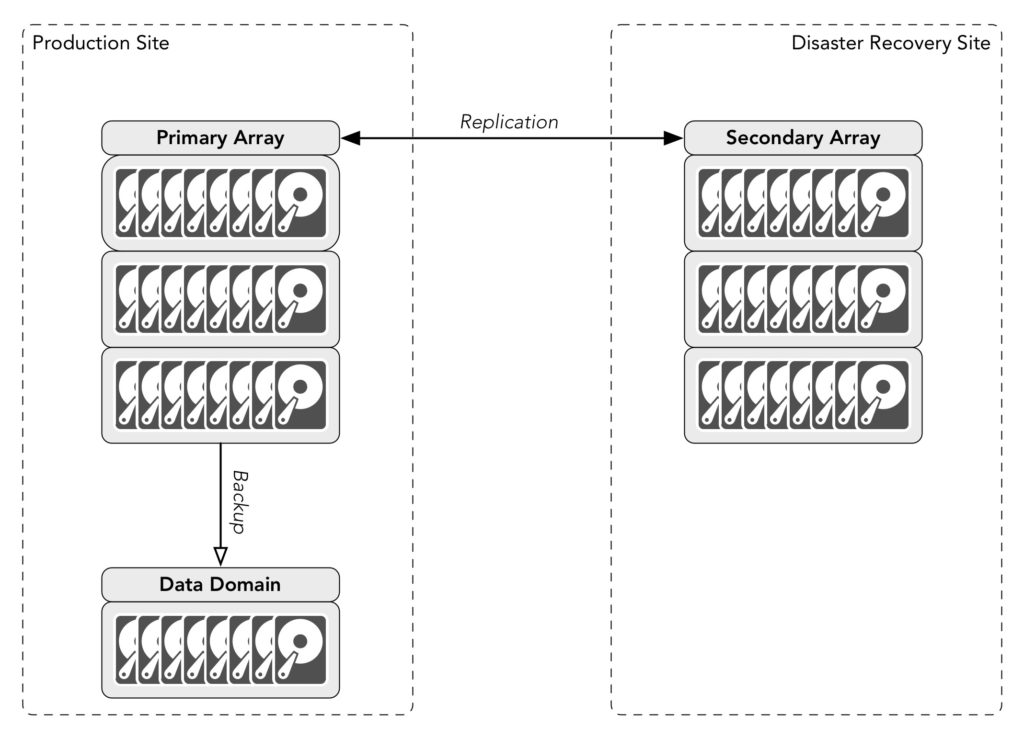
Let’s say we’ve got two sites, production and disaster recovery, and for the sake of simplicity, a single SAN at each site. The two SANs replicate between one another. Backups are taken at one of the sites – in this example, the production site. There’s no duplication of the backups.

Replication is definitely a form of data protection, but its primary purpose is to provide a degree of fault tolerance – not true fault tolerance of course (that requires more effort), but the idea is that if the primary array is destroyed, there’s a copy of the data on the secondary array and it can take over production functions. Replication can also factor into maintenance activities – if you need to repair, update or even replace the primary array, you can failover operations to the secondary array, work on the primary, then fail back when you’re ready.

In the world of backups there’s an old saying however: nothing corrupts faster than a mirror. The same applies to replication…

“Ahah!”, some interject at this point, “What if the replication is asynchronous? That means if corruption happens in the source array we can turn off replication between the arrays! Problem solved!”

Over a decade ago I met an IT manager who felt the response to a virus infecting his network would be to have an operator run into the computer room and use an axe to quickly chop all the network connections away from the core switches. That might actually be more successful than relying on noticing corruption ahead of asynchronous replication windows and disconnecting replication links.

So if there’s corruption in the primary array that infects the secondary array – that’s no cause for concern, right? After all there’s a backup copy sitting there waiting and ready to be used. The answer is simple – replication isn’t just for minor types of fault tolerance or being able to switch production during maintenance operations, it’s also for those really bad disasters, such as something taking out your datacentre.

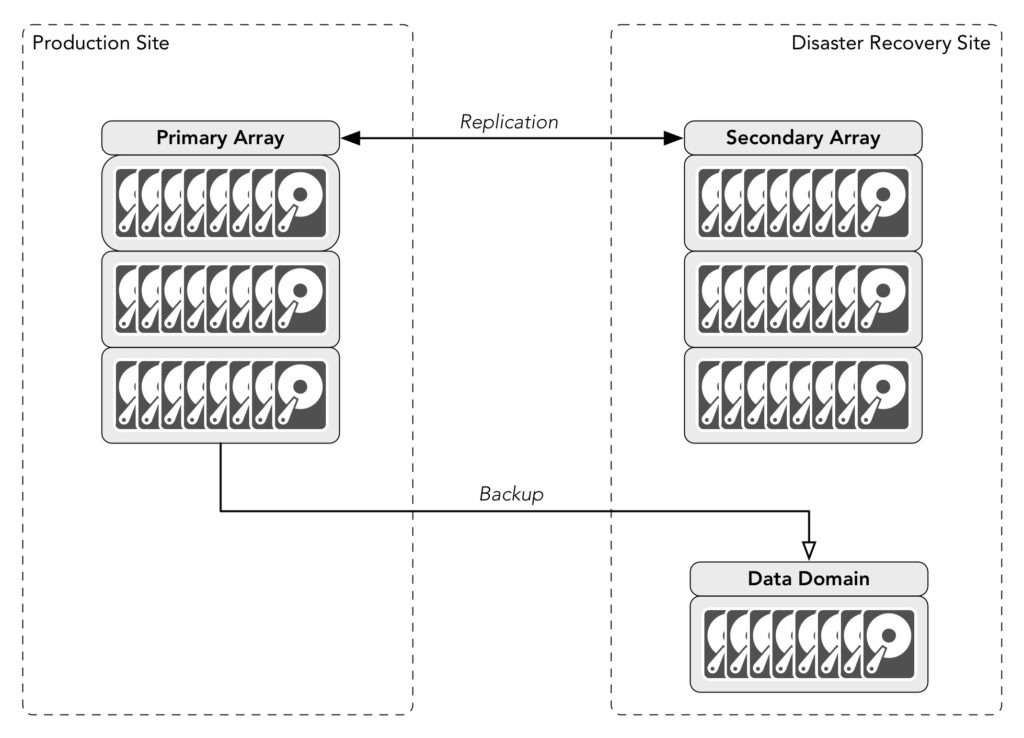
At this point it’s common to ‘solve’ the problem by moving the backups onto the secondary site (even if they run cross-site), creating a configuration like the following:

Replication, cross site backup

The thinking goes like this: if there’s a disaster at the primary site, the disaster recovery site not only takes over, but all our backups are there waiting to be used. If there’s a disaster at the disaster recovery site instead, then no data has been lost because all the data is still sitting on the production array.

Well, in only one very special circumstance: if you only need to keep backups for one day.

Backups typically offer reasonably poor RPO and RTO compared to things like replication, continuous data protection, continuous availability, snapshots, etc. But they do offer historical recoverability often essential to meet compliance requirements. Having to provide a modicum of recoverability for 7 years is practically the default these days – medical organisations typically have to retain data for the life of the patient, engineering companies for the lifespan of the construction, and so on. That’s not all backups of course – depending on your industry you’ll likely generate your long term backups either from your monthlies or your yearlies.

Aside: The use of backups to facilitate long term retention is a discussion that’s been running for the 20 years I’ve been working in data protection, and that will still be going in a decade or more. There are strong, valid arguments for using archive to achieve long term retention, but archive requires a data management policy, something many companies struggle with. Storage got cheap and the perceived cost of doing archive created a strong sense of apathy that we’re still dealing with today. Do I agree with that apathy? No, but I still have to deal with the reality of the situation.

So let’s revisit those failure scenarios again that can happen with off-site backups but no backup duplication:

  • If there’s a disaster at the primary site, the disaster recovery site takes over, and all backups are preserved
  • If there’s a disaster at the secondary site, the primary site is unaffected but the production replica data and all backups are lost: short term operational recovery backups and longer term compliance/legal retention backups

Is that a risk worth taking? I had a friend move interstate recently. The day after he moved in, his neighbour’s house burnt down. The fire spread to his house and destroyed most of his possessions. He’d been planning on getting his contents insurance updated the day of the fire.

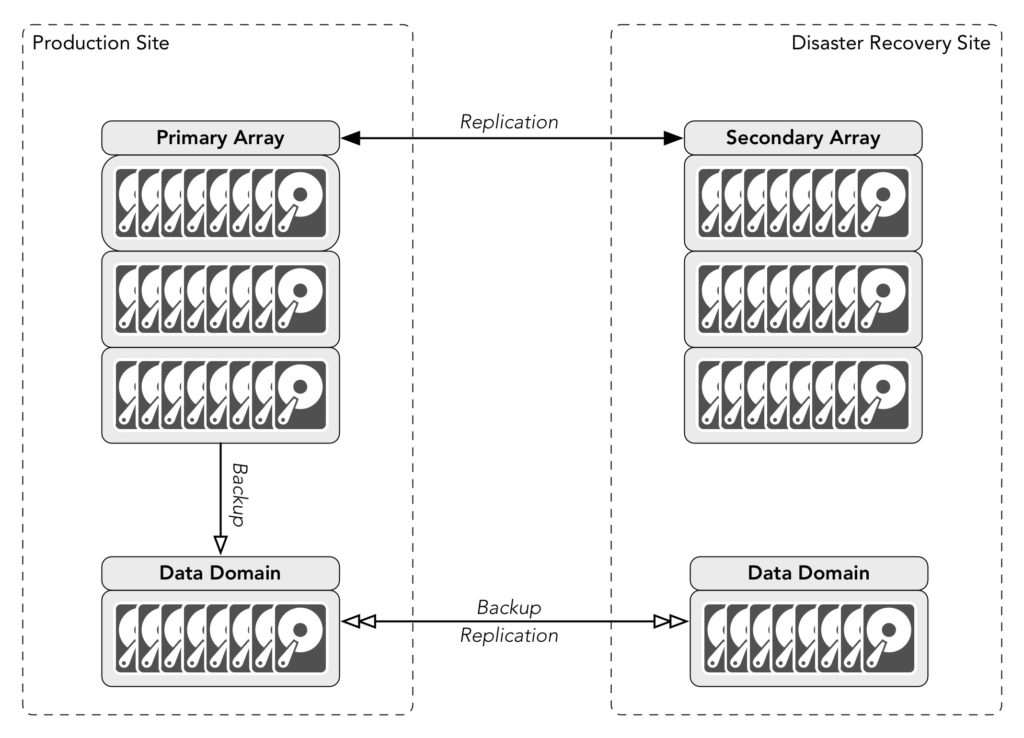
Bad things happen. Taking the risk that you won’t lose your secondary site isn’t really operational planning, it’s casting your fate to the winds and relying on luck. The solution below though doesn’t rely on luck at all:

Replication and Duplicated Backups

There’s undoubtedly a cost involved; each copy of your data has a tangible cost regardless of whether that’s a primary copy or a secondary copy. Are there some backups you won’t copy? That depends on your requirements: there may for instance be test systems you need to backup, but there’s no need to have a secondary copy of them, but such decisions still have to be made on a risk vs cost basis.

Replication is all well and good, but it’s not a get-out-of-gaol card for avoiding cloned backups.

29 May 18:53

Amazon IoT Button Hacking: Part 1

by Martin Valencia
EMC logo

dash2 dash1

Purpose

I am working on the steps to grab the firmware from the Amazon IoT button and flash it onto the $5 DASH Buttons (think Tide/Cottenelle/Ziploc). There are a few really good existing articles that detail the steps, but I had some difficulty getting started. To be fair, the articles are great, but I am a complete newbie to things like:

  • OpenOCD – Open On-Chip Debugger (openocd.org)
  • ST-Link – (STM32 Microprocessor discovery programmer)
  • STM32 microcontroller (Brain for the DASH)
  • Soldering super tiny DASH connections resulting in a hardware bricked IoT button (hence no firmware) and one $5 Ziploc button.


So, with that said, here are the steps I used to get everything setup to successfully flash the firmware on the $5 buttons…


Why snag the firmware?

The Amazon Web Services (AWS) IoT firmware version of the DASH button lets you interface with Amazon Web Services like DynamoDB, Lambda, etc. During the configuration, the firmware allows you to upload a public/private key set that enables communication with the AWS IoT service. The $5 version runs the same v1.0 hardware, so if we can get the IoT firmware, we should be able to make the $5 versions act like the more expensive $20 IoT button.


There have been a lot of really great articles detailing the tear down and internals of Amazon’s DASH button as well as flashing the firmware. These should get you up to speed with what were are doing here:


Resources:

  1. Great article and copy of the Cottenelle firmware. Useful if you brick your device (like me) https://github.com/dekuNukem/Amazon_Dash_Button/
  2. Adafruit’s article is one of the best for getting started. Details DASH hardware, and setting up a Vagrant VM to compile your own code against the DASH. It also provides instructions for reviving a bricked DASH. (https://learn.adafruit.com/dash-hacking-bare-metal-stm32-programming/overview) Vagrant may be the way to go, but in this article I am using standalone tools.
  3. OpenOCD Flash Commands for unlocking firmware/querying DASH flash (http://openocd.org/doc/html/Flash-Commands.html)


Hardware:


Check out Adafruit’s article on soldering the connections. Once you have that done, it should look something like this:

image1

Now you are ready to get OpenOCD and the ST-Link utility going.

BATTERY NOTE: I couldn’t find any clear documentation, but I have to DISCONNECT the battery to successfully connect with OpenOCD.

VCC 3.3 NOTE: Although the ST-Link v2 programmer has a 3.3v pin and ground, I found references stating that it would mess up the SWCLK. So, I only used (3) of the pins on the programmer (shown below) and connected and external 3.3v source:

image2

Programming Tools

Windows ST-Link Utility

ST-Link Connectivity Notes:

  1. Cannot read memory! Disable Read Out Protection and retry

See the ‘Unlock STM32 Flash’ note in the OpenOCD Section.

image3


Linux OpenOCD

  • Newbie Note: Connects to device, then lets you telnet to OpenOCD and interact with the device.
  • This tool can do what the ST-Link utility did, but most importantly, has the ‘stm32f2x unlock 0’ firmware command to unlock the DASH firmware.
  • Ubunutu NOTE: I had to download and install OpenOCD 0.9 to get this to work. The version installed with ‘apt-get install openocd’ was version 0.7. Unfortunately, it seems that some of the stm32 commands aren’t supported. I received this error: invalid command name ‘jtag_ntrst_delay’

image4

  • Once I pulled down the binary, I ran the following:
    • sudo mkdir -p /opt/gnuarmeclipse
    • cd /opt/gnuarmeclipse
    • sudo tar xvf ~/Downloads/gnuarmeclipse-openocd-debian64-0.9.0-201505190955.tgz

OpenOCD Connectivity Notes:

Connecting with OpenOCD.

  1. Move to the ‘/opt/gnuarmeclipse/openocd/0.9.0-201505190955/bin’ directory
  2. Connect to the device using the following command
  • sudo ./openocd –f ../scripts/interface/stlink-v2.cfg –f ../script/target/stm32f2x.cfg
  1. Now you can establish a telnet session to the OpenOCD process which will let you interact with the device

Here is a successful connection attempt with OpenOCD

image5

Telnet to the OpenOCD process to access the On-Chip Debugger.

This will let you interact with the DASH microcontroller

  1. Launch a separate terminal window. Now that openocd is running (see connecting above), you can ‘telnet localhost 4444’.

Here is a successful telnet connection

image5

  1. Now run the following commands to view the device details
  • Run ‘flash banks’ command

image6

Run ‘stm32f2x unlock num’  to unlock flash contents

  • Reboot for the unlock to take effect. To reboot run ‘reset init’


Once the device reboots, OpenOCD should automatically reconnect. You may have to relaunch the telnet session.


Unlocked Firmware Status

 image8

Dump Firmware Using OpenOCD

Run the following:

  1. flash list
  2. flash probe 0
  3. flash banks

image9

Note the size is 0x00100000 (That’s 1024KB, the size of the flash)

Run:

dump_image dash_fw.bin 0x0 0x100000.

I also tried to use the location 0x08000000.

Empty Firmware Dump: In both cases, the firmware I dump was empty. This may be due to disabling the flash protection. If you know how to disable the protection bit and recover the flash, please leave a comment.

image10

This dumps the firmware to the local directory you ran the openocd command from.

image11

Unlock STM32 Flash (This unlocks the flash, but may wipe the firmware)

image12

Next Steps and challenges

  1. [Need to unlock firmware without overwriting] During the STM32 flash unlock process, I found the source firmware unreadable. In the ST-Link utility it appears as ASCI character 152 (ÿ). I have not been able to find a way to disable the memory protection, and also save the firmware. It is possible (see the Cottenelle firmware retrieved here: https://github.com/dekuNukem/Amazon_Dash_Button/)
  2. [3D Printers] Ok, so after soldering about (4) buttons, I am getting better at it. The problem is, it’s time consuming and likelihood of turning it into a paper weight is high. I want to create a 3D printable model where you can insert header pins that will make contact with the (5) pins required to flash the DASH. Checkout Adafruit’s article above for more detail, but the basic pins are (SWCLK,SWDATA,Vcc 3.3, Reset, Ground). Here is a link to the image.(https://learn.adafruit.com/assets/27092) Also, not sure why, but someone created a fake DASH button on Thingiverse. We may be able to use this model to start: http://www.thingiverse.com/thing:766551/#files

Help!

Ok, so I need your help. In order to make Part 2 of this series, I need someone to continue where I left off. If anyone has successfully pulled the firmware and cares to share, please leave a comment below, or hit me up @ubergiek.

29 May 18:07

SQL Server 2016 features: R services

by Gail

One of the more interesting features in SQL 2016 is the integration of the R language.

For those who haven’t seen it before, R is a statistical and data analysis language. It’s been around for ages, and has become popular in recent years.

R looks something like this (and I make no promises that this is well-written R). Taken from a morse-code related challenge

MessageLetters <- str_split(Message, "")

MessageEncoded <- list(1:length(MessageLetters))

ListOfDots <- lapply(lapply(c(MaxCharacterLength:1), function(x) rep.int(".", times = x)), function(x) str_c(x, collapse=''))
ListOfDashes <- lapply(lapply(c(MaxCharacterLength:1), function(x) rep.int("-", times = x)), function(x) str_c(x, collapse=''))

If you’re interested in learning R, I found the Learning R book to be very good.

SQL 2016 offers the ability to run R from a SQL Server session. It’s not that SQL suddenly understands R, it doesn’t. Instead it can call out to the R runtime, pass data to it and get data back

Installing the R components are very easy.

2016-05-23_09-39-43

And there’s an extra licence to accept.

2016-05-23_09-44-48

It’s worth noting that the pre-installed Azure gallery image for RC3 does not include the R services. Whether the RTM one will or not remains to be seen, but I’d suggest installing manually for now.

Once installed, it has to be enabled with sp_configure.

EXEC sp_configure 'external scripts enabled', 1
RECONFIGURE

It’s not currently very intuitive to use. The current way R code is run is similar to dynamic SQL, with the same inherent difficulties in debugging.

EXEC sp_execute_external_script
  @language = N'R',
  @script = N'data(iris)
    OutputDataSet <- head(iris)'
  WITH RESULT SETS (([Sepal.Length] NUMERIC(4,2) NOT NULL, [Sepal.Width] NUMERIC(4,2) NOT NULL, [Petal.Length] NUMERIC(4,2) NOT NULL, [Petal.Width]  NUMERIC(4,2) NOT NULL, [Species] VARCHAR(30)));
go

It’s possible to pass data in as well, using a parameter named @input_data_1 (there’s no @input_data_2) and from what I can tell from the documentation @parameter1, which takes a comma-delimited list of values for parameters defined with @params. There’s no examples using these that I can find, so it’s a little unclear how they precisely work.

See https://msdn.microsoft.com/en-us/library/mt604368.aspx and https://msdn.microsoft.com/en-us/library/mt591993.aspx for more details.

It’s not fast. The above piece of T-SQL took ~4 seconds to execute. This is on an Azure A3 VM. Not a great machine admittedly, but the R code, which just returns the first 6 rows of a built-in data set, ran in under a second on my desktop. This is likely not something you’ll be doing as part of an OLTP process.

I hope this external_script method is temporary. It’s ugly, hard to troubleshoot, and it means I have to write my R somewhere else, probably R Studio, maybe Visual Studio, and move it over once tested and working. I’d much rather see something like

CREATE PROCEDURE GetIrisData
  WITH Language = 'R' -- or USQL or Python or …
  AS
…
GO

Maybe in SQL Server 2020?

29 May 18:06

Slide decks and PASS Summit: About Me Slides

by Karen Lopez

Karen Lopez About Me Slide

I’ve been extremely lucky to have my sessions selected for speaking at PASS Summits for 4 of the last 5 years.  One year all my topics (data modeling and database design) were deemed to be “off-topic” for the Summit crowd. The good news I still got to speak because each of the two founding organizations (Microsoft and CA) let me use one of their slots or co-presented with me on the topics of database architectures and designs.

One of the outcomes of speakers using their community slots to do sales from the podium is that this event now has a rule that your slide deck can have only one mention of your name and our company.  Yes, because people were being overly focused on what they could get out of the crowd instead of sharing knowledge with attendees, the rest of the speakers and attendees have to feel pain.

Win-Win

I’m proposing that we allow speakers to put a form of their About Me slide at both the beginning and the end of a slide deck.  Yup. Just one more slide.

The first About Me slide is to establish a the speaker’s credibility on the subject, plus to disclose any potential conflicts of interest the speaker might have. Speaker works for a vendor? Check. Speaker wrote a book on this? Check. Speaker is a data architect and not a DBA? Check.

Note that having a potential conflict of interest on a topic isn’t necessarily a bad thing.  It’s just a disclosure, not a confession.  In the past, when InfoAdvisors partnered with vendors, that would be on my About Me slide for presentations about data modeling, because I had partner agreements with most of the data modeling tool vendors.  We don’t have partner agreement any longer, but we do work with data modeling tool vendors.

When I speak in vendor-hosted slots, I’m careful to explain to attendees that they are in a paid speaking session and I disclose why I’m there and whether or not I was compensated to be there.  In the Summit year I spoke in vendor slots, I wasn’t compensated other than to get a spot via means other than the program committee.

The second About Me slide, at the end of the deck, plays the role of "Okay, I just talked with you for an hour about something I’m passionate about. If you’d like to talk more about it, or if you have problems with my demos, or if you have a question you want to ask me, here’s how to reach me.

For me, this isn’t just the norm for all events, it’s etiquette as well. 

Some speakers in the community have said “but all the attendees know who we are”.  No, no they don’t.  Celebrity is a bit overrated here. 

Regulation is Born from Bad Behaviours

I think it’s odd our community has a rule that keeps us from doing the second slide. I know the rule came from speakers who were overly sales-y in their talks. That’s what makes me sad about the other discussions I blogged about yesterday. Bad behaviour by sales-focused speakers ruins the experience for attendees at the event and for years after.

Bad behaviour by sales-focused speakers ruins the experience for attendees at the event and for years after.

If we started collecting data from attendees about how promotional speakers were in their sessions, that would be a much better indicator of whether or not sales was happening from the podium.  At EDW for the last several years, the attendee survey asks people:

“Was the speaker too "commercial?"  i.e. did he/she seem to be selling their own product / services / book / etc.?”

It’s a simple Yes/No question.  The measure is reported back to the speaker and the event organizers.  The overall conference evaluation asks for the attendees to list the speakers who were overly sales focused during the event. I think that’s a great question to ask the community. This data is much more likely than the ban on mentioning your name more than once in an hour to indicate whether or not the speaker is there to sell you his or her stuff.

One of the reasons decks have to be submitted for review at Summit is so that dozens of volunteers can scour the slides for mentions of the speaker’s name or company.  That isn’t really a value add for attendees, yet we do it because people have been overly focused on selling their products or services instead of the community. We’ve incurred a huge cost (in volunteer hours) to enforce this and some other less important things AND added months to gap between slide preparations and presentation time. This leads to pain for both the speakers and the audience.

Speakers break this rule all the time.  Some get called out, some don’t. We basically have a rule that is unevenly enforced and silly. It’s time to change this rule. 

It has been five years I’ve been asking for our community to change this rule. I believe I’ve followed it every time I’ve presented at Summit. There may be a time when the last slide from having given the presentation before has stayed in the deck, but I really want to follow the rules. So now after 5 years of emails and chats, I’ve blogged about my idea for win-win solution in hopes that other community folks will say “yes, I think that’s a good idea”.

Make it Right

We should be asking attendees of sessions and in the overall conference evaluation if a speaker spent too much time selling his blog, his books, his services or his products. We should allow two slides about the speaker in a slide deck.  These two changes to our rules will benefit attendees and speakers. These changes are win-win.

29 May 18:06

Proper Use of Social Media

by andyleonard
This has come up a couple times (as in twice ) over the past couple years, so I thought I’d put the question to my loyal readers (both of you, Hi Mom!) and see what you think. What’s the proper way to use social media? I don’t want to limit the conversation...(read more)
29 May 18:05

SQL Server 2016 ‘It Just Runs Faster’

by SQLMaster

Tweet


It will need guts to release such a statement, that too announcement about SQL Server 2016 – it just runs faster. Not a simple statement for marketing purpose, but real-world improvements and hard-work efforts made the new version 2016 as big as previous versions.

What it means to the product team in Microsoft that both CSS and Development teams come together to focus a deep-dive assessment on scalability and performance features with a real world testing patterns.

Just to showcase highlights on feature improvement, have a look at this image below:

2016-runsfaster highights

Highlights of SQL Server 2016 key improvements

So to go about further details on these key enhancements PSSQL contributed a blog series on the subject matter, make sure you go through each of them to see how best SQL Server 2016 can help in your data platform needs.

For DBAs the key areas will be DBCC, TEMPDB enhancements, Availability Groups compression, InMemory optimized checkpoint and delay start of MSDTC, many more as well.

The blog posts are as follows:


On 25th May I had an opportunity to moderate and veiw few sessions about SQL Server 2016 in 24HOP  event (see #24HOP twitter hashtag feed for further information). The session I was involved as a moderator was SQL Server 2016 Just Works Faster – Performance Improvements in Database Core Engine session.

If you haven’t done so far then make sure to register to attend:  SQL Server Launch 2016 Discovery Day (03/06/2016)– Edinburgh, Scotland

Happy learning!


29 May 18:05

Tips for Making the Most of Big Data at a Small Business

by A.R. Guess

by Angela Guess Pratik Dholakiya writes in SmallBizTrends, “Big data and business intelligence (BI) used to be only for enterprise companies. Now, however, thanks to the software as a service (SaaS) revolution, even small businesses can afford to track and tap into a wealth of information. However, becoming a data-driven small business isn’t easy. Because […]

The post Tips for Making the Most of Big Data at a Small Business appeared first on DATAVERSITY.

29 May 18:05

Oracle Launching Version 4.0 of Its NoSQL Database

by A.R. Guess

by Angela Guess Joyce Wells reports in Database Trends and Applications, “Oracle is introducing a major new release of its NoSQL database – version of 4.0. First unveiled in 2011, the Oracle NoSQL Database is a key-value database that evolved from the company’s acquisition of BerkeleyDB Java Edition, a mature, high-performance embeddable database. While Oracle […]

The post Oracle Launching Version 4.0 of Its NoSQL Database appeared first on DATAVERSITY.

29 May 18:05

Improved Support for Parallel Statistics Rebuilds

by Jonathan Kehayias

One of the great ways to learn about bugs in SQL Server is to read through the release notes for Cumulative Updates and Service Packs when they come out. However, occasionally this is also a great way to learn about enhancements to SQL Server as well.

Cumulative Update 6 for SQL Server 2014 Service Pack 1 introduced a new trace flag, 7471, that changes the locking behavior of UPDATE STATISTICS tasks in SQL Server (see KB #3156157). In this post we’ll look at the difference in locking behavior and where this trace flag might be useful.

To set up an appropriate demo environment for this post, I used the AdventureWorks2014 database and created an enlarged version SalesOrderDetail table based on the script available on my blog. The SalesOrderDetailEnlarged table was enlarged to 2GB in size so that UPDATE STATISTICS WITH FULLSCAN operations could be executed against different statistics on the table concurrently. I then used Adam Machanic’s sp_whoisactive script to examine the locks being held by both sessions.

Behavior without TF 7471

The default behavior of SQL Server requires an exclusive lock (X) on the OBJECT.UPDSTATS resource for the table whenever an UPDATE STATISTICS command is executed against a table. You can see this in the sp_whoisactive output for two concurrent executions of UPDATE STATISTICS WITH FULLSCAN against the Sales.SalesOrderDetailEnlarged table, using different index names for the statistics to update. This results in blocking of the second execution of the UPDATE STATISTICS until the first execution completes.

UPDATE STATISTICS [Sales].[SalesOrderDetailEnlarged]
    ([PK_SalesOrderDetailEnlarged_SalesOrderID_SalesOrderDetailID]) WITH FULLSCAN;
<Object name="SalesOrderDetailEnlarged" schema_name="Sales">
      <Locks>
        <Lock resource_type="METADATA.INDEXSTATS" 
              index_name="PK_SalesOrderDetailEnlarged_SalesOrderID_SalesOrderDetailID" 
              request_mode="Sch-S" request_status="GRANT" request_count="2" />
        <Lock resource_type="METADATA.STATS" request_mode="Sch-S" request_status="GRANT" request_count="1" />
        <Lock resource_type="OBJECT" request_mode="Sch-S" request_status="GRANT" request_count="2" />
        <Lock resource_type="OBJECT.UPDSTATS" request_mode="X" request_status="GRANT" request_count="1" />
      </Locks>
    </Object>
UPDATE STATISTICS [Sales].[SalesOrderDetailEnlarged]
    ([IX_SalesOrderDetailEnlarged_ProductID]) WITH FULLSCAN;
<Object name="SalesOrderDetailEnlarged" schema_name="Sales">
      <Locks>
        <Lock resource_type="METADATA.INDEXSTATS" 
              index_name="PK_SalesOrderDetailEnlarged_SalesOrderID_SalesOrderDetailID" 
              request_mode="Sch-S" request_status="GRANT" request_count="1" />
        <Lock resource_type="OBJECT" request_mode="Sch-S" request_status="GRANT" request_count="1" />
        <Lock resource_type="OBJECT.UPDSTATS" request_mode="X" request_status="WAIT" request_count="1" />
      </Locks>
    </Object>

The granularity of the lock resource being on OBJECT.UPDSTATS prevents concurrent updates of multiple statistics against the same table. Hardware enhancements in recent years have really changed the potential bottlenecks that are common to SQL Server implementations, and just as changes have been made to DBCC CHECKDB to make it run faster, changing the locking behavior of UPDATE STATISTICS to allow concurrent updates of statistics on the same table can significantly reduce maintenance windows for VLDBs, especially where there is sufficient CPU and I/O subsystem capacity to allow concurrent updates to happen without impacting end-user experiences.

Behavior with TF 7471

The locking behavior with trace flag 7471 enabled changes from requiring an exclusive lock (X) on the OBJECT.UPDSTATS resource to requiring an update lock (U) on the METADATA.STATS resource for the specific statistic that is being updated, which allows concurrent executions of UPDATE STATISTICS on the same table. The output of sp_whoisactive for the same UPDATE STATISTICS WITH FULLCAN commands with the trace flag enabled is shown below:

UPDATE STATISTICS [Sales].[SalesOrderDetailEnlarged]
    ([PK_SalesOrderDetailEnlarged_SalesOrderID_SalesOrderDetailID]) WITH FULLSCAN;
<Object name="SalesOrderDetailEnlarged" schema_name="Sales">
      <Locks>
        <Lock resource_type="METADATA.INDEXSTATS" 
              index_name="PK_SalesOrderDetailEnlarged_SalesOrderID_SalesOrderDetailID" 
              request_mode="Sch-S" request_status="GRANT" request_count="2" />
        <Lock resource_type="METADATA.STATS" request_mode="U" request_status="GRANT" request_count="1" />
        <Lock resource_type="OBJECT" request_mode="Sch-S" request_status="GRANT" request_count="2" />
      </Locks>
    </Object>
UPDATE STATISTICS [Sales].[SalesOrderDetailEnlarged]
    ([IX_SalesOrderDetailEnlarged_ProductID]) WITH FULLSCAN;
<Objects>
    <Object name="SalesOrderDetailEnlarged" schema_name="Sales">
      <Locks>
        <Lock resource_type="METADATA.INDEXSTATS" 
              index_name="IX_SalesOrderDetailEnlarged_ProductID" 
              request_mode="Sch-S" request_status="GRANT" request_count="2" />
        <Lock resource_type="METADATA.INDEXSTATS" 
              index_name="PK_SalesOrderDetailEnlarged_SalesOrderID_SalesOrderDetailID" 
              request_mode="Sch-S" request_status="GRANT" request_count="2" />
        <Lock resource_type="METADATA.STATS" request_mode="U" request_status="GRANT" request_count="1" />
        <Lock resource_type="OBJECT" request_mode="Sch-S" request_status="GRANT" request_count="2" />
      </Locks>
    </Object>

For VLDBs, which are becoming much more common place, this can make a big difference in the time it takes to perform statistics updates across a server.

I recently blogged about a parallel maintenance solution for SQL Server using Service Broker and Ola Hallengren’s maintenance scripts as a way to optimize nightly maintenance tasks and reduce the time required to rebuild indexes and update statistics on servers that have plenty of CPU and I/O capacity available. As a part of that solution, I forced an order of queuing tasks to Service Broker to try and avoid having concurrent executions against the same table for both index rebuild/reorganize and UPDATE STATISTICS tasks. The aim of this was to keep the workers as busy as possible until the end of the maintenance tasks, where things would serialize in execution based on blocking of concurrent tasks.

I did some modifications to the processing in that post to just test the effects of this trace flag with concurrent statistics updates only, and the results are below.

Testing Concurrent Statistics Update Performance

To test the performance of only updating statistics in parallel using the Service Broker configuration, I started out by creating a column statistic on every column in the AdventureWorks2014 database using the following script to generate the DDL commands to be executed.

USE [AdventureWorks2014]
GO
 
SELECT *, 'DROP STATISTICS ' + QUOTENAME(c.TABLE_SCHEMA) + '.' 
  + QUOTENAME(c.TABLE_NAME) + '.' + QUOTENAME(c.TABLE_NAME 
  + '_' + c.COLUMN_NAME) + ';
GO
CREATE STATISTICS ' +QUOTENAME(c.TABLE_NAME + '_' + c.COLUMN_NAME) 
  + ' ON ' + QUOTENAME(c.TABLE_SCHEMA) + '.' + QUOTENAME(c.TABLE_NAME) 
  + ' (' +QUOTENAME(c.COLUMN_NAME) + ');' + '
GO'
 FROM INFORMATION_SCHEMA.COLUMNS AS c
INNER JOIN INFORMATION_SCHEMA.TABLES AS t 
    ON c.TABLE_CATALOG = t.TABLE_CATALOG AND 
       c.TABLE_SCHEMA = t.TABLE_SCHEMA AND 
       c.TABLE_NAME = t.TABLE_NAME
WHERE t.TABLE_TYPE = 'BASE TABLE'
 AND c.DATA_TYPE <> N'xml';

This is not something that you would typically want to do, but it gives me plenty of statistics for parallel testing of the impact of the trace flag on updating stats concurrently. Instead of randomizing the order in which I queue the tasks to Service Broker, I instead just queue the tasks as they exist in the CommandLog table based on the ID of the table, simply incrementing the ID by one until all of the commands have been queued for processing.

USE [master];
 
-- Clear the Command Log
TRUNCATE TABLE [master].[dbo].[CommandLog];
 
DECLARE @MaxID INT;
SELECT @MaxID = MAX(ID) 
FROM master.dbo.CommandLog;
 
SELECT @MaxID = ISNULL(@MaxID, 1)
 
---- Load new tasks into the Command Log
EXEC master.dbo.IndexOptimize
  @Databases = N'AdventureWorks2014',
  @FragmentationLow = NULL,
  @FragmentationMedium = NULL,
  @FragmentationHigh = NULL,
  @UpdateStatistics = 'ALL',
  @StatisticsSample = 100,
  @LogToTable = 'Y',
  @Execute = 'N';
 
DECLARE @NewMaxID INT
SELECT @NewMaxID = MAX(ID) 
FROM master.dbo.CommandLog;
 
USE	msdb;
 
DECLARE @CurrentID INT = @MaxID
WHILE (@CurrentID <= @NewMaxID)
BEGIN
	-- Begin a conversation and send a request message
	DECLARE @conversation_handle UNIQUEIDENTIFIER;
	DECLARE @message_body XML;
 
	BEGIN TRANSACTION;
 
	BEGIN DIALOG @conversation_handle
		 FROM SERVICE [OlaHallengrenMaintenanceTaskService]
		 TO SERVICE N'OlaHallengrenMaintenanceTaskService'
		 ON CONTRACT [OlaHallengrenMaintenanceTaskContract]
		 WITH ENCRYPTION = OFF;
 
	SELECT @message_body = N'<CommandLogID>'+CAST(@CurrentID AS NVARCHAR)+N'</CommandLogID>';
 
	SEND ON CONVERSATION @conversation_handle
		 MESSAGE TYPE [OlaHallengrenMaintenanceTaskMessage]
		 (@message_body);
 
	COMMIT TRANSACTION;
 
	SET @CurrentID = @CurrentID + 1;
END
 
WHILE EXISTS (SELECT 1 FROM OlaHallengrenMaintenanceTaskQueue WITH(NOLOCK))
BEGIN
	WAITFOR DELAY '00:00:01.000'
END
 
WAITFOR DELAY '00:00:06.000'
 
SELECT DATEDIFF(ms, MIN(StartTime), MAX(EndTime)) FROM master.dbo.CommandLog;
GO 10

Then I waited for all tasks to complete, measured the delta in start time and end time of the task executions, and took the average of ten tests to determine the improvements just for updating statistics concurrently using the default sampling and full scan updates.

Full and sample scan results

The test results show that even with the blocking that occurs under the default behavior without the trace flag, sampled updates of statistics runs 6% faster and full scan updates run 16% faster with five threads processing the tasks queued to Service Broker. With trace flag 7471 enabled, the same sampled updates of statistics runs 38% faster and full scan updates run 45% faster with five threads processing the tasks queued to Service Broker.

Potential Challenges with TF 7471

As compelling as the test results are, nothing in this world is free and in my initial testing of this I encountered some issues with the size of the VM that I was using on my laptop that created workload problems.

I originally was testing parallel maintenance using a 4vCPU VM with 4GB RAM that I setup specifically for this purpose. As I began to increase the number of MAX_QUEUE_READERS for the activation procedure in Service Broker I began to encounter issues with RESOURCE_SEMAPHORE waits when the trace flag was enabled, allowing parallel updates of statistics on the enlarged tables in my AdventureWorks2014 database due to the memory grant requirements for each of the UPDATE STATISTICS commands that were running. This was alleviated by changing the VM configuration to 16GB RAM but this is something to monitor and watch for when performing parallel tasks on larger tables, to include index maintenance, since memory grant starvation will also affect end user requests that may be trying to execute and need a larger memory grant as well.

The product team has also blogged about this trace flag and in their post they warn that deadlock scenarios may occur during concurrent updating of statistics while statistics are also being created. This is not something I have run into yet during my testing, but it is definitely something to be aware of (Kendra Little warns about it too). As a result of that, their recommendation is that this trace flag only is enabled during parallel maintenance task execution and then it should be disabled for normal workload periods.

Enjoy!

The post Improved Support for Parallel Statistics Rebuilds appeared first on SQLPerformance.com.

29 May 18:05

You can upgrade from any version 2005+ to any other version

by Paul Randal

There’s a persistent myth that you cannot upgrade a database to a version more that is more then two versions newer.

It’s not true.

You can backup+restore (safest way) or detach+attach (not a safe way) from SQL Server 2005 (or higher) to any other newer version. You just can’t do an in-place upgrade to the latest version from SQL Server 2005.

I didn’t know this until a few weeks ago, and it’s not common knowledge, hence this short blog post.

Here’s the proof, restoring a SQL Server 2005 database directly to SQL Server 2016, and I tried it successfully on SQL Server 2014 and SQL Server 2012 as well.

SELECT @@VERSION;
GO

RESTORE HEADERONLY FROM DISK = N'C:\SQLskills\SalesDB2005.BAK';
GO
Version
--------------------------------------------------------------
Microsoft SQL Server 2016 (RC3) - 13.0.1400.361 (X64) <snip>

(1 row(s) affected)

<snip> DatabaseName   DatabaseVersion DatabaseCreationDate    <snip>
--------------------------------------------------------------------
       SalesDB        611             2008-08-06 12:47:41.000 
(1 row(s) affected)
RESTORE DATABASE [SalesDB] FROM DISK = N'C:\SQLskills\SalesDB2005.BAK'
WITH MOVE N'SalesDBData' TO N'C:\SQLskills\SalesDBData.mdf',
MOVE N'SalesDBLog' TO N'C:\SQLskills\SalesDBLog.ldf',
REPLACE;
GO
Processed 24480 pages for database 'SalesDB', file 'SalesDBData' on file 1.
Processed 2 pages for database 'SalesDB', file 'SalesDBLog' on file 1.
Converting database 'SalesDB' from version 611 to the current version 852.
Database 'SalesDB' running the upgrade step from version 611 to version 621.
Database 'SalesDB' running the upgrade step from version 621 to version 622.
Database 'SalesDB' running the upgrade step from version 622 to version 625.
Database 'SalesDB' running the upgrade step from version 625 to version 626.
Database 'SalesDB' running the upgrade step from version 626 to version 627.
Database 'SalesDB' running the upgrade step from version 627 to version 628.
Database 'SalesDB' running the upgrade step from version 628 to version 629.

<snip>

Database 'SalesDB' running the upgrade step from version 845 to version 846.
Database 'SalesDB' running the upgrade step from version 846 to version 847.
Database 'SalesDB' running the upgrade step from version 847 to version 848.
Database 'SalesDB' running the upgrade step from version 848 to version 849.
Database 'SalesDB' running the upgrade step from version 849 to version 850.
Database 'SalesDB' running the upgrade step from version 850 to version 851.
Database 'SalesDB' running the upgrade step from version 851 to version 852.
RESTORE DATABASE successfully processed 24482 pages in 0.142 seconds (1346.892 MB/sec).

Very cool! This is going to make upgrading some of our clients a lot easier.

Also, remember that upgrading is a one-way operation. You absolutely cannot take the database and attach or restore it to an older version of SQL Server.

Some Microsoft links around this:

Enjoy!

The post You can upgrade from any version 2005+ to any other version appeared first on Paul S. Randal.

29 May 18:04

Operating System Requirements for all SQL Server Versions and Editions

by Artemakis Artemiou [MVP]
SQL Server is the world's most powerful data platform and it is constantly evolving. From release to release significant new features are added. Besides the features and functionality, one of the typical question DBAs have is which are the Operating System requirements for each version and edition of SQL Server. In this post you can find this information for all versions and editions gathered
29 May 18:02

Elderly Use More Secure Passwords Than Millennials, Says Report

by BeauHD
An anonymous reader writes from a report via Quartz: A report released May 24 by Gigya surveyed 4,000 adults in the U.S. and U.K. and found that 18- to 34-year-olds are more likely to use bad passwords and report their online accounts being compromised. The majority of respondents ages 51 to 69 say they completely steer away from easily cracked passwords like "password," "1234," or birthdays, while two-thirds of those in the 18-to-34 age bracket were caught using those kind of terms. Quartz writes, "The diligence of the older group could help explain why 82% of respondents in this age range did not report having had any of their online accounts compromised in the past year. In contrast, 35% of respondents between 18 and 34 said at least one of their accounts was hacked within the last 12 months, twice the rate of those aged 51 to 69."

Share on Google+

Read more of this story at Slashdot.

29 May 18:01

HPE To Spin Out Its Huge Services Business, Merge It With CSC

by BeauHD
itwbennett writes from a report via CIO: Hewlett-Packard Enterprise announced Tuesday that it will spin off its enterprise services business and merge it with IT services company Computer Sciences Corp. (CSC) to create a company with $26 billion in annual revenue. The services business "accounts for roughly 100,000 employees, or two-thirds of the Silicon Valley giant's workforce," according to the Wall Street Journal. In a statement, HPE CEO Meg Whitman said customers would benefit from a "stronger, more versatile services business, better able to innovate and adapt to an ever-changing technology landscape." Layoffs were not a topic of discussion in Tuesday's announcement, but HPE did say last year they would cut 33,000 jobs by 2018, in addition to the 55,000 job cuts it had already announced. The company also split into two last year, betting that the smaller parts will be nimbler and more able to reverse four years of declining sales.

Share on Google+

Read more of this story at Slashdot.

29 May 17:59

Microsoft and Facebook Building Underwater Transatlantic 'MAREA' Data Cable

by manishs
An anonymous reader writes: On Thursday, Microsoft and Facebook announced a partnership to build a transatlantic subsea data cable. Called 'MAREA' (Editor's note: it is Spanish for "tide"), it will connect the United States to Europe. More specifically, it will connect the State of Virginia to the country of Spain. The project will begin this August, with a targeted completion date of October 2017.Microsoft says: "MAREA will be the highest-capacity subsea cable to ever cross the Atlantic -- featuring eight fiber pairs and an initial estimated design capacity of 160Tbps. The new 6,600 km submarine cable system, to be operated and managed by Telxius, will also be the first to connect the United States to southern Europe: from Virginia Beach, Virginia to Bilbao, Spain and then beyond to network hubs in Europe, Africa, the Middle East and Asia. This route is south of existing transatlantic cable systems that primarily land in the New York/New Jersey region. Being physically separate from these other cables helps ensure more resilient and reliable connections for our customers in the United States, Europe, and beyond." The fact that these two giants felt the need to have their own cables indicates how much data they intend to move. Wired has an in-depth piece on it (though the publication blocks users with adblockers).

Share on Google+

Read more of this story at Slashdot.

29 May 17:52

Feinstein-Burr Encryption Legislation Is Dead In The Water

by BeauHD
An anonymous reader writes from a report via Reuters: After the San Bernardino terrorist attack, key U.S. lawmakers pledged to require technology companies to give law enforcement agencies a "back door" to encrypted communications and electronic devices. Now, the push for legislation is dead only months after the terrorist attack. In April, Senators Richard Burr and Dianne Feinstein released the official version of their anti-encryption bill with hopes for it to pass through Congress. But with the lack of White House support for the legislation as well as the high-profile court case between Apple and the Justice Department, the legislation will likely not be introduced this year, and even if it were, it would stand no chance of advancing, said sources familiar with the matter. "The short life of the push for legislation illustrates the intractable nature of the debate over digital surveillance and encryption, which has been raging in one form or another since the 1990s," reports Reuters. Technology companies believe security would be undermined if it were to create a "back door" for law enforcement, while law enforcement agencies believe they need to monitor phone calls, emails, text messages and encrypted data in general for security purposes.

Share on Google+

Read more of this story at Slashdot.

29 May 17:48

Op-ed: Oracle Attorney Says Google's Court Victory Might Kill the GPL

by manishs
Annette Hurst, an attorney at Orrick, Herrington & Sutcliffe who represented Oracle in the recent Oracle v. Google trial, has written an opinion piece for Ars Technica in which she urges developers and creators to not celebrate Google's win in the hard-fought copyright case as the decision -- if remains intact -- is poised to make them "suffer" everywhere and also the free software movement itself "now faces substantial jeopardy." As you're aware, in a verdict earlier this week, a federal court announced that Google's Android operating system didn't infringe on Oracle-owned copyrights because its re-implementation of 37 Java APIs is protected by "fair use." Hurst writes: No business trying to commercialize software with any element of open software can afford to ignore this verdict. Dual licensing models are very common and have long depended upon a delicate balance between free use and commercial use. Royalties from licensed commercial exploitation fuel continued development and innovation of an open and free option. The balance depends upon adherence to the license restrictions in the open and free option. This jury's verdict suggests that such restrictions are now meaningless, since disregarding them is simply a matter of claiming "fair use." It is hard to see how GPL can survive such a result. In fact, it is hard to see how ownership of a copy of any software protected by copyright can survive this result. Software businesses now must accelerate their move to the cloud where everything can be controlled as a service rather than software. Consumers can expect to find decreasing options to own anything for themselves, decreasing options to control their data, decreasing options to protect their privacy.

Share on Google+

Read more of this story at Slashdot.

29 May 17:48

Apple CEO Tim Cook: I'd Require All Children To Start Coding In 4th Grade

by EditorDavid
This week Apple CEO Tim Cook argued at Startup Fest Europe that coding should be a 'second language' taught to all children. theodp shares two quotes from a YouTube video. "We fundamentally believe that coding is a language and that just like other languages are required in school, coding should be required in school," Cook stated. "I do think coding is as important-- if not more important -- as the second language that most people learn in today's world," Cook later added... "I would go in and make coding a requirement starting at the fourth or fifth grade, and I would build on that year after year after year...I think we're doing our kids a disservice if we're not teaching them and introducing them in that way." Meanwhile, The Hill reported this week that The Computer Science Education Coalition -- which includes Microsoft, Amazon, Google, Facebook, and dozens of other companies -- hired a fourth "advocacy firm" that specializes in "mobilizing groups of people to influence outcomes...to help convince policymakers to provide money to computer science education for grades K-12," and they're seeking an initial investment of $250 million. I'd be curious to hear what Slashdot readers think about government funding of grade school coding classes.

Share on Google+

Read more of this story at Slashdot.

29 May 17:46

CodeSOD: Data Date Access

by Remy Porter

Perhaps the greatest evil Microsoft ever perpetrated on the world was putting a full-featured IDE on every end user’s desktop: Microsoft Office. Its macro system is a stripped down version of Visual Basic, complete with a UI-building tool, and when used in conjunction with Access, allows anyone to build a database-driven application. Anyone that’s spent enough time in an “enterprise” has probably inherited at least one Access application that was developed but somebody out at a manufacturing plant that magically became “mission critical”. Still, we can’t blame the end users for that.

There’s a special subset of developer though, that when trying to come up with an application that’s easy deploy, chooses Access as their development environment. “It’s already on all the users’ machines,” they say. “We can just put the MDB on a shared drive,” they say. And that’s how Ben gets handed an Access database and told, “figure out why this is so slow?”

The specific Access database Ben inherited was part of a home-brew customer-relationship-management package, which meant most of the queries needed to filter through a database of emails sent to customers. The SQL was already pretty bad, because it ran three times- once for all the emails with a certain timestamp, once for all the emails a minute earlier, and once for all the emails a minute later. Each query also filtered by the from-field, which really killed the performance since 25% of the emails were sent from the same email address- meaning the three queries did the same filtering three times, and Access isn’t exactly all about the optimization of SQL performance.

What really caught Ben’s eye, though, was that the query didn’t use the built in dateadd function to calculate the one minute earlier/later rule. It used a custom-defined timeAdjust function.

' This function takes a time and returns a rounded time.  If an adjustment
' has been given (+1 or -1 minute) then the time is increased or
' decreased by one minute.  Seconds are zeroed during the process and
' are only included in the returned time is the blSeconds flag is
' true.
Function timeAdjust(varTime, intAdjust As Integer, blSeconds As Boolean) As String
    Dim strHours
    Dim strMins
    Dim strSecs

    ' Get parts of the time
    strHours = Format(varTime, "hh")
    strMins = Format(varTime, "nn")
    strSecs = Format(varTime, "ss")

    ' Adjust time as required
    If intAdjust = 1 Then
        If strMins = "59" Then
            strMins = "00"
            If strHours = "23" Then
                strHours = "00"
            Else
                strHours = strHours + 1
                If Len(strHours) = 1 Then
                    strHours = "0" & strHours
                End If
            End If
        Else
            strMins = strMins + 1
            If Len(strMins) = 1 Then
                strMins = "0" & strMins
            End If
        End If
    End If

    If intAdjust = -1 Then
        If strMins = "00" Then
            strMins = "59"
            If strHours = "00" Then
                strHours = "23"
            Else
                strHours = strHours - 1
                If Len(strHours) = 1 Then
                    strHours = "0" & strHours
                End If
            End If
        Else
            strMins = strMins - 1
            If Len(strMins) = 1 Then
                strMins = "0" & strMins
            End If
        End If
    End If

    ' Rebuild time
    If blSeconds Then
        timeAdjust = strHours & ":" & strMins & ":00"
    Else
        timeAdjust = strHours & ":" & strMins
    End If

    Exit Function
ErrHandler:
    GenericADOErrHandler "clsADOTeamTallies - timeAdjust"
End Function

After a lengthy campaign, Ben received permission to re-implement the application in C# with a real database on the backend. That project was completed and left behind many happy customers.

[Advertisement] Otter allows you to easily create and configure 1,000's of servers, all while maintaining ease-of-use, and granular visibility down to a single server. Find out more and download today!
29 May 17:40

CodeSOD: The Latest Price

by Remy Porter

Relational Database are a great way to structure data, but they have their warts. Certain kinds of structures don’t model well relationally, some are difficult to tune for performance, and some queries are just expensive no matter what. Still, with some smart design choices, some indexes, and some tuning of the execution plan, you can make things work.

Hambai approached a tuning problem with that perspective. The database had a huge pile of financial information- stock transactions, commodity valuations, and currency exchange rates. When it was new, queries were fast, but now, years on, performance ground to a halt. One query that drew his attention was one for accessing the latest exchange rate for four different currencies. It was run frequently, and each access took up to thirty seconds.

Buried deep in a Postgres stored procedure, Hambai found this:

CREATE LOCAL TEMP TABLE cur_index_temp (
   rate_id INTEGER
);

INSERT INTO cur_index_temp(rate_id) VALUES(1);
INSERT INTO cur_index_temp(rate_id) VALUES(8);
INSERT INTO cur_index_temp(rate_id) VALUES(5);
INSERT INTO cur_index_temp(rate_id) VALUES(6);

FOR trec IN SELECT rate_id FROM cur_index_temp
LOOP
       SELECT INTO l_res.name c1.name || '/' || c2.name
       FROM currency c1 INNER JOIN rates ON (c1.id = rates.curr1_id) INNER JOIN currency c2 ON (c2.id = rates.curr2_id)
  WHERE rates.id = trec.rate_id;

    l_res.url = '/valuten/analysis.php?rid=30&s=&type=1&itemid=' || trec.rate_id::text;

  SELECT INTO l_res.last, l_res.change rates_history.last, rates_history.open
          FROM rates_history
            WHERE rates_history.rate_id = trec.rate_id
         ORDER BY rates_history.chk_time DESC
            LIMIT 1;

        l_res.change = round( CAST(l_res.last - l_res.change AS numeric), 2 );
     RETURN NEXT l_res;
END LOOP;

It wasn’t that the original developer had used loops where a smartly-designed query could have sufficed that bother Hambai. It wasn’t that this block of code was buried deep in a 5,000 line stored procedure that mostly contained dead branches that would never execute. It wasn’t that with millions of records on the rates_history table, and no indexes, the ORDER BY clause was punishingly slow. It was that this particular “algorithm” for data-access was used for all of their time-based pricing data, including stock prices. With all the spaghetti code and general mess, it was easier to rewrite each stored procedure from scratch than it was to try and fix anything.

[Advertisement] Otter enables DevOps best practices by providing a visual, dynamic, and intuitive UI that shows, at-a-glance, the configuration state of all your servers. Find out more and download today!
29 May 17:39

Say "Y" to Indexes

by TJ Mott

Henry was a hotshot developer working on a team that specialized in performance tuning. When other teams in his company had performance problems they couldn’t solve, Henry’s team was called in. Through profiling, analysis of algorithms, and database tuning, his team excelled at turning inefficient, slow, bug-ridden software into applications that actually did real work in a timely manner.

Usually.

Henry was selected to help a customer with issues with a brand-new web application developed by another team in his company. Performance was terrible. Requests often timed out and the server’s CPU typically sat at 100% usage for hours at a time. The server admins had to restart server processes multiple times per day to keep the application running.

several variations on a B-Tree

He met with the lead developer of the other team to discuss their performance woes.

“We’ve combed through every line of code,” the other developer, a young man named Colin, explained. “I don’t think it’s our code’s fault. I think it’s the database, but we already tried switching from MySQL to PostgreSQL and it made no difference.”

After looking at a few profile reports, Henry agreed that something was off with the database. “Who wrote the database layer?”

“Bob did,” Colin replied. “He’s our manager. None of us know anything about SQL so he did all the database work. But he’s on vacation for the next couple weeks.”

“Well, let’s take a look at the customer’s database, see if anything stands out.” After some back-and-forth with the customer, they were able to get a copy of the database in question. It came in at over thirty gigabytes.

Henry cringed when he opened the database up for inspection. The first thing he found was that primary keys and foreign keys did not always use the same datatype. Often, an ID would be a VARCHAR(36) while any foreign keys referencing it would be some other datatype such as NUMERIC, VARBINARY, or even BLOB, and queries were full of casts and other shims to make JOINing possible. For example,

    SELECT * FROM Product
    INNER JOIN Inventory ON CAST(Product.ID as CHAR(36)) = CAST(Inventory.ProductID as CHAR(36))
    WHERE Inventory.Quantity < 100;

Henry explained the concept of foreign keys and JOINs to Colin, then went on to describe how this was a performance problem. “All these casts make MySQL ignore the keys’ indexes and do a much-slower linear search instead. It will help a lot if primary keys and foreign keys use the same datatype.”

Colin nodded as he took notes to pass on to Bob.

Then he noticed that the vast majority of the database’s contents were stored in a table called Audit_Table which was filled with VARCHAR(255) fields. The table was populated by a trigger and it appeared that every single possible user action was logged here. Even page refreshes and button clicks generated entries! The table had over 15 million rows in it, despite the application only being in production for a few days so far. And every single column was indexed.

No wonder it was so slow! Any time a user did anything, an audit record was generated. And since every column was indexed, the application server spent most of its time trying to keep all the indexes updated on a massive 30 GB table.

And then Henry noticed one of the columns was this:

    IsDeletable VARCHAR(255) DEFAULT 'Y'

A not-so-quick “SELECT UNIQUE(IsDeletable) FROM Audit_Table” revealed that every single row had a value of “Y” for this column. Indexing it was a pointless waste of CPU time.

Henry and Colin spent the week trying to fix the database design without breaking things: correcting mismatched datatypes, removing a massive number of unnecessary indexes, and a multitude of other problems that, all added together, easily explained their performance problems. Henry explained everything he did to Colin as he worked, and they committed their fixes to source control late that Friday.

Come Monday he got a panicked email from Colin. It contained a forward originally from Bob who had sent this while on vacation.

To: colin@initech.com
From: bob.the.phb@initech.com
Subject: unauthorized database changes
i noticed you removed indexes. i rolled it back. those are very important for performance, every column must be indexed!!

i locked the schema in source control so no one but me can edit it. you obviously don’t know what you’re doing. i suppose that is my fault for not training your team in database.

we will talk more about this infraction when i return from vacation.

Bob The PHB
Senior Development Manager, Development Teams C - H
bob.the.phb@initech.com
(985) 555–2500
———————————————————
“If I really want to improve my situation, I can work on the one thing over which I have control - myself.” - Stephen Covey
———————————————————
Sent from my BlackBerry

Bob refused to budge on the database design, claiming that indexes always improved performance and the customer was forced to live with it. Several months later, Henry was pulled in again for a different reason. The customer’s server kept running out of disk space, due to the sheer size of the Audit_Table table. It was now measured in terabytes. After some investigation Henry realized that nothing actually used the table and nobody was reporting on this tracking data, so he showed Colin and the customer how to TRUNCATE it to free up disk space. As a happy side effect, the customer realized that the application performed much better after the audit table was truncated and agreed to make a nightly scheduled task out of it, finally defeating the performance-killing audit table indexes.

[Advertisement] Universal Package Manager – store all your Maven, NuGet, Chocolatey, npm, Bower, TFS, TeamCity, Jenkins packages in one central location. Learn more today!
24 May 20:45

Apple, Microsoft and Google Hold 23% Of All US Corporate Cash Outside the Finance Sector

by manishs
An anonymous reader writes: Apple, Microsoft, and Google are the top three cash-rich U.S. companies across all sectors of business, not including banks and other financial institutions -- holding a combined $391 billion in cash as of the end of 2015, or more than 23 percent of the entire $1.68 trillion held by the nation's non-financial corporations. Apple leads the pack with $215.7 billion in cash, followed by Microsoft at $102.6 billion, and Google at $73.1 billion. The numbers are documented in a new report from Moody's Investors Service that shows an unprecedented concentration of cash in the tech sector. For the first time, the top five companies on the Moody's cash ranking are tech companies, with Cisco and Oracle following Apple, Microsoft, and Google. Technology companies overall held $777 billion in cash, or 46 percent of the total cash across all non-financial industries.

Share on Google+

Read more of this story at Slashdot.