Shared posts

01 Jul 14:01

Setting CE TraceFlags on a query-by-query (or session) basis

by Kimberly Tripp

IMPORTANT NOTE: Be sure to read the ENTIRE post as there’s a workaround that QUERYTRACEON is ALLOWED inside of stored procedures… just NOT in an adHoc statement. Not documented but I think this is excellent! There are still some uses of what I’ve written but this specific use is much easier because of this undoc’ed “feature.” :-)

While the new cardinality estimator can offer benefits for some queries, it might not be perfect for ALL queries. Having said that, there is an OPTION clause that allows you to set the CE for that query. The setting to use depends on the CE that you’re running under currently. And, as of SQL Server 2016, even determining this can be difficult. At any given time, there are multiple settings that might affect your CE.

In SQL Server 2014, your CE was set by the database compatibility model. If you’re running with compatibility mode 120 or higher, then you’re using the new CE. If you’re running with compatibility mode 110 or lower, then you’re using the Legacy CE. In SQL Server 2016, the database compatibility mode is not the only setting that can affect the CE that you’re using. In SQL Server 2016, they added ‘database scoped configuations’ and introduced:

ALTER DATABASE SCOPED CONFIGURATION LEGACY_CARDINALITY_ESTIMATION = { ON | OFF | PRIMARY}

Having said that, an administrator can always override this setting by setting one of the CE trace flags globally [using DBCC TRACEON (TF, -1) – but I don’t recommend this!].

To use the LegacyCE when the database is set to the new CE, use Trace Flag 9481.
To use the New CE when the database is set to the LegacyCE, use Trace Flag 2312.

Generally, I recommend that most people STAY with the LegacyCE until they’ve thoroughly tested the new CE. Then, and only then, change the compatibility mode. But, even with extensive testing, you might still want some queries to run with the LegacyCE while most run with the new CE (or, potentially the opposite). What I like most about the addition of the new CE is that we have the ability to set EITHER!

But, before setting this (or, overriding how the database is set), let’s make sure we know how it’s set currently… If you’re wondering which CE you’re running under, you can see it within the graphical showplan (in the Properties [F4] window, use: CardinalityEstimationModelVersion OR search for that within the showplan XML).
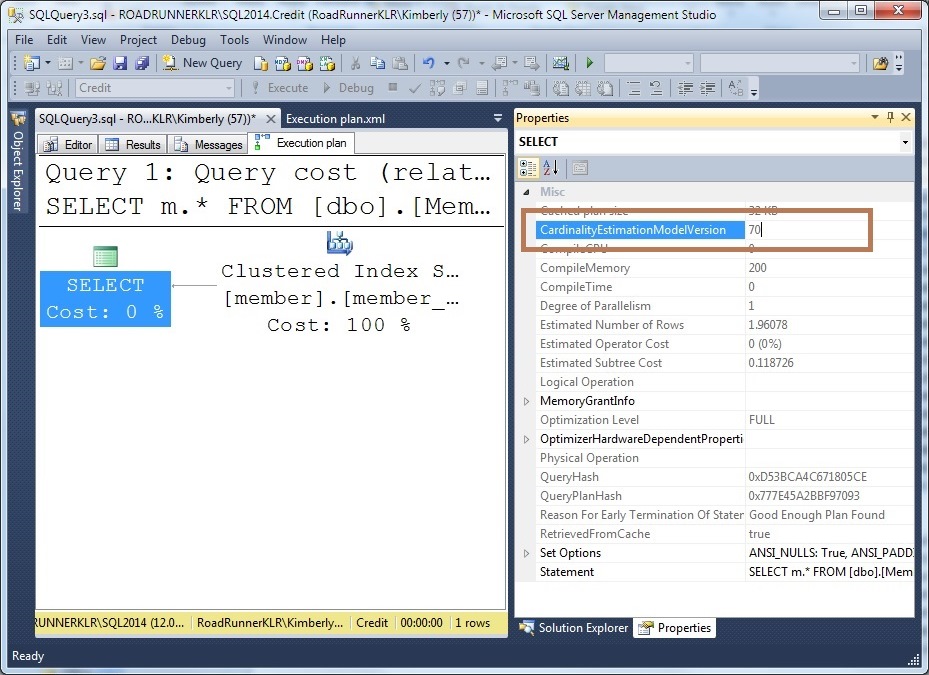
CardinalityEstimationModelVersion

Above all, what I like most is – CHOICE. I can even set this for a specific query:

SELECT m.*
FROM [dbo].[Member] AS [m]
WHERE [m].[firstname] LIKE 'Kim%'
OPTION (QUERYTRACEON 9481);

However, the bad news is the QUERYTRACEON is limited to SysAdmin only (be sure to read the UPDATEs at the end of this post). Jack Li (Microsoft CSS) wrote a great article about a problem they solved by using a logon trigger to change the CE for an entire session: Wanting your non-sysadmin users to enable certain trace flags without changing your app? Now, I do want to caution you that setting master to trustworthy is not something you should take lightly. But, you should NOT let anyone other than SysAdmin have any other rights in master (other than the occasional EXEC on an added user-defined SP). Here are a couple of posts to help warn you of the danger:

A warning about the TRUSTWORTHY database option
Guidelines for using the TRUSTWORTHY database setting in SQL Server

Having said that, what I really want is to set this on a query by query basis AND I don’t want to elevate the rights of an entire stored procedure (in order to execute DBCC TRACEON). So, I decided that I could create a procedure in master, set master to trustworthy (with the caution and understanding of the above references/articles), and then I can reference it within my stored procedures NOT having to use use 3-part naming (for the sp_ version of the procedure):

ALTER DATABASE master
SET TRUSTWORTHY ON;
GO

USE master;
GO

ALTER PROCEDURE sp_SetTraceFlag
    (@TraceFlag int,
     @OnOff     bit = 0)
WITH EXECUTE AS OWNER
AS
DECLARE @OnOffStr char(1) = @OnOff;
-- Sysadmins can add supported trace flags and then use this
-- from their applications
IF @TraceFlag NOT IN (
            9481 -- LegacyCE if database is compat mode 120 or higher
          , 2312 -- NewCE if database compat mode 110 or lower
                      )
    BEGIN
        RAISERROR('The Trace Flag supplied is not supported. Please contact your system administrator to determine inclusion of this trace flag: %i.', 16, 1, @TraceFlag);
        RETURN
    END
ELSE
    BEGIN
        DECLARE @ExecStr nvarchar(100);
        IF @OnOff = 1
            SELECT @ExecStr = N'DBCC TRACEON(' + CONVERT(nvarchar(4), @TraceFlag) + N')';
        ELSE
            SELECT @ExecStr = N'DBCC TRACEOFF(' + CONVERT(nvarchar(4), @TraceFlag) + N')';
        -- SELECT (@ExecStr)
        EXEC(@ExecStr)
        -- RAISERROR (N'TraceFlag: %i has been set to:%s (1 = ON, 0 = OFF).', 10, 1, @TraceFlag, @OnOffStr);
    END;
GO

GRANT EXECUTE ON sp_SetTraceFlag TO PUBLIC;
GO

As for using this procedure, you have TWO options. If you can modify the stored procedure then you can wrap a single statement with the change in trace flag. But, to make it take effect, you’ll need to recompile that statement. So, if your stored procedure looks like the following:

CREATE PROCEDURE procedure
( params )
AS
statement;
statement; <<<--- problematic statement
statement;
statement;
GO

Then you can change this to:

CREATE PROCEDURE procedure
( params )
AS
statement;
EXEC sp_SetTraceFlag 2312, 1
statement OPTION (RECOMPILE); <<<--- MODIFIED problematic statement
EXEC sp_SetTraceFlag 2312, 0
statement;
statement;
GO 

If you don’t want to set master to trustworthy then you can add a similar procedure to msdb (which is already set to TRUSTWORTHY) and then use 3-part naming to reference it.

USE msdb;
GO

CREATE PROCEDURE msdbSetTraceFlag
    (@TraceFlag int,
     @OnOff bit = 0)
WITH EXECUTE AS OWNER
AS
DECLARE @OnOffStr char(1) = @OnOff;
-- Sysadmins can add supported trace flags and then use this
-- from their applications
IF @TraceFlag NOT IN (
              9481 -- LegacyCE if database is compat mode 120 or higher
            , 2312 -- NewCE if database compat mode 110 or lower
                     )
     BEGIN
         RAISERROR('The Trace Flag supplied is not supported. Please contact your system administrator to determine inclusion of this trace flag: %i.', 16, 1, @TraceFlag);
         RETURN
     END
ELSE
     BEGIN
         DECLARE @ExecStr nvarchar(100);
         IF @OnOff = 1
             SELECT @ExecStr = N'DBCC TRACEON(' + CONVERT(nvarchar(4), @TraceFlag) + N')';
         ELSE
             SELECT @ExecStr = N'DBCC TRACEOFF(' + CONVERT(nvarchar(4), @TraceFlag) + N')';
         -- SELECT (@ExecStr)
         EXEC(@ExecStr)
         -- RAISERROR (N'TraceFlag: %i has been set to:%s (1 = ON, 0 = OFF).', 10, 1, @TraceFlag, @OnOffStr);
     END;
GO

GRANT EXECUTE ON msdbSetTraceFlag TO PUBLIC;
GO

To use this, you’ll need to use 3-part naming:

CREATE PROCEDURE procedure
( params )
AS
statement;
EXEC msdb.dbo.msdbSetTraceFlag 2312, 1
statement OPTION (RECOMPILE); <<<--- MODIFIED problematic statement
EXEC msdb.dbo.msdbSetTraceFlag 2312, 0
statement;
statement;
GO 

Finally, another option is to wrap a statement with the change in trace flag.

EXEC sp_SetTraceFlag 2312, 1;
GO
STATEMENT or PROCEDURE
GO
EXEC sp_SetTraceFlag 2312, 0;  -- don't remember to turn it back off!
GO
 

Now, you have strategic access to EITHER CE and you don’t have to elevate anyone’s specific rights to SysAdmin. You can even let developers use the changes to the new CE or the LegacyCE in their code which is incredibly useful!

UPDATE: If you can’t change the code then another excellent option would be use to a plan guide (permissions are only at the object/database level: To create a plan guide of type OBJECT, requires ALTER permission on the referenced object. To create a plan guide of type SQL or TEMPLATE, requires ALTER permission on the current database.). Here’s a good post on how to add QUERYTRACEON into a plan guide: Using QUERYTRACEON in plan guides by Gianluca Sartori.

UPDATE #2: Wow! A bit of digging and I stumbled on this ConnectItem: QUERYTRACEON with no additional permissions and after I up-voted it, I noticed the workaround by Dan Guzman: There is currently undocumented behavior in SQL 2014 that allows use of QUERYTRACEON in a stored procedure without sysadmin permissions regardless of module signing or EXECUTE AS. This is a workaround in situations where the query is already in a stored procedure or when a problem ad-hoc query needing the trace flag can be encapsulated in a proc. However, until it’s documented, this workaround is at-your-own-risk. I did NOT know this… So, QUERYTRACEON CAN be used in a stored procedure even without SysAdmin permissions (I actually like this!). And, I tested this in BOTH 2014 AND 2016 and it works! It’s not documented nor is it recommended but I’m happy to see that you do NOT need to do this for QUERYTRACEON. It looks like it evens works in earlier versions. Most of us ran into problems with the clause erroring on adhoc statements so we just didn’t expect it to work INSIDE of a proc. Well… better late than never!

Thanks for reading,
Kimberly

The post Setting CE TraceFlags on a query-by-query (or session) basis appeared first on Kimberly L. Tripp.

01 Jul 14:01

Testing PowerShell with Pester

by arcanecode

My newest Pluralsight course is now live, Testing PowerShell with Pester! In this 4 hour course I walk through a complete introduction to Pester, to showing you how to both modify existing code as well as create a brand new module using Pester to guide development using the Test Driven Development methodology. You’ll find all the details at:

https://www.pluralsight.com/courses/powershell-testing-pester

Not as familiar as PowerShell as you’d like to be? I have several other courses at Pluralsight that may help, especially my Beginning PowerShell Scripting for Developers course. You can see my full catalog of courses at:

https://www.pluralsight.com/authors/robert-cain

What? You don’t have a Pluralsight subscription? No problem, just shoot me an email to free<at>arcanetc.com and I’ll send you a code good for a 30 day trial to Pluralsight, with which you can watch my courses, or any of the great courses by my fellow Pluralsight authors.


01 Jul 14:01

Whatever Comes Next

by Jeremiah Peschka

One of the most exciting things about the last few months has been having time to think about what I want to be when I grow up. I kicked around a bunch of different ideas like “Fallout 4 expert” and a bunch of other fun sounding but impractical ideas. None of them seemed to fit. So I looked at what did seem to fit.

When I asked “what’s been the most interesting and fun thing over the last few years?” there was an answer that kept popping up: academia.

I will devour all these books!

I will devour all these books!

Academia?!

Yeah, academia.

I’ve enjoyed the time I’ve spent reading computer science papers, discussing them with other people who are into that sort of thing, and reading blogs like The Morning Paper. I have no delusions that academic study is a tea party where people talk about things (well, it is if you get an English degree, which I already did).

Joking aside, I like the theoretical side of computers and I want to explore it. Peter Bailis summed up the joy of graduate school in his post “I Loved Graduate School“.

Exploring Computers

With all that in mind, I’m starting a master’s program in Computer Science at Portland State University. Since I don’t have a CS degree already, I’m going through the Graduate Preparation Track in Computer Science. Basically, I take the core classes of a computer science bachelor’s degree and then immediately go into a master’s degree. And, beyond that, I’d love to continue on and get a PhD in CS.

The work of friends and acquaintances has made this an easier path to follow – knowing other people who have gone through this journey makes it seem all that much more possible for me to do the same.

Thank you to all of you who have encouraged and supported me along the way. You’ve been awesome.

Here’s to whatever comes next.


Stockholms Stadsbibliotek” by dilettantiquity licensed with CC BY-SA 2.0

01 Jul 14:00

Big Data and the Challenges of Backup and Recovery

by A.R. Guess

by Angela Guess Katherine Noyes writes in PC World, “First, big data shook up the database arena, ushering in a new class of ‘scale out’ technologies. That’s the model exemplified by products like Hadoop, MongoDB, and Cassandra, where data is distributed across multiple commodity servers rather than packed into one massive one. The beauty there, […]

The post Big Data and the Challenges of Backup and Recovery appeared first on DATAVERSITY.

20 Jun 17:27

Today's Victory on Net Neutrality

by Melanie Garunay

The message below was sent to people who signed a We the People petition on safeguarding net neutrality. To sign or create a petition on an issue that matters to you, check out petitions.whitehouse.gov.


Today, a federal court of appeals fully upheld the FCC's strong net neutrality rules to keep the internet open, fair, and free.

This is a victory for the millions of Americans like you who made your voices heard in support of a fair and free internet -- who petitioned your government, spoke out on social media, and stood up for what you believe.

As President Obama said in 2014:

"'Net neutrality' has been built into the fabric of the internet since its creation -- but it is also a principle that we cannot take for granted. We cannot allow internet service providers to restrict the best access or to pick winners and losers in the online marketplace for services and ideas."

Today's ruling reaffirms this. And it's why the President has so strongly supported net neutrality since he was a Senator, and continues to work every day to protect the internet ecosystem: because it remains one of the greatest gifts our economy -- and our society -- has ever known.

Thanks again for raising your voices on this platform,

-- The We the People Team

P.S. Check out this timeline to see the progress we've made on net neutrality.

20 Jun 17:07

Microsoft is Working On Software For The Legal Marijuana Industry

by BeauHD
An anonymous reader writes from a report via The Verge: Microsoft has announced today that it will partner with Los Angeles-based startup Kind on a system for tracking the legal growing and sale of marijuana. Microsoft will work with the startup on software services for governments tracking legal weed, with Microsoft powering the software through its Azure cloud computing service. "The goal of this relationship is to leverage each company's resources to provide State, County, and Municipalities with purpose built solutions for track and trace ('seed to sale' in the cannabis industry) technology," Kind said in a statement. As reported in The New York Times, this is a pretty significant venture for a corporation publicly journeying into the controversial industry. Growing and selling marijuana is still illegal under the federal government.

Share on Google+

Read more of this story at Slashdot.

20 Jun 16:53

Mattel Sells Out Of 'Game Developer Barbie'

by EditorDavid
Long-time Slashdot reader sandbagger writes: The Mattel people have released a new Barbie doll figurine touted as Game Developer Barbie. Dressed in jeans and a t-shirt, she was apparently designed by a game developer. It's already sold out on Mattel's web site, with CNET saying it provides a better role model than a 2014 book In which "computer engineer" Barbie designed a cute game about puppies, then admitted "I'll need Steven's and Brian's help to turn it into a real game," before her laptop crashed with a virus. Mattel says that with this new doll, "young techies can play out the creative fun of this exciting profession," and the doll even comes with a laptop showing an IDE on the screen. Sandbagger's original submission ended with a question. Do Slashdot readers think this will inspire a new generation of programmers to stay up late writing code?

Share on Google+

Read more of this story at Slashdot.

20 Jun 16:44

Data Science – build your skill with problem-solving, communication, curiosity and knowledge in data platform

by SQLMaster

Tweet


In the flurry of recent posts about data science topic I have had feedback about what kind of skillset is required for a Data Scientist, so here is the extract.

If you want to compete and be intelligent, then it is not necessary to know all the answers, but in knowing where to find them. No doubt this is 100% valid in this cyber-age, one cannot say that they don’t know where to find information. I read somewhere that:

“A data scientist is someone who is better at statistics than any software engineer and better at software engineering than any statistician.”

So what makes Data Science as one of the popoular field in the recent times, the answer is data. On any given day the relevant individual as a Data Scientist must have following knowledge to conduct:

  • Build an open-ended questions to perform research
  • Knowledge in data extraction and build analytic programs with statistical methods
  • Explore and verify data with different models (data driven solutions)
  • Define a predictive model and report to manaement for effective data visualisation.

The key factor how Data Science rolls into different areas of acadamics, technology and business, see below (source: datajobs.com):

An insight from data is a key factor which can lead towards quantitative terms, patterns, dimensions and formulas to build how exactly the data can be helpful for business growth. Analytics is another side of the coin which helps to derive at theory, model and process to solve the puzzle and this is 100% true: danger of building without knowing the math.

Being analytical and statistical are important, this is where mathematics comes in handy to understand how the models and statistics will be useful with a help from the technology, the new term in data science is “Hacking”. Though it sounds like a negative term, let’s make it for good cause by not breaking /breaching security but build creativity and aspects of how to build a solution by hacking into the business models. Again a web reference is helpful to quote:

Why is hacking ability important?

Because data scientists absolutely need to leverage technology in order to wrangle enormous data sets and work with complex algorithms, and it requires using tools far more sophisticated than Excel. Examples of such tools are SQL, SAS, and R, all of which require technical/coding ability. With these high-performance tools, a true ‘hacker’ is a technical ninja, able to use ingenious problem solving ability to achieve mastery in data exploration – piecing together unstructured information and teasing out golden nuggets of insight.

So think about how you can step into Data Science being an algorithmic thinker to tackle critical problems and build a solution, having a business acumen will help you to become competent in the field. The few tips about how you can build business skills as well:


  • Analytic Problem-Solving: Approaching high-level challenges with a clear eye on what is important; employing the right approach/methods to make the maximum use of time and human resources.
  • Effective Communication: Detailing your techniques and discoveries to technical and non-technical audiences in a language they can understand.
  • Intellectual Curiosity: Exploring new territories and finding creative and unusual ways to solve problems.
  • Industry Knowledge: Understanding the way your chosen industry functions and how data are collected, analyzed and utilized.

Another reference from web (on lighter side) to say …a data scientist living in Silicon Valley (CA):


a-data-scientist-is-a-business-analyst-that-lives-in-california[1]


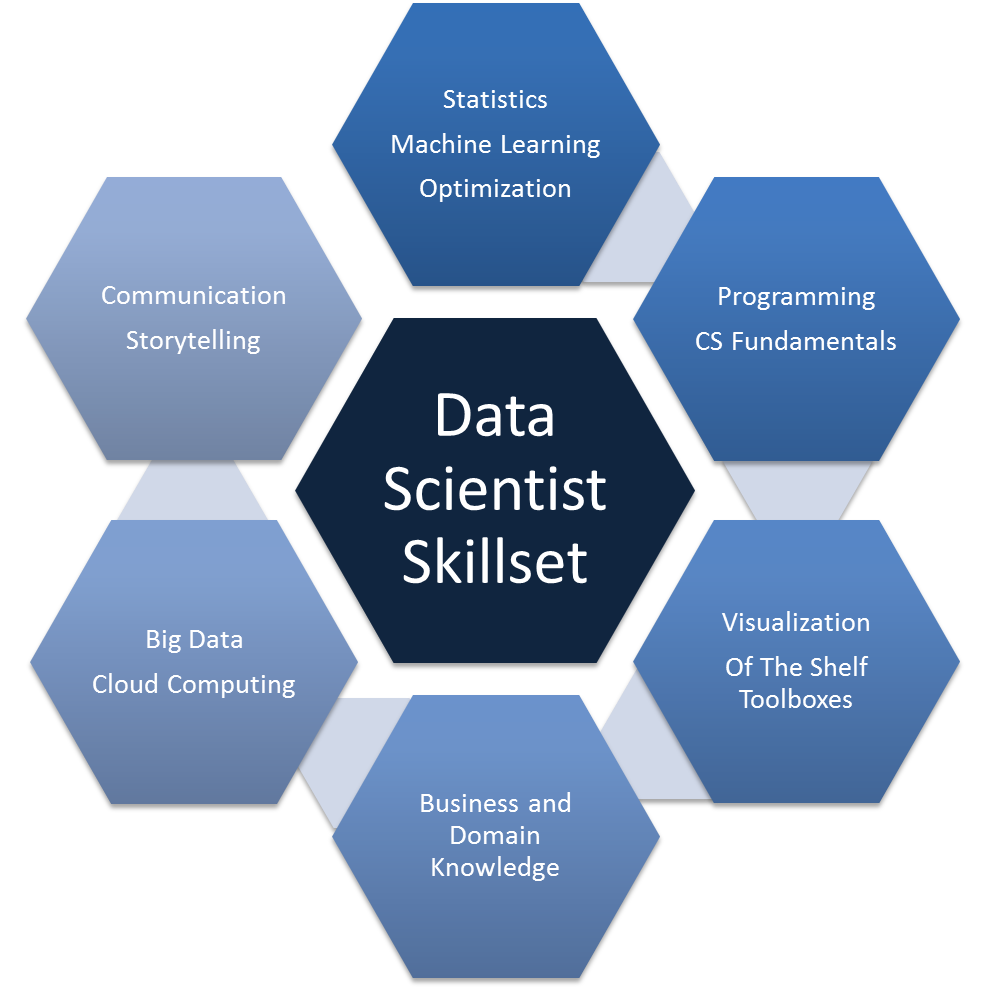
Another picture to represent a high level description of skills that are needed to become a data scientist:


Data Science Skillset


So here are few referenes about where you can start in Data Science and make it as a career:

20 Jun 16:44

Get a head start on SQL Server 2016 with this how-to guide

by David Hobbs-Mallyon

For the past several months we’ve been talking about the advances in SQL Server 2016. Now, at last, the wait is over. SQL Server 2016 is now generally available and brings with it a feature set designed for the modern-day enterprise, in which data can be located in a variety of locations, both on-premises and in the cloud.

To get a taste of the most advanced version of SQL Server yet, download a free trial version of SQL Server 2016. And to help you get the most out of this release, download the SQL Server 2016 e-book, for which we enlisted the help of some of the industry’s leading experts and SQL Server community MVPs:

  • Stacia Varga is a consultant and trainer with more than 30 years’ experience helping companies generate business data that leads to improve business processes and better decisions. Stacia has also been a frequent presenter at Microsoft events, including PASS and DevConnections.
  • Denny Cherry is a seasoned designer and administrator of SQL Server solutions. In addition to having a deep and wide knowledge of SQL Server products and services, Denny has extensive experience with hardware, based on nearly 20 years’ experience as a consultant and DBA.
  • Joseph D’Antoni is a specialist in the design and architecture of database, infrastructure, storage, hybrid cloud, and disaster recovery solutions. During his 15 years’ of IT experience, Joseph has worked on a variety of platforms, including SQL Server, Oracle, Hadoop and others.

Stacia, Denny and Joseph joined forces to write “Introducing Microsoft SQL Server 2016,” a practical guide to developing mission-critical apps and hyperscale BI solutions, which lead to deeper business insights. You’ll find in-depth discussions on virtually every facet of SQL Server 2016:

Chapter one: Faster queries

Get up to speed on how to perform real-time transactions and ultra-fast analytics using new features like in-memory transaction processing and in-memory updateable column stores.

Chapter two: Better security

Explore three new principal security features in SQL Server 2016—Always Encrypted, Row-Level Security and Dynamic Data Masking, and learn how to use each one of these features to its fullest potential.

Chapter three: Higher availability

Learn how to deploy more robust, highly available data management solutions using the new features in AlwaysOn Availability Group and AlwaysOn Failover Cluster.

Chapter four: Improved database engine

Find out how to optimize query performance, how to take advantage of hybrid cloud architectures, and how to stay in control amidst growing volumes of data.

Chapter five: Broader data access

Discover how SQL Server 2016 can help you manage, maintain, integrate and import data of all types, leading to richer business insights.

Chapter six: More analytics

Learn how to more quickly build secure, advanced analytics solutions, how to create predictive models with R functions, and how to generate better business outcomes by incorporating these models into application and reporting tools.

Chapter seven: Better reporting

Explore the new data visualization and layout options in Reporting Services, and how Mobile BI lets employees easily access business intelligence, whether in the office or on the road.

Chapter eight: Improved Azure SQL Database

Learn more about Microsoft Azure SQL Database and how features such as elastic database pools and rapid development cycles make it a natural complement to your on-premises DB solution.

Chapter nine: Expanding your options with Azure SQL Data Warehouse

Find out how to exponentially increase your data management and analytics capabilities, without the usual overhead.


In addition to the insight you’ll receive from Stacia, Denny and Joseph, the e-book also includes sample code and links to MSDN videos, articles and other resources where you can get additional guidance on tasks such as creating, dropping and altering scalar user-defined functions, or how to set security parameters for a Stretch Database.

To get started, download a free trial of SQL Server 2016 and the SQL Server 2016 e-book, or visit the SQL Server 2016 product page to learn more.

E-book download

20 Jun 16:44

WideWorldImporters: The new SQL Server sample database

by SQL Server Team

This post was authored by Jos de Bruijn, Senior Program Manager, SQL Server.

A release the magnitude of SQL Server 2016 deserves a new sample. AdventureWorks, which has been around since the SQL Server 2005 days, has had a good run, but it is time for an upgrade.

Wide World Importers is the new sample for SQL Server. It illustrates how the rich SQL Server feature set can be used in a realistic database. It does not attempt to use every single SQL Server feature, as that would not be realistic. It also showcases the key SQL Server 2016 capabilities and performance enhancements.

Latest release of the sample: wide-world-importers-release

Documentation for the sample: wide-world-importers-documentation

The sample is structured as follows:

  • WideWorldImporters is the main database for transaction processing (OLTP – OnLine Transaction Processing) and operational analytics (HTAP – Hybrid Transactional/Analytics Processing). Here are some examples of the use of SQL Server capabilities with this database:
  • WideWorldImportersDW is the main database for data warehousing and analytics (OLAP – OnLine Analytics Processing). The data in this database is derived from the transactional database WideWorldImporters, but it uses a schema that is specifically optimized for analytics. Here are some examples of the use of SQL Server capabilities with this database:
  • A SQL Server Integration Services (SSIS) package, Daily ETL.ispac, is used to move data from the OLTP database WideWorldImporters to the OLAP database WideWorldImportersDW. The package is designed to use bulk T-SQL statements wherever possible to enhance performance. For details about the ETL workflow, see the WideWorldImportersDW ETL workflow.

The sample also includes a number of scripts that can be used to explore some of the features used in the sample database. In addition, the sample includes two workload drivers, which are small applications that simulate a workload running against the database.

The databases contain sample sales and purchases data starting January 1st, 2013, until May 31st, 2016. The sample includes procedures to generate more sample data, so you can always bring the sample up to the current date. For details, see WideWorldImporters data generation.

The data size is limited to keep the download size reasonable. If you desire a sample database with a larger data size, use the source scripts to create a new sample database, and tweak the parameters in step 6 to increase the data size.

Get started

  1. Download and install a free trial of SQL Server 2016 or configure a test environment using an Azure SQL VM.
    • The Developer Edition is free if you sign up for the free Visual Studio Dev Essentials program.
  2. Download the sample and review the sample documentation.

Send any feedback on the sample to: sqlserversamples@microsoft.com.

20 Jun 16:41

Check out the SQL Server sessions we’ve planned for Microsoft Ignite

by SQL Server Team

What do you want to learn at Microsoft Ignite 2016?

  • Do you want to learn how to accelerate SQL Server 2016 to the max?
  • Get practical techniques for database management?
  • Strengthen your defenses against hackers?
  • Discuss real-world questions with product experts, in person?
  • Challenge your strategic thinking?

Perfect. All of that—and more—is waiting for you in Atlanta. The full session catalog is now live, so all you have to do is start exploring which sessions you want to attend.

Here’s a sample of SQL Server topics you’ll find…

Accelerate SQL Server 2016 to the max: lessons learned from customer engagements

The SQLCAT team worked with several customers as part of the Microsoft SQL Server 2016 Preview Program. Hear about how those customers were able to target specific bottlenecks and overcome them to far exceed their performance and scalability targets with SQL Server 2016. Deriving from actual customer engagements, we detail the most common scenarios, “tools of the trade,” and most importantly the “secret sauce” used in those situations.

Make it real with Always Encrypted, Stretch Database and Temporal Tables

So you’ve heard you can keep as much data as you want indefinitely with minimal effort and cost. You’ve also discovered you can secure you data with strong cryptography at all times. You even learned about how to time travel with your data. So how exactly do you design, deploy and manage a database application that can do all that without an army of experts? Find out from the crew that built Always Encrypted, Stretch Database and Temporal Table so you can be that expert. We also share recommended practices, known limitations and workarounds. This session is not about flashy demos; it focuses on practical implementation details you can use when you get back.

Enable operational analytics in SQL Server 2016 and Azure SQL Database

See how Microsoft SQL Server 2016 enables you to run analytic queries on in-memory and disk-based OLTP tables with minimal impact on business critical OLTP workloads, requiring no application changes. This session covers various configurations and best practices for achieving significant performance gains with Operational Analytics.

And that’s just a start…

With more than 440 sessions to choose from, which sessions will you attend?

> Explore SQL Server sessions <

Remember: September 26-30 is approaching fast. We’re excited to see everyone soon—and if you haven’t yet registered, don’t delay! Register for Microsoft Ignite.

20 Jun 16:41

What's "Actually" going on with that Seek?

by Rob Farley

I wrote previously about the Actual Rows Read property. It tells you how many rows are actually read by an Index Seek, so that you can see how selective the Seek Predicate is, compared to the selectiveness of the Seek Predicate plus Residual Predicate combined.

But let’s have a look at what’s actually going on inside the Seek operator. Because I’m not convinced that “Actual Rows Read” is necessarily an accurate description of what’s going on.

I want to look at an example that queries addresses of particular address types for a customer, but the principle here would easily apply to many other situations if the shape of your query fits, such as looking up attributes in a Key-Value Pair table, for example.

SELECT AddressTypeID, FullAddress
FROM dbo.Addresses
WHERE CustomerID = 783
AND AddressTypeID IN (2,4,5);

I know I haven’t shown you anything about the metadata – I’ll come back to that in a minute. Let’s have a think about this query and what kind of index we’d like to have for it.

Firstly, we know the CustomerID exactly. An equality match like this generally makes it an excellent candidate for the first column in an index. If we had an index on this column we could dive straight into the addresses for that customer – so I’d say that’s a safe assumption.

The next thing to consider is that filter on AddressTypeID. Adding a second column to the keys of our index is perfectly reasonable, so let’s do that. Our index is now on (CustomerID, AddressTypeID). And let’s INCLUDE FullAddress too, so that we don’t need to do any lookups to complete the picture.

And I think we’re done. We should be able to safely assume that the ideal index for this query is:

CREATE INDEX ixIdealIndex 
ON dbo.Addresses (CustomerID, AddressTypeID)
INCLUDE (FullAddress);

We could potentially declare it as a unique index – we’ll look at the impact of that later.

So let’s create a table (I’m using tempdb, because I don’t need it to persist beyond this blog post) and test this out.

CREATE TABLE dbo.Addresses (
  AddressID INT IDENTITY(1,1) PRIMARY KEY,
  CustomerID INT NOT NULL,
  AddressTypeID INT NOT NULL,
  FullAddress NVARCHAR(MAX) NOT NULL,
  SomeOtherColumn DATE NULL
);

I’m not interested in foreign key constraints, or what other columns there might be. I’m only interested in my Ideal Index. So create that too, if you haven’t already.

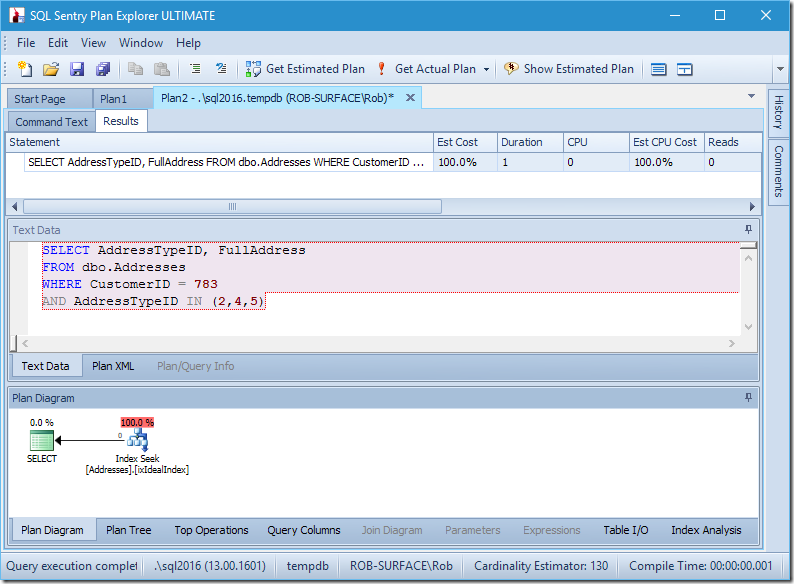
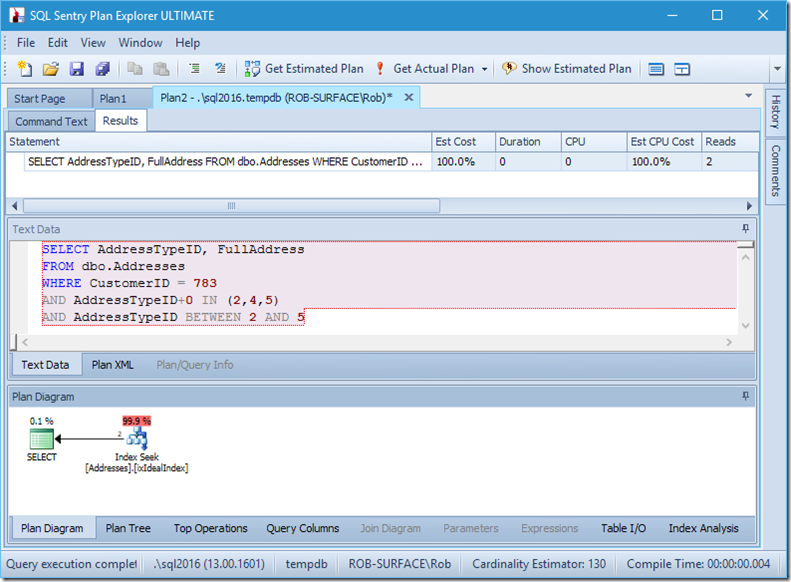
My plan seems pretty perfect.

image

I have an index seek, and that’s it.

Granted, there’s no data, so there’s no reads, no CPU, and it runs pretty quickly too. If only all queries could be tuned as well as this.

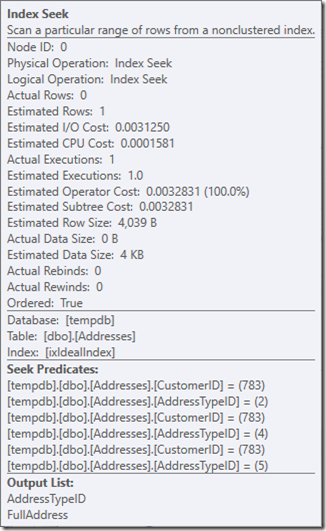
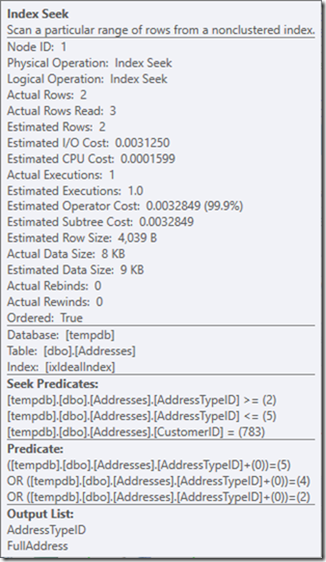
Let’s see what’s going on a little closer, by looking at the properties of the Seek.

image

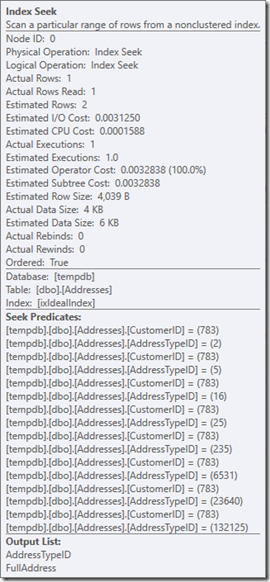
We can see the Seek Predicates. There are six. Three about the CustomerID, and three about the AddressTypeID. What we actually have here are three sets of seek predicates, indicating three seek operations within the single Seek operator. The first seek is looking for Customer 783 and AddressType 2. The second is looking for 783 and 4, and the last 783 and 5. Our Seek operator appeared once, but there were three seeks going on inside it.

We don’t even have data, but we can see how our index is going to be used.

Let’s put some dummy data in, so that we can look at some of the impact of this. I’m going to put addresses in for types 1 to 6. Every customer (over 2000, based on the size of master..spt_values) will have an address of type 1. Maybe that’s the Primary Address. I’m letting 80% have a type 2 address, 60% a type 3, and so on, up to 20% for type 5. Row 783 will get addresses of type 1, 2, 3, and 4, but not 5. I’d rather have gone with random values, but I want to make sure we’re on the same page for the examples.

WITH nums AS (
    SELECT row_number() OVER (ORDER BY (SELECT 1)) AS num
    FROM master..spt_values
)
INSERT dbo.Addresses (CustomerID, AddressTypeID, FullAddress)
SELECT num AS CustomerID, 1 AS AddressTypeID, N'Some sample text for the address' AS FullAddress
FROM nums
UNION ALL
SELECT num AS CustomerID, 2 AS AddressTypeID, N'Some sample text for the address' AS FullAddress
FROM nums
WHERE num % 10 < 8
UNION ALL
SELECT num AS CustomerID, 3 AS AddressTypeID, N'Some sample text for the address' AS FullAddress
FROM nums
WHERE num % 10 < 6
UNION ALL
SELECT num AS CustomerID, 4 AS AddressTypeID, N'Some sample text for the address' AS FullAddress
FROM nums
WHERE num % 10 < 4
UNION ALL
SELECT num AS CustomerID, 5 AS AddressTypeID, N'Some sample text for the address' AS FullAddress
FROM nums
WHERE num % 10 < 2
;

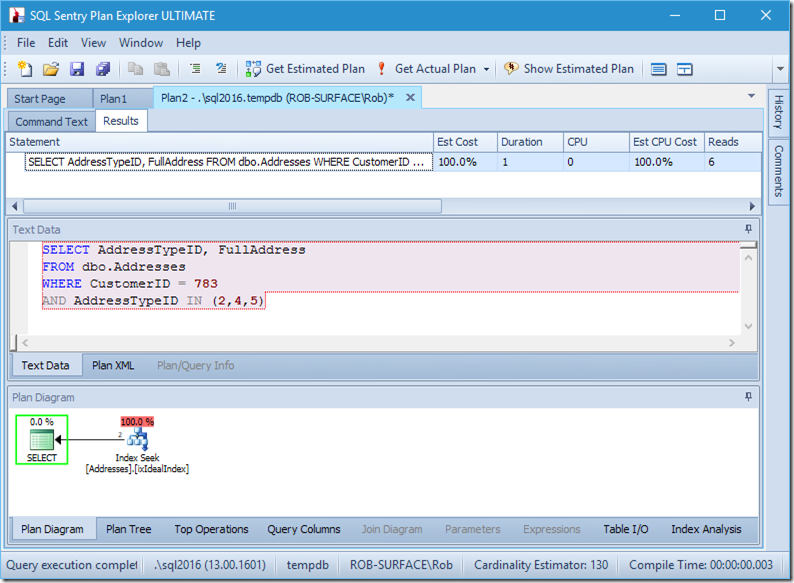
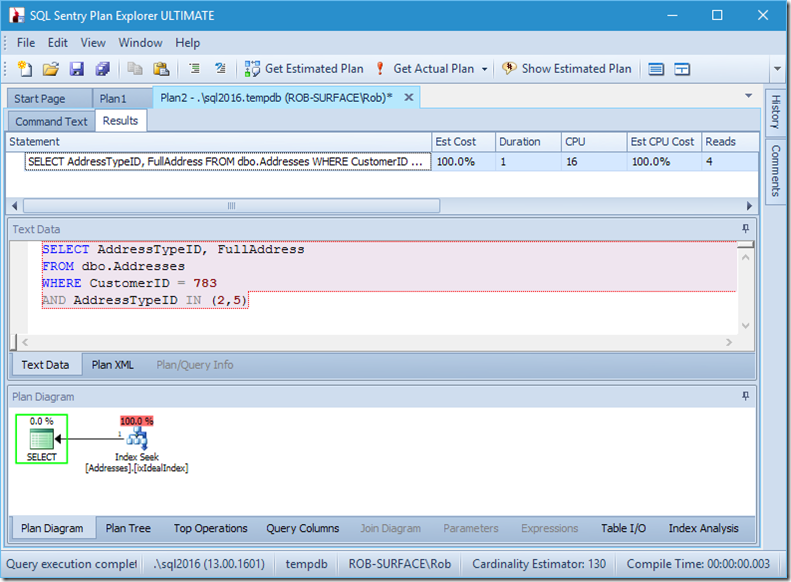
Now let’s look at our query with data. Two rows are coming out. It’s like before, but we now see the two rows coming out of the Seek operator, and we see six reads (in the top-right).

image

Six reads makes sense to me. We have a small table, and the index fits on just two levels. We’re doing three seeks (within our one operator), so the engine is reading the root page, finding out which page to go down to and reading that, and doing that three times.

If we were to just look for two AddressTypeIDs, we’d see just 4 reads (and in this case, a single row being outputted). Excellent.

image

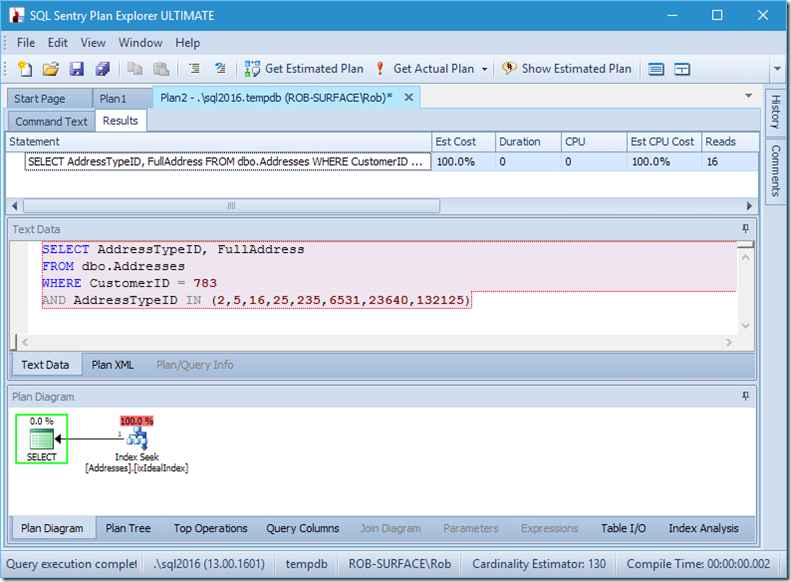
And if we were looking for 8 address types, then we’d see 16.

image

Yet each of these show that the Actual Rows Read matches the Actual Rows exactly. No inefficiency at all!

image

Let’s go back to our original query, looking for address types 2, 4, and 5, (which returns 2 rows) and think about what’s going on inside the seek.

I’m going to assume the Query Engine has already done the work to figure out that the Index Seek is the right operation, and that it has the page number of the index root handy.

At this point, it loads that page into memory, if it’s not already there. That’s the first read that gets counted in the execution of the seek. Then it locates the page number for the row it’s looking for, and reads that page in. That’s the second read.

But we often gloss over that ‘locates the page number’ bit.

By using DBCC IND(2, N'dbo.Address', 2); (the first 2 is the database id because I’m using tempdb; the second 2 is the index id of ixIdealIndex), I can discover that the 712 in file 1 is the page with the highest IndexLevel. In the screenshot below, I can see that page 668 is IndexLevel 0, which the root page.

image

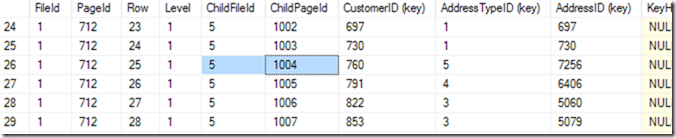
So now I can use DBCC TRACEON(3604); DBCC PAGE (2,1,712,3); to see the contents of page 712. On my machine, I get 84 rowscoming back, and I can tell that CustomerID 783 is going to be on page 1004 of file 5.

image

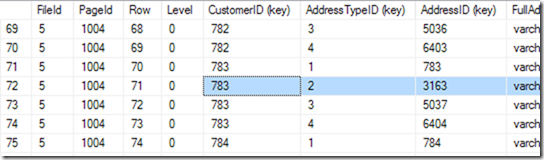
But I know this by scrolling through my list until I see the one I want. I started by scrolling down a bit, and then came back up, until I found the row I wanted. A computer calls this a binary search, and it’s a bit more precise than me. It’s looking for the row where the (CustomerID, AddressTypeID) combination is smaller that the one I’m looking for, with the next page being larger or the same as it. I say “the same” because there could be two that match, spread across two pages. It knows there are 84 rows (0 to 83) of data in that page (it reads that in the page header), so it’ll start by checking row 41. From there, it knows which half to search in, and (in this example), it will read row 20. A few more reads (making 6 or 7 in total)* and it knows that row 25 (please look at the column called ‘Row’ for this value, not the row number provided by SSMS) is too small, but row 26 is too big – so 25 is the answer!

*In a binary search, the searching can be marginally quicker if it gets lucky when it splits the block into two if there’s no middle slot, and depending on whether the middle slot can be eliminated or not.

Now it can go into page 1004 in file 5. Let’s use DBCC PAGE on that one.

image

This one gives me 94 rows. It does another binary search to find the start of the range that it’s looking for. It has to look through 6 or 7 rows to find that.

“Start of the range?” I can hear you ask. But we’re looking for address type 2 of customer 783.

Right, but we didn’t declare this index as unique. So there could be two. If it is unique, the seek can do a singleton search, and could stumble across it during the binary search, but in this case, it must complete the binary search, to find the first row in the range. In this case, it’s the row 71.

But we don’t stop here. Now we need to see if there really is a second one! So it reads row 72 as well, and finds that the CustomerID+AddressTypeiD pair is indeed too big, and its seek is done.

And this happens three times. The third time, it doesn’t find a row for customer 783 and address type 5, but it doesn’t know this ahead of time, and still needs to complete the seek.

So the rows actually being read across these three seeks (to find two rows to output) is a lot more than the number being returned. There’s about 7 at index level 1, and about 7 more at the leaf level just to find the start of the range. Then it reads the row we care about, and then the row after that. That sounds more like 16 to me, and it does this three times, making about 48 rows.

But Actual Rows Read is not about the number of rows actually read, but the number of rows returned by the Seek Predicate, that get tested against the Residual Predicate. And in that, it’s only the 2 rows that get found by the 3 seeks.

You might be thinking at this point that there’s a certain amount of ineffectiveness here. The second seek would’ve also read page 712, checked the same 6 or 7 rows there, and then read page 1004, and hunted through it… as would have the third seek.

So perhaps it would’ve been better to get this in a single seek, reading page 712 and page 1004 only once each. After all, if I were doing this with a paper-based system, I would’ve done a seek to find customer 783, and then scanned through all their address types. Because I know that a customer doesn’t tend to have many addresses. That’s an advantage I have over the database engine. The database engine knows through its statistics that a seek will be best, but it doesn’t know that the seek should only go down one level, when it can tell that it has what seems like the Ideal Index.

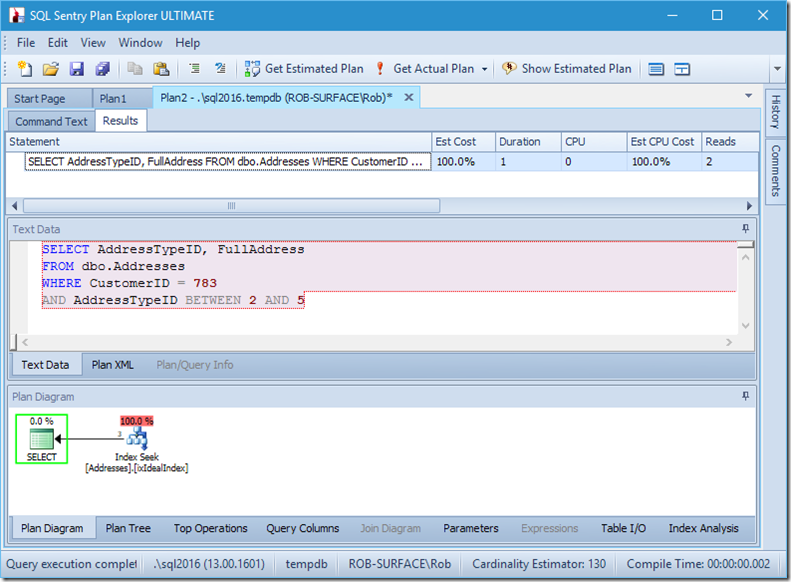
If I change my query to grab a range of address types, from 2 to 5, then I get almost the behaviour I want:

image

Look – the reads are down to 2, and I know which pages they are…

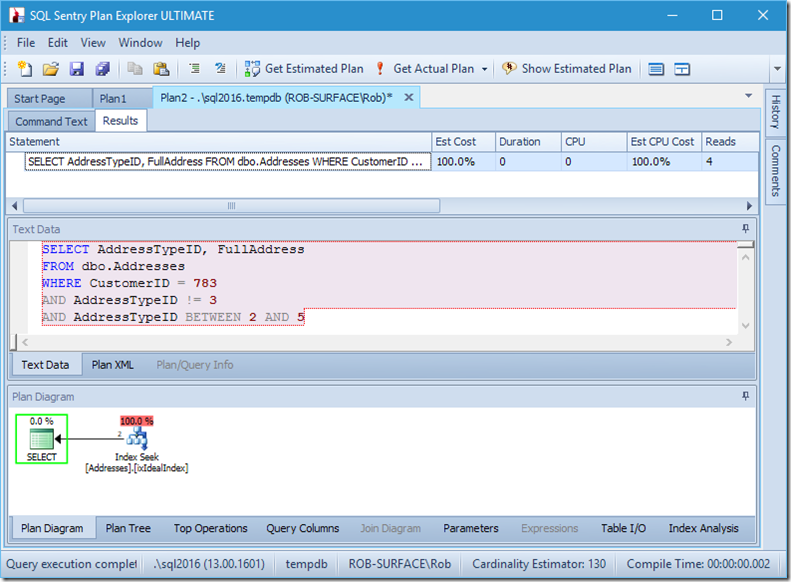
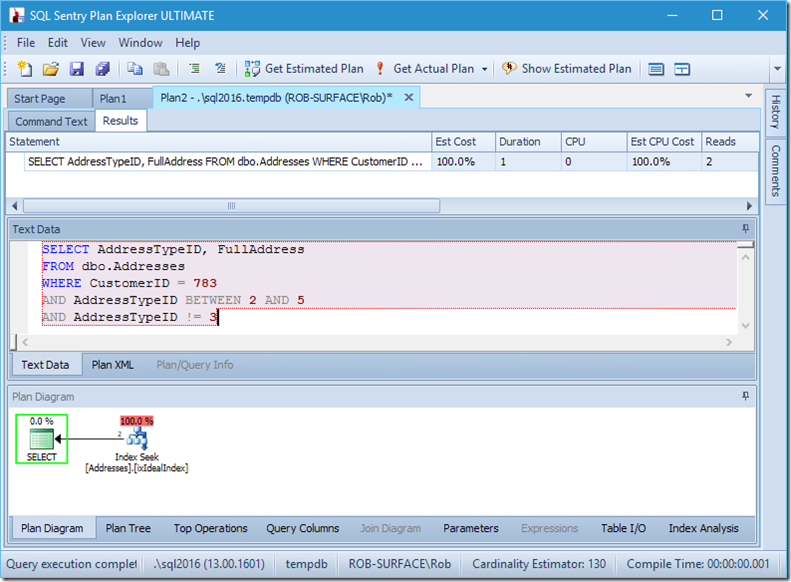
…but my results are wrong. Because I only want address types 2, 4, and 5, not 3. I need to tell it not to have 3, but I have to be careful how I do this. Look at the next two examples.

image

image

I can assure you that predicate order doesn’t matter, but here it clearly does. If we put the “not 3” first, it does two seeks (4 reads), but if we put the “not 3” second, it does a single seek (2 reads).

The problem is that AddressTypeID != 3 gets converted to (AddressTypeID > 3 OR AddressTypeID < 3), which is then seen as two very useful seek predicates.

And so my preference is to use a non-sargable predicate to tell it that I only want address types 2, 4, and 5. And I can do that by modifying AddressTypeID in some way, such as adding zero to it.

image

Now I have a nice and tight range scan within a single seek, and I’m still making sure that my query is returning only the rows that I want.

Oh, but that Actual Rows Read property? That’s now higher than the Actual Rows property, because the Seek Predicate finds address type 3, which the Residual Predicate rejects.

I’ve traded three perfect seeks for a single imperfect seek, which I’m fixing up with a residual predicate.

image

And for me, that’s sometimes a price worth paying, getting me a query plan that I’m much happier about. It’s not considerably cheaper, even though it has only a third of the reads (because there would only ever be two physical reads), but when I think about the work it’s doing, I’m much more comfortable with what I’m asking it to do this way.

The post What's "Actually" going on with that Seek? appeared first on SQLPerformance.com.

20 Jun 16:41

Search for a String in all Tables of a Database

by Greg Low

When I work in customer sites, there is a quite a difference between how different sites get data for testing. But it basically comes down to a variation of one of these five:

  • Testing? That’s for wimps. (Well perhaps for users)
  • I type in all the test data that I need.
  • We use a data generator to produce our test data.
  • We just periodically get a copy of production data.
  • We get production data and it gets masked before we can use it.

It’s the last option that I’m concerned with today. Masking data is challenging and usually much more difficult than imagined. This week, I was working with a masked database and we ended up finding all client details tucked inside a chunk of XML that was used to hold the metadata for a series of images. They had done a good job of removing it from all the normal columns from all tables in the database, but it’s so easy to miss extras like this.

So after we fixed the issue, I was left wondering how effectively it really had all been masked.

The following script takes a while to run on a large database. It takes a string to search for, and looks to find any locations in the database that hold that string. Optionally, it dumps out a copy of all rows containing the string. It does this for char, nchar, varchar, nvarchar, varchar(max), nvarchar(max), and xml data types.

I hope someone finds it useful.

-- Search for a string anywhere in a database

-- v1.0 Dr Greg Low, 11 June 2016


DECLARE @StringToSearchFor nvarchar(max) = N'Jones';

DECLARE @IncludeActualRows bit = 1;


DECLARE @SchemaName sysname;

DECLARE @TableName sysname;

DECLARE @ColumnName sysname;

DECLARE @IsNullable bit;

DECLARE @TableObjectID int;

DECLARE @Message nvarchar(max);

DECLARE @FullTableName nvarchar(max);

DECLARE @BaseDataTypeName sysname;

DECLARE @WereStringColumnsFound bit;

DECLARE @Predicate nvarchar(max);

DECLARE @SQL nvarchar(max);

DECLARE @SummarySQL nvarchar(max) = N'';

DECLARE @NumberOfTables int;

DECLARE @TableCounter int = 0;


IF OBJECT_ID(N'tempdb..#FoundLocations') IS NOT NULL

BEGIN

       DROP TABLE #FoundLocations;

END;


CREATE TABLE #FoundLocations

(

    FullTableName nvarchar(max),

    NumberOfRows bigint

);


SET @NumberOfTables = (SELECT COUNT(*) FROM sys.tables AS t

                                       WHERE t.is_ms_shipped = 0

                                       AND t.type = N'U');


DECLARE TableList CURSOR FAST_FORWARD READ_ONLY

FOR

SELECT SCHEMA_NAME(schema_id) AS SchemaName, name AS TableName, object_id AS TableObjectID

FROM sys.tables AS t

WHERE t.is_ms_shipped = 0

AND t.type = N'U'

ORDER BY SchemaName, TableName;


OPEN TableList;

FETCH NEXT FROM TableList INTO @SchemaName, @TableName, @TableObjectID;


WHILE @@FETCH_STATUS = 0

BEGIN

    SET @TableCounter += 1;

    SET @FullTableName = QUOTENAME(@SchemaName) + N'.' + QUOTENAME(@TableName);

    SET @Message = N'Checking table '

                      + CAST(@TableCounter AS nvarchar(20))

                      + N' of '

                      + CAST(@NumberOfTables AS nvarchar(20))

                      + N': '

                      + @FullTableName;

    PRINT @Message;


    SET @WereStringColumnsFound = 0;

    SET @Predicate = N'';


    DECLARE ColumnList CURSOR FAST_FORWARD READ_ONLY

    FOR

    SELECT c.name AS ColumnName, t.name AS BaseDataTypeName

    FROM sys.columns AS c

    INNER JOIN sys.types AS t

    ON t.system_type_id = c.system_type_id

    AND t.user_type_id = c.system_type_id -- note: want the base type not the actual type

    WHERE c.object_id = @TableObjectID

    AND t.name IN (N'text', N'ntext', N'varchar', N'nvarchar', N'char', N'nchar', N'xml')

       AND (c.max_length >= LEN(@StringToSearchFor) OR c.max_length < 0) -- allow for max types

    ORDER BY ColumnName;


    OPEN ColumnList;

    FETCH NEXT FROM ColumnList INTO @ColumnName, @BaseDataTypeName;


    WHILE @@FETCH_STATUS = 0

    BEGIN

          SET @WereStringColumnsFound = 1;

          IF @Predicate <> N''

          BEGIN

          SET @Predicate += N' OR ';

          END;

          SET @Predicate += CASE

20 Jun 16:40

Some recent posts

by Rob Farley

It’s T-SQL Tuesday, but this isn’t actually my post!

Regular readers might remember that I posted about “Number of Rows Read” a while back, and in that post, I mentioned that SQL Sentry should consider having a warning in Plan Explorer. Well, they put that feature in, and asked me if I could write about it. So I did.

But this wasn’t a standard “Can you write about our product, so we can post it on our main product page”, this was an offer to write for sqlperformance.com – alongside a select few others such as SQLskills people like Paul, Jonathan, Erin, Glenn, Tim, and (back when he was with them) Joe, SQL Sentry people like Aaron and Kevin, Jason, Rick, and the legendary Paul White.

Now, I consider writing for sqlblog.com a huge honour (and I’m still hugely grateful to Adam Machanic (@adammachanic) – for his invite to write here, and the hosting that he does), and being invited to write for sqlperformance.com is a huge honour as well (just like it’s an honour to be asked to write for books, or to work for particular clients). So I’m going to write for both. I’ve just had three posts get published on sqlperformance.com, but I plan to be keeping the numbers fairly even between the two. sqlblog.com will remain my main blogging site, and the one that I refer people to. And I still want to make sure I publish something here each month.

The content on both sites is excellent, from all the authors. Part of what attracted me to sqlblog.com was the high standard of content here, and the number of bloggers that I admire here, and the list of authors at sqlperformance.com is very strong too. Both Aaron and Paul (White) often write about T-SQL performance, which is close to my heart as well, so I think my content fits in quite nicely there.

Those three posts I’ve written are:

Number of Rows Read / Actual Rows Read warnings in Plan Explorer

What's "Actually" going on with that Seek?

SQL Server 2016 Temporal Table Query Plan Behaviour

Happy reading!

@rob_farley

20 Jun 16:40

Should you upgrade to SQL Server 2016? Yes. Today. Now!

by Sanjay Mishra

SQL Server 2016 became generally available starting June 1st, 2016. And you should be upgrading to SQL Server 2016 now, if you haven’t already. SQL Server 2016, obviously provides tons of value to your applications and IT solutions, but if you are uncertain if you should wait a bit longer, then read on.

There are many customers already running SQL Server 2016 in production. Can you guess when the first customer deployed SQL Server 2016 in production? June 2015. Yes, that is not a typo and you read it correctly. The first customer adopted SQL Server 2016 in production a couple days after we released CTP2 (the first production-ready build for SQL Server 2016). Exactly a year back. One year before GA. And, since then, many customers have taken advantage of the great value in SQL Server 2016 and deployed in production. Many of these applications serve core mission-critical business operations for the customers.

Cloud-born and battle-hardened. Azure SQL DB, the SQL Server database service in the cloud, is also an early adopter of SQL Server 2016. 1.7 million Azure SQL DB databases running thousands of varieties of applications of various shapes and sizes have been running SQL Server 2016 for months. The experience of managing millions of databases has helped harden SQL Server 2016.

If you are not running on SQL Server 2016, you are missing out on some really cool features that can not only help improve your business operations, but can help improve the life as database professionals as well. I will discuss some of my favorite features in the “Sweet 16” blog series starting next week. You can also read the SQL Server technical documentation here.

When are you upgrading to SQL Server 2016? What are you waiting for?

20 Jun 16:40

SSIS 2016 Administration: Create the SSIS Catalog

by andyleonard
Creating an instance of the SSIS 2016 Catalog is identical to creating an SSIS Catalog in SQL Server 2012 or SQL Server 2014. Follow these steps to create an instance of the SSIS Catalog on SQL Server 2016. Open SQL Server Management Studio (SSMS) and...(read more)
20 Jun 16:40

SQL Server 2016 Data Discovery Day – sessions and photos

by SQLMaster

Tweet


We must admit that SQL server 2016 Data Discovery day was a successful event with a valuable feedback that we have received from the attendees.

Here is the link to download sessions and photos from that day.

Later I will also blog about the data discovery problem dataset and the winning solution development on that day.

More later….


SQL Server 2016 general availability and discovery day

20 Jun 16:39

How Autonomous Vehicles Will Benefit from AI, Machine Learning

by A.R. Guess

by Angela Guess Nathan Eddy reports in InformationWeek, “Artificial intelligence and machine learning technology are burgeoning spaces in the tech industry, and a new report from analytics firm IHS indicates AI developers are increasingly focused on the autonomous vehicle space. AI systems, which continuously learn from experience by their ability to discern and recognize their […]

The post How Autonomous Vehicles Will Benefit from AI, Machine Learning appeared first on DATAVERSITY.

20 Jun 16:39

Setup Azure Data Lake Analytics federated U-SQL queries to Azure SQL Database

by jorg

One of the major value propositions of U-SQL is that it allows to query data where it lives. For external systems, such as Microsoft Azure SQL Database, this is achieved with federated queries against data sources.

image


In order to query these external data sources, a data source object has to be created and referenced that abstracts the connection information as well as information about its capabilities to execute query expressions passed and translated from U-SQL to the its local query engine.


Prerequisites

·         An Azure Subscription

·         Azure Data Lake Store (ADLS)

·         Azure Data Lake Analytics (ADLA)

·         Azure SQL Database (ASQLDB) or Azure SQL Data warehouse (ASQLDWH) with SQL login/password

·         Visual Studio 2015. Optional, to create and execute U-SQL queries, this can also be done in the Azure portal.

https://www.visualstudio.com/products/free-developer-offers-vs

·         Azure Data Lake Tools for Visual Studio 2015

https://www.microsoft.com/en-us/download/details.aspx?id=49504

·         Azure PowerShell

http://aka.ms/webpi-azps

·         RX Permissions on your ADLS (data level) to be able to create the Catalog Secret

o   Navigate to ADLS in Azure Portal

o   Click Data Explorer

o   Click Access

o   Validate you have Read/Execute permissions.

·         Allow IP range in the ASQLDB server firewall for the ADLA services that fire the U-SQL queries

o   Navigate to ASQLDB server in Azure Portal

o   Click Settings

o   Click Firewall

o   Create new rule with range 25.66.0.0 to 25.66.255.255


Steps:

1.       Create ADLA Database using a U-SQL query:

DROP DATABASE IF EXISTS YourADLADatabase;

CREATE DATABASE YourADLADatabase;


2.       Create Catalog Secret in ADLA Database which contains the password for the SQL login and connection string for the ASQLDB database using the Azure PowerShell script below:

#Login (login pop up appears)

Login-AzureRmAccount

#Show your available Azure Subscriptions

Get-AzureRmSubscription

#Connect to the Azure Subscription in which your ADLA Database exists 

Set-AzureRMContext -SubscriptionId 00000000-0000-0000-0000-000000000000


#$passwd: password for ASQLDB / ASQLDWH which you want to federate

#-Account: ADLA account name

#-DatabaseName: Data Lake Analytics Database name

#-Host: Host of ASQLDB / ASQLDWH 

$passwd = ConvertTo-SecureString "YourPassword" -AsPlainText -Force

$mysecret = New-Object System.Management.Automation.PSCredential("YourASQLDB_Secret", $passwd)

New-AzureRmDataLakeAnalyticsCatalogSecret -Account "youradlaaccount" -DatabaseName "YourADLADatabaseName" -Secret $mysecret -Host "yourasqldb.database.windows.net" -Port 1433


3.       Create CREDENTIAL with IDENTITY that matches the AzureRmDataLakeAnalyticsCatalogSecret name as used in the PowerShell script (YourASQLDB_Secret) in ADLA Database using the U-SQL query below:

//Connect to ADLA Database

USE DATABASE YourADLADatabaseName;


//Create CREDENTIAL

//USER_NAME: ASQLDB Username

//IDENTITY: ADLA Catalog Secret, must match name chosen in PowerShell script

CREATE CREDENTIAL IF NOT EXISTS YourASQLDB_Secret WITH USER_NAME = "YourASQLDB_Username", IDENTITY = "YourASQLDB_Secret";


4.       Create Data Source in ADLA Database with a reference to the ASQLDB using the U-SQL query below:

// Create External Data source on AZURESQLDB

CREATE DATA SOURCE IF NOT EXISTS ASQL_YOURDB FROM AZURESQLDB WITH

       ( PROVIDER_STRING = "Database=YourASQLDB;Trusted_Connection=False;Encrypt=True"

       , CREDENTIAL = YourASQLDB_Secret

       , REMOTABLE_TYPES = (bool, byte, sbyte, short, ushort, int, uint, long, ulong, decimal, float, double, string, DateTime)

       );


5.       Create an External Table in ADLA Database based on the Data Source using the U-SQL query below:

// CREATE EXTERNAL TABLE

// External tables are optional. You can refer to data source tables in queries directly (Lazy Metadata loading):

// FROM EXTERNAL ASQL_PATIENTS LOCATION "dbo.sometable"

CREATE EXTERNAL TABLE someExternalTable (

       [someColumn] string

) FROM ASQL_YOURDB LOCATION "dbo.someTable";


6.       Query the federated external ASQLDB table and output result to file using the U-SQL query below:

@query =

    SELECT someColumn

    FROM someExternalTable;


 OUTPUT @query TO "/Output/file.csv"

 USING Outputters.Csv();

20 Jun 16:38

Prologika Newsletter Summer 2016

by Prologika - Teo Lachev

Why Choose Power BI as BI Platform


061916_1807_PrologikaNe2.pngAre you deciding which BI platform to adopt? With so many vendors and products, you are not alone and the choice is far from easy. For the past few months, I’ve consulted with and mentored several large publicly traded companies to help them understand the benefits of Power BI and teach their staff on how to get the most out of it. Speaking of Power BI and large organizations, Prologika added a new Power BI case study to the Power BI partner showcase that demonstrates why the world’s largest logistic company decided to standardize on a single platform and adopt Power BI. Last but not least, if you are in Atlanta, visit our Atlanta MS BI group which is now the only official local Power BI group. So, if you’re serious about Power BI, check our monthly meetings which now feature plenty of Power BI content.


In this newsletter, I’ll enumerate the most important advantages of Power BI that make it stand out from the rest of the competing platforms. Also, I’ll mention some areas my customers have identified where Power BI has left a room for improvement.

Overall

In this section, I’ll review some general implementation and cost considerations that in my opinion make Power BI a very compelling choice.

  1. Data Platform – No matter how good it is, a self-service visualization tool addresses only a small subset of data analytics needs. By contrast, Power BI is a part of the Microsoft Data Platform that allows you to implement versatile solutions and use Power BI as a presentation layer. Want to implement a real-time dashboard from data streams? Azure Stream Analytics and IoT integrates Power BI. What to show reports on the desktop from natural questions? Cortana lets you do it by typing questions or voice. Want to implement smart reports with predicted results? Power BI can integrate with Azure Machine Learning? Want to publish SSRS and Excel reports? Power BI supports this. Expect this strength to increase as Cortana Analytics Suite and prepackaged solutions evolve.
  2. Cloud First – I know that many of you might disagree here as on-premises data analytics is currently more common, but I see the cloud nature of Power BI as an advantage because allows Microsoft to push out new features much faster than the typical 2-year major release cadence of other vendors. Recall that Power BI Service is updated on a weekly basis while Power BI Desktop is on a monthly release cadence. And because Power BI is a cloud service, it supports the versatile integration scenarios I mentioned before.
  3. Cost – It’s hard to compete with a freemium pricing model. Implementing a BI solution has been traditionally cost prohibitive. However, now Power BI Desktop is free, Power BI Mobile apps are free, Power BI Service is mostly free. If you need the Power BI Pro features, Power BI is packaged with the Office 365 E5 plan, it has an enterprise license, and I’ve heard customers get further discounts from Microsoft.

Next, I’ll review specific Power BI strengths for different user types.

Business Users

By “business users”, I’ll mean information workers that don’t have the necessary skills or desire to create data models.

  1. Content packs and Get Data – Basic data analytics needs can be met in Power BI without modeling. For example, if the user is interested in analyzing data from Salesforce, the user can use the Salesforce content pack and get predefined reports and dashboards. Further, the user can create their own reports from the dataset included in the content pack. What if your cloud data sources have a lot of data and content packs are impractical? Microsoft is rolling out pre-configured scalable solutions (currently, Salesforce and Dynamics CRM).
  2. Productivity features – Power BI has several features that resonate very well with business users. Q&A allows users to ask natural questions, such as “sales last year by country”. Power BI interprets the question and shows the most suitable visualization which the user can change if needed. Within 20 seconds, Quick Insights applies machine learning algorithms that help business users perform root cause analysis and to get insights that aren’t easily discernible by slicing and dicing, such as to find why profit is significantly lower in December. Such productivity features are missing in competing products.

Data Analysts

Data analysts (power users) are the primary audience for self-service BI. Power BI excels in the following areas:

  1. Data shaping and transformations – Source data is rarely clean. Excel Power Query and Power BI Desktop queries allow the data analysts to perform a variety of basic and advanced data transformations. For example, these features could help the data analyst shape the data without staging it first to a relational database.
  2. Sophisticated data models – Power BI offers much more advanced modeling experience where a data analyst can build a self-service model on a par with semantic models implemented by BI pros. For example, the model can have multiple fact tables and conformed dimensions. Power BI supports one-to-many and many-to-many relationships.
  3. Powerful programming language – The Data Analysis Expressions (DAX) excels any other vendor’s programming language.

BI and IT Pros

Besides the ability to integrate Power BI to implement synergistic solutions, pros can build hybrid solutions:

  1. Hybrid solutions – Want to get the best of both worlds: always on the latest visuals while leaving data on premises? Power BI lets you connect to your data on premises.
  2. Semantic layer – Many organizations are considering a semantic layer to achieve a single-version of the truth. If your staff is experienced in Power BI modeling, you’ll find that they already have 80-90% of the knowledge they need to implement a Microsoft-based semantic layer with Analysis Services Tabular. This gives you a nice continuum from self-service to organizational BI. For more information about why a semantic layer is important, read my newsletter “Why Semantic Layer?”.

Developers

Developers has much to gain from the Power BI open extensible architecture.

  1. Custom visuals – Power BI allow developers implement custom visuals which can be optionally shared to Power BI Visuals Gallery.
  2. Extensibility – Power BI has a comprehensive REST API that allow developers to integrate Power BI with custom apps. For example, Power BI let developers push data into datasets for real-time dashboards and manipulate deployed objects programatically. Power BI Embedded, currently in preview, allows developers to embed interactive reports without requiring installation of tools and with very attractive licensing model.

Improvement Areas

Here are some areas that customers have identified where Power BI needs improvement:

  1. Direct Query – Currently, Direct Query is limited to a single data source. Microsoft should extend Direct Query to support multiple data sources within a single model.
  2. File size limits – Power BI Service (powerbi.com) is currently limited to 1 GB maximum file size. Some customers have indicated that their data analysts require larger file extracts. My personal advise has been that such large extracts should be avoided in favor of a centralized semantic layer.
  3. DAX complexity – Customers have expressed concerns about the DAX complexity that the lack of quick calculations. Microsoft has already started addressing this by adding the Percent of Total quick calculations. Expect other calculations to light up shortly.
  4. Variables – One large organization transitioning from Qlik/Tableau has pointed out that Power BI lacks variables and parameters, such as to dynamically bind several visualizations to a measure that is chosen as a parameter.
  5. Exporting reports and datasets from Power BI Service to Power BI Desktop – This is currently not supported but high on the Power BI roadmap.
  6. Predictive capabilities – Currently, besides using R or integrating with Azure Machine Learning, Power BI doesn’t have native forecasting capabilities, such as to forecast future months. This is a frequently requested feature and very high on the roadmap.
  7. Drillthrough limitations – Different drillthrough options in Power BI has different limitations. For example, exporting to CSV is limited to 10,000 rows, while drilling through a chart data point is limited to 1,000 rows. This limits will probably lifted in Power BI Pro. Meanwhile, you can use the Analyze in Excel feature and drillthrough in Excel pivot reports which gives you an option to drill through 1,048,576 rows.
  8. Data reduction algorithms – Currently, Power BI visualizations employ data reduction algorithms to limit the number of data points to plot. This is high on the roadmap and there is a work underway to address this limitation.
  9. Replacement for paginated reports – Some organizations have hoped that Power BI can be a replacement of other vendors’ products for paginated (pixel-perfect) reports. Power BI reports are designed for quick data exploration and not as paginated reports. However, SSRS is the Microsoft product for paginated reports. Moreover, SSRS 2016 has been extended significantly to fulfill a very important role in the Microsoft on-premises reporting roadmap.
  10. Maturity – I often hear that Power BI is great but it’s not mature. In my opinion, you should view Power BI to be as mature (or even more mature) as other tools. That’s because the Power BI building blocks have been around for many years, including xVelocity (the in-memory data engine where imported data is stored), Power Query, Power Pivot, Power View, Tabular, and Azure cloud infrastructure.

MS BI Events in Atlanta

As you’d probably agree, the BI landscape is fast-moving and it might be overwhelming. If you need any help with planning and implementing your next-generation BI solution, don’t hesitate to contact me. As a Microsoft Gold Partner and premier BI firm, you can trust us to help you plan and implement your data analytics projects, and rest assured that you’ll get the best service.

Regards,

sig-1
Teo Lachev
Prologika, LLC | Making Sense of Data
Microsoft Partner | Gold Data Analytics

20 Jun 16:38

Power BI Quick Calculations

by Prologika - Teo Lachev

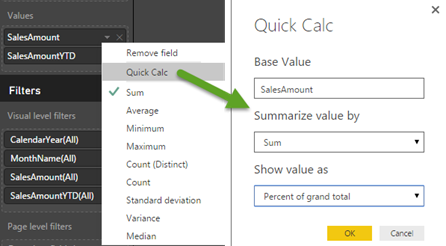
DAX is very powerful but it could entail a steep learning curve for novice users. Power BI Desktop has started on the road of delivering pre-packaged calculations. The first one is Percent of Grand Total. Once you add a measure to the Values zone, you can expand the measure drop-down and click Quick Calc. This is similar to how you would pick one of the default aggregation functions.

061916_2118_PowerBIQuic1.png

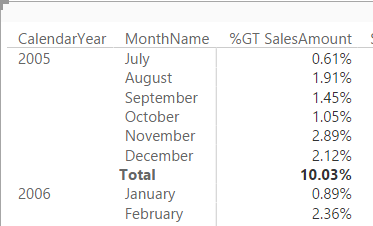
Interestingly, Power BI Desktop doesn’t add a new calculation when the Quick Calc feature is used. Instead, it probably creates an implicit DAX measure and you can’t see the formula. The original measure is renamed to %GT <original measure name>.

061916_2118_PowerBIQuic2.png

Prepackaged calculations are a frequently requested Power BI feature. Expect additional quick calculations to light up soon. As a recommendation for improvement, I think that it would be nice to be able to see the DAX formula behind the quick calc.

20 Jun 16:38

Graph Databases Rising to the Top

by A.R. Guess

by Angela Guess Jack Vaughan recently wrote in Search Data Management, “Graph databases and analytics systems have been quiet, ‘under the covers’ technologies for some time. Based on mathematical notions of structure, they did a pretty good job of modeling relationships between data elements in special settings, but their use has been narrow. In terms […]

The post Graph Databases Rising to the Top appeared first on DATAVERSITY.

20 Jun 16:38

6 Ways to Leverage Machine Learning at Any Company

by A.R. Guess

by Angela Guess The Forbes Technology Council recently wrote, “Machine learning isn’t just for high-tech companies anymore. These days, any business can leverage machine learning for sales, marketing and to drive engagement. Here, six technology executives from Forbes Technology Council offer their thoughts on how even non-tech companies can start leveraging machine learning in the […]

The post 6 Ways to Leverage Machine Learning at Any Company appeared first on DATAVERSITY.

20 Jun 16:37

Step by Step Machine Learning: A Classification model to help the Humane Society

by Susan Ibach

WP_20160426_13_41_43_ProThis tutorial will walk you through a classification machine learning experiment to predict one of several possible outcomes for an animal brought to the humane society.

If you missed the previous tutorials you can find them here

For a more comprehensive introduction to data science and Azure Machine Learning Studio check out Data Science and Machine Learning Essentials on MVA

In this post I will show you how to

  1. Create your machine learning workspace
  2. Create a basic classification experiment
  3. Work the data to improve accuracy
  4. Deploy the trained model as a predictive web service and call it from Python code

I recently adopted two cats from the humane society. That’s Oola, our acrobatic ninja cat, curled up on the higher bed and Cluseau, the lovable but somewhat clueless addition to the family, giving himself a bath on the lower level. As I was considering interesting new datasets to explore, I stumbled across a data set from the SPCA (Society for Prevention of Cruelty to Animals) on Kaggle. They wanted to predict the outcome of animals who arrived at the shelter.

This data set helps illustrate two very important principles of machine learning:

Defining the business problem and benefits

Whenever you start an experiment you should have a problem in mind that you want to solve. What’s the goal of the SPCA? To find homes for as many animals as possible. If you are running the SPCA and you can predict that an animal is going to be difficult to place in a home through machine learning, you might be able to take actions to increase the animal’s chance of adoption. In my home town, the humane society has animals on display at local pet stores. I am sure some pet stores get more traffic and have higher adoptions rates, so perhaps you could give priority to animals who are less likely to find a home. As I created this tutorial, I also discovered that animals that were not neutered or spayed had a lower chance of adoption. So using funds to neuter or spay animals at the center should also incresae the adoption rate. Learnings from the experiment can be directly used to improve the adoption rate of animals at the center.

Data preparation

Executing your machine learning experiment is only a part of machine learning. The biggest chunk of work when doing machine learning, is becoming familiar with the data, collecting the data, and getting the data in a suitable format for machine learning. The original data set from the SPCA is not optimized for machine learning and needs some work!  I’ll talk more about this in the video “work the data to improve accuracy” which you will find in section 3 of this post.

On with the tutorial!

Okay enough talk, let’s get on with the tutorial.

1. Create a machine learning workspace

First things first you are going to need a Machine Learning Workspace to execute any experiment


2. Create a basic classification experiment

If you have followed the tutorial for the two-class experiments, you will notice the steps here are very similar! The biggest difference is in the evaluation report. The results for a classification experiment are quite different from a two-class experiment. 


3. Work the data to improve accuracy

When you get unsatisfactory results from your model, it’s time to go back to your data. MAchine Learning is an iterative process. You will find yourself constantly going back, tweaking the data, trying a new experiment hoping to get better results. In this video I will share a few examples of ways you could work with the data in the SPCA dataset to improve your results.

I could have spent even more time improving this data set for my experiment. I didn’t even get to analyzing the data set for dogs! Think about the factors families consider when they adopt a dog: size, temperament, purebred vs mixed breed, allergy friendly (i.e. how much do they shed fur.). A lot of this information can be determined if we find out information about the breeds. Obviously it would be a fair bit of work to extract the breed for each dog and fetch information from another data source that tells us the temperament, size, and allergy friendly level of each breed. We would also need to make sure each of those values was categorized in a way that was helpful. Should we break down size of dog to small/medium/large? or should we break size into average expected height in inches? Should we simply identify which breeds are considered allergy friendly, such as poodles?

Machine learning is an iterative process, if we aren’t happy with the results, sure you can change the algorithm you use to train the model, and you can tweak the parameters of the algorithm, that can improve your accuracy. But don’t forget to go back and re-evaluate the data itself! Is there additional data you can fetch, or derive? Are the columns that are not formatted in an optimal way for machine learning?

4. Deploy the trained model as a web service

Of course a trained model is only useful if you have a way to use it! In this short video I show you how to deploy the trained model as a predictive web service and call it from a simple Python application.

20 Jun 16:35

The Promising State of Diabetes Technology in 2016

by Scott Hanselman

Glucopilot helped PalmPilots users in the 90sI've been a Type 1 Diabetic now for nearly 25 years. The first thing that every techie does once they've been diagnosed with Diabetes is they try to solve the problem with software or hardware. Whatever tool they have, they use that too to "solve their Diabetes." Sometimes it's Excel, sometimes it's writing a whole new system. We can't help ourselves. We see the charts and graphs, we start to understand that this is a solvable problem.
However, innovation in Diabetes technology has two sides. There's the "what can we do within the medical establishment" side, and there's the "what components do I, the actual diabetic, have to work with" side. We are given insulin pumps, glucose meters, and drugs but we aren't involved in the development, which makes sense to a point.

Fifteen years ago (yes, really, 15) I went on a trip with a PalmPilot, OmniSky wireless modem, Blood sugar meter, and insulin pump and quasi-continuously sent my blood glucose numbers back to a server and my doctor. Many many years later I demonstrated on stage at a Microsoft conference (video) how a remote management system like NightScout along with other innovations in IoT are taking these concepts so much further. It's through the work of hundreds of innovators and tinkerers that I think we're on the cusp.

Aside: If you are wholly unfamiliar with how Type 1 Diabetes works, please take a moment and read Diabetes Explanation: The Airplane Analogy. This post pretty clearly explains how blood sugar rises and falls and why fixing this isn't a simple problem.

Four years ago - four years ago this week in fact - I wrote a post called The Sad State of Diabetes Technology in 2012, largely in frustration. It became one of my most popular posts. For some it was a turning point and was called "seminal." For most Diabetics, though, the post said what everyone already thought and already knew. Diabetes sucks deeply, the technology we are given to manage it sucks deeply, and we are pretty much tired of waiting. We've been told a "cure" (or at least, a mostly fool-proof way to manage it) is just 5 years out. I've been told this, personally, every year for the last 25.

Here we are four years after I wrote my angry post and I'm actually feeling like we are on the edge of something big.

I believe that now we are inside a 5 year window of time where we WILL make Type 1 Diabetes MUCH MUCH easier to deal with.

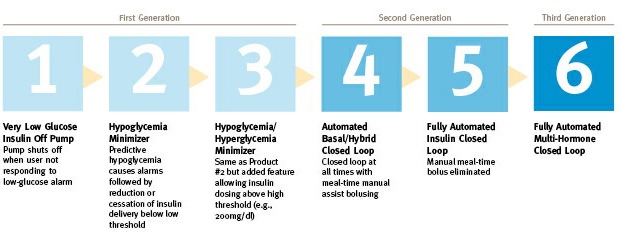
Using this generation diagram from the JDRF, it's totally clear that the open source diabetes community is making Stage 4 happen today.

6 stages of "Artificial Pancreases"

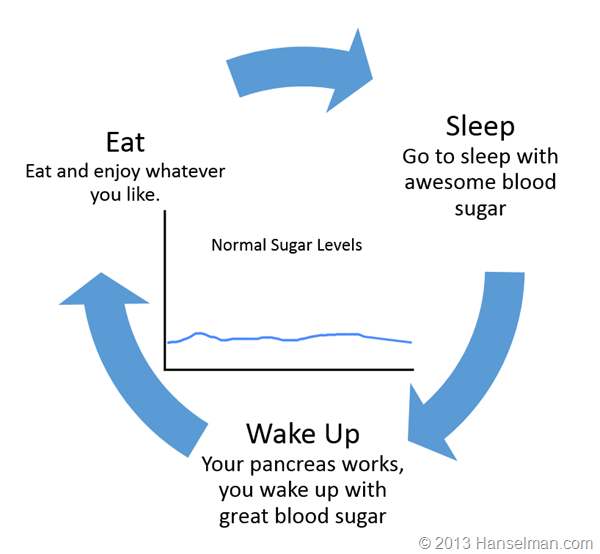
Let's stop and level set for a moment. Here's a generalization of your day if you're not diabetic.

The "Normal Sugared" have it easy.

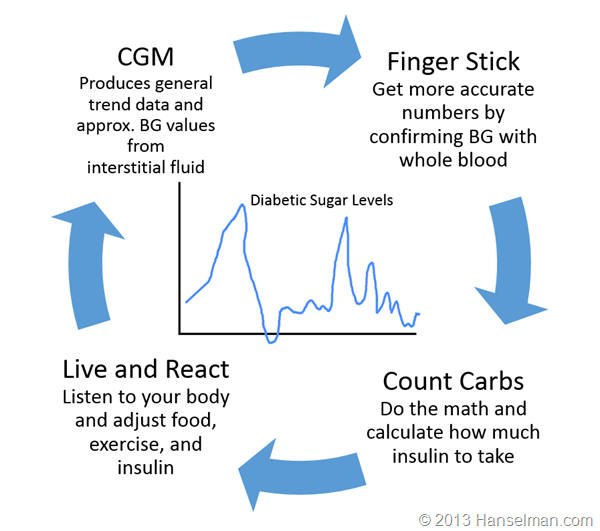
Here's what a Type 1 diabetic (like me) does:

Diabetics have to constantly manage their sugar, manually

What we need is for the "loop to be closed."

Is a Closed-Loop System for Diabetes Management like a Self-driving Car?

You know how the press just loves to call the Tesla a "Self-driving car?" It's not. I've driven one for over 15 thousand miles. It has two main features and they are both effectively cruise-control. There's the cruise control that slows down when there's a car in front of you, and then there's the "Tesla Auto-Pilot" feature. Amazing, sure, but realistically it's effectively "side to side cruise control." It will keep you in the lanes, usually, to a limit. You can't go to sleep, you shouldn't be texting. You are in charge. This isn't to minimize the amazing work that Tesla has done, but using a closed-loop insulin stages above as a parallel, a Tesla is barely stage 3 or 4.

However, this is still a fantastic innovation and for a diabetic like myself, I *would* like to take my hand off the diabetic wheel as it were, at least for the easy stuff like staying in the lanes on the freeway while going straight. Automatic basal insulin dosing (background insulin dosing) would free my mind up a LOT.

It's possible and it's happening.

What's required for a closed loop?

In order to close the loop, what are the components we need? For this simple exercise please assume that "safely and securely" applies to all of these statements.

  • The ability to tell an insulin pump to deliver insulin
  • The ability to read data from the insulin pump.
  • The ability to read current blood sugar from a continuous glucose meter
  • Some CPU or "brain" where an algorithm or controller lives to coordinate all this.
  • Storage, cloud or otherwise, to keep all this historical data

There are a number of issues to think about, though, if the open source community wants to solve this before the commercial companies do.

  • Most pump manufacturers don't like the idea of remotely controlling them after a series of insulin pump proof of concept "attacks."
    • This means that some systems require the use of an older pump to allow remote control. We, the community, need to encourage pump manufacturers to create pumps that allow secure remote control.
  • Most CGM manufacturers don't publish their specifications or like 3rd party apps or systems talking to their stuff.
    • We, the community, need to encourage manufacturers to create glucose meters that allow secure access to our sugar data. 'Cause it's our data.
  • Universal concern that someone will accidentally hurt or kill themselves or someone else.
  • Where should the "closed loop brain/algorithm" live? The cloud? Your phone? Another CPU in your pocket?

What happened in the Diabetes Technology Ecosystem in the last 4 years to make this possible?

The interesting part about this problem is that there are many ways to solve this. In fact, there are multiple closed loop OSS systems available now. Lots of things have made this possible.

Here's a rough timeline of the Open Diabetes Ecosystem.

  • Insulaudit -  Ben West starts an open source driver to audit medical devices
  • Decoding CareLink -  Driving an insulin pump with Python, Oct 2012
  • Decoding Dexcom - Pulling data off a Dexcom CGM 3 years ago!
  • CGM-Simple-Reader - Using Windows 8 DLLs from Dexcom Studio to get CGM data. Next step was uploading it somewhere!
  • Pebble - Being able to remotely view Nightscout Data on your wrist on a pebble.
  • Nightscout - Remote viewing of glucose data by pulling from a CGM and uploading to a web app. The addition of a REST API (Web API) was the killer that kick started other apps.
  • Parakeet Google App Engine - Gets data from The Parakeet Unit and talks to xDrip over the cell network. "OnStar for diabetes"
  • Nightscout Share Bridge - Takes Dexcom G5 data and copies it over to Nightscout.
  • xDrip - Talk to a CGM without a Receiver. Pulling the signal off the air itself. Can we improve their algorithm ourselves?
  • PingRF - Talking to the Animas Ping Pump via RF
  • OpenAPS - Open Artificial Pancreas System. A platform for building a closed-loop with open tools. There are almost 100 people running their own closed loops, today.
  • Watch Dana Lewis talk about OpenAPS at OSCON this year!
  • RileyLink - A bridge that can talk a Medtronic Pump. Make a the pump's RF programmatically available via Bluetooth
  • Loop - iPhone-based closed loop that uses RileyLink
  • xDripG5 - iOS Framework for talking to Dexcom CGMs over Bluetooth
  • OmniAPS - Talking to an OmniPod Pump

I realize this isn't comprehensive, but the point here is to understand there are dozens of ways to solve this problem. And there are dozens (hundreds?) of excited and capable people ready to make it happen.

Here's the systems that I have. This is my Dexcom G5 on my iPhone showing my blood sugar in near-realtime. Here I can see my sugar, but I have to make my own decisions about dosing.

Dexcom G5 on an iPhone

Here is a Raspberry Pi running OpenAPS. This is the brain. The algorithm runs here. It's talking to my Dexcom, to Nightscout in the cloud, and to my Medtronic Pump via RF via a USB device called a CareLink.

OpenAPS on a Raspberry Pi

Here is OpenAPS again, this time running on an Intel Edison sitting on a SparkFun Block with a battery and a TI C1111 RF transmitter. The Edison is the brain and has Bluetooth. The TI transmitter can replace the CareLink.

IMG_0058

As an alternative to OpenAPS, here is a RileyLink custom board that can also talk to the pump, but doesn't have a brain. There is no algorithm here. Instead, this is a bridge with RF in one hand and Bluetooth in the other. It makes a pump controllable and readable. The brain lives elsewhere.

RileyLink

Here's the RileyLink in a 3D printed case. I can keep it all in my pocket and it will run all day.

RileyLink in a 3D printed case

Here is a build of Loop from Nathan Racklyeft that uses Bluetooth to talk to both my CGM (Glucose Meter) and the Pump via the Riley Link. In this example, the phone is the brain. This is good and bad. You can't really trust your phone to keep stuff running if it also runs Candy Crush AND has a crappy battery. However, if both my Pump AND CGM spoke Bluetooth, we can imagine a world where the brain of my "artificial pancreas" is just an app on my phone. No additional hardware.

Loop puts the brain on your phone

The most important point here is that a LOT of stress could have been avoided if the manufacturers had just created open APIs in the first place.

There's also amazing work happening  in the non-profit space. Howard shared this common on my original "Sad State" Diabetes Post:

Great article, Scott. You've accurately captured the frustration I've felt since my 12 year old daughter was diagnosed with T1D nine months ago. She also wears a pump and CGM and bravely performs the ritual you demonstrate in your video every three days. The technology is so retro it's embarrassing.

Since then, Howard created Tidepool and recently spoke at the White House! On the commercial side, there are lots of players rushing to market. Medtronic may '>'>'>have a hybrid closed loop called the 670g by spring next year although trials move slowly so I'm thinking later or possibly 2018. Lane Desborough from Bigfoot Biomedical has also closed the loop and they are bringing it to market...soon we hope!

For more information, go watch Mark Wilson's talk at D-Data Exchange 2016. It is an excellent 30 minute overview of the ecosystem and a call to action to everyone involved.

Check out this visualization of 6 years of Hacking Diabetes. These are all the projects and commits as folks dump into Open Diabetes Hacking Community.

What's the take away? It's an exciting time. It's happening. It can't be stopped.

More Diabetes Reading


Sponsor: Big thanks to Redgate for sponsoring the feed this week. How do you find & fix your slowest .NET code? Boost the performance of your .NET application with ANTS Performance Profiler. Find your bottleneck fast with performance data for code & queries. Try it free!


© 2016 Scott Hanselman. All rights reserved.
     
20 Jun 16:35

Stop saying learning to code is easy.

by Scott Hanselman
WoC in Tech Stock Photos used under CC

(The photo above was taken at the Microsoft NYC office of three amazing young developers working on their apps.)

I saw this tweet after the Apple WWDC keynote and had thought the same thing. Hang on, programming is hard. Rewarding, sure. Interesting, totally. But "easy" sets folks up for failure and a lifetime of self-doubt.

When we tell folks - kids or otherwise - that programming is easy, what will they think when it gets difficult? And it will get difficult. That's where people find themselves saying "well, I guess I'm not wired for coding. It's just not for me."

Now, to be clear, that may be the case. I'm arguing that if we as an industry go around telling everyone that "coding is easy" we are just prepping folks for self-exclusion, rather than enabling a growing and inclusive community. That's the goal right? Let's get more folks into computers, but let's set their expectations.

Here, I'll try to level set. Hey you! People learning to code!

  • Programming is hard.
  • It's complicated.
  • It's exhausting.
  • It's exasperating.
  • Some things will totally make sense to you and some won't. I'm looking at you, RegEx.
  • The documentation usually sucks.
  • Sometimes computers are stupid and crash.

But.

  • You'll meet amazing people who will mentor you.
  • You'll feel powerful and create things you never thought possible.
  • You'll better understand the tech world around you.
  • You'll try new tools and build your own personal toolkit.
  • Sometimes you'll just wake up with the answer.
  • You'll start to "see" how systems fit together.
  • Over the years you'll learn about the history of computers and how we are all standing on the shoulders of giants.

It's rewarding. It's empowering. It's worthwhile.

And you can do it. Stick with it. Join positive communities. Read code. Watch videos about code.

Try new languages! Maybe the language you learned first isn't the "programming language of your soul."

Learning to programming is NOT easy but it's totally possible. You can do it.

More Reading


Sponsor: Big thanks to Redgate for sponsoring the feed this week. How do you find & fix your slowest .NET code? Boost the performance of your .NET application with ANTS Performance Profiler. Find your bottleneck fast with performance data for code & queries. Try it free!


© 2016 Scott Hanselman. All rights reserved.
     
20 Jun 16:33

Pure Storage really aren’t a one-trick pony

by Dan Frith
EMC logo

Disclaimer: I recently attended Storage Field Day 10.  My flights, accommodation and other expenses were paid for by Tech Field Day. There is no requirement for me to blog about any of the content presented and I am not compensated in any way for my time at the event.  Some materials presented were discussed under NDA and don’t form part of my blog posts, but could influence future discussions.

PureStorage_logo

Before I get started, you can find a link to the Pure Storage presentation at Storage Field Day 10 here. You can also see the videos of the presentation here.

In talking with people about Pure Storage, some of the feedback I received was that they were a “one-trick pony“. By that I mean that people thought all they did was offer an all-flash array and nothing more. I think there’s always been a lot more to Pure than just the array. To wit, their approach to hardware maintenance and lifecycles, via the Evergreen Storage program, as well as their implementation of Pure1 has had me thinking for a while that they’re not your father’s AFA vendor.


FlashBlade

I wrote about FlashBlade when it was first announced and I was cautiously optimistic that they were onto something kind of cool. As it happened, Pure spent a lot of time at SFD10 giving us a run-through on what some of the thinking around the design of the FlashBlade was, and it solidified some of my ideas around the product.

Here’s a happy snap of Brian Gold (@briantgold) taking us through the hardware in the FlashBlade.

Pure_SFD10

Some of the challenges Pure aimed to address when designing the FlashBlade was the need for scale in terms of:

  • Capacity – from terabytes to petabytes;
  • Concurrency – from a few users to thousands; and
  • Access patterns – from small files and metadata to large, streaming workloads.

They also wanted to do this without drowning the users or administrators in complexity.

One of the key approaches to this problem was to adopt a modular architecture through the use of the blade chassis. While we talk a lot about the flash in Pure’s FlashBlade, the network architecture shouldn’t be underestimated. A key component of Pure’s “software-defined networking” is hardware (no, the irony is not lost on me), with two Broadcom Trident-II ethernet switch ASICs collapsing three networks (Front End, Back End and Control) into one high performance fabric providing 8 40Gbs QSFP connections into customer Top of Rack switches. This provides Pure with the use of a high performance, integrated fabric connected to scalable server nodes. While some of the specifications at the time of announcement were limited to the chassis, you’ll start to see these numbers increase as the SDN component is improved over time.

Brian was keen to see us thinking about the FlashBlade hardware design in the following terms:

  • An integrated blade chassis provides density and simplicity;
  • All-flash storage unlocks the parallelism inside an SSD; and
  • An NVRAM engine built for distributed transaction processing.

Rob Lee then went on to talk about the software side of the equation, with the key takeaways from the software side of things being Pure’s desire to:

  • Achieve scalability though parallelism at all layers;
  • Create parallelism through deep partitioning and distribution; and
  • Minimise the cost of distributed coordination.


Further Reading and Conclusion

Chris Evans did a nice article on Pure prior to SFD10. Chris Mellor did a decent write-up (something he’s prone to) at the time of release, and Enrico put together some interesting insights as well. Pure are certainly bucking the trend of commodity hardware by using their own stuff. They’re doing scale out differently as well, which is something some pundits aren’t entirely pleased about. All that said, I think the next 12 months will be critical to the success of the scale-out file and object play. Pure’s ability to execute on a technically compelling roadmap, as well as grabbing the interest of customers in rich media, analytics and technical computing will be the ultimate measure of what looks to be a well thought out product architecture. If nothing else, they’ve come up with a chassis that does this …

20 Jun 16:31

Tintri Keep Doing What They Do, And Well

by Dan Frith
EMC logo

Disclaimer: I recently attended Storage Field Day 10.  My flights, accommodation and other expenses were paid for by Tech Field Day. There is no requirement for me to blog about any of the content presented and I am not compensated in any way for my time at the event.  Some materials presented were discussed under NDA and don’t form part of my blog posts, but could influence future discussions.

Tintri_Logo_Horizontal_1024

Before I get into it, you can find a link to my notes on Tintri‘s presentation here. You can also see videos of the presentation here.

I’ve written about Tintri recently. As recently, in fact, as a week before I saw them at SFD10. You can check out my article on their most recent product announcements here.


VAS but not AAS (and that’s alright)

Tintri talk a lot about VM-aware Storage (or VAS as they put it). There’s something about the acronym that makes me cringe, but the sentiment is admirable. They put it all over their marketing stuff. They’re committed to the acronym, whether I like it or not. But what exactly is VM-aware Storage? According to Tintri, it provides:

  • VM-level QoS;
  • VM-level analytics;
  • VM data management;
  • VM-level automation with PowerShell and REST; and
  • Supported across multiple hypervisors (Support VMware, Hyper-V, OpenStack, RedHat).

Justin Lauer, Global Evangelist with Tintri, took us through a demo of VAS and the QoS capabilities built in to the Tintri platform.

SFD10_Tintri_Justin

I particularly liked the fact that I can get a view of end to end latency (host / network / storage (contention and flash) / throttle latency). In my opinion this is something that people have struggled with for some time, and it looks like Tintri have a really good story to tell here. I also liked the look of the “Capacity gas gauge” (petrol for Antipodeans), providing an insight into when you’ll run out of either performance, capacity, or both.

So what’s AAS then? Well, in my mind at least, this is the ability to delve into application-level performance and monitoring, rather than just VM-level. And I don’t think Tintri are doing that just yet. Which, to my way of thinking, isn’t a problem, as I think a bunch of other vendors are struggling to really do this in a cogent fashion either. But I want to know what my key web server tier is doing, for example, and I don’t want to assume that it still lives on the datastore that I tagged for it when I first deployed it. I’m not sure that I get this with VAS, but I still think it’s a long way ahead of where we were a few years ago, getting stats out of volumes and not a lot else.


Further Reading and Conclusion

In the olden days (a good fifteen years ago) I used to struggle to get multiple Oracle instances to play nicely on the same NT4 host. But I didn’t have a large number of physical hosts to play with, and I had limited options when I wanted to share resources across applications. Virtualisation to slice up physical resources in a more concise fashion, And as a result of this it’s made it simple for us to justify running one application per VM. In this way we can still get insights into our applications from understanding what our VMs are doing. This is no minor thing when you’re looking after storage in the enterprise – it’s a challenge at the best of times. Tintri has embraced the concept of intelligent analytics in their arrays in the same way that Nimble and Pure have started really making use of the thousands of data points that they collect every minute.

But what if you’re not running virtualised workloads? Well, you’re not going to get as much from this. But you’ve probably got a whole lot of different requirements you’re working to as well. Tintri is really built from the ground up to deliver insight into virtualised workloads that has been otherwise unavailable. I’m hoping to see them take it to the next level with application-centric monitoring.

Finally, Enrico did some more thorough analysis here that’s worth your time. And Chris’s SFD10 preview post on Tintri is worth a gander as well.


20 Jun 16:31

VAMX All Flash and VMAX3 iSCSI Deployment Guide for Oracle Database

by emc-community-network@emc.com (Sam Lucido)
EMC logo


facebook_button-30.png

twitter_button-25.png

email_button-30.png

linkedin_button-30.png


  VMAX All Flash and VMAX3 iSCSI


   Deployment Guide for Oracle Database


With VMAX® All Flash and VMAX3™ iSCSI, support was re-designed to provide customers with greater port connection densities using virtual storage ports, built-in multi-tenancy capabilities using VLAN, and easier isolation using VMAX initiator groups.


IP-based connectivity between storage and servers offers a simple, safe, and robust alternative to FC networks. iSCSI for Oracle database deployments on VMAX is easy and offers all the advantages described in this white paper. Oracle databases can use iSCSI as the primary storage protocol, or they can use an iSCSI connection to snapshots of the primary database, even if the primary database uses FC for connectivity.


This white paper provides an overview of iSCSI, describes how to configure it on VMAX and Linux, and provides Oracle workload examples comparing FC and iSCSI.


VMAX All Flash and VMAX3 iSCSI Deployment Guide for Oracle Database


Follow us on Twitter:
EMCOracle.png

Tweet this document:


Click here to learn more:

store_open.png


facebook_button-30.pngtwitter_button-25.pngemail_button-30.pnglinkedin_button-30.png

20 Jun 16:31

Big Data is About Getting Small

by Bill Schmarzo
EMC logo

Okay, okay, that seems like an odd thing to say. But at a recent keynote, that came out of my mouth. But that’s a confusing statement, so let me share the entirety of what I said:

Big Data is about getting small; it’s about getting down to the level of the individual.

Sometimes the Big Data conversation gets too fixated on the “big” part of the conversation: Is my data big enough? Is my company big enough? Is my analytics team big enough?

Instead, let’s reorient the conversation to get “small,” to leverage the wealth of internal and external data sources to learn as much as possible about our individual customers and machines. Let’s change the conversation, and let’s start with the current fascination with the Internet of Things (IoT).

Internet of Things Becomes The Internet of Everything

By now, only those living under a rock haven’t been inundated by the Internet of Things prognostications. Gartner predicts that by 2020, there will be:

  • 30 Billion of connected devices
  • 7 Billion connected people
  • 44 Zettabytes (1,000,000,000,000,000,000,000 bytes) of data

I’ve written several blogs about the potential of IoT, my favorite being “Internet of Things: Connected Does Not Equal Smart.” Even more IoT factoids are provided in Figure 1.

Figure 1: Internet of Things Factoids

Figure 1: Internet of Things Factoids

But, as with many equally overwhelming technology statistics… so what? Well, when you combine the Internet of Things with the wealth of social media and mobile data that everyone is sharing across the multitude of social media channels (e.g., Facebook, Twitter, LinkedIn, Instagram, Vine) and all the wearable computing data (e.g., fitness bands, smart watches, smart phones, smart glasses, smart contact lens), then you end up with the “Internet of Everything” where everything and everyone is connected. And that creates a LOT of possibilities.

But where Big Data, and “Internet of Everything” become personally relevant is at the level of the individual – at the “Internet of One” (see Figure 2).

Figure 2: The Internet of One

Figure 2: The Internet of One

It is at the level of the individual where one can start gleaning actionable insights about each customer’s propensities, preferences, behaviors, tendencies, trends, interests, passions, associations, affiliations, etc. It is at the level of the individual where the multitude of insights about your customers (and machines) enables you to anticipate their needs to better support and service them. In the end, the “Internet of Things” is become highly relevant when the conversation is about the “Internet of ME”!

The Internet of Everything Becomes The Internet of ME!

Customers’ expectations are changing about what they expect from the companies with whom they interact. Companies such as Netflix, Amazon, Google, Pandora and Spotify are leveraging superior insights about their customers and their customers’ purchase, viewing and listening patterns to provide a more personalized service; to recommend products or movies or songs that they believe that you will find interesting and relevant (and hopefully buy).

A recent study “Millennials: Designing a Bank For the Future” highlights how expectations are changing from a younger generation who has grown up believing these types of highly-personalized services should be common (see Figure 3).

Figure 3: Millennials: Designing A Bank For The Future

Figure 3: Millennials: Designing A Bank For The Future

The study highlights the following expectations of the new Millennials:

  • 48% are interested in real-time and forward-looking (predictive analytics) spending analysis
  • 51% want their bank to proactively recommend (prescriptive analytics) products and services for their financial needs

But what does this mean to the most important person on the “Internet of One”…me!! For example, I wear a fitness band that tracks fitness data about me such as distance walked and run, minutes exercised, elevation covered, levels of exertion, heart rate, and stress levels. My fitness data could be leveraged by a multitude of organizations to better service to me – to recommend new fitness products, exercise programs, running routes, exercise partners, health check ups, even health insurance and life insurance policies (see Figure 4).

Figure 4: The Internet of Me!

Figure 4: The Internet of Me!

Getting Small Summary

Big Data and the “Internet of Everything” get personally relevant when we get small; down to the level of the individual. So instead of worrying about big, let’s focus on the most important entity in the “Internet of Everything”, the individual. In the end, the “Internet of Things” becomes highly relevant when the conversation is about the “Internet of ME”!

The post Big Data is About Getting Small appeared first on InFocus.