Shared posts

15 Aug 11:29

Presidential Policy Directive — United States Cyber Incident Coordination

by A.R. Guess

by Angela Guess Yesterday, the White House distributed its Presidential Policy Directive for responding to any significant cyber incident affecting the nation, such as a federal data breach. The release states, “The advent of networked technology has spurred innovation, cultivated knowledge, encouraged free expression, and increased the Nation’s economic prosperity. However, the same infrastructure that […]

The post Presidential Policy Directive — United States Cyber Incident Coordination appeared first on DATAVERSITY.

15 Aug 10:57

Storage Field Day 10 – Wrap-up and Link-o-rama

by dan

Disclaimer: I recently attended Storage Field Day 10.  My flights, accommodation and other expenses were paid for by Tech Field Day. There is no requirement for me to blog about any of the content presented and I am not compensated in any way for my time at the event.  Some materials presented were discussed under NDA and don’t form part of my blog posts, but could influence future discussions.

SFD-Logo2-150x150

This is a quick post to say thanks once again to Stephen, Tom, Megan and the presenters at Storage Field Day 10. I had an enjoyable and educational time. For easy reference, here’s a list of the posts I did covering the event (they may not match the order of the presentations).

Storage Field Day – I’ll Be At SFD10

Storage Field Day 10 – Day 0

Storage Field Day 10 – (Fairly) Full Disclosure

Kaminario are doing some stuff we’ve seen before, but that’s okay

Pure Storage really aren’t a one-trick pony

Tintri Keep Doing What They Do, And Well

Nimble Storage are Relentless in Their Pursuit of Support Excellence

Cloudian Does Object Smart and at Scale

Exablox Isn’t Just Pretty Hardware

It’s Hedvig, not Hedwig

The Cool Thing About Datera Is Intent

Data Virtualisation is More Than Just Migration for Primary Data


Also, here’s a number of links to posts by my fellow delegates (and Tom!). They’re all really quite smart, and you should check out their stuff, particularly if you haven’t before. I’ll try keep this updated as more posts are published. But if it gets stale, the SFD10 landing page has updated links.


Chris M Evans (@ChrisMEvans)

Storage Field Day 10 Preview: Hedvig

Storage Field Day 10 Preview: Primary Data

Storage Field Day 10 Preview: Exablox

Storage Field Day 10 Preview: Nimble Storage

Storage Field Day 10 Preview: Datera

Storage Field Day 10 Preview: Tintri

Storage Field Day 10 Preview: Pure Storage

Storage Field Day 10 Preview: Kaminario

Storage Field Day 10 Preview: Cloudian

Object Storage: Validating S3 Compatibility


Ray Lucchesi (@RayLucchesi)

Surprises in flash storage IO distributions from 1 month of Nimble Storage customer base

Has triple parity Raid time come?

Pure Storage FlashBlade well positioned for next generation storage

Exablox, bring your own disk storage

Hedvig storage system, Docker support & data protection that spans data centers


Jon Klaus (@JonKlaus)

I will be flying out to Storage Field Day 10!

Ready for Storage Field Day 10!

Simplicity with Kaminario Healthshield & QoS

Breaking down storage silos with Primary Data DataSphere

Cloudian Hyperstore: manage more PBs with less FTE

FlashBlade: custom hardware still makes sense


Enrico Signoretti (@ESignoretti)

VM-aware storage, is it still a thing?

Scale-out, flash, files and objects. How cool is Pure’s FlashBlade?


Josh De Jong (@EuroBrew)


Max Mortillaro (@DarkkAvenger)

Follow us live at Storage Field Day 10

Primary Data: a true Software-defined Storage platform?

If you’re going to SFD10 be sure to wear microdrives in your hair

Hedvig Deep Dive – Is software-defined the future of storage?

Pure Storage’s FlashBlade – Against The Grain

Pure Storage Flashblade is now available!


Gabe Maentz (@GMaentz)

Heading to Tech Field Day


Arjan Timmerman (@ArjanTim)

We’re almost live…

Datera: Elastic Data Fabric


Francesco Bonetti (@FBonez)

EXABLOX – A different and smart approach to NAS for SMB


Marco Broeken (@MBroeken)


Rick Schlander (@VMRick)

Storage Field Day 10 Next Week

Hedvig Overview


Tom Hollingsworth (@networkingnerd)

Flash Needs a Highway


Finally, thanks again to Stephen, Tom, Megan (and Claire in absentia). It was an educational and enjoyable few days and I really valued the opportunity I was given to attend.

SFD10_GroupPhoto

26 Jul 09:51

Implementing Qlik-style Variables in DAX

by Prologika - Teo Lachev

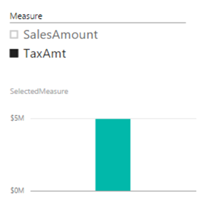
A large publicly-traded organization is currently standardizing on Power BI as a single BI platform as a replacement of Qlik and Tableau. They analysts have prepared a gap analysis of Power BI missing features. On the list was QlikSense variables. The idea is simple. The user is presented with a slicer that shows a list of measures. When the user selects a measure, all visualizations on the report dynamically rebind to that measure. For example, if SalesAmount is selected, all visualizations bound to the variable would show SalesAmount. However, if the user selects TaxAmt than this measure will be used.

070816_0110_Implementin1.png

As it stands, Power BI doesn’t have this feature but with some DAX knowledge, we can get it done by following these simple steps:

  1. In Power BI Desktop, click Enter Data and create a table called Variable with a single column Measure. Here, I’m hardcoding the selections but they can come from a query of course. Enter the labels of the measures the user will see, such as SalesAmount, TaxAmt, one per row to populate the Measure table.

  2. Create a new measure that has the following formula. Here I use the SWITCH function to avoid many nested IFs in case of many choices.

    SelectedMeasure = SWITCH(TRUE(),

    CONTAINS(‘Variable’, [Measure], “SalesAmount”), SUM(ResellerSales[SalesAmount]),

    CONTAINS(‘Variable’, [Measure], “TaxAmt”), SUM(ResellerSales[TaxAmt])

    )

  3. Add a slicer to you report that shows the Measure column from the Variable table.
  4. Add visualizations to the report that use the SelectedMeasure measure. Now when you change the slicer, reports rebind to the selected measure.

An interesting progression of this scenario would be to allow the user to select multiple measures and adjust the formulas accordingly, such as to sum all selected measures. Another progression would be to change the list depending on who the user is (Power BI now supports data security!)

26 Jul 09:49

Did You Know: Windows Fast Startup is not really a StartUp!

by Kalen Delaney
  So you might already know, but I didn’t know, until I learned it, of course. My first Windows 8 machine was my Surface Pro 3 and I LOVED the way it started up so FAST. Fast is good, right? I didn’t even bother to wonder WHY or HOW it was so fast. I just thought Moore’s Law was hard at work. But then I noticed something very strange after I started doing most of my SQL Server testing on my Surface. Sometimes cache didn’t seem to be cleared. Sometimes temp tables would mysteriously be there...(read more)
26 Jul 09:49

Nine Years

by andyleonard
Exactly nine years ago I published my very first post here at SQLBlog.com titled SSIS Design Pattern - Incremental Loads . At the time I wrote this post, the last page of my blog dashboard appeared as shown in the screenshot above. It shows the Incremental Loads Design Pattern post has received over 230,000 views in the past nine years. That’s about 2,000 views per month or about 71 views per day. For nine years. Wow. I asked my friend Adam Machanic ( Blog | @AdamMachanic ) about the total number...(read more)
26 Jul 09:48

Paying Attention to Estimates

by Aaron Bertrand

Last week I published a post called #BackToBasics : DATEFROMPARTS(), where I showed how to use this 2012+ function for cleaner, sargable date range queries. I used it to demonstrate that if you use an open-ended date predicate, and you have an index on the relevant date/time column, you can end up with much better index usage and lower I/O (or, in the worst case, the same, if a seek can't be used for some reason, or if no suitable index exists):

But that's only part of the story (and to be clear, DATEFROMPARTS() isn't technically required to get a seek, it's just cleaner in that case). If we zoom out a bit, we notice that our estimates are far from accurate, a complexity I didn't want to introduce in the previous post:

This is not uncommon for both inequality predicates and with forced scans. And of course, wouldn't the method I suggested yield the most inaccurate stats? Here is the basic approach (you can get the table schema, indexes, and sample data from my previous post):

CREATE PROCEDURE dbo.MonthlyReport_Original
  @Year  int,
  @Month int
AS
BEGIN
  SET NOCOUNT ON;
  DECLARE @Start date = DATEFROMPARTS(@Year, @Month, 1);
  DECLARE @End   date = DATEADD(MONTH, 1, @Start);
 
  SELECT DateColumn 
    FROM dbo.DateEntries
    WHERE DateColumn >= @Start
      AND DateColumn <  @End;
END
GO

Now, inaccurate estimates won't always be a problem, but it can cause issues with inefficient plan choices at the two extremes. A single plan might not be optimal when the chosen range will yield a very small or very large percentage of the table or index, and this can get very hard for SQL Server to predict when the data distribution is uneven. Joseph Sack outlined the more typical things bad estimates can affect in his post, "Ten Common Threats to Execution Plan Quality:"

"[…] bad row estimates can impact a variety of decisions including index selection, seek vs. scan operations, parallel versus serial execution, join algorithm selection, inner vs. outer physical join selection (e.g. build vs. probe), spool generation, bookmark lookups vs. full clustered or heap table access, stream or hash aggregate selection, and whether or not a data modification uses a wide or narrow plan."

There are others, too, like memory grants that are too large or too small. He goes on to describe some of the more common causes of bad estimates, but the primary cause in this case is missing from his list: guesstimates. Because we're using a local variable to change the incoming int parameters to a single local date variable, SQL Server doesn't know what the value will be, so it makes standardized guesses of cardinality based on the entire table.

We saw above that the estimate for my suggested approach was 5,170 rows. Now, we know that with an inequality predicate, and with SQL Server not knowing the parameter values, it will guess 30% of the table. 31,645 * 0.3 is not 5,170. Nor is 31,465 * 0.3 * 0.3, when we remember that there are actually two predicates working against the same column. So where does this 5,170 value come from?

As Paul White describes in his post, "Cardinality Estimation for Multiple Predicates," the new cardinality estimator in SQL Server 2014 uses exponential backoff, so it multiplies the row count of the table (31,465) by the selectivity of the first predicate (0.3), and then multiplies that by the square root of the selectivity of the second predicate (~0.547723).

31,645 * (0.3) * SQRT(0.3) ~= 5,170.227

So, now we can see where SQL Server came up with its estimate; what are some of the methods we can use to do anything about it?

  1. Pass in date parameters. When possible, you can change the application so that it passes in proper date parameters instead of separate integer parameters.
     
  2. Use a wrapper procedure. A variation on method #1 – for example if you can't change the application – would be to create a second stored procedure that accepts constructed date parameters from the first.
     
  3. Use OPTION (RECOMPILE). At the slight cost of compilation every time the query is run, this forces SQL Server to optimize based on the values presented each time, instead of optimizing a single plan for unknown, first, or average parameter values. (For a thorough treatment of this topic, see Paul White's "Parameter Sniffing, Embedding, and the RECOMPILE Options."
     
  4. Use dynamic SQL. Having dynamic SQL accept the constructed date variable forces proper parameterization (just as if you had called a stored procedure with a date parameter), but it is a little ugly, and harder to maintain.
     
  5. Mess with hints and trace flags. Paul White talks about some of these in the aforementioned post.

I'm not going to suggest that this is an exhaustive list, and I'm not going to reiterate Paul's advice about hints or trace flags, so I'll just focus on showing how the first four approaches can mitigate the issue with bad estimates.

    1. Date Parameters

    CREATE PROCEDURE dbo.MonthlyReport_TwoDates
      @Start date,
      @End   date
    AS
    BEGIN
      SET NOCOUNT ON;
     
      SELECT /* Two Dates */ DateColumn
        FROM dbo.DateEntries
        WHERE DateColumn >= @Start
          AND DateColumn <  @End;
    END
    GO

    2. Wrapper Procedure

    CREATE PROCEDURE dbo.MonthlyReport_WrapperTarget
      @Start date,
      @End   date
    AS
    BEGIN
      SET NOCOUNT ON;
     
      SELECT /* Wrapper */ DateColumn
        FROM dbo.DateEntries
        WHERE DateColumn >= @Start
          AND DateColumn <  @End;
    END
    GO
     
    CREATE PROCEDURE dbo.MonthlyReport_WrapperSource
      @Year  int,
      @Month int
    AS
    BEGIN
      SET NOCOUNT ON;
      DECLARE @Start date = DATEFROMPARTS(@Year, @Month, 1);
      DECLARE @End   date = DATEADD(MONTH, 1, @Start);
     
      EXEC dbo.MonthlyReport_WrapperTarget @Start = @Start, @End = @End;
    END
    GO

    3. OPTION (RECOMPILE)

    CREATE PROCEDURE dbo.MonthlyReport_Recompile
      @Year  int,
      @Month int
    AS
    BEGIN
      SET NOCOUNT ON;
      DECLARE @Start date = DATEFROMPARTS(@Year, @Month, 1);
      DECLARE @End   date = DATEADD(MONTH, 1, @Start);
     
      SELECT /* Recompile */ DateColumn
        FROM dbo.DateEntries
          WHERE DateColumn >= @Start
          AND DateColumn < @End OPTION (RECOMPILE);
    END
    GO

    4. Dynamic SQL

    CREATE PROCEDURE dbo.MonthlyReport_DynamicSQL
      @Year  int,
      @Month int
    AS
    BEGIN
      SET NOCOUNT ON;
      DECLARE @Start date = DATEFROMPARTS(@Year, @Month, 1);
      DECLARE @End   date = DATEADD(MONTH, 1, @Start);
     
      DECLARE @sql nvarchar(max) = N'SELECT /* Dynamic SQL */ DateColumn
        FROM dbo.DateEntries
        WHERE DateColumn >= @Start
        AND DateColumn < @End;';
     
      EXEC sys.sp_executesql @sql, N'@Start date, @End date', @Start, @End;
    END
    GO

The Tests

With the four sets of procedures in place, it was easy to construct tests that would show me the plans and the estimates SQL Server derived. Since some months are busier than others, I picked three different months, and executed them all multiple times.

DECLARE @Year  int = 2012, @Month int = 7; -- 385 rows
DECLARE @Start date = DATEFROMPARTS(@Year, @Month, 1);
DECLARE @End   date = DATEADD(MONTH, 1, @Start);
 
EXEC dbo.MonthlyReport_Original      @Year  = @Year, @Month = @Month;
EXEC dbo.MonthlyReport_TwoDates      @Start = @Start,  @End = @End;
EXEC dbo.MonthlyReport_WrapperSource @Year  = @Year, @Month = @Month;
EXEC dbo.MonthlyReport_Recompile     @Year  = @Year, @Month = @Month;
EXEC dbo.MonthlyReport_DynamicSQL    @Year  = @Year, @Month = @Month;
 
/* repeat for @Year = 2011, @Month = 9  --    157 rows */
 
/* repeat for @Year = 2014, @Month = 4  --  2,115 rows */

The result? Every single plan yields the same Index Seek, but the estimates are only correct across all three date ranges in the OPTION (RECOMPILE) version. The rest continue to use the estimates derived from the first set of parameters (July 2012), and so while they get better estimates for the first execution, that estimate won't necessarily be any better for subsequent executions using different parameters (a classic, textbook case of parameter sniffing):

Estimates with new approaches are sometimes right

Note that the above is not *exact* output from SQL Sentry Plan Explorer – for example, I removed the statement tree rows that showed the outer stored procedure calls and parameter declarations.

It will be up to you to determine whether the tactic of compiling every time is best for you, or whether you need to "fix" anything in the first place. Here, we ended up with the same plans, and no noticeable differences in runtime performance metrics. But on bigger tables, with more skewed data distribution, and larger variances in predicate values (e.g. consider a report that can cover a week, a year, and anything in between), it may be worth some investigation. And note that you can combine methods here – for example, you could switch to proper date parameters *and* add OPTION (RECOMPILE), if you wanted.

Conclusion

In this specific case, which is an intentional simplification, the effort of getting the correct estimates didn't really pay off – we didn't get a different plan, and the runtime performance was equivalent. There are certainly other cases, though, where this will make a difference, and it is important to recognize estimate disparity and determine whether it might become an issue as your data grows and/or your distribution skews. Unfortunately, there is no black-or-white answer, as many variables will affect whether compilation overhead is justified – as with many scenarios, IT DEPENDS™

The post Paying Attention to Estimates appeared first on SQLPerformance.com.

26 Jul 09:48

GE and Microsoft Partner to Bring Predix to Azure

by A.R. Guess

by Angela Guess According to a new release, “GE and Microsoft Corp. today announced a partnership that will make GE’s Predix platform for the Industrial Internet available on the Microsoft Azure cloud for industrial businesses. The move marks the first step in a broad strategic collaboration between the two companies, which will allow customers around […]

The post GE and Microsoft Partner to Bring Predix to Azure appeared first on DATAVERSITY.

26 Jul 09:48

Poll, do you have an index for your local SQL 2016 BOL?

by TiborKaraszi
This is for those of you who has installed the SQL Server 2016 documentation locally. If you haven't and want to do that, then read this: http://sqlblog.com/blogs/tibor_karaszi/archive/2016/06/30/books-online-for-sql-server-2016.aspx. My question is whether you have an index for the relational database topics? For instance, using the "index" page, if you type "GROUP BY" or "backup", do you get hits? Note that hits inside the SQL Server 2012 BOL doesn't count (if you also installed that), we want...(read more)
26 Jul 09:47

Finally, SSMS will talk to Azure SQL DW

by Rob Farley

Don’t get me started on how I keep seeing people jump into Azure SQL DW without thinking about the parallel paradigm. SQL DW is to PDW, the way that Azure SQL DB is to SQL Server. If you were happy using SQL Server for your data warehouse, then SQL DB may be just fine. Certainly you should get your head around the MPP (Massively Parallel Processing) concepts before you try implementing something in SQL DW. Otherwise you’re simply not giving it a fair chance, and may find that MPP is a hindrance rather than a help. Mind you, if you have worked out that MPP is for you, then SQL DW is definitely a brilliant piece of software.

One of the biggest frustrations that people find with SQL DW is that you need (or rather, needed) to use SSDT to connect to it. You couldn’t use SSMS. And let’s face it – while the ‘recommended’ approach may be to use SSDT for all database development, most people I come across tend to use SSMS.

But now with the July 2016 update of SSMS, you can finally connect to SQL DW using SQL Server Management Studio. Hurrah!

…except that it’s perhaps not quite that easy. There’s a few gotchas to be conscious of, plus a couple of things that caused me frustrations perhaps more than I’d’ve liked.

First I want to point out that at the time of writing, SSMS is still not a supported tool against PDW. You’ve always been able to connect to it to write queries, so long as you can ignore some errors that pop up about NoCount not being supported, but Object Explorer simply doesn’t work, and without Object Explorer, the overall experience has felt somewhat pained.

Now, when you provision SQL DW through the Azure portal, you get an interface in the portal that includes options for pausing, or changing the scale, as per this image:

image

And you may notice that there’s an option to “Open in Visual something” there. Following this link gives you a button that will open SSDT, and connect it to SQL DW. And this works! I certainly had a lot more luck doing this than simply opening SSDT and putting in some connection details. Let me explain…

In that image, notice the “Show database connection strings” link. That’s where you can see a variety of connection strings, and from there, you can extract the information you’ll need to make a connection in either SSDT or SSMS. You know, in case you don’t want to just hit the button to “Open in Visual something”.

image

When I first used these settings to connect using SSDT (rather than using the “Open in…” button), it didn’t really work for me. I found that when I used the “New Query” button, it would give me a “SQLQuery1.sql” window, rather than a “PDW SQLQuery1.dsql” window, and this wasn’t right. Furthermore, if I right-clicked a table and chose the “View Code’ option, I would get an error. I also noticed that when I connected using the “Open in…” button, it would tell me I was connected to version 10.0.8408.8, but when I tried putting the details in myself, it would say version “12.0.2000”. I’ve since found out that this was my own doing, because I hadn’t specified the database to connect to. And this information turned out to be useful for using SSMS too.

There is no “Open in SSMS” button in Azure. But you can connect using the standard Connect to Database Engine part of SSMS.

image

And it works! Previous versions would complain about NOCOUNT, and Object Explorer would have a bit of a fit. There’s none of that now – terrific.

And you get to see everything in the Object Explorer too, complete with an icon for the MPP database. But the version says 12.0.2000.8 if you connect like this.

image 

To solve this, you need to use the “Options >>>” button in that Connect to Server dialog, and specify the database. Then you’ll make the right connection, but you’ll lose the “Security” folder in Object Explorer.

image

clip_image001

Now, it’s not perfect yet.

When I look at Table Properties, for example, I can see that my table is distributed on a Hash, but it doesn’t tell me which column it is. It also tells me that the server I’m connected to is my own machine, rather than the SQL Azure instance.

image

I can see what the distribution column is within the Object Explorer, because it’s displayed with different icon, but still, I would’ve liked to have seen it in the Properties window as well. It’s not going to get confused by having a golden or silver key there, as it might in a non-parallel environment, because those things aren’t supported. If they do become supported, I hope they manage to come up with another way of highlighting the distributed column.

image

One rather large frustration is the very promising link on the database to “Open in Management Portal”,

image

, which opens a browser within SSMS (not exactly my preferred browser, but it seems like a good use for that feature). I’m okay with this, but following the link to the Query Performance Insight page, I’m immediately disappointed:

image

I get that SSMS doesn’t host the most ideal browser for this kind of thing, and that I’m probably going to be running a separate browser anyway, but I’m would like this to be addressed in a future update.

Probably my biggest frustration is that when I start a new query, I get this set of warnings:

image

…which suggests that it doesn’t really know about SQL DW. I can tell them to be suppressed, so that the dialog doesn’t re-appear, but I don’t like the feeling that the system is attempting them at all.

It’s certainly a lot less painful than it was in the past though. I love the fact that I can use the Object Explorer window. I love that I can script objects, in a way that feels way more natural to me than in SSDT.

This is SSDT:

image

This is SSMS:

image

, although oddly the SSMS script includes the USE statement at the top, which isn’t supported in SQLDW (I’m sure this won’t be the case for much longer).

image

Overall, I’m really pleased that the team has put things in place to make SSMS talk to SQL DW at all. I was beginning to think that SSMS wasn’t going to come to this particular party. This release, despite having some way to go just yet, suggests that I’ll soon be using SSMS more when I’m using SQL DW.

And therefore, this topic worthy for Chris Yates’ T-SQL Tuesday blog party this month – celebrating the new things that have come along in the SQL world recently.

TSQL2sDay150x150

@rob_farley

26 Jul 09:47

The elastic future of data warehousing

by SQL Server Team

This post was authored by Joseph Sirosh, Corporate Vice President, Data Group.

Announcing the general availability of Azure SQL Data Warehouse, an elastic, parallel, columnar data warehouse as a service.

A defining characteristic of cloud computing is elasticity – the ability to rapidly provision and release resources to match what a workload requires – so that a user pays no more and no less than what they need to for the task at hand. Such just-in-time provisioning can save customers enormous amounts of money when their workloads are intermittent and heavily spiked. And in the modern enterprise, there are few workloads that have a desperate need for such elastic capabilities as data warehousing. Traditionally built on-premises with very expensive hardware and software, most enterprise Data Warehouse (DW) systems have very low utilization except during peak periods of data loading, transformation and report generation.

With the general availability of the Azure SQL Data Warehouse, we are delivering the true promise of cloud elasticity to data warehousing. It is a fully managed DW as a Service that you can provision in minutes and scale up to 60 times larger in seconds. With a few clicks in the Azure Portal, you can launch a data warehouse, and start analyzing or querying data at the scale of hundreds of terabytes. Our architecture separates compute and storage so that you can independently scale them, and use just the right amount of each at any given time. A very unique pause feature allows you to suspend compute in seconds and resume when needed while your data remains intact in Azure storage. And SQL Data Warehouse offers an availability SLA of 99.9% – the only public cloud data warehouse service that offers an availability SLA to customers.

According to Gartner, “For years, many data warehousing vendors have been operating from a playbook of tightly balanced storage and compute configuration units. Cloud architectures are forcing a shift in this approach, with vendors starting to decouple storage and compute, and allowing them to independently scale. We believe this approach to be the correct one, and that other vendors in the space will need to adopt this methodology if they are to stay competitive.1

Azure SQL Data Warehouse uses an elastic massively parallel processing (MPP) architecture built on top of the industry-leading SQL Server 2016 database engine. It allows you to interactively query and analyze data using the broad set of existing SQL-based tools and business intelligence applications that you use today. It uses column stores for high performance analytics and storage compression, a rich collection of aggregation capabilities of SQL Server, and state of the art query optimization capabilities. With built-in capabilities such as Polybase, it allows you to query Hadoop systems directly, enabling a single SQL-based query surface for all your data.

Azure SQL Data Warehouse is also part of the Cortana Intelligence Suite, which is a fully managed big data and advanced analytics suite to transform your data into intelligent action. It easily integrates with components of the suite such as Azure Data Factory for data integration pipelines, with Azure Machine Learning for predictive analytics, Power BI for business intelligence, HDInsight for big data insights, R and Spark for big data analytics. For an example of such integration, see the airline industry sample on PowerBI.com. This shows a Power BI report based on a real world predictive maintenance solution for a major airline. The data for this report comes from a variety of sources including IoT streams from aircraft engines, air traffic control information, route restrictions and fuel usage data. All this is integrated and landed into a Azure SQL DW and processed with Azure Machine Learning to detect operational anomalies and trends.  The report is “live” and you can interact with it and experience Power BI in conjunction with Azure SQL DW and Azure ML.

The distinct capabilities of Azure SQL Data Warehouse include:

Data warehousing as a service

Gone are the pains associated with administering, managing, patching and manual tuning of data warehouses. There are no knobs to turn, no physical or virtual infrastructure to manage and the service is simple, resilient and secure with reliable storage. This enables the focus on driving the analytics and getting the value from your data rather than on managing your data warehousing software and hardware; Azure SQL Data Warehouse handles it all for you.

Unmatched security and access control

With malicious and even insider attacks becoming a key concern for enterprises, an alarm system over your critical enterprise data is a must have to avoid serious damage to your business and reputation. Only Azure SQL Data Warehouse delivers auditing and threat detection built into the service, with advanced machine learning to detect abnormal query patterns and alert you of potential security issues before it is too late. Data at rest is protected by Transparent Data Encryption.

Additionally, SQL Data Warehouse is the only cloud data warehouse service that works seamlessly with Azure Active Directory which currently supports 1.3 billion daily authentications across 600 million user accounts. This enables Single Sign-On (SSO) and role-based access control. You can even have finer-granularity permissions that let you control which operations a user can do on individual columns, tables, views, procedures, and other objects in the database. These features further protect data by ensuring just the right users have access to the right data—a critical capability when centralizing vast amounts of proprietary and sensitive data for analytics in an enterprise.

Multidimensional elasticity

Currently the majority of cloud database and data warehouse services are provisioned with fixed storage and compute resources. Resizing of resources typically compromises availability and/or performance. This means that service users typically end up with over-provisioned and expensive underutilized resources to accommodate possible peak demand or in the worst case, under-provisioned resources unable to handle sudden work overloads.

Unlike existing cloud services which can take anywhere from a couple of hours to a couple of days to do the data warehouse resizing, SQL Data Warehouse’s unique elastic technology decouples storage and compute, enabling each layer to become independently scalable almost instantaneously. This makes it possible to provision one or more data warehouses in minutes, and then independently scale users, data, and workloads in seconds to optimally match the demand. Further, elastic scaling also makes it possible to simultaneously load and query data, because every user and workload can have exactly the resources needed, without contention, and with minimal impact to production queries.

Getting featured in the iOS App Store was a big deal for a small company like ours as our users increased from 3,000 to 300,000 in 48 hours. To keep up with this 100x increase in workload, we simply added data warehouse compute capacity by moving a slider and our services just scaled in minutes—we didn’t miss an insight,” notes Paul Ohanian, CTO, PoundSand.

Save as you go, with fast pause and resume

Starting and shutting data warehouse clusters may take a considerable amount of time. Leaving the data warehouse running continuously incurs potentially high and unnecessary costs, especially if you are running your jobs periodically and the data warehouse is sitting idle in-between for extended periods of time. Now you can pause your data warehouse for the required time, saving compute costs, and quickly resume it later when needed. You can even write a PowerShell script, then automate the schedule with Azure Automation to automatically pause or resume the cluster based on the specific needs of your business.

When we learned about the pause and resume capabilities of SQL Data Warehouse and integrated services like Azure Machine Learning and Data Factory, we switched from AWS Redshift, migrating over 7TB of uncompressed data over a week for the simple reasons of saving money and enabling a more straight-forward implementation for advanced analytics. To meet our business intelligence requirements, we load data once or twice a month and then build reports for our customers. Not having the data warehouse service running all the time is key for our business and our bottom line,” said Bill Sabo, managing director of information technology at Integral Analytics.

Seamless querying of structured and unstructured data

An increasing amount of data in today’s rapidly digitizing world is unstructured data such as clickstreams, sensor data, location data, customer support emails and chat transcripts, much of which is harnessed for analysis in big data systems. The ability to integrate and join such data with your core relational enterprise data is often a highly desired capability. With built-in PolyBase technology, SQL Data Warehouse allows you to access and combine both non-relational and relational data. You can run queries on external data in Hadoop or Azure blob storage using familiar SQL, often without making any changes to the existing queries. Underneath, the queries are optimized for optimal execution without any burden on the user for tuning. Furthermore, you can quickly import and export data back and forth between relational tables in SQL Data Warehouse and non-relational data in Hadoop or Azure Blob Storage using simple T-SQL statements. The rich SQL programmability support (stored procs, functions and PolyBase) empower users to query the data however they want.

Christoph Leinemann, senior director data engineering at Jet.com says, “with Azure SQL Data Warehouse, we use PolyBase to ingest data from HDInsight then run thousands of analytical queries per day over tens of billions of records—about 20TB of data. This enables us to monitor price history and market dynamics to adjust pricing and ensure we’re offering our customers the best price.”

Integration with the SQL Server tool ecosystem you already use and love

Azure SQL Data Warehouse already fits into the tool ecosystem you already use, with native JBDC and ODBC connectors, and with a broad set of independent software vendors and partners who already support SQL Server, such as Alteryx, Attunity, Informatica, Redgate and SnapLogic. For BI capabilities, it integrates with the industry-leading Power BI service in Azure, and even with Microsoft Excel. For a beautifully visualized walkthrough of Microsoft Power BI and SQL Server 2016 Reporting Services including Mobile BI, please watch this demo. Microsoft also works with a set of popular BI partners to ensure the tools your teams use work great with SQL Data Warehouse, including Looker Data Sciences, Tableau Software and Qlik Technologies.

Experience modern data warehousing in the cloud for yourself

Today we have thousands of customers who are already using Azure SQL Data Warehouse. Many of these customers are experiencing significant performance gains over existing multi-million dollar data warehouses on-premises. With SQL Data Warehouse, some multi-hour queries in our customer environments finish now in under an hour, and some queries that took five to ten minutes now complete in seconds. Get started with SQL Data Warehouse today and experience the speed, scale, elasticity, security and ease of use of a true modern data warehouse as a service for yourself.

– Joseph


1Source: Gartner, The Data Warehouse and DMSA Market: Current and Future States, 201, June 16, 2016.

26 Jul 09:47

AT&T Piloting Cat-M1 Advanced Network Technologies for Internet of Things

by A.R. Guess

by Angela Guess A new release out of the company states, “AT&T plans to pilot CAT-M1 network technologies later this year. They’ll help businesses cut costs and boost device performance for Internet of Things (IoT) deployments. We plan to pilot a Cat-M1 network in the San Francisco market starting in November. Cat-M1 can operate on […]

The post AT&T Piloting Cat-M1 Advanced Network Technologies for Internet of Things appeared first on DATAVERSITY.

26 Jul 09:47

European Commission Launches EU-U.S. Privacy Shield

by A.R. Guess

by Angela Guess A recent press release out of the European Commission reports, “Today the European Commission adopted the EU-U.S. Privacy Shield. This new framework protects the fundamental rights of anyone in the EU whose personal data is transferred to the United States as well as bringing legal clarity for businesses relying on transatlantic data […]

The post European Commission Launches EU-U.S. Privacy Shield appeared first on DATAVERSITY.

26 Jul 09:47

Geek City: My SQL Server 2016 RTM In-memory OLTP Whitepaper

by Kalen Delaney
Finally, we have a download available. You can go to this page microsoft.com/en/server-cloud/products/sql-server/ and scroll down to the section 'Technical Resources'. (NOT the section on the left called White papers). Click on “SQL Server 2016 In-memory...(read more)
26 Jul 09:46

Data Security: Can My Car Be Hacked?

by Cathy Nolan

Click here to learn more about author Cathy Nolan. Of course it can. Anything that uses a computer to operate it or any of its systems can be hacked, but the potential for harm has been largely swept under the rug by car manufacturers. The fact that criminals can either remotely or directly take control […]

The post Data Security: Can My Car Be Hacked? appeared first on DATAVERSITY.

26 Jul 09:46

Azure SQL Data Warehouse is now GA

by James Serra

The Azure SQL Data Warehouse (SQL DW), that I blogged about here, is now generally available.  Here is the official announcement.

In brief, SQL DW is a fully managed data-warehouse-as-a-service that you can provision in minutes and scale up in seconds.  With SQL DW, storage and compute scale independently.  You can dynamically deploy, grow, shrink, and even pause compute, allowing for cost savings.  Also, SQL DW uses the power and familiarity of T-SQL so you can integrate query results across relational data in your data warehouse and non-relational data in Azure blob storage or Hadoop using PolyBase.  SQL DW offers an availability SLA of 99.9%, the only public cloud data warehouse service that offers an availability SLA to customers.

SQL DW uses an elastic massively parallel processing (MPP) architecture built on top of the SQL Server 2016 database engine.  It allows you to interactively query and analyze data using existing SQL-based tools and business intelligence applications.  It uses column stores for high performance analytics and storage compression, a rich collection of aggregation capabilities of SQL Server, and state of the art query optimization capabilities.

Two customer case studies using SQL DW in production were just published: AGOOP and P:Cubed.

Also note that until recently, you had to use SSDT to connect to SQL DW.  But with the July 2016 update of SSMS, you can now connect to SQL DW using SSMS (see Finally, SSMS will talk to Azure SQL DW).

More info:

Azure SQL Data Warehouse Hits General Availability

Introduction to Azure SQL Data Warehouse (video)

Microsoft Azure SQL Data Warehouse Overview (video)

Azure SQL Data Warehouse Overview with Jason Strate (video)

A Developers Guide to Azure SQL Data Warehouse (video)

26 Jul 09:46

SQLSweet16!, Episode 4: SQL Server R Services makes you a smarter T-SQL Developer

by Sanjay Mishra

Sanjay Mishra, Arvind Shaymsundar

Reviewed By: Joe Sack

SQL Server 2016 has several new features with SQL Server R Services being one of the most interesting ones. This feature brings data science closer to where most data lives – in the database! It also opens up a world of extensibility to pure database developers by allowing them to write powerful scripts in the R language to complement the T-SQL programming surface area already available to them. In this post, we show you a great example of how you can leverage this awesome feature.

The Shortest Path Problem

Take for example, the classic problem of finding the shortest path between 2 locations. Specifically, let’s say you are a pilot or a flight planner trying to construct a flight plan between 2 airports. And let’s say that all the data about the locations of these airports, and the ‘airways’ (the well-defined paths to follow in the sky) are all stored in the database. Now, how do you find out the shortest path between these two airports? Here are two approaches to do so: the classic T-SQL way, and then the R Services way.

Data Model

But first, let’s look at the data we have. To make this realistic, we imported data from the FAA’s 56-day NASR navigation data product into SQL Server 2016. After importing and some post-processing, we end up with 2 simple tables:

  • The Node table has details of airports and predefined navigational points. Each such ‘Node’ is identified by the ‘Name’ column. For example, Seattle-Tacoma airport is identified by the name ‘KSEA’ which is the international aviation standard name for this airport. A numeric Id column is used as a key column.
  • The Edge table contains the well-known paths (in aviation parlance ‘airways’ between airports and navigational points) between the Nodes defined above. Each such path has a ‘Weight’ column which is actually the distance in meters between the 2 nodes for that path. This Weight column is therefore very important because when you are computing shortest paths, we want to minimize the distance.

Figure 1: Table schema and sample data

Figure 1: Table schema and sample data

Using T-SQL to find shortest paths

In such a case, if a developer were to implement Dijkstra’s algorithm to compute the shortest path within the database using T-SQL, then they could use approaches like the one at Hans Oslov’s blog. Hans offers a clever implementation using recursive CTEs, which functionally does the job well. This is a fairly complex problem for the T-SQL language, and Hans’ implementation does a great job of modelling a graph data structure in T-SQL. However, given that T-SQL is mostly a transaction and query processing language, this implementation isn’t very performant, as you can see below.

-- The T-SQL way (from http://www.hansolav.net/sql/graphs.html)
-- The below query executes Hans Oslav’s implementation of Dijkstra’s algorithm on with the Node ID values corresponding to Seattle (airport code SEA) and Dallas / Fort-Worth (airport code DFW) respectively.
exec usp_Dijkstra 24561, 22699

The execution of the above completes in a little under a minute on a laptop with an i7 CPU. Later in this post you can review the timings for this route and another route from Anchorage, Alaska (airport code ANC) to Miami, Florida (airport code MIA).

Enter SQL Server R Services

In case you have not used SQL Server R Services previously, our previous blog post will be a great starting point. In that post, Joe Sack provides many ‘getting started’ links, and a comprehensive description of real-world customer scenarios where this feature is being used.

Getting Started: setting up R Packages

Firstly, we need to ensure that we have correctly configured and validated the installation of R Services (in-database). Follow the instructions here to make sure R Services is working correctly within SQL Server 2016.

Now, one of the most powerful things with R is the extensibility it allows in the form of packages. Developers can tap into this extensible set of libraries and algorithms to improve certain cases which T-SQL does not handle very well – one example being the above shortest path algorithm.

It turns out that R has a very powerful graph library – igraph – which also offers an implementation of Dijkstra’s algorithm! Let’s see how we can leverage that to achieve our purpose. So we need to follow the steps here to install the igraph and jsonlite packages. Exactly how these packages help us in solving this shortest path problem is explained in the next section.

Calling the R Script from T-SQL

Take a minute to review the completed script in the next section. That script accomplishes the same task (finding the shortest flight path between Seattle and Dallas Fort-Worth) but by using SQL Server R Services.

Let’s break down what is in the completed script. Note that the R script itself is stored in the T-SQL string variable called @RScript. Let us further break down what that R script is actually doing:

  1. Notice the use of the R library() function to import the igraph and jsonlite libraries that we previously installed.
  2. Later, we use the jsonlite library’s fromJSON function to parse the values in the Nodes and Edges variables, which are supplied from the T-SQL side of this script in JSON format. The reason for using this approach is because SQL Server R Services today only supports one input dataset to be supplied to the R script.
  3. We then use data.frame to use the edges and nodes supplied to construct the graph using the igraph library.
  4. Then, we use the paths function on the graph, specifying the source and destination nodes.
  5. Then we compute the total distance travelled on this shortest path and stores it in the TotalDistance
  6. We then compute the actual path in the form of Node IDs (stores that in the PathIds variable) and also in the form of human-readable navigation point identifers (stored into the PathNames variable).
  7. The final part of the R Script uses frame to build what will eventually be returned as a T-SQL result set with 5 columns, so that it is equivalent to what Hans Oslav’s stored procedure was returning.

Now that you have understood the R portion of the script, let’s look at how the R script is invoked from the main T-SQL body.

  1. We use the sp_execute_external_script system stored procedure to invoke the R script that we just declared a bit earlier.
  2. As mentioned earlier, the current version of sp_execute_external_script only allows one input dataset. So we have to pass in the Nodes and Edges required for Dijkstra’s algorithm as parameters. The new FOR JSON clause in T-SQL allows us to pass this data in is an efficient way.
  3. The call to sp_execute_external_script also shows how variables from the R script are mapped to T-SQL variables:
R Variable T-SQL output parameter
TotalDistance distOut
PathIds PathIdsOut
PathNames PathNamesOut

4. The last part of the T-SQL script simply converts the distance returned by the script (which is in meters) to miles and the aviation unit of nautical miles.

Complete Script

Here is the complete script for ready reference:

-- Dijkstra’s algorithm using R (runs in a few seconds)
declare @SourceIdent nvarchar(255) = 'KSEA'
declare @DestIdent nvarchar(255) = 'KDFW'

declare @sourceId int = (select Id from Node where Name = @SourceIdent)
declare @destId int = (select Id from Node where Name = @DestIdent)

DECLARE @RScript nvarchar(max)
SET @RScript = CONCAT(N'
library(igraph)
library(jsonlite)

mynodes <- fromJSON(Nodes)
myedges <- fromJSON(Edges)

destNodeId <- ', @destId,'
destNodeName <- subset(mynodes, Id == destNodeId)

g <- graph.data.frame(myedges, vertices=mynodes, dir = FALSE)

(tmp2 = get.shortest.paths(g, from=''', @sourceId, ''', to=''',@destId , ''', output = "both", weights = E(g)$Weight))

TotalDistance <- sum(E(g)$Weight[tmp2$epath[[1]]])

PathIds <- paste(as.character(tmp2$vpath[[1]]$name), sep="''", collapse=",")
PathNames <- paste(as.character(tmp2$vpath[[1]]$Name), sep="''", collapse=",")

OutputDataSet <- data.frame(Id = destNodeId, Name = destNodeName$Name, Distance = TotalDistance, Path = PathIds, NamePath = PathNames)
')

DECLARE @NodesInput VARCHAR(MAX) = (SELECT * FROM dbo.Node FOR JSON AUTO);
DECLARE @EdgesInput VARCHAR(MAX) = (SELECT * FROM dbo.Edge FOR JSON AUTO);
declare @distOut float
DECLARE @PathIdsOut VARCHAR(MAX)
DECLARE @PathNamesOut VARCHAR(MAX)

EXECUTE sp_execute_external_script
@language = N'R',
@script = @RScript,
@input_data_1 = N'SELECT 1',
@params = N'@Nodes varchar(max), @Edges varchar(max), @TotalDistance float OUTPUT, @PathIds varchar(max) OUTPUT, @PathNames varchar(max) OUTPUT',
@Nodes = @NodesInput, @Edges = @EdgesInput, @TotalDistance = @distOut OUTPUT, @PathIds = @PathIdsOut OUTPUT, @PathNames = @PathNamesOut OUTPUT
WITH RESULT SETS (( Id int, Name varchar(500), Distance float, [Path] varchar(max) , NamePath varchar(max)))

-- here we format the result in different units of distance - miles and nautical miles
SELECT @distOut * 0.00062137 AS DistanceInMiles, @distOut * 0.00053996 AS DistanceInNauticalMiles

Test Results

This script is much quicker and produces similar output to the T-SQL implementation. Figure 2 compares the execution times using the two implementations:

Figure 2: Execution time for the shortest path problem, using T-SQL and R implementations

Figure 2: Execution time for the shortest path problem, using T-SQL and R implementations

Conclusion

R Services extends the programming surface area that a Data Engineer has. R Services offers capabilities which nicely complement what T-SQL classically offers. There are some things which R does very well (such as computing shortest paths efficiently) which T-SQL does not do all that well. On the other hand, T-SQL will still excel in tasks for which the database engine is optimized for (such as aggregation). These two are here to play together and bring Data Science closer to where the Data is!


26 Jul 09:46

A New Take on Master Data Management

by Jennifer Zaino

Master Data Management (MDM) is evolving. Forrester Research in its Forrester Wave: Master Data Management Q1 2016, released this spring, points out that organizations’ needs are becoming more complex, with many companies tightly linking their MDM efforts to customer engagement and business processes, and with data models becoming more dimensional while data levels grow deeper. […]

The post A New Take on Master Data Management appeared first on DATAVERSITY.

26 Jul 09:46

Microsoft JDBC Driver 6.0 for SQL Server is now released!

by SQL Server Team

This post was authored by Andrea Lam, Program Manager, SQL Server.

We are pleased to announce the full release of the Microsoft JDBC Driver 6.0 for SQL Server! The updated driver provides robust data access to Microsoft SQL Server and Microsoft Azure SQL Database for Java-based applications.

What’s new

Always Encrypted

You can now use Always Encrypted with the Microsoft JDBC Driver 6.0 for SQL Server. Always Encrypted is a new SQL Server 2016 and Azure SQL Database security feature that prevents sensitive data from being seen in plaintext in a SQL instance. You can now transparently encrypt the data in the application, so that SQL Server or Azure SQL Database will only handle the encrypted data and not plaintext values. If a SQL instance or host machine is compromised, an attacker can only access ciphertext of your sensitive data. Use the JDBC Driver 6.0 to encrypt plaintext data and store the encrypted data in SQL Server 2016 or Azure SQL Database. Likewise, use the driver to decrypt your encrypted data.

Azure Active Directory (AAD)

AAD authentication is a mechanism of connecting to Azure SQL Database v12 using identities in AAD. Use AAD authentication to centrally manage identities of database users and as an alternative to SQL Server authentication. The JDBC Driver 6.0 allows you to specify your AAD credentials in the JDBC connection string to connect to Azure SQL DB.

Table-Valued Parameters (TVPs)

TVP support allows a client application to send parameterized data to the server more efficiently by sending multiple rows to the server with a single call. You can use the JDBC Driver 6.0 to encapsulate rows of data in a client application and send the data to the server in a single parameterized command.

Parameterized queries

Extended support for retrieving parameter metadata with prepared statements for complex queries such as sub-queries and/or joins.

Internationalized Domain Names (IDNs)

IDNs allow your web server to use Unicode characters for server name, enabling support for more languages. Using the new Microsoft JDBC Driver 6.0 for SQL Server, you can convert a Unicode serverName to ASCII compatible encoding (Punycode) when required during a connection.

AlwaysOn Availability Groups (AG)

The driver now supports transparent connections to AlwaysOn Availability Groups. The driver quickly discovers the current AlwaysOn topology of your server infrastructure and connects to the current active server transparently.

Next steps

You can download the JDBC Driver 6.0 for SQL Server here.

Learn how to pick the right JDBC jar file based on your system requirements here and read up on more documentation here.

Roadmap

We are committed to bringing more feature support for connecting to SQL Server, Azure SQL Database and Azure SQL DW. We invite you to explore the latest the Microsoft Data Platform has to offer via a trial of Microsoft Azure SQL Database or by trying the new SQL Server 2016.

Please stay tuned for upcoming releases that will have additional feature support. This applies to our wide range of client drivers including PHP 7.0, Node.js, ODBC and ADO.NET which are already available.

26 Jul 09:46

SQL Server 2016 posts world record TPC-H 10 TB benchmark

by SQL Server Team

SQL Server 2016 delivers unparalleled performance and security built-in for your most mission critical transactional systems and data warehouses, along with an integrated business intelligence and advanced analytics solution for building intelligent applications.  Blazing-fast performance is key to ensuring you can deliver a flawless transactional experience while at the same time support demanding real-time operational analytics over the data as fast as the data is coming in.

Recently, Lenovo announced the number one TPC-H 10TB benchmark world record1 using SQL Server 2016 and Windows Server 2016 on Lenovo System x3850 X6 using the latest the latest Intel Xeon E7 processor technology. In May 2016, Lenovo also published a new number one TPC-H 30TB world record2 using SQL Server 2016 and Windows Server 2016 on Lenovo System x3950 X6. These results, in addition to recent benchmarks by software and hardware partners, as well as key applications, show that SQL Server 2016 is the fastest in-memory database on the planet for your applications.3

SQL Server 2016 owns the top TPC-E performance benchmarks4 for transaction processing, the top TPC-H performance benchmarks for data warehousing, and the top performance benchmarks with leading business applications. PROS Holdings uses SQL Server 2016’s superior performance and built-in R Service to deliver advanced analytics more than 100x faster than before, resulting in higher profits for their customers. KPMG, a leader in audit, tax, and advisory solution, posted 2.5x faster execution time with ten times the table compression with their solution using SQL Server 2016.

Customers can also gain tremendous performance improvement by simply upgrading to SQL Server 2016 without application changes (e.g. queries will run up to 34x faster)5. In addition to leading performance benchmarks, SQL Server 2016 also delivers top price/performance for both workloads providing customers with significantly reduced total cost of ownership.

Easily experience SQL Server 2016 by creating a test environment using an Azure SQL VM. You can also experience the full features through the free developer edition (you will be prompted to sign in to Visual Studio Dev Essentials before you can download SQL Server 2016 Developer Edition). Visit SQL Server 2016 to learn more about new features and download the SQL Server 2016 e-book.

SQL Server 2016 performance


1Non-clustered TPC-H 10TB. https://lenovopress.com/lp0528-x3850-x6-tpch-10tb-benchmark-result-2016-07-11. http://www.tpc.org/3325.

2Non-clustered TPC-H 30 TB. https://lenovopress.com/lp0502-x3950-x6-tpch-30tb-benchmark-result-2016-05-02. http://www.tpc.org/3321.

3Learn more about how your organization can scale to handle the increasing amount of data being stored in modern data warehouses by reading the Intel whitepaper entitled “Accelerating Large-Scale Business Analytics,” which illustrates the integration of Microsoft SQL Server 2016 and Intel® Xeon® E7 platform driving advanced analytics on a large 100TB dataset.

4http://www.tpc.org/tpce/results/tpce_price_perf_results.asp?resulttype=ALL&version=1&currencyID=0

5Based on internal tests from Microsoft, customers who upgrade to SQL Server 2016 will also experience tremendous performance gain including faster real-time analytics with up to 34x performance on in-memory columnstore queries, faster synchronization and greater availability with up to seven times faster AlwaysOn throughput, 3.6x faster reporting on AlwaysOn replicas and seven to ten times faster on database maintenance (DBCC).

26 Jul 09:45

IBM Launches Cloud Services for Blockchain on Industry’s Most Secure Server

by A.R. Guess

by Angela Guess A new release out of the company reports, “IBM today announced a cloud service for organizations requiring a secure environment for blockchain networks. Ideal for organizations in regulated industries, this environment allows clients to test and run blockchain projects that handle private data. IBM’s secure blockchain cloud environment, underpinned by IBM LinuxONE, […]

The post IBM Launches Cloud Services for Blockchain on Industry’s Most Secure Server appeared first on DATAVERSITY.

26 Jul 09:45

Smallest Hard Disk to Date Writes Information Atom by Atom

by A.R. Guess

by Angela Guess A new release out of the Delft University of Technology reports, “Every day, modern society creates more than a billion gigabytes of new data. To store all this data, it is increasingly important that each single bit occupies as little space as possible. A team of scientists at the Kavli Institute of […]

The post Smallest Hard Disk to Date Writes Information Atom by Atom appeared first on DATAVERSITY.

26 Jul 09:45

Microsoft Announces Microsoft Professional Degree Program

by A.R. Guess

by Angela Guess A new release out of Microsoft states, “On Wednesday at the Worldwide Partner Conference, Microsoft Corp. announced the Microsoft Professional Degree (MPD) program, the first program of its kind to offer employer-endorsed, university-caliber curriculum for professionals at any stage of their career. MPD is a Microsoft-led initiative that provides professionals with real-world […]

The post Microsoft Announces Microsoft Professional Degree Program appeared first on DATAVERSITY.

26 Jul 09:44

Big Data Ethics

by Stefan Groschupf

Learn more about video blogger Stefan Groschupf. Over the course of the next few months we will be releasing insights in Machine Learning, the Cloud, and Big Data in this new video blog series presented by Stefan Groschupf, CEO of Datameer. Here’s Stefan’s next short video blog on “Big Data Ethics” Check out his other video blogs here.

The post Big Data Ethics appeared first on DATAVERSITY.

26 Jul 09:44

Multi-tenant databases in the cloud

by James Serra

For companies that sell an on-prem software solution and are looking to move that solution to the cloud, a challenge arises on how to architect that solution in the cloud.  For example, say you have a software solution that stores patient data for hospitals.  You sign up hospitals, install the hardware and software and the associated databases on-prem (at the hospital or a co-location facility), and load their patient data.  Think of each hospital as a “tenant”.  Now you want to move this solution to the cloud and get the many benefits that come with it, the biggest being the time to get a hospital up and running, which can go from months on-prem to hours in the cloud.  Now you have some choices: keep each hospital separate with their own VMs and databases (“single tenant”), or combining the data for each hospital into one database (“multi-tenant”).  For another example, you can simply be creating a PaaS application similar to Salesforce.  Here I’ll describe the various cloud strategies using Azure SQL Database, which is for OLTP applications, and Azure SQL Data Warehouse, which is for OLAP applications (see Azure SQL Database vs SQL Data Warehouse):

Separate Servers\VMs

You create VMs for each tenant, essentially doing a “lift and shift” of the current on-premise solution.  This provides the best isolation possible and it’s regularly done on-premises, but it’s also the one that doesn’t enable cutting costs, since each tenant has it’s own server, sql, license and so on.  Sometimes this is the only allowable option if you have in your client contract that their data will be virtual machine-isolated from other clients.  Some cons: table updates must be replicated across all the servers (i.e. updating reference tables), there is no resource sharing, and you need multiple backup strategies across all the servers.

Separate Databases

A new database is created and assigned when a tenant is provisioned.  You can land a number of the databases on each VM (i.e. each VM handles ten tenants), or create a database using Azure SQL Database.  This is often used in order if  you need to provide isolation for each customer, because we can associate different logins, permissions and so on to each database.  If using Azure SQL Database, be aware the database size limit is 1TB.  If you have a client database that will exceed that, you can use sharding (via Elastic Database Tools) or use cross-database queries (see Scaling Azure SQL Database and Cross-database queries in Azure SQL Database) with row-level security (see Multi-tenant applications with elastic database tools and row-level security).  The lower service tier for SQL Database has a max database size of 2GB, so you might be paying for storage that you don’t really use.  If using Azure SQL Data Warehouse, you have no limit on database size.  Some other cons: A different connection pool is required per database, updates must be replicated across all the databases, there is no resource sharing (unless using Elastic Database Pools) and you need multiple backup strategies across all the databases.

Separate Schemas

Also a very good way to achieve multi-tenancy but at the same time share some resources since everything is inside the same database, but the schemas used are different, having a separate schema for each tenant.  That allows you to even customize a specific tenant without affecting others.  And you save costs by only paying for one database (which can fit on SQL Data Warehouse not matter what the size) or a handful of databases if using SQL Database (i.e. ten tenants per database).  Some of the cons: You need to replicate all the database objects in every schema, so the number of objects can increase indefinitely, updates must be replicated across all the schemas, the connection pool for the database must maintain a different connection per tenant (or set of credentials), a different user is required per tenant (which is stored at server level) and you have to backup that user independently.

A variation of this using SQL Database is to split the tenants over multiple databases, but not to use separate schemas for performance reasons.  The is done by assigning a distinct set of tenants to each database using a partitioning strategy such as hash, range or list partitioning.  This data distribution strategy is oftentimes referred to as sharding.

Row Isolation

Everything is shared in this option, server, database and even schema.  All the data for the tenants are within the same tables in one database.  The only way they are differentiated is based on a TenantId or some other column that exists on the table level.  Another big benefit is code changes: with this option you only have one spot to change code (i.e. table structure).  With the other options you will have to roll out code changes to many spots.  You will need to use row-level security or something similar when you need to limit the results to an individual tenant.  Or you can create views or use stored procedures to filter tenants.  You also have the benefit of ease-of-use and performance when you need to aggregate results over multiple tenants.  Azure SQL Data Warehouse is a great solution for this, as there is no limit to the database size.

But be aware that there is a limit of 32 concurrent queries and 1,024 concurrent connections, so if you have thousands of users who will be hitting the database at the same time, you may want to create data marts in Azure SQL Database or create SSAS cubes.  This was a limit imposed since there is no resource governor or CPU query scheduler like there is in SQL Server.  But the benefit is each query gets its own resources and it won’t affect other queries (i.e. you don’t have to worry about a query taking all resources and blocking everyone else).  There are also resource classes that allow more memory and CPU cycles to be allocated to queries run by a given user so they run faster, with the trade-off that it reduces the number of concurrent queries that can run.

A great article that discusses the various multi-tenant models in detail and how multi-tenancy is supported with Azure SQL Database is Design Patterns for Multi-tenant SaaS Applications with Azure SQL Database.

As you can see, there are lot’s of options to consider!  It becomes a balance of cost, performance, ease-of-development, east-of-use, and security.

More info:

Tips & Tricks to Build Multi-Tenant Databases with SQL Databases

Multitenancy in SQL Azure

Choosing a Multi-Tenant Data Architecture

Multi-Tenant Data Architecture

Multi-Tenant Data Isolation in SQL Azure

Multi Tenancy and Windows Azure

26 Jul 09:43

Microsoft drivers 4.0 for PHP for SQL Server with PHP 7.0 support released

by SQL Server Team

Dear PHP Community,

We wanted to extend a massive ‘thank you’ for providing feedback for our preview releases over the last few weeks. We’ve been working hard to incorporate the feedback you have provided us. You will find that we’ve fixed many issues you reported, and we are proud to be able to release the final build of our 4.0 drivers. We will continue to fix bugs and ship regular updates to the GitHub repository. The new driver enables access to SQL Server 2008+, Azure SQL Database and Azure SQL DW from any PHP 7 application.

The major highlights of this release include: support for SQL Server 2016, PHP7, bug fixes, and better test coverage.

Improvements from our previous release:

  • Fixed a heap corruption when binding parameters in a prepare statement with error
  • Fixed leaks in SQLSRV streams and output parameters handling
  • Fixed leaks in SQLSRV fetch object
  • Fixed leaks in SQLSRV binding object parameters
  • Fixed leaks in SQLSRV buffered result set
  • Fixed leaks in SQLSRV getting datetime and stream fields
  • Fixed leaks in PDO_SQLSRV field cache
  • Fixed leaks in PDO_SQLSRV construct when connecting with error
  • Fixed leaks in PDO_SQLSRV exception handling

We will continue to make bug fixes and adding new features on your feedback on GitHub.

Future plans

Going forward we plan on improving the current Linux port, expand SQL 16 Feature Support (example: Always Encrypted), build verification/fundamental tests, and bug fixes reported on GitHub.

Getting the product ready for release

You can find the latest bits on our Github repository, at our existing address. We provide support for any bugs reported on our Github Issues page. As always, we welcome contributions of any kind, be they Pull Requests, or Feature Enhancements. Additionally, you can also get the pre-packaged exe. from the Download Center.

I’d like to thank everyone on behalf of the team for supporting us in our endeavors to provide you with a high-quality driver. Happy downloading!

Meet Bhagdev (meetb@microsoft.com)

MSFTlovesPHP

26 Jul 09:43

SQL Server’s hidden “Go Fast” button

by Wayne Sheffield
turbobutton
This post is re-published from my original post on SQL Solutions Group. I hope that you enjoy it.

When investigating a performance issue, the desired end result is already known… you need to make the queries run faster. It’s been my experience that most performance problems involve optimizing the query that is being run—sometimes the query needs a re-write to be more efficient, sometimes the tables being queried need a new (or modified) index, and sometimes even the underlying database schema might need modifying. Before starting down any of these routes though, the first thing that I do is to check the configuration settings that make a difference.

Enter SQL Server’s “Go Fast” button

turbobuttonIn a CPU universe far, far away, there existed a particular series known as the 80486 processor, commonly called just 486. One particular issue that this series of CPUs had was that they were too fast for many games of that era (games that were coded for running off of CPU ticks). If you can get hold of one of these games and try to run it on a modern system, I wish you luck in even being able to press a single key before the game ends! But I digress… in order to counteract this issue, the processors had a feature where they could be slowed down. There were different ways that the CPU could be slowed down, but to interact with the computer user, there was a button on the case, known as the Turbo button, that would cycle the system between the low and high speeds of the CPU. Accidentally leaving this button in the low speed would slow down everything else on that computer; merely putting the system into the high speed would fix your performance problem.

So what does this mean for SQL Server?

In a CPU universe very, very close to you, today CPUs have a similar feature known as CPU Throttling. This feature, otherwise known as Dynamic Frequency Scaling, dynamically adjusts the CPU frequency on the fly. There are several benefits from doing this: less heat is generated, less power is consumed, and it can even make the systems quieter by also reducing the fan speed necessary to cool the computer. In a large server farm, reducing the heat means that cooling costs are also reduced. By operating the systems in a reduced state, the lower cooling costs coupled with the lower power requirements of the computers themselves can mount up to quite a savings. The dynamic portion of this feature is based upon system monitoring of CPU usage, and when it is low the CPU frequency is reduced, typically by 50% or more.

For most systems, the computer’s BIOS will monitor certain communication from the operating system, so the operating system can also send instructions for setting the CPU Throttling. In the Windows operating system, this is performed through the “Power Plan” setting. Since Windows Server 2008, the default power plan is “Balanced”, which allows Windows to reduce the CPU speed in an effort to balance power and performance.

How does this affect SQL Server?

SQL Server is one application that doesn’t typically use CPU resources so much as to make the CPU Throttling disengage and the CPUs to run at full power. This manifests itself in SQL Server as queries just taking longer to run. You might even have a new server that the application runs slower on than the server it is replacing. The solution is to simply disengage the CPU Throttling feature so that the CPUs will run at full speed constantly.

Detecting if CPU Throttling is engaged

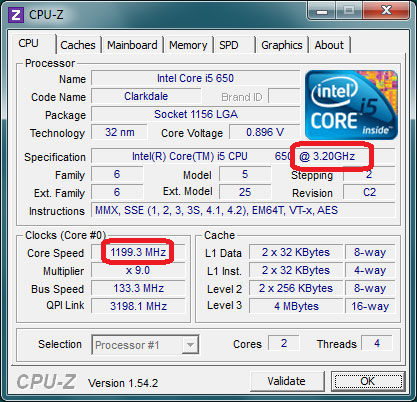
CPU Throttling is implemCPU-Z-CPU-Throttlingented at both the hardware and software level. The Windows operating system can control CPU Throttling, and this can also be controlled from the BIOS. On some systems, the BIOS will ignore signals sent from Windows, so we will cover how to test and set both methods.

To see if your CPUs are running at rated speed, there are two methods. The first is the third-party tool CPU-Z, available at http://www.cpuid.com/softwares/cpu-z.html. In this screen shot (from the above link), you can see that the CPU is rated to run at 3.2GHz, but is actually running at almost 1.2GHz. This system is having its CPU throttled.

Additionally, you can check out the WMI performance counters from the WIN32_Processor class. This DOS command returns the current and max clock speeds every second for 30 seconds; if the CurrentClockSpeed and the MaxClockSpeed differ significantly, then the CPU is being throttled.

WMIC CPU GET CurrentClockSpeed, MaxClockSpeed /Value /EVERY:1 /REPEAT:30

In Windows, CPU Throttling is controlled from the Power Settings control panel applet. On a server running SQL Server, the desired setting is to be using the the “High Performance” power plan. You can do this from either the Power Settings control panel applet, or from the command line (starting with Windows Server 2008R2).

To start the Power Settings control panel applet, press the windows key + r key combination. In the run dialog box, enter powercfg.cpl. In the applet, you are looking for:

Power-Plan

From a command prompt, you can simply run this DOS command:

powercfg -GETACTIVESCHEME

Disabling CPU Throttling

To change the power plan, in the control panel applet simply select the High Performance power plan (as shown above). From the DOS command prompt:

powercfg -SETACTIVE SCHEME_MIN

Changing the power plan takes effect immediately, so you should immediately see your CPUs running at full speed. This means that you can change the power plan on your SQL Server without requiring an outage. If, however, this does not return your CPUs to full speed, then the BIOS is overriding the Windows setting, and you will need to reboot to go into the BIOS to disable it, and once changed reboot again. Different BIOS manufacturers call CPU Throttling / Dynamic Frequency Scaling by different names, so you will need to investigate your server manufacturer’s web site to determine what it is called. This will obviously cause an outage during this time, so this needs to be a scheduled maintenance action.

What kind of difference does this make?

This isn’t the fix for all queries, but it should help out pretty dramatically. For a system replacing another, it should return the application to pre-update performance, if not surpassing it.

Recently, I had the opportunity to test out the performance impact of changing the power plan from Balanced to High Performance. Prior to changing the power plan, a set of queries was running in 7 hours, 45 minutes. After changing just the power plan to High Performance, this set of queries is now running in 3 hours, 55 minutes. That’s almost ½ the time, from this simple setting change.

Just remember… SQL Server is not “green”. It needs full power.

And now you know about SQL Server’s hidden “Go Fast” button.

The post SQL Server’s hidden “Go Fast” button appeared first on Wayne Sheffield.

26 Jul 09:43

Trace Flag 2389 and the new Cardinality Estimator

by Erin Stellato

One of the SQL Server trace flags that’s been around for a while is 2389.  It’s often discussed with 2390, but I just want to focus on 2389 for this post.  The trace flag was introduced in SQL Server 2005 SP1, which was released on April 18, 2006 (according to http://sqlserverbuilds.blogspot.co.uk/), so it’s been around for over 10 years.  Trace flags change the behavior of the engine, and 2389 allows the optimizer to identify statistics which are ascending and brand them as such (often called "the ascending key problem").  When this occurs, the statistics will be updated automatically at query compile time, which means that the optimizer has information about the highest value in the table (compared to when the trace flag is not used).

I had a discussion recently with a client about using this trace flag, and it came up because of this type of scenario:

  • You have a large table that has an INT as the primary key, and it’s clustered.
  • You have a nonclustered index that leads on a DATETIME column.
  • The table has about 20 million rows in it, and anywhere from 5,000 to 100,000 rows are added each day.
  • Statistics are updated nightly as part of your maintenance task.
  • Auto-update statistics is enabled for the database, but even if 100,000 rows are added to the table, that’s way less than the 4 million rows (20%) needed to invoke an automatic update.
  • When users query the table using the date in the predicate, query performance can be great, or it can be awful.

That last bullet almost makes it sounds like a parameter sensitivity issue, but it’s not.  In this case, it’s a statistics issue.  My suggestion to the client was using TF 2389, or updating statistics more frequently throughout the day (e.g. via an Agent Job).  Then I thought I’d do some testing, since the client was running SQL Server 2014.  This is where things got interesting.

The Setup

We’re going to create the aforementioned table for testing in the RTM build of SQL Server 2016, within the WideWorldImporters database, and I’m going to set the compatibility mode to 110 initially:

USE [master];
GO
RESTORE DATABASE [WideWorldImporters]
FROM  DISK = N'C:\Backups\WideWorldImporters-Full.bak'
WITH  FILE = 1,
MOVE N'WWI_Primary' TO N'C:\Databases\WideWorldImporters\WideWorldImporters.mdf',
MOVE N'WWI_UserData' TO N'C:\Databases\WideWorldImporters\WideWorldImporters_UserData.ndf',
MOVE N'WWI_Log' TO N'C:\Databases\WideWorldImporters\WideWorldImporters.ldf',
MOVE N'WWI_InMemory_Data_1' TO N'C:\Databases\WideWorldImporters\WideWorldImporters_InMemory_Data_1',
NOUNLOAD, REPLACE, STATS = 5;
GO
 
ALTER DATABASE [WideWorldImporters] SET COMPATIBILITY_LEVEL = 110;
GO
 
USE [WideWorldImporters];
GO
 
CREATE TABLE [Sales].[BigOrders](
[OrderID] [int] NOT NULL,
[CustomerID] [int] NOT NULL,
[SalespersonPersonID] [int] NOT NULL,
[PickedByPersonID] [int] NULL,
[ContactPersonID] [int] NOT NULL,
[BackorderOrderID] [int] NULL,
[OrderDate] [date] NOT NULL,
[ExpectedDeliveryDate] [date] NOT NULL,
[CustomerPurchaseOrderNumber] [nvarchar](20) NULL,
[IsUndersupplyBackordered] [bit] NOT NULL,
[Comments] [nvarchar](max) NULL,
[DeliveryInstructions] [nvarchar](max) NULL,
[InternalComments] [nvarchar](max) NULL,
[PickingCompletedWhen] [datetime2](7) NULL,
[LastEditedBy] [int] NOT NULL,
[LastEditedWhen] [datetime2](7) NOT NULL,
CONSTRAINT [PK_Sales_BigOrders] PRIMARY KEY CLUSTERED
(
[OrderID] ASC
)WITH (PAD_INDEX = OFF, STATISTICS_NORECOMPUTE = OFF, IGNORE_DUP_KEY = OFF, ALLOW_ROW_LOCKS = ON, ALLOW_PAGE_LOCKS = ON) ON [USERDATA]
) ON [USERDATA] TEXTIMAGE_ON [USERDATA];

Next we’re going to load about 24 million rows into BigOrders, and create a nonclustered index on OrderDate.

SET NOCOUNT ON;
 
DECLARE @Loops SMALLINT = 0, @IDIncrement INT = 75000;
 
WHILE @Loops < 325 -- adjust this to increase or decrease the number of rows added
BEGIN
INSERT [Sales].[BigOrders]
( [OrderID],
[CustomerID],
[SalespersonPersonID],
[PickedByPersonID],
[ContactPersonID],
[BackorderOrderID],
[OrderDate],
[ExpectedDeliveryDate],
[CustomerPurchaseOrderNumber],
[IsUndersupplyBackordered],
[Comments],
[DeliveryInstructions],
[InternalComments],
[PickingCompletedWhen],
[LastEditedBy],
[LastEditedWhen]
)
SELECT
[OrderID] + @IDIncrement,
[CustomerID],
[SalespersonPersonID],
[PickedByPersonID],
[ContactPersonID],
[BackorderOrderID],
[OrderDate],
[ExpectedDeliveryDate],
[CustomerPurchaseOrderNumber],
[IsUndersupplyBackordered],
[Comments],
[DeliveryInstructions],
[InternalComments],
[PickingCompletedWhen],
[LastEditedBy],
[LastEditedWhen]
FROM [Sales].[Orders];
 
CHECKPOINT;
 
SET @Loops = @Loops + 1;
SET @IDIncrement = @IDIncrement + 75000;
END
 
CREATE NONCLUSTERED INDEX [NCI_BigOrders_OrderDate]
ON [Sales].[BigOrders] ([OrderDate], CustomerID);

If we check the histogram for the nonclustered index, we see the highest date is 2016-05-31:

DBCC SHOW_STATISTICS ('Sales.BigOrders',[NCI_BigOrders_OrderDate]);

Statistics for the NCI on OrderDate

If we query for any date beyond that, note the estimated number of rows:

SELECT CustomerID, OrderID, SalespersonPersonID
FROM [Sales].[BigOrders]
WHERE [OrderDate] = '2016-06-01';

Plan when querying for a date beyond what's in the histogram

It’s 1, because the value is outside the histogram.  And in this case, that’s ok, because there are no rows in the table beyond May 31, 2016.  But let’s add some and then re-run the same query:

INSERT [Sales].[BigOrders]
( [OrderID],
[CustomerID],
[SalespersonPersonID],
[PickedByPersonID],
[ContactPersonID],
[BackorderOrderID],
[OrderDate],
[ExpectedDeliveryDate],
[CustomerPurchaseOrderNumber],
[IsUndersupplyBackordered],
[Comments],
[DeliveryInstructions],
[InternalComments],
[PickingCompletedWhen],
[LastEditedBy],
[LastEditedWhen]
)
SELECT
[OrderID] + 25000000,
[CustomerID],
[SalespersonPersonID],
[PickedByPersonID],
[ContactPersonID],
[BackorderOrderID],
'2016-06-01',
[ExpectedDeliveryDate],
[CustomerPurchaseOrderNumber],
[IsUndersupplyBackordered],
[Comments],
[DeliveryInstructions],
[InternalComments],
[PickingCompletedWhen],
[LastEditedBy],
[LastEditedWhen]
FROM [Sales].[Orders];
GO
 
SELECT CustomerID, OrderID, SalespersonPersonID
FROM [Sales].[BigOrders]
WHERE [OrderDate] = '2016-06-01';

Plan after adding rows past May 31

The estimated number of rows is still 1.  But this is where things get interesting.  Let’s change the compatibility mode to 130 so that we use the new Cardinality Estimator and see what happens.

USE [master];
GO
 
ALTER DATABASE [WideWorldImporters] SET COMPATIBILITY_LEVEL = 130
GO
 
USE [WideWorldImporters];
GO
 
SELECT CustomerID, OrderID, SalespersonPersonID
FROM [Sales].[BigOrders]
WHERE [OrderDate] = '2016-06-01';

Plan after adding rows for June 1, using the new CE

Our plan shape is the same, but now our estimate is 4,898 rows.  The new CE treats values outside of the history differently than the old CE.  So…do we even need trace flag 2389?

The Test – Part I

For the first test, we’re going to stay in compatibility mode 110 and run through what we would see with 2389.  When using this trace flag you can either enable it as a startup parameter in the SQL Server service, or you can use DBCC TRACEON to enable it instance-wide.  Understand that in your production environment, if you use DBCC TRACEON to enable the trace flag, when the instance restarts the trace flag won’t be in effect.

With the trace flag enabled, a statistic has to be updated three (3) times before the optimizer will brand it as ascending.  We’ll force four updates for good measure and add more rows in between each update.

USE [master];
GO
 
ALTER DATABASE [WideWorldImporters] SET COMPATIBILITY_LEVEL = 110;
GO
 
DBCC TRACEON (2389, -1);
GO
 
USE [WideWorldImporters];
GO
 
UPDATE STATISTICS [Sales].[BigOrders] [NCI_BigOrders_OrderDate];
GO
 
INSERT [Sales].[BigOrders]
( [OrderID],
[CustomerID],
[SalespersonPersonID],
[PickedByPersonID],
[ContactPersonID],
[BackorderOrderID],
[OrderDate],
[ExpectedDeliveryDate],
[CustomerPurchaseOrderNumber],
[IsUndersupplyBackordered],
[Comments],
[DeliveryInstructions],
[InternalComments],
[PickingCompletedWhen],
[LastEditedBy],
[LastEditedWhen]
)
SELECT
[OrderID] + 25100000,
[CustomerID],
[SalespersonPersonID],
[PickedByPersonID],
[ContactPersonID],
[BackorderOrderID],
'2016-06-02',
[ExpectedDeliveryDate],
[CustomerPurchaseOrderNumber],
[IsUndersupplyBackordered],
[Comments],
[DeliveryInstructions],
[InternalComments],
[PickingCompletedWhen],
[LastEditedBy],
[LastEditedWhen]
FROM [Sales].[Orders];
GO
 
UPDATE STATISTICS [Sales].[BigOrders] [NCI_BigOrders_OrderDate];
GO
 
INSERT [Sales].[BigOrders]
( [OrderID],
[CustomerID],
[SalespersonPersonID],
[PickedByPersonID],
[ContactPersonID],
[BackorderOrderID],
[OrderDate],
[ExpectedDeliveryDate],
[CustomerPurchaseOrderNumber],
[IsUndersupplyBackordered],
[Comments],
[DeliveryInstructions],
[InternalComments],
[PickingCompletedWhen],
[LastEditedBy]
[LastEditedWhen]
)
SELECT
[OrderID] + 25200000,
[CustomerID],
[SalespersonPersonID],
[PickedByPersonID],
[ContactPersonID],
[BackorderOrderID],
'2016-06-03',
[ExpectedDeliveryDate],
[CustomerPurchaseOrderNumber],
[IsUndersupplyBackordered],
[Comments],
[DeliveryInstructions],
[InternalComments],
[PickingCompletedWhen],
[LastEditedBy],
[LastEditedWhen]
FROM [Sales].[Orders];
GO
 
UPDATE STATISTICS [Sales].[BigOrders] [NCI_BigOrders_OrderDate];
GO
 
INSERT [Sales].[BigOrders]
( [OrderID],
[CustomerID],
[SalespersonPersonID],
[PickedByPersonID],
[ContactPersonID],
[BackorderOrderID],
[OrderDate],
[ExpectedDeliveryDate],
[CustomerPurchaseOrderNumber],
[IsUndersupplyBackordered],
[Comments],
[DeliveryInstructions],
[InternalComments],
[PickingCompletedWhen],
[LastEditedBy],
[LastEditedWhen]
)
SELECT
[OrderID] + 25300000,
[CustomerID],
[SalespersonPersonID],
[PickedByPersonID],
[ContactPersonID],
[BackorderOrderID],
'2016-06-04',
[ExpectedDeliveryDate],
[CustomerPurchaseOrderNumber],
[IsUndersupplyBackordered],
[Comments],
[DeliveryInstructions],
[InternalComments],
[PickingCompletedWhen],
[LastEditedBy],
[LastEditedWhen]
FROM [Sales].[Orders];
GO
 
UPDATE STATISTICS [Sales].[BigOrders] [NCI_BigOrders_OrderDate];

If we check statistics again, and use the trace flag 2388 to display additional information, we see that the statistic is now marked as Ascending:

DBCC TRACEON (2388);
GO
 
DBCC SHOW_STATISTICS ('Sales.BigOrders',[NCI_BigOrders_OrderDate]);

NCI on OrderDate marked as ASC

If we query for a future date, when statistics are fully up-to-date, we see that it still estimates 1 row:

SELECT CustomerID, OrderID, SalespersonPersonID
FROM [Sales].[BigOrders]
WHERE [OrderDate] = '2016-06-05';

Plan after TF 2389 enabled, but no rows beyond histogram

Now we’ll add rows for June 5th and run the same query again:

INSERT [Sales].[BigOrders]
( [OrderID],
[CustomerID],
[SalespersonPersonID],
[PickedByPersonID],
[ContactPersonID],
[BackorderOrderID],
[OrderDate],
[ExpectedDeliveryDate],
[CustomerPurchaseOrderNumber],
[IsUndersupplyBackordered],
[Comments],
[DeliveryInstructions],
[InternalComments],
[PickingCompletedWhen],
[LastEditedBy],
[LastEditedWhen]
)
SELECT
[OrderID] + 25400000,
[CustomerID],
[SalespersonPersonID],
[PickedByPersonID],
[ContactPersonID],
[BackorderOrderID],
'2016-06-05',
[ExpectedDeliveryDate],
[CustomerPurchaseOrderNumber],
[IsUndersupplyBackordered],
[Comments],
[DeliveryInstructions],
[InternalComments],
[PickingCompletedWhen],
[LastEditedBy],
[LastEditedWhen]
FROM [Sales].[Orders];
GO
 
SELECT CustomerID, OrderID, SalespersonPersonID
FROM [Sales].[BigOrders]
WHERE [OrderDate] = '2016-06-05';

Plan after TF 2389 enabled, 70K+ rows added beyond histogram

Our estimate is no longer 1, it’s 22,595.  Now, just for fun, let’s disable the trace flag and see what the estimate is (I’m going to clear procedure cache, as disabling the trace flag won’t affect what’s currently in cache).

DBCC TRACEOFF (2389, -1);
GO
 
DBCC FREEPROCCACHE;
GO
 
SELECT CustomerID, OrderID, SalespersonPersonID
FROM [Sales].[BigOrders]
WHERE [OrderDate] = '2016-06-05';

Plan after TF 2389 is *disabled*, 70K+ rows added beyond histogram

This time around I get an estimate of 1 row again.  Even though the statistic is branded as ascending, if trace flag 2389 is not enabled, it only estimates 1 row when you query for a value outside the histogram.

We’ve demonstrated that trace flag 2389 does what we expect – what it always has done – when using the old Cardinality Estimator.  Now let’s see what happens with the new one.

The Test – Part II

To be thorough, I’m going to reset everything. I will create the database again, set the compatibility mode to 130, load the data initially, then turn on trace flag 2389 and load three sets of data with stats updates in between.

USE [master];
GO
 
RESTORE DATABASE [WideWorldImporters]
FROM  DISK = N'C:\Backups\WideWorldImporters-Full.bak'
WITH  FILE = 1,
MOVE N'WWI_Primary' TO N'C:\Databases\WideWorldImporters\WideWorldImporters.mdf',
MOVE N'WWI_UserData' TO N'C:\Databases\WideWorldImporters\WideWorldImporters_UserData.ndf',
MOVE N'WWI_Log' TO N'C:\Databases\WideWorldImporters\WideWorldImporters.ldf',
MOVE N'WWI_InMemory_Data_1' TO N'C:\Databases\WideWorldImporters\WideWorldImporters_InMemory_Data_1',
NOUNLOAD, REPLACE, STATS = 5;
GO
 
USE [master];
GO
 
ALTER DATABASE [WideWorldImporters] SET COMPATIBILITY_LEVEL = 130;
GO
 
USE [WideWorldImporters];
GO
 
CREATE TABLE [Sales].[BigOrders](
[OrderID] [int] NOT NULL,
[CustomerID] [int] NOT NULL,
[SalespersonPersonID] [int] NOT NULL,
[PickedByPersonID] [int] NULL,
[ContactPersonID] [int] NOT NULL,
[BackorderOrderID] [int] NULL,
[OrderDate] [date] NOT NULL,
[ExpectedDeliveryDate] [date] NOT NULL,
[CustomerPurchaseOrderNumber] [nvarchar](20) NULL,
[IsUndersupplyBackordered] [bit] NOT NULL,
[Comments] [nvarchar](max) NULL,
[DeliveryInstructions] [nvarchar](max) NULL,
[InternalComments] [nvarchar](max) NULL,
[PickingCompletedWhen] [datetime2](7) NULL,
[LastEditedBy] [int] NOT NULL,
[LastEditedWhen] [datetime2](7) NOT NULL,
CONSTRAINT [PK_Sales_BigOrders] PRIMARY KEY CLUSTERED
(
[OrderID] ASC
)WITH (PAD_INDEX = OFF, STATISTICS_NORECOMPUTE = OFF, IGNORE_DUP_KEY = OFF, ALLOW_ROW_LOCKS = ON, 
ALLOW_PAGE_LOCKS = ON) ON [USERDATA]
) ON [USERDATA] TEXTIMAGE_ON [USERDATA];
GO
 
SET NOCOUNT ON;
 
DECLARE @Loops SMALLINT = 0;
DECLARE @IDIncrement INT = 75000;
 
WHILE @Loops < 325 -- adjust this to increase or decrease the number of rows added
BEGIN
INSERT [Sales].[BigOrders]
( [OrderID],
[CustomerID],
[SalespersonPersonID],
[PickedByPersonID],
[ContactPersonID],
[BackorderOrderID],
[OrderDate],
[ExpectedDeliveryDate],
[CustomerPurchaseOrderNumber],
[IsUndersupplyBackordered],
[Comments],
[DeliveryInstructions],
[InternalComments],
[PickingCompletedWhen],
[LastEditedBy],
[LastEditedWhen]
)
SELECT
[OrderID] + @IDIncrement,
[CustomerID],
[SalespersonPersonID],
[PickedByPersonID],
[ContactPersonID],
[BackorderOrderID],
[OrderDate],
[ExpectedDeliveryDate],
[CustomerPurchaseOrderNumber],
[IsUndersupplyBackordered],
[Comments],
[DeliveryInstructions],
[InternalComments],
[PickingCompletedWhen],
[LastEditedBy],
[LastEditedWhen]
FROM [Sales].[Orders];
 
CHECKPOINT;
 
SET @Loops = @Loops + 1;
SET @IDIncrement = @IDIncrement + 75000;
END
 
CREATE NONCLUSTERED INDEX [NCI_BigOrders_OrderDate]
ON [Sales].[BigOrders] ([OrderDate], CustomerID);
GO
 
INSERT [Sales].[BigOrders]
( [OrderID],
[CustomerID],
[SalespersonPersonID],
[PickedByPersonID],
[ContactPersonID],
[BackorderOrderID],
[OrderDate],
[ExpectedDeliveryDate],
[CustomerPurchaseOrderNumber],
[IsUndersupplyBackordered],
[Comments],
[DeliveryInstructions],
[InternalComments],
[PickingCompletedWhen],
[LastEditedBy],
[LastEditedWhen]
)
SELECT
[OrderID] + 25000000,
[CustomerID],
[SalespersonPersonID],
[PickedByPersonID],
[ContactPersonID],
[BackorderOrderID],
'2016-06-01',
[ExpectedDeliveryDate],
[CustomerPurchaseOrderNumber],
[IsUndersupplyBackordered],
[Comments],
[DeliveryInstructions],
[InternalComments],
[PickingCompletedWhen],
[LastEditedBy],
[LastEditedWhen]
FROM [Sales].[Orders];
GO
 
DBCC TRACEON (2389, -1);
GO
 
UPDATE STATISTICS [Sales].[BigOrders] [NCI_BigOrders_OrderDate];
GO
 
INSERT [Sales].[BigOrders]
( [OrderID],
[CustomerID],
[SalespersonPersonID],
[PickedByPersonID],
[ContactPersonID],
[BackorderOrderID],
[OrderDate],
[ExpectedDeliveryDate],
[CustomerPurchaseOrderNumber],
[IsUndersupplyBackordered],
[Comments],
[DeliveryInstructions],
[InternalComments],
[PickingCompletedWhen],
[LastEditedBy],
[LastEditedWhen]
)
SELECT
[OrderID] + 25100000,
[CustomerID],
[SalespersonPersonID],
[PickedByPersonID],
[ContactPersonID],
[BackorderOrderID],
'2016-06-02',
[ExpectedDeliveryDate],
[CustomerPurchaseOrderNumber],
[IsUndersupplyBackordered],
[Comments],
[DeliveryInstructions],
[InternalComments],
[PickingCompletedWhen],
[LastEditedBy],
[LastEditedWhen]
FROM [Sales].[Orders];
GO
 
UPDATE STATISTICS [Sales].[BigOrders] [NCI_BigOrders_OrderDate];
GO
 
INSERT [Sales].[BigOrders]
( [OrderID],
[CustomerID],
[SalespersonPersonID],
[PickedByPersonID],
[ContactPersonID],
[BackorderOrderID],
[OrderDate],
[ExpectedDeliveryDate],
[CustomerPurchaseOrderNumber],
[IsUndersupplyBackordered],
[Comments],
[DeliveryInstructions],
[InternalComments],
[PickingCompletedWhen],
[LastEditedBy],
[LastEditedWhen]
)
SELECT
[OrderID] + 25200000,
[CustomerID],
[SalespersonPersonID],
[PickedByPersonID],
[ContactPersonID],
[BackorderOrderID],
'2016-06-03',
[ExpectedDeliveryDate],
[CustomerPurchaseOrderNumber],
[IsUndersupplyBackordered],
[Comments],
[DeliveryInstructions],
[InternalComments],
[PickingCompletedWhen],
[LastEditedBy],
[LastEditedWhen]
FROM [Sales].[Orders];
GO
 
UPDATE STATISTICS [Sales].[BigOrders] [NCI_BigOrders_OrderDate];
GO
 
INSERT [Sales].[BigOrders]
( [OrderID],
[CustomerID],
[SalespersonPersonID],
[PickedByPersonID],
[ContactPersonID],
[BackorderOrderID],
[OrderDate],
[ExpectedDeliveryDate],
[CustomerPurchaseOrderNumber],
[IsUndersupplyBackordered],
[Comments],
[DeliveryInstructions],
[InternalComments],
[PickingCompletedWhen],
[LastEditedBy],
[LastEditedWhen]
)
SELECT
[OrderID] + 25300000,
[CustomerID],
[SalespersonPersonID],
[PickedByPersonID],
[ContactPersonID],
[BackorderOrderID],
'2016-06-04',
[ExpectedDeliveryDate],
[CustomerPurchaseOrderNumber],
[IsUndersupplyBackordered],
[Comments],
[DeliveryInstructions],
[InternalComments],
[PickingCompletedWhen],
[LastEditedBy],
[LastEditedWhen]
FROM [Sales].[Orders];
GO
 
UPDATE STATISTICS [Sales].[BigOrders] [NCI_BigOrders_OrderDate];

Ok, so our data is completely loaded.  If we check statistics again, and use the trace flag 2388 to display additional information, we see that the statistic is again marked as Ascending:

DBCC TRACEON (2388);
GO
 
DBCC SHOW_STATISTICS ('Sales.BigOrders',[NCI_BigOrders_OrderDate]);

NCI OrderDate statistic marked as ASC with TF 2389 and compatibility mode 130

Ok, so let’s query for June 5th again:

SELECT CustomerID, OrderID, SalespersonPersonID
FROM [Sales].[BigOrders]
WHERE [OrderDate] = '2016-06-05';

Plan with new CE, no rows beyond what's in histogram

Our estimate is 4,922.  Not quite what it was in our first test, but definitely not 1.  Now we’ll add some rows for June 5th and re-query:

INSERT [Sales].[BigOrders]
( [OrderID],
[CustomerID],
[SalespersonPersonID],
[PickedByPersonID],
[ContactPersonID],
[BackorderOrderID],
[OrderDate]
26 Jul 09:43

Real World Parallel INSERT…SELECT: What else you need to know!

by Arvind Shyamsundar

Arvind Shyamsundar

Reviewed by: Gjorgji Gjeorgjievski, Sunil Agarwal, Vassilis Papadimos, Denzil Ribeiro, Mike Weiner, Mike Ruthruff, Murshed Zaman, Joe Sack

In a previous post we have introduced you to the parallel INSERT operator in SQL Server 2016. In general, the parallel insert functionality has proven to be a really useful tool for ETL / data loading workloads. As an outcome of various SQLCAT engagements with customers, we learnt about some nuances when using this feature. As promised previously, here are those considerations and tips to keep in mind when using parallel INSERT…SELECT in the real world. For convenience we have demonstrated these with simple examples!

Level Set

To start with, our baseline timing for the test query which used serial INSERT (see Appendix for details) is 225 seconds. The query inserts 22,537,877 rows into a heap table, for a total dataset size of 3.35GB. The execution plan in this case is shown below, as you can see both the FROM portion and the INSERT portion are serial.

clip_image002

With Parallel INSERT

As mentioned in our previous post, we currently require that you use a TABLOCK hint on the target of the INSERT (again this is the same heap table as shown above) to leverage the parallel INSERT behavior. If we do this, you will see the dramatic difference with the query taking 14 seconds. The execution plan is as below:

clip_image004

Have Additional Indexes? Watch out!

For row store targets, it is important to note that the presence of a clustered index or any additional non-clustered indexes on the target table will disable the parallel INSERT behavior. For example, here is the query plan on the same table with an additional non-clustered index present. The same query takes 287 seconds without a TABLOCK hint and the execution plan is as follows:

clip_image006

When TABLOCK is specified for the target table, the query completes in 286 seconds and the query plan is as follows (there is still no parallelism for the insert – this is the key thing to remember.)

clip_image008

Also, please refer to The Data Loading Performance Guide which has more considerations on ‘Bulk Loading with Indexes in Place’.

Watch out when IDENTITY or SEQUENCE is present!

It is quite common to find IDENTITY columns being used as the target table for INSERT…SELECT statements. In those cases, the identity column is typically used to provide a surrogate key. However, IDENTITY will disable parallel INSERT, as you can see from the example below. Let’s modify the table to have an identity column defined:

CREATE TABLE DB1BCoupon_New(
[IdentityKey] bigint NOT NULL IDENTITY(1,1),
[ItinID] [bigint] NULL,
[Coupons] [smallint] NULL,
[Year] [smallint] NULL,
[Quarter] [smallint] NULL,

… (table definition is truncated for readability). When we run the below INSERT query:

INSERT tempdb.[dbo].[DB1BCoupon_New] WITH (TABLOCK)
(ItinID, Coupons, ... Gateway, CouponGeoType)
SELECT ItinID, Coupons, ... Gateway, CouponGeoType
FROM DB1b.dbo.DB1BCoupon_Rowstore AS R
WHERE Year = 1993 
OPTION (MAXDOP 8);

We see that the parallel insert is disabled (query plan below). The query itself completes in 104 seconds, which is a great improvement, but that is primarily because of the minimal logging. As an aside, the highlighted Compute Scalar below is because of the identity value calculation.

clip_image010

It is important to know that if there is an IDENTITY column in the target table or if a SEQUENCE object is referenced in the query, the plan will be serial. To work around this limitation, consider using a ROW_NUMBER() function as shown below. Do note that in this case, you can either leverage IDENTITY_INSERT (which has its own considerations), or declare the column in the table without the IDENTITY property. For this demo, I set IDENTITY_INSERT ON:

SET IDENTITY_INSERT [dbo].[DB1BCoupon_New] ON

Here is the abridged version of this query:

INSERT tempdb.[dbo].[DB1BCoupon_New] with (TABLOCK)
(IdentityKey, ItinID, Coupons, ..., CouponType, TkCarrier,
OpCarrier, FareClass, Gateway, CouponGeoType)
SELECT ROW_NUMBER() OVER (ORDER BY (SELECT NULL)) AS IdentityKey,
ItinID, Coupons, ..., CouponType, TkCarrier,
OpCarrier, FareClass, Gateway, CouponGeoType
FROM DB1b.dbo.DB1BCoupon_Rowstore AS R
WHERE Year = 1993 
OPTION (MAXDOP 8);

It turns out that this re-write of the query actually performs worse than the serial INSERT with the identity being generated. This re-write with the window function took 161 seconds in our testing. And as you can see from the plan below, the main challenge here seems to be that the source data is being read in serial.

clip_image012

This looks disappointing, but there is hope! Read on…

Batch Mode Window Aggregate to the rescue

In the test setup, we also had created a clustered ColumnStore (CCI) version of the source table. When the test query is modified to read from the CCI instead of the rowstore version (with the above re-write for identity value generation), the query runs in 12 seconds! The main difference between this and the previous case is the parallelism in the data read, and the parallel window function which is new to SQL 2016. And the Columnstore scan does run in Batch mode.

clip_image014

Here is the drilldown into the Window Aggregate. As you can see in the ‘Actual Execution Mode’ attribute, it is running in Batch mode. And it uses parallelism with 8 threads. For more information on batch mode Window Aggregate, one of the best references is Itzik Ben-Gan’s two part series: Part 1 and Part 2.

clip_image016

Parallel INSERT and Clustered Columnstore Indexes

When the target table is a clustered Columnstore index, it is interesting to note the ‘row group quality’ (how ‘full’ are the compressed row groups) after the insert. To test this, I re-created the target table with a clustered Columnstore index (CCI) defined on it. The table started as empty, and the INSERT statement was issued with a TABLOCK hint. The insert took 77 seconds (this is somewhat expected due to the compression required for the CCI) and the query plan is shown below:

clip_image018

The compute scalar operator above is purely because of the partition scheme applied. Now, let’s look at the Columnstore row groups created, by using the DMV query below:

select partition_number, row_group_id, state_desc, transition_to_compressed_state_desc, trim_reason_desc, total_rows, size_in_bytes, created_time
from sys.dm_db_column_store_row_group_physical_stats
order by created_time desc

Here is the result:

clip_image020

The important thing to note for this parallel insert case is that multiple row groups are created and inserted into concurrently, each by one of the CCI insert threads. If we compare this to a case where parallel insert is not used, you will see differing timestamps for the various segments, which is an indirect way of telling that the insert was serial in that case. For example, if I repeat this test without TABLOCK on the destination table, then the query takes 418 seconds. Here is the query plan:

clip_image022

Let’s review briefly the row groups created in this case. We will use these results to discuss ‘row group quality’ in the next section. Here is the output from the row group DMV for the serial INSERT case:

clip_image024

Row group / segment quality and parallelism

The point of the previous two examples above is that in general, the parallel INSERT operation prefers throughput as opposed to segment (a.k.a. row group) quality. In some cases, if row group quality (having as ‘full’ a row group / having close to a million rows each) is important, then you may need to carefully adjust the degree of parallelism. For example:

  • Let’s say we use parallel insert to insert 10 million rows
  • Let’s also imagine a hypothetical degree of parallelism as 100
  • In that case, we end up with most row groups with around 100,000 rows each. This may not be ideal for some workloads. For an in-depth discussion on segment / row group quality, please see this article.

Therefore, it is critical to adjust the degree of parallelism to balance throughput and row group quality.

Degree of parallelism and INSERT Throughput

Now, back to the heap, let’s see the effect of varying the degree of parallelism (DoP). Any allocation bottlenecks (primarily the number of data files and the I/O bandwidth) are the main constraint when it comes to increasing throughput with parallel INSERT. To overcome these, in our test setup, we have 480 data files for TEMPDB. This may sound excessive, but then we were testing on a 240 processor system! And this configuration was critical for testing parallel insert ‘at-scale’ as you will see in the next section.

For now, here are the test results with varying the DoP. For all cases, TABLOCK was used on the target table. In each case the INSERT query was the only major query running on the system. The chart and table below show the time taken to insert 22,537,877 rows into the heap, along with the Log I/O generated.

MaxDop2

Here’s the raw data in case you prefer to see numbers:

Degree of parallelism Time taken in seconds Log I/O KB/sec
1 95 122
2 53 225
4 27 430
8 14 860
15 7 1596
16 7 1597
24 6 1781
30 6 2000
32 7 1200
48 10 1105
64 13 798
128 26 370
240 14 921

What can we conclude here? The ‘sweet spot’ seems to be the number 15, which (not coincidentally) is the number of cores per physical CPU in the test setup. Once we cross NUMA node boundaries, the costs of cross-node memory latency are steep – more details on this in the next section. An important note here is that your mileage will vary depending on the specific system configuration. Please ensure adequate tests are done in the specific environment before concluding on an optimal value for DoP.

Pushing things to the max: concurrent parallel INSERTs

Next, we decided to stress the system with multiple such parallel INSERT statements running. To do this optimally we used the RML utilities and created a simple SQL script which would each create a #temp table, parallel insert into it and then drop the table. The results are impressive, we are able to max out the system on the CPU front in some cases (given that these operations are minimally logged and in TEMPDB, there is no other major bottleneck.)

clip_image028

Here are the test results with various combinations of MAXDOP and concurrent requests into temporary tables. The MAXDOP 15 value seems to be the most efficient in this case because that way, each request lines up nicely with the NUMA node boundaries (each NUMA node in the system has 30 logical CPUs.) Do note that the values of MAXDOP and the number of connections were chosen to keep 240 threads totally active in the system.

MAXDOP Number of connections Total rows inserted End to end test timing seconds Effective rows / second CPU% Log I/O KB / sec
5 48 1,081,818,096 50 21,636,362 100 15850
8 30 676,136,310 33 20,488,979 90 15300
15 16 360,606,032 14 25,757,573 100 15200
30 8 180,303,016 11 16,391,183 75 13100

Transaction Logging

When we used the TABLOCK hint in the previous tests on heap tables, we also ended up leveraging another important optimization which has been around for a while now: minimal logging. When we monitor the amount of log space utilized in these cases, you will see a substantially lower amount of log space used in the case where TABLOCK is specified for the (heap) target table. Do note that for Columnstore indexes, minimal logging depends on the size of the insert batch, as is described by Sunil Agarwal in his blog post. Here’s a chart which compares these cases (Note: the graph below has a logarithmic scale for the vertical axis to efficiently accommodate the huge range of values!)

MinLogging

Given below is the raw data for the above chart:

Log space used in TEMPDB With TABLOCK Without TABLOCK (bytes)
Insert into heap 11,273,052 1,832,179,840
Insert into CCI 4,932,964 3,477,720

In the case of the CCI insert, the amount of transaction logging is very comparable. However, the insert into heap still requires a TABLOCK for minimal logging as is clearly evident in the large amount of transaction logging when TABLOCK is not specified.

Special case for temporary tables

In the previous post, we mentioned that one of the key requirements for the INSERT operation to be parallel is to have a TABLOCK hint specified on the target table. This requirement is to ensure consistency by blocking any other insert / update operations.

Now when it comes to ‘local’ temporary tables (the ones which have a single # prefix), it is implicit that the current session has exclusive access to the local temporary table. In turn, this satisfies the condition that otherwise needed a TABLOCK to achieve. Hence, if the target table for the INSERT is a ‘local’ temporary table, the optimizer will consider parallelizing the INSERT in case the costs are suitably high. In most cases, this will result in a positive effect on performance but if you observe PFS resource contention caused by this parallel insert, you can consider one of the following workarounds:

  • Create an index on the temporary table.  The described issue only occurs with temporary table heaps.
  • Use the MAXDOP 1 query hint for the problematic INSERT…SELECT operations.

[Update 23 Aug 2016: For the rare cases where parallel insert may cause excessive PFS contention, there is a way to disable parallel INSERT to isolate the issue; see this KB article for details.]

Fine Print

A few additional points to consider when leveraging this exciting new capability are listed below. We would love your feedback (please use the Comments section below) on if any of the items below are blocking you in any way in your specific workloads.

  • Just as it is with SQL Server 2016, in order to utilize the parallel insert in Azure SQL DB, do ensure that your compatibility level is set to 130. In addition, it is recommended to use a suitable SKU from the Premium service tier to ensure that the I/O and CPU requirements of parallel insert are satisfied.
  • The usage of any scalar UDFs in the SELECT query will prevent the usage of parallelism. While usage of non-inlined UDFs are in general ‘considered harmful’ they end up actually ‘blocking’ usage of this new feature.
  • Presence of triggers on the target table and / or indexed views which reference this table will prevent parallel insert.
  • If the SET ROWCOUNT clause is enabled for the session, then we cannot use parallel insert.
  • If the OUTPUT clause is specified in the INSERT…SELECT statement to return results to the client, then parallel plans are disabled in general, including INSERTs. If the OUTPUT…INTO clause is specified to insert into another table, then parallelism is used for the primary table, and not used for the target of the OUTPUT…INTO clause.

Summary

Whew! We covered a lot here, so here’s a quick recap:

  • Parallel INSERT is used only when inserting into a heap without any additional non-clustered indexes. It is also used when inserting into a Columnstore index.
  • If the target table has an IDENTITY column present then you need to work around appropriately to leverage parallel INSERT.
  • Choose your degree of parallelism carefully – it impacts throughput. Also, in the case of Columnstore it impacts the quality of the row groups created.
  • To maximize the impact and benefits of the parallel INSERT operation, the system should be configured appropriately (no I/O bottlenecks, sufficient number of data files).
  • Be aware of the power and benefit of minimal logging – something you get for free when parallel INSERT is used in databases with the simple recovery model.
  • Be aware of the fact that large INSERTs into local temporary tables are candidates for parallel insert by default.

We hope you enjoyed this post, and if you did, we’d love to hear your comments! If you have questions as well please do not hesitate to ask!

Appendix: Test Setup

For the tests in this post, we are using the Airline Origin and Destination Survey (DB1B) Coupon dataset. There are large number of rows in that table (we tested with one slice, for the year 1993) and this being a real-world dataset, it is quite representative of many applications. The destination table schema is identical to the source table schema. The test query is a very simple INSERT…SELECT of the form:

INSERT tempdb.[dbo].[DB1BCoupon_New]
(ItinID, Coupons, ..., Gateway, CouponGeoType)
SELECT ItinID, Coupons, ..., Gateway, CouponGeoType
FROM DB1b.dbo.DB1BCoupon_Rowstore AS R
WHERE Year = 1993 
OPTION (MAXDOP 8);

The use of the MAXDOP query hint is so that we can test with differing parallelism levels. The tests were performed on a SQL Server 2016 instance running on Windows Server 2012 R2. The storage used was high-performance local PCIe storage cards. SQL Server was configured to use large pages (-T834) and was set to a maximum of 3.7TB of RAM.

Appendix: Table schemas

Here’s the definition for the partition function:

CREATE PARTITION FUNCTION [pfn_ontime](smallint) AS RANGE RIGHT FOR VALUES (1987, 1988, 1989, 1990, 1991, 1992, 1993, 1994, 1995, 1996, 1997, 1998, 1999, 2000, 2001, 2002, 2003, 2004, 2005, 2006, 2007, 2008, 2009, 2010, 2011, 2012, 2013, 2014, 2015, 2016)

Here’s the definition for the partition scheme used:

CREATE PARTITION SCHEME [ps_ontime] AS PARTITION [pfn_ontime] ALL TO ([PRIMARY])

Here’s the definition for the table used:

CREATE TABLE [dbo].[DB1BCoupon_Rowstore](
[ItinID] [bigint] NULL,
[Coupons] [smallint] NULL,
[Year] [smallint] NULL,
[Quarter] [smallint] NULL,
[Origin] [varchar](4) NULL,
[OriginAirportID] [smallint] NULL,
[OriginAirportSeqID] [int] NULL,
[OriginCityMarketID] [int] NULL,
[OriginCountry] [varchar](3) NULL,
[OriginStateFips] [smallint] NULL,
[OriginState] [varchar](3) NULL,
[OriginStateName] [varchar](50) NULL,
[OriginWac] [smallint] NULL,
[RPCarrier] [varchar](3) NULL,
[Passengers] [real] NULL,
[Distance] [real] NULL,
[DistanceGroup] [smallint] NULL,
[ItinGeoType] [smallint] NULL,
[MktID] [bigint] NULL,
[SeqNum] [smallint] NULL,
[DestAirportID] [smallint] NULL,
[DestAirportSeqID] [int] NULL,
[DestCityMarketID] [int] NULL,
[Dest] [varchar](4) NULL,
[DestCountry] [varchar](3) NULL,
[DestStateFips] [smallint] NULL,
[DestState] [varchar](3) NULL,
[DestStateName] [varchar](50) NULL,
[DestWac] [smallint] NULL,
[Break] [varchar](1) NULL,
[CouponType] [varchar](1) NULL,
[TkCarrier] [varchar](3) NULL,
[OpCarrier] [varchar](3) NULL,
[FareClass] [varchar](1) NULL,
[Gateway] [bit] NULL,
[CouponGeoType] [smallint] NULL
)
ON [ps_ontime] ([Year])
26 Jul 09:42

Converting Big Data Into Conversational Gold

by Rahul Razdan

Click here too learn more about Dr. Rahul Razdan. If data is a form of language – if all those ones and zeroes constitute a way of communication, then translating those figures into something intelligible for a mass audience should be the end-result of this phenomenon we call Big Data. It should be the culmination – no, […]

The post Converting Big Data Into Conversational Gold appeared first on DATAVERSITY.

26 Jul 09:41

Leverage INTERSECT to apply relationships in DAX

by Marco Russo (SQLBI)

If you are used to virtual relationships in DAX (see Handling Different Granularities in DAX), you probably use the following pattern relatively often:

[Filtered Measure] :=
CALCULATE (
    <target_measure>,
    FILTER (
        ALL ( <target_granularity_column> ),
        CONTAINS (
            VALUES ( <lookup_granularity_column> )
            <lookup_granularity_column>,
            <target_granularity_column> 
        )
    )
)

In the new DAX available in Excel 2016*, Power BI Desktop, and Analysis Services 2016, you can use a simpler syntax, which offers a minimal performance improvement and is much more readable:

[Filtered Measure] :=
CALCULATE (
    <target_measure>,
    INTERSECT (
        ALL ( <target_granularity_column> ),
        VALUES ( <lookup_granularity_column> )
    )
)

You can find a longer explanation of this new pattern and download some examples in the new article Physical and Virtual Relationships in DAX, on SQLBI web site.