Shared posts

12 Nov 05:05

Cloud Platform Release Announcements for July 27, 2016

by Cloud Platform Team

This is a blog post of a new ongoing series of consolidated updates from the Cloud Platform team.

In today’s mobile first, cloud first world, Microsoft provides the technologies and tools to enable enterprises to embrace a cloud culture. Our differentiated innovations, comprehensive mobile solutions and developer tools help all of our customers realize the true potential of the cloud first era.

You expect cloud-speed innovation from us, and we’re delivering across the breadth of our Cloud Platform product portfolio. Below is a consolidated list of our latest releases to help you stay current, with links to additional details if you’d like more information. In this update:

  • Azure Security Center | GA
  • Operations Management Suite | Network Performance Monitor and Backup monitoring
  • Azure Premium Storage GA – new geo-availability | Brazil South GA
  • VNET Peering | Public
  • Azure AD B2C Basic | GA
  • Azure AD conditional access | GA
  • Microsoft Authenticator | Public
  • Azure App Service – Logic Apps | GA
  • Microsoft Stream | Public
  • Azure Service Bus Premium | GA
  • Microsoft and Red Hat partnership expanded to government | Available to purchase
  • Power BI Desktop | GA
  • Power BI Mobile | GA
  • Power BI publisher for Excel | GA
  • Power BI service | GA
  • Azure Machine Learning | Azure Machine Learning new web services

Azure Security Center | GA

On Thursday, July 21, we announced the general availability of Azure Security Center. It helps you improve your security by enabling you to prevent, detect, and respond to threats with increased visibility and control. Azure is the only public cloud platform that offers this type of continuous security monitoring. Azure Security Center is one example of the investments Microsoft makes in security—to provide a comprehensive platform, informed by Microsoft’s unique threat intelligence and integrated with solutions from our partners.

To learn more, read the full blog post and visit the Azure Security Center webpage.

Operations Management Suite | Network Performance Monitor and Backup monitoring

Monitoring the health of your systems is an essential component of effective IT operations management. This month we are releasing two new features for public preview that will enhance functionality for monitoring networks and backup deployments.

First, monitoring the quality of network connectivity between your datacenters, office sites or even critical workloads running line of business applications is a challenge in most IT environments. Conventional network monitoring solutions provide very little information about performance of the network as these are mostly geared to monitor health of individual network devices. Network Performance Monitor offers near real time monitoring of network performance parameters like loss and latency. It enables timely detection of network performance issues and localizes the source of the problem to a particular network segment or device. Using historical trend graphs, you can easily detect transient network performance issues. An interactive topology graph allows you to visualize the hop by hop network routes and determine the source of the problem. Now you can confidently tell if a network issue is affecting your application performance without having to rely on your network team.

Second, the OMS Backup monitoring and alerting feature enables customers to monitor backup from Windows Servers using the Azure backup agent as well as IaaS VM backup. Until now, you had to go each Windows Server machine to check the status of their backups, which is not scalable for bigger deployments. You can configure alerts for backup failures and view the alerts or subscribe to email notifications. From the Azure portal, you can view all the configuration settings of Windows Server backups to cloud as well as their health, job status and alerts.

To learn more about these new features in public preview, please visit the Hybrid Cloud IT Management blog and Operations Management Suite documentation.

Azure Premium Storage GA – new geo-availability | Brazil South GA

Azure Premium Storage generally available in Brazil South

Azure Premium Storage is a solid-state drive (SSD)–based storage solution designed to support I/O-intensive workloads. With Premium Storage, you can add up to 64 TB of persistent storage per virtual machine (VM), with more than 80,000 IOPS per VM and extremely low latencies for read operations.

Offering a service-level agreement (SLA) for 99.9 percent availability, Premium Storage is now available in the Brazil South region, as well as these previously announced regions. Learn more about Premium Storage.

VNET Peering | Public

VNet Peering provides the ability to link two Virtual Networks in the same geo region directly. It allows Virtual Machine resources in both the VNets to connect directly through private IP addresses as if it were part of the same network. VNet peering achieves this by routing packets between the Virtual Networks through the internal Azure backbone network and thus does not involve any gateway in the path. This allows for a low latency, high bandwidth connection between the Virtual Machines in the VNets. VNet peering also allows transit through the peered VNets, thus a Network Virtual Appliance or a VPN gateway in one VNet can be used by a Virtual Machine in another peered VNet. Peering will work across VNets in different subscriptions and between an ARM (V2) and ASM (V1) VNet. It does not work between two ASM VNets.

Azure AD B2C Basic | GA

Azure Active Directory B2C the cloud identity service that helps you stay connected with your customers is now generally available. Built on Azure Active Directory, the cloud identity platform that handles billions of authentications per day, Azure Active Directory B2C is a highly available, global, identity management service for consumer-facing applications that scales to hundreds of millions of identities. It can be easily integrated across mobile and web platforms. Your customers can log on to all your applications through fully customizable experiences by using their existing social accounts or by creating new credentials.

Initially Azure Active Directory B2C will be available free of charge. Usage charges are expected to begin in early 2017. You will be notified at least 30 days in advance of the start of billing. The service will be available in North America on July 27. More countries and regions will follow in the upcoming months. Connect your applications, upload your customer accounts and start using Azure AD B2C in production now.

Azure AD conditional access | GA

Azure Active Directory conditional access policies are now generally available and let you apply access rules to any Azure Active Directory connected application such as Office 365, Salesforce.com, Box, ServiceNow and other SaaS and custom or on-premises web applications. More sensitive apps can be assigned stricter policies for all or specific groups of users, such as requiring Multi-Factor Authentication (MFA) or even blocking access outside of the corporate network while less sensitive apps can have more open policies. Conditional Access policies are available through Azure Active Directory Premium P1. Learn how to configure conditional access policies and start using them now.

Microsoft Authenticator | Public

Microsoft Authenticator is the new mobile application that from August 15th will replace Azure Authenticator, Microsoft account app and all other enterprise and consumer authenticator apps for Android, IOS and Windows mobiles, published by Microsoft. This new app can quickly and securely verify your identity online, for all of your accounts. It provides multi-factor authentication for your personal, work, or school Microsoft accounts with notifications or one-time-passwords. Additionally, you can use this app to register your device with your company’s Azure Active Directory and get seamless single-sign-on to mobile applications. Later this year you’ll also be able to use this app to sign in to devices and websites without a password. Read more on the Enterprise Mobility + Security blog.

Azure App Service – Logic Apps | GA

Building powerful enterprise integration solutions has never been easier. With Azure Logic Apps you can rapidly connect your apps, data and devices anywhere, on-premises or in the cloud with a vast ecosystem of out-of-the-box SaaS and cloud based connectors including Salesforce, Office 365, Twitter, Dropbox, Google Services and many more. Unlock value from both your on-premises systems and cloud applications by building secure hybrid integration solutions, leverage existing BizTalk Server investments to connect to SaaS applications, easily transact with trading partners via Electronic Data Interchange standards. Gain insights from your connected systems by leveraging Azure services like Machine Learning and Cognitive Services. Enhance your integration solutions to help make informed business decisions.

For more information on Azure Logic Apps, please visit the documentation page. Starting today, customers will be provided with the option of choosing a standalone pricing model if needed. For more information on pricing, please visit the pricing page.

Microsoft Stream | Public

Microsoft Stream is now in public preview. You can sign up for Microsoft Stream at stream.microsoft.com. Enable your organization to connect, collaborate and learn with the power of video. Built for organizations of all sizes, Microsoft Stream makes it easy to upload, organize and share videos across your entire company. Start using in just a few minutes, and consolidate and organize all of your videos in one easily searchable destination—it’s hassle-free and always on. Increase collaboration and participation by letting anyone in the company upload and share videos. Industry-leading encryption provides peace of mind while customizable privacy settings let you let you limit access or share widely. For more information visit stream.microsoft.com.

Azure Service Bus Premium | GA

A reliable, dedicated messaging service is key for seamless application integration. With the general availability of Azure Service Bus premium tier, customers can now have their own dedicated resources, scalable as their workload grows and have reliability in knowing their messages will reach their destination in a predictable time. Service bus premium messaging offers high reliability and throughput, increased message size to 1 MB compared to standard messaging while maintaining other feature parity, and high regional availability across seven Regions, including Southeast Asia, East Asia, West Europe, North Europe, Central US, West US and East US. Available discounted pricing on premium tier until 08/31/2016. For more information on pricing for the premium tier, please visit our pricing page.

Microsoft and Red Hat partnership expanded to government | Available to purchase

We are pleased to announce the expansion of the Microsoft and Red Hat partnership that will now enable government organizations to migrate their Red Hat subscriptions to Microsoft Azure Government. This extends Microsoft Azure’s certification as a Red Hat Certified Cloud and Service Provider (CCSP) to now serve our U.S. Government customers via Microsoft Azure Government.

This means Red Hat’s Cloud Access now allows our government customers to move their Red Hat subscription between physical or on-premises systems to both Microsoft Azure and Azure Government cloud platforms.

Red Hat products enabled for Cloud Access on Azure Government include Red Hat Enterprise Linux 6.7+ and 7.1+, Red Hat JBoss Middleware, OpenShift Container Platform and Red Hat Gluster Storage. For any subscriptions that migrate, government customers will continue to maintain their direct relationship with Red Hat even when their subscription benefits move to Azure Government.

Microsoft Azure Government fulfills a broad range of platform level compliance standards critical to U.S. federal, Department of Defense (DoD), and state and local requirements. We recently announced three major Azure Government compliance additions to support government entities and partners to be able to transform their mission-critical workloads to the cloud, including Information Impact Level 4 DoD Provisional Authorization by the Defense Information Systems Agency (DISA Level 4 PA), International Traffic in Arms Regulations (ITAR), FedRAMP High Provisional Authorization.

In order to register your existing or newly-purchased Red Hat subscription for Red Hat Cloud Access, please follow these steps. You can also learn how to prepare your images to deploy into Azure Government here.

Power BI Desktop | GA

Many new and most frequently requested Power BI Desktop features are now available to business analysts. Predefined table styles—easily style a table visual by selecting from a list of predefined table styles. Custom maps in ShapeMap—use your own topo JSON map files with the ShapeMap visual. New data connectors (preview)—import data from Amazon RedShift and Impala. New custom visuals—strippets brower, cluster map, and facet key designed to help you create Power BI solutions for browsing, understanding, analyzing large collections of text. Download the latest Power BI Desktop to experience the new features immediately. For more information on these new features and others, visit the Power BI blog.

Power BI Mobile | GA

We are very excited to introduce a new mobile capability that enables dashboard owners to customize the look and feel of dashboards on mobile phones.

For a while now, Power BI Mobile has enabled you to easily view dashboards on your phone. While most of you have been satisfied with this “turnkey” implementation, we’ve heard some of you asking for more control over the dashboard layout and appearance on your phone

With this update you can specifically tailor a portrait phone view of your existing dashboard as part of the dashboard authoring experience. Once you finish creating your dashboard in the Power BI service, you can use the dashboard settings to optimize how you view it on your phone. Permissions to change the phone view are only available to dashboard owners.

Learn more about this new feature on the Power BI blog and on our documentation site.

Power BI publisher for Excel | GA

Since its release last March, Analyze in Excel has been warmly welcomed by the Power BI community. It brought new meaning to the term better together that Power BI and Excel are working hard to achieve.

With this month’s release of Power BI publisher for Excel, we’re pleased to announce Analyze in Excel is now easier than ever, and can be initiated directly from Excel using Power BI publisher. With this release, there’s no need to download .odc files, and no need to manually install OLE DB driver. Just install the latest version of Power BI publisher for Excel, and use Connect to Data from the Power BI ribbon tab in Excel.

Learn more about this update on the Power BI blog and download Power BI publisher for Excel.

Power BI service | GA

More new and most frequently requested Power BI features are now available to end users and business analysts in the month of July. Row level security now out of preview expands support for RLS in the service—while definition of RLS rules and roles is moved to Power BI Desktop. Additionally, RLS can be applied to datasets used in “Analyze in Excel.” Data classification provides the ability to tag data with specific level of business sensitivity and impact. Data-driven alerts—set alerts to notify you when data in your dashboards changes beyond limits you set. Alerts work for numeric tiles featuring cards, gauges, and KPIs. Only you can see the alerts you set, even if you share your dashboard. You can set data alerts in the Power BI mobile app for iPhone and in the Power BI service, and see them in both places. R visuals—Power BI service now supports reports and dashboards with R visuals, expanding Power BI service visuals with endless flexibility, and adds advanced analytics depth. These new rich R visuals are fully integrated into Power BI service reports, and can be filtered, cross filtered, and pinned to dashboards—and can be viewed by Power BI users without them having to be aware of this underlying technology.

Sign in to powerbi.microsoft.com to experience the new features immediately. For more information on these new features and others, visit the Power BI blog.

Azure Machine Learning | Azure Machine Learning new web services

Pricing | Machine Learning webpage

Azure Machine Learning offers cloud-based advanced analytics designed to streamline machine learning for business, allowing users to model their way, with best-in-class algorithms. The finished model can then be deployed in minutes as a web service that can connect to any data, anywhere.

  • Write once, deploy everywhere: Users can create a web service and deploy it to multiple subscriptions, regions, and resource groups. They can automate web services creation using APIs or through the Web Services Management Portal interface.
  • Better functionalities with the new Web Services Management Portal: Users can access more usage statistics (how many times the job is run, runtimes, transactions and more) and simplify the testing of Machine Learning functions using sample data.

For more information, please visit the Azure Machine Learning documentation.

15 Aug 11:29

SQL Saturday Changes

by Chris Shaw

If you keep up on all the news coming out of PASS then you might have seen the recent changes that are going to be made to the SQL Saturday offering starting Jan 1st, 2017.  If you haven’t had a chance to see the news yet, you can take a look at it here:  Making SQL Saturday Sustainable.

In short there are a couple things PASS is addressing with this post, one is related to how PASS will sponsor SQL Saturdays in the future. The second has to do with event timing…  Taken from the PASS Blog the statement says:

“The event timing restriction means that events within the 600-mile radius cannot occur on the same weekend or one weekend prior or after.”

The timing restriction is what concerns me. I have been working with SQL Saturdays for some time now, in a few different roles, I have been an Organizer, a Sponsor, a Speaker and an attendee.  My thoughts are pretty jumbled up (much like this blog post), so I decided to look at each of these roles and consider what my goals were at SQL Saturday from each perspective.

As an Organizer – I wanted to bring SQL Saturday to Colorado Springs.  Denver is not far away (60 miles or so), however, we are considered a large city and have a number of SQL Server Professionals in the area. We could have had our own event, and my goal here may have been somewhat selfish, but I wanted to have an event that was local to my city I wanted an event where we could learn, network and have a bit of fun.  If you ever attended one of the early Colorado Springs SQL Saturdays, I think you would agree we tried to bring all those things together.

As a Speaker – I have a few reasons why I speak at these events. Speaking is a great way to improve myself professionally. Being able to address an audience has helped me a lot in my career. I am also a firm believer in the best way to know a subject is to teach it.

As an Attendee – I think this one is self-explanatory, I go to the events as an attendee because I want to continue to grow my skill set.

As a Sponsor – I had two goals when I sponsored SQL Saturday events.  First, I wanted to generate new sales leads. Second, I wanted to get my branding out there in front of potential customers. Developing new leads was a very short term goal, while branding recognition was a longer term goal.


Need some intro here to transition. Maybe something like: In each of these roles I faced different types of challenges. These vary from role to role, but here are my experiences.


Organizer Challenges

There are many challenges that face the organizer today: volunteers, space, and time to work on the event.  However, based on the policy change and my opinion, the biggest challenge is the money. There are so many things that need to be paid for.  Speaker shirts, speaker gifts, the space, lunch, swag and even insurance. Granted your event does not require you to have a speaker shirt or a speaker gift, but you do need a space to have the event. There are also other management costs that need to be considered. Currently, there are only a couple ways that an organizer can bring in money. Charging for lunch and finding sponsors.


Speaker Challenges

As a speaker, my biggest financial concern is getting to the event?  There are a few ways I can get to an event as a speaker.  I could pay for my own travel, however, if I were to do that it would really limit how many of these events that I could attend.  My company could pick up the travel, but in a similar fashion as an individual, the money bucket isn’t bottomless.  There is the option of a presenting a pre-con but then there is a risk that there may not be enough attendees to cover my travel expenses.

Granted, as a speaker, I am one of many people willing to go to an event, so if I can’t afford to go, there are others that might be able to.  The end result is, as a speaker, I can reach my goals. I would like to go to more events, but there are enough that are close enough to me that I can stay pretty active.


Attendee Challenges

In the time that SQL Saturday has been around there have been over 400 events so far. In my mind it is really easy to see why. The platform has great education quality for little to no cost to the attendees.

Consider this, a new movie is about to be released and the quality of the entertainment is top notch with great actors, writers and directors. Would you go?  Maybe not if you don’t like movies, or if you are not a fan of the actors in the movie, but if the movie was free would you go then?

I think when you look at the fact that quality education is being delivered for little to no cost, you would have to consider the event a success.  You know what they call a free movie with great actors?  Television, and even if you pay for television, you are going to get the commercials.


Sponsor Challenges

As a sponsor I want to be involved with as many events as I can, however, very few companies have the marketing budget that can allow for sponsorship of every event.  This means that the sponsors have to pick and choose.  As a sponsor with a limited budget, it is my responsibility to the company I work for to ensure I get the biggest bang for my buck.  If I know there were three events in Colorado last year, I would think there will be at least three events this year.  If each of the event’s demographics for attendees is close to being the same, why not pick the largest event and sponsor that event?

The reality is these events cost money.  The more I think about this, the more I think that PASS may have taken what they believe to be a proactive step.  This move is going to force events to plan more with other nearby events (not a bad idea anyway), but I am not sure this is the right way to go about it.

If we go back and look at the movie example that I mentioned before, what PASS is doing is saying we can’t run the same program on channels near each other at the same time.  I am not sure I understand that rational.  In like fashion does this mean they should consider moving the dates of the PASS Summit so that it is not located distance or time-wise with other conferences that may be going on at the same time?

I am sure there were a lot of discussion about this before making the decision, but I can’t help but think that there are options out there other than making this policy change.  Some of the items that come quickly to my mind:

  1. Why not charge a small fee for each attendee? If you had a SQL Saturday with 150 people and they charged $25.00 for the event this would add an additional $3,750.00 to the budget. That alone could pay for an event if the belt is tightened a notch or two. Add in a few sponsors and you have plenty of money. With a small fee, each event could be run without the need of so many sponsors yet the goal of SQL Saturday is still reached by providing low cost education to the technical community.
  2. Maybe there are ideas out there to help get sponsors more visibility.  As a sponsor I might be willing to pay more for SQL Saturday brought to you by XYZ Company. Look at how many organizations are going to new ideas so they can get the company name out there.  The Broncos use to play at Mile High stadium, but not any longer.  All I know about basketball is the Lakers play at the Staples Center.  Maybe it is time for events to help the sponsors engage with the attendees better.  Yes, I know the organizers have a lot on their plate already, but companies have to pay the bills.
  3. Maybe we just tone the whole thing down a bit.  Remember the point of a SQL Saturday? Education, not sales and free gifts.  Go with smaller events, meet at free locations, and don’t provide a lunch. Who says a SQL Saturday can’t have two speakers and twenty attendees?  Would an event that small be considered a failure if the cost was small to nothing and everyone learned one new thing they could use at work on Monday?

I have to say, I disagree with PASS on this one.  Each of these events need to look at what the goals of the event are, and what they consider a success.  I can see why there might be an event in Denver and an event in Las Vegas on the same day. I think we may all need to come back to why we do this, what is our goal.


15 Aug 11:28

SQL Server MVP Deep Dives Vol. 2

by John Magnabosco

The confetti and silly hats, which are quintessential standards of the celebration of a new year, had just been freshly packed away when an email popped up in my inbox. It was Kalen Delaney announcing the call for submissions for upcoming the SQL Server Deep Dives Volume 2 book. Potential authors were challenged to write about their area of passion in regard to SQL Server. I jumped at the chance to offer my contribution. To my delight, my chapter made the cut!

The topic of passion that I contributed was on the topic of personally identifiable data and the super powers that the DBA holds in its protection. I titled it Will the real Mr. Smith please stand up?, in honor of the tag line of old To Tell The Truth game show. It can be found as the eleventh chapter of the book within the Database Administration section. It was quite an honor to participate in the authoring of this book and to share these pages with such an esteemed list of SQL Server Gurus.

All royalties from SQL Server Deep Dives Volume 2 will be donated to Operation Smile which is an international children’s medial charity. So when you purchase this book, you not only help yourself you also will help a child who suffers from facial deformities start a new life.

For those who will be attending the 2011 PASS Summit on October 11 – 14 in Seattle, Washington, there will be an opportunity to get your hands on a fresh off-the-press copy of this life changing book. There will also be the opportunity to have your copy signed by many of the contributing authors. Others, like myself – who will not make it to the biggest SQL Server event of the year, a copy of this book can be ordered directly from Manning Publishing, Amazon.com and Barnes and Noble shortly after the Summit.

Enjoy!

The post SQL Server MVP Deep Dives Vol. 2 appeared first on Simple Talk.

15 Aug 11:27

The Legend of the Filtered Index

by John Magnabosco

Once upon a time there was a big and bulky twenty-nine million row table. He tempestuously hoarded data like a maddened shopper amid a clearance sale. Despite his leviathan nature and eager appetite he loved to share his treasures. Multitudes from all around would embark upon an epiphanous journey to sample contents of his mythical purse of knowledge.

After a long day of performing countless table scans the table was overcome with fatigue. After a short period of unavailability, he decided that he needed to consider a new way to share his prized possessions in a more efficient manner. Thus, a non-clustered index was born. She dutifully directed the pilgrims that sought the table’s data – no longer would those despicable table scans darken the doorsteps of this quaint village. and yet, the table’s veracious appetite did not wane.

Any bit or byte that wondered near him was consumed with vigor. His columns and rows continued to expand beyond the expectations of even the most liberal estimation. As his rows grew grander they became more difficult to organize and maintain. The once bright and cheerful disposition of the non-clustered index began to dim. The wait time for those who sought the table’s treasures began to increase. Some of those who came to nibble upon the banquet of knowledge even timed-out and never realized their aspired enlightenment. After a period of heart-wrenching introspection, the table decided to drop the index and attempt another solution.

At the darkest hour of the table’s desperation came a grand flash of light. As his eyes regained their vision there stood several creatures who looked very similar to his former, beloved, non-clustered index. They all spoke in unison as they introduced themselves: “Fear not, for we come to organize your data and direct those who seek to partake in it. We are the filtered index.” Immediately, the filtered indexes began to scurry about. One took control of the past quarter’s data. Another took control of the previous quarter’s data. All of the remaining filtered indexes followed suit. As the nearly gluttonous habits of the table scaled forward more filtered indexes appeared. Regardless of the table’s size, all of the eagerly awaiting data seekers were delivered data as quickly as a Jimmy John’s sandwich. The table was moved to tears. All in the land of data rejoiced and all lived happily ever after, at least until the next data challenge crept from the fearsome cave of the unknown.

The End.

The post The Legend of the Filtered Index appeared first on Simple Talk.

15 Aug 11:26

AT TIME ZONE – a new favourite feature in SQL Server 2016

by Rob Farley

Image © Mark Boyle | Australia Day Council of NSW.
Images property of respective artist(s). All rights reserved.

This is such a cool feature and I hadn’t noticed it until recently, even though Microsoft have had a page about it since December.

I live in Adelaide in Australia. And like over a billion other people in the world, Adelaide people have to cope with being on a half-hour time zone. In winter time, we’re UTC+9:30, and in summer time we’re UTC+10:30. Except that if you’re reading this in the northern hemisphere, you’ll need to remember that by ‘winter’, I mean April to October. Summer time is October to April, and Santa Claus sits on the beach with a cold drink, sweating through his thick red suit and beard. Unless he’s out saving lives, of course.

Within Australia, we have three main time zones (Western, Central, and Eastern), but this extends to five in the summer, as the three states which extend to the northern end of Australia (WA, Qld, and NT) don’t try to save any daylight. They’re close enough to the equator to not care, or something like that. It’s loads of fun for the Gold Coast airport, whose runway crosses the NSW-QLD border.

One of my favourite, but often unappreciated, features of SQL 2008 was the data type datetimeoffset. This allows date/time data to be stored with the time zone as well, such as '20160101 00:00 +10:30', which is when we celebrated New Year in Adelaide this year. To see when that was in US Eastern, I can use the function SWITCHOFFSET.

SELECT SWITCHOFFSET('20160101 00:00 +10:30', '-05:00');
 
-- 2015-12-31 08:30:00.0000000 -05:00

This is the same moment in time, but in a different part of the world. If I were on the phone to someone in North Carolina or New York, wishing them a Happy New Year because it was just past midnight in Adelaide, they would be saying “What do you mean? It’s still breakfast time here on New Year’s Eve!”

The problem is that to do this, I need to know that in January, Adelaide is +10:30 and US Eastern is –5:00. And that’s often a pain. Especially if I’m asking about late March, early April, October, early November – those times of year when people can’t be sure which time zone people in other countries were in because they change by an hour for daylight saving, and they all do so according to different rules. My computer tells me what time zone people are in now, but it’s much harder to tell what time zone they will be in at other times of the year.

Database servers often run in UTC, because it’s simply easier to not have to deal with time zones. Many years ago I remember having to fix a report which listed incidents that occurred along with response times. Measuring SLA was quite straight forward – I could see that one incident happened during the customer’s working hours, and that they responded within one hour. I could see that another incident occurred outside working hours, and the response was within two hours. The problem came when a report was produced at the end of a month when the time zone changed, causing an incident that actually happened at 5:30pm (outside hours) to be listed as if it had occurred at 4:30pm (inside hours). The response had taken about 90 minutes, which was okay, but the report was showing otherwise.

All this is fixed in SQL Server 2016.

Now, instead of saying: '20160101 00:00 +10:30', I can start with a datetime value which does not have a time zone offset, and use AT TIME ZONE to explain that it’s in Adelaide.

SELECT CONVERT(datetime,'20160101 00:00') 
    AT TIME ZONE 'Cen. Australia Standard Time';
 
-- 2016-01-01 00:00:00.000 +10:30

And this can be converted to the American time by appending AT TIME ZONE again.

SELECT CONVERT(datetime,'20160101 00:00') 
    AT TIME ZONE 'Cen. Australia Standard Time' 
    AT TIME ZONE 'US Eastern Standard Time';
 
-- 2015-12-31 08:30:00.000 -05:00

Now, I know this is a lot more longwinded. And I need to explicitly convert the string to datetime, to avoid an error saying:

Argument data type varchar is invalid for argument 1 of AT TIME ZONE function.

But despite the longwindedness of it, I love it, because at no point did I need to figure out that Adelaide was in +10:30, or that Eastern was -5:00 – I simply needed to know the time zone by name. Figuring out whether daylight saving should apply or not was handled for me.

It works by using the Windows registry, which has all that information in it, but sadly, it’s not perfect when looking back in time. Australia changed the dates in 2008, and the US changed its dates in 2005 – both countries saving daylight for more of the year. AT TIME ZONE understands this. But it doesn’t seem to appreciate that in Australia in the year 2000, thanks to the Sydney Olympics, Australia started daylight saving about two months earlier. This is a little frustrating, but it’s not SQL’s fault – we need to blame Windows for that. I guess the Windows registry doesn’t remember the hotfix that went around that year. (Note to self: I might need to ask someone in the Windows team to fix that…)

The usefulness just continues though!

That time zone name doesn’t even need to be a constant. I can pass variables in, and even use columns:

WITH PeopleAndTZs AS
(
  SELECT * FROM (VALUES 
    ('Rob',   'Cen. Australia Standard Time'),
    ('Paul',  'New Zealand Standard Time'),
    ('Aaron', 'US Eastern Standard Time')
  ) t (person, tz)
)
SELECT tz.person, SYSDATETIMEOFFSET() AT TIME ZONE tz.tz
  FROM PeopleAndTZs tz;
 
/*
  Rob      2016-07-18 18:29:11.9749952 +09:30
  Paul     2016-07-18 20:59:11.9749952 +12:00
  Aaron    2016-07-18 04:59:11.9749952 -04:00
*/

(Because I ran that just before 6:30pm here in Adelaide, which happens to be nearly 9pm in New Zealand where Paul is, and nearly 5am this morning in the eastern bit of America where Aaron is.)

This would let me easily see what time it is for people wherever they are in the world, and to see who would be best to respond to some issue. And even more so, it would let me do it for people in the past. I could have a report which analyses which time zones would allow the greatest number of events to occur during business hours.

Those time zones are listed in sys.time_zone_info, along with what the current offset is, and whether daylight saving is currently applied.

name current_utc_offset is_currently_dst
Singapore Standard Time +08:00 0
W. Australia Standard Time +08:00 0
Taipei Standard Time +08:00 0
Ulaanbaatar Standard Time +09:00 1
North Korea Standard Time +08:30 0
Aus Central W. Standard Time +08:45 0
Transbaikal Standard Time +09:00 0
Tokyo Standard Time +09:00 0

Sampling of rows from sys.time_zone_info

I’m only really interested in what the name is, but anyway. And it’s interesting to see that there is a time zone called “Aus Central W. Standard Time” which is on the quarter-hour. Go figure. Also worth noting that places are referred to using their Standard Time name, even if they’re currently observing DST. Such as Ulaanbaatar in that list above, which isn’t listed as Ulaanbaatar Daylight Time.

Now, I’m sure you’re wondering what the impact of this might be on indexing.

In terms of the shape of the plan, it’s no different to dealing with datetimeoffset in general. If I have datetime values, such as in the AdventureWorks column Sales.SalesOrderHeader.OrderDate (upon which I created an index called rf_IXOD), then running both this query:

select OrderDate, SalesOrderID
  from Sales.SalesOrderHeader
  where OrderDate >= convert(datetime,'20110601 00:00') at time zone 'US Eastern Standard Time' 
    and OrderDate <  convert(datetime,'20110701 00:00') at time zone 'US Eastern Standard Time' ;

And this query:

select OrderDate, SalesOrderID
  from Sales.SalesOrderHeader
  where OrderDate >= convert(datetimeoffset,'20110601 00:00 -04:00')
    and OrderDate <  convert(datetimeoffset,'20110701 00:00 -04:00');

In both cases, you get plans that look like this:

Identical plans for above queries

But exploring a little more closely, there is a problem.

The one that uses AT TIME ZONE doesn’t use the statistics very well. It thinks it’s going to see 5,170 rows come out of that Index Seek, when there’s actually only 217. Why 5,170? Well, Aaron’s recent post, “Paying Attention To Estimates,” explains it, by referring to the post “Cardinality Estimation for Multiple Predicates” from Paul. 5,170 is 31,465 (rows in the table) * 0.3 * sqrt(0.3).

Estimates

The second query gets it right, estimating 217. No functions involved, you see.

This is probably fair enough. I mean – at the point when it’s producing the plan, it won’t have asked the registry for the information it needs, so it really doesn’t know how many to estimate. But there is potential for it to be a problem.

If I add extra predicates which I know can’t be a problem, then my estimates actually drop even further – down to 89.9 rows.

select OrderDate, SalesOrderID
  from Sales.SalesOrderHeader
  where OrderDate >= convert(datetime,'20110601 00:00') at time zone 'US Eastern Standard Time' 
  and OrderDate   <  convert(datetime,'20110701 00:00') at time zone 'US Eastern Standard Time'
  and OrderDate   >= convert(datetimeoffset,'20110601 00:00 +14:00')
  and OrderDate   <  convert(datetimeoffset,'20110701 00:00 -12:00');

Estimating too many rows means too much memory is allocated, but estimating too few can cause too little memory, with potentially needing a spill to correct the problem (which can often be disastrous from a performance perspective). Go read Aaron’s post for more information about how poor estimates can be bad.

When I consider how to handle displaying values for those people from before, I can use queries like this:

WITH PeopleAndTZs AS
(
  SELECT * FROM (VALUES 
    ('Rob',   'Cen. Australia Standard Time'),
    ('Paul',  'New Zealand Standard Time'),
    ('Aaron', 'US Eastern Standard Time')
  ) t (person, tz)
)
SELECT tz.person, o.SalesOrderID, o.OrderDate AT TIME ZONE 'UTC' AT TIME ZONE tz.tz
FROM PeopleAndTZs tz
CROSS JOIN Sales.SalesOrderHeader o
WHERE o.SalesOrderID BETWEEN 44001 AND 44010;

And get this plan:

image

…which has no such concerns – the right-most Compute Scalar is converting the datetime OrderDate into datetimeoffset for UTC, and the left-most Compute Scalar is converting it into the appropriate time zone for the person. The warning is because I’m doing a CROSS JOIN, and that was fully intentional.

AT TIME ZONE isn’t perfect. But it is really useful – incredibly so. It’s flexible enough to use columns and variables, and I can see a huge amount of potential for it. But if it’s going to cause my estimates to be out, then I’m going to need to be careful. For display purposes, this shouldn’t matter at all though, and that’s where I can see it being most useful.

This really is one of my favourite features of SQL Server 2016. I’ve been crying out for something like this for a very long time.

Oh, and most of those billion people on the half-hour time zone are in India. But you probably already knew that…

The post AT TIME ZONE – a new favourite feature in SQL Server 2016 appeared first on SQLPerformance.com.

15 Aug 11:26

Installing SQL Server 2016 RTM? You must do this!

by Arvind Shyamsundar

Arvind Shyamsundar, Lee Woods

Reviewed by Jeff Papiez, Mike Weiner, Troy Moen, Suresh Kandoth

It has been a while now since SQL Server 2016 has been generally available. We trust you are excited with the great capabilities that SQL Server 2016 brings to you, and have either already installed or will be installing it soon.

Critical Visual C++ Runtime Update

At this time, we want to remind you of a critical Microsoft Visual C++ 2013 runtime pre-requisite update that may be* required on machines where SQL Server 2016 will be, or has been, installed. Installing this, via either of the two methods described below, will update the Microsoft Visual C++ 2013 runtime to avoid a potential stability issue affecting SQL Server 2016 RTM.

* You can determine if an update is required on a machine via one of the two methods below:

  1. Select View Installed Updates in the Control Panel and check for the existence of either KB3164398 or KB3138367. If either is present, you already have the update installed and no further action is necessary.
  2. Check if the version of %SystemRoot%\system32\msvcr120.dll is 12.0.40649.5 or later. If it is, you already have the update installed and no further action is necessary. (To check the file version, open Windows Explorer, locate and then right-click the %SystemRoot%\system32\msvcr120.dll file, click Properties, and then click the Details tab.)

Obtaining the critical update

As described in KB3164398 and in the SQL 2016 Release notes, there are three methods to obtain the fix for the Microsoft Visual C++ 2013 runtime if required:

  1. The quickest and simplest method is to install the update provided by Visual Studio, KB3138367 – Update for Visual C++ 2013 and Visual C++ Redistributable Package. This will mitigate the potential SQL Server 2016 stability issue and negate the need for applying the alternative (and much larger) SQL Server 2016 update described below. Applying KB3138367 can be performed before, or after, SQL Server 2016 has been installed on a machine. KB3138367 is available on the Microsoft Download Center.
  2. You can alternatively choose to update the Microsoft Visual C++ 2013 runtime using an update provided by SQL Server, KB3164398 – Critical update for SQL Server 2016 MSVCRT prerequisites. KB3164398 is available via several channels as described in the KB article.
  3. The updated Visual C++ 2013 runtime binaries are also included in SQL Server 2016 RTM Cumulative Update #1 (CU1). You can optionally download CU1 rather than KB3164398 and utilize the UPDATESOURCE method described above to receive other valuable product updates also included in CU1 and subsequent CUs.

If you determine the update is required on a machine where SQL Server 2016 will be installed, and select to apply KB3164398 via method 2 above, you have the option to download the update and have it applied as part of the installation without internet connectivity present.

This blog post details the steps to integrate KB3164398 when you install SQL Server 2016 RTM installation on a computer with no access to the Internet (a.k.a. offline install.)

Step 1: Download, but do not execute, the KB3164398 update package

Download the correct file (SQLServer2016-KB3164398-x64.exe) from the Microsoft Download Center link mentioned in the KB article 3164398.

image

For example, let’s say that you downloaded the SQL installation media to C:\temp\SQL2016_GDR.

Step 2: Execute SQL Server 2016 RTM setup.exe from the command line and include the /UPDATESOURCE parameter

This step is where we ‘tell’ SQL 2016 RTM setup.exe to incorporate (slipstream) the now accessible KB3164398 update into the desired installation or upgrade without internet connectivity. To do this, we must use the /UPDATESOURCE parameter to RTM setup.exe from an administrative command prompt:

image

The important thing to note above is the /ACTION parameter. Failure to specify a valid action will cause the /UPDATESOURCE parameter to be ignored. Typical valid values for the /ACTION parameter include the following:

  • Install (to install a new standalone instance of SQL Server 2016)
  • Upgrade (to upgrade an existing instance to SQL Server 2016)
  • InstallFailoverCluster (to install a failover clustered instance of SQL Server 2016)

The documentation page Install SQL Server 2016 from the Command Prompt has more details on these switches. Additionally, Installing Updates from the Command Prompt further details the UPDATESOURCE method of including updates in new installations or upgrades.

If this command line is correct, SQL Server 2016 Setup will detect the KB3164398 update and list it in the ‘Product Updates’ screen as shown below:

image

In subsequent screens, you will see the ‘Extract Setup files’ step below will have an ‘In Progress’ status. That means that the update package is being extracted and will be installed.

image

Skipping forward to the last ‘Ready to Install’ screen, you will observe that the ‘Product Update’ section (as highlighted in the below screenshot) has the properties as below.

image

Step 3: Validate the version of the Visual C++ 2013 runtime loaded by SQL Server 2016

To validate that the correct version of the VC++ runtime has now been installed and loaded, execute the following query using SQL Server Management Studio or SQLCMD:

SELECT name, file_version
FROM sys.dm_os_loaded_modules
WHERE name like '%msvcr120.dll%'

The version should be 12.0:40649.5. If that checks out, then you are good to go! If it does not, you are most likely missing a reboot. Did you skip that reboot when prompted by setup?

Step 4: Validate the update has been applied

You may also validate successful installation of the update in the new instance by executing:

 SELECT @@VERSION

Given the various options described above, please note the following:

  • If you had simply installed KB3138367 (Method 1 described in the ‘Obtaining the critical update’ section), then the version number for SQL Server will remain at 13.0.1601.5.
  • If you followed Method 2, the output of SELECT @@VERSION will be as shown below. Notice the RTM-GDR keyword, which tells you that the GDR update has been applied:
Microsoft SQL Server 2016 (RTM-GDR) (KB3164398) - 13.0.1708.0 (X64)
  • If you followed Method 3 and used CU1, the output of SELECT @@VERSION would return the below. The RTM-CU1 clearly indicates that the SQL engine has been updated to CU1.
Microsoft SQL Server 2016 (RTM-CU1) (KB3164674) - 13.0.2149.0 (X64)

We hope these steps clarify the method of integrating the critical update for Microsoft Visual C++ runtime with SQL Server 2016 setup. In case of any questions, please leave your Comments below!

15 Aug 11:25

Samsung and Nestlé To Collaborate on Digital Health with IoT Technology

by A.R. Guess

by Angela Guess A new release out of the companies reports, “On Thursday, Samsung Strategy and Innovation Center and Nestlé Institute of Health Sciences announced a collaboration to harness the power of IoT technology and nutrition science to provide new insights into healthy living. This collaboration aims to combine IoT, scientifically validated bio sensors, advanced […]

The post Samsung and Nestlé To Collaborate on Digital Health with IoT Technology appeared first on DATAVERSITY.

15 Aug 11:25

Nearly 100 Percent of Business Cloud Applications Lack Enterprise Grade Security

by A.R. Guess

by Angela Guess According to a new press release, “Blue Coat Systems, Inc., a leading provider of advanced web security solutions for global enterprises and governments, today released findings of the First Half 2016 Shadow Data Threat Report. The research was conducted and published by Blue Coat Elastica Cloud Threat Labs, and provides a data-science […]

The post Nearly 100 Percent of Business Cloud Applications Lack Enterprise Grade Security appeared first on DATAVERSITY.

15 Aug 11:25

Solving The Issue Of SQL Server Physical File Fragmentation

by Andrew

Tweet


SQL Server physical file fragmentation causes major performance issue in database, it happens when data is deleted from a drive and left small gaps to be filled by new data files. In File fragmentation the logical sequential pages are not exist in physical sequence. When there is physical file fragmentation, auto-growing files will not get the sufficient continuous space, therefore the files get scattered throughout the hard drive.

The physical file fragmentation cause slow access or seek time as for the time taken for accessing the data is increased and also, system needs to find all fragments of file before opening the file.

In addition, the data file pages are Out-of-order that also increases the seek time. To lessen the seek time, user can defrag the fragmented file. In this article we will discuss the problem of SQL Server physical file fragmentation and the way to defrag the file.

Problem

Usually DBA do not consider the SQL Server physical file fragmentation as a big issue. However, it takes lots of time to access fragmented file as compare to the file stored in continuous storage space.

If the auto grow option is enabled in the file and the file is heavily fragmented, in that case the files can not grow beyond a certain limit, which may cause error 665 in the system.

Cause of File Fragmentation

  • If DBA performs backup operation repeatedly, this could leads physical file fragmentation in the SQL server.
  • If DBA shares database server space with other applications such as web server, Sharepoint, etc.causes disk file fragmentation as the space allocated to these applications is not continuous.

Solution

SQL Server physical file fragmentation can be fixed with he help of Windows utilities, there is a tool called Sysinternal’s Contig (contig.exe) tool which is a free utility from Microsoft. This tool will create a new files that are contiguous in nature.

It is a great tool that will show fragmentation of files and allow them to be defragmentated.

DBA can easily deploy this tool, to analyze the fragmentation of a specific file, DBA can use contig-a option.

SQL-Server-Physical-File-Fragmentation

To defrag the file, DBA can run simple command Contig

Note: To defrag any database, it must be in Offline state.

User Can Follow The Given Steps To Defrag The Database:

  • In order to defrag the database, user needs to bring it OFFLINE
  • ALTER DATABASE [Database name] SET OFFLINE

  • Use Contig [Filename] command, to defrag the file
  • Again bring back the database in ONLINE state
  • ALTER DATABASE [Database name] SET ONLINE

Other Practices That Resist Fragmentation

  • By keeping data files and log file on different physical disk arrays.
  • User can fix the problem of out of order page by reorganizing the index with altered index statements or with the help of SQL server maintenance plan. This problem is arises when data file pages are Out of order.
  • The database file should be sized well and autogrowth must be set to suitable value.
  • Monitor fragmentation with the help of Microsoft tools.
  • Set up plans for the SQL server maintenance.

Conclusion

The issue of SQL Server physical file fragmentation is a curable problem, DBA can easily fix this problem with the help of Microsoft tools.

15 Aug 11:24

FBI Hiring First-Ever Senior Level Data Scientist

by A.R. Guess

by Angela Guess A new press release out of the FBI announces that, “The FBI is hiring its first senior level data scientist (SLDS) position and is currently seeking applicants across both public and private sectors. The new SLDS will serve as a senior-level adviser and consultant to the Cyber Division Assistant Director and other […]

The post FBI Hiring First-Ever Senior Level Data Scientist appeared first on DATAVERSITY.

15 Aug 11:24

Is It SQL?

by Bill Graziano

I’ve been working on a simple monitoring tool for SQL Server over the last few months.  I often find myself asking “What just happened?” and “Was it SQL Server?”.  I wanted a small utility I could leave running at clients that would answer that question.  It needed to be simple enough that a non-SQL Server person could look at it and get an idea if there was an issue with SQL Server.  But also sophisticated enough that it would point me in the right direction.

 index-page

It will capture the following information for each server every minute:

  • CPU Usage for SQL Server and non-SQL Server tasks
  • Batch requests per second
  • Disk Read and Write volume and Page Life Expectancy
  • The largest waits grouped together.  For example, the PAGEIO* waits are all grouped together as Disk IO waits.  You can customize this mapping for your environment.
  • It also captures some basic information about the server including the version, restart date and aggregate database size.

server-page

When you bring up a server page it will show the currently running queries and the last 60 minutes of the metrics above.  When someone reports an issue I can look at the last hour for any server with just two clicks.  And quickly answer: “Is It SQL Server?”

I also wanted this to be very simple to use and install.  It can run as a simple command line executable.  It doesn’t require .NET or Java or even SQL Server.  The only requirement is some flavor of ODBC driver for SQL Server which nearly every server has.  It hosts a self-contained web server that displays the information you’re looking for.  It includes an option to install itself as a service so it runs in the background and is always available.  Adding servers is as simple as putting their names into a text file.

All the big servers I monitor already have a fancy monitoring solution.  But I’ve never been happy with the solutions for the second tier of servers or the smaller clients that won’t buy a dedicated monitoring solution.  So this is what I’ve been using. 

You can download this at http://www.scalesql.com/downloads/isitsql.1.0.17.zip.  There’s a README document that will help you get started.

15 Aug 11:24

A Multi-Column Index – How Should I Design This?

by Jeremiah Peschka

Design problems are fun. It’s a chance to build something that lasts and do it right. Plus, those bad decisions are going to hang around forever. This is our chance to make the right decision.

Who needs design?

Who needs design?

Our Feature

We’re building a system to store events that have occurred in an our application. This is going to be the back end for an event sourcing system. The event sourcing system (in case you won’t want to read that article) will just be storing things that have happened in the system. Sometimes you don’t just want to know where an order is right now, you also want to how it got to that location. Event sourcing lets us store that information in a meaningful way.

So, back to the app – we’re creating a back end for event sourcing in our application. Events are identified by an always increasing numeric column. Events are also associated with some kind of event owner. Doesn’t really matter what that is, just know that events are owned by something. The combination of event owner + event ID uniquely identifies each event.

In effect, the event source storage is a time ordered log of activity in the system for a single application entity. In other words – if you’re tracking activity for an order, you’d have an order_events table.

Implementing the Event Source Storage

The Platform

What’s the best way to implement this in a database? For our purposes, we’re going to use SQL Server and talk about what we can and can’t do in there. Specifically, we’ll be working with SQL Server 2016 Developer Edition.

Unless I have to, I won’t be using any SQL Server specific features and functionality for this. Instead, we’ll be looking at this from a general design perspective. I may look at using specific features in the future. We’ll see.

Logical Design

What do we know about the data that we’re going to be storing?

  • We have an Owner ID. Owner ID can be virtually anything, but it should match the primary key of the table we’re tracking.
  • We have an Event ID that should always increase.
  • Data is never updated once inserted into the event table.
  • Data is never deleted once inserted into the event table.
  • Data is only queried by the Owner ID

How should we go about implementing this physicall in the database?

Physical Design – Clustered Index

Since Event ID is constantly increasing, many database developers would suggest creating a table in SQL Server with a clustered index on the Event ID column. As a best first guess, this isn’t the worst option.

Using a clustered index on Event ID is a decent approach because the Event ID should be always increasing. Depending on how the IDs are generated, there are scenarios where they may not be generated in purely sequential order (see rustflakes).

In this case, we have to assume that Event IDs may be coming from anywhere and, as such, may not arrive in order. Even though we’re largely appending to the table, we may not be appending in a strict order. Using a clustered index to support the table isn’t the best option in this case – data will be inserted somewhat randomly. We’ll spend maintenance cycles defragmenting this data.

Another downside to this approach is that data is largely queried by Owner ID. These aren’t unique, and one Owner ID could have many events or only a few events. To support our querying pattern we need to create a multi-column clustering key or create an index to support querying patterns.

  • Clustered index – We would need to cluster on Owner ID, Event ID to support our table. This results in inserts throughout the table and we’re back at having fragmentation.
  • Secondary index – In this case, we can create a non-clustered index on top of the clustered index with just the Owner ID column. Now we can pull back only the records we need. But, in this case, we’ll need to traverse two b-trees – one for the non-clustered index and one for the clustered index. On high throughput systems, this could become problematic.

Physical Design – Heap

What if we use a heap for base table in this case? Data in a heap is appended to the table, so this solves the problem of random inserts – it’s just not happening at the table level.

We can make use of just one index on the Owner ID column. Sure, there will be fragmentation in this index as we add data to the database, but this is going to be considerably smaller than our clustered index in the previous example. To find our rows, we’ll have to traverse the b-tree to locate the Owner ID, but then it’s a straight RID lookup into the heap.

Since there won’t be updates or deletes from the table, many of the benefits of the clustered index approach fall by the wayside. Instead, we need to focus on the most effective way to work with data to this table.

Using a heap for base table storage and a non-clustered index on Owner ID solves the problem of fragmenting on insert – there won’t be any in the table. Fragmentation of the non-clustered index will be minimal. In addition, we can get directly to the rows we want through the non-clustered index.

Wrapping Up

Before implementing anything in your database, stop and think about both the physical and logical design. Both of those topics include more than just the table structure. Make sure you think about the indexes and query patterns – data retrieval and modification are important to designing the most effective database.


Bad day at the office?” by Matthew Hutchinson licensed with CC BY 2.0

15 Aug 11:24

SAS, R, or Python – Enter World Programming System (WPS)

by Steve Miller

Click here to learn more about author Steve Miller. With more than a little serendipity, I came across a report detailing the results of the third annual survey by Burtch Works Executive Recruiting, entitled “SAS, R, or Python Survey 2016: Which Tool Do Analytics Pros Prefer?” The survey asked each respondent to name the single […]

The post SAS, R, or Python – Enter World Programming System (WPS) appeared first on DATAVERSITY.

15 Aug 11:24

ODBC Driver 13.1 for SQL Server released

by SQL Server Team

We are pleased to announce the full release of the Microsoft ODBC Driver 13.1 for SQL Server. The updated driver provides robust data access to Microsoft SQL Server and Microsoft Azure SQL Database for C/C++ based applications.

What’s new

Always Encrypted

You can now use Always Encrypted with the Microsoft ODBC Driver 13.1 for SQL Server. Always Encrypted is a new SQL Server 2016 and Azure SQL Database security feature that prevents sensitive data from being seen in plaintext in a SQL instance. You can now transparently encrypt the data in the application, so that SQL Server or Azure SQL Database will only handle the encrypted data and not plaintext values. If a SQL instance or host machine is compromised, an attacker can only access ciphertext of your sensitive data. Use the ODBC Driver 13.1 to encrypt plaintext data and store the encrypted data in SQL Server 2016 or Azure SQL Database. Likewise, use the driver to decrypt your encrypted data.

Azure Active Directory (AAD)

AAD authentication is a mechanism of connecting to Azure SQL Database v12 using identities in AAD. Use AAD authentication to centrally manage identities of database users and as an alternative to SQL Server authentication. The ODBC Driver 13.1 allows you to specify your AAD credentials in the ODBC connection string to connect to Azure SQL DB.

Internationalized Domain Names (IDNs)

IDNs allow your web server to use Unicode characters for server name, enabling support for more languages. Using the new Microsoft ODBC Driver 13.1 for SQL Server, you can convert a Unicode serverName to ASCII compatible encoding (Punycode) when required during a connection.

AlwaysOn Availability Groups (AG)

The driver now supports transparent connections to AlwaysOn Availability Groups. The driver quickly discovers the current AlwaysOn topology of your server infrastructure and connects to the current active server transparently.

Note: You can also download ODBC Driver 13 for SQL Server from the download center. ODBC Driver 13 for SQL Server was released with SQL Server 2016 and does not include new features such as Always Encrypted and Azure Active Directory Authentication.

Next steps

Download the ODBC Driver 13.1 for SQL Server.

Roadmap

We are committed to bringing more feature support for connecting to SQL Server, Azure SQL Database and Azure SQL DW. We invite you to explore the latest the Microsoft Data Platform has to offer via a trial of Azure SQL Database or by trying the new SQL Server 2016.

Please stay tuned for upcoming releases that will have additional feature support. This applies to our wide range of client drivers including PHP 7.0, JDBC and ADO.NET which are already available.

15 Aug 11:24

Changes in SQL Server 2016 Checkpoint Behavior

by Mike Ruthruff

Reviewed by: Denzil Ribeiro, Mike Weiner, Arvind Shyamsundar, Sanjay Mishra, Murshed Zaman, Peter Byrne, Purvi Shah

SQL Server 2016 introduces changes to the default behavior of checkpoint. In a recent customer engagement, we found the behavior change to result in higher disk (write) queues on SQL Server 2016 vs. the same workload on SQL Server 2012. In this blog we’ll describe the changes, options are available to control these and what impact they might have on workloads that are upgrading to SQL Server 2016. In this specific case changing the database to use the new default behavior of checkpoint proved to be very beneficial.

Checkpoints in SQL Server are the process by which the database engine writes modified data pages to data files. Starting with SQL Server 2012 more options have been provided to better control how checkpoint behaves, specifically indirect checkpoint. The default checkpoint behavior in SQL Server prior to 2016 is to run automatic checkpoints when the log records reach the number of records the database engine estimates it can process within the “recovery interval” (server configuration option). When an automatic checkpoint occurs the database engine flushes the modified data pages in a burst fashion to disk. Indirect checkpoint provides the ability to set a target recovery time for a database (in seconds). When enabled, indirect checkpoint results in constant background writes of modified data pages vs. periodic flushes of modified pages. The use of indirect checkpoint can result in “smoothing” out the writes and lessoning the impact short periodic bursts of flushes have on other I/O operations.

In addition to configuring indirect checkpoint SQL Server also exposes the ability to utilize a startup parameter (-k) followed by a decimal value which will configure the checkpoint speed in MB per second. This is also documented in the checkpoint link above. Keep in mind this is an instance level setting and will impact all databases which are not configured to use indirect checkpoint.

For further internals around checkpoint reference: “How It Works: Bob Dorr’s SQL Server I/O Presentation”. For the purposes of this blog we’ll focus on what has changed and what this means for workloads that are upgrading to SQL Server 2016.

Key Changes to Checkpoint Behavior in SQL 2016

The following are the primary changes which will impact behavior of checkpoint in SQL Server 2016.

  1. Indirect checkpoint is the default behavior for new databases created in SQL Server 2016. Databases which were upgraded in place or restored from a previous version of SQL Server will use the previous automatic checkpoint behavior unless explicitly altered to use indirect checkpoint.
  2. When performing a checkpoint SQL Server considers the response time of the I/O’s and adjusts the amount of outstanding I/O in response to response times exceeding a certain threshold. In versions prior to SQL Server 2016 this threshold was 20ms. In SQL Server 2016 the threshold is now 50ms. This means that SQL Server 2016 will wait longer before backing off the amount of outstanding I/O it is issuing.
  3. The SQL Server engine will consolidate modified pages into a single physical transfer if the data pages are contiguous at the physical level. In prior versions, the max size for a transfer was 256KB. Starting with SQL Server 2016 the max size of a physical transfer has been increased to 1MB potentially making the physical transfers more efficient. Keep in mind these are based on continuity of the pages and hence workload dependent.

To determine the current checkpoint behavior of a database query the sys.databases catalog view.

SELECT name, target_recovery_time_in_seconds FROM sys.databases WHERE name = ‘TestDB’

A non-zero value for target_recovery_time_in_seconds means that indirect checkpoint is enabled. If the setting has a zero value it indicates that automatic checkpoint is enabled.

RecoveryInterval

This setting is controlled through an ALTER DATABASE command.

Example of Differences in Checkpoint Behavior by Version

Below are some examples of the differences in behavior across versions of SQL Server, and with/without indirect checkpoint enabled. Notice the differences in disk latency (Avg. Disk sec/Write) in each of the examples. Each of the examples below is from an update heavy transactional workload. For each a 30-minute comparable sample has been captured and displayed.

Figure1

Figure 1 – Checkpoint Pattern on SQL Server 2012


Figure2

Figure 2 – Checkpoint Pattern on SQL 2014


Notice that there is little difference in behavior from SQL Server 2012 to SQL Server 2014.

Figure3

Figure 3 – Checkpoint Pattern on SQL Server 2016 (Using Automatic Checkpoint – Maintains 2012 Behavior on Upgrade)


After moving to SQL Server 2016 notice that the latency and amount of I/O being issued (Checkpoint pages/sec) during the checkpoints increases. This is due to the change in how SQL determines when to back off the outstanding I/O being issued.

Figure4

Figure 4 – Checkpoint Pattern on SQL 2016 (After Changing to Indirect Checkpoint)


After changing the configuration of the database to utilize indirect checkpoint the SQL engine issues a constant stream of I/O flushes the modified buffers. This is represented as Background writer pages/sec on the graph above. This change has the effect of smoothing the checkpoint spikes and results in providing a more consistent response time on the disk.

Table1

Table 1 – Checkpoint and I/O Performance Metrics for Different SQL Versions and Checkpoint Configurations

In the above observe the following:

  • Automatic checkpoint in SQL Server 2012 can Issue less outstanding I/O than SQL Server 2016. For this particular hardware configuration, the result is higher disk latency on SQL Server 2016 (and more queued I/O’s) than on SQL Server 2012.
  • Indirect checkpoint in SQL Server 2016 has the effect of “smoothing” out the I/O requests for checkpoint operations and significantly reducing disk latency. So while this results in a more constant stream of I/O to the disks the impact of the checkpoint on the disk as well as any other queries running is lessoned.
  • The counters which measure the amount of work being performed by checkpoint are different and depend on the type of checkpoint enabled. The different counters can be used to quickly expose which type of checkpoint and how much work the operations are doing on any given system.
    • Automatic checkpoints are exposed as “Checkpoint Pages/sec
    • Indirect checkpoints are exposed as “Background Writer pages/sec

Summary

There are subtle differences in checkpoint behavior when migrating applications from previous versions of SQL Server to SQL Server 2016 and also differences in configurations options you have available to control these. When migrating applications from to SQL Server 2016 make sure to understand the difference in behavior of databases newly created on SQL Server 2016 vs. those created on previous versions and the configurations options you have available to control these. Indirect checkpoint is the new default and you should consider changing the configuration of existing databases to use indirect checkpoint. Indirect checkpoint can be a very effective approach at minimizing the impact of the more aggressive automatic checkpoint in SQL Server 2016 for systems with I/O configurations that cannot handle the additional load.

15 Aug 11:21

SQL Server index updates vs PostgreSQL index updates

by Greg Low

The link below is to quite a fascinating article that on the surface is about why Uber moved to MySQL from PostgreSQL.

What it really is about is a severe limitation in how PostgreSQL indexes are updated.

With SQL Server, if you update a few columns in a row, only the indexes that have that column are updated. In PostgreSQL, all indexes still need to be updated. I understand why they've done that but it's not a good outcome.

SQL Server shines in this regard.

http://use-the-index-luke.com/blog/2016-07-29/on-ubers-choice-of-databases

15 Aug 11:20

GE’s Historian 7.0 Provides Industrial Internet Connectivity

by A.R. Guess

by Angela Guess A recent press release out of GE reports that, “GE Digital today announced the availability of Historian 7.0, a best-in-class data historian designed to connect industrial equipment from the control (asset) layer to cloud environments, natively integrated with GE’s Predix platform. Historian collects, stores and normalizes time series sensor data from industrial […]

The post GE’s Historian 7.0 Provides Industrial Internet Connectivity appeared first on DATAVERSITY.

15 Aug 11:19

What is the Lambda Architecture?

by James Serra

Lambda architecture is a data-processing architecture designed to handle massive quantities of data (i.e. “Big Data”) by using both batch-processing and stream-processing methods.  This idea is to balance latency, throughput, scaling, and fault-tolerance by using batch processing to provide comprehensive and accurate views of batch data, while simultaneously using real-time stream processing to provide views of online data.  The two view outputs may be joined before presentation.

This allows for a way to bridge the gap between the historical single version of the truth and the highly sought after “I want it now” real-time solution.  By combining traditional batch processing systems with stream consumption tools the needs of both can be achieved with one solution.

The high-level overview of the Lambda architecture is expressed here:

Untitled picture

A brief explanation of each layer:

Data Consumption: This is where you will import the data from all the various source systems, some of which may be streaming the data.  Others may only provide data once a day.

Stream Layer: It provides for incremental updating, making it the more complex layer.  It trades accuracy for low latency, looking at only recent data.  Data in here may be only seconds behind, but the trade-off is the data may not be clean.

Batch Layer: It looks at all the data at once and eventually corrects the data in the stream layer.  It is the single version of the truth, the trusted layer, where there is usually lots of ETL and a traditional data warehouse.  This layer is built using a predefined schedule, usually once or twice a day, including importing the data currently stored in the stream layer.

Presentation Layer: Think of it as the mediator, as it accepts queries and decides when to use the batch layer and when to use the speed layer.  Its preference would be the batch layer as that has the trusted data, but if you ask it for up-to-the-second data, it will pull from the stream layer.  So it’s a balance of retrieving what we trust versus what we want right now.

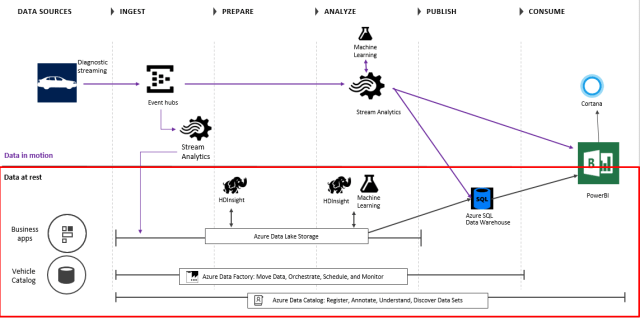
A lambda architecture solution using Azure tools might look like this, using a vehicle with IoT sensors as an example:

lambda

In the above diagram, Event Hubs is used to ingest millions of events in real-time.  Stream Analytics is used for 1) real-time aggregations on data and 2) spool data into long-term storage (SQL Data Warehouse) for batch.  Machine Learning is used in real-time for anomaly detection on tire pressure, oil level, engine temp, etc, to predict vehicles requiring maintenance.  The data in the Azure Data Lake Storage is used for rich analytics using HDInsight and Machine Learning, orchestrated by the Azure Data Factory (for e.g. aggressive driving analysis over past year).  Power BI and Cortana are used for the presentation layer, and the Azure Data Catalog is the metadata repository for all the data sets.

Using Hadoop technologies might provide a solution that looks like this:

hadoop_summit_2015_takeaway_the_lambda_architecture-picture_1

Be aware this is a complicated architecture.  It will need a number of hardware resources and difference code bases for each layer, with each possibly using different technologies/tools.  The complexity of the code can be 3-4 times a traditional data warehouse architecture.  So you will have to weigh the costs versus the benefit of being able to use data slightly newer than a standard data warehouse solution.

More info:

The Lambda architecture: principles for architecting realtime Big Data systems

How to beat the CAP theorem

Questioning the Lambda Architecture

Lambda Architecture: Low Latency Data in a Batch Processing World

Lambda Architecture for the DWH

Lambda Architecture: Design Simpler, Resilient, Maintainable and Scalable Big Data Solutions

The Lambda Architecture and Big Data Quality

15 Aug 11:19

Docker for Windows, Network Shares and $ in your password

by Steve Lasker

If you've been using our docker tools you've noticed we depend highly on network sharing for Docker for Windows. For the Linux host to mount your Windows drives, you need to provide a username/password. What you may not realize is Linux has some special characters it may not always handle.

Short story: if you're having trouble with volume sharing & Docker for Windows, make sure you don't have a $ in your password. " and ; are also suspect at this point. Simply changing from these characters to alternate characters across the top of your numbered keyboard should work.

The Docker folks say they're working on solving this, but at least for 1.12.0-beta21 (build: 5971), we can confirm this is a problem.

Steve

15 Aug 11:17

T-SQL Tuesday #81: Sharpen Something

by Wayne Sheffield

TSQL TuesdayIt’s that time of the month… the time when all of the T-SQL bloggers have a party and blog about a specific topic. This month, the host is my friend Jason Brimhall (b/t). The topic that he has selected is “Sharpen Something”. Specifically, he wants us to:

I am asking you to not only write a post but to do a little homework – first. In other words, plan to do something, carry out that plan, and then write about the experience.

Immediately, I’m thinking of something that I could write on. Then I read on and see this other part of his post where he has some examples:

You know you are extremely deficient at a certain SQL Skill. Tell me what that skill is and develop a plan to get better at that skill. Report on the implementation of this skill and how you are doing at improving. Maybe that skill is about Extended Events, PoSH or availability groups.

And now I’m thinking that Jason’s picking on me. He knows that there is one particular skill that I’m deficient on, and I’ve been meaning to work on it. So Jason, thank you for prodding me along.

To wrap up, Jason says:

In recap, this is an invite to make a short term goal covering the next two weeks. Tell everybody what that goal is (in your tsql tuesday post of course) and how you went about creating a plan for that goal and how you have progressed during the two week interval.

“Tell me what the skill is”

So what is the skill that I’m deficient on? It’s just the most popular feature released in SQL 2012: Availability Groups (did you notice how Jason even mentioned that above? See, he’s picking on me!) It’s not that I’m completely ignorant about Availability Groups – it’s just that I’ve never had the opportunity to work with this feature. I’ve even tried to work with it before, however higher priority things keep popping up, delaying my getting around to this.

“Develop a plan to get better”

The short and simple plan is to create an environment where I have Availability Groups installed, and utilize it on some databases.

The longer plan goes like this: Since Availability Groups is built on top of Windows Server Failover Clustering, I need to:

  1. Build an environment where I have a domain controller and two servers that have clustering implemented.
  2. Install SQL Server on the two servers.
  3. Create a few databases – with data.
  4. Create an Availability Group with these databases.
  5. Test the secondary replicas being read-only.
  6. Repeat for the following environments to assess differences:
    1. Windows Server 2008R2 with SQL 2012
    2. Windows Server 2012R2 with SQL 2012
    3. Windows Server 2012R2 with SQL 2014
    4. Windows Server 2012R2 with SQL 2016
    5. Windows Server 2016 with SQL 2016

“Report on the implementation of this skill”

This is the section where I humble myself. To date, I have created three virtual machines running Windows Server 2008R2. They aren’t even in a domain yet. A setback that I faced was that I already had a domain set up for this… but since I’m using evaluation edition of Windows, they had expired. Everything had to be rebuilt, and now I’m running into domain setup issues. It seems to me that the Windows setup is harder than the SQL setup will be. But I will persist, and this will be done.

Because I am extremely deficient in this skill, and I need to be working with it.


The post T-SQL Tuesday #81: Sharpen Something appeared first on Wayne Sheffield.

15 Aug 11:17

Azure SQL Database vs SQL Data Warehouse

by James Serra

I am sometimes asked to compare Azure SQL Database (SQL DB) to Azure SQL Data Warehouse (SQL DW).  The most important thing to remember is SQL DB is for OLTP (i.e. applications with individual updates, inserts, and deletes) and SQL DW is not as it’s strictly for OLAP (i.e. data warehouses).  So if your going to build a OLTP solution, you would choose SQL DB.  However, both products can be used for building a data warehouse (OLAP).  With that in mind, here is a list of the differences:

screen-shot-2016-11-21-at-7-58-20-am-768x537

I have other blogs that cover SQL DB and SQL DW.

More info:

Comparing Azure SQL Database to SQL Data Warehouse

15 Aug 11:17

Five must-see speakers at the Microsoft Data Science Summit

by SQL Server Team

The Microsoft Data Science Summit is filled with leading thinkers in big data, machine learning, AI, and open-source technologies. Join us, and get their insights and technical expertise as they discuss real-world challenges and innovative solutions emerging across data science. Here’s a sample of some of the speakers you’ll see—and what they’ll be talking about:

Rafal Lukawiecki, data scientist at Project Botticelli

Rafal will discuss the business opportunity of advanced analytics and the new landscape of data. He’ll speak about data science in practice and the cloud-based Cortana Intelligence Suite, especially Azure Machine Learning and the pros and cons of a variety of data storage approaches.

David Smith, R community lead at Microsoft

Whether it’s called data science, machine learning, or predictive analytics, the combination of new data sources and statistical modeling has produced some truly revolutionary applications. Many of these applications incorporate open-source technologies and research from academic institutions.

In his talk, David will share a few of the ways Microsoft is improving the lives of people around the world—and in particular, people with disabilities—by applying statistics, research, and open-source software in applications and devices. He’ll also share how you can develop such applications yourself, using the open-source R language with Microsoft’s advanced analytics products.

Danielle Dean, senior data scientist lead at Microsoft

Wee Hyong Tok, senior data science manager at Microsoft

How do businesses and data scientists work together to turn raw data into intelligent action? Why do some companies drown in volumes of data, while others thrive on turning the data into golden strategic advantages?

With Wee Hyong Tok and Danielle Dean, unlock the super powers that data scientists use to turn raw data into big results. This talk will draw on practical experiences from working on various exciting data science projects, such as:

  • Understanding the galaxies by working with citizen astronomers to create labeled datasets, and performing classification of the galaxies
  • Understanding the brain and figuring out how to decode signals from the brain using machine learning
  • Empowering aero engine manufacturers to improve aircraft efficiency, drive up aircraft availability, and reduce engine maintenance cost

The session is targeted at data scientists, developers, and database professionals with a keen interest in evolving existing skillsets and creating new value for their organizations.

Frank Seide, principal researcher at Microsoft Research

This talk will introduce CNTK, Microsoft’s cutting-edge, deep-learning toolkit.

CNTK is used to train and evaluate deep neural networks used in Microsoft products, such as the Cortana speech models. It supports feed-forward, convolutional, and recurrent networks for speech, image, and text workloads.

Frank, a key contributor to the development of CNTK, will walk us through it. He’ll discuss what you can and cannot do with CNTK, what a typical use might look like, how it works, and what algorithms it implements.

Join us. Connect in person—and dive deep.

The Microsoft Data Science Summit includes three in-depth tracks you can choose from to get the expertise you want: Advanced Analytics, Big Data, and Solutions. So if you’re a data scientist, big data engineer, or machine learning practitioner who is looking to expand your knowledge with expert insights, join us in Atlanta, September 26–27. But register soon. The summit only happens once a year, and it’s just around the corner!

> Register for Microsoft Data Science Summit

15 Aug 11:17

Nimble Storage Offers Aggressive Entry Point to All-Flash With New Predictive Flash Array

by A.R. Guess

by Angela Guess According to a new release out of the company, “Nimble Storage, the leader in predictive flash, today announced an aggressive entry point to all-flash storage. The new AF1000 is a full-featured all-flash array that offers superior scalability, allowing customers to start small and scale non-disruptively up to 8PB at a substantially lower […]

The post Nimble Storage Offers Aggressive Entry Point to All-Flash With New Predictive Flash Array appeared first on DATAVERSITY.

15 Aug 11:16

SQLSweet16!, Episode 5: TRUNCATE Selected Partitions

by Sanjay Mishra

Reviewed By: Denzil Ribeiro, Kun Cheng

Deleting all rows from a given partition is a very common operation on a partitioned table, especially in a sliding window scenario. In a sliding window scenario, when a new period starts, a new partition is created for the new data corresponding to this period, and the oldest partition is either removed or archived.

To remove or archive the oldest partition, the general practice is to switch the partition out to a temporary staging table. The SWITCH operation for a partition is a simple statement, but it takes a bit of preparation for the SWITCH to work. The staging table needs to follow certain rules:

  • the staging table must have the same structure as the main partitioned table
  • the staging table must be empty
  • must reside on the same file group as partition being switched out
  • must create all matching clustered and non-clustered indexes

If the data from the oldest partition need to be archived and saved somewhere, it makes sense to switch the data out to a staging table and process for archiving. However, if the goal is simply to delete the data from the partition, then the programming needed for creating the staging table and switching partition may be cumbersome.

SQL Server 2016 addresses this by allowing TRUNCATE operation on individual partitions of a table. SQL Server 2016 introduces a WITH PARTITIONS clause for TRUNCATE TABLE statement that allows specifying a selected set of partitions (you can specify more than one partition at once). Needless to say that like truncating a table, truncating a partition is also a meta-data operation.

Example:

TRUNCATE TABLE DB1BTicket WITH (PARTITIONS (7, 8))
GO
15 Aug 11:16

Alibaba Cloud Partners with HTC to Advance Virtual Reality Development

by A.R. Guess

by Angela Guess According to a recent press release, “Alibaba Cloud, the cloud computing arm of Alibaba Group, today announced strategic partnership with HTC Corporation (‘HTC’), the pioneer in innovative smart technologies. Both companies will join hands to explore high scalable and price-competitive virtual reality (“VR”) solutions for customers worldwide. Leveraging the advanced cloud computing […]

The post Alibaba Cloud Partners with HTC to Advance Virtual Reality Development appeared first on DATAVERSITY.

15 Aug 11:06

Best Practices

by snoofle

In this world, there are those with common sense, and there are managers. In the world of high finance, there are only those with power and those without it. Those who have power make decisions - regardless of their familiarity with the relevant subject matter, or their ability to prioritize things involved in the decision. Those who don't have power (aka: us) live with the aftermath.

A tape measure with some blood splattered on it. Or maybe rust.

James T. joined a major financial company. Because they have over $1B in revenue a year, he was under the impression that these folks knew what they were doing. They paid very lucrative salaries. They all seemed intelligent. They talked a good game about best practices and doing things right. They hit all the right buzzwords during the interview.

What James didn't realize is that they were power brokers who used words without understanding what they actually meant.

We do Modular Development. Translation, each person works in a vacuum to build their own little modular piece of the system. There is no need to talk of interfaces because management doesn't know there's a need for different pieces of the application to communicate with each other. It just has to work. (Magic happens here).

We design our programs so that they lend themselves to code reuse. Translation, find some piece of code that is close to what you need, make whatever changes are necessary and cut-n-paste it into the new program.

We discuss different approaches and the Best Idea Wins. Translation, the boss has the best idea because he has the most experience, so we do it his way.

We build Frameworks. Translation, a framework is just an application to perform a certain task. It does not need to be generic because it only needs to do one or two things, so we just hard-wire everything.

OK, so programming application-specific code might not be the antithesis of framework development, but it's close enough. When trying explain the value and difference of framework code to application code his boss literally asked Why would anyone ever need that?

As it turned out, most of their "developers" were really engineers and traders. Like most businesses they're ingrained into their current paradigms. Like some engineers, they're very resistant to doing things differently.

So James is building his little single-purpose reusable module and has some questions about the specifics of what it's supposed to do. In response, his management advises him that the details are unknown at that point, but that he should forge ahead, and they'll figure out what it's supposed to do after he delivers it and they see if it's useful to the end users in production!

Forget measure twice, cut once; these folks threw away the tape measure and grabbed a power saw, leaving mountains of scrap lumber all over the place. Then they wonder why it takes so long to get anything useful delivered.

[Advertisement] Incrementally adopt DevOps best practices with BuildMaster, ProGet and Otter, creating a robust, secure, scalable, and reliable DevOps toolchain.
15 Aug 10:59

Salary transparency at Stack Overflow

by Matt Sherman

We believe (and developers tell us) that job seekers should be empowered with as much information as possible when looking for a job – especially salary. So we ran an experiment on Stack Overflow Jobs to see if the evidence would support it.

Remarkably, we learned that job listings which include a salary range got 75% more clicks than job listings that don’t. With this experiment, we’re even more convinced that transparency isn’t just the right thing to do, it’s good for companies, too.

Along with much of the tech community, we were impressed with Buffer’s boldness and leadership in salary transparency. So…

Introducing the Stack Overflow salary calculator

We’ve created a salary and skills calculator for Stack Overflow’s engineering, design and product roles. This has been transparent internally for a while; now it’s transparent with you.

Try the salary calculator

Those who know Stack Overflow know that we work hard to work in public. This is a continuation of that tradition.

What we hope

We hope that moves like this will inspire other employers to greater transparency.

A lack of transparency is what economists call an information asymmetry: it’s in companies’ interests to keep these numbers close to the vest. Individuals are uncomfortable talking about salary sometimes, too.

We believe that conventions can change. If more companies become open on salary, perhaps openness will become expected.

Work in progress

Our salary calculator doesn’t cover every role at Stack Overflow. It doesn’t include equity, and only describes US salaries. (International employees use the same system but it’s not merely a currency conversion.) In the spirit of “default public”, we would rather share an incomplete system than not share at all.

The experimental details: 75% more clicks

(By David Robinson and Bret Copleland)

For our experiment, we redesigned the Stack Overflow Jobs ads to display salary ranges. We were curious: just how much effect does this information have?

We ran an A/B test, where for a random half of our users we hid the salary information from the ads they were shown, and measured the difference in clickthrough rate. Visually, it looked like this:

Job listings with and without salary

We expected to see an improvement, but we were surprised by the size: a 75% average increase in clickthrough rate (CTR) when we showed a job's salary range.

What if a job has a relatively low salary – is it still worth showing? Generally speaking, yes: we found that showing any salary range led to an increase in CTR, though higher salaries led to a greater bump. For American jobs, we saw roughly a 60% increase for jobs with salary ranges centered below $100K, and about a 100% increase (doubling) for salaries above $100K.

Salary vs CTR

Is this just an effect of novelty, where users were surprised to see salary? Unlikely – we didn't see any decline in the effect, and it has been consistent in the months since. We've tried many other changes to ads and have never seen anything this dramatic.

Clickthrough rate isn’t everything, but it’s an encouraging sign that advertising a salary range will help draw developers to a position.

Try the Stack Overflow salary calculator...

Further reading

15 Aug 10:58

Two tools for quick and easy web application load testing during development

by Scott Hanselman

I was on the ASP.NET Community Standup this morning and Jon mentioned a new tool for load testing called "Netling." This got me to thinking about simple lightweight load testing in general. I've used large enterprise systems like SilkTest  as well as the cloud based load testing tools like those in Azure and Visual Studio. I've also used command-line tools like WCAT, an old but very competent load testing tool.

I thought I'd take a moment and look at two tools run locally. The goal is to see how easily I can do quick load tests and iterate on the results.

Netling

Netling is by Tore Lervik and is a nice little load tester client for easy and quick web testing. It's open source and on GitHub which is always nice. It's fun to read other people's code.

Netling includes both a WPF and Console client and is cleanly factored with a Core project that does all the work. With the WPF version you do test and then optionally mark that test as a baseline. Then you can make small changes as you like and do a quick retest. You'll get red (bad) or green (good) results if things get better. This should probably be adjusted to ensure it is visible for those with red-green color blindness. Regardless, it's a nice clean UI and definitely something you'll want to throw into your utilities folder and call upon often!

Do remember that it's not really nice to do load testing on web servers that you don't own, so be kind.

Note that for now there are no formal "releases" so you'll need to clone the repo and build the app. Fortunately it builds very cleanly with the free version of Visual Studio Community 2015.

Netling is a nice load tester for Windows

The Netling console client is also notable for its cool ASCII charts.

D:\github\Netling\Netling.ConsoleClient\bin\x64\Debug [master ≡]> .\netling.exe http://www.microsoft.com -t 8 -d 20


Running 20s test @ http://www.microsoft.com/
Threads: 8
Pipelining: 1
Thread afinity: OFF

1544 requests in 20.1s
Requests/sec: 77
Bandwidth: 3 mbit
Errors: 0
Latency
Median: 99.876 ms
StdDev: 10.283 ms
Min: 84.998 ms
Max: 330.254 ms


██
███
████████████████████ █ █ █
84.998 ms =========================================================== 330.254 ms

D:\github\Netling\Netling.ConsoleClient\bin\x64\Debug [master ≡]>

I'm sure that Tore would appreciate the help so head over to https://github.com/hallatore/Netling and file some issues but more importantly, perhaps chat with him and offer a pull request?

WebSurge

WebSurge is a more fully featured tool created by Rick Strahl. Rick is known in .NET spaces for his excellent blog. WebSurge is a quick free download for personal use but you should register it and talk to Rick if you plan on using it commercially or a lot as an individual.

WebSurge also speaks the language of the Fiddler Web Debugging Proxy so you can record and playback web traffic and generate somewhat sophisticated load testing scenarios. The session files are just test files that you can put in source control and share with other members of your team.

image

I realize there's LOT of choices out there.  These are just two really quick and easy tools that you can use as a developer to easily create HTTP requests and then play back at will and iterate during the development process.

What do YOU use for load testing and iterating on performance during development? Let us all know in the comments.


Sponsor: Big thanks to Redgate for sponsoring the feed this week. Could you deploy 1,000 databases? Imagine working in a 70-strong IT team, with 91 applications and 1,000+ databases. Now imagine deployment time. It’s not fiction, it’s fact. Read FlexiGroup's story.


© 2016 Scott Hanselman. All rights reserved.
     
15 Aug 10:56

Data Integration Lifecycle Management (DILM) with SSIS Catalog Compare: SSIS Catalog Environments

by andyleonard
Have you ever tried to move some (or all) of the contents of one SSIS Catalog to another? Deploying an SSIS Project to a different SSIS Catalog is straightforward: Execute the ISPAC file, configure the new SSIS Catalog as the target, click a few times,...(read more)
15 Aug 10:56

Testing Tintri’s Lightning Lab and Pizza

by dan

Disclaimer: I was offered a pizza to write this post.  I haven’t taken up the offer yet, but I will be.

Tintri_Logo_Horizontal_1024

I had the opportunity to test drive Tintri’s “Lightning Lab” about six months ago and the nice folks at Tintri thought I might like to post about my experiences. They’ve offered me a pizza for my troubles which, coincidentally, ties in nicely with their current promotion “The Tintri Pizza Challenge“. If you’re in the US or Canada it’s worth checking it out.

In any case, the Lightning Lab is Tintri’s internet accessible lab that showcases a number of its arrays and provides you with an opportunity to take their gear for a spin. From a hardware perspective it’s pretty well provisioned, with T5060, T880, T620 & T540 arrays, along with a Dell R720 host with 128GB of RAM and 2 Dell R610 servers with 48GB of RAM. From a software perspective, the version of the lab I used had VMware vSphere 5.5U2b installed, but I believe this has been since updated. There’s also a functional version of Tintri Global Center, and both the Web Client Plug-in and the vROps plugin configured. Networking wise, management runs overs a 1GbE Dell switch, with Data travelling via a 10GbE Arista switch.

Lab_Overview

Global Center has a pretty neat login screen. Like all good admins, I use many dots in my password too.

tintri09

There’s a bunch of stuff I could show from the interface, but one of my favourite bits is the ability to see an aggregated view of your deployed VMstores.

tintri04

The interface is simple to operate and painfully colourful too. It’s also simple to navigate and makes it really easy to get a quick view of what’s going on in your environment without having to do a lot of digging.


Conclusion

There’s a lot more I could write about Tintri. If you’re aligned with their use case (NFS-only), they have a compelling offering that’s worth checking out. The Lightning Lab is an excellent tool to take their platform for a spin and gain a good understanding of just what you can do with the VMstore and Global Center. I think these kind of offerings are great, and not just because there’s pizza involved. If more storage vendors read this and think that they should be doing something like this, then that’s a great thing. I’ve barely scratched the surface, so you should head over to Andrea Mauro’s blog and check out his thorough write-up of his Lightning Lab experience.