Shared posts

26 Jan 07:41

Exploring ASP.NET Core with Docker in both Linux and Windows Containers

by Scott Hanselman

In May of last year doing things with ASP.NET and Docker was in its infancy. But cool stuff was afoot. I wrote a blog post showing how to publish an ASP.NET 5 (5 at the time, now Core 1.0) app to Docker. Later in December of 2015 new tools like Docker Toolbox and Kitematic made things even easier. In May of 2016 Docker for Windows Beta continued to move the ball forward nicely.

I wanted to see how things are looking with ASP.NET Core, Docker, and Windows here in October of 2016.

I installed these things:

Docker for Windows is really nice as it automates setting up Hyper-V for you and creates the Docker host OS and gets it all running. This is a big time saver.
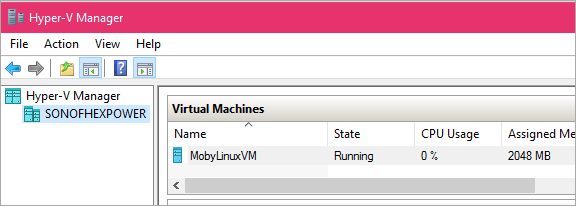
Hyper-V manager

There's my Linux host that I don't really have to think about. I'll do everything from the command line or from Visual Studio.

I'll say File | New Project and make a new ASP.NET Core application running on .NET Core.

Then I right click and Add | Docker Support. This menu comes from the Visual Studio Tools for Docker extension. This adds a basic Dockerfile and some docker-compose files. Out of the box, I'm all setup to deploy my ASP.NET Core app to a Docker Linux container.

ASP.NET Core in a Docker Linux Container

Starting from my ASP.NET Core app, I'll make sure my base image (that's the FROM in the Dockerfile) is the base ASP.NET Core image for Linux.

FROM microsoft/aspnetcore:1.0.1

ENTRYPOINT ["dotnet", "WebApplication4.dll"]
ARG source=.
WORKDIR /app
EXPOSE 80
COPY $source .

Next, since I don't want Docker to do the building of my application yet, I'll publish it locally. Be sure to read Steve Lasker's blog post "Building Optimized Docker Images with ASP.NET Core" to learn how to have one docker container build your app and the other run it it. This optimizes server density and resource.

I'll publish, then build the images, and run it.

>dotnet publish


>docker build bin\Debug\netcoreapp1.0\publish -t aspnetcoreonlinux

>docker images
REPOSITORY TAG IMAGE ID CREATED SIZE
aspnetcoreonlinux latest dab2bff7e4a6 28 seconds ago 276.2 MB
microsoft/aspnetcore 1.0.1 2e781d03cb22 44 hours ago 266.7 MB

>docker run -it -d -p 85:80 aspnetcoreonlinux
1cfcc8e8e7d4e6257995f8b64505ce25ae80e05fe1962d4312b2e2fe33420413

>docker ps
CONTAINER ID IMAGE COMMAND CREATED STATUS PORTS NAMES
1cfcc8e8e7d4 aspnetcoreonlinux "dotnet WebApplicatio" 2 seconds ago Up 1 seconds 0.0.0.0:85->80/tcp clever_archimedes

And there's my ASP.NET Core app running in Docker. So I'm running Windows, running Hyper-V, running a Linux host that is hosting Docker containers.

What else can I do?

ASP.NET Core in a Docker Windows Container running Windows Nano Server

There's Windows Server, there's Windows Server Core that removes the UI among other things and there's Windows Nano Server which gets Windows down to like hundreds of megs instead of many gigs. This means there's a lot of great choices depending on what you need for functionality and server density. Ship as little as possible.

Let me see if I can get ASP.NET Core running on Kestrel under Windows Nano Server. Certainly, since Nano is very capable, I could run IIS within the container and there's docs on that.

Michael Friis from Docker has a great blog post on building and running your first Docker Windows Server Container. With the new Docker for Windows you can just right click on it and switch between Linux and Windows Containers.
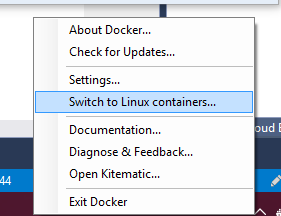
Docker switches between Mac and Windows easily

So now I'm using Docker with Windows Containers. You may not know that you likely already have Windows Containers! It was shipped inside Windows 10 Anniversary Edition. You can check for Containers in Features:
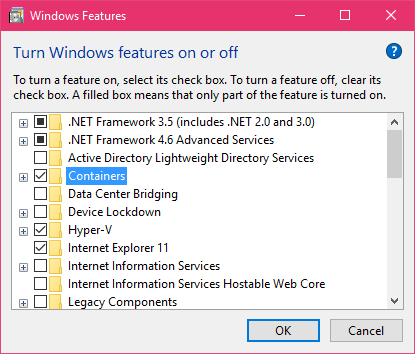
Add Containers in Windows 10

I'll change my Dockerfile to use the Windows Nano Server image. I can also control the ports that ASP.NET talks on if I like with an Environment Variable and Expose that within Docker.

FROM microsoft/dotnet:nanoserver

ENTRYPOINT ["dotnet", "WebApplication4.dll"]
ARG source=.
WORKDIR /app
ENV ASPNETCORE_URLS http://+:82
EXPOSE 82
COPY $source .

Then I'll publish and build...

>dotnet publish

>docker build bin\Debug\netcoreapp1.0\publish -t aspnetcoreonnano

Then I'll run it, mapping the ports from Windows outside to the Windows container inside!

NOTE: There's a bug as of this writing that affects how Windows 10 talks to Containers via "NAT" (Network Address Translation) such that you can't easily go http://localhost:82 like you (and I) want to. Today you have to hit the IP of the container directly. I'll report back once I hear more about this bug and how it gets fixed. It'll show up in Windows Update one day. The workaround is to get the IP address of the container from docker like this:  docker inspect -f "{{ .NetworkSettings.Networks.nat.IPAddress }}" HASH

So I'll run my ASP.NET Core app on Windows Nano Server (again, to be clear, this is running on Windows 10 and Nano Server is inside a Container!)

>docker run -it -d -p 88:82 aspnetcoreonnano

afafdbead8b04205841a81d974545f033dcc9ba7f761ff7e6cc0ec8f3ecce215

>docker inspect -f "{{ .NetworkSettings.Networks.nat.IPAddress }}" afa
172.16.240.197

Now I can hit that site with 172.16.240.197:82. Once that bug above is fixed, it'll get hit and routed like any container.

The best part about Windows Containers is that they are fast and lightweight. Once the image is downloaded and build on your machine, you're starting and stopping them in seconds with Docker.

BUT, you can also isolate Windows Containers using Docker like this:

docker run --isolation=hyperv -it -d -p 86:82 aspnetcoreonnano

So now this instance is running fully isolated within Hyper-V itself. You get the best of all worlds. Speed and convenient deployment plus optional and easy isolation.

ASP.NET Core in a Docker Windows Container running Windows Server Core 2016

I can then change the Dockerfile to use the full Windows Server Core image. This is 8 gigs so be ready as it'll take a bit to download and extract but it is really Windows. You can also choose to run this as a container or as an isolated Hyper-V container.

Here I just change the FROM to get a Windows Sever Core with .NET Core included.

FROM microsoft/dotnet:1.0.0-preview2-windowsservercore-sdk

ENTRYPOINT ["dotnet", "WebApplication4.dll"]
ARG source=.
WORKDIR /app
ENV ASPNETCORE_URLS http://+:82
EXPOSE 82
COPY $source .

NOTE: I hear it's likely that the the .NET Core on Windows Server Core images will likely go away. It makes more sense for .NET Core to run on Windows Nano Server or other lightweight images. You'll use Server Core for heavier stuff, and Server is nice because it means you can run "full" .NET Framework apps in containers! If you REALLY want to have .NET Core on Server Core you can make your own Dockerfile and easily build and image that has the things you want.

Then I'll publish, build, and run again.

>docker images

REPOSITORY TAG IMAGE ID CREATED SIZE
aspnetcoreonnano latest 7e02d6800acf 24 minutes ago 1.113 GB
aspnetcoreonservercore latest a11d9a9ba0c2 28 minutes ago 7.751 GB

Since containers are so fast to start and stop I can have a complete web farm running with Redis in a Container, SQL in another, and my web stack in a third. Or mix and match.

>docker ps

CONTAINER ID IMAGE COMMAND PORTS NAMES
d32a981ceabb aspnetcoreonwindows "dotnet WebApplicatio" 0.0.0.0:87->82/tcp compassionate_blackwell
a179a48ca9f6 aspnetcoreonnano "dotnet WebApplicatio" 0.0.0.0:86->82/tcp determined_stallman
170a8afa1b8b aspnetcoreonnano "dotnet WebApplicatio" 0.0.0.0:89->82/tcp agitated_northcutt
afafdbead8b0 aspnetcoreonnano "dotnet WebApplicatio" 0.0.0.0:88->82/tcp naughty_ramanujan
2cf45ea2f008 a7fa77b6f1d4 "dotnet WebApplicatio" 0.0.0.0:97->82/tcp sleepy_hodgkin

Conclusion

Again, go check out Michael's article where he uses Docker Compose to bring up the ASP.NET Music Store sample with SQL Express in one Windows Container and ASP.NET Core in another as well as Steve Lasker's blog (in fact his whole blog is gold) on making optimized Docker images with ASP.NET Core.

IMAGE ID            RESPOSITORY                   TAG                 SIZE

0ec4274c5571 web optimized 276.2 MB
f9f196304c95 web single 583.8 MB
f450043e0a44 microsoft/aspnetcore 1.0.1 266.7 MB
706045865622 microsoft/aspnetcore-build 1.0.1 896.6 MB

Steve points out a number of techniques that will allow you to get the most out of Docker and ASP.NET Core.

The result of all this means (IMHO) that you can use ASP.NET Core:

  • ASP.NET Core on Linux
    • within Docker containers
    • in any Cloud
  • ASP.NET Core on Windows, Windows Server, Server Core, and Nano Server.
    • within Docker windows containers
    • within Docker isolated Hyper-V containers

This means you can choose the level of feature support and size to optimize for server density and convenience. Once all the tooling (the Docker folks with Docker for Windows and the VS folks with Visual Studio Docker Tools) is baked, we'll have nice debugging and workflows from dev to production.

What have you been doing with Docker, Containers, and ASP.NET Core? Sound off in the comments.


Sponsor: Thanks to Redgate this week! Discover the world’s most trusted SQL Server comparison tool. Enjoy a free trial of SQL Compare, the industry standard for comparing and deploying SQL Server schemas.


© 2016 Scott Hanselman. All rights reserved.
     
12 Nov 05:04

Cloud Platform Release Announcements for October 12, 2016

by Cloud Platform Team

This is a blog post of a new ongoing series of consolidated updates from the Cloud Platform team.

In today’s mobile first, cloud first world, Microsoft provides the technologies and tools to enable enterprises to embrace a cloud culture. Our differentiated innovations, comprehensive mobile solutions and developer tools help all of our customers realize the true potential of the cloud first era.

You expect cloud-speed innovation from us, and we’re delivering across the breadth of our Cloud Platform product portfolio. Below is a consolidated list of our latest releases to help you stay current, with links to additional details if you’d like more information. In this update:

  • Dynamics 365 for Customer Insights | Public
  • Windows Server 2016 | GA – Bits available
  • System Center 2016 | Official GA
  • Power BI solution templates | GA
  • Azure SQL DB protects and secures data | Temporal Tables GA
  • SQL Server 2016 Express on Docker Hub | GA
  • App Service: Linux web apps | Soft launch Public Preview

Dynamics 365 for Customer Insights | Public

Dynamics 365 for Customer Insights is a new SaaS solution that helps you engage your customers better by empowering your employees with actionable insights. The first capability of this solution, available in preview on 11/1, is Customer 360. This capability lets you merge all your customer data to create a dynamic 360-degree view of each customer’s interactions, engagement & purchase history. And then give specific role-based insights to your employees to delight your customers.Built on top of the Microsoft’s industry leading Cortana Intelligence platform and leveraging our investments in artificial intelligence, this solution empowers marketing, sales and service professionals with the power of advanced analytics and machine learning. The application will have out of the box connecters for Dynamics 365 and for Salesforce Marketing Cloud, with the ability to pull data from any other CRM, ERP or business application that our customers use.

Windows Server 2016 | GA – Bits available

Windows Server and System Center 2016 Generally Available October 12Following an exciting launch with evaluation versions on September 26 at Ignite, we are now pleased to announce that both Windows Server and System Center 2016 will be generally available on October 12.

Call to action:

System Center 2016 | Official GA

Announcing the general availability of System Center 2016, the enterprise-class datacenter management solution for hybrid environments and first choice for Windows Server 2016 management! System Center 2016 was launched at the Microsoft Ignite event last month as a limited evaluation and is now fully available in the download center and MSDN. With this release, you can streamline monitoring, provisioning, and automation for new innovations in Windows Server 2016, and realize the value of the software-defined data center, from network management to Nano servers. Additionally, several new capabilities respond to customer demands for increased speed and efficiency, and provide support for the ever-changing, diverse environments of modern organizations. System Center 2016 is also available as part of Microsoft Operations Management Suite (OMS) subscriptions.To learn more, view the blog and visit the System Center website.

Power BI solution templates | GA

The Power BI solution templates for System Center Configuration Management Analytics, Campaign/Brand Management for Twitter, Sales Management for Salesforce and Sales Management for Dynamics CRM are now available. Visit powerbi.microsoft.com/solution-templates to learn how to set up a solution for common BI problems in hours, execute a quick proof of concept and work with a group of pre-selected partners to meet your customization needs. For more information on the solution templates, visit the Power BI blog. For questions, please contact pbisolntemplates@microsoft.com.

Azure SQL DB protects and secures data | Temporal Tables GA

Azure SQL Database Temporal Tables generally available
Temporal Tables let you track the full history of data changes in Azure SQL Database without custom coding. You can focus data analysis on a specific point in time and use a declarative cleanup policy to control retention of historical data. Designed to improve productivity when you develop applications, Temporal Tables can help:
  • Support data auditing in applications.
  • Analyze trends or detect anomalies over time.
  • Implement slowly changing dimension patterns.
  • Perform fine-grained row repairs in cases of accidental data errors made by humans or applications.

For more information on how to integrate Temporal Tables in an application, please visit the Getting Started with Temporal Tables in Azure SQL Database documentation webpage. To use temporal retention, please visit the Manage temporal history with retention policy documentation webpage.

SQL Server 2016 Express on Docker Hub | GA

We are excited to announce the public availability of SQL Server 2016 Express Edition in Windows containers! The SQL Server Docker images are now available on Docker Hub and the build scripts are hosted on our SQL Server GitHub repository. This SQL Server 2016 Express image can be used in both Windows Server Containers as well as Hyper-V Containers.  Read our blog post on the SQL Server Blog to learn more and get started on Docker Hub today!

App Service: Linux web apps | Soft launch Public Preview

Improving Azure App Service Node.js and PHP Developer Experience with Linux SupportIn March 2015, Azure App Service entered general availability with the goal of making it easier for Web developers to do cool things in the cloud. In addition to a great experience for .NET developers, it also included support for the PHP, Node.js, Java and Python stacks as well as a number of open source Web products. Today, a new public preview introduces new native Linux support for Node.js and PHP stacks.

Visual Studio “15” | Public

On Wednesday, October 5, we announced the public preview 5 of Visual Studio “15”, the next version of the popular developer tools Visual Studio.As detailed in John Montgomery’s  blog post announcing the availability of Visual Studio “15” Preview 5, the release includes our most recent feature innovations and improvements in performance and productivity.

To learn more, read the release notes.

Azure AD Domain Services | GA

Azure Active Directory Domain Services are now generally availableAzure Active Directory Domain Services are now generally available and they can provide scalable, high-performance, managed domain services such as domain-join, LDAP, Kerberos, Windows Integrated Authentication and Group Policy support. With the click of a button, administrators can enable managed domain services for Linux and Windows virtual machines and directory-aware applications deployed in Azure Infrastructure Services. By maintaining compatibility with Windows Server Active Directory, Azure AD Domain Services provide an easy way to migrate traditional on-premises applications to the cloud.

For more information, please visit the web site of Azure Active Directory Domain Services.

03 Nov 16:34

Driving Cultural Change? You Are What You Measure

by Bill Schmarzo
EMC logo

As a consumer, the recent revelation about a major U.S. financial institution creating fraudulent customer accounts in order to increase employees’ and managements’ bonuses was incredibly disturbing. Customer trust is so hard to gain, and there is a huge lesson in this story as organizations contemplate where and how to leverage the wealth of customer data that they are gathering.

For those of you who may have missed the story (or were too busy moving your accounts to other financial institutions), here’s the story (note: the names have been changed to protect the guilty):

Omega Bank, one of the nation’s largest banks, has been hit with $185 million in civil penalties for secretly opening millions of unauthorized deposit and credit card accounts that harmed customers.

Employees of Omega Bank boosted sales figures by covertly opening the accounts and funding them by transferring money from customers’ authorized accounts without permission.

An analysis by the bank found that its employees opened more than two million deposit and credit card accounts that may not have been authorized by consumers, the officials said. Many of the transfers ran up fees or other charges for the customers, even as they helped employees make incentive goals.”

However, these fraudulent behaviors should not be entirely a surprise. For my University of San Francisco MBA class, we were examining a 2010 Omega Bank annual report (as part of an exercise to identify an organization’s key business initiatives), and look what they found in the annual report:

“This year, we [Omega Bank] crossed a major cross-sell threshold. Our banking households in the western U.S. now have an average of 6.14 products with us. For our retail households in the east, it’s 5.11 products and growing. Across all 39 of our states, we now average 5.70 products per banking household (5.47 a year ago). One of every four of our banking households already has eight or more products with us. Four of every ten have six or more. Even when we get to eight, we’re only halfway home. The average banking household has about 16. I’m often asked why we set a cross-sell goal of eight. The answer is, it rhymed with “great.” Perhaps our new cheer should be: “Let’s go again, for ten!”

Called out in the Chairman’s Letter to Shareholders in the 2010 Omega Bank annual report, was the key business initiative of “increasing the average number of products (accounts) per household from 6.11 to 8 and eventually 10.” Yea, I didn’t make this up.

You Are What You Measure…

This points to a critical cultural challenge, and opportunity, as organizations seek to leverage data and analytics to power the organization’s key business initiatives. And this cultural conversion starts with this simple statement:

“You are what you measure, and you measure what you reward”

What this quote suggests is that the values of a business are reflected in how it pay (or reward) its employees. So it is of little surprise that if increasing the number of accounts held by household from 6.11 to 10 is a key business initiative – even called out in the CEO’s Letter to Shareholders – then many executives in the organization were going to make that initiative a priority. Consequently, employees and management were given individual financial incentives to increase the number of accounts held by household (called cross-selling) and some employees (and likely management as well) played “around the edges” of what was ethical to achieve those financial incentives.

And to be honest, that is not the BIG problem.

The BIG problem is found in the next paragraph of the Letter to the Shareholders:

“More sales don’t always bring better service, but better service almost always brings more sales. That’s why our service quality scores are an early indicator of our sales trends. Our service scores are rising. Almost eight of every ten of our customers said they’re “extremely satisfied” with their recent call or visit with our banking stores or contact centers. For the second year in a row, we ranked #1 among large banks.”

What I suspect (though I do not know) is that Omega Bank did not have individual metrics for a counter-balancing incentives program around “customer satisfaction.” So while the annual report calls out both cross selling and customer satisfaction as key business initiatives, the business initiative of real importance to management is the one for which they reward or pay you. So the business initiative that was of real importance (versus just saying the words) was cross-selling effectiveness because that’s how employees got paid.

Importance of Counter-Balancing Scores And Metrics

As you consider leveraging incentives to integrate your analytic results into your key business processes, take the time to consider counter-balancing financial incentives or rewards (or scores) so that the organization gets the desired behavioral change. For Omega Bank, measures and financial incentives around customer satisfaction, employee satisfaction, and/or likelihood to recommend could have nicely balanced the aggressive cross-sell effectiveness metrics and rewards and lead to a business initiative that read like such:

“Let’s increase customer cross-selling effectiveness (from 6.11 to 10.0) in a way that improves customer satisfaction and the likelihood that customer would recommend Omega Bank to a friend by 10%.”

Now that’s a business initiative that carefully balances the financial goals of the bank with the engagement and treatment goals for customers.

We saw this dilemma of counter-balancing metrics or scores during the 2007-2008 financial crisis. Again banking employees were incented to approve mortgage applications based upon the credit worthiness of the applicants (typically using the FICO score). If banks had a counter-balancing metrics or score on say, a reasonable value to the house for which the mortgage was being written (“Properly-valued Property” Score), then banks would have understood very quickly the riskiness in the book of business that they were underwriting.

Spend extra time in your brainstorming sessions considering what metrics or scores might be required in order to drive a more balanced, holistic financial, employee and customer behaviors.

How This Applies To Big Data

Number 1: “You are what you measure, and you measure what you reward”

If you want people in your organization to share data and analytics and knock down the data silos and mitigate IT shadow spend, reward them accordingly! If you incent or reward employees and management to share, then you are highly likely to get the behavioral and cultural change that you seek.

Number 2: Importance of counter-balancing metrics or scores

Be careful of metrics or scores that measure only one side of the equation. Generally speaking, you are likely to need one or two counter-balancing metrics or scores to ensure that the organization does not become motivated to achieve the metrics goal “at any cost,” and create unintended consequences.

The post Driving Cultural Change? You Are What You Measure appeared first on InFocus Blog | Dell EMC Services.

03 Nov 16:25

ArcaneCode–Headed your way!

by arcanecode

I’ve not done much blogging, as I’ve been swamped with other activities. In addition I’ll be doing quite a bit of speaking, so let me catch you up.

Recently I did a webinar for Pluralsight, “Why you should invest in PowerShell”. If you missed it the recording is now up, take a look, it’s free!

http://go.pluralsight.com/C0010781

Next, I just completed the first draft of my fifth book, SQL Server 2016 Reporting Services Cookbook. I’m coauthoring with another MVP and great guy, Dinesh Priyankara. The book is available from PACKT Publishing in Alpha form.

https://www.packtpub.com/big-data-and-business-intelligence/sql-server-2016-reporting-services-cookbook

I’ll make my debut appearance at IT/Dev Connections next week. I’ll be doing two sessions, the first is on October 11th, 2016: Zero to Hero with PowerShell and SQL Server. We’ll begin with a quick overview of PowerShell, then dive into using it with SQL Server. You’ll see examples of using it for both maintenance and development tasks.

The next day is my second session is “So You Think MDX is Hard?”. This is for people who are new to MDX, and want to learn. You’ll see how to start from no knowledge all the way to building calculated members and sets.

If you’ll be at IT/Dev Connections feel free to come by and say hi, would love to meet as many as possible.

As if that’s not enough, on Saturday October 15th 2016 I will be at the DevSpaces Conference in Huntsville AL. At 4pm I’ll be presenting “High Class PowerShell: Objects and Classes in PowerShell”. You’ll see how to create your own classes using PowerShell. We’ll cover techniques valid in PowerShell versions 3 and 4, as well as see how the new class types in PowerShell version 5 work.

As they say on TV, but wait! There’s more!

On November 1st 2016 I will be coming to Atlanta to the Atlanta SQL Server BI user group. My presentation “Shiny and New: SQL Server 2016 Reporting Services” should be a lot of fun, and introduce you to the new features in SQL Server 2016.

Whew! There’s two more Atlanta based events in Nov/Dec it looks like I’ll be at, once those are finalized I’ll let everyone know.

I’ve also established a GitHub repository for my various samples. You’ll find it at https://github.com/arcanecode. As I move forward I’ll keep this repository updated.


03 Nov 16:25

PASS Summit 2016: world’s biggest SQL Server event

by SQL Server Team

PASS Summit 2016 is nearly upon us. With only 4 weeks until the big event, now is the time to register!

PASS Summit 2016 is community-driven event with three days of technical sessions, networking, and professional development. Don’t miss your chance to stay up to date on the latest and greatest Microsoft data solutions along with 4,000 of your data professional and developer peers.

What’s new this year?  So many things!

• PASS Summit is not just for DBAs.  With nearly 1,000 developers attending the event, Microsoft has increased the number of sessions focused on application development and developer tools by 60%.

• While many people attend PASS Summit to grow fundamental database skills, we know that many attendees are very experienced, senior data professionals so we increased the number of deep technical sessions by half.

• We have also added a new type of session called a Chalk Talk. These are Level 500 sessions with Microsoft senior program management hosting open Q&A in a collegiate style setting.  Seating is limited to 50 so you’ll want to get there early to claim your spot.

In addition to these enhancements, Microsoft has also increased investment in sending employees onsite to talk with attendees.  They’ll be easy to spot – all 500 Microsoftees will be wearing bright fuchsia t-shirts.  You can find them in big numbers the Day 1 keynote, Microsoft booth, SQL Clinic, Wednesday’s Birds of a Feather luncheon, Thursday’s WIT luncheon, and of course in our big booth in the Expo Hall.

Have a technical challenge or need architecture advice?

SQL Clinic is the place to be. SQL Clinic is the hub of technical experts from SQLCAT, Tiger Team, CSS, and others. Whether you are looking for SQL Server deployment support, have a troublesome technical issue, or developing an application the experts at SQL Clinic will have the right advice for you.

Click here to register today!

Are you a member of a PASS chapter or virtual chapter?  If so, remember to take advantage of the $150 discount code.  Contact your chapter leader for details.

Sending your whole team? There is also a great group discount for companies sending five or more employees.

Once you get a taste for the learning and networking waiting for you at PASS Summit, we invite you to join the conversation by following @SQLServer on Twitter as well as @SQLPASS and #sqlsummit. We’re looking forward to an amazing event, and can’t wait to see everyone there!

Stay tuned for regular updates and highlights on Microsoft and PASS activities planned for this year’s conference.

03 Nov 16:24

1,000,000 predictions per second

by SQL Server Team

This post is by Joseph Sirosh, Corporate Vice President of the Data Group at Microsoft.

Transactional Workloads + Intelligence

Online transaction processing (OLTP) database applications have powered many enterprise use-cases in recent decades, with numerous implementations in banking, e-commerce, manufacturing and many other domains. Today, I’d like to highlight a new breed of applications that marry the latest OLTP advancements with advanced insights and machine learning. In particular, I’d like to describe how companies can predict a million events per second with the very latest algorithms, using readily available software. We have shown this demo at the Microsoft Machine Learning and Data Science Summit and my General Session at Ignite in Atlanta, Georgia. You can watch both online. The predictive model was based on a boosted decision tree algorithm with 50 trees and 33 features.

Machine Learning at 1M PPP

Take credit card transactions, for instance. These can trigger a set of decisions that are best handled with predictive models. Financial services companies need to determine whether a particular transaction is fraudulent or legitimate.

As the number of transactions per second (TPS) increase, so does the number of predictions per second (PPS) that organizations need to make. The Visa network, for instance, was capable of handling 56,000 TPS last year and managed over 100 billion yearly transactions. With each transaction triggering a set of predictions and decisions, modern organizations have a need for a powerful platform that combines OLTP with a high-speed prediction engine. We expect that an increasing number of companies will need to hit 1 million predictions per second (PPS) or more in coming years.

What kind of architecture would enable such use cases? At Microsoft, we believe that computing needs to take place where data lives. This minimizes data movement, eliminates the costs and security risks associated with data movement and the prediction engine sits close to the database (i.e., in-database analytics). Moreover, the predictive models can be shared by multiple applications. That’s precisely how SQL Server 2016 was designed.

Take the credit card fraud detection example I mentioned above – one can handle it in the following manner:

  • A data scientist creates a predictive model for credit-card fraud detection based on historical transaction data. This model is stored as a standard database object inside a database.
  • New credit-card transactions are ingested and stored in high-speed in-memory columnstores.
  • The data is likely to require some preparation for advanced analytics. This includes operations such as joining data across multiple tables, cleansing, creating aggregations and more. SQL shines at this, because these steps execute much faster in production when done at the database layer.
  • The new transaction data and the predictive model are sent (using T-SQL) to an in-database predictive engine. Predictions can then be done in batch or at the single transaction level. In SQL Server 2016 you can build on the power of R, with its extensive set of packages and the built-in high scale algorithmic library (ScaleR) provided by Microsoft.
  • Predictions can be retuned immediately to an application via T-SQL and/or stored in the database for further use.

This is shown visually below:

Fraud Predictions Visual

The above architecture is very versatile. In addition to using it in fraud detection, we’ve applied this architecture to perform what-if analysis on an auto loan dataset.

Analytical Workloads + Intelligence

Imagine a loan application where a financial services company needs to determine if a loan will be repaid on time. Similarly to predicting fraudulent transactions, you can leverage SQL Server 2016 as a Scoring Engine to predict “bad” loans. Loans that indicate good repayment behavior are considered “good” and loans that indicate less than perfect repayment behavior are considered “bad”. Imagine scanning through millions of loan applications and being able to predict – within seconds – which loans will default. Now imagine a business analyst launching the same exercise while modeling a scenario where the Federal Reserve increases interest rates. Our loan default prediction model was able to reach and exceed a staggering 1,250,000 predictions per second, completing the what-if analysis within 15-18 seconds. This capability now enables our customers to have near real-time predictive analytics. The architecture is shown visually below:

Loan Default Prediction Visual

One of the common tasks from customers is to provide an intelligent method of predicting how changing factors like interest rates, loan terms or even a member’s credit score would affect the charge-off probability. You can specify a what-if input for an increased interest rate and score the open loans with the new proposed interest rate using parallel threads which call a SQL Server stored procedure to invoke the scoring model on the open loans. You can take these predictions and compare the base predictions with the what-if predictions. Then you can study the probability of HIGH charge-offs increasing with an increase in interest rate and how it may effect various branches of your business. Such near real-time predictive analytics capabilities minimize research bias, dramatically increase business flexibility and focus on attributes that matter which results in higher profitability.

At Ignite, we had Jack Henry & Associates on the stage with me. They provide more than 300 products and services to over 10,000 credit unions and enable them to process financial transactions plus automate their services. Using SQL Server as a Scoring Engine, enabled their vision of building an intelligent enterprise data warehouse which would help their customers increase their productivity. They have been working with Microsoft to leverage SQL Server with built-in R capability to build intelligence into their current data warehousing service portfolio. Such an intelligent data warehouse helps credit unions and financial services become more flexible and react to situations in a data-driven manner. We see opportunities in applying such models within the database to customer churn predictions, predicting loan portfolio changes and a host of other scenarios. Several banking and insurance companies rely on very complex architectures to do predictive analytics and scoring today. Using the architecture outlined in this blog, businesses can do this in a dramatically simpler and faster manner.

The possibilities are endless.

SQL Server as a Scoring Engine

We’ve posted several samples on GitHub. The available templates are listed below.

  • Predictive Maintenance. Predict machine failures.
  • Customer Churn Prediction. Predict when a customer churn happens.
  • Online Purchase Fraud Detection. Predict if an online purchase transactions is fraudulent.
  • Energy Demand Forecasting. Forecast electricity demand of multiple regions.
  • Retail Forecasting. Forecast the product sales for a retail store.
  • Campaign Management. Predict when and how to contact potential customers.
  • Predicting Risk on Consumer Loans is posted here.

This is how companies are predicting at the speed of data, today.

Joseph
@josephsirosh

03 Nov 16:24

Passwords – a secret you have no right to share

by Rob Farley

I feel like this topic just keeps going around and around. Every time I’m in a room where someone needs to log into a computer that’s not theirs, there seems to be a thing of “Oh, I know their password…”, which makes me cringe.

I’ve written about this before, and even for a previous T-SQL Tuesday, about two years ago, but there’s something that I want to stress, which is potentially a different slant on the problem.

A password is not just YOUR secret. It’s also a secret belonging to the bank / website / program that the password is for.

Let me transport you in your mind, back to primary school. You had a club. You had a password that meant that you knew who was in the club and who wasn’t (something I’ve seen in movies – I don’t remember actually being in one). At some point you had a single password that was used by everyone, but then you found that other people knew the password and could gain entry, because you only needed someone to be untrusted for the password to get out.

You felt upset because that password wasn’t theirs to share. It was the property of you, the club owner. Someone got access to your club when you hadn’t actually granted them access.

Now suppose I’m an online retailer (I’m not, but there are systems that I administer). You’ve got a password to use my site, and I do all the right things to protect that password – one-way hashing before it even reaches the database, never even being able to see it let alone emailing it, and a ton of different mechanisms that make sure that your stuff is safe. You’ve decided to a password which you’ve generated as a ‘strong password’, and that’s great. Maybe you can remember it, which doesn’t necessarily make it insecure. I don’t even care if you’ve written it down somewhere, so long as you’re treating it as a secret.

Because please understand, it’s MY secret too.

If the password you use gets out, because maybe someone gets into your LastPass account, or maybe someone steals the PostIt you’ve written it on, or maybe you use that same password at a different site which then gets hacked…

…then that other person has access to MY site as you.

If that other person buys stuff from me as you, I might need to refund you for the money / credit / points you didn’t mean to spend. And if I’ve already sent the goods out, then that’s going to hurt me.

If that other person does malicious things on my site because they’re accessing it as a privileged user, then that’s going to hurt me.

Someone knowing the secret that I’ve worked hard to keep secret… that’s going to hurt me.

I have no control over the password that you choose to use. But please understand that it’s not just YOUR password. Use something that is a secret between you and me. I will never know your password, but I want you to make sure that no one else ever does either. Don’t reuse passwords.

@rob_farley

Big thanks to Andy Mallon (@amtwo) for hosting this month’s T-SQL Tuesday.

TSQL2sDay150x150

03 Nov 16:23

SQLCAT @PASS Summit 2016

by Sanjay Mishra

Are you coming to the PASS Summit 2016 in Seattle? SQLCAT will be in full force at the PASS Summit 2016, and we will also bring along our colleagues from the broader AzureCAT team as well.

SQLCAT / AzureCAT Sessions

SQLCAT / AzureCAT sessions are unique. We bring in real customer stories and present their deployments, architectures, challenges and lessons learned. This year at the PASS Summit, we will have 9 sessions – each one filled with rich learnings from real world customer deployments.

SQLCAT: Accelerate SQL Server 2016 to the Max: Lessons Learned from Early Customer Engagements

SQLCAT:  Azure SQL Data Warehouse Customer Stories from Early Adopters

SQLCAT: Azure SQL Data Warehouse Best Practices

SQLCAT: Early Customer Experiences with SQL Server R Services

SQLCAT: Lessons Learned from Customers Adopting Azure SQL Database Elastic Pool

SQLCAT: Azure SQL Database Best Practices in Performance Tuning and Resiliency Design

SQLCAT: Firsthand Customer Experiences Running SQL Server 2016 for their Most Business Critical Solutions

AzureCAT: Using Microsoft’s Analytics Stack to Improve Team and Player Performance in Professional Sports

AzureCAT: SAP Workload on SQL Server in Azure

Customers Co-Presenting with SQLCAT

8 customers will join us as co-speakers in various sessions to present their workloads, deployment scenarios and lessons learned.

bwin

bwin, part of GVC Holdings PLC, is one of Europe’s leading online betting brands and is synonymous with sports. Having offices situated in various locations across Europe, India and US, bwin is a leader in a number of markets including Germany, Belgium, France, Italy and Spain. Rick Kutschera, Engineering Manager at bwin, will share how bwin has adopted SQL Server 2016 in the session session “SQLCAT: Firsthand Customer Experiences Running SQL Server 2016 for their Most Business Critical Solutions”.

Stack Overflow

Stack Overflow is an online community for programmers with more than 40 million monthly visitors. While Stack Overflow is the most popular site, there are over 160 community Q&A sites in the Stack Exchange network. Greg Bray, a Site Reliability Engineer at Stack Overflow, will share their experiences adopting SQL Server 2016 in the session “SQLCAT: Firsthand Customer Experiences Running SQL Server 2016 for their Most Business Critical Solutions”.

Datacastle

Datacastle is a Microsoft Gold Cloud Platform partner that specializes in protecting enterprises from mobile data loss and data breach with simplified and scalable endpoint backup, archiving and insights. Alex Laskos, VP engineering at Datacastle, will co-present in the session “SQLCAT:  Azure SQL Data Warehouse Customer Stories from Early Adopters”.

Snelstart

SnelStart, based in Holland, makes line of business administrative applications for Dutch SMEs and self-employed entrepreneurs. Henry Been is a Software Architect at Snelstart and he will co-present in the session “SQLCAT:  Azure SQL Data Warehouse Customer Stories from Early Adopters”. Snelstart is also a prominent user of Azure SQL Database, as described in their recent case study.

GEP

SMART by GEP® (www.smartbygep.com) is a cloud-based, comprehensive procurement software platform from GEP (www.gep.com). Sathyan Narasingh is an Engineering Manager with GEP and a Microsoft Certified Azure Solution Architect; he will co-present in the session “SQLCAT: Lessons Learned from Customers Adopting Azure SQL Database Elastic Pool”. More information about GEP’s usage of Azure SQL DB is available in this recent case study.

M-Files

M-Files Corporation is a provider of enterprise information management (EIM) solutions that dramatically improve how businesses manage documents and other information. With flexible on-premises, cloud and hybrid deployment options, M-Files has thousands of organizations in over 100 countries using the M-Files EIM system. Antti Nivala is the founder and chief technology officer (CTO) of M-Files and he will co-present in the session “SQLCAT: Lessons Learned from Customers Adopting Azure SQL Database Elastic Pool”.

PROS

PROS is a Revenue and Profit realization company that provides customers with real-time software applications that will help drive pricing and sales effectiveness. Justin Silver is a Scientist at PROS and he will co-present in the session SQLCAT: Early Customer Experiences with SQL Server R Services.

Greenfield Advisors

Greenfield Advisors is a real estate and business consulting firm headquartered in Seattle, Washington.  They are internationally recognized in the real estate appraisal profession as the leading authorities on the analysis and valuation of property impacted by environmental factors. Cliff Lipscomb is Vice Chairman and Co-Managing Director at Greenfield Advisors, and he will co-present in the session SQLCAT: Early Customer Experiences with SQL Server R Services.

ATTOM Data Solutions

ATTOM Data Solutions is a leading provider of property data – including tax, deed, mortgage, foreclosure, environmental risk, natural hazard, health hazard, neighborhood characteristics and property characteristics – for more than 150 million U.S. properties. Richard Sawicky is Chief Data Officer at ATTOM Data Solutions, and Eric Nordlander is a Principal Database Platform Architect, also with ATTOM data Solutions. Both of them have contributed to the session SQLCAT: Early Customer Experiences with SQL Server R Services. Learn more about the ATTOM Data Solutions scenario from this case study.

SQL Clinic

Have a technical question, a troubleshooting challenge, want to have an architecture discussion, or want to find best ways to upgrade your SQL Server? SQL Clinic is the place you want to be at. SQL Clinic is the hub of technical experts from SQLCAT, Tiger team, SQL Product Group, SQL Customer Support Services (CSS) and others. Whether you want a facelift of your SQL Server deployment or an open heart surgery, the experts at SQL Clinic will have the right advice for you. Find all your answers in one place!

And More …

That’s not all. SQLCAT will be involved in many more events and customer conversations during the Summit. If you have a suggestion on how we can make your experience at the PASS Summit more effective and more productive, don’t hesitate to leave a note.

Thanks, and see you all at the PASS Summit 2016 in Seattle. You are coming, right?


03 Nov 16:23

ScyllaDB Announces Fastest NoSQL Database

by Keith Foote

Per PRWeb, Scylla Summit, ScyllaDB has announced the general availability release 1.3 of its revolutionary open source NoSQL database. A ground-breaking C++ implementation of the popular Apache Cassandra database, Scylla delivers the superior performance, high availability, horizontal scalability and low latency that organizations require for big data projects, high-volume ecommerce and AdTech applications, and Internet of […]

The post ScyllaDB Announces Fastest NoSQL Database appeared first on DATAVERSITY.

03 Nov 16:23

SQL Server 2016 Express Edition in Windows containers

by SQL Server Team

We are excited to announce the public availability of SQL Server 2016 Express Edition in Windows Containers! The image is now available on Docker Hub and the build scripts are hosted on our SQL Server Samples GitHub repository. This image can be used in both Windows Server Containers as well as Hyper-V Containers.

SQL Server 2016 Express Edition Docker Image | Installation Scripts

We hope you will find these images useful and leverage them for your container-based applications!

Why use SQL Server in containers?

SQL Server 2016 in a Windows container would be ideal when you want to:

  1. Quickly create and start a set of SQL Server instances for development or testing.
  2. Maximize density in test or production environments, especially in microservice architectures.
  3. Isolate and control applications in a multi-tenant infrastructure.

Prerequisites

Before you can get started with the SQL Server 2016 Express Edition image, you’ll need a Windows Server 2016 or Windows 10 host with the latest updates, the Windows Container feature enabled, and the Docker engine.

Please find the details for each of these requirements below.

  • Get a Windows Server 2016 or Windows 10 host
    • Windows Server 2016: You can start by downloading an evaluation copy from the TechNet Evaluation Center. Please make sure that all the latest Windows updates are installed, most importantly KB3176936 and KB3192366.
    • Windows 10: You will need Windows 10 Anniversary Edition Professional or Enterprise. Note: if you are on the Windows Insider builds, make sure that you are using build 14942.1000 or higher to avoid an issue with the Docker run command in older builds.
  • Enable the Windows Container feature and install the Docker Engine

Pulling and Running SQL Server 2016 in a Windows Container

Below are the Docker pull and run commands for running SQL Server 2016 Express instance in a Windows Container.

Make sure that the mandatory sa_password environment variable meets the SQL Server 2016 Password Complexity requirements.

First, pull the image

docker pull microsoft/mssql-server-2016-express-windows

Then, run a SQL Server container

Running a Windows Server Container (Windows Server 2016 only):

docker run -d -p 1433:1433 ––env sa_password=<YOUR_PWD> microsoft/mssql-server-2016-express-windows

Running a Hyper-V Container (Windows Server 2016 or Windows 10):

docker run -d -p 1433:1433 ––env sa_password=<YOUR_PWD> ––isolation=hyperv microsoft/mssql-server-2016-express-windows

Connecting to SQL Server 2016

From within the container

An easy way to connect to the SQL Server instance from inside the container is by using the sqlcmd utility.

First, use the docker ps command to get the container ID that you want to connect to and use it to replace the parameter placeholder ‘<DOCKER_CONTAINER_ID>’ in the commands below. You can use the docker exec -it command to create an interactive command prompt that will execute commands inside of the container.

You can connect to SQL Server by using either Windows or SQL Authentication.

Windows authentication using container administrator account

docker exec -it <DOCKER_CONTAINER_ID> sqlcmd

SQL authentication using the system administrator (SA) account

docker exec -it <DOCKER_CONTAINER_ID> sqlcmd -S. -Usa

From outside the container

One of the ways to access SQL Server 2016 from outside the container is by installing SQL Server Management Studio (SSMS). You can install and use SSMS either on the host or on another machine that can remotely connect to the host .

Connect from SSMS installed on the host

To connect from SSMS installed on the host, you’ll need the following information:

  • The IP Address of the container
    One of the ways to get the IP address of the container is by using the docker inspect command:
    docker inspect –format='{{range .NetworkSettings.Networks}}{{.IPAddress}}{{end}}’ <DOCKER_CONTAINER_ID>
  • The SQL Server port number
    This is the same port number that was specified in the docker run command. If you used 1433 you don’t need to specify the port. If you want to specify a port to connect to you can add it to the end of the server name like this: myserver,1433.
  • SQL system administrator account credentials
    The username is ‘sa’ and the sa_password that was used in the docker run command.

Connect from SSMS on another machine (other than the Host Environment)

To connect from SSMS installed on another machine (that can connect to the host), you’ll need the following information:

  • The IP address of the host
    You can get the host’s IP address by using the ipconfig command from a PowerShell or command prompt window.
  • The SQL Server port number
    This is the same port that was specified in the docker run command. If you used 1433 you don’t need to specify the port. If you want to specify a port to connect to you can add it to the end of the server name like this: myserver,1433.
    Note: Depending on your configuration, you might have to create a firewall rule to open the necessary SQL Server ports on the host. Please refer to this article for more information regarding container networking.
  • SQL system administrator account credentials
    The username is ‘sa’ and the sa_password that was used in the docker run command.

SQL 2016 Features Supported on Windows Server Core

Please refer to this link for all SQL Server 2016 features that are supported on a Windows Server Core installation.

Developing Using Windows 10 Containers

Check out this blog post by Alex Ellis, Docker Captain, on how to use SQL Server 2016 Express Edition in a Windows container as part of an application development and test environment on Windows 10.

Docker with Microsoft SQL 2016 + ASP.NET

Further Reading

Windows Containers Documentation
Container Resource Management
SQL Server 2016 GitHub Samples Repo
Tutorials for SQL Server 2016

03 Nov 16:23

Patching Docker Containers – The Balance of Secure and Functional

by Steve Lasker

PaaS, IaaS, SaaS, CaaS, …

The cloud is evolving at a rapid pace. We have increasingly more options for how to host and run the tools that empower our employees, customers, friends and family.
New apps depend on the capabilities of underlying sdks, frameworks, services, platforms which depend on operating systems and hardware. For each layer of this stack, things are constantly moving. We want and need them to move and evolve. And, while our “apps” evolve, bugs surface. Some simple. Some more severe, such as the dreaded vulnerability that must be patched.
We’re seeing a new tension where app authors, companies, enterprises want secure systems, but don’t want to own the patching. It’s great to say the cloud vendor should be responsible for the patching, but how do you know the patching won’t break your apps? Just because the problem gets moved down the stack to a different owner doesn’t mean the behavior your apps depend upon won’t be impacted by the “fix”.
I continually hear the tension between IT and devs. IT wants to remove a given version of the OS. Devs need to understand the impact of IT updating or changing their hosting environment. IT wants to patch a set of servers and needs to account for downtime. When does someone evaluate if the pending update will break the apps? Which is more important; a secure platform, or functioning apps? If the platform is secure, but the apps don’t work, does your business continue to operate? If the apps continue to operate, but expose a critical vulnerability, there are many a story of a failed company.

So, what to do? Will containers solve this problem?

There are two layers to think about. The app and the infrastructure. We’ll start with the app layer

Apps and their OS

One of the major benefits of containers is the packaging of the app and the OS. The app can take dependencies on behaviors and features of a given OS. They package it up in an image, put it in a container registry, and deploy it. When the app needs an update, the developers write the code, submit it to the build system, test it – (that’s an important part…) and if the test succeeds, the app is updated. If we look at how containers are defined, we see a lineage of dependencies.
An overly simplified version of our app dockerfile may look something like this:

FROM microsoft/aspnetcore:1.0.1
COPY . .
ENTRYPOINT [“dotnet”, [“myapp.dll”]

If we look at microsoft/aspnetcore:1.0.1

FROM microsoft/dotnet:1.0.1-core
RUN curl packages…

Drilling in further, the dotnet linux image shows:

FROM debian:jessie

At any point, one of these images may get updated. If the updates are functional, the tags should change, indicating a new version that developers can opt into. However, if a vulnerability or some other fix is introduced, the update is applied using the same tag, notifications are sent between the different registries indicating the change. The Debian image takes an update. The dotnet image takes the update and rebuilds. The mycriticalapp gets notified, rebuilds and redeploys; or should it?

Now you might remember that important testing step. At any layer of these automated builds, how do we know the framework, the service or our app will continue to function? Tests. By running automation tests each layered owner can decide if it’s ready to proceed. It’s incumbent on the public image owners to make sure their dependencies don’t break them.

By building an automated build system that not only builds your code when it changes, but also rebuilds when the dependent images change, you're now empowered with the information to decide how to proceed. If the update passes tests and the app just updates, life is good. You might be on vacation, see the news of a critical vulnerability. You check the health of your system, and you can see that a build traveled through, passed its tests and your apps are continuing to report a healthy status. You can go back to your drink at the pool bar knowing your investments in automation and containers have paid off.

What about the underlying infrastructure?

We’ve covered our app updates, and the dependencies they must react to. But what about the underlying infrastructure that’s running our containers? It doesn’t really matter who’s responsible for them. If the customer maintains them, they’re annoyed that they must apply patches, but they’re empowered to test their apps before rolling out the patches. If we move the responsibility to the cloud provider, how do they know if the update will impact the apps? Salesforce has a great model for this as they continually update their infrastructure. If your code uses their declartive model, they can inspect your code to know if it will continue to function. If you write custom code, you must provide tests that have 75% code coverage. Why? So Salesforce can validate that their updates won't break your custom apps.
Containers are efficient in size and start up performance because they share core parts of the kernel with the host OS. When a host OS is updated, how does anyone know it will not impact the running apps in a bad way? And, how would they be updated? Does each customer need to schedule down time? In the cloud, the concept of down time shouldn't exist.

Enter the orchestrator…

A basic premise of containerized apps is they’re immutable. Another aspect developers should understand: any one container can and will be moved. It may fail, the host may fail, or the orchestrator may simply want to shuffle workloads to balance the overall cluster. A specific node may get over utilized by one of many processes. Just as your hard drive defrags and moves bits without you ever knowing, the container orchestrator should be able to move containers throughout the cluster. It should be able to expand and shrink the cluster on demand.  And that is the next important part.

Rolling Updates of Nodes

If the apps are designed to have individual containers moved at any time, and if nodes are generic and don’t have app centric dependencies, then the same infrastructure used to expand and shrink the cluster can be used to roll out updates to nodes. Imagine the cloud vendor is aware of, or owns the nodes. The cloud vendor wants/needs to roll out an underlying OS update or perhaps even a hardware update. It asks the orchestrator to stand up some new nodes, which have the new OS and/or hardware updates. The orchestrator starts to shift workloads to the new node. While we can’t really run automated tests on the image, the app can report its health status. As the cloud vendor updates nodes, it's monitoring the health status. If it's seeing failures, we now have the clue that the update must stop, de-provision the node and resume on the previous nodes. The cloud vendor now has a choice to understand if it’s something they must fix, or they must notify the customer that update x is attempting to be applied, but the apps aren’t functioning. The cloud vendor provides information for the customer to test, identify and fix their app.

Dependencies

The dependencies to build such a system look something like this:

  • Unit and functional tests for each app
  • A container registry with notifications
  • Automated builds that can react to image update notifications as well as app updates
  • Running the automated functional tests as part of the build and deploy pipeline
  • Apps designed to fail and be moved at any time
  • Orchestrators that can expand and contract on demand
  • Health checks for the apps to report their state as they’re moved
  • Monitoring systems to notify the cloud vendor and customer of the impact of underlying changes
  • Cloud vendors to interact with their orchestrators to roll out updates, monitor the impact, roll forward or roll back

The challenges of software updates, vulnerabilities, bugs will not go away. The complexity of the layers will likely only increase the possibility of update failures. However, by putting the right automation in place, customers can be empowered to react, the apps will be secure and the lights will remain on.

Steve

03 Nov 16:23

SQL Down Under Show 69: with guest Data Platform MVP Glenn Berry

by Greg Low

Hi Folks,

The next SQL Down Under show is now online. In it, Glenn Berry discusses hardware and hardware-related performance issues for SQL Server.

You’ll find the show here: http://www.sqldownunder.com/podcasts

Enjoy !


More on Glenn:

Glenn Berry is a Principal Consultant with SQLskills. He has worked as a SQL Server professional for many years in a variety of roles, most recently as Database Architect for Avalara in Parker, CO.

Glenn has been a SQL Server MVP since 2007, and has a whole collection of Microsoft certifications, including MCITP, MCDBA, MCSE, MCSD, MCAD, and MCTS, which proves he likes to take tests. His expertise includes DMVs, high availability, hardware selection and configuration, and performance tuning. He is also an Adjunct Faculty member at University College – University of Denver, where has been teaching since 2000. He has completed the Master Teacher Program at University College.

Glenn is heavily involved in the SQL Server community, and is a frequent speaker at user groups, SQL Saturdays, and the PASS Community Summit. He is the author of the book SQL Server Hardware, and he wrote chapters for SQL Server MVP Deep Dives and SQL Server MVP Deep Dives Volume 2 books.

Glenn’s personal blog is at http://sqlserverperformance.wordpress.com/, his SQLskills blog is at http://www.SQLskills.com/blogs/glenn, and he can be reached by email at glenn@SQLskills.com, and on Twitter as GlennAlanBerry.

03 Nov 16:23

Four Database Options for Migrating Applications to the Cloud

by Jeff Boehm

Click to learn more about author Jeff Boehm. Independent software vendors (ISVs) are on the front lines of an on-demand market, one in which their customers require immediate and continuous access to services and applications. As such, they are turning to the cloud to support elastic scale, rapid growth expectations, and a “pay as you […]

The post Four Database Options for Migrating Applications to the Cloud appeared first on DATAVERSITY.

03 Nov 16:22

Implementing a custom sort

by Rob Farley

I saw this tweet come through…

And it made me look at what it was referring to, because I hadn't written anything 'recently' on StackOverflow about ordering data. Turns out it was this answer I'd written, which although wasn't the accepted answer, has collected over a hundred votes.

The person asking the question had a very simple problem – wanting to get certain rows to appear first. And my solution was simple:

ORDER BY CASE WHEN city = 'New York' THEN 1 ELSE 2 END, City;

It seems to have been a popular answer, including for Joel Sacco (according to that tweet above).

The idea is to form an expression, and order by that. ORDER BY doesn't care whether it's an actual column or not. You could've done the same using APPLY, if you really prefer to use a 'column' in your ORDER BY clause.

SELECT Users.*
FROM Users
CROSS APPLY 
(
  SELECT CASE WHEN City = 'New York' THEN 1 ELSE 2 END 
  AS OrderingCol
) o
ORDER BY o.OrderingCol, City;

If I use some queries against WideWorldImporters, I can show you why these two queries really are exactly the same. I'm going to query the Sales.Orders table, asking for the Orders for Salesperson 7 to appear first. I'm also going to create an appropriate covering index:

CREATE INDEX rf_Orders_SalesPeople_OrderDate 
ON Sales.Orders(SalespersonPersonID) INCLUDE (OrderDate);

The plans for these two queries look identical. They perform identically – same reads, same expressions, they really are the same query. If there's a slight difference in the actual CPU or Duration, then that's a fluke because of other factors.

SELECT OrderID, SalespersonPersonID, OrderDate
FROM Sales.Orders
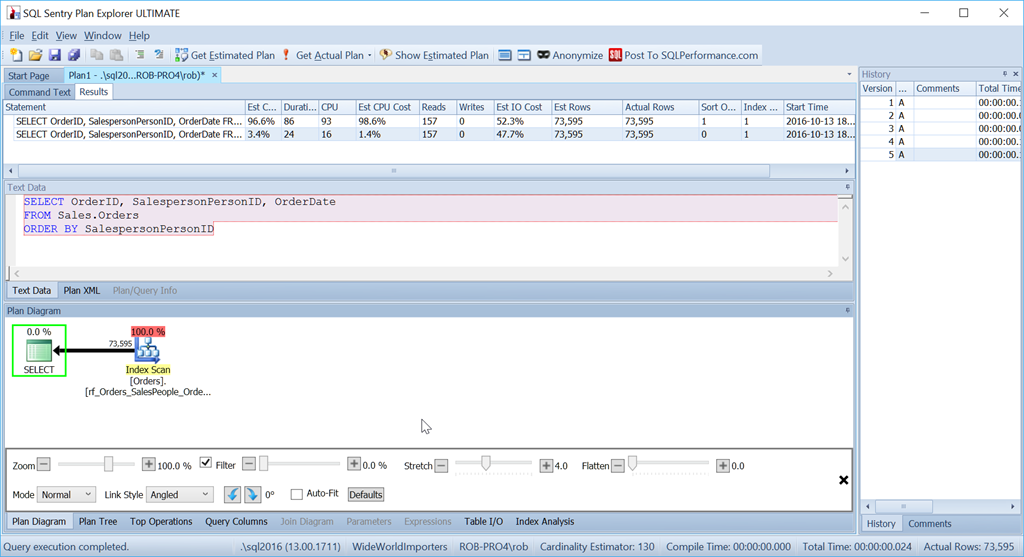
ORDER BY CASE WHEN SalespersonPersonID = 7 THEN 1 ELSE 2 END, SalespersonPersonID;
 
SELECT OrderID, SalespersonPersonID, OrderDate
FROM Sales.Orders
CROSS APPLY 
(
  SELECT CASE WHEN SalespersonPersonID = 7 THEN 1 ELSE 2 END 
  AS OrderingCol
) o
ORDER BY o.OrderingCol, SalespersonPersonID;

And yet this is not the query that I would actually use in this situation. Not if performance were important to me. (It usually is, but it's not always worth writing a query the long way if the amount of data is small.)

What bothers me is that Sort operator. It's 96.4% of the cost!

Consider if we simply want to order by SalespersonPersonID:

We see that this simpler query's estimated CPU cost is 1.4% of the batch, while the custom-sorted version's is 98.6%. That's SEVENTY TIMES worse. Reads are the same though – that's good. Duration is way worse, and so is CPU.

I'm not fond of Sorts. They can be nasty.

One option I have here is to add a computed column to my table and index that, but that's going to have an impact on anything which looks for all the columns on the table, such as ORMs, Power BI, or anything that does SELECT *. So that's not so great (although if we ever get to add hidden computed columns, that would make for a really nice option here).

Another option, which is more longwinded (some might suggest that would suit me – and if you thought that: Oi! Don't be so rude!), and uses more reads, is to consider what we'd do in real life if we needed to do this.

If I had a pile of 73,595 orders, sorted by Salesperson order, and I needed to return them with a particular Salesperson first, I wouldn't disregard the order they were in and simply sort them all, I'd start by diving in and finding the ones for Salesperson 7 – keeping them in the order they were in. Then I'd find the ones that weren't the ones that weren't Salesperson 7 – putting them next, and again keeping them in the order they were already in.

In T-SQL, that's done like this:

SELECT OrderID, SalespersonPersonID, OrderDate
FROM
(
  SELECT OrderID, SalespersonPersonID, OrderDate, 
     1 AS OrderingCol
  FROM Sales.Orders  
  WHERE SalespersonPersonID = 7
  UNION ALL
  SELECT OrderID, SalespersonPersonID, OrderDate, 
     2 AS OrderingCol
  FROM Sales.Orders
  WHERE SalespersonPersonID != 7
) o
ORDER BY o.OrderingCol, o.SalespersonPersonID;

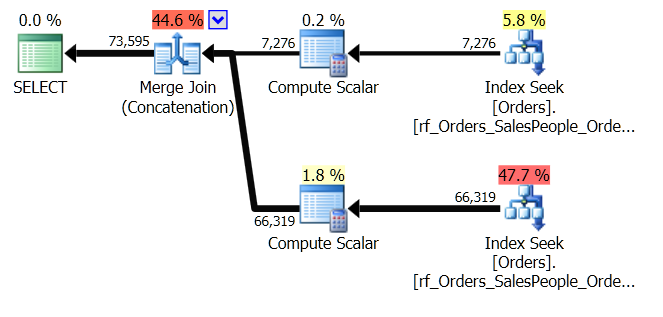
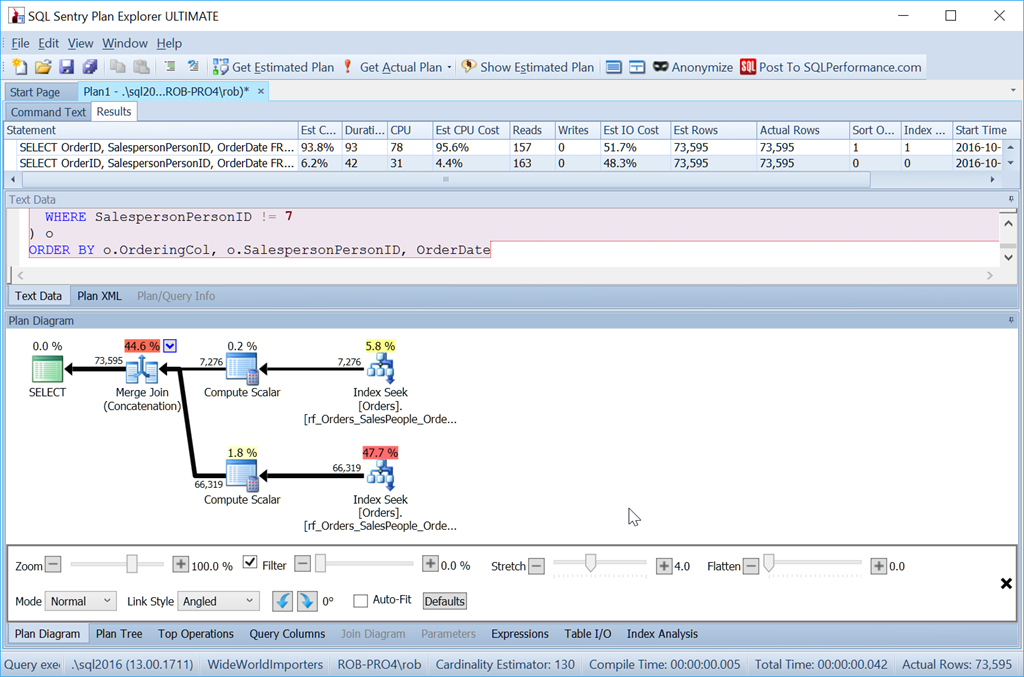
This gets two sets of data and concatenates them. But the Query Optimizer can see that it needs to maintain the SalespersonPersonID order, once the two sets are concatenated, so it does a special kind of concatenation that maintains that order. It's a Merge Join (Concatenation) join, and the plan looks like this:

You can see it's a lot more complicated. But hopefully you'll also notice that there's no Sort operator. The Merge Join (Concatenation) pulls the data from each branch, and produces a dataset which is in the right order. In this case, it will pull all 7,276 rows for Salesperson 7 first, and then pull the other 66,319, because that's the required order. Within each set, the data is in SalespersonPersonID order, which is maintained as the data flows through.

I mentioned earlier that it uses more reads, and it does. If I show the SET STATISTICS IO output, comparing the two queries, I see this:

Table 'Worktable'. Scan count 0, logical reads 0, physical reads 0, read-ahead reads 0, lob logical reads 0, lob physical reads 0, lob read-ahead reads 0.
Table 'Orders'. Scan count 1, logical reads 157, physical reads 0, read-ahead reads 0, lob logical reads 0, lob physical reads 0, lob read-ahead reads 0.
 

Table 'Orders'. Scan count 3, logical reads 163, physical reads 0, read-ahead reads 0, lob logical reads 0, lob physical reads 0, lob read-ahead reads 0.

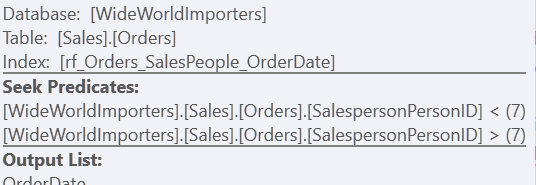
Using the "Custom Sort" version, it's just one scan of the index, using 157 reads. Using the "Union All" method, it's three scans – one for SalespersonPersonID = 7, one for SalespersonPersonID < 7, and one for SalespersonPersonID > 7. We can see those last two by looking at the properties of the second Index Seek:

For me, though, the benefit comes through in the lack of a Worktable.

Look at the estimated CPU cost:

It's not as small as our 1.4% when we avoid the sort completely, but it's still a vast improvement over our Custom Sort method.

But a word of warning…

Suppose I had created that index differently, and had OrderDate as a key column rather than as an included column.

CREATE INDEX rf_Orders_SalesPeople_OrderDate 
ON Sales.Orders(SalespersonPersonID, OrderDate);

Now, my "Union All" method doesn't work as intended at all.

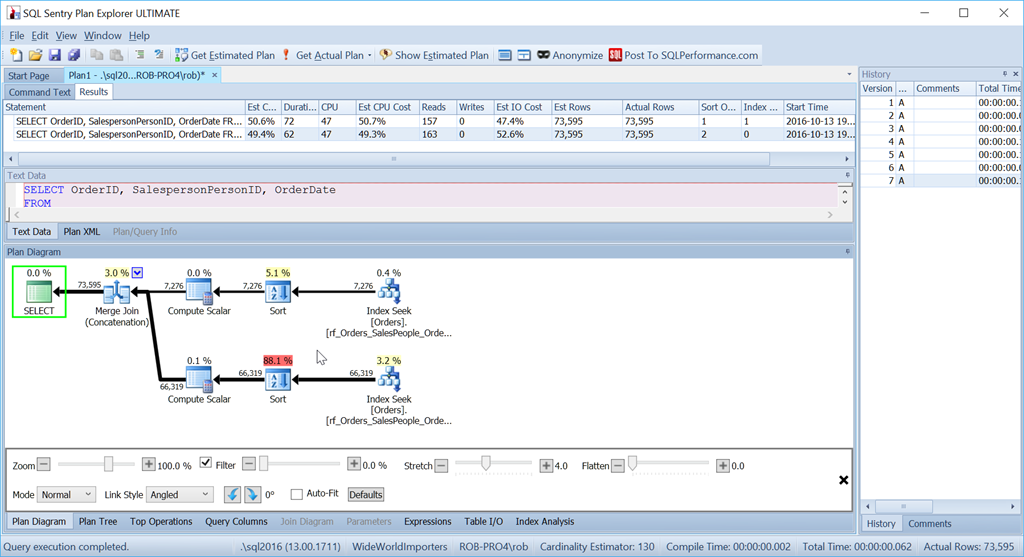
Despite using exactly the same queries as before, my nice plan now has two Sort operators, and it performs nearly as badly as my original Scan + Sort version.

The reason for this is a quirk of the Merge Join (Concatenation) operator, and the clue is in the Sort operator.

It's ordering by SalespersonPersonID followed by OrderID – which is the clustered index key of the table. It chooses this because this is known to be unique, and it's a smaller set of columns to sort by than SalespersonPersonID followed by OrderDate followed by OrderID, which is the dataset order produced by three index range scans. One of those times when the Query Optimizer doesn't notice a better option that's right there.

With this index, we would need our dataset ordered by OrderDate as well to produce our preferred plan.

SELECT OrderID, SalespersonPersonID, OrderDate
FROM 
(
  SELECT OrderID, SalespersonPersonID, OrderDate, 
    1 AS OrderingCol
  FROM Sales.Orders
  WHERE SalespersonPersonID = 7
  UNION ALL
  SELECT OrderID, SalespersonPersonID, OrderDate, 
    2 AS OrderingCol
  FROM Sales.Orders
  WHERE SalespersonPersonID != 7
) o
ORDER BY o.OrderingCol, o.SalespersonPersonID, OrderDate;

So it's definitely more effort. The query is longer for me to write, it's more reads, and I have to have an index without extra key columns. But it's certainly quicker. With even more rows, the impact is bigger still, and I don't have to risk a Sort spilling to tempdb either.

For small sets, my StackOverflow answer is still good. But when that Sort operator is costing me in performance, then I'm going with the Union All / Merge Join (Concatenation) method.

The post Implementing a custom sort appeared first on SQLPerformance.com.

03 Nov 16:22

SQL Server as a Machine Learning Model Management System

by SQL Server Team

This post was authored by Rimma Nehme, Technical Assistant, Data Group

Machine Learning Model Management

If you are a data scientist, business analyst or a machine learning engineer, you need model management – a system that manages and orchestrates the entire lifecycle of your learning model. Analytical models must be trained, compared and monitored before deploying into production, requiring many steps to take place in order to operationalize a model’s lifecycle. There isn’t a better tool for that than SQL Server!

SQL Server as an ML Model Management System

In this blog, I will describe how SQL Server can enable you to automate, simplify and accelerate machine learning model management at scale – from build, train, test and deploy all the way to monitor, retrain and redeploy or retire. SQL Server treats models just like data – storing them as serialized varbinary objects. As a result, it is pretty agnostic to the analytics engines that were used to build models, thus making it a pretty good model management tool for not only R models (because R is now built-in into SQL Server 2016) but for other runtimes as well.

SELECT * FROM [dbo].[models]

Machine Learning model is just like data inside SQL Server

Figure 1: Machine Learning model is just like data inside SQL Server.

SQL Server approach to machine learning model management is an elegant solution. While there are existing tools that provide some capabilities for managing models and deployment, using SQL Server keeps the models “close” to data, thus leveraging all the capabilities of a Management System for Data to be now nearly seamlessly transferrable to machine learning models (see Figure 2). This can help simplify the process of managing models tremendously resulting in faster delivery and more accurate business insights.

Publishing Intelligence To Where Data Lives

Figure 2: Pushing machine learning models inside SQL Server 2016 (on the right), you get throughput, parallelism, security, reliability, compliance certifications and manageability, all in one. It’s a big win for data scientists and developers – you don’t have to build the management layer separately. Furthermore, just like data in databases can be shared across multiple applications, you can now share the predictive models.  Models and intelligence become “yet another type of data”, managed by the SQL Server 2016.

Why Machine Learning Model Management?

Today there is no easy way to monitor, retrain and redeploy machine learning models in a systematic way. In general, data scientists collect the data they are interested in, prepare and stage the data, apply different machine learning techniques to find a best-of-class model, and continually tweak the parameters of the algorithm to refine the outcomes. Automating and operationalizing this process is difficult. For example, a data scientist must code the model, select parameters and a runtime environment, train the model on batch data, and monitor the process to troubleshoot errors that might occur. This process is repeated iteratively on different parameters and machine learning algorithms, and after comparing the models on accuracy and performance, the model can then be deployed.

Currently, there is no standard method for comparing, sharing or viewing models created by other data scientists, which results in siloed analytics work. Without a way to view models created by others, data scientists leverage their own private library of machine learning algorithms and datasets for their use cases. As models are built and trained by many data scientists, the same algorithms may be used to build similar models, particularly if a certain set of algorithms is common for a business’s use cases. Over time, models begin to sprawl and duplicate unnecessarily, making it more difficult to establish a centralized library.

Why SQL Server 2016 for machine learning model management

Figure 3: Why SQL Server 2016 for machine learning model management.

In light of these challenges, there is an opportunity to improve model management.

Why SQL Server 2016 for ML Model Management?

There are many benefits to using SQL Server for model management. Specifically, you can use SQL Server 2016 for the following:

  • Model Store and Trained Model Store: SQL Server can efficiently store a table of “pre-baked” models of commonly used machine learning algorithms that can be trained on various datasets (already present in the database), as well as trained models for deployment against a live stream for real-time data.
  • Monitoring service and Model Metadata Store: SQL Server can provide a service that monitors the status of the machine learning model during its execution on the runtime environment for the user, as well as any metadata about its execution that is then stored for the user.
  • Templated Model Interfaces: SQL Server can store interfaces that abstract the complexity of machine learning algorithms, allowing users to specify the inputs and outputs for the model.
  • Runtime Verification (for External Runtimes): SQL Server can provide a runtime verification mechanism using a stored procedure to determine which runtime environments can support a model prior to execution, helping to enable faster iterations for model training.
  • Deployment and Scheduler: Using SQL Server’s trigger mechanism, automatic scheduling and an extended stored procedure you can perform automatic training, deployment and scheduling of models on runtime environments, obviating the need to operate the runtime environments during the modeling process.

Here is the list of specific capabilities that makes the above possible:

ML Model Performance:

  • Fast training and scoring of models using operational analytics (in-memory OLTP and in-memory columnstore).
  • Monitor and optimize model performance via Query store and DMVs. Query store is like a “black box” recorder on an airplane. It records how queries have executed and simplifies performance troubleshooting by enabling you to quickly find performance differences caused by changes in query plans. The feature automatically captures a history of queries, plans, and runtime statistics, and retains these for your review. It separates data by time windows, allowing you to see database usage patterns and understand when query plan changes happened on the server.
  • Hierarchical model metadata (that is easily updateable) using native JSON support: Expanded support for un-structured JSON data inside SQL Server enables you to store properties of your models using JSON format. Then you can process JSON data just like any other data inside SQL. It enables you to organize collections of your model properties, establish relationships between them, combine strongly-typed scalar columns stored in tables with flexible key/value pairs stored in JSON columns, and query both scalar and JSON values in one or multiple tables using full Transact-SQL. You can store JSON in In-memory or Temporal tables, you can apply Row-Level Security predicates on JSON text, and so on.
  • Temporal support for models: SQL Server 2016’s temporal tables can be used for keeping track of the state of models at any specific point in time. Using temporal tables in SQL Server you can: (a) understand model usage trends over time, (b) track model changes over time, (c) audit all changes to models, (d) recover from accidental model changes and application errors.

ML Model Security and Compliance:

  • Sensitive model encryption via Always Encrypted: Always Encrypted can protect model at rest and in motion by requiring the use of an Always Encrypted driver when client applications to communicate with the database and transfer data in an encrypted state.
  • Transparent Data Encryption (TDE) for models. TDE is the primary SQL Server encryption option. TDE enables you to encrypt an entire database that may store machine learning models. Backups for databases that use TDE are also encrypted. TDE protects the data at rest and is completely transparent to the application and requires no coding changes to implement.
  • Row-Level Security enables you to protect the model in a table row-by-row, so a particular user can only see the models (rows) to which they are granted access.
  • Dynamic model (data) masking obfuscates a portion of the model data to anyone unauthorized to view it. Return masked data to non-privileged users (e.g. credit card numbers).
  • Change model capture can be used to capture insert, update, and delete activity applied to models stored in tables in SQL Server, and to make the details of the changes available in an easily consumed relational format. The change tables used by change data capture contain columns that mirror the column structure of a tracked source table, along with the metadata needed to understand the changes that have occurred.
  • Enhanced model auditing. Auditing is an important mechanism for many organizations to serve as a checks and balances.  In SQL Server 2016 are there any new Auditing features to support model auditing. You can implement user-defined audit, audit filtering and audit resilience.

ML Model Availability:

  • AlwaysOn for model availability and champion-challenger. An availability group in SQL Server supports a failover environment. An availability group supports a set of primary databases and one to eight sets of corresponding secondary databases. Secondary databases are not backups. In addition, you can have automatic failover based on DB health. One interesting thing about availability groups in SQL Server with readable secondaries is that they enable “champion-challenger” model setup. The champion model runs on a primary, whereas challenger models are scoring and being monitored on the secondaries for accuracy (without having any impact on the performance of the transactional database). Whenever a new champion model emerges, it’s easy to enable it on the primary.

ML Model Scalability

  • Enhanced model caching can facilitate model scalability and high performance. SQL Server enables caching with automatic, multiple TempDB files per instance in multi-core environments.

In summary, SQL Server delivers the top-notch data management with performance, security, availability, and scalability built into the solution. Because SQL Server is designed to meet security standards, it has minimal total surface area and database software that is inherently more secure. Enhanced security, combined with built-in, easy-to-use tools and controlled model access can help organizations meet strict compliance policies. Integrated high availability solutions enable faster failover and more reliable backups – and they are easier to configure, maintain, and monitor, which helps organizations reduce the total cost of model management (TCMM). In addition, SQL Server supports complex data types and non-traditional data sources, and it handles them with the same attention – so data scientist can focus on improving the model quality and outsource all of the model management to SQL Server.

Conclusion

Using SQL Server 2016 you can do model management with ease. SQL Server is unique from other machine learning model management tools, because it is a database engine, and is optimized for data management. The key insight here is that “models are just like data” to an engine like SQL Server, and as such we can leverage most of the mission-critical features of data management built into SQL Server for machine learning models. Using SQL Server for ML model management, an organization can create an ecosystem for harvesting analytical models, enabling data scientists and business analysts to discover the best models and promote them for use. As companies rely more heavily on data analytics and machine learning, the ability to manage, train, deploy and share models that turn analytics into action-oriented outcomes is essential.

@rimmanehme

03 Nov 16:19

Who is Active fixes

by Adam Machanic
Follow the link for Who is Active version 11.16 ....(read more)
03 Nov 16:19

New Cumulative Updates Released for SQL Server 2014

by Andrew Kelly
  Microsoft just announced a couple of CU’s for SQL Server 2014 that you may be interested in as shown below. Happy updating.   Cumulative update 9 for SQL Server 2014 SP1 – KB3186964   Cumulative update 2 for SQL Server 2014 SP2 – KB318878...(read more)
03 Nov 16:18

Data Warehouse Fast Track for SQL Server 2016

by James Serra

Microsoft Data Warehouse Fast Track for SQL Server 2016 is a joint effort between Microsoft and its hardware partners to deliver validated, pre-configured solutions that reduce the complexity of implementing a data warehouse on SQL Server Enterprise Edition.  The Data Warehouse Fast Track program provides flexibility of solutions and customer choice across hardware vendors’ technologies, and uses the core capabilities of the Windows Server operation system and SQL Server to deliver a balanced SMP data warehouse with optimized performance.

t1

The reference architectures are tested internally by Microsoft and consist of high performance hardware and software configurations at various price, performance and footprint tiers.  Data Warehouse Fast Track for SQL Server brings some great capabilities designed to support a modern data warehouse implementation where data and analytics can truly exist in the same solution, spanning cloud and on-premises.  These reference architectures have been available since SQL Server 2012.

The Data Warehouse Fast Track is not a replacement for APS (Analytics Platform System).  APS is a MPP (Massively Parallel Processing) data warehouse appliance which is designed as a pure data warehouse offering and scales to store and query petabytes of data.  In general, the initial database size for using APS over the Data Warehouse Fast Track is 150TB (the database size is raw data with the assumption it will have a 5:1 compression):

t2

Data Warehouse Fast Track for SQL Server brings the optimal configuration of hardware and software together into a single packaged offering which is guaranteed to perform.  Balanced against time to solution versus cost, Data Warehouse Fast Track for SQL Server truly enables success ‘out of the box’ without the need to perform arduous sizing or throughput calculations (this has all been done for you), simple purchasing and installation, fast performance and scalability, and total peace of mind.

t3

There are certified reference architectures ranging from 6TB to 145TB across SQL Server 2014 and SQL Server 2016.  There is even an RA which scales to 1.2PB!  To see the partners and their Data Warehouse Fast Track for SQL Server offerings, check out Data Warehouse Fast Track.  Keep in mind there is the HP Superdome X for high-end OLTP/DW that has up to 384-cores, 24TB of memory, and 92TB of disk space that can give you even more performance for a SMP solution.

03 Nov 16:18

SQLSweet16!, Episode 10: “I can eat glass …”, but can I load it into a database?

by Sanjay Mishra

Sanjay Mishra

Reviewed By: Dimitri Furman, Murshed Zaman, Kun Cheng


If you have tried to use BULK INSERT or bcp utilities to load UTF-8 data into a table in SQL Server 2014 or in an earlier release (SQL Server 2008 or later), you have likely received the following error message:

Msg 2775, Level 16, State 13, Line 14
The code page 65001 is not supported by the server.

The requirement to support UTF-8 data for these utilities has been extensively discussed on various forums, most notably on Connect.

This requirement has been addressed in SQL Server 2016 (and backported to SQL Server 2014 SP2). To test this, I obtained a UTF-8 dataset from http://www.columbia.edu/~fdc/utf8/. The dataset is translation of the sentence “I can eat glass and it doesn’t hurt me” in several languages. A few lines of sample data are shown here:

data1_utf8

(As an aside, it is entirely possible to load Unicode text such as above into SQL Server even without this improvement, as long as the source text file uses a Unicode encoding other than UTF-8.)

-- SQL Server 2014 SP1 or earlier

CREATE DATABASE DemoUTF8_2014
GO

USE DemoUTF8_2014
GO

CREATE TABLE Newdata
(
lang VARCHAR(200),
txt NVARCHAR(1000)
)
GO

BULK INSERT Newdata
FROM 'C:\UTF8_Test\i_can_eat_glass.txt'
WITH (DATAFILETYPE = 'char', FIELDTERMINATOR='\t', CODEPAGE='65001')
GO

Msg 2775, Level 16, State 13, Line 14
The code page 65001 is not supported by the server.

-- SQL Server 2016 RTM or SQL Server 2014 SP2 or later

CREATE DATABASE DemoUTF8_2016
GO

USE DemoUTF8_2016
GO

CREATE TABLE Newdata
(
lang VARCHAR(200),
txt NVARCHAR(1000)
)
GO

BULK INSERT Newdata
FROM 'C:\UTF8_Test\i_can_eat_glass.txt'
WITH (DATAFILETYPE = 'char', FIELDTERMINATOR='\t', CODEPAGE='65001')
GO

(150 row(s) affected)
SELECT * FROM Newdata
GO

data2_utf8

You can now use CODEPAGE=’65001′ with BULK INSERT, bcp and OPENROWSET utilities.

Note that this improvement is only scoped to input processing by bulk load utilities. Internally, SQL Server still uses the UCS-2 encoding when storing Unicode strings.

06 Oct 21:01

Cache Congestion

by Jane Bailey

Ic-photo-TI--TMX390Z55GF--(SuperSPARC-TMS390-Cache-Controller)

Recently, we featured the story of Alex, who worked in a little beach town trying to get seasonal work. But Alex isn't the only one with a job that depended entirely on the time of year.

For most seasonal work in IT, it's the server load that varies. Poor developers can get away with inefficient processes for three quarters of a year, only to have it bite them with a vengeance once the right season rolls around. Patrick, a Ruby developer, joined an educational technology company at the height of revision season. Their product, which consisted of two C#/Xamarin cross-platform mobile apps and one Ruby/Rails back-end server, was receiving its highest possible traffic rates. On his first day at the office, the entire tech team was called into a meeting with the CEO, Gregory, to address the problem.

Last year, the dev team had been at a similar meeting, facing similar slowness. Their verdict: there was nothing for it but to rewrite the app. The company had, surprisingly, gone in for it, giving them 6 months with no task but to refactor the app so they'd never face this kind of slowdown again. Now that the busy season had returned, Gregory was furious, and rightly so. The app was no faster than it had been last year.

"I don't want to yell at anyone," boomed Gregory, "but we spent 6 months rewriting, not adding any new features—and now, if anything, the app is slower than it was before! I'm not going to tell you how to do your jobs, because I don't know. But I need you to figure out how to get things faster, and I need you to figure it out in the next 2 weeks."

After he left, the devs sat around brainstorming the source of the problem.

"It's Xamarin," said Diego, the junior iOS Dev. "It's hopelessly unperformant. We need to rewrite the apps in Swift."

"And lose our Android customer base?" responded Juan, the senior Mobile Dev. "The problem isn't Xamarin, it's the architecture of the local database leading to locking problems. All we have to do is rewrite that from scratch. It'll only take a month or so."

"But exam season will be over in a month. We only have two weeks!" cried Rick, the increasingly fraught tech lead.

Patrick piped up, hoping against hope that he could cut through the tangled knot of bull and blame. "Could it be a problem with the back end?"

"Nah, the back end's solid," came the unanimous reply.

When they were kicked out of the meeting room, lacking a plan of action and more panicked than ever, Patrick sidled up to Rick. "What would you like me to work on? I'm a back end dev, but it sounds like it's the front end that needs all the work."

"Just spend a couple of weeks getting to grips with the codebase," Rick replied. "Once exam season is over we'll be doing some big rewrites, so the more you know the code the better."

So Patrick went back to his desk, put his head down, and started combing through the code.

This is a waste of time, he told himself. They said it was solid. Well, maybe I'll find something, like some inefficient sort.

At first, he was irritated by the lack of consistent indention. It was an unholy mess, mixing tabs, two spaces, and four spaces liberally. This seriously needs a linter, he thought to himself.

He tried to focus on the functionality, but even that was suspect. Whoever had written the backend clearly hadn't known much about the Rails framework. They'd built in lots of their own "smart" solutions for problems that Rails already solved. There was a test suite, but it had patchy coverage at best. With no CI in place, lots of the tests were failing, and had clearly been failing for over a year.

At least I found something to do, Patrick told himself, rolling up his sleeves.

While the mobile devs worked on rebuilding the apps, Patrick started fixing the tests. They were already using Github, so it was easy to hook up Travis CI so that code couldn't be merged until the tests passed. He adding Rubocop to detect and correct style inconsistencies, and set about tidying the codebase. He found that the tests took a surprisingly long time to run, but he didn't think much of it until Rick called him over.

"Do you know anything about Elastic Beanstalk auto-scaling? Every time we make a deployment to production, it goes a bit haywire. I've been looking at the instance health, and they're all pushing 100% CPU. I think something's failing out, but I'm not sure what."

"That's odd," Patrick said. "How many instances are there in production?"

"About 15."

Very odd. 15 beefy VMs, all running at > 90% CPU? On closer inspection, they were all working furiously, even during the middle of the night when no one was using the app.

After half a day of doing nothing but tracing the flow, Patrick found an undocumented admin webpage tacked onto the API that provided a ton of statistics about something called Delayed Job. Further research revealed it to be a daemon-based async job runner that had a couple of instances running on every web server VM. The stats page showed how many jobs there were in the backlog—in this case, about half a million of them, and increasing by the second.

How can that work? thought Patrick. At peak times, the only thing this does is make a few jobs per seccond to denormalising data. Those should take a fraction of a second to run. There's no way the queue should ever grow this big!

He reported back to Rick, frowning. "I think I've found the source of the CPU issue," he said, pointing at the Delayed Job queue. "All server resources are being chewed up by this massive queue. Are you sure this has nothing to do with the apps being slow? If it weren't for these background jobs, the server would be much more performant."

"No way," replied Rick. "That might be a contributing factor, but the problem is definitely with the apps. We're nearly finished rewriting the local database layer, you'll see real speedups then. See if you can find out why these jobs are running so slowly in the meantime, though. It's not like it'll hurt."

Skeptical, Patrick returned to his desk and went hunting for the cause of the problem. It didn't take long. Near the top of most of the models was a line like this: include CachedModel. This was Ruby's module mixin syntax; this CachedModel mixin was mixed into just about every model, forming a sort of core backbone for the data layer. CachedModel was a module that looked like this:


module CachedModel
 extend ActiveSupport::Concern

 included do
 after_save :delete_cache
 after_destroy :delete_cache
 end

 # snip 

 def delete_cache
 Rails.cache.delete_matched("#{self.class}/#{cache_id}/*")
 Rails.cache.delete_matched("#{self.class}/index/*")
 # snip
 end
end

Every time a model was saved or deleted, the delete_cache method was called. This method performed a wildcard string search on every key in the cache (ElastiCache in staging and production, flat files in dev and test), deleting strings that matched. And of course, the model saved after every CREATE or INSERT statement, and was removed on every DELETE. That added up to a lot of delete_cache calls.

As an experiment, Patrick cleared out the delete_cache method and ran the test suite. He did a double-take. Did I screw it up? he wondered, and ran the tests again. The result stood: what had once taken 2 minutes on the CI server now completed in 11 seconds.

Why the hell were they using such a monumentally non-performant cache clearing method?! he wondered. Morbidly curious, he looked for where the cache was written to and read using this pattern of key strings and found ... that it wasn't. The caching mechanism had been changed 6 months previously, during the big rewrite. This post-save callback trawled painfully slowly through every key in the cache and never found anything.

Patrick quietly added a pull request to delete the CachedModel module and every reference to it. Once deployed to production, the 15 servers breezed through the backlog processing jobs over the weekend, and then auto-scaled down to a mere 3 instances: 2 comfortably handling the traffic, with another to avoid lag in scaling. There was a noticeable impact on performance of the apps now that more resources were available, as the server endpoints were significantly more responsive. Or at least, the impact was noticeable to Patrick. The rest of the tech team were too busy trying to work out why their ground-up rewrite of the app database layer was benchmarking slower than the original. Before they figured it out, exam season was over for another year, and performance stopped being a priority.

[Advertisement] Easily create complex server configurations and orchestrations using both the intuitive, drag-and-drop editor and the text/script editor.  Find out more and download today!
06 Oct 20:55

.gitignorant

by Erik Gern

Brent, who had started at JavaChip in QA several years ago, was tapped for “real” work with the core development team. On the day of his transfer, he gathered his things from his desk in a cardboard box, told his teammates in QA that he’d continue to see them for D&D at lunch, and trekked down the hall to the larger office.

After finding his new desk, he went to find Karla, his team lead. As it turned out, Karla had called in sick, but she had sent Brent an email from home. Get settled in, she wrote. Our repo’s on the company git server. Make sure you have Maven and IntelliJ installed on your machine. Everything else is in the README.md file.

The home page of gitignore.io

Dutifully, Brent pulled down the repo. The size counter crept up. 10 MB … 20 … 30 …

He had just pulled a 100MB repository onto his computer.

Log Jam

There was no conceivable way the repo should be that large.

First, he imported the project into IntelliJ and built it with Maven, making sure there wasn’t anything wrong before he started tinkering. With no compiler errors or warnings, he opened WinDirStat and pointed it to the repo. The code relied on some hefty third-party libraries, but an initial scan revealed that those libraries didn’t take up more than 10MB. Including company-owned code, he had accounted for about 15MB of the 100MB repository size.

Brent saw the bigger issue. In chrome red, faceted so small each file was about a pixel in size, were over 85MB of log files. They were generated by Maven and other parts of their compiler chain, written each time the project was built.

Well, this should be easy, Brent thought. I’ll just add the log directories to .gitignore. Not bad for my first day on the team.

Brent opened IntelliJ and dug around for a .gitignore file. Only there wasn’t one. He checked the root directory, in /src and other code directories, even a few libraries to make sure it hadn’t been put somewhere unusual. He even made sure IntelliJ wasn’t hiding “system” files, which .gitignore was sometimes treated as. There simply wasn’t one in the repo at all.

Fair enough, he thought. I’ll just write one. Brent added a new .gitignore file in the root, put the log directories (and a few other suspect paths) into it, and submitted his first code change.

A Sick Day Ruined

Brent was feeling confident after his commit. He began rummaging through the repository, getting a feel for the codebase.

However, sometime after lunch, Brent heard phlegmatic coughing from the entrance. Karla, the team lead, had come in on her sick day, and she was heading straight for Brent’s desk.

“Brent, cough, we really need you to revert that commit.”

“Why? I just added a .gitignore file.”

“Right, that’s the problem. None of us here ever check in the .gitignore file.”

“Don’t you want to configure your repo properly?”

“We’re all pretty new to git, to be honest, but we had a big mess with conflicts when people were adding their own entries to the gitignore. Just revert and I’ll take care of it.”

Reluctantly, Brent reverted his change.

Ignore() Isn’t Recursive

An hour later, he received an auto-generated email from the company git server: Karla had checked in a commit to the repo. The only change was to add a .gitignore file in the root directory. Thinking that she just preferred to write one herself, Brent opened the file in IntelliJ:

# Exclude gitignore from git
.gitignore

Brent checked the email again. The commit message was prevents .gitignore from being added to the repo. Karla had tried to get the repo to ignore .gitignore … using .gitignore. But for the rule to work, .gitignore needed to be added to the repo. Worse, Karla told him to keep his hands off the file, meaning nothing else could ever be ignored on the repository other than that file.

For the remainder of his first day on core team, Brent’s head spun. On QA, he sometimes wondered how things worked on the core team. But sometimes it’s not worth knowing how the sausage is .gitignore-ed.

[Advertisement] Universal Package Manager – store all your Maven, NuGet, Chocolatey, npm, Bower, TFS, TeamCity, Jenkins packages in one central location. Learn more today!
06 Oct 20:43

Windows Server 2016 and SQL Server 2016: Leveraging Hyper-V large-scale VM performance for in-memory transaction processing

by SQL Server Team

This post was authored by Liang Yang, Principal Performance Engineer on the Hyper-V team and Jos de Bruijn, Senior Program Manager on the SQL Server team.

With Windows Server 2016, Microsoft has significantly bumped up the Hyper-V Virtual Machine (VM) scale limit to embrace new scenarios such as running e-commerce large in-memory databases for Online Transaction Processing (OLTP) and Data Warehousing (DW) purposes. In this post on the Windows Server Blog, we highlight the performance of in-memory transaction processing at scale using SQL Server 2016 running in a Windows Server 2016 Hyper-V VM.

06 Oct 20:43

Developing Machine Learning Skills on the Job

by Paramita Ghosh

Data continues to inhabit every facet of human existence and so the need for competent Data Scientists to help leverage the insights from that data will invariably increase for the foreseeable future. According to a past EMC Data Scientist Study and the 2015 Global IT Report, the amounts of data created by the year 2020 […]

The post Developing Machine Learning Skills on the Job appeared first on DATAVERSITY.

06 Oct 20:43

Investigating the proportional fill algorithm

by Paul Randal

This is something that came up recently on the Microsoft Certified Master DL, and is something I discuss in our IEPTO1 class because of the performance implications of it, so I thought it would make an interesting post.

Allocation Algorithms

The SQL Server Storage Engine (SE) uses two algorithms when allocating extents from files in a filegroup: round robin and proportional fill.

Round robin means that the SE will try to allocate from each file in a filegroup in succession. For instance, for a database with two files in the primary filegroup (with file IDs 1 and 3, as 2 is always the log file), the SE will try to allocate from file 1 then file 3 then file 1 then file 3, and so on.

The twist in this mechanism is that the SE also has to consider how much free space is in each of the files in the filegroup, and allocate more extents from the file(s) with more free space. In other words, the SE will allocate proportionally more frequently from files in a filegroup with more free space. This twist is called proportional fill.

Proportional fill works by assigning a number to each file in the filegroup, called a ‘skip target’. You can think of this as an inverse weighting, where the higher the value is above 1, the more times that file will be skipped when going round the round robin loop. During the round robin, the skip target for a file is examined, and if it’s equal to 1, an allocation takes place. If the skip target is higher than 1, it’s decremented by 1 (to a minimum value of 1), no allocation takes place, and consideration moves to the next file in the filegroup.

(Note that there’s a further twist to this: when the -E startup parameter is used, each file with a skip target of 1 will be used for 64 consecutive extent allocations before the round robin loop progresses. This is documented in Books Online here and is useful for increasing the contiguity of index leaf levels for very large scans – think data warehouses.)

The skip target for each file is the integer result of (number of free extents in file with most free space) / (number of free extents in this file). The files in the filegroup with the least amount of free space will therefore have the highest skip targets, and there has to be at least one file in the filegroup with a skip target of 1, guaranteeing that each time round the round robin loop, at least one extent allocation takes place.

The skip targets are recalculated whenever a file is added to or removed from a filegroup, or at least 8192 extent allocations take place in the filegroup.

Investigating the Skip Targets

There’s an undocumented trace flag, 1165, that lets us see the skip targets whenever they’re recalculated and I believe the trace flag was added in SQL Server 2008. It also requires trace flag 3605 to be enabled to allow the debugging info to be output.

Let’s try it out!

First I’ll turn on the trace flags, cycle the error log, creating a small database, and look in the error log for pertinent information:

DBCC TRACEON (1165, 3605);
GO

EXEC sp_cycle_errorlog;
GO

USE [master];
GO

IF DATABASEPROPERTYEX (N'Company', N'Version') > 0
BEGIN
	ALTER DATABASE [Company] SET SINGLE_USER
		WITH ROLLBACK IMMEDIATE;
	DROP DATABASE [Company];
END
GO

CREATE DATABASE [Company] ON PRIMARY (
    NAME = N'Company_data',
    FILENAME = N'D:\SQLskills\Company_data.mdf',
	SIZE = 5MB,
    FILEGROWTH = 1MB)
LOG ON (
    NAME = N'Company_log',
    FILENAME = N'D:\SQLskills\Company_log.ldf'
);

EXEC xp_readerrorlog;
GO
2016-10-04 11:38:33.830 spid56       Proportional Fill Recalculation Starting for DB Company with m_cAllocs -856331000.
2016-10-04 11:38:33.830 spid56       Proportional Fill Recalculation Completed for DB Company new m_cAllocs 8192, most free file is file 1.
2016-10-04 11:38:33.830 spid56       	File [Company_data] (1) has 44 free extents and skip target of 1. 

The m_cAllocs is the threshold at which the skip targets will be recalculated. In the first line of output, it has a random number as the database has just been created and the counter hasn’t been initialized yet. It’s the name of a class member of the C++ class inside the SE that implements filegroup management.

Now I’ll add another file with the same size:

ALTER DATABASE [Company] ADD FILE (
	NAME = N'SecondFile',
	FILENAME = N'D:\SQLskills\SecondFile.ndf',
	SIZE = 5MB,
    FILEGROWTH = 1MB);
GO

EXEC xp_readerrorlog;
GO
2016-10-04 11:41:27.880 spid56       Proportional Fill Recalculation Starting for DB Company with m_cAllocs 8192.
2016-10-04 11:41:27.880 spid56       Proportional Fill Recalculation Completed for DB Company new m_cAllocs 8192, most free file is file 3.
2016-10-04 11:41:27.880 spid56       	File [Company_data] (1) has 44 free extents and skip target of 1. 
2016-10-04 11:41:27.880 spid56       	File [SecondFile] (3) has 79 free extents and skip target of 1. 

Note that even though the two files have different numbers of extents, the integer result of 79 / 44 is 1, so the skip targets are both set to 1.

Now I’ll add a much larger file:

ALTER DATABASE [Company] ADD FILE (
	NAME = N'ThirdFile',
	FILENAME = N'D:\SQLskills\ThirdFile.ndf',
	SIZE = 250MB,
    FILEGROWTH = 1MB);
GO

EXEC xp_readerrorlog;
GO
2016-10-04 11:44:20.310 spid56       Proportional Fill Recalculation Starting for DB Company with m_cAllocs 8192.
2016-10-04 11:44:20.310 spid56       Proportional Fill Recalculation Completed for DB Company new m_cAllocs 8192, most free file is file 4.
2016-10-04 11:44:20.310 spid56       	File [Company_data] (1) has 44 free extents and skip target of 90. 
2016-10-04 11:44:20.310 spid56       	File [ThirdFile] (4) has 3995 free extents and skip target of 1. 
2016-10-04 11:44:20.310 spid56       	File [SecondFile] (3) has 79 free extents and skip target of 50. 

The file with the most free space is file ID 4, so the skip targets of the other files are set to (file 4’s free extents) / (free extents in the file). For example, the skip target for file 1 becomes the integer result of 3995 / 44 = 90.

Now I’ll create a table that can have only one row per page, and force more than 8192 extent allocations to take place (by inserting more than 8192 x 8 rows, forcing that many pages to be allocated). This will also mean the files will have autogrown and will have roughly equal numbers of free extents.

USE [Company];
GO

CREATE TABLE [BigRows] (
	[c1] INT IDENTITY,
	[c2] CHAR (8000) DEFAULT 'a');
GO

SET NOCOUNT ON;
GO

INSERT INTO [BigRows] DEFAULT VALUES;
GO 70000

EXEC xp_readerrorlog;
GO
2016-10-04 11:55:28.840 spid56       Proportional Fill Recalculation Starting for DB Company with m_cAllocs 8192.
2016-10-04 11:55:28.840 spid56       Proportional Fill Recalculation Completed for DB Company new m_cAllocs 8192, most free file is file 3.
2016-10-04 11:55:28.840 spid56       	File [Company_data] (1) has 0 free extents and skip target of 74. 
2016-10-04 11:55:28.840 spid56       	File [ThirdFile] (4) has 0 free extents and skip target of 74. 
2016-10-04 11:55:28.840 spid56       	File [SecondFile] (3) has 74 free extents and skip target of 1. 

We can see that all the files have filled up and auto grown, and randomly file ID 3 is now the one with the most free space.

Spinlock Contention

The skip targets for the files in a filegroup are protected by the FGCB_PRP_FILL spinlock, so this spinlock has to be acquired for each extent allocation, to determine which file to allocate from next. There’s an exception to this when all the files in a filegroup have roughly the same amount of free space (so they all have a skip target of 1). In that case, there’s no need to acquire the spinlock to check the skip targets.

This means that if you create a filegroup that has file sizes that are different, the odds are that they will auto grow at different times and the skip targets will not all be 1, meaning the spinlock has to be acquired for each extent allocation. Not a huge deal, but it’s still extra CPU cycles and the possibility of spinlock contention occurring (for a database with a lot of insert activity) that you could avoid by making all the files in the filegroup the same size initially.

If you want, you can watch the FGCB_PRP_FILL spinlock (and others) using the code from this blog post.

Performance Implications

So when do you need to care about proportional fill?

One example is when trying to alleviate tempdb allocation bitmap contention. If you have a single tempdb data file, and huge PAGELATCH_UP contention on the first PFS page in that file (from  a workload with many concurrent connections creating and dropping small temp tables), you might decide to add just one more data file to tempdb (which is not the correct solution). If that existing file is very full, and the new file isn’t, the skip target for the old file will be large and the skip target for the new file will be 1. This means that subsequent allocations in tempdb will be from the new file, moving all the PFS contention to the new file and not providing any contention relief at all! I discuss this case in my post on Correctly adding data file to tempdb.

The more common example is where a filegroup is full and someone adds another file to create space. In a similar way to the example above, subsequent allocations will come from the new file, meaning that when it’s time for a checkpoint operation, all the write activity will be on the new file (and it’s location on the I/O subsystem) rather than spread over multiple files (and multiple locations in the I/O subsystem). Depending on the characteristics of the I/O subsystem, this may or may not cause a degradation in performance.

Summary

Proportional fill is an algorithm that it’s worth knowing about, so you don’t inadvertently cause a performance issue, and so that you can recognize a performance issue caused by a misconfiguration of file sizes in a filegroup. I don’t expect you to be using trace flag 1165, but if you’re interested, it’s a way to dig into the internals of the allocation system.

Enjoy!

The post Investigating the proportional fill algorithm appeared first on Paul S. Randal.

06 Oct 20:42

Main Limitations of SQL Server Express Editions

by Artemakis Artemiou [MVP]
.nobrtable br { display: none } tr {text-align: center;} tr.alt td {background-color: #eeeecc; color: black;} SQL Server Express Editions are a handy solution for small businesses with small databases with no special requirements about performance, high availability, encryption, etc. However, the Express Editions of SQL Server, even free, as expected, have certain limitations. In the below
06 Oct 20:42

PostgreSQL Data Checksums

by Jeremiah Peschka

If you use SQL Server, you’re used to the database doing page verification for you as the sensible default. If you want SQL Server to not verify data, you have to do a bit of extra work. Naturally, I would’ve assumed that this was the case with other databases since, after all, having good data on disk is important.

Not quite a check sum, but delicious enough.

Not quite a check sum, but delicious enough.

Turning on PostgreSQL Checksums

Data checksums were added to PostgreSQL 9.3. This is great, but there’s a catch – the data checksum has to be turned on during server set up – specifically when running initdb. Checksums can’t be enabled after a database is created either.

To turn on checksums, during initialization an administrator needs to supply either --data-checksums or the -k flag, e.g. initdb --data-checksums databas.

If you haven’t enabled the checksums, you’ll have to move the data into a new PostgreSQL installation through one of the usual means – some kind of export or logical replication. Have fun!

Automatic Repair

If you’ve turned on checksums, PostgreSQL still won’t fix data problems for you. It will, however, throw an error when bad data is retrieved from disk. This is a start, and your application should be set up to handle this possibility. But what if you’re lazy?

I found out about checksums in PostgreSQL through an announcement about pg_healer. The idea behind pg_healer is that it sits in the background and attempts to correct different data corruption problems as they arise. It’s still early days for pg_healer, but the author admits that they want it to repair data as queries are happening as well as in the background, much like SQL Server’s DBCC CHECKDB command.

It’s still early days for database repair in PostgreSQL, but we should all be setting up our PostgreSQL installations so that we at least know that corruption is happening.


Chex Mix” by Steve Johnson is licensed with CC BY 2.0

The post PostgreSQL Data Checksums first appeared on facility9.com.

06 Oct 20:42

Temporal Tables: Connect Item Round Up

by Adam Machanic
This blog has moved! You can find this content at the following new location: http://dataeducation.com/temporal-tables-connect-item-round-up/...(read more)
06 Oct 20:42

Microsoft certification changes

by James Serra

A recent Microsoft blog post announced that they are releasing five new Microsoft Certified Solutions Expert (MCSE) and Developer (MCSD) specialties.  These credentials are aligned to Centers of Excellence, used by the Microsoft Partner Network to identify technical competencies that are widely recognizable by both Microsoft partners and customers.  All of these changes are being made without adding addition certification exams.

certpath

(the white circles in the image represent a single exam that needs to be taken)

The five new expert certifications are:

To earn each of these credentials, you must first earn a qualifying Microsoft Certified Solutions Associate (MCSA) certification and, then, pass a single additional exam from a list of electives associated with the corresponding Center of Excellence.  Click on the five links above to see the MCSA requirements and the electives.

The resulting MCSE or MCSD certification will be added to your transcript and will never expire.  Instead, the achievement date will signify your investment in continuing education on the technology.  Every year, you will have the opportunity to re-earn the certification by passing an additional exam from the list of electives, demonstrating your investment in broadening or deepening your skills in a given Center of Excellence.  Each time you earn the certification, a new certification entry will be added to your transcript.  This process will replace the existing recertification requirement of taking a specific recertification exam every 2 years (MCSD) or 3 years (MCSE) in order to prevent your certification from going inactive.

So instead of publishing “upgrade” exams that smash topics from multiple exams to basically test you on what’s changed since two or three years ago, you will have the choice of which additional elective exam you wish to take.  This new renewal method allows you to renew your certification while both staying current and learning something new.

Note that you can earn the corresponding new MCSE or MCSD certifications for 2016 without having to take any additional exams: I found out about the changes when I received an email from Microsoft saying I had two new MCSE’s: I had “MCSE: Data Platform” and “MCSE: Business Intelligence” which became “MCSE: Data Management and Analysis“.  Also, passing “70-473 Designing and Implementing Cloud Data Platform Solutions” and “70-475 Designing and Implementing Big Data Analytics Solutions” and “70-534 Architecting Microsoft Azure Solutions”) qualified me for “MCSE: Cloud Platform and Infrastructure“.

Another change: The three Azure certification exams (70-532, 70-533 and 70-534) used to earn you the full MCSD: Azure Solutions Architect certification.  However, this MCSD has gone away.  The three Azure certification exams are being integrated into the brand new MCSE and MCSD tracks “MCSD: App Builder” and “MCSE: Cloud Platform and Infrastructure”.

More info:

Microsoft Certification Changes and Goodbye to MCSD Azure Solutions Architect

Microsoft streamlines MCSE and MCSD certifications, eliminates requirement to retake exams

Microsoft makes massive changes to MCSE and MCSD

MCSD and MCSE Titles Revamped

06 Oct 20:42

SQL Sentry is now SentryOne

by Aaron Bertrand

SentryOneAs part of our effort to simplify and consolidate our offering, we have changed our platform name to SentryOne. All of our products will be under the SentryOne Platform, with the exception of the free, stand-alone Plan Explorer (though its functionality will continue to be available in our SQL Server monitoring software).
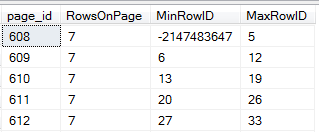
You'll see minor bits of evidence of this rebranding here, but it will be much more obvious on the main site and on the team blog. For more detailed information, see:

You can also sign up for two different webinars to hear about the changes first-hand:

SentryOne – What's New, What's Changed?
Recording now available here
Friday, October 7
11:00 AM – 12:00 PM EDT
15:00 – 16:00 UTC
SentryOne Tools for Productivity and Performance on Physical, Virtual, and Cloud Environments Tuesday, October 11
1:30 PM – 2:00 PM EDT
17:30 – 18:00 UTC

How will this change really affect readers here? It won't. No matter what our name is or what we call our platform, we're going to continue striving to deliver best-of-breed software. We're also going to continue to deliver quality articles revolving around SQL Server performance, regardless of what flavor you're running and where in the Data Platform stack you spend your time. If you notice any difference on that front, please let me know.

Whether you are an existing customer, an evaluator, or are hearing about us for the first time, I hope that you are excited as I am about the new SentryOne platform. Download SentryOne v11 here.

SentryOne 

The post SQL Sentry is now SentryOne appeared first on SQLPerformance.com.

06 Oct 20:42

A Page Split in SQL Server – the Good, the Nasty and the Smart

by Wayne Sheffield

Page Splits 101

In SQL Server, a page split occurs on index pages when a row is required to be on a certain page (because of the index key), and there isn’t enough room on the page for it. This can be from either an insert operation, or an update operation. When this occurs, that page is split into two pages, with roughly half of the rows of that original page on each of the pages. The row is then put into the proper page. It is possible that a page split causes higher level leaf nodes to undergo page splits also. Furthermore, all of the page allocations and the data movement is logged in the transaction log.

Paul Randal has defined two different types of page splits. Paul calls the first type of page split a “good” page split, where the storage engine has to add a new page on the right hand side of the index’s leaf level. If you think of a table with an identity column, where the last page for the index for the identity column is too full to hold a new row, then adding a new row will allocate a new page so that the row can be inserted. Paul calls the second type of page split a “nasty” page split, which is when a row expands and the page doesn’t have enough space to hold the changed data, or if a new row needs to go on the page and there isn’t room for it.

In my book, the “good” page split isn’t really a page split, it’s just a new page allocation. However, this is deemed a page split in SQL Server, therefore this is the type of page split that we want to have happening.

Identity Columns

A recent SQLSkills newsletter has a discussion about a table that uses an integer identity column, and running out of values. Under normal usage (and the default unless otherwise specified) an identity column starts with the value of 1, and increments by 1. If you have enough rows where you exhaust the positive values, you need to do something so that your application will continue to work. Obviously, the best thing to do is to change this integer column into a bigint column. However, with over 2 billion rows in this table, a long maintenance window is needed to perform this conversion. What if you need to do something now, before this maintenance window? There are another 2+ billion negative values available for use in the integer data type, so we will use those.

In order to do this, the identity column needs to be changed. It can either be changed to start at the most negative value and increment by one, or start at -1 and be decremented by one. In other words, it can either be set to (-2147483648 , 1), or be set to (-1, -1).

Page Splits on Identity Columns

In considering which of these methods is preferred, we need to consider whether page splits impact these methods – especially nasty page splits. Furthermore, how will index maintenance affect each choice? So let’s think this through.

When there are negative values in this column, and the index is rebuilt, there will be a page with both negative and positive values in it. If the identity column is set to (-1, -1), there won’t be a gap (excluding the 0) in the values, and newly added rows will get a new page allocated – a good page split. If the identity column is set to (-2147483648 , 1), then there will be a full page with the records for the most recently used identity value, and with the values starting with 1 – a rather large gap.

When a new row is added, it will need to be added into the gap on this page, which will need to be split so that the new row can fit in before the value of 1. As more rows are added, the page with the value of 1 will again be used, and then need to be split again. As long as there are rows to be added, this cycle will continue. Therefore, considering the page splits, this choice seems to be a bad choice.

Well, that is my reasoning for how things will work. However, it’s best to test out your theory – especially if you are disagreeing with Paul. So, I will create a table with an identity column (set to 1, 1), and insert some rows. I will then change the identity column to the values to be tested, and add some more rows. I’ll throw in an index rebuild during this mix so that there will be a page with both the positive and negative values, and then insert more rows and see how this affects the page splits. With this in mind, the code to set up this test environment is as follows:

USE master;
IF DB_ID('PageSplits') IS NOT NULL DROP DATABASE PageSplits;
GO
CREATE DATABASE PageSplits;
GO
USE PageSplits;
GO
CREATE TABLE dbo.LotsaSplits (
    RowID INTEGER IDENTITY (1 , 1) PRIMARY KEY CLUSTERED,
    Col01 CHAR(1000)
); 
GO
-- put some positive numbers in there
WITH Tens    (N) AS (SELECT 1 UNION ALL SELECT 1 UNION ALL SELECT 1 UNION ALL 
                     SELECT 1 UNION ALL SELECT 1 UNION ALL SELECT 1 UNION ALL
                     SELECT 1 UNION ALL SELECT 1 UNION ALL SELECT 1 UNION ALL SELECT 1),
     Hundreds(N) AS (SELECT 1 FROM Tens t1, Tens t2),
     Millions(N) AS (SELECT 1 FROM Hundreds t1, Hundreds t2, Hundreds t3),
     Tally   (N) AS (SELECT ROW_NUMBER() OVER (ORDER BY (SELECT NULL)) FROM Millions)
INSERT INTO dbo.LotsaSplits (Col01)
SELECT  TOP (995)
        CONVERT(CHAR(1000), N)
FROM    Tally;

Reset the Identity Column

Next, the identity column needs to be reset to use the new seed / increment value – and this is where I ran into a problem with the test. While I can use DBCC CHECKIDENT to change the seed value, there is no way to change the increment value. Therefore, I can’t test my preferred method by changing the identity column to (-1, -1). However, I can simulate it by creating a table with the initial identity value at (-1, -1) and then using SET IDENTITY_INSERT to put in the positive values. Furthermore, I’ll need a second table to test the positive increment, so I’ll just create it with the most negative seed value and insert the positive values into it. The new code to setup the environment is:

USE master;
IF DB_ID('PageSplits') IS NOT NULL DROP DATABASE PageSplits;
GO
CREATE DATABASE PageSplits;
GO
USE PageSplits;
GO
-- since you can't change the increment, set it this way and use identity_insert to put positive values in there.
CREATE TABLE dbo.LotsaSplits1 (
    RowID INTEGER IDENTITY (-1 , -1) PRIMARY KEY CLUSTERED,
    Col01 CHAR(1000)
); 
GO
CREATE TABLE dbo.LotsaSplits2 (
    RowID INTEGER IDENTITY (-2147483648 , 1) PRIMARY KEY CLUSTERED,
    Col01 CHAR(1000)
);
GO
-- put some positive numbers in there
SET IDENTITY_INSERT dbo.LotsaSplits1 ON;
WITH Tens    (N) AS (SELECT 1 UNION ALL SELECT 1 UNION ALL SELECT 1 UNION ALL 
                     SELECT 1 UNION ALL SELECT 1 UNION ALL SELECT 1 UNION ALL
                     SELECT 1 UNION ALL SELECT 1 UNION ALL SELECT 1 UNION ALL SELECT 1),
     Hundreds(N) AS (SELECT 1 FROM Tens t1, Tens t2),
     Millions(N) AS (SELECT 1 FROM Hundreds t1, Hundreds t2, Hundreds t3),
     Tally   (N) AS (SELECT ROW_NUMBER() OVER (ORDER BY (SELECT NULL)) FROM Millions)
INSERT INTO dbo.LotsaSplits1 (RowID, Col01)
SELECT  TOP (995)
        N,
        CONVERT(CHAR(1000), N)
FROM    Tally;  
SET IDENTITY_INSERT dbo.LotsaSplits1 OFF;

-- copy these into the other table
SET IDENTITY_INSERT dbo.LotsaSplits2 ON;
INSERT INTO dbo.LotsaSplits2 (RowID, Col01)
SELECT RowID, Col01 FROM dbo.LotsaSplits1;
SET IDENTITY_INSERT dbo.LotsaSplits2 OFF;
GO

The next part of this test is to create a page that has both positive and negative values in it. Since this test is to test out the second option, I’ll do this just for the second table. This code will insert a few rows, and then rebuild the index on this table. Finally it will show how the data on the page looks.

-- reseed the identity value
DBCC CHECKIDENT (LotsaSplits2, RESEED, -2147483648);
GO
-- Add some rows, and then rebuilt CI. This will have a page with a huge gap in the values. Where I think we will encounter a lot of page splits.
INSERT INTO dbo.LotsaSplits2
        (Col01)
VALUES  ('Filler1'), ('Filler2');
GO
ALTER INDEX ALL ON dbo.LotsaSplits2 REBUILD;
GO

-- check tables for how they currently look:
SELECT  plc.page_id, 
        COUNT(*) AS RowsOnPage,
        MIN(ls.RowID) AS MinRowID,
        MAX(ls.RowID) AS MaxRowID
FROM    dbo.LotsaSplits1 ls
CROSS APPLY sys.fn_PhysLocCracker(%%physloc%%) plc
GROUP BY plc.page_id
ORDER BY MinRowID;

SELECT  plc.page_id, 
        COUNT(*) AS RowsOnPage,
        MIN(ls.RowID) AS MinRowID,
        MAX(ls.RowID) AS MaxRowID
FROM    dbo.LotsaSplits2 ls
CROSS APPLY sys.fn_PhysLocCracker(%%physloc%%) plc
GROUP BY plc.page_id
ORDER BY MinRowID;
GO

PageSplit1

In this code, I use the undocumented virtual system column %%physloc%% to get the physical file/page/slot that a row is on, and then this binary value is cracked to return the actual file/page/slot. I then get the number of rows on this page, and the starting/ending values, and report by page. It can be seen that a page was created that will need to be split when more rows are inserted.

Checking for a page split

Continuing on, let’s add more rows to each table, and see how many page splits occurred. This will be performed for each table one at a time. This code and the results it produces is:

-- now insert more rows into each table
WITH Tens    (N) AS (SELECT 1 UNION ALL SELECT 1 UNION ALL SELECT 1 UNION ALL 
                     SELECT 1 UNION ALL SELECT 1 UNION ALL SELECT 1 UNION ALL
                     SELECT 1 UNION ALL SELECT 1 UNION ALL SELECT 1 UNION ALL SELECT 1),
     Hundreds(N) AS (SELECT 1 FROM Tens t1, Tens t2),
     Millions(N) AS (SELECT 1 FROM Hundreds t1, Hundreds t2, Hundreds t3),
     Tally   (N) AS (SELECT ROW_NUMBER() OVER (ORDER BY (SELECT NULL)) FROM Millions)
INSERT INTO dbo.LotsaSplits1 (Col01)
SELECT  TOP (995)
        CONVERT(CHAR(1000), N)
FROM    Tally;
GO

-- check for any page splits.
SELECT
    [AllocUnitName] AS N'Index',
    (CASE [Context]
        WHEN N'LCX_INDEX_LEAF' THEN N'Nonclustered'
        WHEN N'LCX_CLUSTERED' THEN N'Clustered'
        ELSE N'Non-Leaf'
    END) AS [SplitType],
    COUNT (1) AS [SplitCount]
FROM
    fn_dblog (NULL, NULL)
WHERE
    [Operation] = N'LOP_DELETE_SPLIT'
GROUP BY [AllocUnitName], [Context];
GO

-- insert more rows into the other table. The one I expect to see splits happening in.
WITH Tens    (N) AS (SELECT 1 UNION ALL SELECT 1 UNION ALL SELECT 1 UNION ALL 
                     SELECT 1 UNION ALL SELECT 1 UNION ALL SELECT 1 UNION ALL
                     SELECT 1 UNION ALL SELECT 1 UNION ALL SELECT 1 UNION ALL SELECT 1),
     Hundreds(N) AS (SELECT 1 FROM Tens t1, Tens t2),
     Millions(N) AS (SELECT 1 FROM Hundreds t1, Hundreds t2, Hundreds t3),
     Tally   (N) AS (SELECT ROW_NUMBER() OVER (ORDER BY (SELECT NULL)) FROM Millions)
INSERT INTO dbo.LotsaSplits2 (Col01)
SELECT  TOP (995)
        CONVERT(CHAR(1000), N)
FROM    Tally;
GO

-- check for any page splits.
SELECT
    [AllocUnitName] AS N'Index',
    (CASE [Context]
        WHEN N'LCX_INDEX_LEAF' THEN N'Nonclustered'
        WHEN N'LCX_CLUSTERED' THEN N'Clustered'
        ELSE N'Non-Leaf'
    END) AS [SplitType],
    COUNT (1) AS [SplitCount]
FROM
    fn_dblog (NULL, NULL)
WHERE
    [Operation] = N'LOP_DELETE_SPLIT'
GROUP BY [AllocUnitName], [Context];
GO

PageSplit2

Now this is unexpected – there is only one page split on the LotsaSplits2 table, where I was expecting many more. Let’s look at what data is on these pages for these tables:

-- see how the data is distributed on the pages.
SELECT  plc.page_id, 
        COUNT(*) AS RowsOnPage,
        MIN(ls.RowID) AS MinRowID,
        MAX(ls.RowID) AS MaxRowID
FROM    dbo.LotsaSplits1 ls
CROSS APPLY sys.fn_PhysLocCracker(%%physloc%%) plc
GROUP BY plc.page_id
ORDER BY MinRowID;

SELECT  plc.page_id, 
        COUNT(*) AS RowsOnPage,
        MIN(ls.RowID) AS MinRowID,
        MAX(ls.RowID) AS MaxRowID
FROM    dbo.LotsaSplits2 ls
CROSS APPLY sys.fn_PhysLocCracker(%%physloc%%) plc
GROUP BY plc.page_id
ORDER BY MinRowID;

PageSplit3

The second result set (for the identity column set at (-2147483648 , 1) ) shows that the page split occurred at the value of 1. If we can get the page to split where it starts with 1, then inserted rows won’t go onto this page, thus meaning that additional page splits won’t occur. It seems like I really got lucky here. Since the page can hold 7 rows, I repeated this test several times with between 1 and 6 filler rows, and it always split at the value of 1. The page split algorithm seems to be smart enough to realize that this gap exists, and that there will be more page splits occurring unless there is a page that starts with that value of 1. In talking with Paul about this observed behavior, he replied to me:

You’ll get at most two nasty page splits. The Access Methods is smart enough on the second split to split at the +ve/-ve boundary and no more nasty page splits occur. Yes, it seems somewhat counter-intuitive until the observation about the smart page split.

So there we go – the page split algorithm is smart enough to look at the data and to try to prevent future page splits if possible. Very nice!

Did you notice earlier that LotsaSplits1 also showed a page split? My assumption is that since there is still a gap to hold a value of zero, that the page was used and was then split. I tested this by changing the setup code to use “N-1” instead, so that it will start with the value of zero. However, this still incurs a page split. Looking closely at Paul’s definition of a good page split, notice that he states that a good split is when adding a new page on the right hand side of the index’s leaf level. It so happens that we are adding to the left hand side. I still think that all that should be occurring is a new page allocation, yet these tests prove that internally SQL Server is performing a page split.

The post A Page Split in SQL Server – the Good, the Nasty and the Smart appeared first on Wayne Sheffield.