Shared posts
25 Apr 22:36
Why Automate?
by andyleonard
Because, as Jen Underwood ( jenunderwood.com | LinkedIn | @idigdata ) states in an upcoming podcast: The future of data science is automation . If automation is the future, how do we decide what to automate? We look for the long pole . What’s the long...(read more)
25 Apr 22:35

SQLskills SQL101: Temporary table misuse
by Paul Randal
As Kimberly blogged about recently, SQLskills is embarking on a new initiative to blog about basic topics, which we’re calling SQL101. We’ll all be blogging about things that we often see done incorrectly, technologies used the wrong way, or where there are many misunderstandings that lead to serious problems. If you want to find all of our SQLskills SQL101 blog posts, check out SQLskills.com/help/SQL101.
After I left Microsoft in 2007, one of the first clients I worked with (who we’re still working with today) threw an interesting problem at me: “We can’t run stored proc X any more because it causes tempdb to fill the drive and then it fails.” Game on. I built some monitoring infrastructure into the proc using the DMV sys.dm_db_task_space_usage to figure out how much tempdb space was being used at various points and find the problem area.
It turned out to be problem *areas*, and in fact the proc was loaded with temporary table (I’ll just use the common contraction ‘temp table’ from now on) misuse, illustrating all three of the common temp table problems I’m going to describe below. Once I fixed that proc, (reducing the tempdb usage from more than 60GB down to under 1GB, and the run time from many minutes to a few tens of seconds) I implemented some automated monitoring built around the sys.dm_db_task_space_usage DMV to identify procedures and ad hoc queries that were misusing temp tables. We’ve since used this monitoring at many other clients to identify temp table misuse.
In this post I’d like to describe the three main ways that temp table are misused:
- Over-population of temp tables
- Incorrect indexing on temp tables
- Using a temp table where none are required
Don’t get me wrong though – temp tables are great – when they’re used efficiently.
Over-Population of a Temp Table
This problem involves creating a temp table using something like a SELECT … INTO #temptable construct and pulling far more data into the temp table than is necessary.
The most common thing we see is pulling lots of user table columns into the temp table, where some of the columns are not used ever again in subsequent code. This is a HUGE waste of I/O and CPU resources (extracting the columns from the user table in the first place – and imagine the extra CPU involved if the source data is compressed!) and a big waste of tempdb space (storing the columns in the temp table). I’ve seen code pulling large varchar columns into a temp table that aren’t used, and with multi-million row datasets…
The other facet of over-population of temp tables is pulling in too many rows. For instance, if your code is interested in what happened over the last 12 months, you don’t need to pull in all the data from the last ten years. Not only will it be bloating the temp table, it will also drastically slow down the query operations. This was one of the biggest problems in the client scenario I described above.
The key to better performance is making sure your selection/projection is as focused as possible. To limit your selection, use an effective WHERE clause. To limit your projection, list only the necessary columns in your select list.
Incorrect Indexing on a Temp Table
This problem involves either creating indexes before populating the table (so that no statistics are generated) or creating a bunch of inappropriate indexes that are not used.
The most common example we see is creating a single-column nonclustered index for each of the temp table columns. Those are usually just taking up space for no use whatsoever. Temp tables *DO* need indexes (preferably after load) but as with any form of query tuning – only the RIGHT indexes. Consider creating permanent tables that mimic what’s going on in your temporary objects and then using the Database Tuning Advisor (DTA) to see if it has recommendations. While DTA’s not perfect, it’s often WAY better than guessing. Kimberly has a great post in our Accidental DBA series that discusses indexing strategies – start there.
Also, don’t create any nonclustered indexes until the temp table has been populated, otherwise they won’t have any statistics, which will slow down query performance, possibly drastically.
Oh yes, and, don’t create a clustered index for the temp table before populating it unless you know that the data being entered is already sorted to exactly match the cluster key you’ve chosen. If not, inserts into the temp table are going to cause index fragmentation which will really slow down the time it takes to populate the temp table. If you know the data is sorted and you create the clustered index first, there’s still no guarantee that the Storage Engine will feed the data into the temp table in the right order, so be careful. And if you go that route, remember that you’ll need to update the statistics of the clustered index after the temp table creation.
You need to be careful here because in some versions of SQL Server, changing the schema of a temp table in a stored proc can cause recompilation issues. Do some testing and pick the sequence of events that makes the most sense for performance in your situation.
Using a Temp Table Where None is Required
The SQL Server Query Optimizer is a fabulous beast and is very good at figuring out the most efficient way to execute most queries. If you choose to take some of the query operation and pre-calculate it into a temp table, sometimes you’re causing more harm than good. Any time you populate a temp table you’re forcing SQL Server to materialize the complete set of results of whatever query you ran to populate the temp table. This can really limit SQL Server’s ability to produce a pipeline of data flowing efficiently through a query plan and making use of parallelism and collapsing data flows when possible.
While it’s true that you might be able to do better than the optimizer sometimes, don’t expect that it’s the case all the time. Don’t just go straight to using temp tables, give the optimizer a chance – and, make sure to retest your code/expectations around Service Packs and hot fixes as these may have eliminated the need for temp tables as well.
A good way to test whether a temp table is actually a hindrance to performance is to take the tempdb-creation code, embed it as a derived table in the main query, and see if query performance improves.
It’s quite often the case that temp tables because an architectural standard in an environment when they proved useful long ago and now everyone used them, without ever checking if they’re *really* good for all cases.
One other thing you can consider is replacing temp tables with In-Memory OLTP memory-optimized tables, in all Editions of SQL Server 2016 SP1 and later, and in Enterprise Edition of SQL Server 2014. That’s beyond the scope of this post, but you can read about it in this Books Online page on MSDN.
Summary
Always try to follow these guidelines when using a temp table:
- Determine if a temp table is the most efficient way to achieve the goal of the code you’re writing
- Limit the number of columns being pulled into the temp table
- Limit the number of rows being pulled into the temp table
- Create appropriate indexes for the temp table
Take a look at your current temp table usage. You may be surprised to find a lot of tempdb space and CPU resources being consumed by inappropriate temp table usage, population, and indexing.
Hope you found this helpful!
The post SQLskills SQL101: Temporary table misuse appeared first on Paul S. Randal.
25 Apr 22:35

SQL WTF for T-SQL Tuesday #88
by Rob Farley
The topic for this month’s T-SQL Tuesday is:
“Be inspired by the IT horror stories from http://thedailywtf.com, and tell your own daily WTF story. The truly original way developers generated SQL in project X. Or what the grumpy "DBA" imposed on people in project Y. Or how the architect did truly weird "database design" on project Z”
And I’m torn.
I haven’t missed a T-SQL Tuesday yet. Some months (okay, most months) it’s the only blog post I write. I know I should write more posts, but I simply get distracted by other things. Other things like working for clients, or spending time with the family, or sometimes nothing (you know – those occasions when you find yourself doing almost nothing and time just slips away, lost to some newspaper article or mindless game that looked good in the iTunes store). So I don’t want to miss one.
But I find the topic painful to write about. Not because of the memories of some of the nasty things I’ve seen at customer sites – that’s a major part of why we get called in. But because I wouldn’t ever want to be a customer who had a bad story that got told. When I see you tweeting things like “I’m dying in scalar-function hell today”, I always wonder who knows which customer you’re visiting today, or if you’re not a consultant whether your employer knows what you’re tweeting. Is your boss/customer okay with that tweet’s announcement that their stuff is bad? What if you tweet “Wow – turns out our website is susceptible to SQL Injection attacks!”? Or what if you write “Oh geez, this customer hasn’t had a successful backup in months…”? At what point does that become a problem for them? Is it when customers leave? Is it when they get hacked? Is it when their stock price drops? (I doubt the tweet of a visiting consultant would cause a stock price to fall, but still…)
So I’m quite reluctant to write this blog post at all. I had to think for some time before I thought of a scenario that I was happy to talk about.
This place was never a customer, and this happened a long time ago. Plus, it’s not a particularly rare situation – I just hadn’t seen it become this bad. So I’m happy enough to talk about this...
There was some code that was taking a long time to execute. It was populating a table with a list of IDs of interest, along with a guid that had been generated for this particular run. The main queries ran, doing whatever transforms they needed to do, inserting and updating some other tables, and then the IDs of interest were deleted from that table that was populated in the first part. It all seems relatively innocuous.
But execution was getting worse over time. It had gone from acceptable, to less than ideal, to painful. And the guy who was asking me the question was a little stumped. He knew there was a Scan on the list of IDs – he was okay with that because it was typically only a handful of rows. Once it had been a temporary table, but someone had switched it to be a regular table – I never found out why. The plans had looked the same, he told me, from when it was a temporary table even to now. But the temporary table solution hadn’t seen this nasty degradation. He was hoping to fix it without making a change to the procedures though, because that would have meant source control changes. I’m hoping that the solution I recommended required a source control change too, but you never know.
What I found was that the list of IDs was being stored in a table without a clustered index. A heap. Now – I’m not opposed to heaps at all. Heaps are often very good, and shouldn’t be derided. But you need to understand something about heaps – which is that they’re not suited to tables that have a large amount of deletes. Every time you insert a row into a heap, it goes into the first available slot on the last page of the heap. If there aren’t any slots available, it creates a new page, and the story continues. It doesn’t keep track of what’s happened earlier. They can be excellent for getting data in – and Lookups are very quick because every row is addressed by the actual Row ID, rather than some key values which then require a Seek operation to find them (that said, it’s often cheap to avoid Lookups, by adding extra columns to the Include list of a non-clustered index). But because they don’t think about what kind of state the earlier pages might be in, you can end up with heaps that are completely empty, a bunch of pointers from page to page, with header information, but no actual rows therein. If you’re deleting rows from a heap, this is what you’ll get.
This guy’s heap had only a few rows in it. 8 in fact, when I looked – although I think a few moments later those 8 had disappeared, and were replaced by 13 others.
But the table was more than 400MB in size. For 8 small rows.
At 8kB per page, that’s over 50,000 pages. So every time the table was scanned, it was having to look through 50,000 pages.
When it had been a temporary table, a new table was created every time. The rows would typically have fitted on one or two pages, and then at the end, the temporary table would’ve disappeared. But I think multiple processes were needing to look at the list, so making sure it wasn’t bound to a single session might’ve been useful. I wasn’t going to judge, only to offer a solution. My solution was to put a clustered index in place. I could’ve suggested they rebuild the heap regularly, which would’ve been a quick process run as often as they liked – but a clustered index was going to suit them better. Compared to single-page heap, things wouldn’t’ve been any faster, but compared to a large empty heap, Selects and Deletes would’ve been much faster. Inserts are what heaps do well – but that wasn’t a large part of the process here.
You see, a clustered index maintains a b-tree of data. The very structure of an index needs to be able to know what range of rows are on each page. So if all the rows on a page are removed, this is reflected within the index, and the page can be removed. This is something that is done by the Ghost Cleanup process, which takes care of actually deleting rows within indexes to reduce the effort within the transaction itself, but it does still happen. Heaps don’t get cleaned up in the same way, and can keep growing until they get rebuilt.
Sadly, this is the kind of problem that people can face all the time – the system worked well at first, testing didn’t show any performance problems, the scale of the system hasn’t changed, but over time it just starts getting slower. Defragmenting heaps is definitely worth doing, but better is to find those heaps which fragment quickly, and turn them into clustered indexes.

…but while I hope you never come across heaps that have grown unnecessarily, my biggest hope is that you be very careful about publicly discussing situations you’ve seen at customers.
25 Apr 22:35
SQLskills SQL101: Indexing Basics
by Kimberly Tripp
SQLskills introduced our new SQL101 recently and well… indexing is something that everyone needs to get right. But, it’s not a simple task. And, as I start to sit down to write a SQL101 post on indexing, I suspect I’m going to struggle keeping it simple? However, there are some core points on which I will focus and I’ll be sure to list a bunch of additional resources to get you more information from here! Remember, the point of each of our SQL101 posts is to make sure that everyone’s on the same page and has the same basic idea / background about a topic. And, for indexing, that’s incredibly important (and, often, misunderstood).
What is an Index?
Simply, it’s a structure that’s applied to a set of [or, subset of] data to enforce ordering – either to quickly check uniqueness or to aid in accessing data quickly. Simply, that’s why you create an index. You’re either wanting to enforce data integrity (such as uniqueness) or you’re trying to improve performance in some way.
How Does an Index Enforce Uniqueness?
If you want to maintain uniqueness over a column (or a combination of columns), SQL Server takes the required data (and very likely more data than you specifically chose) and sorts that data in an index. By storing the data in sorted order, SQL Server is able to quickly determine if a value exists (by efficiently navigating the index structure). For this intro post, it doesn’t entirely matter exactly what’s in the index but it does matter which index you choose and for what purpose.
Relational Rules Enforced by Indexing
In a relational database, relational rules rule the world. And, many learn some of the rules rather quickly. One of these rules is that relational theory says that every table must have a primary key. A primary key can consist of multiple columns; however, none of the columns can allow NULLs and the combination of those columns must be unique. While I agree that every table should have a primary key, what’s chosen AS the primary key can be more complex than the relational rules allow. Behind the scenes, a primary key is enforced by an index (to enforce and check for uniqueness). The type of index that is used depends on whether or not you explicitly state the index type or not. If you do not explicitly state an index type, SQL Server will default to trying to enforcing your primary key constraint with a unique clustered index. If a clustered index already exists, SQL Server will create a nonclustered index instead.
And, this is where things get tricky… a clustered index is a very important index to define. Internally, the clustering key defines how the entire data set is initially ordered. If not well chosen then SQL Server might end up with a structure that’s not as efficient as it could be. There’s quite a bit that goes into choosing a good clustering and I’ll stress that I think it’s one of the most important decisions to be made for your tables. And, it also needs to be made early as later changes to your clustering key can be difficult at best (often requiring downtime and complex coordinated scripting after already suffering poor performance before you make the decision to change).
So, let’s keep this simple… you’ll want to choose the clustering key wisely and early. And, you’ll want to get a good understanding on the things that depend on the clustering key. I did a discussion and demo in my Pluralsight course: Why Physical Database Design Matters and I’ve discussed this quite a bit in my blog category: Clustering key.
The key point is that the primary does NOT have to be enforced with a clustered index. Sometimes your primary key is not an ideal choice as the clustering key. Some great clustering key choices are:
- Composite key: EntryDate, RowID where EntryDate is an ever-increasing date value that follows the insert pattern of your data. For example, OrderDate for a table that stores Orders. RowID should be something that helps to uniquely identify the rows (something like an identity column is useful). Key points: choose the smallest (but reasonable) data types for both the date and the ID. Ideally, use DATETIME2(p) where p is the level of precision desired. And, for an identity column – choose INT if you know you’ll never get anywhere near 2 billion rows. However, if you even think you’ll have “hundreds of millions” of rows, I’d probably go straight for BIGINT so that you never have to deal with the problems that you’ll have if you run out.
- Identity column: When I don’t have a good composite key like that above, I’ll often consider an identity column for clustering – even if my queries aren’t specifically using this value. Even if you’re not explicitly using this value, SQL Server is using it behind the scenes in its nonclustered indexes. Please note that this is both a good thing and a bad thing. If your clustering key is very narrow then you’re not unnecessarily widening your nonclustered indexes. That isn’t to say that you won’t have a few wider nonclustered indexes but choosing a wide clustering key makes all of your nonclustered indexes wide when they might not need to be.
OK, I feel like I’ve started to open a car of worms with this one. But, the key points are:
- The primary key does NOT have to be clustered (and sometimes it’s better not to be)
- The clustering key needs to be chosen early and based on many factors – there’s no single right answer ALL the time… for example, if you don’t need any nonclustered indexes then the width of the clustering key becomes less of an issue.
At the end of this post, I’ll point you to more resources to help you to make a better decision.
What about Indexing for Performance?
In addition to enforcing uniqueness (and, allowing SQL Server to quickly determine whether or not a value already exists), indexes are used to help performance. And here’s where there are some very simple yet important things to understand. There are two types of performance tuning methods that I want to describe here: query tuning and database tuning. What’s often done most is query tuning. While that might be [temporarily] good for that query, it’s NOT a good long-term strategy for the server. I always START with query tuning but that’s not an ideal strategy to implement directly on your production server.
Query Tuning
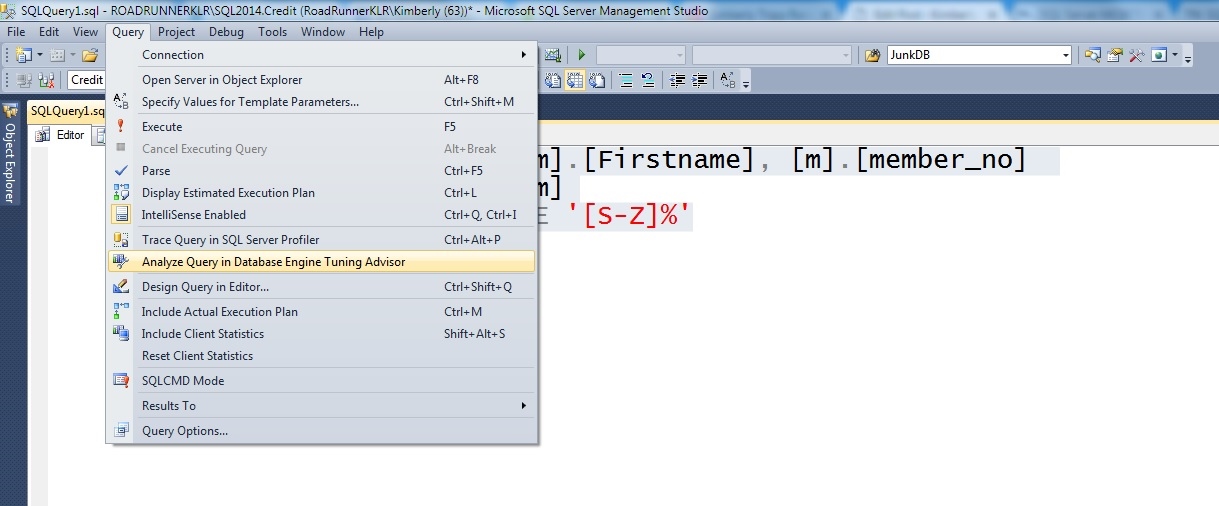
Don’t get me wrong, query tuning is a MUST. But, it’s just a starting point. I always start my tuning process by determining the best indexes for a query. But, you can’t stop there. You MUST do “server tuning” if you want your production database to truly scale.
Server Tuning
Before you create a desired index in production (or, while you’re doing testing / analysis in development / QA [quality assurance]) you really want to check to see if this index is going to be good for production.
Are there other similar indexes?
Maybe you can consolidate some of these indexes into one. Yes, this consolidated index might not be the best for the individual queries but by creating one index instead of three, you’ll be reducing the cost of this index for data modifications, maintenance, storage, etc.
Are there any suggested missing indexes?
Again, before I create a new index, I want to see if I can get more uses out of it. Can I consolidate this new index with existing and/or missing recommendations? If I can then I’ll get more uses out of this index.
Are there good maintenance strategies in place?
Before you go and create more indexes, make sure that your existing indexes are being maintained. You should also check that the indexes being maintained are actually being used. To be honest, you should do that BEFORE you do any tuning at all.
SUMMARY: Steps for Server Tuning and Scalability
- Get rid of the dead weight. Clean up unused indexes. Consolidate similar indexes.
- Make sure your index maintenance strategy is in place. There’s no point in adding indexes if you’re not cleaning up fragmentation and reducing splits.
- Then, you can consider adding indexes BUT only after you’ve done the following:
- Query tuning
- Existing index consolidation
- Missing index consolidation
- And, of course, TESTING!
Well… that was much longer than I had hoped. But, there are a lot of good concepts here. Unfortunately, indexing for performance is just NEVER just a simple discussion. You can’t just put an index on every column and expect things to work well. Conversely, some of these tools seem helpful but they mostly do query tuning and not server tuning. If you really want to get better performance diving into indexing is a fantastic way to do this! So, if you’re motivated – here are a ton of resources to consider!
Learning more about Indexing
If you want to learn more about index structures, check out this older (but still useful page of videos). On it, watch them in this order.
- Index Internals
- Index Internals Demo
- Index Fragmentation
- Index Fragmentation Demo
- Even better – skip 3 and 4 and go to Paul’s Pluralsight course on SQL Server: Index Fragmentation Internals, Analysis, and Solutions
- Index Strategies
- Index Strategies Demonstration
Also, check out these blog posts:
- First, setup the latest version of sp_SQLskills_helpindex from this post
- Nonclustered indexes require the “lookup” key in the b-tree when?
- Explicitly naming CL key columns in NC indexes – when and why
- How can you tell if an index is REALLY a duplicate?
- Removing duplicate indexes (this was created for 2008 but the code still works on higher versions… but, yes, this is due an update! :))
I’m also working on a much more extensive course on Indexing for Pluralsight, this should be available within the next few months.
UPDATE: Check out my Pluralsight course – SQL Server: Indexing for Performance for more details! Enjoy!!
Thanks for reading!
k
The post SQLskills SQL101: Indexing Basics appeared first on Kimberly L. Tripp.
25 Apr 22:35
The Guru (T-SQL Tuesday #089)
by Adam Machanic
I became a consultant a bit earlier in my career than was probably wise. The going was rough at first, with periods of feast and periods of famine. Although I had several clients, I didn’t understand how to sell services or schedule my workload, and so I’d wind up either doing huge amounts of work for a few weeks, or absolutely nothing some other weeks. The topic of this month’s T-SQL Tuesday is “Database WTFs” and it was during one of my periods of relative inactivity that I met Jonathan at a local...(read more)
Scott Weigand likes this
25 Apr 22:34
Introducing Microsoft Data Amp
by SQL Server Team
This post was authored by Mitra Azizirad, Corporate Vice President, Cloud Application Development & Data Marketing, Microsoft
Today, I am excited to announce that on April 19, we will host a new online event, Microsoft Data Amp.
Microsoft Data Amp is inspired by you, our customers and partners, who everyday are transforming applications and industries by using data in innovative ways, to predict, take action and create new business opportunities. We continue to accelerate our pace of innovation to enable you to meet the demands of a dynamic marketplace and harness the incredible power of data, more securely and faster than before.
Next month at Microsoft Data Amp, Executive Vice President Scott Guthrie and Corporate Vice President Joseph Sirosh will share how Microsoft’s latest innovations put data, analytics and artificial intelligence at the heart of business transformation. The event will include exciting announcements that will help you derive even more value from the cloud, enable transformative application development, and ensure you can capitalize on intelligence from any data, any size, anywhere, across Linux and other open source technologies.
Customers and partners, in industries from healthcare to retail, will illustrate how they are innovating, evolving and reshaping their businesses by infusing data into the heart of their solutions and applications. Microsoft Data Amp will also feature demos and deep dives on new scenarios enabled by a broad array of new data and analytics technologies, from SQL Server to Azure Machine Learning.
I encourage you to save the date, and I look forward to you joining us for Microsoft Data Amp on April 19.

Mitra Azizirad, Corporate Vice President, Cloud Application Development & Data Marketing, Microsoft
With an expansive technical, business and marketing background, Azizirad has led multiple and varied businesses across Microsoft for over two decades. She leads product marketing for Microsoft’s developer, data and artificial intelligence offerings spanning Visual Studio, SQL Server, Cortana Intelligence Services, .NET, Xamarin and associated Azure data, cognitive and developer services.
25 Apr 22:34


PolyBase use cases clarified
by James Serra
I previously talked about PolyBase and its enhancements (see PASS Summit Announcements: PolyBase enhancements). There is some confusion on PolyBase use cases as they are different depending on whether you are using PolyBase with Azure SQL Data Warehouse (SQL DW) or SQL Server 2016, as well as the sources you are using it against. The three main use cases for using PolyBase are: Loading data, federating querying, and aging out data. Here is the support for those three uses cases in SQL DW and SQL Server 2016:
| PolyBase in: | Parallelize Data Load (Blob and ADLS) | Federated Query (push down) HDInsights | Federated Query (push down) HDP/Cloudera (local or blob) | Federated Query (push down) five new sources* | Age Out Data |
| SQL DW | Yes | N/A | N/A | No support for on-prem sources | Maybe |
| SQL Server 2016 | Yes via scale-out groups. Blob, not ADLS | N | Y (Creates MapReduce job) | Y | Maybe |
* = Teradata, Oracle, SQL Server, MongoDB, generic ODBC (Spark, Hive, Impala, DB2)
For federated queries: “N” requires all data from the source to be copied into SQL Server 2016 and then filtered. For “Y”, the query is pushed down into the data source and only the results are returned back, which can be much faster for large amounts of data.
I mention “Maybe” for age out data in SQL DW as you can use PolyBase to access the aged-out data in blob or Azure Data Lake Storage (ADLS), but it will have to import all the data so may have slower performance (which is usually ok for accessing data that is aged-out). For SQL Server 2016, it will have to import the data unless you use HDP/Cloudera, in which case the creation of the MapReduce job will add overhead.
Here are details on what PolyBase supports for each product:
PolyBase (works with) |
Azure Blob Store (WASB) |
Push Down |
Azure Data Lake Store (ADLS) |
Push Down |
HDI |
Push Down |
Cloudera (CDH) |
Push Down |
Horton Works (HDP) |
Push Down |
SQL 2016 |
Yes |
N/A |
No |
N/A |
No |
No |
Yes |
Yes |
Yes |
Yes |
Azure SQL DW |
Yes |
N/A |
Yes |
N/A |
No |
No |
No |
No |
No |
No |
APS |
Yes |
N/A |
No |
N/A |
Yes |
Yes (internal region)
|
Yes |
Yes |
Yes |
Yes |
Here are some important notes:
- The file types that PolyBase supports: UTF-8 and UTF-16 encoded delimited text, RC File, ORC, Parquet, gzip, zlib, Snappy. Not supported: extended ASCII, fixed-file format, WinZip, JSON, and XML
- Azure SQL Database does not support PolyBase
- SQL DW recently added PolyBase support for ADLS but does not support compute pushdown
- ADLS in only in two regions (East US 2, Central US)
- PolyBase supports row sizes up to 1MB
- PolyBase can do writes to blob/ADLS and HDFS (using CETAS)
- PolyBase requires the CREATE EXTERNAL TABLE command
- PolyBase offers ability to create statistics on tables (but they are not auto-created or auto-updated)
PolyBase parallelized reads for data loading:
- Supported: in SQL using CTAS or INSERT INTO
- Not supported: BCP, Bulk Insert, SQLBulkCopy
- Not supported: SSIS (unless used to call stored procedure containing CTAS or use the Azure SQL DW Upload Task)
- Supported: ADF
- If source compatible with PolyBase, will directly copy
- If source not compatible with PolyBase, will stage to Blob
- If source is ADLS, will still stage to Blob (having to stage to blob will be removed week of 8/20, so PolyBase will copy from ADLS directly to target)
The bottom line is, for SQL DW, think of PolyBase as a mechanism for data loading. For SQL Server 2016, think of PolyBase for federated querying.
More info:
Azure SQL Data Warehouse loading patterns and strategies
25 Apr 22:34
Editing and Creating Reports in Power BI Embedded
by Prologika - Teo Lachev
I was doing a Power BI Embedded demo for a customer and lo and behold, being an ever-changing cloud technology, Power BI Embedded surprised me in a great way. When you install and run the Embedded Sample, it adds a nice “Embed and play with current report using Embedded Live Sample” link to the Page Navigation section.
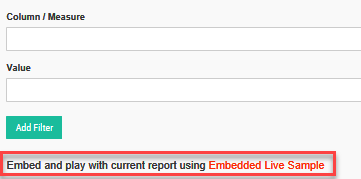
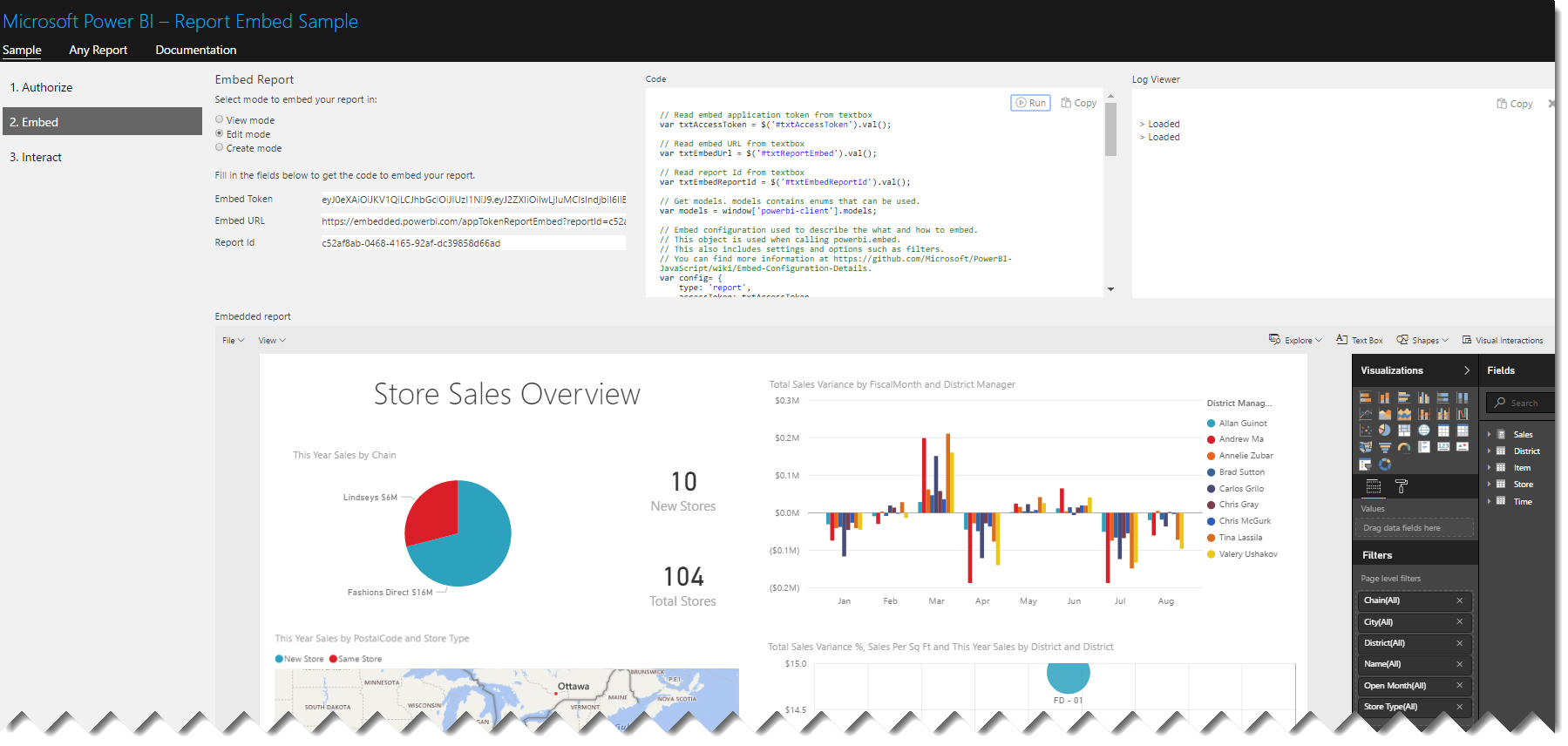
This brings you to the Power BI Embedded live sample with your Power BI Embedded report loaded. You can access the Live Sample from here if you don’t want to configure and install Power BI Embedded sample. In this case, it uses sample reports. Not only does the sample show you Power BI Embedded in action but it also shows you the relevant code.
The surprise is that Power BI Embedded now supports Edit and Create modes!
Similar to Power BI Services, users can now edit existing reports and create their own reports from scratch. For more details of how to do this programmatically, read the documentation.
25 Apr 22:34

SQL Server 2016 features: Query Store
by Gail
Given that SQL Server 2016 is coming ‘real soon now’, it’s probably well past time that I write up some thoughts on new features.
The first one I want to look at is a feature that I’m so looking forward to getting to use, the Query Store.
Query Store is essentially a flight recorder for a SQL database. It tracks queries, their execution characteristics and their execution plans. The best part is that this information is persisted into the database and hence is not lost on restart, as the current performance-related DMV contents are.
The data is aggregated over a defined period of time, by default an hour. This will probably be fine for most cases, if there are performance problems that come and go in fractions of an hour (like a case I had last year), then that interval may need to be reduced, depending on the type of problem.
There are lots and lots of blog posts on how to enable it and how to query it and the like, so I’m not going to repeat that info here. See http://sqlperformance.com/2015/02/sql-plan/the-sql-server-query-store for all of that kind of info.
There’s two main aspects that I want to discuss about this feature. Let’s start with a screenshot of one of the Query Store’s built-in reports, the top resource-consuming queries.
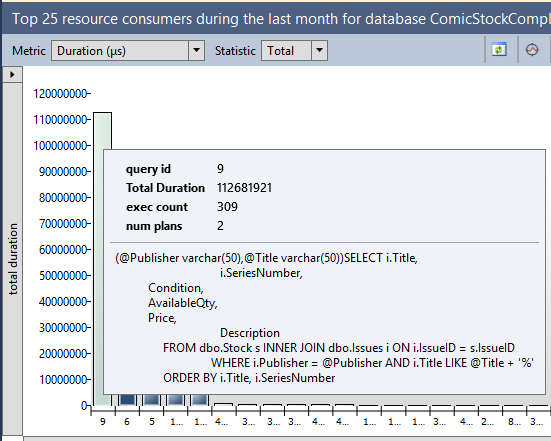
The longest-running (on aggregate) query in this database is this nice parameterised query against the Stock and Issues tables. In the pane at the bottom of that report I can see its query plans.
Nothing really fancy there, except for one thing.
The server that I pulled those reports from has never had that query run against it. I pulled that report from an Azure VM that I set up last week. The workload all dates from 3 weeks ago.
Query Store data is persisted into the database, which means it’s included in a backup. I ran the workload against one server, backed up the database, restored it elsewhere and then queried the query store data. And there’s an even better part.

Before running those Query Store reports, I dropped every table in the database.
Before this, to get the aggregated performance characteristics of a workload, I’d have to run a server-side trace or an extended events session, write the results out to a file, copy the file to my analysis server, load them into a table and aggregate the results. It’s a process that could take a day or two.
Now (or at least once SQL 2016 becomes widespread) I can just ask the client for their latest backup as all the query performance data I want is in there. If they’re uncomfortable with me having access to the data, they can restore the DB somewhere, drop all the tables then back up the ‘empty’ database and send me that. Much faster, and far fewer worries about having potentially missed something that ran at a time the trace wasn’t running.
The second thing isn’t so much about Query Store, as it is about the message that’s coming from Microsoft about it. Over and over and over they keep talking about how Query Store can be used to force a good query plan. It’s not hard to do.
Let’s take an example of a query with a parameter sniffing problem.
CREATE PROCEDURE GetOrders (@StartDate DATETIME)
AS
    SELECT  OrderDate,
            IssueID,
            QtyOrdered,
            Total
    FROM    Orders
    WHERE   OrderDate > @StartDate;
GO
The index on OrderDate isn’t covering, so a seek and key lookup is optimal for small numbers of rows and a clustered index scan is better for large numbers of rows
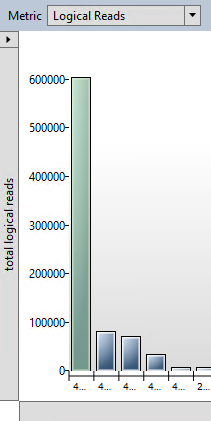
The query in question is by far the worst query in terms of logical reads on the server.

And it has two plans associated with it. The one at the top (plan 453) is the seek and key lookup. The one at the bottom (plan 452) is the clustered index scan.
Select the desired plan. It appears in the bottom section, then

And problem solved.
Well…
I’d argue that’s less fixing the problem than hiding it. Sure, you won’t get a different plan, or at least that’s the idea. (While testing I did manage to get a different plan to the forced one, I need to investigate further why.) But is that forced plan the best solution? In this example, widening the index would have been a better solution. In other cases you might rather want to split the procedure into two, one for some date values one for others, or add the recompile hint, or even change the query.
Forcing a plan is great for stopping a problem that’s currently bringing production down, but it’s far from the only thing that will ever be done now. For starters forcing a good plan requires that there is a good plan, and if the query is written so it can’t use indexes or there are no suitable indexes, there won’t be a good plan to force. It’s a nice tool, but that’s all it is, another tool in the performance tuning box. It’s not a replacement for all other tuning work that’s ever been done
Now, I wonder how long it’s going to take to get my clients to upgrade.
25 Apr 22:34

SQL 2016 features: Stretch Database
by Gail
Stretch database allows for a table to span an ‘earthed’ SQL Server instance and an Azure SQL Database. It allows for parts (or all) of a table, presumably older, less used parts, to be stored in Azure instead of on local servers. This could be very valuable for companies that are obliged to retain transactional data for long periods of time, but don’t want that data filling up the SAN/flash array.
After having played with it, as it is in RC2, I have some misgivings. It’s still a useful feature, but probably not as useful as I initially assumed when it was announced.
To start with, the price. Stretch is advertised as an alternative to expensive enterprise-grade storage. The storage part is cheap, it’s costed as ‘Read-Access Geographically Redundant Storage’ blob storage.

Then there’s the compute costs

The highest tier is 2000 DSU at $25/hour. To compare the costs to SQL Database, a P2 has the same compute costs as the lowest tier of Stretch, and that’s with a preview discount applied to Stretch. It’s going to be a hard sell to my clients at that price (though that may be partially because of the R15=$1 exchange rate).
The restrictions on what tables are eligible are limiting too. The documented forbidden data types aren’t too much of a problem. This feature’s intended for transactional tables, maybe audit tables and the disallowed data types are complex ones. HierarchyID, Geography, XML, SQL_Variant.
A bigger concern are the disallowed features. No computed columns, no defaults, no check constraints, can’t be referenced by a foreign key. I can’t think of too many transactional tables I’ve seen that don’t have one or more of those.
It’s looking more like an archive table, specifically designed to be stretchable will be needed, rather than stretching the transactional table itself. I haven’t tested whether it’s possible to stretch a partitioned table (or partition a stretched table) in order to partition switch into a stretched table. If it is, that may be the way to go.
I have another concern about stretch that’s related to debugging it. When I tested in RC2, my table was listed as valid by the stretch wizard, but when I tried, the ALTER TABLE succeeded but no data was moved. It turned out that the Numeric data type wasn’t allowed (A bug in RC2 I suspect, not an intentional limitation), but the problem wasn’t clear from the stretch-related DMVs. The problem is still present in RC3

The actual error message was no where to be found. The new built-in extended event session specifically for stretch tables was of no additional help.
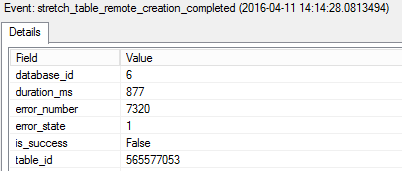
The error log contained a different message, but still not one that pinpointed the problem.
This blog post was based on RC2 and written before the release of RC3, however post RC3 testing has shown no change yet. I hope at least the DMVs are expanded before RTM to include actual error messages and more details. We don’t need new features that are hard to diagnose.
As for the other limitations, I’m hoping that Stretch will be like Hekaton, very limited in its first version and expanded out in the next major version. It’s an interesting feature with potential, I’d hate to see that potential go to waste.
25 Apr 22:34

SQL Server 2016 features: Temporal Tables
by Gail
Another new feature in SQL 2016 is the Temporal Table (or System Versioning, as its referred to in the documentation). It allows a table to be versioned, in terms of data, and for queries to access rows of the table as they were at some earlier point in time,
I’m quite excited about this, because while we’ve always been able to do this manually, with triggers or CDC or CT, it’s been anything but trivial. I remember trying to implement a form of temporal tables back in SQL 2000, using triggers, and it was an absolute pain in the neck.
So how does it work? Let’s start with a normal un-versioned table.
CREATE TABLE dbo.Stock (
  StockReferenceID INT IDENTITY(1, 1) NOT NULL,
  IssueID INT NULL,
  Condition VARCHAR(10) NULL,
  AvailableQty SMALLINT NULL,
  Price NUMERIC(8, 2) NULL,
  PRIMARY KEY CLUSTERED (StockReferenceID ASC)
);
To make that a temporal table, we need to add two columns, a row start date and a row end date.
ALTER TABLE Stock
  ADD PERIOD FOR SYSTEM_TIME (RowStartDate, RowEndDate),
    RowStartDate DATETIME2 GENERATED ALWAYS AS ROW START HIDDEN NOT NULL DEFAULT GETDATE(),
    RowEndDate DATETIME2 GENERATED ALWAYS AS ROW END HIDDEN NOT NULL DEFAULT CONVERT(DATETIME2, '9999-12-31 23:59:59.99999999');
It’s a little complicated. From my, admittedly limited, testing, the NOT NULL and the DEFAULT are required. The start time’s default needs to be GETDATE() and the end time’s default needs to be the max value of the data type used.
Hidden is an interesting property, it means that the columns won’t appear if SELECT * FROM Stock… is run. The only way to see the column values is to explicitly state them in the SELECT clause.
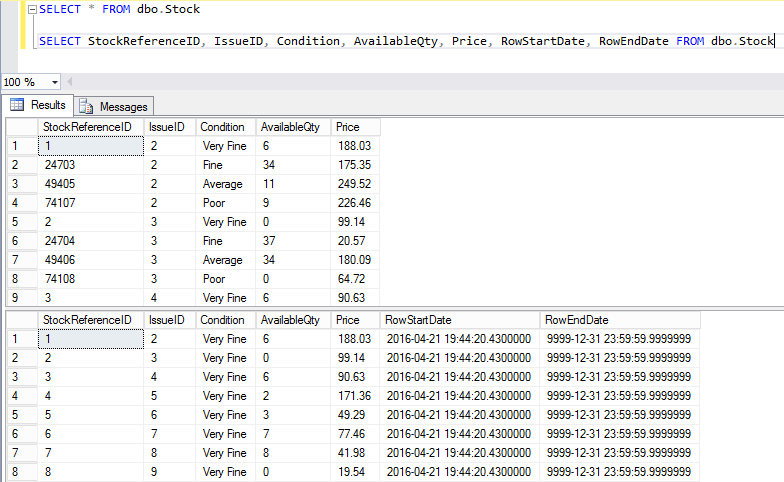
I wonder if that property will be available for other columns in the future. It would be nice to be able to mark large blob columns as HIDDEN so that SELECT * doesn’t end up pulling many MB per row back.
That ALTER adds the row’s two time stamps. To enable the versioning then just requires
ALTER TABLE Stock
  SET (SYSTEM_VERSIONING = ON);
Once that’s done, the table gains a second, linked, table that contains the history of the rows.

421576540 is the object_id for the Stock table. If is also possible to specify the name for the history table in the ALTER TABLE statement, if preferred.
The history table can be queried directly. The start and end times aren’t hidden in this one.

Or, the temporal table can be queried with a new clause added to the FROM, FOR SYSTEM TIME… Full details at https://msdn.microsoft.com/en-us/library/mt591018.aspx

Very neat.
The one thing that does need mentioning. This is not an audit solution. If the table is altered, history can be lost. If the table is dropped, history is definitely lost. Auditing requirements are such that audit records should survive both. Use this for historical views of how the data looked, and if you need an audit as well, look at something like SQLAudit.
25 Apr 22:34

SQL Server 2016 features: R services
by Gail
One of the more interesting features in SQL 2016 is the integration of the R language.
For those who haven’t seen it before, R is a statistical and data analysis language. It’s been around for ages, and has become popular in recent years.
R looks something like this (and I make no promises that this is well-written R). Taken from a morse-code related challenge
MessageLetters <- str_split(Message, "")

MessageEncoded <- list(1:length(MessageLetters))

ListOfDots <- lapply(lapply(c(MaxCharacterLength:1), function(x) rep.int(".", times = x)), function(x) str_c(x, collapse=''))
ListOfDashes <- lapply(lapply(c(MaxCharacterLength:1), function(x) rep.int("-", times = x)), function(x) str_c(x, collapse=''))
If you’re interested in learning R, I found the Learning R book to be very good.
SQL 2016 offers the ability to run R from a SQL Server session. It’s not that SQL suddenly understands R, it doesn’t. Instead it can call out to the R runtime, pass data to it and get data back
Installing the R components are very easy.

And there’s an extra licence to accept.
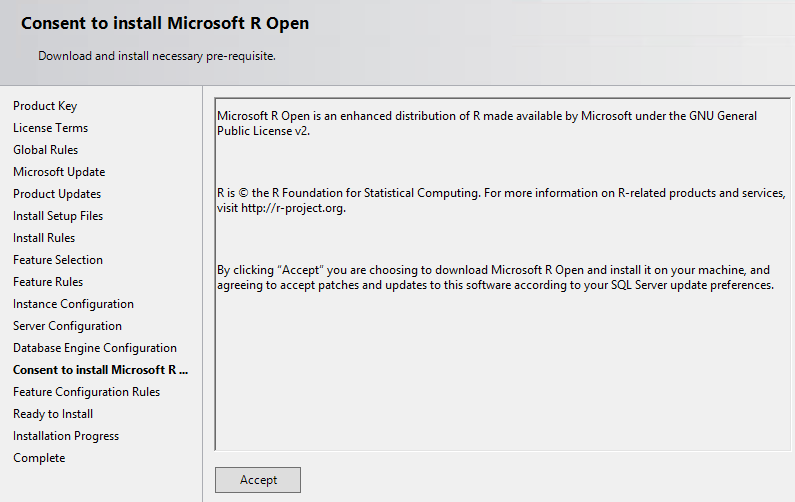
It’s worth noting that the pre-installed Azure gallery image for RC3 does not include the R services. Whether the RTM one will or not remains to be seen, but I’d suggest installing manually for now.
Once installed, it has to be enabled with sp_configure.
EXEC sp_configure 'external scripts enabled', 1
RECONFIGURE
It’s not currently very intuitive to use. The current way R code is run is similar to dynamic SQL, with the same inherent difficulties in debugging.
EXEC sp_execute_external_script
  @language = N'R',
  @script = N'data(iris)
    OutputDataSet <- head(iris)'
  WITH RESULT SETS (([Sepal.Length] NUMERIC(4,2) NOT NULL, [Sepal.Width] NUMERIC(4,2) NOT NULL, [Petal.Length] NUMERIC(4,2) NOT NULL, [Petal.Width]  NUMERIC(4,2) NOT NULL, [Species] VARCHAR(30)));
go
It’s possible to pass data in as well, using a parameter named @input_data_1 (there’s no @input_data_2) and from what I can tell from the documentation @parameter1, which takes a comma-delimited list of values for parameters defined with @params. There’s no examples using these that I can find, so it’s a little unclear how they precisely work.
See https://msdn.microsoft.com/en-us/library/mt604368.aspx and https://msdn.microsoft.com/en-us/library/mt591993.aspx for more details.
It’s not fast. The above piece of T-SQL took ~4 seconds to execute. This is on an Azure A3 VM. Not a great machine admittedly, but the R code, which just returns the first 6 rows of a built-in data set, ran in under a second on my desktop. This is likely not something you’ll be doing as part of an OLTP process.
I hope this external_script method is temporary. It’s ugly, hard to troubleshoot, and it means I have to write my R somewhere else, probably R Studio, maybe Visual Studio, and move it over once tested and working. I’d much rather see something like
CREATE PROCEDURE GetIrisData
  WITH Language = 'R' -- or USQL or Python or …
  AS
…
GO
Maybe in SQL Server 2020?
25 Apr 22:34

Pass Summit 2016 abstract reviews
by Gail
Following on Steve’s blog post on summit abstracts, I decided to publish mine.
My comments are not intended as an attack on the program committee, it’s an incredibly hard job that you couldn’t pay me to do (I’ve done similar work before and hated it). What I hope comes out of this, and the other posts which Steve reviewed, are that comments are more constructive and can be used to improve the abstract.
When the initial mails were sent out, I had one general session and one lightning talk accepted. Since then, I’ve been asked to also present one of the sessions that was listed as alternate.
So, without any editing, the abstracts and comments:
All about Indexes (half-day, level 300, declined)
Indexes are essential to good database performance, but it can be hard to decide what indexes to create and the 'rules' around indexes often appear to be vague or downright contradictory.
In this session we'll dive deep into indexes, have a look at their architecture and internal structure and how that affects the way that indexes are used in query execution. We’ll look at why clustered indexes are recommended on almost all tables and how their architecture affects the choice of columns. We’ll look at nonclustered indexes; their architecture and how query design affects what indexes should be created to support various queries.
Comments
Abstract starts off really well, but last sentence has some structure/repetition issues. Level might be appropriate, but I wonder if in a 3 hour session you can cover enough detail to justify a 300 level.
Nice abstract and overall flow between title, abstract and goals.
Abstract seems well written and gives decent insight into session contents. It would be better to mention 2014 & 2016 features to make the session more attractive. The topic of indexes is somewhat overdone and may have some difficulty attracting attendees. Goals are decent but somewhat generic and could benefit from being more tangible. 25% demo on this topic seems a bit low to keep attendees engaged for a 3 hour session.
Need more meat in abstract. Are you going to talk about column, filtered or other index types? Only 25% demos, you have 3 hours???
Could cover more breadth in 3 hours. Filtered, sparse, columnstore etc.
I don’t see this for a half-day session. The goal are just too weak. And only 25% demo’s? You mean you are going to be talking for 3 hours and demoing for an hour? zzzzz. Need to flesh this abstract out a lot more.
Subjective: For a 3h long session, even at lvl300 , would expect a bit more demos to keep the attendees from nodding off…
Interesting combination. One wonders if I can cover enough material in 3 hours to make it a level 300 and others imply that there’s not enough material to spend 3 hours on.
Thing is, I’ve given this presentation twice before, as a 3 hour session. Pass Summit in Charlotte and SQLBits in London. It fits into 3 hours, providing there aren’t too many questions, that is. If I was going to add clustered and nonclustered columnstores and Hekaton’s range and hash indexes (and the interactions between them, eg non-clustered rowstore index on a clustered columnstore), then it would be a full day precon at least.
There are no 2014 or 2016 features mentioned, because the rowstore indexes didn’t change much in either version. Sure, I could call out the increased key size, but that’s not exactly abstract material. Maybe a footnote on one slide.
As for the topic being overdone and will have difficulty attracting attendees, there are only two sessions on rowstore indexes this year, a precon (Kendra Little) and a 100-level general session (Kathi Kellenberger), plus a few internals presentations and performance-related presentations that include indexing. Every time I’ve given an indexing presentation at a SQLSaturday, Pass Summit or SQLBits I’ve had a packed room. Sure, it isn’t shiny and new, but it’s probably relevant to most systems we design, develop and administer.
“You mean you are going to be talking for 3 hours and demoing for an hour? “ <snark_mode = on> No, I planned to do the middle hour as a mime act. </snark_mode>
Last time I checked, a 3 hour session meant talking for 3 hours. I’m sorry that indexing sounds so dry and boring that attendees are sure to fall asleep during it. I haven’t yet had anyone falling asleep in my indexing sessions. Maybe everyone who did, did so quietly and I didn’t notice. Maybe I should bring fireworks next time.
Go, Go, Query Store! (general session, level 200, accepted)
One of the hardest things to do in SQL is to identify the cause of a sudden degradation in performance. The DMVs don’t persist information over a restart of the instance and, unless there was already some query benchmarking (and there almost never is), answering the question of how the queries behaved last week needs a time machine. Up until now, that is. The addition of the Query Store to SQL Server 2016 makes identifying and resolving performance regressions a breeze.
In this session we’ll take a look at what the Query Store is and how it works, before diving into a scenario where overall performance suddenly degraded, and we’ll see why Query Store is the best new feature in SQL Server 2016, bar none.
Comments
Topic: Great topic. SQL Server 2016 and new shiny features like QS will definitely draw a crowd.
Abstract: Very well written with clear supportive goals.
Subjective: This sounds like a great session I would like to attend. The one issue I have is that it is listed as only 25% demo. Demos are the best way to who off QS functionality. 50% demo would be better.I would like to attend this session
The outline seems to clearly describe the contents of the presentation. The topic and goals should be compelling to attendees. The target audience should be big enough to support this session. There appears to be a reasonable amount of live demonstrations in relation to the topic being presented.
Abstract: detailed, clear
topic: relevant and new, one of the more interesting feature of sql server 2016
Subjective rating: a good sessionAbstract: well written, good topic
Topic: good topic, eye catching
Subjective: good session, would be interested in this
Nothing much to say here. The session will likely be closer to 50% demos, the original plan was 25%, but when I built the slides for SQL Saturday Iceland, I ended up putting more demos in and less slides.
Is that a parameter I smell? (general session, level 300, declined)
All too often a forum post on erratic query performance is met with a reply "Oh, it's parameter sniffing. You can fix it with <insert random solution here>." The problem with answer, even if it has identified the cause, is that it’s only part true. Parameter sniffing is not simply a problem that needs fixing; it's an essential part of well-performing queries. In most cases.
Come to this session to learn what Parameter Sniffing really is and why it’s a good thing, most of the time. Learn how to identify the scenarios where it’s not good, why a feature that is supposed to improve query performance sometimes degrades it, and what your options are for resolving the problems when they do occur.
Comments
Abstract: Well presented, explains purpose of session.
Topic: catchy title, still timely and relevant.
Subjective: Nice mix of demo for this topic.title not cute, if someone does not know about this they would not come Good abstract and good goals
Abstract: Grammar is a bit rough making the abstract difficult to read.
topic is decent . while it not “latest” or “hot”, it address a real life problem that developers can face. Abstract is a bit too generic and could benefit from more tangible details. Goals are okay but somewhat generic. demo % is decent.
Thanks for submitting a session that covers a really hot button topic in database queries! Looking forward to seeing it.
Again, fair enough, nothing much I can say about these comments.
On Transactions and Atomic Operations (general session, level 200, declined)
If there’s one thing that we, as SQL developers, do, it's not use enough transactions.
Transactions are critical when multiple changes need to be made entirely or not at all, but even given that it’s rare to see transactions used at all in most production code
In this session, we'll look at what transactions are and why we should use them. We'll explore the effects transactions have on locking and the transaction log. We'll investigate methods of handling errors and undoing data modifications, and we'll see why nested transactions are a lie.
Comments
Abstract: Grammar in first sentence is difficult to read. Too many commas.
good topic, need more meat in abstract and goals.
topic may not be “latest” but its a foundation subject and of relevance to most database developers. abstract clearly conveys what to expect from the session. goals are somewhat terse and could benefit from tangible details. demo % is a bit low.
Atomic Operations is in the title, but not used/defined in the abstract itself.
Abstract: Second sentence is a bit run-on and incoherent.
Topic: Fit for purpose, but likely a bit niche, as the author already seems to fears.
Subjective: Would have expected at least 50% demo – after all the easiest way to understand the need for TRANS is to see data buggered up by colliding updates.
Yes, I do have a tendency to torture my commas (they always confess at the end) and play with grammar. I will try to remember next year to write with simple, plain grammar. I do need to flesh this out a bit for next time it’s submitted anywhere.
I’m not sure what in the abstract conveys my fear that it’s a niche session, I don’t think it is. From working on various clients’ production systems over the last few years, I very seldom see explicit transactions. It’s something we don’t do enough, not a niche topic.
I’m also not sure that the reviewer meant by ‘colliding updates’. Updates, like all statements, are always part of a transaction, even if it is just one automatically started and committed. If two sessions were to try and update the same column, same rows at the same time to different values, the outcome will be as if one or the other had run, not a mixture of the two. And wrapping the update in an explicit transaction won’t change that behaviour
The Many Latencies of TempDB (general session, level 400, originally alternate, later accepted)
TempDB gets a bad rap when it comes to performance and scalability, and it’s all-too-often well deserved. A badly configured TempDB can have devastating effects on throughput. Combine that with poor queries and, well, you didn’t have any plans for the weekend, right?
In this session we’ll look at some common causes of TempDB contention, both query-based and configuration-based. We’ll look at guidelines for configuring TempDB and when and why you’d make various changes, and we’ll cover more ways to monitor TempDB than you can shake a stick at.
Now, about those weekend plans…
Comments
Abstract: Clear and well written abstract. No prerequisite listed.
Topic: Topic and goals seem like they would be appealing to attendees.
Subjective: Sounds like a good session that people would benefit from.Abstract: interesting
Topic: relevant
Subjecttive rating: compelling, high levelAbstract: The outline and details of this abstract are well written
Topic: This is a good topic
Subjective: I may attend this sessionThe session prerequisites are helpful. A great topic and the Abstract is almost good. It is funny but not enough information about the session.
Session prerequisites: TBC?
Goal 1: Correct the “'”
Objective: I would like to attend this session.
The pre-reqs here were a mistake on my part. Despite checking and re-checking the abstracts, that mistake slipped through (tbc = to be completed).
I would love to have corrected the “'”, as well as the " and > that appeared scattered through the abstracts, but they appeared on submit and editing afterwards didn’t help. Something, somewhere in the website messed up the HTML encoding a bit.
Watch a query run. Run, query, run! (Lightning talk, level 100, declined)
Previously if you wanted to get any run-time statistics for a query, you had to include the actual execution plan and run the query to completion. No more! New in SQL 2016 is the live query statistics that let you watch the execution of a query, in real time, and see when the operators run and where the data flows.
In this lightning talk we’ll look at how the live query statistics works and discuss some scenarios where this will really help debugging strange query behaviour.
Comments
Perfect topic/abstract for Lightning Talk, sign me up!
interesting and current topic. well written abstract with good details of session contents. Goals are terse but clear.
Sounds like a good topic for a Lightning Talk.
Great topic and good intro to query store. Hopefully this talk will provide concise knowledge.
Topic is good, will interest a large amount of attendess.
Level is excellent – it’s a new feature so 100 level is great. I would have liked to see mention of query store in the title.good topic
New topic on new technology. Small enough to be interesting
Interesting and great topic. Abstract and Goals talks to each other. New features is always a good place to grab peoples attention.
The comment on wanting query store to appear in the title is mystifying, because this session has nothing to do with query store. It’s showing off the Live Query Statistics (which, while nice, is too small to warrant anything more than a lightning session alone)
Why Temporal Tables and Stretch Database Are Best Friends (Lightning talk, level 200, accepted)
SQL Server 2016 introduced, among several other new features, Temporal tables and Stretch database.
From a distance, they appear not to have much to do with each other. Temporal tables allow you to query the table as it was at a point in time. Stretch allows for tables to span the earthed SQL Server and the cloud.
In this short session we’ll look at why these two features work spectacularly well together and why a stretched temporal table makes perfect sense.
Comments
Clear understanding of the objective, and as a “new” feature people will drawn to this.
Perfect Lightning Talk abstract, focused topic and something new with the latest version of SQL Server.
Sounds interesting!
interesting topic – new and relevant. Abstract is brief but gives good insight into session contents. Goals are terse, but clear and tangible. No demos may be off-putting to some attendees.
Earthed SQL is an interesting expression and certainly made me think.
There’s two new features here – is that too much for a 10 minute lightening talk?
If good connection is made early between the two then this could be good
Three goals seem to sum up the presentation well.Try just one topic in 10 minutes or create a 75 or 3 hour session on new features of 2016
No real “pull” for a short session.
“No demos may be off-putting”. Um, what? This is a 10-minute lightning talk, I’m not demoing features in 10 minutes and I’d be very surprised if attendees expected demos in a 10 minute session.
I can’t take credit for the “Earthed SQL” expression, that one’s from Rimma’s Keynote presentation in 2014
25 Apr 22:34

What is a SARGable predicate?
by Gail
‘SARGable’ is a weird term. It gets bandied around a lot when talking about indexes and whether queries can seek on indexes. The term’s an abbreviation, ‘SARG’ stands for Search ARGument, and it means that the predicate can be executed using an index seek.
Lovely. So a predicate must be SARGable to be able to use an index seek, and it must be able to use an index seek to be SARGable. A completely circular definition.
So what does it actually mean for a predicate to be SARGable? (and we’ll assume for this discussion that there are suitable indexes available)
The most general form for a predicate is <expression> <operator> <expression>. To be SARGable, a predicate must, on one side, have a column, not an expression on a column. So, <column> <operator> <expression>
SELECT * FROM Numbers
WHERE Number = 42;

SELECT * FROM Numbers
WHERE Number + 0 = 42;

SELECT * FROM Numbers
WHERE Number = 42 + 0;

Any1 function on a column will prevent an index seek from happening, even if the function would not change the column’s value or the way the operator is applied, as seen in the above case. Zero added to an integer doesn’t change the value of the column, but is still sufficient to prevent an index seek operation from happening.
While I haven’t yet found any production code where the predicate is of the form ‘Column + 0’ = @Value’, I have seen many cases where there are less obvious cases of functions on columns that do nothing other than to prevent index seeks.
UPPER(Column) = UPPER(@Variable) in a case-insensitive database is one of them, RTRIM(COLUMN) = @Variable is another. SQL ignores trailing spaces when comparing strings.
The other requirement for a predicate to be SARGable, for SQL Server at least, is that the column and expression are of the same data type or, if the data types differ, such that the expression will be implicitly converted to the data type of the column.
SELECT 1 FROM SomeTable
WHERE StringColumn = 0;

SELECT 1 FROM SomeTable
WHERE StringColumn = ‘0’;

There are some exceptions here. Comparing a DATE column to a DATETIME value would normally implicitly convert the column to DATETIME (more precise data type), but that doesn’t cause index scans. Neither does comparing an ascii column to a unicode string, at least in some collations.
In generally though, conversions should be explicit and decided on by the developer, not left up to what SQL server decides.
What about operators?
The majority are fine. Equality, Inequality, IN (with a list of values), IS NULL all allow index usage. EXIST and IN with a subquery are treated like joins, which may or may not use indexes depending on the join type chosen.
LIKE is a slight special case. Predicates with LIKE are only SARGable if the wildcard is not at the start of the string.
SELECT 1 FROM SomeStrings
WHERE ASCIIString LIKE 'A%'

SELECT 1 FROM SomeStrings
WHERE ASCIIString LIKE '%A'

There are blog posts that claim that adding NOT makes a predicate non-SARGable. In the general case that’s not true.
SELECT * FROM Numbers
WHERE NOT Number > 100;

SELECT * FROM Numbers
WHERE NOT Number <= 100;

SELECT * FROM Numbers
WHERE NOT Number = 137;

These index seeks are returning most of the table, but there’s nothing in the definition of ‘SARGable’ that requires small portions of the table to be returned.
That’s mostly that for SARGable in SQL Server. It’s mostly about having no functions on the column and no implicit conversions of the column.
(1) An explicit CAST of a DATE column to DATETIME still leaves the predicate SARGable. This is an exception that’s been specifically coded into the optimiser.
20 Apr 19:36
DSC Install of SQL Server
by Chris Lumnah
It has been a while since I have made a post and figured it was long over due. I figured for my first post in a while, it would be about something I have been working on lately. The automation of installing and configuring of SQL Server. So the installation of SQL Server is now […]
20 Apr 19:36
My WTF….Really? Moment
by Chris Lumnah
So, to join into this month’s #tsqltuesday88, we are to write about a “WTF” moment. Mine is not directly database related, but it is related. I was presenting at the NESQL User Group monthly meeting. I was giving a lightning talk on Powershell for a DBA. (See…somewhat related.) It was not meant to be a […]
29 Mar 00:02
Performance Myths : Clustered vs. Non-Clustered Indexes
by Aaron Bertrand

I was recently scolded for suggesting that, in some cases, a non-clustered index will perform better for a particular query than the clustered index. This person stated that the clustered index is always best because it is always covering by definition, and that any non-clustered index with some or all of the same key columns was always redundant.
I will happily agree that the clustered index is always covering (and to avoid any ambiguity here, we're going to stick to disk-based tables with traditional B-tree indexes).
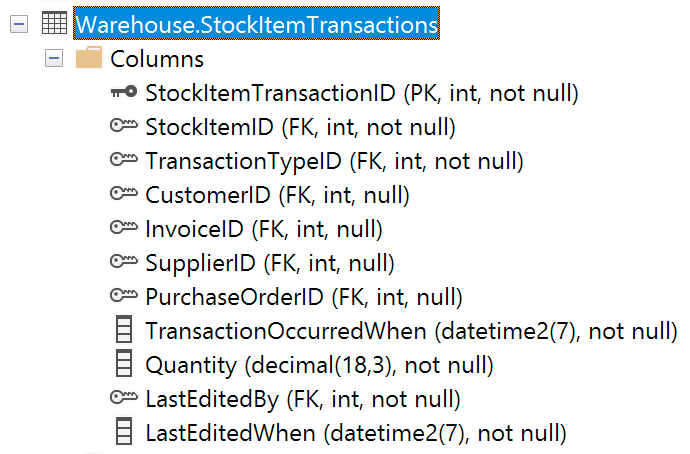 I disagree, though, that a clustered index is always faster than a non-clustered index. I also disagree that it is always redundant to create a non-clustered index or unique constraint consisting of the same (or some of the same) columns in the clustering key.
Let's take this example, Warehouse.StockItemTransactions, from WideWorldImporters. The clustered index is implemented through a primary key on just the StockItemTransactionID column (pretty typical when you have some kind of surrogate ID generated by an IDENTITY or a SEQUENCE).
It's a pretty common thing to require a count of the whole table (though in many cases there are better ways). This can be for casual inspection or as part of a pagination procedure. Most people will do it this way:
SELECT COUNT(*)
  FROM Warehouse.StockItemTransactions;
With the current schema, this will use a non-clustered index:
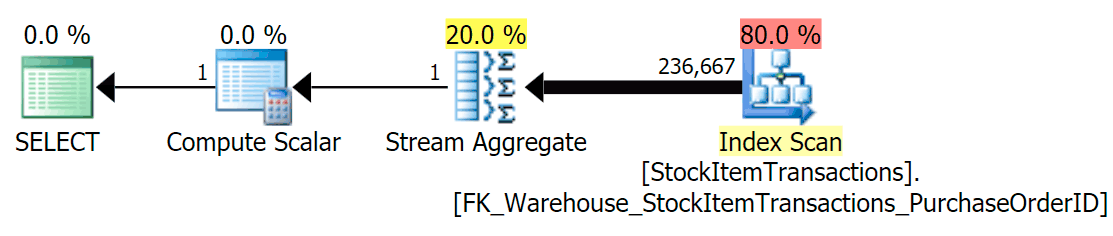
We know that the non-clustered index does not contain all of the columns in the clustered index. The count operation only needs to be sure that all rows are included, without caring about which columns are present, so SQL Server will usually choose the index with the smallest number of pages (in this case, the index chosen has ~414 pages).
Now let's run the query again, this time comparing it to a hinted query that forces the use of the clustered index.
SELECT COUNT(*)
  FROM Warehouse.StockItemTransactions;

SELECT COUNT(*) /* with hint */
  FROM Warehouse.StockItemTransactions WITH (INDEX(1));
We get an almost identical plan shape, but we can see a huge difference in reads (414 for the chosen index vs. 1,982 for the clustered index):
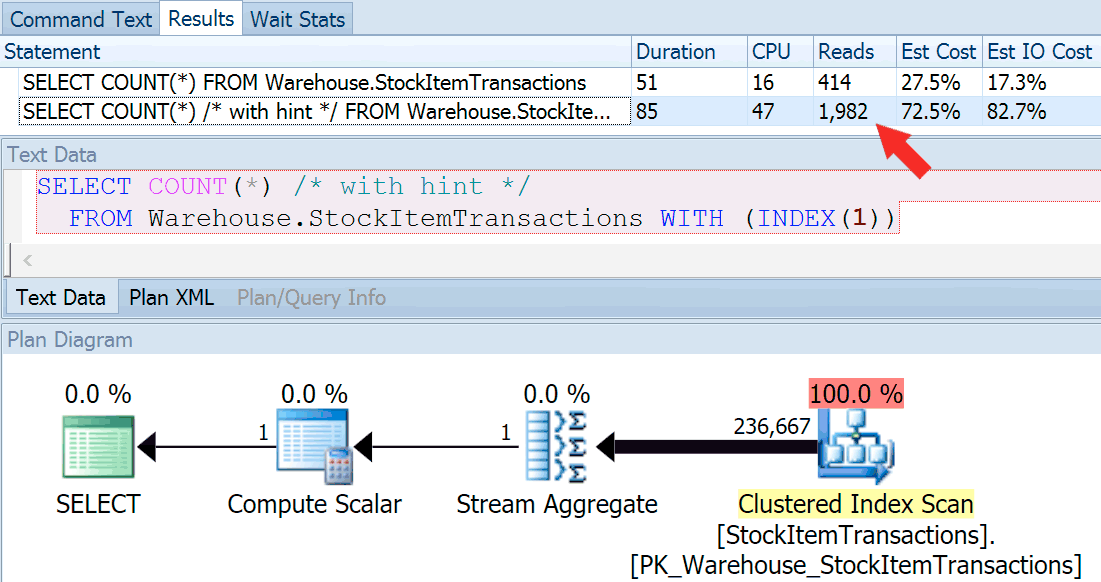
Duration is slightly higher for the clustered index, but the difference is negligible when we're dealing with a small amount of cached data on a fast disk. That discrepancy would be much more pronounced with more data, on a slow disk, or on a system with memory pressure.
If we look at the tooltips for the scan operations, we can see that while the number of rows and estimated CPU costs are identical, the big difference comes from the estimated I/O cost (because SQL Server knows that there are more pages in the clustered index than the non-clustered index):
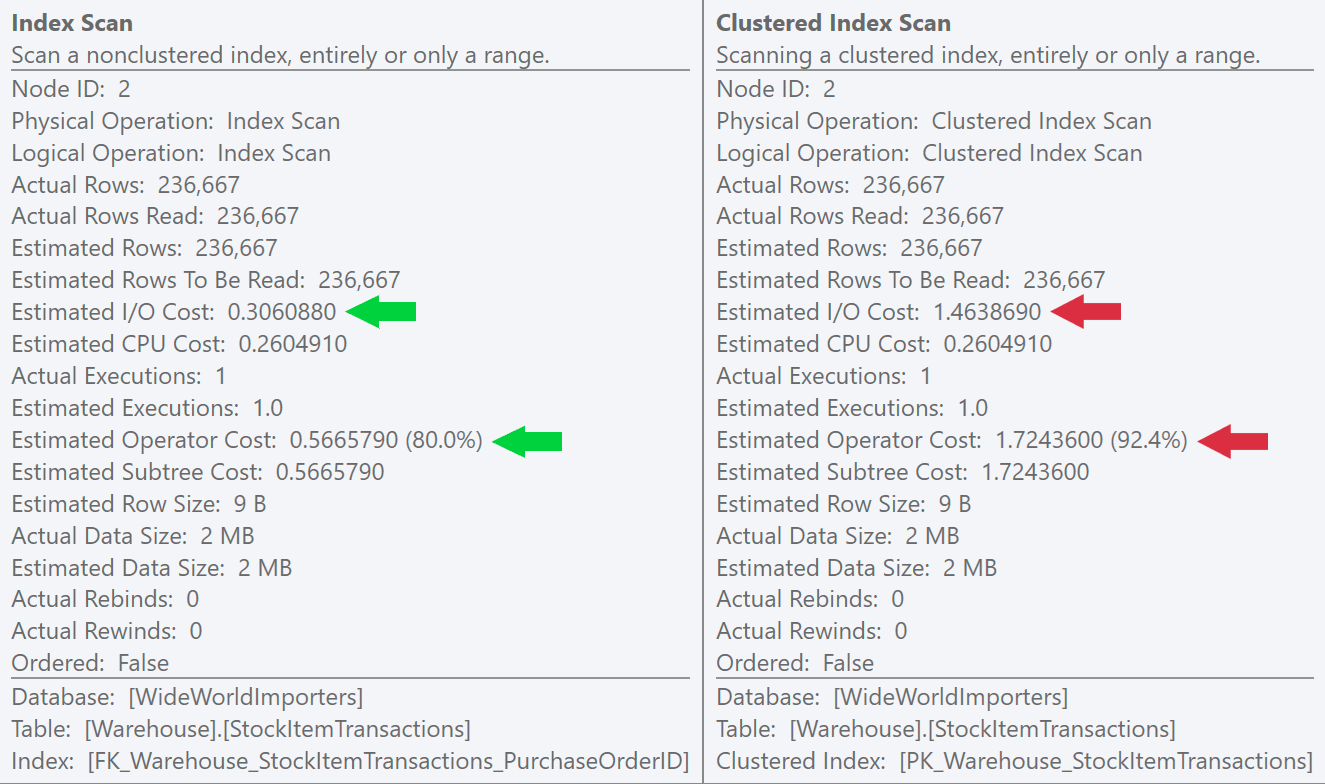
We can see this difference even more clearly if we create a new, unique index on just the ID column (making it "redundant" with the clustered index, right?):
CREATE UNIQUE INDEX NewUniqueNCIIndex
  ON Warehouse.StockItemTransactions(StockItemTransactionID);
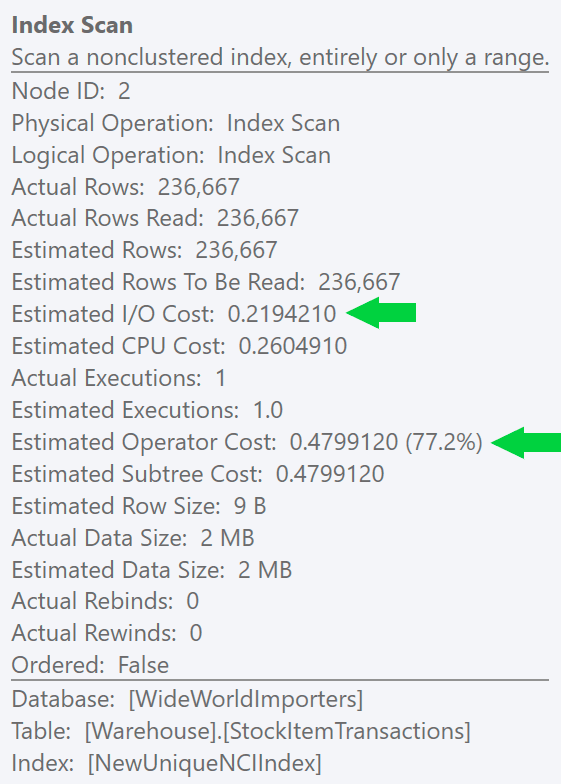 Running a similar query with an explicit index hint produces the same plan shape, but an even lower estimated I/O cost (and even lower durations) – see image at right. And if you run the original query without the hint, you'll see that SQL Server now chooses this index too.
It might seem obvious, but a lot of people would believe that the clustered index is the best choice here. SQL Server is almost always going to heavily favor whatever method will provide the cheapest way to perform all of the I/O, and in the case of a full scan, that's going to be the "skinniest" index. This can also happen with both types of seeks (singleton and range scans), at least when the index is covering.
Now, as always, that does not in any way mean that you should go and create additional indexes on all of your tables to satisfy count queries. Not only is that an inefficient way to check table size (again, see this article), but an index to support that would have to mean that you're running that query more often than you're updating the data. Remember that every index requires space on disk, space on memory, and all of the writes against the table must also touch every index (filtered indexes aside).
Summary
I could come up with many other examples that show when a non-clustered can be useful and worth the cost of maintenance, even when duplicating the key column(s) of the clustered index. Non-clustered indexes can be created with the same key columns but in a different key order, or with different ASC/DESC on the columns themselves to better support an alternate presentation order. You can also have non-clustered indexes that only carry a small subset of the rows through the use of a filter. Finally, if you can satisfy your most common queries with skinnier, non-clustered indexes, that is better for memory consumption as well.
But really, my point of this series is merely to show a counter-example that illustrates the folly of making blanket statements like this one. I'll leave you with an explanation from Paul White who, in a DBA.SE answer, explains why such a non-clustered index can in fact perform much better than a clustered index. This is true even when both use either type of seek:
The post Performance Myths : Clustered vs. Non-Clustered Indexes appeared first on SQLPerformance.com.
29 Mar 00:02
SQL Server on Linux: Running jobs with SQL Server Agent
by SQL Server Team
In keeping with our goal to enable SQL Server features across all platforms supported by SQL Server, Microsoft is excited to announce the preview of SQL Server Agent on Linux in SQL Server vNext Community Technology Preview (CTP) 1.4.
SQL Server Agent is a component that executes scheduled administrative tasks, called “jobs.” Jobs contain one or more job steps. Each step contains its own task such as backing up a database. SQL Server Agent can run a job on a schedule, in response to a specific event, or on demand. For example, if you want to back up all the company databases every weekday after hours, you can automate doing so by scheduling an Agent job to run a backup at 22:00 Monday through Friday.
We have released SQL Server Agent packages for Ubuntu, RedHat Enterprise Linux, and SUSE Linux Enterprise Server that you can install via apt-get, yum, and zypper. Once you install these packages, you can create T-SQL Jobs using SSMS, sqlcmd, and other GUI and command line tools.
Here is a simple example:
- Create a job
CREATE DATABASE SampleDB ;
USE msdb ;
GO
EXEC dbo.sp_add_job
@job_name = N’Daily SampleDB Backup’ ;
GO
- Add one or more job steps
EXEC sp_add_jobstep
@job_name = N’Daily SampleDB Backup’,
@step_name = N’Backup database’,
@subsystem = N’TSQL’,
@command = N’BACKUP DATABASE SampleDB TO DISK = \
N”/var/opt/mssql/data/SampleDB.bak” WITH NOFORMAT, NOINIT, \
NAME = ”SampleDB-full”, SKIP, NOREWIND, NOUNLOAD, STATS = 10′,
@retry_attempts = 5,
@retry_interval = 5 ;
GO
- Create a job schedule
EXEC dbo.sp_add_schedule
@schedule_name = N’Daily SampleDB’,
@freq_type = 4,
@freq_interval = 1,
@active_start_time = 233000 ;
USE msdb ;
GO
- Attach the schedule and add the job server
EXEC sp_attach_schedule
@job_name = N’Daily SampleDB Backup’,
@schedule_name = N’Daily SampleDB’;
GO
EXEC dbo.sp_add_jobserver
@job_name = N’Daily SampleDB Backup’,
@server_name = N'(LOCAL)’;
GO
- Start job
EXEC dbo.sp_start_job N’ Daily SampleDB Backup’ ;
GO
Limitations:
The following types of SQL Agent jobs are not currently supported on Linux:
- Subsystems: CmdExec, PowerShell, Replication Distributor, Snapshot, Merge, Queue Reader, SSIS, SSAS, SSRS
- Alerts
- DB Mail
- Log Shipping
- Log Reader Agent
- Change Data Capture
Get started
If you’re ready to get started with SQL Server on Linux, here’s how to install the SQL Server Agent package via apt-get, yum, and zypper. And here’s how to create your first T-SQL job and show you to use SSMS with SQL Agent.
Learn more
- Read detailed documentation.
- Register for the next Engineering Town Hall webinar.
- Sign up to stay informed about new SQL Server on Linux developments.
- If you have a workload ready to run on SQL Server v.Next, sign up for the SQL Server Early Adoption Program (EAP).
11 Mar 17:46
 [Advertisement] Release!
is a light card game about software and the people who make it. Play with 2-5 people, or up to 10 with two copies - only $9.95 shipped!
[Advertisement] Release!
is a light card game about software and the people who make it. Play with 2-5 people, or up to 10 with two copies - only $9.95 shipped!


Representative Line: The Installer Configuration
by Remy Porter
John N supports a C# project that, on first run, needs to initialize a database. It pulls that data from a dbInstallFilePath, controlled by the application .config file. This brings us to our representative line:
<add key="dbInstallDbFilePath" value="C:\TestData\" />Isn't that just terrible? Aren't you just cringing, or calling for the responsible developer to be sacked? Oh, wait, you're sitting here, scratching your head, wondering about how this is a WTF, aren't you? Let me provide a little more context.
       <!--
        Stephen - 18th July 2013
        ##
        ## IMPORTANT - DON'T put a backslash at the end of the path below!!!!!
        ##
        I don't know why, but it sometimes makes a difference that the DbFilePath config
        has to be specified WITHOUT the trailing backslash
        It seems that if a database is created using a path specifiecation that includes
        a single backslash, and an attempt is made to restore the database in-place
        (using WITH MOVE ... REPLACE), then it will fail if the restore command uses
        double backslash in the path, and similarly, restoring a database that was created
        with double backslash in the path will only restore safely if the restore
        specifies double backslash.
        REALLY DON'T PUT A BACKSLASH. EVER.
      -->
      <add key="dbInstallDbFilePath" value="C:\TestData\" />
11 Mar 17:34
In the Cloud: Visual Studio 2017
by John Paul Cook
Visual Studio 2017 has new functionality to help you build apps for both on-premise and cloud solutions. The screen capture of the Visual Studio 2017 Enterprise installer shows a different interface than the previous several versions of Visual Studio...(read more)
11 Mar 17:33
How Adopting DevOps for the Database Enhances IT Security
by Yaniv Yehuda
A common fear that I hear from organizations in the process of adopting DevOps is that they are putting their IT security at risk. Many fear that continuous processes, automated testing, and rapid releases compromise code security. DevOps and security personnel have seemingly opposite objectives, DevOps wants to rapidly develop and deploy software, while security […]
The post How Adopting DevOps for the Database Enhances IT Security appeared first on DATAVERSITY.
11 Mar 17:33
Gartner names Microsoft a leader in the Magic Quadrant for Data Management Solutions for Analytics (DMSA)
by SQL Server Team
This post was authored by Rohan Kumar, General Manager, DS SQL Engineering.
We’re excited that Gartner has recognized Microsoft as a leader in the Magic Quadrant for Data Management Solutions for Analytics (DMSA). Gartner defines the DMSA as a system for storing, accessing, processing, and delivering data intended for one of the primary use cases that support analytics.[1] These use cases include supporting ongoing traditional, operational, logical, and context-independent data warehousing.[2] The DMSA thus represents an evolution from the traditional data warehousing approach. Although data warehousing continues to be a major use case, the DMSA encompasses new trends such as data lakes and context-independent data warehouses that enable data science uses cases.[3]

At Microsoft we have been championing a similar evolution to make big data processing and analytics simpler and more accessible to transform data into intelligent action. We do this through SQL Server 2016 and the Cortana Intelligence Suite to offer a comprehensive portfolio of solutions to do data warehousing, big data, and advanced analytics solutions. SQL Server as an example gives organizations a breadth of capabilities to do analytics on-premises, including features like real-time operational analytics, in-memory columnstore, integration with Hadoop via PolyBase, in-database analytics with R Services built in, and fast time to market with reference architectures. In the cloud, we offer Cortana Intelligence Suite, which has SQL Data Warehouse, a truly elastic, scale-out data warehouse; HDInsight, a managed Hadoop service that runs Hortonworks Data Platform; Data Lake Analytics, an on-demand analytics job service to power intelligent action; Data Lake Store, a no-limits data lake to power intelligent action; and DocumentDB, a global scale-out NoSQL service with <10ms guarantees.
In providing customers with these solutions, our goal is to help them realize the full potential of their data and give them the ability to transform their business. As an example, Tangerine uses a data warehouse on-premises with Hadoop in the cloud so that it can query relational and nonrelational data to accelerate its time to insights. With such a solution, Tangerine is looking to transform the financial services industry by building a predictive, context-aware application that gives it information based on the time and where the customer is.
We’re excited that Gartner recognized both our ability to execute and the completeness of vision by placing Microsoft in the leader’s quadrant of the Magic Quadrant for Data Management Solutions for Analytics. Gartner notes that leaders have been able to adapt rapidly to this changing market and have pursued all the primary use cases Gartner identified to support analytics.[4] The push for cloud has also affected the relative ratings among the leaders.[5] In the coming year, we will continue to focus on delivering the highest value to our customers and partners through innovations that make data warehousing, big data, and analytics even more accessible to transform data into intelligent action. You can read the full report, “Magic Quadrant for Data Management Solutions for Analytics,” here.
To learn more:
[1] Source: Gartner’s Magic Quadrant for Data Management Solutions for Analytics, 2017.
[2] Source: Gartner’s Magic Quadrant for Data Management Solutions for Analytics, 2017.
[3] Source: Gartner’s Magic Quadrant for Data Management Solutions for Analytics, 2017.
[4] Source: Gartner’s Magic Quadrant for Data Management Solutions for Analytics, 2017.
[5] Source: Gartner’s Magic Quadrant for Data Management Solutions for Analytics, 2017.
11 Mar 17:33


Identifying a row’s physical location
by Wayne Sheffield
While you may not need to worry about the physical location of a row very often, every so often the need comes up. In a few of my earlier posts (here), I have needed this information to prove a point. This post shows how to identify a row’s physical location. It will also show the various methods used to work with this value once returned.
Acquiring the physical location of a row
SQL Server 2008 introduced a new virtual system column: “%%physloc%%”. “%%physloc%%” returns the file_id, page_id and slot_id information for the current row, in a binary format. Thankfully, SQL Server also includes a couple of functions to split this binary data into a more useful format. Unfortunately, Microsoft has not documented either the column or the functions.
The first of these functions is “sys.fn_PhysLocFormatter”. This scalar function receives the %%physloc%% virtual column as an input. It splits the input apart into the file, page and slot information, and then returns the information in a column formatted in the form file_id:page_id:slot_id. This is the function that I used in the above posts.
The second function is “sys.fn_PhysLocCracker”. As a table-valued function, it is used either directly in the FROM clause or by using the cross apply operator. It also receives the %%physloc%% virtual column as an input, and returns the file_id, page_id and slot_id as columns in a table. In at least one of my previous posts, this would have been a better function to have used.
Example usage:
Let’s see some examples of using the virtual column and these functions. In the following script, we start off by creating a temporary table with 700 rows of data. The first query after that uses the sys.fn_PhysLocFormatter function, returning all of the physical location information about the row into one column. The subsequent query uses the sys.fn_PhysLocCracker function, returning the file_id, page_id and slot_id values from the physical location of the row. This allows these values to be used in subsequent processing – say maybe for automating DBCC Page?
IF OBJECT_ID('tempdb.dbo.#TestTable') IS NOT NULL DROP TABLE #TestTable;
WITH Tens   (N) AS  (SELECT 1 UNION ALL SELECT 1 UNION ALL
                     SELECT 1 UNION ALL SELECT 1 UNION ALL
                     SELECT 1 UNION ALL SELECT 1 UNION ALL
                     SELECT 1 UNION ALL SELECT 1 UNION ALL
                     SELECT 1 UNION ALL SELECT 1),
     Hundreds(N) AS (SELECT 1 FROM Tens t1, Tens t2),
     Millions(N) AS (SELECT 1
                     FROM   Hundreds t1
                     CROSS JOIN Hundreds t2
                     CROSS JOIN Hundreds t3),
     Tally   (N) AS (SELECT ROW_NUMBER()
                            OVER (ORDER BY (SELECT NULL))
                     FROM Millions)
SELECT  TOP (700) REPLICATE('Wayne''s World Rocks(' + RIGHT('000'+ CONVERT(VARCHAR(15), N), 3) + '!)', 48) AS Column1
INTO    #TestTable
FROM    Tally;

SELECT  *, sys.fn_PhysLocFormatter(%%physloc%%) AS [File:Page:Slot]
FROM    #TestTable;

SELECT  *
FROM    #TestTable
CROSS APPLY sys.fn_PhysLocCracker(%%physloc%%);
This returns:

So there you go. %%physloc%% identifies the physical location of a row. Then the sys.fn_PhysLocFormatter function will decipher this and expose it in a composite form, while the sys.fn_PhysLocCracker function will decipher it and return the values as columns in a result set. You can use whichever one suits your needs.
Performance
When I ran these statements with the “Include Actual Execution Plans” option enabled, I saw:
The bottom statement has the infamous “Table Valued Function” operator in it. SQL Server uses this operator when dealing with a multi-statement table-valued function. If you happened to have read my recent post comparing functions, you will recall that these are the worst performing type of functions. So I decided to look at the code of these functions, to see if sys.fn_PhysLocCracker could be improved upon. Running sp_helptext on these functions returns the following code:
sys.fn_PhysLocFormatter
Text
---------------------------------------------------------------------------------------------------------------------------------------------------------------------------------------------------------------------------------------------------------------
-------------------------------------------------------------------------------
-- Name: sys.fn_PhysLocFormatter
--
-- Description:
--	Formats the output of %%physloc%% virtual column
--
-- Notes:
-------------------------------------------------------------------------------
create function sys.fn_PhysLocFormatter (@physical_locator binary (8))
returns varchar (128)
as
begin

	declare @page_id	binary (4)
	declare @file_id	binary (2)
	declare @slot_id	binary (2)

	-- Page ID is the first four bytes, then 2 bytes of page ID, then 2 bytes of slot
	--
	select @page_id = convert (binary (4), reverse (substring (@physical_locator, 1, 4)))
	select @file_id = convert (binary (2), reverse (substring (@physical_locator, 5, 2)))
	select @slot_id = convert (binary (2), reverse (substring (@physical_locator, 7, 2)))

	return '(' + cast (cast (@file_id as int) as varchar) + ':' +
				 cast (cast (@page_id as int) as varchar) + ':' +
				 cast (cast (@slot_id as int) as varchar) + ')'
end
sys.fn_PhysLocCracker
Text
---------------------------------------------------------------------------------------------------------------------------------------------------------------------------------------------------------------------------------------------------------------
-------------------------------------------------------------------------------
-- Name: sys.fn_PhysLocCracker
--
-- Description:
--	Cracks the output of %%physloc%% virtual column
--
-- Notes:
-------------------------------------------------------------------------------
create function sys.fn_PhysLocCracker (@physical_locator binary (8))
returns @dumploc_table table
(
	[file_id]	int not null,
	[page_id]	int not null,
	[slot_id]	int not null
)
as
begin

	declare @page_id	binary (4)
	declare @file_id	binary (2)
	declare @slot_id	binary (2)

	-- Page ID is the first four bytes, then 2 bytes of page ID, then 2 bytes of slot
	--
	select @page_id = convert (binary (4), reverse (substring (@physical_locator, 1, 4)))
	select @file_id = convert (binary (2), reverse (substring (@physical_locator, 5, 2)))
	select @slot_id = convert (binary (2), reverse (substring (@physical_locator, 7, 2)))

	insert into @dumploc_table values (@file_id, @page_id, @slot_id)
	return
end
It seems obvious to me that the multi-statement function was created by cloning the scalar function. Furthermore, this code can be improved upon and converted into an inline table-valued function. An inline table-valued function for this functionality would look like this:
CREATE FUNCTION sys.fn_PhysLocCracker (@physical_locator binary (8))
RETURNS TABLE
AS
RETURN
SELECT CONVERT(INTEGER, CONVERT (BINARY (4), REVERSE (SUBSTRING (@physical_locator, 1, 4)))) AS page_id,
       CONVERT(INTEGER, CONVERT (BINARY (2), REVERSE (SUBSTRING (@physical_locator, 5, 2)))) AS file_id,
       CONVERT(INTEGER, CONVERT (BINARY (2), REVERSE (SUBSTRING (@physical_locator, 7, 2)))) AS slot_id;
Now, since this is an undocumented function, I don’t expect that this function will ever be upgraded. But if you ever need it, you could create it yourself. Alternatively, you could just code it into the cross apply operator yourself, like so:
SELECT  *
FROM    #TestTable
CROSS APPLY (SELECT CONVERT(INTEGER, CONVERT (BINARY (4), REVERSE (SUBSTRING (%%physloc%%, 1, 4)))) AS page_id,
                    CONVERT(INTEGER, CONVERT (BINARY (2), REVERSE (SUBSTRING (%%physloc%%, 5, 2)))) AS file_id,
                    CONVERT(INTEGER, CONVERT (BINARY (2), REVERSE (SUBSTRING (%%physloc%%, 7, 2)))) AS slot_id) ca;
Which will return the same information, without the performance inhibiting multi-statement table-valued function being used.
The post Identifying a row’s physical location appeared first on Wayne Sheffield.
11 Mar 17:33

Hybrid-BI data platform network architecture
by jorg
This blog post gives an overview of a typical hybrid Azure/on-premises BI data platform network architecture. The most important settings, configurations, shortcomings and other things you should take into account are described. For more details and in-depth documentation links to Microsoft pages are provided at the bottom of this post.
The following common scenarios are covered:
· Write data from on-premises data sources to an Azure SQL Database or Azure SQL Data Warehouse using SQL Server Integration Services.
· Use the On-Premises Data Gateway (or ADF gateway) to make on-premises sources available for various Azure services like PowerBI.com and Azure Data Factory, or to be able to process an Azure Analysis Services cube with on-premises data.
· Connect to an Azure SQL Database using client tools or PowerBI.com.
· Connect to an Azure Analysis Services tabular model using client tools or PowerBI.com.
The architecture diagram below (click to open) shows how the different on-premises resources connect to Azure services. For every connection the ports that should be open in your firewall, network protocols, encryption methods and authentication types are shown.

1. For the SSIS ADO.NET driver, use the following connection string parameters to use an encrypted connection: Encrypt=True and TrustServerCertificate=False.
2. All connections to Azure SQL Database require encryption (SSL/TLS) at all times while data is "in transit" to and from the database.
3. Set “Allow access to Azure services” property for your Azure SQL Database server to ON. Be aware that this means not only the Azure services in your Azure Subscription can reach your Azure SQL Database server, but all Azure services worldwide, also from other customers.
4. Only SQL Server Authentication is currently supported when connecting to an Azure SQL Database from SSIS, Power BI Desktop or Excel. Power BI Desktop models deployed to PowerBI.com will therefore also connect to an Azure SQL Database using SQL Server Authentication. The latest version of SQL Server Management Studio does support Azure Active Directory Integrated Authentication.
5. To access Azure SQL Database from your local computer, ensure the firewall on your network and local computer allows outgoing communication on TCP port 1433. Outgoing traffic can be filtered to allow only traffic to Azure datacenter IP addresses for your region. This is sometimes a requirement before organizations want to allow outgoing traffic through port 1433. Inbound connections for port 1433 can be blocked.
6. By default in Power BI Desktop, the “Encrypt connections” option is checked for your data source. If the data source doesn't support encryption, Power BI Desktop will prompt to ask if an unencrypted connection should be used.
7. Port 443 is used for default communication to PowerBI.com. Ports 5671 and 5672 can be used for Advanced Message Queuing Protocol (AMQP). Ports 9350 thru 9354 can be used for listeners on Service Bus Relay over TCP.
Links:
Load data from SQL Server into Azure SQL Data Warehouse (SSIS)
On-premises data gateway in-depth
Data Factory Data Management Gateway
Overview of Azure SQL Database firewall rules
Use Azure Active Directory Authentication for authentication with SQL Database or SQL Data Warehouse
What is Azure Analysis Services?
11 Mar 17:33

Harmful, Pervasive SQL Server Performance Myths
by Aaron Bertrand
Between my travels, presentations, and Q & A moderation, I talk to a lot of people about a wide variety of SQL Server performance issues. Recently, I've had a few interactions where people believe things that are either altogether incorrect, or are only correct in a very narrow set of use cases. Yet their adamance that these things are universally true is unsettling.

So, I thought I would start a new series to help quell some of these myths. Not to point at people and prove that they're wrong, but to stop the spread. When they make these blanket statements in their workplace, or on twitter, or in forums, if they go unchecked, they can "teach" impressionable or less experienced users.
Note that I don't intend to prove that these things are never true, because some can certainly be true in isolated or contrived scenarios. My aim is simply to demonstrate at least one case where it is not true; hopefully, this can start to change these stubborn mindsets.
Here are some of the "facts" I've been told recently, in no particular order:
- “A clustered index is always better than a non-clustered index”
- “Dynamic SQL made my query slow”
- “PIVOT is faster than SUM(CASE)”
- “NULLs always cause terrible performance issues”
- “Execution plans are useless except for missing indexes”
- "NOLOCK is okay because a lot of people use it"
As I write each post, I'll update this page by linking the corresponding item in the above list.
Do you have any performance myths that are passed around as absolute fact, but you suspect (or maybe even know) that they aren't always true? Let me know in the comments below, on twitter, or at abertrand@sentryone.com.
The post Harmful, Pervasive SQL Server Performance Myths appeared first on SQLPerformance.com.
11 Mar 17:33


Power BI and Excel options for Hadoop
by James Serra
Below I have attempted to list the various options for reporting off of Hadoop (HDInsight, HDP, Cloudera) using Power BI Desktop and Excel. Some of the data sources prompt you to choose the Data Connectivity mode of either Import or DirectQuery. For those that don’t you are limited to Import mode:
-
- Power BI via Microsoft Azure HDInsight Spark (Import or DirectQuery) This is in Beta. This works if HDInsight is using Blob storage or Azure Data Lake Storage (ADLS)
- Power BI via Microsoft Azure HDInsight (Import). This works if HDInsight is connected to Blob storage. If HDInsight is connected to ADLS, use the “Power BI via HDFS” connector instead
- Power BI via Spark (Import or DirectQuery) This is in Beta. This is for HDP/Cloudera and uses a different authentication level then the HDInsight Spark connector. NOTE: Cloudera recommends against using SparkSQL with CDH. SparkSQL uses a component called thrift server which is not supported by Cloudera (see here). For interactive applications they recommend Impala. There strategy is described here.
- Power BI via Impala (Import or DirectQuery). This is in Beta
- Power BI via SQL DW using PolyBase (Import). Note that DirectQuery is an option, but not supported with SQL DW so will import the data instead, which could greatly slow query performance
- Power BI via SQL Server 2016 using PolyBase (Import for HDInsight, DirectQuery creates MapReduce job in cluster for Cloudera/HDP, other sources will import the data instead)
- Power BI via HDFS (Import). This uses WebHDFS.
- Power BI via ODBC (if Hive ODBC, creates Hive job in cluster, so can be slow. For very fast querying, use Hive LLAP ODBC)
-
- Excel via Data Connection Wizard -> ODBC DSN -> Hive ODBC (Import)
- Excel via SQL Server 2016 using PolyBase (Import)
- Excel via PowerQuery/Hadoop File (HDFS) (Import). This uses WebHDFS
- Excel via PowerQuery/ODBC (Import)
- Excel via PowerQuery/SQL Server 2016 using PolyBase (Import)
- Excel via PowerQuery/Microsoft Azure HDInsight (Import)
“Import” mode requires all data from Hadoop to be copied into Power BI/Excel and then filtered. So import will first load your data (“snapshot”) into a local Power BI model and then run reports against that data, which means that interactive visualizations are not live but rather using data from the last snapshot.
With “DirectQuery” mode, the query is passed down into the data source and only the results are returned back (see Use DirectQuery in Power BI Desktop). So when using DirectQuery you are using live data. Note that Power BI Q&A and Quick Insights is not available for DirectQuery datasets (see here for other limitations).
EXCEPTION: If in Power BI you use the “Edit Queries” option, it will actually try to push down the query if you choose “Import” mode. So the difference in this case from DirectQuery mode is that Import will fallback to running locally if it can’t execute part of the query on the server, while DirectQuery will tell you the query isn’t supported. So an Import can take hours instead of failing fast like DirectQuery will do.
By using PolyBase, you use a CREATE EXTERNAL TABLE to point to the data stored in a Hadoop cluster. Thereafter, the Hadoop data is seen as a regular table, hiding complexity from the end user.
I also wanted to mention that Power BI can connect to Azure Blob Storage and Azure Data Lake Store (beta), and Excel can connect to Azure Blob Storage.
There are many more data sources that Power BI Desktop can connect to.
11 Mar 17:33


Working with SQLSaturday SpeedPASSes
by Wayne Sheffield
SQLSaturday SpeedPASSes
I’ve been working with running SQLSaturdays in the Richmond, VA area for several years now. It seems that every year, I end up blogging something new. Frequently, this ends up being a script of some kind to help me out. This post follows this theme by introducing a script for working with SQLSaturday SpeedPASSes.
The SpeedPASS for SQLSaturday is used for many things. It has the attendee’s admission ticket, lunch ticket, name badge and raffle tickets for all of the vendors. What most organizers do for their local SQLSaturday is to do whatever it takes to entice the attendee to pre-print their ticket. However, it seems that there are always people that forget, or didn’t realize that they should have done this. Last year, at our event, we had about 40% of the people that needed their tickets printed out for them on the spot. This causes lines waiting as we hunt up their SpeedPASS on the registration site, or find it in an Excel document to get the link to those that have already been downloaded.
I mentioned getting the link in an Excel document. This is because PASS generates the SpeedPASS into a PDF file that has a GUID as its filename. Specifically, it is the “Invoice ID” guid in the attendees registration. The Excel document that the site administrators can download of the registrations has this, along with their name. So we look up the name, find the invoice id, and match this to the PDF file for that person. Open it up, and print it out. One by one. Does this sound like a cursor to you also?
Changing things up
This year, our organizing committee decided that this was too much hassle, and that we were going to print out the SpeedPASSes for everyone ahead of time and to have it ready for them as they walk in the door. What we have accomplished is to shift the line from waiting to print out their SpeedPASS, to finding their SpeedPASS. However, we have hundreds of these SpeedPASSes to deal with. Now we have to get all of the PDFs, open them up (one-by-one), and print them out. After they have all been printed, they need to be sorted by last name. Manually.

Hello… this is insane. Surely, there has to be a better way. So I started looking.
A better way…
My good friend, Mr. Google, found this post by Kendal Van Dyke. This post has a PowerShell script that will download and merge all of the PDFs for selected attendees into one big PDF. This enables printing out all of the SpeedPASSes at once, instead of one-by-one. However, I have a couple of problems with this script in it’s current form. First, the instructions for how to get the information from the SQLSaturday admin site have changed (they did do a major web site change last year). Secondly, it downloads all of the PDFs one-by-one, and puts them into a temporary directory, where they are all merged together. In file-name order. Not alphabetically. This means that the manual sorting is still necessary. But hey – it’s PowerShell. Surely we can come up with a way to do this sorting for us!
So I decided to re-write this script to suit my needs. Kendal’s script downloads the SpeedPASS PDF files one-by one. However, the admin site allows us to download all of them in one zip file. I like this approach better. I ended up making two major changes to the script. The first change requires pre-downloading and extracting all of the SpeedPASS files. The second change is to get them to merge alphabetically. Like Kendal’s script, this uses the PDFSharp assemblies. This requires using PowerShell 3.0 or higher.
The new instructions for using this script
- Download and save the PDFSharp Assemblies from http://pdfsharp.codeplex.com/releases.
- Unblock the zip file (right-click the file, select properties, and click “Unblock”. See Kendal’s post for pictures showing you how to do this), and save the files in the zip file to your desired location.
- Put this location in the $PdfSharpPath variable in the script.
- Log into the SQLSaturday admin site and navigate to Event Settings > Manage SpeedPASS.
- Cick the button to “Generate All” SpeedPASSes.
- Click the button to “Download SpeedPASSs” and save to disk.
- Extract the files from the zip file.
- Put this location in the $SpeedPASSPDFPath variable in the script.
- Go to Event Settings > Manage Registrations.
- Click the “Export to Excel” button.
- Save to disk.
- Open the Excel file and Sort as desired (I used lastname / firstname).
- If you only want to do the speakers, filter for complimentary lunches or not.
- Copy the InvoiceID column from Excel to a text file and save the file.
- Put the complete filename for this file in the $SpeedPASSUrlPath variable in the script.
- Ensure that the following variables are set. Run the script to merge the PDF files into a single PDF.
- Set the $PdfSharpPath variable to the location of PDFSharp DLL (from #1 above).
- Set the $SpeedPASSPDFPath variable to the location where the extracted PDF files are (from #2 above).
- Set the $SpeedPASSUrlPath variable to the location of the text file with the InvoiceID values in it (from #5 above).
- Finally, open the merged PDF file. You will see that they are ordered by how you ordered the Excel spreadsheet. When you’re ready, print them out.
The PowerShell script.
Some of it is exactly how Kendal’s is, but the Merge-PDF2 function is a re-write of his Merge-PDF function to handle the differences from above.
<#
Source: http://www.kendalvandyke.com/2013/09/practical-powershell-merge-sqlsaturday.html

Directions:
1. Download and save the PDFSharp Assemblies from http://pdfsharp.codeplex.com/releases.
    Unblock zip (see above link), and save files to a location.
    Put this location in the $PdfSharpPath variable below.
1. Log into admin site & navigate to Event Settings > Manage SpeedPASS.
    Generate all SpeedPass.
    Download and save to disk.
    Extract zip file. Put this location in the $SpeedPASSPDFPath variable below.
2. Go to Event Settings > Manage Registrations.
    Export to Excel.
    Save to disk
3. Open Excel file and Filter for comp or not. Sort as desired (lastname / firstname?)
4. Copy the column with the InvoiceID from Excel to a text file and save.
    Put the full path & filename of this file in the $SpeedPASSUrlPath variable below.
5. Run the script to merge the PDF files into a single PDF file.
    a. Set the $PdfSharpPath variable to the location of PDFSharp DLL (from #1 above)
    b. Set the $SpeedPASSUrlPath variable to the location of the text file with the InvoiceID values in it.
    c. Set the $SpeedPASSPDFPath variable to the location where the extracted PDF files are.
6. Print the merged PDF.
#>
# Change the following path to where you've put the PDFsharp DLL
$PdfSharpPath = 'D:\PDFsharp\GDI+\PdfSharp.dll'

# Change the following path to where the TXT file with SpeedPASS URLs is
$SpeedPASSUrlPath = "I:\SQL Saturday\610\SpeedPass\SpeedPass-Comp.txt"
#$SpeedPASSUrlPath = "I:\SQL Saturday\610\SpeedPass-NoComp.txt"

# Change the following path to where you have the extracted SpeedPasses at
$SpeedPASSPDFPath = 'I:\SQL Saturday\610\SpeedPASS\PDF\'

# Load the PdfSharp Assembly
Add-Type -Path $PdfSharpPath

$OutputPath = [System.IO.Path]::ChangeExtension($SpeedPASSUrlPath, 'PDF')

Function Merge-PDF2 {
<#
Based on Merge-PDF.
Get the PDF Files in the order that the InvoiceID is within the text file.
#>
    Param($SourcePath, $DestinationFile)

    #Delete $DestinationFile if it exists
    if (Test-Path $DestinationFile) {
        Remove-Item $DestinationFile
    }

    $output = New-Object PdfSharp.Pdf.PdfDocument;
    $PdfReader = [PdfSharp.Pdf.IO.PdfReader];
    $PdfDocumentOpenMode = [PdfSharp.Pdf.IO.PdfDocumentOpenMode];

    Get-Content -Path $SpeedPASSUrlPath | Where-Object {
        -not [String]::IsNullOrEmpty($_)
    } | ForEach-Object {
        Write-Host "Source File: $SourcePath$_.PDF";
        $input = New-Object PdfSharp.Pdf.PdfDocument;
        $input = $PdfReader::Open("$SourcePath$_.PDF", $PdfDocumentOpenMode::Import);
        $input.Pages | %{$output.AddPage($_)} | Out-Null;
    }

    Write-Host "Saving Destination File: $DestinationFile";
    $output.Save($DestinationFile);
}

try {
    # Call the merge function
    Merge-PDF2 -SourcePath $SpeedPASSPDFPath -DestinationFile $OutputPath;

    Write-Host "Merge Complete!"
    Write-Host "The merged SpeedPASS file is located at $OutputPath"

} catch {
    Write-Host "Uh-oh, something went wrong..."
    Write-Host 'Review $Error to figure out what happened'
}

Remove-Variable -Name OutputPath
There you have it. Working with SQLSaturday SpeedPASSes to generate one PDF for all selected SpeedPASSes sorted by name. Eazy-Peazy.
You might be wondering what is up with that picture up above. Yes, it’s a Dr. Who picture. My friend, Grant Fritchey, challenged folks to incorporate this picture into a technical post – read his challenge here. I hope that I did it justice.
The post Working with SQLSaturday SpeedPASSes appeared first on Wayne Sheffield.
11 Mar 17:32


SQL DB now supports 4TB max database size
by James Serra
Azure SQL Database (SQL DB) has increased its max database size from 1TB to 4TB at no additional cost.
Customers using P11 and P15 premium performance levels can use up to 4 TB of included storage at no additional charge. This 4 TB option is currently in public preview in the following regions: US East 2, West US, West Europe, South East Asia, Japan East, Australia East, Canada Central, and Canada East.
When creating a P11/P15, the default storage option of 1TB is pre-selected. For databases located in one of the supported regions, you can increase the storage maximum to 4TB. For all other regions, the storage slider cannot be changed. The price does not change when you select 4 TB of included storage.
For existing P11 and P15 databases located in one of the supported regions, you can increase the maxsize storage to 4 TB. This can be done in the Azure Portal, in PowerShell or with Transact-SQL.
The 4 TB database maxsize cannot be changed to 1 TB even if the actual storage used is below 1 TB.
Also, available now in preview is a new service tier for Azure SQL Database, called Premium RS, which is designed for IO-intensive workloads where a limited durability guarantee and lower SLA is acceptable in exchange for a cheaper cost. Target scenarios for Premium RS are developments using in-memory technology, testing high performance workloads, and production analytic workloads. Premium RS is available for singleton databases and elastic database pools.
More info:
Announcing Azure SQL Database Premium RS, 4TB storage options, and enhanced portal experience
SQL Database options and performance: Understand what’s available in each service tier
11 Mar 17:32
Backing up a VLDB to Azure Blob Storage
by Dimitri Furman
Reviewed by: Pat Schaefer, Rajesh Setlem, Xiaochen Wu, Murshed Zaman
All SQL Server versions starting from SQL Server 2012 SP1 CU2 support Backup to URL, which allows storing SQL Server backups in Azure Blob Storage. In SQL Server 2016, several improvements to Backup to URL were made, including the ability to use block blobs in addition to page blobs, and the ability to create striped backups (if using block blobs). Prior to SQL Server 2016, the maximum backup size was limited to the maximum size of a single page blob, which is 1 TB.
With striped backups to URL in SQL Server 2016, the maximum backup size can be much larger. Each block blob can grow up to 195 GB; with 64 backup devices, which is the maximum that SQL Server supports, that allows backup sizes of 195 GB * 64 = 12.19 TB.
(As an aside, the latest version of the Blob Storage REST API allows block blob sizes up to 4.75 TB, as opposed to 195 GB in the previous version of the API. However, SQL Server does not use the latest API yet.)
In a recent customer engagement, we had to back up a 4.5 TB SQL Server 2016 database to Azure Blob Storage. Backup compression was enabled, and even with a modest compression ratio of 30%, 20 stripes that we used would have been more than enough to stay within the limit of 195 GB per blob.
Unexpectedly, our initial backup attempt failed. In the SQL Server error log, the following error was logged:
Write to backup block blob device https://storageaccount.blob.core.windows.net/backup/DB_part14.bak failed. Device has reached its limit of allowed blocks.
When we looked at the blob sizes in the backup storage container (any storage explorer tool can be used, e.g. Azure Storage Explorer), the blob referenced in the error message was slightly over 48 GB in size, which is about four times smaller than the maximum blob size of 195 GB that Backup to URL can create.
To understand what was going on, it was helpful to re-read the “About Block Blobs” section of the documentation. To quote the relevant part: “Each block can be a different size, up to a maximum of 100 MB (4 MB for requests using REST versions before 2016-05-31 [which is what SQL Server is using]), and a block blob can include up to 50,000 blocks.”
If we take the error message literally, and there is no reason why we shouldn’t, we must conclude that the referenced blob has used all 50,000 blocks. That would mean that the size of each block is 1 MB (~48 GB / 50000), not the maximum of 4 MB that SQL Server could have used with the version of REST API it currently supports.
How can we make SQL Server use larger block sizes, specifically 4 MB blocks? Fortunately, this is as simple as using the MAXTRANSFERSIZE parameter in the BACKUP DATABASE statement. For 4 MB blocks, we used the following statement:
BACKUP DATABASE … TO
URL = 'https://storageaccount.blob.core.windows.net/backup/DB_part01.bak',
…
URL = 'https://storageaccount.blob.core.windows.net/backup/DB_part20.bak',
WITH COMPRESSION, MAXTRANSFERSIZE = 4194304, BLOCKSIZE = 65536, CHECKSUM, FORMAT, STATS = 5;
This time, backup completed successfully, with each one of the 20 blobs/stripes being slightly less than 100 GB in size. We could have used fewer stripes to get closer to 195 GB blobs, but since the compression ratio was unknown in advance, we chose a safe number.
Another backup parameter that helps squeeze more data within the limited number of blob blocks is BLOCKSIZE. With the maximum BLOCKSIZE of 65536, the likelihood that some blob blocks will be less than 4 MB is reduced.
Conclusion: If using Backup to URL to create striped backups of large databases (over 48 GB per stripe), specify MAXTRANSFERSIZE = 4194304 and BLOCKSIZE = 65536 in the BACKUP statement.
11 Mar 17:31


Thinking about Chapters (aka Groups)
by SQLAndy
I think it was 2003 or 2004 when someone from PASS came to Orlando and helped start what became OPASS. They stressed the need to find speakers each month and the need to have multiple people involved so that the group wouldn’t die if someone moved on. The formula was find a sponsor, find a speaker, have a meeting, repeat. I don’t recall much in the way of coaching beyond that, or since. We were moderately successful I guess – we had some meetings, averaging 10 or so attendees – but it wasn’t sustainable. oPASS went dark after a year. When I restarted the group in mid 2006 I went to bi-monthly meetings to reduce the pressure to find speakers and sponsors, but otherwise the formula was the same. Since then we’ve moved to monthly meetings (more or less), split into two groups, and otherwise tried to keep the plate spinning.
I write this knowing that I’ve been to relatively few different group meetings; oPASS, MagicPASS, Jax, Space Coast, West Palm, Pinellas, ONETUG (.net), and Dallas. Maybe I missed one or two. But all are done just about the same and have the same challenges. Kendal Van Dyke has perhaps experimented the most with the formula at MagicPASS, but it’s still been the meet every month formula.
In 2007 we started SQLSaturday for many reasons, but high among those was to have a fund raiser and membership drive. That’s what groups do, or should do after all. It’s been successful on both counts, but we’ve never translated that mailing list (~2000) to increased monthly attendance, and from what I’ve seen that is true in most cases. It doesn’t mean poor marketing to the list but rather serving the market in different ways.
There are a lot of factors that impact chapter success. Finding good speakers/topics is perhaps the biggest (not counting the size of the hosting city). Sponsors are not always easy, but there are options. Venue can take work but is doable, and isn’t an every month problem. It’s a grind to figure out and market the meeting every month. Offsetting those for the group leader is the chance to network and raise their profile, and to earn a free registration to the Summit.
Many groups have found new members via Meetup, because Meetup sends a list of local events to their list and it’s surprisingly effective. The downside is that registration is on Meetup and you lose a bit of the connection back to the chapter (and to PASS) without some extra work. Here in Orlando the .Net group (ONETUG) relies on Meetup and does pretty well.
All of that leads to this – how we frame the mission of the chapter matters. For too long (forever) we have framed it in here in Orlando as evening meetings on a once a month basis with a sponsor, speaker, some food, and maybe a bit of networking, plus SQLSaturday (and our student seminar). I’d guess that most chapters are similar.
For at least the past year I’ve been thinking we have the wrong mission statement (and maybe I’ve just had it wrong all these years), but I think it should be to “serve the Orlando SQL (and close relatives) community”. Now don’t read that as me saying we haven’t served that community, I just don’t know that we had that over arching view.
If you back up from the “we have to meet every month” mantra and think about how to serve the community best and how to leverage advantages you have from being local, does that change the game? I like the idea of thinking of doing something each quarter, maybe something like this:
- Q1 – a meetup with 2 speakers, 2 hours of content, (or 1 speaker for 2 hours, its not rigid) and not much else. Food, optional. Sponsor optional. Could we have more than one? Sure.
- Q2 – Join in supporting Code Camp with speakers, sponsors, marketing, and maybe do a full day paid class or a half day free one, or a smaller BI event, or …pick. Have a meetup if a speaker materializes.
- Q3 – Host a couple networking lunches, with perhaps a short (15-20 min) presentation about something, in various locations. Maybe a become a speaker class.
- Q4 – SQLSaturday, student seminar, and a holiday dinner
Don’t get stuck on the quarterly thing – that’s not the point, just an example.
I see us putting more focus on networking, and doing more to think about different segments we should serve (even if not every year); newbies to SQL, new speakers, introverts, extroverts, BI (and maybe that BA thing?), hard core DBA’s, ETL geeks and what we can do here that adds value over someone watching a video on Youtube or Pluralsight or wherever.
I have no objection to groups that want to meet monthly or otherwise do their own thing, it’s all good.We do a lot of good here in Orlando and I think we can do more, but we have to do things that are effective, fun, sustainable. If we let go of the idea that we have to meet most months I think we might find better ways to serve.