Shared posts

30 Aug 07:12

US Offensive Cyberwar Policy

by schneier

Today, the United States is conducting offensive cyberwar actions around the world.

More than passively eavesdropping, we're penetrating and damaging foreign networks for both espionage and to ready them for attack. We're creating custom-designed Internet weapons, pretargeted and ready to be "fired" against some piece of another country's electronic infrastructure on a moment's notice.

This is much worse than what we're accusing China of doing to us. We're pursuing policies that are both expensive and destabilizing and aren't making the Internet any safer. We're reacting from fear, and causing other countries to counter-react from fear. We're ignoring resilience in favor of offense.

Welcome to the cyberwar arms race, an arms race that will define the Internet in the 21st century.

Presidential Policy Directive 20, issued last October and released by Edward Snowden, outlines US cyberwar policy. Most of it isn't very interesting, but there are two paragraphs about "Offensive Cyber Effect Operations," or OCEO, that are intriguing:

OECO can offer unique and unconventional capabilities to advance US national objectives around the world with little or no warning to the adversary or target and with potential effects ranging from subtle to severely damaging. The development and sustainment of OCEO capabilities, however, may require considerable time and effort if access and tools for a specific target do not already exist.

The United States Government shall identify potential targets of national importance where OCEO can offer a favorable balance of effectiveness and risk as compared with other instruments of national power, establish and maintain OCEO capabilities integrated as appropriate with other US offensive capabilities, and execute those capabilities in a manner consistent with the provisions of this directive.

These two paragraphs, and another paragraph about OCEO, are the only parts of the document classified "top secret." And that's because what they're saying is very dangerous.

Cyberattacks have the potential to be both immediate and devastating. They can disrupt communications systems, disable national infrastructure, or, as in the case of Stuxnet, destroy nuclear reactors; but only if they've been created and targeted beforehand. Before launching cyberattacks against another country, we have to go through several steps.

We have to study the details of the computer systems they're running and determine the vulnerabilities of those systems. If we can't find exploitable vulnerabilities, we need to create them: leaving "back doors," in hacker speak. Then we have to build new cyberweapons designed specifically to attack those systems.

Sometimes we have to embed the hostile code in those networks -- these are called "logic bombs" -- to be unleashed in the future. And we have to keep penetrating those foreign networks, because computer systems always change and we need to ensure that the cyberweapons are still effective.

Like our nuclear arsenal during the Cold War, our cyberweapons arsenal must be pretargeted and ready to launch.

That's what Obama directed the US Cyber Command to do. We can see glimpses of how effective we are in Snowden's allegations that the NSA is currently penetrating foreign networks around the world: "We hack network backbones -- like huge Internet routers, basically -- that give us access to the communications of hundreds of thousands of computers without having to hack every single one."

The NSA and the US Cyber Command are basically the same thing. They're both at Fort Meade in Maryland, and they're both led by Gen. Keith Alexander. The same people who hack network backbones are also building weapons to destroy those backbones. At a March Senate briefing, Alexander boasted of creating more than a dozen offensive cyber units.

Longtime NSA watcher James Bamford reached the same conclusion in his recent profile of Alexander and the US Cyber Command (written before the Snowden revelations). He discussed some of the many cyberweapons the US purchases:

According to Defense News' C4ISR Journal and Bloomberg Businessweek, Endgame also offers its intelligence clients -- agencies like Cyber Command, the NSA, the CIA, and British intelligence -- a unique map showing them exactly where their targets are located. Dubbed Bonesaw, the map displays the geolocation and digital address of basically every device connected to the Internet around the world, providing what's called network situational awareness. The client locates a region on the password-protected web-based map, then picks a country and city -- say, Beijing, China. Next the client types in the name of the target organization, such as the Ministry of Public Security's No. 3 Research Institute, which is responsible for computer security -- or simply enters its address, 6 Zhengyi Road. The map will then display what software is running on the computers inside the facility, what types of malware some may contain, and a menu of custom-designed exploits that can be used to secretly gain entry. It can also pinpoint those devices infected with malware, such as the Conficker worm, as well as networks turned into botnets and zombies -- the equivalent of a back door left open...

The buying and using of such a subscription by nation-states could be seen as an act of war. 'If you are engaged in reconnaissance on an adversary's systems, you are laying the electronic battlefield and preparing to use it' wrote Mike Jacobs, a former NSA director for information assurance, in a McAfee report on cyberwarfare. 'In my opinion, these activities constitute acts of war, or at least a prelude to future acts of war.' The question is, who else is on the secretive company's client list? Because there is as of yet no oversight or regulation of the cyberweapons trade, companies in the cyber-industrial complex are free to sell to whomever they wish. "It should be illegal," said the former senior intelligence official involved in cyberwarfare. "I knew about Endgame when I was in intelligence. The intelligence community didn't like it, but they're the largest consumer of that business."

That's the key question: How much of what the United States is currently doing is an act of war by international definitions? Already we're accusing China of penetrating our systems in order to map "military capabilities that could be exploited during a crisis." What PPD-20 and Snowden describe is much worse, and certainly China, and other countries, are doing the same.

All of this mapping of vulnerabilities and keeping them secret for offensive use makes the Internet less secure, and these pretargeted, ready-to-unleash cyberweapons are destabilizing forces on international relationships. Rooting around other countries' networks, analyzing vulnerabilities, creating back doors, and leaving logic bombs could easily be construed as acts of war. And all it takes is one overachieving national leader for this all to tumble into actual war.

It's time to stop the madness. Yes, our military needs to invest in cyberwar capabilities, but we also need international rules of cyberwar, more transparency from our own government on what we are and are not doing, international cooperation between governments, and viable cyberweapons treaties. Yes, these are difficult. Yes, it's a long, slow process. Yes, there won't be international consensus, certainly not in the beginning. But even with all of those problems, it's a better path to go down than the one we're on now.

We can start by taking most of the money we're investing in offensive cyberwar capabilities and spend them on national cyberspace resilience. MAD, mutually assured destruction, made sense because there were two superpowers opposing each other. On the Internet there are all sorts of different powers, from nation-states to much less organized groups. An arsenal of cyberweapons begs to be used, and, as we learned from Stuxnet, there's always collateral damage to innocents when they are. We're much safer with a strong defense than with a counterbalancing offense.

This essay originally appeared on CNN.com. It had the title "Has U.S. Started an Internet War?" -- which I had nothing to do with. Almost always, editors choose titles for my essay without asking my opinion -- or telling me beforehand.

EDITED TO ADD: Here's an essay on the NSA's -- or Cyber Command's -- TAO: the Office of Tailored Access Operations. This is the group in charge of hacking China.

According to former NSA officials interviewed for this article, TAO's mission is simple. It collects intelligence information on foreign targets by surreptitiously hacking into their computers and telecommunications systems, cracking passwords, compromising the computer security systems protecting the targeted computer, stealing the data stored on computer hard drives, and then copying all the messages and data traffic passing within the targeted email and text-messaging systems. The technical term of art used by NSA to describe these operations is computer network exploitation (CNE).

TAO is also responsible for developing the information that would allow the United States to destroy or damage foreign computer and telecommunications systems with a cyberattack if so directed by the president. The organization responsible for conducting such a cyberattack is US Cyber Command (Cybercom), whose headquarters is located at Fort Meade and whose chief is the director of the NSA, Gen. Keith Alexander.

None of this is new. Read this Seymour Hersh article on this subject from 2010.

30 Aug 05:41

Why A Special Congressional Committee Must Be Created To Investigate NSA's Unconstitutional Domestic Spying

by Cindy Cohn and Mark M. Jaycox

In the past couple of weeks, the NSA has, unsurprisingly, responded with a series of secret briefings to Congress that have left the public in the dark and vulnerable to misstatements and word games. Congress has many options at its disposal, but for true accountability any response must start with a special investigative committee. A coalition of over 100 civil liberties groups agrees. Such a committee is the right way the American people can make informed decisions about the level of transparency and the reform needed.

A Special Investigatory Committee is the Right Way to Shine the Light and Create True Accountability

A special investigatory committee should be bipartisan, consist of selected Intelligence and Judiciary committee members on both sides of the issue, and have full subpoena powers. After Watergate, Congress created the Church Committee to investigate domestic spying and other illegal actions committed by the intelligence community. What it found was staggering: in one example of abuse, the NSA was reading and copying all telegrams entering and exiting the country. In another, NSA had intercepted, opened and photographed more than 215,000 pieces of mail—mass surveillance circa 1970. The Church Committee brought these revelations to light, informed the American people, and took steps to limit the broad nature of the surveillance.

The contemporary Congress must create a similar, independent, and empowered committee. The President and some members of Congress prefer an investigation by the President’s appointed Privacy and Civil Liberties Oversight Board (PCLOB), but the Board is not even empowered to issue subpoenas. And the two key committees that rubber-stamped the expansion of the NSA spying from foreigners-only to ordinary Americans have proven themselves unable to rein in the spying.

President Obama says he welcomes a public debate on the programs. If he’s serious, he and Congress need to take the path of a modern day Church Committee.

The PCLOB

Last week, Senators called for an investigation by the PCLOB. The PCLOB was one of the recommendations of the 9/11 Commission and was set up to try to ensure that privacy and civil liberties played a role in the enormous expansion of surveillance laws like the PATRIOT Act and Foreign Intelligence Surveillance Amendments Act. Yet it has not. Instead, the PCLOB has lingered without a chairman—making it inoperable—for almost five years. It was only until this spring that the Senate finally confirmed David Medine as the chair, however the PCLOB has done little, if anything, since then. That’s because it has no real power. If the PCLOB asked the NSA for certain documents related to the spying, for instance, the NSA would not have to hand the documents over or present testimony under oath. In a hearing this week, General Alexander, the Director of the National Security Agency, committed to cooperating with any investigation by the PCLOB. But given the NSA’s history of gross misdirection, word games and limited answers to direct questions—including General Alexander’s own falsehoods in Congressional testimony—this investigation should not rely on the good will of the NSA. Yet, that’s exactly what the PCLOB would have to rely upon.

Hearings in Front of the Judiciary or Intelligence Committees

Nor do the Judiciary or Intelligence committees hold great promise. These committees should serve as the American people’s robust window into—and constitutional check on—intelligence operations. For instance, in 2005, when the New York Times first reported on the warrantless wiretapping, many hearings took place in front of both the Senate and House Judiciary and Intelligence committees. The Committees certainly did not reveal the full extent of the spying, even though they had the opportunity. Instead, politicians were stonewalled, swallowed grossly misleading answers, and revealed few details.

Currently, the Senate Intelligence committee has met publicly only 2 times this year; from 2011 to 2012 it only met 8 times. The House of Representatives is no different. The House Intelligence committee's Subcommittee on Oversight has not met once this year. Yes, not once. And the full House Intelligence committee has only met four times. History tells us a similar story about the Judiciary Committees.

The public demands for a robust debate require more transparency and tenacity than these committees seem able to provide.

The Secret Veil Must Be Lifted

In short, the lessons of 2005 is that the standing Congressional committees are unable to get at the bottom of the NSA spying and the PCLOB does not have sufficient power to do so either. A special investigative committee with full subpoena powers, the ability to force testimony under oath, and the ability to issue sanctions for failure to cooperate is the best hope that the American people have to ensure the NSA's domestic spying isn't swept under the NSA’s giant secrecy cloak once again. Tell Congress now to act.


Related Issues: 

Share this: Share on Twitter Share on Facebook Share on Google+ Share on Identi.ca Share on Diaspora  ||  Join EFF
23 Aug 18:52

New Details on Skype Eavesdropping

by schneier

This article, on the cozy relationship between the commercial personal-data industry and the intelligence industry, has new information on the security of Skype.

Skype, the Internet-based calling service, began its own secret program, Project Chess, to explore the legal and technical issues in making Skype calls readily available to intelligence agencies and law enforcement officials, according to people briefed on the program who asked not to be named to avoid trouble with the intelligence agencies.

Project Chess, which has never been previously disclosed, was small, limited to fewer than a dozen people inside Skype, and was developed as the company had sometimes contentious talks with the government over legal issues, said one of the people briefed on the project. The project began about five years ago, before most of the company was sold by its parent, eBay, to outside investors in 2009. Microsoft acquired Skype in an $8.5 billion deal that was completed in October 2011.

A Skype executive denied last year in a blog post that recent changes in the way Skype operated were made at the behest of Microsoft to make snooping easier for law enforcement. It appears, however, that Skype figured out how to cooperate with the intelligence community before Microsoft took over the company, according to documents leaked by Edward J. Snowden, a former contractor for the N.S.A. One of the documents about the Prism program made public by Mr. Snowden says Skype joined Prism on Feb. 6, 2011.

Reread that Skype denial from last July, knowing that at the time the company knew that they were giving the NSA access to customer communications. Notice how it is precisely worded to be technically accurate, yet leave the reader with the wrong conclusion. This is where we are with all the tech companies right now; we can't trust their denials, just as we can't trust the NSA -- or the FBI -- when it denies programs, capabilities, or practices.

Back in January, we wondered whom Skype lets spy on their users. Now we know.

23 Aug 18:50

Love Letter to an NSA Agent

by schneier

A fine piece: "A Love Letter to the NSA Agent who is Monitoring my Online Activity."

A similar sentiment is expressed in this video.

23 Aug 18:42

The US Uses Vulnerability Data for Offensive Purposes

by schneier

Companies allow US intelligence to exploit vulnerabilities before it patches them:

Microsoft Corp. (MSFT), the world's largest software company, provides intelligence agencies with information about bugs in its popular software before it publicly releases a fix, according to two people familiar with the process. That information can be used to protect government computers and to access the computers of terrorists or military foes.

Redmond, Washington-based Microsoft (MSFT) and other software or Internet security companies have been aware that this type of early alert allowed the U.S. to exploit vulnerabilities in software sold to foreign governments, according to two U.S. officials. Microsoft doesn't ask and can't be told how the government uses such tip-offs, said the officials, who asked not to be identified because the matter is confidential.

No word on whether these companies would delay a patch if asked nicely -- or if there's any way the government can require them to. Anyone feel safer because of this?

23 Aug 18:38

Petition the NSA to Subject its Surveillance Program to Public Comment

by schneier

I have signed a petition calling on the NSA to "suspend its domestic surveillance program pending public comment." This is what's going on:

In a request today to National Security Agency director Keith Alexander and Defense Secretary Chuck Hagel, the group argues that the NSA's recently revealed domestic surveillance program is "unlawful" because the agency neglected to request public comments first. A federal appeals court previously ruled that was necessary in a lawsuit involving airport body scanners.

"In simple terms, a line has been crossed," Marc Rotenberg, executive director of the Electronic Privacy Information Center, told CNET. "The agency's function has been transformed, and we think the public should have an opportunity to say something about that."

It's an ambitious -- and untested -- legal argument. No court appears to have ever ruled that the Administrative Procedure Act, which can require agencies to solicit public comment, has applied to the supersecret intelligence community. The APA explicitly excludes from judicial review, for instance, "military authority exercised in the field in time of war."

EPIC is relying on a July 2011 decision (PDF) it obtained from the U.S. Court of Appeals for the D.C. Circuit dealing with installing controversial full-body scanners at airports. The Transportation Security Agency, the court said, was required to obtain comment on a rule that "substantively affects the public."

This isn't an empty exercise. While it's unlikely that a judge will order the NSA to suspend the program pending public approval, the process will put pressure on Washington to subject the NSA to more oversight, and pressure the NSA into more transparency. We've used these tactics before. Two decades ago, EPIC launched a similar petition against the Clipper Chip, a process that eventually led to the Clinton administration and the FBI abandoning the effort. And EPIC's more recent action against TSA full-body scanners is one of the reasons we have privacy safeguards on the millimeter wave scanners they are still using.

The more people who sign this petition, this, the clearer the message it sends to Washington: a message that people care about the privacy of their telephone records, Internet transactions, and online communications. Secret judges should not be allowed to use secret interpretations of secret laws to authorize the NSA to engage in domestic surveillance. Sooner or later, a court is going to recognize that. Until then, the more noise the better.

Add your voice here. It just might work.

20 Aug 05:28

Aaron's Law Would Revamp Computer Fraud Penalties

by timothy
An anonymous reader writes "Two U.S. lawmakers have introduced a bill that would prevent the Department of Justice from prosecuting people for violating terms of service for Web-based products, website notices or employment agreements under the Computer Fraud and Abuse Act (CFAA). On Thursday, Representative Zoe Lofgren, a California Democrat, and Senator Ron Wyden, an Oregon Democrat, introduced Aaron's Law, a bill aimed at removing some types of prosecutions under the CFAA." The bill is of course named for Aaron Swartz.

Share on Google+

Read more of this story at Slashdot.


20 Aug 05:25

De-Wrinkle Your Clothes Without Ever Touching an Iron

by Eric Ravenscraft

De-Wrinkle Your Clothes Without Ever Touching an Iron

Ironing is barbaric. There I said it. Heating up a giant metal plate to slowly smooth out wrinkles is, at best, a tedious exercise, and at worst it requires way too much set up to be practical. Fortunately, there are alternatives.

It should go without saying that anything you do that involves heat should not be left unattended and should be handled with care. Some of these tricks are less risky than others, but in general, always use caution around the house.

Spray Clothes With Water, Then Hang Them to Dry

De-Wrinkle Your Clothes Without Ever Touching an IronEstimated time: 30 minutes to an hour.

Before you get ready for work in the morning, spray your wrinkled clothes lightly with a water bottle and let them hang to dry. You don't want to soak them, but just get them lightly damp. You can also add a bit of vinegar to the mix, but this can be harmful to some fabrics and may result in a smell if you include too much. This method can take as short as 15 minutes if you don't mind your clothes being a tiny bit wet, but for best results, let them completely dry.

Lightly Wet Clothes and Toss Them in the Dryer

De-Wrinkle Your Clothes Without Ever Touching an IronEstimated time: 5-10 minutes.

If you're in a hurry, you can use a similar method to the one above. Lightly spray your clothes with a water bottle, then toss them in the dryer. You won't want to use this method unless you're about to wear the clothes imminently. If you leave them in the dryer or a laundry basket for hours, those wrinkles will just come right back. However, for a quick, out-the-door method, this will do in a pinch. Alternatively, you can also toss your clothes in with a wet towel, instead of spraying your clothes directly.

Hang Your Clothes in the Shower With You

De-Wrinkle Your Clothes Without Ever Touching an IronEstimated time: The length of your shower.

When you shower, you fill a tiny room with a lot of heat very fast. Make use of that by hanging your clothes near your shower. Obviously, you'll have to take care not to get them wet, but the closer you can get them to the heat and moisture in the air, the better (though not quite as close as the picture above). In an emergency, you can accomplish the same thing by running hot water and leaving the room, but this will waste water. It would be best to do this when you're already using the shower.

Use a Flat Iron

De-Wrinkle Your Clothes Without Ever Touching an IronEstimated time: 5-20 minutes.

Okay, so maybe this is cheating on the whole "never touch an iron" thing, but a hair-straightening flat iron is arguably a bit more safe than a full-fledged clothing iron. With a much smaller and dual-sided surface area, you can focus on certain problem areas. Before you use it, you'll want to make sure that your flat iron is completely clean of all hair products, as these can damage your clothes. You'll still need to be careful about burning yourself or anything else, but it's still more simple than using a much larger iron and giant flat surface to work on.

No matter what method you use, you'll always want to make sure to be sure that it won't harm your clothing. For most everyday clothing, these methods should be okay, but delicate clothing with specialty instructions should always be treated with extra care. Be sure you know that what you're doing won't harm your garments before proceeding. If you do decide to go the old-fashioned route, you can still cut down on your ironing time with a simple sheet of aluminum foil.

Lead image mixed from LizMarie_AK, photos by Diego Torres Silvestre, Casey Fleser, Steven Orr, and Michelle Yee.

20 Aug 05:21

The Office Worker's Schedule for Healthy Living Behind a Desk

by Thorin Klosowski

The Office Worker's Schedule for Healthy Living Behind a Desk

We're all well aware that sitting at a desk all day isn't a healthy way to live, but many of us have to do it anyway. Thankfully, countering the negative effects of this way of life is incredibly easy with a schedule. Here's what you'll need to do.

Whether it's sitting all day, ruining your eyes staring at a computer screen, or messing up your wrists at a keyboard, office work is a lot more dangerous than you'd think. It might not seem like it, but all that inactivity leads to some serious problems in the long term. To come up with a schedule to counteract these negative effects, I spoke with Brian Parr from the Department of Exercise and Sports Science at the University of South Carolina Aiken. Before we get to that schedule, let's take a quick look at exactly what office work does to your body.

Why a Schedule?

The Office Worker's Schedule for Healthy Living Behind a Desk

Creating a schedule to remind yourself to stand up and exercise a little might seem insane, but it's pretty clear we all need some type of motivation because we're not doing it on our own. We've talked before about how programming your day can really help you stick to something you'd forget to do otherwise. In this case, it's wrist exercises that don't seem to make a difference at the moment, standing up, moving around throughout the day, and getting away from your computer every once in a while. The longterm impact on your health when you stick to this schedule is huge, and you don't really need to do that much work.

The Health Problems We Need to Combat

It's estimated that on average we sit for about 15 hours a day, and that causes all kinds of physiological changes in our bodies. Worse, when we're working in front of a computer we also cause damage to our eyes and wrists. Here's what that office job is doing to your body.

The Desk's Effect on Your Overall Health

The Office Worker's Schedule for Healthy Living Behind a Desk

We've dug into the effects sitting all day has on your body before, and they're not pleasant. Long term effects include increased risk of heart disease and certain cancers. Even in the short term sitting too much changes how your body deals with fats and leads to weight gain. The short of it, as described by ABC News is pretty simple:

"When you're sitting, the big muscles, especially in lower part of body, are completely unloaded. They're not doing their job," Owen said. That inactivity prompts changes in the body's metabolism, Owen said, and produces a number of biological signals, what scientists call biomarkers, which are linked to cancer.

Basically, when you're sitting your body isn't doing much, and that causes all sorts of long term problems when you do it every day.

The Computer Screen's Effect on Your Eyes

The Office Worker's Schedule for Healthy Living Behind a Desk

You get eyestrain when you look at anything for an extended period of time. Eyestrain might be from driving, reading, or looking at a computer screen for too long. Typically, it doesn't have any long term effects, but it in the short term is can really ruin a day.

Eyestrain is an issue that affects anyone who looks at a computer screen all day. It has plenty of short term symptoms like dry eyes, blurred vision, headaches, and more. Those annoyances are disruptive to your work day, and make it hard to concentrate and be productive.

The Keyboard's Effect on Your Wrists

The Office Worker's Schedule for Healthy Living Behind a DeskRepetitive stress injury (RSI) is a problem that plagues a lot of office workers. For many, RSI manifests as carpal tunnel syndrome (CTS) in the wrists and fingers from extended use of the keyboard. CTS is a common condition that causes pain, numbness, or a dull ache in the fingers and wrists.

In some cases, CTS can go away without treatment, but not always. The worst case scenario is surgery, but even non-surgical treatments like wrist splints and corticosteroid injections are annoying. Typically speaking, a good ergonomic workspace is the first step to preventing CTS, but it's just as important to take breaks.

How to Formulate a Daily Schedule to Combat These Issues

The Office Worker's Schedule for Healthy Living Behind a Desk

There's no magic bullet for avoiding the health problems associated with office work, but you can schedule out your day in a way where you're avoiding those problems as best as you can. With the help of Brian Parr, we've created a schedule for an average eight hour workday to help you avoid these problems (we'll just assume you're working 9-5 for the sake of consistency). As Parr notes, the main goal here is simple: get away from the computer at least every half hour:

I think a good goal is 5-10 minutes of activity per hour. That could be five minutes every half hour or 10 minute each hour. Obviously, some workplaces are more supportive of taking short activity breaks than others. Many of these ideas can be done “secretly” and no one will know that you are trying to be more active.

The benefit here is pretty big. When you schedule out breaks in half hour increments, you prevent eyestrain, RSI, and the negative effects of sitting all in one go. The best part? You can actually get in a decent workout too. Parr explains what you'll need:

I think that most people should be interested in all of these exercises, but some people may wish to focus on one area more than another. For example, someone who spends much of the day typing or doing data entry should focus on eye strain and wrist exercises than someone who does more work off a computer.

It makes sense to split up these exercises throughout the day. I think that getting up out of your chair, even for a few seconds to a minute at least every half hour is smart. Looking away from your monitor every few minutes to prevent eye strain is a good idea, too.

So, a plan that includes 10 minutes per hour of activity could look like this:

  • Five minutes spent up out of the chair moving around the office (getting coffee, the mail, restroom break, etc.).
  • Five minutes spent doing stretches one hour, and five minutes spent doing strengthening exercises the next.

Obviously, there are endless ways to organize a daily “workout,” so people have lots of options. By the end of the day, it is reasonable that someone could stretch and strengthen all of the major muscle groups. For many people, that is a lot of exercise!

So, with that in mind, here's a sample schedule you can follow to counter the effects of working that desk job. You can swap out any of these workouts for whatever you like, or move things around to fit your day—just make sure you at least somewhat follow the timing.

That's it. It might seem like a lot when you look at is a whole, but you're essentially packing in over an hour of activity and exercise into your workday without really breaking a sweat. In the end, it's countering all of the negative effects of that desk job, and keeping you healthy overall.

Photos by Elnur, photosteve101, Mandiberg, bark, adikos, and Rick Hall.

20 Aug 05:20

Why We Should Rethink the Eight-Hour Workday

by Tessa Miller

Why We Should Rethink the Eight-Hour WorkdayAsk anyone how long a workday is, and they'll probably say eight hours. How did that become the standard? Is eight hours beneficial for productivity, or should we rethink that number? The team at social sharing app Buffer wanted to find out.

One of the most unchanged elements of our life today is our "optimal work time" or how long we should work–generally, every person I’ve spoken to quotes me something close to eight hours a day. And the official statistics from the Bureau of Labor Statistics confirm that: The average American works 8.8 hours every day.

Why We Should Rethink the Eight-Hour Workday

And yet for most of us, it's obvious that how long the average person works every day has little to do with how efficient or productive that person is. At least, that's what I've found for my own productivity. So what’s the the right hourly rate? With success stories from people working 4 hours a week to 16 hours a day, it’s hard to know if there's an optimal amount. So instead of going with my gut, which often fails me, I looked at research on work time and how to optimize it for happiness and success.

Why Do We Have 8-Hour Workdays in the First Place?

Why We Should Rethink the Eight-Hour Workday

The typical work day is around 8 hours. But how did we come up with that? The answer is hidden in the tidings of the Industrial revolution. In the late 18th century, when companies started to maximize the output of their factories, getting to running them 24/7 was key. Now of course, to make things more efficient, people had to work more. In fact, 10-16 hour days were the norm. These incredibly long work days weren’t sustainable and soon a brave man named Robert Owen started an 8-hour workday campaign. His slogan was, “Eight hours labour, eight hours recreation, eight hours rest.”

It wasn’t until much later that Ford actually implemented the 8-hour workday and changed the standards:

“One of the first businesses to implement this was the Ford Motor Company, in 1914, which not only cut the standard work day to eight hours, but also doubled their worker’s pay in the process. To the shock of many industries, this resulted in Ford’s productivity off of these same workers, but with fewer hours, actually increasing significantly and Ford’s profit margins doubled within two years. This encouraged other companies to adopt the shorter, eight hour work day as a standard for their employees.”

So there we have it. The reason we work 8-hours a day isn’t scientific or much thought out. It’s purely a century-old norm for running factories most efficiently.

Manage Energy Not Time: The Ultradian Rhythm

Without wanting to fall into the same trap, it’s time to ask a better question. How many hours we work every day is barely important anymore in today’s creative economy. Instead, the right focus is your energy, according to famous author Tony Schwartz:

“Manage your energy, not your time.”

Schwartz explains that as humans, we have four different types of energy to manage every day:

  • Your physical energy–how healthy are you?
  • Your emotional energy–how happy are you?
  • Your mental energy–how well can you focus on something?
  • Your spiritual energy–why are you doing all of this? What is your purpose?

Why We Should Rethink the Eight-Hour Workday

One of the things most of us easily forget is that as humans, we are distinctly different from machines. At the core, this means that machines move linearly and humans move cyclically. For an efficient work day that truly respects our human nature, the first thing to focus on is the ultradian cycle.

The basic understanding is that the human minds can focus on any given task for 90-120 minutes. Afterwards, a 20-30 minute break is required for us to get the renewal to achieve high performance for our next task again. Here is a better representation of the ultradian rhythm:

So instead of thinking about “What can I get done in an 8-hour day?” I’ve started to change my thinking to What can I get done in a 90-minute session?" Now it’s time to break down those 90-minute sessions further.

The Core of a Productive Workday: Focus

In a stunning research project, Justin Gardner found that to actually focus on something our brain uses a two-step process:

1. Sensitivity enhancement: It means you see a scene or setup and take all the information in that's presented. Then you focus in on what needs your attention. Kind of like “a blurry photo that slowly starts to come into focus."

2. Efficient selection: This is the actual zooming in on a task happens. This allows us to enter into what Mihály Csíkszentmihályi calls “Flow” state. Now our actual work on a task happens.

The following figure probably describes it best:

Why We Should Rethink the Eight-Hour Workday

In figure A, as our brain is presented with only one task, we're able to separate out distractors (blue) from what’s actually important (yellow). In figure B, as we are presented with multiple tasks at once, our brain is increasingly easy to distract and combines the actual tasks with distractors.

The key conclusion that Gardner suggests from his study is that we have to both:

  • Stop multitasking to avoid being distracted in our work environment.
  • Eliminate distractors even when only one task is present.

Sounds fairly obvious right? And yet, getting it actually done every day is much easier said than done. The good news is that we can even actually change our brain structure by learning to focus. Here are some hands on tips:

Four Tips for Improving Your Workday:

For my daily workflow at Buffer, I’ve made four distinct changes to better implement the above research. Here's what worked the best so far:

  • Manually increase the relevance of a task. Now, a lot of us still might struggle to find the focus, especially if no one set a deadline to it. Overriding your attention system and adding your own deadline, together with a reward, has shown some of the most significant improvements for task completion, according to researcher Keisuke Fukuda.
  • Split your day into 90 min windows. Instead of looking at a 8 or 10-hour workday, split it down and say you’ve got four, five, or however many 90-minute windows. That way you'll have just four or five tasks that you can get done every day much more easily.
  • Plan your rest so you actually rest. “The fittest person is not the one who runs the fastest, but the one who has optimized their rest time,” says Tony Schwartz. A lot of the time, we're so busy planning our workday that we forget about rest. Plan beforehand what you will do your rest. Here are some ideas: Nap, read, meditate, get a snack.
  • Zero notifications. One of the best ideas I’ve ever had was to follow my colleague Joel’s advice on Zero Notifications. Having absolutely no counter on my phone or computer changing from 0 to 1 and always breaking my focus has been a huge help. If you haven’t tried this yet, try to turn off every digital element that could become an alert.

Personally, my life has been pretty much turned upside down after implementing these findings over the past few weeks. And I couldn’t be happier. I get both more done and feel happier at the same time.

The origin of the 8 hour workday and why we should rethink it | Buffer


Leo Widrich is the cofounder of Buffer, a smarter way to share on social media. Follow him on Twitter @leowid, and read his thoughts on life, marketing, and startup lessons at his blog.

Image remixed from Dusan Zidar and Ljupco Smokovski (Shutterstock).

Want to see your work on Lifehacker? Email Tessa.

20 Aug 05:03

Microsoft Kills Xbox One Phone-Home DRM

by Soulskill
One of the biggest criticisms of Microsoft's recently-announced Xbox One console was that it would require an internet connection once every 24 hours in order to keep playing games. Enough people complained about the DRM, and Microsoft listened. Today, they announced that they're removing the phone-home requirement. "After a one-time system set-up with a new Xbox One, you can play any disc based game without ever connecting online again. There is no 24 hour connection requirement and you can take your Xbox One anywhere you want and play your games, just like on Xbox 360." They've also scrapped the game trading and resale system they'd built, which allowed publishers to set their own rules with regard to used game sales. "There will be no limitations to using and sharing games, it will work just as it does today on Xbox 360." Unfortunately, that also means users won't be able to take advantage of the good parts of the original system, such as trading and gifting games without needing the disc, or sharing games with remote family members. "While we believe that the majority of people will play games online and access the cloud for both games and entertainment, we will give consumers the choice of both physical and digital content. We have listened and we have heard loud and clear from your feedback that you want the best of both worlds." Also noteworthy: they've dropped region-locks as well.

Share on Google+

Read more of this story at Slashdot.


25 Jun 06:31

Bring on the adventure with the Ti2 Sentinel X Aluminum Cache

by Larry Geisz

Ti2 Setinel X Aluminum Cache

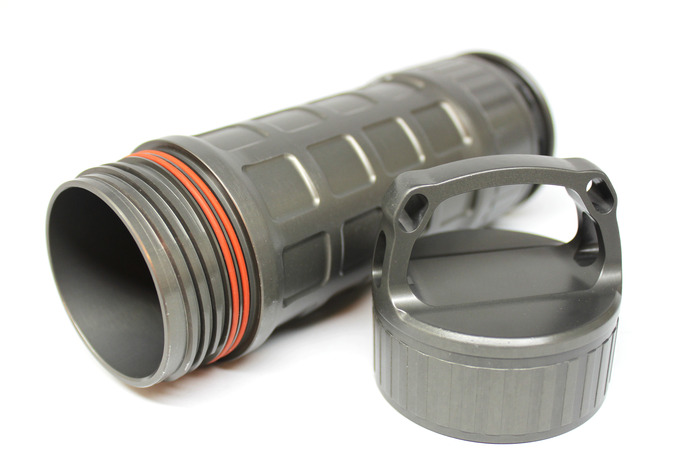
Hiking, fishing, white water rafting, geocaching – these are all things I do not do on a regular basis. I do travel a bit though, and when I do I am always looking for neat, multi-purpose, rugged, functional products to take with me on my adventures. The Ti2 Sentinel X Aluminum Cache, a Kickstarter project by Mike Bond is made to handle all the adventure I can handle and more. The Ti2 Sentinel X Aluminum Cache is made of 6061-T6 aluminum, has an internal diameter of 2 inches, an external diameter of 2.5 inches, is 6 inches long internally and 8 inches long overall. The weight of the cache is 14.110 ounces (400 grams).  It will hold 18+ cubic inches of gear or 11 fluid ounces. Both ends of the cache are threaded and removable for easy access and have double food-grade O rings for a water tight seal. The Ti2 Sentinel X Aluminum Cache can also be used over an open flame to boil and sterilize water. The wheels in my head (do I smell smoke?) are spinning, just thinking of what I could store in this thing.

The Ti2 Sentinel X comes with two versions of Type 3, hard anodized coating. The X1 has a Type 3, Class 1, food-grade anodization. The X2 has a Type 3, Class 2, non-food-grade anodization. Pledges for this project start a $1 and run up to $110 with a $90 pledge getting you a Ti2 X1 version of the cache. This project is seeking funding until July 6, 2013, with first deliveries expected in September 2013.

Tagged as: aluminum, geocache, Water Bottle


Powered By WizardRSS.com | Full Text RSS Feed | Amazon Affiliate software for Amazon Store websites | Android Forums | Wordpress Tutorials
25 Jun 06:29

LinkeSOFT SongBook

by mark

If you like to sing songs and play along on your guitar, banjo, ukulele, etc. at a campfire, bar, church, etc., the tablet revolution has been a boon. No more binders to carry around! Instant access to lyrics and chords for approximately 1 bazillion songs!

The downside, though, is that the quality of the song transcriptions you find online are of widely varying quality. Additionally, the web pages that contain the transcriptions are chock full-o-ads, and as a rule, the best campfires are found where the internet access is the worst.

The answer to these problems is to curate your own collection of song transcriptions. The best tool I’ve found to do this is LinkSOFT’s cross platform SongBook.

SongBook allows you create and manage files for songs in the simple, plain text based ChordPro file format. It is easy to start with the transcription of a song from one of the online archives, and then correct / customize it within SongBook. Once the song is set up, it is easy to do things like change keys and display chord fingering.

SongBook has versions for both desktop and mobile platforms, and the mobile versions support DropBox for syncing. This makes it easy to utilize the strengths of each. I use the desktop version to create and edit song files, and the mobile versions for performances. That said, if I need to edit a song on the go, those edits get automatically synced thanks to the magic of DropBox.

The app does cost a few bucks. However, I have found it to be a good value. There are new functions being added regularly, and when I have had (rather minor) problems, the developer has been very responsive.

-- Clark Case

LinkeSOFT SongBook
$6 – $19, depending on operating system

25 Jun 02:35

Samsung ATIV Q convertable devices redefines usability, dual-boots Windows 8, Android

by Nick Gray

Among the plethora of new devices unveiled during Samsung’s event in London today, the Samsung ATIV Q is certainly one of the most intriguing. Yes, there are a handful of people on the planet who would love to take pictures with a mirrorless DSLR running Android, but a laptop/tablet hybrid running Windows 8 and Android 4.2 is definitely a product the general public will be interested in.

The Samsung ATIV Q features a 13.3-inch 3200 x 1800 qHD+ (275 ppi) display with a 178 degree viewing angle, Intel’s new Haswell processor, S Pen that tucks away nicely into the magnesium body, measuring a mere 13.9mm thick and weighing in at 1.29 kg  (2.85 lbs). Samsung has yet to disclose the size of the battery used to power the ATIV Q, but they are promising 9 hours of battery life. Taking a few pointers from Sony and Lenovo’s latest Windows 8 laptop/tablet hybrids, the Samsung ATIV Q sports a  four-position hinge, which allows the device to be used in tablet, typing, floating and stand mode.

갤럭시3(국내)

While the specs of the Samsung ATIV Q may seem impressive, what intrigues us most is how Samsung has managed to seamlessly run Android and Windows 8 at the same time. Samsung’s black magic allows users to switch between the two operating systems at will. Tap an app shortcut and you’re ported from one OS to another. To make things even more simple, users can pin Android app shortcuts to the Windows 8 start screen and launch directly into an Android app from Windows 8. The two operating systems are also capable of sharing the same file structure so that images, videos and other documents can be accessed and edited regardless of the operating system the user is running.

Gallery

ATIV Q (1) ATIV Q (2) ATIV Q (3) ATIV Q (4) ATIV Q (5) ATIV Q (6) ATIV Q (7) ATIV Q (8) ATIV Q (9) 갤럭시3(국내)

Pricing and launch details have not yet been confirmed, but Samsung is expecting the ATIV Q to hit retail shelves around the back-to-school season.

Over the past few years we have only seen a handful of Android tablets that are actually good. Personally, I’m not a huge fan of a large device with less functionality than the phone that fits into my pocket. A device like the ATIV Q may be the perfect marriage of work and play for those who need Windows 8 for productivity, but also want a better tablet ecosystem than what Microsoft is currently able to provide.

For the right price, do you think the ATIV Q could be this year’s best-selling Android tablet?

Show Press Release
Samsung Strengthens Tablet Business and Demonstrates Commitment to Customer Choice with Innovative New ATIV Tablets
June 20, 2013
New Convertible ATIV Q and ATIV Tab 3, the World’s Thinnest Windows Tablet, Offer Ultimate Versatility and Productivity on the Go
 
LONDON, U.K. – June 20, 2013 - Samsung Electronics Co., Ltd., a global leader in digital media and convergence technologies, unveiled two new tablets today, giving consumers more ways than ever to create, consume and share content and blurring the industry boundaries. The two new windows 8 tablets, the ATIV Q and ATIV Tab 3, include several innovative new features that set them apart from other mobile tablets, including incredibly versatile form factors and extremely thin and light bodies. Both are powered by Windows8 and bring several unique features to market – including the world’s thinnest tablet and a convertible tablet with the ability to run Android apps.
“Busy lives demand convenience, and the convertible nature of these tablets deliver the versatility, mobility and adaptability consumers should expect from personal computing today,” said DJ Lee, President and Head of Sales and Marketing Office, IT & Mobile Communications Division, Samsung Electronics. “These tablets are the result of people-centric innovation, and they were designed to provide consumers the flexibility to manage their digital lives on their terms whether they are in the office, at home or on the go.”
 
ATIV Q
 
Samsung launches the ATIV Q – a truly convertible device with the ability to change modes and the power to enjoy both Windows and Android. Born of the tablet family, the ATIV Q allows users more flexibility than ever to adapt the device to fit any situation, posture or environment. Built with today’s evolving consumer lifestyles in mind and usable as a notebook or tablet, it delivers on the ATIV promise to make work more seamless and life more convenient.
  • Enjoy Android Apps on Windows: Addressing consumers’ desire to access Android apps on a Windows-based        PC, the ATIV Q allows users to experience both Windows 8 and Android (Jellybean 4.2.2) on the same device. Users will not only get access to Android apps via Google Play but also be able to transfer files, ro sharing folders and files from Windows 8 to Android, truly marrying the mobile and PC experiences.
  •  Versatility to Suit Any Environment or Needs: The ATIV Q sports an innovative hinge design that allows the user to transform the tablet into 4 functional modes. Lay the display flat over the keyboard for tablet mode. Raise the        display upright to type just like a laptop. Float and adjust the display to a comfortable viewing angle Or flip  the display to place in the stand mode to watch movies with ease. The four-in-one design of the ATIV Q easily adjusts to give users all the options they need in one device. ATIV Q is also extremely thin and lightweight for optimum portability. At 1.29kg and only 13.9mm, it’s easy to take everywhere you go.
  •  The Ultimate Viewing Experience: The ATIV Q introduces the world’s highest resolution, QHD+  (3200×1800) display. The tablet’s 13.3-inch touch screen offers 2.8 times higher pixel density (275ppi) than  full HD displays for viewing the finest of details. ATIV Q is also designed to provide an optimized viewing   experience regardless of location and high brightness in outdoor environment.

The ATIV Q also enables superior productivity with S-Pen functionality, enabling users to easily make written updates to creative and work. 

SideSync is available on the ATIV Q and ATIV Tab 3, enabling users to switch from working on their PC to an Android-based Samsung smartphone with simplicity and ease. With SideSync, the user’s PC and mobile device become one. Simply use the PC keyboard to respond to a text on a mobile phone; view maps on a larger screen, display photos and videos on both devices to make editing files even easier; or use an ATIV PC to back up and charge mobile devices. With SideSync, users enjoy more productivity with fewer interruptions to work and everyday life. 

Convenience is all about saving time and finding easier ways to get things accomplished, and Samsung ATIV tablets enable users to do just that. By making the personal computing experience more versatile, Samsung continues to make work more seamless and life more convenient.

For more information on the full ATIV PC Family, please visit www.samsung.com.

Note to Editors:
ATIV Q Product Specifications
 
Category Details Specifications
Display Size 13.3”
Resolution 3200×1800, 275ppi
Performance OS Windows8
Processor Intel Core i5
Graphics Intel HD Graphics 4400
Memory 4GB DDR3L
Hard Disk Drive 128GB SSD
Camera 720p HD
Battery Life Battery Life Up to 9 hours
Dimensions Dimensions 327.0×217.8×13.9mm
Weight 1.29kg
Color Ash Black
I/O Ports USB Ports 1xUSB3.0, 1xUSB2.0, HDMI, RJ45 (dongle), HP/Mic combo, micro SD
20 Jun 17:02

PC Diagnostic Tool CPU-Z Makes The Jump To Android

by Stephen Yuen

CPU-ZThose of you who are avid PC hardware junkies, like myself, will be very familiar with the PC program called CPU-Z. Well, the program has made the jump to Android, offering all the information you’d expect from the diagnostic tool. With CPU-Z, you will be able to see all nitty-gritty details of your phone’s operations, such as temperature, core clock speeds, and battery status.

For most standard Android users, this app won’t provide much extra information as we know what we paid for and it’s unlikely there is anything wrong with the phone’s hardware. But for those who like to overclock or underclock their CPUs, CPU-Z might add some pedigree to the app’s purpose.

CPU-Z is available now for free on all devices with Android 3.0 and up. The Google Play Store page, which you will find the link for below, actually states that the app is still in beta, but it looks to be running quite well regardless. Will you pick up CPU-Z and what will you use it for? Let us know in the comments below.

Application: CPU-Z

Play Store Link

Price: Free

20 Jun 17:01

Oppo Find 7 with Snapdragon 800 and 4,000 mAh battery in the works

by Cory Gunther

The popular and still growing Chinese manufacturer Oppo has a pretty decent phone on their hands with the Oppo Find 5, but we’re now hearing a Find 7 is coming soon to trump the newly released handset. Interestingly it will still sport a 5-inch 1080p HD display, and not be called the 6. Instead going right to being called the Find 7, and it has some stellar specs to go along with that name.

backer0000-540x304

For more details on their recently released Oppo Find 5 you can see our hands-on coverage. Everything we loved about this device is getting improved with the Find 7, and it is rumored to be arriving in late September this year to take on the competition.

So what makes the Oppo 7 so impressive? Not only will it rock the same 5-inch 1920 x 1080p full HD display, Android 4.2 (or newer) latest Android OS, and a 13 megapixel camera, but it’s what’s under the hood we love. They’ll be improving the processor to Qualcomm’s Snapdragon 800 quad-core, probably 2.3 GHz, adding 2GB of RAM, increasing the front camera to 5-8 megapixels, and capping this all off with a massive 4,000 mAh battery.

For comparison the Galaxy S4 has a 2600 mAh battery, the Note II is 3,100. So adding a 4,000 mAh battery to something like the Find 7 would be impressive. Especially if they keep the size down, and price friendly. You’ll also enjoy WiFi, Bluetooth 4.0, NFC, and all the usual sensors here with the Oppo. Now all we need is Oppo to bring their handsets to the U.S.A and we’ll be happy. More details on this device should arrive soon enough.

VIA: AndroidAuthority

20 Jun 15:19

CPU-Z comes to Android after years on the PC

by Cory Gunther

Today we have some excellent news for all you PC and Android enthusiasts. After years and years of being one of the go-to programs on desktops, CPU-Z has arrived for Android. The popular tool is extremely useful in many usage scenarios and will give you important info about the CPU (processor) of your PC, and in this case, or Android devices.

Screen Shot 2013-06-14 at 11.26.49 AM

Today the company CPUID, has officially launched their app on Android in beta form, but it is available to everyone as we speak. Myself being a huge PC enthusiast I’ve used CPU-Z for years and years of overclocking and watercooling my quad-core Intel processors and more. I’m excited to see this level of detail come to Android.

Just like Quadrant, AnTuTu and others CPU-Z will show you a detailed breakdown of your device. Information such as the SoC (system on chip) like Qualcomm’s Snapdragon 600. You’ll get the name, architecture, speeds (of each core) and much more. It’s interesting to boot it up and see my Galaxy S4 only using one of the four cores, while only running around 1.2 Ghz instead of the 1.9 GHz spec. Talk about battery saving technology at work!

Screen Shot 2013-06-14 at 11.27.43 AM

As you can see above, CPU-Z gives you a wide list of details about your Android smartphone and tablet. From battery information, health and temp, to all the sensors and more. Here’s the full list below:

- SoC (System On Chip) name, architecture, clock speed for each core
- System information : device brand & model, screen resolution, RAM, storage.
- Battery information : level, status, temperature
- Sensors

If you’ve wanted to see what’s under the hood on your smartphone, this app is a great way to do just that. Sadly it only supports Android 3.0 and above, so Gingerbread users need not apply. Get it from the link today and enjoy. Enthusiasts, don’t go water-cooling your smartphone just yet.

SOURCE: Play Store

20 Jun 03:05

How to Overclock Your Video Card and Boost Your Gaming Performance

by Whitson Gordon

Overclocking—or running your hardware at higher speeds than it was designed to run—is one of the best ways to boost your gaming performance. Here's how to overclock your video card and get faster, smoother games without spending a dime.

Overclocking can get you great bang for your buck, but it isn't as simple as clicking a few "turbo" buttons and firing up a game. Just like overclocking your processor, overclocking a video card takes some patience, some stability testing, and carries a bit of a risk if not done properly. Thankfully, it's very easy to do as long as you stick to these instructions.

Note: We've published this article before, but we've completely rewritten it with new tools, a more effective process, and a video! So if it looks familiar, or if some of the comments seem old, that's why.

How Much Does This Actually Improve Gaming?

A lot of people ask whether overclocking is really worth it. Sure, it makes a difference in benchmarks, but will you actually see a noticeable difference in games? The answer varies depending on your card, your computer, and the games you're playing, but in short: yes.

Overclocking my GTX 560 Ti, for example, was quite helpful. In Battlefield 3, for instance, I was fluctuating between 40 and 60 frames per second on some levels. After overclocking my card, however, my framerate never dropped below 50.

That's an anecdotal, but solid improvement. It won't make unplayable games playable, but it will make a slightly choppy game run a bit smoother—or make a smooth game allow for increased graphics settings. Does that mean you'll get this exact same performance boost? Of course not. Every card is different, and no two cards will overclock the same. It also depends on the games you play and what other parts are in your computer—if your CPU is a bottleneck, then overclocking your graphics card will yield much smaller boosts, if any. So: your mileage may vary, but it's well worth the endeavor to find out.

What You'll Need

Everyone has different opinions on what tools are the most effective for overclocking your video card, but I've found these tools are the easiest and most effective:

  • A Windows machine. Our tutorial today is for Windows machines, since that's where the vast majority of gaming is done.
  • An NVIDIA or AMD video card. Some higher end cards may require slightly different instructions, but this guide should work for the majority of cards out there. Be sure to do a little research on your specific card first to see what any differences may be.
  • MSI Afterburner. Afterburner is our favorite overclocking program for Windows, but you can probably use any overclocking program you want (as most of them are very similar). Despite its name, MSI Afterburner doesn't require an MSI video card. It'll work with almost any video card out there, no matter the manufacturer.
  • Heaven, a video card benchmarking tool. There are a lot of benchmark utilities out there, but Heaven is our favorite, so that's what we'll be using.
  • GPU-Z, a handy utility that gives you a ton of information about your video card. We won't be actively using this very much, but I recommend having it open as you overclock to make sure your video card actually registers the changes you make in Afterburner.
  • Patience. Seriously, this is going to take awhile. Grab yourself a cup of tea and a few comic books.

Step One: Do Your Research

Before you do anything else, you should hop on over to Google and do some research on your card. Sift through sites like Overclock.net and see what kind of clock speeds other people are getting. Do NOT just apply these clock speeds and start benchmarking—every single card is different, and even someone with the exact same model card will get a different overclock from the next guy or girl. The goal here is to see what other people are getting so you know what's reasonable—that way, if you get way higher than everyone else, you know something probably isn't working correctly.

While you're at it, find out what the highest safe voltage is for your card—that'll come in handy when we start pushing the voltage. I'm using the word "safe" loosely here—obviously, the only truly safe voltage is the default, and increasing it can decrease the lifespan of your card.

Lastly, if you have a newer, high-end card—especially one of the NVIDIA Kepler cards—some of your settings will be different than they are for other cards. If MSI Afterburner looks a little bit different for you, be sure to research a guide for your own card to see what each of the settings mean.

Step Two: Benchmark Your Card

How to Overclock Your Video Card and Boost Your Gaming Performance

Open MSI Afterburner and take note of your stock speeds. Before you start overclocking, you should run Heaven one time through to make sure your card is stable at stock speeds. You'll also get a benchmark score, which is a great way to measure your progress as you overclock. Here's what you need to do:

  1. Start Heaven, and you'll be greeted with its initial settings menu.
  2. Tweak its settings however you want. I usually like to set Quality, Tesselation, and Anti-Aliasing to their maximum values, since I have a midrange card, but if you're overclocking a lower-end card, you may not need to push the settings so far. Make sure that Resolution is set to "System."
  3. Click the Run button. Heaven will start cycling through a series of scenes designed to push your graphics card to its limit. Don't worry if it seems slow or choppy—that's what we want.
  4. Click the "Benchmark" button in the upper left-hand corner of the screen to run a benchmark. This will go through all 26 scenes one time, measuring your card's performance.
  5. When the benchmark is done, you'll see a window with your score on it. I like to write this down so I can compare it to my post-overclocking scores.

If your card made it through the benchmark run, rejoice! Your card is, at the very least, stable at stock settings.

Step Three: Raise Your Clock Speeds

How to Overclock Your Video Card and Boost Your Gaming Performance

You've been patient up until this point, and it's time for your reward: you can finally start overclocking (that's why you're here, right?). Open MSI Afterburner and raise your core clock by 10MHz or so (make sure the shader clock is linked to the core clock, if you have it). Click Apply to apply the settings, then ensure they've been applied by checking GPU-Z and seeing if it matches. You should also click Save in MSI Afterburner, and assign your new settings to one of its profiles.

Now, run Heaven again, and just like before, click the Benchmark button. If it makes it through the benchmark run without any problems, your overclock is stable and you can raise the core clock by 10MHz again.

At some point, however, you'll run into some issues. Either Heaven will give you a black screen and stop working, or your graphics driver will crash, or you'll start seeing "artifacts" on the screen—little graphical glitches that aren't supposed to be there. These could be little black boxes, colored lines and blotches that appear on the screen, and so on.

If you run into any of these problems, your overclock is unstable. You now have two choices: you can back off to your last stable core clock and skip to step four (for a very small overclock), or you can raise your voltage.

Step Three Point Five: Raise Your Voltage

How to Overclock Your Video Card and Boost Your Gaming Performance

When you reach a certain point, your card needs more voltage before it can run at certain speeds. Raising your voltage past the stock level can push your card significantly farther, but it can also decrease the lifespan of your card (especially if you push it too far). So, you should only go through this step if you're willing to take on that risk.

By default, MSI Afterburner locks the voltage on your card so you can't raise it. So, in order to tweak the voltage, you need to open up MSI Afterburner's Settings and, under the General tab, check the "Unlock Voltage Control" box. Click OK and you should see a new slider at the top of Afterburner's main window.

Increase your voltage by 10 mV or so and click Apply. Afterburner may change the value slightly; it appears that it only works with certain voltage values, so you'll get a number close to the one you typed in. Now, start a benchmark run in Heaven again. If you make it through without any artifacts or crashes, your core clock is stable and you can try raising it again.

How to Overclock Your Video Card and Boost Your Gaming Performance

Repeat this process. Run Heaven, increasing the core clock after each stable run. When you have problems, increase the voltage and try again. Watch your temperatures as you do so. As you raise the voltage, your temperatures will start to get higher. Most modern cards are safe at around 90 degrees celsius, and Afterburner's automatic fan control will try to keep the temperature below that level. If you want to be more conservative (I usually try to keep it in the 80s), you can tweak Afterburner's fan control in the settings, under the Fan tab.

Eventually, you'll reach to a point where you can't overclock any further. This usually happens for one of three reasons:

  • You reach unsafe temperatures for your video card and can't cool it any better.
  • You reach the maximum safe voltage for your card (which you researched earlier).
  • Your card just isn't stable past a certain core clock value, no matter how high you raise the voltage. This can happen if you have a card that just doesn't overclock well (remember, no card is guaranteed to overclock—it's luck of the draw!)

When that point comes, back down to your last stable clock speed. This is your highest possible core clock.

When you're done with the core clock, repeat this entire process with the memory clock. Your memory clock speeds won't get you as big of a performance boost as core clock will, but it's worth raising, especially since you've gotten the hang of the process by now.

Step Four: Stress Test Your Card

How to Overclock Your Video Card and Boost Your Gaming Performance

Once you find your highest possible overclock, you should do some more intense stress testing. Start Heaven, click the Run button, and just let it run instead of clicking the "Benchmark" button. Let it run for a few hours (five or so should be fine) and, if you don't experience any crashing or artifacts, you can consider your overclock stable. Do a benchmark run and compare your score to the one we got in step two if you want to see how much your card has improved!

Step Five: Game On

How to Overclock Your Video Card and Boost Your Gaming Performance

Of course, while Heaven is a good benchmarking tool, the best way to test your new card is to play a game! Fire up a game that's really graphics-intensive—like Battlefield 3, Skyrim, or Crysis 3—and see how it fares. Try to find a level with a lot of stuff going on, so it pushes your GPU pretty hard. Again, if you don't have any problems, you're good to go. Of course, if you're ever gaming and you come across artifacts or regular crashing, try backing off your overclock and seeing if that helps. Sometimes an overclock is "benchmark stable" but just doesn't quite cut it in games.

Enjoy your newly-overclocked video card, and show those zombies/aliens/dragons/enemy armies who's boss!

Music in the video by Bitbasic.

20 Jun 03:03

Sunset Lets You Use Your Phone Without Losing Your Night Vision

by Alan Henry

Sunset Lets You Use Your Phone Without Losing Your Night Vision

Android: If you're stargazing at night, or just somewhere dark and you don't want to be blinded by using your phone, Sunset for Android is a simple screen filter that applies a reddish overtone to your display so you won't lose your night vision.

The app was built by and for amateur astronomers who wanted to use their phone without losing their ability to see while using telescopes or binoculars. It's just as useful for people who need to use their phone in a dark restaurant or movie theater without annoying anyone or signaling to everyone around that they've turned their screen on. The app has four different screen filters: "dark," a standard grey filter; "midnight," a dark filter that's slightly blue; "sunset," a filter designed to limit the amount of blue light you see before bed (blue light makes it harder to fall and stay asleep, if you don't remember); and "red," the filter originally designed for amateur astronomers and stargazers, which lets you see detail without being bright or distracting.

Sunset isn't the only app like this. Previously mentionedTwilight is more like F.lux for Android, and offers a similar red tint, only it's applied as the day progresses. If you want to try Sunset, you can grab it from Google Play for $1.

Sunset ($1) | Google Play

20 Jun 03:00

The Krotocam is a DIY Steadicam You Can Build On the Cheap

by Shep McAllister

Nothing beats a Steadicam for capturing smooth video, but the commercially-available models can run for hundreds or thousands of dollars. But if you're willing to do a little work, you can build your own for small camcorders and dSLRs for about $30-40.

The video above from Krotoflik walks you through the entire process. Most of the parts you need won't be lying around your house, but they aren't too hard to find online. A collection of washers at the base serves as a customizable counterweight to keep your rig balanced, while a dollar store flashlight is used as a clever free-rotating gymbal. The finished product looks surprisingly professional, and the sample footage linked at the end of the video is very impressive for something so inexpensive.

If you love this idea, but want something a little more compact for a GoPro camera, Krotoflik also offers a modified tutorial for the Krotocam Mini. Whichever model you choose, the video you capture should be leaps and bounds smoother than anything you could get by shooting handheld.

How to Build the Krotocam (DIY Steadicam) | YouTube via DIY Photography

20 Jun 02:59

Five Best Multitools

by Alan Henry

Five Best Multitools

If you carry around a multitool in your bag or pocket for quick fixes, repair work, or just in case you need a sharp edge, a screwdriver, or pair of scissors, you're in good company. Many of you do, and this week we wanted to take a look at some of the best available—the ones that pack useful tools, are still portable, and offer great bang for the buck. Here are five of the best, based on your nominations.

Special Note: The Hive Five is based on reader nominations

This week, your top nominations from our call for contenders thread were overwhelmingly for the same brand: Leatherman. In fact, Leatherman multitool models weren't just the top five, they were the top six, and if we extended down to the top 20, they'd be 11 of the top 20 multitools you nominated.

So here's what we're going to do: We'll highlight the five most popular Leatherman models you mentioned, and include a sixth category here for some of the other models that fell short. Then, we'll expand the poll out to the top 10 models so everyone's not just voting for the top five Leatherman models and "Other," but so there's some real competition in there. Let's get started.

Five Best Multitools

Leatherman Wave

The Wave is probably Leatherman's most popular tool. It packs 17 different tools in one body, two different screw bits (Phillips #1-2 and Screwdriver 3/16", Phillips Eyeglass Screwdriver and Flat Tip), a stainless steel body, and every one of the Wave's 14 tools can lock in place firmly for comfortable use. Among its myriad tools are a a knife, a serrated knife, a pair of pliers, a saw, scissors, a bottle opener, a can opener, a wire stripper, and many more. It's large enough to be used comfortably with one hand, but small enough to be portable, either in your pocket or in a laptop or carry-all bag. If you're interested, they retail for $93, but you can pick one up for about $55 at Amazon.


Five Best Multitools

Leatherman Skeletool/Skeletool CX

The Skeletool and Skeletool CX are smaller, lighter Leatherman multitools that feature fewer specific tools, but are lighter, more portable, and small enough to go on a keychain or keep in your pocket. The Skeletool and the CX both sport seven tools, including both needlenose and standard pliers, two sets of wire cutters, a knife, a screwdriver with a single bit, and a combination carabiner clip and bottle opener. The CX features the same tools, but the blade uses a different type of steel and is completely smooth (compared to the multi-knife on the standard Skeletool with a serrated edge near the bottom of the blade), and the handle features a black carbon fiber insert. The Skeletool retails for $72, but you can grab one at Amazon for $40. The Skeletool CX retails for $96, but they're $59 at Amazon.


Five Best Multitools

Leatherman Squirt ES4/PS4

If you want a true pocket-tool, that is, small enough to go into your pocket without you noticing it at all, the Leatherman Squirt—as the name implies—is incredibly tiny, but still packs a good number of tools to make repairs around the house or on the go really easy. The Squirt comes in two flavors, the ES4 and the PS4. The ES4 is a slightly larger, 13 tool model that features spring-action needlenose pliers, wire strippers, and wire cutters. You also get a knife, a pair of scissors, a screwdriver, a file, and a bottle opener. It's seriously tiny, only about 2.25 inches when closed, and it sports a ring so you can keep it with the rest of your keys. The ES4 brings the number of tools down to 9 by removing the multi-gauge wire strippers. Otherwise, they're the same, and available in multiple colors. Both models retail for $42, but the ES4 is available at Amazon for $22, and the PS4 is $23, for some reason.


Five Best MultitoolsLeatherman Charge TTi

The Leatherman Charge TTi is another one of Leatherman's full-sized tools, so it's definitely more suited to a bag over a pocket, but if you had to keep it in your pocket it wouldn't be too bad. The Charge TTi features 19 tools, including a wood and metal file, a diamond-coated file, needlenose and standard pliers, two different types of wire cutters, a knife and another serrated knife, a saw, a cutting hook, a bottle opener, a can opener, and more, including 8 different screwdriver bits (Phillips #1-2, Screwdriver 3/16", Screwdriver 1/8" and Torx #15, Hex 5/32" and 9/64", Hex 1/8" and 7/64", Hex 3/32" and 5/64", Hex 1/6" and .050", Square Drive #1 and #2, and Eyeglass Screwdriver). The body is stainless steel, features a lanyard ring and a quick-release ring, and all of the tools and blades lock for one-handed use. It's a seriously powerful tool. If you want one, they retail for $155, but they're available for $130 at Amazon.


Five Best Multitools

Leatherman Micra

The Micra is one of Leatherman's smallest available multitools, and it still manages to pack in 10 different tools in a tiny package. It's only 2.5 inches closed, available in different colors, and packs Leatherman's best spring-action scissors available. Beyond that, the Micra also packs a ton of personal care tools, like a nail file, nail clippers, tweezers, a knife, three screwdrivers, a ruler, and a bottle opener. It's stainless steel, pocket-sized, and Leatherman says it's extremely popular as a gift and among anglers and fishermen who need those scissors in a small, portable tool. The Micra retails for $30, but it's available at Amazon for $20.


Five Best Multitools

Alternatives: Swiss+Tech Multitools, Victorinox SwissTool/CyberTool, SOG PowerAssist/PowerLock, Gerber Diesel

Since the top five was absolutely dominated by Leatherman models, we wanted to devote some space to some of the other great multitools available, like the various multitools by Swiss+Tech, like the 19-in-1 Micro-Max, and the one that earned a number of your nominations, the 6-in-1 Utili-Key and the 8-in-1 Utili-Key. All of their models are small enough to go right on your keyring, and while they can be a pain to get off of the keyring and use one-handed without cutting into your fingers or palm, they're imminently useful in a pinch, especially if you don't carry another type of tool.

We also wanted to mention Victorinox's SwissTool (from the makers of the famous Swiss Army Knife) and CyberTool, which many of you nominated because of Victorinox's reputation and history for well crafted, well built products. Both the CyberTool and SwissTool are product lines, so you can pick the multitool that has the number of individual tools and the form factor that you're looking for and works in your budget. The SwissTool is generally regarded as a more all-purpose, multi-purpose tool, while the CyberTool has features that are more geared towards someone who'll need to do repairs around the office or with technology—like the inside of your home-built PC.

Another tool that got a number of mentions was the SOG PowerAssist, a good-looking multi-tool that makes extending the blades and one-handed operation super-easy. Start to open any of the tools and the device takes over, extending them for you and locking them in place for safe operation. The PowerAssist is a full-sized tool with well over a dozen different tools on board, including a three sized file, a screwdriver, two different blades, a V-cutter, wire crimper, and many many more. It even comes in different finishes and metal types so you can pick one that works for you. Those of you who didn't menton the PowerAssist called out the PowerLock as your fave, and at least one of you made point to note that any mention of SOG is incomplete without noting its swappable tools and components.

Finally, we should mention the Gerber Diesel, an affordable and flexible multitool that's from the manufacturers of our much-loved Gerber Shard. The Diesel packs needlenose and standard pliers, a wire cutter, a partially serrated blade, screwdrivers, a can opener, bottle opener, and more, all in a slim package that slides into a pocket or easily into a bag. It's worth a look.


Now that you've seen the most popular contenders, let's put them head to head so you can vote for your pick:

Since this week is a special case (see the top of the post) we're going to eschew honorable mentions, especially since you have so many options here to vote for. If you hate Leatherman and want to rage about how popular it is, let's hear it in the discussions. If you're a Leatherman fan and think this looks just right to you, we want to hear that too. Just keep it civil, and remember the rule of the Hive: if yours didn't make the cut, make sure to nominate it next time. Sometimes what makes the top five and what misses is a matter of one or two voices.

Have something to say about one of the contenders? Want to make the case for your personal favorite, even if it wasn't included in the list? Remember, the top five are based on your most popular nominations from the call for contenders thread from earlier in the week. Don't just complain about the top five, let us know what your preferred alternative is—and make your case for it—in the discussions below.

The Hive Five is based on reader nominations. As with most Hive Five posts, if your favorite was left out, it's not because we hate it—it's because it didn't get the nominations required in the call for contenders post to make the top five. We understand it's a bit of a popularity contest, but if you have a favorite, we want to hear about it. Have a suggestion for the Hive Five? Send us an email at tips+hivefive@lifehacker.com!

Photo by Mark Tighe.

20 Jun 02:58

Service Pages for Google Chrome Brings Quick Access to Chrome Settings

by Shep McAllister

Service Pages for Google Chrome Brings Quick Access to Chrome Settings

Chrome: Most of us know about internal Chrome settings pages like Chrome://flags, but it can be hard to remember the names for each of them. Service Pages for Google Chrome saves you from looking them up by storing them in your extensions menu.

Once you install the extension, just click the gearbox icon to call up a dropdown menu of every Chrome service page. The basics like Settings, Experiments, and Extensions are all there, but there are dozens more that you probably never knew existed. For example, chrome://memory-redirect/ shows you how much RAM each of your tabs are using, and chrome://sync-internals/ lets you view and manage fine grained details of Chrome's sync.

Some of the pages are either deprecated or not necessary for your Chrome configuration, so not all of the links will actually work, but you can disable bookmarks that you don't care about in the extension's settings. It might not be an app you use often, but it's great to have when you want to dig through the underbelly of your browser.

Service Pages for Google Chrome (Free) | Chrome Web Store via Ghacks

20 Jun 02:57

Top 10 Ways to Hack Your Car

by Whitson Gordon

Top 10 Ways to Hack Your Car

You spend an awful lot of time in your car every day, especially if you have a long commute—so why settle for what you're given when you can make it better on the cheap? Here are 10 ways to do just that.

Top 10 Ways to Hack Your Car

10. Remember Where You Parked

Finding your car in the grocery store lot might not be that hard, but when you're in a giant structure or enormous stadium parking lot, things get trickier. Sure, you could always just snap a photo of your section in the lot, but you could also use apps like Park Me Right or Valet which offer a ton of extra smart parking features. If all else fails, though, you could always do the ol' "walk through the lot pressing your panic button." Don't forget to amplify your remote's signal with your head while you do it.

9. Break Into It When You Lose Your Keys

Constantly locking yourself in your car? You might be able to turn off automatic locks with these codes, but if not, it's time to get your hands dirty. Every car is a little different, and the newer the car, the harder it is to unlock without a key, but that doesn't mean you can't try. Try opening it up with a door stop and metal rod, or—if you don't have access to those things—a shoelace, which might work too. Heck, we've even seen people unlock a car with a tennis ball. Remember, your mileage may vary, and it goes without saying, but use these powers for good—not for evil.

Top 10 Ways to Hack Your Car

8. Avoid Traffic Tickets with the Help of Technology

Sure, you could always try to beat a speeding ticket on your good looks and charm, but this is the new millenium—you've got technology on your side. This awesome GPS hack will let you know when red light cameras are ahead, and a few voice recognition features can keep you from getting a ticket for touching your phone while driving. We've even heard of cases where GPS apps helped someone fight a ticket, so never underestimate the tools at your disposal. Photo by Scott Davidson.

Top 10 Ways to Hack Your Car

7. Save Money On Your Next Car (and Your Commute)

All of these are nice if you already have a car, but what about when it comes time to buy a new one? They may not be DIY hacks in the strictest sense, but we'd be remiss not to mention ways to save money on a new ride. The biggest tip we can give is: haggle. Cars are one of the top items you should absolutely negotiate for, and it doesn't take a lot of effort either—two simple bits of research can save you hundreds. You can bring the price down by avoiding those extra fees, too, and—if you're feeling a little evil—screwing with the salesmen. Not in the market for a new car? Well, at least you can save some money on your commute. Photo by Joe Belanger (Shutterstock).

6. Beat the Heat (and Cold)

Nothing's worse than opening up your car only to find out its turned into an oven. On those hot summer days, cool down your car quickly with this crazy Japanese door trick (shown above). Opening your windows a crack can also help, and while you're at it, turn your steering wheel 180 degrees when you park so the top isn't burning hot when you come back.

When winter comes along, you have a whole new set of problems. If you park facing the East, the sun can help defrost your windshield, but if that isn't an option, a few household items will get that block of ice open. If your doors often frozen shut, you can prevent the ice from forming with a bit of cooking spray, and if locks are the issue, you can de-ice your lock with some hand sanitizer.

Top 10 Ways to Hack Your Car

5. Upgrade Your Car's Hardware, Inside and Out

Just because you aren't a mechanic doesn't mean you can't squeeze a bit of extra performance out of your car. We've shared a ton of DIY upgrades you can make, from better tires to better handling to the small stuff, like a USB power outlet, a $3 auxiliary jack, or automatic lights in your glove box and footwells. Just remember, though: some upgrades are more useful than others, and some are better left to the professionals. Photo by Hemi Truck Club.

Top 10 Ways to Hack Your Car

4. Protect It From Damage

There's nothing quite like that sinking feeling when you get in an accident or scrape against the side of a pole, so do everything you can to protect your car from damage. Using the correct mirror positioning can go a long way, but there are a few other DIY tricks you can try to keep everything intact. If you're prone to scraping your car in your garage, park it perfectly every time with a tennis ball, and protect your doors with a pool noodle. If you're worried about other cars, you might try installing some DIY lights that turn on when you open your door, too.

Top 10 Ways to Hack Your Car

3. Keep It Clean the DIY Way

It's remarkably easy to clean and detail your own car, even if you don't have professional-grade cleaners lying around. In fact, you can clean almost your entire car with nothing but shampoo, baking soda, and water, with a bit of nail polish remover to get that sap off (or seltzer water for bird poop). Toothpaste will work on some of those scratches and foggy headlights, but if there's one tool every car detailer should have in his or her arsenal, it's a razor blade. Take one of those suckers to your windshield or windows (not the car body!) and you can get just about anythin goff. Photo by Eduardo Sciammarella.

Top 10 Ways to Hack Your Car

2. Repair and Maintain Your Car Without a Mechanic

This goes along with #4 and #7 on this list a bit. When it comes time to repair your car or perform some maintenance, chances are you can save quite a bit of money by doing it yourself. Yes, some things should be left to the pros, but you'd be surprised at what someone with no prior knowledge can do. From replacing drive belts, batteries, and brake pads to fixing dents with a plunger (or glue gun), there's a lot you can do on your own. If you do need to resort to a mechanic though, make sure you find a good one

Top 10 Ways to Hack Your Car

1. Integrate Your Gadgets

Lots of new cars have full-blown computers inside of them ready to wait on your every whim, but if you've got a slightly older model, you can still integrate your favorite gadgets without too much work. If you want to go simple, you can mount your phoneor tablet in your car with just a few simple items, or do a bit of extra work and actually build the dock into your dashboard (for a phone, tablet, or even an iPod nano). Want more than that? You can add Bluetooth and inductive charging to your car too, control it with your voice, and even remote start your car with a text message. Just make sure you keep that mess of technology and cables organized. Photo by DaLee_pl.

20 Jun 02:50

What the NSA Spying Scandal Means to You

by Alan Henry

What the NSA Spying Scandal Means to You

The internet is aflame with the news that the National Security Agency may be spying on phone calls and internet access of American citizens, and the possibility that they've partnered with some of the biggest tech companies in the world—Google, Microsoft, Apple, Facebook, Skype, and others—to request and access data directly whenever they want it. Let's take a look at what exactly is going on, how long it's been happening, and what—if anything—you can do about it.

What Happened?

What the NSA Spying Scandal Means to You

First, if you read anything on the topic, check out The Atlantic's Government Phone Surveillance for Dummies piece, which puts the whole thing in clear, simple terms.

In detail, allegations arose this week that the US National Security Agency (NSA) has been spying on millions of Americans every day through unfettered tapping of telecommunications networks, and through massive data mining efforts performed wieth the help of major tech companies like Google, Microsoft, Apple, Yahoo, Facebook, Skype, and others. Journalist Glenn Greenwald, in an expose at The Guardian, exposed a secret court order that had been leaked to him, outlining the NSA's partnership with Verizon to collect the phone records of millions of Americans every day (you can read the full court order here, issued by FISA, the Foreign Intelligence Surveillance Court), and to hand over metadata and call logs (but not, as many have pointed out, call data, call recordings, or caller identities). If that weren't bad enough, The Washington Post uncovered a slide deck outlining an NSA program called PRISM, or a massive partnership going back to 2007 where the NSA has access to and has been working with major tech companies to mine their data for keywords, subjects of interest, and to make special requests of those companies in case there's something specific they'd like to look for. Wired has more analysis of the program here.

What the NSA Spying Scandal Means to You

It's appalling, but to be clear, the NSA's domestic surveillance program isn't exactly new. In addition to the details released this week, the NSA has been wiretapping domestic communications for years—possibly decades. The infamous Room 641A, an interception room operated at AT&T at the behest of the NSA, as an example, opened its doors in 2003, and was only shut down after it was exposed in 2006. Inside, NSA and AT&T technicians captured communications flowing through AT&T's telecommunications networks, processed it, stored it, and transmitted it to the Agency for further study. When an AT&T technician confirmed the existence of the room, he let slip that similar facilities likely existed all over the country, and there was no reason to believe that AT&T was the only organization helping the NSA out—something we've seen proven out, since this latest revelation focuses on Verizon (which, for its part, has declined to comment on the issue, and every other company involved has denied involvement).

For its part, Room 641A was only shut down as part of a class action lawsuit brought by the Electronic Frontier Foundation, one that continues to this day. The EFF has a wealth of data on exactly how the NSA collects data on American citizens, if you'd like to read more. Keep in mind that this isn't just from direct access to service providers like Google, Microsoft, and Apple, but also by collaborating with internet service providers for access to their networks. That means that even if you decide to boycott companies that work with them, you'll have a hard time finding alternatives that will both get you on the internet and provide you services while you're online. You can check out the EFF's statement on the Verizon leak here, and a full timeline going back to 2001 here.

Plus, the news isn't getting better as the week goes on. More companies are being exposed as partnering with the program, and there are new allegations that the NSA collects records on every phone call in the United States, something that frankly, many people already assumed was the case. The Office of the Director of National Intelligence has gone on record saying The Guardian and The Washington Post reports are inaccurate and that their programs operate within the law. Essentially, it's a massive fishing expedition for anything the NSA may find interesting, and the data is stored, processed, and kept for an indeterminate amount of time. Is it personal, personally identifiable data? Very likely. Is it cause for concern? We think so, but that doesn't make you powerless. Ideally, you should get informed and get involved.

Can I Protect Myself?

What the NSA Spying Scandal Means to You

In theory, yes, but it comes down to a combination of protection and security through obscurity. Even if the NSA is sniffing your ISP's networks and getting your private information from the service providers you use for email, social networking, and web searches (to name a few), there are a few things you can do. The problem with all of them is that they increase the complexity of your activities on the web exponentially with each one you embrace, and they fall down quickly if you're actually a real target for investigation.

This Wired article has some suggestions, like using disposable SIM cards and phone numbers. The problem here though is that you can use disposable numbers and phones as much as you want, but if the person you're calling is tapped and isn't doing the same, it's pointless, because those calls are still monitored. If your pre-paid number or SIM is with a carrier working with the NSA, it's also pointless.

The same applies to using disposable email addresses like Trashmail and Gliph. It doesn't take much effort to find the IP address of a sender, even if the message is from a disposable address or device, and you don't need the NSA's capabilities to do that. Plus, if you’re emailing someone that isn’t taking the same precautions, then the NSA will still have access to the emails you send them...so what's the point? They've outed you, no matter what you've done to obfuscate your identity.

What the NSA Spying Scandal Means to You

Finally, let's talk about VPNs and private networks like Tor. They're probably your best option to keep your communications private, and we've talked about how to choose a good, trustworthy VPN before. Still, they're not perfect. VPNs and Tor will protect you from someone monitoring your traffic, but not someone monitoring the service you're using, which is the issue here. Encrypting your way to Google is great if someone's watching your communications to and from Google, but if someone's sitting at Google watching what you're doing, you're boned.

Besides, while using a VPN will encrypt your traffic from anyone sniffing your ISP's network, but if anyone has the capability to do deep packet inspection and peek into that encrypted traffic, it's the NSA. Plus, depending on the VPN you use, the encryption may not be that strong in the first place, or their DNS may be leaking all over the place. Then, after all that, the so-called "last mile" of traffic—where your communications are unencrypted by your VPN provider and sent to the actual site you're connecting to—could be tapped anyway. On top of that, if you're connecting to a service that works with the NSA, all that encryption is worthless anyway.

Tor is similar. While all of your communications are anonymized and relayed through private, volunteer networks (here's a primer on how Tor works, if you're not familiar), as soon as your data emerges from an exit relay, it's unencrypted entirely. Again, if someone's sniffing the network at your exit relay's location, you're exposed. If there's anything personal about the data leaving the exit relay—like you're connecting to Google, Microsoft, or one of the other companies that works with the NSA, you're exposed.

It's a pretty dismal picture, but that's the full story. You could take all of these measures to secure yourself and your data, and each one adds more complexity to everything you do online. Even so, if your friends and all the services you use, including your email provider, internet service provider, search engine, and more aren't as tinfoil-hatty as you are and don't take the same measures to protect and secure your identity, you're kind of screwed.

So It’s All Futile?

What the NSA Spying Scandal Means to You

Look, I grew up in the shadow of the NSA and even worked in places with close ties to the Agency. If there's anything I know, it's that the NSA is one of the biggest, most technologically advanced organizations on the planet, but it's still a government bureaucracy. If that makes you worried, you should be—right now, the entire scandal is still evolving, and is wrapped up in terms of government spying in order to protect American citizens from the threat of terrorism at home or abroad. The NSA has even said—as recently as two weeks ago—that everyone else is spying on American citizens too and that they're trying to prevent a major cyberattack against the United States. Some government officials have gone on record saying they tried to stop the program, and others are introducing bills to put a stop to it.

Other pundits are calling for people to stop the hysterics and calm down. After all, some are pointing out that every tech company implicated in the program has denied involvement, which means that their some piece of the puzzle is missing, or every single tech company involved is lying to our faces. The Washington Post this morning backtracked from its initial claim that tech companies knowingly participated in PRISM, which means either there's more to the story or the program was set up to give tech companies deniability. We mentionted that the Office of the Director of National Intelligence has gone on record saying the reports from The Guardian and The Washington Post "contain numerous inaccuracies." You should draw your own conclusions—just make them informed conclusions first.

So what can you do? Not much, honestly—the places that most consumer-level privacy and security tools fall down are the places that are well within the reach of an organization with the resources, computing power, reach, and manpower of the NSA. This is especially true given the unprecedented access the NSA had to popular service providers and ISPs.

However, just because you can't do everything to protect yourself doesn't mean you can't do anything. Consider donating to or joining the Electronic Frontier Foundation and other groups that work to preserve civil liberties on the Internet. As the situation simmers, representatives of all parties have stepped up to condemn the program and promise to investigate it. If yours has, reach out and lend them your support. If yours hasn't, get in touch with them and let them know that they should. The story is still developing, but this isn't an issue that will go away with the right technology. It will take the actions of ordinary people to resolve.

Photos by The Electronic Frontier Foundation, Greg Goebel, Cory Doctorow, Pavel Ignatov (Shutterstock), Fuzzbones (Shutterstock), and Rob Crawley.

20 Jun 02:31

Cost/Benefit Questions NSA Surveillance

by schneier

John Mueller and Mark Stewart ask the important questions about the NSA surveillance programs: why were they secret, what have they accomplished, and what do they cost?

This essay attempts to figure out if they accomplished anything, and this essay attempts to figure out if they can be effective at all.

20 Jun 02:30

NSA Secrecy and Personal Privacy

by schneier

In an excellent essay about privacy and secrecy, law professor Daniel Solove makes an important point. There are two types of NSA secrecy being discussed. It's easy to confuse them, but they're very different.

Of course, if the government is trying to gather data about a particular suspect, keeping the specifics of surveillance efforts secret will decrease the likelihood of that suspect altering his or her behavior.

But secrecy at the level of an individual suspect is different from keeping the very existence of massive surveillance programs secret. The public must know about the general outlines of surveillance activities in order to evaluate whether the government is achieving the appropriate balance between privacy and security. What kind of information is gathered? How is it used? How securely is it kept? What kind of oversight is there? Are these activities even legal? These questions can't be answered, and the government can't be held accountable, if surveillance programs are completely classified.

This distinction is also becoming important as Snowden keeps talking. There are a lot of articles about Edward Snowden cooperating with the Chinese government. I have no idea if this is true -- Snowden denies it -- or if they're part of an American smear campaign designed to change the debate from the NSA surveillance programs to the whistleblower's actions. (It worked against Assange.) In anticipation of the inevitable questions, I want to change a previous assessment statement: I consider Snowden a hero for whistleblowing on the existence and details of the NSA surveillance programs, but not for revealing specific operational secrets to the Chinese government. Charles Pierce wishes Snowden would stop talking. I agree; the more this story is about him the less it is about the NSA. Stop giving interviews and let the documents do the talking.

Back to Daniel Solove, this excellent 2011 essay on the value of privacy is making the rounds again. And it should.

Many commentators had been using the metaphor of George Orwell's 1984 to describe the problems created by the collection and use of personal data. I contended that the Orwell metaphor, which focuses on the harms of surveillance (such as inhibition and social control) might be apt to describe law enforcement's monitoring of citizens. But much of the data gathered in computer databases is not particularly sensitive, such as one's race, birth date, gender, address, or marital status. Many people do not care about concealing the hotels they stay at, the cars they own or rent, or the kind of beverages they drink. People often do not take many steps to keep such information secret. Frequently, though not always, people's activities would not be inhibited if others knew this information.

I suggested a different metaphor to capture the problems: Franz Kafka's The Trial, which depicts a bureaucracy with inscrutable purposes that uses people's information to make important decisions about them, yet denies the people the ability to participate in how their information is used. The problems captured by the Kafka metaphor are of a different sort than the problems caused by surveillance. They often do not result in inhibition or chilling. Instead, they are problems of information processing -- the storage, use, or analysis of data -- rather than information collection. They affect the power relationships between people and the institutions of the modern state. They not only frustrate the individual by creating a sense of helplessness and powerlessness, but they also affect social structure by altering the kind of relationships people have with the institutions that make important decisions about their lives.

The whole essay is worth reading, as is -- I hope -- my essay on the value of privacy from 2006.

I have come to believe that the solution to all of this is regulation. And it's not going to be the regulation of data collection; it's going to be the regulation of data use.

EDITED TO ADD (6/18): A good rebutttal to the "nothing to hide" argument.

20 Jun 02:27

Evidence that the NSA Is Storing Voice Content, Not Just Metadata

by schneier

Interesting speculation that the NSA is storing everyone's phone calls, and not just metadata. Definitely worth reading.

I expressed skepticism about this just a month ago. My assumption had always been that everyone's compressed voice calls is just too much data to move around and store. Now, I don't know.

There's a bit of a conspiracy-theory air to all of this speculation, but underestimating what the NSA will do is a mistake. General Alexander has told members of Congress that they can record the contents of phone calls. And they have the technical capability.

Earlier reports have indicated that the NSA has the ability to record nearly all domestic and international phone calls -- in case an analyst needed to access the recordings in the future. A Wired magazine article last year disclosed that the NSA has established "listening posts" that allow the agency to collect and sift through billions of phone calls through a massive new data center in Utah, "whether they originate within the country or overseas." That includes not just metadata, but also the contents of the communications.

William Binney, a former NSA technical director who helped to modernize the agency's worldwide eavesdropping network, told the Daily Caller this week that the NSA records the phone calls of 500,000 to 1 million people who are on its so-called target list, and perhaps even more. "They look through these phone numbers and they target those and that's what they record," Binney said.

Brewster Kahle, a computer engineer who founded the Internet Archive, has vast experience storing large amounts of data. He created a spreadsheet this week estimating that the cost to store all domestic phone calls a year in cloud storage for data-mining purposes would be about $27 million per year, not counting the cost of extra security for a top-secret program and security clearances for the people involved.

I believe that, to the extent that the NSA is analyzing and storing conversations, they're doing speech-to-text as close to the source as possible and working with that. Even if you have to store the audio for conversations in foreign languages, or for snippets of conversations the conversion software is unsure of, it's a lot fewer bits to move around and deal with.

And, by the way, I hate the term "metadata." What's wrong with "traffic analysis," which is what we've always called that sort of thing?

18 Jun 14:30

How to: Build a PC into your Coffee Table

by aunindita


We’ve seen some neat computers built into desks before, but this build brings the PC straight into the living room (complete with water cooling).  The entire coffee table was built from scratch using 2″x6″ planks, so you’ll need to harness your inner carpenter to pull this off.  Although the image above looks like you’d have to hunch over to use the PC, the ledge in front of the monitor is actually a footrest.  The mouse and keyboard are wireless, allowing the user to relax on the couch.


After sanding, staining, and applying protective resin, the computer innards were installed including:

  • 16GB RAM
  • ASUS P8 Z77-VLK Motherboard
  • i5 3570k 3.4 GHz processor
  • Gigabyte Nvidia GTX 550Ti video card
  • 128GB Solid State hard drive
  • Liquid cooling.

Check out the detailed project pictures to see how it all came together!

Similar Desk Projects:


18 Jun 14:28

Give Dad a USB charger with a backup battery

by Janet Cloninger

powertrip-backup-battery-and-charger

It’s too late to have this in hand to give Dad for Father’s Day, but it’s not too late to gift him with a USB charger that has a backup battery with its own solar charger inside.  Just print out a picture of the PowerTrip and include it in the Father’s Day card and have PowerStick ship the charger directly to your Dad.  Anyway, the PowerTrip is a USB charger that comes with three connector cables (30-pin Apple, microUSB, and miniUSB); it also works with your own USB cables if your device uses something else.  In addition to being a wall charger, it has a 6000mAh internal battery that can keep your devices, even tablets, charged while you’re away from home.  ”It can receive a full charge from a wall socket, a supplemental through a USB port, and a top-up through its solar PV panel.”  If you want, you can even add 4, 8, or 16GB of flash storage so you can backup important files on your computer, too.  The PowerTrip is $99 directly from PowerStick.  Adding the flash memory adds $10, $20, or $40, respectively.

Tagged as: Backup Battery, USB charger


Powered By WizardRSS.com | RFID Wallet Blocking Cards
18 Jun 14:26

Blowback from the NSA Surveillance

by schneier
Jay McDaniel

A classic case of do as I say not as I do. :(

There's one piece of blowback that isn't being discussed -- aside from the fact that Snowden has killed the chances of any liberal arts major getting a DoD job for at least a decade -- and that's how the massive NSA surveillance of the Internet affects the US's role in Internet governance.

Ron Deibert makes this point:

But there are unintended consequences of the NSA scandal that will undermine U.S. foreign policy interests -- in particular, the "Internet Freedom" agenda espoused by the U.S. State Department and its allies.

The revelations that have emerged will undoubtedly trigger a reaction abroad as policymakers and ordinary users realize the huge disadvantages of their dependence on U.S.-controlled networks in social media, cloud computing, and telecommunications, and of the formidable resources that are deployed by U.S. national security agencies to mine and monitor those networks.

Writing about the new Internet nationalism, I talked about the ITU meeting in Dubai last fall, and the attempt of some countries to wrest control of the Internet from the US. That movement just got a huge PR boost. Now, when countries like Russia and Iran say the US is simply too untrustworthy to manage the Internet, no one will be able to argue.

We can't fight for Internet freedom around the world, then turn around and destroy it back home. Even if we don't see the contradiction, the rest of the world does.