Shared posts

25 Jul 21:57

Four Major Types of Cyber Threat

by admin

When assessing the risks of a security breach, it helps to know what you are up against. Cyber threats can come in many different forms.  Understanding the nature of these threats will help us to be more prepared to defend against them. Actually, there is a long list of potential threats — too many to cover here. To give you some idea of the scope of threats you may face, we’ll discuss four major threat areas and provide several examples under each one.

Social Engineering Attacks

When someone tries to manipulate you into facilitating a security breach, you may be a victim of social engineering. Bad actors want you to give up confidential information or allow unauthorized access to sensitive areas of the IT infrastructure. Of course, the criminals will be looking for the most gullible employees to try to penetrate any barriers into IT systems and networks. Everyone must be on alert.

In 2016, Hillary Clinton campaign manager John Podesta noticed a suspicious email in his Gmail account. He reported it to IT support, but then Podesta somehow misunderstood the technician’s instructions. After clicking on a link in the email, all of Podesta’s emails were exposed, and an attacker managed to download all of them. When the messages appeared online at Wikileaks — including personal and professional emails — it was a great embarrassment for the politico and for his political team. Podesta was a victim of phishing, a common form of social engineering.

Tailgating occurs when an unauthorized person passes through an otherwise secure entryway directly behind someone with proper permission. Many companies require badge access on the outside doors, with little security inside the building. Once a criminal breaches the building through tailgating, there’s no telling what systems he may be able to access. Train your people to stand their ground and not allow unauthorized entry into secure areas.

The bad guys can be very clever in their techniques to deceive. They may impersonate an executive, try to create a sense of urgency, or intimidate people into action. Your employees need to be aware that IT security threats may include social engineering as well as more technical hacks.

Application Attacks

Online services may be hosted in a company’s data center or on the public cloud. Either way, the proliferation of internet applications means that the cyber threat surface is that much larger. In fact, any web application that you access on a daily basis may be a prime target for cyber attacks.

The Organization for Web Application Security (OWASP) maintains a Top 10 list of web application security risks. Some of the terms may seem a bit technical, but it might help to become familiar with them. Injection occurs when an attacker puts untrusted data into a command or query by adding more text to an online web form field. If an application is not written with the proper safeguards, a hacker could trick the application into accessing unauthorized data or performing unauthorized operations.

Misconfigured software is another vulnerability for applications. If the software is installed with insecure default configurations, or if regular security patches are not performed, the application can be wide open for a savvy attacker to exploit. Software makers like Microsoft are continually offering security updates, and those who fail to take advantage of them are making a big mistake.

The list of possible service attacks goes much longer. From man-in-the-middle (MitM) attacks to IP spoofing, hackers have a lot of options when it comes to compromising your software.

Wireless Attacks

Some cyber threats are particular to wireless networks, although other types may apply. For instance, an attacker may use MitM in a cafe on a public wi-fi, which is considered a software attack. But strictly wireless security attacks have more to do with the equipment and the air interface that runs across it.

rogue access point (AP) is a piece of wireless equipment that is not authorized for the network. If a cyber criminal connects an unauthorized access point to a wired network, it can be used as a backdoor into systems and data. Sometimes employees may add an unauthorized AP to the network without permission from the IT department, but this can also become an attack point for unwanted data traffic.

It’s not just standard wi-fi networks that are at risk. Bluejacking and bluesnarfing are attacks that exploit Bluetooth traffic. Radio frequency identification (RFID) is often used for inventory systems, and can be compromised as well as other wireless technologies. Wireless connectivity of all types, including mobile technology, should be included in a company’s IT security plan.

Cryptographic Attacks

Encryption is important in any IT security strategy. But merely the fact that you’ve used encryption is no guarantee of complete security. There are still potential vulnerabilities for an encrypted system.

So what if the encryption is weak? Some older encryption technologies are so vulnerable that they are considered obsolete. Antiquated encryption methods include RC2/RC4, DES/3DES, SHA-1, and MD2/MD4/MD5. Applications secured with these protocols are really not very secure at all.

A brute force attack is like trying every key on your keyring to open the door. While it is considered a cryptographic attack, it is basically  a method in which the attacker uses a computer to generate and try every possible combination of digits to access a secure area.

A downgrade attack is used to manipulate a system into lowering its defenses so that it is less secure. For instance, an attack that forces a web server to return an HTTP page rather than the secure HTTPS can open up the system for exploitation.

Conclusion

This has been just a survey of some of the possible types of security threats that you may face. In general terms, the threats may have to do with social engineering, application attacks, wireless, or cryptographic vulnerabilities. We should realize that real IT security means building an impenetrable fortress, not just assembling a scattered jumble of security measures. To do this, it’s best to have a comprehensive IT security plan that deals with all these issues in advance. Always be prepared, because cyber threats are always with us.

The post Four Major Types of Cyber Threat first appeared on HD Tech.
25 Jul 21:57

What Is Security Compliance?

by admin

If you are intelligent and creative, you can very often find a way to accomplish things that others can’t. Some talented people become trailblazers in their field, consistently meeting goals that they have set for themselves. But left to ourselves, doing very well can often become a hit-or-miss proposition. To bring everyone up to speed and improve quality across industries, many organizations have developed professional standards (security compliance) to clarify expectations for both companies and individuals. Many of these practices have been codified as stringent requirements that bring rewards or penalties based on compliance. The idea is to improve the industry as a whole by bringing everyone up to speed with current industry best practices, and IT security compliance is critically important.

Why Comply – The Need for Security Compliance?

Standards organizations provide the opportunity to demonstrate the highest quality in professional practices. If your company wants to be recognized as knowledgeable and capable in your field, becoming  certified in a particular standard can make that apparent to the whole world. Many standards have corresponding certifications that are often multi-tiered. Potential customers will generally have more trust in businesses that have undertaken the rigors of professional certification. Those who have certifications related to IT security can set themselves apart (see some of the compliance categories below).

Beyond industry recognition, some standards are attached to governmental regulations that determine whether a company is permitted to practice in their field. Legal and financial requirements play a big part in governmental compliance. Very often, compliance with regulatory standards is required before you can provide any services for your customers. Regulatory bodies are especially interested in data privacy.

ISO 27000/27001

The International Organization for Standardization (ISO) is a global network of 165 national standards bodies. A subset of these standards is called ISO 27001: Information Security Management. There is no general requirement for ISO 27001 certification, but it can help both with improving quality within a company and providing credentials for potential customers. ISO does not perform the certification themselves; that is left to external certification bodies. A significant number of businesses worldwide pursue ISO 27001 certification every year.

NIST

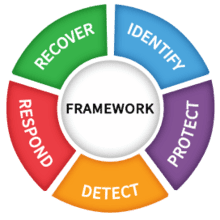
The National Institute of Standards and Technology (NIST) is a part of the U.S. Department of Commerce. It’s a scientific organization that’s been around since 1901. NIST is all about measurements. NIST standards support a wide range of industries, including information technology. In terms of IT security, NIST provides a cybersecurity framework that includes standards, guidelines and best practices. The framework covers five areas: detect, respond, recover, identify, and protect. Organizations use NIST’s cybersecurity framework to deal with the many cyberthreats that they continually face.

What Is Security Compliance?

Sarbanes-Oxley

The Sarbanes-Oxley Act of 2002 deals with matters of corporate responsibility. Congress passed the law in response to large financial scandals that had plagued America in preceding years. Compliance with Sarbanes-Oxley is of particular concern for those who deal with the financial aspects of a business. These requirements must also be considered by those who handle IT security.

HIPAA

Anyone who works in the medical profession knows the importance of the Health Insurance Portability and Accountability Act (HIPAA). The main focus of HIPAA is to ensure the privacy of patients. Those who handle the data of patients must be particularly careful to protect the confidentiality of this information. HIPAA compliance is required of IT professionals and database managers as much as those who treat patients in hospital rooms.

PCI-DSS

Another important consideration for businesses is payment card industry (PCI) compliance. PCI standards have been established by the PCI Security Standards Council. Customers who use debit or credit cards need to be assured that their financial transactions are completed successfully and without interference from cyber criminals. The payment card industry data security standard (PCI-DSS) includes requirements that provide for the safe processing, storage, and transmittal of credit card information.

GDPR

The General Data Protection Regulation (GDPR) is the law established by the European Union (EU) to protect data for all its citizens. Companies across the EU are required to guard the personal data of individuals according to precise rules. Anyone doing business in the EU should be familiar with GDPR and its requirements.

CCPA

The California Consumer Privacy Act (CCPA) was passed in 2018 to provide similar protections for Californians. Companies with an annual revenue of $25 million are required to comply. CCPA gives individuals the right to sue companies for breach of privacy and is much like GDPR.

Conclusion

IT security involves much more than just putting up a firewall and training users. It includes maintaining compliance with a variety of best practices across different industries. Some of these standards are voluntary, while others are backed by the force of law. Ignorance of the law is no excuse, and failure to keep up with industry standards can be harmful to your business. Anyone handling sensitive data online must educate themselves on the various security compliance requirements related to their field. Talk to us today if you wonder how compliance can affect your business.

The post What Is Security Compliance? first appeared on HD Tech.

25 Jul 21:57

2025 Top Things to Think About

by admin

Being prepared, we have a saying at H&D Technologies, It’s not if it’s when if they want to get to you they will. So what you do is you prepare for that eventuality of when they get in, what are you going to do from there forward. And, I guess the biggest thing is understanding I’m not selling with fear here. Oh, they’re going to get in. They’re going to get you. It’s so terrible. Which, it is terrible, but when you prepare for the when it’s a lot less terrible people, it’s so much better. When you have a plan, the event happens. You have a plan. You have your cyber insurance to pay for the remediation. And yes, it’s stressful, but it’s a lot less stressful than not being prepared and not having money to pay.

Backups

The biggest thing hands down, the biggest thing and the most important thing is having good backups, having what are called immutable backups. I know you’re like, great Tom, another tech giving all these words off, but immutability is very simply the inability to change the backups.

They cannot be encrypted. They cannot be deleted because that’s the first number one thing an attacker does when they get into your system.

First item, be prepared. Have good immutable backups.

Knowledge

Executives don’t learn about cyber preparedness and what cyber even is. That is a total mistake. Just like you wouldn’t not look at your P&L and your balance sheet, you must be looking at your key performance indicators for your technology department. Remember, no technology, no profit and loss, and no balance sheet because you can’t run those things when your systems are all encrypted.

So you’ve got to remember to watch the reports that your technology people give you. If they’re not giving you reports, you need to demand them. That’s what I talk about by being involved and being an understanding. What’s going on is knowing that you have to have what we call. The second thing is trust, yet verify. You always trust your tech people. You have to, otherwise you wouldn’t be working with them. But you need to know that they’re doing their job. You cannot take for granted that they are. And even if they have the best and best of intentions to do their job, you don’t know that they are unless they’re showing you the reports. And when someone, a layman, looks at reports and asks questions many times, it makes the tech think in a different way about being prepared.

Cyber Insurance

If you’ve watched my videos before you know I harp on this when you have cyber insurance, and when the event happens, you know, “I’m not going to have to worry about paying a large amount of money, a quarter million to a half a million dollars.” And that’s without them getting to your backups and without you having to pay a ransom. You still are going to be spending a couple hundred thousand to $500,000 in what we call incident response or remediation, actually getting the people out of the system, figuring out how they got in all of that, and maybe repairing some stuff that they had damaged.

So when you know that you’re prepared because you know you have your backups and you know that you have money to pay for the remediation with your cyber, you are so much more prepared for that when event happening.

Again, this is Tom Hermstad with H&D Technologies. We’re in Seal Beach, California. We are a Cyber Response Firm. We help people prepare for the when. I hope you have a great 2025. And please do what I say because it’s going to help you out.

The post 2025 Top Things to Think About first appeared on HD Tech.

25 Jul 21:57

Pricing in the Managed Services Industry

by admin

Tom Hermstad with H&D Technologies here, here to talk about a taboo subject, pricing in the managed services industry.

When you’re going to get a contract to maintain your computer systems, how do we price?

First thing is you got to have total transparency. So that’s our motto. We’re transparent about all the support we do for our clients. So why not be transparent about how we charge, right upfront?

We have a price calculator on our website at and you can go to it, put in the number of users you have and a few other things, and you can actually get a quote that is not exact, but is pretty close to what you’re going to be getting once we figure it out 100%.

After doing some analysis on your network. There are two main types of contract.

One is a fixed cost and the other is an hourly.

And fixed cost is usually by head.

That’s how we figure it out. How many users you have. It’s $195 per user per month.

That’s pretty much in Southern California a good rule of thumb. Most of the MSPs I know in this area are charging around that amount. It can go as high as $225 depending upon the complexity of what your network has.

The other one is hourly.

That is just you work an hour, you work a half an hour, you get charged for that. Usually that’s going to be in the $175 an hour to $225 an hour range. It’s almost always more expensive to do hourly than it is to do fixed cost.

The post Pricing in the Managed Services Industry first appeared on HD Tech.

25 Jul 21:57

Problems with the MSP Industry

by admin

Here with you today to talk about another taboo subject, which is, what are the problems with the managed services industry and these things that I’m going to relate to come from me actually talking with prospective customers and customers about what problems they’ve had with our industry.

By far the leading number one problem is many managed services providers say they’re doing stuff that they’re not doing on a consistent basis, that that is hands down the biggest thing. When we go in to look at a network that we’re assessing, many times, we find that the client has not been patched, the backups haven’t been running, effectively.

Item number two, a total lack of transparency. Many times, people feel like they’re being held hostage by their managed service provider because they’re not getting all of the data and information that they own. Passwords, that type of stuff. And that lack of transparency creates distrust.

The third is a lack of quality communication. A really good understanding by the MSP of what the business is trying to achieve so that the technology supports that direction. People just don’t have those kinds of conversations with their clients. And you should have those. And that’s why we do quarterly or monthly meetings or strategic business reviews with our clients so that we can talk to them about that type of stuff and get that information.

The last thing I’ll say is people say to me, hey, we’ve been burned by an MSP before. And usually what that means is, for instance, they’ve lost some data. They go to their MSP and say, hey, can we get this data back? And the MSP says, oh yeah, we don’t have it. So, there’s a lot of distrust of the entire MSP industry in general.

The post Problems with the MSP Industry first appeared on HD Tech.

25 Jul 21:57

Why We Do What We Do

by admin

Although we do a lot of fixing broken printers and helping people with outlook problems, that is not what gets me up in the morning. Nope. I mean, we have to do it, but that’s not what gets me going and fired up.

What gets me going and keeps me fired up -> protecting people’s businesses and preparing them for a cyber attack.

What we are here to do, and our mission is, we are here to keep your businesses as safe as possible. But we’re there to help you prepare for the eventuality of a cyber attack. A couple of sobering statistics on why we’re so worried about this and why we spend so much time and energy on this. 60% of the businesses that have a successful cyber attack go out of business within a year.

And that number is much lower because the FBI says that few people actually tell them when they’ve been cyber attacked. Some people think it’s closer to 80% to 85% of the businesses that get successfully attacked go out of business. It costs us as a country $12.5 billion in 2023 because of cyber attacks.

That is unacceptable. It’s a travesty.

Businesses go under, people lose their jobs, kids don’t eat. And you’re like, whoa, Tom, you’re kind of going crazy, am I? It’s frickin bad. $12.5 billion! I’d like a few billion to do more good in society, to try and help people to be more prepared for a cyber attack.

Protect and Prepare.

I’m about all protecting. And you can spend a large amount of money on protecting. But the reality is, regardless of the different things you put in place, if they really want to get to you, they’re going to get to you. I hate to break it to you. And people are like, well, why would they want to get to me?

They want to get to everybody. It’s a numbers game for them. They get on people’s networks. They look to see what they have from a, from a resource standpoint, if they have insurance, whatever it is, and then they plan an attack and then they execute that attack and they may do it across 50 people at one time.

So they’re coming for you. And if they want to get in, they’re going to get in.

So what you’re left with is preparing. If you know they’re going to get to you, then you prepare and you get them out and you get back up and running with as little amount of money as possible. And you lock down the way that they got in so that they can’t get back in again. Those are the type of things you do.

You have great backups so that you know everything goes south. You at least can get back your data for sure. So it’s all about prep, and that’s what gets me fired up and gets me going is if we help spread the word, regardless if a company is our client or not, if we as a company help spread the word that preparedness is where it’s at.

It’s not if, it’s when and preparing for the when, if we spread that word, then we’re accomplishing our mission.

So I want you to have a great and safe 2025.

And be prepared. Take the time to think about and talk to your security professional about what it means to be prepared. Safe computing. Have a great one and I’ll see you on the next video.

The post Why We Do What We Do first appeared on HD Tech.

25 Jul 21:57

The Cyber Security Eco-System – Statistics & the Reality of the Situation [PART 1]

by admin

Sobering Statistics:

  • 88% of attacks are human error
  • 43% of attacks are small/medium sized businesses
  • 60% of business go out of business within 1 year
  • 16.5 billion US loss in 2024 from Cyber Crime (12.5B in 2023)

The Reality of the Situation:

  • Hackers have Unlimited Time, Unlimited Funds, and NO Consequences.

Check out all 3 videos -> PART 1 | PART 2 | PART 3

The post The Cyber Security Eco-System – Statistics & the Reality of the Situation [PART 1] first appeared on HD Tech.

25 Jul 21:57

Prevention is NOT Preparation [PART 3]

by admin


Prevention is NOT Preparation

  • Failing to prepare is preparing to fail-being a casualty is avoidable
  • It’s not if, it’s when – prepare for the when
  • Spend equally between prevention and preparation
  • React (fear/panic) vs. Respond (logical, planned)

Think Preparation AND Prevention

Preparation – it’s easier to write a check than to spend time – preparation takes time from high level people at your company.

  1. Risk management assessment (including tech, OT, physical)
  2. Immutable backups
  3. Incident Response IR plan-table top exercises
  4. Disaster Recovery DR Plan-DR Test
  5. Cyber Insurance-where you follow the declarations!
  6. MFA
  7. Setup Zero Trust

Check out all 3 videos -> PART 1 | PART 2 | PART 3

The post Prevention is NOT Preparation [PART 3] first appeared on HD Tech.

25 Jul 21:57

The Anatomy of a Cyber Attack, an Act of War [PART 2]

by admin

Bycatch

  • Everything gets caught, Hackers sit and plan for 200 days

This is an Act of War

  • Armed = technology hacking tools and AI
  • Mortality = A business death
  • Weapons = the tools being deployed

Check out all 3 videos -> PART 1 | PART 2 | PART 3

The post The Anatomy of a Cyber Attack, an Act of War [PART 2] first appeared on HD Tech.