Shared posts

21 Feb 18:20

The Best Nintendo Switch Deals and Bundles Right Now

by Johirul Hassan
Chris M

for jackson

The Nintendo Switch has notoriously held its value since its release, bar Black Friday when Amazon reduced it to £249. If you're one of those that are looking to get a Nintendo Switch on the cheap but didn't jump in on the Black Friday deal, you've come to the right place.

I've highlighted my picks on what I feel are the best and cheapest Nintendo Switch bundles, games and accessories below (updated monthly). It's good to note that Nintendo Switch bundle deals right now aren't as good as they are in promotional periods such as Black Friday, but if you can't wait to get your hands on one, then these deals are currently your best bet.

If you want to check out early Black Friday deals in 2019 for Nintendo Switch, PS4, Xbox One, and more, visit our sister-site BlackFriday.co.uk.

Continue reading…

14 Feb 14:58

Pocket Chain Saw

by Oliver Hulland

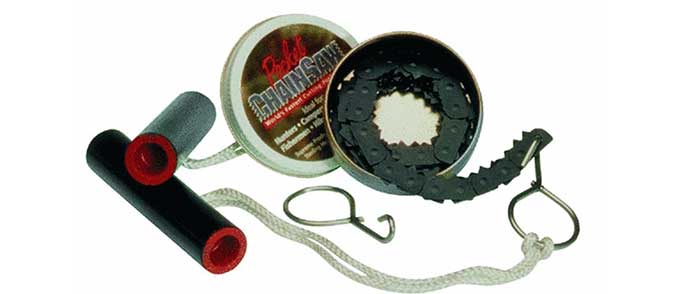
This little saw ($24) is excellent, fast cutting, light weight (at 3 oz without the case), and folds up small making it highly portable. It can quickly saw branches and trees up to about 4-6 inches in diameter with its 28 inch long chain.

To use it, wrap the chain around whatever you want to cut and then grab the handles and pull back and forth. This flexibility means that it can take on logs and branches too thick for smaller camp saws. I’ve used it in the back country as well as around the yard.

When one of the metal loops that attaches the saw to the handles came apart at the weld point the company very quickly responded by sending me a new set of loops. It’s an excellent product supported by a conscientious and responsive company.

-- Jaime Cobb

[This is a Cool Tools Favorite from 2010]

Supreme Products Pocket Chain Saw 4)$23

Available from Amazon

Manufactured by Supreme Products http://www.pocketchainsaw.com/

23 Jan 15:16

Best of AU Videos: AutoCAD Tips, Tricks, and Delightful Drafting Techniques

by Heather Miller
Chris M

I downloaded this video the other day. I'll put it in your tempshare drive to watch later.

AutoCAD tips tricks

You may recognize Donnie Gladfelter (a.k.a. “The CAD Geek”) from the AutoCAD world with his blog, entertaining and informative tweets, and more. He lives and breathes AutoCAD each day, and we’re always lucky to have him speak at Autodesk University.

Hatch Boundary AutoCAD Tips

For Autodesk University Las Vegas 2018, Donnie presented “AutoCAD Tips, Tricks, and Delightful Drafting Techniques.” And, if you weren’t able to be there in person, never fear! The video is now available. Don’t miss the chance to learn secret tips; how to complete common AutoCAD tasks in fewer steps; discover new features that improve productivity; and how to use AutoCAD across platforms (desktop, web, and mobile) to improve collaboration. You can see the video here.

Looking for more Autodesk University videos? Check out the entire series here.

The post Best of AU Videos: AutoCAD Tips, Tricks, and Delightful Drafting Techniques appeared first on AutoCAD Blog.

22 Jan 14:43

Get Ready for Jeep Life: 8 Tips for Every New Jeep Owner

by Certified Master Techs
Chris M

aaron, you have most of these checked except Jeep events. gotta do some jeep events or you aren't a good Jeep Owner.

Did you know that in 2018 there were 973,227 Jeeps sold?

With so many Jeeps being sold it’s no wonder they are seen more on the road every day.

Did you just buy your first Jeep?

While you go cruising in your Jeep, you should get used to jeep life. Keep reading to learn 8 tips for a new Jeep owner.

Get Ready for Jeep Life: 8 Tips for Every New Jeep Owner

There are a few things that new jeep owners need to know once they become part of the jeep family. Owning a Jeep is a lifestyle. Whether it’s a casual lifestyle or a hardcore lifestyle for you there are some things you should keep in mind.

1. Avoid the Death Wobble

Every Jeep brand has what’s known as the dreaded “Death Wobble.” When the Jeep reaches a certain speed it begins to wobble. The wobble makes it harder to control the Jeep and it also makes it more prone to rolling over.

If you notice a wobble immediately bring your Jeep into a mechanic to check out the front suspension system. Usually, an overloaded front suspension is what causes the front wheels to vibrate. 

2. Find a Good and Reliable Mechanic

This is important because having work done on a Jeep requires someone that is knowledgable with Jeps. Jeeps are very dependable but when you need work done on it you want to make sure the mechanic is experienced with your Jeep. 

Owning a sport vehicle also requires regular maintenance and upkeep. Having a reliable mechanic that knows what they’re doing will bring peace of mind. Do research on mechanics in your area and find word of mouth referrals by asking around where people in your area take their Jeeps.

You might also want to educate yourself on certain common issues just in case you can’t get an appointment with your mechanic immediately.

3. Learn the “Jeep Wave”

That’s right there is such thing as a special wave when you own a Jeep. Have you ever noticed motorcycle riders wave at each other? Same thing with Jeeps. 

When you see a fellow Jeep driver wave at them and they will do the same. Jeep drivers consider themselves as special adventurers and like to acknowledge fellow adventurers with the wave. If you don’t wave back it’s considered a sign of disrespect in the Jeep world.

4. Jeep Security

Unless you own a hardtop you won’t want to just leave things in your vehicle because they might go missing. Most Jeep owners choose a soft top or no top. There are products available to help secure your items. 

Many companies have security boxes available to keep items safe while you leave your Jeep unattended. You can check out brands like Tuffy and Bestop to see their different products. You can learn more about these products online.

5. Join a Club

Jeep clubs are available in almost every part of the country. Joining a club is a great way to find fellow Jeep enthusiasts like you. They can help you with any newbie Jeep questions you have which will come in handy in the beginning.

The clubs are known for traveling together and looking out for each other. A local club will allow you and your family to experience the great outdoors with fellow Jeep adventurers.

You can search on social media platforms like Facebook for other Jeep owners to see what clubs they are part of. Meetup also is a good place to search for Jeep get-togethers.

6. Love Your Open Roof

Not every Jeep has an open roof but if yours does this is a perfect way to enjoy and appreciate the fresh air. The unit is easy to remove which is a plus. Everyone riding in your Jeep without the roof on is going to enjoy the entire experience. 

Going on an off-road excursion? Take off the roof and take in the beautiful scenery because not many vehicles offer this type of adventure.

7. Attend Jeep Events

Believe it or not, this is an important part of Jeep life. Most Jeep owners find events in their area or possibly other areas (to have an excuse to drive) to meet fellow Jeepers. 

Some events have obstacle courses set up and off-road trails for you to try out. This is great for a new Jeep owner to get the feel for off-roading while doing it in a safe manner but still have a ton of fun. 

A well-known event in the USA is the Jeep Jamborees which usually has obstacle courses, trails to try out and enjoy your Jeep while meeting fellow Jeep owners. 

8. Enjoy the Ride

Last but not least, this tip is a reminder to enjoy the ride. Your new Jeep is more than a commute vehicle. Your new vehicle is capable of a ton of off-road fun. Few vehicles offer the option of traveling off the beaten path.

With so many places to go see you will have some incredible opportunities for adventures that others don’t have access to. Don’t be scared of getting stuck and allowing that fear to keep you from the unique adventures a Jeep offers you. 

Welcome to the Family

Now that you are a new Jeep owner and feel like an expert after reading the tips above, welcome to the family. Get out there and enjoy the open road fellow adventurer.

If you want to personalize your new Jeep with your own style check out our article with some ideas on how to personalize your new ride.

The post Get Ready for Jeep Life: 8 Tips for Every New Jeep Owner appeared first on Car Repair Information From MasterTechMark.

18 Jan 13:45

Built to Separate: Border Barriers Around the World (30 photos)

Chris M

SEE, NOBODY HATES CHINA BECAUSE THEY BUILT A WALL.

The current debate in the United States about building up and reinforcing the border wall with Mexico may have distinctly American roots, but the problems, and the controversial solutions, are global. Growing numbers of immigrants, terrorist activity, continued drug trafficking, and protracted wars have sparked the construction of temporary and permanent border barriers in many regions worldwide. Our own Uri Friedman wrote in his 2016 article “A World of Walls,” “Of the 51 fortified boundaries built between countries since the end of World War II, around half were constructed between 2000 and 2014.” Below, a look at some famous and some lesser-known barriers across the globe.

Jiankou, an unrestored section of the Great Wall of China, photographed near Beijing. The Great Wall is a collection of fortified barriers built over hundreds of years to protect various Chinese empires from nomadic tribes to the north. ( Ilya Terentyev / Getty)
17 Jan 18:55

Screw and Nut Grabber

by mark
Chris M

um.... pretty neat. I've seen the longer ones, but this one looks like it would be good for working on electronics. definitely adding to my wishlist, after a thorough search for a made in USA one.

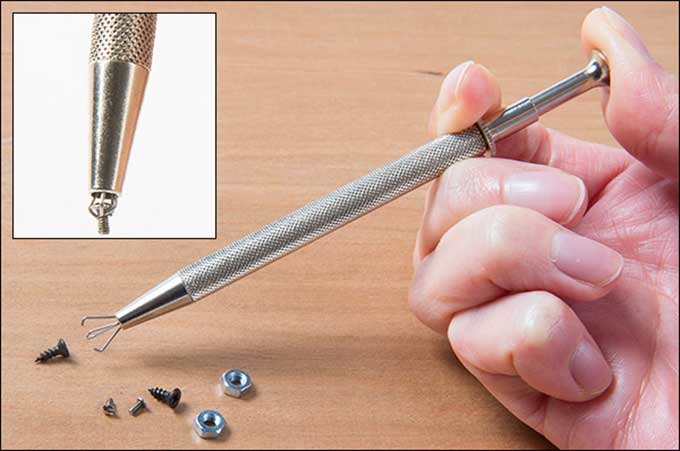
I came across this Screw and Nut Grabber ($8) in the impulse buy section during a Christmas shopping trip to a Lee Valley retail store. When I saw it sitting in the jar on the counter I hoped it was the solution to the headaches caused by my sausage fingers. At $8 it was worth the gamble. It has found itself and permanent home in my tool kit, unlike other items found in the spaces usually reserved for mints and chocolate parts.

I repair medical equipment on site for a living. While many screws are magnetic and will hold to a bit for installing upside down, I have found some manufacturers use small stainless screws to install circuit boards in devices where there is any risk of moisture ingress. This has led to me dropping many screws, accompanied by some colorful language and a scavenger hunt.

I have looked at similar devices that hold a screw onto a screwdriver but they are designed to be used for one type of screwdriver bit and I would have to carry multiple specialty drivers. This is not ideal for keeping my tool kit lightweight and portable. But this tool is small enough to fit into hard to reach areas. While not designed to allow you to apply torque it allows me to start a machine screw with little risk of cross threading then follow with a normal driver to tighten.

For starting a screw it is limited to small (~1/4″) heads or the holding prongs will slip. I have also used it for its intended purpose to the pick up dropped fuses, screws, nuts, etc.

I have used this tool for almost 2 years 3-10 times per week and it has held up very well. It is small enough to fit into any tool kit. This tool has saved me many hours of searching for dropped screws and nuts and maintain a professional demeanor at the same time.

[Amazon sells a similar tool for $7 — MF]

-- Arthur Heffernan

Screw & Nut Grabber ($8)

17 Jan 18:54

Micro USB Adapter Connector

by mark
Chris M

also neat.

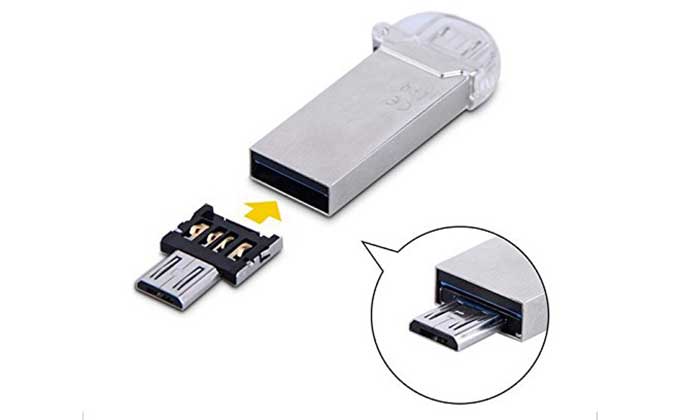
One of these ($4 for 5) came bundled with a USB Flash drive I purchased. Insert one end into the male USB plug of the Flash drive, and the other end is micro USB compatible, so it can plug into your phone or other devices. For years, I just used it to transfer files to and from flash drives into my phone, but then I learned a really neat thing: It will also work with the transmitter dongle for my wireless keyboard and mouse! On those occasions when I wish to use my tablet (a Kindle Fire 7) more like a computer, I can connect my full-size keyboard and mouse to the tablet with this adapter. The peripherals work just as expected, letting me type at normal speeds, and have the precise cursor control that I expect from a mouse. It has been really convenient. I have this wireless mini-keyboard/trackpad device which also can use in this way. So when I don’t want to carry a notebook computer, but still need to do some typing, this adapter is just the thing. The one I am linking to is very small and inexpensive. It is thin enough that I can store it, in a paper envelope, inside my wallet without trouble.

-- Daniel Kim

Ultra Mini DM Micro USB 5pin OTG Adapter Connector for Cell Phone Tablet & USB Cable & Flash Disk – 5pcs ($4)

Available from Amazon

10 Jan 17:43

A Decent/Affordable Multi-Tool

by Ryan
Chris M

NEED IT

So I have a project coming up that requires a multi-tool. Whenever I need a new tool, my first thought is to just buy the best. And in this case, I think most folks consider the Fein Supercut to be the best in the market. The thing is though, I don’t think a multi-tool is something I’m gonna use on the regular and spending $400 on an occasional is not something I’m prone to do.

So then, I went down the line… The Bosch uses the same starlock blades and gets good reviews, but again the price scared me away. I’m in the Milwaukee cordless ecosystem, so I checked out their offerings and heard mixed reviews about their performance and rumors of an upcoming tool update… and who wants to buy a new, old tool?

I got frustrated and decided to look at “one-time” tools – something I RARELY do and NEVER advise. Harbor Freight just isn’t an option to my sensibilities, so I just went down to Home Depot and bought the Dremel MM45 which was on special for $115.

To be honest, I’ve never been all that impressed with Dremel branded tools. I’ve had a number of their rotary offerings and none of them have ever struck me as being particularly well made. I didn’t expect the MM45 to be much different.

I was wrong. This thing is actually pretty great given it’s price. It feels as though it is made far better than any Dremel tool I’ve ever owned, fits nicely in the hand, cuts quick as hell, and isn’t all that loud.

I’m certainly not all that knowledgeable about the multi-tool market, but I recommend this thing for sure. It’s great for a guy that doesn’t want to spend a fortune on a tool he isn’t likely to use more than a couple of times a year, but still wants something that can be relied on past a single project.

I looked online for better pricing and couldn’t find anyone else selling the MM45. Given that, it must be a Home Depot exclusive? I dunno… But you can get yours here.

08 Nov 17:58

Preparing for the Centenary of the End of World War I (28 photos)

This Sunday, November 11, 2018, will mark the passing of 100 years since the end of World War I—the “war to end all wars.” In 1918, on “the 11th hour of the 11th day of the 11th month,” in a forest near the French city of Compiègne, French, British, and German leaders met and signed an armistice that officially ended a horrific conflict that claimed the lives of more than 16 million people over four years. Earlier this month, Emmanuel Macron, the president of France, inaugurated a series of commemorations of the centenary, combining messages of remembrance with warnings about the recent growth of nationalism in the world. Also, be sure to see the Fading Battlefields of World War I.

The British artist Rob Heard stands among rows of 72,396 shrouded figures which form his piece of commemorative art "Shrouds of the Somme" to mark the upcoming centenary of the end of World War I, in Queen Elizabeth Olympic Park in London, on November 7, 2018. Each figure is a human form, individually shaped, shrouded and made to a name of the 72,396 missing British and Commonwealth servicemen who were killed fighting in the Somme area of France between July 1, 1916, and March 20, 1918, who have no known grave and whose names are engraved on the Thiepval Memorial in France. ( Matt Dunham / AP)
29 Oct 14:12

Red Dead Redemption 2 Official Companion App Revealed

by Adam Bankhurst
Chris M

now this is pretty neat!

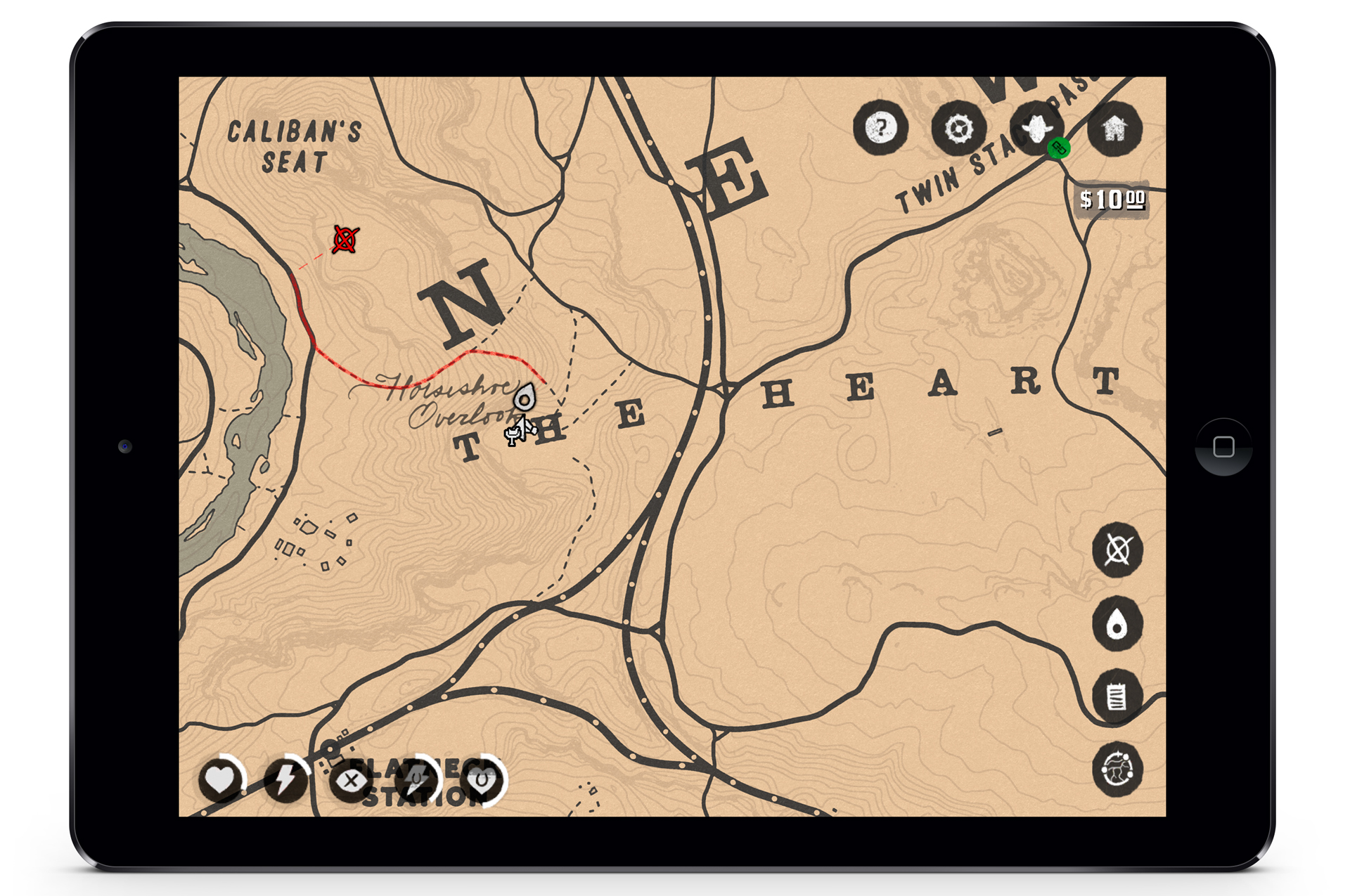
Rockstar has revealed that Red Dead Redemption 2 will be receiving an official companion app that will be launching alongside the game on iOS and Android on October 26, 2018.

Announced via Rockstar's website, the Red Dead Redemption 2 Companion App will connect to your PlayStation 4 or Xbox One and will deliver "real-time interactive information to your smart device."

Continue reading…

25 Oct 17:15

We're Streaming 2 Hours of Red Dead Redemption 2 Tomorrow

by Mitchell Saltzman
Chris M

might have to watch.

Load your six shooter and saddle up your horses, because one of the biggest games of the year is almost upon us.

We're streaming two hours of Red Dead Redemption 2 tomorrow, October 25, starting at 10am PT/1pm ET/6pm UK (October 26 at 4am AET), so be sure to tune in and get an early look at what's new in Rockstar's open-world Western.

IGNPlaysLive_RDR2_YT

As always, you can watch right here on the front page of IGN.com, or you can find us on YouTubeTwitch, and Mixer.

Continue reading…

24 Oct 20:47

OXO Good Grips Silicone Sink Strainer

by mark
Chris M

For aaron...

In this video we’re taking a look at an $8 sink strainer from OXO. It has made our kitchen sink more civilized.

Sink strainers are a kinda gross subject, so I’ll do my best not to disgust you here. Here’s the traditional strainer I’ve used for years. It’s metal, and it has this protruding part that fits into the drain so you can either plug it up or dial in exactly how much water you want to pass around it.

I’m sure there are merits to this design, but my wife and I argue over this thing all the time. When it’s in, it’s barely effective. But half the time it’s not even in the sink because it was being cleaned, or was stopping up the drain.

So this, is better. For one, the large outer lip covers up the whole drain, so nothing’s slipping past it.

Second, the silicone strainer can be pulled inside out, allowing you to easily dump stuff into a compost bin or garbage can.

I do wish that the lip extended out just a little further, just so I couldn’t see any of my drain peeking out — but that’s just an aesthetic complaint, and maybe something unique to my sink.

Overall, it feels like a luxurious upgrade for a sink I use everyday, and the ick factor of cleaning it out is gone for me now. The novelty will probably wear off, but I actually get a kick from ejecting things from this strainer.

23 Oct 19:26

Nike Signs Its First eSports Star

by Gabe Gurwin
Chris M

.....

Nike endorsement deals are no longer just for traditional athletes. The sporting gear and shoe company has signed Chinese League of Legends player Jian Zihao, and he's teaming up with LeBron James for a clever new shirt design.

According to SportsPro, Zihao -- better known as "Uzi" -- will work with James on the "Dribble &" campaign, which will include the phrase "Dribble & Carry" on shirts. The campaign originally began in response to Fox News host Laura Ingraham's "shut up and dribble" comments after James had criticized President Donald Trump.

Continue reading…

23 Oct 16:11

Infinite Divider Small Parts Storage Box

by mark
Chris M

Plano boxes work good too.

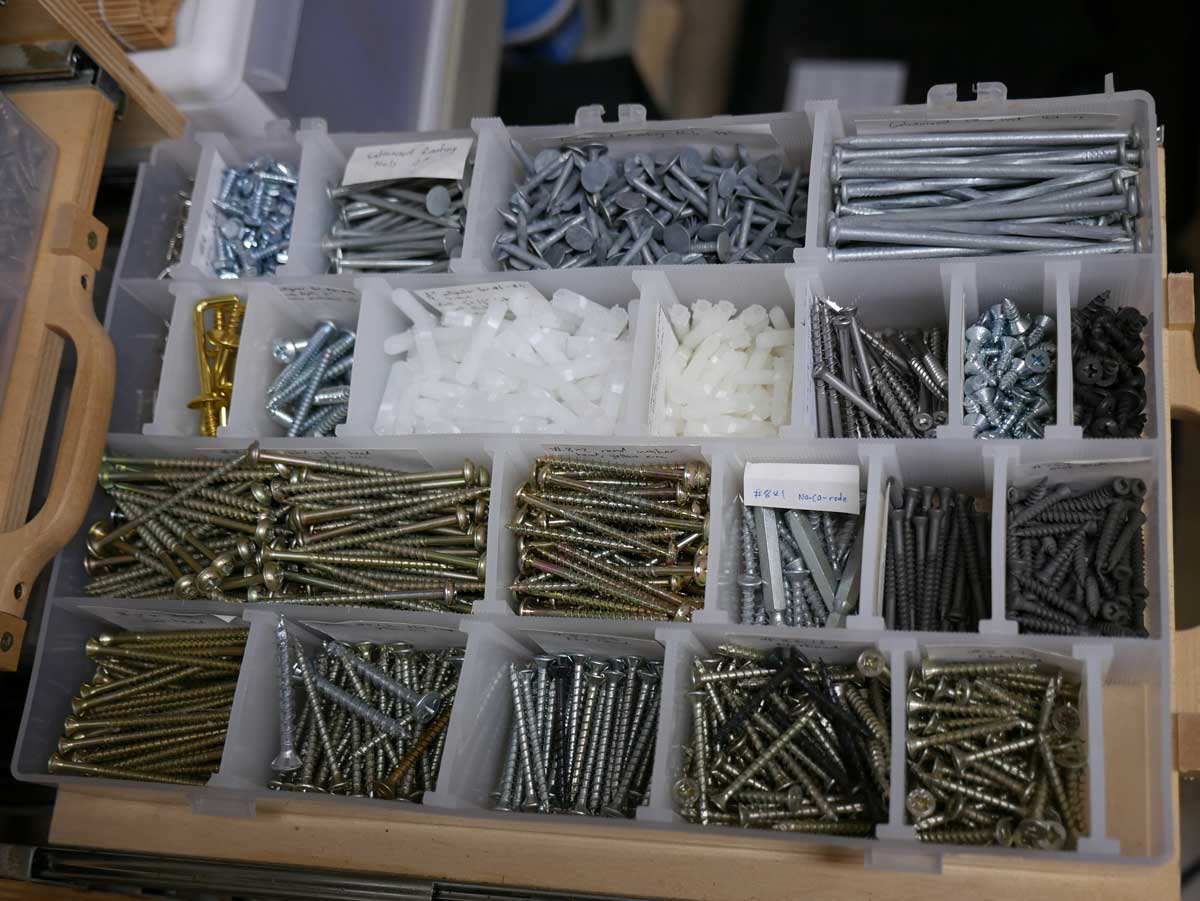
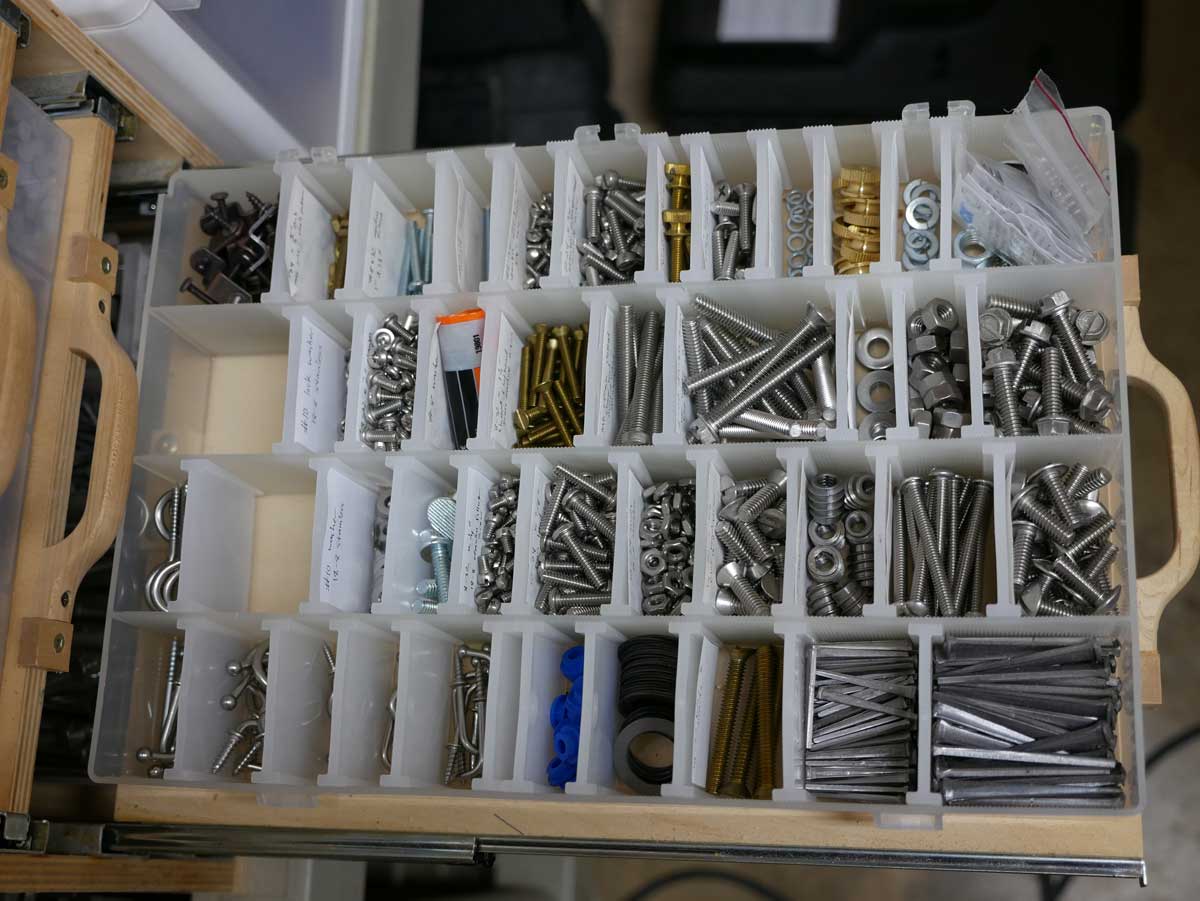
The infinite divider box ($4 – $17, depending on size) is the best tool for organizing a diverse collection of small parts. It is better than other options such as the Akro storage bin because the compartments can be resized incrementally to the precise size required. I have some screws that came in a 10 pack, some that came in a 25 pack, and some that came in a 100 pack. Why should I devote a 2″ x 2″ space to 10 screws? The infinite divider boxes have enabled me to store my collection of hardware in a way that is organized and accessible but much denser than any other similar method. Each box comes with an inadequate set of six dividers. Be sure to purchase a few additional packages of dividers if you need lots of small partitions.

15 Oct 17:19

Thanks Jack…

by Ryan
Chris M

that garage though...

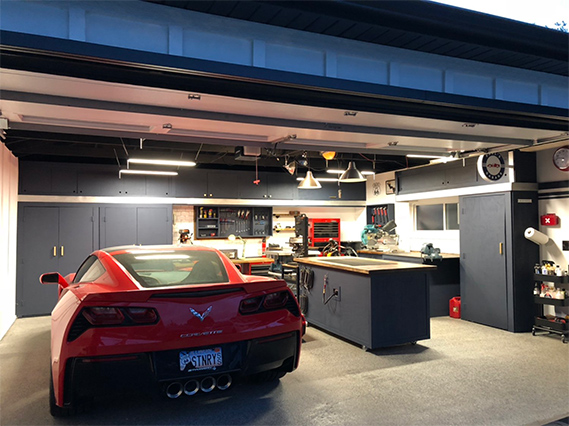
This is pretty cool… Everyone knows about Jack’s 12-Gauge Garage, right? Well, Paul was so inspired by Jack’s workspace that he built his own version complete with island and almost identical cabinet layout.

Check it out.

11 Oct 14:12

Cornell & Diehl Redburn

by Kevin
Chris M

I don't know if i've had many burley's before.

Kyle Weiss
If you’re the sort that doesn’t like fall, or likes it simply because there’s certain coffee drinks now available, we probably wouldn’t get along. It’s akin to being someone who doesn’t understand why bacon is a thing, doesn’t regard baseball as an awesome sport, or someone who dislikes animals. You might even hate tobacco and those who smoke it. We’re just different tribes. That’s fine, and you can go enjoy your thing on your time—away from me. This is my time. There’s a delicate changing of the guard between vibrant life and vibrant decay with which many of us above or below a certain latitude are blessed to experience every year. If you’re reading this, your pipes are a natural part of your routine as much as mine, and seasons definitely matter.

Cornell & Diehl recently debuted "Redburn," a small-batch crumble cake consisting of Burley, light and red Virginia, dark-fired Kentucky leaf with a kiss of rum as a topping. The label alone is a screaming autumn-red and I genuinely, if not skeptically, enjoy a good Burley-forward mixture.

Crumble cakes are an interesting method of doing pipe tobacco. They’re easier to deal with than a plug but they might be daunting if you’re unfamiliar with loading your pipe. Redburn’s take on this is almost spongy and it delightfully pulls apart like a pork shoulder that’s been smoking all day. You have to deal with it correctly and there’s certain ways to deal with it–no knife necessary.

Redburn smells barely of rum, but has a treacle-fig nose to it once broken apart. This encouraged me, because toppings for pipe tobacco can range from overkill to downright nonexistent. Loading a pipe with a range of chopped to nearly ribbon-like tobacco can be a tad tricky. Half the time I encountered "sniper leaves" of tobacco that blocked the airway, but nothing a pipe cleaner couldn’t push out of the way. There’s a balance of roughing up the tobacco too much and not enough. Once achieved, lighting is easier if this stuff is broken apart and left to dry out a bit, but when it does, the delicacy of the burn is rather impressive.

I found Redburn to be easy as hell to smoke right from the beginning. The nutty smoothness of the Burley and buttered bread hints from the red Virginia is there at the start, and there’s a nice tongue-prickle likely from the pinch Kentucky dark-fired. If topping is going to be an issue, this is where I brace myself, and I can say without reservation it’s not problematic. I couldn’t even tell it was there.

This tobacco isn’t overwhelming to the senses, but it has a little kick to it. Moderate nicotine levels midway through let you know it is present and accounted for, while delivering just the right amount of character. The Kentucky sits in the background, without being tongue-coating. The bright Virginia pushes some pleasant sharpness past its red counterpart, and there’s no bitterness from substandard Burley—which means the quality was selected properly. One of my biggest complaints about Burley is how it can, at times, be a mere filler rather than a focus. Redburn didn’t seem to have these thick, leathery leaves but rather the paper-thin and delicious sort.

Managing a bowlful of Redburn is almost effortless, but it’s advisable to keep tamping light and less often. This tobacco likes some natural, gentle puffing. It likes to breathe, but not too much. Quick smokers might experience some angry taste buds, whereas the patient let-it-smolder sorts will enjoy keen rewards. Keeping this in mind is important for the end of the bowl, as I’ve found with some Burley there can be ashy and bitter components, perhaps from tamping and stoking embers too hot. Done right, there can be a black tea background with an almost roasted chestnut experience. Not a bad way to end a smoke.

Lighter whiskeys and beers would be my choice for a beverage companion. Coffee tended to be okay for the morning, but since tea was mentioned, you’d do good sipping that perhaps a bit more.

Redburn is a great tobacco. It gives a great Burley experience though the pairing of the companion tobaccos is unusual. Most notably there isn’t an unnatural sweetness meddling with the mixture. I’m not going to say it’s an "advanced" smoke, but seasoned smokers that are into Burleys should grab a tin of this. Aging may or may not do a lot for it, but time will tell. The fresh product is completely ready to go. My overall experience with this tin has been an excellent one. Maybe I’m mesmerized by crisp mornings and the cacophony of fall colors, but this tobacco gave me quite a few decent sits on the porch. Changes of seasons are inevitable, and being a pipe smoker it’s good to find new things to enrich a fella’s day.

Happy fall and smoking, everyone. Except those who can’t see past nature’s brief periods of splendor. Life is too damned short, and these momentary pleasures are a great way to combat this fact.

03 Oct 15:05

Jack Delano's Color Photos of Chicago's Rail Yards in the 1940s (21 photos)

Chris M

I love photos like these.

Jack Delano was one of the photographers who worked in Roy Stryker’s Farm Security Administration photography program in the early 1940s, traveling the American countryside, photographing people and places with the stated goal of “introducing America to Americans.” In 1942 and ’43, Delano spent time in the rail yards of Chicago, documenting the busy freight hub and the countless workers who kept the trains running 24 hours a day. Some of his most striking images were made on Kodachrome color transparencies, wonderfully preserved in the Library of Congress today. Collected below, a handful of images from Chicago as it was some 75 years ago.

A view of part of the South Water Street freight depot of the Illinois Central Railroad and buildings in downtown Chicago on May 1, 1943 ( Jack Delano / Library of Congress)
02 Oct 12:36

Fields: Exploring the Features and Benefits of AutoCAD

by The AutoCAD Team
Chris M

I wished we would use these more. We would never have to fill out a drawing number again.

Fields: Exploring the Features and Benefits of AutoCAD

In AutoCAD, you can automate textual data in your drawings by adding fields to any type of text including single and multi-line text objects, dimensions, leaders, block attributes, and tables. When creating or editing any of these objects, simply place the cursor where you want the field, right-click and select Insert Field from the menu.

AutoCAD Fields

Here are just a few examples of where you might want to use fields in your AutoCAD drawings.

Plot Stamps

You can combine field functionality with text to create a plot stamp that is as flexible in appearance and location as any other piece of text. Since the plot stamp is actually an Mtext object, you can view and modify its appearance in the intuitive Mtext editor without having to first plot the drawing. Add the plot stamp to your current drawing or save it in a drawing template so that it’s automatically included in any new drawings that you create. The field values automatically update to display data based on the new drawing. You can even copy the plot stamp into an existing drawing with the assurance that the field data will update accordingly. If the field can’t be evaluated, it displays dashes “—-“. For example, AutoCAD can’t evaluate the PlotDate field until the drawing is actually plotted. But, rest assured it will be included on the plotted drawing!

AutoCAD Fields Object Data

You can use fields to display information about a selected object. For example, you can display the diameter of a circle or the area of hatch. When you edit those objects, the field values update to reflect the changes in geometry.

AutoCAD Fields

Sheet Sets

One of the most powerful uses of fields is in combination with sheet set functionality. You can use fields to automate the data in view labels, callout blocks, and title blocks by managing that data from a central location within the project’s sheet set.

AutoCAD FieldsWhen inserting a field, the field category and name that you choose depends on the data that you want to display. If you want to display the plot date, for example, select the Plot field category. Depending on the field that you choose, you may have the option to select from various formats such as month/day/year or year-month-day. To display object data, such as the hatch area, you select the Objects field category. If you’re using sheet set functionality, you can include SheetSet fields such as the name of the sheet title and sheet number.

 AutoCAD Fields

More on AutoCAD Fields

About Using Fields in Text

The Power of Fields and Attributes in AutoCAD

About Adding Field Objects to a Drawing

Speed Up Drawing Title Blocks Using Fields in AutoCAD

Tips for Adding Intelligence to Your AutoCAD Drawings

Keep Exploring

Want to learn more? Check out all the benefits of AutoCAD on our Features page; troubleshoot and get the details on previous software versions over on the Autodesk Knowledge Network; or take a look at all entries in our series, Exploring the Features and Benefits of AutoCAD.

The post Fields: Exploring the Features and Benefits of AutoCAD appeared first on AutoCAD Blog.

01 Oct 18:59

MAC Hollow Ground Chef Knife

This knife is extremely sharp. I use it mostly for vegetables which need a clean cut (carrots, parsnips, etc…) but which are soft enough that they won’t damage the blade (I’ll cut through chicken bones with the others below, but not this). The kullens and thin blade also make it uniquely suited for very thin slices.

MAC Hollow Ground Chef Knife 8″ ($94)

*

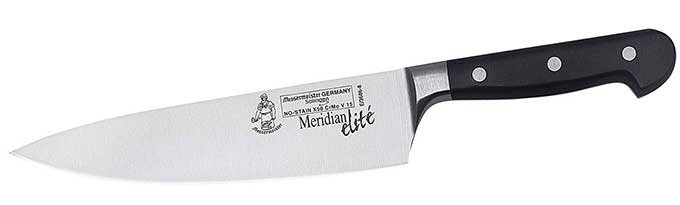
Messermeister Meridian Elite 8″

71Puz20p6yL._SL1500_

This is my workhorse. It’s big, heavy but well balanced, and very sharp. The Meridian knives have a German shape but a Japanese-style edge, which means they cut very well. I use this for anything too large for my other knives, and when the mood strikes.

Messermeister Meridian Elite 8″ ($102)

18 Sep 12:45

A Photo Trip to Croatia (30 photos)

Chris M

OMG... some of these places are incredible. beautiful beyond words.

The Republic of Croatia has only been an independent country since 1991, but the region has been inhabited since prehistoric times. More than 4 million people call Croatia home today, living in rural villages, coastal tourist destinations, and modern cities, where Roman ruins can stand side by side with medieval defenses and 21st-century architecture. Croatia’s dramatic coastline along the Adriatic Sea includes more than a thousand islands, and its mountains are riddled with fascinating caves and karst formations. Gathered here: some recent images of Croatia’s landscape, cities, parks, and shorelines.

An aerial view of Dubrovnik, Croatia, the old part of the city surrounded by a continuous defensive wall built mainly in the 14th and 15th centuries. The city has been the filming location for many scenes in the fictional King's Landing in the TV show Game of Thrones. See it mapped here. (Biggunsband / Shutterstock)
07 Sep 14:25

5 Sleeves for Covering Cables

by mark
Chris M

pretty neat. I could use something like this.

In this video we’re going to take a look at 5 different types of cable wrap. As a maker, I use this stuff to gather and protect wires in my projects, but it’s also good for managing cables from your computer or TV. I was surprised to learn there were so many different types of this stuff — velcro, spiral, split, braided tube. I’m going to show you what each one is like. I have links for everything in the description. And by using those links you help support my videos and the Cool Tools blog.

First up, I have this velcro style braided cable wrap ($23). It comes in this flat reel. You roll out however much you need, cut it, and fold it around your cables. The hook and loop keeps it secure.

It’s a good look, and very common around office buildings. The velcro makes it easy to undo, or pull out a cable along the way. But it also adds a little flap that sticks out, which depending on how concerned you are about the look of your project, feels a little sloppy.

One quick tip about working with this braided wrap is that you can avoid a frayed edge by using a hot knife, or hitting the edge with a torch or lighter.

If you just cut it with scissors, the ends tend to unravel and it’s messy

The best option is to use a hot knife. I have a cordless one. This cuts right through and melts the edges together as it goes so it doesn’t unravel.

You can also use a heat gun or torch or lighter, but the edge is a little more globby than what you get with a hot knife.

Next up we have this polypropylene spiral wrap ($13) from WingOfFly. It comes in a bunch of colors and like most of these options you can get bigger or smaller diameter. This is the smallest I found, which is an 8mm diameter.

It’s interesting stuff. It’s hard and smooth, and kinda slippery. And it’s UV resistant. It looks like an old school telephone cord, which I kinda like.

To use these, you cut the length you want and then wrap it around your cables like you’re wrapping a bandage.

It’s a little more work than some of the other methods here, but the end result is smooth and seamless. It’s also really colorful, which I like.

Next, we have a different version of the braided sleeve ($7). Instead of using velcro, this design has a stiff, open split down one side that stays closed on its own.

You can get it in different sizes, but at this smallest ¼-inch size, you can use it to dress up a cable or two.

To me, this stuff looks better than the velcro option, and seems to be just as easy to put cables in and out of.

Next we have this common black polyethylene spiral wrap ($9). This stuff is cheap and easy to find. It’s very flexible. And like the polypropylene wrap you put it on by wrapping it around over and over.

My main complaint about this stuff is that it just looks a little sloppy. It kinda looks like you wrapped your cables in electrical tape.

You can also find clear versions of this stuff, which I like a little better, but still isn’t a great look.

The upshot of this stuff is that you get a nice, thick, protective layer around your cables. If you’re trying to protect a lot of little fragile electronic wiring from heat and wear and tear, this is the most practical option I’ve found.

Finally, it’s worth mentioning that if you’re making your own cables, you can buy these uncut braided tubes in a bunch of different designs.

The trick with these is that you run your wiring through, slip on some heatshrink for the ends, attach your connectors, and then heat shrink the ends in place for a nice, finished look.

So there you go, 5 different cable wrap options. Maybe one of them is perfect for your next project. Again, you can find Amazon links for everything in the video description. And you can find thousands of reader recommended tools like these at Cool-Tools.org.

Tools:
1/2″ Side Entry Cable Wrap Braided Sleeving with Hook & Loop Fastener

WINGOFFLY 5pcs x 6.5Ft 8mm Cable Management PP Hose Protector Sleeve Spiral Wire Wrap

TechFlex F6N0.25BK Flexo F6 General Purpose 1/4-inch Braided Cable Sleeve

Copapa 21M 68 Ft PE Black Polyethylene Spiral Wire Wrap Tube PC Manage Cable 6mm 1/ 4”

1/4 inch Flexo PET Expandable Braided Sleeving

Related tools mentioned:
Hot knife – Dremel Versa Tip Precision Butane Torch

05 Sep 18:53

Destiny 2 Forsaken: How to Complete Milestone Challenges

31 Aug 18:01

FURminator De-Shedding Tool

by cc
Chris M

need

The FURminator ($22+) is the only really functional cat-grooming tool I’ve ever found. The stiff steel rake grabs the undercoat while leaving the topcoat intact. It does a tremendous job of removing loose fur. Be prepared, especially the first time you brush your cat. For my cats, the big difference between the FURminator and regular brushes is that the softer bristles of standard brushes just get hair from the surface — the topcoat, and a bit of undercoat — whereas the stiffer teeth of the FURminator primarily snag the undercoat (and lots of it!) as well as loose hairs of the topcoat. The best part is that all that fur goes in the trash, and not on your sofa, bed, or carpet. The environment of my apartment has been improved dramatically, and I no longer need to spend a lot of time vacuuming up cat hair. While the FURminator is expensive for a grooming tool, it’s solidly constructed and ergonomically designed, and best of all, it really works. My vet used it on my cats while they were in for a visit. I was shocked at how much hair came off in just a few strokes, so I bought one to take home and have been using it for several months. I then threw out the other standard, cat/slicker brushes I had acquired over the years, and bought two more FURminators to give to cat-owning friends. The one I use is 1.75″ and is intended for cats, so although the FURinator comes in larger sizes for dogs, I can really only speak to its utility when it comes to cats.

[This is a Cool Tools Favorite from 2008]

Here's a dog getting de-fur'd.

27 Aug 12:38

Is Russia’s Mysterious New Satellite a Space Weapon?

Chris M

This is why we need the space force. Look at those Russian space weapons.

The U.S. is calling Moscow out over a satellite’s unusual behavior.

23 Aug 13:49

Halo Infinite Is Definitely Halo 6, Not a Spinoff or Prequel

by Shabana Arif
Chris M

Think Halo will ever be relevant again or is it one of those things that ran its course like Gears or COD?

343 Industries has assured fans that Halo Infinite can be considered 'Halo 6', rather than a prequel or spinoff that the non-numbered title may suggest.

343's Jeff Easterling confirmed that the upcoming Halo Infinite is indeed the next main instalment in the series, despite not being a numbered entry. "It is Halo 6. You should just consider it Halo 6," Easterling said during a Mixer Stream, via GameSpot (at the 1:22:20 mark).

Continue reading…

22 Aug 20:44

2019 Shelby GT is a Tuned Ford Mustang That Packs up to 700+ HP

by Collin Woodard

Among Mustang owners, few names carry more weight than Carroll Shelby‘s. The legendary racer’s name is synonymous with high-performance Mustangs, and even after his death in 2012, Shelby American continues to sell tuned Mustang GTs. For 2019, that will include a revised Shelby GT and a new GT-H (pictured here).

Officially revealed at the Woodward Dream Cruise, the 2019 Shelby GT gets an upgraded suspension, custom bodywork, a Borla exhaust, unique wheels, and a handful of Shelby accents. Customers have their choice of a coupe or convertible with either a 10-speed automatic or six-speed manual. Thanks to the sports exhaust, the Shelby GT also makes a Bullitt-matching 480 hp. If you want more power, Shelby can add a Ford Performance supercharger that bumps engine output to more than 700 hp.

“We designed a gorgeous car to make any drive an adventure with thrilling performance and dynamic handling,” said Gary Patterson, head of Shelby American, in a release. “The Shelby GT can gobble up miles on a road trip or rip up the corners on the track. It is equally fun cruising to the beach or to the office. Plus, this is the only naturally aspirated V-8 Shelby car that can be optioned in convertible and with an automatic transmission. Enthusiasts will love to drive it all day, every day.”

Shelby will also introduce a Heritage version called the GT-H that’s inspired by the Hertz rental cars Shelby built back in the mid-2000s. The GT-H can be ordered in either black or white and gets gold racing strips. Optional gold wheels are also available. To help separate the GT-H from the regular Shelby GT, it gets a restyled front end, as well as additional suspension upgrades.

The price of the GT-H has yet to be released, but Shelby says the GT starts at $61,345. Adding any of the other custom upgrades or options packages will increase the price from there, but the good news is, the cost of the Mustang GT is already included.

Source: Shelby American

The post 2019 Shelby GT is a Tuned Ford Mustang That Packs up to 700+ HP appeared first on Motor Trend.

22 Aug 20:44

Humans have a hard time 'killing' robots, especially when they beg for their lives

by Eleanor Cummins
Chris M

Didn't click. Shared for the headline. it's starting the Synths are working on our feelings now.

Could you pull the plug?

When robots ask humans not to be turned off, humans experience a stressful ethical quandary.
14 Aug 14:18

30 Years Ago: A Look Back at 1988 (50 photos)

Chris M

Picture 18. How differently the clientele looks going to Mcky D's today than in this photo.

Three decades ago, the Winter Olympics took place in Calgary and the Summer Olympics were held in Seoul, candidates Michael Dukakis and George Bush competed for the 1988 U.S. presidential election, the Soviet Union withdrew its troops from Afghanistan, NASA’s Space Shuttle program resumed launches following the 1986 Challenger disaster, a passenger aircraft was brought down by a terrorist bomb over Lockerbie, Scotland, and much more. Photographers were also busy documenting the lives of Donald Trump, Dolly Parton, Jim Henson, Brad Pitt, George Michael, Andre the Giant, Bruce Springsteen, and many others. Take a step into a visual time capsule now, for a brief look at the year 1988.

Prince poses with Sheila E. (left) and Cat Glover, during his Love Sexy '88 Tour at Feijenoord Stadion in Rotterdam, Netherlands, in 1988. (FG / Bauer-Griffin / Getty)
14 Aug 13:29

Implementing Sheet Sets for Maximum Efficiency: Automate Callout Data in AutoCAD

by The AutoCAD Team
Chris M

I remember when these things first came out, me and Aaron used them for Chalk Point. It was a pain to remove a drawing from the set once added.

Automate Callout Data AutoCAD

We’re getting close to the finish line in our extended series of articles designed to set you up for success with sheet sets! In this installment, we take a look at how to automate callout data in AutoCAD.

Most sheet sets contain information that is interrelated. For example, a view on one sheet might refer to a view on a different sheet. Using traditional methods, you can manually maintain the text references between sheets, but that process can be tedious and error-prone. You can dramatically improve your productivity and minimize errors by updating your existing blocks to include fields. In addition to automatically updating textual data as changes occur, hyperlinks enable you to quickly open the sheet that is referenced by the callout and zoom to the appropriate view.

The process for automating callout data is very similar to automating block label data. However, unlike view label blocks, you can assign multiple callout blocks to your sheet set. You will need to update the default value of the attributes to include fields. If you have multiple callout block definitions, you will need to repeat this process for each one. If you combined your callout blocks into a single dynamic block, then you will only have to add fields to that one dynamic block definition.

1. Open the drawing that contains the callout block from your source library. The callout block might be its own little DWG file or it might be a block definition within another drawing, such as a template.

You will need to edit the Default for each of the attribute definitions. A typical callout block would include attribute definitions for the view number and sheet number. Your block might include additional information as well, but these two are the most common. The method you use to update the attribute definition depends on whether the block is stored as its own drawing or as a block definition within a drawing. You can use any method (BATTMAN, etc.) that you want. However, you want to ensure that you are editing the attribute definition NOT just the attribute value in the block instance. How do you know the difference? The attribute definition says “Default,” whereas the attribute value says “Value.” NEVER insert a field in an attribute “Value.” It may appear to work properly, but if the instance was updated to include a field and the definition wasn’t, the next time someone erases the block instance and reinserts it, the field data will no longer be there.

Automate Callout Data AutoCAD Sheet Sets

2. If your callout block is stored as its own drawing, skip ahead to step 3. If, however, your callout block is stored as a block definition within your drawing, insert and explode the callout block. (Alternate methods include BATTMAN or the Block Editor. If you are editing a dynamic block, you should use an alternate method because exploding will lose the dynamic block parameters and actions). When you explode a block with attributes, the attribute values are replaced with the attribute definitions.

View Number AutoCAD Sheet Sets

3. Double-click on the attribute definition representing the view number.

4. In the Edit Attribute Definition dialog box, right-click in Default and select Insert Field.

Edit Attribute Definition AutoCAD

5. In the Field dialog box, select the SheetSet Field category, the SheetSetPlaceholder Field name, the ViewNumber Placeholder type, specify an appropriate format, select Associate hyperlink, and then choose OK. Using the SheetSetPlaceholder field in your callout block enables you to define block attributes for fields that are not associated with any particular sheet or sheet set. Associating a hyperlink will enable you to click on the inserted callout block to open the associated sheet and zoom into that particular view number.

Field AutoCAD Sheet Sets

6. Select the same attribute definition that you just edited, right-click, and choose Properties.

7. In the Properties window, set the Preset property to Yes. Since AutoCAD will enter the attribute value for you (via field data), you do not want to prompt the user to enter the information as you would have done using traditional attribute definitions. Setting the Preset property to Yes will prevent AutoCAD from asking for a value when the block is inserted.

Properties AutoCAD Sheet Sets

8. Repeat steps 3-7 to add a field to the attribute definition for the sheet number using the SheetNumber placeholder type.

9. Redefine the callout block using the Block command (not necessary if you use BATTMAN or the Block Editor) and save the drawing.

That is all it takes to make your old callout block(s) smarter! Now you need to assign your callout block(s) to the Callout blocks property in your sheet set.

1. In the Sheet Set Manager, right-click on the sheet set title and choose Properties.

2. In the Sheet Set Properties dialog box, select Callout Block and choose the button to access the Select Block dialog box.

Sheet Set Properties AutoCAD

3. In the Select Block dialog box, navigate to file that contains your updated callout blocks. As mentioned previously, your callout blocks might be defined in their own drawing (DWG) or template (DWT) files or they might exist as block definitions within a larger drawing or template file.

4. If your callout blocks are individual drawings, select the option: Select the drawing file as a block.

-Or-

If your callout blocks are definitions within a drawing or template, select the option: Choose blocks in the drawing file and then select the appropriate block definitions.

You can assign any number of callout blocks to a sheet set.

Assign Select Blocks Sheet Set

5. Choose OK to close each of the dialog boxes and accept the changes.

Now you’re ready to test it out!

1. In the Sheet Set Manager, select the Sheet List tab.

2. Open a sheet to which you want to add a callout.

3. Select the Sheet Views tab. This tab displays all of the sheet/layout views created by the Sheet Set Manager.

4. Right-click on the view that you want to reference in your callout and choose Place Callout Block. The first time you do this, the Place Callout Block cascading menu option may display the option to Select Blocks. You can choose the Select Blocks option and then select all the callout blocks that you want to be available from the Sheet Set Manager. Subsequent access to the Place Callout Block cascading menu will display all the blocks that you selected.

Data Blocks Sheet Set AutoCAD

Callout Data Left Sheet Sets

5. Select the callout block you want to insert and place it on the sheet. The view and sheet numbers should automatically display in the callout.

6. Hover the cursor over the callout block and press Ctrl as you select the view or sheet number. If you select the sheet number, AutoCAD will open the appropriate drawing sheet. If you select the view number, AutoCAD will open the drawing as well as zoom into the appropriate view.

Now that your drawing is using field data, it is CRUCIAL that you do NOT edit those attribute values using traditional methods. For example, if you want to change the view number or sheet number on the callout, it might be very tempting to double-click on the callout block and enter the number for the Value of that block instance. If you do that, the intelligence you gained from fields is gone.

Unfortunately there is no way to prevent users from making this mistake, so it can only be avoided through education! If you see a field in a drawing (text with a grey background), never edit it! That data is being read from somewhere else and you need to edit the source, not the attribute value! In most cases that source data should be edited in the Sheet Set Manager. Since a callout is reading the view and sheet numbers from an existing view/sheet, you need to change the view or sheet number on the View List (Sheet Views) or Sheet List tab. Do not forget to REGEN your drawing to ensure it displays the most current field data.

By the way, if you are familiar with sheet set view categories, you may wish to use different callout blocks for different types of views. For example, you might have a view category called Elevations that points to one set of callout blocks and a view category called Sections that points to a different set of callout blocks. You can use the Sheet Views tab to assign callout blocks to different view categories.

What’s Next?

Next time, we’ll take a look back at how far we’ve come in mastering AutoCAD sheet sets. Until then, you can always download the full Mastering AutoCAD Sheet Sets guide now!

The post Implementing Sheet Sets for Maximum Efficiency: Automate Callout Data in AutoCAD appeared first on AutoCAD Blog.

13 Aug 19:10

Photos: 15 Years Since the 2003 Northeast Blackout (30 photos)

Chris M

Just an awful looking place.

On August 14, 2003, a series of faults caused by tree branches touching power lines in Ohio, which were then complicated by human error, software issues, and equipment failures, led to the most widespread blackout in North American history. More than 50 million people across eight northeastern U.S. states and parts of Canada were left without power for at least 24 hours, and many of them were in the dark for weeks. In New York City, thousands of commuters were stranded when the power cut out late on a Thursday afternoon. Memories of the 9/11 attacks only two years earlier were fresh in people’s minds as scenes of thousands of people evacuating Manhattan on foot were replayed.

People walk across the Brooklyn Bridge in New York City on August 14, 2003, after a blackout hit the city. (Peter Morgan / Reuters)