Shared posts

21 Feb 18:55

The 2017 Red Teamer’s Bookshelf

by Red Team Journal

A picture of booksIt’s been a couple of months since we first announced that Red Team Journal, Redteams.net, and OODALoop would be compiling the latest “Red Teamer’s Bookshelf” jointly. For those of you who’ve been waiting, the list is finally here. It’s larger than previous years, so we’ve organized the titles by category (and yes, some of these titles would fit in more than one category). The titles address a range of red teaming activities and skills, with a noticeable increase in special operations books this year. Thank you to everyone who submitted titles. (You can also find the the list here.)

Business (5 titles)

Counterterrorism (4)

Deception (4)

Decision Analysis/Thinking/Creativity (7)

Intelligence (6)

Military/General (5)

Military/Special Operations (11)

Miscellaneous (8)

Psychology/Social Engineering (4)

Strategy (7)

Security/General (3)

Skills/Miscellaneous (2)

Skills/Tech (11)

16 Feb 03:15

AnC - an attack that can fully derandomize ASLR from JavaScript without relying on any software feature

by /u/minorminer
13 Feb 13:02

Lead engineer at Target asking linkedin how to protect credit card numbers

by /u/fuckedupsh1t
12 Feb 18:55

Undefined behavior in C and C++ programs

by /u/Resistor510
09 Feb 01:24

Sneaking into the Super Bowl with nothing but a ladder

by /u/140414
04 Feb 18:21

SNES Code Injection -- Flappy Bird in SMW

by /u/HylianWarrior
20 Dec 18:56

[P] Mark Zuckerberg: Building Jarvis

by /u/jakn
13 Dec 01:21

[POC] CVE-2016-8020: McAfee Virus Scan for Linux allows for remote code execution as root

by /u/drewbbb
Heath Leach

Just wow...

07 Dec 02:22

Codewars: Train your coding skills

by /u/elf_crg
02 Nov 19:16

MIT - Computer Systems Security

by /u/YioUio
02 Nov 18:57

Google teaches “AIs” to invent their own crypto and avoid eavesdropping

by Sebastian Anthony

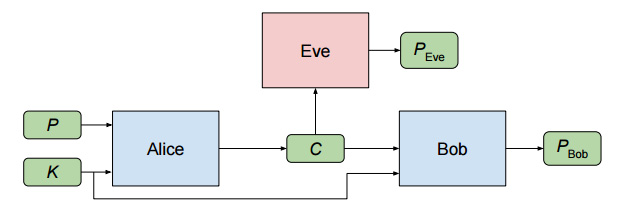
Google Brain has created two artificial intelligences that evolved their own cryptographic algorithm to protect their messages from a third AI, which was trying to evolve its own method to crack the AI-generated crypto. The study was a success: the first two AIs learnt how to communicate securely from scratch.

The Google Brain team (which is based out in Mountain View and is separate from Deep Mind in London) started with three fairly vanilla neural networks called Alice, Bob, and Eve. Each neural network was given a very specific goal: Alice had to send a secure message to Bob; Bob had to try and decrypt the message; and Eve had to try and eavesdrop on the message and try to decrypt it. Alice and Bob have one advantage over Eve: they start with a shared secret key (i.e. this is symmetric encryption).

Importantly, the AIs were not told how to encrypt stuff, or what crypto techniques to use: they were just given a loss function (a failure condition), and then they got on with it. In Eve's case, the loss function was very simple: the distance, measured in correct and incorrect bits, between Alice's original input plaintext and its guess. For Alice and Bob the loss function was a bit more complex: if Bob's guess (again measured in bits) was too far from the original input plaintext, it was a loss; for Alice, if Eve's guesses are better than random guessing, it's a loss. And thus an adversarial generative network (GAN) was created.

Read 7 remaining paragraphs | Comments

29 Sep 18:34

Scientist.NET 1.0 released!

by Phil Haack

In the beginning of the year I announced a .NET Port of GitHub’s Scientist library. Since then I and several contributors from the community (kudos to them all!) have been hard at work getting this library to 1.0 status. Ok, maybe not that hard considering how long it’s taken. This has been a side project labor of love for me and the others.

Today I released an official 1.0 version of Scientist.NET with a snazzy new logo from the GitHub creative team. It’s feature complete and used in production by some of the contributors.

Scientist logo with two test tubes slightly unbalanced

You can install it via NuGet.

Install-Package scientist

I transferred the repository to the github organization to make it all official and not just some side-project of mine. So if you want to get involved by logging issues, contributing code, whatever, it’s now located at https://github.com/github/scientist.net.

You’ll note that the actual package version is 1.0.1 and not 1.0.0. Why did I increment the patch version for the very first release? A while back I made a mistake and uploaded an early pre-release as 1.0.0 on accident. And NuGet doesn’t let you overwrite an existing version. Who’s fault is that? Well, partly mine. When we first built NuGet, we didn’t want people to be able to replace a known good package to help ensure repeatable builds. So while this decision bit me in the butt, I still stand by that decision.

Enjoy!

15 Sep 22:59

The Dukes R&D Finds a New Anti-Analysis Technique - Using IDA Known Bug

by /u/kevin138
01 Aug 22:28

A Famed Hacker Is Grading Thousands of Programs — and May Revolutionize Software in the Process

by Ryan Tate

At the Black Hat cybersecurity conference in 2014, industry luminary Dan Geer, fed up with the prevalence of vulnerabilities in digital code, made a modest proposal: Software companies should either make their products open source so buyers can see what they’re getting and tweak what they don’t like, or suffer the consequences if their software failed. He likened it to the ancient Code of Hammurabi, which says that if a builder poorly constructs a house and the house collapses and kills its owner, the builder should be put to death.

No one is suggesting putting sloppy programmers to death, but holding software companies liable for defective programs, and nullifying licensing clauses that have effectively disclaimed such liability, may make sense, given the increasing prevalence of online breaches.

The only problem with Geer’s scheme is that no formal metrics existed in 2014 for assessing the security of software or distinguishing between code that is merely bad and code that is negligently bad. Now, that may change, thanks to a new venture from another cybersecurity legend, Peiter Zatko, known more commonly by his hacker handle “Mudge.”

Mudge and his wife, Sarah, a former NSA mathematician, have developed a first-of-its-kind method for testing and scoring the security of software — a method inspired partly by Underwriters Laboratories, that century-old entity responsible for the familiar circled UL seal that tells you your toaster and hair dryer have been tested for safety and won’t burst into flames.

Called the Cyber Independent Testing Lab, the Zatkos’ operation won’t tell you if your software is literally incendiary, but it will give you a way to comparison-shop browsers, applications, and antivirus products according to how hardened they are against attack. It may also push software makers to improve their code to avoid a low score and remain competitive.

“There are applications out there that really do demonstrate good [security] hygiene … and the vast majority are somewhere else on the continuum from moderate to atrocious,” Peiter Zatko says. “But the nice thing is that now you can actually see where the software package lives on that continuum.”

Joshua Corman, founder of I Am the Cavalry, a group aimed at improving the security of software in critical devices like cars and medical devices, and head of the Cyber Statecraft Initiative for the Atlantic Council, says the public is in sore need of data that can help people assess the security of software products.

“Markets do well when an informed buyer can make an informed risk decision, and right now there is incredibly scant transparency in the buyer’s realm,” he says.

Corman cautions, however, that the Zatkos’ system is not comprehensive, and although it will provide one indicator of security risk, it’s not a conclusive indicator. He also says vendors are going to hate it.

“I have scars to show how much the software industry resists scrutiny,” he says.

theintercept_MUDGE_2

Photo: Cole C Wilson

Software Seal of Approval

When Mudge announced on Twitter last year that the White House had asked him to create a cyber version of Underwriters Laboratories, praise poured in from around the security community.

No one knew the details, but people were confident if he was involved, it would be great.

“Excellent! Something everyone has talked about for decades!” the Def Con hacker conference tweeted after his announcement.

“That’s a concept that really could make a difference if executed well,” wrote Bruce Potter, founder of the Shmoo Group crypto-security collective, which runs the annual Shmoocon security conference

Mudge has been tightlipped about the nature of the cyber UL ever since, but he agreed to discuss the details in advance of a talk he’s presenting next week at the Black Hat conference in Las Vegas.

“To use the car analogy, does it have seatbelts, does it have air bags, does it have anti-lock brakes?” — Peiter Zatko

He says the method their lab uses to evaluate software is based on one he taught NSA hackers in the 1990s about how to find the softest targets on an adversary’s network. (During his run back then with the famed hacker think tank L0pht Heavy Industries, Mudge and his L0pht colleagues regularly provided advice to various parts of the government.)

The technique involves, in part, analyzing binary software files using algorithms created by Sarah to measure the security hygiene of code. During this sort of examination, known as “static analysis” because it involves looking at code without executing it, the lab is not looking for specific vulnerabilities, but rather for signs that developers employed defensive coding methods to build armor into their code.

“To use the car analogy, does it have seatbelts, does it have air bags, does it have anti-lock brakes? All the things that are going to make [a hacker’s] life more difficult,” Mudge says.

The Zatkos say a code’s security hygiene, measured by the programming methods developers use, as well as by the tools and settings used to compile the resulting software, are good predictors of whether a software application will have serious security vulnerabilities and reliability issues.

Their algorithms run through a checklist of more than 300 items, such as whether the compiler used to convert the source code into binary inserted common protective features, like preventing portions of memory reserved for program data — the “stack” and “heap” — from being used to hold additional software.

“Things like ASLR [address space layout randomization] and having a nonexecutable stack and heap and stuff like that, those are all determined by how you compiled [the source code],” says Sarah. “Those are the technologies that are really the equivalent of airbags or anti-lock brakes [in cars]. They’re the things that make software better than it used to be.”

Modern compilers of Linux and OS X not only add protective features, they automatically swap out bad functions in code with safer equivalent ones when available. Yet some companies still use old compilers that lack security features.

The lab’s initial research has found that Microsoft’s Office suite for OS X, for example, is missing fundamental security settings because the company is using a decade-old development environment to build it, despite using a modern and secure one to build its own operating system, Mudge says. Industrial control system software, used in critical infrastructure environments like power plants and water treatment facilities, is also primarily compiled on “ancient compilers” that either don’t have modern protective measures or don’t have them turned on by default.

Asked about the findings, a Microsoft spokesperson would only say, “We are focused on security as a core component in the software development process. We developed and are committed to the Security Development Lifecycle, and continue to lead the industry in creating the most secure products across all platforms.”

The Zatkos’ algorithms also assess the number of branches in a program; more branches mean more complexity and more potential for error. And they look at the presence of complex algorithms that could be susceptible to algorithmic complexity attacks.

The lab is also looking at the number of external software libraries a program calls on and the processes it uses to call them. Such libraries make life more convenient for programmers, because they allow them to repurpose useful functions written by other coders, but they also increase the amount of potentially vulnerable code, increasing what security experts refer to as the “attack surface.” There are about 200 specific external library calls, Mudge says, that are particularly difficult to implement in a manner that ensures a given program executes safely.

If they get a really low score, “we can guarantee that … they’re doing so many things wrong that there are vulnerabilities” in their code. — Sarah Zatko

The process they use to evaluate software allows them to easily compare and contrast similar programs. Looking at three browsers, for example — Chrome, Safari, and Firefox — Chrome came out on top, with Firefox on the bottom. Google’s Chrome developers not only used a modern build environment and enabled all the default security settings they could, Mudge says, they went “above and beyond in making things even more robust.” Firefox, by contrast, “had turned off [ASLR], one of the fundamental safety features in their compilation.”

Mudge worked for Google previously, so some might accuse him of bias, but he says their algorithms, which have been vetted by an outside technical board, ensure that the automated assessments aren’t biased.

Software vendors will no doubt object to the methods they’re using to score their code, arguing that the use of risky libraries and old compilers doesn’t mean the vendors’ programs have actual vulnerabilities. But Sarah disagrees.

“If they get a really good score, we’re not saying there are no vulnerabilities,” says Sarah. But if they get a really low score, “we can guarantee that … they’re doing so many things wrong that there are vulnerabilities [in their code].”

The lab aims to prove such vulnerabilities with the second part of its testing regimen, which uses fuzzing, a method that involves throwing a lot of data at a program to see if it crashes or does something else it shouldn’t do.

“In actually executing it and crashing it, we’re confirming that, yes, this thing has bugs, this thing crashed,” Mudge says. “We were able to give it input and it behaved abhorrently.”

Not all crashes indicate the presence of a bug that hackers can exploit, but they do, at a minimum, indicate that a program may be unreliable for users. In the lab reports the Zatkos plan to make available to the public, they will note which crashes they found were potentially exploitable.

The Zatkos don’t plan to fuzz every program, only enough to show a direct correlation between programs that score low in their algorithmic code analysis and ones shown by fuzzing to have actual flaws. They want to be able to say with 90 percent accuracy that one is indicative of the other.

Mudges Storied Hacking History

Mudge has a long history in the hacker and security communities. While a member of L0pht, he and his L0pht colleagues testified to federal lawmakers in 1998 that the group could bring down the internet in 30 minutes using a serious flaw that still exists.

theintercept_MUDGE_3

Photo: Cole C Wilson

He also advised the Clinton administration on cybersecurity issues; was a program manager for DARPA’s Cyber FastTrack initiative, which offered fast-turnaround grants for short cybersecurity projects; and more recently, worked for Google’s Advanced Technologies and Projects Group, a sort of rapid-response skunkworks group, before leaving to launch the testing lab.

His interest in doing software security assessments dates back to a paper one of his L0pht colleagues wrote in 1998 about such evaluations. The idea moved from theory to practice when L0pht merged with a security startup called @Stake and began developing an automated way to do static analysis of code. That method became the basis for what a company called VeraCode does today: assess software for government and corporate clients before they buy it.

Chris Wysopal, CTO of VeraCode and a former L0pht colleague of Mudge’s, says clients generally won’t purchase software his company finds problematic until the software maker fixes the problems, which he says is great for other buyers.

“To me that’s like actually finishing the job; we’re not just pointing out the problems but helping make better software,” he says.

But these assessments are done privately and often on enterprise software, leaving the rest of the public with no way to assess the security of software and little leverage to force vendors to fix other poorly secured code. The Zatkos’ venture could fill that gap, Wysopal says.

Two years ago, Mudge says someone from the White House technology office approached him about helping to set up a government program to evaluate software. He had no interest in working inside the government and decided to set up a nonprofit instead. Although his tweet last year said the White House asked him to create the lab, the White House isn’t involved in his project.

Instead, with $600,000 in funding from DARPA, the Ford Foundation, and Consumers Union, he and Sarah set up the lab in the basement of their home. The outside technical board that vets their methodology and algorithms includes security notables such as former NSA hacker Charlie Miller; Dino Dai Zovi, a security engineer with Square; and Frank Rieger, CTO of the German firm GSMk, which makes the Cryptophone.

Vendors don’t pay for the evaluations. The Zatkos choose the software they evaluate and either buy it or obtain free evaluation copies from vendor websites. They’re examining both commercial software programs and open-source ones. For each software package they test, they produce three reports. The first, automatically generated by their algorithms, scores the software on a scale between 0 and 100. The second contains a detailed breakdown of what they found in the software and will be available for free on their website. The third report, which they plan to sell, will contain raw data from their assessments for anyone who wants to recreate them.

They’ve examined about 12,000 programs so far and plan to release their first reports in early 2017. They also plan to release information about their methodology and are willing to share the algorithms they use for their predictive fuzzing analysis if someone wants them.

There’s already a growing interest in their work. They’re working with Consumer Reports, another inspiration for the lab, to develop a way to use their data to evaluate products the magazine tests. They’ve also had interest from AIG and other insurers who want to use the data to do risk-assessments of companies seeking cyber insurance.

But there is at least one downside to scoring software like this: Attackers can use it to gauge where they should focus their energy to find vulnerabilities, targeting low-scoring applications. Lawyers will also likely want to use the data to assess liability for companies that get hacked. Did they install risky software on their network when a measurably more secure one was available?

Mudge says he’s not upset about the prospect of lawyers finding joy in their scores. “We’ve been begging people to give a shit about security for a decade. … [But] there’s very little incentive if they’ve already got a product to change a product. If you come out with a quantifier saying what you’ve got is not as secure as this other one, that’s going to be an incentive for them to go out and get the other one.”

Sign up for The Intercept Newsletter here.

The post A Famed Hacker Is Grading Thousands of Programs — and May Revolutionize Software in the Process appeared first on The Intercept.

28 Jul 22:21

Dark Patterns are designed to trick you (and they’re all over the Web)

by Ars Staff

Allow Harry Brignull to explain.

It happens to the best of us. After looking closely at a bank statement or cable bill, suddenly a small, unrecognizable charge appears. Fine print sleuthing soon provides the answer—somehow, you accidentally signed up for a service. Whether it was an unnoticed pre-marked checkbox or an offhanded verbal agreement at the end of a long phone call, now a charge arrives each month because naturally the promotion has ended. If the possibility of a refund exists, it’ll be found at the end of 45 minutes of holding music or a week’s worth of angry e-mails.

Everyone has been there. So in 2010, London-based UX designer Harry Brignull decided he’d document it. Brignull’s website, darkpatterns.org, offers plenty of examples of deliberately confusing or deceptive user interfaces. These dark patterns trick unsuspecting users into a gamut of actions: setting up recurring payments, purchasing items surreptitiously added to a shopping cart, or spamming all contacts through prechecked forms on Facebook games.

Dark patterns aren’t limited to the Web, either. The Columbia House mail-order music club of the '80s and '90s famously charged users exorbitant rates for music they didn’t choose if they forgot to specify what they wanted. In fact, negative-option billing began as early as 1927, when a book club decided to bill members in advance and ship a book to anyone who didn’t specifically decline. Another common offline example? Some credit card statements boast a 0 percent balance transfer but don’t make it clear that the percentage will shoot up to a ridiculously high number unless a reader navigates a long agreement in tiny print.

Read 31 remaining paragraphs | Comments

25 Jul 19:19

Cognitive Bias in Incident Response

by Gavin Reid
This blog is a co-authored by Jeff Bollinger & Gavin Reid Are You Too Confident in Your Incident Response? When Charles Darwin stated “Ignorance more frequently begets confidence than does knowledge,” civilization’s evolution from Industrial Age to Information Age was nearly a century away. Yet, when it comes to many aspects of IT, he nailed […]
18 Jul 20:09

An Infinitely Large Napkin project

by /u/v_Enhance

tl;dr I'd much appreciate any comments on this draft. Description at http://www.mit.edu/~evanchen/napkin.html.


The Napkin project is something I've been working on for the last 1.5 years; It's been linked on Reddit before (here, here, here) and I promised Reddit I'd polish up a public version, so here am I at last. Here's a link to the current draft.

Napkin is my attempt to introduce undergraduate (and some graduate) math to high school / college students with a strong background in proofs, for example alumni of the USA or international math olympiads. It's written to be entirely self-contained and covers a whole slew of topics, from linear algebra to complex analysis to algebraic number theory to homology. As the dedication hints, I originally began this as a present for a few of my high school friends, and since then it's grown extensively as I've added in material that I've picked up from my studies at Harvard and MIT. In short, it's the book I wish someone had written for my younger self.

The current draft is still quite rough in some places: I find new mistakes every time I look at the draft, some chapters don't have exercises yet, and so on. The algebraic geometry chapters are especially weak, partially because I don't really understand schemes myself. So I apologize in advance for all the defects in the current draft, and I'll do my best to fix them as they're found, although it may take me a while to get around to all of them (at an REU now!). If you see a mistake of mine, please don't hesitate to point it out to me.

I hope that this work of mine is useful to many students out there. And as for the experts, I'm sure there's many things I've done wrong; I am very happy to hear of any corrections, suggestions, criticisms, etc so that I can fix them in a later draft. Many thanks!


Edit: afterthought, here's a table of contents, in brief:

  • I. Basic Algebra and Topology
  • II. Linear Algebra and Multivariable Calculus
  • III. Groups, Rings, and More
  • IV. Complex Analysis
  • V. Quantum Algorithms
  • VI. Algebraic Topology I: Homotopy
  • VII. Category Theory
  • VIII. Differential Geometry
  • IX. Algebraic Topology II: Homology
  • X. Algebraic NT I: Rings of Integers
  • XI. Algebraic NT II: Galois and Ramification Theory
  • XII. Representation Theory
  • XIII. Algebraic Geometry I: Varieties
  • XIV. Algebraic Geometry II: Schemes
  • XV. Set Theory I: ZFC, Ordinals, and Cardinals
  • XVI. Set Theory II: Model Theory and Forcing
submitted by /u/v_Enhance to /r/math
[link] [comments]
14 Jul 14:25

HTTPS is not a magic bullet for Web security

by Ars Staff

People seem Grover-levels of excitement about some "S" sweeping the Web.

We're in the midst of a major change sweeping the Web: the familiar HTTP prefix is rapidly being replaced by HTTPS. That extra "S" in an HTTPS URL means your connection is secure and that it's much harder for anyone else to see what you're doing. And on today's Web, everyone wants to see what you're doing.

HTTPS has been around nearly as long as the Web, but it has been primarily used by sites that handle money—your bank's website, shopping carts, social networks, and webmail services like Gmail. But these days Google, Mozilla, the EFF, and others want every website to adopt HTTPS. The push for HTTPS everywhere is about to get a big boost from Mozilla and Google when both companies' Web browsers begin to actively call out sites that still use HTTP.

The plan is for browsers to start labeling HTTP connections as insecure. In other words, instead of the green lock icon that indicates a connection is secure today, there will be a red icon to indicate when a connection is insecure. Eventually secure connections would not be labeled at all, they would be the assumed default.

Read 46 remaining paragraphs | Comments

01 Jul 22:51

Android’s full-disk encryption just got much weaker—here’s why

by Dan Goodin

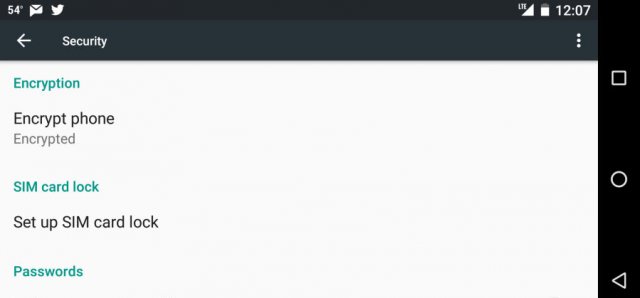
Privacy advocates take note: Android's full-disk encryption just got dramatically easier to defeat on devices that use chips from semiconductor maker Qualcomm, thanks to new research that reveals several methods to extract crypto keys off of a locked handset. Those methods include publicly available attack code that works against an estimated 37 percent of enterprise users.

A blog post published Thursday revealed that in stark contrast to the iPhone's iOS, Qualcomm-powered Android devices store the disk encryption keys in software. That leaves the keys vulnerable to a variety of attacks that can pull a key off a device. From there, the key can be loaded onto a server cluster, field-programmable gate array, or supercomputer that has been optimized for super-fast password cracking.

The independent researcher that published the post included exploit code that extracts the disk encryption keys by exploiting two vulnerabilities in TrustZone. TrustZone is a collection of security features within the ARM processors Qualcomm sells to handset manufacturers. By stitching together the exploits, the attack code is able to execute code within the TrustZone kernel, which is an enclave dedicated for sensitive operations such as managing cryptographic keys and protecting hardware.

Read 12 remaining paragraphs | Comments

27 Jun 22:47

iOS 10 beta still encrypts user data, but not the kernel

by Andrew Cunningham

The iOS 10 developer betas come with an unencrypted kernel. (credit: Andrew Cunningham)

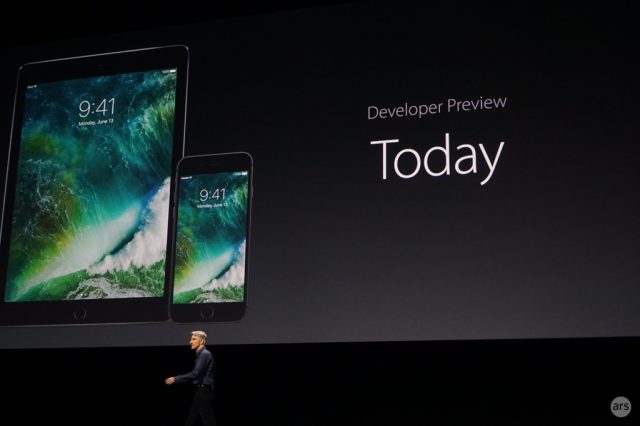
Apple has made encryption and user privacy a pillar of the iOS platform in recent years, but earlier this week, security researchers made a curious discovery: as reported by the MIT Technology Review, the operating system kernel in the iOS 10 betas released at WWDC last week is unencrypted. This makes it much easier to dig into the code and look for security flaws.

There was some speculation as to why Apple had done this or whether the company had even released an unencrypted kernel on purpose. After declining to comment initially, an Apple spokesperson confirmed to TechCrunch that the kernel had been left unencrypted on purpose but that user data continues to be encrypted as it normally is.

“The kernel cache doesn’t contain any user info, and by unencrypting it we’re able to optimize the operating system’s performance without compromising security,” the spokesperson said.

Read 2 remaining paragraphs | Comments

17 Jun 22:00

Google paid out $550k for Android Security Reward bounties in the last year, is upping bounty amounts

by Bertel King, Jr.

Screenshot from 2016-06-16 18-38-37

A year ago today Google announced Android Security Rewards, an expansion of its Vulnerability Rewards Program. Find a vulnerability, tell Google about it, help them fix the issue, and take home money. That's the concept, and it's a common one in the tech industry.

Google handed out over half a million bucks to 82 individuals over the past year. This averaged out to $2,200 per reward. Researchers averaged higher payouts, at $6,700.

Read More

Google paid out $550k for Android Security Reward bounties in the last year, is upping bounty amounts was written by the awesome team at Android Police.

07 Jun 17:12

TeamViewer users are being hacked in bulk, and we still don’t know how

by Dan Goodin

(credit: modpr0be)

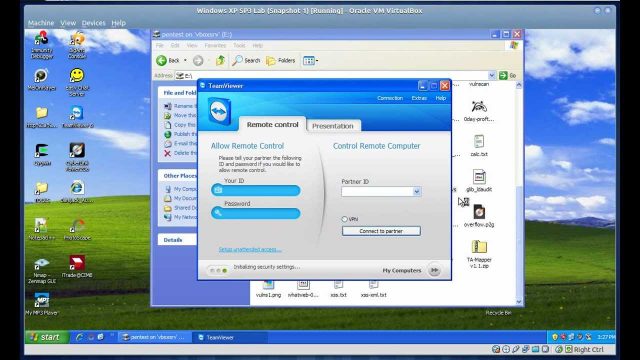
For more than a month, users of the remote login service TeamViewer have taken to Internet forums to report their computers have been ransacked by attackers who somehow gained access to their accounts. In many of the cases, the online burglars reportedly drained PayPal or bank accounts. No one outside of TeamViewer knows precisely how many accounts have been hacked, but there's no denying the breaches are widespread.

Over the past three days, both Reddit and Twitter have exploded with such reports, often with the unsupported claim that the intrusions are the result of a hack on TeamViewer's network. Late on Friday afternoon, an IBM security researcher became the latest to report a TeamViewer account takeover.

"In the middle of my gaming session, I lose control of my mouse and the TeamViewer window pops up in the bottom right corner of my screen," wrote Nick Bradley, a practice leader inside IBM's Threat Research Group. "As soon as I realize what is happening, I kill the application. Then it dawns on me: I have other machines running TeamViewer!"

Read 14 remaining paragraphs | Comments

27 May 21:33

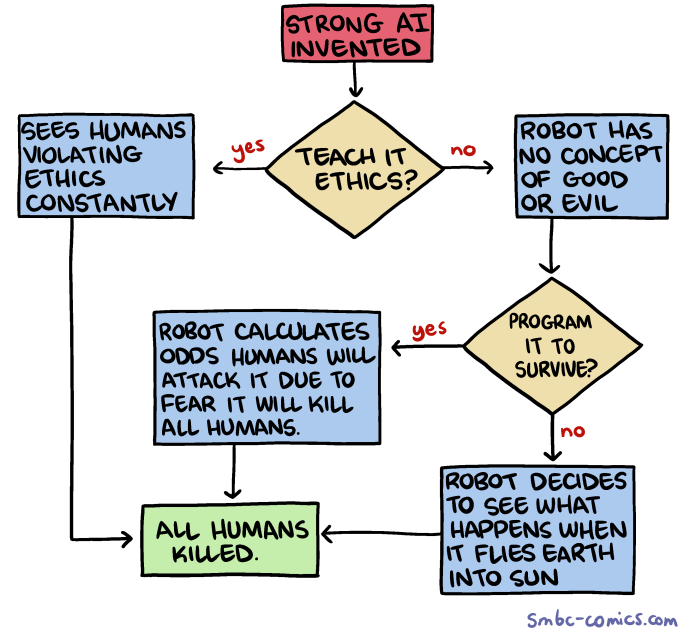
Saturday Morning Breakfast Cereal - Kill All Humans? A Flowchart

by admin@smbc-comics.com

Hovertext: Once you realize there is no hope, you can relax and just enjoy the progress in machine learning.


New comic!
Today's News:
12 Apr 12:13

Experts crack nasty ransomware that took crypto-extortion to new heights

by Dan Goodin

Enlarge (credit: Bleeping Computer)

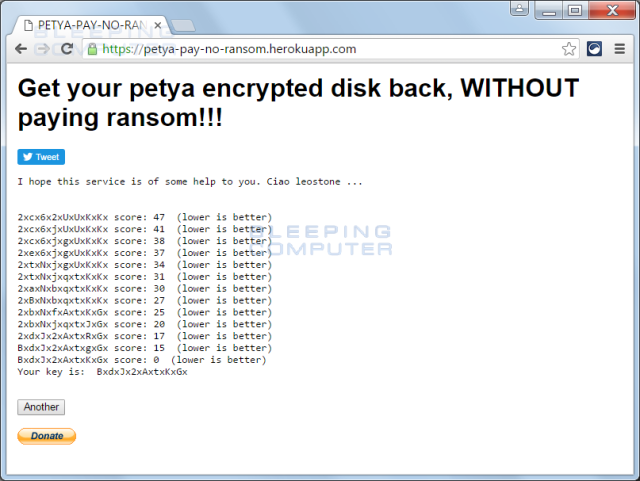
A nasty piece of ransomware that took crypto-extortion to new heights contains a fatal weakness that allows victims to decrypt their data without paying the hefty ransom.

When it came to light two weeks ago, Petya was notable because it targeted a victim's entire startup drive by rendering its master boot record inoperable. It accomplished this by encrypting the master boot file and displaying a ransom note. As a result, without the decryption password, the infected computer wouldn't boot up, and all files on the startup disk were inaccessible. A master boot record is a special type of boot sector at the very beginning of partitioned hard drive, while a master boot file is a file on NTFS volumes that contains the name, size and location of all other files.

Read 4 remaining paragraphs | Comments

08 Apr 14:42

Nest to permanently brick Revolv smart home devices

by Joel Hruska
Revolv-Feature
Nest is shutting down a competitor it bought 17 months ago -- and deactivating the $299 smart home systems that those users purchased at the same time, with no plan to provide a replacement and in violation of the original company's lifetime guarantee.
16 Mar 22:49

Developer Survey: Java Developers Are The Saddest And C++ Programmers Are The Oldest

by /u/javinpaul
15 Mar 14:13

Bypassing Antivirus With Ten Lines of Code

by /u/attactics
12 Mar 12:28

VPN implementations and their peculiarities

by Igor Oskolkov

In a previous post, we discussed the definition of VPN (Virtual Private Network), its purpose and various use cases. Today we will review its most prevalent implementations, and their advantages and drawbacks.

VPN implementations and their peculiarities

By definition VPN is a versatile concept, and it’s hard to understand straight away whether some implementation is a VPN or not. To a certain extent, the Internet’s forerunner, ARPANET, could also be considered a VPN. Curiously, almost all of the networking concepts and, more evidently, protocols, started as corporate technologies and only then became commodity for average users.

Well, neither history nor corporate infrastructure are of interest for us today. In this post we’re going to analyze common VPN implementations, which a user with no technical acumen might come across.

First, we will see into those implementations which help to protect users when they are connecting to a public Wi-Fi network, or to bypass certain IP-based restrictions imposed by a service provider. As a rule, consumer-class VPN services leverage popular operating system capabilities and provide a step-by-step instructions necessary for establishing a secure connection.

Lately VPN has made a huge step forward in terms of simplifying this process: an average user does not have to go through all those techy gibberish and only needs to follow primitive instructions like ‘pay here, download app here, press here and enjoy.’ But in some cases it would make sense to at least know how VPN implementations differ from each other.

VPN implementations and their peculiarities

VPN settings in Android (left) and Windows (right)

Popular VPN implementations

PPTP (Point-to-Point Tunneling Protocol) was developed about 20 years go, which is both its advantage and major drawback. The most important benefit is, its compatibility with almost all of operating systems, even legacy ones, which makes the protocol highly universal and available. Also, it’s not demanding in terms of computing power, if compared to newer solutions.

But its major drawback is also explained by its old age: by today’s security realities it offers a considerably lower level of protection. Its encryption methods were absolutely fine in mid-90s, but today are not secure enough — a problem which is amplified by a flawed architecture and a number of weaknesses in the most popular Microsoft implementation.

Moreover, with regard to PPTP, encryption is not offered by default, and it would take an adversary less than 24 hours to crack the password with the production hardware available today. However, in scenarios which don’t require a super secure connection or when other VPN connections are not available, it’s better to use PPTP with weak encryption rather that to go completely unprotected.

Once I found myself in a tricky situation: I was travelling to a country which is notorious for certain Internet regulations (if you know what I mean). I used our corporate PPTP server located in my home country to email, and my mails were delivered with a lag varying from two days to about two weeks. One can only guess where those emails were all that time. At the same time, the use of an alternative and thus more secure VPN connection was restricted. This story illustrates that PPTP by far isn’t strong enough to protect you from powerful guys like governments or corporations.

L2TP (Layer 2 Tunneling Protocol) is quite similar to PPTP. These two standards were developed and certified practically at the same time, yet L2TP is considered more efficient for virtual networks, but at the same time is a bit more demanding in terms of computing power. Usually it is preferred by ISPs and enterprise users. By the way, L2TP does not provide default encryption and is bundled with other protocols (usually IPSec).

IPSec (Internet Protocol Security) is a collection of protocols, standards and recommendations. This bundle is purpose-made for various types of secure connections. The first elaborations of IPSec date back to early 90s, but the basis of its concept is constant improvement and updating in accordance with developments in tech, so it’s not a static specification.

It’s obvious what type of entities it was developed for. IPSec included a dozen of standards (each of them having more than one implementation), which could be used for facilitating secure connections at all levels. It’s admittedly good in terms of architecture, reliability of its encryption algorithms, and capabilities.

With all due respect, IPSec has its downsides as well. First, it’s not easy to configure for an average PC user, and if it’s configured improperly, its security can be compromised. Also, as was noted before, it’s used in a bundle with several other protocols.

Second, it’s demanding in terms of computing power. Partially, this drawback is compensated by the use of hardware acceleration of AES encryption algorithms (which are usually offered in today’s implementations of IPSec, among other algorithms). This AES hardware acceleration feature is deployed in current processors for both mobile and desktop devices, as well as in Wi-Fi routers and so on.

To our dismay, technologies created by theoreticians (mainly, math think tanks), are brought to life by practical minds which at times lack knowledge and understanding of science. Research published in October 2015 states that up to 66% IPSec connections are crackable with quite moderate effort, and NSA is likely to possess suitable hardware resources to compromise encryption.

The issue here is the incorrect use of protocols which are used to initiate a secure connection. This problem is applicable not only to IPSec, but to TLS (which we’ll discuss below) and SSH, as well as TOR and OTR. In other words, there is likelihood of compromise for both VPN connection and other types of secure connection for certain websites, mail servers, messengers and the likes of those.

Of course, long lead-in times and significant computing resources are required to carry out such an attack, but in this very case the researchers used Amazon’s common cloud technologies and, evidently, spent a realistic amount of money, technically available for a private actor.

With such resources at hand, the prep time for an attack can be a minute in the best case scenario and up to a month in a worst-case scenario. At the same time, some experts were skeptical about this Proof-of-Concept: as they say, in real life the number of vulnerable systems is much lower. Anyway, certain aspects of the research should be taken seriously; meanwhile the developers of potentially vulnerable software are preparing or have already developed patches and have alerted their users.

SSL (Secure Sockets Layer) and TLS (Transport Layer Security) VPNs, as their names suggest, belong to a class of solutions based on corresponding SSL and TLS protocols, which are at times complemented by other means of protection. All of you should have come across SSL/TLS when surfing the Internet; for example, this very website uses it as well: the ‘https’ prefix and the green lock header confirm that the website uses these protocols for secure connection.

The first implementations of the protocol date back to as early as last century, yet the technology gained traction only in 2000s. The proliferation of the protocols allowed to study them thoroughly and find a number of vulnerabilities, both in the architecture itself and in different implementations. SSL 3.0 was phased out in June 2015; the most up-to-date version is TLS 1.2, yet it is hardly totally secure: a lot really depends on configuration (see IPSec). Besides, both protocols are burdened by a need to offer backward compatibility.

What can definitely be considered an advantage of this type of VPN is the prevalence of SSL/TLS in the Internet, which means that most public networks let it pass through freely. In terms of drawbacks, these VPNs have low performance, are hard to configure and require additional software.

Among the most popular SSL/TLS VPN implementations are OpenVPN (SSL 3.0 / TLS 1.2) and Microsoft’s SSTP (SSL 3.0). In fact, SSTP is integrated with Windows. OpenVPN, due to its open nature, has a lot of implementations for most platforms and is considered the most reliable VPN implementation to date.

Conclusion

We have reviewed the most popular VPN implementations known to date. However, as this technology evolved over the years, it saw a huge number of iterations. Think of all solutions developed for the enterprise and telecommunication sectors!

As for average users, I would recommend sticking to OpenVPN due to its open nature, reliability and security. However, this and other VPN implementations have a number of tricky technical and legal peculiarities I’m going to cover in a later installment in this series.

12 Mar 10:48

Got 15 minutes to kill? Why not root your Christmas gift?

by /u/skeeto
11 Mar 13:07

Windows AppLocker: An Introduction

by Pieter Arntz

Windows AppLocker is a feature that was introduced in Windows 7 and Windows Server 2008 R2 as a means to limit the use of unwanted applications. AppLocker provides administrators with the ability to specify which users can run specific applications.

AppLocker was designed to replace the Software Restriction Policies feature. It is considered a potentially powerful tool to make business environments more secure. But often complaints are heard that it is not flexible enough for most organizations. On the other hand it’s a tool that can be used by advanced home users as well. secpol

What can your rules be based upon?

On one hand, Windows AppLocker only caters to certain types of files and not all. Rules can be created for files with these extensions:

  • Executables : exe and com
  • Scripts : js, ps1, vbs, cmd and bat
  • Windows Installer files : msi and msp
  • Dynamic-link libraries : dll and ocx (This rule collection has to be enabled as it is not enabled by default)
  • Packaged app Rules : aappx (Windows 8 & 10 only)

The rules can be based on several file properties, for example file-name, product-name or “signed by”. And even by file-hash if the file is not signed. On the other hand, rules can be based on groups of users or on individual users. The basic type of rules can be defined as black- and white-listing, but with the use of exceptions this can easily be turned into something a little more powerful.

blockedmanually

Methods of use

As some system administrators may have found out, you can immediately enforce your rules and get confronted with some very unhappy users that could no longer use their favorite programs. To forgo this mishaps by enforcing a set of rules which is one method of use, there is also something called “Audit” mode: when a rule collection is set to “Audit Only” mode, instead of enforcing the rules, information about the rule and the application are written to the AppLocker event log. The “Audit” mode is both used in attempts to predict the effect of rules before enforcing them and to detect which applications are in use. Finding out which applications are active has been known to be an eye-opener and even led to the discovery of active malware.

Creating rules

The AppLocker Microsoft Management Console (MMC) snap-in is the designated console to create rules. To open the snap-in you can run “secpol.msc” and navigate to “Application Control Policies” and select “AppLocker”. Now you can select which type of rule you would like to create by selecting the category in the right hand pane.

filetypes

By right-clicking in the resulting field you can choose to “Create New Rule”.

newrule

Example

Let’s create a rule as an example. We’ll use the malware described here as a starting point and try to stop it from running. Please note that rules are enforced by default and if you are new at this, take my advice and try them in Audit mode first. Our goal will be to block the executables that the malware drops in the “C:\a folder. The steps outlined here come after choosing “Create New Rule” under “Executable rules”.

You can quickly read the “Before You Begin” screen. Since we are trying to stop malware we will not “Install the applications you want to create the rules for on this computer”. Click “Next” when you are done reading.

example1

In the “Permissions” screen we are going to check “Deny” and “Everyone” since we want to stop something regardless of who gives the orders for it.

example2

Click “Next” to go to the “Conditions” screen, where we will check “Path” and click “Next”.

example3

Since we have not installed the malware we will have to manually fill out the path. My advice would be to click “Browse Folders…” and Select “Local Disk (C:)“. Then manually add “a\” in between the resulting path, so that the full path looks like this: “%OSDRIVE%\a\*“. This means that every executable in the folder “a or any of its subfolders will be stopped from running.

example4

Click “Next” and do the same in the “Exceptions” screen since we will not be adding any exceptions.

example5

In the “Name and Description” screen you can name your rule which can make troubleshooting easier if you have a lot of rules and something unwanted is being blocked. Click “Create” to complete the process of creating a new rule.

example6

If this was your first rule you will be asked if you want to create the default rules as well. This is advisable since they are designed to prevent you from locking yourself out of programs and applications that you may need.

example7

You will now see the newly created rule(s) in the “Local Security Policy” screen.

example8

But you are not done yet. To enforce the rules the Application Identity service needs to be running. If it is not active, run “services.msc” find the service and “Start” it. If you want you can right-click the service, choose “Properties” and select “Automatic” as the “Startup Type”. That will spare you the effort of having to do it manually each time.  And to finalize you need to run the command “GPUpdate” from the “Run screen” or from the “Command Prompt” to update the policies.

example9

After running the malware installer we could see in “Eventviewer” > “Applications and Services Logs” > Microsoft” > “Windows” > “AppLocker” > “EXE and DLL” that even though we let the installer drop all its files in the a folder, the main component “WINCHECKFE.EXE” was prevented from running. Success!

blocked1blocked2

Summary

We looked briefly at the possibilities that Windows AppLocker provides. Discussing the options and the short-comings, hoping to give you an idea whether it can be of use to you. Also we provided a step-by-step example on how to create and use a rule.

Links:

OMA-DM Windows 10 example

Using Applocker in Audit mode

Understanding AppLocker Rules

Windows Server: Create an AppLocker Rule

Pieter Arntz