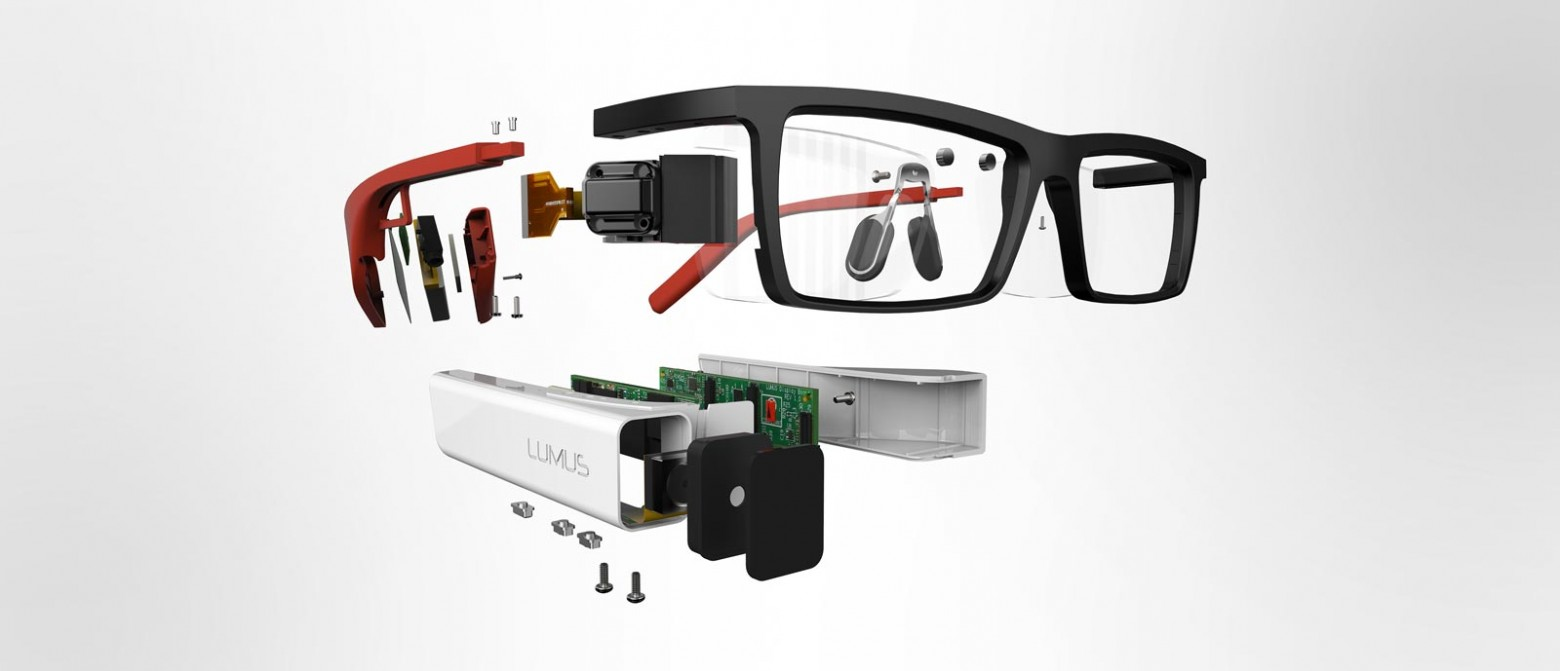
Augmented reality wearable display producer Lumus, completed $45 million investment in a Series C round, the company announced.
Augmented reality wearable display producer Lumus, completed $45 million investment in a Series C round, the company announced.

A Korea company called Korea Future Technology is building a Life-size mech, which is called METHOD-1: a big, real, functioning mech. Here are a couple of compilation videos showing the mech waving its arms around and, more importantly, walking. Awe..(Read...)
Les petites filles jouent dès leur plus jeune âge avec des poupées aux visages surmaquillés. Et si on les rendait plus naturelles pour changer le regard sur la femme dès l’enfance ? En Australie, l’artiste Sonia Singh s’est lancée dans un projet créatif baptisé « Tree Change Dolls ».
Le principe est simple : elle récupère des poupées Bratz Dolls et change leur visage pour littéralement les démaquiller. Elles sont ensuite vendues pour symboliser l’importance de savoir rester naturelle, dès le plus jeune âge. Bonne idée !


Une idée de Sonia Singh
Cet article Elle démaquille des poupées pour souligner l’importance de rester naturelle est apparu en premier sur Creapills.
Be quiet, Alexa! Stop talking, Siri! A new virtual assistant is about to launch in Japan, and her name is Azuma Hikari. She's not just a disembodied voice either, she's a holographic-style virtual character living inside an Amazon Echo-like gadget called the Gatebox.
The post A holographic virtual girl lives inside Japan’s answer to the Amazon Echo appeared first on Digital Trends.
A few years ago, as a Chief Marketing Officer, I remembered sitting in my office listening to the list of new equipment “requirements” my…

As we’ve no doubt mentioned a few times before, casual and social experiences are going to be fundamental to the growth of virtual reality. Despite whatever level of quality, people are inspired to engage with experiences they can share with their friends. First reported by the Wall Street Journal and confirmed via regulatory filing, social platform High Fidelity is raising $22 million in fresh investment.
High Fidelity is led by Philip Rosedale, founder of Second Life, so the social interaction pedigree is plain as day. Second Life is one of the most well-known Internet-based social phenomena and Rosedale is no doubt working hard to create another heavy-hitting experience. The immersion of virtual reality can deliver a second life more true to the name, transporting users into new worlds in a way non-VR just simply can not.
As the number of virtual reality users grows and more headsets make their way into the wild, social platforms like High Fidelity will be able to grow their audience and add new features. Thus, the $22 million will be useful in creating those new options while also hiring new faces to help with the growing workloads.
You can download High Fidelity’s beta right now for Windows or Mac OS X and create or explore the shared virtual worlds.
Tagged with: funding, High fidelity, marvel, social vr
 Google today announced Android Things, its new comprehensive IoT platform for building smart devices on top of Android APIs and Google’s own services. Android Things is now available as a developer preview.
Essentially, this is Android for IoT. It combines Google’s earlier efforts around Brillo (which was also Android-based but never saw any major uptake from developers) with… Read More
Google today announced Android Things, its new comprehensive IoT platform for building smart devices on top of Android APIs and Google’s own services. Android Things is now available as a developer preview.
Essentially, this is Android for IoT. It combines Google’s earlier efforts around Brillo (which was also Android-based but never saw any major uptake from developers) with… Read MoreLes sabliers ont longtemps été utilisés pour donner l’heure, partant ce ce principe Erich a décidé de réaliser une horloge capable d’inscrire l’heure dans le sable.
Erich a donc conçu un système à base d’un bras robotisé qui inscrit l’heure dans le sable et qui l’efface chaque minute en faisant vibrer le bac à sable.

Pour réaliser la vibration, il a utilisé un Module Vibreur – Grove qui dispose d’un moteur à courant continu avec aimant permanent. Au début, il est parti sur une base de bac à sable rectangulaire, mais le résultat n’est pas très lisse, il a donc continué avec une base circulaire. Il a dû ensuite réaliser plusieurs tests pour déterminer la fréquence idéale, la durée de vibration et surtout quel type de sable utiliser.
On retrouve également 4 LEDs blanches qui permettent de mieux lire l’heure en réalisant un effet d’ombre. Le bras robotisé est masqué avec des coquillage pour le rendre plus discret, il est actionné avec un carte tinyK20 et un driver 16 Servo12 Bits PWM I2C – PCA9685 pour piloter les 3 servos moteurs. L’heure est, quand à elle, générée par un module DS1307.
Voici une vidéo de cette horloge en fonctionnement :
*Vous pouvez retrouver les détails de cette réalisation sur : mcuoneclipse.com

[Geeksmithing] wanted to respond to a challenge to build a USB hub using cement. Being a fan of Mario Brothers, a fitting homage is to build a retro-gaming console from cement to look just like your favorite Mario-crushing foe. With a Raspberry Pi Zero and a USB hub embedded in it, [Geeksmithing] brought the Mario universe character that’s a large cement block — the Thwomp — to life.
[Geeksmithing] went through five iterations before he arrived at one that worked properly. Initially, he tried using a 3D printed mold; the cement stuck to the plastic ruining the cement on the face. He then switched to using a mold in liquid rubber (after printing out a positive model of the Thwomp to use when creating the mold). But the foam board frame for the mold didn’t hold, so [Geeksmithing] added some wood to stabilize things. Unfortunately, the rubber stuck to both the foam board and the 3D model making it extremely difficult to get the model out.
![Like [Han] in carbonite, that's a Rapsberry Pi Zero being encased in cement](https://hackadaycom.files.wordpress.com/2016/12/raspberry-pi-thwomp.png?w=400&h=276)
The final casting worked and after painting, [Geeksmithing] had a finished cement Thwomp console that would play retro games. He missed the deadline for the USB Hub Challenge, but it’s still a great looking console, and his video has a lot of detail about what went wrong (and right) during his builds. There’s a great playlist on YouTube of the other entries in the challenge, check them out along with [Geeksmithing]’s video below!


We’ve all had a lot of fun playing around with image recognition machine learning AIs from the likes of Google and Microsoft. Today, Amazon’s getting in the game with the launch of its own tool, Amazon Rekognition, which aims to provide deep-learning services to developers.
While the tool isn’t public-facing like Google’s drawing game or Microsoft’s age-guessing bot, Amazon Rekognition does appear to do much of the same: it can look at photos and recognize human faces, identify their emotions, and label objects. In a sample photo of a dog, the AI identified it as “animal,” “pet,” and even specifically labels it as a “Golden Retriever.”
The API will be available to all AWS users, even those on the free tier. Developers can use it to add...
Admit it, you’ve always wanted to have your own flip-dot display to play with. Along with split-flap displays, flip-dots have an addictive look and sound that hearkens back half a century but still feels like modern technology. They use a magnetic coil to actuate each pixel — physical discs painted contrasting colors on either side. It means that you really only need electricity when changing the pixel, and that each pixel makes a satisfyingly unobtrusive click when flipped. The only problem with the displays is that they’re notoriously difficult to get your hands on.
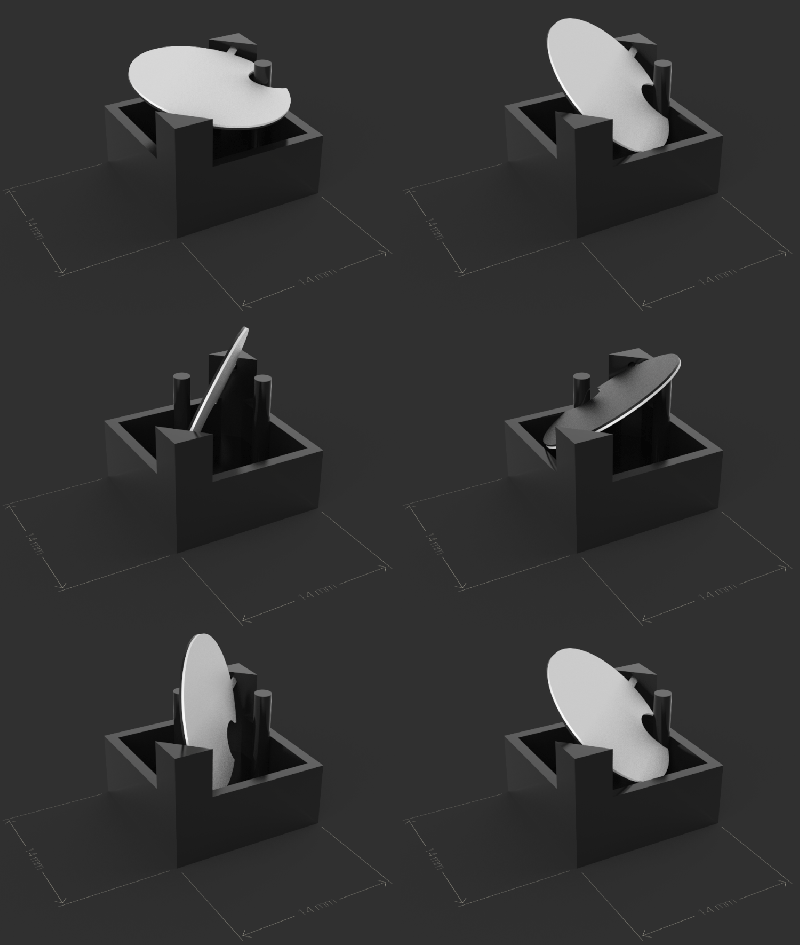 Breakfast, a Brooklyn-based hardware firm known for creative marketing installations, unveiled their Flip-Disc Display System this morning. Used displays have come up on the usual sites from time to time, but often without a controller. Traditional flip-dot manufacturers haven’t sought out the individual hacker or hackerspace, and a click-to-buy option has been difficult if not impossible to find.
Breakfast’s offering modernizes the driver used to manage all of those electro-mechanical pixels. Whether this will make the displays more accessible is a question that still needs to be answered.
Breakfast has designed their own driver circuit for each panel of 28×28 pixels which includes a Cortex-M microcontroller. The easily daisy-chainable panels (using cat5 + power) pump up the maximum data propagation across a display by at least two orders of magnitude over traditional drivers. The demo video below shows 30 FPS being controlled by a time-of-flight camera (an ASUS Xtion in this case but that could change for production). Each panel draws about 300 mW at rest and typical full-motion operation is 25-50 W per panel but the system does have intelligent power design to cap total power draw.
Can you own one? Probably not — but that’s just because of your pocketbook. Breakfast wouldn’t give an exact price, but they did oblige when we asked for an approximation in terms of Honda Fits. Minimum order is 15 panels (140×84 pixels or about 7’x4.25′) and will run you about 6.25 Honda Fits.

Despite your not having low-six-figures lying around to spend on this, it is a notable development. The modernization of the driver, addition of an app and programming API, and a push to sell to a wider customer base should reinvigorate the occurrence of flip-dot displays which have been all but extinct this century. If there is a surge in purchases it will be many years before the secondary market benefits, but hopefully a groundswell of interest will encourage them to make the hacker-edition of their display available for a more… flippant… price.
We’ve seen a lot of work come out of Breakfast, notably this 6,400 pixel colored-thread display which is a mechanical engineering playground. When it comes to flip-dots, nothing beats what we saw at CES in 2015.


Adam Jakowenko made some fun with his Echo and Google Home...(Read...)
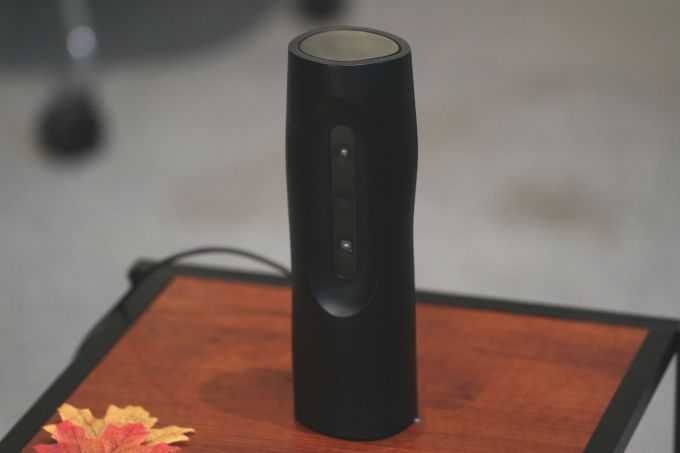 Hayo’s pitch video could use some work. It’s stilted and strange and has some trouble conveying precisely what the product does, owing in part to holographic representations of the product’s functionality. It’s clear that the product is different and probably compelling — but it’s not exactly clear what it does.
Earlier this week, I sat down with the… Read More
Hayo’s pitch video could use some work. It’s stilted and strange and has some trouble conveying precisely what the product does, owing in part to holographic representations of the product’s functionality. It’s clear that the product is different and probably compelling — but it’s not exactly clear what it does.
Earlier this week, I sat down with the… Read MoreInterview with Forster Rohner Textile Innovations. They are a manufacturer of eTextile components. The main focus of the company is the integration of electronic functionalities into textile structures using industrial embroidery technologies. Examples are the integration of LEDs and solar cells into textiles as well as the integration of sensor and heating structures.
For more information see http://www.forsterrohner.com/frti and http://www.IDTechEx.com
I think I had the same wooahhhhh coool reaction as so many others did when this tweet was going around:
The art of sentence length. Swoon pic.twitter.com/K91GEZTnKm
— Lucy Foulkes (@lfoulkesy) March 30, 2016
Certainly, good writing is more than just varied sentence length, but this is a fantastic visualization that makes an excellent point. It wouldn't hurt to be able to see this kind of thing in our own writing, in an on-demand fashion while editing.
After tweeting that I wasn't quite sure how best to go about it, a bunch of folks chimed in with their takes on how they would do it.
Dave took a crack at it within a single tweet. His idea is essentially:
The data attributes could then be used in CSS selectors to colorize. The idea didn't quite work as written, but I was able to extrapolate that idea into a working concept, if slightly more verbose:
See the Pen Sentence Colorizer by Chris Coyier (@chriscoyier) on CodePen.
Note that this demo:
Before we get too far here, It was pointed out several times to me that the UI shown in that tweet looks an awful lot like Hemmingway App.

Indeed it does. I wonder if it's some kind of hidden feature or something? I wasn't able to find any sentence length colorizer feature poking around in there a bit. It highlights other things in useful ways though.
And speaking of highlighting sentences for useful alterior purposes, Tone Analyzer is an experiment to do that:

There is also an Angular JS lib that can be used to colorize arbitrary lengths of text:

Pim Derks created an actual bookmarklet to do the job! Very cool.
I'll post here for posterity:
javascript:(function()%7Bvar%20colors%20%3D%20%5B'%23faf5cb'%2C%20'%23fcd2fa'%2C%20'%23c7f4c9'%2C%20'%23a7f3f1'%5D%3B%5B%5D.slice.apply(document.querySelectorAll('p%2C%20dt%2C%20dd%2Cli')).forEach(function(n)%7Bvar%20s%20%3D%20n.innerHTML.split('.%20')%3Bs.forEach(function(s)%7Bvar%20words%20%3D%20s.split('%20')%2Clength%20%3D%20words.length%3B%7D)%3Bvar%20r%20%3D%20''%3Bs.map(function(s)%7Bvar%20l%20%3D%20s.split(%22%20%22).length%2C%20c%3Bswitch(l)%7Bcase%201%3Acase%202%3Ac%20%3D%20colors%5B0%5D%3Bbreak%3Bcase%203%3Acase%204%3Acase%205%3Acase%206%3Ac%20%3D%20colors%5B1%5D%3Bbreak%3Bcase%207%3Acase%208%3Acase%209%3Acase%2010%3Acase%2011%3Acase%2012%3Ac%20%3D%20colors%5B2%5D%3Bbreak%3Bdefault%3Ac%20%3D%20colors%5B3%5D%3Bbreak%3B%7Dr%20%2B%3D%20'%3Cspan%20style%3D%22background-color%3A'%20%2B%20c%20%2B%20'%22%3E'%20%2B%20s%20%2B%20'.%20%3C%2Fspan%3E'%3B%7D)%3Bn.innerHTML%20%3D%20r%3B%7D)%7D)()I was able to get it to work:

I also un-URL Encoded it, and dropped it here in a fork of my Pen so you can take a look at the code more easily (has some minor bugs like doubling up periods at the end):
See the Pen Sentence Colorizer by Chris Coyier (@chriscoyier) on CodePen.
Brandon Brule took a crack at it:
See the Pen Highlight sentence length by Brandon Brule (@brandonbrule) on CodePen.
I do like applying either styling or range-specific classes in JavaScript. The [data-wc] approach was hard because you have to be very explicit. You can't really do [data-wc>10].
Antoinette Janus has a nicely-done take as well:
See the Pen Text Highlighter by Antoinette Janus (@acjdesigns) on CodePen.
Jonathan Williamson created a demo with a textarea and the colorization is separate and updated as-you-type:
See the Pen Gary Provost by Jonathan Williamson (@jon-w1) on CodePen.
The original tweet was all about the beauty of varied sentence length. Beauty in how the writing feels and reads. It wasn't really about the colors or visualization of it, that just served to explain the message. But the colors were kinda beautiful too.
In another bit of prior art here, Sanne Peters did some visualized poems that maps words to colors so you can see them as well as read them:

Also remember we're no stranger to Boomarklets That Help With Text™. A few years ago we tackled one that helped show you where an ideal line length for readability should land:
See the Pen Bookmarklet to make the text between 45 and 75 characters turn red. by Chris Coyier (@chriscoyier) on CodePen.
And that is what an active tweet thread can bring!
Sentence Length Colorization is a post from CSS-Tricks
Youtube channel “What’s Inside” took a new generation furby and an old one and cut through them to see how they’re made inside. Check it out in the video below.
Note: The interesting part starts at 2:40.
From What’s Inside:
We CUT IN HALF a 2016 Furby Connect and a 1996 Furby to see what’s inside. These are very advanced smart toys that may creep some people out.
The post The Nightmarish Dissection of a Furby [Video] appeared first on Geeks are Sexy Technology News.
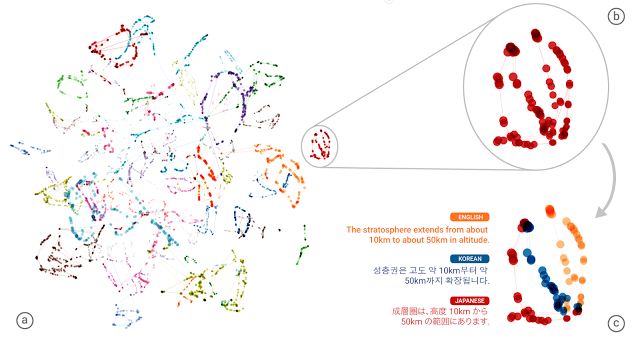
Google’s translate tool has created its own solution to greatly expand its automated capabilities. It can now translate between two languages even without a specific “dictionary” to do so.
The company recently switched Google Translate away from its “traditional” method of consulting a known list of phrases and their equivalent in different languages. Instead it’s now using Neural Machine Translation, which tries to simulate the way human brains learn languages, in particular taking advantage of context to produce more natural sounding translations of entire sentences.
One big problem is that it means starting over on the various combinations of languages between which the system can translate. As organizations such as the United Nations and European Union have experienced, adding new languages rapidly increases the number of possible combinations that need to be covered. For example, moving from two to three languages means adding two new combinations. Moving from 25 to 26 languages means adding 25 different combinations. Given Google currently supports 103 languages, that’s 5,253 different combinations to cover.
However, the system has effectively figured out the smart solution, namely using an intermediate language. Although Google staff haven’t specifically trained the system to do so, it’s independently figured out that if it’s learned a translation of a Japanese phrase into English and has also learned a translation of the same phrase from English to Korean, it can in turn translate from Japanese to Korean.
Even more impressively, it turns out this isn’t simply a case of cross-referencing word and phrase lists among three real-world languages. Instead, analysis of the network data shows the system is organizing its database of each language by concept. Google staff believe the system is effectively using its own interlingua, which is a basic artificial language that covers these concepts and acts as the go-between when translating a new combination of languages.
The post Google Translate Solves Own Problem appeared first on Geeks are Sexy Technology News.
Thread Studio provides you with your own design studio.
The post Start Your Own Clothing Company Right From This VR App appeared first on Futurism.

Researchers from Google’s AI division DeepMind and the University of Oxford have used artificial intelligence to create the most accurate lip-reading software ever. Using thousands of hours of TV footage from the BBC, scientists trained a neural network to annotate video footage with 46.8 percent accuracy. That might not seem that impressive at first — especially compared to AI accuracy rates when transcribing audio — but tested on the same footage, a professional human lip-reader was only able to get the right word 12.4 percent of the time.
The research follows similar work published a separate group at the University of Oxford earlier this month. Using related techniques, these scientist were able to create a lip-reading program...
Sigfox continue son expansion et a annoncé en fin de semaine une nouvelle levée de fonds de 150 millions d’euros auprès de géants comme Salesforce ou Total. Cette levée est tout simplement la plus conséquente jamais réalisée par une startup française. Pour rappel, Sigfox avait déjà levé 100 millions d’euros au début de l’année passée, auprès d’investisseurs […]
L'article Sigfox lève 150 millions d’euros supplémentaires ! a été publié en premier sur Stuffi - L'actualité des objets connectés.

The foundation of Amazon Alexa’s “intelligence” is the individual apps, called Skills, that a user can enable to enhance the functionality…

Win parent of the year by surprising your kid with their very own robotic hatching animal egg. Once their adorable little critter hatches, your kid will be able to listen to its heartbeat and even teach it how to walk, talk, dance, and play games.
$129.95
With all the exciting A.I. stuff happening, there are lots of people eager to start tinkering with machine learningtechnology. We want to help make it easier for anyone to do that – whether you're an engineer, hobbyist, student, or someone who's just curious. But sometimes, it can feel pretty intimidating when you're just getting started.
That's why we've created a site called A.I. Experiments. The site showcases simple experiments that let anyone play with this technology hands-on, and resources for creating your own experiments.
The experiments show how machine learning can make sense of all kinds of things – images, drawings, language, sound, and more. They were made by people with all different interests – web developers, musicians, game designers, bird sound enthusiasts, data visualizers – with everyone bringing their own ideas for how to use machine learning.
We also want to make it easier for coders to make their own experiments. Many of the projects we're featuring are built with tools anyone can use, like Cloud Vision API, Tensorflow, and other libraries from the machine learning community. The site has videos by the creators explaining how they work, and links to open-source code to help you get started. To submit something you've made, or just play with things other people are making, visit A.I. Experiments.
And if you're looking for even more inspiration for what's possible using machine learning, check out these new experiments from our friends in Google Arts & Culture.

As part of Google’s slew of artificial intelligence announcements today, the company is releasing a number of AI web experiments powered by its cloud services that anyone can go and play with. One — called Quick, Draw! — gives you a prompt to draw an image of a written word or phrase in under 20 seconds with your mouse cursor in such a way that a neural network can identify it. It’s both a hilarious and fascinating exercise with broader implications for how AI can self-learn over time in key AI research areas like image recognition and optical character recognition.
Quick, Draw! is a great way to familiarize yourself with how neural networks work to identify objects and text in photos, which is one of the most common forms of AI-guided...
 OpenAI, the artificial intelligence research non-profit backed by Tesla’s Elon Musk, Y Combinator’s Sam Altman, a Donald Trump fan called Peter Thiel, and numerous other tech luminaries, is partnering with Microsoft to tackle the next set of challenges in the still-nascent field. OpenAI will also make Microsoft Azure its preferred cloud platform, in part because of its… Read More
As part of The Verge’s international team, I’m used to a certain amount of teasing about my work set-up. While colleagues in Slack dissect the pros and cons of using 30-inch external monitors in vertical orientation, or bemoan the fact that Apple and LG’s 5K UltraFine display isn’t shipping to Japan yet, I sit here with perhaps the simplest workstation I can get away with: a single 2013 MacBook Air. I have no external monitors, no second-screen tablets, and do all my work on a 13-inch display that hasn’t changed since 2010. And, until recently, I was happy. Until, that is, I tried a laptop with an OLED screen.
Aujourd’hui, le selfie est devenu un véritable phénomène de mode. Longtemps cantonnée aux jeunes générations, cette pratique se démocratise chez tout le monde, tout comme Snapchat. Coca-Cola l’a bien compris et a décidé d’en jouer pour sa nouvelle opération mise en place en Israël avec l’agence Gefen Team. L’idée : créer une bouteille qui capture automatiquement des selfies quand vous buvez pour les uploader sur votre compte Snapchat.
Mais ce n’est pas tout : la bouteille uploade également vos selfies sur la page Facebook de Coca-Cola Israël, et sur son compte Instagram. Cette opération résolument dans l’air du temps a été mise en place à l’occasion du Coca-Cola Summer Love, un festival dédié à la marque en Israël.

Une idée de Coca-Cola & Gefen Team | Via adeevee.com
Cet article Coca-Cola crée une bouteille qui prend des selfies sur Snapchat est apparu en premier sur Creapills.

When Snap, Inc. announced earlier this year that it had created a pair of video-recording sunglasses called Spectacles, it was a little hard to get a handle on just what the end result would be. Snap was new to the hardware game, and more ambitious wearables like Google Glass had been expensive, niche failures. But yesterday a limited number of Spectacles went on sale, offered through a yellow pop-up vending machine near the company’s original headquarters in Venice, California — and we finally got a chance to see what the company had come up with.
After spending some time with them, I don’t think I’m ever going to give my Spectacles up.
That vending machine gambit sets up a core ideal — Spectacles are supposed to be...
Want to get your Keith Moon or John Bonham on, but don’t have space for a real drum kit? No problem: Virtual drumkit Freedrum is your hookup. Here's how you can get your hands on one.
The post As far as Kickstarter projects go, this amazing virtual drum kit is tough to beat appeared first on Digital Trends.

