Shared posts

27 Mar 13:03

Flipboard 2.0 refreshes app's look, now lets everyone run their own magazine (hands-on)

by David Pierce
Xsc_2891-hero_large

Flipboard announced today that it has 50 million users, and also released a new version of its app that lets every one of them become an editor-in-chief. Flipboard 2.0 is "the most epic release we've ever done," CEO Mike McCue told The Verge, and most of its new features focus on curation: users can now "flip stories," in the app or in a browser via a bookmarklet, into their own magazines. Other users can subscribe to those magazines, and whenever the magazine's owner adds something new it updates subscribers' versions as well – it's very much like a Spotify playlist in that sense.

We've been playing with the new version of Flipboard for about a week, and it's definitely better than ever. There are some small aesthetic changes in...

Continue reading…

27 Mar 00:59

The Best Antivirus App for Windows [UPDATED]

by Whitson Gordon

The Best Antivirus App for Windows [UPDATED]Windows has more antivirus programs than we can count, and none of them are quite perfect. Right now, we recommend Avast Free Antivirus for the best balance between protection, ease of use, and cost.

Update: Our former favorite, Microsoft Security Essentials (also known as Windows Defender in Windows 8), has been tanking in antivirus tests left and right over the past few months, so we've decided it's time to change our official recommendation to something a little more reliable. For more information, see the "Competition" section below.

The Best Antivirus App for Windows [UPDATED]

Avast! Free Antivirus

Platform: Windows
Price: Free
Download Page

The Best Antivirus App for Windows [UPDATED]

  • A fairly simple interface from which you can scan your computer, see statistics, update definitions, and more
  • Scans files, email, URLs, P2P programs, and more for malware
  • Automatic updates that happen as soon as the virus database or program changes
  • A Windows gadget, browser cleanup tool, and other extra components
  • Support for multiple languages

The Best Antivirus App for Windows [UPDATED]

Avast is one of AV-Comparatives' top rated antivirus programs, not just for its ability to catch malware but also for its low system impact and general usability. Avast is one of the most effective free programs out there, meaning that you get some pretty incredible bang for your buck when it comes to protecting your computer. It isn't as easy to use as Microsoft Security Essentials, but it's probably the second simplest free program out there, so it hits a good sweet spot between protection and usability (and all for free). Plus, it has a lot of advanced settings that power users will love to tweak, though they can be hard to get through (see below).

The Best Antivirus App for Windows [UPDATED]

Avast may be simpler and lighter weight than most other programs out there, but we'd be hard pressed to call it easy to use. Scanning is a one-click affair, which is nice, but as soon as you enter its more advanced options, there's a lot going on, so beginner users may still be a bit confused as they try to root through it all. Avast also has a lot of extra features we'd consider unnecessary, but as long as you go through the "Custom" install you can pick and choose what you want (or just choose "Minimal." The ads and attempted installation of Google Drive hit a nerve as well, and the sounds it makes when it updates and scans are just plain annoying. Thankfully, you can turn those off in the settings.

The Best Antivirus App for Windows [UPDATED]

Sadly, we've chosen to bump down our previous choice, Microsoft Security Essentials (also known as Windows Defender in Windows 8), to second string. MSE is still one of the best designed antivirus programs out there, in our opinion—it's so easy to use, even the most tech-unsavvy person could figure it out pretty quickly. However, while it was once considered competitive with other offerings, most antivirus tests show that it has fallen behind on its ability to detect viruses. It's great at removing them, but if it only detects some of the malware out there, we don't feel comfortable recommending it as our #1.

When it comes to free options, Avira is another pretty solid option. AV-Comparatives found it to be the most effective free program out there, though with a lower level of usability, not to mention some annoying ads and popups. AVG is another popular free option, but doesn't really beat the others in any one category according to AV-Comparatives. Panda is fantastic at removing malware, but is a bit less beginner-friendly than the others.

We think most free programs should be more than good enough, but if you want the absolute best protection out there, you'll have to drop some cash. Right, now Kaspersky and Bitdefender are the two highest-ranked paid solutions at AV-Comparatives, while, Norton, F-Secure, and G Data also get high marks from AV-Test.org. Again, we personally don't think they're necessary in a home setting, especially if you use good browsing habits, but if you want to protect yourself against every possible virus or theoretical piece of malware you could get, they might be the way to go.

In the end, we recommend everyone use an antivirus program, but the best way to avoid malware is to have good browsing practices (you know, in case I haven't mentioned that enough). They're more effective than any antivirus software out there, and they won't put any kind of drain on your system resources, money, or stress level. Keep Windows and applications like Flash updated, stop downloading questionable files, and just practice good common sense. If you do, you'll probably have to deal with your antivirus program very little (but again, you should still have one).

There are more antivirus programs out there than we can even count, but these are probably the best out there right now. Many of you undoubtedly have your own favorites, some that we might not have even listed—so share your favorites with us (and why they're your favorites) in the comments. Be sure to check out AV Comparatives' summary report from the past year as well. It has a wealth of information more detailed than we could begin to cover here, and it's a good place to start looking at the competition.


Lifehacker's App Directory is a new and growing directory of recommendations for the best applications and tools in a number of given categories.

26 Mar 18:46

Hands-on with the Archos GamePad

by Jerry Hildenbrand

Archos Gamepad.

A couple months back, at CES 2013, we first had a look at the Archos GamePad. It's an awesome idea that fills a hole in mobile gaming -- we need good controls. The GamePad solves this by having everything you expect to see in a game controller built into the frame of a 7-inch tablet. You have dual-joysticks, directional buttons, A,B,X,Y buttons, start and select, and a pair of buttons on the left and right shoulders. This sounds like just the ticket for some of today's big, immersive games -- I'm looking right at you Ravensword: Shadowlands.

The hardware itself, both inside and out, is nothing to write home about. A dual-core A9 with a Mali MP4 GPU won't exactly get spec junkies up and moving, and the device itself is 100-percent plastic. While that will make it nice and light to hold while playing games, it certainly makes the thing feel a little cheap. The good news is that the price tag reflects this, and the GamePad will only set you back about $180.

The GamePad does more than play games, as it's basically a 7-inch tablet at heart. It runs Android 4.1.1, with very little customization done to the standard stock build of Android. But my first impressions are that it's not a very good 7-inch tablet. It seems a bit sluggish, but I'll reserve judgment here until I get everything signed in and set up. I won't hold back about the screen though -- it's terrible. You can watch movies and look at pictures on the GamePad, but you won't want to. The resolution (1024 x 600) makes things look pixilated, and the viewing angle is atrocious. The good news is that the GPU won't have to work very hard to drive the low-res screen while playing games.

I'm really looking forward to gaming on it. The controls feel excellent, and the placement is perfect. You can see a quick look at it all after the break, and after I give it the old college try I'll post a more thorough review. In the meantime, head into the forums with any questions you might have, and I'll do my best to answer them.

read more


26 Mar 18:44

Three UK pushing out Jelly Bean update for Samsung Galaxy S2

by Richard Devine

Android Central

Following on from other carriers all over the globe, UK's Three has begun pushing out their very own Jelly Bean update to the Samsung Galaxy S2. While the link provided by Three for support goes to an ICS update page, it seems to suggest that you'll need to go via the Kies route in order to obtain it. 

Jelly Bean for the Galaxy S2 -- or any device, for that matter -- is a big deal, and besides the Google provided goodies such as Project Butter and Google Now, Samsung has also thrown in their own bag full of tricks. The Android 4.1 update brings the same Touchwiz Nature UX as found on the newer Galaxy S3, improved camera features, S Cloud and Samsung's own Smart Stay and Pop-Up Play functionality. 

The Galaxy S2 was one of the most popular devices of 2011, and it's fantastic news for all owners that it's seeing another software update. We're not sure how long they may continue going forward, but Jelly Bean marks the second major version bump for the device since it originally launched. And that isn't half bad. 

Source: Three UK


26 Mar 18:32

What Is Bitcoin and What Can I Do With It?

by Adam Dachis

What Is Bitcoin and What Can I Do With It?Dear Lifehacker,
Everywhere I go, I see Bitcoin popping up more and more. Many web services accept payments in the form of Bitcoin, and some even sell their homes for the stuff. I know it's a digital currency, but where does it come from and how is its value determined? More importantly, should I bother earning it and using it for any reason?

Sincerely,
Bitconfused

Dear Bitconfused,
As you've noted, Bitcoin is a digital currency used to pay for a variety of goods and services. In many ways, it works the same as paper money with some key differences. Although physical forms of Bitcoin exist, the currency's primary form is data so you trade it online, peer to peer, using wallet software or an online service. You can obtain Bitcoin's either by trading other money, goods, or services with people who have them or through mining. The mining process involves running software that performs complex mathematical equations for which you're rewarded a very small portion of a Bitcoin. When you actually have some of the currency, you can then use it to purchase anything that accepts it. In some cases, Bitcoin is the only accepted form of payment and you'll have to acquire it in order to complete a transaction. While this basic explanation might answer most of your initial questions, it likely brings up quite a few more. Let's discuss how you can acquire Bitcoin and why you'd use it.

How to Acquire Bitcoins

Getting your hands on even a single Bitcoin can take a bit of work, but you have a few options. Purchasing Bitcoin takes less effort than mining it, but obviously comes at the cost of your hard-earned cash. Mining, on the other hand, takes computer processing power and often bears very little fruit. First, let's talk about how you can buy a Bitcoin and then look at the mining process.

How to Buy a Bitcoin

What Is Bitcoin and What Can I Do With It?As previously mentioned, storing and using Bitcoins requires wallet software or an online service. The wallet software requires quite a bit of disk space and you have to find a Bitcoin seller in order to acquire any of the actual currency. An online wallet, on the other hand, makes the entire process much easier. As a result, we're going to focus on that process. To set up an online wallet and purchase your first Bitcoin, just follow these steps:

  1. To create a wallet, sign up for an online service like My Wallet (UK) or Coinbase (US). For these instructions, we'll use Coinbase because they provide a simple, integrated purchase process with two-factor authentication for added security.
  2. From the lefthand menu, click "Linked Accounts" and add a bank account. It can take several days for Coinbase to successfully link a bank account, so if you intend to purchase any Bitcoins you should plan ahead.
  3. Once your account is all linked up, click the Buy/Sell Bitcoins link. The page will default to the Buy Bitcoins section so just enter the number you want to purchase, choose your bank account (if you linked more than one), and click the Buy Bitcoins button. The transaction may take a few days to complete, but you'll receive a notification when the Bitcoins have been safely transferred to your wallet.

The purchase process doesn't take much effort, but rather just involves a lot of waiting. The Bitcoin exchange rate changes over time, so while at the time of this writing you have to spend $75.93 USD for just one you may find them cheaper next month. Of course, you can come across Bitcoin for the cost of your CPU cycles by engaging in the mining process instead.

How to Mine Bitcoins

What Is Bitcoin and What Can I Do With It?Mining Bitcoin involves running software on your computer that processes complex mathematical equations. If your computer solves one of these equations, you get a payout in Bitcoins. The issue, however, is that your computer is up against large groups of computers that will likely solve the problem before you. That means your machine may end up doing a bunch of work and it will be a very long time before you ever see a payout. As a result, you want to join a mining group. This makes it much more likely that you'll receive a payout, but you'll also receive only your much smaller share. Nevertheless, without a farm of supercomputers you'll earn more in the long run by mining with a group. Because mining is a very complex process, we don't have room to get into the details in this post. Business Insider offers a very simple method you might want to try (it didn't work for us due to Java issues), or check out popular mining pool BitcoinCZ (also known as slush's pool).

What to Do With Bitcoin

What Is Bitcoin and What Can I Do With It?Now that you have a wallet and a Bitcoin or two, what do you do with it? If you signed up for an account with Coinbase or My Wallet, both services allow you to sell your digital wealth. Because Bitcoin prices fluctuate, if you're simply looking to make some money you can attempt to buy them low and sell them high. I bought a Bitcoin a few months back for $15, and if I sold it today I'd earn nearly $61. If you invest wisely and remain patient, you can make a decent amount of money by simply buying and selling Bitcoins.

As Bitcoins are a currency, several businesses accept them as payment. In fact, some businesses only accept Bitcoin. Why? Some services provide tools that may or may not be used for piracy, such as a VPN or Usenet indexer. Multiple Usenet providers shut down last year because their payment providers were pressured into dropping them as clients by major film studios. Without any way to accept payments, they couldn't afford to continue and shut down. Because Bitcoin conducts transactions peer-to-peer, there's no intermediary to prevent the funds from rolling in. As a result, many of these services utilize Bitcoin as their only method.

That said, you can use Bitcoin for more than just questionably ethical services. Bitcoin Magazine offers a long list of options that includes everything from music downloads to gift cards to clothing. While you can't spend your digital cash anywhere, several options exist for you to use your Bitcoins as you please.

This only scratches the surface of Bitcoin. It's a very complicated, involved system. It's also got company in the form of rival digital currencies, such as Ripple, Freicoin, Namecoin, and more. Hopefully this gives you a better understanding how Bitcoin works, but be sure to check out the Bitcoin Wiki if you want to learn more.

Love,
Lifehacker

Have a question or suggestion for a future Ask Lifehacker? Send it to tips+asklh@lifehacker.com.

26 Mar 18:32

Use Outlook as a Google Reader Replacement

by Kevin Purdy

Use Outlook as a Google Reader ReplacementIf you live inside Outlook, you might not know that you're already using a pretty good Google Reader replacement. Outlook can import and process a Google Reader feed export, and handle your items like a slightly different kind of message.[More]

The How-To Geek site runs down the relatively simple process of exporting your OPML file from Google, importing it into Outlook, and then, well, just reading your feeds like you're used to. Outlook is an inbox tool, and it makes sense for an RSS handler, especially if you have a limited number of important feeds. It's a solution used and requested by Lifehacker readers, and really easy, to boot.

How to Import Your Google Reader RSS Feeds into Outlook | How-To Geek

26 Mar 16:03

How to Build Your Own Syncing RSS Reader with Tiny Tiny RSS and Kick Google Reader to the Curb

by Alan Henry

How to Build Your Own Syncing RSS Reader with Tiny Tiny RSS and Kick Google Reader to the Curb Yes, Google Reader is going away, and yes, there are great alternatives. However, if you're tired of web services shutting down on you, why not take matters into your own hands? Tiny Tiny RSS is a free, open-source syncing RSS platform with more features than Google Reader ever had, and it can't get shut down. Here's how to install it and set it up.

What You'll Get

Setting up Tiny Tiny RSS requires a little patience, but it's deceptively easy. I had my instance set up and web-accessible within a few hours, and I spent a few more tweaking all of the settings and options just the way I wanted them. At the end of the day you'll have a web page that you can visit at any time, on any device, to read all of the latest articles from the blogs you subscribe to. Tiny Tiny RSS supports filters and labels, so you can organize those feeds into categories, filter out the stories you don't want, and organize them so you read the interesting things first. You can also score feeds, so the blogs you like the most float to the top. There are more features than we have time to get into, but you can read more about them here.

Tiny Tiny RSS also has an Android app (sorry, no iOS app), a mobile-friendly web interface, a Chrome extension, and more third-party supported apps. There's even an XBMC client if you want to read your feeds on the big screen.

There are some things you won't get with Tiny Tiny RSS that Google Reader offers, though. For example, you won't get such a broad array of third party apps and clients. Sadly, Tiny Tiny RSS can't be used with your favorite desktop or mobile feed reader like Reeder or NewsRob. Plus, it's definitely harder to set up than just importing all of your feeds to Feedly. Even so, if you want ultimate control over your news reading, and you want something that'll never shut down on you, Tiny Tiny RSS Is worth setting up.

How to Build Your Own Syncing RSS Reader with Tiny Tiny RSS and Kick Google Reader to the Curb

What You'll Need

Installing Tiny Tiny RSS isn't difficult, but you'll definitely need a few things before you begin:

  • A web host that supports PHP and MySQL. I used Dreamhost, since they have Linux web servers, they support PHP and have it installed already, and make setting up MySQL databases a one-click affair. Alternatively, if you don't want to use a web host, you can install Tiny Tiny RSS on a Linux computer you have at home. It's a bit more complicated, and you'll need to install PHP and MySQL on your own, but it's not too hard. We're going to focus on web servers in this how-to, so check out Linux.com's how-to guide here if you want to use your own Linux server.
  • How to Build Your Own Syncing RSS Reader with Tiny Tiny RSS and Kick Google Reader to the CurbA URL for remote access. You may want to buy a domain name so you can just type "www.myrssreader.com" in your browser to get to your Tiny Tiny RSS instance. If you already own a domain (and most of you do), it's easier (and cheaper) to just use a sub-domain of a URL you already own. For example, I used "reader.novawerks.net" for my Tiny Tiny RSS installation. Dreamhost had it up in minutes and it didn't cost me anything.
  • The latest version of Tiny Tiny RSS to install. The archive you download will include all of the files you need to install the application and set up the database.
  • Your exported Google Reader subscriptions. Here's our step-by-step guide to exporting your Reader data. You'll need the subscriptions.xml file that you get after using Google Takeout.

Tiny Tiny RSS was meant to be installed on Linux computers that you have complete control over, like a Linux box in your house. Since most people don't have their own Linux web server, we're going to walk you through installing it on a web hosting company's servers—which we won't have complete control over. The developer behind TTRSS says that using this kind of hosting isn't supported. I think that's silly, and I'm willing to bet that this is a matter of support and personal preference, not functionality. Basically, if you use something like Dreamhost, you won't be able to get any help from the developer if something goes wrong. If you want that support and control, you'll need to use a dedicated Linux server as described above.

Step One: Prep Your Web Server and Create Your Database

How to Build Your Own Syncing RSS Reader with Tiny Tiny RSS and Kick Google Reader to the Curb Like I mentioned above, I used my web hosting company (Dreamhost) for this, so PHP was already installed, and creating the MySQL database for TTRSS was easy. Most web hosts have similar features, and will give you a web interface to create databases and users. If not, you'll have to use the command line. With that in mind, follow the corresponding instructions below:

Via the web interface: Check with your hosting provider to make sure that they meet the prerequisites. Odds are they'll make it easy for you and you can skip forward to step two. In most cases, once you've logged in to your host's management page, there's a wizard that will help you create a MySQL database and create its first user at the same time. Name the database and user whatever you want. Give the user a strong password to keep it secure. You can see how I did it with Dreamhost (using some example names) in the image to the right.

Via the command line: If your host doesn't offer one-click tools or a GUI to create a MySQL database (or you prefer the command line), it's not too difficult to do at the command line. Use your favorite terminal app (I use PuTTY in Windows and iTerm on the Mac) to connect to your web host (Open the tool and type slogin yourusername@mydomain.com. You'll be prompted for your password. Your username and password here are created through your web host, so check with them if you're not sure how to connect.) To create the database, type:

mysql -u root -p -h mysqlhost.mydomain.com CREATE DATABASE ttrssdb

In this example, your database is called "ttrssdb," and you should replace mysqlhost.mydomain.com in the above command for the name of the host where your SQL database will live. In my case, I had a separate hostname for my SQL database, but if you're running everything on the same system, you can omit -h mysqlhost.mydomain.com from the command to create the database on your local host.

To create the database user, type:

mysql -u root -p -h mysqlhost.mydomain.com GRANT alter,create,delete,drop,insert,update,select ON ttrssdb.* TO ttrssdbusername IDENTIFIED BY strongpassword

Again, change the fields in italics to what you want them to be, and omit the -h mysqlhost.mydomain.com if you're setting this all up on the same computer.

Step Two: Install Tiny Tiny RSS and Set Up the Database

Once your server is prepped, now all we have to do is install and configure Tiny Tiny RSS on it. First, download the latest version of TTRSS from the developer's site. It'll come as a tarball (a .tar.gz file), so make sure you have an app like 7-Zip (Windows, Free), The Unarchiver (OS X, Free), or PeaZip (Linux, Free) ready if you want to use an app to unpack it.

How to Build Your Own Syncing RSS Reader with Tiny Tiny RSS and Kick Google Reader to the Curb

Once you've unpacked the archive, look in the "schema" folder for the database schema (that is, the file that will build and organize TTRSS's database) that corresponds to the database software you're using. The ttrss_schema_pgsql.sql file is for PostgreSQL, and the ttrss_schema_mysql.sql file is for MySQL. You can import the schema either via command line or using the GUI for your database software. My host offers both command line access and PHPMyAdmin to manage my database.

How to Build Your Own Syncing RSS Reader with Tiny Tiny RSS and Kick Google Reader to the CurbVia the web interface: First, go to the URL for your database. In this case, it's "mysqlhost.mydomain.com," and log in with the username and password you created earlier. Click the "import" tab at the top of the page, and then browse to the schema file you want to import (ttrss_schema_mysql.sql). PHPMyAdmin should detect the file format automatically. Click "Go," and wait for the import to complete.

Via the command line: The first time I imported the schema, it timed out on me, so I was worried it didn't import correctly. I decided to double-check by re-importing it via the command line. To do this, type:

mysql -u ttrssdbusername -D ttrssdb -p -h mysqlhost.mydomain.com < schema/ttrss_schema_mysql.sql

You'll be prompted for the password for that user account, but assuming you're in the directory you've created for Tiny Tiny RSS, the schema will be imported after a moment or two.

At this point, Tiny Tiny RSS is installed, your database is up and running, and you've imported your schema. The only thing left to do now is to connect Tiny Tiny RSS to your database and tweak some of the application settings.

Step Three: Connect Tiny Tiny RSS to Your Database

How to Build Your Own Syncing RSS Reader with Tiny Tiny RSS and Kick Google Reader to the Curb

Go back to your Tiny Tiny RSS folder and find the config.php-dist file in the root directory. Make a copy of it, rename it config.php, and open it with your favorite text editor, whether in the command line (pico, vi, emacs, whatever) or by downloading it and opening it with something like Notepad++. If you edit it on the desktop, just make sure to re-upload it with the proper name so your changes take effect.

The fields at the top of the file are the most important, and the ones you need to change in order for TTRSS to find and log in to your database server. Review the entire file though, just to make sure none of the options are things you want to toggle. We'll tweak some of the additional settings later, but here are the basics, using the example names we've been using so far:

define('DB_TYPE', "mysql"); // or mysql
define('DB_HOST', "mysqlhost.mydomain.com");
define('DB_USER', "ttrssdbusername");
define('DB_NAME', "ttrssdb");
define('DB_PASS', "strongpassword");
//define('DB_PORT', '5432'); // when neeeded, PG-only

Unless your SQL database is on a server using a non-standard port, you probably won't need to define the DB_PORT. If you're running everything on the same system, leave DB_HOST blank or as "localhost." Of course, you should have your own usernames, domain names, and passwords to fill in here, but you get the gist.

Next, scroll down to the basic settings:

define('SELF_URL_PATH', 'http://yourserver/tt-rss/');

The SELF_URL_PATH is the domain where TTRSS is currently installed. If you installed it at http://yourdomain.com/ttrss, fill that in. If you set up a domain and installed TTRSS at its root, just type in the name of the domain, like http://myttrssdomainname.com/. If you're installing everything on the a server at home, this is where you'll put in your Dynamic DNS URL. There are more to set up, but these are the ones required to connect TTRSS to your database successfully. Now we're ready to log in for the first time.

Step Four: Log In and Import Your Feeds

How to Build Your Own Syncing RSS Reader with Tiny Tiny RSS and Kick Google Reader to the Curb If you've set everything up correctly, you should be able to go to http://yourdomain.com/ttrss or http://myttrssdomainname.com/ and see a login screen. Congratulations! The default credentials are "admin" and "password," so once you're logged in, the first thing you should do is change the password. Click the Actions menu at the top-right corner of the screen and select Preferences. You should see Personal Data/Authentication near the top of the screen. Click that and you'll see the password change screen. Give yourself a nice strong password and save it.

Next, let's import your feeds. If you haven't exported your subscriptions from Google Reader, now's the time to do it. Check out our step-by-step to get your data out of Google Reader, and once you have your subscriptions.xml file, here's how to import it to TTRSS:

  1. Click the Actions menu at the top right corner of the screen and select Preferences.
  2. Click the Feeds tab, and look for the "OPML" option near the bottom of the screen. Click it to open that frame.
  3. Click Choose File to browse your hard drive for your subscriptions.xml file. Select it, and click OK.
  4. Click the Import My OPML button to begin your feed import. If you have a lot of subscriptions (especially if some of them are defunct or now dead) this may take a while. Grab some coffee.

When your import is complete, click the Exit Preferences button in the upper right to go back to the main view. Even if your import seems like it's errored out (this happened to me a couple of times,) it probably imported your feeds okay anyway. You should see all of the subscriptions TTRSS imported in the sidebar, organized the same way they were at Google Reader—if you had folders, they should have come over with you. If you want to edit, rename, color-code, or re-categorize a feed, it's easy—just click to select it in the sidebar, and click the Actions menu to see all available options for it.

To add new feeds, click the Actions menu and select Subscribe to Feed. If the feed you want to subscribe to requires a login and password, check the "This feed requires authentication" box and you'll see fields to enter your credentials. If some of your feeds were imported with errors, or they're dead and TTRSS can't resolve them, highlight them on the left sidebar, then click Actions and Unsubscribe to remove them from your list.

Step Five: Tell Tiny Tiny RSS to Update Feeds and Update Itself Automatically

How to Build Your Own Syncing RSS Reader with Tiny Tiny RSS and Kick Google Reader to the Curb Now its time for a few advanced tweaks that will make your experience a little better. Here's how to make TTRSS update your feeds without doing it manually and how to get automatic updates to the application when the developer releases them:

Make TTRSS Update Your Feeds Without Help

By default, Tiny Tiny RSS only updates feeds when you double-click on them. If you want them to update automatically, you have a few options. You can either tell Tiny Tiny RSS to update quietly in the background while you're using the site and reading other feeds (and you can always update manually by double-clicking a feed name,) or you can run a background process on your linux server that will keep your database up to date even when you're not using the webapp.

The latter is the most foolproof method, but most web hosts aren't about to let you run a background process all the time, even when you're not logged in. However, if you're running TTRSS on your own linux box, check out the Updating Feeds page in the Tiny Tiny RSS Wiki for more information on how to set this up.

I opted for the former method, partially because I'm using a shared host, but also because it's just easier to set up. Open up your config.php file in a text editor, and scroll down "SIMPLE_UPDATE_MODE" and change its flag from "false" to "true." This will make TTRSS update your feeds for you every 30 minutes (by default, you can change this in the Preferences) as long as you're logged in. Set it as a pinned tab, and you'll never have a problem.

Get Application Updates Automatically

How to Build Your Own Syncing RSS Reader with Tiny Tiny RSS and Kick Google Reader to the Curb When I started playing with Tiny Tiny RSS, I was using version 1.7.3. The night after I got everything set up the way I wanted it, the developer released version 1.7.5. There is a built-in updater in TTRSS, but you have to turn it on first. Go back to your config.php file, and look for this field near the bottom of the file:

define('PLUGINS', 'auth_remote, auth_internal, note');

Change it to look like this:

define('PLUGINS', 'auth_remote, auth_internal, note, updater');

This enables the updater plugin (I have no idea why it isn't enabled by default) and opens up a new option in the Preferences menu called "Update Tiny Tiny RSS." Click it to check for updates, or to download and install an update if one is available. Again, this tweak works best if you're running TTRSS on your own server or an instance you control. I had trouble with it and wound up updating manually anyway (more on that here), so your mileage may vary using it.

Grab the Tiny Tiny RSS Android Client for On The Go Reading

How to Build Your Own Syncing RSS Reader with Tiny Tiny RSS and Kick Google Reader to the Curb Tiny Tiny RSS is well suited for mobile browsers, but it's not perfect. If you'd like to take your subscriptions on the go, download the Tiny Tiny RSS client for Android. It takes a few seconds on the settings page to set it up to work with your TTRSS installation (type in your URL, your username, your password, and customize the settings the way you like) and in moments you'll be reading your feeds on your Android phone.

The app has settings for HTTPS if your instance is running via SSL, and you can tell it to download feed icons and categories if you want to browse your feeds the same way you would on the web. You can tweak the article text size, enable full-screen mode for easy reading, and more. There are even a few themes to choose from. The Android app is free for seven days—after that you'll need to shell out $1.99 for the unlock key either via Google Play or in-app purchase.

Additional Reading

While this guide walks you through setting up a fully-functional Tiny Tiny RSS instance and importing your feeds, it's still just the tip of the iceberg when it comes to all of the features and options available in the app. Want a daily digest of your subscriptions and all your unread stories? TTRSS can send you one (if you enable it in the preferences and enter your SMTP server settings in your config.php file). Want to float interesting articles to the top? You can score feeds so the ones you enjoy reading appear at the top of your list. You can even completely tweak the layout and design with custom CSS. Dive into the app settings and explore!

For more information, additional reading, or if you run into trouble and need some help, check out these links:

Since Tiny Tiny RSS is free and open source, you could even create additional users for your friends and share your install and let everyone import their own subscriptions, and use it without any fear that it'll shut down on you. In fact, we've already seen a number of people send us their own version of "the next Google Reader/the best replacement for Google Reader," which is really just a skinned instance of Tiny Tiny RSS (so look out for that, too, especially if someone's charging money for it!)

If you do plan to build an instance for your friends, or you want something more reliable, grab a dedicated server or a VPS to install and run Tiny Tiny RSS on. Even better, consider carving out a little space on Amazon Web Services' free tier and setting it up there—it's an ideal cloud-based, affordable option whether you want to use it on your own, or you want to open the doors to your friends and build a Google Reader replacement for you all to use. You can let someone else manage the back-end, and as long as you keep it alive, you'll have a true Google Reader replacement that's leaps and bounds better than the original. Bonus: You control it, and it'll never go away unless you want it to.

26 Mar 13:53

BitTorrent ‘s Bram Cohen Patents Revolutionary Live Streaming Protocol

by Ernesto

bittorrent-liveEarlier this month BitTorrent Live was unveiled to the public.

The new protocol allows the public to send a video stream to millions of people, without having to invest in expensive bandwidth.

Around the same time as BitTorrent Live was launched the underlying patent application was published online. In it, Cohen describes what makes the technology so unique and TorrentFreak caught up with BitTorrent’s creator to find out more.

It took nearly half a decade before BitTorrent’s live stream service was released to the public. One of the main reasons is that it has been quite a challenge to make it work seamlessly. BitTorrent’s inventor is known for his passion for puzzles, and the streaming challenge is probably one of the most difficult puzzles he has solved to date.

“Doing live streaming well on the Internet has long been a problem. Peer to peer live-streaming has always suffered from high latency, meaning there is typically a lot of delay between when a broadcast happens and when end users see it, typically dozens of seconds or minutes,” Cohen told TorrentFreak.

“BitTorrent Live allows a broadcaster to stream to millions of people with just a few seconds of latency. This is new, and unique, and potentially world-changing,” he adds.

Bram Cohen explains that the patent is in no way going to restrict user’ access to the new protocol, quite the contrary. BitTorrent Live will be available to end users for free, and publishers who are using the service and hosting it on their own will not be charged either.

“We want people to use and adopt BitTorrent Live. But we aren’t planning on encouraging alternative implementation because it’s a tricky protocol to implement and poorly behaved peers can impact everyone. We want to ensure a quality experience for all and this is the best approach for us to take,” Cohen told TorrentFreak.

BitTorrent Live is a complex technology but basically works by dividing peers into various “clubs” of peers who share data among each other via a UDP screamer protocol.

“To get slightly more technical, the way BitTorrent Live works is by making subsets of peers responsible for subsets of data. High robustness and low latency is achieved by using a screamer protocol between those peers,” Cohen explains.

“For the last hop it uses a non-screamer protocol to regain congestion control and efficiency. There is redundancy and some waste in the screaming, but that’s kept under control by only using it to get data to a small fraction of the peers.”


BitTorrent Live Clubs

live-clubs

Bram Cohen believes that the future of television is on the Internet, and BitTorrent Live can help to deliver live high-definition content to millions of people at once at no cost. This is not just the future for independent broadcasters, but also for the major content companies.

“I believe that inevitably all video streaming will be done over the Internet. It’s simply a better technology for doing so. On a technical level the cable approach is expensive and can only reach subscribers, as opposed to the Internet which can reach anyone,” Cohen told us.

“So far the one thing cable infrastructure has managed to still do better is live broadcasting. But the BitTorrent Live technology makes it practical to move that to the Internet without being cost prohibitive. We plan to shape the future of live broadcasts and want to work with broadcasters to accomplish that.”

While it can’t be expected that all major broadcasters will convert to BitTorrent during the next month, the technology is there and the patent is coming. It will be interesting to see how it develops over time and if it can gain mainstream adoption.

There are not many people who can change the fundamentals of the Internet two times in a row. However, Bram Cohen already did it once with the original BitTorrent protocol, and he believes that BitTorrent Live can have a similar impact.

Those who are interested in trying out BitTorrent Live can do so here. The more people join, the better it gets.

Source: BitTorrent ‘s Bram Cohen Patents Revolutionary Live Streaming Protocol

25 Mar 20:22

DualBoot Games' Latest Live Wallpaper Brings The Forest To Your Homescreen

by Cameron Summerson

1

If you just can't get enough of the calm, serene, zen-filled scenery of the deep forest, DualBoot Games' latest live wallpaper should help get your inner peace in check. Simply called Forest HD, this live wallpaper brings that famous DBG quality to your homescreen once again. Take a look:

At the current time there are only a couple of themes included, but several more, including a Field Pack, Stream Pack, and Customization Pack are "coming soon."

Forest HD will set you back $0.99, but if you're a fan of live wallpapers, this one is a must-have. Hit the widget to grab it.

Done With This Post? You Might Also Like These:

DualBoot Games' Latest Live Wallpaper Brings The Forest To Your Homescreen was written by the awesome team at Android Police.


25 Mar 15:27

Amazon Prime Stalks Netflix, Hulu With Zombieland Pilot

by Dan Rowinski

The time to cut the cord on cable television has never been better. Between Netflix and Hulu Plus, consumers are treated to a variety of original programming financed and produced not by mega studios but by digital content companies that have little interest of seeding their content to cable channels. Netflix’s House of Cards has been a critical success and Hulu has some sleeper hits like Battleground.

With the investment in original content from its top competitors, Amazon will not be left behind.

Amazon today announced that it is picking up the pilot to Zombieland, a television series adaption from the movie staring Woody Harrelson, Emma Stone and Jesse Eisenberg. The move to pick up Zombieland is part of a larger original content play from Amazon as the company has promised to produce 13 series from a variety of pilots. Amazon is specifically focusing on comedy and children’s programming for its original content.

Zombieland and other pilots from Amazon will be featured on its Prime Instant Video streaming service. Amazon will pick the 13 series from its array of pilots based on user feedback.

The Zombieland series will be produced by the movie’s original creative team including writers Rhett Reese and Paul Wernick. The roles occupied by the likes of Harrelson and Stone have been recast to Kirk Ward and Maiara Walsh, respectively.

Zombies are all the rage right now. The Walking Dead is killing it on cable. The adaptation of Max Brook’s novel World War Z is coming to the big screen in June with Brad Pitt.

Content Marketing At Its Best

People started scratching their heads a few years ago when companies like Netflix and Hulu started bidding on original series from prominent production companies. Why would Netflix spend millions of dollars to obtain House of Cards? Or make one final season of Arrested Development? This was not the business model we had come to expect from these companies. Netflix traditionally licensed content from the archives of major studios for its streaming service, not created its own. 

As the original programming has come to the screen, the play has made a lot more sense. House of Cards has a lot of people talking and the only way to see it is to have a Netflix streaming account. Users will have to get a Amazon Prime account to see the likes of Zombieland

Essentially, these original programs are giant marketing ploys. When it comes down to it, the point of marketing is to get people talking about your product. When people talk about your product, there is a chance they will actually spend money to use it. House of Cards certainly has people talking. If Zombieland the series is as good as Zombieland the movie, Amazon could see an uptick in Prime customers.

HBO has been doing this for years, from Oz to the Sopranos to Game Of Thrones. The difference now is that you do not need a cable subscription to get great exclusive programming.

Great For Cord Cutters

For consumers, the original content wars are the best thing to happen to television since the cable wars erupted in the 1980s. For the first time, television watchers are able to get true a la carte viewing options, choosing from here or there for what they want to watch as opposed to choosing various “bundles” of channels from the cable companies. 

Consumers that want to rid themselves of the monthly cable bill will have plenty of content to choose from and not just the shows that aired years before. In the end, everybody wins (except for, maybe, the cable companies). 

Lead image courtesy Shutterstock.

25 Mar 13:18

Google's decision to scrap Reader influenced by the cost of privacy compliance

by Jeff Blagdon
2013-03-13_04-35-38-1020_large

Google is taking a lot of heat for its decision to scrap the popular Reader RSS feed aggregator, leading many to question why it would pull the plug on such a popular service. It turns out that the answer might have a lot to do with the hidden costs of safeguarding privacy. According to a report from All Things D, an unnamed source says that the closure is at least partly because of Google’s reluctance to build out the staff and infrastructure needed to deal with legal and privacy issues related to the product.

Continue reading…

25 Mar 13:17

Drones form giant, glowing 'Star Trek' logo over London

by Jeff Blagdon
Bgg2vqxceaaovcz

Over the weekend, the studio behind Star Trek Into Darkness took the film’s title literally, commissioning the flying of a giant, glowing Starfleet insignia in the London night sky. Comprised of 30 LED-illuminated quadrotors, the 308-foot-tall logo rotated in place 118 feet above ground (video below), before dimming its lights alongside those of Tower Bridge and Big Ben in recognition of the WWF’s Earth Hour conservation effort.

The light show was created by Ars Electronica Futurelab — the same company that created a similar display in Linz, Austria last year. Unfortunately, there’s still six weeks to go until the May 9th premiere of Star Trek Into Darkness, but at least we can check out the latest trailer and gorge ourselves on...

Continue reading…

25 Mar 13:13

CyanogenMod founder Steve Kondik leaves Samsung, criticizes TouchWiz on way out

by Matt Brian
Dsc_2369-hero_large

Steve "Cyanogen" Kondik, founder and lead developer of CyanogenMod, has left his role as software engineer at Samsung Mobile, after 19 months at the company. Notifying his followers on Google+, Kondik notes his departure in a long piece commenting on Samsung's new Galaxy S4 handset, stating that he "just decided to do something new."

"Touchwiz feels like it has been sent a few years back in time to the Froyo days."

Before leaving Samsung, Kondik had some time to play with his former employer's new flagship. While he praises the Galaxy S4 for its specifications, which he says "blows the competition out of the water," his comments on Samsung's modifications to its TouchWiz UI aren't so complementary. The Android developer believes that...

Continue reading…

25 Mar 13:07

Facebook Says VoIP Calling Will Be Added To Its Messenger iOS App In The U.K. Today

by Natasha Lomas
facebook messenger

Facebook is slowly beefing up the capabilities of its Messenger app as it moves to combat the rise of free messaging apps like Whatsapp, Viber and Line. Today it’s taking another baby step by expanding VoIP calling to U.K. users of its iOS app, following its initial test of the feature in Canada in January, which was soon followed by a U.S. rollout.

A Facebook spokeswoman said: “From today, VOIP calling for Facebook Messenger on iOS will go live in the UK. This means that you can call friends in Facebook Messenger for free by tapping the ‘I’ button in an individual conversation and then tapping ‘Free Call’.”

Some messaging apps — including Viber and Line – offer free messaging and VoIP capabilities in all the markets where they operate, so Facebook is having to do some catching up here.

The VoIP feature does not appear to have been added to Facebook Messenger’s U.K. app quite yet. The app store description flags up its free texting capability but does not yet mention free calls (see right). The app was last updated on March 7 to add updates to group conversations, among other unspecified updates and bug fixes.

The lines between messaging and social networking are arguably blurring as messaging apps add capabilities that enable users to share multimedia content with groups of friends, as well as letting them call and text individuals — thereby treading directly on traditional social networking territory. Both use cases (social sharing and pure messaging) make these apps a nascent threat to Facebook’s dominance since social networking is at its core all about messaging and sharing content with chosen friends.

Little wonder then that rumours swirling around late last year suggested Facebook wanted to buy Whatsapp – which in August 2012 was serving 10 billion messages per day to its users. In the event, there has been no acquisition. Instead, Facebook added VoIP calling to its Messenger app at the start of the year — something Whatsapp doesn’t (yet) offer — setting the stage for an epic messaging app face off.


25 Mar 13:05

Shazam Poaches New Product Chief From BBC iPlayer To Lead Its TV Discovery Push

by Natasha Lomas
Shazam Product Application Icon_iOS

Shazam, the erstwhile exclusively music discovery app that has expanded into TV as a companion app letting users ‘tag’ TV shows (and ads) to get quick access to a plethora of related content, has today named a new chief product officer — poaching Daniel Danker from the BBC to lead ”the product expansion of the Shazam service”.

The position is a new one for Shazam, underlining that its expansion into TV is the main driver for the hire. Danker was General Manager of Programmes and On Demand at the BBC, with responsibility for strategy and delivery of the BBC’s on-demand TV streaming service iPlayer, plus iPlayer Radio and its Red Button digital products. Prior to the Beeb, he spent around a decade in a variety of roles at Microsoft — including helping develop Mediaroom, Microsoft’s internet-connected TV platform, and the Microsoft Xbox Music platform.

At Shazam, in addition to working on Shazam for TV, Danker will be responsible for app development for phones, tablets and other devices across all major platforms, as well as working with “major social networks” such as Facebook, Twitter and Google+, Shazam added.

“I am incredibly excited about my new role as Shazam’s Chief Product Officer,” said Danker in a statement on his new job.  “Producing one of the most-downloaded apps of all time, Shazam has built its reputation on providing people with a discovery experience for music and television that sets the standard.  I look forward to using my experience at Microsoft and the BBC to help Shazam create engaging products that delight.”

The Shazam for TV service was launched in 2011 in the U.S. for advertising and “select television programmes”, expanding to include all programming on 160 channels.  Shazam for TV advertising also launched the U.K., Western Europe and Asia in the last year. The company says it’s been integrated into hundreds of ad campaigns since launch, while Shazam for TV has been used by “millions” of people as a companion app while watching high profile events such as the GRAMMY Awards, Super Bowl, and the Olympic Games, as well as popular programs such as “American Idol” and “Girls”.

The company does not break specific figures for its TV/ad services vs its music discovery product, saying only that Shazam is used by more than 300 million people globally.

Here’s how Shazam explains its TV tagging/companion app feature:


25 Mar 12:59

Riddick Teaser Lands

Riddick Teaser Lands

You're not afraid of the dark, are you?

It feels as though, for the longest time, the only people pouring heart, soul and guts into promoting the latest adventure for Richard B Riddick were the man playing him (Vin Diesel) and the one directing it (David Twohy). Now, after months of nothing but Facebook updates, we get the first teaser for Riddick. Have a gander.

It’s a teaser in every sense of the word, with just a few flashes of footage. But what we see certainly keeps to the spirit of Riddick’s other appearances in Pitch Black and The Chronicles Of Riddick, with the gravelly anti-hero grabbing a reptilian creature in a fine Carrie impression, jumping around, throwing weapons and doing lots of glowy-eyed staring. “Don’t let ‘em take these chains off me,” he warns someone. Bet that they don't listen.

It’s impossible to judge from this tiny fragment, but we hope with all of our hearts that the final result is closer to Pitch Black than Chronicles, getting back to what made Riddick really work: being a tough nut and not having to waffle on about the Underverse or some such thing.

Riddick is scheduled to stomp on to US screens on September 6 across the pond. We’d expect it to hit here shortly after that. 

24 Mar 20:00

KickassTorrents Proxies Blossom Following UK Blockades

by Ernesto

kickassOn Thursday a new round of website blocks was put in place by UK Internet providers.

The blockades were ordered by the High Court last month and require BT, Sky, Virgin Media, O2, EE and TalkTalk to block subscriber access to KickassTorrents, Fenopy and H33T. Previously a similar order took down The Pirate Bay in most of the UK.

The music industry had asked for these blockades hoping to make it harder for people to access pirated music. To a certain degree this may be working, but large groups of people are bypassing the court orders by switching to proxy sites.

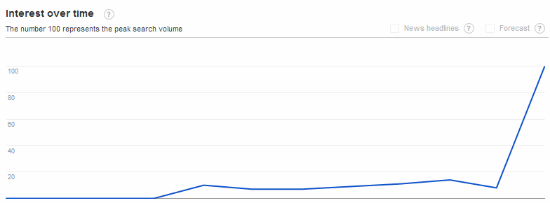
As soon as the ISPs put up their filters people searched for alternative ways to access their beloved torrent sites. The graph below shows the Google search trend for the term “KickassTorrents proxy,” which surged on Thursday.


Kickasstorrents proxy

kickass-proxy

This increased demand led to a huge surge in traffic to several dedicated proxy sites, some of which had barely launched. Sites such as Kickassunblock.com, Kickassproxy and Katproxy have welcomed many new visitors over the past few days.

Most interest goes out to KickassTorrents proxies, which is not surprising. After the Pirate Bay was blocked last year Kat.ph became the most popular torrent site in the UK, earning a spot among the 50 most-visited websites in the region.

H33T and Fenopy have a smaller audience but are also catered for by dedicated proxy sites. H33T remains accessible in the UK through H33tunblock and H33t.uk.to among others, and Fenopy also has several dedicated proxies including Fenopyproxy and Unblockfenopy.

The above shows that for every website that’s blocked, many new ones are likely to appear. Those who really want to download torrents will find a way to access KickassTorrents, H33T, Fenopy, or one of the many alternative torrent sites still available.

The notion that the blockades may do little to prevent existing users from using BitTorrent was previously highlighted by several Dutch and UK Internet providers. These ISPs claimed that BitTorrent traffic didn’t decline after the blockades against The Pirate Bay were implemented.

That said, the blockades may put off people who are new to BitTorrent, or those who stumble upon the blocked sites through search engines.

And so the Whac-A-Mole game continues…

Source: KickassTorrents Proxies Blossom Following UK Blockades

24 Mar 20:00

Free Access To Dozens of Anonymous VPNs Via New University Project

by Andy

No matter which country you live in there are always people in authority seeking to limit which websites you’re able to view.

Admittedly some sites are quite rightly deemed repulsive to society in general and 99% of the public have few problems with them being hidden away. However, the blocking of ‘normal’ sites is much more controversial.

China is infamous for its Great Firewall and its censorship of anything it pleases from Twitter to YouTube. Iran also has concerns that its citizens’ minds will be influenced by Western thinking via the web. Overall, oppressive regimes tend to see some websites as having a destabilizing effect, so they censor them to maintain control.

In recent times the notion of website blocking has become fashionable in the West too, mainly because certain domains are viewed as offensive to the music and movie industries. The Pirate Bay is blocked in many countries and just this week the UK added another three sites to its ISPs’ filters – KAT.PH, H33T and Fenopy.

But, as mentioned countless times in the past, these filters represent mere temporary roadblocks for the determined and today we bring news of an exciting project that allows almost anyone to access any site they like in seconds. Best of all, it takes just a few minutes to setup and it’s completely free.

VPNGate

The Graduate School of University of Tsukuba, Japan, has just launched the VPN Gate Academic Experiment Project with the aim “to expand the knowledge of Global Distributed Public VPN Relay Servers.” We’re very happy to help them with that today.

How it works

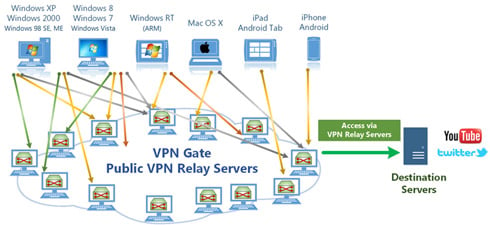
Volunteers have given the University access to dozens of VPN servers located all over the world which people can access from pretty much any device running Windows, Linux, iOS, Android and more. No sign up or user registration is needed. Once connected the user’s IP address is hidden and switched for one issued by the VPN of their choice selected from dozens around the world.

VPNGate3

Protocols and the SSL-VPN client

Several protocols are accepted, such as L2TP/IPsec, SSTP and the popular OpenVPN, but things get really streamlined for those who select the SSL-VPN option. This requires the easy installation of the Windows freeware client SoftEther VPN but it’s straightforward and only takes a couple of minutes.

The beauty of running the client (which is also developed by the University and will soon go open source) soon becomes apparent. Not only does SoftEther offer SSL-VPN tunneling via HTTPS to pass more easily through NATs and firewalls, it has another trick up its sleeve.

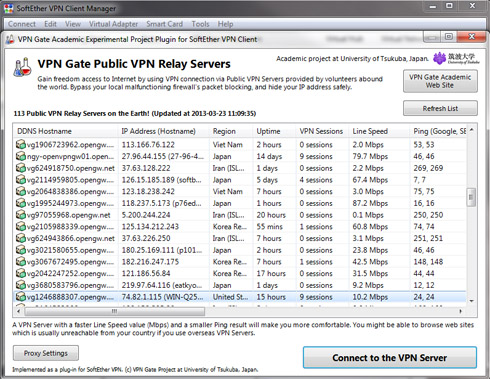
The client comes with a nifty pre-configured plugin which displays a list of all the available VPN servers offered by VPN Gate (see below). This enables the user to activate, disconnect, or switch between VPNs with just a click. This means that there is no need to set up each VPN connection manually in an operating system, although that can be done if the user prefers.

VPNGateList

Unblock any site in an instant

Want to unblock The Pirate Bay, KAT.PH or H33T in the UK? Easy, just select any server that isn’t in the UK and preferably outside Europe. Want to access YouTube in China? Simple, just access any non-domestic VPN server. US citizen who needs to use Hulu overseas? Fine, just pick a United States server. UK citzen who needs to access the BBC iPlayer abroad? A UK server will provide the solution.

Once a server is selected and connected to the client, simply use your regular browser and other Internet applications as usual and traffic will be diverted through the VPN.

Tests

TorrentFreak carried out some basic tests yesterday and got some decent results. We successfully unblocked all of the blocked torrent sites in the UK, accessed Hulu from outside the US, and watched the BBC iPlayer and TVCatchup services from outside the UK.

Also, since the people at VPN Gate apparently have no problem with people using the service for video transfers (they mention YouTube specifically), we conducted some limited BitTorrent runs on half a dozen servers around the world. In each case we connected to a VPN server via the SoftEther Client and carried out tests with a service such as TorrentIP to ensure that our IP address when using BitTorrent had actually been changed. All but one of our tested servers worked fine while another appeared to block torrents.

Performance, logging and offering your computer as a server

As might be expected, performance changed from server to server but in each case browsing and transfer speeds were more than acceptable for a free service. Each server shows its available bandwidth so picking one with more tends to yield better results. That said, we tried a couple of slower ones and they performed just fine too.

While VPN Gate offers anonymity to a point, they do keep connection logs for around three months. In common with most other VPN services they do not monitor your activities but will comply when ordered to do so by the local courts, in this case those in Japan. However, each VPN server has its own logging policy and many appear to delete logs after a couple of weeks, if they keep them at all.

To give an outline of how the logging might affect users in real-life situations, we can look at a few scenarios.

If a US citizen carried out file-sharing on a US VPN server, he might be logged by those carrying out six strikes in the US. However, if that same user selected a server overseas, he would not be monitored by six strikes. Equally, an Iranian or Chinese citizen looking to carry out activities frowned upon by his or her government would be advised to use servers located outside their respective countries.

Finally, please use the services responsibly – respect the volunteers offering their services and consider becoming one yourself. If you have a Windows computer and can offer your bandwidth, click here for more information.

Source: Free Access To Dozens of Anonymous VPNs Via New University Project

24 Mar 19:56

Windows Blue leaks online, includes smaller Live Tiles, new side-by-side Snap Views, and IE 11

by Tom Warren
Windowsbluescreenshot1_1020_large

An early build of Windows Blue, the next version of Windows, has leaked online on the same day that Microsoft CEO Steve Ballmer celebrates his 57th birthday. Build 9364, a partner version that was originally compiled on March 15th, has been made available on file sharing sites and includes some of the new changes that Microsoft is building into its significant Windows 8 update. Leaked screenshots posted at Winforum show that the company is bringing smaller tile arrangements and even a larger desktop one to its Start Screen, along with greater control over the color personalization options, and a whole lot more.

Additional Snap view to place apps side-by-side

Microsoft is building in additional Snap Views into Windows Blue, allowing...

Continue reading…

24 Mar 19:55

Nokia defies Google over WebM video standard, guarding VP8 codec patents

by Louis Goddard
Nokstock1_640_large

Nokia has explicitly ruled out licensing a set of video patents under royalty-free or FRAND (fair, reasonable, and non-discriminatory) terms, potentially blocking efforts by Google to make its VP8 codec, part of the broader WebM project, a worldwide standard. In a submission to the Internet Engineering Task Force (IETF), one of the international bodies responsible for administering web standards, the Finnish company lists 64 patents and 22 pending applications that it claims are relevant to VP8 and makes it clear that it will not be willing to give Google — or any other interested party — a free ride.

VP8 was originally developed by On2 Technologies

The move comes barely two weeks after Google entered into a licensing agreement...

Continue reading…

24 Mar 19:53

Blockbuster UK sold to investment firm, half its stores to close

by David Pierce
20121005-dsc_75815verge_large

A little more than two months after Blockbuster announced it had gone into administration, the British equivalent of filing Chapter 11 bankrupcy, the company has found a buyer. Reuters reports that Gordon Brothers Europe has purchased 264 Blockbuster stores for an undisclosed sum, and intends to keep them open — it says the acquisition will keep 2,000 of the company's 4,000 jobs intact, and the 264 stores figure is likewise half of Blockbuster's roster of 528 locations in the UK.

Blockbuster's financial woes have been well-documented in both the US and UK, but Gordon Brothers says it had identified "a profitable core portfolio of stores," and intended to keep existing stores running normally. It's a lifeline for Blockbuster,...

Continue reading…

24 Mar 10:03

The Evolution Of Google Reader Started With A Crash

by Jason Shellen
reader melt

Editor’s note: Jason Shellen is a former Googler and founding product manager of Google Reader. He is now co-founder at Boxer and advisor at Tapedeck. Follow him on his blog and on Twitter @shellen.

As part of Google’s recent announcement that it is shutting down Google Reader in July, I thought looking back at the history of how our beloved, but beleaguered, feed reader came to be, why we’ll miss it and what we really want in the future.

Back in the days on the Blogger team, we spent a lot of time thinking about how to get people blogging after they had signed up. However, when Blogger achieved critical mass, the need to model good blogging seemed less important since great writers, musicians, photographers and journalists were gravitating towards the form and showing the rest of us what made good blog content. The questions we began to hear from users changed from “How and what do I blog?” to “Where do I find the good ones?” and “How do I keep up with all of these great blogs?” Naturally, blog search and a blog reader or aggregator of some sort couldn’t be too far off.

Meanwhile, there was an ever-increasing number of good Windows and Mac desktop aggregators popping up (Feed Demon, NewsGator, Radio Userland and NetNewsWire). They were mostly made by great independent developers but didn’t have a web-app component until a few years later. Then along came Bloglines. It was the first feed aggregator that our Blogger team gravitated towards. It was very simple at first and gained more powerful features over time. But my personal frustrations were growing not just with Bloglines, but with some of the social integrations I wanted to see on the web.
I remember a very early version of Firefox had crashed, taking with it my open Bloglines tab and thus losing the 100+ items that it would surely “mark as read.” If I went back to Bloglines it would appear as if I had read all of those items, and there would be no way to catch up. I was upset!

I wheeled around in my chair in the Blogger bullpen and complained to Biz Stone: “I wish there were some sort of eye tracking that would tell which item I had read and saved my state!” He agreed with my wacky proposal. I continued to stew.

Aside from dreaming up features for products I didn’t control, I had spent a considerable amount of time at Google helping to form the cross-industry group that ultimately published the Atom feed format and Atom Publishing Protocol. We were pushing Atom to become a recognized Internet standard, with companies such as Six Apart, IBM and Macromedia onboard. When Blogger turned on Atom feeds for all of our millions of users, Blogger single-handedly became the No. 1 producer of feeds in the world. This was huge for aggregators, because for any of them to become mainstream, more content in a subscribable format was needed.

One beautiful wonderful thing happened along the way to creating Atom.

Atom was an effort to make feed reading and subscriptions more consumer friendly. If we were really successful with what we had built, we imagined a world where you didn’t need to market the plumbing of a technology to realize the benefit. Some who embraced RSS-only saw this as an opportunity to latch onto a brewing controversy or, worse, as the window to market RSS to consumers. The next few years would be a boring marketing landscape, as we saw orange and blue chicklets slapped up haphazardly around the web. In hindsight it’s easy to see that consumers understood words like “follow” or “friend” for content they wanted delivered regularly rather than “subscribe,” “RSS” or “Atom feed.”

One beautiful wonderful thing happened along the way to creating Atom. For a few years, I had kept a little side-blog right alongside my main blog at shellen.com. The main view showed larger posts, but I was using some server-side code to read a file I was publishing in another directory and display the second blog on the right-hand column. It was great for shorter posts, but I wondered if there would be a way to display an Atom feed alongside my blog instead of my slapped-together solution.

I wondered this aloud to Chris Wetherell one day in 2004, an engineer on the Blogger team.

“Say Chris, do you suppose you could display an Atom feed in JavaScript?” He took the challenge and “Feedless” was born. I dropped in a few files on my blog server and pointed it to my new Blogger-created Atom feed. It worked!

However, Chris wanted to show me something else. He quickly modified his first script into something that could display more than one feed into a beast that could blend items together. My mind raced and I saw the value immediately. We could create Blogger Friends, a page on Blogger where you could see all of the blog posts from your friends. LiveJournal had something like this years earlier but maybe you could even follow people who weren’t on Blogger? Before long this was all Chris and I could talk about, and plans began for Chris’ 20 percent project to become a full-fledged Google project in early 2005.

The “Goals and Objectives” section of the product plan for Project Fusion (an early codename for Google Reader) stated “Our goal is to build a robust web service and best-of-breed user interface for viewing subscriptions. We will be producing an API for read/unread state of individual posts on a per-user basis and will also build our feed viewer on top of this API.” Pretty geeky stuff. However, we also had a vision statement that was sufficiently less geeky and more jaw-droppingly, ambitious. “Our vision is to become the world’s best collaborative and intelligent web content delivery service.”

I’m sad to see it go but Google Reader shutting down isn’t a surprise to me.

As far as we were concerned, the text of blog posts was just the beginning of a content revolution. In fact that early codename, Fusion, was meant to be a hint of the future of how web content would be consumed, fused together perhaps in a new TV-like format.

The future was ripe with possibilities. Our little team was going to launch our product on Google Labs, which meant we could try wild ideas. We knew that Google Video was around the corner and YouTube was still an independent but promising site. We also knew that the Picasa acquisition would help bring fast photo embedding and display to the web. The possibilities were seemingly endless. Our short-term vision included tying all of this together in an easy-to-consume way that also allowed you to easily share it with friends and find or subscribe to more content from a search box powered by Google all from within our app.

In October 2005, Google Reader launched to 100,000 of our closest friends. The team pulled off some amazing feats in a short amount of time. We quickly learned that there was indeed a truly long tail of feed-based content. We experimented with audio, video and photo content displays. We became the relied-upon backend for iGoogle’s feed-based gadgets and had a Reader gadget on iGoogle that became one of my favorite ways to use Reader.

But in early 2006, it was clear to me that, while I was proud of what we were building, we weren’t likely to be that magical fusion of all things digital. I moved on to other projects at Google. Reader was and remains today a great delivery system of content you knew you wanted to see every day.

I’m sad to see it go, but Google Reader shutting down isn’t a surprise to me. The recent hiccups and fact that it remained separate from any other Google social efforts didn’t bode well for its long-term health. I’m certainly overwhelmed by the petition and public outcry. And who doesn’t love a good “Downfall” parody? But what is it that we’re responding to in Google’s decision to shutter Reader?

Reader was like TiVo for the web, appealing to completists and skippers alike.

Reader was an application that felt like you were in control of the programming. You could summon the content you told it to keep track of at your leisure. Reader was like TiVo for the web, appealing to completists and skippers alike. Read everything or read nothing. The choice was yours. When we started Reader, I envisioned something a little more like Google News that knew about your likes and dislikes and would program based on what we thought we knew about you. Indeed recommendations became a part of Reader in the past few years.

But it’s no surprise that Facebook and Twitter (who know an awful lot about what you like) are in a better position to deliver suggested content these days. They don’t explicitly put you in the driver’s seat of programming what you see. We rely on the people (or brands) we follow to act as filters. But it’s not that level of control we came to expect with Reader.

A feed reader lets you subscribe to known content. A feed reader lets you know about content you should subscribe to. A good feed reader lets you know what your friends are reading and gives you the opportunity to share. A smart feed reader displays content in a specific way based on the content and shows you only what you need to know and nothing you don’t. Perhaps the smartest of them all doesn’t need to care whether or not this content comes from a feed at all, toes the line between curating and creating content, and maybe already exists.

I’ve been asked a lot recently if an aggregator or feed reader is even needed these days and what should take Reader’s place. Certainly the folks at Feedly, Digg, Zite and others have promising efforts, but my recommendation is to build something that moves beyond the confines of reading or feeds. Just build the world’s best collaborative and intelligent content-delivery service.

[Illustration: Bryce Durbin]


24 Mar 10:02

Global Impact Awards’ hunt for U.K.’s most innovative social entrepreneurs starts today

by Emily Wood
From cracking the human genome to advancing medical research through computer games, British social entrepreneurs have a proud history of using technology to make the world a better place.

Last year, we launched the Global Impact Awards to support nonprofits using technology to tackle some of the world’s toughest problems. We gave $23 million to seven organizations working on projects ranging from aerial technology that protects wildlife to data algorithms that ensure more girls and minorities get placed in advanced math and science classes.

Today, as the next step in the Impact Awards, we’re kicking off our first Global Impact Challenge in the U.K., inviting British nonprofits to tell us how they would use technology to transform lives. Four nonprofits will each receive a £500,000 Global Impact Award, as well as Chromebooks and technical assistance from Googlers to help make their project a reality.

Applications open today, and registered British nonprofits are invited to apply online at g.co/impactchallenge. We’ll review applications and announce 10 finalists on May 22. At that point, people across the U.K. can learn more about the projects of the top 10 finalists, donate to the ones they like and cast a vote for fan favorite. On June 3, the top 10 finalists will pitch their concepts to a judging panel that includes us (Matt Brittin and Jacquelline Fuller), Sir Richard Branson, Sir Tim Berners-Lee and Jilly Forster. The three awardees and the fan favorite will be revealed at the event, which will take place at Google London.

Technology can help solve some of the world’s most pressing challenges and we’re eager to back innovators who are finding new ways to make an impact. Today we’re starting the hunt in the U.K., but we also know that nonprofits all over the world are using techy approaches to develop new solutions in their sector. Who knows, the Global Impact Challenge might head your way next.

Posted by Jacquelline Fuller, director of Google Giving, and Matt Brittin, VP, sales and operations, Northern and Central Europe
23 Mar 20:59

500px Beta Hits The Play Store, Lets You Test The Latest Features Before They're Ready For Prime Time

by Cameron Summerson

500px

If you're a fan of the photography-aggregating service 500px, then you may be interested in seeing what the company is brewing for upcoming versions of the app. Thanks to the new beta version of 500px, which hit the Play Store this morning, now you can.

1 2 3

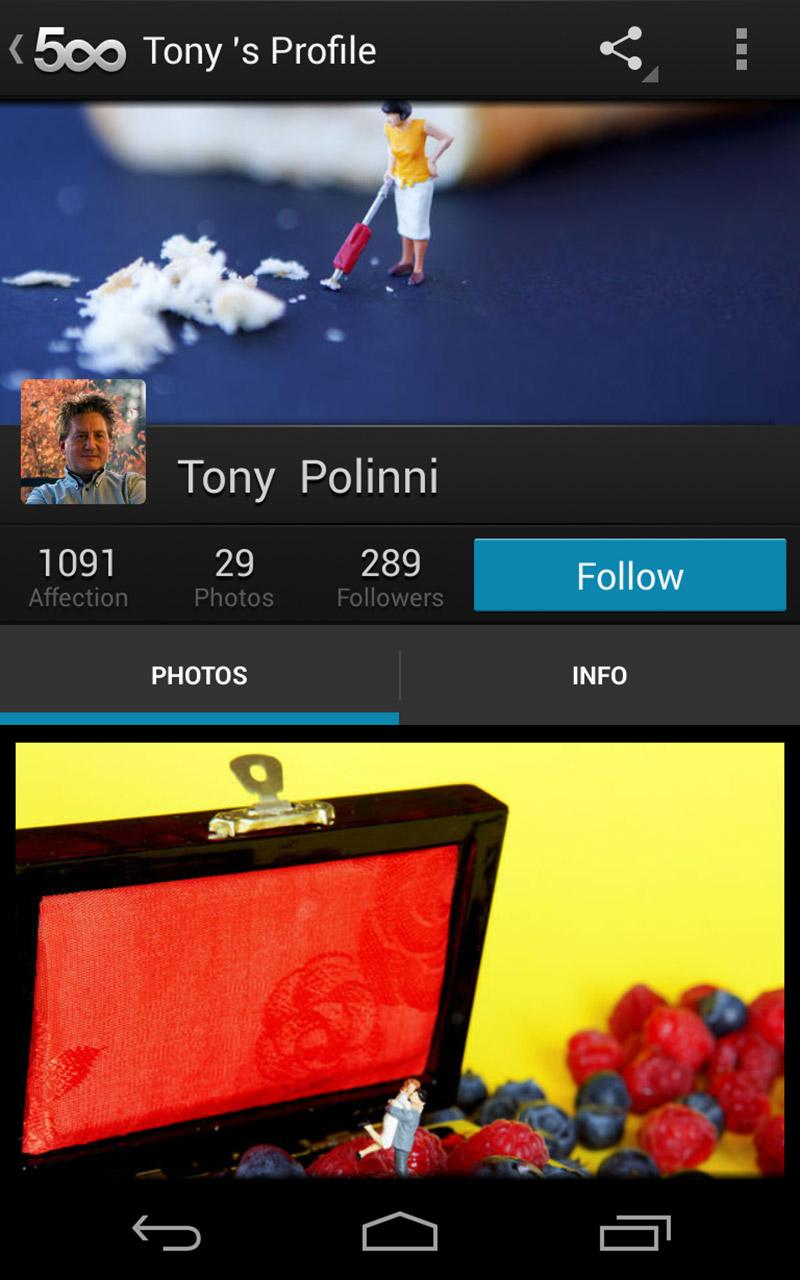
All the latest beta features, and the silhouette of a moose. What more could you want?

The 500px beta app brings the latest features the company is working on before they're ready for prime time in order to let users not only check them out, but also report any issues they're having. So, basically it's just an open beta.

Done With This Post? You Might Also Like These:

500px Beta Hits The Play Store, Lets You Test The Latest Features Before They're Ready For Prime Time was written by the awesome team at Android Police.


23 Mar 20:57

Congressman boasts on Twitter about the money he got to support CISPA, then thinks better of it

by Cory Doctorow


CISPA is a bill before Congress that will radically increase the ease with which the government and police can spy on people without any particular suspicion. It is being rammed through by people like Rep. Mike Rogers (R-MI), who received a small fortune in funding from the companies that stand to get rich building the surveillance tech CISPA will make possible.

What's more, Rogers admits it, and even tweets about it! Nicko Margolies from the Sunlight Foundation writes,

Rep. Mike Rogers (R-MI), a co-sponsor and major supporter of the controversial Cyber Intelligence Sharing and Protection Act (CISPA), deleted a retweet of an analysis of contributions to lawmakers from pro-CISPA companies. MapLight looked at the powerful House Intelligence Committee, where Rep. Rogers serves as Chairman, and followed campaign contributions to the members who are currently considering the bill that would allow companies to share more information on Internet traffic and users with the U.S. government.

Rep. Rogers, or possibly a member of his staff, retweeted the story that identified that members of the House Intelligence Committee "have received, on average, 15 times more money in campaign contributions from pro-CISPA organizations than from anti-CISPA organizations." He retweeted MapLight's tweet of this information from his iPhone and after 23 minutes thought better of it and removed it. Fortunately the Sunlight Foundation's Politwoops project caught it and archived this change of message and of heart. According to the MapLight piece, Rep. Rogers received $214,750 from interest groups that support CISPA.

The EFF has more info on CISPA, and ways you can help kill it.

Pro-CISPA Lawmaker Deletes Retweet about Money Received from Pro-CISPA Groups (Thanks, Nicko!)

23 Mar 20:18

Amazon Appstore Offering 18 Free Apps In Its 'Greatest Hits' Promo

by Cody Toombs

nexusae0_amazon-appstore_thumb

Do you like free stuff? Do you have access to the Amazon Appstore for Android? Have you been forgetful about claiming the free app of the day? Then I have great news for you. Amazon is holding a Free App of the Day Greatest Hits promotion. Featuring 18 popular and previously freed apps, the promo returns each to the excellent price of $0 for a limited time. Here is a look at what you can get:

2013-03-22_21h41_49

Well, what are you waiting for?

Done With This Post? You Might Also Like These:

Amazon Appstore Offering 18 Free Apps In Its 'Greatest Hits' Promo was written by the awesome team at Android Police.


23 Mar 20:13

Derek Watkins, R. I. P.

by Bill Crider
BBC News: Derek Watkins, the British trumpet player who played on every James Bond film soundtrack from Dr No to Skyfall, has died aged 68.
23 Mar 20:12

The battle behind a more accessible web for the deaf and blind

by Bryan Bishop
Chrome_ipad_large

The web is an integral part of the way we reach out and communicate with one another, but navigating the internet can be difficult for those who are deaf and blind. The Wall Street Journal takes a look at the efforts of some individuals to force businesses to make their websites more friendly for the disabled — just as they would have to do with physical locations. Some of the battles involve the Americans with Disabilities Act of 1990, with those in favor of change arguing that the Act applies to the web even though it doesn't name internet services specifically. Lawsuits against companies like Netflix and Target have even proven successful, with the former company agreeing to make all of its programming closed-captioned as a result....

Continue reading…

23 Mar 20:12

US Senate votes in favor of proposed nationwide internet sales taxes

by Aaron Souppouris
Img_7231_large

Senators have voted 75-to-24 in favor of nationwide changes that would see sales tax levied on a wider range of internet purchases. The decision was purely symbolic — it's a non-binding vote that indicates the Senate supports such legislation — but the overwhelmingly positive response could allow the act to bypass the US Senate Committee on Finance. Should the final bill, the Marketplace Fairness Act of 2013, be approved and written into law, it will essentially eradicate the advantage that smaller internet retailers have over stores with a multi-state presence. As CNET reports, there's been intense lobbying in favor of the bill by advocacy groups including the National Retail Federation and Retail Industry Leaders Association,...

Continue reading…

23 Mar 20:11

Back to stock: get the Nexus look on any Android phone

by Evan Rodgers
20120320-dsc06057_large

If you've ever shopped for an Android smartphone, you've undoubtedly encountered a conundrum: the best hardware is all too often spoiled by terrible software. Nearly five years after the HTC G1 brought Android to the market, manufacturers are still slathering questionable visual tweaks and half-baked software features all over their latest devices, slowing the interface and consuming valuable battery life.

Fortunately, app developers have been hard at work creating alternatives to these ill-conceived customizations, and they've done it without the need for "rooting" or hacking your phone at all. Unlike iOS, every version of Android allows you to install replacements for a variety of UI elements. Some things, like menus, settings, and...

Continue reading…