BitTorrent (the company) has unveiled the first BitTorrent Bundle, which lets you download newly released music, videos, movies, books, and more for free or at pay-what-you-want prices. Tim Ferris' book The 4 Hour Chef, new music from Kaskade and Pretty Lights, and more are all available in the current bundle.
While most of the options in the BitTorrent Bundle are free, many of them ask you to support the artist by paying pre-ordering an album, paying a portion of the list price, or paying whatever you choose for the download. For example, Kaskade's bundle, which includes behind the scenes video from his latest tour, music downloads, and more, is completely free, while The 4 Hour Chef lets you download the book but also suggests you support the author by buying it at 40% off.
Overall there are close to 20 entries in the current BitTorrent Bundle, most of them completely free. Hit the link below to check them out, and download the ones you like (or all of them, if you prefer). You'll need a BitTorrent client though—all of the download links are, of course, torrent files.
It's easy enough to selectively save Gmail image attachments to Google Drive, but if you want to automate the process, tech blog Digital Inspiration shares a script that makes the archiving happen automatically.
The script runs in the background of Gmail, and when you get a new attachment it automatically sends it over to a folder called "Gmail Images" in your Google Drive. It also scans your email to pull out images from older emails so you don't have to go through those thousands of older messages. If you want manual control, this script does the same thing but gives you full control over what gets sent over. You can grab the auto-save script, as well as installation instructions over on Digital Inspiration.
Microsoft today is confirming new design and interfaces changes to Windows 8.1, codenamed Windows Blue, today - changes that include the return of the missing Start menu button.
It isn't known if this design change (one among many highlighted in today's entry on the official Windows blog) will be enough to turn around the at-best ambivalence users have shown towards Windows 8 and its Metro interface, but it's a Start.
Ever since Google announced that it would be sending its Reader service out to pasture on July 1st, there has been a gold rush of replacement RSS readers coming to the surface. Many of the better options, such as Feedly or NewsBlur, have catered to the hardcore, RSS-consuming reader that follows a number of blogs posting many articles a day. These users primarily value speed and efficiency over visual aesthetics (though, both Feedly and Newsblur have put in efforts to improve their appearances).
Bloglovin', an RSS aggregator that has been around since 2008, is taking a different tack: Its goal is to attract the casual consumer that's more interested in fashion and lifestyle blogs than straight technology, politics, sports, or science...
Google is incorporating nutrition data into search; beginning today, results will include "extensive" details on calories, carbohydrates, proteins, sugars, and other relevant food info. "Figuring out how to make smart choices about some of our favorite foods can often be a cumbersome and daunting process," the company said. "So we’re hoping we can make those choices a little bit easier." According to Google, data covering over 1,000 fruits, vegetables, meats and meals is included at launch. Those range between simple items — carrots, potatoes, corn — to full-on meals like "burritos and chow mein."
Food-specific data will come up in natural language searches like, "how many calories are in popcorn?" and Google says the Knowledge...
Apple appears to have renewed interest in investigating gaze detection similar to what Samsung offers as “Smart Stay” tech on the Galaxy S3 and Galaxy S4, which can stop a screen from dimming and going to sleep when a user is actively watching it. A new patent application (via Unwired View) describes Apple’s version, which uses the front-facing camera along with the onboard accelerometer to auto-switch between a predetermined screen power down time and making sure the display stays on for reading.
The system works by using the accelerometer to detect whether the device is being held still, and then by using the on-board front-facing camera to check whether a user is also actively looking at the screen. The accelerometer piece can prevent unnecessary use of the camera component, by stopping the camera from activating at all, which is key in terms of making the feature both battery efficient and effective.
Apple has filed this application as of January 25, 2013, but it’s actually an updated version of one filed back in 2008. It doesn’t describe some of the more advanced features that Samsung included with its Galaxy S4, including eye scrolling and a feature that pauses video when a user looks away from the screen. But it does lay the groundwork for future functionality controlled by a smartphone user’s gaze, and provides an intuitive method for incorporating facial feature recognition into a future version of iOS or the iPhone in a practical way.
The big benefit here is indicative of the different ways Apple and Samsung are thinking about similar kinds of tech; the whole point is to eliminate one more settings a user has to worry about, by handling power conservation techniques in a completely automatic way, instead of via manual input (currently, a user selects from a variety of screen sleep time options). The renewed interest in the patent could indicate that Apple is building this into something like iOS 7, but it could also just mean that it’s refreshing its patent suite for fresh legal attacks on its rivals. Still, this is one invention that would provide an elegant and useful UX update to iOS devices.
The mobile messaging space is exploding with ever more colourful ways to communicate, augmenting the basics of text and voice — whether that’s stickers, one-to-many video chats or the ability to leave random missives for strangers. Zoobe, a Berlin-based startup, has another cutesy option to add to the pile: cartoon avatars that animate your voice message so you can ramp up the kawaii.
It’s not the only startup looking at this space. Indeed, U.K.-based HeadcastLab launched an iOS platform earlier this month that lets celebrities and brands create cartoon avatars to animate their messages. Which is basically the same premise — albeit going purely down the licensing route for now. An app like Talking Tom is also treading similar ground to Zoobe too. But with the mobile messaging giants steering relatively clear for now, there’s everything to play for.
Add to that, Zoobe argues its technology improves on rivals’ offerings by using distributed cloud services to process and deliver messages, rather than storing assets and animations locally on devices — which it says means minimal on-device storage space is required to use its apps. It has also patented the speech recognition technology which underpins the lipsyncing component of its animations.
Zoobe has gone for both anthropomorphism, with its Zoobe Pets iOS and Android apps, but also embraced a cartoonish uncanny valley with Zoobe Eve‘s doe-eyed humanoid caricatures. So whether you want a humanesque bunny to animate your message or a bunnyesque human they have your bases covered. Resulting video messages are viewable on-device and also online via a shareable URL. Since “soft launching” in December last year, the company says it has had more than 400,000 cross platform downloads — with no “active promotion” to date.
“Zoobe is targeted at anyone who wishes to send more personal, emotive messages,” CEO Lenard F. Krawinke tells TechCrunch. “We currently offer two apps; Zoobe Pets and Zoobe Eve, which are primarily aimed at slightly younger and slightly older audiences respectively based on the avatar characters available in each.”
The apps are free to download, with premium in-app content coming down the line to monetise the audience. The user selects which character they want to voice their missive, chooses a backdrop image (which can be created by taking a photo) and records their voice message which is then delivered to the chosen recipient animated by cutesy avatar.
As well as monetising via paid content in its apps — presumably new/special characters etc — it says it’s also looking at licensing its technology via a white label offering, much as HeadcastLab is. “We are in discussions with a number of license holders about white labelling our technology to produce their own avatar messaging services,” says Krawinke. “We are always open to hearing from interested parties in regard to licensing.”
The existing characters in both Zoobe Pets and Zoobe Eve are original creations from Zoobe’s own in-house artists. It says it has “a few new launches to supplement these currently in the works”.
The startup has just closed a seven-figure seed round, taking additional investment from its five original backers, and adding four new backers in the process. New investors include Thomas A. Curran (former Deutsche Telekom CTO), Rayk Reitenbach (IBB VC Technologie Fonds), and Lars Dittrich. Existing backers are Christophe Maire (Atlantic Internet), Karl-Heinz Brandenburg (Brandenburg Ventures), Dario Suter (DCM), Jens de Gruyter (United Arts Ventures), and Udo Schloemer (JMES Investments), who all contributed additional funds in this round.
The company currently employs more than 20 people but is looking to expand its team across all disciplines, particularly in mobile development. Unsurprisingly, as with HeadcastLab, Zoobe’s film director founder (Krawinke) has a background in broadcasting and animation, with previous work including animated feature films and advertising spots for Volkswagen and Disney.
Google has made a number of its apps and services available on multiple devices. Sundar Pichai, Google’s SVP of Android, Chrome, and Apps, announced at the D11 Conference that there’s another service that’ll soon be available on iOS: the Google Play Music service. Google’s answer to iTunes and Spotify was previously only available on the web and Android. According to Pichai, it will launch on Apple’s operating system in “a few weeks.”
At its I/O conference this month, Google announced a pretty major revamp of Play Music, which now includes a Spotify-like subscription service.
Pichai noted that it’s part of Google’s DNA to bring all of its services to as many platforms as possible. “In Google’s fundamental DNA, we want [our services] to be universally accessible… For us, users on iOS who want to use Google services, we want them to be Google users.” Indeed, he argues that Google’s approach to its service is different from that of its competitors.
Talking about Samsung and Android, he noted that “it’s not just the operating system, but the services you deliver on top of it. The thing that makes Android successful, it’s the Google cloud services that are on top of that. We want to reach as many people as possible. For platforms which don’t have that many users at scale — for YouTube, as an example, we have HTML5.”
Welcome back to Android Gaming Weekly, our weekly recap to focus on new releases. We still plan to cover upcoming releases and games we’re playing, but this column is dedicated to new games you can install and start playing right now. Check out our top picks and let us know if you have any suggestions for next week in the comments below.
SlamBots
Description: Slam your way through swarms of evil robots in this action packed arena battle game. Use an array of spiky slamming machines to crush the enemy, rack up massive scores, and power up your skills. Slam the night away in multiple arenas, unlock various characters, mostly it’s about slamming (touch and hold the screen to Slam!).
Description: Free the Gluddle from The Supervision in this eye-catching bouncy game for iPhone and iPad! It will make you laugh! Oi! Aim and shoot springy globular characters called Gluddle. Freeze them in mid-air to help other Gluddle bounce about and defend their privacy and freedom from the evil eyes-in-the-sky…The Supervision!
Description: UNO, the world’s most beloved card game, introduces a brand-new free social experience! Playing UNO with friends, family, and the millions of fans worldwide has never been easier! Join one of the largest free online mobile gaming communities and enjoy an all-new free multiplayer experience, competitive leaderboards and fun customization options that let you shout “UNO!” on a whole new level!
Description: From the creators of Ice Age and Rio, Epic tells the story of an ongoing battle between the forces of good, who keep the natural world alive, and the forces of evil, who wish to destroy the life force of the forest. In the official Epic game, team up with the Leafmen, an elite band of samurai style warriors, and interact with a crew of comical, larger-than-life characters directly from the movie. Build your kingdom and help them save their world… and yours!
Description: Look lively soldier! Grab your gear and fall in line for the biggest, baddest, craziest and most explosive war game to hit your screens and assault your senses. Total Recoil takes arcade shooters to the max; it’s a warmongers delight, packing a deadly arsenal of kick-ass weapons, devastating explosions, mega bosses, and much, much more into one dynamite package.
Description: Craft your own gun and compete against your friends, your enemies, or anyone in the world in a virtual reality shooting competition! With our exclusive Quick Match system, get placed in a lag-free multiplayer match in 5 seconds. No waiting. No lag. Just play.
Description: Alizay, Pirate Girl is an artful blend of story, game and cartoon. Captain Rubberfoot and his crew are looking for the fabulous treasure of Wind Rose Island. What secret does it contain? Who is this mysterious Master of the winds? Discover Alizay, Pirate Girl and go into an original story, full of action and humor.
Description: It is new generation of Zombie Frontier. Since the last battle, we have saved many survivors.Human survivors self-help groups appear around the world.Medicine research work is on the way to success at the same time.However, the threat from zombies is never far away from us.The war between humans and zombies just begins.
Description: Are you ready to take part in an exciting western adventure? Western Story is the game where Old West is as real as it gets. You’ll deal with courageous cowboys, noble Indians, brave settlers and ravenous cattlemen, virtuous lawmen and ruthless outlaws. Do you want to know about Wild West? It’s the right place.
Description: We’re Shelling Out $1,000,000 in Total Cash Prizes! Are You Fast Enough to Win? Our underground racing phenomenon is no longer a secret! Join the Turbo Racing League and drive like you’re shell on wheels! Head down to the Garage where Tito will show you the ropes and help you trick-out your own sweet ride! Qualify for each weekly contest to race, drift, slide and jump your way to the winners circle in the $1,000,000 Shell-Out Brought To You By Verizon!
Description: Stickman Tennis is a fast paced realistic tennis game on spectacular courts and an astonishing atmosphere, simple controls and tons of replay value. Play top spins, slices, lobs and smashes, play cross, longline or inside-out and choose between automatic and manual running. The revolutionary time machine will let you replay a point you lost, to give you a second chance. Play a quick game or complete tour season of Tennis against 100 different opponents. Collect trophies and improve your world rank in a complete season with 64 tournaments.
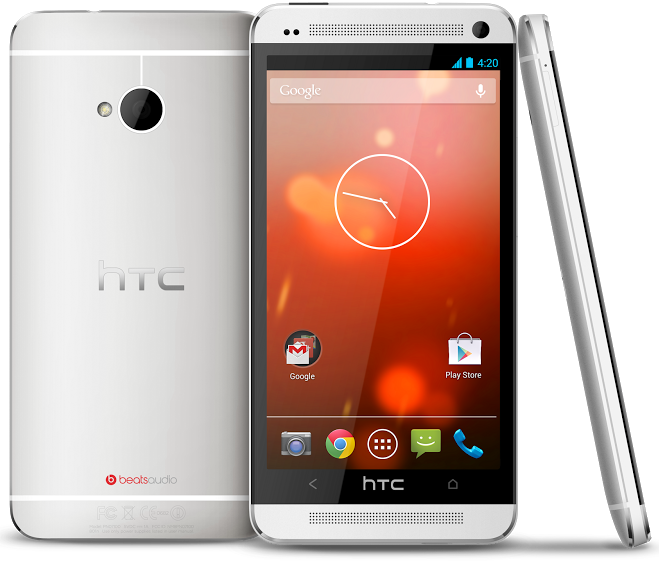
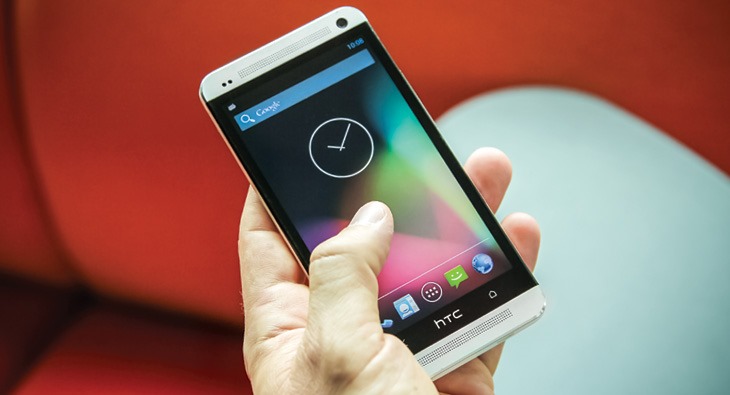
As confirmed by Hugo Barra on Google+ and the official HTC blog, a version of the company's One phone with stock Android 4.2.2 software is coming: on June 26th, you'll be able to buy the "Nexus User Experience" HTC One through the (US) Play Store for $599. The phone was actually announced by Sundar Pichai at AllThingsD's D11 conference this morning.
The hardware is essentially the SIM-unlocked 32GB version of the device you can buy on HTC's website, meaning support for LTE on both T-Mobile and AT&T. A 64GB stock version will not be offered. The bootloader, of course, will be fully unlockable, and Google will be handling the device's software updates.
Google is getting sick and tired of the entertainment industry stamping its feet and demanding that it do more to block pirates from its search results. TorrentFreak reports that Google's U.K. policy manager Theo Bertram said during a panel on online piracy this week that blocking links from search results is mostly a pointless exercise because there are simply so many other links that pop up in their place. The better solution, he said, would be for advertisers to give the company a list of websites where they did not want their ads to appear and ask Google to make sure that those sites are starved of advertising revenues.
Driverless cars have the potential to drastically reduce accident rates and saves hundreds of thousands of lives worldwide each year. Google has been hard at work making autonomous vehicles a reality but its fleet of vehicles is equipped with a large array of bulky cameras and sensors that cost thousands of dollars, making mass production unlikely. Due to the high cost, earlier reports claimed the technology isn't expected to go mainstream until 2025, however an Israeli company has created a relatively low-cost system that could see self-driving cars come to market sooner than we thought.
Apple today dropped a mid-cycle refresh of the iPod touch, its iOS-based iPod, with 16GB of storage on board and without a rear camera, for $229. This slots in its existing lineup between the refreshed, fifth-generation iPod touch, which has a rear camera (and a loop for attaching a wristband), and the iPod nano.
The new iPod still has the same 4-inch Retina display you’ll find on the existing iPod touch and the iPhone, but it only comes in one color, black and silver, and it replaces the 16GB fourth generation leftover which Apple had offered since introducing the fifth-generation touch, presumably to fill the price gap between it and the 32GB $299 model of that lineup. The fourth gen models had been available for $199 for 16GB, and $249 for 32 GB, so this threads the needle between those two options in terms of price point.
You’ll still get the front-facing FaceTime camera, with 720p HD video recording on this device, the same A5 processor, and the same battery life. The new iPod touch variant is actually .06 ounces lighter than the existing versions, however, which is probably the weight of the rear camera module component. It also boasts the same Bluetooth 4.0 and Wi-Fi capabilities as the fifth-gen device.
As MacRumors points out, this refresh was actually predicted by KGI Securities’ analyst Ming-Chi Kuo, who has an impressive track record on products so far, though he also predicted an 8GB model, too. Still, the fact that he nailed the lack of a camera and the price point on the 16GB model is impressive.
Apple has seemed more open to making changes that go beyond internal specs on products mid-update cycle, including the iMac, which got a VESA-compatible variant earlier this year. I suspect that Apple needed its component and manufacturing costs to get to a point where this version would become viable in terms of its margin expectations, and also that it probably benefitted from clearing the supply lines of the fourth generation model by waiting this long to introduce this variant, but it still might be indicative of a new way Apple is thinking about product releases.
Google’s security researchers are well known for uncovering vulnerabilities in other people's products. Standard operating procedure is to give the affected company sixty days before publishing the problem, keeping things under wraps until a fix can be shipped out. But when it comes to critical vulnerabilities that are actively being exploited, Google wants its researchers to cut that down to just a week. A post on its Online Security Blog explains the reasoning behind the seven-day guideline: "each day an actively exploited vulnerability remains undisclosed to the public and unpatched, more computers will be compromised."
Just a week after it released a new iPad app, Shazam has officially announced the launch of its music discovery service on Windows Phone 8 devices. The updated app is designed with speed in mind, and brings with it a few new features, including the ability allowing users to identify tracks directly from their home screen and then listen to or buy them through Xbox Music or Nokia Music. Like on Android and iOS, Windows Phone users will also be able to tag TV adverts, although it does not include the same auto-tagging technology found in the iPad app.
When you use HTTPS or SSL, your web browsing traffic is encrypted. When you use a VPN, all of your traffic is encrypted (usually). Sometimes even with HTTPS and VPNs in play, DNS requests—or the way your computer translates "lifehacker.com" into numbers that your computer understands, like "199.27.72.192," are completely unencrypted, leaving you open to spoofing and man-in-the-middle attacks. DNSCrypt can lock that down. Here's how.
Why You Might Want to Encrypt Your DNS
There are a couple of reasons why an everyday user might want to encrypt their DNS. First, if you think you've been secure and you've still gotten security alerts or warnings from your ISP or struggled with hacks or phishing attempts, it's possible that your security tools aren't as airtight as they claim to be. For example, many VPN providers promise end-to-end security, but "leak" DNS requests left and right. Second, DNS snooping and poorly configured DNS servers have become popularattack vectors recently (see the Kaminsky Vulnerability), as a way to spy on people (or companies) and collect sensitive data.
"DNS Leaking" happens when your system, even after you've connected to a a VPN or anonymity network like Tor, continues to query your ISP's DNS servers every time you visit a new website, connect to a new server, or fire up a new internet-connected application. Ultimately, it means that even though your traffic is encrypted, your ISP—or worse, anyone snooping on the "last mile" of your internet connection (aka, the network between your computer and your ISP)—can clearly see everything you connect to you're going on the internet and every site you visit on the web.
Some hackers will just collect that information, but the worst actually collect it and then use it to conduct man-in-the-middle attacks, where the attacker just sits in between you and your eventual destination and collects data along the way—passwords, cookies, and even enough encrypted data to eventually crack your encryption (if it's weak). In some cases, the attacker will actually pose as the service you're connecting to in order to collect whatever data they can before you figure out something's not right. To read more on DNS leaks, check out this explaination by DNSLeakTest.com, and if you'd like to find out if your VPN is leaking DNS requests, you can test it on the same site. DNSLeakTest.com also has some other fixes you can try for a leaky VPN.
To be fair, encrypting your DNS is a level of security that many people may not need to aspire to. However, if you do regularly work with sensitive material, work remotely and need to make sure all of your traffic is secure, or travel to places where you may be snooped on, encrypting your DNS is a good idea. If you need true anonymity or privacy, even from your ISP, you may want to consider it. If you're just surfing the web from the comfort of your home, it may not be an issue for you. Combined with a good, trustworthy VPN and desktop tools to protect your privacy, encrypted DNS can take your security to the next level, especially when you need privacy, anonymity, and security.
OpenDNS's approach is that DNS encryption is just as essential a part of using the internet safely as HTTPS is to surfing the web. They explain:
In the same way the SSL turns HTTP web traffic into HTTPS encrypted Web traffic, DNSCrypt turns regular DNS traffic into encrypted DNS traffic that is secure from eavesdropping and man-in-the-middle attacks. It doesn't require any changes to domain names or how they work, it simply provides a method for securely encrypting communication between our customers and our DNS servers in our data centers. We know that claims alone don't work in the security world, however, so we've opened up the source to our DNSCrypt code base and it's available on GitHub.
DNSCrypt has the potential to be the most impactful advancement in Internet security since SSL, significantly improving every single Internet user's online security and privacy.
By encrypting DNS requests, DNSCrypt make sure that every part of your internet connection is secure, even if it's already secured by a VPN. For more information about the app and the nitty gritty about how it works, check out OpenDNS's DNSCrypt page.
Where to Get DNSCrypt
DNSCrypt is open source, and install packages are available to download directly from OpenDNS. The project is maintained at GItHub, so if you have trouble finding downloads, you can always get them there. Officially, only OS X and Windows are supported, but the development community at DNSCrypt.org has installation instructions for more operating systems, including Linux and BSD-based systems, jailbroken iOS devices, and rooted Android devices.
The official Windows and Mac DNSCrypt apps both work similar to VPN services that you can toggle on and off when you want the added security. You can install them as services that run on startup, but we'd suggest you try them this way first before you decide to leave them on all the time, just in case you run into problems or performance issues. Once installed (and you'll have to reboot after installation, since the apps are making network-level changes to your system), using DNSCrypt should be as simple as checking the box that says "Enable DNSCrypt" and "Always use OpenDNS." Doing this will configure your system to use OpenDNS for all DNS requests if it's not already and encrypt those requests.
If you're using OpenDNS on your router and you have all of the computers in your house pointed to your router for DNS, you can still use DNSCrypt. If your router is running recent versions of the DD-WRT or Tomato open firmwares (both of which we've shown youhow to install), or if your router supports OpenDNS out of the box, DNSCrypt may already be there, buried in the DNS settings. Enable it, and you're all set. If it's not there, or your versions of DD-WRT or Tomato are old, this forum thread will help you install it.
It's important to keep in mind that DNS encryption is just another way to secure your internet connection from threats. Most attacks that use DNS as an attack vector have been aimed at organizations and businesses, or individuals with useful data or creative enemies. Even if that's not you, it's a great way to add an extra layer of security to your computer or home network. It's easy to install, transparent to you, and useful if you're really serious about your security.
Making a strong bid to win the Most Eclectic Cast Ever In A Superhero Movie award, Marvel’s Guardians Of The Galaxy has made another unexpected choice, adding Glenn Close to the line-up.
While Deadline’s report doesn’t specify exactly whom she’ll play (and given the way the Marvel Cinematic Universe tweaks the backgrounds and personalities of the characters it takes from the comics, things could be very diffrent on screen), it appears that Close is on as the leader of the Nova Corps, which would make her Centurion Nova Prime. Think Nick Fury, but with two eyes and in spaaace.
In the comics, the Corps' power is called the Nova Force. This is a nearly limitless energy field generated by a living supercomputer called the Xandarian Worldmind. The energy is then transmitted into the centurions at varying levels depending on their rank. The Worldmind contains the entire record of Xandarian history and civilization, so it's a bit like Google but without the doodles.
How (or even whether) that will be portrayed in the movie is a fact known only to director James Gunn and the rest of his team. Assuming he signs on, rumoured addition John C. Reilly would be sharing scenes with Close's character.
Close joins a cast that officially already includes Chris Pratt, Dave Bautista, Michael Rooker, Ophelia Lovibond, Lee Pace and, if she makes a deal, Zoe Saldana in the tale of a US pilot who ends up in the middle of a universal conflict and goes on the run with the team.
Gunn is scheduled to kick off shooting next month and the movie should be out here on August 1, 2014.
The smash-hit track Gangnam Style probably needs little introduction after racking up some mind-boggling stats since its release last year.
At the time of writing the video on YouTube has 1,627,652,006 views and artist Psy has 5,451,160 subscribers to his channel. To call it an Internet sensation might be somewhat of an understatement and it seems almost everyone on the Internet has become involved either by watching, singing or dancing along to the track.
As one types ‘Gangnam Style’ into YouTube the site’s autocomplete suggests possible searches and at number six comes ‘Gangnam Style Parody’. Generally tolerated (at least from a copyright perspective), there have been countless reenactments of Psy’s track uploaded to YouTube from every corner of the globe, but one in particular has incurred the displeasure of music label Universal.
The video features four mayors from Denmark who parodied Gangnam Style in order to draw attention to the challenges faced by entrepreneurs in their region. But the singing and dancing from the unlikely quartet was accompanied by the original track, something which Universal believes they should be compensated for.
The argument appears to stem from the use of the track. While the mayors believe their contribution to the Psy phenomenon was entirely for parody purposes and therefore fair use, Universal sees things very differently. They insist that the mayors were actually attempting to increase their own profiles and used the video – and Universals copyrights – in order to boost their political careers.
“It is clear that we have in mind that there are local elections in a minute,” said Universal’s Dennis Ploug in a statement.
As a result, Universal say that the mayors will have to pay a bill of almost $42,000 ($10,500 each) to obtain a license to use the music in the video – and they have just 24 hours to stump up the cash.
“We have given them a payment deadline of Friday, but if they do not pay before then it becomes a real action for infringement, and so the amount will be completely different,” Ploug concludes.
A representative from one of the four municipalities issued with a bill from Universal says that any liability lies with the outfit commissioned to produce the video.
Susanne Linnet Aagaard, from production company Future Factory, says that the amount demanded is simply too high.
“The legal expert we have consulted believes [the demand] is many times higher than what you would pay to use the music in a feature film,” Aagaard says.
“[Universal] want money for four violations, but only one has been committed. They have just seen their chance to win big, and multiply the bill by four.”
The video is now back up on YouTube with Psy’s music removed. Subtitles and random applause have been added to bizarre effect. It’s fair to say that if the video ever had any charm, it’s now been completely destroyed. Add on a $42,000 bill and the disaster is complete.
Dual-core 1.7GHz CPU, 4.3-inch qHD SuperAMOLED screen, UK launch in July
Samsung has announced the much-anticipated and heavily-leaked Galaxy S4 Mini. As the name suggests, it's a miniature version of the Galaxy S4, and like the Galaxy S3 Mini, it's packing suitably downsized specs inside its diminutive chassis.
The Galaxy S4 Mini rocks a 4.3-inch qHD (960x540) SuperAMOLED display, and is powered by a 1.7GHz dual-core processor with 1.5GB of RAM. Around the back there's an 8-megapixel camera, on the front is a 1.9MP front-facer. There's also 8GB of internal storage, expandable via microSD card. Powering everything is an 1,900mAh battery.
The Galaxy S4 Mini boasts many of the headline software features of its larger sibling. It's running Android 4.2.2 Jelly Bean with the latest TouchWiz UI, and in today's press release Samsung highlights features like Sound and Shot, S Translator and S Health, as well as WatchON TV capabilities through a built-in IR blaster.
Connectivity-wise, you're looking at Wifi a/b/g/n, Bluetooth 4.0 and 3G/4G radios. Samsung says there'll be 3G, 4G LTE and dual-SIM variants, though the availability of these SKUs will vary depending on country.
The Galaxy S4 Mini will be shown off to attendees at Samsung's "Premiere 2013" event at London's Earls Court exhibition center on June 20. No release date has been revealed just yet, but the manufacturer did confirm that it'll be available in black and white color options.
We've got today's press release, along with more images, after the break.
Update: UK retailer Phones4u has confirmed that it'll offer the Galaxy S4 Mini "when it becomes available in the UK in July 2013."
Google just announced a pretty major update to Gmail, and you should now be able to give it a go in the browser, if you so desire. As our pal Paul O'Brien from MoDaCopoints out, all you have to do to enable the new tabbed organization is go to the gear icon on the right of the screen and choose "Configure inbox." (If you're using a wrapper like Mailplane, you might need to do this from a traditional browser first, then restart the app.)
Next you'll be asked which tabs you want to use -- primary, social and promotions are checked by default; updates and forums are other options. Once enabled, you'll find e-mails sorted among the tabs. To move e-mails between tabs, just click and drag. (You'll also be asked if you want to continue to get that particular kind of e-mail in the new tab.)
Still no sign of the new Gmail app for Android, which also will bring a new sorting experience.
Google's Calendar app update makes those important dates easier to add and keep track of
Google has updated the "stock" Android Calendar app in Google Play this afternoon, bringing two minor, but very relevant changes. We'll start with the one most users will instantly appreciate -- setting a custom color for a calendar or event. If you subscribe to multiple shared calendars, or have several of your own, you know just how this will help. You can take the calendar your boss shares with you, and make the event labels a certain color so they stand out, or make your calendar one color and you significant other's a different color. In addition, you can mark any single calendar event with it's own custom color to help keep track of important events.
The other change is equally as important, and it shows Google is really pushing forward with the new app design language they've been showing us as of late. The new time and date picker windows look better, but also have more functionality built in. You can set up recurring events easier, and even select the time zone right from the add event window.
You can grab the update from the Google Play link above.
Delete tracks, remove from 'My Library' and share directly from 'Now Playing' in new version
Don't go anywhere yet -- we haven't seen the last of today's Google app updates. Google Play Music 5.0 for Android, which first debuted following the Google I/O keynote along with the All Access subscription service, has been updated again today with a handful of essential features missing from the original release. The new version 5.0.1041J has been updated with the ability to delete tracks directly from within the app, and remove items added via All Access from your library.
What's more, a UI tweak now allows you to share tracks and add them to playlists from the 'Now Playing' screen. The update is rolling out now through the Google Play Store, so head over to 'My Apps' in the store to grab your update. Alternatively, we've got a Play Store link for you up above.
Kevin at Lowering the Bar updates us on the Lego Gun Incident, wherein a six-year-old boy was punished for bringing a tiny, Lego-sized gun onto his Springfield, MA school-bus. The school initially demanded that the boy write a letter of apology and serve detention because the gun "caused quite a disturbance on the bus and that the children were traumatized." However, the same zero-tolerance-obssessed nutjobs at the school board also put CCTVs on their buses, and a review of the footage therefrom reveals that nothing bad actually happened. This has occasioned a small miracle in the form of the school board simply dropping the matter, rather than doubling down and, say, accusing the six-year-old of using a tiny, Lego-sized computer to hack into the CCTV and swap out the footage or similar.
However, Kevin goes on to note that a child in Baltimore continues to struggle with the permanent stain on his record caused by his taking bites out of a pastry until it was vaguely gun-shaped, thereby traumatising all the other students by exposing them to an approximate right-angle. This kid is having the book thrown at him:
"This is a student-specific matter," the spokesman said, in case anyone thought they had suspended every student in the district, "and our school system is not going to have any comment on it, except for this: This is a matter between the school, a student and his parents. It's not, and it should not be, fodder for a publicity stunt by an attorney who seems to believe that his young client's best interests are somehow served by trying this case in the media." News flash: this has been in the media since long before they ever had an attorney, and that is not their fault.
The next step was said to be an appeal to the superintendent of schools, so the battle continues.
EFF is not the only group concerned here. When EME was finally ultimately declared in-scope for the HTML working group, the decision was made by W3C’s executive team, despite discontent among key standards developers and the subsequent protest of more than twenty thousand technologists and groups, including EFF. While disappointment at that decision outside the W3C has been widespread, the debate on the problems of DRM for that the web platform within the consortium has been muted. Its strategic advisory committee of W3C members has until now not spoken on the decision, despite many of that community having privately expressed concern.
EFF has a lot of experience working within these kinds of standards processes in an attempt to combat the effects of DRM. In 2002, we joined the activities of Broadcast Protection Discussion Group to highlight the dangers of its proposed digital TV DRM standard, which briefly became the government-mandated Broadcast Flag before being struck down in the courts. Subsequently we participated in Europe’s Digital Video Broadcasting (DVB) project, as they considered implementing imposing similar controls on European consumers. This new W3C standard comes from exactly same roots: Hollywood's desire to supress innovation and quash othe wishes of individual computer owners.
The entertainment industry's threats to impose control remain the same: if you don’t do as we say, you won’t get our premium content, and your technology will be rendered irrelevant. As we’ve seen with both music, and digital TV, the threat is empty. Commercial content goes where the users are. And users go where their rights and desires are best respected. We think that the guardian of those rights on the Web should be the W3C, and we’re happy to be help it ensure that remains the case.
According to reports by Microsoft experts Mary Jo Foley and Paul Thurrott, a forthcoming update to Windows 8 codenamed "Blue" will restore the familiar interface for navigating Windows.
A feature of Microsoft operating systems since Windows 95, the Start button allowed quick access to applications and system features. Windows 8, in a marked departure, traded it for a tablet-like, touchscreen-optimized system for navigating apps. That, understandably, confused and frustrated Windows users, many of whom found Windows 8 befuddling rather than innovative.
Microsoft Shows A Less-Than-Deft Touch
Microsoft has had a consistent party line on these complaints, which is to urge people to try Windows 8 on new touchscreen PCs and tablets.
One of Microsoft's strengths has alway been its embrace of backwards compatibility—the ongoing guarantee that newer PCs will run older software. The Surface RT tablet, which cannot run older Windows software, and the new Xbox One, which likewise will not play old games, suggest that Microsoft has become more willing to abandon the old, as it did with the Start button.
Here's the mistake Microsoft made: While it's trivially easy to update software, and new hardware can be sold, it's far harder to rewire the wetware in our brains. And hundreds of millions of Windows users over the past two decades have been trained to look for a Start button.
And a basic interface feature like that is not analogous to a game or even a piece of software. Video gamers rapidly grow bored of old games and seek out new ones. But the way we use PCs becomes a matter of routine. And there's nothing more annoying than breaking people's routines.
We get a lot of different types of email: messages from friends, social notifications, deals and offers, confirmations and receipts, and more. All of these emails can compete for our attention and make it harder to focus on the things we need to get done. Sometimes it feels like our inboxes are controlling us, rather than the other way around.
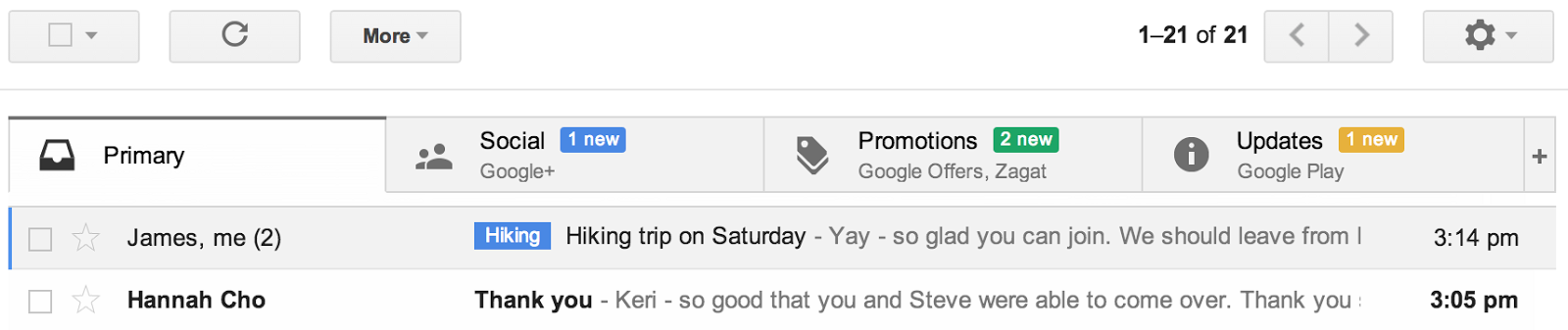
But it doesn’t have to be that way. Today, Gmail is getting a brand new inbox on desktop and mobile that puts you back in control using simple, easy organization. On the desktop, the new inbox groups your mail into categories which appear as different tabs. You simply choose which categories you want and voilà! Your inbox is organized in a way that lets you see what’s new at a glance and decide which emails you want to read when. You can easily customize the new inbox - select the tabs you want from all five to none, drag-and-drop to move messages between tabs, set certain senders to always appear in a particular tab and star messages so that they also appear in the Primary tab.
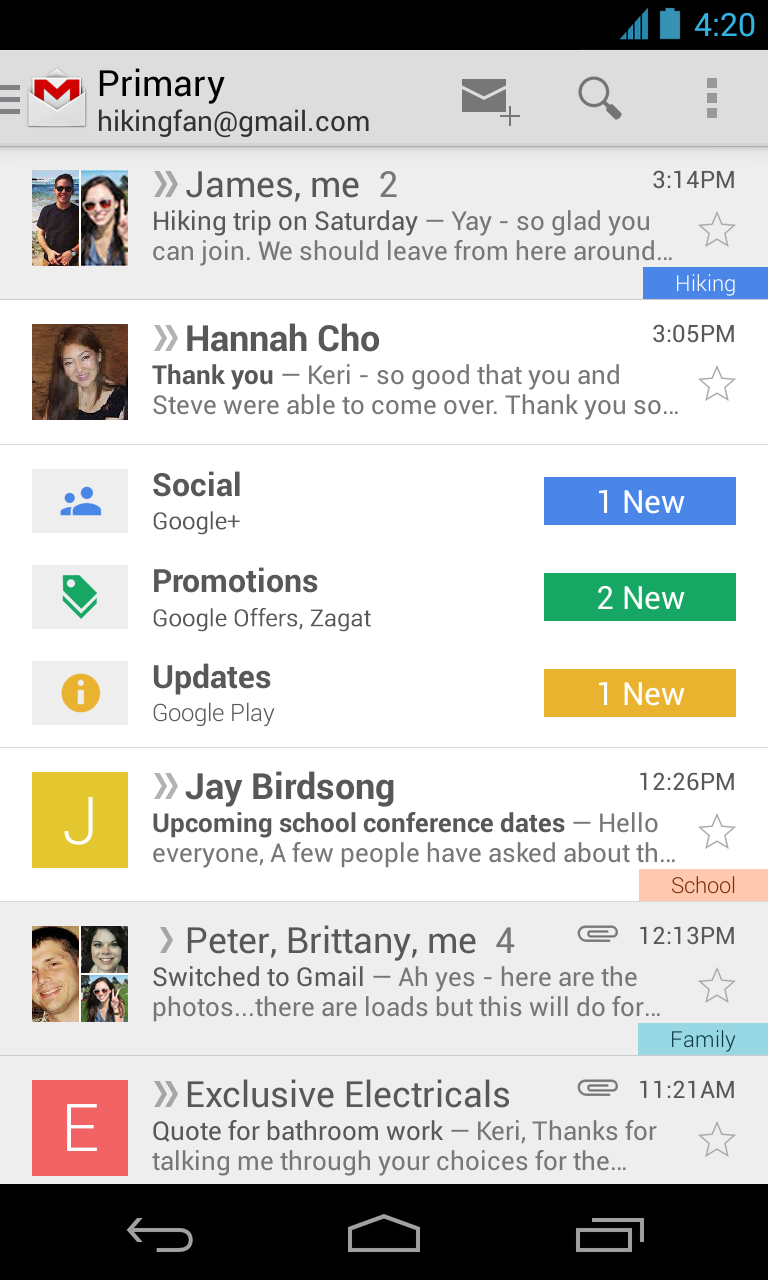
In the Gmail for Android 4.0+ and Gmail for iPhone and iPad apps, you'll see your Primary mail when you open the app and you can easily navigate to the other tabs. If the new inbox isn't quite your style, you can simply switch off all optional tabs to go back to classic view, or switch to any of your other favorite inbox types.
The new inbox is rolling out gradually. The desktop, Android and iOS versions will become available within the next few weeks. If you'd like to try out the new inbox on Desktop sooner, keep an eye on the gear menu and select Configure inbox when it appears in the Settings options.
Dear Lifehacker, I want to set up some basic home automation tasks but I've never done anything like this before. How do I get started? For that matter, what kind of things can I do and how much should I reasonably expect to pay?
Sincerely, Manual Living
Dear Manuel, "Home automation" is a category that can span really simple to extremely complex tasks depending on who you ask. It's easy to get overwhelmed by jargon and devices and standards. The simplest way to wade into home automation is eliminate the clutter and focus on what you actually want to do.
Deciding what you want will go a long way in determining your budget, your method, and how much time you'll be investing setting things up. With the right level of ingenuity, the sky's the limit on things you can automate in your home, but here are a few basic categories of tasks that you can pursue:
Automate your lights to turn on and off on a schedule, remotely, or when certain conditions are triggered.
Set your air conditioner to keep the house temperate when you're home and save energy while you're away.
Open your blinds during the day and shut them at night (or when it's particularly hot).
Feed your pets on a schedule and with pre-determined amounts of food.
Open your garage door with voice commands.
Set your coffee maker to have a fresh pot ready as soon as you wake up.
This is, of course, just a sample. To put it very simply, if you do something repeatedly, you can probably automate it one way or another. Just about everything that runs on electricity, and several things that aren't can be made smarter and possibly even hooked in to a central system.
What kind of system should that be, though? Well, there are a few approaches you can take. Let's begin at the beginning.
Automate the Easy Way with Specialized Boxes
The most dead-simple way to get started with simple home automation tasks is to buy tools that are specialized for certain tasks. For some things, you can use simple timers and sensors to turn the ordinary devices you already have into smart robots from the future. As an example, in the video above, a simple Christmas light timer is used to automatically turn on a coffee pot so that it's already brewing when you wake up. A lot of coffee pots even have this built in.
In the same vein, there are very simple remote control outlet units that allow you to press a single button anywhere in the house and turn anything connected to a power outlet on and off. Of course, this isn't "automation," strictly speaking. If you want to get a bit more advanced, you can use a device like the Belkin WeMo.
The WeMo is a simple, self-contained wireless automation unit that plugs in to your power outlet. It connects directly to your WiFi and can be controlled with an iOS device (an Android app is currently in beta, aimed at a fully supported release this summer). This gives you a bit more flexibility than simple timers, allowing you to activate switches manually, set schedules, and monitor their status remotely. You can even hook it up to the webapp-automating IFTTT for some really cool stuff. It's a great device for beginners to start automating stuff.
Smart thermostats are a similar category of dedicated units that function a single automation purpose, rather than attempting to be a complete solution. They can be used to remotely control temperature, learn your preferences, and even intelligently disable your heat/AC while you're out and reactivate it before you get home so it never feels uncomfortable. In addition to being convenient, these can help save a lot of money on your utility bills, depending on your situation.
This certainly isn't a comprehensive list of all the specialized automation boxes you can find. If you want to bring your home into the 21st century with as little heavy-duty setup and installation as possible, these are a few good ways to get your feet wet for very little cost.
Step Up Your Game with a Central Protocol
A $50 power outlet plugin is neat, but it's hardly a complete home automation system. If you want to get into some more advanced systems, you're going to need to start choosing a network protocol that allows your various peripherals to communicate with a central device.
There are a number of standards out there that you can choose for your devices, and if you decide to go this route, the bulk of your time will probably be spent deciding which one to go with. Here are a few of the bigger protocols in the home automation world today:
Debates can go on and on over which standard is best (and many of our commenters have plenty of advice on the subject). Picking a protocol for your needs is beyond the scope of this article, but your best bet is to map out exactly what you want in your system first, then choose a standard that will accommodate your immediate needs and allow you to upgrade as you deem necessary. Remember as you do your research that the best solution is the one that works for you.
Once you've picked your standard, you need three things:
Software: Whether you'll be controlling your system via your desktop, smartphone, or tablet, you'll need software to run the system. You can get much of this for free either by buying dedicated devices or using open source software, however some solutions offer subscription packages that can range up to $99/year.
A transceiver/coordinator: Your commands are useless if your master control software can't talk to your peripherals. A transceiver or coordinator device is a box (or set of devices) that issues wireless commands to your network. Devices like the Veralite ($180) are simple, self-contained units that even come with some software. You can scrape the cost of the coordinator down to $40-50 if you need to, but be careful as many cheaper, USB devices don't come with software or require that dreaded subscription.
Sensors, switches, and peripherals: Something has to carry out your commands. Depending on what you want to automate, you may need to install wall switches, replace a door lock, or do other light maintenance. Peripheral devices can be as cheap as $40-50 per unit, but can get as pricey as a few hundred bucks.
You don't have to stick with the basic software, either. While you have one device that acts as the master control program for your network, there are always neat ways to extend your setup. As you see in the video above, one Veralite user built on top of his setup with Tasker and AutoVoice to make a completely voice-controlled system.
Altogether, depending on how elaborate you want to get, you should expect to spend anywhere from a couple hundred bucks at minimum, though more elaborate systems could easily reach up to $1000 if you have a lot of hardware to install and don't shoot for the cheapest units you can get. Putting in a smart switch in three bedrooms, a living room and a kitchen can be $200-250 by itself, and that assumes a fairly spartan set up and excludes any power outlet installations. Be sure to tally up all of the parts you'll need before you start buying anything.
Get Crazy with Arduino and Raspberry Pi
Buying a box to control your home automation setup is for wimps who can't tell a BIOS from Bio-Dome, starring Pauly Shore. Real hackers build their own automated systems from scratch. Platforms like Arduino and Raspberry Pi offer the dedicated developer the ability to build customized solutions for unique situations.
Okay, but what are these things anyway? To put it overly simply, an Arduino or Raspberry Pi is a small, programmable mini-computer. You can attach sensors, motors, switches, and all manner of fun stuff to it. Because it's so small and so modular, you can use it to build specialized electronic devices.
As an example, in the video above, an Arduino is used to build a light-sensitive automated blind system. For another example, a Raspberry Pi board can be used to create an automated pet-feeding dispenser. How about another? Our own Whitson Gordon shows off how to build a portable XBMC media center in under thirty minutes or your pizza's free (offer void everywhere). The versatility of these little devices is incredible.
With added versatility, however, comes added complexity. If you want to get started with any kind of Arduino/Raspberry Pi project, you should probably have a bit of programming background, some familiarity with electronics, and some time set aside to design your system. There's a lot more creative and engineering work involved here than there is in something like the Veralite.
You don't necessarily need to be intimidated by projects like these, however, if you want to build a really badass automation rig. Here are a few resources you should check out if you want to get started:
Many DIYers are really good about documenting their projects, so with a little effort, there are a wide number of projects you should be able to recreate or build on top of. If you don't have any programming or electronics experience, it can be intimidating at first, but don't let that stop you.
Home automation is still one of those areas that's very new and the big platform companies haven't quite nailed down how to target yet. A couple years ago, Google tried to launch a service called Android@Home that didn't really go anywhere. Microsoft's biggest play in your living room is the new Kinect (just don't let it watch a live stream of an Xbox keynote), while Apple hasn't done much outside your TV. Right now there just aren't that many heavyweights pushing any particular platform or features over any other. The good news is that you have a lot of options. The difficult news is that you'll have to do a bit of work to get any kind of impressive setup going. Then again, if you had a problem with that, you wouldn't be reading Lifehacker, now would you?
Google has been working to reduce the clutter in our inboxes for some time and has just announced a sizeable update to Gmail, both on the web and on mobile, to further combat the problem. The update brings tabbed inboxes to your Gmail that automatically divide the mail you receive into categories.
The default categories are:
Primary (this is the email you want to receive from friends and family)
Social (updates you receive from social networks such as Twitter, Facebook and Google+)
Promotions (Offers from sites like Groupon or LivingSocial)
Updates (Receipts from places like Google Play and Amazon)
The new Gmail will support up to five tabs, and they are of course customizable. Google understands that not all of us will want every category that it has selected, so we can choose which ones to ignore. You can move messages between tabs to tell Google to place any mail from that sender into a certain tab from now on. You can also star messages, which will tell Google that is is an important message that should appear in the Primary tab.
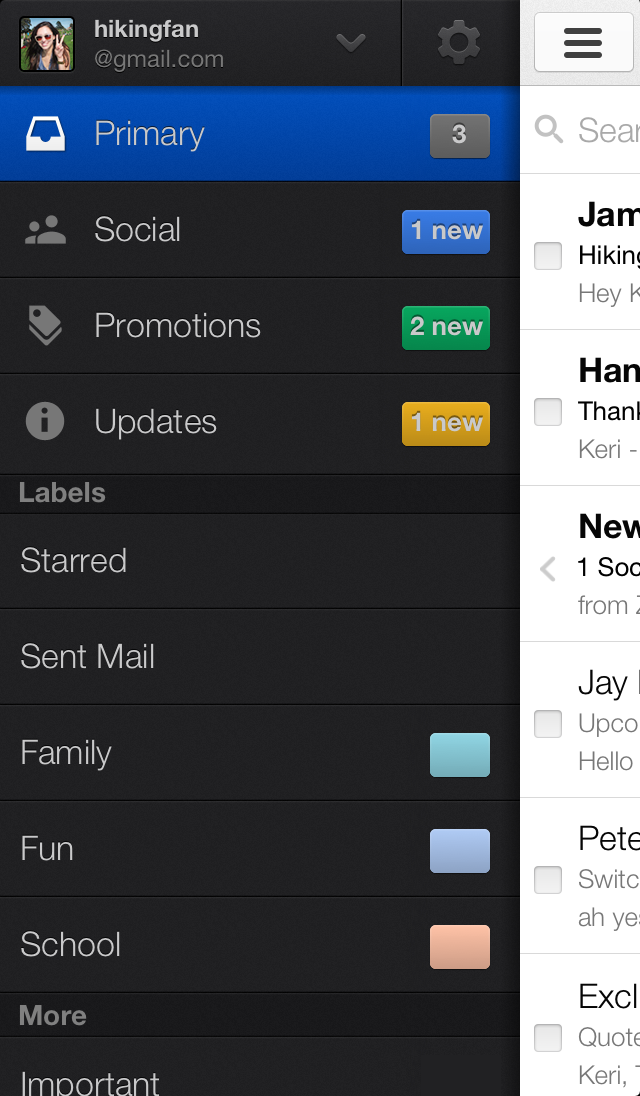
The update will also be sent out to Gmail for Android "within the next few weeks". The new Android app will support the tabs by placing tham in a left sidebar which you can swipe to in order to choose which inbox to view.
The new update looks nice and any way I can get to my important email faster I am all for. What do you all think of the upcoming update?
Google today is introducing a new way to manage your Gmail inbox. This new view of your inbox puts a number of tabs at the top of Gmail’s inbox column. By default, Google shows tabs – and automatically categorizes your messages into them – for your social updates from sites like Google+, Twitter, Facebook or YouTube, promotions from the likes of Google Offers and Groupon, and a kind of catch-all “Updates” tab for your bills, receipts and similar messages.
You can also add a tab for forum notifications which, at least in my test, also includes email lists. Google, of course, allows you to add or remove as many of these tabs as you want. To go back to the classic inbox, you just have to turn off all of the tabs or switch to another inbox style.
This update, which will start rolling out for all Gmail users today, will be available on both the desktop and through Google’s mobile apps for iOS and Android, which should get an update early next week. As Google told me, this will be a gradual roll-out, so it may take a little bit before the new design appears in your inbox.
If you can’t wait, also keep an eye on the gear menu. Once “configure inbox” appears there, you will be able to turn this new feature on manually.
It’s worth noting that the tabbed interface doesn’t work with the Priority Inbox feature or any other non-default Gmail view. As Alex Gawley, Google’s product manager for Gmail, told me yesterday, the team believes that the new inbox is the best default for the majority of Gmail users. In the long run, both Priority Inbox and this new view could potentially work together in some form, but it’s not an option for now and Gawley didn’t have any ETA for when this could happen.
Gmail will, however, also expose these new categories in the sidebar, so you can still see your auto-sorted emails there.
Updated Mobile Apps
As Gawley stressed when I talked to him, it was important for the team to ensure that this new inbox view would be available on mobile as well, so both the iOS and Android apps will now show what Google calls “teasers” for updates in these tabs inside the regular inbox stream on these devices. These are basically notifications that there are updates available in these categories, but they don’t include the usual summaries, and multiple updates will just be bundled together into a single line.
With this update, Google is also introducing the recently leaked navigation drawer for the Android app, which now makes it easier to switch between categories than the “spinner” the company used in the previous design. By default, of course, the apps will always open on the “Primary” tab.
As Gawley told me, the main motivation behind this redesign was to figure out how to help users navigate the constant stream of new emails most of us have to handle today. What the team realized, he said, was that while Gmail added filters, Priority Inbox and more customization features, “your inbox started to feel like your master.” As users browse through messages, they are constantly switching context and that takes its toll as you handle a few dozen emails.
Google learned quite a bit from a similar Google Labs feature that also categorized and labeled emails automatically, he told me. The system will also learn as users move emails around to re-categorize them (you can drag and drop messages into the different categories by hand).
Amazon has launched a simple way for users to sign into apps and make in-app purchases with Login with Amazon, a new single sign-on service that works with all of its users’ accounts. The system works like Facebook Connect and Google+ Sign-In, allowing users to click a button and enter account information that they already know to quickly create a profile on a new service. Amazon has already been testing the system with two of its subsidiaries, Woot and Zappos, and it’s now opening up the program for all developers to use across the web, iOS, and Android. Though Amazon isn’t allowing all of those sources to utilize its customers’ account information to facilitate purchases, that option will be available for purchases made within...










 Kevin at Lowering the Bar updates us on the Lego Gun Incident, wherein a six-year-old boy was punished for bringing a tiny, Lego-sized gun onto his Springfield, MA school-bus. The school initially demanded that the boy write a letter of apology and serve detention because the gun "caused quite a disturbance on the bus and that the children were traumatized." However, the same zero-tolerance-obssessed nutjobs at the school board also put CCTVs on their buses, and a review of the footage therefrom reveals that nothing bad actually happened. This has occasioned a small miracle in the form of the school board simply dropping the matter, rather than doubling down and, say, accusing the six-year-old of using a tiny, Lego-sized computer to hack into the CCTV and swap out the footage or similar.