If you need to keep your gadgets powered up on the go, you'll need batteries—or better yet, an external battery pack. There are tons to choose from, but last week we asked you for the best. Then we looked at the five best external battery packs based on your nominations. Now we're back to highlight your favorite.
The Anker Astro Series were your clear favorite, and they took the top spot with over 40% of the overall vote. The affordable, slim, and power-packed 3E, E4, and Astro Pro were just a few of your favorites, and a number of you called out other Astro models in the call for contenders that were just as powerful and just as portable.
In second place with 22% of the vote was the Mophie Juice Pack Powerstation, a metal-bodied, sturdy power pack with a ton of juice for its size. Right behind it in third were MonoPrice's external battery packs, which brought in close to 16% of the vote and come in a variety of shapes and sizes. Their universal qualifier however is that they're generally cheap and get the job done. In fourth place were the New TrentiCarrier and iGeek external battery packs, both of which are affordable, portable, and offer easy-to-read displays to show you how much juice is left. Bringing up the rear in fifth place was a big name in battery technology: Energizer's XP Series brought home just shy of 8% of the votes cast, and offer a wide array of battery packs from the super-affordable and portable (but low on power) to the power-packed and pricey models that can power netbooks and laptops if need be.
The bright spot here is that any of these external battery packs will serve you well on the go, and they're all portable enough to fit into either your pocket or a small laptop bag or backpack, so you can't really go wrong here. There were some other nominations in the call for contenders thread and the full post, so if these don't strike your fancy, make sure to check there for more suggestions.
The Hive Five is based on reader nominations. As with most Hive Five posts, if your favorite was left out, it's not because we hate it—it's because it didn't get the nominations required in the call for contenders post to make the top five. We understand it's a bit of a popularity contest, but if you have a favorite, we want to hear about it. Have a suggestion for the Hive Five? Send us an email at tips+hivefive@lifehacker.com!
Google unleashed a slew of updates to its Google+ social networking service at I/O earlier this month, and now a bunch of those new features are making it to the iOS app for Google+. The update follows the Android version, which arrived last week, and brings tons of new things to the version on Apple mobile devices, including Auto Backup, Highlight, Enhance and Awesome features for photos, hashtags that curate related content on posts in your stream, and new interactive Google Offers that will pop up in the mobile stream and that can be instantly redeemed.
The new photo features will probably be especially useful to mobile photographers, as they really do greatly improve the process of sharing online photos by automatically selecting your best pics using surprisingly accurate automated algorithms, and then applying various techniques to really make those photos pop. That could involve adding a slight vignette, enhancing contrast or correcting exposure, but it’s all done automatically using Google’s massive cloud computational power. In my experience with the desktop version at least, it does a job that’s remarkably similar to what the average enthusiast photographer might accomplish manually in something like Lightroom or Photoshop.
The other new stuff should help with content discovery, thanks to the introduction of Google’s smart hashtags, which are automatically assigned to posts based on both term recognition from the words used, and using image recognition to identify landmarks and other items in pictures. With that feature, Google seems to want Google+ to be more of an interconnected web than a place where friends share discretely with their circles and don’t venture much further afield.
There are a number of other features, such as the ability to edit comments and copy a post’s permalink to your device’s clipboard. But the Google Offer in-stream delivery is probably the most noteworthy in terms of how the average user’s experience will change. This essentially amounts to in-stream advertising, albeit of a kind that’s intended to give users instant access to offers relevant to their interests. The experience overall should be better, but it will still be interesting to see how people react to the arrival of Offers on the mobile browsing experience.
It's the late afternoon - wouldn't you like to sneak out of work to head down to the boardwalk and play some skee-ball? Well, Google might not be able to hide your tracks as you escape your day job, but you can still salvage some fun while locked away in your office. A new Chrome Experiment has just been launched that uses your phone's accelerometer to fling a virtual ball on your desktop browser.
The setup is simple, just browse to g.co/rollit on both your desktop and smartphone. It seems most mobile browsers will work, even Safari on the iPhone. Click through the instructions on both screens until you are asked to enter a code, which will be used to pair your phone and desktop.
Remember how exciting LTE-Advanced peak speeds of 1Gbps used to be? Well they still sound exciting but they're nothing compared to what German researchers have just accomplished. TechWeek Europe reports that "researchers from the Fraunhofer Institute for Applied Solid State Physics (FIAF) and the Karlsruhe Institute for Technology (KIT) have managed to transmit data over the air at a speed of 40 Gbps," a world record for wireless data speeds that just happens to be "fast enough to send a full DVD in under a second." Network engineers who worked on the project tell TechWeek Europe that the new wireless technology could be used to offer fiber-like connectivity to rural areas that have been previously unable to get access to high-speed Internet capabilities.
Early April, prosecutor Henry Olin of the International Public Prosecution Office in Stockholm announced that Gottfrid Svartholm had been charged with several hacking related offenses including serious fraud, attempted aggravated fraud, and aiding attempted aggravated fraud.
The charges relate to the hacking of Logica, a Swedish IT company working with local tax authorities. Much of the prosecution’s evidence was obtained from a computer seized from Gottfrid when he was detained last year in Cambodia.
Last week the Pirate Bay founder and a 36-year-old from Dalarna went on trial in the Stockholm District Court and after a fairly quiet first few days more information is now coming out of the court room.
Gottfrid denies the charges and presented with evidence found on his computer he said that someone else must have gained access while he was in Cambodia. He denied fleeing there to avoid his Pirate Bay-related jail sentence and said the move was simply because he was “no longer a big fan of Sweden.”
“Both of the computers were lab computers for software development,” Gottfrid said, adding that they were accessible by others both physically at his home and remotely via the Internet.
“I had a fairly large apartment and a lot of people have been there, so it is possible. But personally, I think it happened by remote control,” he said.
Dressed in a blue shirt the 28-year-old said he has no interest in mainframe computers such as Logica’s, describing them as “big and boring stuff in boring places.”
Prosecutor Henry Olin presented chat logs in which he claimed that Gottfrid and the as-yet unnamed 36-year-old communicated, but that assertion was rejected.
“It’s not me who wrote that,” Gottfrid told the court, having previously noted that his co-defendant is just a casual acquaintance.
The Pirate Bay founder agreed that he had occasionally used an online alias mentioned by the prosecution but said that the same name had also been used by up to half a dozen other people.
“He is not credible,” prosecutor Henrik Olin told Swedish media during a break in proceedings. “If you look at the person Gottfrid Svartholm is, why would he have allowed others to use his computer to that extent?”
While much of the concern about Apple's margins has come from speculation about the company's plans to release a cheaper version of the iPhone, the company may also be pondering releasing a cheaper version of its popular iPad mini tablet. Barron's points us to a new research note from Citigroup analyst Glen Yeung, who believes that Apple will be forced to release a cheaper version of the iPad mini by the end of the year to maintain its market share against a flood of cheap Android tablets.
Jeremy Hammond, the LulzSec hacker and activist accused of breaking into security company Stratfor's servers and distributing internal files to WikiLeaks, has pleaded guilty to one violation of the Computer Fraud and Abuse Act. According to Hammond's defense site, Hammond agreed to a plea bargain that carries a maximum of ten years behind bars, though he has not yet been sentenced. He has already spent over a year in jail while awaiting trial, and supporters are pushing for him to be released with time served; before the bargain, he faced a maximum of 30 years.
The UK Ministry of Justice has denied a report in The Times that claimed the courts were to be privatised and paid for henceforth through hedge fund investments made in anticipation of high court fees extracted from wealthy litigants.
While confirming that civil servants are looking at ways of improving the efficiency of the HM Courts & Tribunal Service (HMCTS), the MoJ denied that it planned to outsource all court buildings to a private contractor.
Responding late on Monday night to claims that a sale was actively being considered, an MoJ spokesperson stated: "We have always said we are determined to deliver a courts system that is more effective and efficient and provides improved services for victims and witnesses. The proposals being considered are not the wholesale privatisation of the courts service.
"We are committed to the firm, fair and independent administration of justice."
Canadian Conservative senator Mike Duffy is in disgrace over the news that he submitted fraudulent expense claims totalling $90,000 and secretly borrowed a like sum from the Prime Minister's Chief of Staff to pay it (and kill an auditor's investigation into his conduct). So Dan Murphy drew an editorial cartoon depicting a notional Canadian $90,000 bill bearing Senator Duffy's leering face. But the toon only ran briefly, because the Bank of Canada threatened Canadian newspapers with criminal prosecution for counterfeiting if they ran it.
That gets to the crux of the matter. Laws that fight counterfeiting are fine (though really, any forger gifted enough to back-engineer a single-sided cartoon of a $90,000 bill that bears the image of Mike Duffy and a hologram of Nigel Wright deserves a medal, not jail time) but the Bank of Canada has no business playing Thought Police.
Parodies of bank notes are nothing new. In 1819, British cartoonist George Cruikshank, angered after seeing a woman hanged for passing a forged note, drew a Bank of England note that featured 11 men and women dangling from nooses. During the currency panic of 1837, a series of “shin plasters” — typically five- and six-cent bills — poked fun at U.S. economic policy.
You've heard the word "server" thrown around a lot, but usually in the context of web sites or big companies that have a lot of data to store. In reality, a server can be just as useful in your home. In this guide, we'll walk through how to create your own home server out of an old or cheap computer that can do all your downloading, streaming, and backup tasks 24/7.
Note: If this post looks familiar, it's because we've covered FreeNAS before. Our old guide used FreeNAS 7, which is great, but the new FreeNAS 8 makes installing plugins for BitTorrent, media streaming, Usenet, and other tasks much easier. If you want to check out FreeNAS 7—now called NAS4Free—you can still view our old guide here. Alternatively, if you don't want to use FreeNAS, you can put together a similar setup using Ubuntu.
What Does a NAS or Home Server Do?
Network Attached Storage—or NAS for short—is basically a set of hard drives connected to your network, so any computer in your house can access them. This is great for bigger households or people with multiple computers (like a home theater PC) that all need to access the same data. They're also usually quite low power and low cost, and they don't require a monitor, mouse or keyboard—once you've installed the software, you can configure every aspect of your NAS from a web browser on your other computers.
The term "home server" usually has a different connotation than NAS, but they're pretty similar. The main difference is that home servers can perform more tasks than just storage—they can also do things like download files for you, stream media to your other devices, and so on. These days, NAS devices come with more and more functionality out of the box, so the terms NAS and home server are often used interchangeably. Don't sweat the details—the device we make in this guide can be as basic or as extreme as you want, no matter what you call it.
You can buy a lot of great NAS devices out there, and they'll come with their own good software. However, we're going to use some free, open source software called FreeNAS to repurpose an old computer instead. That way, you can just fill your old PC up with drives, stick it in the closet, and forget about it, without having to spend a lot of money. Alternatively, you can build your own quiet, low-powered home server for pretty cheap (that's what I did), and configure it a bit more to your needs. Whatever kind of PC you use, setting up the software is pretty similar across the board. Here's how to do it.
What You'll Need
You can install FreeNAS on a ton of different systems using a number of different methods, but here are the things you'll need for our method:
A PC with a minimum of 2GB of RAM. FreeNAS recommends that you have at least 4GB for its ZFS filesystem, but if your old computer isn't loaded up with RAM, the older-but-more-stable UFS filesystem will work fine for most people's needs.
The FreeNAS Installer Image, available here (more info on this below).
A 4GB or larger flash drive.
A network with DHCP reservations or static IP addresses. This isn't required, but it's definitely preferred. If you don't have this, managing your NAS can get pretty annoying, since its IP address will change whenever you reboot it (as will your other computers').
FreeNAS is actually designed to run on a flash drive or compact flash card rather then one of the drives in your computer. If your computer doesn't have the ability to boot from USB, you'll have to follow some slightly tweaked instructions here (and you won't be able to use one of your drives for storage). For this guide, we'll be booting from a 4GB USB drive.
Install FreeNAS
To install FreeNAS, you'll need to grab a 4GB flash drive and the FreeNAS installer image. You'll want to grab the USB image, not the live CD. If the computer on which you're installing FreeNAS is 64-bit capable, grab the 64-bit image; otherwise, you'll want to grab the 32-bit image from the 32-bit tab along the top.
Step One: Burn Your USB Drive
The first step is different depending on your operating system.
Windows users: to install FreeNAS on your flash drive, you'll first need to download Win32DiskImager and 7-Zip (if you don't have them already). Here's what you need to do:
Download the FreeNAS image archive and open it up with 7-Zip. Copy the FreeNAS IMG file to your desktop, and exit 7-Zip.
Insert your flash drive. Start Win32DiskImager and click the blue folder icon. Browse to your FreeNAS IMG file you just extracted.
Choose your flash drive from the dropdown on the right, then click the "Write" button to write the image to your drive.
Mac users: To install FreeNAS on your flash drive, you'll need an app called Keka, as well as a little command line work:
Download the FreeNAS image archive and right-click on it. Choose "Open With Keka" from the menu. It should automatically extract the FreeNAS IMG file to the same folder as the XZ archive.
Insert your flash drive. Open Disk Utility (from /Applications/Utilities) and select your flash drive in the sidebar. Click the Erase tab and format it, ensuring it only has one partition. It doesn't matter what you format it as, we're going to overwrite it in a minute.
Open a Terminal window (from /Applications/Utilities) and run the following command:
diskutil list
Note the path of your USB drive in the list. This will be something like /dev/disk1.
Be SURE to replace the "if" path and the "of" path with the correct ones for your system (the first being the location of your FreeNAS image, the second being the path to your flash drive). If you do this incorrectly, you can cause severe data loss!
Give it time to finish the copying process. When it's done, you'll get a message saying it completed successfully.
Step Two: Boot and Configure FreeNAS
Now that you have your FreeNAS flash drive ready to go, it's time to get FreeNAS started. Here are the things we recommend doing to get it set up:
Plug the flash drive into your computer and turn it on. Make sure to boot from the flash drive. You may need to tweak a few BIOS settings in order to do so.
It'll take a few minutes to start up. When it's done, it'll give you an IP address at the bottom of the screen. Head back to your main computer and type that IP address in your browser's navigation bar. You should be greeted with the FreeNAS web interface.
Before you do anything else, you'll want to change your username and password for this web UI, since right now it doesn't have a password—which is very insecure. In the left-hand sidebar, head to Account > Admin Account > Change Admin User. Give yourself a new username, and click the "Change Admin User" button. Next, along the top of that pane, click the "Change Password" tab and give yourself a new password.
This username and password only applies to the FreeNAS web interface, so you'll want to create a user for yourself as well. To do this, head to Account > Users > Add User in the left-hand sidebar. Give your user a username, a primary group (as the admin, I made my primary group "wheel"), and a password. (Note: If you're adding drives from an old FreeNAS 7 installation, you may need to change your User ID to 1000 instead of 1001 in order to access those drives).
Optional: If you have other people in your household that are going to access data on your home server, you may also want to create a group for them at this menu. For more information on this, see our guide to file permissions.
Lastly, go to System > Settings and change your protocol to HTTPS (for enhanced security) and your timezone to your location. If you plan on using your NAS to access the internet, you'll also need to head to Network > Global Configuration and set your IPv4 Default Gateway to your router's IP address. I also like to change my NAS' hostname to something other than "freenas" (so I can easily spot it on the network), but this is optional.
Take some time to poke around FreeNAS' configuration settings and tweak anything you see that you might want to change. The above steps should get most people going, but if you have specific needs (like if you're using static IP addresses instead of DHCP reservations) you may have to tweak more.
Step Three: Add Your Disks
Now that your FreeNAS system is up and running, it's time to add your hard disks to its pool. Here's how:
Head to Storage > Volumes > Volume Manager in the left-hand sidebar to add a new, blank hard drive.
Give your new hard drive a name, choose it from the list of connected drives, and choose a filesystem. If you have a more powerful machine, ZFS is FreeNAS' recommended choice, but UFS is great for lower-powered systems (I'm using UFS on my machine).
Click the "Add Volume" button. This will wipe the drive, so make sure you've backed up anything you need from it first.
Once your volume shows up in the left-hand sidebar, click on it and choose "Change Permissions." This part is up to you, but I like to change the owner to my username. You can also change the group if you desire—I've created a group called "family" as the owner of these drives, so other members of my household can access them. Once again, see our guide to file permissions for more details on what all this means.
Repeat this process for all your attached hard drives. If you're using drives from an old FreeNAS system, you'll want to choose "Import Volume" instead of "Volume Manager" in step 1. Then just select what filesystem it's already using, and you'll be able to use your existing data.
Step Four: Share Your Disks
When your hard drives are all set up, it's time to share them over the network. We're going to use CIFS, since its preferable for households with Windows machines or with multiple operating systems. If you have an all-Mac household, look into AFP as an alternative.
Head to Sharing > Windows (CIFS) Shares > Add Windows (CIFS) Share in the left-hand sidebar.
Give your share a name, and click the Browse button next to Path. Navigate to the drive you want to share.
Click OK. It'll ask you if you want to enable the CIFS service. Don't do so just yet. Click No, then head to Services > CIFS in the left-hand sidebar. Change your NetBIOS name to whatever you want, and tweak any other settings you want. The defaults should be fine for most people.
Repeat Steps 1-3 for the other drives you want to share.
When you're done, head to Services > Control Services and flip the CIFS switch to "On."
Now, head to your main computer. If it's a Windows machine, open Windows Explorer and click on the "Network" shortcut in the left-hand sidebar. You should see your FreeNAS machine pop up, and from there you can navigate to any of your shared drives. If you're on a Mac, just open the Finder and head to Go > Connect to Server, and type smb://freenas (or whatever your CIFS share's netBIOS name is) and click Connect.
When prompted, enter your username and password (the one we created from the FreeNAS "Users" settings earlier) and you should be able to create and edit files right from your PC.
Congratulations, you have a fully operational file server! Now you can use these disks for whatever you want. You can store data on them, use them for backup, or even access them directly from your home theater PC (though if you require streaming to DLNA devices, you'll want to check out the streaming section below).
Other Uses for Your Home Server
If you want to do more than just share files, FreeNAS has a fantastic plugin system to take advantage of. Here, we'll show you how to install three popular plugins for some pretty cool tasks.
First: Set Up a Jail for Your Plugins
In order to install plugins, you'll need to set up what's called a "jail." Basically, a jail is a small virtual FreeBSD environment working inside FreeNAS that can run other programs. If you're using ZFS, FreeNAS recommends you use their slightly more complicated method, but we're just going to set them up using a few folders on one of our hard drives:
Choose one of your drives to hold your jail. I'm putting it on my drive called "Media."Make sure this drive has the necessary permissions to install a jail and plugins. That means the drive should have Read and Execute permissions for "Other" in Storage > Volumes > (Drive Name) > Permissions.
Create two new folders on this drive: one for the jail, and one for the software we'll install on it. I just called these folders "Jail" and "Software."
Head to the the FreeNAS SourceForge page and navigate to the folder of the FreeNAS version you're using (for me, that's FreeNAS-8.3.1/RELEASE-p2/x86). Go to the "plugins" section and download the Plugins_Jail PBI for the version of FreeNAS that you're using.
In the FreeNAS web interface, go to Services > Plugins > Management > Settings. Choose the volume on which you created the two folders in step 1 when prompted.
Set the Plugins Jail Path to the path of your "jail" folder created in step 1, and the Plugins Archive Path to the path of your "software" folder. Give your jail a name (I called mine "software") and an IP address and netmask. This should be a different IP address than your FreeNAS box uses for itself.
Click Upload Jail PBI, and nagivate to the PBI file you downloaded earlier.
Head to Services > Control Services and flip the Plugins switch to On.
Now you're ready to start installing your plugins! Here are a few you might want to try out.
Download Torrents with the Transmission Plugin
The Transmission plugin will allow you to download and manage torrents from your server, which is great for seeding those torrents 24/7.
First, download and install the plugin:
Download the Transmission plugin from the same page you downloaded the Plugins PBI on FreeNAS' SourceForge page.
In the FreeNAS web interface, click Services in the sidebar and click the "Plugins" tab along the top. Click the "Install Plugin" button.
Browse to the Transmission PBI you downloaded and click Upload. You should see Transmission show up in the sidebar under Services > Plugins when you're done.
Now that you've got Transmission installed, we need a place for it to store downloaded files. Since it resides in a jail, it can't access our normal drives, so we need to create a "mount point" within the jail that points Transmission to our drive outside the jail. Here's how that works:
In the FreeNAS web interface, click "Shell" in the left-hand sidebar to bring up a terminal window for your server. Run the following command to see your current jails:
jls
Note the JID of the jail you want to use (in this case, you probably only have one). Then Run:
jexec 1 tcsh
Where "1" is the JID of the jail you want to use.
Next, run:
mkdir /usr/TransmissionDownloads
Exit the terminal window and go to Services > Plugins > Management > Mount Points in the sidebar, and click Add Mount Point. For the Source, navigate to the folder you want to use for Transmission's downloads on your hard drive (in my case, it's /mnt/Media/Downloads). For the Destination, navigate to the /usr/TransmissionDownloads folder we just created. This will link the two folders together. Click OK.
Open the Terminal back up by clicking "Shell" in the sidebar. Repeat steps 1 and 2 to get back into your jail's shell. Then, run the following command to change the owner of your downloads folder:
Replacing 1001 with the UID of your user, if different than 1001.
Next, run the following command to change the permissions on that same folder:
chmod 775 /usr/TransmissionDownloads
Now you can just set up Transmission and get to downloading. Select the Transmission option in the sidebar to change its settings. You'll definitely want to change the Downloads directory to /usr/TransmissionDownloads, as well as check the "RPC Auth. Required" box and create a username and password (which ensures that only you can access the Transmission web interface). Tweak any other BitTorrent-related settings you want here, then click OK.
When you're done, go back to Services in the sidebar, and click the Plugins tab. Flip the Transmission switch to "On" to enable the service. If all goes well, you should be able to access the web interface by typing this into your browser's address bar:
192.168.0.20:9091
Where 192.168.0.20 is your jail's IP address that you picked earlier, and 9091 is the port for Transmission's web UI, available in the Transmission settings. Try downloading a torrent, and you should see it show up in your Downloads folder!
Stream Music with the Firefly Media Server Plugin
Firefly Media Server is a great way to stream music from your home server to other computers and devices in your house. It's designed to work with the Roku Soundbridge and iTunes through the DAAP. Here's how to get it up and running:
Download the Firefly Media Server PBI plugin from FreeNAS' SourceForge page, once again navigating to the version that matches your version of FreeNAS.
In thee FreeNAS web interface, click Services in the sidebar and click the "Plugins" tab along the top. Click the "Install Plugin" button.
Browse to the Firefly PBI you downloaded and click Upload. You should see Firefly show up in the sidebar under Services > Plugins when you're done.
Open up a Shell, just like you did for Transmission, and run the following command:
jexec 1 tcsh
mkdir /usr/Music
Once again, replace "1" with your jail's number. You can name the directory whatever you want.
Go back to Services > Plugins > Management > Mount Points and add a new mount point. Like we did with Transmission, set the Source to your drive's music folder (in my case, that's /mnt/Media/Music" and set the Destination to the folder in /usr you just created (in my case, /usr/Music).
In the sidebar, head to Services > Plugins > Firefly to change Firefly's settings. Set the MP3 Dir to /usr/Music and click OK.
Go back to Services > Control Services and click the Plugins tab along the top. Flip the Firefly switch to On to enable it.
Open up iTunes or your Roku Soundbridge and you should see your new music server pop up, ready for streaming. You can also visit Firefly's web interface by typing this into your browser's address bar:
192.168.0.20:3689
Where 192.168.0.20 is your jail's IP address that you picked earlier, and 3689 is Firefly's port, available in Firefly's settings. You won't be able to stream music from the web interface, but you'll be able to see its status.
Stream Videos with the MiniDLNA Plugin
Firefly will take care of streaming music. Many home theater PCs will already be able to stream video just by accessing your shared drive directly over the network, but if you need something that shares over DLNA—say, for an Playstation 3 or Xbox 360—that's a job for MiniDLNA. Setting it is very simple:
Download the MiniDLNA PBI plugin from FreeNAS' SourceForge page, once again navigating to the version that matches your version of FreeNAS.
In thee FreeNAS web interface, click Services in the sidebar and click the "Plugins" tab along the top. Click the "Install Plugin" button.
Browse to the MiniDLNA PBI you downloaded and click Upload. You should see Firefly show up in the sidebar under Services > Plugins when you're done.
Open up a Shell, just like you did for Transmission, and run the following command:
jexec 1 tcsh
mkdir /usr/Videos
Once again, replace "1" with your jail's number. You can name the directory whatever you want.
Go back to Services > Plugins > Management > Mount Points and add a new mount point. Like we did with Transmission and Firefly, set the Source to your drive's music folder (in my case, that's /mnt/Media/Videos" and set the Destination to the folder in /usr you just created (in my case, /usr/Videos).
In the sidebar, head to Services > Plugins > MiniDLNA to change MiniDLNA's settings. Set the Friendly Name to whatever you want, the Media Directory to /usr/Videos, and check the "Rescan on Restart" box. ClickOK when finished.
Go back to Services > Control Services and click the Plugins tab along the top. Flip the Firefly switch to On to enable it.
Now, if you head to your Xbox, Playstation, or other DLNA-compatible device, you should see your device pop up under DLNA or UPnP servers. Flip through your videos folder, pick a movie, and get to watching!
These are far from the only plugins you can install. There are plugins available for Usenet, Subsonic, and others. Check out this forum post for more of the plugins available, and note that some of them will require you to set up mount points like you did for Transmission. (Note also that some of the plugins out there are 64-bit only, but you can find experimental 32-bit versions of the Usenet plugins in this thread). And, if the software you want isn't available as a PBI, you can still install it from the command line.
You're on your own now, but if you've followed this guide to this point, you should have all the skills you need to do just about anything with your new home server. Be sure to check out the FreeNAS documentation if you ever need help, as well as the forums. Good luck!
Here’s an opportunity for European app developers to work on a project aimed first and foremost at helping others, rather than on the off-chance it will catch Yahoo!’s eye and lead to insane riches. Carrier Vodafone’s philanthropic arm, the Vodafone Foundation, has kicked off its first Mobile for Good Europe Awards app competition, seeking iOS and Android apps that are “designed to improve people’s lives and deliver substantial public benefit”.
The competition is open to developers 18 and older who are legally resident in Europe (excluding Italy). The prize money isn’t anywhere near Summly acquisition levels, so the emphasis here is definitely on the doing good bit — and the taking part — but the Foundation is stumping up a total prize fund of €200,000 to be shared by winners across the four competition categories and used for developing their app further.
First prize winners will snag €30,000 apiece; second prize winners will get €15,000; and third prize apps will take €5,000.
The four categories for the 2013 competition are:
Accessibility — specifically, apps that “help people with disabilities and/or the elderly to improve their quality of life and overcome barriers”
Health — here they are looking for “innovative solutions to overcome challenges in areas such as real time patient monitoring and collection and distribution of health related data”
Education – apps that “can empower teachers and students by allowing them to use mobile devices as teaching and learning tools” and/or mobile tech that helps to open up data by “offering new analytical tools, promoting inclusion in education or by improving social mobility”
Public Services — this category is for “ideas on how national, regional and local governments can leverage mobile to enhance the delivery of public services”
The closing date for applications is 12:00 GMT on October 15, 2013. Category finalists will be notified in November and then invited to a final live judging round in Brussels in mid-December. The Vodafone Foundation said there will be local workshops organised for developers involved in the competition in Berlin, Amsterdam and Madrid.
The competition is actually an expansion of a previous competition run by the telco in 2011 and 2012 which focused solely on apps for accessibility.
What’s Vodafone motivator here? Beyond the obvious ‘attaching itself to a good cause’ element, it’s a nice way for the carrier to encourage the sort of apps (and ideas) it would like to be developed to be created — ie apps that help make the smartphone even more indispensable than it has already become.
Everything.me, is a clever mobile app that lets users search for specific content across both native and mobile apps. The app, available in beta, is a replacement app launcher and home screen for Android devices. You just talk at it as if you would to Siri, and it makes apps appear that are relevant to your request. From there you can download the relevant content or apps. It’s launching its app in the UK and Spain tomorrow.
The company also announced that the platform has reached 350,000 downloads in just over a month of availability on the Google Play store. Not astounding, but clearly showing traction.
Last Everything.me year pulled in $25 million in a round led by Telefonica Digital, with participation from Mozilla, Singtel and existing investors, which include Draper Fisher Jurvetson, BRM Group, Horizon Ventures. The company has now raised $37 million to date. Telefonica and Mozilla are to implement Everything.me into their mobile services.
The app’s integration with Firefox mobile platform, might well give it an edge over Android, iOS, Windows Phone and others. Everything.me currently has no revenue model but it could be used to offering better placement to advertisers for instance.
Every week copyright holders send millions of DMCA takedown notices to Google, hoping to make pirated movies and music harder to find.
Unfortunately not all of these requests are correct. Because of the high number of often automated notices and the fact that copyright holders don’t check the validity of all requests, this results in questionable takedowns.
One site that has been the target of this kind of takedown abuse is Kim Dotcom’s file-storage service Mega. In recent weeks Hollywood studios Warner Bros. and NBC Universal both asked Google to de-list Mega’s homepage from its search index. These are odd requests as Mega’s homepage doesn’t link to any files at all.
According to a takedown request by NBC Universal, however, Google is led to believe that Mega’s homepage is linking to an infringing copy of its film Mama. Warner Bros. on the other hand claim in a DMCA notice that Mega is making a pirated copy of Gangster Squad available to the public.
NBC Universal takedown request
Kim Dotcom is not happy with the censorship attempt and points out that this is not the first time he has fallen victim to this kind of abuse.
“The Warner Bros. and NBC Universal requests to Google are censoring our entire homepage. This is in line with the unreasonable content industry behavior we have experienced for years,” Dotcom tells TorrentFreak.
“You will recall the illegal takedown of the Megaupload song by Universal Music and the attempts to censor our Mega radio ads. The shutdown of the entire Megaupload site remains the ultimate illegal takedown by the content industry.”
In this case, Google caught the error and refused to remove the Mega homepage, making it still available in its search results today. However, these kind of mistakes are certainly not an isolated incident. Dotcom points out that when Megaupload was still around one in five DMCA requests were bogus, often the result of automated processes.
“During the Megaupload days over 20% of all takedown notices were bogus. We analysed big samples of notices and most were automated keyword based takedowns that affected a lot of legitimate files. The abuse of the takedown system is so severe that no service provider can rely on takedown notices for a fair repeat infringer policy.”
Dotcom believes that instead of teaming up with Hollywood and protecting the interests of the copyright lobby, the White House should understand that the entertainment industries’ misuse of the DMCA has damaging consequences.
“The constant abuse of takedown rules and the ignorance of DMCA obligations by the content industry are based on the confidence that the current U.S. administration is protecting this kind of behavior. The political contract prosecution of Megaupload is the best example,” Dotcom tells us.
“The White House doesn’t appreciate that the DMCA was the biggest contributor to a thriving Internet economy in the U.S,” he adds.
The ‘mistakes’ by Warner Bros and NBC Universal show that wrongful takedown requests can seriously impede the availability of perfectly legal content. With millions of notices coming in each week Google can’t possibly correct all errors, as we’ve shown many times in the past.
Dotcom agrees, and points out that the copyright extremists are the problem, not the service providers like Mega.
“From my experience the only people who are acting like criminal lunatics are the copyright extremists who think that the DMCA doesn’t matter. Their agenda is war against innovation. The kind that forces the content industry to adjust an outdated business model.”
“History repeats itself and Innovation always wins,” Dotcom concludes.
Jonathan M. Katz reported on the aftermath of the Haiti earthquake for the AP. What he saw there ran contrary to the prevailing narrative of violence, looting and lawlessness in the streets. Instead, what he found was another example of "Elite Panic", the UN's "relief" forces landing heavily armed people all around the island who treated everyone as a bestial looter. Katz's piece on the experience draws comparisons with the way that the aftermath of Katrina, Sandy and other disasters were reported -- a stilted, evidence-free narrative that demanded that life be like the movies, where the slightest faltering of the state is immediately attended by a descent into savagery.
Yet authorities themselves showed an equal — and often far more dangerous — tendency to overreact. Trymaine Lee, part of a team that won the Pulitzer Prize for Katrina coverage at the New Orleans Times-Picayune, wrote a scathing report from New Orleans five years later for The New York Times. Having taken time to investigate and reflect, he reported that despite a popular belief that the storm zone had been an inherently violent place, “Today, a clearer picture is emerging … including white vigilante violence, police killings, official cover-ups and a suffering population far more brutalized than many were willing to believe...."
That pacific posture wasn’t deployed in Haiti. Paratroopers landed, rifles in hand, on the lawn of the destroyed National Palace, while thousands more troops waited aboard warships in the bay of Port-au-Prince, never to disembark. The U.S. Southern Command cited “serious concerns within the (U.S. government) and international community that the security situation could sharply deteriorate, and that the U.S. military might have to provide security broadly in the affected areas and beyond.” (Anderson, who was not in Haiti, said he agreed with that posture, noting: “The Haitians are very demonstrative people, loud, and there’s insecurity there on a good day much less a bad day.”)
UN peacekeepers, whose ranks also swelled after the quake, organized food distributions with a defensive posture, herding thousands of Haitians into open squares under the sun’s apogee, then standing in front of food with riot shields, clubs and rifles at the ready, pepper-spraying and beating people as they came to get the food, with no clear provocation. News accounts often referred to these scenes as “riots.”
The first smartphones running Firefox OS went on sale last month, and it looks like Mozilla is now adding the builder of some of the world's most popular devices to its coalition. Engadget reports that Mozilla and Foxconn Technology Group have confirmed a joint press event in Taipei on June 3rd, during which they will formally announce that Foxconn has signed on to Mozilla's initiative. At least one new Firefox OS device is expected at the event, although it's not clear if the product will be a branded Foxconn product or simply something that the company is manufacturing for another partner.
The news surfaces just as The Wall Street Journal reports that Foxconn is planning several moves that will help it grow beyond contract...
According to the Washington Post, which has seen a confidential section of a report prepared by the Defense Science Board for the Pentagon, the designs for more than two dozen advanced US weapons systems were accessed by Chinese hackers. The public version of the report, titled "Resilient Military Systems and the Advanced Cyber Threat," limited itself to detailing in increasingly alarming language the thread posed by lax cybersecurity. It argues that the "DoD is not prepared to defend against this threat" and that "with present capabilities and technology it is not possible to defend with confidence against the most sophisticated cyber attacks."
The confidential portion of the document is perhaps more alarming, as it contains a list of...
Blueprints of the Australian Security Intelligence Organization's new headquarters have been stolen in what appears to have been a targeted attack by Chinese hackers, according to a report from the ABC. The hack targeted a contractor that had worked on the building site and came from a server in China, said the state broadcaster.
The theft, which is said to include the building's floor plan, server locations, and security systems, may compromise the safety of Australia's national spy agency and further delay the headquarters' opening. Hackers also reportedly breached the departments of Defence, Prime Minister and Cabinet, and Foreign Affairs and Trade.
Reports emerged on Monday suggesting consumer electronics manufacturing giant Foxconn intended to build and launch its own devices as Apple's growth begins to slow. Now, Reuters follows the report with details on what may be Foxconn parent company Hon Hai's first new mobile device to launch as part of this effort. Reuters was only able to confirm with its unnamed sources that Hon Hai and Mozilla plan to team up to unveil a device running Firefox OS on June 3rd, but a separate report from Focus Taiwan suggests the device in question will in fact be the first tablet powered by Mozilla's mobile operating system. No other details about the device are known at this time.
There are many, many camera apps out there with filters and effects to make your snapshots look like they were taken with a 30 year-old Polaroid. Fewer are the camera apps with cool, well-thought-out filters that make for fun images. Paper Camera definitely fell into the latter category, and the follow-up Camera 2 looks even cooler.
Camera 2 has some typical hipster-type camera effects like lomo, but the majority of its filters are genuinely interesting. For instance, there are retro filters that make your images look like they're straight out of the 20's, 40's, 50's, 60's, 70's or 80's.
Reason Hit & Run: "A high school social studies teacher in Batavia, Illinois, faces disciplinary action for informing students of their Fifth Amendment rights in connection with a survey asking about illegal drug use."
Journeyman Pictures' short documentary "Naked Citizens" is an absolutely terrifying and amazing must-see glimpse of the modern security state, and the ways in which it automatically ascribes guilt to people based on algorithmic inferences, and, having done so, conducts such far-reaching surveillance into its victims' lives that the lack of anything incriminating is treated of proof of being a criminal mastermind:
"I woke up to pounding on my door", says Andrej Holm, a sociologist from the Humboldt University. In what felt like a scene from a movie, he was taken from his Berlin home by armed men after a systematic monitoring of his academic research deemed him the probable leader of a militant group. After 30 days in solitary confinement, he was released without charges. Across Western Europe and the USA, surveillance of civilians has become a major business. With one camera for every 14 people in London and drones being used by police to track individuals, the threat of living in a Big Brother state is becoming a reality. At an annual conference of hackers, keynote speaker Jacob Appelbaum asserts, "to be free of suspicion is the most important right to be truly free". But with most people having a limited understanding of this world of cyber surveillance and how to protect ourselves, are our basic freedoms already being lost?
Facebook used to have a blogging feature called Notes. It still does, but it got buried by the Timeline redesign and widely forgotten. Facebook needs to overhaul Notes, and signs say a refresh may already be in the works. It could help people express themselves, make Notes a legitimate competitor to Tumblr, and soften the blow of Facebook reportedly failing to buy Yahoo’s new baby.
Back in March, Facebook acqui-hired the team from Storylane, a sort of blogging platform its founders described as the “the home for personal thoughts and stories that go deeper than a quick Facebook or Twitter update.” It illustrated the rift between Facebook and Tumblr. Twitter is defined by its simplicity, so we’ll leave it out of this discussion.
When it comes down to it, Facebook is more limiting but consistent and easy for the masses. Tumblr gives you more freedom and control. Facebook’s brevity is sufficient for some, but others crave a more customizable presence on the web that’s separate from reports about their day-to-day life. If Facebook wants to house our whole digital lives, it may need to get serious about blogging. It’d be a big undertaking for the social network that could take a while to come to fruition. But better Notes could fill it with high-quality content, pull in ad views, and box out competitors trying to pick away at the Facebook empire.
Updates Vs Blogs: The Difference Matters
On Facebook, you write ‘status updates’ — short descriptions of your current life to keep your friends in the loop. They’re typically concocted for the news feed, rather than your Timeline, and have to adhere to Facebook’s style and format standards. They don’t have a home you’d be proud to show off.
Tumblr blogs feel like you’re writing for yourself. Strange, longer-f0rm dives into niche ideas that might weird out your Facebook friends fit naturally on your own blog alongside quick hits of images and content you’ve stumbled across or created. Tumblrs reach a like-minded audience of those who seek them out, rather than being forced on your social graph. There’s an emphasis on reblogging — lending your audience to content you appreciate. On Facebook there’s not much of a re-sharing culture. You just ‘Like”, which nets creators much less added influence.
When Notes launched in 2006, Facebook’s user base may not have needed it. It was around the same time the site was opening up to the public, and launching the news feed and status updates. For most of the social network’s users, short-form updates were enough. But the world has grown more tech savvy in the seven years since. People increasingly long for a place to call their own on the web. That desire, along with network effect and an improving state of mobile, led to massive, hockey-stick growth for Tumblr in 2010.
Now the signs say it’s time for Facebook to get back in the blogging game. There’s the Storylane acqui-hire. When that went down I asked Facebook about Notes and it was atypically cagey, which made me suspect something was in the works for the feature. Then there was Forbes’ report that Facebook was in talks with Tumblr about a potential acquisition before Yahoo successfully bought the startup. When I asked Facebook’s spokespeople flat-out whether the social network was redesigning Notes, I was met with a coy look and vague advice to watch out for something.
If you remember, Facebook launched its own Camera app just weeks after announcing it would buy Instagram. It had been working on it for a while and decided to launch it anyways. Similarly, a Notes overhaul may be in store, but without a successful acquisition of Tumblr running in parallel.
Fixing Facebook Notes
Facebook’s got a long way to go if it wants Notes to seriously compete with Tumblr and other populist blogging platforms. As of a few years ago I was one of the few people I knew using the feature. I’d employ Notes to host sets of links and descriptions of mixtapes I’d made or a calendar of upcoming concerts I’d compiled. Now I pretty much only see Notes used by outgoing Facebook employees leaving a long goodbye message, or Facebook divisions like Engineering posting deep descriptions of their latest coding adventures. I’m friends with a lot of power users, and if they’re not Noting, I bet the feature has quite poor traction overall.
It’s not hard to see why. First, Notes is totally buried. You have to fish the bookmark out of your massive list of third-party apps. Writing a Note presents you with a sterile white canvas, with no hint of personalization. You can add basic text formatting and some markup, plus embed photos. However, you can’t add videos or animated .Gifs, Tumblr’s lifeblood. Once you publish, the Notes get published to the news feed (probably their greatest strength), but live on a boring white feed hidden within Timeline’s “More” drop-down or the optional Notes section.
Compare that to Tumblr where there’s a wealth of customization options, and the ability to embed most kinds of media. Posts are distributed to a Tumblr’s followers. The Tumblr dashboard might not be as popular as the Facebook news feed, but there, posts don’t have to compete with the barrage of other content types.
To make Notes competitive, Facebook would need to make the product instantly accessible from the home page. It could become a selectable feed in the recently launched news feeds menu, and you could opt to write them straight from the status update composer. If someone actively writes, Facebook would need to prominently display a link to their feed of Notes on their profile so friends could discover their posts beyond the feed. Notes would need to offer stylish themes, accept more media types, and preferably support drag-and-drop uploading and formatting.
Figuring out privacy could be a challenge. Typically, blogs are public but Facebook is usually about sharing with friends. Defaulting to public would make Notes more sharable and help Facebook rack up ad impressions through page views, but it’d need to ensure people don’t accidentally expose themselves. As for incentivizing authors, making it quick to reshare a Note (like reblogging on Tumblr) could give people wider reach than just their friends. That could attract both average Joes who don’t have much of an audience (similar to the intention of Quora’s new blogging feature), as well as public figures looking for massive influence.
On the business end, highly viral Notes could bring in traffic, but also box out Tumblr, which wants to monetize with sponsored posts in the dashboard that could compete with Facebook for ad dollars
In the end, the goals would be to:
Make it so even kids or Grandma could create a personalized, simple-to-update blog,
Allow the Tumblr demographic of hardcore Internet users to publish beautiful posts that reach their Facebook friends via the news feed so they don’t have to cultivate a new following elsewhere
Be classy enough for big names to want to house their opinions on Facebook’s blogging feature.
If given a proper reintroduction, Notes might be a departure from Facebook’s highly standardized look. Keeping tighter control of how people expressed themselves made Facebook easier to use and differentiated it from the chaos of Myspace. But if done right, Notes could give people a vivid way to share and connect. It could make sure Facebook hosts not just our pasts with Timeline, or our day-to-day with news feed, but also be the manicured nest for our deepest thoughts and the content we love.
Considering Facebook’s penchant for naming things what they are, I wouldn’t be surprised to see Notes eventually revived as “Facebook Blogs”.
Google has recently come under fire in the UK for alleged tax avoidance — last November, UK legislators talked to high-level executives about an apparent discrepancy between Google's global profits and their UK income taxes, and it was reported last week that a former executive has evidence of further tax avoidance. Now, chairman Eric Schmidt has publicly responded to the ongoing controversy: in an interview with the BBC, Schmidt plainly said that Google does everything legally required to comply with tax laws. "I view that you should pay the taxes that are legally required," he said. "It's not a debate. You pay the taxes." He also said he was "rather perplexed by this debate" over Google's tax practices. "What we are doing is legal,"...
I'm not sure who to blame. His mother, perhaps, or the public school system. But it turns out that my son - days away from graduating from High School- does not know how to send mail through the U.S. Postal Service.
I am not making this up.
The boy has a smartphone, a tablet and a laptop, does some basic coding, is pretty good at CAD and gets excellent grades. He can bang out what appears to be 60 words per minute using only his thumbs. But a letter? Forget about it - he doesn't even know how to properly address an envelope.
The Mysteries Of Snail Mail
The only reason I discovered this is because his mother and I told him it was appropriate - and highly profitable - to send graduation announcements to his grandparents, aunts and uncles.
I witnessed the entire confounding process.
First, he wrote the mailing address on the top right of the envelope - and only the address, no name. I corrected him, fatherly like, handing him a fresh envelope: "The mailing address goes in the center. It has to be personalized."
Success! I then handed him a stamp. This clearly baffled him. The notion of a physical stamp seemed like witchcraft. "A stamp is required," I continued.
He placed it, carefully, in the top left corner of the envelope.
"That's not where it goes! Don't you know how to mail a letter." I was beginning to lose patience.
We started again- though I told him he owed me $.50 for the ruined stamp. This time, he printed - though his penmanship is atrocious - the name and address, correctly, in the center of the envelope. Next, he carefully placed the stamp, level straight, on the top right, as I instructed.
So far so good: "Now put the return address on the top right." I said." Print clearly, please."
He stared back at me. "What's a return address?"
He's almost ready to register with the Selective Service and he doesn't knowwhat a return address is!
I breathed in, deeply. "A return address is your address. Our address."
"They're not sending this envelope back to me, are they?" he asked.
"It's required by the Post Office!" I barked.
He rolled his eyes with an obscene level of teenage skepticism, though was wise enough to comply.
I took the completed letter from him, deciding it best that I personally take it to the post office.
What's Happening Here?
How is it possible that the world's most connected, most tech-savvy generation ever does not know how to mail a letter? What else don't they know?
I stopped at the doorway, inspired. "Get your computer. Go to USPS.gov (turns out it's really USPS.com)." If he saw for himself - on the screen - how to properly mail a letter, maybe he'd get it, I thought.
Unfortunately, the Postal Service doesn't know it has a problem here. We couldn't find any instructions at all on how to mail a letter. Not from the USPS home page, nor from its"Quick Tools" section, nor the SEND MAIL tab, nor even from the FAQs - including the "common questions" section.
The results came back instantly. The very first entry was from the Walter L. Parsley Elementary School. There, with text and pictures, were simple instructions for addressing a letter.
Perhaps it's too late for letter writing, though. If my son could get this far without knowing how to mail a letter, I fear the writing is already on the wall. If not on the envelope.
Samsung on Monday said it plans to hold a press conference in London on June 20th to debut several new devices. The company issued invitations under the heading "Samsung Premiere 2013 Galaxy & Ativ," confirming that both Android and Windows devices will be unveiled during the event. It is unclear what models Samsung plans to showcase — "Galaxy" covers Android phones, tablets and even cameras, and the "Ativ" brand includes laptops, tablets and Windows Phone devices, so narrowing it down that way is impossible. Samsung did include a few teaser pictures on its invitation though, and two of the images appear to show close-ups of a notebook computer. The teaser images follow below.
Jim Fruchterman, founder of the NGO Benetech, writes in frustration from the World Intellectual Property Organization in Geneva, where the US Trade Representative is scuttling a treaty that will help blind people and people with other disabilities access copyrighted works, largely by making the (actually rather good) US laws the standard around the world.
Rather than promoting the US approach -- which allows for the creation of works in accessible formats without permission -- the US Trade Rep and his friends from the MPAA are advocating for a treaty that is far more restrictive than US law, ensuring that the US itself could never sign it.
In the process, they're killing a badly needed project to help people with disabilities around the world help each other to access creative works in formats that are adapted for their use.
To give you an idea of the poison pills being advocated for by the MPAA, publishers, and now the U.S. trade delegation, I've outlined the most notable ones below:
1. Commercial Availability Requirements. This poison pill says that if a book is commercially available in an accessible format, it can't be provided by a library to a person with a disability. This is equivalent to walking into a public library and finding padlocks on all the books with a note that says: "If you want to read it, buy it." With a commercial availability requirement, libraries like Bookshare, with hundreds of thousands of accessible books available to people with print disabilities, would have to go through such complex bureaucracy that we couldn't afford to serve people outside the U.S. under a Treaty. The World Blind Union's lead negotiator pointed out how these provisions would, in practice, stop Bookshare from serving blind people in India.
2. The "Three-Step Test" Chokehold. The three-step test is part of international copyright law meant to allow countries to reflect their own values in their copyright exceptions. The United States' copyright exception for the blind is a shining example of something that complies with the three-step test. So what are the negotiators trying to do? They are working to alter the very meaning of the three-step test, changing the language of the test to the point of which it will put a chokehold on a country's ability to make broader exceptions to copyrights. Which leads to #3.
3. Conflicts with American Law. Simply put--the US won't sign it. Our trade delegation is now advocating for a Treaty that would require, if ratified, the U.S. Congress to gut our model copyright exception. Essentially, the Treaty would be too poisonous for the U.S. to swallow. It's clear to everyone that if we couldn't even get the Convention on the Rights of People with Disabilities, which was pretty much identical to our own Americans with Disabilities Act, ratified by the Senate, a poisoned Treaty for the Blind has no chance of ratification.
Screenshots of Despair: a Tumblr that features shots of computers interacting with humans in ways that seem calculated to make them sad and angry. As Bruce Sterling notes, "Somebody could teach a pretty good interaction-design course with this handy resource. Maybe somebody already is."
The European Commission is scrutinizing Apple's iPhone sales practices to find out whether the company is unfairly squeezing out competitors, according to the Financial Times. While no formal antitrust probe has been opened, the FT saw a questionnaire sent to several European carriers asking if Apple imposes restrictions such as a minimum number of phones ordered, or a guarantee that the company will never get less favorable subsidies and sales terms than other hardware manufacturers.
The nine-page questionnaire also asks whether Apple is using technical restrictions to limit the iPhone 5's compatibility with 4G networks, said the FT. "There are also indications that certain technical functions are disabled on certain Apple products in...
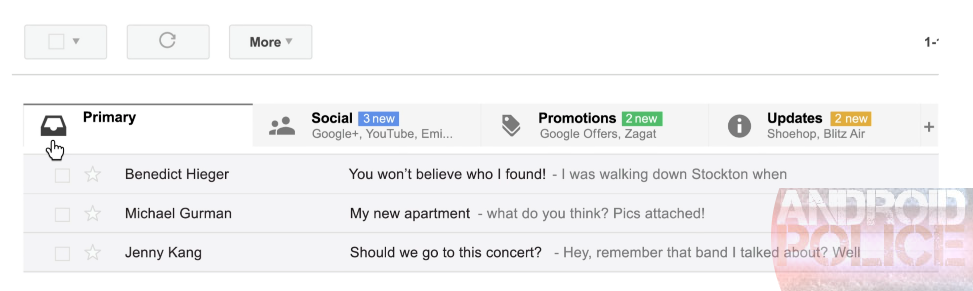
About 2 days ago, an anonymous tipster emailed TNW, Android Police, and probably a few other sites with screenshots of an alleged Gmail redesign that would automatically categorize your emails into separate inboxes. We didn't run the pictures because they seemed pretty sloppy, and often didn't conform to the way Gmail works. Now though, now we're seeing confirmation from ryan_socio, who has been a pretty solid source in the past, so they've officially graduated to post-worthy. Here they are:
Top Left: Android | Top Right: iOS | Bottom: Desktop Web
The initial batch of these images that went out had horribly distorted colors, which really didn't help their credibility.
The New York Times' A1 feature today: "Leak Inquiries Show How Wide a Net U.S. Cast." Sweeping investigations into leaks of secret information now involve hundreds of government employees, and have created a powerful chilling effect for press. A major blow to our right-to-know: government officials now fear being investigated for simply speaking with a reporter.
Some officials are now declining to take calls from certain reporters, concerned that any contact may lead to investigation. Some complain of being taken from their offices to endure uncomfortable questioning. And the government officials typically must pay for lawyers themselves, unlike reporters for large news organizations whose companies provide legal representation.





 Early April, prosecutor Henry Olin of the International Public Prosecution Office in Stockholm announced that Gottfrid Svartholm had been charged with several hacking related offenses including serious fraud, attempted aggravated fraud, and aiding attempted aggravated fraud.






 Every week copyright holders send millions of DMCA takedown notices to Google, hoping to make pirated movies and music harder to find.