Yesterday's New Statesman published a long, nuanced profile of Paul Dacre, editor-in-chief of the despicable Daily Mail. Dacre's a remarkable and contradictory character, profiled with some sympathy but no white-washing by Peter Wilby, but the most striking moment of the piece comes in the first third, when Wilby lays out all the admitted falsehoods and libels published by the Daily Mail -- a list that is incomplete because it only consists of those where retractions, legal action, or other visible signals of falsehood were raised. There's a much longer list of smears and lies about people who couldn't afford to defend themselves from the paper (or couldn't bear to). Still, it's a hell of a list:
This year, the Mail reported that disabled people are exempt from the bedroom tax; that asylum-seekers had “targeted” Scotland; that disabled babies were being euthanised under the Liverpool Care Pathway; that a Kenyan asylum-seeker had committed murders in his home country; that 878,000 recipients of Employment Support Allowance had stopped claiming “rather than face a fresh medical”; that a Portsmouth primary school had denied pupils water on the hottest day of the year because it was Ramadan; that wolves would soon return to Britain; that nearly half the electricity produced by windfarms was discarded. All these reports were false.
Mail executives argue that it gets more complaints than its rivals because it reaches more readers (particularly online, where the paper’s stories are repeated and others originate), prints more pages and tackles more serious and politically challenging issues. They point out that only six complaints were upheld after going through all the PCC’s stages and that the Sun and Telegraph, despite fewer complaints, had more upheld. But the PCC list, though it contains some of the Mail’s favourite targets such as asylum-seekers and “scroungers”, merely scratches the surface. Other complainants turned to the law. In the past ten years, the Mail has reported that the dean of RAF College Cranwell showed undue favouritism to Muslim students (false); the film producer Steve Bing hired a private investigator to destroy the reputation of his former lover Liz Hurley (false); the actress Sharon Stone left her four-year-old child alone in a car while she dined at a restaurant (false); the actor Rowan Atkinson needed five weeks’ treatment at a clinic for depression (false); a Tamil refugee, on hunger strike in Parliament Square, was secretly eating McDonald’s burgers (false); the actor Kate Winslet lied over her exercise regime (false); the singer Elton John ordered guests at his Aids charity ball to speak to him only if spoken to (false); Amama Mbabazi, the prime minister of Uganda, benefited personally from the theft of £10m in foreign aid (false). In all these cases, the Mail paid damages.
Then there are the subjects that the Mail and other right-wing papers will never drop. One is the EU, which, the Mail reported last year, proposed to ban books such as Enid Blyton’s Famous Five series that portray “traditional” families. Another is local authorities, forever plotting to expel Christmas from public life and replace it with the secular festival of Winterval. It does not matter how often these reports are denied and their flimsy provenance exposed; the Mail keeps on running them and its columnists cite them as though they were accepted wisdom.
The paper gets away with publishing libels and falsehoods and with invasions of privacy because the penalties are insignificant.
Internet filters are now on the political agenda in many countries around the world. While China and Iran are frontrunners for political censorship, the UK is leading the way when it comes to porn and other types of adult content.
Last summer Prime Minister David Cameron announced a default filter for all Internet connections. This means that UK Internet subscribers will be required to opt-in if they want to view adult content online.
Sky was one of the first ISPs to roll out its network level filter in November. As a result, new subscribers will now have to opt out from Broadband Shield‘s default PG13 setting if they want to see adult content. Later this year existing customers will also be forced to make the same choice.
While most of the discussion has focused on porn, Sky’s filter – and those operated by other ISPs – actually block a much wider range of content. Below are the options Sky users are given at the moment, showing that if people want to block porn, they also have to block various other categories.
The 13-years-old-and-over setting is ticked by default, which also includes dating, anonymizers, file-sharing and hacking.
Sky’s blocking options
In other words, those customers who don’t opt out from the ‘porn filter’ will also have file-sharing sites and services blocked. A quick round on the internet reveals that this category is rather inclusive, and not limited to ‘pirate sites.’
Among the blocked sites are BitTorrent.com, who work with Madonna and other artists on a regular basis to release free-to-download content. The same is true for other BitTorrent clients including uTorrent, Transmission and Vuze. Tribler, which is developed at Delft University of Technology with EU taxpayer money, is filtered as well.
Websites which offer perfectly legitimate content via P2P downloads are also filtered by Sky’s default settings. This includes VODO, the distribution platform for indie filmmakers, the download page of the Linux-based Fedora, as well as the download portal Linuxtracker.
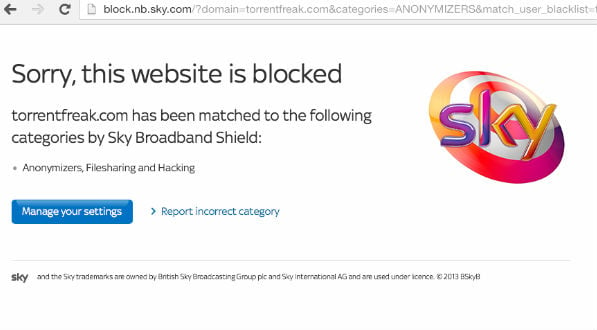
In addition, several websites that merely write news about file-sharing issues are blocked by the filter too, including TorrentFreak.
TorrentFreak blocked by Sky’s filter
According to Sky, the decision to extend the filter beyond porn and other adult content was partly made based on input from subscribers.
“Our customers have told us they want the option to control the content that enters their homes. As part of this, they have also told us what sort of content they would like included in Sky Broadband Shield,” a Sky spokesperson told us.
The provider further points out that account holders have the option to turn the filter off or allow certain sites to be unblocked.
“We know that no single setting will suit everybody, so our product allows customers to make their own decisions about individual websites, overriding the pre-defined categories to unblock a particular site if they wish. This gives any Sky home the ability to fully customise their filters.”
The question is, however, how many people will be familiar with this unblocking option. There is little doubt that the filtered sites will see a drop in visitors, which may become problematic when more and more providers employ similar filters by default.
TorrentFreak spoke with the Open Rights Group (ORG), who have been very critical of the filtering schemes in the UK. According to Executive Director Jim Killock, Sky is not the only problem here, as other UK ISPs employ overbroad blocking schemes, including the older mobile network filters.
“Most of the filters seem to encourage parents to block anything that is related to anonymizers, hacking and filesharing. In short, the filters seem to adopt a strategy of stopping under 18s from learning how to do anything useful with a computer, in case that helps them get round blocks,” Killock says.
ORG stresses that the filters may prevent young people from learning much-needed computer skills, which could eventually hurt the local computer industry.
“It could damage the learning of a generation, and the competitiveness of the UK computer industry. Computer related websites and discussions should always be available to young people as it is part of their right to an education.”
To find out what is being blocked exactly, ORG has been building its own checking tools, as well as a website where false positives can be reported.
Whether anything can be done against the overblocking and false positives that are reported remains to be seen. For now all legitimate file-sharing services and sites remain blocked, including the article you are reading right now.
Only a year ago it was just a cancelled TV series. Then it was suddenly a hugely successful Kickstarter project, and now the finished Veronica Mars movie is almost upon us. Warner Bros. have released the first trailer for Kristen Bell's former-teen detective cinema upgrade.
The film finds former teen detective Veronica headed back to Neptune, California, after ten years away. In the meantime she's become a corporate lawyer and shacked up with lurrve interest Piz (Chris Lowell). What's drawing her home, however, is the plight of former flame Logan (Jason Dohring), who's accused of killing his pop star girlfriend. The points of the old love triangle between Veronica, Piz and Logan are soon sharp again, and Veronica finds herself investigating her first mystery in a decade.
For the unititiated, there are shades of Grosse Pointe Blank in the school reunion thread, and echoes of One For The Money in the detective's-old-flame-in-trouble hook. But for those already invested in Veronica's previous three years' worth of adventures, the film looks to be a canny reacquaintance with the material: moving the characters believably forward, but still providing plenty of callbacks to what worked before.
Creator and showrunner Rob Thomas is the film's director, and while the initial plans were only for a limited release, Veronica Mars will open "wider" in the States on March 14. There's no date for the UK so far.
Welcome back to Android Gaming Weekly, our weekly recap on new game releases. We still plan to cover upcoming releases and games we’re playing, but this column is dedicated to new games you can install and start playing right now. Check out our top picks and let us know if you have any suggestions for next week in the comments below.
Call of Mini™ Infinity
Description: The earth is on the brink of a large METEORITE IMPACT! The burden is on you to find a new place for people to LIVE. Colonizing a planet is not that easy and DANGERS lie ahead.
Description: With each new level, you are confronted with a group of shapes (rectangles, triangles and wedges) that must be manipulated and honed until they are of the same form. You only need to tap to play!
Description: Experience the life of a Space adventurer in this stunning action RPG. Build a fleet with 46 different spaceships of various classes from small frigates to giant battle cruisers. Make them your very own with thousands of customization options. Wander in an open world of the huge Universe. Enjoy console quality graphics and immersive gameplay right in your palm.
Description: Seacraft is a global, yet simple massive multiplayer online role play game of pirates, buccaneers, corsairs and traders. Choose your allegiances and fight with your friends for over 10 empires around the world.
Description: Run, jump, bounce and swing on vines as you help Banana Kong to outrun a huge banana avalanche! Keep full control with highly responsive single-finger tap and swipe controls.
Description: Your fans are calling out for destruction and you’re going to make sure they get it! Get behind the wheel of one of 30 monster trucks and put it to its limits to destroy everything in sight. Spin your wheels in competitive Drag races or send your ride leaping off jumps and smashing into other cars in Freestyle mode.
Description: Find Hidden Objects in scenes from your favorite Disney movies! Journey to a world of imagination and recreate the story worlds of Beauty and the Beast, Tangled, Aladdin, The Little Mermaid and more classic Disney films.
Description: Poxii will take your right brain and left brain skills for a delightful little race against time to get the Poxii, (our little rabbit friends), home safely. You’ve got to think quickly or Foxii- the fox, will surely get them.
Description: Rayark brings you Deemo, a hybrid of music rhythm game and the story of urban fantasy, with hand-drawn art, story-telling gallery and real instrumental feedback of piano key sound.
Description: Do you want to build houses and industrial buildings with heavy machines from LIEBHERR, MAN and STILL? Then get the Construction Simulator 2014 – in this way your Android device becomes a virtual construction site.
I'm not an information anarchist. I don't start from the premise that all information must be free. Or even that the availability of content necessitates it being open to all on equal terms. I collect a paycheck and believe others should, too, even if it means foolishly treating digital content as if it were analog property, the way Hollywood continues to do.
But there's a fundamental problem with today's digital media policies, and it hit me last night while watching the BBC's new season of Sherlock.
Yes, I, an American, was watching Sherlock, which premiered last night in the U.K. but doesn't air in the U.S. on PBS until January 14. The how is not important: anyone with a free U.K. proxy server can watch U.K. content once it airs across the pond. Today I'm focusing on the why: for a show that banks so heavily on surprise, I didn't want two weeks of my U.K. friends spoiling the show by talking about it.
Put in policy terms, in a world where digital communication moves faster than digital content, we have a serious mismatch, and a significant problem.
Not A Question Of Free
This isn't a question of whether the BBC has a right to release its content on its terms. It does. U.K. citizens pay for Sherlock and other excellent content to be created through license fees.
When I lived in the U.K., my wife and I lived in terror of the TV detector vans, which allegedly roam the U.K. seeking out people that watch TV without paying. We were guilty, albeit not intentionally. The house we were renting had left a TV for our use, and we innocently turned it on to watch The Muppets, One Man and His Dog(don't ask me why) and Champions League football. We hadn't heard about the detector vans until a month or two into our stay and then we were warned that even if we put the TV out in the shed and didn't use it, the vans would still find us and make us pay.
Big Brother, anyone?
Anyway, the point is that people in the U.K. do pay for Sherlock, albeit not in any targeted sense of someone buying a ticket to see that show or even that channel. When Sherlock airs in the U.S., it will show on PBS, paid for by the government, corporate donations and other donations. While advertising has been introduced in the past two years, PBS is still mostly a public good and doesn't require that anyone pay for cable or satellite TV.
So even though my British friends pay through a TV tax, I can watch Sherlock completely for free. Yet this still doesn't make Sherlock "free" for the taking. Whether a matter of legal obligation (one of the BBC's requirements may be that its content must always have a period of exclusivity in the U.K.) or otherwise, it's the BBC's content and it can choose how to distribute it.
It's A Matter Of Conversation
But the BBC cannot stop how we choose to talk about its programming and therein lies the problem.
We no longer live in a world where it takes months or weeks to travel across national borders, or where communication takes place between two people on either end of an analog phone line. With the explosion of social media, conversations happen across borders in real-time between crowds of people.
Which means, of course, that for the next two weeks every Sherlock fan outside the U.K. must be on red alert for spoilers whenever they get on Twitter, Facebook or other social media. Or it means they need to get a U.K. proxy server and watch Sherlock now.
Two weeks is not big deal, right? "First world problem," you say. And you're right. With Downton Abbey, the time delay is six months, but still no one is going to lose sleep over such an issue.
Follow The Money
And yet it should matter greatly to the media companies. Spoiled content turns into unwatched content which turns into less money. Synchronizing content watching with content communication thus becomes a very big deal for both viewers and creators.
Personally, I don't want information to be free. Not entertainment content, anyway. I want to pay for it. But I don't want to pay for something that has been spoiled by hearing about it months before I'm able to see it. And for the content creators, they shouldn't want me to wait, either. It's not in their financial interest to do so.
I was a midnight birth, born somewhere between 7/16/71 and 7/17/71 (the doctor let my mom choose my birthday). For New Years babies born around midnight, the choice is more momentous -- a whole year's difference! But what about New Years twin births? A woman in DC delivered her twins in two different years, three minutes apart.
Netflix's extraordinarily specific micro-categories have become both a running joke and a surprisingly effective recommendation tool, but how does it serve up personalized recommendations for "violent sci-fi thrillers" and "gory action and adventure," and why are "violent" and "gory" separate descriptors? And why, when you reverse-engineer Netflix categories as Ian Bogost and Alexis Madrigal did for The Atlantic, are there 19 genres dedicated to the man who played Perry Mason? By scraping the tens of thousands of possible Netflix categories (most of which users will never see), Bogost and Madrigal put together a strangely effective map of how Hollywood makes movies and how we seek them. And behind it all is Todd Yellin, the Netflix VP...
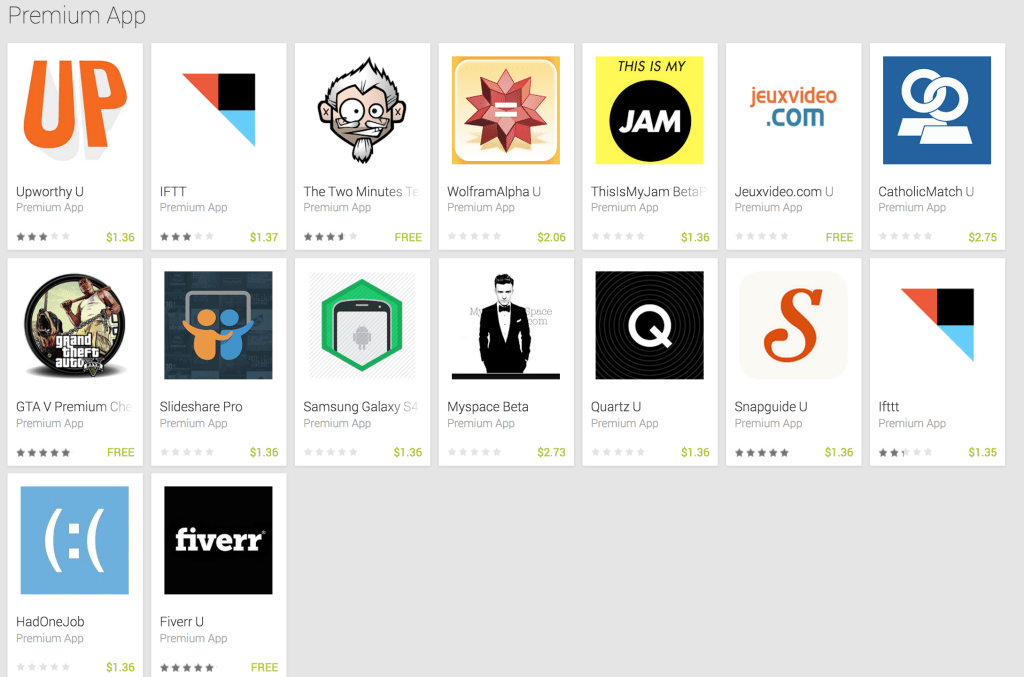
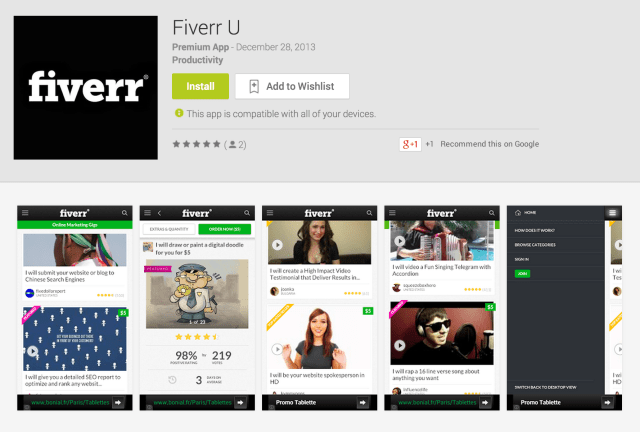
It’s not uncommon to search the Google Play app store and find a number of knock-off or “fake” apps aiming to trick unsuspecting searchers into downloading them over the real thing – especially when the app in question isn’t yet available on Android. But one developer really went out of his or her way over New Year’s to fill the Android app marketplace with a number of rip-offs of big-name startups and other tech companies, including IFTTT, Slideshare, Snapguide, Wolfram Alpha, Fiverr, Upworthy, MySpace, and more.
Many of the apps chosen are still iOS-only, making the matter worse.
Listed under the developer’s very generic name, “Premium App,” the knock-offs sometimes have a “U” following the app’s title, indicating that they’re really just a user’s guide to the service, not the real app. Many, like IFTTT, (which Premium App has ripped off twice – once as “IFTT” instead of “IFTTT” to capitalize on misspellings), are available as paid downloads ranging from $1.36 USD to $2.75 USD.
The apps were released just at the end of December, as the developer was probably hoping to capitalize on a reduced staff handling Google Play app store spam complaints over the holidays. Calling attention to the problem – as we’re doing now – will likely see the apps quickly pulled as Google reacts to the situation. (We reached out to the developer via email, but have not heard back.)
However, the fact that these apps were ever allowed in the first place – for nearly a week in some cases (at least, so far) – highlights a still ongoing problem with the Google Play review process…or rather, the lack of one. This issue has beenhappeningforsometime, too, and it’s concerning given that malware is often served up by the faked versions of popular apps. Now, whenever I’m searching for an Android app, I notice I’m always giving it a second look to make sure that I’m not being fooled. Mainstream, less savvy users are probably not as careful, which means they’re the ones getting burned.
As one confused user writes under the fake IFTT app, “Did this app really just come out today? Dec 30,2013?? The day I downloaded it? Seems unlikely. It said 2011 a minute ago. Is this app just a browser?“
But as Google explains in its Developer Distribution agreement, the company “does not undertake an obligation to monitor the Products or their content.” (Products, meaning apps.) Instead, Google may remove apps from the store when problems are brought to its attention. That means legitimate developers, in addition to their very many other tasks, have to keep an eye on Google Play to make sure no one is trying to rip them off, and then submit complaints when someone does. At times, Google will also run a massive cleanup of its app store, dealing with the situation in one fell swoop, as opposed to carefully reviewing apps one-by-one.
It’s not like Google doesn’t have staff paying attention to its app store in a more proactive manner. After all, the company was fairly quick to eject the CyanogenMod installer app, which allows users to completely modify standard Android, plus add new features. But unlike modding, fake apps aren’t an immediate threat to Google’s monetization and control over Android like CyanogenMod is, they’re only a threat to the end user’s experience, security, privacy, and…hey, wait…isn’t that enough to warrant more attention, Google?
A global survey conducted by the Worldwide Independent Network and Gallup at the end of 2013 revealed strong animosity towards the US’s role as the world’s policeman. Citizens across over 60 nations were asked: “Which country do you think is the greatest threat to peace in the world today?”
The US topped the list, with 24 percent of people believing America to be the biggest danger to peace. Pakistan came second, with 8 percent of the vote and was closely followed by China with 6 percent. Afghanistan, Iran, Israel and North Korea came in joint fourth place with 5 percent of the vote.
The threat from the US was rated most highly in the Middle East and North Africa, those areas most recently affected by American military intervention. Moreover, the survey showed that even Americans regard their country as a potential threat with 13 percent of them voting the US could disrupt global status quo.
Lenovo today announced a foursome of new smartphones ahead of CES. The hero device of the group is the Vibe Z, aimed at the fashion-conscious shutterbug crowd.
Unfortunately, it doesn't look like they will be making their way Stateside anytime soon, but they should be good options for those who live where they're available.
What are their specs like? Jump on past the break to find out!
Android: There are a number of apps that allow you to transfer or sync files between Android devices and your computer (or each other). Software Data Cable puts most of those functions in one spot.
The app requires minimal setup and allows users to wirelessly transfer files from your phone to your PC, pair two Android devices together to transfer files directly between them, or even set up automatic sync between folders on two devices. The direct connection between phones may attempt to utilize a carrier tethering function, but that hangup aside, it's a robust app.
Samsung's Galaxy Note series of phablets seems to get better and better and a new patent filing indicates that the best may still be yet to come. SammyToday flags a recently filed Samsung design patent that shows what looks like a potential future design for a Samsung phablet. The design drawings show a device whose display has incredibly thin bezels and no buttons on the bottom, which is a major departure from the designs of all other Samsung flagship devices. The drawings also clearly show a slot in the bottom of the device for a stylus, which means it's likely that the design is of a future Galaxy Note and not the Galaxy S5. Pictures of the design patent follow below.
Jennifer Jenkins from the Duke Center for the Public Domain writes, "What could have been entering the public domain in the US on January 1, 2014? Under the law that existed until 1978 -- Works from 1957. The books 'On The Road,' 'Atlas Shrugged,' and 'The Cat in the Hat,' the films 'The Bridge on the River Kwai,' '12 Angry Men,' and 'Funny Face,' the musical 'West Side Story' and the songs 'All Shook Up' and 'Great Balls of Fire,' and more -- What is entering the public domain this January 1? Not a single published work."
Current US law extends copyright for 70 years after the date of the author’s death, and corporate “works-for-hire” are copyrighted for 95 years after publication. But prior to the 1976 Copyright Act (which became effective in 1978), the maximum copyright term was 56 years – an initial term of 28 years, renewable for another 28 years. Under those laws, works published in 1957 would enter the public domain on January 1, 2014, where they would be “free as the air to common use.” (Mouse over any of the links below to see gorgeous cover art from 1957.) Under current copyright law, we’ll have to wait until 2053.1 And no published works will enter our public domain until 2019. The laws in Canada and the EU are different – thousands of works are entering their public domains on January 1.
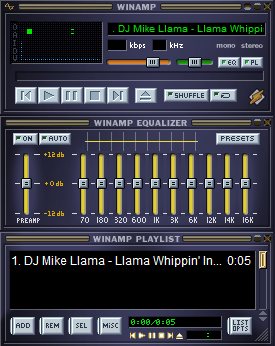
Some more detail on the fate of Winamp and Shoutcast, the legacy digital music services that owner AOL (which also owns TechCrunch) originally planned to shut down but then halted pending a sale. They are not being bought by Microsoft, as we had heard when we first reported news of a sale. The properties are instead being acquired by Radionomy — an international aggregator of online radio stations headquartered in Brussels, Belgium.
The Radionomy connection was first noticed by a couple of people, including one Bryon Stout on the Winamp forums and Carsten Knobloch, who saw that Winamp’s nameservers, but not Shoutcast’s, had been transferred to Radionomy. We have since learned from a reliable source that the deal is for both properties and should be finalised by Friday, if not sooner.
Radionomy has some 6,000 stations in its catalog already, with an emphasis on a do-it-yourself platform that anyone can use to create a channel. Shoutcast’s 50,000-strong catalog of radio stations will be a major boost on that front. Winamp’s media playing software could be used to help program those radio stations and offer additional services.
The acquisition may also see the two products and platforms put to work in more commercial settings. One of Radionomy’s strategic investors is MusicMatic, which develops audio and video experiences for stores and other venues.
Congratulations, Planet Earth! We made it another 365 days without crashing into the sun. Go team!
It’s the end of the year, and that means three things: booze, ridiculous sunglasses with numbers on them, and lists. Lots and lots of lists. You’ve seen our list of best/worst gadgets of the year. Up next? The Best Mobile Apps Of 2013.
Now, to be clear: there’s not a lot of science here. If we were going by the raw numbers, some Angry Birds spin-off would be the top app every year for the rest of eternity. Instead, these are the favorites picked by a bunch of geeks who write about this stuff all day, every day. We’ve seen the good, the bad, and the terrible — and after some heated debate, these apps emerged as the year’s champs.
We tried to stick with apps that launched in 2013, or, in some cases, the tail end of 2012. While many of the apps are cross-platform and we considered that a massively positive bulletpoint, we didn’t eliminate any of our top picks just because they were only on one platform or the other. Some are iOS only. Some are Android only. That’s just the way it goes.
Think we missed something? Got a favorite? Let us know down in the comments.
Cover is the lockscreen we always wanted without even knowing it. It figures out what apps you use most and when, and automatically pushes shortcuts for those apps straight to your phone’s lockscreen at the right time. Use Gmail and LinkedIn a lot at work? It’ll catch on and have those apps at-the-ready as soon as you walk in the office. Driving? It’ll queue up Waze, or Pandora, or whatever it thinks you’ll need most.
Poor Lytro! The oddly-shaped camera got its fair share of buzz when it launched back in 2011, with its special sensor that allowed for all sorts of neat tricks (like being able to “shift” the perspective of a photo a bit after you’ve already snapped it.)
Alas, like the landfill’s worth of standalone pocket cameras that fell before it, the Lytro’s functionality has largely been replicated by mobile apps. One of our favorite apps in that group is Seene. Seene lets you take super trippy “3D” photos with just your iPhone. It actually takes a bunch of photos as you move your phone around an object, then intelligently stitches them together using all sorts of computer vision voodoo.
When Google Reader died on July 1st of 2013, a million hopeful replacements sprung up around its grave. While there’s no one-size-fits-all alternative, NewsBlur is a very, very solid option. It’s fast, cross-platform, and super pretty.
QuizUp (iOS only):
Right around the middle of the year, Icelandic games studio Plain Vanilla shifted their focus from one-off, licensed quiz titles to an all-in-one quiz game with topics for everyone — and man, did it pay off. With an ever-growing library of 200,000+ questions, a super-clever multiplayer mode that makes games feel realtime when they’re not, and a gorgeous interface, QuizUp is one of the all-around best mobile games of the year.
Sit your phone down. Push a button. A few seconds later, you’ve got a full 360° panoramic of the room.
How? Magic. And by magic, I mean an insanely clever hack that uses the iPhone 5S’ vibration motor to propel the phone around on a smooth surface. Does it work every time? Nope. But when it does, everyone’s head explodes.
BillGuard’s CEO says they’re building “what Mint should have been“, and they’re already doing a damned good job of it (aided, of course, by Mint having gone pretty stale in the years since its 2009 Intuit acquisition). BillGuard tracks your spending, provides a beautiful analytics interface, and quickly highlights any charges that seem fraudulent or that might be hidden fees in disguise. Oh, and it learns where you shop most and automatically finds coupons for you to use next time you go.
Oyster (iOS only):
My New Years Resolution for 2014 is to remember what the hell my New Years Resolution for 2013 was. But if your resolution is to read more, Oyster is for you. Think Netflix, but for reading. $10 a month gets you all-you-can-read access to about 100,000 titles.
HeyDay (iOS only):
Everyone has that one thing that they’ve always wanted to build, only to find out that someone has already made it really, really well. HeyDay is that thing for me. HeyDay is what the company calls an “effortless journal”, automatically pulling your photos, videos, and GPS locations into individual, timestamped journal entries. At the end of the day, you just go back through and add little notes to fill in the gaps.
TimeHop (iOS only):
TimeHop scans your myriad social networking accounts to remind you of all the awesome things you were doing on this same day a year (or two) ago. It’s like a personal time capsule, or a “This Day In History” list for your life. Get ready to drown in endless waves of nostalgia.
Clumsy Ninja (iOS only):
Clumsy Ninja is kind of like a Tamagotchi, if the Tamagotchi was a lil’ drunk dude in a ninja costume. You play games with your ninja to teach him new skills; where at first he can hardly walk without tripping over his own feet, you’ll quickly have him doing backflips and karate chopping dodgeballs out of the air. Sure, it’s a bit silly — and sure, it’s a classic time-killer/grinding game. But it’s also truly remarkable to see something like this running on a phone. The animation blending/ragdoll system alone is mindblowing.
Agent (Android only):
Agent is one of those Android apps that could pretty much never exist on iOS, unless Apple either makes some big ol’ policy changes or builds it themselves. Agent makes your smartphone smarter in lots of little ways. Battery dying? It’ll dim the screen and turn off Bluetooth. Sleeping? It’ll silence your phone, but offer up callers/texters a way to ring through in case of an emergency. Driving? It’ll reply to texts to let people know you can’t respond right now, AND remember where you parked.
Tinder is dating boiled down to an almost absurd level of simplicity: a single swipe. Like someone? Swipe right. If they’re not quite for you? Swipe left. If they’ve seen your photo and liked what they saw enough to swipe you to the right, Tinder matches you up.
It ain’t my kind of thing (read: my girlfriend would punch me right in the schnoz), but the single folks at TC all swear by it.
Digg (iOS, Android):
Surprise! After a rebirth under a new owner in 2012, Digg actually started sending a decent amount of traffic around the web again in 2013. Bigger surprise: they built a mobile app and it’s actually pretty damned good. The editor-curated content provides a quick glance as to what’s popular on the Internet at any given time, while the built-in news reader is another super solid alternative to the late great Google Reader.
You’d be hardpressed to find anyone saying anything bad about Duolingo – it’s this year’s Internet golden child, and rightly so. It’s one of the best tools I’ve ever seen for learning/brushing up on a language… and it’s completely free. As part of your training, you translate bits of real world text from sites like CNN and BuzzFeed (which is how Duolingo makes any money.)
Sunrise (iOS):
Hate what Apple did with the calendar in iOS 7? Me too! Fortunately, a couple of folks from Foursquare broke away to remind us that calendars can be pretty and easy to use. Looking for another calendar, but not feelin’ Sunrise? Honorable mentions to Fantastical (iOS), Tempo (iOS), and Any.do Cal (Android)
Vine (iOS, Android):
Acquired months before it even launched, Vine is one of the stranger tales of 2013. Focused entirely around sharing 6 second looping video clips, many a pundit predicted Vine’s death upon the launch of Instagram Video — and yet, Vine continues to be where most of the Internet’s funniest short videos end up.
The phone numbers and usernames of more than 4.6 million North American Snapchat users have been leaked online. SnapchatDB, an unofficial site run by an anonymous individual or group, allows open access to two files — one an SQL dump, one CSV text — that show details of the photo-sharing app's users alongside their location.
The final two digits of phone numbers have been censored "to minimize spam and abuse," but SnapchatDB says people should "feel free" to contact it for the uncensored database, as it may release it under certain circumstances. Usernames are presented unedited, and SnapchatDB notes that "people tend to use the same username around the web." Those that download the information, it says, can try to "find phone...
Bump and Flock, the file sharing apps Google acquired last fall, will be shut down by the end of this month. Both apps will stop working and be removed from Google Play and the App Store on January 31, Bump confirmed on its blog today.
Google bought Bump Technologies, which make both apps, back in September, and Android Police reports that work on the app appeared to stop shortly after the acquisition.
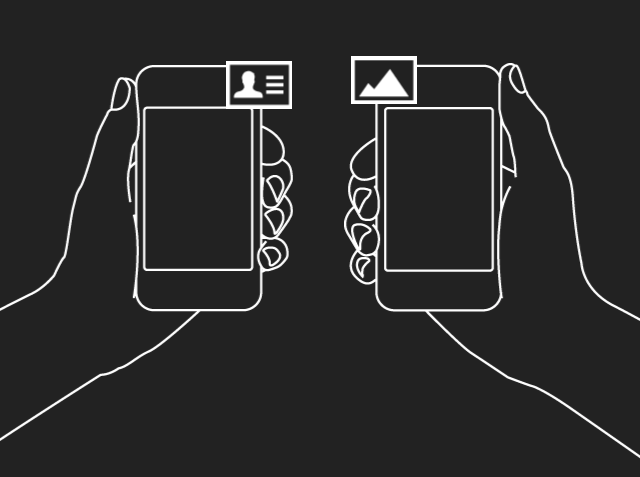
Bump, which let users tap phones together to share contacts and other files, raised nearly $20 million and enjoyed high download rates, but failed to monetize successfully as other easy, mobile-friendly ways to share information were developed, most notably Apple’s AirDrop for iOS 7. Flock is a collaborative photo-sharing app Bump Technologies released in 2012.
As TechCrunch’s Josh Constine wrote in September, the sale wasn’t an acquihire, but Google might plan to turn Flock into part of Google+ in order to compete with Facebook’s photo sharing and Dropbox’s photo saving services, especially since Google+’s Party Mode, a photo sharing service based around events, failed to gain real traction. The acquisition of Bump Technologies also gave Google access to several mobile communication patents that could help it improve Android and create better alternatives to near-field communication (NFC).
When the startup announced its acquisition by Google, co-founder David Lieb said in a statement that “We strive to create experiences that feel like magic, enabled behind the scene with innovations in math, data processing, and algorithms. So we couldn’t be more thrilled to join Google.” The acquisition price was undisclosed but sources told TechCrunch it was around $35 million, a relatively low amount considering how much funding Bump had raised. Bump’s investors included Y Combinator, Sequoia Captial, Felicis Ventures, SV Angel, Andreessen Horowitz, and many angels.
New York's new Mayor, Bill de Blasio, wants to remove horse-drawn carriages from the city. In a news conference held before he took office, de Blasio said that he planned to "get rid of the horse carriages, period," calling them "inhumane" and "not appropriate for the year 2014." A petition signed by more than 4,500 people called for the horses to be replaced by electric replicas of vintage cars, something de Blasio called "a cleaner, safer, wiser, more humane alternative that will be very appealing to tourists."
At last, a tiny piece of good news for free speech from England and Wales: the Defamation Act 2013 goes into effect tomorrow, and will make it substantially harder for rich, powerful people to sue their critics in the UK. The new law requires that plaintiffs show "serious harm" in order to bring a suit. It also protects academic and scientific publications (an important issue since the British Chiropractic Association sued Simon Singh for publishing a critical scientific review of chiropractic). It adds a defense on the basis of a good-faith belief that publication is in the public interest.
Perhaps most importantly, it tightens up the "libel tourism" rules that allowed corrupt overseas dictators and oligarchs to sue news outlets based outside the UK in a UK court, merely by showing that someone in the UK read the disputed article; and it establishes a "single publication" rule to stop publishers from being sued multiple times over the same disclosure.
However, Northern Ireland has not adopted these reforms; English PEN's Jo Glanville points out that this creates a huge loophole for people who want to bring baseless libel claims in the UK -- they can just sue in an NI court.
Mike Harris, of the campaign, said: "The Defamation Act was intended by politicians to end the chill from the archaic libel laws of England and Wales.
"It's taken four years, support from 60,000 people and a cross-party consensus to get to where we are today.
"We hope the judiciary will take note, and that in the future open debate on matters in the public interest will not be chilled by litigious oligarchs or corporations."
He added: "The Defamation Act is good news for free speech.
"We hope it can be used as a template for reform of the law in other countries where all too often journalists and scientists find themselves fined huge sums for speaking out against corruption and malpractice," he said.
The UK Ministry of Defense has introduced by-laws in the vicinity of bases in the UK, making it a detainable offense to take pictures or make any image of any person or thing; to graze livestock; or to fail to clean up your dog's turds. The rules also allow the MoD to put you in jail "without warrant" for setting up protest camps on MoD property.
These rules come into effect just as a recent Snowden leak revealed that one of the bases in the UK was used by the NSA and GCHQ to spy on Oxfam, Medecins Sans Frontiers, as well as Angela Merkel. Another one of the affected bases is reportedly used to pilot drones deployed in Yemen.
All in all, the rules effect 150 bases around the UK. The MoD the second-largest landowner in the UK.
Jennifer Gibson, of the human rights group Reprieve, said: “These by-laws have been designed to prevent any transparency about what activities take place at RAF Croughton and Barford St John. There is strong evidence that Croughton plays a role in the US drone campaign. But instead of coming clean with the public, the Ministry of Defence has decided to help the US further by drafting draconian by-laws that give the military the power to arrest dog walkers who stray in the general vicinity of the base. It must be asked what is going on at RAF Croughton and elsewhere and why is the UK helping the US cover it up?”
Proposals for new by-laws for RAF Croughton and Barford St John were published earlier this year by the MoD. It is understood that up to 38 other military sites where no by-laws currently exist are also being reviewed. The new regulations designate an outer “controlled area” around each facility, where a wide-ranging list of banned activities applies, and an inner “protected area” with more stringent restrictions.
Among the 20 activities to be banned within the controlled area are camping “in tents, caravans, trees or otherwise”, digging, engaging in “any trade or business” or grazing any animal. Also among the offences, which can result in an individual being “taken into custody without warrant”, is a failure to pick up dog waste or causing damage to “any crops, turfs, plants, roots or trees”.
The list of 10 banned actions within the protected area includes a prohibition on taking “any visual image of any person or thing”.
There is a wide range of financial information available to us at any time if we are committed to doing a little research. We can learn how to budget, invest, save– everything we need to know in order to be financially stable. So with all that available information, why are so many of us living financially stressful lives centered around overspending and under-planning?
Because it's not just about obtaining knowledge–it's about understanding the underlying causes of the issues and tuning in to why we continue to make the decisions that we do. If you've never thought about how your emotions are dictating your relationship with money, now's the time to start.
Here are just a few things to explore in order to get to the root of your money issues.
Following Family Money Patterns
When you think about your first experiences with money, they are likely to be connected to memories of your family and childhood. The conversations and actions spurred by money, whether you were directly involved or just a witness, began to shape your belief system at a very young age.
If money conversations in your house were tense, combative, and stress-filled, handling money now–regardless of what your current financial situation actually looks like–is likely to bring up those same emotions. In turn this could cause you to avoid handling your finances altogether. Get to the root of the emotions that these first dealings with money brought up for you. They are likely to be similar to what comes up for you today, years later.
Using Money as an Emotional Band-Aid
Money and food have a lot of similarities–they both are used by the masses to mask uncomfortable emotions in a way that can be detrimental to your bank account or your body. They provide a quick (and temporary) fix for larger issues. Buying something unnecessary can do a variety of things: give your self esteem a boost, take your mind off of something you've been struggling with, placate feelings of inadequacy, bolster your "I deserve this" attitude.
Think about when you're really tempted to spend. Is it tied to certain situations or when certain emotions arise? Recognizing these emotional spending triggers are essential to creating a solid financial foundation.
Allowing Resentment to Take Control
Money and resentment often times go hand in hand. If money has always been a spot of contention in our lives, whether it's from growing up in a household where money was lacking or feeling as we are never paid what we are worth, resentment is probably present.
But think about when resentment is present in a relationship–you back away and stop being an active, positive participant in the relationship. When it comes to money, this could stop you from being proactive and actually trying to establish positive financial habits. Abundance cannot be present in your life if you're resentful of the currency that provides it. You are always in control of your money situation–regardless of what a challenge it seems–and therefore resentment is only a hindrance in claiming that power.
Using Money as an Expression of Love
When it comes to expressing love or caring, many people fall into the trap of thinking that money will do the trick. The more you spend the more the other person will feel the love you have for them. Tying money to this type of emotion can be extremely detrimental–not just for financial reasons, but for the integrity of the relationship itself. It can essentially halt the authentic expression of love and replace it with something meaningless.
Gift-giving is fine, but it's believing that it is an essential part of a relationship that can be financially irresponsible if you aren't in a place to be doing so. No one in your life should expect you to put your financial health at risk in order to monetarily express love. And if monetary giving is how you combat feelings of inadequacy, you'll likely make decisions that don't match what you are financially able to do.
Knowing How You Tie Money to Emotion
How have your past money experiences shaped the way you think, feel, and handle your finances? What habits and behaviors can you trace back to these emotions? What patterns do you struggle with as a result?
Gathering this kind of knowledge is just as important as understanding investing, knowing how to create a budget, and establishing a savings plan. The truth is, your emotions will dictate how well you do at all the other stuff. After all, our emotions have an amazing way of sabotaging any forward progress we make if we don't address them in a positive, thorough way.
Kayla Albert is a guest blogger for ReadyForZero. She is a proud Colorado native who enjoys writing about the emotional side of personal finance, as well as sharing tips on saving money and getting out of debt.
Welcome to the roundup of the best new Android applications, games, and live wallpapers that went live in the Play Store or were spotted by us in the previous 2 weeks or so.
Please wait for this page to load in full in order to see the widgets, which include ratings and pricing info.
Looking for the previous roundup editions? Find them here.
Featured App
Bills Reminder Lite
Today's roundup is presented by Bills Reminder from HandyApps.
HTC to appeal decision as Google works to invalidate the patent altogether
Nokia has snagged yet another patent victory against HTC in German court today. Following a trial hoping to prove that HTC's Android-powered phones infringed Nokia's patent for transferring data over NFC or Bluetooth (that'd be Android Beam), Nokia walks away with a complete sales ban of all of the Taiwanese company's products in Germany. Nokia is not required to license patent EP1148681 as it isn't required for basic functions of the phone, but we can think Nokia would be willing to accept some money to stop further bans.
Understanding that Nokia's litigious efforts may be of harm to the entire Android ecosystem, Google has been working to invalidate the patent to keep these kinds of bans from happening. Additionally, rumor has it that Motorola and Nokia are in talks to license the patent in the meantime. As we would all expect, HTC will be appealing the ruling to try and put its devices back on sale in one of the most important European markets.
New look, new features highlight a hefty update to one of our favorite third-party Twitter apps
At long last, Carbon for Twitter — long one of our favorite third-party Twitter clients — has been updated to version 2.0 with a major redesign and a host of new or revamped features. We've always had a soft spot in our dark little hearts for Carbon, having used it on webOS back in the day, and then Windows Phone — and finally on Android. It's been as functional as it has been beautifully designed, and it's managed to somehow avoid (we don't ask questions) the token limitations that have plaguedother excellent Twitter apps.
The update should be going live Tuesday morning (it's live now), and we've got your walkthrough for the changes.
Stick with us here — it's as simple as it is complex.
Tor.com has republished a great chart from Bad for You: Exposing the War on Fun!, forthcoming in on January 7. The chart details the central thesis of the book: that "the long-standing campaign against fun" is a recurring story in which anxious, killjoy grownups make up stupid explanations for why the stuff their kids like is terrible and should be banned, and the golden era of their own childhoods (and the amusements that reigned then) should be restored.
The chart starts with Trithemius's 1494 rant against printing presses ("The word written on parchment will last a thousand years. The printed word is on paper. How long will it last?") and moves smartly through books, steam engines, newspapers, photos, telegraphs, movies, phones, phonographs, radio, TV, computers, and (of course), the Internet.
If this kind of thing interests you, be sure to check out Tom Standage's 2006 list of moral panics, which also includes waltzes, novels, phones and games.
Reuters is back with more details on the Fukushima labor mess, and this time the focus is on the issues facing homeless laborers being recruited for work. In a follow-up to a wide-ranging report earlier this year, Reuters details how many homeless people are being picked up from train stations and carted out to go clean up nuclear waste and other debris from the 2011 tsunami that wreaked havoc on the region. Many of these people are not being paid even the minimum wage, the report claims, and end up with next to nothing after fees are taken out of their checks to pay for food and lodging by the myriad subcontractors involved in the $35 billion cleanup. Adding intrigue to it all, Reuters says many of those subcontractors are organized...
2013 has been an eventful year for The Pirate Bay, to say the least.
The site celebrated its tenth anniversary, but with pressure from copyright holders mounting, it had to switch domain names no less than six times.
In addition, the site continues to be censored by courts all around the world, which have ordered Internet providers to block subscriber access to the torrent site.
The idea behind these anti-piracy efforts is that people will eventually stop using The Pirate Bay. Thus far, however, traffic to the infamous torrent site continues to grow, and so is the number of torrents being uploaded.
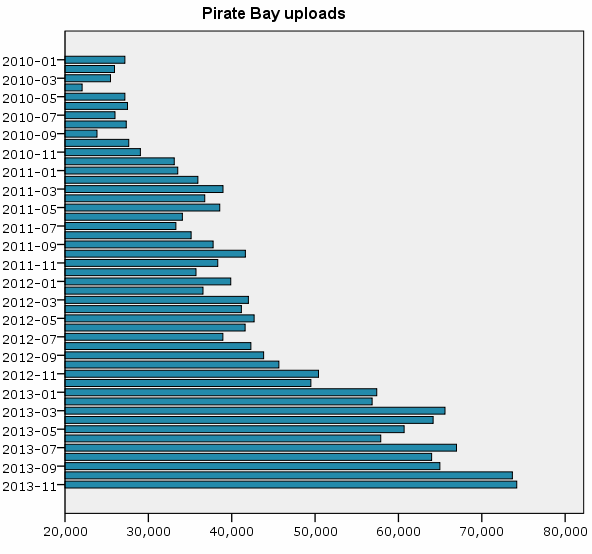
Over the past year the number of new torrents added to The Pirate Bay went up 50%, and the uploads doubled compared to two years ago.
The bar chart below shows the progress of The Pirate Bay’s monthly uploads. In November 2011, 38,319 torrent files were added to the site, growing to 50,411 the year after, up to 74,195 last month.
In total The Pirate Bay now indexes around 2.8 million torrent links, which point to a variety of content ranging from the latest Hollywood blockbusters to vintage Linux distributions.
A snapshot taken earlier this month reveals that these torrents were being shared by 18,911,877 people, which includes both seeders and leechers.
The chart below, which is based on The Pirate Bay’s categories, shows that video is by far the most-shared content. More than half of all “peers” (10,258,076) share video files, which is 54% of the total.
Audio, which includes music, is the second most-shared category with 17% of all peers, followed by porn (13%), other (6%), games (5%) and software (5%).
The Pirate Bay’s continued growth shows that the site is not suffering much from the recent anti-piracy efforts.
On the contrary, the site is taking concrete steps to counter future blocking and takedown attempts. During the coming year the notorious torrent site plans to go underground, using a peer-to-peer browser which will make it impossible to censor or shut down the site.
Copyright holders won’t sit still though and will use everything within their means to stop The Pirate Bay from expanding.
With the above in mind, it is safe to conclude that 2014 will prove to be another eventful year.
ReadWriteReflect offers a look back at major technology trends, products and companies of the past year.
As the explosive trajectory of smartphones adoption approaches an asymptote, mobile apps are riding high. Once an unassuming term for a curious, smallish sort of phone program, the app is now king. It’s almost impossible to now imagine otherwise.
In this mobile-first era, apps make headlines, precipitate stock slumps and altogether define an industry that didn’t see them coming a mere six years ago when Apple released the App Store. Here is our list of the most important apps of 2013. These are not necessarily the fan favorites, but they were the headline drivers, movers and shakers that helped define the app economy in 2013 and beyond.
Love it or hate it (or love to hate it), Snapchat captured one of the mobile Web’s most fascinating pivots: the shift from archiving toward intentional ephemera. Snapchat forgoes Facebook’s reign of the cohesive narrative in favor of brief, chaotic social snapshots that literally self destruct. The app is enough of a threat (or a fascination) to have piqued Facebook’s interest to the tune of $3 billion, after all. Snapchat’s moment may fade as quickly as one of its frenetic missives, but 2013 will always be remembered for the rise of the Snap.
Comparing Google’s predictive data brain to Siri is to sell it short. Google Now had its humble beginnings on Android back in 2012 (the Google search team was working on it in 2011 as well), but in 2013 the service sneaked onto the iPhone through the Google Search app. With progressive updates, Google Now just gets better and better, serving up flight updates, package tracking info and local suggestions before you even know you need them. Google thinks that Now is going to be the future of search, delivering you information before you realize that you need it. Adding that capability to just about every smartphone could be pretty big.
The tide of wearable devices is nowhere near its crest, but apps aren’t waiting around for hardware to catch up. Many mobile fitness mavens have already put the iPhone 5S’s M7 motion coprocessor to good use. For more casual use, Nike+ Move provides an excellent snapshot of your daily habits. The app counts “NikeFuel,” Nike’s own sort of fitness currency, rather than calories or steps, which makes it the perfect gateway app into fitness tech. More serious athletes should check out Strava Run, Nike+ Running, Argus, MyTracks by Google and RunKeeper to take it to the next level, no buggy wearable accessory required.
Arguably the killer app for Google Glass, Word Lens translates foreign text into your native language right before your eyes—literally. For anyone brave enough to wear Glass on trips abroad, this app could revolutionize travel. (The rest of us can stick to Word Lens for our smartphones.)
The buzz around Twitter’s micro-video app didn’t last very long into the year, but Vine’s ultra-shareable 6-second micro-videos shook up the social app landscape nonetheless. It even prompted Instagram to branch into video, though we still think 15 seconds is 11 seconds too long.
It might just be for checking the weather, but Yahoo’s reinvented app manages to encapsulate everything about the big Y!’s Mayer-era makeover. Bright, fluid and playful, it’s everything the old Yahoo’s mobile presence wasn’t. Remember back when Yahoo had literally 70 different apps? Yeah, those days are long gone.
Uber’s been around, but it really only exploded into proper verb territory this year. (“Are you going to Uber home later?”) Uber allows user to summon a private car directly to their location. Uber translates digital ease into three dimensions in a way that only truly disruptive technology can. As controversial as it is useful, Uber has battled city governments and unions across the United States ... and won. Uber is helping to change the definition of urban transportation. Its surge pricing is borderline scandalous and ReadWrite never got the kitten it was promised, but there’s no denying that Uber made major waves in 2013.
8. If This Then That [IFTTT] (iOS, Android in the works)
It might not be a household name (yet), but IFTTT is the multitool of mobile. A playground for productivity nerds, IFTTT invites users to craft simple formulas that text you when it’s about to rain, call you when the rent is due, back up your Instagram photos to Dropbox … and just about anything else you can think up.
Forget Candy Crush Saga and the Zyngaverse. Badland bucks the mindless, hyper-addictive model of generic mobile games in favor of an artful, strategic approach that oozes indie. Badland is a beautiful, brutal, exemplary entry that blows lesser minded games out of the water.
Honorable Mentions:
These apps may not have stirred the pot in 2013, but they kept improving on their already excellent groundwork. The picks on this list kept up with the quick clip of mobile in 2013 without straying too far from what makes them great.
Samsung's display arm envisions a future where just about everything you see and touch — from the walls in your house and the floor you walk on to your car windows and coffee mugs — is a display powered by Samsung's software and services. In a video from the company's analyst day in late November that is now making the rounds, Samsung Display laid out its vision of a world where anything and everything is a display. Users still carry some connected devices, but biometric fingerprint scanners embedded in every device allow people to touch just about anything in order to access their data and services. Of course everything is also connected to surrounding devices wirelessly; in one example, a woman in a cafe gets a video call on her smartwatch but transfers it to a transparent screen in the window beside her table.
Before displaying her call, by the way, that window was serving up a giant advertisement for a sale at a clothing store, so apparently we have that to look forward to...
Smartphone cameras keep getting better and better, but they can do more than just take beautiful photos. They can turn your smartphone into a translator, product price matcher, a scanner, and more. You just need to know how to use it.
Translate Text on the Fly
In the past, you'd look at foreign text and couldn't read it. You'd have to ask for help, look up words in a book, or maybe even type it all into your smartphone for translation. Now you can just point your device's camera at the text and see the translation happen before your eyes.
Word Lens (Android and iOS, $5) is a mind-blowing app that translates any text the camera sees. You have to pay a bit more than the average mobile app for the service, as each language costs an additional $5, but it's pretty amazing if you're roaming around a foreign country and can't read a thing. Point it at any reasonably large text and that text will be automatically (and almost instantaneously) replaced on your screen.
Make Printed Books and Documents Editable
If you need an excerpt from a book for a research paper, presentation, or whatever else, you don't have to type it into your computer anymore. Your smartphone can do the work for you thanks to optical character recognition (OCR) technology.
OCR helps a computer (in this case, the tiny one in your pocket) recognize alphanumeric characters in an image. Applications then take that data to create editable, searchable text you can use for whatever you like. A lot of OCR apps exists for smartphones, but we have our favorites for Android and iOS. Pick one up, start scanning, and turn printed materials into editable ones at your leisure.
Read Barcodes and Compare Prices While Shopping
You might find a good deal in a brick-and-mortar store, but that doesn't mean you won't get a better one elsewhere. Thanks to your smartphone, you compare one store's price with tons of other stores on the internet. And when a price tag goes missing in the store and you just want to find out how much an item costs, your smartphone can read the barcode to discover that as well.
RedLaser (Android, iOS, Windows Phone, Free) sits high up in the price comparison app options because it scans barcodes and delivers results quickly. Furthermore, if you don't want to order online it can tell you what better deals are close to you. It also costs nothing to use. Of course, as with most mobile apps, you have several other options if you want to try something else.
As for quick price checking, just download the store's app from your device's app store. Nowadays, most come with barcode scanning (some of which are powered by RedLaser) and can quickly tell you the cost of an item. You can even build a shopping list, wish list, or wedding registry this way with some store-specific apps. Alternatively, download MyRegistry to get list-building features without sticking to just one store.
Keep a Record of Important Information
When you take a photograph with your smartphone, you generally snap pictures of people or places you want to remember. Why not do the same for information? While this clever use technically involves taking pictures, you're not sticking them in a scrapbook anywhere. Instead, you're finding ways to create a pocketable photographic memory.
One of the most beneficial things you can do is photograph your emergency information so you can provide it easily if you don't have your cards with you. This includes contact numbers, and insurance cards, for starters. You can just put these in an "EMERGENCY!!" album on your phone or use an app like LifeLock (formerly Lemon Wallet) to store them in a more official manner. Next, set your phone's lock screen message (Android, iOS) or wallpaper to include something like "in case of emergency, see EMERGENCY!! photo album." This way people will know what to do in such an extreme circumstance.
This can also help in less extreme cases. For example, if you take any prescription medication, photograph the bottles. This not only helps with getting refills, but if you need to provide the exact dosages for several types of medication you can do so easily with a few pictures you took and stored on your smartphone.
In addition to your health, you should consider photographing anything you might need to know when filling out a form (aside from sensitive information you don't want to fall into the wrong hands). For example, your license plate, the MAC address on networking devices (e.g. your router), your dog's ID tag, and so on. Every time you enter something into a form and you can safely store it in your phone, take a picture so you don't have to dig up that information next time.
Import Printed Business Cards into Your Smartphone's Contacts
Business cards are cool, but they're a little outdated. Nobody really keeps them around anymore, but rather just enters the information into their smartphone. Whether you get a lot of cards or not, why bother typing them in yourself? Your smartphone's camera can do it for you.
Much like you can use OCR on a book, you can do the same for cards. CamCard (Free) takes an image of a business card and transcribes its information for you, then adds it to your contacts. The obvious downside to these apps is that they rely on quality pictures and OCR isn't a 100% perfect technology, but correcting a few minor errors takes a lot less time than typing in someone's contact information from scratch.
Scope Out Nearby Places
Out and about and not sure where to go? Augmented reality can help you out! Just point your camera in a given direction and allow an app to show you what's nearby. If something looks good, just head on over or even get specific directions.
Augmented reality overlays relevant information over what your smartphone camera sees. This is the sort of technology that makes (previously mentioned) live translation possible. Augmented reality can do all sorts of things, but in this case we're going to look at how it can help you find a good place to eat. Most of us, when looking for a nearby restaurant, turn to Yelp. Most of us just search by proximity, but if you head into the More section of Yelp's app and find Monocle, you can just point your camera in any direction and see what's available. Android users can also download Google Goggles for the same effect.
Determine If a Remote Control Needs a Battery Change
Remote controls use infrared (IR) lights, which the human eye can't see. This makes sending a signal to the television, Blu-ray player, or whatever else appear invisible. When the batteries run out, however, it's hard to tell if the remote needs more juice or you have some other problem. You can use your smartphone camera to easily tell the difference. (Note: some smartphones, like the iPhone 5s, filter out infrared light. This appears to be less common with Android cameras.)
All you have to do is point the remote's infrared light at your camera's lens, open any camera app on your phone, and press a button on the remote. If you see a light appear, the remote is functioning normally and you have another problem to solve. If you don't see a light, however, you probably just need new batteries. Obviously you can just replace the batteries and see what happens, but when this happens you probably have your smartphone available and not a pack of AAs just hanging out nearby. It's a small convenience, but a nice one nevertheless.
These are some of our favorite clever uses for smartphone cameras, but they're not the only ones. Check out these reader favorites, too, if you want more ideas.
 Yesterday's New Statesman published a long, nuanced profile of Paul Dacre, editor-in-chief of the despicable Daily Mail. Dacre's a remarkable and contradictory character, profiled with some sympathy but no white-washing by Peter Wilby, but the most striking moment of the piece comes in the first third, when Wilby lays out all the admitted falsehoods and libels published by the Daily Mail -- a list that is incomplete because it only consists of those where retractions, legal action, or other visible signals of falsehood were raised. There's a much longer list of smears and lies about people who couldn't afford to defend themselves from the paper (or couldn't bear to). Still, it's a hell of a list:


 Internet filters are now on the political agenda in many countries around the world. While China and Iran are frontrunners for political censorship, the UK is leading the way when it comes to porn and other types of adult content.






 Cover (