Shared posts

03 Mar 14:19

Two London IP addresses have compromised over 300,000 computers

by Russell Brandom

Researchers at the security firm Team Cymru have discovered a massive network of router exploits that has effectively hijacked the internet for more than a quarter of a million computers. The exploit works by redirecting computers to different DNS servers, allowing the network to misdirect web traffic from its victims. There's no evidence of spoofing campaigns yet, but the team is still investigating. "What we've seen so far is a little mysterious," said Steve Santorelli, a researcher at Cymru. "300,000 machines going to different DNS servers." Even stranger, it all seems to be coordinated by two IP addresses located in London, both registered to a hosting company called 3NT Solutions.

"What we've seen so far is a little mysterious."

T...

Continue reading…

03 Mar 13:37

The Best Uses for IFTTT's Feed Channel

by Walter Glenn

The Best Uses for IFTTT's Feed Channel

Webapp automation service If This Then That lets you pull information from one service (a channel, in IFTTT parlance) and plug it into another service. The Feed channel (for RSS and ATOM web feeds) has been around long enough to gain thousands of recipes, so it's no surprise you can do some pretty cool stuff. We rounded up some of the best.

We'd also like to hear from you. If you've got interesting things you're doing with IFTTT's Feed channel, let us know below. Just tell us what recipe does and be sure to drop in a link.

03 Mar 13:32

VPN Users ‘Pirating’ Netflix Scare TV Networks

by Andy

netflix-logoWhile Netflix is without doubt a hit service credited for doing something positive in the battle against piracy, it needs to spread its wings even more widely. There is one region in particular that would love to see it arrive on its shores, but probably won’t for some time.

Australia is often criticized for its appetite for unauthorized downloading but it’s a country with a better ‘excuse’ than most for engaging in it. Not only is legal content much more expensive than in the US, the region is continually under-served, meaning that locals resort to file-sharing networks for shows such as Game of Thrones and Breaking Bad, turning Australia into a per-head piracy front-runner.

Netflix is blocked in Australia, partly because the big US studios have an exclusive deal with media giant News Corp to show content. On the Internet, however, news travels fast. Googling “netflix australia” turns up dozens of articles explaining how to circumvent the Netflix geo-blocking mechanism to (shock, horror) actually PAY to watch Netflix in Australia using VPN services and proxies.

Naturally there are no official figures on how many people watch Netflix this way but estimates range from 20,000 up to 200,000 subscribers. Highlighting how the TV networks view these people, an article this morning in News Corp-owned The Australian went as far as labeling subscribers as “pirates”, even though they are paying for the service.

“There is concern at local networks about the growing impact of the US company flouting international regulations by accepting payments from Australian credit cards, despite maintaining a geo-block that is easily bypassed by VPN manipulation or spoof IP addresses,” the paper said.

But do subscribers deserve to be called pirates when they are showing the clearest possible buying signals? In 2011, then Attorney-General Robert McClelland gave his opinion.

“In relation to the use of VPNs by Australians to access services such as Hulu and Netflix, on the limited information provided there does not appear to be an infringement of copyright law in Australia,” McClelland told The Australian, the same News Corp-owned publication now calling Aussie Netflix subscribers “pirates”.

But with Netflix not having to go to the expense of setting up in Australia in order to service the region, rivals in the same market area are also feeling uneasy.

“The studios have licensed Netflix to distribute content on particular terms in the US and other larger markets, they haven’t licensed Netflix for Australia,” said Quickflix chief executive Stephen Langsford this morning.

“I have no doubt that the studios are in discussions with Netflix about VPNs because it is blatantly in breach of terms and Netflix is essentially getting a free ride into Australia.”

Quickflix currently has around 100,000 full subscribers so if the highest estimates are to be believed, the company has potentially half the 200,000 “unauthorized” subscribers Netflix already has in Australia.

The only real solution to the situation with Netflix, VPNs, piracy and the Australian content problem is to properly service the region with legal video in a timely fashion and at a reasonable price. By now it’s a stuck record, but anything else simply won’t work.

Source: TorrentFreak, for the latest info on copyright, file-sharing and VPN services.

03 Mar 13:31

Photos: The Oscar Winners and Presenters

Photos: The Oscar Winners and Presenters

Browse our gallery of pictures from the Academy Awards press room

Photos: Alpha Press

{Oscar 2014: The Press Room}

Photos: Alpha Press


03 Mar 13:30

Kickstarter Passes $1B In Crowdfunded Pledges From 5.7M People

by Ingrid Lunden
Kickstarter, the crowdfunding platform for creative projects, reached a big milestone today: it's now racked up $1 billion in overall pledges -- with 5.7 million of us behind the effort, according to a special stats page it's created to mark the moment. Read More
03 Mar 13:29

Britain Will Reportedly Scrap 20% Tax on Bitcoin

by Gregory Ferenstein
British authorities have plans to scrap a 20% “value-added tax” on Bitcoins, bringing regulation of the controversial crypto-currency in line with the way it treats other currencies. “The UK’s welcoming approach to Bitcoin contrasts with the approach of other countries, amid concerns about its use for tax evasion and money laundering as well as its notoriety for wide… Read More
03 Mar 13:29

All New HTC One Breaks Cover In 12 Minute Video, Reveals Expandable SD Card Storage

by Darrell Etherington
The new HTC One gets its official reveal on March 25, but a new video leak from GadgetReviews shows you everything you could possibly want to see about the new flagship smartphone from the Taiwanese manufacturer. The video shows how the hardware differs from that of the existing HTC One, including its new all-metal side enclosures, as well as the gray color tone. There’s also that dual… Read More
03 Mar 13:25

This is Cortana, Microsoft’s answer to Siri

by Tom Warren

Microsoft’s upcoming Windows Phone 8.1 update will include Cortana, a personal digital assistant designed to rival Siri and Google Now. Sources familiar with Microsoft’s plans have revealed to The Verge how Cortana looks and operates, replacing the built-in Bing search functionality on Windows Phone 8.1. While the feature is named after the Halo game series, Cortana will take the form of a circular animated icon instead of a female character. Cortana will animate when it’s speaking or thinking, forming a personality not dissimilar to Apple’s Siri.

Continue reading…

02 Mar 21:04

Is A New Matrix Trilogy On The Way?

Is A New Matrix Trilogy On The Way?

Mr Anderson... Sound the rumour trumpet!

Is-A-New-Matrix-Trilogy-On-The-Way

Yes, we’ve heard talk of re-visiting the world of The Matrix before, and nothing has panned out to date. So keep a Morpheus-sized pinch of salt handy when we tell you that there are new rumours that the Wachowskis are planning to dip back into the techno-well.

According to the team at Latino Review – who have a healthy hit rate when it comes to this sort of thing – the writing process has already begun, with treatments and outlines already hitting executives’ inboxes for consideration. Of course, nothing may come of it other than exploratory conversations, but given how often studios are blasting open the entrances to franchise mines (see The Amazing Spider-Man, Terminator: Genesis et al), it would make sense for Warners to at least consider re-visiting one of their most successful series, even if the second and third films in the original trilogy didn’t exactly live up to that groundbreaking first effort aside from isolated set pieces and those all-important box office results. 

Nothing is known yet about the angle or scope for any potential new adventures: could we see a prequel filling in some of the years of the early Matrix (whether or not it contradicts anything in the Animatrix)? There is, at least, evidence – as offered by that old windbag The Architect in Revolutions – that Keanu Reeves’ Neo is the not the first “One” to have raged against the machines. Now, of course, the waiting begins to see what comes of this latest round of chatter.

But what do you make of the new rumours? Do you think Lana and Andy Wachowski are considering new adventures in a world where machines control mankind? If your smartphone allows you, perhaps you want to comment or Tweet us…


02 Mar 17:04

Five Best Meal Planning Apps

by Alan Henry

Five Best Meal Planning Apps

There's a lot to be gained by planning your meals . You eat better, healthier food, do more cooking for yourself and put more thought into what you eat, try new recipes, and save at the grocery store at the same time. However, it can be a little daunting; sifting through recipes and making lists. That's why there are apps that help. This week, we're looking at five of the best.

Earlier in the week we asked you which meal planning apps you thought were the best to help you save money, eat better, and keep making awesome food . You nominated way more than we can highlight here, but these are your top five, in no particular order:

Cook Smarts

Five Best Meal Planning Apps

Cook Smarts isn't so much a meal planning app as it is an entire meal planning service. In addition to helping you plan out your weekly meals, the service aims to help its users learn to cook, explore new recipes, get familiar with and comfortable in the kitchen, and eat more healthy, homemade food. The site's blog and newsletter are free, but to make use of their meal planning tools, you'll have to sign up for an account. You can get three sample plans for free, but the service will really cost you $6/mo (if you pay by the year, it goes up to $8/mo if you want to pay monthly.) The meal plans themselves are incredibly robust though—you tell the service how you want to eat—vegetarian, high protein, low-carb, paleo, or just a plain balanced diet, and you'll get four new and interesting recipes every week along with ingredients, a downloadable and printable grocery list, and even step-by-step instructions and cooking videos to help you make everything.

Those of you who nominated and praised Cook Smarts explained that for the money you spend, it makes meal planning about as hands-off as you can get, and the results are worth it. Sure, the service isn't anything you couldn't do on your own with the right amount of time, but the reason you're paying for it is so you don't have to—and Cook Smarts delivers on the quality of recipes, interesting foods, and tutorials. The service also has a robust and active community around it of home cooks and food lovers eager to explore new foods, try new things, and eat well. You can read more in the nomination thread here .


Pepperplate

Five Best Meal Planning Apps

Pepperplate is a mobile app and meal planning tool that excels at organizing your recipe collection , planning your meals based on those recipes, building out shopping lists, and helping you cook the recipes you want to try. It's available for free on the web, on iOS, Android, Windows Phone/Windows RT, Nook, and Kindle devices. Once you're signed up, you can import recipes from the web by pasting in the URL for them, or you can enter them manually from your favorite cookbooks or that stash of index cards you have. Once you have a good collection of recipes, you can build menus for your regular meals, for special events, or any night of the week. From there, Pepperplate will generate a shopping list based on your meal plan that you can take with you and cross off at the grocery store. You can share your recipes, meal plans, or shopping lists with others if you need to. When you're ready to cook, Pepperplate will walk you through the recipes, complete with cooking timers to help you stay on top of simmering or baking food.

The nomination thread for Pepperplate was full of praise for the fact that the app is free, cross-platform, and easy to use. Many of you highlighted Pepperplate's bookmarklet that makes adding recipes to your account super-easy (and does a great job of scrubbing recipes from various websites.) Pepperplate isn't perfect though—it may be free, but some of you noted that it hasn't seen updates in a while, and the developers may have abandoned it. That's not a problem as long as the app is good , but it is something to remember if you want support or you're looking for new features. Read more in the nomination thread here .


Ziplist

Five Best Meal Planning Apps

Ziplist started off as a simple grocery shopping list organizer, but it's evolved over the years to be a richly featured shopping tool, recipe organizer, and meal planner. The focus of the app is clearly on grocery lists and organizing your weekly shopping, but don't count out its meal planning features. It's free, cross platform (available for iOS/Android/web), and even sports a clipping bookmarklet to save all of your favorite recipes (if it's not already in their database.) When you're ready to build your meal plan, you get a weekly overview that lets you add specific recipes and dishes to each day, and then generate a grocery list based on those recipes. Then you can sync your meal plan with your calendar outside of the app so you get notifications on what to make, and can share your weekly menu with others. Ziplist can also notify you to sales, coupons, and other discounts available in the stores you shop, so you can save money and eat well at the same time.

Those of you who nominated ZipList praised its department-sorted shopping lists, built-in store circulars and coupons, and the fact that unlike many apps that generate grocery lists based on recipes, it gives you the option to cross items off that you already have before it adds the item to the list. Plus, it doesn't just add everything blindly, so if you have two recipes that require salt, your shopping list isn't cluttered with entries for salt. You can read more about it its nomination thread here .


Plan to Eat

Five Best Meal Planning Apps

Plan to Eat is a menu planning and grocery list organizer that is as elegant as it is simple to use. It's great for organizing your recipes, makes meal-planning a drag-and-drop affair from your recipe list onto a calendar, and will automatically generate your shopping list week by week. We've mentioned it before , and while it's web-only (there are mobile apps on the way, according to the folks behind it) it's still easy to use, powerful, and it gets the job done. Once you have a meal plan all set, just tell Plan to Eat to build your meal plan, and they'll send it to you when its done, no hassle. Plan to Eat also plays nice with special diets, which is great if you have to cook for people with different tastes, or you're trying something new with your own diet. The only downside is its price—a subscription will set you back $5/mo, or $40/yr. If you're willing to pay the price for that level of ease-of-use, it's a worthwhile investment so you can spend your time doing other things. There's a free trial available if you want to give it a whirl before you decide to spend your money.

Those of you who nominated Plan to Eat highlighted its drag-and-drop menu planner, its exceptional customer service for those people who may need it, and its ease of use. It's probably one of the easiest menu planning tools in the lineup, and even though it's not free, many of you noted that you're busy people with busy lives, and it helps to have Plan to Eat take care of the grocery list and recipe search for you. You can read tons more in its lengthy nominations thread here .


Paprika

Five Best Meal Planning Apps

Paprika is a recipe manager for iOS, OS X, Android, Kindle, and Nook devices. There's no web interface, so you'll have to use the apps, but it is great at keeping your recipes nearly organized and collected. Importing recipes from the web is easy enough, you just need the URL of the recipe you want to add. Paprika's focus is on recipe management, but it also includes smart grocery lists and a menu planner that lets you add recipes to your plan, rate them once you've prepared them, and generate a grocery list for the week based on the things you want to make. Paprika will also help you when you're in the kitchen, walking you through each recipe step by step, complete with cooking timers and notifications when it's time to move on to the next step. If you like a little bit of form with your function, it's worth a look—the only downside, beyond the fact there's no Windows or web support, is the price. The OS X app is $20, and each of the mobile apps (including separate apps for iPhone and iPad; it's not universal) are $5. You'll have to buy a copy for every device you want to use Paprika on.

Paprika's nominations thread was full of stories about its ease of use, especially compared to other apps, and its tablet-friendliness, especially on the iPad, Kindle, and Nook. Its smart grocery list feature will combine ingredients needed for multiple recipes, so you don't have a grocery list that has "2 egg" in one place and "1 egg" in another—you'll just have "3 eggs," so you'll know whether to pick up a dozen or a half-dozen, or whatever you actually need. You can read more in its nominations thread here .


Now that you've seen the top five, it's time to put them to a vote and determine the community favorite:

No honorable mentions this week, as the votes fell off pretty quickly from these five, but there are plenty of other options in the call for contenders thread if you're looking for alternatives. Want to make the case for your personal favorite, even if it wasn't included in the list? Remember, the top five are based on your most popular nominations from the call for contenders thread from earlier in the week . Don't just complain about the top five, let us know what your preferred alternative is—and make your case for it—in the discussions below.

The Hive Five is based on reader nominations. As with most Hive Five posts, if your favorite was left out, it didn't get the nominations required in the call for contenders post to make the top five. We understand it's a bit of a popularity contest. Have a suggestion for the Hive Five? Send us an email at tips+hivefive@lifehacker.com!

Photo by eiko.

02 Mar 11:13

US Trade Rep can't figure out if Trans-Pacific Partnership will protect the environment

by Cory Doctorow


The Trans-Pacific Partnership is a secretly negotiated trade agreement let by the USA. Though the text is secret, enough drafts have leaked to make it clear that one of its goals is to ensure that foreign corporations can sue governments over laws that impact their profits, especially when it comes to the environment.

The US Trade Representative and the Obama administration have asked Congress to "fast track" the treaty, passing it without any debate or revisions. Naturally, Congress wants to know what the treaty is likely to say before they agree to this.

So in a hearing on Jan 28, Rep Mark Pocan (D-WI) asked Michael Froman -- the US Trade Rep running the TPP show -- about the environmental standards in TPP. Froman listed four areas in TPP that were "absolutely non-negotiable from a US standpoint," including "tough new environmental standards."

When the meeting ended, Pocan asked "So does that mean that if we give you fast track, you won't send us a deal that doesn't have that stuff in it?' At which point, we learned that the US Trade Rep uses a highly specialized meaning for the phrase "absolutely non-negotiable," meaning "totally up for grabs," because he immediately said, "I didn't say that."

But after repeatedly insisting that the final TPP pact would require all countries to abide by tough new environmental standards, attendees said Froman changed his tune at the end of the meeting.

"Ambassador Froman was asked on I think it was four different areas, and each time he said it was absolutely non-negotiable from a U.S. standpoint," Pocan told The Huffington Post. "So then at the end, I listed those four areas to make sure I had the U.S. position right. And he said again it was non-negotiable. And then right after that, Lloyd Doggett got up and said, 'So does that mean that if we give you fast track, you won't send us a deal that doesn't have that stuff in it?' And right off the bat, the answer was, 'I didn't say that.' And to me, non-negotiable is, you know, non-negotiable."

Doggett declined to comment for this article.

Here's Why Democrats Don't Trust Obama On Trade [Zach Carter/Huffpo]

(via Techdirt)

(Image: No Means No!, a Creative Commons Attribution (2.0) image from danielsouzaluz's photostream)


02 Mar 11:12

Police Raid “Movie Cammer” and Family Twice – Then Drop All Charges

by Andy

During May 2013, police assisted by the Federation Against Copyright Theft carried out a surprisingly heavy-handed raid in the UK against a suspected movie cammer. Five unmarked police vehicles containing detectives and FACT employees were deployed to arrest a 24-year-old said to have recorded the movie Fast and Furious 6.

The man, who had lots of property seized, was arrested, detained and later questioned by police and FACT. Later released on police bail until September 2013 as the investigation continued, the man told TorrentFreak he had been banned from entering any cinema in England and Wales.

With the guy’s bail date just a few weeks away, the story took another twist. Police and FACT again turned up at the man’s home in the West Midlands armed with a new search warrant. This time they said that along with his sister and her ex-boyfriend, the man was suspected of camming the movie “Epic”. All of their homes were raided. With a lot more equipment seized and yet more detainment and questioning, all involved were bailed until this month.

“I went to answer bail at a local police station around a week ago,” the alleged cammer now informs TF.

“When I arrived I was told that the officer in charge of the case wasn’t on duty. However, when he was called at his home he said he had completely forgotten about the bail date and said that F.A.C.T had not sent over any paperwork relating to the case, so he did not know what to do.”

factAt this point a decision was taken to re-bail the three people involved in the case until March 13, and a few days later the man’s sister received a call from FACT saying that they would soon return the property they seized from her. Wednesday this week the trio went to the local police station to collect it.

“We were greeted by Simon from F.A.C.T, the person who came and searched my property and interviewed me last year,” the man explains.

“When my sister returned to the car she had several evidence bags, three of which were for me which contained my phone, six laptops, a desktop computer, two tablets and around eleven hard drives plus an external hard drive. Her bags included hard drives, two Xbox 360 consoles, a mobile phone and other items. Another bag contained my brother’s property (a mobile phone, laptop and several USB memory sticks) and a further bag contained my friend’s property including a laptop, an old mobile phone and other things.”

However, it appears that that despite spending significant time and resources on the case, police have no further interest in the investigation or anyone’s prosecution.

“Speaking with the officer in charge of the case this week he informed me that when I do go to answer bail all criminal charges will be dropped, or NFA [no further action] as they call it,” the man informs TF.

But with the police backing off, does that mean an end to the matter? Possibly not.

The officer in charge of the case has told the man that FACT don’t appear to be giving up and are attempting to bring a private prosecution. That seems to be backed up by FACT not returning all property – a mobile phone, three servers, plus a router and modem are all still in the anti-piracy group’s possession.

“The fact that there is no evidence for a criminal prosecution begs the question as to whether or not there is sufficient evidence for a private law suit. Surely if there was any evidence at all [the police] would not be dropping the criminal charges,” the man says.

“Also what can they possibly sue me for? I have no job, no savings and no means of paying any compensation regardless of the outcome. Is it simply going to be a waste of everyone’s time?” he concludes.

These questions can only be answered by FACT, although at the time of publication no answers to our questions had been received.

Source: TorrentFreak, for the latest info on copyright, file-sharing and VPN services.

02 Mar 00:25

Make a DIY Cold Brewed Coffee Brewer for Practically Free

by Mihir Patkar

Make a DIY Cold Brewed Coffee Brewer for Practically Free

You can make cold brewed coffee in your blender but it does have a bitter aftertaste. Instructables user LeDesordre, a former barista, shares a DIY solution for perfect cold brewed coffee, using stuff you've probably got around your house.

You'll need:

  • 6 oz of well-roasted coffee
  • 1 piece of felt
  • 2 large coffee filters
  • 1 empty two-liter plastic bottle
  • 1 empty glass bottle
  • 6 cups of water
  • Thread

The full guide has step-by-step instructions and photos you can check out. The basic idea is to fix the felt in the two-liter plastic bottle's mouth and screw the cap on. Make two pouches of the coffee using the filters and thread. Then, invert the plastic bottle, cut off its bottom and fill it up with water. Drop the coffee pouches in and brew for 12-24 hours. Unscrew the cap and let the extract drip into the empty glass bottle for clean, double-filtered brew.

DIY: Cold Brew Coffee | Instructables

01 Mar 21:45

SeriesGuide Turns Chrome Browser Into a TV Torrent TiVo

by Ernesto

It’s no secret that many people catch up with their favorite TV-shows via BitTorrent. Popular shows such as Game of Thrones and The Walking Dead are downloaded millions of times by people from all over the world.

While downloading and/or sharing copyrighted material is against the law in many countries, there are plenty of tools around to help people’s TV-torrenting habits. The new Chrome extension ‘SeriesGuide’ falls into this category.

SeriesGuide keeps track of people’s favorite TV-shows, which are then displayed in a calendar format, so users know when to tune in. In addition, it offers Pirate Bay download links for each episode, ranked by the number of seeders and leechers.

SeriesGuide Overview

TF caught up with SeriesGuide’s developer who goes by the nickname SchizoDuckie. The developer says he coded the extension to fix a recurring problem he faced.

“I’m developing this mostly because it’s a solution to a problem I have myself. I’m following loads of series that air at separate intervals and you keep having to take the same steps manually: Figure out when something has aired, wait for a download to appear, go to The Pirate Bay, search for a torrent, sort it by most seeds, weed out the crap, and download.”

While he has a Netflix account, SchizoDuckie says most TV-shows take weeks or months to become available in Europe where he’s located.

“We don’t even have the final half of Breaking Bad yet. So then you resort back to piracy,” he says, adding that many other people are probably facing a similar problem.

Right now SeriesGuide is in beta stage, but SchizoDuckie says that many more features will be added in the near future. This will include automatic notifications when new episodes are released, automatic downloads, plus support for seedboxes and remote downloading.

SeriesGuide Downloads

SeriesGuide is free of charge and available in the Chrome Store. It currently comes in two flavors; one that opens the extension in the same tab, and one that launches it in a separate tab.

There’s very little doubt that the TV-companies wont be amused by SeriesGuide. However, SchizoDuckie believes that the extension is perfectly legal and there’s no lawsuit on the horizon.

“I’m not really worried. First off, I’m in Europe, I don’t have to worry about gazillions of dollars of lawyer fees if I cough in the wrong direction. Secondly, I’m not distributing anything illegal, I’m merely connecting pieces of data that are freely available on the web and presenting them in another interface,” he says.

“This is exactly what Google and The Pirate Bay does too, and this is exactly what a human does if he operates this same procedure manually. If there’s a law against that somehow, then I don’t want to live on this planet anymore.”

That said, Google is known to boot torrent related extensions from the Chrome Store over “piracy concerns“, so there is a chance that SeriesGuide will not be available there forever. According to SchizoDuckie, this isn’t really a major problem.

“If somehow the whole thing does get taken down, then the source code is still out there, since it’s an open source project. The genie is out of the bottle,” he concludes.

Source: TorrentFreak, for the latest info on copyright, file-sharing and VPN services.

01 Mar 18:48

Putin launches Russian invasion of Ukraine; UN security council meets

by Cory Doctorow


One week after Ukrainian strongman Viktor Yanukovuych fled Kiev and the government snipers who'd murdered dozens of protesters ran for the hills, Vladimir Putin has received approval from the Russian Parliament to invade the country. In Crimea, an area where armed gangs loyal to Yanukovuych have taken control, protesters have been beaten and been made to kneel. The Ukrainian navy has taken to sea. The Russian ambassador to the USA is said to be withdrawing. Russian tanks are in Crimea. The UN Security Council is meeting to discuss intervention.

Twitter's #russiainvadesukraine is a good place to stay abreast of affairs.

On the Guardian, Conal Urquhart is maintaining a running feed of new developments.


01 Mar 18:47

Top 10 Ways to Do Everything Faster

by Whitson Gordon

Top 10 Ways to Do Everything Faster

Some things just take too darn long. If you'd like to be more efficient at life's daily tasks, here are 10 tips that will have you living life like The Flash.

While you're at it, be sure to check out our list of 10 every day life hacks that take less than 10 seconds —not to mention how to get through your entire morning routine in 5 minutes , the Japanese game show way.

10. Cook Faster

Top 10 Ways to Do Everything Faster

There are a million ways to speed up dull tasks in the kitchen , whether its deseeding a pomegranate with a wooden spoon , peeling a head of garlic with two bowls , or peeling potatoes in one step with boiled water . Heck, even if you're just microwaving food, you can usually speed up the process (and get more even heating) by placing your food on the edge of the carousel . And on the flipside, you can chill a can of soda in about two minutes with some ice water and a cup or two of salt . Be sure to check out these 20 time-saving cooking tips from chefs , while you're at it.

9. Charge Your Gadgets Faster

Top 10 Ways to Do Everything Faster

If you charge your phone and tablet every night, you probably aren't too impatient waiting for them. But if you need a quick bit of juice before you head out the door, there are a few ways to charge your phone as quickly as possible. First and foremost, make sure you're using a charger with the correct amperage , since not all chargers are created equal. Then, if you're in a rush, put the phone in airplane mode or turn it off completely while it charges —the less battery it uses while it charges, the faster it'll get back to 100%. And make sure you plug it into the wall—plugging it into your computer will often charge it more slowly (depending on the device and type of USB port).

8. Get Dressed Faster

Top 10 Ways to Do Everything Faster

Getting dressed isn't that hard, but there are a few things that can really hold things up. For example, you can tie your shoes in just a few seconds by using the Ian Knot instead of a more traditional tie. Similarly, if your underwear bunches up when you pull on your pants, you can put your underwear in your pants first , then pull everything on in one fell swoop. And if your zipper isn't cooperating...well, we've got lots of solutions for that . Check out our top 10 clothing fixes for more.

7. Type Faster

Top 10 Ways to Do Everything Faster

Chances are you type an awful lot every day, and you can make that work go faster by...well, typing faster. Practice can get you pretty far, though if you have to look at the keyboard when you type, some basic typing classes can get you to touch typing faster.. If you're already a pretty good typist but want to take it to the next level, a new keyboard can help , but by far the best trick is to use text expansion for those oft-typed phrases and snippets . In some cases, an alternative keyboard layout can help , but for most people it doesn't justify the work of learning the new layout. While you're at it, learn to type faster on your phone , too.

6. Do Laundry Faster

Top 10 Ways to Do Everything Faster

Laundry is one of the world's most boring chores, but we also waste a lot of time on things that could be a lot faster. Check out this list of laundry-speeding tips , like ironing quickly with aluminum foil , folding clothes in seconds , or helping them dry faster with a towel . Being a "laundry master" may not be the sexiest title of all time, but when you're done...you'll be one, and it'll feel good.

5. Boot Your Computer Faster

Top 10 Ways to Do Everything Faster

It only takes a matter of seconds (or in some cases, a minute or two) to boot up your computer, but for some reason it always feels like an eternity. Thankfully, you can do a lot to speed up the process . Some tips are obvious, might be due for a retread: like cleaning out your start up items or upgrading your operating system , while others are a bit lesser-known, like tweaking your BIOS . By far, though, the best change you can make is upgrading to an SSD . It will make your computer boot (and your apps launch) very, very quickly.

4. Read Faster

Top 10 Ways to Do Everything Faster

Getting through work (or pleasure reading, for that matter) can be rough if you're a slow reader. Thankfully, you can teach yourself to speed read . Try tricks like pointing at the text as you read, looking at the words in the middle of sentences , and stop saying them aloud in your head . You can also try an app like Syllable or Outread , which will help teach you to speed read using articles you've saved.

3. Get Through Your Email Faster

Top 10 Ways to Do Everything Faster

Email can be a useful tool, but it can also be one of the biggest productivity killers around. Thankfully, you can do a lot to make it more efficient . First, get to know your email client : learn the shortcuts, learn the advanced features, and definitely learn how to use the search function—it's almost always easier than trying to browse through folders. Get rid of spam so you aren't constantly getting email you don't need. And finally, don't check it too often: set aside some time to check it periodically rather than as you get new messages, and if you can help it, don't check it first thing in the morning. You'll get a lot more done.

2. Fall Asleep Faster

Top 10 Ways to Do Everything Faster

If it seems like you spend half your bed time waiting to fall asleep, there are a few things you can do to help the process along. Get the lighting in your room right , create a good evening routine , and stay away from computer or gadget screens before bed. You can also train yourself to fall asleep faster if it's a regular issue, and if you're just having one of those nights where you can't fall asleep, these last-minute tricks can help . If it's a chronic problem, though, you may want to talk to a doctor.

1. Clean Your House Faster

Top 10 Ways to Do Everything Faster

Cleaning can often seem like an insurmountable chore, but with the right tools and plan of attack, you can probably clean your house in 15 minutes or less —especially if you clean regularly. The more often you do it, the less of a pain cleaning will be. Alternatively, if your house is too messy for such a simple plan, you can break each task into 20-minute chunks , and clean for 20 minutes a day—then after 30 days, your house will be spick and span. Make sure you aren't just moving stuff around, though. If you've got a clutter problem, the first step is to kick that habit and get rid of the stuff you don't need .

Images by Kzenon (Shutterstock), Rashevskyi Viacheslav (Shutterstock), Farrukh, laffy4k, Sean Freese, Katerha, Oleg Golovnev (Shutterstock), and Maarten Takens.

01 Mar 10:44

FACT Closes More Torrent and Usenet Sites, and Makes it Look Easy

by Andy

factEvery week TorrentFreak receives emails from individuals trying to find out the status of sites all over the world. Many disappear without warning and with no Facebook or Twitter updates, users naturally fear the worst.

Just lately a lot of torrent-related sites have been under DDoS attack so temporary disappearances have been nothing out of the ordinary, but when a site goes down and stays down for a few days or more, things begin to look more serious.

One site currently affected by prolonged downtime is XtremeTV.org but for users of this site there will be no happy ending. Along with related sites MazysMadhouse and ParadiseLane, XtremeTV has fallen victim to the long arm of Hollywood, reaching across the Atlantic via local anti-piracy group FACT.

“The domains listed [in your email] are part of our ongoing activity to disrupt pirate websites and to create an effective deterrent to operators of such sites,” FACT Director of Communications Eddy Leviten told TF.

xtremetv

Direct confirmation from FACT aside, signs that the anti-piracy group have shuttered a site are not too hard to find, if one knows how they operate.

In cases we’ve covered previously, FACT employees have turned up on the doorsteps of admins or staff demanding they close down sites. FACT has plenty of resources so obtaining an address to visit is not usually that difficult, if they set their mind to it.

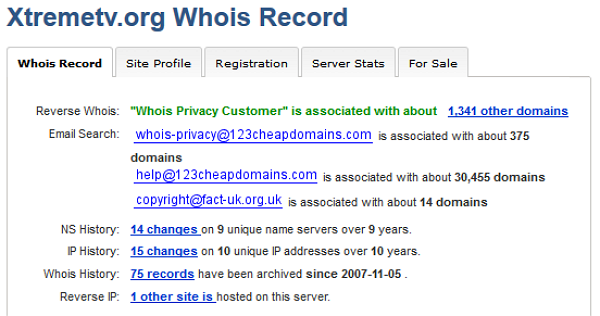
However, for some unknown reason there are plenty of site operators who make it very easy for FACT. In several recent cases, queries on the affected sites’ WHOIS entries has revealed the site operators’ names and addresses, completely unprotected.

While revealing WHOIS reports can indicate that FACT might have been in town, there is another more obvious sign – FACT’s email addresses embedded into domain entries.

In previous cases as well as the one involving XtremeTV and MazysMadhouse, copyright@fact-org.uk is now listed as the site’s contact email. This is because FACT demands the sign over of the site’s domain as part of the settlement agreement. Once the domain is in FACT’s hands it is shut down, taking the site with it, if that hasn’t gone offline already.

XtremeWhois

“We continue to direct visitors to domains signed over to FACT to legitimate resources where they can enjoy films and TV programmes in the cinema, online and on disc,” FACT’s Eddy Leviten told us.

Finally, Usenet indexing site NZBRoyalty.com also fell to FACT pressure this month. It appears the closure didn’t require a home visit, just an email to the site’s operators.

“Investigators at FACT have been examining your site and have noted that it is predominantly infringing TV content that is being made available,” FACT Director of Investigations and Intelligence Peter O’Rourke told the site in an email. “FACT requests that you desist from this activity immediately. Failure to do so will result in further investigation which may result in criminal prosecution.”

The perfectly understandable response from the site was put personal lives first.

“We are no longer under the radar. And therefore we also need to dip out. Remember we have lives and families,” the site’s operator said in a statement. “Sorry folks. Hope you all understand that this is out of our hands.”

All of the sites listed in this article are now closed and signs suggest that FACT will continue to close more, as long as site operators can be identified or simply convinced that prosecution and/or imprisonment is a serious possibility.

Source: TorrentFreak, for the latest info on copyright, file-sharing and VPN services.

01 Mar 10:42

Dropbox's new arbitration clause takes away your right to sue — so take it back!

by Rene Ritchie

Dropbox is giving you 30-days to opt-out of arbitration

Popular online storage app Dropbox has updated their terms of service (ToS) and that includes a new clause that would have any disputes setlled by an arbiter of their choosing. That means, if your privacy is ever violated, your data ever damaged, or anything goes wrong in any way at any point in time, you won't be able to sue either directly or as part of a class action. And that may not be a good thing.


01 Mar 10:41

TSA Reportedly Demands To Inspect Man’s Luggage For Bitcoin [Updated]

by Gregory Ferenstein
Davi Baker wasn't quite sure how to comply with the TSA's demands to inspect his bags for Bitcoin. Baker had found himself in a testy exchange with airport security personnel during an enhanced screening, and they wanted an additional search of his belongings. Read More
28 Feb 22:05

Bond 24 To Get Underway In October

Bond 24 To Get Underway In October

At least, Ralph Fiennes says so


Bond 24
– or ‘James Bond And The Something Of Boris’, as it almost certainly won’t be called – won’t have the boost of a big anniversary, like Skyfall, or the novelty of a reboot, like Casino Royale, but it shouldn’t need either. As a franchise, Bond has its mojo back. It also has a start date, with Ralph Fiennes telling MTV News that October is the likely kick-off for production.

With Pinewood studios also hosting Star Wars VII, there’s a leafy corner of Buckinghamshire that’s likely to be the capital of the entire movie world for the next two years. That said, there’s no official word on where Bond 24 will do its sound stage work – although it’d be a little strange for it not to be under the roof 007 lends his own bloody name to – and there will also be months of location work in a variety of exotic locales.

Bond 24 arrives in UK climes in October 2015. Beyond that we know less than a lot about what’s on the cards. Fiennes, of course, is back as Mallory – AKA ‘M’ – and Daniel Craig returns as Bond. Also lining up are Naomie Harris (Eve Moneypenny) and Ben Whishaw (Q), with Sam Mendes back behind the camera. One absentee is DP Roger Deakins. The cinematographer has ducked out of the franchise, but Empire’s big celebration of cinematography features some worthy successors.


28 Feb 22:03

Google Doubles Play Books File Size Upload Limit To 100MB Per File

by Ryan Whitwam

bUsers with great big ebooks have reason to celebrate today – Google has doubled the file size limit for Google Books uploads to 100MB. The change came with little fanfare, just a small update on the Google Books support page listing the new limit as 100MB per file.

2014-02-28 15_44_45-My Books - Google Play

Most books are, of course, nowhere near that large, but you can add any non-DRM'd PDF or EPUB file to Google Books. Files can be added on the web or from Android, just remember the 1000 file limit.

Done With This Post? You Might Also Like These:

Google Doubles Play Books File Size Upload Limit To 100MB Per File was written by the awesome team at Android Police.


28 Feb 22:02

Samsung Gear Fit named Best Mobile Device at Mobile World Congress

by Richard Devine

Samsung Gear Fit

Samsung's newest wearable stole the show

Mobile World Congress

Samsung walked away from Mobile World Congress this week with the coveted Best Mobile Device award, but not for the Galaxy S5. Instead, its latest wearable, the Gear Fit, claimed the accolade and stole the show. The Gear Fit is an interesting and exciting device, crossing a smartwatch and a fitness band with a pretty stunning curved Super AMOLED display.

The award was announced on the final day of the show in which we saw a number of big device announcements from the likes of Samsung and Sony among others. We managed to grab some hands on time with the Gear Fit – alongside the Gear 2 – earlier in the week, and you'll find that right after the break.

Source: Samsung Tomorrow


28 Feb 22:02

All Three UK customers 'now on a 4G tariff'

by Alex Dobie

Three

Three 4G LTE now live 'in 36 large towns and cities'

Following the completion of its staged 4G rollout, Three UK says all of its customers now have access to its LTE network. The operator says some 1.7 million of its customers are already using 4G-capable devices, and are set for a "seamless transition" to the faster network. As previously announced, all Three customers with a capable device will get access to 4G at no extra cost.

Three claims its LTE network is now operational in 36 large towns and cities, including London, Birmingham, Manchester, Reading and Liverpool. Looking ahead, the operator aims to have 50 cities and 200+ towns covered by the end of this year, and over 98 percent UK population coverage by the end of 2015.


28 Feb 22:02

Looking for free Android apps on Amazon? There are nine up for grabs today!

by Phil Nickinson

Amazon Appstore

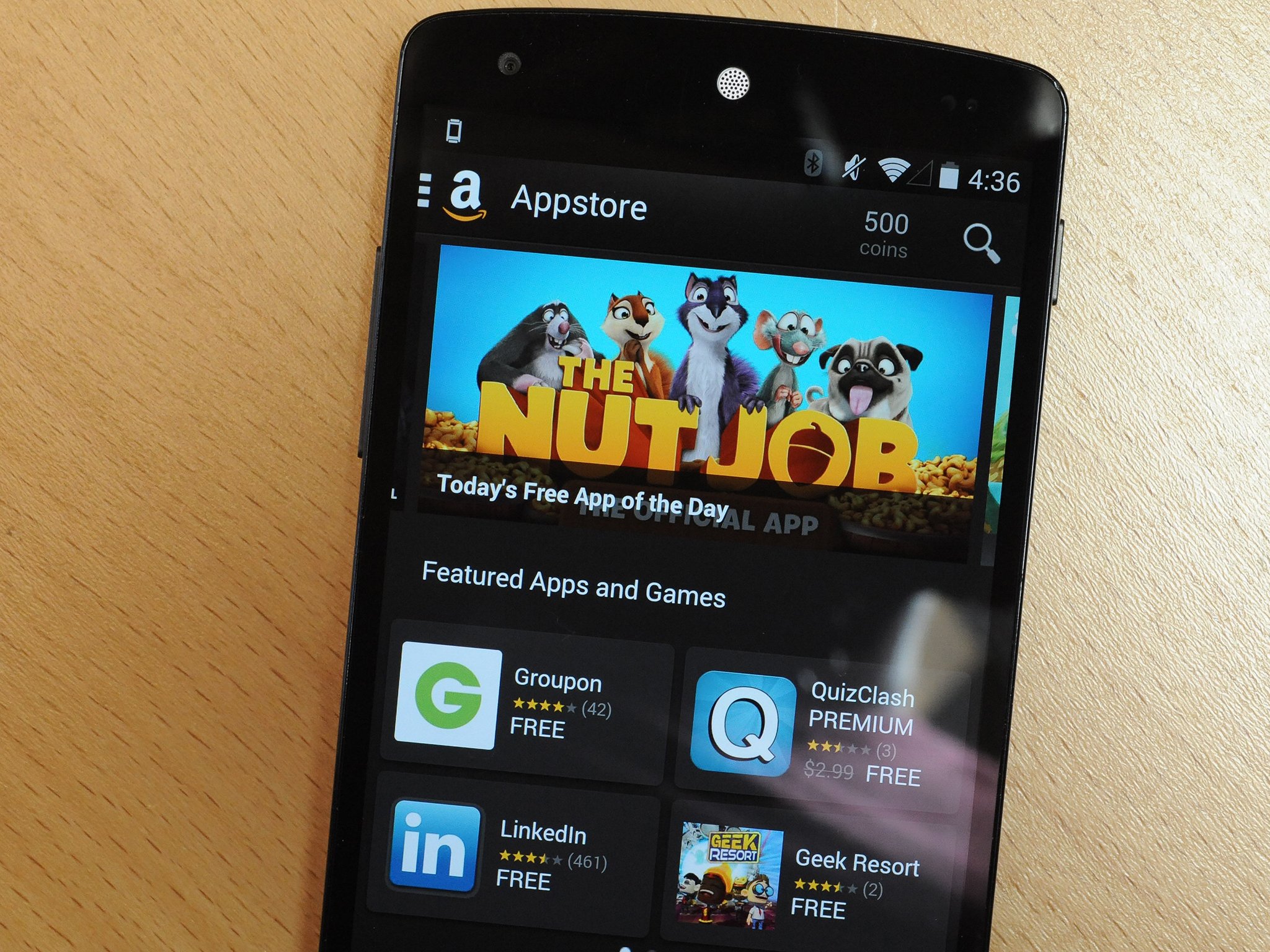
Amazon today is offering up some nine free Android apps. As in gratis. Pay nothing, spend nothing. Free. Android. Apps. A couple are for Kindle tablets, but the other seven should work on smartphones as well. All you need is the Amazon Appstore app, and you're on your way.

Here's the list:


28 Feb 21:52

Seven Downloads and Extensions to Make Dropbox Even More Awesome

by Eric Ravenscraft

Seven Downloads and Extensions to Make Dropbox Even More Awesome

Dropbox is easily the internet's favorite cloud storage provider—at the very least it's our favorite . There are plenty of clever things you can do with it right out of the box (get it?). However, there's also no shortage of apps and extensions you can get to make using Dropbox itself even easier.

Send Files Directly From the Web to Dropbox

Seven Downloads and Extensions to Make Dropbox Even More Awesome

Getting files from the web into Dropbox isn't always a one-click affair. Chrome extension Download to Dropbox adds an option to your right-click menu to send any files directly from the web to a folder on your Dropbox. You can accomplish something similar manually in Firefox with the extension Save Link in Folder. Guiding Tech has an explainer on how to accomplish that here.

Download Multiple Files at Once to Android

Seven Downloads and Extensions to Make Dropbox Even More Awesome

Dropbox for Android doesn't actually download your files locally in the same way it does on your regular computer. While this is probably a good thing overall (many of us could fill up our phones completely with what's in our Dropbox folders) sometimes you want to download something locally like pictures. For this, Folder Downloader For Dropbox does a pretty great job. However, as one of our readers over on Hackerspace pointed out , apps like ES File Explorer can also be used for this purpose if you have them installed.

Sync Folders on Android to Dropbox with Titanium Media Sync

Seven Downloads and Extensions to Make Dropbox Even More Awesome

One other annoyance of the Dropbox app for Android is that you can't automatically upload files in a given folder to your cloud storage. Auto Upload works for photos, but for everything else, you have to upload manually. Previously covered Titanium Media Sync (from the developers of Titanium Backup ) allows you to do rectify this problem. You can set specific folders that will automatically upload all of their contents to your Dropbox storage. You can also do a one-time sync in the reverse direction, downloading all the contents of a specific Dropbox folder to your phone, but it won't continually monitor for new files.

Allow Others to Upload to Your Dropbox

Seven Downloads and Extensions to Make Dropbox Even More Awesome

If you and someone else both have Dropbox accounts, you can share folders and each of you can add files to your storage. If they don't have a Dropbox account, however, you need something like Supply Drops. This service allows you to create a "Drop Zone". Anyone with the link to the Drop Zone can upload files to a folder on your Dropbox storage. The one downside is that after 48 hours, the Drop Zone expires. You can pay a few dollars to get the Drop Zone to stick around permanently, though.

Easily Move Files to the Public Folder

Seven Downloads and Extensions to Make Dropbox Even More Awesome

Every Dropbox account has a single folder by default that you can easily share a public link to. A simple right-click on any public file will give you a public link. However, if you have files in other folders you want to share, you need to move them. Dropbox Plugin for Windows allows you to add a "Copy to Public" and "Move to Public" option to your Windows context menu, making it even easier to share Dropbox files.

Access Files in Chrome with EasyDrop

Seven Downloads and Extensions to Make Dropbox Even More Awesome

One of the nice things about Dropbox is that you can access your files from anywhere, even if you're not on your own computer. If you frequently need to access the web version of Dropbox—say on a work computer or a shared machine—EasyDrop for Chrome allows you to access all of your files directly from the browser.

Explore More Dropbox Add-Ons

We've gone through some of the more broadly useful download for Dropbox, but there are tons more over on the Unofficial Dropbox Wiki. Here are just a few of the ones you can find for various platforms that fill some niche needs:

The sky is the limit with the add-ons that are available both within Dropbox and in your browser or operating system. Chances are, if you can dream it, you can automate it.

28 Feb 21:46

This is easily the coolest thing to emerge from MWC

by Chris Smith
YotaPhone2 Specs, Release Date, Price

Just as rumored before the event, Yota unveiled its second-generation YotaPhone at MWC 2014, a device that packs two displays just like its predecessor. The YotaPhone 2 will offer bigger displays than the first model, with the secondary always-on e-ink display now offering full touch control. While the new YotaPhone 2 will let buyers use 74% of the phone’s surface as a display, the phone also offers other high-end specs.

Continue reading...

28 Feb 21:45

Video: This credit card-sized battery can ‘hypercharge’ your smartphone

by Chris Smith
LithiumCard Fast-Charging Smartphone Battery

LinearFlux on Thursday launched its Indiegogo funding campaign for a very interesting external battery charger project for mobile devices – the LithiumCard, “the world’s only ‘Rechargeable HyperCharger.’” The LithiumCard has about the same size of a credit card, while being slightly thicker, and thus it can be carried around in a regular wallet. The battery can hold a charge of 1200mAh, and, most interestingly, sports a fast charging technology that the company claims can charge devices faster than similar products from competitors.

Continue reading...

28 Feb 21:43

German court dismisses $2 billion patent troll claim against Apple

by Tom Warren

A German court has dismissed damage claims of $2 billion (€1.57 billion) over Apple's alleged infringement of a European patent. IPCom, a German company that regularly licenses patents, sought the damages by arguing that a patent it owns is essential to 3G and LTE devices. Germany's Mannheim regional court dismissed the case, having also dismissed a similar case between IPCom and HTC.

The rulings are a significant setback for IPCom, a company that owns 1,200 patents related to mobile technologies. While IPCom will undoubtedly appeal the cases, the company has been trying to sue HTC unsuccessfully for years. IPCom has previously agreed to license its patents on FRAND (fair, reasonable, and non-discriminatory) terms, but it's also been...

Continue reading…

28 Feb 21:42

Tor developing anonymous instant messenger

by Jacob Kastrenakes

Tor has been making it easier and easier over the years to anonymously browse the web, and now it's working to make it just as easy to chat anonymously too. Tor is currently working on a secure instant messaging app for the desktop that will automatically route encrypted messages through its anonymous network. The instant messenger may be available on its own or included as part of the Tor Browser Bundle — an app that allows users to easily enable Tor and begin browsing the web anonymously.

Continue reading…

28 Feb 21:41

UPDATED: Mt.Gox Files For Bankruptcy Protection, Says 850,000 Bitcoin Lost

by Catherine Shu
Mt.Gox has filed for bankruptcy protection and has outstanding debt of about $63.6 million, a lawyer for the bitcoin exchange said today during a press conference at the Tokyo District Court. Read More