Shared posts

23 Apr 22:02

Go back in time with Street View

by Emily Wood
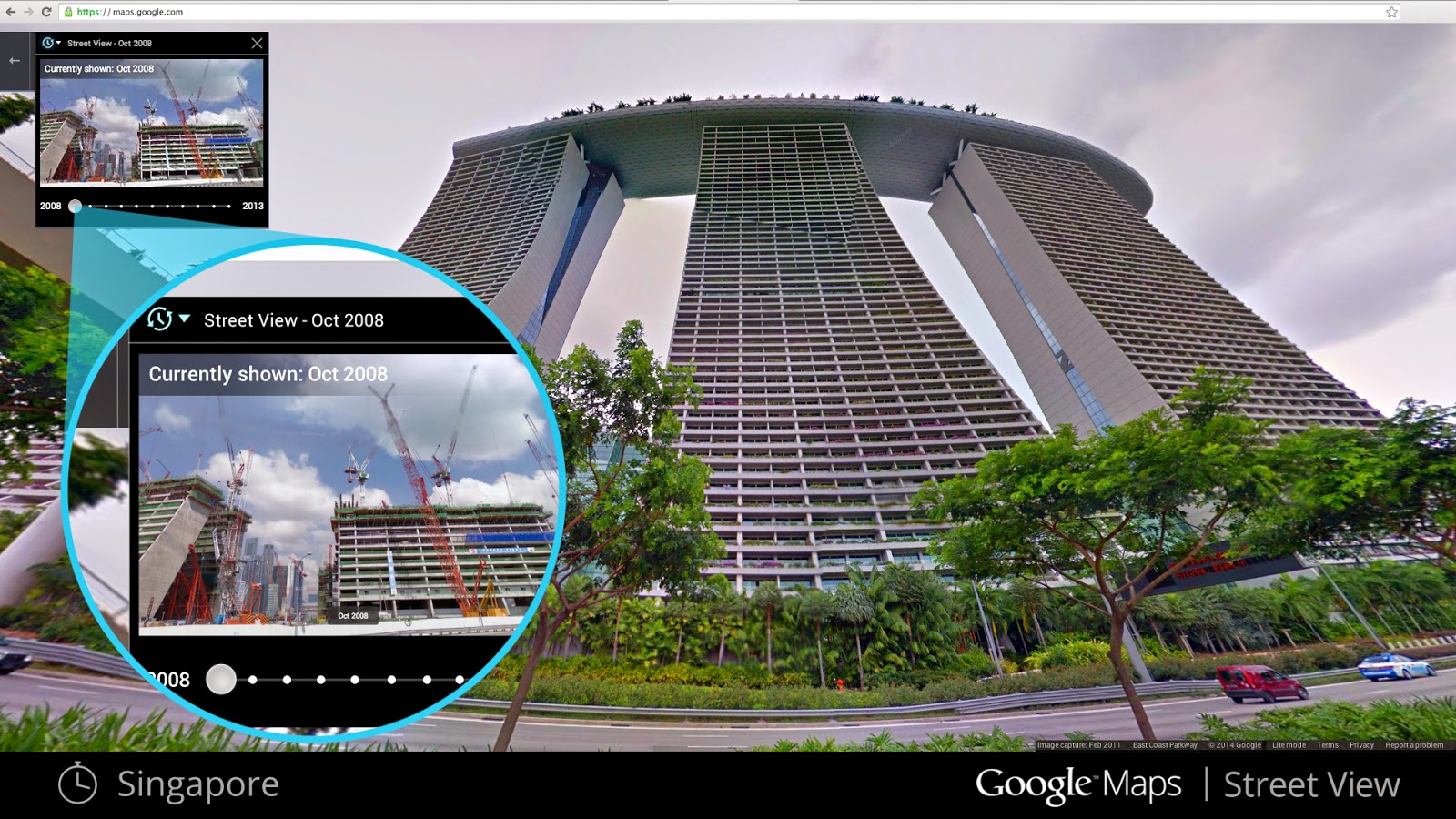
If you’ve ever dreamt of being a time traveler like Doc Brown, now’s your chance. Starting today, you can travel to the past to see how a place has changed over the years by exploring Street View imagery in Google Maps for desktop. We've gathered historical imagery from past Street View collections dating back to 2007 to create this digital time capsule of the world.
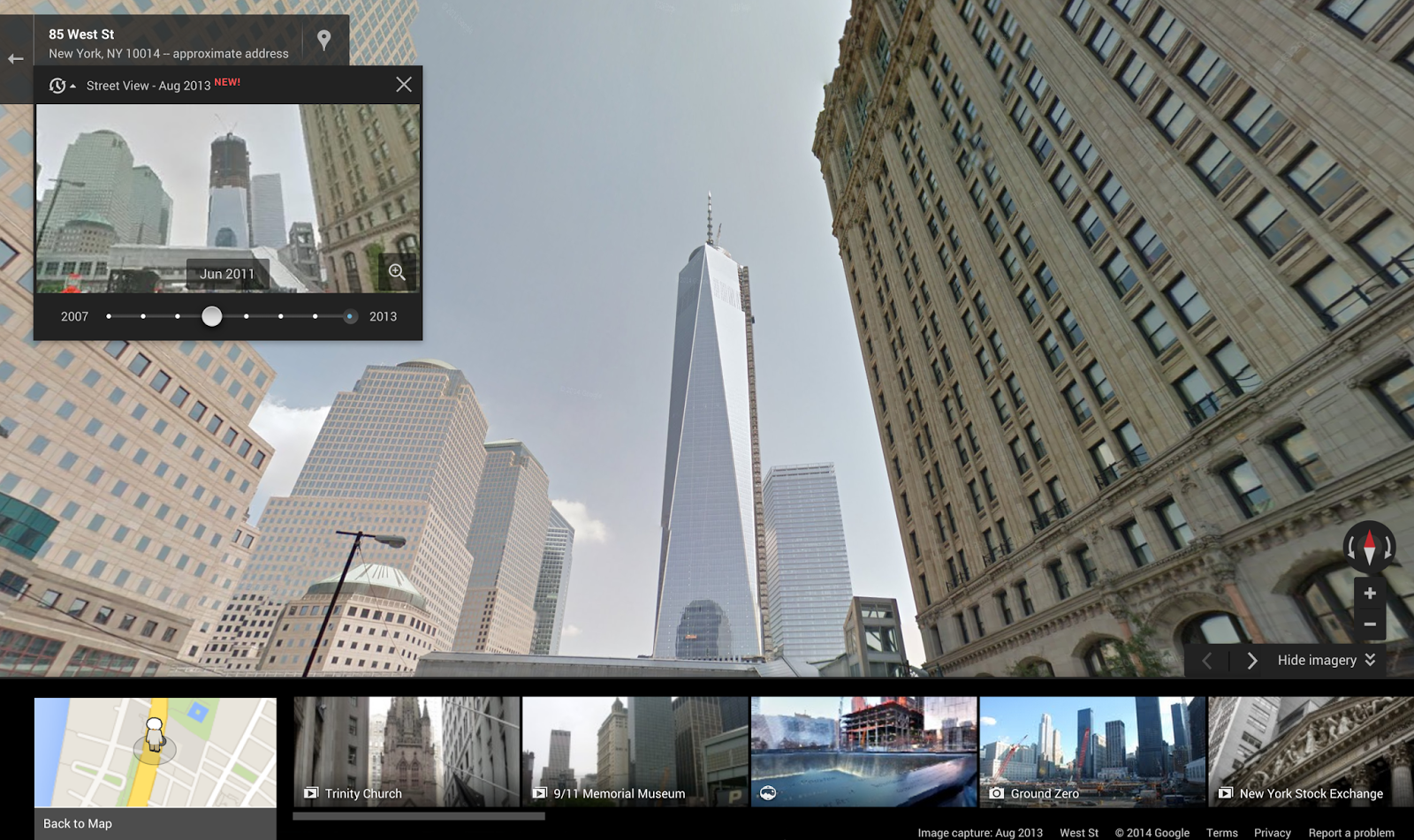
If you see a clock icon in the upper left-hand portion of a Street View image, click on it and move the slider through time and select a thumbnail to see that same place in previous years or seasons.

Now with Street View, you can see a landmark's growth from the ground up, like the Freedom Tower in New York City or the 2014 World Cup Stadium in Fortaleza, Brazil. This new feature can also serve as a digital timeline of recent history, like the reconstruction after the devastating 2011 earthquake and tsunami in Onagawa, Japan. You can even experience different seasons and see what it would be like to cruise Italian roadways in both summer and winter.
Construction of the Freedom Tower, New York City
Destruction in Onagawa, Japan after the 2011 earthquake

Forget going 88 mph in a DeLorean—you can stay where you are and use Google Maps to virtually explore the world as it is—and as it was. Happy (time) traveling!

Posted by Vinay Shet, Google Street View Product Manager
23 Apr 19:35

[New App] Sony Publishes Its Own Exclusive Background Defocus Camera App To Google Play

by Bertel King, Jr.

Background-ThumbTaking the background in an image and blurring it is currently the big thing in mobile photography. HTC touted the feature when raving about the M8's duo camera. Google added a similar lens blur effect in the camera app it recently uploaded to the Play Store. Samsung, too, unsurprisingly packed this feature in alongside the plethora of others it crams into the Galaxy S5. Now Sony has uploaded its pre-existing effort to the Play Store, where it can more easily roll out future updates.

Done With This Post? You Might Also Like These:

[New App] Sony Publishes Its Own Exclusive Background Defocus Camera App To Google Play was written by the awesome team at Android Police.


23 Apr 18:53

Google is testing 'Stars,' an attempt to make bookmarking actually useful

by Adrianne Jeffries

Bookmarking: every web browser has it, few human browsers actually use it. Google is testing a new Chrome feature that would allow users to save any piece of content — an email, a web page, an image — and review it later as part of a searchable, organizable library.

Continue reading…

23 Apr 14:38

HBO Go coming to Amazon Fire TV, HBO shows to Amazon Prime Instant Video

by Simon Sage

HBO and Amazon have struck up a multi-year agreement which makes Instant Video the exclusive online-only subscription service for HBO's shows. As a part of the deal, the recently-launched Fire TV will get HBO Go by the end of the year.


23 Apr 13:24

Kittyo Keeps Your Cats Entertained While You Spy On Them

by Catherine Shu
Kittyo Do you feel blue when separated from your cat for any length of time? (I hope so, because then I'd feel a lot less alone). Despite their rugged individuality, indoor cats need to satisfy their stalking instinct, keep stimulated, and get enough exercise, according to the Humane Society. Kittyo is a device that lets owners keep their cats entertained while spying on them from afar. Read More

22 Apr 23:08

Everything You Need to Know About Optimizing Your Wi-Fi in One Video

by Whitson Gordon

Getting crappy Wi-Fi reception on one side of your house? This video details a number of ways to boost your reception, both simple and complex—in only 5 minutes.

Linus at Techquickie is at it again, this time sharing a bunch of tips for getting better Wi-Fi reception in your home. We've covered many of these tips before, but it's a good, shareable video for your less tech-savvy friends and family. It covers all sorts of things, from simple router placement (in the center of your home, away from thick and dense walls) to finding the right wireless channel, and more.

If you want more information on any of those tips, we've covered them before in our complete guide to networking and our top 10 tips for better Wi-Fi reception. If you learn a bit better through visuals and audio, though, the video is a great primer to what's out there.

Optimizing Your Wi-Fi Network As Fast As Possible | Techquickie

22 Apr 20:27

HBO Demands Takedown of Game of Thrones Screenshots

by Andy

gotcensoredIf one had to single out a current TV show that is most-often related with Internet piracy it would have to be Game of Thrones. The show has been shared by millions of people and just last week broke yet another swarm record with 193,418 simultaneous sharers.

There has been much discussion over HBO’s stance to this massive piracy. Last year, HBO programming president Michael Lombardo described the unauthorized downloading as “a compliment“, a statement that was followed up by plans to smarten up release schedules.

The theory at HBO parent Time Warner is that while piracy is largely undesirable, it helps to generate buzz and reduces advertising expenditure. The company also believes that when fans enthuse over Game of Thrones it’s excellent word-of-mouth promotion, so that makes today’s news even more unusual.

The developing situation involves fan site ScreenCapped.net. The site hosts user-uploaded screenshots of popular movies and TV shows which its users transform into fan-created artwork. The piece below is based on the The Lord of the Rings and The Hobbit.

screencapped1

The site has a pretty large archive of screenshots from dozens of movies and TV shows, which until recently included HBO’s Game of Thrones and True Blood. But in a surprise move HBO has now accused the site of engaging in copyright infringement and ordered it to remove screenshots of these key titles. Screenshots from both shows no longer appear on the site.

Worried at the implications of the HBO DMCA notice, a petition has been launched on Change.org in support of the site and requesting that HBO reconsiders its move. In the petition, which at the time of writing has already received more than 2,000 signatures, ScreenCapped operator Raina Stephens lays out her request to HBO’s anti-piracy director Jake Snyder.

“The fans and staff of Screencapped.net ask that you remove the DMCA against Screencapped.net so that the site may continue to provide HBO fans with high quality screencaps for non-profit use,” Stephens writes.

Users of the site have been expressing their disappointment on Change.org.

screencapped2“Come on, guys. You’re going to slap a DMCA claim on ONE site out of HUNDREDS for hosting screen captures?! It’s not like they’re hosting downloads of your episodes!” user Mandi S writes.

“Drop the claim so I can get my favorite screencap gallery back! How do you think we fan artists make those amazing arts that you KNOW you love. Get real and drop the suit, PLEASE.”

Another user, Alessia Colognesi from Italy, questions whether the move makes financial sense to HBO.

“It’s ludicrous to think that watching/having screencaps will take away from the income of money that you might have. The only reasons why screencaps exist is to let creative people share their love for something making graphics, designs and such; and that’s a good thing because that way other people can take a look at a show and maybe start watching it. Go do something better with your time,” Colognesi concludes.

While the precise motivation behind the takedown remains unclear, it’s difficult to argue with the two key points above. ScreenCapped isn’t offering the actual shows for download and discouraging fans from getting even more invested in a show via innocuous-looking screenshots seems to run counter to Time Warner/HBO’s “buzz is good” plan.

Source: TorrentFreak, for the latest info on copyright, file-sharing and anonymous VPN services.

22 Apr 19:10

'Animal Architecture,' an awesome new photo book about the structures critters create

by Xeni Jardin

'Animal Architecture," by Ingo Arndt and Jürgen Tautz, with a foreword by Jim Brandenburg, is a beautiful new science/photography book exploring the mystery of nature through the "complex and elegant structures that animals create both for shelter and for capturing prey."

Arndt is a world-renowned nature photographer based in Germany, whose work you may have seen in National Geographic, GEO and BBC Wildlife.

Above, a grey bowerbird's bower in Australia's Northern Territory. "The grey bowerbird goes to extreme lengths to build a love nest from interwoven sticks and then covers the floor with decorative objects. The more artful the arbor, the greater the chance a male has of attracting a mate."

"Arndt’s photographs display wonders such as the colourful mating arenas of bowerbirds in West Papua and the fantastic nests created by ants in Africa," says publisher Abrams and Chronicle.

"Studio photographs supplement the images from Arndt’s journey and offer close-up views of the nests, mounds and webs constructed by the animals. Features both breathtaking photography and scientific insight into animal behavior."

I spotted the book via a Guardian photo gallery, which you should check out here.

I have ordered myself a copy on Amazon!

More photos below, all by Ingo Arndt.


22 Apr 19:08

Nest Thermostats now available through Google Play

by Phil Nickinson

You can now buy a Nest Thermostat through Google Play. Price is the same as other retail outlets — $249 — and it'll ship in 1 to 2 business days, Google says. And for every thermostat sold today, Google will plant a tree. Because Earth Day. It's also available in the UK for £179.

The Nest Thermostat is a "learning" device that connects to the Internet (and other Nest products). It's got a 1.75-inch display, controlled by a metal ring on the outside of the thermostat. Nest learns your temperature preferences, when you're home or away, and is aware of the outside weather, and adjusts itself accordingly. It's not a cheap device, for sure, but promises to pay for itself in savings.

Not available still is Nest Protect, which was pulled from market because of software issues with the combination smoke/carbon monoxide detector.


22 Apr 19:08

Withings Pulse O2 keeps tabs on your oxygen levels

by Simon Sage

Withings has announced a new health band called Pulse O2. It does all of the usual stuff, like monitor steps, heart rate, elevation, distance traveled, sleep habits, and estimates calories burned, but the really cool feature here is the ability to monitor the oxygen level in your blood. That information is estimated from the infrared heart rate monitor, then beamed to your phone through a companion app. The device itself can be mounted in a wrist strap, a clip, or carried around separately.


22 Apr 16:22

Amazon's smartphone reportedly full of tilt features

by Phil Nickinson

Because swiping is too simple and gestures have already come and gone, Amazon's upcoming (but still unannounced) smartphone will rely heavily on tilt features to interact with its user interface, according to BGR. No new images of the UI were shown, but BGR references a number of use cases — and that traditional menu buttons aren't even a part of apps. This ... should be interesting.

Source: BGR


22 Apr 13:22

22 Best New Android Apps And Live Wallpapers From The Last 2 Weeks (4/8/14 - 4/21/14)

by Michael Crider

roundup_icon_largeWelcome to the roundup of the best new Android applications, games, and live wallpapers that went live in the Play Store or were spotted by us in the previous 2 weeks or so.

Please wait for this page to load in full in order to see the widgets, which include ratings and pricing info.

Looking for the previous roundup editions? Find them here.

Featured App

Passport Photo ID Studio

This week's roundup is brought to you by Passport Photo ID Studio from Handy Apps.

Done With This Post? You Might Also Like These:

22 Best New Android Apps And Live Wallpapers From The Last 2 Weeks (4/8/14 - 4/21/14) was written by the awesome team at Android Police.


22 Apr 13:21

Transport for London looking to introduce smartphone based fare payments

by Richard Devine

With NFC on your smartphone, using it to pay for your morning commute across London may be getting closer to reality. According to a report in the Financial Times, carriers EE and Vodafone have already begun talks with Transport for London over extending their mobile wallet solutions to pay for your travel.

The initial trial is expected to be a “pay as you go” scheme using apps owned by the mobile operators that can be preloaded with money. Operators could also consider payment for tickets on a weekly or monthly basis, according to a person familiar with the plans.

The barriers at London Underground stations will work with smartphones for NFC payments, though that facility would need to be activated first. With the successful Oyster card scheme costly for TfL to run, they're opening up to other methods of contactless payments for travellers.

Source: Financial Times

22 Apr 13:21

Sony Smartwatch 2 update brings custom watch faces, wallpapers and more

by Adam Zeis

One of the biggest gripes with the Sony Smartwatch 2 was that there was no way to customize watch faces at all. Today a new update has arrived that not only adds custom watch faces to the mix, but also provides a built-in editor right within the app. You can still choose from the base set of faces that include the standard digital and analog faces in a variety of styles, but now have the option to create and edit your own faces as well.


22 Apr 13:20

Aol Mail Hacked With Spoofed Accounts Sending Spam

by Matt Burns
aol It’s not just you. Aol Mail was hacked affecting an untold amount of accounts that were seemingly spoofed. The Twitter hashtag #aolhacked is filled with first-hand accounts of spam being sent from either the hacked email account or an email account spoofed to look like the original. We’ve reached out to Aol for further clarification. The company said in a statement earlier today that… Read More
22 Apr 13:13

The Many Things You Can Do with a Middle Click on Your Mouse

by Whitson Gordon

The Many Things You Can Do with a Middle Click on Your Mouse

That wheel in the middle of your mouse is good for more than just scrolling—in fact, the button can do quite a bit. Here are some of the oft-ignored shortcuts built in to the middle mouse button.

If you're on a laptop and don't have a middle mouse button, you can probably still perform many of these actions. Many laptops will simulate a middle click if you press the left and right buttons simultaneously, or you can add that ability with a program like AutoHotkey. Of course, most of these things are easily accessible from other places, too—they're just a bit quicker if you have a middle mouse button.

You'll also notice a lack of Mac shortcuts below—likely because Mac mice don't usually have a middle mouse button. You can add in a gesture with an app like MiddleClick for the browser shortcuts, if you so choose.

In Your Browser

The Many Things You Can Do with a Middle Click on Your Mouse

Your browser—whether it's Firefox, Chrome, or even Internet Explorer—makes better use of the middle mouse button than anything else. With it, you can:

  • Close a tab by middle-clicking on the tab
  • Open a link in a new tab by middle-clicking on the link (this also works in the address bar's drop-down menu and back and forward buttons)
  • Open all bookmarks in a folder at once by middle-clicking on the folder in your bookmarks bar
  • Enable auto-scroll by middle-clicking on a web page
  • Paste text in Firefox with a middle click, by enabling the middlemouse.paste option in about:config

You may be able to add more functionality to your browser with extensions, but these are the middle-click shortcuts built into most browsers.

In Windows


Apart from the browser shortcuts, Windows has a few other shortcuts built-in for the middle mouse button. You can:

  • Open a new instance or window of a program by middle-clicking its taskbar icon
  • Close a window by hovering over its taskbar icon, then middle-clicking the thumbnail that pops up
  • Enable auto-scroll in Microsoft Office by middle-clicking in the document

Of course, you can always use an app like AutoHotkey to map the middle mouse button to just about any action you want. You may also have some limited customizability in your mouse's settings, and some third-party apps may come with middle mouse button functionality built-in.

In Linux

The Many Things You Can Do with a Middle Click on Your Mouse

We'd be remiss not to mention Linux, which has one particularly famous (and awesome) middle click shortcut: if you middle click in a textbox, you can paste text from the clipboard in just about any app. It's pretty darn handy!


The middle mouse button doesn't get nearly as much attention as its right and left brethren, but it's still a useful tool if you can remember what it does. Hopefully this gives that button a bit more play in your productivity routine. If we missed any good middle-click shortcuts, let us know and we'll add them to the list!

Title image remixed from Molodec (Shutterstock) and Tribalium (Shutterstock).

21 Apr 20:52

Netflix Plans to Raise Prices for New Members

by Eric Ravenscraft

Netflix Plans to Raise Prices for New Members

At Netflix' earnings call today, the company announced that it plans to raise its plan pricing by "one or two dollars" for new customers. Existing customers will keep their old rate for "a generous time period," but eventually the rate will probably apply to everyone. Read more here.

21 Apr 20:20

Microsoft Begins Life As A Smartphone Manufacturer As Nokia Deal Is Finalized

by Dan Rowinski

Nokia CEO Stephen ElopNokia CEO Stephen Elop

Microsoft and Nokia will consummate their marriage by the end of this week. On Monday, Microsoft said its $7.2 billion acquisition of Nokia's devices and services division, which was announced in September, will be finalized by Friday.

In the deal, Microsoft will subsume nearly 32,000 Nokia employees including CEO Stephen Elop, who will become the head of devices at Microsoft reporting to Microsoft CEO Satya Nadella. 

Reports surfaced over the weekend that Microsoft would rename Nokia as "Microsoft Mobile." Microsoft has not confirmed the name change at this time. Under the original agreement of the acquisition, Microsoft is allowed to use the "Nokia" and "Lumia" smartphone brand names for several years after the acquisition is finalized.

Microsoft announced a couple of tweaks to the original agreement on Monday, noting that it will bring on a 21-person team in China in addition to working on new mobile devices; part of the original agreement said Microsoft would take control of a manufacturing facility in Korea, but that is no longer the case. Microsoft will, however, take control of the Nokia.com domain and its social media sites for up to one year.

Nokia will continue to exist as a company outside of Microsoft. Nokia retains its patents portfolio, brand name and the Nokia HERE maps team that employs about 6,000 people globally. 

Microsoft, on the other hand, will now embark into previously uncharted territory as an original device manufacturer that designs and builds its own hardware. With Nokia in tow, the pressure is on Microsoft to grow its own market share and the general viability of its mobile platform, Windows Phone. Earlier this month, Microsoft released the developer preview of the latest version of Windows Phone, Windows Phone 8.1, which introduces a new voice-activated personal assistant called Cortana plus a handful of other new features and improvements.

Lead image (Stephen Elop at Mobile World Congress 2014) by Dan Rowinski for ReadWrite

21 Apr 20:18

Did lead in gasoline cause a decades-long crime wave?

by Arielle Duhaime-Ross

The presence of lead in the environment — a subject discussed in Neil deGrasse Tyson's show Cosmos last night — has been linked to a number of health problems, including kidney damage, anemia, and various forms of cognitive deficiencies. But the BBC reports that lead might also be to blame for an increase in violent crime following its introduction in petrol in the 1920s. Indeed, people exposed to lead tend to make poor decisions and to become more aggressive over time. And, according to various economists, the incidence of violent crime during the 20th century appears to correlate with the rise and fall of lead in gasoline. Unfortunately, this link is hard to validate, so the idea is speculative. Regardless, the tale of how...

Continue reading…

21 Apr 20:17

Google is working on end-to-end encryption for Gmail

by Russell Brandom

Google wants to make it easier for Gmail users to encrypt their emails, according to a report in VentureBeat. PGP has been an open-source encryption standard for nearly 20 years, but the protocol has been dogged with usability issues that many claim have kept it from broader use. As a result, engineers at Google are working on ways to make PGP easier for users, as part of a larger push for stronger user security in the wake of the NSA revelations. It's still unclear exactly what form the measures will take, and the details of the implementation will make a huge difference in the security of the final product.

Continue reading…

21 Apr 20:16

Top 10 most popular Android apps from last week: Google Camera, Retrica

by Steve Raycraft

Every week we cover new Android apps with Fresh Meat on Wednesday, followed by Android Gaming on Thursday and Top 10 App Updates on Friday. When Monday rolls around, we look back to see which apps were the most appealing to our audience. Read on for the 10 most popular Android apps from last week.

1. Google Camera

Google Camera

App info: The official Google Camera comes to Google Play with modes such as Photo Sphere, Lens Blur and Panorama.


2. Zooper By Beard

Zooper By Beard

App info: Here is a set of 12 minimal widgets designed by La Barba and Richard Colon.


3. PAPER APEX/NOVA THEME

PAPER APEX

App info: Paper Theme provides a unique “paper” look to your icons. The app is updated weekly and includes Muzei Live Wallpaper support.


4. Elegante UCCW skin*

Elegante

App info: Elegante has a beautiful clock display and has been one of our readers’ favorite UCCW skins to download.


5. Behang

Behang

App info: Behang is a set of wallpapers created by knokfirst.


6. Cryten

Cryten

App info: Beautiful, clean, flat, round and neat icon pack with pastel palette of colors that makes Cryten very unique!


7. Zooper Widget Pro

Zooper Widget Pro

App info: Minimal, classy, extremely customizable, and battery friendly “Do It Yourself” widget with almost limitless possibilities!


8. A Better Camera

A Better Camera

App info: A Better Camera combines features found in many other apps to provide you with the best, all-purpose, full featured camera app.


9. Retrica

Retrica

App info: Retrica offers numerous professionally designed filters, many more than any other camera apps do. You can apply the filters even before you take a photo, or after, as you prefer.


10. Flixtor

Flixtor

App info: Flixtor lets you download and stream movies and TV shows directly to your Android device.


Note:  To ensure that all apps receive a fair chance to make the list, we will retire any app that has made the list for 3 consecutive weeks and will place it in our Android and Me App Hall of Fame. We will post this Hall of Fame list in a dedicated series. Any app with * next to the title indicates it will now be added to our Hall of Fame list and will no longer be listed in this article.

21 Apr 20:15

Find and Delete Unused Accounts With a Simple Email Search

by Mihir Patkar

Find and Delete Unused Accounts With a Simple Email Search

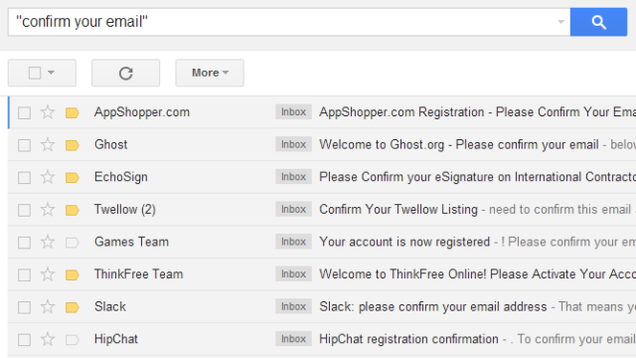
After the recent Heartbleed bug scare, some of you may want to go and delete those dormant accounts you never use any more. For a quick way to find such sites you signed up on, go to your inbox and search for the term: "Confirm your email."

When something like the Heartbleed security bug hits millions of people, our standard advice is to change your passwords across all the affected services. With Heartbleed, the list was so large that it was advisable to go back to every account you have signed up at. And if many of them are unused, it kind of makes sense to just delete them in case some other security flaw in the future compromises you.

If you are lucky, you use Lastpass to manage all your accounts and you can just delete everything from that list. But if that's not the case, chances are, you have used one or two email accounts to sign up at all these web sites over the years. Searching for "confirm your email" (first with the quotes, then without) in your inbox gives you a list of most of these websites, after which it's a matter of going there and deleting your account. The trick is similar to, and inspired by, searching for "unsubscribe" to purge newsletters in your email.

21 Apr 15:16

Use the 15% Splurge Rule to Avoid Financial Burnout

by Kristin Wong on Two Cents, shared by Whitson Gordon to Lifehacker

Use the 15% Splurge Rule to Avoid Financial Burnout

We've talked about how anunrealistically tight budget can backfire. To stay motivated and stick to your financial goals, allow yourself some breathing room. Money site Go Banking Rates offers a creative way to do this: set a savings goal, then use 15 percent of it on a splurge.

Certified Financial Planner Christopher V. Kimball suggests saving a portion of your weekly income in a regular savings account—nothing too crazy about that. But Go Banking Rates explains his spin on this traditional bit of advice:

"Once the fund reaches a certain amount (say, $1500), you then take 15 percent of what you've saved and blow it on something totally frivolous. The rest gets dumped into a long-term savings or investment instrument, like a certificate of deposit. This allows you the best of both worlds: Spending money on things that you want while planning for your financial future."

Kimball adds that the "incentive of guilt-free spending" can keep people motivated to continue saving. For more money saving strategies, read the post in its entirety.

5 Uncommon but Easy Money Saving Strategies | Go Banking Rates

Photo by Ken Teegardin.


Two Cents is a new blog from Lifehacker all about personal finance. Follow us on Twitter here.

21 Apr 12:45

[New App] CloudCaster (From The Maker Of FolderSync) Can Cast Video From 23 Different Sources To Your Chromecast

by Ryan Whitwam

ccMost apps that stream video to the Chromecast come with support for a few sources like local storage, Dropbox, Google Drive, and so on. The new CloudCaster app comes with support for 23 different cloud sources, plus local content and DLNA files. You can even give it a shot for free.

1 2 3

CloudCaster certainly has a ton of file sources for casting, but it's only compatible with the Chromecast – the similar AllCast app supports DLNA receivers and other devices like the Fire TV as well.

Done With This Post? You Might Also Like These:

[New App] CloudCaster (From The Maker Of FolderSync) Can Cast Video From 23 Different Sources To Your Chromecast was written by the awesome team at Android Police.


21 Apr 09:12

UK Police Force Shutdown of Sports Torrent Network

by Andy

cityoflondonpoliceAfter obtaining government funding to protect the rights of mainstream music and movie companies, last year UK police began a campaign aimed at closing dozens of torrent and other file-sharing sites.

Many sites subsequently reported receiving letters from PIPCU, the Police Intellectual Property Crime Unit, warning that their operations had been scouted and deemed to be infringing.

While most sites ignored the warnings, some inevitably felt the pressure and decided to quit while they were ahead. In the months that followed direct pressure on sites reduced when police began to concentrate on indirect measures, such as pressuring registrars to retract domains and advertisers to stop supporting sharing sites.

However, earlier this month police restarted their direct approach, sending threat letters out to the operators of torrent sites in an attempt to close them down directly. In at least one case the police have been successful.

Due to its coverage of sports including the NHL, NBA, soccer and Formula 1, The Sports Torrent Network (TSTN) was a site popular with fans on both sides of the Atlantic. With an estimated 20,000 userbase and its own ‘capping’ team, the site was certainly a fan favorite and possibly the largest site of its type. But now, after an unwelcome warning, the party is over.

TSTN

Along with other sites, a little under two weeks ago TSTN received communications from the police which stated that the site’s operators could be committing crimes with serious penalties attached.

“Such activity is an indictable offense under the Serious Crime Act 2007 and is punishable by up to ten years’ imprisonment (two years for encouraging/assisting communication to the public; and ten years for encouraging/assisting distribution to the public),” the police explained.

“PIPCU has the lawful right to pursue action against you and against the thesportstorrentnetwork.co.uk website in order to prevent, detect and disrupt criminal activity.”

While the threats looked official enough, a more detailed examination of the correspondence sent to TSTN raised questions over its authenticity. As can be seen from the screenshot below, a clear spelling error was present in the title of the mail, which lead to concerns this may have been some kind of fake.

PIPCU-TSTN

However, an additional error later in the email suggested that it was probably genuine. As can be seen under the highlight, it appears that police neglected to fill in a precise date instead of the placeholder text.

TSTN-error

But errors aside, TSTN decided that while it had been a good run, now was the time to thrown in the towel. The site is now permanently closed.

“We are sad the site had to go but feel it was the only option,” a staff member told TF.

With calls from the UK Prime Minister’s IP advisor to permanently fund the Intellectual Property Crime Unit, the shutdown of TSTN will certainly not be the last.

Source: TorrentFreak, for the latest info on copyright, file-sharing and anonymous VPN services.

21 Apr 09:07

Joss Whedon releases new movie as $5 rental on Vimeo

by Rich McCormick

Joss Whedon is currently working on the next Avengers movie, but being entrusted with one of Hollywood's biggest franchises hasn't stopped the creator of TV shows Firefly and Buffy the Vampire Slayer from experimenting with smaller films and new distribution models. His latest project, In Your Eyes — for which he provided the script and acted as executive producer — is now available for 72-hour rental on streaming site Vimeo for $5.

In Your Eyes tells the story of a psychic link between two strangers, discovered when, as a child, one of them careens face-first into a tree. Both grow up dissatisfied with their existence, but remain tied together by their strange connection. Whedon, who appeared on video after the premiere at New...

Continue reading…

19 Apr 21:34

Is Your VPN / Proxy Working? Check Your Torrent IP-Address

by Ernesto

boxedEvery day dozens of millions of people share files using BitTorrent, willingly exposing their IP-addresses to the rest of the world.

For those who value their privacy this is a problem, so many sign up with a VPN provider or torrent proxy service. This is fine, but some people then forget to check whether their setup is actually working.

While it’s easy enough to test your web IP-address through one of the many IP-checking services, checking the IP-address that’s broadcasted via your torrent client is more complex.

There are a few services that offer a “torrent IP check” tool, but for the truly paranoid there’s now an Open Source solution as well.

The developer, who goes by the nickname “cbdev”, found most of the existing tools to be somewhat “fishy,” so he coded one for himself and those who want to run their own torrent IP checkers.

“I’d rather have something I can control entirely,” cbdev tells TF.

“So, I wrote a tool people can install on their own servers, with the added bonus of it using magnet links, so ‘Tracking torrent’ files are required,” he adds.

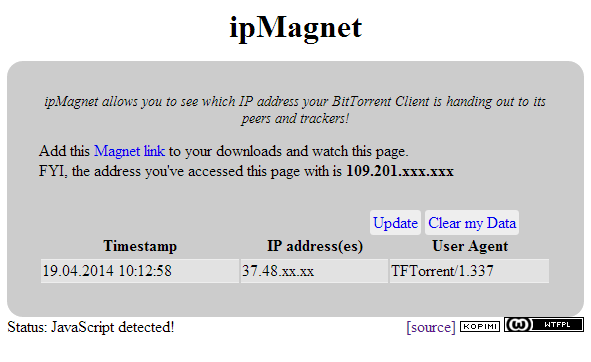
The ipMagnet tool allows BitTorrent users to download a magnet link which they can then load into their BitTorrent client. When the magnet link connects to the tracker, the user’s IP-address will be displayed on the site, alongside a time-stamp and the torrent client version.

ip-magnet

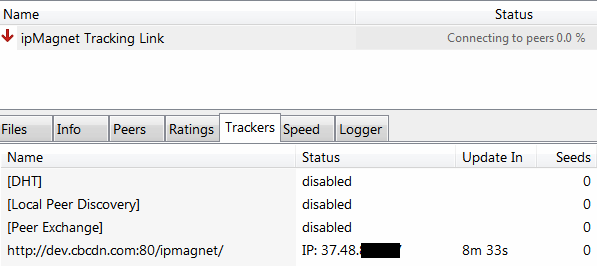
Alternatively, users can check out the tracker tab in their torrent clients, where the IP-address will be displayed as well.

For users who are connected to a VPN, the IP-address should be the same as the one they see in their web browser, and different from the IP-address that’s displayed when the VPN is disconnected.

Proxy users, on the other hand, should see a different IP-address than their browser displays, since torrent proxies only work through the torrent client.

torrent-ip

People are free to use the ipMagnet tool demo here, but are encouraged to run a copy on their own server. The whole project is less than 500 lines of code, so those with basic knowledge of PHP, JavaScript and HTML can verify that it’s not doing anything nefarious.

If you’re setting up a copy of your own, feel free to promote it in the comments below. Those who want more tips can read up on how to make a VPN more secure, and which VPN providers and torrent proxies really take anonymity seriously.

Source: TorrentFreak, for the latest info on copyright, file-sharing and anonymous VPN services.

19 Apr 09:59

UK tax authority caught sneaking in plan to sell Britons' private financial records

by Cory Doctorow

Just weeks after a plan to sell "anonymized" sets of British health-records collapsed in the face of massive public criticism, a new plan has emerged to sell the country's tax records to companies and researchers, prompting an even more critical response. One Tory MP called the plan "borderline insane," and tax professionals are in an uproar. The plan was buried as a brief mention in the autumn budget. HMRC's defense rests on the idea that the information in the datasets will be anonymized, something that computer scientists widely believe is effectively impossible.

Ross Anderson, a professor of security engineering at Cambridge University, said the information could be highly useful to credit rating agencies, advertisers, and retailers wanting to practise price discrimination.

He also raised concerns about any government claims to have made data fully anonymous.

"This is going to be a big battleground," he said. "If they were to make HMRC information more available, there's an awful lot of people who would like to get their hands on it. Anonymisation is something about which they lied to us over medical data … If the same thing is about to be done by HMRC, there should be a much greater public debate about this."

"We are concerned that even the strictest safeguards and deterrents may not prevent misuse of the data, or identification of the underlying taxpayer," he said. "There are already examples of aggregate data being provided at such a granular level which would enable identification of the relevant individuals, and we are anxious that any broadening of HMRC's powers of disclosure will inevitably lead to the identification of individuals, and a consequential breakdown in trust between HMRC and taxpayers, not to mention contravention of legislation such as the Human Rights Act."

HMRC to sell taxpayers' financial data [Rowena Mason/The Guardian]

(Thanks, Neil!)


19 Apr 09:58

Nike reportedly abandons the FuelBand and lays off its hardware division

by Casey Newton

One of the first mainstream brands to make wearable fitness electronics is getting out of the game. Nike confirmed to CNET this afternoon that the company is laying off people in its hardware division, which makes the FuelBand line of fitness trackers. "As a fast-paced, global business we continually align resources with business priorities," Nike spokesman Brian Strong told The Verge in an email. "As our Digital Sport priorities evolve, we expect to make changes within the team, and there will be a small number of layoffs." The company declined further comment.

Citing an unnamed source, CNET reports that as many as 55 people on Nike's 70-person hardware team were laid off on Thursday. (A rumor of the layoffs first surfaced on Secret,...

Continue reading…

19 Apr 09:57

Through the Google lens: this week’s search trends

by Emily Wood
What did you search for this week? What about everyone else? Starting today, we’ll be sharing a regular look back at some of the top trending items on Google Search. Let’s dive in.

From afikomen to 1040EZ
People were looking for information on Palm Sunday and Good Friday ahead of Easter; searches for both days were even higher than searches for the Pope himself. Turning to another religious tradition, with Passover beginning on Monday we saw searches rise over 100 percent for Seder staples like [charoset recipe], [brisket passover] and of course [matzo balls]. Alongside these celebrations, U.S. citizens observed another annual rite of spring: taxes were due on April 15, leading to a rise in searches for [turbotax free], [irs] and (whoops) [turbotax extension].
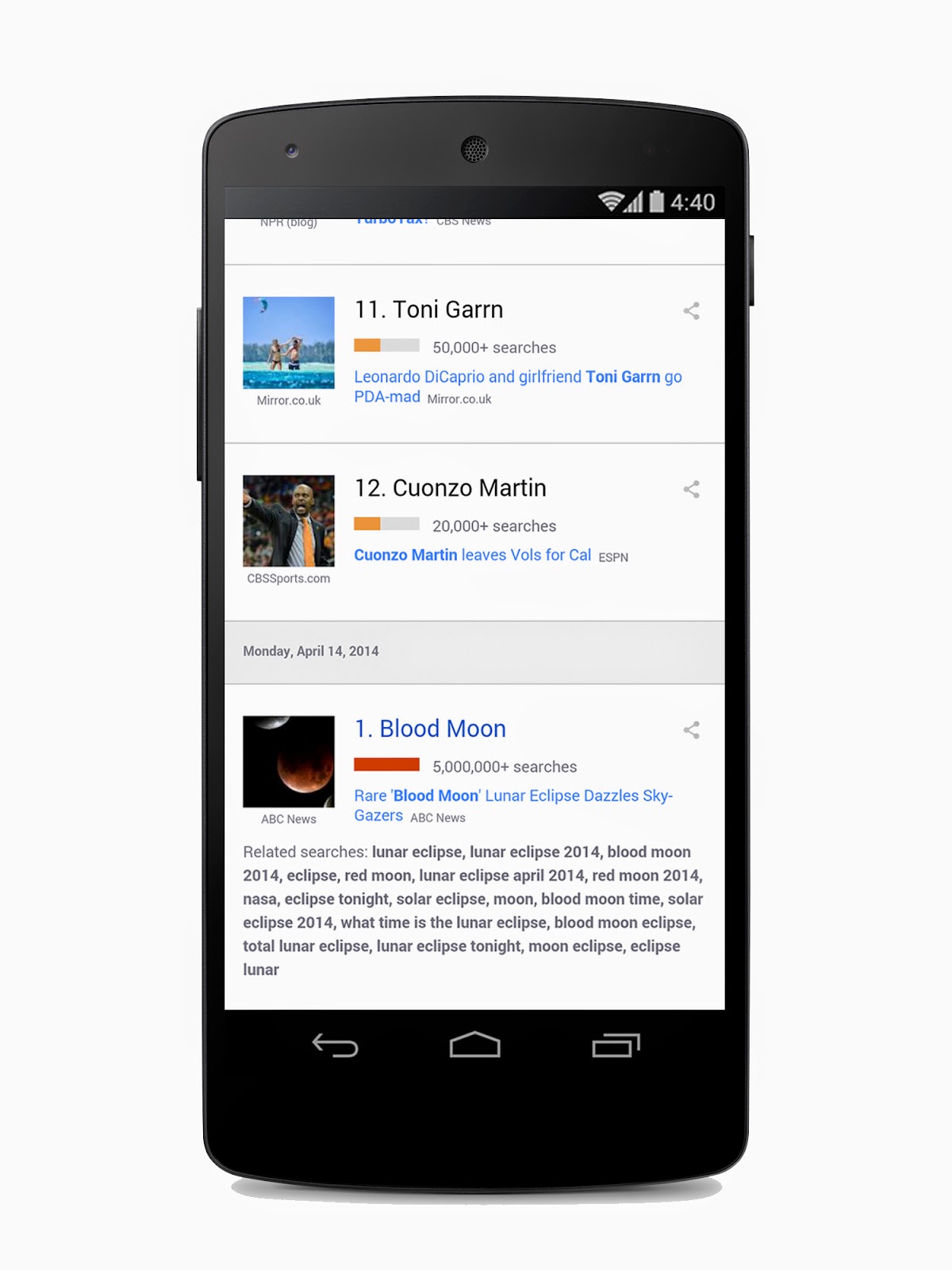
But what made this year different from all other years? A rare lunar eclipse known as the “blood moon,” when the Earth’s shadow covers the moon, making it look red, and which occurred on Tuesday. There were more than 5 million searches on the topic, as people were eager to learn more. (Hint: if you missed seeing the blood moon this time around, keep your eyes on the sky in October. This is the first lunar eclipse in a “lunar tetrad,” a series of four total lunar eclipses each taking place six lunar months apart.)
Say goodbye and say hello
This week marked the first anniversary of last year’s Boston Marathon bombing, and commemorations led searches for the term [boston strong] to rise once again. And just yesterday, we were saddened by the passing of Gabriel Garcia Marquez, the Colombian writer best known for his masterpiece “100 Years of Solitude”—not to mention responsible for high schoolers across the U.S. knowing the term “magical realism.” On a happier note, former First Daughter Chelsea Clinton announced she’s expecting.

Entertainment that makes you go ZOMG
“Game of Thrones” fans—at least those who hadn’t read the books—were treated to a bombshell in this past Sunday’s episode when (spoiler alert) yet another wedding turned murderous. Searches for [who killed joffrey] skyrocketed as people struggled to process the loss of the boy king we love to hate. On the more sedate end of the Sunday TV spectrum, we welcomed back AMC’s “Mad Men,” which continues to provide viewers with plenty of innuendo, allusion and fashion to chew on—and search for—in between episodes.

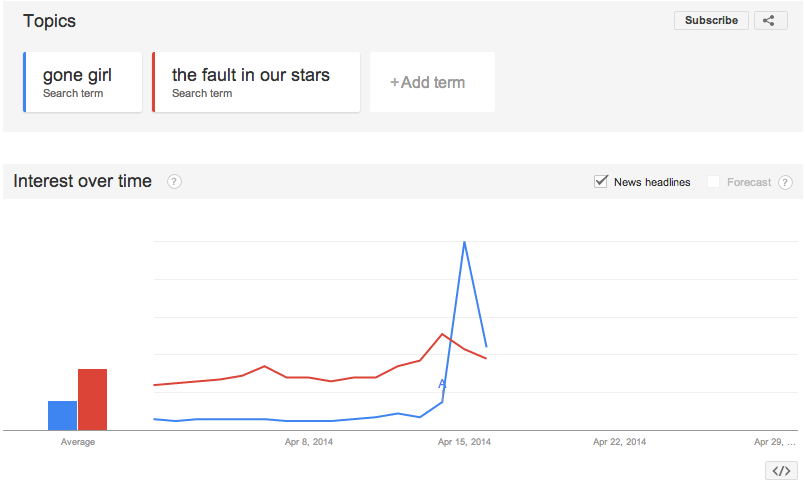
The trailer for the highly anticipated film version of “Gone Girl” dropped this week—vaulting searches for [gone girl trailer] nearly 1,000 percent—as did a clip from another book-to-movie remake, “The Fault in Our Stars.” Between these two films we expect no dry eyes in June and no intact fingernails come October. At least we’ve got something funny to look forward to: as news broke this week that Fox 2000 is developing a sequel to the 1993 comedy classic "Mrs. Doubtfire," searches on the subject have since spiked.
And that’s it for this week in search. If you’re interested in exploring trending topics on your own, check out Google Trends. And starting today, you can also sign up to receive emails on your favorite terms, topics, or Top Charts for any of 47 countries.

Posted by Emily Wood, Google Blog Editor, who searched this week for [gossip girl vulture recaps] and [tron bike lights]