Shared posts

05 Jun 21:19

Top 10 new Android games this week: WarLingo, Defenders

by Steve Raycraft

Welcome back to Android Gaming Weekly, our weekly recap of new game releases. We still plan to cover upcoming releases and games we’re playing, but this column is dedicated to new games that you can start playing right now. Check out our top picks and let us know in the comments section if you have any suggestions for next week’s post.

WarLingo

Description: WarLingo is a free 2D empire turn based game of strategy and thought that developed in Single player & Massively multiplayer on-line modes. (MMORPG) As leader of a newly founded country, your goal is to ultimately become supreme to all others.


Chef’s Diner: Food Rush

Description: Step into the delicious world of Chef’s Diner, where you put your culinary skills to use. Prepare dishes in 6 restaurants all over the world. Learn mouth-watering recipes from the local cuisines by heart.


Rival Knights

Description: Live the fantasy: Be a knight & joust your way to victory! Compete with thousands of other players in games of glory & adventure! This is the most intuitive, action-packed & visually stunning knight combat game on touch screens!


Jolt

Description: Two player competitive action on a single device – Welcome to Jolt, the cybersport of the future. In Jolt, two players battle for victory in several arenas, scoring points by hitting the other with the Icosahedron Omni-shot.


Push Panic

Description: Tap the blocks to blast combinations off the screen before the pile of blocks reaches the red panic bar and topples over! Push Panic includes 75 intense levels. Each of the four exhilarating game modes introduces explosive new challenges!


Sky Force 2014

Description: The mobile blaster legend is back to celebrate its 10-year anniversary in super-destructive style. Harnessing the intensity of classic arcade shoot-’em-ups combined with the hottest smartphone technology, Sky Force 2014 offers a stunning scrolling shooter experience with an incredible new social gameplay element.


Hitman GO

Description: Hitman GO is a turn-based puzzle game with beautifully rendered diorama-style set pieces. You will strategically navigate fixed spaces on a grid to avoid enemies and take out your target or infiltrate well-guarded locations.


Firefly Runner

Description: Help Switch the courageous firefly run, fly, shoot and rescue his captured firefly friends. Firefly Runner is an action packed, free-running adventure set on the stunningly beautiful yet treacherous Firefly Island.


Defenders

Description: Enter the Prime’s World Universe and destroy countless enemies with towers and magic. Make your own unique cards collection and fuse your towers to get them even more powerful! Enhance your hero, your spells and your skills, be strategic and don’t forget to try Heroic Mode to become the greatest Defender.


Toxic Bunny HD

Description: Toxic Bunny is what would happen if the Looney Toons & Monty Python were heavily armed and thrown into a blender with the best (and worst) movies of the 90′s and turned the results into a retro platform game.


05 Jun 18:46

Marty McFly's hometown will be recreated for London 'Back to the Future' event

by Chris Welch

Later this summer, Back to the Future fans will be able to visit Hill Valley, the fictional setting of Robert Zemeckis' 1985 classic. Only this time, it will be in London. Secret Cinemas has announced plans to recreate the whole town as part of its immersive Back to the Future cinema experience. Hill Valley will be rebuilt at an undisclosed location in London, and visitors will be able to "time travel" between 1985 and 1955 through secret alleyways and corridors. And yes, the DeLorean will be there as well. "We want the audiences to forget their current world and take an adventure," said Fabien Riggall, Secret Cinema's founder, speaking to the London Evening Standard.

Of course the main attraction here is still the movie, but Secret...

Continue reading…

05 Jun 18:42

"You Are Not Your Big Toe"

by Melanie Pinola

"You Are Not Your Big Toe"

This quote, from University of Washington professor Clayton Cook, is a reminder that in order to be happy and reduce stress, we have to distance ourselves from our thoughts. Confused about what this has to do with toes? Here's the full quote:

You are not your big toe.

Much the same way you may notice pressure on your big toe and your toe may feel uncomfortable, you may notice distressing or uncomfortable thoughts, but that does not mean that you are distressed.

It may seem like strange advice, but do not believe everything you think. Thoughts impact how you feel, and, in turn, feelings impact your behavior. But, ultimately thoughts cannot make you do anything and do not define who you are. The better you can become at being aware of your thoughts and simply labeling them ("I'm having the thought…), the better you can recognize them for what they are—just thoughts.

The big toe analogy might seem a bit silly, but this is just another Zen-like reminder not to let your thoughts overwhelm and totally consume you.

Professor Cook is teaching a free course on stress management and wellbeing over at edX (it started last month, but you can still jump in and catch up!).

Your Recipe for Wellbeing: Six Science-based Ingredients for Reducing Stress | edX

Photo by roxeteer.

05 Jun 17:47

Google reveals tablet that can sense the world in 3D

by Jacob Kastrenakes

Google's Project Tango smartphone uses a variety of sensors to see and map the world around it in 3D, and now Google is building all of that functionality into a tablet. The Project Tango Tablet, being unveiled today, comes four months after Google announced the initial experimental smartphone, which it's developing as a way to improve indoor mapping and visual assistance, and even offer new avenues for gaming. The tablet will be sold as a $1,024 development kit later this year, and Google is reportedly building thousands of them — a big difference from the 200 smartphones it distributed in March.

Continue reading…

05 Jun 15:46

UK proposes life sentences for "hackers"

by Rob Beschizza
UK government proposal: "cyber" attacks with "catastrophic" but otherwise ill-defined outcomes deserve life in jail.
05 Jun 15:43

Pirate Bay Founder’s Computer Was “Hacked,” Investigation Reveals

by Ernesto

gottfridLate last year Gottfrid Svartholm was extradited to Denmark, where the Pirate Bay founder stands accused of hacking into the mainframe computers of IT company CSC.

After several custody extensions Svartholm appeared in court again a few days ago. During the court session the court presented new evidence, backing up the theory that someone else used Svartholm’s computer to carry out the hacks.

The court released the results of an investigation into Svartholm’s computer, which was carried out in February. The released data cover the results of several antivirus scans and the identification of hundreds of suspicious files.

TorrentFreak spoke to Svartholm’s lawyer Luise Høj, who explained that the computer contained several threats, some dating back to 2011. The list includes trojans and exploits that could have allowed an outsider to take control over the machine.

“This is definite evidence that the computer has been compromised – and that the attacker has gained administrator privileges, no less,” Høj informs TorrentFreak.

Despite being aware of the evidence for several months the court maintains the position that Svartholm should remain in custody. His lawyer, however, is convinced that the investigation can plead the Pirate Bay founder free.

“For me this is a clear evidence that Gottfrid has been telling the truth all along – and in my opinion it shows that the Danish legal system has big difficulty handling cases which require a certain level of technical insight as regards computers,” Høj tells us.

Gottfrid’s mother Kristina Svartholm shares this opinion. She can’t understand why it took the court several months to present the evidence. According to her, this may not be just a simple mistake.

“Perhaps ‘malice’ is a more appropriate word,” Kristina Svartholm tells us. “Their methods leave me more and more worried.”

“Gottfrid’s own conclusion is that they have tried to hide them as long as possible just because everything points in his favor,” she adds.

The next hearing in Denmark is currently scheduled to take place at the end of this month. Both Svartholm’s lawyer and mother hope that he will be released, in part based on the new information. The hacking trial is expected to start in September.

Source: TorrentFreak, for the latest info on copyright, file-sharing and anonymous VPN services.

05 Jun 15:42

YouTube update allows users to select streaming quality

by Chuong H Nguyen

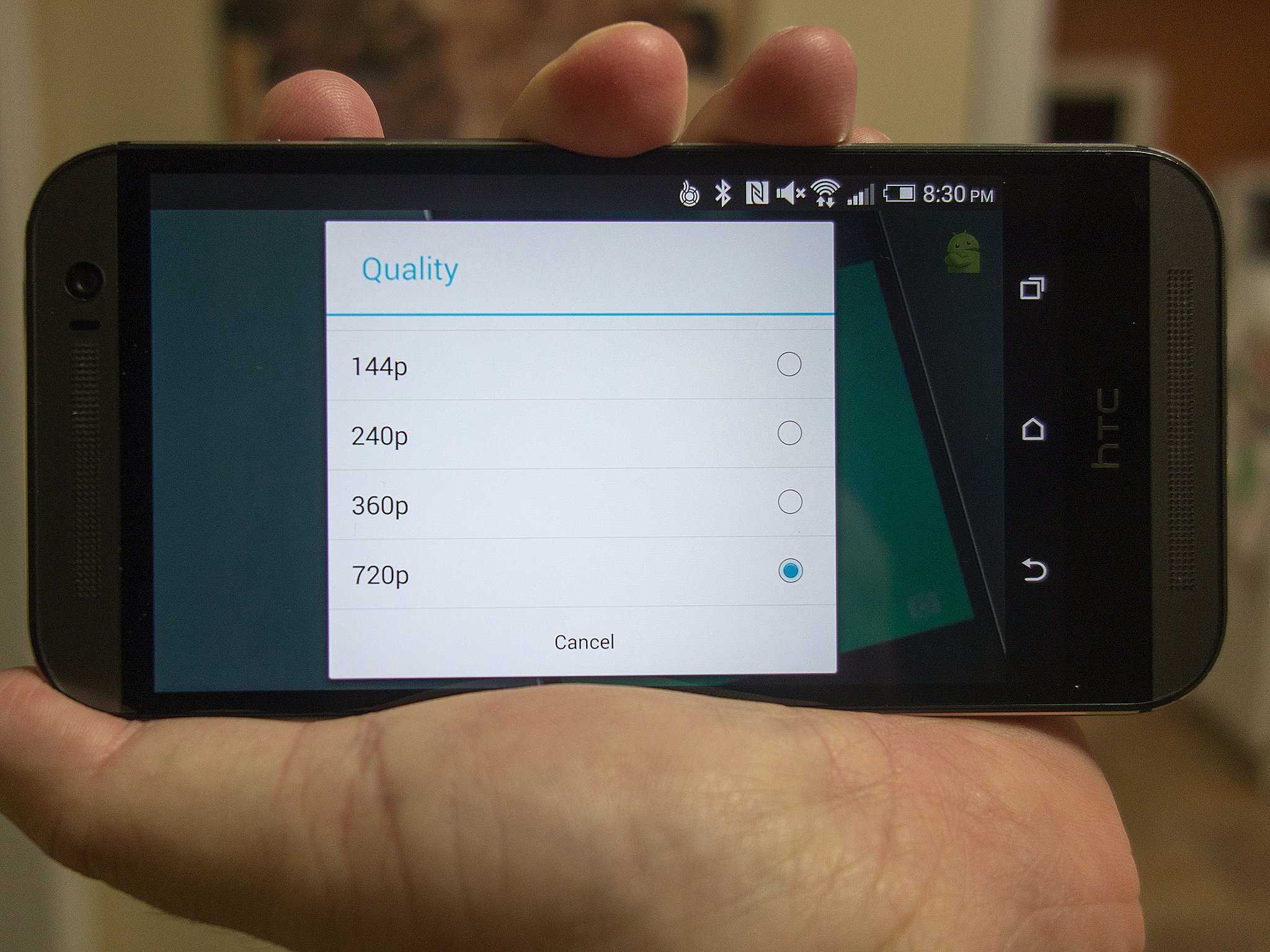
Google has just pushed out an update to the YouTube app to allow you to choose your video streaming quality on the fly. Now, with the update, you can choose if you want your videos to stream at 144p, 240p, 360p, 720p, or an auto mode that detects your connection. It seems that an option for full 1080p HD isn't available as a selection, however.


05 Jun 15:41

Samsung and Barnes & Noble team up for Galaxy Tab 4 Nook

by Derek Kessler

Barnes & Noble is partnering with Samsung to continue the Nook series of tablets. It's more of a co-branding than anything, as the first product will be the "Samsung Galaxy Tab 4 Nook", based off the 7-inch version of the Galaxy Tab 4.


04 Jun 22:22

Dive Under the Sea with These Ocean Wallpapers

by Melanie Pinola

Dive Under the Sea with These Ocean Wallpapers

The ocean and ocean life are endlessly fascinating parts of our world. You don't have to be a deep sea diver to enjoy them from the comfort of your desk with these desktop wallpapers.

Remember, we're now requesting your participation in the Wallpaper Wednesday series! You'll find a selection here, but post your favorites for this week's topic in the discussions below. Stick to our format as best you can, including a title, the image, resolution, and a link. Happy wallpapering!

Underwater Cave

Dive Under the Sea with These Ocean Wallpapers

Download This Wallpaper (3516x2550) | Wallpaper Up

Ocean Darkfish Medusa

Dive Under the Sea with These Ocean Wallpapers

Download This Wallpaper (1200x800) | HQWide

Ocean Wave

Dive Under the Sea with These Ocean Wallpapers

Download This Wallpaper (1920x1080) | The Paper Wall

Tropical Fish

Dive Under the Sea with These Ocean Wallpapers

Download This Wallpaper (1920x1080) | Wallpaper Up

Polar Bear Swimming

Dive Under the Sea with These Ocean Wallpapers

Download This Wallpaper (1920x1200) | Wallpapers Craft

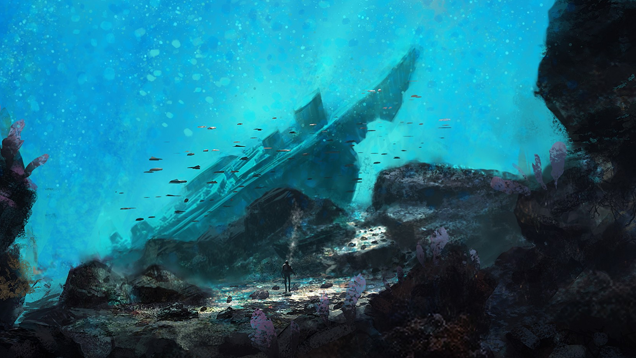
Sunken Ship

Dive Under the Sea with These Ocean Wallpapers

Download This Wallpaper (1680x1050) | The Paper Wall

Dolphins

Dive Under the Sea with These Ocean Wallpapers

Download This Wallpaper (1920x1200) | Wallpaper Up

Nemo

Dive Under the Sea with These Ocean Wallpapers

Download This Wallpaper (1920x1200) | The Paper Wall

Title photo wallpaper from Wallpaperhi (1600x1200).

04 Jun 21:18

Rightscorp: a business founded on threats of Internet disconnection

by Cory Doctorow

Rightscorp, a company that went public last year, has an idea: they'll issue millions of legal threats to alleged music file-sharers, threaten them with millions in fines, and demand nuisance sums ($20/track) too small to warrant consulting with an attorney -- and they'll arm-twist ISPs into disconnecting users who don't pay up. Rightscorp has a secret system for identifying "repeat offenders" who use Bittorrent, and they believe that this gives them to right to force ISPs to terminate whole families' Internet access on the basis of their magically perfect, unknowable evidence of wrongdoing. They call this "holding the moral high ground." More than 72,000 Americans have had "settlements" extorted from them to date, though Rightscorp still runs millions in the red.

Rightscorp's rhetoric is that the sums it demands are "deterrents" to prevent wrongdoing, and that it wouldn't really want to sue people into penury. But it is a publicly listed company with a fiduciary duty to extract as much money as it can from the marketplace. It's a good bet that its prospectus and quarterly investor filings announce that the company will hold its "fines" down to the smallest amount that provides the deterrent effect -- instead of, say, "all the market can bear."

The legal theory under which Rightscorp is operating is pretty dubious: a belief that ISPs have a duty to terminate the Internet connections of "repeat offenders" based on a clause in the Digital Millennium Copyright Act of 1998. This theory has been sparsely litigated, but the one major case in which it has been tested went against Rightscorp's business-model. But as Joe Mullin points out in his Ars Technica profile of the company, they may be able to get past this hurdle just by suborning the increasingly corrupt, noncompetitive, inbred and rent-seeking ISP industry by giving them a piece of the action. Read the rest

04 Jun 19:36

How to Step Up Your Social Media Game For Your Business or Group

by Eric Ravenscraft

How to Step Up Your Social Media Game For Your Business or Group

For most people, social media is a fun time waster or a way to keep up with an extended network of friends. If you're running a business or promoting a group, you have a lot more to deal with. Here's how to stay on top of your internet life.

When You Might Need Advanced Social Media Tools

Let's have some real talk for a minute. "Social media" is an overused buzzword and there are countless "experts" who will be happy to write you a book on all the import SEO you should synergize with your brand engagement strategy, or whatever. If you're just getting started with promoting your group on Facebook or Twitter, you probably don't need to worry too much about all that. The whole point of social networks is to connect with people. That's the fundamental principle that underlies all the data and charts.

Here are a few reasons why you might want to step up to something beyond the default social media options:

  • Scheduling posts: You can't be at your computer 24/7, but your audience can show up at any time. Advanced tools have the ability to schedule posts for future dates and times, so you can keep up a steady stream of content when you're not around.
  • Managing multiple accounts from one place: Facebook, Twitter, Google+, Instagram, Tumblr. There are so many places and ways to share your content that it's almost impossible to keep up with all the different accounts. Many advanced apps and services allow you to share to multiple services from the same place.
  • Advanced analytics: There's more to social media than the number of likes and retweets. While you shouldn't get totally obsessed with numbers, it's still helpful to see which posts were clicked on the most, how much they were shared (and with whom), etc. Many professional-style tools like this can help you figure out what your audience responds to the most.

It's also worth mentioning, every social network has its own identity and use cases. Copying the same content to multiple services isn't necessarily the best approach all the time. When you're deciding how or whether you should step up your social game, learn what the different social networks are good at and what they're not first.

The Different Types of Social Media Apps

There are a number of different applications you can use to manage your various social profiles in one place. Each has their own advantages and disadvantages so (and I can't stress this enough), you need to decide for yourself which tools work best for how you interact with your audience. Don't just sign up for the first one you see and spam your feeds with junk. That's a quick way to lose followers. That being said, here are some of the top contenders.

Buffer (Free, Pro $50+/mo)

How to Step Up Your Social Media Game For Your Business or Group

Buffer allows you to post to Facebook, Twitter, Google+ pages (but not regular profiles yet), and even LinkedIn. With the free version, you can schedule updates for specific times, or you can create a queue of posts and set regular intervals that they go out. If you're not dealing with time-sensitive posts, this is handy as it allows you to set the schedule and add posts to the queue without having to assign a time to each one of them.

The professional level of Buffer (which starts at $50/month and goes up to $250/month) allows multiple team members to manage the same social media accounts, import RSS feeds directly to your stream—so, for example, you can include your own RSS feed and have it tweet each new article automatically—and even provide deeper analytics tracking.

Hootsuite (Free, Pro $8.99+/mo)

How to Step Up Your Social Media Game For Your Business or Group

Hootsuite has become a household name in the social media management game, and for good reason. Like Buffer, it has a free version so you can manage multiple social accounts from one place. Unlike Buffer, it can manage a whole lot more than the basics. In addition to Facebook, Twitter, and Google+ pages, you can also interact with Foursquare, Instagram, Flickr, YouTube, Tumblr, and a ton of others. If you want one monster app to manage everything, Hootsuite is it.

The interface is slightly less nice than Buffer's is, but if you're using it to get work done, that shouldn't be a problem. The free version only allows you to include five connected accounts, so you wouldn't actually be able to use all of the sites I listed above without ponying up some cash. It's biggest advantage over Buffer, though, is that you can see your own feeds as well as post to them. So if you have several Twitter lists you like to keep an eye on, you can watch that from the same app you're posting with. It might seem like a no-brainer, but when it comes to pro-level software, it's not always a given.

SocialFlow (Price On-Demand)

How to Step Up Your Social Media Game For Your Business or Group

Buffer and Hootsuite are commonly used apps because they offer a free tier. SocialFlow, unfortunately does not. What it lacks in accessibility, however, it makes up for in intelligence. SocialFlow not only allows you to schedule Facebook, Twitter, and Google+ page updates for specific times, it will optimize when exactly they get sent based on how well it thinks the post will do.

The method for determining a post's potential popularity (what's referred to as its "resonance prediction") isn't always perfect, but it helps make sure that your posts are evenly spaced out throughout the day. It also makes sure that obviously awesome posts will get priority over mundane ones. It requires releasing a bit of control, but timing can make the difference between gaining traffic and losing followers.

Skip the Middleman with Native Solutions

If you're not turning your social media profiles into a full time job, you might not need any of these fancy tools. The included ones will work just fine. Here are some of the things that Facebook, Twitter, and Google+ offer to give you some insights without even bothering with a third-party service.

Facebook Insights

How to Step Up Your Social Media Game For Your Business or Group

When you set up a Page on Facebook, you get access to a ton of fancy information. It may take some time for some of the information to be useful—tracking "reach" might not be that useful if you have single-digit daily traffic, for example—but it can provide useful metrics like how many people clicked on a link, as opposed to liking it.

TweetDeck (Free)/Twitter Analytics

How to Step Up Your Social Media Game For Your Business or Group

Twitter is kind of its own beast when it comes to social media. The feeds are necessarily real-time, instead of being slow and curated like Facebook and Google+. If you want to give Twitter some special attention, it's hard to go wrong with TweetDeck. The service is actually owned by Twitter now, and it allows you to add dedicated columns for lists, replies, searches, and a bunch of other things. You can also use it to schedule tweets for the future.

If you don't need all of TweetDeck's fancy tools, you can still get some more advanced analytics from Twitter directly. The company has a dedicated, if hidden page here for getting detailed info on which tweets did well, how many people followed/unfollowed you, and how quickly your follower count is growing. For some reason, Twitter doesn't promote the page much, but as long as you're logged in, you can head to analytics.twitter.com to get the full report.

Google+ Ripples

How to Step Up Your Social Media Game For Your Business or Group

Google has its own Analytics property that you can integrate with Google+ Pages and it's so complex it can get it's own article (or several). However, one of the coolest, yet least well-known tools for visualizing how your posts do is called Ripples. In the drop down menu on any post that's gained a sufficient level of traffic, you can click "View Ripples" to see who shared it (publicly), and where it traveled from there.

This is particularly useful as most analytics tools undervalue the role of influencers and tastemakers. When it comes to sharing things on social media, some people have more influence than others and a single re-share from someone with a hundred thousand followers can do far more for your traffic than a hundred shares from people with a thousand followers. Ripples weigh that influence (the bigger the circle, the more secondary re-shares the initial re-share caused) and graph it visually so you can not only see how well a post did, but where it went, who liked it, and even what they said. It's not the world's most powerful tool, but it's singularly unique and can help a budding social media guru learn the second-most important lesson of sharing things online: how influence works.

The first most important rule is to never, ever, ever use the term "social media guru".

04 Jun 19:34

Watch live animal cams from around the world

by Maggie Koerth-Baker

005765149

From Grand Cayman reef in the Caribbean (pictured) to pandas in Ya'an, from a puppy enrichment center in Maryland to elephants at a watering hole in central Kenya — Explore.org's collection of live animal cams (and catalog of highlights from cams not currently in season) will be your new favorite time waster.
04 Jun 15:54

Transparency Report: Protecting emails as they travel across the web

by Emily Wood
When you mail a letter to your friend, you hope she’ll be the only person who reads it. But a lot could happen to that letter on its way from you to her, and prying eyes might try to take a look. That’s why we send important messages in sealed envelopes, rather than on postcards.

Email works in a similar way. Emails that are encrypted as they’re routed from sender to receiver are like sealed envelopes, and less vulnerable to snooping—whether by bad actors or through government surveillance—than postcards.

But some email is more secure than others. So to help you better understand whether your emails are protected by encryption, we’re launching a new section in the Transparency Report.
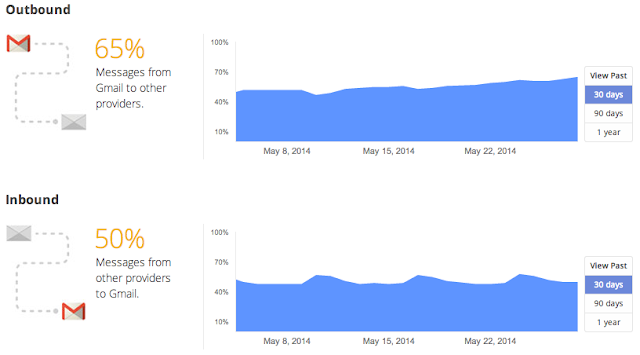
Gmail has always supported encryption in transit by using Transport Layer Security (TLS), and will automatically encrypt your incoming and outgoing emails if it can. The important thing is that both sides of an email exchange need to support encryption for it to work; Gmail can't do it alone.

Our data show that approximately 40 to 50 percent of emails sent between Gmail and other email providers aren’t encrypted. Many providers have turned on encryption, and others have said they’re going to, which is great news. As they do, more and more emails will be shielded from snooping.

For people looking for even stronger email security, end-to-end encryption is a good option—but it’s been hard to use. So today we’re making available the source code for End-to-End, a Chrome extension. It's currently in testing, and once it's ready for general use it will make this technology easier for those who choose to use it.

We encourage you to find tips about choosing strong passwords and adding another layer of protection to your account in our Safety Center. And check out Reset the Net, a broad coalition of organizations, companies and individuals coming together this week to promote stronger security practices on the web; we’re happy to be a participant in that effort.

Posted by Brandon Long, Tech Lead, Gmail Delivery Team
04 Jun 15:51

Netflix tests warnings that blame internet providers for poor streaming quality

by Jacob Kastrenakes

Netflix wants you to know whose fault it is that your movie isn't loading — and, big surprise, it's pinning the issue on internet service providers. As spotted by Vox Media designer Yuri Victor last night, Netflix is testing a notification that would inform subscribers when their internet provider's network has become congested and started to hurt their video. "The Verizon network is crowded right now," Netflix's message to Victor, a FiOS subscriber, read, after playback was paused to adjust the stream. As Recode points out, Netflix's communication chief, Jonathan Friedland, replied on Twitter to say that it was testing the message as a way to "keep members informed."

Continue reading…

04 Jun 15:46

Android Wear Gets Its Own Section On The Official Android Site, But There's Still No Real Info

by Bertel King, Jr.

AndroidWear-ThumbFor many of us, the Android Wear debut marked the first time anything wearable-related got us foaming at the mouth. We're excited to see what comes of it, regardless of whether or not we intend to ultimately pick up a Moto 360 or LG G Watch. This is because the platform itself has our interest piqued, and we can't wait to come across all the deets. Well, we don't have any new details to share with you, but there's a new section on the official Android site set aside just for Android Wear.

Android Wear Gets Its Own Section On The Official Android Site, But There's Still No Real Info was written by the awesome team at Android Police.


04 Jun 15:44

New Google Play Store greatly simplifies permissions

by Phil Nickinson

Important permissions bundled into a primary group, with common permissions relegated to a secondary screen

Google is pushing out a new version of the Google Play Store app. The biggest change in recent versions (we're currently at 4.8.20) as we see it so far is that the permissions you see listed when you install an application have been scaled way back and are almost written in English.

That's long been a complaint of ours. Permissions are a tricky thing to explain properly, as apps often need access to things like the Internet or your contacts. But giving detailed technical explanations sometimes does more harm than good. Now, permissions have been placed into groups.

Here's how Google puts it:

To help make it easier to understand what an app will have access to, the Play Store has recently made improvements to how permissions are displayed. Permissions are organized into permissions groups, easily identified by icons (example: Location Location) to help clarify the most important information and capabilities an app can access on your device. This information can help you make an informed decision more easily on whether you would like to install the app.


04 Jun 15:39

A beginner's guide to Bitcoin

by Andreas Antonopoulos
Andreas Antonopoulos explains what bitcoin is, and how you can start using it. Read the rest
03 Jun 16:30

Motorola's weird $50 polygon streams music from phones to your stereo

by Chris Welch

Motorola has just revealed what it's calling the Moto Stream, a wireless Bluetooth adapter that hooks up to your stereo and can stream music from up to five devices. "While great for on the go, connecting your smartphone to previously purchased home speaker and stereo systems can be a mess of cables and wires and new wireless speaker systems can be expensive," the company said in announcing its latest product. Since it's based entirely around Bluetooth, Moto Stream supports devices across Android, iOS, and Windows Phone — and you won't run into any trouble sending audio from apps like Google Play Music and Spotify to your stereo. Motorola says you can expect up to 300 feet of range.

This isn't exactly the sort of thing we were expecting...

Continue reading…

03 Jun 16:29

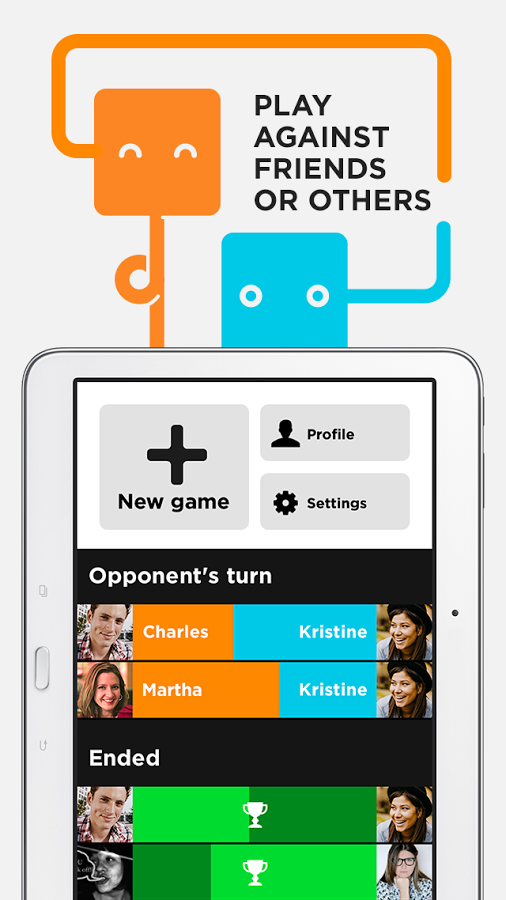
[New Game] Wordbase Is A Strategic Game Of Vocabulary Vengeance

by Ryan Whitwam

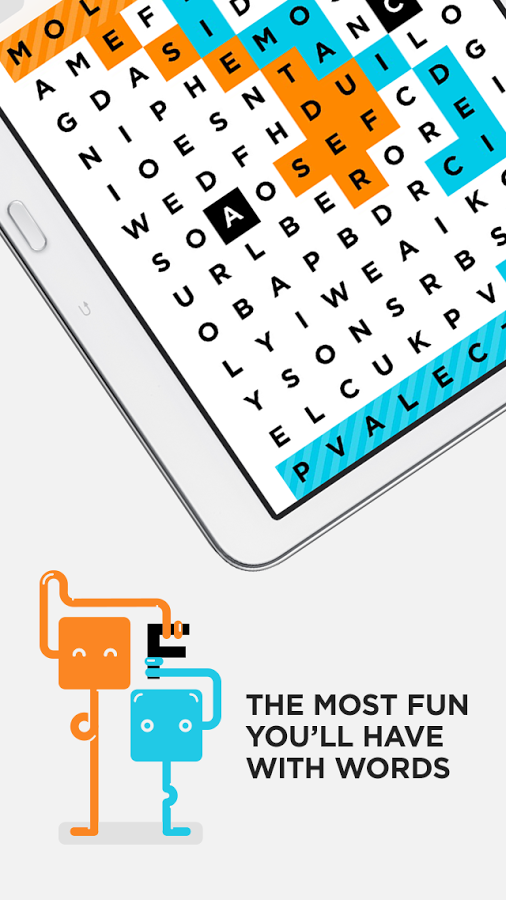
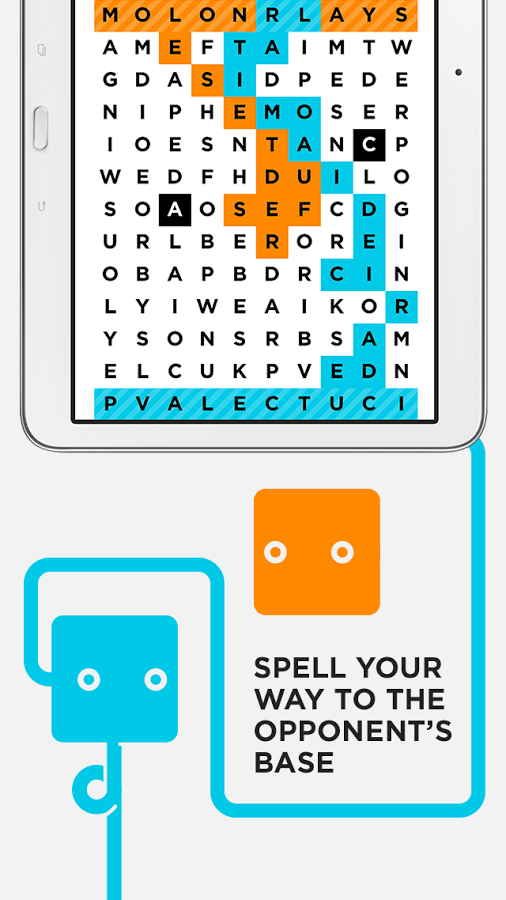
wIn Wordbase, you have to reach the opponents base not by traversing mountains and flanking opposing forces, but with your words. You'll get there one letter at a time, even if you have to fight dirty. It's a licentious linguistic battle, but no one ever said it'd be pretty.

1 2 3

The game board in Wordbase is essentially a giant word hunt puzzle. However, unlike those games, you can pick out words in any direction and along diagonals – the letters just have to connected to each other in some way.

Done With This Post? You Might Also Like These:

[New Game] Wordbase Is A Strategic Game Of Vocabulary Vengeance was written by the awesome team at Android Police.


02 Jun 23:55

16 Best New Android Apps And Live Wallpapers From The Last 2 Weeks (5/20/14 - 6/2/14)

by Michael Crider

roundup_icon_largeWelcome to the roundup of the best new Android applications, games, and live wallpapers that went live in the Play Store or were spotted by us in the previous 2 weeks or so.

Please wait for this page to load in full in order to see the widgets, which include ratings and pricing info.

Looking for the previous roundup editions? Find them here.

Featured App

SeatGeek Event Tickets

Today's roundup is presented by SeatGeek Event Tickets.

Done With This Post? You Might Also Like These:

16 Best New Android Apps And Live Wallpapers From The Last 2 Weeks (5/20/14 - 6/2/14) was written by the awesome team at Android Police.


02 Jun 22:53

What Apple Didn't Announce At WWDC 2014

by Dan Rowinski

At this point, just a few hours after Apple wraps its annual Worldwide Developer Conference, the post-publicity depression usually sets in.

Not that there should be a lot to get angsty about; Apple threw a truckload of new features at both developers and consumers today. iOS 8 has more than 4,000 new application programming interfaces and a new version of Mac OS X, dubbed Yosemite, offers a slew of cool-looking functions. Apple even released its very own programming language called Swift for iOS 8 developers. It's definitely laid the groundwork for a busy summer ahead of an expected iPhone 6 release later this year.

But expectations rarely fail to run ahead of reality where Apple is concerned. Here are seven rumored developments that failed to materialize as some pundits, consumers and developers expected.

1. An iWatch Or Wearable Framework

People have been talking about the possibility of an iWatch from Apple for nearly two years now. Given the time and attention Apple's rivals are devoting to wearable technology these days, you might reasonably have expected Apple to announce a framework or software development kit for wearables development. But Apple officials didn’t once say the word “watch” during the WWDC keynote, let alone announce any new hardware.

Apple did lay some groundwork for possible future smartwatch features. Its new Health app and HealthKit framework could make it easier for fitness-related app makers to build for a possible iWatch later this year.

2. New Macs Or MacBooks

Apple sometimes announces new hardware at WWDC. Last year it announced the Mac Pro along with newer versions of MacBooks. This year, however, hardware was completely left by the wayside at WWDC 2014, which maintained a relentless focus on iOS 8 and Mac OS X Yosemite.

At this point, it's hard to tell when Apple will refresh its PCs this year. It may tuck them into the iPad or iPhone announcements, or even just issue a press release at some point.

3. Maps Features And Functionality

A lot of people thought that Apple would go heavily into new mapping features in iOS 8, but the Maps app was hardly mentioned. In China, Apple is releasing new vector maps (along with a couple other China-related maps features), but the main version of Maps didn't get much play at WWDC 2014.

In retrospect, the lack of Maps at WWDC makes sense, as Apple released a fairly robust series of new developer features and functions to Maps with iOS 7.1 earlier this year. (It still doesn't offer transit directions, though.)

4. iBeacons

Rumors persisted ahead of WWDC this year that Apple’s developer conference would, more or less, be the year of the iBeacon—Apple's proximity-sensor, announced last year, which promises to support a new range of location based services in places such as retail stores. 

But Apple didn't mention iBeacons once at the WWDC keynote.

Of course, that doesn’t mean Apple is abandoning the iBeacon project or that it won’t have plenty of developers working on iBeacons during the WWDC sessions this week. The most we can tell, in fact, is simply that Apple didn't have anything new to announce about iBeacon support.

5. iTunes, Beats, Music

Apple’s senior VP Craig Federighi was the star of the show at WWDC, announcing all the new features (except for the new Swift programming language) and showing them off. He even gave Dr. Dre a call with the new calling app shared between Mac OS X and iOS. But other than Dre’s slightly surly phone call with Federighi, music was notably missing from the WWDC keynote. 

Apple didn’t have any Beats news during the keynote, nor did it have an update to iTunes or anything music-related in iOS 8 or Mac OS X Yosemite. For a company whose executives said last week that "music is dying," that's a bit surprising. 

6. Apple TV

Apple’s set top streaming box normally gets short shrift at events. It hardly ever rates a mention outside of download numbers and the software for it is hardly ever publically updated.

This year might have been different; there were signs that Apple was putting more effort into the device and giving it a higher profile on its website. But Apple TV was basically a no-show at WWDC 2014, although it may still be waiting for its day in the sun—perhaps later this year, closer to the holiday shopping season.

7. Dual-Screen iPad Support

One of the biggest arguments against the iPad over the years is how hard it is to use two different apps at once. Samsung offers dual-screen app support and app switching for its bigger tablets and smartphones; Microsoft has made using several apps on a single screen a central philosophy in Windows 8.

Rumors said Apple may announce dual-screen apps at WWDC, but if the company is working on that feature—and it probably is—apparently it's not yet ready for prime time.

What did you want to see at WWDC 2014 that Apple neglected? Let us know in the comments. 

Lead image by Flickr user z287marc, CC 2.0

02 Jun 21:44

Piratebox 1.0: anonymous, go-anywhere wireless file-sharing

by Cory Doctorow

Piratebox, a great project for making standalone wireless fileservers, has gone 1.0. The 1.0 has a slick 4chan-style message board, a responsive UI, and does UPnP discovery for your file-sharing needs. Combined with cheap wireless gear and a little battery, it's a perfect file-sharing boxlet that you can take anywhere in order to share anything -- for example, buskers could use it to distribute copies of their music to watchers. Piratebox is the technology that underlies Librarybox, a fork that is specialized for use by libraries and archives. Read the rest

02 Jun 21:42

Top 10 most popular Android apps from last week: Unicon, Sunrise Calendar

by Steve Raycraft

Every week we cover new Android apps with Fresh Meat on Wednesday, followed by Android Gaming on Thursday and Top 10 App Updates on Friday. When Monday rolls around, we look back to see which apps were the most appealing to our audience. Read on for the 10 most popular Android apps from last week.

1. GServiceFix

GServiceFixApp info: It’s a workaround for the battery drain bug caused by Services / Android OS / Android System.


2. Murum

MurumApp info: A small collection of wallpapers inspired by my current offerings. Sixty-five wallpapers spilt into different categories like Geo, Blur, Poly and more. These wallpapers should match with most icon sets to help you create some great setups.


3. Desktop VisualizeR

Desktop VisualizeRApp info: Desktop VisualizeR(DVR) is an application that allows you to personalize your home screen by creating icons or widgets with your favorite photos or images.


4. Sunrise Calendar

Sunrise CalendarApp info: Sunrise is a free calendar made for Google Calendar and iCloud. With an amazing design, Sunrise is a new experience that will make your life easier.


5. Facets

FacetsApp info: Get 365 unique pieces of art on your device as high resolution wallpapers! Facets delivers every piece from Australian artist Justin Maller’s year-long “image per day” project directly to your phone.


6. TomTom GPS Navigation Traffic

TomTomApp info: The new TomTom GO Mobile app is a sleek combination of the latest TomTom car navigation technology and world-class traffic information.


7. Peek

PeekApp info: This application is a complete redesign of the known “Peek” feature by ParanoidAndroid project, built to work on any 4.4+ ROM. The whole concept lies into allowing users to quickly interact with their notifications, without having to press any button.


8. Unicon (formerly Icon Themer)

Unicon

App info: Unicon (formerly Icon Themer) Allows you to use Nova / Apex / ADW icon packs etc. on your device.


9. Worms 3

Worms 3

App info: DEAL yourself the advantage with a new, game-changing enhancement. Turn on the card mode and alter the start and end of each turn by the playing of strategic cards.


10. Unearthed:Trail of Ibn Battuta

Unearthed

App info: Unearthed is an episodic third person Action Adventure game set in modern day Middle East. The game is available in both Arabic and English voice over and features 21 Languages for Menu and Subtitles.


Note:  To ensure that all apps receive a fair chance to make the list, we will retire any app that has made the list for 3 consecutive weeks and will place it in our Android and Me App Hall of Fame. We will post this Hall of Fame list in a dedicated series. Any app with * next to the title indicates it will now be added to our Hall of Fame list and will no longer be listed in this article.

02 Jun 21:40

Missed The WWDC 2014 Keynote? Here’s The Complete Video

by Matt Burns
5 os x notification The entire WWDC 2014 keynote is now online for your viewing pleasure. Watch Apple’s executives roll out the latest and greatest from Cupertino — and even call one of Apple’s newest employee, Dr. Dre. Read More
02 Jun 19:41

ASUS launches slew of new Android devices at Computex

by Nick Sarafolean

ASUS has tried any and every concept under the sun and occasionally strikes gold. Today’s announcements from Computex follow the same trend, with several new mashup devices on the way. The first device to talk about is the Fonepad 8, ASUS’ massive phone/tablet device that’s even bigger than Samsung’s new Galaxy W. The Fonepad 8 sports an 8-inch 1280×800 display with super slim bezels, 1.8GHz quad-core Intel Atom processor, dual front-facing speakers and oddly enough, only 3G connectivity. Other specs weren’t detailed.

ASUS Fonepad 8

ASUS also launched a couple of new MeMo tablets in 7-inch and 8-inch flavors. The MeMo Pad 7 has a 7-inch display of undisclosed resolution, a 1.8GHz quad-core Intel Atom processor, stereo speakers, 5-megapixel camera and 2-megapixel front-facing camera. The MeMo Pad 8 is similar with an 8-inch Gorilla Glass 3 display, 2.3GHz quad-core Intel Atom processor and LTE support. Other than that, not much is known about the two tablets.

ASUS MeMO Pad7(ME176C)

The final device is ASUS’ Transformer Book V, the oddest mashup to date. The Transformer Book V can act as an Android tablet, Windows tablet, Android laptop, Windows laptop or Android smartphone. Yeah, you read that correctly.

ASUS Transformer Book V

The Transformer Book V has a 12.5-inch display on the tablet part, 128GB storage, and a “next-generation Intel processor.” When docked with the laptop/keyboard attachment, the storage jumps up to 1TB. Software-wise, we’re looking at Android 4.4 KitKat and Windows 8.1, which you can switch between in either tablet or laptop mode. The Transformer Book V also brings a 5-inch smartphone with a quad-core Intel processor and LTE support. Basically, the Transformer Book V is a smartphone that docks into a tablet that docks into a keyboard and the tablet can dual-boot both Android and Windows. This is either the greatest thing ever or the biggest flop ever.

Do any of the announcements strike your fancy?

02 Jun 19:30

All the New Stuff in iOS 8

by Thorin Klosowski

iOS 8 is out right now. It's not as visually different as iOS 7, but it's still packed with all kinds of new stuff. Here's a list of all the new stuff that really matters.

Interactive Notifications

All the New Stuff in iOS 8

You can now interact with notifications right when they happen. So, if you receive a message, you can swipe down on it to reply right there without leaving the app you're in. Likewise, you can interact with third-party app notifications the same way. You can do the same actions from the Notification Center.

New Message Features

All the New Stuff in iOS 8

Group messages gets some big enhancements, including the ability to add and remove people. You can now also leave a thread or turn on do not disturb on a thread. You'll also get a new attachment view to get a view of everything in a thread. iOS 8 also now lets you send voice and video messages right in iMessages. These messages self-destruct after a set amount of time. You can also now share your current location with anyone for a set duration of time. You can check out our guide to all the new messaging features here.

A New Predictive Typing Keyboard

All the New Stuff in iOS 8

Apple's added a new predictive typing system that suggests upcoming words that you might want to type. So, if you type something out, it'll offer suggestions on what the next word could be so you can select it and type faster. It's context sensitive to differentiate between content, and is personalized and changes depending on who you're talking with. It's a little clunky at first, but hopefully will learn as it goes.

Third-Party Keyboards

All the New Stuff in iOS 8

iOS 8 lets you install third-party keyboards. This includes keyboards like Swype, SwiftKey, Fleksy, and whatever else supports it. You can download these from the App Store, and set them up under Settings > General > Keyboards. We'll have a roundup of the best once they're available.

Recents Menu for Contacts

All the New Stuff in iOS 8

Your Favorites menu is now on your multi-tasking screen. When you double-tap the home button you'll get access to everyone in your favorites as well as recent contacts so you can send them a message, call them, or access their contact screen.

New Mail Gestures

All the New Stuff in iOS 8

Mail gets some new gestures so you can instantly flag, delete, mark as read, and more. Swipe left to get the Archive/Delete/Flag/More menu, and swipe right to mark as read/unread. You can also swipe down on a new message to hide it away temporarily and access it later.

Spotlight Enhancements

All the New Stuff in iOS 8

Spotlight gets a number of the features from OS X Yosemite. From Spotlight, you can now search online for information online, movies in iTunes, apps from the store, music, and more.

Widgets In Notification Center

All the New Stuff in iOS 8

Notification Center now supports widgets. Any app in the App Store can add a widget into Notification Center. For example, you could get access to sports scores, eBay listings, and whatever else. We'll have to wait and see what developers do with this, as there isn't much in the store yet. You can access your widgets by pulling down the Notifications Center, scrolling to the bottom, and tapping "Edit."

Extensions in Safari

Safari now supports browser extensions. For example, you can install a translation extension to automatically translate a web page, automatically login to your 1Passwords accounts (shown above) or post a picture to your Pinterest instantly.

Family Sharing Shares Apps and Content with Family Members

All the New Stuff in iOS 8

You can now set up a "family" in iOS 8 that includes the ability to share photo streams, reminders, Find my Friends information, calendars, and all of your media from the iTunes store. This includes iBooks, music, shows, and more for up to six family members. To set it up, just head to Settings > iCloud > Set Up Family Sharing.

Photos Get Better iCloud Integration

All the New Stuff in iOS 8

Photos are now integrated better with iCloud so all the edits you make are synced across devices. This also means all your photos are stored in iCloud so they're easy to find. The Photos apps gets an overhaul too, including new ways to edit photos, search for photos, and more.

Health Integrates All Your Health Info in One App

All the New Stuff in iOS 8

iOS 8 now includes a new app called Health that gives you instant access to all your health information. You can also integrate third-party apps so you can track all your health information in one place. This includes any apps you have that are tracking sleep, steps, and more. You can then integrate all this information with Mayo Clinic so your doctor has access to this information.

New 3D Graphics Engine

iOS 8 includes a new 3D graphics system called Metal. This makes it so iOS 8 can render better 3D graphics and better integration with desktop development kits.

Touch ID Works In Any App

All the New Stuff in iOS 8

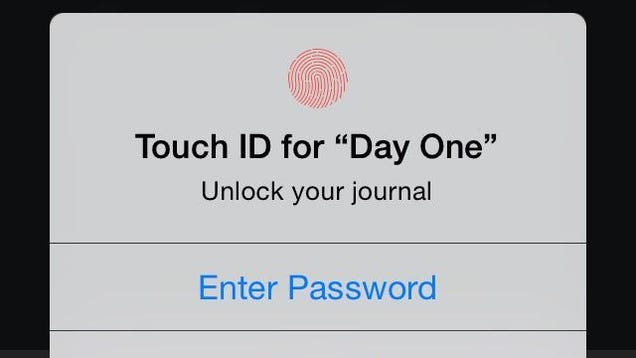
Touch ID is now accessible by any app. This means an app like Day One can be password protected by your fingerprint.

iCloud Drive Works Better Between Apps

All the New Stuff in iOS 8

iCloud Drive gives you access to all your documents on iOS, but more interestingly, it allows for apps to easily share content. So, you can edit a file in one app, save it, and then edit it in another app easier. This isn't ready on Yosemite yet, so it's hard to say how it'll work in the long term. For now Do not enable iCloud Drive unless you're ready to lose everything you already have stored there.

Siri Improvements

All the New Stuff in iOS 8

Siri gets a few new features, including "Hey, Siri" car control, Shazam song recognition, and a bunch of new languages.

Home Automation Control

All the New Stuff in iOS 8

Homekit is a new app for iOS 8 that gives you control over your home automation systems in your house. This includes any app that works with Homekit and is connected to Wi-Fi. Essentially, it works similar to the Health app, but for your home automation systems.

Handoff Makes Your Mac and iPhone Work Together Seamlessly

All the New Stuff in iOS 8

If you're using OS X Yosemite, iOS 8 will now sync up with your phone in new ways. You can now sync messages between your Mac and iOS device (including SMS), immediately send pages between your Mac and phone, send phone calls from your phone to your Mac, and more. It's pretty useless right now at launch, but once Yosemite is released we'll have a better idea of how it works. You can read about how it'll work on your Mac here.

Enterprise Enhancements

iOS 8 comes with a bunch of new enterprise features, including automatic setups, new security options, free/busy support in calendar, document providers, and a more.

iOS 8 is available today.

Music by Leggysalad.

02 Jun 19:22

XKCD: the TED talk

by Cory Doctorow

Here's Randall Munroe's TED talk about his What If? series, in which he answers big, weird questions about baseballs travelling at the speed of light and such, which is also the subject of a hotly anticipated forthcoming book. The talk is a mix of war-stories and insight into what makes Munroe (who is a fascinating dude) tick. Read the rest

02 Jun 19:22

Woman protests Instagram's policy on nipples by going topless

by Mark Frauenfelder
Instagram deleted Scout Willis's account after she posted a photo of a jacket she made that had a picture of "two close friends topless." Instagram called the photo an “instance of abuse.” She decided to protest Instagram's deletion of her account by walking topless down the streets of New York (which is perfectly legal).
02 Jun 19:11

Silk Road may have prevented drug violence, study says

by Adrianne Jeffries

Silk Road, the now-shuttered underground website where people could buy and sell illegal goods, was often referred to as the "eBay for drugs," implying that end users were the ones buying the drugs in small amounts.

But Silk Road also facilitated dealer-to-dealer transactions, according to an unpublished but thorough study by two researchers at the University of Manchester and University of Lausanne. The volume of these dealer-level sales may have been large enough to reduce drug violence on the street and raise the quality of products.

Silk Road was doing more than $89 million in annual sales, according to the researchers, who coincidentally crawled all the listings on the site about two weeks before it was shut down by the FBI. Of...

Continue reading…

02 Jun 19:10

Feds shut down $100 million malware network

by Russell Brandom

Today, federal officials announced new charges against the GameOver Zeus botnet, together with coordinated seizures that appear to have stopped the network cold. GameOver Zeus infected as many as a million Windows computers, harvesting user credentials and executing fradulent wire transfers. Today's federal complaint named Russia's Evgeniy Mikhailovich Bogachev as mastermind of the network, tracked down with the help of law enforcement agencies across eleven countries.

Continue reading…