Shared posts

02 Jul 20:23

Full app service restored for Chumby smart alarm clock devices

by John Callaham

chumby

After shutting down most of its operations in 2013, the app service for the Chumby connected home alarm clock devices is now fully up and running again, with the owners of those products able to sign up for $3 a month.

Chumby launched several years ago, offering folks a way to have a alarm clock that also doubled as an Internet device. Over 1,000 apps were created specifically for the Chumby devices, but the idea didn't really catch on, as smartphones and tablets started becoming more popular.

Today, Chumby's current owners, Blue Octy, relaunched the app service for the devices, stating, "The new service is a nearly complete rewrite of the original service - it's been brought up to date with newer technologies and made faster and more efficient than ever."

While a $3 a month fee is needed to access most of the service, Chumby device can still access its music sources, alarm clock features and more for free. What do you think of Chumby's resurrection and will owners of the smart alarm clock pay money to get access to those online apps?

Source: Chumby via Engadget

02 Jul 15:03

Spotify is bringing its vast trove of playlist knowledge to naps

by Colin Lecher

The idea of curating playlists for users is a big deal for music streaming services. It can lead to billion-dollar acquisitionsmillion-dollar acquisitions. For Spotify, it apparently leads to dinner music.

Spotify's Browse feature is the music service's attempt to make sense of the billion-plus playlists it has floating in the digital ether. Rather than force you to hunt down your own tunes, Browse lets you search for playlists by a theme, or an emotion — an upbeat set of tracks when you're perky, blues for when you're feeling more soulful. In an attempt to bring as much of the human emotional spectrum as possible to that system, the company has added a set of dinner- and sleep-themed playlists.

Along with the playlists already...

Continue reading…

02 Jul 14:16

Play With Google’s Psychedelic New Interactive Music Video Cube

by Josh Constine
Google Cube It’s called The Cube, and it’s a trip. Built by Google Creative Labs as “an experimental platform for interactive storytelling”, The Cube is an in-browser manipulateable 3-D box with a different video and audio track on each face. It debuted online today with indie dance band The Presets’ new single “No Fun”. You decide what to watch and hear by… Read More
02 Jul 14:09

Todoist Unveils Location-Based Reminders for iPhone and Android

by Alan Henry

iOS/Android: Todoist, one of our favorite to-do list apps, took the wraps off of location-based reminders today. Now you can create to-dos that trigger reminders when you enter or leave a specific area. Remembering to call when you arrive or pick up milk when you pass the store has never been easier.

The service has been a while coming, and while we showed you a hacked-together method in the past, this one works with your device's GPS, and works in both iOS and Android (iOS available today, Android before the end of the week). To use it, just create your tasks as normal, add them to your list, and then set a location in Apple Maps (iOS) or Google Maps (Android and iOS). Best of all, you can manage those locations or create to-dos with locations associated with them on any platform, even on the desktop or in Todoist's Gmail or Outlook plugins. Then, when you pick up your phone, you'll get your reminders right there.

There is a catch though: location-based notifications are a Todoist Premium feature, so you'll need to sign up for a $29/yr premium account to make use of them. To be fair, Premium comes with other features too, which you can see on their pricing page here. If you're interested in trying it out, you can sign up for a 30-day free trial of Premium to see how it all works. Hit the link below to learn more.

via Todoist Blog

02 Jul 14:01

Find out if your favourite sites are blocked in the UK

by Cory Doctorow


The UK Open Rights Group has unveiled a distributed tool that lets you discover whether the sites you love are blocked by the filters promoted by the government. Read the rest

01 Jul 22:30

How to Design and Sew a Custom Backpack

by Rachel Ciavarella

How to Design and Sew a Custom Backpack

Tired of never finding the perfect backpack for you? I was, and so I decided to create my own custom backpack from scratch. It took some thoughtful design and hard work, but now I have a bag literally tailored to my needs.

How to Design and Sew a Custom Backpack

This tutorial covers a broad range of sewing topics and skills—everything from drawing your design, creating a prototype, editing a pattern, and even adding foam support structures.

Thus keep in mind that this project requires advanced sewing skills! Have a look through the entire tutorial to gauge if you are experienced enough before you buy materials!

If you'd like to get some practice in before trying to make your own backpack, check out my sewing collection on Instructables.

Of course, you can make this backpack your own by editing the design to suit your backpack needs.

Please note that I used an industrial walking foot sewing machine to make my backpack. It is possible to sew a backpack with a regular consumer sewing machine, but you will just have to choose your fabrics appropriately.

This post originally appeared on Instructables.

Materials

For my backpack I used:

  • 1000 Denier Cordura fabric (2 yards)
  • Ripstop nylon fabric (2 yards)
  • Nylon webbing 1"(with reflector strips) (4 yards)
  • 2" Seatbelt webbing (1 yard)
  • 1" Webbing binding tape, a sports mesh fabric (.5 yards)
  • 1/8" Closed cell Volara foam (.5 yards)
  • 1" Aluminum cam buckles (x2)
  • 2" Quick release buckle (x1)
  • 1.25" D-rings (x2)
  • 2" Velcro (5")
  • 12" Zipper (x1)

How to Design and Sew a Custom Backpack

You can find many of the materials I used on Amazon: Cordura, ripstop, 1" webbing, 2" seatbelt webbing, binding tape, sports mesh fabric, foam, cam buckle, D-Ring, 2" velcro, zipper, 2" buckle.

Alternative (Lighter) Fabric Options for Consumer Machines

  • Cordura (outer fabric) - You can swap out for a mid weight denim, canvas, lighter upholstery fabrics, light faux suede or leather, non stretch velvet, mid weight packcloth nylon, etc.
  • Ripstop Nylon (lining) - You should be fine using this or a similarly weighted fabric. Try to keep the lining light so you not unnecessarily weight down your bag. (if you don't want to line your bag you can skip this completely)
  • 1" binding tape webbing - A good lighter weight alternative is 1" gosgrain ribbon(there are lots of awesome color options!)
  • Sports Mesh (aesthetic for straps) - You should be fine using this but it isn't necessary, I used it for aesthetic reasons
  • 1/8th Inch closed cell Volara foam (padding and structure) - You're going to want to use some sort of foam to give your bag structure and comfort. If you can't find any foam available locally check online. I got mine from foamorder.com, but buy anything over 1/8th inch as your machine likely won't be able to handle it (my industrial machine struggled with 2 layers of 1/8th inch foam). You might also consider using a thin yoga mat or foam sleeping pad, available at most outdoors stores.
  • Hardware - All of the hardware can remain the same as long as you do not alter the webbing widths as they do not need to be sewn through. If you do alter the webbing widths, pick hardware that is compatible with the new sizes.

Step 1: Creating Your Design

How to Design and Sew a Custom Backpack

This is the fun part, designing your backpack! Think about everything you use your backpack for. What do you like about other backpacks? It's okay to base your backpack off something you've already seen and modify it. What don't you like about other backpacks? If you hate using zippers, then don't design one into your bag! Do you have a long torso? Do you like a small backpack for essentials or a big backpack to fit everything plus the kitchen sink? Consider your wants and needs before you get designing.

I like to keep my bag simple but give a specific place for objects I carry everyday. It might be a good idea to empty out your current backpack and examine what you carry and how you might like to accommodate those items.

I also designed my bag to include an internal laptop pocket to hold my laptop and sketchbook, which I have on me at all times.

Additionally, I like to have a small zippered pocket for smaller items that I need easily accessible, like my cellphone and wallet, so I made sure I would have a secure pocket located on the inside of the top of my bag (making it easy for me to get to without having to dig through my bag, but is still safe from thieves!).

I always carry a water bottle but with my old bag I could only store it inside the bag. While hiking through Arches National Park, I had to keep stopping to take off my bag, just to get to my water. To fix this, I designed two front pouches big enough to fit my favorite water bottle and other quick access items that don't need to be as secure as my phone and wallet.

I commute to work by bike so I decided to include reflective webbing in my backpack for increased visibility on the road.

I liked the strap design of my old backpack so I kept the design mostly the same—no need to reinvent the wheel when effective designs already exist. If you like to carry your pet cactus around, why not include a cactus holding pocket! This is your custom backpack and that's the advantage of making it yourself—it's for you, by you.

Now that you've spent some time thinking about your ideal backpack, it's time to draw it. It doesn't have to be perfect; you don't need to be an artist. This drawing is meant to help you understand your design, work out any potential problems before you start sewing, and facilitate the transition into pattern making.

You might have all sorts of plans about including enough pockets to hold 17 cats and shoulder mounted lasers (I know I did). Drawing will help you realize if you can fit all these components, how they'll go together, and how difficult they'll be to construct.

First I draw my design in orthographic views (front, back, side, top, bottom). This helps get the basic placement of things down without getting distracted by trying to draw in perspective.

Once I have the basic design down, I draw it in different states in perspective to reveal any components hidden inside. What does it look like when the top is open? Is it a roll top bag? Are there internal pockets? Again remember it doesn't have to be perfect, as this is just a reference your own understanding. (I drew pages and pages before I got my design finalized, and there's still changes I would make!)

Consider using different colors or shading to reference material changes. I noted reflective material by hatching with vertical lines.

Now start thinking about how your bag will be constructed. This is the first step to pattern creation. It might be a little confusing to visualize if you aren't familiar thinking spatially, so just take your time and try documenting as you go.

I like to think of it as an exploded view. What would it look like if all the pieces were suspended in space. I start with the back and pull it apart in layers, drawing as I go. You might try thinking of it as something familiar like constructing a sandwich. There are layers of pieces that go together in a specific order. What are the "buns" of your backpack? What goes after each bun? You wouldn't want to put your mayonnaise outside of the bun just like you wouldn't want to put your fabric lining outside your bag. Making a backpack is just like making a fancy sandwich that you get to wear at the end!

Next lay these parts out into what they might look like as flat fabric pieces. How many do you need of each? What fabric will they be cut out of? What are their dimensions? If you're not sure how big you want them, you can take a backpack with dimensions that you like and measure it as a starting point. Or feel free to use the measurements I used (keep in mind I am 5'2"). I also altered the dimensions in the drawing above for my final bag (see further steps for accurate dimensions).

I find the most critical dimension is the length of the bag. Nothing is more awkward than having a bag that is too long and hangs past your back or too short and can't hold everything you want! If you do alter the length of my bag design, consider also adjusting the width to match, so you keep the proportions comfortable.

Since I was basing my straps off of another bag, I made sure they would fit the width of my new design. If you're recycling any patterns or dimensions from other bags, be sure to keep these things in mind!

Step 2: Creating a Pattern

How to Design and Sew a Custom Backpack

Now that you've got your design and figured out how it will go together, it's time to translate your drawings into a paper pattern.

First gather pattern making supplies. I like to use:

  • Large roll of paper with grid
  • Scissors/rotary cutter
  • Several markers and pencils of different colors
  • Triangle
  • Large ruler
  • Ruled cutting mat
  • My sketches

I've included my own pattern if you want to use my design or some components of it. It's not very printer friendly, but the shapes are all fairly simple for you to recreate on paper. Just follow the dimensions provided: PDF.

Step 3: Prototyping and Editing a Pattern

This next step, prototyping, is optional but recommended, especially if you have altered my design or chosen to create your own design. If you're creating a carbon copy of my design, prototyping isn't absolutely necessary.

Prototyping may seem excessive in both time and materials but it's very useful. A good design can go through many iterations and prototypes before it is finalized. While most people outside of the professional world don't have time or resources to prototype that many times, I would recommend at least testing out your design once in scrap fabrics before moving onto final materials.

A prototype has several useful functions, as it helps to reveal a few things:

  • Order of construction (what needs to be sewn together first; this is very important!)
  • Design reality (will the drawing you made actually work in fabric?)
  • Functionality and aesthetics (do you like your design? is it the right size?)
  • Testing (allows you to test your design in the real world and make changes)

What materials should you use to prototype? The most important thing to simulate with prototyping materials is how the fabric will behave structurally. Colors and textures don't matter. You should consider a fabric's weight and drape characteristics.

For example, if you want your final outer fabric to be a brocade upholstery fabric you would want to prototype it in a cheaper lightweight canvas.

For my prototyping fabrics I used scraps I found in the materials closet at Pier 9:

  • Cordura - canvas
  • Binding tape - improvised by cutting 1" strips of waxed canvas
  • Ripstop lining - satin
  • Webbing - more waxed canvas
  • Hardware - I left the hardware (the metal bits) out because it wouldn't affect my final design or construction

The prototype might look a little silly but it served its purpose. Here's some of the changes I was able to realize after making it.

Remember to take lots of notes while making a prototype. I find it useful to document what order I did the steps in, which can be important pointers to remember or things to fix on the final version.

How to Design and Sew a Custom Backpack


Draw out any changes you want to make and document how that might effect each individual part. I like to redraw all the pattern parts I need to change and record their new dimensions and any other alterations. Be sure to mark off as you make each alteration so you don't "double edit" a component. I marked each part with a blue dot after I altered the pattern.

How to Design and Sew a Custom Backpack

Mark your new measurements in a different color to avoid confusion.

How to Design and Sew a Custom Backpack

Step 4: Cutting Fabric

You have a design, you have a pattern, you've bought your materials (prototyping or final), and now it's time to start making.

Spread out your fabric on a large flat surface, wrong side up. Make sure it isn't double layered.

Lay your pattern pieces out on the fabric to find the most efficient use of materials and trace around the edges with fabric chalk or something similar.

How to Design and Sew a Custom Backpack

If you're comfortable with cutting fabric, you can line straight edges up end to end to conserve time cutting and marking, as well as materials. However if you don't cut exactly along the line you'll mess up one of the pieces on either side.

How to Design and Sew a Custom Backpack

Using a straight edge when cutting with a rotary cutter can help avoid mistakes. However a straight edge won't help you when cutting your fabric with scissors.

Cut out all the pieces necessary pieces. For me this meant cutting out of my cordura, ripstop, mesh and foam.

After your foam is cut out, if you haven't considered it already, it's time to design your back pad details.

How to Design and Sew a Custom Backpack

Here's what mine looks like, for example.

Step 5: Sewing Pockets

I started sewing my backpack by preparing the front pouches. This included using a basting stitch (a basting stitch is just a loose stitch used to tack pieces of fabric together—it is not structural so you don't have to knot the ends) to hold together the lining and outer fabric, adding darts to give the pouches dimension, adding binding tape to finish the edges and increase durability, and attaching velcro for closures.

If you did not include pouches in your design you can obviously skip this step.

Take both lower main pouch pieces and follow the instructions below. And the pouch flap:

Adding velcro:

Step 6: Preparing the Side and Bottom Pieces

Step 7: Sewing the Straps

Step 8: Creating the Back Padding

Note that I used two layers of 1/8th inch foam to give extra dimension. You don't have to do this and probably shouldn't if you aren't using an industrial machine.

The chalk lines can be wiped off later.

Step 9: Making the Top Handle

I used 2" seatbelt webbing to make the handle:

Step 10: Making the Lower Strap Attachments

The lower strap attachments are the small triangles of fabric that stick out of the bottom of the back of a backpack.

Step 11: Preparing the Internal Laptop Pocket

What's a modern backpack without a place for your laptop?

How to Design and Sew a Custom Backpack

Step 12: Preparing the External Front Pocket

Preparing the outer front pocket—I lined mine to create extra contrast.

Step 13: Attaching the Back Pieces

In this step, you will be preparing the main front and back body pieces as well as sewing all pieces that will be attached to the main back fabric (one of the 27" x 14" rectangles). Order is very important in this step so follow along!

This next part might get tricky because you're sewing through so many thick layers of material. If your sewing machine gets stuck, try slowly hand cranking it and changing to a heavier needle. Don't force your machine though!

Step 14: Attaching the Front Pouches

This step covers attaching the front pouches and lower clip to the front pocket fabric:

Step 15: Adding the Zipper Pocket

Here we add a zipper and install the inside pocket:

Step 16: Attaching the Lower Strap Pieces

Starting to come together!

How to Design and Sew a Custom Backpack

Step 17: Basting Together the Front, Back, Sides, and Bottom Pieces

Starting to look like a backpack, you're almost there!

Step 18: Fixing Uneven Top Edges

Like me, you probably ended up with some uneven top edges despite following the instructions perfectly. Here's how you can quickly fix them.

How to Design and Sew a Custom Backpack

Step 19: Binding the Outer Raw Edges

Here are some of the final finishing touches, like adding binding tape to the outside edges. Start with the sides and bottom and then move to the top.

Step 20: Attaching Strap Cam Adjusters

This is the final step. Attach the strap cam adjusters to the strap webbing.

How to Design and Sew a Custom Backpack

And that's it! You've just designed and sewn your own backpack from scratch!

How to Design and Sew a Custom Backpack

Test it out and see how it works. You might even find things you'd like to change or wish you'd done differently. I have a bunch of new features I'd like to include if I make a version 2!

How to Make a Backpack | Instructables


Rachel Ciavarella is an intern with Instructables and is pursuing a degree in Industrial Design at Carnegie Mellon University.

Photos by Rachel Ciavarella. Image adapted from PublicDomainpictures (Pixabay), Nemo (Pixabay), and OpenClips (Pixabay.

Want to see your work on Lifehacker? Email Andy.

01 Jul 22:28

Android 4.4.4 pushing out to the Google Play edition HTC M8 [Update: M7, too!]

by Jerry Hildenbrand

Update: We've heard reports that the update is also starting to push to the HTC One M7 as well. Double your pleasure, double your fun!

HTC is now pushing out the Android 4.4.4 update to the Google Play edition HTC One M8. The update is listed as improving performance, security and stability, as well as fixing a few bugs. As with the Nexus devices that received the update, don't expect to see much difference in user-facing areas — this is a behind-the-scenes fix.


01 Jul 22:28

Best Android apps of June 2014

by Simon Sage

We've already blasted through the best Android games launched over the last month, and now it's time to dig into every other kind of Android app. Utilities, social apps, photography, launchers, custom keyboards... we're trying it all. Of course our awesome community will likely leave some solid suggestions in the comments, plus we've got our weekly app round-ups from the editors to take a look at if this isn't enough.

Ready? Let's go!


01 Jul 22:27

iCloak Stik Aims To Put Robust Online Privacy In The Hands Of The Many, Not The Few

by Natasha Lomas
iCloak Stik Meet iCloak Stik: a plug and play device that’s being designed to make robust online privacy accessible to the many not the few — by enabling an average computer user to route their browsing via the Tor or I2P anonymizing networks so it can’t be tracked. Read More
01 Jul 20:13

Top 10 most popular Android apps from last week: Boom Beach, Email

by Steve Raycraft

Every week we cover new Android apps with Fresh Meat on Wednesday, followed by Android Gaming on Thursday and Top 10 App Updates on Friday. When Monday rolls around, we look back to see which apps were the most appealing to our audience. Read on for the 10 most popular Android apps from last week.

1. Terrain Home

Terrain Home

App info: Terrain is a smart homescreen for Android that makes your phone simpler and more streamlined by putting everything you care about in one place. Find contacts faster, launch apps faster, and view content faster.


2. Google Search

Google Search

App info: Google Search app for Android: The fastest, easiest way to find what you need on the web and on your device.


3. Email

Email

App info: The Email app lets you read and manage email from different accounts all in one place. Got Hotmail? Yahoo Mail? Outlook? No problem—the Email app brings it all together, with the same great experience you get in Gmail.


4. Boom Beach

Boom Beach

App info: Storm the beach and win the day! Boom Beach is a combat strategy game where you fight an epic war against the evil Blackguard. 


5. N.O.V.A. 2 – Near Orbit…

NOVA 2


App info: 6 years have passed since the events depicted in the first episode. Humanity is now thrown into a bloody civil war fought on one side by the central government of the Terran Orbitals and the self-appointed Human-Alien Alliance; a new organization with a mysterious origin and agenda.


6. Echo Notification Lockscreen

Echo Lockscreen

App info: Echo Lock Screen centers your notifications around you. Instead of browsing through dozens of unnecessary messages, Echo automatically filters your notifications and delivers the most important alerts straight to your lock screen.


7. Bizzy Bubbles

Bizzy Bubbles

App info: Bizzy Bubbles is a virtual busy box for toddlers ages 1 to 4 (and older!) to play, learn, interact and discover the sensory fundamentals of colors, shapes, sounds, simple hand-eye coordination, stimulus/response and realistic object physics.


8. Lumosity

Lumosity


App info: Train your memory and attention. Used by over 60 million people worldwide, Lumosity is a Personal Training Program that challenges your brain.


9. SimplyText SMS

SimplyText App info: SimplyText is texting, done better. A great replacement app for the stock SMS messaging app for your phone.


10. EverythingMe Launcher

EverythingMe


App info: EverythingMe is a launcher for your Android phone that delivers what you need, when you need it. The launcher anticipates the apps, people and information you’d want – giving you the perfect phone, every time.


Note:  To ensure that all apps receive a fair chance to make the list, we will retire any app that has made the list for 3 consecutive weeks and will place it in our Android and Me App Hall of Fame. We will post this Hall of Fame list in a dedicated series. Any app with * next to the title indicates it will now be added to our Hall of Fame list and will no longer be listed in this article.

01 Jul 20:11

Deal Center to offer one place to see Amazon Appstore discounts

by John Callaham

Amazon has announced it will have a new feature in its Amazon Appstore, at least for its Kindle Fire HD and HDX tablets, called Deal Center, where all of the discounted apps that are available from the storefront are located in one place.


01 Jul 20:10

Virtual Says It Can Emulate iOS Or Android Devices In The Cloud

by Matthew Panzarino
photo 2 A new company called Virtual is claiming that it can imitate nearly any Android or iOS device almost perfectly in software, on any platform, with nearly ‘native quality’ performance. It does this with a combination of virtualization and emulation technology and it could change the way that developers test apps. Read More
01 Jul 20:08

Yo has a real purpose now

by Ellis Hamburger

Yo is a great way to annoy your friends, but it could also turn into something much more — a simple way to manage push notifications across multiple apps and gadgets. Today, we got the first taste of how Yo might actually be useful on a daily basis. The company has launched an IFTTT channel that lets you automate light switches, air conditioning, Belkin WeMo devices, and phone calls, all by sending a Yo to IFTTT. For now, this means you can only set up one function at a time, which is unfortunate. Here are some of the many ways you can use Yo with IFTTT:

Continue reading…

01 Jul 20:07

Google buys music service Songza to take on Apple and Beats

by Ben Popper

Google announced today that it's acquiring the streaming-music service Songza for an undisclosed sum. Over the coming months it will be integrating the company's smart playlist creation into Google Play Music and perhaps YouTube. Songza will remain an active and independent app for the time being. The purchase highlights the increasingly competitive landscape emerging around music, as Apple, Amazon, and Google all seek to differentiate their mobile products by offering top-notch streaming services.

Continue reading…

01 Jul 14:01

Apple brings two-step verification to iCloud website and apps

by Carl Franzen

Apple rolled out two-step verification for Apple IDs about a year-and-a-half ago. Now it's finally bringing the same added security measure (which sends a numeric code to your phone or other trusted Apple device that you need to enter after your password) to its iCloud website and apps. As observed by AppleInsider, users who already have two-step verification enabled on their Apple IDs may see their iCloud web apps — Contacts, Mail, Calendar, Notes, etc. — greyed out and "locked" until they enter in the code sent to their devices.

Continue reading…

01 Jul 14:00

Hackers Turn Music Industry Site into The Pirate Bay

by Andy

anon-hackThere was a time when music and movie industry aggression against The Pirate Bay was met with aggression right back, with sites belonging to the MPAA, RIAA, IFPI and others targeted in retaliatory moves.

In recent times, however, that kind of reaction has largely been on the wane. It’s not immediately clear why, but it’s certainly possible that supporters have become used to the world’s largest torrent site being under assault.

And under assault it has definitely been, with web blockades now in place all over Europe. Yesterday the phenomenon spread to Argentina, where local music industry group CAPIF obtained a preliminary blocking injunction against the famous torrent site, the first of its type in Latin America.

The order issued by the 67th District Federal Court compels eleven ISPs to block 256 Pirate Bay IP addresses and 12 domains, which will soon render The Pirate Bay pretty much inaccessible across Argentina.

However, unlike their European counterparts, the Argentinians didn’t get the memo about not retaliating against music industry aggression. With the blockade now in place across several ISPs, it appears that local hackers have already turned the ban on its head in the most dramatic way possible.

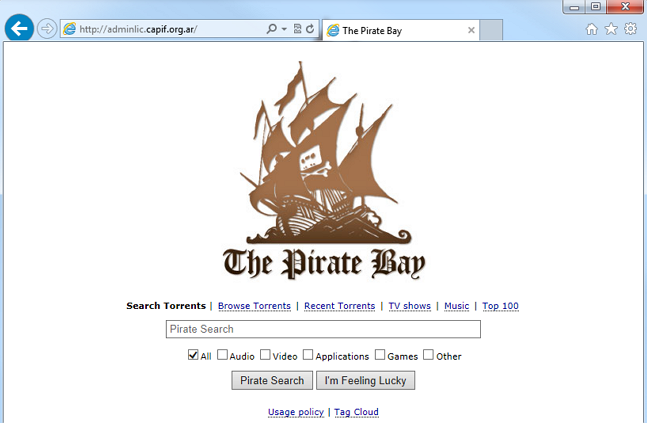
Right at this moment, CAPIF’s very own website is operating as a fully functioning Pirate Bay proxy site. Visitors to adminlic.capif.org.ar are greeted with the familiar TPB homepage and are granted full access to the site.

TPB-proxy

It’s very likely that CAPIF will soon move to shut down access to the proxy, but already the damage will have been done. This act of rebellion has the potential to generate more headlines than the blockade itself, meaning that over the next couple of days all blocked Argentinian TPB users will know what a reverse proxy is and what they are capable of.

Activism in support of torrent and file-sharing sites might be an art on the decline, but its ability to send powerful messages remains, especially when it turns the resources of ‘enemies’ right back against themselves.

Update: After serving torrents for at least 10 hours the proxy has now been pulled offline.

Source: TorrentFreak, for the latest info on copyright, file-sharing and anonymous VPN services.

01 Jul 13:20

Skype is changing the way it charges VAT to EU customers

by Harish Jonnalagadda

Skype has announced that it is changing the way it charges VAT to EU customers. Instead of charging VAT when customers add credit, Skype will add the relevant taxes when you actually use the service to make a call or buy a new subscription.


01 Jul 12:08

Boston's solar-powered benches can charge your phone

by Cassandra Khaw

Visitors at select Boston-area parks will soon be able to sit, relax, and charge their mobile devices. Dubbed "Soofas," these solar-powered benches will also disseminate location-based information such as noise, temperature, and air pollution levels through a website, according to Yahoo Tech. The high-tech amenity was first piloted in 2013, and has since been upgraded to include a larger seating area and the ability to plug in two phones simultaneously via USB. In the future, Soofas may feature inductive charging stations similar to those being deployed in Starbucks outlets through out the US.

Continue reading…

01 Jul 12:07

UK Plan To Demo Robots In The Wild

by Natasha Lomas
RAS 2020 The UK’s first official robotics strategy, drawn up with help from the Technology Strategy Board (TSB), is calling for the establishment of real-world test sites over the next five+ years where robotics and autonomous systems (RAS) can be rigorously put through their paces to help speed up development. Read More
01 Jul 12:06

Ouya pilots $60 all-access gaming pass

by Chuong H Nguyen

Ouya, makers of the $99 home video game console that runs on a customized version of Android, is starting to test out a limited time subscription pass. Valued at over $2,000, customers who pay $59.99 will get access to a library of 800 games for a year.


01 Jul 12:06

32 Best (And 1 WTF) New Android Apps And Live Wallpapers From The Last 2 Weeks (6/17/14 - 6/30/14)

by Michael Crider

roundup_icon_largeWelcome to the roundup of the best new Android applications, games, and live wallpapers that went live in the Play Store or were spotted by us in the previous 2 weeks or so.

Please wait for this page to load in full in order to see the widgets, which include ratings and pricing info.

Looking for the previous roundup editions? Find them here.

Featured App

Premium Wallpapers HD

Today's roundup is sponsored by Premium Wallpapers HD from Pixign.

32 Best (And 1 WTF) New Android Apps And Live Wallpapers From The Last 2 Weeks (6/17/14 - 6/30/14) was written by the awesome team at Android Police.


30 Jun 20:55

Best Android games of June 2014

by Simon Sage

Another 30 days, another batch of excellent new Android game releases

We've gathered up yet another collection of the very Android games to come out over the last four weeks. Whether you're looking for a twitchy action title, or a slow, methodical strategy game, or a light, bite-sized puzzler, we've got a bit of everything. We've only got five to look through, plus we'll have another round-up for non-game apps. As always, our community tends to dig up some great finds too, so be sure to swing by the comments to find more.


30 Jun 20:54

Google Play movies, TV shows now streaming in YouTube app

by Chuong H Nguyen

Google has updated its back end so that movies and TV shows purchased through the Google Play store will now stream through the Android YouTube app (and on the desktop) under the Purchases section. As the change happens on the Google side, no app update is required on the user's part to enable this feature on Android smartphone and tablets.


30 Jun 15:53

Google shutting down Orkut in September, focusing on Google+, YouTube, and Blogger

by Joseph Keller

Google is shutting down Orkut, its original social network. Google says that this is due to to the fact that Orkuthas been greatly outpaced by YouTube, Blogger, and Google+ across the world, where Orkut only ever caught on in a few countries.


30 Jun 11:57

UK Cinemas Ban Google Glass Over Piracy Fears

by Ernesto

google-glassThe movie industry sees the illegal recording of movies as one of the biggest piracy threats and for years has gone to extremes to stop it.

It started well over a decade ago when visitors began sneaking handheld camcorders into theaters. These big clunkers were relatively easy to spot, but as time passed the recording devices grew smaller and easier to obfuscate.

Google Glass is one of the newest threats on the block. Earlier this year the FBI dragged a man from a movie theater in Columbus, Ohio, after theater staff presumed he was using Google Glass to illegally record a film. While the man wasn’t recording anything at all, the response from the cinema employees was telling.

This month Google Glass went on sale in the UK, and unlike their American counterparts, British cinemas have been quick to announce a blanket ban on the new gadget.

“Customers will be requested not to wear these into cinema auditoriums, whether the film is playing or not,” Phil Clapp, chief executive of the Cinema Exhibitors’ Association told the Independent.

The first Glass wearer at a Leicester Square cinema has already been instructed to stow his device, and more are expected to follow. Google Glass wearers with prescription lenses would be wise to take a pair of traditional glasses along if they want to enjoy a movie on the big screen.

Movie industry group FACT sees Google Glass and other new recording devices as significant threats and works in tandem with local cinemas to prevent film from being recorded.

“Developments in technology have led to smaller, more compact devices which have the capability to record sound and vision, including most mobile phones. FACT works closely with cinema operators and distributors to ensure that best practice is carried out to prevent and detect illegal recordings taking place,” the group says.

In recent years the UK movie industry has intensified its efforts to stop camcording and not without success. In 2012 none of the illegally recorded movies that appeared online originated from a UK cinema while several attempts were successfully thwarted.

Last year, cinema staff helped UK police to arrest five people and another nine were sent home with cautions. As a thank you for these vigilant actions, the Film Distributors’ Association awarded 13 cinema employees with cash rewards of up to £500.

Source: TorrentFreak, for the latest info on copyright, file-sharing and anonymous VPN services.

30 Jun 11:51

Mobile-Only Bank Osper Raises $10M To Aim At UK Youth Market

by Mike Butcher
Screen Shot 2014-06-30 at 01.04.03 Osper, a new UK startup, has come up with an innovative way to create a banking service than can be used by children, combining prepaid debit cards and smartphone apps controlled by both them and their parents. The approach could potentially reach a market underserved by most banks, but which may also be embraced by parents keen to educate their children early on about how to manage money.… Read More
29 Jun 20:10

Google to prevent OEMs from customizing the UI on Android Wear, Auto and TV

by Rich Edmonds

Android TV

Google is actively preventing OEM partners from adding customized elements to Android Wear, Auto and TV, according to a report over on Ars Technica. It's no secret that Android as a mobile platform is fragmented when it comes to personalized OEM user experiences. There's a lot left up to individual manufacturers when it comes to loading the Android smartphone with software and other pieces that add yet more functionality on top of what's already available in vanilla Android.

This is set to change with Android TV, Auto and Wear.

On one side this would mean the end of personalized "skins" for hardware to differentiate between the OEMs, but on the rear side of the coin we're looking at a more consistent Google experience between brands, making it easier to experiment with multiple products. Google engineering director David Burke spoke with Ars Technica to confirm that "the UI is more part of the product in this case. We want to just have a very consistent user experience, so if you have one TV in one room and another TV in another room and they both say Android TV, we want them to work the same and look the same."

"The device manufacturers can brand it, and they might have services that they want to include with it, but otherwise it should be the same."

Burke also noted that Google would be able to manage software updates directly for products in question, especially with Android TV, which the company aims to make said updates automatic and seamless. As opposed to Android on the phone (where updates can be a messy business), Google will be attempting to implement something like Chrome on the desktop. While it's good news for those who feel Google's aesthetic vision for the OS as a whole is one to their liking, other power users may begin to feel constrained by the OS, not being able to download source code to build on top of affected Android platforms.

Things have changed since the days of early Android. Google now offers a rather robust package and OEM partners aren't required to make drastic changes they've previously made. It'll be interesting to see how manufacturers can differentiate their products, while providing a consistent experience across the board. There are already subtle differences between different devices running Android Wear documented by Google.

How do you view this? Would you prefer to have more options available, or is opting for a more up-to-date platform as a whole better in the long run?

Source: Ars Technica

29 Jun 20:06

Ask Yourself These Questions to Turn a Bad Day Around

by Dave Greenbaum

Ask Yourself These Questions to Turn a Bad Day Around

Let's face it: some days just take a turn for the worse. The Positivity Blog recommends asking yourself these questions to put it all in perspective.

They've got list of questions to ponder when you are having one those kind of days:

  • Will this matter 5 years from now?
  • Who cares?
  • What is one small action, one small and practical step I can take to start turning this day or situation around?

These questions help you realize that the day isn't necessarily a disaster and you can get back on track. Check out the rest of the tips by following the link.

How to Turn a Bad Day Around | The Positivity Blog

Photo by Raymand Bryson.

29 Jun 19:29

uTorrent Makes Advertisement Optional Again

by Ernesto

utorrent-logo-newWith roughly 150 million monthly users uTorrent is by far the most used BitTorrent client around.

This dazzling number is a dream for most advertising agencies, but not all uTorrent users appreciate an ad-filled application.

When the makers of uTorrent made the client ad-supported two years ago there was a small user revolt. As a result, parent company BitTorrent Inc. chose to make the ads optional.

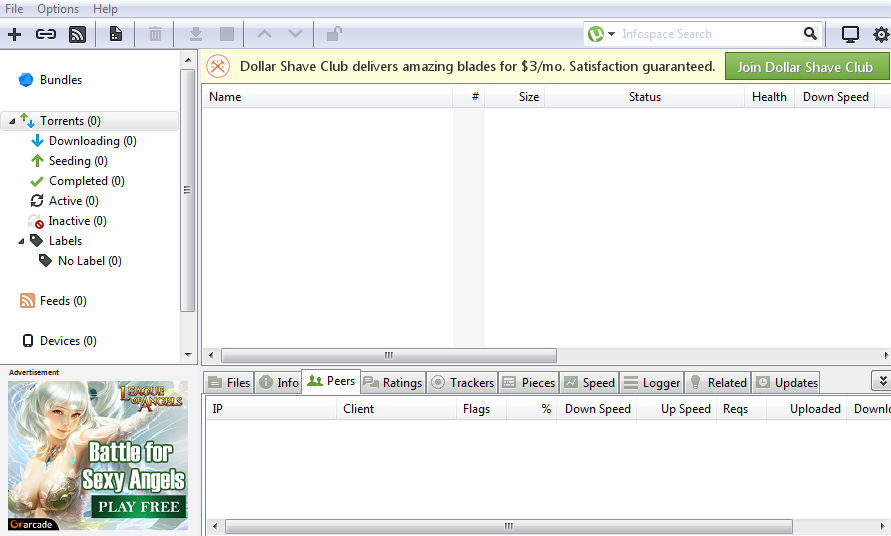
However, earlier this month the company appeared to have changed this position. Without public notice the banner position in the lower left corner was made permanent.

The bottom left ad(s)
utorrentads

Previously, users had the option to turn the ad off through the options dropdown menu but this option was removed. The advanced setting that allowed users to disable the banner ad disappeared as well.

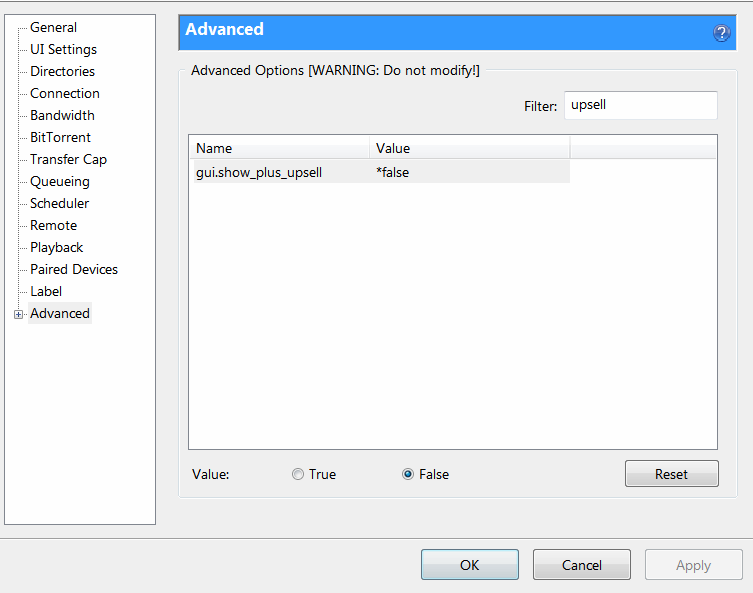
Fast forward a couple of weeks and the uTorrent team now appears to have reconsidered its position. The latest stable release, which came out just before the weekend, reinstated the advanced setting.

“Added back: Feature gui_plus_upsell in advanced settings,” the changelog reads.

BitTorrent Inc. hasn’t commented publicly on the forced advertisement issue, but it seems plausible that the company reconsidered its earlier decision after users voiced their complaints. However, since the ad can only be disabled through the advanced settings, it’s expected that most users will never turn it off anyway.

In addition to the toolbars and other software bundled with uTorrent, ads are an important source of revenue for BitTorrent Inc. Last year the company said that uTorrent is good for five billion ad impressions a month.

Judging from these numbers the revenue potential is enormous, as long as you don’t alienate the users.

Banner can be disabled now
upsell

Source: TorrentFreak, for the latest info on copyright, file-sharing and anonymous VPN services.

29 Jun 19:29

Bing TV Show Search Flies Under the Pirate-Hunter Radar

by Andy

bing-logoGoogle is only too aware of its currently unpopularity with rightsholders. While the search giant provides superb and often vital Internet services, the music and movie industries are desperate for infringing results to disappear from Google’s indexes.

Every week the search engine receives millions of DMCA takedown notices requiring it to take case-by-case action, but the company’s reluctance to do something more permanent has made it search-engine-enemy-#1 with copyright holders who never miss an opportunity to lay on the criticism.

In the background, however, Microsoft’s Bing flies comparatively under the radar. Sure it processes plenty of takedown notices too, but it receives little of the corporate pressure piled onto Google. This can only be a result of Google’s place in the market, since Mr Don’t Be Evil has done more than its rival to combat piracy.

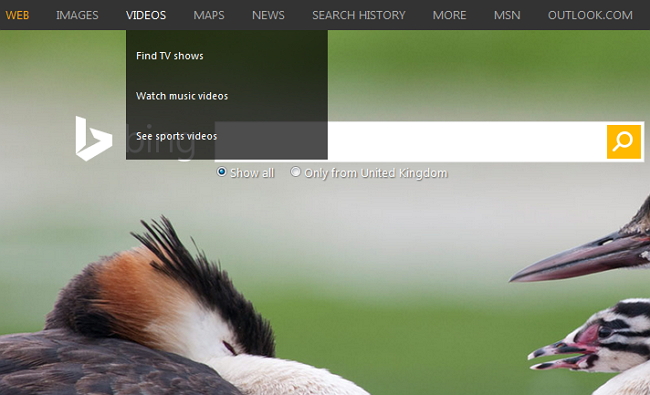
Case in point, Bing’s powerful and somewhat under-used streaming video search engine which offers to find TV shows from the get-go.

bing-tv

While Google gets heavily criticized for its AutoComplete feature (which is already partially censored following copyright holder requests), Bing has no problem in first offering TV shows and then completing suggestions of what to watch. Tap in “BRE” and at the top of the list appears BREAKING BAD. We clicked the option – Bing delivered.

The first few results are shown below but those are just the tip of the iceberg and more specific show searches hardly ever come up short either. The auto-suggestions at the top of the screen are there in case ideas run out too, helpfully pushing the user towards varies series and specific episodes.

Bing-breaking

As can be seen from the image above, those who are fussy over the quality of the content being presented can filter by resolution too, right up to 1080p. Also, restricting searches to videos over 20 mins rejects many trailers and other samplers in favor of episodes and full length movies.

Aside from being a pretty good search engine (it came up with some long-forgotten TV show pilots from the 1970s), Bing also has a rather nice trick up its sleeve. Hover a mouse over any video thumbnail shown in the results and its size will instantly increase to display a proper video preview of the content in question. As far as we’re aware, no other search engine online today does that.

bing-tpb

Of course, someone at Bing isn’t deliberately programming its engine to present infringing results, those are determined by intelligence gleaned from user search requests. That being said, if Google debuted a new “TV Show” search engine tomorrow and began auto-completing and auto-suggesting infringing TV content, weeks-long industry hysteria would ensue.

It’s also worth pointing out that Google also has a decent video search which is almost certainly used by many, many more millions than Bing’s. It’s nowhere near as glossy and definitely not as ‘risky’ in how it presents content, but that won’t stop the search company from continuing to take most of the rightsholder flak due to its colossal userbase and its uncontested position in the market.

Make no mistake, Google will remain in the firing line for the foreseeable future, even while other companies get away with much, much more. But their time will come, it’s almost inevitable, an event that could be triggered by Google caving in to increasing rightsholder demands.

Image credit

Source: TorrentFreak, for the latest info on copyright, file-sharing and anonymous VPN services.