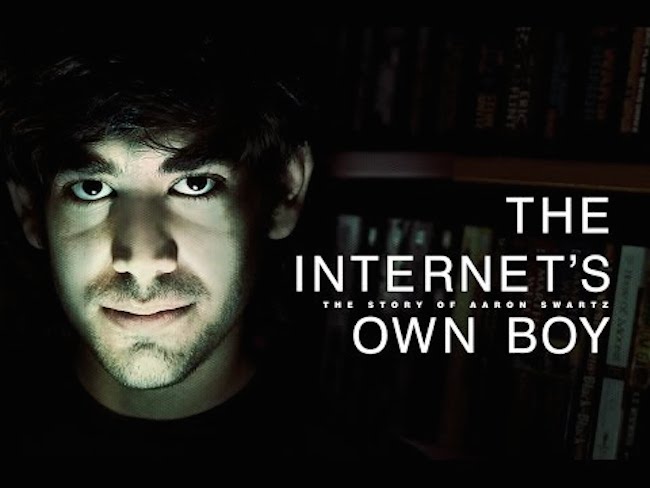
 Aaron Swartz was a young, bright genius who believed in the open Internet. A self-made millionaire by the age of 19, he co-founded Reddit, was part of the creation of RSS and became a political organizer and Internet hacktivist who was instrumental in the fight against SOPA. The Internet’s Own Boy, a film first released at Sundance and now opening to the public today, follows the story… Read More
Bcstevieb
Shared posts
29 Jun 20:16
Aaron Swartz was a young, bright genius who believed in the open Internet. A self-made millionaire by the age of 19, he co-founded Reddit, was part of the creation of RSS and became a political organizer and Internet hacktivist who was instrumental in the fight against SOPA. The Internet’s Own Boy, a film first released at Sundance and now opening to the public today, follows the story… Read More
Watch This Film About Why Aaron Swartz Matters More Than Ever
by Sarah Buhr
Aaron Swartz was a young, bright genius who believed in the open Internet. A self-made millionaire by the age of 19, he co-founded Reddit, was part of the creation of RSS and became a political organizer and Internet hacktivist who was instrumental in the fight against SOPA. The Internet’s Own Boy, a film first released at Sundance and now opening to the public today, follows the story… Read More
29 Jun 20:16
 In less than an hour the streaming TV service Aereo will “pause” its operations. In an email sent at 9 AM Eastern Saturday, Chet Kanojia informed customers that because of the U.S. Supreme Court ruling earlier this week , the company would temporarily halt its operations at 11:30 Eastern as it consults with the court to plan its next steps. The New York based company is… Read More
Aereo Shutters Its TV Streaming Service… For Now
by Jonathan Shieber
In less than an hour the streaming TV service Aereo will “pause” its operations. In an email sent at 9 AM Eastern Saturday, Chet Kanojia informed customers that because of the U.S. Supreme Court ruling earlier this week , the company would temporarily halt its operations at 11:30 Eastern as it consults with the court to plan its next steps. The New York based company is… Read More
29 Jun 20:15

FDA approves new insulin inhaler for diabetics
by Josh Lowensohn
The US Food and Drug Administration today approved a new insulin inhaler for use in treating diabetes, its first in years. The product, which is made by California-based MannKind Corporation, uses a dry powder that people can breathe in to control insulin levels. It's been designed not as a full-time replacement to insulin injections, and instead as an alternative to them at meal times given the powder's short-term effects that kick in within what the company says is between 12 to 15 minutes.
27 Jun 16:23

Huge underground trampoline park in a cavern
by David Pescovitz
Bounce Below is a massive underground trampoline facility inside the Llechwedd Slate Caverns in Wales, UK. There is also a slide.
Read the rest
27 Jun 16:22

SWAT teams claim to be private mercenaries, immune to open records laws
by Cory Doctorow

The ACLU reports [PDF] that when it made Freedom of Information requests for Massachusetts SWAT team records, the SWATs claimed that because they were organized as "law enforcement councils" (jointly owned by many police departments, with additional federal funding) that they were not government agencies at all, but rather private corporations, and not subject to open records laws.
SWATs are the white-hot center of the increasingly brutal and militarized response of US police forces, which have outfitted themselves with ex-Afghanistan/Iraq military materiel and have deployed it in an escalating violent series of attacks, largely as part of the war on drugs. As Radley Balko writes in the Washington Post, the SWATs' claim to be private companies doesn't pass the giggle test: they are funded by the government, pay government employees, and do the government's business.
The argument boils down to this: we are not the police, we are private mercenaries armed with automatic weapons and military-grade vehicles and equipment, and when we attack and kill in the streets of American cities, we do so as private soldiers who happen to be funded by the police departments' budgets.
The ACLU is suing the North Eastern Massachusetts Law Enforcement Council to challenge this ruse, but even if they win, this should be setting off alarm bells for anyone who believes in good government and responsible policing. The cornerstone of democratic legitimacy is a duty to the public, with all the transparency and respect that implies. When police forces up and down the state structure themselves to create and exploit a loophole that lets them obscure the details of their most violent, most spectacular screw-ups -- which generally result in gruesome injuries and deaths to innocent members of the public -- there is no way they can claim to be acting in the public interest.
The fact that the city governments that oversee these departments and the federal agencies that fund the LECs have been complicit in this suggests that this isn't a matter of police overreach, but rather is a policy that goes literally all the way to the top of the policing regulatory structure in America. Read the rest
27 Jun 16:20


A Set of Awe Inspiring Majestic Mountain Images
by Darlene Hildebrandt
Summer in the northern hemisphere usually means school’s out and families take vacations. A popular destination, at least where I live, is the mountains. Who doesn’t love driving through, or camping in the mountains.
Here’s a set of majestic mountain images and rolling hills to help light a fire under you for a possible road trip and photography journey.


![Photograph [ … klifatindur ] by D-P Photography on 500px](http://ppcdn.500px.org/52942722/04158b7e1c71c81d95514cf46037edef01b30d1c/4.jpg)










For tips on landscape and nature try these articles:
- 25 Landscape photography articles
- Living Landscapes – a dPS ebook
- Loving Landscapes a guide to landscape photography workflow and post-processing – a dPS ebook
- How to do Surreal Digital Infrared Photography Without Expensive Gear or Camera Conversions
The post A Set of Awe Inspiring Majestic Mountain Images by Darlene Hildebrandt appeared first on Digital Photography School.
Jonmatifa, Joan Carbonell and one other like this
27 Jun 16:19

The Coolest New Features of Android L Google Didn't Announce
by Eric Ravenscraft
Google announced Android L earlier this week, and it's due for release in the fall. There are plenty of cool new features, but after playing with the developer preview, we discovered a bunch of sweet things Google didn't mention. Here are the coolest features Google didn't highlight in their announcement.
Disclaimer: This is a developer preview of Android L and, as such, anything could change by the time it's released. There may be even more features that we haven't found, and some things we have seen might end up removed, disabled, or changed by the time it hits consumers.
Do Not Disturb Mode Silences Incoming Notifications

Up until recently, Android hasn't had the ability to block all notifications if you need some peace and quiet for a little bit. This changes with Android L. Open up the Quick Settings panel in the notification shade and you'll see a Notifications toggle. Here, you can enable a Do Not Disturb mode. Set the silent period for a set time, or turn off all notifications until you re-enable them later.
Search within the Settings App To Find That Obscure Setting

The Settings app has a ton of useful functionality, but if you don't know what you're looking for, it can be a mess to find it. Now the app comes equipped with a search box. For common things like Wi-Fi or Bluetooth, you probably won't need it, but if you're looking for the setting to enable color correction for red-green color deficiencies, the search box can be a huge help.
Estimate Time Until Battery is Charged or Depleted

Google promised a slew of new battery saving features in Android L. One of the things it neglected to mention was that Android will now estimate how long it takes to fully charge the battery. When your device is plugged in, the lock screen will display how long it will take until your battery reaches 100%. Additionally, while unplugged, the battery section of the Settings app will estimate how long your battery will last and when your phone will die. How accurate these estimates are will probably depend on your usage and Battery Saver settings, but it's nice info to have.
Customize Your Display with Adaptive Brightness

Auto-brightness is a feature that works for some, and is horribly broken for others. In the old version, you can either set your phone's brightness level manually, or set it to auto and give your phone complete control. Obviously, this is less than ideal.
In Android L, Google's introduced a new feature called Adaptive Brightness that combines manual and auto brightness. You can manually adjust the brightness level to a state you like. Once it's set, your screen will adjust based on ambient light so it stays at the same brightness relative to the light around you. This way you can set the screen to your preferences without sticking to an absolute level.
Android Beam is (Somewhat) Easier to Use

Android Beam was always one of those features that sounded a lot better on paper than it worked in practice. You had to open up the photo, contact, or file you wanted to share, press two devices together, and tap and hold the screen until a connection is established.
In Android L, you can initiate an Android Beam transfer via the Share menu. This prepares to share a file from your device. Then, you just tap the two devices together to complete the connection. The amount of time you have to keep your two phones pressed against each other awkwardly is drastically reduced. It's not perfect, but it may actually be a feature you use now
Swipe to Access the Dialer from the Lock Screen

In previous versions of Android, you could swipe to the right on the lock screen to quickly open up the camera app. Now, Google has added the ability to swipe to the left to jump directly to the dialer app. This seems to take the place of lock screen widgets. This build of Android isn't final, so they may return, but for the moment at least, it seems like swiping to the dialer is your only first-party option.
Display PDFs Without a Separate App
How often do you really need to read a PDF on your phone? Almost never, but just often enough that it's obnoxious when you can't do it natively. If you have one of the commonly pre-installed apps like Quickoffice, you might not have noticed, but if you don't have an app with a PDF renderer included, it's a pain to track one down. Android L now includes a built-in reader. Android Police notes that it's not currently activated, but this is a preview build, so it's reasonable to assume it will be available once it's time for release.
Turn Off Notifications on a Per-App Basis All From One Place

You can already disable an app's notifications entirely by going to that app's system settings and unchecking the "Show notifications" button. Now, Google's made it a little easier to turn off notifications from several apps at once. In the Settings app, tap Sound & Notifications > Showing notifications > App notifications. You'll be presented with a list of all the apps on your device. Tap a given app and you'll see the "Show notifications" check box. It's not much different than digging through the app list, but it's simplified so you don't have to dig through the Downloaded/All sections, or get cluttered up with other settings.
27 Jun 16:17


Inside app brings smart, bite-sized news to Android
by John Callaham

The curated news app company Inside has now launched a version for Android devices via the Google Play store, offering users a way to check out what the company thinks is the best journalism on the Internet but in a condensed form.
27 Jun 12:31


Top 10 new Android games this week: Dragon Finga, Spy vs Spy
by Steve Raycraft
Welcome back to Android Gaming Weekly, our weekly recap of new game releases. We still plan to cover upcoming releases and games we’re playing, but this column is dedicated to new games that you can start playing right now. Check out our top picks and let us know in the comments section if you have any suggestions for next week’s post.
The Rhythm of Fighters
Description: Play to the rhythm of the music to make your character unleash fan-favorite moves and combos on the opponent! Take advantage of the “Rhythm Battle System” for astronomical scores! Let’s enjoy the ultimate blend of rhythm & fighting game genres for a unique game!
Powerpuff Girls: Defenders
Description: Mojo Jojo has blasted the Powerpuff Girls with his Disremember Ray, which makes them forget how to use their superpowers! You’ll have to explore the far reaches of Townsville to remember all your powers and take down that evil monkey!
Castle of Illusion
Description: Mickey Mouse returns to star in Castle of Illusion, a fantastical reimagining of the Sega Genesis classic. When the evil witch Mizrabel kidnaps Minnie, it’s up to Mickey to brave the dangers of the Castle of Illusions to rescue Minnie.
The Walking Dead: Season Two
Description: The Walking Dead: Season Two is a five-part (Episodes 2-5 can be purchased in-app, as they become available) game series that continues the story of Clementine, a young girl orphaned by the undead apocalypse. Left to fend for herself, she has been forced to learn how to survive in a world gone mad. Many months have passed since the events seen in Season One of The Walking Dead, and Clementine is searching for safety.
Spy vs Spy
Description: SPY vs SPY is based on the original, multi-million unit selling, break out hit by First Star Software, Inc. It features Wi-Fi multiplayer matches, a pixel perfect retro mode as well as a modern mode, both with the famous black and white spies from MAD Magazine. Choose joystick or other touch controls.
Dragon Finga
Description: Dragon Finga is a unique Kung-Fu fighting game for all ages! TAKE DIRECT CONTROL of your own Dragon Warrior to take on infinite hordes of evil enemies!
Simon the Sorcerer 2
Description: Following the success, media praises and high user ratings of the first game – Simon the Sorcerer (also available on Google Play), we proudly present its long-awaited sequel. Just when he thought his life was regaining some semblance of normality, Simon’s wonder years are once again turned upside down when the evil sorcerer Sordid returns from the grave with only one thing on his mind – revenge!
Monsters Ate My Birthday Cake
Description: As so many of these things do, it all begins on a magical island. In this case, Gogapoe Island, a place populated by both humans and monsters. What starts out as a mission to get back Niko’s birthday cake becomes a quest for the fate of Gogapoe itself. But, ya know, cake is still super important, too!
Bardadum: The Kingdom Roads
Description: Bardadum: The Kingdom Roads, a puzzle video game set in a humorous medieval world. The game is simple, accessible, and based upon the player’s common sense and observation.Follow the story of two friends: a bard and a knight traveling through the Bardadum kingdom. May their quest become yours!
Wave Wave
Description: Brought to Android by Noodlecake Studios, Wave Wave is a savage arcade game developed by Thomas Janson, with music by Danimal Cannon and Zef. Hectic. Extreme. Addictive. Racing. Tumultuous. Blitzing. Electric. Anaerobic. Treacherous.
27 Jun 12:29


Android L developer preview hands-on
by Alex Dobie

Google surprised us yesterday with not just a new version of Android, dubbed Android L, but also the announcement of early preview builds to let developers get to grips with the new OS. Today, on the second day of Google I/O, we've finally gotten our hands on the Android L preview for the Nexus 5 and Nexus 7 and taken it for a spin. And while everything's not quite in place yet — as we'd expect given that we're dealing with pre-release software — it's a promising start for the next version of the OS.
Take a look in our hands-on video after the break.
27 Jun 12:27
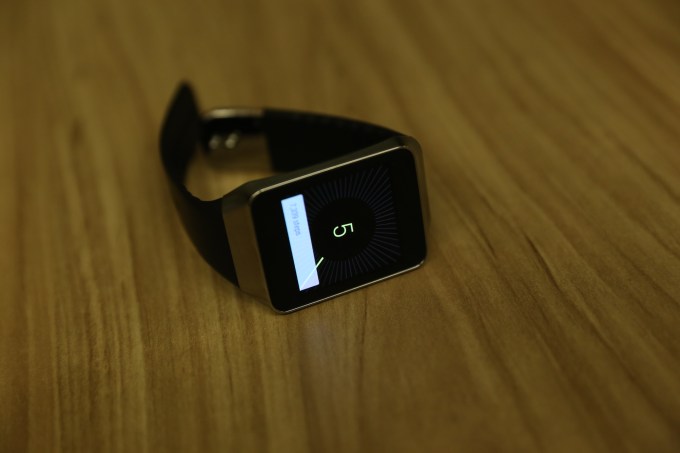 The Gear Live is Samsung’s first kick at the Android Wear can, and like the other hardware in this category, it offers Android Wear basically as Google intended it. Software wise, there’s almost nothing to distinguish these devices – which means it’s all down to hardware design for Wear makers to make their mark. Samsung’s Gear Live is the only one in the launch… Read More
Samsung’s Gear Live Android Wear Smartwatch First Impressions
by Darrell Etherington
The Gear Live is Samsung’s first kick at the Android Wear can, and like the other hardware in this category, it offers Android Wear basically as Google intended it. Software wise, there’s almost nothing to distinguish these devices – which means it’s all down to hardware design for Wear makers to make their mark. Samsung’s Gear Live is the only one in the launch… Read More
26 Jun 22:53

Using Android L: a first look at Google's future
by Jacob Kastrenakes
Google is making some big changes to Android for its so-called “L release” this fall, and starting today, it’s giving interested developers the chance to take an early look at it. Naturally, we wanted to try it out too, so we got the preview running on a Nexus 5 to see what it’s like.
There are three major changes on the surface of Android’s L preview worth paying attention to: an overall design overhaul, improved notifications, and rethought multitasking. The design changes are, of course,...
26 Jun 22:45


Android "L" Feature Spotlight: Restoring Wi-Fi Passwords Is Now A Separate Setting When Signing In For The First Time [Updated]
by David Ruddock

Update: As many of you have pointed out, this feature isn't new for everyone. What is new is the checkbox you're seeing below, which was not previously a part of the sign-in process. The checkbox, now decoupled from the global "restore all the things" setting, lets you get back just the Wi-Fi passwords but not apps and settings, or the other way around (which isn't nearly as useful).

While it's not exactly aggravating, per se, having to enter your Wi-Fi password every time you get a new phone or tablet (or reset your current one) is something that doesn't exactly feel like living in the future.
Android "L" Feature Spotlight: Restoring Wi-Fi Passwords Is Now A Separate Setting When Signing In For The First Time [Updated] was written by the awesome team at Android Police.
26 Jun 20:30
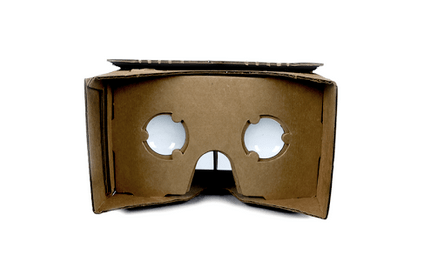 The surprise hit of Google I/O was without a doubt Cardboard. Google’s paper product — or phone-based VR viewer — made its debut during yesterday’s keynote, and today, David Coz, the project’s founder, revealed its origins. Read More
The Story Behind Google’s Cardboard Project
by Frederic Lardinois
The surprise hit of Google I/O was without a doubt Cardboard. Google’s paper product — or phone-based VR viewer — made its debut during yesterday’s keynote, and today, David Coz, the project’s founder, revealed its origins. Read More
26 Jun 20:28

You can now watch Google's entire two-and-a-half-hour I/O keynote
by Chris Welch
We've already gone over the most important announcements from yesterday's Google I/O keynote, but if you're after the small details, the entire presentation can now be streamed on demand. Google broadcasted the event live as it happened, but if you missed out, this is your chance to hear all about Material Design and the visual changes it's bringing to Android L. And of course there's plenty of time devoted to Android Wear, Android Auto, and Android TV too. The whole thing clocks in at over two and a half hours, so it may prove a bit much for one sitting. At the very least you can safely skip the video's first 17 minutes; the keynote gets underway at around the 18:35 mark.
26 Jun 20:24


Motorola Posts Official Video Demo Of The Moto 360
by Ryan Whitwam
 Didn't make it to Google I/O? Well, Motorola wants you to get a closer look at the Moto 360 smart watch anyway. In a two minute video demo, we get to see a few watch faces, notifications, and more.
Of particular interest in this video is the way the display works. When not in use, the Moto 360 display appears to be on, but very dim. So you'd be able to look at your wrist and see the time without touching it.
Motorola Posts Official Video Demo Of The Moto 360 was written by the awesome team at Android Police.
26 Jun 14:29


App indexing in Google Search is live, and it's spectacular
by Phil Nickinson

Google Play news never quite seems to get the love it deserves at Google I/O keynotes, but there was one nugget of news I was pretty stoked to see yesterday. App indexing, previously available to a select few, is now available for anyone who wants it.
Here's how it works: You'll add a little extra code in your app to tell it how to handle all this stuff, and then you add deep links to your website, and tell Google they're there. The result is what you see above. When someone searches on their phone or tablet for an item that's been properly indexed with these deep links, the results will turn up with an option to open in your app. Or if you're using the search bar, you'll see deep links that way, too. It's pretty cool, and it's a must-have for anyone with a kick-ass website and app.
Our app indexing is now live. And you can download our app here. Enjoy.
26 Jun 13:29

Apple launches $199 iPod touch with a camera
by Jacob Kastrenakes
Apple is making its latest iPod touch available for a lower price than ever today, bringing it down to $199 with the launch of a new 16GB model. Notably, the new low-end option is available in all six colors that the iPod touch is offered in and includes a rear camera — last year, in an attempt to bring down the price, Apple released a 16GB model without a camera and only available in black and white for $229. That camera-less version is no longer available, and its replacement is certainly a lot more appealing of an offering. It's available in the US today and will launch worldwide in the near future.
26 Jun 13:27

Give Your Desktop Good Vibes with These Awesome Animal Wallpapers
by Melanie Pinola
Anthropomorphism, or assigning human characteristics to animals and other non-humans, might be frowned upon in some scientific circles, but animals that look downright emotive are just fine for your desktop. Download wallpapers of some very expressive animals here.
Remember, we're now requesting your participation in the Wallpaper Wednesday series! You'll find a selection here, but post your favorites for this week's topic in the discussions below. Stick to our format as best you can, including a title, the image, resolution, and a link. Happy wallpapering!
Day Gecko on Pandanus Fruit, Captain Cook, Hawaii
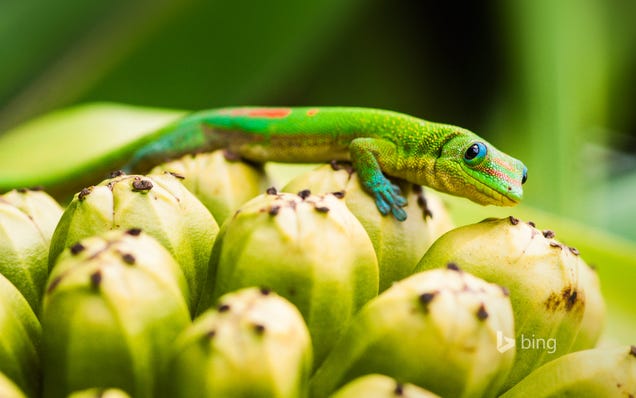
Download This Wallpaper (1920 x 1200) | Bing
Cat Pat

Download This Wallpaper (1920 x 1200) | The Paper Wall
Bear Waving

Download This Wallpaper (1920 x 1080) | The Paper Wall
Pug

Download This Wallpaper (1920 x 1200) | HDW
Prairie Dogs

Download This Wallpaper (1920 x 1200) | Bing
Polar Bear Rolling on the Frozen Beaufort Sea, Near Point Barrow, Alaska

Download This Wallpaper (1920 x 1200) | Bing
Puppy

Download This Wallpaper (1920 x 1200) | The Paper Wall
Baby Seal

Download This Wallpaper (1920 x 1080) | ilikewalls.com

Photo by Scott Davis/Tandem Stock (Bing).
25 Jun 21:30


Fresh Meat: 10 new Android apps worth checking out
by Steve Raycraft
New apps need lovin’ too, right? Every day there are thousands of additions to the Google Play Store, but many go unnoticed and never receive the attention they deserve. We’ve shown in the past that this community can discover great apps and propel them to new heights. Our weekly Fresh Meat column highlights new apps with fewer than 100,000 installs. Browse our new Android app picks below and let us know which ones you enjoy.
BrightNest

Description: Keep your home in great shape without breaking a sweat! BrightNest helps you tackle important tasks with our home tips, personal schedule and helpful reminders. From simple cleaning tricks to interior design ideas, we deliver everything you need to shape up your home and simplify your life!
Pocket Avatars

Description: Pocket Avatars by Intel® is a new chat app that utilizes sophisticated face & head tracking algorithms and voice capture technology to render your expressions & voice onto an array of fun-loving avatars. Send Pocket Avatar messages app to app, via text or email or post them on your favorite social media site.
Unread Count

Description: Unread Count enables Action Launcher Pro users to display unread badges for certain apps like Gmail, SMS, Phone and Calendar.
Sicher

Description: With true end-to-end encryption, no messages or files are ever transferred unencrypted, and no man in the middle (including SHAPE as the service operator) can read the messages or see even the type of file you’ve sent!
Sleep Cycle alarm clock

Description: An intelligent alarm clock that analyzes your sleep and wakes you in the lightest sleep phase – the natural way to wake up feeling rested and relaxed.
Path Talk

Description: Talk is a new messenger from Path available for Android and iPhone. Replace SMS and Facebook with Path Talk to message friends, family, and groups for free. Off the Record: Messages you send in Path Talk are automatically erased from our servers 24 hours after you send them, so you can now be yourself in conversations.
Slingshot

Description: Shoot a photo or video of what you’re up to and sling it to a bunch of friends. They won’t be able to see your shot until they sling something to you. Tap on a shot to react, or simply swipe it away.
EverythingMe Launcher

Description: EverythingMe is a launcher for your Android phone that delivers what you need, when you need it. The launcher anticipates the apps, people and information you’d want – giving you the perfect phone, every time.
Udacity

Description: Enjoy our courses in the comfort of your own home, solve a programming problem at a coffee shop or answer short quizzes in the park. Udacity for Android is the learning experience that fits into your lifestyle.
Google Slides

Description: Create, edit, and collaborate with others on presentations from your Android phone or tablet with the free Google Slides app.
25 Jun 20:42


Google introduces Android One to bring Android smartphones to developing markets
by Nick Sarafolean
At Google I/O 2014, Google introduced its new initiative called Android One. Android One is a set of reference designs for OEMs to use to create high quality, low cost smartphones for emerging markets. Android One smartphones will run stock Android and receive automatic updates straight from Google. This will allow for a quality experience across Android One devices.
The program will launch in India, with other countries following. Google showed off an Android One device from Micromax, which features a 4.5-inch display, dual-SIM support, microSD card slot, and FM Radio. Android lead Sundar Pichai has been using the device and said that it’s a pleasure to use. The best part? The device costs less than $100 making it extremely affordable for developing markets. Alongside Micromax, Karbonn and Spice will also be creating Android One devices in India.
25 Jun 20:41


Android Wear brings notifications (and so much more) to your wrist
by Chuong H Nguyen

Google is heavily promoting that it aims to simplify your life at Google I/O and this year Android Wear joins the list to make wearables smarter to make your life easier. The aim of Android Wear is to be contextually aware, voice enabled, seamless, and mobile first. Android Wear brings glanceable, contextual notification from your phone to your wrist so that you can perform tasks quickly and easily on the go.
25 Jun 20:40


HTC: Android L updates start within 90 days of getting code
by Phil Nickinson

HTC just dropped us the following on its plans for updating to the still-unnamed L release of Android: Updates will start within 90 days of getting the code from Google for the HTC One M8 and M7, and other phones will follow.
25 Jun 20:40


Samsung Gear Live specs
by Alex Dobie

The Gear Live — Samsung's first Android Wear smartwatch is official, announced at Google I/O and available from today on the Google Play Store for $199. If you're wondering about exact hardware specs, we've got full Samsung Gear Live hardware details waiting below.
25 Jun 20:40


Hands-on with the LG G Watch
by Phil Nickinson

Our first look at LG's first foray into the Android Wear arena
Begun, the next era of the smartwatch has. We've gotten a few minutes to check out the LG G Watch, one of the first three Android Wear watches. (The Moto 360 and Samsung Gear Live round out the other two.)
At its most simple, it's a 1.6-inch display wrapped in a steel case (available in either black or white). That display is a 280x280 IPS panel (LG's own). And while that 247 pixels per inch is a far cry from the QHD display we've grown to love from LG in recent weeks, it's perfectly capable of relaying the full colors in Android Wear. The bad news is that the full colors really make the bezel stand out, particularly above and below the display.
25 Jun 20:21
 Goole just announced at I/O that it has acquired Appurify, a startup that lets developers automate testing and optimization of their mobile apps and websites. Appurify will stay open as freemium cross-platform service but get a big boost in distribution as it becomes integrated into the Google developer tool stack. Appurify’s big value add is helping developers handle fragmentation.… Read More
Google Acquires Mobile Testing Platform Appurify, Will Keep It Open On iOS And Android
by Josh Constine
Goole just announced at I/O that it has acquired Appurify, a startup that lets developers automate testing and optimization of their mobile apps and websites. Appurify will stay open as freemium cross-platform service but get a big boost in distribution as it becomes integrated into the Google developer tool stack. Appurify’s big value add is helping developers handle fragmentation.… Read More
25 Jun 20:17

The 17 most important things Google announced at I/O
by Verge Staff
Google’s main event of the year, I/O 2014, was chock-full of news: some expected, some decidedly not. The company showed off a colorful and playful new design style for all of its products, as well as a new version of Android, codenamed “L,” that won’t arrive until later this year. Google debuted a cheap but elegant Android One phone to court buyers on a budget. Android was everywhere at the developer conference: on smartwatches, in car dashboards, and even on your body with Android Fit, a...
25 Jun 20:17

This is the Gear Live, Samsung's $199 Android Wear smartwatch
by David Pierce
Wearables were everywhere today at Google I/O, but there was only one truly new product announced: the Galaxy Live, Samsung's Android Wear-running smartwatch. And we've had a chance to spend a few minutes playing with a demo unit — it's only able to do a few things right now, but we have our best sense yet of what Android Wear hardware and software will look like. This is one of the key devices for Android Wear, one of the watches being given to all attendees of the conference, and at first...
25 Jun 14:33
 More than 18 million Americans have sleep apnea, a condition that affects their breathing while they are asleep. Not only does sleep apnea impact their sleep quality, but it can also increase the risk of strokes, heart attacks, congestive heart failure, and hypertension. When Seungkyu Lee, a Seoul-based dentist, realized how much sleep apnea decimated the quality of life for his patients, he… Read More
Domobio’s QT33 Can Dramatically Improve Sleep Apnea Patients’ Quality Of Life
by Catherine Shu
More than 18 million Americans have sleep apnea, a condition that affects their breathing while they are asleep. Not only does sleep apnea impact their sleep quality, but it can also increase the risk of strokes, heart attacks, congestive heart failure, and hypertension. When Seungkyu Lee, a Seoul-based dentist, realized how much sleep apnea decimated the quality of life for his patients, he… Read More