Shared posts

08 Sep 19:56

Amazon cuts Fire Phone price to 99 cents just two months after launch

by Russell Brandom

Two months after launch, Amazon has cut the price of its flagship Fire Phone by nearly $200. The phone now costs just 99 cents with a two-year contract, complete with a year of Amazon Prime membership and various other cloud services included. Anyone who bought the phone at launch would have paid $199. The company is also expanding availability to the UK and Germany, for zero pounds and one euro respectively.

Continue reading…

08 Sep 19:55

'Minority Report' TV series gets pilot order at Fox

by Jacob Kastrenakes

There's a good chance that we'll be seeing further into the future of Minority Report. Late last month, Paramount TV and Steven Spielberg's production company were reported to be working on turning his classic sci-fi film into a TV series, and Deadline is now reporting that Fox has put in an order for a pilot episode with a good chance that it'll be taken to series.

Beginning 10 years after the film's Precrime unit is shut down

The show will apparently serve as a sequel to Spielberg's film, beginning 10 years after the shut down of its famed Precrime unit — which used premonition to catch supposed "murderers" before they commit their crime. The show will reportedly pair up a detective and a Precog who can't stop seeing visions of the...

Continue reading…

08 Sep 19:54

19 Best New Android Apps And Live Wallpapers From The Last 2 Weeks (8/26/14 - 9/8/14)

by Michael Crider

roundup_icon_largeWelcome to the roundup of the best new Android applications, games, and live wallpapers that went live in the Play Store or were spotted by us in the previous 2 weeks or so.

Please wait for this page to load in full in order to see the widgets, which include ratings and pricing info.

Looking for the previous roundup editions? Find them here.

Featured App

Stocks IQ - Stock Tracker

Today's roundup is brought to you by Stocks IQ - Stock Tracker from HandyApps.

19 Best New Android Apps And Live Wallpapers From The Last 2 Weeks (8/26/14 - 9/8/14) was written by the awesome team at Android Police.


08 Sep 19:54

Amazon Fire Phone UK pre-orders begin on O2 for September 30 launch

by John Callaham

Pre-orders for the Amazon Fire Phone in the UK have begun, with the Android-based smartphone sold as an exclusive on O2, and shipments slated to begin on September 30th.


08 Sep 19:36

Sit Next to a Window at Work for Better Sleep at Night

by Tori Reid

Sit Next to a Window at Work for Better Sleep at Night

Lack of sunlight could be harming your sleep cycle. A study in the Journal of Clinical Sleep Medicine shows a difference between the amount of sleep of window side and windowless workers.

The researchers studied two self-reported groups of people. One group didn't sit next to windows during the workweek and the other group did. The results are as follows:

Compared to the group without windows, workers with windows at the workplace had more light exposure during the workweek, a trend toward more physical activity, and longer sleep duration as measured by actigraphy.

The study only uses a small sample of people, and some of us have a more difficult time than others being able to choose our work environment. If you have trouble sleeping and get little sunlight during the day this could still be worth looking into. Ask your boss if there are any accommodations to be made to get more light in the building, and if you are in control of your workspace, let the sunlight in. Hit the link to read more.

Impact of Windows and Daylight Exposure on Overall Health and Sleep Quality of Office Workers: A Case-Control Pilot Study | Journal of Clinical Sleep Medicine via Apartment Therapy

Photo by Andrew Magill.

08 Sep 15:25

Cops are seizing hundreds of millions of dollars from drivers and bragging about it in chat rooms

by Russell Brandom

This weekend, The Washington Post published a deeply reported look at "highway interdiction," a controversial tactic that has allowed police to seize hundreds of millions of dollars from motorists without formally charging anyone with a crime. Typically, police will stop a driver under suspicion of drug trafficking, seize their cash as evidence, and refuse to return it without a legal challenge. Only one in six seizures were challenged, typically because of the high cost of legal assistance.

Hundreds of millions of dollars seized, all without pressing charges

But the legal justification is only part of the practice. As private consultants sought to expand the practice, they turned to surprisingly familiar methods, including an...

Continue reading…

08 Sep 15:23

Twitter's testing 'buy' buttons so you can buy stuff through Twitter's app

by Derek Kessler

In case Twitter wasn't putting enough stuff in your face, you might soon see a "buy" button in the official Twitter app. Yep, the same Twitter that's pulling in to your stream the favorites of people you follow (and sometimes even people you don't follow) now wants to urge you to tap on that buy button. Twitter is partnering initially with shopping platform Fancy, direct creatives seller Gumroad, Musictoday, and mobile payments company Stripe.


08 Sep 15:23

BBC: ISPs Should Assume Heavy VPN Users are Pirates

by Andy

bbcAfter cutting its teeth as a domestic broadcaster, the BBC is spreading its products all around the globe. Shows like Top Gear have done extremely well overseas and the trend of exploiting other shows in multiple territories is set to continue.

As a result the BBC is now getting involved in the copyright debates of other countries, notably Australia, where it operates four subscription channels. Following submissions from Hollywood interests and local ISPs, BBC Worldwide has now presented its own to the Federal Government. Its text shows that the corporation wants new anti-piracy measures to go further than ever before.

The BBC begins by indicating a preference for a co-operative scheme, one in which content owners and ISPs share responsibility to “reduce and eliminate” online copyright infringement. Educating consumers on both the impact of piracy and where content can be obtained legally online would be supported by improved availability of official offerings.

After providing general piracy statistics, the BBC turn to the recent leaking of the new series of Doctor Who to file-sharing networks which acted “as a spoiler” to the official global TV premiere.

“Despite the BBC dedicating considerable resources to taking down and blocking access to these Doctor Who materials, there were almost 13,000 download attempts of these materials from Australian IP addresses in the period between their unauthorized access and the expiration of the usual catch-up windows,” the BBC write.

So what can be done?

In common with all rightsholder submissions so far, the BBC wants to put pressure on ISPs to deal with their errant subscribers via a graduated response scheme of educational messages backed up by punitive measures for the most persistent of infringers.

“ISPs should warn any alleged copyright infringers through a graduated notification system that what they are doing is illegal and, at the same time, educate them about the law, the importance of copyright to funding content and services they enjoy and where they can access the material they want legally. However. if the consumers do not abide by the notifications then more serious action may need to be taken,” the BBC note.

Those sanctions could lead to a throttling of a users’ Internet connection but should not normally lead to a complete disconnection. However, the BBC doesn’t rule that out, adding that such measures could be employed “in the most serious and egregious circumstances, as is the case in the United States.”

While little in the foregoing presents much of a surprise, the BBC goes further than any other rightsholder submission thus far in suggesting that ISPs should not only forward notices, but also spy on their customers’ Internet usage habits.

VPNs are pirate tools

“Since the evolution of peer-to-peer software protocols to incorporate decentralized architectures, which has allowed users to download content from numerous host computers, the detection and prosecution of copyright violations has become a complex task. This situation is further amplified by the adoption of virtual private networks (VPNs) and proxy servers by some users, allowing them to circumvent geo-blocking technologies and further evade detection,” the BBC explain.

“It is reasonable for ISPs to be placed under an obligation to identify user behavior that is ‘suspicious’ and indicative of a user engaging in conduct that infringes copyright. Such behavior may include the illegitimate use by Internet users of IP obfuscation tools in combination with high download volumes.”

While the BBC goes on to state that “false positives” would need to be avoided in order to “safeguard the fundamental rights of consumers”, none of this will sit well with Internet service providers or the public. Throwing around accusations of illegal activity based on the existence of an encrypted tunnel and high bandwidth consumption is several steps beyond anything suggested before.

Site blocking

The BBC says it supports the blocking of overseas infringing sites at the ISP level after obtaining a court injunction. Of interest is a proposal to use a system which allows for injunctions to be modified after being issued in order to deal with sites finding ways to circumvent bans.

“It is important to have the ability to get existing injunctions varied by the court when defendants reappear in different guises, a useful tool in the United Kingdom,” the BBC writes.

Who foots the bill?

Who pays for all of the above has been the major sticking point in all Australian negotiations thus far. The ISPs largely believe they shouldn’t have to pay for anything, but most rightsholders – the BBC included – think that the costs need to be shared.

“In light of the fact that a large inducement for internet users to become customers of ISPs is to gain access to content (whether legally or illegally), it is paramount that ISPs are required to take an active role in preventing and fighting online copyright infringement by establishing and contributing meaningfully to the cost of administering some form of graduated response scheme,” the BBC concludes.

Earlier submissions from Hollywood, ISPs and tech companies can be found here (1), (2), (3)

Source: TorrentFreak, for the latest info on copyright, file-sharing and anonymous VPN services.

08 Sep 15:21

Can You Run It Tests Whether Your PC Can Run That Game

by Eric Ravenscraft

Can You Run It Tests Whether Your PC Can Run That Game

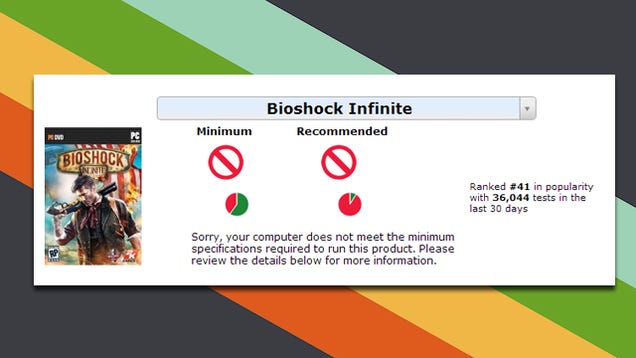
PC gaming has a lot going for it, but figuring out if your computer can run a particular game is still hard to decipher. Can You Run It simplifies the process and tells you whether your computer is up to the task.

The site uses either a server-side Java app or a local application to test your computer's capabilities and then compares it to the system requirements of the game in question. If you have a dedicated PC rig, you might find it a bit tedious, but if you're testing out the capability of, say, your laptop (as in my test above), it's incredibly helpful.

Can You Run It | via Guiding Tech

08 Sep 13:08

Free Spotify streamers will have new video ads to endure on desktop and mobile

by Rich Edmonds

Spotify is a popular music streaming service, available for free and as a subscription. Those who have enjoyed the free, ad-supported experience will have some new advertisements to enjoy in the form of videos. The service has announced these new video ads, which will task streamers to endure both audible and two types of video-based advertisements.


08 Sep 13:07

UK mobile operators reject government plans on national roaming

by Rich Edmonds

Mobile operators in the UK have rejected government proposals on setting up national roaming, according to the Financial Times. Earlier this year, operators were urged by officials to look into the possibility of sharing infrastructure in rural parts of the country, as well as locations where consumers seemingly loose signal coverage. While this would help prevent customers experiencing drop outs in connectivity, mobile operators didn't believe the plans to be viable.


08 Sep 12:46

How to Keep Going When You're Demotivated at Work

by Mihir Patkar

How to Keep Going When You're Demotivated at Work

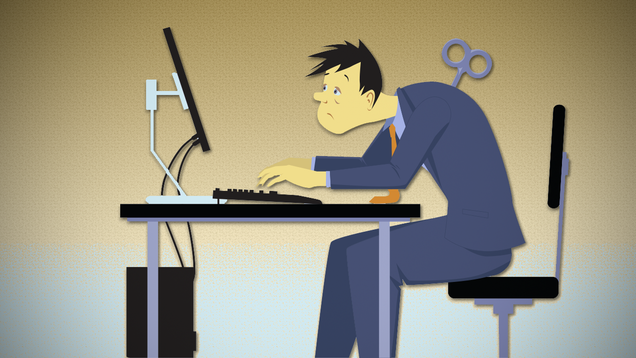
Sometimes, you get to a point at work where your motivation is completely depleted. But circumstances dictate that you can't quit. So how do you keep going? There's always a way.

Much like most people, I've faced multiple instances where there was nothing keeping me at a job, but bills and responsibilities meant quitting wasn't an option either. In such cases, it's difficult to show up, let alone do your work to your best ability. But a few strategies have helped.

Stop Blaming Yourself, But Take Responsibility

How to Keep Going When You're Demotivated at Work

Motivation is intrinsic. While external factors affect it, your reaction to those factors is what ultimately leaves you demotivated. But there's a difference between taking responsibility for this and blaming yourself for this—and far too often, we do the latter.

I've had extended periods of scolding myself for not pushing harder and doing better. But it's a short-lived success story. I got the current job done and then fell back into being disenchanted. If your job sucks, it might be your fault; but take responsibility for that and fix it rather than berating and shaming yourself.

Motivation coach Janet Hilts explains the difference between the two:

Self-blame says:

  • I need to fix myself.
  • I need to punish myself in some way.
  • I need to regret what I did.

Taking responsibility simply requires me to see my part in what's going on. Then I just ask myself: Do I want to change something? If so, what are some options? What action do I need to take to change things? This keeps me in a looking-forward position – focused on the future. And that draws me ahead in the direction I want to go.

Hilts nails it with the three common thoughts associated with self-blame. If that's what you're thinking, then you have to get out of that unhealthy place. Take responsibility by identifying your mistakes and learning from them. It's harder and takes more time, but it's long-lasting.

Ditch the Ideal Scenario and Appreciate What You Have

How to Keep Going When You're Demotivated at Work

There is some truth in the idea that the best job is one you'd do for free. But this ideal scenario has been talked up too much, to a point where the solution is black-and-white: "If you don't love it, quit." I prefer the sagely advice of old rockers Crosby, Stills, Nash and Young:

If you can't be with the one you love, love the one you're with.

One of the best things you'll do for your work life is to relieve yourself of that pressure to find the perfect job. Squash those expectations and the high standards you are holding it to. The minute you do it, you suddenly realise that what you have right now is pretty good after all. Take comparison out of the picture and see it for what it is, it's a refreshing perspective.

There are plenty of people who don't love their job, but are happy to do for a fulfilling life outside work. The "love your job" lobby is so strong that I feel the need to stress this as plainly as possible: It's perfectly all right not to love your job. Don't let anyone tell you otherwise.

Vent, Assess, then Communicate to Find and Solve Your Demotivation

How to Keep Going When You're Demotivated at Work

When you're demotivated, you communicate haphazardly about things that bother you. That can cause more problems than it solves. I developed a three-step communication strategy that helped me overcome my demotivation. Vent, then assess, and then talk to the right people.

Venting your anger has been found to make you feel worse in the long term. But the old common sense adage of venting having a short-term cathartic effect is true. The trick is to find someone you can unload your frustrations on, but then you have to move on to another person—someone you trust has a rational mind—to assess those feelings.

In assessing your problems, you need to find someone who will make sure you don't get away with bullshit. Apart from that person, you also have to be mindful yourself and check what you're saying. Psychology Today recommends setting a time limit:

"Can I talk to you for five minutes? And I really mean five!" Next time you find yourself venting, pay attention to how many times you repeat the same information. Probably a lot. When we're worked up we repeat ourselves for emphasis. Setting limits will force us to keep it brief, sort out our thoughts, and then focus on to a solution.

These first two steps are meant to declutter your mind because you want to go into the third one with clarity of thought. The third step is when you talk to your boss. Work problems require communication with your manager, even if that manager is the problem. The first two steps ensure you aren't a blubbering buffoon when you ask for your boss's time. Once you start talking, explain your problems, propose solutions, and see what they have to say. But most importantly, apologize. When you're demotivated, you are not doing your best work and your boss has probably noticed, so apologize if you think it's necessary. It helps if you know how to empathize so you can be sincere about your apology.

Start Small with the Rule of Three

How to Keep Going When You're Demotivated at Work

You can't snap your fingers and feel motivated again. It takes time to do all of the above processes. There's a good chance you have vacation days due to you, so use them. If you don't have the luxury to take a break from work, use J. D. Meier's productivity method, the rule of three.

Meier, author of Getting Results The Agile Way, advises listing three outcomes you want to achieve for each day, every day. You can extend this to weeks, months or years. But remember to list outcomes, not activities:

Don't confuse activities with results. You're driving for three results (or outcomes). This helps you ground your activity against something meaningful for you. It also helps you focus on the end, not the means. One of the best ways to get results is to stay flexible in your approach, while keeping your eye on the prize.

Essentially, an outcome is the result of a bunch of activities. So "have a great lunch with the team" is an outcome, but for that, you need to perform a bunch of activities like picking a place and a time convenient for everyone, making sure it's a happy environment, etc.

I used the Rule of 3, but never wrote these down. For me, a mental list of three outcomes was good enough—and maybe it actually helped more because every day, I knew the three things I wanted to achieve more than anything else. Meier claims three is the magic number because it's small enough for you to focus and achieve, while big enough for you to feel a sense of satisfaction.


It's hard to keep going when you're feeling demotivated, but hopefully, these tips should help you push on. Don't confuse a lack of motivation with burnout, which is a real problem. The short answer is that if you're happy after work hours and find joy in other things, you are likely demotivated; but if you are generally negative towards everything, that's a sign of being burnout.

Photos by Aleutie, rajsun22, ross666, Dimanchik (Shutterstock), Highways Agency.

08 Sep 12:44

In the Interests of Safety: using evidence to beat back security theater

by Cory Doctorow
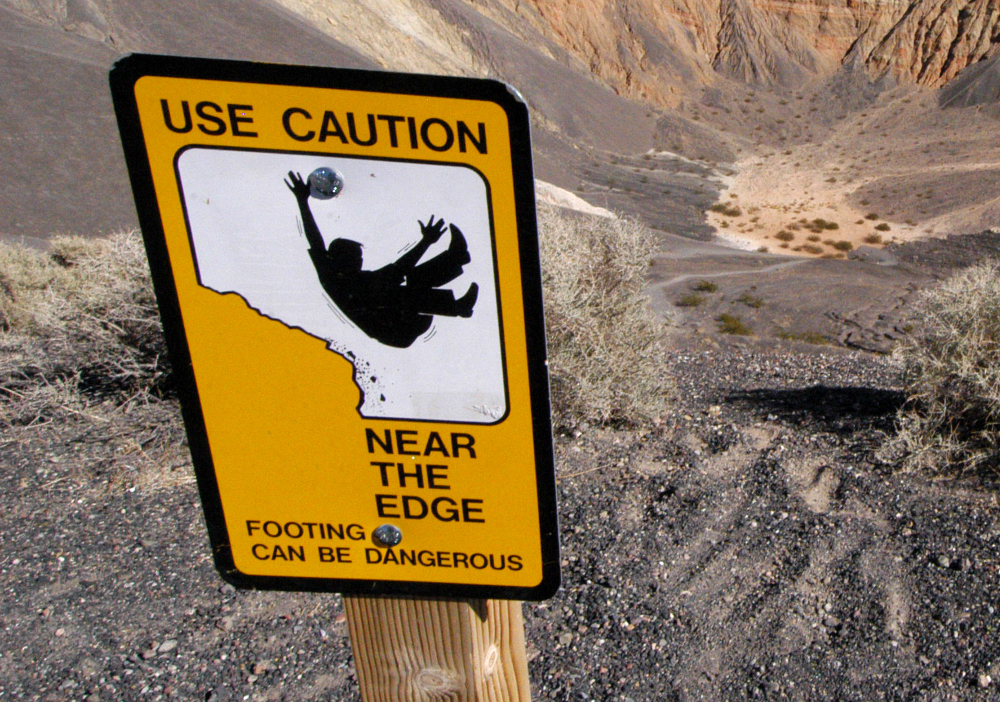
"Health and Safety" is the all-purpose excuse for any stupid, bureaucratic, humiliating rubbish that officialdom wants to shove down our throats. In the Interests of Safety, from Tracey Brown and Michael Hanlon, is the antidote: an expert dismantling of bad risk-analysis and a call-to-arms to do something about it, fighting superstition and silliness with evidence. Read the rest
07 Sep 08:26

St Louis police offer to fingerprint all the children in #Ferguson

by Cory Doctorow


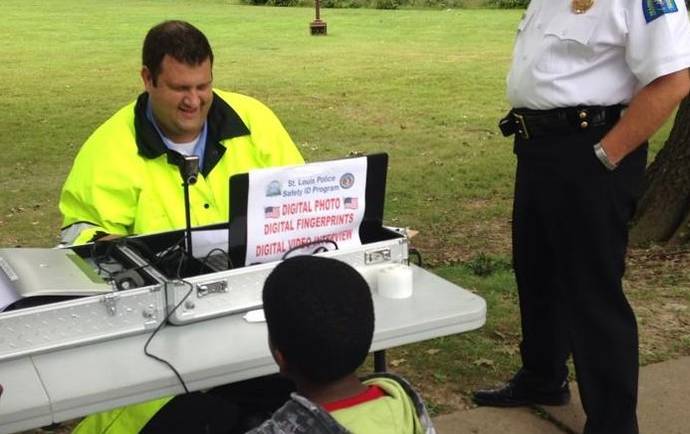
The free fingerprinting kits are part of the long-running national push to fingerprint children in the name of public safety, and are a new tone-deaf low from the region's cops. Read the rest

06 Sep 21:41

[Game Roundup] Our Top Seven Picks For The Best New Games Of August 2014

by Michael Crider

nexusae0_icon_thumb1_thumbSummertime is conventionally considered a slow season for game releases, at least in the console and PC world. But thanks to the ceaseless environment of mobile design, there's been no noticeable slowdown in the world of Android games. In fact, we're seeing a pretty constant flow of both original titles and ports from older consoles and iOS. Below are our top seven picks for August's new games, along with some honorable mentions.

[Game Roundup] Our Top Seven Picks For The Best New Games Of August 2014 was written by the awesome team at Android Police.


06 Sep 21:41

[App Roundup] Our Top Seven Picks For The Best New Apps Of August 2014

by Michael Crider

nexusae0_ic_thumb_thumbAugust is over, and as a resident of the southern United States, I say good riddance - we're now beginning the slow slide into the more bearable part of the year. But Android apps know no season, and while the crop of new apps from August was a little light, there are a few that you should definitely check out. Below are the Android Police writers' picks for the best new apps from the last month, plus a few honorable mentions.

[App Roundup] Our Top Seven Picks For The Best New Apps Of August 2014 was written by the awesome team at Android Police.


06 Sep 21:38

MPAA and RIAA Teach Copyright in Elementary Schools, Now With Fair Use

by Ernesto

pirateAlmost a year ago we questioned a new initiative from the Center for Copyright Information (CCI).

The group, which has the MPAA and RIAA as key members, had just started piloting a kindergarten through sixth grade curriculum on copyright in California schools.

The curriculum was drafted in collaboration with the California School Libraries Association and iKeepSafe, who aim to teach kids the basics of copyright. The lesson materials were rather one-sided, however, often ignoring fair use and the free-to-share copyright licences Creative Commons provides.

These concerns were later picked up by the mainstream press, creating a massive backlash. Responding to the critique the CCI and other partners were quick to state that it was just a pilot and that the final materials would probably be more balanced.

Glen Warren, vice president of the California School Library Association, acknowledged the problems and suggested that the early drafts were coming straight from the content industry.

“We’re moving along trying to get things a little closer to sanity. That tone and language, that came from that side of the fence, so to speak,” Warren commented.

This week, TorrentFreak spotted the final version of the curriculum and it’s clear that the public outcry for more nuance has paid off.

Instead of focusing on enforcement and the things people can’t do with copyrighted content, it now emphasizes that sharing can be a good thing. Creative Commons licenses are discussed in detail and every lesson plan also informs students about fair use.

For example, in the old second grade lesson plan the teacher was supposed to say the following sentence:

“You’re not old enough yet to be selling your pictures online, but pretty soon you will be. And you’ll appreciate if the rest of us respect your work by not copying it and doing whatever we want with it.”

While the above paragraph ignores the fact that some people are happy to share their photos with flexible Creative Commons licenses, it has been completely removed from the final version.

The sentence “we recognize that it’s hard work to produce something, and we want to get paid for our work” has been completely stripped from the lesson plan too. Instead students are reminded that “the projects they created are fun / informative / respectful, and so they may want to share them online.”

The sixth grade lesson material has also been thoroughly updated, as well as the accompanying video which doubled in length to explain fair use.

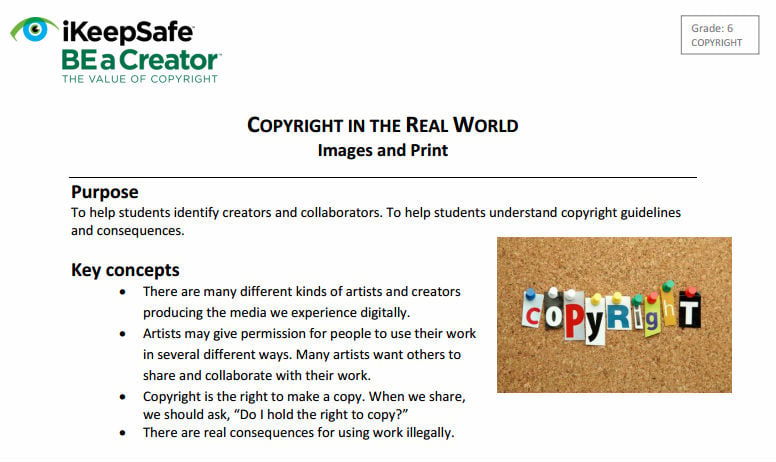
The changes become clear by comparing the old “purpose” and “key concepts” with the new one. Below is a copy of the old text, with no reference to fair use and Creative Commons licenses.

Old
grade6old

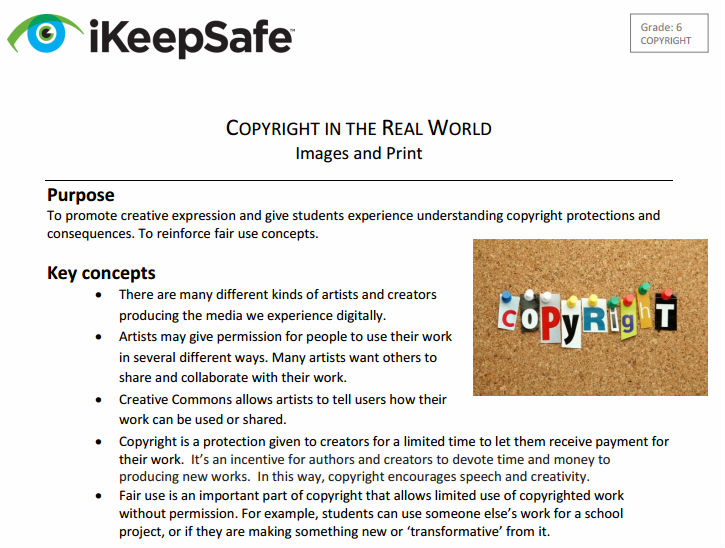
And here’s the new and improved version, with these two concepts included, and without the strong focus on consequences for “illegal use.”

New
grade6new

Another positive change is that instead of warning students against using copyrighted images and music from the Internet in Powerpoint presentations, they are now told that this is totally fine, as long as the material is only shown in class.

Similar changes have been made throughout the entire curriculum, which is now much more balanced than the rather strict and biased view that was presented before.

There’s still one question that lingers in the back of our mind though. Would the curriculum have been as balanced as it is right now if we hadn’t pointed out the problems in the first place?

Source: TorrentFreak, for the latest info on copyright, file-sharing and anonymous VPN services.

06 Sep 12:31

How to Properly Clean All Your Gadgets Without Ruining Them

by Whitson Gordon

How to Properly Clean All Your Gadgets Without Ruining Them

No matter how clean a house you keep, your computers and gadgets are bound to get a little dirty here and there. Here's what you need to clean them, and how to do it without hurting them.

Your gadgets aren't as resilient as they might seem, and just spraying Windex on everything and rubbing it down with a paper towel can cause all sorts of damage to a device. However, they are remarkably easy to clean as long as you do it right—and you can do most of it with just a few simple household items (or at the very least, a trip to CVS). Here's how to do it.

Blast from the past is a weekly feature at Lifehacker in which we revive old, but still relevant, posts for your reading and hacking pleasure. This week, Linus Tech Tips made this great video using some of our past posts as inspiration, so we're featuring it alongside many of our original cleaning tips for your gadgets.

Clean Your Monitor With Water (or Diluted White Vinegar)

How to Properly Clean All Your Gadgets Without Ruining Them

LCD screens are pretty delicate, and you don't want to press hard on them, because that can burn out the pixels. Instead, turn your monitor off (so you can better see the dirty spots), and grab a dry microfiber cloth. Many monitors and other gadgets come with one. From there, just gently wipe the screen. If you need to, add a little bit of water. In most cases, that should be all you need.

If you have a more hearty build-up of spots or gunk, resist the urge to press hard and wet the cloth with a 50-50 mix of water and white vinegar. You can use a special monitor cleaner if you desire, but the vinegar/water mix should work just fine. If you can, use distilled water instead of tap water, since tap water is likely to leave white spots on your screen from salt or other deposits.

Remember, as you're doing this, that you want to use a soft cloth, preferably microfiber. Do not use anything paper-based, like paper towel, Kleenex, or toilet paper, since it can scratch up your monitor. If you don't have a microfiber cloth, coffee filters will do in a pinch. Also remember never to spray any liquid on the monitor itself—always spray it on your cloth first.

Clean Your Touch Screen Gadgets with Water, Diluted Vinegar, or Rubbing Alcohol

How to Properly Clean All Your Gadgets Without Ruining Them

Like your monitor, the best cleaner for a touch screen device is either plain old water or a 50/50 mix of distilled water and vinegar. That said, touch screens are a bit more resilient than LCD monitors, due to the fact that they're meant to be touched, so you can press a bit harder if you have a particularly stubborn spot (don't go overboard, though).

Just like everything else, use a microfiber cloth and spray the cloth, not the screen, with a small amount of liquid before wiping it down. The last thing you need is to get your phone wet, void your warranty, and break something important (like the charging socket).

If you want to not only clean but disinfect your touch screen, you can use a bit of isopropyl alcohol on some devices (Apple, for example, does not recommend it). Check your manufacturer's warnings to see what they allow.

Lastly, if your smartphone is filled with dust, dirt, and other disgusting sediment, you may have to open it up and give it a deeper clean, a process that our friends at the How-To Geek have gone through in detail.

Clean Your Keyboard with Compressed Air and Rubbing Alcohol

How to Properly Clean All Your Gadgets Without Ruining Them

We've mentioned this before, but our friends over at the How-To Geek have a great rundown on how to deep clean your keyboard. If your keyboard is only mildly dirty, you should be able to get by with two things: blowing some compressed air in between the keys (to blow out dust) and cleaning dirty keys with a swab of rubbing alcohol to remove oil, grime, and germs. Alternatively, we've become very big fans of the Mr. Clean Magic eraser, and it'll do wonders for a grimy keyboard, especially if it's noticeably oily. If your keyboard's rather disgusting, though, you might have to pop out the keys and really dig in with a toothbrush. Check out their full guide for more info on how to do that.

Also, don't forget to turn your keyboard off (if it's wireless) or unplug it (if it's wired) before you start cleaning. If you're just giving it a quick wipe-down, though, and don't want to get behind your tower, you can use an app like previously mentioned ToddlerTrap (Windows) previously mentioned Keyboard Cleaner (Mac) to turn it off while you touch it up.

Clean Your Mouse with a Bit of Water or Alcohol

How to Properly Clean All Your Gadgets Without Ruining Them

With the exception of old-school mice or the Apple Mighty Mouse, most mice shouldn't need to be opened up to be cleaned. Generally, you can just turn it over and take a cotton swab to the rubber pads, wetting it with water or alcohol if necessary. For the mouse buttons, you should be able to clean it in much the same way you did the keyboard—use some alcohol on a cotton swab to rub away dirt and grime. If you absolutely have to, you can look up a guide to taking apart your mouse, but know that this probably voids your warranty and shouldn't be necessary in most cases. Also, remember to turn off or unplug your mouse before cleaning.

Clean Your Laptop Body with a Mr. Clean Magic Eraser

If you have some non-acetone nail polish remover around, it's been known to clean up laptops (especially lightly-colored ones, like the old white MacBooks) quite well, but nothing works quite as well as the Mr. Clean Magic Eraser. Get it wet, wring out as much water as you can, and lightly rub it over your trackpad, keyboard, and laptop body. It should clean them up, remove any grease from your fingers, and give it that new, fresh-from-the-store look. Don't press down too hard, since the Magic Eraser has a tendency to "shed" when rubbed hard, which will just dirty your computer up more. It's also an abrasive, which means it can rub off whatever coating is on your device if you press hard. If your computer's grimier than that, clean your keyboard with an alcohol-soaked swap as described above in the keyboard section.


These are the most recommended products and methods on the net for cleaning your gadgets, but it's likely that your manufacturer has its own recommendations (Apple certainly does), so check their web site or instruction manuals for more detailed information. And, of course, share your own tried and true tips in the comments below.

Photos by Jay Reed, Ben J. Gibbs, liszto, and Dave Bleasdale.

06 Sep 12:31

Nest launching in the EU by the end of the month

by Harish Jonnalagadda

Nest

Nest has announced that it will be bringing its connected thermostat and smoke detector to more countries in Europe, with initial availability across France, Netherlands, Belgium and Ireland set to commence by the end of this month. Customers in these countries will be able to buy Nest's products from over 400 retail locations at launch, with an additional 150 stores set to be added by the end of the year.

Although Nest's products are available only in the US, Canada and the UK, the company mentioned on its blog that its thermostats have been installed in over 120 countries across the globe. On the utilities side of things, Nest is partnering with Direct Energie, Essent and Lampiris in addition to nPower in the UK.

EU residents, are you excited about the imminent availability of Nest thermostats?

Source: Nest

06 Sep 12:28

Three 'Terminator' movies coming between 2015 and 2018

by Jacob Kastrenakes

After years away, Arnold Schwarzenegger is returning as the Terminator in next year's Terminator: Genisys, and there's a good chance that you'll be seeing a lot more of him. Genisys was always intended as the first in a new Terminator trilogy, and Paramount has just set dates for a second and third film. According to The Wrap, the following two films will debut a year apart, with the second entry coming on May 19th, 2017 and the final entry coming on June 29th, 2018. The production company behind the new films is reported to only have rights to them until 2019, when they'll revert back to series creator James Cameron, so it's no surprise that it wants to get a full trilogy of films in before that cutoff. The good news, though, is that...

Continue reading…

05 Sep 23:29

Fossil partners with Intel to make wearables

by Chuong H Nguyen

Fossil partners with Intel to make wearables

Intel has been aggressively pursuing new markets and forming new partnerships lately. The newest wearables computing partner to sport "Intel Inside" is Fossil, which is teaming up with the chip-maker to bring more wearables to market. Details were not given on what those specific products would be, but Fossil had also previously committed to making Android Wear smartwatches.

Other recent Intel partners include 50 Cent's SMS Audio as well as a luxury bracelet with Opening Ceremony.

How do you think Fossil will fare in the wearable world?

Source: Reuters

05 Sep 23:28

Being physically unable to commit a crime is no defense against a system that has been fine tuned for prosecution

by Cory Doctorow

Techdirt's Tim Cushing highlights some of the more Kafkaesque moments in modern American justice -- handcuffed men who shoot themselves in the back, men who are arraigned for crimes they allegedly committed while in jail, and comes to this conclusion: Read the rest

05 Sep 23:28

Corgi puppy plays with wolf puppy

by Xeni Jardin

You're welcome.

Read the rest

05 Sep 21:25

The Samsung Galaxy Note 4 LED flip wallet

by Alex Dobie

IFA 2014 Between HTC's DotView, Samsung's S View and LG's QuickCircle, smartphone cases have been getting a whole lot smarter over the past year. This week at IFA 2014 in Berlin, Samsung added another smart case to the list — the official Galaxy Note 4 LED flip wallet.


05 Sep 20:12

The ultimate guide to Google Now cards

by Jordan Miera

Google Now cards can offer a lot of information at a glance. This is how to make them work for you.

Google Now is much more than a Siri- or Cortana-like virtual assistant. It has cards that can let you receive a lot of information and process it quickly. They show up when they're needed, and they have very practical uses.

For example, I'm a very forgetful person. With that being the case, there are some cards that are very useful. I can receive reminders to call Mom back in a couple hours after studying for exams or finishing papers that are due soon (sorry, Mom). I also like the fact that I can set reminders to give my roommate cash for my portion of the Internet bill when I get back to my apartment. It can give me a rough estimate of where I parked my car, which is useful because I can spend a good chunk of time searching for it if left to my own devices.

Anyway, Google Now cards are neat and nifty. A lot of what information shows up depends on what information you give Google, which will admittedly cause some people to hesitate using the services, but please read on before deciding whether or not to use the service. Displayed information will also depend on settings enabled on your phone and even your location.

You can also see some cards when you're using the Chrome browser, but we'll be talking mostly about cards on Android devices here. Here we go!


05 Sep 16:36

Android Wear, moving forward like clockwork

by Emily Wood
Earlier this year, we launched Android Wear, bringing Android to wearables. Since then, the first watches powered by Android Wear, the LG G Watch and Samsung Gear Live, have gone on sale, developers have already built thousands of apps enhanced for Wear, and great new watches are becoming available from more partners.

Our goal with Wear is to build technology that helps you connect with others and get stuff done. So often, technology can become something that gets in the way of everything else. But we want to build devices that you can use when you need and forget about when you don’t—technology that's built for your sake, rather than its own sake. Coming throughout the rest of this year, we're making some updates to Wear that will help you get even more out of your watch—and the rest of your life, too.

First, we're bringing offline music playback and GPS support to Android Wear. Go for a run or bike ride with your Android wearable and leave your phone at home. You’ll be able to listen to music stored on your watch via Bluetooth headphones. And if your watch includes a GPS sensor, you can track your distance and speed too.

The second update will enable downloadable watch faces, so you can customize the visual design of your watch's home screen to show the information you want to see most—like your calendar or fitness sensors. Developers will soon be working on watch faces, making them available on Google Play.

We’re also continuing to work with manufacturers to bring you even more watch options, with different shapes, styles and sensors.
  • The Moto 360, the first Android wearable with a round display, is now available for sale in the U.S.
  • The Asus Zen Watch, coming later this year, includes a bio sensor, so you can keep tabs on your fitness and relaxation levels throughout the day.
  • The LG G Watch R uses a circular display, includes a heart rate monitor, and will be available later this year.
  • Last, but not least, we’re happy to welcome Sony to the Android Wear family with the Sony SmartWatch 3. It uses a transflective display for easier readability in sunlight, includes a GPS sensor, and will be available later this year.
These watches, as well as those unveiled earlier this summer, will all get the new software updates described above as soon as they’re ready in the coming months. We're also working with our partners on even more improvements, which means your device will continue to get better, with updates provided directly to you.

Whether it's giving you directions, letting you stay in touch more easily or keeping track of your steps so you can stay fit, Wear is designed to help you out without getting in your way. With new features and many new devices to choose from, chances are there's a watch that's just right for you.

Posted by David Singleton, Engineering Director, Android Wear
05 Sep 15:54

Include a "Fun Fund" in Your Budget to Stick to Your Financial Goals

by Alan Henry

Include a "Fun Fund" in Your Budget to Stick to Your Financial Goals

We've mentioned that one of the reasons personal budgets fail is because people don't remember to give themselves some spending money for entertainment or leisure purchases. Instead of trying to guess how much you'll spend every week or month on fun, set up a "fun fund" you can add to or drain depending on what you're in the mood for.

Over at US News Money, Erin Lowry explains that including a "fun fund" gives you a place you can stash money away for everything from a night at the movies to a luxury purchase like a new TV or game console. Consider setting up a "fund," in a separate account, or even under a savings "goal" that's hidden from your primary balance (services like Smartypig make this year, and many banks like Simple Bank, for example, lets you do this on the web) and then sending some money over to it periodically. You can do this whenever you hit a financial windfall, but it's also a good idea to make sure you budget at least a little "'fun" money every week or month so you can top off your fun fund, even if you don't plan to use it.

By sending the money over to a dedicated place, you can let it grow without looking at it, and it's not sitting in your primary account, tempting you to spend it on something impulsive. Lowry also explains why a fun fund in your budget can keep you from feeling left out or deprived, and helps you look for additional reasons to save on regular purchases so you can shift the savings to your fun fund. Hit the link below to read more.

Why You Need a "Fun Fund" In Your Budget | US News Money

Photo by Jeff.

05 Sep 15:54

The Complete Guide to Avoiding (and Removing) Windows Crapware

by Whitson Gordon

The Complete Guide to Avoiding (and Removing) Windows Crapware

Windows has a lot going for it, but it's also saddled with one of computing's biggest annoyances: crapware. Here's everything you need to know about identifying, avoiding, and removing unwanted software from your system.

What Is Crapware?

The Complete Guide to Avoiding (and Removing) Windows Crapware

In simple terms, crapware is software you don't want, but—for one reason or another—gets installed on your system against your will. This can range from legitimate programs that come pre-installed (like Netflix or a trial of McAfee Antivirus) to browser toolbars, auto-starting apps, or something that changes your default search engine.

The former category—the legitimate software that comes pre-installed—is often referred to as "bloatware" as well. Not all pre-installed apps are bad, but more often than not, you'll want to remove 90% of what came on your system. So, for the purposes of this guide, we'll be talking about both kinds of unwanted software.

How to Remove Pre-Installed Bloatware

First, let's talk about the bloatware you get when you buy a new computer. If you built your computer yourself (or bought a "Microsoft Signature" device), you won't have to deal with pre-installed programs, but if you bought a Dell, HP, Toshiba, or other machine, you'll have a lot of pre-installed apps to contend with.

Luckily, removing them isn't too hard, and you have a few choices.

Option One: Manually Remove Unwanted Apps with Revo Uninstaller

The Complete Guide to Avoiding (and Removing) Windows Crapware

Obviously, you could just uninstall the programs you don't want with Windows' built-in uninstaller, but we don't recommend this. Lots of programs—especially those pesky pre-installed ones—often leave things lying around in the Registry and other folders after they leave. So, we recommend using a more powerful uninstaller like Revo:

  1. Download and install Revo Uninstaller—don't worry, even after you're done here, you'll want to keep it around.
  2. Start it up and wait for it to generate a list of the programs on your computer.
  3. Select a program you want to remove and click the "Uninstall" button.
  4. Repeat step 3 until all the unwanted software has been removed.

Note that you shouldn't just run rampant and uninstall anything that doesn't look familiar. If you know you don't want that McAfee trial, go ahead and remove it, but if you aren't sure what something is, look it up before you go deleting it from your system. Heck, it might even be something worthwhile.

Option Two: Automatically Remove Unwanted Apps with Decrap

Obviously removing programs one-by-one can be a bit of a hassle, so if your computer comes with a lot of bloatware, you may want a more all-in-one solution. Decrap is an awesome program that will scan your system, give you a list of installed software, and check off everything you want to remove. Then, it'll get rid of everything in one fell swoop:

  1. Download and install Decrap. I recommend downloading the portable version and unzipping it to a folder on your desktop—that way you don't have another program to uninstall later!
  2. Start Decrap and let it perform its initial setup. It will ask if you want to run it in automatic mode—I recommend leaving this box unchecked.
  3. It will then scan your computer for currently installed software.
  4. Once it gives you a list of programs, go through and check the programs you want to remove. You'll likely find these items under the "Automatically Starting Software" category and "Third Party Software" category. You'll probably want to leave "Drivers" and "Windows Related Software" unchecked.
  5. Click Next and create a System Restore Point when asked.
  6. Decrap will ask you if you want to automatically install everything, or do it yourself. This is up to you. If you made the correct choices in step 4, you should be fine to uninstall everything automatically and clean the registry.
  7. Let Decrap run through the unisntallation process. When you're done, you should have a much cleaner PC! Make sure to go through your Start menu and Revo Uninstaller to make sure there aren't any stragglers you forgot.

Once again, if you don't know what something is, Google it before you remove it. It may be something important to the system, or (in some cases) a pre-installed app that's actually good!

Option Three: Go Nuclear and Reinstall Windows from Scratch

The Complete Guide to Avoiding (and Removing) Windows Crapware

Some people prefer to skip the above options and just install Windows from scratch, without the bloatware. You'll need a Windows install disc from Microsoft—not the one that came with your computer, which likely has the bloatware on it—and a valid license key, usually located on a sticker on your computer. Note that this isn't guaranteed to work for everyone, and in some cases you may not be eligible for service if you reintsall a different copy of Windows, so be forewarned.

We have a full guide to reinstalling Windows here, so check that post out for the step-by-step. Installing Windows is easy, but you'll probably have to reinstall some drivers and other software too. It'll take longer than removing the bloatware yourself, but you'll know exactly what's on your system and start with a clean slate. It's up to you whether that's worth your time and energy.

How to Remove Toolbars and Other Bundled Crapware
The Complete Guide to Avoiding (and Removing) Windows Crapware

The second kind of crapware is a bit more sinister than free trials of Microsoft Office. Sometimes, you download a new program, only to find that after installing it, you also have a toolbar in your browser and your default search engine has changed to Yahoo or Ask.com. Often, companies will bundle toolbars or other junk with their free programs. This allows them to offer those programs to you for free, while still making money.

Unfortunately, while that's a nice sentiment, it ends up being quite dishonest, because installers try to "trick" you into agreeing to the crapware you don't want. We'll talk about this in the next section, but first: let's remove the crap you already have.

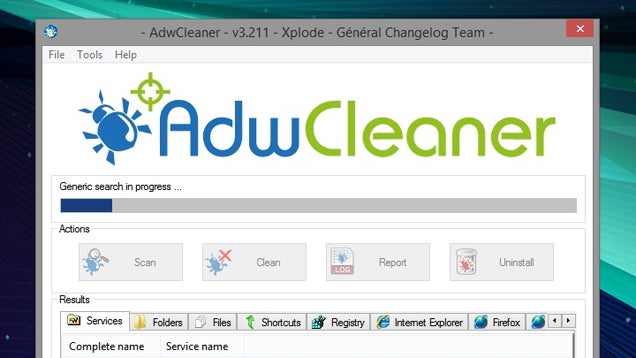
You have two options here: remove the crapware manually using Option One (Revo Uninstaller) as described above, or use a more automatic program like AdwCleaner. It's quite simple:

  1. Download AdwCleaner and double-click the icon to run the program—no need to install it.
  2. Click the Scan button to scan your computer.
  3. When it's finished scanning, go through each tab (Services, Folders, Files, etc.) and check anything you want to clean. Not everything Adw finds will be crapware—if you aren't sure whether to remove something, try to determine the name of the software from Adw's list and search for it on Should I Remove It's web page.
  4. Once you're sure you've selected everything you want to remove, click the Clean button. It'll clean the selected options, restart your computer, and provide a report detailing what was deleted.

After running AdwCleaner, I recommend doing one last pass with Revo Uninstaller to see if there's anything left over on your system. Hopefully, though, your PC should be clean as a whistle—at least from toolbars, adware, and other crap.

How to Avoid Unwanted Programs in the Future

The Complete Guide to Avoiding (and Removing) Windows Crapware

Now that you have a clean PC, it's time to keep it that way. As I said earlier, most of these programs come on the back of something you actually wanted to download—usually from a company that's trying to make money, but offering their software for free.

Many people choose to boycott these programs entirely, and only download truly free or open-source software. That's certainly one solution, but it leaves out so many great pieces of software that—crapware aside—are worth having on your system. As long as that program gives you a choice to install the crapware or ignore it—and most do—boycotting isn't necessary.

Avoiding crapware is pretty easy once you become familiar with the tricks installers use to get you to agree to them. Here are some things to keep in mind as you download and install new programs:

  • Always download programs from their home page, if possible. Many download sites (like Download.com) will create their own installers with bundled crapware, even if the original download didn't have it.
  • Watch for checkboxes on the download page. Sometimes the option to avoid crapware may not be in the installer, but on the download page of the app itself. Adobe, for example, offers you the chance to decline installing McAfee on its download page. Other apps may offer an installer with crapware, but a portable version without it.
  • Don't click Next over and over without reading! If you don't pay attention to what you're installing, you're bound to install crapware. Carefully read each page of the installation wizard before you click Next.
  • Always choose the Custom Install option. Never choose Automatic. Custom install with almost always offer you the opportunity to decline crapware.
  • Read every checkbox. Sometimes they'll hide it on an otherwise unrelated page of the installer. Read every checkbox and uncheck anything that wants you to install something you didn't ask for.
  • Don't Click Every "Agree". Sometimes, an installer will make the "crapware agreement" look like the original software's terms of service. Your brain wants to click "Agree" thinking it's the only way to continue with the installation—but read closely. If the "terms" are for a program other than the one you downloaded, you can safely choose "Decline" and continue the installation.
  • Watch Out for Multiple Offers. Just because you've avoided one piece of crapware doesn't mean you're done—there could be more bundled apps waiting for you, or multiple offers for the same toolbar in the same installer!

It seems like this is complicated and not worth the trouble, but once you get the hang of it, it's a breeze—you'll be able to outsmart any tricky installer that comes your way. FreewareGenius has a great guide to some of the tricks you'll see, with examples for each, so check that out to familiarize yourself. You can also try using Unchecky, which will automatically uncheck those boxes for you—but it's no replacement for due diligence. Good luck and safe downloading!

Title image remixed from inxti (Shutterstock) and Robert F. Balazik (Shutterstock).

05 Sep 15:52

Motorola's Touchless Control App Is Now 'Moto Voice,' Updated With Moto 360 Support, Custom Launch Phrases For The New Moto X, And More

by Cameron Summerson

motovoice

Last night was a big night for Motorola. The 360's availability was announced, as was the new Moto G and Moto X, and company's tiny new earbuds, the Moto Hint. That's a lot to take in. With all these new devices and new features, app updates are a necessity, and Touchless Control is one of the first to get the makeover treatment.

First off, it's no longer called Touchless Control – moving forward it's simply Moto Voice.

Motorola's Touchless Control App Is Now 'Moto Voice,' Updated With Moto 360 Support, Custom Launch Phrases For The New Moto X, And More was written by the awesome team at Android Police.


05 Sep 15:51

Video walkthrough: The Asus Zenwatch

by Richard Devine

IFA 2014 Earlier this week Asus unveiled it's first foray into the Android Wear space, the Zenwatch. From our initial hands on we've been left really impressed with it, and we're looking forward to it going on sale in October to get some real, quality time with it.

We're still on the ground at IFA 2014 in Berlin, so we're back with a little more Zenwatch goodness. We didn't see much of anything on the software front since like so many others the demo units were all locked in retail mode. But it's a nice watch deserving of a quick video.