Shared posts

05 Nov 16:19

Watch the first footage of Paul Rudd and Michael Douglas in 'Ant-Man'

by Ross Miller

In the midst of last night's midterm elections coverage, ABC aired (at 9:02PM) a new Marvel special, 75 Years, From Pulp to Pop! As has been the case for weeks, Marvel has been sprinkling its TV content with sneak peeks of its upcoming film slate. Last night, we got a glimpse of Ant-Man starring Paul Rudd as the titular character (real character name Scott Lang) and Michael Douglas as his mentor Hank Pym.

The ten seconds of footage is all behind-the-scenes (hey look, film cameras!) but does provide a glimpse of Lang and Pym in a lab (presumably talking about cough medicine) and Paul Rudd gazing lovingly at the Ant-Man suit, which shrinks the wearer down for crime and crimefighting, etc. Ant-Man, with Peyton Reed (Yes Man), without...

Continue reading…

05 Nov 15:22

Google And LG Strike 10-Year Global Patent Agreement

by Jon Russell
handshake Fresh from announcing record shipments in the last quarter of business, LG has revealed that it has struck a 10-year global patent agreement with Google. The company says that the arrangement covers all existing patents between the duo, as well as new ones filed over the next decade. Read More
05 Nov 15:21

In Europe, Spotify Royalties Overtake iTunes Earnings By 13%

by Ingrid Lunden
Screen Shot 2014-05-21 at 11.19.55 AM Spotify may be smarting from the removal of Taylor Swift’s music catalogue from its platform, and Taylor Swift may not care, since she is riding a sales blockbuster in the form of her new album 1989, but it turns out that in the bigger picture, Spotify’s streaming service continues to gain an edge over downloads, specifically via iTunes. Kobalt, a company that helps… Read More
05 Nov 15:18

The Onyx is a 'Star Trek' communicator for the real world

by Dan Seifert

*Beep beep* "Picard to bridge, get us out of here."

Like Dick Tracy's watch, Star Trek's communicator has long been a muse for real-world technology products. The Onyx, a new device from hardware startup OnBeep, might be the closest thing to what Captain Picard wore on his uniform in Star Trek: The Next Generation we've seen yet.

At a base level, the $99 Onyx is a personal communications device that operates within its own network. It pairs to a smartphone via Bluetooth and works whereever your smartphone has data service, whether that be on Wi-Fi or cellular networks. The roughly 2.5-inch round, hockey puck-like device clips to a bag or article of clothing, has a button in the middle for initiating communication, a volume rocker,...

Continue reading…

05 Nov 15:17

Latest Pushbullet Update Now Lets You Initiate Texts From Your Computer As Well As Respond

by Bertel King, Jr.

Pushbullet-ThumbThey grow up so quickly. Just this summer, Pushbullet learned how to let its users respond to SMS messages via EvolveSMS. Then a few months later, it extended this functionality to all texting apps. Now the service is ready to give its users more than the ability to reply to text messages, but the power to start conversations from their computers as well.

As long as you have the Pushbullet Android app and browser extension installed, you just need to click on the SMS tab to get started.

Latest Pushbullet Update Now Lets You Initiate Texts From Your Computer As Well As Respond was written by the awesome team at Android Police.


05 Nov 15:14

Marvel Unveils Agent Carter Sneak Peek

Marvel Unveils Agent Carter Sneak Peek

Jarvis, Peggy and he

In January 2015, Agent Peggy Carter will return in her own TV show, Agent Carter, which will act as an eight-episode stop-gap between the two halves of the second season of Marvel's Agents Of S.H.I.E.L.D. To whet your appetite, here are two and a half minutes of it, featuring a familiar face and a newcomer with a familiar name...

With Hayley Atwell returning as Peggy herself, Marvel’s Agent Carter will track the character as she deals with post-war America in 1946. Peacetime has not been the best time for Carter, marginalized by her colleagues and balancing administrative work with much more important, stealthy duties at the Strategic Scientific Reserve, helping to build what will eventually become S.H.I.E.L.D. We glimpsed something of her world in the short Carter adventure, also called Agent Carter, which accompanied Iron Man 3's Blu-ray.

Shea Whigham is set to play Roger Dooley, chief at the SSR and boss of agents Carter, Thompson (Chad Michael Murray) and Sousa (Enver Gjokaj). As seen in the clip above, the cast also includes James D’Arcy as the original human butler Jarvis and Dominic Cooper as Howard Stark, AKA Tony’s dad and a key part of the SSR.

With no formal date announced, look out for exactly when in January Agent Carter will hit screens closer to the time.


05 Nov 15:12

Chip-and-PIN cards let nearby fraudsters steal $1M at a time

by Cory Doctorow

Visa's new Paywave chip-and-PIN credit-cards have a $1M limit on foreign-currency transactions that can be verified "in-card," meaning that someone who gets close enough to your UK wallet can simply wave a phone at it and charge a megabuck to it without raising any realtime security alerts. Read the rest

05 Nov 00:51

EFF wants to legalize bringing 'abandoned' games back online

by Jacob Kastrenakes

Some video games become totally impossible to play when their developer shuts down their servers, so the Electronic Frontier Foundation wants everyone to have the right to tweak their games to get them running again. It's filed a petition with the Library of Congress and the US Copyright Office asking that modifying a game be considered fair use when it's done so that a game can be made playable again after a developer has "abandoned" it and stopped running servers needed to allow gameplay. That would allow gamers to continue playing games longer after their release and for archivists and researchers to work with games far in the future without worrying about running afoul of copyright laws.

Continue reading…

04 Nov 21:28

Whole apartment’s worth of stuff in 86sqft

by Cory Doctorow


French designers Kitoko decorated a client’s 86sqft flat with an incredibly clever array of fold-out/fold-away furnishings and appliances, packing a genuinely improbable amount of stuff neatly into a tiny space. Read the rest

04 Nov 21:25

Proposed emoji changes would bring racial diversity to smiley faces

by Chuong H Nguyen

A new proposal drafted by the Unicode Consortium would introduce more racial diversity into the popular emoji characters used in messages on smartphones. The proposal, edited by Google's Mark Davis and Apple's Peter Edberg, would bring skin tones, based on the Fitzpatrick scale for dermatology, to emoji characters in five hues ranging from a pale creme to a dark brown.


04 Nov 21:23

Shakespeare's Globe launches an on-demand service with over 50 plays

by Jacob Kastrenakes

Even if you're not in London, you'll now have the chance to easily see some of the best performances of Shakespeare out there. Shakespeare's Globe has just launched an on-demand service offering filmed versions of over 50 productions, which are being made available to rent and buy. The Globe says that it's "the first theatre in the world to be able to offer this kind of on-demand platform," which it's calling the Globe Player. The videos are available worldwide, though some more recent productions may not be available in all areas if they're still screening in local movie theaters.

The films are available to rent from around £2.99 to £3.99 (about $4.79 to $6.39) and to buy from around £4.99 to £7.99 ($7.99 to $12.79). The productions...

Continue reading…

04 Nov 17:44

Fix Your Posture at Your Desk with Two Simple Body Adjustments

by Melanie Pinola

Staring at our screens and sitting all day long is killing us. Our necks crane forward, our shoulders hunch, and we put terrible stress on our lower body. Here's a quick way to get into proper posture.

In the video above for VentureBeat, CrossFit San Francisco Founder and author of Ready to Run Kelly Starrett demonstrates how to type and hold your smartphone:

Get into proper posture by extending your arms to the sides and then rotating your palms upward. This rolls your shoulders back and then you can bend your elbows to type at the keyboard or hold your phone up in front of your face.

When you're sitting, pull in your abs to about 20 percent of full strength. Sitting should be an active activity, apparently.

Since watching this video, I've been trying this every day, and it feels much better than slouching. No one wants to look like Quasimodo.

Posture perfect: How to text and work at a desk without destroying your body | VentureBeat

04 Nov 17:44

Nexus 6 pre-orders in the UK to start as soon as November 18th, ship by December 1

by Derek Kessler

Pre-orders for the new Nexus 6 might kick off as soon as November 18th in the UK. Eager customers for the first Android 5.0 Lollipop-powered Nexus phone in the United States have been able to pre-order the Nexus 6 from Google Play for nearly a week now, and while we currently have no indication of when Google Play in the UK will have the phone up for pre-order, Mobiles.co.uk is putting up their own pre-orders for the phone starting on the 18th, with delivery on the 1st of December.


04 Nov 17:43

HTC is selling the Nexus 9 for half price one day after launch

by Chris Welch

It's pretty unusual to see a fire sale for a brand new tablet, but that's exactly what HTC's doing with the Nexus 9 today. Yes, just one day after it launched. Starting right now, the company is selling a limited quantity of 16GB Nexus 9 tablets for $199 — half off the regular $399 price you'd pay at Google Play or Best Buy. Those will likely go pretty fast, but there's another, all-day deal running as well. Just order a Nexus 9 before midnight ET and you'll save $50 on either the 16GB or 32GB model.

Today's big sale is the kickoff to HTC's "Hot Deals" promotion, which will happen every Tuesday starting now and continuing on for the next 9 weeks. That effectively covers the entire holiday shopping season, but we don't know what HTC has...

Continue reading…

04 Nov 17:40

The Best Hidden Features of VLC

by Eric Ravenscraft

The Best Hidden Features of VLC

VLC is easily one of our favorite media players (and yours too). However, it's not just a one-trick pony. Under the surface, there's a wide range of features that you might not have known it could do.

Download YouTube Videos
The Best Hidden Features of VLC

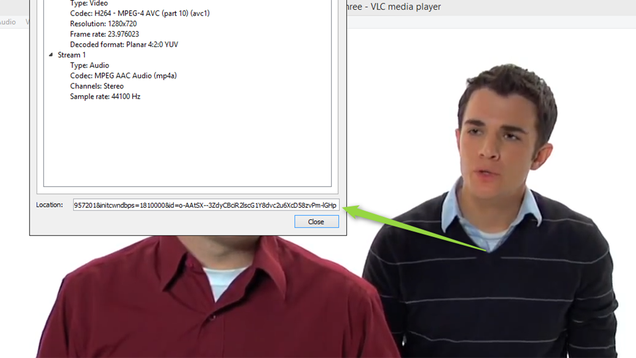
We've discussed plenty of ways to download YouTube videos before. However, you have one option already installed on your computer. VLC lets you play and download YouTube videos right from its desktop interface. Here's how:

  1. Find a video on YouTube—like this one—and copy the URL from the address bar.
  2. In VLC, head to Media > Open Network Stream.
  3. Paste the YouTube link in the box and click Play.
  4. Under Tools, click Codec Information.
  5. In the box that says Location, right-click the block of text and click Select All. Copy this text to your clipboard.
  6. Go back to your browser and paste the link in the address bar. This will open the source file directly on YouTube's servers.
  7. Right-click the video as it plays and select Save Video As.

You can also record clips from YouTube videos as they're streaming in VLC by pressing the red Record button in the player itself. This isn't as direct of a rip, but it's handy if you need to grab a particular clip out of a long video.

Record Your Desktop
The Best Hidden Features of VLC

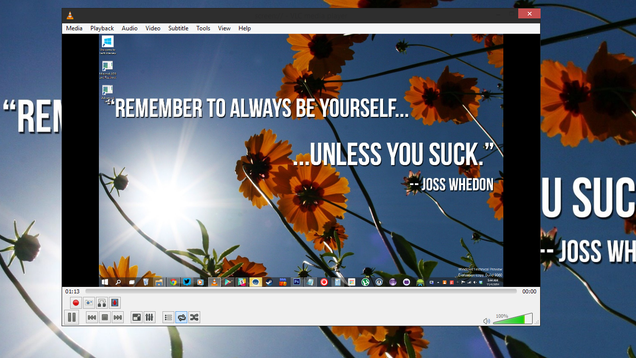
Desktop recording software ranges from poor quality and free to incredibly powerful and expensive. VLC manages to strike a balance between both. In our tests, it wasn't powerful enough to, say, screen record a movie. However, for showing someone a problem you're having on a computer or providing quick instructions on how to perform a task, it's more than enough.

  1. Under Media, click "Open Capture Device."
  2. Click the "Capture Mode" dropdown and select "Desktop."
  3. Modify the frame rate. 15 f/s will probably be good enough for desktop recording, though 30 may be required for more fast-paced movement.
  4. Click the dropdown arrow next to "Play" and select "Convert."
  5. In the "Profile" dropdown, choose MP4.
    1. At this step, you can click the tool icon to modify the settings of this profile. Here you can modify things like resolution or bitrate. We'll use the default settings for now, but you can come back here later if you need to tweak the final product.
  6. In the Destination box, choose a location to place the finished file.
  7. Click Start.

Once you click Start, VLC will stream a feed of your desktop into itself behind the scenes. Let it run while you record your workspace. When you're done, you can click the stop buton in the player controls to end recording.

Convert Video Files
The Best Hidden Features of VLC

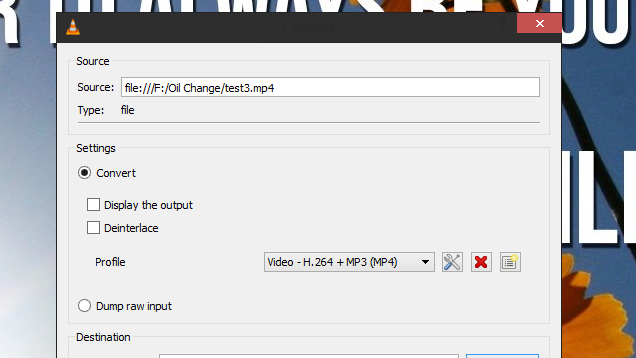
VLC also has a pretty decent video converter built in. If you have a file that needs to be in a different format to upload or play somewhere, you may not need to download an entirely different application just to convert it. Here's how to convert between one file and another:

  1. Under Media, click "Convert/Save."
  2. Add the file you want to convert in the File Selection section.
  3. Click "Convert/Save."
  4. In the Settings section, choose the type of file you want to convert the file into under Profile.
  5. Give the file a name and location under Destination.
  6. Click Start.

The converted video file will be deposited in the target location. VLC certainly isn't a replacement for a more robust application like Handbrake. However, for simple jobs, it's probably the only video converter most people have on their machines.

Record Your Webcam
The Best Hidden Features of VLC

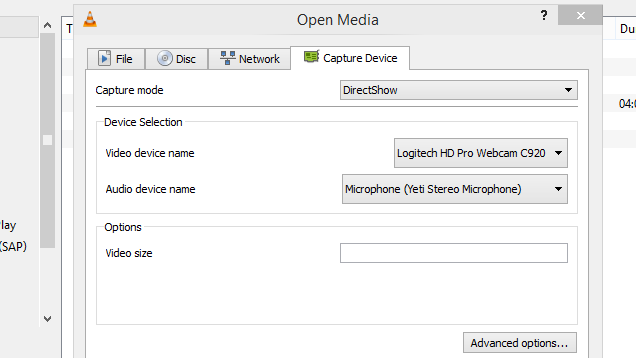
Your webcam may or may not have come with software to take pictures and record videos. However, chances are VLC has some advantages over both. Not only can you choose several different types of formats to record to, you can also tweak a number of fine grain settings if needed. This is helpful for making YouTube videos or recording video messages to send to friends or relatives. Here's how to record video from your webcam:

  1. Under Media, click Open Capture Device.
  2. In the "Capture mode" drop down, select DirectShow.
  3. For "Video device name" choose your webcam.
  4. For "Audio device name" choose your microphone.
  5. Click "Advanced options."
    1. If you want to use the software that came with your device to control input settings, choose "Device properties."
    2. Otherwise, enter a value for "Video input frame rate." 30 is a good rule of thumb for smooth video, though you can use less if you're not concerned about quality.
    3. Click Okay.

At this point, you have two options. You can click Play to play live video through VLC and record segments as needed by pressing the red Record button. Alternatively, you can choose "Convert/Save" from the dropdown and select where you would like the recorded file to go. Both methods have their advantages. The former allows you to preview your video and take clips in short bursts. However, this method requires headphones, as it can create a feedback loop. It also may cause a more sluggish recording on slower computers.

Using the Convert/Save method avoids the feedback problem but it also doesn't provide you much information on what you're looking at or when you're done recording. You can stop the recording by pressing Stop in the player, but there's no indicator that you are still recording at the time.

Subscribe to Podcasts
The Best Hidden Features of VLC

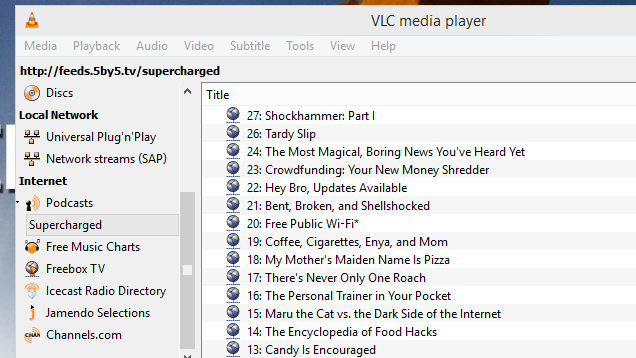
You might not think of VLC as a podcast manager, but if you use it regularly, it's actually pretty handy. To add a podcast, you'll need the RSS feed of the show. As an example, we'll use Lifehacker alum Adam Dachis' Supercharged podcast here. The RSS link will probably look something like this:

http://feeds.5by5.tv/supercharged

Once you've found the RSS feed for the podcast you want to keep up with, follow these steps:

  1. In VLC's sidebar, scroll down until you see Podcasts.
  2. Hover your mouse over Podcasts and click the plus sign on the right.
  3. Paste the RSS feed URL of the show you want to add.
  4. Click OK.

Now, your podcast of choice will appear in the Podcasts sidebar section. Click on the name of a show and you'll see a list of available episodes. Double click on any one of them to start streaming.

04 Nov 16:16

Dropbox and Microsoft form surprise partnership for Office integration

by Tom Warren

Microsoft and Dropbox are teaming up today to more closely integrate Dropbox into Office. The surprise partnership will benefit Dropbox users who use Office across desktop, mobile, and the web as Microsoft’s productivity suite will soon become the standard way to edit Word, Excel, and PowerPoint files stored on Dropbox storage. Office for iPad will benefit the most, with an update coming in the following weeks that will allow Dropbox users to link their account directly to the Word, Excel, and PowerPoint iPad apps.

Continue reading…

04 Nov 15:25

Hype Machine for Android Offers New, Ad-Free Streaming Music on the Go

by Alan Henry

Hype Machine for Android Offers New, Ad-Free Streaming Music on the Go

Android: The Hype Machine is one of our favorite streaming services for great new music, and thanks to its new Android app, you can take all of those great tunes with you on the go and listen anytime.

The Android version of the Hype Machine app has been in beta for a long time now, but we've been testing it for a while and it works really well. It's not specifically data hungry, but you still get great audio quality, tons of music to choose from, and access to all of the features you'd get from the Hype Machine website. You can keep up with your friends, check out your favorite music blogs that feed into Hype Machine, browse specific genres if you're in the mood for something specific, see your playback history and songs you've favorited (and replay any of them at any time), or check out the Album Premiere area just to hear brand new music.

The best thing about the app is that it's as interactive as you want. You can just tap play on a playlist or category and let the music glow (like I do when I'm driving), or hop around scrolling through tracks, searching for artists or songs, and playing just what you want to hear. As always, the "What's New" and "Popular" sections are front and center so you can hear the best of the service without digging too deeply.

You'll want a Hype Machine account to keep track of your favorites and things (although the app will remember them even if you don't have an account), but that—unlike the app—is completely free. The app itself will set you back $4. If you're looking for a free option, try UberHype. We've mentioned it before, and it packs in many of the same features.

Hype Machine ($4) | Google Play

04 Nov 14:23

Memo Box Predicts When You’ve Forgotten Your Pills

by Natasha Lomas
Memo Box A pair of Cambridge University students have taken the crowdfunding route to try to commercialize a smarter kind of pill box. They’re looking to raise £30,000 ($48,000) via Kickstarter to turn their Bluetooth connected Memo Box prototype, developed over the past two years, into a shipping product. Read More
04 Nov 14:23

Amazon Prime customers now get unlimited cloud storage for photos

by Chris Welch

When it comes to backing up your photo library and life's most precious memories, it's good to have multiple options. Amazon's now giving its Prime subscribers another one: the company has announced that effective immediately, Prime customers will receive unlimited cloud storage for their photo backups. Any images you've already uploaded will no longer count against your cloud storage limit. Before now, only Fire Phone owners have had the benefit of unlimited photo storage.

Amazon calls this latest membership perk Prime Photos, and describes it as a simple, secure destination for your entire photo library. Once they've been uploaded to the cloud, your shots can be viewed across iOS, Android, the web, and of course Amazon's own Fire...

Continue reading…

04 Nov 13:58

U.K. Spy Agency Chief Goes Public With Anti-Encryption Appeal To U.S. Tech Companies

by Natasha Lomas
800px-GCHQ-aerial In what must be one of the most high profile consequences of last year’s Snowden revelations, which detailed the extent of government dragnet digital surveillance programs, the new chief of U.K. spy agency GCHQ has made a public appeal to U.S. technology companies to co-operate in handing over user data to support its counter terror efforts. Read More
04 Nov 13:58

Police Finally Arrest The Third And Final Founder Of The Pirate Bay

by Jon Russell
fredrik-arrest Proving that the long arm of the law doesn’t soften over time, the final founder of legendary file-sharing site The Pirate Bay to evade the police has now been caught. Fredrik Neij, known also as ‘TiAmo’, was arrested by police in Thailand after attempting to enter the country from Laos, where he lives. Read More
04 Nov 13:56

Chris Hadfield's 'Space Oddity' returns to YouTube with David Bowie's agreement

by Cassandra Khaw

In case you missed astronaut Chris Hadfield's extraterrestrial rendition of David Bowie's "Space Oddity," the video is once again up on YouTube. The cover will enjoy a two year lifespan, thanks to a new agreement between him, David Bowie's publishers, and the Canadian Space Agency.

Bowie's back! Here's the story:  http://t.co/ZHIpmTabAA

— Chris Hadfield (@Cmdr_Hadfield) November 3, 2014

Hadfield was quick to stress in his blog post that there was "no rancour" involved in the removal of the original video, which was shot in space and viewed more than 23 million times over the course of a year. David Bowie himself described the cover as "possibly the most poignant version of the song ever created." The astronaut explained that...

Continue reading…

04 Nov 13:55

HTC confirms 90-day countdown for One M8, M7 Lollipop updates starts today

by Chuong H Nguyen

90 days from now, owners of the HTC One M7 and the HTC One M8 will both be upgraded to Google's latest Android release — Lollipop. Though not entirely new news, the fact was confirmed today by HTC's Mo Versi on Twitter, the same day that Google has started to release its Android Lollipop code. HTC had promised in the past of timely Android updates, and the 90-day window definitely is part of this promise.


04 Nov 13:55

Disney Movies Anywhere launches on the US Play Store, brings cross-platform movie streaming

by Harish Jonnalagadda

After launching on iOS earlier this year, Disney is now bringing its cloud movie service, dubbed Disney Movies Anywhere, to the US Play Store. Now available as a native app for Android devices, the service ties in your Google Play and iTunes accounts with a Disney account and lets you watch purchased content on any Android or iOS device, as well as Disney's website.


04 Nov 13:52

The couple that quit renting to live in a tiny house

by Billy Ulmer
Billy Ulmer traveled all over the country interviewing people about why they were drawn to designing, building and living in dwellings smaller than the average American greatroom. Meet Chris and Malissa Tack. Read the rest
03 Nov 21:51

Check Out This Amazing Transparent Car

by John Biggs
Screen Shot 2014-11-03 at 3.04.05 PM Spectrum has posted some amazing video of a “transparent” car created by Japanese researchers. The car uses projectors, cameras, and special mirrors to reflect what’s outside the car onto the surfaces inside. The resulting images allow you to see what’s going on all around the vehicle, even behind you and in blind spots. Created by Susumu Tachi and Masahiko Inami of… Read More
03 Nov 21:47

5 Reasons Your 1990s Nokia Was the Best Cell Phone Ever

by Nicole Nguyen
<em>Editor's Note: This was originally published by our partners at <a href="http://www.popsugar.com/tech/Old-Nokia-Phones-36011759">PopSugarTech</a><a href="http://www.popsugar.com/tech/Old-Nokia-Phones-36011759#photo-36011763"></a>.&nbsp;</em>

Sadly, Nokia is nearly no more. Microsoft is changing the name of its flagship Nokia Lumia phone to, simply, Microsoft Lumia. The company purchased Nokia's mobile phone division earlier this year and intends to drop the Nokia brand from its high-end Windows Phones entirely.

While the entry-level basic phones will still carry the moniker, we're a little bitter about having to say goodbye to Nokia phones as we know them. After all, for many of us, our first mobile device was a Nokia brick phone. Read on for the five things we'll miss about those wonderful, unbreakable gizmos.

1. They didn't bend like the iPhone 6

Nokias broke you, not the other way around.

2. In fact, they were so indestructible, Tom Riddle chose a Nokia as his next Horcrux

Beat Snake and destroy the Horcrux! (PS If you've never read Harry Potter, you have no idea what we're talking about. Just move on to the next slide.)

3. They had radtastic interchangeable faceplates

Changed that faceplate as often as my outfits.

4. They ran out of battery after days of use, not hours

What phone charger?

5. Last but not least, they came with SNAKE ...

... which you probably played for hours.

Read More from PopSugarTech:

03 Nov 21:46

Google Starts Doling Out Android 5.0 Lollipop

by Selena Larson

When Dave Burke, head of Android engineering, addressed the Google I/O developer conference last summer, he called the new version of Android the biggest update to Google's mobile operating system ever

Now people get to see what the fuss is all about, as Google starts rolling out Lollipop today, at least for its own Nexus devices. 

The biggest change to come with Lollipop is what Google calls "material design," a flatter, streamlined look across desktop and mobile devices. The company recently released updated versions of its Google Play Music and Calendar apps to fit in with the Lollipop design, along with a new email application, Inbox. 

See also: What Developers Need To Know About Android L

According to the company, the new software arrives with several other apps from outside developers and companies that already support material design, including the Wall Street Journal, Tumblr and Buzzfeed. The company released the developer preview months ago to give developers time to get apps launch-ready.

"Today’s updates are just the beginning of delivering a modern design language for the next wave of devices in your life," the company wrote in a blog post.

Lollipop also boosts battery life, adds improved notifications, and a "personal locking" feature that lets your Android devices unlock another

Google's own reference devices—including the new Nexus 9 tablet and the upcoming Nexus 6 smartphone—will be the first to get the overhauled operating system. Others will roll out over time as the phone manufacturers and carriers allow. 

Lead image courtesy of Google 

03 Nov 21:40

The Nexus Player video walkthrough!

by Phil Nickinson

How to set up and use your new Nexus Player!

Ladies and gentlemen, we present to you the Google Nexus Player. It's one of the first devices to run the Android TV flavor of Android 5.0 Lollipop. It's a smallish puck of a streaming and gaming device. And in the few days we've been using it, it's been a hell of a lot of fun, especially considering that it costs just $99.

Our full review of the Nexus Player is coming shortly. In the meantime, enjoy this 13-minute walkthrough. If you've been on the fence about whether you wanted to drop the Benjamin on this guy, it should help you answer that question.

And if you still have more you want to know, sing out in the comments, and be sure to swing by our Nexus Player forums.


03 Nov 21:40

Google's updated calendar app is a gorgeous addition to Android 5.0 Lollipop

by Phil Nickinson

It's functional, it looks good, and you're definitely going to want to use this one

There's so much to love in Android 5.0 Lollipop at a system level. And at the same time, we've been downright smitten by the updates Google's individual apps are receiving. It's not just about MaterialYOLO, but rather how everything is finally coming together under a single design language. (That's not to say we don't still have a few issues, but that's another post for another time.)

Today Google is unwrapping the new Calendar app for Android 5.0 Lollipop. And if you're a fan of calendar apps — and who isn't, really? — you're going to want to check this out.