 A short code for a Whopper, or a tap for a Big Mac? On the heels of McDonalds working with Apple to let iPhone users buy Big Macs and more using Apple Pay, PayPal — Apple’s burgeoning rival in payments — has inked a deal with McD’s long-time fast-food competitor, Burger King, to power a mobile payment service at its chain of restaurants, by way of a new Burger… Read More
Bcstevieb
Shared posts
03 Nov 21:52
A short code for a Whopper, or a tap for a Big Mac? On the heels of McDonalds working with Apple to let iPhone users buy Big Macs and more using Apple Pay, PayPal — Apple’s burgeoning rival in payments — has inked a deal with McD’s long-time fast-food competitor, Burger King, to power a mobile payment service at its chain of restaurants, by way of a new Burger… Read More
With McD’s Using Apple Pay, PayPal Scoops Up Burger King For Fast Mobile Sales
by Ingrid Lunden
A short code for a Whopper, or a tap for a Big Mac? On the heels of McDonalds working with Apple to let iPhone users buy Big Macs and more using Apple Pay, PayPal — Apple’s burgeoning rival in payments — has inked a deal with McD’s long-time fast-food competitor, Burger King, to power a mobile payment service at its chain of restaurants, by way of a new Burger… Read More
03 Nov 21:48

Marvel made us comic book nerds, now they want to make us Comic Book Guy
by Kwame Opam
If the superheroes headlining the new Marvel movies sound unfamiliar, don't worry. You're not alone. Marvel's third phase of films stretches beyond the mainstream heroes into the stranger, more perplexing and arguably more ambitious characters.
At last week's grand unveiling, the studio laid out its plans for the next five years. By 2019, we'll have gone through a whopping 10 new films, all expanding on what came before them in the Marvel film mythos and all in service of creating a movie universe vaster than anything we've ever seen in theaters. Since Marvel wants to own every last screen worth paying attention to, it's asking us all to invest fully into what's even now an incredibly dense canon.
If any of us hope to keep up, we can't...
03 Nov 21:45
A new day for Google Calendar
by The Gmail Team
Posted by Ian Leader, Product Manager
Today we’re introducing a brand new Google Calendar app. It’s designed to be a helpful assistant, so you can spend less time managing your day, and more time enjoying it.
It takes a lot of work to stay on top of your schedule, after all. You have to manually enter that hotel or dinner reservation, then update it if your plans change. You have to hunt around for addresses and phone numbers, then add them to your events. And if you’re on a mobile device, you might just give up on these kinds of tasks entirely.
Calendars (like email) should do better—especially on phones and tablets—so we set out to build one that’s always at your service. Here are just some of the ways the new Calendar app can help.
Events from Gmail: now emails can turn into Calendar events automatically
Every time you book a flight, buy concert tickets, or make a hotel reservation, odds are you get an email with dates, times and other important details. But who has the time (or patience) to copy and paste all this into their calendar? In the new Calendar app these kinds of emails become events automatically, complete with things like flight numbers and check-in times. They’ll even stay updated in real time if your flight's delayed, or you receive another email update.
.png) Assists: suggestions that save you time
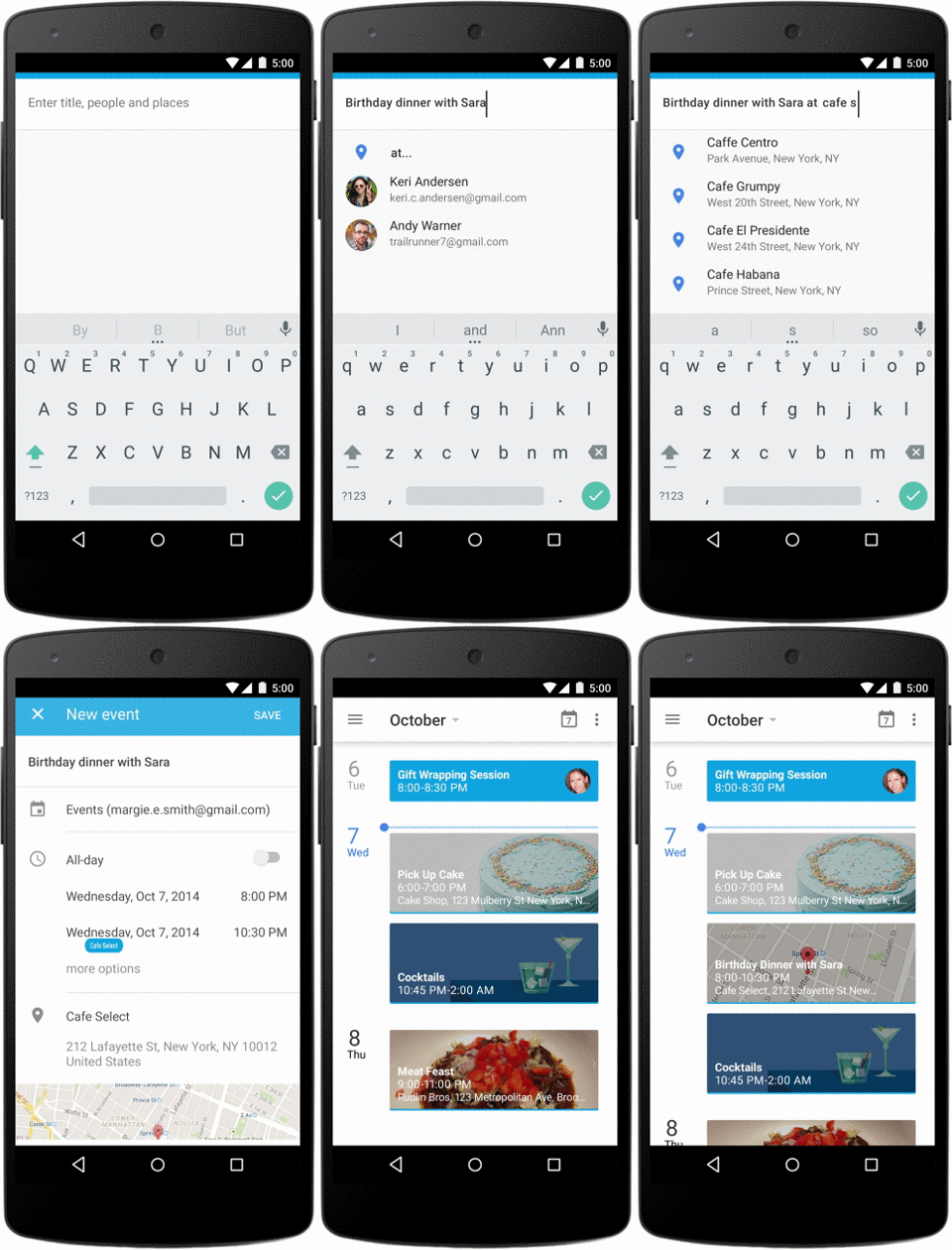
Assists: suggestions that save you time
Of course, not all event info arrives in your inbox. You often have to piece together phone numbers, addresses and attendees from lots of different sources, then add them to your calendar manually. With Assists, Calendar can suggest titles, people and places as you type, as well as adapt to your preferences over time. For example, if you often go running with Peter in Central Park, Calendar can quickly suggest that entire event when you type ‘r-u-n.’
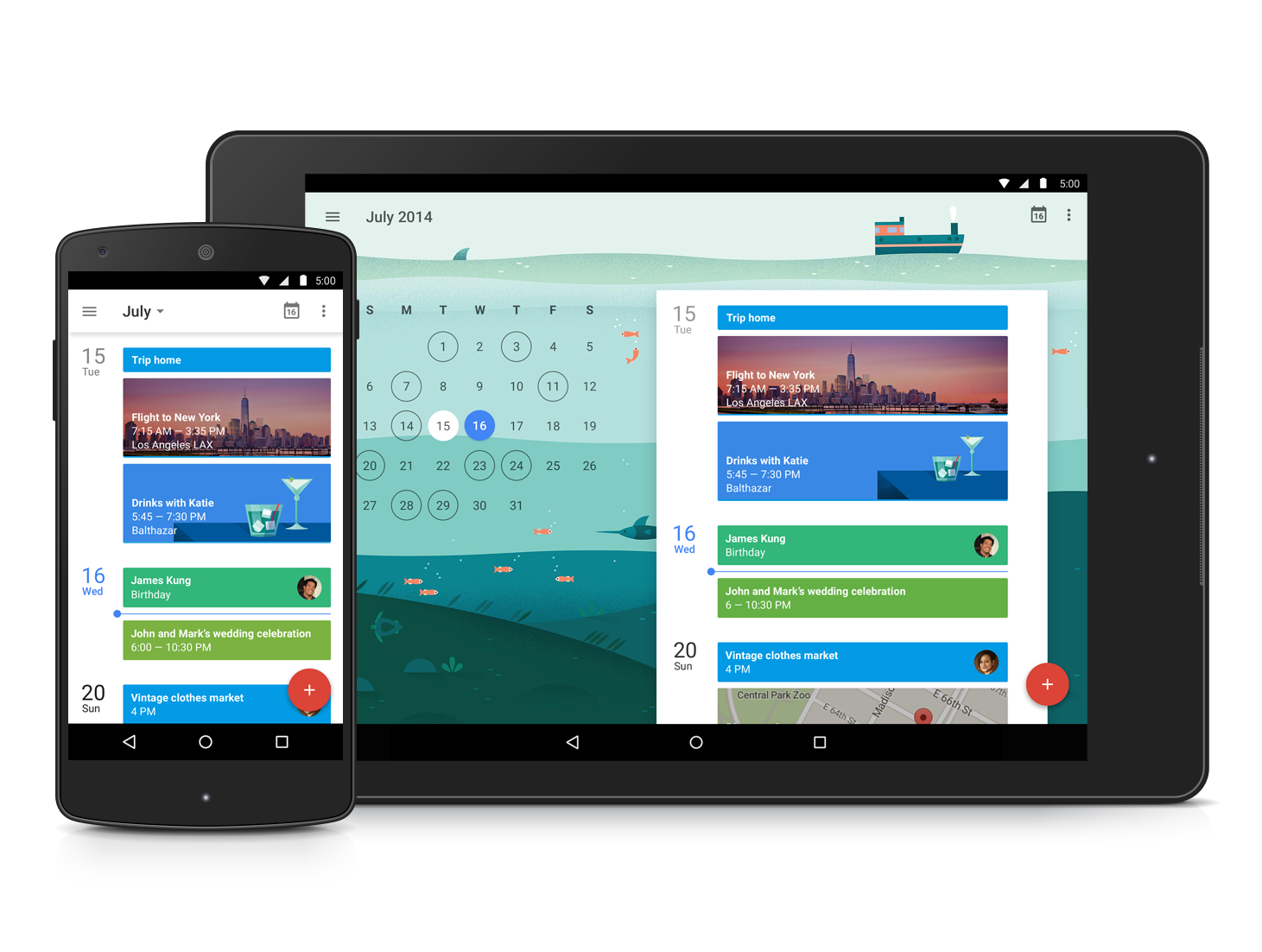
 Schedule View: easy to scan and lovely to look at
Your calendar is more than just a list of dates and times—it’s your life! So Calendar’s new Schedule view includes photos and maps of the places you’re going, cityscapes of travel destinations, and illustrations of everyday events like dinner, drinks and yoga. These images will bring a little extra beauty to your day, and make it easy to see what’s going on at a glance—perfect for when you’re checking in from your phone or tablet.
.png) The new Google Calendar will work on all Android 4.1+ devices. It’s available today on all devices running Android 5.0 Lollipop, and you’ll be able to download the update from Google Play in the coming weeks. (And yes, we’re also working on a version for iPhone!) Learn more on our website.
The new Google Calendar will work on all Android 4.1+ devices. It’s available today on all devices running Android 5.0 Lollipop, and you’ll be able to download the update from Google Play in the coming weeks. (And yes, we’re also working on a version for iPhone!) Learn more on our website.


Today we’re introducing a brand new Google Calendar app. It’s designed to be a helpful assistant, so you can spend less time managing your day, and more time enjoying it.
It takes a lot of work to stay on top of your schedule, after all. You have to manually enter that hotel or dinner reservation, then update it if your plans change. You have to hunt around for addresses and phone numbers, then add them to your events. And if you’re on a mobile device, you might just give up on these kinds of tasks entirely.
Calendars (like email) should do better—especially on phones and tablets—so we set out to build one that’s always at your service. Here are just some of the ways the new Calendar app can help.
Events from Gmail: now emails can turn into Calendar events automatically
Every time you book a flight, buy concert tickets, or make a hotel reservation, odds are you get an email with dates, times and other important details. But who has the time (or patience) to copy and paste all this into their calendar? In the new Calendar app these kinds of emails become events automatically, complete with things like flight numbers and check-in times. They’ll even stay updated in real time if your flight's delayed, or you receive another email update.
Of course, not all event info arrives in your inbox. You often have to piece together phone numbers, addresses and attendees from lots of different sources, then add them to your calendar manually. With Assists, Calendar can suggest titles, people and places as you type, as well as adapt to your preferences over time. For example, if you often go running with Peter in Central Park, Calendar can quickly suggest that entire event when you type ‘r-u-n.’
Your calendar is more than just a list of dates and times—it’s your life! So Calendar’s new Schedule view includes photos and maps of the places you’re going, cityscapes of travel destinations, and illustrations of everyday events like dinner, drinks and yoga. These images will bring a little extra beauty to your day, and make it easy to see what’s going on at a glance—perfect for when you’re checking in from your phone or tablet.
03 Nov 21:41


A few quick thoughts on the Sony Smartwatch 3
by Phil Nickinson

It's been a couple months since we've gotten our first look at the Sony Smartwatch 3 at the IFA conference in Berlin. It's now available from Verizon Wireless here in the U.S. — a Google Play release will happen eventually — and I've been wearing it for a few days now.
We'll have a proper review in due time. But here, now, are a few quick thoughts, in no apparent order:
03 Nov 21:36

Google Calendar Now Adds and Updates Events for You Based on Gmail
by Alan Henry
Android: Google took the wraps off a new version of Google Calendar today. The new version offers useful tweaks like the ability to turn emails into events automatically, "assists" that autofill event info, phone numbers, and addresses, and a completely new, good-looking interface.
The video above is a solid—albeit brief—rundown of some of the new version's best features. The overhauled interface is a huge refresh over the standard calendar view, and reminiscent of Google's new Inbox email app. You add events by tapping the plus sign in the lower right, and those "assists" that help you organize your email in Inbox also work in the new Google Calendar to fill in things like addresses where your events will take place, and phone numbers for reservations or the people who'll attend.
The update can also automatically pull in events from Gmail, so if you get concert tickets or a flight booking in your inbox, Calendar can now turn them into events on your calendar automatically, populated with all of the information in that email, without you lifting a finger to create it. The events will even stay updated without you managing them, so if a flight is delayed you'll get an update, and your calendar will ping you with directions in time for you to make it to your concert. Finally, the new Schedule View offers an attractive look at all of your upcoming appointments that looks good on both phones and tablets.
The new version is currently only available for devices running Android Lollipop (5.0). It'll be available for all Android devices running 4.1 or higher "in the coming weeks," and an iOS version (shown in the video) is on the way soon. Hit the link below to read more.
A New Day for Google Calendar | Official Gmail Blog
03 Nov 15:16


ASUS Releases ZenWatch Manager, Remote Camera, And Wellness Apps For Its Upcoming Android Wear Device
by Michael Crider
 LG and Samsung got the Android Wear party started, releasing the G Watch and Gear Live, respectively. Those watches only need Google's Wear app to function, but Motorola changed the formula a bit with the Moto 360, tying the watch to the existing Motorola Connect app. For the upcoming ZenWatch, ASUS is beating them all (well, sort of) with three separate watch-focused apps.


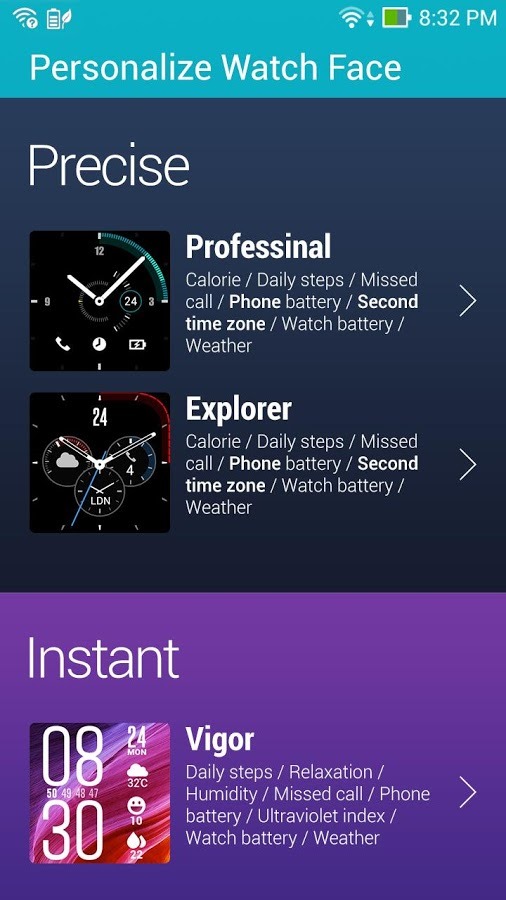
The first new ASUS app is simply titled "ZenWatch Manager," and it's essentially a remote setup function for your watch on your phone screen.
ASUS Releases ZenWatch Manager, Remote Camera, And Wellness Apps For Its Upcoming Android Wear Device was written by the awesome team at Android Police.
03 Nov 14:49


UK government may force networks to offer national roaming with new legislation
by Rich Edmonds

New legislation could be in the works to effectively force UK operators to offer roaming options for customers where signal is poor. The UK government continues to work with mobile carriers on a solution to address black spots and areas where signal is hard to come by. The plan is to offer said roaming support to make it possible to switch between networks to maintain service, something mobile operators previously rejected.
03 Nov 00:37


[Game Roundup] Our Top Seven Picks For The Best New Games Of October 2014
by Michael Crider
 To be frank, October was a bit bare of notable game releases, unless you count ports and adaptations of older titles. Our monthly top seven contains three ports, one adaptation of a card game, and one modified version of a casual PlayStation title. Only Botanicula and Rovio's surprisingly engaging Retry stand on their own. Still, there's plenty to choose from if all you need is a diversion, and our Honorable Mention section includes some choice entries for RPG and horror fans.
[Game Roundup] Our Top Seven Picks For The Best New Games Of October 2014 was written by the awesome team at Android Police.
02 Nov 23:07


[App Roundup] Our Top Seven Picks For The Best New Apps Of October 2014
by Michael Crider
 During October we've been positively innundated with new versions of apps, mostly from Google as the company plasters Material Design over nearly its entire catalog. But there have been some notable launches as well, dominated by Google's own Inbox (and the scramble that comes from an invitation system). For some other highlighted picks from October and a few honorable mentions, read on.

Inbox by Gmail
Android Police coverage: Google's 'Inbox By Gmail' Email Replacement System Is Live, But Invite-Only For The Moment
Inbox is kind of a big deal as far as Google is concerned - it appears to be the new status quo for the company's email system going forward.
[App Roundup] Our Top Seven Picks For The Best New Apps Of October 2014 was written by the awesome team at Android Police.
02 Nov 20:33

UK cultural institutions leave their WWI cases empty to protest insane copyright
by Cory Doctorow
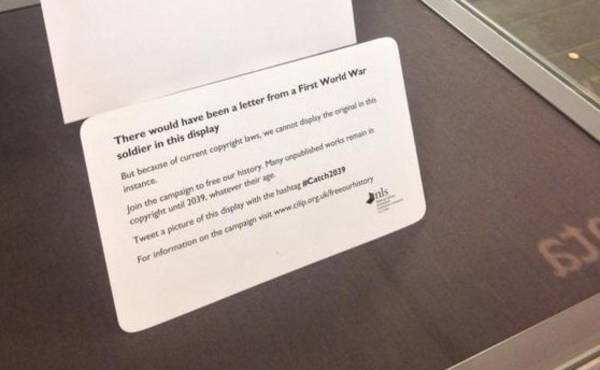
They want the term of copyright changed to life plus 70 years, instead of 2039 for unpublished works of uncertain date, a standard that makes it impossible to reproduce or display things like letters home from the front.
Read the rest
02 Nov 17:55

FBI secretly seeking legal power to hack any computer, anywhere
by Cory Doctorow

The Bureau is seeking a rule-change from the Administrative Office of the US Courts that would give it the power to distribute malware, hack, and trick any computer, anywhere in the world, in the course of investigations; it's the biggest expansion of FBI spying power in its history and they're hoping to grab it without an act of Congress or any public scrutiny or debate.
Read the rest
02 Nov 17:54


Google Takedown Requests Surge After New Anti-Piracy Measures
by Ernesto
 Last week Google implemented a new search algorithm. The new measure keeps websites for which it receives a high number of takedown requests out of the top results for certain keywords.
The change has hit pirate sites hard. Some sites have lost more than half of all their search engine traffic, which translates to millions of visitors per week.
The key element of the new alghorithm are the DMCA notices. The more a website gets, the less likely it is that the site appears in the top results for various download and streaming related searches.
This has created a new incentive for copyright holders to send more takedown notices, to ensure that no pirate site can fly under the radar. Various rightsholders appear to realize this as the number of DMCA notices Google receives has skyrocketed.
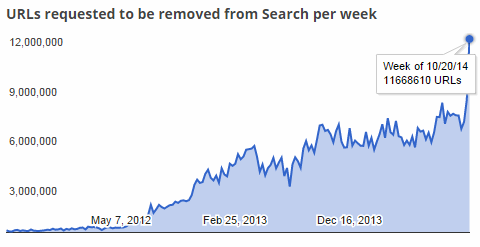
Over the past week the search engine was asked to remove 11,668,660 allegedly infringing URLs. That is nearly double the amount it received earlier this month, and the largest week to week increase ever.
Takedown requests increase 100% in weeks
Looking at the sites that are targeted we see that most notices indeed refer to relatively new sites. The top 5 domains last week were conexaomp3.com, vmusice.net, tpbt.org, proxymirror.co and helpamillionpeople.com.
These sites went unnoticed before but all had more than 300,000 URLs removed last week. On the surface helpamillionpeople.com appears to be an odd target, but the site in question runs a Pirate Bay proxy through a subdomain.
The big question now is whether this new takedown surge will pay off.
Of course, copyright holders aren’t under the illusion that Google can eradicate piracy, or even stop those who regularly download or stream content without permission. Their goal is to make pirated content invisible in search results so less people will be drawn to it.
Whether this will decrease piracy rates in the long run is unknown, but judging from the early results it does indeed make it less likely for people to stumble upon pirate sites.
Source: TorrentFreak, for the latest info on copyright, file-sharing and anonymous VPN services.
02 Nov 15:52
 Google has a new service in the works that could allow users of Android devices to share media with others nearby, even if those users are rocking iOS devices like iPhone and iPads instead of gadgets running Google’s mobile OS. The so-called Copresence feature, revealed by an Android Police source digging around in the latest Google Play Services APK, would allow devices to use… Read More
Google’s Copresence Looks Like A Cross-Platform AirDrop
by Darrell Etherington
Google has a new service in the works that could allow users of Android devices to share media with others nearby, even if those users are rocking iOS devices like iPhone and iPads instead of gadgets running Google’s mobile OS. The so-called Copresence feature, revealed by an Android Police source digging around in the latest Google Play Services APK, would allow devices to use… Read More
02 Nov 09:56
 Looking for a nice little burst of nostalgia on this fine Saturday evening? Don’t feel like going through the process of installing MAME and lurking for ROMs, but still want to get your classic arcade on? Back in December of last year, the Internet Archive (in their effort to backup the entire digital world, one bit at a time) launched a “Console Living Room” that offers… Read More
The Internet Archive Now Lets You Play 900+ Classic Arcade Games In Your Browser
by Greg Kumparak
Looking for a nice little burst of nostalgia on this fine Saturday evening? Don’t feel like going through the process of installing MAME and lurking for ROMs, but still want to get your classic arcade on? Back in December of last year, the Internet Archive (in their effort to backup the entire digital world, one bit at a time) launched a “Console Living Room” that offers… Read More
01 Nov 22:34


Gmail 5.0 for Android leaked with new design and support for Outlook and Yahoo Mail
by John Callaham

While the Android version of Gmail 5.0, the next major update for Google's email client, has yet to make an official appearance on the Google Play Store, the app has leaked out, showing its support for IMAP and Exchange email accounts that are used by Outlook.com and Yahoo Mail. And of course, a new UI that's based on the Material Design style found in Android 5.0 Lollipop.
01 Nov 22:33

First 'Furious 7' trailer is a wild ride
by Dante D'Orazio
The makers of the Fast and Furious franchise sure do have a lot of fun with cars. The first trailer for Furious 7 is here, and it swiftly dismisses the notion that they've run out of ideas. We're treated to nearly an entire, outrageous action scene — complete with airplanes, flying cars, sheer cliffs, and, of course, Vin Diesel and company. It's jaw-dropping stuff. Just to mix things up, Jason Statham and Kurt Russell are along for the ride this time, but does anyone really care about the story? The movie hits theaters next April.
01 Nov 22:31

Create a “Donation Station” to Downsize Your Clutter
by Dave Greenbaum

We all have stuff around the house that we're not using, like clothes that no longer fit or a book you've finished reading. Create a "donation station" in your house, so even outgoing clutter has a place.
Clutter damages your checkbook and messes up your brain, so you want to prevent it. We've covered the Four Box Method for cleaning up junk, but that's for a scheduled cleanup of your home. Laura at I'm an Organizing Junkie says it's better to constantly purge the clutter.
She explains:
I have my donation station in my linen closet and every day I add to it and weekly I bring the contents of it to the thrift store. Purging shouldn't be something left for a spring cleaning activity. Purging should be a regular occurrence that we utilize for DAILY clutter creep decision making.
Start small by making a decision between two things…one can stay and one can go. Which one will it be? I don't live in a cluttered home however I am so into the habit of purging that I can always find something that can go. Always.
Hit the link for other ideas to live a less cluttered life.
The Clutter Creep and Why We Allow It to Happen | I'm an Organizing Junkie
Photo by Howard Lake.
01 Nov 15:52

Top 10 Better Ways to Cook an Egg
by Melanie Pinola

Eggs are one of the most versatile—and nutritious—foods. In addition to the traditional ways you've been taught to cook and enjoy eggs, here are a few more interesting "egg hacks" you can use just about every day.
10. Cook the Egg in Something Delicious

One of the reasons eggs are so awesome is they go so well with other foods. Some foods make perfect egg cups or containers, imparting even more flavor to your egg dish: avocados, bell peppers and onion rings, orange peels, and, of course, bacon come to mind.
9. Cook Eggs When You Don't Have Any Proper Equipment

This one's a little odd and best suited for the campsite or just experimenting, but nevertheless, you can fry an egg using paper, a hanger, and binder clips. Or maybe when you're out traveling and hungry for a decent breakfast in your hotel room you'll remember you can make eggs (and other breakfast food) with the iron.
8. Easily Peel Boiled Eggs in Seconds

Peeling eggs is a hassle sometimes when the shells crack into tiny sharp bits or refuse to let go of the egg. There are tons of solutions to this first world problem: blow the egg out of the shell, plunge them in hot water at the start (and then quickly cool them off in an ice bath), time the water boiling perfectly, and/or crack the eggs on flat surfaces (for less shell and better safety). Or shake the shells off with the "bumper car" method or the (crazy Japanese) Tupperware way.
On the other hand, why bother with peeling when you can just cut right through the boiled egg?
7. Cook Eggs with Unusual Kitchen Tools

Pots and pans aren't the only egg-cooking equipment you might have on hand. A pressure cooker makes easy-to-peel, hard-cooked eggs and steamed eggs in minutes, or you can use an espresso machine to scramble eggs. You can even use your slow cooker to make a breakfast casserole overnight and wake up to a hot breakfast like the one shown above.
6. Make Eggs Last Longer

To possibly keep eggs from spoiling too before their time, avoid the in-the-door egg storage containers and keep the eggs on a shelf instead. They should last three-to-five weeks. You can also make and store poached eggs in the fridge for days. (The Kitchn says two days, but Serious Eats says up to five. Go with what you're comfortable with.) You can also freeze eggs in ice cube trays to make them last longer.
5. Quickly Test If an Egg Has Gone Bad

Cook with a rotten egg? No thanks. Just put the egg in question in a bowl of water to see if it's still good.
4. Cook a Big Batch of Eggs at Once

Got a big brunch party coming up or just many hungry mouths to feed? Making a whole bunch of eggs at once doesn't take much more effort. Bake eggs in the oven, perhaps with the help of muffin tins or a towel; make a big batch of scrambled eggs and bacon in the oven; poach many eggs in a skillet with teacups teacups or in a pot with mason jars; or poach them the regular way with a handy steamer basket. If you're boiling many eggs at once, a towel can keep them from cracking in the pot.
3. Separate Eggs with a Water Bottle

There are many ways to separate the egg whites from the yolk, from the three-bowl method to other alternatives, but, really, just watch this video.
2. Cut Egg Cooking Time

Eggs don't take long to cook, but if your stomach is growling and every minute counts, a few tricks will have you eating sooner. Cut up boiled eggs in a jiffy for egg salad with the help of a cooling rack or other type of grate (or just use your hands). Substitute a fresh tortilla for flour to make less time-consuming crepes. Or turn to your microwave to make scrambled eggs in a minute or sunny-side up or poached eggs.
1. Perfect Your Egg Cooking Techniques

Now let's talk egg perfection—or at least, the more general, little tricks to up your egg game, like knowing the right temperatures for different egg consistencies.
- Boiled eggs: Use a calculator to come up with the perfect time for boiling eggs. When soft-boiling eggs, use more steam and less water, and when poaching eggs, try olive oil instead of water. Check out our crash course on the subject, aka Boiled Eggs 101.
- Scrambled eggs: Use a double boiler for fluffier scrambled eggs.
- Omelettes: Add a pinch of baking soda to fluff up eggs
- Poached eggs: Poach an egg sous-vide style or use a mesh strainer to keep the egg in its perfectly tight eggy shape.
- Fried eggs: Make the perfect sunny side up egg. Or learn six other ways to fry an egg to perfection. It's all about three important variables.
- Deviled eggs: A freezer bag is your friend.
- Baking with eggs: Fold egg whites into batter like a pro and get rid of egg shells from a mixing bowl with a little water
Finally, perhaps the mark of the egg master: the art of the one-handed egg crack.
Photos by Tina Mailhot-Roberge, themonnie, Craig Dugas, Ian Barbour.
01 Nov 13:23
 These wonderful creatures migrate annually, and a tiny Canadian town is one of the few settlements where their journey can be observed. Thanks to explore.org, Polar Bears International and Frontiers North Adventures, this live feed saves you a trip to the Hudson Bay. Read the rest
Polar Bear Livecam
by Rob Beschizza
These wonderful creatures migrate annually, and a tiny Canadian town is one of the few settlements where their journey can be observed. Thanks to explore.org, Polar Bears International and Frontiers North Adventures, this live feed saves you a trip to the Hudson Bay. Read the rest
01 Nov 10:56

NZ Trade Minister: we keep TPP a secret to prevent "public debate"
by Cory Doctorow

The Trans Pacific Partnership is the latest in a series of secretly negotiated sweeping "trade deals" that allow companies to sue governments to repeal environmental and labor laws, expand Internet censorship and surveillance, and a host of other nasties.
Read the rest
01 Nov 10:55


XBMC/Kodi Targets Piracy-Promoting eBay Sellers
by Andy
 Anyone typing the simple phrase “free movies” into eBay will be overloaded with many thousands of results. A large proportion offer hardware that has been customized to receive unauthorized online video.
The software these devices run is very often XBMC, or Kodi as its now known. The software in its basic form is an entirely legal media player, around since the days of the original Xbox (XBox Media Center).
However, XBMC/Kodi is compatible with third-party addons that can turn the player into a piracy powerhouse providing free access to movies, TV shows and live sports. With the advent of XBMC/Kodi for Android, eBay is now flooded with ready-built and configured ‘pirate’ boxes that anyone can operate.
A typical ‘pirate’ XBMC Android Box Listing

This week TF received information that eBay has been taking down listings for these devices, apparently at the behest of the XBMC Foundation, the organization behind the XBMC/Kodi software.
“The rights owner or an agent authorized to act on behalf of the rights owner, XBMC Foundation, notified eBay that this listing violates intellectual property rights. When eBay receives a report of this type of violation, we remove the listing to comply with the law,” eBay told a disappointed seller.
When emailed about the takedown, XBMC Foundation responded: “Your listing was removed because it violates our brand policy by altering the XBMC(tm) / Kodi ™ installation by including extra add-ons which are against our general brand policy or piracy general piracy policy.”
To discover more about these developments, TorrentFreak spoke with Kodi Project Manager Nathan Betzen.
“First, let me say that we have no copyright claims or interests in addons developed by third parties. The form provided by eBay is unfortunately over broad and says quite a bit more than we want it to say, but we work with the tools we’re given,” Betzen told TF.
“The requested takedowns are based entirely on trademark issues. All of the listings targeted so far have explicitly connected XBMC/Kodi with addons that enable piracy, resulting in eBay listings with phrases like, ‘XBMC lets you watch all the free movies you want!’”
Betzen informs TF that the Foundation not only controls the XBMC trademark in the US (and wherever else common law trademarks are recognized), but is also in the process of registering the name ‘Kodi’ with the United States Patent and Trademark Office. Once obtained, that trademark will be extended internationally using the Madrid Trademark Protocol.
 “We believe that these [eBay] sales are causing confusion for our users about what XBMC/Kodi does as a vanilla program. The clearest evidence of this may be found among several of the sellers themselves who are surprised and unaware of the fact that XBMC has absolutely nothing to do with the development of the piracy-related addons included in their sales pitch,” Betzen says.
“Upon being contacted by the sellers, we only request that they not associate the XBMC/Kodi name with the act of piracy described in their listings. This is possible by rebranding the software, which is permissible under the GPL.”
Betzen notes that simply refraining from mentioning piracy features is also enough to avoid an eBay takedown.
“Either way, they are welcome to post the sale again the moment they follow either of these paths or otherwise creatively solve the issue of associating the name XBMC/Kodi with piracy,” Betzen says.
Despite the takedowns, the XBMC Foundation told TF it takes no stance on piracy. Users are free to use their software how they like within the constraints of the GPL v2. However, that freedom ends when people indicate to the public that the Foundation is taking sides in the piracy debate when its goal is to remain out of the argument entirely.
“To put it simply: We are happy to remain software developers. And we are happy to let other groups stand for and against piracy,” Betzen concludes.
Source: TorrentFreak, for the latest info on copyright, file-sharing and anonymous VPN services.
31 Oct 23:16


How to manually make an Auto Awesome in Google+
by Ara Wagoner

Auto Awesome photos and videos are somewhat enigmatic to many, due in large part to the usually random way that they're picked and gussied up by Google. There's animated (Motion) Auto Awesomes, there's collage (Mix) Auto Awesomes, and then there are Movie Auto Awesomes. And while they'll show up on any device on their own, only the lucky users on Android can make them on command.
Let's get awesome.
31 Oct 23:15

Smigin Lets You Build and Learn Useful Phrases In Different Languages
by Patrick Allan
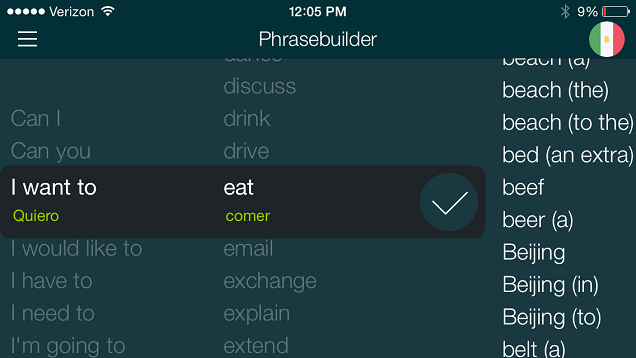
iOS: If you're traveling internationally—or want to make simple conversation with a non-English speaker—the Smigin app on iOS lets you build phrases quickly, gives you native pronunciation, and lets you save important phrases as favorites to use later on.
Learning a new language is useful and fun skill to develop, but sometimes you just want to know the basics to get by. After you select your language, Smigin lets you construct a phrase piece by piece so you can learn what you need to say in a snap. You can also listen to a native speaker say the phrase you built so you sound like a pro. If you're in a quiet area—or you don't want someone to hear you—you can also see the phrase written out phonetically. No Wi-Fi is needed to use the app, and when you know you're going to use a phrase again, you can save time by hitting the star button and saving the phrase as a favorite.
Smigin only does translation from English to Spanish (Mexico), French, Italian, and Brazillian Portuguese for the time being, but Filipino, German, Turkish, Portuguese (Portugal), and Chinese will be available soon. You can download it for free in the iOS App Store at the link below.
Smigin | iOS App Store
31 Oct 22:04

This Video Explains Four Psychological Terms You May Be Misusing
by Patrick Allan
We sometimes get in the habit of using psychological terms to describe different people, but there's a good chance you're using these words incorrectly. This video explains what the terms psycho, OCD, schizo, and bipolar really mean, and why you may not want to use them to describe someone.
These four terms are tossed around casually these days, and SciShow host Hank Green clarifies that these terms are for real psychological disorders that people suffer greatly from. Your ex is most likely not an actual psychopath, your roommate doesn't have OCD just because they like things clean and organized, schizophrenics do not have multiple personalities, and bipolar is a serious mood disorder marked by emotional extremes, not just someone being upset.
So why might you want to avoid using these words? Besides the fact that they're inaccurate in most cases, abusing these terms as casual metaphors minimizes these serious conditions and the people that actually have them. So you may want to take that into consideration the next time you want to complain about someone.
4 Psychological Terms That You're Using Incorrectly | YouTube
31 Oct 21:46


Best Android apps and games of October
by Simon Sage

Hopefully you guys are gearing up for a fun-filled Halloween, but we wouldn't let October slip by without rounding up the very best Android games and Android apps that have been released in the last 30 days. Both Google and Microsoft had a few really interesting new apps available this month. It was also a fantastic turnout for new games with lots of truly AAA titles be launched.
We're always eager to hear what you guys have installed, so be sure to hit up the comments with your favorite new apps. With that, let's dig into our top ten new Android apps that were released in October.
31 Oct 21:40
Court rules that Touch ID is not protected by the 5th Amendment
by Mark Frauenfelder
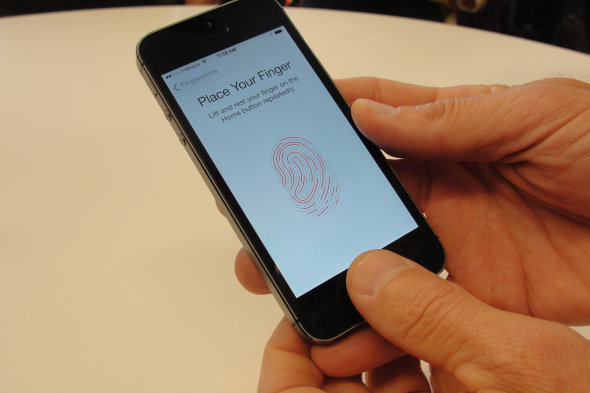
"A Virginia Beach Circuit Court this week ruled that an individual in a criminal proceeding cannot be forced to divulge the passcode to his cellphone as it would violate the self-incrimination clause of the Fifth Amendment. At the same time, the Court held that an individual can be compelled to give up his fingerprint to unlock Touch ID, or any fingerprint protected device for that matter." - The Unofficial Apple Weblog
Scirocco6 likes this
31 Oct 21:38
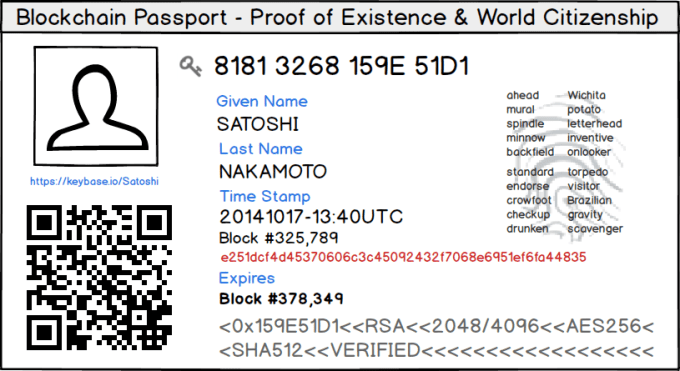 A blockchain tinkerer named Chris Ellis has created a system to build an actual digital passport that, through use of the Bitcoin blockchain and some encryption, will allow you to identify yourself online and off. Called World Citizenship, the project just launched on Github and shows some definite promise. “The goal of this project is to learn and layout a simple process for anyone in… Read More
Your Next Passport Could Be On The Blockchain
by John Biggs
A blockchain tinkerer named Chris Ellis has created a system to build an actual digital passport that, through use of the Bitcoin blockchain and some encryption, will allow you to identify yourself online and off. Called World Citizenship, the project just launched on Github and shows some definite promise. “The goal of this project is to learn and layout a simple process for anyone in… Read More
31 Oct 21:34

HP's MB Chronowing smartwatch is more watch than gadget
by Dan Seifert
Earlier this year, HP announced a collaboration with fashion designer Michael Bastian for a new smartwatch that would appeal to more than just nerds. Online retailer Gilt will be selling the new watch this coming Friday and The Wall Street Journal has gotten a first look at the device.
According to the Journal, the MB Chronowing will be available with leather, rubber, or nylon straps for $349, or with a crocodile strap and sapphire-glass crystal for a heftier $649. Neither version looks like a typical smartwatch — the MB Chronowing wouldn't look out of place in a glass case full of traditional chronometer-style watches. Its 44mm diameter makes it a pretty large watch, and the chunky bezel recalls Tag Heuer more than Dieter Rams Braun.
T...
31 Oct 16:38
Kitten rescued after getting head stuck in wheel
by Mark Frauenfelder

The Martin Country Sheriff's Office was called in to rescue a 10-week-old kitten who'd gotten its head stuck in a RV wheel. They successfully exercised "care, precision, and perseverance" to save the kitten.