Shared posts

14 Jan 16:04

Samsung finally releases a Tizen phone

by Sam Byford

Samsung's first Tizen phone has been a unicorn for years. In early 2013 a high-end model was promised for later in the year, but never arrived. Last year a mid-range device was set for release in Russia, but was later postponed without much explanation. It was looking like Samsung's fledgling OS would be confined to smartwatches and TVs for the foreseeable future, until today — the company has both announced and delivered an honest-to-goodness Tizen smartphone. This is the Samsung Z1, and it's on sale today in India.

That's not to say Samsung has delivered on its initial promise, exactly. The Z1 is a much lower-end device than was first mooted — it has a 4-inch WVGA screen, 3G data, a 1.2GHz dual-core processor, 768MB of RAM, a 1500mAh...

Continue reading…

13 Jan 23:25

Piracy Notices Boost Demand For Anonymous VPNs in Canada

by Ernesto

pirate-runningDue to a recent change to Canada’s copyright law, ISPs are now required to forward copyright infringement notices to their customers.

As a result, tens of thousands of Internet subscribers have received warnings in their mailboxes over the past days, with some asking for cash settlements.

The so-called notice-and-notice system aims to reduce local piracy rates, but it appears that not all Canadians are ready to give up their habits.

Instead, many file-sharers are taking measures to hide their IP-addresses and bypass the monitoring companies copyright holders have hired. By using VPN services or BitTorrent proxies their sharing activities can no longer be linked to their ISP account, effectively evading the notice system.

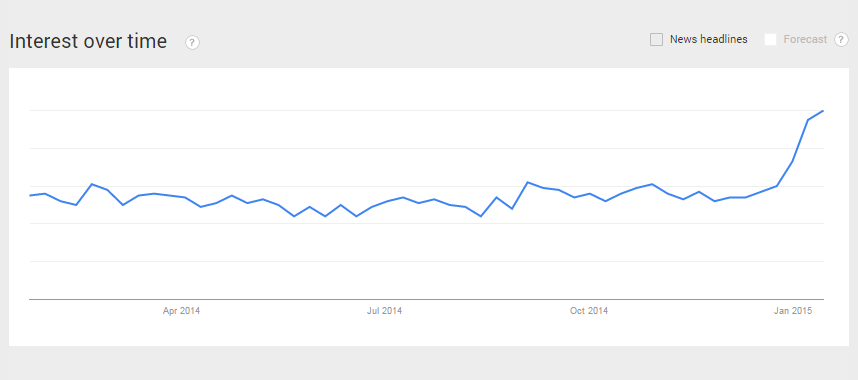
Data from Google trends reveals that interest in anonymizing services has spiked with searches for “VPN” nearly doubling in recent weeks. This effect, shown in the graph below, is limited to Canada and likely a direct result of the new law.

“VPN” searches in Canada
vpncanada

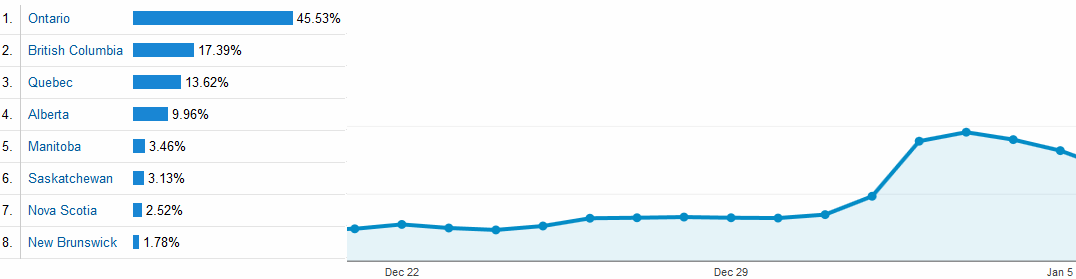
The effects are clearly noticeable at VPN providers as well, in both traffic and sales. TorGuard, a VPN and BitTorrent proxy provider saw the number of Canadian visitors and subscribers double this year.

“Since the start of 2015 TorGuard has seen a drastic jump in Canadian traffic and subscribers. At the time of this writing our Canadian sales are up roughly 100% and this trend appears to be increasing,” TorGuard’s Ben Van der Pelt tells us.

TorGuard traffic from Canada
torgcanada

Another VPN provider that preferred to remain anonymous, confirmed the traffic increase and sent us a graph of a similar spike.

Aside from steering people towards anonymizing tools Canada’s notice-and-notice scheme also piqued the interest of the Government. The abuse of these notices in particular.

Another consequence of the new law is that Canadian VPN providers have to warn pirating users as well. For most services this is impossible, as they don’t keep any IP-address logs, adding further insecurity to the local market.

For now, none of the VPN providers we spoke with plan to start logging but if they are forced to do so the preference is to move their businesses outside Canada.

From the above it’s clear that the new notice-and-notice system is certainly having an impact, but how many file-sharers stop pirating and how many choose to hide instead is anyone’s guess at this point.

One thing’s for certain though, VPN services are certainly becoming a more mainstream option.

Source: TorrentFreak, for the latest info on copyright, file-sharing, torrent sites and anonymous VPN services.

13 Jan 17:59

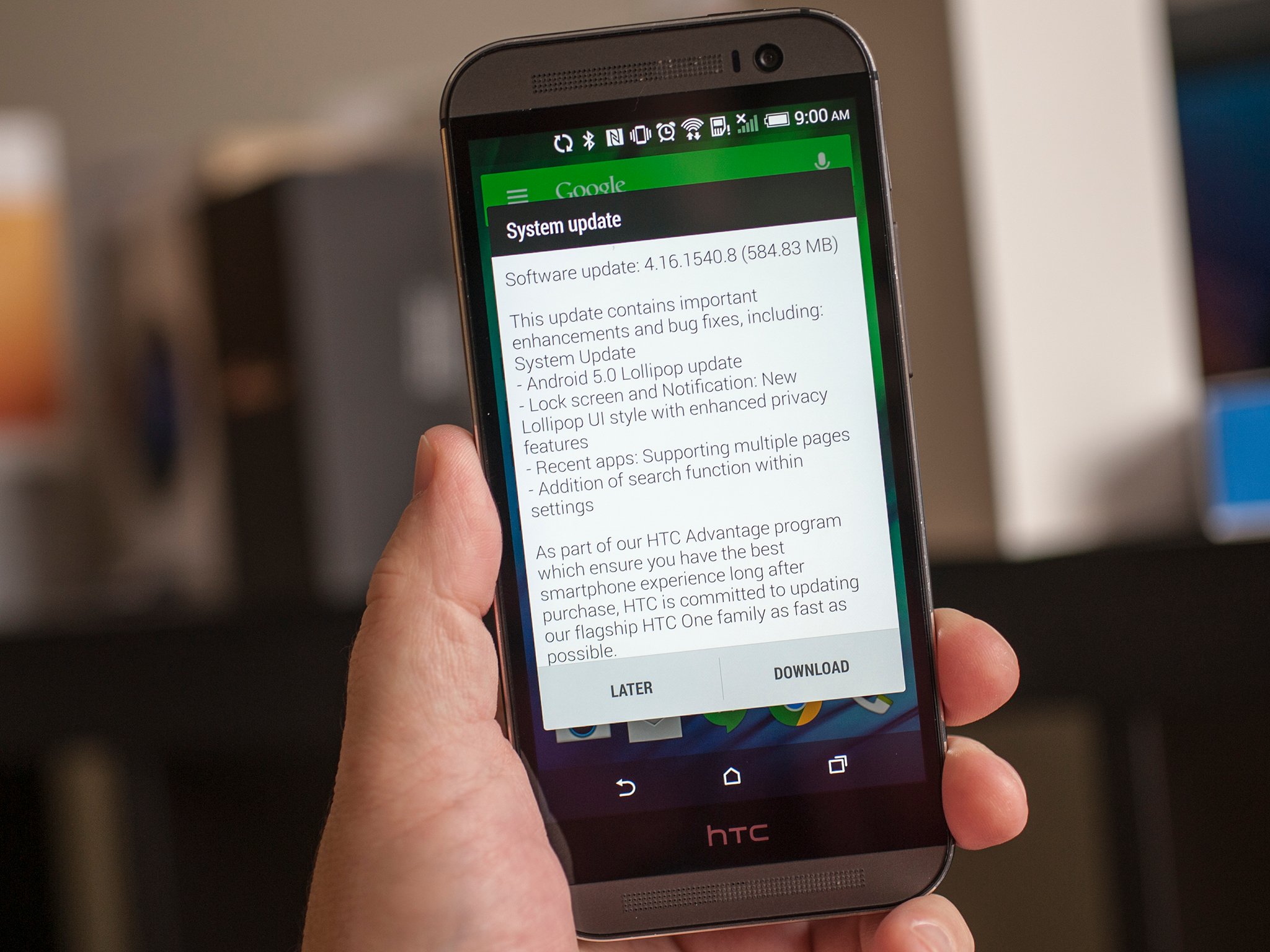
HTC One M8 Developer and Unlocked Edition get Android 5.0 Lollipop!

by Phil Nickinson

If you've got the developer or unlocked edition of the HTC One M8, check for a system update. Android 5.0 Lollipop is now available.

The update — software version 4.16.1540.8, if you're interested in such things — weighs in at 584 megabytes. The official changelog reads thusly:


13 Jan 17:58

Tesco announces grocery shopping app for Google Glass

by Simon Sage

One of the U.K.'s major grocery store chains, Tesco, has released a new app for Google Glass that allows folks at home to scan the barcode for stuff around the house and order them for delivery. The app also lets you peruse prices and nutritional information.


13 Jan 15:20

Amazon Signs Woody Allen For His First TV Series, To Run On Prime Instant Video

by Ingrid Lunden
6134548900_0cd57dedf8_b The streaming video market has become very serious business, and Amazon today announced its latest talent grab for Amazon Studios to demonstrate its intent to own it: it has signed up none other than Woody Allen, the iconic writer, director and actor with a sometimes controversial private life, to write and direct a television series — his first ever. “Untitled Woody Allen… Read More
13 Jan 12:15

What David Cameron just proposed would endanger every Briton and destroy the IT industry

by Cory Doctorow
David Cameron says there should be no "means of communication" which "we cannot read" -- and no doubt many in his party will agree with him, politically. But if they understood the technology, they would be shocked to their boots. Read the rest
13 Jan 12:06

New Avengers: Age Of Ultron Trailer Lays Siege Online

New Avengers: Age Of Ultron Trailer Lays Siege Online

'Everyone creates the thing they dread...'

Managing to arrive this time without any interference from Hydra or other scheming types, the new trailer for Avengers: Age Of Ultron continues the gloomy, apocalyptic and slowed-down Pinocchioh-no theme of the first big promo for the film. Take a gander below as Tony Stark and pals face off against machinery more challenging than figuring out how late and crowded the 07:53 from Catford will be. 

As you may know by now, the events of the new film are set into motion when Stark (Robert Downey Jr.), attempting to take some of the world-saving weight from his heroic comrades, creates an army of technological peacekeeping drones controlled by the clever A.I. Ultron (voiced and performance captured with relish by James Spader). There’s just one teensy little problem with Tony’s big idea: Ultron decides that mankind is the biggest threat to peace on Earth and so begins an attempt to wipe us all out. Starting, since they pose the heftiest challenge to his plans, with Earth’s Mightiest Heroes.

So Thor (Chris Hemsworth), Captain America (Chris Evans), Hulk (Mark Ruffalo), Black Widow (Scarlett Johansson) and Hawkeye (Jeremy Renner) along with Nick Fury (Samuel L. Jackson) must once more do battle. But how do you fight an enemy that can download itself into anything? And when serious cracks appear in their otherwise solid teamwork, what’s to stop the likes of Quicksilver (Aaron Taylor-Johnson) and Scarlet Witch (Elizabeth Olsen) causing even more trouble?

Joss Whedon is back marshalling this one, and the film also features the likes of Don Cheadle, Andy Serkis, Paul Bettany (who once more is conspicuous by his absence here) and Thomas Kretschmann. Avengers: Age Of Ultron will be out in the UK on April 24.


12 Jan 21:14

ISIS “Cyber Caliphate” Hacks U.S. Military Command Accounts

by Josh Constine
Screen Shot 2015-01-12 at 9.46.53 AM The Cyber Caliphate, a hacker group claiming association with terrorist group ISIS, today seized control of the @CENTCOM Twitter and YouTube accounts that represents U.S. central military command. The hackers tweeted a Pastebin message titled “Pentagon networks hacked. AMERICAN SOLDIERS WE ARE COMING, WATCH YOUR BACK. ISIS. #CyberCaliphate”. The message includes links to… Read More
12 Jan 21:13

UK government could ban encrypted communications with new surveillance powers

by Tom Warren

Britain’s Prime Minister, David Cameron, is calling for new surveillance powers in the wake of the recent shootings in Paris. Speaking at a public event in the UK this morning, Cameron outlined the government’s stance on secure communications that can’t be read by police or government agencies. "In our country, do we want to allow a means of communication between people which […] we cannot read?" he asked, comparing letters and phone conversations to encrypted communications used online, adding that "we must not" allow a means of communication where individuals can communicate in secret over the internet.

Cameron’s comments call into question whether the UK government would seek to limit popular services like WhatsApp or Apple’s...

Continue reading…

12 Jan 21:12

16 Best New Android Apps From The Last 2 Weeks (12/31/14 - 1/12/15)

by Michael Crider

roundup_icon_largeWelcome to the roundup of the best new Android applications, games, and live wallpapers that went live in the Play Store or were spotted by us in the previous 2 weeks or so.

Please wait for this page to load in full in order to see the widgets, which include ratings and pricing info.

Looking for the previous roundup editions? Find them here.

Featured App

SeatGeek Event Tickets

Today's roundup is presented by SeatGeek Event Tickets.

16 Best New Android Apps From The Last 2 Weeks (12/31/14 - 1/12/15) was written by the awesome team at Android Police.


12 Jan 21:07

10 Things Everyone Gets Wrong About Intellectual Property Law

by Lauren Davis

10 Things Everyone Gets Wrong About Intellectual Property Law

How well do you understand copyright and trademark law? When you travel about the Internet or make art, do you know what you are and aren't allowed to do, or do you have intellectual property myths stuck in your brain. We take a few claims we've seen time and again, and compare them to the law.

A couple of notes before we get started: 1) You shouldn't take any of this as legal advice. In fact, you shouldn't be taking your legal advice from posts on the Internet. 2) The emphasis here is on US law. 3) It's important to remember the difference between laws and etiquette/conventions. Sometimes they overlap, but sometimes there are differences. 4) Obviously "everyone" is a bit of hyperbole, but we've seen these claims made repeatedly around the Internet, including in our own comments section.

If you're interested in getting more in-depth on copyright law specifically, then I highly recommend Examples & Explanations: Copyright. It's aimed at law students, but it's a clear and very readable introduction to US copyright law.

1. The Claim: "You have to enforce your copyright against infringers."

The Law: This is one of those places where people confuse copyright and trademark. The truth is, copyright holders may enforce their copyright claims at their discretion. Failing to enforce your copyright claim does nothing to weaken your copyright (although if someone else claims to be the owner of your copyright, you may want to clear that up).

This is why copyright holders may (and often do) turn a blind eye to fan works, such as fan fiction and fan art. A copyright can't be diluted the way that a trademark can, and no matter how many unauthorized Harry Potter stories are out on the Internet, that does nothing to hurt J.K. Rowling's copyright regarding the books or her characters. However, this also means that if there's a fan work that the copyright holder doesn't like for any reason, they can choose to enforce their copyright claim against that particular fan work. Some people grumble that selective enforcement of copyright claims is censorship, but it's completely within the copyright owner's rights to do that.

2. The Claim: "That big company is a bully for enforcing their trademark against the little guys."

The Law: Unlike copyright holders, trademark holders must enforce their trademark or risk losing their trademark. A trademark, after all, is designed to distinguish the source of a product or service. If a bunch of people are using the same symbol to market a the same product or service, that defeats the entire purpose of a trademark. So it doesn't matter who is infringing upon a person/corporation/other legal entity's trademark — it could be a multibillion dollar corporation or a nine-year-old child — the trademark older absolutely must enforce that trademark.

That said, you don't have to be a jerk about enforcing your trademark. You can choose to license your trademark for a small fee, or you could just be generally helpful and polite to the person who infringed on your trademark. Consider Jack Daniels, which a couple of years ago sent the nicest cease-and-desist letter ever.

3. The Claim: "Selling fan art is always illegal."

The Law: Actually, it's a bit complicated. On the one hand, someone who owns the copyright to a story also owns the copyright to all of the characters in that story. And the nature of use (commercial vs. non-profit) is part of one of the four factors we look at in determining whether something is a fair use of an existing copyright. But it's not the only one. 17 USC § 107 lays out four factors for determining whether a potentially infringing work is fair use:

(1) the purpose and character of the use, including whether such use is of a commercial nature or is for nonprofit educational purposes;

(2) the nature of the copyrighted work;

(3) the amount and substantiality of the portion used in relation to the copyrighted work as a whole; and

(4) the effect of the use upon the potential market for or value of the copyrighted work.

One thing that's important to consider when examining that first factor, "the purpose and character of the use" is whether your use is transformative of the original. There is even one law professor who suggests, for example, that Harry Potter/Draco Malfoy slashfiction might be protected as a transformative work because it involves the two characters behaving in ways they never would in Rowling's stories. The more transformative your work, the less likely it is to be considered infringement. However, selling your work makes it more likely to be considered infringement. A court would balance the different factors to determine whether a fan work was infringing.

When can you absolutely sell your fan work? When it's a parody of the original. Criticism is something strongly protected under US law, and parody can be a powerful form of criticism. Your Twilight spoof is safe.

4. The Claim: "If I'm not selling it, it's fair use."

The Law: This isn't necessarily true, although not selling something makes it more likely that your use will be considered fair use in copyright law. We have to take the other fair use factors into account. For example, you can't print your own copies of the Harry Potter books and give them away (although you can now do that with the James Bond books in Canada since 007 has fallen into the public domain in Canada). Not selling something doesn't automatically make it fair use.

Now what about posting your own story, film, or artwork on the Internet? There is a ruling in the case Suntrust v. Houghton Mifflin (2001) (involving the Gone with the Wind parody The Wind Done Gone) that implies that releasing a work on the Internet "free to all the world to read" would be considered noncommerical use.

However, we have to consider the other factors, such as the nature of the copyrighted work and the "amount and substantiality of the portion used." Consider the recent documentary Star Wars: Deleted Magic, which consists almost entirely of video and dialogue that belongs to Lucasfilm. We would have to balance the the sheer amount of Lucasfilm's work that was copied for the documentary against the noncommercial use (it appeared on the Internet for all to view) and the purpose and character of the use (giving us an insight into the film we hadn't seen in other places).

By the way, you can't build your own version of someone else's patented technology and give it away. Patent law doesn't care if you're selling things or not.

5. The Claim: "They can't trademark that! They didn't invent it!"

The Law: It's easy to see why people get confused on this point of trademark law. After all, patent law is about protecting something you invented; copyright law is about protecting something you created. Trademarks, however, are about protecting a business' ability to build a brand and to avoid consumer confusion.

That's why, for example, the BBC holds the trademark on blue police boxes. Certainly, Doctor Who wasn't the genesis of the blue police box; those existed in a the real world. But the blue police box is so closely associated with Doctor Who in the public consciousness, that a court ruling determined that the BBC holds the trademark on modern images of police boxes.

6. The Claim: "You're defaming me! I'm going to issue a DMCA takedown!"

The Law: So this is a weird one, and I can only guess that some people that you can just use the DMCA to take down anything you don't like on the Internet. DMCA, for the record, stands for Digital Millennium Copyright Act, and, as the name suggests, it only applies to copyright. So, if the defamation somehow involves your copyrighted content, then you can use the DMCA to remove your stolen content from the Internet.

But if someone is just spreading lies about you on the Internet without content that belongs to you? Then you have to go through other channels. Defamation is a tort and you can sue for it — but remember, the truth is a defense to defamation.

7. The Claim: "You can't write a story that includes a trademarked concept."

The Law: A lot of us would be in trouble in that case given that Marvel and DC claim to jointly hold the trademark on the term "superhero" — and they enforce it. A couple of years ago, the publishers sent a cease and desist to Cup O Java Studios over their title A World Without Superheroes. The reason was because the smaller publisher was using "Superheroes" in the title and was therefore using the term in its marketing of the book. Whether Marvel and DC should hold such a trademark is a different question.

However, you're allowed to use superheroes in your story and you're allowed to call them superheroes. You just may not want to use the word in your title (or the name of your publishing company) unless you're ready to go up again DC and Marvel's lawyers. The question of using trademarked characters has recently come up.

8. The Claim: "Story X has the same plot as Story Y, therefore the author of Story X is violating Story Y's copyright."

The Law: Copyright law protects the expression of ideas, not the ideas themselves. Idea are considered too grand and too valuable to sit underneath copyright law for decades upon decades. You can copy — and even steal — the basic underlying concept of someone's story and have it not be a copyright violation.

However, you can't just copy someone's story point for point and character for character and just change a few details. You can have an orphan boy attend a school for wizards and fight a rising evil, but if he looks like Harry Potter and he sounds like Harry Potter and he's got Harry Potter's fondness for Quidditch, a court will find that he is, in fact, Harry Potter.

It is worth noting that something may be considered plagiarism — and therefore an academic or moral violation — without rising to the level of copyright violation. Just because a form of copying is legal under copyright law doesn't mean you should necessarily do it.

9. The Claim: "There's no reason to register a copyright or include a copyright notice on your work anymore."

The Law: Life is so much easier for copyright holders today than it was just 25 years ago. In earlier days, a creator actually had to include a copyright notice on their work in order for that work to be copyrighted. (And before that, they had to actually register their work.) Now as soon as you bring your work into the world, it belongs to you whether you include a copyright notice or not.

But registration and notices still have some utility. A copyright registration is handy if you ever need to prove that you're the owner of a copyright, especially if you register the copyright within five years of publication (remember Gentlemen Broncos?), and a notice can serve as a deterrent to copying — and lets people know who to contact in order to secure a license.

Edit: Srynerson rightly adds that you'll need to register your copyright in order to sue for infringement (although you can still request DMCA takedowns and send cease-and-decist notices), and you can only collect damages for infringement of registered copyrights.

10. The Claim: "I can post my cover song on YouTube, no problem."

The Law: Fun fact: a lot of our laws regarding music licensing came about thanks to the phonograph and the player piano. A lot of people are familiar with the concept of mechanical licensing, a compulsory license that copyright holders must grant (for a royalty fee) to people who want to record covers of their songs. However, the mechanical license applies specifically to audio recordings made for private use (like records, CDs, tapes, and downloadable audio files). It doesn't apply to music videos, nor to post those music videos on the Internet.

In order to post a video of your cover, you need to obtain a synchronization license from the copyright holder. While a mechanical license is compulsory (meaning a copyright holder has to give it to you) and synchronization license is not. YouTube has negotiated for synchronization licenses from some publishers, but you'll want to check with the publisher of the song you want to cover.

Thanks to Katharine Trendacosta for her suggestions!

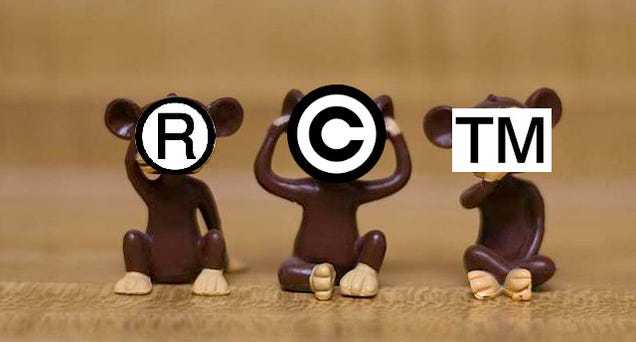
Original "See No Evil, Hear No Evil, Speak No Evil" image by John Snape, under a CC BY-SA 3.0 license, altered by Lauren Davis under the same license.

12 Jan 18:07

Canadian Govt. Outlaws Bogus Piracy Notices

by Andy

Recent changes to Canadian copyright law mean that when rightsholders observe local Internet users infringing copyright online, ISPs must forward any resulting infringement notices to their customers.

The new system has only been in place for just over a week but rightsholders haven’t wasted any time sending notices out. Even smaller ISPs such as Teksavvy are forwarding in excess of 3,000 notices per day.

While notices are one of the more reasonable anti-piracy options available today, there are companies that want to augment those gentle warnings into something more aggressive. Close to day one of the new law, U.S.-based anti-piracy outfit Rightscorp began sending infringement notices to Canadians with cash-settlement threats attached.

“You could be liable for up to $150,000 per infringement in civil penalties,” the notices told alleged music pirates.

Sadly, the claim is completely untrue. Canadian law caps liability for non-commercial infringement at $5,000 for all infringements. This miscalculated eagerness to break the Canadian market could now cost Rightscorp dearly.

Within a day of the company’s bogus threats being made public, Rightscorp attracted the negative attentions of the Canadian government and placed the turn-piracy-into-profit business model under scrutiny.

“These notices are misleading and companies cannot use them to demand money from Canadians,” said Jake Enright, a spokesman for Industry Minister James Moore.

The good news for Internet subscribers is that government officials will contact Internet service providers during the days to come in order to put an end to these threats. However, it’s not clear that will put a complete end to Rightscorp’s activities in Canada.

According to University of Ottawa professor Michael Geist, there is nothing in Canada’s new legislation which restricts the ability of rights holders to include information in notices that goes beyond a simple advisory that copyright law has been breached.

On this basis it seems unlikely that Rightscorp will simply give up. Government comment on the original notices centers around the anti-piracy company’s erroneous citing of U.S. law so modification to reflect the true Canadian position should bring the piracy monetization outfit into line.

It may be, however, that given the government intervention ISPs will choose not to forward Rightscorp notices at all.

Demands for cash aren’t popular with Internet subscribers and there are signs that leading ISPs in the United States don’t like the approach either. While they forward the infringement notices themselves, Comcast, Verizon, AT&T and other major ISPs remove the attached cash settlement demands.

Nevertheless, Rightscorp does work with dozens of smaller ISPs who are happy to assist with the company’s business model. And despite plenty of information being available which advises letter recipients not to pay, many still pay a $20 ‘fine’ to get the company off their back.

Sadly though, sometimes this has the opposite effect. One of Rightscorp’s tactics is to send a bill for $20 for one track from an album and then when people pay, they are subsequently billed for the rest of the tracks at a further $20 each.

Before the notice recipient pays the first $20, Rightscorp has no idea of the person’s identity and would need to spend a lot of money in court to find out – hardly worth it for $20. But having paid $20 and signed a disclaimer, the company now knows the person’s name and address.

At this point the pressure to pay can become overwhelming. Time will tell if Canadians can avoid these tactics.

Source: TorrentFreak, for the latest info on copyright, file-sharing, torrent sites and anonymous VPN services.

12 Jan 17:10

How to Trick Yourself Into Drinking More Water Every Day

by Patrick Allan

How to Trick Yourself Into Drinking More Water Every Day

Water is the best thing you can put in your body, yet so many of us ignore it throughout the day. Here are some great ways to trick yourself into developing a healthy habit of drinking lots of water every day.

Why You Should Be Drinking More Water

How to Trick Yourself Into Drinking More Water Every Day

We need water to survive, but drinking enough to get by isn't ideal for your body. Water is required to cushion and lubricate your joints, protect your brain and other internal tissues, regulate your body temperature, and remove waste from your body through urination, bowel movements, and perspiration. You've probably heard that our bodies are made mostly of water, and it's true. We need it.

When you don't have enough water, dehydration comes out to play. When you're dehydrated you'll experience dry mouth, low blood pressure, headaches, dizziness, dry skin, and worst of all, fatigue. In fact, there's a good chance that whatever is ailing you right now can be helped—at least a little—by drinking more water. You might be dehydrated and you don't even realize it. A simple way to tell is by taking a look at the color of your urine. A light, transparent yellow (or clear) is what you want to aim for. Anything darker usually means you're not getting enough.

So how much do you need? While it's hard to determine an ideal amount exactly, we previously consulted with Dr. Pamila Brar and there are some guidelines you can follow:

  • Men should drink about 3 liters (about 13 cups) of total fluids a day.
  • Women should drink about 2.2 liters (about 9 cups) of total fluids a day.

Men need a little more because they tend to be larger on average and naturally have a little more muscle mass—which holds water better than fatty tissues. Of course, pregnant women and nursing mothers need more water as well. If that seems like a ton of water to you, that's a bad sign. It actually breaks down to just four to eight sips of water per hour, but remembering to drink it is the hard part.

Not only do you have to remember to drink it, but you also have a lot of other tasty beverages out there competing to make their way inside of you. While a soda or sports drink may sound thirst-quenching, the sugar and other extras aren't going to do you any favors—and they might even make you more thirsty. If you can help it, stick to water. But if you really want a different beverage, at least drink water in addition to it. Remember, water is the cheapest drink out there! According to Trent Hamm at The Simple Dollar, choosing to drink water instead of soda could save you about $312 every year.

Keep your daily activities in mind, too. If you're exercising or doing any strenuous work, that can change how much water you need dramatically. The same goes if you've been drinking a lot of coffee, caffeinated tea, or alcohol. They act as diuretics, causing you to urinate more and lose some water. Also, if you're in a warmer climate, you perspire more and need more water than you would in a temperate zone. It is possible to drink too much water—don't overdo it—but your body can process 15 liters of it every day, so don't stress about it too much.

Hide It In Your Daily Routine

How to Trick Yourself Into Drinking More Water Every Day

If you already have a good morning and bedtime routine, make drinking water a part of it. You can still have your morning coffee, but add a glass of water in beforehand. The Natural Choice blog recommends having a glass at the same time and in the same place during your routine every day:

...get in the habit of drinking a glass of water right after you get out of the shower, or right before you wash your face at night. This is an easy way to add at least two glasses of water a day to your routine.

Wake up, have a glass of water. Get ready for bed, have a glass of water. Just by doing that you get a head start on the rest of the day. If you're having a hard time remembering to incorporate it in your routine, find ways to make your water more visible. Put a glass of water on your nightstand so you see it before you go to bed or have a glass waiting by the coffee maker so you remember to have a glass while your joe brews.

Get a Decent Water Bottle and Mark It with Time-Oriented Goals

How to Trick Yourself Into Drinking More Water Every Day

Water bottles are an excellent way to increase your water intake. Get a high-quality one, even if it costs you a little more. A good stainless steel or heavy-duty plastic bottle should do the trick. Once you've found one you like, take it with you everywhere.

You can take your water bottle usage to the next level by coming up with your own timed drinking goals and marking it on the bottle. Get some tape or a label maker and start marking how much water you'd like to drink by a certain time every day. This way you can actually see your water drinking goal and you'll know whether you need to play catch up or if you're ahead of the game.

It doesn't hurt to really make your water bottle your own, either. Cindy Dyson at SparkPeople suggests that the more you like your water bottle, the more likely you'll want to use it:

Whether it's your favorite color or a unique design, the more you bond with your bottle, the less likely you'll be to lose it. Slap an inspirational sticker or image onto it, or even write on it with a permanent marker. Now you're ready to drink from it throughout the day—don't forget to refill it as soon as it's empty.

There are a lot of good options for water bottles out there, but the most important thing is that you like it. You'll never stay on track with a water bottle you hate using or are embarrassed to be seen with.

Make It a Game

How to Trick Yourself Into Drinking More Water Every Day

Gamification is an effective way to get yourself to do a lot of things, and drinking water is no exception. Incentivize your new water habit by rewarding yourself when you reach milestones. Go a whole week drinking your goal every day? Treat yourself to something you don't normally get. It goes both ways too. Forget to drink enough water yesterday? No Netflix or video games until you've made up for it.

Competition is a great way to keep your drive too, and on her blog, the "Tri Sport Girl" suggests a race is the perfect way to compete with yourself:

Everything is more fun as a competition.... Apply the same concept to water consumption, and suddenly you're racing to see how much water you can drink by lunchtime (my current PB is 1.25L) or how soon in the day you can finish 2L (my PB is 2:36pm).

Just be sure you're not just drinking a bunch of water in the morning and none for the rest of the day. It's best to spread it out, but a challenge is always a good way to keep yourself engaged. However you like to gamify your life, find a tool that works for you and track what you do. When you can see how well you're playing your own game it can only help you.

Set a Timer and Create Mental Triggers

How to Trick Yourself Into Drinking More Water Every Day

If you're still having a hard time remembering to drink water, set a timer on your phone. Create a few alarms set to go off throughout the day and when one goes off chug a big glass of water. This might seem like overkill, but nothing snaps you back into a routine like a phone screaming at you to drink.

Part of building a new habit is finding a way to do things without the need of outside help, however, so it's a good idea to create your own mental triggers. For example, if you start to feel hungry, have a glass of water. This does a few things for you: it'll help your stomach and intestine on the digestive front, keep you hydrated, and possibly even curb your hunger. In fact, you may not even be that hungry and your brain just sent you the wrong signals for what it needed.

You can also make mental triggers for other things like having a glass of water every time you use the restroom or taking a sip of water every time you stop working. Have a sudden craving for junk food? Grab a glass of water instead. Triggers can be requirements you have to meet as well. Lauren Conrad—yes, that Lauren Conrad—made a rule that she can't start each meal until she's finished a one liter bottle of water. It sounds kind of extreme if you don't spread out your drinking, but it's a great way to force yourself to focus on water first and food second.

Jazz Up Your Water Drinking Experience

How to Trick Yourself Into Drinking More Water Every Day

You might be more inclined to drink water if it was a little more interesting. If that's the case, there are plenty of ways to go beyond plain, boring H2O. Some fruit or cucumber in your water adds a little flavor without adding in the sugar you'd find in straight fruit juice. Freeze some lemon slices in ice cubes for an easy water upgrade or try a little ginger and herbs to switch things up a bit. If you're missing the fizz from your soda, try some sparkling water or club soda. You'll get the bubbly without the other not-so-great stuff.

Just like a personal water bottle, having a good water glass that fits you is important too. Use a glass you love and you'll feel better about drinking from it. For example, I drink my water from a large Spider-Man glass (seriously, it's awesome). It reminds me that super heroes drink their water, so I should too.

If super heroes aren't your thing, consider a fun straw. If a crazy straw will get you to drink more, do it. Plus, drinking from a straw can help you drink more in the long run. You'll sip and sip, not realizing how much you've actually had. Sure, you could probably drink just as much by chugging, but sipping from a straw takes less effort so you're more inclined to do it.

Eat Your Water

How to Trick Yourself Into Drinking More Water Every Day

Yes, food has water in it too. It may not have enough for you to only eat your daily intake of water, but there are some foods you can snack on that can help. Fruits and vegetables are a great source of water, and also make for a healthy alternative to chips or candy. Here are some of the fruits and veggies with the highest water content:

Cucumber, Lettuce, Celery, Radishes, Tomatoes, Bell Peppers, Cauliflower, Watermelon, Spinach, Strawberries, Broccoli, Grapefruit, Apricots, Cherries, Grapes, and Zucchini.

Pick your favorites and keep those around. It's important to note, however, that when you cook these things, they lose a lot of their water, so they're best eaten raw.


Drinking more water can literally change your life for the better. When you're properly hydrated, you can digest easier, sleep better, and think clearer. Learn to love the taste of water, because every single sip is good for you.

Illustrations and photos by Tina Mailhot-Roberge, B Rosen, Rubbermaid Products, undressedskeleton, rafael-castillo, Anita Hart, Martin Cathrae.

12 Jan 17:09

Get Rid of Clutter by Throwing Things Away "By Default"

by Herbert Lui

Get Rid of Clutter by Throwing Things Away "By Default"

Keeping your objects as long as possible is easier on your budget, but also leads to a lot of clutter. Instead of trying to keep your stuff for as long as possible, make your default decision one to throw it out.

Most of us don't throw stuff out unless we can think of a good reason to. Organizing consultant Marie Kondo has a different opinion. Author Tim Harford explains the lesson he learned from Kondo's book, The Life-Changing Magic of Tidying:

Kondo turns things around. For her, the status quo is that every item you own will be thrown away unless you can think of a compelling reason why it should stay. This mental reversal turns status quo bias, paradoxically, into a force for change.

Even though it sounds like a small mental change, you can eliminate your status quo bias by reversing the situation. If you have a clutter problem and can't find a compelling reason to keep an object, considering throwing it out. When you're making a decision to declutter and are sitting on the fence, change the question from "Why throw it out?" to "Why keep it?

Why more and more means less | Tim Harford

Photo by kris krüg.

12 Jan 14:56

Spotify now has 15 million paid subscribers, 60 million total users

by Chris Welch

Spotify now has over 15 million customers paying for its premium music subscription service, the company has announced. In a short blog post published today, Spotify also revealed that it now tallies 60 million active listeners — evidence that plenty of people are still listening to the free, ad-sponsored tier that artists like Taylor Swift are so unhappy with. Spotify last provided an update on its subscriber count in November amid tensions with Swift and other artists. At that time, Spotify had just crossed 12.5 million paying customers. Back in May, the number stood at 10 million with 40 million active listeners.

So the company continues to see strong growth that competitors including Rdio, Deezer, Rhapsody, and Beats Music are...

Continue reading…

12 Jan 14:56

The Punctuation Guide Teaches You to Communicate More Clearly

by Herbert Lui

The Punctuation Guide Teaches You to Communicate More Clearly

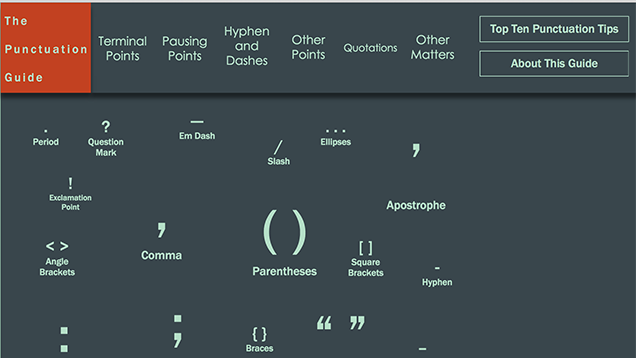
Proper punctuation is key to written communication, but it can be difficult to master. The Punctuation Guide is a webapp that teaches you to use punctuation appropriately. Just click on a punctuation mark to read all about how to use it.

Naturally, you can search for punctuation advice or details when you don't know something. However, The Punctuation Guide is useful for highlighting rules you may not have known about, or punctuation that you may have been misusing. For example, it explores different ways to end sentences, various pausing points, and how to use commas and parentheses so you can provide additional information.

The Punctuation Guide is best for U.S. rules and punctuation guidelines. As the site's bibliography highlights, the information is based on various guides, handbooks, and classic texts on the topic of punctuation.

The Punctuation Guide | via Reddit

12 Jan 13:24

Leaked Palantir Doc Reveals Uses, Specific Functions And Key Clients

by Matt Burns
palantir Since its founding in 2004, Palantir has managed to grow into a billion dollar company while being very surreptitious about what it does exactly. Conjecture abounds. The vague facts dredged up by reporters confirm that Palantir has created a data mining system used extensively by law enforcement agencies and security companies to connect the dots between known criminals. TechCrunch has… Read More
12 Jan 13:18

Google's Translate app will soon support live translation

by Rich Edmonds

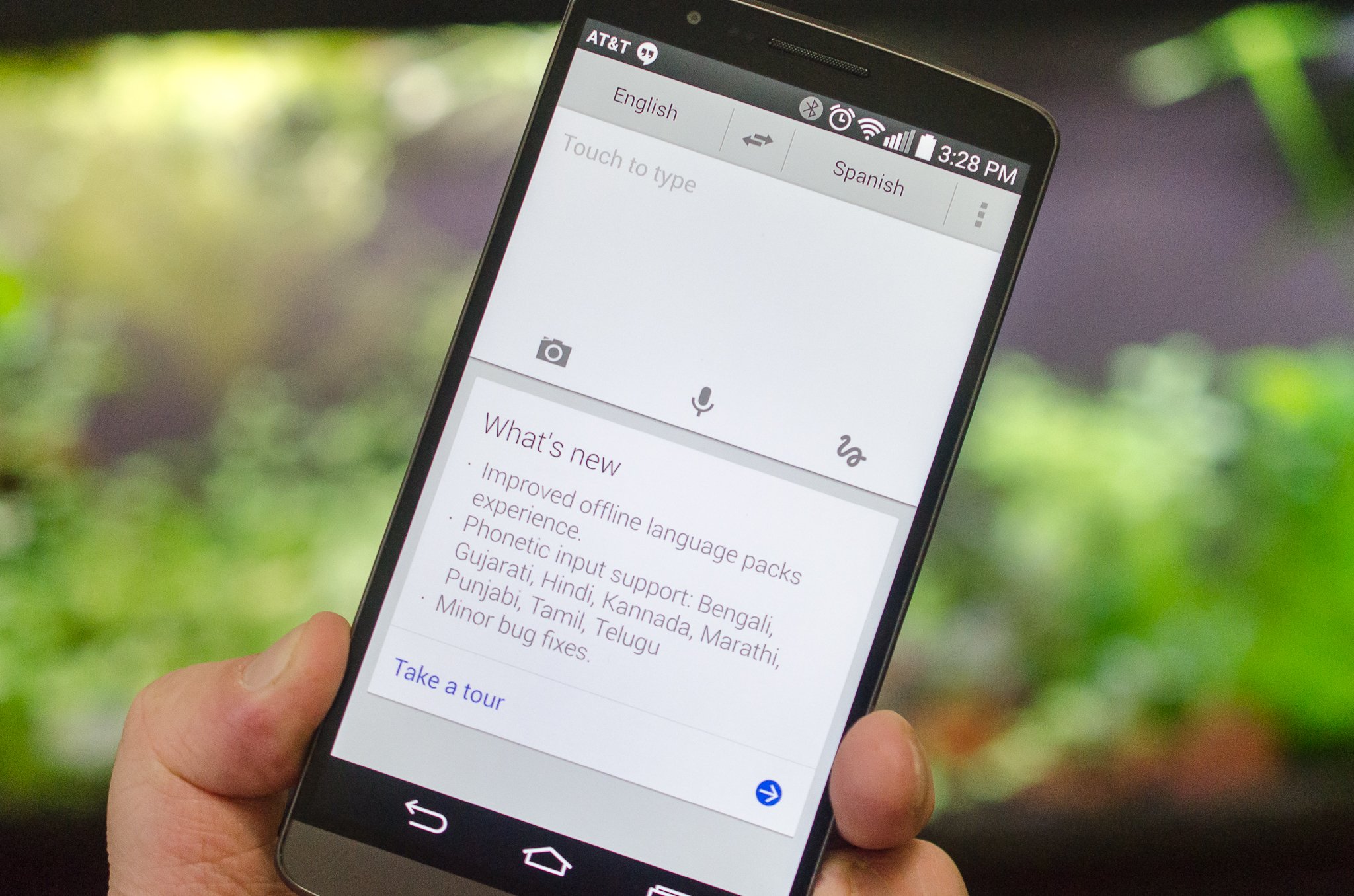
Google is set to update its Google Translate app to support simultaneous translation, a feature Microsoft recently implemented into Skype. According to The New York Times, the functionality will recognize and convert detected speech input to text in a chosen output language. It's especially handy for those who require convenient access to immediate translation support.


11 Jan 17:49

The Best Password Managers

by Alan Henry

Last week, we asked you to fill us in on your favorite password managers. After combing through your responses, testing out a few new ones, and getting a sense for what other popular picks may be out there, we’ve come up with a list of the best password managers available.

Read more...

10 Jan 20:18

Chilling Effects DMCA Archive Censors Itself

by Ernesto

chillingOn an average day Google now processes more than a million takedown requests from copyright holders, and that’s for its search engine alone.

Thanks to Google’s transparency report the public is able to see where these notices come from and what content they’re targeting. In addition, Google partners with Chilling Effects to post redacted copies of all notices online.

The Chilling Effects DMCA clearing house is one of the few tools that helps to keep copyright holders accountable. Founded by Harvard’s Berkman Center, it offers an invaluable database for researchers and the public in general.

At TF we use the website on a weekly basis to spot inaccurate takedown notices and other wrongdoings. Since the native search engine doesn’t always return the best results, we mostly use Google to spot newsworthy notices on the site.

This week, however, we were no longer able to do so. The Chilling Effects team decided to remove its entire domain from all search engines, including its homepage and other informational and educational resources.

chilling1res

Ironically enough, complaints from copyright holders are at the base of this unprecedented display of self-censorship. Since Chilling Effects has partnered with Google to publish all takedown notices Google receives, its pages contain hundreds of millions of non-linked URLs to infringing material. Copyright holders are not happy with these pages. Previously, Copyright Alliance CEO Sandra Aistars described the activities of the Chilling Effects projects as “repugnant.”

As a result of the increased criticisms Chilling Effects has now decided to hide its content from search engines, making it harder to find.

“After much internal discussion the Chilling Effects project recently made the decision to remove the site’s notice pages from search engines,” Berkman Center project coordinator Adam Holland informs TF.

“Our recent relaunch of the site has brought it a lot more attention, and as a result, we’re currently thinking through ways to better balance making this information available for valuable study, research, and journalism, while still addressing the concerns of people whose information appears in the database.”

The self censorship may sound strange coming from an organization that was founded to offer more transparency, but the Chilling Effects team believes that it strikes the right balance, for now.

“As a project, we’ve always worked to strike that balance, for example by removing personally identifying information. Removing notice pages from search engine results is the latest step in that balancing process,” Holland tells us.

“It may or may not prove to be permanent, but for now it’s the step that makes the most sense as we continue to think things through,” he adds.

While we respect the decision it’s a real shame for researchers that the notices and other informational material are now hidden from search engines. The notices themselves remain online, but with just the site’s own search it’s harder to find cases of abuse.

The copyright holders on the other hand will be happy. But they probably don’t care much about the chilling effect it has.

Photo: CC

Source: TorrentFreak, for the latest info on copyright, file-sharing, torrent sites and anonymous VPN services.

10 Jan 20:16

Just say no to 16 gigabytes of storage in 2015

by Russell Holly

Just like 8GB two years ago, it's time to do away with the 16GB standard

The Christmas holiday meant taking a lot of photos from several different devices for me. My youngest daughter ran around all day with my HTC RE Camera, and between grabbing 4K video on my 2014 Moto X and importing photos from the RE and the Olympus Image Share app connected to the Pen E-P5 my phone got quite the workout. By the end of the day we had managed to consume nearly 10GB of the 26GB that Motorola allows me access to on this 32GB phone. I recognized that I had done this to myself, and after dumping everything to my Desktop it became even less of a problem for me, but I couldn't help but wonder how little I'd have been able to do if I had opted for the 16GB version of this phone.


10 Jan 20:15

The civilized response to Charlie Hebdo attacks: more surveillance

by Xeni Jardin
NSA headquarters, photographed by Trevor Paglen, via HRW.


NSA headquarters, photographed by Trevor Paglen, via HRW.

"As politicians drape themselves in the flag of free speech and freedom of the press in response to the tragic murder of Charlie Hebdo cartoonists," writes Freedom of the Press Foundation's Trevor Timm at the Guardian, "they’ve also quickly moved to stifle the same rights they claim to love. Read the rest

10 Jan 17:12

Top 10 Gmail Labs and Features You Should Enable

by Whitson Gordon

Top 10 Gmail Labs and Features You Should Enable

As if Gmail wasn't powerful enough, you can find all sorts of goodies and extra features in Gmail Labs. The list is pretty massive, so we've narrowed down our 10 favorite labs to help increase your email productivity.

This post was originally published in 2011, but Gmail has grown a lot—it's gotten some new labs, while other labs have graduated to real-life features. So, we've updated this post to include our current 10 favorite labs and former labs—and where you can find them.

10. Quick Links

Top 10 Gmail Labs and Features You Should Enable

While features like starred messages and Multiple Inboxes are great for accessing oft-needed labels or messages, Quick Links can access just about anything, right from Gmail's sidebar. Once you enable Quick Links in Gmail Labs, you'll see a box on the left, in which you can add one-click access to any bookmarkable URL in Gmail—including saved searches, specific messages, labels, or anything else. You can just use them as a handy grab bag of links, or even turn them into a killer to-do list.

9. Canned Responses

Top 10 Gmail Labs and Features You Should Enable

If you find yourself doing a lot of repetitive typing, the Canned Responses lab will save you serious time. Enable it in Gmail Labs, type in the messages you find yourself sending over and over again, and then send them in the future with the click of a button. You can even send them automatically using filters, which makes for a useful vacation responder. Note also that you can use OS-wide text expansion if you need to do this outside of Gmail—though Gmail's canned responses can be used no matter what computer you're on. They're even available on your phone.

8. Default 'Reply All'

Top 10 Gmail Labs and Features You Should Enable

Arguably the most controversial feature of the bunch, this lets you set your default reply action to "Reply All" instead of "Reply". Often, when multiple people are involved in an email thread, one person will break off by accidentally hitting the "Reply" button instead of "Reply All", and then everyone else misses that part of the conversation. Save yourself from being that guy or girl by tweaking this option in Gmail's general settings. On the occasions you want to reply just to one person, you'll still be able to do so by hitting the dropdown menu next to the Reply All button.

Of course, if you tend to live on the other side of the spectrum—replying all too often—then maybe this lab isn't for you.

7. Apps Search

Top 10 Gmail Labs and Features You Should Enable

If you use Google Docs or Google Sites, Apps Search (available in Labs) is a great feature that extends Gmail's search capabilities to those two apps. That way, when you search for something in Gmail, it'll also bring up matching search results from Docs and Sites below the Gmail ones. That way you can do all your Google-related work in one, consolidated tab.

6. Send & Archive

Top 10 Gmail Labs and Features You Should Enable

How I lived before this button, I'll never know. Just head into Gmail's General Settings and click the "Show "Send & Archive" button in reply" radio button. From now on, when you're composing an email, you can send your message and archive the thread in one fell swoop-keeping your inbox clean and tidy.

5. Unread Message Icon

Top 10 Gmail Labs and Features You Should Enable

Gmail's tab might light up when you have new messages, but if you want a quick glance at how many unread emails are in your inbox, Gmail Labs' Unread Message Icon will do the trick. It's perfect for keeping Gmail in a pinned tab, but make sure it doesn't distract you: after all, you shouldn't be answering email as soon as it comes in. So if having it on tempts you to constantly check your inbox, keep it off.

4. Auto-Advance

Top 10 Gmail Labs and Features You Should Enable

If you cycle through a lot of messages at once, it's probably really annoying that Gmail takes you back to the inbox whenever you delete, archive, or mute a conversation. The Auto-Advance feature, available in Gmail Labs, lets you choose what Gmail does in this situation, so you can go straight to the next (or previous) email whenever you delete or archive a message. It's small, but a good time saver and a fix for a pretty big annoyance.

3. Preview External Services in Messages

Top 10 Gmail Labs and Features You Should Enable

Gmail has quite a few labs that let you preview things like videos, documents, voicemails, and images in emails if they're sent from certain services. For example, if one of your contacts sends you a message with an address in it, the Google Maps Preview Lab will automatically show you that address on a map. There are also preview Labs for Google Voice, Yelp, and Picasa if you or your contacts use those services.

2. Custom Keyboard Shortcuts

Top 10 Gmail Labs and Features You Should Enable

We love keyboard shortcuts. It's no secret. The shortcuts in Gmail are some of our favorites, allowing you to ninja your way through Gmail with just your keyboard—and they even add a few every once in a while. However, if you don't find Gmail's default keybindings very intuitive, the Custom Keyboard Shortcuts feature—available in Gmail Labs—lets you customize your own shortcuts from Gmail's Settings page.

1. Undo Send

Top 10 Gmail Labs and Features You Should Enable

We've all been there: you spend half an hour writing a strongly worded letter, hit send, and realize you probably shouldn't have done that. Thankfully, Gmail's Undo Send feature—available in Gmail Labs—is there to save you from yourself. After sending an email, Gmail will wait a predefined number of seconds (5, 10, 20, or 30, configurable in Gmail's settings) before sending. During this period, you can hit the "undo" button to take back your mistake. Even if you don't foresee needing it, it's a heck of a lot better than yanking out your Ethernet cable, so you might as well keep it around just in case. I use it far more than I'd like to admit.


These are far from the only useful Gmail features and Labs out there—I'm quite partial to the Google Calendar sidebar widget myself—but they're some of our favorites. For more Gmail awesomeness, check out our guide to becoming a Gmail ninja.

Title image by Ben Krebs.

10 Jan 10:24

How to Get More From Your Home Theater Without Paying a Dime

by Whitson Gordon

How to Get More From Your Home Theater Without Paying a Dime

Unless you had your home theater set up by a professional, chances are you aren't getting the best possible video and sound out of your existing setup. These simple tweaks will take just a little bit of time but will make a world of difference.

Blast from the past is a weekly feature at Lifehacker in which we revive old, but still relevant, posts for your reading and hacking pleasure. This week, we're giving our home theater a little tune-up.

You can build a pretty sweet home theater with an HDTV and a nice set of speakers, but just because you've got the gear doesn't mean you have the optimal viewing experience. With all the time setting up a TV, audio receiver, Blu-Ray player, and home theater PC can take (and all the confusion it can cause), you may not have made the small tweaks that can make all the difference in delivering the high quality audio and video you paid for. If it's been awhile since you thought about the nitty-gritty of your system, here are some things you may want to go through to make sure your theater's performing in tip-top shape.

This guide assumes you've already got a home theater of some sort set up, and that you've put some thought into it already: That is, you're using all the right cables, you've got a decent HDTV, and you maybe even have a surround sound system set up. This isn't about setting up your first home theater—this is about making your existing system's sound and audio a whole lot better.

Video

You spent a lot of money on that new HDTV, and while it may seem infinitely better than the old tube you had in its place, you're probably not getting the best picture possible out of it—especially if you just brought it home from the store and threw it in the cabinet. Here's how to tweak your HDTV into giving you the best video possible.

Set the Optimal Viewing Distance

How to Get More From Your Home Theater Without Paying a Dime

This is something you probably (hopefully) thought about when you bought the TV in the first place, but if you didn't, you should consider whether your TV is at the optimum distance and viewing angle from your seating area.

You can find a lot of different opinions on the subject of optimum viewing distance, but the easiest way to decide your optimal viewing distance is to take the diagonal size of your TV in inches and multiply it by two. That's around how many inches you should sit away from the TV—or that your TV should sit away from you. Keep in mind you want to measure from the TV to where your eyes would be—not the front or back of the couch.

How to Get More From Your Home Theater Without Paying a Dime

That said, it doesn't really need to be measured in exact inches (after all, that isn't practical for everyone's living rom). You'll definitely want to make sure your TV is within the range of one of these charts, though. Check out the table to the right for RCA's recommendations (if you prefer a more immersive experience, THX's ranges may be more your style). Also remember that, if you're going to play around with moving your furniture, we recommend mapping it out first, so you don't end up moving it 10 times before you find the best setup.

Calibrate Your TV

How to Get More From Your Home Theater Without Paying a Dime

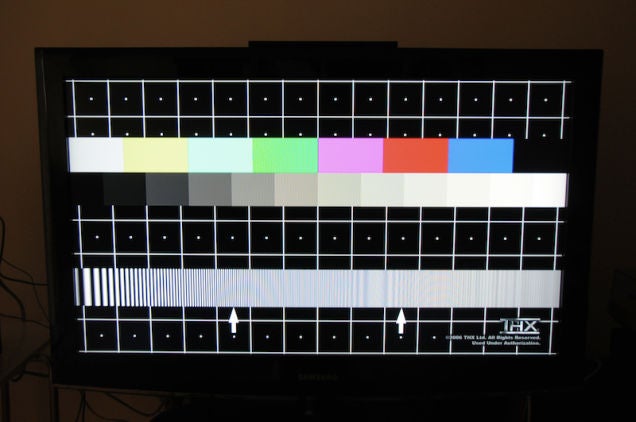
You may not realize it, but your TV likely won't be set up to deliver the best quality video when you unbox it—you'll have to calibrate it yourself. While you could do this manually, the best way to do it is with a DVD-based calibration tool. You probably already have a DVD with THX's optimizer tool (pretty much any DVD with the THX logo will have it), but you can also download the AVS HD 709 calibration disc for free. For $2 you can grab a pair of blue filter glasses that will help you run the program even better. If you're a fan of the Criterion Collection, all their DVDs come with calibration tools as well.

If you're not thrilled with the free-ish options, for about $20 or so you can grab a more full-featured calibration DVD that better explains the process. Some favorites include Sound & Vision's Home Theater Tune-Up disc, the Avia Guide to Home Theater, and Digital Video Essential's Home Theater Optimizer. (S&E's is probably best for beginners.) These'll also help you calibrate your sound too (which we'll come back to later), so that's pretty handy. Check out our guide to calibrating your TV for the full step-by-step instructions.

Many people recommend using a colorimiter to help calibrate your TV, too. It isn't imperative, but if you have a local photo shop that rents them, you can rent one for considerably less than the sticker price.

The other thing you'll want to be wary of when doing this is that your TV will look different at different times of day (and even with different inputs). Many TV's should allow you to create different color presets, and PC World recommends calibrating your TV once during the day and once at night, and creating presets for both—that way, you can switch back and forth between them and have the best picture no matter what kind of light is peeking through your blinds. More simply, if you generally watch TV during one time of day—at night, for example—you'd be better off calibrating at night. For more info on calibrating your TV, I highly recommend checking out PC World's full guide—it's got a lot of great information.

Sound

The other half of the home theater equation is sound. Chances are, even if you have a surround sound system and put some thought into the speaker setup, it isn't yet optimal. With these tweaks, however, you'll find you can get much better sound from your system in just a few minutes.

Place Your Speakers Correctly

How to Get More From Your Home Theater Without Paying a Dime

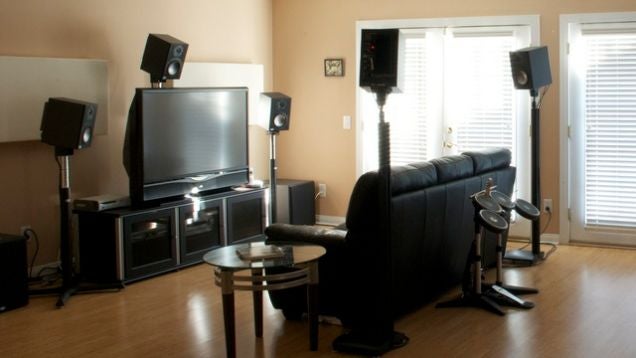
You'd think you could just plop your speakers down on either side of your TV and you'd be fine, right? Not so fast: for the best possible sound, you'll actually want to take distance and angle into account.

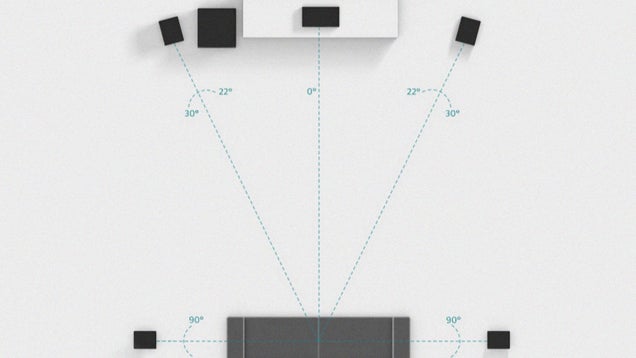
Dolby has some pretty good diagrams that can help you out, but the essence is simple: try to make an equilateral triangle, with your left and right front speakers as two points and your ears as the third point. That means if you are 8 feet away from your TV, your speakers should be 8 feet apart (so, about 4 feet away from the center of the TV). Tilt them at a 22 to 30 degree angle, as shown above, and make sure they're as close to ear level as possiblefl. If you have a 5.1 setup, place those speakers accordingly. Don't get too hung up on the angles of the speakers—a little wiggle room is just fine if you have other furniture in the way.

Setting up the subwoofer is beast unto its own. Your subwoofer can generally go anywhere, as long as it isn't in a corner or other enclosed space. Try a few different locations to see where it sounds best. If you really want to get crazy, you can try the previously mentioned "subwoofer crawl", in which you place the subwoofer in the spot where you usually sit, and then get on your hands and knees and crawl around the room, listening for the best sound. When you find the spot with the best sound, switch places with your subwoofer, and it should retain roughly the same sound quality.

Tune Your Subwoofer's Volume and Crossover

In a sound system, your receiver needs to know when to send sounds to the subwoofer and when to play them on the main speakers. To make sure this is set up correctly, you'll need to tweak a few things: your system's crossover frequency, the subwoofer's volume, and the speaker size setting. This is actually quite simple—if you want to get really deep into it, Audioholics.com has a pretty great guide to managing your bass, but we'll go through the basics right here.

It works like this: Your speakers have a "crossover frequency", which is the frequency that decides whether a sound is sent to your speakers or your subwoofer. If you have a two-speaker setup, the crossover frequency setting will be on your subwoofer, and you can tweak it as described here. If you have a surround sound system, however, you'll want to turn your subwoofer's crossover frequency off and manage it through your receiver's main menu. If you can't turn your subwoofer's crossover frequency off, turn it up as high as you can—it'll have essentially the same effect.

So, to set your subwoofer up, do the following:

  1. First, set the crossover. This is the frequency at which your subwoofer starts playing bass notes. You generally want your crossover set to where your speakers start to roll off—for example, my speakers can't go much lower than 80Hz, so my subwoofer's crossover is set to about 80. You can find this in your speaker's specs, or just slowly turn it up until it "rounds out" the sound on your speakers (so that your speakers and subwoofer aren't both playing the same notes).
  2. Next, adjust the gain. This is the important part, and the part that I've done incorrectly oh-so-many times—but it's also the easiest. Start playing a song, and turn the subwoofer down until you can't hear the subwoofer anymore. Then, turn the gain up just enough so you can start to hear it start to fill in the bass. That's all it takes.
  3. Lastly, if you have a phase switch, switch it between 0 and 180 degrees and see if you hear a difference. One may sound better than the other depending on your room and gear. You can read more about what phase is here, but in practice, it's pretty simple: pick whichever one sounds better.

(The above text is taken from our guide to subwoofer volume.)

Lastly, set the speaker's "size" on your receiver (if it has a setting for it). In most surround sound setups, each speaker has a setting: "small" or "large". Any speakers set to "large" will not send their bass sounds to the subwoofer—meaning your speaker will spend most of its power trying to output those low bass sounds. Whether your speaker is actually small or large in real life doesn't really make a difference: you're probably best off setting all your speakers to "small". There are, of course, differing views on the subject (if you really want to, you can set your main left and right speakers to "large"), but just setting them all to "small" is about as easy as it gets, and your system is pretty much guaranteed to sound great.

Tune Your Speaker Volume

How to Get More From Your Home Theater Without Paying a Dime

The last step is adjusting the volume of each speaker in your surround sound setup (if you only have two speakers, you can skip this step). Sit down in your listening or viewing spot and adjust the master volume to the level you're used to. Your receiver should come with a test tone for setting the volume levels—turn it on and let it play through each speaker in the system. Tweak the volume level of each channel until they all sound similar. If you really want to get a good calibration going, the aforementioned video calibration DVDs will also calibrate your sound, so you can get both done in one fell swoop.

You'll want to watch out for a few things as you do this. Make sure you don't turn your rear speakers up too high. Ecoustics explains this oft-made mistake:

The surround isn't intended to blast you with precise directional cues except for certain hard-mixed sounds that happen off-screen during gun battles, fights, chase sequences and the like. Much of the time, you may wonder if the surrounds are even on-until say, a rainstorm or outdoor sequence or perhaps a phone ringing off-screen suddenly reminds you of how much realism a surround system is capable of.

Don't be afraid to experiment, either—if you feel like dialogue is too quiet in relation to explosions and other sound effects, there's no shame in turning your center channel up a bit (despite what many home theater enthusiasts would tell you). Start with the basic recommendations and tweak to your liking.


Many of you may have already tweaked your home theaters to this effect, so if you have some experience, share your thoughts with us. What worked for you? What didn't? Which tweaks made a bigger difference than others? Sound off in the comments.

Photos by Pascalsijen and Jeff Golden.

10 Jan 10:23

Facebook's Got Us On Lockdown, Study Confirms

by Helen A.S. Popkin

Like brushing your teeth or staring hollow-eyed into your smartphone to the exclusion of life forms around you, Facebook is so thoroughly ingrained in the day-to-day existence of many that we don't even think about it anymore. Alas, those remaining Internet users in the United States who don't Facebook now, likely never will. That's the looming takeaway from the latest social media study from the Pew Internet Research Project.

We all know that old chestnut about how "uncool" teens find Facebook. Indeed, Pew confirmed Facebook users are getting older; for the first time in 2014, more than half of online adults ages 65 and older are on Facebook. But neither cliché nor boomers have budged Facebook's numbers in the 50 states. 

See also: Facebook CEO Invites Us To Consume Mass Quantities ... Of Book-Larnin'

Facebook membership in the U.S. is holding steady, with 71% of Internet users ages 18 and older are active on the site, according to Pew's September 2014 survey. That number hasn't budged since August 2013, but that doesn't mean Americans have reached peak Facebook. In fact, the world's largest social network is far from entering terminal decline in the U.S., as those of us who have Facebook accounts are spending more time there than ever before. 

Of the members among us, 70 percent of those surveyed owned up to engaging on Facebook once a day, which Pew calls a "significant increase from the 63% who did so in 2013." Meanwhile, 45% of members admit to visiting Facebook several times a day. What's more, while most all the popular social networks saw a boost in both membership and activity, they still have a ways to go before they're gaining on Facebook. Here's how Pew breaks it down:

  • About half (49%) of Instagram users and 17% of Pinterest users engage with their respective platforms daily, although neither of these represent a significant change from 2013.
  • Some 36% of Twitter users visit the site daily, but this actually represents a 10 point decrease from the 46% who did so in 2013. 
  • While the 13% of LinkedIn users who engage with the platform daily is unchanged from 2013, the proportion of users who use the site weekly or less often increased significantly—that is, more users log on less frequently.

Indeed, Facebook is more firmly fixed in our daily routines than, say, flossing our teeth. Many use Facebook as a "home base" of social media, according to the Pew study. It's the most popular site for the social network-monogamous; 79% percent of Internet users belong to only one. 

For the 52% of Internet users in relationships with several social networks, a "significant majority" use Facebook far more than Twitter, Instagram, Pinterest and LinkedIn. That basic finding hasn't changed in three years. 

Facebook Has A Plan ... It Includes Apps And Video

As the most recent Pew study finds, Facebook retains the significant lead in active members in the U.S. But history shows the social network is no hare among tortoises. Outside the U.S., Facebook remains in a fierce battle with Google to gain the loyalty of Internet-nascent countries. 

In 2012, Facebook CEO Mark Zuckerberg introduced Internet.org, a Facebook-led initiative to bring the mobile Internet to the two-thirds of the planet’s population who are currently without access. Six months later, Facebook paid $16 billion for WhatsApp, a free-messaging app with a big footprint outside the U.S. in areas where mobile phones are the prime method of Internet access. Long story short, there are more places than the U.S. to grow membership.

See also: Facebook's Trending Wants To Be Your Mobile News Reader

In the U.S., it's all about increasing engagement, which Facebook is getting increasingly good at. Facebook's efforts to own video—a traffic driving goldmine on both desktops and mobile devices—are paying off. On Wednesday, the social network announced that video posts per person have increased 75% globally, and 94% in the U.S. since the last year. At least 50% of U.S. users view one video on Facebook a day. This success was echoed by analytics firm Socialbakers, which found that in the last year, brands posted 20,000 more videos on Facebook than they did on YouTube. 

Facebook is already the largest photo-sharing website on the Internet, a crown it nailed down in 2011 prior to its $1 billion purchase of Instagram. It's also where 30% of its users go to get the latest news, according to Pew study published in September 2014. Facebook is working hard to increase that number so it can supplant Twitter as the de facto social network for breaking news.

In December, Facebook made several major updates to Trending, its Twitter-like zeitgeist-monitoring feature. Along with categories which allow searches by public posts from people in the area if a breaking story, Trending also finally became available on mobile.

If all this isn't enough to keep you from clicking away from Facebook, there's always Zuckerberg's book club. Inviting others to participate in his New Year's resolution, to read a new book every other week, Zuckerberg launched the Year In Books community page on Facebook; more than 235,900 "likes" and counting. 

Lead photo courtesy of twicsy.com; Social media membership graph courtesy of Pew Internet Research


10 Jan 00:34

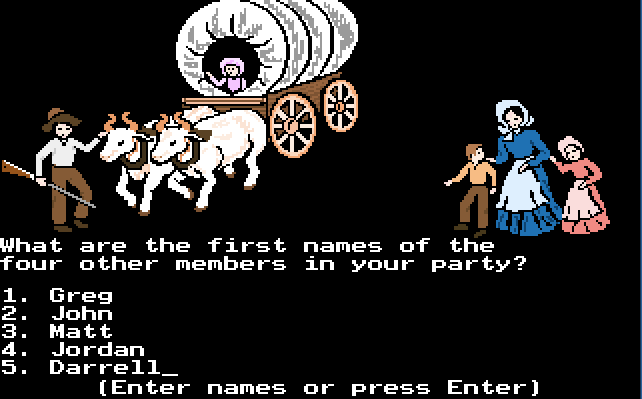
Internet Archive Brings Oregon Trail, Prince Of Persia, Lemmings And 2200+ Other MS-DOS Games To Your Browser

by Greg Kumparak
oregon trail Time to get nostalgic! Remember when The Internet Archive brought hundreds upon hundreds of classic console games online and made them playable in the browser? And when they did it again with hundreds of arcade games? They’ve done it again — this time with over 2,000 MS-DOS games. Lemmings! Wolfenstein 3D! Furthering the Internet Archive’s quest to catalog humanity’s… Read More
09 Jan 18:07

You can finally build a smart home without being an engineer

by Jacob Kastrenakes

Building a smart home should be fun. You should be excited about how easily you can set the lights to turn on when you enter the house, and tell the thermostat to turn down when you leave for the day, and get the doors to automatically lock at the end of the night. These are all little things — and they've all been possible for years and years and years — but only this year are they starting to be things that a lot of people are actually going to want to learn how to do.

What finally changed? There are a lot of reasons, but the biggest one is that the smart home, for now, is beginning to coalesce around controlled ecosystems that are guaranteed to work and are easy to jump into — two of which are made by Apple and Google.

The newcomer...

Continue reading…

09 Jan 14:48

Google Calendar’s Enforced Birthdays Show The Ugly Side Of Algorithms

by Natasha Lomas
google You may recall that Google’s mission is to “organize the world’s information”. So if you’ve been seeing the Birthdays of people you hardly know appearing UFO-like in your Google Calendar lately, never fear — this is just Mountain View doing its thang organizing your stuff. Read More
09 Jan 14:47

This black box promises to wirelessly charge a dozen gadgets at once

by Jacob Kastrenakes

Most phones that can be wirelessly charged today still have to sit right on top of a charging pad — in fact, even being slightly misaligned with the pad can cause a phone not to charge. Now, the company Energous says that it has a solution. Using a new take on existing technology, Energous says that it's able to wirelessly charge a device anywhere within a 15-foot radius of its transmitter. The closer to the transmitter, the faster a phone will charge — the farther away, the slower. Charging speed also decreases if more than one device is being charged off of a single transmitter, but that's theoretically not going to be an issue: Energous' vision is that your phone, wearables, and other devices will slowly charge throughout the day,...

Continue reading…

09 Jan 14:46

Rod Taylor, R. I. P.

by Bill Crider
The Birds Actor Rod Taylor Has Died at 84: The Australia-born movie star appeared in more than 50 Hollywood films throughout his career, from The Time Machine and The Train Robbers to The Catered Affair. More recently, he voiced Pongo in Disney's family-favorite 101 Dalmatians and played Winston Churchill in Inglourious Basterds.