Both the developer and unlocked editions of the HTC One M8 have received Lollipop updates, but now it's time for owners in Europe to receive the sweet goodness. Jeff Gordon, Senior Global Online Communications Manager at HTC, has confirmed on Twitter today that the software update is now rolling out for the handset in Europe.
Notorious phone leaker @evleaks has temporarily stepped out of retirement, presenting what might be our first proper look at two unannounced, high-end HTC phones — one of which may be the HTC One M9. Today's tweet, which shows two hitherto unseen handsets alongside leaks of the M8, M7 and the abandoned HTC Edge, strongly suggests these could be HTC's new flagship phones.
When Elon Musk first showed off the Model S P85D, Tesla's high-end all-wheel-drive electric car, he said that his company wanted to reach the kind of acceleration achieved by the world's greatest supercars. With the help of a dash camera, some unsuspecting victims, and the car's ability to accelerate from 0 to 60 MPH in 3.2 seconds, a P85D owner made a super sweary compilation video to show that Tesla was certainly successful in making its newest model shockingly speedy.
Apple had a pretty good quarter.
And by “pretty good”, I mean it was the biggest quarter in history. And not just for Apple. For any company. Ever. Read More
Apple CEO Tim Cook just announced that the Apple Watch will begin shipping in April. Cook revealed the shipping timeframe during Apple's quarterly earnings call with investors; the company enjoyed a blockbuster quarter backed by massive iPhone sales and huge growth in China. Now it will look to carry that success forward with the launch of Apple Watch, its first major new product since the debut of iPad in 2010. "We’re making great progress in the development of it," Cook said. He also revealed that Apple is encouraged by the response from developers and app makers so far, saying "We’re seeing some incredible innovation."
Microsoft is planning to support extensions in the successor to its Internet Explorer browser. Currently codenamed Spartan, the new browser will be included as part of Windows 10 across PCs, phones, and tablets. Spartan’s extension support isn’t clear, but Microsoft’s browser development team confirmed the feature on Twitter by noting that "we're working on a plan for extensions for a future update to Project Spartan."
Here is one more nail in Flash’s coffin: starting today, YouTube defaults to using HTML5 video on all modern browsers, including Chrome, IE 11, Safari 8 and the beta versions of Firefox. YouTube first introduced HTML5 support back in 2010. At the time it was still highly experimental. Over the years, as the HTML5 standard — and with it, its video implementation — matured,… Read More
The French government announced today a plan to hold web companies accountable for any extremist messages they may host, Bloomberg reports. French president Francois Hollande wants to introduce a law that would make companies like Google and Facebook "accomplices" in crimes of hate speech if users post content the government deems extremist.
In an announcement today, Hollande said, "We must act at the European and international level to define a legal framework so that internet platforms which manage social media be considered responsible, and that sanctions can be taken."
French Interior Minister Bernard Cazeneuve plans to travel to the US to discuss this proposal with the heads of Google, Microsoft, Facebook, and Twitter. The...
We try to domesticate our pets, but they're wild creatures at heart. Because of this, a lot of their instinctive habits can wreck our living space and drive us nuts. With some effort and understanding, we can accommodate their natural needs and still maintain a comfortable and clean home.
As humans, when our modern conveniences work against our nature, we simply adjust to fit them in. Animals don't do this. And when we force them to give up their natural instincts, it doesn't always work out. I live with two cats, and I've found that learning to live comfortably with them comes down to two basic factors: understanding their behavior and working with it. Here are some common pet "issues" and how they should be addressed.
Chewing on Stuff
Why They Do It: Chewing is a natural part of pet behavior. Puppies and kittens often chew because they're teething, and adult dogs and cats chew on stuff because, well...some stuff is just so darn chewable. Sometimes, though, they'll chew on things due to a vitamin deficiency, so it's always worth talking about with your vet. But if your dog or cat is chewing just to chew, there are a few things to consider.
What Doesn't Work: Don't just let it happen. Sometimes chewing is dangerous for pets (cords, toxic plants), so it's important to address it and put a stop to it. Some say taste deterrents aren't a good idea, but the ASPCA doesn't object to deterrents that are specifically designed for that purpose. But always be careful about what you're allowing your pet to ingest.
What To Do Instead: Giving your pet an outlet for their natural inclination is the way to go. Offer them something appropriate to chew for their size. For small pets, Hartz recommends cardboard boxes or toilet paper rolls. For cats, try cat-friendly plants like lemongrass, catnip or catmint. And there are plenty of chew toys available for dogs, just heed these warnings from Cesar Millan:
If you buy your dog a kong type toy check, make sure the hole in the toy is not so big that the dog can get his lower jaw stuck in it.I have seen several emergency cases where a dog comes in with a toy stuck in his mouth. Do not give toys that resemble inappropriate items; for example do not give your dog an old shoe to chew on because he will not know the difference between the old chew shoe and a brand new pair.
If your pet chews for play, make sure to engage in playtime with them. And, of course, hide or get rid of any dangerous objects they're prone to chew on. Check out our post on how protect gadgets from your pets.
Shedding Everywhere
Why They Do It: Of all the "pet issues," this is the one that's most unfair for them to take the blame. They shed because they're hairy. And while we know its not their fault, shedding can still be frustrating.
What Works: Since dealing with shedding is mostly about getting rid of what's already there, we'll just discuss what works. Brushing your pet is probably the easiest way to control shedding, but here are a few less obvious tricks:
Dust mops: CleanMySpace says some vacuums can just push the pet hair around with the exhaust. They suggest a dust mop with a microfiber bottom.
Baking soda: They also suggest sprinkling baking soda over carpeted surfaces before vacuuming. This helps loosen the hair.
Rubber squeegee: Running a dry squeegee over your carpet can help to pull out the hair, too.
Natural pet shampoos: According to SheKnows, there are some shampoos that help release your pet's undercoat, which is where much of the shedding comes from. Before using anything, make sure to review the product thoroughly for safety.
"Self-grooming" brushes: You install them on your wall, and cats rub against them as they walk by, brushing themselves. Self-grooming posts also exist.
Really, pet hair is something you learn to live with if you have a pet. That doesn't mean you have to drown in it, though. For me, what's been most effective is creating a routine based on the methods that work best for my situation. Managing the issue for a few minutes each day can make your home a lot more comfortable.
Peeing on Stuff
Why They Do It: There are many reasons why cats and dogs relieve themselves where they shouldn't. Before you do anything else, make sure it isn't a health-related issue. Many animals will start doing this when they're in pain or if they have health problems, so once you rule out the other possibilities, it's probably best to talk to your veterinarian.
Both dogs and cats can urinate on things to mark their territory, and this usually happens when something or someone new enters your home. The Dog Chat Forum explains:
Usually it is because of feelings of insecurity or a perceived threat. This perceived threat, for example, can be an introduction of a new baby, a new pet, a visitor or even a new piece of furniture. The smell of other animals on your footwear or clothing can also trigger a dog to feel the need to mark his territory.
Neutering and spaying can help curb this behavior, but here's what not to do.
What Doesn't Work: Most experts agree, yelling or "shoving their nose in it" is not a good solution. It just makes your pet afraid of you, and they don't really learn that their behavior is wrong. The Daily Puppy explains:
If you rub your dog's nose in his urine or stool matter as a way of indicating to him that he did something wrong, you might accomplish nothing of the sort, instead only causing your pooch to be terrified of your company. It might cause your dog to perceive you as being not only menacing, but also erratic. This action sometimes scares dogs so much that they resort to "running away" any time they feel the urge to eliminate. If your dog thinks that it's scary to urinate or pass bowel movements in the middle of the living room, he might make a beeline for your master bedroom, instead.
Beyond that, it's also just not a very nice thing to do to an animal for doing what comes natural to him or her.
What To Do Instead: So what does work? To start, The Nest has a handful of useful tips for dogs. For example:
Use Your Dog's Scent: When you clean your dog's urine, put the soaked paper towels in his designated potty area. This encourages him to go to the bathroom in that approved location.
Place Treats in The Dog's Elimination Area: Dogs don't want to eliminate where they eat, so if there's food there, it might discourage him from using that area as a bathroom.
Over at the I Love Dog Site, certified trainer Amanda Cornell suggests using positive noise to redirect your dog's behavior. So when you think your dog is about to pee somewhere, use a non-threatening noise to distract him. House-training a puppy is it's own challenge, but some of these tips can carry over.
I've actually used the first two methods on my cat, and while they initially worked, she did eventually pee outside of the litterbox again. She started doing this when we got a new cat. Cats often won't share litterboxes, so there's a general rule if you have multiple cats: you should have one extra litterbox for however many cats you have.
There are a few other factors to consider when you're dealing with a litterbox:
Is it in a high-traffic area? Cats like privacy, so make sure the litterbox is in a place where your cat feels safe.
Is the litterbox uncomfortable? Older cats might not want to climb boxes with high walls. Or, your cat might be too big for its litterbox.
Did you recently change brands? Some cats can be picky with their litter.
As for spraying, Cornell University's College of Veterinary Medicine suggests:
Address possible sources of frustration that may be causing your cat to spray. For example, introduce a new diet gradually, or discontinue it until the spraying is under control. Increasing the amount of playtime for an under-stimulated cat may also help ease frustration. Spraying can also result from territorial disputes between cats in the same household. They may need to be separated and reintroduced slowly, using food treats to reward and encourage peaceful behavior.
Yes, pets can be finicky. But again, they're only doing what comes natural. So finding a compromise to keep a nice, clean house might mean working to correct the root of their behavior. Cornell also suggests using odor-neutralizers anywhere your cat has already sprayed.
Scratching Furniture
Why They Do It: You can often tell someone is a cat owner just by looking at their couch. Cats love scratching stuff for a variety of reasons—to leave their scent, file their claws. So your couch isn't a place for sitting. Unfortunately, in your cat's eyes, it's a giant manicurist.
What Doesn't Work: Yelling isn't going to stop your cat from doing this. This tactic is completely lost on them, as they simply aren't wired to read social cues. Veterinarian Tony Buffington tells Wired:
"How the hell is your cat supposed to know that you're yelling at him because you want him to stop scratching the couch?" Buffington says. Without the cognitive ability to connect your outburst to their scratching, cats see only chaotic aggression. "To the cat, you're this crazy primate who is attacking him for no reason," he says.
So if you tell your cat "no," he scratches anyway, and you claim he "doesn't listen," you're wrong. He's not capable of listening because he has no clue what you're talking about.
What To Do Instead: We've written all about how to keep your cats from destroying furniture with their claws. But the best thing you can do is give them an alternative place to scratch. Once they have a dedicated place to scratch, they'll probably leave your couch alone. But you have to pick a scratching post they'll actually use. Cat Behavior Associates recommends a post with the following traits:
Sturdy and tall: The cat needs to stretch. I made the mistake of getting my cat an awkward post that constantly moved when she scratched. Unfortunately, she went right back to my chair.
The right material: Many cats like sisal, but some prefer wood or corrugated cardboard. You can experiment and see which your cat prefers.
In the right location: Does your cat like to scratch after a meal? Put the post by her food bowl. After using the litterbox? Put it there. Basically, put it in a location with her comfort in mind.
If a post doesn't work, you might consider breaking out the water bottle. To recap the rules for water bottle training:
Never yell or make it known to the cat that you are the source of the spritz of water hitting it. You want the cat to associate scratching on the couch or furiously digging into the carpet with the apparently random blast of water, not with you being nearby. That also means, unfortunately, not laughing when the cat has an extremely disconcerted look on its face after getting spritzed.
Why They Do It: It seems obvious why dogs would jump on people—they're shorter than us, and they want to be on our level to say "hello." Basically, they want to get our attention.
What Doesn't Work: Obviously, encouraging the behavior isn't a good idea if you want it to change. You might be excited to see your dog, but the more excited you are, the more excited she'll get. The same goes for nervous shouting—this just gets her excited. And, obviously, you shouldn't try to knee or push your dog away. You could hurt her, and she won't understand why you do it.
What To Do Instead: When your dog jumps, it's best to remain calm, but assertive. There are specific tips to do this, according to the ASPCA. For example:
When your dog starts to jump up, stand still, look straight ahead (not at your dog), and pull your hands and arms up to your chest. Calmly wait for your dog to stop jumping. When her front paws touch the floor, immediately look at her and calmly stroke her. If she gets excited and jumps up again, straighten back up and repeat the sequence.
If you're entering a room and your dog starts to jump up, immediately step back outside and close the door behind you, leaving it open just a crack. Through the crack in the door, say "Sit." When your dog sits, calmly walk back into the room, kneel down and gently stroke her. If she jumps up again, quickly stand up and walk right back out of the room again, closing the door behind you. Keep repeating this sequence until your dog stops jumping up.
The "Be a Tree Method" is a trick I learned in a dog bite prevention class. Clicker Training explains:
Teach kids to stand still, like a tree. Trees are boring and the dog will eventually go away. This works for strange dogs, and any time the family dog gets too frisky or becomes aggressive.
I tried this with my friend's dog, and it worked like a charm. It's worth noting—if your dog does behave aggressively, it's probably worth seeing a trainer or someone who can offer more extensive help.
Stinking Up the Place
Why They Do It: Again, this isn't anything that our pets can control, and we don't blame them. Still, they can be pretty smelly creatures. Here's how to deal with it.
What Works: For cat owners, it's usually all about the litterbox. And there are a few things that help:
Baking soda: Next time you change out the litterbox, add in some baking soda to help neutralize odors.
Location: It's tempting to hide the box in a small, enclosed area. But that actually traps the smell and keeps it concentrated. Leaving it in an open area allows for better ventilation.
Routine: Again, it ultimately comes down to sticking with a regular cleaning routine. Organize your litterbox tools in a way that makes for quick and efficient cleaning. Petfinder recommends scooping daily, replacing the litter twice a week, and replacing the box itself annually.
Air purifiers and humidifiers will not only improve the air quality in your home but will also go a long way to eliminating all kinds of odors in the household, including those emanating from the litter box. There are special air purifiers ostensibly designed for pet kennels and grooming salons. But they can be certainly used in a domestic environment, too.
For pet accidents, you can also soak up the mess with baking soda to help eliminate the odor and keep it from sticking around.
For bad breath, WebMD recommends evaluating your pet's diet and giving them high-quality, easy to ingest food. For dogs, giving them something to chew can help make sure their teeth stay clean, too. Bad breath can also be a symptom of health issues, so be sure to check out the rest of that article to know when to see a vet.
Overall, learning to live with your pet's wilder side comes down to a few simple things: spending time with them, establishing a routine for cleaning and making your home pet-friendly and comfortable for them. Remember, they don't know they're supposed to be domesticated. It's only fair to do what we can to accommodate their instincts and needs.
(Note: We removed references to pack behavior in jumping, which is widely considered to be a myth.)
"Bring your lunch!" chirp bloggers giving advice to those who wish to save money. "Cook a stew on Sunday night and it will feed you at work all week long!" "Pack up leftovers from the night before!" This advice isn't wrong; a little planning and a little flexibility can definitely help your food budget, particularly if you are surrounded by spendy lunch options. But there are other reasons why people go to Chipotle, Chop't and Panera, among them the time outside, workplace camaraderie, lack of interest in cooking, the phrase "sad desk lunch," and the need to indulge oneself.
I haven't always put a lot of thought into preparing nutritious, interesting lunches. During a financially precarious time in my life, I not only ate the same kind of sandwich at my temp job every day, I kept a loaf of sliced bread and a package of cheese in the office kitchen so that I would never have a reason—or excuse—to visit the office cafeteria. Little wonder, then, that when I got a full-time position, I went out for Japanese onigiri, pizza, deli lunches, salads, falafels, and anything else that was fast, easy, and felt like a treat.
It doesn't have to be that way! With just a little planning, a brown bag lunch can give everything you get from Hale & Hearty, Subway, or Lenny's, plus a few extra dollars in your pocket.
Stepping away from the desk
Starting with a red herring! I always eat lunch (but never red herring) at my desk, and take a walk in the park afterwards. But you should eat outside, if that's your thing. Step away from your desk, from the spreadsheet you're working on, from your co-workers' questions, from your phone, from your to-do list. Sit outside for a little bit if you can, or eat your lunch in a quiet indoors place and then take a walk. It will all still be there when you get back, and research has shown that we are actually more productive when we take breaks!
Lunch swapping
Full disclosure: I don't do this one, either. Unfortunately, I have never worked with someone on the same lunch wavelength. But doesn't it sound lovely? One day a week, a friend prepares lunch for you, and then you return the favor. If your lunch system involves a big batch cook on Sunday night, it's an easy way to introduce variety into your menu. The lunch swap also mitigates the "but I buy lunch to hang out with my friends" impetus for going out.
A word to the ambitious: this would work best with just two or maybe three swappers.
Doggy-bagging It
A friend of mine from Paris came to visit New York a few years back. I asked him what he thought of the city and he replied, "The restaurant portions are huge!" He was completely bumfuzzled by the overwhelming serving sizes, and spent his trip subsisting on appetizers and side dishes. I take a different approach when confronted with a mountain of food: I take the knife with which the restaurant has also thoughtfully provided me and I divide my dinner in two. After eating half, I take a moment to really check in with my body and consciously decide if I am still hungry. If not, that's the next day's lunch sorted with zero effort.
Using real dishes and silverware
Though it seems so obvious in hindsight, I only recently figured this one out. Aside from the apparently horrific effects that microwaving plastic has on frogs' genitals, eating from Tupperware denies your lunch respect, as if you are stealing moments from the work day, and not enjoying a perfectly legitimate, necessary activity. When I ate from plastic containers, my posture might be described by onlookers as "hunched" or "furtive." My boss had no qualms about interrupting me.
Eating my meal from a real plate, with a real fork, sends the message, however subliminally, that I am doing something important. My boss still interrupts me, but less often, I am certain (though I should really follow point #1 and step outside, physician heal thyself, etc etc etc). Salt and pepper shakers not only drive home the mealtime je ne sais quoi, they make your food taste better.
Treating yourself
I am a candy fiend. Candy's sole purpose is to give us pleasure, and so we buy it not just for the sweetness it provides, but also the awareness that we are doing something purely for our own enjoyment. Eating lunch out can be an indulgence as well, but you can scratch that itch in other ways. Just because you are bringing your lunch from home doesn't mean that you should deprive yourself—or more importantly, feel as though you are depriving yourself. I don't spend $10 every day on lunch, but I do spend $1 every day on candy. Find something you can do to light up those reward centers in your brain.
Not using a bento box
Frugal people get as excited as anyone else about new products to buy, and every time I see a cute lunch-bringing container, I think … maybe? Cute bento boxes! Pinterest-worthy Mason jar salads! Cunning tiffins that hold soup, salads and sandwiches in glorious isolation until that devoutly wished moment of consumption! They are all so photogenic, so appealing, but … so complicated.
The simpler your lunch system is, the likelier you are to stick to it. Can you commit to carefully washing several containers a night and then repacking them with the following day's meal? I can't, so I just use whatever's handy. The most important thing is using a system that works for you—figuring what, besides food, you get out of buying lunch and asking yourself how to transfer those qualities to a new routine.
Negativity-reducing website calm.com offers guided relaxation breaks of 2 to 20 minutes. They also have a free smartphone app to help you meditate, sleep, or relax wherever you are. Read the rest
Welcome to the roundup of the best new Android applications, games, and live wallpapers that went live in the Play Store or were spotted by us in the previous 2 weeks or so.
Please wait for this page to load in full in order to see the widgets, which include ratings and pricing info.
Looking for the previous roundup editions? Find them here.
Photographers and graphic designers will be familiar with Lightroom, the portion of the Adobe Creative Suite specifically designed for more subtle adjustments of pro-level photographs.
Opera’s former CEO Jon von Tetzchner is launching the first preview of Vivaldi today, a new Chromium-based browser that is squarely aimed at power users. Vivaldi features tools like Quick Commands for using written commands instead of the mouse, an Opera-like Speed Dial for quickly accessing bookmarks, a note-taking feature and the ability to organize tabs into stacks. Read More
The U.K.’s telecoms regulator Ofcom has identified four areas it plans to prioritize in order to support the development of the Internet of Things, after taking input from various industry “stakeholders” last year. Read More
A 32-page report into mass surveillance by a top European rights body has warned that digital dragnets set up by U.S. government intelligence agencies, and some of the U.S.’ allies in Europe and elsewhere, are endangering fundamental human rights — such as the right to privacy, to freedom of information and expression, to freedom of religion and the right to a fair trial. Read More
But before you start wondering when Professor X and the rest might be hitting the gogglebox, or what form such a series might take, cool your jets: it’s still very early days for talk of this. While Fox has the film rights, the company must strike a fresh deal with Marvel to create any X-Men TV series beyond the animated adventures. It's in negotiations," the network’s Gary Newman tells TV Line. "We're cautiously optimistic, we had a good meeting with them. That will not be on a fast track creatively. This is just the deal, now we have to find the creative."
After years of effort and expenditure, in 2013 Norway introduced new legislation to crack down on Internet piracy. It gave rightsholders new powers to track down file-sharers and have sites blocked at the ISP level.
To date and despite various threats not a single file-sharer has been prosecuted. No sites – not even the Pirate Bay – have been blocked. However, news coming out of Norway suggests that at least as far as the music industry goes, those legislative weapons are now obsolete.
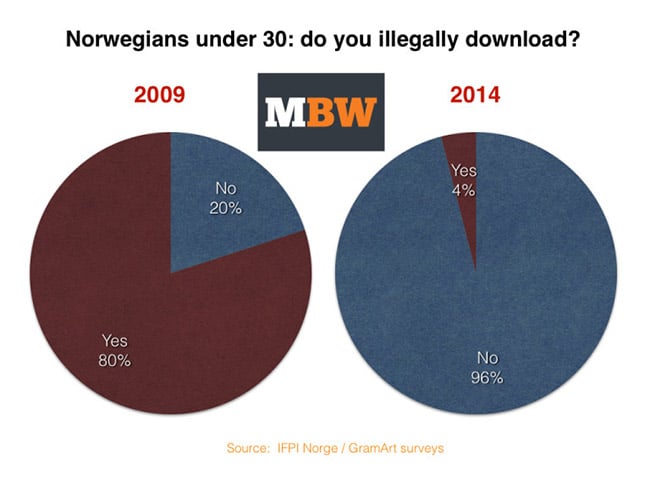
During December 2014 music industry group IFPI conducted a nationwide survey among under 30-year-olds and discovered some amazing things about the piracy landscape in Norway.
According to the survey results, just 4% of respondents are now using illegal file-sharing platforms to obtain music. While that figure is certainly impressive, MBW compares that finding with the results of a similar 2009 IFPI survey which found that a huge 70% of the population under 30 used those platforms to obtain music.
The drop is certainly dramatic, especially when coupled with the fact that less than 1% of respondents now cite file-sharing networks as their main source of obtaining music. What is telling, however, is that IFPI Norway chief Marte Thorsby did not connect the drop with anti-piracy measures.
“We are now offering services that are both better and more user-friendly than illegal platforms. In [the past] five years, we have virtually eliminated illegal file sharing in the music industry,” Thorsby said.
The December survey also found that 80% of under 30-year-olds now use streaming services as their main source of music.
“Younger audiences are using streaming services to the greatest extent. When older audiences [start] embracing these services we will probably see a somewhat different distribution of revenues,” Thorsby told MBW. “Hopefully this will also involve a better economy for several Norwegian artists and record companies.”
But while the drop in piracy will certainly be welcomed by the industry, it appears young people fleeing file-sharing networks has done nothing to boost revenues.
In 2009 revenues were NOK 592 million ($75.94m) yet by 2014 there had only been a modest increase to NOK 601 million ($77.1m). That’s just a 1.5% uplift in five years, not accounting for inflation. Place that into the equation and in real terms revenues are down.
That being said, that particular period witnessed a dramatic change in the supply model, with physical giving way massively to digital purchases. In 2009 just 15% of content was supplied in digital format but by 2014 that had reached 86%.
For IFPI to claim the virtual elimination of music piracy is certainly an important if not unprecedented event but the take-home is simple. Provide people with effective and engaging legal alternatives and piracy becomes irrelevant.
Google is launching a new, Youtube-branded streaming music service, with the cooperation of the Big Four labels, who got to negotiate the terms of their participation -- unlike the indie musicians, who have been told that they will be exiled from Youtube altogether unless they make it their most-favored-nation distribution service, without the possibility of holding back tracks for backers on services like Kickstarter or Patreon.
Read the rest
Vashi Nedomansky compiled this terrific collection of famous dolly zoom shots. Cinematographer Irmin Roberts used it to great effect in Hitchcock's Vertigo, and it quickly entered the language of cinema to convey a moment of revelation, usually an unpleasant one. Read the rest
Since Mark first reported on Gravity Glue in 2011, artist Michael Grab has traveled extensively as he balanced rocks, and his beautifully-shot footage only improves with time. Just a few highlights below. Read the rest
When I first wrote about Number26, I said that it was a bank designed for the 21st century — but all of this was on paper. The startup is launching today in Germany and Austria, with more European markets to follow. I opened a Number26 account a couple of weeks ago. Old well-established banks should be ashamed that they can’t provide the same level of user experience. As a… Read More
Over the years, software development has fashioned itself more and more to resemble the lucrative, gonzo machine that fuels Hollywood, with top talent scoring big deals and even hiring agents. So it was just a matter of time before one of its sectors actually overtook Tinseltown.
In this case, it’s the not-so-small segment of mobile app development.
The threshold highlights how big the business of mobile apps has become—which is extraordinary, considering there was no meaningful mobile app business prior to 2008, when Apple’s App Store first launched.
Putting The Business Of App Making In Context
That doesn’t mean every app developer makes a ton of money—in fact, according to VisionMobile, 50% of iOS developers and 64% of Android developers weigh in below the "app poverty line,” i.e. making less than $500 per app per month. But at least en masse and overall, the business of stocking Apple’s App Store, with its inventory of more than 1.4 million apps, looks like it’s booming.
Lest Android app makers get left out of the gold rush, Google stepped in a couple of months ago to offer some tips on how to cash in with Google Play and stand out amid its more than 1.3 million Android apps.
Developing for the Android platform is no easy task. These app makers often find themselves mired in testing and debugging for a large variety of devices, a problem that doesn't really concern your average iPhone app developer as much.
Last year, it looked like the hard work was beginning to pay off: The growing volume of Android devices set the stage for a widening pipeline of funds that could even catch up to iOS. What looked like an inevitability, however, seems a bit less certain now.
The Hard In Hardware
Obviously, device sales directly influence app development, since they fundamentally set the size of potential users.
Samsung, the leading Android device maker, saw cooling sales from its mobile division last year. Meanwhile, Apple saw a sudden, mad surge in iPhone sales last quarter. According to Consumer Intelligence Research Partners, 50% of all phone activations in the last calendar quarter of 2014, ending in December, came from iPhones. As the report notes, that's a huge 28% increase over the third quarter.
For its part, the Android scene has some intriguing developments slated for this year. Google’s modular smartphone, known as Project Ara, looks fascinating, as does Samsung’s curved glass Galaxy Note Edge. The latter also just hired Lee Don-Tae, a design expert that hails from the same firm that produced Apple’s Jony Ive. In other words, the South Korean company wants to incite the same fervor over its gadgets, including Android devices, as Ive sparked for the iPhone.
Heated rivalries. Large fanbases. Big revenues. Things certainly can't get anymore Hollywood than that.
Lead photo by Jason Howie; chart courtesy of Asymco
UK Prime Minister David Cameron demanded that ISPs opt their customers into "adult content" filters (and now Sky is opting in everyone whose account predates this announcement), ignoring all the people who correctly predicted that these filters would block important sites.
Read the rest
You'll be able to stream Super Bowl XLIX online for free next weekend, but it won't be the only place you'll be able to watch official footage of the game. Google has agreed a deal with the National Football League to show highlights on YouTube, creating an official NFL channel on the video site a month after it signed off on a similar deal with Facebook.
The deal won't allow YouTube to show entire games, but the NFL says it will give Google clips of "in-game" footage. Highlights from next week's Super Bowl, between the Seattle Seahawks and the New England Patriots, will be the first official videos to appear on the site. In addition, Google has expanded its NFL-related search results, offering extensive information about a team's...
Blink and you missed it. Following the sale earlier this month of its TV and movie on-demand service, Tesco is ridding itself of its music streaming and ebook offerings, too. Read More
Like many cities, SF asks fancy property developers to create "public spaces" in their buildings to make up for parks and other public sites they displace, and these are usually a joke, hidden away far in the buildings' depths and deliberately hidden from the public.
Read the rest
You don't have to download an office suite to build great-looking presentations for work, a talk, or school. There are plenty of online options that work well from any computer with a web browser, whether it's your desktop, a PC at work, or a laptop on the go. This week we're looking at five of the best.
There are plenty of good reasons to consider an online presentation app—by and large, the best ones are either free or low-cost, they store all of your data online for you to access when you need it, and you don't have to carry around files or your own computer to give a presentation—as long as there's a web browser where you're headed, you can give flawless talks—assuming you know your material of course—there's more to a great presentation than the slides. Still, earlier in the week we asked you for the best online presentation creation tools, and you gave us a bunch of great options. Here are your five top picks, in no particular order.
Haiku Deck was founded on the premise that simple, modern, and elegant slide decks should be the norm, instead of overly dense, difficult to read, and difficult to digest ones. Similarly, the service makes creating those presentations easy, thanks to its webapp (and iPad app). Slides made using Haiku Deck focus on imagery and graphics, with a few words per-slide, but you're free to customize your slideshows so they work best for the story you're trying to tell. You can see more than a few examples in Haiku Deck's featured presentation gallery, which gives you a quick feel for how your presentation might look if you used the service. Haiku Deck is completely free, and your account gives you access to over 35 million images and six presentation themes to choose from (additional premium themes and images are available to purchase.) You're free to upload and use your own images as well, or import them from sites like Instagram, Flickr, Dropbox, Google+ Photos, and more. The service also has chart and graph building tools built-in you can use to display data.
Those of you who nominated Haiku Deck supported it because it puts all of the tools you need right at your fingertips to create good presentations. If you have no idea how to license images for use in public presentations, or music, or the only tool you've ever used it PowerPoint and you don't want your slideshow to turn out like everyone else's, Haiku Deck is an elegant, easy to use alternative that handles the details for you. It has tons of presentation options, and you have the choice to make your slideshow private, public, or restricted to a few people. Many of you noted that it's great for people who just want a good looking presentation but don't want to spend all day creating one. You can read more in its nomination thread here.
Prezi isn't just a great online presentation tool, it's one of your favorite PowerPoint alternatives in general. The service made waves when it launched years ago because it gave users the ability to create dynamic, fluid, non-linear presentations with great animations and motion effects that lend an energy to a presentation that you won't get with a static series of one-after-the-other slides. Of course, with its popularity also came some overuse of those features, giving rise to some equally awful presentations that zoom and swoosh all over the screen, overusing motion effects to a dizzying degree. Even so, it's a highly popular tool that's all-online and free to use for anyone who wants to sign up. It's powerful in its own right, and allows you to visually show how ideas relate to one another instead of just putting one idea after another. It's best used for non-linear presentations, where you may need to go back to old topics, show how multiple topics are connected, and show how details relate to a greater picture. Prezi also allows you to make heavy use of images and multimedia, graphs and charts, and other original details to really make your presentation your own. Best of all, if you're working on a presentation with others, like for work or a class project, you can have everyone collaborate on the presentation together at the same time. Like we mentioned, Prezi is free (but all of your presentations will be visible to the public). If you need to use it for work, want storage for files, need privacy, want to edit offline, or want more features, there are premium plans and discounts for students and teachers available.
Those of you who nominated and supported Prezi's nomination liked the fact that you can build and edit your presentations on any device with a browser, and that your work syncs immediately with other devices, including mobile devices. Prezi's library of templates and media lets you find inspiration and use it in your own presentation, too. It's not perfect though—many of you shared your horror stories as well as your praise for the service, but overall, many of you appreciate Prezi's ability to create unique and dynamic presentations that break away from traditional slide decks. You can read more in its nomination thread here.
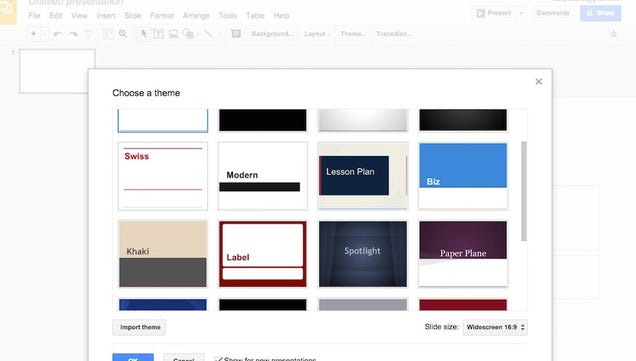
While other online presentation tools take a more dynamic approach and try to depart from the PowerPoint-esque style of presentations, Google Sides embraces it—and that's not a bad thing. If you're already familiar with tools like PowerPoint, want something familiar but simple and easy to use, Google Slides is the tool for you. In fact, we should mention it was Another of you favorite PowerPoint alternatives. It's come a long way since it was introduced, but it manages to incorporate a professional look and feel along with some interesting and dynamic transitions, images, presentation themes, and other tools that make it fun and refreshing to use. Like other Google Drive applications, Slides also allows you to collaborate in real time with other users, and everything is stored on the web, in Google Drive, so you can get to it any time, on any computer or device, or send it to anyone who needs to see it. Slides also makes embedding your own images, charts, graphs, videos, or just about any other type of multimedia relatively easy. Best of all, if you're coming from a PowerPoint world, Slides can open, save, and convert PowerPoint files. Offline editing is part of the package, and best of all, it's completely free. If you have a Google Account, you already have access to it and don't need to sign up for anything else.
Those of you who nominated it pointed out that it's free, easy to use, and offers a feature set that's on par with more complicated tools but a user interface that keeps things simple and easy to understand. It may not be flashy or dynamic, as some of you noted, but it's that simplicity that really makes it—and the presentations you create with it—stand out the way you want them to. You have more control, and you're not subject to someone's specific design preference for transitions or slide styles or themes. Others of you praised Google Slides' integration with and availability on mobile devices. You can read more in its nomination thread here.
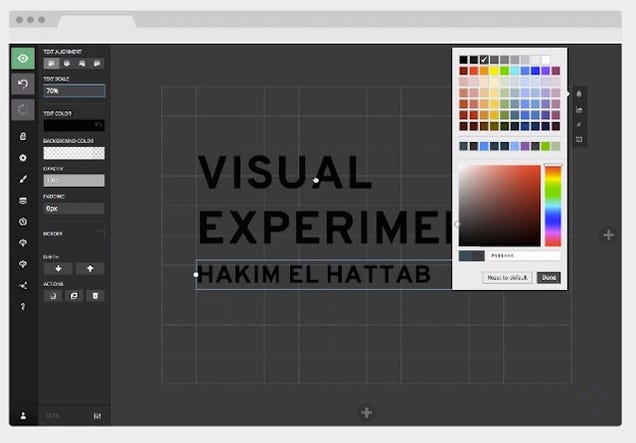
If you like your presentation tools free, open-source, and either hosted on the web or hosted on your own GitHub repository, Reveal.js—and its online editor companion, Slides.com—are perfect for you. Reveal.js is framework that lets you build robust slide decks and presentations using HTML or Markdown, right in your browser, so you don't have to download anything. The builder is remarkably robust and well put together, not to mention simple and easy to use. It may seem like a developer's dream presentation tool, but you don't have to be one to make the most of it, or the online editor. It's easy to create animations, transitions, graphs and charts, or even upload and attach your own to your presentation. Reveal.js makes it easy to check out those presentations on the go, on any device, or embed them in your blog or web site so people can see them when they visit. Similarly, you can just send a link out to people to view your presentation, or save a PDF of your entire slideshow so pass around that way. There are also a ton of advanced features available too—you can create presentations and keep them private, present your deck offline, control your presentation from a mobile device, sync your work to Dropbox if you choose, and more. You can see a full list of features here, most of which are free, but some only available with a Pro account—or the ability to fork the whole project and add or manage them yourself.
Those of you who nominated Reveal.js and Slides.com all commented on how well built the tool is, and how easy it is to do things like nested slides, add speaker notes, and more either by forking the project on your own and running it yourself, or by using the free webapp. Some of you noted the open JavaScript API makes it easy for developers to add in their own features, not to mention save their presentations anywhere they want. You can read more praise in its nomination thread here, over here, and over here.
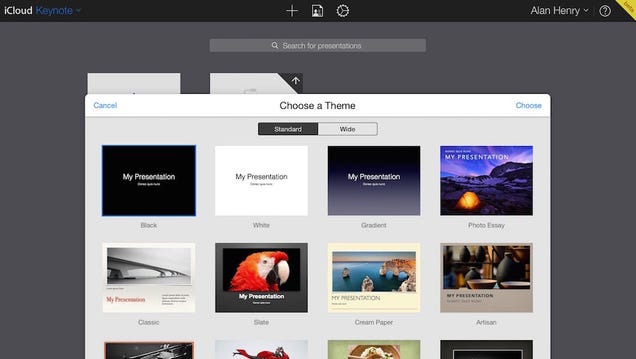
Keynote is best known as Apple's own presentation software that's part of the iWork productivity suite, but thanks to the iWork for iCloud Beta, Keynote is also available entirely online if you're looking for a web-based presentation builder (and you have an Apple account and access to iWork.) The web version brings most of the same features to the table as the desktop version. It can open PowerPoint files, sports tons of templates to make designing a great-looking presentation from scratch easy, and lets you upload and add your own media, charts, graphs, and other images if you don't want to use the site's built-in editors for them. If you're enamored with the transitions, styles, themes, and presentation types you've seen in Apple keynote speeches, or you just want a good-looking alternative to something like PowerPoint, it's worth a look if you have an iCloud account. All of your presentations are saved in iCloud, and available on your other Apple devices (and Windows PCs.) Similarly, you can present from any computer with a web browser, which is essential to being a good online presentation tool.
Those of you who nominated Keynote recalled its history as being the presentation tool built specifically for Jobs-era Apple keynote speeches, and for being a breath of fresh air in a very PowerPoint-powered world when it came to business presentations when it launched. Being able to work from and present from iOS devices or other devices is a nice touch as well, and the all-web editing tools make working on an Apple computer or a Windows PC easy as well. Also, it's completely free. However, it's worth mentioning that technically the service is in beta, and Apple could discontinue it or place restrictions on it at any time. You can read more in its nomination thread here.
Now that you've seen the top five, it's time to put them to a vote to determine the community favorite!
Have something to say about one of the contenders? Want to make the case for your personal favorite, even if it wasn't included in the list? Remember, the top five are based on your most popular nominations from the call for contenders thread from earlier in the week. Don't just complain about the top five, let us know what your preferred alternative is—and make your case for it—in the discussions below.
The Hive Five is based on reader nominations. As with most Hive Five posts, if your favorite was left out, it didn't get the nominations required in the call for contenders post to make the top five. We understand it's a bit of a popularity contest. Have a suggestion for the Hive Five? Send us an email at tips+hivefive@lifehacker.com!
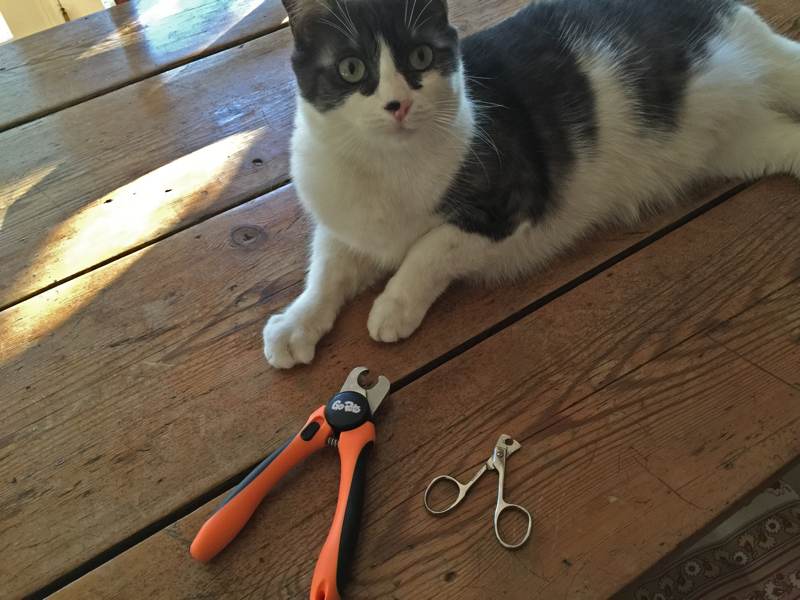 My cats will tolerate having their nails clipped for about 45 seconds before they start to squirm out of my lap.
Read the rest
My cats will tolerate having their nails clipped for about 45 seconds before they start to squirm out of my lap.
Read the rest


 Apple had a pretty good quarter.
And by “pretty good”, I mean it was the biggest quarter in history. And not just for Apple. For any company. Ever. Read More
Apple had a pretty good quarter.
And by “pretty good”, I mean it was the biggest quarter in history. And not just for Apple. For any company. Ever. Read More


 Here is one more nail in Flash’s coffin: starting today, YouTube defaults to using HTML5 video on all modern browsers, including Chrome, IE 11, Safari 8 and the beta versions of Firefox. YouTube first introduced HTML5 support back in 2010. At the time it was still highly experimental. Over the years, as the HTML5 standard — and with it, its video implementation — matured,… Read More





 Y Combinator alum Lockitron is today launching the Bolt, a $99 follow-up to its original crowdfunded keyless-entry gadget. Read More





 Welcome to the roundup of the best new Android applications, games, and live wallpapers that went live in the Play Store or were spotted by us in the previous 2 weeks or so.
 Opera’s former CEO Jon von Tetzchner is launching the first preview of Vivaldi today, a new Chromium-based browser that is squarely aimed at power users. Vivaldi features tools like Quick Commands for using written commands instead of the mouse, an Opera-like Speed Dial for quickly accessing bookmarks, a note-taking feature and the ability to organize tabs into stacks. Read More
 The U.K.’s telecoms regulator Ofcom has identified four areas it plans to prioritize in order to support the development of the Internet of Things, after taking input from various industry “stakeholders” last year. Read More
 A 32-page report into mass surveillance by a top European rights body has warned that digital dragnets set up by U.S. government intelligence agencies, and some of the U.S.’ allies in Europe and elsewhere, are endangering fundamental human rights — such as the right to privacy, to freedom of information and expression, to freedom of religion and the right to a fair trial. Read More




 After years of effort and expenditure, in 2013 Norway introduced new legislation to crack down on Internet piracy. It gave rightsholders new powers to track down file-sharers and have sites blocked at the ISP level.



 When I first wrote about Number26, I said that it was a bank designed for the 21st century — but all of this was on paper. The startup is launching today in Germany and Austria, with more European markets to follow. I opened a Number26 account a couple of weeks ago. Old well-established banks should be ashamed that they can’t provide the same level of user experience. As a… Read More




![Books_iOS_group[3]](https://tctechcrunch2011.files.wordpress.com/2015/01/books_ios_group3.png?w=680) Blink and you missed it. Following the sale earlier this month of its TV and movie on-demand service, Tesco is ridding itself of its music streaming and ebook offerings, too. Read More
Blink and you missed it. Following the sale earlier this month of its TV and movie on-demand service, Tesco is ridding itself of its music streaming and ebook offerings, too. Read More

 Like many cities, SF asks fancy property developers to create "public spaces" in their buildings to make up for parks and other public sites they displace, and these are usually a joke, hidden away far in the buildings' depths and deliberately hidden from the public.
Read the rest
Like many cities, SF asks fancy property developers to create "public spaces" in their buildings to make up for parks and other public sites they displace, and these are usually a joke, hidden away far in the buildings' depths and deliberately hidden from the public.
Read the rest