Microsoft is preparing to bring third-party apps to its Microsoft Band wearable platform. The company revealed today that it’s launching a Developer Preview SDK for the wrist-worn device, allowing third-party app makers to start to create apps for it, beyond the select partners, including MapMyFitness, that it already works with. Opening Band to third-party apps means not only making… Read More
Sometimes you need to get up close and personal with your maps — Street View has you covered.
While most people have played around with Street View for some fun exploring on the web, the full suite of Street View imagery is also available on your phone or tablet in the Google Maps app. Of course viewing Street View on a smaller screen isn't ideal, but it's quite amazing to have so much power in the palm of your hand — and the additional sensors available in your phone and tablet offer at least one feature you can't get on your desktop. Let's explore what Street View is all about.
Is this the new Pebble? The company is set to unveil its next generation smartwatch tomorrow and the image above was just discovered on Pebble’s website. Rumors state that the next version will sport a new design and a color e-ink screen — just like the watch in this picture. Read More
Microsoft’s Bing predictions engine has been responsible for predicting the World Cup, English soccer results, and NFL games, but last night it turned its attention to the 87th Academy Awards. Bing successfully predicted best picture, best director, best actor, best actress, and the results for supporting actor and actress out of the top awards for the 2015 Oscars. Overall, Microsoft successfully predicted 84 percent of the 24 results, with only four incorrect predictions.
Ahead of the Oscars Microsoft shared its latest predictions, noting that most of the awards are "relatively unpredictable." Microsoft uses a prediction model for the Oscars that is managed by Microsoft researcher David Rothschild over at the company’s New York City...
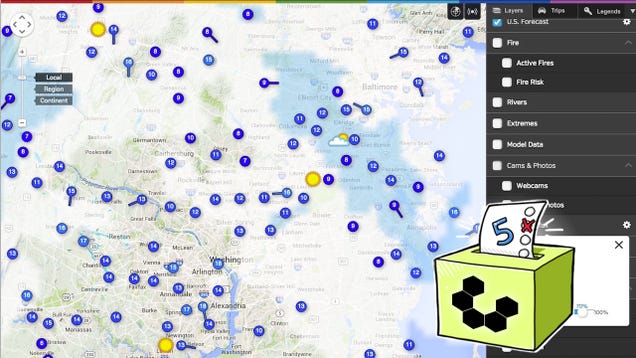
Whether you're heading out around town or you're planning a long-distance trip, you probably want to know what the weather will be like when you get where you're going—or later that day. A good, reliable weather site or service can tell you, in useful, accurate terms, and this week we're looking at five of the best, based on your nominations.
Earlier in the week we asked you to tell us which weather web sites you thought were the best. You offered tons of suggestions, many of them local to your regions, others with comprehensive global and international forecasts. We only have room for the top five though, and here they are, in no particular order:
Many of you noted that when you were looking for a good, reliable weather service, you turned to the pros—the National Weather Service, a branch of the National Oceanic and Atmospheric Administration (NOAA). Since many of the other weather sites get their data from the NWS, some of you said, why not go right to the source? Why not get your information from the people who get it themselves from weather stations around the globe, satellites in orbit, and other commercial and public resources? After all, they're the same people responsible for weather alerts and warnings, which you should be on the lookout for.
The NWS is more than just a clearinghouse of data though—it's also a great destination for weather on a county-by-county basis in the United States. Type in your city and state, or just your zip code, and you'll get a detailed forecast for where you are, or alternatively, where you're headed out to. Current conditions, future predictions, long-term forecasts, historical highs and lows, precipitation chances, radar and satellite maps, and more are all right there, a click away.
Those of you who nominated the NWS and NOAA pointed out that NOAA hired over half of graduates with meteorology degrees, so there's something to be said about going to the source. Additionally, many of you pointed out that one of the best things about the NWS's site is that it's free, ad-free, lean and quick loading, and of course, accurate. Many of you even pointed to the NWS's in-depth analysis of weather patterns, climate conditions, and more around the world as excellent background and additional reading for people who are interested. You can read more in its nomination thread here.
Weather Underground has a semi tumultuous history, but it's always been a favorite among weather buffs, meteorologists, storm chasers, and regular people who just want a trustworthy resource for the weather. (Not related to the other Weather Underground save in name only, since both projects have their roots in and the weather database got its start from the weather database at the University of Michigan.) The service was independent for many years before being purchased by The Weather Channel in 2012. The site still operates independently though, with forecast and weather data collected from over 100,000 member personal weather stations, located in homes, schools, and other locations around the country. Weather enthusiasts still blog regularly about local, regional, and global weather and climate related issues, largely powered by its own community of enthusiasts.
The site itself has been redesigned a few times, but still gives you a great deal of weather information right up front, with events, interesting blog posts, and other member contributions further down the page. Weather Underground is also still home to the much loved (and highly nominated in the call for contenders thread) Wundermap, which is a highly customizable, deeply informative full-screen weather map. Toggle layers on and off along with additional local detail—and when we say local, we mean very local—to find out what's happening in your community, or what the conditions and forecast are across the country.
Those of you who nominated Weather Underground specifically praised the maps, full-screen weather maps (like the Wundermap), and the fact that members (for a small fee) get access to tons of raw data and other information that go far far beyond just getting your local or regional forecast for the next few days. If you want to make your own models, are a meteorologist yourself, or just love geeking out over weather, it's definitely the service for you. Many of you highlighted that it's one of the most accurate and reliable services as well, since it's data isn't just reliant on models and predictions, it's actually culled from real-time, actively-updating weather data from stations all over the map. Read more in its nomination thread here.
Forecast.io is a relative newcomer to the weather game, launching in 2013 with a minimalist, animated weather report for your location that keeps the important details front and center. Temperature, location, current conditions, and a forecast for the next hour, 24 hours, and 7 days in short form right where you can see them—above the fold. Scroll down for more detail on those forecasts, including long-term data, forecast lines (so you can see general trends), and additional goodies like radar data and high definition weather maps. Forecast.io isn't quite for the weather buff exactly—it's not teeming with detailed information that would be of interest to meteorologists, pilots, and other storm chasers, but it's exceptional for people looking for a no-nonsense forecast with just enough data to be useful without so much that things get muddy.
Those of you who nominated Forecast.io noted that their forecasts—especially for the upcoming 48 hours, and that the design is minimal and focused on the information that you actually care about. Many of you praised its open API, others noted it translates fantastically to mobile, and it looks just as great on smartphone and tablet screens as in your browser. Some of you mentioned that part of the reason they're so accurate is because their forecasts are actually a calculated aggregate of other available forecast data. You can read more in its nomination thread here.
The Fucking Weather, as its name implies, tells you what the weather is. That's it. Whether it's hot, cold, or whatever—there are no maps, no models, no radar, no detailed forecasts, none of that crap—just what the fucking weather is, whether it's hot or cold, current conditions, and that's all. Scroll down a little and you do get the "fucking forecast," which shows you high and low temperatures for the next four days (provided, hilariously, from Weather Underground.) Just type in your location, get the weather, and really the only options on the site was "I want fucking Celsius," and "Remember my fucking weather," which tells the site your location so the next time you come back you'll get the same, accurate, no frills weather report. Make no mistake, it's hilarious, but it's also useful, especially if, well, all you want to know is what the fucking weather is, and it's one of our favorite sites that tell you what the fuck to do.
Those of you who nominated The Fucking Weather—and yes, there were more than enough of you for the site to secure its place in the top five—praised it for being simple, to the point, and while it's not a site for people who love the weather or climate or love to study maps and data, it's definitely a site for someone who just wants to know whether they should take their umbrella for the commute home tonight, or whether it's worthwhile to put on that extra layer. Read more in its nomination thread here.
Weatherspark prides itself on its graphs, charts, and other detailed weather data all available in a single view. Wind speed, precipitation, mean and average temperatures, temperature graphs over the course of a day—or days, or weeks, or even yearly trends, and more all make it a great site for weather and climate geeks who want as much data as possible at their fingertips. It's also insanely accurate for those people looking to know exactly what temperature it'll be when they leave work tomorrow, and what the odds there'll be precipitation at that time—or what the weather in their destination will look like when they get off their plane, for example. Just type in your location, and you'll get a beautiful, data-driven dashboard that's up to the hour, complete with an accuracy percentile so you'll know how much confidence to have in what you're seeing. From there you can see more detailed hourly, daily, or weekly forecasts, or just spend some time scrolling around on the map or graphs to see how conditions change, have changed, or will change.
Those of you who nominated WeatherSpark pointed out that it's one of the sharpest presentations of a huge selection of weather data. In short, behind those graphs and charts is a wealth of information, all delivered in a useful and easy to browse way. Some of you noted there have been some changes in their sources for weather data, but others of you said you've stuck with the site, preferring its treatment of available weather data to others—and that you like the way it's all packaged up. Read more in its nomination thread here.
Now that you've seen the top five, it's time to put them to an all-out vote to determine the community favorite:
Honorable Mentions
This week's honorable mention goes out to Intellicast, which many of you praised for its live maps, great predictions and forecasts, and its storm tracking and direction tools, which are especially useful for folks living in areas prone to tornadoes or hurricanes. It pulls data from Weather Underground if you want to dig in and get dirty with specific weather information, and has tons of maps and live-updating charts to look over. Read more in its nomination thread here.
We should also mention, as you guys did, that many of you simply turn to Google for the weather, mostly because it's so easily available. For most people, it's on a homescreen on their phone, or just a tap away on the Google search bar on their device, and on the web a complete forecast in your hometown is as simple as typing "weather" into Google search. Of course, Google's weather forecasts are provided by Weather.com, which didn't get enough support to make the top five on its own. You can read its nomination thread here.
Have something to say about one of the contenders? Want to make the case for your personal favorite, even if it wasn't included in the list? Remember, the top five are based on your most popular nominations from the call for contenders thread from earlier in the week. Don't just complain about the top five, let us know what your preferred alternative is—and make your case for it—in the discussions below.
The Hive Five is based on reader nominations. As with most Hive Five posts, if your favorite was left out, it didn't get the nominations required in the call for contenders post to make the top five. We understand it's a bit of a popularity contest. Have a suggestion for the Hive Five? Send us an email at tips+hivefive@lifehacker.com!
Created by Romanian software engineer Vali (also known as 0x4139), iFlix is a torrent client designed to stream any magnet link in an instant.
Unlike other clients there are no complex settings to manage and the app only springs into life once a magnet link has been clicked. It is incredibly simple to use.
As can be seen from the image below, clicking a magnet link calls up the iFlix interface containing a list of files inside the torrent being accessed. Users simply pick a file and choose their preferred (and already installed) video player and in a matter of seconds the torrent begins to play.
iFlix not only works well, it also has interesting roots.
“We have this startup, which is an application for kindergartens (gradiapp.ro), and one of the features is that we connect mobile/web and all sort of apps to the cameras inside the kindergarten so that parents can watch their kids while there,” Vali tells TorrentFreak.
“We were having problems streaming the data to mobile devices (bandwidth issues) until I decided to make some kind of tracker that keeps the data in chunks of five seconds. That tracker is a peer as well, and after we saw that it worked, we wanted to use it with generic trackers as well.
“With a little tweaking it worked well, after that we spent like two months talking about legal concerns with all kind of lawyers, and we saw the potential that this can grow into a distributed computing grid based on its own keychain,” the dev explains.
In common with all tools that attempt torrent streaming, iFlix performs better with well-seeded torrents. That being said, skipping around files with plenty of peers works surprisingly well and only once or twice did we experience any significant delay. The software also allows users to listen to music torrents and as expected these cue up even more quickly than video.
As for the future, iFlix is likely to receive updates but is actually a stepping stone within another of Vali’s projects.
“iFlix is a product that’s based on a platform that I am trying to create. This platform is intended to be a P2P compute grid based on the Bitcoin protocol where instead of computing hashes to mine coins you compute different tasks, e.g ‘fetch the first two chunks from the magnet:x” which iFlix does at this moment,” Vali explains.
“At this moment the engine behind the platform is based on the Google SPDY protocol and the purpose of iFlix is to measure the scalability of the engine.
“In the near future you can expect to see more products based on the same P2P platform. For example, imagine that you are skiing and directly streaming 2k video from your GoPro via P2P,” Vali concludes.
In a document posted to their corporate website, Netflix sought to describe their long-term plans. The piece reads like a fascinating mixture of investor relations propaganda and fantasy or media theory. While it touches on all kinds of different aspects of their business and the changing environment it exists in, perhaps the most intriguing part has to do with how they are describing their ideal content catalog.
We don’t and can’t compete on breadth of entertainment with Comcast, Sky, Amazon, Apple, Microsoft, Sony, or Google. For us to be hugely successful we have to be a focused passion brand. Starbucks, not 7-Eleven. Southwest, not United. HBO, not Dish.
By now, it's a familiar story: a secretive intelligence agency targeted law-abiding security professionals in order to break one of the world's most fundamental encryption systems. In this case, it was the GCHQ breaking into Gemalto, one of the world’s largest SIM card manufacturers, in order to steal the keys to the encryption that secures phone calls as they travel from devices to towers. We're still sorting through the wreckage, but it's likely to affect carriers across the world. But while the attack fits the mold of previous Snowden revelations, there are some crucial differences this time around.
Microsoft just took a major step towards rooting out the Superfish bug, which exposed Lenovo users to man-in-the-middle attacks. Researchers are reporting that Windows Defender, Microsoft's onboard anti-virus software, is now actively removing the Superfish software that came pre-installed on many Lenovo computers. Additionally, Windows Defender will reset any SSL certificates that were circumvented by Superfish, restoring the system to proper working order. It's a crucial fix, as many security professionals had been struggling to find a reliable method for consistently and completely undoing the harmful effects of the bug. To make sure the fix takes effect, any Superfish-affected Windows users should update their version of Windows...
The American National Security Agency (NSA), and the British Government Communications Headquarters (GCHQ), similar clandestine intelligence agencies, stole SIM card encryption keys from a manufacturer, allowing the groups to decrypt global cellular communications data. The effort, according to The Intercept, took place in 2010, with the agencies breaking into a Dutch firm, Gemalto. The… Read More
Jack White’s not only the greatest guitarist of all time, he’s also one of the music industry’s great experimenters. His new video for "That Black Bat Licorice" overlays three videos that can be toggled into a singular experience. Hit play and you’re presented with the animated main feature from James Blagden. Hold down the "3" (for Third Man Records, Jack’s record label) key for Jack's live action video, or the "B" (for Brad Holland, director) key for some synchronized head banging. The effect is as satisfying as it is captivating, as you quickly toggle between videos to expose the three different interpretations of the same lyric.
Admittedly, it’s not as good as the interactive video for Bob Dylan’s "Like a Rolling Stone," but Jack...
Google has revealed their intention to roll out a new YouTube app just for kids, starting next week. It will be aptly named YouTube Kids and is geared towards those 10 years old or younger. Perhaps most interesting for non-children is that the app, at least initially, will be released exclusively on Android.
Image by USA Today
It features a fairly dumbed-down user interface that will leverage Google's voice recognition rather than relying on the spelling abilities of young children.
On a regular workday, it's easy to feel starved of peace. We crave peace and quiet so much that we'll pay to spend time in a peaceful place. But there are peaceful places everywhere, perfect for quickly recharging and disconnecting from your workday. Here are some places you can go during your break to renew your energy.
Create or Discover a Walking Route
When I worked a day job downtown, I would walk around the block any time between 2PM and 4PM. I wasn't going to pick up coffee or anything, nor was there any particularly beautiful scenery nearby. But when I was sitting all day, the walking and the quiet was almost cathartic. I found that a five or ten minute walk would reset my mind and prepare me for another few hours of work.
The walking itself can be great, but you can use apps like Wunderwalk (which we previously covered) to create more scenic or functional walking tours. If you're reluctant to take a break during the day just to walk, try incorporating the walk at the beginning or end of your lunch break. In colder seasons, if your city has underground walking paths, you can also spend some time exploring and getting familiar with those. (Here's the one I frequented.)
Enjoy Public Parks, Community Centers, and Libraries
Swing by a local park near your office. The fresh air and the exposure to nature could be the reset you need to get away from chaos, clear your head, and continue a productive day. Use Google Maps to find parks near your office (e.g., type, "Parks near [your work address]"). If you're working in the suburbs, you might have to take a quick drive to a park in your local neighborhood.
You could also stop by other public spaces like community centers or libraries. Community centres may be a bit more chaotic in case you need a bit of noise to take your mind off things. Libraries are better if you love quiet. Either way, the environment change could be good to take your mind off things and find peace.
If you're looking for silence, get to these places during school hours. Even if you love the outdoors, it's probably best to know where indoor venues are just in case it's rainy outside (or if it's colder than you'd expected).
Wander Through the Mall (but Leave Your Wallet at the Office)
Whether you're in a city or suburb, there's probably a shopping mall or plaza somewhere near you. You can wander around these areas of commerce to take your mind off things at work. Different people will find different types of stores more relaxing—for example, I don't particularly enjoy clothing stores, but I do really like bookstores and music stores. Some of my friends are partial to soap stores.
Remember, you're not going to shop. You're just resetting your senses. Don't go with the intention to splurge or to engage in retail therapy. If you find it tempting or distracting, you don't even have to set foot in a store. Hang out by the water fountain. Be on the lookout for an abandoned food court (hopefully with comfortable chairs).
Ideally, you should leave your wallet at the office so you're not tempted to make any purchases. If you're not comfortable with that, or don't trust your deskmates or colleagues (hey, it happens), leave your wallet in a locker or lock it up in your office's cabinet.
Crash a Hotel Lobby
Visiting a hotel lobby is a more unusual option, but it's doable. Hanging out in hotel lobbies can be liberating, especially if there are a lot of people on vacation. Their excitement can be contagious and bring back good memories. During the day, hotel lobbies are typically free of commotion and noise, and no one will bother you if you're just there for ten minutes.
If you're shameless, hanging out at a hotel lobby doesn't cost a dime. (I wouldn't suggest going every day though.) If you feel guilty about using their space, support them by buying some drinks from the cafe or a newspaper at their store.
Alternatively, you could also hang out at the lobby of a conference hall. It will be a bit busier, but you're less likely to stand out. Keep in mind that hotels might also have conference halls attached to them, and the cover of other people will make you less outstanding.
Stretch at the Gym
A few of my former colleagues would take a late lunch and rush off to the gym to squeeze quick workouts in their days. If you have a membership, you could also make a quick trip to the gym and do some stretches (or do them at the office if you're not self-conscious).
If you have a locker there, or if you bring your gym bag to work, you could actually change into your gym clothes and work out. If you don't plan on changing out of your work clothes, you could hang out in a sitting area or near the juice bar if it's not too busy.
Sometimes, nap rooms at the office just don't cut it. Yet breaks and peace are important to healthier, higher energy, workdays. You can find peace in walking routes, public parks and community centers, in malls, hotel lobbies, or local gyms. Keep your eyes peeled and get creative.
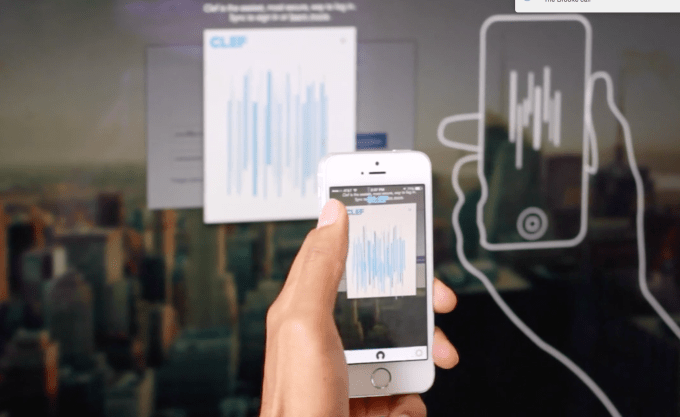
The last year has been full of security breaches that have shown the importance of having strong safeguards for our data. As we put more personal and private information in the cloud, there are ever more avenues of attack to reach the things we’d like to keep to ourselves. One popular defense you can use to bolster data security on most services is two-factor authentication. Basically,… Read More
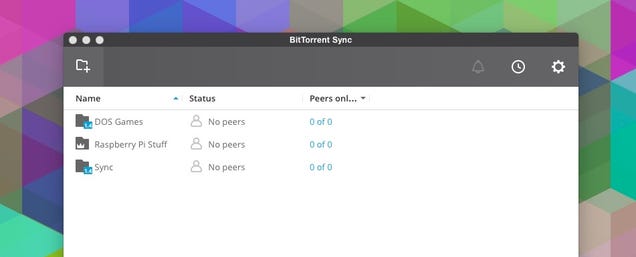
Dropbox (and similar cloud services) are awesome, but they don't give you that much control, security, or privacy over your files. If you want to take control into your own hands without losing the features of cloud syncing services, BitTorrent Sync is the service for you. Here's how to use it.
Why Use BitTorrent Sync Over Dropbox
We love Dropbox (and other file syncing services), but they tend to be rather expensive if you need more than a few gigs of space. There's also an inherent security flaw in storing your files on a third-party server, and while most cloud storage services offer two-factor authentication, there's always the possibility those servers could get hacked at some point. Conversely, private cloud services like OwnCloud are awesome, but you'll need your own server to use them.
BitTorrent Sync solves for both of those problems. Your files are never stored on a server. They're only on your computers, and the data is transferred between them using peer-to-peer file sharing. BitTorrent Sync is also completely free, and you can transfer files of any size you want, which makes it great for projects with large file sizes (like video). The storage capacity is only limited to your own hard drive, not how much space you're paying for. Let's take a quick look at the advantages and disadvantages of BitTorrent Sync compared to other file syncing services.
Advantages of BitTorrent Sync Over Dropbox
Free
Storage is only limited by how much space is on your hard drive
Your files are never uploaded to a third-party server
Fast transfer speeds that are only limited by the internet connection speed on your devices
Server downtime doesn't affect you since your files are never uploaded to another server
Sync any folder or file you want from anywhere on your hard drive
Doesn't work as well as a cloud backup since it only syncs between computers
For most of us, BitTorrent Sync isn't a good replacement for Dropbox if your primary use is backups, but for sharing and syncing files it's awesome. That said, running BitTorrent Sync on a NAS makes it work similar to Dropbox and OwnCloud but with higher speeds and no software overhead to worry about. You don't need to set up a server, so BitTorrent Sync also tends to be incredibly secure since you're the only who who has the keys to access your files.
How to Set Up BitTorrent Sync
In order to use BitTorrent Sync, you'll need to set up a few different things. Throughout this guide, we'll be using the newest beta for BitTorrent Sync, 2.0, which should be officially launching soon. That said, the process is the same with older versions of the app as well.
Download BitTorrent Sync for your operating system
Open up the app
Pick the folders you want to sync across computers. Click the "+" button and pick your folder. Those folders are now ready for sharing
Click the gear icon and select "Link Device"
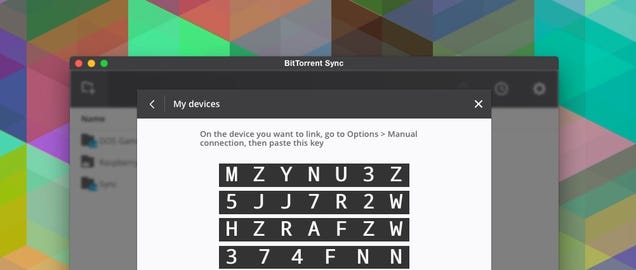
Click "Link a Desktop Device Manually," you'll get a 35 digit code
Head to another computer and repeat steps 1 and 2.
On the second computer, click the gear icon > Link Device > Link Device Manually > Enter Key and enter the 35 digit code from step 5
Now, every folder you select to share syncs across the two computers. You can repeat this process across every computer you own. You can also set up syncing on mobile. The process is pretty similar:
On your desktop, click the gear icon > Link Device to get a QR code
Back on your mobile device, click "Add Folder" and use your phone to scan the QR code on your computer
One thing to note: right now, the mobile apps aren't set up to work with BitTorrent Sync 2.0, so for now, you'll want to use version 1.4 if you need access on mobile.
That's it for setting up standard sync. From here on out, your files sync between all the computers and devices you have BitTorrent Sync installed on as long as at least of those devices is online.
How to Send Folders to Other People
Syncing between your devices is just part of using BitTorrent Sync though. The most useful feature is sharing folders with other people. There is no limit on the file size here, so you can share pretty much anything you want. Here's how it works:
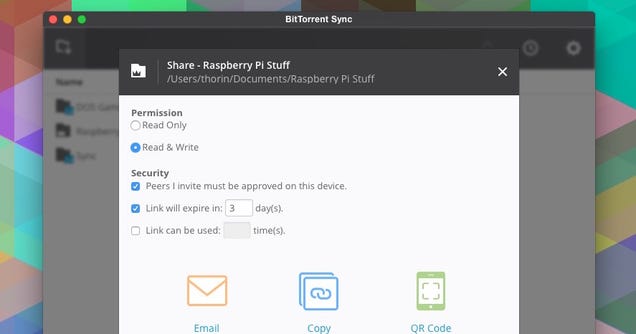
Highlight the folder you want to share and click the "Share" button
Select the permissions you want to give to the recipient (read only or read & write)
Select the security level you want to grant ("peers I invite must be approved on this device" makes it so you have to approve them before they can use the link, "Link will expire in x days" grants access for a set amount of days, and "Link can be use x times" sets a limit on the amount of clicks a link can get)
Select how you want to share the link (via email, copy it to your clipboard, or generate a QR code)
That's it. Send that link to whoever you want, and they'll be able to access the folder from their version of BitTorrent Sync. You can also use this method to share only select folders with your other computers, which is handy if you have a laptop without a lot of hard drive space.
Bonus Features: Set Up Version Control and Automatic Camera Roll Backup
Aside from the normal syncing and sharing that comes with BitTorrent Sync, it also has a couple features we're used to seeing in file syncing services: versioning and automatic camera roll backup. Both are easy to set up, but it's also easy to miss the fact that both even exist in the first place.
Check Out Earlier Versions of Files
Like Dropbox, BitTorrent Sync keeps snapshots of every change you make to a file over the course of 30 days. This is handy when you mess something up and need to roll back to an earlier version. Here's how to access those files:
Click the three dot icon next to the Share button on the folder you want to see an older version of
Select "Open Archive" to open up the folder in File Explorer or Finder
The files here are hidden, so you'll need to enable Hidden Items for your operating system (Windows/Mac)
You'll see a folder called .SyncArchive, inside you'll see a collection of older versions of files (this can take up a lot of space if you're working with a lot of large files)
That's it. If you need to, BitTorrent Sync also has a guide for changing the default behavior of versioning so you can customize it to your needs.
Turn on Camera Roll Backups on Mobile
Like most file syncing services, BitTorrent Sync also has an automatic camera roll upload option for its mobile apps. Once it's enabled, everything on your camera roll gets backed up on your computer. The process here is very simple.
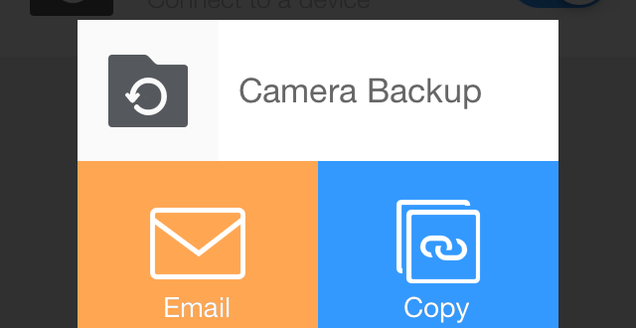
In the mobile app, tap "Camera Roll Backup"
You get the option to copy or email the link. If you click email, email it to yourself so you can access it on your home computer
Head to a computer with BitTorrent Sync installed
Click the link and select a folder to sync your photos with. This adds your camera roll photos to BitTorrent Sync
Now, all you phone's photos automatically get sent over to any computers you have BitTorrent Sync running on.
BitTorrent Sync might not be the perfect replacement to Dropbox for everyone, but it does just about anything Dropbox can do provided you don't need the cloud storage. If you're sick of spending a bunch of cash or you're just looking for a little extra privacy, it works incredibly well.
It’s always hard to know when it’s time to share a new product, because there’s always just a _few_ more things you want to do. Today we’re happy to check off some of these to-dos for Inbox, making it easier to use on more devices and browsers.
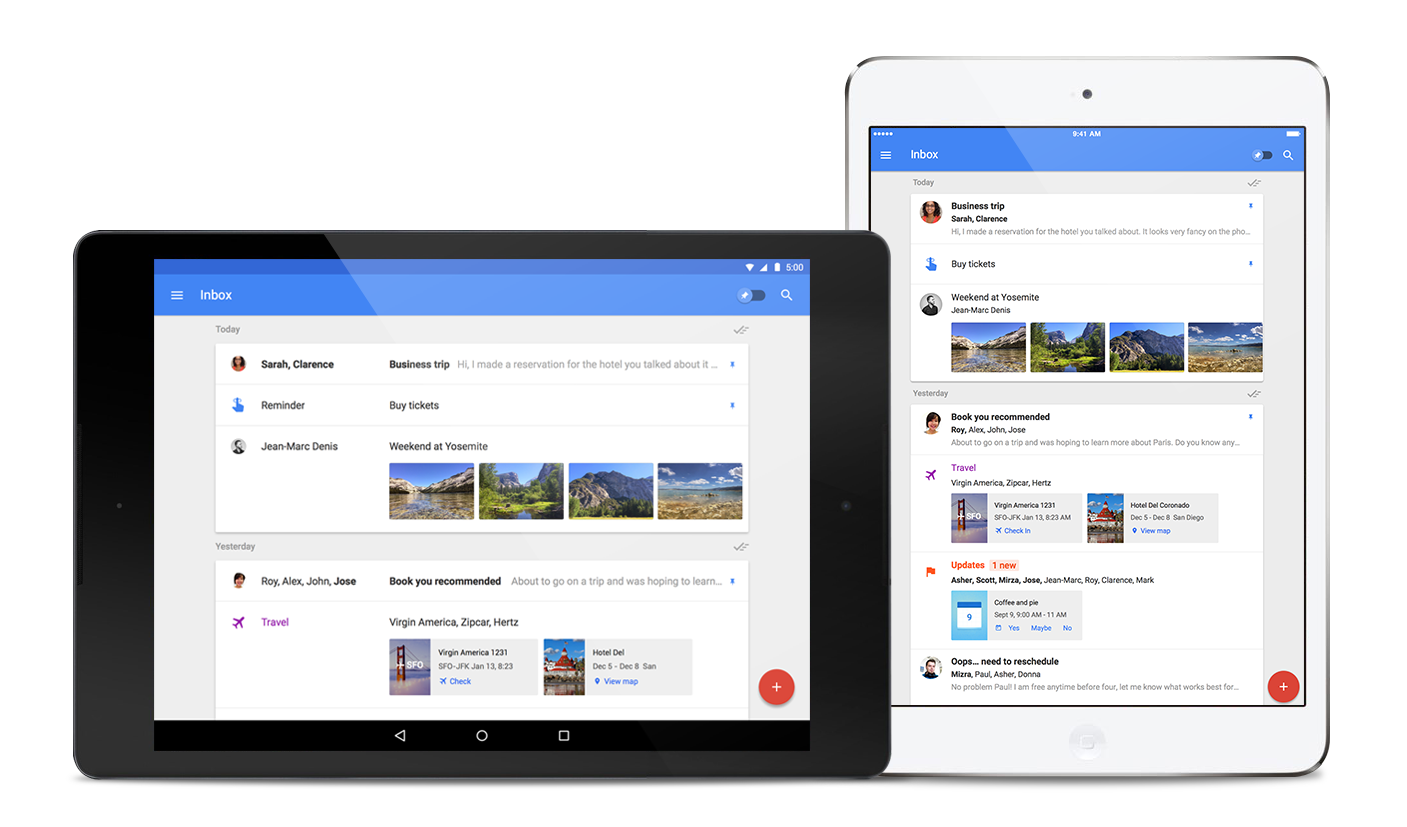
If you're a big fan of tablets, you'll be excited to learn that Inbox has come to iPad and Android tablets. Download the app from the App Store and Google Play.
In addition, Inbox now supports Firefox and Safari, as well as Chrome. You can sign in at inbox.google.com.
As always, if you aren't using Inbox yet, now's a perfect time to jump in. Email inbox@google.com to request an invite and we'll email you as soon as more invites are available.
IFTTT, the internet automation service, is growing from a single app to a family of them. Today the company is launching three new apps for Android and iOS, as well as rebranding its flagship app. It’s part of an effort to make the sometimes-confusing service more accessible to normal people — though the profusion of apps may ultimately have the opposite effect.
IFTTT — short for "if this, then that" — was founded as a way to stitch various internet services and devices together. Its web service and companion smartphone apps let you do things like automatically back up your Instagram photos to your Dropbox account, or record all your Foursquare check-ins in Evernote. Starting today, IFTTT is now a suite of apps, each one designed to...
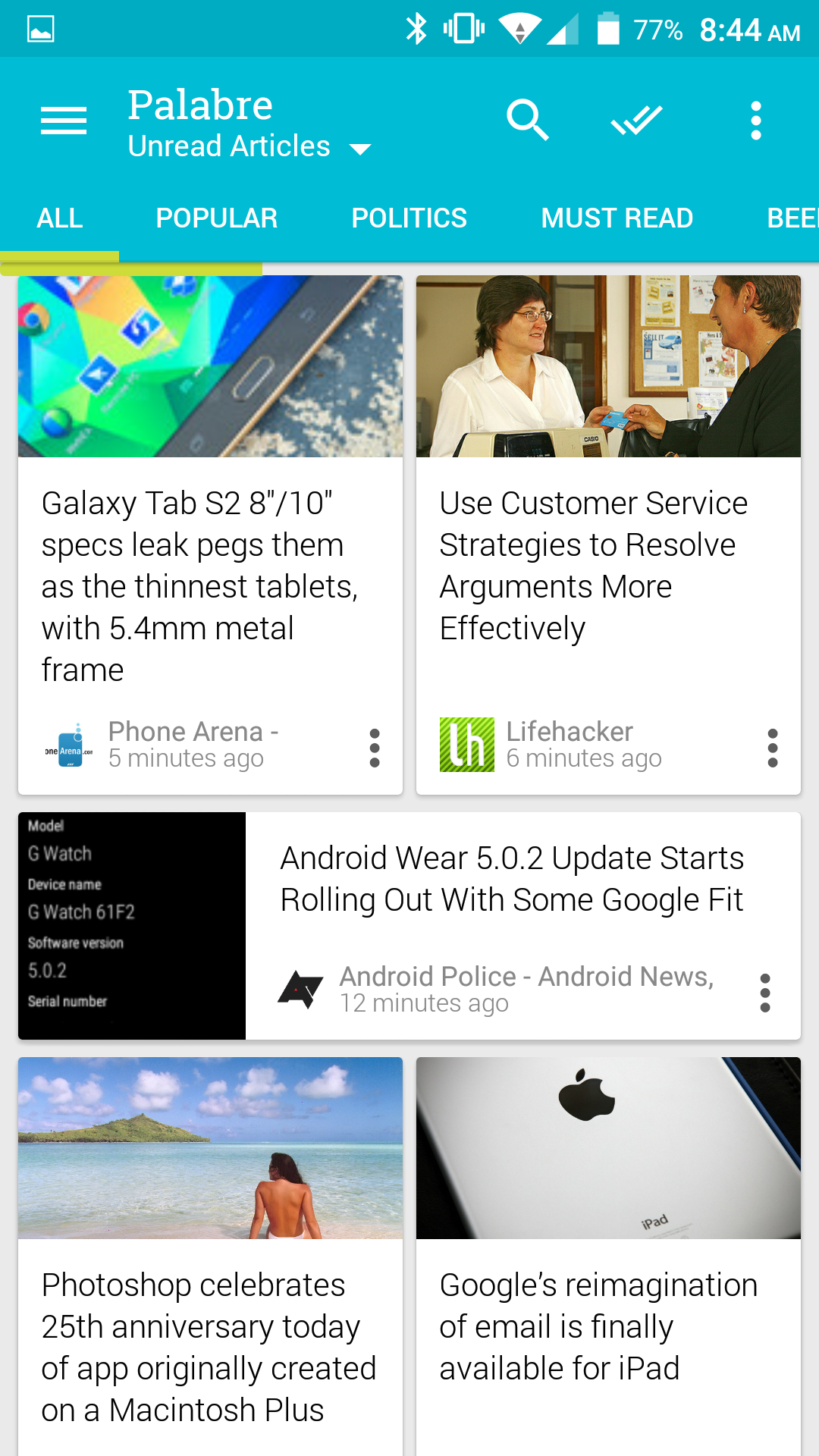
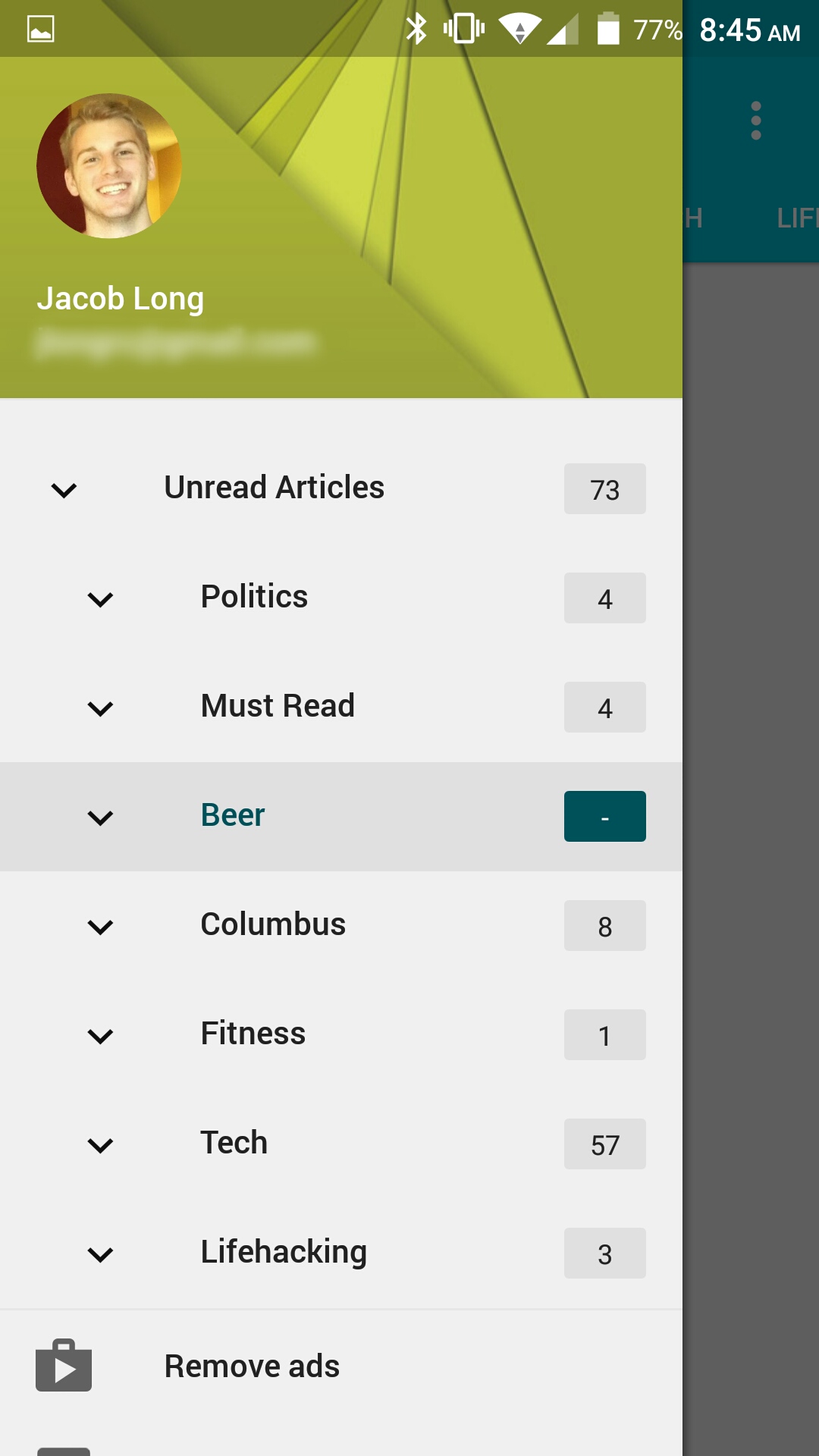
Need a new RSS reader? Do you just want one that conforms to Material Design guidelines? Palabre might be for you. This simple, new app is fairly straightforward. You have a pretty interface with a little customizability and Feedly integration so that you don't have to rebuild your RSS lists.
Overall, things look good enough that I'm going to forgive that mustard yellow hamburger menu. That shade looks nice and unique as an accent color throughout the rest of the interface, but it's a little too big of a dose there.
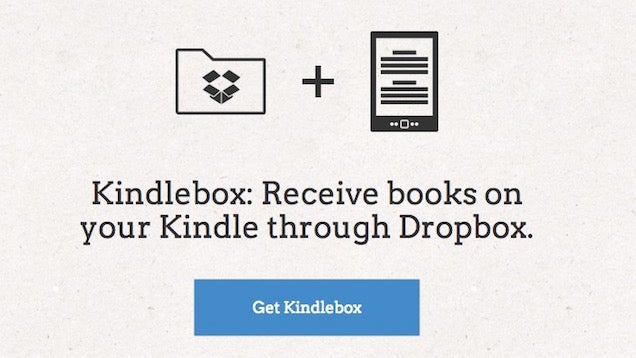
It's pretty easy to send just about anything to your Kindle, but if you're looking for an even more automated solution, Kindlebox does the job by linking a Dropbox folder to your Kindle and sending anything over automatically.
Once you authorize Kindlebox on both Dropbox and Amazon, you'll have a new folder in your Dropbox Apps folder. Put any PDF, MOBI, DOC, or other type of Kindle friendly file in there, and Kindlebox will send it over to your Kindle automatically. If you use both Dropbox and your Kindle a lot, this makes syncing the two up a lot easier. Unfortunately, you can't delete stuff directly from the Dropbox folder, but you can delete from your Kindle as normal.
Dropbox is now in the process of rolling out a new feature for mobile users that will let you open shared Dropbox links an email or in a browser right in the mobile app for Android and iOS. Opening a link directly in the Dropbox app allows you to get rich previews of documents and images and easily save files.
Sony appears ready to concede defeat in its effort to put its stamp on the digital future. CEO Kazuo Hirai broadly hinted that the company may sell off its struggling smartphone and smart TV operations as it focuses on more profitable—but generally much less exciting—parts of its business, Reuters reports.
"The strategy starting from the next business year will be about generating profit and investing for growth," Hirai said at a briefing. When pushed on what that means for Sony's phones and television sets, the CEO said he would not "rule out considering an exit strategy."
Like BlackBerry and Nokia, Sony has suffered a post-iPhone slump in smartphone sales, fighting for scraps in a market it once helped to define. As Sony Ericsson, the company's mobile communications arm had a string of successful feature phone handsets in the early 2000s. Then in 2007 the iPhone arrived, and Sony was slow to react; its first Xperia smartphone appeared in 2008, but the line was dogged by problems with software updates.
More recently, the Android-based Xperia line has gotten good reviews from users and the tech press. But the phones never sold well enough to make them a real business. That's an issue facing every smartphone manufacturer out there—except Apple, that is.
The story is similar in smart TVs. Sony does have a strong, high-profile effort in the field, but is again struggling against a slew of competitors in a market that still hasn't taken off.
It's not the first time that Sony executives have hinted they'd like to cut their losses in smartphones and televisions, although it's the strongest indication yet that 2015 might be the year for major change.
By contrast, Sony intends to double down on its camera-sensor and its PlayStation videogame units. Sony's sensors are used in many of the world's top smartphones, including the latest iPhone and iPad models manufactured by Apple.
Sony is restructuring as it tries to fight its way out of a devastating slump that's led to six years of net losses out of the past seven. Twelve months ago, the company sold off its Vaio PC division and axed thousands of jobs.
"The TV and Mobile Communications businesses operate in markets characterized by high volatility and challenging competitive landscapes," reads a statement released by Sony. The company says it will be looking to curtail risk, select territories and product areas carefully, and potentially link up with other firms to stem losses in these two categories.
Parmesan cheese has such a wide range of uses that it can be difficult to find a legitimate alternative for those on a plant-based or dairy-free diet. After all, it's hard to think of a texturally-similar topping that offers the same nutty, savory, and downright funky flavor properties that the aged cheese has.
Over at Serious Eats, J. Kenji López-Alt tackles this conundrum during his annual vegan month. He succeeds in his quest to find a Parmesan alternative when he stops looking for an imitation replacement of the product that replicates Parmesan's aged cheese flavor. Instead, he emerges with a topping that possesses a similarly intense burst of flavor and a pleasant texture but has an entirely different flavor profile.
The result — a ground mixture of olives, lemon zest, and miso paste — is a product that offers that saturated umami quality as well as textural interest and a long shelf life. It can be sprinkled atop everything that Parmesan is used for, and its flavor profile adds some variety to a sprinkled condiment world that's dominated by Parmesan cheese. Head to the article below for more, including the full recipe.
Ornithologist, Dennis Hlynsky, has been busy making some mind blowing videos of birds in flight. So whether you're interested in the whole flock, or just one, you can catch a trippy, Muybridge-esque video of flight patterns, or wing beats.
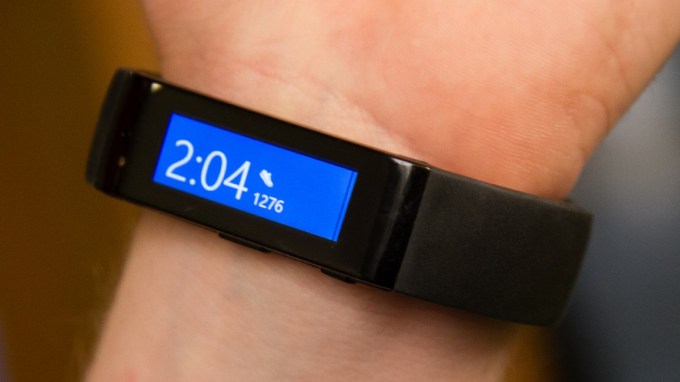 Microsoft is preparing to bring third-party apps to its Microsoft Band wearable platform. The company revealed today that it’s launching a Developer Preview SDK for the wrist-worn device, allowing third-party app makers to start to create apps for it, beyond the select partners, including MapMyFitness, that it already works with. Opening Band to third-party apps means not only making… Read More


 Is this the new Pebble? The company is set to unveil its next generation smartwatch tomorrow and the image above was just discovered on Pebble’s website. Rumors state that the next version will sport a new design and a color e-ink screen — just like the watch in this picture. Read More




 Created by Romanian software engineer Vali (also known as 0x4139), iFlix is a torrent client designed to stream any magnet link in an instant.





 The American National Security Agency (NSA), and the British Government Communications Headquarters (GCHQ), similar clandestine intelligence agencies, stole SIM card encryption keys from a manufacturer, allowing the groups to decrypt global cellular communications data. The effort, according to The Intercept, took place in 2010, with the agencies breaking into a Dutch firm, Gemalto. The… Read More





 The last year has been full of security breaches that have shown the importance of having strong safeguards for our data. As we put more personal and private information in the cloud, there are ever more avenues of attack to reach the things we’d like to keep to ourselves. One popular defense you can use to bolster data security on most services is two-factor authentication. Basically,… Read More


 In addition, Inbox now supports Firefox and Safari, as well as Chrome. You can sign in at inbox.google.com.
 As always, if you aren't using Inbox yet, now's a perfect time to jump in. Email inbox@google.com to request an invite and we'll email you as soon as more invites are available.