Shared posts

26 May 13:15

Charter buys Time Warner Cable to create America's second biggest cable provider

by James Vincent

Charter Communications is buying Time Warner Cable (TWC) in a deal that values the latter, larger company at $78.7 billion. The two firms will merge together under the newly created parent company New Charter, which will become the second biggest cable provider in the US after Comcast. A separate acquisition by Charter of the smaller cable company Bright House Networks for $10.4 billion means that the new company will soon have 23.9 million customers in 41 states.

The merger will still have to be approved by regulators

This is the fourth time Charter has tried to acquire Time Warner Cable in the last three years, with this week's deal only made possible after Comcast abandoned its own $45 billion merger with TWC due to resistance from...

Continue reading…

26 May 13:15

UK porn laws might mean ID checks with the post office

by James Vincent

The UK's plans to introduce mandatory age checks for viewing pornography online could involve verifying users' identities via third parties such as banks, mobile operators, credit agencies, or even the post office. The country's Conservative party pledged to introduce such age checks earlier this year, and following their recent re-election, discussions have reportedly begun between the technology industry and the government over ways to implement the checks.

Continue reading…

25 May 13:29

Debunking the myths of OCD

by Mark Frauenfelder
There’s a common misconception that if you like to meticulously organize your things, keep your hands clean, or plan out your weekend to the last detail, you might be OCD. In fact, OCD (Obsessive Compulsive Disorder) is a serious psychiatric condition that is frequently misunderstood by society and mental health professionals alike. Natascha M. Santos debunks the myths surrounding OCD.

24 May 18:57

An Exclusive Early Look At The New Google Photos App

by Liam Spradlin

pinwheel

We've been hearing for a very long time - virtually ever since Vic Gundotra left Google+, with more rumors springing up recently - that Photos would be splitting off from Google's social/sign-in platform. We've heard vague rumblings, and even seen some baby steps toward this split, but now we have something a bit more substantial to go on - an exclusive early look at Google's new Photos app, separate from Google+ and improved in a number of ways.

Read More

An Exclusive Early Look At The New Google Photos App was written by the awesome team at Android Police.


24 May 13:51

Amazon will finally start paying tax in the UK

by Cory Doctorow


The company will abandon the pretense that its UK sales are consummated in Luxembourg and that the money floats in a state of taxless grace in the middle of the Irish Sea. Read the rest

23 May 20:41

Hedge funds buy swathes of foreclosed subprimes, force up rents, float rent-bonds

by Cory Doctorow


When a giant hedge fund is bidding on all the foreclosed houses in a poor neighborhood, living humans don't stand a chance -- but that's OK, because rapacious investors make great landlords. Read the rest

23 May 13:50

OneClip Is Microsoft's Upcoming Cross-Platform Cloud Clipboard Service

by Rita El Khoury

microsoft-oneclip-icon

There's little doubt in anyone's mind that Microsoft has been marching forward with its cross-platform strategy over the past months. The company has been releasing more and more apps for Android and iOS, trying to spread its wings beyond its own operating systems and grab a few users across the pond. While some of these apps are the serious productive tools that we expect from Redmond, others have been quirky, experimental, and sometimes even wtf-worthy. That's not the case with OneClip.

Read More

OneClip Is Microsoft's Upcoming Cross-Platform Cloud Clipboard Service was written by the awesome team at Android Police.


23 May 09:31

Senate votes down USA Freedom Act, putting bulk surveillance powers in jeopardy

by Adi Robertson

In a midnight session, the Senate has voted down the USA Freedom Act, putting one of the legal bedrocks of the NSA's bulk surveillance programs into jeopardy. The Patriot Act is set to expire at the end of the month, and the USA Freedom Act would have extended large portions of the act in modified form. Tonight's failure to arrive at a vote makes it likely that many of those powers will automatically expire, although Senate Majority Leader McConnell (R-KY) scheduled a last-minute session on May 31st for one last shot at passing the bill.

In particular, the USA Freedom Act would have modified the Section 215 of the Patriot Act, a clause that allows the FBI to secretly order the collection of "tangible things" that could help in a...

Continue reading…

22 May 23:47

Cute little baby elephant falls asleep rather abruptly

by Xeni Jardin

The most delightful derp. (more…)

22 May 19:40

Playing a piano composition for right hand, to lull baby in left hand back to sleep

by Xeni Jardin
Such a sweet video, by pianist Paul Barton. Read the rest
22 May 19:40

On a live Walrus Webcam, watch partying pinnipeds gather in Alaska

by Xeni Jardin

Cannot stop watching. If I watch long enough, perhaps he will find his bukkit. Read the rest

22 May 12:46

Supergirl Pilot Leaks to Torrent Sites, Six Months Early

by Andy

supergirlAfter making an appearance as far back as 1958, Supergirl was intended to be a female counterpart to DC Comics’ Superman who first appeared 20 years earlier. While successful in her own right, she never quite reached the dizzy heights of the Clark Kent-based character.

This yeah, however, the world is braced for the return of Supergirl in a new CBS TV series. Featuring Melissa Benoist (Glee, Homeland, Law and Order) as Kara Zor-El, an alien who has hidden her powers since escaping from Krypton, the show will see her transform into Supergirl and “the superhero she was meant to be.”

After a commitment in September 2014, the series was officially picked up by CBS earlier this month. The pilot was scheduled to debut in November, but those plans have now massively unraveled after the episode leaked online, six months earlier than its planned debut.

Two ‘Scene’ release groups – DIMENSION and LOL – competed to premiere the title first this morning, with the latter beating the former by around 90 seconds. LOL’s version is a convenient 400mb so likely to become the most sought after copy. On the other hand DIMENSION’s is more than 15 times the size, but for 1080p connoisseurs it’ll be worth the wait.[Note: As some have pointed out, the two groups are connected, one releasing SD and the other HD]

Although it’s certainly possible that the pilot contains hidden watermarks, as far as visible identifiers go the 46 minute episode looks very clean. As illustrated by the image below, there are no tell-tale ‘property of’ warnings that are regularly seen on ‘screener’ copies of leaked movies.

supergirl-ss

The leak of the pilot came as a complete surprise a couple of hours ago so download stats on BitTorrent sites are a currently quite modest 25,000 or so. However, given the anticipated media snowball effect during the day the number of downloads is likely to increase dramatically, probably to more than a quarter million by this time tomorrow.

The Supergirl leak comes just weeks after the first four episodes of the new series of Game of Thrones leaked online. That event triggered a piracy crazy that continues to this day.

Whether more episodes of Supergirl will leak online in the days to come is unknown but in any event it seems likely that CBS will try to stem the current tide. The company is a prolific sender of DMCA takedown notices and regularly sends more than 100,000 each week to Google alone.

Update: Another pilot has leaked, this time of the forthcoming NBC TV series ‘Crowded‘. Leaked by the same groups (LOL and DIMENSION, which are connected) it is available in qualities up to 1080p. It runs for 22 minutes.

Supergirl trailer

Source: TorrentFreak, for the latest info on copyright, file-sharing, torrent sites and anonymous VPN services.

21 May 19:22

Why Chrome Uses So Much Freaking RAM

by Whitson Gordon

Why Chrome Uses So Much Freaking RAM

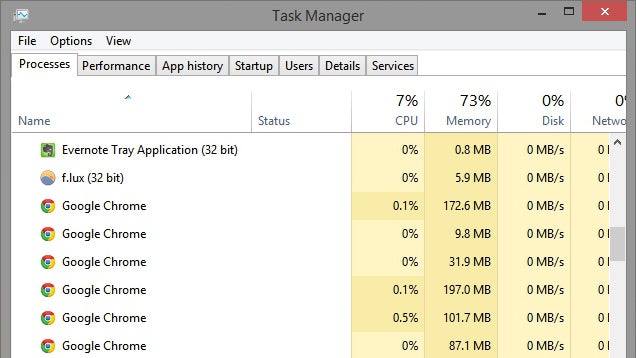
Chrome may be the best browser around, but it eats up your PC’s RAM like turkey on Thanksgiving. If you’ve ever looked at your task manager, you’ve probably flipped out at the sheer number of Chrome processes and the memory they hog. Here’s why Chrome uses so much RAM, and how to curb its gluttony.

What Chrome Uses All That RAM For
Why Chrome Uses So Much Freaking RAM

Web browsing has become more complex than people give it credit for. Think about it: When you’re using a computer, most of what you do takes place in your browser, from opening tabs to watching videos and using webapps or extensions that integrate with the rest of your machine. That’s a lot of stuff.

Chrome splits every tab, plugin, and extension into its own process, so that if one thing crashes—like Flash—it doesn’t bring down the whole web page, or all your tabs at once. This can lead to higher memory (aka RAM) usage, since it has to duplicate some tasks for every tab. But it also makes things a lot more convenient.

There are other things going on behind the scenes, too. Chrome’s prerendering feature, for example, can cause higher memory usage, but it also means your web pages load faster. Certain extensions or web sites may also leak memory, which won’t get “cleaned up” when you’re done with it, causing higher RAM usage over time.

And, of course, the more tabs, extensions, and plugins you have open, installed, and running, the more memory Chrome is going to use.

So yes, Chrome uses a lot of RAM, but it (mostly) does so with reason: your convenience. Most of us have become accustomed to lots of tabs and fast page loading, and the price we pay is measured in gigabytes of RAM. That’s not to say Chrome couldn’t use some memory optimization—it probably could—but this is likely the future of web browsing.

High RAM Usage Is Good (Usually)

Why Chrome Uses So Much Freaking RAM

Seeing that huge number in Task Manager’s Memory column may be shocking, but it’s also important to remember that free RAM is useless RAM. RAM exists for a reason: if your computer can store lots of stuff in its short-term memory, then it can recall those things quickly later on. And if your computer doesn’t end up needing that stuff, it will toss it away to make room for other programs that need those resources.

So, by that logic, having your RAM almost full can be a good thing. It becomes a bad thing when your RAM is constantly full and slowing down your system. If what you’re doing needs more RAM than your computer has to offer, it’ll start swapping some of that short-term memory to your computer’s hard drive, which is much slower.

In a nutshell: Don’t flip out just because Chrome is using lots of RAM. That means its doing its job. If it’s taking up so much RAM that things are noticeably slowing down, however, you do indeed have a problem.

How to Curb Chrome’s Gluttonous Appetite

So you know why Chrome uses lots of RAM, and you know that sometimes that’s okay. But if it’s causing slowdowns, you have two solutions: lower Chrome’s RAM usage or buy more RAM for your computer.

The latter is very easy to do on a desktop computer (provided you have the money), but much more difficult on laptops, where memory is often not upgradable. So, you’ll have to fall back on plan B: sacrifice some conveniences in order to save some RAM.

Find Out What’s Hogging RAM, and Close It
Why Chrome Uses So Much Freaking RAM

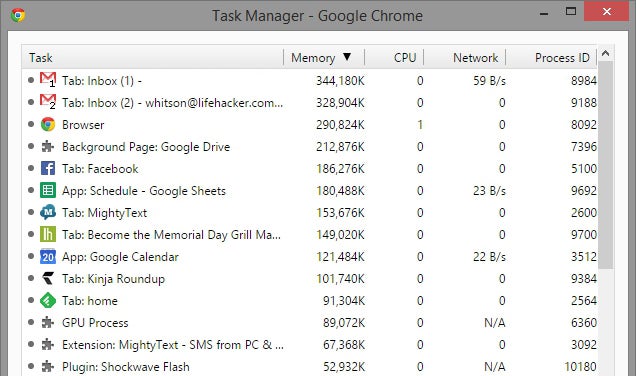
To start, open Chrome and press Shift+Esc (or, on a Mac, go to Windows > Task Manager). This will open Chrome’s own Task Manager, which will give you a more accurate look into how much memory each tab, plugin, and extension is taking up. You can click the top of the “Memory” column to sort it by highest RAM usage to lowest.

Once you do so, you should have a good idea where to start. Maybe you need to close those pinned Gmail tabs, or maybe that convenient extension isn’t really worth the RAM usage. If that’s the case, uninstall it from Chrome’s extensions page.

Keep Your Plug-Ins In Check with Click-to-Play
Why Chrome Uses So Much Freaking RAM

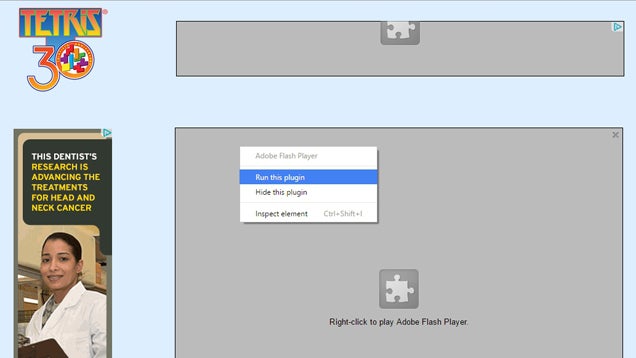
If plugins like Flash are taking up too much RAM, you may want to turn on Click-to-Play, which stops those plugins (which play videos, games, and ads) from loading until you click on them. To do this, head to Chrome’s settings page, click Content Settings, and select ”Let me choose when to run plugin content”. You can also set exceptions for certain sites (like YouTube, you probably always want Flash running) or certain plug-ins (like Chrome’s PDF viewer).

Curb Your Tab Usage with Memory-Freeing Extensions
Why Chrome Uses So Much Freaking RAM

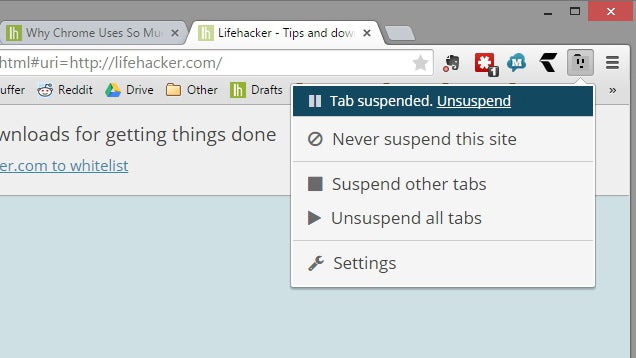
Of course, some of us are just too darn addicted to tabs (our support group meets Tuesdays and Thursdays). If that sounds like you, there are a few extensions that can help. Installing more extensions to curb your RAM usage may seem counterintuitive, but trust me, it can make a significant dent.

The Great Suspender is a very cool extension that “unloads” tabs after being inactive for a certain amount of time. They’ll still be there, in your tab bar, they’ll just take a little longer to load when you click on them, since Chrome’s reloading them from scratch. If you keep a lot of tabs open to come back to later in the day, this can be helpful.

Some folks also like OneTab, which performs a similar function, but without the automation. When you have a group of tabs you know you won’t need until later, you can click the OneTab button to close them all and open a single tab with links to each. That way, when you want to come back to them later, you can reopen them at will. This also reduces tab clutter, which is nice.

Play around with all of the above solutions and you’ll figure out which ones fit best into your workflow. Just know that, no matter what, you’ll have to make some sacrifices. Whether that means closing tabs, uninstalling extensions, or buying a new laptop is up to you.

Title illustration by Jim Cooke.

21 May 19:21

Carry your cat like a kangaroo in this adorable hoodie

by Laura Hudson
If you've been looking for a hands-free snuggling experience with your cat, a Japanese company has the answer. Read the rest
21 May 16:45

Former IMF chief economist on the problems with TPP

by Cory Doctorow

Tim Harford writes, "Simon Johnson is a fascinating character, former chief economist of the IMF and now scourge of bankers and lobbyists everywhere." Read the rest

21 May 16:41

Microsoft is overhauling Outlook.com with a new look and features

by Tom Warren

Microsoft is migrating its Outlook.com email service over to Office 365 soon, and with it will come a new interface and features. In a significant overhaul of Outlook.com, Microsoft is adding 13 new themes to its email service. While the look is familiar, it’s now more closely aligned to the look and feel of the upcoming desktop and Windows 10 versions of the Outlook app.

Most of the new features are centered around improving the overall email experience. Clutter is designed to sort messages you ignore into a separate folder to keep your inbox clean. Microsoft says Clutter will automatically learn which emails to filter out over time, and you can manually drag messages in and out of the Clutter folder to help train it. If email...

Continue reading…

21 May 16:39

Zen Puzzler Breath Of Light Mixes Basic Gravity Mechanics With Soothing Graphics And Music

by Michael Crider

unnamed (6)A good way to describe Breath of Light would be "ethereal." The soft, flowing music, abstract visuals, and odd lack of any kind of verbal or numerical user interface can almost lull you into a daze, which is an odd thing to say in praise of a puzzle game. And yet in a strange way it is a praise: the combination of music and visuals give Breath of Light that hard-to-define but nonetheless positive vibe of the best "zen" games.

Read More

Zen Puzzler Breath Of Light Mixes Basic Gravity Mechanics With Soothing Graphics And Music was written by the awesome team at Android Police.


21 May 14:23

GM says you don't own your car, you just license it

by Cory Doctorow


GM has joined with John Deere in asking the government to confirm that you literally cannot own your car because of the software in its engine. Read the rest

21 May 13:29

Google Study Shows Security Questions Aren’t All That Secure

by Frederic Lardinois
500995147_6c97aab488_o What is your favorite food? What was your first teacher’s name? What’s the name of your first pet? Do those questions sound familiar to you? If they do, it’s probably because you either have really boring and repetitive conversations or you’ve answered them as security questions when you signed up for a new account somewhere. They’re meant to provide an extra layer… Read More
21 May 13:01

The future of manufacturing will happen on your desktop

by Erin Lynch
The Pi-Top is an open source DIY laptop made using the latest in kitchen table manufacturing technology Read the rest
21 May 12:57

Smart Lock Now Notifies You When It Locks Your Phone After 4 Hours Of Inactivity

by Rita El Khoury

smart-lock-icon

Google has been rolling out updates to Smart Lock over the past months, adding On-body detection and Trusted voice, and while this recent change doesn't bring other options to the table, it does make the feature more user-friendly.

smart-lock-4h-notification

Previously, if you had set your Android phone or tablet to trust a certain place, Bluetooth device, or any of your physical attributes, it would keep your phone unlocked when those variables were in effect, but you'd still come across a secure lock screen if you left your handset untouched for a period of time.

Read More

Smart Lock Now Notifies You When It Locks Your Phone After 4 Hours Of Inactivity was written by the awesome team at Android Police.


21 May 12:56

NSA and allies planned to hijack the Google Play Store to install spyware on smartphones

by Rich Edmonds

Top-secret documents reveal that spy agencies from Australia, Canada, New Zealand, the United Kingdom and United States planned to implant spyware on mobile phones by intercepting data sent between app stores.

21 May 12:53

eBay tests subscription loyalty scheme to match Amazon Prime

by James Vincent

eBay is testing a customer loyalty program to rival Amazon's Prime initiative, offering buyers speedy delivery and free returns on items for an annual fee. The program reportedly dubbed eBay+ is currently being trialled in parts of Germany, with plans to roll out the service to the whole of the country scheduled for the second half of the year. The loyalty program is being tested with a handful of top-rated sellers, and although pricing has yet to be announced, it's thought that the annual subscription fee for buyers could be somewhere between €15 and €20 (around $17 to $22).

Participating sellers will get preferential treatment in search results

"Through this new program, sellers will have the opportunity to commit existing customers...

Continue reading…

21 May 12:52

QuizUp Just Turned Into A Social Network

by Jordan Crook
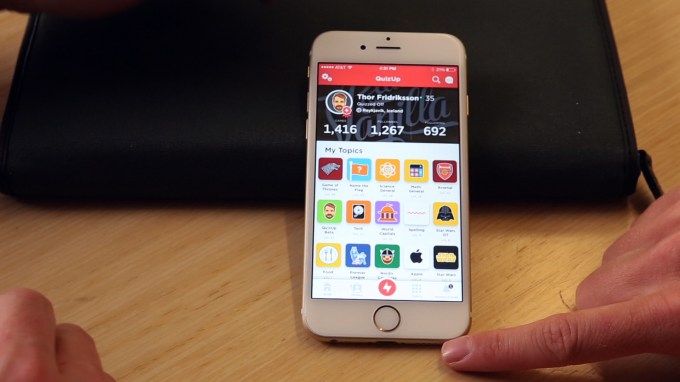
QuizUp Update 01 QuizUp is now a social network, by every stretch of the imagination. Following a massive update today, the trivia game that trail-blazed through the App Store in 2013, is now introducing true social functionality on a core level. QuizUp originally hit the scene after forging a deal with Lionsgate to offer Twilight-based trivia to users. It blew up, and the team slowly started adding out more… Read More
20 May 18:06

LA DWP says condo-dwelling couple owes $51,649.32 water bill

by Mark Frauenfelder

tapThe Los Angeles Department of Water and Power won't back down from insisting that a senior couple living in a condo used over $50,000 of water in a matter of months. They are threatening the couple with a service shut-off if they don't pay up. Read the rest

20 May 16:49

Spotify now does videos and podcasts

by Chris Welch

Spotify is no longer just a music service. On stage in New York City today, the company shared its new goal of finding the perfect content to accompany every moment in your day. CEO Daniel Ek said his company is taking a "massive leap forward" that "goes beyond the conventional formats." Ek and his fellow executives showcased a new version of Spotify that's more closely aligned with Songza, with playlists tailored for a listener's day. But it's not just limited to music; the new Spotify also brings podcasts to what was previously just a music app. And a new "video capsule" offers streaming video from partners like Comedy Central, Vice News, and The Nerdist. Essentially, Spotify wants to become your all-in-one jukebox. For everything.

...

Continue reading…

20 May 16:47

The Best Android Phones of 2015

by Phil Nickinson

What is it that makes a phone a great phone? There are a dozen measurable factors and a dozen more that are purely subjective. But in 2015 there are a lot of excellent choices for an Android phone, both flagship and entry-level. Simply put, these are the best Android smartphones you can buy.

20 May 16:46

Avoid Feeling Overwhelmed at Work With the “Four D's"

by Kristin Wong

Avoid Feeling Overwhelmed at Work With the “Four D's"

You likely know the stressful, frustrating feeling of having too much on your plate. Next time you’ve got too much to handle, try the Four D’s method: delete, defer, delegate or diminish one of your priorities.

Product Manager Jackie Bavaro makes this suggestion over at Asana. To better control your time, consider any of these four options next time you’re feeling overwhelmed.

  • Delete: Sometimes, you just have to say no to certain tasks. Of course, if someone gave you a responsibility, you want to let them know why it might not be the best use of your time. For example, I once had a client who asked me to send interview transcripts video for a video I was producing and editing. They didn’t use the transcripts for anything, and I didn’t think much of it at the beginning of the project. But after a while, I realized just how time consuming and pointless it was. All it took to delete this task was letting the client know.
  • Defer: Maybe you don’t have time now, but you will later. If so, deferring the task might be the best option. Just make sure to set a reminder to follow up on it.
  • Delegate: Can someone else take on this task? If so, it might be best to delegate. Bavaro suggests handing over the responsibility completely: “Now the teammate you delegated to can own both the ‘boring’ and cool parts of the project, and can take pride in seeing it through to completion.
  • Diminish: Maybe you can find ways to reduce the amount of time you spend on the task. Can you reduce the scope and tackle the most important parts of the project? Going back to my delete example, I actually asked the client first if I could only send him transcripts of what I used in the video. I tried to offer diminishing the task; luckily, he let me delete it.

Obviously, these aren’t options we didn’t already know existed. But in the heat of the moment, it’s an easy way to reference everything you can do to move something off of your plate.

For more tips, check out Bavaro’s full post.

How to Become a Master of Your Time | Asana via 99U

Photo by Phil and Pam Gradwell (to be).

20 May 16:44

FBI spies on tar sands opponents under banner of "national security"

by Cory Doctorow


They've followed Canada's RCMP in classifying tar sands opponents as threats to national security and fair game for intense surveillance. Read the rest

20 May 13:29

PayPal fined $25m for tricking users into credit program

by Rob Beschizza

A few months ago, I noticed that PayPal put a "pay later" button where the usual payment button would be. It's a tricky way to snooker users into the credit/debt treadmill, and PayPal has been fined for this fraudulent behavior, writes Josh Lowensohn.

Read the rest