Shared posts

22 Feb 12:57

Throwing Muses

by Ernie Smith
Throwing Muses

Throughout his entire 15-year playing career, NBA legend Rick Barry was a man without shame.

He won a lot of accolades for his play, and was a massively successful star. But he won that success, strangely, by using a style of shot that most people throw out before they reach middle school. See, Barry was an underhand free-throw shooter, and it worked really well for him: For every 10 free throw shots he attempted during his career in the ABA and NBA, he made about nine of them, a rate that was extremely impressive for its time.

There’s nothing stopping players from throwing their free throws underhanded, other than that it looks incredibly awkward. But a point’s a point, and you can’t argue with the results.

That appears to be something that Barry’s son Canyon Barry is taking to heart at the University of Florida. The New York Times reports that Canyon has similarly lived through the mockery and is making a whole lot of free throws by mimicking his dad’s “granny shot” style. Check out this shot of him playing with the College of Charleston in 2012:

And like his dad, you can’t argue with the results: After gaining confidence with the shot style, his shot percentage quickly improved, and this year, Canyon has a free throw percentage of 89.2 percent.

“The repetition has kicked in to where I feel like every time I step to the line, I should be making both of them,” he told the Times.

With a little help from his lineage, he’s shaping up to be an inspiration for people everywhere who look like idiots while successfully doing what they love.

22 Feb 12:48

No Comment

by Andrew Egan
No Comment

Editor's note: Back again for another round is Andrew Egan, who most recently brought us the story of Scatman John. Tonight, he tells us about his time digging in the menus on random DVDs. (By the way, a quick shout-out to Kenn Messman, who recently made a big donation to the site. Thanks!)

Today in Tedium: As the formats hosting our favorite movies, music, and games change, some things will be lost. (Sometimes, even the formats themselves.) By some estimates, 75 percent of silent films were never converted to more stable mediums. They are gone forever. On the bright side, most of it was crap unworthy of saving. But there were a few gems, like Charlie Chaplin's A Thief Catcher, though a copy was found in 2010. In an age of Gmail, Dropbox, and Netflix, people rarely worry about losing their favorite entertainment. One artform, inextricably tied to a dying format, is endangered—damn near extinction, even. Today's Tedium looks at the lost art of DVD commentary. — Andrew @ Tedium

153

The runtime, in minutes, of the 1998 film Armageddon. The Criterion Collection release of the film includes commentary (recorded separately) by Bruce Willis, Ben Affleck, and Jerry Bruckheimer.

No Comment

"I mean, this is a little bit of a logic stretch, let's face it." (Touchstone Pictures)

Ben Affleck’s Armageddon commentary shows just how epic audio commentaries can be

After the success and accolades of his breakout film, Good Will Hunting, Ben Affleck found himself in demand. Jerry Bruckheimer cast him as one of the leads in the popular but scientifically lacking blockbuster, Armageddon.

Despite these opportunities, Affleck found himself drinking to excess. Some time during this period, he was asked to provide commentary for one of the biggest films of his entire career. The result is amazing.

"I asked Michael (Bay, the film’s director) why it was easier to train oil drillers to become astronauts than it was to teach astronauts to become oil drillers," Affleck says over scene between Bruce Willis and Billy Bob Thornton. “He told me to ‘Shut the fuck up.’ So that was the end of that talk.”

(Affleck eventually went to rehab and worked with Bruckheimer and Bay again just a few years later.)

DVD commentary tracks offer unique insight into a film while giving fans a reason to buy multiple copies of the same movie. Behind-the-scenes featurettes were nothing new. Board cinematographers and actors had long filmed "making of" segments for their projects. Much of this was limited to film festivals and fan conventions.

No Comment

The release of the 1984 Criterion Collection Laserdisc edition of King Kong, however, offered a new take on a well-worn classic.

"I’m going to take you on a lecture tour of King Kong as you watch the film. The Laserdisc technology offers us this opportunity and we feel it's rather unique—the ability to switch back and forth between the soundtrack and this lecture track," said Ronald Haver, historian and film preservationist at the Los Angeles County Museum of Art.

This was the first documented use of commentary as a special feature on a movie, and it came about decades before the format that made it famous. First released in 1933, King Kong is the perfect film to pioneer the audio commentary phenomenon. The film’s influence on filmmakers, artists, and the general public is difficult to exaggerate. The film is so important that the 1984 Laserdisc edition was the second ever release by the now-venerated Criterion Collection, a company with a reputation for distributing classic and underappreciated cinema. (The first film released by Criterion, also on Laserdisc, was Citizen Kane.)

No Comment

A tour-de-force in method acting, one not broken even during the audio commentary. (Paramount Pictures)

The five most entertaining DVD commentaries you’ll ever find

  1. Edgar Wright and Quentin Tarantino, Hot Fuzz: Two major film geeks, Wright and Tarantino indulge in movie references while Tarantino praises Wright for the second of his Cornetto trilogy.
  2. Jack Black, Ben Stiller, and Robert Downey, Jr, Tropic Thunder: Downey remains in character throughout, fulfilling a promise his character made in the film, also Jack Black shows up late.
  3. Trey Parker and Matt Stone, Orgazmo: Parker and Stone watch their first movie while playing a drinking game they created.
  4. Unknown, Kung Pow: Enter the Fist: Rather than comment on the film, this track removed all characters' dialogue and replaced it with a single man reading all parts in a British accent.
  5. Harry Shearer, Christopher Guest, Michael McKean in character as Spinal Tap, This Is Spinal Tap: The band reunites to discuss their "documentary" and impact. The actors slide into their old roles quite well and never break character.

No Comment

Where does the art of audio commentary go next? Streaming services haven’t found a way to make it work

After finishing his work on the seminal cult series Mystery Science Theater 3000, Michael Nelson needed something to do. He needed it to be cheap, and it needed to play on his unique talent of providing humorous commentary to otherwise bad films.

Those circumstances helped spawn RiffTrax in 2006. Offering streams and downloads of their humorous commentary paired to popular releases and B movies, the company is trucking along, though it perhaps doesn’t have the profile of the show that inspired it. Some imitators are following in the MS3K and RiffTrax tradition and offering their own takes. Odds are, those kinds of commentaries won’t go anywhere.

On the other hand, the intimate commentary offered by the cast and crew might be disappearing forever as personal movie libraries continue to shrink.


Like what you‘re reading?

Consider subscribing to our freaking newsletter. We publish stuff like this twice a week.

Learn More, Hoser


Consumer spending on physical media such as DVDs and Blu-Rays has been falling steadily since reaching a peak in 2004. Sales of physical disks fell 10.9 percent in 2014 and 12 percent in 2015. And many of the special features used to market disks are not being picked up or used by major streaming services.

Netflix briefly introduced audio commentary for the first season of House of Cards. However, this is no longer available.

No Comment

A still showing commentary from House of Cards director and executive producer David Fincher.

Amazon released a version of Transparent with audio commentary by Jill Soloway, the show’s creator, and lead actor Jeffrey Tambor. So far, this is the only streaming show on Amazon Prime with audio commentary. Hulu, meanwhile, also offers commentary for one of its BBC co-produced original series, The Wrong Mans.

None of the larger streaming services offers commentary for licensed content, i.e. the things they didn’t create. Considering Netflix’s notoriously data-centric approach, their brief dalliance with commentary, and subsequent retreat, does not bode well for the future. (Netflix and Amazon did not respond to inquiries from Tedium. Fitting, considering the nature of the piece.)

Salvaging a lost film is hardaccording to the Film Foundation, it can cost between $80,000 to $450,000 to preserve a full-length feature film with color and sound.

But films have always had their saviors, no matter how unlikely they might be. Hugh Hefner, for example.

An epic episode of MTV’s Cribs is dedicated to the features and amenities of the Playboy Mansion. In between the garage and the not-so-subtle shots of buxom beauties, one spare detail shined in the episode: Hef fucking loves movies.

Hefner, with his roughly 20,000 DVDs and film prints, is a serious film scholar, complete with a film institute at the University of Southern California.

The Cribs crew managed to catch Hefner at an interesting time in his archives. They were in the process of converting his entire collection from VHS into DVD. And if you watched the clip above, you’ll notice that Hef said "most of ’em".

The question, when it comes to this sort of preservation, then, is this: Will interest in obscure films extend to these for-the-fans commentaries?

Those of us of a certain age might recall the time and patience required to burn a CD or create a digital copy. Tech in 2017 can tackle these processes in short order, but across the entirety of media, complete conversion to modern formats doesn’t often make much economic sense. Which is a shame, because many of the special features used to market DVDs might be gone forever.

Much like with retro video games, the ultimate savior might be piracy.

While commentary and other special features may not be readily (or ever) available on Netflix and Amazon, they will still be found on YouTube, torrents and places like RiffTrax, only sought by maniacal aficionados obsessed with every detail of their favorite movies and TV shows.

To be honest, that was probably the case from the very beginning.

Andrew Egan is writer and editor of Crimes In Progress. His work has appeared in Forbes Magazine, ABC News, Atlas Obscura, Tedium, and more. He is a graduate of the University of Texas at Austin. His novel, Nothing Too Original, is available now for Kindle and paperback. You can visit his website at CrimesInProgress.com.

21 Feb 19:22

View the Most Damaging WikiLeaks, All on One Tidy Website

by Joel Lee
hillary-email-wikileaks

WikiLeaks is one of the most important things to have happened on the internet. Whether you support the idea or not, or whether you believe WikiLeaks is credible or not, nobody can deny that WikiLeaks has raised a lot of uncomfortable questions regarding ethics, politics, biases, and privacy. But is WikiLeaks credible? Maybe, maybe not. If it isn’t, one has to wonder why governments want to silence and block access to the site. For the sake of argument, let’s assume that it is indeed credible. The real problem with an infodump like WikiLeaks is that you have to comb through...

Read the full article: View the Most Damaging WikiLeaks, All on One Tidy Website

21 Feb 19:22

The 5 Best YouTube Playlist Downloaders to Grab Videos in Bulk

by Dan Price

We know what you’re thinking: “Why would I want to download a YouTube playlist?” It’s a fair question—after all, we live in an age where everything from your phone to your fridge has an internet connection. We can get any video we want in a matter of seconds.

It boils down to one point—saving data. If you want to download a whole TV series to watch when you’re traveling, or perhaps a playlist of videos about a hobby or a foreign language, it makes sense to download the files on your desktop then save them onto your mobile device. YouTube uses a lot of data, after all.

Here are some of the best YouTube playlist downloaders.

1. 4K Video Downloader

4K Video Downloader app

Available On: Windows, Mac, Linux

Lots of video downloading apps are saturated with adware, spyware, and aggressive toolbars. 4K Video Downloader is one of the few exceptions. The free version of the app is ad-supported, but the ads are few and far between and in no way annoying.

And it does a whole lot more than merely download playlists. You can download entire channels with a single click, ask the app to automatically download new videos from individual channels as soon as they become available, and even download YouTube’s new 3D and 360-degree videos.

One of its noteworthy features is the ability to download any associated subtitles. You can either embed them into the video file itself or save them as a separate SRT file. The videos themselves can be saved as MP4, MKV, M4A, MP3, FLV, or 3G.

If you decide to download a playlist, the app with automatically generate an M3U playlist file so you can easily play your content in sequence on an app. The downloading process is simple; just paste a YouTube link into the main window and let the app do its thing.

The app also supports downloading videos from other popular sites such as Vimeo, Facebook, and DailyMotion.

A premium version removes ads, provides channel subscriptions, and unlimited downloads.

2. Gihosoft TubeGet

gihosoft download youtube

Available On: Windows, Mac

Like 4K Video Download, Gihosoft TubeGet covers a whole lot more than just a way to download playlists from YouTube.

The app supports more than 10,000 sites, including Facebook, Dailymotion, Vimeo, Metacafe, Break, Veoh, and Blip.tv—though the additional sites are only available in the Pro version.

The app can download single videos and entire playlists. To download a playlist, just grab its URL and click +PasteURL in the top left-hand corner of the screen.

You’ll then be prompted to choose either the format (MP4, WebM, 3GP, FLV, AVI, or MKV) and the quality (4K, 1440P, 1080P, 720P, 480P, 360P, or 240P). When you’re ready, click Download. The app will download up to five videos at a time. On the free version of the app, download speed is limited to 4Mbps.

If you’ve got a slow internet connection but want to download a large playlist, don’t worry. You can limit the download speed so it does not interfere with any other online activities you’re working on.

Lastly, the app also includes an MP3 extraction tool; it’ll let you save the audio of a video without needing to download the whole video file. Again, the MP3 tool is only available in the Pro version.

3. VLC Media Player

Available On: Windows, Mac, Linux

Did you know you can use VLC Media Player to save YouTube videos? The process is not as simple as using a dedicated third-party app, but if you’re averse to installing yet more software on your machine, it’s a good option.

To begin, fire up the app and head to Media > Open Network Stream. Paste the URL of the YouTube video you want to download and hit Play.

After the video begins, go to Tools > Codec and copy the link in the Location box.

Paste the link into your browser and press Enter. Once again, the video will start playing automatically. Right-click on the video and select Save Video As.

If you’re interested in learning about some of VLC’s other hidden features, check out our article with six top tips.

4.YouTube By Click

youtubebyclick app

Available On: Windows, Mac

It’s not as polished as the other apps, but YouTube By Click is still a great way to download YouTube playlists onto your computer.

One of the app’s best features is its autodetect. If the app is running in the background and you copy the URL of a YouTube playlist, YouTube By Click will automatically recognize it and offer to download it.

Along the top of the app’s window, you can choose the destination folder for your downloads, whether you want to download the video (MP4) or just the audio (MP3), and the quality of the video.

There’s also a premium version of the app. It costs $9.99 for a one-time license and adds features such as high definition downloads, subtitle downloads, additional video format options, and a ringtone creator.

5.Tubegeter

tubegeter price

Tubegeter is a paid YouTube playlist downloader. It lets you save entire YouTube playlists and channels in MP4, MKV, M4A, MP3, and 3GP.

Because its a paid app, you also get a few other features that you won’t see elsewhere. They include a way to extract YouTube subtitles, 4K downloads, 360-degree video downloads, a video converter tool, and even a smart mode for automated future downloads.

Three different price plans are available. The Basic plan is $10.99 per month. It includes unlimited videos per session, unlimited playlists per session, and unlimited channels per session. The top plan is Ultimate. It costs $15.99.

How Do You Download YouTube Playlists?

The five tools we have discussed in this article will all let you download YouTube playlists so you can take the videos on-the-go and watch them when you’re offline.

If you would like even more information about downloading web videos, you should check out our articles on how to download videos from DailyMotion and how to download videos from Instagram.

Read the full article: The 5 Best YouTube Playlist Downloaders to Grab Videos in Bulk

21 Feb 19:20

5 Interesting New Photo Viewing and Editing Apps to Download

by Mihir Patkar
interesting-image-editing-apps

When you think of editing images, Adobe Photoshop is the first name to pop into anyone’s head. But it costs a pretty penny and might not be worth it for a lot of regular folks. Thankfully, there are good free alternatives. Recently, the world of photo-editing programs has seen several new contenders crop up, both on desktop and mobile. And we don’t just mean apps to turn photos into paintings. From open-source creations that mimic Photoshop’s best abilities to simple viewers with basic editing tools, here are five free apps you should check out. 1. Krita (Windows, Mac, Linux): Free...

Read the full article: 5 Interesting New Photo Viewing and Editing Apps to Download

21 Feb 18:18

Turkey Call Basics

by Florida Sportsman

With turkey season here and in full swing, knowing how to call birds in is a must. Forum member mcnallyoutdoors posted a very informative video on his YouTube channel showing the use of slate turkey calls. Preston Pittman shows some tips and techniques to help new turkey hunters get their call down!

21 Feb 17:35

The Great American Streetcar Myth

by Stephen Smith

Most people are familiar with a twisted version of history in which streetcars were destroyed by evil car and oil companies. Perhaps it is because of their own complicity that progressives omit the true reasons for the streetcar's demise.

21 Feb 16:57

What’s in My Bag? — Marcel Dufresne

by claudia

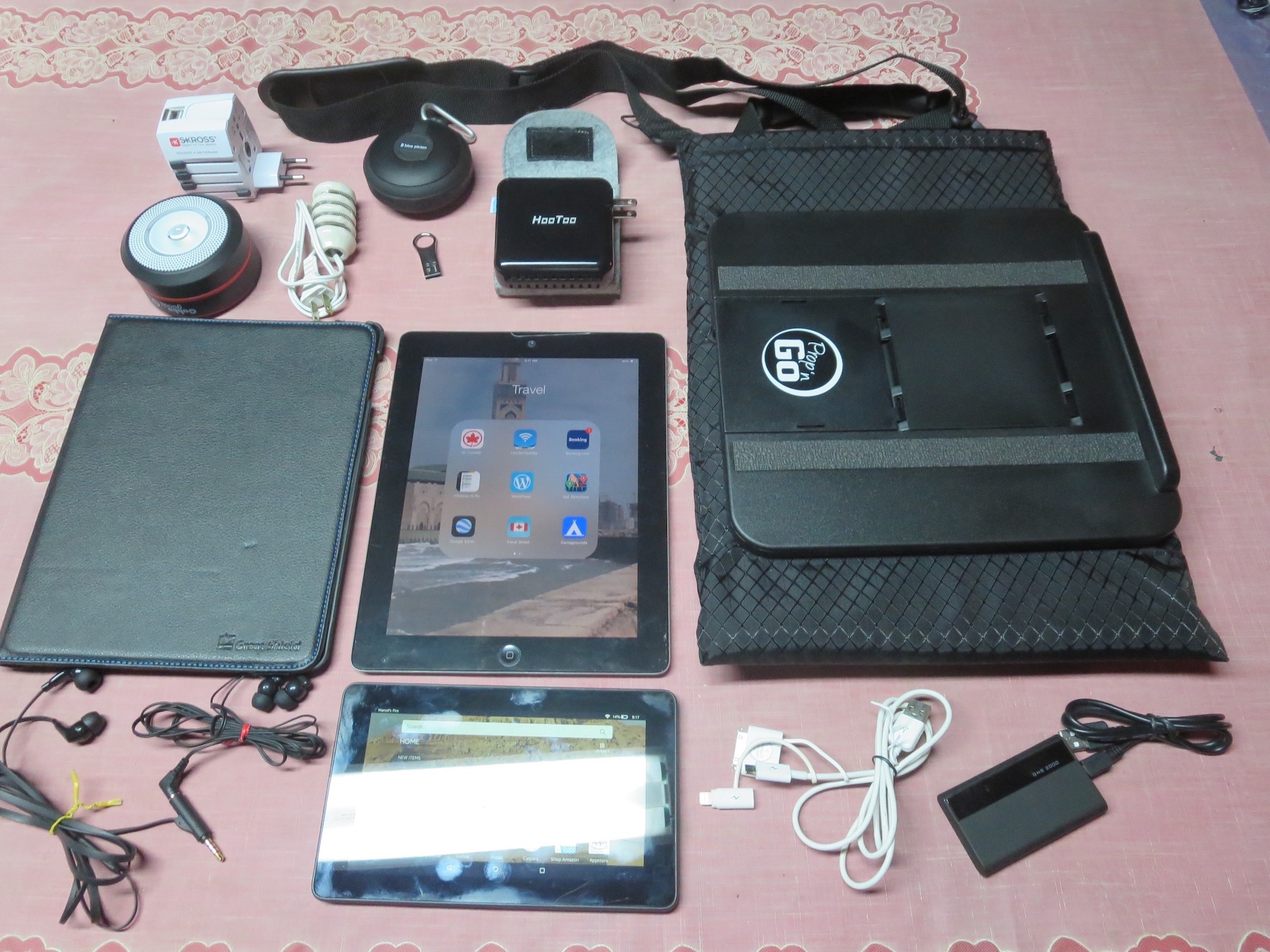
These are the contents of my gadget bag when my wife and I go traveling. The contents vary somewhat depending on whether we are camping or traveling outside of North America. All the items in the photo I would consider an essential part of our time away from home.

The bag:

Propandgo
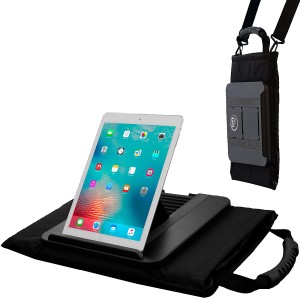
Prop ’n Go Tote ($50)
This bag has enough room to hold all the items (most of them are flat and take up little space). The bag has some padding to keep the contents somewhat protected. There is a small pouch at the top that keeps all the cables and then GNS 2000 (below). Best of all, it allows me to position the iPad at whatever angle I need for comfortable use while reclining.

What’s inside the bag:

Ipad
iPad (Varies)
The iPad is the most important item for me. There are too many uses to list here. I use an old case with it to protect the front glass while in transit.

Amazon Fire
Fire Tablet ($40)
The Amazon Fire is my wife’s ebook reader, as well as email and surfing tool. She needs her own as I am usually using the iPad and not willing to share.

HooToo
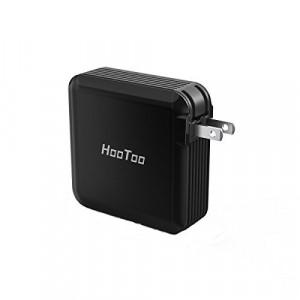
HooToo TripMate Elite Wireless Router ($30)
The HooToo Elite serves many functions. It is a charging plug and a spare battery pack. I store movies on my thumb drive and use the Elite to wirelessly connect it to my iPad (no internet needed). Lastly, it is a Wi-Fi booster. The thumb drive I carry is an F80 32G drive from Silicon Power ($19). It is lightweight but very sturdy, being totally metal. There are no caps to worry about and it is supposedly water resistant (have not tried this out). These two items sit in the convenient storage case that comes with the Elite.

3-1 charging cable
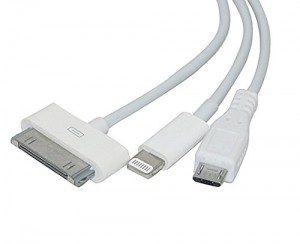
3 in 1 charging cable ($7)
The 3 in 1 charging cable cuts down on the number of cables I carry. I can use it to charge the iPad, the Fire and my bluetooth speaker.

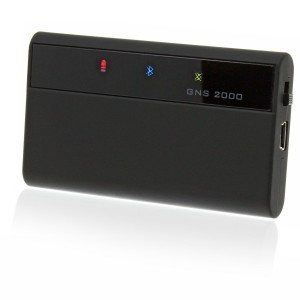
GNS
GNS 2000 GPS ($85)
The GNS 2000 is my offline GPS system. It connects via bluetooth to my iPad (which does not have GPS capabilities) and serves to get us around. It enables any map app on my iPad to show our immediate location.

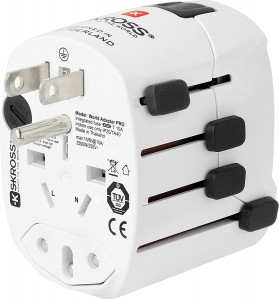
Skross
Skross World Travel Adapter ($40)
The Skross world travel plug is an absolute necessity if travelling abroad. It also has a couple of USB charging slots.

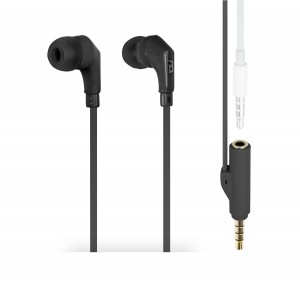
Tune
tuneFRĒQS Share headphones ($30)
The tuneFRĒQS Share headphone cable can by used separately or with my wife’s headphones plugged into it. We can listen to podcasts together at the airport. It also has an on/off button to quickly control the broadcast.

Now for some less used items:

Blue Piston
Logiix Blue Piston Element Speaker ($50)
This bluetooth speaker has my whole music library stored via a micro SSD card. It is water resistant and perfect to carry along. It also serves as an iPad speaker when needed.

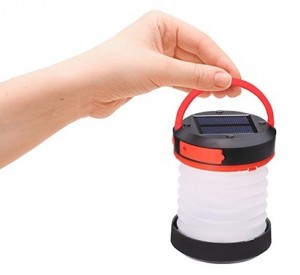
Solar Power Lantern
Solar lantern ($17)
A solar lantern is a great flashlight to carry along. I don’t have to worry about batteries for it. I use it to read from late at night when I don’t want to disturb my wife. The placement of lights in hotel rooms is not always suitable.

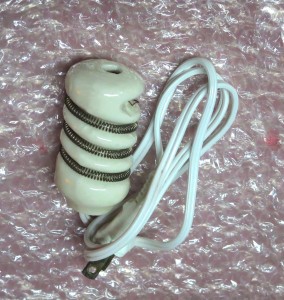
electroc teacup heater
Portable immersion heater (varies)
Lastly, there is an electric teacup heater. It will heat up a cup of water in no time at all. I picked this item up at a small hardware store in South America.

-- Marcel Dufresne

[Cool Tools Readers! We will pay you $50 if we run your "What's in My Bag" story. Send photos of the things in your bag (and of the bag itself, if you love it), along with a description of the items and why they are useful. Make sure the photos are large (1200 pixels wide, at least) and clear. Use a free file sharing service to upload the photos, and email the text to editor@cool-tools.org. ]

21 Feb 03:20

Horrible Stories of Children in Restaurants

by Jill Harness

I'm far from the person who believes no one should take children to a restaurant as I've seen plenty of well behaved kids eating out, but we've all seen those monster children at restaurants whose parents completely ignore them. But the worst kid you've ever seen while dining out probably doesn't compare at all to the terrible youngsters in this Thrillist article. While all the stories are pretty good, the last one really emphasizes how terrible some parents are while dining out with their offspring: 

"I was way too busy to take time away from my other tables to escort this girl to the bathroom and I also did not really feel comfortable taking a young child and 'helping her' in the bathroom. I mean, what if this involved wiping and such? I let her know that I was sorry, but I needed to start bringing the food out for the table and did not have time to help her daughter. I should add that, at least to appearances, there was no obvious physical disability that would have prevented this lady from taking her own daughter to the bathroom. Not to mention, there are 13 other people at the table -- who know this child to some extent -- who could also have helped if needed.

And that's just the beginning of the awfulness. You can read the rest of the story -and all the others at Thrillist.

21 Feb 03:16

Why You Can Eat Raw Fish But Not Other Raw Meats

by Kristin Wong

Raw fish is pretty tasty if you like sushi, but eating other raw meats is a terrible idea. The parasites and bacteria in some raw meat, like pork or chicken, are a lot more dangerous than the bacteria in fish. SciShow breaks it down.

Read more...

21 Feb 03:14

Smart Smoking: Build a Long-Lasting Charcoal Fire

by Nancy Loseke

Planet Barbecue’s most accomplished pit masters are what Steven calls “process-oriented.” In other words, the convenient push-button ignition and regulated fuel flow of gas and pellet grills and smokers hold little allure for them. They take immense pride in building a noble fire with wood and/or charcoal and maintaining it for the duration of the smoke session, sometimes dusk to dawn (or until the beer runs out).

But the other night—as in the middle of the night—it occurred to me, as I pulled jeans over my sleep pants, why so many Hall of Famers are Southerners: They don’t have to leave their warm beds in 20 degree temperatures or slog through 18 inches of snow to feed the fires.

Of course, there are reasons beyond creature comfort for wanting to prolong the burn. Maybe you promised to bring brisket to work in the morning and can’t afford to stay up all night. Or it’s a workday, but guests are coming at 6 p.m. for your famous pulled pork.

Fortunately, there are several methods for building a fire capable of sustaining itself for several hours, anywhere from 6 to 18. All are covered in Steven’s terrific book, Project Smoke. Here is a summary.

The Ember Spread Method: Intersperse unsoaked wood chips or chunks among the unlit charcoal. Place a paraffin fire starter in the center and position 3 coals over it. Light the starter. Once the 3 pieces of charcoal are lit, close the lid and adjust the vents to obtain a temperature of 225 to 250 degrees. The lit coals will gradually ignite the unlit coals and wood giving you a slow, steady burn and hours of smoke.

Top down burn

The Top-Down Burn Method: Here’s another great way to achieve a protracted burn, and it works with both lump charcoal and briquettes. Arrange three-quarters of the charcoal in the firebox, interspersing it with unsoaked wood chunks or chips. Light the remaining coals in a chimney starter. Pour the lit coals on top of the unlit coals, arranging a few more wood chunks or chips on top. The lit embers will gradually light the remaining coals from top to bottom.

The Minion Method: Similar to the Top-Down Burn Method above, the Minion method is associated with a competition barbecuer named Jim Minion. He always uses briquettes, about eight pounds. Fill the firebox with unlit coals, interspersing them with unsoaked wood chips or chunks. Create a depression in the briquettes. Arrange a few (four to six) lit embers on top. Burns using this method can last 8 to 12 hours.

The Snake Method: Arrange your charcoal in a thick C-shaped coil around the periphery of the charcoal grate of your kettle grill or water smoker. The coil should be about three coals thick. Sprinkle the top of the coals with wood chips or place wood chunks on the coil at intervals. Using an electric fire starter or a blowtorch, light three or four coals at one end. (Alternatively, place lit coals at one end using tongs.)

A variation on the snake method is the Domino or Fuse Method where you make a circle or coil of briquettes in a single orderly row, each briquette stood on end and leaning against the next one in the series (like a row of dominos) with wood chips sprinkled on top or wood chunks arranged at intervals. This method is great for maintaining cold smoking temperatures for several hours.

TIPS:

  • Don’t pile charcoal too deep in the firebox or the ash can choke out the fire. Two coals deep is sufficient.

  • Regardless of which method you use, know that a number of factors will influence burn time. Among them are wind, outside temperature, the thickness of your grill/smoker walls, and the type of fuel you use.

  • Charcoal briquettes are usually formulated to burn for about 1 hour at a steady temperature, generally hotter than smoking temperatures. There are differences between brands, so in the interest of fire management, it’s helpful to find a brand that works for you and stick with it. Ditto for lump charcoal, which being a natural product, is less predictable. A good online resource for comparing brands of both is nakedwhiz.com.

  • Once you’ve set up your grill or smoker using one of the methods described above, adjust the vents, then close the lid. Avoid the temptation to keep checking on the fire or repeatedly chasing specific temperatures with the vents. Have patience. Make adjustments only when it’s clear the temperature is too high or too low.

  • A long-range remote thermometer, preferably Bluetooth enabled, is a handy tool if you routinely do long cooks. We like this one from Maverick.

upsell-may-16-630

The post Smart Smoking: Build a Long-Lasting Charcoal Fire appeared first on Barbecuebible.com.

21 Feb 02:58

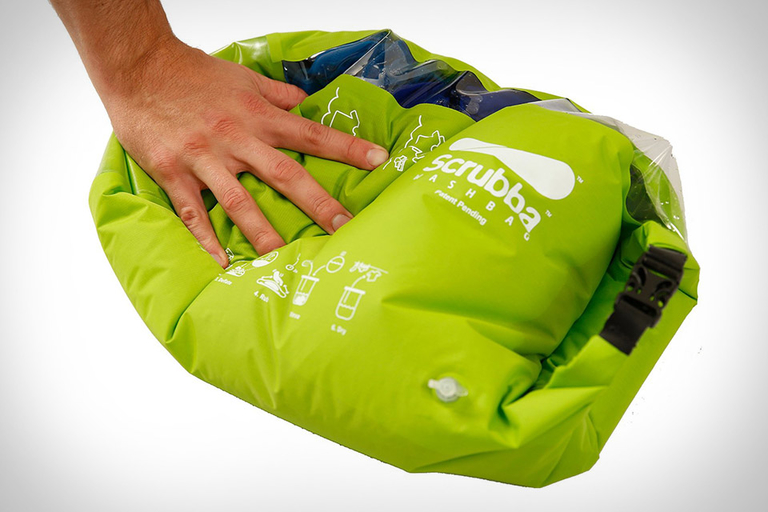
Scrubba Laundry Washing Bag

Your clothing is portable. Your washing machine is not. The Scrubba Laundry Washing Bag fixes this. Made from microbial- and hydrolysis-resistant TPU, it has hundreds of nubs on the inside...

Visit Uncrate for the full post.
21 Feb 02:57

When Darkness Falls

When Darkness Falls
Since its inception in 1962, racers and spectators have made their way to the Daytona International Speedway for one of sports' most grueling endurance races. The 24-hour event takes place...

Visit Uncrate for the full post.
21 Feb 02:54

Stop Doing Conference Calls And Use YouTube Instead

by Wes Gay, Under 30
Video is rapidly becoming our primary communication tool. So why not use it for your team?
21 Feb 02:51

‘Abstract: The Art of Design’ is a Must-Watch Netflix Show for Photographers

by DL Cade

If you appreciate visual art and aesthetics—and, if you’re reading PetaPixel, chances are good that you do—then you absolutely must watch the new Netflix original docu-series “Abstract: The Art of Design.”

The newly minted 8-episode series follows “eight of the most creative thinkers and imaginative minds working in the world of art and design today,” and ever since it came out on Netflix we’ve been receiving email, after tip, after Facebook message about it. Now that we’ve gotten around to actually watching it, we could not recommend it more highly.

Even though only one of the eight episodes follows a photographer—world-famous portrait photographer Platon—all eight are worth binge watching your way though immediately. They will give you a new appreciation for the creative process, inspire you to take your own work to the next level, and leave you amped up to go out and create something new right away.

There’s not much more we look for from a documentary series, much less one that isn’t even about photography in particular, but about the much broader pursuits of “design” and “art.” Check out the series trailer up top; if you’re a Netflix subscriber, you can watch all 8 episodes right now at this link.

21 Feb 02:49

How to Run a Rogue Government Twitter Account With an Anonymous Email Address and a Burner Phone

by Micah Lee

One of the first things Donald Trump did when he took office was temporarily gag several federal agencies, forbidding them from tweeting.

In response, self-described government workers created a wave of rogue Twitter accounts that share real facts (not to be confused with “alternative facts,” otherwise known as “lies”) about climate change and science. As a rule, the people running these accounts chose to remain anonymous, fearing retaliation — but, depending on how they created and use their accounts, they are not necessarily anonymous to Twitter itself, or to anyone Twitter shares data with.

Anonymous speech is firmly protected by the First Amendment and the Supreme Court, and its history in the U.S. dates to the Federalist Papers, written in 1787 and 1788 under the pseudonym Publius by three of the founding fathers.

But the technical ability for people to remain anonymous on today’s internet, where every scrap of data is meticulously tracked, is an entirely different issue. The FBI, a domestic intelligence agency that claims the power to spy on anyone based on suspicions that don’t come close to probable cause, has a long, dark history of violating the rights of Americans. And now it reports directly to President Trump, who is a petty, revenge-obsessed authoritarian with utter disrespect for the courts and the rule of law.

In this environment, how easy is it to create and maintain a Twitter account while preserving your anonymity — even from Twitter and any law enforcement agency that may request its records? I tried to find out, and documented all my steps. There are different ways to accomplish this. If you plan on following these steps you should make sure you understand the purpose of them, in case you need to improvise. I also can’t guarantee that these techniques will protect your anonymity — there are countless ways that things can go wrong, many of them social rather than technical. But I hope you’ll at least have a fighting chance at keeping your real identity private.

For this exercise, I decided to pick a highly controversial political topic: Facts. I believe that what we know about reality is based on evidence that can be objectively observed. Thus, I created the completely anonymous (until publishing this article, of course) Twitter account @FactsNotAlt. Here’s how I did it.

Threat model

Before we begin, it helps to define a threat model, that is: what we need to protect; who we need to protect it from; what their capabilities are; and what countermeasures prevent or mitigate these threats.

Basically, it’s impossible to be completely secure all the time, so we need to prioritize our limited resources into protecting what matters the most first. The most important piece of information you need to protect in this case is your real identity.

Law enforcement or the FBI might launch an investigation aimed at learning your identity. It may be to retaliate against you — getting you fired, charging you with crimes, or worse. Your Twitter account might also anger armies of trolls who could threaten you, abuse you with hate speech, and try to uncover your identity.

If the FBI opens an investigation aimed at de-anonymizing you, one of the first things they’ll do is simply ask Twitter — and every other service that they know you use — for information about your account. So a critically important countermeasure to take is to ensure that none of the information tied to your account — phone numbers, email addresses, or IP addresses you’ve used while logging into your account — lead back to you.

This is true for all accounts you create. For instance, if you supply a phone number while creating your Twitter account, the phone service provider associated with that number shouldn’t have information that can lead back to you either.

Another concern: The FBI also might go undercover online and try to befriend you, to trick you into revealing details about yourself or to trick you into clicking a link to hack you. They might make use of informants in the community of people who follow you on Twitter as well. Organized trolls might use the same tactics.

Hiding your IP address with Tor

An IP address is a set of numbers that identifies a computer, or a network of computers, on the internet. Unless you take extra steps, every website you visit can see your IP address. If you’re using Twitter while connected to your home or office Wi-Fi network, or your phone’s data plan, Twitter can tell. If they hand these IP addresses to the FBI, you will very quickly lose your anonymity.

This is where Tor comes in. Tor is a decentralized network of servers that help people bypass internet censorship, evade internet surveillance, and access websites anonymously. If you connect to Twitter while you’re using Tor Browser, Twitter can’t tell what your real IP address is — instead, they’ll see the IP address of a random Tor server. Tor servers are run by volunteers. And even if any of the servers bouncing your data around are malicious, they won’t be able to learn both who you are and what you’re doing.

This is the primary benefit that Tor has over Virtual Private Network, or VPN, services, which try to help users hide their IP addresses. The FBI can go to a VPN service to learn your real IP address (assuming the VPN keeps a record of its users’ IP addresses, and cooperates with these requests). This isn’t true with Tor.

To get started with Tor, download Tor Browser. It’s a web browser, like Chrome or Firefox, but all its internet traffic gets routed over the Tor network, hiding your real IP address.

Using Tor Browser is the easiest way to get started, but it’s not perfect. For instance, a hacker who knows about a vulnerability in Tor Browser can discover your real IP address by tricking you into visiting a website they control, and exploiting that vulnerability — the FBI has done this in the past. For this reason, it’s important to always immediately update Tor Browser when you get prompted.

You can also protect yourself from Tor Browser security bugs by using an operating system that’s designed to protect your anonymity, such as Tails or Qubes with Whonix, (I’ve written about the latter here). This is more work for you, but it might be worth it. Personally, I’m using Qubes with Whonix.

Getting an anonymous email address

Before you can create nearly any account online, you need an email address. While popular email services like Gmail or Yahoo Mail let anyone make an account for free, they don’t make it easy to do so anonymously. Most of them require that you verify your identity with a phone number. You can in fact do that anonymously (more on that below), but I prefer using an email provider that is happy to give addresses to anonymous users.

One of these providers is SIGAINT, a darknet-only service that forces all its users to login using Tor to read or send email. The people who run it are anonymous and it contains ads for (sometimes very sketchy, sorry) darknet websites. However, you do end up with a working, anonymous email address.

Update: Feb. 20, 3:10 p.m. ET
The SIGAINT service appears to be down right now. While it’s down, you can try Riseup, or set up a burner phone and then try ProtonMail, Gmail, or some other service instead.

If you prefer not to use SIGAINT, another good choice is Riseup, a technology collective that provides email, mailing list, VPN, and other similar services to activists around the world. Accounts are free, and they don’t ask for any identifying information, but you do need invite codes from two friends who already use Riseup in order to create an account.

Yet another option is ProtonMail — a privacy-friendly email provider based in Switzerland that asks for minimal identifying information and works well over Tor. However, to prevent abuse, they require Tor users to provide a phone number (that they promise not to store) to receive an SMS during account creation. So, if you’d like to use ProtonMail instead (or any other email service that requires a phone number when creating an account over Tor), follow the steps below to create an anonymous phone number first.

I decided to use SIGAINT. In Tor Browser, I went to SIGAINT’s onion service address, sigaintevyh2rzvw.onion, which I found on their public website. This is a special type of web address that only works in Tor Browser, and not the normal internet. From there, I filled out the form to create a new account.

That’s it. I’ve now created a brand new anonymous email address: factsaretrue@sigaint.org.

Getting an anonymous phone number

While attempting to create a Twitter account, I quickly hit a snag. Even if I provide my (anonymous) email address, Twitter won’t let me create a new account without first verifying my phone number. (You might get lucky and get the option to skip entering your phone number — it doesn’t hurt to try — but if you’re coming from a Tor node that isn’t likely.)

This is a problem, because I obviously can’t use my real phone number if I want to remain anonymous. So to proceed, I needed to figure out how to get a phone number that isn’t tied to my actual identity. This is a common problem when trying to stay anonymous online, so you can follow these instructions any time you need a phone number when opening an account.

There are other ways to do it, but I chose a conceptually simple option: Buy a burner phone anonymously, use it to verify my new Twitter account, and then get rid of it. I wandered around downtown San Francisco looking in convenience stores and pharmacies until I found what I was looking for in a 7-Eleven.

Using cash, I bought the cheapest TracFone handset I could find (an LG 328BG “feature phone” —  as in, not a smartphone) as well as 60 minutes’ worth of voice service, for a total of $62.38 after tax. You might be able to find cheaper cell phone handsets if you look long enough.

If you’re going to get a burner phone and want to maintain your anonymity, here are some things to keep in mind:

  • Buy your burner phone handset and pre-paid service using cash. Don’t use a credit card.
  • When you buy service, the clerk activates your service card at the cash register. This tells the phone company (TracFone, in my case) exactly which store you bought it from, and when. Keep this in mind, and consider picking a store far away from where you live — like while you’re traveling in another city.
  • Security cameras will probably record your face at the store. Most stores delete old footage on a regular basis, overwriting it with new footage. If possible, wait a week or two before you start tweeting so that the footage is already deleted by the time anyone tries to figure out your real identity.
  • You can find phones and service like this at some convenience stores and pharmacies. If you need to do internet research to find a store near you that sells burner phones, use Tor Browser.
  • As soon as you power on your burner phone, it will connect to cell phone towers, and the phone company will know your location. So, don’t activate your phone, or keep it powered on at all, at your home or office — instead, go to a public place, like a coffee shop, before activating your new phone. Keep it powered off while you’re not using it.
  • Don’t use the burner’s phone number for anything at all that isn’t related to this specific project. This is called compartmentalization; if someone discovers the entire history of that phone number, they shouldn’t be able to learn anything new.
  • Each cell phone handset has a unique identifier. So if you need a second phone number at some point in the future and you don’t want it to be connected to your first phone number, you’ll have to buy a second handset.

After buying phone service, you’ll need to activate the phone. This process will be different with different phone companies. TracFone requires you to activate your handset either by calling their phone number from a different phone — obviously not a good option for someone trying to remain anonymous — or by activating online at their website. I activated my burner phone online using Tor Browser.

Once you’ve activated your phone, you can use the phone’s menu system to learn what your new phone number is. On my LG 328BG, I pressed Menu, selected Settings, and finally Phone Information to find it.

Creating a Twitter account anonymously

Finally, armed with an email address and phone number that aren’t in any way connected to my real identity, I could create a Twitter account.

Before making an account, grab your laptop and burner phone and go to a public location that isn’t your home or office, such as a coffee shop. When you get there, power on your burner phone. Keep in mind that this location is now tied to your burner phone, so you might wish to do this step when you’re traveling in another city.

Using Tor Browser, I navigated to https://twitter.com/signup and signed up for a new account. The new account form asked for my full name (“Facts Are True”), my email address (factsaretrue@sigaint.org), and a password.

After clicking “Sign up,” I was immediately prompted to enter my phone number. I typed my anonymous phone number and clicked “Call me.” A Twitter robot called my burner and read out a six-digit number, which I typed into the next page on Tor Browser. It worked great.

With the phone number verification step complete, I powered off my burner phone. Once you’re sure you don’t need your burner phone anymore, it’s a good idea to get rid of it.

Toward the end of the signup process, Twitter prompted me to come up with a username. After many tries, I found one I liked: @FactsNotAlt. After clicking through the welcome screen, I was finally logged into my new anonymous account.

I went ahead and confirmed that I control my factsaretrue@sigaint.org email address.

And there you have it. I set up my new account and began tweeting about things that are true.

Maintaining the Twitter account over time

If you’re following along, you’ve now created a completely anonymous Twitter account as well. Congratulations! But your work has only just started. Now comes the hard part: Maintaining this account for months, or years, without making any mistakes that compromise your identity. I won’t be following these tips myself with the @FactsNotAlt account — I’ve already outed myself as the owner. But for anyone who is trying to anonymously maintain a popular Twitter account, here are some things to keep in mind.

Be careful about how you interact with people:

  • You should operate on a strict “need-to-know” basis. Don’t tell anyone who doesn’t need to know that you’re involved with running this account. Don’t brag. This is, by far, the easiest way to mess up and for your real identity to come out: gossip.
  • Be careful about what privileged information you tweet. If you’re part of a small group of people who have access to some information and you tweet about it, you might become a suspect when before you weren’t.
  • If your account becomes popular, you might begin having conversations with lots of strangers on the internet. Be very careful what you say, even if you’re saying it in a private message. Some of these strangers might be gaining your trust in hopes that you’ll slip and tell them scraps of information about your identity.
  • Be very careful about clicking links that people send you — they could be trying to learn your IP address, or even trying to hack Tor Browser. Avoid clicking them at all, but if you really want to click one, first make sure you’re running the very latest version of Tor Browser and set your security slider to High.
  • Be conscious of your word choice. People might analyze your writing style to de-anonymize you, so you should try to write in a voice that’s distinctive from your own, if you can. For example, it wouldn’t be wise for Donald Trump to tweet, “The failing @theintercept keeps writing FAKE NEWS. Sad!” from his anonymous account, because people might suspect that he’s the person behind that account.

Compartmentalize:

  • Never log in from your work computer — many companies spy on their employees’ computers. Use a personal computer instead. Also, avoid your work network — many companies log exactly which computers connect to their network and what they do online. Tor hides what you’re doing, but the company can still tell that you’re using Tor on their network.
  • Always use Tor Browser when using your account. Don’t log in on your phone. Don’t log in with any other browser. Don’t even look at your anonymous Twitter account while logged into your personal account.
  • When you are logged into your anonymous account, don’t follow your personal account, or the accounts of any of your friends. Don’t retweet or like any of those tweets either. Basically, don’t make it obvious who your social group is.
  • Be careful about uploading photos for tweets or your profile. Photos often contain metadata that could be used to lead back to you. Screenshots don’t though, so one easy way to remove metadata from a photo is to take a screenshot of it.

Many successful Twitter accounts have a team of people who run them instead of a single individual. If you’re part of such a team, or thinking of sharing access to your existing account with someone new:

  • Only invite people that you know and that you trust.
  • Come up with a set of operational security rules — like the rules listed above — and make sure that everyone involved understands them and is on the same page.
  • Come up with a secure communicate channel as a team, and only discuss the Twitter account using this channel, or in person. There are many different technologies you could use, all with different trade-offs, but one option is to use the encrypted messaging app Signal: Create a Signal group (with an innocuous name) and set your messages to automatically disappear after a short time, like 5 minutes.
  • Instead of just tweeting when you come up with ideas, edit each other’s tweets. This will both improve the quality of the tweets, and could help defeat style analysis, since you’ll end up with a shared voice.

And finally, keep in mind that after all this, Twitter can always kick you off for their own reasons. And if your account gets hacked and the email address associated with it is changed, you’ll have no way to recover it.

Good luck!

The post How to Run a Rogue Government Twitter Account With an Anonymous Email Address and a Burner Phone appeared first on The Intercept.
21 Feb 02:43

Why It's Not Too Late To Start A Blog (And 7 Steps To Get Started)

by Jayson DeMers, Contributor
Is it too late to start a blog? Absolutely not. I'm going to show you why, and tell you what to do next.
21 Feb 02:28

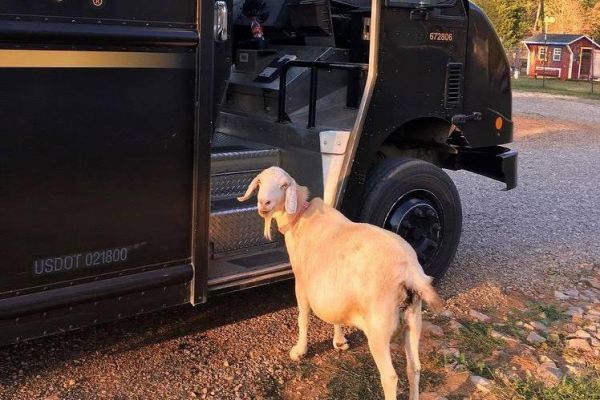
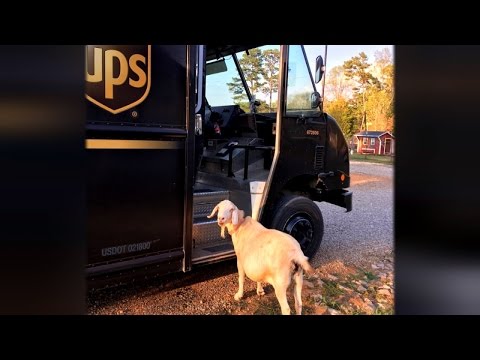
Pearl The Goat Is In Love With The UPS Man

by Zeon Santos

Goats are interesting critters with fascinating minds and bold personalities, and that's why they're popular pets both on and off the ranch.

Sadly, some goats are treated poorly by humans, but if they're as lucky as Pearl the goat they end up in a rescue center like the Gentle Barn in Tennessee, where they can meet new, and much nicer, human friends.

And even though Pearl was abused by her former owner she still has lots of love to give to her favorite human friend- the UPS man.

(YouTube Link)

Read Pearl The Rescued Goat Is In Love...With The UPS Man at Huffington Post

21 Feb 02:26

1950 Ferrari 166 MM Barchetta

Known as the godfather of all short-block-based competition cars that followed, the 1950 Ferrari 166 MM Barchetta is an beautiful example of early Ferrari sports cars. Built in 1948 by...

Visit Uncrate for the full post.
21 Feb 02:14

Tips for Processing Your Smartphone Photos

iStock 640064758

There's no denying it - mobile photography is better than ever.

Not only are the phones in our pockets more capable of taking stellar photos, but the apps available for editing those photos are second-to-none, allowing photographers of all types to create extraordinary photos.

With the addition of an incredible slate of accessories for phones that run the gamut from tripods to cases to lenses, we have the makings for a very powerful (and convenient) system for taking some pretty great photos.

I use my phone to take photos every single day, and I'm betting most of you do as well.

Given the frequency with which phones are being used for photography, let's have a look at a few things you can do to make your mobile photos shine a little brighter.

Recommended Apps

It's an understatement to say that there are a lot of editing apps available today, with more added to the Google Play and iTunes stores each day.

Sifting through all that can be a daunting task, so I've taken the liberty of choosing two that offer tons of features for all different types of mobile photography.

VSCO

screen696x696

One of the top choices of mobile photographers, VSCO gives you tons of options for enhancing your photos.

Their collection of presets is second to none, ranging from dark and moody black-and-white effects to clean, crisp, and minimal filters.

VSCO also has powerful tools for making adjustments to shadows and highlights, color temperature, contrast, and sharpness. It's camera functions are top-notch as well.

It's a community too. Share your photos with the VSCO community and like those shared by other VSCO users.

Better still, VSCO is free on the iTunes Store and on Google Play.

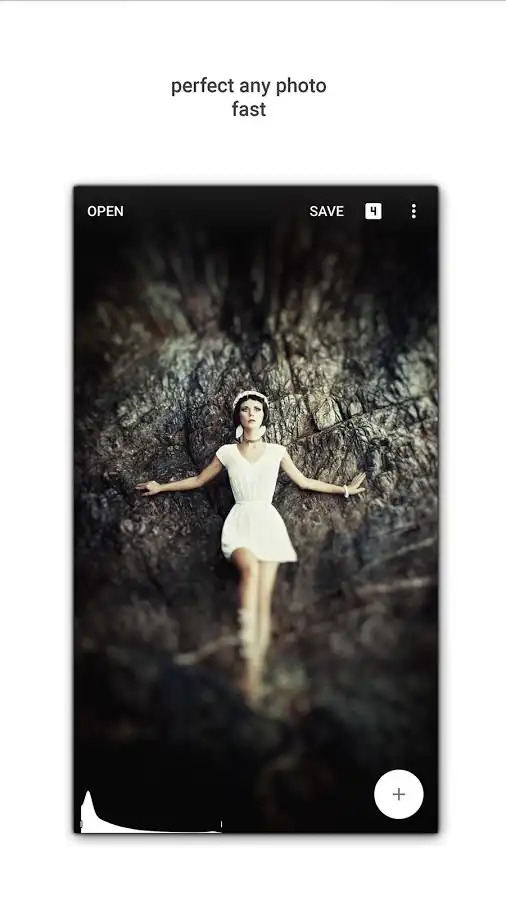
Snapseed

snapseedf

Another highly popular app is Snapseed.

With 26 tools and features, you can do everything from adjusting the perspective of the shot to working with HDR files to simply adjusting color and contrast.

What's more, Snapseed gives you precise control over the changes you make with easy adjustment tools that are tough to beat.

Crop, rotate, and adjust the white balance on your images for a finely-tuned final result, and even work on RAW DNG files. That's an incredible level of functionality that will have you creating inspired photos in no time!

Get Snapseed on Google Play or iTunes for free.

In the video above, David Cogen of TheUnlockr offers his insights into Snapseed and VSCO, as well as four other excellent apps worth checking out.

I think you'll see that the level of control that these apps offer mobile photographers is something to behold!

Get Inspired - But Don't Copy

iStock 618190186

One of the simplest things you can do to better your photos is to get inspiration from other photographers.

With the prevalence of online sharing, there's no shortage of incredible photos on platforms like Instagram, Flickr, and PhotographyTalk's own galleries to whet your appetite.

Even better, some photographers add a description of their workflow - the apps they use, the accessories that helped them get the shot, and the specific settings they used to edit the photo - right there in the image description.

Apps like Mextures even give you the ability to check out what other people have done by using the same editing formulas. You can also import that code and modify it to your liking right within the app.

What's important here is to examine photos and talk with other photographers about how they edit their work. Ask questions and be inquisitive, but don't just copy other people's work. Use other people's creativity as a means to inspire your own creativity that results in an aesthetic that's unique to you.

Develop a Workflow

iStock 473695178

Just like you have a workflow with a "traditional" camera, you should devise a system that works for your smartphone images.

That system will depend on who you are and what your preferences are, as well as the apps you use.

As a general rule of thumb, start out by identifying how you can best capture photos. If that means using your phone's camera, so be it. If that means choosing a camera app to tackle that task, that's fine too.

From there, identify the order in which you process your photos.

For me, I like to put my images through Lightroom Mobile for basic processing like cropping, adjusting the exposure, and managing color effects. From there, I put the image through VSCO to add creative elements like filters and highlight and shadow effects.

For other mobile photographers, the workflow might be as simple as taking the shot and using tools in apps like Instagram to do a very light edit. Yet others might prefer more control over the final product and opt to use something like Mextures to create a final product with light leaks, gritty effects, and layered elements.

The key is to try a few things and figure out what works best for you. It will take some time to get into a workflow, but once you do, that effort will be worth the improved results! Get some ideas for how to perfect your workflow in the video above with Michael Chaize and Adobe Creative Cloud.

Good Smartphone Accessories Make Processing Easier

wide angle lens b orig

You can have all the apps you want and the best workflow in the world, but if you don't start the process by taking quality photos with quality gear, you'll face a mountain of unnecessary challenges.

Here's what I mean...

I think we can all agree that smartphone lenses have come a long way in recent years, and they can produce some pretty good results.

But why rely on that lens when you can add a high-quality lens on top of it to get improved clarity and sharpness?

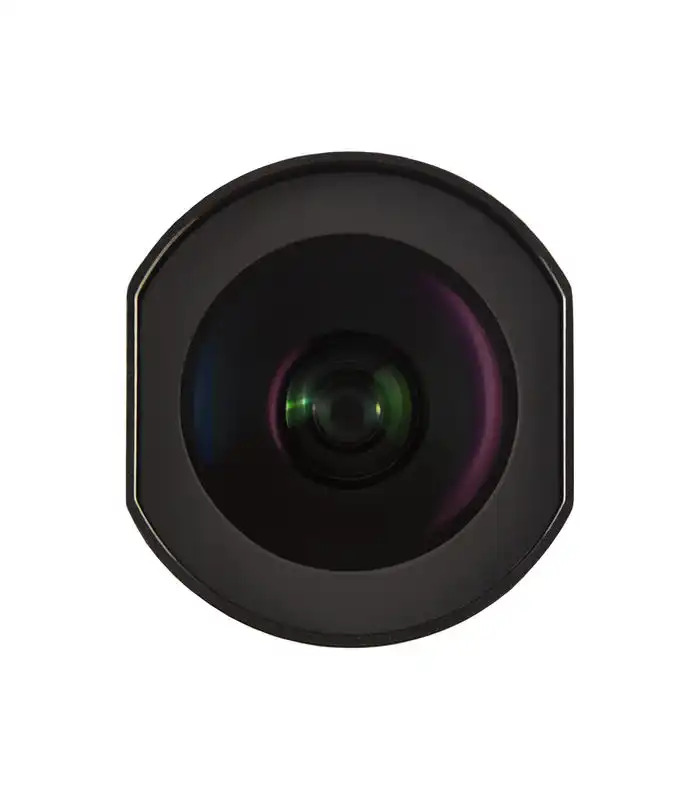
Sirui has a new line of smartphone lenses that expand your ability to get the best shot in-camera, thus making processing the images you take a smoother, quicker process.

Take a look at the image below, which was taken with an iPhone with a 60mm Sirui Portrait Lens attached.

I have to say, I'm more than impressed with the sharpness that the Sirui lens was able to obtain.

wall image 60mm orig

What that means for you is that with such a sharp initial photo, you don't have to fiddle around with sharpness in post-processing. That gives you more time to concentrate on other creative aspects of the image, like enhancing the colors, contrasts, adding layered elements, and so forth.

Sirui's lenses were built for sharpness, whether you opt for their 60mm Portrait Lens, the 18mm Wide-Angle Lens, or the 170-degree Fisheye Lens.

What each lens has in common is that the elements are made from German Schott glass for optimum quality and clarity. Additionally, these lenses have several layers of anti-reflection coating, which ensures high levels of light transmission for clear, bright photos.

What's more, Sirui has managed to pack a few additional punches into its line of smartphone lenses: they minimize distortion, have reduced vignetting, and produce accurate colors so your images more closely reflect what you see with your own eyes.

60 sa portrait lens c 2 orig

Picking up one of these lenses, you immediately feel quality construction. The lens housings are metal for long-lasting durability. Their bayonet bases fit perfectly with Sirui's adapters and cases as well.

Even better, the smartphone lenses by Sirui are priced aggressively, so you get excellent results without having to spend a ton of money.

If you're serious about improving the quality of your smartphone photos, there's no better way to do so than get your post-processing workflow dialed in. Snag a few editing apps for your phone and outfit it with a Sirui lens, and I'm betting you'll be more than pleased with the results!


21 Feb 02:13

Crucial Tips for Improved Sunrise and Sunset Photos

iStock 503791572

I love a good sunset. Especially one at the beach.

Who doesn't?!

It's hard to beat that incredible Golden Hour lighting, the feeling of the sand between your toes, and the smell of the salt air.

Well, I say it's hard to beat that, but getting a fantastic shot of a sunset is one way to make the moment even better!

But sunrise and sunset are tough times to get a really magical image.

The difficulties with exposure alone are enough to derail many of us.

But throw in a few compositional considerations, weather that won't cooperate, and not having the right gear, and sunrise and sunset can be downright impossible to photograph well.

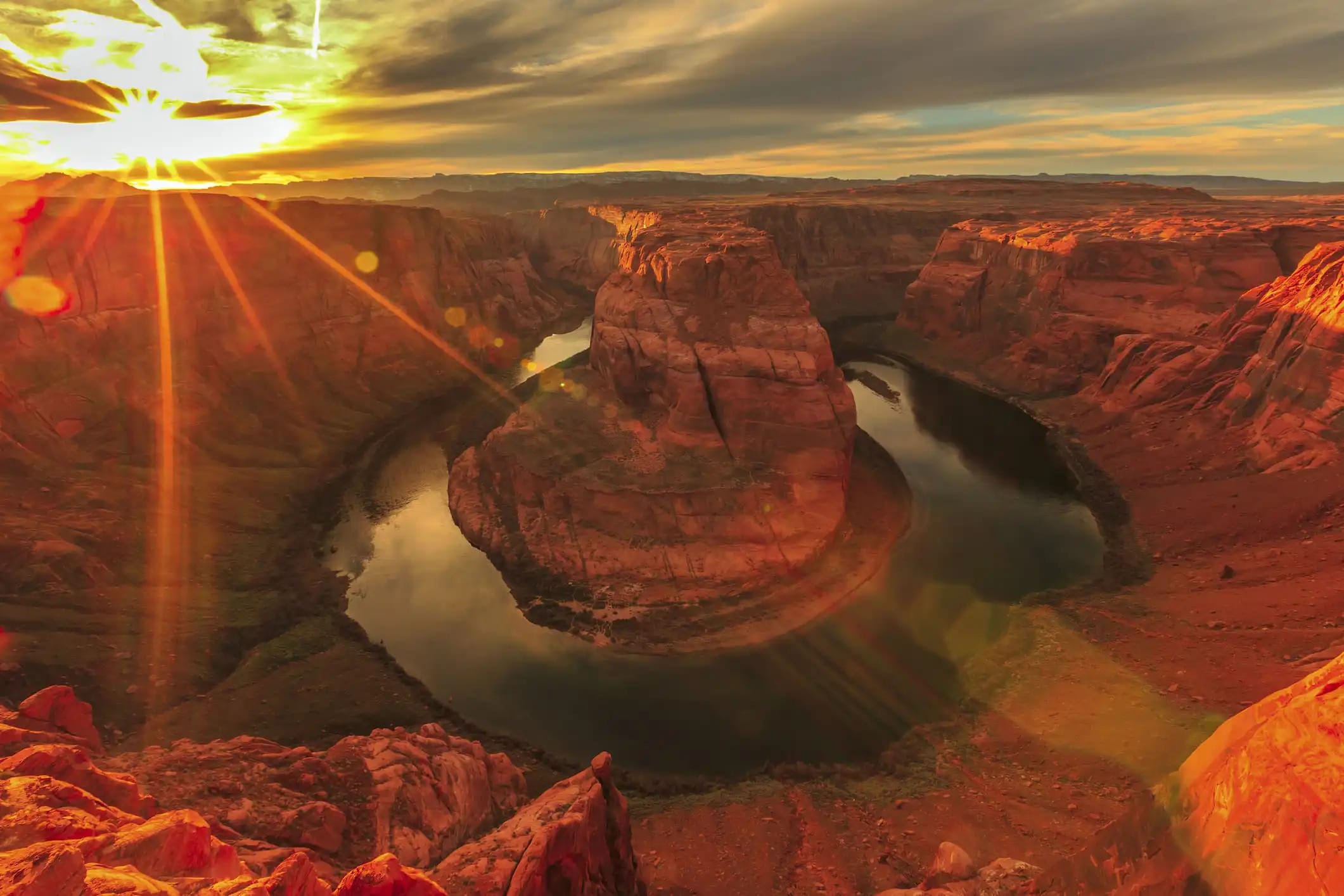
In that spirit, I've put together a few tips and tricks that will make a noticeable difference in your ability to capture spectacular Golden Hour photos.

Don't Use Auto White Balance

iStock 508499104

One of the best ways to ruin the impact of your sunrise and sunset photos is to leave your camera on auto white balance.

Now, I'm not saying that auto white balance isn't a valuable tool in many scenarios. In fact, I rarely feel compelled to take my camera out of auto white balance.

That is unless I'm photographing a sunrise or sunset...

The problem with auto white balance is that one of its primary purposes is to make the colors of the scene look neutral. That's why it's such a valuable tool because you can fine tune the colors in post-processing without having to worry as much about color casts.

But when you photograph a sunrise or sunset - a time of day in which the sky is absolutely bursting with color, you don't want auto white balance to dull those colors. Instead, you want to enhance them.

The question is, what white balance setting is best for enhancing the colors of Golden Hour?

Like many things in photography, the answer is, "it depends."

However, in most cases, if you've got a scene with a lot of warm tones - yellows, pinks, and oranges - the shade or cloudy white balance setting is ideal. It will enhance these colors (and help draw them out of an otherwise lackluster sunset too) because this setting is intended for warming up cool lighting situations.

Fortunately, it has the same warming effect when warm tones are present as well.

For a quick refresher on white balance, give the video above by Joshua Cripps from Professional Photography Tips a quick review.

Too Many Clouds Can Be a Bad Thing

iStock 535353833

There is a fine balance when it comes to sunrise and sunset and the presence of clouds.

On the one hand, a cloudless sunrise or sunset can be a bit on the boring side without the benefit of having some textural details in the sky.

What's more, some of the impacts of the incredible colors of this time of day are lost without clouds to reflect that light.

On the other hand, too much cloud cover isn't ideal either. After all, if the sun is obscured by clouds, you won't have an opportunity to even get a shot of the sunrise or sunset.

We obviously don't have control over what the clouds are going to do on any given morning or evening when we're out shooting.

Having said that, a moderate level of clouds - just enough to add light and texture without overwhelming the shot - is what you should look for, like in the image above.

With a few clouds in the sky, your image will benefit from a broader range of colors and tones that add even more layers to your photo.

When paired with things like interesting landscape elements, a silhouetted figure of a person, or a city's skyline, you have all the makings for an eye-catching sunrise or sunset photo. After all, lighting is what makes or breaks any photo!

Gear Up With a Reverse ND Grad

iStock 610041376

You've no doubt heard of neutral density filters, and I'm guessing the chances are pretty good that you might even have one in your kit.

ND filters are great for minimizing the amount of light that reaches the camera's sensor so you can create long exposure images, even in the daytime.

You might have also heard of graduated ND filters, which help landscape photographers overcome the difficulties of exposing for a bright sky and a dark foreground.

Unlike a traditional ND filter, a graduated ND filter has a varying level of stopping power - it's dark on top and clear on the bottom such that the light from the sky is filtered somewhat, resulting in an improved exposure.

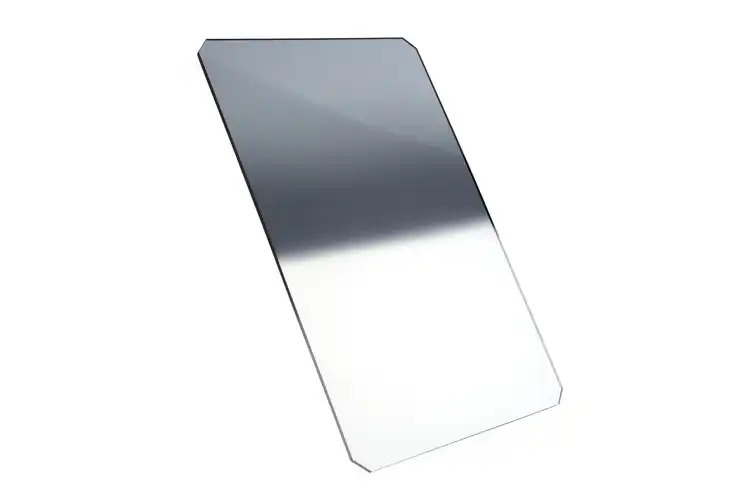
There's also a handy little gadget called a reverse ND graduated filter that's designed specifically for sunrise and sunset photos. Watch the video below by Formatt-Hitech for a summary of the differences between a reverse ND grad and other filters:

A reverse ND grad is dark on top, even darker in the middle, and then has little or no filtering power on the bottom.

This is advantageous for photographing sunrises and sunsets because the sky will be bright and the foreground will be dark, but the brightest area of the scene will be on the horizon - where the sun is either rising or setting.

That means that a reverse ND grad is an ideal tool for overcoming the complexities of shooting at sunrise and sunset.

The dark upper half will stop some of the brightness of the sky while the darker middle portion will handle the extreme luminance from the sun. Meanwhile, you won't have to worry about foreground elements that are too dark because a reverse ND grad will allow in all the light possible to brighten things up.

Resin ND Reverse Grad 2

The reverse ND grad pictured above is a solid choice for sunrise and sunset photography.

This particular filter is by Formatt-Hitech.

The quality of the reverse ND grad you use is obviously extremely important, and Formatt-Hitech takes that to heart by using the highest-quality 1.55mm optical resin.

What's more, the reverse ND grads from Formatt-Hitech come in various strengths, including 1-stop, 2-stop, and 3-stop variations, so you have a wide selection that will help you address even the most challenging early morning or late evening lighting conditions.

These filters are also available in a host of sizes, from 67x85mm up to 165x200mm.

Best of all, Formatt-Hitech doesn't just make a good quality product, but they also price them aggressively.

That means you can get a nice reverse ND grad for your sunrise and sunset shots without having to spend a pile of money.

When you can combine quality with a great price, that's a good day in my book! Better still, combine a reverse ND grad with the other tips discussed above, and you have a recipe for capturing much-improved sunrise and sunset photos.


20 Feb 23:42

An Obsessive’s Guide to Un-Cluttering Your Work Desk


Your little corner of office space, perfectly curated.

...

Read More »
20 Feb 23:40

Solar Dream Catamaran

With 360 square meters of solar cells and a hybrid propulsion system, the Solar Dream Catamaran is an eco-friendly aquatic conveyance. It measures 42 meters from stern to bow, with...

Visit Uncrate for the full post.
20 Feb 23:35

5 Spectacular Transportation Failures

by Meg Neal

In these modern times, it's easy to travel from point A to B without paying much mind to the infrastructure supporting the journey. How often do you drive over a bridge and think, thank goodness that bridge wasn't a couple feet lower, or I wouldn't have made it? Feats of engineering tend to go overlooked when everything is well-designed and functioning properly. But when roads, bridges, or transit systems break down, that gets people's attention—and can help put the work of architects and engineers into perspective. With that in mind, here are five classic examples of transportation infrastructure failing, in an utterly spectacular fashion.

The Can Opener

DURHAM, NORTH CAROLINA

article-image

At first glance, this bridge appears to be an innocent railroad trestle. But this is no ordinary trestle. Built more than two feet below the current minimum clearance standards, it will mercilessly scalp any too-tall vehicle that tries to pass underneath. It’s infamously known among locals and truckers as The Can Opener.

This architectural dysfunction occurs because when the bridge was erected about 100 years ago, no vertical clearance standards were in place. So the bridge stands a mere 11 feet 8 inches above the road, making it dangerously low for modern trucks to pass safely beneath without a cacophonous and melodramatic shave off the top. The bridge claims, on average, one vehicular victim each month.

The Viaduct Petrobras

SÃO SEBASTIÃO, BRAZIL

article-image

Looking as though it was miraculously transported from a more urban area, the abandoned Viaduct Petrobras rises out of the lush South American jungle, a testament to mismanaged government spending.

Construction on the Rio-Santos Highway began in the 1960s, and by 1976 the stretch of road was due to be linked to the existing highway. However, plans were altered at the last minute so that the existing road was linked to a coastal route instead, and the newly constructed viaduct was simply abandoned. Over 40 meters tall and 300 meters long, the elevated roadway features tunnels, retaining walls, and a massive concrete foundation all being slowly taken over by the surrounding greenery.

Tacoma Narrows Bridge

TACOMA, WASHINGTON

article-image

The original Tacoma Narrows Bridge opened on July 1, 1940, and collapsed into Puget Sound five months later. The common explanation for its collapse is that the bridge’s resonant frequency matched the frequency of the wind, and set the poorly designed bridge on an ever increasing oscillation, twisting and rolling until it eventually collapsed. But this is now known to be false. The real culprit is a phenomenon known as aeroelastic flutter, and though the idea of a feedback loop between the air and the movement of the bridge is correct, it had little to do with the natural frequency of the bridge.

It took the state of Washington about ten years to rebuild the Narrows Bridge, and it was designed so a disaster of this scale would not happen again. The newly rebuilt bridge opened in 1950, longer and wider than the original. Meanwhile, the remains of the original Narrows Bridge are in much the same place they fell. The wreckage has created an artificial reef, and is on the National Register of Historic Places. 

Bridge to Nowhere

MOUNT BALDY, CALIFORNIA

article-image

There's more than one bridge project that's been dubbed the "Bridge to Nowhere," but this one is a classic. It's a truss arch bridge that was built in 1936 just north of Azusa, California, in the San Gabriel Mountains. During its initial construction, Los Angeles County claimed that the bridge and connected highway would be one of the most scenic roads in America. Unfortunately, these thoughts quickly changed when the road that provided access to the bridge was washed out during a massive flood in 1938, just two years after the bridge’s completion.

The entire project was then abandoned and the bridge was left forever stranded in the middle of the Sheep Mountain wilderness, without having a single car ever cross it. The Bridge to Nowhere remains one of the most bizarre artifacts of the San Gabriel Mountains, unused and alone in the wilderness.

Leinster Gardens False Facades

LONDON, ENGLAND

article-image

When the London Underground was being constructed in the 1860s, rather than tunneling under existing buildings, deep tunnels were dug right through the city and then covered up again. But not all of the properties razed to make way for the railway were rebuilt. The houses at 23 and 24 Leinster Gardens were demolished to build the tunnel, but the sacrificed homes were never reconstructed, leaving a rather unsightly hole in an otherwise picturesque block. So a false façade was constructed to conceal the wound.

The façade matches its neighbors in every important detail, except that the windows are painted on, rather than being made of glass. You could live in that neighborhood for years, walking by this address frequently, and still not notice the deception if you’re not looking for it. From the back of the block, however, you can see what’s going on. The houses on either side are braced against each other by a number of sturdy steel struts, and the Underground tracks are visible—and most audible—just below.

20 Feb 23:34

Photographer kept 16 cameras and waited for 62 days to get this pic. Patience & Focus gets desired results.(not by me)

20 Feb 23:34

The Couple Who Found A Shared Love For Tornado Chasing

by Eva Clifford

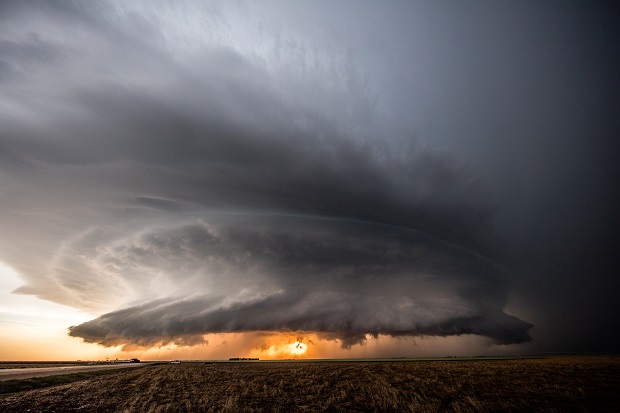
07 May 2016: A classic severe weather set-up in the high plains of Colorado near the town of Wray, which yielded one of the most photogenic tornadoes of the year. We were just ahead of the storm as the tornado started and tracked with it as it grew from a fine funnel to a sizeable cone tornado. At this moment, the twister was at its most photogenic while its parent supercell continued to be manageable. We were among a number of people, including those you see in the shot, nervously enjoying the epic display nature put on for us.

07 June 2014: A clash between two storm cells in New Mexico, US in June 2014, each with its own rotating updraft. It appeared as though one updraft was anticyclonic, resulting in a very turbulent scene. The curved striations of the oldest noticeable against the new bubbling convection of the newer. It was a fantastic sight to watch and it’s the rarity of such scenes that keep drawing us back to the US Plains each year.

The Irish philosopher Edmund Burke wrote in 1757:”The passion caused by the great and sublime in nature… is Astonishment; and astonishment is that state of the soul, in which all its motions are suspended, with some degree of horror.”  Referring to the aesthetic concept of the sublime, Burke explains how fear – especially the fear of God – can be evoked by the power of nature, and it is exactly this mixture of awe and fear we feel when looking at these apocalyptic images by British couple Cammie Czuchnicki and Tim Moxon, aka Weather Studios. Each spring for the last seven years, the couple made the trip to the US to follow the tornado season north – from Texas to the Dakotas – to photograph the spectacular weather. In their photos, the storms are shown raging across the land, rolling in like mega-tsunamis, making it hard not to focus on our vulnerability as humans.

How did you first get into tornado chasing and what attracted you to it?
“As a kid I was always scared of storms, but as I got older this fear developed into a fascination of severe weather. Unfortunately in the south of England, where we live, severe storms are few and far between so I knew I’d have to travel to somewhere like the United States if I was ever going to carry out my life-long dream of photographing a tornado chasing me! In 2010, I met my partner Tim and we decided to embark on this adventure together and have never looked back. This year will be our 8th year out on The Plains.”

07 June 2014: An impressive mothership storm, whose structure was some of the best we’ve ever seen, just outside Roswell, New Mexico.

31 May 2016: Some great structure and a lot of blowing dust from a Texas storm. The backdrop of the oil donkeys just added to the apocalyptic feeling in the area.

Where are the photographs taken? How do you find out about the storms and locate them? 
“Most of the photographs are taken in ‘Tornado Alley’, a colloquial term that refers to the belt of the central US where tornadoes are most frequent. This area is huge and covers many states from Texas up to the Canadian border and from Colorado east towards The Great Lakes. We study output from weather models from a few days out to help us decide where to head. Shorter range output, satellite feeds and live radar updates helps us refine our position nearer the time. However, using your eyes and reading the skies is key to both safety and forecasting in the heat of the moment.”

Can you describe what your first storm chasing experience was like?
“No matter how many books we’d read, videos we’d watched or forums we’d visited to glean info, nothing prepared us for the impact of witnessing our first supercell (rotating storm). We were on the outskirts of a small town in Nebraska and looked west to see the entire skyline darken with the approach of the sculptured twisting storm. The scale of the storm, strength of the wind and the speed in which it approached nearly caught us off guard as we struggled to get the car doors shut and escape to safety. We got some great photos though – and our new addiction had started!”

How do you stay safe during the storms? Have you ever been in a difficult situation?
“Having our GPS location integrated within our radar feed, allows us to always be aware of our position in relation to the storm, and new storms that might be out of sight to us. We will always have two escape routes planned before even attempting to get out and take any photos. However, safely positioning ourselves to take photos is often a challenge. Apart from the tornadoes themselves, setting up shots in an area safe from lightning and giant hailstones needs good awareness of exactly what is happening at each moment in the life of the storm.There have been many moments over the last 7 years where our judgement could have been better. Much of this is in relation to anticipating the storm’s speed or movement. Sometimes we may end up with roads we needed to take being blocked, signalling the end of the chase, and other times where we have needed to drive through particularly dangerous parts of the storm with zero visibility. However, each time we try to understand where we’ve gone wrong and hope to not make the same mistake again.”

21 May 2016: Another take on the sunset at Leoti. As the sun set slowly behind the middle of the storm’s base we were treated to some incredible sights, though the inflow of the storm meant it wasn’t always easy to keep either the cameras or ourselves steady!

04 June 2015: Even in its latter stages, the Simla, Colorado, supercell was still showing amazing structure.
05 May 2015: The tornado that formed from a low precipitation supercell near Big Spring, Texas. We were positioned on the perfect road to watch as the tornado lift ed and reformed numerous times over a 10-minute period, with only some damage to a barn reported.
21 May 2016: Another shot of the awesome Leoti, Kansas storm backlit by lightning. The structure continuously changed and at this point, the colours at dusk made the scene even more spectacular.

04 June 2015: This shot of the incredible rotating updraft and anticyclonic satellite tornado from the powerful Simla, Colorado supercell invokes a sense of quiet awe for just how impressive and beautiful Mother Nature can be.

All images © weatherstudios.com

The post The Couple Who Found A Shared Love For Tornado Chasing appeared first on Feature Shoot.

20 Feb 23:31

Stones, bones and clear tones on the island of Finan the Leper

by Ian Johnston

We were up and about early at our camp on the shore of Loch Shiel, the cool air of post dawn a reminder that the season was turning.  It was cool rather than cold though and there was no sense of needing to get moving to warm up.


 The morning sun was beginning to rise above the hills on the east shore of the loch as we finished packing, though our beach remained in deep shade. 


 By the time we were about ready the morning clouds were beginning to burn off....


 ....and it looked set to be a fine autumn day. 


 After a short distance we came to the narrow twist which marks the end of Loch Shiel proper, and a distinct change in scenery.  We'd been journeying through rugged and wild mountain scenery, ahead lay lower ground with wider views towards the sea.  The narrow bend as the loch finds its way from the mountains is almost blocked by a small island - the terminal moraine of the glacier which ground out Loch Shiel.

Eilean Fhianain (Finan's Island) may be small and unspectacular from a distance, but it has a wealth of interest and history and there was no way we were going to pass by without exploring a little of it.  Finan was an early Celtic saint who is believed to have lived from around 520 to 600AD.  Details of his life are uncertain but he seems to have followed Columba from Ireland and became Abbot of a small monastery on the island now named after him.  He is believed to have evangelised much of Argyllshire, but considering that his name crops up all over Scotland - as well as the obvious Glenfinnan and Kilfinnan, there is a St Finzean's Fair in Perth and a Finzean as far away as Aberdeenshire, he must have travelled extensively

Known as "Finan the Leper" from the disease which afflicted him, he seems to have favoured small islands on lochs; he is also recorded as the founder of at Inisfallen on Lough Leane in Ireland's County Kerry.  Finan died, it is thought, at Clonmore in his native Ireland.


 We'd visited Eilean Fhianain on our winter trip in 2014 and found it to be a gem of a place.  That visit had been made in brilliant sunshine, this one in quite different lighting, but the place still had an air of peace.  We passed the gravestones which appear very old but in fact are probably 18th century......


 ....and stopped to admire the cross commemorating Rev Charles McDonald, priest of the diocese of Argyll and the Isles.  I hadn't noticed on our previous visit, but many of the trees on the island are Rowans, the tree of protection. 


 The sides of the column bear fine sculptures in the distinctive Celtic style, and there's a clear difference between the weathering on the western side of the cross which faces the prevailing weather.....


 ....and those on the more sheltered eastern face, these tail-chasing beasts and intertwined snakes are still in sharp relief. 

Note: Our friend Leif  has pointed out that the bodies of the snakes seem to form the letters "V" and "M" - it would be fascinating to know whether this was deliberate or a coincidence of pattern; and if deliberate what the letters represent.


 The ruined chapel near to the highest point of the island has an intact altar slab, behind which a very old stone cross occupies the niche, and a wooden boat-shaped object upon which small offerings of coins had been left.  A rummage in our pockets produced some coins to add to the amount.

But it is the bell which captures the imagination -  seamlessly cast in bronze, it has lain here for almost eleven centuries.  It takes a moment for that to sink in....produced in the 10th century, it has survived all the long tumult of history intact.  Nowadays secured by a small chain, one can clearly see the marks on the altar slab where the bell has rested.

Not only is the bell still intact, it remains fully functional -  Douglas' video of it being rung catches the clear tone.


 If St Finan's bell is the jewel of the island, nature has provided a few of her own.  It's amazing how often the walls of ruined churches are studded with the blue flowers of Ivy-leaved Toadflax (Cymbalaria muralis), here growing intertwined with a fern.

We continued over the island from the ruined chapel and Lorna found a remarkable grave-slab half concealed below the grass.   We cleared the grass a little to find......


 ...a very definite image of mortality carved in stone.  It seems that our predecessors were altogether less reticent about portraying death in this way - it's a fascinating grave if a little startling to the modern eye.


 As we made our way back to the boats we passed a much more recent grave, well tended and laid with flowers, backed with a bush fired with intense autumn colour.

This small island had proved well worth a second exploration - and on future visits we'll stop here again without doubt.


We got back on the water as a breeze sprang up, clearing the cloud quickly.  The mountains lay behind us, and ahead lay a river and the sea.....
19 Feb 18:50

How Many Ways Can You Sort a Deck of Cards?

by Chris Higgins

More ways than there are atoms on Earth. But why?

19 Feb 18:47

Old vs New.

19 Feb 18:44

Actual Advice Mallard