Shared posts

19 Mar 18:26

7 Ways to Make Your Video Footage More Cinematic

by Joe Coburn

We’ve all been there. You watch a film or TV show and see a simply amazing shot. You think to yourself “that can’t be too difficult to reproduce”. You set up your camera and start shooting, but when you’re finished the result looks nothing like a “real” movie. What can you do?

In this article we’ll show you some tips and tricks you can use to make your video footage look more cinematic. While none of these tricks will be the magic bullet that takes you from an unknown director to Quentin Tarantino overnight, little tricks combined can add up to make a big difference.

1. Think Before You Shoot

One of the easiest things you can do before filming is thinking about your shot. If you just grab your camera and press the record button, things aren’t going to work out as well as if you plan a little first.

Before you even begin shooting you can think about your shot. Do you want to shoot at a really shallow depth of field, or will you be filming in bright sunlight in the middle of the day? In that case, you’ll need an ND filter. Our guides to depth of field and photographic filters may come in handy here.

Will you be using a tripod or will you be holding your camera? What about sound: do you have a microphone or are you going to be filming in a really noisy area?

Film productions spend a lot of time planning everything. They don’t just start filming and hope for the best. Instead, production teams do everything possible to eliminate any uncertainty. The actors know where to stand, the camera operators know where the action will take place, and all of the other departments work together perfectly.

Even if you’re just starting out, or are just filming silly stunts for YouTube, you can make your shots better by planning them beforehand. Big YouTubers such as Casey Neistat and other engaging vloggers may appear to be spontaneous, but everything they do is carefully considered and intricately planned, even if it doesn’t come across as such.

2. Edit at 24 FPS

“Nonsense,” I hear you say. “My camera can shoot at 240 FPS, why would I shoot at a measly 24?”

The vast majority of films and movies are shot at 24 FPS. Not only does this closely resemble the “frame rate” your eyes see in, but it’s what viewers expect films to be shot in. If you’re delivering in 48, 60, or any frame rate other than 24, your film won’t look the same as “proper” films.

Our eyes and brains have been trained to expect 24 FPS, by hundreds or even thousands of movies throughout the years. YouTubers or gamers may say that 60 FPS is the best, but trust me, 24 FPS is where it’s at.

In this video, YouTube channel Filmmaker IQ provides a comprehensive overview of film frame rates:

3. Shoot With a 180-Degree Shutter Angle

This may sound confusing, but perhaps you know “shutter angle” as “shutter speed”. A shutter angle of 180 degrees means that your shutter speed (SS) is double your frame rate. When shooting at 24 FPS, your SS should be 1/48. This is another area where your brain has been trained by the cinema that this looks the best.

If you shoot with a faster shutter speed, there won’t be enough motion blur. Images will look far too sharp, and have a “freeze-frame” effect. This means that if you’re shooting slow-motion, you’ll need to increase your shutter speed.

This video from YouTube channel Precision Camera & Video provides more information about shutter speed versus shutter angle:

4. Add a Cinematic Crop

Adding a cinematic crop is one of the easiest things you can do in the edit suite. Suddenly, you’ll be a “real filmmaker”. Viewers will faint at how cinematic your film is, and your fifth-grade girlfriend will wonder why she ever left you.

I’m joking, of course, but adding a cinematic crop does make a bigger difference than you’d think.

It once again comes down to “real movies”. Bigscreen films are shot at an aspect ratio of 2.35:1. Your widescreen computer monitor is 16:9, maybe 16:10. Converting your film from a “standard” widescreen to the ultra-wide ratio of the big screen makes a big difference—even if you have to fake it with a crop.

This video from camera support manufacturers RhinoCameraGear shows just how easy it is to add a cinematic crop to your films:

5. Choose the Right Music

Music can make a massive difference to the feeling of your film. After all, music is used in films all the time to manipulate your emotions. Classical music in a sad scene, dance music in a party scene. Think about (or better yet, try it in your edit) how certain scenes would sound if they had clown music playing in the background.

Using classic Disney films as an example, in The Lion King, during the scene when Mufasa dies, listen to how epic that music is. Haunting strings and quires really set it apart. How different would that be if something like the Benny Hill theme was playing?

As another example, in Disney’s Bambi, when Bambi’s mother dies, the music jumps around between energetic orchestral pieces, and slower, sadder strings. How would that scene look if “Jump Around” was playing?

If you’re a bit stuck on your music choice, then worry not, as YouTube legend Peter McKinnon has you covered with his guide to finding music for video:

6. Slow Things Down

Movement can transform your shots from static and boring to lively and exciting. Jumping around all over the place, however, will make your viewers want to throw up.

Film productions spend large sums of money on all manor of dollys, tripods, jibs, cranes, and gimbals. You don’t need to spend money you haven’t got, and it doesn’t mean you can’t make a film on a budget, it simply comes back again to thinking before shooting.

Slow, smooth, and deliberate movements are the key here. A nice slow pan on a tripod, or smooth movements with a budget gimbal such as the Zhiyun Crane 2.

In this video, YouTube creator Matti Haapoja shares his cinematic movement tricks:

7. Use Color Grading

Our final tip here is to color grade and color correct your footage. Color is also capable of messing with our emotions. Ever noticed how films like The Matrix lean more towards the color green, or how old wild west films have a more yellowish brown tint to them?

While color grading and correction are entire industries in their own right, you can do something about it, even if you’re not experienced in the edit suite.

Getting your shots correct in-camera will make the biggest difference. If you start your scene with a really yellow shot, because your white balance was off, it’s totally possible to fix this in post production, but if you get it right while filming, it will save you a lot of time later on.

In this video, YouTuber Kyler Holland provides a quick overview of the differences between color grading and color correction:

Learning From Professional Filmmakers

In this article we’ve shown you just some of the many ways to make your films look more cinematic. From pre-planning to color grading and more, there’s plenty you can do right now to match the professionals.

And if you need an extra hand making this all work, maybe some of these simple DIY filmmaking hacks will come in useful.

19 Mar 18:24

9 Essential Details You Must Know About Your Mac

by Akshata Shanbhag

Whether you’re troubleshooting your Mac or exploring new ways to use it, you’ll need certain key details about your device. If you know them beforehand or at least know where they’re located, you won’t have to scramble to find them at the last minute.

Now let’s see which device details everyone should know about, and how to find them where relevant.

1. The Serial Number and macOS Version

Your Mac’s serial number is its calling card. It encodes everything you need to know about the tech specs of your device.

You’ll find the serial number in quite a few locations. Want the easiest way to access it? Click on the About This Mac option hidden behind the Apple logo at the top left of your Mac’s menu bar. You’ll see the serial number listed in the Overview tab of the window that shows up.

serial-number-mac

In the same tab, you’ll find a few other bits of information, including the model name and its release date. At the top you’ll also see the macOS version that’s running on your device.

os-version-mac

Click on the System Report button in the tab to access the System Information utility. This utility reveals every last detail about your Mac’s hardware and software, including its serial number.

You can also open the About This Mac and System Information utilities via Spotlight.

In case you have trouble starting up your Mac, look for the serial number in any of these places:

  • On the bottom surface of your Mac
  • The original box that the device came in
  • On the receipt for the product

Your Apple account also stores your serial number. To retrieve the number from there, first access your Apple ID page at appleid.apple.com. Next, under the Devices section, click on the name of your Mac. You’ll then see a tiny popup with your Mac’s serial number (plus its model name and macOS version).

serial-number-apple-account

2. The Warranty Status

Once you know the serial number of your Mac, finding its warranty status is a couple of steps away. Visit Apple’s Check Coverage page and type the serial number in the field provided there.

The warranty details will show up after you hit the Continue button. They tell you what kind of tech support and service your Mac is eligible for. The details vary based on when the device warranty expires and whether you have bought AppleCare.

warranty-status-mac

3. The Display Type: Retina or Non-Retina

If you have a MacBook Air or if your device comes with a DVD drive, you can move on to the next section; neither model has a Retina display.

Still here? Head to the About This Mac pane where you located your Mac’s serial number. If your Mac has a retina display, the model name will say so. Switch to the Displays tab and you’ll see the text Built-in Retina Display there.

Also, if you visit System Preferences > Displays, the window title reads Built-in Retina Display.

4. The Trackpad Type: Force Touch or Non-Force Touch

Some Apple technologies are available only in select MacBook models. Force Touch is a case in point. Does your device have it? If you have a 2015 or newer MacBook Pro or a MacBook with a Retina display, it sure does.

What does Force Touch do? It adds a pressure sensitivity factor to trackpad gestures. In simpler terms, when you press on the trackpad, it can distinguish that hard press from the usual tap gesture. And where does this feature come in handy? See for yourself with some useful Force Touch trackpad gestures.

If Force Touch is missing from your device and you want to use it, you can add it by connecting Apple’s own external trackpad, Magic Trackpad 2.

Apple Magic Trackpad 2 (MJ2R2LL/A) Apple Magic Trackpad 2 (MJ2R2LL/A) Buy Now At Amazon $124.99

5. The Number of Battery Cycles

Do you want to check how healthy your Mac’s battery is? Then you’ll need to know how many charge cycles it has been through. (Fewer charge cycles equals a healthier battery.) You’ll find this information in the Hardware > Power section of the System Information utility.

battery-cycle-count-mac

There you’ll also see information about the battery model itself, its charge capacity, and the active power settings for your Mac.

Of course, a third-party battery application delivers a lot of the same information and wraps it in a user-friendly and easy-to-read package. We think it’s a good idea to install such an app.

We recommend Battery Health, which sits in your Mac’s menu bar. Apart from battery stats, it gives you tips for making the best of your Mac’s battery life.

6. The MAC Address

Your Mac’s network adapter comes with a unique identification number called a Media Access Control address or MAC address. It’s not the same as your Mac’s IP address.

To find the MAC address, head to System Preferences > Network. Select your network in the sidebar and click on the Advanced button in the right-hand pane. In the dialog box that shows up, you’ll find the MAC address listed at the bottom of the Wi-Fi tab as Wi-Fi Address.

MAC-address-mac

For quicker access to the MAC address, hold down the Option key and click on the Wi-Fi icon in the menu bar. You’ll then see the MAC address listed in the advanced menu that shows up.

MAC-address-shortcut-mac

You might want to learn how to spoof your MAC address for privacy reasons. Keep in mind that it resets itself to the original one when you restart your Mac.

7. The Location of Saved Wi-Fi Passwords

A Wi-Fi password is a set-it-and-forget-it affair until you need it to connect another device to the same network. As long as you know where to find the saved password, you’re good.

On your Mac you’ll find the Wi-Fi passwords in the Keychain Access application hidden under Applications > Utilities.

In the app’s sidebar, switch to the System keychain and the Passwords category. This filter displays only your stored passwords, which means that you have fewer items to search through.

Double-click on the name of the relevant Wi-Fi network from the items listed in the main panel. In the tiny window that shows up, select the checkbox for Show Password.

show-password-keychain-access-mac

To get past the authentication prompt, enter an administrator’s credentials and click on the Allow button. You should now see the Wi-Fi password right next to the Show Password checkbox.

8. Internal IP Address

Your Mac has a private IP address to identify it on your local network. This is different from your router’s public IP address and from your Mac’s MAC address. To make sense of all three identifiers and what to do with them, read our guide to home networking.

You’ll find the private IP address in more than one location. Option-click on the Wi-Fi menu bar icon and you’ll see it listed below the name of the network you’re connected to.

If you open System Preferences > Network, you can spot the IP address in the right-side pane for the current network. Click on the Advanced button in that pane and switch to the TCP/IP tab of the dialog box that appears. The IP address is available there as well.

You can also find the private IP address via the Terminal application with this bit of code:

ifconfig | grep "inet " | grep -v 127.0.0.1

For your public IP address, it’s best to ask your search engine for it. The address shows up as the top result if you search for what is my ip.

9. The Encryption Status

If you aren’t sure whether your Mac’s hard drive has been encrypted with FileVault, it’s easy to find out.

Open System Preferences > Security & Privacy > FileVault and you’ll see a message telling you the encryption status of your Mac. According to Apple, it’s one of those common details that come in handy when you’re consulting an Apple Genius or Advisor.

encryption-status-mac

Get to Know Your Mac Better

As you’ll see in big ways and small, learning more about the specifics of your Mac definitely paves the way for a faster workflow and an smoother Mac experience.

If you know where macOS saves photos, books, and other files, you’ll find it easier to recover lost data. If a tech support person asks you for your Mac’s serial number, you can find it in a flash. And that’s just scratching the surface of why these details are crucial to know!

19 Mar 18:24

How to Force Restart an iPhone and Enter Recovery Mode

by Tim Brookes
iphone-force-restart-recovery

Starting with 2016’s iPhone 7 line, Apple dropped the old mechanical home button in favor of a capacitive touch panel. Since that home button relies on software, it’s no longer used for button inputs like taking a screenshot. Further complicating this, the iPhone X line of devices introduced yet different button combinations.

This means that you might have no idea how to enter iPhone recovery mode on your new device. We’ll show you how to put your iPhone (as well as iPad or iPod touch) in recovery mode, no matter which model you have.

Jump to your device:

Force Rebooting and Recovery Mode Explained

You’ll hopefully never need to hard reset your iPhone, but it’s a good tip to know about for those occasions when something goes wrong. For example, this can help you fix ghost touch on your iPhone.

When your device becomes completely unresponsive, you can choose between waiting for the battery to deplete and initiating a hard reset. A hard reset is basically the equivalent of pulling the power plug, forcing your iPhone to shut down and start up again.

Recovery mode takes this a step further, putting your device into a state where you can reinstall iOS by connecting your iPhone to a computer running iTunes (or by using Finder on macOS Catalina and newer). If your iPhone refuses to boot or crashes on startup, you’ll need to put the device into recovery mode in order to rescue it.

iPhone Recovery Mode

Note that when you reinstall iOS, you’ll lose all the data on your iPhone. This isn’t a problem if you make regular iPhone backups, which you can do using iCloud or locally in iTunes or Finder. Unfortunately, you can’t back up your device in recovery mode, since iTunes will only offer to restore the firmware.

As such, if you are stuck with an iPhone that won’t boot and you don’t have a backup to restore, there’s nothing you can do to save your data.

How to Enter Recovery Mode on iPhone 8, iPhone X, and Newer

iPhone X and iPhone 8

Apple changed the button combination to force restart on the iPhone 8 and later. The below steps will work with the iPhone 8/8 Plus, iPhone X, XS, and XR, and iPhone 11 line.

Note that you’ll need to perform these button combinations fairly quickly.

How to Force Restart the iPhone 8 and Newer

  1. Press then release the volume up button.
  2. Immediately press then release the volume down button.
  3. Hold the side button till you see an Apple logo. Let go of the button when you see this logo.

How to Put the iPhone 8 and Newer Into Recovery Mode

  1. Connect your iPhone to a computer.
    1. On a Windows PC or Mac running macOS Mojave or earlier, launch iTunes. On a Mac running macOS Catalina or newer, open Finder.
  2. Press then release the volume up button.
  3. Immediately press then release the volume down button.
  4. Hold the side button, and don’t let go when you see the Apple logo.
  5. Keep holding till you see the Recovery Mode screen.

How to Enter Recovery Mode on iPhone 7 and iPhone 7 Plus

iPhone 7 and 7 Plus

Both the iPhone 7 and larger iPhone 7 Plus model were released in September 2016. These were to first iPhones to lack a mechanical home button, which required Apple to change these shortcuts for the first time since the iPhone launched in 2007.

You’ll also need to follow these steps to force restart the 7th generation iPod touch, released in 2019.

How to Force Restart the iPhone 7 or 7 Plus

  1. Press and hold the side button and volume down buttons at the same time.
  2. Continue holding the buttons until you see the Apple logo, then let go.

How to Put the iPhone 7 or 7 Plus Into Recovery Mode

  1. Connect your iPhone to a computer.
    1. On a Windows PC or Mac running macOS Mojave or earlier, launch iTunes. On a Mac running macOS Catalina or newer, open Finder.
  2. Press and hold the side button and volume down button at the same time.
  3. Keep holding the buttons, even once you see the Apple logo.
  4. Release both buttons when you see the Recovery Mode screen.

How to Enter Recovery Mode on iPhone 6s and Older

iPhone 6 and iPhone SE

The iPhone 6s, released in 2015, was Apple’s last iPhone with a mechanical home button. The following advice is good for that device, as well as all iPhones that came before it. This includes the Plus models, iPhone SE, and iPod touch 6th generation and earlier.

How to Force Restart the iPhone 6s and Older

  1. Press and hold both the home and lock buttons.
    1. On the iPhone 6 or later, the lock button is on the right side. For the iPhone 5s and earlier, it’s on top of the device.
  2. Release the buttons once you see the Apple logo.

How to Put the iPhone 6s and Older Into Recovery Mode

  1. Connect your iPhone to a computer.
    1. On a Windows PC or Mac running macOS Mojave or earlier, launch iTunes. On a Mac running macOS Catalina or newer, open Finder.
  2. Press and hold the home and lock buttons as mentioned above.
  3. Keep holding the buttons even once you see the Apple logo.
  4. Release both buttons when you see the Recovery Mode screen.

How to Force Restart and Enter Recovery Mode on iPad

iPad Air 2

Need to force restart or use recovery mode on your iPad instead? The process is simple.

To do this on an iPad model with a Home button, follow the same instructions for force restarting the iPhone 6s and earlier described above. If you have an iPad with Face ID, follow the above steps to force restart an iPhone 8 or newer.

Just note that on iPad, the power button is on top, not on the side.

You’re Ready to Recover Your iPhone

When you put your device into recovery mode, you’ll have 15 minutes to begin reinstalling iOS before your device automatically exits Recovery Mode. You’ll need to repeat the combination of button presses in order to put it back into Recovery Mode if this happens.

Your device will not show up as normal in iTunes or Finder while in Recovery Mode, and you’ll see an error message like the one above. You can always choose to update the firmware, or simply restore the existing version.

iTunes Repair iPhone

Once your iPhone reboots as normal, you will need to log in with your credentials to remove Apple’s Activation Lock. This is a security feature that prevents someone from using your device if you reset it without signing out of iCloud.

Because of this, you should never buy an iPhone if the seller refuses to unlock it in front of you. A reset phone with Activation Lock still enabled will ask for the owner’s Apple ID before you can begin the setup process.

iPhone Recovery Mode Made Easy

We’ve seen how to force restart your device and enter recovery mode, no matter what iPhone, iPad, or iPod touch model you have. It’s a simple process once you know it, but the increasingly confusing button combinations are a bit obtuse.

For more on recovery, check out what to do if you forget your iPhone passcode.

Read the full article: How to Force Restart an iPhone and Enter Recovery Mode

19 Mar 18:17

The Turtle Extinction Crisis

by John R. Platt
Nearly half of all freshwater turtles and tortoises are at risk of disappearing forever, a new report warns

-- Read more on ScientificAmerican.com
19 Mar 17:41

The Best Time of Day to Send Email

by Nick Douglas

The most fleeting joy in this world is that of sending off an important email, as it’s inevitably replaced by the anxiety of waiting for a reply. If you want to get a quick reply to your email, send it in the morning. Brendan Greenley, data scientist at the email scheduling company Boomerang, explains further in an…

Read more...

19 Mar 17:41

Brono Wants to Revolutionize Lighting with a Grid of Mirrors

by Michael Zhang

Brono is a new Norwegian lighting solution that aims to “revolutionize” studio lighting by giving photographers more control and options. It’s basically a large grid of mirrors that can be individually adjusted.

The patent-pending invention is the brainchild of Svein Utigård, a professional photographer of over three decades.

Each Brono aluminum frame is a box that contains 12 protruding rods with magnetic ball heads. A mirror with a magnetic mount on the back can be connected to each ball head and moved in any direction.

Two Brono frames can be connected on their edges usinga hinge and then closed suitcase-style for transportation.

“By using many moving mirrors, the original light source splits into many light sources,” Brono says. “With these light sources, you can adjust the light for optimal use, in an infinite number of angles.”

Here’s a short 1-minute video showing how Brono can be used with both hard and soft lighting setups to light a subject:

Another universe of possibilities emerges when you use mirrors of different shapes and colors (with filters). And in addition to using Brono in a studio setting with constant lighting, you can also take it outdoors to bounce sunlight.

Here’s another short 1-minute video that offers glimpses into a workshop that was held for using Brono:

Here are some example photos that used Brono in their lighting setups — most of them were shot using a single flashlight, Brono says:


What is your initial impression of Brono?

Brono was announced at CES 2018 earlier this year, and it’s now available for purchase for photographers in the US and in Europe. It’s not carried by any retailers or even in a Brono online store — it’ll be available “soon” through the website, the company says — but you can contact the company directly via email if you’re interested.

19 Mar 17:40

The 7 Habits: Be Proactive, Not Reactive

by Brett and Kate McKay

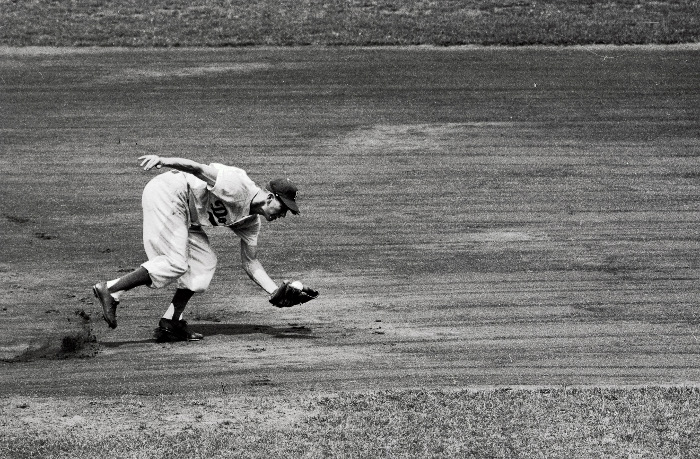
Baseball player caught a ball while running.

With our archives now 3,500+ articles deep, we’ve decided to republish a classic piece each Sunday to help our newer readers discover some of the best, evergreen gems from the past. This article was originally published in March 2018.

Like most American boys, I played baseball in the summers. And as cliché as it may sound, I took away some important life lessons from my days on the diamond. One that has stuck with me and that I think about often even today is the adage on how to field ground balls:

Play the ball before it plays you.

I remember my coach repeating this mantra as we fielded grounders. “Play the ball before it plays you! Play the ball before it plays you!”

When a kid is first learning to field a ground ball, his natural inclination is to stand still until the ball rolls to him. But baseballs do funny things once they hit grass and dirt. They change direction; they slow down. What they don’t do is go right into your glove. If a player passively waits for the ball to come to him, nine times out of ten, he’s going to come up empty-handed.

“Play the ball before it plays you” is a cue to players to attack the ball and take the initiative on the grounder. It’s a call to be proactive and not reactive with your fielding. Good fielders make plays happen; bad fielders just wait and let the ball determine the play.

Following “play the ball before it plays you” made me a better fielder. Whenever I attacked a grounder, things usually turned out better compared to when I just waited for the ball to roll to my feet.

It wasn’t until I read The 7 Habits of Highly Effective People by Stephen Covey when I was a freshman in high school that I realized that “play the ball before it plays you” also serves as an excellent maxim for life.

Be Proactive; Not Reactive

In his classic book, writer and businessman Stephen Covey laid out seven habits he believed led to a flourishing life. I remember when I read it as a 15-year-old kid I was blown away by his insights. I’ve been re-reading the book as a 35-year-old man, and twenty years later Covey still inspires me. Talk about staying power.

I’ve been enjoying my re-read of the book so much, I’ve decided to do a monthly series, summarizing, expanding, and riffing on each of the seven habits.

We start today with the first habit Covey delves into in the book, which lays the foundation for all the others: Be Proactive.

Being proactive is a posture you take towards the world. It requires an individual to accept responsibility for his situation (no matter how dire) and take the initiative to make things better. Instead of letting their conditions and circumstances be the driving force of their decisions, proactive people allow their values to determine the choices they make. Proactive people act rather than being acted upon.

Proactive people play the ball before it plays them.

Even when circumstances limit choices, a proactive person will find where he can still exercise his agency.

Covey uses existential psychiatrist Viktor Frankl as a supreme example of being proactive even when it seems you’ve been stripped of every last bit of your autonomy. As a Jew living in Austria during WWII, he and his family were put into concentration camps where they were subjected to systemized, soul-crushing cruelty. Except for him and his sister, everyone in Frankl’s family was either directly executed in the gas chambers or eventually died from the camp’s punishing conditions.

But it was in these horrific circumstances that Frankl had a life-changing epiphany. Despite losing all his basic freedoms, there was one freedom the guards could never take away from him: how he would respond to his circumstances.
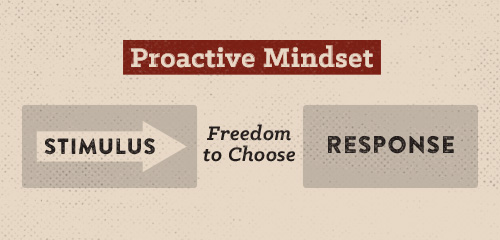
Poster of proactive mindset.

Between stimulus and response there is a space. In that space is our power to choose our response,” wrote Frankl in his seminal book, Man’s Search for Meaning. The stimuli Frankl encountered daily were death, deprivation, cruelty. The seemingly inevitable response to such stimuli would be to give up and lose hope. But there in the concentration camp, Frankl realized that stimulus and response weren’t welded together. There was a gap. There was a choice.

Frankl consequently chose a different response than the default. He chose hope. He chose to help his fellow prisoners. He chose to not hate his captors. He chose to find meaning in his suffering.

Frankl’s life represents a vivid archetype of what it means to be a proactive person.
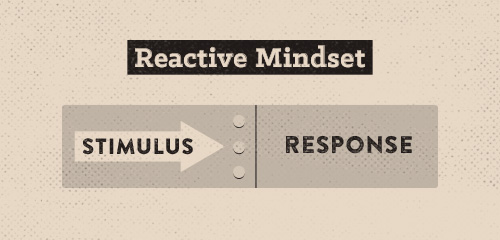
Poster of reactive mindset.

Reactive people experience stimulus and response as “welded” together.

The opposite of a proactive person is a reactive person. Reactive people let their circumstances and conditions control them. Reactive people think that stimulus and response are inextricably connected. They don’t see the gap between the two, and believe that one determines the other. So if the weather is foul, a reactive person will be in a foul mood, too. When a reactive person gets negative feedback, they become defensive and bitter. When a reactive person finds himself on the short end of the stick, he gripes about it instead of finding ways to get more stick.

Reactive people don’t act; they’re acted upon.

Reactive people let the ball of life play them rather than playing the ball.

Circles of Concern and Influence

Re-reading Covey’s chapter on being proactive convicted me because it allowed me to see that I have a lot of work to do on being a less reactive man. Intellectually I know that the foul moods I experience from time to time and the worries I experience on a day-to-day basis are the result of being reactive and not proactive to life’s challenges, and yet I still find myself resorting to reactive language whenever I encounter a problem:

“There’s nothing I can do about this . . .”

“I’ve got a morose personality. It’s just the way I am . . .”

“Well, the reason I’m having this problem is that [insert name] is so thoughtless . . .”

Often I see stimulus and response as welded together. I fail to acknowledge the space that exists for me to choose how I’m going to respond.

But Covey has a mental model to help individuals who tend to be reactive start thinking and acting more proactively. It’s called the Circles of Concern and Influence.
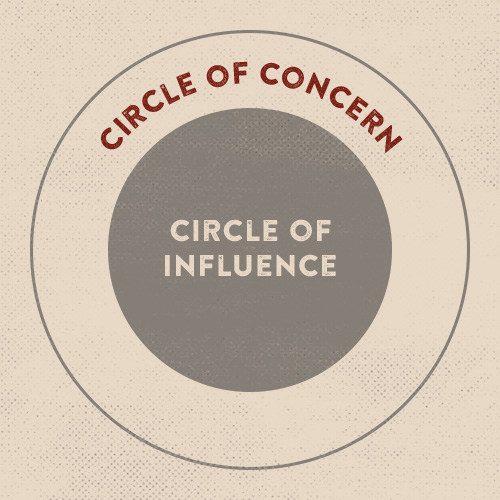
Poster about circle of concern and influence.

Imagine a circle, and within that circle, you put all of your concerns: your health, job prospects, kids, finances, etc. Anything and everything that causes you to worry or keeps you up at night. Even the little stuff. This is your Circle of Concern.

Now imagine a circle within that Circle of Concern. Inside that circle, you put the concerns that you have some or complete influence on. Yes, your financial situation may tie your stomach in knots, but there are things you can do about it like cutting back on spending or asking for a raise. This is your Circle of Influence.

Some things won’t make it to your Circle of Influence and will remain just in your Circle of Concern. You can’t influence the weather, you can’t influence your luck, you can’t tell your body to not get cancer, and you don’t have much control over other people’s decisions.

According to Covey, what separates reactive people from proactive people is which circle they spend the most time, attention, and energy in. Reactive people pay more attention to the items that are just in their Circle of Concern — the stuff they have little or no control over. The results of this are psychologically debilitating; as Covey observes, this “focus results in blaming and accusing attitudes, reactive language, and increased feelings of victimization.”
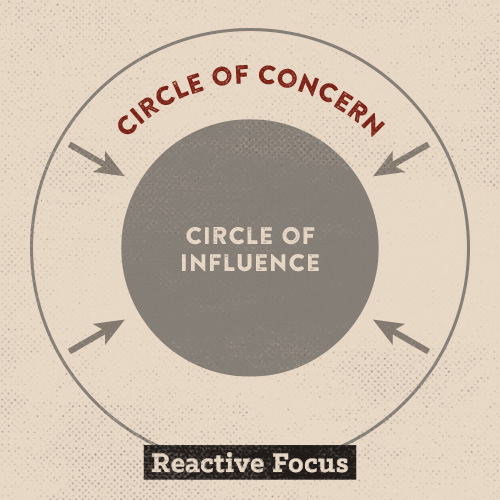
Poster about circle of concern and influence with reactive focus.

When you focus on your Circle of Concern, your Circle of Influence shrinks.

Not only does focusing solely on your Circle of Concern make you feel like garbage, the resulting sense of helplessness actually makes your Circle of Influence shrink. You waste so much energy and time worrying about things that you can’t control, that you become paralyzed and fail to act on the things you can.

Proactive people, on the other hand, spend more time focusing on their Circle of Influence. When you focus on things you have control over, you see that your actions affect the world, which is empowering. That feeling of empowerment impels you to take more action, which causes you to feel more empowered, which causes you to take more action.
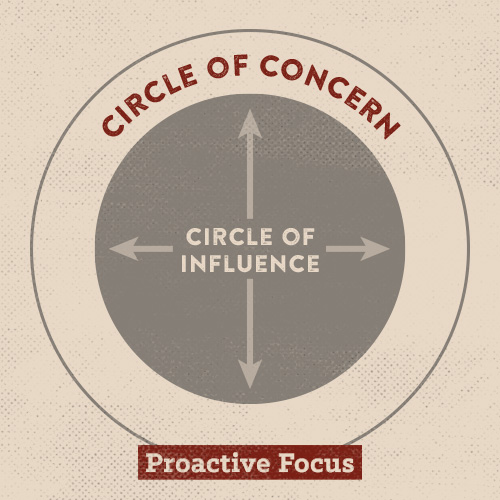
Poster about circle of concern and influence with proactive focus.

When you focus on your Circle of Influence, it expands.

Focusing on your Circle of Influence creates a virtuous cycle of action that not only leads to positive change on the items originally in that Circle, but broadens what can be encompassed within it. As you take more action, you gain more competency. And increased competency allows you to have more influence on the world around you. Things that were formerly just in your Circle of Concern will be now be added to your Circle of Influence. Focusing on your Circle of Influence increases your Circle of Influence.

The Circles of Concern and Influence offers a powerful mental model because it captures in a simple diagram a truth that Stoic philosophers wrote about thousands of years ago and cognitive psychologists have tested in labs and clinics for the past few decades.

For the Stoics, life was governed by a Dichotomy of Control. There are things you have no control over (Circle of Concern), and things you have some or complete control over (Circle of Influence). To live a good, tranquil, and flourishing life, the Stoic adherent strives to accept the reality of the former, while focusing his attention on the latter.

Modern cognitive psychologists have confirmed what the Stoics and Dr. Covey preached. When we focus on things over which we don’t have any control, it stresses us out. A bit of stress during uncertain times can act as a positive way to prepare your mind and body for performance. But if you’re stressed out about uncertainty all the time, then not-so-good changes start to happen in your brain that create a vicious cycle of reactive anxiety. Chronic stress can cause your amygdala — the alarm system of your brain — to get larger, which in turn causes you to be more sensitive and reactive to your environment, making you more vulnerable to anxiety, anger, and fear. What’s more, chronic stress can blunt executive function, which makes it harder for you to accurately judge between actual and phony threats. To top it off, chronic stress blunts dopamine production, which our brains need to stay motivated to take action.

So in a literal way, focusing on your Circle of Concern causes it to expand and your Circle of Influence to shrink. The stress that comes from spending your energy and attention on your Circle of Concern primes your brain to see more problems than solutions, reduces your ability to figure out what is and isn’t in your control, and blunts motivation to take action on the things you do have influence over. It’s a vicious cycle.

How to Be More Proactive

As someone who tends to focus on his Circle of Concern, let me say it’s hard work to overcome that tendency and focus on the Circle of Influence. A large part of it is likely due to genetics. I’m a little neurotic and morose by nature. So are other people in my family. We’re worrywarts who often feel melancholy and think in worst case scenarios.

While I can’t do much to change the temperament I was born with, that doesn’t mean I have no control over how I react to the world around me; there’s still a space between the stimuli and the response. It may take more work for me to see that gap and be proactive than it does for someone less neurotic, but it can be done.

Here are a few things that have helped me take a more proactive posture towards life:

Figure out what’s in your Circles of Concern and Influence. Sit down and make a list of all the things that worry you. Mentally purge all your anxiety on paper for a good 10 minutes. This list represents your Circle of Concern.

Take a break and come back to your list. One by one ask yourself “Do I have some influence over it?” The influence can be small. It may be “send an email requesting advice about X concern.” You might not get a response, but it’s an action you can take to influence the outcome. If you can influence the outcome of something (in even a small way), put it on your Circle of Influence list. If you’re having trouble putting items on this list, ask a friend for their input. If you tend to focus on the negative, it can be helpful to have someone with a more proactive outlook on life show you how you do have control over things in your Circle of Concern.

What this exercise will hopefully show you is that you have more control over your life than you think you do.

Watch your language. One thing Covey suggests doing to take a more proactive and less reactive posture towards life is to watch your language for reactive or proactive phrases. How you speak guides how you see the world. If most of your language is reactive, you’re likely going be more reactive. If it’s proactive, you’ll be more proactive.

Some reactive phrases to look out for:

  • There’s nothing I can do.
  • That’s just the way I am.
  • He makes me so mad.
  • They won’t allow that.
  • I have to do that.
  • I can’t.
  • I must.
  • If only.

Whenever you catch yourself using one of these reactive phrases, replace it with a proactive one:

  • Let’s look at our alternatives.
  • I can choose a different approach.
  • I control how I respond to this.
  • I choose.
  • I prefer.
  • I will.

What Covey is suggesting here is a form of cognitive behavioral therapy. This particular practice is similar to an exercise in modifying your “explanatory style” that we wrote about in our series on resilience. It takes some work, but changing your words helps change your mindset.

Take action (no matter how small). While changing your mindset and language helps, the most powerful thing you can do to adopt a more proactive posture is simply to take action. As you take action, you’ll begin to show yourself that you can have an influence on the world, which kickstarts a virtuous cycle of proactivity.

Look at your Circle of Influence. What’s an action you can take to move one of its items in a positive direction? Your actions don’t have to be big. In fact, they shouldn’t be big. Whenever you face a problem, break it down into the smallest parts possible and tackle each part one by one. It makes the problem less daunting and more concrete.

Those are some things that have worked for me. Maybe they’ll work for you, too.

Play the ball before it plays you.

Act; don’t be acted upon.

Be proactive; not reactive.

Be sure to listen to my podcast with Stephen’s son about his father’s famous principles: 

Read the Whole Series

  1. Be Proactive, Not Reactive
  2. Begin With the End in Mind
  3. Put First Things First
  4. Think Win/Win
  5. Seek First to Understand, Then to Be Understood
  6. Synergy (Beyond the Eye-Rolling Buzzword)
  7. Sharpen the Saw

_____________________________________________________________

Concepts and figures from The 7 Habits of Highly Effective People

The post The 7 Habits: Be Proactive, Not Reactive appeared first on The Art of Manliness.

19 Mar 17:08

Mobile Justice/Daily/Long-term thinking

by Kevin Kelly

Mobile justice
If you spot police officers doing something wrong, you can record them with the free Mobile Justice app from the ACLU. It sends the video directly to an ACLU server so even if the police illegally confiscate your phone they won’t be able to delete the incriminating video. — MF

No-frills To-Do app
I like to blame my To-Do List apps if things don’t get done. I get annoyed with reminders, then turn off notifications, and eventually delete. Daily – Zen Planner’s super simplistic design is non-threatening and easy to use. I type up tasks and move them to either the Today or Soon screen. — CD

Two Rooms and a BoomLong-term thinking
To encourage me to take a long-term view I’m a regular at the Seminars for Long-term Thinking hosted by the Long Now Foundation (where I am a founding board member). The hour-long talks (plus 30 minute Q&A) happen once a month in San Francisco. The topics are surprisingly diverse, ranging from ancient history to speculative futures, from food to nuclear power, from Silicon Valley to the Silk Road — all with a slant to the next 10,000 years. Several hundred past talks are archived and available to the public as free podcasts. For those outside San Francisco, or disinclined to travel unnecessarily, a membership to the Long Now gives you access to a real-time streaming version of each talk; you can even ask questions live. (Next up, next week, Steven Pinker.) — KK


I played this social deception/deduction game with about a dozen other people on the JoCo Cruise a few weeks ago. If you’ve played Werewolf or Mafia you’ll be familiar with this kind of game. In Two Rooms and a Boom, the goal is for team red to blow up the president, and the goal of team blue is to stop them. Each game takes about 15 minutes and if you’re like me, you’ll end up playing multiple rounds until way past your bedtime. It’s addictive — MF

Best scheduler
The best way to schedule a meeting for a bunch of busy people is via Doodle, a free easy website. No need to sign up. Just lay out all possible time slots and let everyone else go to the site, and click the times that work for them. The site sorts out the best time/date. No email tag. Quick, painless, I’ve been using the site for years. — KK

Get rid of frizz and flyaways
My favorite quick-fix hair product is Bumble and Bumble Brilliantine. The product description says it’s unique and hard to define, and it’s true. I use it when I don’t have enough time to heat style my hair. I rub a dime-size amount between my palms and pat it through out my hair to smooth it out, create shine and get rid of flyaways. — CD

Recomendo now has a Facebook page! Follow us for daily recommendations.

19 Mar 17:06

The 7 Best Cast-Iron Skillets You Can Buy in 2018

This definitive guide explores everything you need to know about cast-iron cookware, including the best skillets for every type of cook.

19 Mar 17:06

Right Now, This Ultra-Classic Camp Stove is 46% Off

The perfect pair for a tailgate or car camping adventure.

19 Mar 17:05

This Rare Land Rover Is the Off-Roader of Your Dreams and It’s Only $8,000

To hell with number-matching parts, this Discovery is as close to perfect as you can get.

19 Mar 16:55

Canyon’s Wild New Gravel Bike Has A Funky Handlebar

The new handlebar design on Canyon's latest adventure bike is actually reminiscent of a design from the 1990s.

19 Mar 16:26

5 Used Cars Great For Camping

These five used cars are raring and ready for a weekend in the mountains, the desert or wherever you want to take them.

19 Mar 16:26

12 New Knives From the Finest Knife Makers in the World

Including knives from Spyderco, CRKT, Böker and Morakniv.

19 Mar 16:24

Honomobar

Built from a recycled shipping container, the Honomobar is a stylish addition to your backyard or retreat. A three-foot cedar overhang offers some protection from the elements, an aluminum roll...

Visit Uncrate for the full post.
19 Mar 16:17

Beginning Painters Try To Paint Like Bob Ross

by Zeon Santos

Bob Ross was just as famous for his personality and presentation as his teaching skills, and even though his videos were made to be easy to follow most people I know preferred to simply watch Bob paint than follow along.

That's because most people who have never painted before assume they'll suck at painting no matter how good the teacher, but when BuzzFeedVideo asked amateurs to learn from the coolest painting instructor ever they gave it a shot.

So was a lesson from Bob Ross enough to make them overcome their fear of creating a crappy painting? Tune in and find out! (NSFW language)

(YouTube Link)

19 Mar 15:54

NASA Wants Your Cloud Photos to Help Verify Satellite Data

by Michael Zhang

NASA is looking for people who are willing to regularly snap and share photos of clouds. The space agency is turning to citizen scientists for a cloud observation project that will help validate the images captured by satellites in space.

From now until April 15th, you can take part in NASA’s “challenge” by downloading the free GLOBE Observer app for iOS or Android (there are also advanced data entry methods). Once you have the app, you can snap and send cloud observation photos directly to NASA through it.

“Researchers use, and value, this citizen science cloud data because it helps to validate data from Earth-observing instruments,” NASA writes. “[I]t is not always easy for researchers to positively identify all types of clouds in their images.”

“For example, it can be difficult to differentiate thin, wispy cirrus clouds from snow since both are cold and bright; even more so when cirrus clouds are above a surface with patchy snow or snow cover,” NASA continues. “One solution to this problem is to look at satellite images from a particular area and compare them to data submitted by citizen scientists on the ground.”

“Looking at what an observer recorded as clouds and looking at their surface observations really helps us better understand the images that were matched from the satellite,” says GLOBE Clouds lead Marilé Colón Robles.

And this app and program are a “challenge” because there’s a prize: the people who submit the most cloud pictures by the deadline will be congratulated in a video on the GLOBE website and through social media.

(via NASA via Engadget)

16 Mar 15:45

Irish Sausage Plate with Stout Mustard Cream

by Kita

There’s a local brewpub that is single-handedly responsible for at least 6 out of the 10 extra pounds I walk around with. They have a beer list a mile long and great food. It’s a deadly combination of guilt and indulgence. One of their signature seasonal dishes is their ‘Brewer’s Plate’ – a trio of […]

The post Irish Sausage Plate with Stout Mustard Cream appeared first on girl carnivore.

16 Mar 15:45

Slow Cooker Smoky Irish Lamb Stew

by Kita
Slow Cooker Smoky Irish Lamb Stew | Kita Roberts GirlCarnivore.com

A simple base of classic dark stout pairs beautifully with this low and slow lamb stew. A hint of smoky flavor from the paprika and the filling potatoes and carrots make this Slow Cooker Smoky Irish Lamb Stew the perfect winter bowl of comfort.  One of my favorite proteins to work with is lamb. I think it is ... Read More about Slow Cooker Smoky Irish Lamb Stew

The post Slow Cooker Smoky Irish Lamb Stew appeared first on Girl Carnivore.

16 Mar 13:26

The Next Stop In Outsourcing: Entry-level Hiring

by Ryan Craig, Contributor
There’s no need to look at how other countries run apprenticeships. America leads the world in outsourcing. By outsourcing entry-level hiring, American companies can pioneer a uniquely American model for apprenticeships: outsourced apprenticeships.
16 Mar 13:19

Three-owner 1957 Mercedes-Benz 300SL to be auctioned for charity

by Antti Kautonen

Filed under: Mercedes-Benz,Auctions,Automotive History,Coupe,Classics,Luxury,Performance

Some sources regard the mid-1950s Mercedes-Benz 300SL "Gullwing" the first supercar. When it was introduced in 1954, it was certainly unlike anything else, and the 212-horsepower direct injection straight six made it the fastest production car of its day. With a rich motorsport history and the still amazing gullwing doors, the 300SL holds a special place among classic Mercedes-Benz coupes.


Continue reading Three-owner 1957 Mercedes-Benz 300SL to be auctioned for charity

Three-owner 1957 Mercedes-Benz 300SL to be auctioned for charity originally appeared on Autoblog on Fri, 16 Mar 2018 08:30:00 EDT. Please see our terms for use of feeds.

Permalink |  Email this |  Comments
15 Mar 22:50

Ten Things To Do Right Now -- Before You Get Fired

by Liz Ryan, Contributor
Max's company got bought, the new owner doesn't seem to care for Max and at this point Max is just waiting to get fired. What should Max be doing and thinking about?
15 Mar 22:35

I like this


3077 points, 145 comments.

15 Mar 22:34

How I Fish: Lefty Kreh

by Jay Cassell
lefty kreh flyfisherman

One of the greatest flyfishermen of all time shares his angling wisdom, talks about his favorite fishing spots and fish to chase on the fly, and explains his four principles of fly casting

A F&S Classics interview with Lefty Kreh, one of the most legendary flyfishermen of all time…
15 Mar 22:33

A Guide to the 5 Best Irish Whiskeys With Superb Cask Finishes

by Karla Alindahao, Contributor
It’s no secret that Irish whiskey is just so damn good—so much so that it’s very difficult to find a bad bottling. But the fine Emerald Isle distillers are upping their games by experimenting with cask finishes—from Cognac to Madeira to rye and beyond. Here are five superb examples.
13 Mar 22:16

This Insane Map Shows All The Beauty And Horror Of The Dark Web

by Thomas Fox-Brewster, Forbes Staff
Map of 6,800 sites, created by Darpa-backed computer scientists, hopes to show the world what the dark web is really like...
13 Mar 22:15

Baby Lettuce Salad with Radishes

by Stephanie McMillan

Is spring fever running rampant on board? Enjoy this light, simple dinner evocative of warmer weather. Recipes serve 4.

Baby Lettuce Salad with Radishes
1 cup thinly sliced radishes, trimmed
¾ tsp. salt
¼ tsp. sugar
1 lemon, quartered
4 cups arugula, mesclun or spring mix
1 tsp. olive oil
4 Tbsp. shredded Parmesan
¼ cup sliced almonds/other favorite nuts
(Toast in a dry skillet over medium-low heat until fragrant and lightly browned.
Shake the pan to avoid scorching. Cool completely before using.)

In a small bowl, toss sliced radishes with 1/2 teaspoon salt, 1/4 teaspoon sugar and juice of 1/2 a lemon. Let sit for 5 minutes. Place the arugula in a separate bowl. Squeeze juice from 1/4 lemon over the greens, drizzle with oil and sprinkle with 1/4 teaspoon salt; toss to incorporate.

Season to taste with more lemon juice, oil and/or salt. Divide the arugula mixture between dinner plates, mounding each portion in the center. Sprinkle nuts on top. Arrange sliced radishes over each mound of greens, and scatter cheese over each portion.

By Lori Ross, Southern Boating March 2018

More Spring Recipes:

Strawberries with Lime Cream

Sweet Peas with Onions

Honey Herb Lamb Chops


The post Baby Lettuce Salad with Radishes appeared first on Southern Boating .

13 Mar 22:15

Strawberries with Lime Cream

by Erin B

Is spring fever running rampant on board? Enjoy this light, simple dinner evocative of warmer weather. Recipes serve 4.

Strawberries with Lime Cream
8 oz. cream cheese
¾ cup confectioner’s sugar
1 Tbsp. lime juice
Zest of one lime
1-pint strawberries, hulled and sliced

In a mixing bowl, combine the cream cheese, powdered sugar, lime juice, and lime zest. Place the mixture in the fridge to chill.

Divide strawberries between four bowls; place a dollop of lime cream atop each. Garnish each with some grated lime peel on top if desired.

By Lori Ross, Southern Boating March 2018

More Spring Recipes:

Baby Lettuce Salad

Sweet Peas with Onions

Honey Herb Lamb Chops


The post Strawberries with Lime Cream appeared first on Southern Boating .

13 Mar 22:14

Honey Herb Lamb Chops

by Erin B

Is spring fever running rampant on board? Enjoy this light, simple dinner evocative of warmer weather. Recipes serve 4.

Honey Herb Lamb Chops
¾ cup honey
2 sprigs thyme or 1 tsp. dried thyme
¼ tsp. each salt and pepper
1 Tbsp. garlic powder
1 tsp. each parsley, chives and tarragon
¼ tsp. each salt and pepper
8 lamb chops

In a microwaveable cup, combine the honey, thyme, and salt and pepper; warm in
microwave to infuse honey with thyme about 15-20 seconds. Set aside. Preheat a grill or pan to high heat.

Combine the garlic powder and herbs in a bowl. Season the lamb with salt and pepper, and rub with the spices. Place the chops on the hot grill or pan, and let them cook for scarcely a minute or until the fat chars a bit, then turn and cook the other side for 2 minutes.

Adjust the temperature to medium-low, and cook chops another 3-5 minutes on each side or until medium rare. To serve, arrange lamb chops around the
salad, then drizzle the warm thyme honey over the chops and salad.

By Lori Ross, Southern Boating March 2018

More Spring Recipes:

Baby Lettuce Salad

Strawberries with Lime Cream

Sweet Peas with Onions

The post Honey Herb Lamb Chops appeared first on Southern Boating .

13 Mar 22:14

Sweet Peas with Onions

by Erin B

Is spring fever running rampant on board? Enjoy this light, simple dinner evocative of warmer weather. Recipes serve 4.

Sweet Peas with Onions
⅔ cup water
1 cup whole white baby onions (fresh or frozen) or 1 cup diced onion
½ tsp. salt
2 tbsp. butter
¼ tsp. each salt and pepper
4 cups of fresh, frozen or canned green peas (If using canned peas, simply cook peas 1-2 minutes when added to onions until warmed through.)

Bring water, onion, and 1/2 teaspoon salt to a boil in a medium saucepan. Cover pan and reduce heat to medium; simmer, stirring occasionally, until onion is tender, about 5 minutes. Increase heat to medium-high and stir in butter and peas; cover and cook,
stirring occasionally, until peas are tender, about 8 minutes. Season to taste with remaining salt and pepper.

By Lori Ross, Southern Boating March 2018

More Spring Recipes:

Baby Lettuce Salad

Honey Herb Lamb Chops

Strawberries with Lime Cream

The post Sweet Peas with Onions appeared first on Southern Boating .