KWBaker
Shared posts
House Styles 101: What Is A Colonial?
The Best Gear for Hunting Camp

These two dozen products will help you hunt smarter, finish chores faster, have more fun, and maybe even get a little sleep

Welcome to Squirrel Camp, Sponsored by OnX Hunt

Stories, tips, and tricks from a public-land hunt for America’s favorite small-game animal

24 Photos from The Print Swap Are Headed to London!
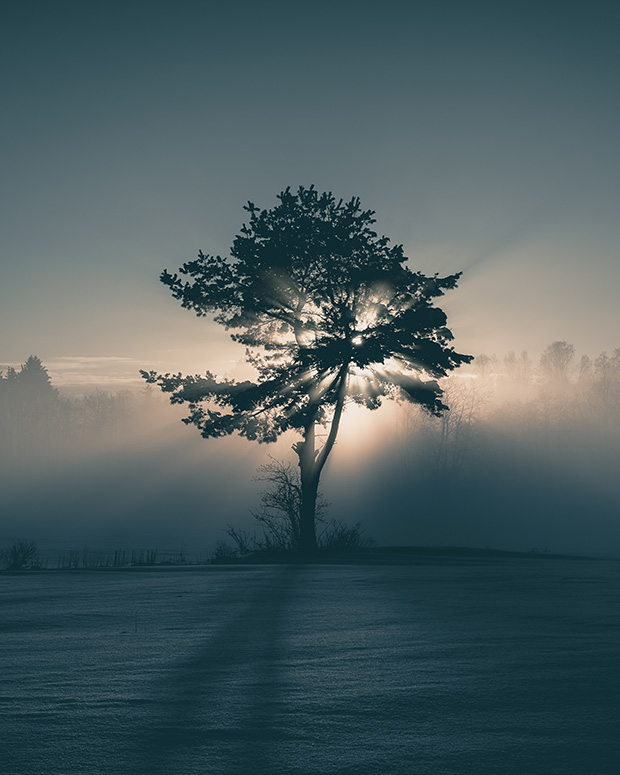
Visitors © Sebastian Dijkstra Nilander (@___sebastian_dijkstra___), Lier, Norway
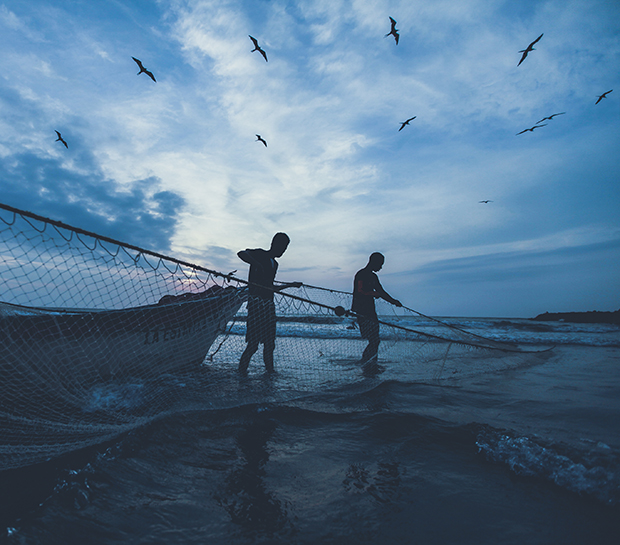
guides & messengers / net fishing in Cartagena © Hakim Kabbaj (@ _______hakim), Brooklyn, NY
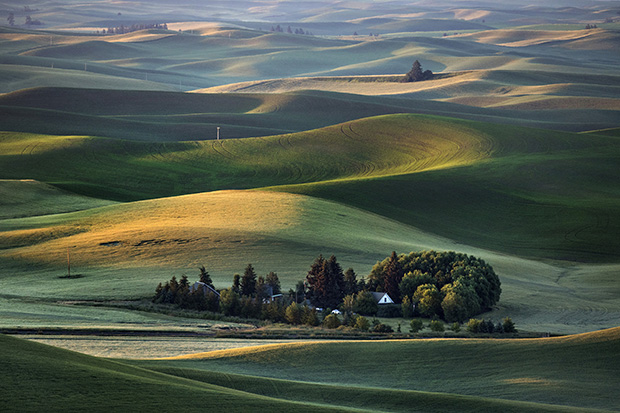
Palouse Green Acres © Clark Most (@clarkmost), Midland, MI
The Print Swap by Feature Shoot is coming to The Other Art Fair in London on October 4th, in an exhibition curated by Caroline Hunter, the Picture Editor at The Guardian Weekend Magazine! This show is our first in the UK, featuring 24 images in total with photographers hailing from the United States, Canada, England, Norway, Germany, Poland, Italy, Belgium, and Qatar. The Other Art Fair is expected to draw over 14,000 visitors.
While this show has no fixed theme, Hunter’s selections feel bound by a common thread; that is, they all seek beauty in the overlooked. These artists ask us to discover and delight in the surprises that lie beyond the surface, whether it’s the poetry of color in the streets of London (Kyun Ngui), an otherworldly trick of the light behind a seemingly ordinary tree (Sebastian Dijkstra Nilander), or the shadow cast by a lonely basketball hoop (Bastian Richter).
Remembering the net fishers he encountered in Cartagena, the photographer Hakim Kabbaj writes, “Despite the fact that they were just kids making a few bucks for the day, at that moment, they seemed to become mythological figures who had control over everything around them, the boat, the net, the fish, the birds, the tides and sun.” Amanda Annand says she feels “most at home in small and unusual places, and similarly, Edward Kreutzarek admits, “I always had that affinity for those not ‘obviously beautiful’ places.”
If you’re in London between October 4th and 7th, be sure to check out the show in person! As always, we invite photographers around the world to submit images to The Print Swap by tagging #theprintswap. Our team of editors selects outstanding images to be part of the project, and participating photographers both give and receive prints. Prints are mailed out at random, so it’s always a fun surprise to see who ends up with each print. A photographer in New York, for instance, could receive a print from Pakistan. While it’s free to submit to The Print Swap, selected photographers pay $40/image to participate, and that covers printing and shipping in full.
In November, we’ll be having our holiday party and exhibition at ROOT Studios in Manhattan, and all photographers who participate in The Print Swap between now and November 11th will get to show work! Learn more at our website, and follow along at @theprintswap on Instagram for more.
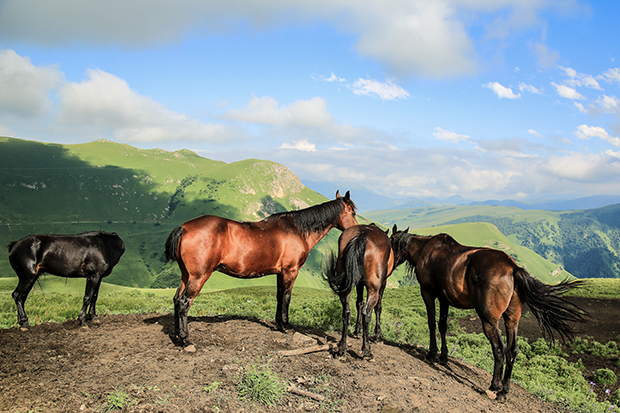
Wild Horses © Alexandre Mounayer (@Alexandremounayer), Doha, Qatar
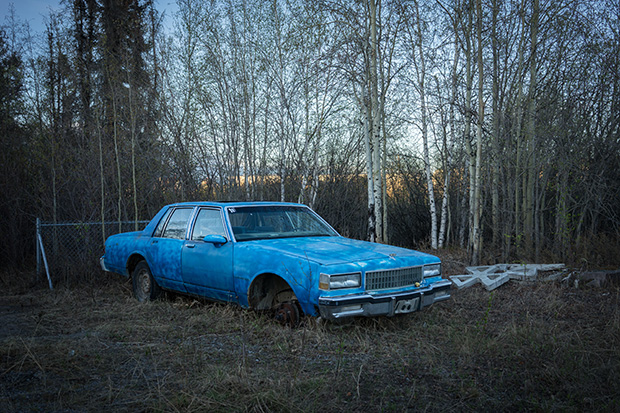
Northlands | Yellowknife, NWT © Amanda Annand (@amaradah), Yellowknife, NWT, Canada
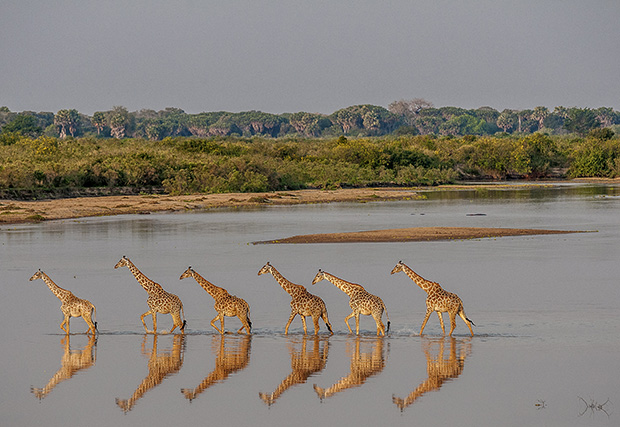
Giraffe Crossing, Selous Game Reserve, Tanzania © Robert Ross (@rjrossphoto), Basalt, CO
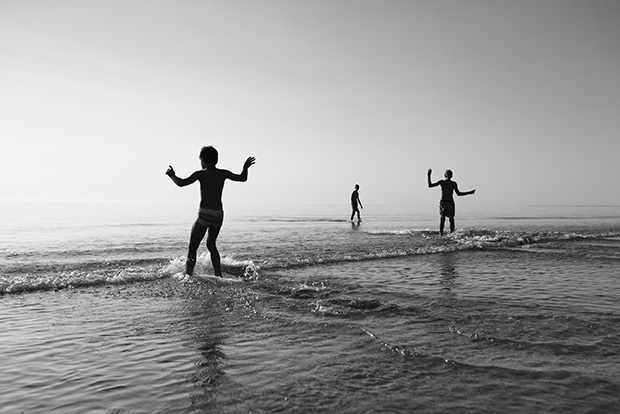
Summer of 2018 or: the boys © Nina Gebke (@nina_gebke_fotografie), Lower Saxony, Germany
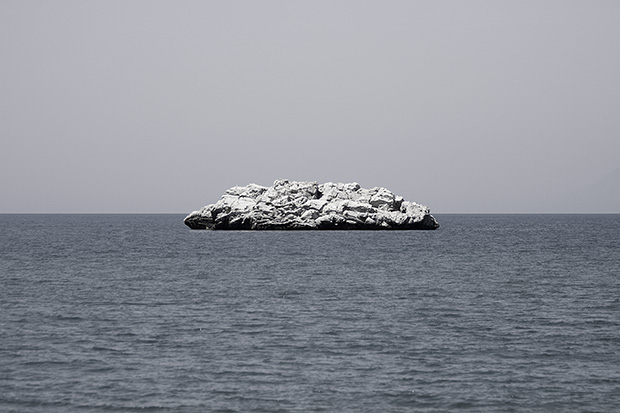
Surreal Rock (Sicily) © Marco Ristuccia (@mristuccia), Berlin, Germany
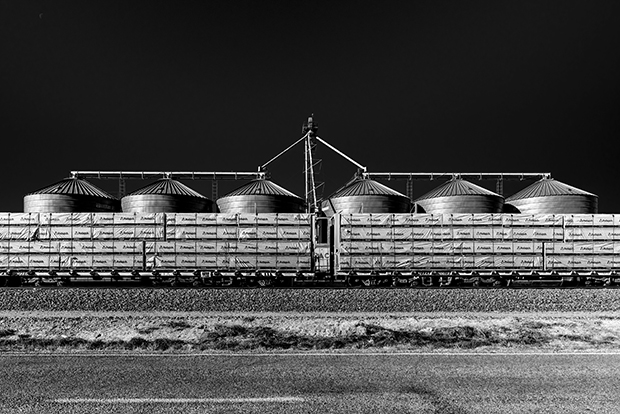
Wrapped lumber stacked on freight rail car resting in front of grain silos. © Lawrence Manning (@lawrence_manning_fine_art), Nampa, Idaho
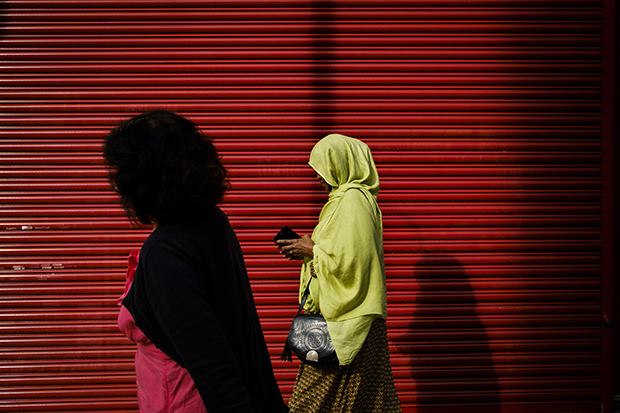
Red Shutter. London, England © Kyun Ngui (@kyun.pic), London, UK
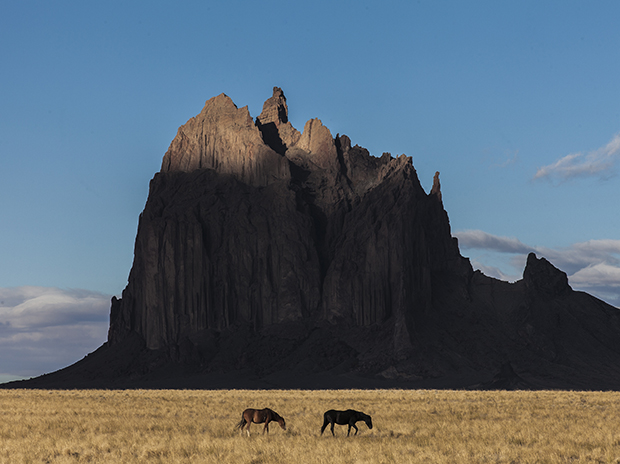
the restless roaming spirit / This is Tse Bit’a’i, which means “winged rock” in Navajo. Tse Bit’a’i is a prominent figure in Navajo Indian mythology as a giant bird that carried the Navajo from the cold northlands to the Four Corners region. © Hakim Kabbaj (@_______hakim), Brooklyn, NY
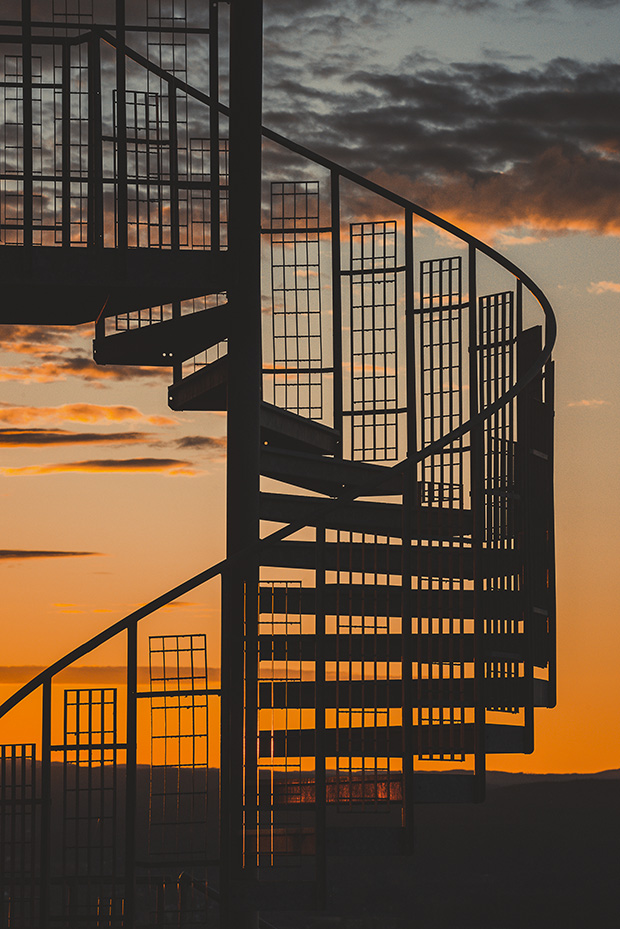
Led Zeppelin © Sebastian Dijkstra Nilander (@___sebastian_dijkstra___), Lier, Norway
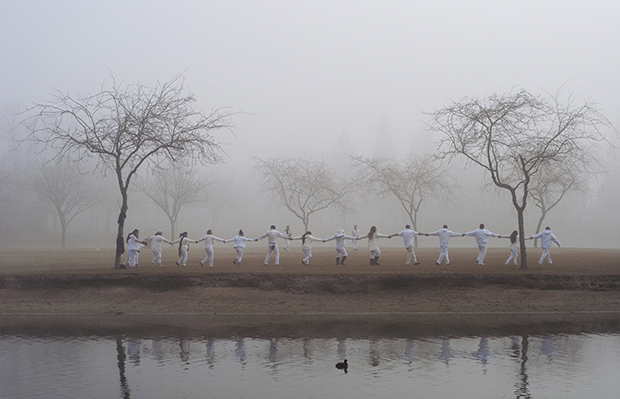
If I can’t dance I don’t want to be a part of your revolution © Joanna Smieja (@joannasmiejka), Wroclaw, Poland
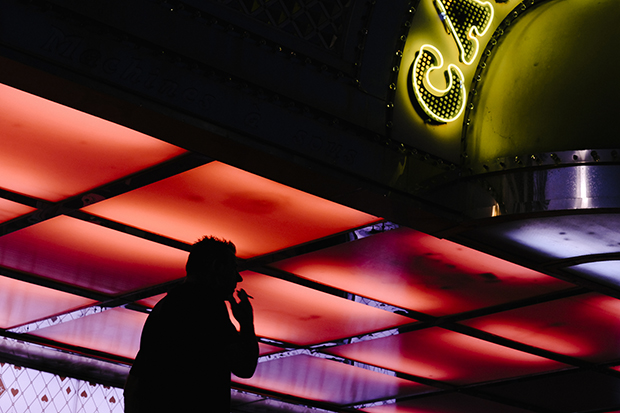
Now or never © Gabriele Muscogiuri (@gabrielemuscogiuri), Turin, Italy
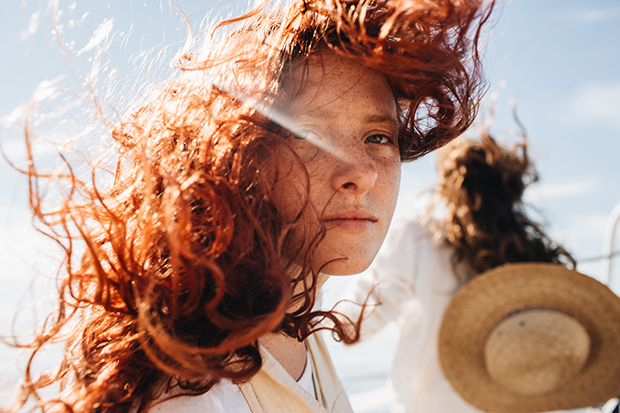
Siren Courtney © Emily Nathan (@ernathan), Oakland, CA
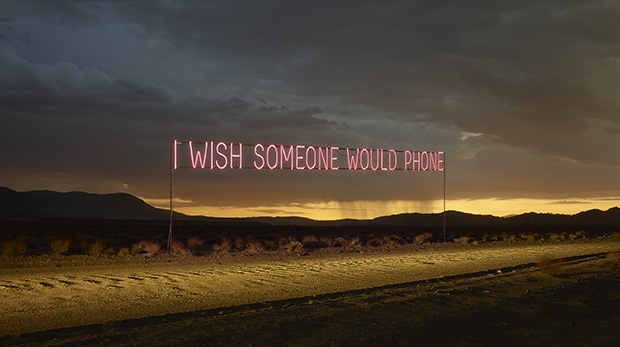
I Wish Someone Would Phone © Samuel Hicks (@samuel_hicks_), London, UK
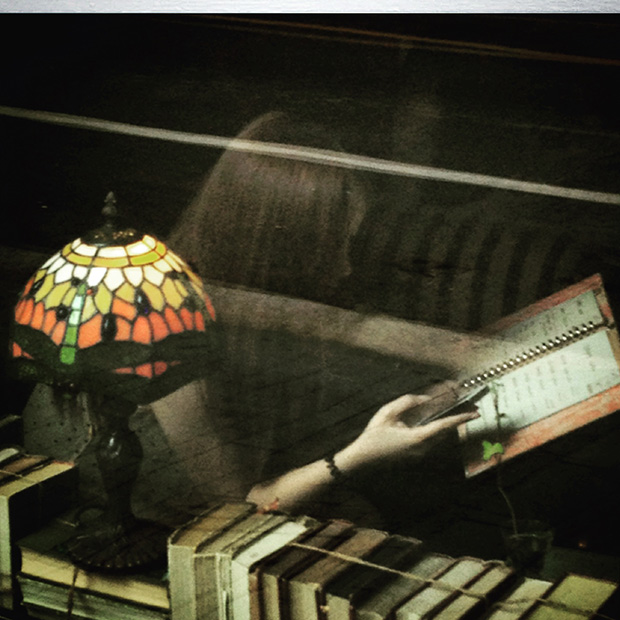
Lost in Shanghai © Ekaterini Karanika (@karanika), Brussels, Belgium
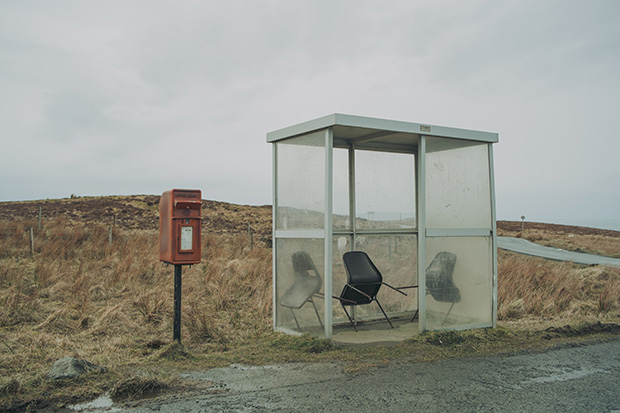
Bus Stop at the End of the World / This was taken on a trip to the Isle of Skye. It really felt like i was at the end of the world, looking at the last bus stop on earth. The chairs are the icing on the cake. © Edward Kreutzarek (@dervirvel), Freiburg, Germany

Lake Michigan Placid Waters © Clark Most (@clarkmost), Midland, MI
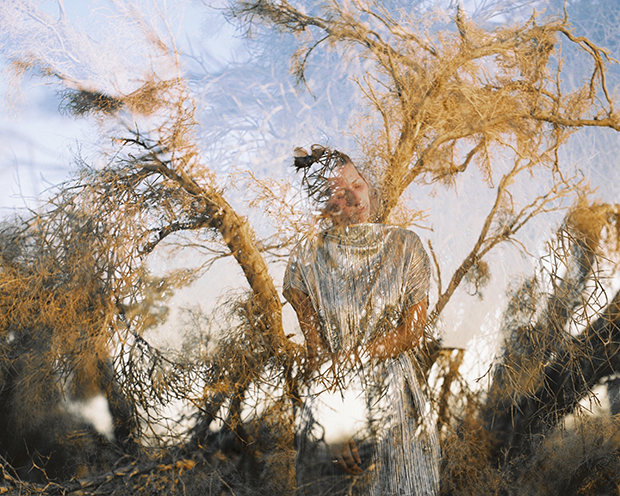
Twentynine palms © Chiara Zonca (@shadowontherun), Saskatoon, Saskatchewan, Canada
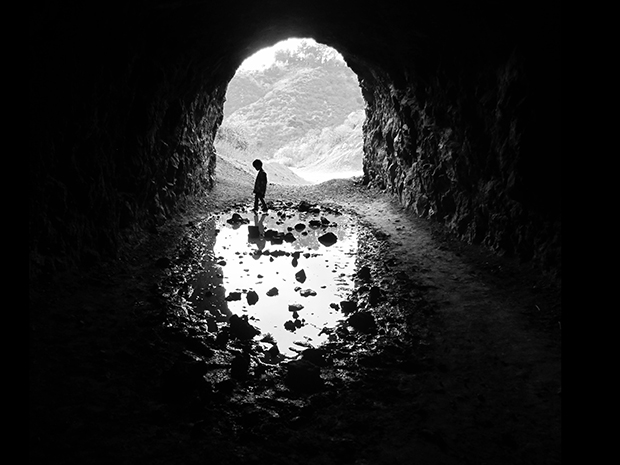
Cave Puddles © Cetywa Powell (@losangelessnapshots), Glendale, CA
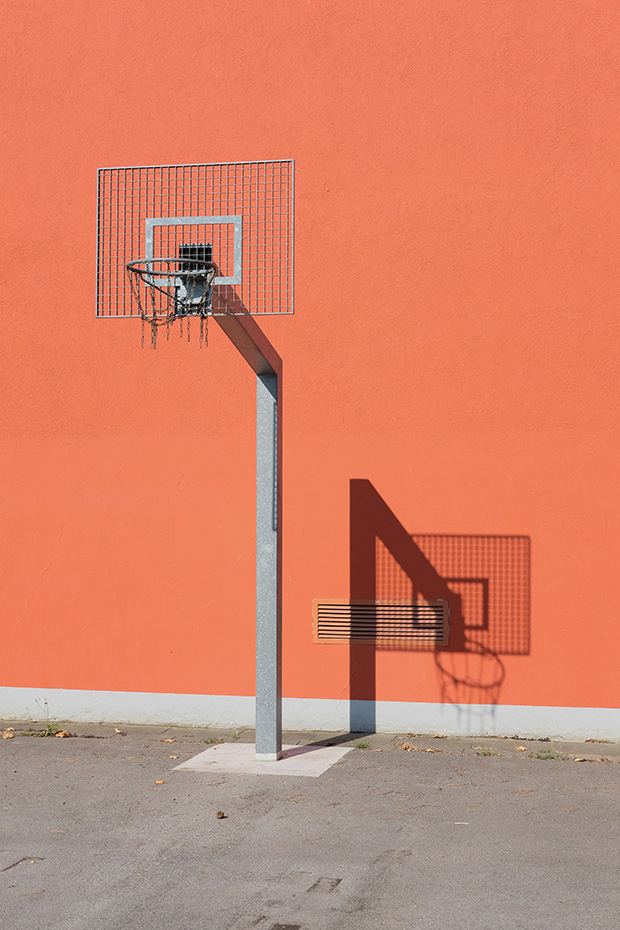
untitled © Bastian Richter (@homebase75), Hilden, Germany
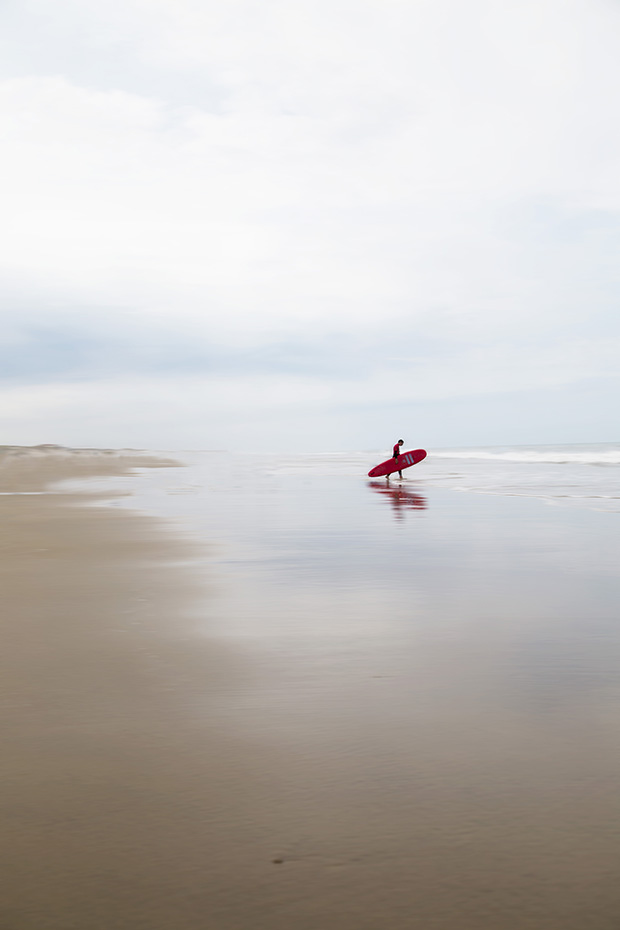
Surf Invasion © Alexe Timoney (@alexetimoney), Reston, Virginia

dark tower / The Trump World Tower flanked by The Empire State Building and The Chrysler Building. I took this image in October of 2015. Was my camera trying to tell me something? © Hakim Kabbaj (@ _______hakim), Brooklyn, NY
The post 24 Photos from The Print Swap Are Headed to London! appeared first on Feature Shoot.
Three New Tools Every Adventure Photographer Should Have

This 2-pack of Tylt mobile chargers solves a big hassle for $15 - CNET
How to Make Boxed Brownie Mix Taste Homemade

If there is one hill I will die on, it is that boxed mix brownies are usually the only brownies worth my time—but that doesn’t mean I don’t like to get fancy with them. If you’re looking to pass yours off as a little more gourmand, simply change the oil.
The 5 Best Dumb Phones

While some find the convenience of smartphones a lifesaver, others would be happy with having a phone that only makes calls and texts, and has enough battery life to last longer than a day.
Whatever your needs are, we’ve put together a list of the best non-smartphones on the market today to help you choose the right option.
Best Feature Phone for Texting:
ZTE Z432
ZTE Z432
ZTE Z432
Buy Now On Amazon $25.99
A full QWERTY keyboard on the ZTE Z432 makes this a great kid’s texting device. You can enjoy a smartphone-like keyboard alongside a minimalistic device all in one phone.
Other benefits of this phone include an impressive battery life with almost five hours of talk time and 10 days on standby. This ZTE phone also features a 2.4-inch display and a two-megapixel camera. However, the picture quality might disappoint if you’re used to smartphone-quality photography.
The phone’s menu is pretty straightforward and easy to navigate. The Z432 offers a lot of flexibility and runs on AT&T’s 3G network. Overall, you can count on this AT&T dumb phone to stay in contact with your family and colleagues, as well as being able to quickly reply to messages and emails.
Best Nokia Phone:
Nokia 3310
Nokia 3310
Nokia 3310
Buy Now On Amazon $40.09
The Nokia 3310 is considered the gold standard of feature phones, and is counted among the best text only phones. This updated version of the classic dumb phone comes with a 2.4-inch display, a menu that’s easy to navigate, and large number pad buttons.
The long battery life allows for 22 hours of talk time or an impressive 744 hours, or 31 days, of standby. You also get a flashlight and a two-megapixel camera. Even better, this one comes with an MP3 player. Due to the paltry 16MB of internal storage, you’ll need to use the SD card slot to extend the storage up to 32GB.
You can access email and some social media sites from this phone as well. To top it all off, it also includes a version of the classic game, Snake! To find out more about this phone, take a look at our review of the Nokia 3310.
Best Flip Phone:
Verizon Samsung Convoy U660
Verizon Samsung Convoy U660
Verizon Samsung Convoy U660
Buy Now On Amazon $105.48
The best non-smartphones don’t need powerful hardware or slim designs, so you’ll find that they’re sturdier than smartphones. An excellent example of this is the Verizon Samsung Convoy U660, which looks the part of a rugged phone. The design makes it durable against drops, sand, and humidity.
The thin designs and touchscreens of modern smartphones are great for everyday use, but how safe do you feel taking it with you on hikes or mountain climbing? Suddenly, those fragile phones get a lot less desirable! That’s what makes the Convoy U660 so appealing.
Its high durability makes it a fantastic kid’s texting device. If the thought of giving your child an expensive yet fragile phone sends shivers down your spine, the Samsung Convoy is the perfect pick for active kids.
That doesn’t mean it skimps on the features, however. It has a camera, with a flash that can also act as a flashlight, Bluetooth connectivity, media players, and even the Opera web browser for some light internet browsing.
Best Dumb Phone for Email:
Alcatel 871A Prepaid GoPhone
Sometimes you don’t want all the features of a smartphone, but you do still want to check your email. With everyone contacting one another across the internet, it can be a useful tool to have!
The Alcatel 871A Prepaid GoPhone is a good option for checking your mail while on the go. It also has a radio and supports picture and voice messaging, a camera, and Bluetooth connectivity.
Despite these features, the Alcatel phone is still very much a dumb phone. This trait makes it ideal as a work-based phone, allowing you to receive calls, texts, and emails without needing to resist the urge to install Netflix on it!
Best Sliding Keyboard Phone:
LG Xpression C410
LG Xpression C410
LG Xpression C410
Buy Now On Amazon $76.99
The keyboard-based phones we’ve mentioned above are great, but some people don’t like the additional size that comes with a built-in keyboard. For those people, the LG Xpression C410 is the best choice.
Without the keyboard, the phone is the right size to easily slip into your pocket. The front has a screen and buttons that allow you to use the phone without difficulty. When it’s time to type, slide the keyboard out and tap away!
That’s not the only useful feature of this phone. It has an impressive standby battery life of 340 hours, making it a nice phone to have on-hand to make or receive calls. Best of all, it’s unlocked by default, meaning you don’t need to sign up to a specific carrier to use it.
The Best Dumb Phone for You
If you’re after a phone that only calls and texts, then a dumb phone is a great way to go. These text only devices often have longer battery life. They also lack the privacy-invading features found on all smartphones.
If you want to know more about what modern-day life with a dumb phone is like, be sure to read about when we used a dumb phone for a year.
Read the full article: The 5 Best Dumb Phones
Hospitals’ Secret Contracts With Insurers Are Keeping Health Care Expensive: Report
Now You Can Watch 'The Room' For Free

Fans of The Room can now watch the film for free whenever they want thanks to writer, actor and filmmaker Tommy Wiseau. Wiseau recently uploaded the movie in its entirety to YouTube, allowing free access to the film in its entirety for all.
There's More Behind Spotify's Artist Direct Upload Strategy Than Meets The Eye

5 Road Trip Photography Tips – Come Home with Great Photos
Who doesn’t love a good road trip? You pick a destination, plan your route, pack up your stuff in the car, and hit the road. For many, the open road signifies freedom, opportunity, exploration, and adventure. As much time as you spend planning out a road trip, you never know what surprises may be out there waiting.
It’s exciting! It’s truly an iconic American experience. There will be moments and memories you plan to capture and a whole host of others you won’t want to forget.

On every traveler’s packing list is a camera. Whether that’s your phone, a simple point and shoot, or a DSLR, you want to make sure you’ve brought something to capture your experience. So, how do you make sure you’re getting the best possible photos?
What are some tips and pointers for capturing all of those memories? Here are a few quick tips that you can use to make sure you can do the best road trip photography possible.

1. Research Your Spot
Thanks to the internet and social media, you can search for any destination online and see photographs others have taken. This is a great way to see what attractions, large or small, await you. A quick search of the highway or road you’re going to take, the cities you’re going to pass through, may bring up unexpected and worthwhile stops.
Another really helpful tip is to research your destination on social media. A quick search on Instagram or Facebook will reveal all of the top spots that other photographers have found. This will be helpful to make sure you don’t miss a monument, historical landmark, or site along the way.

But, it’s also really helpful to find all of those hidden gems that only the locals or seasoned travelers might know about.
2. Plan and Pack
If you’re a photographer hitting the open road, packing your camera gear is almost as important, if not more so, to you than remembering your toothbrush. Depending on the trip, you may have enough room to bring all your gear or you might have to limit yourself.
Take note of important things like the locations you’re going to be driving through, the time of year you’ll be driving, what kind of photographs you’ll want to take, and the weather. All of these components will affect what kind of gear you will need to bring with you.

It can be easy to get carried away or get overwhelmed and not pack the right things. So, take a minute and think through what your most useful and crucial gear might be given where you are traveling. What is going to help you capture those can’t miss moments the best?
It is always better to have a few extra pieces of gear to ensure you have what you need rather than miss a moment.
A quick list of things to consider as you plan and prep:
- Will you be walking a lot at your destinations?
- Will your gear be safe at your destinations?
- What time of year is it?
- What will the weather be like where you’re going?
- Do you need any accessories (i.e. tripod, filters, reflectors)?
- What is the one camera/lens combo you can’t live without?

3. Prepare a Go-Bag
Any time you’re on a road trip it is vital to have a setup close-by and ready to go. This means a versatile lens, your camera, a fully charged battery, and your settings already set up.
You can pack up the bulk of your gear elsewhere in the car but keep your camera bag or an additional bag with all of these necessary items next to you. It will help you in a pinch. You never know when you might see a great scene out the window as a passenger or when you’ll want pull over to capture an unexpected sight or beautiful landscape.
It is helpful to keep a short list of must-have gear for your go-bag so you can quickly pack one at any time. Some of these items may include:
- Camera bag
- A tripod
- Fully charged batteries
- Camera body and lenses
- Dust cloth, air blower, or any tool you use to remove dirt and dust from your gear
- Filters
- Memory cards

4. Slow Down and Expect the Unexpected
You can plan, and you can prepare. You can have a list of all of your top spots ready and marked on your route. As important as all of these tips are, being ready for the unexpected is just as important.
If you see something cool or unique, stop and take a photograph. If you pull off into a little town, take some time to walk around and keep your eyes peeled so you don’t miss an interesting photo opportunity. Don’t let the excitement of heading to the next destination keep you from missing out on a great photograph.
Remember to carve out time to slow down and see the sights both with and without your camera.

5. Never forget to have fun!
Finally, never forget to have fun doing it.
Do you have any other road trip photography tips? Have you done any good road trips lately? Please share your tips and images in the comments below.

The post 5 Road Trip Photography Tips – Come Home with Great Photos appeared first on Digital Photography School.
Evapo-Rust
Getting rid of rust on tools, antiques, or old junk has always been an irritating and unsuccessful chore for me. But out in the Tube-osphere, guys restoring antiques all swear by Evapo-Rust ($23/gallon). They submerge the gnarly rusted object in this clear liquid overnight and the next day it rises up clean as a whistle. I got some, and by golly, it works like magic. As it eats away the rust, the liquid turns black (which is the reduced iron) as it depletes, but a gallon of it cleaned far more than I expected. The manufacturer claims one gallon will eat ½ pound of pure rust, or 300 pounds of moderately rusted iron. If you can’t dunk the rusted piece you can brush it on and keep it moist with towels. It claims to be non-toxic and biodegradable. It sometimes leaves a somewhat grayish film, but that’s no problem for anything being painted. It’s not cheap, but man, it is well worth it.
'Leave No One Behind': The Young Londoner Creating A Movement For Citizen Rights In The Digital Age

BBQ Friday with Grady’s in Dudley, NC
Longest-Running Food Festival In Central Texas Celebrates 86th Anniversary

15 Hours Inside a Small Photo Blind
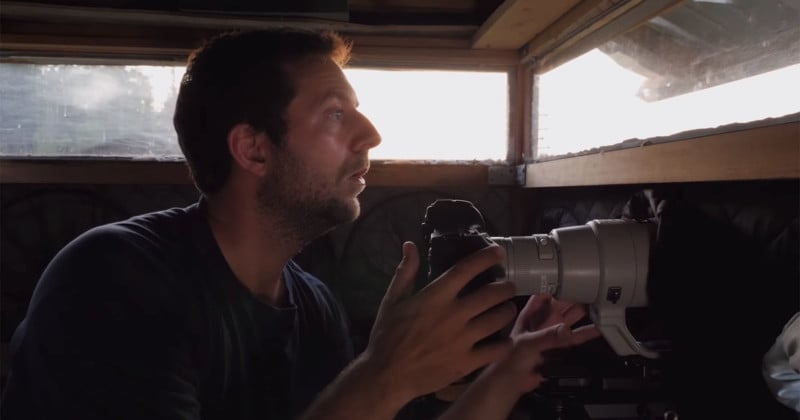
Everything outside the small photo blind is silent except for the two ravens perched on the top of a dead tree cawing and a few flies quietly buzzing around. I’ve mounted the 500mm lens on the camera and pointed it towards the pine trees far away. My huge, directional Sennheiser microphone is aimed in the same direction.
I am in the wild Taiga of Finland, the home of brown bears and wolves, and these fascinating animals are the reason I am here. To photograph them and to share the behind the scenes videos on my YouTube channel and also, most importantly, to experience the beauty of this wild Taiga and get close to the animals living here.
I really hope to see a bear, and I wish so badly for even just a glimpse of a wolf…
I am pouring myself a cup of coffee while I let my eyes browse the meadow in front of me. I am excited. One hour passes. Then suddenly, I register a movement in my periphery vision. It is here.

The brown bear is walking along the edge of the forest some one hundred meters away and, even at this distance, it looks impressive. Its movements look as if it were in slow motion, and in my binoculars, I can see how the water drips from its large paws every footstep it makes in the wet, swamped tundra.
It is still way too far away to take a nice photo, and the light is still too sharp and flat to make a moody photo of this beautiful bear in its environment. I am watching the bear while I pour myself a cup of warm coffee. This is so cozy.
I arrived at the blind at 6pm and I have now been here for a few hours. Both the bears and the wolves are most active during the night, so I will have to stay awake. It is a strange feeling to have to turn the day’s rhythm around, even though I have been sleeping during the day, my inner watch still tells me that it is evening.
I look around in the blind and everything is nicely organized now. I have prepared lenses, batteries, and memory cards so that they are easy to get hold of if I should need them in a hurry. The coffee, water, and food each has their place, and so has the extra clothes and other equipment. It’s so comfortable to sit here and watch this bear slowly pass in the distance.
Kuhmo is located in the Eastern part of Finland close to the border to Russia. Actually, some of the photo blinds are located in what they call No Mans Land – an area between Russia and Finland that neither have the rights to use. The photo blinds are owned and managed by Wildlife Safaris Finland.

When renting a blind you usually stay at the Kuikka Base Camp where you sleep and eat and talk to the other photographers. There are usually between 3 and 4 locations to choose between, and each location has a number of photo blinds where you can either choose to sit alone or with one or more other photographers. It depends on the price you pay.
Most photographers come to see the brown bear, the wolf, and the wolverine but you will most likely also see the raven, eagle and other birds. It is also possible to rent a boat to go and see beavers. Some photographers have even been lucky to see owls.
The light is getting weaker now and the ISO is slowly climbing up. The mist gives the landscape a mystery look. It is so hard to capture this mood in a photo – even in a video. There are so many things that we can’t capture. The smell of the Taiga, the gentle breeze that hits my warm skin through the little window, and the feeling of sitting here, surrounded by wilderness.
I am torn from my thoughts when, suddenly, a movement in the forest to the left catches my attention. It is another bear, and this time it is closer – much closer.
I slowly point the 500mm in its direction and I snap my first photo. I love to shoot in manual mode with auto ISO as it is so flexible and fast. This method lets me take control of both shutter speed and aperture, while still letting the camera decide the exposure.
But in this situation, with this dark scene and the few light spots where the brighter evening sky shines through the treetops, I am shooting 100% manual and have full control.

Shooting at ISO values above 10000, I don’t have room for errors. I will not be able to recover much from an under or overexposed photo.
The bear walks behind some trees and I follow it in the viewfinder as it passes me no further than 30 meters from the blind. Such a beautiful animal.
There is something else behind these trees. I can sense a movement. Something bright, but I can’t really see it. It is moving towards an open area. It is so hard to see anything when the light is so weak. Then it slowly reveals itself in the dark, and I hold my breath… it is the wolf.

This is the moment I have been dreaming about ever since I was here more than 4 years ago – watching a wild wolf in its natural environment. In Denmark, where I live, we killed the last wolf about 200 years ago and, when the miracle happened a few years ago and this fascinating mammal once again immigrated to Denmark from Germany, it didn’t exactly receive a warm welcome.
The first female wolf has been illegally shot by a hunter and, despite the fact that it is protected by law, I reckon it won’t be the last. I wish that we, as a race, would somehow, once again, reconnect with nature and try to think of ourselves as a small part of nature, instead of killing things we feel threatened by.
But here in the wild Taiga of Finland – just outside my photo blind – is the wolf, and I feel truly humbled to experience this amazing moment. I manage to capture this experience – on photos and on film and, for me, watching the wolf was probably the strongest experience I have had this year so far.
My camera is set up to make stills right now and I am totally focused on achieving the right mood in the photo. I simply love these faint, almost washed out, colors of the landscape and then there is this wolf slowly walking over the tundra – almost like a ghost of the forest. I try to keep the ISO down, making a slightly longer exposure which means I have to pan to follow the movements of the animal – this also creates a slight movement which I like.

In the back of my mind, I feel that I should make just a short video recording for my YouTube vlog. Such a dilemma.
The wolf stops and puts her nose in the air to catch a scent. I quickly press the little movie button, turn the wheel a few clicks and press the live view button – I am now in movie mode with 50 frames per second and the dual pixel AF locks onto the wolf immediately. Once again, the wolf moves slowly, and I get my first recordings. This is simply fantastic. I mean, what more could I wish for.
The wolf slowly disappears into the forest, and here I am. Left in the small blind – suddenly I feel alone and slightly sad that I can’t just follow the wolf like an invisible spirit. I want to see where it is going and where the rest of the family are and how they are when they are together and what they do. It would be awesome. Just for a day or maybe a month…
It is now almost completely dark outside and impossible to photograph. I decide to take a one hour nap – just to be a little less tired when the sun once again rises in the east.

I wake up to the incredibly annoying sound of a very loud crow. I really have to change that alarm tone on my phone, but it is very smart because it doesn’t disturb or scare the animals around me when I am out. Ohh it is just so tempting to take another 30 minutes under the blanket, but it is getting brighter outside. Nothing to see and nothing to see. Nature definitely sleeps now, and so should I, but you never know.
A no longer warm cup of coffee and a loaf of bread is actually quite nice right now. Just sitting here watching how nature slowly wakes up. The fog starts to come in like a thick smoke over the damp grass-covered land. It’s so beautiful.
It is now around 3am and there is still about 5 hours until I will leave the blind.
Bear… It is there again. and then one more from the other direction. Two bears at the same time…
Wow. And just as I am looking through the photos, another bear is coming.
What I thought would be a long and quiet morning turned into something completely different. Three bears, a wolverine, an eagle, and some ravens.
And then suddenly it is 8am and I am in a hurry to get everything packed together before the pick up in a few minutes. Now it is time to get back to the Base Camp, get some breakfast, a trip to the Finnish sauna and, of course, a swim in the forest lake before a good long sleep.
What a night in the blind, what a day to come, and what a place this beautiful and fascinating wild Taiga of Finland is.


About the author: Morten Hilmer is a professional wildlife photographer, author and former special force soldier in the Danish military unit in Greenland – the Sirius Dogsled Patrol. The opinions expressed in this article are solely those of the author. Hilmer uses his work to draw attention to the importance of taking care of planet Earth. You can find more of his photos on his website, Facebook, Twitter, YouTube, and Instagram.
5 Facebook Alternatives That Don’t Steal Your Data

Facebook was once the poster child of the social media revolution. Today, it’s a shining example of how not to run a social network.
Facebook’s ongoing security and privacy issues mean young people are leaving in their droves. According to Pew Research, 44 percent of users aged 18 to 29 said they deleted the app in the last year. Given they are also the demographic who are most likely to understand Facebook’s confusing privacy settings (64 percent), this is all rather worrying.
So, if you’re looking to jump ship and delete your Facebook profile, which social network should you head for next? Which Facebook alternatives won’t steal your data? Here are our top five picks.
1. FamilyWall
Of the all the arguments against deleting Facebook, perhaps the one that holds the most weight is the potential loss of contact with your extended family.
If you have family members living in other cities—or even other countries—Facebook is one of the best ways to share photos, stories, and videos with each other. It lets you keep up with each other’s lives in a fast and easy way.
@familywall I love your app! I wish, though, that I should add weekly or daily chores for my children. Is there hope for that? #teenageboys
— Samantha (@samiamthirty) July 7, 2016
But wait. There are alternatives to Facebook that you can use that fulfill the same role. One example is FamilyWall. As the name suggests, it’s specifically designed for keeping in touch with your loved ones.
The network has three key features that make it appealing from a privacy standpoint. Firstly, your family’s communications are kept in a private, secure cloud. Secondly, the network is ad-free—so no companies will be using behavioral data to target you. Finally, FamilyWall promises that it will never use your private data for commercial use.
Features on FamilyWall include shared calendars for birthdays and other events, shared task lists, real-time location tracking, the ability to create private groups within your family, and an extensive photo and video library.
2. NextDoor
FamilyWall can fulfill the same role as Facebook when it comes to your family, but what about with regards to your local community?
Another core strength of Facebook is its ability to let you contact your neighbors and townspeople to organize events, discuss security, sell unwanted items, and generally foster a feeling of goodwill in the local area.
If you use Facebook for those purposes, you should check out NextDoor, the local social network. Aside from the security benefits, it’s much more suited to community use that Facebook. It’s the best community-driven Facebook alternative.
Privacy-wise, NextDoor’s policy is to never sell or rent your contact details or personal information to third-parties. Due to the nature of the network, some of your contact information might be visible to your neighbors.
So, what about the features? NextDoor lets neighborhoods make private communities that only local invitees can join. Before someone can join, the person must verify their physical house address. Everyone must also use their real name.
The network revolves around the neighborhood feed. It’s a continually updating list of recommendations, questions, items for sale, and more.
3. 23snaps
You should think twice before you add any more pictures of your children to Facebook; you might see them staring back at you from the side of a city-center bus one day.
Why? Because (although you retain copyright of the photos) Facebook’s terms grant Mark Zuckerberg’s company “non-exclusive, transferable, sub-licensable, royalty-free rights” to anything you put on the network.
In practice, that means Facebook can sub-license your content to other companies without your permission. It can even charge for the sub-license without being legally required to pay you a cent. And no, those silly copyright statuses you see pop up occasionally won’t help you.
If you’d like to create a shareable photo album full of precious memories of your children, check out 23snaps instead. The company will not share your information or photos with advertisers unless it has your explicit permission to do so.
The network itself lets you create multiple albums of photos, videos, and text, then share them with the appropriate people. To save time, it will intelligently place your pictures in the right albums. You can even order a print book of all your photos that’ll last for eternity.
4. Edmodo
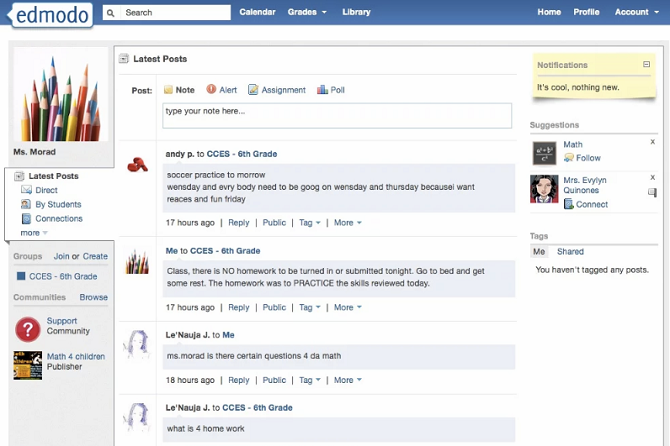
Edmodo is focused on the education sector. Social media connections between students and teachers are playing an increasingly important role in the classroom, but the more public and open platform of services like Facebook tempers their suitability. This has left educators looking around for Facebook alternatives.
The Edmodo network seeks to fill that space. The app was designed by teachers. Features include classroom-wide group chats, subject-based conversations between classrooms, and one-on-one monitoring.
There’s also support for class rosters, school reports, and exam creation. The vast community has now shared more than 650 million free support materials for both teachers and students.
And, because of the inherently sensitive nature of minors’ information, Edmodo has a robust privacy policy. The company does not sell your or your children’s’ information to anyone, including advertisers and third-party apps.
As another safety net, Edmodo also lets parents join the network. Doing so differentiates it from cyberbullying-ridden apps such as After School. By joining, parents can engage in the learning process and coordinate their efforts with teachers and professors.
5. MeWe
The four networks we’ve looked at so far all have seemingly robust privacy policies. But if Facebook has taught us anything, it’s that privacy policies are liable to change.
Sadly, there are hardly any networks whereby privacy has been one of the founding principles of the site. MeWe is the exception.
On the site’s homepage, you’ll see the MeWe challenge. Tick the social networks you use, and it scans your browser to see how many tracking cookies they are running. I ticked all nine networks for testing purposes, and the scanner found 126 results. And the worst offender by some distance? Facebook.
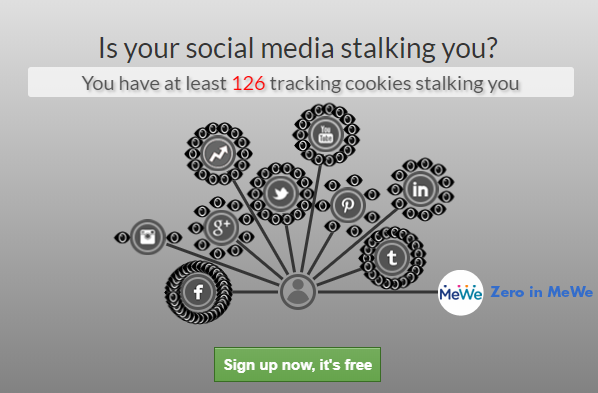
MeWe is different. The network prides itself on its Privacy Bill of Rights. It says:
- MeWe will never show you a targeted ad.
- All posts will be shown chronologically; no algorithms will manipulate what you see.
- The site will never use tracking cookies, either of their own or a third-party.
- MeWe will never sell your personal data.
Some big names have bought into the idea; Sir Tim Berners-Lee—the inventor of the world wide web—serves on the board.
Some of MeWe’s unique features include profiles that can be customized for each group you join, the library tagging so you can find your content easily, and platform-wide voice integration.
If absolute privacy really is your number one priority from a social network, MeWe is the best Facebook alternative.
Which Is the Best Facebook Alternative?
If you’re a privacy fanatic, you simply won’t be able to find a network that’s as expansive as Facebook but without the tracking, selling, and manipulating of data.
However, using the Facebook alternatives we recommended, you can split the network down into its component parts and replace each function with something more suitable.
To continue your journey, you should consider some privacy-focused alternatives to Facebook Messenger, as well as more niche social networks that can fulfill specific needs.
Read the full article: 5 Facebook Alternatives That Don’t Steal Your Data
Why We Say “OK”
Why we say “OK”: The history of the most widely spokenword in the world
The Magic of Creativity Rarely Happens in Your Comfort Zone
You’re not likely to ever excel at anything unless you push past what you normally do and exit your comfort zone. That’s unless you’re the type of person who’s not comfortable unless they are constantly taking risks.

Becoming more creative with photography requires you to seek out new subjects. It means trying different techniques. It demands you tackle the difficult and uncomfortable at times.
Most creatives seek to improve on what they have already achieved. This can mean photographing what they normally photograph different and better. It could mean working in whole other genre of photography altogether. Both approaches are challenging and vulnerable to failures.
How can you step out beyond your comfort zone and experience real magic in creativity?

Watch Your Attitude
I believe the biggest struggle many people have in growing creatively is that they can be too hard on themselves. When they try something new they set themselves up to fail because of negative thought patterns. Sound familiar?
Taking a step outside your creative comfort zone with a positive attitude is the most important factor towards your success. Acknowledging to yourself that what you are doing is new and difficult and that your initial result will probably suck, is important. If you are broken hearted at your photos the first time you try a new aspect of photography, you will never grow. You will not find the magic.
You need to press on and make the most of what you find difficult to help you improve.

Commit to Learn
Studying the new technique or subject you’re challenging yourself with is a positive step towards creative magic. If you launch headlong into something new without knowing much about it you will most likely fail. I know this to be true from far too much personal experience.
Taking time to study a little more, step by step, you can become an expert. When I first worked in a photography studio with subjects, lights, props, and backgrounds I could manipulate it was all new to me. I had come from working as a newspaper photographer where I often had no control over these things. I didn’t know what to do.
Initially, I wasted a lot of Polaroids, (instant photos which were used to preview the setup, now we chimp our LCD screens).
Then, I found a gem of a book in the local library, (yes, this was when the internet was still a baby.) Light Science and Magic was a superb teacher. This book taught me so much of how to control the lighting. I am also a big fan of Irving Penn and love his still life arrangements. I have always learned a lot by studying the work of high achieving photographers.

Creating Photos for Someone Else
The main difference between amateur and professional photographers is not that pros take better photos and earn a living doing so. The most significant difference is that professional photographers must consistently produce photos that fit a brief and please someone else, not just themselves.
Photographing what you are passionate about is meaningful for enjoyment and creative growth. Photographing something you have no interest in is often a huge challenge.
When I first started work at the newspaper I learned very quickly that I was well out of my comfort zone. I was having to not only talk to strangers but to go back to my picture editor with publishable photos of those strangers. I was painfully shy and it was so difficult, but I wanted to keep my job, so I took on the challenge.
Later came other challenges like photographing sports events and other action photo situations I had no experience with. The opportunity to attend top international matches was a good incentive. I learned because I had to and I came to love it.

Role-Play Being a Pro
You don’t need to get a job working for a newspaper. These photography jobs are few and far between nowadays. You can role play effectively and imagine you are a pro.
Set yourself assignments and treat them as though you are working for a newspaper or magazine. Better still, have someone else task you assignments of their choosing. This way you will begin to photograph subjects and in situations, you may never have chosen.
You will discover that you love some of these assignments as you are being stretched beyond what you normally do. As you are outside your comfort zone you will have to think and behave differently.
Set deadlines. Approach this exercise realistically. If someone else has set your assignment, have them review your photographs with you and make a selection.
By role-playing like this, you may have the advantage of rephotographing the same subject if you can see room for improvement. This is a luxury I did not often have when working at the newspapers.

Photographing What is Familiar
I am not advocating only photographing new and different things with techniques you’ve never used. Making great photos of what you love can be equally challenging.
Taking pictures of what you love over a long period of time your photos may begin to lack flair. This is common. If you are truly passionate about what you are photographing you need to press yourself to remain creative.
We are often at the local markets in Chiang Mai taking photo workshops. I told myself after we’d been going there for about a year that I need to come away with at least one new portrait each time. Not of the same people who I knew and were easy to photograph, but of different people in different locations at the market.
I’d passed this guy many times and felt a little intimidated by his tough looking exterior. One winter’s morning he was standing in the sun outside his flower shop watching the world go by. The light was fabulous and he had on a cool beanie. I had to ask him. Turns out he was happy to pose for me. I took him a print of this photo next time we were there and now he often gives my wife or our customer’s flowers when we are passing.

Photographing People
I have become pretty comfortable photographing people, but still, find it challenging. Like with the tough looking flower seller, initial contact and relating to a stranger is not easy for most people. If you step out and ask often the results can be most rewarding.
Photographing people you know can pose other problems. My friends got engaged recently and asked my wife and me to do a photo session for them. My challenge was pressure I put on myself to excel. I wanted to bless them with photos that made the event special.
Working with my wife is always enjoyable. We work well together. I found I could capture different moments, especially when their attention was on her. My expectations and desire to do well for my friends was my biggest challenge. My fear of failing was my biggest hindrance.
Once I relaxed and enjoyed myself as much as they were I was able to take some photos that they told us later were their favorite image of themselves they’ve ever had. This is feedback every portrait photographer loves to hear.

Two New Personal Photography Challenges
My wife and I recently moved to a new home in the countryside. I have never been particularly interested in landscape photography, but now I need to be.
We are running a homestay and need to show off the wonderful environment so people will want to come and stay here. This means I must make the best landscape photos I can. It’s good to be working with a subject that I have not cared for much and to have a reason to be taking these types of photos.
My second challenge is to use my phone for more photography. I am comfortable with my camera, thank you. I have had little interest in using my phone except to take the occasional snapshot. Currently, I think I am using my phone more than I am using my camera.

I am using the panorama mode frequently.
I ride my bicycle in the surrounding region each morning. But I don’t like carrying a camera when I ride so I am using my phone to photograph the local landscape.
Part of my motivation to take up the challenge of photographing with my phone is that this is how most photos are being made in the world now. I need to know more about it so I can teach it. The best way for me to learn is to just do it.
The limitations I have with using my phone are a big challenge. I must innovate and be creative to capture the photos I want. Now I am also beginning to use my phone to photograph more than only landscapes. As the challenges continue I hope my creativity continues to grow.

Be encouraged, find something new that’s not easy for you. You will only reap the rewards if you step outside of your comfort zone and try. Tell me in the comments below how you are getting on with your challenge, I’d love to know.
The post The Magic of Creativity Rarely Happens in Your Comfort Zone appeared first on Digital Photography School.
Massive Black Marlin Caught By Solo Kayaker

The 450-pound black marlin taken off Panama may be the largest ever caught by a kayak angler, unassisted.

The 19 Innovations that Redefined Boston Whaler

Whaler's lineup of boats has continually evolved to meet the demands of boaters.

Tunas of the World — An Illustrated Guide

Sport Fishing's guide to tunas, arguably the single most important, valuable group of game and food fishes in the world

This tiny island in Finland looks like it's floating in the Sky
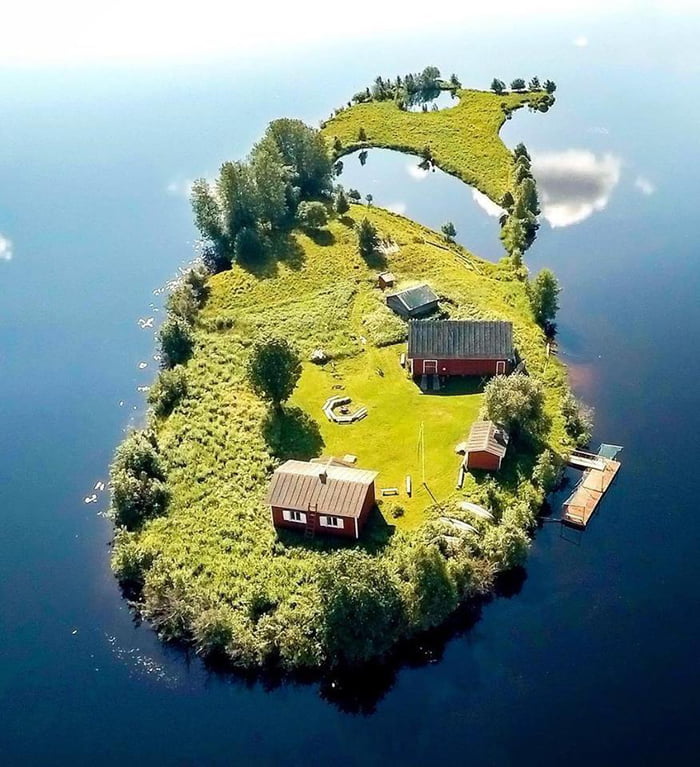
508 points, 45 comments.
Whale watchers squeal with delight as three surfacing humpbacks leap out of the water almost simultaneously right next to their boat in rare triple breach.
Newspaper Design

Visit Uncrate for the full post.
Write Better on Your Mac With These 9 Apps and Tricks

Writing is an enjoyable activity, but you can really hamper yourself if you don’t have the proper tools. Whether you can’t find the motivation to write, have trouble collecting your ideas, or struggle with grammar, the right apps can really help.
We’ll show you some of the best apps and tricks you can use to help you write more on your Mac.
1. Choose a Writing App

Most writers will choose a standard word processor without a second thought. But there are many issues with this.
When you type in a word processor, the text is continuously typeset as you key it in. It’s easy to lose sight of the logical structure in favor of the typographical elements, which results in a loss of momentum while writing and subsequent distractions.
It also forces you to decide on a specific appearance of the heading with strict formatting options. A writer can’t focus on creating words, and may instead fiddle with fonts and menus as a way of procrastinating. A writing app should help writers to write; not get in the way to add unneeded friction.
And when you need a particular feature, it should be easy to discover. Word processors often obfuscate features in complex menus. You can work around this by writing in Markdown. Its syntax is simple to learn, lets you focus on the writing, and even let you create complex documents with all formatting options.
Take a look at these two Mac writing apps:
Download: iA Writer ($30)
Download: Typora (Free)
2. Outline Your Ideas With Scapple
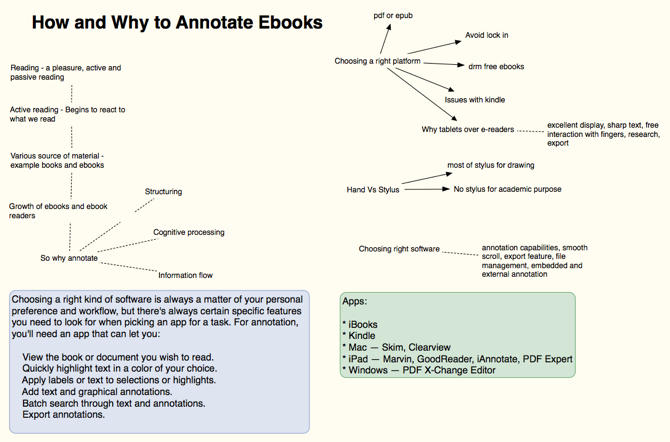
When you take time to draft an outline, you can work out if the ideas connect to each other, what order works best, identify gaps in your thinking, and confirm your thoughts with proven facts. Scapple is an intuitive app for jotting your ideas down by developing connections between them. It’s the software equivalent of pen and paper.
Unlike typical mind-mapping software, Scapple doesn’t force you to make connections, nor do you have to begin with a central idea. It’s a freeform writing app with an expandable canvas to fit all your notes. You can move notes around to make room for new connections, create stacks from notes, edit and resize them, or even link to files on your Mac.
Download: Scapple (Free trial, $15)
3. Manage a Notebook With OneNote
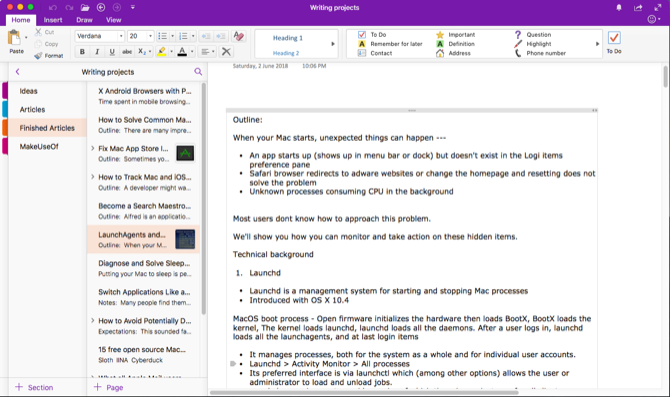
Every writer should keep a notebook to store all their ideas and notes. OneNote is a personal digital notebook to write and manage all sorts of notes.
Try creating a Writing Projects notebook, and start adding few sections. You might have Ideas for new article ideas, Articles and Finished Articles for articles in progress and completed articles, and Track as a place to check your writing progress and improvements.
In the Ideas section, you can create a page for all ideas, another page as a simple Kanban board, and a page to keep web links. In the Articles section, create a new page for each article you want to write. Install the OneNote web clipper extension and start bookmarking or clipping articles from the web.
You can even embed a video, record audio, and take notes from the media. If necessary, create a subpage to keep your notes, bookmarks, and outline separately in a parent/child format. Develop your workflow and start using OneNote to manage resources and improve your productivity.
Download: Microsoft OneNote (Free)
4. Use SearchLink to Generate Links
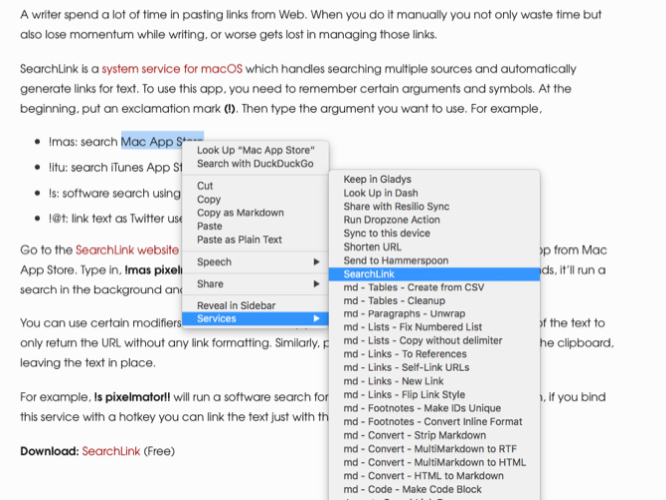
Many writers spend a lot of time pasting links from the web. When you do it manually, you not only waste time, but also lose momentum while writing—or worse, get lost following all those links.
SearchLink is a system service for macOS that handles searching multiple sources and automatically generate links for text. Start with an exclamation point (!). Then type the argument you want to use. For example:
- !mas: search Mac App Store
- !itu: search iTunes App Store
- !s: software search using Google
- !@t: link text as Twitter username
Check the SearchLink website for more arguments.
Now let’s say you want to link an app from the Mac App Store. Type in !mas Pixelmator. Right-click and choose Services > SearchLink. Within seconds, it’ll run a search in the background and replace it with a full Markdown link.
You can use specific modifiers to customize the way you want to link with text. Put !! at the end of the text to only return the URL without any link formatting. Similarly, put ^ at the end to output the result to the clipboard, leaving the text in place.
For example, !s Pixelmator!! will run a software search for Pixelmator and output only a link. Then, if you bind this service with a hotkey, you can link the text just with the keyboard.
Download: SearchLink (Free)
5. Customize the Dictionary to Improve Vocabulary
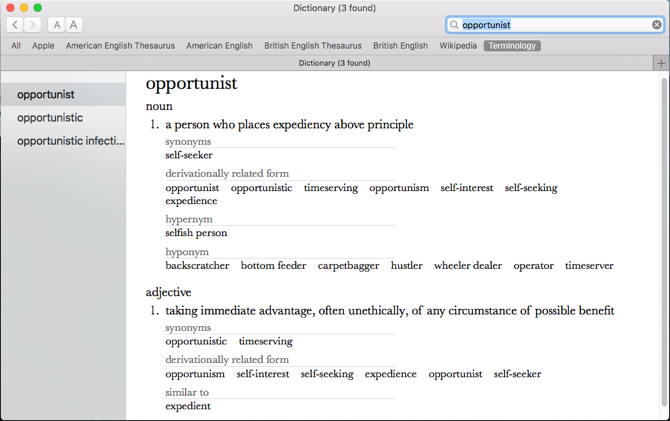
The built-in Dictionary app is a powerful tool to search for definitions, plus thesaurus and Wikipedia entries. You can search for the words manually, or point to a word and press Ctrl + Cmd + D to open the dictionary panel with the definition right in front of you.
To make the Dictionary app more useful, install Terminology. It is based on the WordNet project, a large lexical database of English. It joins not just word forms, but specific senses of the word. Also, it labels the semantic relations among words, making it more powerful than a thesaurus.
Open Dictionary > Preferences and check the Terminology box. It’ll now appear as one of your search options in the Dictionary app.
Download: Terminology (Free)
6. Cut Off the Distractions
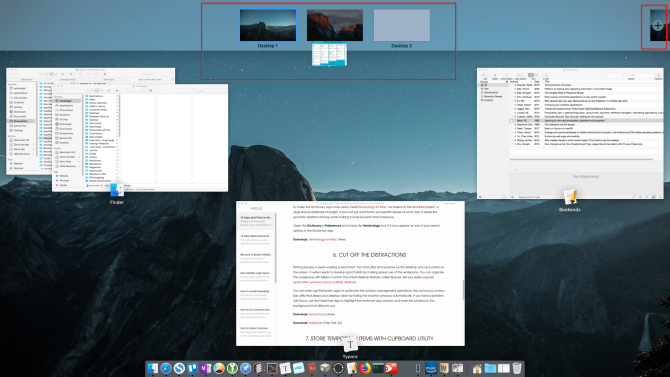
Writing requires a clean working environment. Too many files and windows on the desktop act as clutter on the screen. It’s wise to develop good habits by making proper use of the workspace.
You can organize your workspace with Mission Control. The virtual desktop feature, called Spaces, lets you easily organize app windows across multiple desktops.
You can even use third-party apps to automate the window management operations. Hocus Focus is a menu bar utility that keeps your desktop clean by hiding the inactive windows automatically. If you have a problem with focus, use the HazeOver app to highlight the foremost app window and mask the windows in the background that distract you.
Download: Hocus Focus (Free)
Download: HazeOver (Free trial, $5)
7. Store Temporary Items With Clipboard Utility
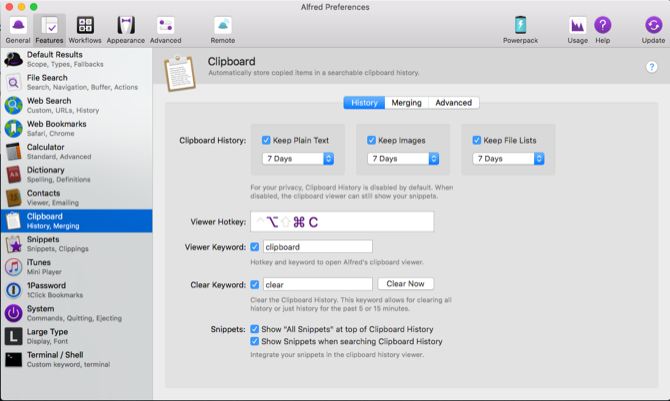
It’s not necessary to store every piece of text, images, and link in a notebook. Some items are temporary, so you’ll discard them later on. That’s where a clipboard utility app might be of help.
Alfred‘s clipboard history feature (part of the Powerpack) is unique. Go to Alfred’s Preferences, and under Features > Clipboard, enable Clipboard History. Check the box next to the relevant types, and choose how long you want to remember your clips.
Now, press the Alt + Cmd + C hotkey to bring up the Clipboard History panel. Alfred will show you the clips you’ve copied. Type any word or phrase in the search bar to filter your results.
You can even merge multiple clips onto your clipboard. Go to Features > Clipboard > Merging and enable the box next to merging. To append a clip onto the previously copied text, hold Cmd and double-tap C quickly. Then paste the clip you copied onto any app.
Download: Alfred (Free, $25 Powerpack available)
8. Use a Text Expander Utility
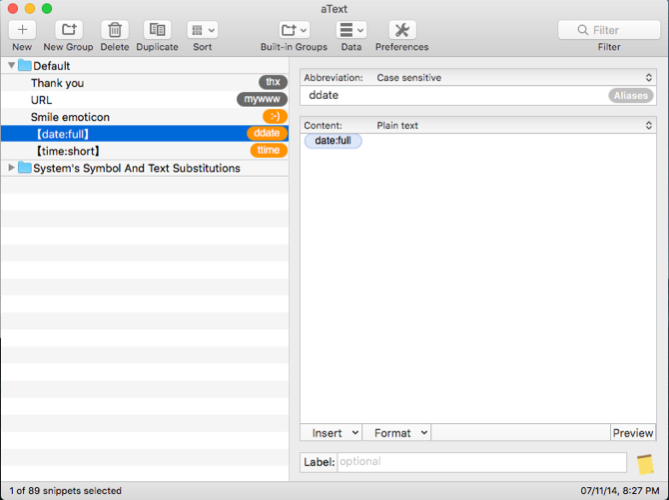
Even if you’ve learned to type quickly, certain forms of writing can require you to type repetitive text. You can avoid RSI and other injuries by cutting down on your keystrokes. Using a text expansion tool can save your hands and hours of your time.
aText accelerates your typing by offering shortcuts for the characters you write. When you open the app for the first time, you’ll see boilerplate snippets for typing in the date and time, symbol substitution macros, and more. To create a new snippet, type the keyword in the Abbreviation field, and content you want to expand in the Content field.
Download: aText (Free trial, $5)
9. Correct Grammar and Get Writing Suggestions

When you write a first draft, you’re just putting your ideas together. Spelling errors and poorly written sentences are common in first drafts, so it’s important to revise and improve it. You can use some tools to help you improve your final product.
At times, you’ll want writing suggestions. These can tell whether you’ve written a correct sentence, compare confusing words, which adjective or preposition is appropriate for a particular phrase, or get synonyms in context. Writefull is an app that gives feedback on your writing by checking your text against databases, like Google Scholar, Books, and more.
You might also want to use Grammarly for proofreading your articles. It checks your spelling, grammar, suggests synonyms in context, and more. And if you subscribe to Grammarly Pro, it’ll detect if you use words in a wrong way, subject-verb agreement, pronoun use, and punctuation usage.
Download: Writefull (Free)
Download: Grammarly (Free, subscription available)
Read Books to Become a Better Writer
To become a better writer, you need the best tools to help you realize your dreams. macOS is a creative environment to work with, and there are many third-party tools at its disposal—even more than ones discussed here.
Writing is a complicated skill, and these tools cover only half the job. You need to read more to become a better writer. If this inspires you, you might want to know how to read more books this year.
Read the full article: Write Better on Your Mac With These 9 Apps and Tricks
3-ingredient carnitas mean taco night has never been easier

I’ve eaten my fair share of deliciousness in Chicago’s Pilsen neighborhood, arguably home to the city’s best Mexican restaurants. The most satisfying meals have revolved around carnitas: pork cooked in roiling pots of lard, shredded, and plopped onto discs of just-made tortillas. When the line at my favorite…
What to Eat When the Power Goes Out

Forget the milk and eggs: If your power goes out, the last thing you want is a fridge full of perishables. Instead, here’s what to stock up on and how to plan ahead for a loss of power.
You Really Can Charge Your Phone With a 9 Volt Battery
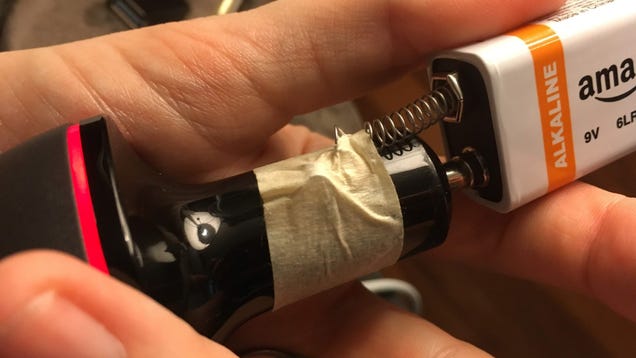
In a power outage, a 9 volt battery can give your phone enough juice to make a call or send a few texts. You may have seen this hack before, but it works especially well in this variation where you use the spring from a pen to connect the negative terminal.