Shared posts

24 Jan 18:50

Holy City Grandeur at Hotel Bennett

by Dacey Orr

Despite the centuries of history woven into its wrought-iron garden gates and winding cobblestoned alleys, much of Charleston, South Carolina, has popped up in the last fifty years. “Back in the seventies, we used to say you could roll a bowling ball down King Street and not hit a person or a car,” says Michael Bennett, the owner of Bennett Hospitality, which, among other things, owns and operates chain hotels in the city and beyond. Now, in addition to bumping into packs of tourists and newcomers darting in and out of restaurants and shops, that bowling bowl would also roll past countless construction sites, many of them for new hotels—including, until its debut in mid-January, Bennett’s first bearing his own name. Even Charlestonians with crane fatigue, though, are taking note of the Hotel Bennett.

photo: Matthew Suchodolski

The Hotel Bennett from above.

On the northwest corner of Marion Square, the city’s central park, Bennett has pulled off an elegant Southern spin on a grand European hotel, one that skillfully fuses an old-world glamour with Lowcountry touches. Among the marble and mirrors, for instance, the neoclassical nine-story resort features chandeliers resembling crystal cast nets as well as a 360-degree mural by the Athens, Georgia, artist Jill Biskin depicting the view of the Cooper River from Bennett’s own home and a scene of eighteenth-century Charleston as viewed from the harbor. Work from local artists hangs throughout the lobby, and furniture and fabric embroidered with crewelwork inspired by the city’s colonial period outfit the guest rooms.

“Our family’s been here a long time, so this was exciting for me,” Bennett says. His parents were both born in the nearby Eastside neighborhood, and his father shined shoes during the Great Depression across the street from where the hotel now stands. Bennett grew up north of Hampton Park, and over the years he began to aid Charleston’s transformation by renovating buildings worn down by time. “This is the biggest and most important project that I will ever do,” he says of the hotel, which was almost two decades in the making. “So I named it after my family.” And with the opportunity to, finally, build a hotel of his own from the ground up came the chance for him also to pay homage to his hometown and to the site’s history.

The plot of land where the Hotel Bennett sits was once the location of the west wing of the old Citadel campus—the Embassy Suites next door still maintains the military college’s original facade—before eventually becoming the Charleston County Public Library. After the library relocated a few blocks east, the empty building was demolished, so Bennett tipped his hat to that past. In Camellias, the champagne and caviar bar inspired by the design of Fabergé eggs, pink marble reclaimed from the library adorns the bar and tabletops. Upstairs, guest rooms feature shelves full of books alongside views of downtown.

photo: Jacqueline Stofsick

A guest room.

The hotel offers plenty to entice those not looking to spend the night, too. Bennett, for instance, brought on executive chef Michael Sichel from the celebrated Galatoire’s, a grande dame of Creole cuisine in New Orleans, to oversee the hotel’s signature restaurant. There, the Europe–meets–coastal Carolina theme plays out in dishes such as broiled local oysters béchamel, smoked trout caviar, and redfish barigoule with sweet basil broth. Beyond the lobby, a French patisserie transforms into a wine and charcuterie joint at night. But the most alluring hangout is destined to be the ninth floor, where a Mediterranean-style restaurant and bar opens onto the rooftop patio. The adjoining pool, a space accessible only to hotel and spa guests during the day, shifts into a lively cabana-service hot spot open to the public after the sun sets.

“We live in the renaissance,” Bennett says of Charleston. “The finest era in the history of this great, proud city.” It would be tempting to chalk up such puffery as that of a civic cheerleader—or someone hoping to lure visitors to his new lodging. But for anyone watching the bustle from the roof of the Hotel Bennett, the sentiment rings as true as the church bells in the Holy City’s steeples. 

The post Holy City Grandeur at Hotel Bennett appeared first on Garden & Gun.

24 Jan 18:50

Revisiting Bobbie Gentry’s “Ode to Billie Joe”

by Dacey Orr

Bobbie Gentry didn’t have time to worry about the music industry’s expectations for a woman in the late 1960s—exceeding them kept her pretty busy. The Mississippi native wrote her own songs, hosted a television show, designed her own clothes, and painted much of her album art. Her debut single, “Ode to Billie Joe,” promptly knocked the Beatles out of the number-one spot in August 1967—and to this day, listeners wonder what sent Billie Joe over the Tallahatchie Bridge. Gentry went on to write and record another chart-topper with “Fancy” in 1970, nabbing a Grammy nod twenty years before Reba rocked country’s world with her cover of the Southern Gothic tale. Anyone who’s belted the song at karaoke or on a backroads drive owes Gentry a thank-you. Although if you did get the chance to thank her in person, you’d be incredibly lucky. Gentry retired from music in 1981 famously retreating from the public eye, and has rarely been seen since.

“I just sing Southern,” she was known to say when asked about her songs’ appeal. Gentry’s Southern-ness—her flair for storytelling and her independent spirit—inspired countless singers who followed her. It also inspired a new tribute album that tackles The Delta Sweete, Gentry’s underrated 1968 follow-up to “Ode to Billie Joe.”  New York rockers Mercury Rev organized the homage, providing the instrumentals for twelve singers to each make one of Gentry’s songs their own. Norah Jones puts a sultry spin on “Okolona River Bottom Band,” Phoebe Bridgers takes “Jessye’ Lisabeth” to hymn-like heights, and Margo Price slows down the judgement-day lyrics of “Sermon” to ominous effect.

Garden & Gun is honored to premiere Lucinda Williams’s haunting cover of “Ode to Billie Joe,” an addition to the tribute album that did not appear on the original The Delta Sweete release. “Like a homing beacon, the gravity of ‘Ode to Billie Joe’ centered our approach into the Gentry constellation,” says Mercury Rev’s Jonathan Donohue. “We hope to hold up our lantern to The Delta Sweete’s tapestry of story—not fix it, not enhance it, not modernize it, but bring it to the attention of those who, much like ourselves, might be grateful to have discovered this work.”

photo: Jess Rotter

Lucinda Williams illustrated over ‘The Delta Sweete’ Revisited album art.

Listen to “Ode to Billie Joe” below. The Delta Sweete’ Revisited will be released on February 8 via Partisan Records, and is available for pre-order via Amazon.

The post Revisiting Bobbie Gentry’s “Ode to Billie Joe” appeared first on Garden & Gun.

24 Jan 18:44

Nevis: A Hidden Caribbean Paradise

by Dacey Orr

One day in 1990, Tim Thuell, who at the time was managing a private club in Bermuda, received a call from a friend, a Bermudan hotelier named David Dodwell. Dodwell had just acquired a property on an island “so remote, so removed,” he told Thuell, half in jest, “that you’d never want to go there.” The inn sat on the spacious grounds of a onetime sugar plantation on the breezy Atlantic shore of a drowsy, all-but-forgotten former British colony in the West Indies, an island called Nevis.

Thuell took the bait, he tells me in his office at Nisbet Plantation, near a stone great house built in 1778, and shortly after arriving to investigate, he and his wife, Tina, did what many a visitor does: “We fell in love with it, right off.” Nevis (pronounced nee-vis) makes a seductive first impression. A round, compact island centered around a 3,200-foot dormant volcano that condenses enough moisture out of the trade winds to cloak its slopes in rain forest, it strikes a sort of Bali Ha’i profile; on its lower flanks, the summit gives way to villages of pastel cottages and wide pastures where sugarcane once grew. For seven years Thuell, a native of southern England, managed Nisbet, where rows of coconut palms and bright yellow cottages mark a broad lawn that leads to the sea. And though in time his career tugged the family away to boutique hotels far afield, Nevis never quite let them go. Now the Thuells are residents once more, with Tim running Nisbet again as well as chairing the island’s tourism authority. What lured them back? “The people,” he says without hesitation. “It’s all about the Nevisians.”

photo: Tara Donne

Guest cottages at Nisbet Plantation.

More about that in a bit, but meanwhile, it’s worth pointing out that many of the things that draw island connoisseurs to Nevis—and, often, back to Nevis—are the things that don’t exist there. Traffic lights, for example, and traffic. At thirty-six square miles, it’s the size of Fort Lauderdale, but with about one-fifteenth the population (islanders number around twelve thousand). Also missing: cruise ships disgorging crowds of passengers, though plenty of them dock at Nevis’s sister island, St. Kitts, separated by a two-mile strait called the Narrows, a moat of sorts that manages to keep most mass tourism at bay.

photo: Tara Donne

Golden Rock’s tropical gardens.

Nevis has no fast-food franchises, no big-box stores. You don’t particularly go there for the beaches, although it has enticing ones (golden sand, sun-warmed shallows), or the rum (no distilleries, although rum punch flows like water), or the nightlife, which leans toward congenial barstool chitchat. There’s virtually no shopping of the duty-free-emerald variety that some Caribbean ports traffic in, although you can find exquisite native-edge dining tables built of hurricane-felled mahogany at the Nevis Craft House, on the outskirts of the capital, Charlestown, or (at New Castle Pottery near Nisbet) a hand-thrown clay “monkey jar,” a clever holdover from the days before refrigeration that keeps drinking water cool through evaporation. As my wife and I rattle around the island’s bumpy two-lane perimeter road in a rented jeep, free-grazing goats outnumber tourists. Feral donkeys loiter on the roadside. Here and there green vervet monkeys scamper around on all fours, the descendants of those that Europeans brought from Africa as novelties generations ago. Visitors think they’re adorable; islanders see them as garden-raiding demons.

photo: Tara Donne

St. Paul’s Anglican Church in the capital.

If all of that suggests that Nevis is a scruffy backwater the rest of the world left behind…well, not exactly. The manicured oceanside Four Seasons, by far the island’s largest resort and a mainstay of the local economy, is owned by none other than Bill Gates, and extravagant villas are scattered around the foothills of Nevis Peak. In recent years, Nevis has become the sort of tropical getaway people gravitate to when they’re, say, completely over St. Barts. But it also draws adventurous travelers of all stripes who don’t mind an extra layover or a ferry crossing, and even when VIPs arrive (Meryl Streep, Justin Trudeau, Beyoncé and Jay-Z), they do so with little fanfare. As one expatriate puts it, “You don’t come to Nevis to be seen.”

So why do you come to Nevis?

photo: tara donne

Nevis Peak rises in the distance, seen from a dirt road to Herbert’s Beach on the island’s northern shore.

For one thing, you come for the way the island wears its epic history on its sleeve. Beginning in the 1600s, Nevis often became a battleground where great colonial powers clashed, as unimaginable fortunes arose from the cane fields. Sugar, and the slave trade that flourished alongside it, fueled the rise of the British Empire, but rival nations did not go quietly. Over the years, Spain, Carib Indians, Holland, and France attacked Nevis; cannon fire often thundered through its ravines. The pirate Captain Kidd spent time here, as did the British naval hero Horatio Nelson. The French Canadian military leader and explorer Pierre Le Moyne d’Iberville plundered the island in 1706, a
few years after he founded the colony of Louisiana. Nevis endured hurricanes, earthquakes, epidemics, and a long stagnation once sugar prices began to steadily fall. Its storied native son Alexander Hamilton spent his early years, in the mid-1700s, in what his biographer Ron Chernow called “a tropical hellhole of dissipated whites and fractious slaves, all framed by a backdrop of luxuriant natural beauty.”


See More: Click to see our bonus photos of Nevis


Today, remnants of that swashbuckling and heartbreaking past endure in plain sight. Several of the sugar plantations have become boutique hotels—Nisbet, Golden Rock Inn, the Hermitage, Montpelier Plantation—transforming old sugar-mill towers into dining rooms or guest suites, and you can sip cocktails in centuries-old great houses. Huge copper kettles once used to boil sugar are now water features growing lily pads. At New River, a former estate on the windward Atlantic coast, we climb amid crumbling ruins with no other soul in sight. Near Charlestown, we wander among weathered gravestones in lonely hilltop churchyards. The dead are granted some of the most spectacular views on Nevis.

photo: Tara Donne

The pool at Golden Rock Inn.

You come for that beauty. Order the lobster salad sandwich at the Rocks, the restaurant at Golden Rock Inn, for example—it’s impossible to ask for dining advice on Nevis without hearing about it—and that rents you an hour or two of access to the glorious surroundings there, a thousand feet above sea level. Since 2006, Golden Rock has been owned by the New York artists Brice Marden and his wife, Helen, and the two have awakened the old stone buildings with bold orange-red blasts of color on doors, benches, and shutters. The gardens (designed, fittingly, by a Miami landscape architect named Raymond Jungles) are a tropical fantasy run amok: stone pathways curving through giant elephant ears, spreading fan palms, mammoth ferns, bromeliads, waterfalls, flowering vines, bamboo creaking in the breeze, thickets of ginger, reflecting pools, neon blossoms that look like alien life-forms; “nature almost winning,” Helen Marden has described it. As we linger over a Monday lunch on a sheltered terrace, a shower passes through—like the mist that watered Eden, I think, though that may be the rum punch talking.

photo: Tara Donne

Bartender Kurt Lake delivers refreshment.

You come for the unexpected. “Nevis is full of surprises,” Tina Thuell tells us on a five-mile morning hike out of Nisbet midway through our visit. There’s the time-warp charm of a place where the bread truck still makes its morning rounds in the villages while schoolgirls in gingham pinafores wait for the bus. There are the treasures you find in the unlikeliest places. Rounding a curve on the northwest shore, for instance, we come across the Gin Trap, which boasts a menu of more than a hundred varieties of gin—with catchy names like Copper Head, Elephant, and Half Hitch—served in a second-floor perch overlooking the green shadowed hills of St. Kitts. At Rodney’s Cuisine, a brightly painted cottage on the outskirts of Charlestown, we meet Rodney Elliott, a Nevisian woman who cooks up enormous plates of West Indian dishes, including goat water. A stew whose name smacks of the barnyard, it turns out to be rich and satisfying. Later, ascending a narrow two-track road in the hills above Charlestown after dark, with the tropical overgrowth swallowing our headlight beams and blacking out the stars, we suddenly arrive at Bananas, where torch-lit pathways lead to an open-air dining porch and plates of fish pie and lobster linguine soon appear: fine dining in the treetops.

photo: Tara Donne

Rodney Elliott, of Rodney’s Cuisine
in Charlestown.

And if you come back to Nevis, you probably come back because of the people. “Nevisians are so open and welcoming and genuinely friendly,” Tina Thuell says, “and that’s when they don’t know you.” At Nisbet Plantation, the breakfast host Violet Gumbs greets you by first name by your second morning there, and we watch returning guests hug staff members like old friends. Another longtime English expatriate, Mark Roberts, is the chef at Double Deuce, one of a cluster of open-air shoreside bars along Pinney’s Beach, near the Four Seasons. He has cooked for Frank Sinatra and the Queen Mother, and he once toiled at a restaurant in London that served, in season, fourteen different species of game. On Nevis, woodcock and partridge are hard to come by, but his grilled wahoo with lime and garlic butter is a revelation. Back before Double Deuce accepted credit cards, he tells us during dinner, from time to time people would eat there and then realize they hadn’t brought enough cash to settle up. “Nobody’s let me down,” Roberts says. “They’ve all come back and paid me the next day. Every single one of them.” An acquaintance of Roberts’s once rented a car on the island, drove high into the hills, and got a flat tire. After he jacked up the car and changed the tire in his dress clothes, a Nevisian woman emerged from a nearby house, bringing him a bowl of warm water, a towel, and a brand-new bar of soap, still unwrapped.

photo: Tara Donne

Whole fresh fish at Double Deuce, on Pinney’s Beach.

“People have got time to say hello in the morning, and ‘Good afternoon,’” Roberts says, reflecting on how, after twenty years on Nevis, he expects never to leave. “I don’t miss shops, or consuming. There’s no need to do that here. You have what you want.” 

The post Nevis: A Hidden Caribbean Paradise appeared first on Garden & Gun.

24 Jan 18:37

Drop Stop

by mark

I have been using the Drop Stop ($20) for over 5 years and have a set for each car. Once installed (takes one or two minutes) I’ve forgotten about them, until I drop something between my seat and center console that would have otherwise fallen through the crack and under the seat or into the abyss. The Stop Drop stops the dropped item (pen, phone, money, wallet, etc.) from falling through. They come in black and tan, are made of soft pliable material that conforms to the space, have a slot for the seatbelt latch, and slide back and forth, unnoticeably, when adjusting the seat. They are easily removable and washable. I’ve given them as gifts and they have been very appreciated.

-- Paul Hanna

Drop Stop Set of 2 ($20)

Available from Amazon

24 Jan 18:27

How a Group of Daring Bootleggers Created NASCAR

by Miss Cellania

People in Appalachia have been distilling illegal whiskey ever since they settled in the region, but selling it involves more than just making moonshine. You also have to deliver the goods to the customers, while bypassing federal agents who want the government's tax portion. When Prohibition made all whiskey production illegal, it was the Appalachian moonshiners who were already schooled in getting around the law.

In the early days, moonshine was sold locally, to friends and family; Pierce says it’s unlikely that people moved moonshine more than 20 or 30 miles by wagon. It might have remained a small, lawless enterprise if Prohibition hadn’t coincided with the advent of mass-produced automobiles. Bootleggers replaced 40 gallon stills with stills that could hold up to 1,000 gallons and hid them in Appalachia’s mountains, swamps, and thick forests. The local geography lent itself to secrecy and speed. No matter how swampy the terrain, there was usually a road nearby which led to customers. By 1934, Neal Thompson writes in Driving with the Devil, as many as 35 million gallons of moonshine were produced nationwide.

Moonshine runners took nondescript cars and altered them to have more power, speed, and maneuverability, plus the ability to carry lots of liquid without sagging. The most successful haulers were proud of their vehicles and proud of their driving. Read the exciting story of how that led to the new sport of stock car racing at Atlas Obscura.

(Image courtesy of Bill Blair)

23 Jan 12:56

The Six-Step SEO Checklist You'll Need To Dominate 2019

by Young Entrepreneur Council, CommunityVoice
17 Jan 18:20

Why You Have Too Much Fishing Gear, According to the Founder of Patagonia

In the newly revised second edition of Simple Fly Fishing, Patagonia's founder argues that fishing with less is better.

17 Jan 18:17

Titanium Coated Utility Shear

by mark

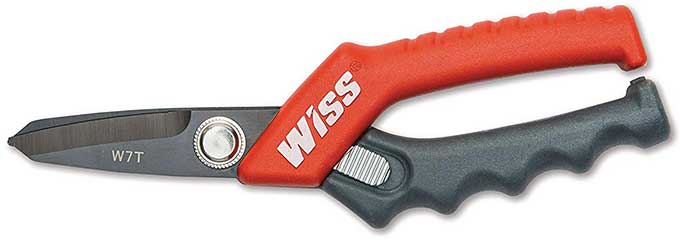
This Titanium Coated Utility Shear gives both power and precision when cutting sheet metal. This past summer it was a huge help for fine cuts on complex corners and angles as we wrapped building soffits and fascia in aluminum panels. It also saw use on some HVAC sheet metal projects. The blade size, handle shape and spring contribute to give me excellent cutting control and doesn’t overly distort the cut metal. This tool makes the traditional tin snips seem like a clumsy meat cleaver.

-- Chad Cooper

Wiss 7″ Titanium Coated Utility Shear ($15)

Available from Amazon

17 Jan 18:16

Over 700 million emails, passwords found on 'hacking' forum...


Over 700 million emails, passwords found on 'hacking' forum...


(First column, 5th story, link)


17 Jan 18:13

The Practice Of Kaizen Will Help You Improve 1% Per Day And Lead To Amazing Long-Term Success

by Jack Kelly, Contributor
Instead of trying to make radical life changes overnight, you should start with small, daily improvements. Focus on getting 1% better each and every day. Small-scale improvements start compounding on the previous day’s accomplishment.
17 Jan 18:12

John Bogle's Investing Philosophy Is Still the Best

by Alicia Adamczyk on Two Cents, shared by Alicia Adamczyk to Lifehacker

John C. Bogle, founder of the Vanguard Group and creator of the index mutual fund for individual investors, died Wednesday. He was 89.

Read more...

15 Jan 18:50

The 1973 Raft Experiment, Sex And Sedition At Sea, Now A Fascinating Film

by Joanne Shurvell, Contributor
Eleven strangers spend three months on a raft crossing the ocean - the Big Brother and Love Island of the 1970s.
15 Jan 18:40

Want to Freelance Online? 8 Key Habits That Are Vital for Success

by Mahit Huilgol
freelancer-tips

Maybe, you are in a regular job right now but dreaming of being a freelancer? I mean think about it. What can be better than being your own boss and escaping from petty blood sucking office politics?

But it’s not all sandy beaches and amber sunsets. As a freelancer more than often you are a one-man army. The circle of responsibility falls on your shoulder. You can’t cut slack on productivity and deadlines.

So, let’s use a mishmash of techniques and apps to stay on track with the critical habit pillars of any freelancer’s life that revolve around sleep, work, health, and finances.

1. Wake Up Right

Phillips Wake Up Light from Amazon

Philips Wake-Up Light Alarm Clock with Colored Sunrise Simulation and Sunset Fading Night Light, White (HF3520) Philips Wake-Up Light Alarm Clock with Colored Sunrise Simulation and Sunset Fading Night Light, White (HF3520) Buy Now At Amazon $138.99

Early mornings are best suited for work that requires a high level of focus. You can start your day right with a wake up light that mimics sunrise.

The Wake-Up Light Alarm starts with a dim glow and gradually increases the brightness. The alarm will also start beeping with less intensity at first and then the volume picks up. A crude (and cheaper) alternative is to get up and open your curtains to let the sunlight filter in.

Alternative: Try a Sleep Alarm App Instead

Yes, you read it right. Alarm apps like Sleep Cycle help you sleep better and wake up rejuvenated. This app helps you get a grip on your Circadian rhythms or sleep states. Sleep Cycle uses sound analysis to track your movements in bed.

The app begins the wake-up phase 20 minutes prior to your wake up time. Then it identifies your lightest possible sleep state and wakes you up when that happens. Just place the phone on the night desk and ensure that the mic is not covered.

The Sleep Cycle App works in two ways, it uses the accelerometer to detect your movement or the mic to analyze the sound. The app also spaces out snooze across the wake up phase.

Download: Sleep Cycle for iOSAndroid (Free, In-App Purchase)

2. Plan Your Day With a Schedule

It is very common for us to wake up and feel overwhelmed by the tasks ahead of us. The best way to conquer this feeling is by planning your day in advance. Sticking to a schedule might be difficult at first, however things start becoming easy once you get the hang of it.

With the help of Asana, you can not only create tasks but also assign tasks to a service provider or your teammate. This is pretty helpful as everyone you work with can be held accountable for their respective tasks. Also, you will get all the updates in your Inbox as and when the Task is completed.

Want an Asana alternative? Check out Plan. It offers integration with Slack, calendar, JIRA, Salesforce, and Github.)

Download: Asana for iOSAndroid (Free, Premium Version Available)

3. Track Your Time

As a freelancer, you alone are responsible for meeting deadlines and planning your work. A study by VocherCloud polled 1,989 office workers in the UK and estimated that an average worker is productive for only two hours and 53 minutes in an 8 hour work day.

I personally use Toggl, a time tracking app that lets you record the time spent on individual tasks or projects. By the end of the day or the month, the app will chart the total time spent by you on a particular project.

Toggl can help you decide the billable hours and how well you have managed your time. However, you can also have a look at other popular time management tools too.

Download: Toggl for iOSAndroid (Free)

4. Stay Focussed Against Distractions

RescueTime Dashboard

Distractions and procrastination are always ready to pounce. The human brain is wired for procrastination and other shallow tasks. You can get stuck binge watching those cute cat videos or fall into a Netflix series’ for a little too long. Add social media sites to the mix.

RescueTime is very helpful for time management. With so many distractions in the digital workplace, it is beneficial to use a tool like Rescue Time. The best part is that RescueTime is completely automated and records the time you spend across different apps. The RescueTime also offers a Focus Mode which will block all the distraction while working.

RescueTime Lite is free while the Premium flavor comes with a 14-day trial.

5. Stand Up on Your Feet

Long hours on your desk eventually takes a toll on your health. Doctors advise desk workers to get up and exercise a bit at regular intervals of time. One of the best ways to do this is to get up and do light exercises. Sedentary alarm apps will nudge you to get up and help you move at work.

Standup is one such app that will help you take regular breaks by setting reminder interval. The best part is that you can also time how long you have stood. All the data is combined and presented in the form of a 7-day history.

Download: Standup for Android iOS (Free, In-App Purchase)

6. Make Invoicing Painless

The financial aspect of freelancing is perhaps the trickiest of all. As a freelancer, you need to factor in a lot of possibilities and be prompt with bookkeeping.

Invoice is a document sent to clients in order to request payment for your services. Furthermore, the invoice also contains an itemized bill of your services and terms of payment.

I use Invoice Simple app for basic invoicing purposes. You can use Google Sheets too and even automate the invoicing process with a script.

Also, a wealth of simple invoice templates are available for free on the web.

Download: Invoice Simple for iOS |Android (Free, In-App Purchase)

7. Track Your Money

It is very common for freelancers to lose a track of their money and this usually ends up in a financial death spiral.

The Cash Flow app is a great way to keep a track of your money. This app will allow you to record the money in and the money out. Cash Flow app also lets you compartmentalize the source of income and expenditure by assigning a category to each.

Download: Cashflow for iOSAndroid (Free)

8. Monitor Your Expenses

It pays to mind the numbers and freelancing in any type of businesses and freelancing is no different. I use Expense Manager on my iPhone to keep a record of all the expenses that incurs. It is wise to assign yourself a budget and then make sure to stick by it.

Download: Expense Manager for iOS (Free)

Manage Your Workload & Finances

Factors like Cash Flow and Expense Management take center stage when it comes to money management. But time management and health are just as crucial. You need to figure out what works best for you and accordingly design your day. A few more timeless tips for freelancers should hold you in good stead as you work your way to success.

Read the full article: Want to Freelance Online? 8 Key Habits That Are Vital for Success

15 Jan 18:37

Seymour Cray, Father of the Supercomputer

by Dan Maloney

Somewhere in the recesses of my memory there lives a small photograph, from one of the many magazines that fed my young interests in science and electronics – it was probably Popular Science. In my mind I see a man standing before a large machine. The man looks awkward; he clearly didn’t want to pose for the magazine photographer. The machine behind him was an amazing computer, its insides a riot of wires all of the same color; the accompanying text told me each piece was cut to a precise length so that signals could be synchronized to arrive at their destinations at exactly the right time.

My young mind was agog that a machine could be so precisely timed that a few centimeters could make a difference to a signal propagating at the speed of light. As a result, I never forgot the name of the man in the photo – Seymour Cray, the creator of the supercomputer. The machine was his iconic Cray-1, the fastest scientific computer in the world for years, which would go on to design nuclear weapons, model crashes to make cars safer, and help predict the weather.

Very few people get to have their name attached so firmly to a product, let alone have it become a registered trademark. The name Cray became synonymous with performance computing, but Seymour Cray contributed so much more to the computing industry than just the company that bears his name that it’s worth taking a look at his life, and how his machines created the future.

Inventing an Industry

The small city of Chippewa Falls, Wisconsin would be both the birthplace of Seymour Cray and the place that would hold him and give him roots. From the day he was born in 1925, Chippewa Falls was his place. His father, a civil engineer, encouraged his obvious early interest in the technical world, with radio playing a central role in his interests.

Seymour’s first taste of the world outside Chippewa Falls came courtesy of the US Army in 1943. Reluctant to enlist, he ended up in the infantry and saw action in both the European and Pacific theaters. The Army found little use for his electrical talents in Europe beyond assigning him to a signals unit and having him tote field radios around Germany, but in the Philipines he was put to work on cryptographic analysis of Japanese codes, which at least harnessed some of his considerable mathematical powers.

Big, big iron: the UNIVAC 1103, Cray’s first design. Source: Wikipedia, public domain.

With the end of the war, Seymour completed his degree in electrical engineering at the University of Minnesota, and stayed on for a Master’s in applied mathematics. With little idea what to do next, he took a professor’s advice to apply at a place called Engineering Research Associates in St. Paul, Minnesota.

ERA was one of the first companies created specifically to build computers. Formed during the war to concentrate on code-breaking gear for the US Navy, the firm was kept afloat by the Navy even when funding for other military contractors dried up after the war. ERA continued to build crypto gear for the military, but started applying their technology to service a new market: commercial digital computers. Their first product, the ERA 1101, came from the Navy’s need for a code-breaking machine that could be quickly reprogrammed. That machine would later become the UNIVAC 1101, after ERA was purchased by the Remington Rand Corporation.

Seymour’s first job at ERA was designing the successor to the 1101. The ERA 1103 was a behemoth of vacuum tube technology, weighing in at 19 tons. For RAM it used Williams tubes, CRTs displaying a matrix of dots for each memory location; the presence or absence of electrostatic charge could be sensed with metal plates on the tube’s screen. It was unwieldy but far faster than other RAM technologies of the day, and helped give the 1103 the edge over an IBM machine in a head-to-head test by the Navy to assess machines for weather prediction.

Back to Chippewa Falls

With the sale of ERA to Remington Rand and a concentration on machines and processes specifically for business, Seymour saw the writing on the wall. His interests lie in high-performance scientific computing, and so he left ERA to start his own company. Along with William Norris, another ERA alum, he founded Control Data Corporation (CDC) in 1957. The timing was perfect because commercially viable transistors were becoming available in bulk at reasonable prices. Using his favorite design tools – a blank notebook and a #3 pencil – Seymour sat down to create CDC’s first machine.

The CDC 1604 was basically the ERA 1103 redesigned with germanium transistors. A 48-bit machine rather than a 36-bit machine like the 1103, the 1604 was tiny compared to its tube-filled cousin – less than a tonne and only the size of two large refrigerators. It was the first transistorized scientific computer, and more than 50 were built. While some private sector companies bought the 1604, the military was its biggest buyer. The US Navy bought the first machine for weather predictions, and the Air Force put redundant pairs of 1604s in Minuteman silos for guidance and aiming calculations for the ballistic missiles.

Seymour leveraged the success of the 1604 to the hilt. He set the bar for his next machine very high – a machine 50 times faster than the already speedy 1604. To deliver, he needed freedom from the distractions of upper management and visiting customers, so he insisted on relocating his development team to his hometown of Chippewa Falls. With newer, faster silicon transistors, the CDC 6600, an order of magnitude faster than any other machine on the market, debuted in 1964. The 6000 series would sell over 400 units, and it would remain the world’s fastest computer until Seymour’s next machine, the CDC 7600, which he started designing when he got bored with the almost-completed 6600 design, knocked it off its throne in 1969. The age of the supercomputer had arrived, and Seymour Cray was at its forefront.

Expensive Furniture

Beauty and brains: the Cray-1 on display at Living Computers: Museum + Labs in Seattle.

Seymour parted ways with CDC in 1972 on friendly terms to form his own company, Cray Research. The company’s R&D labs were built in the backyard of Cray’s Chippewa Falls home, and Cray would add manufacturing facilities in the city as well. Seymour Cray’s “star power” had investors begging to give the new company money, and in four years Cray turned that cash in the Cray-1. The supercomputer had an undeniable aesthetic appeal; with narrow racks arranged in a C-shape that framed a view into the backplane of the machine, it was like looking into its soul. The base of the machine was ringed by power supplies and cooling units housed in small enclosures topped with padded seats, giving the Cray-1 its reputation as “the world’s most expensive loveseat.”

The Cray-1 was Seymour’s first design based on integrated circuits, and everything about it, from the Freon-tube cooling system to the vector processor to those interconnections optimized for signal synchronization, screamed speed. It was sexy as hell, and became the must-have machine for big number-crunchers. Over 80 of the $8 million machines were sold. The Cray-1 and its descendants remained at the top of the supercomputer heap well into the 1990s.

Time and technology, not to mention the end of the Cold War and its lavish defense budgets, eventually caught up with Cray’s designs. It became more cost effective to throw racks of commodity computers at the kinds of problems supercomputers had been built to solve, and demand for his big machines waned. He resisted the massively parallel approach for years, but eventually relented and set up a new company, SRC Computers, to develop the new designs. Tragically, just as the company was getting started in Colorado Springs in 1996, Seymour’s Jeep was clipped by another car and rolled three times. Seymour was rushed to the hospital but died there three days later. He was 71 years old.

It’s sad to think about what the world lost when those designs died with Seymour Cray, and we’ll never know what might have been. But perhaps the amount of scientific knowledge that was generated thanks to the raw computational power Seymour gave the world was bequest enough, and then some.

14 Jan 21:38

How to Mark Dead Birds in the Field

by Phil Bourjaily
Phil Bourjaily kneeling next to hunting dog while holding a pheasant

This skill requires some self-control, but it’s the most effective way to recover hard-to-find pheasants

The best way to mark dead pheasants in the field…
14 Jan 21:31

FlyNano Electric Seaplane

It's not a seaplane in the Indiana Jones sense — the FlyNano is meant for use over calm waters, just a few hundred feet off the ground, with a range...

Visit Uncrate for the full post.
14 Jan 21:30

The Aston Martin Book

Originally published in 2013 to celebrate Aston Martin's 100th anniversary, this hardbound tribute was just re-issued with a new cover in a more compact edition. Known globally for their beautiful...

Visit Uncrate for the full post.
14 Jan 21:30

Appleton Estate 30-Year-Old Rum

Appleton Estate is the oldest continuously-run distillery in Jamaica, creating some of the world's best rum for over 265 years. This 30-year-old rum might be their most impressive release to...

Visit Uncrate for the full post.
14 Jan 19:37

11 Internet Annoyances You Can Get Rid of Immediately

by Shubham Agarwal
internet-annoyances

The internet is a vast, wild land that caters to all your needs. But while its rapid evolution has opened several new doors, they have also spawned a series of annoyances you probably face every day. Thankfully, for every problem, there’s also a solution. Here are eleven common internet annoyances and how to fix them.

1. Spoilers

Spoiler Protection Browser Extension

Problem: The internet is filled with spoilers for that movie or TV series you’ve been meaning to watch but couldn’t find the time for.

Solution: To avoid reading those spoilers, all you need to do is install a simple browser extension called Spoiler Protection. It is available for both Chrome and Firefox. You can manually add the name of the movie or series and the extension will hide any related content on the majority of websites like Google News, Facebook, Twitter, and more.

Also, you can personalize the settings for hiding spoilers for a specific scene as well through filters.

Download: Spoiler Protection

2. Pop-Ups and Overlays

Problem: In an ideal world, websites wouldn’t flood your computer with a multitude of pop-ups as soon as you visit them. But in the real one, some of them do and even your browser’s built in protection can’t block them at times.

Solution: Again, a browser extension for Chrome is the way out of this mess. Along with pop-ups, they are capable of blocking overlays as well which a lot of websites tend to put up for purposes such as newsletters.

Download: Pop-Up Blocker

3. Auto-Playing Videos

stop autoplaying videos on the internet

Problem: Websites use auto-playing videos which begin playing without your consent.

Solution: Similarly, you can easily put an end to auto-playing videos by installing a free browser extension. There are a ton of options in the market for stopping auto-playing videos on the internet which are both effective and don’t impact your computer’s performance.

4. Trackers and Cookies

Ultrablock Chrome Extension

Problem: Online advertising platforms and websites are notorious for tracking your browsing. Two of the most crucial components in that process are known as trackers and cookies. Both of these are essentially little pieces of information that contribute toward your digital profile so that online services know what to show you even when you’re not logged in.

Solution: There are multiple ways you can handle trackers and cookies. You can either switch to a more privacy-focused browser like Mozilla Firefox or download quick extensions (like Ultrablock) that can automatically delete the produced data.

5. Obscene and Inappropriate Media

Problem: There are instances when even if you’re browsing regular websites like Facebook, you come across obscene or inappropriate media.

Solution: To ensure such media remains hidden even if the websites’ own algorithms fail to keep them at bay, try a third-party extension.  Install vRate to automatically analyze the images on the page you’ve loaded and hide the ones which are explicit in nature.

Download: vRate

6. Fake News

Zenmate fake news detector

Problem: Misinformation and fake news have spread over the interwebs like wildfire. But unfortunately, it’s not that straightforward to figure out whether a story is fake or accurate.

Solution: While there’s no complete solution for this crisis yet, there are a few browser extensions which are capable of telling you how trustworthy a particular source is. The one we recommend downloading is a Chrome extension called ZenMate SafeSearch which lets you quickly check if an article is fake even when you’re scrolling through Google News.

Download: ZenMate SafeSearch

7. Too Many Passwords to Remember

LastPass Demo

Problem: With a lot of online accounts, comes a lot of passwords you’ve to remember and manage. And considering it’s always best to set a different one, that’s quite a task.

Solution: Thankfully, there’s a better way to do that—a password manager. A password manager allows you to configure a unique password for every account and login into them without having to type them manually. There are several password managers available but the one we would recommend is LastPass. It’s mostly free, comes with all the features you would need and can be installed on any operating system.

8. Too Many Subscriptions

TrackMySubs Demo

Problem: With the shift toward internet services, came a flurry of subscriptions in your life. Music, TV shows, ad-free experiences, all demand a monthly charge. Keeping track of these payments and ensuring you don’t pay for an app you haven’t used in a while can be difficult.

Solution: To put an end to this snafu, take a look at a website called TrackMySubs. It lets you stay on top of all your subscriptions and keeps you up to date with every statistic there is to know. What’s more, TrackMySubs can also alert you before a subscription is about to expire allowing you to cancel before it automatically deducts the renewal fee.

9. Too Many Things to Read and Watch

Pocket chrome demo

Problem: The internet is swamped with content you wish you had enough time for. But you don’t.

Solution: This is where a save-for-later service enters. They let you simply save all your links and you can revisit them when you’ve time later. While you have a lot of options in this space as well, Pocket works best among all and is compatible with most platforms. In addition, Pocket can even recommend you new articles based on your activity and what’s trending.

Download: Pocket

10. High Mobile Data Consumption

Problem: With websites turning more interactive and graphical, the amount of data they consume has simultaneously grown as well. Unfortunately, your data packs are still limited.

Solution: While we obviously can’t suggest using the internet less, you can give a few data saving tips and extensions a shot. For desktop browsers like Google Chrome, there are tools like Google’s own Data Saver available which can dramatically reduce your data usage. For smartphones, there are a host of tricks and tips you can look into for preserving mobile data.

11. Searching Inside Your Browsing History

History Search Browser Extension

Problem: Your browser’s history isn’t that handy if you’re not sure which web page you’re looking for in the first place.

Solution: For that, try History Search, an add-on for browsers that indexes everything you’ve browsed. The search assistant enables you to directly look up content inside the web pages you’ve opened in the past. The extension works with nearly every type of site and browser since it’s logging the text they contain. It might not be a good idea though if you have optimized your browsing for maximum privacy.

History Search has free and paid plans.

Download: History Search

More Tips for Living an Organized Digital Life

Annoyances can be distractions. And your problems won’t end even after using these solutions. There are a number of hassles you will have to go through daily for managing your data and presence online. For those too you can employ a series of tips and services for staying more organized on the web.

Read the full article: 11 Internet Annoyances You Can Get Rid of Immediately

14 Jan 19:31

As the Wood Turns

by Dacey Orr

A few blocks west of the downtown Swansboro, North Carolina, waterfront, off a side street that curls behind a fast-food chain, beyond a long warehouse building where he rents a work space, next to an old Chevrolet Silverado surrounded by weeds, Wyatt Speight Rhue kicks his boot against a log that might be of great value.

“You don’t see a lot of elm around here anymore,” Rhue, wearing work pants and a flannel shirt, says softly. “I’m gonna see what I can do with it.”

The elm log is surrounded by dozens of others—pine, black gum, holly, pecan, plum, magnolia—that Rhue has collected from this low-lying region along Bogue Sound in Eastern North Carolina. The forty-three-year-old woodworker uses only native trees for his turnings for all manner of home goods and furniture, from bowls to consoles, which sell faster than he can produce them at galleries and fairs around the country.

photo: Geoff Wood

Rhue in his Swansboro, North Carolina wood shop.

This particular elm fell during Hurricane Florence, which soaked Swansboro with more than thirty inches of rain last September. The property owner didn’t want the tree. Rhue didn’t exactly know what to do with it either, but he took it anyway, just to see where it might lead him.

Rhue’s bowls and canisters and other turnings are rustic but refined, each piece highlighting the grains and shapes of materials, imperfections becoming signatures. Most of the wood he turns arrives soaked like a sponge inside (all trees are “wet” when first cut), and as it dries over weeks and months and sometimes years, it expands and changes and cracks. Some transformations are more dramatic than others. Oak, for instance, leaves wedge-shaped cracks that require butterfly joints before finishing to ensure a flush fit. Black gum, which grows in abundance here, is more resilient.

photo: Geoff Wood

A red maple flower vessel with a hexagonal rim, flanked by two holly vessels.

Rhue speaks with a subdued version of a Down East accent, his vowel sounds a little tighter after spending nearly a decade in Chicago and New York. But he still has the patience that comes from being of this place. He grew up in New Bern, about forty miles north, and spent most of his weekends here; his grandfather had a hardware store downtown along the White Oak River. Rhue’s parents now run an antique shop in the old hardware store space. Rhue’s other grandfather, Marvin Speight, was the longest-serving chairman of the state Alcoholic Beverage Control Commission and a prominent member of North Carolina’s Democratic Party. Rhue remembers going to parties for power players at the family’s house on Indian Beach.

He cares deeply about his family and their roots, but he always felt out of place in the area’s schools. During lunch periods, he’d search out quiet tables where he could draw. An astute teacher recommended the University of North Carolina School of the Arts in Winston-Salem. Rhue transferred his senior year, and immediately things connected. “I felt like a black sheep in New Bern,” he says. “[UNCSA] was a really freeing place to go.”

photo: Geoff Wood

Rhue shapes a bowl on his lathe.

After graduation, he attended the School of the Art Institute of Chicago, and later landed a job with the prestigious furniture company BDDW in New York, recognized worldwide for its sophisticated pieces made out of natural materials with a minimalist design. About two weeks after he started, Rhue asked BDDW cofounder Joshua Vogel if he could stay late and experiment on the lathe. Vogel, who now has his own studio, looked up and smiled.

“Do you like the lathe?” Vogel asked.

“Yes,” Rhue replied.

“Do you love the lathe?” Vogel countered.

Rhue paused, unsure where this quiz was headed. Vogel continued: “Because sooner or later, you’re either going to hate the lathe or love it. There’s nothing in the middle.”

Rhue has spent the past seventeen or so years giving a resounding answer. His feelings are obvious on a recent morning as he hoists a big slice of that salvaged elm tree up to his lathe in that nondescript building.

photo: Geoff Wood

From left: A black walnut dresser; more wood containers.

He applies techniques he learned at BDDW to his work today but says he’s always trying to hone his own voice. Place—and the wood native to this place—plays a big role in that fine-tuning. He returned to Swansboro in 2010 and has no plans to leave. Not only is he close to family, but also the cost of living is lower, meaning he can devote more time to the work he loves. Rhue makes elegant furniture, for sure, including a round coffee table that’s one of his best sellers. Those pieces keep his bills paid, although from a creative standpoint, he prefers experimenting with new turnings. Much of his work, for instance, is inspired by pottery he’s come across, from sugar jars to salad bowls. But he favors the process of woodworking over pottery. It’s all about subtraction, cutting away all the parts you don’t want and leaving only those you do.

photo: Geoff Wood

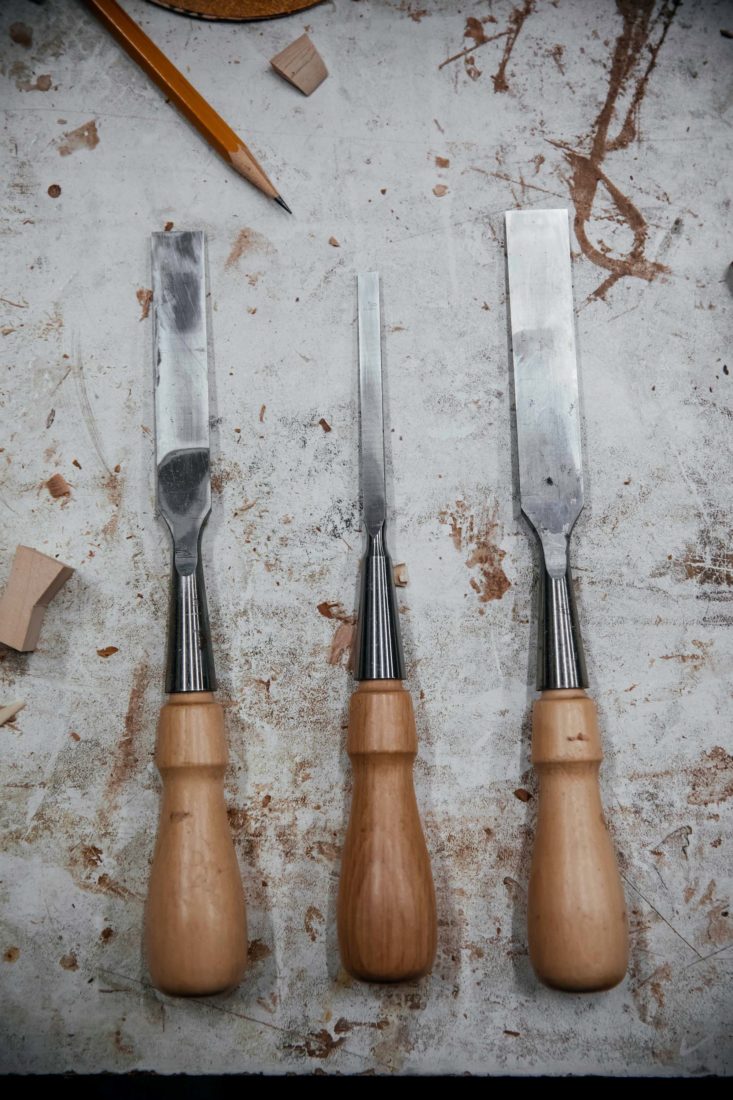
Chisels at rest in the workshop.

Rhue takes his lathe tool and presses it against the center of the spinning piece of elm, sliding toward the edge as the wheel of wood twirls, applying more force the farther he goes, the shavings piling into the bend in his elbow like a basket of curly fries. Chip, chip, he presses; round, round, the wheel spins. Soon the underside of a bowl reveals itself, and anyone can see the same potential in this elm log that he saw all along. 

The post As the Wood Turns appeared first on Garden & Gun.

13 Jan 21:08

Serious About Whiskey? Here Are 9 Bottles You Should Be Drinking

At a certain point, most whiskey drinkers make the leap beyond entry-level booze. Here are nine bottles to try next.

13 Jan 18:32

5 Free Sites and Apps to Save Money and Reduce Spending

by Mihir Patkar
apps-save-money

Are you spending more money than you have? These apps and sites will help you set a budget, reduce spendings, and save money.

Being wealthy isn’t about making more money, it’s about keeping an eye on what you make right now, and figuring out what you should spend it on. Saving money is one of the most common new year’s resolutions, and you can figure out how to do just that with a few choice apps.


Currently, Mint and You Need A Budget are the two heavyweights in the budget-making apps. But before you move on to these paid apps, try a few baby steps to understand the basics of personal finance and how to manage it.

To Make Or Not To Make (Web): Calculate Your Monthly Savings Goal

Calculate monthly savings goal with to make or not to make

To Make Or Not To Make is the simplest version of a savings plan. It is a barebones calculator that tells you how much you need to make every month to meet your annual savings goal.

Here’s how it works. To start with, set an amount that you want to save by the end of the year. To Make Or Not To Make will turn it into a monthly target, divided equally. But when you miss the January target or overshoot it, the app will adjust the remaining months accordingly. Each month, you can add how much money you have saved, so you can see how close you are to your target.

You’re always free to change your annual goal and get a new calculation too. The budget is made on a link that is private for you, so don’t share the URL with anyone else. Bookmark it, and set a reminder for yourself to enter details in it at the first of every month.

Track My Subs (Web): How Much Do You Pay for Subscription Services?

Find out how much you spend in subscription fees with Track my subs

Most of the things you “buy” these days are subscriptions, whether it’s your monthly cell phone bill, Netflix or Spotify, and so on. All of these add up to a big total. You can manage all these subscriptions in one place at Track My Subs.

The app doesn’t let you change or stop any subscription. Instead, it’s a dashboard to figure out these “invisible transactions” where your credit card is charged every month or year. For each subscription, you can set a category, its cost, expiry date, payment method, add tags and notes, and even set up alerts.

Once you set up all your subscriptions, you might be shocked to realize just how much you are spending on non-essential items like entertainment. Track My Subs is a good reality check for those who have plenty of subscriptions.

Trimm (Web): Simple Expenses Tracker

Trimm is a basic expenses tracker with custom categories

Every money manager recommends that you keep track of all your expenses, no matter how small. There are loads of apps for that, but if you want a free and simple one to start, try Trimm.

It’s a desktop-based app, so ideally, fill it out at the end of each day or the start of the next day when you are at your computer. Keep a regular schedule to add all your expenses to Trimm and you’ll soon get an idea of where your money is going, and what changes you need to make.

There are only four things you need to add to each entry: how much you spent, a description, a date, and a category. Default categories include Transport, Entertainment, Shopping, Bills, and Personal Care, but you can add custom categories too.

The important thing here is to stick to a ritual of filling out your expenses. After that, you might be able to shift to any of the better budget tracking apps or free spreadsheet templates to manage finances.

Financial Toolbelt (Web): Calculators for Every Financial Need

Find Free Money Calculators for Every Need at Financial Toolbelt

Financial Toolbelt doles out plenty of good advice on its blog about how an individual should manage their own money, but go there for its free calculators. Through seven different calculators, you’ll feel more in control of your financial future than ever before.

The calculators figure out the expenses of different aspects. One tracks how much you need to save for a good retirement (including a good FIRE calculator), another talks about how to do a side-job, others track savings goals or credit card debts. You can pick the one that matters the most to you right now, but I’d recommend giving all of them a shot.

Apart from the calculators, do check out the resources and the interviews to understand basic personal finance topics, and get some good tips on how to manage your money.

HoneyDue (Android, iOS): Money Tracking for Couples

HoneyDue is a free money tracking and budget app for couples

If you’re a couple, you need an app that works on both your phones to track all your expenditures and finances. HoneyDue is an easy and free app to set a budget together and review your spendings.

The app’s features include almost everything you can think of as a couple. You can see your joint accounts as well as personal accounts (US only), set bills and payments, add monthly budgets and limits, split costs when you manage finances separately, and so on. It’s the dashboard that both of you can check at the same time, and decide what you want to do with your money.

These features are also available in some of the other, more robust budget and finance apps, but none of them are fully free, which sets HoneyDue apart from the rest.

Download: HoneyDue for Android | iOS (Free)

Take Control of Your Finances

Each person has a different financial need at a time. You might be looking to save more money, or reduce your debt, or control your spendings. No matter what you’re looking for, one of the above apps should be able to get something out of the tools above.

In case you still haven’t found the type of app, website, or guidance you need, don’t worry. Try these other apps and free ebooks to save money and set budgets.

Read the full article: 5 Free Sites and Apps to Save Money and Reduce Spending

13 Jan 18:22

IMDb Launches Freedive, a Free Streaming Service

by Dave Parrack

IMDb has launched a free streaming service called Freedive. The streaming service will offer a range of Hollywood movies and highly rated TV shows, all completely for free. How? By breaking the content up with the occasional advertising break.

Free, ad-supported streaming platforms are quite common. There’s Vudu Movies on Us, Tubi TV, and many more besides. There are so many we’ve compiled a list of the best free movie streaming sites. And now IMDb Freedive is another one to add to the list.

IMDb Freedive Offers Quality Over Quantity

At launch, Freedive doesn’t boast a big catalog of content. There’s around 130 movies and 30 TV shows available to stream. However, some of the titles are big names you’ll actually want to watch, so it appears IMDb is focusing on quality over quantity.

IMDb has promised that the catalog will be constantly changing too, so if a movie or show isn’t on Freedive at the moment it could be in the future. On the flipside, if there’s a movie or TV show available now you should watch it before it potentially disappears.

TV shows currently available to watch on Freedive include Fringe, Heroes, Quantum Leap, and The Bachelor. Movies available to watch on Freedive include Memento, Foxcatcher, The Last Samurai, and True Romance. IMDb has also produced a couple of original shows.

All Freedive content is supported by ads, and there’s currently no way to skip past them. IMDb also isn’t offering the chance to buy or rent these movies and TV shows. Instead, you’ll be directed to Amazon if you want to buy or rent the content you’re watching.

How to Access IMDb Freedive

IMDb Freedive is available on imdb.com/freedive as well as on Amazon Fire TV devices. To watch Freedive through the site you’ll have to log in to IMDb. Amazon Fire TV users will find Freedive under “Your Apps & Channels”. Freedive is only available in the U.S.

Nobody likes adverts, but sitting through the occasional ad break in order to watch movies and TV shows for free is surely a price worth paying. Freedive isn’t going to replace Netflix, especially with the increasing quality of Netflix Originals, but it’s a good backup.

Read the full article: IMDb Launches Freedive, a Free Streaming Service

13 Jan 18:20

Finally Write Your Novel With These 5 Apps for Motivation and Planning

by Mihir Patkar
write-your-novel

You’ve spent years talking about how you wanted to write a novel. It’s time to finally make that happen, with the help of a few apps that show you how to get started, keep going, and break the book into achievable goals.

These apps and sites attack different aspects of writing. Some focus on forming a habit of writing regularly, which is what most beginners find difficult. Others are strong writing tools that break down your novel by characters, scenes, chapters, and so on, and let you add ideas accordingly.

No matter which of these works best for you, it’s a good idea to also check these sites to learn how to write and publish a book.

Prolifiko (Web): Guide to Writing Sprints and Daily Goals

Prolifiko recognizes that the biggest obstacle to writing a book is writing itself. Authors get caught up in thinking about their big idea, and re-thinking, and over-thinking. The act of writing takes a back seat.

The app’s purpose is to make writing a regular habit, and it uses multiple productivity methods to do this. It makes you set short-term goals, and provides motivational messages as well as tips on how to achieve them. It doesn’t include a word processor, so you’ll have to rely on Microsoft Word or the best alternative word processors.

In the free version of Prolifiko, you can try out what they call a “writing sprint”, which is a 7-day course to write as much as you can. It incorporates everything you’ll get in the final product, including the daily boosts and tips. If you like it, Prolifiko costs £5.99/month or £59.99/year, and works on desktop and mobile.

200 Words A Day (Web): Form a Daily Habit With a Community

200 Words a Day sets habits of writing with community support in Slack

Given how difficult it is to form the daily habit of writing, you might feel like a failure whenever you don’t do it. But there are thousands of people like you. And just talking with them at 200 Words A Day (2WAD) can help you get back in the groove.

This isn’t the first app of its type, as we have seen others like 750 Words with a similar concept among apps to break writer’s block. But 750 words might be a bit much for a daily writing exercise. Plus, 200 Words seems about the right amount if you want to write about something that’s not about your novel. Pen your thoughts, talk in the community, or go on a random rant. As long as you are typing a minimum of 200 words on the screen, it counts as progress.

Your posts can be private or public. 2WAD also has an active Slack channel where its members help each other with motivation, relaxation, or general distraction.

YWriter (Android, iOS, Windows): Jot Notes on Different Parts of Novel

Writing a novel isn’t easy. You won’t always write it linearly, from the first chapter to the last. You’ll need to make notes about characters, places, plots, scenes, and so on. Ywriter makes all of that easy on your mobile.

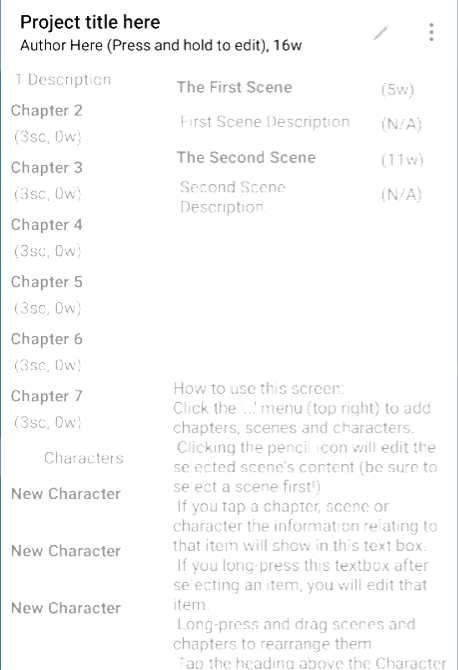
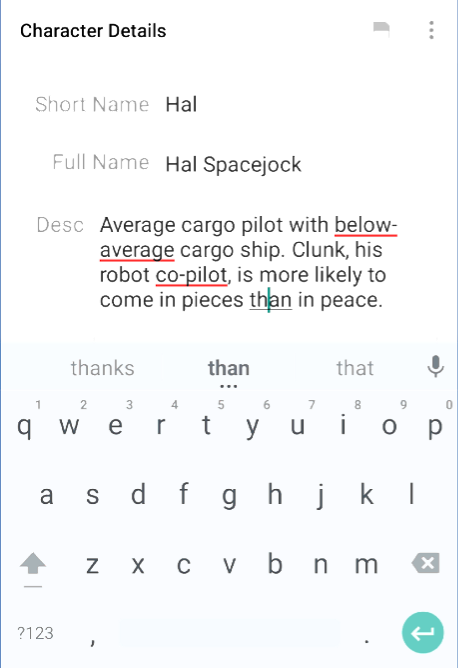
You can break the entire novel into different chapters. Each chapter has multiple scenes as well. And characters get their own pages with character details. Any time you get a new idea, jump into that section with a few taps and start writing whatever you think of.

I find YWriter to be best as a mobile app, but there is a robust Windows version too with all of these features. But remember that YWriter isn’t a word processing software, it’s more to keep all your ideas in one place.

Download: YWriter for Android | Windows (Free)

Download: YWriter for iOS ($4.99)

True Novelist (Web): Free Online Novel Writing App With Statistics

Free online app True Novelist helps organize and write your book

True Novelist is a free web app that addresses most of the needs of any novel writer. This includes a full-fledged word processor, along with plenty of organizational features.

The novel is, by default, broken up into categories (like story and research) and sub-categories (chapters, characters, places, scenes, etc.) You can rename any of the sub-categories, and you are free to add as much or as little as you want.

True Novelist also makes you accountable. It keeps a track of how many words you have written on any day, as well as how long you took for it. Over time, this provides a good snapshot of your productivity and writing streaks. The app also includes the option to set a daily goal for how many words you will finish each day.

Don’t worry about privacy or copyrights. True Novelist encrypts your entire novel before storing it online, and only you can access it with your password. And yes, you own 100% of your work.

Edward (Web): Robust Online Book Writer and Organizer

True Novelist is great because it is simple. For some people with an epic tale in their head, that might not be enough. Edward is a more robust online tool for authors to organize their thoughts and write the novel.

Edward divides the writing process into four steps: plan, outline, write, and analyze. Each tab has its own tools to help you organize your thoughts into something more coherent than the mish-mash of ideas in your head. One of the best ways to do this is by creating tags in Edward, which can then be applied in any of the four categories so you can cross-reference them.

The free version of Edward is a good place to start your novel and trial the software at the same time since it has most of the features of the paid version. If you find it useful, you can pay to get online storage and backup of all your ideas. If you don’t find it useful, just download everything you’ve written and move to a different app.

Brainstorm With Mind Mapping

For any beginner writer, these apps will guide you to take the first few steps into writing your magnum opus. You won’t magically become a good writer with them, but they will help you do what needs doing most: the act of writing.

But there will be days when you feel like thinking and ideating, instead of writing. Even on those days, you might want to turn to a few apps. For instance, try WriteMapper, one of the best mind-mapping apps to brainstorm ideas, especially for writers and authors.

Image Credit: JanPietruszka/Depositphotos

Read the full article: Finally Write Your Novel With These 5 Apps for Motivation and Planning

10 Jan 14:53

Sunset in Egypt


Tags: Great Pyramid of Giza, Great Sphinx of Giza

568 points, 31 comments.

10 Jan 14:02

Why You Don't Need More Time: Three Actions To Take Your Time Back

by Jared Narlock, CommunityVoice
09 Jan 18:59

Steve McQueen's 1971 Husqvarna 250 Cross Motorcycle

Motorcross racing came to the US in 1966 when 250cc World Motocross Champion Torsten Hallman flew in from Sweden and dominated with his Husqvarna 250 Cross. Seeing how effortlessly Hallman...

Visit Uncrate for the full post.
08 Jan 14:58

8-in-1 Film to Digital Converter

by mark

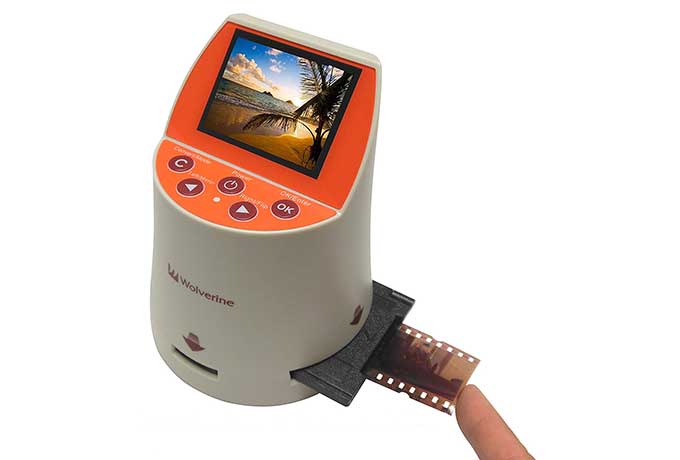
I have a large archive of film dating back to the 1970s. Black and white negatives and color slides. I have an Epson scanner with film holders, and while it does a good job, it can take a long, too long time per slide. I had tried a digital camera attachment and that worked ok, but scan quality varied depending on the background lighting behind the attachment. Plus the Nikon digital camera it worked with was quickly outmoded and replaced with newer, higher resolution, gear.

Then, a year or so ago, I found the Wolverine F2D Mighty [the newer version is called the Titan). It is a dedicated film scanner that can make a 20M pixel scan in a couple seconds. It has film carriers for 35mm, 110 and 8/Super8 film. It can scan color and B/W negatives and positives (slides). It has a LCD preview screen and is powered by a USB connection to a computer. It also has a SD card slot where it saves scans. You can upload scans to the computer over USB or just move the SD card (which is what I do).

The software is rudimentary but good enough for me since all I need is to get the image file to the computer.

At this point I am nearly done with my archive (at least I think I might be – you never know when you will find that forgotten shoe box full of negatives). My starving artist, cheapskate friends now are borrowing Mighty and happily and quickly digitizing their film too.

-- RJ Godin

Wolverine Titan 8-in-1 High Resolution Film to Digital Converter with 4.3″ Screen and HDMI Output ($137)

Available from Amazon

08 Jan 14:56

The Magic Continues at the Historic Hotel del Coronado

by Beck Bamberger, Contributor
Built in 1888, The Hotel Del Coronado stills captures the hearts of guests from around the world. A perfect location and incredible spa doesn't hurt the allure.
08 Jan 14:36

2019 Suzuki Jimny 4×4: Super Functional and Super Small

Though there was definitely an awkward phase in its third generation, the new one is back to being Defenderesque, in a good way.