Thanks to a patch developed by a self-described “computer geek homeschooler” in communication with the developer of Revive, you can now play Stormland on your non-Oculus PC VR headset!
When we tried to play Stormland on Valve Index on release date using the Revive hack, we were unable to make it work. The game would show on the monitor, but not in the VR headset.

Sometimes Revive needs a specific patch to support the latest Oculus games. Usually this happens within a matter of days of release- usually by the lead developer. But since the lead developer is currently on vacation, self-described “computer geek homeschooler” and YouTuber Jordan cooperated with him remotely to develop a patch to make Stormland work.
We tried this patch today on Valve Index and found it fully works. You can enjoy Insomniac’s game, which we gave 4 out of 5 stars in our review, on your headset of course.
DISCLAIMER: while we have run multiple virus scans on the .exe and .dll from this patch, we cannot guarantee their security. As with any executable you download from the internet, please exercise caution.
Step 1: Download The Oculus Rift Software & Buy Stormland
NOTE: Revive is not officially supported by Facebook or Insomniac Games. When spending your hard-earned money on an Oculus exclusive, please do so with the knowledge that Revive could stop working, or be blocked, at any time. However, Facebook has claimed that it will no longer do this.
Download and install the Oculus Rift software if you haven’t already.
Skip the first time setup until you’re at the store. Then simply search for Stormland and buy it.

The Oculus Store works mostly just like any other games store on PC.
Step 2: Install Revive (If You Haven’t Already)
Revive is the hack which allows Oculus Rift games to be played on non-Oculus headsets. It’s available on GitHub including full source code, and has been used for years. Some Oculus exclusive developers even recommend it on their Discord.

You can always find the latest version of Revive at: https://github.com/LibreVR/Revive/releases/latest
Simply download the installer and let it run. Keep a note of the destination folder or just use the default.
Once installed, launch SteamVR and put on your headset. Look for the tab called ‘Revive’ on the SteamVR Dashboard and click it once. This will ensure that first time setup is done.
Step 3: Apply Jordan’s Patch
Remember, the current version of Revive doesn’t yet support Stormland, so you’ll need Jordan’s patch.
Close SteamVR and download the Revive Stormland Patch from Google Drive.

Extract the files from this ZIP into your Revive install directory that you noted earlier. If you want to make sure you do this right, simply use your mouse to drag and select ReviveInjector_x64.exe and the folder x64 and then drag them onto the files in the Revive folder.
Congratulations, Stormland should now work on your Valve Index or HTC Vive!
If you have issues, try restarting your PC.
The post How To Play Stormland On Valve Index Or HTC Vive appeared first on UploadVR.
















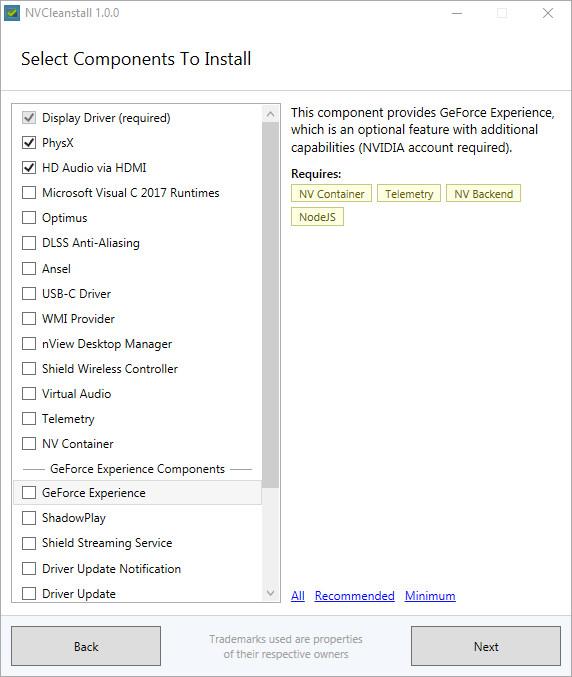 Qui n'a jamais rêvé de pouvoir choisir ce qui est installé au détail près sur son ordinateur ? Ces dernières années, la tendance à mâcher le travail sur les différentes installations dans l'objectif de rajouter quelques éléments à votre insu prend une ampleur folle, et il est difficile de ne pas finir avec des mouchards que ce soit dans les logiciels, les drivers et même les OS - sauf Nicolas qui est spécial. NVIDIA n'est pas en reste, entre la télémétrie, les options inutiles ou le GeForce Experience, il est énervant de voir que le logiciel de notre carte graphique est plus lourd que certaines applications professionnelles...
 Si vous êtes un amateur de gaming, vous vous êtes peut-être déjà retrouvés devant la situation très frustrante dans laquelle vous avez entamé une partie avec un ou plusieurs amis. Mais, une fois la LAN fini, vous voilà bien dépourvu avec une sauvegarde et plus de nouvelles dates...


 Jusqu'à ce jour, l'outil de chiffrement de Windows nommé BitLocker (disponible avec W10 Pro et Entreprise uniquement, ne concerne pas la version Famille/Home) avait l'habitude de donner carte blanche à tout SSD s'identifiant comme gérant le chiffrement matériellement par eux-mêmes et leur faisait donc confiance pour s'occuper correctement leur propre sécurité. Le problème vient en partie du fait que tous les constructeurs n'appliquent pas tous le même sérieux dans la conception et l'implémentation de leur méthode de chiffrement (souvent propriétaire et au code source fermé)...