Some instruments just beg to be touched. The G1000 works perfectly fine with a mouse, most of us have tuned hundreds of frequencies and built countless flight plans that way, but there’s always been a mismatch between an avionics suite built entirely around knobs, detents and soft keys, and operating it through scroll wheels and click zones.
Physical versions of it have existed for ages precisely because of that. The problem was always the price: around $650 to $700 per screen at the entry level, climbing quickly into the thousands, money that kept this hardware firmly in serious home cockpit territory. The MOZA MGX1000 changes that math dramatically. $449/€469. By some margin the least expensive standalone G1000 unit out there right now, and no, the price is not the compromise you’d assume it to be.
Quick recap if you missed the news: the MGX1000 launched this week alongside MOZA’s new family of cockpit panels, the lineup the company had been teasing since FSWeekend in March and confirmed for Q3 at FSExpo. The whole lineup sold out within hours of going live in some regions, so the appetite for this thing is clearly not a niche phenomenon. The question is whether it deserves the hype. Short answer: yes it does! Let’s get into it.

What’s in the box
The unboxing is standard MOZA fare. Clean box, everything properly cushioned, nothing rattling around. Inside: the panel itself, two metal desk stands with rubberized feet, a universal power adapter, a USB-A to USB-A cable, screws, an Allen key, a manual, and some stickers because of course there are stickers.
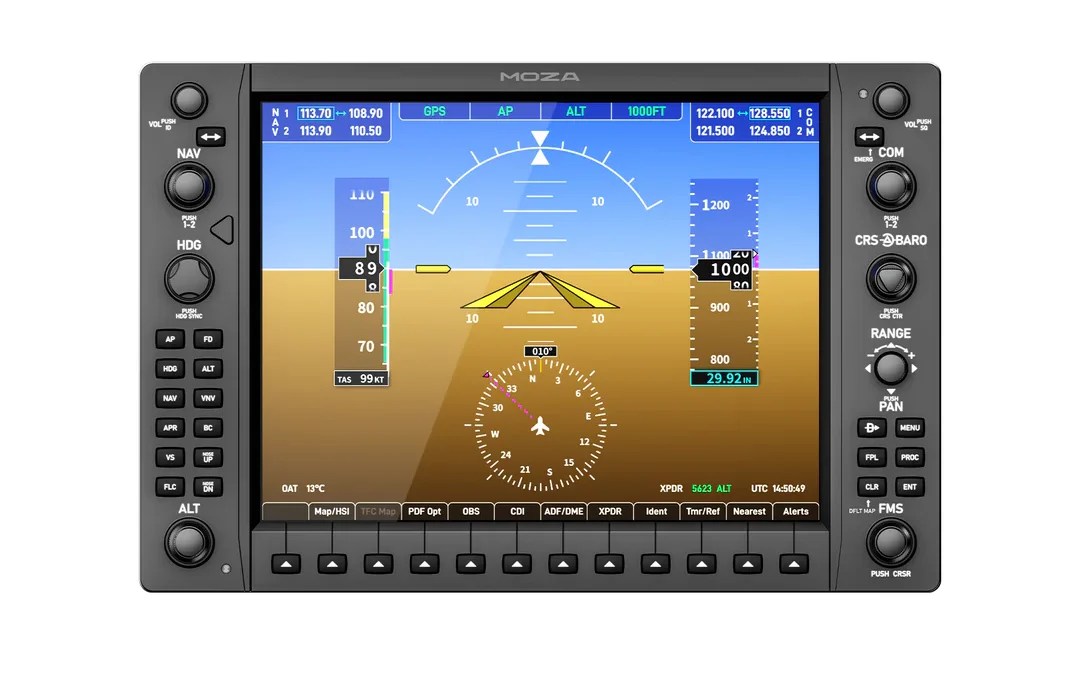
First impression out of the box: this thing is bigger and heavier than the photos suggest. The 10.4-inch screen is true to the real unit’s size, and when it’s sitting in front of you it has real presence, more flight training device than gaming peripheral. The shell is high-grade plastic rather than metal, and sure, metal would feel fancier, but at around 1.2 kg the unit has a reassuring weight to it and nothing about it creaks or flexes. The real G1000 isn’t a slab of billet aluminum either, for what it’s worth.
The stands take maybe five minutes to attach and hold the panel much more firmly than expected. Prodding the lower half of the panel doesn’t move it at all. Push hard on the buttons at the very top and the rubberized feet can slide a touch on a smooth desk, but that’s about it, and anyone building this into a rig will bolt it down anyway. There are mounting holes all over the back, the center ones VESA 75 compatible, so options are plentiful.
Setup: shockingly painless, with one asterisk
Here’s the MGX1000’s party trick. There’s no HDMI cable in the box because there’s no HDMI port on the unit. The whole thing runs off a single USB cable using DisplayLink, plus its own power supply. Windows just sees a USB monitor, so there’s no display output consumed on the graphics card.

And because Windows treats it as a normal monitor, it also works as, well, a normal monitor. Between flights it makes a handy little side screen for Navigraph Charts, SimBrief, a checklist, Discord, whatever. It’s 1024×768 in 4:3 and DisplayLink isn’t suited for fast-moving content, so nobody’s editing spreadsheets or watching films on it, but for tools and companion apps it’s great. Case in point: I’ve been building a dubious flying career with my Aerostar 600 in FS Kingpin and have happily kept the program’s interface running on the MGX1000 screen during flights. A madman, I know, but it proves the device is more versatile than it first appears.
Software-wise, everything goes through MOZA Cockpit, which existing MOZA owners already have installed. The unit arrives fully mapped for the Working Title G1000. No need to bind anything, plug it in, tell the software whether the panel is acting as the PFD or the MFD, done. There’s a handy identify function to confirm every button and knob is registering before you load into the sim, and the PFD/MFD role can be switched on the fly mid-flight, with all the button assignments following automatically. The “button forwarding” system behind this is quite clever: you don’t actually bind anything in the sim at all, the software just forwards everything to the popped-out instrument.

Now, the asterisk. The MGX1000 isn’t a standalone device. It displays a popped-out instrument from the sim, which means dealing with MSFS 2024’s native pop-out mechanics, and those remain as temperamental as ever. Not MOZA’s fault, but their product lives downstream of it.
The freeware Pop Out Panel Manager solves this, and MOZA’s software helpfully links you straight to it, though the tool has its fussy moments. The payware GlassOut, around $20, handles the same job with less friction and makes swapping PFD and MFD on a single unit nearly hassle-free. Either way it’s a one-time setup of a few minutes, and after that you rarely think about it again. But it’s the least elegant part of an otherwise very elegant product, so go in knowing.
The factory mappings depend on MOZA having a profile for your aircraft. Working Title G1000 coverage means every standard MSFS aircraft works, and MOZA has been expanding third-party support with profiles for aircraft like the Kodiak 100 and the DA40, but load something exotic and the panel may sit there unresponsive until a profile exists.

Build quality: this is where the money went
The screen first, because the screen is the product. It’s a true-to-size 10.4-inch IPS panel at 1024×768, matching the real unit’s dimensions and resolution, with a peak brightness of 500 nits. It’s a lovely display, no other way to put it. Sharp enough that frequencies and altitudes are readable without leaning in, vivid colors, stable viewing angles at any sensible desk position, and at full brightness it actually outshines the virtual G1000 rendered inside the sim. Cameras never do these panels justice. In person it just looks like a very good small monitor wearing a Garmin costume.
The controls are the part that really surprises. Every knob and button sits at one-to-one scale with the real unit, and the tactile quality is right up there with the best hardware MOZA has made, which is saying something given how the AB9 and the MRP pedals turned out. The rubberized buttons have recessed labels you can find by feel in the dark. The rotaries turn with proper weighted resistance, each detent defined and audible, the kind of click you catch yourself playing with while the sim loads. And the seven-way range knob, which pushes, turns, and tilts in four directions for map panning, is built around ALPS internals and might be the single nicest control on the whole panel.

Not flawless, though. The larger rotaries have a hint of play in their mounts that the smaller controls don’t, nothing alarming, but noticeable once you’ve felt it. Also, a dedicated button to change between PFD and MFD would have been nice.
And then there’s the power situation. There is no on/off switch on the MGX1000. None. The unit is on whenever it has power, and the button backlighting comes on with it. The lighting itself is nicely adjustable through MOZA Cockpit, with a manual slider that goes all the way to off, an automatic mode using the two built-in ambient light sensors, and a telemetry mode that takes lighting from the sim (which worked with some aircraft and not others). But all of that lives in software. Shut everything down for the night and the panel just… stays lit, softly glowing at you from the desk until you pull the plug. A switched power strip or smart plug solves it in practice, and plenty of sim hardware shares this sin, but on a unit this polished the omission stands out. Put a switch on it, MOZA.
In the sim
This is where the MGX1000 earns its keep, and where any lingering doubt about the price evaporates.

I can’t overstate how satisfying it is to interact with a G1000 with actual physical controls. Dialing a heading with a real knob. Punching a squawk code on real buttons. Working through PROC with the FMS knobs to load an ILS approach, selecting the transition, hitting load, hitting enter, all in seconds rather than a minute of mouse surgery. Flight plan edits mid-flight go from chore to something you almost look forward to.
Everything tested behaved the way the real system does. COM and NAV tuning with the swap keys, CDI source switching, the full autopilot stack including FLC and vertical speed, inset maps, the engine page with its lean and system views, Direct-To, nearest airports, the soft keys along the bottom, charts if you’re a Navigraph subscriber. There’s a small amount of latency between input and the sim reacting, measurable if you go looking, irrelevant once you’re flying. The screen itself runs smoothly with no stutters or dropped frames worth mentioning.
The main limitation is obvious: one unit shows one display at a time. PFD or MFD, pick one, switch in a few seconds through the software when needed. It works fine. But be warned, your brain may start to budget for a second unit, because a full PFD-plus-MFD setup at $900 is within the range of a single screen from the established competition. A sentence that would have sounded absurd in this product category a year ago.

The competition, briefly
The MGX1000 isn’t alone in this space. RealSimGear has been the established name for years, with its G1000 module currently going for $699 on sale, down from a regular $999. FlightSimBuilder also offers its G1000 TNxi from $750, with a touchscreen option. We’ll be taking a closer look at that one soon, so a proper comparison is coming. For now, at $449, MOZA is comfortably the value pick of the three.
Verdict
Every so often a product resets the pricing expectations of an entire category, and this is one of those moments. The complaints are real but modest: the pop-out workflow depends on third-party tools, the bigger knobs could sit tighter, there’s no power switch and the lights stay on until you cut power at the wall, and third-party profiles are still filling in. None of these touch the core reality: a one-to-one, beautifully screened, tactilely convincing G1000 for $449.
Who shouldn’t buy it? Anyone who doesn’t fly G1000-equipped aircraft, of course. Without G1000 aircraft in your rotation this becomes only a very cool little monitor. But for anyone flying Cessnas, Cirrus, DA40s, Kodiaks, or the growing list of G1000-equipped machines in MSFS 2024, or learning the real system and wanting muscle memory that actually transfers, this is an easy hardware recommendation.
Pros
- Unmatched price for a standalone G1000 unit
- True one-to-one scale, layout, and display resolution
- Excellent tactile controls, with the seven-way range knob a highlight
- Single USB connection via DisplayLink, no GPU port required
- Works out of the box with the Working Title G1000, no binding needed
- Bright, sharp 10.4-inch IPS display with flexible lighting options
- Doubles as a small secondary monitor between flights
Cons
- Depends on MSFS’s temperamental pop-out system or third-party tools
- One unit displays only the PFD or the MFD at a time
- A button to change between PFD and MFD would have been nice
- No power switch, and the backlighting stays on whenever the unit has power
- Larger rotary mounts have slight play
- Third-party aircraft profiles still being built out
Price: $449 USD (€469 / £419) | Available from: mozaracing.com
Disclosure: MOZA provided the MGX1000 for this review and is an advertising partner of MSFS Addons. This does not influence our reviews or their conclusions.










 Si vous vous intéressez de près aux cartes mères, et suivez par exemple les analyses faites régulièrement par Thibaut sur H&Co, vous savez déjà qu'il y a des subtilités parfois bien complexes dans la gestion des lignes PCI Express. On se laisse parfois enflammer par les caractéristiques maximale...


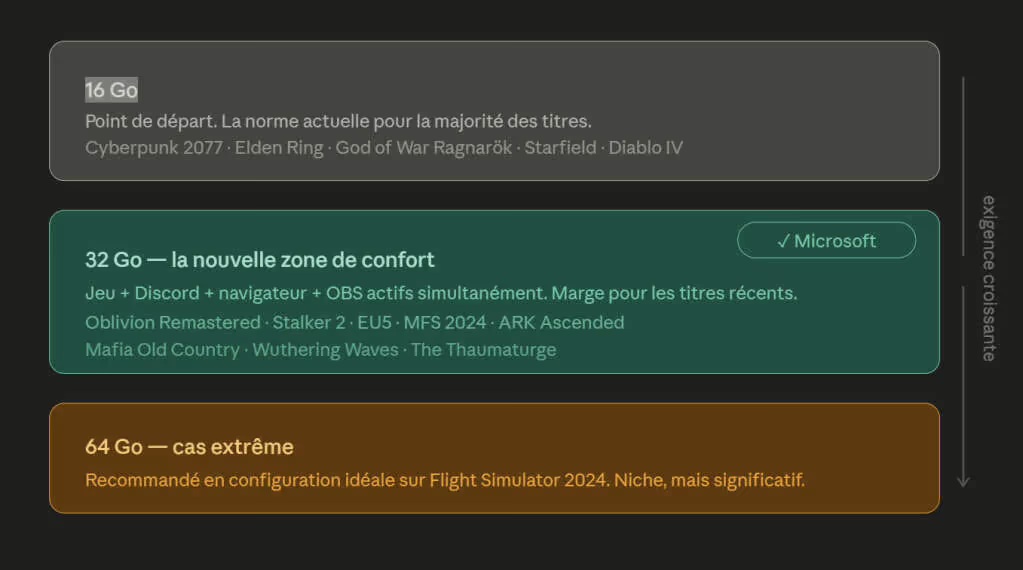




 En 2015, Discord était lancé et rencontrait un succès rapide, notamment dans la communauté des joueurs. Dès 2016, une "bascule" s'opérait et Discord était déjà plus populaire que l'application de communication phare des joueurs jusque-là : TeamSpeak. Depuis, TeamSpeak n'a jamais cessé d'exister, mai...