Arndt Dibi
Shared posts
Webinar: Learn how to integrate Flow with PowerApps and PowerBI
Webinar 10/20: Create PowerApps to send real time Power BI data
Webinar: Learn how to integrate Flow with PowerApps and Power BI
Microsoft Flow at Ignite 2016 recap
Generalstaatsanwaltschaft erhebt Anklage gegen 22-jährigen Hacker

Der im April festgenommene Hacker soll in tausenden Fällen Computer sabotiert, Daten abgegriffen und verschiedene Schadprogramme verkauft haben.
Forscher knacken offenbar photoTAN-Verfahren auf Android-Smartphones
 Einem Bericht der Süddeutschen Zeitung zufolge ist es Forschern gelungen, auf manipulierten Smartphones das Verfahren photoTAN zu knacken.
So viel investieren Netflix und Amazon in eigene Inhalte
Netflix und Amazon sind bekannt für ihre Eigenproduktionen, egal ob House of Cards, Narcos oder Orange Is The New Black. Dafür investieren die Streamingriesen viel Geld.
Ausgaben in den letzten Jahren mehr als verdoppelt
Dass Netflix und Amazon die TV-Nutzungsgewohnheiten auf den Kopf stellen, ist unbestritten. Von „The Walking Dead“ über „Games of Thrones“ bis hin zu „The Big Bang Theory“ können nahezu alle Kultserien der letzten Jahre bei den Streaming-Diensten abgerufen werden. Dass Netflix im Juli 2016 die Marke von weltweit 83 Millionen Abonnenten durchbrach, hat aber nicht zuletzt mit erfolgreichen Eigenproduktionen wie „Narcos“ und „House of Cards“ zu tun. Eine Studie von IHS Markit zeigt nun, wie viel die Video-Streaming-Plattformen ins eigene Programm investieren.
Die Zahlen des Marktforschungsunternehmens zeigen vor allem eines: Netflix und Amazon legen sich bei den Inhalten mächtig ins Zeug und müssen als Player ernst genommen werden. Laut IHS Markit haben die beiden Video-Streaming-Plattformen ihre Ausgaben für Programming zwischen 2013 und 2015 mehr als verdoppelt. Beispiel Amazon: Flossen im Jahr 2013 noch 1,2 Milliarden US-Dollar in Programming, waren es im Jahr 2015 bereits knapp 2,7 Milliarden. Im selben Zeitraum kletterten die Ausgaben von Netflix von 2,4 auf 4,9 Milliarden US-Dollar.
Damit kommen Amazon und Netflix zusammen im vergangenen Jahr auf Investitionen in Höhe von 7,5 Milliarden US-Dollar. Das ist mehr als große Player wie CBS (5,7 Milliarden US-Dollar), Turner (3,8 Milliarden US-Dollar) und HBO (2 Milliarden US-Dollar) in Eigenproduktionen gesteckt haben.
Programming-Investitionen im Jahr 2015 in Mrd. US-Dollar

„Das Investitionslevel von Netflix und Amazon wird nur von Disney mit 11,84 Milliarden US-Dollar und NBC mit 10,27 Milliarden US-Dollar getoppt“, sagt Tim Westcott von IHS Technology. Auch wenn der Marktforscher davon spricht, dass Video-Streaming-Dienste an den „Fundamenten der traditionellen TV-Industrie rütteln“, glaubt Westcott nicht, dass der Umbruch von heute auf morgen stattfinden wird. „Die Ära des linearen TV für beendet zu erklären, wäre verfrüht“, sagt er.
Neben den Sendern und Streaming-Diensten hat IHS Markit auch die Investitionen in den verschiedenen Märkten unter die Lupe genommen: Das wenig überraschende Ergebnis: Mit 43 Milliarden US-Dollar sind die USA im Jahr 2015 Spitzenreiter. „Wir schätzen, dass 2015 rund 33 Prozent der weltweiten Programming-Ausgaben in den USA getätigt wurden“, sagt Westcott. Dabei wurden Amazon und Netflix herausgerechnet, da diese US-Unternehmen als globale Plattformen behandelt werden. Westeuropa folgt auf Rang 2 mit 39 Milliarden US-Dollar. Als größte Märkte werden hier Großbritannien (10,7 Milliarden US-Dollar), Deutschland (7,3 Milliarden US-Dollar), Frankreich (6,6 Milliarden US-Dollar) und Italien (4,6 Milliarden US-Dollar) geführt. Im asiatisch-pazifischen Raum stechen vor allem Japan mit Investitionen in Höhe von 9,8 Milliarden US-Dollar und China (8,4 Milliarden US-Dollar) heraus.

Freihandelsabkommen: EU-Minister können sich nicht auf Ceta einigen
 Eigentlich sollten die Mitgliedsländer heute für das Freihandelsabkommen mit Kanada stimmen, um Ceta Ende Oktober zu unterschreiben. Doch einige EU-Staaten weigern sich.
Kamera-App unter Windows 10 Mobile wird neues Interface & Features erhalten

Microsoft arbeitet derzeit an einer ganzen Menge an Veränderungen für Windows 10 und Windows 10 Mobile, welche schließlich mit dem Redstone 2 im März 2017 für sämtliche Nutzer ausgerollt werden sollen.
Die Kamera-App soll davon ebenfalls betroffen sein und hat nun ein Update auf Version 1016.11 erhalten, welches lediglich für Insider im Fast Ring zur Verfügung steht. Dieses bringt eine ganze Reihe an Veränderungen am Interface sowie ein neues Feature mit sich.
Was ist neu?
Das neue Feature in der Kamera-App ist die Zeitraffer Funktion, womit sich längere Aufnahmen erstellen lassen, die daraufhin direkt beschleunigt werden. Außerdem wurde das gesamte User Interface, zu Deutsch die Benutzerumgebung, komplett umgekrempelt.
Der Knopf zum Wechseln von Haupt- zur Frontkamera findet sich nun nicht mehr in der Werkzeugleiste oben, sondern wurde in die linke obere Ecke verschoben, was allerdings nicht bei allen Geräten so ist. Dafür findet sich in der Werkzeugleiste nun die Timer-Funktion, womit ihr Aufnahmen um 2, 5 oder 10 Sekunden verzögern könnt. Dieses Feature ist zwar nicht neu, war bislang aber im Menü versteckt, wo es für viele Nutzer schlichtweg nicht existiert hat.
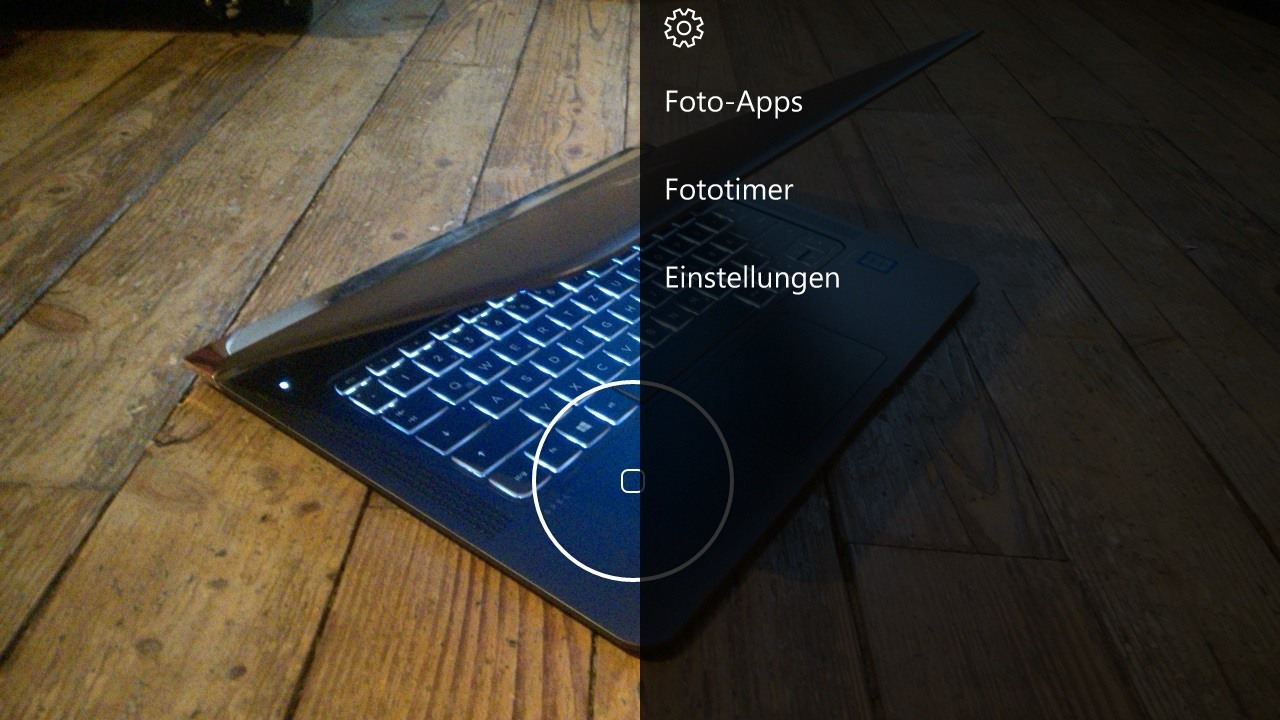
Das seit Windows Phone 7 bekannte Drei-Punkte-Menü hat man ebenfalls aus der neuen Kamera-App verabschiedet. Stattdessen findet sich rechts oben nun einfach ein Zahnrad, womit sich die Einstellungen öffnen lassen. Darunter befindet sich weiterhin der Auslöseknopf, welcher nun weiß eingefärbt ist und daher etwas besser sichtbar sein sollte.
Da nun der Knopf zum Wechsel der Kamera in der linken oberen Ecke ist, hat sich Microsoft dafür entschieden, die Bildergalerie nach rechts unten zu verschieben. Vor allem diese Änderung dürfte zu Beginn bei vielen Nutzern dafür sorgen, dass die falsche Option aus Gewohnheit gedrückt wird.
Weitere Neuerungen sind in der aktualisierten Kamera-App nicht zu finden bzw. sichtbar, was allerdings nicht bedeutet, dass es keine geben kann. Unter Umständen könnte Microsoft einige Verbesserungen an der Performance, Stabilität oder der Bildverarbeitung vorgenommen haben. Das Update wird lediglich für Windows Insider im Fast Ring ausgerollt und auch hier in Wellen, sprich ihr werden das Update womöglich erst in einigen Stunden erhalten.

via WindowsCentral
Der Beitrag Kamera-App unter Windows 10 Mobile wird neues Interface & Features erhalten erschien zuerst auf WindowsArea.de.
Die ARD, das Recht und die Kunst: "Terror" – Ferdinand von Schirach auf allen Kanälen!
Ukraine-Gipfel: Wladimir Putin kommt nach Berlin
 Russlands Präsident wird schon am Mittwoch zu Beratungen über den Ukraine-Konflikt in Berlin erwartet. Es ist Putins erster Deutschlandbesuch seit Beginn der Krise.
Windows 10 Camera gets zoom control and time lapse
Well, no one saw this coming - Windows 10 Camera, build into every phone (included those upgraded to Windows 10 Mobile), is getting a much face-lifted UI, with the first availability on 'Fast ring' Insider devices (and now for all other rings and production, apparently). The main change is the promotion of the self-timer function to the main UI toolbar, plus there's also now an on-screen zoom confirmation slider/control.
Tabak: Zigarettenverkauf sinkt mit Einführung von Schockbildern
 Im dritten Quartal wurden weniger Zigaretten und Drehtabak verkauft als im Vorjahr. Experten führen das auf die Einführung von größeren Warnhinweisen und Fotos zurück.
Deutsche Bahn: Wenn der Sitzplatz doppelt reserviert ist
 Der reservierte ICE-Platz ist erreicht, man sinkt entspannt nieder. Doch noch ist die ruhige Bahnfahrt nicht gesichert, warnt Mark Spörrle in seinem Bahn-Gebrauchsfaden.
Der Isarring ist wieder (stau-)frei

Tierschützer schlagen Alarm: Bettler-Hunde unter Drogen

Application Insight Analytics: Schema updates
We have enhanced the schema of Analytics, the powerful query language of Visual Studio Application Insights. We’ve separated metrics into performanceCounters and customMetrics, and we’ve introduced browserTimings to show page load data from the client side. These changes improve the discoverability of the data, simplifying your queries and exposing new metrics and dimensions of your telemetry.

performanceCounters schema
This schema is the single place where you should look for any performance counter that is reported from your application. Whether the performance counter is automatically collected by Application Insights SDK or you have configured the application to send other performance counters, the data can be found in this schema.
For example, to find out what performance counters are being reported:

To get a chart of available memory over the recent period:

The performanceCounters schema exposes the category, counter name, and instance name of each performance counter. Counter instance names are only applicable to some performance counters, and typically indicate the name of the process to which the count relates. In the telemetry for each application, you’ll see only the counters for that application. Let’s see what counters are available in our sample telemetry:

Like other telemetry, performanceCounters also has a column cloud_RoleInstance that indicates the identity of the host machine on which your app is running. For example, to compare the performance of your app on the different machines:

customMetrics schema
If you are using TrackMetric() to send your own telemetry, you’ll find that in the customMetrics schema. For example:

browserTimings schema
At last we expose client side metrics. Many of you have asked for this and we are happy to support your request.
Set up your app for client-side telemetry in order to see these metrics.
The new schema includes the following metrics: networkDuration, sendDuration, receiveDuration, processingDuration and totalDuration. These metrics indicate the lengths of different stages of the page loading process. (They don’t indicate the length of time your users read a page.)
name can be used to filter by page name, and there are also properties such as client_OS and client_Browser. We also provide you with the performanceBucket property to quickly analyze and group the client side metrics by buckets.
For example, to find out which pages on your site are most popular, and how long they take to load:

Tell us what you think
We hope these changes help you to understand your application’s usage and performance better. The data is there - all you have to do is just query it.
As always, feel free to send us your questions or feedback by using one of the following channels:
DocumentDB updates in the Azure Portal: New metrics blade and improved collections management
Recently we released several updates to the Azure DocumentDB portal experience. We added a new consolidated metrics experience with several new metrics available including new availability, throughput, consistency, and latency metrics which allows you to track how DocumentDB is meeting its SLA's. We also streamlined collection management by surfacing all collection operations and experiences on the left navigation bar, and eliminated excessive horizontal scrolling.
New metrics blade and SLA metrics
Azure DocumentDB is a globally distributed managed NoSQL database as a service that offers 99.99% guarantees for availability, throughput, <10ms read latency and <15ms write latency at 99th percentile, and guarantees 100% consistency. We believe it is important for you to know how the service is performing against these guarantees. We also heard how important it is for you to have all metrics information readily available without browsing through multiple windows. In response to this feedback, we have added several new metrics to reflect service performance vs SLA, as well as introduced a new at-a-glance metrics experience for DocumentDB collections. If you click on the Metrics node under Collections, you will see all metrics DocumentDB provides for each of your collections on a single surface, including:
- Actual collection availability vs. SLA
- Requests rate grouped by status code
- Consumed and provisioned throughput capacity measured in Request Units/second, as well as percentage of requests exceeding capacity
- Observed latency in the regions where your collection is located
- Percentage of requests that met consistency guarantees
- Storage consumed vs. capacity
You can also zoom in and navigate to the standard metrics experience for the individual charts via zoom-in gesture.

Streamlined collections management
DocumentDB stores data in collections, and majority of your time working with DocumentDB is spent working with collections. With this portal change, we bring collections front and center in the portal experience and eliminate the excessive horizontal scrolling you used to encounter when working in the portal.
- The overview blade now provides one-click access to collections, as well as "Add Collection" command.
- All collection management experiences and tools are now available on the left navigation menu.
- With this update, we eliminated the need for horizontal scrolling when working with DocumentDB in Azure portal.

We hope these new features will make your time in the Azure portal more efficient and provide you with the monitoring information that’s most important to you. As always, let us know how we are doing and what improvements you'd like to see going forward through Uservoice, StackOverflow #azure-documentdb, or Twitter @documentdb.
The Hybrid Mesh
During the recent Microsoft Ignite conference I heard questions related to hybrid and partner free/busy relationships quite often, so I wanted to write about it.
This scenario applies to companies with one or more external free busy relationships configured. For instance, you could have two or more companies on-premises sharing free/busy between each other.

Then one fine day, one of the companies deploys a hybrid configuration and moves mailboxes to Office 365; in our example, it is Tailspin. Suddenly, Contoso and Fabrikam users find availability information is not showing for the Tailspin mailboxes moved to Exchange Online.

This blog post discusses why free/busy is broken and what you can do about it.
A bit of history of the Availability service
For many years now we have allowed different organizations to share calendar availability between each other. It really started with the Availability Address Space feature in Exchange 2007, later moving on to the Microsoft Federation Gateway (Now called the Azure Authentication System) with Organization Relationships in Exchange 2010, 2013, and 2016.
This set of features allows an organization to share limited free/busy details with another organization without an AD Trust in place.
The main point of this article is to understand what to do when one of these organizations deploys a hybrid configuration with Office 365. Will free/busy sharing still work?
However, before we get into why this could be a problem when you deploy a hybrid configuration, we need to make sure you have a general understanding of how the cross-organization free/busy works.
So, what does a typical configuration look like?
In most scenarios, it is just a matter of configuring a Federation Trust and an Organization Relationship using the Exchange Admin Center (EAC). The following is a diagram of the basic configuration between two organizations.

Now let’s look at how a cross organization availability requests works. For this example, we will assume a user Bill (from Contoso) is looking up a user Ted’s (from Tailspin) free/busy information.

1. Bill creates a meeting request and adds Ted as an attendee.
2. The Exchange server in Contoso determines (usually based on target address of a mail-enabled user) that Ted is not local and has a domain name of TailspinToys.com set as the target address.
3. The Availability Service on the Exchange server in Contoso then checks to see if there is a path for it to find the free/busy information for TailspinToys.com.
- First we check if we have OAUTH configured by looking for an Intra Organization Connector with the domain name of TailspinToys.com (assuming the Exchange server is 2013 or later).
Note: OAUTH is not a supported way to see free/busy between two on-premises organizations.
- If that does not exist, we look to see if an Organization Relationship is configured by looking for the domain name of TailspinToys.com in the Organization Relationship.
- If that also does not exist, we then look for the domain name TailspinToys.com as an Availability address space.
4. Assuming we used the typical options, we would have an Organization Relationship and a Federation trust (second option above). The ApplicationURI in the Organization Relationship is set to FYDIBOHF25SPDLT.TailspinToys.com, which is a unique identifier for the Tailspin trust in the Azure Authentication System (formerly known as the Microsoft Federation Gateway). A request is then made to the Azure Authentication System for a delegation token that will be accepted by Tailspin.
5. Once the delegation token is received back from the Azure Authentication System, the Exchange server in Contoso sends an Autodiscover and eventually an EWS request for the availability information.
6. The Tailspin Exchange server validates the token provided by the Azure Authentication System and once confirmed, returns the requested free/busy data.
So now let’s say that Tailspin Toys deploys a hybrid configuration…
Let’s continue with the Contoso and Tailspin example. What would happen if Tailspin deployed a hybrid configuration and moved Ted to Office 365?

1. Bill creates a meeting request and adds Ted as an attendee.
2. The Exchange server in Contoso determines the user Ted is not local and has a domain name of TailspinToys.com.
3. The Availability Service on the Exchange server in Contoso checks to see if there is a path for it to find the free/busy information for TailspinToys.com.
- First we check if we have OAUTH configured by looking for an Intra Organization Connector with the domain name of TailspinToys.com.
- If that does not exist, we look to see if an Organization Relationship is configured by looking for the domain name of TailspinToys.com in the Organization Relationship.
- If that also does not exist, we then look for the domain name TailspinToys.com as an Availability address space.
4. Like in the previous example, our configuration utilizes the Organization Relationship and Federation Trust. A request is then made for a delegation token that will be accepted by Tailspin.
5. Once the delegation token is received back from the Azure Authentication System, the Exchange server in Contoso sends an Autodiscover and eventually an EWS request for the availability information.
6. The Tailspin Exchange server validates the token provided by the Azure Authentication System and once confirmed, tells the Contoso server that the user is moved.
The result is that the Exchange server in Contoso returns to Bill’s client no information (hash marks) instead of free/busy information for Ted because there is no path for the Target Address that is returned Ted@TailspinToys.mail.onmicrosoft.com. In addition, if an organization relationship was in place for TailspinToys.mail.onmicrosoft.com, the request would still fail because the token received from the Azure Authentication system (marked for ted@TailspinToys.com) would not be valid for the tenant.
The Problem
The main reason for this failure is because Organization Relationships are specific to a premises and the trust established is not transitive. Therefore, just because Contoso trusts the on-premises organization of Tailspin Toys does not mean that Contoso trusts the cloud-based Tailspin organization.
To solve the issue, you need to do a few things…
1. Create an Organization Relationship between Contoso on-premises and Tailspin on-premises. Use a unique SMTP namespace for the domain name in the Organization Relationship like OnPrem.Tailspintoys.com
Note: In most environments, the shared namespace “TailspinToys.com” can be used as the Target address for on-premises users and you would not need the additional namespace of onprem.TailspinToys.com. However, to account for all complex partnerships that could be in place, a unique namespace used as the target address will ensure free busy works properly.
2. Create an Organization Relationship between Contoso on-premises and Tailspin in Exchange Online. For this Organization Relationship the domain name should be TailspinToys.Mail.onmicrosoft.com.
3. Make sure that you have a solution in place to sync mailbox enabled objects between Tailspin and Contoso. As a mailbox is moved from Tailspin on-premises to Tailspin online, Contoso needs to be made aware and the related objects’ Target Address needs to be updated in Contoso. This is needed to ensure we direct the free/busy requests to the correct premises the first time. This step can be achieved via Forefront Identity Manager (FIM) or with a script.
- Sync the Tailspin on-premises mailboxes with a primary address of User@TailspinToys.com and a Target Address of User@Onprem.TailspinToys.com
- Sync the Tailspin Cloud Mailboxes with a Primary address of User@TailspinToys.com and a Target Address of User@TailspinToys.Mail.OnMicrosoft.Com
Note: The domain name “TailspinToys.com” is not present in any of the Organization Relationships in the Contoso environment. Keeping this name out of the Organization Relationship will ensure that you can continue to use the shared namespace and see free/busy information.

What happens when I move all my mailboxes to the cloud?
When you move all your mailboxes to the cloud you have the option to switch the Autodiscover namespace to point to Office 365 instead of on-premises. So in our example, if you move all of the Tailspin mailboxes to the Exchange Online and wanted to just keep Exchange on-premises for recipient management purposes, you could follow the appropriate method for decommissioning the hybrid configuration In Tailspin. Then you would delete Contoso’s existing Organization Relationships and recreate the Organization Relationship in Contoso so that it has the cloud based information:

Conclusion
The Availability service does not treat free/busy between organizations as transitive and there are no plans to change that today. If you want to be in a hybrid configuration and maintain relationships with other external organizations, you will have to take into account the additional configuration requirements mentioned in this article.
Thanks to all that contributed to this content: Lou Mandich, Ray Fong, Henrik Walther, and Ross Smith IV
Timothy Heeney
Microsoft pushes new Camera UI, time lapse feature to Fast Ring Insiders

It looks like some aspects of Windows 10 Redstone 2 are starting to pick up. Tonight, Microsoft has pushed an update to the Camera app for Windows 10 Mobile to Fast Ring Insiders and with it arrives a new UI layout and even a time lapse feature.
Windows Camera build 1016.11 is now live in the Store, and there are some noteworthy changes to this version. Here is what we spotted so far:
50 Prozent drahtlos laden in 30 Minuten: LG präsentiert 15-Watt-Ladepad
Ein leeres Smartphone in nur 30 Minuten zur Hälfte drahtlos laden – das verspricht LG mit seinem Quick Wireless Charging Pad. Das Ladepad ist laut Hersteller das erste der Welt mit 15 Watt Leistung.
Ladepad mit Schnelllade-Technologie
Aktuell auf dem Markt befindliche Ladepads bieten eine Leistung von fünf, maximal zehn Watt. Mit dem Quick Wireless Charging Pad will LG jetzt das erste drahtlose Lademodul mit einer Leistung von 15 Watt auf den Markt bringen. Mithilfe des Pads soll ein komplett leeres Smartphone innerhalb von 30 Minuten zu 50 Prozent geladen werden, wie es in einer Mitteilung des südkoreanischen Konzerns heißt. Damit biete das Gadget genauso viel Leistung wie ein herkömmliches kabelgebundenes Schnellladegerät.

Das Quick Wireless Charging Pad soll mit den meisten am Markt befindlichen drahtlosen Ladetechnologien kompatibel sein. LG zufolge entspreche das Ladepad den Standards des Wireless Power Consortium. Um das Problem des Erhitzens von Akku und Smartphone während des drahtlosen Ladens in den Griff zu bekommen, hat LG dem Gerät einen Sensor eingebaut, der die Temperatur misst. Wird eine bestimmte, nicht näher genannte Temperatur überschritten, unterbricht das Pad den Ladevorgang.
LG-Ladepad: In Kürze auch in Europa
Das Risiko einer möglichen Akku-Explosion soll ebenso minimiert werden wie ein Performance-Verlust des Smartphones. LG sieht künftig eine große Nachfrage nach drahtlosen Lösungen zum Smartphone-Laden. Einer Prognose der Marktforschungsfirma Techno Systems Research soll sich der Umsatz mit entsprechenden Modulen im Zeitraum zwischen 2015 und 2019 auf 2,2 Milliarden US-Dollar vervierfachen. LG will sein Quick Wireless Charging Pad noch in diesem Monat in Nordamerika, Australien und Europa auf den Markt bringen. Ein Preis ist noch nicht bekannt.
Interessant in diesem Zusammenhang: Smartphones noch schneller kabellos laden: Qi-Standard wird besser und Kabelloses Laden: Die AirFuel Alliance bietet Qi Wireless die Stirn
Irreführend: Behörde verlangt Umbenennung des Tesla-Autopiloten
 Das Kraftfahrt-Bundesamt will eine Umbenennung des Tesla-Autopiloten erreichen. Nach Ansicht der Behörde ist der Begriff missverständlich für Fahrer des Elektroautos. Tesla weist dies zurück. (Tesla Motors, Technologie)
 Top Apps im Oktober: Latermark für Pocket, Perfect Weather Universal & Poly and the Marble Maze

Seit letzten Monat wählen wir für euch drei Top Apps aus dem Windows Store aus und präsentieren diese in einem kurzen Video. Dabei handelt es sich um Anwendungen für Windows 10 oder Windows 10 Mobile, die durch ihre Qualität oder vielleicht durch das eine oder andere Feature überzeugen konnten.
Im Oktober haben wir die Apps Latermark for Pocket, einen hervorragenden Pocket-Client auf Basis der Universal Windows Plattform, die wundervolle Wetter-App Perfect Weather Universal sowie Poly and the Marble Maze, ein unglaublich kniffliges und spannendes Game für Zwischendurch, im Video vorgestellt. Wir haben im Folgenden das YouTube-Video eingebettet, wo ihr wir die Features kurz vorstellen und unsere Erfahrungen mit euch teilen. Darunter findet ihr die Download-Links zu den Apps.
Um in Zukunft keines unserer Videos zu verpassen, könnt ihr gerne unseren YouTube-Kanal abonnieren.
Latermark for Pocket
Perfect Weather Universal
Poly and the Marble Maze
Der Beitrag Top Apps im Oktober: Latermark für Pocket, Perfect Weather Universal & Poly and the Marble Maze erschien zuerst auf WindowsArea.de.
Amazon is removing its Windows 8 Kindle app from the Store on October 27
Talk about bucking the trend Amazon is notifying customers today that on October 27 the company will eliminate their Windows 8-era Kindle app from the Windows Store. The company cites wanting to "simplify our approach" and focus efforts on their existing Kindle for PC app.
That's right. While many businesses are moving towards Microsoft's Universal Windows Platform for both security and higher visibility, Amazon would rather go back to a traditional Win32 Desktop app complete with an .exe installer.
Let's rock it like it's 2005.
The HP Workspace app turns the HP Elite x3 into a mobile productivity workhorse
Microsoft's Continuum is a powerful feature available with all high-end Windows 10 Mobile handsets that basically transforms your phone into a desktop-like experience. Right now, there are a few issues with it, mainly the fact that you can't run apps in windows, or run full desktop apps. We know windowed support is coming, but not being able to run desktop apps is an issue now and maybe forever — the architecture of phones just isn't set up to run full, heavy desktop programs.

HP is aware of this and knows it could be a serious impediment for enterprise types, so with the Elite x3 they built an app that can get around this: HP Workspace.
With the HP Workspace app, businesses can sign up to HP's service, request whatever desktop apps they want or need, and HP will host those apps for them on a virtualized server, beamed straight to your phone. This means you can run desktop apps on your Elite x3 in Continuum mode thanks to the HP Workspace app.
Our full review of the HP Elite x3
Keep in mind, this isn't technically running full desktop apps on your phone. Instead, HP will "stream" the app virtually from a full Windows system located somewhere else, meaning there will be a slight bit of lag between you pressing a button and it actually showing up on your virtualized environment, but the lag isn't terrible. If you're using a good connection, you shouldn't have any real issues manipulating windows or typing up documents.