It has been a privilege for the CAT team to work with customers and the PowerShell team to validate early builds and experiences with PowerShell Core. Some of the customers involved were key influences on the whitepaper, The Release Pipeline Model Applied to Windows Server and Microsoft Cloud. As a result, validation has included many experiences from outside the traditional Microsoft tool chain, such as Vagrant and Jenkins.
For this blog post, I wanted to share some of the learnings that I gained during the validation experience. This is not meant to be a complete picture of PowerShell Core. Rather, a glimpse at some exciting new possibilities.
Voyage of Discovery
In my mind the best thing about PowerShell as a scripting language is the never ending journey of exploration. When I have the need to accomplish a task and I’m unfamiliar with the area of technology, I rely on Get-Command. If I need to gather information I start the learning process by looking for commands that begin with the verb Get, so I open the console and type Get-Command Get-*. When I need to create something new, I’m going to be looking for commands that start with the verb New. When I need to change a value, I am probably looking for commands that start with Set. If I plan to run something, the commands probably start with Invoke, and so forth.
I view myself as a novice with Linux based servers. I am certainly not an expert but I am by no means a rookie either. Still, it is a muscle I don’t regularly exercise, so to accomplish even the most routine tasks I require a search engine. My testing began by connecting to an Ubuntu 14.04 server running on Azure using SSH. I followed the documented steps from the PowerShell repo to install .NET core and PowerShell Core. Then just as I would when remotely connected to Windows Server Core or Nano, I executed Get-Command to start looking at which cmdlets are available and how I could combine them to perform operations wizardry.
The “ah ha!” moment for me has been combining PowerShell Core with the existing Linux tools and scripting languages. Now the same work patterns that I describe above are applicable on platforms where my domain knowledge has less depth, but I am exploring topics using a familiar approach.
A simple proof of concept
I wanted to experiment with simple “operations tasks” that I handle daily on Windows based machines. The bare bones list that came to mind was:
getting the IPv4 address of the machine
finding out which DNS name servers it is pointing to
checking the drive configuration
I purposefully chose these areas because (at the time of this writing) there are not yet cmdlets available. The challenge would be understanding how to weave together the cmdlets at my disposal until the tasks become simple.
Getting text using Select-String
Of the three challenges, the most simple solution was checking which DNS name servers the machine is pointing to. This also allows me to demonstrate a core concept that will be an important skill, getting text.
The existing tools and scripting languages on Linux are GREAT at working with text output. That is a fundamental skill. These tools, such as the cat command, could simply be ‘wrapped’ by PowerShell functions if needed. I wanted to be stubborn and try working with the native PowerShell cmdlets for pulling information out of text. The Select-String cmdlet has helped a lot in this pursuit.
If you are not familiar with Select-String, try the command Get-Help Select-String -detailed from the console. This will provide you with more information. Get-Help is a handy way to learn more about cmdlets as you are experimenting.
In this example, the one-line command is just capturing the contents of the file resolv.conf, and then returning each line that includes the work ‘nameserver’. Of course it will not always be so simple. You might need to capture multiple lines of text and extract specific values. A good trick to know is the -Context parameter for Select-String. The value will be the number of lines before and after the text you are selecting that you want to have returned. Seperate the values with a comma. So to return any line with the word ‘nameserver’ and the line after it, see the example below.
As I mentioned above, there are Linux tools to handle this. Great tools, in fact, such as grep, awk, and sed. The challenge I gave myself was to use the style and approach to working with regular expressions that I am most familiar with from PowerShell script examples. Including both the -match operator and the .NET method Regex.Matches.
Although that is the output I was looking for, it would be nice to clean up the “addr:” text in front of each address. If you are unfamiliar with manipulating strings using PowerShell, pass the result of Select-String to Get-Member using a pipeline operator |.
$ipInfo | Get-Member
Among the available options are split and replace.
$ipInfo.replace('addr:','')

10.0.0.2
127.0.0.1
Finally, I don’t really need to see the localhost address in every output, so I can apply a filter using the Where-Object cmdlet.
All this working with text is unfamiliar to experienced PowerShell users. A core concept in PowerShell is working with Objects. The last example, getting a list of available disks, provided an opportunity to try this. Also, since getting disk information is a privileged operation, I got a chance to try the sudo command within a function in PowerShell Core.
Piling on the ideas we have explored so far, I need to find the command that will provide text output with disk information, and I will need to manipulate that text. The new concept this example introduces is taking that text and putting it in an object using the New-Object cmdlet. The text string values are simply passed in to the -Property parameter as a hashtable.
Note the use of square brackets to index in to an array. For example, $array[0] returns just the first value.
Function Get-DiskInfo {
    $disks = sudo parted -l | Select-String "Disk /dev/sd*" -Context 1,0
    $diskinfo = @()
    foreach ($disk in $disks) {
        $diskline1 = $disk.ToString().Split("`n")[0].ToString().Replace('  Model: ','')
        $diskline2 = $disk.ToString().Split("`n")[1].ToString().Replace('> Disk ','')
        $i = New-Object psobject -Property @{'Friendly Name' = $diskline1; Device=$diskline2.Split(': ')[0]; 'Total Size'=$diskline2.Split(':')[1]}
        $diskinfo += $i
    }
    $diskinfo
}

Get-DiskInfo
[sudo] password for psuser:

Friendly Name            Total Size Device
-------------            ---------- ------
Msft Virtual Disk (scsi)  31.5GB    /dev/sda
Msft Virtual Disk (scsi)  145GB     /dev/sdb
Now you can work with specific properties of the object. Recall you can always pipe the object to Get-Member to see which properties and methods are available.
(Get-DiskInfo).Device
/dev/sda
/dev/sdb
Performing the same work across platforms
For the final challenge, is it now possible to author a function in PowerShell that can be run across Windows, Linux, and macOS? There is a simple solution that makes this very straightforward.
PowerShell Core includes variables:
$IsLinux
$IsOSX
$IsWindows
So in your function you can perform Linux type work in one IF block and Windows type work in another, and as long as you return an object with the same properties you can work with the results using the same cmdlets. In testing I found it handy to check if I was in Linux or OSX and if not, use cmdlets from modules I expected to find in Windows. Since the $IsWindows variable is not available (at the time of this writing) in the version of PowerShell provided with Windows.
function Get-Something {
    if ($IsLinux -or $IsOSX) {
        # Get this information using approaches for Linux and/or OSX
        $something = get-content /file | select-string text
        }
    else {
        # Get this information using cmdlets already available in Windows
        $something = get-whatever -parameter value
    }

    $something | Where-Object {$_ -ne 'excluded value'}
}
For more information
For more information on this topic and for expansion on the examples used above, see ‘Learning PowerShell’ in the docs folder of the PowerShell repo. While you are there, you might also visit the ‘demos’ folder at the root of the repository for the latest examples of using PowerShell in cross-platform environments.
Thank you!
Michael Greene
Principal Program Manager
ECG CAT
Many of you have asked for the ability to download your Power BI Desktop reports from the web service, and with today’s release you can now do just that! You will be able to download any report that…
Die Kanzlerin hat sich laut einem Bericht dafür ausgesprochen, keine neuen Beitrittskapitel mit der Türkei zu eröffnen. Das EU-Parlament wollte noch weiter gehen.
Let's just get this out of the way: you can never have too many chargers for your gadgets. If you're looking to add another USB wall charger to your collection, now you can grab this solid 3-port charger from Aukey for just $6. All you have to do is use coupon code HN8L8AYI at checkout to score this savings.
Along with giving you one place to juice up three devices at once, this charger also packs a Quick Charge 2.0 port for your gadgets that support it. And if style is your concern, you can choose from either black or white versions. At $6, it's hard to resist splurging a bit of leftover Black Friday cash on this deal. Just remember to use coupon code HN8L8AYI to snag this discount!
Microsoft is rolling out a new cumulative update build for Insiders on the Release Preview for PC and Mobile today, featuring more bug fixes and other under the hood improvements as most cumulative updates do. Today's update brings the Anniversary Update to build 14393.479, up from build 14393.447 or 14393.448 for PC and Mobile.
Today's update for PC is called KB3201845 and simply referred to as "14393.479" on Mobile. If you're in the Insider Program on the Release Preview ring, checking for updates now should see that update ready to downloading and installing.
We'll update this post when the changelog for this update is released detailing what's new and improved. Until then, make sure you get this update downloaded now!
Your Skype account maybe vulnerable to hacks. Here are the steps to properly make it more secure.
Lately many Skype users are finding out that their accounts have been used to send numerous spam messages to their contacts and other users. However, this isn't a security breach problem on Microsoft's side. Instead, hackers have managed to steal old Skype credentials from users, which doesn't feature all the security technologies found on a Microsoft account.
It's been some time since Microsoft has been offering the ability to link Skype with a Microsoft account to make sign-in easier and more secure. Unfortunately, after merging both accounts, Microsoft will keep your original Skype ID and password active, in case you want to access the service using your old credentials.
However, if you used a weak password or someone managed to steal your Skype information, anyone can use that information to gain access to your account.
Toulouse - Airbus-Chef Tom Enders baut seinen riesigen Konzern um. Über einen Stellenabbau wird schon länger gesprochen - nun wird er bestätigt. Auch Deutschland ist betroffen.
Today’s post was written by Kirk Koenigsbauer, corporate vice president for the Office team.
This month, we’re announcing several updates to the Office apps to help you easily and effectively collaborate with others. This includes real-time co-authoring in PowerPoint, the ability to upload attachments to the cloud directly from Outlook and other collaboration capabilities.
Expanding real-time co-authoring to PowerPoint
When we launched Office 2016 last year, we said we would expand real-time co-authoring to more of our native apps beyond Word on Windows desktops. We are excited to announce that real-time co-authoring is now available in PowerPoint on Windows desktops, allowing you to see what others are typing as it happens on a given slide.
Real-time co-authoring is now available in PowerPoint on Windows desktops.
Availability: Real-time co-authoring is currently available in PowerPoint Mobile on Windows tablets, and it is now also available in PowerPoint on Windows desktops for Office 365 subscribers in the Office Insider program.
Use Outlook to move attachments to the cloud and share with others
Outlook already lets you attach cloud-based documents to an email, helping you better collaborate with others using a single version of the file. Now you can easily transform a traditional attachment into a shared cloud document right within Outlook. Upload a file to your own OneDrive or a document library as part of an Office 365 Group. Then specify sharing permissions for the email recipients. Get started with cloud attachments in a few easy steps.
Easily transform a traditional attachment into a shared cloud document in Outlook.
Availability: Uploading attachments to the cloud is currently available in Outlook on the web, and it is now also available in Outlook on Windows desktops for all Office 365 subscribers.
Stay on top of changes to shared documents with mobile notifications
We’re introducing notifications in Word, Excel and PowerPoint on mobile devices to alert you to activity with your shared cloud documents. Notifications let you know when changes are being made while you are away from a document, so you can stay connected and know when you need to act. Together with the integrated activity feed already available on Windows desktops, you can collaborate more confidently. Commercial customers and consumers receive notifications when documents are shared with others. Consumers are additionally notified when documents are edited. We’ll continue enhancing notifications to provide more detail and transparency around activity in shared documents in the future.
Mobile notifications alert you to activity with your shared cloud documents.
Availability: Sharing and editing notifications are now available for consumers in Word, Excel and PowerPoint on Android and Windows Mobile for Office Insiders. Sharing and editing notifications for consumers on iOS are coming with next month’s updates. Sharing notifications for commercial customers in all Office mobile apps will be available on all platforms in the coming months.
Find, open and save documents more easily with Shared with Me and Recent Folders
We’ve added a Shared with Me tab in Word, Excel and PowerPoint. Just like in OneDrive, this view makes it easy to find and open documents that others have shared with you without leaving the app you’re working in. We’ve also added a Recent Folders list in the Recent tab, making it easier to navigate to the right place to find or save your files as desired.
The Shared with Me tab helps you find and open documents more easily.
Availability: The Shared with Me tab is now available in Word, Excel and PowerPoint on Windows desktops and Macs for all Office 365 subscribers, as well as on iOS and Android. It is coming soon for Windows Mobile. The Recent Folders list is now available in Word, Excel and PowerPoint on Windows desktops for Office 365 subscribers in the Office Insider program.
Other Office 365 updates this month
We also have a few additional updates this month. Learn more by clicking the links below:
On today’s Microsoft Mechanics, we look at the latest in intelligent Office app experiences spanning PowerPoint, Excel, Word, Outlook and the browser. Ben Walters presents how Office can bring in intelligence via the Microsoft Graph, Azure Machine Learning and Delve to save you time.
Ben kicks off his demonstration with PowerPoint Designer, a new way to automatically design slide layouts when importing pictures or other visual elements. Designer now also works with text-based lists to apply visual formats. Going beyond slide design and formatting, Ben also highlights PowerPoint QuickStarter, which uses the Microsoft Graph to pull in content ideas and photos, creating a great starting point for your presentations.
In Word, we take a look at Word Tap, a new feature that also uses intelligence with Delve to bring in recent content like charts and graphs. Within Word, Ben also shows how machine learning can also help improve writing by looking for word redundancies, jargon, gender-specific language and more.
In Excel, we explore the new Azure Machine Learning add-in to run text sentiment analysis, then use map charts to give a visual representation of data inserted via the Azure Machine Learning add-in.
In Outlook, we’re using intelligence and machine learning to help assess the importance of incoming email via the new Focused Inbox. The MyAnalytics add-in also helps track information about how your email is being read, reply rates and the timing of these activities. For Outlook Mobile, we’re applying intelligence to find important events like flight information using Action Cards; also scheduling calendar events is much easier on the phone using integrated free/busy information with meeting attendees.
In the browser, Office 365 not only uses the intelligence from Delve to surface important content you’ve been working on, but you can also customize the App Launcher to highlight the important apps to you and be directly linked to Office 365 capabilities using the intelligent Tell Me engine from Office 365 Help.
While this is a glimpse of some the capabilities rolling out to Office via First Release and the Office Insider program, there is much more coming. Of course, to see all of this in action, you’ll want to check out today’s show.
Praktisch jedes spannende Produkt, das auf den Markt kommt, wird zumindest einmal gekauft, um gänzlich wieder auseinandergebaut zu werden. Der Sinn der Übung: Man prüft, welche Teile vom Nutzer selbst repariert werden können, wie schwer dies grundsätzlich ist und lüftet Geheimnisse, über die der Hersteller in Pressemappen und Werbevideos nicht sprechen will.
Beim Surface Studio betrifft dies einen verbauten ARM-Chip, der mithilft, das hochauflösende PixelSense-Display zu betreiben. Ansonsten gibt es nicht wirklich viel, was Microsoft nicht erwähnt hätte. Es ist erfreulicherweise recht modular, was aber anhand der Komponenten fast denkbar gewesen wäre. So ist eine normale 2,5-Zoll SATA-angebundene Festplatte darin zu finden sowie eine M.2 SSD. Beide Komponenten können relativ einfach ausgetauscht werden, jedoch wird man furchtbar aufpassen müssen, beim entfernen des zweiten Deckels an der Unterseite keine Kabel zu durchtrennen. Erfreulich ist auch aus Sicht der „Reparierbarkeit“, dass ein modularer SD-Kartenslot verbaut ist, welcher im Schadensfall prinzipiell getauscht werden kann.
Sämtliche Hardware-Komponenten sind allerdings an das Mainboard gelötet, sodass weder der Prozessor, Grafikchip, noch der Arbeitsspeicher getauscht werden kann. Hierbei ist interessant, dass beim 8 Gigabyte Modell jeweils 512 Megabyte DDR4-Speicher von Samsung verbaut sind, welche gemeinsam 8 Gigabyte ergeben. Der Grafikspeicher stammt von Hynix und ist ebenfalls in je 512 Megabyte Riegeln an GDDR5-SDRAM verbaut.
5 von 10 Punkten bekommt es von iFixit für „Reparierbarkeit“, was man zumindest aus Sicht des Endkunden als unterdurchschnittlich bezeichnen muss. All-in-One PCs gelten zwar grundsätzlich nicht als leicht reparierbar und es ist damit auf Niveau des iMac 5K von Apple. Dennoch dürften normale Endverbraucher keine Lust darauf haben, das Gerät selbst auseinanderzubauen.
Right now you can grab SanDisk's 480GB SSD for just $103 at Amazon, which is a huge savings of $110. Whether you are looking to move from a spinning drive to a solid state one, or add some more storage to your existing rig, this is a great way to do it. SSD's offer faster speeds, less noise, and better performance in most cases, so you can't go wrong investing a bit of money to upgrade your hard drive.
If 480GB is too much for your personal needs, the 240GB drive is also on sale for just $80, which is a savings of $40. Be sure to act quick as we don't know how long this deal will last!
Britische Forscher haben ein Verfahren entwickelt, mit dem sie aus Atommüll Batterien machen können. Diese sollen etwa für Satelliten oder Drohnen verwendet werden können.
Radioaktive Abfälle werden zu Batterien
Radioaktive Abfälle aus Atommeilern sinnvoll weiterverwenden, zugleich grünen Strom liefern und das Problem der Haltbarkeit von Akkus lösen? All das wollen britische Wissenschaftler von der University of Bristol mit ihrem Verfahren geschafft haben. Dabei werden aus einem Abfallprodukt von Kernkraftwerken Batterien hergestellt, die zwar nur vergleichsweise wenig Energie liefern, das aber für Tausende von Jahren.
Batterien aus Atommüll leisten weniger als eine herkömmliche, halten aber Jahrtausende. (Bild: Shutterstock.com)
Die Forscher verwenden für den von ihnen entwickelten Prozess das bei der nuklearen Kettenreaktion anfallende Kohlenstoffisotop C 14, das normalerweise als Teil des Atommülls entsorgt werden müsste. Die Isotop-C-14-Blöcke werden erhitzt, die äußere hochradioaktive Schicht dadurch gasförmig. Dieses Gas wird anschließend unter hohem Druck und bei hoher Temperatur zu künstlichen Diamanten gepresst, die einen schwachen elektrischen Strom erzeugen.
Strahlende Batterien mit Schutzschicht
Eine einzelne Batterie aus einem Gramm C 14 soll den Forschern zufolge rund 15 Joule pro Tag liefern, weniger als eine AA-Batterie. Allerdings würde die Diamanten-Batterie auch nach einigen Tausend Jahren noch Strom erzeugen. Die Halbwertszeit von C 14 beläuft sich auf 5.730 Jahre. Um die interne Strahlung nach außen hin abzublocken, wird eine Schutzhülle aus nichtradioaktivem Kohlenstoff um das strahlende Batterieinnere gelegt.
Als Einsatzzweck für ihre Batterien sehen die Forscher etwa Herzschrittmacher, Satelliten, Raumsonden oder Drohnen. Also Geräte, bei denen der Wechsel von Batterien nicht ohne Weiteres möglich wäre, die aber auf einen Dauerbetrieb angewiesen sind. Der Atommüll verschwindet mit der Verwandlung in Batterien natürlich nicht – die übrigbleibenden Graphitblöcke strahlen ja (leicht) weiter –, aber immerhin, meinen die Forscher, wäre mit ihrer Methode ein Teil des radioaktiven Abfalls entsorgt.
Für das Jahr 2017 hat sich die Bahn einiges vorgenommen. ICE-Fahrgäste sollen auf eine Gratis-Auswahl an Filmen des VoD-Diensts maxdome zugreifen können.
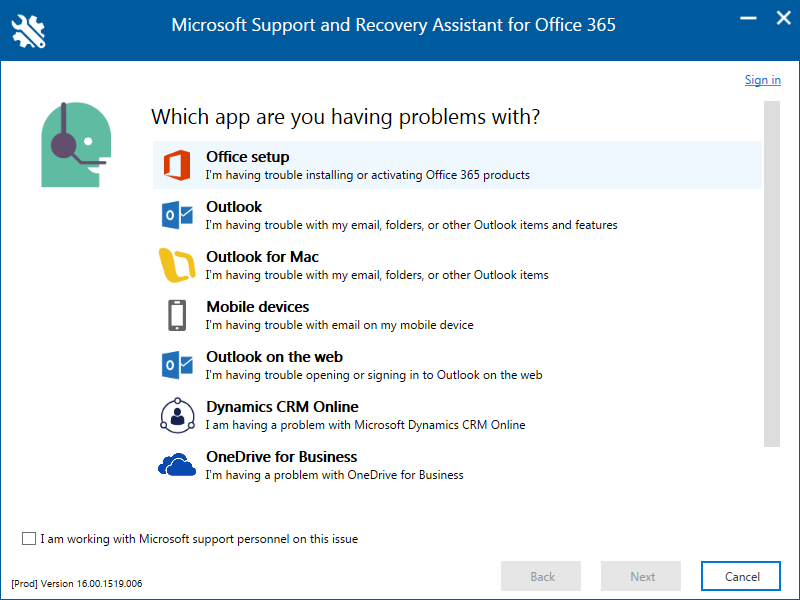
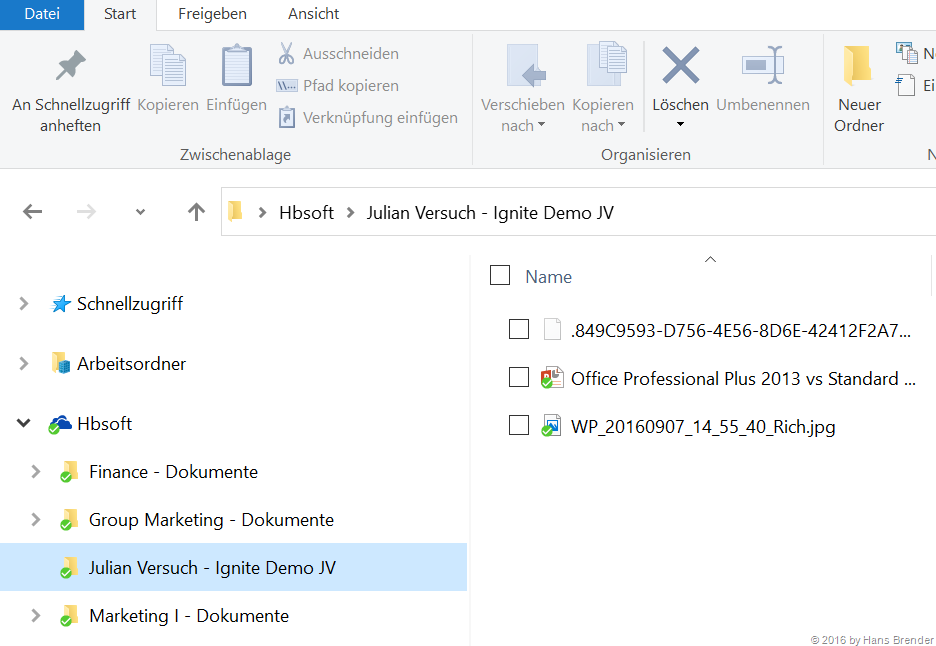
Meistens sind die Benutzer überfordert. Wer kann sich schon alle Ausnahmen beim Synchronisierungs-Dienst OneDrive for Business (also dem Next Generation Sync Client) merken? Und ausgerechnet heute hat unser Administrator Urlaub? Schon mal etwas von SARA gehört? Hier eine Übersicht.
Abhilfe schafft hier der
Microsoft Support und Wiederherstellungs-Assistent für Office 365
Dieser Assistent kann nicht nur Probleme mit OneDrive for Business beheben, sondern hilft auch bei
Office Setup
Outlook
Outlook für MAC
Probleme bei E-Mails auf mobilen Geräten
Outlook via Web-Seite
Dynamics CRM Online
Download
Der Assistent kann hier herunter geladen werden. Die Kurzform lautet SARA (Support and Recovery Assistant for Office 365)
Nach der Zustimmung des Service Vertrages…
…kann es losgehen:
Wir wollen ein Problem mit OneDrive for Business (Next Generation Sync Client) angehen
Ich brauche Hilfe …
und der Assistent kann nur mit dem lokalen Gerät umgehen….
zuerst muss man sich mit dem Geschäftskontoverbinden .
Passwort wird überprüft
und Daten dazu abgerufen.
dann wird die lokale NGSC (OneDrive) Version überprüft.
dann werden die Fehler aufgelistet. Manche Fehler können durch den Assistenten behoben werden.
und wir bekommen auch eine einzelne Auflistung, was überprüft wurde
die nachfolgenden Bilder zeigen, was alles überprüft wurde. und wo Fehler aufgetreten sind.
und dann werde ich noch gefragt, ob mein Problem gelöst wurde:
Zusammenfassung:
Administratoren sollten SARA auf den Maschinen ihrer Benutzer installieren. Das kann Ärger reduzieren und Zeit eines jeden Benutzers und dem Support ersparen.
Schon die Mitgliedschaft in einer Outlaw Motorcycle Gang wie den „Hells Angels“ oder den „Bandidos“ begründet für das Verwaltungsgericht Aachen die waffenrechtliche Unzuverlässigkeit. Im Falle eines Mitglieds des Rockerclubs „Gremium MC“ entschied das Gericht im Eilverfahren, dass dem Mann wohl zu Recht der Waffenschein abgenommen wurde.
Der Betroffene ist Mitglied im „Gremium MC“, aber ansonsten strafrechtlich noch nicht aufgefallen. Das Euskirchener Chapter, dem er angehört, ist wohl selbst noch nicht sonderlich aufgefallen. Gleichwohl gehört der Rockerclub nach Auffassung des Verwaltungsgerichts aufgrund seiner Einbindung in die europaweite Struktur von „Gremium“ zu den sogenannten „1%-Clubs“. Diese grenzen sich sich durch Nähe zu Gewaltkriminalität, Rotlichtmilieu, Drogen- und Waffenhandel von den unbedenklichen 99 % der anderen Motorradclubs ab. Problematisch sieht das Gericht auch den strengen Ehrenkodex des „Gremium MC“ und die Gefahr gewalttätig ausgetragener Konflikte mit der „Konkurrenz“.
Deshalb bestehe bei dem Betroffenen insgesamt die naheliegende Gefahr, dass er die ihm erlaubten Waffen missbräuchlich verwendet. Die Entziehung des Waffenscheines durch die Stadtverwaltung sei also rechtmäßig. Gegen die Eilentscheidung kann der Mann Beschwerde einlegen (Aktenzeichen 6 L 858/16).
In den Niederlanden ist das Tragen von Burka und Nikab in Behörden, Krankenhäusern, Schulen, Bus und Bahn künftig verboten. Verstöße werden mit einer Geldstrafe geahndet.
Für seine Idee vom „Facebook für Wissenschaftler“ wurde Ijad Madisch von Bill Gates mit Millionen überschüttet. Im Interview kokettiert der Researchgate-Gründer nun mit einem Börsengang.
t3n.de: Stimmt es, dass du den Nobelpreis gewinnen willst?
Ijad Madisch: Ja, das stimmt. Schon in der neunten Klasse habe ich davon geträumt.
t3n.de: Hat man als Kind nicht andere Träume?
Madisch: Nein, ich nicht. Ich wollte immer irgendwas Großes bewegen. Etwas tun, was einen positiven Effekt auf die gesamte Welt hat. Mit Researchgate habe ich die Voraussetzungen dafür.
t3n.de: Warum ausgerechnet mit Researchgate?
Madisch: Wenn ein einziger Wissenschaftler einen Preis für eine einzelne Erfindung bekommt, warum sollte ich keinen bekommen, wenn ich mit Researchgate allen Forschern der Welt dabei helfe, sich zu vernetzen und wissenschaftliche Daten einfach und schnell zu teilen? Das ist doch auch einen Nobelpreis wert.
t3n.de: Da ist jemand selbstbewusst. Was glaubst du denn, wie lange es noch dauert, bis das Komitee anruft?
Madisch: Also ich finde, dass wir schon sehr weit sind. Noch hat sich zwar keiner gemeldet und wir müssen abwarten, ab welchem Moment das Komitee in Schweden die Leistung auch erkennt, die wir erbringen. Aber ich glaube, das wird noch ein paar Jahre dauern, bis die verstehen, was wir so machen.
t3n.de: Von den Medien wird Researchgate gerne als „Facebook für Wissenschaftler“ bezeichnet. Wie groß sind die Gemeinsamkeiten mit Facebook heute noch?
Madisch: Ehrlich gesagt gibt es gar keine. Außer, dass wir eben wie Facebook ein soziales Netzwerk sind und es bei uns für jedes Mitglied ein Profil gibt. Die Presse hat uns sicher auch deshalb gerne mit Facebook verglichen, weil die Leute unsere Idee so innerhalb einer Sekunde verstehen.
t3n.de: Von wie vielen Nutzern sprechen wir aktuell?
Madisch: Aktuell sind es elf Millionen angemeldete Wissenschaftler. Pro Tag kommen etwas mehr als 10.000 neue hinzu.
t3n.de: Auf Researchgate können sich Wissenschaftler über Experimente austauschen und mit Laborutensilien handeln. Kürzlich habt ihr mit „Projects“ ein neues Feature veröffentlicht. Was steckt dahinter?
Madisch: Projects sind zentrale Orte innerhalb eines Profils, wo Forscher in Echtzeit ihre wissenschaftlichen Daten teilen können. Das können Fachartikel oder Konferenzpapiere sein, vor allem aber soll die Funktion dabei helfen, einzelne Schritte von einem Laborexperiment für jeden nachvollziehbar zu machen. Die Community kann jederzeit Feedback abgeben und das Projekt in die richtige Richtung pushen.
t3n.de: Welches Problem löst ihr denn damit?
Madisch: Das Problem sind die wissenschaftlichen Datenbanken im Internet. Es gibt eine für Gene, eine für Proteine, eine für Fachartikel und so weiter. Das halte ich für unsinnig. Warum nicht einfach alle relevanten Daten zu einem wissenschaftlichen Projekt in einer Art Container vereinen? Mit Projects haben wir nun eine Lösung, die sogar schon von der Nasa genutzt wird.
t3n.de: Geht es etwas genauer?
Madisch: Die Nasa hat über ein Jahr lang in einer simulierten Raumstation auf Hawaii das Leben auf dem Mars geprobt. Ohne Fernseher, ohne Telefon. Die Kommunikation über Internet funktionierte nur zeitversetzt, sodass E-Mails mit einer Verzögerung von zwanzig Minuten verschickt wurden. Researchgate war eine der wenigen Seiten, die das Team in der Isolation benutzen durfte.
t3n.de: Welche Erkenntnisse konnten die Forscher gewinnen?
Madisch: Die Forscher haben schon während der Mission laufend Ergebnisse gepostet, etwa einen Befund zu Cyanobakterien als Nahrungsmittel für Marsreisende. Die Analyse der Ergebnisse aus der einjährigen Studie braucht noch Zeit, aber die Forscher haben schon eine Datenflut versprochen. Darauf warten wir jetzt gespannt. Übrigens geht es uns auch darum, nicht nur positiven Forschungsergebnissen einen Platz zu geben. Oft bringen erst mehrere gescheiterte Versuche ein Projekt zum Erfolg.
t3n.de: Tatsächlich stimmt ja nicht alles, was Wissenschaftler veröffentlichen. Vor zwei Jahren gab es viel Aufsehen, als ein Researchgate-Mitglied eine japanische Stammzellenstudie als bizarren Irrtum entlarvte.
Madisch: Ja, das stimmt. Die Studie erschien damals in der renommierten Fachzeitschrift Nature und sollte den Beweis liefern, dass sich Stammzellen in einem einfachen Säurebad auch ohne Embryos züchten lassen. Das war eine echte Sensation. Auf Researchgate ist dann wenige Tage später eine hitzige Diskussion entbrannt, weil ein Professor aus Hongkong den Versuch nicht reproduzieren konnte. Danach ist dann die Bombe explodiert.
Die Telekom ist bei dem Hackerangriff auf Telekom-DSL-Router mit einem blauen Auge davon gekommen, erklärt das Unternehmen auf seinem Security-Kongress in Frankfurt. Bis alle Router ein Update bekommen, kann es zwei Tage dauern.
In Süddeutschland hat Telefónica die LTE-Abdeckung für Kunden aus dem o2- und E-Plus-Netz angeglichen. Bislang gab es für E-Plus-Kunden Einschränkungen.
 Mit dem Jobwechsel kamen knapp 5.000 Euro brutto – und die Sprüche der anderen. Ein Ingenieur erzählt, warum er sein Gehalt lieber verschweigt.
 Die Kanzlerin hat sich laut einem Bericht dafür ausgesprochen, keine neuen Beitrittskapitel mit der Türkei zu eröffnen. Das EU-Parlament wollte noch weiter gehen.


 Günstigere Großhandelspreise sollen den Grundstein für Roaming ohne Aufpreis innerhalb der EU legen.


 Für das Jahr 2017 hat sich die Bahn einiges vorgenommen. ICE-Fahrgäste sollen auf eine Gratis-Auswahl an Filmen des VoD-Diensts maxdome zugreifen können.








 In den Niederlanden ist das Tragen von Burka und Nikab in Behörden, Krankenhäusern, Schulen, Bus und Bahn künftig verboten. Verstöße werden mit einer Geldstrafe geahndet.


 Eine neue Studie stellt fest: Frauen mit einer weiblichen Vorgesetzten sind mit ihrem Job unzufriedener. Für Männer gilt das offenbar nicht.
 In Süddeutschland hat Telefónica die LTE-Abdeckung für Kunden aus dem o2- und E-Plus-Netz angeglichen. Bislang gab es für E-Plus-Kunden Einschränkungen.