Heute muss ich in der Vorweihnachtszeit mal ein Danke aussprechen. Ein Danke an die im Betreff genannten Unternehmen.
Warum? Weil uns durch deren aktuelle Vorgänge die Kunden die Türen einrennen.
Betrachte ich mir auch nur die nackten Zahlen, ohne die Gründe, die die Kunden zum Wechsel bewegt, zu betrachten, und setze diese in Relation zu uns und unseren sonstigen Zahlen, würde ich sagen, dass die geplante Konsolidierung bei den jeweiligen Unternehmen nicht zwingend von Vorteil sein muss. Das kann auch evtl. nur auf dem Papier schön aussehen.
In Hamburg sollen Anfang der 2020er-Jahre fahrerlose Busse unterwegs sein. Davon geht Hochbahn-Chef Henrik Falk aus. Fahrerlose Busse und U-Bahnen werden künftig normal sein. (ÖPNV, WLAN)
Betrüger aus Düsseldorf, die Sex-SMS versandt hatten, sind gesperrt worden. Die Betroffenen müssen nicht zahlen und dürfen auch nicht abkassiert werden, ordnete die Bundesnetzagentur an. (Spam, Bundesnetzagentur)
Office 365 is a cloud service that is made up of many different underlying services that are integrated together, such as Exchange Online, SharePoint Online, and Skype for Business Online. With so many different services in place, unifying administration into a single portal doesn’t make much sense. Such a portal would be complex, confusing to use, and would limit the ability of the product groups that develop each individual service to optimize and improve their own admin experiences.
As such, there’s a variety of admin portals that we need to use for administering Office 365 services, and several different PowerShell connections that are used as well.
Office 365 Administration Portals
Office 365 has multiple web-based administration portals that you can access using any modern web browser such as Google Chrome, Mozilla Firefox, or Microsoft Edge.
Office 365 Admin Portal – this is the main portal for managing an Office 365 tenant, providing admin controls for a variety of common tasks such as managing users, groups, and billing, as well as other features such as the Service Health Dashboard. The URL is https://portal.office.com/adminportal
Exchange Admin Center – the EAC for Exchange Online delivers a similar administration experience as the on-premises Exchange Admin Center, and provides more detailed administration for Exchange Online configuration and recipients. The URL is https://outlook.office365.com/ecp
Skype for Business Online Admin Center – the SfBO Admin Center lets you manage your Skype users, external communications settings, voice services, and online meetings. The URL for the SfB Admin Center will vary depending on your tenant location, but you can locate it in the Office 365 Admin Portal. An example URL is https://adminau1.online.lync.com
SharePoint Online Admin Center – the SPO Admin Center lets you manage SharePoint online site and site collections, permissions, and apps. The URL for the SPO Admin Center will vary depending on your tenant name, and you can locate it in the Office 365 Admin Portal. An example URL is https://exchangeserverpro-admin.sharepoint.com
Security and Compliance Center – the S&C Center provides a portal for managing compliance features in Office 365 that span multiple services, such as data loss prevention (DLP), eDiscovery and mobile device management (MDM). The URL is https://protection.office.com
Yammer – the Yammer admin portal can be used to activate your Yammer network, customize the appearance, manage users and policies, and perform community management tasks. The URL for the Yammer admin portal will vary based on your tenant domain. An example URL is https://www.yammer.com/practical365.com/admin/
Azure – the Azure management portal is used to administrator Azure Active Directory and other Azure services for your tenant, or for separate Azure subscriptions that your organization also has. If you access the Azure portal from the Office 365 Admin Center it currently sends you to the URL https://manage.windowsazure.com, however the Azure portal is moving to a new experience at https://portal.azure.com which you can begin using today.
Intune – the Intune portal allows you to manage your Intune mobile device and application policies. The current Intune portal can be found at the URL https://manage.microsoft.com/, which also requires Silverlight be installed for your browser, but in future Intune management will be performed using the Azure portal instead.
OneDrive for Business – the ODfB Admin Portal allows you to manage and control OneDrive sync, sharing and device access settings. The URL is https://admin.onedrive.com.
StaffHub – the StaffHub portal allows team managers to create and publish schedules, and invite team members to StaffHub. The URL is https://staffhub.office.com/admin.
Office 365 PowerShell Connections
Although the web-based administration portals for Office 365 and various services provide most of the functionality you need for day to day admin tasks, some tasks require you to use PowerShell instead. In addition, PowerShell is a more efficient means of performing bulk administration tasks, or for performing tasks that require changes in multiple Office 365 services.
Office 365/Azure AD
Many Office 365 tasks such as user and licensing management, adding and removing domain names, and managing company information in PowerShell are performed using the Azure Active Directory Module for Windows PowerShell, which is supported on Windows 7 and later client operating systems and Windows Server 2008 R2 and later. Using the Azure Active Directory module depends on the Microsoft Online Service Sign-in Assistant for IT Professionals being installed on the same computer.
To connect to Azure Active Directory run the following PowerShell commands:
#Enter your Office 365 admin credentials when prompted
PS C:\> $Credential = Get-Credential
PS C:\> Connect-MsolService -Credential $Credential
The PowerShell commands for the Azure AD are prefixed with Msol, for example Get-MsolUser. You can see the full list of commands by running the following command:
PS C:\> Get-Command -Module MSOnline
Microsoft has released a new Azure AD PowerShell module which is currently in preview, available in the PowerShell Gallery. This module will eventually replace the current Azure AD module, but is still in rapid development. So while you can begin using it, you might not have the most reliable experience with it just yet. However, if you are developing scripts based on the current module, you’ll need to get ready to update your scripts with the different cmdlet names of the new module, which are prefixed with AzureAD, but aren’t a direct 1:1 match in terms of functionality.
Exchange Online
Exchange Online can be managed using PowerShell without installing any additional modules, as long as you have at least PowerShell version 3.0 installed. Windows 10 and Windows Server 2012 or later already meet the minimum requirements for connecting to Exchange Online with PowerShell. If you’re still using Windows 7 or Windows Server 2008 R2 for administration, you’ll need to update to at least .NET Framework 4.5.1 and then install the Windows Management Framework (WMF) 3.0 or later.
To connect to Exchange Online run the following PowerShell commands:
Skype for Business Online can be managed using PowerShell by installing the Skype for Business Online PowerShell Module. To connect to Skype for Business Online, run the following PowerShell commands:
Skype for Business Online cmdlets are prefixed with CsOnline, for example Get-CsOnlineUser. You can see the full list of available cmdlets by running the following command:
PS C:\> Get-Command -Noun CsOnline*
SharePoint Online
SharePoint Online can be managed using PowerShell by installing the SharePoint Online Management Shell. To connect to SharePoint Online, run the following PowerShell commands:
You’ll need to subsitute your own admin URL in the command above.
Sharepoint Online cmdlets are prefixed with SPO, for example Get-SPOSite. You can see the full list of available cmdlets by running the following command:
PS C:\> Get-Command -Noun SPO*
Security and Compliance Center
The Security and Compliance Center can be managed using PowerShell without installing any additional modules. You can connect to the Security and Compliance Center by running the following PowerShell commands:
The Security and Compliance Center has a range of cmdlets for different tasks such as managing DLP, preservation policies, and eDiscovery cases. You can see the full list of cmdlets on TechNet.
PowerShell Scripts and Tools
For PowerShell administration of Office 365 services there are some additional scripts and tools that are a useful addition to your toolbox.
Managing Stored Credentials – this set of functions can be added to your PowerShell profile, or to scripts that you write, and allows you to securely manage different sets of administrator credentials for Office 365.
Connect to Office 365 Services – this script by MVP Michel de Rooij contains a set of PowerShell functions to make it simpler to connect to individual Office 365 services.
Apple's 2FA experience is far from perfect, they have a lot to learn from Microsoft who has managed to make using additional layers of security fast and fluid.
I unbox and give a quick tour of our new Core i7 Microsoft Studio!
It was only a few weeks ago that Microsoft unveiled to the world their PC for creators – the Surface Studio. The 28-inch all-in-one PC starts at $3K, and preorders are slowly trickling out to those who put their money down first.
Today, I'm going to unbox it, give you a quick tour, and some initial impressions! You don't want to miss this video or these photos.
Der sichere Messenger Threema wandelt auf den Spuren von Whatsapp: Wie der Branchenprimus wird die App um eine Desktop-Version erweitert. Threema Web befindet sich noch in der geschlossenen Beta.
Threema Web: Ende-zu-Ende-Verschlüsselung zwischen App und Desktop-Browser
Mit Threema Web erhält der Messenger eine Funktion, die Konkurrent Whatsapp seit Mitte 2015 im Portfolio hat: Bald ist es möglich, direkt am Desktop-Rechner mit Kontakten zu chatten und Daten auszutauschen. Wie bei Whatsapp Web ist für die Nutzung der Desktopversion weiterhin das Smartphone vonnöten. Der Grund dafür ist, dass die Inhalte der Smartphone-App auf den Rechner gespiegelt werden – nur so kann eine sichere Ende-zu-Ende-Verschlüsselung gewährleistet sein. Neben Einzelchats werden auch Gruppen- und Statusnachrichten per Ende-zu-Ende-Verschlüsselung übermittelt.
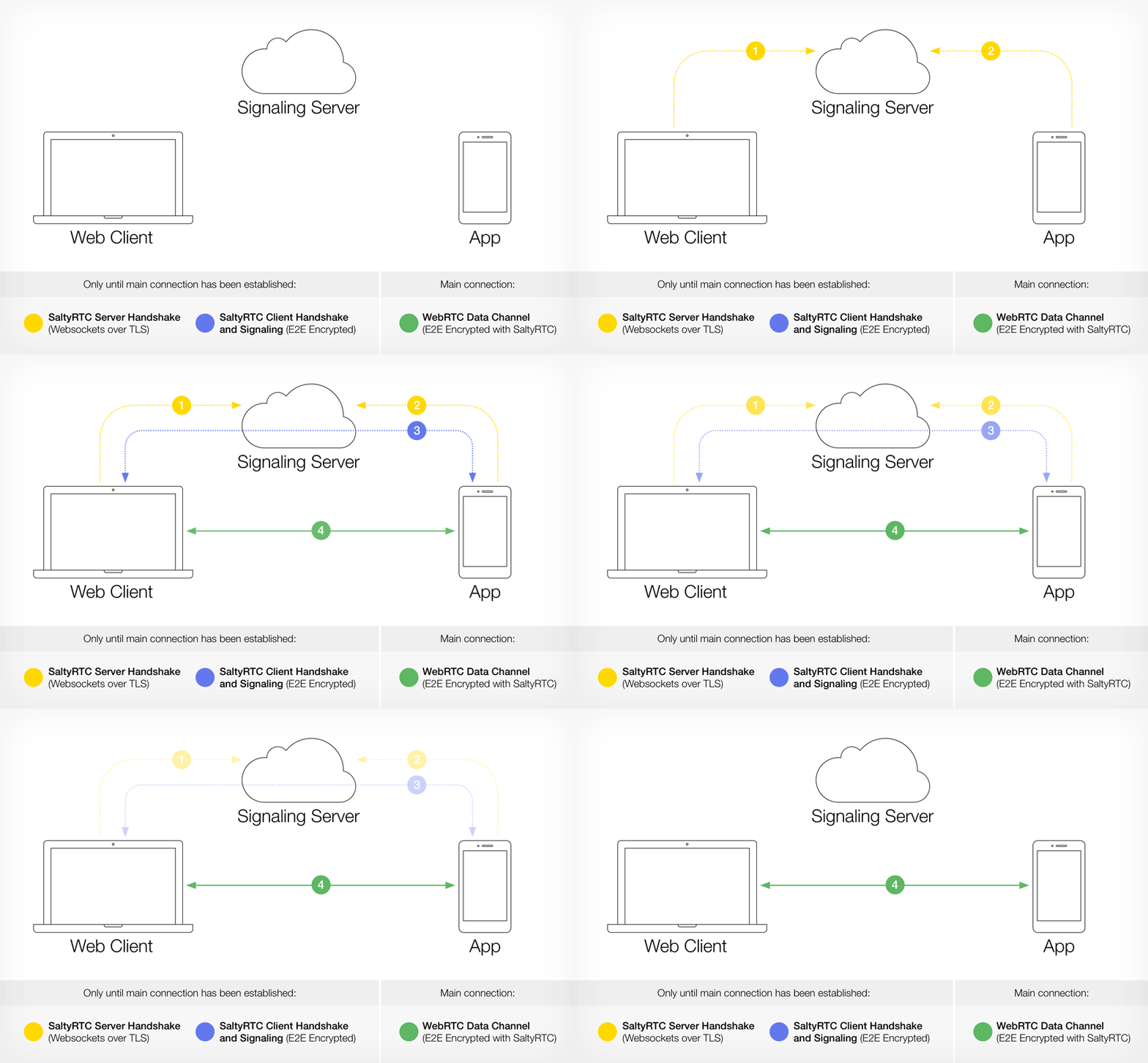
So ist Threema Web aufgebaut. (Bild: Threema)
Laut Threema ist die Web-Lösung Open-Source und kann nach Release auf Github eingesehen werden. Für die Abwicklung der Peer-to-Peer-Kommunikation zwischen Desktopbrowser und Smartphone setzt das Unternehmen auf SaltyRTC. Dabei handelt es sich um eine eigens für Threema entwickelte Erweiterung des Webstandards WebRTC, mit der eine zusätzliche Verschlüsselungsebene zwischen den beiden Geräten aufgebaut wird.
„Threema Web dient als verlängerter Arm der Threema-App.“
Der Datenaustausch von Threema Web via Peer-to-Peer-Netzwerk läuft über keinerlei Server, wodurch unter anderem eine hohe Sicherheit gewährleistet wird. Darüber hinaus wird auf diese Weise der digitale Fussabdruck stark reduziert. Wird die Session zwischen Browser und App beendet, werden alle auf den Desktop gespiegelten Inhalte gelöscht. Zur Nutzung von Threema Web ist ein aktueller Browser wie Chrome oder Firefox erforderlich. Da für die Web-App nur ein Browser auf dem Desktopgerät benötigt wird, ist Threema Web plattformunabhängig und lässt sich sowohl auf Windows, macOS und Linux ausführen.
Threema Web: Die Funktionen
Wie bei Whatsapp Web findet der Verbindungsaufbau zwischen App und Browser per QR-Code statt. Optional könnt ihr für die Wiederherstellung einer Session ein Passwort vergeben. (Bild: Threema)
Threema Web, das zurzeit noch in einer geschlossenen Beta nur auf Android getestet wird, hat schon diverse Funktionen an Bord. Sebstredend wird der Versand von Textnachrichten in Einzel- oder Gruppenchats unterstützt. Außerdem können Bilder und andere Medien per Web-Oberfläche geteilt werden – und zwar bequem per Drag-and-Drop.
Threema Web unterstützt ferner die Synchronisation aller Nachrichtenverläufe, es können außerdem Nachrichten bestätigt oder abgelehnt werden. Des Weiteren könnt ihr auch animierte GIFs abspielen und ein Emoji-Picker ist ebenso an Bord.
Wie eingangs erwähnt, wird Threema Web aktuell nur einer geschlossenen Beta getestet. Anfang nächsten Jahres wird die Funktion für Android freigegeben, später soll Unterstützung für weitere Plattformen folgen.
Aktuelle und halbwegs übersichtliche Referenzen sind sehr nützlich, wenn man mal wieder nicht sicher ist, wie ein Tag oder eine Funktion genau geschrieben wird und was für Parameter übergeben werden können. Hier stellen wir euch ein paar davon vor.
HTML
Ein Cheat-Sheet zu HTML(5). (Screenshot: WebsiteSetup.org)
Das Cheat-Sheet von Websitesetup.org ist schön übersichtlich, liefert trotzdem alle wichtigen HTML-Tags auf einen Blick und scheint aktuell zu sein. Ebenfalls aufgeführt sind die Tags, die in HTML5 nicht mehr unterstützt werden, wie font oder applet – sie werden aber extra markiert, genau wie die Tags, die neu in HTML5 dazukommen. Ein weiteres umfangreiches Cheat-Sheet bietet onblastblog.com an. Eine tabellarische Übersicht aller HTML-Elemente gibt es auf meiert.com – immer verlinkt auf die offizielle Spezifikation.
Wer etwas genauer in die Materie einsteigen und immer den aktuellsten Stand einsehen möchte, der kann dies in der offiziellen W3C-Spezifikation tun. Wer nur Informationen zu einem bestimmten Tag erhalten möchte, ist mit dem „Cheat-Sheet“ des W3C, bei dem es sich eher um ein Nachschlagewerk handelt, gut beraten. Vorteil beim W3C gegenüber des übersichtlicheren Cheat-Sheets ist natürlich, dass die Informationen immer auf dem neusten Stand sind. Ein wenig übersichtlicher als beim W3C und ebenfalls sehr aktuell ist die HTML-Referenz von Mozilla.
CSS
Eine Referenz für CSS – nach eigenen Angaben immer aktuell. (Screenshot: meiert.com)
Ein Cheat-Sheet, beziehungsweise eher eine Liste der CSS-Eigenschaften, die nach eigenen Angaben immer weiter aktualisiert wird, bietet meiert.com. Aufgelistet sind hier in einer Tabelle neben den Eigenschaften auch die verschiedenen CSS-Versionen mit der Angabe, ob die jeweilige CSS-Eigenschaft unterstützt wird, sowie die Standard-Werte. Praktisch ist, dass die Eigenschaften immer auf die entsprechenden Abschnitte in der jeweiligen CSS-Spezifikation des W3C verlinken. Als immer aktuelles Nachschlagewerk sei hier nochmals auf das Cheat-Sheet des W3C verwiesen – und ebenso ein zweites Mal auf die Developer-Site von Mozilla, die auch eine übersichtliche CSS-Referenz bietet.
Javascript und jQuery
Ebenfalls auf der Mozilla-Site wird eine umfangreiche Javascript-Referenz bereitgestellt. Eine recht nützliche Seite für einen Überblick über jQuery liefert oscarotero.com. Hier könnt ihr oben die Version einstellen, die ihr nutzt, und bekommt dann unten eine Liste der Selektoren, Attribute, Events et cetera. Durch einen Klick auf einen Eintrag öffnet sich die offizielle Dokumentation von der jQuery-Website.
Übersichtlich und mit Anbindung an die offizielle jQuery-Dokumentation. (Screenshot: oscarotero.com)
PHP und MySQL
Für PHP müsst ihr euch vermutlich mehr als ein Cheat-Sheet zulegen, um einen guten Überblick zu haben. Empfehlenswert ist in jedem Fall die offizielle Dokumentation von PHP, in der es auch eine Sprachreferenz gibt. Wenn ihr eine bestimmte Funktion sucht, hilft euch die Suchfunktion weiter.
Offiziell und gut: Die PHP-Sprachreferenz. (Screenshot: php.net)
Bei Wordpress lohnt sich immer ein Blick in die umfangreichen Developer-Ressourcen. Dort gibt es unter anderem eine Code-Referenz, die eine Suche über alle Funktionen, Klassen, Methoden und Filter anbietet.
Git, Sass und vieles mehr auf einer Site: devdocs
Über einen Kommentar zu diesem Artikel bin ich auf Devdocs aufmerksam geworden. Die Site bündelt die Informationen von verschiedenen Dokumentationen, wie beispielsweise von Mozillas MDN für HTML, die offizielle Git-Dokumentation, Infos zu SASS, Angular, Bower und vieles mehr. Dabei werden immer die Inhalte der offiziellen Dokumentationen gezogen – erlaubt durch die Lizenzen, unter denen sie stehen.
Und ihr?
Wo schlagt ihr nach, wenn ihr mal nicht mehr wisst, wie eine Funktion heißt? Kennt ihr noch gute und aktuelle Cheat-Sheets oder nützliche Referenz-Seiten? Dann schreibt sie in die Kommentare!
Als langjährige Apple-Nutzer wollten wir das neue Macbook Pro mit Touch Bar wirklich mögen. Aber was nützt ein leichtes Gerät, wenn man dafür einen schweren Akkupack mitschleppen muss? Das Notebook hat viele gute Eigenschaften, aber die Enttäuschung überwiegt. (Macbook, Apple)
Im Turnverband der USA gibt es offenbar einen Missbrauchsskandal. Trainer und Betreuer haben einem Zeitungsbericht junge Athleten über Jahre hinweg sexuell belästigt.
Lenggries - Zehn Jahre Fahndung nach dem Brauneck-Sextäter. Da kam es für die Fahnder auch zu kuriosen und merkwürdigen Situationen, die trotz des ernsten Hintergrunds sogar komische Züge trugen.
München - Nach 30 Jahren ist der Raubmord an einem 80 Jahre alten Münchner wohl geklärt: Bei der routinemäßigen Überprüfung von Altfällen in diesem Sommer brachten Fingerabdrücke die Ermittler auf die Spur des mutmaßlichen Mörders.
Vor Gericht und auf hoher See ist man bekanntlich in Gottes Hand. Möge die Macht der Schicksalslotterie also mit einem sein – auch vor Deutschlands höchsten Strafrichtern. Dabei hatte ein Angeklagter, der – zusammengefasst – einen anderen mit Gewalt um dessen Rauschgift brachte beziehungsweise hierzu anstiftete, sogar zuerst noch Glück.
Sein Fall kam zum 2. Strafsenat des Bundesgerichtshofs. Der vertrat in einem früheren Fall die Auffassung, dass man – auch wieder zusammengefasst – einem anderen dessen Betäubungsmittel zwar wegnehmen kann, sich aber deswegen nicht so richtig strafbar macht. Verbotene Ware sei nicht so von der Rechtsordnung geschützt wie etwa ein BMW X 5.
Da andere Strafsenate das seit jeher anders sehen und auch Drogenbesitzer vor Langfingern, Räubern und Erpressern „schützen“, tat der 2. Strafsenat seine abweichende Auffassung in einem Beschluss kund. Im Anschluss daran läuft – wiederum gerafft dargestellt – eine Art Abstimmungsverfahren, und falls die Meinungsverschiedenheit nicht beigelegt werden kann, entscheidet am Ende der Große Senat für Strafsachen.
Nun könnte man meinen, dass wenigstens der 2. Strafsenat sich bei künftigen Entscheidungen auch auf seine (neue) Rechtsauffassung stützt, die er gerade formuliert hat. Aber genau das ist nicht der Fall. Während die anderen Strafsenate noch über ihren Stellungnahmen zu dem Vorstoß brüten, hat der 2. Strafsenat jetzt den zunächst sicher extrem hoffnungsvollen Angeklagten ungerührt verknackt. Und zwar genau mit der juristischen Begründung, die der 2. Strafsenat eigentlich als überkommen ansieht.
So was fällt natürlich auf, und so rechtfertigt sich das Gericht in dem Beschluss vorsorglich selbst:
Ebenso wenig ist ein anfragender Senat gehindert, bei Vorliegen einer Binnendivergenz zwischen verschiedenen Sitzgruppen abweichend von seiner eigenen Anfrage zu entscheiden. Der Anfragebeschluss entfaltet keine Sperrwirkung.
Zur Erläuterung: Der Senat ist die Gesamtheit der Richter. Die „Sitzgruppe“ sind einzelne Richter aus dem Senat, die gemeinsam ein Urteil fällen. Im Senat gibt es normalerweise mehr Richter, als für ein Urteil erforderlich sind. Die Richter entscheiden also in wechselnden Zusammensetzungen. Wie sich so eine „Sitzgruppe“ zusammenwürfelt, ist auch so eine Frage endloser juristischer Debatten. Oft genug wird kritisiert, dass es mit der gebotenen Transparanz, welche Richter denn nun konkret welchen Fall bekommen, nicht zum Besten gestellt ist. Aber das ist ein anderes Thema.
Verblüffend an dem vorliegenden Fall ist, dass der arme Angeklagte nun von folgenden Richtern all seiner Hoffnungen beraubt wurde. Diese heißen:
Fischer, Zeng, Appl, Bartel, Eschelbach
Diese Richter distanzieren sich als gemäß dem obigen Zitat von den Kollegen im eigenen Senat, welche die neue Rechtsauffassung propagiert und die Anfrage bei den anderen Senaten angeschubst haben. Schauen wir uns die Mitglieder dieser ursprünglichen „Sitzgruppe“ an. Deren Mitglieder sind folgende Richter:
Fischer, Zeng, Krehl, Bartel, Eschelbach
Nur ein Richter ist also unterschiedlich. Und auch bei richterlichen Entscheidungen gilt im Kern das Mehrheitsprinzip. Aber dafür kann sich der nun abgeblitzte Angeklagte natürlich nichts kaufen. Wie es zu der Entscheidung kam, unterliegt dem Beratungsgeheimnis.
Ich frage mich nur, wie es die Richter denn empfinden, wenn sie jetzt den Angeklagten verurteilen, ihr ursprünglicher und ja durchaus nachvollziehbar begründeter Vorstoß aber irgendwann zur angestrebten Änderung der Rechtsprechung führt. Gilt natürlich nur für die Zukunft, können sie dann sagen. Merkwürdig bleibt das ganze aber schon. Wenn man Gerichtshöfe nicht für einen Lotteriebetrieb hält.
Die Macher des Schweizer Krypto-Messengers Threema testen zurzeit ihren Web-Client. Die Variante für Android-Nutzer konnte heise online bereits kurz ausprobieren.
Mit Hardware von der Stange kann ein Angreifer in rund 30 Sekunden das im Klartext vorliegende Passwort abgreifen und so Apples Festplattenverschlüsselung FileVault überwinden, um auf alle Daten zuzugreifen.
Many organizations have been using certificate based authentication for Exchange Online while the feature was in preview. Today, we are excited to announce that the feature is generally available in Office 365 Enterprise, Business, Education, and Government plans. For more details, please reference our preview post which has been modified to reflect this announcement. As always, we look forward to hearing your suggestions and feedback!
Update: Das Xiaomi Mi Pad 3 mag in Arbeit sein, auf den Bildern zu sehen ist es aber definitiv nicht. Bei den Aufnahmen handelt es sich um bearbeitetes Promo-Material des Mi Pad 2, welches uns schlichtweg nicht bekannt war. Bei den China-Leaks haben wir bislang zugegeben etwas wenig Erfahrung, während wir im Microsoft-Ökosystem jede derartige Meldung üblicherweise reflexartig kritisch beäugen. Wir möchten uns vielmals für diesen Fehler entschuldigen und danken allen Lesern für die Hinweise.
Ursprüngliche Meldung:
Einige Pressefotos zum Xiaomi Mi Pad 3 sind durchgesickert. Diesen kann man die Spezifikationen des zukünftigen Windows Tablets entnehmen. Wir haben sie für euch unter die Lupe genommen.
Mittlerweile liegt es über ein Jahr zurück, als das Mi Pad 2 von Xiaomi erschien. Anfangs wurde das Gerät lediglich mit Android ausgeliefert, eine Version mit Windows 10 als Betriebssystem hat Xiaomi später nachgeschoben.
Nun wird es langsam Zeit für einen Nachfolger. Zwar wurde dieser noch nicht offiziell angekündigt, jedoch gelangten auf der Webseite GizmoChina einige Pressefotos und Spezifikationen an die Öffentlichkeit.
Display
Der Nachfolger des Mi Pad 2 soll mit 9,7″ ein deutlich größeres Display besitzen. Das Display soll in 2048 x 1536 auflösen, wodurch sich eine PPI von 264 ergibt. Zum Vergleich: Das Mi Pad 2 besitzt ein 7,9″ Display, welches dieselbe Auflösung darstellt und somit eine höhere Pixeldichte von 324 ppi besitzt.
Gehäuse
Beim Mi Pad 3 setzt Xiaomi weiterhin auf ein Gehäuse, welches vollständig aus Metall besteht. Das Gewicht liegt bei 380 Gram, was dem 8290mAh großen Akku geschuldet ist. Dieser kann per USB Typ-C Port und Quick Charge 3.0 vergleichsweise schnell aufgeladen werden.
Technische Daten
Xiaomi verbaut in diesem Gerät einen Intel Core M-Prozessor der 7. Generation, einen m3-7Y30. Als Grafikeinheit kommt die integrierte HD Graphics 615 zum Einsatz. Beide werden von ordentlichen 8GB Ram unterstützt, während sich der interne Speicher auf 128GB oder 256GB beläuft. Windows Hello Unterstützung ist auch gegeben, da ein Fingerabdruckscanner verbaut wurde.
Kamera
Ein Tablet ist nicht unbedingt ein Gerät, womit man gerne Fotos schießt. Dies liegt nicht nur an der Größe, sondern auch an den eher mäßigen Kameras, die in den meisten Geräten verbaut sind.
Auf dem Papier macht die Kamera des Mi Pad 3 einen guten Eindruck. Die Hinterkamera löst mit 16 Megapixel auf und wird bei schlechteren Lichtverhältnissen von einem Dual-Blitz unterstützt. Für Videotelefonate steht eine Frontkamera zur Verfügung, welche mit 8 MP auflöst.
Wie man bekanntlich weiß, bedeuten Megapixel nicht alles. Dies haben wir zuletzt beim HP Elite X3 erleben dürfen, wie unser Test zeigt.
Betriebssystem
Anders als sein Vorgänger soll das Mi Pad 3 direkt mit Windows 10 an den Start gehen. Möglicherweise sogar ausschließlich mit Windows oder als Dual-Boot. Microsoft Office soll ebenfalls vorinstalliert sein, jedoch ist noch unklar, ob damit die App-Version oder die echten Programme gemeint sind.
Damit ihr mit dem Tablet bei Bedarf auch arbeiten könnt, wird eine zusätzliche Tastatur zum Andocken separat erhältlich sein.
Preis
Die 128GB Variante soll ¥1999 kosten, was ungefähr 290€ entspricht. Das größere Modell mit 256GB kann für ¥2299, also ungefähr 330€ erworben werden. Rund 15€ wird womöglich das zusätzliche Keyboard kosten.
Veröffentlichungstermin
Die Webseite gibt auch einen Erscheinungstermin an. Das Gerät soll ab dem 30. Dezember in den Handel gehen. Dieser Termin ist in greifbarer Nähe, weswegen sich relativ schnell zeigen wird, ob die durchgesickerten Pressefotos und Informationen tatsächlich der Realität entsprechen.
Kompakte Zusammenfassung:
Display: 9,7″, 2048 x 1536, 264 PPI
Prozessor: Intel Core M3-7Y30
Grafik: Intel HD Graphics 615
Arbeitsspeicher: 8GB
interner Speicher: 128GB/256GB
Akku: 8290 mAh mit Quick Charge 3.0
Kamera: 16MP Kamera mit Dual-Blitz, 8MB Frontkamera
Mit seinem Preis von nicht viel mehr als 100 Euro gehört der ILIFE A4 zu den günstigsten Staubsaugrobotern auf dem Markt. Wir haben uns angeschaut, ob der Kleine trotzdem in Sachen Sauberkeit einen guten Job macht und ob er insgesamt überzeugt.
Es ist nicht das erste Mal, dass wir einen Staubsaugerroboter testen, allerdings hatten wir bislang noch keinen so günstigen in den Fingern. Aktuell bekommt man den ILIFE A4 beim bekannten China-Shop Gearbest beispielsweise für knapp 125 Euro. Viel günstiger findet man auf dem Markt keinen Saugroboter, aber taugt der ILIFE A4 auch was? Dem sind wir in unserem Test nachgegangen.
Optisch und in Sachen Verarbeitung steht der ILIFE A4 teurerer Konkurrenz in nichts nach. Nichts wackelt, klappert oder wirkt billig – alles in allem macht das Gerät einen robusten und stabilen Eindruck. Die ungefähren Abmessungen betragen 31 × 31 × 7,5 Zentimeter bei einem Gewicht von 2,2 Kilogramm.
Auf der Unterseite befinden sich zwei rotierende Bürsten, die den Dreck in Richtung einer weiteren, größeren Bürste befördern, wo er in einen 450 Milliliter fassenden Staubbehälter eingesogen wird. Ein interessantes Detail verbirgt sich neben dem Vorderrad des Roboters – ein Infrarot-Sensor, der sich unter anderem dafür verantwortlich zeigt, dass Treppen erkannt werden. Für mich persönlich in meiner Wohnung ein ganz wichtiger Punkt, den der A4 im Test problemlos meisterte.
Was den Funktionsumfang angeht, präsentiert sich der Sauger recht einfach gestrickt: Neben einem Automodus gibt es noch einen Punkt- und einen Wand-Modus. Wer möchte, der kann den ILIFE A4 auch manuell steuern. Und dann gibt es noch einen Power-Modus, in dem das Gerät mit höherer Saugkraft arbeitet. Im Automodus fährt er solange seine selbst ausgekundschafteten Runden, bis er vom Besitzer gestoppt wird, oder bis der Akku zur Neige geht und das Gerät automatisch auf seine Ladestation zurückkehrt. Der Punkt-Modus dient dazu um das Gerät an einer bestimmten Stelle seine Runden drehen zu lassen, im Wand-Modus fährt der A4 vor allem an den Wänden entlang.
Alle drei Modi halten, was sie versprechen und die Saugleistung ist absolut zufriedenstellend. Ich könnte noch nicht mal sagen, dass der knapp 350 Euro teure High-Tech-Sauger Mi Robot Schmutz besser beseitigt, allerdings macht der das nach einem sehr ausgeklügelten System und braucht deshalb dafür nicht so lange. Bis der ILIFE A4 einen größeren Raum komplett gesaugt hat, kann es jedoch eine ganze Weile dauern. In meinem circa 30 Quadratmeter großen Wohnzimmer hab ich das Gerät beispielsweise auch schon mal 1 ½ Stunden oder länger fahren lassen, bis ich endlich das Gefühl hatte, dass auch der letzte Krümel beseitigt ist; der A4 auch wirklich jedes Stück Boden gesaugt hat. Hindernisse erkennt der A4 durch seine Sensoren in der Regel frühzeitig, stößt er mal irgendwo an wird dies durch den Stoßdämpfer vorne registriert, abgedämpft und der Roboter ändert seine Richtung.
Um den ILIFE A4 zu starten, kann direkt am Roboter die Auto-Taste gedrückt werden. Dies geht auch per Fernbedienung, dort lassen sich weiterhin bei Wunsch auch Punkt- und Wand-Modus initiieren und der Befehl zum zur Ladestation zurückkehren geben. Außerdem kann das Gadget – wie schon erwähnt – auch manuell gesteuert werden, dies mit den Pfeiltasten. Die Fernbedienung dient auch dazu, den A4 zu programmieren, sodass er beispielsweise seinen Dienst verrichtet, wenn man selbst gerade auf der Arbeit ist. Da es seine Zeit dauert, bis er einen Raum richtig gründlich durchhat, macht dies natürlich auch Sinn. Die vom Hersteller versprochenen Lauf- und Ladezeiten des 2600-mAh-Akkus konnten wir im Test bestätigen: Bis zu zweieinhalb Stunden hält der Kleine durch, das Aufladen kann bis zu 5 Stunden dauern.
Wie bei den meisten Saugrobotern kann es bei Teppichen zu Problemen kommen. Sind diese flach, nimmt der A4 sie zwar auch einfach mit, bei dickeren Vorlegern macht es hingegen mehr Sinn diese an den Rändern umzuklappen. Somit werden sie als Hindernisse erkannt, und das Gadget kommt nicht in Versuchung, sich mit Mühe und Not raufzuschaffen, und sich dort dann schwerzutun. Auf Teppichboden hingegen hat der A4 keine Probleme.
Fazit:
In Sachen Saugleistung kann der ILIFE A4 locker mit Geräten in der Preisklasse bis 300 Euro mithalten. Er braucht jedoch recht lange, wobei dieser Kritikpunkt durch die Zeitschaltung etwas entkräftet wird. In Relation zum sehr günstigen Preis kann sich der Roboter –beziehungsweise der Fußboden – nach der Behandlung auf jeden Fall sehen lassen.
If you're looking for a more interactive way to power off your PC, use this guide to add Slide to shut down to touch and non-touch screen devices on Windows 10.
Shutting down and powering on your computer are perhaps some of the easiest tasks you can do on Windows 10. Back on Windows 8, Microsoft also included a new interactive way to power off your device with the "Slide to shut down your PC" gesture. That feature exists on Windows 10, but it's typically only enabled on tablets and Windows 10 Mobile devices when you press and hold the power button.
If you want to get the same shutdown experience on your laptop or desktop, you can quickly create a shortcut with the proper command to enable "Slide to shut down your PC" on Windows 10, even on non-touch screen devices.
Many readers are asking what they should be doing in response to Yahoo‘s disclosure Wednesday that a billion of its user accounts were hacked. Here are a few suggestions and pointers, fashioned into a good old Q&A format.
Image: eff.org
Q: Was my account hacked?
A: Experts I’ve spoken to believe Yahoo has about a billion active accounts. So, yes, it’s very likely your account’s password is compromised, and probably most of the other information you at one point entrusted to Yahoo. According to a statement from the company, the stolen user account information may have included names, email addresses, telephone numbers, dates of birth, hashed passwords (using MD5) and, in some cases, encrypted or unencrypted security questions and answers.”
Q: I’m not sure if I have a Yahoo account. How do I find out?
A: This is a surprisingly complex question. Thanks to the myriad mergers and business relationships that Yahoo has forged over the years, you may have a Yahoo account and not realize it. That’s because many accounts that are managed through Yahoo don’t actually end in “yahoo.com” (or yahoo. insert country code here).
For example, British telecom giant BT uses Yahoo for their customer email, as did/do SBCGlobal, AT&T and BellSouth. Also, Verizon.net email addresses were serviced by Yahoo until AOL took over. Up in Canada, Rogers customers may also have Yahoo email addresses. I’m sure there are plenty of others I’m missing, but you get the point: Your Yahoo account may not include the word “yahoo” at all in the address.
Q: I created a Yahoo account a few years ago, but Yahoo says it doesn’t exist anymore. What’s going on here?
A: Yahoo has a policy of deactivating or deleting accounts that remain dormant for more than a year. If you haven’t touched your account in years, that’s probably why.
Q: Why would someone want to hack my email account? What could they do with it?
A: Spam, spam, and spam. Oh, and spam. They want to spam your contacts with malware and ads for dodgy products and services. Also, it gives the bad guys direct access to any account that you have signed up for using that email address. Why? Because if the crooks have access to your inbox, they can request a password reset link be sent to your inbox from any Web site you’ve signed up with at that email address.
For more detail on why these lowlifes might want control over your inbox and how they can monetize that access, see one of the most-read pieces on this blog — The Value of a Hacked Email Account. NB: Accounts that are hijacked for use in spam campaigns may also be suspended or deleted by Yahoo.
Q: What the heck is an MD5?
A: It’s an inferior password storage method that too many companies still use to protect user passwords. An MD5 “hash” is computed by taking your plain text password and running it against an algorithm that is supposed to make the output impossible to reverse. For example, the world’s worst password — “password” — always computes to the MD5 hash of “cc3a0280e4fc1415930899896574e118” (see this MD5 generator for more examples).
The problem is that computing power is super cheap nowadays, and MD5s are no match for brute-force attacks that simply compare the result of hashed dictionary words and other common passwords with user password databases stored in MD5 format (i.e., if the MD5 your email provider stores for you is “cc3a0280e4fc1415930899896574e118”, then congrats on using the world’s worst password).
Long story short, there are vast indexes of these pre-computed MD5 hashes — known as “rainbow tables” — freely available online that can be used to quickly crack a large percentage of any MD5 password list.
Q: So if using hashing methods like MD5 is such a lame security idea, why is Yahoo still doing this?
A: Yahoo says this breach dates back to 2013. To its credit, Yahoo began moving away from using MD5s for new accounts in 2013 in favor of Bcrypt, far more secure password hashing mechanism. But yeah, even by 2013 anyone with half a clue in securing passwords already long ago knew that storing passwords in MD5 format was no longer acceptable and altogether braindead idea. It’s one of many reasons I’ve encouraged my friends and family to ditch Yahoo email for years.
Q: I’ve been using Yahoo for years. If this service can’t be trusted, what would you recommend?
A: I’ve used Google Mail (Gmail) for more than a decade, but your mileage may vary. I moved virtually all of my email activity to Gmail years ago mainly because they were among the first to offer more robust authentication and security measures, such as two-step authentication. And they continue to innovate in this space. If you’d like to migrate the messages from your Yahoo account to a Gmail account, see these instructions.
Q: Yahoo said in some cases encrypted or unencrypted security questions and answers were stolen. Why is this a big deal?
A: Because for years security questions have served as convenient backdoors used by criminals to defraud regular, nice people whose only real crime is that they tend to answer questions honestly. But with the proliferation of data that many people post online about themselves on social media sites — combined with the volume of public records that are indexed by various paid and free services — it’s never been easier for a stranger to answer your secret question, “What was the name of your elementary school?”
Don’t feel bad if you naively answered your secret questions honestly. Even criminals get their accounts hacked via easily-guessed secret questions, as evidenced by this story about the San Francisco transit extortionist who last month had his own account hacked via weak secret questions.
Q: So should I change my secret questions in my Yahoo account? Yahoo says it has “invalidated unencrypted security questions and answers so that they cannot be used to access an account,” but how do I know whether my security questions were encrypted or not?
A: Assuming you still can, yes by all means change the answers to the security questions to something only you know. However, it’s not clear that this is still an option: I tried logging in using the secret questions on two older accounts I have and did not see that option available anymore, so it’s likely that Yahoo has disabled them altogether. Yahoo’s statement on this matter is confusing, and the company hasn’t responded yet to follow-up questions to clarify things.
More importantly, if you have used these questions and answers at other sites, please change those answers at the other sites now. Pro tip: If you must patronize sites that allow password and account recovery via secret questions, don’t answer the secret questions honestly. Pick answers that aren’t obvious and that can’t be found using social media or a search engine.
Q: Yahoo also said that the intruders were able to forge “cookies.” What’s that all about?
A: Yahoo said the attackers had worked out a way to forge cookies, text files that Yahoo places on user computers when they log in. Authentication cookies contain information about the user’s session with Yahoo, and these cookies can contain a great deal of information about the user, such as whether that user has already authenticated to the company’s servers.
The attackers in this case apparently found a way to forge these authentication cookies, which would have granted them to access targeted accounts without needing to supply the account’s password. In addition, a forged cookie could have allowed the attackers to remain logged into the hacked accounts for weeks or indefinitely.
Yahoo’s statement said the company is in the process of notifying the affected account holders, and that it has invalidated the forged cookies.
Q: That sounds pretty bad.
A: Yeah, that’s about as bad as it gets. It’s yet another reason I’m telling people to run away from Yahoo email.
Q: Okay, I don’t need my account anymore, and/or I’ve transferred what I need from that account and no longer want to have an account at Yahoo. Can I delete my account?
A: Yes, you can delete your account. Yahoo has detailed instructions here. But before you do this, consider whether you have created unique relationships with any other Web sites using this email account. If so, you may lose access to those third-party Web site accounts if you no longer have access to the email inbox you used to create that relationship. Take stock of any third-party Web site user accounts you may have tied to your Yahoo inbox, and if you wish to keep those accounts you’ll probably need to log in to them separately and change the contact email address.
Q: What else should I be concerned about as a result of this latest hack?
A: Make sure you have not used your Yahoo password at any other sites or online accounts that you value or that hold potentially sensitive information about you. If you have, change the password at those other sites to unique, complex passwords. And stop re-using passwords: It’s probably the leading cause of account compromises.
Also, be on the lookout for an uptick in possibly much more targeted email phishing and malware attacks. When attackers have a lot of details about you (like the ones Yahoo said were stolen in this hack) it makes it much easier for them to craft convincing email lures. Be especially wary of clicking on links or attachments in emails you were not expecting, and never respond to login or password reset requests sent via email that you did not initiate.
If your mobile phone number was associated with your Yahoo account, that number may receive SMS phishing or “smishing” attacks as a result. The standard warning about clicking links applies to unbidden text messages as well.
Enable any and all security measures available to you at your current or new email provider. The most important steps you can take are adding a backup email account that you can use to receive messages or password resets if you somehow lose access to your account (i.e., someone figures out your password and seizes control over your account), and taking advantage of two-step or two-factor authentication. With this new feature enabled, thieves would have to know your username, password, and have access to your mobile device or impersonate you to your mobile provider in order to hijack your account. For more on which providers offer this vital security feature, see twofactorauth.org. If you’re sticking with Yahoo despite all of the above, please make sure to take advantage of their two-step feature, called Yahoo Account Key.
 In Hamburg sollen Anfang der 2020er-Jahre fahrerlose Busse unterwegs sein. Davon geht Hochbahn-Chef Henrik Falk aus. Fahrerlose Busse und U-Bahnen werden künftig normal sein. (
 Betrüger aus Düsseldorf, die Sex-SMS versandt hatten, sind gesperrt worden. Die Betroffenen müssen nicht zahlen und dürfen auch nicht abkassiert werden, ordnete die Bundesnetzagentur an. (Spam, Bundesnetzagentur)




 Gigantische Speicher, Elbe-Wärmepumpe, Solaranlagen auf Brachen: Hamburg plant eine ökologische Revolution – und ausgerechnet Umweltschützer protestieren dagegen.


 Als langjährige Apple-Nutzer wollten wir das neue Macbook Pro mit Touch Bar wirklich mögen. Aber was nützt ein leichtes Gerät, wenn man dafür einen schweren Akkupack mitschleppen muss? Das Notebook hat viele gute Eigenschaften, aber die Enttäuschung überwiegt. (
 Im Turnverband der USA gibt es offenbar einen Missbrauchsskandal. Trainer und Betreuer haben einem Zeitungsbericht junge Athleten über Jahre hinweg sexuell belästigt.